CSS タブ 切り替え アニメーション9選 — JS最小・CSSだけ
css タブ 切り替え アニメーションは、ラジオボタンの:checked状態やrole="tablist"ボタンだけでインジケーターが滑り、パネルの中身が入れ替わる仕組みです。9個のうち7個はCSSだけで動きますが、矢印キー操作が要る2個だけは実際にJavaScriptを使います。
 01 tab-menu-transition-underline-slide
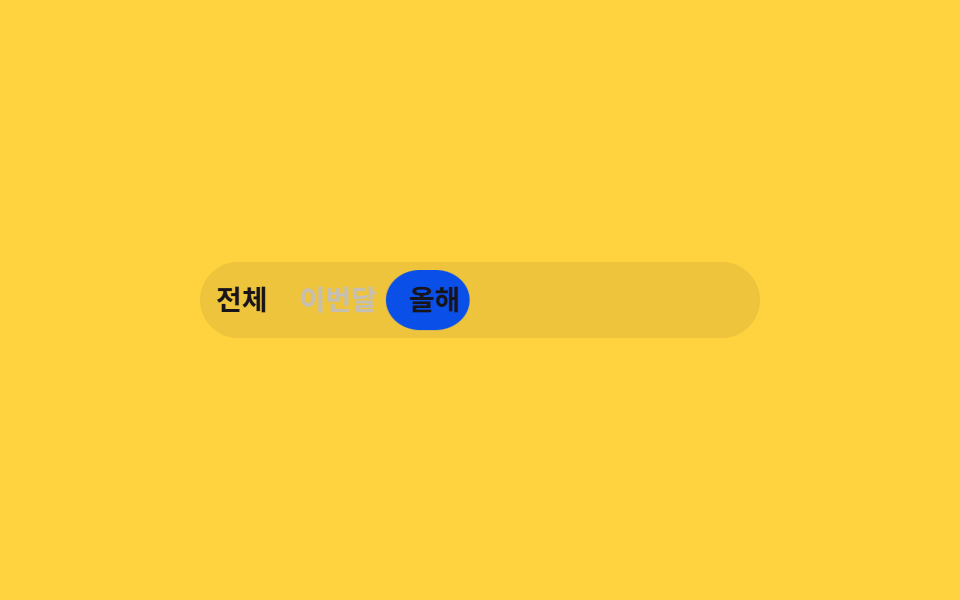 02 tab-menu-transition-pill-indicator
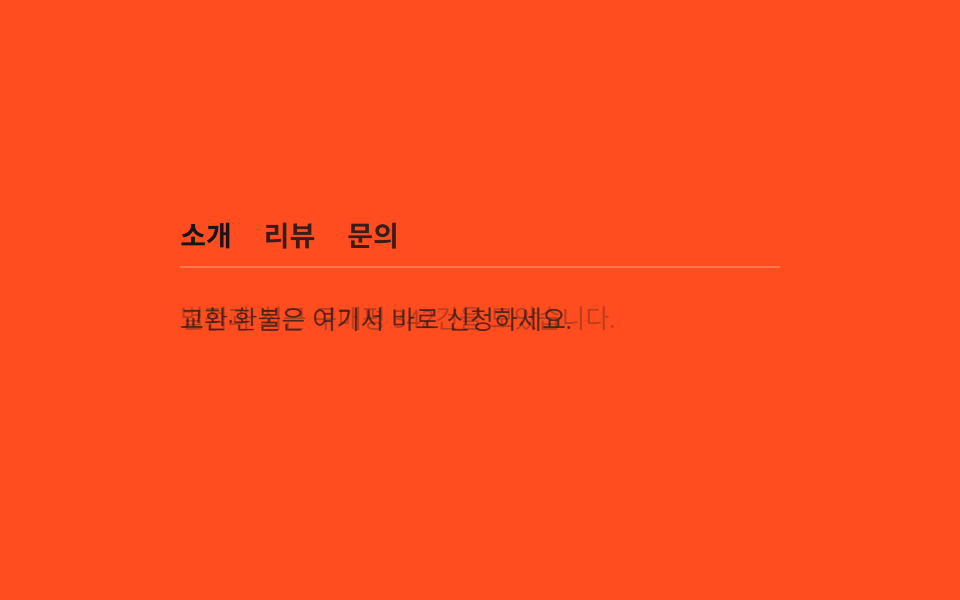 03 tab-menu-transition-fade-panel
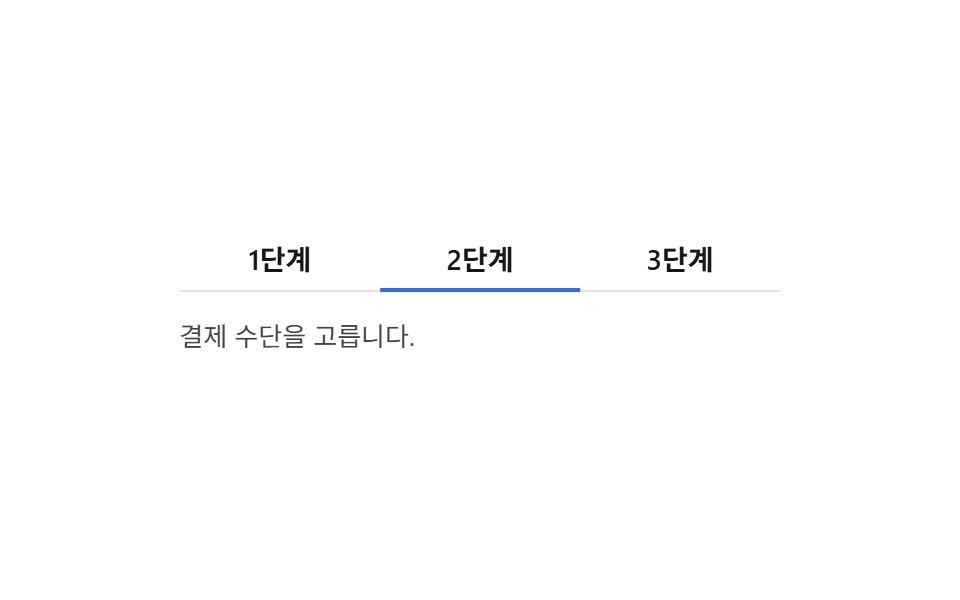 04 tab-menu-transition-slide-panel
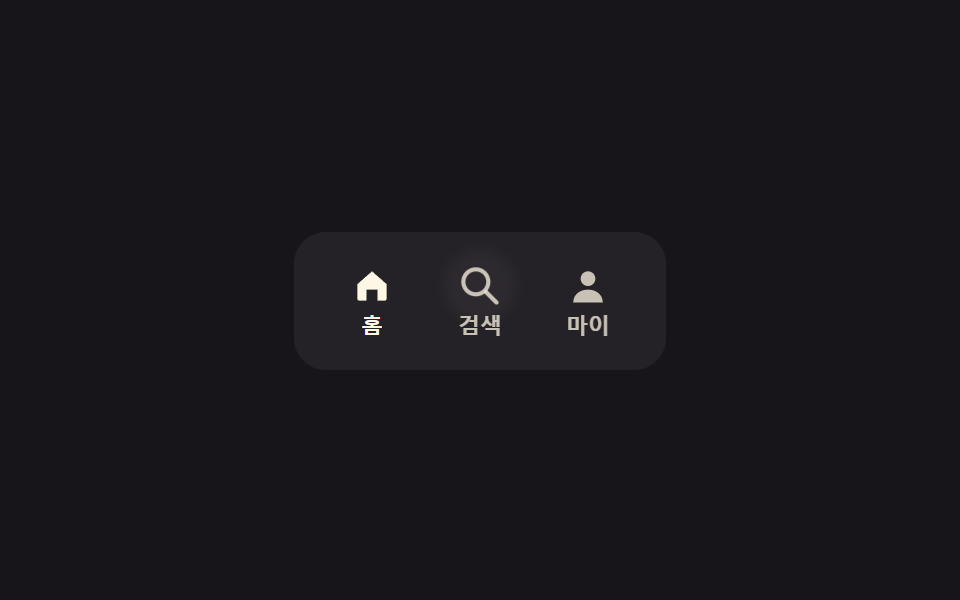 05 tab-menu-transition-icon-tabs
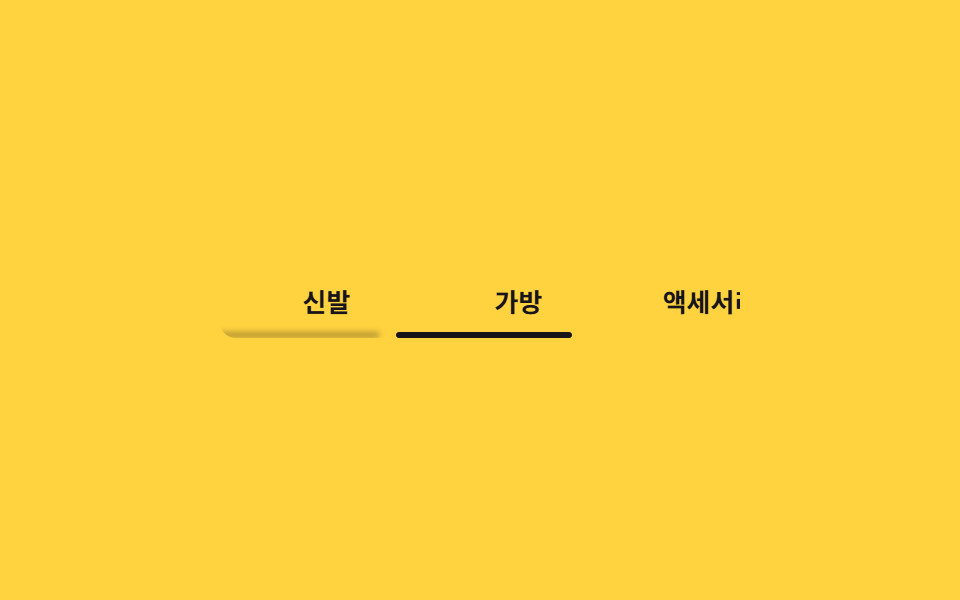 06 tab-menu-transition-scroll-tabs
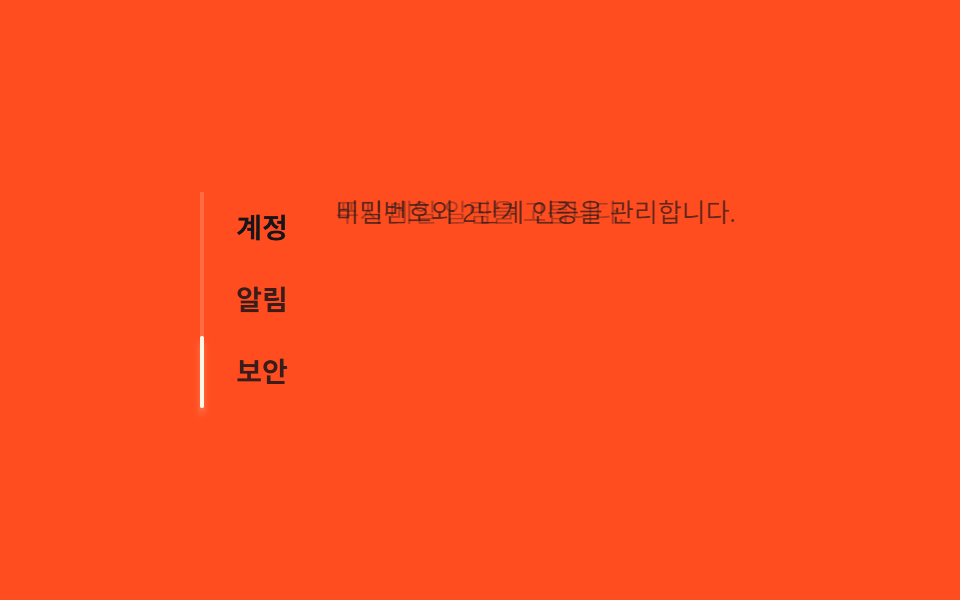 07 tab-menu-transition-vertical-tabs
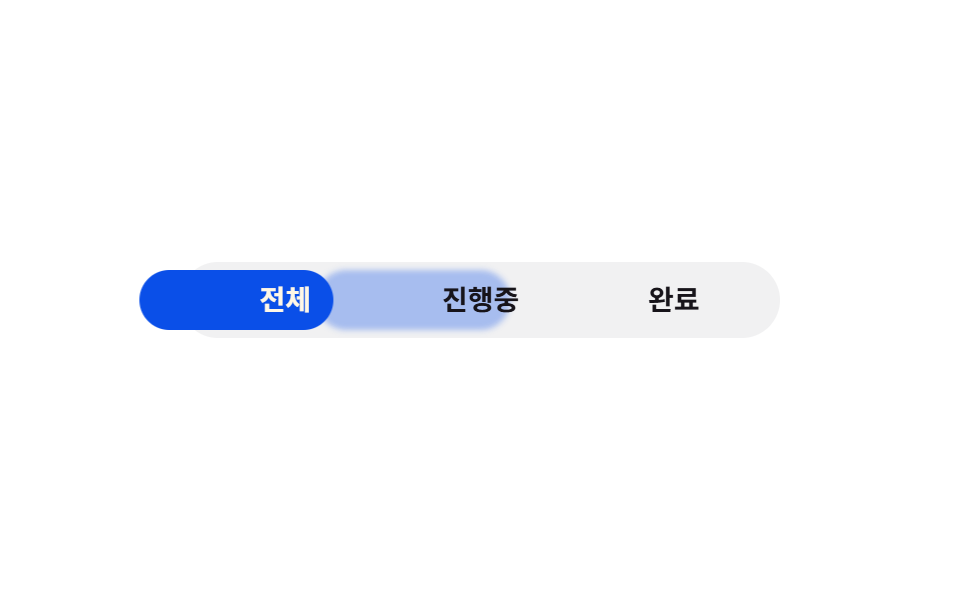 08 tab-menu-transition-bounce-tab
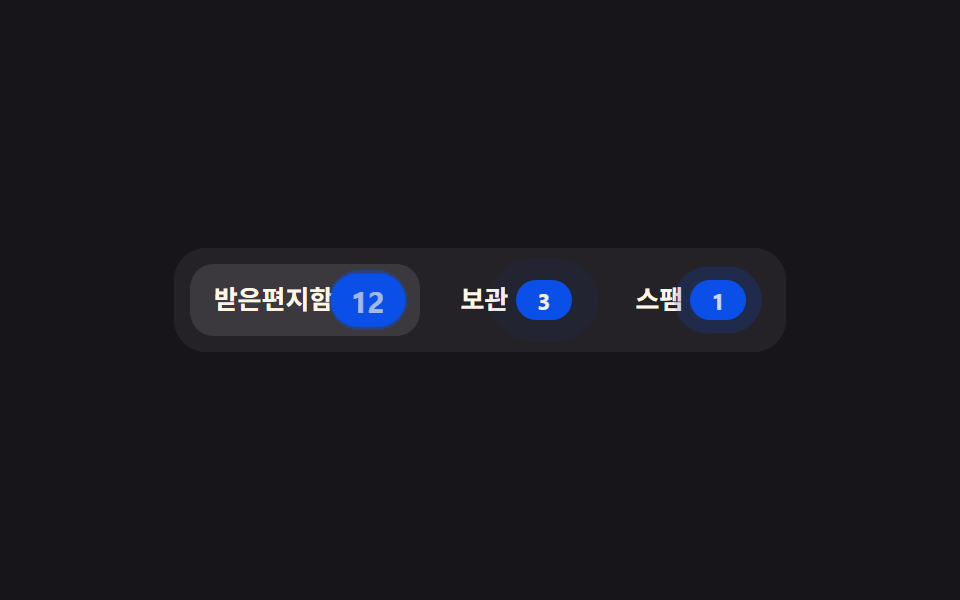 09 tab-menu-transition-count-badge
自動再生 · タイルを押すとその項目へ · すべて1つのzip
9個の「css タブ アニメーション」は人気順ではなく、タブが何を担うかで選ぶ順に並べています。インジケーターだけが動くもの(01〜02)から、パネルの中身まで一緒に変わるもの(03〜04)へ進み、そのあとはアクセシビリティツリーを自分で組む実務向けUI(05)とタブが横にはみ出す場合・縦に積み重なる場合(06〜07)、最後は装飾が要るもの(08〜09)という並びです。同じ切り替えを画面の横へ押し出せばサイドバードロワーになり、ページごと入れ替える規模まで広げればCSS画面切り替えアニメーションの領分になります。
01下線インジケーターのスライド
:checked兄弟結合子で動かす
タブ3つを<input type="radio">で作り、ラベル下の下線spanを各ラジオの:checked ~兄弟結合子で動かします。ネイティブのラジオグループはブラウザが標準で矢印キー移動に対応しているため、JSなしでもキーボードだけで切り替えられます。下線の後ろには同じ@keyframesを120ms遅れて走る::afterの残像を重ね、目標を少し行き過ぎてから戻る慣性まで付けてあります。
<main class="stage">
  <div class="us is-demo">
    <input type="radio" name="us-tab" id="us-1" class="us__radio" checked>
    <input type="radio" name="us-tab" id="us-2" class="us__radio">
    <input type="radio" name="us-tab" id="us-3" class="us__radio">
    <div class="us__nav">
      <label class="us__tab" for="us-1">概要</label>
      <label class="us__tab" for="us-2">分析</label>
      <label class="us__tab" for="us-3">設定</label>
      <span class="us__indicator" aria-hidden="true"></span>
    </div>
    <div class="us__panels">
      <p class="us__panel us__panel--1">本日の訪問者数と主要指標をひと目で確認できます。</p>
      <p class="us__panel us__panel--2">期間ごとの推移を表とグラフで比較します。</p>
      <p class="us__panel us__panel--3">通知とチーム権限をこのタブで管理します。</p>
    </div>
  </div>
</main>
@use "../../../../site/static/demo-tokens" as *;
// ── 변수 3개 ──────────────────────────────────────────
$duration: $dur-base; // 인디케이터가 미끄러지는 시간
$easing: $ease-spring; // 인디케이터 전환 이징 (실제 클릭)
$color: $subject-blue; // 인디케이터 색
@include stage($stage-ink);
.us { width: min(320px, 88vw); }
.us__radio { position: absolute; opacity: 0; pointer-events: none; }
.us__nav {
position: relative;
isolation: isolate; // ::after 트레일(z -1)이 인디케이터 뒤에만 그려지게 (2026-09-15 한 겹)
display: grid;
grid-template-columns: repeat(3, 1fr);
}
.us__tab {
padding: $sp-3 $sp-2;
text-align: center;
font-weight: 600;
font-size: clamp(13px, 3.6vw, 15px);
line-height: 1;
font-family: inherit;
color: rgba(255, 247, 230, .6);
cursor: pointer;
-webkit-tap-highlight-color: transparent;
}
.us__indicator {
position: absolute; left: 0; bottom: 0;
width: calc(100% / 3); height: 3px;
background: $color;
border-radius: $r-pill;
transform: translateX(0);
transition: transform $duration $easing;
}
// 한 겹(관성 오버슛 + 트레일): ::after 만 추가 — index.html·레이아웃 불변.
// 트레일은 인디케이터 자신이 아니라 .us__nav(고정 컨테이너)의 ::after 로 둔다 — 만약 인디케이터
// 자신의 ::after 로 두면 부모의 진행 중인 transform 위에 트레일 자신의 transform 이 겹쳐 더해져
// (중첩 transform 합성) 이동거리가 배로 튄다. nav 는 움직이지 않으므로 트레일만의 절대 좌표
// keyframes 가 그대로 유효하다. 정적(:checked) 전환에서는 .is-demo 스코프 밖이라 animation 이
// 전혀 안 걸려 opacity 0 그대로 안 보인다. 트레일 색은 $color 파생 rgba 만 쓴다.
.us__nav::after {
content: "";
position: absolute; left: 0; bottom: 0;
z-index: -1;
width: calc(100% / 3); height: 3px;
border-radius: $r-pill;
background: rgba($color, .35);
filter: blur(2px);
opacity: 0;
}
// ── 실제 동작: :checked 만으로 인디케이터가 옮겨간다 ──────────────
#us-1:checked ~ .us__nav .us__indicator { transform: translateX(0%); }
#us-2:checked ~ .us__nav .us__indicator { transform: translateX(100%); }
#us-3:checked ~ .us__nav .us__indicator { transform: translateX(200%); }
#us-1:checked ~ .us__nav label[for="us-1"],
#us-2:checked ~ .us__nav label[for="us-2"],
#us-3:checked ~ .us__nav label[for="us-3"] { color: $subject-cream; }
// 패널 세 개를 같은 grid 칸에 포개 두면 인디케이터와 함께 바뀌어도 자리가 안 흔들린다
.us__panels { position: relative; display: grid; margin-top: $sp-4; min-height: 40px; }
.us__panel {
grid-area: 1 / 1;
margin: 0;
color: rgba(255, 247, 230, .82);
font-weight: 400;
font-size: clamp(12px, 3.2vw, 13px);
line-height: 1.5;
font-family: inherit;
opacity: 0;
transition: opacity $duration $easing;
}
#us-1:checked ~ .us__panels .us__panel--1,
#us-2:checked ~ .us__panels .us__panel--2,
#us-3:checked ~ .us__panels .us__panel--3 { opacity: 1; }
// ── 데모 루프: 클릭 전까지 세 탭을 스스로 오간다 (인디케이터·패널이 같은 박자) ──────────────
// us-loop → us-loop-inertia: 33%/66% 도착 전에 살짝 지나쳤다가(108%/216%) 관성처럼 되돌아와 정착한다.
.us.is-demo .us__indicator { animation: us-loop-inertia $dur-loop $easing infinite; }
// 트레일은 인디케이터와 같은 이동을 120ms 늦게 따라오다 도착 뒤 옅어지며 사라진다.
.us.is-demo .us__nav::after { animation: us-trail-loop $dur-loop $easing infinite; animation-delay: 120ms; }
.us.is-demo .us__panel--1 { animation: us-panel-1 $dur-loop $easing infinite; }
.us.is-demo .us__panel--2 { animation: us-panel-2 $dur-loop $easing infinite; }
.us.is-demo .us__panel--3 { animation: us-panel-3 $dur-loop $easing infinite; }
@keyframes us-loop-inertia {
0%, 15% { transform: translateX(0%); }
30% { transform: translateX(108%); }
33%, 48% { transform: translateX(100%); }
63% { transform: translateX(216%); }
66%, 81% { transform: translateX(200%); }
100% { transform: translateX(0%); }
}
// 트레일 전용: 같은 이동 경로 + opacity 를 얹어 "따라오다 옅어지는" 잔상으로 읽히게 한다.
@keyframes us-trail-loop {
0%, 15% { transform: translateX(0%); opacity: 0; }
24% { opacity: .35; }
30% { transform: translateX(108%); opacity: .35; }
33%, 40% { transform: translateX(100%); opacity: .35; }
48% { transform: translateX(100%); opacity: 0; }
63% { transform: translateX(216%); opacity: .35; }
66%, 73% { transform: translateX(200%); opacity: .35; }
81% { transform: translateX(200%); opacity: 0; }
100% { transform: translateX(0%); opacity: 0; }
}
@keyframes us-panel-1 { 0%, 15% { opacity: 1; } 30%, 100% { opacity: 0; } }
@keyframes us-panel-2 { 0%, 30% { opacity: 0; } 45%, 63% { opacity: 1; } 78%, 100% { opacity: 0; } }
@keyframes us-panel-3 { 0%, 63% { opacity: 0; } 78%, 96% { opacity: 1; } 100% { opacity: 0; } }
// ── 접근성 ──────────────────────────────────────────
@media (prefers-reduced-motion: reduce) {
.us__indicator, .us__panel { transition: none; }
.us.is-demo .us__indicator,
.us.is-demo .us__nav::after,
.us.is-demo .us__panel--1,
.us.is-demo .us__panel--2,
.us.is-demo .us__panel--3 { animation: none !important; }
.us__nav::after { opacity: 0; } // 관성·트레일 한 겹은 reduced-motion 에서 완전히 꺼진다
}html, body {
margin: 0;
overflow: hidden;
}
.stage {
box-sizing: border-box;
min-height: 100vh;
display: grid;
place-items: center;
margin: 0;
background: #17141a;
font-family: -apple-system, "Segoe UI", "Noto Sans KR", sans-serif;
padding: clamp(8px, 4vw, 24px);
}
.us {
width: min(320px, 88vw);
}
.us__radio {
position: absolute;
opacity: 0;
pointer-events: none;
}
.us__nav {
position: relative;
isolation: isolate;
display: grid;
grid-template-columns: repeat(3, 1fr);
}
.us__tab {
padding: 12px 8px;
text-align: center;
font-weight: 600;
font-size: clamp(13px, 3.6vw, 15px);
line-height: 1;
font-family: inherit;
color: rgba(255, 247, 230, 0.6);
cursor: pointer;
-webkit-tap-highlight-color: transparent;
}
.us__indicator {
position: absolute;
left: 0;
bottom: 0;
width: 33.3333333333%;
height: 3px;
background: #2f6df6;
border-radius: 999px;
transform: translateX(0);
transition: transform 300ms cubic-bezier(0.2, 0.8, 0.2, 1);
}
.us__nav::after {
content: "";
position: absolute;
left: 0;
bottom: 0;
z-index: -1;
width: 33.3333333333%;
height: 3px;
border-radius: 999px;
background: rgba(47, 109, 246, 0.35);
filter: blur(2px);
opacity: 0;
}
#us-1:checked ~ .us__nav .us__indicator {
transform: translateX(0%);
}
#us-2:checked ~ .us__nav .us__indicator {
transform: translateX(100%);
}
#us-3:checked ~ .us__nav .us__indicator {
transform: translateX(200%);
}
#us-1:checked ~ .us__nav label[for=us-1],
#us-2:checked ~ .us__nav label[for=us-2],
#us-3:checked ~ .us__nav label[for=us-3] {
color: #fff7e6;
}
.us__panels {
position: relative;
display: grid;
margin-top: 16px;
min-height: 40px;
}
.us__panel {
grid-area: 1/1;
margin: 0;
color: rgba(255, 247, 230, 0.82);
font-weight: 400;
font-size: clamp(12px, 3.2vw, 13px);
line-height: 1.5;
font-family: inherit;
opacity: 0;
transition: opacity 300ms cubic-bezier(0.2, 0.8, 0.2, 1);
}
#us-1:checked ~ .us__panels .us__panel--1,
#us-2:checked ~ .us__panels .us__panel--2,
#us-3:checked ~ .us__panels .us__panel--3 {
opacity: 1;
}
.us.is-demo .us__indicator {
animation: us-loop-inertia 2s cubic-bezier(0.2, 0.8, 0.2, 1) infinite;
}
.us.is-demo .us__nav::after {
animation: us-trail-loop 2s cubic-bezier(0.2, 0.8, 0.2, 1) infinite;
animation-delay: 120ms;
}
.us.is-demo .us__panel--1 {
animation: us-panel-1 2s cubic-bezier(0.2, 0.8, 0.2, 1) infinite;
}
.us.is-demo .us__panel--2 {
animation: us-panel-2 2s cubic-bezier(0.2, 0.8, 0.2, 1) infinite;
}
.us.is-demo .us__panel--3 {
animation: us-panel-3 2s cubic-bezier(0.2, 0.8, 0.2, 1) infinite;
}
@keyframes us-loop-inertia {
0%, 15% {
transform: translateX(0%);
}
30% {
transform: translateX(108%);
}
33%, 48% {
transform: translateX(100%);
}
63% {
transform: translateX(216%);
}
66%, 81% {
transform: translateX(200%);
}
100% {
transform: translateX(0%);
}
}
@keyframes us-trail-loop {
0%, 15% {
transform: translateX(0%);
opacity: 0;
}
24% {
opacity: 0.35;
}
30% {
transform: translateX(108%);
opacity: 0.35;
}
33%, 40% {
transform: translateX(100%);
opacity: 0.35;
}
48% {
transform: translateX(100%);
opacity: 0;
}
63% {
transform: translateX(216%);
opacity: 0.35;
}
66%, 73% {
transform: translateX(200%);
opacity: 0.35;
}
81% {
transform: translateX(200%);
opacity: 0;
}
100% {
transform: translateX(0%);
opacity: 0;
}
}
@keyframes us-panel-1 {
0%, 15% {
opacity: 1;
}
30%, 100% {
opacity: 0;
}
}
@keyframes us-panel-2 {
0%, 30% {
opacity: 0;
}
45%, 63% {
opacity: 1;
}
78%, 100% {
opacity: 0;
}
}
@keyframes us-panel-3 {
0%, 63% {
opacity: 0;
}
78%, 96% {
opacity: 1;
}
100% {
opacity: 0;
}
}
@media (prefers-reduced-motion: reduce) {
.us__indicator, .us__panel {
transition: none;
}
.us.is-demo .us__indicator,
.us.is-demo .us__nav::after,
.us.is-demo .us__panel--1,
.us.is-demo .us__panel--2,
.us.is-demo .us__panel--3 {
animation: none !important;
}
.us__nav::after {
opacity: 0;
}
}// 이동은 :checked 만으로 이미 동작한다. 실제 클릭이 오면 데모 루프(.is-demo)만 뗀다.
document.querySelectorAll('.us__radio').forEach(function (r) {
r.addEventListener('pointerdown', function () { document.querySelector('.us').classList.remove('is-demo'); });
});import { useState } from "react";
import type { CSSProperties } from "react";
import styles from "./UnderlineSlide.module.scss";
const TABS = [
{ label: "개요", panel: "오늘 방문자와 핵심 지표를 한눈에 봅니다." },
{ label: "분석", panel: "기간별 추이를 표와 그래프로 비교합니다." },
{ label: "설정", panel: "알림과 팀 권한을 이 탭에서 관리합니다." },
];
export type UnderlineSlideProps = {
duration?: number;
easing?: string;
color?: string;
};
type Vars = CSSProperties & { "--duration"?: string; "--easing"?: string; "--color"?: string; "--i"?: number };
export default function UnderlineSlide({ duration = 300, easing = "cubic-bezier(.2,.8,.2,1)", color = "#2f6df6" }: UnderlineSlideProps) {
const [active, setActive] = useState(0);
const vars: Vars = { "--duration": `${duration}ms`, "--easing": easing, "--color": color, "--i": active };
return (
<div className={styles.us} style={vars}>
<div className={styles.nav} role="tablist">
{TABS.map((t, i) => (
<button key={t.label} type="button" role="tab" aria-selected={i === active}
className={styles.tab} onClick={() => setActive(i)}>
{t.label}
</button>
))}
<span className={styles.indicator} aria-hidden="true" />
</div>
<p className={styles.panel}>{TABS[active].panel}</p>
</div>
);
}01 · 下線インジケーターのスライド — 計測 累積面積 2.301% · 動いたフレーム 16/23GODRICH オリジナル · SCSS と React は zip に同梱 · パスワードを見る
矢印キーが標準で効く理由
.us__indicator {
  position: absolute; left: 0; bottom: 0;
  width: calc(100% / 3); height: 3px;
  transform: translateX(0);
  transition: transform $duration $easing;
}
#us-1:checked ~ .us__nav .us__indicator { transform: translateX(0%); }
#us-2:checked ~ .us__nav .us__indicator { transform: translateX(100%); }
#us-3:checked ~ .us__nav .us__indicator { transform: translateX(200%); }
02ピル背景の移動
錠剤形の背景が移動・変形する
「css タブ 切り替え デザイン」でよく見る形で、タブの背後にある錠剤形の背景が、選んだタブの位置までtranslateXとscaleXで移動・変形します。ラベルの文字数がそれぞれ違うため、幅はほかの項目と違って固定の定数で先に決めてあります。ピルの後ろにも01と同じ120ms遅延の::after残像が敷かれ、枠が入れ替わる瞬間に2枚が重なって見えるトレイルが生まれます。
<main class="stage">
  <div class="pi is-demo">
    <input type="radio" name="pi-tab" id="pi-1" class="pi__radio" checked>
    <input type="radio" name="pi-tab" id="pi-2" class="pi__radio">
    <input type="radio" name="pi-tab" id="pi-3" class="pi__radio">
    <div class="pi__nav">
      <span class="pi__pill" aria-hidden="true"></span>
      <label class="pi__tab" for="pi-1">すべて</label>
      <label class="pi__tab" for="pi-2">今月</label>
      <label class="pi__tab" for="pi-3">今年</label>
    </div>
  </div>
</main>
@use "../../../../site/static/demo-tokens" as *;
// ── 변수 3개 ──────────────────────────────────────────
$duration: $dur-quick; // 필이 옮겨가는 시간
$easing: $ease-pop; // 필 전환 이징 (실제 클릭)
$color: $subject-blue-deep; // 필 배경 색 — 잉크 글자가 4.03 으로 미달이라 짙은 파랑으로 (크림 글자 5.98:1)
@include stage($stage-yellow);
// 라벨 글자 수가 다르므로 폭·이동 거리를 항목마다 고정값으로 둔다
// (함정: 라벨을 바꾸면 이 값도 같이 바꿔야 한다 — 자동으로 안 맞다)
// 값은 짐작이 아니라 실측이다 (Playwright getBoundingClientRect, 480×300) — 짐작값(56/76/56)은
// .pi__tab 이 flex:1 1 0(균등분배)일 때만 우연히 비슷했고, flex:0 0 auto(내용 폭)로 고치니 실제 폭은
// 37/52/37 이었다 (사용자 2026-09-10 스크린샷 "필이 딴 데 걸림" 지적, BD19)
$w1: 37px; $w2: 52px; $w3: 37px;
.pi { width: min(280px, 84vw); }
.pi__radio { position: absolute; opacity: 0; pointer-events: none; }
.pi__nav {
position: relative;
isolation: isolate; // ::after 트레일(z -1)이 필 뒤에만 그려지게 (2026-09-15 한 겹)
display: flex;
gap: $sp-2;
padding: $sp-1;
background: rgba(23, 20, 26, .08);
border-radius: $r-pill;
}
// 글자색의 기본은 잉크다 — 무대(노랑) 위에서 10.8:1. 필 위에 온(:checked) 글자만 크림(5.98:1)으로 바뀐다.
// 데모 루프에서는 아래 pi-ink-* 키프레임이 필과 같은 박자로 글자색을 옮긴다 — 필이 떠난 자리의 크림 글자가 노란 무대 위에서 사라지는 일이 없다
.pi__tab {
position: relative; z-index: 1;
flex: 0 0 auto; // 내용 폭 — 균등분배(1 1 0)면 아래 필 지오메트리 상수와 어긋난다 (BD19)
text-align: center;
padding: $sp-2 $sp-1;
font-weight: 600;
font-size: clamp(12px, 3.4vw, 14px);
line-height: 1;
font-family: inherit;
color: $subject-ink;
cursor: pointer;
-webkit-tap-highlight-color: transparent;
}
.pi__pill {
position: absolute; top: $sp-1; left: $sp-1; bottom: $sp-1;
width: $w1;
border-radius: $r-pill;
background: $color;
transform: translateX(0) scaleX(1);
transform-origin: left center; // 규칙8: 좌변 기준 좌표·배율 계산
transition: transform $duration $easing;
}
// 한 겹(관성+트레일)은 ::after 만 추가 — index.html·레이아웃 불변. 트레일은 필 자신이 아니라
// .pi__nav(고정 컨테이너)의 ::after 로 둔다 — 필 자신의 ::after 로 두면 부모의 진행 중인
// transform 위에 트레일 자신의 transform 이 겹쳐 더해져(중첩 transform 합성) 이동거리·스케일이
// 배로 튄다. nav 는 움직이지 않으므로 트레일만의 절대 좌표 keyframes 가 그대로 유효하다.
// 정적(:checked) 전환에선 .is-demo 스코프 밖이라 animation 이 안 걸려 opacity 0 그대로 안 보인다.
.pi__nav::after {
content: "";
position: absolute; top: $sp-1; left: $sp-1; bottom: $sp-1;
z-index: -1;
width: $w1;
border-radius: $r-pill;
background: rgba($color, .3);
filter: blur(2px);
transform: translateX(0) scaleX(1);
transform-origin: left center;
opacity: 0;
}
// scaleX 비율은 컴파일 시점 상수로 미리 계산한다 (calc() 안에서 길이÷길이는 CSS 스펙상 무효라 런타임 계산 불가)
$scale2: 1.405; // #{$w2} / #{$w1}
$scale3: 1; // #{$w3} / #{$w1}
// ── 실제 동작: :checked 만으로 필이 이동·변형된다 ──────────────
#pi-1:checked ~ .pi__nav .pi__pill { transform: translateX(0) scaleX(1); }
#pi-2:checked ~ .pi__nav .pi__pill { transform: translateX(calc(#{$w1} + #{$sp-2})) scaleX(#{$scale2}); }
#pi-3:checked ~ .pi__nav .pi__pill { transform: translateX(calc(#{$w1} + #{$w2} + #{$sp-2} * 2)) scaleX(#{$scale3}); }
// 필 위에 온 글자만 크림 — 잉크를 그대로 두면 짙은 파랑 위 2.87:1 이다
#pi-1:checked ~ .pi__nav label[for="pi-1"],
#pi-2:checked ~ .pi__nav label[for="pi-2"],
#pi-3:checked ~ .pi__nav label[for="pi-3"] { color: $subject-cream; }
// ── 데모 루프: 클릭 전까지 세 필터를 스스로 오간다 ──────────────
.pi.is-demo .pi__pill { animation: pi-loop $dur-loop $easing infinite; }
.pi.is-demo .pi__nav::after { animation: pi-trail-loop $dur-loop $easing infinite; animation-delay: 120ms; }
// 글자색도 필과 같은 박자(0·15/33·48/66·81/100%)로 — 크림 글자가 필 없는 자리에 남지 않게
.pi.is-demo .pi__nav label[for="pi-1"] { animation: pi-ink-1 $dur-loop linear infinite; }
.pi.is-demo .pi__nav label[for="pi-2"] { animation: pi-ink-2 $dur-loop linear infinite; }
.pi.is-demo .pi__nav label[for="pi-3"] { animation: pi-ink-3 $dur-loop linear infinite; }
@keyframes pi-ink-1 { 0%, 15% { color: $subject-cream; } 23%, 87% { color: $subject-ink; } 95%, 100% { color: $subject-cream; } }
@keyframes pi-ink-2 { 0%, 25% { color: $subject-ink; } 33%, 48% { color: $subject-cream; } 56%, 100% { color: $subject-ink; } }
@keyframes pi-ink-3 { 0%, 58% { color: $subject-ink; } 66%, 81% { color: $subject-cream; } 89%, 100% { color: $subject-ink; } }
// pi-loop 오버슛 보강 — 각 도착 전 지점에서 scaleX 는 목표값을 미리 유지한 채 translateX 만
// 5px 살짝 지나쳤다가(관성) 정착한다.
@keyframes pi-loop {
0%, 15% { transform: translateX(0) scaleX(1); }
30% { transform: translateX(calc(#{$w1} + #{$sp-2} + 5px)) scaleX(#{$scale2}); }
33%, 48% { transform: translateX(calc(#{$w1} + #{$sp-2})) scaleX(#{$scale2}); }
63% { transform: translateX(calc(#{$w1} + #{$w2} + #{$sp-2} * 2 + 5px)) scaleX(#{$scale3}); }
66%, 81% { transform: translateX(calc(#{$w1} + #{$w2} + #{$sp-2} * 2)) scaleX(#{$scale3}); }
96% { transform: translateX(-5px) scaleX(1); }
100% { transform: translateX(0) scaleX(1); }
}
// 트레일 전용 — 같은 모양(같은 scaleX)을 120ms 늦게 쫓아가며 옅어진다
@keyframes pi-trail-loop {
0%, 15% { transform: translateX(0) scaleX(1); opacity: 0; }
24% { opacity: .3; }
30% { transform: translateX(calc(#{$w1} + #{$sp-2} + 5px)) scaleX(#{$scale2}); opacity: .3; }
33%, 40% { transform: translateX(calc(#{$w1} + #{$sp-2})) scaleX(#{$scale2}); opacity: .3; }
48% { transform: translateX(calc(#{$w1} + #{$sp-2})) scaleX(#{$scale2}); opacity: 0; }
63% { transform: translateX(calc(#{$w1} + #{$w2} + #{$sp-2} * 2 + 5px)) scaleX(#{$scale3}); opacity: .3; }
66%, 73% { transform: translateX(calc(#{$w1} + #{$w2} + #{$sp-2} * 2)) scaleX(#{$scale3}); opacity: .3; }
81% { transform: translateX(calc(#{$w1} + #{$w2} + #{$sp-2} * 2)) scaleX(#{$scale3}); opacity: 0; }
100% { transform: translateX(0) scaleX(1); opacity: 0; }
}
@media (prefers-reduced-motion: reduce) {
.pi__pill { transition: none; }
.pi.is-demo .pi__pill,
.pi.is-demo .pi__nav::after { animation: none !important; }
.pi.is-demo .pi__nav label { animation: none !important; } // 색 애니메이션도 끈다 — 글자색은 :checked(크림)·기본(잉크) 로만
.pi__nav::after { opacity: 0; } // 관성·트레일 한 겹은 reduced-motion 에서 완전히 꺼진다
}html, body {
margin: 0;
overflow: hidden;
}
.stage {
box-sizing: border-box;
min-height: 100vh;
display: grid;
place-items: center;
margin: 0;
background: #ffd23f;
font-family: -apple-system, "Segoe UI", "Noto Sans KR", sans-serif;
padding: clamp(8px, 4vw, 24px);
}
.pi {
width: min(280px, 84vw);
}
.pi__radio {
position: absolute;
opacity: 0;
pointer-events: none;
}
.pi__nav {
position: relative;
isolation: isolate;
display: flex;
gap: 8px;
padding: 4px;
background: rgba(23, 20, 26, 0.08);
border-radius: 999px;
}
.pi__tab {
position: relative;
z-index: 1;
flex: 0 0 auto;
text-align: center;
padding: 8px 4px;
font-weight: 600;
font-size: clamp(12px, 3.4vw, 14px);
line-height: 1;
font-family: inherit;
color: #17141a;
cursor: pointer;
-webkit-tap-highlight-color: transparent;
}
.pi__pill {
position: absolute;
top: 4px;
left: 4px;
bottom: 4px;
width: 37px;
border-radius: 999px;
background: #0a4fe8;
transform: translateX(0) scaleX(1);
transform-origin: left center;
transition: transform 220ms cubic-bezier(0.2, 1.4, 0.4, 1);
}
.pi__nav::after {
content: "";
position: absolute;
top: 4px;
left: 4px;
bottom: 4px;
z-index: -1;
width: 37px;
border-radius: 999px;
background: rgba(10, 79, 232, 0.3);
filter: blur(2px);
transform: translateX(0) scaleX(1);
transform-origin: left center;
opacity: 0;
}
#pi-1:checked ~ .pi__nav .pi__pill {
transform: translateX(0) scaleX(1);
}
#pi-2:checked ~ .pi__nav .pi__pill {
transform: translateX(calc(37px + 8px)) scaleX(1.405);
}
#pi-3:checked ~ .pi__nav .pi__pill {
transform: translateX(calc(37px + 52px + 8px * 2)) scaleX(1);
}
#pi-1:checked ~ .pi__nav label[for=pi-1],
#pi-2:checked ~ .pi__nav label[for=pi-2],
#pi-3:checked ~ .pi__nav label[for=pi-3] {
color: #fff7e6;
}
.pi.is-demo .pi__pill {
animation: pi-loop 2s cubic-bezier(0.2, 1.4, 0.4, 1) infinite;
}
.pi.is-demo .pi__nav::after {
animation: pi-trail-loop 2s cubic-bezier(0.2, 1.4, 0.4, 1) infinite;
animation-delay: 120ms;
}
.pi.is-demo .pi__nav label[for=pi-1] {
animation: pi-ink-1 2s linear infinite;
}
.pi.is-demo .pi__nav label[for=pi-2] {
animation: pi-ink-2 2s linear infinite;
}
.pi.is-demo .pi__nav label[for=pi-3] {
animation: pi-ink-3 2s linear infinite;
}
@keyframes pi-ink-1 {
0%, 15% {
color: #fff7e6;
}
23%, 87% {
color: #17141a;
}
95%, 100% {
color: #fff7e6;
}
}
@keyframes pi-ink-2 {
0%, 25% {
color: #17141a;
}
33%, 48% {
color: #fff7e6;
}
56%, 100% {
color: #17141a;
}
}
@keyframes pi-ink-3 {
0%, 58% {
color: #17141a;
}
66%, 81% {
color: #fff7e6;
}
89%, 100% {
color: #17141a;
}
}
@keyframes pi-loop {
0%, 15% {
transform: translateX(0) scaleX(1);
}
30% {
transform: translateX(calc(37px + 8px + 5px)) scaleX(1.405);
}
33%, 48% {
transform: translateX(calc(37px + 8px)) scaleX(1.405);
}
63% {
transform: translateX(calc(37px + 52px + 8px * 2 + 5px)) scaleX(1);
}
66%, 81% {
transform: translateX(calc(37px + 52px + 8px * 2)) scaleX(1);
}
96% {
transform: translateX(-5px) scaleX(1);
}
100% {
transform: translateX(0) scaleX(1);
}
}
@keyframes pi-trail-loop {
0%, 15% {
transform: translateX(0) scaleX(1);
opacity: 0;
}
24% {
opacity: 0.3;
}
30% {
transform: translateX(calc(37px + 8px + 5px)) scaleX(1.405);
opacity: 0.3;
}
33%, 40% {
transform: translateX(calc(37px + 8px)) scaleX(1.405);
opacity: 0.3;
}
48% {
transform: translateX(calc(37px + 8px)) scaleX(1.405);
opacity: 0;
}
63% {
transform: translateX(calc(37px + 52px + 8px * 2 + 5px)) scaleX(1);
opacity: 0.3;
}
66%, 73% {
transform: translateX(calc(37px + 52px + 8px * 2)) scaleX(1);
opacity: 0.3;
}
81% {
transform: translateX(calc(37px + 52px + 8px * 2)) scaleX(1);
opacity: 0;
}
100% {
transform: translateX(0) scaleX(1);
opacity: 0;
}
}
@media (prefers-reduced-motion: reduce) {
.pi__pill {
transition: none;
}
.pi.is-demo .pi__pill,
.pi.is-demo .pi__nav::after {
animation: none !important;
}
.pi.is-demo .pi__nav label {
animation: none !important;
}
.pi__nav::after {
opacity: 0;
}
}// 필 배경은 :checked 만으로 옮겨간다. 실제 클릭이 오면 데모 루프(.is-demo)만 뗀다.
document.querySelectorAll('.pi__radio').forEach(function (r) {
r.addEventListener('pointerdown', function () { document.querySelector('.pi').classList.remove('is-demo'); });
});import { useState } from "react";
import type { CSSProperties } from "react";
import styles from "./PillIndicator.module.scss";
const TABS = ["전체", "이번달", "올해"];
const WIDTHS = [56, 76, 56]; // 라벨 글자 수가 다르므로 폭을 고정값으로 둔다 (함정: 라벨을 바꾸면 값도 같이 바꿔야 한다)
const GAP = 8;
export type PillIndicatorProps = {
duration?: number;
easing?: string;
color?: string;
};
type Vars = CSSProperties & { "--duration"?: string; "--easing"?: string; "--color"?: string; "--x"?: string; "--scale"?: number };
export default function PillIndicator({ duration = 220, easing = "cubic-bezier(.2,1.4,.4,1)", color = "#0a4fe8" }: PillIndicatorProps) {
const [active, setActive] = useState(0);
const x = WIDTHS.slice(0, active).reduce((a, w) => a + w + GAP, 0);
const vars: Vars = { "--duration": `${duration}ms`, "--easing": easing, "--color": color, "--x": `${x}px`, "--scale": WIDTHS[active] / WIDTHS[0] };
return (
<div className={styles.pi} style={vars}>
<div className={styles.nav} role="tablist">
<span className={styles.pill} aria-hidden="true" />
{TABS.map((t, i) => (
<button key={t} type="button" role="tab" aria-selected={i === active}
className={styles.tab} onClick={() => setActive(i)}>
{t}
</button>
))}
</div>
</div>
);
}02 · ピル背景の移動 — 計測 累積面積 3.272% · 動いたフレーム 17/23GODRICH オリジナル · SCSS と React は zip に同梱 · パスワードを見る
幅を定数で先に決めた理由
.pi__pill {
  position: absolute; top: $sp-1; left: $sp-1; bottom: $sp-1;
  width: $w1;
  transform: translateX(0) scaleX(1);
  transform-origin: left center;
  transition: transform $duration $easing;
}
// scaleXの比率はコンパイル時点の数値で先に計算しておく
// (calc()の中で長さ÷長さは仕様上できず、実行時には計算できない)
#pi-2:checked ~ .pi__nav .pi__pill {
  transform: translateX(calc(#{$w1} + #{$sp-2})) scaleX(1.357);
}
03パネルフェード
「タブ 切り替え css のみ」で足りる場面
パネル3枚を同じgridセルに重ねておき、選んだタブの:checked状態だけでopacityを0から1へ切り替えます。実装そのものにJSは要らず、デモのループ用アニメーションを止める3行だけが別に付いています。デモループでは現れるパネルが8px下から浮上して2px行き過ぎてから定位置に収まる慣性曲線を描き、フェードにも進行方向が残ります。
<main class="stage">
  <div class="fp is-demo">
    <input type="radio" name="fp-tab" id="fp-1" class="fp__radio" checked>
    <input type="radio" name="fp-tab" id="fp-2" class="fp__radio">
    <input type="radio" name="fp-tab" id="fp-3" class="fp__radio">
    <div class="fp__nav">
      <label class="fp__tab" for="fp-1">紹介</label>
      <label class="fp__tab" for="fp-2">レビュー</label>
      <label class="fp__tab" for="fp-3">問い合わせ</label>
    </div>
    <div class="fp__panels">
      <p class="fp__panel fp__panel--1">素材・サイズ・洗濯方法をまとめました。</p>
      <p class="fp__panel fp__panel--2">評価と直近のレビュー342件をまとめました。</p>
      <p class="fp__panel fp__panel--3">交換・返品はここからすぐ申請できます。</p>
    </div>
  </div>
</main>
@use "../../../../site/static/demo-tokens" as *;
// ── 변수 3개 ──────────────────────────────────────────
$duration: $dur-quick; // 패널이 겹쳐 페이드되는 시간
$easing: $ease-out; // 패널 페이드 이징 (실제 클릭)
$color: $subject-ink; // 활성 탭 글자색 (주황 면 위 5.50:1 — 크림은 3.11 로 미달)
@include stage($stage-orange);
.fp { width: min(300px, 86vw); }
.fp__radio { position: absolute; opacity: 0; pointer-events: none; }
.fp__nav {
position: relative;
display: flex;
gap: $sp-4;
border-bottom: 1px solid rgba(255, 247, 230, .25);
padding-bottom: $sp-2;
}
.fp__tab {
font-weight: 600;
font-size: clamp(12px, 3.4vw, 14px);
line-height: 1;
font-family: inherit;
color: rgba($subject-ink, .85); // 비활성 탭 — 주황 면 위 4.62:1 (.72 는 3.76 으로 미달)
cursor: pointer;
-webkit-tap-highlight-color: transparent;
}
#fp-1:checked ~ .fp__nav label[for="fp-1"],
#fp-2:checked ~ .fp__nav label[for="fp-2"],
#fp-3:checked ~ .fp__nav label[for="fp-3"] { color: $color; }
// 세 패널을 같은 grid 칸에 포개 두면 자리가 안 흔들린다
.fp__panels { position: relative; display: grid; margin-top: $sp-4; min-height: 40px; }
.fp__panel {
grid-area: 1 / 1;
margin: 0;
color: $subject-ink; // 패널 본문 — 5.50:1
font-weight: 400;
font-size: clamp(12px, 3.2vw, 13px);
line-height: 1.5;
font-family: inherit;
opacity: 0;
pointer-events: none;
transition: opacity $duration $easing;
}
#fp-1:checked ~ .fp__panels .fp__panel--1,
#fp-2:checked ~ .fp__panels .fp__panel--2,
#fp-3:checked ~ .fp__panels .fp__panel--3 { opacity: 1; pointer-events: auto; }
// ── 데모 루프: 클릭 전까지 세 패널을 스스로 오간다 ──────────────
// 한 겹(관성) — 밑줄이 없는 이 항목은 패널 전환에 관성을 얹는다: 등장 패널은 8px 아래에서
// 올라와 -2px 살짝 지나쳤다가(오버슛) 0 에 정착, 사라지는 패널은 반대로 2px 위로 흐르며 fade.
// 정적(:checked) 전환 경로는 opacity 만인 원본 그대로 — 관성은 -inertia 루프 키프레임 안에서만.
.fp.is-demo .fp__panel--1 { animation: fp-loop-1-inertia $dur-loop $easing infinite; }
.fp.is-demo .fp__panel--2 { animation: fp-loop-2-inertia $dur-loop $easing infinite; }
.fp.is-demo .fp__panel--3 { animation: fp-loop-3-inertia $dur-loop $easing infinite; }
@keyframes fp-loop-1-inertia {
0%, 15% { opacity: 1; transform: translateY(0); }
22% { transform: translateY(-1px); }
30%, 100% { opacity: 0; transform: translateY(-2px); }
}
@keyframes fp-loop-2-inertia {
0%, 30% { opacity: 0; transform: translateY(8px); }
42% { transform: translateY(-2px); }
45%, 63% { opacity: 1; transform: translateY(0); }
70% { transform: translateY(-1px); }
78%, 100% { opacity: 0; transform: translateY(-2px); }
}
@keyframes fp-loop-3-inertia {
0%, 63% { opacity: 0; transform: translateY(8px); }
75% { transform: translateY(-2px); }
78%, 96% { opacity: 1; transform: translateY(0); }
98% { transform: translateY(-1px); }
100% { opacity: 0; transform: translateY(-2px); }
}
@media (prefers-reduced-motion: reduce) {
.fp__panel { transition: none; }
.fp.is-demo .fp__panel--1,
.fp.is-demo .fp__panel--2,
.fp.is-demo .fp__panel--3 { animation: none !important; }
}html, body {
margin: 0;
overflow: hidden;
}
.stage {
box-sizing: border-box;
min-height: 100vh;
display: grid;
place-items: center;
margin: 0;
background: #ff4d1f;
font-family: -apple-system, "Segoe UI", "Noto Sans KR", sans-serif;
padding: clamp(8px, 4vw, 24px);
}
.fp {
width: min(300px, 86vw);
}
.fp__radio {
position: absolute;
opacity: 0;
pointer-events: none;
}
.fp__nav {
position: relative;
display: flex;
gap: 16px;
border-bottom: 1px solid rgba(255, 247, 230, 0.25);
padding-bottom: 8px;
}
.fp__tab {
font-weight: 600;
font-size: clamp(12px, 3.4vw, 14px);
line-height: 1;
font-family: inherit;
color: rgba(23, 20, 26, 0.85);
cursor: pointer;
-webkit-tap-highlight-color: transparent;
}
#fp-1:checked ~ .fp__nav label[for=fp-1],
#fp-2:checked ~ .fp__nav label[for=fp-2],
#fp-3:checked ~ .fp__nav label[for=fp-3] {
color: #17141a;
}
.fp__panels {
position: relative;
display: grid;
margin-top: 16px;
min-height: 40px;
}
.fp__panel {
grid-area: 1/1;
margin: 0;
color: #17141a;
font-weight: 400;
font-size: clamp(12px, 3.2vw, 13px);
line-height: 1.5;
font-family: inherit;
opacity: 0;
pointer-events: none;
transition: opacity 220ms ease-out;
}
#fp-1:checked ~ .fp__panels .fp__panel--1,
#fp-2:checked ~ .fp__panels .fp__panel--2,
#fp-3:checked ~ .fp__panels .fp__panel--3 {
opacity: 1;
pointer-events: auto;
}
.fp.is-demo .fp__panel--1 {
animation: fp-loop-1-inertia 2s ease-out infinite;
}
.fp.is-demo .fp__panel--2 {
animation: fp-loop-2-inertia 2s ease-out infinite;
}
.fp.is-demo .fp__panel--3 {
animation: fp-loop-3-inertia 2s ease-out infinite;
}
@keyframes fp-loop-1-inertia {
0%, 15% {
opacity: 1;
transform: translateY(0);
}
22% {
transform: translateY(-1px);
}
30%, 100% {
opacity: 0;
transform: translateY(-2px);
}
}
@keyframes fp-loop-2-inertia {
0%, 30% {
opacity: 0;
transform: translateY(8px);
}
42% {
transform: translateY(-2px);
}
45%, 63% {
opacity: 1;
transform: translateY(0);
}
70% {
transform: translateY(-1px);
}
78%, 100% {
opacity: 0;
transform: translateY(-2px);
}
}
@keyframes fp-loop-3-inertia {
0%, 63% {
opacity: 0;
transform: translateY(8px);
}
75% {
transform: translateY(-2px);
}
78%, 96% {
opacity: 1;
transform: translateY(0);
}
98% {
transform: translateY(-1px);
}
100% {
opacity: 0;
transform: translateY(-2px);
}
}
@media (prefers-reduced-motion: reduce) {
.fp__panel {
transition: none;
}
.fp.is-demo .fp__panel--1,
.fp.is-demo .fp__panel--2,
.fp.is-demo .fp__panel--3 {
animation: none !important;
}
}// 페이드는 :checked 만으로 이미 동작한다. 실제 클릭이 오면 데모 루프(.is-demo)만 뗀다.
document.querySelectorAll('.fp__radio').forEach(function (r) {
r.addEventListener('pointerdown', function () { document.querySelector('.fp').classList.remove('is-demo'); });
});import { useState } from "react";
import type { CSSProperties } from "react";
import styles from "./FadePanel.module.scss";
const TABS = [
{ label: "소개", panel: "소재·사이즈·세탁법을 정리했습니다." },
{ label: "리뷰", panel: "별점과 최근 구매평 342건을 모았습니다." },
{ label: "문의", panel: "교환·환불은 여기서 바로 신청하세요." },
];
export type FadePanelProps = {
duration?: number;
easing?: string;
color?: string;
};
type Vars = CSSProperties & { "--duration"?: string; "--easing"?: string; "--color"?: string };
export default function FadePanel({ duration = 220, easing = "ease-out", color = "#17141a" }: FadePanelProps) { // 주황 무대 위 활성 탭 글자 — 크림은 3.11 로 미달
const [active, setActive] = useState(0);
const vars: Vars = { "--duration": `${duration}ms`, "--easing": easing, "--color": color };
return (
<div className={styles.fp} style={vars}>
<div className={styles.nav} role="tablist">
{TABS.map((t, i) => (
<button key={t.label} type="button" role="tab" aria-selected={i === active}
className={styles.tab} onClick={() => setActive(i)}>
{t.label}
</button>
))}
</div>
<div className={styles.panels}>
{TABS.map((t, i) => (
<p key={t.label} className={styles.panel} style={{ opacity: i === active ? 1 : 0 }} aria-hidden={i !== active}>
{t.panel}
</p>
))}
</div>
</div>
);
}03 · パネルフェード — 計測 累積面積 2.14% · 動いたフレーム 12/23GODRICH オリジナル · SCSS と React は zip に同梱 · パスワードを見る
デモループを止める3行
.fp__panel {
  grid-area: 1 / 1;
  opacity: 0;
  pointer-events: none;
  transition: opacity $duration $easing;
}
#fp-1:checked ~ .fp__panels .fp__panel--1,
#fp-2:checked ~ .fp__panels .fp__panel--2,
#fp-3:checked ~ .fp__panels .fp__panel--3 { opacity: 1; pointer-events: auto; }
04パネルスライド
トラックごと押し出す
パネル3枚を横に並べたトラックごとtranslateX(-33.333%×n)で押し出し、選んだタブのパネルだけを表示枠に収めます。タブ下の下線インジケーターも同じ:checkedで動くうえ、デモループでは同じ@keyframesの拍子をトラックと共有していて、自動再生中もずれないようにしてあります。トラックは原本のまま残し、下線にだけ遅延残像を重ねたため、重いトラックに対して軽い下線がわずかに遅れて追いつく慣性の差が出ています。
<main class="stage">
  <div class="sp is-demo">
    <input type="radio" name="sp-tab" id="sp-1" class="sp__radio" checked>
    <input type="radio" name="sp-tab" id="sp-2" class="sp__radio">
    <input type="radio" name="sp-tab" id="sp-3" class="sp__radio">
    <div class="sp__nav">
      <label class="sp__tab" for="sp-1">ステップ1</label>
      <label class="sp__tab" for="sp-2">ステップ2</label>
      <label class="sp__tab" for="sp-3">ステップ3</label>
      <span class="sp__indicator" aria-hidden="true"></span>
    </div>
    <div class="sp__viewport">
      <div class="sp__track">
        <p class="sp__panel">配送先を入力します。</p>
        <p class="sp__panel">支払い方法を選びます。</p>
        <p class="sp__panel">注文内容を確認して完了します。</p>
      </div>
    </div>
  </div>
</main>
@use "../../../../site/static/demo-tokens" as *;
// ── 변수 3개 ──────────────────────────────────────────
$duration: $dur-base; // 패널 트랙이 밀리는 시간
$easing: $ease-out; // 트랙·밑줄 공용 이징 (트랙은 이 한 겹에서 건드리지 않는다)
$color: $subject-blue; // 활성 탭 밑줄 색
@include stage($stage-paper);
.sp { width: min(300px, 86vw); }
.sp__radio { position: absolute; opacity: 0; pointer-events: none; }
.sp__nav {
position: relative;
isolation: isolate; // ::after 트레일(z -1)이 인디케이터 뒤에만 그려지게 (2026-09-15 한 겹)
display: grid;
grid-template-columns: repeat(3, 1fr);
margin-bottom: $sp-3;
border-bottom: 1px solid rgba(23, 20, 26, .12);
}
.sp__tab {
padding-bottom: $sp-2;
text-align: center;
font-weight: 600;
font-size: clamp(12px, 3.4vw, 14px);
line-height: 1;
font-family: inherit;
color: $subject-ink;
cursor: pointer;
-webkit-tap-highlight-color: transparent;
}
// 탭 셋 아래 밑줄 하나가 옮겨간다 — 트랙과 같은 :checked·같은 박자라 어긋나지 않는다
.sp__indicator {
position: absolute; left: 0; bottom: -1px;
width: calc(100% / 3); height: 2px;
background: $color;
transform: translateX(0%);
transition: transform $duration $easing;
}
// 한 겹(관성+트레일)은 인디케이터(밑줄)에만 — ::after 만 추가, index.html·트랙 불변.
// 트레일은 인디케이터 자신이 아니라 .sp__nav(고정 컨테이너)의 ::after 로 둔다 — 인디케이터 자신의
// ::after 로 두면 부모의 진행 중인 transform 위에 트레일 자신의 transform 이 겹쳐 더해져(중첩
// transform 합성) 이동거리가 배로 튄다. nav 는 움직이지 않으므로 트레일만의 절대 좌표 keyframes
// 가 그대로 유효하다. 정적(:checked) 전환에서는 .is-demo 스코프 밖이라 animation 이 안 걸려
// opacity 0 그대로다.
.sp__nav::after {
content: "";
position: absolute; left: 0; bottom: -1px;
z-index: -1;
width: calc(100% / 3); height: 2px;
background: rgba($color, .35);
filter: blur(2px);
opacity: 0;
}
#sp-1:checked ~ .sp__nav .sp__indicator { transform: translateX(0%); }
#sp-2:checked ~ .sp__nav .sp__indicator { transform: translateX(100%); }
#sp-3:checked ~ .sp__nav .sp__indicator { transform: translateX(200%); }
// 패널 세 장을 나란히 두고 트랙 전체를 옮긴다 — width 가 아니라 transform 만 쓴다
.sp__viewport { overflow: hidden; }
.sp__track {
display: flex;
width: 300%;
transform: translateX(0%);
transition: transform $duration $easing;
}
.sp__panel {
flex: 0 0 calc(100% / 3);
margin: 0;
box-sizing: border-box;
padding-right: $sp-4;
color: rgba(23, 20, 26, .8);
font-weight: 400;
font-size: clamp(12px, 3.2vw, 13px);
line-height: 1.5;
font-family: inherit;
}
// ── 실제 동작: :checked 만으로 트랙이 밀려난다 ──────────────
#sp-1:checked ~ .sp__viewport .sp__track { transform: translateX(0%); }
#sp-2:checked ~ .sp__viewport .sp__track { transform: translateX(-33.333%); }
#sp-3:checked ~ .sp__viewport .sp__track { transform: translateX(-66.667%); }
// ── 데모 루프: 클릭 전까지 세 단계를 스스로 오간다 (밑줄·트랙이 같은 박자) ──────────────
// 트랙(.sp__track)은 건드리지 않는다 — 콘텐츠 이동에 오버슛을 주면 어색하다. sp-loop 원본 그대로.
.sp.is-demo .sp__track { animation: sp-loop $dur-loop $easing infinite; }
// 밑줄(인디케이터)만 오버슛 보강 — sp-indicator-loop 안에 30%/63% 지나침 스텝을 추가(이름은 유지)
.sp.is-demo .sp__indicator { animation: sp-indicator-loop $dur-loop $easing infinite; }
.sp.is-demo .sp__nav::after { animation: sp-trail-loop $dur-loop $easing infinite; animation-delay: 120ms; }
@keyframes sp-loop {
0%, 15% { transform: translateX(0%); }
33%, 48% { transform: translateX(-33.333%); }
66%, 81% { transform: translateX(-66.667%); }
100% { transform: translateX(0%); }
}
@keyframes sp-indicator-loop {
0%, 15% { transform: translateX(0%); }
30% { transform: translateX(108%); }
33%, 48% { transform: translateX(100%); }
63% { transform: translateX(216%); }
66%, 81% { transform: translateX(200%); }
100% { transform: translateX(0%); }
}
// 트레일 전용 — 같은 경로를 120ms 늦게 쫓아가며 옅어진다 (1번과 동일 패턴)
@keyframes sp-trail-loop {
0%, 15% { transform: translateX(0%); opacity: 0; }
24% { opacity: .35; }
30% { transform: translateX(108%); opacity: .35; }
33%, 40% { transform: translateX(100%); opacity: .35; }
48% { transform: translateX(100%); opacity: 0; }
63% { transform: translateX(216%); opacity: .35; }
66%, 73% { transform: translateX(200%); opacity: .35; }
81% { transform: translateX(200%); opacity: 0; }
100% { transform: translateX(0%); opacity: 0; }
}
@media (prefers-reduced-motion: reduce) {
.sp__track, .sp__indicator { transition: none; }
.sp.is-demo .sp__track,
.sp.is-demo .sp__indicator,
.sp.is-demo .sp__nav::after { animation: none !important; }
.sp__nav::after { opacity: 0; } // 관성·트레일 한 겹은 reduced-motion 에서 완전히 꺼진다
}html, body {
margin: 0;
overflow: hidden;
}
.stage {
box-sizing: border-box;
min-height: 100vh;
display: grid;
place-items: center;
margin: 0;
background: #ffffff;
font-family: -apple-system, "Segoe UI", "Noto Sans KR", sans-serif;
padding: clamp(8px, 4vw, 24px);
}
.sp {
width: min(300px, 86vw);
}
.sp__radio {
position: absolute;
opacity: 0;
pointer-events: none;
}
.sp__nav {
position: relative;
isolation: isolate;
display: grid;
grid-template-columns: repeat(3, 1fr);
margin-bottom: 12px;
border-bottom: 1px solid rgba(23, 20, 26, 0.12);
}
.sp__tab {
padding-bottom: 8px;
text-align: center;
font-weight: 600;
font-size: clamp(12px, 3.4vw, 14px);
line-height: 1;
font-family: inherit;
color: #17141a;
cursor: pointer;
-webkit-tap-highlight-color: transparent;
}
.sp__indicator {
position: absolute;
left: 0;
bottom: -1px;
width: 33.3333333333%;
height: 2px;
background: #2f6df6;
transform: translateX(0%);
transition: transform 300ms ease-out;
}
.sp__nav::after {
content: "";
position: absolute;
left: 0;
bottom: -1px;
z-index: -1;
width: 33.3333333333%;
height: 2px;
background: rgba(47, 109, 246, 0.35);
filter: blur(2px);
opacity: 0;
}
#sp-1:checked ~ .sp__nav .sp__indicator {
transform: translateX(0%);
}
#sp-2:checked ~ .sp__nav .sp__indicator {
transform: translateX(100%);
}
#sp-3:checked ~ .sp__nav .sp__indicator {
transform: translateX(200%);
}
.sp__viewport {
overflow: hidden;
}
.sp__track {
display: flex;
width: 300%;
transform: translateX(0%);
transition: transform 300ms ease-out;
}
.sp__panel {
flex: 0 0 33.3333333333%;
margin: 0;
box-sizing: border-box;
padding-right: 16px;
color: rgba(23, 20, 26, 0.8);
font-weight: 400;
font-size: clamp(12px, 3.2vw, 13px);
line-height: 1.5;
font-family: inherit;
}
#sp-1:checked ~ .sp__viewport .sp__track {
transform: translateX(0%);
}
#sp-2:checked ~ .sp__viewport .sp__track {
transform: translateX(-33.333%);
}
#sp-3:checked ~ .sp__viewport .sp__track {
transform: translateX(-66.667%);
}
.sp.is-demo .sp__track {
animation: sp-loop 2s ease-out infinite;
}
.sp.is-demo .sp__indicator {
animation: sp-indicator-loop 2s ease-out infinite;
}
.sp.is-demo .sp__nav::after {
animation: sp-trail-loop 2s ease-out infinite;
animation-delay: 120ms;
}
@keyframes sp-loop {
0%, 15% {
transform: translateX(0%);
}
33%, 48% {
transform: translateX(-33.333%);
}
66%, 81% {
transform: translateX(-66.667%);
}
100% {
transform: translateX(0%);
}
}
@keyframes sp-indicator-loop {
0%, 15% {
transform: translateX(0%);
}
30% {
transform: translateX(108%);
}
33%, 48% {
transform: translateX(100%);
}
63% {
transform: translateX(216%);
}
66%, 81% {
transform: translateX(200%);
}
100% {
transform: translateX(0%);
}
}
@keyframes sp-trail-loop {
0%, 15% {
transform: translateX(0%);
opacity: 0;
}
24% {
opacity: 0.35;
}
30% {
transform: translateX(108%);
opacity: 0.35;
}
33%, 40% {
transform: translateX(100%);
opacity: 0.35;
}
48% {
transform: translateX(100%);
opacity: 0;
}
63% {
transform: translateX(216%);
opacity: 0.35;
}
66%, 73% {
transform: translateX(200%);
opacity: 0.35;
}
81% {
transform: translateX(200%);
opacity: 0;
}
100% {
transform: translateX(0%);
opacity: 0;
}
}
@media (prefers-reduced-motion: reduce) {
.sp__track, .sp__indicator {
transition: none;
}
.sp.is-demo .sp__track,
.sp.is-demo .sp__indicator,
.sp.is-demo .sp__nav::after {
animation: none !important;
}
.sp__nav::after {
opacity: 0;
}
}// 이동은 :checked 만으로 이미 동작한다. 실제 클릭이 오면 데모 루프(.is-demo)만 뗀다.
document.querySelectorAll('.sp__radio').forEach(function (r) {
r.addEventListener('pointerdown', function () { document.querySelector('.sp').classList.remove('is-demo'); });
});import { useState } from "react";
import type { CSSProperties } from "react";
import styles from "./SlidePanel.module.scss";
const TABS = [
{ label: "1단계", panel: "배송지를 입력합니다." },
{ label: "2단계", panel: "결제 수단을 고릅니다." },
{ label: "3단계", panel: "주문을 확인하고 완료합니다." },
];
export type SlidePanelProps = {
duration?: number;
easing?: string;
color?: string;
};
type Vars = CSSProperties & { "--duration"?: string; "--easing"?: string; "--color"?: string; "--i"?: number };
export default function SlidePanel({ duration = 300, easing = "ease-out", color = "#2f6df6" }: SlidePanelProps) {
const [active, setActive] = useState(0);
const vars: Vars = { "--duration": `${duration}ms`, "--easing": easing, "--color": color, "--i": active };
return (
<div className={styles.sp} style={vars}>
<div className={styles.nav} role="tablist">
{TABS.map((t, i) => (
<button key={t.label} type="button" role="tab" aria-selected={i === active}
className={styles.tab} onClick={() => setActive(i)}>
{t.label}
</button>
))}
</div>
<div className={styles.viewport}>
<div className={styles.track}>
{TABS.map((t) => <p key={t.label} className={styles.panel}>{t.panel}</p>)}
</div>
</div>
</div>
);
}04 · パネルスライド — 計測 累積面積 2.853% · 動いたフレーム 14/23GODRICH オリジナル · SCSS と React は zip に同梱 · パスワードを見る
同じ拍子を共有する下線
.sp__track {
  display: flex;
  width: 300%;
  transform: translateX(0%);
  transition: transform $duration $easing;
}
#sp-1:checked ~ .sp__viewport .sp__track { transform: translateX(0%); }
#sp-2:checked ~ .sp__viewport .sp__track { transform: translateX(-33.333%); }
#sp-3:checked ~ .sp__viewport .sp__track { transform: translateX(-66.667%); }
05アイコンタブ
本物のrole="tablist"へ
ここからはラジオではなく、本物のrole="tablist"とrole="tab"のボタンです。クリックと左右矢印キーが同じselect()関数を呼び、aria-selectedとフォーカス、tabindexのロービングを一緒に動かします。選ばれたアイコンだけがscale(1.18)でわずかに拡大します。アイコンが弾む瞬間、後ろで円形の残像リングが広がりながら消えるため、キーボード移動だけでも視覚的な拍子が残ります。
<main class="stage">
  <div class="it is-demo" role="tablist" aria-label="ボトムナビゲーション">
    <button class="it__tab" type="button" role="tab" aria-selected="true" tabindex="0">
      <svg class="it__icon" viewBox="0 0 24 24" width="22" height="22" aria-hidden="true"><path d="M4 11 12 4l8 7v8a1 1 0 0 1-1 1h-4v-6H9v6H5a1 1 0 0 1-1-1z" fill="currentColor"/></svg>
      <span class="it__label">ホーム</span>
    </button>
    <button class="it__tab" type="button" role="tab" aria-selected="false" tabindex="-1">
      <svg class="it__icon" viewBox="0 0 24 24" width="22" height="22" aria-hidden="true"><circle cx="10" cy="10" r="6" fill="none" stroke="currentColor" stroke-width="2"/><line x1="15" y1="15" x2="20" y2="20" stroke="currentColor" stroke-width="2" stroke-linecap="round"/></svg>
      <span class="it__label">検索</span>
    </button>
    <button class="it__tab" type="button" role="tab" aria-selected="false" tabindex="-1">
      <svg class="it__icon" viewBox="0 0 24 24" width="22" height="22" aria-hidden="true"><circle cx="12" cy="8" r="4" fill="currentColor"/><path d="M4 21c0-4.4 3.6-7 8-7s8 2.6 8 7" fill="currentColor"/></svg>
      <span class="it__label">マイページ</span>
    </button>
  </div>
</main>
@use "../../../../site/static/demo-tokens" as *;
// ── 변수 3개 ──────────────────────────────────────────
$duration: $dur-quick; // 아이콘이 커지는 시간
$easing: $ease-pop; // 아이콘 바운스 이징
$color: $subject-cream; // 활성 아이콘·라벨 색
@include stage($stage-ink);
.it {
display: flex;
gap: $sp-6;
padding: $sp-3 $sp-6;
border-radius: $r-card;
background: rgba(255, 255, 255, .06);
}
.it__tab {
position: relative; // 트레일 고리(::before) 의 좌표 기준 (2026-09-15 형태 2차)
display: flex;
flex-direction: column;
align-items: center;
gap: $sp-1;
border: 0;
background: none;
padding: $sp-1;
color: rgba($subject-cream, .75); // 카드 면 위 8.85:1 (.5 였고 라벨 opacity .7 과 곱해 3.06 으로 미달였다)
cursor: pointer;
-webkit-tap-highlight-color: transparent;
}
.it__icon { position: relative; z-index: 1; transform: scale(1); transition: transform $duration $easing; color: inherit; } // z-index 1 — 잔상 고리(::before)를 아이콘 뒤로 깐다
.it__label { font-weight: 600; font-size: clamp(10px, 2.8vw, 11px); line-height: 1; font-family: inherit; opacity: 1; transition: opacity $duration $easing; } // 부모 색 알파(.75)가 이미 흐림을 담당 — opacity 를 곱하면 다시 미달로 떨어진다
.it__tab[aria-selected="true"] { color: $color; }
.it__tab[aria-selected="true"] .it__icon { transform: scale(1.18); }
.it__tab[aria-selected="true"] .it__label { opacity: 1; }
// 한 겹(잔상 트레일) — 아이콘 바운스에 원형 흐림 잔상을 얹는다. .it__icon 은 <svg> 인데
// SVG 요소에는 ::before/::after 가 박스를 만들지 않으므로(브라우저 공통 — SVG 는 가상요소
// 콘텐츠 삽입을 지원하지 않는다) 탭 버튼 위에 ::before 로 두고 아이콘 중심에 맞춘다.
// ::before 는 콘텐츠보다 먼저 칠해져 아이콘 뒤에 깔린다(z-index 낮음 등가). 아이콘 22px +
// inset -4px 등가 = 30px 원. 정적(aria-selected) 상태엔 opacity 0 — .is-demo 에서만 움직인다.
.it__tab::before {
content: "";
position: absolute;
top: calc(#{$sp-1} + 11px); // 아이콘 세로 중심 — 패딩 4px + 22px 아이콘의 절반
left: 50%;
width: 30px; height: 30px;
margin: -15px 0 0 -15px; // 중심 정렬 — transform 은 키프레임 scale 전용
border-radius: 50%;
background: rgba($color, .2);
filter: blur(2px);
opacity: 0;
pointer-events: none;
}
// ── 데모 루프: 클릭 전까지 세 아이콘을 순서대로 튕긴다 ──────────────
.it.is-demo .it__tab:nth-child(1) .it__icon { animation: it-bump $dur-loop $easing infinite; }
.it.is-demo .it__tab:nth-child(2) .it__icon { animation: it-bump $dur-loop $easing infinite; animation-delay: calc($dur-loop / 3 * -2); }
.it.is-demo .it__tab:nth-child(3) .it__icon { animation: it-bump $dur-loop $easing infinite; animation-delay: calc($dur-loop / 3 * -1); }
@keyframes it-bump {
0%, 8%, 100% { transform: scale(1); }
4% { transform: scale(1.18); }
}
// 잔상 고리도 it-bump 와 같은 nth-child 위상 — 각 탭이 튕기는 순간에 scale 오버슛 후 fade
.it.is-demo .it__tab:nth-child(1)::before { animation: it-trail-loop $dur-loop ease-out infinite; }
.it.is-demo .it__tab:nth-child(2)::before { animation: it-trail-loop $dur-loop ease-out infinite; animation-delay: calc($dur-loop / 3 * -2); }
.it.is-demo .it__tab:nth-child(3)::before { animation: it-trail-loop $dur-loop ease-out infinite; animation-delay: calc($dur-loop / 3 * -1); }
@keyframes it-trail-loop {
0% { transform: scale(.6); opacity: 0; }
2% { transform: scale(1.1); opacity: .2; } // 아이콘이 튀는 순간 살짝 지나쳤다가
6% { transform: scale(1.25); opacity: .16; }
12%, 100% { transform: scale(1.6); opacity: 0; } // 펴지며 잔상처럼 사라진다
}
@media (prefers-reduced-motion: reduce) {
.it__icon, .it__label { transition: none; }
.it.is-demo .it__tab .it__icon,
.it.is-demo .it__tab::before { animation: none !important; }
.it__tab::before { opacity: 0; } // 잔상 한 겹은 reduced-motion 에서 완전히 꺼진다
}html, body {
margin: 0;
overflow: hidden;
}
.stage {
box-sizing: border-box;
min-height: 100vh;
display: grid;
place-items: center;
margin: 0;
background: #17141a;
font-family: -apple-system, "Segoe UI", "Noto Sans KR", sans-serif;
padding: clamp(8px, 4vw, 24px);
}
.it {
display: flex;
gap: 24px;
padding: 12px 24px;
border-radius: 16px;
background: rgba(255, 255, 255, 0.06);
}
.it__tab {
position: relative;
display: flex;
flex-direction: column;
align-items: center;
gap: 4px;
border: 0;
background: none;
padding: 4px;
color: rgba(255, 247, 230, 0.75);
cursor: pointer;
-webkit-tap-highlight-color: transparent;
}
.it__icon {
position: relative;
z-index: 1;
transform: scale(1);
transition: transform 220ms cubic-bezier(0.2, 1.4, 0.4, 1);
color: inherit;
}
.it__label {
font-weight: 600;
font-size: clamp(10px, 2.8vw, 11px);
line-height: 1;
font-family: inherit;
opacity: 1;
transition: opacity 220ms cubic-bezier(0.2, 1.4, 0.4, 1);
}
.it__tab[aria-selected=true] {
color: #fff7e6;
}
.it__tab[aria-selected=true] .it__icon {
transform: scale(1.18);
}
.it__tab[aria-selected=true] .it__label {
opacity: 1;
}
.it__tab::before {
content: "";
position: absolute;
top: calc(4px + 11px);
left: 50%;
width: 30px;
height: 30px;
margin: -15px 0 0 -15px;
border-radius: 50%;
background: rgba(255, 247, 230, 0.2);
filter: blur(2px);
opacity: 0;
pointer-events: none;
}
.it.is-demo .it__tab:nth-child(1) .it__icon {
animation: it-bump 2s cubic-bezier(0.2, 1.4, 0.4, 1) infinite;
}
.it.is-demo .it__tab:nth-child(2) .it__icon {
animation: it-bump 2s cubic-bezier(0.2, 1.4, 0.4, 1) infinite;
animation-delay: -1.3333333333s;
}
.it.is-demo .it__tab:nth-child(3) .it__icon {
animation: it-bump 2s cubic-bezier(0.2, 1.4, 0.4, 1) infinite;
animation-delay: -0.6666666667s;
}
@keyframes it-bump {
0%, 8%, 100% {
transform: scale(1);
}
4% {
transform: scale(1.18);
}
}
.it.is-demo .it__tab:nth-child(1)::before {
animation: it-trail-loop 2s ease-out infinite;
}
.it.is-demo .it__tab:nth-child(2)::before {
animation: it-trail-loop 2s ease-out infinite;
animation-delay: -1.3333333333s;
}
.it.is-demo .it__tab:nth-child(3)::before {
animation: it-trail-loop 2s ease-out infinite;
animation-delay: -0.6666666667s;
}
@keyframes it-trail-loop {
0% {
transform: scale(0.6);
opacity: 0;
}
2% {
transform: scale(1.1);
opacity: 0.2;
}
6% {
transform: scale(1.25);
opacity: 0.16;
}
12%, 100% {
transform: scale(1.6);
opacity: 0;
}
}
@media (prefers-reduced-motion: reduce) {
.it__icon, .it__label {
transition: none;
}
.it.is-demo .it__tab .it__icon,
.it.is-demo .it__tab::before {
animation: none !important;
}
.it__tab::before {
opacity: 0;
}
}// role=tablist 의 실제 접근성 패턴: 클릭·좌우 화살표로 aria-selected 와 포커스를 옮긴다 (9줄).
var root = document.querySelector('.it'), tabs = [].slice.call(root.querySelectorAll('[role=tab]'));
function select(i) {
tabs.forEach(function (t, j) { var on = j === i; t.setAttribute('aria-selected', on); t.tabIndex = on ? 0 : -1; });
tabs[i].focus({ preventScroll: true }); root.classList.remove('is-demo');
}
tabs.forEach(function (t, i) {
t.addEventListener('click', function () { select(i); });
t.addEventListener('keydown', function (e) {
if (e.key === 'ArrowRight') select((i + 1) % tabs.length);
else if (e.key === 'ArrowLeft') select((i - 1 + tabs.length) % tabs.length);
});
});import { useState } from "react";
import type { CSSProperties } from "react";
import styles from "./IconTabs.module.scss";
const TABS = [
{ label: "홈", icon: "M4 11 12 4l8 7v8a1 1 0 0 1-1 1h-4v-6H9v6H5a1 1 0 0 1-1-1z" },
{ label: "마이", icon: "M4 21c0-4.4 3.6-7 8-7s8 2.6 8 7" },
];
export type IconTabsProps = {
duration?: number;
easing?: string;
color?: string;
};
type Vars = CSSProperties & { "--duration"?: string; "--easing"?: string; "--color"?: string };
export default function IconTabs({ duration = 220, easing = "cubic-bezier(.2,1.4,.4,1)", color = "#fff7e6" }: IconTabsProps) {
const [active, setActive] = useState(0);
const vars: Vars = { "--duration": `${duration}ms`, "--easing": easing, "--color": color };
const move = (dir: 1 | -1) => setActive((active + dir + TABS.length) % TABS.length);
return (
<div className={styles.it} style={vars} role="tablist">
{TABS.map((t, i) => (
<button key={t.label} type="button" role="tab" aria-selected={i === active} tabIndex={i === active ? 0 : -1}
className={styles.tab} onClick={() => setActive(i)}
onKeyDown={(e: { key: string }) => { if (e.key === "ArrowRight") move(1); if (e.key === "ArrowLeft") move(-1); }}>
<svg className={styles.icon} viewBox="0 0 24 24" width={22} height={22} aria-hidden="true">
<path d={t.icon} fill="currentColor" />
</svg>
<span className={styles.label}>{t.label}</span>
</button>
))}
</div>
);
}05 · アイコンタブ — 計測 累積面積 0.301% · 動いたフレーム 6/23GODRICH オリジナル · SCSS と React は zip に同梱 · パスワードを見る
クリックと矢印キーを同じ関数で
var root = document.querySelector('.it'), tabs = [].slice.call(root.querySelectorAll('[role=tab]'));
function select(i) {
  tabs.forEach(function (t, j) { var on = j === i; t.setAttribute('aria-selected', on); t.tabIndex = on ? 0 : -1; });
  tabs[i].focus(); root.classList.remove('is-demo');
}
tabs.forEach(function (t, i) {
  t.addEventListener('click', function () { select(i); });
  t.addEventListener('keydown', function (e) {
    if (e.key === 'ArrowRight') select((i + 1) % tabs.length);
    else if (e.key === 'ArrowLeft') select((i - 1 + tabs.length) % tabs.length);
  });
});
06横スナップタブ
同じ固定幅とスクロールスナップ
タブ5個を同じ固定幅(88px)にしてoverflow-x:autoとscroll-snap-type:x mandatoryを掛け、各タブにscroll-snap-align:startを付けています。下線インジケーターは:checkedごとにtranslateX(88px×n)で追いかけ、文字色と太さは固定したまま下線だけで選択状態を伝えます。イージングは目標を12.6%行き過ぎてから定まるlerp曲線に置き換え、後ろにトレイルを引かせてあるため、スクロールが硬く割り切れる隣でもインジケーターは慣性で流れます。
<main class="stage">
  <div class="st is-demo">
    <input type="radio" name="st-tab" id="st-1" class="st__radio" checked>
    <input type="radio" name="st-tab" id="st-2" class="st__radio">
    <input type="radio" name="st-tab" id="st-3" class="st__radio">
    <input type="radio" name="st-tab" id="st-4" class="st__radio">
    <input type="radio" name="st-tab" id="st-5" class="st__radio">
    <div class="st__scroller">
      <div class="st__nav">
        <label class="st__tab" for="st-1">すべて</label>
        <label class="st__tab" for="st-2">衣類</label>
        <label class="st__tab" for="st-3">靴</label>
        <label class="st__tab" for="st-4">バッグ</label>
        <label class="st__tab" for="st-5">アクセサリー</label>
        <span class="st__trail" aria-hidden="true"></span>
        <span class="st__indicator" aria-hidden="true"></span>
      </div>
    </div>
  </div>
</main>
@use "../../../../site/static/demo-tokens" as *;
// ── 변수 3개 ──────────────────────────────────────────
$duration: $dur-base; // 인디케이터가 미끄러지는 시간
$easing: $ease-lerp-settle; // 관성 lerp — 목표를 12.6% 넘겼다가 정착 (2026-09-15 형태 2차 한 겹)
$color: $subject-ink; // 인디케이터 색 (노란 무대라 어둡게)
@include stage($stage-yellow);
$tab-w: 88px; // 탭 다섯 개가 같은 폭이라 인디케이터 이동값을 고정 배수로 쓸 수 있다
.st { width: min(260px, 78vw); }
.st__radio { position: absolute; opacity: 0; pointer-events: none; }
// 다섯 탭(88px × 5 = 440px)이 상자(260px)보다 넓어 가로로 넘친다 — 그래서 스냅 스크롤이 필요하다
.st__scroller {
overflow-x: auto;
overflow-y: hidden;
scroll-snap-type: x mandatory;
border-radius: $r-sm;
-webkit-overflow-scrolling: touch;
}
.st__nav {
position: relative;
display: flex;
}
// 글자색·굵기는 항상 고정한다 — 밑줄(인디케이터)이 데모 루프에서 :checked 와 다른 탭에 가 있어도
// "이 탭이 진짜 활성" 이라는 잘못된 신호를 안 준다. 활성 신호는 밑줄 위치 하나로만 준다
.st__tab {
flex: 0 0 $tab-w;
scroll-snap-align: start;
text-align: center;
padding: $sp-3 $sp-1;
font-weight: 600;
font-size: clamp(12px, 3.4vw, 13px);
line-height: 1;
font-family: inherit;
color: $subject-ink;
cursor: pointer;
-webkit-tap-highlight-color: transparent;
}
.st__indicator {
position: absolute; left: 0; bottom: 0;
width: $tab-w; height: 3px;
background: $color;
border-radius: $r-pill;
transform: translateX(0);
transition: transform $duration $easing;
}
// 이동 궤적 트레일 잔상 — 인디케이터와 같은 .st__scroller 안(.st__nav 자식, .st__indicator 형제)에 둬야 st-scroll 로 같이 밀린다
.st__trail {
position: absolute; left: 0; bottom: 0;
width: $tab-w; height: 3px;
background: $color;
border-radius: $r-pill;
opacity: .32;
filter: blur(1.5px);
transform: translateX(0);
transition: transform calc($duration * 1.8) ease-out;
}
// ── 실제 동작: :checked 만으로 인디케이터가 옮겨간다 ──────────────
@for $i from 1 through 5 {
#st-#{$i}:checked ~ .st__scroller .st__indicator { transform: translateX(#{$tab-w * ($i - 1)}); }
#st-#{$i}:checked ~ .st__scroller .st__trail { transform: translateX(#{$tab-w * ($i - 1)}); }
}
// ── 데모 루프: 다섯 탭을 다 돈다. 상자(260px)엔 세 탭만 들어가므로
// 뒤 두 탭(가방·액세서리)로 갈 땐 .st__nav 자체를 밀어야 "스크롤"이 보인다 —
// 인디케이터만 옮기면 보이지도 않는 탭으로 움직여 아무 일도 안 일어나는 것처럼 보였다
// (사용자 2026-09-10 스크린샷 지적: 06 이 그냥 밑줄 3개 + 빈 공간으로 보임)
.st.is-demo .st__indicator { animation: st-loop $dur-loop $easing infinite; }
.st.is-demo .st__trail { animation: st-loop $dur-loop $easing infinite; animation-delay: calc($dur-loop * .06); } // 6% 위상만큼 늦게 쫓아가 트레일로 읽힌다
.st.is-demo .st__nav { animation: st-scroll $dur-loop $easing infinite; }
@keyframes st-loop {
0%, 12% { transform: translateX(0); }
24%, 32% { transform: translateX(#{$tab-w}); }
44%, 52% { transform: translateX(#{$tab-w * 2}); }
64%, 72% { transform: translateX(#{$tab-w * 3}); }
84%, 92% { transform: translateX(#{$tab-w * 4}); }
100% { transform: translateX(0); }
}
// 나머지 탭이 상자 안에 보이도록 탭 스트립 자체를 왼쪽으로 민다 (translateX — scrollLeft 는 WAAPI 로 못 잰다)
@keyframes st-scroll {
0%, 12%, 24%, 32% { transform: translateX(0); }
44%, 52% { transform: translateX(#{-$tab-w}); }
64%, 92% { transform: translateX(#{-$tab-w * 2}); }
100% { transform: translateX(0); }
}
@media (prefers-reduced-motion: reduce) {
.st__indicator, .st__trail { transition: none; }
.st.is-demo .st__indicator, .st.is-demo .st__trail, .st.is-demo .st__nav { animation: none !important; }
.st__trail { opacity: 0; } // 관성·트레일 한 겹은 reduced-motion 에서 완전히 꺼진다
}html, body {
margin: 0;
overflow: hidden;
}
.stage {
box-sizing: border-box;
min-height: 100vh;
display: grid;
place-items: center;
margin: 0;
background: #ffd23f;
font-family: -apple-system, "Segoe UI", "Noto Sans KR", sans-serif;
padding: clamp(8px, 4vw, 24px);
}
.st {
width: min(260px, 78vw);
}
.st__radio {
position: absolute;
opacity: 0;
pointer-events: none;
}
.st__scroller {
overflow-x: auto;
overflow-y: hidden;
scroll-snap-type: x mandatory;
border-radius: 8px;
-webkit-overflow-scrolling: touch;
}
.st__nav {
position: relative;
display: flex;
}
.st__tab {
flex: 0 0 88px;
scroll-snap-align: start;
text-align: center;
padding: 12px 4px;
font-weight: 600;
font-size: clamp(12px, 3.4vw, 13px);
line-height: 1;
font-family: inherit;
color: #17141a;
cursor: pointer;
-webkit-tap-highlight-color: transparent;
}
.st__indicator {
position: absolute;
left: 0;
bottom: 0;
width: 88px;
height: 3px;
background: #17141a;
border-radius: 999px;
transform: translateX(0);
transition: transform 300ms linear(0, 0.051, 0.176, 0.341, 0.518, 0.685, 0.831, 0.947, 1.032, 1.087, 1.117, 1.126, 1.121, 1.105, 1.085, 1.062, 1.041, 1.022, 1.008, 0.997, 1);
}
.st__trail {
position: absolute;
left: 0;
bottom: 0;
width: 88px;
height: 3px;
background: #17141a;
border-radius: 999px;
opacity: 0.32;
filter: blur(1.5px);
transform: translateX(0);
transition: transform 540ms ease-out;
}
#st-1:checked ~ .st__scroller .st__indicator {
transform: translateX(0px);
}
#st-1:checked ~ .st__scroller .st__trail {
transform: translateX(0px);
}
#st-2:checked ~ .st__scroller .st__indicator {
transform: translateX(88px);
}
#st-2:checked ~ .st__scroller .st__trail {
transform: translateX(88px);
}
#st-3:checked ~ .st__scroller .st__indicator {
transform: translateX(176px);
}
#st-3:checked ~ .st__scroller .st__trail {
transform: translateX(176px);
}
#st-4:checked ~ .st__scroller .st__indicator {
transform: translateX(264px);
}
#st-4:checked ~ .st__scroller .st__trail {
transform: translateX(264px);
}
#st-5:checked ~ .st__scroller .st__indicator {
transform: translateX(352px);
}
#st-5:checked ~ .st__scroller .st__trail {
transform: translateX(352px);
}
.st.is-demo .st__indicator {
animation: st-loop 2s linear(0, 0.051, 0.176, 0.341, 0.518, 0.685, 0.831, 0.947, 1.032, 1.087, 1.117, 1.126, 1.121, 1.105, 1.085, 1.062, 1.041, 1.022, 1.008, 0.997, 1) infinite;
}
.st.is-demo .st__trail {
animation: st-loop 2s linear(0, 0.051, 0.176, 0.341, 0.518, 0.685, 0.831, 0.947, 1.032, 1.087, 1.117, 1.126, 1.121, 1.105, 1.085, 1.062, 1.041, 1.022, 1.008, 0.997, 1) infinite;
animation-delay: 0.12s;
}
.st.is-demo .st__nav {
animation: st-scroll 2s linear(0, 0.051, 0.176, 0.341, 0.518, 0.685, 0.831, 0.947, 1.032, 1.087, 1.117, 1.126, 1.121, 1.105, 1.085, 1.062, 1.041, 1.022, 1.008, 0.997, 1) infinite;
}
@keyframes st-loop {
0%, 12% {
transform: translateX(0);
}
24%, 32% {
transform: translateX(88px);
}
44%, 52% {
transform: translateX(176px);
}
64%, 72% {
transform: translateX(264px);
}
84%, 92% {
transform: translateX(352px);
}
100% {
transform: translateX(0);
}
}
@keyframes st-scroll {
0%, 12%, 24%, 32% {
transform: translateX(0);
}
44%, 52% {
transform: translateX(-88px);
}
64%, 92% {
transform: translateX(-176px);
}
100% {
transform: translateX(0);
}
}
@media (prefers-reduced-motion: reduce) {
.st__indicator, .st__trail {
transition: none;
}
.st.is-demo .st__indicator, .st.is-demo .st__trail, .st.is-demo .st__nav {
animation: none !important;
}
.st__trail {
opacity: 0;
}
}// 스크롤은 브라우저 scroll-snap 이 처리한다. 이동은 :checked 만으로 동작. 실제 클릭이면 데모 루프만 뗀다.
document.querySelectorAll('.st__radio').forEach(function (r) {
r.addEventListener('pointerdown', function () { document.querySelector('.st').classList.remove('is-demo'); });
});import { useState } from "react";
import type { CSSProperties } from "react";
import styles from "./ScrollTabs.module.scss";
const TABS = ["전체", "의류", "신발", "가방", "액세서리"];
const TAB_W = 88;
export type ScrollTabsProps = {
duration?: number;
easing?: string;
color?: string;
};
type Vars = CSSProperties & { "--duration"?: string; "--easing"?: string; "--color"?: string; "--i"?: number };
export default function ScrollTabs({ duration = 300, easing = "cubic-bezier(.2,.8,.2,1)", color = "#17141a" }: ScrollTabsProps) {
const [active, setActive] = useState(0);
const vars: Vars = { "--duration": `${duration}ms`, "--easing": easing, "--color": color, "--i": active };
return (
<div className={styles.st} style={vars}>
<div className={styles.scroller}>
<div className={styles.nav} role="tablist">
{TABS.map((t, i) => (
<button key={t} type="button" role="tab" aria-selected={i === active}
className={styles.tab} style={{ flex: `0 0 ${TAB_W}px` }} onClick={() => setActive(i)}>
{t}
</button>
))}
<span className={styles.indicator} aria-hidden="true" />
</div>
</div>
</div>
);
}06 · 横スクロールスナップタブ — 計測 累積面積 2.21% · 動いたフレーム 21/23GODRICH オリジナル · SCSS と React は zip に同梱 · パスワードを見る
下線だけで選択状態を伝える
.st__scroller {
  overflow-x: auto;
  overflow-y: hidden;
  scroll-snap-type: x mandatory;
}
.st__tab {
  flex: 0 0 $tab-w;
  scroll-snap-align: start;
}
@for $i from 1 through 5 {
  #st-#{$i}:checked ~ .st__scroller .st__indicator { transform: translateX(#{$tab-w * ($i - 1)}); }
}
07縦タブ
横版の軸を変えただけに見えるが
タブが縦に積まれたサイドメニューで、選んだタブの左にある幅2pxの棒インジケーターがtranslateYで上下に滑り、今開いている項目を示します。横版(01)の軸を変えただけに見えますが、縦の一覧は項目数が増えやすいためインジケーターの高さを行の高さに合わせて計算してあります。棒の後ろには06と同じlerpトレイルが縦に敷かれ、一覧が長くなっても移動方向が一目で読めます。
<main class="stage">
  <div class="vt is-demo">
    <input type="radio" name="vt-tab" id="vt-1" class="vt__radio" checked>
    <input type="radio" name="vt-tab" id="vt-2" class="vt__radio">
    <input type="radio" name="vt-tab" id="vt-3" class="vt__radio">
    <div class="vt__nav">
      <span class="vt__trail" aria-hidden="true"></span>
      <span class="vt__indicator" aria-hidden="true"></span>
      <label class="vt__tab" for="vt-1">アカウント</label>
      <label class="vt__tab" for="vt-2">通知</label>
      <label class="vt__tab" for="vt-3">セキュリティ</label>
    </div>
    <div class="vt__panels">
      <p class="vt__panel vt__panel--1">名前とメールアドレスを変更します。</p>
      <p class="vt__panel vt__panel--2">プッシュ・メール通知を選びます。</p>
      <p class="vt__panel vt__panel--3">パスワードと2段階認証を管理します。</p>
    </div>
  </div>
</main>
@use "../../../../site/static/demo-tokens" as *;
// ── 변수 3개 ──────────────────────────────────────────
$duration: $dur-base; // 인디케이터가 위아래로 미끄러지는 시간
$easing: $ease-lerp-settle; // 관성 lerp — 목표를 12.6% 넘겼다가 정착 (2026-09-15 형태 2차 한 겹)
$color: $subject-cream; // 인디케이터 색
@include stage($stage-orange);
$row-h: 36px;
.vt { display: flex; gap: $sp-6; width: min(280px, 82vw); }
.vt__radio { position: absolute; opacity: 0; pointer-events: none; }
.vt__nav {
position: relative;
display: flex;
flex-direction: column;
flex: 0 0 auto;
border-left: 2px solid rgba(255, 247, 230, .18);
padding-left: $sp-4;
}
.vt__tab {
height: $row-h;
display: flex;
align-items: center;
font-weight: 600;
font-size: clamp(12px, 3.4vw, 14px);
line-height: 1;
font-family: inherit;
color: rgba($subject-ink, .85); // 비활성 탭 — 주황 면 위 4.62:1
cursor: pointer;
-webkit-tap-highlight-color: transparent;
}
.vt__indicator {
position: absolute; left: -2px; top: 0;
width: 2px; height: $row-h;
background: $color;
border-radius: $r-xs;
transform: translateY(0);
transition: transform $duration $easing;
}
// 이동 궤적 트레일 잔상 — 인디케이터보다 1.8배 느리게 같은 목적지를 쫓아가며 뒤로 흐른다
.vt__trail {
position: absolute; left: -2px; top: 0;
width: 2px; height: $row-h;
background: $color;
border-radius: $r-xs;
opacity: .32;
filter: blur(1.5px);
transform: translateY(0);
transition: transform calc($duration * 1.8) ease-out;
}
// ── 실제 동작: :checked 만으로 인디케이터가 세로로 옮겨간다 ──────────────
#vt-1:checked ~ .vt__nav .vt__indicator { transform: translateY(0); }
#vt-2:checked ~ .vt__nav .vt__indicator { transform: translateY(#{$row-h}); }
#vt-3:checked ~ .vt__nav .vt__indicator { transform: translateY(#{$row-h * 2}); }
#vt-1:checked ~ .vt__nav .vt__trail { transform: translateY(0); }
#vt-2:checked ~ .vt__nav .vt__trail { transform: translateY(#{$row-h}); }
#vt-3:checked ~ .vt__nav .vt__trail { transform: translateY(#{$row-h * 2}); }
#vt-1:checked ~ .vt__nav label[for="vt-1"],
#vt-2:checked ~ .vt__nav label[for="vt-2"],
#vt-3:checked ~ .vt__nav label[for="vt-3"] { color: $subject-ink; } // 활성 탭 글자 — 크림은 3.11 로 미달 ($color 인디케이터는 그대로)
// 패널 세 개를 같은 grid 칸에 포개 두면 인디케이터와 함께 바뀌어도 자리가 안 흔들린다
.vt__panels { position: relative; display: grid; flex: 1 1 auto; min-width: 0; }
.vt__panel {
grid-area: 1 / 1;
margin: 0;
color: $subject-ink; // 패널 본문 — 5.50:1
font-weight: 400;
font-size: clamp(12px, 3.2vw, 13px);
line-height: 1.5;
font-family: inherit;
opacity: 0;
transition: opacity $duration $easing;
}
#vt-1:checked ~ .vt__panels .vt__panel--1,
#vt-2:checked ~ .vt__panels .vt__panel--2,
#vt-3:checked ~ .vt__panels .vt__panel--3 { opacity: 1; }
// ── 데모 루프: 클릭 전까지 세 탭을 스스로 오간다 (인디케이터·패널이 같은 박자) ──────────────
.vt.is-demo .vt__indicator { animation: vt-loop $dur-loop $easing infinite; }
.vt.is-demo .vt__trail { animation: vt-loop $dur-loop $easing infinite; animation-delay: calc($dur-loop * .06); } // 6% 위상만큼 늦게 쫓아가 트레일로 읽힌다
.vt.is-demo .vt__panel--1 { animation: vt-panel-1 $dur-loop $easing infinite; }
.vt.is-demo .vt__panel--2 { animation: vt-panel-2 $dur-loop $easing infinite; }
.vt.is-demo .vt__panel--3 { animation: vt-panel-3 $dur-loop $easing infinite; }
@keyframes vt-loop {
0%, 15% { transform: translateY(0); }
33%, 48% { transform: translateY(#{$row-h}); }
66%, 81% { transform: translateY(#{$row-h * 2}); }
100% { transform: translateY(0); }
}
@keyframes vt-panel-1 { 0%, 15% { opacity: 1; } 30%, 100% { opacity: 0; } }
@keyframes vt-panel-2 { 0%, 30% { opacity: 0; } 45%, 63% { opacity: 1; } 78%, 100% { opacity: 0; } }
@keyframes vt-panel-3 { 0%, 63% { opacity: 0; } 78%, 96% { opacity: 1; } 100% { opacity: 0; } }
@media (prefers-reduced-motion: reduce) {
.vt__indicator, .vt__panel, .vt__trail { transition: none; }
.vt.is-demo .vt__indicator,
.vt.is-demo .vt__panel--1,
.vt.is-demo .vt__panel--2,
.vt.is-demo .vt__panel--3,
.vt.is-demo .vt__trail { animation: none !important; }
.vt__trail { opacity: 0; } // 관성·트레일 한 겹은 reduced-motion 에서 완전히 꺼진다
}html, body {
margin: 0;
overflow: hidden;
}
.stage {
box-sizing: border-box;
min-height: 100vh;
display: grid;
place-items: center;
margin: 0;
background: #ff4d1f;
font-family: -apple-system, "Segoe UI", "Noto Sans KR", sans-serif;
padding: clamp(8px, 4vw, 24px);
}
.vt {
display: flex;
gap: 24px;
width: min(280px, 82vw);
}
.vt__radio {
position: absolute;
opacity: 0;
pointer-events: none;
}
.vt__nav {
position: relative;
display: flex;
flex-direction: column;
flex: 0 0 auto;
border-left: 2px solid rgba(255, 247, 230, 0.18);
padding-left: 16px;
}
.vt__tab {
height: 36px;
display: flex;
align-items: center;
font-weight: 600;
font-size: clamp(12px, 3.4vw, 14px);
line-height: 1;
font-family: inherit;
color: rgba(23, 20, 26, 0.85);
cursor: pointer;
-webkit-tap-highlight-color: transparent;
}
.vt__indicator {
position: absolute;
left: -2px;
top: 0;
width: 2px;
height: 36px;
background: #fff7e6;
border-radius: 4px;
transform: translateY(0);
transition: transform 300ms linear(0, 0.051, 0.176, 0.341, 0.518, 0.685, 0.831, 0.947, 1.032, 1.087, 1.117, 1.126, 1.121, 1.105, 1.085, 1.062, 1.041, 1.022, 1.008, 0.997, 1);
}
.vt__trail {
position: absolute;
left: -2px;
top: 0;
width: 2px;
height: 36px;
background: #fff7e6;
border-radius: 4px;
opacity: 0.32;
filter: blur(1.5px);
transform: translateY(0);
transition: transform 540ms ease-out;
}
#vt-1:checked ~ .vt__nav .vt__indicator {
transform: translateY(0);
}
#vt-2:checked ~ .vt__nav .vt__indicator {
transform: translateY(36px);
}
#vt-3:checked ~ .vt__nav .vt__indicator {
transform: translateY(72px);
}
#vt-1:checked ~ .vt__nav .vt__trail {
transform: translateY(0);
}
#vt-2:checked ~ .vt__nav .vt__trail {
transform: translateY(36px);
}
#vt-3:checked ~ .vt__nav .vt__trail {
transform: translateY(72px);
}
#vt-1:checked ~ .vt__nav label[for=vt-1],
#vt-2:checked ~ .vt__nav label[for=vt-2],
#vt-3:checked ~ .vt__nav label[for=vt-3] {
color: #17141a;
}
.vt__panels {
position: relative;
display: grid;
flex: 1 1 auto;
min-width: 0;
}
.vt__panel {
grid-area: 1/1;
margin: 0;
color: #17141a;
font-weight: 400;
font-size: clamp(12px, 3.2vw, 13px);
line-height: 1.5;
font-family: inherit;
opacity: 0;
transition: opacity 300ms linear(0, 0.051, 0.176, 0.341, 0.518, 0.685, 0.831, 0.947, 1.032, 1.087, 1.117, 1.126, 1.121, 1.105, 1.085, 1.062, 1.041, 1.022, 1.008, 0.997, 1);
}
#vt-1:checked ~ .vt__panels .vt__panel--1,
#vt-2:checked ~ .vt__panels .vt__panel--2,
#vt-3:checked ~ .vt__panels .vt__panel--3 {
opacity: 1;
}
.vt.is-demo .vt__indicator {
animation: vt-loop 2s linear(0, 0.051, 0.176, 0.341, 0.518, 0.685, 0.831, 0.947, 1.032, 1.087, 1.117, 1.126, 1.121, 1.105, 1.085, 1.062, 1.041, 1.022, 1.008, 0.997, 1) infinite;
}
.vt.is-demo .vt__trail {
animation: vt-loop 2s linear(0, 0.051, 0.176, 0.341, 0.518, 0.685, 0.831, 0.947, 1.032, 1.087, 1.117, 1.126, 1.121, 1.105, 1.085, 1.062, 1.041, 1.022, 1.008, 0.997, 1) infinite;
animation-delay: 0.12s;
}
.vt.is-demo .vt__panel--1 {
animation: vt-panel-1 2s linear(0, 0.051, 0.176, 0.341, 0.518, 0.685, 0.831, 0.947, 1.032, 1.087, 1.117, 1.126, 1.121, 1.105, 1.085, 1.062, 1.041, 1.022, 1.008, 0.997, 1) infinite;
}
.vt.is-demo .vt__panel--2 {
animation: vt-panel-2 2s linear(0, 0.051, 0.176, 0.341, 0.518, 0.685, 0.831, 0.947, 1.032, 1.087, 1.117, 1.126, 1.121, 1.105, 1.085, 1.062, 1.041, 1.022, 1.008, 0.997, 1) infinite;
}
.vt.is-demo .vt__panel--3 {
animation: vt-panel-3 2s linear(0, 0.051, 0.176, 0.341, 0.518, 0.685, 0.831, 0.947, 1.032, 1.087, 1.117, 1.126, 1.121, 1.105, 1.085, 1.062, 1.041, 1.022, 1.008, 0.997, 1) infinite;
}
@keyframes vt-loop {
0%, 15% {
transform: translateY(0);
}
33%, 48% {
transform: translateY(36px);
}
66%, 81% {
transform: translateY(72px);
}
100% {
transform: translateY(0);
}
}
@keyframes vt-panel-1 {
0%, 15% {
opacity: 1;
}
30%, 100% {
opacity: 0;
}
}
@keyframes vt-panel-2 {
0%, 30% {
opacity: 0;
}
45%, 63% {
opacity: 1;
}
78%, 100% {
opacity: 0;
}
}
@keyframes vt-panel-3 {
0%, 63% {
opacity: 0;
}
78%, 96% {
opacity: 1;
}
100% {
opacity: 0;
}
}
@media (prefers-reduced-motion: reduce) {
.vt__indicator, .vt__panel, .vt__trail {
transition: none;
}
.vt.is-demo .vt__indicator,
.vt.is-demo .vt__panel--1,
.vt.is-demo .vt__panel--2,
.vt.is-demo .vt__panel--3,
.vt.is-demo .vt__trail {
animation: none !important;
}
.vt__trail {
opacity: 0;
}
}// 이동은 :checked 만으로 이미 동작한다. 실제 클릭이 오면 데모 루프(.is-demo)만 뗀다.
document.querySelectorAll('.vt__radio').forEach(function (r) {
r.addEventListener('pointerdown', function () { document.querySelector('.vt').classList.remove('is-demo'); });
});import { useState } from "react";
import type { CSSProperties } from "react";
import styles from "./VerticalTabs.module.scss";
const TABS = [
{ label: "계정", panel: "이름과 이메일을 바꿉니다." },
{ label: "알림", panel: "푸시·메일 알림을 고릅니다." },
{ label: "보안", panel: "비밀번호와 2단계 인증을 관리합니다." },
];
export type VerticalTabsProps = {
duration?: number;
easing?: string;
color?: string;
};
type Vars = CSSProperties & { "--duration"?: string; "--easing"?: string; "--color"?: string; "--i"?: number };
export default function VerticalTabs({ duration = 300, easing = "cubic-bezier(.2,.8,.2,1)", color = "#fff7e6" }: VerticalTabsProps) {
const [active, setActive] = useState(0);
const vars: Vars = { "--duration": `${duration}ms`, "--easing": easing, "--color": color, "--i": active };
return (
<div className={styles.vt} style={vars}>
<div className={styles.nav} role="tablist">
<span className={styles.indicator} aria-hidden="true" />
{TABS.map((t, i) => (
<button key={t.label} type="button" role="tab" aria-selected={i === active}
className={styles.tab} onClick={() => setActive(i)}>
{t.label}
</button>
))}
</div>
<p className={styles.panel}>{TABS[active].panel}</p>
</div>
);
}07 · 縦タブ — 計測 累積面積 1.549% · 動いたフレーム 16/23GODRICH オリジナル · SCSS と React は zip に同梱 · パスワードを見る
行の高さに合わせた高さ
.vt__indicator {
  position: absolute; left: -2px; top: 0;
  width: 2px; height: $row-h;
  transform: translateY(0);
  transition: transform $duration $easing;
}
#vt-1:checked ~ .vt__nav .vt__indicator { transform: translateY(0); }
#vt-2:checked ~ .vt__nav .vt__indicator { transform: translateY(#{$row-h}); }
#vt-3:checked ~ .vt__nav .vt__indicator { transform: translateY(#{$row-h * 2}); }
08タブバウンス
目標を行き過ぎてから戻る
インジケーターが目標地点をスプリングイージングで少し行き過ぎてから戻り、選んだタブの文字も@keyframesで短く弾みます。文字色は常に同じインクの色で固定してあり、活性タブはインジケーターの位置と弾みだけで伝えます。インジケーターが通り過ぎた場所にトレイルがしばらく残り、どの枠からどの枠へ飛んだかがそのまま見えます。
<main class="stage">
  <div class="bt is-demo">
    <input type="radio" name="bt-tab" id="bt-1" class="bt__radio" checked>
    <input type="radio" name="bt-tab" id="bt-2" class="bt__radio">
    <input type="radio" name="bt-tab" id="bt-3" class="bt__radio">
    <div class="bt__nav">
      <label class="bt__tab" for="bt-1"><span class="bt__text">すべて</span></label>
      <label class="bt__tab" for="bt-2"><span class="bt__text">進行中</span></label>
      <label class="bt__tab" for="bt-3"><span class="bt__text">完了</span></label>
      <span class="bt__trail" aria-hidden="true"></span>
      <span class="bt__indicator" aria-hidden="true"></span>
    </div>
  </div>
</main>
@use "../../../../site/static/demo-tokens" as *;
// ── 변수 3개 ──────────────────────────────────────────
$duration: $dur-enter; // 인디케이터가 튕기며 도착하는 시간
$easing: $ease-lerp-settle; // 관성 lerp — 목표를 12.6% 넘겼다가 정착 (2026-09-15 형태 2차 한 겹). 글자 팝(bt-pop)도 같은 곡선을 탄다
$color: $subject-blue-deep; // 잉크 글자가 4.03 으로 미달이라 짙은 파랑으로 (크림 글자 5.98:1)
@include stage($stage-paper);
.bt { width: min(300px, 86vw); }
.bt__radio { position: absolute; opacity: 0; pointer-events: none; }
.bt__nav {
position: relative;
display: grid;
grid-template-columns: repeat(3, 1fr);
padding: $sp-1;
background: rgba(23, 20, 26, .06);
border-radius: $r-pill;
}
// 글자색의 기본은 잉크다 — 무대(흰색) 위에서 16:1. 알약 위에 온(:checked) 글자만 크림(5.98:1)으로 바뀐다.
// 활성 신호는 알약의 위치와 글자의 튕김이 맡고, 데모 루프에서는 bt-ink-* 가 알약과 같은 박자로 글자색을 옮긴다
.bt__tab {
position: relative; z-index: 1;
text-align: center;
padding: $sp-2 $sp-1;
font-weight: 600;
font-size: clamp(12px, 3.4vw, 14px);
line-height: 1;
font-family: inherit;
color: $subject-ink;
cursor: pointer;
-webkit-tap-highlight-color: transparent;
}
.bt__text { display: inline-block; transform: scale(1); }
.bt__indicator {
position: absolute; top: $sp-1; bottom: $sp-1; left: $sp-1;
width: calc((100% - #{$sp-1} * 2) / 3);
background: $color;
border-radius: $r-pill;
transform: translateX(0);
transition: transform $duration $easing;
}
// 이동 궤적 트레일 잔상 — 인디케이터보다 1.8배 느리게 같은 목적지를 쫓아가며 뒤로 흐른다
.bt__trail {
position: absolute; top: $sp-1; bottom: $sp-1; left: $sp-1;
width: calc((100% - #{$sp-1} * 2) / 3);
background: $color;
border-radius: $r-pill;
opacity: .32;
filter: blur(1.5px);
transform: translateX(0);
transition: transform calc($duration * 1.8) ease-out;
}
// ── 실제 동작: :checked 만으로 인디케이터가 튕기며 옮겨간다 ──────────────
#bt-1:checked ~ .bt__nav .bt__indicator { transform: translateX(0%); }
#bt-2:checked ~ .bt__nav .bt__indicator { transform: translateX(100%); }
#bt-3:checked ~ .bt__nav .bt__indicator { transform: translateX(200%); }
#bt-1:checked ~ .bt__nav .bt__trail { transform: translateX(0%); }
#bt-2:checked ~ .bt__nav .bt__trail { transform: translateX(100%); }
#bt-3:checked ~ .bt__nav .bt__trail { transform: translateX(200%); }
// 알약 위에 온 글자만 크림 — 잉크를 그대로 두면 짙은 파랑 위 2.87:1 이다
#bt-1:checked ~ .bt__nav label[for="bt-1"],
#bt-2:checked ~ .bt__nav label[for="bt-2"],
#bt-3:checked ~ .bt__nav label[for="bt-3"] { color: $subject-cream; }
// 실제 클릭으로 :checked 가 바뀔 때만 그 글자가 한 번 튕긴다
#bt-1:checked ~ .bt__nav label[for="bt-1"] .bt__text,
#bt-2:checked ~ .bt__nav label[for="bt-2"] .bt__text,
#bt-3:checked ~ .bt__nav label[for="bt-3"] .bt__text { animation: bt-pop 400ms $easing; }
@keyframes bt-pop { 0% { transform: scale(1); } 55% { transform: scale(1.18); } 100% { transform: scale(1); } }
// ── 데모 루프: 클릭 전까지 인디케이터와 글자가 같은 박자로 세 탭을 오간다 ──────────────
.bt.is-demo .bt__indicator { animation: bt-loop $dur-loop $easing infinite; }
.bt.is-demo .bt__trail { animation: bt-loop $dur-loop $easing infinite; animation-delay: calc($dur-loop * .06); } // 6% 위상만큼 늦게 쫓아가 트레일로 읽힌다
.bt.is-demo .bt__nav label:nth-child(1) .bt__text { animation: bt-pop-1 $dur-loop $easing infinite, bt-ink-1 $dur-loop linear infinite; }
.bt.is-demo .bt__nav label:nth-child(2) .bt__text { animation: bt-pop-2 $dur-loop $easing infinite, bt-ink-2 $dur-loop linear infinite; }
.bt.is-demo .bt__nav label:nth-child(3) .bt__text { animation: bt-pop-3 $dur-loop $easing infinite, bt-ink-3 $dur-loop linear infinite; }
// 글자색도 알약과 같은 박자(0·15/33·48/66·81/100%)로 — 크림 글자가 알약 없는 자리에 남지 않게
@keyframes bt-ink-1 { 0%, 15% { color: $subject-cream; } 23%, 87% { color: $subject-ink; } 95%, 100% { color: $subject-cream; } }
@keyframes bt-ink-2 { 0%, 25% { color: $subject-ink; } 33%, 48% { color: $subject-cream; } 56%, 100% { color: $subject-ink; } }
@keyframes bt-ink-3 { 0%, 58% { color: $subject-ink; } 66%, 81% { color: $subject-cream; } 89%, 100% { color: $subject-ink; } }
@keyframes bt-loop {
0%, 15% { transform: translateX(0%); }
33%, 48% { transform: translateX(100%); }
66%, 81% { transform: translateX(200%); }
100% { transform: translateX(0%); }
}
// 인디케이터가 도착하는 지점(15%·48%·81%·100%→0%)에서 그 탭 글자만 튕긴다
@keyframes bt-pop-1 { 0%, 100% { transform: scale(1.18); } 5%, 96% { transform: scale(1); } }
@keyframes bt-pop-2 { 0%, 43%, 100% { transform: scale(1); } 48% { transform: scale(1.18); } 53% { transform: scale(1); } }
@keyframes bt-pop-3 { 0%, 76%, 100% { transform: scale(1); } 81% { transform: scale(1.18); } 86% { transform: scale(1); } }
@media (prefers-reduced-motion: reduce) {
.bt__indicator, .bt__text, .bt__trail { transition: none; animation: none !important; }
.bt.is-demo .bt__indicator, .bt.is-demo .bt__text, .bt.is-demo .bt__trail { animation: none !important; }
.bt__trail { opacity: 0; } // 관성·트레일 한 겹은 reduced-motion 에서 완전히 꺼진다
}html, body {
margin: 0;
overflow: hidden;
}
.stage {
box-sizing: border-box;
min-height: 100vh;
display: grid;
place-items: center;
margin: 0;
background: #ffffff;
font-family: -apple-system, "Segoe UI", "Noto Sans KR", sans-serif;
padding: clamp(8px, 4vw, 24px);
}
.bt {
width: min(300px, 86vw);
}
.bt__radio {
position: absolute;
opacity: 0;
pointer-events: none;
}
.bt__nav {
position: relative;
display: grid;
grid-template-columns: repeat(3, 1fr);
padding: 4px;
background: rgba(23, 20, 26, 0.06);
border-radius: 999px;
}
.bt__tab {
position: relative;
z-index: 1;
text-align: center;
padding: 8px 4px;
font-weight: 600;
font-size: clamp(12px, 3.4vw, 14px);
line-height: 1;
font-family: inherit;
color: #17141a;
cursor: pointer;
-webkit-tap-highlight-color: transparent;
}
.bt__text {
display: inline-block;
transform: scale(1);
}
.bt__indicator {
position: absolute;
top: 4px;
bottom: 4px;
left: 4px;
width: calc((100% - 4px * 2) / 3);
background: #0a4fe8;
border-radius: 999px;
transform: translateX(0);
transition: transform 600ms linear(0, 0.051, 0.176, 0.341, 0.518, 0.685, 0.831, 0.947, 1.032, 1.087, 1.117, 1.126, 1.121, 1.105, 1.085, 1.062, 1.041, 1.022, 1.008, 0.997, 1);
}
.bt__trail {
position: absolute;
top: 4px;
bottom: 4px;
left: 4px;
width: calc((100% - 4px * 2) / 3);
background: #0a4fe8;
border-radius: 999px;
opacity: 0.32;
filter: blur(1.5px);
transform: translateX(0);
transition: transform 1080ms ease-out;
}
#bt-1:checked ~ .bt__nav .bt__indicator {
transform: translateX(0%);
}
#bt-2:checked ~ .bt__nav .bt__indicator {
transform: translateX(100%);
}
#bt-3:checked ~ .bt__nav .bt__indicator {
transform: translateX(200%);
}
#bt-1:checked ~ .bt__nav .bt__trail {
transform: translateX(0%);
}
#bt-2:checked ~ .bt__nav .bt__trail {
transform: translateX(100%);
}
#bt-3:checked ~ .bt__nav .bt__trail {
transform: translateX(200%);
}
#bt-1:checked ~ .bt__nav label[for=bt-1],
#bt-2:checked ~ .bt__nav label[for=bt-2],
#bt-3:checked ~ .bt__nav label[for=bt-3] {
color: #fff7e6;
}
#bt-1:checked ~ .bt__nav label[for=bt-1] .bt__text,
#bt-2:checked ~ .bt__nav label[for=bt-2] .bt__text,
#bt-3:checked ~ .bt__nav label[for=bt-3] .bt__text {
animation: bt-pop 400ms linear(0, 0.051, 0.176, 0.341, 0.518, 0.685, 0.831, 0.947, 1.032, 1.087, 1.117, 1.126, 1.121, 1.105, 1.085, 1.062, 1.041, 1.022, 1.008, 0.997, 1);
}
@keyframes bt-pop {
0% {
transform: scale(1);
}
55% {
transform: scale(1.18);
}
100% {
transform: scale(1);
}
}
.bt.is-demo .bt__indicator {
animation: bt-loop 2s linear(0, 0.051, 0.176, 0.341, 0.518, 0.685, 0.831, 0.947, 1.032, 1.087, 1.117, 1.126, 1.121, 1.105, 1.085, 1.062, 1.041, 1.022, 1.008, 0.997, 1) infinite;
}
.bt.is-demo .bt__trail {
animation: bt-loop 2s linear(0, 0.051, 0.176, 0.341, 0.518, 0.685, 0.831, 0.947, 1.032, 1.087, 1.117, 1.126, 1.121, 1.105, 1.085, 1.062, 1.041, 1.022, 1.008, 0.997, 1) infinite;
animation-delay: 0.12s;
}
.bt.is-demo .bt__nav label:nth-child(1) .bt__text {
animation: bt-pop-1 2s linear(0, 0.051, 0.176, 0.341, 0.518, 0.685, 0.831, 0.947, 1.032, 1.087, 1.117, 1.126, 1.121, 1.105, 1.085, 1.062, 1.041, 1.022, 1.008, 0.997, 1) infinite, bt-ink-1 2s linear infinite;
}
.bt.is-demo .bt__nav label:nth-child(2) .bt__text {
animation: bt-pop-2 2s linear(0, 0.051, 0.176, 0.341, 0.518, 0.685, 0.831, 0.947, 1.032, 1.087, 1.117, 1.126, 1.121, 1.105, 1.085, 1.062, 1.041, 1.022, 1.008, 0.997, 1) infinite, bt-ink-2 2s linear infinite;
}
.bt.is-demo .bt__nav label:nth-child(3) .bt__text {
animation: bt-pop-3 2s linear(0, 0.051, 0.176, 0.341, 0.518, 0.685, 0.831, 0.947, 1.032, 1.087, 1.117, 1.126, 1.121, 1.105, 1.085, 1.062, 1.041, 1.022, 1.008, 0.997, 1) infinite, bt-ink-3 2s linear infinite;
}
@keyframes bt-ink-1 {
0%, 15% {
color: #fff7e6;
}
23%, 87% {
color: #17141a;
}
95%, 100% {
color: #fff7e6;
}
}
@keyframes bt-ink-2 {
0%, 25% {
color: #17141a;
}
33%, 48% {
color: #fff7e6;
}
56%, 100% {
color: #17141a;
}
}
@keyframes bt-ink-3 {
0%, 58% {
color: #17141a;
}
66%, 81% {
color: #fff7e6;
}
89%, 100% {
color: #17141a;
}
}
@keyframes bt-loop {
0%, 15% {
transform: translateX(0%);
}
33%, 48% {
transform: translateX(100%);
}
66%, 81% {
transform: translateX(200%);
}
100% {
transform: translateX(0%);
}
}
@keyframes bt-pop-1 {
0%, 100% {
transform: scale(1.18);
}
5%, 96% {
transform: scale(1);
}
}
@keyframes bt-pop-2 {
0%, 43%, 100% {
transform: scale(1);
}
48% {
transform: scale(1.18);
}
53% {
transform: scale(1);
}
}
@keyframes bt-pop-3 {
0%, 76%, 100% {
transform: scale(1);
}
81% {
transform: scale(1.18);
}
86% {
transform: scale(1);
}
}
@media (prefers-reduced-motion: reduce) {
.bt__indicator, .bt__text, .bt__trail {
transition: none;
animation: none !important;
}
.bt.is-demo .bt__indicator, .bt.is-demo .bt__text, .bt.is-demo .bt__trail {
animation: none !important;
}
.bt__trail {
opacity: 0;
}
}// 이동은 :checked 만으로 이미 동작한다. 실제 클릭이 오면 데모 루프(.is-demo)만 뗀다.
document.querySelectorAll('.bt__radio').forEach(function (r) {
r.addEventListener('pointerdown', function () { document.querySelector('.bt').classList.remove('is-demo'); });
});import { useState } from "react";
import type { CSSProperties } from "react";
import styles from "./BounceTab.module.scss";
const TABS = ["전체", "진행중", "완료"];
export type BounceTabProps = {
duration?: number;
easing?: string;
color?: string;
};
type Vars = CSSProperties & { "--duration"?: string; "--easing"?: string; "--color"?: string; "--i"?: number };
export default function BounceTab({ duration = 600, easing = "cubic-bezier(.2,1.4,.4,1)", color = "#0a4fe8" }: BounceTabProps) {
const [active, setActive] = useState(0);
const vars: Vars = { "--duration": `${duration}ms`, "--easing": easing, "--color": color, "--i": active };
return (
<div className={styles.bt} style={vars}>
<div className={styles.nav} role="tablist">
{TABS.map((t, i) => (
<button key={t} type="button" role="tab" aria-selected={i === active}
className={styles.tab} onClick={() => setActive(i)}>
<span key={i === active ? "on" : "off"} className={styles.text}>{t}</span>
</button>
))}
<span className={styles.indicator} aria-hidden="true" />
</div>
</div>
);
}08 · タブバウンス — 計測 累積面積 7.166% · 動いたフレーム 21/23GODRICH オリジナル · SCSS と React は zip に同梱 · パスワードを見る
文字色を固定する理由
.bt__indicator {
  position: absolute; top: $sp-1; bottom: $sp-1; left: $sp-1;
  width: calc((100% - #{$sp-1} * 2) / 3);
  transform: translateX(0);
  transition: transform $duration $easing;
}
#bt-2:checked ~ .bt__nav .bt__indicator { transform: translateX(100%); }
#bt-2:checked ~ .bt__nav label[for="bt-2"] .bt__text { animation: bt-pop 400ms $easing; }
@keyframes bt-pop { 55% { transform: scale(1.18); } }
09タブ件数バッジ
05と同じ構造で動かす
受信トレイのように数字バッジが付いたタブ3つを、05と同じrole="tablist"構造・同じselect()関数で動かします。新しく開いたタブのバッジだけがscaleで短く跳ね上がり、今どの箱が開いているかを目立たせます。バッジの後ろに滲む残光の層が弾みの痕を残すため、数字が頻繁に変わる画面でも最後の変化がどの枠だったかを追えます。
<main class="stage">
  <div class="cb is-demo" role="tablist" aria-label="メールボックス">
    <button class="cb__tab" type="button" role="tab" aria-selected="true" tabindex="0">
      受信トレイ <span class="cb__badge">12</span>
    </button>
    <button class="cb__tab" type="button" role="tab" aria-selected="false" tabindex="-1">
      アーカイブ <span class="cb__badge">3</span>
    </button>
    <button class="cb__tab" type="button" role="tab" aria-selected="false" tabindex="-1">
      迷惑メール <span class="cb__badge">1</span>
    </button>
  </div>
</main>
@use "../../../../site/static/demo-tokens" as *;
// ── 변수 3개 ──────────────────────────────────────────
$duration: $dur-instant; // 배지가 튀어 오르는 시간
$easing: $ease-lerp-settle; // 관성 lerp — 목표를 12.6% 넘겼다가 정착 (2026-09-15 형태 2차 한 겹)
$color: $subject-blue-deep; // 배지 색 (크림 글자가 얹히므로 진한 파랑)
@include stage($stage-ink);
.cb {
display: flex;
gap: $sp-2;
padding: $sp-2;
border-radius: $r-card;
background: rgba(255, 255, 255, .06);
}
.cb__tab {
border: 0;
border-radius: $r-control;
padding: $sp-2 $sp-3;
background: none;
color: $subject-cream; // 배지(짙은 파랑) 위 5.98:1 · 카드 면 위 14.7:1 — .55 는 2.79 로 미달
font-weight: 600;
font-size: clamp(11px, 3vw, 13px);
line-height: 1;
font-family: inherit;
cursor: pointer;
-webkit-tap-highlight-color: transparent;
}
.cb__tab[aria-selected="true"] { color: $subject-cream; background: rgba(255, 255, 255, .1); }
.cb__badge {
position: relative; // ::before 잔광 고리의 기준점 (2026-09-15 형태 2차)
display: inline-flex;
align-items: center;
justify-content: center;
min-width: $sp-5;
height: $sp-5;
padding: 0 $sp-1;
border-radius: $r-pill;
background: $color;
color: $subject-cream;
font-weight: 700;
font-size: clamp(10px, 2.6vw, 11px);
line-height: 1;
font-family: inherit;
transform: scale(1);
transition: transform $duration $easing;
}
// 스케일 트레일 잔상 — 배지가 튀어오를 때 뒤로 번지는 원형 잔광 고리 (장식, aria 없는 가상요소라 스크린리더 무관)
.cb__badge::before {
content: "";
position: absolute; inset: -3px;
border-radius: $r-pill;
background: $color;
opacity: 0;
pointer-events: none;
}
.cb__tab[aria-selected="true"] .cb__badge::before { animation: cb-ring $duration ease-out; }
@keyframes cb-ring { 0% { transform: scale(.8); opacity: .4; } 100% { transform: scale(1.7); opacity: 0; } }
.cb__tab[aria-selected="true"] .cb__badge { animation: cb-pop $duration $easing; }
@keyframes cb-pop { 0% { transform: scale(1); } 55% { transform: scale(1.35); } 100% { transform: scale(1); } }
// ── 데모 루프: 클릭 전까지 배지를 하나씩 순서대로 튕긴다 ──────────────
.cb.is-demo .cb__tab:nth-child(1) .cb__badge { animation: cb-loop $dur-loop $easing infinite; }
.cb.is-demo .cb__tab:nth-child(2) .cb__badge { animation: cb-loop $dur-loop $easing infinite; animation-delay: calc($dur-loop / 3 * -2); }
.cb.is-demo .cb__tab:nth-child(3) .cb__badge { animation: cb-loop $dur-loop $easing infinite; animation-delay: calc($dur-loop / 3 * -1); }
// 잔광 고리도 같은 박자·같은 nth-child 딜레이로 순서대로 번진다
.cb.is-demo .cb__tab:nth-child(1) .cb__badge::before { animation: cb-ring $dur-loop ease-out infinite; }
.cb.is-demo .cb__tab:nth-child(2) .cb__badge::before { animation: cb-ring $dur-loop ease-out infinite; animation-delay: calc($dur-loop / 3 * -2); }
.cb.is-demo .cb__tab:nth-child(3) .cb__badge::before { animation: cb-ring $dur-loop ease-out infinite; animation-delay: calc($dur-loop / 3 * -1); }
@keyframes cb-loop {
0%, 8%, 100% { transform: scale(1); }
4% { transform: scale(1.35); }
}
@media (prefers-reduced-motion: reduce) {
.cb__badge { transition: none; }
.cb__tab[aria-selected="true"] .cb__badge { animation: none !important; }
.cb.is-demo .cb__tab .cb__badge { animation: none !important; }
.cb__badge::before, .cb__tab[aria-selected="true"] .cb__badge::before,
.cb.is-demo .cb__tab .cb__badge::before { animation: none !important; opacity: 0; } // 잔광 한 겹은 reduced-motion 에서 완전히 꺼진다
}html, body {
margin: 0;
overflow: hidden;
}
.stage {
box-sizing: border-box;
min-height: 100vh;
display: grid;
place-items: center;
margin: 0;
background: #17141a;
font-family: -apple-system, "Segoe UI", "Noto Sans KR", sans-serif;
padding: clamp(8px, 4vw, 24px);
}
.cb {
display: flex;
gap: 8px;
padding: 8px;
border-radius: 16px;
background: rgba(255, 255, 255, 0.06);
}
.cb__tab {
border: 0;
border-radius: 12px;
padding: 8px 12px;
background: none;
color: #fff7e6;
font-weight: 600;
font-size: clamp(11px, 3vw, 13px);
line-height: 1;
font-family: inherit;
cursor: pointer;
-webkit-tap-highlight-color: transparent;
}
.cb__tab[aria-selected=true] {
color: #fff7e6;
background: rgba(255, 255, 255, 0.1);
}
.cb__badge {
position: relative;
display: inline-flex;
align-items: center;
justify-content: center;
min-width: 20px;
height: 20px;
padding: 0 4px;
border-radius: 999px;
background: #0a4fe8;
color: #fff7e6;
font-weight: 700;
font-size: clamp(10px, 2.6vw, 11px);
line-height: 1;
font-family: inherit;
transform: scale(1);
transition: transform 140ms linear(0, 0.051, 0.176, 0.341, 0.518, 0.685, 0.831, 0.947, 1.032, 1.087, 1.117, 1.126, 1.121, 1.105, 1.085, 1.062, 1.041, 1.022, 1.008, 0.997, 1);
}
.cb__badge::before {
content: "";
position: absolute;
inset: -3px;
border-radius: 999px;
background: #0a4fe8;
opacity: 0;
pointer-events: none;
}
.cb__tab[aria-selected=true] .cb__badge::before {
animation: cb-ring 140ms ease-out;
}
@keyframes cb-ring {
0% {
transform: scale(0.8);
opacity: 0.4;
}
100% {
transform: scale(1.7);
opacity: 0;
}
}
.cb__tab[aria-selected=true] .cb__badge {
animation: cb-pop 140ms linear(0, 0.051, 0.176, 0.341, 0.518, 0.685, 0.831, 0.947, 1.032, 1.087, 1.117, 1.126, 1.121, 1.105, 1.085, 1.062, 1.041, 1.022, 1.008, 0.997, 1);
}
@keyframes cb-pop {
0% {
transform: scale(1);
}
55% {
transform: scale(1.35);
}
100% {
transform: scale(1);
}
}
.cb.is-demo .cb__tab:nth-child(1) .cb__badge {
animation: cb-loop 2s linear(0, 0.051, 0.176, 0.341, 0.518, 0.685, 0.831, 0.947, 1.032, 1.087, 1.117, 1.126, 1.121, 1.105, 1.085, 1.062, 1.041, 1.022, 1.008, 0.997, 1) infinite;
}
.cb.is-demo .cb__tab:nth-child(2) .cb__badge {
animation: cb-loop 2s linear(0, 0.051, 0.176, 0.341, 0.518, 0.685, 0.831, 0.947, 1.032, 1.087, 1.117, 1.126, 1.121, 1.105, 1.085, 1.062, 1.041, 1.022, 1.008, 0.997, 1) infinite;
animation-delay: -1.3333333333s;
}
.cb.is-demo .cb__tab:nth-child(3) .cb__badge {
animation: cb-loop 2s linear(0, 0.051, 0.176, 0.341, 0.518, 0.685, 0.831, 0.947, 1.032, 1.087, 1.117, 1.126, 1.121, 1.105, 1.085, 1.062, 1.041, 1.022, 1.008, 0.997, 1) infinite;
animation-delay: -0.6666666667s;
}
.cb.is-demo .cb__tab:nth-child(1) .cb__badge::before {
animation: cb-ring 2s ease-out infinite;
}
.cb.is-demo .cb__tab:nth-child(2) .cb__badge::before {
animation: cb-ring 2s ease-out infinite;
animation-delay: -1.3333333333s;
}
.cb.is-demo .cb__tab:nth-child(3) .cb__badge::before {
animation: cb-ring 2s ease-out infinite;
animation-delay: -0.6666666667s;
}
@keyframes cb-loop {
0%, 8%, 100% {
transform: scale(1);
}
4% {
transform: scale(1.35);
}
}
@media (prefers-reduced-motion: reduce) {
.cb__badge {
transition: none;
}
.cb__tab[aria-selected=true] .cb__badge {
animation: none !important;
}
.cb.is-demo .cb__tab .cb__badge {
animation: none !important;
}
.cb__badge::before, .cb__tab[aria-selected=true] .cb__badge::before,
.cb.is-demo .cb__tab .cb__badge::before {
animation: none !important;
opacity: 0;
}
}// role=tablist 의 실제 접근성 패턴: 클릭·좌우 화살표로 aria-selected 와 포커스를 옮긴다 (9줄).
var root = document.querySelector('.cb'), tabs = [].slice.call(root.querySelectorAll('[role=tab]'));
function select(i) {
tabs.forEach(function (t, j) { var on = j === i; t.setAttribute('aria-selected', on); t.tabIndex = on ? 0 : -1; });
tabs[i].focus({ preventScroll: true }); root.classList.remove('is-demo');
}
tabs.forEach(function (t, i) {
t.addEventListener('click', function () { select(i); });
t.addEventListener('keydown', function (e) {
if (e.key === 'ArrowRight') select((i + 1) % tabs.length);
else if (e.key === 'ArrowLeft') select((i - 1 + tabs.length) % tabs.length);
});
});import { useState } from "react";
import type { CSSProperties } from "react";
import styles from "./CountBadge.module.scss";
const TABS = [
{ label: "받은편지함", count: 12 },
{ label: "보관", count: 3 },
{ label: "스팸", count: 1 },
];
export type CountBadgeProps = {
duration?: number;
easing?: string;
color?: string;
};
type Vars = CSSProperties & { "--duration"?: string; "--easing"?: string; "--color"?: string };
export default function CountBadge({ duration = 140, easing = "cubic-bezier(.2,1.4,.4,1)", color = "#0a4fe8" }: CountBadgeProps) {
const [active, setActive] = useState(0);
const vars: Vars = { "--duration": `${duration}ms`, "--easing": easing, "--color": color };
const move = (dir: 1 | -1) => setActive((active + dir + TABS.length) % TABS.length);
return (
<div className={styles.cb} style={vars} role="tablist">
{TABS.map((t, i) => (
<button key={t.label} type="button" role="tab" aria-selected={i === active} tabIndex={i === active ? 0 : -1}
className={styles.tab} onClick={() => setActive(i)}
onKeyDown={(e: { key: string }) => { if (e.key === "ArrowRight") move(1); if (e.key === "ArrowLeft") move(-1); }}>
{t.label} <span key={i === active ? "on" : "off"} className={styles.badge}>{t.count}</span>
</button>
))}
</div>
);
}09 · タブ件数バッジ — 計測 累積面積 2.66% · 動いたフレーム 23/23GODRICH オリジナル · SCSS と React は zip に同梱 · パスワードを見る
開いた箱だけ跳ねるバッジ
.cb__badge {
  transform: scale(1);
  transition: transform $duration $easing;
}
.cb__tab[aria-selected="true"] .cb__badge {
  animation: cb-pop $duration $easing;
}
@keyframes cb-pop {
  0% { transform: scale(1); }
  55% { transform: scale(1.35); }
  100% { transform: scale(1); }
}
どこで崩れるか — 落とし穴
calcは長さを長さで割れない
9つとも動かしているのはtransformとopacityだけですが、02のピル背景を作っているとき、タブの幅の比率をscaleX(calc(76px / 56px))のように実行時のcalc()の中で割ろうとしたら、値がまるごと無効になってピルが少しも動きませんでした。CSSのcalc()は長さを長さで割ることを仕様上許していないため、比率はSCSSのコンパイル時点で数値として先に計算し埋め込む必要があります。
自動再生と:checkedがずれる
タブの列を画面上部へ貼り付けて追従させるなら、CSSスティッキーヘッダーの追加9選がその固定層で生じる重なりを先に整理しています。
もっと大きく踏んだ落とし穴は、自動再生のループと本当の:checked状態が別々に動いてしまうことでした。04のパネルスライドで、パネルの入ったトラックとタブ下の下線インジケーターを別々の@keyframesで作ったところ、自動再生中にトラックは2段階目の内容を見せているのに下線は1段階目に残ったままという場面が実際に撮れました。08のタブバウンスでも選んだタブの文字を明るい色に変えていたら、インジケーターが自動再生で別のタブへ行っている間にその明るい文字が白い舞台の上に残り、ほとんど読めないコントラスト不足が実測で出ました。この圧縮ファイルの32dvwmreは、両方の問題を同じ@keyframesの拍子にまとめ、文字色を固定して直した後の9個のファイルを開きます。
アクセシビリティ
ラジオグループとtablistの違い
01〜04と06〜08はネイティブの<input type="radio">グループなので、追加のコードなしでTabキーでグループに入り、←→(縦タブの07だけ↑↓)で項目を移動できます。05と09だけはrole="tablist"・role="tab"・aria-selectedを直接書いた場所で、クリックと矢印キーの両方でフォーカスとaria-selectedを一緒に動かすselect()関数が必須です。prefers-reduced-motion: reduceでは9つ全部でtransitionとanimationが止まり、インジケーター・パネル・バッジは今のタブの最終状態のまま止まって表示されます。05・09が従っているキーボード操作の基準はW3C ARIA Authoring PracticesのタブUIパターンです。
次に読む
タブメニュー以外のCSSアニメーションをまとめて見るならCSSのカテゴリー一覧へ、サイトの成り立ちを知りたいときは紹介ページへどうぞ。
FAQ
「css だけ で タブ 切り替え」は9つとも本当にできますか?
いいえ、正確には9個中7個(01〜04・06〜08)だけがJSなしで動きます。ネイティブのラジオグループの:checkedだけでインジケーターとパネルが切り替わるため、実装にJSファイルは要りません。05と09だけはマークアップがボタンでネイティブのラジオグループの助けを借りられないため、role="tablist"を使い、クリックと矢印キーを処理する9行のJSが必須です。
Reactではラジオの代わりに何を使いますか?
useStateで活性タブのインデックスを1つだけ持ち、インジケーターの位置はそのインデックスをCSS変数--iとして渡してtransform: translateX(calc(var(--i) * 100%))のように計算します。変数duration・easing・colorの3つもpropsで受け取り、同じCSS変数の仕組みで渡します。
縦タブ(07)の矢印キーは横タブと同じ向きで動きますか?
いいえ、01・02・04・06・08のような横並びのラジオグループは←→キーで項目を移動しますが、07は縦に積まれているためブラウザの標準動作で↑↓キーが使われます。05・09のrole="tablist"は横並びのボタンなので←→キーをJS側で明示的に処理しています。タブが十を超えて分類そのものが要る段階からは、メガメニューのUIのほうが適した器になります。
こんな記事もどうぞ
 トランジショントースト通知 css アニメーション9選 — JS最小・CSSだけ
 トランジション【JS最小・CSSだけ】css ページ遷移 アニメーション9選
 トランジション【JS最小・CSSだけ】css ハンバーガーメニュー アニメーション9選
 トランジションCSS アコーディオン アニメーション 9選 — JS最小・CSSだけ
 トランジションCSS ドロップダウン メニュー アニメーション 9選 — JS最小・CSSだけ
 トランジションcss ドロワー メニュー スライド9選 — JS最小・CSSだけ
 トランジションCSS 画面切り替え アニメーション9選
 トランジションメガメニュー css 9選 — リンクの羅列からサイトの地図へ
 トランジション絞り込み ui9選 — パネルスライドからチップ削除まで
 トランジションコンテキストメニュー UI 9選 — クリック座標の値でメニューが決まる仕組み