04アイコン切替
ノブが移動すると同時に、内側のアイコンがチェックから×へ opacity でクロスフェードする。
使いどころ権限の許可/拒否スイッチ、通知設定リスト
opacity 크로스페이드SVG 아이콘0.2초
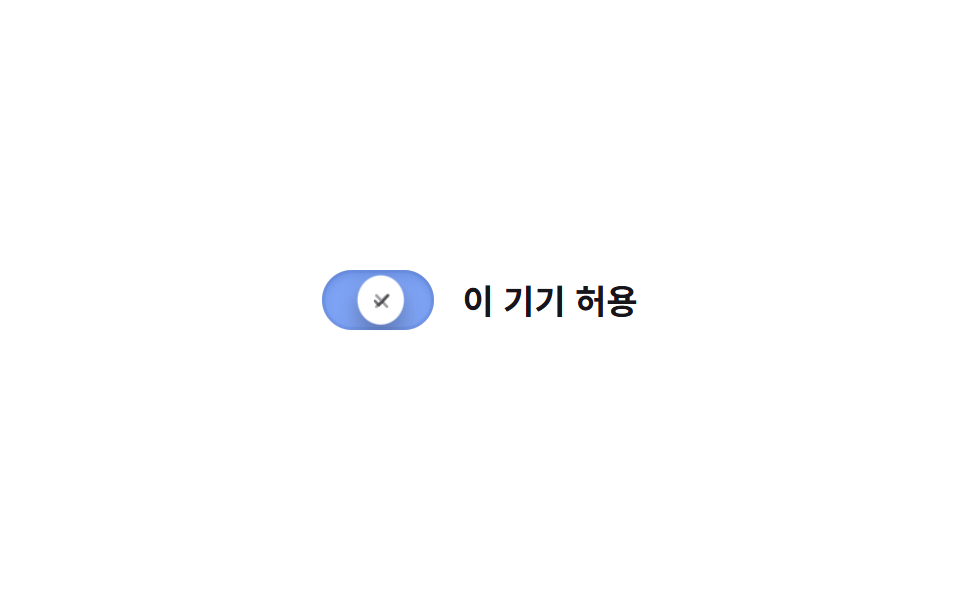
<main class="stage">
  <label class="switch is-demo">
    <input type="checkbox" class="switch__input" role="switch">
    <span class="switch__track">
      <span class="switch__bg switch__bg--off"></span>
      <span class="switch__bg switch__bg--on"></span>
      <span class="switch__knob">
        <svg class="switch__icon switch__icon--x" viewBox="0 0 16 16" width="11" height="11" aria-hidden="true">
          <path d="M4 4l8 8M12 4l-8 8" fill="none" stroke="currentColor" stroke-width="2" stroke-linecap="round"/>
        </svg>
        <svg class="switch__icon switch__icon--check" viewBox="0 0 16 16" width="11" height="11" aria-hidden="true">
          <path d="M3 8l3 3 7-7" fill="none" stroke="currentColor" stroke-width="2" stroke-linecap="round" stroke-linejoin="round"/>
        </svg>
      </span>
    </span>
    <span class="switch__label">この端末を許可</span>
  </label>
</main>
@use "../../../../site/static/demo-tokens" as *;
// ── 변수 3개 ──────────────────────────────
$duration: $dur-quick;
$easing: $ease-out;
$color: $subject-blue;
// ── 데모 무대 ───────────────────────────────
@include stage($stage-paper);
.switch {
position: relative;
display: inline-flex; align-items: center; gap: clamp(10px, 3vw, 14px);
cursor: pointer;
-webkit-tap-highlight-color: transparent;
}
.switch__input {
position: absolute; inset: 0; width: 100%; height: 100%;
margin: 0; opacity: 0; cursor: pointer;
}
.switch__track {
position: relative; overflow: hidden;
width: clamp(48px, 13vw, 56px); height: clamp(26px, 7vw, 30px);
border-radius: $r-pill;
box-shadow: inset 0 0 0 1px rgba(23, 20, 26, .1);
}
.switch__bg { position: absolute; inset: 0; }
.switch__bg--off { background: rgba(23, 20, 26, .12); opacity: 1; }
.switch__bg--on { background: $color; opacity: 0; }
.switch__knob {
position: absolute; top: 3px; left: 3px; z-index: 1;
display: grid; place-items: center;
width: clamp(20px, 5.5vw, 24px); height: clamp(20px, 5.5vw, 24px);
border-radius: 50%;
background: $stage-paper;
box-shadow: $shadow-press;
color: $subject-ink;
transform: translateX(0);
transition: transform $duration cubic-bezier(0.34, 1.56, 0.64, 1);
}
.switch__icon { grid-area: 1 / 1; transition: opacity $duration $easing; }
.switch__icon--x { opacity: 1; }
.switch__icon--check { opacity: 0; }
.switch__label { color: $subject-ink; font-weight: 600; font-size: clamp(14px, 4vw, 17px); line-height: 1; font-family: inherit; }
// ── 실제 동작 ─────────────────────────────
.switch__input:checked ~ .switch__track .switch__bg--off { opacity: 0; transition: opacity $duration $easing; }
.switch__input:checked ~ .switch__track .switch__bg--on { opacity: 1; transition: opacity $duration $easing; }
.switch__input:checked ~ .switch__track .switch__knob { transform: translateX(clamp(22px, 6vw, 26px)); color: $color; }
.switch__input:checked ~ .switch__track .switch__icon--x { opacity: 0; }
.switch__input:checked ~ .switch__track .switch__icon--check { opacity: 1; }
.switch__input:focus-visible ~ .switch__track {
outline: 2px solid $subject-ink; outline-offset: 3px;
}
// ── 데모 루프 ─────────────────────────────
// 한 겹: 노브는 도착 지점을 지나쳤다 찌그러지며 안착하고(스프링+squash),
// 트랙의 inset 링 두께·블러가 상태 전환 때 깊어졌다 얕아진다.
.switch.is-demo .switch__bg--off { animation: bg-off-loop $dur-loop $easing infinite; }
.switch.is-demo .switch__bg--on { animation: bg-on-loop $dur-loop $easing infinite; }
.switch.is-demo .switch__knob { animation: knob-spring-loop $dur-loop $easing infinite; }
.switch.is-demo .switch__track { animation: shadow-depth-loop $dur-loop $easing infinite; }
.switch.is-demo .switch__icon--x { animation: icon-x-loop $dur-loop $easing infinite; }
.switch.is-demo .switch__icon--check { animation: icon-check-loop $dur-loop $easing infinite; }
@keyframes bg-off-loop { 0%, 15% { opacity: 1; } 40%, 60% { opacity: 0; } 85%, 100% { opacity: 1; } }
@keyframes bg-on-loop { 0%, 15% { opacity: 0; } 40%, 60% { opacity: 1; } 85%, 100% { opacity: 0; } }
@keyframes knob-loop {
0%, 15% { transform: translateX(0); }
40%, 60% { transform: translateX(26px); }
85%, 100% { transform: translateX(0); }
}
@keyframes knob-spring-loop {
0%, 15% { transform: translateX(0) scaleX(1) scaleY(1); }
38% { transform: translateX(29px) scaleX(1.25) scaleY(.85); } // 오버슈트 + 도착 순간 squash
43% { transform: translateX(25px) scaleX(1.08) scaleY(.94); } // 되튕기며 회복
47%, 60% { transform: translateX(26px) scaleX(1) scaleY(1); } // 안착
84% { transform: translateX(-2px) scaleX(.92) scaleY(1.06); } // 출발 반동
85%, 100% { transform: translateX(0) scaleX(1) scaleY(1); }
}
@keyframes shadow-depth-loop {
0%, 15% { box-shadow: inset 0 0 0 1px rgba(23, 20, 26, .1), inset 0 1px 3px rgba(0, 0, 0, .15); }
38% { box-shadow: inset 0 0 0 2px rgba(23, 20, 26, .1), inset 0 3px 8px rgba(0, 0, 0, .28); }
40%, 60% { box-shadow: inset 0 0 0 2px rgba(23, 20, 26, .1), inset 0 3px 8px rgba(0, 0, 0, .28); }
85%, 100% { box-shadow: inset 0 0 0 1px rgba(23, 20, 26, .1), inset 0 1px 3px rgba(0, 0, 0, .15); }
}
@keyframes icon-x-loop { 0%, 15% { opacity: 1; } 40%, 60% { opacity: 0; } 85%, 100% { opacity: 1; } }
@keyframes icon-check-loop { 0%, 15% { opacity: 0; } 40%, 60% { opacity: 1; } 85%, 100% { opacity: 0; } }
@media (prefers-reduced-motion: reduce) {
.switch.is-demo .switch__bg--off, .switch.is-demo .switch__bg--on,
.switch.is-demo .switch__knob, .switch.is-demo .switch__icon--x, .switch.is-demo .switch__icon--check,
.switch.is-demo .switch__track {
animation: none !important;
}
.switch__knob, .switch__bg--off, .switch__bg--on, .switch__icon { transition: none; }
}html, body {
margin: 0;
overflow: hidden;
}
.stage {
box-sizing: border-box;
min-height: 100vh;
display: grid;
place-items: center;
margin: 0;
background: #ffffff;
font-family: -apple-system, "Segoe UI", "Noto Sans KR", sans-serif;
padding: clamp(8px, 4vw, 24px);
}
.switch {
position: relative;
display: inline-flex;
align-items: center;
gap: clamp(10px, 3vw, 14px);
cursor: pointer;
-webkit-tap-highlight-color: transparent;
}
.switch__input {
position: absolute;
inset: 0;
width: 100%;
height: 100%;
margin: 0;
opacity: 0;
cursor: pointer;
}
.switch__track {
position: relative;
overflow: hidden;
width: clamp(48px, 13vw, 56px);
height: clamp(26px, 7vw, 30px);
border-radius: 999px;
box-shadow: inset 0 0 0 1px rgba(23, 20, 26, 0.1);
}
.switch__bg {
position: absolute;
inset: 0;
}
.switch__bg--off {
background: rgba(23, 20, 26, 0.12);
opacity: 1;
}
.switch__bg--on {
background: #2f6df6;
opacity: 0;
}
.switch__knob {
position: absolute;
top: 3px;
left: 3px;
z-index: 1;
display: grid;
place-items: center;
width: clamp(20px, 5.5vw, 24px);
height: clamp(20px, 5.5vw, 24px);
border-radius: 50%;
background: #ffffff;
box-shadow: 0 6px 12px rgba(23, 20, 26, 0.32);
color: #17141a;
transform: translateX(0);
transition: transform 220ms cubic-bezier(0.34, 1.56, 0.64, 1);
}
.switch__icon {
grid-area: 1/1;
transition: opacity 220ms ease-out;
}
.switch__icon--x {
opacity: 1;
}
.switch__icon--check {
opacity: 0;
}
.switch__label {
color: #17141a;
font-weight: 600;
font-size: clamp(14px, 4vw, 17px);
line-height: 1;
font-family: inherit;
}
.switch__input:checked ~ .switch__track .switch__bg--off {
opacity: 0;
transition: opacity 220ms ease-out;
}
.switch__input:checked ~ .switch__track .switch__bg--on {
opacity: 1;
transition: opacity 220ms ease-out;
}
.switch__input:checked ~ .switch__track .switch__knob {
transform: translateX(clamp(22px, 6vw, 26px));
color: #2f6df6;
}
.switch__input:checked ~ .switch__track .switch__icon--x {
opacity: 0;
}
.switch__input:checked ~ .switch__track .switch__icon--check {
opacity: 1;
}
.switch__input:focus-visible ~ .switch__track {
outline: 2px solid #17141a;
outline-offset: 3px;
}
.switch.is-demo .switch__bg--off {
animation: bg-off-loop 2s ease-out infinite;
}
.switch.is-demo .switch__bg--on {
animation: bg-on-loop 2s ease-out infinite;
}
.switch.is-demo .switch__knob {
animation: knob-spring-loop 2s ease-out infinite;
}
.switch.is-demo .switch__track {
animation: shadow-depth-loop 2s ease-out infinite;
}
.switch.is-demo .switch__icon--x {
animation: icon-x-loop 2s ease-out infinite;
}
.switch.is-demo .switch__icon--check {
animation: icon-check-loop 2s ease-out infinite;
}
@keyframes bg-off-loop {
0%, 15% {
opacity: 1;
}
40%, 60% {
opacity: 0;
}
85%, 100% {
opacity: 1;
}
}
@keyframes bg-on-loop {
0%, 15% {
opacity: 0;
}
40%, 60% {
opacity: 1;
}
85%, 100% {
opacity: 0;
}
}
@keyframes knob-loop {
0%, 15% {
transform: translateX(0);
}
40%, 60% {
transform: translateX(26px);
}
85%, 100% {
transform: translateX(0);
}
}
@keyframes knob-spring-loop {
0%, 15% {
transform: translateX(0) scaleX(1) scaleY(1);
}
38% {
transform: translateX(29px) scaleX(1.25) scaleY(0.85);
}
43% {
transform: translateX(25px) scaleX(1.08) scaleY(0.94);
}
47%, 60% {
transform: translateX(26px) scaleX(1) scaleY(1);
}
84% {
transform: translateX(-2px) scaleX(0.92) scaleY(1.06);
}
85%, 100% {
transform: translateX(0) scaleX(1) scaleY(1);
}
}
@keyframes shadow-depth-loop {
0%, 15% {
box-shadow: inset 0 0 0 1px rgba(23, 20, 26, 0.1), inset 0 1px 3px rgba(0, 0, 0, 0.15);
}
38% {
box-shadow: inset 0 0 0 2px rgba(23, 20, 26, 0.1), inset 0 3px 8px rgba(0, 0, 0, 0.28);
}
40%, 60% {
box-shadow: inset 0 0 0 2px rgba(23, 20, 26, 0.1), inset 0 3px 8px rgba(0, 0, 0, 0.28);
}
85%, 100% {
box-shadow: inset 0 0 0 1px rgba(23, 20, 26, 0.1), inset 0 1px 3px rgba(0, 0, 0, 0.15);
}
}
@keyframes icon-x-loop {
0%, 15% {
opacity: 1;
}
40%, 60% {
opacity: 0;
}
85%, 100% {
opacity: 1;
}
}
@keyframes icon-check-loop {
0%, 15% {
opacity: 0;
}
40%, 60% {
opacity: 1;
}
85%, 100% {
opacity: 0;
}
}
@media (prefers-reduced-motion: reduce) {
.switch.is-demo .switch__bg--off, .switch.is-demo .switch__bg--on,
.switch.is-demo .switch__knob, .switch.is-demo .switch__icon--x, .switch.is-demo .switch__icon--check,
.switch.is-demo .switch__track {
animation: none !important;
}
.switch__knob, .switch__bg--off, .switch__bg--on, .switch__icon {
transition: none;
}
}document.querySelectorAll(".switch").forEach(function (s) {
var input = s.querySelector(".switch__input");
var sync = function () { input.setAttribute("aria-checked", String(input.checked)); };
input.addEventListener("pointerdown", function () { s.classList.remove("is-demo"); });
input.addEventListener("change", sync);
sync();
});import { useState } from "react";
import type { ChangeEvent, CSSProperties } from "react";
import styles from "./IconSwapToggle.module.scss";
export type IconSwapToggleProps = {
label?: string;
duration?: number;
easing?: string;
color?: string;
defaultChecked?: boolean;
onChange?: (checked: boolean) => void;
};
type Vars = CSSProperties & { "--duration"?: string; "--easing"?: string; "--color"?: string };
export default function IconSwapToggle({
label = "이 기기 허용",
duration = 220,
easing = "cubic-bezier(0.34, 1.56, 0.64, 1)",
color = "#2f6df6",
defaultChecked = false,
onChange,
}: IconSwapToggleProps) {
const [checked, setChecked] = useState(defaultChecked);
const vars: Vars = { "--duration": `${duration}ms`, "--easing": easing, "--color": color };
return (
<label className={styles.switch} style={vars}>
<input
type="checkbox"
role="switch"
aria-checked={checked}
className={styles.switch__input}
checked={checked}
onChange={(e: ChangeEvent<HTMLInputElement>) => { setChecked(e.target.checked); onChange?.(e.target.checked); }}
/>
<span className={styles.switch__track}>
<span className={styles["switch__bg--off"]} />
<span className={styles["switch__bg--on"]} />
<span className={styles.switch__knob}>
<svg className={styles["switch__icon--x"]} viewBox="0 0 16 16" width="11" height="11" aria-hidden="true">
<path d="M4 4l8 8M12 4l-8 8" fill="none" stroke="currentColor" strokeWidth={2} strokeLinecap="round" />
</svg>
<svg className={styles["switch__icon--check"]} viewBox="0 0 16 16" width="11" height="11" aria-hidden="true">
<path d="M3 8l3 3 7-7" fill="none" stroke="currentColor" strokeWidth={2} strokeLinecap="round" strokeLinejoin="round" />
</svg>
</span>
</span>
<span className={styles.switch__label}>{label}</span>
</label>
);
}04 アイコン切替 — 計測 累積面積 1.05% · 動いたフレーム 16/23GODRICH オリジナル · SCSS と React は zip に同梱 · CSS トグルスイッチ 9選 — 一行でコピペOK
このデモが属する記事
 CSS トグルスイッチ 9選 — 一行でコピペOKcss トグルスイッチは、チェックボックス一つで実際にオン・オフができ、トラックとノブの位置・色・アイコンだけを変えて見た目を作るコントロールです。ここでは9種類を集め、どれもtransformとopacityを軸にしたコードで組みました。 この記事のデモをすべて見る