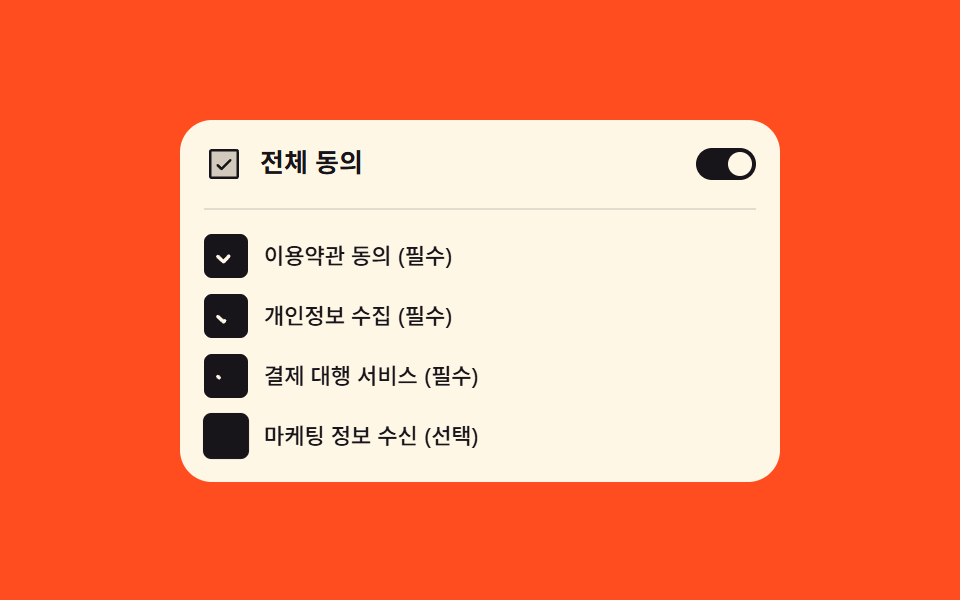
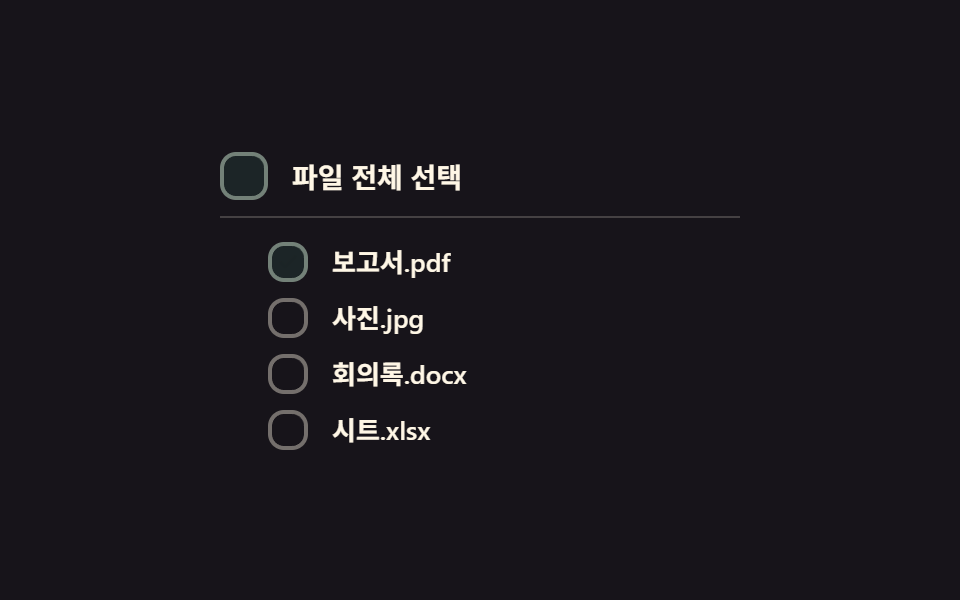
05全選択カスケード切替 — 上位ボックスの全選択値がオンになると下位ボックスのチェック値が順に短い間隔で変わる方式
上位の全選択値がオンになった瞬間、下位ボックスのチェック値が上から短い間隔を置いて順に変わります。
使いどころ全選択ボタンがある表、一括処理を控えた項目リスト
STAGGER_MSindeterminatetransition-delay
<main class="stage">
<div class="cba is-demo" id="cba">
  <label class="cba__row cba__row--parent">
    <input type="checkbox" class="cba__input" id="cbaParent">
    <span class="cba__box" id="cbaParentBox" aria-hidden="true">
      <svg viewBox="0 0 20 20" width="14" height="14">
        <path class="cba__check" d="M4 10.5l3.5 3.5L16 5.5" fill="none" stroke="currentColor" stroke-width="2.6" stroke-linecap="round" stroke-linejoin="round"/>
        <line class="cba__dash" x1="5" y1="10" x2="15" y2="10" stroke="currentColor" stroke-width="2.6" stroke-linecap="round"/>
      </svg>
    </span>
    <span class="cba__text">ファイルを全選択</span>
  </label>
  <div class="cba__children" id="cbaChildren">
    <label class="cba__row"><input type="checkbox" class="cba__input"><span class="cba__box" aria-hidden="true"><svg viewBox="0 0 20 20" width="12" height="12"><path d="M4 10.5l3.5 3.5L16 5.5" fill="none" stroke="currentColor" stroke-width="2.6" stroke-linecap="round" stroke-linejoin="round"/></svg></span><span class="cba__text">レポート.pdf</span></label>
    <label class="cba__row"><input type="checkbox" class="cba__input"><span class="cba__box" aria-hidden="true"><svg viewBox="0 0 20 20" width="12" height="12"><path d="M4 10.5l3.5 3.5L16 5.5" fill="none" stroke="currentColor" stroke-width="2.6" stroke-linecap="round" stroke-linejoin="round"/></svg></span><span class="cba__text">写真.jpg</span></label>
    <label class="cba__row"><input type="checkbox" class="cba__input"><span class="cba__box" aria-hidden="true"><svg viewBox="0 0 20 20" width="12" height="12"><path d="M4 10.5l3.5 3.5L16 5.5" fill="none" stroke="currentColor" stroke-width="2.6" stroke-linecap="round" stroke-linejoin="round"/></svg></span><span class="cba__text">議事録.docx</span></label>
    <label class="cba__row"><input type="checkbox" class="cba__input"><span class="cba__box" aria-hidden="true"><svg viewBox="0 0 20 20" width="12" height="12"><path d="M4 10.5l3.5 3.5L16 5.5" fill="none" stroke="currentColor" stroke-width="2.6" stroke-linecap="round" stroke-linejoin="round"/></svg></span><span class="cba__text">シート.xlsx</span></label>
  </div>
</div>
</main>
@use "../../../../site/static/demo-tokens" as *;
// 계산 겹: index.html 이 자식 박스마다 transition-delay 를 인덱스 × STAGGER_MS 로 계산해 심는다 —
// 부모 값이 바뀌는 순간 모든 자식의 checked 값은 동시에 바뀌지만, 화면의 배경색 전환은
// 그 계산된 지연만큼씩 늦게 시작해 계단처럼 보인다.
@include stage($stage-ink);
.cba {
display: grid;
gap: $sp-3;
width: 100%;
max-width: 260px;
}
.cba__row {
display: flex;
align-items: center;
gap: $sp-3;
cursor: pointer;
user-select: none;
}
.cba__row--parent {
padding-bottom: $sp-2;
border-bottom: 1px solid rgba($subject-cream, .2);
}
.cba__children {
display: grid;
gap: $sp-2;
padding-left: $sp-6;
}
.cba__input {
position: absolute;
width: 1px;
height: 1px;
opacity: 0;
pointer-events: none;
}
.cba__box {
flex: 0 0 auto;
width: 20px;
height: 20px;
border-radius: $r-sm;
border: 2px solid rgba($subject-cream, .4);
background: transparent;
color: transparent;
display: grid;
place-items: center;
box-sizing: border-box;
transition: background-color $dur-base $ease-out, border-color $dur-base $ease-out, color $dur-base $ease-out;
}
.cba__row--parent .cba__box {
width: 24px;
height: 24px;
}
.cba__check, .cba__dash {
opacity: 0;
transition: opacity $dur-quick $ease-out;
}
.cba__box--on {
background: $subject-mint;
border-color: $subject-mint;
color: $subject-ink;
.cba__check { opacity: 1; }
}
.cba__box--mixed {
border-color: $subject-mint;
.cba__dash { opacity: 1; }
}
.cba__input:focus-visible + .cba__box {
outline: 2px solid $subject-blue-light;
outline-offset: 2px;
}
.cba__text {
color: $subject-cream;
font-size: 13px;
font-weight: 600;
}
.cba__row--parent .cba__text {
font-size: 14px;
font-weight: 700;
}
@media (max-width: 340px) {
.cba__children { padding-left: $sp-4; }
.cba__text { font-size: 12px; }
}
@media (prefers-reduced-motion: reduce) {
.cba__box, .cba__check, .cba__dash { transition: none; }
}html, body {
margin: 0;
overflow: hidden;
}
.stage {
box-sizing: border-box;
min-height: 100vh;
display: grid;
place-items: center;
margin: 0;
background: #17141a;
font-family: -apple-system, "Segoe UI", "Noto Sans KR", sans-serif;
padding: clamp(8px, 4vw, 24px);
}
.cba {
display: grid;
gap: 12px;
width: 100%;
max-width: 260px;
}
.cba__row {
display: flex;
align-items: center;
gap: 12px;
cursor: pointer;
user-select: none;
}
.cba__row--parent {
padding-bottom: 8px;
border-bottom: 1px solid rgba(255, 247, 230, 0.2);
}
.cba__children {
display: grid;
gap: 8px;
padding-left: 24px;
}
.cba__input {
position: absolute;
width: 1px;
height: 1px;
opacity: 0;
pointer-events: none;
}
.cba__box {
flex: 0 0 auto;
width: 20px;
height: 20px;
border-radius: 8px;
border: 2px solid rgba(255, 247, 230, 0.4);
background: transparent;
color: transparent;
display: grid;
place-items: center;
box-sizing: border-box;
transition: background-color 300ms ease-out, border-color 300ms ease-out, color 300ms ease-out;
}
.cba__row--parent .cba__box {
width: 24px;
height: 24px;
}
.cba__check, .cba__dash {
opacity: 0;
transition: opacity 220ms ease-out;
}
.cba__box--on {
background: #4cd4a6;
border-color: #4cd4a6;
color: #17141a;
}
.cba__box--on .cba__check {
opacity: 1;
}
.cba__box--mixed {
border-color: #4cd4a6;
}
.cba__box--mixed .cba__dash {
opacity: 1;
}
.cba__input:focus-visible + .cba__box {
outline: 2px solid #5b8cf8;
outline-offset: 2px;
}
.cba__text {
color: #fff7e6;
font-size: 13px;
font-weight: 600;
}
.cba__row--parent .cba__text {
font-size: 14px;
font-weight: 700;
}
@media (max-width: 340px) {
.cba__children {
padding-left: 16px;
}
.cba__text {
font-size: 12px;
}
}
@media (prefers-reduced-motion: reduce) {
.cba__box, .cba__check, .cba__dash {
transition: none;
}
}(function () {
var STAGGER_MS = 90; // 계산 겹 상수: 하위 박스가 한 칸씩 늦게 바뀌는 간격
var CYCLE_MS = 700; // 자동 루프가 전체선택을 켜고 끄는 간격
var reduce = window.matchMedia('(prefers-reduced-motion: reduce)').matches;
var root = document.getElementById('cba');
var parent = document.getElementById('cbaParent');
var parentBox = document.getElementById('cbaParentBox');
var childrenWrap = document.getElementById('cbaChildren');
var childInputs = Array.prototype.slice.call(childrenWrap.querySelectorAll('.cba__input'));
var childBoxes = Array.prototype.slice.call(childrenWrap.querySelectorAll('.cba__box'));
var isDemo = true;
function human() {
if (isDemo) { root.classList.remove('is-demo'); isDemo = false; }
}
// 계산 겹: 각 자식 박스의 transition-delay 를 인덱스 × STAGGER_MS 로 만든다 — 값 자체는
// 동시에 바뀌지만 화면에 드러나는 시점이 계단처럼 순서를 갖는다
childBoxes.forEach(function (b, i) {
b.style.setProperty('transition-delay', (i * STAGGER_MS) + 'ms');
});
function paintParent() {
var count = childInputs.filter(function (c) { return c.checked; }).length;
var all = count === childInputs.length, none = count === 0;
parent.checked = all;
parent.indeterminate = !all && !none;
parentBox.classList.toggle('cba__box--on', all);
parentBox.classList.toggle('cba__box--mixed', !all && !none);
}
function paintChildren() {
childInputs.forEach(function (c, i) { childBoxes[i].classList.toggle('cba__box--on', c.checked); });
}
childInputs.forEach(function (c) {
c.addEventListener('change', function () { human(); paintChildren(); paintParent(); });
});
parent.addEventListener('change', function () {
human();
var next = parent.checked;
childInputs.forEach(function (c) { c.checked = next; });
paintChildren();
paintParent();
});
var cycleStart = 0;
var lastState = false;
function loop(ts) {
if (!cycleStart) cycleStart = ts;
if (isDemo) {
var step = Math.floor((ts - cycleStart) / CYCLE_MS) % 2 === 1;
if (step !== lastState) {
lastState = step;
childInputs.forEach(function (c) { c.checked = step; });
paintChildren();
paintParent();
}
}
requestAnimationFrame(loop);
}
requestAnimationFrame(loop);
})();// SelectAllCascade — vanilla 판(run/368/demo/05-custom-checkbox-select-all-cascade/index.html) 의 React 포트.
// 각 자식 박스의 transition-delay 를 인덱스 × STAGGER_MS 로 계산해 심는다 — 값 자체는 동시에
// 바뀌지만 화면에 드러나는 시점이 계단처럼 순서를 갖는다.
import { useEffect, useRef } from "react";
import styles from "./SelectAllCascade.module.scss";
type Box<T> = { current: T };
const CHILDREN = [
{ id: "child0", label: "보고서.pdf" },
{ id: "child1", label: "사진.jpg" },
{ id: "child2", label: "회의록.docx" },
{ id: "child3", label: "시트.xlsx" },
];
export default function SelectAllCascade() {
const rootRef = useRef(null) as unknown as Box<HTMLDivElement>;
const parentRef = useRef(null) as unknown as Box<HTMLInputElement>;
const parentBoxRef = useRef(null) as unknown as Box<HTMLSpanElement>;
const childRefs = useRef([null, null, null, null]) as unknown as Box<(HTMLInputElement | null)[]>;
const childBoxRefs = useRef([null, null, null, null]) as unknown as Box<(HTMLSpanElement | null)[]>;
useEffect(() => {
const STAGGER_MS = 90; // 계산 겹 상수: 하위 박스가 한 칸씩 늦게 바뀌는 간격
const CYCLE_MS = 700; // 자동 루프가 전체선택을 켜고 끄는 간격
const reduce = window.matchMedia("(prefers-reduced-motion: reduce)").matches;
const root = rootRef.current;
const parent = parentRef.current;
const parentBox = parentBoxRef.current;
const childInputs = childRefs.current;
const childBoxes = childBoxRefs.current;
if (!root || !parent || !parentBox) return;
let isDemo = true;
function human() {
if (isDemo) { root!.classList.remove(styles.isDemo); isDemo = false; }
}
// 계산 겹: 각 자식 박스의 transition-delay 를 인덱스 × STAGGER_MS 로 만든다
childBoxes.forEach((b, i) => {
if (b) b.style.setProperty("transition-delay", i * STAGGER_MS + "ms");
});
function paintChildren() {
childInputs.forEach((c, i) => { childBoxes[i]?.classList.toggle(styles.boxOn, c ? c.checked : false); });
}
function paintParent() {
const count = childInputs.filter((c) => c?.checked).length;
const all = count === childInputs.length, none = count === 0;
parent!.checked = all;
parent!.indeterminate = !all && !none;
parentBox!.classList.toggle(styles.boxOn, all);
parentBox!.classList.toggle(styles.boxMixed, !all && !none);
}
const childHandlers = childInputs.map((c) => {
const fn = () => { human(); paintChildren(); paintParent(); };
c?.addEventListener("change", fn);
return fn;
});
function onParentChange() {
human();
const next = parent!.checked;
childInputs.forEach((c) => { if (c) c.checked = next; });
paintChildren();
paintParent();
}
parent.addEventListener("change", onParentChange);
let cycleStart = 0;
let lastState = false;
let rafId = 0;
function loop(ts: number) {
if (!cycleStart) cycleStart = ts;
if (isDemo) {
const step = Math.floor((ts - cycleStart) / CYCLE_MS) % 2 === 1;
if (step !== lastState) {
lastState = step;
childInputs.forEach((c) => { if (c) c.checked = step; });
paintChildren();
paintParent();
}
}
rafId = requestAnimationFrame(loop);
}
rafId = requestAnimationFrame(loop);
return () => {
childInputs.forEach((c, i) => c?.removeEventListener("change", childHandlers[i]));
parent.removeEventListener("change", onParentChange);
cancelAnimationFrame(rafId);
};
}, []);
return (
<main className={styles.stage}>
<div className={styles.cba + " " + styles.isDemo} ref={rootRef}>
<label className={styles.cbaRow + " " + styles.cbaRowParent}>
<input type="checkbox" className={styles.cbaInput} ref={parentRef} />
<span className={styles.cbaBox} ref={parentBoxRef} aria-hidden="true">
<svg viewBox="0 0 20 20" width={14} height={14}>
<path className={styles.cbaCheck} d="M4 10.5l3.5 3.5L16 5.5" fill="none" stroke="currentColor" strokeWidth={2.6} strokeLinecap="round" strokeLinejoin="round" />
<line className={styles.cbaDash} x1={5} y1={10} x2={15} y2={10} stroke="currentColor" strokeWidth={2.6} strokeLinecap="round" />
</svg>
</span>
<span className={styles.cbaText}>파일 전체 선택</span>
</label>
<div className={styles.cbaChildren}>
{CHILDREN.map((c, i) => (
<label className={styles.cbaRow} key={c.id}>
<input
type="checkbox"
className={styles.cbaInput}
ref={(el: HTMLInputElement | null) => { childRefs.current[i] = el; }}
/>
<span
className={styles.cbaBox}
ref={(el: HTMLSpanElement | null) => { childBoxRefs.current[i] = el; }}
aria-hidden="true"
>
<svg viewBox="0 0 20 20" width={12} height={12}>
<path d="M4 10.5l3.5 3.5L16 5.5" fill="none" stroke="currentColor" strokeWidth={2.6} strokeLinecap="round" strokeLinejoin="round" />
</svg>
</span>
<span className={styles.cbaText}>{c.label}</span>
</label>
))}
</div>
</div>
</main>
);
}05 全選択カスケード切替 — 上位ボックスの全選択値がオンになると下位ボックスのチェック値が順に短い間隔で変わる方式 — 計測 累積面積 2.429% · 動いたフレーム 20/23GODRICH オリジナル · SCSS と React は zip に同梱 · チェックボックス ui 9選 — チェック値で変わる9つの方式
このデモが属する記事
 チェックボックス ui 9選 — チェック値で変わる9つの方式チェックボックス ui: 9つのうち1つはチェック値がオンになるとチェックマークの線の長さの値が0から最後まで描かれ、1つは同じ値が変わった瞬間にボックスの大きさの値が一瞬大きくなってから跳ねるように収まり、もう1つは親ボックスの値が変わる この記事のデモをすべて見る