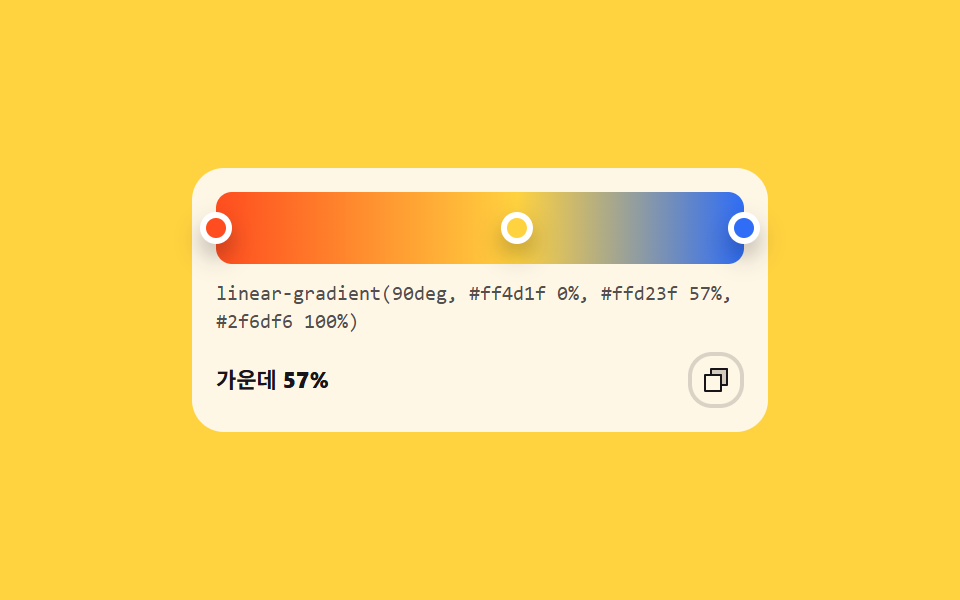
08停止点をドラッグして作るグラデーション
バー上の停止点をドラッグすると位置がパーセントで読まれ、linear-gradient の文字列がそのまま下に出ます。
使いどころヒーロー背景のグラデーション、グラフの色帯
linear-gradientcounter-settranslateX
<main class="stage">
  <div class="gs is-demo">
    <div class="gs__bar" id="gsBar">
      <span class="gs__stop gs__stop--a" aria-hidden="true"></span>
      <span class="gs__stop gs__stop--m" id="gsMid" role="slider" tabindex="0"
            aria-label="中央の停止点の位置"
            aria-valuemin="0" aria-valuemax="100" aria-valuenow="45"
            aria-valuetext="中央の停止点 45%"></span>
      <span class="gs__stop gs__stop--b" aria-hidden="true"></span>
    </div>
    <code class="gs__code" aria-hidden="true"></code>
    <div class="gs__foot">
      <span class="gs__pos" aria-hidden="true">中央 <b class="gs__pct"></b></span>
      <button type="button" class="gs__copy" id="gsCopy" aria-label="CSS 文字列をコピー">
        <svg viewBox="0 0 256 256" fill="currentColor" aria-hidden="true"><path d="M216,40V168H168V88H88V40Z" opacity="0.2"/><path d="M216,32H88a8,8,0,0,0-8,8V80H40a8,8,0,0,0-8,8V216a8,8,0,0,0,8,8H168a8,8,0,0,0,8-8V176h40a8,8,0,0,0,8-8V40A8,8,0,0,0,216,32ZM160,208H48V96H160Zm48-48H176V88a8,8,0,0,0-8-8H96V48H208Z"/></svg>
      </button>
    </div>
    <span class="gs__live" aria-live="polite"></span>
  </div>
</main>
@use "../../../../site/static/demo-tokens" as *;
// 그라디언트 빌더 — 움직이는 값은 가운데 정지점 위치 --p 하나뿐이다.
// 막대의 색 분포(linear-gradient 의 둘째 정지점), 손잡이 자리(translateX), 아래 CSS 문자열, 퍼센트 숫자가
// 전부 그 한 값에서 나온다. 값이 하나니 넷이 어긋날 수가 없다.
// 264px 트랙에서 1% = 2.64px 이라 손잡이는 translateX(calc(var(--p) * 2.64px)) 로 그 자리에 선다.
// 루프는 45% → 78% → 같은 길을 되짚어 45% 로 돌아온다(텔레포트 없음).
$duration: $dur-loop;
$easing: $ease-spring;
$color: $subject-blue;
@include stage($stage-yellow);
$track: 264px;
@property --p { syntax: "<integer>"; inherits: true; initial-value: 45; }
.gs {
position: relative;
box-sizing: border-box;
width: 288px;
max-width: 100%;
padding: $sp-3;
border-radius: $r-card;
background: $subject-cream;
color: $subject-ink;
font-family: inherit;
}
.gs * { box-sizing: border-box; }
.gs__bar {
position: relative;
height: 36px;
border-radius: $r-sm;
cursor: pointer;
touch-action: none;
background-image: linear-gradient(90deg, $stage-orange 0%, $stage-yellow calc(var(--p) * 1%), $subject-blue 100%);
}
.gs__stop {
position: absolute;
top: 50%;
left: 0;
width: 16px;
height: 16px;
border-radius: 50%;
border: 3px solid #ffffff;
box-shadow: $shadow-press;
}
// 손잡이는 자기 중심이 그 퍼센트 위에 놓인다 — 좌표 이동 뒤 자기 크기의 절반만큼 되민다
.gs__stop--a {
background: $stage-orange;
transform: translateX(0) translate(-50%, -50%);
}
.gs__stop--m {
background: $stage-yellow;
cursor: ew-resize;
touch-action: none;
transform: translateX(calc(var(--p) * 2.64px)) translate(-50%, -50%);
}
.gs__stop--b {
background: $subject-blue;
transform: translateX($track) translate(-50%, -50%);
}
.gs__stop--m:focus-visible { outline: 3px solid $color; outline-offset: 3px; }
// 아래 CSS 문자열 — 퍼센트 자리만 계수기가 채운다. 색 이름은 sass 가 토큰 값을 그대로 박아 넣는다
.gs__code {
display: block;
margin-top: $sp-2;
counter-set: cp calc(var(--p));
word-break: break-all;
font-size: 10px;
font-weight: 500;
line-height: 1.4;
color: rgba(23, 20, 26, .74);
}
.gs__code::after {
content: "linear-gradient(90deg, #{$stage-orange} 0%, #{$stage-yellow} " counter(cp) "%, #{$subject-blue} 100%)";
}
.gs__foot {
display: flex;
align-items: center;
gap: $sp-2;
margin-top: $sp-2;
}
.gs__pos {
font-size: 11px;
font-weight: 700;
line-height: 1.2;
}
.gs__pct { counter-set: cp calc(var(--p)); font-weight: 800; }
.gs__pct::after { content: counter(cp) "%"; }
.gs__copy {
margin-left: auto;
display: grid;
place-items: center;
width: 28px;
height: 28px;
padding: 0;
border: 2px solid rgba(23, 20, 26, .16);
border-radius: $r-control;
background: transparent;
color: inherit;
cursor: pointer;
}
.gs__copy svg { width: 16px; height: 16px; }
.gs__copy:focus-visible { outline: 3px solid $color; outline-offset: 2px; }
// 화면에는 안 보이되 보조기술에는 읽히는 알림 줄
.gs__live {
position: absolute;
width: 1px;
height: 1px;
overflow: hidden;
clip-path: inset(50%);
white-space: nowrap;
}
// ── 미리보기 루프(정적 규칙 먼저, 그 위에 덧씌움) ─────────────────
// 애니메이션하는 것은 --p 하나뿐이다. 막대·손잡이·문자열·숫자가 같은 값을 읽으니
// 어느 프레임에서도 넷이 같은 순간을 가리킨다
.gs.is-demo {
animation-name: gsSlide;
animation-duration: $duration;
animation-timing-function: $easing;
animation-iteration-count: infinite;
}
@keyframes gsSlide {
0% { --p: 45; }
45% { --p: 78; }
90%, 100% { --p: 45; }
}
@media (prefers-reduced-motion: reduce) {
.gs.is-demo {
animation: none !important;
}
}html, body {
margin: 0;
overflow: hidden;
}
.stage {
box-sizing: border-box;
min-height: 100vh;
display: grid;
place-items: center;
margin: 0;
background: #ffd23f;
font-family: -apple-system, "Segoe UI", "Noto Sans KR", sans-serif;
padding: clamp(8px, 4vw, 24px);
}
@property --p {
syntax: "<integer>";
inherits: true;
initial-value: 45;
}
.gs {
position: relative;
box-sizing: border-box;
width: 288px;
max-width: 100%;
padding: 12px;
border-radius: 16px;
background: #fff7e6;
color: #17141a;
font-family: inherit;
}
.gs * {
box-sizing: border-box;
}
.gs__bar {
position: relative;
height: 36px;
border-radius: 8px;
cursor: pointer;
touch-action: none;
background-image: linear-gradient(90deg, #ff4d1f 0%, #ffd23f calc(var(--p) * 1%), #2f6df6 100%);
}
.gs__stop {
position: absolute;
top: 50%;
left: 0;
width: 16px;
height: 16px;
border-radius: 50%;
border: 3px solid #ffffff;
box-shadow: 0 6px 12px rgba(23, 20, 26, 0.32);
}
.gs__stop--a {
background: #ff4d1f;
transform: translateX(0) translate(-50%, -50%);
}
.gs__stop--m {
background: #ffd23f;
cursor: ew-resize;
touch-action: none;
transform: translateX(calc(var(--p) * 2.64px)) translate(-50%, -50%);
}
.gs__stop--b {
background: #2f6df6;
transform: translateX(264px) translate(-50%, -50%);
}
.gs__stop--m:focus-visible {
outline: 3px solid #2f6df6;
outline-offset: 3px;
}
.gs__code {
display: block;
margin-top: 8px;
counter-set: cp calc(var(--p));
word-break: break-all;
font-size: 10px;
font-weight: 500;
line-height: 1.4;
color: rgba(23, 20, 26, 0.74);
}
.gs__code::after {
content: "linear-gradient(90deg, #ff4d1f 0%, #ffd23f " counter(cp) "%, #2f6df6 100%)";
}
.gs__foot {
display: flex;
align-items: center;
gap: 8px;
margin-top: 8px;
}
.gs__pos {
font-size: 11px;
font-weight: 700;
line-height: 1.2;
}
.gs__pct {
counter-set: cp calc(var(--p));
font-weight: 800;
}
.gs__pct::after {
content: counter(cp) "%";
}
.gs__copy {
margin-left: auto;
display: grid;
place-items: center;
width: 28px;
height: 28px;
padding: 0;
border: 2px solid rgba(23, 20, 26, 0.16);
border-radius: 12px;
background: transparent;
color: inherit;
cursor: pointer;
}
.gs__copy svg {
width: 16px;
height: 16px;
}
.gs__copy:focus-visible {
outline: 3px solid #2f6df6;
outline-offset: 2px;
}
.gs__live {
position: absolute;
width: 1px;
height: 1px;
overflow: hidden;
clip-path: inset(50%);
white-space: nowrap;
}
.gs.is-demo {
animation-name: gsSlide;
animation-duration: 2s;
animation-timing-function: cubic-bezier(0.2, 0.8, 0.2, 1);
animation-iteration-count: infinite;
}
@keyframes gsSlide {
0% {
--p: 45;
}
45% {
--p: 78;
}
90%, 100% {
--p: 45;
}
}
@media (prefers-reduced-motion: reduce) {
.gs.is-demo {
animation: none !important;
}
}(function () {
var root = document.querySelector('.gs');
var bar = document.getElementById('gsBar');
var mid = document.getElementById('gsMid');
var copyBtn = document.getElementById('gsCopy');
var live = root.querySelector('.gs__live');
var midFormat = '中央の停止点 %p%';
var copiedText = 'コピーしました';
var pos = 45;
// 화면에 보이는 문자열과 복사되는 문자열은 같은 pos 하나에서 나온다.
// 막대 배경·손잡이 자리·아래 글자는 CSS 가 --p 에서 만들고, 복사본만 여기서 조립한다
function cssText() {
return 'linear-gradient(90deg, #ff4d1f 0%, #ffd23f ' + pos + '%, #2f6df6 100%)';
}
function apply() {
root.style.setProperty('--p', pos);
mid.setAttribute('aria-valuenow', pos);
mid.setAttribute('aria-valuetext', midFormat.replace('%p', pos));
}
function pickAt(e) {
var box = bar.getBoundingClientRect();
pos = Math.round(Math.min(100, Math.max(0, (e.clientX - box.left) / box.width * 100)));
apply();
}
bar.addEventListener('pointerdown', function (e) {
root.classList.remove('is-demo');
bar.setPointerCapture(e.pointerId); // 막대 밖으로 끌어도 이 요소가 계속 포인터를 받는다
pickAt(e);
});
bar.addEventListener('pointermove', function (e) {
if (bar.hasPointerCapture(e.pointerId)) { pickAt(e); }
});
mid.addEventListener('keydown', function (e) {
var step = e.shiftKey ? 10 : 1;
if (e.key === 'ArrowRight') { pos = Math.min(100, pos + step); }
else if (e.key === 'ArrowLeft') { pos = Math.max(0, pos - step); }
else { return; }
e.preventDefault();
root.classList.remove('is-demo');
apply();
});
copyBtn.addEventListener('click', function () {
root.classList.remove('is-demo');
if (navigator.clipboard) { navigator.clipboard.writeText(cssText()); }
live.textContent = copiedText;
});
apply();
})();// GradientStops — vanilla 판(run/286/demo/08-color-picker-gradient-stops) 의 React 포트.
// 변수 3개(duration·easing·color)는 props 로 받아 CSS 변수(var(--duration) 등)로 들어온다.
// 상태는 가운데 정지점 위치 하나(0~100)뿐이다. 막대의 색 분포도, 손잡이 자리도, 아래 CSS 문자열도,
// 퍼센트 숫자도 전부 그 한 값(--p)에서 나오므로 넷이 어긋날 수가 없다.
import { useRef, useState } from "react";
import type { CSSProperties, PointerEvent as ReactPointerEvent } from "react";
import styles from "./GradientStops.module.scss";
type KeyEvt = { key: string; shiftKey: boolean; preventDefault(): void };
export type GradientStopsProps = {
midLabel?: string;
/** "가운데 정지점 %p%" 처럼 자리표시자 하나를 가진 틀 */
midFormat?: string;
posLabel?: string;
copyLabel?: string;
copiedText?: string;
/** 격자 미리보기용 2초 자동 루프. 사람이 손대면 꺼진다 */
demo?: boolean;
duration?: number;
easing?: string;
color?: string;
};
type Vars = CSSProperties & {
"--duration"?: string;
"--easing"?: string;
"--color"?: string;
"--p"?: number;
};
function clampPercent(n: number): number {
return Math.round(Math.min(100, Math.max(0, n)));
}
export default function GradientStops({
midLabel = "가운데 정지점 위치",
midFormat = "가운데 정지점 %p%",
posLabel = "가운데",
copyLabel = "CSS 문자열 복사",
copiedText = "복사했습니다",
demo = true,
duration = 2000,
easing = "cubic-bezier(.2, .8, .2, 1)",
color = "#2f6df6",
}: GradientStopsProps) {
const [live, setLive] = useState(demo);
const [pos, setPos] = useState(45);
const [notice, setNotice] = useState("");
const barRef = useRef<HTMLDivElement>(null);
const vars: Vars = {
"--duration": `${duration}ms`,
"--easing": easing,
"--color": color,
"--p": pos,
};
// 화면에 보이는 문자열과 복사되는 문자열은 같은 pos 하나에서 나온다
function cssText(): string {
return `linear-gradient(90deg, #ff4d1f 0%, #ffd23f ${pos}%, #2f6df6 100%)`;
}
function pickAt(e: ReactPointerEvent<HTMLDivElement>) {
const node = barRef.current;
if (!node) return;
const box = node.getBoundingClientRect();
setPos(clampPercent(((e.clientX - box.left) / box.width) * 100));
}
function start(e: ReactPointerEvent<HTMLDivElement>) {
setLive(false);
// 막대 밖으로 끌어도 이 요소가 계속 포인터를 받는다
e.currentTarget.setPointerCapture(e.pointerId);
pickAt(e);
}
function drag(e: ReactPointerEvent<HTMLDivElement>) {
if (e.currentTarget.hasPointerCapture(e.pointerId)) pickAt(e);
}
function keyMid(e: KeyEvt) {
const step = e.shiftKey ? 10 : 1;
if (e.key === "ArrowRight") setPos(Math.min(100, pos + step));
else if (e.key === "ArrowLeft") setPos(Math.max(0, pos - step));
else return;
e.preventDefault();
setLive(false);
}
function copy() {
setLive(false);
if (navigator.clipboard) navigator.clipboard.writeText(cssText());
setNotice(copiedText);
}
return (
<div className={[styles.gs, live ? styles.isDemo : ""].filter(Boolean).join(" ")} style={vars}>
<div ref={barRef} className={styles.bar} onPointerDown={start} onPointerMove={drag}>
<span className={[styles.stop, styles.stopA].join(" ")} aria-hidden="true" />
<span
className={[styles.stop, styles.stopM].join(" ")}
role="slider"
tabIndex={0}
aria-label={midLabel}
aria-valuemin={0}
aria-valuemax={100}
aria-valuenow={pos}
aria-valuetext={midFormat.replace("%p", String(pos))}
onKeyDown={keyMid}
/>
<span className={[styles.stop, styles.stopB].join(" ")} aria-hidden="true" />
</div>
<code className={styles.code} aria-hidden="true" />
<div className={styles.foot}>
<span className={styles.pos} aria-hidden="true">
{posLabel} <b className={styles.pct} />
</span>
<button type="button" className={styles.copy} aria-label={copyLabel} onClick={copy}>
<svg viewBox="0 0 256 256" fill="currentColor" aria-hidden="true">
<path d="M216,40V168H168V88H88V40Z" opacity="0.2" />
<path d="M216,32H88a8,8,0,0,0-8,8V80H40a8,8,0,0,0-8,8V216a8,8,0,0,0,8,8H168a8,8,0,0,0,8-8V176h40a8,8,0,0,0,8-8V40A8,8,0,0,0,216,32ZM160,208H48V96H160Zm48-48H176V88a8,8,0,0,0-8-8H96V48H208Z" />
</svg>
</button>
</div>
<span className={styles.liveRegion} aria-live="polite">
{notice}
</span>
</div>
);
}08 停止点をドラッグして作るグラデーション — 計測 累積面積 5.947% · 動いたフレーム 15/23GODRICH オリジナル · SCSS と React は zip に同梱 · カラーピッカー UI 9選 — ライブラリなしで作る色選択
このデモが属する記事
 カラーピッカー UI 9選 — ライブラリなしで作る色選択カラーピッカー ui とは、画面上で色を選んで HEX コードとして返す選択 UI のことです。このページにはその部品が 9 種、ライブラリなしで色空間の計算まで手書きしたコードが実際に動くまま入っています。彩度・明度の四角形、カラーホイー この記事のデモをすべて見る