057日・30日・90日で棒が入れ替わる
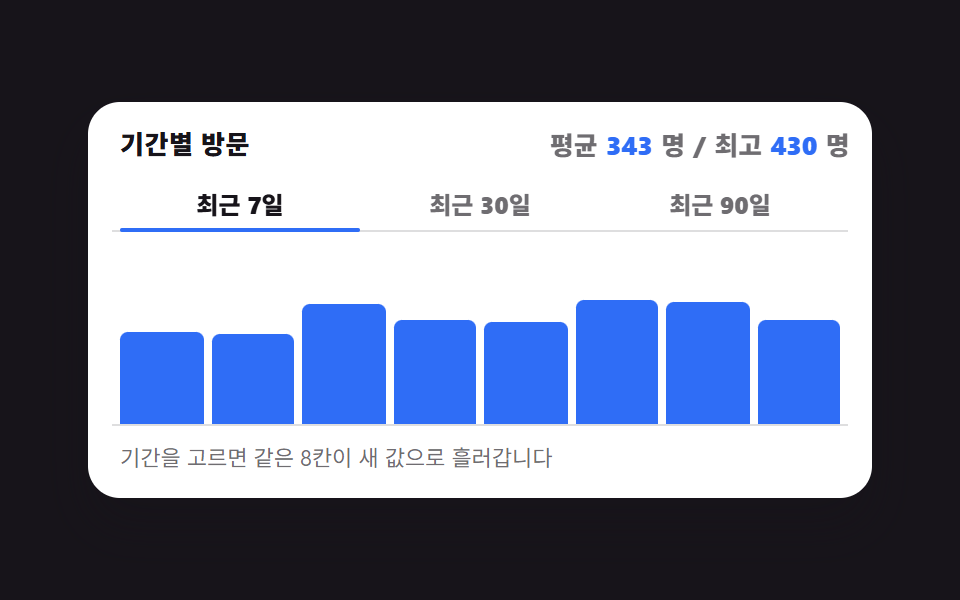
期間のセグメントを動かすと棒の本数はそのままで高さだけが新しいデータへ流れ、下線が選んだ枠へ滑ります。
使いどころ同じ指標を期間だけ変えて見る分析カードの見出し
aria-selected@propertygrid-template-columns
<main class="stage">
  <figure class="pg is-demo" id="pg" data-period="7">
    <figcaption class="pg__head">
      <span class="pg__title">期間ごとの訪問</span>
      <span class="pg__sum">
        <span class="pg__k">平均</span><span class="pg__n pg__n--avg" aria-hidden="true"></span><span class="pg__u">人</span>
        <span class="pg__slash" aria-hidden="true">/</span>
        <span class="pg__k">最高</span><span class="pg__n pg__n--max" aria-hidden="true"></span><span class="pg__u">人</span>
      </span>
    </figcaption>

    <div class="pg__seg" role="tablist" aria-label="期間を選ぶ">
      <span class="pg__ind" aria-hidden="true"></span>
      <button class="pg__tab" type="button" role="tab" aria-selected="true" tabindex="0">7日間</button>
      <button class="pg__tab" type="button" role="tab" aria-selected="false" tabindex="-1">30日間</button>
      <button class="pg__tab" type="button" role="tab" aria-selected="false" tabindex="-1">90日間</button>
    </div>

    <div class="pg__plot" role="img" aria-label="8区間の訪問バー。7日間平均343人、最高430人">
      <span class="pg__bar"></span><span class="pg__bar"></span><span class="pg__bar"></span><span class="pg__bar"></span>
      <span class="pg__bar"></span><span class="pg__bar"></span><span class="pg__bar"></span><span class="pg__bar"></span>
    </div>

    <p class="pg__hint">期間を選ぶと同じ8マスが新しい値に流れ変わります</p>

    <div class="sr">
      <span aria-live="polite" id="pg-live"></span>
      <table>
        <caption>8区間の訪問者数</caption>
        <thead><tr><th>区間</th><th>7日間</th><th>30日間</th><th>90日間</th></tr></thead>
        <tbody>
          <tr><th>1</th><td>312</td><td>258</td><td>198</td></tr>
          <tr><th>2</th><td>268</td><td>296</td><td>235</td></tr>
          <tr><th>3</th><td>401</td><td>221</td><td>262</td></tr>
          <tr><th>4</th><td>355</td><td>340</td><td>214</td></tr>
          <tr><th>5</th><td>289</td><td>372</td><td>289</td></tr>
          <tr><th>6</th><td>430</td><td>305</td><td>246</td></tr>
          <tr><th>7</th><td>372</td><td>264</td><td>310</td></tr>
          <tr><th>8</th><td>317</td><td>288</td><td>270</td></tr>
        </tbody>
      </table>
    </div>
  </figure>
</main>@use "../../../../site/static/demo-tokens" as *;
// 등록하지 않은 커스텀 속성은 문자열이라 보간이 아예 일어나지 않는다.
// 막대 높이(%)·밑줄 칸 번호·요약 숫자 셋 다 애니메이션 대상이라 전부 등록한다.
@property --h {
syntax: "<percentage>";
initial-value: 50%;
inherits: false;
}
@property --seg {
syntax: "<integer>";
initial-value: 0;
inherits: true;
}
@property --avg {
syntax: "<integer>";
initial-value: 343;
inherits: true;
}
@property --max {
syntax: "<integer>";
initial-value: 430;
inherits: true;
}
$duration: $dur-quick;
$easing: $ease-out;
$color: $subject-blue;
// 여덟 칸의 높이 = 그 구간 방문자 수 ÷ 5 (세로 축 상한 500명). 표의 숫자와 같은 값이다
$d7: 62.4% 53.6% 80.2% 71% 57.8% 86% 74.4% 63.4%;
$d30: 51.6% 59.2% 44.2% 68% 74.4% 61% 52.8% 57.6%;
$d90: 39.6% 47% 52.4% 42.8% 57.8% 49.2% 62% 54%;
$plot: 88px;
@include stage($stage-ink);
.sr {
position: absolute;
width: 1px;
height: 1px;
overflow: hidden;
clip-path: inset(50%);
white-space: nowrap;
}
.pg {
box-sizing: border-box;
width: min(392px, 88vw);
display: flex;
flex-direction: column;
gap: $sp-2;
margin: 0;
padding: $sp-3;
border-radius: $r-card;
background: $stage-paper;
box-shadow: $shadow-raised;
color: $subject-ink;
font-family: -apple-system, "Segoe UI", "Noto Sans KR", sans-serif;
}
.pg__head {
display: flex;
align-items: baseline;
justify-content: space-between;
gap: $sp-2;
padding: 0 $sp-1;
}
.pg__title { font-size: 13px; line-height: 18px; font-weight: 800; letter-spacing: .02em; }
// 요약 숫자는 글자가 아니라 카운터다 — --avg·--max 가 바뀌면 그 정수가 그대로 글자가 된다.
// 덕분에 자동 루프(CSS 만 도는 동안)에도 숫자가 기간을 따라 바뀐다
.pg__sum {
display: inline-flex;
align-items: baseline;
gap: $sp-1;
font-size: 12px;
line-height: 18px;
font-weight: 800;
font-variant-numeric: tabular-nums;
}
.pg__k { color: rgba(23, 20, 26, .62); }
.pg__u { color: rgba(23, 20, 26, .62); }
.pg__slash { color: rgba(23, 20, 26, .62); }
.pg__n { color: $color; }
.pg__n--avg { counter-reset: a var(--avg); }
.pg__n--avg::after { content: counter(a); }
.pg__n--max { counter-reset: m var(--max); }
.pg__n--max::after { content: counter(m); }
// ── 세그먼트 컨트롤 ──
// 세 칸은 grid repeat(3, 1fr) 로 정확히 3등분하고, 밑줄은 자기 폭(=1/3)의
// 배수만큼 translateX 한다. 고정 px 을 짐작하지 않으니 글자 길이가 바뀌어도 안 어긋난다
.pg__seg {
position: relative;
display: grid;
grid-template-columns: repeat(3, 1fr);
padding: 0 $sp-1;
border-bottom: 1px solid rgba(23, 20, 26, .14);
}
.pg__tab {
margin: 0;
padding: $sp-1 0;
border: 0;
border-radius: $r-xs;
background: transparent;
color: rgba(23, 20, 26, .62);
font-family: inherit;
font-size: 12px;
line-height: 18px;
font-weight: 800;
cursor: pointer;
}
.pg__tab[aria-selected="true"] { color: $subject-ink; }
.pg__tab:focus-visible { outline: 2px solid $color; outline-offset: -2px; }
.pg__ind {
position: absolute;
left: $sp-1;
bottom: -1px;
height: 2px;
width: calc((100% - 2 * #{$sp-1}) / 3);
border-radius: $r-pill;
background: $color;
transform: translateX(calc(var(--seg) * 100%));
}
// ── 막대 여덟 칸 ──
.pg__plot {
display: grid;
grid-template-columns: repeat(8, 1fr);
grid-template-rows: $plot;
align-items: end;
gap: $sp-1;
padding: 0 $sp-1;
border-bottom: 1px solid rgba(23, 20, 26, .14);
}
.pg__bar {
height: var(--h);
min-height: 2px;
border-radius: $r-xs $r-xs 0 0;
background: $color;
}
.pg__hint { margin: 0; padding: 0 $sp-1; font-size: 11px; line-height: 16px; color: rgba(23, 20, 26, .62); }
// ── 정적 경로(사람이 만진 뒤). 여기서 이미 완성된 화면이 나와야 한다 ──
.pg[data-period="7"] { --seg: 0; --avg: 343; --max: 430; }
.pg[data-period="30"] { --seg: 1; --avg: 293; --max: 372; }
.pg[data-period="90"] { --seg: 2; --avg: 253; --max: 310; }
@each $p, $d in ("7": $d7, "30": $d30, "90": $d90) {
@for $i from 1 through 8 {
.pg[data-period="#{$p}"] .pg__bar:nth-child(#{$i}) { --h: #{nth($d, $i)}; }
}
}
// 막대는 개수가 아니라 **높이**만 바뀐다. 등록된 <percentage> 라서 --h 하나만
// transition 에 걸면 height 가 따라온다
.pg:not(.is-demo) .pg__bar {
transition-property: --h;
transition-duration: $duration;
transition-timing-function: $easing;
}
.pg:not(.is-demo) .pg__ind {
transition-property: transform;
transition-duration: $duration;
transition-timing-function: $easing;
}
// ── 자동 루프(2초): 7일 → 30일 → 90일 → 7일 ──
// 높이와 밑줄은 보간(부드럽게), 고른 칸 강조와 요약 숫자는 steps(1, end) 컷.
// 컷과 보간을 한 요소에 섞으면 둘 중 하나가 반드시 거짓말이 된다.
// 컷은 **움직임이 시작되는 순간**(20·48·76%)에 둔다 — 라벨이 먼저 바뀌고 막대가
// 따라오는 게 실제 탭 UI 이고, 중간 프레임도 "저 기간으로 가는 중"으로 읽힌다.
// 컷을 움직임 끝에 두면 막대는 이미 새 값인데 라벨만 옛 기간인 장면이 poster 에 찍힌다(실측)
@for $i from 1 through 8 {
@keyframes pg-h#{$i} {
0%, 20% { --h: #{nth($d7, $i)}; }
28%, 48% { --h: #{nth($d30, $i)}; }
56%, 76% { --h: #{nth($d90, $i)}; }
84%, 100% { --h: #{nth($d7, $i)}; }
}
.pg.is-demo .pg__bar:nth-child(#{$i}) {
animation-name: pg-h#{$i};
animation-duration: $dur-loop;
animation-timing-function: $easing;
animation-iteration-count: infinite;
}
}
.pg.is-demo .pg__ind {
animation-name: pg-ind;
animation-duration: $dur-loop;
animation-timing-function: $easing;
animation-iteration-count: infinite;
}
// 밑줄은 막대(8%)보다 **짧은 3%** 안에 자리를 잡는다. 24프레임 표본에서 한 칸은 4.17% 라
// 창이 넓으면 poster 로 뽑히는 "가장 크게 변한 프레임"이 늘 밑줄이 뜬 순간이 된다(실측:
// 밑줄이 30일 밑에 있는데 강조는 7일인 장면이 카드 이미지로 나왔다)
@keyframes pg-ind {
0%, 20% { transform: translateX(0); }
23%, 48% { transform: translateX(100%); }
51%, 76% { transform: translateX(200%); }
79%, 100% { transform: translateX(0); }
}
// 요약 숫자 — 88% 전에 첫 기간으로 돌아온다(루프가 튀지 않게)
.pg.is-demo {
animation-name: pg-sum;
animation-duration: $dur-loop;
animation-timing-function: steps(1, end);
animation-iteration-count: infinite;
}
@keyframes pg-sum {
0% { --avg: 343; --max: 430; }
20% { --avg: 293; --max: 372; }
48% { --avg: 253; --max: 310; }
76%, 100% { --avg: 343; --max: 430; }
}
// 고른 칸 강조도 컷. 색이 서서히 섞이면 두 칸이 동시에 켜진 장면이 poster 에 찍힌다
.pg.is-demo .pg__tab:nth-of-type(1) {
animation-name: pg-t1;
animation-duration: $dur-loop;
animation-timing-function: steps(1, end);
animation-iteration-count: infinite;
}
@keyframes pg-t1 {
0% { color: $subject-ink; }
20% { color: rgba(23, 20, 26, .62); }
76%, 100% { color: $subject-ink; }
}
.pg.is-demo .pg__tab:nth-of-type(2) {
animation-name: pg-t2;
animation-duration: $dur-loop;
animation-timing-function: steps(1, end);
animation-iteration-count: infinite;
}
@keyframes pg-t2 {
0% { color: rgba(23, 20, 26, .62); }
20% { color: $subject-ink; }
48%, 100% { color: rgba(23, 20, 26, .62); }
}
.pg.is-demo .pg__tab:nth-of-type(3) {
animation-name: pg-t3;
animation-duration: $dur-loop;
animation-timing-function: steps(1, end);
animation-iteration-count: infinite;
}
@keyframes pg-t3 {
0% { color: rgba(23, 20, 26, .62); }
48% { color: $subject-ink; }
76%, 100% { color: rgba(23, 20, 26, .62); }
}
// 컷 옆의 보조 움직임은 transform 이어야 한다 — 페이드로 채우면 중간 프레임이 유령이 된다
.pg.is-demo .pg__sum {
animation-name: pg-pop;
animation-duration: $dur-loop;
animation-timing-function: $ease-pop;
animation-iteration-count: infinite;
}
@keyframes pg-pop {
0%, 20%, 48%, 76% { transform: scale(1); }
4%, 24%, 52%, 80% { transform: scale(1.07); }
10%, 30%, 58%, 86% { transform: scale(1); }
}
@media (max-width: 340px) {
.pg { padding: $sp-2; gap: $sp-1; }
.pg__hint { display: none; }
.pg__title, .pg__sum { font-size: 11px; line-height: 16px; }
.pg__plot { grid-template-rows: 64px; }
}
@media (prefers-reduced-motion: reduce) {
.pg.is-demo,
.pg.is-demo .pg__bar,
.pg.is-demo .pg__ind,
.pg.is-demo .pg__sum,
.pg.is-demo .pg__tab { animation: none !important; }
.pg:not(.is-demo) .pg__bar,
.pg:not(.is-demo) .pg__ind { transition: none !important; }
}@property --h {
syntax: "<percentage>";
initial-value: 50%;
inherits: false;
}
@property --seg {
syntax: "<integer>";
initial-value: 0;
inherits: true;
}
@property --avg {
syntax: "<integer>";
initial-value: 343;
inherits: true;
}
@property --max {
syntax: "<integer>";
initial-value: 430;
inherits: true;
}
html, body {
margin: 0;
overflow: hidden;
}
.stage {
box-sizing: border-box;
min-height: 100vh;
display: grid;
place-items: center;
margin: 0;
background: #17141a;
font-family: -apple-system, "Segoe UI", "Noto Sans KR", sans-serif;
padding: clamp(8px, 4vw, 24px);
}
.sr {
position: absolute;
width: 1px;
height: 1px;
overflow: hidden;
clip-path: inset(50%);
white-space: nowrap;
}
.pg {
box-sizing: border-box;
width: min(392px, 88vw);
display: flex;
flex-direction: column;
gap: 8px;
margin: 0;
padding: 12px;
border-radius: 16px;
background: #ffffff;
box-shadow: 0 14px 24px rgba(23, 20, 26, 0.32);
color: #17141a;
font-family: -apple-system, "Segoe UI", "Noto Sans KR", sans-serif;
}
.pg__head {
display: flex;
align-items: baseline;
justify-content: space-between;
gap: 8px;
padding: 0 4px;
}
.pg__title {
font-size: 13px;
line-height: 18px;
font-weight: 800;
letter-spacing: 0.02em;
}
.pg__sum {
display: inline-flex;
align-items: baseline;
gap: 4px;
font-size: 12px;
line-height: 18px;
font-weight: 800;
font-variant-numeric: tabular-nums;
}
.pg__k {
color: rgba(23, 20, 26, 0.62);
}
.pg__u {
color: rgba(23, 20, 26, 0.62);
}
.pg__slash {
color: rgba(23, 20, 26, 0.62);
}
.pg__n {
color: #2f6df6;
}
.pg__n--avg {
counter-reset: a var(--avg);
}
.pg__n--avg::after {
content: counter(a);
}
.pg__n--max {
counter-reset: m var(--max);
}
.pg__n--max::after {
content: counter(m);
}
.pg__seg {
position: relative;
display: grid;
grid-template-columns: repeat(3, 1fr);
padding: 0 4px;
border-bottom: 1px solid rgba(23, 20, 26, 0.14);
}
.pg__tab {
margin: 0;
padding: 4px 0;
border: 0;
border-radius: 4px;
background: transparent;
color: rgba(23, 20, 26, 0.62);
font-family: inherit;
font-size: 12px;
line-height: 18px;
font-weight: 800;
cursor: pointer;
}
.pg__tab[aria-selected=true] {
color: #17141a;
}
.pg__tab:focus-visible {
outline: 2px solid #2f6df6;
outline-offset: -2px;
}
.pg__ind {
position: absolute;
left: 4px;
bottom: -1px;
height: 2px;
width: calc((100% - 2 * 4px) / 3);
border-radius: 999px;
background: #2f6df6;
transform: translateX(calc(var(--seg) * 100%));
}
.pg__plot {
display: grid;
grid-template-columns: repeat(8, 1fr);
grid-template-rows: 88px;
align-items: end;
gap: 4px;
padding: 0 4px;
border-bottom: 1px solid rgba(23, 20, 26, 0.14);
}
.pg__bar {
height: var(--h);
min-height: 2px;
border-radius: 4px 4px 0 0;
background: #2f6df6;
}
.pg__hint {
margin: 0;
padding: 0 4px;
font-size: 11px;
line-height: 16px;
color: rgba(23, 20, 26, 0.62);
}
.pg[data-period="7"] {
--seg: 0;
--avg: 343;
--max: 430;
}
.pg[data-period="30"] {
--seg: 1;
--avg: 293;
--max: 372;
}
.pg[data-period="90"] {
--seg: 2;
--avg: 253;
--max: 310;
}
.pg[data-period="7"] .pg__bar:nth-child(1) {
--h: 62.4%;
}
.pg[data-period="7"] .pg__bar:nth-child(2) {
--h: 53.6%;
}
.pg[data-period="7"] .pg__bar:nth-child(3) {
--h: 80.2%;
}
.pg[data-period="7"] .pg__bar:nth-child(4) {
--h: 71%;
}
.pg[data-period="7"] .pg__bar:nth-child(5) {
--h: 57.8%;
}
.pg[data-period="7"] .pg__bar:nth-child(6) {
--h: 86%;
}
.pg[data-period="7"] .pg__bar:nth-child(7) {
--h: 74.4%;
}
.pg[data-period="7"] .pg__bar:nth-child(8) {
--h: 63.4%;
}
.pg[data-period="30"] .pg__bar:nth-child(1) {
--h: 51.6%;
}
.pg[data-period="30"] .pg__bar:nth-child(2) {
--h: 59.2%;
}
.pg[data-period="30"] .pg__bar:nth-child(3) {
--h: 44.2%;
}
.pg[data-period="30"] .pg__bar:nth-child(4) {
--h: 68%;
}
.pg[data-period="30"] .pg__bar:nth-child(5) {
--h: 74.4%;
}
.pg[data-period="30"] .pg__bar:nth-child(6) {
--h: 61%;
}
.pg[data-period="30"] .pg__bar:nth-child(7) {
--h: 52.8%;
}
.pg[data-period="30"] .pg__bar:nth-child(8) {
--h: 57.6%;
}
.pg[data-period="90"] .pg__bar:nth-child(1) {
--h: 39.6%;
}
.pg[data-period="90"] .pg__bar:nth-child(2) {
--h: 47%;
}
.pg[data-period="90"] .pg__bar:nth-child(3) {
--h: 52.4%;
}
.pg[data-period="90"] .pg__bar:nth-child(4) {
--h: 42.8%;
}
.pg[data-period="90"] .pg__bar:nth-child(5) {
--h: 57.8%;
}
.pg[data-period="90"] .pg__bar:nth-child(6) {
--h: 49.2%;
}
.pg[data-period="90"] .pg__bar:nth-child(7) {
--h: 62%;
}
.pg[data-period="90"] .pg__bar:nth-child(8) {
--h: 54%;
}
.pg:not(.is-demo) .pg__bar {
transition-property: --h;
transition-duration: 220ms;
transition-timing-function: ease-out;
}
.pg:not(.is-demo) .pg__ind {
transition-property: transform;
transition-duration: 220ms;
transition-timing-function: ease-out;
}
@keyframes pg-h1 {
0%, 20% {
--h: 62.4%;
}
28%, 48% {
--h: 51.6%;
}
56%, 76% {
--h: 39.6%;
}
84%, 100% {
--h: 62.4%;
}
}
.pg.is-demo .pg__bar:nth-child(1) {
animation-name: pg-h1;
animation-duration: 2s;
animation-timing-function: ease-out;
animation-iteration-count: infinite;
}
@keyframes pg-h2 {
0%, 20% {
--h: 53.6%;
}
28%, 48% {
--h: 59.2%;
}
56%, 76% {
--h: 47%;
}
84%, 100% {
--h: 53.6%;
}
}
.pg.is-demo .pg__bar:nth-child(2) {
animation-name: pg-h2;
animation-duration: 2s;
animation-timing-function: ease-out;
animation-iteration-count: infinite;
}
@keyframes pg-h3 {
0%, 20% {
--h: 80.2%;
}
28%, 48% {
--h: 44.2%;
}
56%, 76% {
--h: 52.4%;
}
84%, 100% {
--h: 80.2%;
}
}
.pg.is-demo .pg__bar:nth-child(3) {
animation-name: pg-h3;
animation-duration: 2s;
animation-timing-function: ease-out;
animation-iteration-count: infinite;
}
@keyframes pg-h4 {
0%, 20% {
--h: 71%;
}
28%, 48% {
--h: 68%;
}
56%, 76% {
--h: 42.8%;
}
84%, 100% {
--h: 71%;
}
}
.pg.is-demo .pg__bar:nth-child(4) {
animation-name: pg-h4;
animation-duration: 2s;
animation-timing-function: ease-out;
animation-iteration-count: infinite;
}
@keyframes pg-h5 {
0%, 20% {
--h: 57.8%;
}
28%, 48% {
--h: 74.4%;
}
56%, 76% {
--h: 57.8%;
}
84%, 100% {
--h: 57.8%;
}
}
.pg.is-demo .pg__bar:nth-child(5) {
animation-name: pg-h5;
animation-duration: 2s;
animation-timing-function: ease-out;
animation-iteration-count: infinite;
}
@keyframes pg-h6 {
0%, 20% {
--h: 86%;
}
28%, 48% {
--h: 61%;
}
56%, 76% {
--h: 49.2%;
}
84%, 100% {
--h: 86%;
}
}
.pg.is-demo .pg__bar:nth-child(6) {
animation-name: pg-h6;
animation-duration: 2s;
animation-timing-function: ease-out;
animation-iteration-count: infinite;
}
@keyframes pg-h7 {
0%, 20% {
--h: 74.4%;
}
28%, 48% {
--h: 52.8%;
}
56%, 76% {
--h: 62%;
}
84%, 100% {
--h: 74.4%;
}
}
.pg.is-demo .pg__bar:nth-child(7) {
animation-name: pg-h7;
animation-duration: 2s;
animation-timing-function: ease-out;
animation-iteration-count: infinite;
}
@keyframes pg-h8 {
0%, 20% {
--h: 63.4%;
}
28%, 48% {
--h: 57.6%;
}
56%, 76% {
--h: 54%;
}
84%, 100% {
--h: 63.4%;
}
}
.pg.is-demo .pg__bar:nth-child(8) {
animation-name: pg-h8;
animation-duration: 2s;
animation-timing-function: ease-out;
animation-iteration-count: infinite;
}
.pg.is-demo .pg__ind {
animation-name: pg-ind;
animation-duration: 2s;
animation-timing-function: ease-out;
animation-iteration-count: infinite;
}
@keyframes pg-ind {
0%, 20% {
transform: translateX(0);
}
23%, 48% {
transform: translateX(100%);
}
51%, 76% {
transform: translateX(200%);
}
79%, 100% {
transform: translateX(0);
}
}
.pg.is-demo {
animation-name: pg-sum;
animation-duration: 2s;
animation-timing-function: steps(1, end);
animation-iteration-count: infinite;
}
@keyframes pg-sum {
0% {
--avg: 343;
--max: 430;
}
20% {
--avg: 293;
--max: 372;
}
48% {
--avg: 253;
--max: 310;
}
76%, 100% {
--avg: 343;
--max: 430;
}
}
.pg.is-demo .pg__tab:nth-of-type(1) {
animation-name: pg-t1;
animation-duration: 2s;
animation-timing-function: steps(1, end);
animation-iteration-count: infinite;
}
@keyframes pg-t1 {
0% {
color: #17141a;
}
20% {
color: rgba(23, 20, 26, 0.62);
}
76%, 100% {
color: #17141a;
}
}
.pg.is-demo .pg__tab:nth-of-type(2) {
animation-name: pg-t2;
animation-duration: 2s;
animation-timing-function: steps(1, end);
animation-iteration-count: infinite;
}
@keyframes pg-t2 {
0% {
color: rgba(23, 20, 26, 0.62);
}
20% {
color: #17141a;
}
48%, 100% {
color: rgba(23, 20, 26, 0.62);
}
}
.pg.is-demo .pg__tab:nth-of-type(3) {
animation-name: pg-t3;
animation-duration: 2s;
animation-timing-function: steps(1, end);
animation-iteration-count: infinite;
}
@keyframes pg-t3 {
0% {
color: rgba(23, 20, 26, 0.62);
}
48% {
color: #17141a;
}
76%, 100% {
color: rgba(23, 20, 26, 0.62);
}
}
.pg.is-demo .pg__sum {
animation-name: pg-pop;
animation-duration: 2s;
animation-timing-function: cubic-bezier(0.2, 1.4, 0.4, 1);
animation-iteration-count: infinite;
}
@keyframes pg-pop {
0%, 20%, 48%, 76% {
transform: scale(1);
}
4%, 24%, 52%, 80% {
transform: scale(1.07);
}
10%, 30%, 58%, 86% {
transform: scale(1);
}
}
@media (max-width: 340px) {
.pg {
padding: 8px;
gap: 4px;
}
.pg__hint {
display: none;
}
.pg__title, .pg__sum {
font-size: 11px;
line-height: 16px;
}
.pg__plot {
grid-template-rows: 64px;
}
}
@media (prefers-reduced-motion: reduce) {
.pg.is-demo,
.pg.is-demo .pg__bar,
.pg.is-demo .pg__ind,
.pg.is-demo .pg__sum,
.pg.is-demo .pg__tab {
animation: none !important;
}
.pg:not(.is-demo) .pg__bar,
.pg:not(.is-demo) .pg__ind {
transition: none !important;
}
}// 실제 동작: JS 는 고른 칸을 data-period 와 aria-selected 에만 적는다.
// 막대 8칸의 높이(--h)·밑줄 위치(--seg)·요약 숫자(--avg --max)는 전부 CSS 가
// data-period 를 읽어 정한다 — 그래서 화면과 보조기술이 갈라질 자리가 없다.
var pg = document.getElementById('pg');
var live = document.getElementById('pg-live');
var tabs = [].slice.call(pg.querySelectorAll('.pg__tab'));
var KEY = ['7', '30', '90']; // data-period 값 (번역 대상이 아니다)
var AVG = [343, 293, 253]; // 표의 여덟 값 平均 — 2744/8 · 2344/8 · 2024/8
var MAX = [430, 372, 310]; // 표의 여덟 값 중 최댓값
var cur = 0;
function pick(i) {
cur = (i + 3) % 3;
pg.classList.remove('is-demo');
pg.dataset.period = KEY[cur];
tabs.forEach(function (t, k) {
t.setAttribute('aria-selected', k === cur ? 'true' : 'false');
t.tabIndex = k === cur ? 0 : -1;
});
live.textContent = tabs[cur].textContent + ' 平均 ' + AVG[cur] + '人、最高 ' + MAX[cur] + '人';
}
tabs.forEach(function (t, i) {
t.addEventListener('click', function () { pick(i); });
t.addEventListener('keydown', function (e) {
var d = e.key === 'ArrowRight' ? 1 : e.key === 'ArrowLeft' ? -1 : 0;
if (!d) { return; }
e.preventDefault();
pick(i + d);
tabs[cur].focus({ preventScroll: true });
});
});import { useState } from "react";
import type { CSSProperties } from "react";
import styles from "./PeriodSegment.module.scss";
export type PeriodSegmentProps = {
title?: string;
avgLabel?: string;
maxLabel?: string;
unit?: string;
tabs?: string[];
hint?: string;
chartLabel?: string;
periodGroupLabel?: string;
live7?: string;
live30?: string;
live90?: string;
duration?: number;
easing?: string;
color?: string;
};
// ambient 타입이 빈약해 이벤트는 파일 안 로컬 타입으로만 다룬다
type KeyEvt = { key: string; preventDefault(): void };
type Vars = CSSProperties & {
"--duration"?: string;
"--easing"?: string;
"--color"?: string;
};
// 표와 같은 여덟 값 — 높이는 ÷5 (세로 축 상한 500명)
const COLS = [312, 268, 401, 355, 289, 430, 372, 317];
const D7 = COLS.map((v) => v / 5);
const D30 = [258, 296, 221, 340, 372, 305, 264, 288].map((v) => v / 5);
const D90 = [198, 235, 262, 214, 289, 246, 310, 270].map((v) => v / 5);
const SETS = [D7, D30, D90];
// 평균·최대 — 표의 값에서 직접 계산해 소수를 버린다 (2744/8 · 2344/8 · 2024/8)
const AVG = [343, 293, 253];
const MAX = [430, 372, 310];
const KEYS = ["7", "30", "90"];
export default function PeriodSegment({
title = "기간별 방문",
avgLabel = "평균",
maxLabel = "최고",
unit = "명",
tabs = ["최근 7일", "최근 30일", "최근 90일"],
hint = "기간을 고르면 같은 8칸이 새 값으로 흘러갑니다",
chartLabel = "8구간 방문 막대. 7일 평균 343명, 최고 430명",
periodGroupLabel = "기간 고르기",
live7 = "7일 평균 343명, 최고 430명",
live30 = "30일 평균 293명, 최고 372명",
live90 = "90일 평균 253명, 최고 310명",
duration = 220,
easing = "ease-out",
color = "#2f6df6",
}: PeriodSegmentProps) {
const [demo, setDemo] = useState(true);
const [cur, setCur] = useState(0);
const vars: Vars = { "--duration": `${duration}ms`, "--easing": easing, "--color": color };
const live = [live7, live30, live90][cur];
function pick(i: number) {
setDemo(false);
setCur(((i % 3) + 3) % 3);
}
function onKey(e: KeyEvt, i: number) {
const d = e.key === "ArrowRight" ? 1 : e.key === "ArrowLeft" ? -1 : 0;
if (!d) return;
e.preventDefault();
pick(i + d);
}
return (
<div
className={`${styles.pg} ${demo ? styles.isDemo : ""}`}
data-period={KEYS[cur]}
style={vars}
>
<div className={styles.head}>
<span className={styles.title}>{title}</span>
<span className={styles.sum}>
<span className={styles.k}>{avgLabel}</span>
<span className={styles.nAvg} aria-hidden="true" />
<span className={styles.u}>{unit}</span>
<span className={styles.slash} aria-hidden="true">/</span>
<span className={styles.k}>{maxLabel}</span>
<span className={styles.nMax} aria-hidden="true" />
<span className={styles.u}>{unit}</span>
</span>
</div>
<div className={styles.seg} role="tablist" aria-label={periodGroupLabel}>
<span className={styles.ind} aria-hidden="true" />
{tabs.map((t, i) => (
<button
key={t}
type="button"
role="tab"
className={styles.tab}
aria-selected={cur === i}
tabIndex={cur === i ? 0 : -1}
onClick={() => pick(i)}
onKeyDown={(e: KeyEvt) => onKey(e, i)}
>
{t}
</button>
))}
</div>
<div className={styles.plot} role="img" aria-label={chartLabel}>
{SETS[cur].map((h, i) => (
<span key={i} className={styles.bar} style={{ "--h": `${h}%` } as CSSProperties} />
))}
</div>
<p className={styles.hint}>{hint}</p>
<div className={styles.sr}>
<span aria-live="polite">{live}</span>
<table>
<caption>8구간 방문자 수</caption>
<thead>
<tr><th>구간</th><th>7일</th><th>30일</th><th>90일</th></tr>
</thead>
<tbody>
{COLS.map((v, i) => (
<tr key={i}>
<th>{i + 1}</th>
<td>{v}</td>
<td>{Math.round(D30[i] * 5)}</td>
<td>{Math.round(D90[i] * 5)}</td>
</tr>
))}
</tbody>
</table>
</div>
</div>
);
}05 7日・30日・90日で棒が入れ替わる — 計測 累積面積 6.915% · 動いたフレーム 12/23GODRICH オリジナル · SCSS と React は zip に同梱 · ダッシュボード グラフ デザイン 操作9選 — 触ると数字が変わる
このデモが属する記事
 ダッシュボード グラフ デザイン 操作9選 — 触ると数字が変わるダッシュボード グラフ デザインで本当に働くのは描かれた線ではなく、その上で手がすることです。9 つはすべてチャートライブラリなしで CSS の棒とインライン SVG の上に素の JS だけを載せ、触ると数字が変わるものだけを選びました。 この記事のデモをすべて見る