07保存状態付き設定フォームセクション
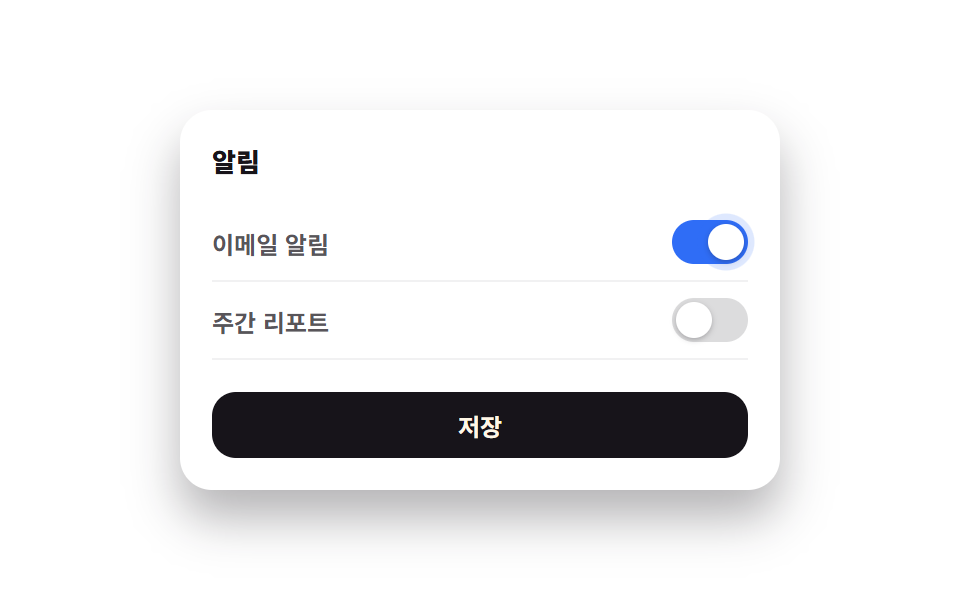
토글·셀렉트를 바꾸고 저장 버튼을 누르면 버튼이 저장 중 점 3개로 바뀌었다가 실제로 체크 아이콘과 '저장됨'으로 바뀝니다.
使いどころ
transitionaria-checkedclick
<main class="stage">
  <form class="sf" novalidate>
    <h2 class="sf__title">通知</h2>
    <label class="sf__row">
      <span>メール通知</span>
      <span class="sf__switch is-demo" role="switch" aria-checked="true" tabindex="0"><span class="sf__knob" aria-hidden="true"></span></span>
    </label>
    <label class="sf__row">
      <span>週次レポート</span>
      <span class="sf__switch" role="switch" aria-checked="false" tabindex="0"><span class="sf__knob" aria-hidden="true"></span></span>
    </label>
    <button class="sf__save" type="submit">
      <span class="sf__save-label">保存</span>
    </button>
  </form>
</main>
@use "../../../../site/static/demo-tokens" as *;
$duration: $dur-base;
$easing: $ease-spring;
$color: $subject-blue;
@include stage($stage-paper);
.sf {
box-sizing: border-box;
width: min(300px, 88vw);
border-radius: $r-card;
padding: $sp-4;
background: #fff;
box-shadow: $shadow-raised;
font-family: -apple-system, "Segoe UI", "Noto Sans KR", sans-serif;
}
.sf__title { margin: 0 0 $sp-3; font-size: 13px; font-weight: 800; color: $stage-ink; }
.sf__row {
display: flex; align-items: center; justify-content: space-between;
padding: $sp-2 0;
font-size: 12px; font-weight: 600; color: rgba(23, 20, 26, .72);
border-bottom: 1px solid rgba(23, 20, 26, .06);
}
.sf__switch {
position: relative;
width: 38px; height: 22px;
border-radius: $r-pill;
background: rgba(23, 20, 26, .15);
cursor: pointer;
transition: background $duration $easing;
flex: 0 0 auto;
}
.sf__switch[aria-checked="true"] { background: $color; }
.sf__knob {
position: absolute; top: 2px; left: 2px;
width: 18px; height: 18px;
border-radius: 50%;
background: #fff;
box-shadow: 0 1px 3px rgba(23, 20, 26, .3);
transition: transform $duration $easing;
}
.sf__switch[aria-checked="true"] .sf__knob { transform: translateX(16px); }
.sf__save {
margin-top: $sp-4;
width: 100%;
border: 0; border-radius: $r-control;
padding: $sp-2 $sp-4;
background: $stage-ink;
color: $subject-cream;
font: inherit; font-weight: 700; font-size: 12px;
cursor: pointer;
display: flex; align-items: center; justify-content: center; gap: $sp-2;
}
.sf__save::before {
content: "";
width: 12px; height: 12px;
border-radius: 50%;
border: 2px solid transparent;
display: none;
}
.sf__save.is-busy::before { display: block; border-color: rgba(255, 247, 230, .3); border-top-color: $subject-cream; animation: sf-spin .6s linear infinite; }
.sf__save.is-done { background: #47905f; }
@keyframes sf-spin { to { transform: rotate(360deg); } }
// ── 자동 루프: 스위치 노브에 은은한 링 글로우가 반복된다 ──────────────
.sf__switch.is-demo .sf__knob { animation: sf-glow 2s ease-in-out infinite; }
@keyframes sf-glow {
0%, 100% { box-shadow: 0 1px 3px rgba(23, 20, 26, .3), 0 0 0 0 rgba(47, 109, 246, 0); }
50% { box-shadow: 0 1px 3px rgba(23, 20, 26, .3), 0 0 0 6px rgba(47, 109, 246, .18); }
}
@media (max-width: 340px) {
.sf { padding: $sp-3; }
.sf__row { font-size: 11px; }
}
@media (max-height: 220px) {
.sf { padding: $sp-2 $sp-3; }
.sf__title { margin-bottom: $sp-1; }
.sf__row { padding: 4px 0; }
.sf__save { margin-top: $sp-2; padding: $sp-1 $sp-4; }
}
@media (prefers-reduced-motion: reduce) {
.sf__switch.is-demo .sf__knob { animation: none !important; }
.sf__save.is-busy::before { animation: none !important; }
.sf__switch, .sf__knob { transition: none; }
}html, body {
margin: 0;
overflow: hidden;
}
.stage {
box-sizing: border-box;
min-height: 100vh;
display: grid;
place-items: center;
margin: 0;
background: #ffffff;
font-family: -apple-system, "Segoe UI", "Noto Sans KR", sans-serif;
padding: clamp(8px, 4vw, 24px);
}
.sf {
box-sizing: border-box;
width: min(300px, 88vw);
border-radius: 16px;
padding: 16px;
background: #fff;
box-shadow: 0 14px 24px rgba(23, 20, 26, 0.32);
font-family: -apple-system, "Segoe UI", "Noto Sans KR", sans-serif;
}
.sf__title {
margin: 0 0 12px;
font-size: 13px;
font-weight: 800;
color: #17141a;
}
.sf__row {
display: flex;
align-items: center;
justify-content: space-between;
padding: 8px 0;
font-size: 12px;
font-weight: 600;
color: rgba(23, 20, 26, 0.72);
border-bottom: 1px solid rgba(23, 20, 26, 0.06);
}
.sf__switch {
position: relative;
width: 38px;
height: 22px;
border-radius: 999px;
background: rgba(23, 20, 26, 0.15);
cursor: pointer;
transition: background 300ms cubic-bezier(0.2, 0.8, 0.2, 1);
flex: 0 0 auto;
}
.sf__switch[aria-checked=true] {
background: #2f6df6;
}
.sf__knob {
position: absolute;
top: 2px;
left: 2px;
width: 18px;
height: 18px;
border-radius: 50%;
background: #fff;
box-shadow: 0 1px 3px rgba(23, 20, 26, 0.3);
transition: transform 300ms cubic-bezier(0.2, 0.8, 0.2, 1);
}
.sf__switch[aria-checked=true] .sf__knob {
transform: translateX(16px);
}
.sf__save {
margin-top: 16px;
width: 100%;
border: 0;
border-radius: 12px;
padding: 8px 16px;
background: #17141a;
color: #fff7e6;
font: inherit;
font-weight: 700;
font-size: 12px;
cursor: pointer;
display: flex;
align-items: center;
justify-content: center;
gap: 8px;
}
.sf__save::before {
content: "";
width: 12px;
height: 12px;
border-radius: 50%;
border: 2px solid transparent;
display: none;
}
.sf__save.is-busy::before {
display: block;
border-color: rgba(255, 247, 230, 0.3);
border-top-color: #fff7e6;
animation: sf-spin 0.6s linear infinite;
}
.sf__save.is-done {
background: #47905f;
}
@keyframes sf-spin {
to {
transform: rotate(360deg);
}
}
.sf__switch.is-demo .sf__knob {
animation: sf-glow 2s ease-in-out infinite;
}
@keyframes sf-glow {
0%, 100% {
box-shadow: 0 1px 3px rgba(23, 20, 26, 0.3), 0 0 0 0 rgba(47, 109, 246, 0);
}
50% {
box-shadow: 0 1px 3px rgba(23, 20, 26, 0.3), 0 0 0 6px rgba(47, 109, 246, 0.18);
}
}
@media (max-width: 340px) {
.sf {
padding: 12px;
}
.sf__row {
font-size: 11px;
}
}
@media (max-height: 220px) {
.sf {
padding: 8px 12px;
}
.sf__title {
margin-bottom: 4px;
}
.sf__row {
padding: 4px 0;
}
.sf__save {
margin-top: 8px;
padding: 4px 16px;
}
}
@media (prefers-reduced-motion: reduce) {
.sf__switch.is-demo .sf__knob {
animation: none !important;
}
.sf__save.is-busy::before {
animation: none !important;
}
.sf__switch, .sf__knob {
transition: none;
}
}// 실제 동작: 스위치를 누르면 실제로 켜짐/꺼짐이 바뀌고, 저장을 누르면 버튼이 저장중 → 저장됨으로 실제 ステータス 전이를 한다.
document.querySelectorAll('.sf__switch').forEach(function (sw) {
function toggle() {
sw.classList.remove('is-demo');
var on = sw.getAttribute('aria-checked') === 'true';
sw.setAttribute('aria-checked', String(!on));
}
sw.addEventListener('click', toggle);
sw.addEventListener('keydown', function (e) { if (e.key === 'Enter' || e.key === ' ') { e.preventDefault(); toggle(); } });
});
var form = document.querySelector('.sf');
var save = document.querySelector('.sf__save');
var label = document.querySelector('.sf__save-label');
form.addEventListener('submit', function (e) {
e.preventDefault();
if (save.classList.contains('is-busy')) return;
save.classList.add('is-busy');
label.textContent = '保存中';
setTimeout(function () {
save.classList.remove('is-busy');
save.classList.add('is-done');
label.textContent = '保存済み';
setTimeout(function () {
save.classList.remove('is-done');
label.textContent = '保存';
}, 1600);
}, 700);
});import { useState } from "react";
import type { CSSProperties } from "react";
import styles from "./SettingsForm.module.scss";
export type SettingsFormProps = {
duration?: number;
easing?: string;
color?: string;
};
type Vars = CSSProperties & { "--duration"?: string; "--easing"?: string; "--color"?: string };
type SaveState = "idle" | "busy" | "done";
export default function SettingsForm({ duration = 300, easing = "cubic-bezier(.2,.8,.2,1)", color = "#2f6df6" }: SettingsFormProps) {
const [emailAlert, setEmailAlert] = useState(true);
const [weeklyReport, setWeeklyReport] = useState(false);
const [save, setSave] = useState<SaveState>("idle");
const vars: Vars = { "--duration": `${duration}ms`, "--easing": easing, "--color": color };
function onSubmit(e: { preventDefault: () => void }) {
e.preventDefault();
if (save === "busy") return;
setSave("busy");
setTimeout(() => {
setSave("done");
setTimeout(() => setSave("idle"), 1600);
}, 700);
}
const label = save === "busy" ? "저장 중" : save === "done" ? "저장됨" : "저장";
return (
<form className={styles.sf} style={vars} onSubmit={onSubmit}>
<h2 className={styles.title}>알림</h2>
<label className={styles.row}>
<span>이메일 알림</span>
<span className={styles.switch} role="switch" aria-checked={emailAlert} tabIndex={0}
onClick={() => setEmailAlert((v) => !v)}
onKeyDown={(e: KeyboardEvent) => { if (e.key === "Enter" || e.key === " ") { e.preventDefault(); setEmailAlert((v) => !v); } }}
data-on={emailAlert}
>
<span className={styles.knob} />
</span>
</label>
<label className={styles.row}>
<span>주간 리포트</span>
<span className={styles.switch} role="switch" aria-checked={weeklyReport} tabIndex={0}
onClick={() => setWeeklyReport((v) => !v)}
onKeyDown={(e: KeyboardEvent) => { if (e.key === "Enter" || e.key === " ") { e.preventDefault(); setWeeklyReport((v) => !v); } }}
data-on={weeklyReport}
>
<span className={styles.knob} />
</span>
</label>
<button type="submit" className={`${styles.save} ${save === "busy" ? styles.busy : ""} ${save === "done" ? styles.done : ""}`}>
{label}
</button>
</form>
);
}07 保存状態付き設定フォームセクション — 計測 累積面積 0.167% · 動いたフレーム 10/23GODRICH オリジナル · SCSS と React は zip に同梱 · ダッシュボード ウィジェット単体UI9選 —そのまま貼れる部品だけ
このデモが属する記事
 ダッシュボード ウィジェット単体UI9選 —そのまま貼れる部品だけ管理画面をまるごと使うのではなく、この部品だけを自分のプロジェクトにそのまま貼りたい人のために、単体で動くダッシュボード ウィジェットを9個集めました。ドーナツチャートは実際に数字が数え上がります。 この記事のデモをすべて見る