04チェックを外すと列が消えるメニュー
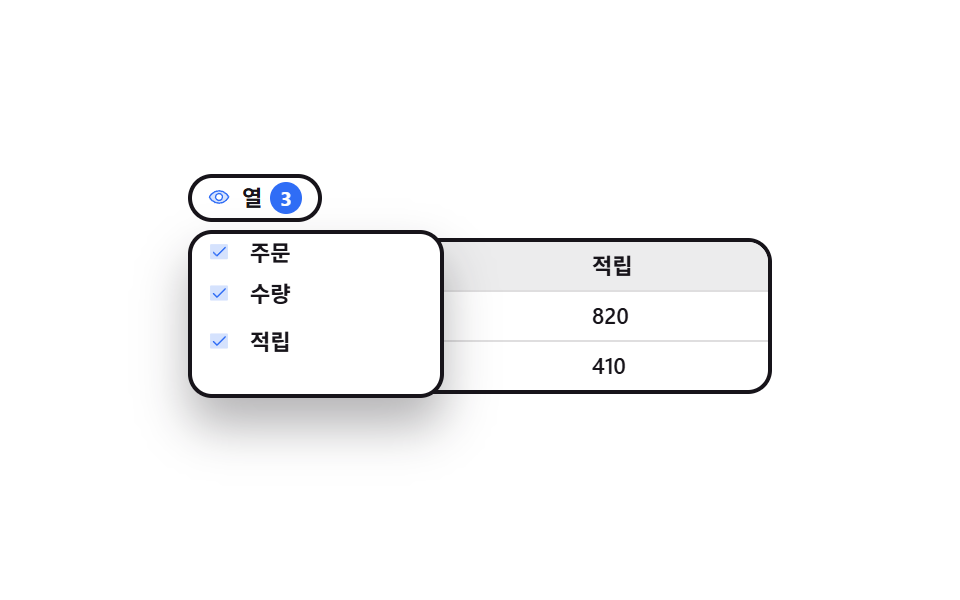
ボタンを押すと列名の一覧が下に開き、チェックを一つ外した瞬間にその列が表からまるごと抜け、ボタン横の数字が残りの列数に変わります。
使いどころ列が多く横に流れる表から必要な分だけ残すとき
aria-expandedpadding-bottomsteps(1, end)
<main class="stage">
  <div class="cv is-demo" id="cv">
    <div class="cv__bar">
      <button class="cv__btn" type="button" id="cv-btn" aria-expanded="false" aria-controls="cv-menu">
        <span class="cv__ic" aria-hidden="true"><svg viewBox="0 0 256 256" width="1em" height="1em" fill="currentColor"><g><path d="M128 56c-80 0-112 72-112 72s32 72 112 72s112-72 112-72s-32-72-112-72m0 112a40 40 0 1 1 40-40a40 40 0 0 1-40 40" opacity=".2"/><path d="M247.31 124.76c-.35-.79-8.82-19.58-27.65-38.41C194.57 61.26 162.88 48 128 48S61.43 61.26 36.34 86.35C17.51 105.18 9 124 8.69 124.76a8 8 0 0 0 0 6.5c.35.79 8.82 19.57 27.65 38.4C61.43 194.74 93.12 208 128 208s66.57-13.26 91.66-38.34c18.83-18.83 27.3-37.61 27.65-38.4a8 8 0 0 0 0-6.5M128 192c-30.78 0-57.67-11.19-79.93-33.25A133.5 133.5 0 0 1 25 128a133.3 133.3 0 0 1 23.07-30.75C70.33 75.19 97.22 64 128 64s57.67 11.19 79.93 33.25A133.5 133.5 0 0 1 231.05 128c-7.21 13.46-38.62 64-103.05 64m0-112a48 48 0 1 0 48 48a48.05 48.05 0 0 0-48-48m0 80a32 32 0 1 1 32-32a32 32 0 0 1-32 32"/></g></svg></span>
        <span class="cv__btn-t">列</span>
        <span class="cv__num"><b class="cv__n3">3</b><b class="cv__n2">2</b></span>
      </button>
    </div>

    <div class="cv__menu" id="cv-menu" role="group" aria-label="列を選ぶ">
     <div class="cv__menu-in">
      <button class="cv__opt" type="button" role="checkbox" aria-checked="true" data-col="1"><span class="cv__box" aria-hidden="true"><svg viewBox="0 0 256 256" width="1em" height="1em" fill="currentColor"><g><path d="M232 56v144a16 16 0 0 1-16 16H40a16 16 0 0 1-16-16V56a16 16 0 0 1 16-16h176a16 16 0 0 1 16 16" opacity=".2"/><path d="m205.66 85.66l-96 96a8 8 0 0 1-11.32 0l-40-40a8 8 0 0 1 11.32-11.32L104 164.69l90.34-90.35a8 8 0 0 1 11.32 11.32"/></g></svg></span>注文</button>
      <button class="cv__opt" type="button" role="checkbox" aria-checked="true" data-col="2"><span class="cv__box" aria-hidden="true"><svg viewBox="0 0 256 256" width="1em" height="1em" fill="currentColor"><g><path d="M232 56v144a16 16 0 0 1-16 16H40a16 16 0 0 1-16-16V56a16 16 0 0 1 16-16h176a16 16 0 0 1 16 16" opacity=".2"/><path d="m205.66 85.66l-96 96a8 8 0 0 1-11.32 0l-40-40a8 8 0 0 1 11.32-11.32L104 164.69l90.34-90.35a8 8 0 0 1 11.32 11.32"/></g></svg></span>数量</button>
      <button class="cv__opt" type="button" role="checkbox" aria-checked="true" data-col="3"><span class="cv__box" aria-hidden="true"><svg viewBox="0 0 256 256" width="1em" height="1em" fill="currentColor"><g><path d="M232 56v144a16 16 0 0 1-16 16H40a16 16 0 0 1-16-16V56a16 16 0 0 1 16-16h176a16 16 0 0 1 16 16" opacity=".2"/><path d="m205.66 85.66l-96 96a8 8 0 0 1-11.32 0l-40-40a8 8 0 0 1 11.32-11.32L104 164.69l90.34-90.35a8 8 0 0 1 11.32 11.32"/></g></svg></span>ポイント</button>
     </div>
    </div>

    <div class="cv__grid" id="cv-grid" role="grid" aria-label="注文テーブル">
      <div class="cv__row" role="row"><span class="cv__h" data-col="1" role="columnheader">注文</span><span class="cv__h" data-col="2" role="columnheader">数量</span><span class="cv__h" data-col="3" role="columnheader">ポイント</span></div>
      <div class="cv__row" role="row"><span data-col="1" role="gridcell">A-1043</span><span data-col="2" role="gridcell">3</span><span data-col="3" role="gridcell">820</span></div>
      <div class="cv__row" role="row"><span data-col="1" role="gridcell">A-1044</span><span data-col="2" role="gridcell">1</span><span data-col="3" role="gridcell">410</span></div>
    </div>
  </div>
</main>@use "sass:color";
@use "../../../../site/static/demo-tokens" as *;
$duration: $dur-quick;
$easing: $ease-spring;
$color: $subject-blue;
@include stage($stage-paper);
$row-h: 24px;
$ink: $subject-ink;
$line: color.mix($ink, $stage-paper, 14%);
.cv {
position: relative;
box-sizing: border-box;
width: min(292px, 92vw);
// 열 목록이 절대 배치라 레이아웃 높이에 안 잡힌다. 열린 목록이 무대 밖으로
// 삐져나오지 않도록 그 높이만큼을 아래 여백으로 미리 잡아 둔다 (BD9 함정)
padding-bottom: $sp-4;
color: $ink;
font-family: -apple-system, "Segoe UI", "Noto Sans KR", sans-serif;
}
// ── 위 줄 버튼 ────────────────────────────────────────
.cv__bar { display: flex; height: 28px; }
.cv__btn {
display: inline-flex;
align-items: center;
gap: $sp-1;
height: 24px;
padding: 0 $sp-2;
border: 2px solid $ink;
border-radius: $r-pill;
background: $stage-paper;
color: $ink;
font-family: inherit;
font-size: 11px;
line-height: 20px;
font-weight: 700;
cursor: pointer;
}
.cv__btn:focus-visible { outline: 2px solid $color; outline-offset: 2px; }
.cv__ic { display: inline-flex; width: 13px; height: 13px; color: $color; }
.cv__num {
position: relative;
display: inline-flex;
align-items: center;
justify-content: center;
width: 16px;
height: 16px;
border-radius: $r-pill;
background: $color;
color: $stage-paper;
font-size: 10px;
line-height: 16px;
}
.cv__n3, .cv__n2 { position: absolute; font-weight: 700; }
.cv__n2 { opacity: 0; }
// ── 열 목록 (절대 배치) ───────────────────────────────
.cv__menu {
position: absolute;
left: 0; top: 28px;
z-index: 3;
display: flex;
flex-direction: column;
width: 116px;
padding: $sp-1;
border: 2px solid $ink;
border-radius: $r-control;
background: $stage-paper;
box-shadow: $shadow-raised;
opacity: 0;
visibility: hidden;
transform: translateY(-6px);
transition: opacity $duration $easing, transform $duration $easing, visibility 0s $duration;
}
.cv.is-open .cv__menu {
opacity: 1;
visibility: visible;
transform: translateY(0);
transition: opacity $duration $easing, transform $duration $easing, visibility 0s;
}
.cv__menu-in { display: flex; flex-direction: column; }
.cv__opt {
display: flex;
align-items: center;
gap: $sp-2;
height: $row-h;
padding: 0 $sp-1;
border: 0;
border-radius: $r-xs;
background: none;
color: $ink;
font-family: inherit;
font-size: 11px;
line-height: $row-h;
font-weight: 600;
text-align: left;
cursor: pointer;
}
.cv__opt:focus-visible { outline: 2px solid $color; outline-offset: -2px; }
.cv__box { display: inline-flex; width: 13px; height: 13px; color: $color; }
.cv__opt[aria-checked="false"] { color: rgba(23, 20, 26, .38); }
.cv__opt[aria-checked="false"] .cv__box { opacity: 0; }
// ── 표 ───────────────────────────────────────────────
.cv__grid {
margin-top: $sp-1;
border: 2px solid $ink;
border-radius: $r-control;
overflow: hidden;
}
.cv__row {
display: grid;
grid-template-columns: var(--t, 1fr 1fr 1fr);
height: $row-h;
}
.cv__row + .cv__row { border-top: 1px solid $line; }
.cv__row:first-child { background: color.mix($ink, $stage-paper, 8%); }
.cv__row > * {
min-width: 0;
padding: 0 $sp-2;
font-size: 11px;
line-height: $row-h;
font-weight: 500;
white-space: nowrap;
overflow: hidden;
}
.cv__h { font-weight: 700; }
.cv__row > .is-off { opacity: 0; }
// ── 자동 루프 (2s) ───────────────────────────────────
// 10% 목록 컷 등장 → 10~40% 세 줄이 시차를 두고 떠오른다(작은 transform 으로 프레임을 채운다)
// → 46% 셋째 열이 0fr 로 컷 접힘 + 배지 3→2 → 64% 되돌림 → 76~86% 줄이 내려앉고 목록 컷 퇴장.
// 닫힘을 열림과 똑같은 컷으로 두면 **닫히는 장의 변화 면적이 더 커서** 그 프레임이 poster 로
// 뽑힌다(248-09 실측과 같은 계열). 그래서 안쪽 통(.cv__menu-in)을 먼저 흐리게 줄여 두고
// 바깥 통만 컷으로 끈다 — 꺼지는 순간에 사라지는 잉크가 적어진다.
.cv.is-demo .cv__menu {
animation-name: cv-menu;
animation-duration: $dur-loop;
animation-timing-function: steps(1, end);
animation-iteration-count: infinite;
}
.cv.is-demo .cv__menu-in {
animation-name: cv-dim;
animation-duration: $dur-loop;
animation-timing-function: $ease-out;
animation-iteration-count: infinite;
}
.cv.is-demo .cv__opt {
animation-name: cv-opt;
animation-duration: $dur-loop;
animation-timing-function: $easing;
animation-iteration-count: infinite;
animation-fill-mode: backwards;
}
.cv.is-demo .cv__opt:nth-child(2) { animation-delay: 80ms; }
.cv.is-demo .cv__opt:nth-child(3) { animation-delay: 160ms; }
.cv.is-demo .cv__opt:nth-child(3) .cv__box {
animation-name: cv-tick;
animation-duration: $dur-loop;
animation-timing-function: steps(1, end);
animation-iteration-count: infinite;
}
.cv.is-demo .cv__row {
animation-name: cv-cols;
animation-duration: $dur-loop;
animation-timing-function: steps(1, end);
animation-iteration-count: infinite;
}
.cv.is-demo .cv__row > :nth-child(3) {
animation-name: cv-fade;
animation-duration: $dur-loop;
animation-timing-function: steps(1, end);
animation-iteration-count: infinite;
}
.cv.is-demo .cv__n3 {
animation-name: cv-fade;
animation-duration: $dur-loop;
animation-timing-function: steps(1, end);
animation-iteration-count: infinite;
}
.cv.is-demo .cv__n2 {
animation-name: cv-show;
animation-duration: $dur-loop;
animation-timing-function: steps(1, end);
animation-iteration-count: infinite;
}
@keyframes cv-menu {
0% { opacity: 0; visibility: hidden; transform: translateY(0); }
10% { opacity: 1; visibility: visible; transform: translateY(0); }
86% { opacity: 0; visibility: hidden; transform: translateY(0); }
100% { opacity: 0; visibility: hidden; transform: translateY(0); }
}
@keyframes cv-dim {
0% { opacity: 1; }
74% { opacity: 1; }
86% { opacity: .14; }
100% { opacity: .14; }
}
@keyframes cv-opt {
0% { transform: translateY(-10px); }
10% { transform: translateY(-10px); }
40% { transform: translateY(0); }
76% { transform: translateY(0); }
86% { transform: translateY(-10px); }
100% { transform: translateY(-10px); }
}
@keyframes cv-tick {
0% { opacity: 1; }
46% { opacity: 0; }
64% { opacity: 1; }
100% { opacity: 1; }
}
@keyframes cv-cols {
0% { grid-template-columns: 1fr 1fr 1fr; }
46% { grid-template-columns: 1fr 1fr 0fr; }
64% { grid-template-columns: 1fr 1fr 1fr; }
100% { grid-template-columns: 1fr 1fr 1fr; }
}
@keyframes cv-fade {
0% { opacity: 1; }
46% { opacity: 0; }
64% { opacity: 1; }
100% { opacity: 1; }
}
@keyframes cv-show {
0% { opacity: 0; }
46% { opacity: 1; }
64% { opacity: 0; }
100% { opacity: 0; }
}
// 320×200 — 목록 폭과 셀 여백만 줄인다 (세로는 이미 여유가 없다)
@media (max-width: 340px) {
.cv__menu { width: 104px; }
.cv__row > * { padding: 0 $sp-1; }
}
@media (prefers-reduced-motion: reduce) {
.cv.is-demo .cv__menu,
.cv.is-demo .cv__menu-in,
.cv.is-demo .cv__opt,
.cv.is-demo .cv__opt:nth-child(3) .cv__box,
.cv.is-demo .cv__row,
.cv.is-demo .cv__row > :nth-child(3),
.cv.is-demo .cv__n3,
.cv.is-demo .cv__n2 { animation: none !important; }
.cv.is-demo .cv__menu { opacity: 1; visibility: visible; transform: translateY(0); }
.cv__menu { transition: none; }
}html, body {
margin: 0;
overflow: hidden;
}
.stage {
box-sizing: border-box;
min-height: 100vh;
display: grid;
place-items: center;
margin: 0;
background: #ffffff;
font-family: -apple-system, "Segoe UI", "Noto Sans KR", sans-serif;
padding: clamp(8px, 4vw, 24px);
}
.cv {
position: relative;
box-sizing: border-box;
width: min(292px, 92vw);
padding-bottom: 16px;
color: #17141a;
font-family: -apple-system, "Segoe UI", "Noto Sans KR", sans-serif;
}
.cv__bar {
display: flex;
height: 28px;
}
.cv__btn {
display: inline-flex;
align-items: center;
gap: 4px;
height: 24px;
padding: 0 8px;
border: 2px solid #17141a;
border-radius: 999px;
background: #ffffff;
color: #17141a;
font-family: inherit;
font-size: 11px;
line-height: 20px;
font-weight: 700;
cursor: pointer;
}
.cv__btn:focus-visible {
outline: 2px solid #2f6df6;
outline-offset: 2px;
}
.cv__ic {
display: inline-flex;
width: 13px;
height: 13px;
color: #2f6df6;
}
.cv__num {
position: relative;
display: inline-flex;
align-items: center;
justify-content: center;
width: 16px;
height: 16px;
border-radius: 999px;
background: #2f6df6;
color: #ffffff;
font-size: 10px;
line-height: 16px;
}
.cv__n3, .cv__n2 {
position: absolute;
font-weight: 700;
}
.cv__n2 {
opacity: 0;
}
.cv__menu {
position: absolute;
left: 0;
top: 28px;
z-index: 3;
display: flex;
flex-direction: column;
width: 116px;
padding: 4px;
border: 2px solid #17141a;
border-radius: 12px;
background: #ffffff;
box-shadow: 0 14px 24px rgba(23, 20, 26, 0.32);
opacity: 0;
visibility: hidden;
transform: translateY(-6px);
transition: opacity 220ms cubic-bezier(0.2, 0.8, 0.2, 1), transform 220ms cubic-bezier(0.2, 0.8, 0.2, 1), visibility 0s 220ms;
}
.cv.is-open .cv__menu {
opacity: 1;
visibility: visible;
transform: translateY(0);
transition: opacity 220ms cubic-bezier(0.2, 0.8, 0.2, 1), transform 220ms cubic-bezier(0.2, 0.8, 0.2, 1), visibility 0s;
}
.cv__menu-in {
display: flex;
flex-direction: column;
}
.cv__opt {
display: flex;
align-items: center;
gap: 8px;
height: 24px;
padding: 0 4px;
border: 0;
border-radius: 4px;
background: none;
color: #17141a;
font-family: inherit;
font-size: 11px;
line-height: 24px;
font-weight: 600;
text-align: left;
cursor: pointer;
}
.cv__opt:focus-visible {
outline: 2px solid #2f6df6;
outline-offset: -2px;
}
.cv__box {
display: inline-flex;
width: 13px;
height: 13px;
color: #2f6df6;
}
.cv__opt[aria-checked=false] {
color: rgba(23, 20, 26, 0.38);
}
.cv__opt[aria-checked=false] .cv__box {
opacity: 0;
}
.cv__grid {
margin-top: 4px;
border: 2px solid #17141a;
border-radius: 12px;
overflow: hidden;
}
.cv__row {
display: grid;
grid-template-columns: var(--t, 1fr 1fr 1fr);
height: 24px;
}
.cv__row + .cv__row {
border-top: 1px solid rgb(87.262745098%, 87.0980392157%, 87.4274509804%);
}
.cv__row:first-child {
background: rgb(92.7215686275%, 92.6274509804%, 92.8156862745%);
}
.cv__row > * {
min-width: 0;
padding: 0 8px;
font-size: 11px;
line-height: 24px;
font-weight: 500;
white-space: nowrap;
overflow: hidden;
}
.cv__h {
font-weight: 700;
}
.cv__row > .is-off {
opacity: 0;
}
.cv.is-demo .cv__menu {
animation-name: cv-menu;
animation-duration: 2s;
animation-timing-function: steps(1, end);
animation-iteration-count: infinite;
}
.cv.is-demo .cv__menu-in {
animation-name: cv-dim;
animation-duration: 2s;
animation-timing-function: ease-out;
animation-iteration-count: infinite;
}
.cv.is-demo .cv__opt {
animation-name: cv-opt;
animation-duration: 2s;
animation-timing-function: cubic-bezier(0.2, 0.8, 0.2, 1);
animation-iteration-count: infinite;
animation-fill-mode: backwards;
}
.cv.is-demo .cv__opt:nth-child(2) {
animation-delay: 80ms;
}
.cv.is-demo .cv__opt:nth-child(3) {
animation-delay: 160ms;
}
.cv.is-demo .cv__opt:nth-child(3) .cv__box {
animation-name: cv-tick;
animation-duration: 2s;
animation-timing-function: steps(1, end);
animation-iteration-count: infinite;
}
.cv.is-demo .cv__row {
animation-name: cv-cols;
animation-duration: 2s;
animation-timing-function: steps(1, end);
animation-iteration-count: infinite;
}
.cv.is-demo .cv__row > :nth-child(3) {
animation-name: cv-fade;
animation-duration: 2s;
animation-timing-function: steps(1, end);
animation-iteration-count: infinite;
}
.cv.is-demo .cv__n3 {
animation-name: cv-fade;
animation-duration: 2s;
animation-timing-function: steps(1, end);
animation-iteration-count: infinite;
}
.cv.is-demo .cv__n2 {
animation-name: cv-show;
animation-duration: 2s;
animation-timing-function: steps(1, end);
animation-iteration-count: infinite;
}
@keyframes cv-menu {
0% {
opacity: 0;
visibility: hidden;
transform: translateY(0);
}
10% {
opacity: 1;
visibility: visible;
transform: translateY(0);
}
86% {
opacity: 0;
visibility: hidden;
transform: translateY(0);
}
100% {
opacity: 0;
visibility: hidden;
transform: translateY(0);
}
}
@keyframes cv-dim {
0% {
opacity: 1;
}
74% {
opacity: 1;
}
86% {
opacity: 0.14;
}
100% {
opacity: 0.14;
}
}
@keyframes cv-opt {
0% {
transform: translateY(-10px);
}
10% {
transform: translateY(-10px);
}
40% {
transform: translateY(0);
}
76% {
transform: translateY(0);
}
86% {
transform: translateY(-10px);
}
100% {
transform: translateY(-10px);
}
}
@keyframes cv-tick {
0% {
opacity: 1;
}
46% {
opacity: 0;
}
64% {
opacity: 1;
}
100% {
opacity: 1;
}
}
@keyframes cv-cols {
0% {
grid-template-columns: 1fr 1fr 1fr;
}
46% {
grid-template-columns: 1fr 1fr 0fr;
}
64% {
grid-template-columns: 1fr 1fr 1fr;
}
100% {
grid-template-columns: 1fr 1fr 1fr;
}
}
@keyframes cv-fade {
0% {
opacity: 1;
}
46% {
opacity: 0;
}
64% {
opacity: 1;
}
100% {
opacity: 1;
}
}
@keyframes cv-show {
0% {
opacity: 0;
}
46% {
opacity: 1;
}
64% {
opacity: 0;
}
100% {
opacity: 0;
}
}
@media (max-width: 340px) {
.cv__menu {
width: 104px;
}
.cv__row > * {
padding: 0 4px;
}
}
@media (prefers-reduced-motion: reduce) {
.cv.is-demo .cv__menu,
.cv.is-demo .cv__menu-in,
.cv.is-demo .cv__opt,
.cv.is-demo .cv__opt:nth-child(3) .cv__box,
.cv.is-demo .cv__row,
.cv.is-demo .cv__row > :nth-child(3),
.cv.is-demo .cv__n3,
.cv.is-demo .cv__n2 {
animation: none !important;
}
.cv.is-demo .cv__menu {
opacity: 1;
visibility: visible;
transform: translateY(0);
}
.cv__menu {
transition: none;
}
}// 실제 동작: 체크를 떼면 그 열의 셀 전부에 is-off 가 붙어 표에서 빠지고 버튼 옆 숫자가 줄어든다.
var cv = document.getElementById('cv');
var cvBtn = document.getElementById('cv-btn');
var cvGrid = document.getElementById('cv-grid');
var cvOn = { 1: true, 2: true, 3: true };
function cvPaint() {
var live = 0, track = [];
['1', '2', '3'].forEach(function (k) { if (cvOn[k]) live++; track.push(cvOn[k] ? '1fr' : '0fr'); });
[].forEach.call(cvGrid.querySelectorAll('[data-col]'), function (el) {
el.classList.toggle('is-off', !cvOn[el.dataset.col]);
});
cv.style.setProperty('--t', track.join(' '));
cvBtn.querySelector('.cv__n3').textContent = String(live);
}
cvBtn.addEventListener('click', function () {
cv.classList.remove('is-demo');
var open = cvBtn.getAttribute('aria-expanded') === 'true';
cvBtn.setAttribute('aria-expanded', open ? 'false' : 'true');
cv.classList.toggle('is-open', !open);
});
[].forEach.call(cv.querySelectorAll('.cv__opt'), function (opt) {
opt.addEventListener('click', function () {
cv.classList.remove('is-demo');
var next = opt.getAttribute('aria-checked') !== 'true';
var live = 0;
Object.keys(cvOn).forEach(function (k) { if (cvOn[k]) live++; });
if (!next && live < 2) return; // 마지막 한 열은 끄지 않는다
cvOn[opt.dataset.col] = next;
opt.setAttribute('aria-checked', next ? 'true' : 'false');
cvPaint();
});
});
cvPaint();import { useState } from "react";
import type { CSSProperties } from "react";
import styles from "./ColumnVisibilityMenu.module.scss";
export type ColumnVisibilityMenuProps = {
buttonLabel?: string;
menuLabel?: string;
tableLabel?: string;
/** 열 이름 — 목록의 체크 항목이자 표의 머리글 */
columns?: string[];
/** 본문 행 — 열 개수와 길이를 맞춘다 */
rows?: string[][];
/** 자동 재생 루프 (갤러리용). 사람이 손대면 꺼진다 */
demo?: boolean;
duration?: number;
easing?: string;
color?: string;
};
type Vars = CSSProperties & {
"--duration"?: string;
"--easing"?: string;
"--color"?: string;
"--t"?: string;
};
function EyeIcon() {
return (
<svg viewBox="0 0 256 256" width="1em" height="1em" fill="currentColor">
<g>
<path d="M128 56c-80 0-112 72-112 72s32 72 112 72s112-72 112-72s-32-72-112-72m0 112a40 40 0 1 1 40-40a40 40 0 0 1-40 40" opacity=".2" />
<path d="M247.31 124.76c-.35-.79-8.82-19.58-27.65-38.41C194.57 61.26 162.88 48 128 48S61.43 61.26 36.34 86.35C17.51 105.18 9 124 8.69 124.76a8 8 0 0 0 0 6.5c.35.79 8.82 19.57 27.65 38.4C61.43 194.74 93.12 208 128 208s66.57-13.26 91.66-38.34c18.83-18.83 27.3-37.61 27.65-38.4a8 8 0 0 0 0-6.5M128 192c-30.78 0-57.67-11.19-79.93-33.25A133.5 133.5 0 0 1 25 128a133.3 133.3 0 0 1 23.07-30.75C70.33 75.19 97.22 64 128 64s57.67 11.19 79.93 33.25A133.5 133.5 0 0 1 231.05 128c-7.21 13.46-38.62 64-103.05 64m0-112a48 48 0 1 0 48 48a48.05 48.05 0 0 0-48-48m0 80a32 32 0 1 1 32-32a32 32 0 0 1-32 32" />
</g>
</svg>
);
}
function CheckIcon() {
return (
<svg viewBox="0 0 256 256" width="1em" height="1em" fill="currentColor">
<g>
<path d="M232 56v144a16 16 0 0 1-16 16H40a16 16 0 0 1-16-16V56a16 16 0 0 1 16-16h176a16 16 0 0 1 16 16" opacity=".2" />
<path d="m205.66 85.66l-96 96a8 8 0 0 1-11.32 0l-40-40a8 8 0 0 1 11.32-11.32L104 164.69l90.34-90.35a8 8 0 0 1 11.32 11.32" />
</g>
</svg>
);
}
export default function ColumnVisibilityMenu({
buttonLabel = "Columns",
menuLabel = "Choose columns",
tableLabel = "Order table",
columns = ["Order", "Qty", "Points"],
rows = [
["A-1043", "3", "820"],
["A-1044", "1", "410"],
],
demo = true,
duration = 220,
easing = "cubic-bezier(.2,.8,.2,1)",
color = "#2f6df6",
}: ColumnVisibilityMenuProps) {
const [on, setOn] = useState<boolean[]>(columns.map(() => true));
const [open, setOpen] = useState(false);
const [live, setLive] = useState(demo);
const shown = on.filter(Boolean).length;
// 켜진 열만 1fr, 끈 열은 0fr 로 접는다
const track = on.map((v) => (v ? "1fr" : "0fr")).join(" ");
const vars: Vars = {
"--duration": `${duration}ms`,
"--easing": easing,
"--color": color,
"--t": track,
};
const cls = [styles.root, live ? styles.isDemo : "", open ? styles.isOpen : ""].join(" ");
const toggle = (i: number) => {
setLive(false);
if (on[i] && shown < 2) return; // 마지막 한 열은 끄지 않는다
setOn(on.map((v, k) => (k === i ? !v : v)));
};
return (
<div className={cls} style={vars}>
<div className={styles.bar}>
<button
className={styles.btn}
type="button"
aria-expanded={open}
aria-controls="cv-menu"
onClick={() => {
setLive(false);
setOpen(!open);
}}
>
<span className={styles.ic} aria-hidden="true">
<EyeIcon />
</span>
<span className={styles.btnT}>{buttonLabel}</span>
<span className={styles.num}>
<b className={styles.n3}>{shown}</b>
<b className={styles.n2}>2</b>
</span>
</button>
</div>
<div className={styles.menu} id="cv-menu" role="group" aria-label={menuLabel}>
<div className={styles.menuIn}>
{columns.map((name, i) => (
<button
key={name}
className={styles.opt}
type="button"
role="checkbox"
aria-checked={on[i]}
onClick={() => toggle(i)}
>
<span className={styles.box} aria-hidden="true">
<CheckIcon />
</span>
{name}
</button>
))}
</div>
</div>
<div className={styles.grid} role="grid" aria-label={tableLabel}>
<div className={styles.row} role="row">
{columns.map((name, i) => (
<span
key={name}
className={[styles.h, on[i] ? "" : styles.off].join(" ")}
role="columnheader"
>
{name}
</span>
))}
</div>
{rows.map((row, ri) => (
<div className={styles.row} role="row" key={ri}>
{row.map((cell, i) => (
<span key={i} className={on[i] ? "" : styles.off} role="gridcell">
{cell}
</span>
))}
</div>
))}
</div>
</div>
);
}04 チェックを外すと列が消えるメニュー — 計測 累積面積 7.581% · 動いたフレーム 15/23GODRICH オリジナル · SCSS と React は zip に同梱 · テーブル UI デザイン 9選 — 列幅ドラッグと範囲選択まで
このデモが属する記事
 テーブル UI デザイン 9選 — 列幅ドラッグと範囲選択までテーブル ui デザインとは、行と列に並べた値を読む人が自分の手で並べ替え、絞り込み、取り出せるようにする作りのことです。9つとも実際の配列を並べ替え、実際の文字列を比べ、合計は見るたびにその場で足し直します。 この記事のデモをすべて見る