09矢印でマスを渡り歩くフォーカス枠
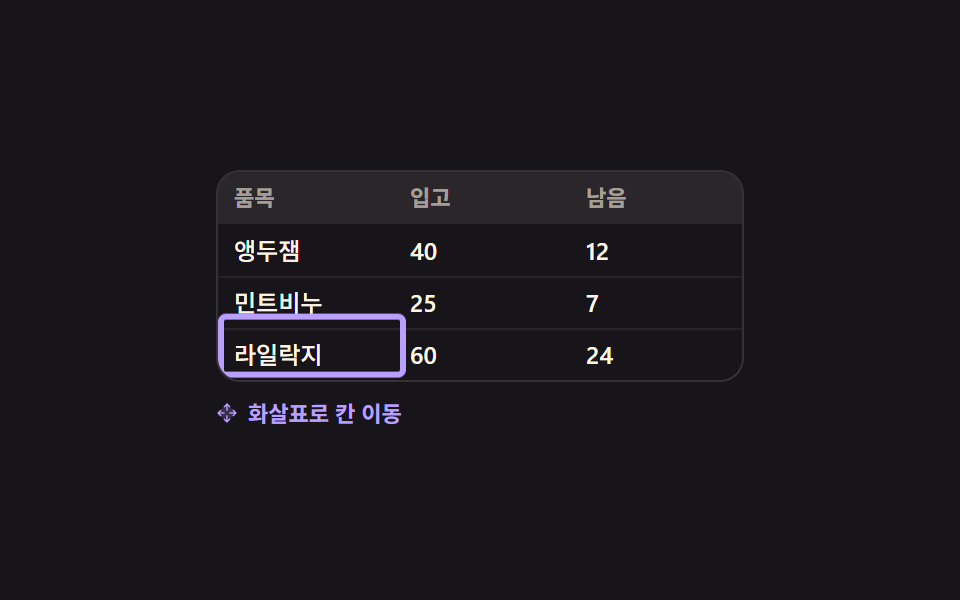
表の中で矢印キーを押すと太い枠が隣のマスや下のマスへ滑って移り、Home と End はその行の先頭と末尾へ一度で連れて行きます。
使いどころマウスなしでキーボードだけで値を追う入力表
role="grid"tabindextranslate
<main class="stage">
  <div class="kg is-demo" id="kg">
    <div class="kg__grid" id="kg-grid" role="grid" aria-label="在庫テーブル">
      <div class="kg__row" role="row">
        <span class="kg__h" role="columnheader">品目</span><span class="kg__h" role="columnheader">入荷</span><span class="kg__h" role="columnheader">残り</span>
      </div>
      <div class="kg__body" role="rowgroup">
        <div class="kg__row" role="row">
          <span class="kg__c" role="gridcell" tabindex="0">さくらんぼジャム</span><span class="kg__c" role="gridcell" tabindex="-1">40</span><span class="kg__c" role="gridcell" tabindex="-1">12</span>
        </div>
        <div class="kg__row" role="row">
          <span class="kg__c" role="gridcell" tabindex="-1">ミント石けん</span><span class="kg__c" role="gridcell" tabindex="-1">25</span><span class="kg__c" role="gridcell" tabindex="-1">7</span>
        </div>
        <div class="kg__row" role="row">
          <span class="kg__c" role="gridcell" tabindex="-1">ライラック紙</span><span class="kg__c" role="gridcell" tabindex="-1">60</span><span class="kg__c" role="gridcell" tabindex="-1">24</span>
        </div>
      </div>
      <span class="kg__ring" id="kg-ring" aria-hidden="true"></span>
    </div>
    <p class="kg__hint">
      <span class="kg__kic" aria-hidden="true"><svg viewBox="0 0 256 256" width="1em" height="1em" fill="currentColor"><g><path d="M232 128L128 232L24 128L128 24Z" opacity=".2"/><path d="M90.34 61.66a8 8 0 0 1 0-11.32l32-32a8 8 0 0 1 11.32 0l32 32a8 8 0 0 1-11.32 11.32L136 43.31V96a8 8 0 0 1-16 0V43.31l-18.34 18.35a8 8 0 0 1-11.32 0m64 132.68L136 212.69V160a8 8 0 0 0-16 0v52.69l-18.34-18.35a8 8 0 0 0-11.32 11.32l32 32a8 8 0 0 0 11.32 0l32-32a8 8 0 0 0-11.32-11.32m83.32-72l-32-32a8 8 0 0 0-11.32 11.32L212.69 120H160a8 8 0 0 0 0 16h52.69l-18.35 18.34a8 8 0 0 0 11.32 11.32l32-32a8 8 0 0 0 0-11.32M43.31 136H96a8 8 0 0 0 0-16H43.31l18.35-18.34a8 8 0 0 0-11.32-11.32l-32 32a8 8 0 0 0 0 11.32l32 32a8 8 0 0 0 11.32-11.32Z"/></g></svg></span>矢印キーでマス移動
    </p>
  </div>
</main>
@use "sass:color";
@use "../../../../site/static/demo-tokens" as *;
$duration: $dur-quick;
$easing: $ease-spring;
$color: $subject-lilac;
@include stage($stage-ink);
$cell-w: 88px;
$cell-h: 26px;
$line: color.mix($subject-cream, $stage-ink, 13%);
.kg {
box-sizing: border-box;
width: 264px;
color: $subject-cream;
font-family: -apple-system, "Segoe UI", "Noto Sans KR", sans-serif;
}
.kg__grid {
position: relative;
border: 1px solid $line;
border-radius: $r-control;
background: $stage-ink;
overflow: hidden;
}
.kg__row {
display: grid;
grid-template-columns: repeat(3, $cell-w);
height: $cell-h;
}
.kg__body .kg__row + .kg__row { box-shadow: inset 0 1px 0 rgba(255, 247, 230, .07); }
.kg__h, .kg__c {
padding: 0 $sp-2;
font-size: 12px;
line-height: $cell-h;
font-weight: 500;
white-space: nowrap;
overflow: hidden;
}
.kg__h {
background: color.mix($subject-cream, $stage-ink, 8%);
color: rgba(255, 247, 230, .58);
font-size: 11px;
font-weight: 700;
}
.kg__c { outline: none; cursor: pointer; }
// ── 옮겨 다니는 테두리 — 칸 하나 크기를 그대로 옮긴다 ──
.kg__ring {
position: absolute;
left: 0; top: 0;
z-index: 2;
width: $cell-w;
height: $cell-h;
border: 3px solid $color;
border-radius: $r-xs;
opacity: 0;
transform: translate(0, $cell-h);
pointer-events: none;
}
.kg__hint {
display: flex;
align-items: center;
gap: $sp-1;
margin: $sp-2 0 0;
color: rgba(255, 247, 230, .5);
font-size: 11px;
line-height: 16px;
font-weight: 600;
}
.kg__kic { display: inline-flex; width: 12px; height: 12px; }
// ── 자동 루프 (2s) ───────────────────────────────────
// 오른쪽 두 번 → 아래 → Home(그 줄 맨 앞) → 아래 → 처음 칸으로. 칸과 칸 사이를 끊지 않고
// 이어서 지나가므로 순간이동처럼 보이지 않는다. 복귀는 88% 에 끝난다.
.kg.is-demo .kg__ring {
animation-name: kg-walk;
animation-duration: $dur-loop;
animation-timing-function: $easing;
animation-iteration-count: infinite;
}
.kg.is-demo .kg__hint {
animation-name: kg-hint;
animation-duration: $dur-loop;
animation-timing-function: steps(1, end);
animation-iteration-count: infinite;
}
@keyframes kg-walk {
0% { opacity: 1; transform: translate(0, $cell-h); }
8% { opacity: 1; transform: translate(0, $cell-h); }
22% { opacity: 1; transform: translate($cell-w, $cell-h); }
36% { opacity: 1; transform: translate($cell-w * 2, $cell-h); }
50% { opacity: 1; transform: translate($cell-w * 2, $cell-h * 2); }
64% { opacity: 1; transform: translate(0, $cell-h * 2); }
76% { opacity: 1; transform: translate(0, $cell-h * 3); }
88% { opacity: 1; transform: translate(0, $cell-h); }
100% { opacity: 1; transform: translate(0, $cell-h); }
}
@keyframes kg-hint {
0% { color: rgba(255, 247, 230, .5); }
50% { color: $color; }
88% { color: rgba(255, 247, 230, .5); }
100% { color: rgba(255, 247, 230, .5); }
}
// 320×200 — 264px 격자가 그대로 들어간다. 안내 줄 여백만 줄인다
@media (max-width: 340px) {
.kg__hint { margin-top: $sp-1; }
.kg__h, .kg__c { padding: 0 $sp-1; }
}
@media (prefers-reduced-motion: reduce) {
.kg.is-demo .kg__ring,
.kg.is-demo .kg__hint { animation: none !important; }
.kg.is-demo .kg__ring { opacity: 1; transform: translate(0, $cell-h); }
}html, body {
margin: 0;
overflow: hidden;
}
.stage {
box-sizing: border-box;
min-height: 100vh;
display: grid;
place-items: center;
margin: 0;
background: #17141a;
font-family: -apple-system, "Segoe UI", "Noto Sans KR", sans-serif;
padding: clamp(8px, 4vw, 24px);
}
.kg {
box-sizing: border-box;
width: 264px;
color: #fff7e6;
font-family: -apple-system, "Segoe UI", "Noto Sans KR", sans-serif;
}
.kg__grid {
position: relative;
border: 1px solid rgb(20.8470588235%, 19.4156862745%, 20.5960784314%);
border-radius: 12px;
background: #17141a;
overflow: hidden;
}
.kg__row {
display: grid;
grid-template-columns: repeat(3, 88px);
height: 26px;
}
.kg__body .kg__row + .kg__row {
box-shadow: inset 0 1px 0 rgba(255, 247, 230, 0.07);
}
.kg__h, .kg__c {
padding: 0 8px;
font-size: 12px;
line-height: 26px;
font-weight: 500;
white-space: nowrap;
overflow: hidden;
}
.kg__h {
background: rgb(16.2980392157%, 14.9647058824%, 16.5960784314%);
color: rgba(255, 247, 230, 0.58);
font-size: 11px;
font-weight: 700;
}
.kg__c {
outline: none;
cursor: pointer;
}
.kg__ring {
position: absolute;
left: 0;
top: 0;
z-index: 2;
width: 88px;
height: 26px;
border: 3px solid #b9a0ff;
border-radius: 4px;
opacity: 0;
transform: translate(0, 26px);
pointer-events: none;
}
.kg__hint {
display: flex;
align-items: center;
gap: 4px;
margin: 8px 0 0;
color: rgba(255, 247, 230, 0.5);
font-size: 11px;
line-height: 16px;
font-weight: 600;
}
.kg__kic {
display: inline-flex;
width: 12px;
height: 12px;
}
.kg.is-demo .kg__ring {
animation-name: kg-walk;
animation-duration: 2s;
animation-timing-function: cubic-bezier(0.2, 0.8, 0.2, 1);
animation-iteration-count: infinite;
}
.kg.is-demo .kg__hint {
animation-name: kg-hint;
animation-duration: 2s;
animation-timing-function: steps(1, end);
animation-iteration-count: infinite;
}
@keyframes kg-walk {
0% {
opacity: 1;
transform: translate(0, 26px);
}
8% {
opacity: 1;
transform: translate(0, 26px);
}
22% {
opacity: 1;
transform: translate(88px, 26px);
}
36% {
opacity: 1;
transform: translate(176px, 26px);
}
50% {
opacity: 1;
transform: translate(176px, 52px);
}
64% {
opacity: 1;
transform: translate(0, 52px);
}
76% {
opacity: 1;
transform: translate(0, 78px);
}
88% {
opacity: 1;
transform: translate(0, 26px);
}
100% {
opacity: 1;
transform: translate(0, 26px);
}
}
@keyframes kg-hint {
0% {
color: rgba(255, 247, 230, 0.5);
}
50% {
color: #b9a0ff;
}
88% {
color: rgba(255, 247, 230, 0.5);
}
100% {
color: rgba(255, 247, 230, 0.5);
}
}
@media (max-width: 340px) {
.kg__hint {
margin-top: 4px;
}
.kg__h, .kg__c {
padding: 0 4px;
}
}
@media (prefers-reduced-motion: reduce) {
.kg.is-demo .kg__ring,
.kg.is-demo .kg__hint {
animation: none !important;
}
.kg.is-demo .kg__ring {
opacity: 1;
transform: translate(0, 26px);
}
}// 실제 동작: 표 안에서 탭 정지점은 늘 하나뿐이고(roving tabindex) 나머지 칸은 화살표로 옮겨 다닌다.
var kg = document.getElementById('kg');
var kgGrid = document.getElementById('kg-grid');
var kgRing = document.getElementById('kg-ring');
var KG_W = 88, KG_H = 26;
var kgAt = { r: 0, c: 0 };
function kgCells() { return [].slice.call(kgGrid.querySelectorAll('.kg__c')); }
function kgGo(r, c) {
kg.classList.remove('is-demo');
kgAt = { r: Math.max(0, Math.min(2, r)), c: Math.max(0, Math.min(2, c)) };
var i = kgAt.r * 3 + kgAt.c;
kgCells().forEach(function (el, n) { el.tabIndex = n === i ? 0 : -1; });
kgRing.style.transform = 'translate(' + (kgAt.c * KG_W) + 'px, ' + ((kgAt.r + 1) * KG_H) + 'px)';
kgRing.style.opacity = '1';
kgCells()[i].focus({ preventScroll: true }); // iframe 안이라 스크롤을 일으키면 부모가 끌려간다
}
kgGrid.addEventListener('keydown', function (e) {
var K = { ArrowRight: [0, 1], ArrowLeft: [0, -1], ArrowDown: [1, 0], ArrowUp: [-1, 0] }[e.key];
if (K) { e.preventDefault(); kgGo(kgAt.r + K[0], kgAt.c + K[1]); return; }
if (e.key === 'Home') { e.preventDefault(); kgGo(kgAt.r, 0); }
if (e.key === 'End') { e.preventDefault(); kgGo(kgAt.r, 2); }
});
kgCells().forEach(function (el, n) {
el.addEventListener('click', function () { kgGo(Math.floor(n / 3), n % 3); });
});import { useRef, useState } from "react";
import type { CSSProperties } from "react";
import styles from "./KeyboardGridNav.module.scss";
export type KeyboardGridNavProps = {
gridLabel?: string;
headers?: string[];
rows?: string[][];
hint?: string;
/** 자동 재생 루프 (갤러리용). 사람이 손대면 꺼진다 */
demo?: boolean;
duration?: number;
easing?: string;
color?: string;
};
type Vars = CSSProperties & { "--duration"?: string; "--easing"?: string; "--color"?: string };
type KeyEvt = { key: string; preventDefault: () => void };
const HEADERS = ["Item", "In", "Left"];
const ROWS: string[][] = [
["Cherry jam", "40", "12"],
["Mint soap", "25", "7"],
["Lilac paper", "60", "24"],
];
const CELL_W = 88;
const CELL_H = 26;
export default function KeyboardGridNav({
gridLabel = "Stock table",
headers = HEADERS,
rows = ROWS,
hint = "Arrow keys move cells",
demo = true,
duration = 220,
easing = "cubic-bezier(.2,.8,.2,1)",
color = "#b9a0ff",
}: KeyboardGridNavProps) {
const [at, setAt] = useState({ r: 0, c: 0 });
const [live, setLive] = useState(demo);
const cells = useRef<(HTMLSpanElement | null)[]>([]);
const vars: Vars = { "--duration": `${duration}ms`, "--easing": easing, "--color": color };
const last = rows.length - 1;
const lastCol = headers.length - 1;
// 표 안에서 탭 정지점은 늘 하나뿐이고(roving tabindex) 나머지 칸은 화살표로 옮겨 다닌다
const go = (r: number, c: number) => {
const rr = Math.max(0, Math.min(last, r));
const cc = Math.max(0, Math.min(lastCol, c));
setLive(false);
setAt({ r: rr, c: cc });
const el = cells.current ? cells.current[rr * headers.length + cc] : null;
if (el) el.focus({ preventScroll: true }); // iframe 안이라 스크롤을 일으키면 부모가 끌려간다
};
const onKey = (e: KeyEvt) => {
const map: { [k: string]: number[] } = {
ArrowRight: [0, 1], ArrowLeft: [0, -1], ArrowDown: [1, 0], ArrowUp: [-1, 0],
};
const step = map[e.key];
if (step) { e.preventDefault(); go(at.r + step[0], at.c + step[1]); return; }
if (e.key === "Home") { e.preventDefault(); go(at.r, 0); }
if (e.key === "End") { e.preventDefault(); go(at.r, lastCol); }
};
const active = at.r * headers.length + at.c;
const ringStyle: CSSProperties | undefined = live
? undefined
: { transform: `translate(${at.c * CELL_W}px, ${(at.r + 1) * CELL_H}px)`, opacity: 1 };
return (
<div className={[styles.root, live ? styles.isDemo : ""].join(" ")} style={vars}>
<div className={styles.grid} role="grid" aria-label={gridLabel} onKeyDown={onKey}>
<div className={styles.row} role="row">
{headers.map((h) => (
<span className={styles.h} role="columnheader" key={h}>{h}</span>
))}
</div>
<div className={styles.body} role="rowgroup">
{rows.map((row, r) => (
<div className={styles.row} role="row" key={row[0]}>
{row.map((cell, c) => {
const n = r * headers.length + c;
return (
<span
className={styles.c}
role="gridcell"
key={cell + String(c)}
tabIndex={n === active ? 0 : -1}
ref={(el: HTMLSpanElement | null) => { if (cells.current) cells.current[n] = el; }}
onClick={() => go(r, c)}
>
{cell}
</span>
);
})}
</div>
))}
</div>
<span className={styles.ring} style={ringStyle} aria-hidden="true" />
</div>
<p className={styles.hint}>
<span className={styles.kic} aria-hidden="true">
<svg viewBox="0 0 256 256" width="1em" height="1em" fill="currentColor">
<g>
<path d="M232 128L128 232L24 128L128 24Z" opacity=".2" />
<path d="M90.34 61.66a8 8 0 0 1 0-11.32l32-32a8 8 0 0 1 11.32 0l32 32a8 8 0 0 1-11.32 11.32L136 43.31V96a8 8 0 0 1-16 0V43.31l-18.34 18.35a8 8 0 0 1-11.32 0m64 132.68L136 212.69V160a8 8 0 0 0-16 0v52.69l-18.34-18.35a8 8 0 0 0-11.32 11.32l32 32a8 8 0 0 0 11.32 0l32-32a8 8 0 0 0-11.32-11.32m83.32-72l-32-32a8 8 0 0 0-11.32 11.32L212.69 120H160a8 8 0 0 0 0 16h52.69l-18.35 18.34a8 8 0 0 0 11.32 11.32l32-32a8 8 0 0 0 0-11.32M43.31 136H96a8 8 0 0 0 0-16H43.31l18.35-18.34a8 8 0 0 0-11.32-11.32l-32 32a8 8 0 0 0 0 11.32l32 32a8 8 0 0 0 11.32-11.32Z" />
</g>
</svg>
</span>
{hint}
</p>
</div>
);
}09 矢印でマスを渡り歩くフォーカス枠 — 計測 累積面積 5.625% · 動いたフレーム 21/23GODRICH オリジナル · SCSS と React は zip に同梱 · テーブル UI デザイン 9選 — 列幅ドラッグと範囲選択まで
このデモが属する記事
 テーブル UI デザイン 9選 — 列幅ドラッグと範囲選択までテーブル ui デザインとは、行と列に並べた値を読む人が自分の手で並べ替え、絞り込み、取り出せるようにする作りのことです。9つとも実際の配列を並べ替え、実際の文字列を比べ、合計は見るたびにその場で足し直します。 この記事のデモをすべて見る