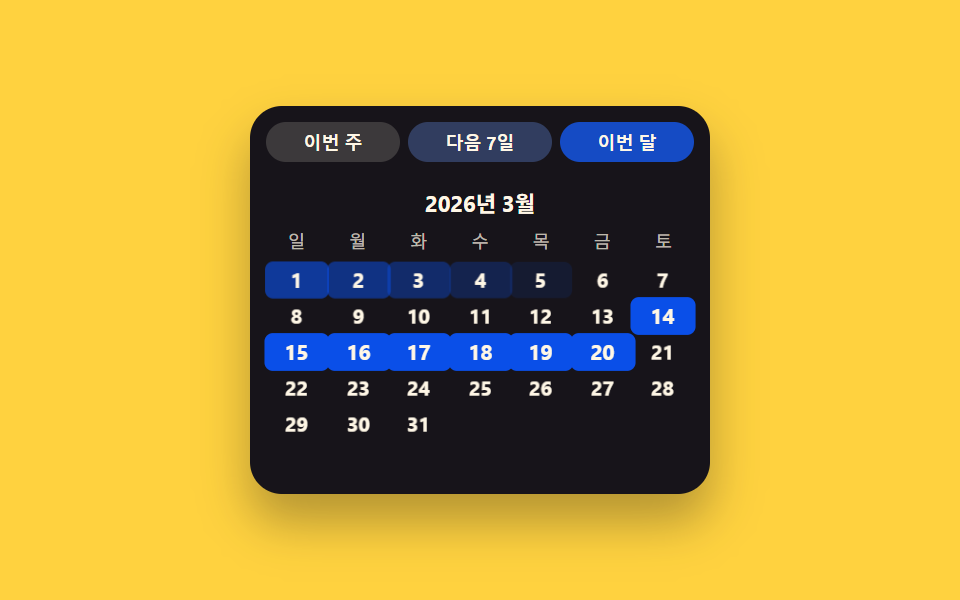
06クイック選択切替 — チップの値を選ぶと格子を経ずに日付の値が直接決まる方式
チップの値の一つがオンになると日付の値が格子を経ずに直接決まり、そのチップの背景の値だけが塗られて選択状態を示します。
使いどころレポート期間のクイック選択、検索フィルターの直近期間
PRESETSSTAGGERapplyPreset()
<main class="stage">
<div class="ps is-demo" id="ps">
  <div class="ps__chips" id="psChips"></div>
  <div class="ps__head"><span class="ps__label">2026年3月</span></div>
  <div class="ps__weekday" aria-hidden="true">
    <span>日</span><span>月</span><span>火</span><span>水</span><span>木</span><span>金</span><span>土</span>
  </div>
  <div class="ps__grid" id="psGrid"></div>
</div>
</main>
@use "../../../../site/static/demo-tokens" as *;
// 계산 겹: applyPreset() 이 선택 범위 시작으로부터 각 셀의 위치(pos)를 구해
// pos*STAGGER 만큼 transition-delay 를 매겨 순차 채움을 만든다.
@include stage($stage-yellow);
.ps { width: 100%; max-width: 230px; background: $subject-ink; border-radius: $r-card; padding: $sp-2; box-shadow: $shadow-raised; box-sizing: border-box; }
.ps__chips { display: flex; gap: $sp-1; margin-bottom: $sp-2; }
.ps__chip {
flex: 1 1 auto;
border: none;
border-radius: $r-pill;
padding: $sp-1 $sp-1;
font-size: 9px;
font-weight: 700;
color: $subject-cream;
background: rgba($subject-cream, .16);
cursor: pointer;
transition: background-color $dur-quick $ease-out;
}
.ps__chip--active { background: $subject-blue-deep; }
.ps__head { text-align: center; margin-bottom: $sp-1; }
.ps__label { font-size: 11px; font-weight: 700; color: $subject-cream; }
.ps__weekday, .ps__grid { display: grid; grid-template-columns: repeat(7, 1fr); }
.ps__weekday span { font-size: 9px; text-align: center; color: rgba($subject-cream, .72); padding-bottom: $sp-1; }
.ps__cell {
display: grid;
place-items: center;
height: 18px;
font-size: 10px;
color: $subject-cream;
border-radius: $r-xs;
border: none;
background: transparent;
transition: background-color $dur-base $ease-out, transform $dur-base $ease-out;
}
.ps__cell--out { visibility: hidden; }
.ps__cell--on { background: $subject-blue-deep; color: $subject-cream; font-weight: 700; transform: scale(1.05); }
@media (max-width: 340px) {
.ps { max-width: 190px; }
.ps__chip { font-size: 8px; padding: $sp-1 0; }
.ps__cell { height: 15px; font-size: 9px; }
.ps__weekday span { font-size: 8px; padding-bottom: 0; }
}
@media (prefers-reduced-motion: reduce) {
.ps__cell, .ps__chip { transition: none; }
}html, body {
margin: 0;
overflow: hidden;
}
.stage {
box-sizing: border-box;
min-height: 100vh;
display: grid;
place-items: center;
margin: 0;
background: #ffd23f;
font-family: -apple-system, "Segoe UI", "Noto Sans KR", sans-serif;
padding: clamp(8px, 4vw, 24px);
}
.ps {
width: 100%;
max-width: 230px;
background: #17141a;
border-radius: 16px;
padding: 8px;
box-shadow: 0 14px 24px rgba(23, 20, 26, 0.32);
box-sizing: border-box;
}
.ps__chips {
display: flex;
gap: 4px;
margin-bottom: 8px;
}
.ps__chip {
flex: 1 1 auto;
border: none;
border-radius: 999px;
padding: 4px 4px;
font-size: 9px;
font-weight: 700;
color: #fff7e6;
background: rgba(255, 247, 230, 0.16);
cursor: pointer;
transition: background-color 220ms ease-out;
}
.ps__chip--active {
background: #0a4fe8;
}
.ps__head {
text-align: center;
margin-bottom: 4px;
}
.ps__label {
font-size: 11px;
font-weight: 700;
color: #fff7e6;
}
.ps__weekday, .ps__grid {
display: grid;
grid-template-columns: repeat(7, 1fr);
}
.ps__weekday span {
font-size: 9px;
text-align: center;
color: rgba(255, 247, 230, 0.72);
padding-bottom: 4px;
}
.ps__cell {
display: grid;
place-items: center;
height: 18px;
font-size: 10px;
color: #fff7e6;
border-radius: 4px;
border: none;
background: transparent;
transition: background-color 300ms ease-out, transform 300ms ease-out;
}
.ps__cell--out {
visibility: hidden;
}
.ps__cell--on {
background: #0a4fe8;
color: #fff7e6;
font-weight: 700;
transform: scale(1.05);
}
@media (max-width: 340px) {
.ps {
max-width: 190px;
}
.ps__chip {
font-size: 8px;
padding: 4px 0;
}
.ps__cell {
height: 15px;
font-size: 9px;
}
.ps__weekday span {
font-size: 8px;
padding-bottom: 0;
}
}
@media (prefers-reduced-motion: reduce) {
.ps__cell, .ps__chip {
transition: none;
}
}(function () {
var BASE = { y: 2026, m: 3, d: 14 }; // 계산 겹 상수: 고정 오늘, new Date() 미사용
var CELL_TOTAL = 42;
var STAGGER = 28; // ms, 계산 겹: 범위 시작에서 이 셀까지의 위치 x STAGGER = 전환 지연
var PRESETS = [
{ id: 'week', label: '今週', start: 8, end: 14 },
{ id: 'next7', label: '次の7日間', start: 14, end: 20 },
{ id: 'month', label: '今月', start: 1, end: 31 }
];
function isLeap(y) { return (y % 4 === 0 && y % 100 !== 0) || y % 400 === 0; }
function daysInMonth(y, m) {
var t = [31, isLeap(y) ? 29 : 28, 31, 30, 31, 30, 31, 31, 30, 31, 30, 31];
return t[m - 1];
}
function dow(y, m, d) { // Zeller 합동식 — 0=日 ~ 6=土
var yy = y, mm = m;
if (mm < 3) { yy -= 1; mm += 12; }
var K = yy % 100, J = Math.floor(yy / 100);
var h = (d + Math.floor(13 * (mm + 1) / 5) + K + Math.floor(K / 4) + Math.floor(J / 4) - 2 * J) % 7;
h = ((h % 7) + 7) % 7;
return (h + 6) % 7;
}
var ps = document.getElementById('ps');
var chipsWrap = document.getElementById('psChips');
var grid = document.getElementById('psGrid');
var n = daysInMonth(BASE.y, BASE.m);
var lead = dow(BASE.y, BASE.m, 1);
var trail = CELL_TOTAL - lead - n;
var cellByDay = {};
var i, cell;
for (i = 0; i < lead; i++) {
cell = document.createElement('span');
cell.className = 'ps__cell ps__cell--out';
grid.appendChild(cell);
}
for (var d = 1; d <= n; d++) {
cell = document.createElement('span');
cell.className = 'ps__cell';
cell.textContent = String(d);
grid.appendChild(cell);
cellByDay[d] = cell;
}
for (i = 0; i < trail; i++) {
cell = document.createElement('span');
cell.className = 'ps__cell ps__cell--out';
grid.appendChild(cell);
}
var chipEls = PRESETS.map(function (p, idx) {
var b = document.createElement('button');
b.type = 'button';
b.className = 'ps__chip';
b.textContent = p.label;
b.addEventListener('click', function () { human(); applyPreset(idx); });
chipsWrap.appendChild(b);
return b;
});
function applyPreset(idx) {
// 계산 겹: 선택 범위 시작으로부터의 위치(pos)만큼 전환 지연을 매겨 순차 채움을 만든다
var p = PRESETS[idx];
for (var day = 1; day <= n; day++) {
var c = cellByDay[day];
var inRange = day >= p.start && day <= p.end;
if (inRange) {
var pos = day - p.start;
c.style.transitionDelay = (pos * STAGGER) + 'ms';
} else {
c.style.transitionDelay = '0ms';
}
c.classList.toggle('ps__cell--on', inRange);
}
chipEls.forEach(function (el, i2) { el.classList.toggle('ps__chip--active', i2 === idx); });
}
function human() {
ps.classList.remove('is-demo');
stopAutoplay();
}
var seqIdx = -1;
var autoTimer = null;
function stopAutoplay() { if (autoTimer) { clearInterval(autoTimer); autoTimer = null; } }
function tick() {
seqIdx = (seqIdx + 1) % PRESETS.length;
applyPreset(seqIdx);
}
tick();
var reduce = window.matchMedia('(prefers-reduced-motion: reduce)').matches;
if (!reduce) { autoTimer = setInterval(tick, 650); }
})();import { useEffect, useRef, useState } from 'react';
import styles from './DatePickerPresetChips.module.scss';
type Box<T> = { current: T };
const BASE = { y: 2026, m: 3, d: 14 }; // 계산 겹 상수: 고정 오늘, new Date() 미사용
const CELL_TOTAL = 42;
const STAGGER = 28; // ms, 계산 겹: 범위 시작에서 이 셀까지의 위치 x STAGGER = 전환 지연
const PRESETS: { id: string; label: string; start: number; end: number }[] = [
{ id: 'week', label: '이번 주', start: 8, end: 14 },
{ id: 'next7', label: '다음 7일', start: 14, end: 20 },
{ id: 'month', label: '이번 달', start: 1, end: 31 },
];
const WEEKDAY = ['일', '월', '화', '수', '목', '금', '토'];
function isLeap(y: number) {
return (y % 4 === 0 && y % 100 !== 0) || y % 400 === 0;
}
function daysInMonth(y: number, m: number) {
const t = [31, isLeap(y) ? 29 : 28, 31, 30, 31, 30, 31, 31, 30, 31, 30, 31];
return t[m - 1];
}
function dow(y: number, m: number, d: number) { // Zeller 합동식 — 0=일 ~ 6=토
let yy = y;
let mm = m;
if (mm < 3) { yy -= 1; mm += 12; }
const K = yy % 100;
const J = Math.floor(yy / 100);
let h = (d + Math.floor((13 * (mm + 1)) / 5) + K + Math.floor(K / 4) + Math.floor(J / 4) - 2 * J) % 7;
h = ((h % 7) + 7) % 7;
return (h + 6) % 7;
}
const N_DAYS = daysInMonth(BASE.y, BASE.m);
const LEAD = dow(BASE.y, BASE.m, 1);
const TRAIL = CELL_TOTAL - LEAD - N_DAYS;
function delayOf(day: number, presetIdx: number) {
// 계산 겹: 선택 범위 시작으로부터의 위치(pos)만큼 전환 지연을 매겨 순차 채움을 만든다
const p = PRESETS[presetIdx];
if (day < p.start || day > p.end) return 0;
return (day - p.start) * STAGGER;
}
function inRangeOf(day: number, presetIdx: number) {
const p = PRESETS[presetIdx];
return day >= p.start && day <= p.end;
}
export default function DatePickerPresetChips() {
const isDemoRef = useRef(true) as unknown as Box<boolean>;
const [isDemo, setIsDemo] = useState(true);
const [presetIdx, setPresetIdx] = useState(0);
function human() {
isDemoRef.current = false;
setIsDemo(false);
}
useEffect(() => {
const reduce = window.matchMedia('(prefers-reduced-motion: reduce)').matches;
if (reduce) return;
let seqIdx = 0;
const timer = window.setInterval(() => {
if (!isDemoRef.current) return;
seqIdx = (seqIdx + 1) % PRESETS.length;
setPresetIdx(seqIdx);
}, 650);
return () => window.clearInterval(timer);
}, []);
function pickPreset(idx: number) {
human();
setPresetIdx(idx);
}
const lead = Array.from({ length: LEAD }, (_, i) => <span key={'l' + i} className={`${styles.psCell} ${styles.psCellOut}`} />);
const days = Array.from({ length: N_DAYS }, (_, i) => {
const d = i + 1;
const on = inRangeOf(d, presetIdx);
return (
<span
key={'d' + d}
className={`${styles.psCell} ${on ? styles.psCellOn : ''}`}
style={{ transitionDelay: delayOf(d, presetIdx) + 'ms' }}
>
{d}
</span>
);
});
const trail = Array.from({ length: TRAIL }, (_, i) => <span key={'t' + i} className={`${styles.psCell} ${styles.psCellOut}`} />);
return (
<div className={`${styles.ps} ${isDemo ? styles.isDemo : ''}`}>
<div className={styles.psChips}>
{PRESETS.map((p, idx) => (
<button
type="button"
key={p.id}
className={`${styles.psChip} ${idx === presetIdx ? styles.psChipActive : ''}`}
onClick={() => pickPreset(idx)}
>
{p.label}
</button>
))}
</div>
<div className={styles.psHead}><span className={styles.psLabel}>2026년 3월</span></div>
<div className={styles.psWeekday} aria-hidden="true">
{WEEKDAY.map((w) => <span key={w}>{w}</span>)}
</div>
<div className={styles.psGrid}>{lead}{days}{trail}</div>
</div>
);
}06 クイック選択切替 — チップの値を選ぶと格子を経ずに日付の値が直接決まる方式 — 計測 累積面積 11.493% · 動いたフレーム 18/23GODRICH オリジナル · SCSS と React は zip に同梱 · css 日付選択 9選 — ポップオーバーで開閉する9つの方式
このデモが属する記事
 css 日付選択 9選 — ポップオーバーで開閉する9つの方式css 日付選択:9つのうち1つは入力欄の焦点値がオンになるとカレンダーがポップオーバーとして開き、1つは許可範囲外の日付の霞み値が大きくなって選べない状態が現れ、もう1つは画面幅の値が狭くなるとポップオーバーが下から上がるシートに変わりま この記事のデモをすべて見る