07押すと結果の時刻まで見せるプリセット
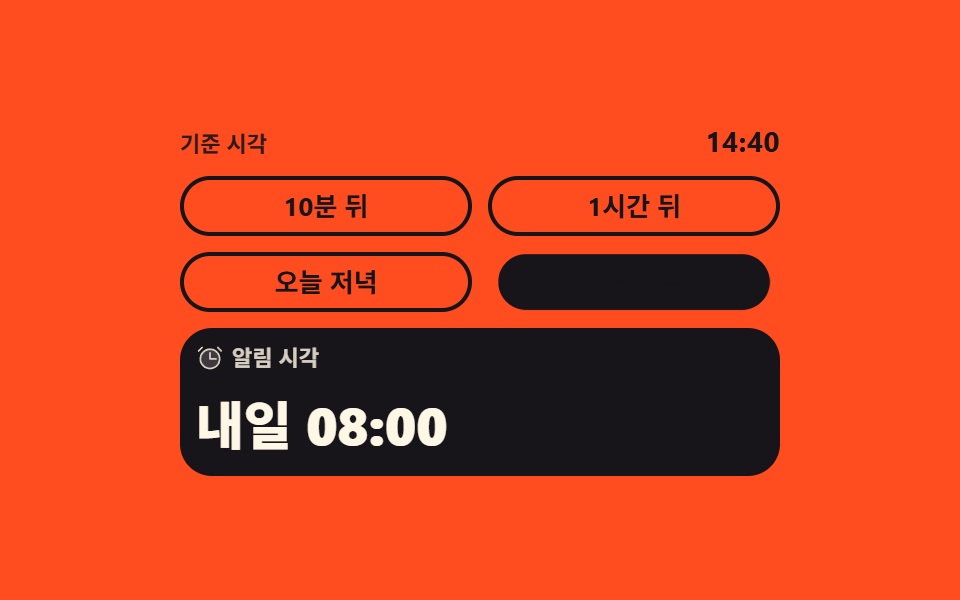
「1時間後」のように足す分が書かれたチップと「明日の朝」のように時刻そのものが書かれたチップが混ざっていて、どちらを押しても結果の時刻が下から上がって入れ替わります。
使いどころスヌーズや後で送信のように、正確な時刻より「どれくらい先か」を選ぶ場面
aria-livetranslateYsteps(1, end)
<main class="stage">
  <div class="rp is-demo">
    <p class="rp__base"><span class="rp__baselab">基準時刻</span><time class="rp__basenum" datetime="14:40">14:40</time></p>

    <div class="rp__chips" role="group" aria-label="相対時間のプリセット">
      <button class="rp__chip" type="button" data-i="0" data-add="10" aria-pressed="true">10分後</button>
      <button class="rp__chip" type="button" data-i="1" data-add="60" aria-pressed="false">1時間後</button>
      <button class="rp__chip" type="button" data-i="2" data-at="1080" aria-pressed="false">今夜</button>
      <button class="rp__chip" type="button" data-i="3" data-at="1920" aria-pressed="false">明日の朝</button>
    </div>

    <div class="rp__out">
      <span class="rp__cap">
        <span class="rp__ic" aria-hidden="true"><svg viewBox="0 0 256 256" width="14" height="14"><g fill="currentColor"><path d="M216 136a88 88 0 1 1-88-88a88 88 0 0 1 88 88" opacity=".2"/><path d="M128 40a96 96 0 1 0 96 96a96.11 96.11 0 0 0-96-96m0 176a80 80 0 1 1 80-80a80.09 80.09 0 0 1-80 80M61.66 37.66l-32 32a8 8 0 0 1-11.32-11.32l32-32a8 8 0 0 1 11.32 11.32m176 32a8 8 0 0 1-11.32 0l-32-32a8 8 0 0 1 11.32-11.32l32 32a8 8 0 0 1 0 11.32M184 128a8 8 0 0 1 0 16h-56a8 8 0 0 1-8-8V80a8 8 0 0 1 16 0v48Z"/></g></svg></span>
        <span class="rp__caplab">通知時刻</span>
      </span>
      <span class="rp__slot" id="rp-slot">
        <span class="rp__val rp__val--cur" id="rp-cur">今日 14:50</span>
        <span class="rp__val rp__val--nxt" id="rp-nxt"></span>
        <span class="rp__f" data-k="a">今日 14:50</span>
        <span class="rp__f" data-k="b">明日 08:00</span>
      </span>
    </div>

    <p class="rp__live" id="rp-live" aria-live="polite"></p>
    <span class="rp__tpl" data-day="0" hidden>今日 {t}</span>
    <span class="rp__tpl" data-day="1" hidden>明日 {t}</span>
  </div>
</main>@use "../../../../site/static/demo-tokens" as *;
$duration: $dur-quick;
$easing: $ease-spring;
$color: $subject-ink; // 주황 무대 위 전경은 잉크 — 크림은 3.11:1
@include stage($stage-orange);
.rp {
box-sizing: border-box;
display: flex;
flex-direction: column;
gap: $sp-2;
width: min(300px, 90vw);
color: $color;
font-family: -apple-system, "Segoe UI", "Noto Sans KR", sans-serif;
}
.rp__base {
display: flex;
align-items: baseline;
justify-content: space-between;
gap: $sp-2;
margin: 0;
}
.rp__baselab {
font-size: 11px;
line-height: 16px;
font-weight: 600;
opacity: .9; // 주황 면 위 잉크 4.96:1
}
.rp__basenum {
font-size: 14px;
line-height: 18px;
font-weight: 700;
letter-spacing: .02em;
}
// ── 칩 넷 ──────────────────────────────────────────────
.rp__chips {
display: grid;
grid-template-columns: repeat(2, 1fr);
gap: $sp-2;
}
.rp__chip {
box-sizing: border-box;
margin: 0;
padding: $sp-1 $sp-2;
border: 2px solid $color;
border-radius: $r-pill;
background-color: transparent;
color: $color;
font-family: inherit;
font-size: 13px;
line-height: 18px;
font-weight: 700;
white-space: nowrap;
cursor: pointer;
}
.rp__chip:focus-visible { outline: 3px solid $color; outline-offset: 3px; }
// 고른 칩은 aria-pressed 한 곳에만 적힌다 — 색은 그 값에서 나온다
.rp:not(.is-demo) .rp__chip[aria-pressed="true"] {
background-color: $color;
color: $subject-cream;
}
// ── 결과 줄 (옛 값은 위로, 새 값은 아래에서) ───────────
.rp__out {
display: flex;
flex-direction: column;
gap: $sp-1;
padding: $sp-2;
border-radius: $r-card;
background-color: $subject-ink; // 결과 패널 — 크림 글자를 받으려면 면이 충분히 어두워야 한다
color: $subject-cream;
}
.rp__cap {
display: flex;
align-items: center;
gap: $sp-1;
font-size: 11px;
line-height: 14px;
font-weight: 600;
opacity: .82;
}
.rp__ic { display: inline-flex; flex: 0 0 auto; }
.rp__ic svg { display: block; }
.rp__slot {
position: relative;
display: block;
height: 40px;
overflow: hidden;
}
.rp__val,
.rp__f {
position: absolute;
left: 0;
right: 0;
top: 0;
display: flex;
align-items: center;
height: 40px;
font-size: 26px;
line-height: 30px;
font-weight: 800;
white-space: nowrap;
}
.rp__val--nxt { transform: translateY(100%); }
.rp__slot.is-roll .rp__val { transition: transform $duration $easing; }
.rp__slot.is-roll .rp__val--cur { transform: translateY(-100%); }
.rp__slot.is-roll .rp__val--nxt { transform: translateY(0); }
.rp__live {
position: absolute;
margin: 0;
width: 1px;
height: 1px;
overflow: hidden;
clip-path: inset(50%);
white-space: nowrap;
}
// 루프 전용 값 두 장 — 사람이 조작하면 위의 실제 값이 다시 보인다
.rp__f { display: none; }
.rp.is-demo .rp__f { display: flex; }
.rp.is-demo .rp__val { display: none; }
// ── 자동 루프: 칩은 한 프레임에 컷, 결과 시각은 굴러서 갈린다 ──
.rp.is-demo .rp__chip[data-i="0"],
.rp.is-demo .rp__chip[data-i="3"] {
animation-duration: $dur-loop, $dur-loop;
animation-iteration-count: infinite, infinite;
animation-timing-function: steps(1, end), $easing;
animation-fill-mode: backwards, backwards;
}
.rp.is-demo .rp__chip[data-i="0"] { animation-name: rp-skin-a, rp-pop-a; }
.rp.is-demo .rp__chip[data-i="3"] { animation-name: rp-skin-b, rp-pop-b; }
@keyframes rp-skin-a {
0% { background-color: $color; color: $subject-cream; }
32% { background-color: transparent; color: $color; }
74% { background-color: $color; color: $subject-cream; }
100% { background-color: $color; color: $subject-cream; }
}
@keyframes rp-skin-b {
0% { background-color: transparent; color: $color; }
32% { background-color: $color; color: $subject-ink; }
74% { background-color: transparent; color: $color; }
100% { background-color: transparent; color: $color; }
}
// 컷만으로는 움직인 프레임이 안 차니 눌린 칩이 한 번 반동한다
@keyframes rp-pop-a {
0% { transform: scale(1); }
72% { transform: scale(1); }
76% { transform: scale(.93); }
82% { transform: scale(1.05); }
88% { transform: scale(1); }
100% { transform: scale(1); }
}
@keyframes rp-pop-b {
0% { transform: scale(1); }
30% { transform: scale(1); }
34% { transform: scale(.93); }
40% { transform: scale(1.05); }
46% { transform: scale(1); }
100% { transform: scale(1); }
}
// 값 교체는 한 프레임에 컷(steps) — 반쯤 걸친 두 값이 poster 로 뽑히지 않는다.
// 컷 직후의 작은 translateY 상승이 보조 움직임을 만든다
.rp.is-demo .rp__f {
animation-duration: $dur-loop, $dur-loop;
animation-iteration-count: infinite, infinite;
animation-timing-function: steps(1, end), $easing;
animation-fill-mode: backwards, backwards;
}
.rp.is-demo .rp__f[data-k="a"] { animation-name: rp-cut-a, rp-rise-a; }
.rp.is-demo .rp__f[data-k="b"] { animation-name: rp-cut-b, rp-rise-b; }
@keyframes rp-cut-a {
0% { opacity: 1; }
32% { opacity: 0; }
74% { opacity: 1; }
100% { opacity: 1; }
}
@keyframes rp-cut-b {
0% { opacity: 0; }
32% { opacity: 1; }
74% { opacity: 0; }
100% { opacity: 0; }
}
// 안 보이는 동안(opacity 0) 아래로 내려가 있다가, 컷과 함께 제자리로 올라온다
@keyframes rp-rise-a {
0% { transform: translateY(0); }
69.9% { transform: translateY(0); animation-timing-function: steps(1, end); }
70% { transform: translateY(5px); }
74% { transform: translateY(5px); }
84% { transform: translateY(0); }
100% { transform: translateY(0); }
}
@keyframes rp-rise-b {
0% { transform: translateY(5px); }
32% { transform: translateY(5px); }
42% { transform: translateY(0); }
70% { transform: translateY(0); }
100% { transform: translateY(0); }
}
@media (max-width: 340px) {
.rp { gap: $sp-1; }
.rp__chip { font-size: 12px; line-height: 16px; }
.rp__slot,
.rp__val,
.rp__f { height: 34px; }
.rp__val,
.rp__f { font-size: 22px; line-height: 26px; }
}
@media (prefers-reduced-motion: reduce) {
.rp.is-demo .rp__chip,
.rp.is-demo .rp__f { animation: none !important; }
.rp__slot.is-roll .rp__val { transition: none !important; }
.rp.is-demo .rp__f[data-k="b"] { display: none; }
.rp.is-demo .rp__chip[aria-pressed="true"] { background-color: $color; color: $subject-cream; }
}html, body {
margin: 0;
overflow: hidden;
}
.stage {
box-sizing: border-box;
min-height: 100vh;
display: grid;
place-items: center;
margin: 0;
background: #ff4d1f;
font-family: -apple-system, "Segoe UI", "Noto Sans KR", sans-serif;
padding: clamp(8px, 4vw, 24px);
}
.rp {
box-sizing: border-box;
display: flex;
flex-direction: column;
gap: 8px;
width: min(300px, 90vw);
color: #17141a;
font-family: -apple-system, "Segoe UI", "Noto Sans KR", sans-serif;
}
.rp__base {
display: flex;
align-items: baseline;
justify-content: space-between;
gap: 8px;
margin: 0;
}
.rp__baselab {
font-size: 11px;
line-height: 16px;
font-weight: 600;
opacity: 0.9;
}
.rp__basenum {
font-size: 14px;
line-height: 18px;
font-weight: 700;
letter-spacing: 0.02em;
}
.rp__chips {
display: grid;
grid-template-columns: repeat(2, 1fr);
gap: 8px;
}
.rp__chip {
box-sizing: border-box;
margin: 0;
padding: 4px 8px;
border: 2px solid #17141a;
border-radius: 999px;
background-color: transparent;
color: #17141a;
font-family: inherit;
font-size: 13px;
line-height: 18px;
font-weight: 700;
white-space: nowrap;
cursor: pointer;
}
.rp__chip:focus-visible {
outline: 3px solid #17141a;
outline-offset: 3px;
}
.rp:not(.is-demo) .rp__chip[aria-pressed=true] {
background-color: #17141a;
color: #fff7e6;
}
.rp__out {
display: flex;
flex-direction: column;
gap: 4px;
padding: 8px;
border-radius: 16px;
background-color: #17141a;
color: #fff7e6;
}
.rp__cap {
display: flex;
align-items: center;
gap: 4px;
font-size: 11px;
line-height: 14px;
font-weight: 600;
opacity: 0.82;
}
.rp__ic {
display: inline-flex;
flex: 0 0 auto;
}
.rp__ic svg {
display: block;
}
.rp__slot {
position: relative;
display: block;
height: 40px;
overflow: hidden;
}
.rp__val,
.rp__f {
position: absolute;
left: 0;
right: 0;
top: 0;
display: flex;
align-items: center;
height: 40px;
font-size: 26px;
line-height: 30px;
font-weight: 800;
white-space: nowrap;
}
.rp__val--nxt {
transform: translateY(100%);
}
.rp__slot.is-roll .rp__val {
transition: transform 220ms cubic-bezier(0.2, 0.8, 0.2, 1);
}
.rp__slot.is-roll .rp__val--cur {
transform: translateY(-100%);
}
.rp__slot.is-roll .rp__val--nxt {
transform: translateY(0);
}
.rp__live {
position: absolute;
margin: 0;
width: 1px;
height: 1px;
overflow: hidden;
clip-path: inset(50%);
white-space: nowrap;
}
.rp__f {
display: none;
}
.rp.is-demo .rp__f {
display: flex;
}
.rp.is-demo .rp__val {
display: none;
}
.rp.is-demo .rp__chip[data-i="0"],
.rp.is-demo .rp__chip[data-i="3"] {
animation-duration: 2s, 2s;
animation-iteration-count: infinite, infinite;
animation-timing-function: steps(1, end), cubic-bezier(0.2, 0.8, 0.2, 1);
animation-fill-mode: backwards, backwards;
}
.rp.is-demo .rp__chip[data-i="0"] {
animation-name: rp-skin-a, rp-pop-a;
}
.rp.is-demo .rp__chip[data-i="3"] {
animation-name: rp-skin-b, rp-pop-b;
}
@keyframes rp-skin-a {
0% {
background-color: #17141a;
color: #fff7e6;
}
32% {
background-color: transparent;
color: #17141a;
}
74% {
background-color: #17141a;
color: #fff7e6;
}
100% {
background-color: #17141a;
color: #fff7e6;
}
}
@keyframes rp-skin-b {
0% {
background-color: transparent;
color: #17141a;
}
32% {
background-color: #17141a;
color: #17141a;
}
74% {
background-color: transparent;
color: #17141a;
}
100% {
background-color: transparent;
color: #17141a;
}
}
@keyframes rp-pop-a {
0% {
transform: scale(1);
}
72% {
transform: scale(1);
}
76% {
transform: scale(0.93);
}
82% {
transform: scale(1.05);
}
88% {
transform: scale(1);
}
100% {
transform: scale(1);
}
}
@keyframes rp-pop-b {
0% {
transform: scale(1);
}
30% {
transform: scale(1);
}
34% {
transform: scale(0.93);
}
40% {
transform: scale(1.05);
}
46% {
transform: scale(1);
}
100% {
transform: scale(1);
}
}
.rp.is-demo .rp__f {
animation-duration: 2s, 2s;
animation-iteration-count: infinite, infinite;
animation-timing-function: steps(1, end), cubic-bezier(0.2, 0.8, 0.2, 1);
animation-fill-mode: backwards, backwards;
}
.rp.is-demo .rp__f[data-k=a] {
animation-name: rp-cut-a, rp-rise-a;
}
.rp.is-demo .rp__f[data-k=b] {
animation-name: rp-cut-b, rp-rise-b;
}
@keyframes rp-cut-a {
0% {
opacity: 1;
}
32% {
opacity: 0;
}
74% {
opacity: 1;
}
100% {
opacity: 1;
}
}
@keyframes rp-cut-b {
0% {
opacity: 0;
}
32% {
opacity: 1;
}
74% {
opacity: 0;
}
100% {
opacity: 0;
}
}
@keyframes rp-rise-a {
0% {
transform: translateY(0);
}
69.9% {
transform: translateY(0);
animation-timing-function: steps(1, end);
}
70% {
transform: translateY(5px);
}
74% {
transform: translateY(5px);
}
84% {
transform: translateY(0);
}
100% {
transform: translateY(0);
}
}
@keyframes rp-rise-b {
0% {
transform: translateY(5px);
}
32% {
transform: translateY(5px);
}
42% {
transform: translateY(0);
}
70% {
transform: translateY(0);
}
100% {
transform: translateY(0);
}
}
@media (max-width: 340px) {
.rp {
gap: 4px;
}
.rp__chip {
font-size: 12px;
line-height: 16px;
}
.rp__slot,
.rp__val,
.rp__f {
height: 34px;
}
.rp__val,
.rp__f {
font-size: 22px;
line-height: 26px;
}
}
@media (prefers-reduced-motion: reduce) {
.rp.is-demo .rp__chip,
.rp.is-demo .rp__f {
animation: none !important;
}
.rp__slot.is-roll .rp__val {
transition: none !important;
}
.rp.is-demo .rp__f[data-k=b] {
display: none;
}
.rp.is-demo .rp__chip[aria-pressed=true] {
background-color: #17141a;
color: #fff7e6;
}
}// 실제 동작: 칩마다 기준 시각에 더할 分(data-add)이나 절대 分(data-at)이 적혀 있고,
// 결과 시각은 그때그때 계산한다. 기준은 데모라 지금 시각이 아니라 코드 안 고정값이다.
var root = document.querySelector('.rp');
var cur = document.getElementById('rp-cur');
var nxt = document.getElementById('rp-nxt');
var slot = document.getElementById('rp-slot');
var live = document.getElementById('rp-live');
var chips = root.querySelectorAll('.rp__chip');
var BASE = 14 * 60 + 40;
function clock(m) {
var day = m >= 1440 ? 1 : 0, t = m % 1440;
var h = Math.floor(t / 60), i = t % 60;
var tpl = root.querySelector('.rp__tpl[data-day="' + day + '"]').textContent; // 말투는 HTML 에, 계산은 JS 에
return tpl.replace('{t}', (h < 10 ? '0' : '') + h + ':' + (i < 10 ? '0' : '') + i);
}
function pick(btn) {
root.classList.remove('is-demo');
for (var k = 0; k < chips.length; k++) chips[k].setAttribute('aria-pressed', String(chips[k] === btn));
var m = btn.hasAttribute('data-add') ? BASE + Number(btn.getAttribute('data-add')) : Number(btn.getAttribute('data-at'));
var t = clock(m);
live.textContent = t;
if (t === cur.textContent) return;
nxt.textContent = t;
slot.classList.remove('is-roll');
void slot.offsetWidth; // 같은 값이 아니면 언제나 한 번 더 굴러야 한다
slot.classList.add('is-roll');
}
nxt.addEventListener('transitionend', function () {
cur.textContent = nxt.textContent; // 굴러 올라온 값이 確定 값이 된다
slot.classList.remove('is-roll');
});
for (var i = 0; i < chips.length; i++) {
chips[i].addEventListener('click', function (e) { pick(e.currentTarget); });
chips[i].addEventListener('keydown', function (e) {
var d = e.key === 'ArrowRight' ? 1 : e.key === 'ArrowLeft' ? -1 : 0;
if (!d) return;
e.preventDefault();
var j = (Array.prototype.indexOf.call(chips, e.currentTarget) + d + chips.length) % chips.length;
chips[j].focus({ preventScroll: true });
pick(chips[j]);
});
}import { useRef, useState } from "react";
import type { CSSProperties } from "react";
import styles from "./RelativePresetChips.module.scss";
type KeyEvt = { key: string; preventDefault(): void };
type Box<T> = { current: T };
type Vars = CSSProperties & { "--duration"?: string; "--easing"?: string; "--color"?: string };
export type Preset = { label: string; add?: number; at?: number };
export type RelativePresetChipsProps = {
/** 기준 시각 — 자정부터의 분. 데모라 지금 시각이 아니라 고정값이다 */
base?: number;
presets?: Preset[];
/** [오늘, 내일] 꼴 — {t} 자리에 계산한 시각이 들어간다 */
dayTemplates?: [string, string];
baseLabel?: string;
outLabel?: string;
groupLabel?: string;
duration?: number;
easing?: string;
color?: string;
};
const ALARM = (
<g fill="currentColor">
<path d="M216 136a88 88 0 1 1-88-88a88 88 0 0 1 88 88" opacity=".2" />
<path d="M128 40a96 96 0 1 0 96 96a96.11 96.11 0 0 0-96-96m0 176a80 80 0 1 1 80-80a80.09 80.09 0 0 1-80 80M61.66 37.66l-32 32a8 8 0 0 1-11.32-11.32l32-32a8 8 0 0 1 11.32 11.32m176 32a8 8 0 0 1-11.32 0l-32-32a8 8 0 0 1 11.32-11.32l32 32a8 8 0 0 1 0 11.32M184 128a8 8 0 0 1 0 16h-56a8 8 0 0 1-8-8V80a8 8 0 0 1 16 0v48Z" />
</g>
);
function pad(n: number) {
return (n < 10 ? "0" : "") + n;
}
function clockOf(m: number, tpl: [string, string]) {
const day = m >= 1440 ? 1 : 0;
const t = m % 1440;
return tpl[day].replace("{t}", pad(Math.floor(t / 60)) + ":" + pad(t % 60));
}
export default function RelativePresetChips({
base = 14 * 60 + 40,
presets = [
{ label: "In 10 min", add: 10 },
{ label: "In 1 hour", add: 60 },
{ label: "This evening", at: 18 * 60 },
{ label: "Tomorrow morning", at: 32 * 60 },
],
dayTemplates = ["Today {t}", "Tomorrow {t}"],
baseLabel = "Base time",
outLabel = "Reminder at",
groupLabel = "Relative time presets",
duration = 220,
easing = "cubic-bezier(.2,.8,.2,1)",
color = "#fff7e6",
}: RelativePresetChipsProps) {
const minutesOf = (p: Preset) => (p.add === undefined ? (p.at ?? 0) : base + p.add);
const [demo, setDemo] = useState(true);
const [sel, setSel] = useState(0);
const [cur, setCur] = useState(() => clockOf(minutesOf(presets[0]), dayTemplates));
const [next, setNext] = useState("");
const [rolling, setRolling] = useState(false);
const [live, setLive] = useState("");
const chips = useRef<(HTMLButtonElement | null)[]>([]) as Box<(HTMLButtonElement | null)[]>;
const vars: Vars = { "--duration": `${duration}ms`, "--easing": easing, "--color": color };
// 칩마다 더할 분(add)이나 절대 분(at)이 적혀 있고, 결과 시각은 그때그때 계산한다
function pick(i: number) {
setDemo(false);
setSel(i);
const t = clockOf(minutesOf(presets[i]), dayTemplates);
setLive(t);
if (t === cur) return;
setNext(t);
setRolling(false);
requestAnimationFrame(() => setRolling(true)); // 같은 값이 아니면 언제나 한 번 더 굴러야 한다
}
function onKey(e: KeyEvt, i: number) {
const d = e.key === "ArrowRight" ? 1 : e.key === "ArrowLeft" ? -1 : 0;
if (!d) return;
e.preventDefault();
const j = (i + d + presets.length) % presets.length;
const el = chips.current[j];
if (el) el.focus({ preventScroll: true });
pick(j);
}
return (
<div className={`${styles.rp} ${demo ? styles.isDemo : ""}`} style={vars}>
<p className={styles.base}>
<span className={styles.baseLab}>{baseLabel}</span>
<time className={styles.baseNum} dateTime={pad(Math.floor(base / 60)) + ":" + pad(base % 60)}>
{pad(Math.floor(base / 60))}:{pad(base % 60)}
</time>
</p>
<div className={styles.chips} role="group" aria-label={groupLabel}>
{presets.map((p, i) => (
<button
key={p.label}
className={styles.chip}
type="button"
data-i={i}
aria-pressed={sel === i}
ref={(el: HTMLButtonElement | null) => {
chips.current[i] = el;
}}
onClick={() => pick(i)}
onKeyDown={(e: KeyEvt) => onKey(e, i)}
>
{p.label}
</button>
))}
</div>
<div className={styles.out}>
<span className={styles.cap}>
<span className={styles.ic} aria-hidden="true">
<svg viewBox="0 0 256 256" width="14" height="14">{ALARM}</svg>
</span>
<span>{outLabel}</span>
</span>
<span className={`${styles.slot} ${rolling ? styles.isRoll : ""}`}>
<span className={`${styles.val} ${styles.valCur}`}>{cur}</span>
<span
className={`${styles.val} ${styles.valNext}`}
onTransitionEnd={() => {
setCur(next); // 굴러 올라온 값이 확정 값이 된다
setRolling(false);
}}
>
{next}
</span>
<span className={styles.f} data-k="a">{clockOf(minutesOf(presets[0]), dayTemplates)}</span>
<span className={styles.f} data-k="b">{clockOf(minutesOf(presets[3]), dayTemplates)}</span>
</span>
</div>
<p className={styles.live} aria-live="polite">{live}</p>
</div>
);
}07 押すと結果の時刻まで見せるプリセット — 計測 累積面積 8.162% · 動いたフレーム 9/23GODRICH オリジナル · SCSS と React は zip に同梱 · タイムピッカー ui 9選 — 一点から区間まで
このデモが属する記事
 タイムピッカー ui 9選 — 一点から区間までタイムピッカー ui とは、何時何分という一点だけでなく、いつからいつまでという長さまで画面上で決めるための部品のことです。ダイヤル・ドラム・枠の格子から、区間バー・繰り返しルール・時差表まで、実際に動く9つを置きました。 この記事のデモをすべて見る