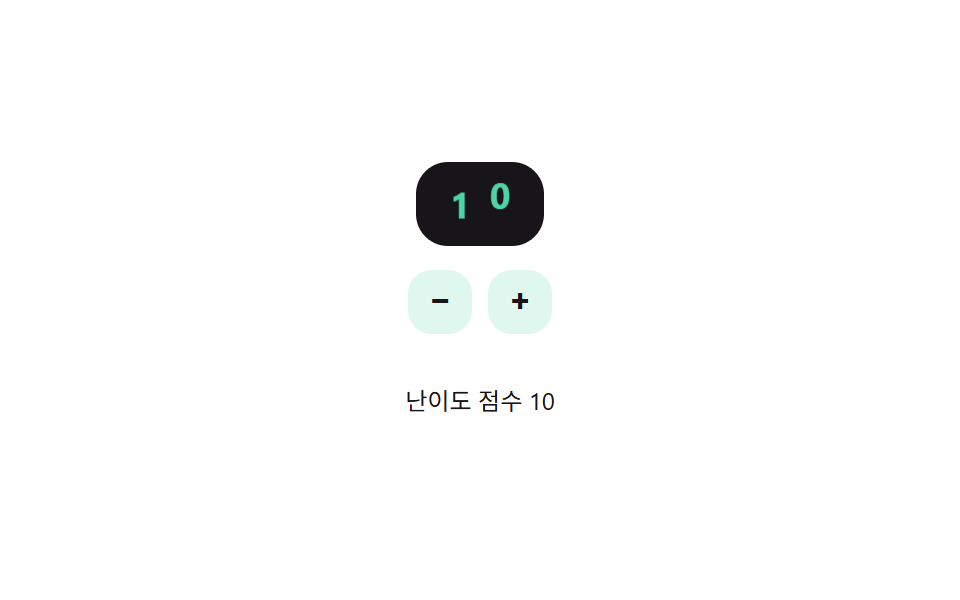
08数字が走行距離計のように回る難易度ステッパー
+/-ボタンを押すと数字の一桁が上下に回って次の値へ移り、その位置は桁の位取り計算から求められ、繰り上がりが起きると左の桁も一緒に回る。
使いどころフォームで設問の難易度点数を数字で直接決める場所
placeDigitpaintset
<main class="stage">
<div class="nso is-demo" id="nso">
  <div class="nso__display" id="nsoDisplay" role="spinbutton" tabindex="0"
    aria-label="難易度スコア" aria-valuemin="1" aria-valuemax="12" aria-valuenow="5">
    <div class="nso__col"><div class="nso__strip" id="nsoTens">
      <span>0</span><span>1</span><span>2</span><span>3</span><span>4</span><span>5</span><span>6</span><span>7</span><span>8</span><span>9</span>
    </div></div>
    <div class="nso__col"><div class="nso__strip" id="nsoOnes">
      <span>0</span><span>1</span><span>2</span><span>3</span><span>4</span><span>5</span><span>6</span><span>7</span><span>8</span><span>9</span>
    </div></div>
  </div>
  <div class="nso__row">
    <button type="button" class="nso__btn" id="nsoMinus" aria-label="スコアを下げる">−</button>
    <button type="button" class="nso__btn" id="nsoPlus" aria-label="スコアを上げる">+</button>
  </div>
  <p class="nso__label">難易度スコア <span id="nsoOut">5</span></p>
</div>
</main>
@use "../../../../site/static/demo-tokens" as *;
// 변수 3개
$duration: $dur-base;
$easing: $ease-spring;
$color: $subject-mint;
// 계산 겹: placeDigit() 가 값을 10^자리로 나눈 몫의 일의 자리를 구해 그 자릿값 * 칸 높이만큼 릴을 밀어낸다(JS)
@include stage($stage-paper);
.nso { display: flex; flex-direction: column; align-items: center; gap: $sp-3; }
.nso__display {
display: flex; background: $subject-ink; border-radius: $r-card; padding: $sp-2 $sp-3;
cursor: pointer;
}
.nso__display:focus-visible { outline: 2px solid $subject-mint; outline-offset: 2px; }
.nso__col { width: 20px; height: 26px; overflow: hidden; position: relative; }
.nso__strip {
display: flex; flex-direction: column;
transition: transform $duration $easing;
}
.nso__strip span {
height: 26px; line-height: 26px; text-align: center; font-weight: 700; font-size: 18px;
color: $subject-mint; font-variant-numeric: tabular-nums;
}
.nso__row { display: flex; gap: $sp-2; }
.nso__btn {
appearance: none; border: 0; border-radius: $r-control; width: 32px; height: 32px;
background: rgba($subject-mint, .18); color: $subject-ink; font-weight: 700; font-size: 16px; cursor: pointer;
}
.nso__btn:focus-visible { outline: 2px solid $subject-mint; outline-offset: 2px; }
.nso__label { font-size: 12px; color: $subject-ink; }
@media (max-width: 340px) {
.nso__col { width: 18px; }
.nso__strip span { font-size: 16px; }
}
@media (prefers-reduced-motion: reduce) {
// 실사용 경로 적용: 실제로 +/-·화살표로 값을 바꿔도 릴은 트랜지션 없이 즉시 그 자리로 넘어간다
.nso__strip { transition: none; }
}html, body {
margin: 0;
overflow: hidden;
}
.stage {
box-sizing: border-box;
min-height: 100vh;
display: grid;
place-items: center;
margin: 0;
background: #ffffff;
font-family: -apple-system, "Segoe UI", "Noto Sans KR", sans-serif;
padding: clamp(8px, 4vw, 24px);
}
.nso {
display: flex;
flex-direction: column;
align-items: center;
gap: 12px;
}
.nso__display {
display: flex;
background: #17141a;
border-radius: 16px;
padding: 8px 12px;
cursor: pointer;
}
.nso__display:focus-visible {
outline: 2px solid #4cd4a6;
outline-offset: 2px;
}
.nso__col {
width: 20px;
height: 26px;
overflow: hidden;
position: relative;
}
.nso__strip {
display: flex;
flex-direction: column;
transition: transform 300ms cubic-bezier(0.2, 0.8, 0.2, 1);
}
.nso__strip span {
height: 26px;
line-height: 26px;
text-align: center;
font-weight: 700;
font-size: 18px;
color: #4cd4a6;
font-variant-numeric: tabular-nums;
}
.nso__row {
display: flex;
gap: 8px;
}
.nso__btn {
appearance: none;
border: 0;
border-radius: 12px;
width: 32px;
height: 32px;
background: rgba(76, 212, 166, 0.18);
color: #17141a;
font-weight: 700;
font-size: 16px;
cursor: pointer;
}
.nso__btn:focus-visible {
outline: 2px solid #4cd4a6;
outline-offset: 2px;
}
.nso__label {
font-size: 12px;
color: #17141a;
}
@media (max-width: 340px) {
.nso__col {
width: 18px;
}
.nso__strip span {
font-size: 16px;
}
}
@media (prefers-reduced-motion: reduce) {
.nso__strip {
transition: none;
}
}(function () {
var MIN = 1, MAX = 12, DIGIT_H = 26;
var root = document.getElementById('nso');
var display = document.getElementById('nsoDisplay');
var tensStrip = document.getElementById('nsoTens');
var onesStrip = document.getElementById('nsoOnes');
var out = document.getElementById('nsoOut');
var value = 5;
// 계산 겹: 값을 10^자리로 나눈 몫의 일의 자리(placeDigit)로 각 릴이 보여줄 숫자를 구하고,
// 그 자릿값 * 칸 높이만큼 릴을 밀어 그 숫자가 창에 걸리게 한다 — 자리올림은 몫이 바뀌면서 자연히 생긴다
function placeDigit(v, place) { return Math.floor(v / Math.pow(10, place)) % 10; }
function paint() {
var ones = placeDigit(value, 0), tens = placeDigit(value, 1);
onesStrip.style.transform = 'translateY(-' + (ones * DIGIT_H) + 'px)';
tensStrip.style.transform = 'translateY(-' + (tens * DIGIT_H) + 'px)';
display.setAttribute('aria-valuenow', String(value));
out.textContent = String(value);
}
function human() { root.classList.remove('is-demo'); clearInterval(timer); }
function set(v) { value = Math.max(MIN, Math.min(MAX, v)); paint(); }
document.getElementById('nsoPlus').addEventListener('click', function () { human(); set(value + 1); });
document.getElementById('nsoMinus').addEventListener('click', function () { human(); set(value - 1); });
display.addEventListener('keydown', function (e) {
if (e.key === 'ArrowUp' || e.key === 'ArrowRight') { e.preventDefault(); human(); set(value + 1); }
else if (e.key === 'ArrowDown' || e.key === 'ArrowLeft') { e.preventDefault(); human(); set(value - 1); }
});
var sequence = [9, 10, 3, 12, 1, 7];
var si = 0;
function tick() { set(sequence[si % sequence.length]); si++; }
var reduce = window.matchMedia('(prefers-reduced-motion: reduce)').matches;
var timer = reduce ? null : setInterval(tick, 850);
paint();
}());import { useEffect, useRef } from 'react';
import styles from './DifficultySelectorNumericStepperOdometer.module.scss';
const MIN = 1, MAX = 12, DIGIT_H = 26;
const DIGITS = [0, 1, 2, 3, 4, 5, 6, 7, 8, 9];
const SEQUENCE = [9, 10, 3, 12, 1, 7];
const TICK_MS = 850;
export default function DifficultySelectorNumericStepperOdometer() {
const rootRef = useRef<HTMLDivElement>(null);
const displayRef = useRef<HTMLDivElement>(null);
const tensRef = useRef<HTMLDivElement>(null);
const onesRef = useRef<HTMLDivElement>(null);
const outRef = useRef<HTMLSpanElement>(null);
const plusRef = useRef<HTMLButtonElement>(null);
const minusRef = useRef<HTMLButtonElement>(null);
useEffect(() => {
const root = rootRef.current;
const display = displayRef.current;
const tensStrip = tensRef.current;
const onesStrip = onesRef.current;
const out = outRef.current;
const plus = plusRef.current;
const minus = minusRef.current;
if (!root || !display || !tensStrip || !onesStrip || !out || !plus || !minus) return undefined;
let value = 5;
// 계산 겹: 값을 10^자리로 나눈 몫의 일의 자리(placeDigit)로 각 릴이 보여줄 숫자를 구하고,
// 그 자릿값 * 칸 높이만큼 릴을 밀어 그 숫자가 창에 걸리게 한다 — 자리올림은 몫이 바뀌면서 자연히 생긴다
function placeDigit(v: number, place: number) { return Math.floor(v / Math.pow(10, place)) % 10; }
function paint() {
const ones = placeDigit(value, 0), tens = placeDigit(value, 1);
onesStrip!.style.transform = 'translateY(-' + (ones * DIGIT_H) + 'px)';
tensStrip!.style.transform = 'translateY(-' + (tens * DIGIT_H) + 'px)';
display!.setAttribute('aria-valuenow', String(value));
out!.textContent = String(value);
}
let timer = 0;
function human() { root!.classList.remove(styles['is-demo']); window.clearInterval(timer); }
function set(v: number) { value = Math.max(MIN, Math.min(MAX, v)); paint(); }
function onPlus() { human(); set(value + 1); }
function onMinus() { human(); set(value - 1); }
function onKey(e: KeyboardEvent) {
if (e.key === 'ArrowUp' || e.key === 'ArrowRight') { e.preventDefault(); human(); set(value + 1); }
else if (e.key === 'ArrowDown' || e.key === 'ArrowLeft') { e.preventDefault(); human(); set(value - 1); }
}
plus.addEventListener('click', onPlus);
minus.addEventListener('click', onMinus);
display.addEventListener('keydown', onKey);
let si = 0;
function tick() { set(SEQUENCE[si % SEQUENCE.length]); si++; }
const reduce = window.matchMedia('(prefers-reduced-motion: reduce)').matches;
if (!reduce) timer = window.setInterval(tick, TICK_MS);
paint();
return () => {
plus!.removeEventListener('click', onPlus);
minus!.removeEventListener('click', onMinus);
display!.removeEventListener('keydown', onKey);
window.clearInterval(timer);
};
}, []);
return (
<main className={styles.stage}>
<div className={styles.nso + ' ' + styles['is-demo']} ref={rootRef}>
<div
className={styles.nsoDisplay}
ref={displayRef}
role="spinbutton"
tabIndex={0}
aria-label="난이도 점수"
aria-valuemin={1}
aria-valuemax={12}
aria-valuenow={5}
>
<div className={styles.nsoCol}>
<div className={styles.nsoStrip} ref={tensRef}>
{DIGITS.map((d) => <span key={d}>{d}</span>)}
</div>
</div>
<div className={styles.nsoCol}>
<div className={styles.nsoStrip} ref={onesRef}>
{DIGITS.map((d) => <span key={d}>{d}</span>)}
</div>
</div>
</div>
<div className={styles.nsoRow}>
<button type="button" className={styles.nsoBtn} ref={minusRef} aria-label="점수 낮추기">−</button>
<button type="button" className={styles.nsoBtn} ref={plusRef} aria-label="점수 높이기">+</button>
</div>
<p className={styles.nsoLabel}>난이도 점수 <span ref={outRef}>5</span></p>
</div>
</main>
);
}08 数字が走行距離計のように回る難易度ステッパー — 計測 累積面積 0.688% · 動いたフレーム 11/23GODRICH オリジナル · SCSS と React は zip に同梱 · 難易度選択 ui 9種 — 角度と数式で決まる選択まで
このデモが属する記事
 難易度選択 ui 9種 — 角度と数式で決まる選択まで難易度選択 ui 9種のうち、1つは手を離すとスライダーのつまみが段階を少し行き過ぎてからばね計算で戻って止まり、1つは5つのバッジの色を固定値ではなく段階番号を入れた色相角の数式で計算し、1つは半円ゲージの針を引く指の角度を値に変換します この記事のデモをすべて見る