09ドラッグ角度で値が決まる半円型難易度ゲージ
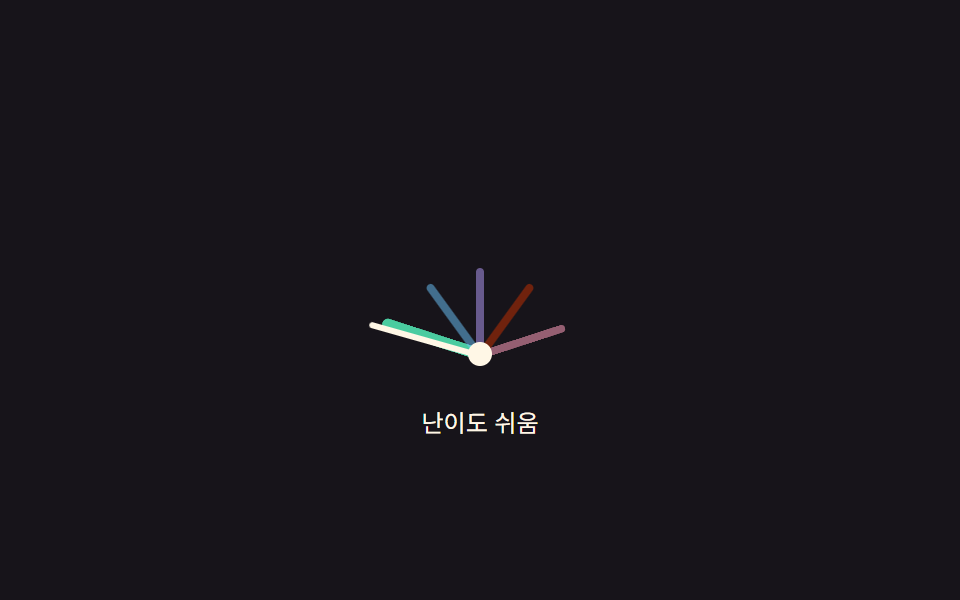
針を指で引くと中心から指までの角度を求めてその角度を難易度の値へ変換し、弧の中の色分けされた区間もその値の範囲に合わせて描き直す。
使いどころ設定ダッシュボードで指先で難易度を微調整する場所
angleToValuezoneCenterDegpaint
<main class="stage">
<div class="gad is-demo" id="gad">
  <div class="gad__face" id="gadFace" role="slider" tabindex="0"
    aria-label="難易度" aria-valuemin="0" aria-valuemax="4" aria-valuenow="2" aria-valuetext="難しい">
    <div class="gad__zones" aria-hidden="true">
      <span class="gad__zone" data-i="0"></span>
      <span class="gad__zone" data-i="1"></span>
      <span class="gad__zone" data-i="2"></span>
      <span class="gad__zone" data-i="3"></span>
      <span class="gad__zone" data-i="4"></span>
    </div>
    <div class="gad__needle" id="gadNeedle" aria-hidden="true"></div>
    <div class="gad__pivot" aria-hidden="true"></div>
  </div>
  <p class="gad__label">難易度 <span id="gadOut">難しい</span></p>
</div>
</main>
@use "../../../../site/static/demo-tokens" as *;
// 변수 3개
$duration: $dur-quick;
$easing: $ease-out;
$color: $subject-pink;
// 계산 겹: angleToValue() 가 포인터-피벗 각도(atan2)를 0~4 값으로 매핑해 게이지를 직접 끌어서 정한다(JS)
@include stage($stage-ink);
.gad { display: flex; flex-direction: column; align-items: center; gap: $sp-3; }
.gad__face {
position: relative; width: 200px; height: 108px; cursor: grab; touch-action: none;
}
.gad__face:focus-visible { outline: 2px solid $subject-cream; outline-offset: 4px; }
.gad__zones { position: absolute; inset: 0; }
.gad__zone {
position: absolute; left: 50%; bottom: 0; width: 4px; height: 44px;
margin-left: -2px; transform-origin: bottom center; border-radius: $r-xs;
background: rgba($subject-cream, .28);
transition: background $duration $easing, height $duration $easing, width $duration $easing;
}
.gad__zone[data-i="0"] { background: rgba($subject-mint, .5); }
.gad__zone[data-i="1"] { background: rgba($subject-sky, .5); }
.gad__zone[data-i="2"] { background: rgba($subject-lilac, .5); }
.gad__zone[data-i="3"] { background: rgba($subject-orange-deep, .5); }
.gad__zone[data-i="4"] { background: rgba($color, .5); }
.gad__zone.is-active { height: 52px; width: 6px; margin-left: -3px; }
.gad__zone[data-i="0"].is-active { background: $subject-mint; }
.gad__zone[data-i="1"].is-active { background: $subject-sky; }
.gad__zone[data-i="2"].is-active { background: $subject-lilac; }
.gad__zone[data-i="3"].is-active { background: $subject-orange-deep; }
.gad__zone[data-i="4"].is-active { background: $color; }
.gad__needle {
position: absolute; left: 50%; bottom: 0; width: 3px; height: 58px; margin-left: -1.5px;
background: $subject-cream; border-radius: $r-xs; transform-origin: bottom center;
transition: transform $duration $easing;
}
.gad__pivot {
position: absolute; left: 50%; bottom: -5px; width: 12px; height: 12px; margin-left: -6px;
border-radius: 50%; background: $subject-cream;
}
.gad__label { font-size: 12px; color: $subject-cream; }
@media (max-width: 340px) {
.gad__face { width: 168px; height: 92px; }
.gad__zone { height: 36px; }
.gad__needle { height: 48px; }
}
@media (prefers-reduced-motion: reduce) {
// 실사용 경로 적용: 드래그 중엔 원래도 매 프레임 즉시 반영이라 트랜지션이 관여하지 않지만,
// 키보드로 값이 바뀔 때는 바늘·구역이 트랜지션 없이 즉시 목표 각도로 이동한다
.gad__needle, .gad__zone { transition: none; }
}html, body {
margin: 0;
overflow: hidden;
}
.stage {
box-sizing: border-box;
min-height: 100vh;
display: grid;
place-items: center;
margin: 0;
background: #17141a;
font-family: -apple-system, "Segoe UI", "Noto Sans KR", sans-serif;
padding: clamp(8px, 4vw, 24px);
}
.gad {
display: flex;
flex-direction: column;
align-items: center;
gap: 12px;
}
.gad__face {
position: relative;
width: 200px;
height: 108px;
cursor: grab;
touch-action: none;
}
.gad__face:focus-visible {
outline: 2px solid #fff7e6;
outline-offset: 4px;
}
.gad__zones {
position: absolute;
inset: 0;
}
.gad__zone {
position: absolute;
left: 50%;
bottom: 0;
width: 4px;
height: 44px;
margin-left: -2px;
transform-origin: bottom center;
border-radius: 4px;
background: rgba(255, 247, 230, 0.28);
transition: background 220ms ease-out, height 220ms ease-out, width 220ms ease-out;
}
.gad__zone[data-i="0"] {
background: rgba(76, 212, 166, 0.5);
}
.gad__zone[data-i="1"] {
background: rgba(110, 200, 255, 0.5);
}
.gad__zone[data-i="2"] {
background: rgba(185, 160, 255, 0.5);
}
.gad__zone[data-i="3"] {
background: rgba(201, 48, 0, 0.5);
}
.gad__zone[data-i="4"] {
background: rgba(255, 158, 187, 0.5);
}
.gad__zone.is-active {
height: 52px;
width: 6px;
margin-left: -3px;
}
.gad__zone[data-i="0"].is-active {
background: #4cd4a6;
}
.gad__zone[data-i="1"].is-active {
background: #6ec8ff;
}
.gad__zone[data-i="2"].is-active {
background: #b9a0ff;
}
.gad__zone[data-i="3"].is-active {
background: #c93000;
}
.gad__zone[data-i="4"].is-active {
background: #ff9ebb;
}
.gad__needle {
position: absolute;
left: 50%;
bottom: 0;
width: 3px;
height: 58px;
margin-left: -1.5px;
background: #fff7e6;
border-radius: 4px;
transform-origin: bottom center;
transition: transform 220ms ease-out;
}
.gad__pivot {
position: absolute;
left: 50%;
bottom: -5px;
width: 12px;
height: 12px;
margin-left: -6px;
border-radius: 50%;
background: #fff7e6;
}
.gad__label {
font-size: 12px;
color: #fff7e6;
}
@media (max-width: 340px) {
.gad__face {
width: 168px;
height: 92px;
}
.gad__zone {
height: 36px;
}
.gad__needle {
height: 48px;
}
}
@media (prefers-reduced-motion: reduce) {
.gad__needle, .gad__zone {
transition: none;
}
}(function () {
var LEVELS = ['簡単', '普通', '難しい', 'とても難しい', '最高'];
var ZONE_DEG = 36; // 180deg / 5구역
var root = document.getElementById('gad');
var face = document.getElementById('gadFace');
var needle = document.getElementById('gadNeedle');
var zones = Array.prototype.slice.call(face.querySelectorAll('.gad__zone'));
var out = document.getElementById('gadOut');
var value = 2; // 0..4 연속값
var dragging = false;
function zoneCenterDeg(i) { return -90 + ZONE_DEG / 2 + i * ZONE_DEG; }
zones.forEach(function (z, i) { z.style.transform = 'rotate(' + zoneCenterDeg(i) + 'deg)'; });
// 계산 겹: 포인터 좌표와 피벗(바닥 중앙) 사이의 각도를 atan2 로 구해 -90~90도 구간을 0~4 값으로 매핑한다
function angleToValue(clientX, clientY) {
var r = face.getBoundingClientRect();
var px = r.left + r.width / 2;
var py = r.bottom;
var dx = clientX - px;
var dy = Math.min(clientY - py, -1); // 피벗 위쪽으로 강제해 좌측 경계에서 각도가 튀지 않게 한다
var theta = Math.atan2(dy, dx) * 180 / Math.PI; // -180..0
var t = (theta + 180) / 180;
t = Math.max(0, Math.min(1, t));
return t * 4;
}
function paint() {
var deg = -90 + (value / 4) * 180;
needle.style.transform = 'rotate(' + deg + 'deg)';
var zi = Math.round(value);
zones.forEach(function (z, i) { z.classList.toggle('is-active', i === zi); });
face.setAttribute('aria-valuenow', String(zi));
face.setAttribute('aria-valuetext', LEVELS[zi]);
out.textContent = LEVELS[zi];
}
function human() { root.classList.remove('is-demo'); clearInterval(timer); }
function setValue(v) { value = Math.max(0, Math.min(4, v)); paint(); }
face.addEventListener('pointerdown', function (e) {
human(); dragging = true; face.setPointerCapture(e.pointerId);
setValue(angleToValue(e.clientX, e.clientY));
});
face.addEventListener('pointermove', function (e) {
if (!dragging) return;
setValue(angleToValue(e.clientX, e.clientY));
});
face.addEventListener('pointerup', function (e) {
dragging = false; setValue(Math.round(value));
});
face.addEventListener('keydown', function (e) {
if (e.key === 'ArrowRight' || e.key === 'ArrowUp') { e.preventDefault(); human(); setValue(Math.round(value) + 1); }
else if (e.key === 'ArrowLeft' || e.key === 'ArrowDown') { e.preventDefault(); human(); setValue(Math.round(value) - 1); }
else if (e.key === 'Home') { e.preventDefault(); human(); setValue(0); }
else if (e.key === 'End') { e.preventDefault(); human(); setValue(4); }
});
var sequence = [4, 0, 3, 1, 2];
var si = 0;
function tick() { setValue(sequence[si % sequence.length]); si++; }
var reduce = window.matchMedia('(prefers-reduced-motion: reduce)').matches;
var timer = reduce ? null : setInterval(tick, 780);
paint();
}());import { useEffect, useRef } from 'react';
import styles from './DifficultySelectorGaugeArcDrag.module.scss';
const LEVELS = ['쉬움', '보통', '어려움', '매우 어려움', '최고'];
const ZONE_DEG = 36;
const SEQUENCE = [4, 0, 3, 1, 2];
const TICK_MS = 780;
export default function DifficultySelectorGaugeArcDrag() {
const rootRef = useRef<HTMLDivElement>(null);
const faceRef = useRef<HTMLDivElement>(null);
const needleRef = useRef<HTMLDivElement>(null);
const zoneRefs = useRef<HTMLSpanElement[]>([]);
const outRef = useRef<HTMLSpanElement>(null);
useEffect(() => {
const root = rootRef.current;
const face = faceRef.current;
const needle = needleRef.current;
const out = outRef.current;
if (!root || !face || !needle || !out || !zoneRefs.current) return undefined;
const zones = zoneRefs.current;
if (zones.length !== LEVELS.length) return undefined;
let value = 2;
let dragging = false;
function zoneCenterDeg(i: number) { return -90 + ZONE_DEG / 2 + i * ZONE_DEG; }
zones.forEach((z, i) => { z.style.transform = 'rotate(' + zoneCenterDeg(i) + 'deg)'; });
// 계산 겹: 포인터 좌표와 피벗(바닥 중앙) 사이의 각도를 atan2 로 구해 -90~90도 구간을 0~4 값으로 매핑한다
function angleToValue(clientX: number, clientY: number) {
const r = face!.getBoundingClientRect();
const px = r.left + r.width / 2;
const py = r.bottom;
const dx = clientX - px;
const dy = Math.min(clientY - py, -1);
const theta = Math.atan2(dy, dx) * 180 / Math.PI;
let t = (theta + 180) / 180;
t = Math.max(0, Math.min(1, t));
return t * 4;
}
function paint() {
const deg = -90 + (value / 4) * 180;
needle!.style.transform = 'rotate(' + deg + 'deg)';
const zi = Math.round(value);
zones.forEach((z, i) => { z.classList.toggle(styles['is-active'], i === zi); });
face!.setAttribute('aria-valuenow', String(zi));
face!.setAttribute('aria-valuetext', LEVELS[zi]);
out!.textContent = LEVELS[zi];
}
let timer = 0;
function human() { root!.classList.remove(styles['is-demo']); window.clearInterval(timer); }
function setValue(v: number) { value = Math.max(0, Math.min(4, v)); paint(); }
function onDown(e: PointerEvent) {
human(); dragging = true; face!.setPointerCapture(e.pointerId);
setValue(angleToValue(e.clientX, e.clientY));
}
function onMove(e: PointerEvent) {
if (!dragging) return;
setValue(angleToValue(e.clientX, e.clientY));
}
function onUp() {
dragging = false; setValue(Math.round(value));
}
function onKey(e: KeyboardEvent) {
if (e.key === 'ArrowRight' || e.key === 'ArrowUp') { e.preventDefault(); human(); setValue(Math.round(value) + 1); }
else if (e.key === 'ArrowLeft' || e.key === 'ArrowDown') { e.preventDefault(); human(); setValue(Math.round(value) - 1); }
else if (e.key === 'Home') { e.preventDefault(); human(); setValue(0); }
else if (e.key === 'End') { e.preventDefault(); human(); setValue(4); }
}
face.addEventListener('pointerdown', onDown);
face.addEventListener('pointermove', onMove);
face.addEventListener('pointerup', onUp);
face.addEventListener('keydown', onKey);
let si = 0;
function tick() { setValue(SEQUENCE[si % SEQUENCE.length]); si++; }
const reduce = window.matchMedia('(prefers-reduced-motion: reduce)').matches;
if (!reduce) timer = window.setInterval(tick, TICK_MS);
paint();
return () => {
face!.removeEventListener('pointerdown', onDown);
face!.removeEventListener('pointermove', onMove);
face!.removeEventListener('pointerup', onUp);
face!.removeEventListener('keydown', onKey);
window.clearInterval(timer);
};
}, []);
return (
<main className={styles.stage}>
<div className={styles.gad + ' ' + styles['is-demo']} ref={rootRef}>
<div
className={styles.gadFace}
ref={faceRef}
role="slider"
tabIndex={0}
aria-label="난이도"
aria-valuemin={0}
aria-valuemax={4}
aria-valuenow={2}
aria-valuetext="어려움"
>
<div className={styles.gadZones} aria-hidden="true">
{LEVELS.map((_, i) => (
<span key={i} className={styles.gadZone} data-i={i} ref={(el: HTMLSpanElement | null) => { if (el && zoneRefs.current) zoneRefs.current[i] = el; }} />
))}
</div>
<div className={styles.gadNeedle} ref={needleRef} aria-hidden="true" />
<div className={styles.gadPivot} aria-hidden="true" />
</div>
<p className={styles.gadLabel}>난이도 <span ref={outRef}>어려움</span></p>
</div>
</main>
);
}09 ドラッグ角度で値が決まる半円型難易度ゲージ — 計測 累積面積 2.203% · 動いたフレーム 9/23GODRICH オリジナル · SCSS と React は zip に同梱 · 難易度選択 ui 9種 — 角度と数式で決まる選択まで
このデモが属する記事
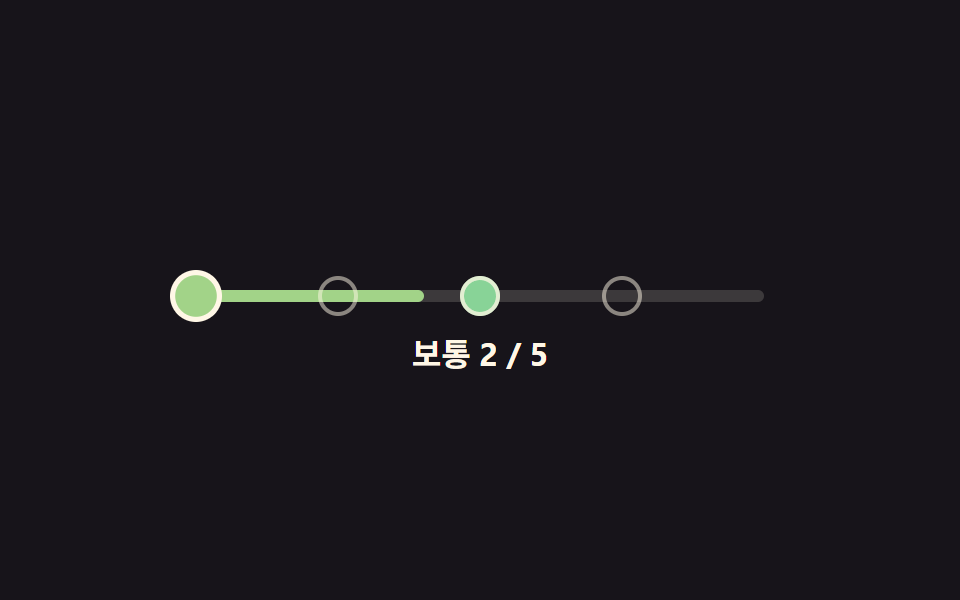 難易度選択 ui 9種 — 角度と数式で決まる選択まで難易度選択 ui 9種のうち、1つは手を離すとスライダーのつまみが段階を少し行き過ぎてからばね計算で戻って止まり、1つは5つのバッジの色を固定値ではなく段階番号を入れた色相角の数式で計算し、1つは半円ゲージの針を引く指の角度を値に変換します この記事のデモをすべて見る