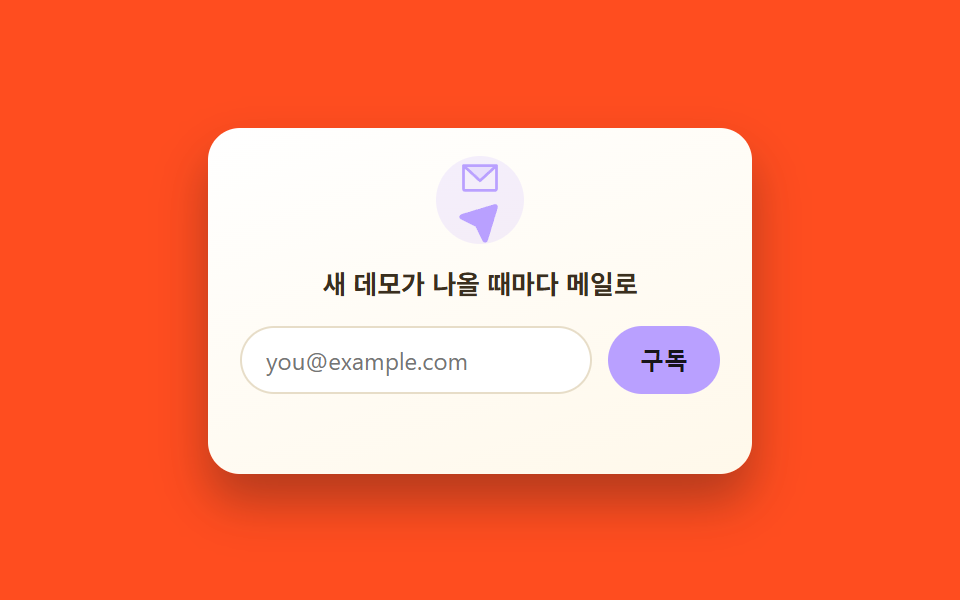
08ニュースレター購読埋め込みウィジェット
封筒アイコンが浮かんでは沈むことを繰り返し、実際にメール形式を検証して通過すると紙飛行機のアイコンに変わり完了メッセージが出る。
使いどころ記事下部の購読誘導カード、サイドバーのニュースレター登録フォーム
translateY float loopregex email validationicon swap on success
<main class="stage is-demo">
  <form class="ncard" novalidate>
    <span class="ncard__icon" aria-hidden="true">
      <svg class="ic-mail" viewBox="0 0 256 256" width="22" height="22"><g fill="currentColor"><path d="m224 56l-96 88l-96-88Z" opacity=".2"/><path d="M224 48H32a8 8 0 0 0-8 8v136a16 16 0 0 0 16 16h176a16 16 0 0 0 16-16V56a8 8 0 0 0-8-8m-20.57 16L128 133.15L52.57 64ZM216 192H40V74.19l82.59 75.71a8 8 0 0 0 10.82 0L216 74.19z"/></g></svg>
      <svg class="ic-sent" viewBox="0 0 256 256" width="22" height="22" hidden><g fill="currentColor"><path d="m223.69 42.18l-58.22 192a8 8 0 0 1-14.92 1.25L108 148l-87.42-42.55a8 8 0 0 1 1.25-14.92l192-58.22a8 8 0 0 1 9.86 9.87" opacity=".2"/><path d="M227.32 28.68a16 16 0 0 0-15.66-4.08h-.15L19.57 82.84a16 16 0 0 0-2.49 29.8L102 154l41.3 84.87a15.86 15.86 0 0 0 14.44 9.13q.69 0 1.38-.06a15.88 15.88 0 0 0 14-11.51l58.2-191.94v-.15a16 16 0 0 0-4-15.66"/></g></svg>
    </span>
    <p class="ncard__title">新しいデモが出るたびにメールで</p>
    <div class="ncard__row">
      <label class="ncard__label" for="ncard-email-234-08">メールアドレス</label>
      <input class="ncard__input" id="ncard-email-234-08" type="email" placeholder="[email protected]" required>
      <button class="ncard__btn" type="submit">登録</button>
    </div>
    <p class="ncard__msg" role="status"></p>
  </form>
</main>
@use "../../../../site/static/demo-tokens" as *;
// ── 변수 3개 ──────────────────────────────────────────
$duration: $dur-loop; // 2s — 편지 아이콘이 떠올랐다 가라앉는 한 주기
$easing: $ease-spring;
$color: $subject-lilac;
@include stage($stage-orange);
.ncard {
width: 272px;
box-sizing: border-box;
padding: $sp-4;
border-radius: $r-card;
text-align: center;
background: linear-gradient(160deg, #fff, $subject-cream 120%);
box-shadow: $shadow-raised;
font-family: -apple-system, "Segoe UI", "Noto Sans KR", sans-serif;
}
.ncard__icon {
display: grid; place-items: center;
width: 44px; height: 44px;
margin: 0 auto $sp-2;
border-radius: 50%;
background: rgba($color, .16);
color: $color;
}
.ncard__title { margin: 0 0 $sp-3; font-size: 13px; font-weight: 700; color: #3a2f1f; }
.ncard__row { display: flex; flex-wrap: wrap; gap: $sp-2; justify-content: center; }
.ncard__label { position: absolute; width: 1px; height: 1px; overflow: hidden; clip-path: inset(50%); }
.ncard__input {
flex: 1 1 140px;
min-width: 0;
border: 1px solid #e7ddc8;
border-radius: $r-pill;
padding: $sp-2 $sp-3;
font-size: 12px;
font-family: inherit;
}
.ncard__input:focus { outline: 2px solid $color; outline-offset: 2px; }
.ncard__input:disabled { background: #f4efe4; color: #9c8f74; }
.ncard__btn {
flex: 0 0 auto;
border: 0;
border-radius: $r-pill;
background: $color;
color: $subject-ink; // 파스텔 면 위 흰 글자는 2.20:1 — 잉크로 8.28:1
padding: $sp-2 $sp-4;
font-size: 12px; font-weight: 700;
cursor: pointer;
}
.ncard__btn:hover { filter: brightness(1.06); }
.ncard__btn:disabled { cursor: default; filter: none; opacity: .8; }
.ncard__msg { min-height: 16px; margin: $sp-2 0 0; font-size: 11px; }
.ncard__msg.is-error { color: $error; }
.ncard__msg.is-ok { color: #50a26e; }
// 자동 재생 루프 — 편지가 살짝 떠올랐다 가라앉는다
.stage.is-demo .ncard__icon { animation: ncard-float $duration $easing infinite; }
@keyframes ncard-float {
0%, 100% { transform: translateY(0); }
50% { transform: translateY(-6px); }
}
@media (prefers-reduced-motion: reduce) {
.stage.is-demo .ncard__icon { animation: none; }
}html, body {
margin: 0;
overflow: hidden;
}
.stage {
box-sizing: border-box;
min-height: 100vh;
display: grid;
place-items: center;
margin: 0;
background: #ff4d1f;
font-family: -apple-system, "Segoe UI", "Noto Sans KR", sans-serif;
padding: clamp(8px, 4vw, 24px);
}
.ncard {
width: 272px;
box-sizing: border-box;
padding: 16px;
border-radius: 16px;
text-align: center;
background: linear-gradient(160deg, #fff, #fff7e6 120%);
box-shadow: 0 14px 24px rgba(23, 20, 26, 0.32);
font-family: -apple-system, "Segoe UI", "Noto Sans KR", sans-serif;
}
.ncard__icon {
display: grid;
place-items: center;
width: 44px;
height: 44px;
margin: 0 auto 8px;
border-radius: 50%;
background: rgba(185, 160, 255, 0.16);
color: #b9a0ff;
}
.ncard__title {
margin: 0 0 12px;
font-size: 13px;
font-weight: 700;
color: #3a2f1f;
}
.ncard__row {
display: flex;
flex-wrap: wrap;
gap: 8px;
justify-content: center;
}
.ncard__label {
position: absolute;
width: 1px;
height: 1px;
overflow: hidden;
clip-path: inset(50%);
}
.ncard__input {
flex: 1 1 140px;
min-width: 0;
border: 1px solid #e7ddc8;
border-radius: 999px;
padding: 8px 12px;
font-size: 12px;
font-family: inherit;
}
.ncard__input:focus {
outline: 2px solid #b9a0ff;
outline-offset: 2px;
}
.ncard__input:disabled {
background: #f4efe4;
color: #9c8f74;
}
.ncard__btn {
flex: 0 0 auto;
border: 0;
border-radius: 999px;
background: #b9a0ff;
color: #17141a;
padding: 8px 16px;
font-size: 12px;
font-weight: 700;
cursor: pointer;
}
.ncard__btn:hover {
filter: brightness(1.06);
}
.ncard__btn:disabled {
cursor: default;
filter: none;
opacity: 0.8;
}
.ncard__msg {
min-height: 16px;
margin: 8px 0 0;
font-size: 11px;
}
.ncard__msg.is-error {
color: #c2361a;
}
.ncard__msg.is-ok {
color: #50a26e;
}
.stage.is-demo .ncard__icon {
animation: ncard-float 2s cubic-bezier(0.2, 0.8, 0.2, 1) infinite;
}
@keyframes ncard-float {
0%, 100% {
transform: translateY(0);
}
50% {
transform: translateY(-6px);
}
}
@media (prefers-reduced-motion: reduce) {
.stage.is-demo .ncard__icon {
animation: none;
}
}// 실제 동작: メールアドレス 형식을 검사해 통과하면 完了 상태로 바뀐다 (실제 전송은 없는 데모).
var form = document.querySelector('.ncard');
var input = document.querySelector('.ncard__input');
var btn = document.querySelector('.ncard__btn');
var msg = document.querySelector('.ncard__msg');
var mail = document.querySelector('.ic-mail');
var sent = document.querySelector('.ic-sent');
form.addEventListener('submit', function (e) {
e.preventDefault();
var ok = /^[^\s@]+@[^\s@]+\.[^\s@]+$/.test(input.value);
if (!ok) { msg.textContent = 'メールアドレスの形式をご確認ください'; msg.className = 'ncard__msg is-error'; return; }
input.disabled = true;
btn.disabled = true;
btn.textContent = '完了';
mail.hidden = true;
sent.hidden = false;
msg.textContent = '登録完了 — 確認メールをお送りしました';
msg.className = 'ncard__msg is-ok';
});import { useState } from "react";
import type { ChangeEvent, CSSProperties } from "react";
import styles from "./NewsletterSignup.module.scss";
export type NewsletterSignupProps = {
duration?: number;
easing?: string;
color?: string;
};
export default function NewsletterSignup({ duration = 2000, easing = "cubic-bezier(.2,.8,.2,1)", color = "#b9a0ff" }: NewsletterSignupProps) {
const vars: CSSProperties = { "--duration": `${duration}ms`, "--easing": easing, "--color": color } as CSSProperties;
const [email, setEmail] = useState("");
const [status, setStatus] = useState<"idle" | "error" | "ok">("idle");
function onSubmit(e: { preventDefault: () => void }) {
e.preventDefault();
const ok = /^[^\s@]+@[^\s@]+\.[^\s@]+$/.test(email);
setStatus(ok ? "ok" : "error");
}
return (
<form className={styles.card} style={vars} onSubmit={onSubmit} noValidate>
<span className={styles.icon} aria-hidden="true">
{status === "ok" ? (
<svg viewBox="0 0 256 256" width="22" height="22"><g fill="currentColor">
<path opacity=".2" d="m223.69 42.18l-58.22 192a8 8 0 0 1-14.92 1.25L108 148l-87.42-42.55a8 8 0 0 1 1.25-14.92l192-58.22a8 8 0 0 1 9.86 9.87" />
<path d="M227.32 28.68a16 16 0 0 0-15.66-4.08h-.15L19.57 82.84a16 16 0 0 0-2.49 29.8L102 154l41.3 84.87a15.86 15.86 0 0 0 14.44 9.13q.69 0 1.38-.06a15.88 15.88 0 0 0 14-11.51l58.2-191.94v-.15a16 16 0 0 0-4-15.66" />
</g></svg>
) : (
<svg viewBox="0 0 256 256" width="22" height="22"><g fill="currentColor">
<path opacity=".2" d="m224 56l-96 88l-96-88Z" />
<path d="M224 48H32a8 8 0 0 0-8 8v136a16 16 0 0 0 16 16h176a16 16 0 0 0 16-16V56a8 8 0 0 0-8-8m-20.57 16L128 133.15L52.57 64ZM216 192H40V74.19l82.59 75.71a8 8 0 0 0 10.82 0L216 74.19z" />
</g></svg>
)}
</span>
<p className={styles.title}>새 데모가 나올 때마다 메일로</p>
<div className={styles.row}>
<label className={styles.srOnly} htmlFor="ncard-email-react">이메일</label>
<input
className={styles.input} id="ncard-email-react" type="email" placeholder="[email protected]"
value={email} disabled={status === "ok"} onChange={(e: ChangeEvent<HTMLInputElement>) => setEmail(e.target.value)} required
/>
<button className={styles.btn} type="submit" disabled={status === "ok"}>{status === "ok" ? "완료" : "구독"}</button>
</div>
<p className={`${styles.msg} ${status === "error" ? styles.msgError : status === "ok" ? styles.msgOk : ""}`} role="status">
{status === "error" ? "이메일 형식을 확인해 주세요" : status === "ok" ? "구독 완료 — 확인 메일을 보냈어요" : ""}
</p>
</form>
);
}08 ニュースレター購読埋め込みウィジェット — 計測 累積面積 0.66% · 動いたフレーム 12/23GODRICH オリジナル · SCSS と React は zip に同梱 · 【コピペOK】シェアボタン デザイン 9選 — 埋め込みウィジェット
このデモが属する記事
 【コピペOK】シェアボタン デザイン 9選 — 埋め込みウィジェットシェアボタン デザインは、記事の横や下に一枚だけ貼り付けるだけで、共有・口コミ・お問い合わせのどれか一つを代わりにやってくれる小さなカードです。本物のYouTube・X・GoogleマップのAPIを呼ばなくても、見た目だけCSSで再現すれば この記事のデモをすべて見る