09ライブチャットバブルランチャー
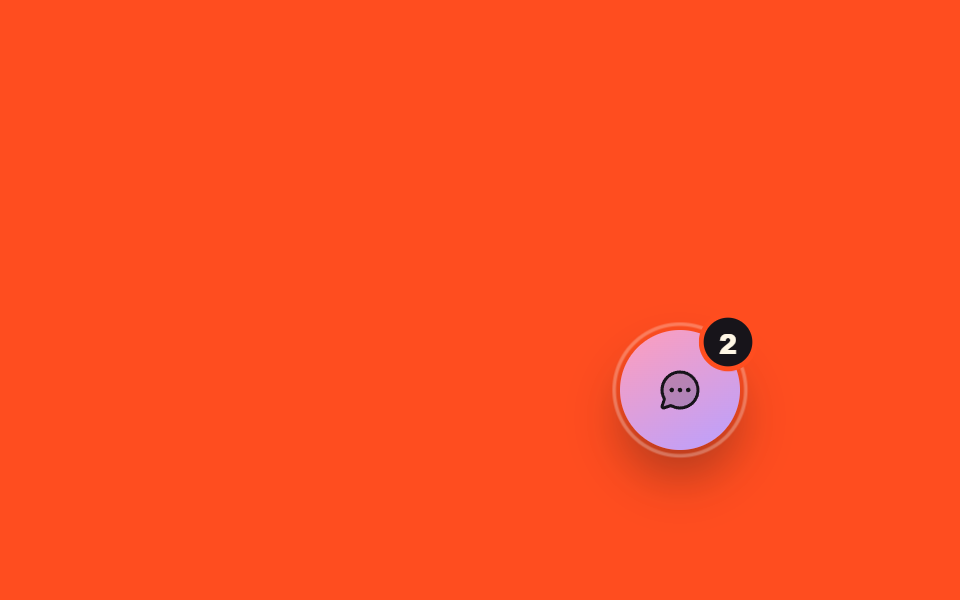
ランチャー周りの白いリングがレーダーのように広がり、バッジの数字が呼吸するように大きくなったり小さくなったりする。実際に押すとチャットパネルが開き、入力欄にフォーカスが移る(スクロールは強制しない)。
使いどころサイト右下固定のお問い合わせボタン、決済ページのリアルタイム相談窓口
ring ping + badge pulsefocus({preventScroll:true})aria-expanded toggle
<main class="stage is-demo">
  <div class="lchat">
    <div class="lchat__panel" hidden>
      <header class="lchat__head">
        <span>リアルタイム相談</span>
        <button class="lchat__close" type="button" aria-label="閉じる">
          <svg viewBox="0 0 256 256" width="16" height="16" aria-hidden="true"><g fill="currentColor"><path d="M224 128a96 96 0 1 1-96-96a96 96 0 0 1 96 96" opacity=".2"/><path d="M165.66 101.66L139.31 128l26.35 26.34a8 8 0 0 1-11.32 11.32L128 139.31l-26.34 26.35a8 8 0 0 1-11.32-11.32L116.69 128l-26.35-26.34a8 8 0 0 1 11.32-11.32L128 116.69l26.34-26.35a8 8 0 0 1 11.32 11.32M232 128A104 104 0 1 1 128 24a104.11 104.11 0 0 1 104 104m-16 0a88 88 0 1 0-88 88a88.1 88.1 0 0 0 88-88"/></g></svg>
        </button>
      </header>
      <p class="lchat__msg">こんにちは!何かお手伝いできますか?</p>
      <div class="lchat__input-row">
        <input class="lchat__input" type="text" placeholder="メッセージを入力してください" aria-label="メッセージ">
        <button class="lchat__send" type="button">送信</button>
      </div>
    </div>
    <button class="lchat__launcher" type="button" aria-label="チャットを開く" aria-expanded="false">
      <span class="lchat__ring" aria-hidden="true"></span>
      <svg viewBox="0 0 256 256" width="24" height="24" aria-hidden="true"><g fill="currentColor"><path d="M224 128a96 96 0 0 1-144.07 83.11l-37.39 12.47a8 8 0 0 1-10.12-10.12l12.47-37.39A96 96 0 1 1 224 128" opacity=".2"/><path d="M128 24a104 104 0 0 0-91.82 152.88l-11.35 34.05a16 16 0 0 0 20.24 20.24l34.05-11.35A104 104 0 1 0 128 24m0 192a87.87 87.87 0 0 1-44.06-11.81a8 8 0 0 0-4-1.08a7.9 7.9 0 0 0-2.53.42L40 216l12.47-37.4a8 8 0 0 0-.66-6.54A88 88 0 1 1 128 216m12-88a12 12 0 1 1-12-12a12 12 0 0 1 12 12m-44 0a12 12 0 1 1-12-12a12 12 0 0 1 12 12m88 0a12 12 0 1 1-12-12a12 12 0 0 1 12 12"/></g></svg>
      <span class="lchat__badge">2</span>
    </button>
  </div>
</main>
@use "../../../../site/static/demo-tokens" as *;
// ── 변수 3개 ──────────────────────────────────────────
$duration: $dur-loop; // 2s — 런처 둘레 링이 신호를 보내는 한 주기
$easing: $ease-out;
$color: $subject-lilac;
@include stage($stage-orange);
.lchat {
position: relative;
width: 260px;
height: 150px;
}
.lchat__launcher {
position: absolute;
right: 0; bottom: 0;
width: 60px; height: 60px;
border-radius: 50%;
border: 0;
display: grid; place-items: center;
background: linear-gradient(150deg, $subject-pink, $color);
color: $subject-ink; // 파스텔 면 위 흰 글자는 2.20:1 — 잉크로 9.43:1
cursor: pointer;
box-shadow: $shadow-raised;
}
.lchat__ring {
position: absolute;
inset: -8px;
border-radius: 50%;
border: 2px solid rgba(255, 255, 255, .6);
opacity: 0;
transform: scale(.85);
}
.lchat__badge {
position: absolute;
top: -4px; right: -4px;
min-width: 20px; height: 20px;
border-radius: $r-pill;
background: $subject-ink; // 흰 배경 + 라일락 글자는 2.20:1 — 먹 배경 + 크림 글자로
color: $subject-cream;
display: grid; place-items: center;
font-size: 11px; font-weight: 800;
box-shadow: 0 0 0 2px $stage-orange;
}
.lchat__panel {
position: absolute;
right: 0; bottom: 72px;
width: 224px;
padding: $sp-3;
border-radius: $r-card;
background: #fff;
box-shadow: $shadow-raised;
font-family: -apple-system, "Segoe UI", "Noto Sans KR", sans-serif;
}
.lchat__head { display: flex; align-items: center; justify-content: space-between; font-size: 12px; font-weight: 700; color: $stage-ink; }
.lchat__close { border: 0; background: none; padding: 0; color: #6b6875; cursor: pointer; }
.lchat__msg { margin: $sp-2 0; padding: $sp-2; border-radius: $r-sm; background: #f4f0fa; font-size: 12px; color: #3a2f1f; }
.lchat__input-row { display: flex; gap: $sp-1; }
.lchat__input { flex: 1 1 auto; min-width: 0; border: 1px solid #e7e5ea; border-radius: $r-sm; padding: $sp-1 $sp-2; font-size: 12px; font-family: inherit; }
.lchat__send { flex: 0 0 auto; border: 0; border-radius: $r-sm; background: $color; color: #fff; padding: $sp-1 $sp-2; font-size: 12px; cursor: pointer; }
// 자동 재생 루프 — 링이 레이더처럼 퍼지고 배지가 숨쉰다
.stage.is-demo .lchat__ring { animation: lchat-ping $duration $easing infinite; }
.stage.is-demo .lchat__badge { animation: lchat-bounce $duration $ease-pop infinite; }
@keyframes lchat-ping {
0% { opacity: .5; transform: scale(.85); }
70% { opacity: 0; transform: scale(1.25); }
100% { opacity: 0; transform: scale(1.25); }
}
@keyframes lchat-bounce {
0%, 40%, 100% { transform: scale(1); }
20% { transform: scale(1.25); }
}
@media (prefers-reduced-motion: reduce) {
.stage.is-demo .lchat__ring { animation: none; opacity: 0; }
.stage.is-demo .lchat__badge { animation: none; }
}html, body {
margin: 0;
overflow: hidden;
}
.stage {
box-sizing: border-box;
min-height: 100vh;
display: grid;
place-items: center;
margin: 0;
background: #ff4d1f;
font-family: -apple-system, "Segoe UI", "Noto Sans KR", sans-serif;
padding: clamp(8px, 4vw, 24px);
}
.lchat {
position: relative;
width: 260px;
height: 150px;
}
.lchat__launcher {
position: absolute;
right: 0;
bottom: 0;
width: 60px;
height: 60px;
border-radius: 50%;
border: 0;
display: grid;
place-items: center;
background: linear-gradient(150deg, #ff9ebb, #b9a0ff);
color: #17141a;
cursor: pointer;
box-shadow: 0 14px 24px rgba(23, 20, 26, 0.32);
}
.lchat__ring {
position: absolute;
inset: -8px;
border-radius: 50%;
border: 2px solid rgba(255, 255, 255, 0.6);
opacity: 0;
transform: scale(0.85);
}
.lchat__badge {
position: absolute;
top: -4px;
right: -4px;
min-width: 20px;
height: 20px;
border-radius: 999px;
background: #17141a;
color: #fff7e6;
display: grid;
place-items: center;
font-size: 11px;
font-weight: 800;
box-shadow: 0 0 0 2px #ff4d1f;
}
.lchat__panel {
position: absolute;
right: 0;
bottom: 72px;
width: 224px;
padding: 12px;
border-radius: 16px;
background: #fff;
box-shadow: 0 14px 24px rgba(23, 20, 26, 0.32);
font-family: -apple-system, "Segoe UI", "Noto Sans KR", sans-serif;
}
.lchat__head {
display: flex;
align-items: center;
justify-content: space-between;
font-size: 12px;
font-weight: 700;
color: #17141a;
}
.lchat__close {
border: 0;
background: none;
padding: 0;
color: #6b6875;
cursor: pointer;
}
.lchat__msg {
margin: 8px 0;
padding: 8px;
border-radius: 8px;
background: #f4f0fa;
font-size: 12px;
color: #3a2f1f;
}
.lchat__input-row {
display: flex;
gap: 4px;
}
.lchat__input {
flex: 1 1 auto;
min-width: 0;
border: 1px solid #e7e5ea;
border-radius: 8px;
padding: 4px 8px;
font-size: 12px;
font-family: inherit;
}
.lchat__send {
flex: 0 0 auto;
border: 0;
border-radius: 8px;
background: #b9a0ff;
color: #fff;
padding: 4px 8px;
font-size: 12px;
cursor: pointer;
}
.stage.is-demo .lchat__ring {
animation: lchat-ping 2s ease-out infinite;
}
.stage.is-demo .lchat__badge {
animation: lchat-bounce 2s cubic-bezier(0.2, 1.4, 0.4, 1) infinite;
}
@keyframes lchat-ping {
0% {
opacity: 0.5;
transform: scale(0.85);
}
70% {
opacity: 0;
transform: scale(1.25);
}
100% {
opacity: 0;
transform: scale(1.25);
}
}
@keyframes lchat-bounce {
0%, 40%, 100% {
transform: scale(1);
}
20% {
transform: scale(1.25);
}
}
@media (prefers-reduced-motion: reduce) {
.stage.is-demo .lchat__ring {
animation: none;
opacity: 0;
}
.stage.is-demo .lchat__badge {
animation: none;
}
}// 실제 동작: 런처를 누르면 채팅 패널이 실제로 열리고 닫히며, 열릴 때 입력창에 포커스가 간다(스크롤은 강제하지 않는다).
var launcher = document.querySelector('.lchat__launcher');
var panel = document.querySelector('.lchat__panel');
var closeBtn = document.querySelector('.lchat__close');
var input = document.querySelector('.lchat__input');
var badge = document.querySelector('.lchat__badge');
function open() {
panel.hidden = false;
launcher.setAttribute('aria-expanded', 'true');
badge.hidden = true;
input.focus({ preventScroll: true });
}
function close() {
panel.hidden = true;
launcher.setAttribute('aria-expanded', 'false');
}
launcher.addEventListener('click', function () {
if (panel.hidden) open(); else close();
});
closeBtn.addEventListener('click', close);import { useRef, useState } from "react";
import type { CSSProperties } from "react";
import styles from "./LiveChatBubble.module.scss";
export type LiveChatBubbleProps = {
duration?: number;
easing?: string;
color?: string;
unread?: number;
};
export default function LiveChatBubble({ duration = 2000, easing = "ease-out", color = "#b9a0ff", unread = 2 }: LiveChatBubbleProps) {
const vars: CSSProperties = { "--duration": `${duration}ms`, "--easing": easing, "--color": color } as CSSProperties;
const [open, setOpen] = useState(false);
const [seen, setSeen] = useState(false);
const inputRef = useRef<HTMLInputElement>(null);
function toggle() {
const next = !open;
setOpen(next);
if (next) {
setSeen(true);
requestAnimationFrame(() => inputRef.current?.focus({ preventScroll: true }));
}
}
return (
<div className={styles.wrap} style={vars}>
{open && (
<div className={styles.panel}>
<header className={styles.head}>
<span>실시간 문의</span>
<button className={styles.close} type="button" aria-label="닫기" onClick={() => setOpen(false)}>
<svg viewBox="0 0 256 256" width="16" height="16" aria-hidden="true"><g fill="currentColor">
<path opacity=".2" d="M224 128a96 96 0 1 1-96-96a96 96 0 0 1 96 96" />
<path d="M165.66 101.66L139.31 128l26.35 26.34a8 8 0 0 1-11.32 11.32L128 139.31l-26.34 26.35a8 8 0 0 1-11.32-11.32L116.69 128l-26.35-26.34a8 8 0 0 1 11.32-11.32L128 116.69l26.34-26.35a8 8 0 0 1 11.32 11.32M232 128A104 104 0 1 1 128 24a104.11 104.11 0 0 1 104 104m-16 0a88 88 0 1 0-88 88a88.1 88.1 0 0 0 88-88" />
</g></svg>
</button>
</header>
<p className={styles.msg}>안녕하세요! 무엇을 도와드릴까요?</p>
<div className={styles.inputRow}>
<input ref={inputRef} className={styles.input} type="text" placeholder="메시지를 입력하세요" aria-label="메시지" />
<button className={styles.send} type="button">전송</button>
</div>
</div>
)}
<button className={styles.launcher} type="button" aria-label="채팅 열기" aria-expanded={open} onClick={toggle}>
<span className={styles.ring} aria-hidden="true" />
<svg viewBox="0 0 256 256" width="24" height="24" aria-hidden="true"><g fill="currentColor">
<path opacity=".2" d="M224 128a96 96 0 0 1-144.07 83.11l-37.39 12.47a8 8 0 0 1-10.12-10.12l12.47-37.39A96 96 0 1 1 224 128" />
<path d="M128 24a104 104 0 0 0-91.82 152.88l-11.35 34.05a16 16 0 0 0 20.24 20.24l34.05-11.35A104 104 0 1 0 128 24m0 192a87.87 87.87 0 0 1-44.06-11.81a8 8 0 0 0-4-1.08a7.9 7.9 0 0 0-2.53.42L40 216l12.47-37.4a8 8 0 0 0-.66-6.54A88 88 0 1 1 128 216m12-88a12 12 0 1 1-12-12a12 12 0 0 1 12 12m-44 0a12 12 0 1 1-12-12a12 12 0 0 1 12 12m88 0a12 12 0 1 1-12-12a12 12 0 0 1 12 12" />
</g></svg>
{!seen && <span className={styles.badge}>{unread}</span>}
</button>
</div>
);
}09 ライブチャットバブルランチャー — 計測 累積面積 2.226% · 動いたフレーム 11/23GODRICH オリジナル · SCSS と React は zip に同梱 · 【コピペOK】シェアボタン デザイン 9選 — 埋め込みウィジェット
このデモが属する記事
 【コピペOK】シェアボタン デザイン 9選 — 埋め込みウィジェットシェアボタン デザインは、記事の横や下に一枚だけ貼り付けるだけで、共有・口コミ・お問い合わせのどれか一つを代わりにやってくれる小さなカードです。本物のYouTube・X・GoogleマップのAPIを呼ばなくても、見た目だけCSSで再現すれば この記事のデモをすべて見る