08南京錠が一度跳ねる権限ロック
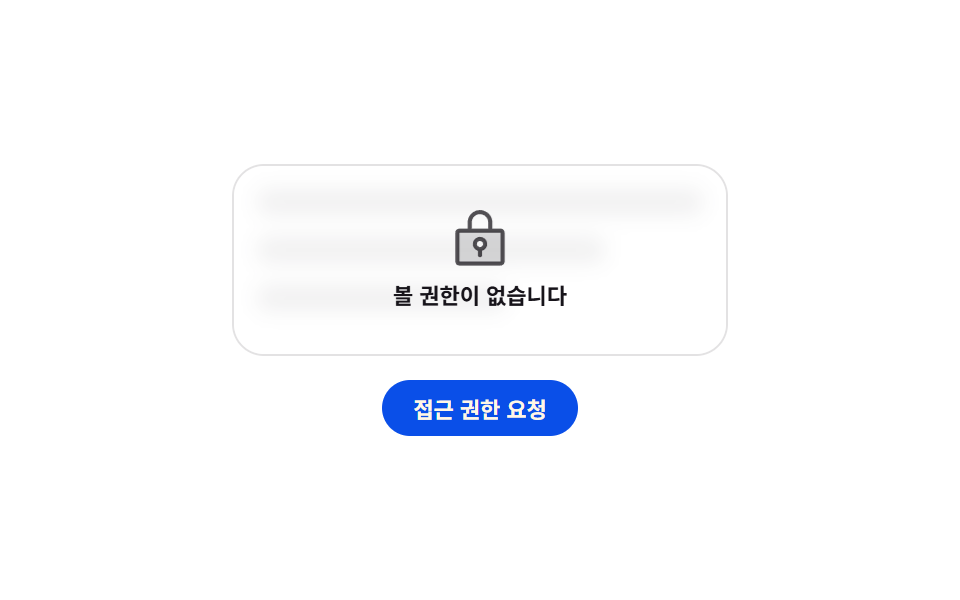
南京錠のアイコンが大きく一度跳ねて元に戻り、小さく揺り返す間に、後ろの一覧の行はぼかしが3pxから6pxまで深まって戻ります。
使いどころデータはあるが権限がなくて見られない画面で、「ない」と「見られない」を区別したいとき
scalefilter: bluraria-live
<main class="stage">
  <section class="pm is-demo">
    <div class="pm__panel">
      <ul class="pm__rows" aria-hidden="true">
        <li class="pm__row"></li>
        <li class="pm__row"></li>
        <li class="pm__row"></li>
      </ul>
      <div class="pm__gate">
        <span class="pm__lock" aria-hidden="true"><svg viewBox="0 0 256 256" width="1em" height="1em"><g fill="currentColor"><path d="M208 88H48a8 8 0 0 0-8 8v112a8 8 0 0 0 8 8h160a8 8 0 0 0 8-8V96a8 8 0 0 0-8-8m-80 72a20 20 0 1 1 20-20a20 20 0 0 1-20 20" opacity=".2"/><path d="M208 80h-32V56a48 48 0 0 0-96 0v24H48a16 16 0 0 0-16 16v112a16 16 0 0 0 16 16h160a16 16 0 0 0 16-16V96a16 16 0 0 0-16-16M96 56a32 32 0 0 1 64 0v24H96Zm112 152H48V96h160zm-80-96a28 28 0 0 0-8 54.83V184a8 8 0 0 0 16 0v-17.17a28 28 0 0 0-8-54.83m0 40a12 12 0 1 1 12-12a12 12 0 0 1-12 12"/></g></svg></span>
        <p class="pm__msg" id="pm-msg" data-wait="管理者の承認待ちです" aria-live="polite">閲覧権限がありません</p>
      </div>
    </div>
    <button class="pm__btn" type="button" id="pm-b" data-sent="リクエストを送信しました">アクセス権をリクエスト</button>
  </section>
</main>
@use "../../../../site/static/demo-tokens" as *;
$duration: $dur-loop;
$easing: $ease-pop;
$color: $subject-blue-deep;
@include stage($stage-paper);
.pm {
box-sizing: border-box;
width: min(248px, 86vw);
display: flex;
flex-direction: column;
align-items: center;
gap: $sp-3;
font-family: -apple-system, "Segoe UI", "Noto Sans KR", sans-serif;
color: $subject-ink;
}
.pm__panel {
position: relative;
box-sizing: border-box;
width: 100%;
height: 96px;
padding: $sp-3;
border: 1px solid rgba(23, 20, 26, .12);
border-radius: $r-card;
overflow: hidden;
}
.pm__rows {
margin: 0;
padding: 0;
list-style: none;
display: flex;
flex-direction: column;
gap: $sp-3;
filter: blur(3px);
}
.pm__row {
height: 12px;
border-radius: $r-xs;
background: rgba(23, 20, 26, .26);
}
.pm__row:nth-child(2) { width: 78%; }
.pm__row:nth-child(3) { width: 56%; }
.pm__gate {
position: absolute;
inset: 0;
display: flex;
flex-direction: column;
align-items: center;
justify-content: center;
gap: $sp-1;
background: rgba(255, 255, 255, .62);
}
.pm__lock {
display: block;
font-size: 32px;
line-height: 0;
color: rgba(23, 20, 26, .74);
}
.pm__msg {
margin: 0;
padding: 0 $sp-2;
font-size: 11px;
line-height: 14px;
font-weight: 700;
text-align: center;
}
.pm__btn {
height: 28px;
margin: 0;
padding: 0 $sp-4;
border: 0;
border-radius: $r-pill;
background: $color;
color: $subject-cream;
font-family: inherit;
font-size: 11px;
font-weight: 700;
cursor: pointer;
}
.pm__btn:disabled { opacity: .56; cursor: default; }
.pm__btn:focus-visible { outline: 2px solid $subject-ink; outline-offset: 2px; }
// ── 자동 루프: 자물쇠가 한 번 커졌다 제자리로. 0% 와 100% 가 같은 크기라 되감기가 없다 ──
.pm.is-demo .pm__lock { animation: pm-knock $duration $easing infinite; }
@keyframes pm-knock {
0%, 100% { transform: scale(1) translateY(0); }
30% { transform: scale(1.22) translateY(-4px); }
46% { transform: scale(1) translateY(0); }
58% { transform: scale(1.1) translateY(-2px); }
}
.pm.is-demo .pm__rows { animation: pm-veil $duration ease-in-out infinite; }
@keyframes pm-veil {
0%, 100% { filter: blur(3px); opacity: 1; }
50% { filter: blur(6px); opacity: .6; }
}
@media (prefers-reduced-motion: reduce) {
.pm.is-demo .pm__lock,
.pm.is-demo .pm__rows { animation: none !important; }
}html, body {
margin: 0;
overflow: hidden;
}
.stage {
box-sizing: border-box;
min-height: 100vh;
display: grid;
place-items: center;
margin: 0;
background: #ffffff;
font-family: -apple-system, "Segoe UI", "Noto Sans KR", sans-serif;
padding: clamp(8px, 4vw, 24px);
}
.pm {
box-sizing: border-box;
width: min(248px, 86vw);
display: flex;
flex-direction: column;
align-items: center;
gap: 12px;
font-family: -apple-system, "Segoe UI", "Noto Sans KR", sans-serif;
color: #17141a;
}
.pm__panel {
position: relative;
box-sizing: border-box;
width: 100%;
height: 96px;
padding: 12px;
border: 1px solid rgba(23, 20, 26, 0.12);
border-radius: 16px;
overflow: hidden;
}
.pm__rows {
margin: 0;
padding: 0;
list-style: none;
display: flex;
flex-direction: column;
gap: 12px;
filter: blur(3px);
}
.pm__row {
height: 12px;
border-radius: 4px;
background: rgba(23, 20, 26, 0.26);
}
.pm__row:nth-child(2) {
width: 78%;
}
.pm__row:nth-child(3) {
width: 56%;
}
.pm__gate {
position: absolute;
inset: 0;
display: flex;
flex-direction: column;
align-items: center;
justify-content: center;
gap: 4px;
background: rgba(255, 255, 255, 0.62);
}
.pm__lock {
display: block;
font-size: 32px;
line-height: 0;
color: rgba(23, 20, 26, 0.74);
}
.pm__msg {
margin: 0;
padding: 0 8px;
font-size: 11px;
line-height: 14px;
font-weight: 700;
text-align: center;
}
.pm__btn {
height: 28px;
margin: 0;
padding: 0 16px;
border: 0;
border-radius: 999px;
background: #0a4fe8;
color: #fff7e6;
font-family: inherit;
font-size: 11px;
font-weight: 700;
cursor: pointer;
}
.pm__btn:disabled {
opacity: 0.56;
cursor: default;
}
.pm__btn:focus-visible {
outline: 2px solid #17141a;
outline-offset: 2px;
}
.pm.is-demo .pm__lock {
animation: pm-knock 2s cubic-bezier(0.2, 1.4, 0.4, 1) infinite;
}
@keyframes pm-knock {
0%, 100% {
transform: scale(1) translateY(0);
}
30% {
transform: scale(1.22) translateY(-4px);
}
46% {
transform: scale(1) translateY(0);
}
58% {
transform: scale(1.1) translateY(-2px);
}
}
.pm.is-demo .pm__rows {
animation: pm-veil 2s ease-in-out infinite;
}
@keyframes pm-veil {
0%, 100% {
filter: blur(3px);
opacity: 1;
}
50% {
filter: blur(6px);
opacity: 0.6;
}
}
@media (prefers-reduced-motion: reduce) {
.pm.is-demo .pm__lock,
.pm.is-demo .pm__rows {
animation: none !important;
}
}// 실제 동작: 요청을 보내면 버튼이 잠기고 안내 줄이 대기 상태로 바뀐다. 한 번 더 누를 수 없다.
var card = document.querySelector('.pm');
var btn = document.getElementById('pm-b');
var msg = document.getElementById('pm-msg');
btn.addEventListener('click', function () {
card.classList.remove('is-demo');
btn.disabled = true;
btn.textContent = btn.dataset.sent;
msg.textContent = msg.dataset.wait;
card.classList.add('is-asked');
});import { useState } from "react";
import type { CSSProperties } from "react";
import styles from "./PermissionCard.module.scss";
export type PermissionCardProps = {
denied?: string;
waiting?: string;
action?: string;
sent?: string;
duration?: number;
easing?: string;
color?: string;
};
type Vars = CSSProperties & { "--duration"?: string; "--easing"?: string; "--color"?: string };
export default function PermissionCard({
denied = "You do not have access",
waiting = "Waiting for an admin to approve",
action = "Request access",
sent = "Request sent",
duration = 2000,
easing = "cubic-bezier(.2,1.4,.4,1)",
color = "#0a4fe8",
}: PermissionCardProps) {
const [asked, setAsked] = useState(false);
const [loop, setLoop] = useState(true);
const vars: Vars = { "--duration": `${duration}ms`, "--easing": easing, "--color": color };
return (
<section className={`${styles.pm} ${loop ? styles.isDemo : ""}`} style={vars}>
<div className={styles.panel}>
<ul className={styles.rows} aria-hidden="true">
<li className={styles.row} />
<li className={styles.row} />
<li className={styles.row} />
</ul>
<div className={styles.gate}>
<span className={styles.lock} aria-hidden="true">
<svg viewBox="0 0 256 256" width="1em" height="1em">
<g fill="currentColor">
<path d="M208 88H48a8 8 0 0 0-8 8v112a8 8 0 0 0 8 8h160a8 8 0 0 0 8-8V96a8 8 0 0 0-8-8m-80 72a20 20 0 1 1 20-20a20 20 0 0 1-20 20" opacity=".2" />
<path d="M208 80h-32V56a48 48 0 0 0-96 0v24H48a16 16 0 0 0-16 16v112a16 16 0 0 0 16 16h160a16 16 0 0 0 16-16V96a16 16 0 0 0-16-16M96 56a32 32 0 0 1 64 0v24H96Zm112 152H48V96h160zm-80-96a28 28 0 0 0-8 54.83V184a8 8 0 0 0 16 0v-17.17a28 28 0 0 0-8-54.83m0 40a12 12 0 1 1 12-12a12 12 0 0 1-12 12" />
</g>
</svg>
</span>
<p className={styles.msg} aria-live="polite">{asked ? waiting : denied}</p>
</div>
</div>
<button
className={styles.btn}
type="button"
disabled={asked}
onClick={() => { setLoop(false); setAsked(true); }}
>
{asked ? sent : action}
</button>
</section>
);
}08 南京錠が一度跳ねる権限ロック — 計測 累積面積 0.776% · 動いたフレーム 22/23GODRICH オリジナル · SCSS と React は zip に同梱 · エンプティステート デザイン 9選 — CSSだけで描く
このデモが属する記事
 エンプティステート デザイン 9選 — CSSだけで描くエンプティステート デザインは、一覧に出すデータが1件もないときに、その空いた場所を代わりに埋める画面です。ここにある9つのうち1つは、データがないからではなく見る権限がないから空いていて、その違いは南京錠1つで見分けられます。 この記事のデモをすべて見る