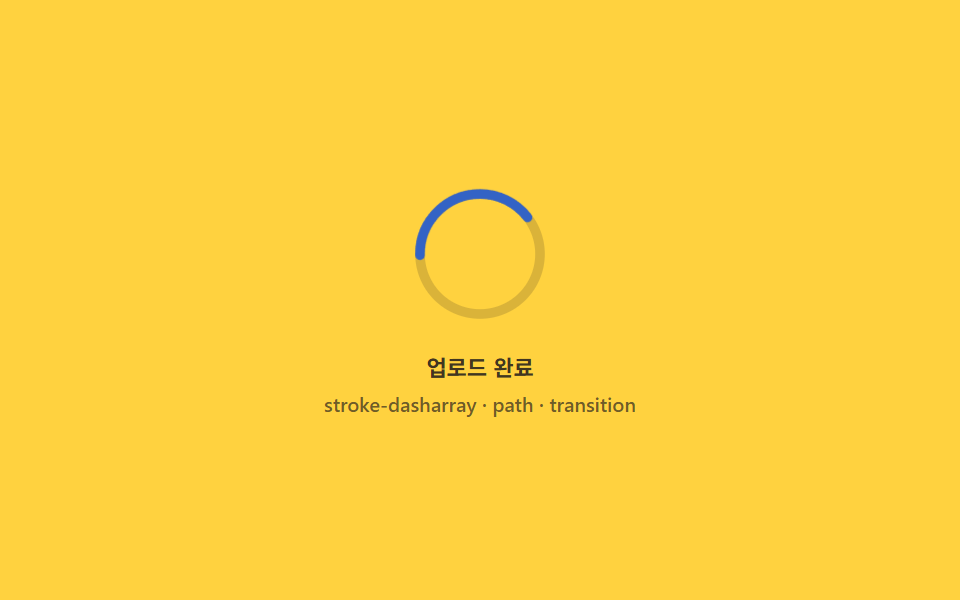
06完了モーフ — リングがチェックに変わる瞬間
100%に達したフレームでリングのpathをチェック形状に即座に差し替え、短いドローインを掛けることで、円が消えずにチェックへ続けて描かれたように見せます。
使いどころフォーム送信確認、保存ボタンのフィードバック
stroke-dasharraypathtransition
<main class="stage">
<div class="sm is-demo" id="smRoot" role="group" tabindex="0" aria-label="ファイルアップロード完了表示">
  <svg class="sm__svg" viewBox="0 0 120 120" width="72" height="72" aria-hidden="true">
    <circle class="sm__track" cx="60" cy="60" r="50"></circle>
    <circle class="sm__ring" id="smRing" cx="60" cy="60" r="50"></circle>
    <path class="sm__check" id="smCheck" d="M40 62 L54 76 L82 46"></path>
  </svg>
  <div class="sm__bar">
    <span class="sm__label">アップロード完了</span>
    <span class="sm__meta">stroke-dasharray · path · transition</span>
  </div>
</div>
</main>
@use "../../../../site/static/demo-tokens" as *;
// 완료 모프(06) — 링과 체크는 서로 다른 <circle>/<path> 두 개다. 100% 지점에서 opacity 를
// steps(1,end) 로 순간 스왑하고, 체크는 그 즉시 stroke-dashoffset 을 0 까지 그려 넣는다(draw-in).
@property --p {
syntax: "<number>";
inherits: false;
initial-value: 0;
}
@property --d {
syntax: "<number>";
inherits: false;
initial-value: 0;
}
@include stage($stage-yellow);
$sm-text: $subject-ink;
$sm-ring: $subject-blue-deep;
$sm-check: $subject-blue-deep;
$duration: $dur-loop;
$easing: $ease-out;
$color: $sm-ring;
.sm {
display: flex; flex-direction: column; align-items: center; gap: $sp-3;
width: 100%; height: 100%; min-height: 164px;
justify-content: center;
}
.sm:focus-visible { outline: 2px solid $sm-ring; outline-offset: 3px; border-radius: $r-control; }
.sm__svg { transform: rotate(-90deg); }
.sm__track { fill: none; stroke: rgba($sm-text, .16); stroke-width: 8; }
.sm__ring {
fill: none;
stroke: $sm-ring;
stroke-width: 8;
stroke-linecap: round;
--circ: 0; --p: 0;
stroke-dasharray: var(--circ);
stroke-dashoffset: calc(var(--circ) * (1 - var(--p) / 100));
transition: stroke-dashoffset $dur-quick linear;
}
.sm__check {
fill: none;
stroke: $sm-check;
stroke-width: 8;
stroke-linecap: round;
stroke-linejoin: round;
transform: rotate(90deg);
transform-origin: 60px 60px;
--checklen: 0; --d: 0;
stroke-dasharray: var(--checklen);
stroke-dashoffset: calc(var(--checklen) * (1 - var(--d) / 100));
opacity: 0;
}
.sm__ring { opacity: 1; }
.sm.is-done .sm__ring { opacity: 0; transition: opacity $dur-instant linear; }
.sm.is-done .sm__check { opacity: 1; transition: stroke-dashoffset $dur-enter $ease-out, opacity $dur-instant linear; }
.sm.is-done .sm__check { --d: 100; }
.sm__bar { display: flex; flex-direction: column; align-items: center; gap: $sp-1; }
.sm__label { font-weight: 600; font-size: 11px; color: rgba($sm-text, .82); }
.sm__meta { font-weight: 500; font-size: 10px; color: rgba($sm-text, .62); }
// ── 데모 루프 — 66% 지점에서 링→체크 순간 스왑, 곧바로 체크가 그려진다 ──
@keyframes smRingArc {
0% { --p: 0; }
66% { --p: 100; animation-timing-function: steps(1, end); }
67% { opacity: 0; }
88% { opacity: 0; }
92% { opacity: 0; --p: 0; }
94% { opacity: 1; }
100% { opacity: 1; --p: 0; }
}
@keyframes smCheckDraw {
0%, 66% { opacity: 0; --d: 0; }
67% { opacity: 1; animation-timing-function: $ease-out; }
80% { --d: 100; }
88% { --d: 100; opacity: 1; }
92% { opacity: 0; --d: 0; }
100% { opacity: 0; --d: 0; }
}
.is-demo .sm__ring {
animation-name: smRingArc;
animation-duration: $duration;
animation-timing-function: $easing;
animation-iteration-count: infinite;
}
.is-demo .sm__check {
animation-name: smCheckDraw;
animation-duration: $duration;
animation-timing-function: linear;
animation-iteration-count: infinite;
}
@media (max-width: 340px) {
.sm__svg { width: 60px; height: 60px; }
}
@media (prefers-reduced-motion: reduce) {
.is-demo .sm__ring, .is-demo .sm__check { animation: none !important; }
.is-demo .sm__ring { opacity: 0 !important; }
.is-demo .sm__check { opacity: 1 !important; --d: 100 !important; }
}@property --p {
syntax: "<number>";
inherits: false;
initial-value: 0;
}
@property --d {
syntax: "<number>";
inherits: false;
initial-value: 0;
}
html, body {
margin: 0;
overflow: hidden;
}
.stage {
box-sizing: border-box;
min-height: 100vh;
display: grid;
place-items: center;
margin: 0;
background: #ffd23f;
font-family: -apple-system, "Segoe UI", "Noto Sans KR", sans-serif;
padding: clamp(8px, 4vw, 24px);
}
.sm {
display: flex;
flex-direction: column;
align-items: center;
gap: 12px;
width: 100%;
height: 100%;
min-height: 164px;
justify-content: center;
}
.sm:focus-visible {
outline: 2px solid #0a4fe8;
outline-offset: 3px;
border-radius: 12px;
}
.sm__svg {
transform: rotate(-90deg);
}
.sm__track {
fill: none;
stroke: rgba(23, 20, 26, 0.16);
stroke-width: 8;
}
.sm__ring {
fill: none;
stroke: #0a4fe8;
stroke-width: 8;
stroke-linecap: round;
--circ: 0;
--p: 0;
stroke-dasharray: var(--circ);
stroke-dashoffset: calc(var(--circ) * (1 - var(--p) / 100));
transition: stroke-dashoffset 220ms linear;
}
.sm__check {
fill: none;
stroke: #0a4fe8;
stroke-width: 8;
stroke-linecap: round;
stroke-linejoin: round;
transform: rotate(90deg);
transform-origin: 60px 60px;
--checklen: 0;
--d: 0;
stroke-dasharray: var(--checklen);
stroke-dashoffset: calc(var(--checklen) * (1 - var(--d) / 100));
opacity: 0;
}
.sm__ring {
opacity: 1;
}
.sm.is-done .sm__ring {
opacity: 0;
transition: opacity 140ms linear;
}
.sm.is-done .sm__check {
opacity: 1;
transition: stroke-dashoffset 600ms ease-out, opacity 140ms linear;
}
.sm.is-done .sm__check {
--d: 100;
}
.sm__bar {
display: flex;
flex-direction: column;
align-items: center;
gap: 4px;
}
.sm__label {
font-weight: 600;
font-size: 11px;
color: rgba(23, 20, 26, 0.82);
}
.sm__meta {
font-weight: 500;
font-size: 10px;
color: rgba(23, 20, 26, 0.62);
}
@keyframes smRingArc {
0% {
--p: 0;
}
66% {
--p: 100;
animation-timing-function: steps(1, end);
}
67% {
opacity: 0;
}
88% {
opacity: 0;
}
92% {
opacity: 0;
--p: 0;
}
94% {
opacity: 1;
}
100% {
opacity: 1;
--p: 0;
}
}
@keyframes smCheckDraw {
0%, 66% {
opacity: 0;
--d: 0;
}
67% {
opacity: 1;
animation-timing-function: ease-out;
}
80% {
--d: 100;
}
88% {
--d: 100;
opacity: 1;
}
92% {
opacity: 0;
--d: 0;
}
100% {
opacity: 0;
--d: 0;
}
}
.is-demo .sm__ring {
animation-name: smRingArc;
animation-duration: 2s;
animation-timing-function: ease-out;
animation-iteration-count: infinite;
}
.is-demo .sm__check {
animation-name: smCheckDraw;
animation-duration: 2s;
animation-timing-function: linear;
animation-iteration-count: infinite;
}
@media (max-width: 340px) {
.sm__svg {
width: 60px;
height: 60px;
}
}
@media (prefers-reduced-motion: reduce) {
.is-demo .sm__ring, .is-demo .sm__check {
animation: none !important;
}
.is-demo .sm__ring {
opacity: 0 !important;
}
.is-demo .sm__check {
opacity: 1 !important;
--d: 100 !important;
}
}// 완료 모프 — 100% 가 되는 프레임에 링을 즉시 숨기고 체크 path 를 즉시 보이게 스왑한 뒤
// 체크의 stroke-dashoffset 을 transition 으로 0 까지 되감아(draw-in) 원이 체크로 이어져
// 그려진 것처럼 보이게 만든다. d 속성 자체는 절대 보간되지 않으므로 스왑은 항상 순간적이다.
(function () {
var SEED = 0x9917cf;
function mulberry32(a) {
return function () {
a |= 0; a = (a + 0x6D2B79F5) | 0;
var t = Math.imul(a ^ (a >>> 15), 1 | a);
t = (t + Math.imul(t ^ (t >>> 7), 61 | t)) ^ t;
return ((t ^ (t >>> 14)) >>> 0) / 4294967296;
};
}
var rand = mulberry32(SEED);
var root = document.getElementById('smRoot');
var ring = document.getElementById('smRing');
var check = document.getElementById('smCheck');
if (!root || !ring || !check) return;
var ringBox = ring.getBoundingClientRect();
var ringR = ringBox.width > 0 ? ringBox.width / 2 : ring.r.baseVal.value;
var circ = 2 * Math.PI * ringR;
ring.style.setProperty('--circ', String(circ));
var checkLen = check.getTotalLength();
check.style.setProperty('--checklen', String(checkLen));
var target = 0, shown = 0, raf = null, timer = null;
function paint() {
shown += (target - shown) * 0.2;
if (Math.abs(target - shown) < 0.1) shown = target;
ring.style.setProperty('--p', shown.toFixed(2));
if (shown >= 100) {
root.classList.add('is-done');
raf = null;
return;
}
raf = requestAnimationFrame(paint);
}
function tick() {
if (root.classList.contains('is-demo')) return;
target = Math.min(100, target + 6 + rand() * 10);
if (target >= 100) clearInterval(timer);
}
function live() {
if (!root.classList.contains('is-demo')) return;
root.classList.remove('is-demo');
timer = setInterval(tick, 220);
raf = requestAnimationFrame(paint);
}
['pointerdown', 'focusin'].forEach(function (ev) { root.addEventListener(ev, live); });
})();// UploadProgressSuccessMorph — vanilla 판(run/329/demo/06-upload-progress-success-morph/index.html) 의 React 포트.
// 100% 가 되는 프레임에 링을 즉시 숨기고 체크 path 를 즉시 보이게 스왑한 뒤 체크의 stroke-dashoffset 을
// transition 으로 0 까지 되감아(draw-in) 원이 체크로 이어져 그려진 것처럼 보이게 만든다.
// d 속성 자체는 절대 보간되지 않으므로 스왑은 항상 순간적이다.
import { useEffect, useRef, useState } from "react";
import type { CSSProperties } from "react";
import styles from "./UploadProgressSuccessMorph.module.scss";
export type UploadProgressSuccessMorphProps = {
duration?: string;
easing?: string;
color?: string;
seed?: number; // mulberry32 시드
stepBase?: number; // 매 틱 기본 증가분(퍼센트 포인트)
stepJitter?: number; // 매 틱 랜덤 증가분 상한
tickMs?: number; // 진행 틱 주기(ms)
};
type Vars = CSSProperties & { "--duration"?: string; "--easing"?: string; "--color"?: string };
type Box<T> = { current: T };
const LABEL = "업로드 완료";
const META = "stroke-dasharray · path · transition";
const SEED = 0x9917cf;
function mulberry32(a: number): () => number {
return function () {
a |= 0; a = (a + 0x6D2B79F5) | 0;
const t = Math.imul(a ^ (a >>> 15), 1 | a);
const u = (t + Math.imul(t ^ (t >>> 7), 61 | t)) ^ t;
return ((u ^ (u >>> 14)) >>> 0) / 4294967296;
};
}
export default function UploadProgressSuccessMorph({
duration = "2s",
easing = "ease-out",
color = "#0a4fe8",
seed = SEED,
stepBase = 6,
stepJitter = 10,
tickMs = 220
}: UploadProgressSuccessMorphProps) {
const [demo, setDemo] = useState(true);
const [done, setDone] = useState(false);
const ringRef = useRef<SVGCircleElement | null>(null);
const checkRef = useRef<SVGPathElement | null>(null);
const targetRef = useRef(0) as Box<number>;
const shownRef = useRef(0) as Box<number>;
const rafRef = useRef(0) as Box<number>;
const timerRef = useRef(0) as Box<number>;
const vars: Vars = { "--duration": duration, "--easing": easing, "--color": color };
useEffect(() => {
return () => {
window.clearInterval(timerRef.current);
cancelAnimationFrame(rafRef.current);
};
}, []);
function live(): void {
if (!demo) return;
setDemo(false);
const ring = ringRef.current;
const check = checkRef.current;
if (!ring || !check) return;
const rand = mulberry32(seed);
const ringBox = ring.getBoundingClientRect();
const ringR = ringBox.width > 0 ? ringBox.width / 2 : ring.r.baseVal.value;
const circ = 2 * Math.PI * ringR;
ring.style.setProperty("--circ", String(circ));
const checkLen = check.getTotalLength();
check.style.setProperty("--checklen", String(checkLen));
function paint(): void {
shownRef.current += (targetRef.current - shownRef.current) * 0.2;
if (Math.abs(targetRef.current - shownRef.current) < 0.1) shownRef.current = targetRef.current;
ring!.style.setProperty("--p", shownRef.current.toFixed(2));
if (shownRef.current >= 100) {
setDone(true);
return;
}
rafRef.current = requestAnimationFrame(paint);
}
function tick(): void {
targetRef.current = Math.min(100, targetRef.current + stepBase + rand() * stepJitter);
if (targetRef.current >= 100) window.clearInterval(timerRef.current);
}
timerRef.current = window.setInterval(tick, tickMs);
rafRef.current = requestAnimationFrame(paint);
}
const rootCls = [styles.sm, demo ? styles.isDemo : "", done ? styles.isDone : ""].filter(Boolean).join(" ");
return (
<main className={styles.stage}>
<div
className={rootCls}
style={vars}
role="group"
tabIndex={0}
aria-label="파일 업로드 완료 표시"
onPointerDown={live}
onFocus={live}
>
<svg className={styles.svg} viewBox="0 0 120 120" width="72" height="72" aria-hidden="true">
<circle className={styles.track} cx="60" cy="60" r="50"></circle>
<circle className={styles.ring} cx="60" cy="60" r="50" ref={ringRef}></circle>
<path className={styles.check} d="M40 62 L54 76 L82 46" ref={checkRef}></path>
</svg>
<div className={styles.bar}>
<span className={styles.label}>{LABEL}</span>
<span className={styles.meta}>{META}</span>
</div>
</div>
</main>
);
}06 完了モーフ — リングがチェックに変わる瞬間 — 計測 累積面積 1.049% · 動いたフレーム 19/23GODRICH オリジナル · SCSS と React は zip に同梱 · アップロード プログレスバー ローダー9種 — 計算するUI
このデモが属する記事
 アップロード プログレスバー ローダー9種 — 計算するUIアップロード プログレスバーは、バイトと時間の実測値からリング・速度・チェックの動きを計算して描く部品です。ファイルをドロップすると、バイトと時間から速度を計算してリングが回り、完了するとチェックに変わります。9つの状態をライブラリなしで計 この記事のデモをすべて見る