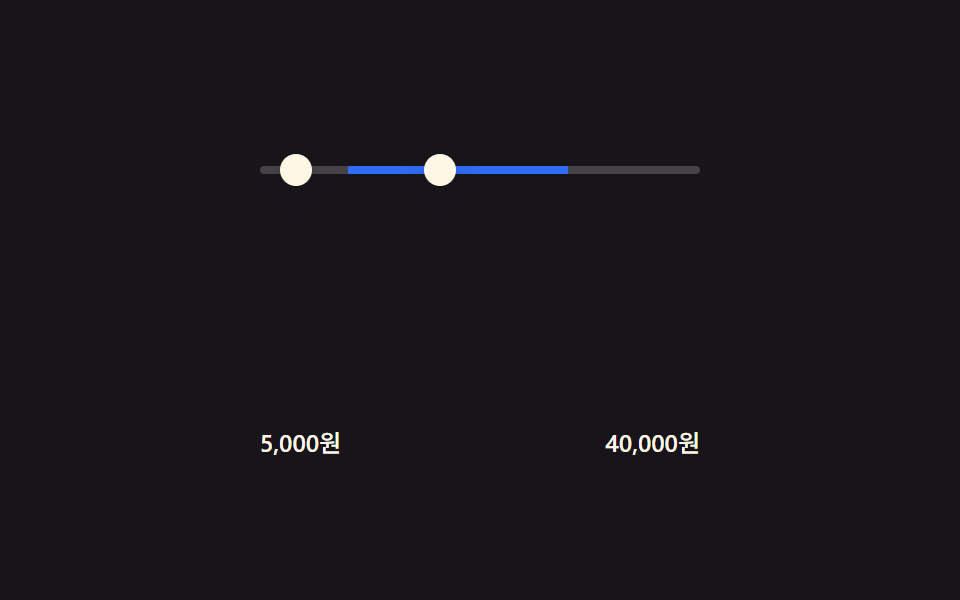
09価格レンジ塗りつぶし — 2つの入力値の差でトラック幅を求めるスライダー
最小・最大の2つのつまみの値が変わった状態になると、その2つの値の差をトラック全長に対する比率として計算し、塗りつぶし区間の開始と終了の位置を描き直します。
使いどころショッピングサイトの価格レンジフィルター、予約サイトの期間・価格スライダー
input[type=range]calc(setProperty
<main class="stage">
  <div class="range">
    <div class="range__track">
      <div class="range__fill" id="fill"></div>
    </div>
    <input class="range__input" id="minInput" type="range" min="0" max="100" step="1" value="20" aria-label="最低価格">
    <input class="range__input" id="maxInput" type="range" min="0" max="100" step="1" value="70" aria-label="最高価格">
  </div>
  <div class="range__labels">
    <span id="minLabel">20,000ウォン</span>
    <span id="maxLabel">70,000ウォン</span>
  </div>
</main>
@use "../../../../site/static/demo-tokens" as *;
$duration: $dur-base;
$easing: $ease-out;
$color: $subject-blue;
@include stage($stage-ink);
.range {
box-sizing: border-box;
position: relative;
width: min(72vw, 220px);
height: 28px;
}
.range__track {
position: absolute;
left: 0;
right: 0;
top: 50%;
height: 4px;
transform: translateY(-50%);
border-radius: $r-pill;
background: rgba($stage-paper, .2);
overflow: hidden;
}
.range__fill {
position: absolute;
top: 0;
bottom: 0;
left: calc(var(--min-pct, 20) * 1%);
right: calc((100 - var(--max-pct, 70)) * 1%);
background: $color;
transition: left $duration $easing, right $duration $easing;
}
input[type=range] {
position: absolute;
left: 0;
right: 0;
top: 0;
width: 100%;
height: 28px;
margin: 0;
background: transparent;
appearance: none;
pointer-events: none;
}
input[type=range]::-webkit-slider-thumb {
appearance: none;
pointer-events: auto;
width: 16px;
height: 16px;
border-radius: 50%;
background: $subject-cream;
box-shadow: $shadow-press;
cursor: pointer;
}
input[type=range]::-moz-range-thumb {
pointer-events: auto;
width: 16px;
height: 16px;
border: 0;
border-radius: 50%;
background: $subject-cream;
box-shadow: $shadow-press;
cursor: pointer;
}
.range__labels {
box-sizing: border-box;
width: min(72vw, 220px);
display: flex;
justify-content: space-between;
margin-top: $sp-3;
color: $subject-cream;
font-weight: 500;
font-size: 12px;
line-height: 1.3;
}
@media (max-width: 340px) {
.range { width: 82vw; }
.range__labels { width: 82vw; }
}
@media (prefers-reduced-motion: reduce) {
.range__fill { transition: none; }
}html, body {
margin: 0;
overflow: hidden;
}
.stage {
box-sizing: border-box;
min-height: 100vh;
display: grid;
place-items: center;
margin: 0;
background: #17141a;
font-family: -apple-system, "Segoe UI", "Noto Sans KR", sans-serif;
padding: clamp(8px, 4vw, 24px);
}
.range {
box-sizing: border-box;
position: relative;
width: min(72vw, 220px);
height: 28px;
}
.range__track {
position: absolute;
left: 0;
right: 0;
top: 50%;
height: 4px;
transform: translateY(-50%);
border-radius: 999px;
background: rgba(255, 255, 255, 0.2);
overflow: hidden;
}
.range__fill {
position: absolute;
top: 0;
bottom: 0;
left: calc(var(--min-pct, 20) * 1%);
right: calc((100 - var(--max-pct, 70)) * 1%);
background: #2f6df6;
transition: left 300ms ease-out, right 300ms ease-out;
}
input[type=range] {
position: absolute;
left: 0;
right: 0;
top: 0;
width: 100%;
height: 28px;
margin: 0;
background: transparent;
appearance: none;
pointer-events: none;
}
input[type=range]::-webkit-slider-thumb {
appearance: none;
pointer-events: auto;
width: 16px;
height: 16px;
border-radius: 50%;
background: #fff7e6;
box-shadow: 0 6px 12px rgba(23, 20, 26, 0.32);
cursor: pointer;
}
input[type=range]::-moz-range-thumb {
pointer-events: auto;
width: 16px;
height: 16px;
border: 0;
border-radius: 50%;
background: #fff7e6;
box-shadow: 0 6px 12px rgba(23, 20, 26, 0.32);
cursor: pointer;
}
.range__labels {
box-sizing: border-box;
width: min(72vw, 220px);
display: flex;
justify-content: space-between;
margin-top: 12px;
color: #fff7e6;
font-weight: 500;
font-size: 12px;
line-height: 1.3;
}
@media (max-width: 340px) {
.range {
width: 82vw;
}
.range__labels {
width: 82vw;
}
}
@media (prefers-reduced-motion: reduce) {
.range__fill {
transition: none;
}
}// 최소·최대 두 입력값의 차이를 퍼센트 좌표로 다시 구해 calc() 로 채움 막대의 양 끝(left·right)을 그린다.
// 실제 입력: input[type=range] 의 input 이벤트. 데모는 시드 고정 값 쌍을 순서대로 재생한다.
(function () {
var minInput = document.getElementById('minInput');
var maxInput = document.getElementById('maxInput');
var fill = document.getElementById('fill');
var minLabel = document.getElementById('minLabel');
var maxLabel = document.getElementById('maxLabel');
if (!minInput || !maxInput || !fill) return;
function priceLabel(v) {
return (v * 1000).toLocaleString('ko-KR') + 'ウォン';
}
function update() {
var minV = Number(minInput.value);
var maxV = Number(maxInput.value);
if (minV > maxV) { var t = minV; minV = maxV; maxV = t; }
fill.style.setProperty('--min-pct', minV);
fill.style.setProperty('--max-pct', maxV);
if (minLabel) minLabel.textContent = priceLabel(minV);
if (maxLabel) maxLabel.textContent = priceLabel(maxV);
}
minInput.addEventListener('input', update);
maxInput.addEventListener('input', update);
update();
// 자동 시연: 실제 input 이벤트 대신 시드 고정 값 쌍을 순서대로 넣는다
var SEQ = [[20, 70], [5, 40], [55, 95], [20, 70]];
var idx = 0;
(function step() {
setTimeout(function () {
idx = (idx + 1) % SEQ.length;
minInput.value = String(SEQ[idx][0]);
maxInput.value = String(SEQ[idx][1]);
update();
step();
}, 550);
})();
})();import { useEffect, useRef } from "react";
import styles from "./PriceRangeFill.module.scss";
// 최소·최대 두 입력값의 차이를 퍼센트 좌표로 다시 구해 calc() 로 채움 막대의 양 끝(left·right)을 그린다.
// 실제 입력: input[type=range] 의 input 이벤트. 데모는 시드 고정 값 쌍을 순서대로 재생한다.
const SEQ: [number, number][] = [
[20, 70],
[5, 40],
[55, 95],
[20, 70],
];
function priceLabel(v: number) {
return (v * 1000).toLocaleString("ko-KR") + "원";
}
export default function PriceRangeFill() {
const minInputRef = useRef<HTMLInputElement>(null);
const maxInputRef = useRef<HTMLInputElement>(null);
const fillRef = useRef<HTMLDivElement>(null);
const minLabelRef = useRef<HTMLSpanElement>(null);
const maxLabelRef = useRef<HTMLSpanElement>(null);
useEffect(() => {
const minInput = minInputRef.current;
const maxInput = maxInputRef.current;
const fill = fillRef.current;
if (!minInput || !maxInput || !fill) return;
function update() {
let minV = Number(minInput!.value);
let maxV = Number(maxInput!.value);
if (minV > maxV) {
const t = minV;
minV = maxV;
maxV = t;
}
fill!.style.setProperty("--min-pct", String(minV));
fill!.style.setProperty("--max-pct", String(maxV));
if (minLabelRef.current) minLabelRef.current.textContent = priceLabel(minV);
if (maxLabelRef.current) maxLabelRef.current.textContent = priceLabel(maxV);
}
minInput.addEventListener("input", update);
maxInput.addEventListener("input", update);
update();
let idx = 0;
let timerId = 0;
let alive = true;
(function step() {
timerId = window.setTimeout(() => {
if (!alive) return;
idx = (idx + 1) % SEQ.length;
minInput!.value = String(SEQ[idx][0]);
maxInput!.value = String(SEQ[idx][1]);
update();
step();
}, 550);
})();
return () => {
alive = false;
window.clearTimeout(timerId);
minInput.removeEventListener("input", update);
maxInput.removeEventListener("input", update);
};
}, []);
return (
<main className={styles.stage}>
<div className={styles.range}>
<div className={styles.range__track}>
<div ref={fillRef} className={styles.range__fill} />
</div>
<input
ref={minInputRef}
className={styles.range__input}
type="range"
min={0}
max={100}
step={1}
defaultValue={20}
aria-label="최소 가격"
/>
<input
ref={maxInputRef}
className={styles.range__input}
type="range"
min={0}
max={100}
step={1}
defaultValue={70}
aria-label="최대 가격"
/>
</div>
<div className={styles.range__labels}>
<span ref={minLabelRef}>20,000원</span>
<span ref={maxLabelRef}>70,000원</span>
</div>
</main>
);
}09 価格レンジ塗りつぶし — 2つの入力値の差でトラック幅を求めるスライダー — 計測 累積面積 1.531% · 動いたフレーム 11/23GODRICH オリジナル · SCSS と React は zip に同梱 · 絞り込み ui9選 — パネルスライドからチップ削除まで
このデモが属する記事
 絞り込み ui9選 — パネルスライドからチップ削除まで絞り込み uiは、実は一つの動きではなく複数の小さな計算でできています。9つのうち1つはチップが消えた分だけ残るチップの合計幅を求め直して詰め、1つはアクティブなフィルター数の変化量でバッジを膨らませてから戻し、もう1つは2つのスライダー値 この記事のデモをすべて見る