09二枚の間の中間ページを自動で埋める
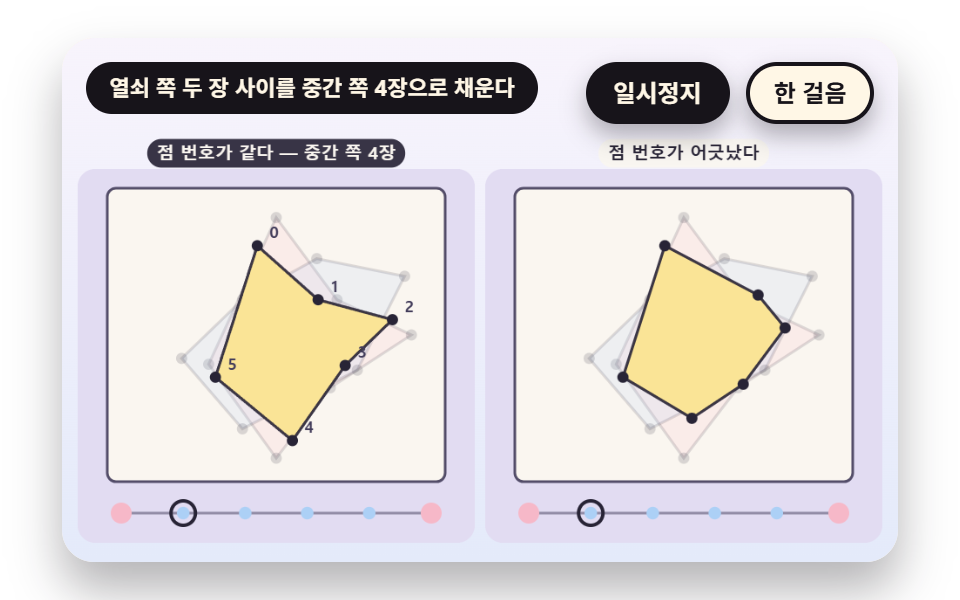
最初と最後のキーページに6点の図形だけを描いておき、間のページは同じpointIdの点同士をlerpPointで作ります。中間ページ数MID_COUNTが0だと一ページで点が最大97px跳び、4ならページごとに19pxずつ動き、右の板のように番号がずれると中間ページの面積が6896から5344・3869・2470・1148へ縮み、最後のキーページで6857へ跳ねます。
使いどころ絵を二枚描くだけで中間ページを計算で何十枚も得る方法
MID_COUNTlerpPointpointId
<main class="stage">
<div class="vj is-demo" id="vj">
  <div class="vj__pad" data-role="pad" tabindex="0" role="application" aria-label="フリップブックの舞台 — 左右の矢印キーかSpaceでページをめくる、Enterで一時停止、Nで一歩進める、Rで最初から">
    <canvas class="vj__canvas" data-role="canvas" width="480" height="300" role="img" aria-label="6つの点で描いた2枚のキーページの間を中間ページで埋めて往復します。左の板は番号が同じ点同士をつなぐので図形がなめらかに変わり、右の板は番号がずれて中間ページがねじれます。中間ページの数が4枚から1枚、0枚に減るとページの点が減って変化がとぎれて見えます"></canvas>
  </div>
  <p class="vj__status" data-role="status" aria-live="off">フリップブックのデモ</p>
  <div class="vj__ctrl">
    <button class="vj__pause" data-role="pause" type="button" aria-pressed="false">一時停止</button>
    <button class="vj__step" data-role="step" type="button">一歩進める</button>
  </div>
  <p class="vj__done" data-role="done" role="status" aria-live="polite"></p>
</div>
</main>
@use "../../../../site/static/demo-tokens" as *;
@include stage($stage-paper);
.vj {
position: relative;
width: min(92vw, calc(160vh - 12.8vw));
aspect-ratio: 480 / 300;
margin: 0 auto;
border-radius: $r-card;
overflow: hidden;
box-shadow: $shadow-raised;
background: $subject-cream;
}
// 무대 상자 — 여기서 시작한 터치만 쪽 넘기기·모서리 끌기로 읽는다(touch-action: none 은 이 상자에만). 무대 밖 터치는 페이지 스크롤 그대로
.vj__pad {
position: absolute;
inset: 0;
border-radius: inherit;
outline: none;
touch-action: none;
cursor: pointer;
}
// 바깥 .vj 가 넘침을 자르므로 포커스 테두리는 안쪽으로 들인다
.vj__pad:focus-visible {
outline: 3px solid $subject-ink;
outline-offset: -3px;
}
.vj__canvas {
position: absolute;
inset: 0;
display: block;
width: 100%;
height: 100%;
}
.vj__ctrl {
position: absolute;
right: $sp-3;
top: $sp-3;
display: flex;
gap: $sp-2;
}
.vj__pause,
.vj__step {
padding: $sp-1 $sp-3;
border: 2px solid $subject-ink;
border-radius: $r-pill;
background: $subject-ink;
color: $subject-cream;
font-family: inherit;
font-weight: 700;
font-size: 12px;
line-height: 1.6;
cursor: pointer;
box-shadow: $shadow-press;
transition: transform $dur-quick $ease-spring;
}
.vj__step {
background: $subject-cream;
color: $subject-ink;
}
// 스크린리더에만 읽히는 완료 알림
.vj__done {
position: absolute;
width: 1px;
height: 1px;
margin: 0;
overflow: hidden;
clip-path: inset(50%);
white-space: nowrap;
}
// 눌린 상태(멈춤) — 바탕과 글자색을 뒤집어 aria-pressed 가 눈에도 보이게
.vj__pause[aria-pressed="true"] {
background: $subject-cream;
color: $subject-ink;
}
.vj__pause:hover,
.vj__step:hover {
transform: translateY(-2px);
}
.vj__pause:active,
.vj__step:active {
transform: translateY(1px);
}
.vj__pause:focus-visible,
.vj__step:focus-visible {
outline: 3px solid $subject-ink;
outline-offset: 3px;
}
// 상태 줄 — 지금 장면의 수치를 글자로. 시연 중에는 aria-live off, 사람이 처음 손대면 polite
.vj__status {
position: absolute;
left: $sp-3;
top: $sp-3;
max-width: calc(100% - 190px);
margin: 0;
padding: $sp-1 $sp-3;
border-radius: $r-pill;
background: $subject-ink;
color: $subject-cream;
font-weight: 700;
font-size: 11px;
line-height: 1.6;
white-space: nowrap;
overflow: hidden;
text-overflow: ellipsis;
pointer-events: none;
}
@media (max-width: 340px) {
.vj__pause,
.vj__step,
.vj__status { font-size: 10px; padding: 0 $sp-2; }
}
// 움직임 줄이기 — 장면은 스크립트가 정지 장면 한 장으로 멈춘다. 버튼도 떠오르지 않게
@media (prefers-reduced-motion: reduce) {
.vj__pause,
.vj__step { transition: none !important; }
.vj__pause:hover,
.vj__pause:active,
.vj__step:hover,
.vj__step:active { transform: none !important; }
}html, body {
margin: 0;
overflow: hidden;
}
.stage {
box-sizing: border-box;
min-height: 100vh;
display: grid;
place-items: center;
margin: 0;
background: #ffffff;
font-family: -apple-system, "Segoe UI", "Noto Sans KR", sans-serif;
padding: clamp(8px, 4vw, 24px);
}
.vj {
position: relative;
width: min(92vw, 160vh - 12.8vw);
aspect-ratio: 480/300;
margin: 0 auto;
border-radius: 16px;
overflow: hidden;
box-shadow: 0 14px 24px rgba(23, 20, 26, 0.32);
background: #fff7e6;
}
.vj__pad {
position: absolute;
inset: 0;
border-radius: inherit;
outline: none;
touch-action: none;
cursor: pointer;
}
.vj__pad:focus-visible {
outline: 3px solid #17141a;
outline-offset: -3px;
}
.vj__canvas {
position: absolute;
inset: 0;
display: block;
width: 100%;
height: 100%;
}
.vj__ctrl {
position: absolute;
right: 12px;
top: 12px;
display: flex;
gap: 8px;
}
.vj__pause,
.vj__step {
padding: 4px 12px;
border: 2px solid #17141a;
border-radius: 999px;
background: #17141a;
color: #fff7e6;
font-family: inherit;
font-weight: 700;
font-size: 12px;
line-height: 1.6;
cursor: pointer;
box-shadow: 0 6px 12px rgba(23, 20, 26, 0.32);
transition: transform 220ms cubic-bezier(0.2, 0.8, 0.2, 1);
}
.vj__step {
background: #fff7e6;
color: #17141a;
}
.vj__done {
position: absolute;
width: 1px;
height: 1px;
margin: 0;
overflow: hidden;
clip-path: inset(50%);
white-space: nowrap;
}
.vj__pause[aria-pressed=true] {
background: #fff7e6;
color: #17141a;
}
.vj__pause:hover,
.vj__step:hover {
transform: translateY(-2px);
}
.vj__pause:active,
.vj__step:active {
transform: translateY(1px);
}
.vj__pause:focus-visible,
.vj__step:focus-visible {
outline: 3px solid #17141a;
outline-offset: 3px;
}
.vj__status {
position: absolute;
left: 12px;
top: 12px;
max-width: calc(100% - 190px);
margin: 0;
padding: 4px 12px;
border-radius: 999px;
background: #17141a;
color: #fff7e6;
font-weight: 700;
font-size: 11px;
line-height: 1.6;
white-space: nowrap;
overflow: hidden;
text-overflow: ellipsis;
pointer-events: none;
}
@media (max-width: 340px) {
.vj__pause,
.vj__step,
.vj__status {
font-size: 10px;
padding: 0 8px;
}
}
@media (prefers-reduced-motion: reduce) {
.vj__pause,
.vj__step {
transition: none !important;
}
.vj__pause:hover,
.vj__pause:active,
.vj__step:hover,
.vj__step:active {
transform: none !important;
}
}(function () {
const root = document.getElementById("vj");
if (!root) return;
// 무대 좌표 — 캔버스 안 계산은 늘 480×300. 화면에 보이는 크기와 상관없다
const W = 480;
const H = 300;
const TAU = Math.PI * 2;
function clamp(v, lo, hi) { return v < lo ? lo : (v > hi ? hi : v); }
function lerp(a, b, k) { return a + (b - a) * k; }
function ease(x) { const c = clamp(x, 0, 1); return c * c * (3 - 2 * c); }
// 파스텔 팔레트 — 면은 연한 색, 글자는 늘 진한 잉크
const BG_TOP = [248, 244, 252];
const BG_BOT = [228, 234, 250];
const BED = [226, 220, 242];
const INK = [40, 36, 54];
const INK2 = [66, 60, 90];
const PAPER = [250, 246, 240];
const ROSE = [244, 162, 186];
const MINT = [148, 212, 182];
const SKY = [172, 208, 246];
const BALL = [246, 184, 200];
const TILES = [
[200, 190, 244], [168, 222, 200], [250, 228, 150], [246, 184, 200],
[172, 208, 246], [250, 208, 170], [196, 222, 170], [222, 190, 240],
];
function mix(a, b, k) { return [lerp(a[0], b[0], k), lerp(a[1], b[1], k), lerp(a[2], b[2], k)]; }
function rgba(c, a) {
return 'rgba(' + Math.round(clamp(c[0], 0, 255)) + ',' + Math.round(clamp(c[1], 0, 255)) + ',' + Math.round(clamp(c[2], 0, 255)) + ',' + clamp(a, 0, 1).toFixed(3) + ')';
}
// 장면 시계(초)·판 반복 번호·시간표 — 시간표는 (시각, 할 일) 목록이고 시각이 지나면 한 번씩 부른다
let sceneT = 0;
let lap = 0;
let script = [];
let evAt = 0;
// 문구 틀의 {a}·{b} 자리에 값을 끼운다 — 화면 문구는 늘 이 틀 한 줄로 두고 로케일 사전이 통째로 바꾼다
function fill(s, a, b) { return s.replace('{a}', a).replace('{b}', b === undefined ? '' : b); }
function r1(v) { return String(Math.round(v * 10) / 10); }
// 읽어 주는 문장은 사람이 직접 하거나 멈춘 때만 숫자를 싣는다 — 자동으로 흐르는 동안은 한 줄이 그대로여서 스크린리더가 매 프레임 읽지 않는다
function calm() { return !(paused || manual || still); }
const FRAME_COUNT = 12;
const FLOOR_Y = 0.8;
const HOP_H = 0.58;
function makePages(n) {
const out = [];
for (let i = 0; i < n; i += 1) {
// 두 번 튀므로 한 번 튀는 사이는 반 바퀴 — b 는 한 번 튀는 안의 위치 0~1, h 는 높이(포물선)
const b = (i * 2 / n) % 1;
const h = 4 * b * (1 - b);
const sy = 0.8 + 0.2 * Math.min(1, h * 3);
out.push({ x: 0.14 + 0.72 * (i / (n - 1)), y: FLOOR_Y - h * HOP_H, sx: 2 - sy, sy: sy });
}
return out;
}
const PAGES = makePages(FRAME_COUNT);
// 한 쪽의 종이 — 흰 바탕과 바닥 선
function paperBox(R, a, edge) {
box(R.x, R.y, R.w, R.h, 5, PAPER, a);
outline(R.x, R.y, R.w, R.h, 5, 1.5, edge, 0.9 * a);
const fy = R.y + R.h * (FLOOR_Y + 0.085);
line(R.x + R.w * 0.06, fy, R.x + R.w * 0.94, fy, 1.5, mix(PAPER, INK2, 0.35), a);
}
// 쪽 안의 공 한 개 — 눌림은 바닥에 닿은 쪽에서 가로로 퍼진다
function pageBall(R, p, c, a, edge, shine) {
if (a <= 0.01) {
return;
}
const rr = R.w * 0.075;
const cx = R.x + R.w * p.x;
const cy = R.y + R.h * p.y;
ctx.save();
ctx.translate(cx, cy);
ctx.scale(p.sx, p.sy);
ctx.beginPath();
ctx.arc(0, 0, rr, 0, TAU);
ctx.fillStyle = rgba(c, a);
ctx.fill();
ctx.lineWidth = 1.4 / Math.max(p.sx, p.sy);
ctx.strokeStyle = rgba(edge, 0.85 * a);
ctx.stroke();
if (shine) {
ctx.beginPath();
ctx.arc(-rr * 0.3, -rr * 0.34, rr * 0.3, 0, TAU);
ctx.fillStyle = rgba([255, 255, 255], 0.45 * a);
ctx.fill();
}
ctx.restore();
}
// 한 쪽을 통째로 — 종이·공·쪽 번호
function drawPage(R, i, a, label) {
paperBox(R, a, INK2);
pageBall(R, PAGES[i], BALL, a, INK, true);
if (label) {
text(String(i + 1), R.x + R.w - 8, R.y + 10, INK2, a, 9, 700, 'right');
}
}
// 정수부 — 쪽 번호는 늘 이 함수를 지난다(소수 쪽 번호가 그려지지 않게)
function wrapIdx(n, count) { return ((Math.floor(n + 1e-9) % count) + count) % count; }
// 쪽 번호 띠 — 작은 칸 count 개, 지금 쪽이 밝다
function thumbs(R, count, cols, cur) {
const rows = Math.ceil(count / cols);
const gap = 4;
const cw = (R.w - gap * (cols - 1)) / cols;
const ch = (R.h - gap * (rows - 1)) / rows;
for (let i = 0; i < count; i += 1) {
const cell = { x: R.x + (i % cols) * (cw + gap), y: R.y + Math.floor(i / cols) * (ch + gap), w: cw, h: ch };
const on = i === cur;
box(cell.x, cell.y, cell.w, cell.h, 3, on ? TILES[2] : PAPER, on ? 1 : 0.9);
outline(cell.x, cell.y, cell.w, cell.h, 3, on ? 2 : 1, on ? INK : mix(PAPER, INK2, 0.4), 1);
const p = PAGES[i % PAGES.length];
disc(cell.x + cell.w * p.x, cell.y + cell.h * p.y, Math.min(cell.w, cell.h) * 0.13, mix(BALL, INK, 0.1), 1);
}
}
const SEG = 8;
const PERSP = 0.0022;
function edgeProject(spineX, a, len, bendRad) {
const out = [{ x: spineX, z: 0, s: 1 }];
let x = spineX;
let z = 0;
const dl = len / SEG;
for (let k = 1; k <= SEG; k += 1) {
const ph = a - bendRad * Math.sin(a) * (k / SEG);
x += dl * Math.cos(ph);
z += dl * Math.sin(ph);
out.push({ x: x, z: z, s: 1 / (1 - z * PERSP) });
}
return out;
}
// 투영한 쪽 한 장을 윗변·아랫변을 따라 다각형으로 칠한다. 칠한 쪽의 평균 깊이를 돌려준다(그리는 순서 정렬용)
function flapPath(pts, cy, hp) {
ctx.beginPath();
ctx.moveTo(pts[0].x, cy - hp / 2 * pts[0].s);
for (let k = 1; k < pts.length; k += 1) {
ctx.lineTo(pts[k].x, cy - hp / 2 * pts[k].s);
}
for (let k = pts.length - 1; k >= 0; k -= 1) {
ctx.lineTo(pts[k].x, cy + hp / 2 * pts[k].s);
}
ctx.closePath();
}
function drawFlap(pts, cy, hp, c, a) {
// 모서리가 앞을 향할수록(옆으로 누울수록) 밝고, 책등 쪽으로 서서 얇아질수록 어둡다
const span = Math.abs(pts[pts.length - 1].x - pts[0].x);
const lit = clamp(span / (pts.length > 1 ? Math.max(1, Math.abs(pts[0].x - pts[1].x) * SEG) : 1), 0, 1);
flapPath(pts, cy, hp);
ctx.fillStyle = rgba(mix(c, [120, 110, 160], 0.4 * (1 - lit)), a);
ctx.fill();
ctx.lineWidth = 1.2;
ctx.strokeStyle = rgba(INK2, 0.85 * a);
ctx.stroke();
}
function meanZ(pts) {
let s = 0;
for (const p of pts) {
s += p.z;
}
return s / pts.length;
}
const canvasEl = root.querySelector('[data-role="canvas"]');
const padEl = root.querySelector('[data-role="pad"]');
const pauseEl = root.querySelector('[data-role="pause"]');
const statusEl = root.querySelector('[data-role="status"]');
const stepEl = root.querySelector('[data-role="step"]');
const doneEl = root.querySelector('[data-role="done"]');
const ctxRaw = canvasEl ? canvasEl.getContext('2d') : null;
if (!canvasEl || !ctxRaw || !pauseEl || !padEl || !stepEl || !doneEl) {
return;
}
const cv = canvasEl;
const ctx = ctxRaw;
const pauseBtn = pauseEl;
const stepBtn = stepEl;
const doneP = doneEl;
const pad = padEl;
// 외부 웹폰트는 부르지 않는다 — 기기에 있는 글꼴 목록만
const FONT_STACK = 'system-ui, -apple-system, "Segoe UI", "Noto Sans KR", sans-serif';
let dpr = 1;
function fitCanvas() {
// 배율은 2 에서 자른다 — 배율 3 기기에서 화소가 2.25배로 늘지 않게
dpr = Math.min(window.devicePixelRatio || 1, 2);
cv.width = Math.round(W * dpr);
cv.height = Math.round(H * dpr);
ctx.setTransform(dpr, 0, 0, dpr, 0, 0);
}
function skyFill(top, bot) {
const g = ctx.createLinearGradient(0, 0, 0, H);
g.addColorStop(0, rgba(top, 1));
g.addColorStop(1, rgba(bot, 1));
ctx.fillStyle = g;
ctx.fillRect(0, 0, W, H);
}
function disc(x, y, r, c, a) {
if (r <= 0.2 || a <= 0) {
return;
}
ctx.beginPath();
ctx.arc(x, y, r, 0, TAU);
ctx.fillStyle = rgba(c, a);
ctx.fill();
}
function box(x, y, w, h, r, c, a) {
if (w <= 0.2 || h <= 0.2 || a <= 0) {
return;
}
ctx.beginPath();
ctx.roundRect(x, y, w, h, Math.max(0, Math.min(r, w / 2, h / 2)));
ctx.fillStyle = rgba(c, a);
ctx.fill();
}
function outline(x, y, w, h, r, width, c, a) {
if (w <= 0.2 || h <= 0.2 || a <= 0) {
return;
}
ctx.beginPath();
ctx.roundRect(x, y, w, h, Math.max(0, Math.min(r, w / 2, h / 2)));
ctx.lineWidth = width;
ctx.strokeStyle = rgba(c, a);
ctx.stroke();
}
function text(s, x, y, c, a, px, weight, align) {
ctx.font = weight + ' ' + px + 'px ' + FONT_STACK;
ctx.textAlign = align;
ctx.textBaseline = 'middle';
ctx.fillStyle = rgba(c, a);
ctx.fillText(s, x, y);
}
// 글자 이름표 — 바탕 알약 위에 글자
function tag(s, x, y, bg, fg, px, align) {
ctx.font = '700 ' + px + 'px ' + FONT_STACK;
const w = ctx.measureText(s).width + px * 1.1;
const left = align === 'center' ? x - w / 2 : (align === 'right' ? x - w : x);
box(left, y - px * 0.82, w, px * 1.64, px * 0.82, bg, 0.92);
text(s, left + w / 2, y + 0.5, fg, 1, px, 700, 'center');
}
// 판 자리 — 왼쪽 판·오른쪽 판(대비판)·한 판짜리 히어로. 위쪽은 상태 줄·버튼 자리
const PANEL_L = { x: 12, y: 78, w: 222, h: 208 };
const PANEL_R = { x: 246, y: 78, w: 222, h: 208 };
const PANEL_ONE = { x: 12, y: 60, w: 456, h: 228 };
// 판 바닥 — 판 둘레로 비치는 연보라
function bed(R) {
box(R.x - 3, R.y - 3, R.w + 6, R.h + 6, 10, BED, 1);
}
function panelTags(a, b) {
tag(a, PANEL_L.x + PANEL_L.w / 2, 66, INK, PAPER, 10, 'center');
tag(b, PANEL_R.x + PANEL_R.w / 2, 66, PAPER, INK, 10, 'center');
}
// 공 한 개 — 면, 왼쪽 위 하이라이트, 옅은 윤곽
function orb(x, y, r, c, a) {
if (r <= 0.3 || a <= 0) {
return;
}
disc(x, y, r, c, a);
if (r > 5) {
disc(x - r * 0.28, y - r * 0.32, r * 0.42, [255, 255, 255], 0.3 * a);
}
ctx.beginPath();
ctx.arc(x, y, r, 0, TAU);
ctx.lineWidth = 1;
ctx.strokeStyle = rgba(mix(c, INK, 0.28), 0.55 * a);
ctx.stroke();
}
function line(x0, y0, x1, y1, width, c, a) {
if (a <= 0) {
return;
}
ctx.beginPath();
ctx.moveTo(x0, y0);
ctx.lineTo(x1, y1);
ctx.lineWidth = width;
ctx.strokeStyle = rgba(c, a);
ctx.stroke();
}
function ring(x, y, r, width, c, a) {
if (r <= 0.3 || a <= 0) {
return;
}
ctx.beginPath();
ctx.arc(x, y, r, 0, TAU);
ctx.lineWidth = width;
ctx.strokeStyle = rgba(c, a);
ctx.stroke();
}
let shownStatus = '';
function pushStatus(s) {
if (!statusEl || s === shownStatus) {
return;
}
shownStatus = s;
statusEl.textContent = s;
}
let paused = false;
const reduceQuery = window.matchMedia('(prefers-reduced-motion: reduce)');
// 페이지를 연 채 움직임 줄이기 설정을 바꿔도 change 리스너가 다시 읽는다
let still = reduceQuery.matches;
// 자동 시연 표시 — 사람이 처음 손대면 떼고 상태 줄을 polite 로 켠다
let demo = root.classList.contains('is-demo');
const off = new AbortController();
// 사람이 직접 하는 중이면 시간표는 멈추고 애니메이션만 흐른다
let manual = false;
function wake() {
if (!demo) {
return;
}
demo = false;
root.classList.remove('is-demo');
if (statusEl) {
statusEl.setAttribute('aria-live', 'polite');
}
}
function takeOver() {
if (manual) {
return;
}
manual = true;
onTake();
wake();
}
// 한 판 시연이 끝났음을 스크린리더에 한 번만 알린다 — 판이 되풀이돼도 다시 읽지 않는다
let doneSaid = false;
function checkDone() {
if (!manual && !doneSaid && sceneT >= LAP_S - 0.6) {
doneSaid = true;
doneP.textContent = statusText();
}
}
function advance(dt) {
sceneT += dt;
if (!manual) {
while (evAt < script.length && script[evAt].t <= sceneT) {
const ev = script[evAt];
evAt += 1;
ev.f();
}
if (sceneT >= LAP_S) {
lap += 1;
begin();
return;
}
}
update(dt);
}
// 첫 판은 START_S 만큼 앞서 시작한다 — 장면이 이미 움직이는 중인 장면에서 보인다
function runTo(t) {
while (sceneT < t - 1e-6) {
advance(Math.min(1 / 30, t - sceneT));
}
}
function begin() {
sceneT = 0;
evAt = 0;
script = [];
build();
if (lap === 0 && !still) {
runTo(START_S);
}
}
const DT_MAX = 0.05;
const SETTLE_FRAMES = 8;
const SETTLE_DT = 0.04;
function showNow() {
draw();
pushStatus(statusText());
checkDone();
}
let rafId = 0;
let lastTs = -1;
function frame(ts) {
if (still || paused) {
rafId = 0;
return;
}
if (lastTs < 0) {
lastTs = ts;
}
const dt = Math.min((ts - lastTs) / 1000, DT_MAX);
lastTs = ts;
if (dt > 0) {
advance(dt);
}
showNow();
rafId = window.requestAnimationFrame(frame);
}
function startLoop() {
if (rafId) {
return;
}
// 멈췄던 사이의 시간을 첫 프레임 dt 로 넘기지 않는다
lastTs = -1;
rafId = window.requestAnimationFrame(frame);
}
function stopLoop() {
if (rafId) {
window.cancelAnimationFrame(rafId);
rafId = 0;
}
}
// 움직임 줄이기 — 루프 없이 처음 판의 정지 장면 한 장
function showRest() {
stopLoop();
lap = 0;
sceneT = 0;
evAt = 0;
script = [];
build();
runTo(REST_S);
showNow();
}
// 움직임 줄이기이거나 멈춘 채 입력이 들어오면 애니메이션 없이 곧바로 끝 상태로 — 시간을 3초 흘려 움직임을 다 끝낸다
function settleStill() {
for (let k = 0; k < 90; k += 1) {
sceneT += 1 / 30;
update(1 / 30);
}
}
function play() {
begin();
showNow();
if (!paused) {
startLoop();
}
}
function togglePause() {
paused = !paused;
pauseBtn.setAttribute('aria-pressed', paused ? 'true' : 'false');
wake();
if (paused) {
stopLoop();
}
else if (!still) {
startLoop();
}
}
function restart() {
manual = false;
doneSaid = false;
lap += 1;
begin();
for (let k = 0; k < SETTLE_FRAMES; k += 1) {
update(SETTLE_DT);
}
showNow();
}
// 一歩進める — 멈춘 채 시간표의 다음 일 하나를 부른다. 더 부를 일이 없거나 직접 하던 중이면 다음 판을 연다
function stepOnce() {
wake();
if (!paused) {
paused = true;
pauseBtn.setAttribute('aria-pressed', 'true');
stopLoop();
}
if (manual || evAt >= script.length) {
restart();
return;
}
sceneT = Math.max(sceneT, script[evAt].t);
advance(0);
for (let k = 0; k < SETTLE_FRAMES; k += 1) {
sceneT += SETTLE_DT;
update(SETTLE_DT);
}
showNow();
}
pauseBtn.addEventListener('click', togglePause, { signal: off.signal });
stepBtn.addEventListener('click', stepOnce, { signal: off.signal });
// 쪽 넘기기 — 사람이 손대면 시간표는 멈추고 쪽만 바뀐다. 멈춘 채·움직임 줄이기에서도 한 번의 입력이 화면에 바로 반영되게 한다
function navPage(d) {
takeOver();
onNav(d);
if (still || paused) {
settleStill();
}
showNow();
}
// 키보드 — 무대에 포커스가 있을 때만. 왼쪽·위 = 前 쪽, 오른쪽·아래·Space = 다음 쪽, Enter·P = 一時停止, N = 一歩進める, R = 처음부터
pad.addEventListener('keydown', function (e) {
if (e.altKey || e.ctrlKey || e.metaKey) {
return;
}
const k = e.key;
if (k === 'ArrowLeft' || k === 'ArrowUp') {
e.preventDefault();
navPage(-1);
}
else if (k === 'ArrowRight' || k === 'ArrowDown' || k === ' ') {
e.preventDefault();
navPage(1);
}
else if (k === 'Enter' || k === 'p' || k === 'P') {
e.preventDefault();
togglePause();
}
else if (k === 'n' || k === 'N') {
stepOnce();
}
else if (k === 'r' || k === 'R') {
restart();
}
}, { signal: off.signal });
// 마우스·터치 — 무대를 누르면 다음 쪽(06 은 모서리 끌기라 따로 받는다)
pad.addEventListener('click', function () {
if (!CLICK_NAV) {
return;
}
navPage(1);
}, { signal: off.signal });
// 탭이 숨으면 멈추고, 돌아오면 시계를 다시 맞춰 시작 — 숨은 동안의 몇 초가 한 프레임에 몰리지 않게
document.addEventListener('visibilitychange', function () {
if (document.hidden) {
stopLoop();
}
else if (!paused && !still) {
startLoop();
}
}, { signal: off.signal });
// 설정이 바뀌면 — 켜지면 정지 장면 한 장, 꺼지면 다시 움직인다
reduceQuery.addEventListener('change', function () {
still = reduceQuery.matches;
if (still) {
showRest();
}
else {
lap = 0;
play();
}
}, { signal: off.signal });
window.addEventListener('resize', function () {
fitCanvas();
showNow();
}, { signal: off.signal });
// 09 — 처음과 끝 두 쪽(열쇠 쪽)만 점 6개로 그려 두고, 그 사이 쪽은 같은 pointId 끼리 lerpPoint 로 채운다. 중간 쪽 수는 MID_COUNT.
// 왼쪽 판은 번호가 같은 점끼리, 오른쪽 판은 번호를 어긋나게(pointId 가 PAIR[i]) 이어 중간 쪽이 꼬인다
const MID_COUNT_LIST = [4, 1, 0];
let MID_COUNT = MID_COUNT_LIST[0];
const TRAVEL_S = 1.3;
const PAIR = [0, 3, 1, 4, 2, 5];
const LAP_S = 9.6;
const START_S = 1.0;
const REST_S = 2.2;
const CLICK_NAV = true;
// 열쇠 쪽 A — 별에 가까운 여섯 점, 열쇠 쪽 B — 길쭉하게 기운 여섯 점(같은 번호 = 같은 자리의 점)
const KEY_A = [{ x: 0.5, y: 0.1 }, { x: 0.68, y: 0.38 }, { x: 0.9, y: 0.5 }, { x: 0.66, y: 0.68 }, { x: 0.5, y: 0.92 }, { x: 0.3, y: 0.6 }];
const KEY_B = [{ x: 0.22, y: 0.58 }, { x: 0.4, y: 0.38 }, { x: 0.62, y: 0.24 }, { x: 0.88, y: 0.3 }, { x: 0.74, y: 0.62 }, { x: 0.4, y: 0.82 }];
let travel = 0;
let manK = -1;
let pageK = 0;
function build() {
MID_COUNT = MID_COUNT_LIST[0];
manK = -1;
travel = 0;
pageK = 0;
script.push({ t: 3.2, f: function () { MID_COUNT = MID_COUNT_LIST[1]; } });
script.push({ t: 6.4, f: function () { MID_COUNT = MID_COUNT_LIST[2]; } });
}
function lerpPoint(a, b, t) {
return { x: lerp(a.x, b.x, t), y: lerp(a.y, b.y, t) };
}
// 쪽 번호 k(0 = A, MID_COUNT + 1 = B)의 그림 — match 가 거짓이면 중간 쪽에서 A 의 점 i 를 B 의 점 PAIR[i] 와 짝짓는다
function figAt(k, match) {
// 最後のページ(B)은 열쇠 ページそのまま — 어긋난 번호는 중간 쪽에서만 꼬인다
if (k === MID_COUNT + 1) {
return KEY_B.map(function (p) { return { x: p.x, y: p.y }; });
}
const t = k / (MID_COUNT + 1);
const out = [];
for (let pointId = 0; pointId < KEY_A.length; pointId += 1) {
out.push(lerpPoint(KEY_A[pointId], KEY_B[match ? pointId : PAIR[pointId]], t));
}
return out;
}
// 왕복 — 0 에서 1 로 TRAVEL_S 초, 다시 1 에서 0 으로. 쪽은 그 비율을 가장 가까운 쪽 번호로 반올림한다
function update(dt) {
if (dt <= 0) {
return;
}
if (!manual) {
travel += dt / TRAVEL_S;
}
const m = travel % 2;
const p = m < 1 ? m : 2 - m;
pageK = manK >= 0 ? Math.min(manK, MID_COUNT + 1) : Math.round(p * (MID_COUNT + 1));
}
function drawFig(R, f, c, a, ids) {
ctx.beginPath();
for (let i = 0; i < f.length; i += 1) {
const x = R.x + R.w * f[i].x;
const y = R.y + R.h * f[i].y;
if (i === 0) {
ctx.moveTo(x, y);
}
else {
ctx.lineTo(x, y);
}
}
ctx.closePath();
ctx.fillStyle = rgba(c, a);
ctx.fill();
ctx.lineWidth = 1.6;
ctx.strokeStyle = rgba(INK, 0.9 * a);
ctx.stroke();
for (let i = 0; i < f.length; i += 1) {
const x = R.x + R.w * f[i].x;
const y = R.y + R.h * f[i].y;
disc(x, y, 3.2, INK, a);
if (ids) {
text(String(i), x + 7, y - 7, INK2, a, 9, 700, 'left');
}
}
}
// 쪽 번호 점 — 열쇠 쪽은 큰 점, 중간 쪽은 작은 점, 지금 쪽은 고리
function drawStrip(R) {
const n = MID_COUNT + 2;
const y = R.y + R.h - 14;
const x0 = R.x + 22;
const x1 = R.x + R.w - 22;
line(x0, y, x1, y, 1.5, INK2, 0.5);
for (let k = 0; k < n; k += 1) {
const x = lerp(x0, x1, k / (n - 1));
const key = k === 0 || k === n - 1;
disc(x, y, key ? 6 : 3.6, key ? TILES[3] : TILES[4], 1);
if (k === pageK) {
ring(x, y, key ? 9 : 7, 2, INK, 1);
}
}
}
function drawHalf(R, match) {
const art = { x: R.x + 14, y: R.y + 8, w: R.w - 28, h: R.h - 40 };
box(art.x, art.y, art.w, art.h, 5, PAPER, 1);
outline(art.x, art.y, art.w, art.h, 5, 1.5, INK2, 0.9);
drawFig(art, figAt(0, match), TILES[3], 0.16, false);
drawFig(art, figAt(MID_COUNT + 1, match), TILES[4], 0.16, false);
drawFig(art, figAt(pageK, match), pageK === 0 || pageK === MID_COUNT + 1 ? TILES[3] : TILES[2], 1, match);
drawStrip(R);
}
function draw() {
skyFill(BG_TOP, BG_BOT);
tag(fill('点の番号が同じ — 中間{a}枚', String(MID_COUNT)), PANEL_L.x + PANEL_L.w / 2, 66, INK, PAPER, 10, 'center');
tag('点の番号がずれた', PANEL_R.x + PANEL_R.w / 2, 66, PAPER, INK, 10, 'center');
bed(PANEL_L);
bed(PANEL_R);
drawHalf(PANEL_L, true);
drawHalf(PANEL_R, false);
}
function statusText() {
if (calm()) {
return fill('中間{a}枚で間を埋めます', String(MID_COUNT));
}
return fill('{b}ページ中{a}ページ目', String(pageK + 1), String(MID_COUNT + 2));
}
function onNav(d) {
const cur = manK >= 0 ? manK : pageK;
manK = clamp(cur + d, 0, MID_COUNT + 1);
pageK = manK;
}
function onTake() { manK = pageK; }
fitCanvas();
if (still) {
showRest();
}
else {
play();
}
return function () {
stopLoop();
off.abort();
};
})();// InbetweenKeyframeLerp - 같은 항목 vanilla index.html 의 React 판. 같은 계산을 useEffect 안에서 돌린다
import { useEffect, useRef } from "react";
import styles from "./InbetweenKeyframeLerp.module.scss";
const cx = (s: string): string => s.split(" ").map((n) => styles[n] ?? n).join(" ");
export default function InbetweenKeyframeLerp() {
const rootRef = useRef<HTMLDivElement | null>(null);
useEffect(() => {
const rootEl = rootRef.current;
if (!rootEl) return;
const root: HTMLElement = rootEl;
type RGB = [number, number, number];
type RGBA = [number, number, number, number];
// 무대 좌표 — 캔버스 안 계산은 늘 480×300. 화면에 보이는 크기와 상관없다
const W = 480;
const H = 300;
const TAU = Math.PI * 2;
function clamp(v: number, lo: number, hi: number): number { return v < lo ? lo : (v > hi ? hi : v); }
function lerp(a: number, b: number, k: number): number { return a + (b - a) * k; }
function ease(x: number): number { const c = clamp(x, 0, 1); return c * c * (3 - 2 * c); }
// 파스텔 팔레트 — 면은 연한 색, 글자는 늘 진한 잉크
const BG_TOP: RGB = [248, 244, 252];
const BG_BOT: RGB = [228, 234, 250];
const BED: RGB = [226, 220, 242];
const INK: RGB = [40, 36, 54];
const INK2: RGB = [66, 60, 90];
const PAPER: RGB = [250, 246, 240];
const ROSE: RGB = [244, 162, 186];
const MINT: RGB = [148, 212, 182];
const SKY: RGB = [172, 208, 246];
const BALL: RGB = [246, 184, 200];
const TILES: RGB[] = [
[200, 190, 244], [168, 222, 200], [250, 228, 150], [246, 184, 200],
[172, 208, 246], [250, 208, 170], [196, 222, 170], [222, 190, 240],
];
function mix(a: RGB, b: RGB, k: number): RGB { return [lerp(a[0], b[0], k), lerp(a[1], b[1], k), lerp(a[2], b[2], k)]; }
function rgba(c: RGB, a: number): string {
return 'rgba(' + Math.round(clamp(c[0], 0, 255)) + ',' + Math.round(clamp(c[1], 0, 255)) + ',' + Math.round(clamp(c[2], 0, 255)) + ',' + clamp(a, 0, 1).toFixed(3) + ')';
}
// 장면 시계(초)·판 반복 번호·시간표 — 시간표는 (시각, 할 일) 목록이고 시각이 지나면 한 번씩 부른다
let sceneT = 0;
let lap = 0;
type Ev = { t: number; f: () => void };
let script: Ev[] = [];
let evAt = 0;
type Rect = { x: number; y: number; w: number; h: number };
// 문구 틀의 {a}·{b} 자리에 값을 끼운다 — 화면 문구는 늘 이 틀 한 줄로 두고 로케일 사전이 통째로 바꾼다
function fill(s: string, a: string, b?: string): string { return s.replace('{a}', a).replace('{b}', b === undefined ? '' : b); }
function r1(v: number): string { return String(Math.round(v * 10) / 10); }
// 읽어 주는 문장은 사람이 직접 하거나 멈춘 때만 숫자를 싣는다 — 자동으로 흐르는 동안은 한 줄이 그대로여서 스크린리더가 매 프레임 읽지 않는다
function calm(): boolean { return !(paused || manual || still); }
// ── 쪽 그림 ───────────────────────────────────────────────
// 한 쪽에 그린 그림 = 공 하나의 (가로·세로 위치 0~1, 눌림). 12쪽이 한 번의 튀어 오름 두 번을 이룬다
type Pg = { x: number; y: number; sx: number; sy: number };
const FRAME_COUNT = 12;
const FLOOR_Y = 0.8;
const HOP_H = 0.58;
function makePages(n: number): Pg[] {
const out: Pg[] = [];
for (let i = 0; i < n; i += 1) {
// 두 번 튀므로 한 번 튀는 사이는 반 바퀴 — b 는 한 번 튀는 안의 위치 0~1, h 는 높이(포물선)
const b = (i * 2 / n) % 1;
const h = 4 * b * (1 - b);
const sy = 0.8 + 0.2 * Math.min(1, h * 3);
out.push({ x: 0.14 + 0.72 * (i / (n - 1)), y: FLOOR_Y - h * HOP_H, sx: 2 - sy, sy: sy });
}
return out;
}
const PAGES: Pg[] = makePages(FRAME_COUNT);
// 한 쪽의 종이 — 흰 바탕과 바닥 선
function paperBox(R: Rect, a: number, edge: RGB): void {
box(R.x, R.y, R.w, R.h, 5, PAPER, a);
outline(R.x, R.y, R.w, R.h, 5, 1.5, edge, 0.9 * a);
const fy = R.y + R.h * (FLOOR_Y + 0.085);
line(R.x + R.w * 0.06, fy, R.x + R.w * 0.94, fy, 1.5, mix(PAPER, INK2, 0.35), a);
}
// 쪽 안의 공 한 개 — 눌림은 바닥에 닿은 쪽에서 가로로 퍼진다
function pageBall(R: Rect, p: Pg, c: RGB, a: number, edge: RGB, shine: boolean): void {
if (a <= 0.01) { return; }
const rr = R.w * 0.075;
const cx = R.x + R.w * p.x;
const cy = R.y + R.h * p.y;
ctx.save();
ctx.translate(cx, cy);
ctx.scale(p.sx, p.sy);
ctx.beginPath();
ctx.arc(0, 0, rr, 0, TAU);
ctx.fillStyle = rgba(c, a);
ctx.fill();
ctx.lineWidth = 1.4 / Math.max(p.sx, p.sy);
ctx.strokeStyle = rgba(edge, 0.85 * a);
ctx.stroke();
if (shine) {
ctx.beginPath();
ctx.arc(-rr * 0.3, -rr * 0.34, rr * 0.3, 0, TAU);
ctx.fillStyle = rgba([255, 255, 255], 0.45 * a);
ctx.fill();
}
ctx.restore();
}
// 한 쪽을 통째로 — 종이·공·쪽 번호
function drawPage(R: Rect, i: number, a: number, label: boolean): void {
paperBox(R, a, INK2);
pageBall(R, PAGES[i], BALL, a, INK, true);
if (label) { text(String(i + 1), R.x + R.w - 8, R.y + 10, INK2, a, 9, 700, 'right'); }
}
// 정수부 — 쪽 번호는 늘 이 함수를 지난다(소수 쪽 번호가 그려지지 않게)
function wrapIdx(n: number, count: number): number { return ((Math.floor(n + 1e-9) % count) + count) % count; }
// 쪽 번호 띠 — 작은 칸 count 개, 지금 쪽이 밝다
function thumbs(R: Rect, count: number, cols: number, cur: number): void {
const rows = Math.ceil(count / cols);
const gap = 4;
const cw = (R.w - gap * (cols - 1)) / cols;
const ch = (R.h - gap * (rows - 1)) / rows;
for (let i = 0; i < count; i += 1) {
const cell: Rect = { x: R.x + (i % cols) * (cw + gap), y: R.y + Math.floor(i / cols) * (ch + gap), w: cw, h: ch };
const on = i === cur;
box(cell.x, cell.y, cell.w, cell.h, 3, on ? TILES[2] : PAPER, on ? 1 : 0.9);
outline(cell.x, cell.y, cell.w, cell.h, 3, on ? 2 : 1, on ? INK : mix(PAPER, INK2, 0.4), 1);
const p = PAGES[i % PAGES.length];
disc(cell.x + cell.w * p.x, cell.y + cell.h * p.y, Math.min(cell.w, cell.h) * 0.13, mix(BALL, INK, 0.1), 1);
}
}
// ── 책등 투영 ─────────────────────────────────────────────
// 책등(세로 선) 에서 시작하는 쪽 한 장을 SEG 조각으로 잇는다. 쪽 각도 a 는 0 이 오른쪽에 누운 때, π 가 왼쪽에 누운 때.
// 조각 k 의 방향은 a 에서 끝쪽일수록 bendRad × sin(a) 만큼 뒤처진다(책등에 묶인 안쪽이 먼저 돌고 가장자리가 따라온다).
// x 는 방향의 코사인, z(보는 사람 쪽 깊이)는 사인을 쌓은 값이고, 가까울수록(z 가 클수록) 위아래가 PERSP 만큼 커진다
type Pt = { x: number; z: number; s: number };
const SEG = 8;
const PERSP = 0.0022;
function edgeProject(spineX: number, a: number, len: number, bendRad: number): Pt[] {
const out: Pt[] = [{ x: spineX, z: 0, s: 1 }];
let x = spineX;
let z = 0;
const dl = len / SEG;
for (let k = 1; k <= SEG; k += 1) {
const ph = a - bendRad * Math.sin(a) * (k / SEG);
x += dl * Math.cos(ph);
z += dl * Math.sin(ph);
out.push({ x: x, z: z, s: 1 / (1 - z * PERSP) });
}
return out;
}
// 투영한 쪽 한 장을 윗변·아랫변을 따라 다각형으로 칠한다. 칠한 쪽의 평균 깊이를 돌려준다(그리는 순서 정렬용)
function flapPath(pts: Pt[], cy: number, hp: number): void {
ctx.beginPath();
ctx.moveTo(pts[0].x, cy - hp / 2 * pts[0].s);
for (let k = 1; k < pts.length; k += 1) { ctx.lineTo(pts[k].x, cy - hp / 2 * pts[k].s); }
for (let k = pts.length - 1; k >= 0; k -= 1) { ctx.lineTo(pts[k].x, cy + hp / 2 * pts[k].s); }
ctx.closePath();
}
function drawFlap(pts: Pt[], cy: number, hp: number, c: RGB, a: number): void {
// 모서리가 앞을 향할수록(옆으로 누울수록) 밝고, 책등 쪽으로 서서 얇아질수록 어둡다
const span = Math.abs(pts[pts.length - 1].x - pts[0].x);
const lit = clamp(span / (pts.length > 1 ? Math.max(1, Math.abs(pts[0].x - pts[1].x) * SEG) : 1), 0, 1);
flapPath(pts, cy, hp);
ctx.fillStyle = rgba(mix(c, [120, 110, 160], 0.4 * (1 - lit)), a);
ctx.fill();
ctx.lineWidth = 1.2;
ctx.strokeStyle = rgba(INK2, 0.85 * a);
ctx.stroke();
}
function meanZ(pts: Pt[]): number {
let s = 0;
for (const p of pts) { s += p.z; }
return s / pts.length;
}
const canvasEl = root.querySelector('[data-role="canvas"]') as HTMLCanvasElement | null;
const padEl = root.querySelector('[data-role="pad"]') as HTMLElement | null;
const pauseEl = root.querySelector('[data-role="pause"]') as HTMLButtonElement | null;
const statusEl = root.querySelector('[data-role="status"]') as HTMLElement | null;
const stepEl = root.querySelector('[data-role="step"]') as HTMLButtonElement | null;
const doneEl = root.querySelector('[data-role="done"]') as HTMLElement | null;
const ctxRaw = canvasEl ? canvasEl.getContext('2d') : null;
if (!canvasEl || !ctxRaw || !pauseEl || !padEl || !stepEl || !doneEl) { return; }
const cv: HTMLCanvasElement = canvasEl;
const ctx: CanvasRenderingContext2D = ctxRaw;
const pauseBtn: HTMLButtonElement = pauseEl;
const stepBtn: HTMLButtonElement = stepEl;
const doneP: HTMLElement = doneEl;
const pad: HTMLElement = padEl;
// 외부 웹폰트는 부르지 않는다 — 기기에 있는 글꼴 목록만
const FONT_STACK = 'system-ui, -apple-system, "Segoe UI", "Noto Sans KR", sans-serif';
let dpr = 1;
function fitCanvas(): void {
// 배율은 2 에서 자른다 — 배율 3 기기에서 화소가 2.25배로 늘지 않게
dpr = Math.min(window.devicePixelRatio || 1, 2);
cv.width = Math.round(W * dpr);
cv.height = Math.round(H * dpr);
ctx.setTransform(dpr, 0, 0, dpr, 0, 0);
}
function skyFill(top: RGB, bot: RGB): void {
const g = ctx.createLinearGradient(0, 0, 0, H);
g.addColorStop(0, rgba(top, 1));
g.addColorStop(1, rgba(bot, 1));
ctx.fillStyle = g;
ctx.fillRect(0, 0, W, H);
}
function disc(x: number, y: number, r: number, c: RGB, a: number): void {
if (r <= 0.2 || a <= 0) { return; }
ctx.beginPath();
ctx.arc(x, y, r, 0, TAU);
ctx.fillStyle = rgba(c, a);
ctx.fill();
}
function box(x: number, y: number, w: number, h: number, r: number, c: RGB, a: number): void {
if (w <= 0.2 || h <= 0.2 || a <= 0) { return; }
ctx.beginPath();
ctx.roundRect(x, y, w, h, Math.max(0, Math.min(r, w / 2, h / 2)));
ctx.fillStyle = rgba(c, a);
ctx.fill();
}
function outline(x: number, y: number, w: number, h: number, r: number, width: number, c: RGB, a: number): void {
if (w <= 0.2 || h <= 0.2 || a <= 0) { return; }
ctx.beginPath();
ctx.roundRect(x, y, w, h, Math.max(0, Math.min(r, w / 2, h / 2)));
ctx.lineWidth = width;
ctx.strokeStyle = rgba(c, a);
ctx.stroke();
}
function text(s: string, x: number, y: number, c: RGB, a: number, px: number, weight: number, align: CanvasTextAlign): void {
ctx.font = weight + ' ' + px + 'px ' + FONT_STACK;
ctx.textAlign = align;
ctx.textBaseline = 'middle';
ctx.fillStyle = rgba(c, a);
ctx.fillText(s, x, y);
}
// 글자 이름표 — 바탕 알약 위에 글자
function tag(s: string, x: number, y: number, bg: RGB, fg: RGB, px: number, align: CanvasTextAlign): void {
ctx.font = '700 ' + px + 'px ' + FONT_STACK;
const w = ctx.measureText(s).width + px * 1.1;
const left = align === 'center' ? x - w / 2 : (align === 'right' ? x - w : x);
box(left, y - px * 0.82, w, px * 1.64, px * 0.82, bg, 0.92);
text(s, left + w / 2, y + 0.5, fg, 1, px, 700, 'center');
}
// 판 자리 — 왼쪽 판·오른쪽 판(대비판)·한 판짜리 히어로. 위쪽은 상태 줄·버튼 자리
const PANEL_L: Rect = { x: 12, y: 78, w: 222, h: 208 };
const PANEL_R: Rect = { x: 246, y: 78, w: 222, h: 208 };
const PANEL_ONE: Rect = { x: 12, y: 60, w: 456, h: 228 };
// 판 바닥 — 판 둘레로 비치는 연보라
function bed(R: Rect): void {
box(R.x - 3, R.y - 3, R.w + 6, R.h + 6, 10, BED, 1);
}
function panelTags(a: string, b: string): void {
tag(a, PANEL_L.x + PANEL_L.w / 2, 66, INK, PAPER, 10, 'center');
tag(b, PANEL_R.x + PANEL_R.w / 2, 66, PAPER, INK, 10, 'center');
}
// 공 한 개 — 면, 왼쪽 위 하이라이트, 옅은 윤곽
function orb(x: number, y: number, r: number, c: RGB, a: number): void {
if (r <= 0.3 || a <= 0) { return; }
disc(x, y, r, c, a);
if (r > 5) { disc(x - r * 0.28, y - r * 0.32, r * 0.42, [255, 255, 255], 0.3 * a); }
ctx.beginPath();
ctx.arc(x, y, r, 0, TAU);
ctx.lineWidth = 1;
ctx.strokeStyle = rgba(mix(c, INK, 0.28), 0.55 * a);
ctx.stroke();
}
function line(x0: number, y0: number, x1: number, y1: number, width: number, c: RGB, a: number): void {
if (a <= 0) { return; }
ctx.beginPath();
ctx.moveTo(x0, y0);
ctx.lineTo(x1, y1);
ctx.lineWidth = width;
ctx.strokeStyle = rgba(c, a);
ctx.stroke();
}
function ring(x: number, y: number, r: number, width: number, c: RGB, a: number): void {
if (r <= 0.3 || a <= 0) { return; }
ctx.beginPath();
ctx.arc(x, y, r, 0, TAU);
ctx.lineWidth = width;
ctx.strokeStyle = rgba(c, a);
ctx.stroke();
}
let shownStatus = '';
function pushStatus(s: string): void {
if (!statusEl || s === shownStatus) { return; }
shownStatus = s;
statusEl.textContent = s;
}
let paused = false;
const reduceQuery = window.matchMedia('(prefers-reduced-motion: reduce)');
// 페이지를 연 채 움직임 줄이기 설정을 바꿔도 change 리스너가 다시 읽는다
let still = reduceQuery.matches;
// 자동 시연 표시 — 사람이 처음 손대면 떼고 상태 줄을 polite 로 켠다
let demo = root.classList.contains('is-demo');
const off = new AbortController();
// 사람이 직접 하는 중이면 시간표는 멈추고 애니메이션만 흐른다
let manual = false;
function wake(): void {
if (!demo) { return; }
demo = false;
root.classList.remove('is-demo');
if (statusEl) { statusEl.setAttribute('aria-live', 'polite'); }
}
function takeOver(): void {
if (manual) { return; }
manual = true;
onTake();
wake();
}
// 한 판 시연이 끝났음을 스크린리더에 한 번만 알린다 — 판이 되풀이돼도 다시 읽지 않는다
let doneSaid = false;
function checkDone(): void {
if (!manual && !doneSaid && sceneT >= LAP_S - 0.6) {
doneSaid = true;
doneP.textContent = statusText();
}
}
function advance(dt: number): void {
sceneT += dt;
if (!manual) {
while (evAt < script.length && script[evAt].t <= sceneT) {
const ev = script[evAt];
evAt += 1;
ev.f();
}
if (sceneT >= LAP_S) { lap += 1; begin(); return; }
}
update(dt);
}
// 첫 판은 START_S 만큼 앞서 시작한다 — 장면이 이미 움직이는 중인 장면에서 보인다
function runTo(t: number): void {
while (sceneT < t - 1e-6) { advance(Math.min(1 / 30, t - sceneT)); }
}
function begin(): void {
sceneT = 0;
evAt = 0;
script = [];
build();
if (lap === 0 && !still) { runTo(START_S); }
}
const DT_MAX = 0.05;
const SETTLE_FRAMES = 8;
const SETTLE_DT = 0.04;
function showNow(): void {
draw();
pushStatus(statusText());
checkDone();
}
let rafId = 0;
let lastTs = -1;
function frame(ts: number): void {
if (still || paused) { rafId = 0; return; }
if (lastTs < 0) { lastTs = ts; }
const dt = Math.min((ts - lastTs) / 1000, DT_MAX);
lastTs = ts;
if (dt > 0) { advance(dt); }
showNow();
rafId = window.requestAnimationFrame(frame);
}
function startLoop(): void {
if (rafId) { return; }
// 멈췄던 사이의 시간을 첫 프레임 dt 로 넘기지 않는다
lastTs = -1;
rafId = window.requestAnimationFrame(frame);
}
function stopLoop(): void {
if (rafId) { window.cancelAnimationFrame(rafId); rafId = 0; }
}
// 움직임 줄이기 — 루프 없이 처음 판의 정지 장면 한 장
function showRest(): void {
stopLoop();
lap = 0;
sceneT = 0;
evAt = 0;
script = [];
build();
runTo(REST_S);
showNow();
}
// 움직임 줄이기이거나 멈춘 채 입력이 들어오면 애니메이션 없이 곧바로 끝 상태로 — 시간을 3초 흘려 움직임을 다 끝낸다
function settleStill(): void {
for (let k = 0; k < 90; k += 1) { sceneT += 1 / 30; update(1 / 30); }
}
function play(): void {
begin();
showNow();
if (!paused) { startLoop(); }
}
function togglePause(): void {
paused = !paused;
pauseBtn.setAttribute('aria-pressed', paused ? 'true' : 'false');
wake();
if (paused) { stopLoop(); } else if (!still) { startLoop(); }
}
function restart(): void {
manual = false;
doneSaid = false;
lap += 1;
begin();
for (let k = 0; k < SETTLE_FRAMES; k += 1) { update(SETTLE_DT); }
showNow();
}
// 한 걸음 — 멈춘 채 시간표의 다음 일 하나를 부른다. 더 부를 일이 없거나 직접 하던 중이면 다음 판을 연다
function stepOnce(): void {
wake();
if (!paused) {
paused = true;
pauseBtn.setAttribute('aria-pressed', 'true');
stopLoop();
}
if (manual || evAt >= script.length) {
restart();
return;
}
sceneT = Math.max(sceneT, script[evAt].t);
advance(0);
for (let k = 0; k < SETTLE_FRAMES; k += 1) { sceneT += SETTLE_DT; update(SETTLE_DT); }
showNow();
}
pauseBtn.addEventListener('click', togglePause, { signal: off.signal });
stepBtn.addEventListener('click', stepOnce, { signal: off.signal });
// 쪽 넘기기 — 사람이 손대면 시간표는 멈추고 쪽만 바뀐다. 멈춘 채·움직임 줄이기에서도 한 번의 입력이 화면에 바로 반영되게 한다
function navPage(d: number): void {
takeOver();
onNav(d);
if (still || paused) { settleStill(); }
showNow();
}
// 키보드 — 무대에 포커스가 있을 때만. 왼쪽·위 = 앞 쪽, 오른쪽·아래·Space = 다음 쪽, Enter·P = 일시정지, N = 한 걸음, R = 처음부터
pad.addEventListener('keydown', function (e: KeyboardEvent): void {
if (e.altKey || e.ctrlKey || e.metaKey) { return; }
const k = e.key;
if (k === 'ArrowLeft' || k === 'ArrowUp') {
e.preventDefault();
navPage(-1);
} else if (k === 'ArrowRight' || k === 'ArrowDown' || k === ' ') {
e.preventDefault();
navPage(1);
} else if (k === 'Enter' || k === 'p' || k === 'P') {
e.preventDefault();
togglePause();
} else if (k === 'n' || k === 'N') {
stepOnce();
} else if (k === 'r' || k === 'R') {
restart();
}
}, { signal: off.signal });
// 마우스·터치 — 무대를 누르면 다음 쪽(06 은 모서리 끌기라 따로 받는다)
pad.addEventListener('click', function (): void {
if (!CLICK_NAV) { return; }
navPage(1);
}, { signal: off.signal });
// 탭이 숨으면 멈추고, 돌아오면 시계를 다시 맞춰 시작 — 숨은 동안의 몇 초가 한 프레임에 몰리지 않게
document.addEventListener('visibilitychange', function (): void {
if (document.hidden) { stopLoop(); } else if (!paused && !still) { startLoop(); }
}, { signal: off.signal });
// 설정이 바뀌면 — 켜지면 정지 장면 한 장, 꺼지면 다시 움직인다
reduceQuery.addEventListener('change', function (): void {
still = reduceQuery.matches;
if (still) { showRest(); } else { lap = 0; play(); }
}, { signal: off.signal });
window.addEventListener('resize', function (): void {
fitCanvas();
showNow();
}, { signal: off.signal });
// 09 — 처음과 끝 두 쪽(열쇠 쪽)만 점 6개로 그려 두고, 그 사이 쪽은 같은 pointId 끼리 lerpPoint 로 채운다. 중간 쪽 수는 MID_COUNT.
// 왼쪽 판은 번호가 같은 점끼리, 오른쪽 판은 번호를 어긋나게(pointId 가 PAIR[i]) 이어 중간 쪽이 꼬인다
const MID_COUNT_LIST = [4, 1, 0];
let MID_COUNT = MID_COUNT_LIST[0];
const TRAVEL_S = 1.3;
const PAIR = [0, 3, 1, 4, 2, 5];
const LAP_S = 9.6;
const START_S = 1.0;
const REST_S = 2.2;
const CLICK_NAV = true;
type Fig = { x: number; y: number }[];
// 열쇠 쪽 A — 별에 가까운 여섯 점, 열쇠 쪽 B — 길쭉하게 기운 여섯 점(같은 번호 = 같은 자리의 점)
const KEY_A: Fig = [{ x: 0.5, y: 0.1 }, { x: 0.68, y: 0.38 }, { x: 0.9, y: 0.5 }, { x: 0.66, y: 0.68 }, { x: 0.5, y: 0.92 }, { x: 0.3, y: 0.6 }];
const KEY_B: Fig = [{ x: 0.22, y: 0.58 }, { x: 0.4, y: 0.38 }, { x: 0.62, y: 0.24 }, { x: 0.88, y: 0.3 }, { x: 0.74, y: 0.62 }, { x: 0.4, y: 0.82 }];
let travel = 0;
let manK = -1;
let pageK = 0;
function build(): void {
MID_COUNT = MID_COUNT_LIST[0];
manK = -1;
travel = 0;
pageK = 0;
script.push({ t: 3.2, f: function (): void { MID_COUNT = MID_COUNT_LIST[1]; } });
script.push({ t: 6.4, f: function (): void { MID_COUNT = MID_COUNT_LIST[2]; } });
}
function lerpPoint(a: { x: number; y: number }, b: { x: number; y: number }, t: number): { x: number; y: number } {
return { x: lerp(a.x, b.x, t), y: lerp(a.y, b.y, t) };
}
// 쪽 번호 k(0 = A, MID_COUNT + 1 = B)의 그림 — match 가 거짓이면 중간 쪽에서 A 의 점 i 를 B 의 점 PAIR[i] 와 짝짓는다
function figAt(k: number, match: boolean): Fig {
// 끝 쪽(B)은 열쇠 쪽 그대로 — 어긋난 번호는 중간 쪽에서만 꼬인다
if (k === MID_COUNT + 1) { return KEY_B.map(function (p: { x: number; y: number }): { x: number; y: number } { return { x: p.x, y: p.y }; }); }
const t = k / (MID_COUNT + 1);
const out: Fig = [];
for (let pointId = 0; pointId < KEY_A.length; pointId += 1) { out.push(lerpPoint(KEY_A[pointId], KEY_B[match ? pointId : PAIR[pointId]], t)); }
return out;
}
// 왕복 — 0 에서 1 로 TRAVEL_S 초, 다시 1 에서 0 으로. 쪽은 그 비율을 가장 가까운 쪽 번호로 반올림한다
function update(dt: number): void {
if (dt <= 0) { return; }
if (!manual) { travel += dt / TRAVEL_S; }
const m = travel % 2;
const p = m < 1 ? m : 2 - m;
pageK = manK >= 0 ? Math.min(manK, MID_COUNT + 1) : Math.round(p * (MID_COUNT + 1));
}
function drawFig(R: Rect, f: Fig, c: RGB, a: number, ids: boolean): void {
ctx.beginPath();
for (let i = 0; i < f.length; i += 1) {
const x = R.x + R.w * f[i].x;
const y = R.y + R.h * f[i].y;
if (i === 0) { ctx.moveTo(x, y); } else { ctx.lineTo(x, y); }
}
ctx.closePath();
ctx.fillStyle = rgba(c, a);
ctx.fill();
ctx.lineWidth = 1.6;
ctx.strokeStyle = rgba(INK, 0.9 * a);
ctx.stroke();
for (let i = 0; i < f.length; i += 1) {
const x = R.x + R.w * f[i].x;
const y = R.y + R.h * f[i].y;
disc(x, y, 3.2, INK, a);
if (ids) { text(String(i), x + 7, y - 7, INK2, a, 9, 700, 'left'); }
}
}
// 쪽 번호 점 — 열쇠 쪽은 큰 점, 중간 쪽은 작은 점, 지금 쪽은 고리
function drawStrip(R: Rect): void {
const n = MID_COUNT + 2;
const y = R.y + R.h - 14;
const x0 = R.x + 22;
const x1 = R.x + R.w - 22;
line(x0, y, x1, y, 1.5, INK2, 0.5);
for (let k = 0; k < n; k += 1) {
const x = lerp(x0, x1, k / (n - 1));
const key = k === 0 || k === n - 1;
disc(x, y, key ? 6 : 3.6, key ? TILES[3] : TILES[4], 1);
if (k === pageK) { ring(x, y, key ? 9 : 7, 2, INK, 1); }
}
}
function drawHalf(R: Rect, match: boolean): void {
const art: Rect = { x: R.x + 14, y: R.y + 8, w: R.w - 28, h: R.h - 40 };
box(art.x, art.y, art.w, art.h, 5, PAPER, 1);
outline(art.x, art.y, art.w, art.h, 5, 1.5, INK2, 0.9);
drawFig(art, figAt(0, match), TILES[3], 0.16, false);
drawFig(art, figAt(MID_COUNT + 1, match), TILES[4], 0.16, false);
drawFig(art, figAt(pageK, match), pageK === 0 || pageK === MID_COUNT + 1 ? TILES[3] : TILES[2], 1, match);
drawStrip(R);
}
function draw(): void {
skyFill(BG_TOP, BG_BOT);
tag(fill('점 번호가 같다 — 중간 쪽 {a}장', String(MID_COUNT)), PANEL_L.x + PANEL_L.w / 2, 66, INK, PAPER, 10, 'center');
tag('점 번호가 어긋났다', PANEL_R.x + PANEL_R.w / 2, 66, PAPER, INK, 10, 'center');
bed(PANEL_L);
bed(PANEL_R);
drawHalf(PANEL_L, true);
drawHalf(PANEL_R, false);
}
function statusText(): string {
if (calm()) { return fill('열쇠 쪽 두 장 사이를 중간 쪽 {a}장으로 채운다', String(MID_COUNT)); }
return fill('{b}쪽 중 {a}쪽', String(pageK + 1), String(MID_COUNT + 2));
}
function onNav(d: number): void {
const cur = manK >= 0 ? manK : pageK;
manK = clamp(cur + d, 0, MID_COUNT + 1);
pageK = manK;
}
function onTake(): void { manK = pageK; }
fitCanvas();
if (still) { showRest(); } else { play(); }
return function (): void {
stopLoop();
off.abort();
};
}, []);
return (
<div className={cx("vj") + " is-demo"} ref={rootRef}>
<div className={cx("vj__pad")} data-role="pad" tabIndex={0} role="application" aria-label={'플립북 시연 무대 — 왼쪽·오른쪽 방향키와 Space 로 쪽 넘기기, Enter 로 일시정지, N 으로 한 걸음, R 로 처음부터'}>
<canvas className={cx("vj__canvas")} data-role="canvas" width={480} height={300} role="img" aria-label={'점 여섯 개로 그린 두 장의 열쇠 쪽 사이를 중간 쪽으로 채워 왕복한다. 왼쪽 판은 번호가 같은 점끼리 이어 도형이 매끈하게 변하고 오른쪽 판은 번호가 어긋나 중간 쪽이 꼬인다. 중간 쪽 수가 4장에서 1장, 0장으로 줄면 쪽 번호 점이 줄고 변화가 끊겨 보인다'}></canvas>
</div>
<p className={cx("vj__status")} data-role="status" aria-live="off">{'플립북 시연'}</p>
<div className={cx("vj__ctrl")}>
<button className={cx("vj__pause")} data-role="pause" type="button" aria-pressed="false">{'일시정지'}</button>
<button className={cx("vj__step")} data-role="step" type="button">{'한 걸음'}</button>
</div>
<p className={cx("vj__done")} data-role="done" role="status" aria-live="polite"></p>
</div>
);
}09 二枚の間の中間ページを自動で埋める — 計測 累積面積 12.199% · 動いたフレーム 9/23GODRICH オリジナル · SCSS と React は zip に同梱 · フリップブック 9種 — めくる速さからオニオンスキンと中間ページまで
このデモが属する記事
 フリップブック 9種 — めくる速さからオニオンスキンと中間ページまでフリップブックは数枚の絵からどうやって動きを作るのでしょうか。02番は前後のページを薄く重ねて点の道筋を見せ、05番はめくる速さがどこで一本にまとまるかを測り、09番は二枚だけ描いて中間ページを計算で埋めます。ページの絵はコードで描いた配列 この記事のデモをすべて見る