フリップブック 9種 — めくる速さからオニオンスキンと中間ページまで
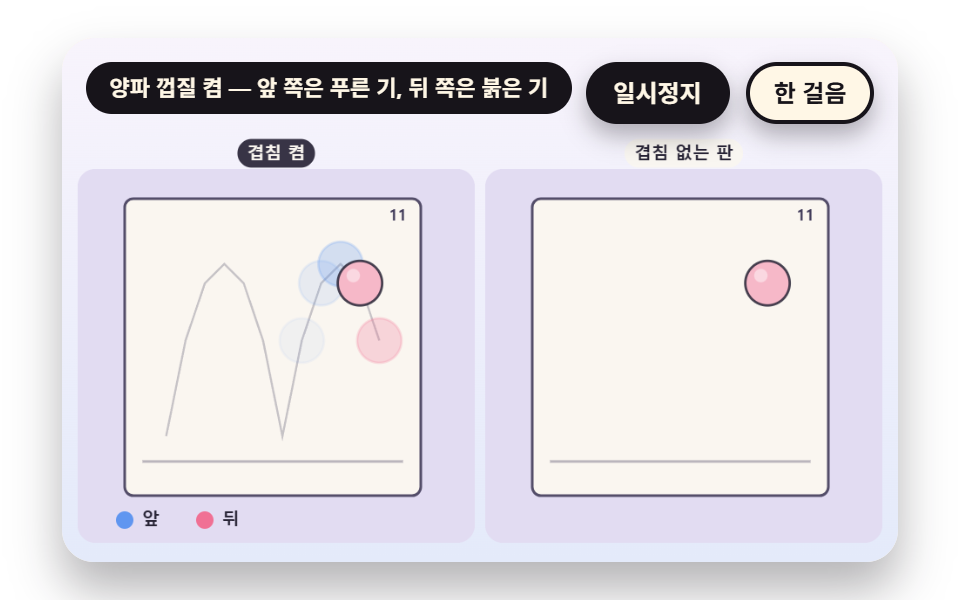
フリップブックは数枚の絵からどうやって動きを作るのでしょうか。02番は前後のページを薄く重ねて点の道筋を見せ、05番はめくる速さがどこで一本にまとまるかを測り、09番は二枚だけ描いて中間ページを計算で埋めます。ページの絵はコードで描いた配列で、めくる場面はページ番号を時間から計算して初めて成り立ちます。
フリップブックは紙一枚ごとに絵を描くことではなく、ページ番号を時間に合わせて進め、前後のページとの位置の差を目に任せる計算です — フリップブックを作るには、ページ数とめくる速さを先に決めることから始まります
 01 fb-frame-stack-riffle-rate
 02 fb-onion-skin-neighbor-ghost
 03 fb-spine-bend-fan-projection
 04 fb-ease-spacing-chart-twelve
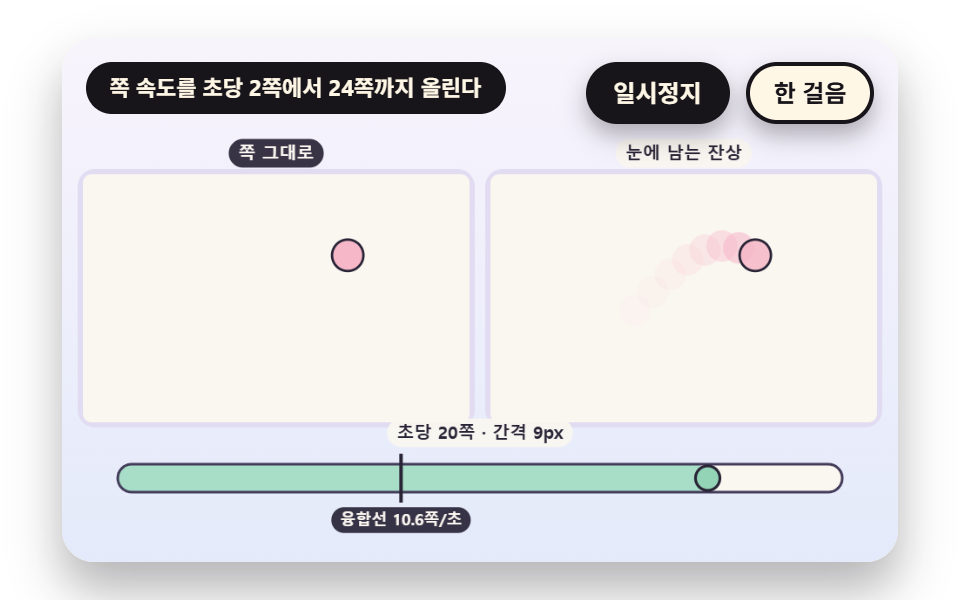 05 fb-persistence-fusion-threshold
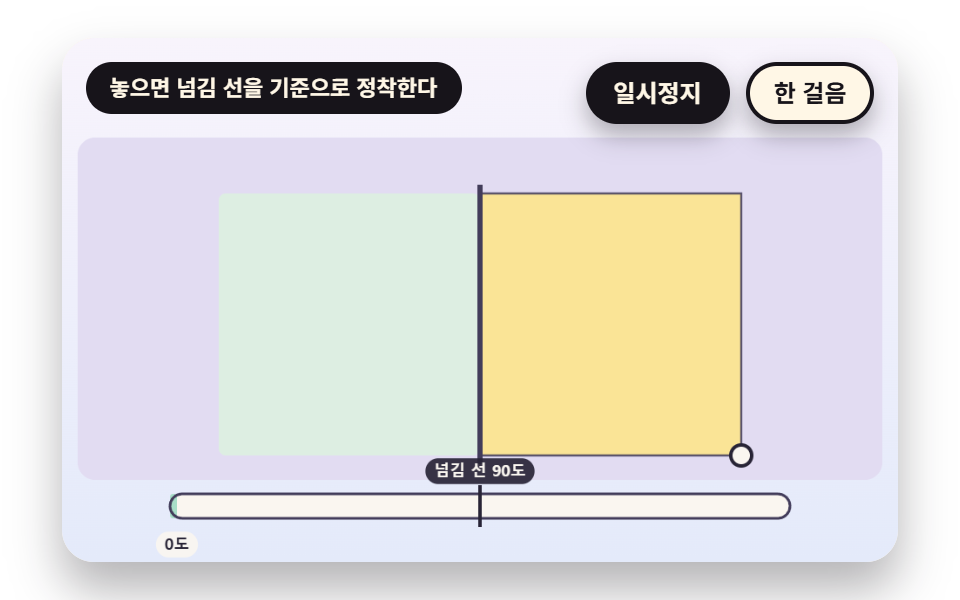 06 fb-corner-drag-snap-settle
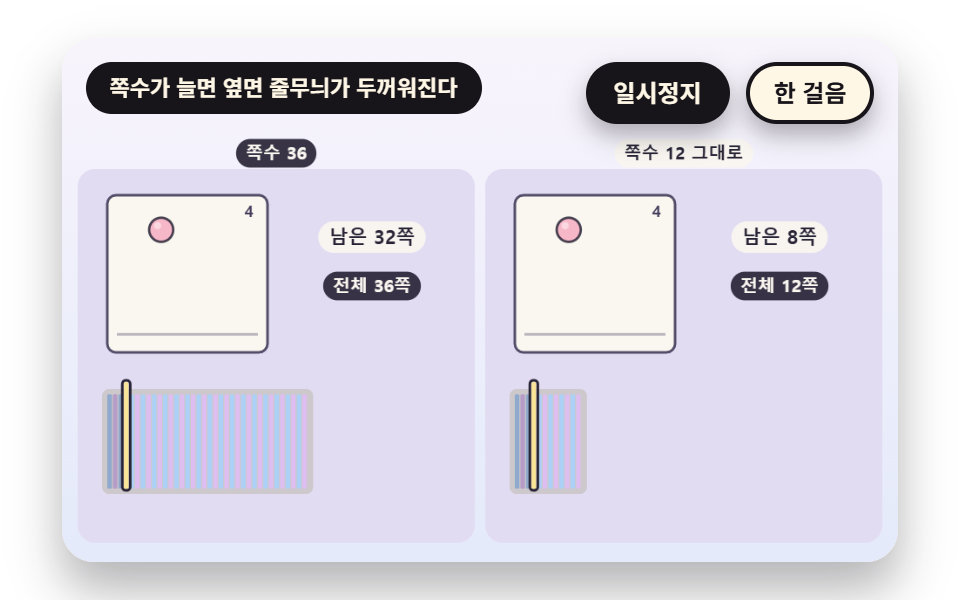 07 fb-edge-stripe-page-count
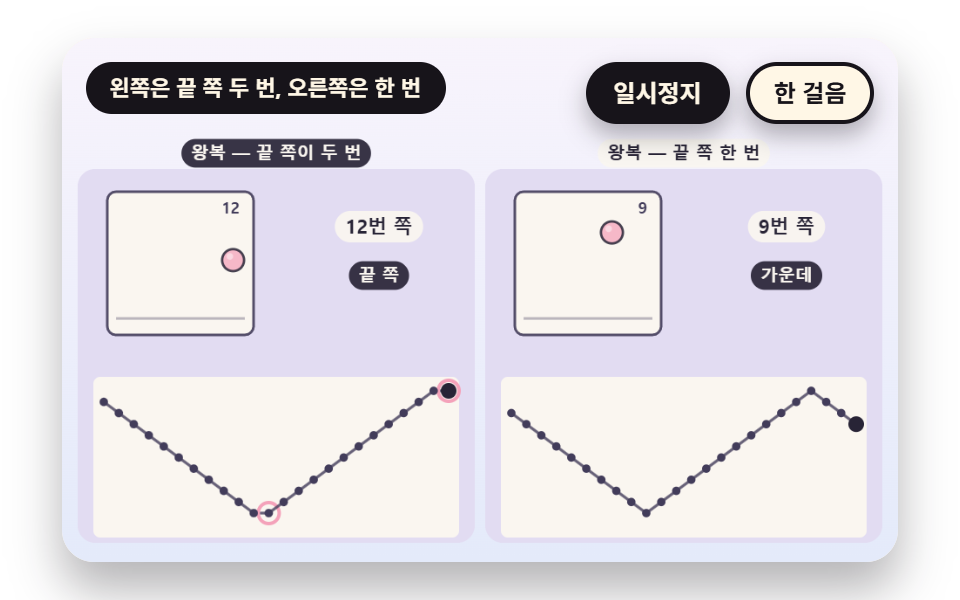 08 fb-loop-pingpong-reverse-index
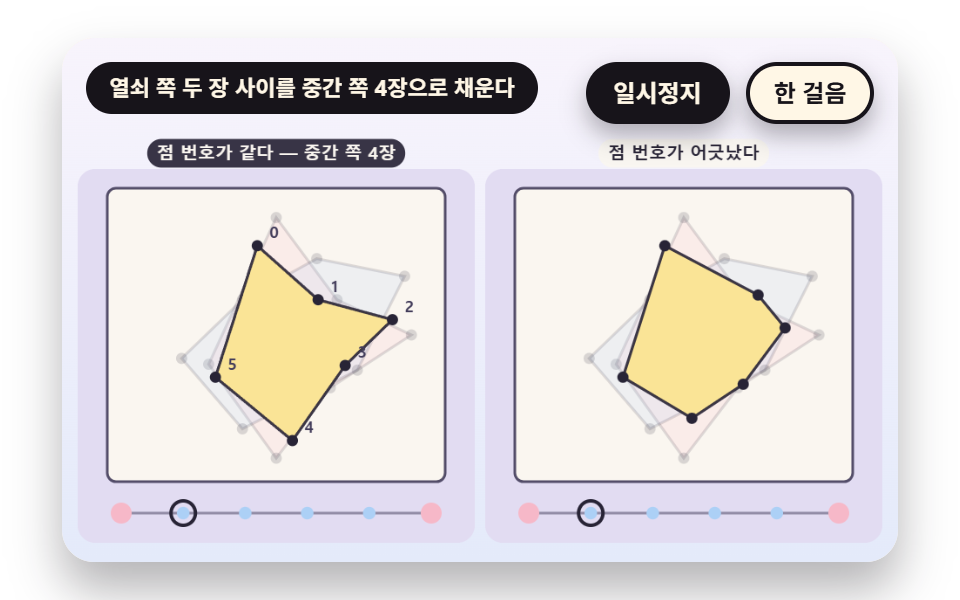 09 fb-inbetween-keyframe-lerp
自動再生 · タイルを押すとその項目へ · すべて1つのzip
- 01 親指でページをはじく速さ
- 02 前後のページが透けるオニオンスキン
- 03 とじ目に留めたページがしなって開く扇形
- 04 ページごとに間隔を変えるタイミング表
- 05 ちらつきが一つの動きにまとまる速さ
- 06 角を引いて離すと一枚ずつ落ち着く
- 07 ページ数が厚みと小口の縞で見える本の側面
- 08 巻き戻しと往復でのページ番号の選び方
- 09 二枚の間の中間ページを自動で埋める
九つの場面が共有する設計はひとつです。ページの絵は PAGES 配列に入った12枚で、一枚にはボール一つの横・縦・つぶれの値しかなく、ボールは12ページの間に二回弾みます。
    function makePages(n) {
        const out = [];
        for (let i = 0; i < n; i += 1) {
            // 二回弾むので一回弾む間は半周 — b は一回弾む中の位置 0〜1、h は高さ(放物線)
            const b = (i * 2 / n) % 1;
            const h = 4 * b * (1 - b);
            const sy = 0.8 + 0.2 * Math.min(1, h * 3);
            out.push({ x: 0.14 + 0.72 * (i / (n - 1)), y: FLOOR_Y - h * HOP_H, sx: 2 - sy, sy: sy });
        }
        return out;
    }
    const PAGES = makePages(FRAME_COUNT);
ページ番号は小数の位相から整数部分だけ取って使います
wrapIdx は位相から整数部分を取り出してページ番号として返します。時計は場面の時計ひとつで、九つのソースのどこでも Date と Math.random を呼ばず、外部の画像も使いません。
ページ数とめくる速さを先に決めます
フリップブックとは、ページをめくると絵が動いて見える本のことで、コードではページ番号が時間に沿って増えながら配列を読む作業です。「フリップブック 作り方」で探す人がまず決めるのはページ数と速さで、ページ数は FRAME_COUNT の12、速さは01の FLIP_HZ 12のように毎秒のページ数で書きます。
フリップブック 9種 — 親指でページをはじく速さ・オニオンスキンの重ね・とじ目にしなる扇形・ページごとに違う間隔のタイミング・ちらつきがまとまる速さ・角を引いてめくる・厚みと側面の縞・巻き戻しと往復の番号・中間ページの自動補間
順番は速さから始まり、重ね・しなり・間隔を通って目の残像と手で引く動き、本の厚み、番号の計算、中間ページの補間へ進みます。01〜05は時間表がページをめくり、06は手で引き、07〜09はページ数と番号と絵そのものを触ります。
最後の全体レンダリングで測った九つの場面の面積・フレーム・強さ
表の値は測定結果のファイルから写しました。累積面積が最大なのは06の32.8%と03の32.6%で、最小は05の6.8%、動きが23/23の場面は01と05だけです。
| 場面 | 累積面積 | 動いたフレーム | 強さの平均 |
|---|---|---|---|
| 01 めくる速さ | 15.6% | 23/23 | 86.4 |
| 02 オニオンスキン | 7.3% | 7/23 | 69.1 |
| 03 とじ目の扇 | 32.6% | 12/23 | 52.7 |
| 04 間隔のタイミング表 | 25.8% | 17/23 | 80.2 |
| 05 残像のまとまり | 6.8% | 23/23 | 68.5 |
| 06 角を引く | 32.8% | 18/23 | 58.6 |
| 07 側面の縞 | 10.6% | 20/23 | 84.5 |
| 08 繰り返し・往復の番号 | 17.4% | 16/23 | 99.5 |
| 09 中間ページの補間 | 12.2% | 9/23 | 85.9 |
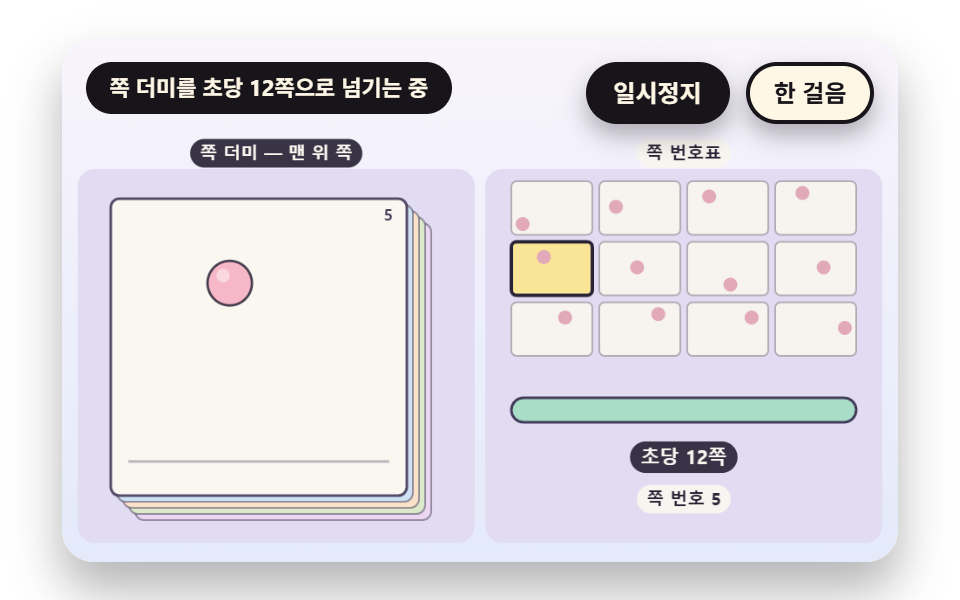
01親指でページをはじく速さ
phase に速さ rate かける時間を積み、その整数部分が pageIndex で、rate は目標の速さを指数で追うので急には止まりません。ページ幅170px基準で12ページ一巡は FLIP_HZ 12で1.0秒、3で4.0秒、ページの間でボールは平均33.5px(最大55.9px)動きます。累積面積15.6%で、23/23のフレームで動きが捉えられました。
<main class="stage">
<div class="vj is-demo" id="vj">
  <div class="vj__pad" data-role="pad" tabindex="0" role="application" aria-label="フリップブックの舞台 — 左右の矢印キーかSpaceでページをめくる、Enterで一時停止、Nで一歩進める、Rで最初から">
    <canvas class="vj__canvas" data-role="canvas" width="480" height="300" role="img" aria-label="左には12枚の紙の束の一番上のページ、右には12マスのページ番号表があります。ページ番号が毎秒12枚の速さで進むとボールが2回弾んで通り、明るいマスがページに合わせて移ります。下の棒がめくる速さを満たし、毎秒3枚に落ちるとページが一枚ずつ別に読めます"></canvas>
  </div>
  <p class="vj__status" data-role="status" aria-live="off">フリップブックのデモ</p>
  <div class="vj__ctrl">
    <button class="vj__pause" data-role="pause" type="button" aria-pressed="false">一時停止</button>
    <button class="vj__step" data-role="step" type="button">一歩進める</button>
  </div>
  <p class="vj__done" data-role="done" role="status" aria-live="polite"></p>
</div>
</main>
@use "../../../../site/static/demo-tokens" as *;
@include stage($stage-paper);
.vj {
position: relative;
width: min(92vw, calc(160vh - 12.8vw));
aspect-ratio: 480 / 300;
margin: 0 auto;
border-radius: $r-card;
overflow: hidden;
box-shadow: $shadow-raised;
background: $subject-cream;
}
// 무대 상자 — 여기서 시작한 터치만 쪽 넘기기·모서리 끌기로 읽는다(touch-action: none 은 이 상자에만). 무대 밖 터치는 페이지 스크롤 그대로
.vj__pad {
position: absolute;
inset: 0;
border-radius: inherit;
outline: none;
touch-action: none;
cursor: pointer;
}
// 바깥 .vj 가 넘침을 자르므로 포커스 테두리는 안쪽으로 들인다
.vj__pad:focus-visible {
outline: 3px solid $subject-ink;
outline-offset: -3px;
}
.vj__canvas {
position: absolute;
inset: 0;
display: block;
width: 100%;
height: 100%;
}
.vj__ctrl {
position: absolute;
right: $sp-3;
top: $sp-3;
display: flex;
gap: $sp-2;
}
.vj__pause,
.vj__step {
padding: $sp-1 $sp-3;
border: 2px solid $subject-ink;
border-radius: $r-pill;
background: $subject-ink;
color: $subject-cream;
font-family: inherit;
font-weight: 700;
font-size: 12px;
line-height: 1.6;
cursor: pointer;
box-shadow: $shadow-press;
transition: transform $dur-quick $ease-spring;
}
.vj__step {
background: $subject-cream;
color: $subject-ink;
}
// 스크린리더에만 읽히는 완료 알림
.vj__done {
position: absolute;
width: 1px;
height: 1px;
margin: 0;
overflow: hidden;
clip-path: inset(50%);
white-space: nowrap;
}
// 눌린 상태(멈춤) — 바탕과 글자색을 뒤집어 aria-pressed 가 눈에도 보이게
.vj__pause[aria-pressed="true"] {
background: $subject-cream;
color: $subject-ink;
}
.vj__pause:hover,
.vj__step:hover {
transform: translateY(-2px);
}
.vj__pause:active,
.vj__step:active {
transform: translateY(1px);
}
.vj__pause:focus-visible,
.vj__step:focus-visible {
outline: 3px solid $subject-ink;
outline-offset: 3px;
}
// 상태 줄 — 지금 장면의 수치를 글자로. 시연 중에는 aria-live off, 사람이 처음 손대면 polite
.vj__status {
position: absolute;
left: $sp-3;
top: $sp-3;
max-width: calc(100% - 190px);
margin: 0;
padding: $sp-1 $sp-3;
border-radius: $r-pill;
background: $subject-ink;
color: $subject-cream;
font-weight: 700;
font-size: 11px;
line-height: 1.6;
white-space: nowrap;
overflow: hidden;
text-overflow: ellipsis;
pointer-events: none;
}
@media (max-width: 340px) {
.vj__pause,
.vj__step,
.vj__status { font-size: 10px; padding: 0 $sp-2; }
}
// 움직임 줄이기 — 장면은 스크립트가 정지 장면 한 장으로 멈춘다. 버튼도 떠오르지 않게
@media (prefers-reduced-motion: reduce) {
.vj__pause,
.vj__step { transition: none !important; }
.vj__pause:hover,
.vj__pause:active,
.vj__step:hover,
.vj__step:active { transform: none !important; }
}html, body {
margin: 0;
overflow: hidden;
}
.stage {
box-sizing: border-box;
min-height: 100vh;
display: grid;
place-items: center;
margin: 0;
background: #ffffff;
font-family: -apple-system, "Segoe UI", "Noto Sans KR", sans-serif;
padding: clamp(8px, 4vw, 24px);
}
.vj {
position: relative;
width: min(92vw, 160vh - 12.8vw);
aspect-ratio: 480/300;
margin: 0 auto;
border-radius: 16px;
overflow: hidden;
box-shadow: 0 14px 24px rgba(23, 20, 26, 0.32);
background: #fff7e6;
}
.vj__pad {
position: absolute;
inset: 0;
border-radius: inherit;
outline: none;
touch-action: none;
cursor: pointer;
}
.vj__pad:focus-visible {
outline: 3px solid #17141a;
outline-offset: -3px;
}
.vj__canvas {
position: absolute;
inset: 0;
display: block;
width: 100%;
height: 100%;
}
.vj__ctrl {
position: absolute;
right: 12px;
top: 12px;
display: flex;
gap: 8px;
}
.vj__pause,
.vj__step {
padding: 4px 12px;
border: 2px solid #17141a;
border-radius: 999px;
background: #17141a;
color: #fff7e6;
font-family: inherit;
font-weight: 700;
font-size: 12px;
line-height: 1.6;
cursor: pointer;
box-shadow: 0 6px 12px rgba(23, 20, 26, 0.32);
transition: transform 220ms cubic-bezier(0.2, 0.8, 0.2, 1);
}
.vj__step {
background: #fff7e6;
color: #17141a;
}
.vj__done {
position: absolute;
width: 1px;
height: 1px;
margin: 0;
overflow: hidden;
clip-path: inset(50%);
white-space: nowrap;
}
.vj__pause[aria-pressed=true] {
background: #fff7e6;
color: #17141a;
}
.vj__pause:hover,
.vj__step:hover {
transform: translateY(-2px);
}
.vj__pause:active,
.vj__step:active {
transform: translateY(1px);
}
.vj__pause:focus-visible,
.vj__step:focus-visible {
outline: 3px solid #17141a;
outline-offset: 3px;
}
.vj__status {
position: absolute;
left: 12px;
top: 12px;
max-width: calc(100% - 190px);
margin: 0;
padding: 4px 12px;
border-radius: 999px;
background: #17141a;
color: #fff7e6;
font-weight: 700;
font-size: 11px;
line-height: 1.6;
white-space: nowrap;
overflow: hidden;
text-overflow: ellipsis;
pointer-events: none;
}
@media (max-width: 340px) {
.vj__pause,
.vj__step,
.vj__status {
font-size: 10px;
padding: 0 8px;
}
}
@media (prefers-reduced-motion: reduce) {
.vj__pause,
.vj__step {
transition: none !important;
}
.vj__pause:hover,
.vj__pause:active,
.vj__step:hover,
.vj__step:active {
transform: none !important;
}
}(function () {
const root = document.getElementById("vj");
if (!root) return;
// 무대 좌표 — 캔버스 안 계산은 늘 480×300. 화면에 보이는 크기와 상관없다
const W = 480;
const H = 300;
const TAU = Math.PI * 2;
function clamp(v, lo, hi) { return v < lo ? lo : (v > hi ? hi : v); }
function lerp(a, b, k) { return a + (b - a) * k; }
function ease(x) { const c = clamp(x, 0, 1); return c * c * (3 - 2 * c); }
// 파스텔 팔레트 — 면은 연한 색, 글자는 늘 진한 잉크
const BG_TOP = [248, 244, 252];
const BG_BOT = [228, 234, 250];
const BED = [226, 220, 242];
const INK = [40, 36, 54];
const INK2 = [66, 60, 90];
const PAPER = [250, 246, 240];
const ROSE = [244, 162, 186];
const MINT = [148, 212, 182];
const SKY = [172, 208, 246];
const BALL = [246, 184, 200];
const TILES = [
[200, 190, 244], [168, 222, 200], [250, 228, 150], [246, 184, 200],
[172, 208, 246], [250, 208, 170], [196, 222, 170], [222, 190, 240],
];
function mix(a, b, k) { return [lerp(a[0], b[0], k), lerp(a[1], b[1], k), lerp(a[2], b[2], k)]; }
function rgba(c, a) {
return 'rgba(' + Math.round(clamp(c[0], 0, 255)) + ',' + Math.round(clamp(c[1], 0, 255)) + ',' + Math.round(clamp(c[2], 0, 255)) + ',' + clamp(a, 0, 1).toFixed(3) + ')';
}
// 장면 시계(초)·판 반복 번호·시간표 — 시간표는 (시각, 할 일) 목록이고 시각이 지나면 한 번씩 부른다
let sceneT = 0;
let lap = 0;
let script = [];
let evAt = 0;
// 문구 틀의 {a}·{b} 자리에 값을 끼운다 — 화면 문구는 늘 이 틀 한 줄로 두고 로케일 사전이 통째로 바꾼다
function fill(s, a, b) { return s.replace('{a}', a).replace('{b}', b === undefined ? '' : b); }
function r1(v) { return String(Math.round(v * 10) / 10); }
// 읽어 주는 문장은 사람이 직접 하거나 멈춘 때만 숫자를 싣는다 — 자동으로 흐르는 동안은 한 줄이 그대로여서 스크린리더가 매 프레임 읽지 않는다
function calm() { return !(paused || manual || still); }
const FRAME_COUNT = 12;
const FLOOR_Y = 0.8;
const HOP_H = 0.58;
function makePages(n) {
const out = [];
for (let i = 0; i < n; i += 1) {
// 두 번 튀므로 한 번 튀는 사이는 반 바퀴 — b 는 한 번 튀는 안의 위치 0~1, h 는 높이(포물선)
const b = (i * 2 / n) % 1;
const h = 4 * b * (1 - b);
const sy = 0.8 + 0.2 * Math.min(1, h * 3);
out.push({ x: 0.14 + 0.72 * (i / (n - 1)), y: FLOOR_Y - h * HOP_H, sx: 2 - sy, sy: sy });
}
return out;
}
const PAGES = makePages(FRAME_COUNT);
// 한 쪽의 종이 — 흰 바탕과 바닥 선
function paperBox(R, a, edge) {
box(R.x, R.y, R.w, R.h, 5, PAPER, a);
outline(R.x, R.y, R.w, R.h, 5, 1.5, edge, 0.9 * a);
const fy = R.y + R.h * (FLOOR_Y + 0.085);
line(R.x + R.w * 0.06, fy, R.x + R.w * 0.94, fy, 1.5, mix(PAPER, INK2, 0.35), a);
}
// 쪽 안의 공 한 개 — 눌림은 바닥에 닿은 쪽에서 가로로 퍼진다
function pageBall(R, p, c, a, edge, shine) {
if (a <= 0.01) {
return;
}
const rr = R.w * 0.075;
const cx = R.x + R.w * p.x;
const cy = R.y + R.h * p.y;
ctx.save();
ctx.translate(cx, cy);
ctx.scale(p.sx, p.sy);
ctx.beginPath();
ctx.arc(0, 0, rr, 0, TAU);
ctx.fillStyle = rgba(c, a);
ctx.fill();
ctx.lineWidth = 1.4 / Math.max(p.sx, p.sy);
ctx.strokeStyle = rgba(edge, 0.85 * a);
ctx.stroke();
if (shine) {
ctx.beginPath();
ctx.arc(-rr * 0.3, -rr * 0.34, rr * 0.3, 0, TAU);
ctx.fillStyle = rgba([255, 255, 255], 0.45 * a);
ctx.fill();
}
ctx.restore();
}
// 한 쪽을 통째로 — 종이·공·쪽 번호
function drawPage(R, i, a, label) {
paperBox(R, a, INK2);
pageBall(R, PAGES[i], BALL, a, INK, true);
if (label) {
text(String(i + 1), R.x + R.w - 8, R.y + 10, INK2, a, 9, 700, 'right');
}
}
// 정수부 — 쪽 번호는 늘 이 함수를 지난다(소수 쪽 번호가 그려지지 않게)
function wrapIdx(n, count) { return ((Math.floor(n + 1e-9) % count) + count) % count; }
// 쪽 번호 띠 — 작은 칸 count 개, 지금 쪽이 밝다
function thumbs(R, count, cols, cur) {
const rows = Math.ceil(count / cols);
const gap = 4;
const cw = (R.w - gap * (cols - 1)) / cols;
const ch = (R.h - gap * (rows - 1)) / rows;
for (let i = 0; i < count; i += 1) {
const cell = { x: R.x + (i % cols) * (cw + gap), y: R.y + Math.floor(i / cols) * (ch + gap), w: cw, h: ch };
const on = i === cur;
box(cell.x, cell.y, cell.w, cell.h, 3, on ? TILES[2] : PAPER, on ? 1 : 0.9);
outline(cell.x, cell.y, cell.w, cell.h, 3, on ? 2 : 1, on ? INK : mix(PAPER, INK2, 0.4), 1);
const p = PAGES[i % PAGES.length];
disc(cell.x + cell.w * p.x, cell.y + cell.h * p.y, Math.min(cell.w, cell.h) * 0.13, mix(BALL, INK, 0.1), 1);
}
}
const SEG = 8;
const PERSP = 0.0022;
function edgeProject(spineX, a, len, bendRad) {
const out = [{ x: spineX, z: 0, s: 1 }];
let x = spineX;
let z = 0;
const dl = len / SEG;
for (let k = 1; k <= SEG; k += 1) {
const ph = a - bendRad * Math.sin(a) * (k / SEG);
x += dl * Math.cos(ph);
z += dl * Math.sin(ph);
out.push({ x: x, z: z, s: 1 / (1 - z * PERSP) });
}
return out;
}
// 투영한 쪽 한 장을 윗변·아랫변을 따라 다각형으로 칠한다. 칠한 쪽의 평균 깊이를 돌려준다(그리는 순서 정렬용)
function flapPath(pts, cy, hp) {
ctx.beginPath();
ctx.moveTo(pts[0].x, cy - hp / 2 * pts[0].s);
for (let k = 1; k < pts.length; k += 1) {
ctx.lineTo(pts[k].x, cy - hp / 2 * pts[k].s);
}
for (let k = pts.length - 1; k >= 0; k -= 1) {
ctx.lineTo(pts[k].x, cy + hp / 2 * pts[k].s);
}
ctx.closePath();
}
function drawFlap(pts, cy, hp, c, a) {
// 모서리가 앞을 향할수록(옆으로 누울수록) 밝고, 책등 쪽으로 서서 얇아질수록 어둡다
const span = Math.abs(pts[pts.length - 1].x - pts[0].x);
const lit = clamp(span / (pts.length > 1 ? Math.max(1, Math.abs(pts[0].x - pts[1].x) * SEG) : 1), 0, 1);
flapPath(pts, cy, hp);
ctx.fillStyle = rgba(mix(c, [120, 110, 160], 0.4 * (1 - lit)), a);
ctx.fill();
ctx.lineWidth = 1.2;
ctx.strokeStyle = rgba(INK2, 0.85 * a);
ctx.stroke();
}
function meanZ(pts) {
let s = 0;
for (const p of pts) {
s += p.z;
}
return s / pts.length;
}
const canvasEl = root.querySelector('[data-role="canvas"]');
const padEl = root.querySelector('[data-role="pad"]');
const pauseEl = root.querySelector('[data-role="pause"]');
const statusEl = root.querySelector('[data-role="status"]');
const stepEl = root.querySelector('[data-role="step"]');
const doneEl = root.querySelector('[data-role="done"]');
const ctxRaw = canvasEl ? canvasEl.getContext('2d') : null;
if (!canvasEl || !ctxRaw || !pauseEl || !padEl || !stepEl || !doneEl) {
return;
}
const cv = canvasEl;
const ctx = ctxRaw;
const pauseBtn = pauseEl;
const stepBtn = stepEl;
const doneP = doneEl;
const pad = padEl;
// 외부 웹폰트는 부르지 않는다 — 기기에 있는 글꼴 목록만
const FONT_STACK = 'system-ui, -apple-system, "Segoe UI", "Noto Sans KR", sans-serif';
let dpr = 1;
function fitCanvas() {
// 배율은 2 에서 자른다 — 배율 3 기기에서 화소가 2.25배로 늘지 않게
dpr = Math.min(window.devicePixelRatio || 1, 2);
cv.width = Math.round(W * dpr);
cv.height = Math.round(H * dpr);
ctx.setTransform(dpr, 0, 0, dpr, 0, 0);
}
function skyFill(top, bot) {
const g = ctx.createLinearGradient(0, 0, 0, H);
g.addColorStop(0, rgba(top, 1));
g.addColorStop(1, rgba(bot, 1));
ctx.fillStyle = g;
ctx.fillRect(0, 0, W, H);
}
function disc(x, y, r, c, a) {
if (r <= 0.2 || a <= 0) {
return;
}
ctx.beginPath();
ctx.arc(x, y, r, 0, TAU);
ctx.fillStyle = rgba(c, a);
ctx.fill();
}
function box(x, y, w, h, r, c, a) {
if (w <= 0.2 || h <= 0.2 || a <= 0) {
return;
}
ctx.beginPath();
ctx.roundRect(x, y, w, h, Math.max(0, Math.min(r, w / 2, h / 2)));
ctx.fillStyle = rgba(c, a);
ctx.fill();
}
function outline(x, y, w, h, r, width, c, a) {
if (w <= 0.2 || h <= 0.2 || a <= 0) {
return;
}
ctx.beginPath();
ctx.roundRect(x, y, w, h, Math.max(0, Math.min(r, w / 2, h / 2)));
ctx.lineWidth = width;
ctx.strokeStyle = rgba(c, a);
ctx.stroke();
}
function text(s, x, y, c, a, px, weight, align) {
ctx.font = weight + ' ' + px + 'px ' + FONT_STACK;
ctx.textAlign = align;
ctx.textBaseline = 'middle';
ctx.fillStyle = rgba(c, a);
ctx.fillText(s, x, y);
}
// 글자 이름표 — 바탕 알약 위에 글자
function tag(s, x, y, bg, fg, px, align) {
ctx.font = '700 ' + px + 'px ' + FONT_STACK;
const w = ctx.measureText(s).width + px * 1.1;
const left = align === 'center' ? x - w / 2 : (align === 'right' ? x - w : x);
box(left, y - px * 0.82, w, px * 1.64, px * 0.82, bg, 0.92);
text(s, left + w / 2, y + 0.5, fg, 1, px, 700, 'center');
}
// 판 자리 — 왼쪽 판·오른쪽 판(대비판)·한 판짜리 히어로. 위쪽은 상태 줄·버튼 자리
const PANEL_L = { x: 12, y: 78, w: 222, h: 208 };
const PANEL_R = { x: 246, y: 78, w: 222, h: 208 };
const PANEL_ONE = { x: 12, y: 60, w: 456, h: 228 };
// 판 바닥 — 판 둘레로 비치는 연보라
function bed(R) {
box(R.x - 3, R.y - 3, R.w + 6, R.h + 6, 10, BED, 1);
}
function panelTags(a, b) {
tag(a, PANEL_L.x + PANEL_L.w / 2, 66, INK, PAPER, 10, 'center');
tag(b, PANEL_R.x + PANEL_R.w / 2, 66, PAPER, INK, 10, 'center');
}
// 공 한 개 — 면, 왼쪽 위 하이라이트, 옅은 윤곽
function orb(x, y, r, c, a) {
if (r <= 0.3 || a <= 0) {
return;
}
disc(x, y, r, c, a);
if (r > 5) {
disc(x - r * 0.28, y - r * 0.32, r * 0.42, [255, 255, 255], 0.3 * a);
}
ctx.beginPath();
ctx.arc(x, y, r, 0, TAU);
ctx.lineWidth = 1;
ctx.strokeStyle = rgba(mix(c, INK, 0.28), 0.55 * a);
ctx.stroke();
}
function line(x0, y0, x1, y1, width, c, a) {
if (a <= 0) {
return;
}
ctx.beginPath();
ctx.moveTo(x0, y0);
ctx.lineTo(x1, y1);
ctx.lineWidth = width;
ctx.strokeStyle = rgba(c, a);
ctx.stroke();
}
function ring(x, y, r, width, c, a) {
if (r <= 0.3 || a <= 0) {
return;
}
ctx.beginPath();
ctx.arc(x, y, r, 0, TAU);
ctx.lineWidth = width;
ctx.strokeStyle = rgba(c, a);
ctx.stroke();
}
let shownStatus = '';
function pushStatus(s) {
if (!statusEl || s === shownStatus) {
return;
}
shownStatus = s;
statusEl.textContent = s;
}
let paused = false;
const reduceQuery = window.matchMedia('(prefers-reduced-motion: reduce)');
// 페이지를 연 채 움직임 줄이기 설정을 바꿔도 change 리스너가 다시 읽는다
let still = reduceQuery.matches;
// 자동 시연 표시 — 사람이 처음 손대면 떼고 상태 줄을 polite 로 켠다
let demo = root.classList.contains('is-demo');
const off = new AbortController();
// 사람이 직접 하는 중이면 시간표는 멈추고 애니메이션만 흐른다
let manual = false;
function wake() {
if (!demo) {
return;
}
demo = false;
root.classList.remove('is-demo');
if (statusEl) {
statusEl.setAttribute('aria-live', 'polite');
}
}
function takeOver() {
if (manual) {
return;
}
manual = true;
onTake();
wake();
}
// 한 판 시연이 끝났음을 스크린리더에 한 번만 알린다 — 판이 되풀이돼도 다시 읽지 않는다
let doneSaid = false;
function checkDone() {
if (!manual && !doneSaid && sceneT >= LAP_S - 0.6) {
doneSaid = true;
doneP.textContent = statusText();
}
}
function advance(dt) {
sceneT += dt;
if (!manual) {
while (evAt < script.length && script[evAt].t <= sceneT) {
const ev = script[evAt];
evAt += 1;
ev.f();
}
if (sceneT >= LAP_S) {
lap += 1;
begin();
return;
}
}
update(dt);
}
// 첫 판은 START_S 만큼 앞서 시작한다 — 장면이 이미 움직이는 중인 장면에서 보인다
function runTo(t) {
while (sceneT < t - 1e-6) {
advance(Math.min(1 / 30, t - sceneT));
}
}
function begin() {
sceneT = 0;
evAt = 0;
script = [];
build();
if (lap === 0 && !still) {
runTo(START_S);
}
}
const DT_MAX = 0.05;
const SETTLE_FRAMES = 8;
const SETTLE_DT = 0.04;
function showNow() {
draw();
pushStatus(statusText());
checkDone();
}
let rafId = 0;
let lastTs = -1;
function frame(ts) {
if (still || paused) {
rafId = 0;
return;
}
if (lastTs < 0) {
lastTs = ts;
}
const dt = Math.min((ts - lastTs) / 1000, DT_MAX);
lastTs = ts;
if (dt > 0) {
advance(dt);
}
showNow();
rafId = window.requestAnimationFrame(frame);
}
function startLoop() {
if (rafId) {
return;
}
// 멈췄던 사이의 시간을 첫 프레임 dt 로 넘기지 않는다
lastTs = -1;
rafId = window.requestAnimationFrame(frame);
}
function stopLoop() {
if (rafId) {
window.cancelAnimationFrame(rafId);
rafId = 0;
}
}
// 움직임 줄이기 — 루프 없이 처음 판의 정지 장면 한 장
function showRest() {
stopLoop();
lap = 0;
sceneT = 0;
evAt = 0;
script = [];
build();
runTo(REST_S);
showNow();
}
// 움직임 줄이기이거나 멈춘 채 입력이 들어오면 애니메이션 없이 곧바로 끝 상태로 — 시간을 3초 흘려 움직임을 다 끝낸다
function settleStill() {
for (let k = 0; k < 90; k += 1) {
sceneT += 1 / 30;
update(1 / 30);
}
}
function play() {
begin();
showNow();
if (!paused) {
startLoop();
}
}
function togglePause() {
paused = !paused;
pauseBtn.setAttribute('aria-pressed', paused ? 'true' : 'false');
wake();
if (paused) {
stopLoop();
}
else if (!still) {
startLoop();
}
}
function restart() {
manual = false;
doneSaid = false;
lap += 1;
begin();
for (let k = 0; k < SETTLE_FRAMES; k += 1) {
update(SETTLE_DT);
}
showNow();
}
// 一歩進める — 멈춘 채 시간표의 다음 일 하나를 부른다. 더 부를 일이 없거나 직접 하던 중이면 다음 판을 연다
function stepOnce() {
wake();
if (!paused) {
paused = true;
pauseBtn.setAttribute('aria-pressed', 'true');
stopLoop();
}
if (manual || evAt >= script.length) {
restart();
return;
}
sceneT = Math.max(sceneT, script[evAt].t);
advance(0);
for (let k = 0; k < SETTLE_FRAMES; k += 1) {
sceneT += SETTLE_DT;
update(SETTLE_DT);
}
showNow();
}
pauseBtn.addEventListener('click', togglePause, { signal: off.signal });
stepBtn.addEventListener('click', stepOnce, { signal: off.signal });
// 쪽 넘기기 — 사람이 손대면 시간표는 멈추고 쪽만 바뀐다. 멈춘 채·움직임 줄이기에서도 한 번의 입력이 화면에 바로 반영되게 한다
function navPage(d) {
takeOver();
onNav(d);
if (still || paused) {
settleStill();
}
showNow();
}
// 키보드 — 무대에 포커스가 있을 때만. 왼쪽·위 = 前 쪽, 오른쪽·아래·Space = 다음 쪽, Enter·P = 一時停止, N = 一歩進める, R = 처음부터
pad.addEventListener('keydown', function (e) {
if (e.altKey || e.ctrlKey || e.metaKey) {
return;
}
const k = e.key;
if (k === 'ArrowLeft' || k === 'ArrowUp') {
e.preventDefault();
navPage(-1);
}
else if (k === 'ArrowRight' || k === 'ArrowDown' || k === ' ') {
e.preventDefault();
navPage(1);
}
else if (k === 'Enter' || k === 'p' || k === 'P') {
e.preventDefault();
togglePause();
}
else if (k === 'n' || k === 'N') {
stepOnce();
}
else if (k === 'r' || k === 'R') {
restart();
}
}, { signal: off.signal });
// 마우스·터치 — 무대를 누르면 다음 쪽(06 은 모서리 끌기라 따로 받는다)
pad.addEventListener('click', function () {
if (!CLICK_NAV) {
return;
}
navPage(1);
}, { signal: off.signal });
// 탭이 숨으면 멈추고, 돌아오면 시계를 다시 맞춰 시작 — 숨은 동안의 몇 초가 한 프레임에 몰리지 않게
document.addEventListener('visibilitychange', function () {
if (document.hidden) {
stopLoop();
}
else if (!paused && !still) {
startLoop();
}
}, { signal: off.signal });
// 설정이 바뀌면 — 켜지면 정지 장면 한 장, 꺼지면 다시 움직인다
reduceQuery.addEventListener('change', function () {
still = reduceQuery.matches;
if (still) {
showRest();
}
else {
lap = 0;
play();
}
}, { signal: off.signal });
window.addEventListener('resize', function () {
fitCanvas();
showNow();
}, { signal: off.signal });
// 01 — 쪽 번호 pageIndex 는 쏟아낸 쪽 수 phase 의 정수 부분이다. phase 는 초당 rate 쪽씩 오르고 rate 는 FLIP_HZ 를 향해 오른다
const FLIP_HZ = 12;
const frameCount = FRAME_COUNT;
const LAP_S = 9.6;
const START_S = 3.2;
const REST_S = 4.0;
const CLICK_NAV = true;
const BOOK_R = { x: 28, y: 92, w: 170, h: 170 };
const GRID_R = { x: 258, y: 82, w: 198, h: 100 };
let phase = 0;
let rate = 0;
let rateTgt = 0;
let pageIndex = 0;
function setRate(v) { rateTgt = v; }
function build() {
phase = 0;
rate = 0;
rateTgt = 0;
pageIndex = 0;
script.push({ t: 0.3, f: function () { setRate(FLIP_HZ); } });
script.push({ t: 5.2, f: function () { setRate(3); } });
script.push({ t: 8.2, f: function () { setRate(0); } });
}
    function update(dt) {
        if (dt <= 0) {
            return;
        }
        rate += (rateTgt - rate) * (1 - Math.exp(-6 * dt));
        if (!manual) {
            phase += rate * dt;
        }
        pageIndex = wrapIdx(phase, frameCount);
    }
function drawStack() {
// 맨 위 쪽 뒤로 낱장 더미의 옆면이 비친다
for (let k = 4; k >= 1; k -= 1) {
box(BOOK_R.x + k * 3.5, BOOK_R.y + k * 3.5, BOOK_R.w, BOOK_R.h, 5, mix(PAPER, TILES[(k + 3) % 8], 0.55), 1);
outline(BOOK_R.x + k * 3.5, BOOK_R.y + k * 3.5, BOOK_R.w, BOOK_R.h, 5, 1, INK2, 0.5);
}
drawPage(BOOK_R, pageIndex, 1, true);
}
function draw() {
skyFill(BG_TOP, BG_BOT);
panelTags('束 — 一番上のページ', 'ページ番号表');
bed(PANEL_L);
bed({ x: GRID_R.x - 12, y: PANEL_R.y, w: PANEL_R.w, h: PANEL_R.h });
drawStack();
thumbs(GRID_R, frameCount, 4, pageIndex);
// 넘기는 속도 막대 — FLIP_HZ 를 가득 찬 길이로
const bx = 258;
const bw = 198;
box(bx, 206, bw, 14, 7, PAPER, 1);
box(bx, 206, bw * clamp(rate / FLIP_HZ, 0, 1), 14, 7, TILES[1], 1);
outline(bx, 206, bw, 14, 7, 1.5, INK2, 1);
tag(fill('毎秒{a}枚', r1(rate)), bx + bw / 2, 240, INK, PAPER, 11, 'center');
tag(fill('ページ番号 {a}', String(pageIndex + 1)), bx + bw / 2, 264, PAPER, INK, 10, 'center');
}
function statusText() {
if (calm()) {
return fill('束を毎秒{a}枚でめくっています', String(FLIP_HZ));
}
return fill('{b}ページ中{a}ページ目', String(pageIndex + 1), String(frameCount));
}
// 한 쪽씩 직접 넘긴다 — 속도는 0
function onNav(d) {
rate = 0;
rateTgt = 0;
phase = Math.floor(phase + 1e-9) + d;
pageIndex = wrapIdx(phase, frameCount);
}
function onTake() { rateTgt = 0; }
fitCanvas();
if (still) {
showRest();
}
else {
play();
}
return function () {
stopLoop();
off.abort();
};
})();// FrameStackRiffleRate - 같은 항목 vanilla index.html 의 React 판. 같은 계산을 useEffect 안에서 돌린다
import { useEffect, useRef } from "react";
import styles from "./FrameStackRiffleRate.module.scss";
const cx = (s: string): string => s.split(" ").map((n) => styles[n] ?? n).join(" ");
export default function FrameStackRiffleRate() {
const rootRef = useRef<HTMLDivElement | null>(null);
useEffect(() => {
const rootEl = rootRef.current;
if (!rootEl) return;
const root: HTMLElement = rootEl;
type RGB = [number, number, number];
type RGBA = [number, number, number, number];
// 무대 좌표 — 캔버스 안 계산은 늘 480×300. 화면에 보이는 크기와 상관없다
const W = 480;
const H = 300;
const TAU = Math.PI * 2;
function clamp(v: number, lo: number, hi: number): number { return v < lo ? lo : (v > hi ? hi : v); }
function lerp(a: number, b: number, k: number): number { return a + (b - a) * k; }
function ease(x: number): number { const c = clamp(x, 0, 1); return c * c * (3 - 2 * c); }
// 파스텔 팔레트 — 면은 연한 색, 글자는 늘 진한 잉크
const BG_TOP: RGB = [248, 244, 252];
const BG_BOT: RGB = [228, 234, 250];
const BED: RGB = [226, 220, 242];
const INK: RGB = [40, 36, 54];
const INK2: RGB = [66, 60, 90];
const PAPER: RGB = [250, 246, 240];
const ROSE: RGB = [244, 162, 186];
const MINT: RGB = [148, 212, 182];
const SKY: RGB = [172, 208, 246];
const BALL: RGB = [246, 184, 200];
const TILES: RGB[] = [
[200, 190, 244], [168, 222, 200], [250, 228, 150], [246, 184, 200],
[172, 208, 246], [250, 208, 170], [196, 222, 170], [222, 190, 240],
];
function mix(a: RGB, b: RGB, k: number): RGB { return [lerp(a[0], b[0], k), lerp(a[1], b[1], k), lerp(a[2], b[2], k)]; }
function rgba(c: RGB, a: number): string {
return 'rgba(' + Math.round(clamp(c[0], 0, 255)) + ',' + Math.round(clamp(c[1], 0, 255)) + ',' + Math.round(clamp(c[2], 0, 255)) + ',' + clamp(a, 0, 1).toFixed(3) + ')';
}
// 장면 시계(초)·판 반복 번호·시간표 — 시간표는 (시각, 할 일) 목록이고 시각이 지나면 한 번씩 부른다
let sceneT = 0;
let lap = 0;
type Ev = { t: number; f: () => void };
let script: Ev[] = [];
let evAt = 0;
type Rect = { x: number; y: number; w: number; h: number };
// 문구 틀의 {a}·{b} 자리에 값을 끼운다 — 화면 문구는 늘 이 틀 한 줄로 두고 로케일 사전이 통째로 바꾼다
function fill(s: string, a: string, b?: string): string { return s.replace('{a}', a).replace('{b}', b === undefined ? '' : b); }
function r1(v: number): string { return String(Math.round(v * 10) / 10); }
// 읽어 주는 문장은 사람이 직접 하거나 멈춘 때만 숫자를 싣는다 — 자동으로 흐르는 동안은 한 줄이 그대로여서 스크린리더가 매 프레임 읽지 않는다
function calm(): boolean { return !(paused || manual || still); }
// ── 쪽 그림 ───────────────────────────────────────────────
// 한 쪽에 그린 그림 = 공 하나의 (가로·세로 위치 0~1, 눌림). 12쪽이 한 번의 튀어 오름 두 번을 이룬다
type Pg = { x: number; y: number; sx: number; sy: number };
const FRAME_COUNT = 12;
const FLOOR_Y = 0.8;
const HOP_H = 0.58;
function makePages(n: number): Pg[] {
const out: Pg[] = [];
for (let i = 0; i < n; i += 1) {
// 두 번 튀므로 한 번 튀는 사이는 반 바퀴 — b 는 한 번 튀는 안의 위치 0~1, h 는 높이(포물선)
const b = (i * 2 / n) % 1;
const h = 4 * b * (1 - b);
const sy = 0.8 + 0.2 * Math.min(1, h * 3);
out.push({ x: 0.14 + 0.72 * (i / (n - 1)), y: FLOOR_Y - h * HOP_H, sx: 2 - sy, sy: sy });
}
return out;
}
const PAGES: Pg[] = makePages(FRAME_COUNT);
// 한 쪽의 종이 — 흰 바탕과 바닥 선
function paperBox(R: Rect, a: number, edge: RGB): void {
box(R.x, R.y, R.w, R.h, 5, PAPER, a);
outline(R.x, R.y, R.w, R.h, 5, 1.5, edge, 0.9 * a);
const fy = R.y + R.h * (FLOOR_Y + 0.085);
line(R.x + R.w * 0.06, fy, R.x + R.w * 0.94, fy, 1.5, mix(PAPER, INK2, 0.35), a);
}
// 쪽 안의 공 한 개 — 눌림은 바닥에 닿은 쪽에서 가로로 퍼진다
function pageBall(R: Rect, p: Pg, c: RGB, a: number, edge: RGB, shine: boolean): void {
if (a <= 0.01) { return; }
const rr = R.w * 0.075;
const cx = R.x + R.w * p.x;
const cy = R.y + R.h * p.y;
ctx.save();
ctx.translate(cx, cy);
ctx.scale(p.sx, p.sy);
ctx.beginPath();
ctx.arc(0, 0, rr, 0, TAU);
ctx.fillStyle = rgba(c, a);
ctx.fill();
ctx.lineWidth = 1.4 / Math.max(p.sx, p.sy);
ctx.strokeStyle = rgba(edge, 0.85 * a);
ctx.stroke();
if (shine) {
ctx.beginPath();
ctx.arc(-rr * 0.3, -rr * 0.34, rr * 0.3, 0, TAU);
ctx.fillStyle = rgba([255, 255, 255], 0.45 * a);
ctx.fill();
}
ctx.restore();
}
// 한 쪽을 통째로 — 종이·공·쪽 번호
function drawPage(R: Rect, i: number, a: number, label: boolean): void {
paperBox(R, a, INK2);
pageBall(R, PAGES[i], BALL, a, INK, true);
if (label) { text(String(i + 1), R.x + R.w - 8, R.y + 10, INK2, a, 9, 700, 'right'); }
}
// 정수부 — 쪽 번호는 늘 이 함수를 지난다(소수 쪽 번호가 그려지지 않게)
function wrapIdx(n: number, count: number): number { return ((Math.floor(n + 1e-9) % count) + count) % count; }
// 쪽 번호 띠 — 작은 칸 count 개, 지금 쪽이 밝다
function thumbs(R: Rect, count: number, cols: number, cur: number): void {
const rows = Math.ceil(count / cols);
const gap = 4;
const cw = (R.w - gap * (cols - 1)) / cols;
const ch = (R.h - gap * (rows - 1)) / rows;
for (let i = 0; i < count; i += 1) {
const cell: Rect = { x: R.x + (i % cols) * (cw + gap), y: R.y + Math.floor(i / cols) * (ch + gap), w: cw, h: ch };
const on = i === cur;
box(cell.x, cell.y, cell.w, cell.h, 3, on ? TILES[2] : PAPER, on ? 1 : 0.9);
outline(cell.x, cell.y, cell.w, cell.h, 3, on ? 2 : 1, on ? INK : mix(PAPER, INK2, 0.4), 1);
const p = PAGES[i % PAGES.length];
disc(cell.x + cell.w * p.x, cell.y + cell.h * p.y, Math.min(cell.w, cell.h) * 0.13, mix(BALL, INK, 0.1), 1);
}
}
// ── 책등 투영 ─────────────────────────────────────────────
// 책등(세로 선) 에서 시작하는 쪽 한 장을 SEG 조각으로 잇는다. 쪽 각도 a 는 0 이 오른쪽에 누운 때, π 가 왼쪽에 누운 때.
// 조각 k 의 방향은 a 에서 끝쪽일수록 bendRad × sin(a) 만큼 뒤처진다(책등에 묶인 안쪽이 먼저 돌고 가장자리가 따라온다).
// x 는 방향의 코사인, z(보는 사람 쪽 깊이)는 사인을 쌓은 값이고, 가까울수록(z 가 클수록) 위아래가 PERSP 만큼 커진다
type Pt = { x: number; z: number; s: number };
const SEG = 8;
const PERSP = 0.0022;
function edgeProject(spineX: number, a: number, len: number, bendRad: number): Pt[] {
const out: Pt[] = [{ x: spineX, z: 0, s: 1 }];
let x = spineX;
let z = 0;
const dl = len / SEG;
for (let k = 1; k <= SEG; k += 1) {
const ph = a - bendRad * Math.sin(a) * (k / SEG);
x += dl * Math.cos(ph);
z += dl * Math.sin(ph);
out.push({ x: x, z: z, s: 1 / (1 - z * PERSP) });
}
return out;
}
// 투영한 쪽 한 장을 윗변·아랫변을 따라 다각형으로 칠한다. 칠한 쪽의 평균 깊이를 돌려준다(그리는 순서 정렬용)
function flapPath(pts: Pt[], cy: number, hp: number): void {
ctx.beginPath();
ctx.moveTo(pts[0].x, cy - hp / 2 * pts[0].s);
for (let k = 1; k < pts.length; k += 1) { ctx.lineTo(pts[k].x, cy - hp / 2 * pts[k].s); }
for (let k = pts.length - 1; k >= 0; k -= 1) { ctx.lineTo(pts[k].x, cy + hp / 2 * pts[k].s); }
ctx.closePath();
}
function drawFlap(pts: Pt[], cy: number, hp: number, c: RGB, a: number): void {
// 모서리가 앞을 향할수록(옆으로 누울수록) 밝고, 책등 쪽으로 서서 얇아질수록 어둡다
const span = Math.abs(pts[pts.length - 1].x - pts[0].x);
const lit = clamp(span / (pts.length > 1 ? Math.max(1, Math.abs(pts[0].x - pts[1].x) * SEG) : 1), 0, 1);
flapPath(pts, cy, hp);
ctx.fillStyle = rgba(mix(c, [120, 110, 160], 0.4 * (1 - lit)), a);
ctx.fill();
ctx.lineWidth = 1.2;
ctx.strokeStyle = rgba(INK2, 0.85 * a);
ctx.stroke();
}
function meanZ(pts: Pt[]): number {
let s = 0;
for (const p of pts) { s += p.z; }
return s / pts.length;
}
const canvasEl = root.querySelector('[data-role="canvas"]') as HTMLCanvasElement | null;
const padEl = root.querySelector('[data-role="pad"]') as HTMLElement | null;
const pauseEl = root.querySelector('[data-role="pause"]') as HTMLButtonElement | null;
const statusEl = root.querySelector('[data-role="status"]') as HTMLElement | null;
const stepEl = root.querySelector('[data-role="step"]') as HTMLButtonElement | null;
const doneEl = root.querySelector('[data-role="done"]') as HTMLElement | null;
const ctxRaw = canvasEl ? canvasEl.getContext('2d') : null;
if (!canvasEl || !ctxRaw || !pauseEl || !padEl || !stepEl || !doneEl) { return; }
const cv: HTMLCanvasElement = canvasEl;
const ctx: CanvasRenderingContext2D = ctxRaw;
const pauseBtn: HTMLButtonElement = pauseEl;
const stepBtn: HTMLButtonElement = stepEl;
const doneP: HTMLElement = doneEl;
const pad: HTMLElement = padEl;
// 외부 웹폰트는 부르지 않는다 — 기기에 있는 글꼴 목록만
const FONT_STACK = 'system-ui, -apple-system, "Segoe UI", "Noto Sans KR", sans-serif';
let dpr = 1;
function fitCanvas(): void {
// 배율은 2 에서 자른다 — 배율 3 기기에서 화소가 2.25배로 늘지 않게
dpr = Math.min(window.devicePixelRatio || 1, 2);
cv.width = Math.round(W * dpr);
cv.height = Math.round(H * dpr);
ctx.setTransform(dpr, 0, 0, dpr, 0, 0);
}
function skyFill(top: RGB, bot: RGB): void {
const g = ctx.createLinearGradient(0, 0, 0, H);
g.addColorStop(0, rgba(top, 1));
g.addColorStop(1, rgba(bot, 1));
ctx.fillStyle = g;
ctx.fillRect(0, 0, W, H);
}
function disc(x: number, y: number, r: number, c: RGB, a: number): void {
if (r <= 0.2 || a <= 0) { return; }
ctx.beginPath();
ctx.arc(x, y, r, 0, TAU);
ctx.fillStyle = rgba(c, a);
ctx.fill();
}
function box(x: number, y: number, w: number, h: number, r: number, c: RGB, a: number): void {
if (w <= 0.2 || h <= 0.2 || a <= 0) { return; }
ctx.beginPath();
ctx.roundRect(x, y, w, h, Math.max(0, Math.min(r, w / 2, h / 2)));
ctx.fillStyle = rgba(c, a);
ctx.fill();
}
function outline(x: number, y: number, w: number, h: number, r: number, width: number, c: RGB, a: number): void {
if (w <= 0.2 || h <= 0.2 || a <= 0) { return; }
ctx.beginPath();
ctx.roundRect(x, y, w, h, Math.max(0, Math.min(r, w / 2, h / 2)));
ctx.lineWidth = width;
ctx.strokeStyle = rgba(c, a);
ctx.stroke();
}
function text(s: string, x: number, y: number, c: RGB, a: number, px: number, weight: number, align: CanvasTextAlign): void {
ctx.font = weight + ' ' + px + 'px ' + FONT_STACK;
ctx.textAlign = align;
ctx.textBaseline = 'middle';
ctx.fillStyle = rgba(c, a);
ctx.fillText(s, x, y);
}
// 글자 이름표 — 바탕 알약 위에 글자
function tag(s: string, x: number, y: number, bg: RGB, fg: RGB, px: number, align: CanvasTextAlign): void {
ctx.font = '700 ' + px + 'px ' + FONT_STACK;
const w = ctx.measureText(s).width + px * 1.1;
const left = align === 'center' ? x - w / 2 : (align === 'right' ? x - w : x);
box(left, y - px * 0.82, w, px * 1.64, px * 0.82, bg, 0.92);
text(s, left + w / 2, y + 0.5, fg, 1, px, 700, 'center');
}
// 판 자리 — 왼쪽 판·오른쪽 판(대비판)·한 판짜리 히어로. 위쪽은 상태 줄·버튼 자리
const PANEL_L: Rect = { x: 12, y: 78, w: 222, h: 208 };
const PANEL_R: Rect = { x: 246, y: 78, w: 222, h: 208 };
const PANEL_ONE: Rect = { x: 12, y: 60, w: 456, h: 228 };
// 판 바닥 — 판 둘레로 비치는 연보라
function bed(R: Rect): void {
box(R.x - 3, R.y - 3, R.w + 6, R.h + 6, 10, BED, 1);
}
function panelTags(a: string, b: string): void {
tag(a, PANEL_L.x + PANEL_L.w / 2, 66, INK, PAPER, 10, 'center');
tag(b, PANEL_R.x + PANEL_R.w / 2, 66, PAPER, INK, 10, 'center');
}
// 공 한 개 — 면, 왼쪽 위 하이라이트, 옅은 윤곽
function orb(x: number, y: number, r: number, c: RGB, a: number): void {
if (r <= 0.3 || a <= 0) { return; }
disc(x, y, r, c, a);
if (r > 5) { disc(x - r * 0.28, y - r * 0.32, r * 0.42, [255, 255, 255], 0.3 * a); }
ctx.beginPath();
ctx.arc(x, y, r, 0, TAU);
ctx.lineWidth = 1;
ctx.strokeStyle = rgba(mix(c, INK, 0.28), 0.55 * a);
ctx.stroke();
}
function line(x0: number, y0: number, x1: number, y1: number, width: number, c: RGB, a: number): void {
if (a <= 0) { return; }
ctx.beginPath();
ctx.moveTo(x0, y0);
ctx.lineTo(x1, y1);
ctx.lineWidth = width;
ctx.strokeStyle = rgba(c, a);
ctx.stroke();
}
function ring(x: number, y: number, r: number, width: number, c: RGB, a: number): void {
if (r <= 0.3 || a <= 0) { return; }
ctx.beginPath();
ctx.arc(x, y, r, 0, TAU);
ctx.lineWidth = width;
ctx.strokeStyle = rgba(c, a);
ctx.stroke();
}
let shownStatus = '';
function pushStatus(s: string): void {
if (!statusEl || s === shownStatus) { return; }
shownStatus = s;
statusEl.textContent = s;
}
let paused = false;
const reduceQuery = window.matchMedia('(prefers-reduced-motion: reduce)');
// 페이지를 연 채 움직임 줄이기 설정을 바꿔도 change 리스너가 다시 읽는다
let still = reduceQuery.matches;
// 자동 시연 표시 — 사람이 처음 손대면 떼고 상태 줄을 polite 로 켠다
let demo = root.classList.contains('is-demo');
const off = new AbortController();
// 사람이 직접 하는 중이면 시간표는 멈추고 애니메이션만 흐른다
let manual = false;
function wake(): void {
if (!demo) { return; }
demo = false;
root.classList.remove('is-demo');
if (statusEl) { statusEl.setAttribute('aria-live', 'polite'); }
}
function takeOver(): void {
if (manual) { return; }
manual = true;
onTake();
wake();
}
// 한 판 시연이 끝났음을 스크린리더에 한 번만 알린다 — 판이 되풀이돼도 다시 읽지 않는다
let doneSaid = false;
function checkDone(): void {
if (!manual && !doneSaid && sceneT >= LAP_S - 0.6) {
doneSaid = true;
doneP.textContent = statusText();
}
}
function advance(dt: number): void {
sceneT += dt;
if (!manual) {
while (evAt < script.length && script[evAt].t <= sceneT) {
const ev = script[evAt];
evAt += 1;
ev.f();
}
if (sceneT >= LAP_S) { lap += 1; begin(); return; }
}
update(dt);
}
// 첫 판은 START_S 만큼 앞서 시작한다 — 장면이 이미 움직이는 중인 장면에서 보인다
function runTo(t: number): void {
while (sceneT < t - 1e-6) { advance(Math.min(1 / 30, t - sceneT)); }
}
function begin(): void {
sceneT = 0;
evAt = 0;
script = [];
build();
if (lap === 0 && !still) { runTo(START_S); }
}
const DT_MAX = 0.05;
const SETTLE_FRAMES = 8;
const SETTLE_DT = 0.04;
function showNow(): void {
draw();
pushStatus(statusText());
checkDone();
}
let rafId = 0;
let lastTs = -1;
function frame(ts: number): void {
if (still || paused) { rafId = 0; return; }
if (lastTs < 0) { lastTs = ts; }
const dt = Math.min((ts - lastTs) / 1000, DT_MAX);
lastTs = ts;
if (dt > 0) { advance(dt); }
showNow();
rafId = window.requestAnimationFrame(frame);
}
function startLoop(): void {
if (rafId) { return; }
// 멈췄던 사이의 시간을 첫 프레임 dt 로 넘기지 않는다
lastTs = -1;
rafId = window.requestAnimationFrame(frame);
}
function stopLoop(): void {
if (rafId) { window.cancelAnimationFrame(rafId); rafId = 0; }
}
// 움직임 줄이기 — 루프 없이 처음 판의 정지 장면 한 장
function showRest(): void {
stopLoop();
lap = 0;
sceneT = 0;
evAt = 0;
script = [];
build();
runTo(REST_S);
showNow();
}
// 움직임 줄이기이거나 멈춘 채 입력이 들어오면 애니메이션 없이 곧바로 끝 상태로 — 시간을 3초 흘려 움직임을 다 끝낸다
function settleStill(): void {
for (let k = 0; k < 90; k += 1) { sceneT += 1 / 30; update(1 / 30); }
}
function play(): void {
begin();
showNow();
if (!paused) { startLoop(); }
}
function togglePause(): void {
paused = !paused;
pauseBtn.setAttribute('aria-pressed', paused ? 'true' : 'false');
wake();
if (paused) { stopLoop(); } else if (!still) { startLoop(); }
}
function restart(): void {
manual = false;
doneSaid = false;
lap += 1;
begin();
for (let k = 0; k < SETTLE_FRAMES; k += 1) { update(SETTLE_DT); }
showNow();
}
// 한 걸음 — 멈춘 채 시간표의 다음 일 하나를 부른다. 더 부를 일이 없거나 직접 하던 중이면 다음 판을 연다
function stepOnce(): void {
wake();
if (!paused) {
paused = true;
pauseBtn.setAttribute('aria-pressed', 'true');
stopLoop();
}
if (manual || evAt >= script.length) {
restart();
return;
}
sceneT = Math.max(sceneT, script[evAt].t);
advance(0);
for (let k = 0; k < SETTLE_FRAMES; k += 1) { sceneT += SETTLE_DT; update(SETTLE_DT); }
showNow();
}
pauseBtn.addEventListener('click', togglePause, { signal: off.signal });
stepBtn.addEventListener('click', stepOnce, { signal: off.signal });
// 쪽 넘기기 — 사람이 손대면 시간표는 멈추고 쪽만 바뀐다. 멈춘 채·움직임 줄이기에서도 한 번의 입력이 화면에 바로 반영되게 한다
function navPage(d: number): void {
takeOver();
onNav(d);
if (still || paused) { settleStill(); }
showNow();
}
// 키보드 — 무대에 포커스가 있을 때만. 왼쪽·위 = 앞 쪽, 오른쪽·아래·Space = 다음 쪽, Enter·P = 일시정지, N = 한 걸음, R = 처음부터
pad.addEventListener('keydown', function (e: KeyboardEvent): void {
if (e.altKey || e.ctrlKey || e.metaKey) { return; }
const k = e.key;
if (k === 'ArrowLeft' || k === 'ArrowUp') {
e.preventDefault();
navPage(-1);
} else if (k === 'ArrowRight' || k === 'ArrowDown' || k === ' ') {
e.preventDefault();
navPage(1);
} else if (k === 'Enter' || k === 'p' || k === 'P') {
e.preventDefault();
togglePause();
} else if (k === 'n' || k === 'N') {
stepOnce();
} else if (k === 'r' || k === 'R') {
restart();
}
}, { signal: off.signal });
// 마우스·터치 — 무대를 누르면 다음 쪽(06 은 모서리 끌기라 따로 받는다)
pad.addEventListener('click', function (): void {
if (!CLICK_NAV) { return; }
navPage(1);
}, { signal: off.signal });
// 탭이 숨으면 멈추고, 돌아오면 시계를 다시 맞춰 시작 — 숨은 동안의 몇 초가 한 프레임에 몰리지 않게
document.addEventListener('visibilitychange', function (): void {
if (document.hidden) { stopLoop(); } else if (!paused && !still) { startLoop(); }
}, { signal: off.signal });
// 설정이 바뀌면 — 켜지면 정지 장면 한 장, 꺼지면 다시 움직인다
reduceQuery.addEventListener('change', function (): void {
still = reduceQuery.matches;
if (still) { showRest(); } else { lap = 0; play(); }
}, { signal: off.signal });
window.addEventListener('resize', function (): void {
fitCanvas();
showNow();
}, { signal: off.signal });
// 01 — 쪽 번호 pageIndex 는 쏟아낸 쪽 수 phase 의 정수 부분이다. phase 는 초당 rate 쪽씩 오르고 rate 는 FLIP_HZ 를 향해 오른다
const FLIP_HZ = 12;
const frameCount = FRAME_COUNT;
const LAP_S = 9.6;
const START_S = 3.2;
const REST_S = 4.0;
const CLICK_NAV = true;
const BOOK_R: Rect = { x: 28, y: 92, w: 170, h: 170 };
const GRID_R: Rect = { x: 258, y: 82, w: 198, h: 100 };
let phase = 0;
let rate = 0;
let rateTgt = 0;
let pageIndex = 0;
function setRate(v: number): void { rateTgt = v; }
function build(): void {
phase = 0;
rate = 0;
rateTgt = 0;
pageIndex = 0;
script.push({ t: 0.3, f: function (): void { setRate(FLIP_HZ); } });
script.push({ t: 5.2, f: function (): void { setRate(3); } });
script.push({ t: 8.2, f: function (): void { setRate(0); } });
}
function update(dt: number): void {
if (dt <= 0) { return; }
rate += (rateTgt - rate) * (1 - Math.exp(-6 * dt));
if (!manual) { phase += rate * dt; }
pageIndex = wrapIdx(phase, frameCount);
}
function drawStack(): void {
// 맨 위 쪽 뒤로 낱장 더미의 옆면이 비친다
for (let k = 4; k >= 1; k -= 1) {
box(BOOK_R.x + k * 3.5, BOOK_R.y + k * 3.5, BOOK_R.w, BOOK_R.h, 5, mix(PAPER, TILES[(k + 3) % 8], 0.55), 1);
outline(BOOK_R.x + k * 3.5, BOOK_R.y + k * 3.5, BOOK_R.w, BOOK_R.h, 5, 1, INK2, 0.5);
}
drawPage(BOOK_R, pageIndex, 1, true);
}
function draw(): void {
skyFill(BG_TOP, BG_BOT);
panelTags('쪽 더미 — 맨 위 쪽', '쪽 번호표');
bed(PANEL_L);
bed({ x: GRID_R.x - 12, y: PANEL_R.y, w: PANEL_R.w, h: PANEL_R.h });
drawStack();
thumbs(GRID_R, frameCount, 4, pageIndex);
// 넘기는 속도 막대 — FLIP_HZ 를 가득 찬 길이로
const bx = 258;
const bw = 198;
box(bx, 206, bw, 14, 7, PAPER, 1);
box(bx, 206, bw * clamp(rate / FLIP_HZ, 0, 1), 14, 7, TILES[1], 1);
outline(bx, 206, bw, 14, 7, 1.5, INK2, 1);
tag(fill('초당 {a}쪽', r1(rate)), bx + bw / 2, 240, INK, PAPER, 11, 'center');
tag(fill('쪽 번호 {a}', String(pageIndex + 1)), bx + bw / 2, 264, PAPER, INK, 10, 'center');
}
function statusText(): string {
if (calm()) { return fill('쪽 더미를 초당 {a}쪽으로 넘기는 중', String(FLIP_HZ)); }
return fill('{b}쪽 중 {a}쪽', String(pageIndex + 1), String(frameCount));
}
// 한 쪽씩 직접 넘긴다 — 속도는 0
function onNav(d: number): void {
rate = 0;
rateTgt = 0;
phase = Math.floor(phase + 1e-9) + d;
pageIndex = wrapIdx(phase, frameCount);
}
function onTake(): void { rateTgt = 0; }
fitCanvas();
if (still) { showRest(); } else { play(); }
return function (): void {
stopLoop();
off.abort();
};
}, []);
return (
<div className={cx("vj") + " is-demo"} ref={rootRef}>
<div className={cx("vj__pad")} data-role="pad" tabIndex={0} role="application" aria-label={'플립북 시연 무대 — 왼쪽·오른쪽 방향키와 Space 로 쪽 넘기기, Enter 로 일시정지, N 으로 한 걸음, R 로 처음부터'}>
<canvas className={cx("vj__canvas")} data-role="canvas" width={480} height={300} role="img" aria-label={'왼쪽에는 열두 쪽 낱장 더미의 맨 위 쪽이, 오른쪽에는 열두 칸 쪽 번호표가 있다. 쪽 번호가 초당 열두 쪽 속도로 오르면 공이 두 번 튀며 지나가고, 칸의 밝은 표시가 쪽을 따라 옮겨 간다. 아래 막대가 넘기는 속도를 채우다가 초당 세 쪽으로 느려지면 쪽이 하나씩 따로 읽힌다'}></canvas>
</div>
<p className={cx("vj__status")} data-role="status" aria-live="off">{'플립북 시연'}</p>
<div className={cx("vj__ctrl")}>
<button className={cx("vj__pause")} data-role="pause" type="button" aria-pressed="false">{'일시정지'}</button>
<button className={cx("vj__step")} data-role="step" type="button">{'한 걸음'}</button>
</div>
<p className={cx("vj__done")} data-role="done" role="status" aria-live="polite"></p>
</div>
);
}01 · 親指でページをはじく速さ — 計測 累積面積 15.619% · 動いたフレーム 23/23GODRICH オリジナル · SCSS と React は zip に同梱 · パスワードを見る
function update(dt) {
if (dt <= 0) {
return;
}
rate += (rateTgt - rate) * (1 - Math.exp(-6 * dt));
if (!manual) {
phase += rate * dt;
}
pageIndex = wrapIdx(phase, frameCount);
}
02前後のページが透けるオニオンスキン
今のページの上に、前のページのボールを青み、後のページのボールを赤みで重ね、距離一つごとにアルファが半分になって0.25・0.125・0.0625になります。ページ番号が範囲の外なら描かないので、一巡の継ぎ目で最初のページが最後のページの後ろに透けることはなく、右の板は重ねなしで同じページを見せます。累積面積7.3%で、7/23のフレームで動きが捉えられました。
<main class="stage">
<div class="vj is-demo" id="vj">
  <div class="vj__pad" data-role="pad" tabindex="0" role="application" aria-label="フリップブックの舞台 — 左右の矢印キーかSpaceでページをめくる、Enterで一時停止、Nで一歩進める、Rで最初から">
    <canvas class="vj__canvas" data-role="canvas" width="480" height="300" role="img" aria-label="同じ12ページのフリップブックを二つの板で並べて見せます。左の板は今のページの上に前のページのボールを青み、後のページのボールを赤みで、距離ごとに半分ずつ薄くして重ね、点の通る道を細い線でつなぎます。重ねを切ると今のページだけになり、右の板は常に重ねなしです"></canvas>
  </div>
  <p class="vj__status" data-role="status" aria-live="off">フリップブックのデモ</p>
  <div class="vj__ctrl">
    <button class="vj__pause" data-role="pause" type="button" aria-pressed="false">一時停止</button>
    <button class="vj__step" data-role="step" type="button">一歩進める</button>
  </div>
  <p class="vj__done" data-role="done" role="status" aria-live="polite"></p>
</div>
</main>
@use "../../../../site/static/demo-tokens" as *;
@include stage($stage-paper);
.vj {
position: relative;
width: min(92vw, calc(160vh - 12.8vw));
aspect-ratio: 480 / 300;
margin: 0 auto;
border-radius: $r-card;
overflow: hidden;
box-shadow: $shadow-raised;
background: $subject-cream;
}
// 무대 상자 — 여기서 시작한 터치만 쪽 넘기기·모서리 끌기로 읽는다(touch-action: none 은 이 상자에만). 무대 밖 터치는 페이지 스크롤 그대로
.vj__pad {
position: absolute;
inset: 0;
border-radius: inherit;
outline: none;
touch-action: none;
cursor: pointer;
}
// 바깥 .vj 가 넘침을 자르므로 포커스 테두리는 안쪽으로 들인다
.vj__pad:focus-visible {
outline: 3px solid $subject-ink;
outline-offset: -3px;
}
.vj__canvas {
position: absolute;
inset: 0;
display: block;
width: 100%;
height: 100%;
}
.vj__ctrl {
position: absolute;
right: $sp-3;
top: $sp-3;
display: flex;
gap: $sp-2;
}
.vj__pause,
.vj__step {
padding: $sp-1 $sp-3;
border: 2px solid $subject-ink;
border-radius: $r-pill;
background: $subject-ink;
color: $subject-cream;
font-family: inherit;
font-weight: 700;
font-size: 12px;
line-height: 1.6;
cursor: pointer;
box-shadow: $shadow-press;
transition: transform $dur-quick $ease-spring;
}
.vj__step {
background: $subject-cream;
color: $subject-ink;
}
// 스크린리더에만 읽히는 완료 알림
.vj__done {
position: absolute;
width: 1px;
height: 1px;
margin: 0;
overflow: hidden;
clip-path: inset(50%);
white-space: nowrap;
}
// 눌린 상태(멈춤) — 바탕과 글자색을 뒤집어 aria-pressed 가 눈에도 보이게
.vj__pause[aria-pressed="true"] {
background: $subject-cream;
color: $subject-ink;
}
.vj__pause:hover,
.vj__step:hover {
transform: translateY(-2px);
}
.vj__pause:active,
.vj__step:active {
transform: translateY(1px);
}
.vj__pause:focus-visible,
.vj__step:focus-visible {
outline: 3px solid $subject-ink;
outline-offset: 3px;
}
// 상태 줄 — 지금 장면의 수치를 글자로. 시연 중에는 aria-live off, 사람이 처음 손대면 polite
.vj__status {
position: absolute;
left: $sp-3;
top: $sp-3;
max-width: calc(100% - 190px);
margin: 0;
padding: $sp-1 $sp-3;
border-radius: $r-pill;
background: $subject-ink;
color: $subject-cream;
font-weight: 700;
font-size: 11px;
line-height: 1.6;
white-space: nowrap;
overflow: hidden;
text-overflow: ellipsis;
pointer-events: none;
}
@media (max-width: 340px) {
.vj__pause,
.vj__step,
.vj__status { font-size: 10px; padding: 0 $sp-2; }
}
// 움직임 줄이기 — 장면은 스크립트가 정지 장면 한 장으로 멈춘다. 버튼도 떠오르지 않게
@media (prefers-reduced-motion: reduce) {
.vj__pause,
.vj__step { transition: none !important; }
.vj__pause:hover,
.vj__pause:active,
.vj__step:hover,
.vj__step:active { transform: none !important; }
}html, body {
margin: 0;
overflow: hidden;
}
.stage {
box-sizing: border-box;
min-height: 100vh;
display: grid;
place-items: center;
margin: 0;
background: #ffffff;
font-family: -apple-system, "Segoe UI", "Noto Sans KR", sans-serif;
padding: clamp(8px, 4vw, 24px);
}
.vj {
position: relative;
width: min(92vw, 160vh - 12.8vw);
aspect-ratio: 480/300;
margin: 0 auto;
border-radius: 16px;
overflow: hidden;
box-shadow: 0 14px 24px rgba(23, 20, 26, 0.32);
background: #fff7e6;
}
.vj__pad {
position: absolute;
inset: 0;
border-radius: inherit;
outline: none;
touch-action: none;
cursor: pointer;
}
.vj__pad:focus-visible {
outline: 3px solid #17141a;
outline-offset: -3px;
}
.vj__canvas {
position: absolute;
inset: 0;
display: block;
width: 100%;
height: 100%;
}
.vj__ctrl {
position: absolute;
right: 12px;
top: 12px;
display: flex;
gap: 8px;
}
.vj__pause,
.vj__step {
padding: 4px 12px;
border: 2px solid #17141a;
border-radius: 999px;
background: #17141a;
color: #fff7e6;
font-family: inherit;
font-weight: 700;
font-size: 12px;
line-height: 1.6;
cursor: pointer;
box-shadow: 0 6px 12px rgba(23, 20, 26, 0.32);
transition: transform 220ms cubic-bezier(0.2, 0.8, 0.2, 1);
}
.vj__step {
background: #fff7e6;
color: #17141a;
}
.vj__done {
position: absolute;
width: 1px;
height: 1px;
margin: 0;
overflow: hidden;
clip-path: inset(50%);
white-space: nowrap;
}
.vj__pause[aria-pressed=true] {
background: #fff7e6;
color: #17141a;
}
.vj__pause:hover,
.vj__step:hover {
transform: translateY(-2px);
}
.vj__pause:active,
.vj__step:active {
transform: translateY(1px);
}
.vj__pause:focus-visible,
.vj__step:focus-visible {
outline: 3px solid #17141a;
outline-offset: 3px;
}
.vj__status {
position: absolute;
left: 12px;
top: 12px;
max-width: calc(100% - 190px);
margin: 0;
padding: 4px 12px;
border-radius: 999px;
background: #17141a;
color: #fff7e6;
font-weight: 700;
font-size: 11px;
line-height: 1.6;
white-space: nowrap;
overflow: hidden;
text-overflow: ellipsis;
pointer-events: none;
}
@media (max-width: 340px) {
.vj__pause,
.vj__step,
.vj__status {
font-size: 10px;
padding: 0 8px;
}
}
@media (prefers-reduced-motion: reduce) {
.vj__pause,
.vj__step {
transition: none !important;
}
.vj__pause:hover,
.vj__pause:active,
.vj__step:hover,
.vj__step:active {
transform: none !important;
}
}(function () {
const root = document.getElementById("vj");
if (!root) return;
// 무대 좌표 — 캔버스 안 계산은 늘 480×300. 화면에 보이는 크기와 상관없다
const W = 480;
const H = 300;
const TAU = Math.PI * 2;
function clamp(v, lo, hi) { return v < lo ? lo : (v > hi ? hi : v); }
function lerp(a, b, k) { return a + (b - a) * k; }
function ease(x) { const c = clamp(x, 0, 1); return c * c * (3 - 2 * c); }
// 파스텔 팔레트 — 면은 연한 색, 글자는 늘 진한 잉크
const BG_TOP = [248, 244, 252];
const BG_BOT = [228, 234, 250];
const BED = [226, 220, 242];
const INK = [40, 36, 54];
const INK2 = [66, 60, 90];
const PAPER = [250, 246, 240];
const ROSE = [244, 162, 186];
const MINT = [148, 212, 182];
const SKY = [172, 208, 246];
const BALL = [246, 184, 200];
const TILES = [
[200, 190, 244], [168, 222, 200], [250, 228, 150], [246, 184, 200],
[172, 208, 246], [250, 208, 170], [196, 222, 170], [222, 190, 240],
];
function mix(a, b, k) { return [lerp(a[0], b[0], k), lerp(a[1], b[1], k), lerp(a[2], b[2], k)]; }
function rgba(c, a) {
return 'rgba(' + Math.round(clamp(c[0], 0, 255)) + ',' + Math.round(clamp(c[1], 0, 255)) + ',' + Math.round(clamp(c[2], 0, 255)) + ',' + clamp(a, 0, 1).toFixed(3) + ')';
}
// 장면 시계(초)·판 반복 번호·시간표 — 시간표는 (시각, 할 일) 목록이고 시각이 지나면 한 번씩 부른다
let sceneT = 0;
let lap = 0;
let script = [];
let evAt = 0;
// 문구 틀의 {a}·{b} 자리에 값을 끼운다 — 화면 문구는 늘 이 틀 한 줄로 두고 로케일 사전이 통째로 바꾼다
function fill(s, a, b) { return s.replace('{a}', a).replace('{b}', b === undefined ? '' : b); }
function r1(v) { return String(Math.round(v * 10) / 10); }
// 읽어 주는 문장은 사람이 직접 하거나 멈춘 때만 숫자를 싣는다 — 자동으로 흐르는 동안은 한 줄이 그대로여서 스크린리더가 매 프레임 읽지 않는다
function calm() { return !(paused || manual || still); }
const FRAME_COUNT = 12;
const FLOOR_Y = 0.8;
const HOP_H = 0.58;
function makePages(n) {
const out = [];
for (let i = 0; i < n; i += 1) {
// 두 번 튀므로 한 번 튀는 사이는 반 바퀴 — b 는 한 번 튀는 안의 위치 0~1, h 는 높이(포물선)
const b = (i * 2 / n) % 1;
const h = 4 * b * (1 - b);
const sy = 0.8 + 0.2 * Math.min(1, h * 3);
out.push({ x: 0.14 + 0.72 * (i / (n - 1)), y: FLOOR_Y - h * HOP_H, sx: 2 - sy, sy: sy });
}
return out;
}
const PAGES = makePages(FRAME_COUNT);
// 한 쪽의 종이 — 흰 바탕과 바닥 선
function paperBox(R, a, edge) {
box(R.x, R.y, R.w, R.h, 5, PAPER, a);
outline(R.x, R.y, R.w, R.h, 5, 1.5, edge, 0.9 * a);
const fy = R.y + R.h * (FLOOR_Y + 0.085);
line(R.x + R.w * 0.06, fy, R.x + R.w * 0.94, fy, 1.5, mix(PAPER, INK2, 0.35), a);
}
// 쪽 안의 공 한 개 — 눌림은 바닥에 닿은 쪽에서 가로로 퍼진다
function pageBall(R, p, c, a, edge, shine) {
if (a <= 0.01) {
return;
}
const rr = R.w * 0.075;
const cx = R.x + R.w * p.x;
const cy = R.y + R.h * p.y;
ctx.save();
ctx.translate(cx, cy);
ctx.scale(p.sx, p.sy);
ctx.beginPath();
ctx.arc(0, 0, rr, 0, TAU);
ctx.fillStyle = rgba(c, a);
ctx.fill();
ctx.lineWidth = 1.4 / Math.max(p.sx, p.sy);
ctx.strokeStyle = rgba(edge, 0.85 * a);
ctx.stroke();
if (shine) {
ctx.beginPath();
ctx.arc(-rr * 0.3, -rr * 0.34, rr * 0.3, 0, TAU);
ctx.fillStyle = rgba([255, 255, 255], 0.45 * a);
ctx.fill();
}
ctx.restore();
}
// 한 쪽을 통째로 — 종이·공·쪽 번호
function drawPage(R, i, a, label) {
paperBox(R, a, INK2);
pageBall(R, PAGES[i], BALL, a, INK, true);
if (label) {
text(String(i + 1), R.x + R.w - 8, R.y + 10, INK2, a, 9, 700, 'right');
}
}
// 정수부 — 쪽 번호는 늘 이 함수를 지난다(소수 쪽 번호가 그려지지 않게)
function wrapIdx(n, count) { return ((Math.floor(n + 1e-9) % count) + count) % count; }
// 쪽 번호 띠 — 작은 칸 count 개, 지금 쪽이 밝다
function thumbs(R, count, cols, cur) {
const rows = Math.ceil(count / cols);
const gap = 4;
const cw = (R.w - gap * (cols - 1)) / cols;
const ch = (R.h - gap * (rows - 1)) / rows;
for (let i = 0; i < count; i += 1) {
const cell = { x: R.x + (i % cols) * (cw + gap), y: R.y + Math.floor(i / cols) * (ch + gap), w: cw, h: ch };
const on = i === cur;
box(cell.x, cell.y, cell.w, cell.h, 3, on ? TILES[2] : PAPER, on ? 1 : 0.9);
outline(cell.x, cell.y, cell.w, cell.h, 3, on ? 2 : 1, on ? INK : mix(PAPER, INK2, 0.4), 1);
const p = PAGES[i % PAGES.length];
disc(cell.x + cell.w * p.x, cell.y + cell.h * p.y, Math.min(cell.w, cell.h) * 0.13, mix(BALL, INK, 0.1), 1);
}
}
const SEG = 8;
const PERSP = 0.0022;
function edgeProject(spineX, a, len, bendRad) {
const out = [{ x: spineX, z: 0, s: 1 }];
let x = spineX;
let z = 0;
const dl = len / SEG;
for (let k = 1; k <= SEG; k += 1) {
const ph = a - bendRad * Math.sin(a) * (k / SEG);
x += dl * Math.cos(ph);
z += dl * Math.sin(ph);
out.push({ x: x, z: z, s: 1 / (1 - z * PERSP) });
}
return out;
}
// 투영한 쪽 한 장을 윗변·아랫변을 따라 다각형으로 칠한다. 칠한 쪽의 평균 깊이를 돌려준다(그리는 순서 정렬용)
function flapPath(pts, cy, hp) {
ctx.beginPath();
ctx.moveTo(pts[0].x, cy - hp / 2 * pts[0].s);
for (let k = 1; k < pts.length; k += 1) {
ctx.lineTo(pts[k].x, cy - hp / 2 * pts[k].s);
}
for (let k = pts.length - 1; k >= 0; k -= 1) {
ctx.lineTo(pts[k].x, cy + hp / 2 * pts[k].s);
}
ctx.closePath();
}
function drawFlap(pts, cy, hp, c, a) {
// 모서리가 앞을 향할수록(옆으로 누울수록) 밝고, 책등 쪽으로 서서 얇아질수록 어둡다
const span = Math.abs(pts[pts.length - 1].x - pts[0].x);
const lit = clamp(span / (pts.length > 1 ? Math.max(1, Math.abs(pts[0].x - pts[1].x) * SEG) : 1), 0, 1);
flapPath(pts, cy, hp);
ctx.fillStyle = rgba(mix(c, [120, 110, 160], 0.4 * (1 - lit)), a);
ctx.fill();
ctx.lineWidth = 1.2;
ctx.strokeStyle = rgba(INK2, 0.85 * a);
ctx.stroke();
}
function meanZ(pts) {
let s = 0;
for (const p of pts) {
s += p.z;
}
return s / pts.length;
}
const canvasEl = root.querySelector('[data-role="canvas"]');
const padEl = root.querySelector('[data-role="pad"]');
const pauseEl = root.querySelector('[data-role="pause"]');
const statusEl = root.querySelector('[data-role="status"]');
const stepEl = root.querySelector('[data-role="step"]');
const doneEl = root.querySelector('[data-role="done"]');
const ctxRaw = canvasEl ? canvasEl.getContext('2d') : null;
if (!canvasEl || !ctxRaw || !pauseEl || !padEl || !stepEl || !doneEl) {
return;
}
const cv = canvasEl;
const ctx = ctxRaw;
const pauseBtn = pauseEl;
const stepBtn = stepEl;
const doneP = doneEl;
const pad = padEl;
// 외부 웹폰트는 부르지 않는다 — 기기에 있는 글꼴 목록만
const FONT_STACK = 'system-ui, -apple-system, "Segoe UI", "Noto Sans KR", sans-serif';
let dpr = 1;
function fitCanvas() {
// 배율은 2 에서 자른다 — 배율 3 기기에서 화소가 2.25배로 늘지 않게
dpr = Math.min(window.devicePixelRatio || 1, 2);
cv.width = Math.round(W * dpr);
cv.height = Math.round(H * dpr);
ctx.setTransform(dpr, 0, 0, dpr, 0, 0);
}
function skyFill(top, bot) {
const g = ctx.createLinearGradient(0, 0, 0, H);
g.addColorStop(0, rgba(top, 1));
g.addColorStop(1, rgba(bot, 1));
ctx.fillStyle = g;
ctx.fillRect(0, 0, W, H);
}
function disc(x, y, r, c, a) {
if (r <= 0.2 || a <= 0) {
return;
}
ctx.beginPath();
ctx.arc(x, y, r, 0, TAU);
ctx.fillStyle = rgba(c, a);
ctx.fill();
}
function box(x, y, w, h, r, c, a) {
if (w <= 0.2 || h <= 0.2 || a <= 0) {
return;
}
ctx.beginPath();
ctx.roundRect(x, y, w, h, Math.max(0, Math.min(r, w / 2, h / 2)));
ctx.fillStyle = rgba(c, a);
ctx.fill();
}
function outline(x, y, w, h, r, width, c, a) {
if (w <= 0.2 || h <= 0.2 || a <= 0) {
return;
}
ctx.beginPath();
ctx.roundRect(x, y, w, h, Math.max(0, Math.min(r, w / 2, h / 2)));
ctx.lineWidth = width;
ctx.strokeStyle = rgba(c, a);
ctx.stroke();
}
function text(s, x, y, c, a, px, weight, align) {
ctx.font = weight + ' ' + px + 'px ' + FONT_STACK;
ctx.textAlign = align;
ctx.textBaseline = 'middle';
ctx.fillStyle = rgba(c, a);
ctx.fillText(s, x, y);
}
// 글자 이름표 — 바탕 알약 위에 글자
function tag(s, x, y, bg, fg, px, align) {
ctx.font = '700 ' + px + 'px ' + FONT_STACK;
const w = ctx.measureText(s).width + px * 1.1;
const left = align === 'center' ? x - w / 2 : (align === 'right' ? x - w : x);
box(left, y - px * 0.82, w, px * 1.64, px * 0.82, bg, 0.92);
text(s, left + w / 2, y + 0.5, fg, 1, px, 700, 'center');
}
// 판 자리 — 왼쪽 판·오른쪽 판(대비판)·한 판짜리 히어로. 위쪽은 상태 줄·버튼 자리
const PANEL_L = { x: 12, y: 78, w: 222, h: 208 };
const PANEL_R = { x: 246, y: 78, w: 222, h: 208 };
const PANEL_ONE = { x: 12, y: 60, w: 456, h: 228 };
// 판 바닥 — 판 둘레로 비치는 연보라
function bed(R) {
box(R.x - 3, R.y - 3, R.w + 6, R.h + 6, 10, BED, 1);
}
function panelTags(a, b) {
tag(a, PANEL_L.x + PANEL_L.w / 2, 66, INK, PAPER, 10, 'center');
tag(b, PANEL_R.x + PANEL_R.w / 2, 66, PAPER, INK, 10, 'center');
}
// 공 한 개 — 면, 왼쪽 위 하이라이트, 옅은 윤곽
function orb(x, y, r, c, a) {
if (r <= 0.3 || a <= 0) {
return;
}
disc(x, y, r, c, a);
if (r > 5) {
disc(x - r * 0.28, y - r * 0.32, r * 0.42, [255, 255, 255], 0.3 * a);
}
ctx.beginPath();
ctx.arc(x, y, r, 0, TAU);
ctx.lineWidth = 1;
ctx.strokeStyle = rgba(mix(c, INK, 0.28), 0.55 * a);
ctx.stroke();
}
function line(x0, y0, x1, y1, width, c, a) {
if (a <= 0) {
return;
}
ctx.beginPath();
ctx.moveTo(x0, y0);
ctx.lineTo(x1, y1);
ctx.lineWidth = width;
ctx.strokeStyle = rgba(c, a);
ctx.stroke();
}
function ring(x, y, r, width, c, a) {
if (r <= 0.3 || a <= 0) {
return;
}
ctx.beginPath();
ctx.arc(x, y, r, 0, TAU);
ctx.lineWidth = width;
ctx.strokeStyle = rgba(c, a);
ctx.stroke();
}
let shownStatus = '';
function pushStatus(s) {
if (!statusEl || s === shownStatus) {
return;
}
shownStatus = s;
statusEl.textContent = s;
}
let paused = false;
const reduceQuery = window.matchMedia('(prefers-reduced-motion: reduce)');
// 페이지를 연 채 움직임 줄이기 설정을 바꿔도 change 리스너가 다시 읽는다
let still = reduceQuery.matches;
// 자동 시연 표시 — 사람이 처음 손대면 떼고 상태 줄을 polite 로 켠다
let demo = root.classList.contains('is-demo');
const off = new AbortController();
// 사람이 직접 하는 중이면 시간표는 멈추고 애니메이션만 흐른다
let manual = false;
function wake() {
if (!demo) {
return;
}
demo = false;
root.classList.remove('is-demo');
if (statusEl) {
statusEl.setAttribute('aria-live', 'polite');
}
}
function takeOver() {
if (manual) {
return;
}
manual = true;
onTake();
wake();
}
// 한 판 시연이 끝났음을 스크린리더에 한 번만 알린다 — 판이 되풀이돼도 다시 읽지 않는다
let doneSaid = false;
function checkDone() {
if (!manual && !doneSaid && sceneT >= LAP_S - 0.6) {
doneSaid = true;
doneP.textContent = statusText();
}
}
function advance(dt) {
sceneT += dt;
if (!manual) {
while (evAt < script.length && script[evAt].t <= sceneT) {
const ev = script[evAt];
evAt += 1;
ev.f();
}
if (sceneT >= LAP_S) {
lap += 1;
begin();
return;
}
}
update(dt);
}
// 첫 판은 START_S 만큼 앞서 시작한다 — 장면이 이미 움직이는 중인 장면에서 보인다
function runTo(t) {
while (sceneT < t - 1e-6) {
advance(Math.min(1 / 30, t - sceneT));
}
}
function begin() {
sceneT = 0;
evAt = 0;
script = [];
build();
if (lap === 0 && !still) {
runTo(START_S);
}
}
const DT_MAX = 0.05;
const SETTLE_FRAMES = 8;
const SETTLE_DT = 0.04;
function showNow() {
draw();
pushStatus(statusText());
checkDone();
}
let rafId = 0;
let lastTs = -1;
function frame(ts) {
if (still || paused) {
rafId = 0;
return;
}
if (lastTs < 0) {
lastTs = ts;
}
const dt = Math.min((ts - lastTs) / 1000, DT_MAX);
lastTs = ts;
if (dt > 0) {
advance(dt);
}
showNow();
rafId = window.requestAnimationFrame(frame);
}
function startLoop() {
if (rafId) {
return;
}
// 멈췄던 사이의 시간을 첫 프레임 dt 로 넘기지 않는다
lastTs = -1;
rafId = window.requestAnimationFrame(frame);
}
function stopLoop() {
if (rafId) {
window.cancelAnimationFrame(rafId);
rafId = 0;
}
}
// 움직임 줄이기 — 루프 없이 처음 판의 정지 장면 한 장
function showRest() {
stopLoop();
lap = 0;
sceneT = 0;
evAt = 0;
script = [];
build();
runTo(REST_S);
showNow();
}
// 움직임 줄이기이거나 멈춘 채 입력이 들어오면 애니메이션 없이 곧바로 끝 상태로 — 시간을 3초 흘려 움직임을 다 끝낸다
function settleStill() {
for (let k = 0; k < 90; k += 1) {
sceneT += 1 / 30;
update(1 / 30);
}
}
function play() {
begin();
showNow();
if (!paused) {
startLoop();
}
}
function togglePause() {
paused = !paused;
pauseBtn.setAttribute('aria-pressed', paused ? 'true' : 'false');
wake();
if (paused) {
stopLoop();
}
else if (!still) {
startLoop();
}
}
function restart() {
manual = false;
doneSaid = false;
lap += 1;
begin();
for (let k = 0; k < SETTLE_FRAMES; k += 1) {
update(SETTLE_DT);
}
showNow();
}
// 一歩進める — 멈춘 채 시간표의 다음 일 하나를 부른다. 더 부를 일이 없거나 직접 하던 중이면 다음 판을 연다
function stepOnce() {
wake();
if (!paused) {
paused = true;
pauseBtn.setAttribute('aria-pressed', 'true');
stopLoop();
}
if (manual || evAt >= script.length) {
restart();
return;
}
sceneT = Math.max(sceneT, script[evAt].t);
advance(0);
for (let k = 0; k < SETTLE_FRAMES; k += 1) {
sceneT += SETTLE_DT;
update(SETTLE_DT);
}
showNow();
}
pauseBtn.addEventListener('click', togglePause, { signal: off.signal });
stepBtn.addEventListener('click', stepOnce, { signal: off.signal });
// 쪽 넘기기 — 사람이 손대면 시간표는 멈추고 쪽만 바뀐다. 멈춘 채·움직임 줄이기에서도 한 번의 입력이 화면에 바로 반영되게 한다
function navPage(d) {
takeOver();
onNav(d);
if (still || paused) {
settleStill();
}
showNow();
}
// 키보드 — 무대에 포커스가 있을 때만. 왼쪽·위 = 前 쪽, 오른쪽·아래·Space = 다음 쪽, Enter·P = 一時停止, N = 一歩進める, R = 처음부터
pad.addEventListener('keydown', function (e) {
if (e.altKey || e.ctrlKey || e.metaKey) {
return;
}
const k = e.key;
if (k === 'ArrowLeft' || k === 'ArrowUp') {
e.preventDefault();
navPage(-1);
}
else if (k === 'ArrowRight' || k === 'ArrowDown' || k === ' ') {
e.preventDefault();
navPage(1);
}
else if (k === 'Enter' || k === 'p' || k === 'P') {
e.preventDefault();
togglePause();
}
else if (k === 'n' || k === 'N') {
stepOnce();
}
else if (k === 'r' || k === 'R') {
restart();
}
}, { signal: off.signal });
// 마우스·터치 — 무대를 누르면 다음 쪽(06 은 모서리 끌기라 따로 받는다)
pad.addEventListener('click', function () {
if (!CLICK_NAV) {
return;
}
navPage(1);
}, { signal: off.signal });
// 탭이 숨으면 멈추고, 돌아오면 시계를 다시 맞춰 시작 — 숨은 동안의 몇 초가 한 프레임에 몰리지 않게
document.addEventListener('visibilitychange', function () {
if (document.hidden) {
stopLoop();
}
else if (!paused && !still) {
startLoop();
}
}, { signal: off.signal });
// 설정이 바뀌면 — 켜지면 정지 장면 한 장, 꺼지면 다시 움직인다
reduceQuery.addEventListener('change', function () {
still = reduceQuery.matches;
if (still) {
showRest();
}
else {
lap = 0;
play();
}
}, { signal: off.signal });
window.addEventListener('resize', function () {
fitCanvas();
showNow();
}, { signal: off.signal });
// 02 — 지금 쪽 위에 前 쪽은 푸른 기, 後 쪽은 붉은 기로 겹쳐 그린다. 알파는 GHOST_ALPHA 에서 거리 한 칸마다 반으로 줄어 ghostSpan 칸까지
const GHOST_ALPHA = 0.25;
const ghostSpan = 3;
const tint = [[96, 150, 240], [240, 112, 148]];
const STEP_HZ = 2.4;
const LAP_S = 9.6;
const START_S = 3.0;
const REST_S = 4.2;
const CLICK_NAV = true;
const BOOK_L = { x: 36, y: 92, w: 170, h: 170 };
const BOOK_R = { x: 270, y: 92, w: 170, h: 170 };
let phase = 0;
let onion = true;
let gv = 1;
let pageIndex = 0;
function build() {
phase = 0;
onion = true;
gv = 1;
pageIndex = 0;
script.push({ t: 4.8, f: function () { onion = false; } });
script.push({ t: 7.0, f: function () { onion = true; } });
}
function update(dt) {
if (dt <= 0) {
return;
}
gv += ((onion ? 1 : 0) - gv) * (1 - Math.exp(-9 * dt));
if (!manual) {
phase += STEP_HZ * dt;
}
pageIndex = wrapIdx(phase, FRAME_COUNT);
}
// 겹침 — 거리 d(1 부터)의 쪽은 알파 GHOST_ALPHA × 0.5^(d-1). 한 바퀴 끝에서 처음으로 돌아가는 이음새는 겹치지 않는다
function ghosts(R, amount) {
for (let d = ghostSpan; d >= 1; d -= 1) {
const a = GHOST_ALPHA * Math.pow(0.5, d - 1) * amount;
for (let s = 0; s < 2; s += 1) {
const j = s === 0 ? pageIndex - d : pageIndex + d;
if (j < 0 || j >= FRAME_COUNT) {
continue;
}
pageBall(R, PAGES[j], tint[s], a, tint[s], false);
}
}
}
// 점이 지나온 길 — 모든 쪽의 점을 잇는 가는 선
function route(R, a) {
ctx.beginPath();
for (let i = 0; i < FRAME_COUNT; i += 1) {
const x = R.x + R.w * PAGES[i].x;
const y = R.y + R.h * PAGES[i].y;
if (i === 0) {
ctx.moveTo(x, y);
}
else {
ctx.lineTo(x, y);
}
}
ctx.lineWidth = 1.2;
ctx.strokeStyle = rgba(INK2, a);
ctx.stroke();
}
function draw() {
skyFill(BG_TOP, BG_BOT);
tag(onion ? '重ねあり' : '重ねなし', PANEL_L.x + PANEL_L.w / 2, 66, onion ? INK : PAPER, onion ? PAPER : INK, 10, 'center');
tag('重ねない板', PANEL_R.x + PANEL_R.w / 2, 66, PAPER, INK, 10, 'center');
bed(PANEL_L);
bed(PANEL_R);
paperBox(BOOK_L, 1, INK2);
route(BOOK_L, 0.28 * gv);
ghosts(BOOK_L, gv);
pageBall(BOOK_L, PAGES[pageIndex], BALL, 1, INK, true);
text(String(pageIndex + 1), BOOK_L.x + BOOK_L.w - 8, BOOK_L.y + 10, INK2, 1, 9, 700, 'right');
drawPage(BOOK_R, pageIndex, 1, true);
// 색 안내 — 前 쪽·後 쪽
disc(PANEL_L.x + 24, 276, 5, tint[0], 1);
text('前', PANEL_L.x + 34, 276, INK, 1, 10, 700, 'left');
disc(PANEL_L.x + 70, 276, 5, tint[1], 1);
text('後', PANEL_L.x + 80, 276, INK, 1, 10, 700, 'left');
}
function statusText() {
if (calm()) {
return onion ? 'オニオンスキンあり — 前は青み・後は赤み' : 'オニオンスキンなし — 今のページだけ';
}
return fill('{b}ページ中{a}ページ目', String(pageIndex + 1), String(FRAME_COUNT));
}
function onNav(d) {
phase = Math.floor(phase + 1e-9) + d;
pageIndex = wrapIdx(phase, FRAME_COUNT);
}
function onTake() { return; }
fitCanvas();
if (still) {
showRest();
}
else {
play();
}
return function () {
stopLoop();
off.abort();
};
})();// OnionSkinNeighborGhost - 같은 항목 vanilla index.html 의 React 판. 같은 계산을 useEffect 안에서 돌린다
import { useEffect, useRef } from "react";
import styles from "./OnionSkinNeighborGhost.module.scss";
const cx = (s: string): string => s.split(" ").map((n) => styles[n] ?? n).join(" ");
export default function OnionSkinNeighborGhost() {
const rootRef = useRef<HTMLDivElement | null>(null);
useEffect(() => {
const rootEl = rootRef.current;
if (!rootEl) return;
const root: HTMLElement = rootEl;
type RGB = [number, number, number];
type RGBA = [number, number, number, number];
// 무대 좌표 — 캔버스 안 계산은 늘 480×300. 화면에 보이는 크기와 상관없다
const W = 480;
const H = 300;
const TAU = Math.PI * 2;
function clamp(v: number, lo: number, hi: number): number { return v < lo ? lo : (v > hi ? hi : v); }
function lerp(a: number, b: number, k: number): number { return a + (b - a) * k; }
function ease(x: number): number { const c = clamp(x, 0, 1); return c * c * (3 - 2 * c); }
// 파스텔 팔레트 — 면은 연한 색, 글자는 늘 진한 잉크
const BG_TOP: RGB = [248, 244, 252];
const BG_BOT: RGB = [228, 234, 250];
const BED: RGB = [226, 220, 242];
const INK: RGB = [40, 36, 54];
const INK2: RGB = [66, 60, 90];
const PAPER: RGB = [250, 246, 240];
const ROSE: RGB = [244, 162, 186];
const MINT: RGB = [148, 212, 182];
const SKY: RGB = [172, 208, 246];
const BALL: RGB = [246, 184, 200];
const TILES: RGB[] = [
[200, 190, 244], [168, 222, 200], [250, 228, 150], [246, 184, 200],
[172, 208, 246], [250, 208, 170], [196, 222, 170], [222, 190, 240],
];
function mix(a: RGB, b: RGB, k: number): RGB { return [lerp(a[0], b[0], k), lerp(a[1], b[1], k), lerp(a[2], b[2], k)]; }
function rgba(c: RGB, a: number): string {
return 'rgba(' + Math.round(clamp(c[0], 0, 255)) + ',' + Math.round(clamp(c[1], 0, 255)) + ',' + Math.round(clamp(c[2], 0, 255)) + ',' + clamp(a, 0, 1).toFixed(3) + ')';
}
// 장면 시계(초)·판 반복 번호·시간표 — 시간표는 (시각, 할 일) 목록이고 시각이 지나면 한 번씩 부른다
let sceneT = 0;
let lap = 0;
type Ev = { t: number; f: () => void };
let script: Ev[] = [];
let evAt = 0;
type Rect = { x: number; y: number; w: number; h: number };
// 문구 틀의 {a}·{b} 자리에 값을 끼운다 — 화면 문구는 늘 이 틀 한 줄로 두고 로케일 사전이 통째로 바꾼다
function fill(s: string, a: string, b?: string): string { return s.replace('{a}', a).replace('{b}', b === undefined ? '' : b); }
function r1(v: number): string { return String(Math.round(v * 10) / 10); }
// 읽어 주는 문장은 사람이 직접 하거나 멈춘 때만 숫자를 싣는다 — 자동으로 흐르는 동안은 한 줄이 그대로여서 스크린리더가 매 프레임 읽지 않는다
function calm(): boolean { return !(paused || manual || still); }
// ── 쪽 그림 ───────────────────────────────────────────────
// 한 쪽에 그린 그림 = 공 하나의 (가로·세로 위치 0~1, 눌림). 12쪽이 한 번의 튀어 오름 두 번을 이룬다
type Pg = { x: number; y: number; sx: number; sy: number };
const FRAME_COUNT = 12;
const FLOOR_Y = 0.8;
const HOP_H = 0.58;
function makePages(n: number): Pg[] {
const out: Pg[] = [];
for (let i = 0; i < n; i += 1) {
// 두 번 튀므로 한 번 튀는 사이는 반 바퀴 — b 는 한 번 튀는 안의 위치 0~1, h 는 높이(포물선)
const b = (i * 2 / n) % 1;
const h = 4 * b * (1 - b);
const sy = 0.8 + 0.2 * Math.min(1, h * 3);
out.push({ x: 0.14 + 0.72 * (i / (n - 1)), y: FLOOR_Y - h * HOP_H, sx: 2 - sy, sy: sy });
}
return out;
}
const PAGES: Pg[] = makePages(FRAME_COUNT);
// 한 쪽의 종이 — 흰 바탕과 바닥 선
function paperBox(R: Rect, a: number, edge: RGB): void {
box(R.x, R.y, R.w, R.h, 5, PAPER, a);
outline(R.x, R.y, R.w, R.h, 5, 1.5, edge, 0.9 * a);
const fy = R.y + R.h * (FLOOR_Y + 0.085);
line(R.x + R.w * 0.06, fy, R.x + R.w * 0.94, fy, 1.5, mix(PAPER, INK2, 0.35), a);
}
// 쪽 안의 공 한 개 — 눌림은 바닥에 닿은 쪽에서 가로로 퍼진다
function pageBall(R: Rect, p: Pg, c: RGB, a: number, edge: RGB, shine: boolean): void {
if (a <= 0.01) { return; }
const rr = R.w * 0.075;
const cx = R.x + R.w * p.x;
const cy = R.y + R.h * p.y;
ctx.save();
ctx.translate(cx, cy);
ctx.scale(p.sx, p.sy);
ctx.beginPath();
ctx.arc(0, 0, rr, 0, TAU);
ctx.fillStyle = rgba(c, a);
ctx.fill();
ctx.lineWidth = 1.4 / Math.max(p.sx, p.sy);
ctx.strokeStyle = rgba(edge, 0.85 * a);
ctx.stroke();
if (shine) {
ctx.beginPath();
ctx.arc(-rr * 0.3, -rr * 0.34, rr * 0.3, 0, TAU);
ctx.fillStyle = rgba([255, 255, 255], 0.45 * a);
ctx.fill();
}
ctx.restore();
}
// 한 쪽을 통째로 — 종이·공·쪽 번호
function drawPage(R: Rect, i: number, a: number, label: boolean): void {
paperBox(R, a, INK2);
pageBall(R, PAGES[i], BALL, a, INK, true);
if (label) { text(String(i + 1), R.x + R.w - 8, R.y + 10, INK2, a, 9, 700, 'right'); }
}
// 정수부 — 쪽 번호는 늘 이 함수를 지난다(소수 쪽 번호가 그려지지 않게)
function wrapIdx(n: number, count: number): number { return ((Math.floor(n + 1e-9) % count) + count) % count; }
// 쪽 번호 띠 — 작은 칸 count 개, 지금 쪽이 밝다
function thumbs(R: Rect, count: number, cols: number, cur: number): void {
const rows = Math.ceil(count / cols);
const gap = 4;
const cw = (R.w - gap * (cols - 1)) / cols;
const ch = (R.h - gap * (rows - 1)) / rows;
for (let i = 0; i < count; i += 1) {
const cell: Rect = { x: R.x + (i % cols) * (cw + gap), y: R.y + Math.floor(i / cols) * (ch + gap), w: cw, h: ch };
const on = i === cur;
box(cell.x, cell.y, cell.w, cell.h, 3, on ? TILES[2] : PAPER, on ? 1 : 0.9);
outline(cell.x, cell.y, cell.w, cell.h, 3, on ? 2 : 1, on ? INK : mix(PAPER, INK2, 0.4), 1);
const p = PAGES[i % PAGES.length];
disc(cell.x + cell.w * p.x, cell.y + cell.h * p.y, Math.min(cell.w, cell.h) * 0.13, mix(BALL, INK, 0.1), 1);
}
}
// ── 책등 투영 ─────────────────────────────────────────────
// 책등(세로 선) 에서 시작하는 쪽 한 장을 SEG 조각으로 잇는다. 쪽 각도 a 는 0 이 오른쪽에 누운 때, π 가 왼쪽에 누운 때.
// 조각 k 의 방향은 a 에서 끝쪽일수록 bendRad × sin(a) 만큼 뒤처진다(책등에 묶인 안쪽이 먼저 돌고 가장자리가 따라온다).
// x 는 방향의 코사인, z(보는 사람 쪽 깊이)는 사인을 쌓은 값이고, 가까울수록(z 가 클수록) 위아래가 PERSP 만큼 커진다
type Pt = { x: number; z: number; s: number };
const SEG = 8;
const PERSP = 0.0022;
function edgeProject(spineX: number, a: number, len: number, bendRad: number): Pt[] {
const out: Pt[] = [{ x: spineX, z: 0, s: 1 }];
let x = spineX;
let z = 0;
const dl = len / SEG;
for (let k = 1; k <= SEG; k += 1) {
const ph = a - bendRad * Math.sin(a) * (k / SEG);
x += dl * Math.cos(ph);
z += dl * Math.sin(ph);
out.push({ x: x, z: z, s: 1 / (1 - z * PERSP) });
}
return out;
}
// 투영한 쪽 한 장을 윗변·아랫변을 따라 다각형으로 칠한다. 칠한 쪽의 평균 깊이를 돌려준다(그리는 순서 정렬용)
function flapPath(pts: Pt[], cy: number, hp: number): void {
ctx.beginPath();
ctx.moveTo(pts[0].x, cy - hp / 2 * pts[0].s);
for (let k = 1; k < pts.length; k += 1) { ctx.lineTo(pts[k].x, cy - hp / 2 * pts[k].s); }
for (let k = pts.length - 1; k >= 0; k -= 1) { ctx.lineTo(pts[k].x, cy + hp / 2 * pts[k].s); }
ctx.closePath();
}
function drawFlap(pts: Pt[], cy: number, hp: number, c: RGB, a: number): void {
// 모서리가 앞을 향할수록(옆으로 누울수록) 밝고, 책등 쪽으로 서서 얇아질수록 어둡다
const span = Math.abs(pts[pts.length - 1].x - pts[0].x);
const lit = clamp(span / (pts.length > 1 ? Math.max(1, Math.abs(pts[0].x - pts[1].x) * SEG) : 1), 0, 1);
flapPath(pts, cy, hp);
ctx.fillStyle = rgba(mix(c, [120, 110, 160], 0.4 * (1 - lit)), a);
ctx.fill();
ctx.lineWidth = 1.2;
ctx.strokeStyle = rgba(INK2, 0.85 * a);
ctx.stroke();
}
function meanZ(pts: Pt[]): number {
let s = 0;
for (const p of pts) { s += p.z; }
return s / pts.length;
}
const canvasEl = root.querySelector('[data-role="canvas"]') as HTMLCanvasElement | null;
const padEl = root.querySelector('[data-role="pad"]') as HTMLElement | null;
const pauseEl = root.querySelector('[data-role="pause"]') as HTMLButtonElement | null;
const statusEl = root.querySelector('[data-role="status"]') as HTMLElement | null;
const stepEl = root.querySelector('[data-role="step"]') as HTMLButtonElement | null;
const doneEl = root.querySelector('[data-role="done"]') as HTMLElement | null;
const ctxRaw = canvasEl ? canvasEl.getContext('2d') : null;
if (!canvasEl || !ctxRaw || !pauseEl || !padEl || !stepEl || !doneEl) { return; }
const cv: HTMLCanvasElement = canvasEl;
const ctx: CanvasRenderingContext2D = ctxRaw;
const pauseBtn: HTMLButtonElement = pauseEl;
const stepBtn: HTMLButtonElement = stepEl;
const doneP: HTMLElement = doneEl;
const pad: HTMLElement = padEl;
// 외부 웹폰트는 부르지 않는다 — 기기에 있는 글꼴 목록만
const FONT_STACK = 'system-ui, -apple-system, "Segoe UI", "Noto Sans KR", sans-serif';
let dpr = 1;
function fitCanvas(): void {
// 배율은 2 에서 자른다 — 배율 3 기기에서 화소가 2.25배로 늘지 않게
dpr = Math.min(window.devicePixelRatio || 1, 2);
cv.width = Math.round(W * dpr);
cv.height = Math.round(H * dpr);
ctx.setTransform(dpr, 0, 0, dpr, 0, 0);
}
function skyFill(top: RGB, bot: RGB): void {
const g = ctx.createLinearGradient(0, 0, 0, H);
g.addColorStop(0, rgba(top, 1));
g.addColorStop(1, rgba(bot, 1));
ctx.fillStyle = g;
ctx.fillRect(0, 0, W, H);
}
function disc(x: number, y: number, r: number, c: RGB, a: number): void {
if (r <= 0.2 || a <= 0) { return; }
ctx.beginPath();
ctx.arc(x, y, r, 0, TAU);
ctx.fillStyle = rgba(c, a);
ctx.fill();
}
function box(x: number, y: number, w: number, h: number, r: number, c: RGB, a: number): void {
if (w <= 0.2 || h <= 0.2 || a <= 0) { return; }
ctx.beginPath();
ctx.roundRect(x, y, w, h, Math.max(0, Math.min(r, w / 2, h / 2)));
ctx.fillStyle = rgba(c, a);
ctx.fill();
}
function outline(x: number, y: number, w: number, h: number, r: number, width: number, c: RGB, a: number): void {
if (w <= 0.2 || h <= 0.2 || a <= 0) { return; }
ctx.beginPath();
ctx.roundRect(x, y, w, h, Math.max(0, Math.min(r, w / 2, h / 2)));
ctx.lineWidth = width;
ctx.strokeStyle = rgba(c, a);
ctx.stroke();
}
function text(s: string, x: number, y: number, c: RGB, a: number, px: number, weight: number, align: CanvasTextAlign): void {
ctx.font = weight + ' ' + px + 'px ' + FONT_STACK;
ctx.textAlign = align;
ctx.textBaseline = 'middle';
ctx.fillStyle = rgba(c, a);
ctx.fillText(s, x, y);
}
// 글자 이름표 — 바탕 알약 위에 글자
function tag(s: string, x: number, y: number, bg: RGB, fg: RGB, px: number, align: CanvasTextAlign): void {
ctx.font = '700 ' + px + 'px ' + FONT_STACK;
const w = ctx.measureText(s).width + px * 1.1;
const left = align === 'center' ? x - w / 2 : (align === 'right' ? x - w : x);
box(left, y - px * 0.82, w, px * 1.64, px * 0.82, bg, 0.92);
text(s, left + w / 2, y + 0.5, fg, 1, px, 700, 'center');
}
// 판 자리 — 왼쪽 판·오른쪽 판(대비판)·한 판짜리 히어로. 위쪽은 상태 줄·버튼 자리
const PANEL_L: Rect = { x: 12, y: 78, w: 222, h: 208 };
const PANEL_R: Rect = { x: 246, y: 78, w: 222, h: 208 };
const PANEL_ONE: Rect = { x: 12, y: 60, w: 456, h: 228 };
// 판 바닥 — 판 둘레로 비치는 연보라
function bed(R: Rect): void {
box(R.x - 3, R.y - 3, R.w + 6, R.h + 6, 10, BED, 1);
}
function panelTags(a: string, b: string): void {
tag(a, PANEL_L.x + PANEL_L.w / 2, 66, INK, PAPER, 10, 'center');
tag(b, PANEL_R.x + PANEL_R.w / 2, 66, PAPER, INK, 10, 'center');
}
// 공 한 개 — 면, 왼쪽 위 하이라이트, 옅은 윤곽
function orb(x: number, y: number, r: number, c: RGB, a: number): void {
if (r <= 0.3 || a <= 0) { return; }
disc(x, y, r, c, a);
if (r > 5) { disc(x - r * 0.28, y - r * 0.32, r * 0.42, [255, 255, 255], 0.3 * a); }
ctx.beginPath();
ctx.arc(x, y, r, 0, TAU);
ctx.lineWidth = 1;
ctx.strokeStyle = rgba(mix(c, INK, 0.28), 0.55 * a);
ctx.stroke();
}
function line(x0: number, y0: number, x1: number, y1: number, width: number, c: RGB, a: number): void {
if (a <= 0) { return; }
ctx.beginPath();
ctx.moveTo(x0, y0);
ctx.lineTo(x1, y1);
ctx.lineWidth = width;
ctx.strokeStyle = rgba(c, a);
ctx.stroke();
}
function ring(x: number, y: number, r: number, width: number, c: RGB, a: number): void {
if (r <= 0.3 || a <= 0) { return; }
ctx.beginPath();
ctx.arc(x, y, r, 0, TAU);
ctx.lineWidth = width;
ctx.strokeStyle = rgba(c, a);
ctx.stroke();
}
let shownStatus = '';
function pushStatus(s: string): void {
if (!statusEl || s === shownStatus) { return; }
shownStatus = s;
statusEl.textContent = s;
}
let paused = false;
const reduceQuery = window.matchMedia('(prefers-reduced-motion: reduce)');
// 페이지를 연 채 움직임 줄이기 설정을 바꿔도 change 리스너가 다시 읽는다
let still = reduceQuery.matches;
// 자동 시연 표시 — 사람이 처음 손대면 떼고 상태 줄을 polite 로 켠다
let demo = root.classList.contains('is-demo');
const off = new AbortController();
// 사람이 직접 하는 중이면 시간표는 멈추고 애니메이션만 흐른다
let manual = false;
function wake(): void {
if (!demo) { return; }
demo = false;
root.classList.remove('is-demo');
if (statusEl) { statusEl.setAttribute('aria-live', 'polite'); }
}
function takeOver(): void {
if (manual) { return; }
manual = true;
onTake();
wake();
}
// 한 판 시연이 끝났음을 스크린리더에 한 번만 알린다 — 판이 되풀이돼도 다시 읽지 않는다
let doneSaid = false;
function checkDone(): void {
if (!manual && !doneSaid && sceneT >= LAP_S - 0.6) {
doneSaid = true;
doneP.textContent = statusText();
}
}
function advance(dt: number): void {
sceneT += dt;
if (!manual) {
while (evAt < script.length && script[evAt].t <= sceneT) {
const ev = script[evAt];
evAt += 1;
ev.f();
}
if (sceneT >= LAP_S) { lap += 1; begin(); return; }
}
update(dt);
}
// 첫 판은 START_S 만큼 앞서 시작한다 — 장면이 이미 움직이는 중인 장면에서 보인다
function runTo(t: number): void {
while (sceneT < t - 1e-6) { advance(Math.min(1 / 30, t - sceneT)); }
}
function begin(): void {
sceneT = 0;
evAt = 0;
script = [];
build();
if (lap === 0 && !still) { runTo(START_S); }
}
const DT_MAX = 0.05;
const SETTLE_FRAMES = 8;
const SETTLE_DT = 0.04;
function showNow(): void {
draw();
pushStatus(statusText());
checkDone();
}
let rafId = 0;
let lastTs = -1;
function frame(ts: number): void {
if (still || paused) { rafId = 0; return; }
if (lastTs < 0) { lastTs = ts; }
const dt = Math.min((ts - lastTs) / 1000, DT_MAX);
lastTs = ts;
if (dt > 0) { advance(dt); }
showNow();
rafId = window.requestAnimationFrame(frame);
}
function startLoop(): void {
if (rafId) { return; }
// 멈췄던 사이의 시간을 첫 프레임 dt 로 넘기지 않는다
lastTs = -1;
rafId = window.requestAnimationFrame(frame);
}
function stopLoop(): void {
if (rafId) { window.cancelAnimationFrame(rafId); rafId = 0; }
}
// 움직임 줄이기 — 루프 없이 처음 판의 정지 장면 한 장
function showRest(): void {
stopLoop();
lap = 0;
sceneT = 0;
evAt = 0;
script = [];
build();
runTo(REST_S);
showNow();
}
// 움직임 줄이기이거나 멈춘 채 입력이 들어오면 애니메이션 없이 곧바로 끝 상태로 — 시간을 3초 흘려 움직임을 다 끝낸다
function settleStill(): void {
for (let k = 0; k < 90; k += 1) { sceneT += 1 / 30; update(1 / 30); }
}
function play(): void {
begin();
showNow();
if (!paused) { startLoop(); }
}
function togglePause(): void {
paused = !paused;
pauseBtn.setAttribute('aria-pressed', paused ? 'true' : 'false');
wake();
if (paused) { stopLoop(); } else if (!still) { startLoop(); }
}
function restart(): void {
manual = false;
doneSaid = false;
lap += 1;
begin();
for (let k = 0; k < SETTLE_FRAMES; k += 1) { update(SETTLE_DT); }
showNow();
}
// 한 걸음 — 멈춘 채 시간표의 다음 일 하나를 부른다. 더 부를 일이 없거나 직접 하던 중이면 다음 판을 연다
function stepOnce(): void {
wake();
if (!paused) {
paused = true;
pauseBtn.setAttribute('aria-pressed', 'true');
stopLoop();
}
if (manual || evAt >= script.length) {
restart();
return;
}
sceneT = Math.max(sceneT, script[evAt].t);
advance(0);
for (let k = 0; k < SETTLE_FRAMES; k += 1) { sceneT += SETTLE_DT; update(SETTLE_DT); }
showNow();
}
pauseBtn.addEventListener('click', togglePause, { signal: off.signal });
stepBtn.addEventListener('click', stepOnce, { signal: off.signal });
// 쪽 넘기기 — 사람이 손대면 시간표는 멈추고 쪽만 바뀐다. 멈춘 채·움직임 줄이기에서도 한 번의 입력이 화면에 바로 반영되게 한다
function navPage(d: number): void {
takeOver();
onNav(d);
if (still || paused) { settleStill(); }
showNow();
}
// 키보드 — 무대에 포커스가 있을 때만. 왼쪽·위 = 앞 쪽, 오른쪽·아래·Space = 다음 쪽, Enter·P = 일시정지, N = 한 걸음, R = 처음부터
pad.addEventListener('keydown', function (e: KeyboardEvent): void {
if (e.altKey || e.ctrlKey || e.metaKey) { return; }
const k = e.key;
if (k === 'ArrowLeft' || k === 'ArrowUp') {
e.preventDefault();
navPage(-1);
} else if (k === 'ArrowRight' || k === 'ArrowDown' || k === ' ') {
e.preventDefault();
navPage(1);
} else if (k === 'Enter' || k === 'p' || k === 'P') {
e.preventDefault();
togglePause();
} else if (k === 'n' || k === 'N') {
stepOnce();
} else if (k === 'r' || k === 'R') {
restart();
}
}, { signal: off.signal });
// 마우스·터치 — 무대를 누르면 다음 쪽(06 은 모서리 끌기라 따로 받는다)
pad.addEventListener('click', function (): void {
if (!CLICK_NAV) { return; }
navPage(1);
}, { signal: off.signal });
// 탭이 숨으면 멈추고, 돌아오면 시계를 다시 맞춰 시작 — 숨은 동안의 몇 초가 한 프레임에 몰리지 않게
document.addEventListener('visibilitychange', function (): void {
if (document.hidden) { stopLoop(); } else if (!paused && !still) { startLoop(); }
}, { signal: off.signal });
// 설정이 바뀌면 — 켜지면 정지 장면 한 장, 꺼지면 다시 움직인다
reduceQuery.addEventListener('change', function (): void {
still = reduceQuery.matches;
if (still) { showRest(); } else { lap = 0; play(); }
}, { signal: off.signal });
window.addEventListener('resize', function (): void {
fitCanvas();
showNow();
}, { signal: off.signal });
// 02 — 지금 쪽 위에 앞 쪽은 푸른 기, 뒤 쪽은 붉은 기로 겹쳐 그린다. 알파는 GHOST_ALPHA 에서 거리 한 칸마다 반으로 줄어 ghostSpan 칸까지
const GHOST_ALPHA = 0.25;
const ghostSpan = 3;
const tint: RGB[] = [[96, 150, 240], [240, 112, 148]];
const STEP_HZ = 2.4;
const LAP_S = 9.6;
const START_S = 3.0;
const REST_S = 4.2;
const CLICK_NAV = true;
const BOOK_L: Rect = { x: 36, y: 92, w: 170, h: 170 };
const BOOK_R: Rect = { x: 270, y: 92, w: 170, h: 170 };
let phase = 0;
let onion = true;
let gv = 1;
let pageIndex = 0;
function build(): void {
phase = 0;
onion = true;
gv = 1;
pageIndex = 0;
script.push({ t: 4.8, f: function (): void { onion = false; } });
script.push({ t: 7.0, f: function (): void { onion = true; } });
}
function update(dt: number): void {
if (dt <= 0) { return; }
gv += ((onion ? 1 : 0) - gv) * (1 - Math.exp(-9 * dt));
if (!manual) { phase += STEP_HZ * dt; }
pageIndex = wrapIdx(phase, FRAME_COUNT);
}
// 겹침 — 거리 d(1 부터)의 쪽은 알파 GHOST_ALPHA × 0.5^(d-1). 한 바퀴 끝에서 처음으로 돌아가는 이음새는 겹치지 않는다
function ghosts(R: Rect, amount: number): void {
for (let d = ghostSpan; d >= 1; d -= 1) {
const a = GHOST_ALPHA * Math.pow(0.5, d - 1) * amount;
for (let s = 0; s < 2; s += 1) {
const j = s === 0 ? pageIndex - d : pageIndex + d;
if (j < 0 || j >= FRAME_COUNT) { continue; }
pageBall(R, PAGES[j], tint[s], a, tint[s], false);
}
}
}
// 점이 지나온 길 — 모든 쪽의 점을 잇는 가는 선
function route(R: Rect, a: number): void {
ctx.beginPath();
for (let i = 0; i < FRAME_COUNT; i += 1) {
const x = R.x + R.w * PAGES[i].x;
const y = R.y + R.h * PAGES[i].y;
if (i === 0) { ctx.moveTo(x, y); } else { ctx.lineTo(x, y); }
}
ctx.lineWidth = 1.2;
ctx.strokeStyle = rgba(INK2, a);
ctx.stroke();
}
function draw(): void {
skyFill(BG_TOP, BG_BOT);
tag(onion ? '겹침 켬' : '겹침 끔', PANEL_L.x + PANEL_L.w / 2, 66, onion ? INK : PAPER, onion ? PAPER : INK, 10, 'center');
tag('겹침 없는 판', PANEL_R.x + PANEL_R.w / 2, 66, PAPER, INK, 10, 'center');
bed(PANEL_L);
bed(PANEL_R);
paperBox(BOOK_L, 1, INK2);
route(BOOK_L, 0.28 * gv);
ghosts(BOOK_L, gv);
pageBall(BOOK_L, PAGES[pageIndex], BALL, 1, INK, true);
text(String(pageIndex + 1), BOOK_L.x + BOOK_L.w - 8, BOOK_L.y + 10, INK2, 1, 9, 700, 'right');
drawPage(BOOK_R, pageIndex, 1, true);
// 색 안내 — 앞 쪽·뒤 쪽
disc(PANEL_L.x + 24, 276, 5, tint[0], 1);
text('앞', PANEL_L.x + 34, 276, INK, 1, 10, 700, 'left');
disc(PANEL_L.x + 70, 276, 5, tint[1], 1);
text('뒤', PANEL_L.x + 80, 276, INK, 1, 10, 700, 'left');
}
function statusText(): string {
if (calm()) { return onion ? '양파 껍질 켬 — 앞 쪽은 푸른 기, 뒤 쪽은 붉은 기' : '양파 껍질 끔 — 지금 쪽만 보인다'; }
return fill('{b}쪽 중 {a}쪽', String(pageIndex + 1), String(FRAME_COUNT));
}
function onNav(d: number): void {
phase = Math.floor(phase + 1e-9) + d;
pageIndex = wrapIdx(phase, FRAME_COUNT);
}
function onTake(): void { return; }
fitCanvas();
if (still) { showRest(); } else { play(); }
return function (): void {
stopLoop();
off.abort();
};
}, []);
return (
<div className={cx("vj") + " is-demo"} ref={rootRef}>
<div className={cx("vj__pad")} data-role="pad" tabIndex={0} role="application" aria-label={'플립북 시연 무대 — 왼쪽·오른쪽 방향키와 Space 로 쪽 넘기기, Enter 로 일시정지, N 으로 한 걸음, R 로 처음부터'}>
<canvas className={cx("vj__canvas")} data-role="canvas" width={480} height={300} role="img" aria-label={'같은 열두 쪽 플립북을 두 판으로 나란히 보인다. 왼쪽 판은 지금 쪽 위에 앞 쪽의 공을 푸른 기로, 뒤 쪽의 공을 붉은 기로 거리마다 절반으로 옅게 겹쳐 그리고 점이 지나는 길을 가는 선으로 잇는다. 겹침을 끄면 지금 쪽만 남고 오른쪽 판은 늘 겹침 없이 보인다'}></canvas>
</div>
<p className={cx("vj__status")} data-role="status" aria-live="off">{'플립북 시연'}</p>
<div className={cx("vj__ctrl")}>
<button className={cx("vj__pause")} data-role="pause" type="button" aria-pressed="false">{'일시정지'}</button>
<button className={cx("vj__step")} data-role="step" type="button">{'한 걸음'}</button>
</div>
<p className={cx("vj__done")} data-role="done" role="status" aria-live="polite"></p>
</div>
);
}02 · 前後のページが透けるオニオンスキン — 計測 累積面積 7.299% · 動いたフレーム 7/23GODRICH オリジナル · SCSS と React は zip に同梱 · パスワードを見る
    // 重ね — 距離 d(1 から)のページはアルファ GHOST_ALPHA × 0.5^(d-1)。一巡の終わりから最初へ戻る継ぎ目は重ねない
    function ghosts(R, amount) {
        for (let d = ghostSpan; d >= 1; d -= 1) {
            const a = GHOST_ALPHA * Math.pow(0.5, d - 1) * amount;
            for (let s = 0; s < 2; s += 1) {
                const j = s === 0 ? pageIndex - d : pageIndex + d;
                if (j < 0 || j >= FRAME_COUNT) {
                    continue;
                }
                pageBall(R, PAGES[j], tint[s], a, tint[s], false);
            }
        }
    }
03とじ目に留めたページがしなって開く扇形
edgeProject はページの断面を SEG の8個に分け、片の向きを端へ行くほど bendRad × sin(a) だけ遅らせ、近いページは 1/(1 - z × PERSP) で上下を大きくします。左の板はしなり0なので平らに立ち、右の板は BEND_K × BEND_SPAN の分だけ縁がついてきて扇のようにしなります。累積面積32.6%で二番目に大きく、12/23のフレームで動きが捉えられました。
<main class="stage">
<div class="vj is-demo" id="vj">
  <div class="vj__pad" data-role="pad" tabindex="0" role="application" aria-label="フリップブックの舞台 — 左右の矢印キーかSpaceでページをめくる、Enterで一時停止、Nで一歩進める、Rで最初から">
    <canvas class="vj__canvas" data-role="canvas" width="480" height="300" role="img" aria-label="9枚のページがとじ目を回って右から左へ順にめくれ、また戻ります。左の板ではページが平らなまま立ってめくれ、右の板では縁がとじ目に留まった内側より遅れてついてくる扇形にしなり、近づくほど上下が大きくなります"></canvas>
  </div>
  <p class="vj__status" data-role="status" aria-live="off">フリップブックのデモ</p>
  <div class="vj__ctrl">
    <button class="vj__pause" data-role="pause" type="button" aria-pressed="false">一時停止</button>
    <button class="vj__step" data-role="step" type="button">一歩進める</button>
  </div>
  <p class="vj__done" data-role="done" role="status" aria-live="polite"></p>
</div>
</main>
@use "../../../../site/static/demo-tokens" as *;
@include stage($stage-paper);
.vj {
position: relative;
width: min(92vw, calc(160vh - 12.8vw));
aspect-ratio: 480 / 300;
margin: 0 auto;
border-radius: $r-card;
overflow: hidden;
box-shadow: $shadow-raised;
background: $subject-cream;
}
// 무대 상자 — 여기서 시작한 터치만 쪽 넘기기·모서리 끌기로 읽는다(touch-action: none 은 이 상자에만). 무대 밖 터치는 페이지 스크롤 그대로
.vj__pad {
position: absolute;
inset: 0;
border-radius: inherit;
outline: none;
touch-action: none;
cursor: pointer;
}
// 바깥 .vj 가 넘침을 자르므로 포커스 테두리는 안쪽으로 들인다
.vj__pad:focus-visible {
outline: 3px solid $subject-ink;
outline-offset: -3px;
}
.vj__canvas {
position: absolute;
inset: 0;
display: block;
width: 100%;
height: 100%;
}
.vj__ctrl {
position: absolute;
right: $sp-3;
top: $sp-3;
display: flex;
gap: $sp-2;
}
.vj__pause,
.vj__step {
padding: $sp-1 $sp-3;
border: 2px solid $subject-ink;
border-radius: $r-pill;
background: $subject-ink;
color: $subject-cream;
font-family: inherit;
font-weight: 700;
font-size: 12px;
line-height: 1.6;
cursor: pointer;
box-shadow: $shadow-press;
transition: transform $dur-quick $ease-spring;
}
.vj__step {
background: $subject-cream;
color: $subject-ink;
}
// 스크린리더에만 읽히는 완료 알림
.vj__done {
position: absolute;
width: 1px;
height: 1px;
margin: 0;
overflow: hidden;
clip-path: inset(50%);
white-space: nowrap;
}
// 눌린 상태(멈춤) — 바탕과 글자색을 뒤집어 aria-pressed 가 눈에도 보이게
.vj__pause[aria-pressed="true"] {
background: $subject-cream;
color: $subject-ink;
}
.vj__pause:hover,
.vj__step:hover {
transform: translateY(-2px);
}
.vj__pause:active,
.vj__step:active {
transform: translateY(1px);
}
.vj__pause:focus-visible,
.vj__step:focus-visible {
outline: 3px solid $subject-ink;
outline-offset: 3px;
}
// 상태 줄 — 지금 장면의 수치를 글자로. 시연 중에는 aria-live off, 사람이 처음 손대면 polite
.vj__status {
position: absolute;
left: $sp-3;
top: $sp-3;
max-width: calc(100% - 190px);
margin: 0;
padding: $sp-1 $sp-3;
border-radius: $r-pill;
background: $subject-ink;
color: $subject-cream;
font-weight: 700;
font-size: 11px;
line-height: 1.6;
white-space: nowrap;
overflow: hidden;
text-overflow: ellipsis;
pointer-events: none;
}
@media (max-width: 340px) {
.vj__pause,
.vj__step,
.vj__status { font-size: 10px; padding: 0 $sp-2; }
}
// 움직임 줄이기 — 장면은 스크립트가 정지 장면 한 장으로 멈춘다. 버튼도 떠오르지 않게
@media (prefers-reduced-motion: reduce) {
.vj__pause,
.vj__step { transition: none !important; }
.vj__pause:hover,
.vj__pause:active,
.vj__step:hover,
.vj__step:active { transform: none !important; }
}html, body {
margin: 0;
overflow: hidden;
}
.stage {
box-sizing: border-box;
min-height: 100vh;
display: grid;
place-items: center;
margin: 0;
background: #ffffff;
font-family: -apple-system, "Segoe UI", "Noto Sans KR", sans-serif;
padding: clamp(8px, 4vw, 24px);
}
.vj {
position: relative;
width: min(92vw, 160vh - 12.8vw);
aspect-ratio: 480/300;
margin: 0 auto;
border-radius: 16px;
overflow: hidden;
box-shadow: 0 14px 24px rgba(23, 20, 26, 0.32);
background: #fff7e6;
}
.vj__pad {
position: absolute;
inset: 0;
border-radius: inherit;
outline: none;
touch-action: none;
cursor: pointer;
}
.vj__pad:focus-visible {
outline: 3px solid #17141a;
outline-offset: -3px;
}
.vj__canvas {
position: absolute;
inset: 0;
display: block;
width: 100%;
height: 100%;
}
.vj__ctrl {
position: absolute;
right: 12px;
top: 12px;
display: flex;
gap: 8px;
}
.vj__pause,
.vj__step {
padding: 4px 12px;
border: 2px solid #17141a;
border-radius: 999px;
background: #17141a;
color: #fff7e6;
font-family: inherit;
font-weight: 700;
font-size: 12px;
line-height: 1.6;
cursor: pointer;
box-shadow: 0 6px 12px rgba(23, 20, 26, 0.32);
transition: transform 220ms cubic-bezier(0.2, 0.8, 0.2, 1);
}
.vj__step {
background: #fff7e6;
color: #17141a;
}
.vj__done {
position: absolute;
width: 1px;
height: 1px;
margin: 0;
overflow: hidden;
clip-path: inset(50%);
white-space: nowrap;
}
.vj__pause[aria-pressed=true] {
background: #fff7e6;
color: #17141a;
}
.vj__pause:hover,
.vj__step:hover {
transform: translateY(-2px);
}
.vj__pause:active,
.vj__step:active {
transform: translateY(1px);
}
.vj__pause:focus-visible,
.vj__step:focus-visible {
outline: 3px solid #17141a;
outline-offset: 3px;
}
.vj__status {
position: absolute;
left: 12px;
top: 12px;
max-width: calc(100% - 190px);
margin: 0;
padding: 4px 12px;
border-radius: 999px;
background: #17141a;
color: #fff7e6;
font-weight: 700;
font-size: 11px;
line-height: 1.6;
white-space: nowrap;
overflow: hidden;
text-overflow: ellipsis;
pointer-events: none;
}
@media (max-width: 340px) {
.vj__pause,
.vj__step,
.vj__status {
font-size: 10px;
padding: 0 8px;
}
}
@media (prefers-reduced-motion: reduce) {
.vj__pause,
.vj__step {
transition: none !important;
}
.vj__pause:hover,
.vj__pause:active,
.vj__step:hover,
.vj__step:active {
transform: none !important;
}
}(function () {
const root = document.getElementById("vj");
if (!root) return;
// 무대 좌표 — 캔버스 안 계산은 늘 480×300. 화면에 보이는 크기와 상관없다
const W = 480;
const H = 300;
const TAU = Math.PI * 2;
function clamp(v, lo, hi) { return v < lo ? lo : (v > hi ? hi : v); }
function lerp(a, b, k) { return a + (b - a) * k; }
function ease(x) { const c = clamp(x, 0, 1); return c * c * (3 - 2 * c); }
// 파스텔 팔레트 — 면은 연한 색, 글자는 늘 진한 잉크
const BG_TOP = [248, 244, 252];
const BG_BOT = [228, 234, 250];
const BED = [226, 220, 242];
const INK = [40, 36, 54];
const INK2 = [66, 60, 90];
const PAPER = [250, 246, 240];
const ROSE = [244, 162, 186];
const MINT = [148, 212, 182];
const SKY = [172, 208, 246];
const BALL = [246, 184, 200];
const TILES = [
[200, 190, 244], [168, 222, 200], [250, 228, 150], [246, 184, 200],
[172, 208, 246], [250, 208, 170], [196, 222, 170], [222, 190, 240],
];
function mix(a, b, k) { return [lerp(a[0], b[0], k), lerp(a[1], b[1], k), lerp(a[2], b[2], k)]; }
function rgba(c, a) {
return 'rgba(' + Math.round(clamp(c[0], 0, 255)) + ',' + Math.round(clamp(c[1], 0, 255)) + ',' + Math.round(clamp(c[2], 0, 255)) + ',' + clamp(a, 0, 1).toFixed(3) + ')';
}
// 장면 시계(초)·판 반복 번호·시간표 — 시간표는 (시각, 할 일) 목록이고 시각이 지나면 한 번씩 부른다
let sceneT = 0;
let lap = 0;
let script = [];
let evAt = 0;
// 문구 틀의 {a}·{b} 자리에 값을 끼운다 — 화면 문구는 늘 이 틀 한 줄로 두고 로케일 사전이 통째로 바꾼다
function fill(s, a, b) { return s.replace('{a}', a).replace('{b}', b === undefined ? '' : b); }
function r1(v) { return String(Math.round(v * 10) / 10); }
// 읽어 주는 문장은 사람이 직접 하거나 멈춘 때만 숫자를 싣는다 — 자동으로 흐르는 동안은 한 줄이 그대로여서 스크린리더가 매 프레임 읽지 않는다
function calm() { return !(paused || manual || still); }
const FRAME_COUNT = 12;
const FLOOR_Y = 0.8;
const HOP_H = 0.58;
function makePages(n) {
const out = [];
for (let i = 0; i < n; i += 1) {
// 두 번 튀므로 한 번 튀는 사이는 반 바퀴 — b 는 한 번 튀는 안의 위치 0~1, h 는 높이(포물선)
const b = (i * 2 / n) % 1;
const h = 4 * b * (1 - b);
const sy = 0.8 + 0.2 * Math.min(1, h * 3);
out.push({ x: 0.14 + 0.72 * (i / (n - 1)), y: FLOOR_Y - h * HOP_H, sx: 2 - sy, sy: sy });
}
return out;
}
const PAGES = makePages(FRAME_COUNT);
// 한 쪽의 종이 — 흰 바탕과 바닥 선
function paperBox(R, a, edge) {
box(R.x, R.y, R.w, R.h, 5, PAPER, a);
outline(R.x, R.y, R.w, R.h, 5, 1.5, edge, 0.9 * a);
const fy = R.y + R.h * (FLOOR_Y + 0.085);
line(R.x + R.w * 0.06, fy, R.x + R.w * 0.94, fy, 1.5, mix(PAPER, INK2, 0.35), a);
}
// 쪽 안의 공 한 개 — 눌림은 바닥에 닿은 쪽에서 가로로 퍼진다
function pageBall(R, p, c, a, edge, shine) {
if (a <= 0.01) {
return;
}
const rr = R.w * 0.075;
const cx = R.x + R.w * p.x;
const cy = R.y + R.h * p.y;
ctx.save();
ctx.translate(cx, cy);
ctx.scale(p.sx, p.sy);
ctx.beginPath();
ctx.arc(0, 0, rr, 0, TAU);
ctx.fillStyle = rgba(c, a);
ctx.fill();
ctx.lineWidth = 1.4 / Math.max(p.sx, p.sy);
ctx.strokeStyle = rgba(edge, 0.85 * a);
ctx.stroke();
if (shine) {
ctx.beginPath();
ctx.arc(-rr * 0.3, -rr * 0.34, rr * 0.3, 0, TAU);
ctx.fillStyle = rgba([255, 255, 255], 0.45 * a);
ctx.fill();
}
ctx.restore();
}
// 한 쪽을 통째로 — 종이·공·쪽 번호
function drawPage(R, i, a, label) {
paperBox(R, a, INK2);
pageBall(R, PAGES[i], BALL, a, INK, true);
if (label) {
text(String(i + 1), R.x + R.w - 8, R.y + 10, INK2, a, 9, 700, 'right');
}
}
// 정수부 — 쪽 번호는 늘 이 함수를 지난다(소수 쪽 번호가 그려지지 않게)
function wrapIdx(n, count) { return ((Math.floor(n + 1e-9) % count) + count) % count; }
// 쪽 번호 띠 — 작은 칸 count 개, 지금 쪽이 밝다
function thumbs(R, count, cols, cur) {
const rows = Math.ceil(count / cols);
const gap = 4;
const cw = (R.w - gap * (cols - 1)) / cols;
const ch = (R.h - gap * (rows - 1)) / rows;
for (let i = 0; i < count; i += 1) {
const cell = { x: R.x + (i % cols) * (cw + gap), y: R.y + Math.floor(i / cols) * (ch + gap), w: cw, h: ch };
const on = i === cur;
box(cell.x, cell.y, cell.w, cell.h, 3, on ? TILES[2] : PAPER, on ? 1 : 0.9);
outline(cell.x, cell.y, cell.w, cell.h, 3, on ? 2 : 1, on ? INK : mix(PAPER, INK2, 0.4), 1);
const p = PAGES[i % PAGES.length];
disc(cell.x + cell.w * p.x, cell.y + cell.h * p.y, Math.min(cell.w, cell.h) * 0.13, mix(BALL, INK, 0.1), 1);
}
}
const SEG = 8;
const PERSP = 0.0022;
    function edgeProject(spineX, a, len, bendRad) {
        const out = [{ x: spineX, z: 0, s: 1 }];
        let x = spineX;
        let z = 0;
        const dl = len / SEG;
        for (let k = 1; k <= SEG; k += 1) {
            const ph = a - bendRad * Math.sin(a) * (k / SEG);
            x += dl * Math.cos(ph);
            z += dl * Math.sin(ph);
            out.push({ x: x, z: z, s: 1 / (1 - z * PERSP) });
        }
        return out;
    }
// 투영한 쪽 한 장을 윗변·아랫변을 따라 다각형으로 칠한다. 칠한 쪽의 평균 깊이를 돌려준다(그리는 순서 정렬용)
function flapPath(pts, cy, hp) {
ctx.beginPath();
ctx.moveTo(pts[0].x, cy - hp / 2 * pts[0].s);
for (let k = 1; k < pts.length; k += 1) {
ctx.lineTo(pts[k].x, cy - hp / 2 * pts[k].s);
}
for (let k = pts.length - 1; k >= 0; k -= 1) {
ctx.lineTo(pts[k].x, cy + hp / 2 * pts[k].s);
}
ctx.closePath();
}
function drawFlap(pts, cy, hp, c, a) {
// 모서리가 앞을 향할수록(옆으로 누울수록) 밝고, 책등 쪽으로 서서 얇아질수록 어둡다
const span = Math.abs(pts[pts.length - 1].x - pts[0].x);
const lit = clamp(span / (pts.length > 1 ? Math.max(1, Math.abs(pts[0].x - pts[1].x) * SEG) : 1), 0, 1);
flapPath(pts, cy, hp);
ctx.fillStyle = rgba(mix(c, [120, 110, 160], 0.4 * (1 - lit)), a);
ctx.fill();
ctx.lineWidth = 1.2;
ctx.strokeStyle = rgba(INK2, 0.85 * a);
ctx.stroke();
}
function meanZ(pts) {
let s = 0;
for (const p of pts) {
s += p.z;
}
return s / pts.length;
}
const canvasEl = root.querySelector('[data-role="canvas"]');
const padEl = root.querySelector('[data-role="pad"]');
const pauseEl = root.querySelector('[data-role="pause"]');
const statusEl = root.querySelector('[data-role="status"]');
const stepEl = root.querySelector('[data-role="step"]');
const doneEl = root.querySelector('[data-role="done"]');
const ctxRaw = canvasEl ? canvasEl.getContext('2d') : null;
if (!canvasEl || !ctxRaw || !pauseEl || !padEl || !stepEl || !doneEl) {
return;
}
const cv = canvasEl;
const ctx = ctxRaw;
const pauseBtn = pauseEl;
const stepBtn = stepEl;
const doneP = doneEl;
const pad = padEl;
// 외부 웹폰트는 부르지 않는다 — 기기에 있는 글꼴 목록만
const FONT_STACK = 'system-ui, -apple-system, "Segoe UI", "Noto Sans KR", sans-serif';
let dpr = 1;
function fitCanvas() {
// 배율은 2 에서 자른다 — 배율 3 기기에서 화소가 2.25배로 늘지 않게
dpr = Math.min(window.devicePixelRatio || 1, 2);
cv.width = Math.round(W * dpr);
cv.height = Math.round(H * dpr);
ctx.setTransform(dpr, 0, 0, dpr, 0, 0);
}
function skyFill(top, bot) {
const g = ctx.createLinearGradient(0, 0, 0, H);
g.addColorStop(0, rgba(top, 1));
g.addColorStop(1, rgba(bot, 1));
ctx.fillStyle = g;
ctx.fillRect(0, 0, W, H);
}
function disc(x, y, r, c, a) {
if (r <= 0.2 || a <= 0) {
return;
}
ctx.beginPath();
ctx.arc(x, y, r, 0, TAU);
ctx.fillStyle = rgba(c, a);
ctx.fill();
}
function box(x, y, w, h, r, c, a) {
if (w <= 0.2 || h <= 0.2 || a <= 0) {
return;
}
ctx.beginPath();
ctx.roundRect(x, y, w, h, Math.max(0, Math.min(r, w / 2, h / 2)));
ctx.fillStyle = rgba(c, a);
ctx.fill();
}
function outline(x, y, w, h, r, width, c, a) {
if (w <= 0.2 || h <= 0.2 || a <= 0) {
return;
}
ctx.beginPath();
ctx.roundRect(x, y, w, h, Math.max(0, Math.min(r, w / 2, h / 2)));
ctx.lineWidth = width;
ctx.strokeStyle = rgba(c, a);
ctx.stroke();
}
function text(s, x, y, c, a, px, weight, align) {
ctx.font = weight + ' ' + px + 'px ' + FONT_STACK;
ctx.textAlign = align;
ctx.textBaseline = 'middle';
ctx.fillStyle = rgba(c, a);
ctx.fillText(s, x, y);
}
// 글자 이름표 — 바탕 알약 위에 글자
function tag(s, x, y, bg, fg, px, align) {
ctx.font = '700 ' + px + 'px ' + FONT_STACK;
const w = ctx.measureText(s).width + px * 1.1;
const left = align === 'center' ? x - w / 2 : (align === 'right' ? x - w : x);
box(left, y - px * 0.82, w, px * 1.64, px * 0.82, bg, 0.92);
text(s, left + w / 2, y + 0.5, fg, 1, px, 700, 'center');
}
// 판 자리 — 왼쪽 판·오른쪽 판(대비판)·한 판짜리 히어로. 위쪽은 상태 줄·버튼 자리
const PANEL_L = { x: 12, y: 78, w: 222, h: 208 };
const PANEL_R = { x: 246, y: 78, w: 222, h: 208 };
const PANEL_ONE = { x: 12, y: 60, w: 456, h: 228 };
// 판 바닥 — 판 둘레로 비치는 연보라
function bed(R) {
box(R.x - 3, R.y - 3, R.w + 6, R.h + 6, 10, BED, 1);
}
function panelTags(a, b) {
tag(a, PANEL_L.x + PANEL_L.w / 2, 66, INK, PAPER, 10, 'center');
tag(b, PANEL_R.x + PANEL_R.w / 2, 66, PAPER, INK, 10, 'center');
}
// 공 한 개 — 면, 왼쪽 위 하이라이트, 옅은 윤곽
function orb(x, y, r, c, a) {
if (r <= 0.3 || a <= 0) {
return;
}
disc(x, y, r, c, a);
if (r > 5) {
disc(x - r * 0.28, y - r * 0.32, r * 0.42, [255, 255, 255], 0.3 * a);
}
ctx.beginPath();
ctx.arc(x, y, r, 0, TAU);
ctx.lineWidth = 1;
ctx.strokeStyle = rgba(mix(c, INK, 0.28), 0.55 * a);
ctx.stroke();
}
function line(x0, y0, x1, y1, width, c, a) {
if (a <= 0) {
return;
}
ctx.beginPath();
ctx.moveTo(x0, y0);
ctx.lineTo(x1, y1);
ctx.lineWidth = width;
ctx.strokeStyle = rgba(c, a);
ctx.stroke();
}
function ring(x, y, r, width, c, a) {
if (r <= 0.3 || a <= 0) {
return;
}
ctx.beginPath();
ctx.arc(x, y, r, 0, TAU);
ctx.lineWidth = width;
ctx.strokeStyle = rgba(c, a);
ctx.stroke();
}
let shownStatus = '';
function pushStatus(s) {
if (!statusEl || s === shownStatus) {
return;
}
shownStatus = s;
statusEl.textContent = s;
}
let paused = false;
const reduceQuery = window.matchMedia('(prefers-reduced-motion: reduce)');
// 페이지를 연 채 움직임 줄이기 설정을 바꿔도 change 리스너가 다시 읽는다
let still = reduceQuery.matches;
// 자동 시연 표시 — 사람이 처음 손대면 떼고 상태 줄을 polite 로 켠다
let demo = root.classList.contains('is-demo');
const off = new AbortController();
// 사람이 직접 하는 중이면 시간표는 멈추고 애니메이션만 흐른다
let manual = false;
function wake() {
if (!demo) {
return;
}
demo = false;
root.classList.remove('is-demo');
if (statusEl) {
statusEl.setAttribute('aria-live', 'polite');
}
}
function takeOver() {
if (manual) {
return;
}
manual = true;
onTake();
wake();
}
// 한 판 시연이 끝났음을 스크린리더에 한 번만 알린다 — 판이 되풀이돼도 다시 읽지 않는다
let doneSaid = false;
function checkDone() {
if (!manual && !doneSaid && sceneT >= LAP_S - 0.6) {
doneSaid = true;
doneP.textContent = statusText();
}
}
function advance(dt) {
sceneT += dt;
if (!manual) {
while (evAt < script.length && script[evAt].t <= sceneT) {
const ev = script[evAt];
evAt += 1;
ev.f();
}
if (sceneT >= LAP_S) {
lap += 1;
begin();
return;
}
}
update(dt);
}
// 첫 판은 START_S 만큼 앞서 시작한다 — 장면이 이미 움직이는 중인 장면에서 보인다
function runTo(t) {
while (sceneT < t - 1e-6) {
advance(Math.min(1 / 30, t - sceneT));
}
}
function begin() {
sceneT = 0;
evAt = 0;
script = [];
build();
if (lap === 0 && !still) {
runTo(START_S);
}
}
const DT_MAX = 0.05;
const SETTLE_FRAMES = 8;
const SETTLE_DT = 0.04;
function showNow() {
draw();
pushStatus(statusText());
checkDone();
}
let rafId = 0;
let lastTs = -1;
function frame(ts) {
if (still || paused) {
rafId = 0;
return;
}
if (lastTs < 0) {
lastTs = ts;
}
const dt = Math.min((ts - lastTs) / 1000, DT_MAX);
lastTs = ts;
if (dt > 0) {
advance(dt);
}
showNow();
rafId = window.requestAnimationFrame(frame);
}
function startLoop() {
if (rafId) {
return;
}
// 멈췄던 사이의 시간을 첫 프레임 dt 로 넘기지 않는다
lastTs = -1;
rafId = window.requestAnimationFrame(frame);
}
function stopLoop() {
if (rafId) {
window.cancelAnimationFrame(rafId);
rafId = 0;
}
}
// 움직임 줄이기 — 루프 없이 처음 판의 정지 장면 한 장
function showRest() {
stopLoop();
lap = 0;
sceneT = 0;
evAt = 0;
script = [];
build();
runTo(REST_S);
showNow();
}
// 움직임 줄이기이거나 멈춘 채 입력이 들어오면 애니메이션 없이 곧바로 끝 상태로 — 시간을 3초 흘려 움직임을 다 끝낸다
function settleStill() {
for (let k = 0; k < 90; k += 1) {
sceneT += 1 / 30;
update(1 / 30);
}
}
function play() {
begin();
showNow();
if (!paused) {
startLoop();
}
}
function togglePause() {
paused = !paused;
pauseBtn.setAttribute('aria-pressed', paused ? 'true' : 'false');
wake();
if (paused) {
stopLoop();
}
else if (!still) {
startLoop();
}
}
function restart() {
manual = false;
doneSaid = false;
lap += 1;
begin();
for (let k = 0; k < SETTLE_FRAMES; k += 1) {
update(SETTLE_DT);
}
showNow();
}
// 一歩進める — 멈춘 채 시간표의 다음 일 하나를 부른다. 더 부를 일이 없거나 직접 하던 중이면 다음 판을 연다
function stepOnce() {
wake();
if (!paused) {
paused = true;
pauseBtn.setAttribute('aria-pressed', 'true');
stopLoop();
}
if (manual || evAt >= script.length) {
restart();
return;
}
sceneT = Math.max(sceneT, script[evAt].t);
advance(0);
for (let k = 0; k < SETTLE_FRAMES; k += 1) {
sceneT += SETTLE_DT;
update(SETTLE_DT);
}
showNow();
}
pauseBtn.addEventListener('click', togglePause, { signal: off.signal });
stepBtn.addEventListener('click', stepOnce, { signal: off.signal });
// 쪽 넘기기 — 사람이 손대면 시간표는 멈추고 쪽만 바뀐다. 멈춘 채·움직임 줄이기에서도 한 번의 입력이 화면에 바로 반영되게 한다
function navPage(d) {
takeOver();
onNav(d);
if (still || paused) {
settleStill();
}
showNow();
}
// 키보드 — 무대에 포커스가 있을 때만. 왼쪽·위 = 前 쪽, 오른쪽·아래·Space = 다음 쪽, Enter·P = 一時停止, N = 一歩進める, R = 처음부터
pad.addEventListener('keydown', function (e) {
if (e.altKey || e.ctrlKey || e.metaKey) {
return;
}
const k = e.key;
if (k === 'ArrowLeft' || k === 'ArrowUp') {
e.preventDefault();
navPage(-1);
}
else if (k === 'ArrowRight' || k === 'ArrowDown' || k === ' ') {
e.preventDefault();
navPage(1);
}
else if (k === 'Enter' || k === 'p' || k === 'P') {
e.preventDefault();
togglePause();
}
else if (k === 'n' || k === 'N') {
stepOnce();
}
else if (k === 'r' || k === 'R') {
restart();
}
}, { signal: off.signal });
// 마우스·터치 — 무대를 누르면 다음 쪽(06 은 모서리 끌기라 따로 받는다)
pad.addEventListener('click', function () {
if (!CLICK_NAV) {
return;
}
navPage(1);
}, { signal: off.signal });
// 탭이 숨으면 멈추고, 돌아오면 시계를 다시 맞춰 시작 — 숨은 동안의 몇 초가 한 프레임에 몰리지 않게
document.addEventListener('visibilitychange', function () {
if (document.hidden) {
stopLoop();
}
else if (!paused && !still) {
startLoop();
}
}, { signal: off.signal });
// 설정이 바뀌면 — 켜지면 정지 장면 한 장, 꺼지면 다시 움직인다
reduceQuery.addEventListener('change', function () {
still = reduceQuery.matches;
if (still) {
showRest();
}
else {
lap = 0;
play();
}
}, { signal: off.signal });
window.addEventListener('resize', function () {
fitCanvas();
showNow();
}, { signal: off.signal });
// 03 — 책등(spineX)에서 쪽 아홉 장이 차례로 넘어간다. 왼쪽 판은 휨 0, 오른쪽 판은 BEND_K 만큼 가장자리가 뒤처진다
const BEND_K = 0.3;
const BEND_SPAN = 2.2;
const FAN_N = 9;
const FLIP_S = 1.3;
const STAGGER_S = 0.16;
const PAGE_LEN = 98;
const PAGE_HT = 132;
const LAP_S = 9.0;
const START_S = 1.45;
const REST_S = 3.9;
const CLICK_NAV = true;
let leaves = [];
function build() {
leaves = [];
for (let j = 0; j < FAN_N; j += 1) {
leaves.push({ q: 0, want: 0, delay: 0 });
}
script.push({ t: 0.4, f: function () { flipAll(1); } });
script.push({ t: 4.9, f: function () { flipAll(0); } });
}
// 모든 쪽을 차례로 — 넘길 때는 맨 위 쪽부터, 되돌릴 때는 맨 아래 쪽부터
function flipAll(to) {
for (let j = 0; j < FAN_N; j += 1) {
leaves[j].want = to;
leaves[j].delay = (to === 1 ? j : FAN_N - 1 - j) * STAGGER_S;
}
}
function update(dt) {
if (dt <= 0) {
return;
}
for (const lf of leaves) {
if (lf.delay > 0) {
lf.delay = Math.max(0, lf.delay - dt);
continue;
}
const step = dt / FLIP_S;
lf.q = lf.want > lf.q ? Math.min(lf.want, lf.q + step) : Math.max(lf.want, lf.q - step);
if (still) {
lf.q = lf.want;
}
}
}
function flipped() {
let n = 0;
for (const lf of leaves) {
if (lf.want === 1 && lf.q >= 0.999) {
n += 1;
}
}
return n;
}
// 한 판 — 판 가운데에 책등을 세우고 쪽을 깊이 순서로 칠한다. 오른쪽에 누운 쪽은 j 가 큰 것부터, 왼쪽에 누운 쪽은 작은 것부터 쌓는다
function drawFan(R, bend) {
const spineX = R.x + R.w / 2;
const cy = R.y + R.h / 2 + 4;
const items = [];
for (let j = 0; j < FAN_N; j += 1) {
const a = Math.PI * ease(leaves[j].q);
const pts = edgeProject(spineX, a, PAGE_LEN, bend * BEND_SPAN);
items.push({ j: j, pts: pts, key: meanZ(pts) * 100 + (a < Math.PI / 2 ? -j : j) * 0.01 });
}
items.sort(function (p, q) { return p.key - q.key; });
for (const it of items) {
drawFlap(it.pts, cy, PAGE_HT, TILES[it.j % 8], 1);
}
line(spineX, cy - PAGE_HT / 2 - 4, spineX, cy + PAGE_HT / 2 + 4, 3, INK2, 1);
}
function draw() {
skyFill(BG_TOP, BG_BOT);
tag('しなりなし', PANEL_L.x + PANEL_L.w / 2, 66, INK, PAPER, 10, 'center');
tag(fill('とじ目のしなり {a}', r1(BEND_K)), PANEL_R.x + PANEL_R.w / 2, 66, PAPER, INK, 10, 'center');
bed(PANEL_L);
bed(PANEL_R);
drawFan(PANEL_L, 0);
drawFan(PANEL_R, BEND_K);
}
function statusText() {
if (calm()) {
return fill('{a}枚のページがとじ目を回ってめくれる', String(FAN_N));
}
return fill('{b}ページ中{a}ページをめくった', String(flipped()), String(FAN_N));
}
// 한 장 넘기기 — 앞으로는 아직 안 넘긴 맨 위 쪽, 뒤로는 めくった 中ほど 맨 위
function onNav(d) {
if (d > 0) {
for (let j = 0; j < FAN_N; j += 1) {
if (leaves[j].want === 0) {
leaves[j].want = 1;
leaves[j].delay = 0;
return;
}
}
}
else {
for (let j = FAN_N - 1; j >= 0; j -= 1) {
if (leaves[j].want === 1) {
leaves[j].want = 0;
leaves[j].delay = 0;
return;
}
}
}
}
function onTake() { return; }
fitCanvas();
if (still) {
showRest();
}
else {
play();
}
return function () {
stopLoop();
off.abort();
};
})();// SpineBendFanProjection - 같은 항목 vanilla index.html 의 React 판. 같은 계산을 useEffect 안에서 돌린다
import { useEffect, useRef } from "react";
import styles from "./SpineBendFanProjection.module.scss";
const cx = (s: string): string => s.split(" ").map((n) => styles[n] ?? n).join(" ");
export default function SpineBendFanProjection() {
const rootRef = useRef<HTMLDivElement | null>(null);
useEffect(() => {
const rootEl = rootRef.current;
if (!rootEl) return;
const root: HTMLElement = rootEl;
type RGB = [number, number, number];
type RGBA = [number, number, number, number];
// 무대 좌표 — 캔버스 안 계산은 늘 480×300. 화면에 보이는 크기와 상관없다
const W = 480;
const H = 300;
const TAU = Math.PI * 2;
function clamp(v: number, lo: number, hi: number): number { return v < lo ? lo : (v > hi ? hi : v); }
function lerp(a: number, b: number, k: number): number { return a + (b - a) * k; }
function ease(x: number): number { const c = clamp(x, 0, 1); return c * c * (3 - 2 * c); }
// 파스텔 팔레트 — 면은 연한 색, 글자는 늘 진한 잉크
const BG_TOP: RGB = [248, 244, 252];
const BG_BOT: RGB = [228, 234, 250];
const BED: RGB = [226, 220, 242];
const INK: RGB = [40, 36, 54];
const INK2: RGB = [66, 60, 90];
const PAPER: RGB = [250, 246, 240];
const ROSE: RGB = [244, 162, 186];
const MINT: RGB = [148, 212, 182];
const SKY: RGB = [172, 208, 246];
const BALL: RGB = [246, 184, 200];
const TILES: RGB[] = [
[200, 190, 244], [168, 222, 200], [250, 228, 150], [246, 184, 200],
[172, 208, 246], [250, 208, 170], [196, 222, 170], [222, 190, 240],
];
function mix(a: RGB, b: RGB, k: number): RGB { return [lerp(a[0], b[0], k), lerp(a[1], b[1], k), lerp(a[2], b[2], k)]; }
function rgba(c: RGB, a: number): string {
return 'rgba(' + Math.round(clamp(c[0], 0, 255)) + ',' + Math.round(clamp(c[1], 0, 255)) + ',' + Math.round(clamp(c[2], 0, 255)) + ',' + clamp(a, 0, 1).toFixed(3) + ')';
}
// 장면 시계(초)·판 반복 번호·시간표 — 시간표는 (시각, 할 일) 목록이고 시각이 지나면 한 번씩 부른다
let sceneT = 0;
let lap = 0;
type Ev = { t: number; f: () => void };
let script: Ev[] = [];
let evAt = 0;
type Rect = { x: number; y: number; w: number; h: number };
// 문구 틀의 {a}·{b} 자리에 값을 끼운다 — 화면 문구는 늘 이 틀 한 줄로 두고 로케일 사전이 통째로 바꾼다
function fill(s: string, a: string, b?: string): string { return s.replace('{a}', a).replace('{b}', b === undefined ? '' : b); }
function r1(v: number): string { return String(Math.round(v * 10) / 10); }
// 읽어 주는 문장은 사람이 직접 하거나 멈춘 때만 숫자를 싣는다 — 자동으로 흐르는 동안은 한 줄이 그대로여서 스크린리더가 매 프레임 읽지 않는다
function calm(): boolean { return !(paused || manual || still); }
// ── 쪽 그림 ───────────────────────────────────────────────
// 한 쪽에 그린 그림 = 공 하나의 (가로·세로 위치 0~1, 눌림). 12쪽이 한 번의 튀어 오름 두 번을 이룬다
type Pg = { x: number; y: number; sx: number; sy: number };
const FRAME_COUNT = 12;
const FLOOR_Y = 0.8;
const HOP_H = 0.58;
function makePages(n: number): Pg[] {
const out: Pg[] = [];
for (let i = 0; i < n; i += 1) {
// 두 번 튀므로 한 번 튀는 사이는 반 바퀴 — b 는 한 번 튀는 안의 위치 0~1, h 는 높이(포물선)
const b = (i * 2 / n) % 1;
const h = 4 * b * (1 - b);
const sy = 0.8 + 0.2 * Math.min(1, h * 3);
out.push({ x: 0.14 + 0.72 * (i / (n - 1)), y: FLOOR_Y - h * HOP_H, sx: 2 - sy, sy: sy });
}
return out;
}
const PAGES: Pg[] = makePages(FRAME_COUNT);
// 한 쪽의 종이 — 흰 바탕과 바닥 선
function paperBox(R: Rect, a: number, edge: RGB): void {
box(R.x, R.y, R.w, R.h, 5, PAPER, a);
outline(R.x, R.y, R.w, R.h, 5, 1.5, edge, 0.9 * a);
const fy = R.y + R.h * (FLOOR_Y + 0.085);
line(R.x + R.w * 0.06, fy, R.x + R.w * 0.94, fy, 1.5, mix(PAPER, INK2, 0.35), a);
}
// 쪽 안의 공 한 개 — 눌림은 바닥에 닿은 쪽에서 가로로 퍼진다
function pageBall(R: Rect, p: Pg, c: RGB, a: number, edge: RGB, shine: boolean): void {
if (a <= 0.01) { return; }
const rr = R.w * 0.075;
const cx = R.x + R.w * p.x;
const cy = R.y + R.h * p.y;
ctx.save();
ctx.translate(cx, cy);
ctx.scale(p.sx, p.sy);
ctx.beginPath();
ctx.arc(0, 0, rr, 0, TAU);
ctx.fillStyle = rgba(c, a);
ctx.fill();
ctx.lineWidth = 1.4 / Math.max(p.sx, p.sy);
ctx.strokeStyle = rgba(edge, 0.85 * a);
ctx.stroke();
if (shine) {
ctx.beginPath();
ctx.arc(-rr * 0.3, -rr * 0.34, rr * 0.3, 0, TAU);
ctx.fillStyle = rgba([255, 255, 255], 0.45 * a);
ctx.fill();
}
ctx.restore();
}
// 한 쪽을 통째로 — 종이·공·쪽 번호
function drawPage(R: Rect, i: number, a: number, label: boolean): void {
paperBox(R, a, INK2);
pageBall(R, PAGES[i], BALL, a, INK, true);
if (label) { text(String(i + 1), R.x + R.w - 8, R.y + 10, INK2, a, 9, 700, 'right'); }
}
// 정수부 — 쪽 번호는 늘 이 함수를 지난다(소수 쪽 번호가 그려지지 않게)
function wrapIdx(n: number, count: number): number { return ((Math.floor(n + 1e-9) % count) + count) % count; }
// 쪽 번호 띠 — 작은 칸 count 개, 지금 쪽이 밝다
function thumbs(R: Rect, count: number, cols: number, cur: number): void {
const rows = Math.ceil(count / cols);
const gap = 4;
const cw = (R.w - gap * (cols - 1)) / cols;
const ch = (R.h - gap * (rows - 1)) / rows;
for (let i = 0; i < count; i += 1) {
const cell: Rect = { x: R.x + (i % cols) * (cw + gap), y: R.y + Math.floor(i / cols) * (ch + gap), w: cw, h: ch };
const on = i === cur;
box(cell.x, cell.y, cell.w, cell.h, 3, on ? TILES[2] : PAPER, on ? 1 : 0.9);
outline(cell.x, cell.y, cell.w, cell.h, 3, on ? 2 : 1, on ? INK : mix(PAPER, INK2, 0.4), 1);
const p = PAGES[i % PAGES.length];
disc(cell.x + cell.w * p.x, cell.y + cell.h * p.y, Math.min(cell.w, cell.h) * 0.13, mix(BALL, INK, 0.1), 1);
}
}
// ── 책등 투영 ─────────────────────────────────────────────
// 책등(세로 선) 에서 시작하는 쪽 한 장을 SEG 조각으로 잇는다. 쪽 각도 a 는 0 이 오른쪽에 누운 때, π 가 왼쪽에 누운 때.
// 조각 k 의 방향은 a 에서 끝쪽일수록 bendRad × sin(a) 만큼 뒤처진다(책등에 묶인 안쪽이 먼저 돌고 가장자리가 따라온다).
// x 는 방향의 코사인, z(보는 사람 쪽 깊이)는 사인을 쌓은 값이고, 가까울수록(z 가 클수록) 위아래가 PERSP 만큼 커진다
type Pt = { x: number; z: number; s: number };
const SEG = 8;
const PERSP = 0.0022;
function edgeProject(spineX: number, a: number, len: number, bendRad: number): Pt[] {
const out: Pt[] = [{ x: spineX, z: 0, s: 1 }];
let x = spineX;
let z = 0;
const dl = len / SEG;
for (let k = 1; k <= SEG; k += 1) {
const ph = a - bendRad * Math.sin(a) * (k / SEG);
x += dl * Math.cos(ph);
z += dl * Math.sin(ph);
out.push({ x: x, z: z, s: 1 / (1 - z * PERSP) });
}
return out;
}
// 투영한 쪽 한 장을 윗변·아랫변을 따라 다각형으로 칠한다. 칠한 쪽의 평균 깊이를 돌려준다(그리는 순서 정렬용)
function flapPath(pts: Pt[], cy: number, hp: number): void {
ctx.beginPath();
ctx.moveTo(pts[0].x, cy - hp / 2 * pts[0].s);
for (let k = 1; k < pts.length; k += 1) { ctx.lineTo(pts[k].x, cy - hp / 2 * pts[k].s); }
for (let k = pts.length - 1; k >= 0; k -= 1) { ctx.lineTo(pts[k].x, cy + hp / 2 * pts[k].s); }
ctx.closePath();
}
function drawFlap(pts: Pt[], cy: number, hp: number, c: RGB, a: number): void {
// 모서리가 앞을 향할수록(옆으로 누울수록) 밝고, 책등 쪽으로 서서 얇아질수록 어둡다
const span = Math.abs(pts[pts.length - 1].x - pts[0].x);
const lit = clamp(span / (pts.length > 1 ? Math.max(1, Math.abs(pts[0].x - pts[1].x) * SEG) : 1), 0, 1);
flapPath(pts, cy, hp);
ctx.fillStyle = rgba(mix(c, [120, 110, 160], 0.4 * (1 - lit)), a);
ctx.fill();
ctx.lineWidth = 1.2;
ctx.strokeStyle = rgba(INK2, 0.85 * a);
ctx.stroke();
}
function meanZ(pts: Pt[]): number {
let s = 0;
for (const p of pts) { s += p.z; }
return s / pts.length;
}
const canvasEl = root.querySelector('[data-role="canvas"]') as HTMLCanvasElement | null;
const padEl = root.querySelector('[data-role="pad"]') as HTMLElement | null;
const pauseEl = root.querySelector('[data-role="pause"]') as HTMLButtonElement | null;
const statusEl = root.querySelector('[data-role="status"]') as HTMLElement | null;
const stepEl = root.querySelector('[data-role="step"]') as HTMLButtonElement | null;
const doneEl = root.querySelector('[data-role="done"]') as HTMLElement | null;
const ctxRaw = canvasEl ? canvasEl.getContext('2d') : null;
if (!canvasEl || !ctxRaw || !pauseEl || !padEl || !stepEl || !doneEl) { return; }
const cv: HTMLCanvasElement = canvasEl;
const ctx: CanvasRenderingContext2D = ctxRaw;
const pauseBtn: HTMLButtonElement = pauseEl;
const stepBtn: HTMLButtonElement = stepEl;
const doneP: HTMLElement = doneEl;
const pad: HTMLElement = padEl;
// 외부 웹폰트는 부르지 않는다 — 기기에 있는 글꼴 목록만
const FONT_STACK = 'system-ui, -apple-system, "Segoe UI", "Noto Sans KR", sans-serif';
let dpr = 1;
function fitCanvas(): void {
// 배율은 2 에서 자른다 — 배율 3 기기에서 화소가 2.25배로 늘지 않게
dpr = Math.min(window.devicePixelRatio || 1, 2);
cv.width = Math.round(W * dpr);
cv.height = Math.round(H * dpr);
ctx.setTransform(dpr, 0, 0, dpr, 0, 0);
}
function skyFill(top: RGB, bot: RGB): void {
const g = ctx.createLinearGradient(0, 0, 0, H);
g.addColorStop(0, rgba(top, 1));
g.addColorStop(1, rgba(bot, 1));
ctx.fillStyle = g;
ctx.fillRect(0, 0, W, H);
}
function disc(x: number, y: number, r: number, c: RGB, a: number): void {
if (r <= 0.2 || a <= 0) { return; }
ctx.beginPath();
ctx.arc(x, y, r, 0, TAU);
ctx.fillStyle = rgba(c, a);
ctx.fill();
}
function box(x: number, y: number, w: number, h: number, r: number, c: RGB, a: number): void {
if (w <= 0.2 || h <= 0.2 || a <= 0) { return; }
ctx.beginPath();
ctx.roundRect(x, y, w, h, Math.max(0, Math.min(r, w / 2, h / 2)));
ctx.fillStyle = rgba(c, a);
ctx.fill();
}
function outline(x: number, y: number, w: number, h: number, r: number, width: number, c: RGB, a: number): void {
if (w <= 0.2 || h <= 0.2 || a <= 0) { return; }
ctx.beginPath();
ctx.roundRect(x, y, w, h, Math.max(0, Math.min(r, w / 2, h / 2)));
ctx.lineWidth = width;
ctx.strokeStyle = rgba(c, a);
ctx.stroke();
}
function text(s: string, x: number, y: number, c: RGB, a: number, px: number, weight: number, align: CanvasTextAlign): void {
ctx.font = weight + ' ' + px + 'px ' + FONT_STACK;
ctx.textAlign = align;
ctx.textBaseline = 'middle';
ctx.fillStyle = rgba(c, a);
ctx.fillText(s, x, y);
}
// 글자 이름표 — 바탕 알약 위에 글자
function tag(s: string, x: number, y: number, bg: RGB, fg: RGB, px: number, align: CanvasTextAlign): void {
ctx.font = '700 ' + px + 'px ' + FONT_STACK;
const w = ctx.measureText(s).width + px * 1.1;
const left = align === 'center' ? x - w / 2 : (align === 'right' ? x - w : x);
box(left, y - px * 0.82, w, px * 1.64, px * 0.82, bg, 0.92);
text(s, left + w / 2, y + 0.5, fg, 1, px, 700, 'center');
}
// 판 자리 — 왼쪽 판·오른쪽 판(대비판)·한 판짜리 히어로. 위쪽은 상태 줄·버튼 자리
const PANEL_L: Rect = { x: 12, y: 78, w: 222, h: 208 };
const PANEL_R: Rect = { x: 246, y: 78, w: 222, h: 208 };
const PANEL_ONE: Rect = { x: 12, y: 60, w: 456, h: 228 };
// 판 바닥 — 판 둘레로 비치는 연보라
function bed(R: Rect): void {
box(R.x - 3, R.y - 3, R.w + 6, R.h + 6, 10, BED, 1);
}
function panelTags(a: string, b: string): void {
tag(a, PANEL_L.x + PANEL_L.w / 2, 66, INK, PAPER, 10, 'center');
tag(b, PANEL_R.x + PANEL_R.w / 2, 66, PAPER, INK, 10, 'center');
}
// 공 한 개 — 면, 왼쪽 위 하이라이트, 옅은 윤곽
function orb(x: number, y: number, r: number, c: RGB, a: number): void {
if (r <= 0.3 || a <= 0) { return; }
disc(x, y, r, c, a);
if (r > 5) { disc(x - r * 0.28, y - r * 0.32, r * 0.42, [255, 255, 255], 0.3 * a); }
ctx.beginPath();
ctx.arc(x, y, r, 0, TAU);
ctx.lineWidth = 1;
ctx.strokeStyle = rgba(mix(c, INK, 0.28), 0.55 * a);
ctx.stroke();
}
function line(x0: number, y0: number, x1: number, y1: number, width: number, c: RGB, a: number): void {
if (a <= 0) { return; }
ctx.beginPath();
ctx.moveTo(x0, y0);
ctx.lineTo(x1, y1);
ctx.lineWidth = width;
ctx.strokeStyle = rgba(c, a);
ctx.stroke();
}
function ring(x: number, y: number, r: number, width: number, c: RGB, a: number): void {
if (r <= 0.3 || a <= 0) { return; }
ctx.beginPath();
ctx.arc(x, y, r, 0, TAU);
ctx.lineWidth = width;
ctx.strokeStyle = rgba(c, a);
ctx.stroke();
}
let shownStatus = '';
function pushStatus(s: string): void {
if (!statusEl || s === shownStatus) { return; }
shownStatus = s;
statusEl.textContent = s;
}
let paused = false;
const reduceQuery = window.matchMedia('(prefers-reduced-motion: reduce)');
// 페이지를 연 채 움직임 줄이기 설정을 바꿔도 change 리스너가 다시 읽는다
let still = reduceQuery.matches;
// 자동 시연 표시 — 사람이 처음 손대면 떼고 상태 줄을 polite 로 켠다
let demo = root.classList.contains('is-demo');
const off = new AbortController();
// 사람이 직접 하는 중이면 시간표는 멈추고 애니메이션만 흐른다
let manual = false;
function wake(): void {
if (!demo) { return; }
demo = false;
root.classList.remove('is-demo');
if (statusEl) { statusEl.setAttribute('aria-live', 'polite'); }
}
function takeOver(): void {
if (manual) { return; }
manual = true;
onTake();
wake();
}
// 한 판 시연이 끝났음을 스크린리더에 한 번만 알린다 — 판이 되풀이돼도 다시 읽지 않는다
let doneSaid = false;
function checkDone(): void {
if (!manual && !doneSaid && sceneT >= LAP_S - 0.6) {
doneSaid = true;
doneP.textContent = statusText();
}
}
function advance(dt: number): void {
sceneT += dt;
if (!manual) {
while (evAt < script.length && script[evAt].t <= sceneT) {
const ev = script[evAt];
evAt += 1;
ev.f();
}
if (sceneT >= LAP_S) { lap += 1; begin(); return; }
}
update(dt);
}
// 첫 판은 START_S 만큼 앞서 시작한다 — 장면이 이미 움직이는 중인 장면에서 보인다
function runTo(t: number): void {
while (sceneT < t - 1e-6) { advance(Math.min(1 / 30, t - sceneT)); }
}
function begin(): void {
sceneT = 0;
evAt = 0;
script = [];
build();
if (lap === 0 && !still) { runTo(START_S); }
}
const DT_MAX = 0.05;
const SETTLE_FRAMES = 8;
const SETTLE_DT = 0.04;
function showNow(): void {
draw();
pushStatus(statusText());
checkDone();
}
let rafId = 0;
let lastTs = -1;
function frame(ts: number): void {
if (still || paused) { rafId = 0; return; }
if (lastTs < 0) { lastTs = ts; }
const dt = Math.min((ts - lastTs) / 1000, DT_MAX);
lastTs = ts;
if (dt > 0) { advance(dt); }
showNow();
rafId = window.requestAnimationFrame(frame);
}
function startLoop(): void {
if (rafId) { return; }
// 멈췄던 사이의 시간을 첫 프레임 dt 로 넘기지 않는다
lastTs = -1;
rafId = window.requestAnimationFrame(frame);
}
function stopLoop(): void {
if (rafId) { window.cancelAnimationFrame(rafId); rafId = 0; }
}
// 움직임 줄이기 — 루프 없이 처음 판의 정지 장면 한 장
function showRest(): void {
stopLoop();
lap = 0;
sceneT = 0;
evAt = 0;
script = [];
build();
runTo(REST_S);
showNow();
}
// 움직임 줄이기이거나 멈춘 채 입력이 들어오면 애니메이션 없이 곧바로 끝 상태로 — 시간을 3초 흘려 움직임을 다 끝낸다
function settleStill(): void {
for (let k = 0; k < 90; k += 1) { sceneT += 1 / 30; update(1 / 30); }
}
function play(): void {
begin();
showNow();
if (!paused) { startLoop(); }
}
function togglePause(): void {
paused = !paused;
pauseBtn.setAttribute('aria-pressed', paused ? 'true' : 'false');
wake();
if (paused) { stopLoop(); } else if (!still) { startLoop(); }
}
function restart(): void {
manual = false;
doneSaid = false;
lap += 1;
begin();
for (let k = 0; k < SETTLE_FRAMES; k += 1) { update(SETTLE_DT); }
showNow();
}
// 한 걸음 — 멈춘 채 시간표의 다음 일 하나를 부른다. 더 부를 일이 없거나 직접 하던 중이면 다음 판을 연다
function stepOnce(): void {
wake();
if (!paused) {
paused = true;
pauseBtn.setAttribute('aria-pressed', 'true');
stopLoop();
}
if (manual || evAt >= script.length) {
restart();
return;
}
sceneT = Math.max(sceneT, script[evAt].t);
advance(0);
for (let k = 0; k < SETTLE_FRAMES; k += 1) { sceneT += SETTLE_DT; update(SETTLE_DT); }
showNow();
}
pauseBtn.addEventListener('click', togglePause, { signal: off.signal });
stepBtn.addEventListener('click', stepOnce, { signal: off.signal });
// 쪽 넘기기 — 사람이 손대면 시간표는 멈추고 쪽만 바뀐다. 멈춘 채·움직임 줄이기에서도 한 번의 입력이 화면에 바로 반영되게 한다
function navPage(d: number): void {
takeOver();
onNav(d);
if (still || paused) { settleStill(); }
showNow();
}
// 키보드 — 무대에 포커스가 있을 때만. 왼쪽·위 = 앞 쪽, 오른쪽·아래·Space = 다음 쪽, Enter·P = 일시정지, N = 한 걸음, R = 처음부터
pad.addEventListener('keydown', function (e: KeyboardEvent): void {
if (e.altKey || e.ctrlKey || e.metaKey) { return; }
const k = e.key;
if (k === 'ArrowLeft' || k === 'ArrowUp') {
e.preventDefault();
navPage(-1);
} else if (k === 'ArrowRight' || k === 'ArrowDown' || k === ' ') {
e.preventDefault();
navPage(1);
} else if (k === 'Enter' || k === 'p' || k === 'P') {
e.preventDefault();
togglePause();
} else if (k === 'n' || k === 'N') {
stepOnce();
} else if (k === 'r' || k === 'R') {
restart();
}
}, { signal: off.signal });
// 마우스·터치 — 무대를 누르면 다음 쪽(06 은 모서리 끌기라 따로 받는다)
pad.addEventListener('click', function (): void {
if (!CLICK_NAV) { return; }
navPage(1);
}, { signal: off.signal });
// 탭이 숨으면 멈추고, 돌아오면 시계를 다시 맞춰 시작 — 숨은 동안의 몇 초가 한 프레임에 몰리지 않게
document.addEventListener('visibilitychange', function (): void {
if (document.hidden) { stopLoop(); } else if (!paused && !still) { startLoop(); }
}, { signal: off.signal });
// 설정이 바뀌면 — 켜지면 정지 장면 한 장, 꺼지면 다시 움직인다
reduceQuery.addEventListener('change', function (): void {
still = reduceQuery.matches;
if (still) { showRest(); } else { lap = 0; play(); }
}, { signal: off.signal });
window.addEventListener('resize', function (): void {
fitCanvas();
showNow();
}, { signal: off.signal });
// 03 — 책등(spineX)에서 쪽 아홉 장이 차례로 넘어간다. 왼쪽 판은 휨 0, 오른쪽 판은 BEND_K 만큼 가장자리가 뒤처진다
const BEND_K = 0.3;
const BEND_SPAN = 2.2;
const FAN_N = 9;
const FLIP_S = 1.3;
const STAGGER_S = 0.16;
const PAGE_LEN = 98;
const PAGE_HT = 132;
const LAP_S = 9.0;
const START_S = 1.45;
const REST_S = 3.9;
const CLICK_NAV = true;
type Leaf = { q: number; want: number; delay: number };
let leaves: Leaf[] = [];
function build(): void {
leaves = [];
for (let j = 0; j < FAN_N; j += 1) { leaves.push({ q: 0, want: 0, delay: 0 }); }
script.push({ t: 0.4, f: function (): void { flipAll(1); } });
script.push({ t: 4.9, f: function (): void { flipAll(0); } });
}
// 모든 쪽을 차례로 — 넘길 때는 맨 위 쪽부터, 되돌릴 때는 맨 아래 쪽부터
function flipAll(to: number): void {
for (let j = 0; j < FAN_N; j += 1) {
leaves[j].want = to;
leaves[j].delay = (to === 1 ? j : FAN_N - 1 - j) * STAGGER_S;
}
}
function update(dt: number): void {
if (dt <= 0) { return; }
for (const lf of leaves) {
if (lf.delay > 0) { lf.delay = Math.max(0, lf.delay - dt); continue; }
const step = dt / FLIP_S;
lf.q = lf.want > lf.q ? Math.min(lf.want, lf.q + step) : Math.max(lf.want, lf.q - step);
if (still) { lf.q = lf.want; }
}
}
function flipped(): number {
let n = 0;
for (const lf of leaves) { if (lf.want === 1 && lf.q >= 0.999) { n += 1; } }
return n;
}
// 한 판 — 판 가운데에 책등을 세우고 쪽을 깊이 순서로 칠한다. 오른쪽에 누운 쪽은 j 가 큰 것부터, 왼쪽에 누운 쪽은 작은 것부터 쌓는다
function drawFan(R: Rect, bend: number): void {
const spineX = R.x + R.w / 2;
const cy = R.y + R.h / 2 + 4;
const items: { j: number; pts: Pt[]; key: number }[] = [];
for (let j = 0; j < FAN_N; j += 1) {
const a = Math.PI * ease(leaves[j].q);
const pts = edgeProject(spineX, a, PAGE_LEN, bend * BEND_SPAN);
items.push({ j: j, pts: pts, key: meanZ(pts) * 100 + (a < Math.PI / 2 ? -j : j) * 0.01 });
}
items.sort(function (p: { key: number }, q: { key: number }): number { return p.key - q.key; });
for (const it of items) { drawFlap(it.pts, cy, PAGE_HT, TILES[it.j % 8], 1); }
line(spineX, cy - PAGE_HT / 2 - 4, spineX, cy + PAGE_HT / 2 + 4, 3, INK2, 1);
}
function draw(): void {
skyFill(BG_TOP, BG_BOT);
tag('책등 휨 없음', PANEL_L.x + PANEL_L.w / 2, 66, INK, PAPER, 10, 'center');
tag(fill('책등 휨 {a}', r1(BEND_K)), PANEL_R.x + PANEL_R.w / 2, 66, PAPER, INK, 10, 'center');
bed(PANEL_L);
bed(PANEL_R);
drawFan(PANEL_L, 0);
drawFan(PANEL_R, BEND_K);
}
function statusText(): string {
if (calm()) { return fill('쪽 {a}장이 책등을 돌아 넘어간다', String(FAN_N)); }
return fill('{b}쪽 중 {a}쪽 넘김', String(flipped()), String(FAN_N));
}
// 한 장 넘기기 — 앞으로는 아직 안 넘긴 맨 위 쪽, 뒤로는 넘긴 쪽 가운데 맨 위
function onNav(d: number): void {
if (d > 0) {
for (let j = 0; j < FAN_N; j += 1) { if (leaves[j].want === 0) { leaves[j].want = 1; leaves[j].delay = 0; return; } }
} else {
for (let j = FAN_N - 1; j >= 0; j -= 1) { if (leaves[j].want === 1) { leaves[j].want = 0; leaves[j].delay = 0; return; } }
}
}
function onTake(): void { return; }
fitCanvas();
if (still) { showRest(); } else { play(); }
return function (): void {
stopLoop();
off.abort();
};
}, []);
return (
<div className={cx("vj") + " is-demo"} ref={rootRef}>
<div className={cx("vj__pad")} data-role="pad" tabIndex={0} role="application" aria-label={'플립북 시연 무대 — 왼쪽·오른쪽 방향키와 Space 로 쪽 넘기기, Enter 로 일시정지, N 으로 한 걸음, R 로 처음부터'}>
<canvas className={cx("vj__canvas")} data-role="canvas" width={480} height={300} role="img" aria-label={'쪽 아홉 장이 책등을 돌아 오른쪽에서 왼쪽으로 차례로 넘어갔다가 되돌아온다. 왼쪽 판은 쪽이 판판하게 서서 넘어가고, 오른쪽 판은 가장자리가 책등에 묶인 안쪽보다 늦게 따라와 휘는 부채꼴이며 가까워질수록 위아래가 커진다'}></canvas>
</div>
<p className={cx("vj__status")} data-role="status" aria-live="off">{'플립북 시연'}</p>
<div className={cx("vj__ctrl")}>
<button className={cx("vj__pause")} data-role="pause" type="button" aria-pressed="false">{'일시정지'}</button>
<button className={cx("vj__step")} data-role="step" type="button">{'한 걸음'}</button>
</div>
<p className={cx("vj__done")} data-role="done" role="status" aria-live="polite"></p>
</div>
);
}03 · とじ目に留めたページがしなって開く扇形 — 計測 累積面積 32.601% · 動いたフレーム 12/23GODRICH オリジナル · SCSS と React は zip に同梱 · パスワードを見る
function edgeProject(spineX, a, len, bendRad) {
const out = [{ x: spineX, z: 0, s: 1 }];
let x = spineX;
let z = 0;
const dl = len / SEG;
for (let k = 1; k <= SEG; k += 1) {
const ph = a - bendRad * Math.sin(a) * (k / SEG);
x += dl * Math.cos(ph);
z += dl * Math.sin(ph);
out.push({ x: x, z: z, s: 1 / (1 - z * PERSP) });
}
return out;
}
04ページごとに間隔を変えるタイミング表
frameY(i, p) は (i/11) の p 乗で、spacing は隣のページとの高さの差です。指数2.2では最初の間隔0.0051と最後の間隔0.1892が37倍に開き、同じ間隔の板(指数1)は0.0909で一定、指数0.5は0.3015から0.0465へ裏返ります。累積面積25.8%で、17/23のフレームで動きが捉えられました。
<main class="stage">
<div class="vj is-demo" id="vj">
  <div class="vj__pad" data-role="pad" tabindex="0" role="application" aria-label="フリップブックの舞台 — 左右の矢印キーかSpaceでページをめくる、Enterで一時停止、Nで一歩進める、Rで最初から">
    <canvas class="vj__canvas" data-role="canvas" width="480" height="300" role="img" aria-label="12ページで落ちるボールの高さを縦の線に点で打ち、隣のページとの間隔を横の棒で見せます。左の板は指数2.2で下へ行くほど間隔が広がり、右の板はすべての間隔が同じです。指数が0.5に変わると、左の板の間隔は上へ行くほど広い形に裏返ります"></canvas>
  </div>
  <p class="vj__status" data-role="status" aria-live="off">フリップブックのデモ</p>
  <div class="vj__ctrl">
    <button class="vj__pause" data-role="pause" type="button" aria-pressed="false">一時停止</button>
    <button class="vj__step" data-role="step" type="button">一歩進める</button>
  </div>
  <p class="vj__done" data-role="done" role="status" aria-live="polite"></p>
</div>
</main>
@use "../../../../site/static/demo-tokens" as *;
@include stage($stage-paper);
.vj {
position: relative;
width: min(92vw, calc(160vh - 12.8vw));
aspect-ratio: 480 / 300;
margin: 0 auto;
border-radius: $r-card;
overflow: hidden;
box-shadow: $shadow-raised;
background: $subject-cream;
}
// 무대 상자 — 여기서 시작한 터치만 쪽 넘기기·모서리 끌기로 읽는다(touch-action: none 은 이 상자에만). 무대 밖 터치는 페이지 스크롤 그대로
.vj__pad {
position: absolute;
inset: 0;
border-radius: inherit;
outline: none;
touch-action: none;
cursor: pointer;
}
// 바깥 .vj 가 넘침을 자르므로 포커스 테두리는 안쪽으로 들인다
.vj__pad:focus-visible {
outline: 3px solid $subject-ink;
outline-offset: -3px;
}
.vj__canvas {
position: absolute;
inset: 0;
display: block;
width: 100%;
height: 100%;
}
.vj__ctrl {
position: absolute;
right: $sp-3;
top: $sp-3;
display: flex;
gap: $sp-2;
}
.vj__pause,
.vj__step {
padding: $sp-1 $sp-3;
border: 2px solid $subject-ink;
border-radius: $r-pill;
background: $subject-ink;
color: $subject-cream;
font-family: inherit;
font-weight: 700;
font-size: 12px;
line-height: 1.6;
cursor: pointer;
box-shadow: $shadow-press;
transition: transform $dur-quick $ease-spring;
}
.vj__step {
background: $subject-cream;
color: $subject-ink;
}
// 스크린리더에만 읽히는 완료 알림
.vj__done {
position: absolute;
width: 1px;
height: 1px;
margin: 0;
overflow: hidden;
clip-path: inset(50%);
white-space: nowrap;
}
// 눌린 상태(멈춤) — 바탕과 글자색을 뒤집어 aria-pressed 가 눈에도 보이게
.vj__pause[aria-pressed="true"] {
background: $subject-cream;
color: $subject-ink;
}
.vj__pause:hover,
.vj__step:hover {
transform: translateY(-2px);
}
.vj__pause:active,
.vj__step:active {
transform: translateY(1px);
}
.vj__pause:focus-visible,
.vj__step:focus-visible {
outline: 3px solid $subject-ink;
outline-offset: 3px;
}
// 상태 줄 — 지금 장면의 수치를 글자로. 시연 중에는 aria-live off, 사람이 처음 손대면 polite
.vj__status {
position: absolute;
left: $sp-3;
top: $sp-3;
max-width: calc(100% - 190px);
margin: 0;
padding: $sp-1 $sp-3;
border-radius: $r-pill;
background: $subject-ink;
color: $subject-cream;
font-weight: 700;
font-size: 11px;
line-height: 1.6;
white-space: nowrap;
overflow: hidden;
text-overflow: ellipsis;
pointer-events: none;
}
@media (max-width: 340px) {
.vj__pause,
.vj__step,
.vj__status { font-size: 10px; padding: 0 $sp-2; }
}
// 움직임 줄이기 — 장면은 스크립트가 정지 장면 한 장으로 멈춘다. 버튼도 떠오르지 않게
@media (prefers-reduced-motion: reduce) {
.vj__pause,
.vj__step { transition: none !important; }
.vj__pause:hover,
.vj__pause:active,
.vj__step:hover,
.vj__step:active { transform: none !important; }
}html, body {
margin: 0;
overflow: hidden;
}
.stage {
box-sizing: border-box;
min-height: 100vh;
display: grid;
place-items: center;
margin: 0;
background: #ffffff;
font-family: -apple-system, "Segoe UI", "Noto Sans KR", sans-serif;
padding: clamp(8px, 4vw, 24px);
}
.vj {
position: relative;
width: min(92vw, 160vh - 12.8vw);
aspect-ratio: 480/300;
margin: 0 auto;
border-radius: 16px;
overflow: hidden;
box-shadow: 0 14px 24px rgba(23, 20, 26, 0.32);
background: #fff7e6;
}
.vj__pad {
position: absolute;
inset: 0;
border-radius: inherit;
outline: none;
touch-action: none;
cursor: pointer;
}
.vj__pad:focus-visible {
outline: 3px solid #17141a;
outline-offset: -3px;
}
.vj__canvas {
position: absolute;
inset: 0;
display: block;
width: 100%;
height: 100%;
}
.vj__ctrl {
position: absolute;
right: 12px;
top: 12px;
display: flex;
gap: 8px;
}
.vj__pause,
.vj__step {
padding: 4px 12px;
border: 2px solid #17141a;
border-radius: 999px;
background: #17141a;
color: #fff7e6;
font-family: inherit;
font-weight: 700;
font-size: 12px;
line-height: 1.6;
cursor: pointer;
box-shadow: 0 6px 12px rgba(23, 20, 26, 0.32);
transition: transform 220ms cubic-bezier(0.2, 0.8, 0.2, 1);
}
.vj__step {
background: #fff7e6;
color: #17141a;
}
.vj__done {
position: absolute;
width: 1px;
height: 1px;
margin: 0;
overflow: hidden;
clip-path: inset(50%);
white-space: nowrap;
}
.vj__pause[aria-pressed=true] {
background: #fff7e6;
color: #17141a;
}
.vj__pause:hover,
.vj__step:hover {
transform: translateY(-2px);
}
.vj__pause:active,
.vj__step:active {
transform: translateY(1px);
}
.vj__pause:focus-visible,
.vj__step:focus-visible {
outline: 3px solid #17141a;
outline-offset: 3px;
}
.vj__status {
position: absolute;
left: 12px;
top: 12px;
max-width: calc(100% - 190px);
margin: 0;
padding: 4px 12px;
border-radius: 999px;
background: #17141a;
color: #fff7e6;
font-weight: 700;
font-size: 11px;
line-height: 1.6;
white-space: nowrap;
overflow: hidden;
text-overflow: ellipsis;
pointer-events: none;
}
@media (max-width: 340px) {
.vj__pause,
.vj__step,
.vj__status {
font-size: 10px;
padding: 0 8px;
}
}
@media (prefers-reduced-motion: reduce) {
.vj__pause,
.vj__step {
transition: none !important;
}
.vj__pause:hover,
.vj__pause:active,
.vj__step:hover,
.vj__step:active {
transform: none !important;
}
}(function () {
const root = document.getElementById("vj");
if (!root) return;
// 무대 좌표 — 캔버스 안 계산은 늘 480×300. 화면에 보이는 크기와 상관없다
const W = 480;
const H = 300;
const TAU = Math.PI * 2;
function clamp(v, lo, hi) { return v < lo ? lo : (v > hi ? hi : v); }
function lerp(a, b, k) { return a + (b - a) * k; }
function ease(x) { const c = clamp(x, 0, 1); return c * c * (3 - 2 * c); }
// 파스텔 팔레트 — 면은 연한 색, 글자는 늘 진한 잉크
const BG_TOP = [248, 244, 252];
const BG_BOT = [228, 234, 250];
const BED = [226, 220, 242];
const INK = [40, 36, 54];
const INK2 = [66, 60, 90];
const PAPER = [250, 246, 240];
const ROSE = [244, 162, 186];
const MINT = [148, 212, 182];
const SKY = [172, 208, 246];
const BALL = [246, 184, 200];
const TILES = [
[200, 190, 244], [168, 222, 200], [250, 228, 150], [246, 184, 200],
[172, 208, 246], [250, 208, 170], [196, 222, 170], [222, 190, 240],
];
function mix(a, b, k) { return [lerp(a[0], b[0], k), lerp(a[1], b[1], k), lerp(a[2], b[2], k)]; }
function rgba(c, a) {
return 'rgba(' + Math.round(clamp(c[0], 0, 255)) + ',' + Math.round(clamp(c[1], 0, 255)) + ',' + Math.round(clamp(c[2], 0, 255)) + ',' + clamp(a, 0, 1).toFixed(3) + ')';
}
// 장면 시계(초)·판 반복 번호·시간표 — 시간표는 (시각, 할 일) 목록이고 시각이 지나면 한 번씩 부른다
let sceneT = 0;
let lap = 0;
let script = [];
let evAt = 0;
// 문구 틀의 {a}·{b} 자리에 값을 끼운다 — 화면 문구는 늘 이 틀 한 줄로 두고 로케일 사전이 통째로 바꾼다
function fill(s, a, b) { return s.replace('{a}', a).replace('{b}', b === undefined ? '' : b); }
function r1(v) { return String(Math.round(v * 10) / 10); }
// 읽어 주는 문장은 사람이 직접 하거나 멈춘 때만 숫자를 싣는다 — 자동으로 흐르는 동안은 한 줄이 그대로여서 스크린리더가 매 프레임 읽지 않는다
function calm() { return !(paused || manual || still); }
const FRAME_COUNT = 12;
const FLOOR_Y = 0.8;
const HOP_H = 0.58;
function makePages(n) {
const out = [];
for (let i = 0; i < n; i += 1) {
// 두 번 튀므로 한 번 튀는 사이는 반 바퀴 — b 는 한 번 튀는 안의 위치 0~1, h 는 높이(포물선)
const b = (i * 2 / n) % 1;
const h = 4 * b * (1 - b);
const sy = 0.8 + 0.2 * Math.min(1, h * 3);
out.push({ x: 0.14 + 0.72 * (i / (n - 1)), y: FLOOR_Y - h * HOP_H, sx: 2 - sy, sy: sy });
}
return out;
}
const PAGES = makePages(FRAME_COUNT);
// 한 쪽의 종이 — 흰 바탕과 바닥 선
function paperBox(R, a, edge) {
box(R.x, R.y, R.w, R.h, 5, PAPER, a);
outline(R.x, R.y, R.w, R.h, 5, 1.5, edge, 0.9 * a);
const fy = R.y + R.h * (FLOOR_Y + 0.085);
line(R.x + R.w * 0.06, fy, R.x + R.w * 0.94, fy, 1.5, mix(PAPER, INK2, 0.35), a);
}
// 쪽 안의 공 한 개 — 눌림은 바닥에 닿은 쪽에서 가로로 퍼진다
function pageBall(R, p, c, a, edge, shine) {
if (a <= 0.01) {
return;
}
const rr = R.w * 0.075;
const cx = R.x + R.w * p.x;
const cy = R.y + R.h * p.y;
ctx.save();
ctx.translate(cx, cy);
ctx.scale(p.sx, p.sy);
ctx.beginPath();
ctx.arc(0, 0, rr, 0, TAU);
ctx.fillStyle = rgba(c, a);
ctx.fill();
ctx.lineWidth = 1.4 / Math.max(p.sx, p.sy);
ctx.strokeStyle = rgba(edge, 0.85 * a);
ctx.stroke();
if (shine) {
ctx.beginPath();
ctx.arc(-rr * 0.3, -rr * 0.34, rr * 0.3, 0, TAU);
ctx.fillStyle = rgba([255, 255, 255], 0.45 * a);
ctx.fill();
}
ctx.restore();
}
// 한 쪽을 통째로 — 종이·공·쪽 번호
function drawPage(R, i, a, label) {
paperBox(R, a, INK2);
pageBall(R, PAGES[i], BALL, a, INK, true);
if (label) {
text(String(i + 1), R.x + R.w - 8, R.y + 10, INK2, a, 9, 700, 'right');
}
}
// 정수부 — 쪽 번호는 늘 이 함수를 지난다(소수 쪽 번호가 그려지지 않게)
function wrapIdx(n, count) { return ((Math.floor(n + 1e-9) % count) + count) % count; }
// 쪽 번호 띠 — 작은 칸 count 개, 지금 쪽이 밝다
function thumbs(R, count, cols, cur) {
const rows = Math.ceil(count / cols);
const gap = 4;
const cw = (R.w - gap * (cols - 1)) / cols;
const ch = (R.h - gap * (rows - 1)) / rows;
for (let i = 0; i < count; i += 1) {
const cell = { x: R.x + (i % cols) * (cw + gap), y: R.y + Math.floor(i / cols) * (ch + gap), w: cw, h: ch };
const on = i === cur;
box(cell.x, cell.y, cell.w, cell.h, 3, on ? TILES[2] : PAPER, on ? 1 : 0.9);
outline(cell.x, cell.y, cell.w, cell.h, 3, on ? 2 : 1, on ? INK : mix(PAPER, INK2, 0.4), 1);
const p = PAGES[i % PAGES.length];
disc(cell.x + cell.w * p.x, cell.y + cell.h * p.y, Math.min(cell.w, cell.h) * 0.13, mix(BALL, INK, 0.1), 1);
}
}
const SEG = 8;
const PERSP = 0.0022;
function edgeProject(spineX, a, len, bendRad) {
const out = [{ x: spineX, z: 0, s: 1 }];
let x = spineX;
let z = 0;
const dl = len / SEG;
for (let k = 1; k <= SEG; k += 1) {
const ph = a - bendRad * Math.sin(a) * (k / SEG);
x += dl * Math.cos(ph);
z += dl * Math.sin(ph);
out.push({ x: x, z: z, s: 1 / (1 - z * PERSP) });
}
return out;
}
// 투영한 쪽 한 장을 윗변·아랫변을 따라 다각형으로 칠한다. 칠한 쪽의 평균 깊이를 돌려준다(그리는 순서 정렬용)
function flapPath(pts, cy, hp) {
ctx.beginPath();
ctx.moveTo(pts[0].x, cy - hp / 2 * pts[0].s);
for (let k = 1; k < pts.length; k += 1) {
ctx.lineTo(pts[k].x, cy - hp / 2 * pts[k].s);
}
for (let k = pts.length - 1; k >= 0; k -= 1) {
ctx.lineTo(pts[k].x, cy + hp / 2 * pts[k].s);
}
ctx.closePath();
}
function drawFlap(pts, cy, hp, c, a) {
// 모서리가 앞을 향할수록(옆으로 누울수록) 밝고, 책등 쪽으로 서서 얇아질수록 어둡다
const span = Math.abs(pts[pts.length - 1].x - pts[0].x);
const lit = clamp(span / (pts.length > 1 ? Math.max(1, Math.abs(pts[0].x - pts[1].x) * SEG) : 1), 0, 1);
flapPath(pts, cy, hp);
ctx.fillStyle = rgba(mix(c, [120, 110, 160], 0.4 * (1 - lit)), a);
ctx.fill();
ctx.lineWidth = 1.2;
ctx.strokeStyle = rgba(INK2, 0.85 * a);
ctx.stroke();
}
function meanZ(pts) {
let s = 0;
for (const p of pts) {
s += p.z;
}
return s / pts.length;
}
const canvasEl = root.querySelector('[data-role="canvas"]');
const padEl = root.querySelector('[data-role="pad"]');
const pauseEl = root.querySelector('[data-role="pause"]');
const statusEl = root.querySelector('[data-role="status"]');
const stepEl = root.querySelector('[data-role="step"]');
const doneEl = root.querySelector('[data-role="done"]');
const ctxRaw = canvasEl ? canvasEl.getContext('2d') : null;
if (!canvasEl || !ctxRaw || !pauseEl || !padEl || !stepEl || !doneEl) {
return;
}
const cv = canvasEl;
const ctx = ctxRaw;
const pauseBtn = pauseEl;
const stepBtn = stepEl;
const doneP = doneEl;
const pad = padEl;
// 외부 웹폰트는 부르지 않는다 — 기기에 있는 글꼴 목록만
const FONT_STACK = 'system-ui, -apple-system, "Segoe UI", "Noto Sans KR", sans-serif';
let dpr = 1;
function fitCanvas() {
// 배율은 2 에서 자른다 — 배율 3 기기에서 화소가 2.25배로 늘지 않게
dpr = Math.min(window.devicePixelRatio || 1, 2);
cv.width = Math.round(W * dpr);
cv.height = Math.round(H * dpr);
ctx.setTransform(dpr, 0, 0, dpr, 0, 0);
}
function skyFill(top, bot) {
const g = ctx.createLinearGradient(0, 0, 0, H);
g.addColorStop(0, rgba(top, 1));
g.addColorStop(1, rgba(bot, 1));
ctx.fillStyle = g;
ctx.fillRect(0, 0, W, H);
}
function disc(x, y, r, c, a) {
if (r <= 0.2 || a <= 0) {
return;
}
ctx.beginPath();
ctx.arc(x, y, r, 0, TAU);
ctx.fillStyle = rgba(c, a);
ctx.fill();
}
function box(x, y, w, h, r, c, a) {
if (w <= 0.2 || h <= 0.2 || a <= 0) {
return;
}
ctx.beginPath();
ctx.roundRect(x, y, w, h, Math.max(0, Math.min(r, w / 2, h / 2)));
ctx.fillStyle = rgba(c, a);
ctx.fill();
}
function outline(x, y, w, h, r, width, c, a) {
if (w <= 0.2 || h <= 0.2 || a <= 0) {
return;
}
ctx.beginPath();
ctx.roundRect(x, y, w, h, Math.max(0, Math.min(r, w / 2, h / 2)));
ctx.lineWidth = width;
ctx.strokeStyle = rgba(c, a);
ctx.stroke();
}
function text(s, x, y, c, a, px, weight, align) {
ctx.font = weight + ' ' + px + 'px ' + FONT_STACK;
ctx.textAlign = align;
ctx.textBaseline = 'middle';
ctx.fillStyle = rgba(c, a);
ctx.fillText(s, x, y);
}
// 글자 이름표 — 바탕 알약 위에 글자
function tag(s, x, y, bg, fg, px, align) {
ctx.font = '700 ' + px + 'px ' + FONT_STACK;
const w = ctx.measureText(s).width + px * 1.1;
const left = align === 'center' ? x - w / 2 : (align === 'right' ? x - w : x);
box(left, y - px * 0.82, w, px * 1.64, px * 0.82, bg, 0.92);
text(s, left + w / 2, y + 0.5, fg, 1, px, 700, 'center');
}
// 판 자리 — 왼쪽 판·오른쪽 판(대비판)·한 판짜리 히어로. 위쪽은 상태 줄·버튼 자리
const PANEL_L = { x: 12, y: 78, w: 222, h: 208 };
const PANEL_R = { x: 246, y: 78, w: 222, h: 208 };
const PANEL_ONE = { x: 12, y: 60, w: 456, h: 228 };
// 판 바닥 — 판 둘레로 비치는 연보라
function bed(R) {
box(R.x - 3, R.y - 3, R.w + 6, R.h + 6, 10, BED, 1);
}
function panelTags(a, b) {
tag(a, PANEL_L.x + PANEL_L.w / 2, 66, INK, PAPER, 10, 'center');
tag(b, PANEL_R.x + PANEL_R.w / 2, 66, PAPER, INK, 10, 'center');
}
// 공 한 개 — 면, 왼쪽 위 하이라이트, 옅은 윤곽
function orb(x, y, r, c, a) {
if (r <= 0.3 || a <= 0) {
return;
}
disc(x, y, r, c, a);
if (r > 5) {
disc(x - r * 0.28, y - r * 0.32, r * 0.42, [255, 255, 255], 0.3 * a);
}
ctx.beginPath();
ctx.arc(x, y, r, 0, TAU);
ctx.lineWidth = 1;
ctx.strokeStyle = rgba(mix(c, INK, 0.28), 0.55 * a);
ctx.stroke();
}
function line(x0, y0, x1, y1, width, c, a) {
if (a <= 0) {
return;
}
ctx.beginPath();
ctx.moveTo(x0, y0);
ctx.lineTo(x1, y1);
ctx.lineWidth = width;
ctx.strokeStyle = rgba(c, a);
ctx.stroke();
}
function ring(x, y, r, width, c, a) {
if (r <= 0.3 || a <= 0) {
return;
}
ctx.beginPath();
ctx.arc(x, y, r, 0, TAU);
ctx.lineWidth = width;
ctx.strokeStyle = rgba(c, a);
ctx.stroke();
}
let shownStatus = '';
function pushStatus(s) {
if (!statusEl || s === shownStatus) {
return;
}
shownStatus = s;
statusEl.textContent = s;
}
let paused = false;
const reduceQuery = window.matchMedia('(prefers-reduced-motion: reduce)');
// 페이지를 연 채 움직임 줄이기 설정을 바꿔도 change 리스너가 다시 읽는다
let still = reduceQuery.matches;
// 자동 시연 표시 — 사람이 처음 손대면 떼고 상태 줄을 polite 로 켠다
let demo = root.classList.contains('is-demo');
const off = new AbortController();
// 사람이 직접 하는 중이면 시간표는 멈추고 애니메이션만 흐른다
let manual = false;
function wake() {
if (!demo) {
return;
}
demo = false;
root.classList.remove('is-demo');
if (statusEl) {
statusEl.setAttribute('aria-live', 'polite');
}
}
function takeOver() {
if (manual) {
return;
}
manual = true;
onTake();
wake();
}
// 한 판 시연이 끝났음을 스크린리더에 한 번만 알린다 — 판이 되풀이돼도 다시 읽지 않는다
let doneSaid = false;
function checkDone() {
if (!manual && !doneSaid && sceneT >= LAP_S - 0.6) {
doneSaid = true;
doneP.textContent = statusText();
}
}
function advance(dt) {
sceneT += dt;
if (!manual) {
while (evAt < script.length && script[evAt].t <= sceneT) {
const ev = script[evAt];
evAt += 1;
ev.f();
}
if (sceneT >= LAP_S) {
lap += 1;
begin();
return;
}
}
update(dt);
}
// 첫 판은 START_S 만큼 앞서 시작한다 — 장면이 이미 움직이는 중인 장면에서 보인다
function runTo(t) {
while (sceneT < t - 1e-6) {
advance(Math.min(1 / 30, t - sceneT));
}
}
function begin() {
sceneT = 0;
evAt = 0;
script = [];
build();
if (lap === 0 && !still) {
runTo(START_S);
}
}
const DT_MAX = 0.05;
const SETTLE_FRAMES = 8;
const SETTLE_DT = 0.04;
function showNow() {
draw();
pushStatus(statusText());
checkDone();
}
let rafId = 0;
let lastTs = -1;
function frame(ts) {
if (still || paused) {
rafId = 0;
return;
}
if (lastTs < 0) {
lastTs = ts;
}
const dt = Math.min((ts - lastTs) / 1000, DT_MAX);
lastTs = ts;
if (dt > 0) {
advance(dt);
}
showNow();
rafId = window.requestAnimationFrame(frame);
}
function startLoop() {
if (rafId) {
return;
}
// 멈췄던 사이의 시간을 첫 프레임 dt 로 넘기지 않는다
lastTs = -1;
rafId = window.requestAnimationFrame(frame);
}
function stopLoop() {
if (rafId) {
window.cancelAnimationFrame(rafId);
rafId = 0;
}
}
// 움직임 줄이기 — 루프 없이 처음 판의 정지 장면 한 장
function showRest() {
stopLoop();
lap = 0;
sceneT = 0;
evAt = 0;
script = [];
build();
runTo(REST_S);
showNow();
}
// 움직임 줄이기이거나 멈춘 채 입력이 들어오면 애니메이션 없이 곧바로 끝 상태로 — 시간을 3초 흘려 움직임을 다 끝낸다
function settleStill() {
for (let k = 0; k < 90; k += 1) {
sceneT += 1 / 30;
update(1 / 30);
}
}
function play() {
begin();
showNow();
if (!paused) {
startLoop();
}
}
function togglePause() {
paused = !paused;
pauseBtn.setAttribute('aria-pressed', paused ? 'true' : 'false');
wake();
if (paused) {
stopLoop();
}
else if (!still) {
startLoop();
}
}
function restart() {
manual = false;
doneSaid = false;
lap += 1;
begin();
for (let k = 0; k < SETTLE_FRAMES; k += 1) {
update(SETTLE_DT);
}
showNow();
}
// 一歩進める — 멈춘 채 시간표의 다음 일 하나를 부른다. 더 부를 일이 없거나 직접 하던 중이면 다음 판을 연다
function stepOnce() {
wake();
if (!paused) {
paused = true;
pauseBtn.setAttribute('aria-pressed', 'true');
stopLoop();
}
if (manual || evAt >= script.length) {
restart();
return;
}
sceneT = Math.max(sceneT, script[evAt].t);
advance(0);
for (let k = 0; k < SETTLE_FRAMES; k += 1) {
sceneT += SETTLE_DT;
update(SETTLE_DT);
}
showNow();
}
pauseBtn.addEventListener('click', togglePause, { signal: off.signal });
stepBtn.addEventListener('click', stepOnce, { signal: off.signal });
// 쪽 넘기기 — 사람이 손대면 시간표는 멈추고 쪽만 바뀐다. 멈춘 채·움직임 줄이기에서도 한 번의 입력이 화면에 바로 반영되게 한다
function navPage(d) {
takeOver();
onNav(d);
if (still || paused) {
settleStill();
}
showNow();
}
// 키보드 — 무대에 포커스가 있을 때만. 왼쪽·위 = 前 쪽, 오른쪽·아래·Space = 다음 쪽, Enter·P = 一時停止, N = 一歩進める, R = 처음부터
pad.addEventListener('keydown', function (e) {
if (e.altKey || e.ctrlKey || e.metaKey) {
return;
}
const k = e.key;
if (k === 'ArrowLeft' || k === 'ArrowUp') {
e.preventDefault();
navPage(-1);
}
else if (k === 'ArrowRight' || k === 'ArrowDown' || k === ' ') {
e.preventDefault();
navPage(1);
}
else if (k === 'Enter' || k === 'p' || k === 'P') {
e.preventDefault();
togglePause();
}
else if (k === 'n' || k === 'N') {
stepOnce();
}
else if (k === 'r' || k === 'R') {
restart();
}
}, { signal: off.signal });
// 마우스·터치 — 무대를 누르면 다음 쪽(06 은 모서리 끌기라 따로 받는다)
pad.addEventListener('click', function () {
if (!CLICK_NAV) {
return;
}
navPage(1);
}, { signal: off.signal });
// 탭이 숨으면 멈추고, 돌아오면 시계를 다시 맞춰 시작 — 숨은 동안의 몇 초가 한 프레임에 몰리지 않게
document.addEventListener('visibilitychange', function () {
if (document.hidden) {
stopLoop();
}
else if (!paused && !still) {
startLoop();
}
}, { signal: off.signal });
// 설정이 바뀌면 — 켜지면 정지 장면 한 장, 꺼지면 다시 움직인다
reduceQuery.addEventListener('change', function () {
still = reduceQuery.matches;
if (still) {
showRest();
}
else {
lap = 0;
play();
}
}, { signal: off.signal });
window.addEventListener('resize', function () {
fitCanvas();
showNow();
}, { signal: off.signal });
// 04 — 열두 쪽의 점 높이 frameY(i) = (i / 11) 의 EASE_POW 제곱. 간격 spacing(i) 은 이웃 쪽 높이 차이이고 지수가 1 이면 同じ間隔, 크면 위가 촘촘하고 아래가 성기다
const EASE_POW = 2.2;
const SLOW_POW = 0.5;
const TRACK_HZ = 5;
const LAP_S = 9.6;
const START_S = 2.6;
const REST_S = 3.8;
const CLICK_NAV = true;
let phase = 0;
let powNow = EASE_POW;
let powTgt = EASE_POW;
let pageIndex = 0;
function build() {
phase = 0;
powNow = EASE_POW;
powTgt = EASE_POW;
pageIndex = 0;
script.push({ t: 4.6, f: function () { powTgt = SLOW_POW; } });
script.push({ t: 7.6, f: function () { powTgt = EASE_POW; } });
}
    function update(dt) {
        if (dt <= 0) {
            return;
        }
        powNow += (powTgt - powNow) * (1 - Math.exp(-5 * dt));
        if (!manual) {
            phase += TRACK_HZ * dt;
        }
        pageIndex = wrapIdx(phase, FRAME_COUNT);
    }
    function frameY(i, p) { return Math.pow(i / (FRAME_COUNT - 1), p); }
    function spacing(i, p) { return i <= 0 ? 0 : frameY(i, p) - frameY(i - 1, p); }
// 한 판 — 왼쪽 줄은 열두 쪽 점의 높이, 오른쪽 막대는 그 쪽과 前 쪽 사이 간격
function drawTrack(R, p) {
const top = R.y + 16;
const bot = R.y + R.h - 16;
const tx = R.x + 34;
let gmax = 0;
for (let i = 1; i < FRAME_COUNT; i += 1) {
gmax = Math.max(gmax, spacing(i, p));
}
line(tx, top, tx, bot, 1.5, INK2, 0.35);
for (let i = 0; i < FRAME_COUNT; i += 1) {
const y = top + (bot - top) * frameY(i, p);
const on = i === pageIndex;
if (i > 0) {
const gw = 118 * spacing(i, p) / Math.max(gmax, 1e-6);
box(R.x + 70, y - 6, Math.max(gw, 2), 12, 6, on ? TILES[2] : TILES[4], on ? 1 : 0.85);
outline(R.x + 70, y - 6, Math.max(gw, 2), 12, 6, on ? 2 : 1, INK2, on ? 1 : 0.6);
}
disc(tx, y, on ? 10 : 3.4, on ? BALL : INK2, 1);
if (on) {
ring(tx, y, 10, 1.6, INK, 1);
}
}
}
function draw() {
skyFill(BG_TOP, BG_BOT);
tag(fill('間隔の指数 {a}', r1(powNow)), PANEL_L.x + PANEL_L.w / 2, 66, INK, PAPER, 10, 'center');
tag('同じ間隔', PANEL_R.x + PANEL_R.w / 2, 66, PAPER, INK, 10, 'center');
bed(PANEL_L);
bed(PANEL_R);
drawTrack(PANEL_L, powNow);
drawTrack(PANEL_R, 1);
const g = spacing(Math.max(pageIndex, 1), powNow);
tag(fill('間隔 {a}', r1(g * 100)), PANEL_L.x + PANEL_L.w - 56, PANEL_L.y + 22, PAPER, INK, 9, 'center');
}
function statusText() {
if (calm()) {
return powTgt > 1 ? '間隔は下ほど広い(加速)' : '間隔は上ほど広い(減速)';
}
return fill('{b}ページ中{a}ページ目', String(pageIndex + 1), String(FRAME_COUNT));
}
function onNav(d) {
phase = Math.floor(phase + 1e-9) + d;
pageIndex = wrapIdx(phase, FRAME_COUNT);
}
function onTake() { return; }
fitCanvas();
if (still) {
showRest();
}
else {
play();
}
return function () {
stopLoop();
off.abort();
};
})();// EaseSpacingChartTwelve - 같은 항목 vanilla index.html 의 React 판. 같은 계산을 useEffect 안에서 돌린다
import { useEffect, useRef } from "react";
import styles from "./EaseSpacingChartTwelve.module.scss";
const cx = (s: string): string => s.split(" ").map((n) => styles[n] ?? n).join(" ");
export default function EaseSpacingChartTwelve() {
const rootRef = useRef<HTMLDivElement | null>(null);
useEffect(() => {
const rootEl = rootRef.current;
if (!rootEl) return;
const root: HTMLElement = rootEl;
type RGB = [number, number, number];
type RGBA = [number, number, number, number];
// 무대 좌표 — 캔버스 안 계산은 늘 480×300. 화면에 보이는 크기와 상관없다
const W = 480;
const H = 300;
const TAU = Math.PI * 2;
function clamp(v: number, lo: number, hi: number): number { return v < lo ? lo : (v > hi ? hi : v); }
function lerp(a: number, b: number, k: number): number { return a + (b - a) * k; }
function ease(x: number): number { const c = clamp(x, 0, 1); return c * c * (3 - 2 * c); }
// 파스텔 팔레트 — 면은 연한 색, 글자는 늘 진한 잉크
const BG_TOP: RGB = [248, 244, 252];
const BG_BOT: RGB = [228, 234, 250];
const BED: RGB = [226, 220, 242];
const INK: RGB = [40, 36, 54];
const INK2: RGB = [66, 60, 90];
const PAPER: RGB = [250, 246, 240];
const ROSE: RGB = [244, 162, 186];
const MINT: RGB = [148, 212, 182];
const SKY: RGB = [172, 208, 246];
const BALL: RGB = [246, 184, 200];
const TILES: RGB[] = [
[200, 190, 244], [168, 222, 200], [250, 228, 150], [246, 184, 200],
[172, 208, 246], [250, 208, 170], [196, 222, 170], [222, 190, 240],
];
function mix(a: RGB, b: RGB, k: number): RGB { return [lerp(a[0], b[0], k), lerp(a[1], b[1], k), lerp(a[2], b[2], k)]; }
function rgba(c: RGB, a: number): string {
return 'rgba(' + Math.round(clamp(c[0], 0, 255)) + ',' + Math.round(clamp(c[1], 0, 255)) + ',' + Math.round(clamp(c[2], 0, 255)) + ',' + clamp(a, 0, 1).toFixed(3) + ')';
}
// 장면 시계(초)·판 반복 번호·시간표 — 시간표는 (시각, 할 일) 목록이고 시각이 지나면 한 번씩 부른다
let sceneT = 0;
let lap = 0;
type Ev = { t: number; f: () => void };
let script: Ev[] = [];
let evAt = 0;
type Rect = { x: number; y: number; w: number; h: number };
// 문구 틀의 {a}·{b} 자리에 값을 끼운다 — 화면 문구는 늘 이 틀 한 줄로 두고 로케일 사전이 통째로 바꾼다
function fill(s: string, a: string, b?: string): string { return s.replace('{a}', a).replace('{b}', b === undefined ? '' : b); }
function r1(v: number): string { return String(Math.round(v * 10) / 10); }
// 읽어 주는 문장은 사람이 직접 하거나 멈춘 때만 숫자를 싣는다 — 자동으로 흐르는 동안은 한 줄이 그대로여서 스크린리더가 매 프레임 읽지 않는다
function calm(): boolean { return !(paused || manual || still); }
// ── 쪽 그림 ───────────────────────────────────────────────
// 한 쪽에 그린 그림 = 공 하나의 (가로·세로 위치 0~1, 눌림). 12쪽이 한 번의 튀어 오름 두 번을 이룬다
type Pg = { x: number; y: number; sx: number; sy: number };
const FRAME_COUNT = 12;
const FLOOR_Y = 0.8;
const HOP_H = 0.58;
function makePages(n: number): Pg[] {
const out: Pg[] = [];
for (let i = 0; i < n; i += 1) {
// 두 번 튀므로 한 번 튀는 사이는 반 바퀴 — b 는 한 번 튀는 안의 위치 0~1, h 는 높이(포물선)
const b = (i * 2 / n) % 1;
const h = 4 * b * (1 - b);
const sy = 0.8 + 0.2 * Math.min(1, h * 3);
out.push({ x: 0.14 + 0.72 * (i / (n - 1)), y: FLOOR_Y - h * HOP_H, sx: 2 - sy, sy: sy });
}
return out;
}
const PAGES: Pg[] = makePages(FRAME_COUNT);
// 한 쪽의 종이 — 흰 바탕과 바닥 선
function paperBox(R: Rect, a: number, edge: RGB): void {
box(R.x, R.y, R.w, R.h, 5, PAPER, a);
outline(R.x, R.y, R.w, R.h, 5, 1.5, edge, 0.9 * a);
const fy = R.y + R.h * (FLOOR_Y + 0.085);
line(R.x + R.w * 0.06, fy, R.x + R.w * 0.94, fy, 1.5, mix(PAPER, INK2, 0.35), a);
}
// 쪽 안의 공 한 개 — 눌림은 바닥에 닿은 쪽에서 가로로 퍼진다
function pageBall(R: Rect, p: Pg, c: RGB, a: number, edge: RGB, shine: boolean): void {
if (a <= 0.01) { return; }
const rr = R.w * 0.075;
const cx = R.x + R.w * p.x;
const cy = R.y + R.h * p.y;
ctx.save();
ctx.translate(cx, cy);
ctx.scale(p.sx, p.sy);
ctx.beginPath();
ctx.arc(0, 0, rr, 0, TAU);
ctx.fillStyle = rgba(c, a);
ctx.fill();
ctx.lineWidth = 1.4 / Math.max(p.sx, p.sy);
ctx.strokeStyle = rgba(edge, 0.85 * a);
ctx.stroke();
if (shine) {
ctx.beginPath();
ctx.arc(-rr * 0.3, -rr * 0.34, rr * 0.3, 0, TAU);
ctx.fillStyle = rgba([255, 255, 255], 0.45 * a);
ctx.fill();
}
ctx.restore();
}
// 한 쪽을 통째로 — 종이·공·쪽 번호
function drawPage(R: Rect, i: number, a: number, label: boolean): void {
paperBox(R, a, INK2);
pageBall(R, PAGES[i], BALL, a, INK, true);
if (label) { text(String(i + 1), R.x + R.w - 8, R.y + 10, INK2, a, 9, 700, 'right'); }
}
// 정수부 — 쪽 번호는 늘 이 함수를 지난다(소수 쪽 번호가 그려지지 않게)
function wrapIdx(n: number, count: number): number { return ((Math.floor(n + 1e-9) % count) + count) % count; }
// 쪽 번호 띠 — 작은 칸 count 개, 지금 쪽이 밝다
function thumbs(R: Rect, count: number, cols: number, cur: number): void {
const rows = Math.ceil(count / cols);
const gap = 4;
const cw = (R.w - gap * (cols - 1)) / cols;
const ch = (R.h - gap * (rows - 1)) / rows;
for (let i = 0; i < count; i += 1) {
const cell: Rect = { x: R.x + (i % cols) * (cw + gap), y: R.y + Math.floor(i / cols) * (ch + gap), w: cw, h: ch };
const on = i === cur;
box(cell.x, cell.y, cell.w, cell.h, 3, on ? TILES[2] : PAPER, on ? 1 : 0.9);
outline(cell.x, cell.y, cell.w, cell.h, 3, on ? 2 : 1, on ? INK : mix(PAPER, INK2, 0.4), 1);
const p = PAGES[i % PAGES.length];
disc(cell.x + cell.w * p.x, cell.y + cell.h * p.y, Math.min(cell.w, cell.h) * 0.13, mix(BALL, INK, 0.1), 1);
}
}
// ── 책등 투영 ─────────────────────────────────────────────
// 책등(세로 선) 에서 시작하는 쪽 한 장을 SEG 조각으로 잇는다. 쪽 각도 a 는 0 이 오른쪽에 누운 때, π 가 왼쪽에 누운 때.
// 조각 k 의 방향은 a 에서 끝쪽일수록 bendRad × sin(a) 만큼 뒤처진다(책등에 묶인 안쪽이 먼저 돌고 가장자리가 따라온다).
// x 는 방향의 코사인, z(보는 사람 쪽 깊이)는 사인을 쌓은 값이고, 가까울수록(z 가 클수록) 위아래가 PERSP 만큼 커진다
type Pt = { x: number; z: number; s: number };
const SEG = 8;
const PERSP = 0.0022;
function edgeProject(spineX: number, a: number, len: number, bendRad: number): Pt[] {
const out: Pt[] = [{ x: spineX, z: 0, s: 1 }];
let x = spineX;
let z = 0;
const dl = len / SEG;
for (let k = 1; k <= SEG; k += 1) {
const ph = a - bendRad * Math.sin(a) * (k / SEG);
x += dl * Math.cos(ph);
z += dl * Math.sin(ph);
out.push({ x: x, z: z, s: 1 / (1 - z * PERSP) });
}
return out;
}
// 투영한 쪽 한 장을 윗변·아랫변을 따라 다각형으로 칠한다. 칠한 쪽의 평균 깊이를 돌려준다(그리는 순서 정렬용)
function flapPath(pts: Pt[], cy: number, hp: number): void {
ctx.beginPath();
ctx.moveTo(pts[0].x, cy - hp / 2 * pts[0].s);
for (let k = 1; k < pts.length; k += 1) { ctx.lineTo(pts[k].x, cy - hp / 2 * pts[k].s); }
for (let k = pts.length - 1; k >= 0; k -= 1) { ctx.lineTo(pts[k].x, cy + hp / 2 * pts[k].s); }
ctx.closePath();
}
function drawFlap(pts: Pt[], cy: number, hp: number, c: RGB, a: number): void {
// 모서리가 앞을 향할수록(옆으로 누울수록) 밝고, 책등 쪽으로 서서 얇아질수록 어둡다
const span = Math.abs(pts[pts.length - 1].x - pts[0].x);
const lit = clamp(span / (pts.length > 1 ? Math.max(1, Math.abs(pts[0].x - pts[1].x) * SEG) : 1), 0, 1);
flapPath(pts, cy, hp);
ctx.fillStyle = rgba(mix(c, [120, 110, 160], 0.4 * (1 - lit)), a);
ctx.fill();
ctx.lineWidth = 1.2;
ctx.strokeStyle = rgba(INK2, 0.85 * a);
ctx.stroke();
}
function meanZ(pts: Pt[]): number {
let s = 0;
for (const p of pts) { s += p.z; }
return s / pts.length;
}
const canvasEl = root.querySelector('[data-role="canvas"]') as HTMLCanvasElement | null;
const padEl = root.querySelector('[data-role="pad"]') as HTMLElement | null;
const pauseEl = root.querySelector('[data-role="pause"]') as HTMLButtonElement | null;
const statusEl = root.querySelector('[data-role="status"]') as HTMLElement | null;
const stepEl = root.querySelector('[data-role="step"]') as HTMLButtonElement | null;
const doneEl = root.querySelector('[data-role="done"]') as HTMLElement | null;
const ctxRaw = canvasEl ? canvasEl.getContext('2d') : null;
if (!canvasEl || !ctxRaw || !pauseEl || !padEl || !stepEl || !doneEl) { return; }
const cv: HTMLCanvasElement = canvasEl;
const ctx: CanvasRenderingContext2D = ctxRaw;
const pauseBtn: HTMLButtonElement = pauseEl;
const stepBtn: HTMLButtonElement = stepEl;
const doneP: HTMLElement = doneEl;
const pad: HTMLElement = padEl;
// 외부 웹폰트는 부르지 않는다 — 기기에 있는 글꼴 목록만
const FONT_STACK = 'system-ui, -apple-system, "Segoe UI", "Noto Sans KR", sans-serif';
let dpr = 1;
function fitCanvas(): void {
// 배율은 2 에서 자른다 — 배율 3 기기에서 화소가 2.25배로 늘지 않게
dpr = Math.min(window.devicePixelRatio || 1, 2);
cv.width = Math.round(W * dpr);
cv.height = Math.round(H * dpr);
ctx.setTransform(dpr, 0, 0, dpr, 0, 0);
}
function skyFill(top: RGB, bot: RGB): void {
const g = ctx.createLinearGradient(0, 0, 0, H);
g.addColorStop(0, rgba(top, 1));
g.addColorStop(1, rgba(bot, 1));
ctx.fillStyle = g;
ctx.fillRect(0, 0, W, H);
}
function disc(x: number, y: number, r: number, c: RGB, a: number): void {
if (r <= 0.2 || a <= 0) { return; }
ctx.beginPath();
ctx.arc(x, y, r, 0, TAU);
ctx.fillStyle = rgba(c, a);
ctx.fill();
}
function box(x: number, y: number, w: number, h: number, r: number, c: RGB, a: number): void {
if (w <= 0.2 || h <= 0.2 || a <= 0) { return; }
ctx.beginPath();
ctx.roundRect(x, y, w, h, Math.max(0, Math.min(r, w / 2, h / 2)));
ctx.fillStyle = rgba(c, a);
ctx.fill();
}
function outline(x: number, y: number, w: number, h: number, r: number, width: number, c: RGB, a: number): void {
if (w <= 0.2 || h <= 0.2 || a <= 0) { return; }
ctx.beginPath();
ctx.roundRect(x, y, w, h, Math.max(0, Math.min(r, w / 2, h / 2)));
ctx.lineWidth = width;
ctx.strokeStyle = rgba(c, a);
ctx.stroke();
}
function text(s: string, x: number, y: number, c: RGB, a: number, px: number, weight: number, align: CanvasTextAlign): void {
ctx.font = weight + ' ' + px + 'px ' + FONT_STACK;
ctx.textAlign = align;
ctx.textBaseline = 'middle';
ctx.fillStyle = rgba(c, a);
ctx.fillText(s, x, y);
}
// 글자 이름표 — 바탕 알약 위에 글자
function tag(s: string, x: number, y: number, bg: RGB, fg: RGB, px: number, align: CanvasTextAlign): void {
ctx.font = '700 ' + px + 'px ' + FONT_STACK;
const w = ctx.measureText(s).width + px * 1.1;
const left = align === 'center' ? x - w / 2 : (align === 'right' ? x - w : x);
box(left, y - px * 0.82, w, px * 1.64, px * 0.82, bg, 0.92);
text(s, left + w / 2, y + 0.5, fg, 1, px, 700, 'center');
}
// 판 자리 — 왼쪽 판·오른쪽 판(대비판)·한 판짜리 히어로. 위쪽은 상태 줄·버튼 자리
const PANEL_L: Rect = { x: 12, y: 78, w: 222, h: 208 };
const PANEL_R: Rect = { x: 246, y: 78, w: 222, h: 208 };
const PANEL_ONE: Rect = { x: 12, y: 60, w: 456, h: 228 };
// 판 바닥 — 판 둘레로 비치는 연보라
function bed(R: Rect): void {
box(R.x - 3, R.y - 3, R.w + 6, R.h + 6, 10, BED, 1);
}
function panelTags(a: string, b: string): void {
tag(a, PANEL_L.x + PANEL_L.w / 2, 66, INK, PAPER, 10, 'center');
tag(b, PANEL_R.x + PANEL_R.w / 2, 66, PAPER, INK, 10, 'center');
}
// 공 한 개 — 면, 왼쪽 위 하이라이트, 옅은 윤곽
function orb(x: number, y: number, r: number, c: RGB, a: number): void {
if (r <= 0.3 || a <= 0) { return; }
disc(x, y, r, c, a);
if (r > 5) { disc(x - r * 0.28, y - r * 0.32, r * 0.42, [255, 255, 255], 0.3 * a); }
ctx.beginPath();
ctx.arc(x, y, r, 0, TAU);
ctx.lineWidth = 1;
ctx.strokeStyle = rgba(mix(c, INK, 0.28), 0.55 * a);
ctx.stroke();
}
function line(x0: number, y0: number, x1: number, y1: number, width: number, c: RGB, a: number): void {
if (a <= 0) { return; }
ctx.beginPath();
ctx.moveTo(x0, y0);
ctx.lineTo(x1, y1);
ctx.lineWidth = width;
ctx.strokeStyle = rgba(c, a);
ctx.stroke();
}
function ring(x: number, y: number, r: number, width: number, c: RGB, a: number): void {
if (r <= 0.3 || a <= 0) { return; }
ctx.beginPath();
ctx.arc(x, y, r, 0, TAU);
ctx.lineWidth = width;
ctx.strokeStyle = rgba(c, a);
ctx.stroke();
}
let shownStatus = '';
function pushStatus(s: string): void {
if (!statusEl || s === shownStatus) { return; }
shownStatus = s;
statusEl.textContent = s;
}
let paused = false;
const reduceQuery = window.matchMedia('(prefers-reduced-motion: reduce)');
// 페이지를 연 채 움직임 줄이기 설정을 바꿔도 change 리스너가 다시 읽는다
let still = reduceQuery.matches;
// 자동 시연 표시 — 사람이 처음 손대면 떼고 상태 줄을 polite 로 켠다
let demo = root.classList.contains('is-demo');
const off = new AbortController();
// 사람이 직접 하는 중이면 시간표는 멈추고 애니메이션만 흐른다
let manual = false;
function wake(): void {
if (!demo) { return; }
demo = false;
root.classList.remove('is-demo');
if (statusEl) { statusEl.setAttribute('aria-live', 'polite'); }
}
function takeOver(): void {
if (manual) { return; }
manual = true;
onTake();
wake();
}
// 한 판 시연이 끝났음을 스크린리더에 한 번만 알린다 — 판이 되풀이돼도 다시 읽지 않는다
let doneSaid = false;
function checkDone(): void {
if (!manual && !doneSaid && sceneT >= LAP_S - 0.6) {
doneSaid = true;
doneP.textContent = statusText();
}
}
function advance(dt: number): void {
sceneT += dt;
if (!manual) {
while (evAt < script.length && script[evAt].t <= sceneT) {
const ev = script[evAt];
evAt += 1;
ev.f();
}
if (sceneT >= LAP_S) { lap += 1; begin(); return; }
}
update(dt);
}
// 첫 판은 START_S 만큼 앞서 시작한다 — 장면이 이미 움직이는 중인 장면에서 보인다
function runTo(t: number): void {
while (sceneT < t - 1e-6) { advance(Math.min(1 / 30, t - sceneT)); }
}
function begin(): void {
sceneT = 0;
evAt = 0;
script = [];
build();
if (lap === 0 && !still) { runTo(START_S); }
}
const DT_MAX = 0.05;
const SETTLE_FRAMES = 8;
const SETTLE_DT = 0.04;
function showNow(): void {
draw();
pushStatus(statusText());
checkDone();
}
let rafId = 0;
let lastTs = -1;
function frame(ts: number): void {
if (still || paused) { rafId = 0; return; }
if (lastTs < 0) { lastTs = ts; }
const dt = Math.min((ts - lastTs) / 1000, DT_MAX);
lastTs = ts;
if (dt > 0) { advance(dt); }
showNow();
rafId = window.requestAnimationFrame(frame);
}
function startLoop(): void {
if (rafId) { return; }
// 멈췄던 사이의 시간을 첫 프레임 dt 로 넘기지 않는다
lastTs = -1;
rafId = window.requestAnimationFrame(frame);
}
function stopLoop(): void {
if (rafId) { window.cancelAnimationFrame(rafId); rafId = 0; }
}
// 움직임 줄이기 — 루프 없이 처음 판의 정지 장면 한 장
function showRest(): void {
stopLoop();
lap = 0;
sceneT = 0;
evAt = 0;
script = [];
build();
runTo(REST_S);
showNow();
}
// 움직임 줄이기이거나 멈춘 채 입력이 들어오면 애니메이션 없이 곧바로 끝 상태로 — 시간을 3초 흘려 움직임을 다 끝낸다
function settleStill(): void {
for (let k = 0; k < 90; k += 1) { sceneT += 1 / 30; update(1 / 30); }
}
function play(): void {
begin();
showNow();
if (!paused) { startLoop(); }
}
function togglePause(): void {
paused = !paused;
pauseBtn.setAttribute('aria-pressed', paused ? 'true' : 'false');
wake();
if (paused) { stopLoop(); } else if (!still) { startLoop(); }
}
function restart(): void {
manual = false;
doneSaid = false;
lap += 1;
begin();
for (let k = 0; k < SETTLE_FRAMES; k += 1) { update(SETTLE_DT); }
showNow();
}
// 한 걸음 — 멈춘 채 시간표의 다음 일 하나를 부른다. 더 부를 일이 없거나 직접 하던 중이면 다음 판을 연다
function stepOnce(): void {
wake();
if (!paused) {
paused = true;
pauseBtn.setAttribute('aria-pressed', 'true');
stopLoop();
}
if (manual || evAt >= script.length) {
restart();
return;
}
sceneT = Math.max(sceneT, script[evAt].t);
advance(0);
for (let k = 0; k < SETTLE_FRAMES; k += 1) { sceneT += SETTLE_DT; update(SETTLE_DT); }
showNow();
}
pauseBtn.addEventListener('click', togglePause, { signal: off.signal });
stepBtn.addEventListener('click', stepOnce, { signal: off.signal });
// 쪽 넘기기 — 사람이 손대면 시간표는 멈추고 쪽만 바뀐다. 멈춘 채·움직임 줄이기에서도 한 번의 입력이 화면에 바로 반영되게 한다
function navPage(d: number): void {
takeOver();
onNav(d);
if (still || paused) { settleStill(); }
showNow();
}
// 키보드 — 무대에 포커스가 있을 때만. 왼쪽·위 = 앞 쪽, 오른쪽·아래·Space = 다음 쪽, Enter·P = 일시정지, N = 한 걸음, R = 처음부터
pad.addEventListener('keydown', function (e: KeyboardEvent): void {
if (e.altKey || e.ctrlKey || e.metaKey) { return; }
const k = e.key;
if (k === 'ArrowLeft' || k === 'ArrowUp') {
e.preventDefault();
navPage(-1);
} else if (k === 'ArrowRight' || k === 'ArrowDown' || k === ' ') {
e.preventDefault();
navPage(1);
} else if (k === 'Enter' || k === 'p' || k === 'P') {
e.preventDefault();
togglePause();
} else if (k === 'n' || k === 'N') {
stepOnce();
} else if (k === 'r' || k === 'R') {
restart();
}
}, { signal: off.signal });
// 마우스·터치 — 무대를 누르면 다음 쪽(06 은 모서리 끌기라 따로 받는다)
pad.addEventListener('click', function (): void {
if (!CLICK_NAV) { return; }
navPage(1);
}, { signal: off.signal });
// 탭이 숨으면 멈추고, 돌아오면 시계를 다시 맞춰 시작 — 숨은 동안의 몇 초가 한 프레임에 몰리지 않게
document.addEventListener('visibilitychange', function (): void {
if (document.hidden) { stopLoop(); } else if (!paused && !still) { startLoop(); }
}, { signal: off.signal });
// 설정이 바뀌면 — 켜지면 정지 장면 한 장, 꺼지면 다시 움직인다
reduceQuery.addEventListener('change', function (): void {
still = reduceQuery.matches;
if (still) { showRest(); } else { lap = 0; play(); }
}, { signal: off.signal });
window.addEventListener('resize', function (): void {
fitCanvas();
showNow();
}, { signal: off.signal });
// 04 — 열두 쪽의 점 높이 frameY(i) = (i / 11) 의 EASE_POW 제곱. 간격 spacing(i) 은 이웃 쪽 높이 차이이고 지수가 1 이면 같은 간격, 크면 위가 촘촘하고 아래가 성기다
const EASE_POW = 2.2;
const SLOW_POW = 0.5;
const TRACK_HZ = 5;
const LAP_S = 9.6;
const START_S = 2.6;
const REST_S = 3.8;
const CLICK_NAV = true;
let phase = 0;
let powNow = EASE_POW;
let powTgt = EASE_POW;
let pageIndex = 0;
function build(): void {
phase = 0;
powNow = EASE_POW;
powTgt = EASE_POW;
pageIndex = 0;
script.push({ t: 4.6, f: function (): void { powTgt = SLOW_POW; } });
script.push({ t: 7.6, f: function (): void { powTgt = EASE_POW; } });
}
function update(dt: number): void {
if (dt <= 0) { return; }
powNow += (powTgt - powNow) * (1 - Math.exp(-5 * dt));
if (!manual) { phase += TRACK_HZ * dt; }
pageIndex = wrapIdx(phase, FRAME_COUNT);
}
function frameY(i: number, p: number): number { return Math.pow(i / (FRAME_COUNT - 1), p); }
function spacing(i: number, p: number): number { return i <= 0 ? 0 : frameY(i, p) - frameY(i - 1, p); }
// 한 판 — 왼쪽 줄은 열두 쪽 점의 높이, 오른쪽 막대는 그 쪽과 앞 쪽 사이 간격
function drawTrack(R: Rect, p: number): void {
const top = R.y + 16;
const bot = R.y + R.h - 16;
const tx = R.x + 34;
let gmax = 0;
for (let i = 1; i < FRAME_COUNT; i += 1) { gmax = Math.max(gmax, spacing(i, p)); }
line(tx, top, tx, bot, 1.5, INK2, 0.35);
for (let i = 0; i < FRAME_COUNT; i += 1) {
const y = top + (bot - top) * frameY(i, p);
const on = i === pageIndex;
if (i > 0) {
const gw = 118 * spacing(i, p) / Math.max(gmax, 1e-6);
box(R.x + 70, y - 6, Math.max(gw, 2), 12, 6, on ? TILES[2] : TILES[4], on ? 1 : 0.85);
outline(R.x + 70, y - 6, Math.max(gw, 2), 12, 6, on ? 2 : 1, INK2, on ? 1 : 0.6);
}
disc(tx, y, on ? 10 : 3.4, on ? BALL : INK2, 1);
if (on) { ring(tx, y, 10, 1.6, INK, 1); }
}
}
function draw(): void {
skyFill(BG_TOP, BG_BOT);
tag(fill('간격 지수 {a}', r1(powNow)), PANEL_L.x + PANEL_L.w / 2, 66, INK, PAPER, 10, 'center');
tag('같은 간격', PANEL_R.x + PANEL_R.w / 2, 66, PAPER, INK, 10, 'center');
bed(PANEL_L);
bed(PANEL_R);
drawTrack(PANEL_L, powNow);
drawTrack(PANEL_R, 1);
const g = spacing(Math.max(pageIndex, 1), powNow);
tag(fill('이 쪽의 간격 {a}', r1(g * 100)), PANEL_L.x + PANEL_L.w - 56, PANEL_L.y + 22, PAPER, INK, 9, 'center');
}
function statusText(): string {
if (calm()) { return powTgt > 1 ? '열두 쪽 간격 — 아래로 갈수록 성기다(가속)' : '열두 쪽 간격 — 위로 갈수록 성기다(감속)'; }
return fill('{b}쪽 중 {a}쪽', String(pageIndex + 1), String(FRAME_COUNT));
}
function onNav(d: number): void {
phase = Math.floor(phase + 1e-9) + d;
pageIndex = wrapIdx(phase, FRAME_COUNT);
}
function onTake(): void { return; }
fitCanvas();
if (still) { showRest(); } else { play(); }
return function (): void {
stopLoop();
off.abort();
};
}, []);
return (
<div className={cx("vj") + " is-demo"} ref={rootRef}>
<div className={cx("vj__pad")} data-role="pad" tabIndex={0} role="application" aria-label={'플립북 시연 무대 — 왼쪽·오른쪽 방향키와 Space 로 쪽 넘기기, Enter 로 일시정지, N 으로 한 걸음, R 로 처음부터'}>
<canvas className={cx("vj__canvas")} data-role="canvas" width={480} height={300} role="img" aria-label={'열두 쪽에서 공이 떨어지는 높이를 세로 줄에 점으로 찍고, 이웃 쪽 사이 간격을 옆의 막대로 보인다. 왼쪽 판은 지수 2.2 라 아래로 갈수록 간격이 성기고 오른쪽 판은 모든 간격이 같다. 지수가 0.5 로 바뀌면 왼쪽 판의 간격이 위로 갈수록 성긴 모양으로 뒤집힌다'}></canvas>
</div>
<p className={cx("vj__status")} data-role="status" aria-live="off">{'플립북 시연'}</p>
<div className={cx("vj__ctrl")}>
<button className={cx("vj__pause")} data-role="pause" type="button" aria-pressed="false">{'일시정지'}</button>
<button className={cx("vj__step")} data-role="step" type="button">{'한 걸음'}</button>
</div>
<p className={cx("vj__done")} data-role="done" role="status" aria-live="polite"></p>
</div>
);
}04 · ページごとに間隔を変えるタイミング表 — 計測 累積面積 25.848% · 動いたフレーム 17/23GODRICH オリジナル · SCSS と React は zip に同梱 · パスワードを見る
function update(dt) {
if (dt <= 0) {
return;
}
powNow += (powTgt - powNow) * (1 - Math.exp(-5 * dt));
if (!manual) {
phase += TRACK_HZ * dt;
}
pageIndex = wrapIdx(phase, FRAME_COUNT);
}
function frameY(i, p) { return Math.pow(i / (FRAME_COUNT - 1), p); }
function spacing(i, p) { return i <= 0 ? 0 : frameY(i, p) - frameY(i - 1, p); }
05ちらつきが一つの動きにまとまる速さ
ボールは毎秒190pxで一定に進み、ページが替わる瞬間の位置だけを hist に積みます。ページが替わるたびにボールが動いた距離 stepPx は BALL_V / h なので毎秒2枚で95px、24枚で7.9pxで、間隔がボールの直径18pxと等しくなる fuseLine は毎秒10.56枚(3.61秒の時点)です。累積面積6.8%と最小ですが、23/23のフレームで動きが捉えられました。
<main class="stage">
<div class="vj is-demo" id="vj">
  <div class="vj__pad" data-role="pad" tabindex="0" role="application" aria-label="フリップブックの舞台 — 左右の矢印キーかSpaceでページをめくる、Enterで一時停止、Nで一歩進める、Rで最初から">
    <canvas class="vj__canvas" data-role="canvas" width="480" height="300" role="img" aria-label="めくる速さが毎秒2枚から24枚に上がる間、同じボールの道を二つの板で見せます。左の板はページが替わった瞬間のボール一つだけが見え、右の板は過ぎたページが目の残像のように薄く残ります。下の線には間隔がボールの直径より小さくなる融合線があり、速さがその線を越えると点が一本につながります"></canvas>
  </div>
  <p class="vj__status" data-role="status" aria-live="off">フリップブックのデモ</p>
  <div class="vj__ctrl">
    <button class="vj__pause" data-role="pause" type="button" aria-pressed="false">一時停止</button>
    <button class="vj__step" data-role="step" type="button">一歩進める</button>
  </div>
  <p class="vj__done" data-role="done" role="status" aria-live="polite"></p>
</div>
</main>
@use "../../../../site/static/demo-tokens" as *;
@include stage($stage-paper);
.vj {
position: relative;
width: min(92vw, calc(160vh - 12.8vw));
aspect-ratio: 480 / 300;
margin: 0 auto;
border-radius: $r-card;
overflow: hidden;
box-shadow: $shadow-raised;
background: $subject-cream;
}
// 무대 상자 — 여기서 시작한 터치만 쪽 넘기기·모서리 끌기로 읽는다(touch-action: none 은 이 상자에만). 무대 밖 터치는 페이지 스크롤 그대로
.vj__pad {
position: absolute;
inset: 0;
border-radius: inherit;
outline: none;
touch-action: none;
cursor: pointer;
}
// 바깥 .vj 가 넘침을 자르므로 포커스 테두리는 안쪽으로 들인다
.vj__pad:focus-visible {
outline: 3px solid $subject-ink;
outline-offset: -3px;
}
.vj__canvas {
position: absolute;
inset: 0;
display: block;
width: 100%;
height: 100%;
}
.vj__ctrl {
position: absolute;
right: $sp-3;
top: $sp-3;
display: flex;
gap: $sp-2;
}
.vj__pause,
.vj__step {
padding: $sp-1 $sp-3;
border: 2px solid $subject-ink;
border-radius: $r-pill;
background: $subject-ink;
color: $subject-cream;
font-family: inherit;
font-weight: 700;
font-size: 12px;
line-height: 1.6;
cursor: pointer;
box-shadow: $shadow-press;
transition: transform $dur-quick $ease-spring;
}
.vj__step {
background: $subject-cream;
color: $subject-ink;
}
// 스크린리더에만 읽히는 완료 알림
.vj__done {
position: absolute;
width: 1px;
height: 1px;
margin: 0;
overflow: hidden;
clip-path: inset(50%);
white-space: nowrap;
}
// 눌린 상태(멈춤) — 바탕과 글자색을 뒤집어 aria-pressed 가 눈에도 보이게
.vj__pause[aria-pressed="true"] {
background: $subject-cream;
color: $subject-ink;
}
.vj__pause:hover,
.vj__step:hover {
transform: translateY(-2px);
}
.vj__pause:active,
.vj__step:active {
transform: translateY(1px);
}
.vj__pause:focus-visible,
.vj__step:focus-visible {
outline: 3px solid $subject-ink;
outline-offset: 3px;
}
// 상태 줄 — 지금 장면의 수치를 글자로. 시연 중에는 aria-live off, 사람이 처음 손대면 polite
.vj__status {
position: absolute;
left: $sp-3;
top: $sp-3;
max-width: calc(100% - 190px);
margin: 0;
padding: $sp-1 $sp-3;
border-radius: $r-pill;
background: $subject-ink;
color: $subject-cream;
font-weight: 700;
font-size: 11px;
line-height: 1.6;
white-space: nowrap;
overflow: hidden;
text-overflow: ellipsis;
pointer-events: none;
}
@media (max-width: 340px) {
.vj__pause,
.vj__step,
.vj__status { font-size: 10px; padding: 0 $sp-2; }
}
// 움직임 줄이기 — 장면은 스크립트가 정지 장면 한 장으로 멈춘다. 버튼도 떠오르지 않게
@media (prefers-reduced-motion: reduce) {
.vj__pause,
.vj__step { transition: none !important; }
.vj__pause:hover,
.vj__pause:active,
.vj__step:hover,
.vj__step:active { transform: none !important; }
}html, body {
margin: 0;
overflow: hidden;
}
.stage {
box-sizing: border-box;
min-height: 100vh;
display: grid;
place-items: center;
margin: 0;
background: #ffffff;
font-family: -apple-system, "Segoe UI", "Noto Sans KR", sans-serif;
padding: clamp(8px, 4vw, 24px);
}
.vj {
position: relative;
width: min(92vw, 160vh - 12.8vw);
aspect-ratio: 480/300;
margin: 0 auto;
border-radius: 16px;
overflow: hidden;
box-shadow: 0 14px 24px rgba(23, 20, 26, 0.32);
background: #fff7e6;
}
.vj__pad {
position: absolute;
inset: 0;
border-radius: inherit;
outline: none;
touch-action: none;
cursor: pointer;
}
.vj__pad:focus-visible {
outline: 3px solid #17141a;
outline-offset: -3px;
}
.vj__canvas {
position: absolute;
inset: 0;
display: block;
width: 100%;
height: 100%;
}
.vj__ctrl {
position: absolute;
right: 12px;
top: 12px;
display: flex;
gap: 8px;
}
.vj__pause,
.vj__step {
padding: 4px 12px;
border: 2px solid #17141a;
border-radius: 999px;
background: #17141a;
color: #fff7e6;
font-family: inherit;
font-weight: 700;
font-size: 12px;
line-height: 1.6;
cursor: pointer;
box-shadow: 0 6px 12px rgba(23, 20, 26, 0.32);
transition: transform 220ms cubic-bezier(0.2, 0.8, 0.2, 1);
}
.vj__step {
background: #fff7e6;
color: #17141a;
}
.vj__done {
position: absolute;
width: 1px;
height: 1px;
margin: 0;
overflow: hidden;
clip-path: inset(50%);
white-space: nowrap;
}
.vj__pause[aria-pressed=true] {
background: #fff7e6;
color: #17141a;
}
.vj__pause:hover,
.vj__step:hover {
transform: translateY(-2px);
}
.vj__pause:active,
.vj__step:active {
transform: translateY(1px);
}
.vj__pause:focus-visible,
.vj__step:focus-visible {
outline: 3px solid #17141a;
outline-offset: 3px;
}
.vj__status {
position: absolute;
left: 12px;
top: 12px;
max-width: calc(100% - 190px);
margin: 0;
padding: 4px 12px;
border-radius: 999px;
background: #17141a;
color: #fff7e6;
font-weight: 700;
font-size: 11px;
line-height: 1.6;
white-space: nowrap;
overflow: hidden;
text-overflow: ellipsis;
pointer-events: none;
}
@media (max-width: 340px) {
.vj__pause,
.vj__step,
.vj__status {
font-size: 10px;
padding: 0 8px;
}
}
@media (prefers-reduced-motion: reduce) {
.vj__pause,
.vj__step {
transition: none !important;
}
.vj__pause:hover,
.vj__pause:active,
.vj__step:hover,
.vj__step:active {
transform: none !important;
}
}(function () {
const root = document.getElementById("vj");
if (!root) return;
// 무대 좌표 — 캔버스 안 계산은 늘 480×300. 화면에 보이는 크기와 상관없다
const W = 480;
const H = 300;
const TAU = Math.PI * 2;
function clamp(v, lo, hi) { return v < lo ? lo : (v > hi ? hi : v); }
function lerp(a, b, k) { return a + (b - a) * k; }
function ease(x) { const c = clamp(x, 0, 1); return c * c * (3 - 2 * c); }
// 파스텔 팔레트 — 면은 연한 색, 글자는 늘 진한 잉크
const BG_TOP = [248, 244, 252];
const BG_BOT = [228, 234, 250];
const BED = [226, 220, 242];
const INK = [40, 36, 54];
const INK2 = [66, 60, 90];
const PAPER = [250, 246, 240];
const ROSE = [244, 162, 186];
const MINT = [148, 212, 182];
const SKY = [172, 208, 246];
const BALL = [246, 184, 200];
const TILES = [
[200, 190, 244], [168, 222, 200], [250, 228, 150], [246, 184, 200],
[172, 208, 246], [250, 208, 170], [196, 222, 170], [222, 190, 240],
];
function mix(a, b, k) { return [lerp(a[0], b[0], k), lerp(a[1], b[1], k), lerp(a[2], b[2], k)]; }
function rgba(c, a) {
return 'rgba(' + Math.round(clamp(c[0], 0, 255)) + ',' + Math.round(clamp(c[1], 0, 255)) + ',' + Math.round(clamp(c[2], 0, 255)) + ',' + clamp(a, 0, 1).toFixed(3) + ')';
}
// 장면 시계(초)·판 반복 번호·시간표 — 시간표는 (시각, 할 일) 목록이고 시각이 지나면 한 번씩 부른다
let sceneT = 0;
let lap = 0;
let script = [];
let evAt = 0;
// 문구 틀의 {a}·{b} 자리에 값을 끼운다 — 화면 문구는 늘 이 틀 한 줄로 두고 로케일 사전이 통째로 바꾼다
function fill(s, a, b) { return s.replace('{a}', a).replace('{b}', b === undefined ? '' : b); }
function r1(v) { return String(Math.round(v * 10) / 10); }
// 읽어 주는 문장은 사람이 직접 하거나 멈춘 때만 숫자를 싣는다 — 자동으로 흐르는 동안은 한 줄이 그대로여서 스크린리더가 매 프레임 읽지 않는다
function calm() { return !(paused || manual || still); }
const FRAME_COUNT = 12;
const FLOOR_Y = 0.8;
const HOP_H = 0.58;
function makePages(n) {
const out = [];
for (let i = 0; i < n; i += 1) {
// 두 번 튀므로 한 번 튀는 사이는 반 바퀴 — b 는 한 번 튀는 안의 위치 0~1, h 는 높이(포물선)
const b = (i * 2 / n) % 1;
const h = 4 * b * (1 - b);
const sy = 0.8 + 0.2 * Math.min(1, h * 3);
out.push({ x: 0.14 + 0.72 * (i / (n - 1)), y: FLOOR_Y - h * HOP_H, sx: 2 - sy, sy: sy });
}
return out;
}
const PAGES = makePages(FRAME_COUNT);
// 한 쪽의 종이 — 흰 바탕과 바닥 선
function paperBox(R, a, edge) {
box(R.x, R.y, R.w, R.h, 5, PAPER, a);
outline(R.x, R.y, R.w, R.h, 5, 1.5, edge, 0.9 * a);
const fy = R.y + R.h * (FLOOR_Y + 0.085);
line(R.x + R.w * 0.06, fy, R.x + R.w * 0.94, fy, 1.5, mix(PAPER, INK2, 0.35), a);
}
// 쪽 안의 공 한 개 — 눌림은 바닥에 닿은 쪽에서 가로로 퍼진다
function pageBall(R, p, c, a, edge, shine) {
if (a <= 0.01) {
return;
}
const rr = R.w * 0.075;
const cx = R.x + R.w * p.x;
const cy = R.y + R.h * p.y;
ctx.save();
ctx.translate(cx, cy);
ctx.scale(p.sx, p.sy);
ctx.beginPath();
ctx.arc(0, 0, rr, 0, TAU);
ctx.fillStyle = rgba(c, a);
ctx.fill();
ctx.lineWidth = 1.4 / Math.max(p.sx, p.sy);
ctx.strokeStyle = rgba(edge, 0.85 * a);
ctx.stroke();
if (shine) {
ctx.beginPath();
ctx.arc(-rr * 0.3, -rr * 0.34, rr * 0.3, 0, TAU);
ctx.fillStyle = rgba([255, 255, 255], 0.45 * a);
ctx.fill();
}
ctx.restore();
}
// 한 쪽을 통째로 — 종이·공·쪽 번호
function drawPage(R, i, a, label) {
paperBox(R, a, INK2);
pageBall(R, PAGES[i], BALL, a, INK, true);
if (label) {
text(String(i + 1), R.x + R.w - 8, R.y + 10, INK2, a, 9, 700, 'right');
}
}
// 정수부 — 쪽 번호는 늘 이 함수를 지난다(소수 쪽 번호가 그려지지 않게)
function wrapIdx(n, count) { return ((Math.floor(n + 1e-9) % count) + count) % count; }
// 쪽 번호 띠 — 작은 칸 count 개, 지금 쪽이 밝다
function thumbs(R, count, cols, cur) {
const rows = Math.ceil(count / cols);
const gap = 4;
const cw = (R.w - gap * (cols - 1)) / cols;
const ch = (R.h - gap * (rows - 1)) / rows;
for (let i = 0; i < count; i += 1) {
const cell = { x: R.x + (i % cols) * (cw + gap), y: R.y + Math.floor(i / cols) * (ch + gap), w: cw, h: ch };
const on = i === cur;
box(cell.x, cell.y, cell.w, cell.h, 3, on ? TILES[2] : PAPER, on ? 1 : 0.9);
outline(cell.x, cell.y, cell.w, cell.h, 3, on ? 2 : 1, on ? INK : mix(PAPER, INK2, 0.4), 1);
const p = PAGES[i % PAGES.length];
disc(cell.x + cell.w * p.x, cell.y + cell.h * p.y, Math.min(cell.w, cell.h) * 0.13, mix(BALL, INK, 0.1), 1);
}
}
const SEG = 8;
const PERSP = 0.0022;
function edgeProject(spineX, a, len, bendRad) {
const out = [{ x: spineX, z: 0, s: 1 }];
let x = spineX;
let z = 0;
const dl = len / SEG;
for (let k = 1; k <= SEG; k += 1) {
const ph = a - bendRad * Math.sin(a) * (k / SEG);
x += dl * Math.cos(ph);
z += dl * Math.sin(ph);
out.push({ x: x, z: z, s: 1 / (1 - z * PERSP) });
}
return out;
}
// 투영한 쪽 한 장을 윗변·아랫변을 따라 다각형으로 칠한다. 칠한 쪽의 평균 깊이를 돌려준다(그리는 순서 정렬용)
function flapPath(pts, cy, hp) {
ctx.beginPath();
ctx.moveTo(pts[0].x, cy - hp / 2 * pts[0].s);
for (let k = 1; k < pts.length; k += 1) {
ctx.lineTo(pts[k].x, cy - hp / 2 * pts[k].s);
}
for (let k = pts.length - 1; k >= 0; k -= 1) {
ctx.lineTo(pts[k].x, cy + hp / 2 * pts[k].s);
}
ctx.closePath();
}
function drawFlap(pts, cy, hp, c, a) {
// 모서리가 앞을 향할수록(옆으로 누울수록) 밝고, 책등 쪽으로 서서 얇아질수록 어둡다
const span = Math.abs(pts[pts.length - 1].x - pts[0].x);
const lit = clamp(span / (pts.length > 1 ? Math.max(1, Math.abs(pts[0].x - pts[1].x) * SEG) : 1), 0, 1);
flapPath(pts, cy, hp);
ctx.fillStyle = rgba(mix(c, [120, 110, 160], 0.4 * (1 - lit)), a);
ctx.fill();
ctx.lineWidth = 1.2;
ctx.strokeStyle = rgba(INK2, 0.85 * a);
ctx.stroke();
}
function meanZ(pts) {
let s = 0;
for (const p of pts) {
s += p.z;
}
return s / pts.length;
}
const canvasEl = root.querySelector('[data-role="canvas"]');
const padEl = root.querySelector('[data-role="pad"]');
const pauseEl = root.querySelector('[data-role="pause"]');
const statusEl = root.querySelector('[data-role="status"]');
const stepEl = root.querySelector('[data-role="step"]');
const doneEl = root.querySelector('[data-role="done"]');
const ctxRaw = canvasEl ? canvasEl.getContext('2d') : null;
if (!canvasEl || !ctxRaw || !pauseEl || !padEl || !stepEl || !doneEl) {
return;
}
const cv = canvasEl;
const ctx = ctxRaw;
const pauseBtn = pauseEl;
const stepBtn = stepEl;
const doneP = doneEl;
const pad = padEl;
// 외부 웹폰트는 부르지 않는다 — 기기에 있는 글꼴 목록만
const FONT_STACK = 'system-ui, -apple-system, "Segoe UI", "Noto Sans KR", sans-serif';
let dpr = 1;
function fitCanvas() {
// 배율은 2 에서 자른다 — 배율 3 기기에서 화소가 2.25배로 늘지 않게
dpr = Math.min(window.devicePixelRatio || 1, 2);
cv.width = Math.round(W * dpr);
cv.height = Math.round(H * dpr);
ctx.setTransform(dpr, 0, 0, dpr, 0, 0);
}
function skyFill(top, bot) {
const g = ctx.createLinearGradient(0, 0, 0, H);
g.addColorStop(0, rgba(top, 1));
g.addColorStop(1, rgba(bot, 1));
ctx.fillStyle = g;
ctx.fillRect(0, 0, W, H);
}
function disc(x, y, r, c, a) {
if (r <= 0.2 || a <= 0) {
return;
}
ctx.beginPath();
ctx.arc(x, y, r, 0, TAU);
ctx.fillStyle = rgba(c, a);
ctx.fill();
}
function box(x, y, w, h, r, c, a) {
if (w <= 0.2 || h <= 0.2 || a <= 0) {
return;
}
ctx.beginPath();
ctx.roundRect(x, y, w, h, Math.max(0, Math.min(r, w / 2, h / 2)));
ctx.fillStyle = rgba(c, a);
ctx.fill();
}
function outline(x, y, w, h, r, width, c, a) {
if (w <= 0.2 || h <= 0.2 || a <= 0) {
return;
}
ctx.beginPath();
ctx.roundRect(x, y, w, h, Math.max(0, Math.min(r, w / 2, h / 2)));
ctx.lineWidth = width;
ctx.strokeStyle = rgba(c, a);
ctx.stroke();
}
function text(s, x, y, c, a, px, weight, align) {
ctx.font = weight + ' ' + px + 'px ' + FONT_STACK;
ctx.textAlign = align;
ctx.textBaseline = 'middle';
ctx.fillStyle = rgba(c, a);
ctx.fillText(s, x, y);
}
// 글자 이름표 — 바탕 알약 위에 글자
function tag(s, x, y, bg, fg, px, align) {
ctx.font = '700 ' + px + 'px ' + FONT_STACK;
const w = ctx.measureText(s).width + px * 1.1;
const left = align === 'center' ? x - w / 2 : (align === 'right' ? x - w : x);
box(left, y - px * 0.82, w, px * 1.64, px * 0.82, bg, 0.92);
text(s, left + w / 2, y + 0.5, fg, 1, px, 700, 'center');
}
// 판 자리 — 왼쪽 판·오른쪽 판(대비판)·한 판짜리 히어로. 위쪽은 상태 줄·버튼 자리
const PANEL_L = { x: 12, y: 78, w: 222, h: 208 };
const PANEL_R = { x: 246, y: 78, w: 222, h: 208 };
const PANEL_ONE = { x: 12, y: 60, w: 456, h: 228 };
// 판 바닥 — 판 둘레로 비치는 연보라
function bed(R) {
box(R.x - 3, R.y - 3, R.w + 6, R.h + 6, 10, BED, 1);
}
function panelTags(a, b) {
tag(a, PANEL_L.x + PANEL_L.w / 2, 66, INK, PAPER, 10, 'center');
tag(b, PANEL_R.x + PANEL_R.w / 2, 66, PAPER, INK, 10, 'center');
}
// 공 한 개 — 면, 왼쪽 위 하이라이트, 옅은 윤곽
function orb(x, y, r, c, a) {
if (r <= 0.3 || a <= 0) {
return;
}
disc(x, y, r, c, a);
if (r > 5) {
disc(x - r * 0.28, y - r * 0.32, r * 0.42, [255, 255, 255], 0.3 * a);
}
ctx.beginPath();
ctx.arc(x, y, r, 0, TAU);
ctx.lineWidth = 1;
ctx.strokeStyle = rgba(mix(c, INK, 0.28), 0.55 * a);
ctx.stroke();
}
function line(x0, y0, x1, y1, width, c, a) {
if (a <= 0) {
return;
}
ctx.beginPath();
ctx.moveTo(x0, y0);
ctx.lineTo(x1, y1);
ctx.lineWidth = width;
ctx.strokeStyle = rgba(c, a);
ctx.stroke();
}
function ring(x, y, r, width, c, a) {
if (r <= 0.3 || a <= 0) {
return;
}
ctx.beginPath();
ctx.arc(x, y, r, 0, TAU);
ctx.lineWidth = width;
ctx.strokeStyle = rgba(c, a);
ctx.stroke();
}
let shownStatus = '';
function pushStatus(s) {
if (!statusEl || s === shownStatus) {
return;
}
shownStatus = s;
statusEl.textContent = s;
}
let paused = false;
const reduceQuery = window.matchMedia('(prefers-reduced-motion: reduce)');
// 페이지를 연 채 움직임 줄이기 설정을 바꿔도 change 리스너가 다시 읽는다
let still = reduceQuery.matches;
// 자동 시연 표시 — 사람이 처음 손대면 떼고 상태 줄을 polite 로 켠다
let demo = root.classList.contains('is-demo');
const off = new AbortController();
// 사람이 직접 하는 중이면 시간표는 멈추고 애니메이션만 흐른다
let manual = false;
function wake() {
if (!demo) {
return;
}
demo = false;
root.classList.remove('is-demo');
if (statusEl) {
statusEl.setAttribute('aria-live', 'polite');
}
}
function takeOver() {
if (manual) {
return;
}
manual = true;
onTake();
wake();
}
// 한 판 시연이 끝났음을 스크린리더에 한 번만 알린다 — 판이 되풀이돼도 다시 읽지 않는다
let doneSaid = false;
function checkDone() {
if (!manual && !doneSaid && sceneT >= LAP_S - 0.6) {
doneSaid = true;
doneP.textContent = statusText();
}
}
function advance(dt) {
sceneT += dt;
if (!manual) {
while (evAt < script.length && script[evAt].t <= sceneT) {
const ev = script[evAt];
evAt += 1;
ev.f();
}
if (sceneT >= LAP_S) {
lap += 1;
begin();
return;
}
}
update(dt);
}
// 첫 판은 START_S 만큼 앞서 시작한다 — 장면이 이미 움직이는 중인 장면에서 보인다
function runTo(t) {
while (sceneT < t - 1e-6) {
advance(Math.min(1 / 30, t - sceneT));
}
}
function begin() {
sceneT = 0;
evAt = 0;
script = [];
build();
if (lap === 0 && !still) {
runTo(START_S);
}
}
const DT_MAX = 0.05;
const SETTLE_FRAMES = 8;
const SETTLE_DT = 0.04;
function showNow() {
draw();
pushStatus(statusText());
checkDone();
}
let rafId = 0;
let lastTs = -1;
function frame(ts) {
if (still || paused) {
rafId = 0;
return;
}
if (lastTs < 0) {
lastTs = ts;
}
const dt = Math.min((ts - lastTs) / 1000, DT_MAX);
lastTs = ts;
if (dt > 0) {
advance(dt);
}
showNow();
rafId = window.requestAnimationFrame(frame);
}
function startLoop() {
if (rafId) {
return;
}
// 멈췄던 사이의 시간을 첫 프레임 dt 로 넘기지 않는다
lastTs = -1;
rafId = window.requestAnimationFrame(frame);
}
function stopLoop() {
if (rafId) {
window.cancelAnimationFrame(rafId);
rafId = 0;
}
}
// 움직임 줄이기 — 루프 없이 처음 판의 정지 장면 한 장
function showRest() {
stopLoop();
lap = 0;
sceneT = 0;
evAt = 0;
script = [];
build();
runTo(REST_S);
showNow();
}
// 움직임 줄이기이거나 멈춘 채 입력이 들어오면 애니메이션 없이 곧바로 끝 상태로 — 시간을 3초 흘려 움직임을 다 끝낸다
function settleStill() {
for (let k = 0; k < 90; k += 1) {
sceneT += 1 / 30;
update(1 / 30);
}
}
function play() {
begin();
showNow();
if (!paused) {
startLoop();
}
}
function togglePause() {
paused = !paused;
pauseBtn.setAttribute('aria-pressed', paused ? 'true' : 'false');
wake();
if (paused) {
stopLoop();
}
else if (!still) {
startLoop();
}
}
function restart() {
manual = false;
doneSaid = false;
lap += 1;
begin();
for (let k = 0; k < SETTLE_FRAMES; k += 1) {
update(SETTLE_DT);
}
showNow();
}
// 一歩進める — 멈춘 채 시간표의 다음 일 하나를 부른다. 더 부를 일이 없거나 직접 하던 중이면 다음 판을 연다
function stepOnce() {
wake();
if (!paused) {
paused = true;
pauseBtn.setAttribute('aria-pressed', 'true');
stopLoop();
}
if (manual || evAt >= script.length) {
restart();
return;
}
sceneT = Math.max(sceneT, script[evAt].t);
advance(0);
for (let k = 0; k < SETTLE_FRAMES; k += 1) {
sceneT += SETTLE_DT;
update(SETTLE_DT);
}
showNow();
}
pauseBtn.addEventListener('click', togglePause, { signal: off.signal });
stepBtn.addEventListener('click', stepOnce, { signal: off.signal });
// 쪽 넘기기 — 사람이 손대면 시간표는 멈추고 쪽만 바뀐다. 멈춘 채·움직임 줄이기에서도 한 번의 입력이 화면에 바로 반영되게 한다
function navPage(d) {
takeOver();
onNav(d);
if (still || paused) {
settleStill();
}
showNow();
}
// 키보드 — 무대에 포커스가 있을 때만. 왼쪽·위 = 前 쪽, 오른쪽·아래·Space = 다음 쪽, Enter·P = 一時停止, N = 一歩進める, R = 처음부터
pad.addEventListener('keydown', function (e) {
if (e.altKey || e.ctrlKey || e.metaKey) {
return;
}
const k = e.key;
if (k === 'ArrowLeft' || k === 'ArrowUp') {
e.preventDefault();
navPage(-1);
}
else if (k === 'ArrowRight' || k === 'ArrowDown' || k === ' ') {
e.preventDefault();
navPage(1);
}
else if (k === 'Enter' || k === 'p' || k === 'P') {
e.preventDefault();
togglePause();
}
else if (k === 'n' || k === 'N') {
stepOnce();
}
else if (k === 'r' || k === 'R') {
restart();
}
}, { signal: off.signal });
// 마우스·터치 — 무대를 누르면 다음 쪽(06 은 모서리 끌기라 따로 받는다)
pad.addEventListener('click', function () {
if (!CLICK_NAV) {
return;
}
navPage(1);
}, { signal: off.signal });
// 탭이 숨으면 멈추고, 돌아오면 시계를 다시 맞춰 시작 — 숨은 동안의 몇 초가 한 프레임에 몰리지 않게
document.addEventListener('visibilitychange', function () {
if (document.hidden) {
stopLoop();
}
else if (!paused && !still) {
startLoop();
}
}, { signal: off.signal });
// 설정이 바뀌면 — 켜지면 정지 장면 한 장, 꺼지면 다시 움직인다
reduceQuery.addEventListener('change', function () {
still = reduceQuery.matches;
if (still) {
showRest();
}
else {
lap = 0;
play();
}
}, { signal: off.signal });
window.addEventListener('resize', function () {
fitCanvas();
showNow();
}, { signal: off.signal });
// 05 — 공은 일정한 빠르기 BALL_V 로 가고, 쪽이 넘어가는 순간의 자리만 그린다. 한 쪽 건너 움직인 거리 stepPx = BALL_V / 초당 쪽 수.
// 눈에는 EYE_TAU 초 남는 잔상이 있어 지난 쪽들이 옅게 겹쳐 보이고, 간격이 공 지름보다 작아지는 쪽 속도 fuseLine 부터 한 줄로 이어 보인다
const BALL_V = 190;
const BALL_R = 9;
const EYE_TAU = 0.12;
const HZ_MIN = 2;
const HZ_MAX = 24;
const fuseLine = BALL_V / (BALL_R * 2);
const LAP_S = 9.6;
const START_S = 4.3;
const REST_S = 5.0;
const CLICK_NAV = true;
const BOX_L = { x: 12, y: 78, w: 222, h: 142 };
const BOX_R = { x: 246, y: 78, w: 222, h: 142 };
let hist = [];
let phase = 0;
let flips = 0;
let hz = HZ_MIN;
let manHz = -1;
function build() {
hist = [];
phase = 0;
flips = 0;
hz = HZ_MIN;
manHz = -1;
}
// 쪽이 넘어간 시각 t 에 공이 있던 자리 — 시계 하나(sceneT)에서만 나온다
function ballX(t, R) { return R.x + 18 + (BALL_V * t) % (R.w - 36); }
function ballY(x, R) { return R.y + R.h / 2 + 30 * Math.sin((x - R.x) * 0.035); }
// 한 쪽 건너 공이 움직인 거리(화면 픽셀)
function stepPx(h) { return BALL_V / h; }
function hzAt(t) { return lerp(HZ_MIN, HZ_MAX, ease((t - 0.8) / 6.6)); }
function update(dt) {
if (dt <= 0) {
return;
}
hz = manHz > 0 ? manHz : hzAt(sceneT);
phase += hz * dt;
while (flips < Math.floor(phase)) {
flips += 1;
hist.push({ t: sceneT - (phase - flips) / hz, x: 0 });
}
while (hist.length > 0 && hist[0].t < sceneT - 0.6) {
hist.shift();
}
}
function drawHeld(R) {
// 왼쪽 판 — 쪽이 바뀐 순간의 공 하나만
if (hist.length === 0) {
return;
}
const m = hist[hist.length - 1];
const x = ballX(m.t, R);
disc(x, ballY(x, R), BALL_R, BALL, 1);
ring(x, ballY(x, R), BALL_R, 1.4, INK, 1);
}
function drawEye(R) {
// 오른쪽 판 — 目に残る残像: 지난 쪽일수록 e^(-경과/EYE_TAU) 로 옅게
for (const m of hist) {
const a = Math.exp(-(sceneT - m.t) / EYE_TAU);
if (a < 0.03) {
continue;
}
const x = ballX(m.t, R);
disc(x, ballY(x, R), BALL_R, BALL, a);
}
if (hist.length > 0) {
const x = ballX(hist[hist.length - 1].t, R);
ring(x, ballY(x, R), BALL_R, 1.4, INK, 1);
}
}
function drawMeter() {
const x0 = 36;
const x1 = 444;
const y = 252;
const pos = function (v) { return lerp(x0, x1, (v - HZ_MIN) / (HZ_MAX - HZ_MIN)); };
box(x0 - 4, y - 8, x1 - x0 + 8, 16, 8, PAPER, 1);
box(x0 - 4, y - 8, pos(hz) - x0 + 4, 16, 8, hz >= fuseLine ? TILES[1] : TILES[5], 1);
outline(x0 - 4, y - 8, x1 - x0 + 8, 16, 8, 1.5, INK2, 1);
line(pos(fuseLine), y - 14, pos(fuseLine), y + 14, 2, INK, 1);
tag(fill('融合線 毎秒{a}枚', r1(fuseLine)), pos(fuseLine), y + 24, INK, PAPER, 9, 'center');
disc(pos(hz), y, 7, hz >= fuseLine ? MINT : ROSE, 1);
ring(pos(hz), y, 7, 1.6, INK, 1);
}
function draw() {
skyFill(BG_TOP, BG_BOT);
panelTags('ページそのまま', '目に残る残像');
bed(BOX_L);
bed(BOX_R);
box(BOX_L.x, BOX_L.y, BOX_L.w, BOX_L.h, 5, PAPER, 1);
box(BOX_R.x, BOX_R.y, BOX_R.w, BOX_R.h, 5, PAPER, 1);
drawHeld(BOX_L);
drawEye(BOX_R);
drawMeter();
tag(fill('毎秒{a}枚・間隔{b}px', r1(hz), String(Math.round(stepPx(hz)))), 240, 226, PAPER, INK, 10, 'center');
}
function statusText() {
if (calm()) {
return fill('速さを毎秒{a}枚から{b}枚へ上げます', String(HZ_MIN), String(HZ_MAX));
}
return fill('毎秒{a}枚・間隔{b}px', r1(hz), String(Math.round(stepPx(hz))));
}
// 속도를 초당 2쪽씩 직접 바꾼다
function onNav(d) {
manHz = clamp((manHz > 0 ? manHz : hz) + d * 2, HZ_MIN, HZ_MAX);
hz = manHz;
}
function onTake() { manHz = hz; }
fitCanvas();
if (still) {
showRest();
}
else {
play();
}
return function () {
stopLoop();
off.abort();
};
})();// PersistenceFusionThreshold - 같은 항목 vanilla index.html 의 React 판. 같은 계산을 useEffect 안에서 돌린다
import { useEffect, useRef } from "react";
import styles from "./PersistenceFusionThreshold.module.scss";
const cx = (s: string): string => s.split(" ").map((n) => styles[n] ?? n).join(" ");
export default function PersistenceFusionThreshold() {
const rootRef = useRef<HTMLDivElement | null>(null);
useEffect(() => {
const rootEl = rootRef.current;
if (!rootEl) return;
const root: HTMLElement = rootEl;
type RGB = [number, number, number];
type RGBA = [number, number, number, number];
// 무대 좌표 — 캔버스 안 계산은 늘 480×300. 화면에 보이는 크기와 상관없다
const W = 480;
const H = 300;
const TAU = Math.PI * 2;
function clamp(v: number, lo: number, hi: number): number { return v < lo ? lo : (v > hi ? hi : v); }
function lerp(a: number, b: number, k: number): number { return a + (b - a) * k; }
function ease(x: number): number { const c = clamp(x, 0, 1); return c * c * (3 - 2 * c); }
// 파스텔 팔레트 — 면은 연한 색, 글자는 늘 진한 잉크
const BG_TOP: RGB = [248, 244, 252];
const BG_BOT: RGB = [228, 234, 250];
const BED: RGB = [226, 220, 242];
const INK: RGB = [40, 36, 54];
const INK2: RGB = [66, 60, 90];
const PAPER: RGB = [250, 246, 240];
const ROSE: RGB = [244, 162, 186];
const MINT: RGB = [148, 212, 182];
const SKY: RGB = [172, 208, 246];
const BALL: RGB = [246, 184, 200];
const TILES: RGB[] = [
[200, 190, 244], [168, 222, 200], [250, 228, 150], [246, 184, 200],
[172, 208, 246], [250, 208, 170], [196, 222, 170], [222, 190, 240],
];
function mix(a: RGB, b: RGB, k: number): RGB { return [lerp(a[0], b[0], k), lerp(a[1], b[1], k), lerp(a[2], b[2], k)]; }
function rgba(c: RGB, a: number): string {
return 'rgba(' + Math.round(clamp(c[0], 0, 255)) + ',' + Math.round(clamp(c[1], 0, 255)) + ',' + Math.round(clamp(c[2], 0, 255)) + ',' + clamp(a, 0, 1).toFixed(3) + ')';
}
// 장면 시계(초)·판 반복 번호·시간표 — 시간표는 (시각, 할 일) 목록이고 시각이 지나면 한 번씩 부른다
let sceneT = 0;
let lap = 0;
type Ev = { t: number; f: () => void };
let script: Ev[] = [];
let evAt = 0;
type Rect = { x: number; y: number; w: number; h: number };
// 문구 틀의 {a}·{b} 자리에 값을 끼운다 — 화면 문구는 늘 이 틀 한 줄로 두고 로케일 사전이 통째로 바꾼다
function fill(s: string, a: string, b?: string): string { return s.replace('{a}', a).replace('{b}', b === undefined ? '' : b); }
function r1(v: number): string { return String(Math.round(v * 10) / 10); }
// 읽어 주는 문장은 사람이 직접 하거나 멈춘 때만 숫자를 싣는다 — 자동으로 흐르는 동안은 한 줄이 그대로여서 스크린리더가 매 프레임 읽지 않는다
function calm(): boolean { return !(paused || manual || still); }
// ── 쪽 그림 ───────────────────────────────────────────────
// 한 쪽에 그린 그림 = 공 하나의 (가로·세로 위치 0~1, 눌림). 12쪽이 한 번의 튀어 오름 두 번을 이룬다
type Pg = { x: number; y: number; sx: number; sy: number };
const FRAME_COUNT = 12;
const FLOOR_Y = 0.8;
const HOP_H = 0.58;
function makePages(n: number): Pg[] {
const out: Pg[] = [];
for (let i = 0; i < n; i += 1) {
// 두 번 튀므로 한 번 튀는 사이는 반 바퀴 — b 는 한 번 튀는 안의 위치 0~1, h 는 높이(포물선)
const b = (i * 2 / n) % 1;
const h = 4 * b * (1 - b);
const sy = 0.8 + 0.2 * Math.min(1, h * 3);
out.push({ x: 0.14 + 0.72 * (i / (n - 1)), y: FLOOR_Y - h * HOP_H, sx: 2 - sy, sy: sy });
}
return out;
}
const PAGES: Pg[] = makePages(FRAME_COUNT);
// 한 쪽의 종이 — 흰 바탕과 바닥 선
function paperBox(R: Rect, a: number, edge: RGB): void {
box(R.x, R.y, R.w, R.h, 5, PAPER, a);
outline(R.x, R.y, R.w, R.h, 5, 1.5, edge, 0.9 * a);
const fy = R.y + R.h * (FLOOR_Y + 0.085);
line(R.x + R.w * 0.06, fy, R.x + R.w * 0.94, fy, 1.5, mix(PAPER, INK2, 0.35), a);
}
// 쪽 안의 공 한 개 — 눌림은 바닥에 닿은 쪽에서 가로로 퍼진다
function pageBall(R: Rect, p: Pg, c: RGB, a: number, edge: RGB, shine: boolean): void {
if (a <= 0.01) { return; }
const rr = R.w * 0.075;
const cx = R.x + R.w * p.x;
const cy = R.y + R.h * p.y;
ctx.save();
ctx.translate(cx, cy);
ctx.scale(p.sx, p.sy);
ctx.beginPath();
ctx.arc(0, 0, rr, 0, TAU);
ctx.fillStyle = rgba(c, a);
ctx.fill();
ctx.lineWidth = 1.4 / Math.max(p.sx, p.sy);
ctx.strokeStyle = rgba(edge, 0.85 * a);
ctx.stroke();
if (shine) {
ctx.beginPath();
ctx.arc(-rr * 0.3, -rr * 0.34, rr * 0.3, 0, TAU);
ctx.fillStyle = rgba([255, 255, 255], 0.45 * a);
ctx.fill();
}
ctx.restore();
}
// 한 쪽을 통째로 — 종이·공·쪽 번호
function drawPage(R: Rect, i: number, a: number, label: boolean): void {
paperBox(R, a, INK2);
pageBall(R, PAGES[i], BALL, a, INK, true);
if (label) { text(String(i + 1), R.x + R.w - 8, R.y + 10, INK2, a, 9, 700, 'right'); }
}
// 정수부 — 쪽 번호는 늘 이 함수를 지난다(소수 쪽 번호가 그려지지 않게)
function wrapIdx(n: number, count: number): number { return ((Math.floor(n + 1e-9) % count) + count) % count; }
// 쪽 번호 띠 — 작은 칸 count 개, 지금 쪽이 밝다
function thumbs(R: Rect, count: number, cols: number, cur: number): void {
const rows = Math.ceil(count / cols);
const gap = 4;
const cw = (R.w - gap * (cols - 1)) / cols;
const ch = (R.h - gap * (rows - 1)) / rows;
for (let i = 0; i < count; i += 1) {
const cell: Rect = { x: R.x + (i % cols) * (cw + gap), y: R.y + Math.floor(i / cols) * (ch + gap), w: cw, h: ch };
const on = i === cur;
box(cell.x, cell.y, cell.w, cell.h, 3, on ? TILES[2] : PAPER, on ? 1 : 0.9);
outline(cell.x, cell.y, cell.w, cell.h, 3, on ? 2 : 1, on ? INK : mix(PAPER, INK2, 0.4), 1);
const p = PAGES[i % PAGES.length];
disc(cell.x + cell.w * p.x, cell.y + cell.h * p.y, Math.min(cell.w, cell.h) * 0.13, mix(BALL, INK, 0.1), 1);
}
}
// ── 책등 투영 ─────────────────────────────────────────────
// 책등(세로 선) 에서 시작하는 쪽 한 장을 SEG 조각으로 잇는다. 쪽 각도 a 는 0 이 오른쪽에 누운 때, π 가 왼쪽에 누운 때.
// 조각 k 의 방향은 a 에서 끝쪽일수록 bendRad × sin(a) 만큼 뒤처진다(책등에 묶인 안쪽이 먼저 돌고 가장자리가 따라온다).
// x 는 방향의 코사인, z(보는 사람 쪽 깊이)는 사인을 쌓은 값이고, 가까울수록(z 가 클수록) 위아래가 PERSP 만큼 커진다
type Pt = { x: number; z: number; s: number };
const SEG = 8;
const PERSP = 0.0022;
function edgeProject(spineX: number, a: number, len: number, bendRad: number): Pt[] {
const out: Pt[] = [{ x: spineX, z: 0, s: 1 }];
let x = spineX;
let z = 0;
const dl = len / SEG;
for (let k = 1; k <= SEG; k += 1) {
const ph = a - bendRad * Math.sin(a) * (k / SEG);
x += dl * Math.cos(ph);
z += dl * Math.sin(ph);
out.push({ x: x, z: z, s: 1 / (1 - z * PERSP) });
}
return out;
}
// 투영한 쪽 한 장을 윗변·아랫변을 따라 다각형으로 칠한다. 칠한 쪽의 평균 깊이를 돌려준다(그리는 순서 정렬용)
function flapPath(pts: Pt[], cy: number, hp: number): void {
ctx.beginPath();
ctx.moveTo(pts[0].x, cy - hp / 2 * pts[0].s);
for (let k = 1; k < pts.length; k += 1) { ctx.lineTo(pts[k].x, cy - hp / 2 * pts[k].s); }
for (let k = pts.length - 1; k >= 0; k -= 1) { ctx.lineTo(pts[k].x, cy + hp / 2 * pts[k].s); }
ctx.closePath();
}
function drawFlap(pts: Pt[], cy: number, hp: number, c: RGB, a: number): void {
// 모서리가 앞을 향할수록(옆으로 누울수록) 밝고, 책등 쪽으로 서서 얇아질수록 어둡다
const span = Math.abs(pts[pts.length - 1].x - pts[0].x);
const lit = clamp(span / (pts.length > 1 ? Math.max(1, Math.abs(pts[0].x - pts[1].x) * SEG) : 1), 0, 1);
flapPath(pts, cy, hp);
ctx.fillStyle = rgba(mix(c, [120, 110, 160], 0.4 * (1 - lit)), a);
ctx.fill();
ctx.lineWidth = 1.2;
ctx.strokeStyle = rgba(INK2, 0.85 * a);
ctx.stroke();
}
function meanZ(pts: Pt[]): number {
let s = 0;
for (const p of pts) { s += p.z; }
return s / pts.length;
}
const canvasEl = root.querySelector('[data-role="canvas"]') as HTMLCanvasElement | null;
const padEl = root.querySelector('[data-role="pad"]') as HTMLElement | null;
const pauseEl = root.querySelector('[data-role="pause"]') as HTMLButtonElement | null;
const statusEl = root.querySelector('[data-role="status"]') as HTMLElement | null;
const stepEl = root.querySelector('[data-role="step"]') as HTMLButtonElement | null;
const doneEl = root.querySelector('[data-role="done"]') as HTMLElement | null;
const ctxRaw = canvasEl ? canvasEl.getContext('2d') : null;
if (!canvasEl || !ctxRaw || !pauseEl || !padEl || !stepEl || !doneEl) { return; }
const cv: HTMLCanvasElement = canvasEl;
const ctx: CanvasRenderingContext2D = ctxRaw;
const pauseBtn: HTMLButtonElement = pauseEl;
const stepBtn: HTMLButtonElement = stepEl;
const doneP: HTMLElement = doneEl;
const pad: HTMLElement = padEl;
// 외부 웹폰트는 부르지 않는다 — 기기에 있는 글꼴 목록만
const FONT_STACK = 'system-ui, -apple-system, "Segoe UI", "Noto Sans KR", sans-serif';
let dpr = 1;
function fitCanvas(): void {
// 배율은 2 에서 자른다 — 배율 3 기기에서 화소가 2.25배로 늘지 않게
dpr = Math.min(window.devicePixelRatio || 1, 2);
cv.width = Math.round(W * dpr);
cv.height = Math.round(H * dpr);
ctx.setTransform(dpr, 0, 0, dpr, 0, 0);
}
function skyFill(top: RGB, bot: RGB): void {
const g = ctx.createLinearGradient(0, 0, 0, H);
g.addColorStop(0, rgba(top, 1));
g.addColorStop(1, rgba(bot, 1));
ctx.fillStyle = g;
ctx.fillRect(0, 0, W, H);
}
function disc(x: number, y: number, r: number, c: RGB, a: number): void {
if (r <= 0.2 || a <= 0) { return; }
ctx.beginPath();
ctx.arc(x, y, r, 0, TAU);
ctx.fillStyle = rgba(c, a);
ctx.fill();
}
function box(x: number, y: number, w: number, h: number, r: number, c: RGB, a: number): void {
if (w <= 0.2 || h <= 0.2 || a <= 0) { return; }
ctx.beginPath();
ctx.roundRect(x, y, w, h, Math.max(0, Math.min(r, w / 2, h / 2)));
ctx.fillStyle = rgba(c, a);
ctx.fill();
}
function outline(x: number, y: number, w: number, h: number, r: number, width: number, c: RGB, a: number): void {
if (w <= 0.2 || h <= 0.2 || a <= 0) { return; }
ctx.beginPath();
ctx.roundRect(x, y, w, h, Math.max(0, Math.min(r, w / 2, h / 2)));
ctx.lineWidth = width;
ctx.strokeStyle = rgba(c, a);
ctx.stroke();
}
function text(s: string, x: number, y: number, c: RGB, a: number, px: number, weight: number, align: CanvasTextAlign): void {
ctx.font = weight + ' ' + px + 'px ' + FONT_STACK;
ctx.textAlign = align;
ctx.textBaseline = 'middle';
ctx.fillStyle = rgba(c, a);
ctx.fillText(s, x, y);
}
// 글자 이름표 — 바탕 알약 위에 글자
function tag(s: string, x: number, y: number, bg: RGB, fg: RGB, px: number, align: CanvasTextAlign): void {
ctx.font = '700 ' + px + 'px ' + FONT_STACK;
const w = ctx.measureText(s).width + px * 1.1;
const left = align === 'center' ? x - w / 2 : (align === 'right' ? x - w : x);
box(left, y - px * 0.82, w, px * 1.64, px * 0.82, bg, 0.92);
text(s, left + w / 2, y + 0.5, fg, 1, px, 700, 'center');
}
// 판 자리 — 왼쪽 판·오른쪽 판(대비판)·한 판짜리 히어로. 위쪽은 상태 줄·버튼 자리
const PANEL_L: Rect = { x: 12, y: 78, w: 222, h: 208 };
const PANEL_R: Rect = { x: 246, y: 78, w: 222, h: 208 };
const PANEL_ONE: Rect = { x: 12, y: 60, w: 456, h: 228 };
// 판 바닥 — 판 둘레로 비치는 연보라
function bed(R: Rect): void {
box(R.x - 3, R.y - 3, R.w + 6, R.h + 6, 10, BED, 1);
}
function panelTags(a: string, b: string): void {
tag(a, PANEL_L.x + PANEL_L.w / 2, 66, INK, PAPER, 10, 'center');
tag(b, PANEL_R.x + PANEL_R.w / 2, 66, PAPER, INK, 10, 'center');
}
// 공 한 개 — 면, 왼쪽 위 하이라이트, 옅은 윤곽
function orb(x: number, y: number, r: number, c: RGB, a: number): void {
if (r <= 0.3 || a <= 0) { return; }
disc(x, y, r, c, a);
if (r > 5) { disc(x - r * 0.28, y - r * 0.32, r * 0.42, [255, 255, 255], 0.3 * a); }
ctx.beginPath();
ctx.arc(x, y, r, 0, TAU);
ctx.lineWidth = 1;
ctx.strokeStyle = rgba(mix(c, INK, 0.28), 0.55 * a);
ctx.stroke();
}
function line(x0: number, y0: number, x1: number, y1: number, width: number, c: RGB, a: number): void {
if (a <= 0) { return; }
ctx.beginPath();
ctx.moveTo(x0, y0);
ctx.lineTo(x1, y1);
ctx.lineWidth = width;
ctx.strokeStyle = rgba(c, a);
ctx.stroke();
}
function ring(x: number, y: number, r: number, width: number, c: RGB, a: number): void {
if (r <= 0.3 || a <= 0) { return; }
ctx.beginPath();
ctx.arc(x, y, r, 0, TAU);
ctx.lineWidth = width;
ctx.strokeStyle = rgba(c, a);
ctx.stroke();
}
let shownStatus = '';
function pushStatus(s: string): void {
if (!statusEl || s === shownStatus) { return; }
shownStatus = s;
statusEl.textContent = s;
}
let paused = false;
const reduceQuery = window.matchMedia('(prefers-reduced-motion: reduce)');
// 페이지를 연 채 움직임 줄이기 설정을 바꿔도 change 리스너가 다시 읽는다
let still = reduceQuery.matches;
// 자동 시연 표시 — 사람이 처음 손대면 떼고 상태 줄을 polite 로 켠다
let demo = root.classList.contains('is-demo');
const off = new AbortController();
// 사람이 직접 하는 중이면 시간표는 멈추고 애니메이션만 흐른다
let manual = false;
function wake(): void {
if (!demo) { return; }
demo = false;
root.classList.remove('is-demo');
if (statusEl) { statusEl.setAttribute('aria-live', 'polite'); }
}
function takeOver(): void {
if (manual) { return; }
manual = true;
onTake();
wake();
}
// 한 판 시연이 끝났음을 스크린리더에 한 번만 알린다 — 판이 되풀이돼도 다시 읽지 않는다
let doneSaid = false;
function checkDone(): void {
if (!manual && !doneSaid && sceneT >= LAP_S - 0.6) {
doneSaid = true;
doneP.textContent = statusText();
}
}
function advance(dt: number): void {
sceneT += dt;
if (!manual) {
while (evAt < script.length && script[evAt].t <= sceneT) {
const ev = script[evAt];
evAt += 1;
ev.f();
}
if (sceneT >= LAP_S) { lap += 1; begin(); return; }
}
update(dt);
}
// 첫 판은 START_S 만큼 앞서 시작한다 — 장면이 이미 움직이는 중인 장면에서 보인다
function runTo(t: number): void {
while (sceneT < t - 1e-6) { advance(Math.min(1 / 30, t - sceneT)); }
}
function begin(): void {
sceneT = 0;
evAt = 0;
script = [];
build();
if (lap === 0 && !still) { runTo(START_S); }
}
const DT_MAX = 0.05;
const SETTLE_FRAMES = 8;
const SETTLE_DT = 0.04;
function showNow(): void {
draw();
pushStatus(statusText());
checkDone();
}
let rafId = 0;
let lastTs = -1;
function frame(ts: number): void {
if (still || paused) { rafId = 0; return; }
if (lastTs < 0) { lastTs = ts; }
const dt = Math.min((ts - lastTs) / 1000, DT_MAX);
lastTs = ts;
if (dt > 0) { advance(dt); }
showNow();
rafId = window.requestAnimationFrame(frame);
}
function startLoop(): void {
if (rafId) { return; }
// 멈췄던 사이의 시간을 첫 프레임 dt 로 넘기지 않는다
lastTs = -1;
rafId = window.requestAnimationFrame(frame);
}
function stopLoop(): void {
if (rafId) { window.cancelAnimationFrame(rafId); rafId = 0; }
}
// 움직임 줄이기 — 루프 없이 처음 판의 정지 장면 한 장
function showRest(): void {
stopLoop();
lap = 0;
sceneT = 0;
evAt = 0;
script = [];
build();
runTo(REST_S);
showNow();
}
// 움직임 줄이기이거나 멈춘 채 입력이 들어오면 애니메이션 없이 곧바로 끝 상태로 — 시간을 3초 흘려 움직임을 다 끝낸다
function settleStill(): void {
for (let k = 0; k < 90; k += 1) { sceneT += 1 / 30; update(1 / 30); }
}
function play(): void {
begin();
showNow();
if (!paused) { startLoop(); }
}
function togglePause(): void {
paused = !paused;
pauseBtn.setAttribute('aria-pressed', paused ? 'true' : 'false');
wake();
if (paused) { stopLoop(); } else if (!still) { startLoop(); }
}
function restart(): void {
manual = false;
doneSaid = false;
lap += 1;
begin();
for (let k = 0; k < SETTLE_FRAMES; k += 1) { update(SETTLE_DT); }
showNow();
}
// 한 걸음 — 멈춘 채 시간표의 다음 일 하나를 부른다. 더 부를 일이 없거나 직접 하던 중이면 다음 판을 연다
function stepOnce(): void {
wake();
if (!paused) {
paused = true;
pauseBtn.setAttribute('aria-pressed', 'true');
stopLoop();
}
if (manual || evAt >= script.length) {
restart();
return;
}
sceneT = Math.max(sceneT, script[evAt].t);
advance(0);
for (let k = 0; k < SETTLE_FRAMES; k += 1) { sceneT += SETTLE_DT; update(SETTLE_DT); }
showNow();
}
pauseBtn.addEventListener('click', togglePause, { signal: off.signal });
stepBtn.addEventListener('click', stepOnce, { signal: off.signal });
// 쪽 넘기기 — 사람이 손대면 시간표는 멈추고 쪽만 바뀐다. 멈춘 채·움직임 줄이기에서도 한 번의 입력이 화면에 바로 반영되게 한다
function navPage(d: number): void {
takeOver();
onNav(d);
if (still || paused) { settleStill(); }
showNow();
}
// 키보드 — 무대에 포커스가 있을 때만. 왼쪽·위 = 앞 쪽, 오른쪽·아래·Space = 다음 쪽, Enter·P = 일시정지, N = 한 걸음, R = 처음부터
pad.addEventListener('keydown', function (e: KeyboardEvent): void {
if (e.altKey || e.ctrlKey || e.metaKey) { return; }
const k = e.key;
if (k === 'ArrowLeft' || k === 'ArrowUp') {
e.preventDefault();
navPage(-1);
} else if (k === 'ArrowRight' || k === 'ArrowDown' || k === ' ') {
e.preventDefault();
navPage(1);
} else if (k === 'Enter' || k === 'p' || k === 'P') {
e.preventDefault();
togglePause();
} else if (k === 'n' || k === 'N') {
stepOnce();
} else if (k === 'r' || k === 'R') {
restart();
}
}, { signal: off.signal });
// 마우스·터치 — 무대를 누르면 다음 쪽(06 은 모서리 끌기라 따로 받는다)
pad.addEventListener('click', function (): void {
if (!CLICK_NAV) { return; }
navPage(1);
}, { signal: off.signal });
// 탭이 숨으면 멈추고, 돌아오면 시계를 다시 맞춰 시작 — 숨은 동안의 몇 초가 한 프레임에 몰리지 않게
document.addEventListener('visibilitychange', function (): void {
if (document.hidden) { stopLoop(); } else if (!paused && !still) { startLoop(); }
}, { signal: off.signal });
// 설정이 바뀌면 — 켜지면 정지 장면 한 장, 꺼지면 다시 움직인다
reduceQuery.addEventListener('change', function (): void {
still = reduceQuery.matches;
if (still) { showRest(); } else { lap = 0; play(); }
}, { signal: off.signal });
window.addEventListener('resize', function (): void {
fitCanvas();
showNow();
}, { signal: off.signal });
// 05 — 공은 일정한 빠르기 BALL_V 로 가고, 쪽이 넘어가는 순간의 자리만 그린다. 한 쪽 건너 움직인 거리 stepPx = BALL_V / 초당 쪽 수.
// 눈에는 EYE_TAU 초 남는 잔상이 있어 지난 쪽들이 옅게 겹쳐 보이고, 간격이 공 지름보다 작아지는 쪽 속도 fuseLine 부터 한 줄로 이어 보인다
const BALL_V = 190;
const BALL_R = 9;
const EYE_TAU = 0.12;
const HZ_MIN = 2;
const HZ_MAX = 24;
const fuseLine = BALL_V / (BALL_R * 2);
const LAP_S = 9.6;
const START_S = 4.3;
const REST_S = 5.0;
const CLICK_NAV = true;
const BOX_L: Rect = { x: 12, y: 78, w: 222, h: 142 };
const BOX_R: Rect = { x: 246, y: 78, w: 222, h: 142 };
type Mark = { t: number; x: number };
let hist: Mark[] = [];
let phase = 0;
let flips = 0;
let hz = HZ_MIN;
let manHz = -1;
function build(): void {
hist = [];
phase = 0;
flips = 0;
hz = HZ_MIN;
manHz = -1;
}
// 쪽이 넘어간 시각 t 에 공이 있던 자리 — 시계 하나(sceneT)에서만 나온다
function ballX(t: number, R: Rect): number { return R.x + 18 + (BALL_V * t) % (R.w - 36); }
function ballY(x: number, R: Rect): number { return R.y + R.h / 2 + 30 * Math.sin((x - R.x) * 0.035); }
// 한 쪽 건너 공이 움직인 거리(화면 픽셀)
function stepPx(h: number): number { return BALL_V / h; }
function hzAt(t: number): number { return lerp(HZ_MIN, HZ_MAX, ease((t - 0.8) / 6.6)); }
function update(dt: number): void {
if (dt <= 0) { return; }
hz = manHz > 0 ? manHz : hzAt(sceneT);
phase += hz * dt;
while (flips < Math.floor(phase)) {
flips += 1;
hist.push({ t: sceneT - (phase - flips) / hz, x: 0 });
}
while (hist.length > 0 && hist[0].t < sceneT - 0.6) { hist.shift(); }
}
function drawHeld(R: Rect): void {
// 왼쪽 판 — 쪽이 바뀐 순간의 공 하나만
if (hist.length === 0) { return; }
const m = hist[hist.length - 1];
const x = ballX(m.t, R);
disc(x, ballY(x, R), BALL_R, BALL, 1);
ring(x, ballY(x, R), BALL_R, 1.4, INK, 1);
}
function drawEye(R: Rect): void {
// 오른쪽 판 — 눈에 남는 잔상: 지난 쪽일수록 e^(-경과/EYE_TAU) 로 옅게
for (const m of hist) {
const a = Math.exp(-(sceneT - m.t) / EYE_TAU);
if (a < 0.03) { continue; }
const x = ballX(m.t, R);
disc(x, ballY(x, R), BALL_R, BALL, a);
}
if (hist.length > 0) {
const x = ballX(hist[hist.length - 1].t, R);
ring(x, ballY(x, R), BALL_R, 1.4, INK, 1);
}
}
function drawMeter(): void {
const x0 = 36;
const x1 = 444;
const y = 252;
const pos = function (v: number): number { return lerp(x0, x1, (v - HZ_MIN) / (HZ_MAX - HZ_MIN)); };
box(x0 - 4, y - 8, x1 - x0 + 8, 16, 8, PAPER, 1);
box(x0 - 4, y - 8, pos(hz) - x0 + 4, 16, 8, hz >= fuseLine ? TILES[1] : TILES[5], 1);
outline(x0 - 4, y - 8, x1 - x0 + 8, 16, 8, 1.5, INK2, 1);
line(pos(fuseLine), y - 14, pos(fuseLine), y + 14, 2, INK, 1);
tag(fill('융합선 {a}쪽/초', r1(fuseLine)), pos(fuseLine), y + 24, INK, PAPER, 9, 'center');
disc(pos(hz), y, 7, hz >= fuseLine ? MINT : ROSE, 1);
ring(pos(hz), y, 7, 1.6, INK, 1);
}
function draw(): void {
skyFill(BG_TOP, BG_BOT);
panelTags('쪽 그대로', '눈에 남는 잔상');
bed(BOX_L);
bed(BOX_R);
box(BOX_L.x, BOX_L.y, BOX_L.w, BOX_L.h, 5, PAPER, 1);
box(BOX_R.x, BOX_R.y, BOX_R.w, BOX_R.h, 5, PAPER, 1);
drawHeld(BOX_L);
drawEye(BOX_R);
drawMeter();
tag(fill('초당 {a}쪽 · 간격 {b}px', r1(hz), String(Math.round(stepPx(hz)))), 240, 226, PAPER, INK, 10, 'center');
}
function statusText(): string {
if (calm()) { return fill('쪽 속도를 초당 {a}쪽에서 {b}쪽까지 올린다', String(HZ_MIN), String(HZ_MAX)); }
return fill('초당 {a}쪽 · 간격 {b}px', r1(hz), String(Math.round(stepPx(hz))));
}
// 속도를 초당 2쪽씩 직접 바꾼다
function onNav(d: number): void {
manHz = clamp((manHz > 0 ? manHz : hz) + d * 2, HZ_MIN, HZ_MAX);
hz = manHz;
}
function onTake(): void { manHz = hz; }
fitCanvas();
if (still) { showRest(); } else { play(); }
return function (): void {
stopLoop();
off.abort();
};
}, []);
return (
<div className={cx("vj") + " is-demo"} ref={rootRef}>
<div className={cx("vj__pad")} data-role="pad" tabIndex={0} role="application" aria-label={'플립북 시연 무대 — 왼쪽·오른쪽 방향키와 Space 로 쪽 넘기기, Enter 로 일시정지, N 으로 한 걸음, R 로 처음부터'}>
<canvas className={cx("vj__canvas")} data-role="canvas" width={480} height={300} role="img" aria-label={'쪽 속도를 초당 2쪽에서 24쪽까지 올리는 동안 같은 공의 길을 두 판으로 보인다. 왼쪽 판은 쪽이 바뀐 순간의 공 하나만 보이고, 오른쪽 판은 지난 쪽들이 눈의 잔상처럼 옅게 남는다. 아래 줄에는 간격이 공 지름보다 작아지는 융합선이 있고 속도 표시가 그 선을 넘으면 점들이 한 줄로 이어진다'}></canvas>
</div>
<p className={cx("vj__status")} data-role="status" aria-live="off">{'플립북 시연'}</p>
<div className={cx("vj__ctrl")}>
<button className={cx("vj__pause")} data-role="pause" type="button" aria-pressed="false">{'일시정지'}</button>
<button className={cx("vj__step")} data-role="step" type="button">{'한 걸음'}</button>
</div>
<p className={cx("vj__done")} data-role="done" role="status" aria-live="polite"></p>
</div>
);
}05 · ちらつきが一つの動きにまとまる速さ — 計測 累積面積 6.82% · 動いたフレーム 23/23GODRICH オリジナル · SCSS と React は zip に同梱 · パスワードを見る
    function ballX(t, R) { return R.x + 18 + (BALL_V * t) % (R.w - 36); }
    function ballY(x, R) { return R.y + R.h / 2 + 30 * Math.sin((x - R.x) * 0.035); }
    // 一枚おきにボールが動いた距離(画面のピクセル)
    function stepPx(h) { return BALL_V / h; }
    function hzAt(t) { return lerp(HZ_MIN, HZ_MAX, ease((t - 0.8) / 6.6)); }
    function update(dt) {
        if (dt <= 0) {
            return;
        }
        hz = manHz > 0 ? manHz : hzAt(sceneT);
        phase += hz * dt;
        while (flips < Math.floor(phase)) {
            flips += 1;
            hist.push({ t: sceneT - (phase - flips) / hz, x: 0 });
        }
        while (hist.length > 0 && hist[0].t < sceneT - 0.6) {
            hist.shift();
        }
    }
06角を引いて離すと一枚ずつ落ち着く
離したときの角度が SNAP_ANGLE(90度)を越えていれば目標は180度、そうでなければ0度で、バネは加速度 -K(ang - tgtAng) - C × vel を1/240秒の小片で積分します。K 140・C 16は減衰比0.676で、2.7ラジアンで離すと90%到達に0.217秒、目標を5.1%行き過ぎて0.5度以内に収まるまで0.496秒かかります。累積面積32.8%で最大、18/23のフレームで動きが捉えられ、自分で引くときは pointerdown で setPointerCapture を掛けるのでポインターがキャンバスの外へ出ても pointermove が届きます。
<main class="stage">
<div class="vj is-demo" id="vj">
  <div class="vj__pad" data-role="pad" tabindex="0" role="application" aria-label="フリップブックの角を引く舞台 — 角を引いてページをめくる、矢印キーで前後のページ、Enterで一時停止、Nで一歩進める、Rで最初から">
    <canvas class="vj__canvas" data-role="canvas" width="480" height="300" role="img" aria-label="本の右ページの角を引いてめくります。少し引いて放すとページは元に戻り、めくり線の90度を越えて放すとページは左に落ち着き、一度だけ少し行き過ぎてから止まります。逆に引くと戻ります。下の線が今の角度とめくり線を示します"></canvas>
  </div>
  <p class="vj__status" data-role="status" aria-live="off">フリップブックのデモ</p>
  <div class="vj__ctrl">
    <button class="vj__pause" data-role="pause" type="button" aria-pressed="false">一時停止</button>
    <button class="vj__step" data-role="step" type="button">一歩進める</button>
  </div>
  <p class="vj__done" data-role="done" role="status" aria-live="polite"></p>
</div>
</main>
@use "../../../../site/static/demo-tokens" as *;
@include stage($stage-paper);
.vj {
position: relative;
width: min(92vw, calc(160vh - 12.8vw));
aspect-ratio: 480 / 300;
margin: 0 auto;
border-radius: $r-card;
overflow: hidden;
box-shadow: $shadow-raised;
background: $subject-cream;
}
// 무대 상자 — 여기서 시작한 터치만 쪽 넘기기·모서리 끌기로 읽는다(touch-action: none 은 이 상자에만). 무대 밖 터치는 페이지 스크롤 그대로
.vj__pad {
position: absolute;
inset: 0;
border-radius: inherit;
outline: none;
touch-action: none;
cursor: pointer;
}
// 바깥 .vj 가 넘침을 자르므로 포커스 테두리는 안쪽으로 들인다
.vj__pad:focus-visible {
outline: 3px solid $subject-ink;
outline-offset: -3px;
}
.vj__canvas {
position: absolute;
inset: 0;
display: block;
width: 100%;
height: 100%;
}
.vj__ctrl {
position: absolute;
right: $sp-3;
top: $sp-3;
display: flex;
gap: $sp-2;
}
.vj__pause,
.vj__step {
padding: $sp-1 $sp-3;
border: 2px solid $subject-ink;
border-radius: $r-pill;
background: $subject-ink;
color: $subject-cream;
font-family: inherit;
font-weight: 700;
font-size: 12px;
line-height: 1.6;
cursor: pointer;
box-shadow: $shadow-press;
transition: transform $dur-quick $ease-spring;
}
.vj__step {
background: $subject-cream;
color: $subject-ink;
}
// 스크린리더에만 읽히는 완료 알림
.vj__done {
position: absolute;
width: 1px;
height: 1px;
margin: 0;
overflow: hidden;
clip-path: inset(50%);
white-space: nowrap;
}
// 눌린 상태(멈춤) — 바탕과 글자색을 뒤집어 aria-pressed 가 눈에도 보이게
.vj__pause[aria-pressed="true"] {
background: $subject-cream;
color: $subject-ink;
}
.vj__pause:hover,
.vj__step:hover {
transform: translateY(-2px);
}
.vj__pause:active,
.vj__step:active {
transform: translateY(1px);
}
.vj__pause:focus-visible,
.vj__step:focus-visible {
outline: 3px solid $subject-ink;
outline-offset: 3px;
}
// 상태 줄 — 지금 장면의 수치를 글자로. 시연 중에는 aria-live off, 사람이 처음 손대면 polite
.vj__status {
position: absolute;
left: $sp-3;
top: $sp-3;
max-width: calc(100% - 190px);
margin: 0;
padding: $sp-1 $sp-3;
border-radius: $r-pill;
background: $subject-ink;
color: $subject-cream;
font-weight: 700;
font-size: 11px;
line-height: 1.6;
white-space: nowrap;
overflow: hidden;
text-overflow: ellipsis;
pointer-events: none;
}
@media (max-width: 340px) {
.vj__pause,
.vj__step,
.vj__status { font-size: 10px; padding: 0 $sp-2; }
}
// 움직임 줄이기 — 장면은 스크립트가 정지 장면 한 장으로 멈춘다. 버튼도 떠오르지 않게
@media (prefers-reduced-motion: reduce) {
.vj__pause,
.vj__step { transition: none !important; }
.vj__pause:hover,
.vj__pause:active,
.vj__step:hover,
.vj__step:active { transform: none !important; }
}html, body {
margin: 0;
overflow: hidden;
}
.stage {
box-sizing: border-box;
min-height: 100vh;
display: grid;
place-items: center;
margin: 0;
background: #ffffff;
font-family: -apple-system, "Segoe UI", "Noto Sans KR", sans-serif;
padding: clamp(8px, 4vw, 24px);
}
.vj {
position: relative;
width: min(92vw, 160vh - 12.8vw);
aspect-ratio: 480/300;
margin: 0 auto;
border-radius: 16px;
overflow: hidden;
box-shadow: 0 14px 24px rgba(23, 20, 26, 0.32);
background: #fff7e6;
}
.vj__pad {
position: absolute;
inset: 0;
border-radius: inherit;
outline: none;
touch-action: none;
cursor: pointer;
}
.vj__pad:focus-visible {
outline: 3px solid #17141a;
outline-offset: -3px;
}
.vj__canvas {
position: absolute;
inset: 0;
display: block;
width: 100%;
height: 100%;
}
.vj__ctrl {
position: absolute;
right: 12px;
top: 12px;
display: flex;
gap: 8px;
}
.vj__pause,
.vj__step {
padding: 4px 12px;
border: 2px solid #17141a;
border-radius: 999px;
background: #17141a;
color: #fff7e6;
font-family: inherit;
font-weight: 700;
font-size: 12px;
line-height: 1.6;
cursor: pointer;
box-shadow: 0 6px 12px rgba(23, 20, 26, 0.32);
transition: transform 220ms cubic-bezier(0.2, 0.8, 0.2, 1);
}
.vj__step {
background: #fff7e6;
color: #17141a;
}
.vj__done {
position: absolute;
width: 1px;
height: 1px;
margin: 0;
overflow: hidden;
clip-path: inset(50%);
white-space: nowrap;
}
.vj__pause[aria-pressed=true] {
background: #fff7e6;
color: #17141a;
}
.vj__pause:hover,
.vj__step:hover {
transform: translateY(-2px);
}
.vj__pause:active,
.vj__step:active {
transform: translateY(1px);
}
.vj__pause:focus-visible,
.vj__step:focus-visible {
outline: 3px solid #17141a;
outline-offset: 3px;
}
.vj__status {
position: absolute;
left: 12px;
top: 12px;
max-width: calc(100% - 190px);
margin: 0;
padding: 4px 12px;
border-radius: 999px;
background: #17141a;
color: #fff7e6;
font-weight: 700;
font-size: 11px;
line-height: 1.6;
white-space: nowrap;
overflow: hidden;
text-overflow: ellipsis;
pointer-events: none;
}
@media (max-width: 340px) {
.vj__pause,
.vj__step,
.vj__status {
font-size: 10px;
padding: 0 8px;
}
}
@media (prefers-reduced-motion: reduce) {
.vj__pause,
.vj__step {
transition: none !important;
}
.vj__pause:hover,
.vj__pause:active,
.vj__step:hover,
.vj__step:active {
transform: none !important;
}
}(function () {
const root = document.getElementById("vj");
if (!root) return;
// 무대 좌표 — 캔버스 안 계산은 늘 480×300. 화면에 보이는 크기와 상관없다
const W = 480;
const H = 300;
const TAU = Math.PI * 2;
function clamp(v, lo, hi) { return v < lo ? lo : (v > hi ? hi : v); }
function lerp(a, b, k) { return a + (b - a) * k; }
function ease(x) { const c = clamp(x, 0, 1); return c * c * (3 - 2 * c); }
// 파스텔 팔레트 — 면은 연한 색, 글자는 늘 진한 잉크
const BG_TOP = [248, 244, 252];
const BG_BOT = [228, 234, 250];
const BED = [226, 220, 242];
const INK = [40, 36, 54];
const INK2 = [66, 60, 90];
const PAPER = [250, 246, 240];
const ROSE = [244, 162, 186];
const MINT = [148, 212, 182];
const SKY = [172, 208, 246];
const BALL = [246, 184, 200];
const TILES = [
[200, 190, 244], [168, 222, 200], [250, 228, 150], [246, 184, 200],
[172, 208, 246], [250, 208, 170], [196, 222, 170], [222, 190, 240],
];
function mix(a, b, k) { return [lerp(a[0], b[0], k), lerp(a[1], b[1], k), lerp(a[2], b[2], k)]; }
function rgba(c, a) {
return 'rgba(' + Math.round(clamp(c[0], 0, 255)) + ',' + Math.round(clamp(c[1], 0, 255)) + ',' + Math.round(clamp(c[2], 0, 255)) + ',' + clamp(a, 0, 1).toFixed(3) + ')';
}
// 장면 시계(초)·판 반복 번호·시간표 — 시간표는 (시각, 할 일) 목록이고 시각이 지나면 한 번씩 부른다
let sceneT = 0;
let lap = 0;
let script = [];
let evAt = 0;
// 문구 틀의 {a}·{b} 자리에 값을 끼운다 — 화면 문구는 늘 이 틀 한 줄로 두고 로케일 사전이 통째로 바꾼다
function fill(s, a, b) { return s.replace('{a}', a).replace('{b}', b === undefined ? '' : b); }
function r1(v) { return String(Math.round(v * 10) / 10); }
// 읽어 주는 문장은 사람이 직접 하거나 멈춘 때만 숫자를 싣는다 — 자동으로 흐르는 동안은 한 줄이 그대로여서 스크린리더가 매 프레임 읽지 않는다
function calm() { return !(paused || manual || still); }
const FRAME_COUNT = 12;
const FLOOR_Y = 0.8;
const HOP_H = 0.58;
function makePages(n) {
const out = [];
for (let i = 0; i < n; i += 1) {
// 두 번 튀므로 한 번 튀는 사이는 반 바퀴 — b 는 한 번 튀는 안의 위치 0~1, h 는 높이(포물선)
const b = (i * 2 / n) % 1;
const h = 4 * b * (1 - b);
const sy = 0.8 + 0.2 * Math.min(1, h * 3);
out.push({ x: 0.14 + 0.72 * (i / (n - 1)), y: FLOOR_Y - h * HOP_H, sx: 2 - sy, sy: sy });
}
return out;
}
const PAGES = makePages(FRAME_COUNT);
// 한 쪽의 종이 — 흰 바탕과 바닥 선
function paperBox(R, a, edge) {
box(R.x, R.y, R.w, R.h, 5, PAPER, a);
outline(R.x, R.y, R.w, R.h, 5, 1.5, edge, 0.9 * a);
const fy = R.y + R.h * (FLOOR_Y + 0.085);
line(R.x + R.w * 0.06, fy, R.x + R.w * 0.94, fy, 1.5, mix(PAPER, INK2, 0.35), a);
}
// 쪽 안의 공 한 개 — 눌림은 바닥에 닿은 쪽에서 가로로 퍼진다
function pageBall(R, p, c, a, edge, shine) {
if (a <= 0.01) {
return;
}
const rr = R.w * 0.075;
const cx = R.x + R.w * p.x;
const cy = R.y + R.h * p.y;
ctx.save();
ctx.translate(cx, cy);
ctx.scale(p.sx, p.sy);
ctx.beginPath();
ctx.arc(0, 0, rr, 0, TAU);
ctx.fillStyle = rgba(c, a);
ctx.fill();
ctx.lineWidth = 1.4 / Math.max(p.sx, p.sy);
ctx.strokeStyle = rgba(edge, 0.85 * a);
ctx.stroke();
if (shine) {
ctx.beginPath();
ctx.arc(-rr * 0.3, -rr * 0.34, rr * 0.3, 0, TAU);
ctx.fillStyle = rgba([255, 255, 255], 0.45 * a);
ctx.fill();
}
ctx.restore();
}
// 한 쪽을 통째로 — 종이·공·쪽 번호
function drawPage(R, i, a, label) {
paperBox(R, a, INK2);
pageBall(R, PAGES[i], BALL, a, INK, true);
if (label) {
text(String(i + 1), R.x + R.w - 8, R.y + 10, INK2, a, 9, 700, 'right');
}
}
// 정수부 — 쪽 번호는 늘 이 함수를 지난다(소수 쪽 번호가 그려지지 않게)
function wrapIdx(n, count) { return ((Math.floor(n + 1e-9) % count) + count) % count; }
// 쪽 번호 띠 — 작은 칸 count 개, 지금 쪽이 밝다
function thumbs(R, count, cols, cur) {
const rows = Math.ceil(count / cols);
const gap = 4;
const cw = (R.w - gap * (cols - 1)) / cols;
const ch = (R.h - gap * (rows - 1)) / rows;
for (let i = 0; i < count; i += 1) {
const cell = { x: R.x + (i % cols) * (cw + gap), y: R.y + Math.floor(i / cols) * (ch + gap), w: cw, h: ch };
const on = i === cur;
box(cell.x, cell.y, cell.w, cell.h, 3, on ? TILES[2] : PAPER, on ? 1 : 0.9);
outline(cell.x, cell.y, cell.w, cell.h, 3, on ? 2 : 1, on ? INK : mix(PAPER, INK2, 0.4), 1);
const p = PAGES[i % PAGES.length];
disc(cell.x + cell.w * p.x, cell.y + cell.h * p.y, Math.min(cell.w, cell.h) * 0.13, mix(BALL, INK, 0.1), 1);
}
}
const SEG = 8;
const PERSP = 0.0022;
function edgeProject(spineX, a, len, bendRad) {
const out = [{ x: spineX, z: 0, s: 1 }];
let x = spineX;
let z = 0;
const dl = len / SEG;
for (let k = 1; k <= SEG; k += 1) {
const ph = a - bendRad * Math.sin(a) * (k / SEG);
x += dl * Math.cos(ph);
z += dl * Math.sin(ph);
out.push({ x: x, z: z, s: 1 / (1 - z * PERSP) });
}
return out;
}
// 투영한 쪽 한 장을 윗변·아랫변을 따라 다각형으로 칠한다. 칠한 쪽의 평균 깊이를 돌려준다(그리는 순서 정렬용)
function flapPath(pts, cy, hp) {
ctx.beginPath();
ctx.moveTo(pts[0].x, cy - hp / 2 * pts[0].s);
for (let k = 1; k < pts.length; k += 1) {
ctx.lineTo(pts[k].x, cy - hp / 2 * pts[k].s);
}
for (let k = pts.length - 1; k >= 0; k -= 1) {
ctx.lineTo(pts[k].x, cy + hp / 2 * pts[k].s);
}
ctx.closePath();
}
function drawFlap(pts, cy, hp, c, a) {
// 모서리가 앞을 향할수록(옆으로 누울수록) 밝고, 책등 쪽으로 서서 얇아질수록 어둡다
const span = Math.abs(pts[pts.length - 1].x - pts[0].x);
const lit = clamp(span / (pts.length > 1 ? Math.max(1, Math.abs(pts[0].x - pts[1].x) * SEG) : 1), 0, 1);
flapPath(pts, cy, hp);
ctx.fillStyle = rgba(mix(c, [120, 110, 160], 0.4 * (1 - lit)), a);
ctx.fill();
ctx.lineWidth = 1.2;
ctx.strokeStyle = rgba(INK2, 0.85 * a);
ctx.stroke();
}
function meanZ(pts) {
let s = 0;
for (const p of pts) {
s += p.z;
}
return s / pts.length;
}
const canvasEl = root.querySelector('[data-role="canvas"]');
const padEl = root.querySelector('[data-role="pad"]');
const pauseEl = root.querySelector('[data-role="pause"]');
const statusEl = root.querySelector('[data-role="status"]');
const stepEl = root.querySelector('[data-role="step"]');
const doneEl = root.querySelector('[data-role="done"]');
const ctxRaw = canvasEl ? canvasEl.getContext('2d') : null;
if (!canvasEl || !ctxRaw || !pauseEl || !padEl || !stepEl || !doneEl) {
return;
}
const cv = canvasEl;
const ctx = ctxRaw;
const pauseBtn = pauseEl;
const stepBtn = stepEl;
const doneP = doneEl;
const pad = padEl;
// 외부 웹폰트는 부르지 않는다 — 기기에 있는 글꼴 목록만
const FONT_STACK = 'system-ui, -apple-system, "Segoe UI", "Noto Sans KR", sans-serif';
let dpr = 1;
function fitCanvas() {
// 배율은 2 에서 자른다 — 배율 3 기기에서 화소가 2.25배로 늘지 않게
dpr = Math.min(window.devicePixelRatio || 1, 2);
cv.width = Math.round(W * dpr);
cv.height = Math.round(H * dpr);
ctx.setTransform(dpr, 0, 0, dpr, 0, 0);
}
function skyFill(top, bot) {
const g = ctx.createLinearGradient(0, 0, 0, H);
g.addColorStop(0, rgba(top, 1));
g.addColorStop(1, rgba(bot, 1));
ctx.fillStyle = g;
ctx.fillRect(0, 0, W, H);
}
function disc(x, y, r, c, a) {
if (r <= 0.2 || a <= 0) {
return;
}
ctx.beginPath();
ctx.arc(x, y, r, 0, TAU);
ctx.fillStyle = rgba(c, a);
ctx.fill();
}
function box(x, y, w, h, r, c, a) {
if (w <= 0.2 || h <= 0.2 || a <= 0) {
return;
}
ctx.beginPath();
ctx.roundRect(x, y, w, h, Math.max(0, Math.min(r, w / 2, h / 2)));
ctx.fillStyle = rgba(c, a);
ctx.fill();
}
function outline(x, y, w, h, r, width, c, a) {
if (w <= 0.2 || h <= 0.2 || a <= 0) {
return;
}
ctx.beginPath();
ctx.roundRect(x, y, w, h, Math.max(0, Math.min(r, w / 2, h / 2)));
ctx.lineWidth = width;
ctx.strokeStyle = rgba(c, a);
ctx.stroke();
}
function text(s, x, y, c, a, px, weight, align) {
ctx.font = weight + ' ' + px + 'px ' + FONT_STACK;
ctx.textAlign = align;
ctx.textBaseline = 'middle';
ctx.fillStyle = rgba(c, a);
ctx.fillText(s, x, y);
}
// 글자 이름표 — 바탕 알약 위에 글자
function tag(s, x, y, bg, fg, px, align) {
ctx.font = '700 ' + px + 'px ' + FONT_STACK;
const w = ctx.measureText(s).width + px * 1.1;
const left = align === 'center' ? x - w / 2 : (align === 'right' ? x - w : x);
box(left, y - px * 0.82, w, px * 1.64, px * 0.82, bg, 0.92);
text(s, left + w / 2, y + 0.5, fg, 1, px, 700, 'center');
}
// 판 자리 — 왼쪽 판·오른쪽 판(대비판)·한 판짜리 히어로. 위쪽은 상태 줄·버튼 자리
const PANEL_L = { x: 12, y: 78, w: 222, h: 208 };
const PANEL_R = { x: 246, y: 78, w: 222, h: 208 };
const PANEL_ONE = { x: 12, y: 60, w: 456, h: 228 };
// 판 바닥 — 판 둘레로 비치는 연보라
function bed(R) {
box(R.x - 3, R.y - 3, R.w + 6, R.h + 6, 10, BED, 1);
}
function panelTags(a, b) {
tag(a, PANEL_L.x + PANEL_L.w / 2, 66, INK, PAPER, 10, 'center');
tag(b, PANEL_R.x + PANEL_R.w / 2, 66, PAPER, INK, 10, 'center');
}
// 공 한 개 — 면, 왼쪽 위 하이라이트, 옅은 윤곽
function orb(x, y, r, c, a) {
if (r <= 0.3 || a <= 0) {
return;
}
disc(x, y, r, c, a);
if (r > 5) {
disc(x - r * 0.28, y - r * 0.32, r * 0.42, [255, 255, 255], 0.3 * a);
}
ctx.beginPath();
ctx.arc(x, y, r, 0, TAU);
ctx.lineWidth = 1;
ctx.strokeStyle = rgba(mix(c, INK, 0.28), 0.55 * a);
ctx.stroke();
}
function line(x0, y0, x1, y1, width, c, a) {
if (a <= 0) {
return;
}
ctx.beginPath();
ctx.moveTo(x0, y0);
ctx.lineTo(x1, y1);
ctx.lineWidth = width;
ctx.strokeStyle = rgba(c, a);
ctx.stroke();
}
function ring(x, y, r, width, c, a) {
if (r <= 0.3 || a <= 0) {
return;
}
ctx.beginPath();
ctx.arc(x, y, r, 0, TAU);
ctx.lineWidth = width;
ctx.strokeStyle = rgba(c, a);
ctx.stroke();
}
let shownStatus = '';
function pushStatus(s) {
if (!statusEl || s === shownStatus) {
return;
}
shownStatus = s;
statusEl.textContent = s;
}
let paused = false;
const reduceQuery = window.matchMedia('(prefers-reduced-motion: reduce)');
// 페이지를 연 채 움직임 줄이기 설정을 바꿔도 change 리스너가 다시 읽는다
let still = reduceQuery.matches;
// 자동 시연 표시 — 사람이 처음 손대면 떼고 상태 줄을 polite 로 켠다
let demo = root.classList.contains('is-demo');
const off = new AbortController();
// 사람이 직접 하는 중이면 시간표는 멈추고 애니메이션만 흐른다
let manual = false;
function wake() {
if (!demo) {
return;
}
demo = false;
root.classList.remove('is-demo');
if (statusEl) {
statusEl.setAttribute('aria-live', 'polite');
}
}
function takeOver() {
if (manual) {
return;
}
manual = true;
onTake();
wake();
}
// 한 판 시연이 끝났음을 스크린리더에 한 번만 알린다 — 판이 되풀이돼도 다시 읽지 않는다
let doneSaid = false;
function checkDone() {
if (!manual && !doneSaid && sceneT >= LAP_S - 0.6) {
doneSaid = true;
doneP.textContent = statusText();
}
}
function advance(dt) {
sceneT += dt;
if (!manual) {
while (evAt < script.length && script[evAt].t <= sceneT) {
const ev = script[evAt];
evAt += 1;
ev.f();
}
if (sceneT >= LAP_S) {
lap += 1;
begin();
return;
}
}
update(dt);
}
// 첫 판은 START_S 만큼 앞서 시작한다 — 장면이 이미 움직이는 중인 장면에서 보인다
function runTo(t) {
while (sceneT < t - 1e-6) {
advance(Math.min(1 / 30, t - sceneT));
}
}
function begin() {
sceneT = 0;
evAt = 0;
script = [];
build();
if (lap === 0 && !still) {
runTo(START_S);
}
}
const DT_MAX = 0.05;
const SETTLE_FRAMES = 8;
const SETTLE_DT = 0.04;
function showNow() {
draw();
pushStatus(statusText());
checkDone();
}
let rafId = 0;
let lastTs = -1;
function frame(ts) {
if (still || paused) {
rafId = 0;
return;
}
if (lastTs < 0) {
lastTs = ts;
}
const dt = Math.min((ts - lastTs) / 1000, DT_MAX);
lastTs = ts;
if (dt > 0) {
advance(dt);
}
showNow();
rafId = window.requestAnimationFrame(frame);
}
function startLoop() {
if (rafId) {
return;
}
// 멈췄던 사이의 시간을 첫 프레임 dt 로 넘기지 않는다
lastTs = -1;
rafId = window.requestAnimationFrame(frame);
}
function stopLoop() {
if (rafId) {
window.cancelAnimationFrame(rafId);
rafId = 0;
}
}
// 움직임 줄이기 — 루프 없이 처음 판의 정지 장면 한 장
function showRest() {
stopLoop();
lap = 0;
sceneT = 0;
evAt = 0;
script = [];
build();
runTo(REST_S);
showNow();
}
// 움직임 줄이기이거나 멈춘 채 입력이 들어오면 애니메이션 없이 곧바로 끝 상태로 — 시간을 3초 흘려 움직임을 다 끝낸다
function settleStill() {
for (let k = 0; k < 90; k += 1) {
sceneT += 1 / 30;
update(1 / 30);
}
}
function play() {
begin();
showNow();
if (!paused) {
startLoop();
}
}
function togglePause() {
paused = !paused;
pauseBtn.setAttribute('aria-pressed', paused ? 'true' : 'false');
wake();
if (paused) {
stopLoop();
}
else if (!still) {
startLoop();
}
}
function restart() {
manual = false;
doneSaid = false;
lap += 1;
begin();
for (let k = 0; k < SETTLE_FRAMES; k += 1) {
update(SETTLE_DT);
}
showNow();
}
// 一歩進める — 멈춘 채 시간표의 다음 일 하나를 부른다. 더 부를 일이 없거나 직접 하던 중이면 다음 판을 연다
function stepOnce() {
wake();
if (!paused) {
paused = true;
pauseBtn.setAttribute('aria-pressed', 'true');
stopLoop();
}
if (manual || evAt >= script.length) {
restart();
return;
}
sceneT = Math.max(sceneT, script[evAt].t);
advance(0);
for (let k = 0; k < SETTLE_FRAMES; k += 1) {
sceneT += SETTLE_DT;
update(SETTLE_DT);
}
showNow();
}
pauseBtn.addEventListener('click', togglePause, { signal: off.signal });
stepBtn.addEventListener('click', stepOnce, { signal: off.signal });
// 쪽 넘기기 — 사람이 손대면 시간표는 멈추고 쪽만 바뀐다. 멈춘 채·움직임 줄이기에서도 한 번의 입력이 화면에 바로 반영되게 한다
function navPage(d) {
takeOver();
onNav(d);
if (still || paused) {
settleStill();
}
showNow();
}
// 키보드 — 무대에 포커스가 있을 때만. 왼쪽·위 = 前 쪽, 오른쪽·아래·Space = 다음 쪽, Enter·P = 一時停止, N = 一歩進める, R = 처음부터
pad.addEventListener('keydown', function (e) {
if (e.altKey || e.ctrlKey || e.metaKey) {
return;
}
const k = e.key;
if (k === 'ArrowLeft' || k === 'ArrowUp') {
e.preventDefault();
navPage(-1);
}
else if (k === 'ArrowRight' || k === 'ArrowDown' || k === ' ') {
e.preventDefault();
navPage(1);
}
else if (k === 'Enter' || k === 'p' || k === 'P') {
e.preventDefault();
togglePause();
}
else if (k === 'n' || k === 'N') {
stepOnce();
}
else if (k === 'r' || k === 'R') {
restart();
}
}, { signal: off.signal });
// 마우스·터치 — 무대를 누르면 다음 쪽(06 은 모서리 끌기라 따로 받는다)
pad.addEventListener('click', function () {
if (!CLICK_NAV) {
return;
}
navPage(1);
}, { signal: off.signal });
// 탭이 숨으면 멈추고, 돌아오면 시계를 다시 맞춰 시작 — 숨은 동안의 몇 초가 한 프레임에 몰리지 않게
document.addEventListener('visibilitychange', function () {
if (document.hidden) {
stopLoop();
}
else if (!paused && !still) {
startLoop();
}
}, { signal: off.signal });
// 설정이 바뀌면 — 켜지면 정지 장면 한 장, 꺼지면 다시 움직인다
reduceQuery.addEventListener('change', function () {
still = reduceQuery.matches;
if (still) {
showRest();
}
else {
lap = 0;
play();
}
}, { signal: off.signal });
window.addEventListener('resize', function () {
fitCanvas();
showNow();
}, { signal: off.signal });
// 06 — 모서리를 끌어 쪽을 넘긴다. 놓은 순간의 각도 a 가 SNAP_ANGLE 를 넘었으면 반대편(π)으로, 아니면 元の位置(0)로 스프링이 끌고 간다.
// 스프링은 가속도 = -K × (a - 목표) - C × 속도, 작은 조각(1/240초)으로 적분한다
const SNAP_ANGLE = Math.PI / 2;
const K = 140;
const C = 16;
const SUB = 1 / 240;
const PAGE_LEN = 150;
const PAGE_HT = 150;
const LAP_S = 10.4;
const START_S = 1.7;
const REST_S = 3.4;
const CLICK_NAV = false;
const SPINE_X = 240;
const MID_Y = 164;
let ang = 0;
let vel = 0;
let held = false;
let dragTo = 0;
let tgtAng = 0;
let pointerId = -1;
function build() {
ang = 0;
vel = 0;
held = false;
dragTo = 0;
tgtAng = 0;
// 작게 끌었다 놓기(元の位置) → 크게 끌어 넘기기 → 반대로 끌어 되돌리기
script.push({ t: 0.4, f: function () { grab(0.9); } });
script.push({ t: 2.2, f: function () { release(); } });
script.push({ t: 3.8, f: function () { grab(2.7); } });
script.push({ t: 5.4, f: function () { release(); } });
script.push({ t: 7.4, f: function () { grab(1.0); } });
script.push({ t: 9.0, f: function () { release(); } });
}
function grab(to) { held = true; dragTo = to; }
function release() {
held = false;
tgtAng = ang > SNAP_ANGLE ? Math.PI : 0;
}
    function update(dt) {
        if (dt <= 0) {
            return;
        }
        if (held) {
            ang += (dragTo - ang) * (1 - Math.exp(-7 * dt));
            vel = 0;
            return;
        }
        if (still) {
            ang = tgtAng;
            vel = 0;
            return;
        }
        let left = dt;
        while (left > 1e-9) {
            const h = Math.min(SUB, left);
            vel += (-K * (ang - tgtAng) - C * vel) * h;
            ang += vel * h;
            left -= h;
        }
    }
// 끌고 있는 모서리 — 쪽 아랫변 바깥 끝
function corner() {
const pts = edgeProject(SPINE_X, ang, PAGE_LEN, 0);
const e = pts[pts.length - 1];
return { x: e.x, y: MID_Y + PAGE_HT / 2 * e.s };
}
function draw() {
skyFill(BG_TOP, BG_BOT);
bed({ x: 12, y: 60, w: 456, h: 190 });
// 밑에 깔린 두 쪽 — 오른쪽 쪽은 아직 안 넘긴 면, 왼쪽은 넘긴 면
box(SPINE_X, MID_Y - PAGE_HT / 2, PAGE_LEN, PAGE_HT, 4, PAPER, 1);
box(SPINE_X - PAGE_LEN, MID_Y - PAGE_HT / 2, PAGE_LEN, PAGE_HT, 4, mix(PAPER, TILES[1], 0.35), 1);
pageBall({ x: SPINE_X, y: MID_Y - PAGE_HT / 2, w: PAGE_LEN, h: PAGE_HT }, PAGES[7], BALL, 0.9, INK, true);
drawFlap(edgeProject(SPINE_X, ang, PAGE_LEN, 0.25 * Math.sin(ang)), MID_Y, PAGE_HT, TILES[2], 1);
line(SPINE_X, MID_Y - PAGE_HT / 2 - 5, SPINE_X, MID_Y + PAGE_HT / 2 + 5, 3, INK2, 1);
const c = corner();
disc(c.x, c.y, held ? 9 : 6, held ? ROSE : PAPER, 1);
ring(c.x, c.y, held ? 9 : 6, 2, INK, 1);
// 각도 줄 — 가운데가 SNAP_ANGLE
const x0 = 66;
const x1 = 414;
const y = 268;
box(x0 - 4, y - 7, x1 - x0 + 8, 14, 7, PAPER, 1);
box(x0 - 4, y - 7, (x1 - x0) * clamp(ang / Math.PI, 0, 1) + 4, 14, 7, held ? TILES[5] : TILES[1], 1);
outline(x0 - 4, y - 7, x1 - x0 + 8, 14, 7, 1.5, INK2, 1);
const sx = lerp(x0, x1, SNAP_ANGLE / Math.PI);
line(sx, y - 12, sx, y + 12, 2, INK, 1);
tag(fill('めくり線 {a}度', String(Math.round(SNAP_ANGLE * 180 / Math.PI))), sx, y - 20, INK, PAPER, 9, 'center');
tag(fill('{a}度', String(Math.round(ang * 180 / Math.PI))), lerp(x0, x1, clamp(ang / Math.PI, 0, 1)), y + 22, PAPER, INK, 9, 'center');
}
function statusText() {
if (calm()) {
return held ? '角を引いています' : '放すとめくり線を基準に落ち着きます';
}
return fill('角度{a}度・{b}', String(Math.round(ang * 180 / Math.PI)), tgtAng > 0 ? 'めくった' : '元の位置');
}
// 키보드 — 앞뒤로 한 쪽
function onNav(d) {
held = false;
tgtAng = d > 0 ? Math.PI : 0;
}
function onTake() { held = false; }
// 모서리 끌기 — 포인터 이벤트와 setPointerCapture. 끌고 있는 동안 각도는 포인터의 가로 위치에서 acos 로 구한다
function canvasPoint(e) {
const r = cv.getBoundingClientRect();
return { x: (e.clientX - r.left) / r.width * W, y: (e.clientY - r.top) / r.height * H };
}
function angleAt(px) { return Math.acos(clamp((px - SPINE_X) / PAGE_LEN, -1, 1)); }
pad.addEventListener('pointerdown', function (e) {
const p = canvasPoint(e);
const c = corner();
if (Math.hypot(p.x - c.x, p.y - c.y) > 44) {
return;
}
takeOver();
pointerId = e.pointerId;
pad.setPointerCapture(e.pointerId);
held = true;
dragTo = angleAt(p.x);
ang = dragTo;
showNow();
}, { signal: off.signal });
pad.addEventListener('pointermove', function (e) {
if (e.pointerId !== pointerId || !held) {
return;
}
dragTo = angleAt(canvasPoint(e).x);
ang = dragTo;
if (still || paused) {
showNow();
}
}, { signal: off.signal });
function endDrag(e) {
if (e.pointerId !== pointerId) {
return;
}
pointerId = -1;
release();
if (still || paused) {
settleStill();
}
showNow();
}
pad.addEventListener('pointerup', endDrag, { signal: off.signal });
pad.addEventListener('pointercancel', endDrag, { signal: off.signal });
fitCanvas();
if (still) {
showRest();
}
else {
play();
}
return function () {
stopLoop();
off.abort();
};
})();// CornerDragSnapSettle - 같은 항목 vanilla index.html 의 React 판. 같은 계산을 useEffect 안에서 돌린다
import { useEffect, useRef } from "react";
import styles from "./CornerDragSnapSettle.module.scss";
const cx = (s: string): string => s.split(" ").map((n) => styles[n] ?? n).join(" ");
export default function CornerDragSnapSettle() {
const rootRef = useRef<HTMLDivElement | null>(null);
useEffect(() => {
const rootEl = rootRef.current;
if (!rootEl) return;
const root: HTMLElement = rootEl;
type RGB = [number, number, number];
type RGBA = [number, number, number, number];
// 무대 좌표 — 캔버스 안 계산은 늘 480×300. 화면에 보이는 크기와 상관없다
const W = 480;
const H = 300;
const TAU = Math.PI * 2;
function clamp(v: number, lo: number, hi: number): number { return v < lo ? lo : (v > hi ? hi : v); }
function lerp(a: number, b: number, k: number): number { return a + (b - a) * k; }
function ease(x: number): number { const c = clamp(x, 0, 1); return c * c * (3 - 2 * c); }
// 파스텔 팔레트 — 면은 연한 색, 글자는 늘 진한 잉크
const BG_TOP: RGB = [248, 244, 252];
const BG_BOT: RGB = [228, 234, 250];
const BED: RGB = [226, 220, 242];
const INK: RGB = [40, 36, 54];
const INK2: RGB = [66, 60, 90];
const PAPER: RGB = [250, 246, 240];
const ROSE: RGB = [244, 162, 186];
const MINT: RGB = [148, 212, 182];
const SKY: RGB = [172, 208, 246];
const BALL: RGB = [246, 184, 200];
const TILES: RGB[] = [
[200, 190, 244], [168, 222, 200], [250, 228, 150], [246, 184, 200],
[172, 208, 246], [250, 208, 170], [196, 222, 170], [222, 190, 240],
];
function mix(a: RGB, b: RGB, k: number): RGB { return [lerp(a[0], b[0], k), lerp(a[1], b[1], k), lerp(a[2], b[2], k)]; }
function rgba(c: RGB, a: number): string {
return 'rgba(' + Math.round(clamp(c[0], 0, 255)) + ',' + Math.round(clamp(c[1], 0, 255)) + ',' + Math.round(clamp(c[2], 0, 255)) + ',' + clamp(a, 0, 1).toFixed(3) + ')';
}
// 장면 시계(초)·판 반복 번호·시간표 — 시간표는 (시각, 할 일) 목록이고 시각이 지나면 한 번씩 부른다
let sceneT = 0;
let lap = 0;
type Ev = { t: number; f: () => void };
let script: Ev[] = [];
let evAt = 0;
type Rect = { x: number; y: number; w: number; h: number };
// 문구 틀의 {a}·{b} 자리에 값을 끼운다 — 화면 문구는 늘 이 틀 한 줄로 두고 로케일 사전이 통째로 바꾼다
function fill(s: string, a: string, b?: string): string { return s.replace('{a}', a).replace('{b}', b === undefined ? '' : b); }
function r1(v: number): string { return String(Math.round(v * 10) / 10); }
// 읽어 주는 문장은 사람이 직접 하거나 멈춘 때만 숫자를 싣는다 — 자동으로 흐르는 동안은 한 줄이 그대로여서 스크린리더가 매 프레임 읽지 않는다
function calm(): boolean { return !(paused || manual || still); }
// ── 쪽 그림 ───────────────────────────────────────────────
// 한 쪽에 그린 그림 = 공 하나의 (가로·세로 위치 0~1, 눌림). 12쪽이 한 번의 튀어 오름 두 번을 이룬다
type Pg = { x: number; y: number; sx: number; sy: number };
const FRAME_COUNT = 12;
const FLOOR_Y = 0.8;
const HOP_H = 0.58;
function makePages(n: number): Pg[] {
const out: Pg[] = [];
for (let i = 0; i < n; i += 1) {
// 두 번 튀므로 한 번 튀는 사이는 반 바퀴 — b 는 한 번 튀는 안의 위치 0~1, h 는 높이(포물선)
const b = (i * 2 / n) % 1;
const h = 4 * b * (1 - b);
const sy = 0.8 + 0.2 * Math.min(1, h * 3);
out.push({ x: 0.14 + 0.72 * (i / (n - 1)), y: FLOOR_Y - h * HOP_H, sx: 2 - sy, sy: sy });
}
return out;
}
const PAGES: Pg[] = makePages(FRAME_COUNT);
// 한 쪽의 종이 — 흰 바탕과 바닥 선
function paperBox(R: Rect, a: number, edge: RGB): void {
box(R.x, R.y, R.w, R.h, 5, PAPER, a);
outline(R.x, R.y, R.w, R.h, 5, 1.5, edge, 0.9 * a);
const fy = R.y + R.h * (FLOOR_Y + 0.085);
line(R.x + R.w * 0.06, fy, R.x + R.w * 0.94, fy, 1.5, mix(PAPER, INK2, 0.35), a);
}
// 쪽 안의 공 한 개 — 눌림은 바닥에 닿은 쪽에서 가로로 퍼진다
function pageBall(R: Rect, p: Pg, c: RGB, a: number, edge: RGB, shine: boolean): void {
if (a <= 0.01) { return; }
const rr = R.w * 0.075;
const cx = R.x + R.w * p.x;
const cy = R.y + R.h * p.y;
ctx.save();
ctx.translate(cx, cy);
ctx.scale(p.sx, p.sy);
ctx.beginPath();
ctx.arc(0, 0, rr, 0, TAU);
ctx.fillStyle = rgba(c, a);
ctx.fill();
ctx.lineWidth = 1.4 / Math.max(p.sx, p.sy);
ctx.strokeStyle = rgba(edge, 0.85 * a);
ctx.stroke();
if (shine) {
ctx.beginPath();
ctx.arc(-rr * 0.3, -rr * 0.34, rr * 0.3, 0, TAU);
ctx.fillStyle = rgba([255, 255, 255], 0.45 * a);
ctx.fill();
}
ctx.restore();
}
// 한 쪽을 통째로 — 종이·공·쪽 번호
function drawPage(R: Rect, i: number, a: number, label: boolean): void {
paperBox(R, a, INK2);
pageBall(R, PAGES[i], BALL, a, INK, true);
if (label) { text(String(i + 1), R.x + R.w - 8, R.y + 10, INK2, a, 9, 700, 'right'); }
}
// 정수부 — 쪽 번호는 늘 이 함수를 지난다(소수 쪽 번호가 그려지지 않게)
function wrapIdx(n: number, count: number): number { return ((Math.floor(n + 1e-9) % count) + count) % count; }
// 쪽 번호 띠 — 작은 칸 count 개, 지금 쪽이 밝다
function thumbs(R: Rect, count: number, cols: number, cur: number): void {
const rows = Math.ceil(count / cols);
const gap = 4;
const cw = (R.w - gap * (cols - 1)) / cols;
const ch = (R.h - gap * (rows - 1)) / rows;
for (let i = 0; i < count; i += 1) {
const cell: Rect = { x: R.x + (i % cols) * (cw + gap), y: R.y + Math.floor(i / cols) * (ch + gap), w: cw, h: ch };
const on = i === cur;
box(cell.x, cell.y, cell.w, cell.h, 3, on ? TILES[2] : PAPER, on ? 1 : 0.9);
outline(cell.x, cell.y, cell.w, cell.h, 3, on ? 2 : 1, on ? INK : mix(PAPER, INK2, 0.4), 1);
const p = PAGES[i % PAGES.length];
disc(cell.x + cell.w * p.x, cell.y + cell.h * p.y, Math.min(cell.w, cell.h) * 0.13, mix(BALL, INK, 0.1), 1);
}
}
// ── 책등 투영 ─────────────────────────────────────────────
// 책등(세로 선) 에서 시작하는 쪽 한 장을 SEG 조각으로 잇는다. 쪽 각도 a 는 0 이 오른쪽에 누운 때, π 가 왼쪽에 누운 때.
// 조각 k 의 방향은 a 에서 끝쪽일수록 bendRad × sin(a) 만큼 뒤처진다(책등에 묶인 안쪽이 먼저 돌고 가장자리가 따라온다).
// x 는 방향의 코사인, z(보는 사람 쪽 깊이)는 사인을 쌓은 값이고, 가까울수록(z 가 클수록) 위아래가 PERSP 만큼 커진다
type Pt = { x: number; z: number; s: number };
const SEG = 8;
const PERSP = 0.0022;
function edgeProject(spineX: number, a: number, len: number, bendRad: number): Pt[] {
const out: Pt[] = [{ x: spineX, z: 0, s: 1 }];
let x = spineX;
let z = 0;
const dl = len / SEG;
for (let k = 1; k <= SEG; k += 1) {
const ph = a - bendRad * Math.sin(a) * (k / SEG);
x += dl * Math.cos(ph);
z += dl * Math.sin(ph);
out.push({ x: x, z: z, s: 1 / (1 - z * PERSP) });
}
return out;
}
// 투영한 쪽 한 장을 윗변·아랫변을 따라 다각형으로 칠한다. 칠한 쪽의 평균 깊이를 돌려준다(그리는 순서 정렬용)
function flapPath(pts: Pt[], cy: number, hp: number): void {
ctx.beginPath();
ctx.moveTo(pts[0].x, cy - hp / 2 * pts[0].s);
for (let k = 1; k < pts.length; k += 1) { ctx.lineTo(pts[k].x, cy - hp / 2 * pts[k].s); }
for (let k = pts.length - 1; k >= 0; k -= 1) { ctx.lineTo(pts[k].x, cy + hp / 2 * pts[k].s); }
ctx.closePath();
}
function drawFlap(pts: Pt[], cy: number, hp: number, c: RGB, a: number): void {
// 모서리가 앞을 향할수록(옆으로 누울수록) 밝고, 책등 쪽으로 서서 얇아질수록 어둡다
const span = Math.abs(pts[pts.length - 1].x - pts[0].x);
const lit = clamp(span / (pts.length > 1 ? Math.max(1, Math.abs(pts[0].x - pts[1].x) * SEG) : 1), 0, 1);
flapPath(pts, cy, hp);
ctx.fillStyle = rgba(mix(c, [120, 110, 160], 0.4 * (1 - lit)), a);
ctx.fill();
ctx.lineWidth = 1.2;
ctx.strokeStyle = rgba(INK2, 0.85 * a);
ctx.stroke();
}
function meanZ(pts: Pt[]): number {
let s = 0;
for (const p of pts) { s += p.z; }
return s / pts.length;
}
const canvasEl = root.querySelector('[data-role="canvas"]') as HTMLCanvasElement | null;
const padEl = root.querySelector('[data-role="pad"]') as HTMLElement | null;
const pauseEl = root.querySelector('[data-role="pause"]') as HTMLButtonElement | null;
const statusEl = root.querySelector('[data-role="status"]') as HTMLElement | null;
const stepEl = root.querySelector('[data-role="step"]') as HTMLButtonElement | null;
const doneEl = root.querySelector('[data-role="done"]') as HTMLElement | null;
const ctxRaw = canvasEl ? canvasEl.getContext('2d') : null;
if (!canvasEl || !ctxRaw || !pauseEl || !padEl || !stepEl || !doneEl) { return; }
const cv: HTMLCanvasElement = canvasEl;
const ctx: CanvasRenderingContext2D = ctxRaw;
const pauseBtn: HTMLButtonElement = pauseEl;
const stepBtn: HTMLButtonElement = stepEl;
const doneP: HTMLElement = doneEl;
const pad: HTMLElement = padEl;
// 외부 웹폰트는 부르지 않는다 — 기기에 있는 글꼴 목록만
const FONT_STACK = 'system-ui, -apple-system, "Segoe UI", "Noto Sans KR", sans-serif';
let dpr = 1;
function fitCanvas(): void {
// 배율은 2 에서 자른다 — 배율 3 기기에서 화소가 2.25배로 늘지 않게
dpr = Math.min(window.devicePixelRatio || 1, 2);
cv.width = Math.round(W * dpr);
cv.height = Math.round(H * dpr);
ctx.setTransform(dpr, 0, 0, dpr, 0, 0);
}
function skyFill(top: RGB, bot: RGB): void {
const g = ctx.createLinearGradient(0, 0, 0, H);
g.addColorStop(0, rgba(top, 1));
g.addColorStop(1, rgba(bot, 1));
ctx.fillStyle = g;
ctx.fillRect(0, 0, W, H);
}
function disc(x: number, y: number, r: number, c: RGB, a: number): void {
if (r <= 0.2 || a <= 0) { return; }
ctx.beginPath();
ctx.arc(x, y, r, 0, TAU);
ctx.fillStyle = rgba(c, a);
ctx.fill();
}
function box(x: number, y: number, w: number, h: number, r: number, c: RGB, a: number): void {
if (w <= 0.2 || h <= 0.2 || a <= 0) { return; }
ctx.beginPath();
ctx.roundRect(x, y, w, h, Math.max(0, Math.min(r, w / 2, h / 2)));
ctx.fillStyle = rgba(c, a);
ctx.fill();
}
function outline(x: number, y: number, w: number, h: number, r: number, width: number, c: RGB, a: number): void {
if (w <= 0.2 || h <= 0.2 || a <= 0) { return; }
ctx.beginPath();
ctx.roundRect(x, y, w, h, Math.max(0, Math.min(r, w / 2, h / 2)));
ctx.lineWidth = width;
ctx.strokeStyle = rgba(c, a);
ctx.stroke();
}
function text(s: string, x: number, y: number, c: RGB, a: number, px: number, weight: number, align: CanvasTextAlign): void {
ctx.font = weight + ' ' + px + 'px ' + FONT_STACK;
ctx.textAlign = align;
ctx.textBaseline = 'middle';
ctx.fillStyle = rgba(c, a);
ctx.fillText(s, x, y);
}
// 글자 이름표 — 바탕 알약 위에 글자
function tag(s: string, x: number, y: number, bg: RGB, fg: RGB, px: number, align: CanvasTextAlign): void {
ctx.font = '700 ' + px + 'px ' + FONT_STACK;
const w = ctx.measureText(s).width + px * 1.1;
const left = align === 'center' ? x - w / 2 : (align === 'right' ? x - w : x);
box(left, y - px * 0.82, w, px * 1.64, px * 0.82, bg, 0.92);
text(s, left + w / 2, y + 0.5, fg, 1, px, 700, 'center');
}
// 판 자리 — 왼쪽 판·오른쪽 판(대비판)·한 판짜리 히어로. 위쪽은 상태 줄·버튼 자리
const PANEL_L: Rect = { x: 12, y: 78, w: 222, h: 208 };
const PANEL_R: Rect = { x: 246, y: 78, w: 222, h: 208 };
const PANEL_ONE: Rect = { x: 12, y: 60, w: 456, h: 228 };
// 판 바닥 — 판 둘레로 비치는 연보라
function bed(R: Rect): void {
box(R.x - 3, R.y - 3, R.w + 6, R.h + 6, 10, BED, 1);
}
function panelTags(a: string, b: string): void {
tag(a, PANEL_L.x + PANEL_L.w / 2, 66, INK, PAPER, 10, 'center');
tag(b, PANEL_R.x + PANEL_R.w / 2, 66, PAPER, INK, 10, 'center');
}
// 공 한 개 — 면, 왼쪽 위 하이라이트, 옅은 윤곽
function orb(x: number, y: number, r: number, c: RGB, a: number): void {
if (r <= 0.3 || a <= 0) { return; }
disc(x, y, r, c, a);
if (r > 5) { disc(x - r * 0.28, y - r * 0.32, r * 0.42, [255, 255, 255], 0.3 * a); }
ctx.beginPath();
ctx.arc(x, y, r, 0, TAU);
ctx.lineWidth = 1;
ctx.strokeStyle = rgba(mix(c, INK, 0.28), 0.55 * a);
ctx.stroke();
}
function line(x0: number, y0: number, x1: number, y1: number, width: number, c: RGB, a: number): void {
if (a <= 0) { return; }
ctx.beginPath();
ctx.moveTo(x0, y0);
ctx.lineTo(x1, y1);
ctx.lineWidth = width;
ctx.strokeStyle = rgba(c, a);
ctx.stroke();
}
function ring(x: number, y: number, r: number, width: number, c: RGB, a: number): void {
if (r <= 0.3 || a <= 0) { return; }
ctx.beginPath();
ctx.arc(x, y, r, 0, TAU);
ctx.lineWidth = width;
ctx.strokeStyle = rgba(c, a);
ctx.stroke();
}
let shownStatus = '';
function pushStatus(s: string): void {
if (!statusEl || s === shownStatus) { return; }
shownStatus = s;
statusEl.textContent = s;
}
let paused = false;
const reduceQuery = window.matchMedia('(prefers-reduced-motion: reduce)');
// 페이지를 연 채 움직임 줄이기 설정을 바꿔도 change 리스너가 다시 읽는다
let still = reduceQuery.matches;
// 자동 시연 표시 — 사람이 처음 손대면 떼고 상태 줄을 polite 로 켠다
let demo = root.classList.contains('is-demo');
const off = new AbortController();
// 사람이 직접 하는 중이면 시간표는 멈추고 애니메이션만 흐른다
let manual = false;
function wake(): void {
if (!demo) { return; }
demo = false;
root.classList.remove('is-demo');
if (statusEl) { statusEl.setAttribute('aria-live', 'polite'); }
}
function takeOver(): void {
if (manual) { return; }
manual = true;
onTake();
wake();
}
// 한 판 시연이 끝났음을 스크린리더에 한 번만 알린다 — 판이 되풀이돼도 다시 읽지 않는다
let doneSaid = false;
function checkDone(): void {
if (!manual && !doneSaid && sceneT >= LAP_S - 0.6) {
doneSaid = true;
doneP.textContent = statusText();
}
}
function advance(dt: number): void {
sceneT += dt;
if (!manual) {
while (evAt < script.length && script[evAt].t <= sceneT) {
const ev = script[evAt];
evAt += 1;
ev.f();
}
if (sceneT >= LAP_S) { lap += 1; begin(); return; }
}
update(dt);
}
// 첫 판은 START_S 만큼 앞서 시작한다 — 장면이 이미 움직이는 중인 장면에서 보인다
function runTo(t: number): void {
while (sceneT < t - 1e-6) { advance(Math.min(1 / 30, t - sceneT)); }
}
function begin(): void {
sceneT = 0;
evAt = 0;
script = [];
build();
if (lap === 0 && !still) { runTo(START_S); }
}
const DT_MAX = 0.05;
const SETTLE_FRAMES = 8;
const SETTLE_DT = 0.04;
function showNow(): void {
draw();
pushStatus(statusText());
checkDone();
}
let rafId = 0;
let lastTs = -1;
function frame(ts: number): void {
if (still || paused) { rafId = 0; return; }
if (lastTs < 0) { lastTs = ts; }
const dt = Math.min((ts - lastTs) / 1000, DT_MAX);
lastTs = ts;
if (dt > 0) { advance(dt); }
showNow();
rafId = window.requestAnimationFrame(frame);
}
function startLoop(): void {
if (rafId) { return; }
// 멈췄던 사이의 시간을 첫 프레임 dt 로 넘기지 않는다
lastTs = -1;
rafId = window.requestAnimationFrame(frame);
}
function stopLoop(): void {
if (rafId) { window.cancelAnimationFrame(rafId); rafId = 0; }
}
// 움직임 줄이기 — 루프 없이 처음 판의 정지 장면 한 장
function showRest(): void {
stopLoop();
lap = 0;
sceneT = 0;
evAt = 0;
script = [];
build();
runTo(REST_S);
showNow();
}
// 움직임 줄이기이거나 멈춘 채 입력이 들어오면 애니메이션 없이 곧바로 끝 상태로 — 시간을 3초 흘려 움직임을 다 끝낸다
function settleStill(): void {
for (let k = 0; k < 90; k += 1) { sceneT += 1 / 30; update(1 / 30); }
}
function play(): void {
begin();
showNow();
if (!paused) { startLoop(); }
}
function togglePause(): void {
paused = !paused;
pauseBtn.setAttribute('aria-pressed', paused ? 'true' : 'false');
wake();
if (paused) { stopLoop(); } else if (!still) { startLoop(); }
}
function restart(): void {
manual = false;
doneSaid = false;
lap += 1;
begin();
for (let k = 0; k < SETTLE_FRAMES; k += 1) { update(SETTLE_DT); }
showNow();
}
// 한 걸음 — 멈춘 채 시간표의 다음 일 하나를 부른다. 더 부를 일이 없거나 직접 하던 중이면 다음 판을 연다
function stepOnce(): void {
wake();
if (!paused) {
paused = true;
pauseBtn.setAttribute('aria-pressed', 'true');
stopLoop();
}
if (manual || evAt >= script.length) {
restart();
return;
}
sceneT = Math.max(sceneT, script[evAt].t);
advance(0);
for (let k = 0; k < SETTLE_FRAMES; k += 1) { sceneT += SETTLE_DT; update(SETTLE_DT); }
showNow();
}
pauseBtn.addEventListener('click', togglePause, { signal: off.signal });
stepBtn.addEventListener('click', stepOnce, { signal: off.signal });
// 쪽 넘기기 — 사람이 손대면 시간표는 멈추고 쪽만 바뀐다. 멈춘 채·움직임 줄이기에서도 한 번의 입력이 화면에 바로 반영되게 한다
function navPage(d: number): void {
takeOver();
onNav(d);
if (still || paused) { settleStill(); }
showNow();
}
// 키보드 — 무대에 포커스가 있을 때만. 왼쪽·위 = 앞 쪽, 오른쪽·아래·Space = 다음 쪽, Enter·P = 일시정지, N = 한 걸음, R = 처음부터
pad.addEventListener('keydown', function (e: KeyboardEvent): void {
if (e.altKey || e.ctrlKey || e.metaKey) { return; }
const k = e.key;
if (k === 'ArrowLeft' || k === 'ArrowUp') {
e.preventDefault();
navPage(-1);
} else if (k === 'ArrowRight' || k === 'ArrowDown' || k === ' ') {
e.preventDefault();
navPage(1);
} else if (k === 'Enter' || k === 'p' || k === 'P') {
e.preventDefault();
togglePause();
} else if (k === 'n' || k === 'N') {
stepOnce();
} else if (k === 'r' || k === 'R') {
restart();
}
}, { signal: off.signal });
// 마우스·터치 — 무대를 누르면 다음 쪽(06 은 모서리 끌기라 따로 받는다)
pad.addEventListener('click', function (): void {
if (!CLICK_NAV) { return; }
navPage(1);
}, { signal: off.signal });
// 탭이 숨으면 멈추고, 돌아오면 시계를 다시 맞춰 시작 — 숨은 동안의 몇 초가 한 프레임에 몰리지 않게
document.addEventListener('visibilitychange', function (): void {
if (document.hidden) { stopLoop(); } else if (!paused && !still) { startLoop(); }
}, { signal: off.signal });
// 설정이 바뀌면 — 켜지면 정지 장면 한 장, 꺼지면 다시 움직인다
reduceQuery.addEventListener('change', function (): void {
still = reduceQuery.matches;
if (still) { showRest(); } else { lap = 0; play(); }
}, { signal: off.signal });
window.addEventListener('resize', function (): void {
fitCanvas();
showNow();
}, { signal: off.signal });
// 06 — 모서리를 끌어 쪽을 넘긴다. 놓은 순간의 각도 a 가 SNAP_ANGLE 를 넘었으면 반대편(π)으로, 아니면 제자리(0)로 스프링이 끌고 간다.
// 스프링은 가속도 = -K × (a - 목표) - C × 속도, 작은 조각(1/240초)으로 적분한다
const SNAP_ANGLE = Math.PI / 2;
const K = 140;
const C = 16;
const SUB = 1 / 240;
const PAGE_LEN = 150;
const PAGE_HT = 150;
const LAP_S = 10.4;
const START_S = 1.7;
const REST_S = 3.4;
const CLICK_NAV = false;
const SPINE_X = 240;
const MID_Y = 164;
let ang = 0;
let vel = 0;
let held = false;
let dragTo = 0;
let tgtAng = 0;
let pointerId = -1;
function build(): void {
ang = 0;
vel = 0;
held = false;
dragTo = 0;
tgtAng = 0;
// 작게 끌었다 놓기(제자리) → 크게 끌어 넘기기 → 반대로 끌어 되돌리기
script.push({ t: 0.4, f: function (): void { grab(0.9); } });
script.push({ t: 2.2, f: function (): void { release(); } });
script.push({ t: 3.8, f: function (): void { grab(2.7); } });
script.push({ t: 5.4, f: function (): void { release(); } });
script.push({ t: 7.4, f: function (): void { grab(1.0); } });
script.push({ t: 9.0, f: function (): void { release(); } });
}
function grab(to: number): void { held = true; dragTo = to; }
function release(): void {
held = false;
tgtAng = ang > SNAP_ANGLE ? Math.PI : 0;
}
function update(dt: number): void {
if (dt <= 0) { return; }
if (held) {
ang += (dragTo - ang) * (1 - Math.exp(-7 * dt));
vel = 0;
return;
}
if (still) { ang = tgtAng; vel = 0; return; }
let left = dt;
while (left > 1e-9) {
const h = Math.min(SUB, left);
vel += (-K * (ang - tgtAng) - C * vel) * h;
ang += vel * h;
left -= h;
}
}
// 끌고 있는 모서리 — 쪽 아랫변 바깥 끝
function corner(): { x: number; y: number } {
const pts = edgeProject(SPINE_X, ang, PAGE_LEN, 0);
const e = pts[pts.length - 1];
return { x: e.x, y: MID_Y + PAGE_HT / 2 * e.s };
}
function draw(): void {
skyFill(BG_TOP, BG_BOT);
bed({ x: 12, y: 60, w: 456, h: 190 });
// 밑에 깔린 두 쪽 — 오른쪽 쪽은 아직 안 넘긴 면, 왼쪽은 넘긴 면
box(SPINE_X, MID_Y - PAGE_HT / 2, PAGE_LEN, PAGE_HT, 4, PAPER, 1);
box(SPINE_X - PAGE_LEN, MID_Y - PAGE_HT / 2, PAGE_LEN, PAGE_HT, 4, mix(PAPER, TILES[1], 0.35), 1);
pageBall({ x: SPINE_X, y: MID_Y - PAGE_HT / 2, w: PAGE_LEN, h: PAGE_HT }, PAGES[7], BALL, 0.9, INK, true);
drawFlap(edgeProject(SPINE_X, ang, PAGE_LEN, 0.25 * Math.sin(ang)), MID_Y, PAGE_HT, TILES[2], 1);
line(SPINE_X, MID_Y - PAGE_HT / 2 - 5, SPINE_X, MID_Y + PAGE_HT / 2 + 5, 3, INK2, 1);
const c = corner();
disc(c.x, c.y, held ? 9 : 6, held ? ROSE : PAPER, 1);
ring(c.x, c.y, held ? 9 : 6, 2, INK, 1);
// 각도 줄 — 가운데가 SNAP_ANGLE
const x0 = 66;
const x1 = 414;
const y = 268;
box(x0 - 4, y - 7, x1 - x0 + 8, 14, 7, PAPER, 1);
box(x0 - 4, y - 7, (x1 - x0) * clamp(ang / Math.PI, 0, 1) + 4, 14, 7, held ? TILES[5] : TILES[1], 1);
outline(x0 - 4, y - 7, x1 - x0 + 8, 14, 7, 1.5, INK2, 1);
const sx = lerp(x0, x1, SNAP_ANGLE / Math.PI);
line(sx, y - 12, sx, y + 12, 2, INK, 1);
tag(fill('넘김 선 {a}도', String(Math.round(SNAP_ANGLE * 180 / Math.PI))), sx, y - 20, INK, PAPER, 9, 'center');
tag(fill('{a}도', String(Math.round(ang * 180 / Math.PI))), lerp(x0, x1, clamp(ang / Math.PI, 0, 1)), y + 22, PAPER, INK, 9, 'center');
}
function statusText(): string {
if (calm()) { return held ? '모서리를 끄는 중' : '놓으면 넘김 선을 기준으로 정착한다'; }
return fill('각도 {a}도 · {b}', String(Math.round(ang * 180 / Math.PI)), tgtAng > 0 ? '넘긴 쪽' : '제자리');
}
// 키보드 — 앞뒤로 한 쪽
function onNav(d: number): void {
held = false;
tgtAng = d > 0 ? Math.PI : 0;
}
function onTake(): void { held = false; }
// 모서리 끌기 — 포인터 이벤트와 setPointerCapture. 끌고 있는 동안 각도는 포인터의 가로 위치에서 acos 로 구한다
function canvasPoint(e: PointerEvent): { x: number; y: number } {
const r = cv.getBoundingClientRect();
return { x: (e.clientX - r.left) / r.width * W, y: (e.clientY - r.top) / r.height * H };
}
function angleAt(px: number): number { return Math.acos(clamp((px - SPINE_X) / PAGE_LEN, -1, 1)); }
pad.addEventListener('pointerdown', function (e: PointerEvent): void {
const p = canvasPoint(e);
const c = corner();
if (Math.hypot(p.x - c.x, p.y - c.y) > 44) { return; }
takeOver();
pointerId = e.pointerId;
pad.setPointerCapture(e.pointerId);
held = true;
dragTo = angleAt(p.x);
ang = dragTo;
showNow();
}, { signal: off.signal });
pad.addEventListener('pointermove', function (e: PointerEvent): void {
if (e.pointerId !== pointerId || !held) { return; }
dragTo = angleAt(canvasPoint(e).x);
ang = dragTo;
if (still || paused) { showNow(); }
}, { signal: off.signal });
function endDrag(e: PointerEvent): void {
if (e.pointerId !== pointerId) { return; }
pointerId = -1;
release();
if (still || paused) { settleStill(); }
showNow();
}
pad.addEventListener('pointerup', endDrag, { signal: off.signal });
pad.addEventListener('pointercancel', endDrag, { signal: off.signal });
fitCanvas();
if (still) { showRest(); } else { play(); }
return function (): void {
stopLoop();
off.abort();
};
}, []);
return (
<div className={cx("vj") + " is-demo"} ref={rootRef}>
<div className={cx("vj__pad")} data-role="pad" tabIndex={0} role="application" aria-label={'플립북 모서리 끌기 무대 — 모서리를 끌어 쪽 넘기기, 방향키로 앞뒤 쪽, Enter 로 일시정지, N 으로 한 걸음, R 로 처음부터'}>
<canvas className={cx("vj__canvas")} data-role="canvas" width={480} height={300} role="img" aria-label={'책 한 권의 오른쪽 쪽 모서리를 끌어 넘긴다. 작게 끌었다 놓으면 쪽이 제자리로 돌아오고, 넘김 선인 90도를 넘겨 놓으면 쪽이 왼쪽으로 정착하며 한 번 살짝 넘쳤다 자리를 잡는다. 반대로 끌면 되돌아온다. 아래 줄이 지금 각도와 넘김 선을 보인다'}></canvas>
</div>
<p className={cx("vj__status")} data-role="status" aria-live="off">{'플립북 시연'}</p>
<div className={cx("vj__ctrl")}>
<button className={cx("vj__pause")} data-role="pause" type="button" aria-pressed="false">{'일시정지'}</button>
<button className={cx("vj__step")} data-role="step" type="button">{'한 걸음'}</button>
</div>
<p className={cx("vj__done")} data-role="done" role="status" aria-live="polite"></p>
</div>
);
}06 · 角を引いて離すと一枚ずつ落ち着く — 計測 累積面積 32.812% · 動いたフレーム 18/23GODRICH オリジナル · SCSS と React は zip に同梱 · パスワードを見る
function update(dt) {
if (dt <= 0) {
return;
}
if (held) {
ang += (dragTo - ang) * (1 - Math.exp(-7 * dt));
vel = 0;
return;
}
if (still) {
ang = tgtAng;
vel = 0;
return;
}
let left = dt;
while (left > 1e-9) {
const h = Math.min(SUB, left);
vel += (-K * (ang - tgtAng) - C * vel) * h;
ang += vel * h;
left -= h;
}
}
07ページ数が厚みと小口の縞で見える本の側面
ページ数 pageCount を厚みに変え、ページごとに STRIPE_W の3.2pxの縞を一本立て、今のページ currentBand は盛り上がり、左は読んだページ、右は残りのページです。ページ数12・24・36・60で帯の幅は38.4・76.8・115.2・192pxとページ数に比例して増え、shownN が目標のページ数を指数で追うので数字は急に変わりません。累積面積10.6%で、20/23のフレームで動きが捉えられました。
<main class="stage">
<div class="vj is-demo" id="vj">
  <div class="vj__pad" data-role="pad" tabindex="0" role="application" aria-label="フリップブックの舞台 — 左右の矢印キーかSpaceでページをめくる、Enterで一時停止、Nで一歩進める、Rで最初から">
    <canvas class="vj__canvas" data-role="canvas" width="480" height="300" role="img" aria-label="2冊の本のページの絵と側面の縞の帯を上下に見せます。左の本はページ数が12から24、36、60へ増えて帯が長くなり、右の本は12ページのままです。今のページの縞は盛り上がって明るく見え、左は読んだページ、右は残りのページで、残りのページ数が文字で書かれます"></canvas>
  </div>
  <p class="vj__status" data-role="status" aria-live="off">フリップブックのデモ</p>
  <div class="vj__ctrl">
    <button class="vj__pause" data-role="pause" type="button" aria-pressed="false">一時停止</button>
    <button class="vj__step" data-role="step" type="button">一歩進める</button>
  </div>
  <p class="vj__done" data-role="done" role="status" aria-live="polite"></p>
</div>
</main>
@use "../../../../site/static/demo-tokens" as *;
@include stage($stage-paper);
.vj {
position: relative;
width: min(92vw, calc(160vh - 12.8vw));
aspect-ratio: 480 / 300;
margin: 0 auto;
border-radius: $r-card;
overflow: hidden;
box-shadow: $shadow-raised;
background: $subject-cream;
}
// 무대 상자 — 여기서 시작한 터치만 쪽 넘기기·모서리 끌기로 읽는다(touch-action: none 은 이 상자에만). 무대 밖 터치는 페이지 스크롤 그대로
.vj__pad {
position: absolute;
inset: 0;
border-radius: inherit;
outline: none;
touch-action: none;
cursor: pointer;
}
// 바깥 .vj 가 넘침을 자르므로 포커스 테두리는 안쪽으로 들인다
.vj__pad:focus-visible {
outline: 3px solid $subject-ink;
outline-offset: -3px;
}
.vj__canvas {
position: absolute;
inset: 0;
display: block;
width: 100%;
height: 100%;
}
.vj__ctrl {
position: absolute;
right: $sp-3;
top: $sp-3;
display: flex;
gap: $sp-2;
}
.vj__pause,
.vj__step {
padding: $sp-1 $sp-3;
border: 2px solid $subject-ink;
border-radius: $r-pill;
background: $subject-ink;
color: $subject-cream;
font-family: inherit;
font-weight: 700;
font-size: 12px;
line-height: 1.6;
cursor: pointer;
box-shadow: $shadow-press;
transition: transform $dur-quick $ease-spring;
}
.vj__step {
background: $subject-cream;
color: $subject-ink;
}
// 스크린리더에만 읽히는 완료 알림
.vj__done {
position: absolute;
width: 1px;
height: 1px;
margin: 0;
overflow: hidden;
clip-path: inset(50%);
white-space: nowrap;
}
// 눌린 상태(멈춤) — 바탕과 글자색을 뒤집어 aria-pressed 가 눈에도 보이게
.vj__pause[aria-pressed="true"] {
background: $subject-cream;
color: $subject-ink;
}
.vj__pause:hover,
.vj__step:hover {
transform: translateY(-2px);
}
.vj__pause:active,
.vj__step:active {
transform: translateY(1px);
}
.vj__pause:focus-visible,
.vj__step:focus-visible {
outline: 3px solid $subject-ink;
outline-offset: 3px;
}
// 상태 줄 — 지금 장면의 수치를 글자로. 시연 중에는 aria-live off, 사람이 처음 손대면 polite
.vj__status {
position: absolute;
left: $sp-3;
top: $sp-3;
max-width: calc(100% - 190px);
margin: 0;
padding: $sp-1 $sp-3;
border-radius: $r-pill;
background: $subject-ink;
color: $subject-cream;
font-weight: 700;
font-size: 11px;
line-height: 1.6;
white-space: nowrap;
overflow: hidden;
text-overflow: ellipsis;
pointer-events: none;
}
@media (max-width: 340px) {
.vj__pause,
.vj__step,
.vj__status { font-size: 10px; padding: 0 $sp-2; }
}
// 움직임 줄이기 — 장면은 스크립트가 정지 장면 한 장으로 멈춘다. 버튼도 떠오르지 않게
@media (prefers-reduced-motion: reduce) {
.vj__pause,
.vj__step { transition: none !important; }
.vj__pause:hover,
.vj__pause:active,
.vj__step:hover,
.vj__step:active { transform: none !important; }
}html, body {
margin: 0;
overflow: hidden;
}
.stage {
box-sizing: border-box;
min-height: 100vh;
display: grid;
place-items: center;
margin: 0;
background: #ffffff;
font-family: -apple-system, "Segoe UI", "Noto Sans KR", sans-serif;
padding: clamp(8px, 4vw, 24px);
}
.vj {
position: relative;
width: min(92vw, 160vh - 12.8vw);
aspect-ratio: 480/300;
margin: 0 auto;
border-radius: 16px;
overflow: hidden;
box-shadow: 0 14px 24px rgba(23, 20, 26, 0.32);
background: #fff7e6;
}
.vj__pad {
position: absolute;
inset: 0;
border-radius: inherit;
outline: none;
touch-action: none;
cursor: pointer;
}
.vj__pad:focus-visible {
outline: 3px solid #17141a;
outline-offset: -3px;
}
.vj__canvas {
position: absolute;
inset: 0;
display: block;
width: 100%;
height: 100%;
}
.vj__ctrl {
position: absolute;
right: 12px;
top: 12px;
display: flex;
gap: 8px;
}
.vj__pause,
.vj__step {
padding: 4px 12px;
border: 2px solid #17141a;
border-radius: 999px;
background: #17141a;
color: #fff7e6;
font-family: inherit;
font-weight: 700;
font-size: 12px;
line-height: 1.6;
cursor: pointer;
box-shadow: 0 6px 12px rgba(23, 20, 26, 0.32);
transition: transform 220ms cubic-bezier(0.2, 0.8, 0.2, 1);
}
.vj__step {
background: #fff7e6;
color: #17141a;
}
.vj__done {
position: absolute;
width: 1px;
height: 1px;
margin: 0;
overflow: hidden;
clip-path: inset(50%);
white-space: nowrap;
}
.vj__pause[aria-pressed=true] {
background: #fff7e6;
color: #17141a;
}
.vj__pause:hover,
.vj__step:hover {
transform: translateY(-2px);
}
.vj__pause:active,
.vj__step:active {
transform: translateY(1px);
}
.vj__pause:focus-visible,
.vj__step:focus-visible {
outline: 3px solid #17141a;
outline-offset: 3px;
}
.vj__status {
position: absolute;
left: 12px;
top: 12px;
max-width: calc(100% - 190px);
margin: 0;
padding: 4px 12px;
border-radius: 999px;
background: #17141a;
color: #fff7e6;
font-weight: 700;
font-size: 11px;
line-height: 1.6;
white-space: nowrap;
overflow: hidden;
text-overflow: ellipsis;
pointer-events: none;
}
@media (max-width: 340px) {
.vj__pause,
.vj__step,
.vj__status {
font-size: 10px;
padding: 0 8px;
}
}
@media (prefers-reduced-motion: reduce) {
.vj__pause,
.vj__step {
transition: none !important;
}
.vj__pause:hover,
.vj__pause:active,
.vj__step:hover,
.vj__step:active {
transform: none !important;
}
}(function () {
const root = document.getElementById("vj");
if (!root) return;
// 무대 좌표 — 캔버스 안 계산은 늘 480×300. 화면에 보이는 크기와 상관없다
const W = 480;
const H = 300;
const TAU = Math.PI * 2;
function clamp(v, lo, hi) { return v < lo ? lo : (v > hi ? hi : v); }
function lerp(a, b, k) { return a + (b - a) * k; }
function ease(x) { const c = clamp(x, 0, 1); return c * c * (3 - 2 * c); }
// 파스텔 팔레트 — 면은 연한 색, 글자는 늘 진한 잉크
const BG_TOP = [248, 244, 252];
const BG_BOT = [228, 234, 250];
const BED = [226, 220, 242];
const INK = [40, 36, 54];
const INK2 = [66, 60, 90];
const PAPER = [250, 246, 240];
const ROSE = [244, 162, 186];
const MINT = [148, 212, 182];
const SKY = [172, 208, 246];
const BALL = [246, 184, 200];
const TILES = [
[200, 190, 244], [168, 222, 200], [250, 228, 150], [246, 184, 200],
[172, 208, 246], [250, 208, 170], [196, 222, 170], [222, 190, 240],
];
function mix(a, b, k) { return [lerp(a[0], b[0], k), lerp(a[1], b[1], k), lerp(a[2], b[2], k)]; }
function rgba(c, a) {
return 'rgba(' + Math.round(clamp(c[0], 0, 255)) + ',' + Math.round(clamp(c[1], 0, 255)) + ',' + Math.round(clamp(c[2], 0, 255)) + ',' + clamp(a, 0, 1).toFixed(3) + ')';
}
// 장면 시계(초)·판 반복 번호·시간표 — 시간표는 (시각, 할 일) 목록이고 시각이 지나면 한 번씩 부른다
let sceneT = 0;
let lap = 0;
let script = [];
let evAt = 0;
// 문구 틀의 {a}·{b} 자리에 값을 끼운다 — 화면 문구는 늘 이 틀 한 줄로 두고 로케일 사전이 통째로 바꾼다
function fill(s, a, b) { return s.replace('{a}', a).replace('{b}', b === undefined ? '' : b); }
function r1(v) { return String(Math.round(v * 10) / 10); }
// 읽어 주는 문장은 사람이 직접 하거나 멈춘 때만 숫자를 싣는다 — 자동으로 흐르는 동안은 한 줄이 그대로여서 스크린리더가 매 프레임 읽지 않는다
function calm() { return !(paused || manual || still); }
const FRAME_COUNT = 12;
const FLOOR_Y = 0.8;
const HOP_H = 0.58;
function makePages(n) {
const out = [];
for (let i = 0; i < n; i += 1) {
// 두 번 튀므로 한 번 튀는 사이는 반 바퀴 — b 는 한 번 튀는 안의 위치 0~1, h 는 높이(포물선)
const b = (i * 2 / n) % 1;
const h = 4 * b * (1 - b);
const sy = 0.8 + 0.2 * Math.min(1, h * 3);
out.push({ x: 0.14 + 0.72 * (i / (n - 1)), y: FLOOR_Y - h * HOP_H, sx: 2 - sy, sy: sy });
}
return out;
}
const PAGES = makePages(FRAME_COUNT);
// 한 쪽의 종이 — 흰 바탕과 바닥 선
function paperBox(R, a, edge) {
box(R.x, R.y, R.w, R.h, 5, PAPER, a);
outline(R.x, R.y, R.w, R.h, 5, 1.5, edge, 0.9 * a);
const fy = R.y + R.h * (FLOOR_Y + 0.085);
line(R.x + R.w * 0.06, fy, R.x + R.w * 0.94, fy, 1.5, mix(PAPER, INK2, 0.35), a);
}
// 쪽 안의 공 한 개 — 눌림은 바닥에 닿은 쪽에서 가로로 퍼진다
function pageBall(R, p, c, a, edge, shine) {
if (a <= 0.01) {
return;
}
const rr = R.w * 0.075;
const cx = R.x + R.w * p.x;
const cy = R.y + R.h * p.y;
ctx.save();
ctx.translate(cx, cy);
ctx.scale(p.sx, p.sy);
ctx.beginPath();
ctx.arc(0, 0, rr, 0, TAU);
ctx.fillStyle = rgba(c, a);
ctx.fill();
ctx.lineWidth = 1.4 / Math.max(p.sx, p.sy);
ctx.strokeStyle = rgba(edge, 0.85 * a);
ctx.stroke();
if (shine) {
ctx.beginPath();
ctx.arc(-rr * 0.3, -rr * 0.34, rr * 0.3, 0, TAU);
ctx.fillStyle = rgba([255, 255, 255], 0.45 * a);
ctx.fill();
}
ctx.restore();
}
// 한 쪽을 통째로 — 종이·공·쪽 번호
function drawPage(R, i, a, label) {
paperBox(R, a, INK2);
pageBall(R, PAGES[i], BALL, a, INK, true);
if (label) {
text(String(i + 1), R.x + R.w - 8, R.y + 10, INK2, a, 9, 700, 'right');
}
}
// 정수부 — 쪽 번호는 늘 이 함수를 지난다(소수 쪽 번호가 그려지지 않게)
function wrapIdx(n, count) { return ((Math.floor(n + 1e-9) % count) + count) % count; }
// 쪽 번호 띠 — 작은 칸 count 개, 지금 쪽이 밝다
function thumbs(R, count, cols, cur) {
const rows = Math.ceil(count / cols);
const gap = 4;
const cw = (R.w - gap * (cols - 1)) / cols;
const ch = (R.h - gap * (rows - 1)) / rows;
for (let i = 0; i < count; i += 1) {
const cell = { x: R.x + (i % cols) * (cw + gap), y: R.y + Math.floor(i / cols) * (ch + gap), w: cw, h: ch };
const on = i === cur;
box(cell.x, cell.y, cell.w, cell.h, 3, on ? TILES[2] : PAPER, on ? 1 : 0.9);
outline(cell.x, cell.y, cell.w, cell.h, 3, on ? 2 : 1, on ? INK : mix(PAPER, INK2, 0.4), 1);
const p = PAGES[i % PAGES.length];
disc(cell.x + cell.w * p.x, cell.y + cell.h * p.y, Math.min(cell.w, cell.h) * 0.13, mix(BALL, INK, 0.1), 1);
}
}
const SEG = 8;
const PERSP = 0.0022;
function edgeProject(spineX, a, len, bendRad) {
const out = [{ x: spineX, z: 0, s: 1 }];
let x = spineX;
let z = 0;
const dl = len / SEG;
for (let k = 1; k <= SEG; k += 1) {
const ph = a - bendRad * Math.sin(a) * (k / SEG);
x += dl * Math.cos(ph);
z += dl * Math.sin(ph);
out.push({ x: x, z: z, s: 1 / (1 - z * PERSP) });
}
return out;
}
// 투영한 쪽 한 장을 윗변·아랫변을 따라 다각형으로 칠한다. 칠한 쪽의 평균 깊이를 돌려준다(그리는 순서 정렬용)
function flapPath(pts, cy, hp) {
ctx.beginPath();
ctx.moveTo(pts[0].x, cy - hp / 2 * pts[0].s);
for (let k = 1; k < pts.length; k += 1) {
ctx.lineTo(pts[k].x, cy - hp / 2 * pts[k].s);
}
for (let k = pts.length - 1; k >= 0; k -= 1) {
ctx.lineTo(pts[k].x, cy + hp / 2 * pts[k].s);
}
ctx.closePath();
}
function drawFlap(pts, cy, hp, c, a) {
// 모서리가 앞을 향할수록(옆으로 누울수록) 밝고, 책등 쪽으로 서서 얇아질수록 어둡다
const span = Math.abs(pts[pts.length - 1].x - pts[0].x);
const lit = clamp(span / (pts.length > 1 ? Math.max(1, Math.abs(pts[0].x - pts[1].x) * SEG) : 1), 0, 1);
flapPath(pts, cy, hp);
ctx.fillStyle = rgba(mix(c, [120, 110, 160], 0.4 * (1 - lit)), a);
ctx.fill();
ctx.lineWidth = 1.2;
ctx.strokeStyle = rgba(INK2, 0.85 * a);
ctx.stroke();
}
function meanZ(pts) {
let s = 0;
for (const p of pts) {
s += p.z;
}
return s / pts.length;
}
const canvasEl = root.querySelector('[data-role="canvas"]');
const padEl = root.querySelector('[data-role="pad"]');
const pauseEl = root.querySelector('[data-role="pause"]');
const statusEl = root.querySelector('[data-role="status"]');
const stepEl = root.querySelector('[data-role="step"]');
const doneEl = root.querySelector('[data-role="done"]');
const ctxRaw = canvasEl ? canvasEl.getContext('2d') : null;
if (!canvasEl || !ctxRaw || !pauseEl || !padEl || !stepEl || !doneEl) {
return;
}
const cv = canvasEl;
const ctx = ctxRaw;
const pauseBtn = pauseEl;
const stepBtn = stepEl;
const doneP = doneEl;
const pad = padEl;
// 외부 웹폰트는 부르지 않는다 — 기기에 있는 글꼴 목록만
const FONT_STACK = 'system-ui, -apple-system, "Segoe UI", "Noto Sans KR", sans-serif';
let dpr = 1;
function fitCanvas() {
// 배율은 2 에서 자른다 — 배율 3 기기에서 화소가 2.25배로 늘지 않게
dpr = Math.min(window.devicePixelRatio || 1, 2);
cv.width = Math.round(W * dpr);
cv.height = Math.round(H * dpr);
ctx.setTransform(dpr, 0, 0, dpr, 0, 0);
}
function skyFill(top, bot) {
const g = ctx.createLinearGradient(0, 0, 0, H);
g.addColorStop(0, rgba(top, 1));
g.addColorStop(1, rgba(bot, 1));
ctx.fillStyle = g;
ctx.fillRect(0, 0, W, H);
}
function disc(x, y, r, c, a) {
if (r <= 0.2 || a <= 0) {
return;
}
ctx.beginPath();
ctx.arc(x, y, r, 0, TAU);
ctx.fillStyle = rgba(c, a);
ctx.fill();
}
function box(x, y, w, h, r, c, a) {
if (w <= 0.2 || h <= 0.2 || a <= 0) {
return;
}
ctx.beginPath();
ctx.roundRect(x, y, w, h, Math.max(0, Math.min(r, w / 2, h / 2)));
ctx.fillStyle = rgba(c, a);
ctx.fill();
}
function outline(x, y, w, h, r, width, c, a) {
if (w <= 0.2 || h <= 0.2 || a <= 0) {
return;
}
ctx.beginPath();
ctx.roundRect(x, y, w, h, Math.max(0, Math.min(r, w / 2, h / 2)));
ctx.lineWidth = width;
ctx.strokeStyle = rgba(c, a);
ctx.stroke();
}
function text(s, x, y, c, a, px, weight, align) {
ctx.font = weight + ' ' + px + 'px ' + FONT_STACK;
ctx.textAlign = align;
ctx.textBaseline = 'middle';
ctx.fillStyle = rgba(c, a);
ctx.fillText(s, x, y);
}
// 글자 이름표 — 바탕 알약 위에 글자
function tag(s, x, y, bg, fg, px, align) {
ctx.font = '700 ' + px + 'px ' + FONT_STACK;
const w = ctx.measureText(s).width + px * 1.1;
const left = align === 'center' ? x - w / 2 : (align === 'right' ? x - w : x);
box(left, y - px * 0.82, w, px * 1.64, px * 0.82, bg, 0.92);
text(s, left + w / 2, y + 0.5, fg, 1, px, 700, 'center');
}
// 판 자리 — 왼쪽 판·오른쪽 판(대비판)·한 판짜리 히어로. 위쪽은 상태 줄·버튼 자리
const PANEL_L = { x: 12, y: 78, w: 222, h: 208 };
const PANEL_R = { x: 246, y: 78, w: 222, h: 208 };
const PANEL_ONE = { x: 12, y: 60, w: 456, h: 228 };
// 판 바닥 — 판 둘레로 비치는 연보라
function bed(R) {
box(R.x - 3, R.y - 3, R.w + 6, R.h + 6, 10, BED, 1);
}
function panelTags(a, b) {
tag(a, PANEL_L.x + PANEL_L.w / 2, 66, INK, PAPER, 10, 'center');
tag(b, PANEL_R.x + PANEL_R.w / 2, 66, PAPER, INK, 10, 'center');
}
// 공 한 개 — 면, 왼쪽 위 하이라이트, 옅은 윤곽
function orb(x, y, r, c, a) {
if (r <= 0.3 || a <= 0) {
return;
}
disc(x, y, r, c, a);
if (r > 5) {
disc(x - r * 0.28, y - r * 0.32, r * 0.42, [255, 255, 255], 0.3 * a);
}
ctx.beginPath();
ctx.arc(x, y, r, 0, TAU);
ctx.lineWidth = 1;
ctx.strokeStyle = rgba(mix(c, INK, 0.28), 0.55 * a);
ctx.stroke();
}
function line(x0, y0, x1, y1, width, c, a) {
if (a <= 0) {
return;
}
ctx.beginPath();
ctx.moveTo(x0, y0);
ctx.lineTo(x1, y1);
ctx.lineWidth = width;
ctx.strokeStyle = rgba(c, a);
ctx.stroke();
}
function ring(x, y, r, width, c, a) {
if (r <= 0.3 || a <= 0) {
return;
}
ctx.beginPath();
ctx.arc(x, y, r, 0, TAU);
ctx.lineWidth = width;
ctx.strokeStyle = rgba(c, a);
ctx.stroke();
}
let shownStatus = '';
function pushStatus(s) {
if (!statusEl || s === shownStatus) {
return;
}
shownStatus = s;
statusEl.textContent = s;
}
let paused = false;
const reduceQuery = window.matchMedia('(prefers-reduced-motion: reduce)');
// 페이지를 연 채 움직임 줄이기 설정을 바꿔도 change 리스너가 다시 읽는다
let still = reduceQuery.matches;
// 자동 시연 표시 — 사람이 처음 손대면 떼고 상태 줄을 polite 로 켠다
let demo = root.classList.contains('is-demo');
const off = new AbortController();
// 사람이 직접 하는 중이면 시간표는 멈추고 애니메이션만 흐른다
let manual = false;
function wake() {
if (!demo) {
return;
}
demo = false;
root.classList.remove('is-demo');
if (statusEl) {
statusEl.setAttribute('aria-live', 'polite');
}
}
function takeOver() {
if (manual) {
return;
}
manual = true;
onTake();
wake();
}
// 한 판 시연이 끝났음을 스크린리더에 한 번만 알린다 — 판이 되풀이돼도 다시 읽지 않는다
let doneSaid = false;
function checkDone() {
if (!manual && !doneSaid && sceneT >= LAP_S - 0.6) {
doneSaid = true;
doneP.textContent = statusText();
}
}
function advance(dt) {
sceneT += dt;
if (!manual) {
while (evAt < script.length && script[evAt].t <= sceneT) {
const ev = script[evAt];
evAt += 1;
ev.f();
}
if (sceneT >= LAP_S) {
lap += 1;
begin();
return;
}
}
update(dt);
}
// 첫 판은 START_S 만큼 앞서 시작한다 — 장면이 이미 움직이는 중인 장면에서 보인다
function runTo(t) {
while (sceneT < t - 1e-6) {
advance(Math.min(1 / 30, t - sceneT));
}
}
function begin() {
sceneT = 0;
evAt = 0;
script = [];
build();
if (lap === 0 && !still) {
runTo(START_S);
}
}
const DT_MAX = 0.05;
const SETTLE_FRAMES = 8;
const SETTLE_DT = 0.04;
function showNow() {
draw();
pushStatus(statusText());
checkDone();
}
let rafId = 0;
let lastTs = -1;
function frame(ts) {
if (still || paused) {
rafId = 0;
return;
}
if (lastTs < 0) {
lastTs = ts;
}
const dt = Math.min((ts - lastTs) / 1000, DT_MAX);
lastTs = ts;
if (dt > 0) {
advance(dt);
}
showNow();
rafId = window.requestAnimationFrame(frame);
}
function startLoop() {
if (rafId) {
return;
}
// 멈췄던 사이의 시간을 첫 프레임 dt 로 넘기지 않는다
lastTs = -1;
rafId = window.requestAnimationFrame(frame);
}
function stopLoop() {
if (rafId) {
window.cancelAnimationFrame(rafId);
rafId = 0;
}
}
// 움직임 줄이기 — 루프 없이 처음 판의 정지 장면 한 장
function showRest() {
stopLoop();
lap = 0;
sceneT = 0;
evAt = 0;
script = [];
build();
runTo(REST_S);
showNow();
}
// 움직임 줄이기이거나 멈춘 채 입력이 들어오면 애니메이션 없이 곧바로 끝 상태로 — 시간을 3초 흘려 움직임을 다 끝낸다
function settleStill() {
for (let k = 0; k < 90; k += 1) {
sceneT += 1 / 30;
update(1 / 30);
}
}
function play() {
begin();
showNow();
if (!paused) {
startLoop();
}
}
function togglePause() {
paused = !paused;
pauseBtn.setAttribute('aria-pressed', paused ? 'true' : 'false');
wake();
if (paused) {
stopLoop();
}
else if (!still) {
startLoop();
}
}
function restart() {
manual = false;
doneSaid = false;
lap += 1;
begin();
for (let k = 0; k < SETTLE_FRAMES; k += 1) {
update(SETTLE_DT);
}
showNow();
}
// 一歩進める — 멈춘 채 시간표의 다음 일 하나를 부른다. 더 부를 일이 없거나 직접 하던 중이면 다음 판을 연다
function stepOnce() {
wake();
if (!paused) {
paused = true;
pauseBtn.setAttribute('aria-pressed', 'true');
stopLoop();
}
if (manual || evAt >= script.length) {
restart();
return;
}
sceneT = Math.max(sceneT, script[evAt].t);
advance(0);
for (let k = 0; k < SETTLE_FRAMES; k += 1) {
sceneT += SETTLE_DT;
update(SETTLE_DT);
}
showNow();
}
pauseBtn.addEventListener('click', togglePause, { signal: off.signal });
stepBtn.addEventListener('click', stepOnce, { signal: off.signal });
// 쪽 넘기기 — 사람이 손대면 시간표는 멈추고 쪽만 바뀐다. 멈춘 채·움직임 줄이기에서도 한 번의 입력이 화면에 바로 반영되게 한다
function navPage(d) {
takeOver();
onNav(d);
if (still || paused) {
settleStill();
}
showNow();
}
// 키보드 — 무대에 포커스가 있을 때만. 왼쪽·위 = 前 쪽, 오른쪽·아래·Space = 다음 쪽, Enter·P = 一時停止, N = 一歩進める, R = 처음부터
pad.addEventListener('keydown', function (e) {
if (e.altKey || e.ctrlKey || e.metaKey) {
return;
}
const k = e.key;
if (k === 'ArrowLeft' || k === 'ArrowUp') {
e.preventDefault();
navPage(-1);
}
else if (k === 'ArrowRight' || k === 'ArrowDown' || k === ' ') {
e.preventDefault();
navPage(1);
}
else if (k === 'Enter' || k === 'p' || k === 'P') {
e.preventDefault();
togglePause();
}
else if (k === 'n' || k === 'N') {
stepOnce();
}
else if (k === 'r' || k === 'R') {
restart();
}
}, { signal: off.signal });
// 마우스·터치 — 무대를 누르면 다음 쪽(06 은 모서리 끌기라 따로 받는다)
pad.addEventListener('click', function () {
if (!CLICK_NAV) {
return;
}
navPage(1);
}, { signal: off.signal });
// 탭이 숨으면 멈추고, 돌아오면 시계를 다시 맞춰 시작 — 숨은 동안의 몇 초가 한 프레임에 몰리지 않게
document.addEventListener('visibilitychange', function () {
if (document.hidden) {
stopLoop();
}
else if (!paused && !still) {
startLoop();
}
}, { signal: off.signal });
// 설정이 바뀌면 — 켜지면 정지 장면 한 장, 꺼지면 다시 움직인다
reduceQuery.addEventListener('change', function () {
still = reduceQuery.matches;
if (still) {
showRest();
}
else {
lap = 0;
play();
}
}, { signal: off.signal });
window.addEventListener('resize', function () {
fitCanvas();
showNow();
}, { signal: off.signal });
// 07 — 쪽수 pageCount 가 두께를 정한다. 옆면에는 쪽마다 줄무늬 한 줄(너비 STRIPE_W)이 서고,
// 지금 쪽(currentBand)은 밝은 칸으로 솟아 오르며 그 왼쪽은 읽은 쪽, 오른쪽은 남은 쪽이다
const STRIPE_W = 3.2;
const PAGE_HZ = 7;
const COUNT_STEPS = [12, 24, 36, 60];
const LAP_S = 9.6;
const START_S = 5.2;
const REST_S = 6.2;
const CLICK_NAV = true;
let phase = 0;
let pageCount = COUNT_STEPS[0];
let shownN = COUNT_STEPS[0];
let pageNow = 0;
function build() {
phase = 0;
pageCount = COUNT_STEPS[0];
shownN = COUNT_STEPS[0];
pageNow = 0;
script.push({ t: 1.6, f: function () { pageCount = COUNT_STEPS[1]; } });
script.push({ t: 3.6, f: function () { pageCount = COUNT_STEPS[2]; } });
script.push({ t: 5.6, f: function () { pageCount = COUNT_STEPS[3]; } });
script.push({ t: 8.4, f: function () { pageCount = COUNT_STEPS[0]; } });
}
function update(dt) {
if (dt <= 0) {
return;
}
shownN += (pageCount - shownN) * (1 - Math.exp(-5 * dt));
if (!manual) {
phase += PAGE_HZ * dt;
}
pageNow = wrapIdx(phase, Math.max(1, Math.round(shownN)));
}
// 쪽 i 의 옆면 줄무늬 왼쪽 끝 — 쪽마다 STRIPE_W 씩 옆으로 선다
function edgeStripe(i) { return i * STRIPE_W; }
// 한 권 — 위쪽에 지금 쪽 그림, 아래쪽에 옆면 줄무늬 띠
function drawBook(R, n, cur) {
const currentBand = cur;
const art = { x: R.x + 14, y: R.y + 12, w: 92, h: 90 };
drawPage(art, cur % FRAME_COUNT, 1, true);
tag(fill('残り{a}ページ', String(n - 1 - cur)), R.x + R.w - 56, R.y + 36, PAPER, INK, 11, 'center');
tag(fill('全{a}ページ', String(n)), R.x + R.w - 56, R.y + 64, INK, PAPER, 10, 'center');
const bx = R.x + 14;
const by = R.y + 126;
const bh = 54;
box(bx - 3, by - 3, n * STRIPE_W + 6, bh + 6, 4, mix(PAPER, INK2, 0.25), 1);
for (let i = 0; i < n; i += 1) {
const read = i < currentBand;
const on = i === currentBand;
const c = on ? TILES[2] : mix(TILES[i % 2 === 0 ? 4 : 7], INK, read ? 0.22 : 0);
const lift = on ? 7 : 0;
box(bx + edgeStripe(i), by - lift, STRIPE_W - 0.6, bh + lift, 1, c, 1);
}
outline(bx + edgeStripe(currentBand) - 1, by - 8, STRIPE_W + 1.4, bh + 9, 2, 1.5, INK, 1);
}
function draw() {
skyFill(BG_TOP, BG_BOT);
tag(fill('{a}ページ', String(Math.round(shownN))), PANEL_L.x + PANEL_L.w / 2, 66, INK, PAPER, 10, 'center');
tag('12ページのまま', PANEL_R.x + PANEL_R.w / 2, 66, PAPER, INK, 10, 'center');
bed(PANEL_L);
bed(PANEL_R);
const nL = Math.max(1, Math.round(shownN));
drawBook(PANEL_L, nL, pageNow);
drawBook(PANEL_R, COUNT_STEPS[0], wrapIdx(phase, COUNT_STEPS[0]));
}
function statusText() {
if (calm()) {
return 'ページが増えると側面の縞が厚くなります';
}
return fill('{b}ページ中{a}ページ目', String(pageNow + 1), String(Math.round(shownN)));
}
function onNav(d) {
phase = Math.floor(phase + 1e-9) + d;
pageNow = wrapIdx(phase, Math.max(1, Math.round(shownN)));
}
function onTake() { return; }
fitCanvas();
if (still) {
showRest();
}
else {
play();
}
return function () {
stopLoop();
off.abort();
};
})();// EdgeStripePageCount - 같은 항목 vanilla index.html 의 React 판. 같은 계산을 useEffect 안에서 돌린다
import { useEffect, useRef } from "react";
import styles from "./EdgeStripePageCount.module.scss";
const cx = (s: string): string => s.split(" ").map((n) => styles[n] ?? n).join(" ");
export default function EdgeStripePageCount() {
const rootRef = useRef<HTMLDivElement | null>(null);
useEffect(() => {
const rootEl = rootRef.current;
if (!rootEl) return;
const root: HTMLElement = rootEl;
type RGB = [number, number, number];
type RGBA = [number, number, number, number];
// 무대 좌표 — 캔버스 안 계산은 늘 480×300. 화면에 보이는 크기와 상관없다
const W = 480;
const H = 300;
const TAU = Math.PI * 2;
function clamp(v: number, lo: number, hi: number): number { return v < lo ? lo : (v > hi ? hi : v); }
function lerp(a: number, b: number, k: number): number { return a + (b - a) * k; }
function ease(x: number): number { const c = clamp(x, 0, 1); return c * c * (3 - 2 * c); }
// 파스텔 팔레트 — 면은 연한 색, 글자는 늘 진한 잉크
const BG_TOP: RGB = [248, 244, 252];
const BG_BOT: RGB = [228, 234, 250];
const BED: RGB = [226, 220, 242];
const INK: RGB = [40, 36, 54];
const INK2: RGB = [66, 60, 90];
const PAPER: RGB = [250, 246, 240];
const ROSE: RGB = [244, 162, 186];
const MINT: RGB = [148, 212, 182];
const SKY: RGB = [172, 208, 246];
const BALL: RGB = [246, 184, 200];
const TILES: RGB[] = [
[200, 190, 244], [168, 222, 200], [250, 228, 150], [246, 184, 200],
[172, 208, 246], [250, 208, 170], [196, 222, 170], [222, 190, 240],
];
function mix(a: RGB, b: RGB, k: number): RGB { return [lerp(a[0], b[0], k), lerp(a[1], b[1], k), lerp(a[2], b[2], k)]; }
function rgba(c: RGB, a: number): string {
return 'rgba(' + Math.round(clamp(c[0], 0, 255)) + ',' + Math.round(clamp(c[1], 0, 255)) + ',' + Math.round(clamp(c[2], 0, 255)) + ',' + clamp(a, 0, 1).toFixed(3) + ')';
}
// 장면 시계(초)·판 반복 번호·시간표 — 시간표는 (시각, 할 일) 목록이고 시각이 지나면 한 번씩 부른다
let sceneT = 0;
let lap = 0;
type Ev = { t: number; f: () => void };
let script: Ev[] = [];
let evAt = 0;
type Rect = { x: number; y: number; w: number; h: number };
// 문구 틀의 {a}·{b} 자리에 값을 끼운다 — 화면 문구는 늘 이 틀 한 줄로 두고 로케일 사전이 통째로 바꾼다
function fill(s: string, a: string, b?: string): string { return s.replace('{a}', a).replace('{b}', b === undefined ? '' : b); }
function r1(v: number): string { return String(Math.round(v * 10) / 10); }
// 읽어 주는 문장은 사람이 직접 하거나 멈춘 때만 숫자를 싣는다 — 자동으로 흐르는 동안은 한 줄이 그대로여서 스크린리더가 매 프레임 읽지 않는다
function calm(): boolean { return !(paused || manual || still); }
// ── 쪽 그림 ───────────────────────────────────────────────
// 한 쪽에 그린 그림 = 공 하나의 (가로·세로 위치 0~1, 눌림). 12쪽이 한 번의 튀어 오름 두 번을 이룬다
type Pg = { x: number; y: number; sx: number; sy: number };
const FRAME_COUNT = 12;
const FLOOR_Y = 0.8;
const HOP_H = 0.58;
function makePages(n: number): Pg[] {
const out: Pg[] = [];
for (let i = 0; i < n; i += 1) {
// 두 번 튀므로 한 번 튀는 사이는 반 바퀴 — b 는 한 번 튀는 안의 위치 0~1, h 는 높이(포물선)
const b = (i * 2 / n) % 1;
const h = 4 * b * (1 - b);
const sy = 0.8 + 0.2 * Math.min(1, h * 3);
out.push({ x: 0.14 + 0.72 * (i / (n - 1)), y: FLOOR_Y - h * HOP_H, sx: 2 - sy, sy: sy });
}
return out;
}
const PAGES: Pg[] = makePages(FRAME_COUNT);
// 한 쪽의 종이 — 흰 바탕과 바닥 선
function paperBox(R: Rect, a: number, edge: RGB): void {
box(R.x, R.y, R.w, R.h, 5, PAPER, a);
outline(R.x, R.y, R.w, R.h, 5, 1.5, edge, 0.9 * a);
const fy = R.y + R.h * (FLOOR_Y + 0.085);
line(R.x + R.w * 0.06, fy, R.x + R.w * 0.94, fy, 1.5, mix(PAPER, INK2, 0.35), a);
}
// 쪽 안의 공 한 개 — 눌림은 바닥에 닿은 쪽에서 가로로 퍼진다
function pageBall(R: Rect, p: Pg, c: RGB, a: number, edge: RGB, shine: boolean): void {
if (a <= 0.01) { return; }
const rr = R.w * 0.075;
const cx = R.x + R.w * p.x;
const cy = R.y + R.h * p.y;
ctx.save();
ctx.translate(cx, cy);
ctx.scale(p.sx, p.sy);
ctx.beginPath();
ctx.arc(0, 0, rr, 0, TAU);
ctx.fillStyle = rgba(c, a);
ctx.fill();
ctx.lineWidth = 1.4 / Math.max(p.sx, p.sy);
ctx.strokeStyle = rgba(edge, 0.85 * a);
ctx.stroke();
if (shine) {
ctx.beginPath();
ctx.arc(-rr * 0.3, -rr * 0.34, rr * 0.3, 0, TAU);
ctx.fillStyle = rgba([255, 255, 255], 0.45 * a);
ctx.fill();
}
ctx.restore();
}
// 한 쪽을 통째로 — 종이·공·쪽 번호
function drawPage(R: Rect, i: number, a: number, label: boolean): void {
paperBox(R, a, INK2);
pageBall(R, PAGES[i], BALL, a, INK, true);
if (label) { text(String(i + 1), R.x + R.w - 8, R.y + 10, INK2, a, 9, 700, 'right'); }
}
// 정수부 — 쪽 번호는 늘 이 함수를 지난다(소수 쪽 번호가 그려지지 않게)
function wrapIdx(n: number, count: number): number { return ((Math.floor(n + 1e-9) % count) + count) % count; }
// 쪽 번호 띠 — 작은 칸 count 개, 지금 쪽이 밝다
function thumbs(R: Rect, count: number, cols: number, cur: number): void {
const rows = Math.ceil(count / cols);
const gap = 4;
const cw = (R.w - gap * (cols - 1)) / cols;
const ch = (R.h - gap * (rows - 1)) / rows;
for (let i = 0; i < count; i += 1) {
const cell: Rect = { x: R.x + (i % cols) * (cw + gap), y: R.y + Math.floor(i / cols) * (ch + gap), w: cw, h: ch };
const on = i === cur;
box(cell.x, cell.y, cell.w, cell.h, 3, on ? TILES[2] : PAPER, on ? 1 : 0.9);
outline(cell.x, cell.y, cell.w, cell.h, 3, on ? 2 : 1, on ? INK : mix(PAPER, INK2, 0.4), 1);
const p = PAGES[i % PAGES.length];
disc(cell.x + cell.w * p.x, cell.y + cell.h * p.y, Math.min(cell.w, cell.h) * 0.13, mix(BALL, INK, 0.1), 1);
}
}
// ── 책등 투영 ─────────────────────────────────────────────
// 책등(세로 선) 에서 시작하는 쪽 한 장을 SEG 조각으로 잇는다. 쪽 각도 a 는 0 이 오른쪽에 누운 때, π 가 왼쪽에 누운 때.
// 조각 k 의 방향은 a 에서 끝쪽일수록 bendRad × sin(a) 만큼 뒤처진다(책등에 묶인 안쪽이 먼저 돌고 가장자리가 따라온다).
// x 는 방향의 코사인, z(보는 사람 쪽 깊이)는 사인을 쌓은 값이고, 가까울수록(z 가 클수록) 위아래가 PERSP 만큼 커진다
type Pt = { x: number; z: number; s: number };
const SEG = 8;
const PERSP = 0.0022;
function edgeProject(spineX: number, a: number, len: number, bendRad: number): Pt[] {
const out: Pt[] = [{ x: spineX, z: 0, s: 1 }];
let x = spineX;
let z = 0;
const dl = len / SEG;
for (let k = 1; k <= SEG; k += 1) {
const ph = a - bendRad * Math.sin(a) * (k / SEG);
x += dl * Math.cos(ph);
z += dl * Math.sin(ph);
out.push({ x: x, z: z, s: 1 / (1 - z * PERSP) });
}
return out;
}
// 투영한 쪽 한 장을 윗변·아랫변을 따라 다각형으로 칠한다. 칠한 쪽의 평균 깊이를 돌려준다(그리는 순서 정렬용)
function flapPath(pts: Pt[], cy: number, hp: number): void {
ctx.beginPath();
ctx.moveTo(pts[0].x, cy - hp / 2 * pts[0].s);
for (let k = 1; k < pts.length; k += 1) { ctx.lineTo(pts[k].x, cy - hp / 2 * pts[k].s); }
for (let k = pts.length - 1; k >= 0; k -= 1) { ctx.lineTo(pts[k].x, cy + hp / 2 * pts[k].s); }
ctx.closePath();
}
function drawFlap(pts: Pt[], cy: number, hp: number, c: RGB, a: number): void {
// 모서리가 앞을 향할수록(옆으로 누울수록) 밝고, 책등 쪽으로 서서 얇아질수록 어둡다
const span = Math.abs(pts[pts.length - 1].x - pts[0].x);
const lit = clamp(span / (pts.length > 1 ? Math.max(1, Math.abs(pts[0].x - pts[1].x) * SEG) : 1), 0, 1);
flapPath(pts, cy, hp);
ctx.fillStyle = rgba(mix(c, [120, 110, 160], 0.4 * (1 - lit)), a);
ctx.fill();
ctx.lineWidth = 1.2;
ctx.strokeStyle = rgba(INK2, 0.85 * a);
ctx.stroke();
}
function meanZ(pts: Pt[]): number {
let s = 0;
for (const p of pts) { s += p.z; }
return s / pts.length;
}
const canvasEl = root.querySelector('[data-role="canvas"]') as HTMLCanvasElement | null;
const padEl = root.querySelector('[data-role="pad"]') as HTMLElement | null;
const pauseEl = root.querySelector('[data-role="pause"]') as HTMLButtonElement | null;
const statusEl = root.querySelector('[data-role="status"]') as HTMLElement | null;
const stepEl = root.querySelector('[data-role="step"]') as HTMLButtonElement | null;
const doneEl = root.querySelector('[data-role="done"]') as HTMLElement | null;
const ctxRaw = canvasEl ? canvasEl.getContext('2d') : null;
if (!canvasEl || !ctxRaw || !pauseEl || !padEl || !stepEl || !doneEl) { return; }
const cv: HTMLCanvasElement = canvasEl;
const ctx: CanvasRenderingContext2D = ctxRaw;
const pauseBtn: HTMLButtonElement = pauseEl;
const stepBtn: HTMLButtonElement = stepEl;
const doneP: HTMLElement = doneEl;
const pad: HTMLElement = padEl;
// 외부 웹폰트는 부르지 않는다 — 기기에 있는 글꼴 목록만
const FONT_STACK = 'system-ui, -apple-system, "Segoe UI", "Noto Sans KR", sans-serif';
let dpr = 1;
function fitCanvas(): void {
// 배율은 2 에서 자른다 — 배율 3 기기에서 화소가 2.25배로 늘지 않게
dpr = Math.min(window.devicePixelRatio || 1, 2);
cv.width = Math.round(W * dpr);
cv.height = Math.round(H * dpr);
ctx.setTransform(dpr, 0, 0, dpr, 0, 0);
}
function skyFill(top: RGB, bot: RGB): void {
const g = ctx.createLinearGradient(0, 0, 0, H);
g.addColorStop(0, rgba(top, 1));
g.addColorStop(1, rgba(bot, 1));
ctx.fillStyle = g;
ctx.fillRect(0, 0, W, H);
}
function disc(x: number, y: number, r: number, c: RGB, a: number): void {
if (r <= 0.2 || a <= 0) { return; }
ctx.beginPath();
ctx.arc(x, y, r, 0, TAU);
ctx.fillStyle = rgba(c, a);
ctx.fill();
}
function box(x: number, y: number, w: number, h: number, r: number, c: RGB, a: number): void {
if (w <= 0.2 || h <= 0.2 || a <= 0) { return; }
ctx.beginPath();
ctx.roundRect(x, y, w, h, Math.max(0, Math.min(r, w / 2, h / 2)));
ctx.fillStyle = rgba(c, a);
ctx.fill();
}
function outline(x: number, y: number, w: number, h: number, r: number, width: number, c: RGB, a: number): void {
if (w <= 0.2 || h <= 0.2 || a <= 0) { return; }
ctx.beginPath();
ctx.roundRect(x, y, w, h, Math.max(0, Math.min(r, w / 2, h / 2)));
ctx.lineWidth = width;
ctx.strokeStyle = rgba(c, a);
ctx.stroke();
}
function text(s: string, x: number, y: number, c: RGB, a: number, px: number, weight: number, align: CanvasTextAlign): void {
ctx.font = weight + ' ' + px + 'px ' + FONT_STACK;
ctx.textAlign = align;
ctx.textBaseline = 'middle';
ctx.fillStyle = rgba(c, a);
ctx.fillText(s, x, y);
}
// 글자 이름표 — 바탕 알약 위에 글자
function tag(s: string, x: number, y: number, bg: RGB, fg: RGB, px: number, align: CanvasTextAlign): void {
ctx.font = '700 ' + px + 'px ' + FONT_STACK;
const w = ctx.measureText(s).width + px * 1.1;
const left = align === 'center' ? x - w / 2 : (align === 'right' ? x - w : x);
box(left, y - px * 0.82, w, px * 1.64, px * 0.82, bg, 0.92);
text(s, left + w / 2, y + 0.5, fg, 1, px, 700, 'center');
}
// 판 자리 — 왼쪽 판·오른쪽 판(대비판)·한 판짜리 히어로. 위쪽은 상태 줄·버튼 자리
const PANEL_L: Rect = { x: 12, y: 78, w: 222, h: 208 };
const PANEL_R: Rect = { x: 246, y: 78, w: 222, h: 208 };
const PANEL_ONE: Rect = { x: 12, y: 60, w: 456, h: 228 };
// 판 바닥 — 판 둘레로 비치는 연보라
function bed(R: Rect): void {
box(R.x - 3, R.y - 3, R.w + 6, R.h + 6, 10, BED, 1);
}
function panelTags(a: string, b: string): void {
tag(a, PANEL_L.x + PANEL_L.w / 2, 66, INK, PAPER, 10, 'center');
tag(b, PANEL_R.x + PANEL_R.w / 2, 66, PAPER, INK, 10, 'center');
}
// 공 한 개 — 면, 왼쪽 위 하이라이트, 옅은 윤곽
function orb(x: number, y: number, r: number, c: RGB, a: number): void {
if (r <= 0.3 || a <= 0) { return; }
disc(x, y, r, c, a);
if (r > 5) { disc(x - r * 0.28, y - r * 0.32, r * 0.42, [255, 255, 255], 0.3 * a); }
ctx.beginPath();
ctx.arc(x, y, r, 0, TAU);
ctx.lineWidth = 1;
ctx.strokeStyle = rgba(mix(c, INK, 0.28), 0.55 * a);
ctx.stroke();
}
function line(x0: number, y0: number, x1: number, y1: number, width: number, c: RGB, a: number): void {
if (a <= 0) { return; }
ctx.beginPath();
ctx.moveTo(x0, y0);
ctx.lineTo(x1, y1);
ctx.lineWidth = width;
ctx.strokeStyle = rgba(c, a);
ctx.stroke();
}
function ring(x: number, y: number, r: number, width: number, c: RGB, a: number): void {
if (r <= 0.3 || a <= 0) { return; }
ctx.beginPath();
ctx.arc(x, y, r, 0, TAU);
ctx.lineWidth = width;
ctx.strokeStyle = rgba(c, a);
ctx.stroke();
}
let shownStatus = '';
function pushStatus(s: string): void {
if (!statusEl || s === shownStatus) { return; }
shownStatus = s;
statusEl.textContent = s;
}
let paused = false;
const reduceQuery = window.matchMedia('(prefers-reduced-motion: reduce)');
// 페이지를 연 채 움직임 줄이기 설정을 바꿔도 change 리스너가 다시 읽는다
let still = reduceQuery.matches;
// 자동 시연 표시 — 사람이 처음 손대면 떼고 상태 줄을 polite 로 켠다
let demo = root.classList.contains('is-demo');
const off = new AbortController();
// 사람이 직접 하는 중이면 시간표는 멈추고 애니메이션만 흐른다
let manual = false;
function wake(): void {
if (!demo) { return; }
demo = false;
root.classList.remove('is-demo');
if (statusEl) { statusEl.setAttribute('aria-live', 'polite'); }
}
function takeOver(): void {
if (manual) { return; }
manual = true;
onTake();
wake();
}
// 한 판 시연이 끝났음을 스크린리더에 한 번만 알린다 — 판이 되풀이돼도 다시 읽지 않는다
let doneSaid = false;
function checkDone(): void {
if (!manual && !doneSaid && sceneT >= LAP_S - 0.6) {
doneSaid = true;
doneP.textContent = statusText();
}
}
function advance(dt: number): void {
sceneT += dt;
if (!manual) {
while (evAt < script.length && script[evAt].t <= sceneT) {
const ev = script[evAt];
evAt += 1;
ev.f();
}
if (sceneT >= LAP_S) { lap += 1; begin(); return; }
}
update(dt);
}
// 첫 판은 START_S 만큼 앞서 시작한다 — 장면이 이미 움직이는 중인 장면에서 보인다
function runTo(t: number): void {
while (sceneT < t - 1e-6) { advance(Math.min(1 / 30, t - sceneT)); }
}
function begin(): void {
sceneT = 0;
evAt = 0;
script = [];
build();
if (lap === 0 && !still) { runTo(START_S); }
}
const DT_MAX = 0.05;
const SETTLE_FRAMES = 8;
const SETTLE_DT = 0.04;
function showNow(): void {
draw();
pushStatus(statusText());
checkDone();
}
let rafId = 0;
let lastTs = -1;
function frame(ts: number): void {
if (still || paused) { rafId = 0; return; }
if (lastTs < 0) { lastTs = ts; }
const dt = Math.min((ts - lastTs) / 1000, DT_MAX);
lastTs = ts;
if (dt > 0) { advance(dt); }
showNow();
rafId = window.requestAnimationFrame(frame);
}
function startLoop(): void {
if (rafId) { return; }
// 멈췄던 사이의 시간을 첫 프레임 dt 로 넘기지 않는다
lastTs = -1;
rafId = window.requestAnimationFrame(frame);
}
function stopLoop(): void {
if (rafId) { window.cancelAnimationFrame(rafId); rafId = 0; }
}
// 움직임 줄이기 — 루프 없이 처음 판의 정지 장면 한 장
function showRest(): void {
stopLoop();
lap = 0;
sceneT = 0;
evAt = 0;
script = [];
build();
runTo(REST_S);
showNow();
}
// 움직임 줄이기이거나 멈춘 채 입력이 들어오면 애니메이션 없이 곧바로 끝 상태로 — 시간을 3초 흘려 움직임을 다 끝낸다
function settleStill(): void {
for (let k = 0; k < 90; k += 1) { sceneT += 1 / 30; update(1 / 30); }
}
function play(): void {
begin();
showNow();
if (!paused) { startLoop(); }
}
function togglePause(): void {
paused = !paused;
pauseBtn.setAttribute('aria-pressed', paused ? 'true' : 'false');
wake();
if (paused) { stopLoop(); } else if (!still) { startLoop(); }
}
function restart(): void {
manual = false;
doneSaid = false;
lap += 1;
begin();
for (let k = 0; k < SETTLE_FRAMES; k += 1) { update(SETTLE_DT); }
showNow();
}
// 한 걸음 — 멈춘 채 시간표의 다음 일 하나를 부른다. 더 부를 일이 없거나 직접 하던 중이면 다음 판을 연다
function stepOnce(): void {
wake();
if (!paused) {
paused = true;
pauseBtn.setAttribute('aria-pressed', 'true');
stopLoop();
}
if (manual || evAt >= script.length) {
restart();
return;
}
sceneT = Math.max(sceneT, script[evAt].t);
advance(0);
for (let k = 0; k < SETTLE_FRAMES; k += 1) { sceneT += SETTLE_DT; update(SETTLE_DT); }
showNow();
}
pauseBtn.addEventListener('click', togglePause, { signal: off.signal });
stepBtn.addEventListener('click', stepOnce, { signal: off.signal });
// 쪽 넘기기 — 사람이 손대면 시간표는 멈추고 쪽만 바뀐다. 멈춘 채·움직임 줄이기에서도 한 번의 입력이 화면에 바로 반영되게 한다
function navPage(d: number): void {
takeOver();
onNav(d);
if (still || paused) { settleStill(); }
showNow();
}
// 키보드 — 무대에 포커스가 있을 때만. 왼쪽·위 = 앞 쪽, 오른쪽·아래·Space = 다음 쪽, Enter·P = 일시정지, N = 한 걸음, R = 처음부터
pad.addEventListener('keydown', function (e: KeyboardEvent): void {
if (e.altKey || e.ctrlKey || e.metaKey) { return; }
const k = e.key;
if (k === 'ArrowLeft' || k === 'ArrowUp') {
e.preventDefault();
navPage(-1);
} else if (k === 'ArrowRight' || k === 'ArrowDown' || k === ' ') {
e.preventDefault();
navPage(1);
} else if (k === 'Enter' || k === 'p' || k === 'P') {
e.preventDefault();
togglePause();
} else if (k === 'n' || k === 'N') {
stepOnce();
} else if (k === 'r' || k === 'R') {
restart();
}
}, { signal: off.signal });
// 마우스·터치 — 무대를 누르면 다음 쪽(06 은 모서리 끌기라 따로 받는다)
pad.addEventListener('click', function (): void {
if (!CLICK_NAV) { return; }
navPage(1);
}, { signal: off.signal });
// 탭이 숨으면 멈추고, 돌아오면 시계를 다시 맞춰 시작 — 숨은 동안의 몇 초가 한 프레임에 몰리지 않게
document.addEventListener('visibilitychange', function (): void {
if (document.hidden) { stopLoop(); } else if (!paused && !still) { startLoop(); }
}, { signal: off.signal });
// 설정이 바뀌면 — 켜지면 정지 장면 한 장, 꺼지면 다시 움직인다
reduceQuery.addEventListener('change', function (): void {
still = reduceQuery.matches;
if (still) { showRest(); } else { lap = 0; play(); }
}, { signal: off.signal });
window.addEventListener('resize', function (): void {
fitCanvas();
showNow();
}, { signal: off.signal });
// 07 — 쪽수 pageCount 가 두께를 정한다. 옆면에는 쪽마다 줄무늬 한 줄(너비 STRIPE_W)이 서고,
// 지금 쪽(currentBand)은 밝은 칸으로 솟아 오르며 그 왼쪽은 읽은 쪽, 오른쪽은 남은 쪽이다
const STRIPE_W = 3.2;
const PAGE_HZ = 7;
const COUNT_STEPS = [12, 24, 36, 60];
const LAP_S = 9.6;
const START_S = 5.2;
const REST_S = 6.2;
const CLICK_NAV = true;
let phase = 0;
let pageCount = COUNT_STEPS[0];
let shownN = COUNT_STEPS[0];
let pageNow = 0;
function build(): void {
phase = 0;
pageCount = COUNT_STEPS[0];
shownN = COUNT_STEPS[0];
pageNow = 0;
script.push({ t: 1.6, f: function (): void { pageCount = COUNT_STEPS[1]; } });
script.push({ t: 3.6, f: function (): void { pageCount = COUNT_STEPS[2]; } });
script.push({ t: 5.6, f: function (): void { pageCount = COUNT_STEPS[3]; } });
script.push({ t: 8.4, f: function (): void { pageCount = COUNT_STEPS[0]; } });
}
function update(dt: number): void {
if (dt <= 0) { return; }
shownN += (pageCount - shownN) * (1 - Math.exp(-5 * dt));
if (!manual) { phase += PAGE_HZ * dt; }
pageNow = wrapIdx(phase, Math.max(1, Math.round(shownN)));
}
// 쪽 i 의 옆면 줄무늬 왼쪽 끝 — 쪽마다 STRIPE_W 씩 옆으로 선다
function edgeStripe(i: number): number { return i * STRIPE_W; }
// 한 권 — 위쪽에 지금 쪽 그림, 아래쪽에 옆면 줄무늬 띠
function drawBook(R: Rect, n: number, cur: number): void {
const currentBand = cur;
const art: Rect = { x: R.x + 14, y: R.y + 12, w: 92, h: 90 };
drawPage(art, cur % FRAME_COUNT, 1, true);
tag(fill('남은 {a}쪽', String(n - 1 - cur)), R.x + R.w - 56, R.y + 36, PAPER, INK, 11, 'center');
tag(fill('전체 {a}쪽', String(n)), R.x + R.w - 56, R.y + 64, INK, PAPER, 10, 'center');
const bx = R.x + 14;
const by = R.y + 126;
const bh = 54;
box(bx - 3, by - 3, n * STRIPE_W + 6, bh + 6, 4, mix(PAPER, INK2, 0.25), 1);
for (let i = 0; i < n; i += 1) {
const read = i < currentBand;
const on = i === currentBand;
const c = on ? TILES[2] : mix(TILES[i % 2 === 0 ? 4 : 7], INK, read ? 0.22 : 0);
const lift = on ? 7 : 0;
box(bx + edgeStripe(i), by - lift, STRIPE_W - 0.6, bh + lift, 1, c, 1);
}
outline(bx + edgeStripe(currentBand) - 1, by - 8, STRIPE_W + 1.4, bh + 9, 2, 1.5, INK, 1);
}
function draw(): void {
skyFill(BG_TOP, BG_BOT);
tag(fill('쪽수 {a}', String(Math.round(shownN))), PANEL_L.x + PANEL_L.w / 2, 66, INK, PAPER, 10, 'center');
tag('쪽수 12 그대로', PANEL_R.x + PANEL_R.w / 2, 66, PAPER, INK, 10, 'center');
bed(PANEL_L);
bed(PANEL_R);
const nL = Math.max(1, Math.round(shownN));
drawBook(PANEL_L, nL, pageNow);
drawBook(PANEL_R, COUNT_STEPS[0], wrapIdx(phase, COUNT_STEPS[0]));
}
function statusText(): string {
if (calm()) { return '쪽수가 늘면 옆면 줄무늬가 두꺼워진다'; }
return fill('{b}쪽 중 {a}쪽', String(pageNow + 1), String(Math.round(shownN)));
}
function onNav(d: number): void {
phase = Math.floor(phase + 1e-9) + d;
pageNow = wrapIdx(phase, Math.max(1, Math.round(shownN)));
}
function onTake(): void { return; }
fitCanvas();
if (still) { showRest(); } else { play(); }
return function (): void {
stopLoop();
off.abort();
};
}, []);
return (
<div className={cx("vj") + " is-demo"} ref={rootRef}>
<div className={cx("vj__pad")} data-role="pad" tabIndex={0} role="application" aria-label={'플립북 시연 무대 — 왼쪽·오른쪽 방향키와 Space 로 쪽 넘기기, Enter 로 일시정지, N 으로 한 걸음, R 로 처음부터'}>
<canvas className={cx("vj__canvas")} data-role="canvas" width={480} height={300} role="img" aria-label={'책 두 권의 쪽 그림과 옆면 줄무늬 띠를 위아래로 보인다. 왼쪽 책은 쪽수가 12에서 24, 36, 60으로 늘며 띠가 길어지고, 오른쪽 책은 12쪽 그대로다. 지금 쪽의 줄무늬는 솟아올라 밝게 보이고 왼쪽은 읽은 쪽, 오른쪽은 남은 쪽이며 남은 쪽 수가 글자로 적힌다'}></canvas>
</div>
<p className={cx("vj__status")} data-role="status" aria-live="off">{'플립북 시연'}</p>
<div className={cx("vj__ctrl")}>
<button className={cx("vj__pause")} data-role="pause" type="button" aria-pressed="false">{'일시정지'}</button>
<button className={cx("vj__step")} data-role="step" type="button">{'한 걸음'}</button>
</div>
<p className={cx("vj__done")} data-role="done" role="status" aria-live="polite"></p>
</div>
);
}07 · ページ数が厚みと小口の縞で見える本の側面 — 計測 累積面積 10.568% · 動いたフレーム 20/23GODRICH オリジナル · SCSS と React は zip に同梱 · パスワードを見る
    function update(dt) {
        if (dt <= 0) {
            return;
        }
        shownN += (pageCount - shownN) * (1 - Math.exp(-5 * dt));
        if (!manual) {
            phase += PAGE_HZ * dt;
        }
        pageNow = wrapIdx(phase, Math.max(1, Math.round(shownN)));
    }
    // ページ i の側面の縞の左端 — ページごとに STRIPE_W ずつ横へ立つ
    function edgeStripe(i) { return i * STRIPE_W; }
08巻き戻しと往復でのページ番号の選び方
ページ番号は繰り返す歩数 n から出て、loopMode が loop なら12で割った余り、pingpong なら triWave で折ります。左の板は周期24の式なので最後のページ(lastPage、11番)と最初のページが一周期に二か所で同じ番号のまま続き、右の板は周期22の式で0か所です。累積面積17.4%で16/23のフレームで動きが捉えられ、強さの平均99.5は九つの場面で最大です。
<main class="stage">
<div class="vj is-demo" id="vj">
  <div class="vj__pad" data-role="pad" tabindex="0" role="application" aria-label="フリップブックの舞台 — 左右の矢印キーかSpaceでページをめくる、Enterで一時停止、Nで一歩進める、Rで最初から">
    <canvas class="vj__canvas" data-role="canvas" width="480" height="300" role="img" aria-label="ページ番号は最初は繰り返しで進み、やがて往復に替わります。左の板は最後のページが続けて二度見える不器用な三角波で、番号のグラフに平らな所とバラ色の輪が付きます。右の板は最後のページを一度だけ見せ、なめらかなジグザグになります"></canvas>
  </div>
  <p class="vj__status" data-role="status" aria-live="off">フリップブックのデモ</p>
  <div class="vj__ctrl">
    <button class="vj__pause" data-role="pause" type="button" aria-pressed="false">一時停止</button>
    <button class="vj__step" data-role="step" type="button">一歩進める</button>
  </div>
  <p class="vj__done" data-role="done" role="status" aria-live="polite"></p>
</div>
</main>
@use "../../../../site/static/demo-tokens" as *;
@include stage($stage-paper);
.vj {
position: relative;
width: min(92vw, calc(160vh - 12.8vw));
aspect-ratio: 480 / 300;
margin: 0 auto;
border-radius: $r-card;
overflow: hidden;
box-shadow: $shadow-raised;
background: $subject-cream;
}
// 무대 상자 — 여기서 시작한 터치만 쪽 넘기기·모서리 끌기로 읽는다(touch-action: none 은 이 상자에만). 무대 밖 터치는 페이지 스크롤 그대로
.vj__pad {
position: absolute;
inset: 0;
border-radius: inherit;
outline: none;
touch-action: none;
cursor: pointer;
}
// 바깥 .vj 가 넘침을 자르므로 포커스 테두리는 안쪽으로 들인다
.vj__pad:focus-visible {
outline: 3px solid $subject-ink;
outline-offset: -3px;
}
.vj__canvas {
position: absolute;
inset: 0;
display: block;
width: 100%;
height: 100%;
}
.vj__ctrl {
position: absolute;
right: $sp-3;
top: $sp-3;
display: flex;
gap: $sp-2;
}
.vj__pause,
.vj__step {
padding: $sp-1 $sp-3;
border: 2px solid $subject-ink;
border-radius: $r-pill;
background: $subject-ink;
color: $subject-cream;
font-family: inherit;
font-weight: 700;
font-size: 12px;
line-height: 1.6;
cursor: pointer;
box-shadow: $shadow-press;
transition: transform $dur-quick $ease-spring;
}
.vj__step {
background: $subject-cream;
color: $subject-ink;
}
// 스크린리더에만 읽히는 완료 알림
.vj__done {
position: absolute;
width: 1px;
height: 1px;
margin: 0;
overflow: hidden;
clip-path: inset(50%);
white-space: nowrap;
}
// 눌린 상태(멈춤) — 바탕과 글자색을 뒤집어 aria-pressed 가 눈에도 보이게
.vj__pause[aria-pressed="true"] {
background: $subject-cream;
color: $subject-ink;
}
.vj__pause:hover,
.vj__step:hover {
transform: translateY(-2px);
}
.vj__pause:active,
.vj__step:active {
transform: translateY(1px);
}
.vj__pause:focus-visible,
.vj__step:focus-visible {
outline: 3px solid $subject-ink;
outline-offset: 3px;
}
// 상태 줄 — 지금 장면의 수치를 글자로. 시연 중에는 aria-live off, 사람이 처음 손대면 polite
.vj__status {
position: absolute;
left: $sp-3;
top: $sp-3;
max-width: calc(100% - 190px);
margin: 0;
padding: $sp-1 $sp-3;
border-radius: $r-pill;
background: $subject-ink;
color: $subject-cream;
font-weight: 700;
font-size: 11px;
line-height: 1.6;
white-space: nowrap;
overflow: hidden;
text-overflow: ellipsis;
pointer-events: none;
}
@media (max-width: 340px) {
.vj__pause,
.vj__step,
.vj__status { font-size: 10px; padding: 0 $sp-2; }
}
// 움직임 줄이기 — 장면은 스크립트가 정지 장면 한 장으로 멈춘다. 버튼도 떠오르지 않게
@media (prefers-reduced-motion: reduce) {
.vj__pause,
.vj__step { transition: none !important; }
.vj__pause:hover,
.vj__pause:active,
.vj__step:hover,
.vj__step:active { transform: none !important; }
}html, body {
margin: 0;
overflow: hidden;
}
.stage {
box-sizing: border-box;
min-height: 100vh;
display: grid;
place-items: center;
margin: 0;
background: #ffffff;
font-family: -apple-system, "Segoe UI", "Noto Sans KR", sans-serif;
padding: clamp(8px, 4vw, 24px);
}
.vj {
position: relative;
width: min(92vw, 160vh - 12.8vw);
aspect-ratio: 480/300;
margin: 0 auto;
border-radius: 16px;
overflow: hidden;
box-shadow: 0 14px 24px rgba(23, 20, 26, 0.32);
background: #fff7e6;
}
.vj__pad {
position: absolute;
inset: 0;
border-radius: inherit;
outline: none;
touch-action: none;
cursor: pointer;
}
.vj__pad:focus-visible {
outline: 3px solid #17141a;
outline-offset: -3px;
}
.vj__canvas {
position: absolute;
inset: 0;
display: block;
width: 100%;
height: 100%;
}
.vj__ctrl {
position: absolute;
right: 12px;
top: 12px;
display: flex;
gap: 8px;
}
.vj__pause,
.vj__step {
padding: 4px 12px;
border: 2px solid #17141a;
border-radius: 999px;
background: #17141a;
color: #fff7e6;
font-family: inherit;
font-weight: 700;
font-size: 12px;
line-height: 1.6;
cursor: pointer;
box-shadow: 0 6px 12px rgba(23, 20, 26, 0.32);
transition: transform 220ms cubic-bezier(0.2, 0.8, 0.2, 1);
}
.vj__step {
background: #fff7e6;
color: #17141a;
}
.vj__done {
position: absolute;
width: 1px;
height: 1px;
margin: 0;
overflow: hidden;
clip-path: inset(50%);
white-space: nowrap;
}
.vj__pause[aria-pressed=true] {
background: #fff7e6;
color: #17141a;
}
.vj__pause:hover,
.vj__step:hover {
transform: translateY(-2px);
}
.vj__pause:active,
.vj__step:active {
transform: translateY(1px);
}
.vj__pause:focus-visible,
.vj__step:focus-visible {
outline: 3px solid #17141a;
outline-offset: 3px;
}
.vj__status {
position: absolute;
left: 12px;
top: 12px;
max-width: calc(100% - 190px);
margin: 0;
padding: 4px 12px;
border-radius: 999px;
background: #17141a;
color: #fff7e6;
font-weight: 700;
font-size: 11px;
line-height: 1.6;
white-space: nowrap;
overflow: hidden;
text-overflow: ellipsis;
pointer-events: none;
}
@media (max-width: 340px) {
.vj__pause,
.vj__step,
.vj__status {
font-size: 10px;
padding: 0 8px;
}
}
@media (prefers-reduced-motion: reduce) {
.vj__pause,
.vj__step {
transition: none !important;
}
.vj__pause:hover,
.vj__pause:active,
.vj__step:hover,
.vj__step:active {
transform: none !important;
}
}(function () {
const root = document.getElementById("vj");
if (!root) return;
// 무대 좌표 — 캔버스 안 계산은 늘 480×300. 화면에 보이는 크기와 상관없다
const W = 480;
const H = 300;
const TAU = Math.PI * 2;
function clamp(v, lo, hi) { return v < lo ? lo : (v > hi ? hi : v); }
function lerp(a, b, k) { return a + (b - a) * k; }
function ease(x) { const c = clamp(x, 0, 1); return c * c * (3 - 2 * c); }
// 파스텔 팔레트 — 면은 연한 색, 글자는 늘 진한 잉크
const BG_TOP = [248, 244, 252];
const BG_BOT = [228, 234, 250];
const BED = [226, 220, 242];
const INK = [40, 36, 54];
const INK2 = [66, 60, 90];
const PAPER = [250, 246, 240];
const ROSE = [244, 162, 186];
const MINT = [148, 212, 182];
const SKY = [172, 208, 246];
const BALL = [246, 184, 200];
const TILES = [
[200, 190, 244], [168, 222, 200], [250, 228, 150], [246, 184, 200],
[172, 208, 246], [250, 208, 170], [196, 222, 170], [222, 190, 240],
];
function mix(a, b, k) { return [lerp(a[0], b[0], k), lerp(a[1], b[1], k), lerp(a[2], b[2], k)]; }
function rgba(c, a) {
return 'rgba(' + Math.round(clamp(c[0], 0, 255)) + ',' + Math.round(clamp(c[1], 0, 255)) + ',' + Math.round(clamp(c[2], 0, 255)) + ',' + clamp(a, 0, 1).toFixed(3) + ')';
}
// 장면 시계(초)·판 반복 번호·시간표 — 시간표는 (시각, 할 일) 목록이고 시각이 지나면 한 번씩 부른다
let sceneT = 0;
let lap = 0;
let script = [];
let evAt = 0;
// 문구 틀의 {a}·{b} 자리에 값을 끼운다 — 화면 문구는 늘 이 틀 한 줄로 두고 로케일 사전이 통째로 바꾼다
function fill(s, a, b) { return s.replace('{a}', a).replace('{b}', b === undefined ? '' : b); }
function r1(v) { return String(Math.round(v * 10) / 10); }
// 읽어 주는 문장은 사람이 직접 하거나 멈춘 때만 숫자를 싣는다 — 자동으로 흐르는 동안은 한 줄이 그대로여서 스크린리더가 매 프레임 읽지 않는다
function calm() { return !(paused || manual || still); }
const FRAME_COUNT = 12;
const FLOOR_Y = 0.8;
const HOP_H = 0.58;
function makePages(n) {
const out = [];
for (let i = 0; i < n; i += 1) {
// 두 번 튀므로 한 번 튀는 사이는 반 바퀴 — b 는 한 번 튀는 안의 위치 0~1, h 는 높이(포물선)
const b = (i * 2 / n) % 1;
const h = 4 * b * (1 - b);
const sy = 0.8 + 0.2 * Math.min(1, h * 3);
out.push({ x: 0.14 + 0.72 * (i / (n - 1)), y: FLOOR_Y - h * HOP_H, sx: 2 - sy, sy: sy });
}
return out;
}
const PAGES = makePages(FRAME_COUNT);
// 한 쪽의 종이 — 흰 바탕과 바닥 선
function paperBox(R, a, edge) {
box(R.x, R.y, R.w, R.h, 5, PAPER, a);
outline(R.x, R.y, R.w, R.h, 5, 1.5, edge, 0.9 * a);
const fy = R.y + R.h * (FLOOR_Y + 0.085);
line(R.x + R.w * 0.06, fy, R.x + R.w * 0.94, fy, 1.5, mix(PAPER, INK2, 0.35), a);
}
// 쪽 안의 공 한 개 — 눌림은 바닥에 닿은 쪽에서 가로로 퍼진다
function pageBall(R, p, c, a, edge, shine) {
if (a <= 0.01) {
return;
}
const rr = R.w * 0.075;
const cx = R.x + R.w * p.x;
const cy = R.y + R.h * p.y;
ctx.save();
ctx.translate(cx, cy);
ctx.scale(p.sx, p.sy);
ctx.beginPath();
ctx.arc(0, 0, rr, 0, TAU);
ctx.fillStyle = rgba(c, a);
ctx.fill();
ctx.lineWidth = 1.4 / Math.max(p.sx, p.sy);
ctx.strokeStyle = rgba(edge, 0.85 * a);
ctx.stroke();
if (shine) {
ctx.beginPath();
ctx.arc(-rr * 0.3, -rr * 0.34, rr * 0.3, 0, TAU);
ctx.fillStyle = rgba([255, 255, 255], 0.45 * a);
ctx.fill();
}
ctx.restore();
}
// 한 쪽을 통째로 — 종이·공·쪽 번호
function drawPage(R, i, a, label) {
paperBox(R, a, INK2);
pageBall(R, PAGES[i], BALL, a, INK, true);
if (label) {
text(String(i + 1), R.x + R.w - 8, R.y + 10, INK2, a, 9, 700, 'right');
}
}
// 정수부 — 쪽 번호는 늘 이 함수를 지난다(소수 쪽 번호가 그려지지 않게)
function wrapIdx(n, count) { return ((Math.floor(n + 1e-9) % count) + count) % count; }
// 쪽 번호 띠 — 작은 칸 count 개, 지금 쪽이 밝다
function thumbs(R, count, cols, cur) {
const rows = Math.ceil(count / cols);
const gap = 4;
const cw = (R.w - gap * (cols - 1)) / cols;
const ch = (R.h - gap * (rows - 1)) / rows;
for (let i = 0; i < count; i += 1) {
const cell = { x: R.x + (i % cols) * (cw + gap), y: R.y + Math.floor(i / cols) * (ch + gap), w: cw, h: ch };
const on = i === cur;
box(cell.x, cell.y, cell.w, cell.h, 3, on ? TILES[2] : PAPER, on ? 1 : 0.9);
outline(cell.x, cell.y, cell.w, cell.h, 3, on ? 2 : 1, on ? INK : mix(PAPER, INK2, 0.4), 1);
const p = PAGES[i % PAGES.length];
disc(cell.x + cell.w * p.x, cell.y + cell.h * p.y, Math.min(cell.w, cell.h) * 0.13, mix(BALL, INK, 0.1), 1);
}
}
const SEG = 8;
const PERSP = 0.0022;
function edgeProject(spineX, a, len, bendRad) {
const out = [{ x: spineX, z: 0, s: 1 }];
let x = spineX;
let z = 0;
const dl = len / SEG;
for (let k = 1; k <= SEG; k += 1) {
const ph = a - bendRad * Math.sin(a) * (k / SEG);
x += dl * Math.cos(ph);
z += dl * Math.sin(ph);
out.push({ x: x, z: z, s: 1 / (1 - z * PERSP) });
}
return out;
}
// 투영한 쪽 한 장을 윗변·아랫변을 따라 다각형으로 칠한다. 칠한 쪽의 평균 깊이를 돌려준다(그리는 순서 정렬용)
function flapPath(pts, cy, hp) {
ctx.beginPath();
ctx.moveTo(pts[0].x, cy - hp / 2 * pts[0].s);
for (let k = 1; k < pts.length; k += 1) {
ctx.lineTo(pts[k].x, cy - hp / 2 * pts[k].s);
}
for (let k = pts.length - 1; k >= 0; k -= 1) {
ctx.lineTo(pts[k].x, cy + hp / 2 * pts[k].s);
}
ctx.closePath();
}
function drawFlap(pts, cy, hp, c, a) {
// 모서리가 앞을 향할수록(옆으로 누울수록) 밝고, 책등 쪽으로 서서 얇아질수록 어둡다
const span = Math.abs(pts[pts.length - 1].x - pts[0].x);
const lit = clamp(span / (pts.length > 1 ? Math.max(1, Math.abs(pts[0].x - pts[1].x) * SEG) : 1), 0, 1);
flapPath(pts, cy, hp);
ctx.fillStyle = rgba(mix(c, [120, 110, 160], 0.4 * (1 - lit)), a);
ctx.fill();
ctx.lineWidth = 1.2;
ctx.strokeStyle = rgba(INK2, 0.85 * a);
ctx.stroke();
}
function meanZ(pts) {
let s = 0;
for (const p of pts) {
s += p.z;
}
return s / pts.length;
}
const canvasEl = root.querySelector('[data-role="canvas"]');
const padEl = root.querySelector('[data-role="pad"]');
const pauseEl = root.querySelector('[data-role="pause"]');
const statusEl = root.querySelector('[data-role="status"]');
const stepEl = root.querySelector('[data-role="step"]');
const doneEl = root.querySelector('[data-role="done"]');
const ctxRaw = canvasEl ? canvasEl.getContext('2d') : null;
if (!canvasEl || !ctxRaw || !pauseEl || !padEl || !stepEl || !doneEl) {
return;
}
const cv = canvasEl;
const ctx = ctxRaw;
const pauseBtn = pauseEl;
const stepBtn = stepEl;
const doneP = doneEl;
const pad = padEl;
// 외부 웹폰트는 부르지 않는다 — 기기에 있는 글꼴 목록만
const FONT_STACK = 'system-ui, -apple-system, "Segoe UI", "Noto Sans KR", sans-serif';
let dpr = 1;
function fitCanvas() {
// 배율은 2 에서 자른다 — 배율 3 기기에서 화소가 2.25배로 늘지 않게
dpr = Math.min(window.devicePixelRatio || 1, 2);
cv.width = Math.round(W * dpr);
cv.height = Math.round(H * dpr);
ctx.setTransform(dpr, 0, 0, dpr, 0, 0);
}
function skyFill(top, bot) {
const g = ctx.createLinearGradient(0, 0, 0, H);
g.addColorStop(0, rgba(top, 1));
g.addColorStop(1, rgba(bot, 1));
ctx.fillStyle = g;
ctx.fillRect(0, 0, W, H);
}
function disc(x, y, r, c, a) {
if (r <= 0.2 || a <= 0) {
return;
}
ctx.beginPath();
ctx.arc(x, y, r, 0, TAU);
ctx.fillStyle = rgba(c, a);
ctx.fill();
}
function box(x, y, w, h, r, c, a) {
if (w <= 0.2 || h <= 0.2 || a <= 0) {
return;
}
ctx.beginPath();
ctx.roundRect(x, y, w, h, Math.max(0, Math.min(r, w / 2, h / 2)));
ctx.fillStyle = rgba(c, a);
ctx.fill();
}
function outline(x, y, w, h, r, width, c, a) {
if (w <= 0.2 || h <= 0.2 || a <= 0) {
return;
}
ctx.beginPath();
ctx.roundRect(x, y, w, h, Math.max(0, Math.min(r, w / 2, h / 2)));
ctx.lineWidth = width;
ctx.strokeStyle = rgba(c, a);
ctx.stroke();
}
function text(s, x, y, c, a, px, weight, align) {
ctx.font = weight + ' ' + px + 'px ' + FONT_STACK;
ctx.textAlign = align;
ctx.textBaseline = 'middle';
ctx.fillStyle = rgba(c, a);
ctx.fillText(s, x, y);
}
// 글자 이름표 — 바탕 알약 위에 글자
function tag(s, x, y, bg, fg, px, align) {
ctx.font = '700 ' + px + 'px ' + FONT_STACK;
const w = ctx.measureText(s).width + px * 1.1;
const left = align === 'center' ? x - w / 2 : (align === 'right' ? x - w : x);
box(left, y - px * 0.82, w, px * 1.64, px * 0.82, bg, 0.92);
text(s, left + w / 2, y + 0.5, fg, 1, px, 700, 'center');
}
// 판 자리 — 왼쪽 판·오른쪽 판(대비판)·한 판짜리 히어로. 위쪽은 상태 줄·버튼 자리
const PANEL_L = { x: 12, y: 78, w: 222, h: 208 };
const PANEL_R = { x: 246, y: 78, w: 222, h: 208 };
const PANEL_ONE = { x: 12, y: 60, w: 456, h: 228 };
// 판 바닥 — 판 둘레로 비치는 연보라
function bed(R) {
box(R.x - 3, R.y - 3, R.w + 6, R.h + 6, 10, BED, 1);
}
function panelTags(a, b) {
tag(a, PANEL_L.x + PANEL_L.w / 2, 66, INK, PAPER, 10, 'center');
tag(b, PANEL_R.x + PANEL_R.w / 2, 66, PAPER, INK, 10, 'center');
}
// 공 한 개 — 면, 왼쪽 위 하이라이트, 옅은 윤곽
function orb(x, y, r, c, a) {
if (r <= 0.3 || a <= 0) {
return;
}
disc(x, y, r, c, a);
if (r > 5) {
disc(x - r * 0.28, y - r * 0.32, r * 0.42, [255, 255, 255], 0.3 * a);
}
ctx.beginPath();
ctx.arc(x, y, r, 0, TAU);
ctx.lineWidth = 1;
ctx.strokeStyle = rgba(mix(c, INK, 0.28), 0.55 * a);
ctx.stroke();
}
function line(x0, y0, x1, y1, width, c, a) {
if (a <= 0) {
return;
}
ctx.beginPath();
ctx.moveTo(x0, y0);
ctx.lineTo(x1, y1);
ctx.lineWidth = width;
ctx.strokeStyle = rgba(c, a);
ctx.stroke();
}
function ring(x, y, r, width, c, a) {
if (r <= 0.3 || a <= 0) {
return;
}
ctx.beginPath();
ctx.arc(x, y, r, 0, TAU);
ctx.lineWidth = width;
ctx.strokeStyle = rgba(c, a);
ctx.stroke();
}
let shownStatus = '';
function pushStatus(s) {
if (!statusEl || s === shownStatus) {
return;
}
shownStatus = s;
statusEl.textContent = s;
}
let paused = false;
const reduceQuery = window.matchMedia('(prefers-reduced-motion: reduce)');
// 페이지를 연 채 움직임 줄이기 설정을 바꿔도 change 리스너가 다시 읽는다
let still = reduceQuery.matches;
// 자동 시연 표시 — 사람이 처음 손대면 떼고 상태 줄을 polite 로 켠다
let demo = root.classList.contains('is-demo');
const off = new AbortController();
// 사람이 직접 하는 중이면 시간표는 멈추고 애니메이션만 흐른다
let manual = false;
function wake() {
if (!demo) {
return;
}
demo = false;
root.classList.remove('is-demo');
if (statusEl) {
statusEl.setAttribute('aria-live', 'polite');
}
}
function takeOver() {
if (manual) {
return;
}
manual = true;
onTake();
wake();
}
// 한 판 시연이 끝났음을 스크린리더에 한 번만 알린다 — 판이 되풀이돼도 다시 읽지 않는다
let doneSaid = false;
function checkDone() {
if (!manual && !doneSaid && sceneT >= LAP_S - 0.6) {
doneSaid = true;
doneP.textContent = statusText();
}
}
function advance(dt) {
sceneT += dt;
if (!manual) {
while (evAt < script.length && script[evAt].t <= sceneT) {
const ev = script[evAt];
evAt += 1;
ev.f();
}
if (sceneT >= LAP_S) {
lap += 1;
begin();
return;
}
}
update(dt);
}
// 첫 판은 START_S 만큼 앞서 시작한다 — 장면이 이미 움직이는 중인 장면에서 보인다
function runTo(t) {
while (sceneT < t - 1e-6) {
advance(Math.min(1 / 30, t - sceneT));
}
}
function begin() {
sceneT = 0;
evAt = 0;
script = [];
build();
if (lap === 0 && !still) {
runTo(START_S);
}
}
const DT_MAX = 0.05;
const SETTLE_FRAMES = 8;
const SETTLE_DT = 0.04;
function showNow() {
draw();
pushStatus(statusText());
checkDone();
}
let rafId = 0;
let lastTs = -1;
function frame(ts) {
if (still || paused) {
rafId = 0;
return;
}
if (lastTs < 0) {
lastTs = ts;
}
const dt = Math.min((ts - lastTs) / 1000, DT_MAX);
lastTs = ts;
if (dt > 0) {
advance(dt);
}
showNow();
rafId = window.requestAnimationFrame(frame);
}
function startLoop() {
if (rafId) {
return;
}
// 멈췄던 사이의 시간을 첫 프레임 dt 로 넘기지 않는다
lastTs = -1;
rafId = window.requestAnimationFrame(frame);
}
function stopLoop() {
if (rafId) {
window.cancelAnimationFrame(rafId);
rafId = 0;
}
}
// 움직임 줄이기 — 루프 없이 처음 판의 정지 장면 한 장
function showRest() {
stopLoop();
lap = 0;
sceneT = 0;
evAt = 0;
script = [];
build();
runTo(REST_S);
showNow();
}
// 움직임 줄이기이거나 멈춘 채 입력이 들어오면 애니메이션 없이 곧바로 끝 상태로 — 시간을 3초 흘려 움직임을 다 끝낸다
function settleStill() {
for (let k = 0; k < 90; k += 1) {
sceneT += 1 / 30;
update(1 / 30);
}
}
function play() {
begin();
showNow();
if (!paused) {
startLoop();
}
}
function togglePause() {
paused = !paused;
pauseBtn.setAttribute('aria-pressed', paused ? 'true' : 'false');
wake();
if (paused) {
stopLoop();
}
else if (!still) {
startLoop();
}
}
function restart() {
manual = false;
doneSaid = false;
lap += 1;
begin();
for (let k = 0; k < SETTLE_FRAMES; k += 1) {
update(SETTLE_DT);
}
showNow();
}
// 一歩進める — 멈춘 채 시간표의 다음 일 하나를 부른다. 더 부를 일이 없거나 직접 하던 중이면 다음 판을 연다
function stepOnce() {
wake();
if (!paused) {
paused = true;
pauseBtn.setAttribute('aria-pressed', 'true');
stopLoop();
}
if (manual || evAt >= script.length) {
restart();
return;
}
sceneT = Math.max(sceneT, script[evAt].t);
advance(0);
for (let k = 0; k < SETTLE_FRAMES; k += 1) {
sceneT += SETTLE_DT;
update(SETTLE_DT);
}
showNow();
}
pauseBtn.addEventListener('click', togglePause, { signal: off.signal });
stepBtn.addEventListener('click', stepOnce, { signal: off.signal });
// 쪽 넘기기 — 사람이 손대면 시간표는 멈추고 쪽만 바뀐다. 멈춘 채·움직임 줄이기에서도 한 번의 입력이 화면에 바로 반영되게 한다
function navPage(d) {
takeOver();
onNav(d);
if (still || paused) {
settleStill();
}
showNow();
}
// 키보드 — 무대에 포커스가 있을 때만. 왼쪽·위 = 前 쪽, 오른쪽·아래·Space = 다음 쪽, Enter·P = 一時停止, N = 一歩進める, R = 처음부터
pad.addEventListener('keydown', function (e) {
if (e.altKey || e.ctrlKey || e.metaKey) {
return;
}
const k = e.key;
if (k === 'ArrowLeft' || k === 'ArrowUp') {
e.preventDefault();
navPage(-1);
}
else if (k === 'ArrowRight' || k === 'ArrowDown' || k === ' ') {
e.preventDefault();
navPage(1);
}
else if (k === 'Enter' || k === 'p' || k === 'P') {
e.preventDefault();
togglePause();
}
else if (k === 'n' || k === 'N') {
stepOnce();
}
else if (k === 'r' || k === 'R') {
restart();
}
}, { signal: off.signal });
// 마우스·터치 — 무대를 누르면 다음 쪽(06 은 모서리 끌기라 따로 받는다)
pad.addEventListener('click', function () {
if (!CLICK_NAV) {
return;
}
navPage(1);
}, { signal: off.signal });
// 탭이 숨으면 멈추고, 돌아오면 시계를 다시 맞춰 시작 — 숨은 동안의 몇 초가 한 프레임에 몰리지 않게
document.addEventListener('visibilitychange', function () {
if (document.hidden) {
stopLoop();
}
else if (!paused && !still) {
startLoop();
}
}, { signal: off.signal });
// 설정이 바뀌면 — 켜지면 정지 장면 한 장, 꺼지면 다시 움직인다
reduceQuery.addEventListener('change', function () {
still = reduceQuery.matches;
if (still) {
showRest();
}
else {
lap = 0;
play();
}
}, { signal: off.signal });
window.addEventListener('resize', function () {
fitCanvas();
showNow();
}, { signal: off.signal });
// 08 — 쪽 번호는 되풀이하는 걸음 수 n 에서 나온다. loop 는 n % 쪽수, pingpong 은 삼각파 — 왼쪽 판은 끝 쪽을 두 번 보이는 어설픈 식(주기 2N),
// 오른쪽 판은 끝 쪽을 한 번만 보이는 식(주기 2N - 2). lastPage 는 最後のページ 번호
const lastPage = FRAME_COUNT - 1;
const STEP_HZ = 6;
const LAP_S = 9.4;
const START_S = 5.4;
const REST_S = 6.6;
const CLICK_NAV = true;
const LOOP_END_S = 3.4;
let loopMode = 'loop';
let phase = 0;
// 삼각파 — dup 이면 주기 2N(끝 쪽이 연달아 두 번), 아니면 주기 2N - 2
function triWave(n, count, dup) {
const per = dup ? 2 * count : 2 * count - 2;
const m = ((n % per) + per) % per;
if (m < count) {
return m;
}
return dup ? 2 * count - 1 - m : 2 * count - 2 - m;
}
function indexOf(n, dup) {
if (loopMode === 'loop') {
return ((n % FRAME_COUNT) + FRAME_COUNT) % FRAME_COUNT;
}
return triWave(n, FRAME_COUNT, dup);
}
function build() {
phase = 0;
loopMode = 'loop';
script.push({ t: LOOP_END_S, f: function () { loopMode = 'pingpong'; } });
}
function update(dt) {
if (dt <= 0) {
return;
}
if (!manual) {
phase += STEP_HZ * dt;
}
}
// 쪽 번호 그래프 — 최근 24걸음의 번호를 점으로 잇고, 같은 번호가 이어지는 걸음에 장미색 고리를 붙인다
const GRAPH_N = 24;
function drawGraph(R, dup) {
const n0 = Math.floor(phase + 1e-9);
const x0 = R.x + 12;
const gw = R.w - 24;
const y0 = R.y + R.h - 14;
const gh = 70;
box(R.x + 6, y0 - gh - 8, R.w - 12, gh + 22, 4, PAPER, 1);
let px = 0;
let py = 0;
let prev = -1;
for (let k = 0; k < GRAPH_N; k += 1) {
const n = n0 - (GRAPH_N - 1) + k;
const idx = indexOf(n, dup);
const x = x0 + gw * k / (GRAPH_N - 1);
const y = y0 - gh * idx / lastPage;
if (k > 0) {
line(px, py, x, y, 1.6, INK2, 0.8);
}
px = x;
py = y;
if (idx === prev) {
ring(x, y, 6, 2, ROSE, 1);
}
prev = idx;
}
for (let k = 0; k < GRAPH_N; k += 1) {
const n = n0 - (GRAPH_N - 1) + k;
const idx = indexOf(n, dup);
disc(x0 + gw * k / (GRAPH_N - 1), y0 - gh * idx / lastPage, k === GRAPH_N - 1 ? 4.5 : 2.4, k === GRAPH_N - 1 ? INK : INK2, 1);
}
}
function drawHalf(R, dup) {
const n0 = Math.floor(phase + 1e-9);
const idx = indexOf(n0, dup);
drawPage({ x: R.x + 14, y: R.y + 10, w: 84, h: 82 }, idx, 1, true);
tag(fill('{a}ページ目', String(idx + 1)), R.x + R.w - 52, R.y + 30, PAPER, INK, 11, 'center');
tag(idx === lastPage ? '最後のページ' : (idx === 0 ? '最初のページ' : '中ほど'), R.x + R.w - 52, R.y + 58, INK, PAPER, 10, 'center');
drawGraph(R, dup);
}
function draw() {
skyFill(BG_TOP, BG_BOT);
tag(loopMode === 'loop' ? '繰り返し — 終わりから最初へ' : '往復 — 最後が二度', PANEL_L.x + PANEL_L.w / 2, 66, INK, PAPER, 10, 'center');
tag(loopMode === 'loop' ? '繰り返し — 同じ式' : '往復 — 最後は一度', PANEL_R.x + PANEL_R.w / 2, 66, PAPER, INK, 10, 'center');
bed(PANEL_L);
bed(PANEL_R);
drawHalf(PANEL_L, true);
drawHalf(PANEL_R, false);
}
function statusText() {
if (calm()) {
return loopMode === 'loop' ? 'ページ番号が終わりから最初へ戻ります' : '最後のページ: 左は二度、右は一度';
}
return fill('左{a}ページ目・右{b}ページ目', String(indexOf(Math.floor(phase + 1e-9), true) + 1), String(indexOf(Math.floor(phase + 1e-9), false) + 1));
}
function onNav(d) { phase = Math.floor(phase + 1e-9) + d; }
function onTake() { return; }
fitCanvas();
if (still) {
showRest();
}
else {
play();
}
return function () {
stopLoop();
off.abort();
};
})();// LoopPingpongReverseIndex - 같은 항목 vanilla index.html 의 React 판. 같은 계산을 useEffect 안에서 돌린다
import { useEffect, useRef } from "react";
import styles from "./LoopPingpongReverseIndex.module.scss";
const cx = (s: string): string => s.split(" ").map((n) => styles[n] ?? n).join(" ");
export default function LoopPingpongReverseIndex() {
const rootRef = useRef<HTMLDivElement | null>(null);
useEffect(() => {
const rootEl = rootRef.current;
if (!rootEl) return;
const root: HTMLElement = rootEl;
type RGB = [number, number, number];
type RGBA = [number, number, number, number];
// 무대 좌표 — 캔버스 안 계산은 늘 480×300. 화면에 보이는 크기와 상관없다
const W = 480;
const H = 300;
const TAU = Math.PI * 2;
function clamp(v: number, lo: number, hi: number): number { return v < lo ? lo : (v > hi ? hi : v); }
function lerp(a: number, b: number, k: number): number { return a + (b - a) * k; }
function ease(x: number): number { const c = clamp(x, 0, 1); return c * c * (3 - 2 * c); }
// 파스텔 팔레트 — 면은 연한 색, 글자는 늘 진한 잉크
const BG_TOP: RGB = [248, 244, 252];
const BG_BOT: RGB = [228, 234, 250];
const BED: RGB = [226, 220, 242];
const INK: RGB = [40, 36, 54];
const INK2: RGB = [66, 60, 90];
const PAPER: RGB = [250, 246, 240];
const ROSE: RGB = [244, 162, 186];
const MINT: RGB = [148, 212, 182];
const SKY: RGB = [172, 208, 246];
const BALL: RGB = [246, 184, 200];
const TILES: RGB[] = [
[200, 190, 244], [168, 222, 200], [250, 228, 150], [246, 184, 200],
[172, 208, 246], [250, 208, 170], [196, 222, 170], [222, 190, 240],
];
function mix(a: RGB, b: RGB, k: number): RGB { return [lerp(a[0], b[0], k), lerp(a[1], b[1], k), lerp(a[2], b[2], k)]; }
function rgba(c: RGB, a: number): string {
return 'rgba(' + Math.round(clamp(c[0], 0, 255)) + ',' + Math.round(clamp(c[1], 0, 255)) + ',' + Math.round(clamp(c[2], 0, 255)) + ',' + clamp(a, 0, 1).toFixed(3) + ')';
}
// 장면 시계(초)·판 반복 번호·시간표 — 시간표는 (시각, 할 일) 목록이고 시각이 지나면 한 번씩 부른다
let sceneT = 0;
let lap = 0;
type Ev = { t: number; f: () => void };
let script: Ev[] = [];
let evAt = 0;
type Rect = { x: number; y: number; w: number; h: number };
// 문구 틀의 {a}·{b} 자리에 값을 끼운다 — 화면 문구는 늘 이 틀 한 줄로 두고 로케일 사전이 통째로 바꾼다
function fill(s: string, a: string, b?: string): string { return s.replace('{a}', a).replace('{b}', b === undefined ? '' : b); }
function r1(v: number): string { return String(Math.round(v * 10) / 10); }
// 읽어 주는 문장은 사람이 직접 하거나 멈춘 때만 숫자를 싣는다 — 자동으로 흐르는 동안은 한 줄이 그대로여서 스크린리더가 매 프레임 읽지 않는다
function calm(): boolean { return !(paused || manual || still); }
// ── 쪽 그림 ───────────────────────────────────────────────
// 한 쪽에 그린 그림 = 공 하나의 (가로·세로 위치 0~1, 눌림). 12쪽이 한 번의 튀어 오름 두 번을 이룬다
type Pg = { x: number; y: number; sx: number; sy: number };
const FRAME_COUNT = 12;
const FLOOR_Y = 0.8;
const HOP_H = 0.58;
function makePages(n: number): Pg[] {
const out: Pg[] = [];
for (let i = 0; i < n; i += 1) {
// 두 번 튀므로 한 번 튀는 사이는 반 바퀴 — b 는 한 번 튀는 안의 위치 0~1, h 는 높이(포물선)
const b = (i * 2 / n) % 1;
const h = 4 * b * (1 - b);
const sy = 0.8 + 0.2 * Math.min(1, h * 3);
out.push({ x: 0.14 + 0.72 * (i / (n - 1)), y: FLOOR_Y - h * HOP_H, sx: 2 - sy, sy: sy });
}
return out;
}
const PAGES: Pg[] = makePages(FRAME_COUNT);
// 한 쪽의 종이 — 흰 바탕과 바닥 선
function paperBox(R: Rect, a: number, edge: RGB): void {
box(R.x, R.y, R.w, R.h, 5, PAPER, a);
outline(R.x, R.y, R.w, R.h, 5, 1.5, edge, 0.9 * a);
const fy = R.y + R.h * (FLOOR_Y + 0.085);
line(R.x + R.w * 0.06, fy, R.x + R.w * 0.94, fy, 1.5, mix(PAPER, INK2, 0.35), a);
}
// 쪽 안의 공 한 개 — 눌림은 바닥에 닿은 쪽에서 가로로 퍼진다
function pageBall(R: Rect, p: Pg, c: RGB, a: number, edge: RGB, shine: boolean): void {
if (a <= 0.01) { return; }
const rr = R.w * 0.075;
const cx = R.x + R.w * p.x;
const cy = R.y + R.h * p.y;
ctx.save();
ctx.translate(cx, cy);
ctx.scale(p.sx, p.sy);
ctx.beginPath();
ctx.arc(0, 0, rr, 0, TAU);
ctx.fillStyle = rgba(c, a);
ctx.fill();
ctx.lineWidth = 1.4 / Math.max(p.sx, p.sy);
ctx.strokeStyle = rgba(edge, 0.85 * a);
ctx.stroke();
if (shine) {
ctx.beginPath();
ctx.arc(-rr * 0.3, -rr * 0.34, rr * 0.3, 0, TAU);
ctx.fillStyle = rgba([255, 255, 255], 0.45 * a);
ctx.fill();
}
ctx.restore();
}
// 한 쪽을 통째로 — 종이·공·쪽 번호
function drawPage(R: Rect, i: number, a: number, label: boolean): void {
paperBox(R, a, INK2);
pageBall(R, PAGES[i], BALL, a, INK, true);
if (label) { text(String(i + 1), R.x + R.w - 8, R.y + 10, INK2, a, 9, 700, 'right'); }
}
// 정수부 — 쪽 번호는 늘 이 함수를 지난다(소수 쪽 번호가 그려지지 않게)
function wrapIdx(n: number, count: number): number { return ((Math.floor(n + 1e-9) % count) + count) % count; }
// 쪽 번호 띠 — 작은 칸 count 개, 지금 쪽이 밝다
function thumbs(R: Rect, count: number, cols: number, cur: number): void {
const rows = Math.ceil(count / cols);
const gap = 4;
const cw = (R.w - gap * (cols - 1)) / cols;
const ch = (R.h - gap * (rows - 1)) / rows;
for (let i = 0; i < count; i += 1) {
const cell: Rect = { x: R.x + (i % cols) * (cw + gap), y: R.y + Math.floor(i / cols) * (ch + gap), w: cw, h: ch };
const on = i === cur;
box(cell.x, cell.y, cell.w, cell.h, 3, on ? TILES[2] : PAPER, on ? 1 : 0.9);
outline(cell.x, cell.y, cell.w, cell.h, 3, on ? 2 : 1, on ? INK : mix(PAPER, INK2, 0.4), 1);
const p = PAGES[i % PAGES.length];
disc(cell.x + cell.w * p.x, cell.y + cell.h * p.y, Math.min(cell.w, cell.h) * 0.13, mix(BALL, INK, 0.1), 1);
}
}
// ── 책등 투영 ─────────────────────────────────────────────
// 책등(세로 선) 에서 시작하는 쪽 한 장을 SEG 조각으로 잇는다. 쪽 각도 a 는 0 이 오른쪽에 누운 때, π 가 왼쪽에 누운 때.
// 조각 k 의 방향은 a 에서 끝쪽일수록 bendRad × sin(a) 만큼 뒤처진다(책등에 묶인 안쪽이 먼저 돌고 가장자리가 따라온다).
// x 는 방향의 코사인, z(보는 사람 쪽 깊이)는 사인을 쌓은 값이고, 가까울수록(z 가 클수록) 위아래가 PERSP 만큼 커진다
type Pt = { x: number; z: number; s: number };
const SEG = 8;
const PERSP = 0.0022;
function edgeProject(spineX: number, a: number, len: number, bendRad: number): Pt[] {
const out: Pt[] = [{ x: spineX, z: 0, s: 1 }];
let x = spineX;
let z = 0;
const dl = len / SEG;
for (let k = 1; k <= SEG; k += 1) {
const ph = a - bendRad * Math.sin(a) * (k / SEG);
x += dl * Math.cos(ph);
z += dl * Math.sin(ph);
out.push({ x: x, z: z, s: 1 / (1 - z * PERSP) });
}
return out;
}
// 투영한 쪽 한 장을 윗변·아랫변을 따라 다각형으로 칠한다. 칠한 쪽의 평균 깊이를 돌려준다(그리는 순서 정렬용)
function flapPath(pts: Pt[], cy: number, hp: number): void {
ctx.beginPath();
ctx.moveTo(pts[0].x, cy - hp / 2 * pts[0].s);
for (let k = 1; k < pts.length; k += 1) { ctx.lineTo(pts[k].x, cy - hp / 2 * pts[k].s); }
for (let k = pts.length - 1; k >= 0; k -= 1) { ctx.lineTo(pts[k].x, cy + hp / 2 * pts[k].s); }
ctx.closePath();
}
function drawFlap(pts: Pt[], cy: number, hp: number, c: RGB, a: number): void {
// 모서리가 앞을 향할수록(옆으로 누울수록) 밝고, 책등 쪽으로 서서 얇아질수록 어둡다
const span = Math.abs(pts[pts.length - 1].x - pts[0].x);
const lit = clamp(span / (pts.length > 1 ? Math.max(1, Math.abs(pts[0].x - pts[1].x) * SEG) : 1), 0, 1);
flapPath(pts, cy, hp);
ctx.fillStyle = rgba(mix(c, [120, 110, 160], 0.4 * (1 - lit)), a);
ctx.fill();
ctx.lineWidth = 1.2;
ctx.strokeStyle = rgba(INK2, 0.85 * a);
ctx.stroke();
}
function meanZ(pts: Pt[]): number {
let s = 0;
for (const p of pts) { s += p.z; }
return s / pts.length;
}
const canvasEl = root.querySelector('[data-role="canvas"]') as HTMLCanvasElement | null;
const padEl = root.querySelector('[data-role="pad"]') as HTMLElement | null;
const pauseEl = root.querySelector('[data-role="pause"]') as HTMLButtonElement | null;
const statusEl = root.querySelector('[data-role="status"]') as HTMLElement | null;
const stepEl = root.querySelector('[data-role="step"]') as HTMLButtonElement | null;
const doneEl = root.querySelector('[data-role="done"]') as HTMLElement | null;
const ctxRaw = canvasEl ? canvasEl.getContext('2d') : null;
if (!canvasEl || !ctxRaw || !pauseEl || !padEl || !stepEl || !doneEl) { return; }
const cv: HTMLCanvasElement = canvasEl;
const ctx: CanvasRenderingContext2D = ctxRaw;
const pauseBtn: HTMLButtonElement = pauseEl;
const stepBtn: HTMLButtonElement = stepEl;
const doneP: HTMLElement = doneEl;
const pad: HTMLElement = padEl;
// 외부 웹폰트는 부르지 않는다 — 기기에 있는 글꼴 목록만
const FONT_STACK = 'system-ui, -apple-system, "Segoe UI", "Noto Sans KR", sans-serif';
let dpr = 1;
function fitCanvas(): void {
// 배율은 2 에서 자른다 — 배율 3 기기에서 화소가 2.25배로 늘지 않게
dpr = Math.min(window.devicePixelRatio || 1, 2);
cv.width = Math.round(W * dpr);
cv.height = Math.round(H * dpr);
ctx.setTransform(dpr, 0, 0, dpr, 0, 0);
}
function skyFill(top: RGB, bot: RGB): void {
const g = ctx.createLinearGradient(0, 0, 0, H);
g.addColorStop(0, rgba(top, 1));
g.addColorStop(1, rgba(bot, 1));
ctx.fillStyle = g;
ctx.fillRect(0, 0, W, H);
}
function disc(x: number, y: number, r: number, c: RGB, a: number): void {
if (r <= 0.2 || a <= 0) { return; }
ctx.beginPath();
ctx.arc(x, y, r, 0, TAU);
ctx.fillStyle = rgba(c, a);
ctx.fill();
}
function box(x: number, y: number, w: number, h: number, r: number, c: RGB, a: number): void {
if (w <= 0.2 || h <= 0.2 || a <= 0) { return; }
ctx.beginPath();
ctx.roundRect(x, y, w, h, Math.max(0, Math.min(r, w / 2, h / 2)));
ctx.fillStyle = rgba(c, a);
ctx.fill();
}
function outline(x: number, y: number, w: number, h: number, r: number, width: number, c: RGB, a: number): void {
if (w <= 0.2 || h <= 0.2 || a <= 0) { return; }
ctx.beginPath();
ctx.roundRect(x, y, w, h, Math.max(0, Math.min(r, w / 2, h / 2)));
ctx.lineWidth = width;
ctx.strokeStyle = rgba(c, a);
ctx.stroke();
}
function text(s: string, x: number, y: number, c: RGB, a: number, px: number, weight: number, align: CanvasTextAlign): void {
ctx.font = weight + ' ' + px + 'px ' + FONT_STACK;
ctx.textAlign = align;
ctx.textBaseline = 'middle';
ctx.fillStyle = rgba(c, a);
ctx.fillText(s, x, y);
}
// 글자 이름표 — 바탕 알약 위에 글자
function tag(s: string, x: number, y: number, bg: RGB, fg: RGB, px: number, align: CanvasTextAlign): void {
ctx.font = '700 ' + px + 'px ' + FONT_STACK;
const w = ctx.measureText(s).width + px * 1.1;
const left = align === 'center' ? x - w / 2 : (align === 'right' ? x - w : x);
box(left, y - px * 0.82, w, px * 1.64, px * 0.82, bg, 0.92);
text(s, left + w / 2, y + 0.5, fg, 1, px, 700, 'center');
}
// 판 자리 — 왼쪽 판·오른쪽 판(대비판)·한 판짜리 히어로. 위쪽은 상태 줄·버튼 자리
const PANEL_L: Rect = { x: 12, y: 78, w: 222, h: 208 };
const PANEL_R: Rect = { x: 246, y: 78, w: 222, h: 208 };
const PANEL_ONE: Rect = { x: 12, y: 60, w: 456, h: 228 };
// 판 바닥 — 판 둘레로 비치는 연보라
function bed(R: Rect): void {
box(R.x - 3, R.y - 3, R.w + 6, R.h + 6, 10, BED, 1);
}
function panelTags(a: string, b: string): void {
tag(a, PANEL_L.x + PANEL_L.w / 2, 66, INK, PAPER, 10, 'center');
tag(b, PANEL_R.x + PANEL_R.w / 2, 66, PAPER, INK, 10, 'center');
}
// 공 한 개 — 면, 왼쪽 위 하이라이트, 옅은 윤곽
function orb(x: number, y: number, r: number, c: RGB, a: number): void {
if (r <= 0.3 || a <= 0) { return; }
disc(x, y, r, c, a);
if (r > 5) { disc(x - r * 0.28, y - r * 0.32, r * 0.42, [255, 255, 255], 0.3 * a); }
ctx.beginPath();
ctx.arc(x, y, r, 0, TAU);
ctx.lineWidth = 1;
ctx.strokeStyle = rgba(mix(c, INK, 0.28), 0.55 * a);
ctx.stroke();
}
function line(x0: number, y0: number, x1: number, y1: number, width: number, c: RGB, a: number): void {
if (a <= 0) { return; }
ctx.beginPath();
ctx.moveTo(x0, y0);
ctx.lineTo(x1, y1);
ctx.lineWidth = width;
ctx.strokeStyle = rgba(c, a);
ctx.stroke();
}
function ring(x: number, y: number, r: number, width: number, c: RGB, a: number): void {
if (r <= 0.3 || a <= 0) { return; }
ctx.beginPath();
ctx.arc(x, y, r, 0, TAU);
ctx.lineWidth = width;
ctx.strokeStyle = rgba(c, a);
ctx.stroke();
}
let shownStatus = '';
function pushStatus(s: string): void {
if (!statusEl || s === shownStatus) { return; }
shownStatus = s;
statusEl.textContent = s;
}
let paused = false;
const reduceQuery = window.matchMedia('(prefers-reduced-motion: reduce)');
// 페이지를 연 채 움직임 줄이기 설정을 바꿔도 change 리스너가 다시 읽는다
let still = reduceQuery.matches;
// 자동 시연 표시 — 사람이 처음 손대면 떼고 상태 줄을 polite 로 켠다
let demo = root.classList.contains('is-demo');
const off = new AbortController();
// 사람이 직접 하는 중이면 시간표는 멈추고 애니메이션만 흐른다
let manual = false;
function wake(): void {
if (!demo) { return; }
demo = false;
root.classList.remove('is-demo');
if (statusEl) { statusEl.setAttribute('aria-live', 'polite'); }
}
function takeOver(): void {
if (manual) { return; }
manual = true;
onTake();
wake();
}
// 한 판 시연이 끝났음을 스크린리더에 한 번만 알린다 — 판이 되풀이돼도 다시 읽지 않는다
let doneSaid = false;
function checkDone(): void {
if (!manual && !doneSaid && sceneT >= LAP_S - 0.6) {
doneSaid = true;
doneP.textContent = statusText();
}
}
function advance(dt: number): void {
sceneT += dt;
if (!manual) {
while (evAt < script.length && script[evAt].t <= sceneT) {
const ev = script[evAt];
evAt += 1;
ev.f();
}
if (sceneT >= LAP_S) { lap += 1; begin(); return; }
}
update(dt);
}
// 첫 판은 START_S 만큼 앞서 시작한다 — 장면이 이미 움직이는 중인 장면에서 보인다
function runTo(t: number): void {
while (sceneT < t - 1e-6) { advance(Math.min(1 / 30, t - sceneT)); }
}
function begin(): void {
sceneT = 0;
evAt = 0;
script = [];
build();
if (lap === 0 && !still) { runTo(START_S); }
}
const DT_MAX = 0.05;
const SETTLE_FRAMES = 8;
const SETTLE_DT = 0.04;
function showNow(): void {
draw();
pushStatus(statusText());
checkDone();
}
let rafId = 0;
let lastTs = -1;
function frame(ts: number): void {
if (still || paused) { rafId = 0; return; }
if (lastTs < 0) { lastTs = ts; }
const dt = Math.min((ts - lastTs) / 1000, DT_MAX);
lastTs = ts;
if (dt > 0) { advance(dt); }
showNow();
rafId = window.requestAnimationFrame(frame);
}
function startLoop(): void {
if (rafId) { return; }
// 멈췄던 사이의 시간을 첫 프레임 dt 로 넘기지 않는다
lastTs = -1;
rafId = window.requestAnimationFrame(frame);
}
function stopLoop(): void {
if (rafId) { window.cancelAnimationFrame(rafId); rafId = 0; }
}
// 움직임 줄이기 — 루프 없이 처음 판의 정지 장면 한 장
function showRest(): void {
stopLoop();
lap = 0;
sceneT = 0;
evAt = 0;
script = [];
build();
runTo(REST_S);
showNow();
}
// 움직임 줄이기이거나 멈춘 채 입력이 들어오면 애니메이션 없이 곧바로 끝 상태로 — 시간을 3초 흘려 움직임을 다 끝낸다
function settleStill(): void {
for (let k = 0; k < 90; k += 1) { sceneT += 1 / 30; update(1 / 30); }
}
function play(): void {
begin();
showNow();
if (!paused) { startLoop(); }
}
function togglePause(): void {
paused = !paused;
pauseBtn.setAttribute('aria-pressed', paused ? 'true' : 'false');
wake();
if (paused) { stopLoop(); } else if (!still) { startLoop(); }
}
function restart(): void {
manual = false;
doneSaid = false;
lap += 1;
begin();
for (let k = 0; k < SETTLE_FRAMES; k += 1) { update(SETTLE_DT); }
showNow();
}
// 한 걸음 — 멈춘 채 시간표의 다음 일 하나를 부른다. 더 부를 일이 없거나 직접 하던 중이면 다음 판을 연다
function stepOnce(): void {
wake();
if (!paused) {
paused = true;
pauseBtn.setAttribute('aria-pressed', 'true');
stopLoop();
}
if (manual || evAt >= script.length) {
restart();
return;
}
sceneT = Math.max(sceneT, script[evAt].t);
advance(0);
for (let k = 0; k < SETTLE_FRAMES; k += 1) { sceneT += SETTLE_DT; update(SETTLE_DT); }
showNow();
}
pauseBtn.addEventListener('click', togglePause, { signal: off.signal });
stepBtn.addEventListener('click', stepOnce, { signal: off.signal });
// 쪽 넘기기 — 사람이 손대면 시간표는 멈추고 쪽만 바뀐다. 멈춘 채·움직임 줄이기에서도 한 번의 입력이 화면에 바로 반영되게 한다
function navPage(d: number): void {
takeOver();
onNav(d);
if (still || paused) { settleStill(); }
showNow();
}
// 키보드 — 무대에 포커스가 있을 때만. 왼쪽·위 = 앞 쪽, 오른쪽·아래·Space = 다음 쪽, Enter·P = 일시정지, N = 한 걸음, R = 처음부터
pad.addEventListener('keydown', function (e: KeyboardEvent): void {
if (e.altKey || e.ctrlKey || e.metaKey) { return; }
const k = e.key;
if (k === 'ArrowLeft' || k === 'ArrowUp') {
e.preventDefault();
navPage(-1);
} else if (k === 'ArrowRight' || k === 'ArrowDown' || k === ' ') {
e.preventDefault();
navPage(1);
} else if (k === 'Enter' || k === 'p' || k === 'P') {
e.preventDefault();
togglePause();
} else if (k === 'n' || k === 'N') {
stepOnce();
} else if (k === 'r' || k === 'R') {
restart();
}
}, { signal: off.signal });
// 마우스·터치 — 무대를 누르면 다음 쪽(06 은 모서리 끌기라 따로 받는다)
pad.addEventListener('click', function (): void {
if (!CLICK_NAV) { return; }
navPage(1);
}, { signal: off.signal });
// 탭이 숨으면 멈추고, 돌아오면 시계를 다시 맞춰 시작 — 숨은 동안의 몇 초가 한 프레임에 몰리지 않게
document.addEventListener('visibilitychange', function (): void {
if (document.hidden) { stopLoop(); } else if (!paused && !still) { startLoop(); }
}, { signal: off.signal });
// 설정이 바뀌면 — 켜지면 정지 장면 한 장, 꺼지면 다시 움직인다
reduceQuery.addEventListener('change', function (): void {
still = reduceQuery.matches;
if (still) { showRest(); } else { lap = 0; play(); }
}, { signal: off.signal });
window.addEventListener('resize', function (): void {
fitCanvas();
showNow();
}, { signal: off.signal });
// 08 — 쪽 번호는 되풀이하는 걸음 수 n 에서 나온다. loop 는 n % 쪽수, pingpong 은 삼각파 — 왼쪽 판은 끝 쪽을 두 번 보이는 어설픈 식(주기 2N),
// 오른쪽 판은 끝 쪽을 한 번만 보이는 식(주기 2N - 2). lastPage 는 끝 쪽 번호
const lastPage = FRAME_COUNT - 1;
const STEP_HZ = 6;
const LAP_S = 9.4;
const START_S = 5.4;
const REST_S = 6.6;
const CLICK_NAV = true;
const LOOP_END_S = 3.4;
type Mode = 'loop' | 'pingpong';
let loopMode: Mode = 'loop';
let phase = 0;
// 삼각파 — dup 이면 주기 2N(끝 쪽이 연달아 두 번), 아니면 주기 2N - 2
function triWave(n: number, count: number, dup: boolean): number {
const per = dup ? 2 * count : 2 * count - 2;
const m = ((n % per) + per) % per;
if (m < count) { return m; }
return dup ? 2 * count - 1 - m : 2 * count - 2 - m;
}
function indexOf(n: number, dup: boolean): number {
if (loopMode === 'loop') { return ((n % FRAME_COUNT) + FRAME_COUNT) % FRAME_COUNT; }
return triWave(n, FRAME_COUNT, dup);
}
function build(): void {
phase = 0;
loopMode = 'loop';
script.push({ t: LOOP_END_S, f: function (): void { loopMode = 'pingpong'; } });
}
function update(dt: number): void {
if (dt <= 0) { return; }
if (!manual) { phase += STEP_HZ * dt; }
}
// 쪽 번호 그래프 — 최근 24걸음의 번호를 점으로 잇고, 같은 번호가 이어지는 걸음에 장미색 고리를 붙인다
const GRAPH_N = 24;
function drawGraph(R: Rect, dup: boolean): void {
const n0 = Math.floor(phase + 1e-9);
const x0 = R.x + 12;
const gw = R.w - 24;
const y0 = R.y + R.h - 14;
const gh = 70;
box(R.x + 6, y0 - gh - 8, R.w - 12, gh + 22, 4, PAPER, 1);
let px = 0;
let py = 0;
let prev = -1;
for (let k = 0; k < GRAPH_N; k += 1) {
const n = n0 - (GRAPH_N - 1) + k;
const idx = indexOf(n, dup);
const x = x0 + gw * k / (GRAPH_N - 1);
const y = y0 - gh * idx / lastPage;
if (k > 0) { line(px, py, x, y, 1.6, INK2, 0.8); }
px = x;
py = y;
if (idx === prev) { ring(x, y, 6, 2, ROSE, 1); }
prev = idx;
}
for (let k = 0; k < GRAPH_N; k += 1) {
const n = n0 - (GRAPH_N - 1) + k;
const idx = indexOf(n, dup);
disc(x0 + gw * k / (GRAPH_N - 1), y0 - gh * idx / lastPage, k === GRAPH_N - 1 ? 4.5 : 2.4, k === GRAPH_N - 1 ? INK : INK2, 1);
}
}
function drawHalf(R: Rect, dup: boolean): void {
const n0 = Math.floor(phase + 1e-9);
const idx = indexOf(n0, dup);
drawPage({ x: R.x + 14, y: R.y + 10, w: 84, h: 82 }, idx, 1, true);
tag(fill('{a}번 쪽', String(idx + 1)), R.x + R.w - 52, R.y + 30, PAPER, INK, 11, 'center');
tag(idx === lastPage ? '끝 쪽' : (idx === 0 ? '첫 쪽' : '가운데'), R.x + R.w - 52, R.y + 58, INK, PAPER, 10, 'center');
drawGraph(R, dup);
}
function draw(): void {
skyFill(BG_TOP, BG_BOT);
tag(loopMode === 'loop' ? '되풀이 — 끝에서 처음으로' : '왕복 — 끝 쪽이 두 번', PANEL_L.x + PANEL_L.w / 2, 66, INK, PAPER, 10, 'center');
tag(loopMode === 'loop' ? '되풀이 — 같은 식' : '왕복 — 끝 쪽 한 번', PANEL_R.x + PANEL_R.w / 2, 66, PAPER, INK, 10, 'center');
bed(PANEL_L);
bed(PANEL_R);
drawHalf(PANEL_L, true);
drawHalf(PANEL_R, false);
}
function statusText(): string {
if (calm()) { return loopMode === 'loop' ? '쪽 번호가 끝에서 처음으로 되돌아간다' : '왼쪽은 끝 쪽 두 번, 오른쪽은 한 번'; }
return fill('왼쪽 {a}번 쪽 · 오른쪽 {b}번 쪽', String(indexOf(Math.floor(phase + 1e-9), true) + 1), String(indexOf(Math.floor(phase + 1e-9), false) + 1));
}
function onNav(d: number): void { phase = Math.floor(phase + 1e-9) + d; }
function onTake(): void { return; }
fitCanvas();
if (still) { showRest(); } else { play(); }
return function (): void {
stopLoop();
off.abort();
};
}, []);
return (
<div className={cx("vj") + " is-demo"} ref={rootRef}>
<div className={cx("vj__pad")} data-role="pad" tabIndex={0} role="application" aria-label={'플립북 시연 무대 — 왼쪽·오른쪽 방향키와 Space 로 쪽 넘기기, Enter 로 일시정지, N 으로 한 걸음, R 로 처음부터'}>
<canvas className={cx("vj__canvas")} data-role="canvas" width={480} height={300} role="img" aria-label={'쪽 번호가 되풀이로 오르다가 왕복으로 바뀐다. 왼쪽 판은 끝 쪽이 두 번 이어 보이는 어설픈 삼각파라 번호 그래프에 평평한 자리가 생기고 장미색 고리가 붙는다. 오른쪽 판은 끝 쪽을 한 번만 보여 매끈한 지그재그가 된다'}></canvas>
</div>
<p className={cx("vj__status")} data-role="status" aria-live="off">{'플립북 시연'}</p>
<div className={cx("vj__ctrl")}>
<button className={cx("vj__pause")} data-role="pause" type="button" aria-pressed="false">{'일시정지'}</button>
<button className={cx("vj__step")} data-role="step" type="button">{'한 걸음'}</button>
</div>
<p className={cx("vj__done")} data-role="done" role="status" aria-live="polite"></p>
</div>
);
}08 · 巻き戻しと往復でのページ番号の選び方 — 計測 累積面積 17.37% · 動いたフレーム 16/23GODRICH オリジナル · SCSS と React は zip に同梱 · パスワードを見る
    // 三角波 — dup なら周期 2N(最後のページが続けて二度)、そうでなければ周期 2N - 2
    function triWave(n, count, dup) {
        const per = dup ? 2 * count : 2 * count - 2;
        const m = ((n % per) + per) % per;
        if (m < count) {
            return m;
        }
        return dup ? 2 * count - 1 - m : 2 * count - 2 - m;
    }
    function indexOf(n, dup) {
        if (loopMode === 'loop') {
            return ((n % FRAME_COUNT) + FRAME_COUNT) % FRAME_COUNT;
        }
        return triWave(n, FRAME_COUNT, dup);
    }
09二枚の間の中間ページを自動で埋める
最初と最後のキーページに6点の図形だけを置き、間のページは同じ pointId の点同士を lerpPoint でつなぎます。MID_COUNT が0だと一ページで点が最大97px跳び、4ならページごとに19pxずつ進み、番号をずらしてつなぐとページ194×168px基準の中間ページの面積が6896から5344・3869・2470・1148へ縮み、最後のページで6857へ跳ねます。累積面積12.2%で、9/23のフレームで動きが捉えられました。
<main class="stage">
<div class="vj is-demo" id="vj">
  <div class="vj__pad" data-role="pad" tabindex="0" role="application" aria-label="フリップブックの舞台 — 左右の矢印キーかSpaceでページをめくる、Enterで一時停止、Nで一歩進める、Rで最初から">
    <canvas class="vj__canvas" data-role="canvas" width="480" height="300" role="img" aria-label="6つの点で描いた2枚のキーページの間を中間ページで埋めて往復します。左の板は番号が同じ点同士をつなぐので図形がなめらかに変わり、右の板は番号がずれて中間ページがねじれます。中間ページの数が4枚から1枚、0枚に減るとページの点が減って変化がとぎれて見えます"></canvas>
  </div>
  <p class="vj__status" data-role="status" aria-live="off">フリップブックのデモ</p>
  <div class="vj__ctrl">
    <button class="vj__pause" data-role="pause" type="button" aria-pressed="false">一時停止</button>
    <button class="vj__step" data-role="step" type="button">一歩進める</button>
  </div>
  <p class="vj__done" data-role="done" role="status" aria-live="polite"></p>
</div>
</main>
@use "../../../../site/static/demo-tokens" as *;
@include stage($stage-paper);
.vj {
position: relative;
width: min(92vw, calc(160vh - 12.8vw));
aspect-ratio: 480 / 300;
margin: 0 auto;
border-radius: $r-card;
overflow: hidden;
box-shadow: $shadow-raised;
background: $subject-cream;
}
// 무대 상자 — 여기서 시작한 터치만 쪽 넘기기·모서리 끌기로 읽는다(touch-action: none 은 이 상자에만). 무대 밖 터치는 페이지 스크롤 그대로
.vj__pad {
position: absolute;
inset: 0;
border-radius: inherit;
outline: none;
touch-action: none;
cursor: pointer;
}
// 바깥 .vj 가 넘침을 자르므로 포커스 테두리는 안쪽으로 들인다
.vj__pad:focus-visible {
outline: 3px solid $subject-ink;
outline-offset: -3px;
}
.vj__canvas {
position: absolute;
inset: 0;
display: block;
width: 100%;
height: 100%;
}
.vj__ctrl {
position: absolute;
right: $sp-3;
top: $sp-3;
display: flex;
gap: $sp-2;
}
.vj__pause,
.vj__step {
padding: $sp-1 $sp-3;
border: 2px solid $subject-ink;
border-radius: $r-pill;
background: $subject-ink;
color: $subject-cream;
font-family: inherit;
font-weight: 700;
font-size: 12px;
line-height: 1.6;
cursor: pointer;
box-shadow: $shadow-press;
transition: transform $dur-quick $ease-spring;
}
.vj__step {
background: $subject-cream;
color: $subject-ink;
}
// 스크린리더에만 읽히는 완료 알림
.vj__done {
position: absolute;
width: 1px;
height: 1px;
margin: 0;
overflow: hidden;
clip-path: inset(50%);
white-space: nowrap;
}
// 눌린 상태(멈춤) — 바탕과 글자색을 뒤집어 aria-pressed 가 눈에도 보이게
.vj__pause[aria-pressed="true"] {
background: $subject-cream;
color: $subject-ink;
}
.vj__pause:hover,
.vj__step:hover {
transform: translateY(-2px);
}
.vj__pause:active,
.vj__step:active {
transform: translateY(1px);
}
.vj__pause:focus-visible,
.vj__step:focus-visible {
outline: 3px solid $subject-ink;
outline-offset: 3px;
}
// 상태 줄 — 지금 장면의 수치를 글자로. 시연 중에는 aria-live off, 사람이 처음 손대면 polite
.vj__status {
position: absolute;
left: $sp-3;
top: $sp-3;
max-width: calc(100% - 190px);
margin: 0;
padding: $sp-1 $sp-3;
border-radius: $r-pill;
background: $subject-ink;
color: $subject-cream;
font-weight: 700;
font-size: 11px;
line-height: 1.6;
white-space: nowrap;
overflow: hidden;
text-overflow: ellipsis;
pointer-events: none;
}
@media (max-width: 340px) {
.vj__pause,
.vj__step,
.vj__status { font-size: 10px; padding: 0 $sp-2; }
}
// 움직임 줄이기 — 장면은 스크립트가 정지 장면 한 장으로 멈춘다. 버튼도 떠오르지 않게
@media (prefers-reduced-motion: reduce) {
.vj__pause,
.vj__step { transition: none !important; }
.vj__pause:hover,
.vj__pause:active,
.vj__step:hover,
.vj__step:active { transform: none !important; }
}html, body {
margin: 0;
overflow: hidden;
}
.stage {
box-sizing: border-box;
min-height: 100vh;
display: grid;
place-items: center;
margin: 0;
background: #ffffff;
font-family: -apple-system, "Segoe UI", "Noto Sans KR", sans-serif;
padding: clamp(8px, 4vw, 24px);
}
.vj {
position: relative;
width: min(92vw, 160vh - 12.8vw);
aspect-ratio: 480/300;
margin: 0 auto;
border-radius: 16px;
overflow: hidden;
box-shadow: 0 14px 24px rgba(23, 20, 26, 0.32);
background: #fff7e6;
}
.vj__pad {
position: absolute;
inset: 0;
border-radius: inherit;
outline: none;
touch-action: none;
cursor: pointer;
}
.vj__pad:focus-visible {
outline: 3px solid #17141a;
outline-offset: -3px;
}
.vj__canvas {
position: absolute;
inset: 0;
display: block;
width: 100%;
height: 100%;
}
.vj__ctrl {
position: absolute;
right: 12px;
top: 12px;
display: flex;
gap: 8px;
}
.vj__pause,
.vj__step {
padding: 4px 12px;
border: 2px solid #17141a;
border-radius: 999px;
background: #17141a;
color: #fff7e6;
font-family: inherit;
font-weight: 700;
font-size: 12px;
line-height: 1.6;
cursor: pointer;
box-shadow: 0 6px 12px rgba(23, 20, 26, 0.32);
transition: transform 220ms cubic-bezier(0.2, 0.8, 0.2, 1);
}
.vj__step {
background: #fff7e6;
color: #17141a;
}
.vj__done {
position: absolute;
width: 1px;
height: 1px;
margin: 0;
overflow: hidden;
clip-path: inset(50%);
white-space: nowrap;
}
.vj__pause[aria-pressed=true] {
background: #fff7e6;
color: #17141a;
}
.vj__pause:hover,
.vj__step:hover {
transform: translateY(-2px);
}
.vj__pause:active,
.vj__step:active {
transform: translateY(1px);
}
.vj__pause:focus-visible,
.vj__step:focus-visible {
outline: 3px solid #17141a;
outline-offset: 3px;
}
.vj__status {
position: absolute;
left: 12px;
top: 12px;
max-width: calc(100% - 190px);
margin: 0;
padding: 4px 12px;
border-radius: 999px;
background: #17141a;
color: #fff7e6;
font-weight: 700;
font-size: 11px;
line-height: 1.6;
white-space: nowrap;
overflow: hidden;
text-overflow: ellipsis;
pointer-events: none;
}
@media (max-width: 340px) {
.vj__pause,
.vj__step,
.vj__status {
font-size: 10px;
padding: 0 8px;
}
}
@media (prefers-reduced-motion: reduce) {
.vj__pause,
.vj__step {
transition: none !important;
}
.vj__pause:hover,
.vj__pause:active,
.vj__step:hover,
.vj__step:active {
transform: none !important;
}
}(function () {
const root = document.getElementById("vj");
if (!root) return;
// 무대 좌표 — 캔버스 안 계산은 늘 480×300. 화면에 보이는 크기와 상관없다
const W = 480;
const H = 300;
const TAU = Math.PI * 2;
function clamp(v, lo, hi) { return v < lo ? lo : (v > hi ? hi : v); }
function lerp(a, b, k) { return a + (b - a) * k; }
function ease(x) { const c = clamp(x, 0, 1); return c * c * (3 - 2 * c); }
// 파스텔 팔레트 — 면은 연한 색, 글자는 늘 진한 잉크
const BG_TOP = [248, 244, 252];
const BG_BOT = [228, 234, 250];
const BED = [226, 220, 242];
const INK = [40, 36, 54];
const INK2 = [66, 60, 90];
const PAPER = [250, 246, 240];
const ROSE = [244, 162, 186];
const MINT = [148, 212, 182];
const SKY = [172, 208, 246];
const BALL = [246, 184, 200];
const TILES = [
[200, 190, 244], [168, 222, 200], [250, 228, 150], [246, 184, 200],
[172, 208, 246], [250, 208, 170], [196, 222, 170], [222, 190, 240],
];
function mix(a, b, k) { return [lerp(a[0], b[0], k), lerp(a[1], b[1], k), lerp(a[2], b[2], k)]; }
function rgba(c, a) {
return 'rgba(' + Math.round(clamp(c[0], 0, 255)) + ',' + Math.round(clamp(c[1], 0, 255)) + ',' + Math.round(clamp(c[2], 0, 255)) + ',' + clamp(a, 0, 1).toFixed(3) + ')';
}
// 장면 시계(초)·판 반복 번호·시간표 — 시간표는 (시각, 할 일) 목록이고 시각이 지나면 한 번씩 부른다
let sceneT = 0;
let lap = 0;
let script = [];
let evAt = 0;
// 문구 틀의 {a}·{b} 자리에 값을 끼운다 — 화면 문구는 늘 이 틀 한 줄로 두고 로케일 사전이 통째로 바꾼다
function fill(s, a, b) { return s.replace('{a}', a).replace('{b}', b === undefined ? '' : b); }
function r1(v) { return String(Math.round(v * 10) / 10); }
// 읽어 주는 문장은 사람이 직접 하거나 멈춘 때만 숫자를 싣는다 — 자동으로 흐르는 동안은 한 줄이 그대로여서 스크린리더가 매 프레임 읽지 않는다
function calm() { return !(paused || manual || still); }
const FRAME_COUNT = 12;
const FLOOR_Y = 0.8;
const HOP_H = 0.58;
function makePages(n) {
const out = [];
for (let i = 0; i < n; i += 1) {
// 두 번 튀므로 한 번 튀는 사이는 반 바퀴 — b 는 한 번 튀는 안의 위치 0~1, h 는 높이(포물선)
const b = (i * 2 / n) % 1;
const h = 4 * b * (1 - b);
const sy = 0.8 + 0.2 * Math.min(1, h * 3);
out.push({ x: 0.14 + 0.72 * (i / (n - 1)), y: FLOOR_Y - h * HOP_H, sx: 2 - sy, sy: sy });
}
return out;
}
const PAGES = makePages(FRAME_COUNT);
// 한 쪽의 종이 — 흰 바탕과 바닥 선
function paperBox(R, a, edge) {
box(R.x, R.y, R.w, R.h, 5, PAPER, a);
outline(R.x, R.y, R.w, R.h, 5, 1.5, edge, 0.9 * a);
const fy = R.y + R.h * (FLOOR_Y + 0.085);
line(R.x + R.w * 0.06, fy, R.x + R.w * 0.94, fy, 1.5, mix(PAPER, INK2, 0.35), a);
}
// 쪽 안의 공 한 개 — 눌림은 바닥에 닿은 쪽에서 가로로 퍼진다
function pageBall(R, p, c, a, edge, shine) {
if (a <= 0.01) {
return;
}
const rr = R.w * 0.075;
const cx = R.x + R.w * p.x;
const cy = R.y + R.h * p.y;
ctx.save();
ctx.translate(cx, cy);
ctx.scale(p.sx, p.sy);
ctx.beginPath();
ctx.arc(0, 0, rr, 0, TAU);
ctx.fillStyle = rgba(c, a);
ctx.fill();
ctx.lineWidth = 1.4 / Math.max(p.sx, p.sy);
ctx.strokeStyle = rgba(edge, 0.85 * a);
ctx.stroke();
if (shine) {
ctx.beginPath();
ctx.arc(-rr * 0.3, -rr * 0.34, rr * 0.3, 0, TAU);
ctx.fillStyle = rgba([255, 255, 255], 0.45 * a);
ctx.fill();
}
ctx.restore();
}
// 한 쪽을 통째로 — 종이·공·쪽 번호
function drawPage(R, i, a, label) {
paperBox(R, a, INK2);
pageBall(R, PAGES[i], BALL, a, INK, true);
if (label) {
text(String(i + 1), R.x + R.w - 8, R.y + 10, INK2, a, 9, 700, 'right');
}
}
// 정수부 — 쪽 번호는 늘 이 함수를 지난다(소수 쪽 번호가 그려지지 않게)
function wrapIdx(n, count) { return ((Math.floor(n + 1e-9) % count) + count) % count; }
// 쪽 번호 띠 — 작은 칸 count 개, 지금 쪽이 밝다
function thumbs(R, count, cols, cur) {
const rows = Math.ceil(count / cols);
const gap = 4;
const cw = (R.w - gap * (cols - 1)) / cols;
const ch = (R.h - gap * (rows - 1)) / rows;
for (let i = 0; i < count; i += 1) {
const cell = { x: R.x + (i % cols) * (cw + gap), y: R.y + Math.floor(i / cols) * (ch + gap), w: cw, h: ch };
const on = i === cur;
box(cell.x, cell.y, cell.w, cell.h, 3, on ? TILES[2] : PAPER, on ? 1 : 0.9);
outline(cell.x, cell.y, cell.w, cell.h, 3, on ? 2 : 1, on ? INK : mix(PAPER, INK2, 0.4), 1);
const p = PAGES[i % PAGES.length];
disc(cell.x + cell.w * p.x, cell.y + cell.h * p.y, Math.min(cell.w, cell.h) * 0.13, mix(BALL, INK, 0.1), 1);
}
}
const SEG = 8;
const PERSP = 0.0022;
function edgeProject(spineX, a, len, bendRad) {
const out = [{ x: spineX, z: 0, s: 1 }];
let x = spineX;
let z = 0;
const dl = len / SEG;
for (let k = 1; k <= SEG; k += 1) {
const ph = a - bendRad * Math.sin(a) * (k / SEG);
x += dl * Math.cos(ph);
z += dl * Math.sin(ph);
out.push({ x: x, z: z, s: 1 / (1 - z * PERSP) });
}
return out;
}
// 투영한 쪽 한 장을 윗변·아랫변을 따라 다각형으로 칠한다. 칠한 쪽의 평균 깊이를 돌려준다(그리는 순서 정렬용)
function flapPath(pts, cy, hp) {
ctx.beginPath();
ctx.moveTo(pts[0].x, cy - hp / 2 * pts[0].s);
for (let k = 1; k < pts.length; k += 1) {
ctx.lineTo(pts[k].x, cy - hp / 2 * pts[k].s);
}
for (let k = pts.length - 1; k >= 0; k -= 1) {
ctx.lineTo(pts[k].x, cy + hp / 2 * pts[k].s);
}
ctx.closePath();
}
function drawFlap(pts, cy, hp, c, a) {
// 모서리가 앞을 향할수록(옆으로 누울수록) 밝고, 책등 쪽으로 서서 얇아질수록 어둡다
const span = Math.abs(pts[pts.length - 1].x - pts[0].x);
const lit = clamp(span / (pts.length > 1 ? Math.max(1, Math.abs(pts[0].x - pts[1].x) * SEG) : 1), 0, 1);
flapPath(pts, cy, hp);
ctx.fillStyle = rgba(mix(c, [120, 110, 160], 0.4 * (1 - lit)), a);
ctx.fill();
ctx.lineWidth = 1.2;
ctx.strokeStyle = rgba(INK2, 0.85 * a);
ctx.stroke();
}
function meanZ(pts) {
let s = 0;
for (const p of pts) {
s += p.z;
}
return s / pts.length;
}
const canvasEl = root.querySelector('[data-role="canvas"]');
const padEl = root.querySelector('[data-role="pad"]');
const pauseEl = root.querySelector('[data-role="pause"]');
const statusEl = root.querySelector('[data-role="status"]');
const stepEl = root.querySelector('[data-role="step"]');
const doneEl = root.querySelector('[data-role="done"]');
const ctxRaw = canvasEl ? canvasEl.getContext('2d') : null;
if (!canvasEl || !ctxRaw || !pauseEl || !padEl || !stepEl || !doneEl) {
return;
}
const cv = canvasEl;
const ctx = ctxRaw;
const pauseBtn = pauseEl;
const stepBtn = stepEl;
const doneP = doneEl;
const pad = padEl;
// 외부 웹폰트는 부르지 않는다 — 기기에 있는 글꼴 목록만
const FONT_STACK = 'system-ui, -apple-system, "Segoe UI", "Noto Sans KR", sans-serif';
let dpr = 1;
function fitCanvas() {
// 배율은 2 에서 자른다 — 배율 3 기기에서 화소가 2.25배로 늘지 않게
dpr = Math.min(window.devicePixelRatio || 1, 2);
cv.width = Math.round(W * dpr);
cv.height = Math.round(H * dpr);
ctx.setTransform(dpr, 0, 0, dpr, 0, 0);
}
function skyFill(top, bot) {
const g = ctx.createLinearGradient(0, 0, 0, H);
g.addColorStop(0, rgba(top, 1));
g.addColorStop(1, rgba(bot, 1));
ctx.fillStyle = g;
ctx.fillRect(0, 0, W, H);
}
function disc(x, y, r, c, a) {
if (r <= 0.2 || a <= 0) {
return;
}
ctx.beginPath();
ctx.arc(x, y, r, 0, TAU);
ctx.fillStyle = rgba(c, a);
ctx.fill();
}
function box(x, y, w, h, r, c, a) {
if (w <= 0.2 || h <= 0.2 || a <= 0) {
return;
}
ctx.beginPath();
ctx.roundRect(x, y, w, h, Math.max(0, Math.min(r, w / 2, h / 2)));
ctx.fillStyle = rgba(c, a);
ctx.fill();
}
function outline(x, y, w, h, r, width, c, a) {
if (w <= 0.2 || h <= 0.2 || a <= 0) {
return;
}
ctx.beginPath();
ctx.roundRect(x, y, w, h, Math.max(0, Math.min(r, w / 2, h / 2)));
ctx.lineWidth = width;
ctx.strokeStyle = rgba(c, a);
ctx.stroke();
}
function text(s, x, y, c, a, px, weight, align) {
ctx.font = weight + ' ' + px + 'px ' + FONT_STACK;
ctx.textAlign = align;
ctx.textBaseline = 'middle';
ctx.fillStyle = rgba(c, a);
ctx.fillText(s, x, y);
}
// 글자 이름표 — 바탕 알약 위에 글자
function tag(s, x, y, bg, fg, px, align) {
ctx.font = '700 ' + px + 'px ' + FONT_STACK;
const w = ctx.measureText(s).width + px * 1.1;
const left = align === 'center' ? x - w / 2 : (align === 'right' ? x - w : x);
box(left, y - px * 0.82, w, px * 1.64, px * 0.82, bg, 0.92);
text(s, left + w / 2, y + 0.5, fg, 1, px, 700, 'center');
}
// 판 자리 — 왼쪽 판·오른쪽 판(대비판)·한 판짜리 히어로. 위쪽은 상태 줄·버튼 자리
const PANEL_L = { x: 12, y: 78, w: 222, h: 208 };
const PANEL_R = { x: 246, y: 78, w: 222, h: 208 };
const PANEL_ONE = { x: 12, y: 60, w: 456, h: 228 };
// 판 바닥 — 판 둘레로 비치는 연보라
function bed(R) {
box(R.x - 3, R.y - 3, R.w + 6, R.h + 6, 10, BED, 1);
}
function panelTags(a, b) {
tag(a, PANEL_L.x + PANEL_L.w / 2, 66, INK, PAPER, 10, 'center');
tag(b, PANEL_R.x + PANEL_R.w / 2, 66, PAPER, INK, 10, 'center');
}
// 공 한 개 — 면, 왼쪽 위 하이라이트, 옅은 윤곽
function orb(x, y, r, c, a) {
if (r <= 0.3 || a <= 0) {
return;
}
disc(x, y, r, c, a);
if (r > 5) {
disc(x - r * 0.28, y - r * 0.32, r * 0.42, [255, 255, 255], 0.3 * a);
}
ctx.beginPath();
ctx.arc(x, y, r, 0, TAU);
ctx.lineWidth = 1;
ctx.strokeStyle = rgba(mix(c, INK, 0.28), 0.55 * a);
ctx.stroke();
}
function line(x0, y0, x1, y1, width, c, a) {
if (a <= 0) {
return;
}
ctx.beginPath();
ctx.moveTo(x0, y0);
ctx.lineTo(x1, y1);
ctx.lineWidth = width;
ctx.strokeStyle = rgba(c, a);
ctx.stroke();
}
function ring(x, y, r, width, c, a) {
if (r <= 0.3 || a <= 0) {
return;
}
ctx.beginPath();
ctx.arc(x, y, r, 0, TAU);
ctx.lineWidth = width;
ctx.strokeStyle = rgba(c, a);
ctx.stroke();
}
let shownStatus = '';
function pushStatus(s) {
if (!statusEl || s === shownStatus) {
return;
}
shownStatus = s;
statusEl.textContent = s;
}
let paused = false;
const reduceQuery = window.matchMedia('(prefers-reduced-motion: reduce)');
// 페이지를 연 채 움직임 줄이기 설정을 바꿔도 change 리스너가 다시 읽는다
let still = reduceQuery.matches;
// 자동 시연 표시 — 사람이 처음 손대면 떼고 상태 줄을 polite 로 켠다
let demo = root.classList.contains('is-demo');
const off = new AbortController();
// 사람이 직접 하는 중이면 시간표는 멈추고 애니메이션만 흐른다
let manual = false;
function wake() {
if (!demo) {
return;
}
demo = false;
root.classList.remove('is-demo');
if (statusEl) {
statusEl.setAttribute('aria-live', 'polite');
}
}
function takeOver() {
if (manual) {
return;
}
manual = true;
onTake();
wake();
}
// 한 판 시연이 끝났음을 스크린리더에 한 번만 알린다 — 판이 되풀이돼도 다시 읽지 않는다
let doneSaid = false;
function checkDone() {
if (!manual && !doneSaid && sceneT >= LAP_S - 0.6) {
doneSaid = true;
doneP.textContent = statusText();
}
}
function advance(dt) {
sceneT += dt;
if (!manual) {
while (evAt < script.length && script[evAt].t <= sceneT) {
const ev = script[evAt];
evAt += 1;
ev.f();
}
if (sceneT >= LAP_S) {
lap += 1;
begin();
return;
}
}
update(dt);
}
// 첫 판은 START_S 만큼 앞서 시작한다 — 장면이 이미 움직이는 중인 장면에서 보인다
function runTo(t) {
while (sceneT < t - 1e-6) {
advance(Math.min(1 / 30, t - sceneT));
}
}
function begin() {
sceneT = 0;
evAt = 0;
script = [];
build();
if (lap === 0 && !still) {
runTo(START_S);
}
}
const DT_MAX = 0.05;
const SETTLE_FRAMES = 8;
const SETTLE_DT = 0.04;
function showNow() {
draw();
pushStatus(statusText());
checkDone();
}
let rafId = 0;
let lastTs = -1;
function frame(ts) {
if (still || paused) {
rafId = 0;
return;
}
if (lastTs < 0) {
lastTs = ts;
}
const dt = Math.min((ts - lastTs) / 1000, DT_MAX);
lastTs = ts;
if (dt > 0) {
advance(dt);
}
showNow();
rafId = window.requestAnimationFrame(frame);
}
function startLoop() {
if (rafId) {
return;
}
// 멈췄던 사이의 시간을 첫 프레임 dt 로 넘기지 않는다
lastTs = -1;
rafId = window.requestAnimationFrame(frame);
}
function stopLoop() {
if (rafId) {
window.cancelAnimationFrame(rafId);
rafId = 0;
}
}
// 움직임 줄이기 — 루프 없이 처음 판의 정지 장면 한 장
function showRest() {
stopLoop();
lap = 0;
sceneT = 0;
evAt = 0;
script = [];
build();
runTo(REST_S);
showNow();
}
// 움직임 줄이기이거나 멈춘 채 입력이 들어오면 애니메이션 없이 곧바로 끝 상태로 — 시간을 3초 흘려 움직임을 다 끝낸다
function settleStill() {
for (let k = 0; k < 90; k += 1) {
sceneT += 1 / 30;
update(1 / 30);
}
}
function play() {
begin();
showNow();
if (!paused) {
startLoop();
}
}
function togglePause() {
paused = !paused;
pauseBtn.setAttribute('aria-pressed', paused ? 'true' : 'false');
wake();
if (paused) {
stopLoop();
}
else if (!still) {
startLoop();
}
}
function restart() {
manual = false;
doneSaid = false;
lap += 1;
begin();
for (let k = 0; k < SETTLE_FRAMES; k += 1) {
update(SETTLE_DT);
}
showNow();
}
// 一歩進める — 멈춘 채 시간표의 다음 일 하나를 부른다. 더 부를 일이 없거나 직접 하던 중이면 다음 판을 연다
function stepOnce() {
wake();
if (!paused) {
paused = true;
pauseBtn.setAttribute('aria-pressed', 'true');
stopLoop();
}
if (manual || evAt >= script.length) {
restart();
return;
}
sceneT = Math.max(sceneT, script[evAt].t);
advance(0);
for (let k = 0; k < SETTLE_FRAMES; k += 1) {
sceneT += SETTLE_DT;
update(SETTLE_DT);
}
showNow();
}
pauseBtn.addEventListener('click', togglePause, { signal: off.signal });
stepBtn.addEventListener('click', stepOnce, { signal: off.signal });
// 쪽 넘기기 — 사람이 손대면 시간표는 멈추고 쪽만 바뀐다. 멈춘 채·움직임 줄이기에서도 한 번의 입력이 화면에 바로 반영되게 한다
function navPage(d) {
takeOver();
onNav(d);
if (still || paused) {
settleStill();
}
showNow();
}
// 키보드 — 무대에 포커스가 있을 때만. 왼쪽·위 = 前 쪽, 오른쪽·아래·Space = 다음 쪽, Enter·P = 一時停止, N = 一歩進める, R = 처음부터
pad.addEventListener('keydown', function (e) {
if (e.altKey || e.ctrlKey || e.metaKey) {
return;
}
const k = e.key;
if (k === 'ArrowLeft' || k === 'ArrowUp') {
e.preventDefault();
navPage(-1);
}
else if (k === 'ArrowRight' || k === 'ArrowDown' || k === ' ') {
e.preventDefault();
navPage(1);
}
else if (k === 'Enter' || k === 'p' || k === 'P') {
e.preventDefault();
togglePause();
}
else if (k === 'n' || k === 'N') {
stepOnce();
}
else if (k === 'r' || k === 'R') {
restart();
}
}, { signal: off.signal });
// 마우스·터치 — 무대를 누르면 다음 쪽(06 은 모서리 끌기라 따로 받는다)
pad.addEventListener('click', function () {
if (!CLICK_NAV) {
return;
}
navPage(1);
}, { signal: off.signal });
// 탭이 숨으면 멈추고, 돌아오면 시계를 다시 맞춰 시작 — 숨은 동안의 몇 초가 한 프레임에 몰리지 않게
document.addEventListener('visibilitychange', function () {
if (document.hidden) {
stopLoop();
}
else if (!paused && !still) {
startLoop();
}
}, { signal: off.signal });
// 설정이 바뀌면 — 켜지면 정지 장면 한 장, 꺼지면 다시 움직인다
reduceQuery.addEventListener('change', function () {
still = reduceQuery.matches;
if (still) {
showRest();
}
else {
lap = 0;
play();
}
}, { signal: off.signal });
window.addEventListener('resize', function () {
fitCanvas();
showNow();
}, { signal: off.signal });
// 09 — 처음과 끝 두 쪽(열쇠 쪽)만 점 6개로 그려 두고, 그 사이 쪽은 같은 pointId 끼리 lerpPoint 로 채운다. 중간 쪽 수는 MID_COUNT.
// 왼쪽 판은 번호가 같은 점끼리, 오른쪽 판은 번호를 어긋나게(pointId 가 PAIR[i]) 이어 중간 쪽이 꼬인다
const MID_COUNT_LIST = [4, 1, 0];
let MID_COUNT = MID_COUNT_LIST[0];
const TRAVEL_S = 1.3;
const PAIR = [0, 3, 1, 4, 2, 5];
const LAP_S = 9.6;
const START_S = 1.0;
const REST_S = 2.2;
const CLICK_NAV = true;
// 열쇠 쪽 A — 별에 가까운 여섯 점, 열쇠 쪽 B — 길쭉하게 기운 여섯 점(같은 번호 = 같은 자리의 점)
const KEY_A = [{ x: 0.5, y: 0.1 }, { x: 0.68, y: 0.38 }, { x: 0.9, y: 0.5 }, { x: 0.66, y: 0.68 }, { x: 0.5, y: 0.92 }, { x: 0.3, y: 0.6 }];
const KEY_B = [{ x: 0.22, y: 0.58 }, { x: 0.4, y: 0.38 }, { x: 0.62, y: 0.24 }, { x: 0.88, y: 0.3 }, { x: 0.74, y: 0.62 }, { x: 0.4, y: 0.82 }];
let travel = 0;
let manK = -1;
let pageK = 0;
function build() {
MID_COUNT = MID_COUNT_LIST[0];
manK = -1;
travel = 0;
pageK = 0;
script.push({ t: 3.2, f: function () { MID_COUNT = MID_COUNT_LIST[1]; } });
script.push({ t: 6.4, f: function () { MID_COUNT = MID_COUNT_LIST[2]; } });
}
function lerpPoint(a, b, t) {
return { x: lerp(a.x, b.x, t), y: lerp(a.y, b.y, t) };
}
// 쪽 번호 k(0 = A, MID_COUNT + 1 = B)의 그림 — match 가 거짓이면 중간 쪽에서 A 의 점 i 를 B 의 점 PAIR[i] 와 짝짓는다
function figAt(k, match) {
// 最後のページ(B)은 열쇠 ページそのまま — 어긋난 번호는 중간 쪽에서만 꼬인다
if (k === MID_COUNT + 1) {
return KEY_B.map(function (p) { return { x: p.x, y: p.y }; });
}
const t = k / (MID_COUNT + 1);
const out = [];
for (let pointId = 0; pointId < KEY_A.length; pointId += 1) {
out.push(lerpPoint(KEY_A[pointId], KEY_B[match ? pointId : PAIR[pointId]], t));
}
return out;
}
// 왕복 — 0 에서 1 로 TRAVEL_S 초, 다시 1 에서 0 으로. 쪽은 그 비율을 가장 가까운 쪽 번호로 반올림한다
function update(dt) {
if (dt <= 0) {
return;
}
if (!manual) {
travel += dt / TRAVEL_S;
}
const m = travel % 2;
const p = m < 1 ? m : 2 - m;
pageK = manK >= 0 ? Math.min(manK, MID_COUNT + 1) : Math.round(p * (MID_COUNT + 1));
}
function drawFig(R, f, c, a, ids) {
ctx.beginPath();
for (let i = 0; i < f.length; i += 1) {
const x = R.x + R.w * f[i].x;
const y = R.y + R.h * f[i].y;
if (i === 0) {
ctx.moveTo(x, y);
}
else {
ctx.lineTo(x, y);
}
}
ctx.closePath();
ctx.fillStyle = rgba(c, a);
ctx.fill();
ctx.lineWidth = 1.6;
ctx.strokeStyle = rgba(INK, 0.9 * a);
ctx.stroke();
for (let i = 0; i < f.length; i += 1) {
const x = R.x + R.w * f[i].x;
const y = R.y + R.h * f[i].y;
disc(x, y, 3.2, INK, a);
if (ids) {
text(String(i), x + 7, y - 7, INK2, a, 9, 700, 'left');
}
}
}
// 쪽 번호 점 — 열쇠 쪽은 큰 점, 중간 쪽은 작은 점, 지금 쪽은 고리
function drawStrip(R) {
const n = MID_COUNT + 2;
const y = R.y + R.h - 14;
const x0 = R.x + 22;
const x1 = R.x + R.w - 22;
line(x0, y, x1, y, 1.5, INK2, 0.5);
for (let k = 0; k < n; k += 1) {
const x = lerp(x0, x1, k / (n - 1));
const key = k === 0 || k === n - 1;
disc(x, y, key ? 6 : 3.6, key ? TILES[3] : TILES[4], 1);
if (k === pageK) {
ring(x, y, key ? 9 : 7, 2, INK, 1);
}
}
}
function drawHalf(R, match) {
const art = { x: R.x + 14, y: R.y + 8, w: R.w - 28, h: R.h - 40 };
box(art.x, art.y, art.w, art.h, 5, PAPER, 1);
outline(art.x, art.y, art.w, art.h, 5, 1.5, INK2, 0.9);
drawFig(art, figAt(0, match), TILES[3], 0.16, false);
drawFig(art, figAt(MID_COUNT + 1, match), TILES[4], 0.16, false);
drawFig(art, figAt(pageK, match), pageK === 0 || pageK === MID_COUNT + 1 ? TILES[3] : TILES[2], 1, match);
drawStrip(R);
}
function draw() {
skyFill(BG_TOP, BG_BOT);
tag(fill('点の番号が同じ — 中間{a}枚', String(MID_COUNT)), PANEL_L.x + PANEL_L.w / 2, 66, INK, PAPER, 10, 'center');
tag('点の番号がずれた', PANEL_R.x + PANEL_R.w / 2, 66, PAPER, INK, 10, 'center');
bed(PANEL_L);
bed(PANEL_R);
drawHalf(PANEL_L, true);
drawHalf(PANEL_R, false);
}
function statusText() {
if (calm()) {
return fill('中間{a}枚で間を埋めます', String(MID_COUNT));
}
return fill('{b}ページ中{a}ページ目', String(pageK + 1), String(MID_COUNT + 2));
}
function onNav(d) {
const cur = manK >= 0 ? manK : pageK;
manK = clamp(cur + d, 0, MID_COUNT + 1);
pageK = manK;
}
function onTake() { manK = pageK; }
fitCanvas();
if (still) {
showRest();
}
else {
play();
}
return function () {
stopLoop();
off.abort();
};
})();// InbetweenKeyframeLerp - 같은 항목 vanilla index.html 의 React 판. 같은 계산을 useEffect 안에서 돌린다
import { useEffect, useRef } from "react";
import styles from "./InbetweenKeyframeLerp.module.scss";
const cx = (s: string): string => s.split(" ").map((n) => styles[n] ?? n).join(" ");
export default function InbetweenKeyframeLerp() {
const rootRef = useRef<HTMLDivElement | null>(null);
useEffect(() => {
const rootEl = rootRef.current;
if (!rootEl) return;
const root: HTMLElement = rootEl;
type RGB = [number, number, number];
type RGBA = [number, number, number, number];
// 무대 좌표 — 캔버스 안 계산은 늘 480×300. 화면에 보이는 크기와 상관없다
const W = 480;
const H = 300;
const TAU = Math.PI * 2;
function clamp(v: number, lo: number, hi: number): number { return v < lo ? lo : (v > hi ? hi : v); }
function lerp(a: number, b: number, k: number): number { return a + (b - a) * k; }
function ease(x: number): number { const c = clamp(x, 0, 1); return c * c * (3 - 2 * c); }
// 파스텔 팔레트 — 면은 연한 색, 글자는 늘 진한 잉크
const BG_TOP: RGB = [248, 244, 252];
const BG_BOT: RGB = [228, 234, 250];
const BED: RGB = [226, 220, 242];
const INK: RGB = [40, 36, 54];
const INK2: RGB = [66, 60, 90];
const PAPER: RGB = [250, 246, 240];
const ROSE: RGB = [244, 162, 186];
const MINT: RGB = [148, 212, 182];
const SKY: RGB = [172, 208, 246];
const BALL: RGB = [246, 184, 200];
const TILES: RGB[] = [
[200, 190, 244], [168, 222, 200], [250, 228, 150], [246, 184, 200],
[172, 208, 246], [250, 208, 170], [196, 222, 170], [222, 190, 240],
];
function mix(a: RGB, b: RGB, k: number): RGB { return [lerp(a[0], b[0], k), lerp(a[1], b[1], k), lerp(a[2], b[2], k)]; }
function rgba(c: RGB, a: number): string {
return 'rgba(' + Math.round(clamp(c[0], 0, 255)) + ',' + Math.round(clamp(c[1], 0, 255)) + ',' + Math.round(clamp(c[2], 0, 255)) + ',' + clamp(a, 0, 1).toFixed(3) + ')';
}
// 장면 시계(초)·판 반복 번호·시간표 — 시간표는 (시각, 할 일) 목록이고 시각이 지나면 한 번씩 부른다
let sceneT = 0;
let lap = 0;
type Ev = { t: number; f: () => void };
let script: Ev[] = [];
let evAt = 0;
type Rect = { x: number; y: number; w: number; h: number };
// 문구 틀의 {a}·{b} 자리에 값을 끼운다 — 화면 문구는 늘 이 틀 한 줄로 두고 로케일 사전이 통째로 바꾼다
function fill(s: string, a: string, b?: string): string { return s.replace('{a}', a).replace('{b}', b === undefined ? '' : b); }
function r1(v: number): string { return String(Math.round(v * 10) / 10); }
// 읽어 주는 문장은 사람이 직접 하거나 멈춘 때만 숫자를 싣는다 — 자동으로 흐르는 동안은 한 줄이 그대로여서 스크린리더가 매 프레임 읽지 않는다
function calm(): boolean { return !(paused || manual || still); }
// ── 쪽 그림 ───────────────────────────────────────────────
// 한 쪽에 그린 그림 = 공 하나의 (가로·세로 위치 0~1, 눌림). 12쪽이 한 번의 튀어 오름 두 번을 이룬다
type Pg = { x: number; y: number; sx: number; sy: number };
const FRAME_COUNT = 12;
const FLOOR_Y = 0.8;
const HOP_H = 0.58;
function makePages(n: number): Pg[] {
const out: Pg[] = [];
for (let i = 0; i < n; i += 1) {
// 두 번 튀므로 한 번 튀는 사이는 반 바퀴 — b 는 한 번 튀는 안의 위치 0~1, h 는 높이(포물선)
const b = (i * 2 / n) % 1;
const h = 4 * b * (1 - b);
const sy = 0.8 + 0.2 * Math.min(1, h * 3);
out.push({ x: 0.14 + 0.72 * (i / (n - 1)), y: FLOOR_Y - h * HOP_H, sx: 2 - sy, sy: sy });
}
return out;
}
const PAGES: Pg[] = makePages(FRAME_COUNT);
// 한 쪽의 종이 — 흰 바탕과 바닥 선
function paperBox(R: Rect, a: number, edge: RGB): void {
box(R.x, R.y, R.w, R.h, 5, PAPER, a);
outline(R.x, R.y, R.w, R.h, 5, 1.5, edge, 0.9 * a);
const fy = R.y + R.h * (FLOOR_Y + 0.085);
line(R.x + R.w * 0.06, fy, R.x + R.w * 0.94, fy, 1.5, mix(PAPER, INK2, 0.35), a);
}
// 쪽 안의 공 한 개 — 눌림은 바닥에 닿은 쪽에서 가로로 퍼진다
function pageBall(R: Rect, p: Pg, c: RGB, a: number, edge: RGB, shine: boolean): void {
if (a <= 0.01) { return; }
const rr = R.w * 0.075;
const cx = R.x + R.w * p.x;
const cy = R.y + R.h * p.y;
ctx.save();
ctx.translate(cx, cy);
ctx.scale(p.sx, p.sy);
ctx.beginPath();
ctx.arc(0, 0, rr, 0, TAU);
ctx.fillStyle = rgba(c, a);
ctx.fill();
ctx.lineWidth = 1.4 / Math.max(p.sx, p.sy);
ctx.strokeStyle = rgba(edge, 0.85 * a);
ctx.stroke();
if (shine) {
ctx.beginPath();
ctx.arc(-rr * 0.3, -rr * 0.34, rr * 0.3, 0, TAU);
ctx.fillStyle = rgba([255, 255, 255], 0.45 * a);
ctx.fill();
}
ctx.restore();
}
// 한 쪽을 통째로 — 종이·공·쪽 번호
function drawPage(R: Rect, i: number, a: number, label: boolean): void {
paperBox(R, a, INK2);
pageBall(R, PAGES[i], BALL, a, INK, true);
if (label) { text(String(i + 1), R.x + R.w - 8, R.y + 10, INK2, a, 9, 700, 'right'); }
}
// 정수부 — 쪽 번호는 늘 이 함수를 지난다(소수 쪽 번호가 그려지지 않게)
function wrapIdx(n: number, count: number): number { return ((Math.floor(n + 1e-9) % count) + count) % count; }
// 쪽 번호 띠 — 작은 칸 count 개, 지금 쪽이 밝다
function thumbs(R: Rect, count: number, cols: number, cur: number): void {
const rows = Math.ceil(count / cols);
const gap = 4;
const cw = (R.w - gap * (cols - 1)) / cols;
const ch = (R.h - gap * (rows - 1)) / rows;
for (let i = 0; i < count; i += 1) {
const cell: Rect = { x: R.x + (i % cols) * (cw + gap), y: R.y + Math.floor(i / cols) * (ch + gap), w: cw, h: ch };
const on = i === cur;
box(cell.x, cell.y, cell.w, cell.h, 3, on ? TILES[2] : PAPER, on ? 1 : 0.9);
outline(cell.x, cell.y, cell.w, cell.h, 3, on ? 2 : 1, on ? INK : mix(PAPER, INK2, 0.4), 1);
const p = PAGES[i % PAGES.length];
disc(cell.x + cell.w * p.x, cell.y + cell.h * p.y, Math.min(cell.w, cell.h) * 0.13, mix(BALL, INK, 0.1), 1);
}
}
// ── 책등 투영 ─────────────────────────────────────────────
// 책등(세로 선) 에서 시작하는 쪽 한 장을 SEG 조각으로 잇는다. 쪽 각도 a 는 0 이 오른쪽에 누운 때, π 가 왼쪽에 누운 때.
// 조각 k 의 방향은 a 에서 끝쪽일수록 bendRad × sin(a) 만큼 뒤처진다(책등에 묶인 안쪽이 먼저 돌고 가장자리가 따라온다).
// x 는 방향의 코사인, z(보는 사람 쪽 깊이)는 사인을 쌓은 값이고, 가까울수록(z 가 클수록) 위아래가 PERSP 만큼 커진다
type Pt = { x: number; z: number; s: number };
const SEG = 8;
const PERSP = 0.0022;
function edgeProject(spineX: number, a: number, len: number, bendRad: number): Pt[] {
const out: Pt[] = [{ x: spineX, z: 0, s: 1 }];
let x = spineX;
let z = 0;
const dl = len / SEG;
for (let k = 1; k <= SEG; k += 1) {
const ph = a - bendRad * Math.sin(a) * (k / SEG);
x += dl * Math.cos(ph);
z += dl * Math.sin(ph);
out.push({ x: x, z: z, s: 1 / (1 - z * PERSP) });
}
return out;
}
// 투영한 쪽 한 장을 윗변·아랫변을 따라 다각형으로 칠한다. 칠한 쪽의 평균 깊이를 돌려준다(그리는 순서 정렬용)
function flapPath(pts: Pt[], cy: number, hp: number): void {
ctx.beginPath();
ctx.moveTo(pts[0].x, cy - hp / 2 * pts[0].s);
for (let k = 1; k < pts.length; k += 1) { ctx.lineTo(pts[k].x, cy - hp / 2 * pts[k].s); }
for (let k = pts.length - 1; k >= 0; k -= 1) { ctx.lineTo(pts[k].x, cy + hp / 2 * pts[k].s); }
ctx.closePath();
}
function drawFlap(pts: Pt[], cy: number, hp: number, c: RGB, a: number): void {
// 모서리가 앞을 향할수록(옆으로 누울수록) 밝고, 책등 쪽으로 서서 얇아질수록 어둡다
const span = Math.abs(pts[pts.length - 1].x - pts[0].x);
const lit = clamp(span / (pts.length > 1 ? Math.max(1, Math.abs(pts[0].x - pts[1].x) * SEG) : 1), 0, 1);
flapPath(pts, cy, hp);
ctx.fillStyle = rgba(mix(c, [120, 110, 160], 0.4 * (1 - lit)), a);
ctx.fill();
ctx.lineWidth = 1.2;
ctx.strokeStyle = rgba(INK2, 0.85 * a);
ctx.stroke();
}
function meanZ(pts: Pt[]): number {
let s = 0;
for (const p of pts) { s += p.z; }
return s / pts.length;
}
const canvasEl = root.querySelector('[data-role="canvas"]') as HTMLCanvasElement | null;
const padEl = root.querySelector('[data-role="pad"]') as HTMLElement | null;
const pauseEl = root.querySelector('[data-role="pause"]') as HTMLButtonElement | null;
const statusEl = root.querySelector('[data-role="status"]') as HTMLElement | null;
const stepEl = root.querySelector('[data-role="step"]') as HTMLButtonElement | null;
const doneEl = root.querySelector('[data-role="done"]') as HTMLElement | null;
const ctxRaw = canvasEl ? canvasEl.getContext('2d') : null;
if (!canvasEl || !ctxRaw || !pauseEl || !padEl || !stepEl || !doneEl) { return; }
const cv: HTMLCanvasElement = canvasEl;
const ctx: CanvasRenderingContext2D = ctxRaw;
const pauseBtn: HTMLButtonElement = pauseEl;
const stepBtn: HTMLButtonElement = stepEl;
const doneP: HTMLElement = doneEl;
const pad: HTMLElement = padEl;
// 외부 웹폰트는 부르지 않는다 — 기기에 있는 글꼴 목록만
const FONT_STACK = 'system-ui, -apple-system, "Segoe UI", "Noto Sans KR", sans-serif';
let dpr = 1;
function fitCanvas(): void {
// 배율은 2 에서 자른다 — 배율 3 기기에서 화소가 2.25배로 늘지 않게
dpr = Math.min(window.devicePixelRatio || 1, 2);
cv.width = Math.round(W * dpr);
cv.height = Math.round(H * dpr);
ctx.setTransform(dpr, 0, 0, dpr, 0, 0);
}
function skyFill(top: RGB, bot: RGB): void {
const g = ctx.createLinearGradient(0, 0, 0, H);
g.addColorStop(0, rgba(top, 1));
g.addColorStop(1, rgba(bot, 1));
ctx.fillStyle = g;
ctx.fillRect(0, 0, W, H);
}
function disc(x: number, y: number, r: number, c: RGB, a: number): void {
if (r <= 0.2 || a <= 0) { return; }
ctx.beginPath();
ctx.arc(x, y, r, 0, TAU);
ctx.fillStyle = rgba(c, a);
ctx.fill();
}
function box(x: number, y: number, w: number, h: number, r: number, c: RGB, a: number): void {
if (w <= 0.2 || h <= 0.2 || a <= 0) { return; }
ctx.beginPath();
ctx.roundRect(x, y, w, h, Math.max(0, Math.min(r, w / 2, h / 2)));
ctx.fillStyle = rgba(c, a);
ctx.fill();
}
function outline(x: number, y: number, w: number, h: number, r: number, width: number, c: RGB, a: number): void {
if (w <= 0.2 || h <= 0.2 || a <= 0) { return; }
ctx.beginPath();
ctx.roundRect(x, y, w, h, Math.max(0, Math.min(r, w / 2, h / 2)));
ctx.lineWidth = width;
ctx.strokeStyle = rgba(c, a);
ctx.stroke();
}
function text(s: string, x: number, y: number, c: RGB, a: number, px: number, weight: number, align: CanvasTextAlign): void {
ctx.font = weight + ' ' + px + 'px ' + FONT_STACK;
ctx.textAlign = align;
ctx.textBaseline = 'middle';
ctx.fillStyle = rgba(c, a);
ctx.fillText(s, x, y);
}
// 글자 이름표 — 바탕 알약 위에 글자
function tag(s: string, x: number, y: number, bg: RGB, fg: RGB, px: number, align: CanvasTextAlign): void {
ctx.font = '700 ' + px + 'px ' + FONT_STACK;
const w = ctx.measureText(s).width + px * 1.1;
const left = align === 'center' ? x - w / 2 : (align === 'right' ? x - w : x);
box(left, y - px * 0.82, w, px * 1.64, px * 0.82, bg, 0.92);
text(s, left + w / 2, y + 0.5, fg, 1, px, 700, 'center');
}
// 판 자리 — 왼쪽 판·오른쪽 판(대비판)·한 판짜리 히어로. 위쪽은 상태 줄·버튼 자리
const PANEL_L: Rect = { x: 12, y: 78, w: 222, h: 208 };
const PANEL_R: Rect = { x: 246, y: 78, w: 222, h: 208 };
const PANEL_ONE: Rect = { x: 12, y: 60, w: 456, h: 228 };
// 판 바닥 — 판 둘레로 비치는 연보라
function bed(R: Rect): void {
box(R.x - 3, R.y - 3, R.w + 6, R.h + 6, 10, BED, 1);
}
function panelTags(a: string, b: string): void {
tag(a, PANEL_L.x + PANEL_L.w / 2, 66, INK, PAPER, 10, 'center');
tag(b, PANEL_R.x + PANEL_R.w / 2, 66, PAPER, INK, 10, 'center');
}
// 공 한 개 — 면, 왼쪽 위 하이라이트, 옅은 윤곽
function orb(x: number, y: number, r: number, c: RGB, a: number): void {
if (r <= 0.3 || a <= 0) { return; }
disc(x, y, r, c, a);
if (r > 5) { disc(x - r * 0.28, y - r * 0.32, r * 0.42, [255, 255, 255], 0.3 * a); }
ctx.beginPath();
ctx.arc(x, y, r, 0, TAU);
ctx.lineWidth = 1;
ctx.strokeStyle = rgba(mix(c, INK, 0.28), 0.55 * a);
ctx.stroke();
}
function line(x0: number, y0: number, x1: number, y1: number, width: number, c: RGB, a: number): void {
if (a <= 0) { return; }
ctx.beginPath();
ctx.moveTo(x0, y0);
ctx.lineTo(x1, y1);
ctx.lineWidth = width;
ctx.strokeStyle = rgba(c, a);
ctx.stroke();
}
function ring(x: number, y: number, r: number, width: number, c: RGB, a: number): void {
if (r <= 0.3 || a <= 0) { return; }
ctx.beginPath();
ctx.arc(x, y, r, 0, TAU);
ctx.lineWidth = width;
ctx.strokeStyle = rgba(c, a);
ctx.stroke();
}
let shownStatus = '';
function pushStatus(s: string): void {
if (!statusEl || s === shownStatus) { return; }
shownStatus = s;
statusEl.textContent = s;
}
let paused = false;
const reduceQuery = window.matchMedia('(prefers-reduced-motion: reduce)');
// 페이지를 연 채 움직임 줄이기 설정을 바꿔도 change 리스너가 다시 읽는다
let still = reduceQuery.matches;
// 자동 시연 표시 — 사람이 처음 손대면 떼고 상태 줄을 polite 로 켠다
let demo = root.classList.contains('is-demo');
const off = new AbortController();
// 사람이 직접 하는 중이면 시간표는 멈추고 애니메이션만 흐른다
let manual = false;
function wake(): void {
if (!demo) { return; }
demo = false;
root.classList.remove('is-demo');
if (statusEl) { statusEl.setAttribute('aria-live', 'polite'); }
}
function takeOver(): void {
if (manual) { return; }
manual = true;
onTake();
wake();
}
// 한 판 시연이 끝났음을 스크린리더에 한 번만 알린다 — 판이 되풀이돼도 다시 읽지 않는다
let doneSaid = false;
function checkDone(): void {
if (!manual && !doneSaid && sceneT >= LAP_S - 0.6) {
doneSaid = true;
doneP.textContent = statusText();
}
}
function advance(dt: number): void {
sceneT += dt;
if (!manual) {
while (evAt < script.length && script[evAt].t <= sceneT) {
const ev = script[evAt];
evAt += 1;
ev.f();
}
if (sceneT >= LAP_S) { lap += 1; begin(); return; }
}
update(dt);
}
// 첫 판은 START_S 만큼 앞서 시작한다 — 장면이 이미 움직이는 중인 장면에서 보인다
function runTo(t: number): void {
while (sceneT < t - 1e-6) { advance(Math.min(1 / 30, t - sceneT)); }
}
function begin(): void {
sceneT = 0;
evAt = 0;
script = [];
build();
if (lap === 0 && !still) { runTo(START_S); }
}
const DT_MAX = 0.05;
const SETTLE_FRAMES = 8;
const SETTLE_DT = 0.04;
function showNow(): void {
draw();
pushStatus(statusText());
checkDone();
}
let rafId = 0;
let lastTs = -1;
function frame(ts: number): void {
if (still || paused) { rafId = 0; return; }
if (lastTs < 0) { lastTs = ts; }
const dt = Math.min((ts - lastTs) / 1000, DT_MAX);
lastTs = ts;
if (dt > 0) { advance(dt); }
showNow();
rafId = window.requestAnimationFrame(frame);
}
function startLoop(): void {
if (rafId) { return; }
// 멈췄던 사이의 시간을 첫 프레임 dt 로 넘기지 않는다
lastTs = -1;
rafId = window.requestAnimationFrame(frame);
}
function stopLoop(): void {
if (rafId) { window.cancelAnimationFrame(rafId); rafId = 0; }
}
// 움직임 줄이기 — 루프 없이 처음 판의 정지 장면 한 장
function showRest(): void {
stopLoop();
lap = 0;
sceneT = 0;
evAt = 0;
script = [];
build();
runTo(REST_S);
showNow();
}
// 움직임 줄이기이거나 멈춘 채 입력이 들어오면 애니메이션 없이 곧바로 끝 상태로 — 시간을 3초 흘려 움직임을 다 끝낸다
function settleStill(): void {
for (let k = 0; k < 90; k += 1) { sceneT += 1 / 30; update(1 / 30); }
}
function play(): void {
begin();
showNow();
if (!paused) { startLoop(); }
}
function togglePause(): void {
paused = !paused;
pauseBtn.setAttribute('aria-pressed', paused ? 'true' : 'false');
wake();
if (paused) { stopLoop(); } else if (!still) { startLoop(); }
}
function restart(): void {
manual = false;
doneSaid = false;
lap += 1;
begin();
for (let k = 0; k < SETTLE_FRAMES; k += 1) { update(SETTLE_DT); }
showNow();
}
// 한 걸음 — 멈춘 채 시간표의 다음 일 하나를 부른다. 더 부를 일이 없거나 직접 하던 중이면 다음 판을 연다
function stepOnce(): void {
wake();
if (!paused) {
paused = true;
pauseBtn.setAttribute('aria-pressed', 'true');
stopLoop();
}
if (manual || evAt >= script.length) {
restart();
return;
}
sceneT = Math.max(sceneT, script[evAt].t);
advance(0);
for (let k = 0; k < SETTLE_FRAMES; k += 1) { sceneT += SETTLE_DT; update(SETTLE_DT); }
showNow();
}
pauseBtn.addEventListener('click', togglePause, { signal: off.signal });
stepBtn.addEventListener('click', stepOnce, { signal: off.signal });
// 쪽 넘기기 — 사람이 손대면 시간표는 멈추고 쪽만 바뀐다. 멈춘 채·움직임 줄이기에서도 한 번의 입력이 화면에 바로 반영되게 한다
function navPage(d: number): void {
takeOver();
onNav(d);
if (still || paused) { settleStill(); }
showNow();
}
// 키보드 — 무대에 포커스가 있을 때만. 왼쪽·위 = 앞 쪽, 오른쪽·아래·Space = 다음 쪽, Enter·P = 일시정지, N = 한 걸음, R = 처음부터
pad.addEventListener('keydown', function (e: KeyboardEvent): void {
if (e.altKey || e.ctrlKey || e.metaKey) { return; }
const k = e.key;
if (k === 'ArrowLeft' || k === 'ArrowUp') {
e.preventDefault();
navPage(-1);
} else if (k === 'ArrowRight' || k === 'ArrowDown' || k === ' ') {
e.preventDefault();
navPage(1);
} else if (k === 'Enter' || k === 'p' || k === 'P') {
e.preventDefault();
togglePause();
} else if (k === 'n' || k === 'N') {
stepOnce();
} else if (k === 'r' || k === 'R') {
restart();
}
}, { signal: off.signal });
// 마우스·터치 — 무대를 누르면 다음 쪽(06 은 모서리 끌기라 따로 받는다)
pad.addEventListener('click', function (): void {
if (!CLICK_NAV) { return; }
navPage(1);
}, { signal: off.signal });
// 탭이 숨으면 멈추고, 돌아오면 시계를 다시 맞춰 시작 — 숨은 동안의 몇 초가 한 프레임에 몰리지 않게
document.addEventListener('visibilitychange', function (): void {
if (document.hidden) { stopLoop(); } else if (!paused && !still) { startLoop(); }
}, { signal: off.signal });
// 설정이 바뀌면 — 켜지면 정지 장면 한 장, 꺼지면 다시 움직인다
reduceQuery.addEventListener('change', function (): void {
still = reduceQuery.matches;
if (still) { showRest(); } else { lap = 0; play(); }
}, { signal: off.signal });
window.addEventListener('resize', function (): void {
fitCanvas();
showNow();
}, { signal: off.signal });
// 09 — 처음과 끝 두 쪽(열쇠 쪽)만 점 6개로 그려 두고, 그 사이 쪽은 같은 pointId 끼리 lerpPoint 로 채운다. 중간 쪽 수는 MID_COUNT.
// 왼쪽 판은 번호가 같은 점끼리, 오른쪽 판은 번호를 어긋나게(pointId 가 PAIR[i]) 이어 중간 쪽이 꼬인다
const MID_COUNT_LIST = [4, 1, 0];
let MID_COUNT = MID_COUNT_LIST[0];
const TRAVEL_S = 1.3;
const PAIR = [0, 3, 1, 4, 2, 5];
const LAP_S = 9.6;
const START_S = 1.0;
const REST_S = 2.2;
const CLICK_NAV = true;
type Fig = { x: number; y: number }[];
// 열쇠 쪽 A — 별에 가까운 여섯 점, 열쇠 쪽 B — 길쭉하게 기운 여섯 점(같은 번호 = 같은 자리의 점)
const KEY_A: Fig = [{ x: 0.5, y: 0.1 }, { x: 0.68, y: 0.38 }, { x: 0.9, y: 0.5 }, { x: 0.66, y: 0.68 }, { x: 0.5, y: 0.92 }, { x: 0.3, y: 0.6 }];
const KEY_B: Fig = [{ x: 0.22, y: 0.58 }, { x: 0.4, y: 0.38 }, { x: 0.62, y: 0.24 }, { x: 0.88, y: 0.3 }, { x: 0.74, y: 0.62 }, { x: 0.4, y: 0.82 }];
let travel = 0;
let manK = -1;
let pageK = 0;
function build(): void {
MID_COUNT = MID_COUNT_LIST[0];
manK = -1;
travel = 0;
pageK = 0;
script.push({ t: 3.2, f: function (): void { MID_COUNT = MID_COUNT_LIST[1]; } });
script.push({ t: 6.4, f: function (): void { MID_COUNT = MID_COUNT_LIST[2]; } });
}
function lerpPoint(a: { x: number; y: number }, b: { x: number; y: number }, t: number): { x: number; y: number } {
return { x: lerp(a.x, b.x, t), y: lerp(a.y, b.y, t) };
}
// 쪽 번호 k(0 = A, MID_COUNT + 1 = B)의 그림 — match 가 거짓이면 중간 쪽에서 A 의 점 i 를 B 의 점 PAIR[i] 와 짝짓는다
function figAt(k: number, match: boolean): Fig {
// 끝 쪽(B)은 열쇠 쪽 그대로 — 어긋난 번호는 중간 쪽에서만 꼬인다
if (k === MID_COUNT + 1) { return KEY_B.map(function (p: { x: number; y: number }): { x: number; y: number } { return { x: p.x, y: p.y }; }); }
const t = k / (MID_COUNT + 1);
const out: Fig = [];
for (let pointId = 0; pointId < KEY_A.length; pointId += 1) { out.push(lerpPoint(KEY_A[pointId], KEY_B[match ? pointId : PAIR[pointId]], t)); }
return out;
}
// 왕복 — 0 에서 1 로 TRAVEL_S 초, 다시 1 에서 0 으로. 쪽은 그 비율을 가장 가까운 쪽 번호로 반올림한다
function update(dt: number): void {
if (dt <= 0) { return; }
if (!manual) { travel += dt / TRAVEL_S; }
const m = travel % 2;
const p = m < 1 ? m : 2 - m;
pageK = manK >= 0 ? Math.min(manK, MID_COUNT + 1) : Math.round(p * (MID_COUNT + 1));
}
function drawFig(R: Rect, f: Fig, c: RGB, a: number, ids: boolean): void {
ctx.beginPath();
for (let i = 0; i < f.length; i += 1) {
const x = R.x + R.w * f[i].x;
const y = R.y + R.h * f[i].y;
if (i === 0) { ctx.moveTo(x, y); } else { ctx.lineTo(x, y); }
}
ctx.closePath();
ctx.fillStyle = rgba(c, a);
ctx.fill();
ctx.lineWidth = 1.6;
ctx.strokeStyle = rgba(INK, 0.9 * a);
ctx.stroke();
for (let i = 0; i < f.length; i += 1) {
const x = R.x + R.w * f[i].x;
const y = R.y + R.h * f[i].y;
disc(x, y, 3.2, INK, a);
if (ids) { text(String(i), x + 7, y - 7, INK2, a, 9, 700, 'left'); }
}
}
// 쪽 번호 점 — 열쇠 쪽은 큰 점, 중간 쪽은 작은 점, 지금 쪽은 고리
function drawStrip(R: Rect): void {
const n = MID_COUNT + 2;
const y = R.y + R.h - 14;
const x0 = R.x + 22;
const x1 = R.x + R.w - 22;
line(x0, y, x1, y, 1.5, INK2, 0.5);
for (let k = 0; k < n; k += 1) {
const x = lerp(x0, x1, k / (n - 1));
const key = k === 0 || k === n - 1;
disc(x, y, key ? 6 : 3.6, key ? TILES[3] : TILES[4], 1);
if (k === pageK) { ring(x, y, key ? 9 : 7, 2, INK, 1); }
}
}
function drawHalf(R: Rect, match: boolean): void {
const art: Rect = { x: R.x + 14, y: R.y + 8, w: R.w - 28, h: R.h - 40 };
box(art.x, art.y, art.w, art.h, 5, PAPER, 1);
outline(art.x, art.y, art.w, art.h, 5, 1.5, INK2, 0.9);
drawFig(art, figAt(0, match), TILES[3], 0.16, false);
drawFig(art, figAt(MID_COUNT + 1, match), TILES[4], 0.16, false);
drawFig(art, figAt(pageK, match), pageK === 0 || pageK === MID_COUNT + 1 ? TILES[3] : TILES[2], 1, match);
drawStrip(R);
}
function draw(): void {
skyFill(BG_TOP, BG_BOT);
tag(fill('점 번호가 같다 — 중간 쪽 {a}장', String(MID_COUNT)), PANEL_L.x + PANEL_L.w / 2, 66, INK, PAPER, 10, 'center');
tag('점 번호가 어긋났다', PANEL_R.x + PANEL_R.w / 2, 66, PAPER, INK, 10, 'center');
bed(PANEL_L);
bed(PANEL_R);
drawHalf(PANEL_L, true);
drawHalf(PANEL_R, false);
}
function statusText(): string {
if (calm()) { return fill('열쇠 쪽 두 장 사이를 중간 쪽 {a}장으로 채운다', String(MID_COUNT)); }
return fill('{b}쪽 중 {a}쪽', String(pageK + 1), String(MID_COUNT + 2));
}
function onNav(d: number): void {
const cur = manK >= 0 ? manK : pageK;
manK = clamp(cur + d, 0, MID_COUNT + 1);
pageK = manK;
}
function onTake(): void { manK = pageK; }
fitCanvas();
if (still) { showRest(); } else { play(); }
return function (): void {
stopLoop();
off.abort();
};
}, []);
return (
<div className={cx("vj") + " is-demo"} ref={rootRef}>
<div className={cx("vj__pad")} data-role="pad" tabIndex={0} role="application" aria-label={'플립북 시연 무대 — 왼쪽·오른쪽 방향키와 Space 로 쪽 넘기기, Enter 로 일시정지, N 으로 한 걸음, R 로 처음부터'}>
<canvas className={cx("vj__canvas")} data-role="canvas" width={480} height={300} role="img" aria-label={'점 여섯 개로 그린 두 장의 열쇠 쪽 사이를 중간 쪽으로 채워 왕복한다. 왼쪽 판은 번호가 같은 점끼리 이어 도형이 매끈하게 변하고 오른쪽 판은 번호가 어긋나 중간 쪽이 꼬인다. 중간 쪽 수가 4장에서 1장, 0장으로 줄면 쪽 번호 점이 줄고 변화가 끊겨 보인다'}></canvas>
</div>
<p className={cx("vj__status")} data-role="status" aria-live="off">{'플립북 시연'}</p>
<div className={cx("vj__ctrl")}>
<button className={cx("vj__pause")} data-role="pause" type="button" aria-pressed="false">{'일시정지'}</button>
<button className={cx("vj__step")} data-role="step" type="button">{'한 걸음'}</button>
</div>
<p className={cx("vj__done")} data-role="done" role="status" aria-live="polite"></p>
</div>
);
}09 · 二枚の間の中間ページを自動で埋める — 計測 累積面積 12.199% · 動いたフレーム 9/23GODRICH オリジナル · SCSS と React は zip に同梱 · パスワードを見る
    function lerpPoint(a, b, t) {
        return { x: lerp(a.x, b.x, t), y: lerp(a.y, b.y, t) };
    }
    // ページ番号 k(0 = A、MID_COUNT + 1 = B)の絵 — match が偽なら中間ページで A の点 i を B の点 PAIR[i] と組にする
    function figAt(k, match) {
        // 最後のページ(B)はキーページそのまま — ずれた番号は中間ページでだけねじれる
        if (k === MID_COUNT + 1) {
            return KEY_B.map(function (p) { return { x: p.x, y: p.y }; });
        }
        const t = k / (MID_COUNT + 1);
        const out = [];
        for (let pointId = 0; pointId < KEY_A.length; pointId += 1) {
            out.push(lerpPoint(KEY_A[pointId], KEY_B[match ? pointId : PAIR[pointId]], t));
        }
        return out;
    }
フリップブックをコードで作ると、12ページはどんな値いくつで一つの動きになるのでしょうか?
値四つが12ページを一つの動きにまとめます
動きを決めるのはページ数、めくる速さ、重ねのアルファ、とじ目のしなりです。ページ数12に速さ12を入れると一巡は1.0秒で、速さを3に下げると4.0秒になり、同じ12ページが速さひとつで別の動きになります。
ページ一枚は位置の値だけを持ちます
makePages が作るページはボールの横・縦とつぶれの値を持つオブジェクトで、絵を替えてもページ番号の計算には触れません。この分け方があるので、02の重ねと03のしなりと09の中間ページが同じ配列の上で動きます。
ページごとの点の位置を表に置き、経過時間でページ番号を決め、前後のページを薄く重ねて描く — フリップブックの一場面が描かれる順番
経過時間からページ番号を求めます
01は時間を積んで位相を作り、整数部分をページ番号にします。05はそこにページが替わった瞬間の時刻を別に書き留めて残像に使います。
前後のページは番号の差で探します
02は pageIndex - d と pageIndex + d を距離 d ごとに取り出し、アルファを半分ずつ減らして重ねます。同じ場面で重ねが先に描かれ、今のページのボールがその上に不透明で載ります。
しなりと間隔はページ番号が決まったあとに載せます
03のしなりと04の間隔は番号に触れず、描く形と高さだけを変えます。だから同じページ番号でしなり0としなり0.3を並べて比べられます。
フリップブックのアプリのように実際の画面に付けるとき — ライブラリなしで作る・ページの絵を配列で書く方法・場面が替わる時点
どこに付けるか
手描きアニメの練習では、02の重ねが前後のページの位置を目で合わせる補助になり、04の間隔表がページごとにどれだけ動かすかの基準表になります。絵コンテではページ数と速さで場面の長さを先に見積もり、05のまとまりの線で毎秒何枚ならつながって見えるかの感覚をつかみます。ページをめくるUIを作るなら、03のしなりと06の角を引く動きがそのまま部品になります。
実際のページの絵に替えるとき
「フリップブック アプリ」のように実際に動かすなら、開始の瞬間の performance.now() を保存しておき、毎フレーム「経過時間かける毎秒のページ数」の整数部分でページを計算し直す必要があります。デモはフレーム時間の差を積んで位相を作っているので、遅い端末でページを一枚ずつ上げる書き方に移すと速さが変わります。ページの絵は PAGES[i] の部分を画像の配列に替えれば、計算はそのまま使えます。
ページカール編との違い
紙をめくるアニメーション9種 は紙の角が巻く一枚の形を扱い、この編は複数ページの番号と間隔と重ねを扱います。
ライブラリなしで描く
キャンバス2Dと requestAnimationFrame だけで九つの場面が動き、WebGLやCDNは呼びません。必要な場面ひとつだけを切り取って貼っても、ページの配列と wrapIdx があれば動きます。
フリップブックが壊れる落とし穴 — 小数のページ番号でページの間がにじむこと・最後のページが二度見えてもたつく継ぎ目・フレームの間隔に頼ってめくる速さが変わること
ページ番号をどう整数にし、どこで区切るかが、この編の三つの落とし穴です。
小数のページ番号で描くとページの間がにじみます
位相が3.5のときに3ページ目と4ページ目を半分ずつ混ぜて描くと、二つのボールが薄く重なって02のオニオンスキンと区別がつきません。この編は wrapIdx で整数部分だけを使い、重ねは別にアルファを距離ごとに半分にして描きます。
最後のページが二度見える継ぎ目
08の周期24の式は、一周期に11から11へ、0から0へと同じ番号が続く場所が2か所あり、最後のページが二拍とどまってもたつきます。周期22の式にはそうした場所が0か所で、繰り返し再生ではこの差が継ぎ目の正体です。
フレームの間隔に頼ると速さが変わります
フレームが遅れて届くと、ページを一枚ずつ上げるコードはその分遅くなります。デモは積む時間差を DT_MAX の0.05秒で切り、タブが隠れて戻った最初のフレームの間隔を捨てて、一フレームに何ページもまとまらないようにしています。
三つの落とし穴を実際に触ってからソースを触ってみたいなら、下のカードからzipを受け取れます。暗号は zyrzaf6v で、開くと九つの場面のソースが出てきます。
めくる速さと重ねの透明度ととじ目のしなりを変えると、感じはどれほど変わるのでしょうか — FLIP_HZ・GHOST_ALPHA・BEND_K を変えた違い
| 名前 | 変えた値 | 感じ |
|---|---|---|
| めくる速さを遅くする | 01 FLIP_HZ 12 → 3 |
一巡が1秒から4秒に延びてページが一枚ずつ別に読め、ボールはページの間を平均33.5px(最大55.9px)跳び越えるように見える |
| 重ねを濃くする | 02 GHOST_ALPHA 0.25 → 0.6 |
前後一つ・二つ・三つ先のアルファが0.6・0.3・0.15に大きくなって見やすいが、一番近い重ねが今のページのボールとほぼ同じ濃さで輪郭線でしか区別できない |
| とじ目をよりしならせる | 03 BEND_K 0.3 → 0.9 |
90度で端がとじ目から右へ34.9pxから74.5px出て、135度ではとじ目の上(0.2px)まで折り返されてページの形がつぶれる |
値を変える前に見ておくこと
FLIP_HZ を下げてもページの間の動きはページ番号が決めるので平均33.5pxは変わらず、変わるのは一巡の時間です。BEND_K は90度での上下の倍率を1.246から1.088に縮めるので、しなりが大きいほどページが小さく見える方向へ進みます。
GHOST_ALPHA を下げると今のページはきれいになりますが、重ねが薄れて前後の位置を合わせる助けが弱まります。
動きを減らす設定では一ページだけ見えるフリップブック — 場面名と今見えているページ番号を文で読み上げるアクセシビリティ
動きを減らす設定とタブが隠れたとき
九つのソースは prefers-reduced-motion を読み、オンならループなしで REST_S 秒の場面の静止した一枚を描き、03と06はページが目標の角度へすぐ置かれます。タブが隠れているあいだは時計を止め、戻ったら最初のフレームの間隔を捨てて続きから動かします。
キーボードとポインター
ステージの箱は role="application" で tabindex 0、← ↑ は前のページ、→ ↓ Space は次のページ、Enter と P は一時停止、N は一歩、R は最初からです。06はクリックでめくるのを切り、ポインターイベントの setPointerCapture で角を引かせます。
状態の行は読む時を分けます
デモ中の状態の行は aria-live="off" で、触ると polite に変わります。自動で流れているあいだは番号のない文ひとつだけを書き、止めたり自分でめくったりしたときだけ「Nページ中Mページ」のように番号を載せ、一回分が終わると role="status" が一度だけ書きます。
フリップブックのよくある質問 — ライブラリなしで作る・ページの絵はどこで手に入れるか・ウェブに載せるときに必要なこと
フリップブックを無料で作るのにライブラリは必要ですか
キャンバス2Dがあれば足り、九つの場面はライブラリ・WebGL・CDNを呼びません。ページの配列と番号の計算が数行の純粋な関数なので、必要な場面だけ切り取って貼っても動きます。
ページの絵はどこで手に入れますか
この編のページはコードで描いた配列で、手元に絵があれば PAGES[i] の部分を画像の配列に替えれば足ります。絵を二枚だけ作ったなら、09のようにキーページ二つから中間ページを計算で埋められます。
ウェブに載せるときに何を足しますか
ステージに role="application" と説明の文を付け、動きを減らす設定では静止した一枚を描かせ、キーボードでページをめくって一時停止できるようにします。ページ番号は開始時刻を保存して経過時間から計算し直す方が、遅い端末でも速さが変わりません。
参考までに、MDNの Canvas 2D の文書は描画の関数を、requestAnimationFrame の文書は時間差を受け取るループを、Page Visibility API の文書はタブが隠れる時を、prefers-reduced-motion の文書は動きを減らす設定を扱っています。ページをめくる別の表現は カードの裏返し の編で、数字が回って変わる場面は 数字のローリング の編で、時間を測る場面は ストップウォッチ の編で見られます。
こんな記事もどうぞ
 トランジション画像 切り替え エフェクト 9種 — キャンバスが計算するリビール
 トランジションcss グリッチ エフェクト 9種の切り替え演出
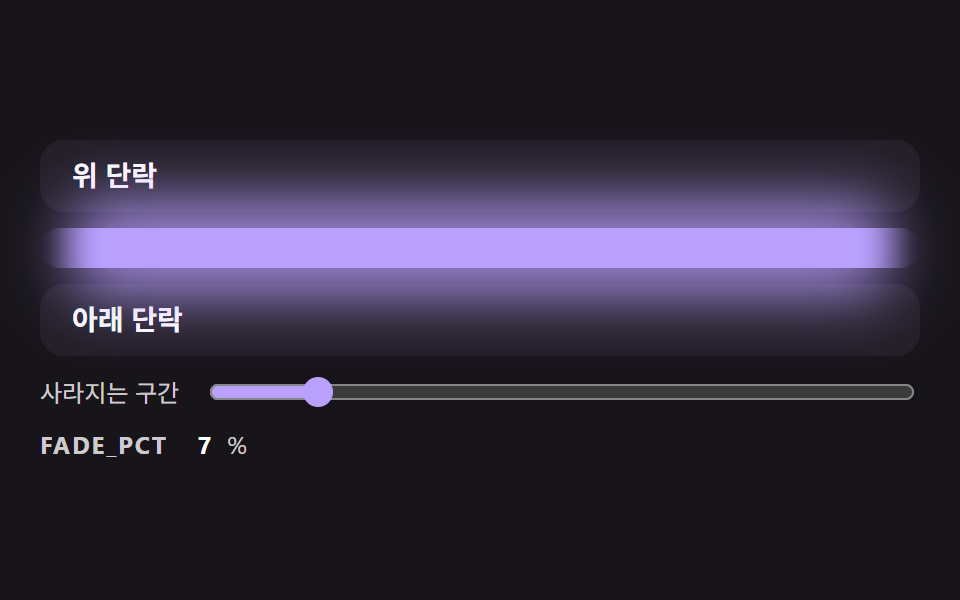 トランジションcss 区切り線 9パターン — 両端が消えて文字の幅で線が分かれる区切りの場面
 トランジション【コピペOK】CSS モーダル アニメーション 9選(dialog 対応)
 トランジションメガメニュー css 9選 — リンクの羅列からサイトの地図へ
 トランジション絞り込み ui9選 — パネルスライドからチップ削除まで
 トランジションカート ドロワー UIパターン9選 — スプリングからバッジ慣性まで
 トランジションカルーセル スライド 9種 — 慣性ドラッグから3D遠近切替まで
 トランジション画面 切り替え アニメーション css 9パターン
 トランジションモーダル アニメーション 9種 — ばね・円マスク・画素で開閉