ストップウォッチ 9種 — 滑らかに回る秒針からラップ記録とタイム比較まで
ストップウォッチは時間をどうやって数字と針に変えるのでしょうか。01番は整数のセンチ秒ひとつから秒針の角度を決め、03番はラップと累計を一つの表で計算し、08番は前回の記録の影の針と今の針の差を読みます。
ストップウォッチは時計を読むことではなく、経過した時間を整数ひとつで数え、その整数から数字も針の角度もすべて計算する仕組みです — ストップウォッチを作るときは数える単位をひとつに決めるところから始まります
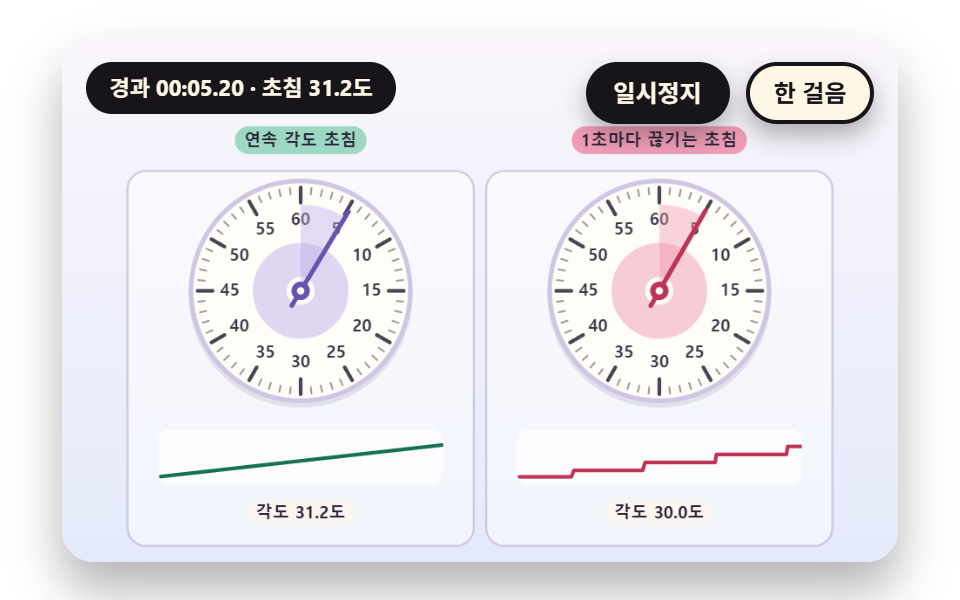 01 sc-stopwatch-dial-continuous-second-hand
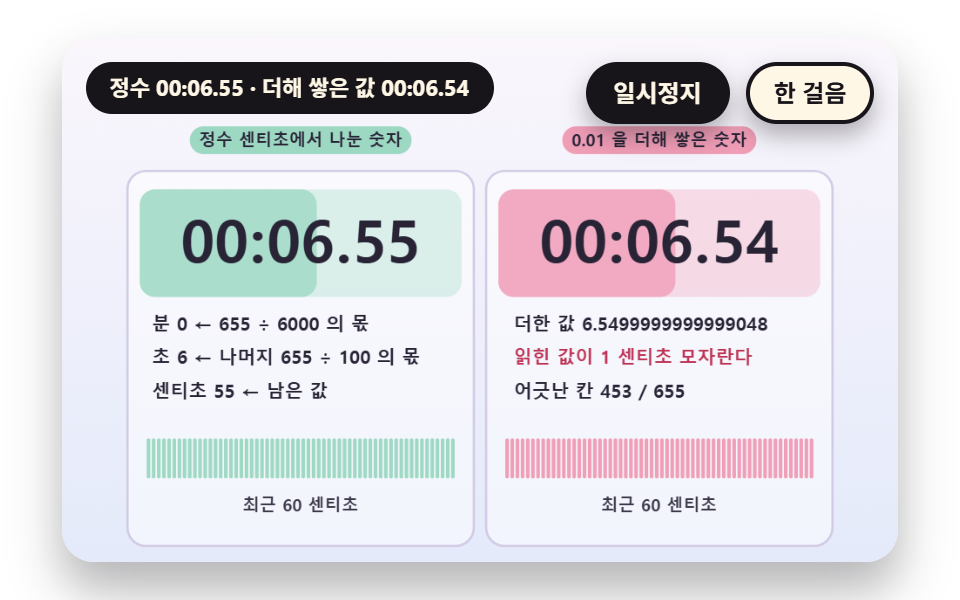 02 sc-stopwatch-digit-readout-integer-centisecond
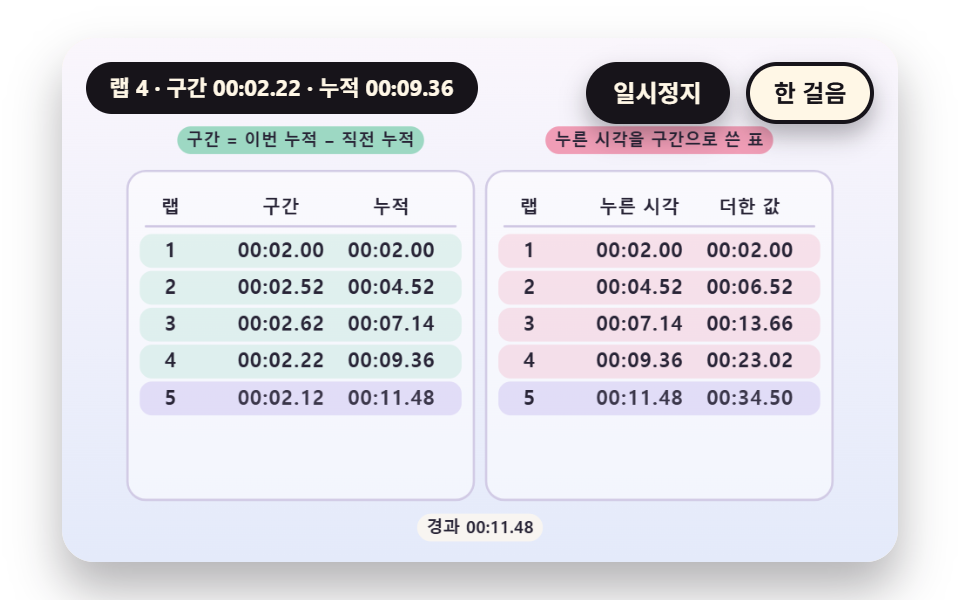 03 sc-stopwatch-lap-split-table-subtract-previous
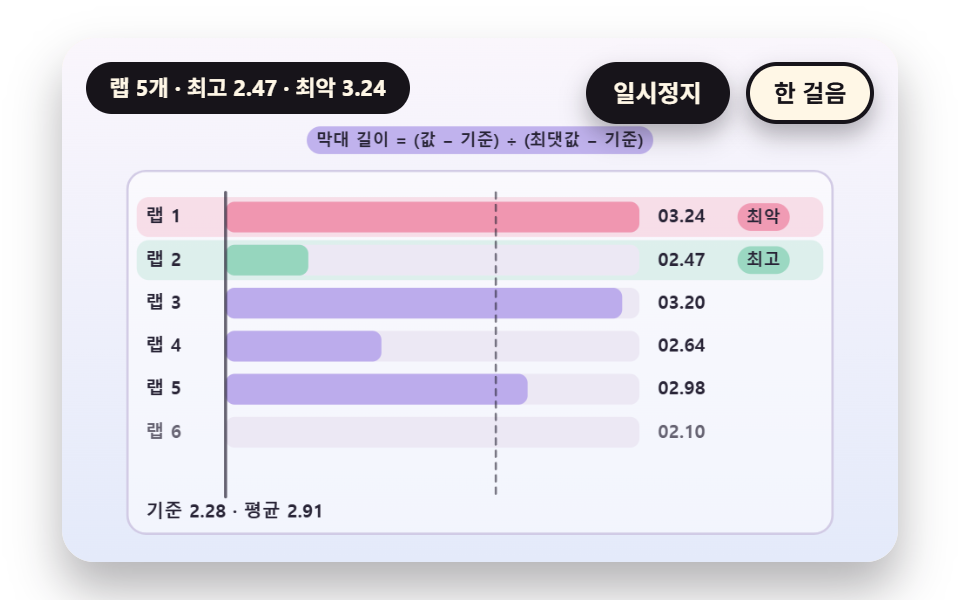 04 sc-stopwatch-lap-bars-best-worst-normalize
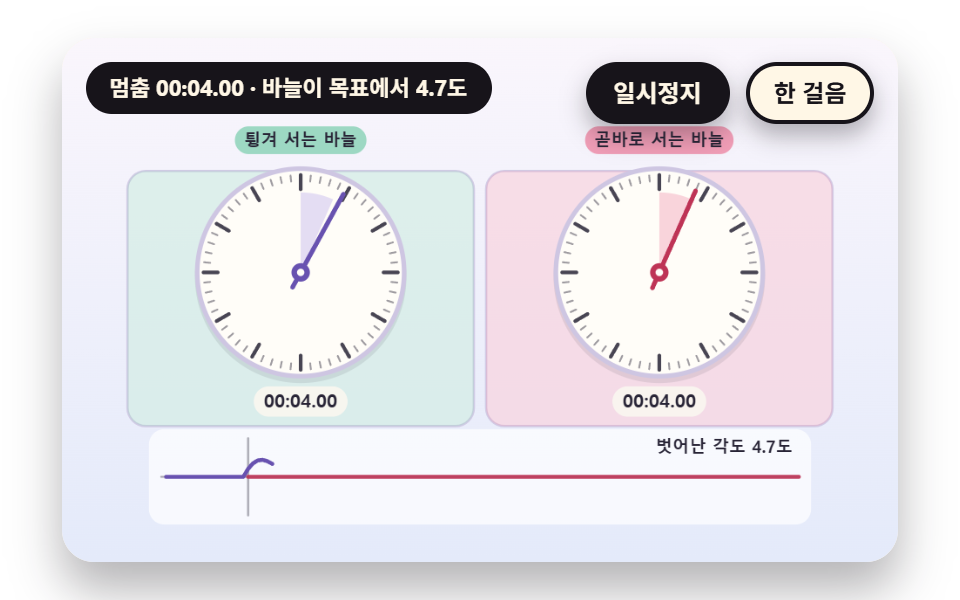 05 sc-stopwatch-stop-spring-hand-overshoot
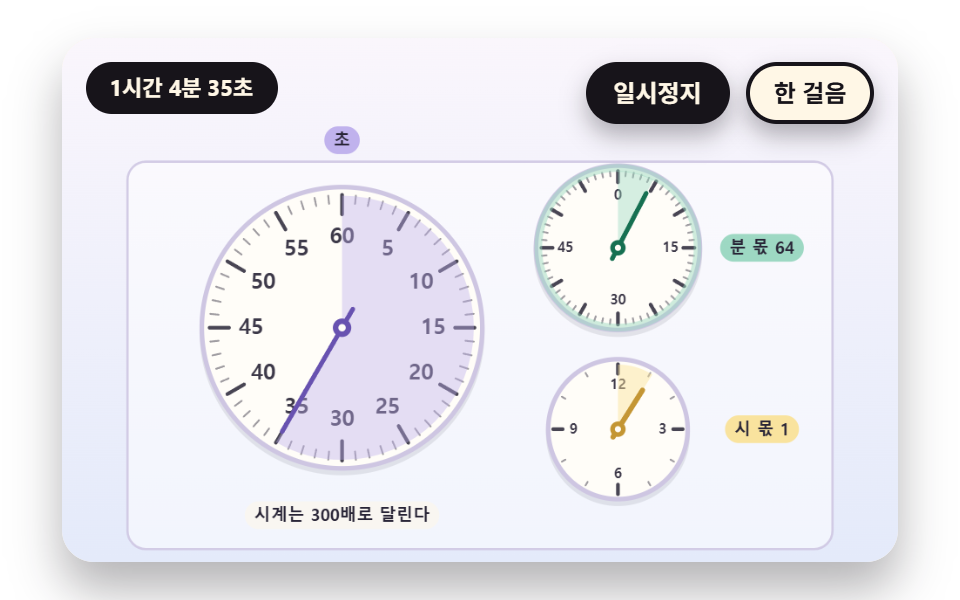 06 sc-stopwatch-subdial-minute-hour-accumulate
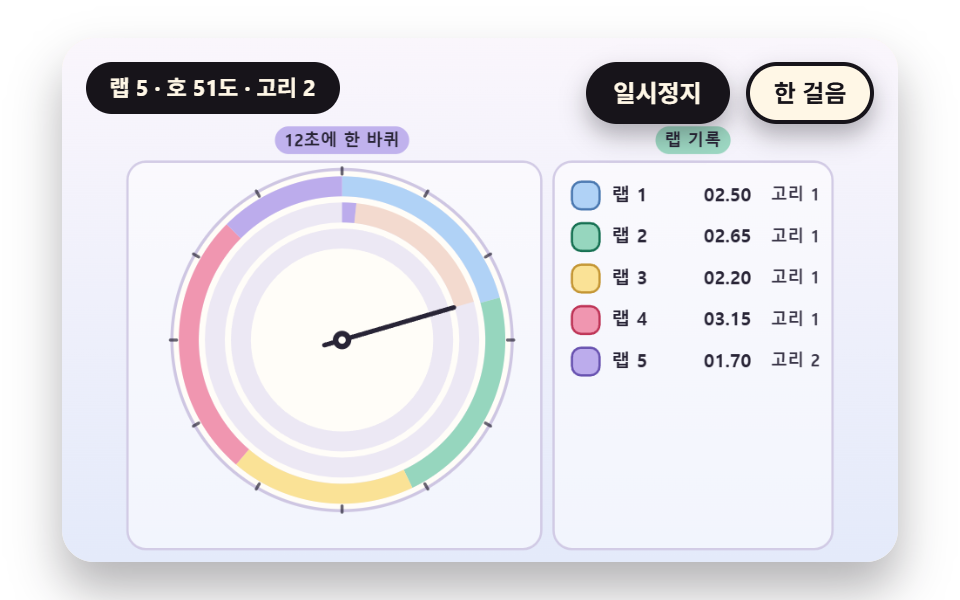 07 sc-stopwatch-lap-trail-ring-arc-per-lap
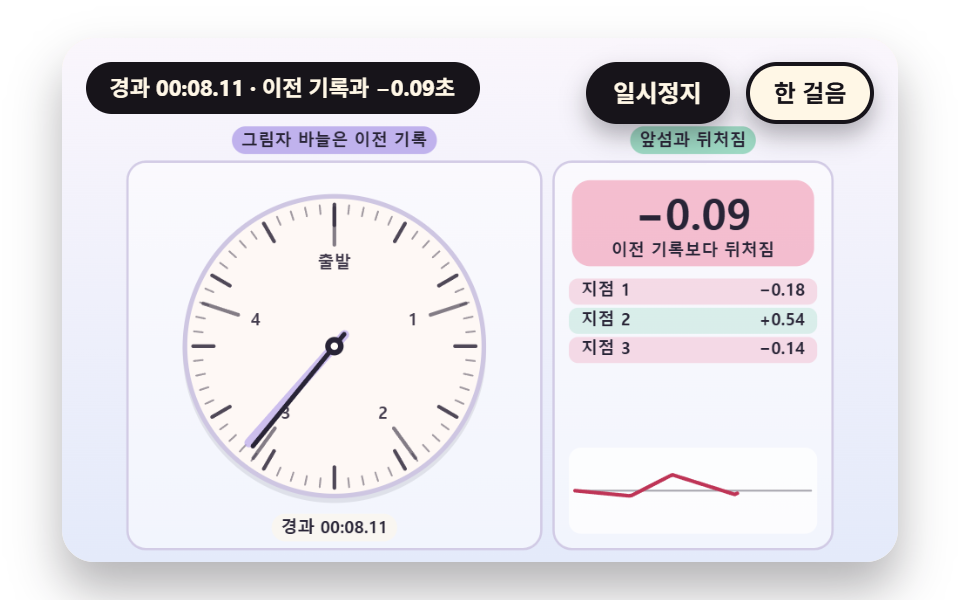 08 sc-stopwatch-ghost-hand-pace-compare
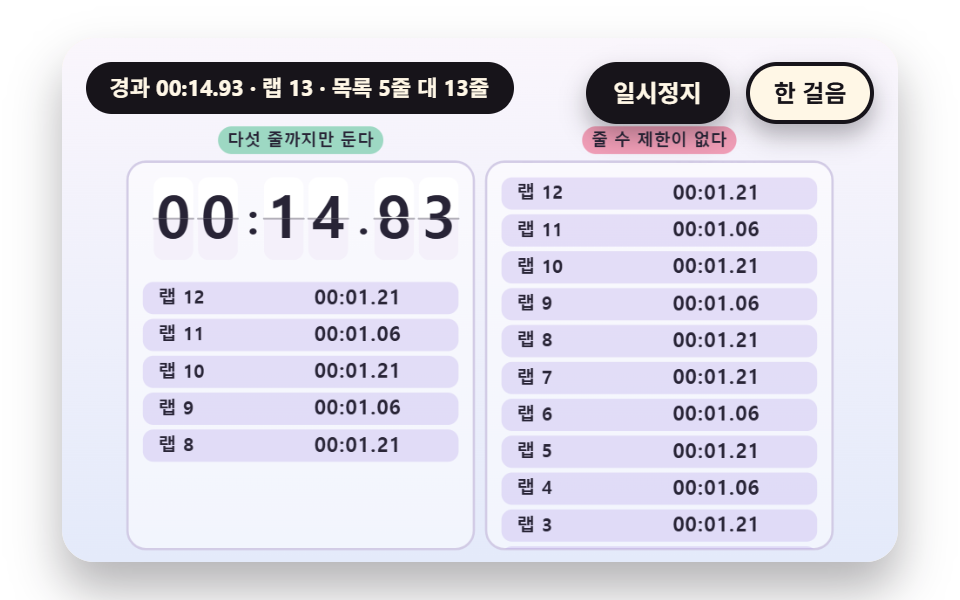 09 sc-stopwatch-hero-scoreboard-digit-flip
自動再生 · タイルを押すとその項目へ · すべて1つのzip
- 01 途切れず回る秒針の文字盤
- 02 分・秒・センチ秒に分けて表示する数字盤
- 03 ラップと累計をひとつの表で計算する記録表
- 04 ラップの長さを棒で比べ最速と最遅を示す比較
- 05 止めるときに針が一度弾んで止まるバネの停止
- 06 分と時間を数える補助文字盤
- 07 ラップごとに色の弧を残す軌跡のリング
- 08 前回の記録の影の針と競う比較
- 09 大きな数字盤とラップ一覧を組み合わせた電光掲示のヒーロー
九つの場面が時間を数えて読む方法は、ひとつで同じです。経過時間はセンチ秒(100分の1秒)の整数ひとつで、数字盤の分・秒・センチ秒も文字盤の針の角度もラップの区間も、この整数からだけ計算されます。時間の元は場面の時計 sceneT ひとつで、フレームごとに rAF のタイムスタンプの差 dt を足し、一コマが DT_MAX の0.05秒を超えないように切ります。
並び順は針ひとつから記録へ広がります。01・02は針と数字盤を、03・04はラップの記録を表と棒で、05・06は停止のときの弾みと時間が繰り上がる補助文字盤を、07・08・09はラップが積み上げる輪と影の針と電光掲示を扱います。
ストップウォッチ 9種 — 秒針が滑らかに回る文字盤・分 秒 センチ秒に分ける数字表示・ラップと累計を並べる記録表・ラップの長さを比べる棒・止めるときに針が弾むバネ・分と時間を数える補助文字盤・ラップごとに弧を残す軌跡のリング・前回の記録と競う影の針・電光掲示のヒーロー
九つの場面の面積と動き
| 場面 | 累計面積 | 動いたフレーム | 強度の平均 |
|---|---|---|---|
| 01 連続の秒針 | 9.9% | 23/23 | 43.9 |
| 02 センチ秒の数字盤 | 12.3% | 23/23 | 68.1 |
| 03 ラップの分割表 | 11.1% | 23/23 | 56.9 |
| 04 ラップの棒 | 8.9% | 23/23 | 49.6 |
| 05 バネの停止 | 21.0% | 23/23 | 95.7 |
| 06 補助文字盤 | 11.1% | 23/23 | 39.7 |
| 07 軌跡のリング | 9.2% | 23/23 | 102.4 |
| 08 影の針 | 18.3% | 23/23 | 90.6 |
| 09 電光掲示 | 20.6% | 23/23 | 95.7 |
針が大きく弾んで二つの盤がいっしょに光る05が21.0%でいちばん広く、棒だけが伸びる04が8.9%でいちばん狭くなっています。強度の平均は07が102.4で最も高く06が39.7で最も低く、動いたフレームは九つの場面とも23/23なので、止まる区間がなく変わり続けます。
01途切れず回る秒針の文字盤
秒針の角度はセンチ秒の整数ひとつから HAND_ANGLE(cs) で決まり、TURN_CS の6000で一周します。目盛りは TICK_COUNT の60本で MAJOR_EVERY の5本ごとに太く、右の盤は秒単位の値 stepCs() でしか針を立てないのでカクカク動き、秒が変わるたびにハブからふちへ波紋が広がります。運動の記録・実験・料理の時間を測る文字盤のストップウォッチに使えます。
<main class="stage">
<div class="vj is-demo" id="vj">
  <div class="vj__pad" data-role="pad" tabindex="0" role="application" aria-label="ストップウォッチの舞台 — Enter・Space・R・クリックで最初から、P で一時停止、N で一歩">
    <canvas class="vj__canvas" data-role="canvas" width="480" height="300" role="img" aria-label="左は、角度をセンチ秒の整数から作るので途切れず回る秒針の文字盤です。右は、秒単位に切り下げた値から角度を作るので一秒ごとに一目盛りずつ動く文字盤です。目盛りは60本で5本ごとに太く、各文字盤の下の帯が直近4秒の角度の変化をなめらかな線と階段の線で描きます。秒が変わるたびにハブからふちへ波紋が広がります"></canvas>
  </div>
  <p class="vj__status" data-role="status" aria-live="off">ストップウォッチのデモ</p>
  <div class="vj__ctrl">
    <button class="vj__pause" data-role="pause" type="button" aria-pressed="false">一時停止</button>
    <button class="vj__step" data-role="step" type="button">一歩進める</button>
  </div>
  <p class="vj__done" data-role="done" role="status" aria-live="polite"></p>
</div>
</main>
@use "../../../../site/static/demo-tokens" as *;
@include stage($stage-paper);
.vj {
position: relative;
width: min(92vw, calc(160vh - 12.8vw));
aspect-ratio: 480 / 300;
margin: 0 auto;
border-radius: $r-card;
overflow: hidden;
box-shadow: $shadow-raised;
background: $subject-cream;
}
// 무대 상자 — 누르거나 Enter·Space·R 을 치면 처음부터 다시 시작한다. 키보드 포커스도 여기서 받는다(touch-action: none 은 이 상자에만). 무대 밖 터치는 페이지 스크롤 그대로
.vj__pad {
position: absolute;
inset: 0;
border-radius: inherit;
outline: none;
touch-action: none;
cursor: pointer;
}
// 바깥 .vj 가 넘침을 자르므로 포커스 테두리는 안쪽으로 들인다
.vj__pad:focus-visible {
outline: 3px solid $subject-ink;
outline-offset: -3px;
}
.vj__canvas {
position: absolute;
inset: 0;
display: block;
width: 100%;
height: 100%;
}
.vj__ctrl {
position: absolute;
right: $sp-3;
top: $sp-3;
display: flex;
gap: $sp-2;
}
.vj__pause,
.vj__step {
padding: $sp-1 $sp-3;
border: 2px solid $subject-ink;
border-radius: $r-pill;
background: $subject-ink;
color: $subject-cream;
font-family: inherit;
font-weight: 700;
font-size: 12px;
line-height: 1.6;
cursor: pointer;
box-shadow: $shadow-press;
transition: transform $dur-quick $ease-spring;
}
.vj__step {
background: $subject-cream;
color: $subject-ink;
}
// 스크린리더에만 읽히는 완료 알림
.vj__done {
position: absolute;
width: 1px;
height: 1px;
margin: 0;
overflow: hidden;
clip-path: inset(50%);
white-space: nowrap;
}
// 눌린 상태(멈춤) — 바탕과 글자색을 뒤집어 aria-pressed 가 눈에도 보이게
.vj__pause[aria-pressed="true"] {
background: $subject-cream;
color: $subject-ink;
}
.vj__pause:hover,
.vj__step:hover {
transform: translateY(-2px);
}
.vj__pause:active,
.vj__step:active {
transform: translateY(1px);
}
.vj__pause:focus-visible,
.vj__step:focus-visible {
outline: 3px solid $subject-ink;
outline-offset: 3px;
}
// 상태 줄 — 지금 장면의 수치를 글자로. 시연 중에는 aria-live off, 사람이 처음 손대면 polite
.vj__status {
position: absolute;
left: $sp-3;
top: $sp-3;
max-width: calc(100% - 190px);
margin: 0;
padding: $sp-1 $sp-3;
border-radius: $r-pill;
background: $subject-ink;
color: $subject-cream;
font-weight: 700;
font-size: 11px;
line-height: 1.6;
white-space: nowrap;
overflow: hidden;
text-overflow: ellipsis;
pointer-events: none;
}
@media (max-width: 340px) {
.vj__pause,
.vj__step,
.vj__status { font-size: 10px; padding: 0 $sp-2; }
}
// 움직임 줄이기 — 장면은 스크립트가 정지 장면 한 장으로 멈춘다. 버튼도 떠오르지 않게
@media (prefers-reduced-motion: reduce) {
.vj__pause,
.vj__step { transition: none !important; }
.vj__pause:hover,
.vj__pause:active,
.vj__step:hover,
.vj__step:active { transform: none !important; }
}html, body {
margin: 0;
overflow: hidden;
}
.stage {
box-sizing: border-box;
min-height: 100vh;
display: grid;
place-items: center;
margin: 0;
background: #ffffff;
font-family: -apple-system, "Segoe UI", "Noto Sans KR", sans-serif;
padding: clamp(8px, 4vw, 24px);
}
.vj {
position: relative;
width: min(92vw, 160vh - 12.8vw);
aspect-ratio: 480/300;
margin: 0 auto;
border-radius: 16px;
overflow: hidden;
box-shadow: 0 14px 24px rgba(23, 20, 26, 0.32);
background: #fff7e6;
}
.vj__pad {
position: absolute;
inset: 0;
border-radius: inherit;
outline: none;
touch-action: none;
cursor: pointer;
}
.vj__pad:focus-visible {
outline: 3px solid #17141a;
outline-offset: -3px;
}
.vj__canvas {
position: absolute;
inset: 0;
display: block;
width: 100%;
height: 100%;
}
.vj__ctrl {
position: absolute;
right: 12px;
top: 12px;
display: flex;
gap: 8px;
}
.vj__pause,
.vj__step {
padding: 4px 12px;
border: 2px solid #17141a;
border-radius: 999px;
background: #17141a;
color: #fff7e6;
font-family: inherit;
font-weight: 700;
font-size: 12px;
line-height: 1.6;
cursor: pointer;
box-shadow: 0 6px 12px rgba(23, 20, 26, 0.32);
transition: transform 220ms cubic-bezier(0.2, 0.8, 0.2, 1);
}
.vj__step {
background: #fff7e6;
color: #17141a;
}
.vj__done {
position: absolute;
width: 1px;
height: 1px;
margin: 0;
overflow: hidden;
clip-path: inset(50%);
white-space: nowrap;
}
.vj__pause[aria-pressed=true] {
background: #fff7e6;
color: #17141a;
}
.vj__pause:hover,
.vj__step:hover {
transform: translateY(-2px);
}
.vj__pause:active,
.vj__step:active {
transform: translateY(1px);
}
.vj__pause:focus-visible,
.vj__step:focus-visible {
outline: 3px solid #17141a;
outline-offset: 3px;
}
.vj__status {
position: absolute;
left: 12px;
top: 12px;
max-width: calc(100% - 190px);
margin: 0;
padding: 4px 12px;
border-radius: 999px;
background: #17141a;
color: #fff7e6;
font-weight: 700;
font-size: 11px;
line-height: 1.6;
white-space: nowrap;
overflow: hidden;
text-overflow: ellipsis;
pointer-events: none;
}
@media (max-width: 340px) {
.vj__pause,
.vj__step,
.vj__status {
font-size: 10px;
padding: 0 8px;
}
}
@media (prefers-reduced-motion: reduce) {
.vj__pause,
.vj__step {
transition: none !important;
}
.vj__pause:hover,
.vj__pause:active,
.vj__step:hover,
.vj__step:active {
transform: none !important;
}
}(function () {
const root = document.getElementById("vj");
if (!root) return;
// 무대 좌표 — 캔버스 안 계산은 늘 480×300. 화면에 보이는 크기와 상관없다
const W = 480;
const H = 300;
const PI = Math.PI;
const TAU = Math.PI * 2;
function clamp(v, lo, hi) { return v < lo ? lo : (v > hi ? hi : v); }
function lerp(a, b, k) { return a + (b - a) * k; }
function ease(x) { const c = clamp(x, 0, 1); return c * c * (3 - 2 * c); }
// 시드 고정 난수 — 선형 합동 생성기(곱 1664525, 더함 1013904223). 같은 시드면 같은 수열
function seeded(seed) {
let s = (seed >>> 0) || 1;
return function () {
s = (Math.imul(s, 1664525) + 1013904223) >>> 0;
return s / 4294967296;
};
}
// 파스텔 팔레트 — 글자는 늘 INK, 면은 연한 색. 앞섬은 민트, 뒤처짐은 분홍, 바늘은 라벤더·잉크
const BG_TOP = [250, 246, 252];
const BG_BOT = [228, 234, 250];
const FACE = [255, 253, 248];
const FACE_EDGE = [206, 198, 226];
const SKY = [176, 210, 246];
const SKY_DEEP = [74, 120, 176];
const GOLD = [250, 226, 150];
const GOLD_DEEP = [196, 150, 52];
const ROSE = [240, 150, 176];
const ROSE_DEEP = [190, 52, 86];
const MINT = [150, 214, 190];
const MINT_DEEP = [22, 112, 82];
const LAV = [188, 172, 236];
const LAV_DEEP = [104, 82, 176];
const INK = [40, 36, 54];
const PAPER = [250, 246, 240];
function mix(a, b, k) { return [lerp(a[0], b[0], k), lerp(a[1], b[1], k), lerp(a[2], b[2], k)]; }
function rgba(c, a) {
return 'rgba(' + Math.round(clamp(c[0], 0, 255)) + ',' + Math.round(clamp(c[1], 0, 255)) + ',' + Math.round(clamp(c[2], 0, 255)) + ',' + clamp(a, 0, 1).toFixed(3) + ')';
}
// 장면 시계(秒)·판 반복 번호·시간표 — 시간표는 (시각, 할 일) 목록이고 시각이 지나면 한 번씩 부른다
// sceneT 는 rAF 타임스탬프 차이(dt, 한 프레임 0.05秒 상한)를 쌓은 값 하나뿐이다 — 이 장면의 시간 원천은 이것 하나
let sceneT = 0;
let lap = 0;
let script = [];
let evAt = 0;
// ── 스톱워치 계산 ─────────────────────────────────────────
// 경과 시간은 센티초 정수 하나다. 숫자판의 분·秒·센티초도, 문자반의 각도도 이 정수 하나에서만 나온다
const CS_PER_SEC = 100;
const CS_PER_MIN = 6000;
let swStart = 0;
let swStop = -1;
// 장면 시각 t 에서의 경과 센티초 — 시작 전이면 0, 정지 뒤에는 정지 순간 값에 멈춘다
function swCs(t) {
const e = Math.min(t, swStop >= 0 ? swStop : 1e9) - swStart;
return e <= 0 ? 0 : Math.floor(e * CS_PER_SEC + 1e-6);
}
// ラップ — 누른 순간의 累計 센티초 목록. 값은 장면 시각 t 로 계산하므로 프레임 길이와 상관없다
let marks = [];
function pressLap(t) { marks.push(swCs(t)); }
// ラップ 区間 = 今の累計 − 直前の累計
function lapSpan(i) { return marks[i] - (i > 0 ? marks[i - 1] : 0); }
function pad2(n) { return n < 10 ? '0' + n : String(n); }
// 센티초 → [분, 秒, 센티초] — 정수 나눗셈만 쓴다
function splitCs(cs) {
const m = Math.floor(cs / CS_PER_MIN);
const r = cs - m * CS_PER_MIN;
const s = Math.floor(r / CS_PER_SEC);
return [m, s, r - s * CS_PER_SEC];
}
function fmtCs(cs) {
const p = splitCs(cs);
return pad2(p[0]) + ':' + pad2(p[1]) + '.' + pad2(p[2]);
}
// 문자반 각도(라디안, 12시가 -π/2) — turnCs 센티초에 한 바퀴
function dialAng(cs, turnCs) { return ((cs % turnCs) / turnCs) * TAU - PI / 2; }
// 스톱워치 장면의 시작 상태 — 매 판 build() 맨 앞에서 부른다
function swReset() {
swStart = 0;
swStop = -1;
marks = [];
}
const canvasEl = root.querySelector('[data-role="canvas"]');
const padEl = root.querySelector('[data-role="pad"]');
const pauseEl = root.querySelector('[data-role="pause"]');
const statusEl = root.querySelector('[data-role="status"]');
const stepEl = root.querySelector('[data-role="step"]');
const doneEl = root.querySelector('[data-role="done"]');
const ctxRaw = canvasEl ? canvasEl.getContext('2d') : null;
if (!canvasEl || !ctxRaw || !pauseEl || !padEl || !stepEl || !doneEl) {
return;
}
const cv = canvasEl;
const ctx = ctxRaw;
const pauseBtn = pauseEl;
const stepBtn = stepEl;
const doneP = doneEl;
const pad = padEl;
// 외부 웹폰트는 부르지 않는다 — 기기에 있는 글꼴 목록만
const FONT_STACK = 'system-ui, -apple-system, "Segoe UI", "Noto Sans KR", sans-serif';
let dpr = 1;
function fitCanvas() {
// 배율은 2 에서 자른다 — 배율 3 기기에서 화소가 2.25배로 늘지 않게
dpr = Math.min(window.devicePixelRatio || 1, 2);
cv.width = Math.round(W * dpr);
cv.height = Math.round(H * dpr);
ctx.setTransform(dpr, 0, 0, dpr, 0, 0);
}
const VIEW_S = 0.88;
function skyFill(top, bot) {
ctx.setTransform(dpr, 0, 0, dpr, 0, 0);
const g = ctx.createLinearGradient(0, 0, 0, H);
g.addColorStop(0, rgba(top, 1));
g.addColorStop(1, rgba(bot, 1));
ctx.fillStyle = g;
ctx.fillRect(0, 0, W, H);
// 위쪽 一時停止·상태 알약이 덮는 띠를 비우려고 장면 전체를 VIEW_S 배로 줄여 아래 가운데에 붙인다 — 이 줄 뒤에 그리는 것은 모두 줄어든 좌표계
ctx.translate(W / 2, H - 3);
ctx.scale(VIEW_S, VIEW_S);
ctx.translate(-W / 2, -(H - 3));
}
function disc(x, y, r, c, a) {
if (r <= 0.2 || a <= 0) {
return;
}
ctx.beginPath();
ctx.arc(x, y, r, 0, TAU);
ctx.fillStyle = rgba(c, a);
ctx.fill();
}
function ring(x, y, r, width, c, a) {
if (r <= 0.2 || a <= 0) {
return;
}
ctx.beginPath();
ctx.arc(x, y, r, 0, TAU);
ctx.lineWidth = width;
ctx.strokeStyle = rgba(c, a);
ctx.stroke();
}
function oval(x, y, rx, ry, c, a) {
if (rx <= 0.2 || ry <= 0.1 || a <= 0) {
return;
}
ctx.beginPath();
ctx.ellipse(x, y, rx, ry, 0, 0, TAU);
ctx.fillStyle = rgba(c, a);
ctx.fill();
}
function seg(x1, y1, x2, y2, width, c, a) {
if (a <= 0) {
return;
}
ctx.beginPath();
ctx.moveTo(x1, y1);
ctx.lineTo(x2, y2);
ctx.lineWidth = width;
ctx.lineCap = 'round';
ctx.strokeStyle = rgba(c, a);
ctx.stroke();
}
function box(x, y, w, h, r, c, a) {
if (w <= 0.2 || h <= 0.2 || a <= 0) {
return;
}
ctx.beginPath();
ctx.roundRect(x, y, w, h, Math.max(0, Math.min(r, w / 2, h / 2)));
ctx.fillStyle = rgba(c, a);
ctx.fill();
}
function outline(x, y, w, h, r, width, c, a) {
if (w <= 0.2 || h <= 0.2 || a <= 0) {
return;
}
ctx.beginPath();
ctx.roundRect(x, y, w, h, Math.max(0, Math.min(r, w / 2, h / 2)));
ctx.lineWidth = width;
ctx.strokeStyle = rgba(c, a);
ctx.stroke();
}
function text(s, x, y, c, a, px, weight, align) {
ctx.font = weight + ' ' + px + 'px ' + FONT_STACK;
ctx.textAlign = align;
ctx.textBaseline = 'middle';
ctx.fillStyle = rgba(c, a);
ctx.fillText(s, x, y);
}
// 글자 이름표 — 바탕 알약 위에 글자
function tag(s, x, y, bg, fg, px, align) {
ctx.font = '700 ' + px + 'px ' + FONT_STACK;
const w = ctx.measureText(s).width + px * 1.1;
const left = align === 'center' ? x - w / 2 : (align === 'right' ? x - w : x);
box(left, y - px * 0.82, w, px * 1.64, px * 0.82, bg, 0.92);
text(s, left + w / 2, y + 0.5, fg, 1, px, 700, 'center');
}
// ── 공통 틀 ───────────────────────────────────────────────
let shownStatus = '';
function pushStatus(s) {
if (!statusEl || s === shownStatus) {
return;
}
shownStatus = s;
statusEl.textContent = s;
}
let paused = false;
const reduceQuery = window.matchMedia('(prefers-reduced-motion: reduce)');
// 페이지를 연 채 움직임 줄이기 설정을 바꿔도 change 리스너가 다시 읽는다
let still = reduceQuery.matches;
// 자동 시연 표시 — 사람이 처음 손대면 떼고 상태 줄을 polite 로 켠다
let demo = root.classList.contains('is-demo');
const off = new AbortController();
function wake() {
if (!demo) {
return;
}
demo = false;
root.classList.remove('is-demo');
if (statusEl) {
statusEl.setAttribute('aria-live', 'polite');
}
}
// 한 판 시연이 끝났음을 스크린리더에 한 번만 알린다 — 판이 되풀이돼도 다시 읽지 않는다
let doneSaid = false;
function checkDone() {
if (!doneSaid && sceneT >= RESULT_S) {
doneSaid = true;
doneP.textContent = statusText();
}
}
function advance(dt) {
sceneT += dt;
while (evAt < script.length && script[evAt].t <= sceneT) {
const ev = script[evAt];
evAt += 1;
ev.f();
}
if (sceneT >= LAP_S) {
lap += 1;
begin();
return;
}
update(dt);
}
// 첫 판은 START_S 만큼 앞서 시작한다 — 바늘이 이미 도는 장면에서 보인다
function runTo(t) {
while (sceneT < t - 1e-6) {
advance(Math.min(1 / 30, t - sceneT));
}
}
function begin() {
sceneT = 0;
evAt = 0;
script = [];
build();
if (lap === 0 && !still) {
runTo(START_S);
}
}
const DT_MAX = 0.05;
function showNow() {
draw();
pushStatus(statusText());
checkDone();
}
let rafId = 0;
let lastTs = -1;
function frame(ts) {
if (still || paused) {
rafId = 0;
return;
}
if (lastTs < 0) {
lastTs = ts;
}
const dt = Math.min((ts - lastTs) / 1000, DT_MAX);
lastTs = ts;
if (dt > 0) {
advance(dt);
}
showNow();
rafId = window.requestAnimationFrame(frame);
}
function startLoop() {
if (rafId) {
return;
}
// 멈췄던 사이의 시간을 첫 프레임 dt 로 넘기지 않는다
lastTs = -1;
rafId = window.requestAnimationFrame(frame);
}
function stopLoop() {
if (rafId) {
window.cancelAnimationFrame(rafId);
rafId = 0;
}
}
// 움직임 줄이기 — 루프 없이 한 판의 멈춘 한 장. 시간표의 REST_S 秒 장면에서 멈춘다
function showRest() {
stopLoop();
sceneT = 0;
evAt = 0;
script = [];
build();
runTo(REST_S);
doneSaid = false;
showNow();
}
function play() {
begin();
showNow();
if (!paused) {
startLoop();
}
}
function togglePause() {
paused = !paused;
pauseBtn.setAttribute('aria-pressed', paused ? 'true' : 'false');
wake();
if (paused) {
stopLoop();
}
else if (!still) {
startLoop();
}
}
// 다시 — 시간표를 처음부터 다시. 움직임 줄이기에서는 멈춘 한 장
function restart() {
lap += 1;
doneSaid = false;
if (still) {
showRest();
return;
}
begin();
showNow();
if (!paused) {
startLoop();
}
}
// 一歩進める — 멈춘 채 시간표의 다음 일 하나까지 시계를 보낸다. 더 부를 일이 없으면 판을 다시 연다
function stepOnce() {
wake();
if (!paused) {
paused = true;
pauseBtn.setAttribute('aria-pressed', 'true');
stopLoop();
}
if (evAt >= script.length) {
restart();
return;
}
runTo(script[evAt].t + 0.05);
showNow();
}
pauseBtn.addEventListener('click', togglePause, { signal: off.signal });
stepBtn.addEventListener('click', stepOnce, { signal: off.signal });
// 키보드 — 무대에 포커스가 있을 때만. Enter·Space·R 은 처음부터 다시, P 는 一時停止, N 은 一歩進める
pad.addEventListener('keydown', function (e) {
if (e.altKey || e.ctrlKey || e.metaKey) {
return;
}
const k = e.key;
if (k === 'Enter' || k === ' ') {
e.preventDefault();
wake();
restart();
}
else if (k === 'p' || k === 'P') {
togglePause();
}
else if (k === 'n' || k === 'N') {
stepOnce();
}
else if (k === 'r' || k === 'R') {
wake();
restart();
}
}, { signal: off.signal });
// 마우스·터치 — 무대를 누르면 처음부터 다시
pad.addEventListener('click', function () {
wake();
restart();
}, { signal: off.signal });
// 탭이 숨으면 멈추고, 돌아오면 시계를 다시 맞춰 시작 — 숨은 동안의 몇 초가 한 프레임에 몰리지 않게
document.addEventListener('visibilitychange', function () {
if (document.hidden) {
stopLoop();
}
else if (!paused && !still) {
startLoop();
}
}, { signal: off.signal });
// 설정이 바뀌면 — 켜지면 결과 한 장, 꺼지면 다시 움직인다
reduceQuery.addEventListener('change', function () {
still = reduceQuery.matches;
if (still) {
showRest();
}
else {
lap = 0;
play();
}
}, { signal: off.signal });
window.addEventListener('resize', function () {
fitCanvas();
showNow();
}, { signal: off.signal });
// ── 문자반·숫자판 도구 ─────────────────────────────────────
const PEACH = [250, 204, 170];
const PEACH_DEEP = [176, 92, 40];
// 안쪽에서 바깥쪽으로 — 눈금 ticks 개, majorEvery 번째마다 굵게, labelEvery 번째마다 숫자
function dialFace(cx, cy, R, ticks, majorEvery, labels, labelEvery) {
disc(cx, cy + 3, R + 3, INK, 0.1);
disc(cx, cy, R + 3, FACE_EDGE, 1);
disc(cx, cy, R, FACE, 1);
for (let i = 0; i < ticks; i += 1) {
const a = (i / ticks) * TAU - PI / 2;
const major = i % majorEvery === 0;
const r0 = R * (major ? 0.82 : 0.9);
const r1 = R * 0.96;
seg(cx + Math.cos(a) * r0, cy + Math.sin(a) * r0, cx + Math.cos(a) * r1, cy + Math.sin(a) * r1, major ? 2.4 : 1.2, INK, major ? 0.85 : 0.45);
if (labels.length > 0 && i % labelEvery === 0) {
const k = Math.floor(i / labelEvery);
if (k < labels.length) {
text(labels[k], cx + Math.cos(a) * R * 0.66, cy + Math.sin(a) * R * 0.66, INK, 0.9, Math.max(9, Math.round(R * 0.15)), 700, 'center');
}
}
}
}
function handAt(cx, cy, ang, len, tail, width, c, a) {
seg(cx - Math.cos(ang) * tail, cy - Math.sin(ang) * tail, cx + Math.cos(ang) * len, cy + Math.sin(ang) * len, width, c, a);
}
function hub(cx, cy, r, c) {
disc(cx, cy, r, c, 1);
disc(cx, cy, r * 0.4, FACE, 1);
}
// 12시에서 ang 까지 칠하는 부채꼴
function wedge(cx, cy, r, ang, c, a) {
if (ang <= -PI / 2 + 0.002) {
return;
}
ctx.beginPath();
ctx.moveTo(cx, cy);
ctx.arc(cx, cy, r, -PI / 2, ang);
ctx.closePath();
ctx.fillStyle = rgba(c, a);
ctx.fill();
}
function arcBand(cx, cy, r, a0, a1, width, c, a) {
if (a1 - a0 < 0.0005 || a <= 0) {
return;
}
ctx.beginPath();
ctx.arc(cx, cy, r, a0, a1);
ctx.lineWidth = width;
ctx.lineCap = 'butt';
ctx.strokeStyle = rgba(c, a);
ctx.stroke();
}
function panel(x, y, w, h, c, a) {
box(x, y, w, h, 12, c, a);
outline(x, y, w, h, 12, 1.5, FACE_EDGE, 0.9);
}
// 한 글자씩 같은 칸에 가운데 맞춰 찍는다 — 숫자 폭이 달라도 자릿수가 흔들리지 않는다(tabular)
function digitsRow(s, cx, y, cellW, px, c, a) {
let total = 0;
for (let i = 0; i < s.length; i += 1) {
total += (s[i] === ':' || s[i] === '.') ? cellW * 0.55 : cellW;
}
let x = cx - total / 2;
for (let i = 0; i < s.length; i += 1) {
const w = (s[i] === ':' || s[i] === '.') ? cellW * 0.55 : cellW;
text(s[i], x + w / 2, y, c, a, px, 800, 'center');
x += w;
}
}
// ── 01 끊김 없이 도는 초침 문자반 ─────────────────────────
// 경과 시간은 센티초 정수 cs 하나. 왼쪽 바늘은 cs 전체에서, 오른쪽 바늘은 秒 단위로 내린 값에서 각도를 만든다
// 초가 바뀔 때마다 허브에서 두 문자반 가장자리로 퍼지는 파문의 반지름도 같은 센티초 나머지(cs % 100)에서 나온다
    const TURN_CS = 6000;
    const TICK_COUNT = 60;
    const MAJOR_EVERY = 5;
    const WINDOW_S = 4;
    const LAP_S = 15.0;
    const START_S = 3.7;
    const REST_S = 3.7;
    const RESULT_S = 13.0;
    let hist = [];
    function build() {
        swReset();
        hist = [];
    }
    function update(dt) {
        if (dt < 0) {
            return;
        }
        hist.push({ t: sceneT, cs: swCs(sceneT) });
        while (hist.length > 1 && hist[0].t < sceneT - WINDOW_S) {
            hist.shift();
        }
    }
    function handCs() { return swCs(sceneT); }
    function stepCs() { return Math.floor(handCs() / CS_PER_SEC) * CS_PER_SEC; }
    function HAND_ANGLE(cs) { return dialAng(cs, TURN_CS); }
function strip(x0, y0, w, h, stair) {
box(x0, y0, w, h, 8, [255, 255, 255], 0.7);
const c0 = swCs(sceneT - WINDOW_S);
ctx.save();
ctx.beginPath();
ctx.roundRect(x0, y0, w, h, 8);
ctx.clip();
ctx.beginPath();
for (let i = 0; i < hist.length; i += 1) {
const v = stair ? Math.floor(hist[i].cs / CS_PER_SEC) * CS_PER_SEC : hist[i].cs;
const x = x0 + w - ((sceneT - hist[i].t) / WINDOW_S) * w;
const y = y0 + h - 5 - clamp((v - c0) / (WINDOW_S * CS_PER_SEC + 100), 0, 1) * (h - 10);
if (i === 0) {
ctx.moveTo(x, y);
}
else {
ctx.lineTo(x, y);
}
}
ctx.lineWidth = 2.4;
ctx.lineJoin = 'round';
ctx.strokeStyle = rgba(stair ? ROSE_DEEP : MINT_DEEP, 1);
ctx.stroke();
ctx.restore();
}
function drawDial(cx, cy, R, cs, shown, c, deep) {
dialFace(cx, cy, R, TICK_COUNT, MAJOR_EVERY, ['60', '5', '10', '15', '20', '25', '30', '35', '40', '45', '50', '55'], MAJOR_EVERY);
// 초가 바뀌는 순간마다 허브에서 퍼지는 파문 — 반지름은 센티초 나머지(cs % 100)에서 계산한다
const frac = (cs % CS_PER_SEC) / CS_PER_SEC;
ring(cx, cy, R * (0.12 + 0.84 * frac), 22, c, 0.6 * (1 - frac));
const a = HAND_ANGLE(shown);
wedge(cx, cy, R * 0.8, a, c, 0.42);
handAt(cx, cy, a, R * 0.86, R * 0.16, 3, deep, 1);
hub(cx, cy, 6, deep);
}
function draw() {
skyFill(BG_TOP, BG_BOT);
const cs = handCs();
panel(10, 46, 226, 244, [255, 255, 255], 0.5);
panel(244, 46, 226, 244, [255, 255, 255], 0.5);
drawDial(123, 124, 70, cs, cs, LAV, LAV_DEEP);
drawDial(357, 124, 70, cs, stepCs(), ROSE, ROSE_DEEP);
strip(30, 214, 186, 36, false);
strip(264, 214, 186, 36, true);
tag('連続した角度の秒針', 123, 26, MINT, INK, 11, 'center');
tag('一秒ごとにカクつく秒針', 357, 26, ROSE, INK, 11, 'center');
tag('角度 {a}度'.replace('{a}', (((cs % TURN_CS) / TURN_CS) * 360).toFixed(1)), 123, 268, PAPER, INK, 11, 'center');
tag('角度 {a}度'.replace('{a}', (((stepCs() % TURN_CS) / TURN_CS) * 360).toFixed(1)), 357, 268, PAPER, INK, 11, 'center');
}
function statusText() {
return '経過 {t}・秒針 {a}度'.replace('{t}', fmtCs(handCs())).replace('{a}', (((handCs() % TURN_CS) / TURN_CS) * 360).toFixed(1));
}
fitCanvas();
if (still) {
showRest();
}
else {
play();
}
return function () {
stopLoop();
off.abort();
};
})();// DialContinuousSecondHand - 같은 항목 vanilla index.html 의 React 판. 같은 계산을 useEffect 안에서 돌린다
import { useEffect, useRef } from "react";
import styles from "./DialContinuousSecondHand.module.scss";
const cx = (s: string): string => s.split(" ").map((n) => styles[n] ?? n).join(" ");
export default function DialContinuousSecondHand() {
const rootRef = useRef<HTMLDivElement | null>(null);
useEffect(() => {
const rootEl = rootRef.current;
if (!rootEl) return;
const root: HTMLElement = rootEl;
type RGB = [number, number, number];
type RGBA = [number, number, number, number];
// 무대 좌표 — 캔버스 안 계산은 늘 480×300. 화면에 보이는 크기와 상관없다
const W = 480;
const H = 300;
const PI = Math.PI;
const TAU = Math.PI * 2;
function clamp(v: number, lo: number, hi: number): number { return v < lo ? lo : (v > hi ? hi : v); }
function lerp(a: number, b: number, k: number): number { return a + (b - a) * k; }
function ease(x: number): number { const c = clamp(x, 0, 1); return c * c * (3 - 2 * c); }
// 시드 고정 난수 — 선형 합동 생성기(곱 1664525, 더함 1013904223). 같은 시드면 같은 수열
function seeded(seed: number): () => number {
let s = (seed >>> 0) || 1;
return function (): number {
s = (Math.imul(s, 1664525) + 1013904223) >>> 0;
return s / 4294967296;
};
}
// 파스텔 팔레트 — 글자는 늘 INK, 면은 연한 색. 앞섬은 민트, 뒤처짐은 분홍, 바늘은 라벤더·잉크
const BG_TOP: RGB = [250, 246, 252];
const BG_BOT: RGB = [228, 234, 250];
const FACE: RGB = [255, 253, 248];
const FACE_EDGE: RGB = [206, 198, 226];
const SKY: RGB = [176, 210, 246];
const SKY_DEEP: RGB = [74, 120, 176];
const GOLD: RGB = [250, 226, 150];
const GOLD_DEEP: RGB = [196, 150, 52];
const ROSE: RGB = [240, 150, 176];
const ROSE_DEEP: RGB = [190, 52, 86];
const MINT: RGB = [150, 214, 190];
const MINT_DEEP: RGB = [22, 112, 82];
const LAV: RGB = [188, 172, 236];
const LAV_DEEP: RGB = [104, 82, 176];
const INK: RGB = [40, 36, 54];
const PAPER: RGB = [250, 246, 240];
function mix(a: RGB, b: RGB, k: number): RGB { return [lerp(a[0], b[0], k), lerp(a[1], b[1], k), lerp(a[2], b[2], k)]; }
function rgba(c: RGB, a: number): string {
return 'rgba(' + Math.round(clamp(c[0], 0, 255)) + ',' + Math.round(clamp(c[1], 0, 255)) + ',' + Math.round(clamp(c[2], 0, 255)) + ',' + clamp(a, 0, 1).toFixed(3) + ')';
}
// 장면 시계(초)·판 반복 번호·시간표 — 시간표는 (시각, 할 일) 목록이고 시각이 지나면 한 번씩 부른다
// sceneT 는 rAF 타임스탬프 차이(dt, 한 프레임 0.05초 상한)를 쌓은 값 하나뿐이다 — 이 장면의 시간 원천은 이것 하나
let sceneT = 0;
let lap = 0;
type Ev = { t: number; f: () => void };
let script: Ev[] = [];
let evAt = 0;
// ── 스톱워치 계산 ─────────────────────────────────────────
// 경과 시간은 센티초 정수 하나다. 숫자판의 분·초·센티초도, 문자반의 각도도 이 정수 하나에서만 나온다
const CS_PER_SEC = 100;
const CS_PER_MIN = 6000;
let swStart = 0;
let swStop = -1;
// 장면 시각 t 에서의 경과 센티초 — 시작 전이면 0, 정지 뒤에는 정지 순간 값에 멈춘다
function swCs(t: number): number {
const e = Math.min(t, swStop >= 0 ? swStop : 1e9) - swStart;
return e <= 0 ? 0 : Math.floor(e * CS_PER_SEC + 1e-6);
}
// 랩 — 누른 순간의 누적 센티초 목록. 값은 장면 시각 t 로 계산하므로 프레임 길이와 상관없다
let marks: number[] = [];
function pressLap(t: number): void { marks.push(swCs(t)); }
// 랩 구간 = 이번 누적 − 직전 누적
function lapSpan(i: number): number { return marks[i] - (i > 0 ? marks[i - 1] : 0); }
function pad2(n: number): string { return n < 10 ? '0' + n : String(n); }
// 센티초 → [분, 초, 센티초] — 정수 나눗셈만 쓴다
function splitCs(cs: number): [number, number, number] {
const m = Math.floor(cs / CS_PER_MIN);
const r = cs - m * CS_PER_MIN;
const s = Math.floor(r / CS_PER_SEC);
return [m, s, r - s * CS_PER_SEC];
}
function fmtCs(cs: number): string {
const p = splitCs(cs);
return pad2(p[0]) + ':' + pad2(p[1]) + '.' + pad2(p[2]);
}
// 문자반 각도(라디안, 12시가 -π/2) — turnCs 센티초에 한 바퀴
function dialAng(cs: number, turnCs: number): number { return ((cs % turnCs) / turnCs) * TAU - PI / 2; }
// 스톱워치 장면의 시작 상태 — 매 판 build() 맨 앞에서 부른다
function swReset(): void {
swStart = 0;
swStop = -1;
marks = [];
}
const canvasEl = root.querySelector('[data-role="canvas"]') as HTMLCanvasElement | null;
const padEl = root.querySelector('[data-role="pad"]') as HTMLElement | null;
const pauseEl = root.querySelector('[data-role="pause"]') as HTMLButtonElement | null;
const statusEl = root.querySelector('[data-role="status"]') as HTMLElement | null;
const stepEl = root.querySelector('[data-role="step"]') as HTMLButtonElement | null;
const doneEl = root.querySelector('[data-role="done"]') as HTMLElement | null;
const ctxRaw = canvasEl ? canvasEl.getContext('2d') : null;
if (!canvasEl || !ctxRaw || !pauseEl || !padEl || !stepEl || !doneEl) { return; }
const cv: HTMLCanvasElement = canvasEl;
const ctx: CanvasRenderingContext2D = ctxRaw;
const pauseBtn: HTMLButtonElement = pauseEl;
const stepBtn: HTMLButtonElement = stepEl;
const doneP: HTMLElement = doneEl;
const pad: HTMLElement = padEl;
// 외부 웹폰트는 부르지 않는다 — 기기에 있는 글꼴 목록만
const FONT_STACK = 'system-ui, -apple-system, "Segoe UI", "Noto Sans KR", sans-serif';
let dpr = 1;
function fitCanvas(): void {
// 배율은 2 에서 자른다 — 배율 3 기기에서 화소가 2.25배로 늘지 않게
dpr = Math.min(window.devicePixelRatio || 1, 2);
cv.width = Math.round(W * dpr);
cv.height = Math.round(H * dpr);
ctx.setTransform(dpr, 0, 0, dpr, 0, 0);
}
const VIEW_S = 0.88;
function skyFill(top: RGB, bot: RGB): void {
ctx.setTransform(dpr, 0, 0, dpr, 0, 0);
const g = ctx.createLinearGradient(0, 0, 0, H);
g.addColorStop(0, rgba(top, 1));
g.addColorStop(1, rgba(bot, 1));
ctx.fillStyle = g;
ctx.fillRect(0, 0, W, H);
// 위쪽 일시정지·상태 알약이 덮는 띠를 비우려고 장면 전체를 VIEW_S 배로 줄여 아래 가운데에 붙인다 — 이 줄 뒤에 그리는 것은 모두 줄어든 좌표계
ctx.translate(W / 2, H - 3);
ctx.scale(VIEW_S, VIEW_S);
ctx.translate(-W / 2, -(H - 3));
}
function disc(x: number, y: number, r: number, c: RGB, a: number): void {
if (r <= 0.2 || a <= 0) { return; }
ctx.beginPath();
ctx.arc(x, y, r, 0, TAU);
ctx.fillStyle = rgba(c, a);
ctx.fill();
}
function ring(x: number, y: number, r: number, width: number, c: RGB, a: number): void {
if (r <= 0.2 || a <= 0) { return; }
ctx.beginPath();
ctx.arc(x, y, r, 0, TAU);
ctx.lineWidth = width;
ctx.strokeStyle = rgba(c, a);
ctx.stroke();
}
function oval(x: number, y: number, rx: number, ry: number, c: RGB, a: number): void {
if (rx <= 0.2 || ry <= 0.1 || a <= 0) { return; }
ctx.beginPath();
ctx.ellipse(x, y, rx, ry, 0, 0, TAU);
ctx.fillStyle = rgba(c, a);
ctx.fill();
}
function seg(x1: number, y1: number, x2: number, y2: number, width: number, c: RGB, a: number): void {
if (a <= 0) { return; }
ctx.beginPath();
ctx.moveTo(x1, y1);
ctx.lineTo(x2, y2);
ctx.lineWidth = width;
ctx.lineCap = 'round';
ctx.strokeStyle = rgba(c, a);
ctx.stroke();
}
function box(x: number, y: number, w: number, h: number, r: number, c: RGB, a: number): void {
if (w <= 0.2 || h <= 0.2 || a <= 0) { return; }
ctx.beginPath();
ctx.roundRect(x, y, w, h, Math.max(0, Math.min(r, w / 2, h / 2)));
ctx.fillStyle = rgba(c, a);
ctx.fill();
}
function outline(x: number, y: number, w: number, h: number, r: number, width: number, c: RGB, a: number): void {
if (w <= 0.2 || h <= 0.2 || a <= 0) { return; }
ctx.beginPath();
ctx.roundRect(x, y, w, h, Math.max(0, Math.min(r, w / 2, h / 2)));
ctx.lineWidth = width;
ctx.strokeStyle = rgba(c, a);
ctx.stroke();
}
function text(s: string, x: number, y: number, c: RGB, a: number, px: number, weight: number, align: CanvasTextAlign): void {
ctx.font = weight + ' ' + px + 'px ' + FONT_STACK;
ctx.textAlign = align;
ctx.textBaseline = 'middle';
ctx.fillStyle = rgba(c, a);
ctx.fillText(s, x, y);
}
// 글자 이름표 — 바탕 알약 위에 글자
function tag(s: string, x: number, y: number, bg: RGB, fg: RGB, px: number, align: CanvasTextAlign): void {
ctx.font = '700 ' + px + 'px ' + FONT_STACK;
const w = ctx.measureText(s).width + px * 1.1;
const left = align === 'center' ? x - w / 2 : (align === 'right' ? x - w : x);
box(left, y - px * 0.82, w, px * 1.64, px * 0.82, bg, 0.92);
text(s, left + w / 2, y + 0.5, fg, 1, px, 700, 'center');
}
// ── 공통 틀 ───────────────────────────────────────────────
let shownStatus = '';
function pushStatus(s: string): void {
if (!statusEl || s === shownStatus) { return; }
shownStatus = s;
statusEl.textContent = s;
}
let paused = false;
const reduceQuery = window.matchMedia('(prefers-reduced-motion: reduce)');
// 페이지를 연 채 움직임 줄이기 설정을 바꿔도 change 리스너가 다시 읽는다
let still = reduceQuery.matches;
// 자동 시연 표시 — 사람이 처음 손대면 떼고 상태 줄을 polite 로 켠다
let demo = root.classList.contains('is-demo');
const off = new AbortController();
function wake(): void {
if (!demo) { return; }
demo = false;
root.classList.remove('is-demo');
if (statusEl) { statusEl.setAttribute('aria-live', 'polite'); }
}
// 한 판 시연이 끝났음을 스크린리더에 한 번만 알린다 — 판이 되풀이돼도 다시 읽지 않는다
let doneSaid = false;
function checkDone(): void {
if (!doneSaid && sceneT >= RESULT_S) {
doneSaid = true;
doneP.textContent = statusText();
}
}
function advance(dt: number): void {
sceneT += dt;
while (evAt < script.length && script[evAt].t <= sceneT) {
const ev = script[evAt];
evAt += 1;
ev.f();
}
if (sceneT >= LAP_S) { lap += 1; begin(); return; }
update(dt);
}
// 첫 판은 START_S 만큼 앞서 시작한다 — 바늘이 이미 도는 장면에서 보인다
function runTo(t: number): void {
while (sceneT < t - 1e-6) { advance(Math.min(1 / 30, t - sceneT)); }
}
function begin(): void {
sceneT = 0;
evAt = 0;
script = [];
build();
if (lap === 0 && !still) { runTo(START_S); }
}
const DT_MAX = 0.05;
function showNow(): void {
draw();
pushStatus(statusText());
checkDone();
}
let rafId = 0;
let lastTs = -1;
function frame(ts: number): void {
if (still || paused) { rafId = 0; return; }
if (lastTs < 0) { lastTs = ts; }
const dt = Math.min((ts - lastTs) / 1000, DT_MAX);
lastTs = ts;
if (dt > 0) { advance(dt); }
showNow();
rafId = window.requestAnimationFrame(frame);
}
function startLoop(): void {
if (rafId) { return; }
// 멈췄던 사이의 시간을 첫 프레임 dt 로 넘기지 않는다
lastTs = -1;
rafId = window.requestAnimationFrame(frame);
}
function stopLoop(): void {
if (rafId) { window.cancelAnimationFrame(rafId); rafId = 0; }
}
// 움직임 줄이기 — 루프 없이 한 판의 멈춘 한 장. 시간표의 REST_S 초 장면에서 멈춘다
function showRest(): void {
stopLoop();
sceneT = 0;
evAt = 0;
script = [];
build();
runTo(REST_S);
doneSaid = false;
showNow();
}
function play(): void {
begin();
showNow();
if (!paused) { startLoop(); }
}
function togglePause(): void {
paused = !paused;
pauseBtn.setAttribute('aria-pressed', paused ? 'true' : 'false');
wake();
if (paused) { stopLoop(); } else if (!still) { startLoop(); }
}
// 다시 — 시간표를 처음부터 다시. 움직임 줄이기에서는 멈춘 한 장
function restart(): void {
lap += 1;
doneSaid = false;
if (still) { showRest(); return; }
begin();
showNow();
if (!paused) { startLoop(); }
}
// 한 걸음 — 멈춘 채 시간표의 다음 일 하나까지 시계를 보낸다. 더 부를 일이 없으면 판을 다시 연다
function stepOnce(): void {
wake();
if (!paused) {
paused = true;
pauseBtn.setAttribute('aria-pressed', 'true');
stopLoop();
}
if (evAt >= script.length) {
restart();
return;
}
runTo(script[evAt].t + 0.05);
showNow();
}
pauseBtn.addEventListener('click', togglePause, { signal: off.signal });
stepBtn.addEventListener('click', stepOnce, { signal: off.signal });
// 키보드 — 무대에 포커스가 있을 때만. Enter·Space·R 은 처음부터 다시, P 는 일시정지, N 은 한 걸음
pad.addEventListener('keydown', function (e: KeyboardEvent): void {
if (e.altKey || e.ctrlKey || e.metaKey) { return; }
const k = e.key;
if (k === 'Enter' || k === ' ') {
e.preventDefault();
wake();
restart();
} else if (k === 'p' || k === 'P') {
togglePause();
} else if (k === 'n' || k === 'N') {
stepOnce();
} else if (k === 'r' || k === 'R') {
wake();
restart();
}
}, { signal: off.signal });
// 마우스·터치 — 무대를 누르면 처음부터 다시
pad.addEventListener('click', function (): void {
wake();
restart();
}, { signal: off.signal });
// 탭이 숨으면 멈추고, 돌아오면 시계를 다시 맞춰 시작 — 숨은 동안의 몇 초가 한 프레임에 몰리지 않게
document.addEventListener('visibilitychange', function (): void {
if (document.hidden) { stopLoop(); } else if (!paused && !still) { startLoop(); }
}, { signal: off.signal });
// 설정이 바뀌면 — 켜지면 결과 한 장, 꺼지면 다시 움직인다
reduceQuery.addEventListener('change', function (): void {
still = reduceQuery.matches;
if (still) { showRest(); } else { lap = 0; play(); }
}, { signal: off.signal });
window.addEventListener('resize', function (): void {
fitCanvas();
showNow();
}, { signal: off.signal });
// ── 문자반·숫자판 도구 ─────────────────────────────────────
const PEACH: RGB = [250, 204, 170];
const PEACH_DEEP: RGB = [176, 92, 40];
// 안쪽에서 바깥쪽으로 — 눈금 ticks 개, majorEvery 번째마다 굵게, labelEvery 번째마다 숫자
function dialFace(cx: number, cy: number, R: number, ticks: number, majorEvery: number, labels: string[], labelEvery: number): void {
disc(cx, cy + 3, R + 3, INK, 0.1);
disc(cx, cy, R + 3, FACE_EDGE, 1);
disc(cx, cy, R, FACE, 1);
for (let i = 0; i < ticks; i += 1) {
const a = (i / ticks) * TAU - PI / 2;
const major = i % majorEvery === 0;
const r0 = R * (major ? 0.82 : 0.9);
const r1 = R * 0.96;
seg(cx + Math.cos(a) * r0, cy + Math.sin(a) * r0, cx + Math.cos(a) * r1, cy + Math.sin(a) * r1, major ? 2.4 : 1.2, INK, major ? 0.85 : 0.45);
if (labels.length > 0 && i % labelEvery === 0) {
const k = Math.floor(i / labelEvery);
if (k < labels.length) {
text(labels[k], cx + Math.cos(a) * R * 0.66, cy + Math.sin(a) * R * 0.66, INK, 0.9, Math.max(9, Math.round(R * 0.15)), 700, 'center');
}
}
}
}
function handAt(cx: number, cy: number, ang: number, len: number, tail: number, width: number, c: RGB, a: number): void {
seg(cx - Math.cos(ang) * tail, cy - Math.sin(ang) * tail, cx + Math.cos(ang) * len, cy + Math.sin(ang) * len, width, c, a);
}
function hub(cx: number, cy: number, r: number, c: RGB): void {
disc(cx, cy, r, c, 1);
disc(cx, cy, r * 0.4, FACE, 1);
}
// 12시에서 ang 까지 칠하는 부채꼴
function wedge(cx: number, cy: number, r: number, ang: number, c: RGB, a: number): void {
if (ang <= -PI / 2 + 0.002) { return; }
ctx.beginPath();
ctx.moveTo(cx, cy);
ctx.arc(cx, cy, r, -PI / 2, ang);
ctx.closePath();
ctx.fillStyle = rgba(c, a);
ctx.fill();
}
function arcBand(cx: number, cy: number, r: number, a0: number, a1: number, width: number, c: RGB, a: number): void {
if (a1 - a0 < 0.0005 || a <= 0) { return; }
ctx.beginPath();
ctx.arc(cx, cy, r, a0, a1);
ctx.lineWidth = width;
ctx.lineCap = 'butt';
ctx.strokeStyle = rgba(c, a);
ctx.stroke();
}
function panel(x: number, y: number, w: number, h: number, c: RGB, a: number): void {
box(x, y, w, h, 12, c, a);
outline(x, y, w, h, 12, 1.5, FACE_EDGE, 0.9);
}
// 한 글자씩 같은 칸에 가운데 맞춰 찍는다 — 숫자 폭이 달라도 자릿수가 흔들리지 않는다(tabular)
function digitsRow(s: string, cx: number, y: number, cellW: number, px: number, c: RGB, a: number): void {
let total = 0;
for (let i = 0; i < s.length; i += 1) { total += (s[i] === ':' || s[i] === '.') ? cellW * 0.55 : cellW; }
let x = cx - total / 2;
for (let i = 0; i < s.length; i += 1) {
const w = (s[i] === ':' || s[i] === '.') ? cellW * 0.55 : cellW;
text(s[i], x + w / 2, y, c, a, px, 800, 'center');
x += w;
}
}
// ── 01 끊김 없이 도는 초침 문자반 ─────────────────────────
// 경과 시간은 센티초 정수 cs 하나. 왼쪽 바늘은 cs 전체에서, 오른쪽 바늘은 초 단위로 내린 값에서 각도를 만든다
// 초가 바뀔 때마다 허브에서 두 문자반 가장자리로 퍼지는 파문의 반지름도 같은 센티초 나머지(cs % 100)에서 나온다
const TURN_CS = 6000;
const TICK_COUNT = 60;
const MAJOR_EVERY = 5;
const WINDOW_S = 4;
const LAP_S = 15.0;
const START_S = 3.7;
const REST_S = 3.7;
const RESULT_S = 13.0;
type Pt = { t: number; cs: number };
let hist: Pt[] = [];
function build(): void {
swReset();
hist = [];
}
function update(dt: number): void {
if (dt < 0) { return; }
hist.push({ t: sceneT, cs: swCs(sceneT) });
while (hist.length > 1 && hist[0].t < sceneT - WINDOW_S) { hist.shift(); }
}
function handCs(): number { return swCs(sceneT); }
function stepCs(): number { return Math.floor(handCs() / CS_PER_SEC) * CS_PER_SEC; }
function HAND_ANGLE(cs: number): number { return dialAng(cs, TURN_CS); }
function strip(x0: number, y0: number, w: number, h: number, stair: boolean): void {
box(x0, y0, w, h, 8, [255, 255, 255], 0.7);
const c0 = swCs(sceneT - WINDOW_S);
ctx.save();
ctx.beginPath();
ctx.roundRect(x0, y0, w, h, 8);
ctx.clip();
ctx.beginPath();
for (let i = 0; i < hist.length; i += 1) {
const v = stair ? Math.floor(hist[i].cs / CS_PER_SEC) * CS_PER_SEC : hist[i].cs;
const x = x0 + w - ((sceneT - hist[i].t) / WINDOW_S) * w;
const y = y0 + h - 5 - clamp((v - c0) / (WINDOW_S * CS_PER_SEC + 100), 0, 1) * (h - 10);
if (i === 0) { ctx.moveTo(x, y); } else { ctx.lineTo(x, y); }
}
ctx.lineWidth = 2.4;
ctx.lineJoin = 'round';
ctx.strokeStyle = rgba(stair ? ROSE_DEEP : MINT_DEEP, 1);
ctx.stroke();
ctx.restore();
}
function drawDial(cx: number, cy: number, R: number, cs: number, shown: number, c: RGB, deep: RGB): void {
dialFace(cx, cy, R, TICK_COUNT, MAJOR_EVERY, ['60', '5', '10', '15', '20', '25', '30', '35', '40', '45', '50', '55'], MAJOR_EVERY);
// 초가 바뀌는 순간마다 허브에서 퍼지는 파문 — 반지름은 센티초 나머지(cs % 100)에서 계산한다
const frac = (cs % CS_PER_SEC) / CS_PER_SEC;
ring(cx, cy, R * (0.12 + 0.84 * frac), 22, c, 0.6 * (1 - frac));
const a = HAND_ANGLE(shown);
wedge(cx, cy, R * 0.8, a, c, 0.42);
handAt(cx, cy, a, R * 0.86, R * 0.16, 3, deep, 1);
hub(cx, cy, 6, deep);
}
function draw(): void {
skyFill(BG_TOP, BG_BOT);
const cs = handCs();
panel(10, 46, 226, 244, [255, 255, 255], 0.5);
panel(244, 46, 226, 244, [255, 255, 255], 0.5);
drawDial(123, 124, 70, cs, cs, LAV, LAV_DEEP);
drawDial(357, 124, 70, cs, stepCs(), ROSE, ROSE_DEEP);
strip(30, 214, 186, 36, false);
strip(264, 214, 186, 36, true);
tag('연속 각도 초침', 123, 26, MINT, INK, 11, 'center');
tag('1초마다 끊기는 초침', 357, 26, ROSE, INK, 11, 'center');
tag('각도 {a}도'.replace('{a}', (((cs % TURN_CS) / TURN_CS) * 360).toFixed(1)), 123, 268, PAPER, INK, 11, 'center');
tag('각도 {a}도'.replace('{a}', (((stepCs() % TURN_CS) / TURN_CS) * 360).toFixed(1)), 357, 268, PAPER, INK, 11, 'center');
}
function statusText(): string {
return '경과 {t} · 초침 {a}도'.replace('{t}', fmtCs(handCs())).replace('{a}', (((handCs() % TURN_CS) / TURN_CS) * 360).toFixed(1));
}
fitCanvas();
if (still) { showRest(); } else { play(); }
return function (): void {
stopLoop();
off.abort();
};
}, []);
return (
<div className={cx("vj") + " is-demo"} ref={rootRef}>
<div className={cx("vj__pad")} data-role="pad" tabIndex={0} role="application" aria-label={'스톱워치 시연 무대 — Enter 나 Space 나 R 이나 클릭으로 처음부터, P 로 일시정지, N 으로 한 걸음'}>
<canvas className={cx("vj__canvas")} data-role="canvas" width={480} height={300} role="img" aria-label={'왼쪽은 센티초 정수에서 각도를 만들어 끊김 없이 도는 초침 문자반이고 오른쪽은 초 단위로 내린 값에서 각도를 만들어 1초마다 한 칸씩 끊기며 도는 초침 문자반이다. 눈금은 60개이고 5번째마다 굵으며, 각 문자반 아래 띠가 최근 4초의 각도 변화를 매끈한 선과 계단 선으로 그린다. 초가 바뀔 때마다 허브에서 가장자리로 파문이 퍼진다'}></canvas>
</div>
<p className={cx("vj__status")} data-role="status" aria-live="off">{'스톱워치 시연'}</p>
<div className={cx("vj__ctrl")}>
<button className={cx("vj__pause")} data-role="pause" type="button" aria-pressed="false">{'일시정지'}</button>
<button className={cx("vj__step")} data-role="step" type="button">{'한 걸음'}</button>
</div>
<p className={cx("vj__done")} data-role="done" role="status" aria-live="polite"></p>
</div>
);
}01 · 途切れず回る秒針の文字盤 — 計測 累積面積 9.893% · 動いたフレーム 23/23GODRICH オリジナル · SCSS と React は zip に同梱 · パスワードを見る
const TURN_CS = 6000;
const TICK_COUNT = 60;
const MAJOR_EVERY = 5;
const WINDOW_S = 4;
const LAP_S = 15.0;
const START_S = 3.7;
const REST_S = 3.7;
const RESULT_S = 13.0;
let hist = [];
function build() {
swReset();
hist = [];
}
function update(dt) {
if (dt < 0) {
return;
}
hist.push({ t: sceneT, cs: swCs(sceneT) });
while (hist.length > 1 && hist[0].t < sceneT - WINDOW_S) {
hist.shift();
}
}
function handCs() { return swCs(sceneT); }
function stepCs() { return Math.floor(handCs() / CS_PER_SEC) * CS_PER_SEC; }
function HAND_ANGLE(cs) { return dialAng(cs, TURN_CS); }
02分・秒・センチ秒に分けて表示する数字盤
splitCs はセンチ秒を6000で割った商を分、余りを100で割った商を秒、残りをセンチ秒として、整数の割り算だけで分けます。右の盤は0.01をセンチ秒の数だけ足した合計を読むため、0.01を11回足すと0.10999999999999999になって11でなく10と読まれ、1700センチ秒のうち1498マスがずれます。記録が小数点以下で揺れてはいけない大会や計測の画面の数字は、この方式で作ります。
<main class="stage">
<div class="vj is-demo" id="vj">
  <div class="vj__pad" data-role="pad" tabindex="0" role="application" aria-label="ストップウォッチの舞台 — Enter・Space・R・クリックで最初から、P で一時停止、N で一歩">
    <canvas class="vj__canvas" data-role="canvas" width="480" height="300" role="img" aria-label="左は、センチ秒の整数を6000で割った商と余りから分・秒・センチ秒をつくって表示する数字盤です。右は、センチ秒の数だけ0.01を足した実数の合計から同じ桁を読む数字盤です。合計が整数より少しずつ足りなくなってずれたマスがピンクで積み上がり、下の帯が直近60センチ秒のずれをマスごとに示します。数字盤の背景は、いまの秒がどこまで進んだかの分だけ左から満ちていきます"></canvas>
  </div>
  <p class="vj__status" data-role="status" aria-live="off">ストップウォッチのデモ</p>
  <div class="vj__ctrl">
    <button class="vj__pause" data-role="pause" type="button" aria-pressed="false">一時停止</button>
    <button class="vj__step" data-role="step" type="button">一歩進める</button>
  </div>
  <p class="vj__done" data-role="done" role="status" aria-live="polite"></p>
</div>
</main>
@use "../../../../site/static/demo-tokens" as *;
@include stage($stage-paper);
.vj {
position: relative;
width: min(92vw, calc(160vh - 12.8vw));
aspect-ratio: 480 / 300;
margin: 0 auto;
border-radius: $r-card;
overflow: hidden;
box-shadow: $shadow-raised;
background: $subject-cream;
}
// 무대 상자 — 누르거나 Enter·Space·R 을 치면 처음부터 다시 시작한다. 키보드 포커스도 여기서 받는다(touch-action: none 은 이 상자에만). 무대 밖 터치는 페이지 스크롤 그대로
.vj__pad {
position: absolute;
inset: 0;
border-radius: inherit;
outline: none;
touch-action: none;
cursor: pointer;
}
// 바깥 .vj 가 넘침을 자르므로 포커스 테두리는 안쪽으로 들인다
.vj__pad:focus-visible {
outline: 3px solid $subject-ink;
outline-offset: -3px;
}
.vj__canvas {
position: absolute;
inset: 0;
display: block;
width: 100%;
height: 100%;
}
.vj__ctrl {
position: absolute;
right: $sp-3;
top: $sp-3;
display: flex;
gap: $sp-2;
}
.vj__pause,
.vj__step {
padding: $sp-1 $sp-3;
border: 2px solid $subject-ink;
border-radius: $r-pill;
background: $subject-ink;
color: $subject-cream;
font-family: inherit;
font-weight: 700;
font-size: 12px;
line-height: 1.6;
cursor: pointer;
box-shadow: $shadow-press;
transition: transform $dur-quick $ease-spring;
}
.vj__step {
background: $subject-cream;
color: $subject-ink;
}
// 스크린리더에만 읽히는 완료 알림
.vj__done {
position: absolute;
width: 1px;
height: 1px;
margin: 0;
overflow: hidden;
clip-path: inset(50%);
white-space: nowrap;
}
// 눌린 상태(멈춤) — 바탕과 글자색을 뒤집어 aria-pressed 가 눈에도 보이게
.vj__pause[aria-pressed="true"] {
background: $subject-cream;
color: $subject-ink;
}
.vj__pause:hover,
.vj__step:hover {
transform: translateY(-2px);
}
.vj__pause:active,
.vj__step:active {
transform: translateY(1px);
}
.vj__pause:focus-visible,
.vj__step:focus-visible {
outline: 3px solid $subject-ink;
outline-offset: 3px;
}
// 상태 줄 — 지금 장면의 수치를 글자로. 시연 중에는 aria-live off, 사람이 처음 손대면 polite
.vj__status {
position: absolute;
left: $sp-3;
top: $sp-3;
max-width: calc(100% - 190px);
margin: 0;
padding: $sp-1 $sp-3;
border-radius: $r-pill;
background: $subject-ink;
color: $subject-cream;
font-weight: 700;
font-size: 11px;
line-height: 1.6;
white-space: nowrap;
overflow: hidden;
text-overflow: ellipsis;
pointer-events: none;
}
@media (max-width: 340px) {
.vj__pause,
.vj__step,
.vj__status { font-size: 10px; padding: 0 $sp-2; }
}
// 움직임 줄이기 — 장면은 스크립트가 정지 장면 한 장으로 멈춘다. 버튼도 떠오르지 않게
@media (prefers-reduced-motion: reduce) {
.vj__pause,
.vj__step { transition: none !important; }
.vj__pause:hover,
.vj__pause:active,
.vj__step:hover,
.vj__step:active { transform: none !important; }
}html, body {
margin: 0;
overflow: hidden;
}
.stage {
box-sizing: border-box;
min-height: 100vh;
display: grid;
place-items: center;
margin: 0;
background: #ffffff;
font-family: -apple-system, "Segoe UI", "Noto Sans KR", sans-serif;
padding: clamp(8px, 4vw, 24px);
}
.vj {
position: relative;
width: min(92vw, 160vh - 12.8vw);
aspect-ratio: 480/300;
margin: 0 auto;
border-radius: 16px;
overflow: hidden;
box-shadow: 0 14px 24px rgba(23, 20, 26, 0.32);
background: #fff7e6;
}
.vj__pad {
position: absolute;
inset: 0;
border-radius: inherit;
outline: none;
touch-action: none;
cursor: pointer;
}
.vj__pad:focus-visible {
outline: 3px solid #17141a;
outline-offset: -3px;
}
.vj__canvas {
position: absolute;
inset: 0;
display: block;
width: 100%;
height: 100%;
}
.vj__ctrl {
position: absolute;
right: 12px;
top: 12px;
display: flex;
gap: 8px;
}
.vj__pause,
.vj__step {
padding: 4px 12px;
border: 2px solid #17141a;
border-radius: 999px;
background: #17141a;
color: #fff7e6;
font-family: inherit;
font-weight: 700;
font-size: 12px;
line-height: 1.6;
cursor: pointer;
box-shadow: 0 6px 12px rgba(23, 20, 26, 0.32);
transition: transform 220ms cubic-bezier(0.2, 0.8, 0.2, 1);
}
.vj__step {
background: #fff7e6;
color: #17141a;
}
.vj__done {
position: absolute;
width: 1px;
height: 1px;
margin: 0;
overflow: hidden;
clip-path: inset(50%);
white-space: nowrap;
}
.vj__pause[aria-pressed=true] {
background: #fff7e6;
color: #17141a;
}
.vj__pause:hover,
.vj__step:hover {
transform: translateY(-2px);
}
.vj__pause:active,
.vj__step:active {
transform: translateY(1px);
}
.vj__pause:focus-visible,
.vj__step:focus-visible {
outline: 3px solid #17141a;
outline-offset: 3px;
}
.vj__status {
position: absolute;
left: 12px;
top: 12px;
max-width: calc(100% - 190px);
margin: 0;
padding: 4px 12px;
border-radius: 999px;
background: #17141a;
color: #fff7e6;
font-weight: 700;
font-size: 11px;
line-height: 1.6;
white-space: nowrap;
overflow: hidden;
text-overflow: ellipsis;
pointer-events: none;
}
@media (max-width: 340px) {
.vj__pause,
.vj__step,
.vj__status {
font-size: 10px;
padding: 0 8px;
}
}
@media (prefers-reduced-motion: reduce) {
.vj__pause,
.vj__step {
transition: none !important;
}
.vj__pause:hover,
.vj__pause:active,
.vj__step:hover,
.vj__step:active {
transform: none !important;
}
}(function () {
const root = document.getElementById("vj");
if (!root) return;
// 무대 좌표 — 캔버스 안 계산은 늘 480×300. 화면에 보이는 크기와 상관없다
const W = 480;
const H = 300;
const PI = Math.PI;
const TAU = Math.PI * 2;
function clamp(v, lo, hi) { return v < lo ? lo : (v > hi ? hi : v); }
function lerp(a, b, k) { return a + (b - a) * k; }
function ease(x) { const c = clamp(x, 0, 1); return c * c * (3 - 2 * c); }
// 시드 고정 난수 — 선형 합동 생성기(곱 1664525, 더함 1013904223). 같은 시드면 같은 수열
function seeded(seed) {
let s = (seed >>> 0) || 1;
return function () {
s = (Math.imul(s, 1664525) + 1013904223) >>> 0;
return s / 4294967296;
};
}
// 파스텔 팔레트 — 글자는 늘 INK, 면은 연한 색. 앞섬은 민트, 뒤처짐은 분홍, 바늘은 라벤더·잉크
const BG_TOP = [250, 246, 252];
const BG_BOT = [228, 234, 250];
const FACE = [255, 253, 248];
const FACE_EDGE = [206, 198, 226];
const SKY = [176, 210, 246];
const SKY_DEEP = [74, 120, 176];
const GOLD = [250, 226, 150];
const GOLD_DEEP = [196, 150, 52];
const ROSE = [240, 150, 176];
const ROSE_DEEP = [190, 52, 86];
const MINT = [150, 214, 190];
const MINT_DEEP = [22, 112, 82];
const LAV = [188, 172, 236];
const LAV_DEEP = [104, 82, 176];
const INK = [40, 36, 54];
const PAPER = [250, 246, 240];
function mix(a, b, k) { return [lerp(a[0], b[0], k), lerp(a[1], b[1], k), lerp(a[2], b[2], k)]; }
function rgba(c, a) {
return 'rgba(' + Math.round(clamp(c[0], 0, 255)) + ',' + Math.round(clamp(c[1], 0, 255)) + ',' + Math.round(clamp(c[2], 0, 255)) + ',' + clamp(a, 0, 1).toFixed(3) + ')';
}
// 장면 시계(秒)·판 반복 번호·시간표 — 시간표는 (시각, 할 일) 목록이고 시각이 지나면 한 번씩 부른다
// sceneT 는 rAF 타임스탬프 차이(dt, 한 프레임 0.05秒 상한)를 쌓은 값 하나뿐이다 — 이 장면의 시간 원천은 이것 하나
let sceneT = 0;
let lap = 0;
let script = [];
let evAt = 0;
// ── 스톱워치 계산 ─────────────────────────────────────────
// 경과 시간은 센티초 정수 하나다. 숫자판의 분·秒·센티초도, 문자반의 각도도 이 정수 하나에서만 나온다
const CS_PER_SEC = 100;
const CS_PER_MIN = 6000;
let swStart = 0;
let swStop = -1;
// 장면 시각 t 에서의 경과 센티초 — 시작 전이면 0, 정지 뒤에는 정지 순간 값에 멈춘다
function swCs(t) {
const e = Math.min(t, swStop >= 0 ? swStop : 1e9) - swStart;
return e <= 0 ? 0 : Math.floor(e * CS_PER_SEC + 1e-6);
}
// ラップ — 누른 순간의 累計 센티초 목록. 값은 장면 시각 t 로 계산하므로 프레임 길이와 상관없다
let marks = [];
function pressLap(t) { marks.push(swCs(t)); }
// ラップ 区間 = 今の累計 − 直前の累計
function lapSpan(i) { return marks[i] - (i > 0 ? marks[i - 1] : 0); }
function pad2(n) { return n < 10 ? '0' + n : String(n); }
// 센티초 → [분, 秒, 센티초] — 정수 나눗셈만 쓴다
function splitCs(cs) {
const m = Math.floor(cs / CS_PER_MIN);
const r = cs - m * CS_PER_MIN;
const s = Math.floor(r / CS_PER_SEC);
return [m, s, r - s * CS_PER_SEC];
}
function fmtCs(cs) {
const p = splitCs(cs);
return pad2(p[0]) + ':' + pad2(p[1]) + '.' + pad2(p[2]);
}
// 문자반 각도(라디안, 12시가 -π/2) — turnCs 센티초에 한 바퀴
function dialAng(cs, turnCs) { return ((cs % turnCs) / turnCs) * TAU - PI / 2; }
// 스톱워치 장면의 시작 상태 — 매 판 build() 맨 앞에서 부른다
function swReset() {
swStart = 0;
swStop = -1;
marks = [];
}
const canvasEl = root.querySelector('[data-role="canvas"]');
const padEl = root.querySelector('[data-role="pad"]');
const pauseEl = root.querySelector('[data-role="pause"]');
const statusEl = root.querySelector('[data-role="status"]');
const stepEl = root.querySelector('[data-role="step"]');
const doneEl = root.querySelector('[data-role="done"]');
const ctxRaw = canvasEl ? canvasEl.getContext('2d') : null;
if (!canvasEl || !ctxRaw || !pauseEl || !padEl || !stepEl || !doneEl) {
return;
}
const cv = canvasEl;
const ctx = ctxRaw;
const pauseBtn = pauseEl;
const stepBtn = stepEl;
const doneP = doneEl;
const pad = padEl;
// 외부 웹폰트는 부르지 않는다 — 기기에 있는 글꼴 목록만
const FONT_STACK = 'system-ui, -apple-system, "Segoe UI", "Noto Sans KR", sans-serif';
let dpr = 1;
function fitCanvas() {
// 배율은 2 에서 자른다 — 배율 3 기기에서 화소가 2.25배로 늘지 않게
dpr = Math.min(window.devicePixelRatio || 1, 2);
cv.width = Math.round(W * dpr);
cv.height = Math.round(H * dpr);
ctx.setTransform(dpr, 0, 0, dpr, 0, 0);
}
const VIEW_S = 0.88;
function skyFill(top, bot) {
ctx.setTransform(dpr, 0, 0, dpr, 0, 0);
const g = ctx.createLinearGradient(0, 0, 0, H);
g.addColorStop(0, rgba(top, 1));
g.addColorStop(1, rgba(bot, 1));
ctx.fillStyle = g;
ctx.fillRect(0, 0, W, H);
// 위쪽 一時停止·상태 알약이 덮는 띠를 비우려고 장면 전체를 VIEW_S 배로 줄여 아래 가운데에 붙인다 — 이 줄 뒤에 그리는 것은 모두 줄어든 좌표계
ctx.translate(W / 2, H - 3);
ctx.scale(VIEW_S, VIEW_S);
ctx.translate(-W / 2, -(H - 3));
}
function disc(x, y, r, c, a) {
if (r <= 0.2 || a <= 0) {
return;
}
ctx.beginPath();
ctx.arc(x, y, r, 0, TAU);
ctx.fillStyle = rgba(c, a);
ctx.fill();
}
function ring(x, y, r, width, c, a) {
if (r <= 0.2 || a <= 0) {
return;
}
ctx.beginPath();
ctx.arc(x, y, r, 0, TAU);
ctx.lineWidth = width;
ctx.strokeStyle = rgba(c, a);
ctx.stroke();
}
function oval(x, y, rx, ry, c, a) {
if (rx <= 0.2 || ry <= 0.1 || a <= 0) {
return;
}
ctx.beginPath();
ctx.ellipse(x, y, rx, ry, 0, 0, TAU);
ctx.fillStyle = rgba(c, a);
ctx.fill();
}
function seg(x1, y1, x2, y2, width, c, a) {
if (a <= 0) {
return;
}
ctx.beginPath();
ctx.moveTo(x1, y1);
ctx.lineTo(x2, y2);
ctx.lineWidth = width;
ctx.lineCap = 'round';
ctx.strokeStyle = rgba(c, a);
ctx.stroke();
}
function box(x, y, w, h, r, c, a) {
if (w <= 0.2 || h <= 0.2 || a <= 0) {
return;
}
ctx.beginPath();
ctx.roundRect(x, y, w, h, Math.max(0, Math.min(r, w / 2, h / 2)));
ctx.fillStyle = rgba(c, a);
ctx.fill();
}
function outline(x, y, w, h, r, width, c, a) {
if (w <= 0.2 || h <= 0.2 || a <= 0) {
return;
}
ctx.beginPath();
ctx.roundRect(x, y, w, h, Math.max(0, Math.min(r, w / 2, h / 2)));
ctx.lineWidth = width;
ctx.strokeStyle = rgba(c, a);
ctx.stroke();
}
function text(s, x, y, c, a, px, weight, align) {
ctx.font = weight + ' ' + px + 'px ' + FONT_STACK;
ctx.textAlign = align;
ctx.textBaseline = 'middle';
ctx.fillStyle = rgba(c, a);
ctx.fillText(s, x, y);
}
// 글자 이름표 — 바탕 알약 위에 글자
function tag(s, x, y, bg, fg, px, align) {
ctx.font = '700 ' + px + 'px ' + FONT_STACK;
const w = ctx.measureText(s).width + px * 1.1;
const left = align === 'center' ? x - w / 2 : (align === 'right' ? x - w : x);
box(left, y - px * 0.82, w, px * 1.64, px * 0.82, bg, 0.92);
text(s, left + w / 2, y + 0.5, fg, 1, px, 700, 'center');
}
// ── 공통 틀 ───────────────────────────────────────────────
let shownStatus = '';
function pushStatus(s) {
if (!statusEl || s === shownStatus) {
return;
}
shownStatus = s;
statusEl.textContent = s;
}
let paused = false;
const reduceQuery = window.matchMedia('(prefers-reduced-motion: reduce)');
// 페이지를 연 채 움직임 줄이기 설정을 바꿔도 change 리스너가 다시 읽는다
let still = reduceQuery.matches;
// 자동 시연 표시 — 사람이 처음 손대면 떼고 상태 줄을 polite 로 켠다
let demo = root.classList.contains('is-demo');
const off = new AbortController();
function wake() {
if (!demo) {
return;
}
demo = false;
root.classList.remove('is-demo');
if (statusEl) {
statusEl.setAttribute('aria-live', 'polite');
}
}
// 한 판 시연이 끝났음을 스크린리더에 한 번만 알린다 — 판이 되풀이돼도 다시 읽지 않는다
let doneSaid = false;
function checkDone() {
if (!doneSaid && sceneT >= RESULT_S) {
doneSaid = true;
doneP.textContent = statusText();
}
}
function advance(dt) {
sceneT += dt;
while (evAt < script.length && script[evAt].t <= sceneT) {
const ev = script[evAt];
evAt += 1;
ev.f();
}
if (sceneT >= LAP_S) {
lap += 1;
begin();
return;
}
update(dt);
}
// 첫 판은 START_S 만큼 앞서 시작한다 — 바늘이 이미 도는 장면에서 보인다
function runTo(t) {
while (sceneT < t - 1e-6) {
advance(Math.min(1 / 30, t - sceneT));
}
}
function begin() {
sceneT = 0;
evAt = 0;
script = [];
build();
if (lap === 0 && !still) {
runTo(START_S);
}
}
const DT_MAX = 0.05;
function showNow() {
draw();
pushStatus(statusText());
checkDone();
}
let rafId = 0;
let lastTs = -1;
function frame(ts) {
if (still || paused) {
rafId = 0;
return;
}
if (lastTs < 0) {
lastTs = ts;
}
const dt = Math.min((ts - lastTs) / 1000, DT_MAX);
lastTs = ts;
if (dt > 0) {
advance(dt);
}
showNow();
rafId = window.requestAnimationFrame(frame);
}
function startLoop() {
if (rafId) {
return;
}
// 멈췄던 사이의 시간을 첫 프레임 dt 로 넘기지 않는다
lastTs = -1;
rafId = window.requestAnimationFrame(frame);
}
function stopLoop() {
if (rafId) {
window.cancelAnimationFrame(rafId);
rafId = 0;
}
}
// 움직임 줄이기 — 루프 없이 한 판의 멈춘 한 장. 시간표의 REST_S 秒 장면에서 멈춘다
function showRest() {
stopLoop();
sceneT = 0;
evAt = 0;
script = [];
build();
runTo(REST_S);
doneSaid = false;
showNow();
}
function play() {
begin();
showNow();
if (!paused) {
startLoop();
}
}
function togglePause() {
paused = !paused;
pauseBtn.setAttribute('aria-pressed', paused ? 'true' : 'false');
wake();
if (paused) {
stopLoop();
}
else if (!still) {
startLoop();
}
}
// 다시 — 시간표를 처음부터 다시. 움직임 줄이기에서는 멈춘 한 장
function restart() {
lap += 1;
doneSaid = false;
if (still) {
showRest();
return;
}
begin();
showNow();
if (!paused) {
startLoop();
}
}
// 一歩進める — 멈춘 채 시간표의 다음 일 하나까지 시계를 보낸다. 더 부를 일이 없으면 판을 다시 연다
function stepOnce() {
wake();
if (!paused) {
paused = true;
pauseBtn.setAttribute('aria-pressed', 'true');
stopLoop();
}
if (evAt >= script.length) {
restart();
return;
}
runTo(script[evAt].t + 0.05);
showNow();
}
pauseBtn.addEventListener('click', togglePause, { signal: off.signal });
stepBtn.addEventListener('click', stepOnce, { signal: off.signal });
// 키보드 — 무대에 포커스가 있을 때만. Enter·Space·R 은 처음부터 다시, P 는 一時停止, N 은 一歩進める
pad.addEventListener('keydown', function (e) {
if (e.altKey || e.ctrlKey || e.metaKey) {
return;
}
const k = e.key;
if (k === 'Enter' || k === ' ') {
e.preventDefault();
wake();
restart();
}
else if (k === 'p' || k === 'P') {
togglePause();
}
else if (k === 'n' || k === 'N') {
stepOnce();
}
else if (k === 'r' || k === 'R') {
wake();
restart();
}
}, { signal: off.signal });
// 마우스·터치 — 무대를 누르면 처음부터 다시
pad.addEventListener('click', function () {
wake();
restart();
}, { signal: off.signal });
// 탭이 숨으면 멈추고, 돌아오면 시계를 다시 맞춰 시작 — 숨은 동안의 몇 초가 한 프레임에 몰리지 않게
document.addEventListener('visibilitychange', function () {
if (document.hidden) {
stopLoop();
}
else if (!paused && !still) {
startLoop();
}
}, { signal: off.signal });
// 설정이 바뀌면 — 켜지면 결과 한 장, 꺼지면 다시 움직인다
reduceQuery.addEventListener('change', function () {
still = reduceQuery.matches;
if (still) {
showRest();
}
else {
lap = 0;
play();
}
}, { signal: off.signal });
window.addEventListener('resize', function () {
fitCanvas();
showNow();
}, { signal: off.signal });
// ── 문자반·숫자판 도구 ─────────────────────────────────────
const PEACH = [250, 204, 170];
const PEACH_DEEP = [176, 92, 40];
// 안쪽에서 바깥쪽으로 — 눈금 ticks 개, majorEvery 번째마다 굵게, labelEvery 번째마다 숫자
function dialFace(cx, cy, R, ticks, majorEvery, labels, labelEvery) {
disc(cx, cy + 3, R + 3, INK, 0.1);
disc(cx, cy, R + 3, FACE_EDGE, 1);
disc(cx, cy, R, FACE, 1);
for (let i = 0; i < ticks; i += 1) {
const a = (i / ticks) * TAU - PI / 2;
const major = i % majorEvery === 0;
const r0 = R * (major ? 0.82 : 0.9);
const r1 = R * 0.96;
seg(cx + Math.cos(a) * r0, cy + Math.sin(a) * r0, cx + Math.cos(a) * r1, cy + Math.sin(a) * r1, major ? 2.4 : 1.2, INK, major ? 0.85 : 0.45);
if (labels.length > 0 && i % labelEvery === 0) {
const k = Math.floor(i / labelEvery);
if (k < labels.length) {
text(labels[k], cx + Math.cos(a) * R * 0.66, cy + Math.sin(a) * R * 0.66, INK, 0.9, Math.max(9, Math.round(R * 0.15)), 700, 'center');
}
}
}
}
function handAt(cx, cy, ang, len, tail, width, c, a) {
seg(cx - Math.cos(ang) * tail, cy - Math.sin(ang) * tail, cx + Math.cos(ang) * len, cy + Math.sin(ang) * len, width, c, a);
}
function hub(cx, cy, r, c) {
disc(cx, cy, r, c, 1);
disc(cx, cy, r * 0.4, FACE, 1);
}
// 12시에서 ang 까지 칠하는 부채꼴
function wedge(cx, cy, r, ang, c, a) {
if (ang <= -PI / 2 + 0.002) {
return;
}
ctx.beginPath();
ctx.moveTo(cx, cy);
ctx.arc(cx, cy, r, -PI / 2, ang);
ctx.closePath();
ctx.fillStyle = rgba(c, a);
ctx.fill();
}
function arcBand(cx, cy, r, a0, a1, width, c, a) {
if (a1 - a0 < 0.0005 || a <= 0) {
return;
}
ctx.beginPath();
ctx.arc(cx, cy, r, a0, a1);
ctx.lineWidth = width;
ctx.lineCap = 'butt';
ctx.strokeStyle = rgba(c, a);
ctx.stroke();
}
function panel(x, y, w, h, c, a) {
box(x, y, w, h, 12, c, a);
outline(x, y, w, h, 12, 1.5, FACE_EDGE, 0.9);
}
// 한 글자씩 같은 칸에 가운데 맞춰 찍는다 — 숫자 폭이 달라도 자릿수가 흔들리지 않는다(tabular)
function digitsRow(s, cx, y, cellW, px, c, a) {
let total = 0;
for (let i = 0; i < s.length; i += 1) {
total += (s[i] === ':' || s[i] === '.') ? cellW * 0.55 : cellW;
}
let x = cx - total / 2;
for (let i = 0; i < s.length; i += 1) {
const w = (s[i] === ':' || s[i] === '.') ? cellW * 0.55 : cellW;
text(s[i], x + w / 2, y, c, a, px, 800, 'center');
x += w;
}
}
// ── 02 분 秒 센티초로 나눈 숫자판과 소수 累計 실패판 ────────────
// 정수 센티초 cs 를 6000 으로 나눈 몫이 분, 남은 값을 100 으로 나눈 몫이 秒, 그 나머지가 센티초
// 오른쪽은 0.01 을 센티초 수만큼 더한 실수 합에서 자릿수를 읽는다 — 더할수록 합이 정수에서 조금씩 어긋난다
const STEP_F = 0.01;
const MAX_CS = 1700;
const WIN_N = 60;
const LAP_S = 16.5;
const START_S = 5.0;
const REST_S = 5.0;
const RESULT_S = 14.0;
let errs = [];
let sums = [];
let bad = [];
    function build() {
        swReset();
        errs = [0];
        sums = ['0'];
        bad = [0];
        let acc = 0;
        for (let n = 1; n <= MAX_CS; n += 1) {
            acc += STEP_F;
            errs.push(n - Math.floor(acc * CS_PER_SEC));
            sums.push(acc.toPrecision(17));
            bad.push(bad[n - 1] + (errs[n] !== 0 ? 1 : 0));
        }
    }
    function update(dt) { if (dt < 0) {
        return;
    } }
    function nowCs() { return Math.min(swCs(sceneT), MAX_CS); }
    function floatCs() { return nowCs() - errs[nowCs()]; }
function draw() {
skyFill(BG_TOP, BG_BOT);
const cs = nowCs();
const fcs = floatCs();
const wrong = fcs !== cs;
panel(10, 46, 226, 244, [255, 255, 255], 0.5);
panel(244, 46, 226, 244, [255, 255, 255], 0.5);
tag('整数のセンチ秒から割った数字', 123, 26, MINT, INK, 11, 'center');
tag('0.01を足して積んだ数字', 357, 26, ROSE, INK, 11, 'center');
// 숫자판 바탕이 이번 초의 몇 % 인지(cs % 100)만큼 왼쪽부터 차오른다 — 초가 바뀌면 다시 비어 시작한다
const sf = (cs % CS_PER_SEC) / CS_PER_SEC;
box(18, 58, 210, 70, 10, MINT, 0.3);
box(18, 58, Math.max(0, 210 * sf), 70, 10, MINT, 0.7);
box(252, 58, 210, 70, 10, wrong ? ROSE : MINT, 0.3);
box(252, 58, Math.max(0, 210 * sf), 70, 10, wrong ? ROSE : MINT, 0.7);
digitsRow(fmtCs(cs), 123, 94, 22, 38, INK, 1);
digitsRow(fmtCs(fcs), 357, 94, 22, 38, INK, 1);
const p = splitCs(cs);
const lines = [
'分 {m} ← {c} ÷ 6000 の商'.replace('{m}', String(p[0])).replace('{c}', String(cs)),
'秒 {s} ← 余り {r} ÷ 100 の商'.replace('{s}', String(p[1])).replace('{r}', String(cs - p[0] * CS_PER_MIN)),
'センチ秒 {k} ← 残りの値'.replace('{k}', String(p[2])),
];
for (let i = 0; i < 3; i += 1) {
text(lines[i], 26, 146 + i * 22, INK, 1, 12, 700, 'left');
}
text('足した値 {v}'.replace('{v}', sums[cs]), 262, 146, INK, 1, 12, 700, 'left');
text(wrong ? '読めた値が {d} センチ秒足りない'.replace('{d}', String(cs - fcs)) : 'いまは整数と同じ', 262, 168, wrong ? ROSE_DEEP : MINT_DEEP, 1, 12, 700, 'left');
text('ずれたマス {k} / {n}'.replace('{k}', String(bad[cs])).replace('{n}', String(cs)), 262, 190, INK, 1, 12, 700, 'left');
// 최근 WIN_N 센티초 — 칸마다 정수 판은 늘 민트, 실수 판은 어긋난 칸이 분홍
const cw = 202 / WIN_N;
for (let i = 0; i < WIN_N; i += 1) {
const n = cs - (WIN_N - 1 - i);
if (n < 0) {
continue;
}
box(22 + i * cw + 0.5, 220, cw - 1, 26, 2, MINT, 0.9);
box(256 + i * cw + 0.5, 220, cw - 1, 26, 2, errs[n] !== 0 ? ROSE : MINT, 0.9);
}
text('直近 {n} センチ秒'.replace('{n}', String(WIN_N)), 123, 264, INK, 0.9, 11, 700, 'center');
text('直近 {n} センチ秒'.replace('{n}', String(WIN_N)), 357, 264, INK, 0.9, 11, 700, 'center');
}
function statusText() {
const cs = nowCs();
return '整数 {a}・足して積んだ値 {b}'.replace('{a}', fmtCs(cs)).replace('{b}', fmtCs(floatCs()));
}
fitCanvas();
if (still) {
showRest();
}
else {
play();
}
return function () {
stopLoop();
off.abort();
};
})();// DigitReadoutIntegerCentisecond - 같은 항목 vanilla index.html 의 React 판. 같은 계산을 useEffect 안에서 돌린다
import { useEffect, useRef } from "react";
import styles from "./DigitReadoutIntegerCentisecond.module.scss";
const cx = (s: string): string => s.split(" ").map((n) => styles[n] ?? n).join(" ");
export default function DigitReadoutIntegerCentisecond() {
const rootRef = useRef<HTMLDivElement | null>(null);
useEffect(() => {
const rootEl = rootRef.current;
if (!rootEl) return;
const root: HTMLElement = rootEl;
type RGB = [number, number, number];
type RGBA = [number, number, number, number];
// 무대 좌표 — 캔버스 안 계산은 늘 480×300. 화면에 보이는 크기와 상관없다
const W = 480;
const H = 300;
const PI = Math.PI;
const TAU = Math.PI * 2;
function clamp(v: number, lo: number, hi: number): number { return v < lo ? lo : (v > hi ? hi : v); }
function lerp(a: number, b: number, k: number): number { return a + (b - a) * k; }
function ease(x: number): number { const c = clamp(x, 0, 1); return c * c * (3 - 2 * c); }
// 시드 고정 난수 — 선형 합동 생성기(곱 1664525, 더함 1013904223). 같은 시드면 같은 수열
function seeded(seed: number): () => number {
let s = (seed >>> 0) || 1;
return function (): number {
s = (Math.imul(s, 1664525) + 1013904223) >>> 0;
return s / 4294967296;
};
}
// 파스텔 팔레트 — 글자는 늘 INK, 면은 연한 색. 앞섬은 민트, 뒤처짐은 분홍, 바늘은 라벤더·잉크
const BG_TOP: RGB = [250, 246, 252];
const BG_BOT: RGB = [228, 234, 250];
const FACE: RGB = [255, 253, 248];
const FACE_EDGE: RGB = [206, 198, 226];
const SKY: RGB = [176, 210, 246];
const SKY_DEEP: RGB = [74, 120, 176];
const GOLD: RGB = [250, 226, 150];
const GOLD_DEEP: RGB = [196, 150, 52];
const ROSE: RGB = [240, 150, 176];
const ROSE_DEEP: RGB = [190, 52, 86];
const MINT: RGB = [150, 214, 190];
const MINT_DEEP: RGB = [22, 112, 82];
const LAV: RGB = [188, 172, 236];
const LAV_DEEP: RGB = [104, 82, 176];
const INK: RGB = [40, 36, 54];
const PAPER: RGB = [250, 246, 240];
function mix(a: RGB, b: RGB, k: number): RGB { return [lerp(a[0], b[0], k), lerp(a[1], b[1], k), lerp(a[2], b[2], k)]; }
function rgba(c: RGB, a: number): string {
return 'rgba(' + Math.round(clamp(c[0], 0, 255)) + ',' + Math.round(clamp(c[1], 0, 255)) + ',' + Math.round(clamp(c[2], 0, 255)) + ',' + clamp(a, 0, 1).toFixed(3) + ')';
}
// 장면 시계(초)·판 반복 번호·시간표 — 시간표는 (시각, 할 일) 목록이고 시각이 지나면 한 번씩 부른다
// sceneT 는 rAF 타임스탬프 차이(dt, 한 프레임 0.05초 상한)를 쌓은 값 하나뿐이다 — 이 장면의 시간 원천은 이것 하나
let sceneT = 0;
let lap = 0;
type Ev = { t: number; f: () => void };
let script: Ev[] = [];
let evAt = 0;
// ── 스톱워치 계산 ─────────────────────────────────────────
// 경과 시간은 센티초 정수 하나다. 숫자판의 분·초·센티초도, 문자반의 각도도 이 정수 하나에서만 나온다
const CS_PER_SEC = 100;
const CS_PER_MIN = 6000;
let swStart = 0;
let swStop = -1;
// 장면 시각 t 에서의 경과 센티초 — 시작 전이면 0, 정지 뒤에는 정지 순간 값에 멈춘다
function swCs(t: number): number {
const e = Math.min(t, swStop >= 0 ? swStop : 1e9) - swStart;
return e <= 0 ? 0 : Math.floor(e * CS_PER_SEC + 1e-6);
}
// 랩 — 누른 순간의 누적 센티초 목록. 값은 장면 시각 t 로 계산하므로 프레임 길이와 상관없다
let marks: number[] = [];
function pressLap(t: number): void { marks.push(swCs(t)); }
// 랩 구간 = 이번 누적 − 직전 누적
function lapSpan(i: number): number { return marks[i] - (i > 0 ? marks[i - 1] : 0); }
function pad2(n: number): string { return n < 10 ? '0' + n : String(n); }
// 센티초 → [분, 초, 센티초] — 정수 나눗셈만 쓴다
function splitCs(cs: number): [number, number, number] {
const m = Math.floor(cs / CS_PER_MIN);
const r = cs - m * CS_PER_MIN;
const s = Math.floor(r / CS_PER_SEC);
return [m, s, r - s * CS_PER_SEC];
}
function fmtCs(cs: number): string {
const p = splitCs(cs);
return pad2(p[0]) + ':' + pad2(p[1]) + '.' + pad2(p[2]);
}
// 문자반 각도(라디안, 12시가 -π/2) — turnCs 센티초에 한 바퀴
function dialAng(cs: number, turnCs: number): number { return ((cs % turnCs) / turnCs) * TAU - PI / 2; }
// 스톱워치 장면의 시작 상태 — 매 판 build() 맨 앞에서 부른다
function swReset(): void {
swStart = 0;
swStop = -1;
marks = [];
}
const canvasEl = root.querySelector('[data-role="canvas"]') as HTMLCanvasElement | null;
const padEl = root.querySelector('[data-role="pad"]') as HTMLElement | null;
const pauseEl = root.querySelector('[data-role="pause"]') as HTMLButtonElement | null;
const statusEl = root.querySelector('[data-role="status"]') as HTMLElement | null;
const stepEl = root.querySelector('[data-role="step"]') as HTMLButtonElement | null;
const doneEl = root.querySelector('[data-role="done"]') as HTMLElement | null;
const ctxRaw = canvasEl ? canvasEl.getContext('2d') : null;
if (!canvasEl || !ctxRaw || !pauseEl || !padEl || !stepEl || !doneEl) { return; }
const cv: HTMLCanvasElement = canvasEl;
const ctx: CanvasRenderingContext2D = ctxRaw;
const pauseBtn: HTMLButtonElement = pauseEl;
const stepBtn: HTMLButtonElement = stepEl;
const doneP: HTMLElement = doneEl;
const pad: HTMLElement = padEl;
// 외부 웹폰트는 부르지 않는다 — 기기에 있는 글꼴 목록만
const FONT_STACK = 'system-ui, -apple-system, "Segoe UI", "Noto Sans KR", sans-serif';
let dpr = 1;
function fitCanvas(): void {
// 배율은 2 에서 자른다 — 배율 3 기기에서 화소가 2.25배로 늘지 않게
dpr = Math.min(window.devicePixelRatio || 1, 2);
cv.width = Math.round(W * dpr);
cv.height = Math.round(H * dpr);
ctx.setTransform(dpr, 0, 0, dpr, 0, 0);
}
const VIEW_S = 0.88;
function skyFill(top: RGB, bot: RGB): void {
ctx.setTransform(dpr, 0, 0, dpr, 0, 0);
const g = ctx.createLinearGradient(0, 0, 0, H);
g.addColorStop(0, rgba(top, 1));
g.addColorStop(1, rgba(bot, 1));
ctx.fillStyle = g;
ctx.fillRect(0, 0, W, H);
// 위쪽 일시정지·상태 알약이 덮는 띠를 비우려고 장면 전체를 VIEW_S 배로 줄여 아래 가운데에 붙인다 — 이 줄 뒤에 그리는 것은 모두 줄어든 좌표계
ctx.translate(W / 2, H - 3);
ctx.scale(VIEW_S, VIEW_S);
ctx.translate(-W / 2, -(H - 3));
}
function disc(x: number, y: number, r: number, c: RGB, a: number): void {
if (r <= 0.2 || a <= 0) { return; }
ctx.beginPath();
ctx.arc(x, y, r, 0, TAU);
ctx.fillStyle = rgba(c, a);
ctx.fill();
}
function ring(x: number, y: number, r: number, width: number, c: RGB, a: number): void {
if (r <= 0.2 || a <= 0) { return; }
ctx.beginPath();
ctx.arc(x, y, r, 0, TAU);
ctx.lineWidth = width;
ctx.strokeStyle = rgba(c, a);
ctx.stroke();
}
function oval(x: number, y: number, rx: number, ry: number, c: RGB, a: number): void {
if (rx <= 0.2 || ry <= 0.1 || a <= 0) { return; }
ctx.beginPath();
ctx.ellipse(x, y, rx, ry, 0, 0, TAU);
ctx.fillStyle = rgba(c, a);
ctx.fill();
}
function seg(x1: number, y1: number, x2: number, y2: number, width: number, c: RGB, a: number): void {
if (a <= 0) { return; }
ctx.beginPath();
ctx.moveTo(x1, y1);
ctx.lineTo(x2, y2);
ctx.lineWidth = width;
ctx.lineCap = 'round';
ctx.strokeStyle = rgba(c, a);
ctx.stroke();
}
function box(x: number, y: number, w: number, h: number, r: number, c: RGB, a: number): void {
if (w <= 0.2 || h <= 0.2 || a <= 0) { return; }
ctx.beginPath();
ctx.roundRect(x, y, w, h, Math.max(0, Math.min(r, w / 2, h / 2)));
ctx.fillStyle = rgba(c, a);
ctx.fill();
}
function outline(x: number, y: number, w: number, h: number, r: number, width: number, c: RGB, a: number): void {
if (w <= 0.2 || h <= 0.2 || a <= 0) { return; }
ctx.beginPath();
ctx.roundRect(x, y, w, h, Math.max(0, Math.min(r, w / 2, h / 2)));
ctx.lineWidth = width;
ctx.strokeStyle = rgba(c, a);
ctx.stroke();
}
function text(s: string, x: number, y: number, c: RGB, a: number, px: number, weight: number, align: CanvasTextAlign): void {
ctx.font = weight + ' ' + px + 'px ' + FONT_STACK;
ctx.textAlign = align;
ctx.textBaseline = 'middle';
ctx.fillStyle = rgba(c, a);
ctx.fillText(s, x, y);
}
// 글자 이름표 — 바탕 알약 위에 글자
function tag(s: string, x: number, y: number, bg: RGB, fg: RGB, px: number, align: CanvasTextAlign): void {
ctx.font = '700 ' + px + 'px ' + FONT_STACK;
const w = ctx.measureText(s).width + px * 1.1;
const left = align === 'center' ? x - w / 2 : (align === 'right' ? x - w : x);
box(left, y - px * 0.82, w, px * 1.64, px * 0.82, bg, 0.92);
text(s, left + w / 2, y + 0.5, fg, 1, px, 700, 'center');
}
// ── 공통 틀 ───────────────────────────────────────────────
let shownStatus = '';
function pushStatus(s: string): void {
if (!statusEl || s === shownStatus) { return; }
shownStatus = s;
statusEl.textContent = s;
}
let paused = false;
const reduceQuery = window.matchMedia('(prefers-reduced-motion: reduce)');
// 페이지를 연 채 움직임 줄이기 설정을 바꿔도 change 리스너가 다시 읽는다
let still = reduceQuery.matches;
// 자동 시연 표시 — 사람이 처음 손대면 떼고 상태 줄을 polite 로 켠다
let demo = root.classList.contains('is-demo');
const off = new AbortController();
function wake(): void {
if (!demo) { return; }
demo = false;
root.classList.remove('is-demo');
if (statusEl) { statusEl.setAttribute('aria-live', 'polite'); }
}
// 한 판 시연이 끝났음을 스크린리더에 한 번만 알린다 — 판이 되풀이돼도 다시 읽지 않는다
let doneSaid = false;
function checkDone(): void {
if (!doneSaid && sceneT >= RESULT_S) {
doneSaid = true;
doneP.textContent = statusText();
}
}
function advance(dt: number): void {
sceneT += dt;
while (evAt < script.length && script[evAt].t <= sceneT) {
const ev = script[evAt];
evAt += 1;
ev.f();
}
if (sceneT >= LAP_S) { lap += 1; begin(); return; }
update(dt);
}
// 첫 판은 START_S 만큼 앞서 시작한다 — 바늘이 이미 도는 장면에서 보인다
function runTo(t: number): void {
while (sceneT < t - 1e-6) { advance(Math.min(1 / 30, t - sceneT)); }
}
function begin(): void {
sceneT = 0;
evAt = 0;
script = [];
build();
if (lap === 0 && !still) { runTo(START_S); }
}
const DT_MAX = 0.05;
function showNow(): void {
draw();
pushStatus(statusText());
checkDone();
}
let rafId = 0;
let lastTs = -1;
function frame(ts: number): void {
if (still || paused) { rafId = 0; return; }
if (lastTs < 0) { lastTs = ts; }
const dt = Math.min((ts - lastTs) / 1000, DT_MAX);
lastTs = ts;
if (dt > 0) { advance(dt); }
showNow();
rafId = window.requestAnimationFrame(frame);
}
function startLoop(): void {
if (rafId) { return; }
// 멈췄던 사이의 시간을 첫 프레임 dt 로 넘기지 않는다
lastTs = -1;
rafId = window.requestAnimationFrame(frame);
}
function stopLoop(): void {
if (rafId) { window.cancelAnimationFrame(rafId); rafId = 0; }
}
// 움직임 줄이기 — 루프 없이 한 판의 멈춘 한 장. 시간표의 REST_S 초 장면에서 멈춘다
function showRest(): void {
stopLoop();
sceneT = 0;
evAt = 0;
script = [];
build();
runTo(REST_S);
doneSaid = false;
showNow();
}
function play(): void {
begin();
showNow();
if (!paused) { startLoop(); }
}
function togglePause(): void {
paused = !paused;
pauseBtn.setAttribute('aria-pressed', paused ? 'true' : 'false');
wake();
if (paused) { stopLoop(); } else if (!still) { startLoop(); }
}
// 다시 — 시간표를 처음부터 다시. 움직임 줄이기에서는 멈춘 한 장
function restart(): void {
lap += 1;
doneSaid = false;
if (still) { showRest(); return; }
begin();
showNow();
if (!paused) { startLoop(); }
}
// 한 걸음 — 멈춘 채 시간표의 다음 일 하나까지 시계를 보낸다. 더 부를 일이 없으면 판을 다시 연다
function stepOnce(): void {
wake();
if (!paused) {
paused = true;
pauseBtn.setAttribute('aria-pressed', 'true');
stopLoop();
}
if (evAt >= script.length) {
restart();
return;
}
runTo(script[evAt].t + 0.05);
showNow();
}
pauseBtn.addEventListener('click', togglePause, { signal: off.signal });
stepBtn.addEventListener('click', stepOnce, { signal: off.signal });
// 키보드 — 무대에 포커스가 있을 때만. Enter·Space·R 은 처음부터 다시, P 는 일시정지, N 은 한 걸음
pad.addEventListener('keydown', function (e: KeyboardEvent): void {
if (e.altKey || e.ctrlKey || e.metaKey) { return; }
const k = e.key;
if (k === 'Enter' || k === ' ') {
e.preventDefault();
wake();
restart();
} else if (k === 'p' || k === 'P') {
togglePause();
} else if (k === 'n' || k === 'N') {
stepOnce();
} else if (k === 'r' || k === 'R') {
wake();
restart();
}
}, { signal: off.signal });
// 마우스·터치 — 무대를 누르면 처음부터 다시
pad.addEventListener('click', function (): void {
wake();
restart();
}, { signal: off.signal });
// 탭이 숨으면 멈추고, 돌아오면 시계를 다시 맞춰 시작 — 숨은 동안의 몇 초가 한 프레임에 몰리지 않게
document.addEventListener('visibilitychange', function (): void {
if (document.hidden) { stopLoop(); } else if (!paused && !still) { startLoop(); }
}, { signal: off.signal });
// 설정이 바뀌면 — 켜지면 결과 한 장, 꺼지면 다시 움직인다
reduceQuery.addEventListener('change', function (): void {
still = reduceQuery.matches;
if (still) { showRest(); } else { lap = 0; play(); }
}, { signal: off.signal });
window.addEventListener('resize', function (): void {
fitCanvas();
showNow();
}, { signal: off.signal });
// ── 문자반·숫자판 도구 ─────────────────────────────────────
const PEACH: RGB = [250, 204, 170];
const PEACH_DEEP: RGB = [176, 92, 40];
// 안쪽에서 바깥쪽으로 — 눈금 ticks 개, majorEvery 번째마다 굵게, labelEvery 번째마다 숫자
function dialFace(cx: number, cy: number, R: number, ticks: number, majorEvery: number, labels: string[], labelEvery: number): void {
disc(cx, cy + 3, R + 3, INK, 0.1);
disc(cx, cy, R + 3, FACE_EDGE, 1);
disc(cx, cy, R, FACE, 1);
for (let i = 0; i < ticks; i += 1) {
const a = (i / ticks) * TAU - PI / 2;
const major = i % majorEvery === 0;
const r0 = R * (major ? 0.82 : 0.9);
const r1 = R * 0.96;
seg(cx + Math.cos(a) * r0, cy + Math.sin(a) * r0, cx + Math.cos(a) * r1, cy + Math.sin(a) * r1, major ? 2.4 : 1.2, INK, major ? 0.85 : 0.45);
if (labels.length > 0 && i % labelEvery === 0) {
const k = Math.floor(i / labelEvery);
if (k < labels.length) {
text(labels[k], cx + Math.cos(a) * R * 0.66, cy + Math.sin(a) * R * 0.66, INK, 0.9, Math.max(9, Math.round(R * 0.15)), 700, 'center');
}
}
}
}
function handAt(cx: number, cy: number, ang: number, len: number, tail: number, width: number, c: RGB, a: number): void {
seg(cx - Math.cos(ang) * tail, cy - Math.sin(ang) * tail, cx + Math.cos(ang) * len, cy + Math.sin(ang) * len, width, c, a);
}
function hub(cx: number, cy: number, r: number, c: RGB): void {
disc(cx, cy, r, c, 1);
disc(cx, cy, r * 0.4, FACE, 1);
}
// 12시에서 ang 까지 칠하는 부채꼴
function wedge(cx: number, cy: number, r: number, ang: number, c: RGB, a: number): void {
if (ang <= -PI / 2 + 0.002) { return; }
ctx.beginPath();
ctx.moveTo(cx, cy);
ctx.arc(cx, cy, r, -PI / 2, ang);
ctx.closePath();
ctx.fillStyle = rgba(c, a);
ctx.fill();
}
function arcBand(cx: number, cy: number, r: number, a0: number, a1: number, width: number, c: RGB, a: number): void {
if (a1 - a0 < 0.0005 || a <= 0) { return; }
ctx.beginPath();
ctx.arc(cx, cy, r, a0, a1);
ctx.lineWidth = width;
ctx.lineCap = 'butt';
ctx.strokeStyle = rgba(c, a);
ctx.stroke();
}
function panel(x: number, y: number, w: number, h: number, c: RGB, a: number): void {
box(x, y, w, h, 12, c, a);
outline(x, y, w, h, 12, 1.5, FACE_EDGE, 0.9);
}
// 한 글자씩 같은 칸에 가운데 맞춰 찍는다 — 숫자 폭이 달라도 자릿수가 흔들리지 않는다(tabular)
function digitsRow(s: string, cx: number, y: number, cellW: number, px: number, c: RGB, a: number): void {
let total = 0;
for (let i = 0; i < s.length; i += 1) { total += (s[i] === ':' || s[i] === '.') ? cellW * 0.55 : cellW; }
let x = cx - total / 2;
for (let i = 0; i < s.length; i += 1) {
const w = (s[i] === ':' || s[i] === '.') ? cellW * 0.55 : cellW;
text(s[i], x + w / 2, y, c, a, px, 800, 'center');
x += w;
}
}
// ── 02 분 초 센티초로 나눈 숫자판과 소수 누적 실패판 ────────────
// 정수 센티초 cs 를 6000 으로 나눈 몫이 분, 남은 값을 100 으로 나눈 몫이 초, 그 나머지가 센티초
// 오른쪽은 0.01 을 센티초 수만큼 더한 실수 합에서 자릿수를 읽는다 — 더할수록 합이 정수에서 조금씩 어긋난다
const STEP_F = 0.01;
const MAX_CS = 1700;
const WIN_N = 60;
const LAP_S = 16.5;
const START_S = 5.0;
const REST_S = 5.0;
const RESULT_S = 14.0;
let errs: number[] = [];
let sums: string[] = [];
let bad: number[] = [];
function build(): void {
swReset();
errs = [0];
sums = ['0'];
bad = [0];
let acc = 0;
for (let n = 1; n <= MAX_CS; n += 1) {
acc += STEP_F;
errs.push(n - Math.floor(acc * CS_PER_SEC));
sums.push(acc.toPrecision(17));
bad.push(bad[n - 1] + (errs[n] !== 0 ? 1 : 0));
}
}
function update(dt: number): void { if (dt < 0) { return; } }
function nowCs(): number { return Math.min(swCs(sceneT), MAX_CS); }
function floatCs(): number { return nowCs() - errs[nowCs()]; }
function draw(): void {
skyFill(BG_TOP, BG_BOT);
const cs = nowCs();
const fcs = floatCs();
const wrong = fcs !== cs;
panel(10, 46, 226, 244, [255, 255, 255], 0.5);
panel(244, 46, 226, 244, [255, 255, 255], 0.5);
tag('정수 센티초에서 나눈 숫자', 123, 26, MINT, INK, 11, 'center');
tag('0.01 을 더해 쌓은 숫자', 357, 26, ROSE, INK, 11, 'center');
// 숫자판 바탕이 이번 초의 몇 % 인지(cs % 100)만큼 왼쪽부터 차오른다 — 초가 바뀌면 다시 비어 시작한다
const sf = (cs % CS_PER_SEC) / CS_PER_SEC;
box(18, 58, 210, 70, 10, MINT, 0.3);
box(18, 58, Math.max(0, 210 * sf), 70, 10, MINT, 0.7);
box(252, 58, 210, 70, 10, wrong ? ROSE : MINT, 0.3);
box(252, 58, Math.max(0, 210 * sf), 70, 10, wrong ? ROSE : MINT, 0.7);
digitsRow(fmtCs(cs), 123, 94, 22, 38, INK, 1);
digitsRow(fmtCs(fcs), 357, 94, 22, 38, INK, 1);
const p = splitCs(cs);
const lines = [
'분 {m} ← {c} ÷ 6000 의 몫'.replace('{m}', String(p[0])).replace('{c}', String(cs)),
'초 {s} ← 나머지 {r} ÷ 100 의 몫'.replace('{s}', String(p[1])).replace('{r}', String(cs - p[0] * CS_PER_MIN)),
'센티초 {k} ← 남은 값'.replace('{k}', String(p[2])),
];
for (let i = 0; i < 3; i += 1) { text(lines[i], 26, 146 + i * 22, INK, 1, 12, 700, 'left'); }
text('더한 값 {v}'.replace('{v}', sums[cs]), 262, 146, INK, 1, 12, 700, 'left');
text(wrong ? '읽힌 값이 {d} 센티초 모자란다'.replace('{d}', String(cs - fcs)) : '지금은 정수와 같다', 262, 168, wrong ? ROSE_DEEP : MINT_DEEP, 1, 12, 700, 'left');
text('어긋난 칸 {k} / {n}'.replace('{k}', String(bad[cs])).replace('{n}', String(cs)), 262, 190, INK, 1, 12, 700, 'left');
// 최근 WIN_N 센티초 — 칸마다 정수 판은 늘 민트, 실수 판은 어긋난 칸이 분홍
const cw = 202 / WIN_N;
for (let i = 0; i < WIN_N; i += 1) {
const n = cs - (WIN_N - 1 - i);
if (n < 0) { continue; }
box(22 + i * cw + 0.5, 220, cw - 1, 26, 2, MINT, 0.9);
box(256 + i * cw + 0.5, 220, cw - 1, 26, 2, errs[n] !== 0 ? ROSE : MINT, 0.9);
}
text('최근 {n} 센티초'.replace('{n}', String(WIN_N)), 123, 264, INK, 0.9, 11, 700, 'center');
text('최근 {n} 센티초'.replace('{n}', String(WIN_N)), 357, 264, INK, 0.9, 11, 700, 'center');
}
function statusText(): string {
const cs = nowCs();
return '정수 {a} · 더해 쌓은 값 {b}'.replace('{a}', fmtCs(cs)).replace('{b}', fmtCs(floatCs()));
}
fitCanvas();
if (still) { showRest(); } else { play(); }
return function (): void {
stopLoop();
off.abort();
};
}, []);
return (
<div className={cx("vj") + " is-demo"} ref={rootRef}>
<div className={cx("vj__pad")} data-role="pad" tabIndex={0} role="application" aria-label={'스톱워치 시연 무대 — Enter 나 Space 나 R 이나 클릭으로 처음부터, P 로 일시정지, N 으로 한 걸음'}>
<canvas className={cx("vj__canvas")} data-role="canvas" width={480} height={300} role="img" aria-label={'왼쪽은 센티초 정수를 6000 으로 나눈 몫과 나머지로 분 초 센티초를 만들어 찍는 숫자판이고 오른쪽은 0.01 을 센티초 수만큼 더한 실수 합에서 같은 자릿수를 읽는 숫자판이다. 오른쪽은 합이 정수에서 조금씩 모자라 어긋난 칸이 분홍으로 쌓이며 아래 띠가 최근 60 센티초의 어긋남을 칸마다 보인다. 숫자판 바탕은 이번 초가 얼마나 지났는지만큼 왼쪽부터 차오른다'}></canvas>
</div>
<p className={cx("vj__status")} data-role="status" aria-live="off">{'스톱워치 시연'}</p>
<div className={cx("vj__ctrl")}>
<button className={cx("vj__pause")} data-role="pause" type="button" aria-pressed="false">{'일시정지'}</button>
<button className={cx("vj__step")} data-role="step" type="button">{'한 걸음'}</button>
</div>
<p className={cx("vj__done")} data-role="done" role="status" aria-live="polite"></p>
</div>
);
}02 · 分・秒・センチ秒に分けて表示する数字盤 — 計測 累積面積 12.269% · 動いたフレーム 23/23GODRICH オリジナル · SCSS と React は zip に同梱 · パスワードを見る
function build() {
swReset();
errs = [0];
sums = ['0'];
bad = [0];
let acc = 0;
for (let n = 1; n <= MAX_CS; n += 1) {
acc += STEP_F;
errs.push(n - Math.floor(acc * CS_PER_SEC));
sums.push(acc.toPrecision(17));
bad.push(bad[n - 1] + (errs[n] !== 0 ? 1 : 0));
}
}
function update(dt) { if (dt < 0) {
return;
} }
function nowCs() { return Math.min(swCs(sceneT), MAX_CS); }
function floatCs() { return nowCs() - errs[nowCs()]; }
03ラップと累計をひとつの表で計算する記録表
ランニングの区間記録や発表の時間配分の表では、lapSpan(i) が今の累計から直前の累計を引いて区間の時間を出し、累計は隣の列にそのまま残します。ストップウォッチ ラップタイムの表として、最初の盤は累計200 452 714 936 1208 1410 1712センチ秒から区間200 252 262 222 272 202 302センチ秒を出します。右の盤は押した時刻を区間の列に書いてその合計を累計の列に書くので、累計が6632センチ秒まで膨らみます。
<main class="stage">
<div class="vj is-demo" id="vj">
  <div class="vj__pad" data-role="pad" tabindex="0" role="application" aria-label="ストップウォッチの舞台 — Enter・Space・R・クリックで最初から、P で一時停止、N で一歩">
    <canvas class="vj__canvas" data-role="canvas" width="480" height="300" role="img" aria-label="ラップを押すたびに行が積まれる二つの記録表です。左は、区間を今の累計から直前の累計を引いた値で書き、累計は隣の列にそのまま残します。右は、押した時刻を区間と書いてその値を足し続けて累計と呼ぶので、行ごとに値が増えるだけです。最後の行は進行中のラップです"></canvas>
  </div>
  <p class="vj__status" data-role="status" aria-live="off">ストップウォッチのデモ</p>
  <div class="vj__ctrl">
    <button class="vj__pause" data-role="pause" type="button" aria-pressed="false">一時停止</button>
    <button class="vj__step" data-role="step" type="button">一歩進める</button>
  </div>
  <p class="vj__done" data-role="done" role="status" aria-live="polite"></p>
</div>
</main>
@use "../../../../site/static/demo-tokens" as *;
@include stage($stage-paper);
.vj {
position: relative;
width: min(92vw, calc(160vh - 12.8vw));
aspect-ratio: 480 / 300;
margin: 0 auto;
border-radius: $r-card;
overflow: hidden;
box-shadow: $shadow-raised;
background: $subject-cream;
}
// 무대 상자 — 누르거나 Enter·Space·R 을 치면 처음부터 다시 시작한다. 키보드 포커스도 여기서 받는다(touch-action: none 은 이 상자에만). 무대 밖 터치는 페이지 스크롤 그대로
.vj__pad {
position: absolute;
inset: 0;
border-radius: inherit;
outline: none;
touch-action: none;
cursor: pointer;
}
// 바깥 .vj 가 넘침을 자르므로 포커스 테두리는 안쪽으로 들인다
.vj__pad:focus-visible {
outline: 3px solid $subject-ink;
outline-offset: -3px;
}
.vj__canvas {
position: absolute;
inset: 0;
display: block;
width: 100%;
height: 100%;
}
.vj__ctrl {
position: absolute;
right: $sp-3;
top: $sp-3;
display: flex;
gap: $sp-2;
}
.vj__pause,
.vj__step {
padding: $sp-1 $sp-3;
border: 2px solid $subject-ink;
border-radius: $r-pill;
background: $subject-ink;
color: $subject-cream;
font-family: inherit;
font-weight: 700;
font-size: 12px;
line-height: 1.6;
cursor: pointer;
box-shadow: $shadow-press;
transition: transform $dur-quick $ease-spring;
}
.vj__step {
background: $subject-cream;
color: $subject-ink;
}
// 스크린리더에만 읽히는 완료 알림
.vj__done {
position: absolute;
width: 1px;
height: 1px;
margin: 0;
overflow: hidden;
clip-path: inset(50%);
white-space: nowrap;
}
// 눌린 상태(멈춤) — 바탕과 글자색을 뒤집어 aria-pressed 가 눈에도 보이게
.vj__pause[aria-pressed="true"] {
background: $subject-cream;
color: $subject-ink;
}
.vj__pause:hover,
.vj__step:hover {
transform: translateY(-2px);
}
.vj__pause:active,
.vj__step:active {
transform: translateY(1px);
}
.vj__pause:focus-visible,
.vj__step:focus-visible {
outline: 3px solid $subject-ink;
outline-offset: 3px;
}
// 상태 줄 — 지금 장면의 수치를 글자로. 시연 중에는 aria-live off, 사람이 처음 손대면 polite
.vj__status {
position: absolute;
left: $sp-3;
top: $sp-3;
max-width: calc(100% - 190px);
margin: 0;
padding: $sp-1 $sp-3;
border-radius: $r-pill;
background: $subject-ink;
color: $subject-cream;
font-weight: 700;
font-size: 11px;
line-height: 1.6;
white-space: nowrap;
overflow: hidden;
text-overflow: ellipsis;
pointer-events: none;
}
@media (max-width: 340px) {
.vj__pause,
.vj__step,
.vj__status { font-size: 10px; padding: 0 $sp-2; }
}
// 움직임 줄이기 — 장면은 스크립트가 정지 장면 한 장으로 멈춘다. 버튼도 떠오르지 않게
@media (prefers-reduced-motion: reduce) {
.vj__pause,
.vj__step { transition: none !important; }
.vj__pause:hover,
.vj__pause:active,
.vj__step:hover,
.vj__step:active { transform: none !important; }
}html, body {
margin: 0;
overflow: hidden;
}
.stage {
box-sizing: border-box;
min-height: 100vh;
display: grid;
place-items: center;
margin: 0;
background: #ffffff;
font-family: -apple-system, "Segoe UI", "Noto Sans KR", sans-serif;
padding: clamp(8px, 4vw, 24px);
}
.vj {
position: relative;
width: min(92vw, 160vh - 12.8vw);
aspect-ratio: 480/300;
margin: 0 auto;
border-radius: 16px;
overflow: hidden;
box-shadow: 0 14px 24px rgba(23, 20, 26, 0.32);
background: #fff7e6;
}
.vj__pad {
position: absolute;
inset: 0;
border-radius: inherit;
outline: none;
touch-action: none;
cursor: pointer;
}
.vj__pad:focus-visible {
outline: 3px solid #17141a;
outline-offset: -3px;
}
.vj__canvas {
position: absolute;
inset: 0;
display: block;
width: 100%;
height: 100%;
}
.vj__ctrl {
position: absolute;
right: 12px;
top: 12px;
display: flex;
gap: 8px;
}
.vj__pause,
.vj__step {
padding: 4px 12px;
border: 2px solid #17141a;
border-radius: 999px;
background: #17141a;
color: #fff7e6;
font-family: inherit;
font-weight: 700;
font-size: 12px;
line-height: 1.6;
cursor: pointer;
box-shadow: 0 6px 12px rgba(23, 20, 26, 0.32);
transition: transform 220ms cubic-bezier(0.2, 0.8, 0.2, 1);
}
.vj__step {
background: #fff7e6;
color: #17141a;
}
.vj__done {
position: absolute;
width: 1px;
height: 1px;
margin: 0;
overflow: hidden;
clip-path: inset(50%);
white-space: nowrap;
}
.vj__pause[aria-pressed=true] {
background: #fff7e6;
color: #17141a;
}
.vj__pause:hover,
.vj__step:hover {
transform: translateY(-2px);
}
.vj__pause:active,
.vj__step:active {
transform: translateY(1px);
}
.vj__pause:focus-visible,
.vj__step:focus-visible {
outline: 3px solid #17141a;
outline-offset: 3px;
}
.vj__status {
position: absolute;
left: 12px;
top: 12px;
max-width: calc(100% - 190px);
margin: 0;
padding: 4px 12px;
border-radius: 999px;
background: #17141a;
color: #fff7e6;
font-weight: 700;
font-size: 11px;
line-height: 1.6;
white-space: nowrap;
overflow: hidden;
text-overflow: ellipsis;
pointer-events: none;
}
@media (max-width: 340px) {
.vj__pause,
.vj__step,
.vj__status {
font-size: 10px;
padding: 0 8px;
}
}
@media (prefers-reduced-motion: reduce) {
.vj__pause,
.vj__step {
transition: none !important;
}
.vj__pause:hover,
.vj__pause:active,
.vj__step:hover,
.vj__step:active {
transform: none !important;
}
}(function () {
const root = document.getElementById("vj");
if (!root) return;
// 무대 좌표 — 캔버스 안 계산은 늘 480×300. 화면에 보이는 크기와 상관없다
const W = 480;
const H = 300;
const PI = Math.PI;
const TAU = Math.PI * 2;
function clamp(v, lo, hi) { return v < lo ? lo : (v > hi ? hi : v); }
function lerp(a, b, k) { return a + (b - a) * k; }
function ease(x) { const c = clamp(x, 0, 1); return c * c * (3 - 2 * c); }
// 시드 고정 난수 — 선형 합동 생성기(곱 1664525, 더함 1013904223). 같은 시드면 같은 수열
function seeded(seed) {
let s = (seed >>> 0) || 1;
return function () {
s = (Math.imul(s, 1664525) + 1013904223) >>> 0;
return s / 4294967296;
};
}
// 파스텔 팔레트 — 글자는 늘 INK, 면은 연한 색. 앞섬은 민트, 뒤처짐은 분홍, 바늘은 라벤더·잉크
const BG_TOP = [250, 246, 252];
const BG_BOT = [228, 234, 250];
const FACE = [255, 253, 248];
const FACE_EDGE = [206, 198, 226];
const SKY = [176, 210, 246];
const SKY_DEEP = [74, 120, 176];
const GOLD = [250, 226, 150];
const GOLD_DEEP = [196, 150, 52];
const ROSE = [240, 150, 176];
const ROSE_DEEP = [190, 52, 86];
const MINT = [150, 214, 190];
const MINT_DEEP = [22, 112, 82];
const LAV = [188, 172, 236];
const LAV_DEEP = [104, 82, 176];
const INK = [40, 36, 54];
const PAPER = [250, 246, 240];
function mix(a, b, k) { return [lerp(a[0], b[0], k), lerp(a[1], b[1], k), lerp(a[2], b[2], k)]; }
function rgba(c, a) {
return 'rgba(' + Math.round(clamp(c[0], 0, 255)) + ',' + Math.round(clamp(c[1], 0, 255)) + ',' + Math.round(clamp(c[2], 0, 255)) + ',' + clamp(a, 0, 1).toFixed(3) + ')';
}
// 장면 시계(秒)·판 반복 번호·시간표 — 시간표는 (시각, 할 일) 목록이고 시각이 지나면 한 번씩 부른다
// sceneT 는 rAF 타임스탬프 차이(dt, 한 프레임 0.05秒 상한)를 쌓은 값 하나뿐이다 — 이 장면의 시간 원천은 이것 하나
let sceneT = 0;
let lap = 0;
let script = [];
let evAt = 0;
// ── 스톱워치 계산 ─────────────────────────────────────────
// 경과 시간은 센티초 정수 하나다. 숫자판의 분·秒·센티초도, 문자반의 각도도 이 정수 하나에서만 나온다
const CS_PER_SEC = 100;
const CS_PER_MIN = 6000;
let swStart = 0;
let swStop = -1;
// 장면 시각 t 에서의 경과 센티초 — 시작 전이면 0, 정지 뒤에는 정지 순간 값에 멈춘다
function swCs(t) {
const e = Math.min(t, swStop >= 0 ? swStop : 1e9) - swStart;
return e <= 0 ? 0 : Math.floor(e * CS_PER_SEC + 1e-6);
}
// ラップ — 누른 순간의 累計 센티초 목록. 값은 장면 시각 t 로 계산하므로 프레임 길이와 상관없다
let marks = [];
function pressLap(t) { marks.push(swCs(t)); }
// ラップ 区間 = 今の累計 − 直前の累計
function lapSpan(i) { return marks[i] - (i > 0 ? marks[i - 1] : 0); }
function pad2(n) { return n < 10 ? '0' + n : String(n); }
// 센티초 → [분, 秒, 센티초] — 정수 나눗셈만 쓴다
function splitCs(cs) {
const m = Math.floor(cs / CS_PER_MIN);
const r = cs - m * CS_PER_MIN;
const s = Math.floor(r / CS_PER_SEC);
return [m, s, r - s * CS_PER_SEC];
}
function fmtCs(cs) {
const p = splitCs(cs);
return pad2(p[0]) + ':' + pad2(p[1]) + '.' + pad2(p[2]);
}
// 문자반 각도(라디안, 12시가 -π/2) — turnCs 센티초에 한 바퀴
function dialAng(cs, turnCs) { return ((cs % turnCs) / turnCs) * TAU - PI / 2; }
// 스톱워치 장면의 시작 상태 — 매 판 build() 맨 앞에서 부른다
function swReset() {
swStart = 0;
swStop = -1;
marks = [];
}
const canvasEl = root.querySelector('[data-role="canvas"]');
const padEl = root.querySelector('[data-role="pad"]');
const pauseEl = root.querySelector('[data-role="pause"]');
const statusEl = root.querySelector('[data-role="status"]');
const stepEl = root.querySelector('[data-role="step"]');
const doneEl = root.querySelector('[data-role="done"]');
const ctxRaw = canvasEl ? canvasEl.getContext('2d') : null;
if (!canvasEl || !ctxRaw || !pauseEl || !padEl || !stepEl || !doneEl) {
return;
}
const cv = canvasEl;
const ctx = ctxRaw;
const pauseBtn = pauseEl;
const stepBtn = stepEl;
const doneP = doneEl;
const pad = padEl;
// 외부 웹폰트는 부르지 않는다 — 기기에 있는 글꼴 목록만
const FONT_STACK = 'system-ui, -apple-system, "Segoe UI", "Noto Sans KR", sans-serif';
let dpr = 1;
function fitCanvas() {
// 배율은 2 에서 자른다 — 배율 3 기기에서 화소가 2.25배로 늘지 않게
dpr = Math.min(window.devicePixelRatio || 1, 2);
cv.width = Math.round(W * dpr);
cv.height = Math.round(H * dpr);
ctx.setTransform(dpr, 0, 0, dpr, 0, 0);
}
const VIEW_S = 0.88;
function skyFill(top, bot) {
ctx.setTransform(dpr, 0, 0, dpr, 0, 0);
const g = ctx.createLinearGradient(0, 0, 0, H);
g.addColorStop(0, rgba(top, 1));
g.addColorStop(1, rgba(bot, 1));
ctx.fillStyle = g;
ctx.fillRect(0, 0, W, H);
// 위쪽 一時停止·상태 알약이 덮는 띠를 비우려고 장면 전체를 VIEW_S 배로 줄여 아래 가운데에 붙인다 — 이 줄 뒤에 그리는 것은 모두 줄어든 좌표계
ctx.translate(W / 2, H - 3);
ctx.scale(VIEW_S, VIEW_S);
ctx.translate(-W / 2, -(H - 3));
}
function disc(x, y, r, c, a) {
if (r <= 0.2 || a <= 0) {
return;
}
ctx.beginPath();
ctx.arc(x, y, r, 0, TAU);
ctx.fillStyle = rgba(c, a);
ctx.fill();
}
function ring(x, y, r, width, c, a) {
if (r <= 0.2 || a <= 0) {
return;
}
ctx.beginPath();
ctx.arc(x, y, r, 0, TAU);
ctx.lineWidth = width;
ctx.strokeStyle = rgba(c, a);
ctx.stroke();
}
function oval(x, y, rx, ry, c, a) {
if (rx <= 0.2 || ry <= 0.1 || a <= 0) {
return;
}
ctx.beginPath();
ctx.ellipse(x, y, rx, ry, 0, 0, TAU);
ctx.fillStyle = rgba(c, a);
ctx.fill();
}
function seg(x1, y1, x2, y2, width, c, a) {
if (a <= 0) {
return;
}
ctx.beginPath();
ctx.moveTo(x1, y1);
ctx.lineTo(x2, y2);
ctx.lineWidth = width;
ctx.lineCap = 'round';
ctx.strokeStyle = rgba(c, a);
ctx.stroke();
}
function box(x, y, w, h, r, c, a) {
if (w <= 0.2 || h <= 0.2 || a <= 0) {
return;
}
ctx.beginPath();
ctx.roundRect(x, y, w, h, Math.max(0, Math.min(r, w / 2, h / 2)));
ctx.fillStyle = rgba(c, a);
ctx.fill();
}
function outline(x, y, w, h, r, width, c, a) {
if (w <= 0.2 || h <= 0.2 || a <= 0) {
return;
}
ctx.beginPath();
ctx.roundRect(x, y, w, h, Math.max(0, Math.min(r, w / 2, h / 2)));
ctx.lineWidth = width;
ctx.strokeStyle = rgba(c, a);
ctx.stroke();
}
function text(s, x, y, c, a, px, weight, align) {
ctx.font = weight + ' ' + px + 'px ' + FONT_STACK;
ctx.textAlign = align;
ctx.textBaseline = 'middle';
ctx.fillStyle = rgba(c, a);
ctx.fillText(s, x, y);
}
// 글자 이름표 — 바탕 알약 위에 글자
function tag(s, x, y, bg, fg, px, align) {
ctx.font = '700 ' + px + 'px ' + FONT_STACK;
const w = ctx.measureText(s).width + px * 1.1;
const left = align === 'center' ? x - w / 2 : (align === 'right' ? x - w : x);
box(left, y - px * 0.82, w, px * 1.64, px * 0.82, bg, 0.92);
text(s, left + w / 2, y + 0.5, fg, 1, px, 700, 'center');
}
// ── 공통 틀 ───────────────────────────────────────────────
let shownStatus = '';
function pushStatus(s) {
if (!statusEl || s === shownStatus) {
return;
}
shownStatus = s;
statusEl.textContent = s;
}
let paused = false;
const reduceQuery = window.matchMedia('(prefers-reduced-motion: reduce)');
// 페이지를 연 채 움직임 줄이기 설정을 바꿔도 change 리스너가 다시 읽는다
let still = reduceQuery.matches;
// 자동 시연 표시 — 사람이 처음 손대면 떼고 상태 줄을 polite 로 켠다
let demo = root.classList.contains('is-demo');
const off = new AbortController();
function wake() {
if (!demo) {
return;
}
demo = false;
root.classList.remove('is-demo');
if (statusEl) {
statusEl.setAttribute('aria-live', 'polite');
}
}
// 한 판 시연이 끝났음을 스크린리더에 한 번만 알린다 — 판이 되풀이돼도 다시 읽지 않는다
let doneSaid = false;
function checkDone() {
if (!doneSaid && sceneT >= RESULT_S) {
doneSaid = true;
doneP.textContent = statusText();
}
}
function advance(dt) {
sceneT += dt;
while (evAt < script.length && script[evAt].t <= sceneT) {
const ev = script[evAt];
evAt += 1;
ev.f();
}
if (sceneT >= LAP_S) {
lap += 1;
begin();
return;
}
update(dt);
}
// 첫 판은 START_S 만큼 앞서 시작한다 — 바늘이 이미 도는 장면에서 보인다
function runTo(t) {
while (sceneT < t - 1e-6) {
advance(Math.min(1 / 30, t - sceneT));
}
}
function begin() {
sceneT = 0;
evAt = 0;
script = [];
build();
if (lap === 0 && !still) {
runTo(START_S);
}
}
const DT_MAX = 0.05;
function showNow() {
draw();
pushStatus(statusText());
checkDone();
}
let rafId = 0;
let lastTs = -1;
function frame(ts) {
if (still || paused) {
rafId = 0;
return;
}
if (lastTs < 0) {
lastTs = ts;
}
const dt = Math.min((ts - lastTs) / 1000, DT_MAX);
lastTs = ts;
if (dt > 0) {
advance(dt);
}
showNow();
rafId = window.requestAnimationFrame(frame);
}
function startLoop() {
if (rafId) {
return;
}
// 멈췄던 사이의 시간을 첫 프레임 dt 로 넘기지 않는다
lastTs = -1;
rafId = window.requestAnimationFrame(frame);
}
function stopLoop() {
if (rafId) {
window.cancelAnimationFrame(rafId);
rafId = 0;
}
}
// 움직임 줄이기 — 루프 없이 한 판의 멈춘 한 장. 시간표의 REST_S 秒 장면에서 멈춘다
function showRest() {
stopLoop();
sceneT = 0;
evAt = 0;
script = [];
build();
runTo(REST_S);
doneSaid = false;
showNow();
}
function play() {
begin();
showNow();
if (!paused) {
startLoop();
}
}
function togglePause() {
paused = !paused;
pauseBtn.setAttribute('aria-pressed', paused ? 'true' : 'false');
wake();
if (paused) {
stopLoop();
}
else if (!still) {
startLoop();
}
}
// 다시 — 시간표를 처음부터 다시. 움직임 줄이기에서는 멈춘 한 장
function restart() {
lap += 1;
doneSaid = false;
if (still) {
showRest();
return;
}
begin();
showNow();
if (!paused) {
startLoop();
}
}
// 一歩進める — 멈춘 채 시간표의 다음 일 하나까지 시계를 보낸다. 더 부를 일이 없으면 판을 다시 연다
function stepOnce() {
wake();
if (!paused) {
paused = true;
pauseBtn.setAttribute('aria-pressed', 'true');
stopLoop();
}
if (evAt >= script.length) {
restart();
return;
}
runTo(script[evAt].t + 0.05);
showNow();
}
pauseBtn.addEventListener('click', togglePause, { signal: off.signal });
stepBtn.addEventListener('click', stepOnce, { signal: off.signal });
// 키보드 — 무대에 포커스가 있을 때만. Enter·Space·R 은 처음부터 다시, P 는 一時停止, N 은 一歩進める
pad.addEventListener('keydown', function (e) {
if (e.altKey || e.ctrlKey || e.metaKey) {
return;
}
const k = e.key;
if (k === 'Enter' || k === ' ') {
e.preventDefault();
wake();
restart();
}
else if (k === 'p' || k === 'P') {
togglePause();
}
else if (k === 'n' || k === 'N') {
stepOnce();
}
else if (k === 'r' || k === 'R') {
wake();
restart();
}
}, { signal: off.signal });
// 마우스·터치 — 무대를 누르면 처음부터 다시
pad.addEventListener('click', function () {
wake();
restart();
}, { signal: off.signal });
// 탭이 숨으면 멈추고, 돌아오면 시계를 다시 맞춰 시작 — 숨은 동안의 몇 초가 한 프레임에 몰리지 않게
document.addEventListener('visibilitychange', function () {
if (document.hidden) {
stopLoop();
}
else if (!paused && !still) {
startLoop();
}
}, { signal: off.signal });
// 설정이 바뀌면 — 켜지면 결과 한 장, 꺼지면 다시 움직인다
reduceQuery.addEventListener('change', function () {
still = reduceQuery.matches;
if (still) {
showRest();
}
else {
lap = 0;
play();
}
}, { signal: off.signal });
window.addEventListener('resize', function () {
fitCanvas();
showNow();
}, { signal: off.signal });
// ── 문자반·숫자판 도구 ─────────────────────────────────────
const PEACH = [250, 204, 170];
const PEACH_DEEP = [176, 92, 40];
// 안쪽에서 바깥쪽으로 — 눈금 ticks 개, majorEvery 번째마다 굵게, labelEvery 번째마다 숫자
function dialFace(cx, cy, R, ticks, majorEvery, labels, labelEvery) {
disc(cx, cy + 3, R + 3, INK, 0.1);
disc(cx, cy, R + 3, FACE_EDGE, 1);
disc(cx, cy, R, FACE, 1);
for (let i = 0; i < ticks; i += 1) {
const a = (i / ticks) * TAU - PI / 2;
const major = i % majorEvery === 0;
const r0 = R * (major ? 0.82 : 0.9);
const r1 = R * 0.96;
seg(cx + Math.cos(a) * r0, cy + Math.sin(a) * r0, cx + Math.cos(a) * r1, cy + Math.sin(a) * r1, major ? 2.4 : 1.2, INK, major ? 0.85 : 0.45);
if (labels.length > 0 && i % labelEvery === 0) {
const k = Math.floor(i / labelEvery);
if (k < labels.length) {
text(labels[k], cx + Math.cos(a) * R * 0.66, cy + Math.sin(a) * R * 0.66, INK, 0.9, Math.max(9, Math.round(R * 0.15)), 700, 'center');
}
}
}
}
function handAt(cx, cy, ang, len, tail, width, c, a) {
seg(cx - Math.cos(ang) * tail, cy - Math.sin(ang) * tail, cx + Math.cos(ang) * len, cy + Math.sin(ang) * len, width, c, a);
}
function hub(cx, cy, r, c) {
disc(cx, cy, r, c, 1);
disc(cx, cy, r * 0.4, FACE, 1);
}
// 12시에서 ang 까지 칠하는 부채꼴
function wedge(cx, cy, r, ang, c, a) {
if (ang <= -PI / 2 + 0.002) {
return;
}
ctx.beginPath();
ctx.moveTo(cx, cy);
ctx.arc(cx, cy, r, -PI / 2, ang);
ctx.closePath();
ctx.fillStyle = rgba(c, a);
ctx.fill();
}
function arcBand(cx, cy, r, a0, a1, width, c, a) {
if (a1 - a0 < 0.0005 || a <= 0) {
return;
}
ctx.beginPath();
ctx.arc(cx, cy, r, a0, a1);
ctx.lineWidth = width;
ctx.lineCap = 'butt';
ctx.strokeStyle = rgba(c, a);
ctx.stroke();
}
function panel(x, y, w, h, c, a) {
box(x, y, w, h, 12, c, a);
outline(x, y, w, h, 12, 1.5, FACE_EDGE, 0.9);
}
// 한 글자씩 같은 칸에 가운데 맞춰 찍는다 — 숫자 폭이 달라도 자릿수가 흔들리지 않는다(tabular)
function digitsRow(s, cx, y, cellW, px, c, a) {
let total = 0;
for (let i = 0; i < s.length; i += 1) {
total += (s[i] === ':' || s[i] === '.') ? cellW * 0.55 : cellW;
}
let x = cx - total / 2;
for (let i = 0; i < s.length; i += 1) {
const w = (s[i] === ':' || s[i] === '.') ? cellW * 0.55 : cellW;
text(s[i], x + w / 2, y, c, a, px, 800, 'center');
x += w;
}
}
// ── 03 랩과 累計 기록을 한 표에서 계산하는 기록표 ──────────────
// 랩을 누르면 그 순간의 累計 센티초를 marks 에 쌓고, 区間 = 今の累計 − 直前の累計 (lapSpan)
// 오른쪽 틀린 표는 누른 시각을 구간이라 쓰고 그 값을 다시 더해 누적이라 부른다
const PRESS_AT = [2.0, 4.4, 7.1, 9.2, 12.0, 14.1, 17.0];
const ROW_H = 24;
const TABLE_ROWS = 6;
const FLASH_S = 0.7;
const LAP_S = 20.0;
const START_S = 9.6;
const REST_S = 9.6;
const RESULT_S = 18.0;
    let pressT = [];
    function build() {
        swReset();
        pressT = [];
        for (let i = 0; i < PRESS_AT.length; i += 1) {
            const t = PRESS_AT[i] + ((lap * 7 + i * 3) % 5) * 0.04;
            pressT.push(t);
            script.push({ t: t, f: function () { pressLap(t); } });
        }
    }
    function update(dt) { if (dt < 0) {
        return;
    } }
    function lastPress() { return marks.length > 0 ? pressT[marks.length - 1] : -9; }
    function liveSpan() { return swCs(sceneT) - (marks.length > 0 ? marks[marks.length - 1] : 0); }
function cell(s, x, y, c, a) { digitsRow(s, x, y, 8, 13, c, a); }
function drawTable(px, wrong) {
panel(px, 46, 226, 214, [255, 255, 255], 0.5);
const c1 = px + 28;
const c2 = px + 100;
const c3 = px + 172;
text('ラップ', c1, 70, INK, 1, 12, 800, 'center');
text(wrong ? '押した時刻' : '区間', c2, 70, INK, 1, 12, 800, 'center');
text(wrong ? '足した値' : '累計', c3, 70, INK, 1, 12, 800, 'center');
seg(px + 12, 82, px + 214, 82, 1.5, FACE_EDGE, 1);
const n = marks.length;
const first = Math.max(0, n - (TABLE_ROWS - 1));
let run = 0;
for (let i = 0; i < first; i += 1) {
run += marks[i];
}
let row = 0;
for (let i = first; i < n; i += 1) {
run += marks[i];
const y = 98 + row * ROW_H;
const flash = i === n - 1 ? clamp(1 - (sceneT - lastPress()) / FLASH_S, 0, 1) : 0;
box(px + 8, y - 11, 210, 22, 8, wrong ? ROSE : MINT, 0.25 + 0.5 * flash);
text(String(i + 1), c1, y, INK, 1, 13, 800, 'center');
cell(fmtCs(wrong ? marks[i] : lapSpan(i)), c2, y, INK, 1);
cell(fmtCs(wrong ? run : marks[i]), c3, y, INK, 1);
row += 1;
}
// 진행 중인 ラップ 한 줄
const y = 98 + row * ROW_H;
box(px + 8, y - 11, 210, 22, 8, LAV, 0.35);
text(String(n + 1), c1, y, INK, 1, 13, 800, 'center');
cell(fmtCs(wrong ? swCs(sceneT) : liveSpan()), c2, y, INK, 0.9);
cell(fmtCs(wrong ? run + swCs(sceneT) : swCs(sceneT)), c3, y, INK, 0.9);
}
function draw() {
skyFill(BG_TOP, BG_BOT);
drawTable(10, false);
drawTable(244, true);
tag('区間 = 今の累計 − 直前の累計', 123, 26, MINT, INK, 11, 'center');
tag('押した時刻を区間に使った表', 357, 26, ROSE, INK, 11, 'center');
tag('経過 {t}'.replace('{t}', fmtCs(swCs(sceneT))), 240, 278, PAPER, INK, 11, 'center');
}
function statusText() {
const n = marks.length;
if (n === 0) {
return 'ラップを待っています・経過 {t}'.replace('{t}', fmtCs(swCs(sceneT)));
}
return 'ラップ {n}・区間 {s}・累計 {t}'.replace('{n}', String(n)).replace('{s}', fmtCs(lapSpan(n - 1))).replace('{t}', fmtCs(marks[n - 1]));
}
fitCanvas();
if (still) {
showRest();
}
else {
play();
}
return function () {
stopLoop();
off.abort();
};
})();// LapSplitTableSubtractPrevious - 같은 항목 vanilla index.html 의 React 판. 같은 계산을 useEffect 안에서 돌린다
import { useEffect, useRef } from "react";
import styles from "./LapSplitTableSubtractPrevious.module.scss";
const cx = (s: string): string => s.split(" ").map((n) => styles[n] ?? n).join(" ");
export default function LapSplitTableSubtractPrevious() {
const rootRef = useRef<HTMLDivElement | null>(null);
useEffect(() => {
const rootEl = rootRef.current;
if (!rootEl) return;
const root: HTMLElement = rootEl;
type RGB = [number, number, number];
type RGBA = [number, number, number, number];
// 무대 좌표 — 캔버스 안 계산은 늘 480×300. 화면에 보이는 크기와 상관없다
const W = 480;
const H = 300;
const PI = Math.PI;
const TAU = Math.PI * 2;
function clamp(v: number, lo: number, hi: number): number { return v < lo ? lo : (v > hi ? hi : v); }
function lerp(a: number, b: number, k: number): number { return a + (b - a) * k; }
function ease(x: number): number { const c = clamp(x, 0, 1); return c * c * (3 - 2 * c); }
// 시드 고정 난수 — 선형 합동 생성기(곱 1664525, 더함 1013904223). 같은 시드면 같은 수열
function seeded(seed: number): () => number {
let s = (seed >>> 0) || 1;
return function (): number {
s = (Math.imul(s, 1664525) + 1013904223) >>> 0;
return s / 4294967296;
};
}
// 파스텔 팔레트 — 글자는 늘 INK, 면은 연한 색. 앞섬은 민트, 뒤처짐은 분홍, 바늘은 라벤더·잉크
const BG_TOP: RGB = [250, 246, 252];
const BG_BOT: RGB = [228, 234, 250];
const FACE: RGB = [255, 253, 248];
const FACE_EDGE: RGB = [206, 198, 226];
const SKY: RGB = [176, 210, 246];
const SKY_DEEP: RGB = [74, 120, 176];
const GOLD: RGB = [250, 226, 150];
const GOLD_DEEP: RGB = [196, 150, 52];
const ROSE: RGB = [240, 150, 176];
const ROSE_DEEP: RGB = [190, 52, 86];
const MINT: RGB = [150, 214, 190];
const MINT_DEEP: RGB = [22, 112, 82];
const LAV: RGB = [188, 172, 236];
const LAV_DEEP: RGB = [104, 82, 176];
const INK: RGB = [40, 36, 54];
const PAPER: RGB = [250, 246, 240];
function mix(a: RGB, b: RGB, k: number): RGB { return [lerp(a[0], b[0], k), lerp(a[1], b[1], k), lerp(a[2], b[2], k)]; }
function rgba(c: RGB, a: number): string {
return 'rgba(' + Math.round(clamp(c[0], 0, 255)) + ',' + Math.round(clamp(c[1], 0, 255)) + ',' + Math.round(clamp(c[2], 0, 255)) + ',' + clamp(a, 0, 1).toFixed(3) + ')';
}
// 장면 시계(초)·판 반복 번호·시간표 — 시간표는 (시각, 할 일) 목록이고 시각이 지나면 한 번씩 부른다
// sceneT 는 rAF 타임스탬프 차이(dt, 한 프레임 0.05초 상한)를 쌓은 값 하나뿐이다 — 이 장면의 시간 원천은 이것 하나
let sceneT = 0;
let lap = 0;
type Ev = { t: number; f: () => void };
let script: Ev[] = [];
let evAt = 0;
// ── 스톱워치 계산 ─────────────────────────────────────────
// 경과 시간은 센티초 정수 하나다. 숫자판의 분·초·센티초도, 문자반의 각도도 이 정수 하나에서만 나온다
const CS_PER_SEC = 100;
const CS_PER_MIN = 6000;
let swStart = 0;
let swStop = -1;
// 장면 시각 t 에서의 경과 센티초 — 시작 전이면 0, 정지 뒤에는 정지 순간 값에 멈춘다
function swCs(t: number): number {
const e = Math.min(t, swStop >= 0 ? swStop : 1e9) - swStart;
return e <= 0 ? 0 : Math.floor(e * CS_PER_SEC + 1e-6);
}
// 랩 — 누른 순간의 누적 센티초 목록. 값은 장면 시각 t 로 계산하므로 프레임 길이와 상관없다
let marks: number[] = [];
function pressLap(t: number): void { marks.push(swCs(t)); }
// 랩 구간 = 이번 누적 − 직전 누적
function lapSpan(i: number): number { return marks[i] - (i > 0 ? marks[i - 1] : 0); }
function pad2(n: number): string { return n < 10 ? '0' + n : String(n); }
// 센티초 → [분, 초, 센티초] — 정수 나눗셈만 쓴다
function splitCs(cs: number): [number, number, number] {
const m = Math.floor(cs / CS_PER_MIN);
const r = cs - m * CS_PER_MIN;
const s = Math.floor(r / CS_PER_SEC);
return [m, s, r - s * CS_PER_SEC];
}
function fmtCs(cs: number): string {
const p = splitCs(cs);
return pad2(p[0]) + ':' + pad2(p[1]) + '.' + pad2(p[2]);
}
// 문자반 각도(라디안, 12시가 -π/2) — turnCs 센티초에 한 바퀴
function dialAng(cs: number, turnCs: number): number { return ((cs % turnCs) / turnCs) * TAU - PI / 2; }
// 스톱워치 장면의 시작 상태 — 매 판 build() 맨 앞에서 부른다
function swReset(): void {
swStart = 0;
swStop = -1;
marks = [];
}
const canvasEl = root.querySelector('[data-role="canvas"]') as HTMLCanvasElement | null;
const padEl = root.querySelector('[data-role="pad"]') as HTMLElement | null;
const pauseEl = root.querySelector('[data-role="pause"]') as HTMLButtonElement | null;
const statusEl = root.querySelector('[data-role="status"]') as HTMLElement | null;
const stepEl = root.querySelector('[data-role="step"]') as HTMLButtonElement | null;
const doneEl = root.querySelector('[data-role="done"]') as HTMLElement | null;
const ctxRaw = canvasEl ? canvasEl.getContext('2d') : null;
if (!canvasEl || !ctxRaw || !pauseEl || !padEl || !stepEl || !doneEl) { return; }
const cv: HTMLCanvasElement = canvasEl;
const ctx: CanvasRenderingContext2D = ctxRaw;
const pauseBtn: HTMLButtonElement = pauseEl;
const stepBtn: HTMLButtonElement = stepEl;
const doneP: HTMLElement = doneEl;
const pad: HTMLElement = padEl;
// 외부 웹폰트는 부르지 않는다 — 기기에 있는 글꼴 목록만
const FONT_STACK = 'system-ui, -apple-system, "Segoe UI", "Noto Sans KR", sans-serif';
let dpr = 1;
function fitCanvas(): void {
// 배율은 2 에서 자른다 — 배율 3 기기에서 화소가 2.25배로 늘지 않게
dpr = Math.min(window.devicePixelRatio || 1, 2);
cv.width = Math.round(W * dpr);
cv.height = Math.round(H * dpr);
ctx.setTransform(dpr, 0, 0, dpr, 0, 0);
}
const VIEW_S = 0.88;
function skyFill(top: RGB, bot: RGB): void {
ctx.setTransform(dpr, 0, 0, dpr, 0, 0);
const g = ctx.createLinearGradient(0, 0, 0, H);
g.addColorStop(0, rgba(top, 1));
g.addColorStop(1, rgba(bot, 1));
ctx.fillStyle = g;
ctx.fillRect(0, 0, W, H);
// 위쪽 일시정지·상태 알약이 덮는 띠를 비우려고 장면 전체를 VIEW_S 배로 줄여 아래 가운데에 붙인다 — 이 줄 뒤에 그리는 것은 모두 줄어든 좌표계
ctx.translate(W / 2, H - 3);
ctx.scale(VIEW_S, VIEW_S);
ctx.translate(-W / 2, -(H - 3));
}
function disc(x: number, y: number, r: number, c: RGB, a: number): void {
if (r <= 0.2 || a <= 0) { return; }
ctx.beginPath();
ctx.arc(x, y, r, 0, TAU);
ctx.fillStyle = rgba(c, a);
ctx.fill();
}
function ring(x: number, y: number, r: number, width: number, c: RGB, a: number): void {
if (r <= 0.2 || a <= 0) { return; }
ctx.beginPath();
ctx.arc(x, y, r, 0, TAU);
ctx.lineWidth = width;
ctx.strokeStyle = rgba(c, a);
ctx.stroke();
}
function oval(x: number, y: number, rx: number, ry: number, c: RGB, a: number): void {
if (rx <= 0.2 || ry <= 0.1 || a <= 0) { return; }
ctx.beginPath();
ctx.ellipse(x, y, rx, ry, 0, 0, TAU);
ctx.fillStyle = rgba(c, a);
ctx.fill();
}
function seg(x1: number, y1: number, x2: number, y2: number, width: number, c: RGB, a: number): void {
if (a <= 0) { return; }
ctx.beginPath();
ctx.moveTo(x1, y1);
ctx.lineTo(x2, y2);
ctx.lineWidth = width;
ctx.lineCap = 'round';
ctx.strokeStyle = rgba(c, a);
ctx.stroke();
}
function box(x: number, y: number, w: number, h: number, r: number, c: RGB, a: number): void {
if (w <= 0.2 || h <= 0.2 || a <= 0) { return; }
ctx.beginPath();
ctx.roundRect(x, y, w, h, Math.max(0, Math.min(r, w / 2, h / 2)));
ctx.fillStyle = rgba(c, a);
ctx.fill();
}
function outline(x: number, y: number, w: number, h: number, r: number, width: number, c: RGB, a: number): void {
if (w <= 0.2 || h <= 0.2 || a <= 0) { return; }
ctx.beginPath();
ctx.roundRect(x, y, w, h, Math.max(0, Math.min(r, w / 2, h / 2)));
ctx.lineWidth = width;
ctx.strokeStyle = rgba(c, a);
ctx.stroke();
}
function text(s: string, x: number, y: number, c: RGB, a: number, px: number, weight: number, align: CanvasTextAlign): void {
ctx.font = weight + ' ' + px + 'px ' + FONT_STACK;
ctx.textAlign = align;
ctx.textBaseline = 'middle';
ctx.fillStyle = rgba(c, a);
ctx.fillText(s, x, y);
}
// 글자 이름표 — 바탕 알약 위에 글자
function tag(s: string, x: number, y: number, bg: RGB, fg: RGB, px: number, align: CanvasTextAlign): void {
ctx.font = '700 ' + px + 'px ' + FONT_STACK;
const w = ctx.measureText(s).width + px * 1.1;
const left = align === 'center' ? x - w / 2 : (align === 'right' ? x - w : x);
box(left, y - px * 0.82, w, px * 1.64, px * 0.82, bg, 0.92);
text(s, left + w / 2, y + 0.5, fg, 1, px, 700, 'center');
}
// ── 공통 틀 ───────────────────────────────────────────────
let shownStatus = '';
function pushStatus(s: string): void {
if (!statusEl || s === shownStatus) { return; }
shownStatus = s;
statusEl.textContent = s;
}
let paused = false;
const reduceQuery = window.matchMedia('(prefers-reduced-motion: reduce)');
// 페이지를 연 채 움직임 줄이기 설정을 바꿔도 change 리스너가 다시 읽는다
let still = reduceQuery.matches;
// 자동 시연 표시 — 사람이 처음 손대면 떼고 상태 줄을 polite 로 켠다
let demo = root.classList.contains('is-demo');
const off = new AbortController();
function wake(): void {
if (!demo) { return; }
demo = false;
root.classList.remove('is-demo');
if (statusEl) { statusEl.setAttribute('aria-live', 'polite'); }
}
// 한 판 시연이 끝났음을 스크린리더에 한 번만 알린다 — 판이 되풀이돼도 다시 읽지 않는다
let doneSaid = false;
function checkDone(): void {
if (!doneSaid && sceneT >= RESULT_S) {
doneSaid = true;
doneP.textContent = statusText();
}
}
function advance(dt: number): void {
sceneT += dt;
while (evAt < script.length && script[evAt].t <= sceneT) {
const ev = script[evAt];
evAt += 1;
ev.f();
}
if (sceneT >= LAP_S) { lap += 1; begin(); return; }
update(dt);
}
// 첫 판은 START_S 만큼 앞서 시작한다 — 바늘이 이미 도는 장면에서 보인다
function runTo(t: number): void {
while (sceneT < t - 1e-6) { advance(Math.min(1 / 30, t - sceneT)); }
}
function begin(): void {
sceneT = 0;
evAt = 0;
script = [];
build();
if (lap === 0 && !still) { runTo(START_S); }
}
const DT_MAX = 0.05;
function showNow(): void {
draw();
pushStatus(statusText());
checkDone();
}
let rafId = 0;
let lastTs = -1;
function frame(ts: number): void {
if (still || paused) { rafId = 0; return; }
if (lastTs < 0) { lastTs = ts; }
const dt = Math.min((ts - lastTs) / 1000, DT_MAX);
lastTs = ts;
if (dt > 0) { advance(dt); }
showNow();
rafId = window.requestAnimationFrame(frame);
}
function startLoop(): void {
if (rafId) { return; }
// 멈췄던 사이의 시간을 첫 프레임 dt 로 넘기지 않는다
lastTs = -1;
rafId = window.requestAnimationFrame(frame);
}
function stopLoop(): void {
if (rafId) { window.cancelAnimationFrame(rafId); rafId = 0; }
}
// 움직임 줄이기 — 루프 없이 한 판의 멈춘 한 장. 시간표의 REST_S 초 장면에서 멈춘다
function showRest(): void {
stopLoop();
sceneT = 0;
evAt = 0;
script = [];
build();
runTo(REST_S);
doneSaid = false;
showNow();
}
function play(): void {
begin();
showNow();
if (!paused) { startLoop(); }
}
function togglePause(): void {
paused = !paused;
pauseBtn.setAttribute('aria-pressed', paused ? 'true' : 'false');
wake();
if (paused) { stopLoop(); } else if (!still) { startLoop(); }
}
// 다시 — 시간표를 처음부터 다시. 움직임 줄이기에서는 멈춘 한 장
function restart(): void {
lap += 1;
doneSaid = false;
if (still) { showRest(); return; }
begin();
showNow();
if (!paused) { startLoop(); }
}
// 한 걸음 — 멈춘 채 시간표의 다음 일 하나까지 시계를 보낸다. 더 부를 일이 없으면 판을 다시 연다
function stepOnce(): void {
wake();
if (!paused) {
paused = true;
pauseBtn.setAttribute('aria-pressed', 'true');
stopLoop();
}
if (evAt >= script.length) {
restart();
return;
}
runTo(script[evAt].t + 0.05);
showNow();
}
pauseBtn.addEventListener('click', togglePause, { signal: off.signal });
stepBtn.addEventListener('click', stepOnce, { signal: off.signal });
// 키보드 — 무대에 포커스가 있을 때만. Enter·Space·R 은 처음부터 다시, P 는 일시정지, N 은 한 걸음
pad.addEventListener('keydown', function (e: KeyboardEvent): void {
if (e.altKey || e.ctrlKey || e.metaKey) { return; }
const k = e.key;
if (k === 'Enter' || k === ' ') {
e.preventDefault();
wake();
restart();
} else if (k === 'p' || k === 'P') {
togglePause();
} else if (k === 'n' || k === 'N') {
stepOnce();
} else if (k === 'r' || k === 'R') {
wake();
restart();
}
}, { signal: off.signal });
// 마우스·터치 — 무대를 누르면 처음부터 다시
pad.addEventListener('click', function (): void {
wake();
restart();
}, { signal: off.signal });
// 탭이 숨으면 멈추고, 돌아오면 시계를 다시 맞춰 시작 — 숨은 동안의 몇 초가 한 프레임에 몰리지 않게
document.addEventListener('visibilitychange', function (): void {
if (document.hidden) { stopLoop(); } else if (!paused && !still) { startLoop(); }
}, { signal: off.signal });
// 설정이 바뀌면 — 켜지면 결과 한 장, 꺼지면 다시 움직인다
reduceQuery.addEventListener('change', function (): void {
still = reduceQuery.matches;
if (still) { showRest(); } else { lap = 0; play(); }
}, { signal: off.signal });
window.addEventListener('resize', function (): void {
fitCanvas();
showNow();
}, { signal: off.signal });
// ── 문자반·숫자판 도구 ─────────────────────────────────────
const PEACH: RGB = [250, 204, 170];
const PEACH_DEEP: RGB = [176, 92, 40];
// 안쪽에서 바깥쪽으로 — 눈금 ticks 개, majorEvery 번째마다 굵게, labelEvery 번째마다 숫자
function dialFace(cx: number, cy: number, R: number, ticks: number, majorEvery: number, labels: string[], labelEvery: number): void {
disc(cx, cy + 3, R + 3, INK, 0.1);
disc(cx, cy, R + 3, FACE_EDGE, 1);
disc(cx, cy, R, FACE, 1);
for (let i = 0; i < ticks; i += 1) {
const a = (i / ticks) * TAU - PI / 2;
const major = i % majorEvery === 0;
const r0 = R * (major ? 0.82 : 0.9);
const r1 = R * 0.96;
seg(cx + Math.cos(a) * r0, cy + Math.sin(a) * r0, cx + Math.cos(a) * r1, cy + Math.sin(a) * r1, major ? 2.4 : 1.2, INK, major ? 0.85 : 0.45);
if (labels.length > 0 && i % labelEvery === 0) {
const k = Math.floor(i / labelEvery);
if (k < labels.length) {
text(labels[k], cx + Math.cos(a) * R * 0.66, cy + Math.sin(a) * R * 0.66, INK, 0.9, Math.max(9, Math.round(R * 0.15)), 700, 'center');
}
}
}
}
function handAt(cx: number, cy: number, ang: number, len: number, tail: number, width: number, c: RGB, a: number): void {
seg(cx - Math.cos(ang) * tail, cy - Math.sin(ang) * tail, cx + Math.cos(ang) * len, cy + Math.sin(ang) * len, width, c, a);
}
function hub(cx: number, cy: number, r: number, c: RGB): void {
disc(cx, cy, r, c, 1);
disc(cx, cy, r * 0.4, FACE, 1);
}
// 12시에서 ang 까지 칠하는 부채꼴
function wedge(cx: number, cy: number, r: number, ang: number, c: RGB, a: number): void {
if (ang <= -PI / 2 + 0.002) { return; }
ctx.beginPath();
ctx.moveTo(cx, cy);
ctx.arc(cx, cy, r, -PI / 2, ang);
ctx.closePath();
ctx.fillStyle = rgba(c, a);
ctx.fill();
}
function arcBand(cx: number, cy: number, r: number, a0: number, a1: number, width: number, c: RGB, a: number): void {
if (a1 - a0 < 0.0005 || a <= 0) { return; }
ctx.beginPath();
ctx.arc(cx, cy, r, a0, a1);
ctx.lineWidth = width;
ctx.lineCap = 'butt';
ctx.strokeStyle = rgba(c, a);
ctx.stroke();
}
function panel(x: number, y: number, w: number, h: number, c: RGB, a: number): void {
box(x, y, w, h, 12, c, a);
outline(x, y, w, h, 12, 1.5, FACE_EDGE, 0.9);
}
// 한 글자씩 같은 칸에 가운데 맞춰 찍는다 — 숫자 폭이 달라도 자릿수가 흔들리지 않는다(tabular)
function digitsRow(s: string, cx: number, y: number, cellW: number, px: number, c: RGB, a: number): void {
let total = 0;
for (let i = 0; i < s.length; i += 1) { total += (s[i] === ':' || s[i] === '.') ? cellW * 0.55 : cellW; }
let x = cx - total / 2;
for (let i = 0; i < s.length; i += 1) {
const w = (s[i] === ':' || s[i] === '.') ? cellW * 0.55 : cellW;
text(s[i], x + w / 2, y, c, a, px, 800, 'center');
x += w;
}
}
// ── 03 랩과 누적 기록을 한 표에서 계산하는 기록표 ──────────────
// 랩을 누르면 그 순간의 누적 센티초를 marks 에 쌓고, 구간 = 이번 누적 − 직전 누적 (lapSpan)
// 오른쪽 틀린 표는 누른 시각을 구간이라 쓰고 그 값을 다시 더해 누적이라 부른다
const PRESS_AT = [2.0, 4.4, 7.1, 9.2, 12.0, 14.1, 17.0];
const ROW_H = 24;
const TABLE_ROWS = 6;
const FLASH_S = 0.7;
const LAP_S = 20.0;
const START_S = 9.6;
const REST_S = 9.6;
const RESULT_S = 18.0;
let pressT: number[] = [];
function build(): void {
swReset();
pressT = [];
for (let i = 0; i < PRESS_AT.length; i += 1) {
const t = PRESS_AT[i] + ((lap * 7 + i * 3) % 5) * 0.04;
pressT.push(t);
script.push({ t: t, f: function (): void { pressLap(t); } });
}
}
function update(dt: number): void { if (dt < 0) { return; } }
function lastPress(): number { return marks.length > 0 ? pressT[marks.length - 1] : -9; }
function liveSpan(): number { return swCs(sceneT) - (marks.length > 0 ? marks[marks.length - 1] : 0); }
function cell(s: string, x: number, y: number, c: RGB, a: number): void { digitsRow(s, x, y, 8, 13, c, a); }
function drawTable(px: number, wrong: boolean): void {
panel(px, 46, 226, 214, [255, 255, 255], 0.5);
const c1 = px + 28;
const c2 = px + 100;
const c3 = px + 172;
text('랩', c1, 70, INK, 1, 12, 800, 'center');
text(wrong ? '누른 시각' : '구간', c2, 70, INK, 1, 12, 800, 'center');
text(wrong ? '더한 값' : '누적', c3, 70, INK, 1, 12, 800, 'center');
seg(px + 12, 82, px + 214, 82, 1.5, FACE_EDGE, 1);
const n = marks.length;
const first = Math.max(0, n - (TABLE_ROWS - 1));
let run = 0;
for (let i = 0; i < first; i += 1) { run += marks[i]; }
let row = 0;
for (let i = first; i < n; i += 1) {
run += marks[i];
const y = 98 + row * ROW_H;
const flash = i === n - 1 ? clamp(1 - (sceneT - lastPress()) / FLASH_S, 0, 1) : 0;
box(px + 8, y - 11, 210, 22, 8, wrong ? ROSE : MINT, 0.25 + 0.5 * flash);
text(String(i + 1), c1, y, INK, 1, 13, 800, 'center');
cell(fmtCs(wrong ? marks[i] : lapSpan(i)), c2, y, INK, 1);
cell(fmtCs(wrong ? run : marks[i]), c3, y, INK, 1);
row += 1;
}
// 진행 중인 랩 한 줄
const y = 98 + row * ROW_H;
box(px + 8, y - 11, 210, 22, 8, LAV, 0.35);
text(String(n + 1), c1, y, INK, 1, 13, 800, 'center');
cell(fmtCs(wrong ? swCs(sceneT) : liveSpan()), c2, y, INK, 0.9);
cell(fmtCs(wrong ? run + swCs(sceneT) : swCs(sceneT)), c3, y, INK, 0.9);
}
function draw(): void {
skyFill(BG_TOP, BG_BOT);
drawTable(10, false);
drawTable(244, true);
tag('구간 = 이번 누적 − 직전 누적', 123, 26, MINT, INK, 11, 'center');
tag('누른 시각을 구간으로 쓴 표', 357, 26, ROSE, INK, 11, 'center');
tag('경과 {t}'.replace('{t}', fmtCs(swCs(sceneT))), 240, 278, PAPER, INK, 11, 'center');
}
function statusText(): string {
const n = marks.length;
if (n === 0) { return '랩을 기다리는 중 · 경과 {t}'.replace('{t}', fmtCs(swCs(sceneT))); }
return '랩 {n} · 구간 {s} · 누적 {t}'.replace('{n}', String(n)).replace('{s}', fmtCs(lapSpan(n - 1))).replace('{t}', fmtCs(marks[n - 1]));
}
fitCanvas();
if (still) { showRest(); } else { play(); }
return function (): void {
stopLoop();
off.abort();
};
}, []);
return (
<div className={cx("vj") + " is-demo"} ref={rootRef}>
<div className={cx("vj__pad")} data-role="pad" tabIndex={0} role="application" aria-label={'스톱워치 시연 무대 — Enter 나 Space 나 R 이나 클릭으로 처음부터, P 로 일시정지, N 으로 한 걸음'}>
<canvas className={cx("vj__canvas")} data-role="canvas" width={480} height={300} role="img" aria-label={'랩을 누를 때마다 줄이 쌓이는 두 기록표. 왼쪽은 구간을 이번 누적에서 직전 누적을 뺀 값으로 적고 누적은 옆 열에 그대로 두며, 오른쪽은 누른 시각을 구간이라 적고 그 값을 계속 더해 누적이라 불러 줄마다 값이 커지기만 한다. 마지막 줄은 진행 중인 랩이다'}></canvas>
</div>
<p className={cx("vj__status")} data-role="status" aria-live="off">{'스톱워치 시연'}</p>
<div className={cx("vj__ctrl")}>
<button className={cx("vj__pause")} data-role="pause" type="button" aria-pressed="false">{'일시정지'}</button>
<button className={cx("vj__step")} data-role="step" type="button">{'한 걸음'}</button>
</div>
<p className={cx("vj__done")} data-role="done" role="status" aria-live="polite"></p>
</div>
);
}03 · ラップと累計をひとつの表で計算する記録表 — 計測 累積面積 11.107% · 動いたフレーム 23/23GODRICH オリジナル · SCSS と React は zip に同梱 · パスワードを見る
let pressT = [];
function build() {
swReset();
pressT = [];
for (let i = 0; i < PRESS_AT.length; i += 1) {
const t = PRESS_AT[i] + ((lap * 7 + i * 3) % 5) * 0.04;
pressT.push(t);
script.push({ t: t, f: function () { pressLap(t); } });
}
}
function update(dt) { if (dt < 0) {
return;
} }
function lastPress() { return marks.length > 0 ? pressT[marks.length - 1] : -9; }
function liveSpan() { return swCs(sceneT) - (marks.length > 0 ? marks[marks.length - 1] : 0); }
04ラップの長さを棒で比べ最速と最遅を示す比較
棒の長さは BAR_RANGE(i) が(区間 − 基準)÷(最大値 − 基準)で決め、基準 baseOf() は最小値から範囲の BASE_PAD 0.25だけ下に置きます。最初の盤の区間は324 247 320 264 298 239 279センチ秒で(最初のラップ324は開始の0.4秒後から数えた値なので長い)、最小値239の行にミント色の最速の帯、最大値324の行にピンク色の最遅の帯が敷かれ、点線は平均の281.57です。基準を最小値に置くといちばん短いラップの棒が0になって空に見えるため、区間ごとの速さの比較やペース確認の画面はこの余白を残します。
<main class="stage">
<div class="vj is-demo" id="vj">
  <div class="vj__pad" data-role="pad" tabindex="0" role="application" aria-label="ストップウォッチの舞台 — Enter・Space・R・クリックで最初から、P で一時停止、N で一歩">
    <canvas class="vj__canvas" data-role="canvas" width="480" height="300" role="img" aria-label="ラップができるたびに棒が一行ずつ増える比較盤です。棒の長さは、値から基準を引いたものを最大値から基準を引いたもので割った割合で、基準は最小値より範囲の25パーセント下に置きます。いちばん短いラップはミント色の最高、いちばん長いラップはピンク色の最悪で示され、点線が平均を指します。最速と最遅の行には行全体に帯が敷かれ、進行中のラップは薄い棒としてのびます"></canvas>
  </div>
  <p class="vj__status" data-role="status" aria-live="off">ストップウォッチのデモ</p>
  <div class="vj__ctrl">
    <button class="vj__pause" data-role="pause" type="button" aria-pressed="false">一時停止</button>
    <button class="vj__step" data-role="step" type="button">一歩進める</button>
  </div>
  <p class="vj__done" data-role="done" role="status" aria-live="polite"></p>
</div>
</main>
@use "../../../../site/static/demo-tokens" as *;
@include stage($stage-paper);
.vj {
position: relative;
width: min(92vw, calc(160vh - 12.8vw));
aspect-ratio: 480 / 300;
margin: 0 auto;
border-radius: $r-card;
overflow: hidden;
box-shadow: $shadow-raised;
background: $subject-cream;
}
// 무대 상자 — 누르거나 Enter·Space·R 을 치면 처음부터 다시 시작한다. 키보드 포커스도 여기서 받는다(touch-action: none 은 이 상자에만). 무대 밖 터치는 페이지 스크롤 그대로
.vj__pad {
position: absolute;
inset: 0;
border-radius: inherit;
outline: none;
touch-action: none;
cursor: pointer;
}
// 바깥 .vj 가 넘침을 자르므로 포커스 테두리는 안쪽으로 들인다
.vj__pad:focus-visible {
outline: 3px solid $subject-ink;
outline-offset: -3px;
}
.vj__canvas {
position: absolute;
inset: 0;
display: block;
width: 100%;
height: 100%;
}
.vj__ctrl {
position: absolute;
right: $sp-3;
top: $sp-3;
display: flex;
gap: $sp-2;
}
.vj__pause,
.vj__step {
padding: $sp-1 $sp-3;
border: 2px solid $subject-ink;
border-radius: $r-pill;
background: $subject-ink;
color: $subject-cream;
font-family: inherit;
font-weight: 700;
font-size: 12px;
line-height: 1.6;
cursor: pointer;
box-shadow: $shadow-press;
transition: transform $dur-quick $ease-spring;
}
.vj__step {
background: $subject-cream;
color: $subject-ink;
}
// 스크린리더에만 읽히는 완료 알림
.vj__done {
position: absolute;
width: 1px;
height: 1px;
margin: 0;
overflow: hidden;
clip-path: inset(50%);
white-space: nowrap;
}
// 눌린 상태(멈춤) — 바탕과 글자색을 뒤집어 aria-pressed 가 눈에도 보이게
.vj__pause[aria-pressed="true"] {
background: $subject-cream;
color: $subject-ink;
}
.vj__pause:hover,
.vj__step:hover {
transform: translateY(-2px);
}
.vj__pause:active,
.vj__step:active {
transform: translateY(1px);
}
.vj__pause:focus-visible,
.vj__step:focus-visible {
outline: 3px solid $subject-ink;
outline-offset: 3px;
}
// 상태 줄 — 지금 장면의 수치를 글자로. 시연 중에는 aria-live off, 사람이 처음 손대면 polite
.vj__status {
position: absolute;
left: $sp-3;
top: $sp-3;
max-width: calc(100% - 190px);
margin: 0;
padding: $sp-1 $sp-3;
border-radius: $r-pill;
background: $subject-ink;
color: $subject-cream;
font-weight: 700;
font-size: 11px;
line-height: 1.6;
white-space: nowrap;
overflow: hidden;
text-overflow: ellipsis;
pointer-events: none;
}
@media (max-width: 340px) {
.vj__pause,
.vj__step,
.vj__status { font-size: 10px; padding: 0 $sp-2; }
}
// 움직임 줄이기 — 장면은 스크립트가 정지 장면 한 장으로 멈춘다. 버튼도 떠오르지 않게
@media (prefers-reduced-motion: reduce) {
.vj__pause,
.vj__step { transition: none !important; }
.vj__pause:hover,
.vj__pause:active,
.vj__step:hover,
.vj__step:active { transform: none !important; }
}html, body {
margin: 0;
overflow: hidden;
}
.stage {
box-sizing: border-box;
min-height: 100vh;
display: grid;
place-items: center;
margin: 0;
background: #ffffff;
font-family: -apple-system, "Segoe UI", "Noto Sans KR", sans-serif;
padding: clamp(8px, 4vw, 24px);
}
.vj {
position: relative;
width: min(92vw, 160vh - 12.8vw);
aspect-ratio: 480/300;
margin: 0 auto;
border-radius: 16px;
overflow: hidden;
box-shadow: 0 14px 24px rgba(23, 20, 26, 0.32);
background: #fff7e6;
}
.vj__pad {
position: absolute;
inset: 0;
border-radius: inherit;
outline: none;
touch-action: none;
cursor: pointer;
}
.vj__pad:focus-visible {
outline: 3px solid #17141a;
outline-offset: -3px;
}
.vj__canvas {
position: absolute;
inset: 0;
display: block;
width: 100%;
height: 100%;
}
.vj__ctrl {
position: absolute;
right: 12px;
top: 12px;
display: flex;
gap: 8px;
}
.vj__pause,
.vj__step {
padding: 4px 12px;
border: 2px solid #17141a;
border-radius: 999px;
background: #17141a;
color: #fff7e6;
font-family: inherit;
font-weight: 700;
font-size: 12px;
line-height: 1.6;
cursor: pointer;
box-shadow: 0 6px 12px rgba(23, 20, 26, 0.32);
transition: transform 220ms cubic-bezier(0.2, 0.8, 0.2, 1);
}
.vj__step {
background: #fff7e6;
color: #17141a;
}
.vj__done {
position: absolute;
width: 1px;
height: 1px;
margin: 0;
overflow: hidden;
clip-path: inset(50%);
white-space: nowrap;
}
.vj__pause[aria-pressed=true] {
background: #fff7e6;
color: #17141a;
}
.vj__pause:hover,
.vj__step:hover {
transform: translateY(-2px);
}
.vj__pause:active,
.vj__step:active {
transform: translateY(1px);
}
.vj__pause:focus-visible,
.vj__step:focus-visible {
outline: 3px solid #17141a;
outline-offset: 3px;
}
.vj__status {
position: absolute;
left: 12px;
top: 12px;
max-width: calc(100% - 190px);
margin: 0;
padding: 4px 12px;
border-radius: 999px;
background: #17141a;
color: #fff7e6;
font-weight: 700;
font-size: 11px;
line-height: 1.6;
white-space: nowrap;
overflow: hidden;
text-overflow: ellipsis;
pointer-events: none;
}
@media (max-width: 340px) {
.vj__pause,
.vj__step,
.vj__status {
font-size: 10px;
padding: 0 8px;
}
}
@media (prefers-reduced-motion: reduce) {
.vj__pause,
.vj__step {
transition: none !important;
}
.vj__pause:hover,
.vj__pause:active,
.vj__step:hover,
.vj__step:active {
transform: none !important;
}
}(function () {
const root = document.getElementById("vj");
if (!root) return;
// 무대 좌표 — 캔버스 안 계산은 늘 480×300. 화면에 보이는 크기와 상관없다
const W = 480;
const H = 300;
const PI = Math.PI;
const TAU = Math.PI * 2;
function clamp(v, lo, hi) { return v < lo ? lo : (v > hi ? hi : v); }
function lerp(a, b, k) { return a + (b - a) * k; }
function ease(x) { const c = clamp(x, 0, 1); return c * c * (3 - 2 * c); }
// 시드 고정 난수 — 선형 합동 생성기(곱 1664525, 더함 1013904223). 같은 시드면 같은 수열
function seeded(seed) {
let s = (seed >>> 0) || 1;
return function () {
s = (Math.imul(s, 1664525) + 1013904223) >>> 0;
return s / 4294967296;
};
}
// 파스텔 팔레트 — 글자는 늘 INK, 면은 연한 색. 앞섬은 민트, 뒤처짐은 분홍, 바늘은 라벤더·잉크
const BG_TOP = [250, 246, 252];
const BG_BOT = [228, 234, 250];
const FACE = [255, 253, 248];
const FACE_EDGE = [206, 198, 226];
const SKY = [176, 210, 246];
const SKY_DEEP = [74, 120, 176];
const GOLD = [250, 226, 150];
const GOLD_DEEP = [196, 150, 52];
const ROSE = [240, 150, 176];
const ROSE_DEEP = [190, 52, 86];
const MINT = [150, 214, 190];
const MINT_DEEP = [22, 112, 82];
const LAV = [188, 172, 236];
const LAV_DEEP = [104, 82, 176];
const INK = [40, 36, 54];
const PAPER = [250, 246, 240];
function mix(a, b, k) { return [lerp(a[0], b[0], k), lerp(a[1], b[1], k), lerp(a[2], b[2], k)]; }
function rgba(c, a) {
return 'rgba(' + Math.round(clamp(c[0], 0, 255)) + ',' + Math.round(clamp(c[1], 0, 255)) + ',' + Math.round(clamp(c[2], 0, 255)) + ',' + clamp(a, 0, 1).toFixed(3) + ')';
}
// 장면 시계(秒)·판 반복 번호·시간표 — 시간표는 (시각, 할 일) 목록이고 시각이 지나면 한 번씩 부른다
// sceneT 는 rAF 타임스탬프 차이(dt, 한 프레임 0.05秒 상한)를 쌓은 값 하나뿐이다 — 이 장면의 시간 원천은 이것 하나
let sceneT = 0;
let lap = 0;
let script = [];
let evAt = 0;
// ── 스톱워치 계산 ─────────────────────────────────────────
// 경과 시간은 센티초 정수 하나다. 숫자판의 분·秒·센티초도, 문자반의 각도도 이 정수 하나에서만 나온다
const CS_PER_SEC = 100;
const CS_PER_MIN = 6000;
let swStart = 0;
let swStop = -1;
// 장면 시각 t 에서의 경과 센티초 — 시작 전이면 0, 정지 뒤에는 정지 순간 값에 멈춘다
function swCs(t) {
const e = Math.min(t, swStop >= 0 ? swStop : 1e9) - swStart;
return e <= 0 ? 0 : Math.floor(e * CS_PER_SEC + 1e-6);
}
// ラップ — 누른 순간의 累計 센티초 목록. 값은 장면 시각 t 로 계산하므로 프레임 길이와 상관없다
let marks = [];
function pressLap(t) { marks.push(swCs(t)); }
// ラップ 区間 = 今の累計 − 直前の累計
function lapSpan(i) { return marks[i] - (i > 0 ? marks[i - 1] : 0); }
function pad2(n) { return n < 10 ? '0' + n : String(n); }
// 센티초 → [분, 秒, 센티초] — 정수 나눗셈만 쓴다
function splitCs(cs) {
const m = Math.floor(cs / CS_PER_MIN);
const r = cs - m * CS_PER_MIN;
const s = Math.floor(r / CS_PER_SEC);
return [m, s, r - s * CS_PER_SEC];
}
function fmtCs(cs) {
const p = splitCs(cs);
return pad2(p[0]) + ':' + pad2(p[1]) + '.' + pad2(p[2]);
}
// 문자반 각도(라디안, 12시가 -π/2) — turnCs 센티초에 한 바퀴
function dialAng(cs, turnCs) { return ((cs % turnCs) / turnCs) * TAU - PI / 2; }
// 스톱워치 장면의 시작 상태 — 매 판 build() 맨 앞에서 부른다
function swReset() {
swStart = 0;
swStop = -1;
marks = [];
}
const canvasEl = root.querySelector('[data-role="canvas"]');
const padEl = root.querySelector('[data-role="pad"]');
const pauseEl = root.querySelector('[data-role="pause"]');
const statusEl = root.querySelector('[data-role="status"]');
const stepEl = root.querySelector('[data-role="step"]');
const doneEl = root.querySelector('[data-role="done"]');
const ctxRaw = canvasEl ? canvasEl.getContext('2d') : null;
if (!canvasEl || !ctxRaw || !pauseEl || !padEl || !stepEl || !doneEl) {
return;
}
const cv = canvasEl;
const ctx = ctxRaw;
const pauseBtn = pauseEl;
const stepBtn = stepEl;
const doneP = doneEl;
const pad = padEl;
// 외부 웹폰트는 부르지 않는다 — 기기에 있는 글꼴 목록만
const FONT_STACK = 'system-ui, -apple-system, "Segoe UI", "Noto Sans KR", sans-serif';
let dpr = 1;
function fitCanvas() {
// 배율은 2 에서 자른다 — 배율 3 기기에서 화소가 2.25배로 늘지 않게
dpr = Math.min(window.devicePixelRatio || 1, 2);
cv.width = Math.round(W * dpr);
cv.height = Math.round(H * dpr);
ctx.setTransform(dpr, 0, 0, dpr, 0, 0);
}
const VIEW_S = 0.88;
function skyFill(top, bot) {
ctx.setTransform(dpr, 0, 0, dpr, 0, 0);
const g = ctx.createLinearGradient(0, 0, 0, H);
g.addColorStop(0, rgba(top, 1));
g.addColorStop(1, rgba(bot, 1));
ctx.fillStyle = g;
ctx.fillRect(0, 0, W, H);
// 위쪽 一時停止·상태 알약이 덮는 띠를 비우려고 장면 전체를 VIEW_S 배로 줄여 아래 가운데에 붙인다 — 이 줄 뒤에 그리는 것은 모두 줄어든 좌표계
ctx.translate(W / 2, H - 3);
ctx.scale(VIEW_S, VIEW_S);
ctx.translate(-W / 2, -(H - 3));
}
function disc(x, y, r, c, a) {
if (r <= 0.2 || a <= 0) {
return;
}
ctx.beginPath();
ctx.arc(x, y, r, 0, TAU);
ctx.fillStyle = rgba(c, a);
ctx.fill();
}
function ring(x, y, r, width, c, a) {
if (r <= 0.2 || a <= 0) {
return;
}
ctx.beginPath();
ctx.arc(x, y, r, 0, TAU);
ctx.lineWidth = width;
ctx.strokeStyle = rgba(c, a);
ctx.stroke();
}
function oval(x, y, rx, ry, c, a) {
if (rx <= 0.2 || ry <= 0.1 || a <= 0) {
return;
}
ctx.beginPath();
ctx.ellipse(x, y, rx, ry, 0, 0, TAU);
ctx.fillStyle = rgba(c, a);
ctx.fill();
}
function seg(x1, y1, x2, y2, width, c, a) {
if (a <= 0) {
return;
}
ctx.beginPath();
ctx.moveTo(x1, y1);
ctx.lineTo(x2, y2);
ctx.lineWidth = width;
ctx.lineCap = 'round';
ctx.strokeStyle = rgba(c, a);
ctx.stroke();
}
function box(x, y, w, h, r, c, a) {
if (w <= 0.2 || h <= 0.2 || a <= 0) {
return;
}
ctx.beginPath();
ctx.roundRect(x, y, w, h, Math.max(0, Math.min(r, w / 2, h / 2)));
ctx.fillStyle = rgba(c, a);
ctx.fill();
}
function outline(x, y, w, h, r, width, c, a) {
if (w <= 0.2 || h <= 0.2 || a <= 0) {
return;
}
ctx.beginPath();
ctx.roundRect(x, y, w, h, Math.max(0, Math.min(r, w / 2, h / 2)));
ctx.lineWidth = width;
ctx.strokeStyle = rgba(c, a);
ctx.stroke();
}
function text(s, x, y, c, a, px, weight, align) {
ctx.font = weight + ' ' + px + 'px ' + FONT_STACK;
ctx.textAlign = align;
ctx.textBaseline = 'middle';
ctx.fillStyle = rgba(c, a);
ctx.fillText(s, x, y);
}
// 글자 이름표 — 바탕 알약 위에 글자
function tag(s, x, y, bg, fg, px, align) {
ctx.font = '700 ' + px + 'px ' + FONT_STACK;
const w = ctx.measureText(s).width + px * 1.1;
const left = align === 'center' ? x - w / 2 : (align === 'right' ? x - w : x);
box(left, y - px * 0.82, w, px * 1.64, px * 0.82, bg, 0.92);
text(s, left + w / 2, y + 0.5, fg, 1, px, 700, 'center');
}
// ── 공통 틀 ───────────────────────────────────────────────
let shownStatus = '';
function pushStatus(s) {
if (!statusEl || s === shownStatus) {
return;
}
shownStatus = s;
statusEl.textContent = s;
}
let paused = false;
const reduceQuery = window.matchMedia('(prefers-reduced-motion: reduce)');
// 페이지를 연 채 움직임 줄이기 설정을 바꿔도 change 리스너가 다시 읽는다
let still = reduceQuery.matches;
// 자동 시연 표시 — 사람이 처음 손대면 떼고 상태 줄을 polite 로 켠다
let demo = root.classList.contains('is-demo');
const off = new AbortController();
function wake() {
if (!demo) {
return;
}
demo = false;
root.classList.remove('is-demo');
if (statusEl) {
statusEl.setAttribute('aria-live', 'polite');
}
}
// 한 판 시연이 끝났음을 스크린리더에 한 번만 알린다 — 판이 되풀이돼도 다시 읽지 않는다
let doneSaid = false;
function checkDone() {
if (!doneSaid && sceneT >= RESULT_S) {
doneSaid = true;
doneP.textContent = statusText();
}
}
function advance(dt) {
sceneT += dt;
while (evAt < script.length && script[evAt].t <= sceneT) {
const ev = script[evAt];
evAt += 1;
ev.f();
}
if (sceneT >= LAP_S) {
lap += 1;
begin();
return;
}
update(dt);
}
// 첫 판은 START_S 만큼 앞서 시작한다 — 바늘이 이미 도는 장면에서 보인다
function runTo(t) {
while (sceneT < t - 1e-6) {
advance(Math.min(1 / 30, t - sceneT));
}
}
function begin() {
sceneT = 0;
evAt = 0;
script = [];
build();
if (lap === 0 && !still) {
runTo(START_S);
}
}
const DT_MAX = 0.05;
function showNow() {
draw();
pushStatus(statusText());
checkDone();
}
let rafId = 0;
let lastTs = -1;
function frame(ts) {
if (still || paused) {
rafId = 0;
return;
}
if (lastTs < 0) {
lastTs = ts;
}
const dt = Math.min((ts - lastTs) / 1000, DT_MAX);
lastTs = ts;
if (dt > 0) {
advance(dt);
}
showNow();
rafId = window.requestAnimationFrame(frame);
}
function startLoop() {
if (rafId) {
return;
}
// 멈췄던 사이의 시간을 첫 프레임 dt 로 넘기지 않는다
lastTs = -1;
rafId = window.requestAnimationFrame(frame);
}
function stopLoop() {
if (rafId) {
window.cancelAnimationFrame(rafId);
rafId = 0;
}
}
// 움직임 줄이기 — 루프 없이 한 판의 멈춘 한 장. 시간표의 REST_S 秒 장면에서 멈춘다
function showRest() {
stopLoop();
sceneT = 0;
evAt = 0;
script = [];
build();
runTo(REST_S);
doneSaid = false;
showNow();
}
function play() {
begin();
showNow();
if (!paused) {
startLoop();
}
}
function togglePause() {
paused = !paused;
pauseBtn.setAttribute('aria-pressed', paused ? 'true' : 'false');
wake();
if (paused) {
stopLoop();
}
else if (!still) {
startLoop();
}
}
// 다시 — 시간표를 처음부터 다시. 움직임 줄이기에서는 멈춘 한 장
function restart() {
lap += 1;
doneSaid = false;
if (still) {
showRest();
return;
}
begin();
showNow();
if (!paused) {
startLoop();
}
}
// 一歩進める — 멈춘 채 시간표의 다음 일 하나까지 시계를 보낸다. 더 부를 일이 없으면 판을 다시 연다
function stepOnce() {
wake();
if (!paused) {
paused = true;
pauseBtn.setAttribute('aria-pressed', 'true');
stopLoop();
}
if (evAt >= script.length) {
restart();
return;
}
runTo(script[evAt].t + 0.05);
showNow();
}
pauseBtn.addEventListener('click', togglePause, { signal: off.signal });
stepBtn.addEventListener('click', stepOnce, { signal: off.signal });
// 키보드 — 무대에 포커스가 있을 때만. Enter·Space·R 은 처음부터 다시, P 는 一時停止, N 은 一歩進める
pad.addEventListener('keydown', function (e) {
if (e.altKey || e.ctrlKey || e.metaKey) {
return;
}
const k = e.key;
if (k === 'Enter' || k === ' ') {
e.preventDefault();
wake();
restart();
}
else if (k === 'p' || k === 'P') {
togglePause();
}
else if (k === 'n' || k === 'N') {
stepOnce();
}
else if (k === 'r' || k === 'R') {
wake();
restart();
}
}, { signal: off.signal });
// 마우스·터치 — 무대를 누르면 처음부터 다시
pad.addEventListener('click', function () {
wake();
restart();
}, { signal: off.signal });
// 탭이 숨으면 멈추고, 돌아오면 시계를 다시 맞춰 시작 — 숨은 동안의 몇 초가 한 프레임에 몰리지 않게
document.addEventListener('visibilitychange', function () {
if (document.hidden) {
stopLoop();
}
else if (!paused && !still) {
startLoop();
}
}, { signal: off.signal });
// 설정이 바뀌면 — 켜지면 결과 한 장, 꺼지면 다시 움직인다
reduceQuery.addEventListener('change', function () {
still = reduceQuery.matches;
if (still) {
showRest();
}
else {
lap = 0;
play();
}
}, { signal: off.signal });
window.addEventListener('resize', function () {
fitCanvas();
showNow();
}, { signal: off.signal });
// ── 문자반·숫자판 도구 ─────────────────────────────────────
const PEACH = [250, 204, 170];
const PEACH_DEEP = [176, 92, 40];
// 안쪽에서 바깥쪽으로 — 눈금 ticks 개, majorEvery 번째마다 굵게, labelEvery 번째마다 숫자
function dialFace(cx, cy, R, ticks, majorEvery, labels, labelEvery) {
disc(cx, cy + 3, R + 3, INK, 0.1);
disc(cx, cy, R + 3, FACE_EDGE, 1);
disc(cx, cy, R, FACE, 1);
for (let i = 0; i < ticks; i += 1) {
const a = (i / ticks) * TAU - PI / 2;
const major = i % majorEvery === 0;
const r0 = R * (major ? 0.82 : 0.9);
const r1 = R * 0.96;
seg(cx + Math.cos(a) * r0, cy + Math.sin(a) * r0, cx + Math.cos(a) * r1, cy + Math.sin(a) * r1, major ? 2.4 : 1.2, INK, major ? 0.85 : 0.45);
if (labels.length > 0 && i % labelEvery === 0) {
const k = Math.floor(i / labelEvery);
if (k < labels.length) {
text(labels[k], cx + Math.cos(a) * R * 0.66, cy + Math.sin(a) * R * 0.66, INK, 0.9, Math.max(9, Math.round(R * 0.15)), 700, 'center');
}
}
}
}
function handAt(cx, cy, ang, len, tail, width, c, a) {
seg(cx - Math.cos(ang) * tail, cy - Math.sin(ang) * tail, cx + Math.cos(ang) * len, cy + Math.sin(ang) * len, width, c, a);
}
function hub(cx, cy, r, c) {
disc(cx, cy, r, c, 1);
disc(cx, cy, r * 0.4, FACE, 1);
}
// 12시에서 ang 까지 칠하는 부채꼴
function wedge(cx, cy, r, ang, c, a) {
if (ang <= -PI / 2 + 0.002) {
return;
}
ctx.beginPath();
ctx.moveTo(cx, cy);
ctx.arc(cx, cy, r, -PI / 2, ang);
ctx.closePath();
ctx.fillStyle = rgba(c, a);
ctx.fill();
}
function arcBand(cx, cy, r, a0, a1, width, c, a) {
if (a1 - a0 < 0.0005 || a <= 0) {
return;
}
ctx.beginPath();
ctx.arc(cx, cy, r, a0, a1);
ctx.lineWidth = width;
ctx.lineCap = 'butt';
ctx.strokeStyle = rgba(c, a);
ctx.stroke();
}
function panel(x, y, w, h, c, a) {
box(x, y, w, h, 12, c, a);
outline(x, y, w, h, 12, 1.5, FACE_EDGE, 0.9);
}
// 한 글자씩 같은 칸에 가운데 맞춰 찍는다 — 숫자 폭이 달라도 자릿수가 흔들리지 않는다(tabular)
function digitsRow(s, cx, y, cellW, px, c, a) {
let total = 0;
for (let i = 0; i < s.length; i += 1) {
total += (s[i] === ':' || s[i] === '.') ? cellW * 0.55 : cellW;
}
let x = cx - total / 2;
for (let i = 0; i < s.length; i += 1) {
const w = (s[i] === ':' || s[i] === '.') ? cellW * 0.55 : cellW;
text(s[i], x + w / 2, y, c, a, px, 800, 'center');
x += w;
}
}
// ── 04 ラップ 길이를 막대로 겨루고 최고와 최악을 표시하는 비교 ─────────
// 棒の長さ = (値 − 基準) ÷ (最大値 − 基準), 기준 = 최솟값 − 범위 × BASE_PAD. 최솟값은 最速, 최댓값은 最遅
const SPANS = [284, 241, 316, 262, 298, 233, 275];
const BASE_PAD = 0.25;
const BAR_X0 = 74;
const BAR_W = 270;
const ROW_H = 28;
const EASE_RATE = 9;
const LAP_S = 22.0;
const START_S = 15.4;
const REST_S = 15.4;
const RESULT_S = 20.0;
let pressT = [];
let disp = [];
function build() {
swReset();
pressT = [];
disp = [];
let acc = 0;
for (let i = 0; i < SPANS.length; i += 1) {
acc += SPANS[i] + ((lap * 5 + i * 3) % 4) * 2;
const t = acc / CS_PER_SEC + 0.4;
pressT.push(t);
script.push({ t: t, f: function () { pressLap(t); } });
}
}
function minOf() { let m = 1e9; for (let i = 0; i < marks.length; i += 1) {
m = Math.min(m, lapSpan(i));
} return m; }
function maxOf() { let m = 0; for (let i = 0; i < marks.length; i += 1) {
m = Math.max(m, lapSpan(i));
} return m; }
function baseOf() { return minOf() - (maxOf() - minOf()) * BASE_PAD; }
// 막대 길이 비율 0~1 — 랩이 하나뿐이면 범위가 0 이라 고정값
function BAR_RANGE(i) {
const hi = maxOf();
const lo = baseOf();
return hi - lo > 0 ? (lapSpan(i) - lo) / (hi - lo) : 0.6;
}
function update(dt) {
const k = 1 - Math.exp(-EASE_RATE * dt);
for (let i = 0; i < marks.length; i += 1) {
if (i >= disp.length) {
disp.push(0);
}
disp[i] += (BAR_RANGE(i) - disp[i]) * k;
}
}
function meanOf() { let s = 0; for (let i = 0; i < marks.length; i += 1) {
s += lapSpan(i);
} return marks.length > 0 ? s / marks.length : 0; }
function draw() {
skyFill(BG_TOP, BG_BOT);
panel(10, 46, 460, 236, [255, 255, 255], 0.5);
tag('棒の長さ = (値 − 基準) ÷ (最大値 − 基準)', 240, 26, LAV, INK, 11, 'center');
const n = marks.length;
const lo = minOf();
const hi = maxOf();
for (let i = 0; i < n; i += 1) {
const y = 66 + i * ROW_H;
const best = lapSpan(i) === lo && hi > lo;
const worst = lapSpan(i) === hi && hi > lo;
// 最速·최악인 줄은 줄 전체에 띠를 깐다
if (best || worst) {
box(16, y - 3, 448, 26, 8, best ? MINT : ROSE, 0.28);
}
// 방금 누른 랩의 줄은 누른 뒤 시간 q 에서 0.5 × e^(−q/0.4) 세기로 한 번 번쩍인다
if (i === n - 1) {
box(16, y - 3, 448, 26, 8, LAV, 0.5 * Math.exp(-(sceneT - pressT[i]) / 0.4));
}
text('ラップ {n}'.replace('{n}', String(i + 1)), 22, y + 10, INK, 1, 12, 800, 'left');
box(BAR_X0, y, BAR_W, 20, 6, [236, 232, 244], 1);
const w = BAR_W * clamp(disp[i] !== undefined ? disp[i] : 0, 0, 1);
box(BAR_X0, y, w, 20, 6, best ? MINT : (worst ? ROSE : LAV), 1);
text(fmtCs(lapSpan(i)).slice(3), BAR_X0 + BAR_W + 12, y + 10, INK, 1, 12, 800, 'left');
if (best) {
tag('最速', 408, y + 10, MINT, INK, 11, 'left');
}
if (worst) {
tag('最遅', 408, y + 10, ROSE, INK, 11, 'left');
}
}
// 진행 중인 ラップ — 지금까지 흐른 구간을 같은 비율식으로 늘어나는 연한 막대로(최댓값을 넘어도 막대는 끝에서 멈춘다)
if (n >= 2 && n < SPANS.length) {
const y = 66 + n * ROW_H;
const live = swCs(sceneT) - marks[n - 1];
const fr = hi - baseOf() > 0 ? (live - baseOf()) / (hi - baseOf()) : 0;
text('ラップ {n}'.replace('{n}', String(n + 1)), 22, y + 10, INK, 0.7, 12, 800, 'left');
box(BAR_X0, y, BAR_W, 20, 6, [236, 232, 244], 1);
box(BAR_X0, y, BAR_W * clamp(fr, 0, 1), 20, 6, LAV, 0.55);
text(fmtCs(live).slice(3), BAR_X0 + BAR_W + 12, y + 10, INK, 0.7, 12, 800, 'left');
}
// 기준선과 평균선
seg(BAR_X0, 60, BAR_X0, 66 + SPANS.length * ROW_H - 4, 2, INK, 0.7);
if (n > 1) {
const mx = BAR_X0 + BAR_W * clamp((meanOf() - baseOf()) / (hi - baseOf()), 0, 1);
ctx.setLineDash([4, 4]);
seg(mx, 60, mx, 66 + SPANS.length * ROW_H - 4, 1.5, INK, 0.6);
ctx.setLineDash([]);
}
text(n > 1 ? '基準 {b}・平均 {m}'.replace('{b}', (baseOf() / CS_PER_SEC).toFixed(2)).replace('{m}', (meanOf() / CS_PER_SEC).toFixed(2)) : 'ラップを待っています', 22, 268, INK, 1, 12, 800, 'left');
}
function statusText() {
const n = marks.length;
if (n < 2) {
return 'ラップ {n}個・まだ比べるラップがありません'.replace('{n}', String(n));
}
return 'ラップ {n}個・最速 {a}・最遅 {b}'.replace('{n}', String(n)).replace('{a}', (minOf() / CS_PER_SEC).toFixed(2)).replace('{b}', (maxOf() / CS_PER_SEC).toFixed(2));
}
fitCanvas();
if (still) {
showRest();
}
else {
play();
}
return function () {
stopLoop();
off.abort();
};
})();// LapBarsBestWorstNormalize - 같은 항목 vanilla index.html 의 React 판. 같은 계산을 useEffect 안에서 돌린다
import { useEffect, useRef } from "react";
import styles from "./LapBarsBestWorstNormalize.module.scss";
const cx = (s: string): string => s.split(" ").map((n) => styles[n] ?? n).join(" ");
export default function LapBarsBestWorstNormalize() {
const rootRef = useRef<HTMLDivElement | null>(null);
useEffect(() => {
const rootEl = rootRef.current;
if (!rootEl) return;
const root: HTMLElement = rootEl;
type RGB = [number, number, number];
type RGBA = [number, number, number, number];
// 무대 좌표 — 캔버스 안 계산은 늘 480×300. 화면에 보이는 크기와 상관없다
const W = 480;
const H = 300;
const PI = Math.PI;
const TAU = Math.PI * 2;
function clamp(v: number, lo: number, hi: number): number { return v < lo ? lo : (v > hi ? hi : v); }
function lerp(a: number, b: number, k: number): number { return a + (b - a) * k; }
function ease(x: number): number { const c = clamp(x, 0, 1); return c * c * (3 - 2 * c); }
// 시드 고정 난수 — 선형 합동 생성기(곱 1664525, 더함 1013904223). 같은 시드면 같은 수열
function seeded(seed: number): () => number {
let s = (seed >>> 0) || 1;
return function (): number {
s = (Math.imul(s, 1664525) + 1013904223) >>> 0;
return s / 4294967296;
};
}
// 파스텔 팔레트 — 글자는 늘 INK, 면은 연한 색. 앞섬은 민트, 뒤처짐은 분홍, 바늘은 라벤더·잉크
const BG_TOP: RGB = [250, 246, 252];
const BG_BOT: RGB = [228, 234, 250];
const FACE: RGB = [255, 253, 248];
const FACE_EDGE: RGB = [206, 198, 226];
const SKY: RGB = [176, 210, 246];
const SKY_DEEP: RGB = [74, 120, 176];
const GOLD: RGB = [250, 226, 150];
const GOLD_DEEP: RGB = [196, 150, 52];
const ROSE: RGB = [240, 150, 176];
const ROSE_DEEP: RGB = [190, 52, 86];
const MINT: RGB = [150, 214, 190];
const MINT_DEEP: RGB = [22, 112, 82];
const LAV: RGB = [188, 172, 236];
const LAV_DEEP: RGB = [104, 82, 176];
const INK: RGB = [40, 36, 54];
const PAPER: RGB = [250, 246, 240];
function mix(a: RGB, b: RGB, k: number): RGB { return [lerp(a[0], b[0], k), lerp(a[1], b[1], k), lerp(a[2], b[2], k)]; }
function rgba(c: RGB, a: number): string {
return 'rgba(' + Math.round(clamp(c[0], 0, 255)) + ',' + Math.round(clamp(c[1], 0, 255)) + ',' + Math.round(clamp(c[2], 0, 255)) + ',' + clamp(a, 0, 1).toFixed(3) + ')';
}
// 장면 시계(초)·판 반복 번호·시간표 — 시간표는 (시각, 할 일) 목록이고 시각이 지나면 한 번씩 부른다
// sceneT 는 rAF 타임스탬프 차이(dt, 한 프레임 0.05초 상한)를 쌓은 값 하나뿐이다 — 이 장면의 시간 원천은 이것 하나
let sceneT = 0;
let lap = 0;
type Ev = { t: number; f: () => void };
let script: Ev[] = [];
let evAt = 0;
// ── 스톱워치 계산 ─────────────────────────────────────────
// 경과 시간은 센티초 정수 하나다. 숫자판의 분·초·센티초도, 문자반의 각도도 이 정수 하나에서만 나온다
const CS_PER_SEC = 100;
const CS_PER_MIN = 6000;
let swStart = 0;
let swStop = -1;
// 장면 시각 t 에서의 경과 센티초 — 시작 전이면 0, 정지 뒤에는 정지 순간 값에 멈춘다
function swCs(t: number): number {
const e = Math.min(t, swStop >= 0 ? swStop : 1e9) - swStart;
return e <= 0 ? 0 : Math.floor(e * CS_PER_SEC + 1e-6);
}
// 랩 — 누른 순간의 누적 센티초 목록. 값은 장면 시각 t 로 계산하므로 프레임 길이와 상관없다
let marks: number[] = [];
function pressLap(t: number): void { marks.push(swCs(t)); }
// 랩 구간 = 이번 누적 − 직전 누적
function lapSpan(i: number): number { return marks[i] - (i > 0 ? marks[i - 1] : 0); }
function pad2(n: number): string { return n < 10 ? '0' + n : String(n); }
// 센티초 → [분, 초, 센티초] — 정수 나눗셈만 쓴다
function splitCs(cs: number): [number, number, number] {
const m = Math.floor(cs / CS_PER_MIN);
const r = cs - m * CS_PER_MIN;
const s = Math.floor(r / CS_PER_SEC);
return [m, s, r - s * CS_PER_SEC];
}
function fmtCs(cs: number): string {
const p = splitCs(cs);
return pad2(p[0]) + ':' + pad2(p[1]) + '.' + pad2(p[2]);
}
// 문자반 각도(라디안, 12시가 -π/2) — turnCs 센티초에 한 바퀴
function dialAng(cs: number, turnCs: number): number { return ((cs % turnCs) / turnCs) * TAU - PI / 2; }
// 스톱워치 장면의 시작 상태 — 매 판 build() 맨 앞에서 부른다
function swReset(): void {
swStart = 0;
swStop = -1;
marks = [];
}
const canvasEl = root.querySelector('[data-role="canvas"]') as HTMLCanvasElement | null;
const padEl = root.querySelector('[data-role="pad"]') as HTMLElement | null;
const pauseEl = root.querySelector('[data-role="pause"]') as HTMLButtonElement | null;
const statusEl = root.querySelector('[data-role="status"]') as HTMLElement | null;
const stepEl = root.querySelector('[data-role="step"]') as HTMLButtonElement | null;
const doneEl = root.querySelector('[data-role="done"]') as HTMLElement | null;
const ctxRaw = canvasEl ? canvasEl.getContext('2d') : null;
if (!canvasEl || !ctxRaw || !pauseEl || !padEl || !stepEl || !doneEl) { return; }
const cv: HTMLCanvasElement = canvasEl;
const ctx: CanvasRenderingContext2D = ctxRaw;
const pauseBtn: HTMLButtonElement = pauseEl;
const stepBtn: HTMLButtonElement = stepEl;
const doneP: HTMLElement = doneEl;
const pad: HTMLElement = padEl;
// 외부 웹폰트는 부르지 않는다 — 기기에 있는 글꼴 목록만
const FONT_STACK = 'system-ui, -apple-system, "Segoe UI", "Noto Sans KR", sans-serif';
let dpr = 1;
function fitCanvas(): void {
// 배율은 2 에서 자른다 — 배율 3 기기에서 화소가 2.25배로 늘지 않게
dpr = Math.min(window.devicePixelRatio || 1, 2);
cv.width = Math.round(W * dpr);
cv.height = Math.round(H * dpr);
ctx.setTransform(dpr, 0, 0, dpr, 0, 0);
}
const VIEW_S = 0.88;
function skyFill(top: RGB, bot: RGB): void {
ctx.setTransform(dpr, 0, 0, dpr, 0, 0);
const g = ctx.createLinearGradient(0, 0, 0, H);
g.addColorStop(0, rgba(top, 1));
g.addColorStop(1, rgba(bot, 1));
ctx.fillStyle = g;
ctx.fillRect(0, 0, W, H);
// 위쪽 일시정지·상태 알약이 덮는 띠를 비우려고 장면 전체를 VIEW_S 배로 줄여 아래 가운데에 붙인다 — 이 줄 뒤에 그리는 것은 모두 줄어든 좌표계
ctx.translate(W / 2, H - 3);
ctx.scale(VIEW_S, VIEW_S);
ctx.translate(-W / 2, -(H - 3));
}
function disc(x: number, y: number, r: number, c: RGB, a: number): void {
if (r <= 0.2 || a <= 0) { return; }
ctx.beginPath();
ctx.arc(x, y, r, 0, TAU);
ctx.fillStyle = rgba(c, a);
ctx.fill();
}
function ring(x: number, y: number, r: number, width: number, c: RGB, a: number): void {
if (r <= 0.2 || a <= 0) { return; }
ctx.beginPath();
ctx.arc(x, y, r, 0, TAU);
ctx.lineWidth = width;
ctx.strokeStyle = rgba(c, a);
ctx.stroke();
}
function oval(x: number, y: number, rx: number, ry: number, c: RGB, a: number): void {
if (rx <= 0.2 || ry <= 0.1 || a <= 0) { return; }
ctx.beginPath();
ctx.ellipse(x, y, rx, ry, 0, 0, TAU);
ctx.fillStyle = rgba(c, a);
ctx.fill();
}
function seg(x1: number, y1: number, x2: number, y2: number, width: number, c: RGB, a: number): void {
if (a <= 0) { return; }
ctx.beginPath();
ctx.moveTo(x1, y1);
ctx.lineTo(x2, y2);
ctx.lineWidth = width;
ctx.lineCap = 'round';
ctx.strokeStyle = rgba(c, a);
ctx.stroke();
}
function box(x: number, y: number, w: number, h: number, r: number, c: RGB, a: number): void {
if (w <= 0.2 || h <= 0.2 || a <= 0) { return; }
ctx.beginPath();
ctx.roundRect(x, y, w, h, Math.max(0, Math.min(r, w / 2, h / 2)));
ctx.fillStyle = rgba(c, a);
ctx.fill();
}
function outline(x: number, y: number, w: number, h: number, r: number, width: number, c: RGB, a: number): void {
if (w <= 0.2 || h <= 0.2 || a <= 0) { return; }
ctx.beginPath();
ctx.roundRect(x, y, w, h, Math.max(0, Math.min(r, w / 2, h / 2)));
ctx.lineWidth = width;
ctx.strokeStyle = rgba(c, a);
ctx.stroke();
}
function text(s: string, x: number, y: number, c: RGB, a: number, px: number, weight: number, align: CanvasTextAlign): void {
ctx.font = weight + ' ' + px + 'px ' + FONT_STACK;
ctx.textAlign = align;
ctx.textBaseline = 'middle';
ctx.fillStyle = rgba(c, a);
ctx.fillText(s, x, y);
}
// 글자 이름표 — 바탕 알약 위에 글자
function tag(s: string, x: number, y: number, bg: RGB, fg: RGB, px: number, align: CanvasTextAlign): void {
ctx.font = '700 ' + px + 'px ' + FONT_STACK;
const w = ctx.measureText(s).width + px * 1.1;
const left = align === 'center' ? x - w / 2 : (align === 'right' ? x - w : x);
box(left, y - px * 0.82, w, px * 1.64, px * 0.82, bg, 0.92);
text(s, left + w / 2, y + 0.5, fg, 1, px, 700, 'center');
}
// ── 공통 틀 ───────────────────────────────────────────────
let shownStatus = '';
function pushStatus(s: string): void {
if (!statusEl || s === shownStatus) { return; }
shownStatus = s;
statusEl.textContent = s;
}
let paused = false;
const reduceQuery = window.matchMedia('(prefers-reduced-motion: reduce)');
// 페이지를 연 채 움직임 줄이기 설정을 바꿔도 change 리스너가 다시 읽는다
let still = reduceQuery.matches;
// 자동 시연 표시 — 사람이 처음 손대면 떼고 상태 줄을 polite 로 켠다
let demo = root.classList.contains('is-demo');
const off = new AbortController();
function wake(): void {
if (!demo) { return; }
demo = false;
root.classList.remove('is-demo');
if (statusEl) { statusEl.setAttribute('aria-live', 'polite'); }
}
// 한 판 시연이 끝났음을 스크린리더에 한 번만 알린다 — 판이 되풀이돼도 다시 읽지 않는다
let doneSaid = false;
function checkDone(): void {
if (!doneSaid && sceneT >= RESULT_S) {
doneSaid = true;
doneP.textContent = statusText();
}
}
function advance(dt: number): void {
sceneT += dt;
while (evAt < script.length && script[evAt].t <= sceneT) {
const ev = script[evAt];
evAt += 1;
ev.f();
}
if (sceneT >= LAP_S) { lap += 1; begin(); return; }
update(dt);
}
// 첫 판은 START_S 만큼 앞서 시작한다 — 바늘이 이미 도는 장면에서 보인다
function runTo(t: number): void {
while (sceneT < t - 1e-6) { advance(Math.min(1 / 30, t - sceneT)); }
}
function begin(): void {
sceneT = 0;
evAt = 0;
script = [];
build();
if (lap === 0 && !still) { runTo(START_S); }
}
const DT_MAX = 0.05;
function showNow(): void {
draw();
pushStatus(statusText());
checkDone();
}
let rafId = 0;
let lastTs = -1;
function frame(ts: number): void {
if (still || paused) { rafId = 0; return; }
if (lastTs < 0) { lastTs = ts; }
const dt = Math.min((ts - lastTs) / 1000, DT_MAX);
lastTs = ts;
if (dt > 0) { advance(dt); }
showNow();
rafId = window.requestAnimationFrame(frame);
}
function startLoop(): void {
if (rafId) { return; }
// 멈췄던 사이의 시간을 첫 프레임 dt 로 넘기지 않는다
lastTs = -1;
rafId = window.requestAnimationFrame(frame);
}
function stopLoop(): void {
if (rafId) { window.cancelAnimationFrame(rafId); rafId = 0; }
}
// 움직임 줄이기 — 루프 없이 한 판의 멈춘 한 장. 시간표의 REST_S 초 장면에서 멈춘다
function showRest(): void {
stopLoop();
sceneT = 0;
evAt = 0;
script = [];
build();
runTo(REST_S);
doneSaid = false;
showNow();
}
function play(): void {
begin();
showNow();
if (!paused) { startLoop(); }
}
function togglePause(): void {
paused = !paused;
pauseBtn.setAttribute('aria-pressed', paused ? 'true' : 'false');
wake();
if (paused) { stopLoop(); } else if (!still) { startLoop(); }
}
// 다시 — 시간표를 처음부터 다시. 움직임 줄이기에서는 멈춘 한 장
function restart(): void {
lap += 1;
doneSaid = false;
if (still) { showRest(); return; }
begin();
showNow();
if (!paused) { startLoop(); }
}
// 한 걸음 — 멈춘 채 시간표의 다음 일 하나까지 시계를 보낸다. 더 부를 일이 없으면 판을 다시 연다
function stepOnce(): void {
wake();
if (!paused) {
paused = true;
pauseBtn.setAttribute('aria-pressed', 'true');
stopLoop();
}
if (evAt >= script.length) {
restart();
return;
}
runTo(script[evAt].t + 0.05);
showNow();
}
pauseBtn.addEventListener('click', togglePause, { signal: off.signal });
stepBtn.addEventListener('click', stepOnce, { signal: off.signal });
// 키보드 — 무대에 포커스가 있을 때만. Enter·Space·R 은 처음부터 다시, P 는 일시정지, N 은 한 걸음
pad.addEventListener('keydown', function (e: KeyboardEvent): void {
if (e.altKey || e.ctrlKey || e.metaKey) { return; }
const k = e.key;
if (k === 'Enter' || k === ' ') {
e.preventDefault();
wake();
restart();
} else if (k === 'p' || k === 'P') {
togglePause();
} else if (k === 'n' || k === 'N') {
stepOnce();
} else if (k === 'r' || k === 'R') {
wake();
restart();
}
}, { signal: off.signal });
// 마우스·터치 — 무대를 누르면 처음부터 다시
pad.addEventListener('click', function (): void {
wake();
restart();
}, { signal: off.signal });
// 탭이 숨으면 멈추고, 돌아오면 시계를 다시 맞춰 시작 — 숨은 동안의 몇 초가 한 프레임에 몰리지 않게
document.addEventListener('visibilitychange', function (): void {
if (document.hidden) { stopLoop(); } else if (!paused && !still) { startLoop(); }
}, { signal: off.signal });
// 설정이 바뀌면 — 켜지면 결과 한 장, 꺼지면 다시 움직인다
reduceQuery.addEventListener('change', function (): void {
still = reduceQuery.matches;
if (still) { showRest(); } else { lap = 0; play(); }
}, { signal: off.signal });
window.addEventListener('resize', function (): void {
fitCanvas();
showNow();
}, { signal: off.signal });
// ── 문자반·숫자판 도구 ─────────────────────────────────────
const PEACH: RGB = [250, 204, 170];
const PEACH_DEEP: RGB = [176, 92, 40];
// 안쪽에서 바깥쪽으로 — 눈금 ticks 개, majorEvery 번째마다 굵게, labelEvery 번째마다 숫자
function dialFace(cx: number, cy: number, R: number, ticks: number, majorEvery: number, labels: string[], labelEvery: number): void {
disc(cx, cy + 3, R + 3, INK, 0.1);
disc(cx, cy, R + 3, FACE_EDGE, 1);
disc(cx, cy, R, FACE, 1);
for (let i = 0; i < ticks; i += 1) {
const a = (i / ticks) * TAU - PI / 2;
const major = i % majorEvery === 0;
const r0 = R * (major ? 0.82 : 0.9);
const r1 = R * 0.96;
seg(cx + Math.cos(a) * r0, cy + Math.sin(a) * r0, cx + Math.cos(a) * r1, cy + Math.sin(a) * r1, major ? 2.4 : 1.2, INK, major ? 0.85 : 0.45);
if (labels.length > 0 && i % labelEvery === 0) {
const k = Math.floor(i / labelEvery);
if (k < labels.length) {
text(labels[k], cx + Math.cos(a) * R * 0.66, cy + Math.sin(a) * R * 0.66, INK, 0.9, Math.max(9, Math.round(R * 0.15)), 700, 'center');
}
}
}
}
function handAt(cx: number, cy: number, ang: number, len: number, tail: number, width: number, c: RGB, a: number): void {
seg(cx - Math.cos(ang) * tail, cy - Math.sin(ang) * tail, cx + Math.cos(ang) * len, cy + Math.sin(ang) * len, width, c, a);
}
function hub(cx: number, cy: number, r: number, c: RGB): void {
disc(cx, cy, r, c, 1);
disc(cx, cy, r * 0.4, FACE, 1);
}
// 12시에서 ang 까지 칠하는 부채꼴
function wedge(cx: number, cy: number, r: number, ang: number, c: RGB, a: number): void {
if (ang <= -PI / 2 + 0.002) { return; }
ctx.beginPath();
ctx.moveTo(cx, cy);
ctx.arc(cx, cy, r, -PI / 2, ang);
ctx.closePath();
ctx.fillStyle = rgba(c, a);
ctx.fill();
}
function arcBand(cx: number, cy: number, r: number, a0: number, a1: number, width: number, c: RGB, a: number): void {
if (a1 - a0 < 0.0005 || a <= 0) { return; }
ctx.beginPath();
ctx.arc(cx, cy, r, a0, a1);
ctx.lineWidth = width;
ctx.lineCap = 'butt';
ctx.strokeStyle = rgba(c, a);
ctx.stroke();
}
function panel(x: number, y: number, w: number, h: number, c: RGB, a: number): void {
box(x, y, w, h, 12, c, a);
outline(x, y, w, h, 12, 1.5, FACE_EDGE, 0.9);
}
// 한 글자씩 같은 칸에 가운데 맞춰 찍는다 — 숫자 폭이 달라도 자릿수가 흔들리지 않는다(tabular)
function digitsRow(s: string, cx: number, y: number, cellW: number, px: number, c: RGB, a: number): void {
let total = 0;
for (let i = 0; i < s.length; i += 1) { total += (s[i] === ':' || s[i] === '.') ? cellW * 0.55 : cellW; }
let x = cx - total / 2;
for (let i = 0; i < s.length; i += 1) {
const w = (s[i] === ':' || s[i] === '.') ? cellW * 0.55 : cellW;
text(s[i], x + w / 2, y, c, a, px, 800, 'center');
x += w;
}
}
// ── 04 랩 길이를 막대로 겨루고 최고와 최악을 표시하는 비교 ─────────
// 막대 길이 = (값 − 기준) ÷ (최댓값 − 기준), 기준 = 최솟값 − 범위 × BASE_PAD. 최솟값은 최고, 최댓값은 최악
const SPANS = [284, 241, 316, 262, 298, 233, 275];
const BASE_PAD = 0.25;
const BAR_X0 = 74;
const BAR_W = 270;
const ROW_H = 28;
const EASE_RATE = 9;
const LAP_S = 22.0;
const START_S = 15.4;
const REST_S = 15.4;
const RESULT_S = 20.0;
let pressT: number[] = [];
let disp: number[] = [];
function build(): void {
swReset();
pressT = [];
disp = [];
let acc = 0;
for (let i = 0; i < SPANS.length; i += 1) {
acc += SPANS[i] + ((lap * 5 + i * 3) % 4) * 2;
const t = acc / CS_PER_SEC + 0.4;
pressT.push(t);
script.push({ t: t, f: function (): void { pressLap(t); } });
}
}
function minOf(): number { let m = 1e9; for (let i = 0; i < marks.length; i += 1) { m = Math.min(m, lapSpan(i)); } return m; }
function maxOf(): number { let m = 0; for (let i = 0; i < marks.length; i += 1) { m = Math.max(m, lapSpan(i)); } return m; }
function baseOf(): number { return minOf() - (maxOf() - minOf()) * BASE_PAD; }
// 막대 길이 비율 0~1 — 랩이 하나뿐이면 범위가 0 이라 고정값
function BAR_RANGE(i: number): number {
const hi = maxOf();
const lo = baseOf();
return hi - lo > 0 ? (lapSpan(i) - lo) / (hi - lo) : 0.6;
}
function update(dt: number): void {
const k = 1 - Math.exp(-EASE_RATE * dt);
for (let i = 0; i < marks.length; i += 1) {
if (i >= disp.length) { disp.push(0); }
disp[i] += (BAR_RANGE(i) - disp[i]) * k;
}
}
function meanOf(): number { let s = 0; for (let i = 0; i < marks.length; i += 1) { s += lapSpan(i); } return marks.length > 0 ? s / marks.length : 0; }
function draw(): void {
skyFill(BG_TOP, BG_BOT);
panel(10, 46, 460, 236, [255, 255, 255], 0.5);
tag('막대 길이 = (값 − 기준) ÷ (최댓값 − 기준)', 240, 26, LAV, INK, 11, 'center');
const n = marks.length;
const lo = minOf();
const hi = maxOf();
for (let i = 0; i < n; i += 1) {
const y = 66 + i * ROW_H;
const best = lapSpan(i) === lo && hi > lo;
const worst = lapSpan(i) === hi && hi > lo;
// 최고·최악인 줄은 줄 전체에 띠를 깐다
if (best || worst) { box(16, y - 3, 448, 26, 8, best ? MINT : ROSE, 0.28); }
// 방금 누른 랩의 줄은 누른 뒤 시간 q 에서 0.5 × e^(−q/0.4) 세기로 한 번 번쩍인다
if (i === n - 1) { box(16, y - 3, 448, 26, 8, LAV, 0.5 * Math.exp(-(sceneT - pressT[i]) / 0.4)); }
text('랩 {n}'.replace('{n}', String(i + 1)), 22, y + 10, INK, 1, 12, 800, 'left');
box(BAR_X0, y, BAR_W, 20, 6, [236, 232, 244], 1);
const w = BAR_W * clamp(disp[i] !== undefined ? disp[i] : 0, 0, 1);
box(BAR_X0, y, w, 20, 6, best ? MINT : (worst ? ROSE : LAV), 1);
text(fmtCs(lapSpan(i)).slice(3), BAR_X0 + BAR_W + 12, y + 10, INK, 1, 12, 800, 'left');
if (best) { tag('최고', 408, y + 10, MINT, INK, 11, 'left'); }
if (worst) { tag('최악', 408, y + 10, ROSE, INK, 11, 'left'); }
}
// 진행 중인 랩 — 지금까지 흐른 구간을 같은 비율식으로 늘어나는 연한 막대로(최댓값을 넘어도 막대는 끝에서 멈춘다)
if (n >= 2 && n < SPANS.length) {
const y = 66 + n * ROW_H;
const live = swCs(sceneT) - marks[n - 1];
const fr = hi - baseOf() > 0 ? (live - baseOf()) / (hi - baseOf()) : 0;
text('랩 {n}'.replace('{n}', String(n + 1)), 22, y + 10, INK, 0.7, 12, 800, 'left');
box(BAR_X0, y, BAR_W, 20, 6, [236, 232, 244], 1);
box(BAR_X0, y, BAR_W * clamp(fr, 0, 1), 20, 6, LAV, 0.55);
text(fmtCs(live).slice(3), BAR_X0 + BAR_W + 12, y + 10, INK, 0.7, 12, 800, 'left');
}
// 기준선과 평균선
seg(BAR_X0, 60, BAR_X0, 66 + SPANS.length * ROW_H - 4, 2, INK, 0.7);
if (n > 1) {
const mx = BAR_X0 + BAR_W * clamp((meanOf() - baseOf()) / (hi - baseOf()), 0, 1);
ctx.setLineDash([4, 4]);
seg(mx, 60, mx, 66 + SPANS.length * ROW_H - 4, 1.5, INK, 0.6);
ctx.setLineDash([]);
}
text(n > 1 ? '기준 {b} · 평균 {m}'.replace('{b}', (baseOf() / CS_PER_SEC).toFixed(2)).replace('{m}', (meanOf() / CS_PER_SEC).toFixed(2)) : '랩을 기다리는 중', 22, 268, INK, 1, 12, 800, 'left');
}
function statusText(): string {
const n = marks.length;
if (n < 2) { return '랩 {n}개 · 아직 비교할 랩이 없다'.replace('{n}', String(n)); }
return '랩 {n}개 · 최고 {a} · 최악 {b}'.replace('{n}', String(n)).replace('{a}', (minOf() / CS_PER_SEC).toFixed(2)).replace('{b}', (maxOf() / CS_PER_SEC).toFixed(2));
}
fitCanvas();
if (still) { showRest(); } else { play(); }
return function (): void {
stopLoop();
off.abort();
};
}, []);
return (
<div className={cx("vj") + " is-demo"} ref={rootRef}>
<div className={cx("vj__pad")} data-role="pad" tabIndex={0} role="application" aria-label={'스톱워치 시연 무대 — Enter 나 Space 나 R 이나 클릭으로 처음부터, P 로 일시정지, N 으로 한 걸음'}>
<canvas className={cx("vj__canvas")} data-role="canvas" width={480} height={300} role="img" aria-label={'랩이 생길 때마다 막대가 한 줄씩 늘어나는 비교판. 막대 길이는 값에서 기준을 뺀 것을 최댓값에서 기준을 뺀 것으로 나눈 비율이고 기준은 최솟값보다 범위의 25% 아래에 둔다. 가장 짧은 랩은 민트색 최고, 가장 긴 랩은 분홍색 최악으로 표시되고 점선이 평균을 가리킨다. 최고와 최악인 줄에는 줄 전체에 띠가 깔리고 진행 중인 랩은 연한 막대로 늘어난다'}></canvas>
</div>
<p className={cx("vj__status")} data-role="status" aria-live="off">{'스톱워치 시연'}</p>
<div className={cx("vj__ctrl")}>
<button className={cx("vj__pause")} data-role="pause" type="button" aria-pressed="false">{'일시정지'}</button>
<button className={cx("vj__step")} data-role="step" type="button">{'한 걸음'}</button>
</div>
<p className={cx("vj__done")} data-role="done" role="status" aria-live="polite"></p>
</div>
);
}04 · ラップの長さを棒で比べ最速と最遅を示す比較 — 計測 累積面積 8.885% · 動いたフレーム 23/23GODRICH オリジナル · SCSS と React は zip に同梱 · パスワードを見る
    function baseOf() { return minOf() - (maxOf() - minOf()) * BASE_PAD; }
    // 棒の長さの割合 0〜1 — ラップがひとつだけだと範囲が0になるので固定値
    function BAR_RANGE(i) {
        const hi = maxOf();
        const lo = baseOf();
        return hi - lo > 0 ? (lapSpan(i) - lo) / (hi - lo) : 0.6;
    }
    function update(dt) {
        const k = 1 - Math.exp(-EASE_RATE * dt);
        for (let i = 0; i < marks.length; i += 1) {
            if (i >= disp.length) {
                disp.push(0);
            }
            disp[i] += (BAR_RANGE(i) - disp[i]) * k;
        }
    }
05止めるときに針が一度弾んで止まるバネの停止
停止を押すと数字はその値で止まり、vel に KICK_V の3.6が入って、針は目標の角度に OVERSHOOT() を足したまま SPRING_K 420・DAMPING_C 14のバネに沿って戻ります。最初の頂点は6.18度(0.067秒)で、反対側の−1.93度(0.217秒)まで行ってから0.417秒に0.5度以内に収まって止まり、右の盤は針がその場で急に止まるので停止が途切れて見えます。停止・再開ボタンの操作感や計器の針の停止に使います。
<main class="stage">
<div class="vj is-demo" id="vj">
  <div class="vj__pad" data-role="pad" tabindex="0" role="application" aria-label="ストップウォッチの舞台 — Enter・Space・R・クリックで最初から、P で一時停止、N で一歩">
    <canvas class="vj__canvas" data-role="canvas" width="480" height="300" role="img" aria-label="停止を押した瞬間に数字はその値で止まります。左の文字盤の針は目標の角度を一度行き過ぎてから減衰するバネで戻って止まり、右の文字盤の針はその場でただちに止まります。下のグラフが、停止後に針が目標からずれた角度を線で描きます。停止の瞬間に二つの盤が一度光ります"></canvas>
  </div>
  <p class="vj__status" data-role="status" aria-live="off">ストップウォッチのデモ</p>
  <div class="vj__ctrl">
    <button class="vj__pause" data-role="pause" type="button" aria-pressed="false">一時停止</button>
    <button class="vj__step" data-role="step" type="button">一歩進める</button>
  </div>
  <p class="vj__done" data-role="done" role="status" aria-live="polite"></p>
</div>
</main>
@use "../../../../site/static/demo-tokens" as *;
@include stage($stage-paper);
.vj {
position: relative;
width: min(92vw, calc(160vh - 12.8vw));
aspect-ratio: 480 / 300;
margin: 0 auto;
border-radius: $r-card;
overflow: hidden;
box-shadow: $shadow-raised;
background: $subject-cream;
}
// 무대 상자 — 누르거나 Enter·Space·R 을 치면 처음부터 다시 시작한다. 키보드 포커스도 여기서 받는다(touch-action: none 은 이 상자에만). 무대 밖 터치는 페이지 스크롤 그대로
.vj__pad {
position: absolute;
inset: 0;
border-radius: inherit;
outline: none;
touch-action: none;
cursor: pointer;
}
// 바깥 .vj 가 넘침을 자르므로 포커스 테두리는 안쪽으로 들인다
.vj__pad:focus-visible {
outline: 3px solid $subject-ink;
outline-offset: -3px;
}
.vj__canvas {
position: absolute;
inset: 0;
display: block;
width: 100%;
height: 100%;
}
.vj__ctrl {
position: absolute;
right: $sp-3;
top: $sp-3;
display: flex;
gap: $sp-2;
}
.vj__pause,
.vj__step {
padding: $sp-1 $sp-3;
border: 2px solid $subject-ink;
border-radius: $r-pill;
background: $subject-ink;
color: $subject-cream;
font-family: inherit;
font-weight: 700;
font-size: 12px;
line-height: 1.6;
cursor: pointer;
box-shadow: $shadow-press;
transition: transform $dur-quick $ease-spring;
}
.vj__step {
background: $subject-cream;
color: $subject-ink;
}
// 스크린리더에만 읽히는 완료 알림
.vj__done {
position: absolute;
width: 1px;
height: 1px;
margin: 0;
overflow: hidden;
clip-path: inset(50%);
white-space: nowrap;
}
// 눌린 상태(멈춤) — 바탕과 글자색을 뒤집어 aria-pressed 가 눈에도 보이게
.vj__pause[aria-pressed="true"] {
background: $subject-cream;
color: $subject-ink;
}
.vj__pause:hover,
.vj__step:hover {
transform: translateY(-2px);
}
.vj__pause:active,
.vj__step:active {
transform: translateY(1px);
}
.vj__pause:focus-visible,
.vj__step:focus-visible {
outline: 3px solid $subject-ink;
outline-offset: 3px;
}
// 상태 줄 — 지금 장면의 수치를 글자로. 시연 중에는 aria-live off, 사람이 처음 손대면 polite
.vj__status {
position: absolute;
left: $sp-3;
top: $sp-3;
max-width: calc(100% - 190px);
margin: 0;
padding: $sp-1 $sp-3;
border-radius: $r-pill;
background: $subject-ink;
color: $subject-cream;
font-weight: 700;
font-size: 11px;
line-height: 1.6;
white-space: nowrap;
overflow: hidden;
text-overflow: ellipsis;
pointer-events: none;
}
@media (max-width: 340px) {
.vj__pause,
.vj__step,
.vj__status { font-size: 10px; padding: 0 $sp-2; }
}
// 움직임 줄이기 — 장면은 스크립트가 정지 장면 한 장으로 멈춘다. 버튼도 떠오르지 않게
@media (prefers-reduced-motion: reduce) {
.vj__pause,
.vj__step { transition: none !important; }
.vj__pause:hover,
.vj__pause:active,
.vj__step:hover,
.vj__step:active { transform: none !important; }
}html, body {
margin: 0;
overflow: hidden;
}
.stage {
box-sizing: border-box;
min-height: 100vh;
display: grid;
place-items: center;
margin: 0;
background: #ffffff;
font-family: -apple-system, "Segoe UI", "Noto Sans KR", sans-serif;
padding: clamp(8px, 4vw, 24px);
}
.vj {
position: relative;
width: min(92vw, 160vh - 12.8vw);
aspect-ratio: 480/300;
margin: 0 auto;
border-radius: 16px;
overflow: hidden;
box-shadow: 0 14px 24px rgba(23, 20, 26, 0.32);
background: #fff7e6;
}
.vj__pad {
position: absolute;
inset: 0;
border-radius: inherit;
outline: none;
touch-action: none;
cursor: pointer;
}
.vj__pad:focus-visible {
outline: 3px solid #17141a;
outline-offset: -3px;
}
.vj__canvas {
position: absolute;
inset: 0;
display: block;
width: 100%;
height: 100%;
}
.vj__ctrl {
position: absolute;
right: 12px;
top: 12px;
display: flex;
gap: 8px;
}
.vj__pause,
.vj__step {
padding: 4px 12px;
border: 2px solid #17141a;
border-radius: 999px;
background: #17141a;
color: #fff7e6;
font-family: inherit;
font-weight: 700;
font-size: 12px;
line-height: 1.6;
cursor: pointer;
box-shadow: 0 6px 12px rgba(23, 20, 26, 0.32);
transition: transform 220ms cubic-bezier(0.2, 0.8, 0.2, 1);
}
.vj__step {
background: #fff7e6;
color: #17141a;
}
.vj__done {
position: absolute;
width: 1px;
height: 1px;
margin: 0;
overflow: hidden;
clip-path: inset(50%);
white-space: nowrap;
}
.vj__pause[aria-pressed=true] {
background: #fff7e6;
color: #17141a;
}
.vj__pause:hover,
.vj__step:hover {
transform: translateY(-2px);
}
.vj__pause:active,
.vj__step:active {
transform: translateY(1px);
}
.vj__pause:focus-visible,
.vj__step:focus-visible {
outline: 3px solid #17141a;
outline-offset: 3px;
}
.vj__status {
position: absolute;
left: 12px;
top: 12px;
max-width: calc(100% - 190px);
margin: 0;
padding: 4px 12px;
border-radius: 999px;
background: #17141a;
color: #fff7e6;
font-weight: 700;
font-size: 11px;
line-height: 1.6;
white-space: nowrap;
overflow: hidden;
text-overflow: ellipsis;
pointer-events: none;
}
@media (max-width: 340px) {
.vj__pause,
.vj__step,
.vj__status {
font-size: 10px;
padding: 0 8px;
}
}
@media (prefers-reduced-motion: reduce) {
.vj__pause,
.vj__step {
transition: none !important;
}
.vj__pause:hover,
.vj__pause:active,
.vj__step:hover,
.vj__step:active {
transform: none !important;
}
}(function () {
const root = document.getElementById("vj");
if (!root) return;
// 무대 좌표 — 캔버스 안 계산은 늘 480×300. 화면에 보이는 크기와 상관없다
const W = 480;
const H = 300;
const PI = Math.PI;
const TAU = Math.PI * 2;
function clamp(v, lo, hi) { return v < lo ? lo : (v > hi ? hi : v); }
function lerp(a, b, k) { return a + (b - a) * k; }
function ease(x) { const c = clamp(x, 0, 1); return c * c * (3 - 2 * c); }
// 시드 고정 난수 — 선형 합동 생성기(곱 1664525, 더함 1013904223). 같은 시드면 같은 수열
function seeded(seed) {
let s = (seed >>> 0) || 1;
return function () {
s = (Math.imul(s, 1664525) + 1013904223) >>> 0;
return s / 4294967296;
};
}
// 파스텔 팔레트 — 글자는 늘 INK, 면은 연한 색. 앞섬은 민트, 뒤처짐은 분홍, 바늘은 라벤더·잉크
const BG_TOP = [250, 246, 252];
const BG_BOT = [228, 234, 250];
const FACE = [255, 253, 248];
const FACE_EDGE = [206, 198, 226];
const SKY = [176, 210, 246];
const SKY_DEEP = [74, 120, 176];
const GOLD = [250, 226, 150];
const GOLD_DEEP = [196, 150, 52];
const ROSE = [240, 150, 176];
const ROSE_DEEP = [190, 52, 86];
const MINT = [150, 214, 190];
const MINT_DEEP = [22, 112, 82];
const LAV = [188, 172, 236];
const LAV_DEEP = [104, 82, 176];
const INK = [40, 36, 54];
const PAPER = [250, 246, 240];
function mix(a, b, k) { return [lerp(a[0], b[0], k), lerp(a[1], b[1], k), lerp(a[2], b[2], k)]; }
function rgba(c, a) {
return 'rgba(' + Math.round(clamp(c[0], 0, 255)) + ',' + Math.round(clamp(c[1], 0, 255)) + ',' + Math.round(clamp(c[2], 0, 255)) + ',' + clamp(a, 0, 1).toFixed(3) + ')';
}
// 장면 시계(秒)·판 반복 번호·시간표 — 시간표는 (시각, 할 일) 목록이고 시각이 지나면 한 번씩 부른다
// sceneT 는 rAF 타임스탬프 차이(dt, 한 프레임 0.05秒 상한)를 쌓은 값 하나뿐이다 — 이 장면의 시간 원천은 이것 하나
let sceneT = 0;
let lap = 0;
let script = [];
let evAt = 0;
// ── 스톱워치 계산 ─────────────────────────────────────────
// 경과 시간은 센티초 정수 하나다. 숫자판의 분·秒·센티초도, 문자반의 각도도 이 정수 하나에서만 나온다
const CS_PER_SEC = 100;
const CS_PER_MIN = 6000;
let swStart = 0;
let swStop = -1;
// 장면 시각 t 에서의 경과 센티초 — 시작 전이면 0, 정지 뒤에는 정지 순간 값에 멈춘다
function swCs(t) {
const e = Math.min(t, swStop >= 0 ? swStop : 1e9) - swStart;
return e <= 0 ? 0 : Math.floor(e * CS_PER_SEC + 1e-6);
}
// ラップ — 누른 순간의 累計 센티초 목록. 값은 장면 시각 t 로 계산하므로 프레임 길이와 상관없다
let marks = [];
function pressLap(t) { marks.push(swCs(t)); }
// ラップ 区間 = 今の累計 − 直前の累計
function lapSpan(i) { return marks[i] - (i > 0 ? marks[i - 1] : 0); }
function pad2(n) { return n < 10 ? '0' + n : String(n); }
// 센티초 → [분, 秒, 센티초] — 정수 나눗셈만 쓴다
function splitCs(cs) {
const m = Math.floor(cs / CS_PER_MIN);
const r = cs - m * CS_PER_MIN;
const s = Math.floor(r / CS_PER_SEC);
return [m, s, r - s * CS_PER_SEC];
}
function fmtCs(cs) {
const p = splitCs(cs);
return pad2(p[0]) + ':' + pad2(p[1]) + '.' + pad2(p[2]);
}
// 문자반 각도(라디안, 12시가 -π/2) — turnCs 센티초에 한 바퀴
function dialAng(cs, turnCs) { return ((cs % turnCs) / turnCs) * TAU - PI / 2; }
// 스톱워치 장면의 시작 상태 — 매 판 build() 맨 앞에서 부른다
function swReset() {
swStart = 0;
swStop = -1;
marks = [];
}
const canvasEl = root.querySelector('[data-role="canvas"]');
const padEl = root.querySelector('[data-role="pad"]');
const pauseEl = root.querySelector('[data-role="pause"]');
const statusEl = root.querySelector('[data-role="status"]');
const stepEl = root.querySelector('[data-role="step"]');
const doneEl = root.querySelector('[data-role="done"]');
const ctxRaw = canvasEl ? canvasEl.getContext('2d') : null;
if (!canvasEl || !ctxRaw || !pauseEl || !padEl || !stepEl || !doneEl) {
return;
}
const cv = canvasEl;
const ctx = ctxRaw;
const pauseBtn = pauseEl;
const stepBtn = stepEl;
const doneP = doneEl;
const pad = padEl;
// 외부 웹폰트는 부르지 않는다 — 기기에 있는 글꼴 목록만
const FONT_STACK = 'system-ui, -apple-system, "Segoe UI", "Noto Sans KR", sans-serif';
let dpr = 1;
function fitCanvas() {
// 배율은 2 에서 자른다 — 배율 3 기기에서 화소가 2.25배로 늘지 않게
dpr = Math.min(window.devicePixelRatio || 1, 2);
cv.width = Math.round(W * dpr);
cv.height = Math.round(H * dpr);
ctx.setTransform(dpr, 0, 0, dpr, 0, 0);
}
const VIEW_S = 0.88;
function skyFill(top, bot) {
ctx.setTransform(dpr, 0, 0, dpr, 0, 0);
const g = ctx.createLinearGradient(0, 0, 0, H);
g.addColorStop(0, rgba(top, 1));
g.addColorStop(1, rgba(bot, 1));
ctx.fillStyle = g;
ctx.fillRect(0, 0, W, H);
// 위쪽 一時停止·상태 알약이 덮는 띠를 비우려고 장면 전체를 VIEW_S 배로 줄여 아래 가운데에 붙인다 — 이 줄 뒤에 그리는 것은 모두 줄어든 좌표계
ctx.translate(W / 2, H - 3);
ctx.scale(VIEW_S, VIEW_S);
ctx.translate(-W / 2, -(H - 3));
}
function disc(x, y, r, c, a) {
if (r <= 0.2 || a <= 0) {
return;
}
ctx.beginPath();
ctx.arc(x, y, r, 0, TAU);
ctx.fillStyle = rgba(c, a);
ctx.fill();
}
function ring(x, y, r, width, c, a) {
if (r <= 0.2 || a <= 0) {
return;
}
ctx.beginPath();
ctx.arc(x, y, r, 0, TAU);
ctx.lineWidth = width;
ctx.strokeStyle = rgba(c, a);
ctx.stroke();
}
function oval(x, y, rx, ry, c, a) {
if (rx <= 0.2 || ry <= 0.1 || a <= 0) {
return;
}
ctx.beginPath();
ctx.ellipse(x, y, rx, ry, 0, 0, TAU);
ctx.fillStyle = rgba(c, a);
ctx.fill();
}
function seg(x1, y1, x2, y2, width, c, a) {
if (a <= 0) {
return;
}
ctx.beginPath();
ctx.moveTo(x1, y1);
ctx.lineTo(x2, y2);
ctx.lineWidth = width;
ctx.lineCap = 'round';
ctx.strokeStyle = rgba(c, a);
ctx.stroke();
}
function box(x, y, w, h, r, c, a) {
if (w <= 0.2 || h <= 0.2 || a <= 0) {
return;
}
ctx.beginPath();
ctx.roundRect(x, y, w, h, Math.max(0, Math.min(r, w / 2, h / 2)));
ctx.fillStyle = rgba(c, a);
ctx.fill();
}
function outline(x, y, w, h, r, width, c, a) {
if (w <= 0.2 || h <= 0.2 || a <= 0) {
return;
}
ctx.beginPath();
ctx.roundRect(x, y, w, h, Math.max(0, Math.min(r, w / 2, h / 2)));
ctx.lineWidth = width;
ctx.strokeStyle = rgba(c, a);
ctx.stroke();
}
function text(s, x, y, c, a, px, weight, align) {
ctx.font = weight + ' ' + px + 'px ' + FONT_STACK;
ctx.textAlign = align;
ctx.textBaseline = 'middle';
ctx.fillStyle = rgba(c, a);
ctx.fillText(s, x, y);
}
// 글자 이름표 — 바탕 알약 위에 글자
function tag(s, x, y, bg, fg, px, align) {
ctx.font = '700 ' + px + 'px ' + FONT_STACK;
const w = ctx.measureText(s).width + px * 1.1;
const left = align === 'center' ? x - w / 2 : (align === 'right' ? x - w : x);
box(left, y - px * 0.82, w, px * 1.64, px * 0.82, bg, 0.92);
text(s, left + w / 2, y + 0.5, fg, 1, px, 700, 'center');
}
// ── 공통 틀 ───────────────────────────────────────────────
let shownStatus = '';
function pushStatus(s) {
if (!statusEl || s === shownStatus) {
return;
}
shownStatus = s;
statusEl.textContent = s;
}
let paused = false;
const reduceQuery = window.matchMedia('(prefers-reduced-motion: reduce)');
// 페이지를 연 채 움직임 줄이기 설정을 바꿔도 change 리스너가 다시 읽는다
let still = reduceQuery.matches;
// 자동 시연 표시 — 사람이 처음 손대면 떼고 상태 줄을 polite 로 켠다
let demo = root.classList.contains('is-demo');
const off = new AbortController();
function wake() {
if (!demo) {
return;
}
demo = false;
root.classList.remove('is-demo');
if (statusEl) {
statusEl.setAttribute('aria-live', 'polite');
}
}
// 한 판 시연이 끝났음을 스크린리더에 한 번만 알린다 — 판이 되풀이돼도 다시 읽지 않는다
let doneSaid = false;
function checkDone() {
if (!doneSaid && sceneT >= RESULT_S) {
doneSaid = true;
doneP.textContent = statusText();
}
}
function advance(dt) {
sceneT += dt;
while (evAt < script.length && script[evAt].t <= sceneT) {
const ev = script[evAt];
evAt += 1;
ev.f();
}
if (sceneT >= LAP_S) {
lap += 1;
begin();
return;
}
update(dt);
}
// 첫 판은 START_S 만큼 앞서 시작한다 — 바늘이 이미 도는 장면에서 보인다
function runTo(t) {
while (sceneT < t - 1e-6) {
advance(Math.min(1 / 30, t - sceneT));
}
}
function begin() {
sceneT = 0;
evAt = 0;
script = [];
build();
if (lap === 0 && !still) {
runTo(START_S);
}
}
const DT_MAX = 0.05;
function showNow() {
draw();
pushStatus(statusText());
checkDone();
}
let rafId = 0;
let lastTs = -1;
function frame(ts) {
if (still || paused) {
rafId = 0;
return;
}
if (lastTs < 0) {
lastTs = ts;
}
const dt = Math.min((ts - lastTs) / 1000, DT_MAX);
lastTs = ts;
if (dt > 0) {
advance(dt);
}
showNow();
rafId = window.requestAnimationFrame(frame);
}
function startLoop() {
if (rafId) {
return;
}
// 멈췄던 사이의 시간을 첫 프레임 dt 로 넘기지 않는다
lastTs = -1;
rafId = window.requestAnimationFrame(frame);
}
function stopLoop() {
if (rafId) {
window.cancelAnimationFrame(rafId);
rafId = 0;
}
}
// 움직임 줄이기 — 루프 없이 한 판의 멈춘 한 장. 시간표의 REST_S 秒 장면에서 멈춘다
function showRest() {
stopLoop();
sceneT = 0;
evAt = 0;
script = [];
build();
runTo(REST_S);
doneSaid = false;
showNow();
}
function play() {
begin();
showNow();
if (!paused) {
startLoop();
}
}
function togglePause() {
paused = !paused;
pauseBtn.setAttribute('aria-pressed', paused ? 'true' : 'false');
wake();
if (paused) {
stopLoop();
}
else if (!still) {
startLoop();
}
}
// 다시 — 시간표를 처음부터 다시. 움직임 줄이기에서는 멈춘 한 장
function restart() {
lap += 1;
doneSaid = false;
if (still) {
showRest();
return;
}
begin();
showNow();
if (!paused) {
startLoop();
}
}
// 一歩進める — 멈춘 채 시간표의 다음 일 하나까지 시계를 보낸다. 더 부를 일이 없으면 판을 다시 연다
function stepOnce() {
wake();
if (!paused) {
paused = true;
pauseBtn.setAttribute('aria-pressed', 'true');
stopLoop();
}
if (evAt >= script.length) {
restart();
return;
}
runTo(script[evAt].t + 0.05);
showNow();
}
pauseBtn.addEventListener('click', togglePause, { signal: off.signal });
stepBtn.addEventListener('click', stepOnce, { signal: off.signal });
// 키보드 — 무대에 포커스가 있을 때만. Enter·Space·R 은 처음부터 다시, P 는 一時停止, N 은 一歩進める
pad.addEventListener('keydown', function (e) {
if (e.altKey || e.ctrlKey || e.metaKey) {
return;
}
const k = e.key;
if (k === 'Enter' || k === ' ') {
e.preventDefault();
wake();
restart();
}
else if (k === 'p' || k === 'P') {
togglePause();
}
else if (k === 'n' || k === 'N') {
stepOnce();
}
else if (k === 'r' || k === 'R') {
wake();
restart();
}
}, { signal: off.signal });
// 마우스·터치 — 무대를 누르면 처음부터 다시
pad.addEventListener('click', function () {
wake();
restart();
}, { signal: off.signal });
// 탭이 숨으면 멈추고, 돌아오면 시계를 다시 맞춰 시작 — 숨은 동안의 몇 초가 한 프레임에 몰리지 않게
document.addEventListener('visibilitychange', function () {
if (document.hidden) {
stopLoop();
}
else if (!paused && !still) {
startLoop();
}
}, { signal: off.signal });
// 설정이 바뀌면 — 켜지면 결과 한 장, 꺼지면 다시 움직인다
reduceQuery.addEventListener('change', function () {
still = reduceQuery.matches;
if (still) {
showRest();
}
else {
lap = 0;
play();
}
}, { signal: off.signal });
window.addEventListener('resize', function () {
fitCanvas();
showNow();
}, { signal: off.signal });
// ── 문자반·숫자판 도구 ─────────────────────────────────────
const PEACH = [250, 204, 170];
const PEACH_DEEP = [176, 92, 40];
// 안쪽에서 바깥쪽으로 — 눈금 ticks 개, majorEvery 번째마다 굵게, labelEvery 번째마다 숫자
function dialFace(cx, cy, R, ticks, majorEvery, labels, labelEvery) {
disc(cx, cy + 3, R + 3, INK, 0.1);
disc(cx, cy, R + 3, FACE_EDGE, 1);
disc(cx, cy, R, FACE, 1);
for (let i = 0; i < ticks; i += 1) {
const a = (i / ticks) * TAU - PI / 2;
const major = i % majorEvery === 0;
const r0 = R * (major ? 0.82 : 0.9);
const r1 = R * 0.96;
seg(cx + Math.cos(a) * r0, cy + Math.sin(a) * r0, cx + Math.cos(a) * r1, cy + Math.sin(a) * r1, major ? 2.4 : 1.2, INK, major ? 0.85 : 0.45);
if (labels.length > 0 && i % labelEvery === 0) {
const k = Math.floor(i / labelEvery);
if (k < labels.length) {
text(labels[k], cx + Math.cos(a) * R * 0.66, cy + Math.sin(a) * R * 0.66, INK, 0.9, Math.max(9, Math.round(R * 0.15)), 700, 'center');
}
}
}
}
function handAt(cx, cy, ang, len, tail, width, c, a) {
seg(cx - Math.cos(ang) * tail, cy - Math.sin(ang) * tail, cx + Math.cos(ang) * len, cy + Math.sin(ang) * len, width, c, a);
}
function hub(cx, cy, r, c) {
disc(cx, cy, r, c, 1);
disc(cx, cy, r * 0.4, FACE, 1);
}
// 12시에서 ang 까지 칠하는 부채꼴
function wedge(cx, cy, r, ang, c, a) {
if (ang <= -PI / 2 + 0.002) {
return;
}
ctx.beginPath();
ctx.moveTo(cx, cy);
ctx.arc(cx, cy, r, -PI / 2, ang);
ctx.closePath();
ctx.fillStyle = rgba(c, a);
ctx.fill();
}
function arcBand(cx, cy, r, a0, a1, width, c, a) {
if (a1 - a0 < 0.0005 || a <= 0) {
return;
}
ctx.beginPath();
ctx.arc(cx, cy, r, a0, a1);
ctx.lineWidth = width;
ctx.lineCap = 'butt';
ctx.strokeStyle = rgba(c, a);
ctx.stroke();
}
function panel(x, y, w, h, c, a) {
box(x, y, w, h, 12, c, a);
outline(x, y, w, h, 12, 1.5, FACE_EDGE, 0.9);
}
// 한 글자씩 같은 칸에 가운데 맞춰 찍는다 — 숫자 폭이 달라도 자릿수가 흔들리지 않는다(tabular)
function digitsRow(s, cx, y, cellW, px, c, a) {
let total = 0;
for (let i = 0; i < s.length; i += 1) {
total += (s[i] === ':' || s[i] === '.') ? cellW * 0.55 : cellW;
}
let x = cx - total / 2;
for (let i = 0; i < s.length; i += 1) {
const w = (s[i] === ':' || s[i] === '.') ? cellW * 0.55 : cellW;
text(s[i], x + w / 2, y, c, a, px, 800, 'center');
x += w;
}
}
// ── 05 멈출 때 바늘이 한 번 튕겨 서는 스프링 정지 ───────────────
// 정지 순간 숫자는 그 값에서 멈추고, 왼쪽 바늘은 목표 각도에서 KICK_V 의 속도로 밀려 감쇠 스프링(SPRING_K, DAMPING_C)으로 돌아와 선다
const SPRING_K = 420;
const DAMPING_C = 14;
const KICK_V = 3.6;
const TURN_CS = 6000;
const TRACE_S = 1.9;
const LAP_S = 10.0;
const START_S = 3.7;
const REST_S = 4.14;
const RESULT_S = 8.0;
let stopT = 4.0;
let ov = 0;
let vel = 0;
let trace = [];
function build() {
swReset();
stopT = 4.0 + 0.43 * (lap % 3);
ov = 0;
vel = 0;
trace = [];
script.push({ t: stopT, f: function () { swStop = stopT; vel = KICK_V; } });
}
// 한 프레임을 0.004秒 이하 조각으로 쪼개 적분 — 프레임이 길어도 스프링이 폭주하지 않는다
function update(dt) {
const n = Math.max(1, Math.ceil(dt / 0.004));
const h = dt / n;
for (let i = 0; i < n; i += 1) {
vel += (-SPRING_K * ov - DAMPING_C * vel) * h;
ov += vel * h;
}
if (sceneT >= stopT - 0.3) {
trace.push({ t: sceneT, o: ov });
}
while (trace.length > 1 && trace[0].t < sceneT - TRACE_S - 0.3) {
trace.shift();
}
}
function OVERSHOOT() { return ov; }
function stopped() { return swStop >= 0 && sceneT >= swStop; }
function dialPair(cx, spring) {
const cs = swCs(sceneT);
dialFace(cx, 112, 66, 60, 5, [], 5);
const target = dialAng(cs, TURN_CS);
const a = target + (spring ? OVERSHOOT() : 0);
wedge(cx, 112, 52, target, spring ? LAV : ROSE, 0.4);
handAt(cx, 112, a, 58, 11, 3, spring ? LAV_DEEP : ROSE_DEEP, 1);
hub(cx, 112, 6, spring ? LAV_DEEP : ROSE_DEEP);
}
function draw() {
skyFill(BG_TOP, BG_BOT);
panel(10, 46, 226, 166, [255, 255, 255], 0.5);
panel(244, 46, 226, 166, [255, 255, 255], 0.5);
// 정지 순간 두 판이 한 번 번쩍인다 — 세기는 정지 뒤 시간 q 에서 0.5 × e^(−q/0.15)
if (stopped()) {
const fl = 0.5 * Math.exp(-(sceneT - stopT) / 0.15);
box(10, 46, 226, 166, 12, MINT, fl);
box(244, 46, 226, 166, 12, ROSE, fl);
}
dialPair(123, true);
dialPair(357, false);
tag('弾んで止まる針', 123, 26, MINT, INK, 11, 'center');
tag('すぐに止まる針', 357, 26, ROSE, INK, 11, 'center');
tag(fmtCs(swCs(sceneT)), 123, 196, PAPER, INK, 12, 'center');
tag(fmtCs(swCs(sceneT)), 357, 196, PAPER, INK, 12, 'center');
// 정지 뒤 바늘이 목표에서 벗어난 각도 — 가운데 0, 위가 지나친 쪽
const px = 24;
const py = 214;
const pw = 432;
const ph = 62;
box(px, py, pw, ph, 10, [255, 255, 255], 0.7);
seg(px + 8, py + ph / 2, px + pw - 8, py + ph / 2, 1.2, INK, 0.4);
const t0 = stopT - 0.3;
const sx = function (t) { return px + 8 + ((t - t0) / (TRACE_S + 0.3)) * (pw - 16); };
seg(sx(stopT), py + 6, sx(stopT), py + ph - 6, 1.5, INK, 0.35);
ctx.beginPath();
let started = false;
for (let i = 0; i < trace.length; i += 1) {
const y = py + ph / 2 - clamp(trace[i].o * 180 / PI / 14, -1, 1) * (ph / 2 - 6);
const x = sx(trace[i].t);
if (!started) {
ctx.moveTo(x, y);
started = true;
}
else {
ctx.lineTo(x, y);
}
}
ctx.lineWidth = 2.6;
ctx.lineJoin = 'round';
ctx.strokeStyle = rgba(LAV_DEEP, 1);
ctx.stroke();
seg(sx(stopT), py + ph / 2, px + pw - 8, py + ph / 2, 2.6, ROSE_DEEP, 0.9);
text('ずれた角度 {a}度'.replace('{a}', (ov * 180 / PI).toFixed(1)), px + pw - 12, py + 12, INK, 1, 11, 800, 'right');
}
function statusText() {
if (!stopped()) {
return '計測中・{t}'.replace('{t}', fmtCs(swCs(sceneT)));
}
return '停止 {t}・針は目標から {a}度'.replace('{t}', fmtCs(swCs(sceneT))).replace('{a}', (ov * 180 / PI).toFixed(1));
}
fitCanvas();
if (still) {
showRest();
}
else {
play();
}
return function () {
stopLoop();
off.abort();
};
})();// StopSpringHandOvershoot - 같은 항목 vanilla index.html 의 React 판. 같은 계산을 useEffect 안에서 돌린다
import { useEffect, useRef } from "react";
import styles from "./StopSpringHandOvershoot.module.scss";
const cx = (s: string): string => s.split(" ").map((n) => styles[n] ?? n).join(" ");
export default function StopSpringHandOvershoot() {
const rootRef = useRef<HTMLDivElement | null>(null);
useEffect(() => {
const rootEl = rootRef.current;
if (!rootEl) return;
const root: HTMLElement = rootEl;
type RGB = [number, number, number];
type RGBA = [number, number, number, number];
// 무대 좌표 — 캔버스 안 계산은 늘 480×300. 화면에 보이는 크기와 상관없다
const W = 480;
const H = 300;
const PI = Math.PI;
const TAU = Math.PI * 2;
function clamp(v: number, lo: number, hi: number): number { return v < lo ? lo : (v > hi ? hi : v); }
function lerp(a: number, b: number, k: number): number { return a + (b - a) * k; }
function ease(x: number): number { const c = clamp(x, 0, 1); return c * c * (3 - 2 * c); }
// 시드 고정 난수 — 선형 합동 생성기(곱 1664525, 더함 1013904223). 같은 시드면 같은 수열
function seeded(seed: number): () => number {
let s = (seed >>> 0) || 1;
return function (): number {
s = (Math.imul(s, 1664525) + 1013904223) >>> 0;
return s / 4294967296;
};
}
// 파스텔 팔레트 — 글자는 늘 INK, 면은 연한 색. 앞섬은 민트, 뒤처짐은 분홍, 바늘은 라벤더·잉크
const BG_TOP: RGB = [250, 246, 252];
const BG_BOT: RGB = [228, 234, 250];
const FACE: RGB = [255, 253, 248];
const FACE_EDGE: RGB = [206, 198, 226];
const SKY: RGB = [176, 210, 246];
const SKY_DEEP: RGB = [74, 120, 176];
const GOLD: RGB = [250, 226, 150];
const GOLD_DEEP: RGB = [196, 150, 52];
const ROSE: RGB = [240, 150, 176];
const ROSE_DEEP: RGB = [190, 52, 86];
const MINT: RGB = [150, 214, 190];
const MINT_DEEP: RGB = [22, 112, 82];
const LAV: RGB = [188, 172, 236];
const LAV_DEEP: RGB = [104, 82, 176];
const INK: RGB = [40, 36, 54];
const PAPER: RGB = [250, 246, 240];
function mix(a: RGB, b: RGB, k: number): RGB { return [lerp(a[0], b[0], k), lerp(a[1], b[1], k), lerp(a[2], b[2], k)]; }
function rgba(c: RGB, a: number): string {
return 'rgba(' + Math.round(clamp(c[0], 0, 255)) + ',' + Math.round(clamp(c[1], 0, 255)) + ',' + Math.round(clamp(c[2], 0, 255)) + ',' + clamp(a, 0, 1).toFixed(3) + ')';
}
// 장면 시계(초)·판 반복 번호·시간표 — 시간표는 (시각, 할 일) 목록이고 시각이 지나면 한 번씩 부른다
// sceneT 는 rAF 타임스탬프 차이(dt, 한 프레임 0.05초 상한)를 쌓은 값 하나뿐이다 — 이 장면의 시간 원천은 이것 하나
let sceneT = 0;
let lap = 0;
type Ev = { t: number; f: () => void };
let script: Ev[] = [];
let evAt = 0;
// ── 스톱워치 계산 ─────────────────────────────────────────
// 경과 시간은 센티초 정수 하나다. 숫자판의 분·초·센티초도, 문자반의 각도도 이 정수 하나에서만 나온다
const CS_PER_SEC = 100;
const CS_PER_MIN = 6000;
let swStart = 0;
let swStop = -1;
// 장면 시각 t 에서의 경과 센티초 — 시작 전이면 0, 정지 뒤에는 정지 순간 값에 멈춘다
function swCs(t: number): number {
const e = Math.min(t, swStop >= 0 ? swStop : 1e9) - swStart;
return e <= 0 ? 0 : Math.floor(e * CS_PER_SEC + 1e-6);
}
// 랩 — 누른 순간의 누적 센티초 목록. 값은 장면 시각 t 로 계산하므로 프레임 길이와 상관없다
let marks: number[] = [];
function pressLap(t: number): void { marks.push(swCs(t)); }
// 랩 구간 = 이번 누적 − 직전 누적
function lapSpan(i: number): number { return marks[i] - (i > 0 ? marks[i - 1] : 0); }
function pad2(n: number): string { return n < 10 ? '0' + n : String(n); }
// 센티초 → [분, 초, 센티초] — 정수 나눗셈만 쓴다
function splitCs(cs: number): [number, number, number] {
const m = Math.floor(cs / CS_PER_MIN);
const r = cs - m * CS_PER_MIN;
const s = Math.floor(r / CS_PER_SEC);
return [m, s, r - s * CS_PER_SEC];
}
function fmtCs(cs: number): string {
const p = splitCs(cs);
return pad2(p[0]) + ':' + pad2(p[1]) + '.' + pad2(p[2]);
}
// 문자반 각도(라디안, 12시가 -π/2) — turnCs 센티초에 한 바퀴
function dialAng(cs: number, turnCs: number): number { return ((cs % turnCs) / turnCs) * TAU - PI / 2; }
// 스톱워치 장면의 시작 상태 — 매 판 build() 맨 앞에서 부른다
function swReset(): void {
swStart = 0;
swStop = -1;
marks = [];
}
const canvasEl = root.querySelector('[data-role="canvas"]') as HTMLCanvasElement | null;
const padEl = root.querySelector('[data-role="pad"]') as HTMLElement | null;
const pauseEl = root.querySelector('[data-role="pause"]') as HTMLButtonElement | null;
const statusEl = root.querySelector('[data-role="status"]') as HTMLElement | null;
const stepEl = root.querySelector('[data-role="step"]') as HTMLButtonElement | null;
const doneEl = root.querySelector('[data-role="done"]') as HTMLElement | null;
const ctxRaw = canvasEl ? canvasEl.getContext('2d') : null;
if (!canvasEl || !ctxRaw || !pauseEl || !padEl || !stepEl || !doneEl) { return; }
const cv: HTMLCanvasElement = canvasEl;
const ctx: CanvasRenderingContext2D = ctxRaw;
const pauseBtn: HTMLButtonElement = pauseEl;
const stepBtn: HTMLButtonElement = stepEl;
const doneP: HTMLElement = doneEl;
const pad: HTMLElement = padEl;
// 외부 웹폰트는 부르지 않는다 — 기기에 있는 글꼴 목록만
const FONT_STACK = 'system-ui, -apple-system, "Segoe UI", "Noto Sans KR", sans-serif';
let dpr = 1;
function fitCanvas(): void {
// 배율은 2 에서 자른다 — 배율 3 기기에서 화소가 2.25배로 늘지 않게
dpr = Math.min(window.devicePixelRatio || 1, 2);
cv.width = Math.round(W * dpr);
cv.height = Math.round(H * dpr);
ctx.setTransform(dpr, 0, 0, dpr, 0, 0);
}
const VIEW_S = 0.88;
function skyFill(top: RGB, bot: RGB): void {
ctx.setTransform(dpr, 0, 0, dpr, 0, 0);
const g = ctx.createLinearGradient(0, 0, 0, H);
g.addColorStop(0, rgba(top, 1));
g.addColorStop(1, rgba(bot, 1));
ctx.fillStyle = g;
ctx.fillRect(0, 0, W, H);
// 위쪽 일시정지·상태 알약이 덮는 띠를 비우려고 장면 전체를 VIEW_S 배로 줄여 아래 가운데에 붙인다 — 이 줄 뒤에 그리는 것은 모두 줄어든 좌표계
ctx.translate(W / 2, H - 3);
ctx.scale(VIEW_S, VIEW_S);
ctx.translate(-W / 2, -(H - 3));
}
function disc(x: number, y: number, r: number, c: RGB, a: number): void {
if (r <= 0.2 || a <= 0) { return; }
ctx.beginPath();
ctx.arc(x, y, r, 0, TAU);
ctx.fillStyle = rgba(c, a);
ctx.fill();
}
function ring(x: number, y: number, r: number, width: number, c: RGB, a: number): void {
if (r <= 0.2 || a <= 0) { return; }
ctx.beginPath();
ctx.arc(x, y, r, 0, TAU);
ctx.lineWidth = width;
ctx.strokeStyle = rgba(c, a);
ctx.stroke();
}
function oval(x: number, y: number, rx: number, ry: number, c: RGB, a: number): void {
if (rx <= 0.2 || ry <= 0.1 || a <= 0) { return; }
ctx.beginPath();
ctx.ellipse(x, y, rx, ry, 0, 0, TAU);
ctx.fillStyle = rgba(c, a);
ctx.fill();
}
function seg(x1: number, y1: number, x2: number, y2: number, width: number, c: RGB, a: number): void {
if (a <= 0) { return; }
ctx.beginPath();
ctx.moveTo(x1, y1);
ctx.lineTo(x2, y2);
ctx.lineWidth = width;
ctx.lineCap = 'round';
ctx.strokeStyle = rgba(c, a);
ctx.stroke();
}
function box(x: number, y: number, w: number, h: number, r: number, c: RGB, a: number): void {
if (w <= 0.2 || h <= 0.2 || a <= 0) { return; }
ctx.beginPath();
ctx.roundRect(x, y, w, h, Math.max(0, Math.min(r, w / 2, h / 2)));
ctx.fillStyle = rgba(c, a);
ctx.fill();
}
function outline(x: number, y: number, w: number, h: number, r: number, width: number, c: RGB, a: number): void {
if (w <= 0.2 || h <= 0.2 || a <= 0) { return; }
ctx.beginPath();
ctx.roundRect(x, y, w, h, Math.max(0, Math.min(r, w / 2, h / 2)));
ctx.lineWidth = width;
ctx.strokeStyle = rgba(c, a);
ctx.stroke();
}
function text(s: string, x: number, y: number, c: RGB, a: number, px: number, weight: number, align: CanvasTextAlign): void {
ctx.font = weight + ' ' + px + 'px ' + FONT_STACK;
ctx.textAlign = align;
ctx.textBaseline = 'middle';
ctx.fillStyle = rgba(c, a);
ctx.fillText(s, x, y);
}
// 글자 이름표 — 바탕 알약 위에 글자
function tag(s: string, x: number, y: number, bg: RGB, fg: RGB, px: number, align: CanvasTextAlign): void {
ctx.font = '700 ' + px + 'px ' + FONT_STACK;
const w = ctx.measureText(s).width + px * 1.1;
const left = align === 'center' ? x - w / 2 : (align === 'right' ? x - w : x);
box(left, y - px * 0.82, w, px * 1.64, px * 0.82, bg, 0.92);
text(s, left + w / 2, y + 0.5, fg, 1, px, 700, 'center');
}
// ── 공통 틀 ───────────────────────────────────────────────
let shownStatus = '';
function pushStatus(s: string): void {
if (!statusEl || s === shownStatus) { return; }
shownStatus = s;
statusEl.textContent = s;
}
let paused = false;
const reduceQuery = window.matchMedia('(prefers-reduced-motion: reduce)');
// 페이지를 연 채 움직임 줄이기 설정을 바꿔도 change 리스너가 다시 읽는다
let still = reduceQuery.matches;
// 자동 시연 표시 — 사람이 처음 손대면 떼고 상태 줄을 polite 로 켠다
let demo = root.classList.contains('is-demo');
const off = new AbortController();
function wake(): void {
if (!demo) { return; }
demo = false;
root.classList.remove('is-demo');
if (statusEl) { statusEl.setAttribute('aria-live', 'polite'); }
}
// 한 판 시연이 끝났음을 스크린리더에 한 번만 알린다 — 판이 되풀이돼도 다시 읽지 않는다
let doneSaid = false;
function checkDone(): void {
if (!doneSaid && sceneT >= RESULT_S) {
doneSaid = true;
doneP.textContent = statusText();
}
}
function advance(dt: number): void {
sceneT += dt;
while (evAt < script.length && script[evAt].t <= sceneT) {
const ev = script[evAt];
evAt += 1;
ev.f();
}
if (sceneT >= LAP_S) { lap += 1; begin(); return; }
update(dt);
}
// 첫 판은 START_S 만큼 앞서 시작한다 — 바늘이 이미 도는 장면에서 보인다
function runTo(t: number): void {
while (sceneT < t - 1e-6) { advance(Math.min(1 / 30, t - sceneT)); }
}
function begin(): void {
sceneT = 0;
evAt = 0;
script = [];
build();
if (lap === 0 && !still) { runTo(START_S); }
}
const DT_MAX = 0.05;
function showNow(): void {
draw();
pushStatus(statusText());
checkDone();
}
let rafId = 0;
let lastTs = -1;
function frame(ts: number): void {
if (still || paused) { rafId = 0; return; }
if (lastTs < 0) { lastTs = ts; }
const dt = Math.min((ts - lastTs) / 1000, DT_MAX);
lastTs = ts;
if (dt > 0) { advance(dt); }
showNow();
rafId = window.requestAnimationFrame(frame);
}
function startLoop(): void {
if (rafId) { return; }
// 멈췄던 사이의 시간을 첫 프레임 dt 로 넘기지 않는다
lastTs = -1;
rafId = window.requestAnimationFrame(frame);
}
function stopLoop(): void {
if (rafId) { window.cancelAnimationFrame(rafId); rafId = 0; }
}
// 움직임 줄이기 — 루프 없이 한 판의 멈춘 한 장. 시간표의 REST_S 초 장면에서 멈춘다
function showRest(): void {
stopLoop();
sceneT = 0;
evAt = 0;
script = [];
build();
runTo(REST_S);
doneSaid = false;
showNow();
}
function play(): void {
begin();
showNow();
if (!paused) { startLoop(); }
}
function togglePause(): void {
paused = !paused;
pauseBtn.setAttribute('aria-pressed', paused ? 'true' : 'false');
wake();
if (paused) { stopLoop(); } else if (!still) { startLoop(); }
}
// 다시 — 시간표를 처음부터 다시. 움직임 줄이기에서는 멈춘 한 장
function restart(): void {
lap += 1;
doneSaid = false;
if (still) { showRest(); return; }
begin();
showNow();
if (!paused) { startLoop(); }
}
// 한 걸음 — 멈춘 채 시간표의 다음 일 하나까지 시계를 보낸다. 더 부를 일이 없으면 판을 다시 연다
function stepOnce(): void {
wake();
if (!paused) {
paused = true;
pauseBtn.setAttribute('aria-pressed', 'true');
stopLoop();
}
if (evAt >= script.length) {
restart();
return;
}
runTo(script[evAt].t + 0.05);
showNow();
}
pauseBtn.addEventListener('click', togglePause, { signal: off.signal });
stepBtn.addEventListener('click', stepOnce, { signal: off.signal });
// 키보드 — 무대에 포커스가 있을 때만. Enter·Space·R 은 처음부터 다시, P 는 일시정지, N 은 한 걸음
pad.addEventListener('keydown', function (e: KeyboardEvent): void {
if (e.altKey || e.ctrlKey || e.metaKey) { return; }
const k = e.key;
if (k === 'Enter' || k === ' ') {
e.preventDefault();
wake();
restart();
} else if (k === 'p' || k === 'P') {
togglePause();
} else if (k === 'n' || k === 'N') {
stepOnce();
} else if (k === 'r' || k === 'R') {
wake();
restart();
}
}, { signal: off.signal });
// 마우스·터치 — 무대를 누르면 처음부터 다시
pad.addEventListener('click', function (): void {
wake();
restart();
}, { signal: off.signal });
// 탭이 숨으면 멈추고, 돌아오면 시계를 다시 맞춰 시작 — 숨은 동안의 몇 초가 한 프레임에 몰리지 않게
document.addEventListener('visibilitychange', function (): void {
if (document.hidden) { stopLoop(); } else if (!paused && !still) { startLoop(); }
}, { signal: off.signal });
// 설정이 바뀌면 — 켜지면 결과 한 장, 꺼지면 다시 움직인다
reduceQuery.addEventListener('change', function (): void {
still = reduceQuery.matches;
if (still) { showRest(); } else { lap = 0; play(); }
}, { signal: off.signal });
window.addEventListener('resize', function (): void {
fitCanvas();
showNow();
}, { signal: off.signal });
// ── 문자반·숫자판 도구 ─────────────────────────────────────
const PEACH: RGB = [250, 204, 170];
const PEACH_DEEP: RGB = [176, 92, 40];
// 안쪽에서 바깥쪽으로 — 눈금 ticks 개, majorEvery 번째마다 굵게, labelEvery 번째마다 숫자
function dialFace(cx: number, cy: number, R: number, ticks: number, majorEvery: number, labels: string[], labelEvery: number): void {
disc(cx, cy + 3, R + 3, INK, 0.1);
disc(cx, cy, R + 3, FACE_EDGE, 1);
disc(cx, cy, R, FACE, 1);
for (let i = 0; i < ticks; i += 1) {
const a = (i / ticks) * TAU - PI / 2;
const major = i % majorEvery === 0;
const r0 = R * (major ? 0.82 : 0.9);
const r1 = R * 0.96;
seg(cx + Math.cos(a) * r0, cy + Math.sin(a) * r0, cx + Math.cos(a) * r1, cy + Math.sin(a) * r1, major ? 2.4 : 1.2, INK, major ? 0.85 : 0.45);
if (labels.length > 0 && i % labelEvery === 0) {
const k = Math.floor(i / labelEvery);
if (k < labels.length) {
text(labels[k], cx + Math.cos(a) * R * 0.66, cy + Math.sin(a) * R * 0.66, INK, 0.9, Math.max(9, Math.round(R * 0.15)), 700, 'center');
}
}
}
}
function handAt(cx: number, cy: number, ang: number, len: number, tail: number, width: number, c: RGB, a: number): void {
seg(cx - Math.cos(ang) * tail, cy - Math.sin(ang) * tail, cx + Math.cos(ang) * len, cy + Math.sin(ang) * len, width, c, a);
}
function hub(cx: number, cy: number, r: number, c: RGB): void {
disc(cx, cy, r, c, 1);
disc(cx, cy, r * 0.4, FACE, 1);
}
// 12시에서 ang 까지 칠하는 부채꼴
function wedge(cx: number, cy: number, r: number, ang: number, c: RGB, a: number): void {
if (ang <= -PI / 2 + 0.002) { return; }
ctx.beginPath();
ctx.moveTo(cx, cy);
ctx.arc(cx, cy, r, -PI / 2, ang);
ctx.closePath();
ctx.fillStyle = rgba(c, a);
ctx.fill();
}
function arcBand(cx: number, cy: number, r: number, a0: number, a1: number, width: number, c: RGB, a: number): void {
if (a1 - a0 < 0.0005 || a <= 0) { return; }
ctx.beginPath();
ctx.arc(cx, cy, r, a0, a1);
ctx.lineWidth = width;
ctx.lineCap = 'butt';
ctx.strokeStyle = rgba(c, a);
ctx.stroke();
}
function panel(x: number, y: number, w: number, h: number, c: RGB, a: number): void {
box(x, y, w, h, 12, c, a);
outline(x, y, w, h, 12, 1.5, FACE_EDGE, 0.9);
}
// 한 글자씩 같은 칸에 가운데 맞춰 찍는다 — 숫자 폭이 달라도 자릿수가 흔들리지 않는다(tabular)
function digitsRow(s: string, cx: number, y: number, cellW: number, px: number, c: RGB, a: number): void {
let total = 0;
for (let i = 0; i < s.length; i += 1) { total += (s[i] === ':' || s[i] === '.') ? cellW * 0.55 : cellW; }
let x = cx - total / 2;
for (let i = 0; i < s.length; i += 1) {
const w = (s[i] === ':' || s[i] === '.') ? cellW * 0.55 : cellW;
text(s[i], x + w / 2, y, c, a, px, 800, 'center');
x += w;
}
}
// ── 05 멈출 때 바늘이 한 번 튕겨 서는 스프링 정지 ───────────────
// 정지 순간 숫자는 그 값에서 멈추고, 왼쪽 바늘은 목표 각도에서 KICK_V 의 속도로 밀려 감쇠 스프링(SPRING_K, DAMPING_C)으로 돌아와 선다
const SPRING_K = 420;
const DAMPING_C = 14;
const KICK_V = 3.6;
const TURN_CS = 6000;
const TRACE_S = 1.9;
const LAP_S = 10.0;
const START_S = 3.7;
const REST_S = 4.14;
const RESULT_S = 8.0;
let stopT = 4.0;
let ov = 0;
let vel = 0;
type Tr = { t: number; o: number };
let trace: Tr[] = [];
function build(): void {
swReset();
stopT = 4.0 + 0.43 * (lap % 3);
ov = 0;
vel = 0;
trace = [];
script.push({ t: stopT, f: function (): void { swStop = stopT; vel = KICK_V; } });
}
// 한 프레임을 0.004초 이하 조각으로 쪼개 적분 — 프레임이 길어도 스프링이 폭주하지 않는다
function update(dt: number): void {
const n = Math.max(1, Math.ceil(dt / 0.004));
const h = dt / n;
for (let i = 0; i < n; i += 1) {
vel += (-SPRING_K * ov - DAMPING_C * vel) * h;
ov += vel * h;
}
if (sceneT >= stopT - 0.3) { trace.push({ t: sceneT, o: ov }); }
while (trace.length > 1 && trace[0].t < sceneT - TRACE_S - 0.3) { trace.shift(); }
}
function OVERSHOOT(): number { return ov; }
function stopped(): boolean { return swStop >= 0 && sceneT >= swStop; }
function dialPair(cx: number, spring: boolean): void {
const cs = swCs(sceneT);
dialFace(cx, 112, 66, 60, 5, [], 5);
const target = dialAng(cs, TURN_CS);
const a = target + (spring ? OVERSHOOT() : 0);
wedge(cx, 112, 52, target, spring ? LAV : ROSE, 0.4);
handAt(cx, 112, a, 58, 11, 3, spring ? LAV_DEEP : ROSE_DEEP, 1);
hub(cx, 112, 6, spring ? LAV_DEEP : ROSE_DEEP);
}
function draw(): void {
skyFill(BG_TOP, BG_BOT);
panel(10, 46, 226, 166, [255, 255, 255], 0.5);
panel(244, 46, 226, 166, [255, 255, 255], 0.5);
// 정지 순간 두 판이 한 번 번쩍인다 — 세기는 정지 뒤 시간 q 에서 0.5 × e^(−q/0.15)
if (stopped()) {
const fl = 0.5 * Math.exp(-(sceneT - stopT) / 0.15);
box(10, 46, 226, 166, 12, MINT, fl);
box(244, 46, 226, 166, 12, ROSE, fl);
}
dialPair(123, true);
dialPair(357, false);
tag('튕겨 서는 바늘', 123, 26, MINT, INK, 11, 'center');
tag('곧바로 서는 바늘', 357, 26, ROSE, INK, 11, 'center');
tag(fmtCs(swCs(sceneT)), 123, 196, PAPER, INK, 12, 'center');
tag(fmtCs(swCs(sceneT)), 357, 196, PAPER, INK, 12, 'center');
// 정지 뒤 바늘이 목표에서 벗어난 각도 — 가운데 0, 위가 지나친 쪽
const px = 24;
const py = 214;
const pw = 432;
const ph = 62;
box(px, py, pw, ph, 10, [255, 255, 255], 0.7);
seg(px + 8, py + ph / 2, px + pw - 8, py + ph / 2, 1.2, INK, 0.4);
const t0 = stopT - 0.3;
const sx = function (t: number): number { return px + 8 + ((t - t0) / (TRACE_S + 0.3)) * (pw - 16); };
seg(sx(stopT), py + 6, sx(stopT), py + ph - 6, 1.5, INK, 0.35);
ctx.beginPath();
let started = false;
for (let i = 0; i < trace.length; i += 1) {
const y = py + ph / 2 - clamp(trace[i].o * 180 / PI / 14, -1, 1) * (ph / 2 - 6);
const x = sx(trace[i].t);
if (!started) { ctx.moveTo(x, y); started = true; } else { ctx.lineTo(x, y); }
}
ctx.lineWidth = 2.6;
ctx.lineJoin = 'round';
ctx.strokeStyle = rgba(LAV_DEEP, 1);
ctx.stroke();
seg(sx(stopT), py + ph / 2, px + pw - 8, py + ph / 2, 2.6, ROSE_DEEP, 0.9);
text('벗어난 각도 {a}도'.replace('{a}', (ov * 180 / PI).toFixed(1)), px + pw - 12, py + 12, INK, 1, 11, 800, 'right');
}
function statusText(): string {
if (!stopped()) { return '재는 중 · {t}'.replace('{t}', fmtCs(swCs(sceneT))); }
return '멈춤 {t} · 바늘이 목표에서 {a}도'.replace('{t}', fmtCs(swCs(sceneT))).replace('{a}', (ov * 180 / PI).toFixed(1));
}
fitCanvas();
if (still) { showRest(); } else { play(); }
return function (): void {
stopLoop();
off.abort();
};
}, []);
return (
<div className={cx("vj") + " is-demo"} ref={rootRef}>
<div className={cx("vj__pad")} data-role="pad" tabIndex={0} role="application" aria-label={'스톱워치 시연 무대 — Enter 나 Space 나 R 이나 클릭으로 처음부터, P 로 일시정지, N 으로 한 걸음'}>
<canvas className={cx("vj__canvas")} data-role="canvas" width={480} height={300} role="img" aria-label={'정지를 누르는 순간 숫자는 그 값에서 멈춘다. 왼쪽 문자반의 바늘은 목표 각도를 한 번 지나쳤다가 감쇠 스프링으로 돌아와 서고 오른쪽 문자반의 바늘은 그 자리에서 곧바로 선다. 아래 그래프가 정지 뒤 바늘이 목표에서 벗어난 각도를 선으로 그린다. 정지 순간 두 판이 한 번 번쩍인다'}></canvas>
</div>
<p className={cx("vj__status")} data-role="status" aria-live="off">{'스톱워치 시연'}</p>
<div className={cx("vj__ctrl")}>
<button className={cx("vj__pause")} data-role="pause" type="button" aria-pressed="false">{'일시정지'}</button>
<button className={cx("vj__step")} data-role="step" type="button">{'한 걸음'}</button>
</div>
<p className={cx("vj__done")} data-role="done" role="status" aria-live="polite"></p>
</div>
);
}05 · 止めるときに針が一度弾んで止まるバネの停止 — 計測 累積面積 20.954% · 動いたフレーム 23/23GODRICH オリジナル · SCSS と React は zip に同梱 · パスワードを見る
    function build() {
        swReset();
        stopT = 4.0 + 0.43 * (lap % 3);
        ov = 0;
        vel = 0;
        trace = [];
        script.push({ t: stopT, f: function () { swStop = stopT; vel = KICK_V; } });
    }
    // 一コマを0.004秒以下の欠片に分けて積分 — 一コマが長くてもバネが暴走しない
    function update(dt) {
        const n = Math.max(1, Math.ceil(dt / 0.004));
        const h = dt / n;
        for (let i = 0; i < n; i += 1) {
            vel += (-SPRING_K * ov - DAMPING_C * vel) * h;
            ov += vel * h;
        }
        if (sceneT >= stopT - 0.3) {
            trace.push({ t: sceneT, o: ov });
        }
        while (trace.length > 1 && trace[0].t < sceneT - TRACE_S - 0.3) {
            trace.shift();
        }
    }
06分と時間を数える補助文字盤
vcs() は場面の時間に SCALE の300を掛けて同じ swCs からセンチ秒を得て、MIN_QUOTIENT() はその値を6000で割った商、HOUR_QUOTIENT() は分の商を60で割った商です。三本の針の角度は一つの値の商と余りから出て、商が増えるとその補助文字盤の枠が光り、12.00秒に360000センチ秒で時の商が1になり、17.0秒には510000センチ秒で1時間25分まで進みます。ストップウォッチ 勉強用のタイマーや、マラソン・長時間作業・長い実験のように一時間を超える測定に使えます。
<main class="stage">
<div class="vj is-demo" id="vj">
  <div class="vj__pad" data-role="pad" tabindex="0" role="application" aria-label="ストップウォッチの舞台 — Enter・Space・R・クリックで最初から、P で一時停止、N で一歩">
    <canvas class="vj__canvas" data-role="canvas" width="480" height="300" role="img" aria-label="秒を数える大きな文字盤、分を数える小さな文字盤、時間を数える小さな文字盤が、ひとつのセンチ秒の値から商と余りで針の角度をつくります。時計は300倍で進み、分の商が増えるとき分の文字盤のふちが、時の商が増えるとき時の文字盤のふちが一瞬光ります"></canvas>
  </div>
  <p class="vj__status" data-role="status" aria-live="off">ストップウォッチのデモ</p>
  <div class="vj__ctrl">
    <button class="vj__pause" data-role="pause" type="button" aria-pressed="false">一時停止</button>
    <button class="vj__step" data-role="step" type="button">一歩進める</button>
  </div>
  <p class="vj__done" data-role="done" role="status" aria-live="polite"></p>
</div>
</main>
@use "../../../../site/static/demo-tokens" as *;
@include stage($stage-paper);
.vj {
position: relative;
width: min(92vw, calc(160vh - 12.8vw));
aspect-ratio: 480 / 300;
margin: 0 auto;
border-radius: $r-card;
overflow: hidden;
box-shadow: $shadow-raised;
background: $subject-cream;
}
// 무대 상자 — 누르거나 Enter·Space·R 을 치면 처음부터 다시 시작한다. 키보드 포커스도 여기서 받는다(touch-action: none 은 이 상자에만). 무대 밖 터치는 페이지 스크롤 그대로
.vj__pad {
position: absolute;
inset: 0;
border-radius: inherit;
outline: none;
touch-action: none;
cursor: pointer;
}
// 바깥 .vj 가 넘침을 자르므로 포커스 테두리는 안쪽으로 들인다
.vj__pad:focus-visible {
outline: 3px solid $subject-ink;
outline-offset: -3px;
}
.vj__canvas {
position: absolute;
inset: 0;
display: block;
width: 100%;
height: 100%;
}
.vj__ctrl {
position: absolute;
right: $sp-3;
top: $sp-3;
display: flex;
gap: $sp-2;
}
.vj__pause,
.vj__step {
padding: $sp-1 $sp-3;
border: 2px solid $subject-ink;
border-radius: $r-pill;
background: $subject-ink;
color: $subject-cream;
font-family: inherit;
font-weight: 700;
font-size: 12px;
line-height: 1.6;
cursor: pointer;
box-shadow: $shadow-press;
transition: transform $dur-quick $ease-spring;
}
.vj__step {
background: $subject-cream;
color: $subject-ink;
}
// 스크린리더에만 읽히는 완료 알림
.vj__done {
position: absolute;
width: 1px;
height: 1px;
margin: 0;
overflow: hidden;
clip-path: inset(50%);
white-space: nowrap;
}
// 눌린 상태(멈춤) — 바탕과 글자색을 뒤집어 aria-pressed 가 눈에도 보이게
.vj__pause[aria-pressed="true"] {
background: $subject-cream;
color: $subject-ink;
}
.vj__pause:hover,
.vj__step:hover {
transform: translateY(-2px);
}
.vj__pause:active,
.vj__step:active {
transform: translateY(1px);
}
.vj__pause:focus-visible,
.vj__step:focus-visible {
outline: 3px solid $subject-ink;
outline-offset: 3px;
}
// 상태 줄 — 지금 장면의 수치를 글자로. 시연 중에는 aria-live off, 사람이 처음 손대면 polite
.vj__status {
position: absolute;
left: $sp-3;
top: $sp-3;
max-width: calc(100% - 190px);
margin: 0;
padding: $sp-1 $sp-3;
border-radius: $r-pill;
background: $subject-ink;
color: $subject-cream;
font-weight: 700;
font-size: 11px;
line-height: 1.6;
white-space: nowrap;
overflow: hidden;
text-overflow: ellipsis;
pointer-events: none;
}
@media (max-width: 340px) {
.vj__pause,
.vj__step,
.vj__status { font-size: 10px; padding: 0 $sp-2; }
}
// 움직임 줄이기 — 장면은 스크립트가 정지 장면 한 장으로 멈춘다. 버튼도 떠오르지 않게
@media (prefers-reduced-motion: reduce) {
.vj__pause,
.vj__step { transition: none !important; }
.vj__pause:hover,
.vj__pause:active,
.vj__step:hover,
.vj__step:active { transform: none !important; }
}html, body {
margin: 0;
overflow: hidden;
}
.stage {
box-sizing: border-box;
min-height: 100vh;
display: grid;
place-items: center;
margin: 0;
background: #ffffff;
font-family: -apple-system, "Segoe UI", "Noto Sans KR", sans-serif;
padding: clamp(8px, 4vw, 24px);
}
.vj {
position: relative;
width: min(92vw, 160vh - 12.8vw);
aspect-ratio: 480/300;
margin: 0 auto;
border-radius: 16px;
overflow: hidden;
box-shadow: 0 14px 24px rgba(23, 20, 26, 0.32);
background: #fff7e6;
}
.vj__pad {
position: absolute;
inset: 0;
border-radius: inherit;
outline: none;
touch-action: none;
cursor: pointer;
}
.vj__pad:focus-visible {
outline: 3px solid #17141a;
outline-offset: -3px;
}
.vj__canvas {
position: absolute;
inset: 0;
display: block;
width: 100%;
height: 100%;
}
.vj__ctrl {
position: absolute;
right: 12px;
top: 12px;
display: flex;
gap: 8px;
}
.vj__pause,
.vj__step {
padding: 4px 12px;
border: 2px solid #17141a;
border-radius: 999px;
background: #17141a;
color: #fff7e6;
font-family: inherit;
font-weight: 700;
font-size: 12px;
line-height: 1.6;
cursor: pointer;
box-shadow: 0 6px 12px rgba(23, 20, 26, 0.32);
transition: transform 220ms cubic-bezier(0.2, 0.8, 0.2, 1);
}
.vj__step {
background: #fff7e6;
color: #17141a;
}
.vj__done {
position: absolute;
width: 1px;
height: 1px;
margin: 0;
overflow: hidden;
clip-path: inset(50%);
white-space: nowrap;
}
.vj__pause[aria-pressed=true] {
background: #fff7e6;
color: #17141a;
}
.vj__pause:hover,
.vj__step:hover {
transform: translateY(-2px);
}
.vj__pause:active,
.vj__step:active {
transform: translateY(1px);
}
.vj__pause:focus-visible,
.vj__step:focus-visible {
outline: 3px solid #17141a;
outline-offset: 3px;
}
.vj__status {
position: absolute;
left: 12px;
top: 12px;
max-width: calc(100% - 190px);
margin: 0;
padding: 4px 12px;
border-radius: 999px;
background: #17141a;
color: #fff7e6;
font-weight: 700;
font-size: 11px;
line-height: 1.6;
white-space: nowrap;
overflow: hidden;
text-overflow: ellipsis;
pointer-events: none;
}
@media (max-width: 340px) {
.vj__pause,
.vj__step,
.vj__status {
font-size: 10px;
padding: 0 8px;
}
}
@media (prefers-reduced-motion: reduce) {
.vj__pause,
.vj__step {
transition: none !important;
}
.vj__pause:hover,
.vj__pause:active,
.vj__step:hover,
.vj__step:active {
transform: none !important;
}
}(function () {
const root = document.getElementById("vj");
if (!root) return;
// 무대 좌표 — 캔버스 안 계산은 늘 480×300. 화면에 보이는 크기와 상관없다
const W = 480;
const H = 300;
const PI = Math.PI;
const TAU = Math.PI * 2;
function clamp(v, lo, hi) { return v < lo ? lo : (v > hi ? hi : v); }
function lerp(a, b, k) { return a + (b - a) * k; }
function ease(x) { const c = clamp(x, 0, 1); return c * c * (3 - 2 * c); }
// 시드 고정 난수 — 선형 합동 생성기(곱 1664525, 더함 1013904223). 같은 시드면 같은 수열
function seeded(seed) {
let s = (seed >>> 0) || 1;
return function () {
s = (Math.imul(s, 1664525) + 1013904223) >>> 0;
return s / 4294967296;
};
}
// 파스텔 팔레트 — 글자는 늘 INK, 면은 연한 색. 앞섬은 민트, 뒤처짐은 분홍, 바늘은 라벤더·잉크
const BG_TOP = [250, 246, 252];
const BG_BOT = [228, 234, 250];
const FACE = [255, 253, 248];
const FACE_EDGE = [206, 198, 226];
const SKY = [176, 210, 246];
const SKY_DEEP = [74, 120, 176];
const GOLD = [250, 226, 150];
const GOLD_DEEP = [196, 150, 52];
const ROSE = [240, 150, 176];
const ROSE_DEEP = [190, 52, 86];
const MINT = [150, 214, 190];
const MINT_DEEP = [22, 112, 82];
const LAV = [188, 172, 236];
const LAV_DEEP = [104, 82, 176];
const INK = [40, 36, 54];
const PAPER = [250, 246, 240];
function mix(a, b, k) { return [lerp(a[0], b[0], k), lerp(a[1], b[1], k), lerp(a[2], b[2], k)]; }
function rgba(c, a) {
return 'rgba(' + Math.round(clamp(c[0], 0, 255)) + ',' + Math.round(clamp(c[1], 0, 255)) + ',' + Math.round(clamp(c[2], 0, 255)) + ',' + clamp(a, 0, 1).toFixed(3) + ')';
}
// 장면 시계(秒)·판 반복 번호·시간표 — 시간표는 (시각, 할 일) 목록이고 시각이 지나면 한 번씩 부른다
// sceneT 는 rAF 타임스탬프 차이(dt, 한 프레임 0.05秒 상한)를 쌓은 값 하나뿐이다 — 이 장면의 시간 원천은 이것 하나
let sceneT = 0;
let lap = 0;
let script = [];
let evAt = 0;
// ── 스톱워치 계산 ─────────────────────────────────────────
// 경과 시간은 센티초 정수 하나다. 숫자판의 분·秒·센티초도, 문자반의 각도도 이 정수 하나에서만 나온다
const CS_PER_SEC = 100;
const CS_PER_MIN = 6000;
let swStart = 0;
let swStop = -1;
// 장면 시각 t 에서의 경과 센티초 — 시작 전이면 0, 정지 뒤에는 정지 순간 값에 멈춘다
function swCs(t) {
const e = Math.min(t, swStop >= 0 ? swStop : 1e9) - swStart;
return e <= 0 ? 0 : Math.floor(e * CS_PER_SEC + 1e-6);
}
// ラップ — 누른 순간의 累計 센티초 목록. 값은 장면 시각 t 로 계산하므로 프레임 길이와 상관없다
let marks = [];
function pressLap(t) { marks.push(swCs(t)); }
// ラップ 区間 = 今の累計 − 直前の累計
function lapSpan(i) { return marks[i] - (i > 0 ? marks[i - 1] : 0); }
function pad2(n) { return n < 10 ? '0' + n : String(n); }
// 센티초 → [분, 秒, 센티초] — 정수 나눗셈만 쓴다
function splitCs(cs) {
const m = Math.floor(cs / CS_PER_MIN);
const r = cs - m * CS_PER_MIN;
const s = Math.floor(r / CS_PER_SEC);
return [m, s, r - s * CS_PER_SEC];
}
function fmtCs(cs) {
const p = splitCs(cs);
return pad2(p[0]) + ':' + pad2(p[1]) + '.' + pad2(p[2]);
}
// 문자반 각도(라디안, 12시가 -π/2) — turnCs 센티초에 한 바퀴
function dialAng(cs, turnCs) { return ((cs % turnCs) / turnCs) * TAU - PI / 2; }
// 스톱워치 장면의 시작 상태 — 매 판 build() 맨 앞에서 부른다
function swReset() {
swStart = 0;
swStop = -1;
marks = [];
}
const canvasEl = root.querySelector('[data-role="canvas"]');
const padEl = root.querySelector('[data-role="pad"]');
const pauseEl = root.querySelector('[data-role="pause"]');
const statusEl = root.querySelector('[data-role="status"]');
const stepEl = root.querySelector('[data-role="step"]');
const doneEl = root.querySelector('[data-role="done"]');
const ctxRaw = canvasEl ? canvasEl.getContext('2d') : null;
if (!canvasEl || !ctxRaw || !pauseEl || !padEl || !stepEl || !doneEl) {
return;
}
const cv = canvasEl;
const ctx = ctxRaw;
const pauseBtn = pauseEl;
const stepBtn = stepEl;
const doneP = doneEl;
const pad = padEl;
// 외부 웹폰트는 부르지 않는다 — 기기에 있는 글꼴 목록만
const FONT_STACK = 'system-ui, -apple-system, "Segoe UI", "Noto Sans KR", sans-serif';
let dpr = 1;
function fitCanvas() {
// 배율은 2 에서 자른다 — 배율 3 기기에서 화소가 2.25배로 늘지 않게
dpr = Math.min(window.devicePixelRatio || 1, 2);
cv.width = Math.round(W * dpr);
cv.height = Math.round(H * dpr);
ctx.setTransform(dpr, 0, 0, dpr, 0, 0);
}
const VIEW_S = 0.88;
function skyFill(top, bot) {
ctx.setTransform(dpr, 0, 0, dpr, 0, 0);
const g = ctx.createLinearGradient(0, 0, 0, H);
g.addColorStop(0, rgba(top, 1));
g.addColorStop(1, rgba(bot, 1));
ctx.fillStyle = g;
ctx.fillRect(0, 0, W, H);
// 위쪽 一時停止·상태 알약이 덮는 띠를 비우려고 장면 전체를 VIEW_S 배로 줄여 아래 가운데에 붙인다 — 이 줄 뒤에 그리는 것은 모두 줄어든 좌표계
ctx.translate(W / 2, H - 3);
ctx.scale(VIEW_S, VIEW_S);
ctx.translate(-W / 2, -(H - 3));
}
function disc(x, y, r, c, a) {
if (r <= 0.2 || a <= 0) {
return;
}
ctx.beginPath();
ctx.arc(x, y, r, 0, TAU);
ctx.fillStyle = rgba(c, a);
ctx.fill();
}
function ring(x, y, r, width, c, a) {
if (r <= 0.2 || a <= 0) {
return;
}
ctx.beginPath();
ctx.arc(x, y, r, 0, TAU);
ctx.lineWidth = width;
ctx.strokeStyle = rgba(c, a);
ctx.stroke();
}
function oval(x, y, rx, ry, c, a) {
if (rx <= 0.2 || ry <= 0.1 || a <= 0) {
return;
}
ctx.beginPath();
ctx.ellipse(x, y, rx, ry, 0, 0, TAU);
ctx.fillStyle = rgba(c, a);
ctx.fill();
}
function seg(x1, y1, x2, y2, width, c, a) {
if (a <= 0) {
return;
}
ctx.beginPath();
ctx.moveTo(x1, y1);
ctx.lineTo(x2, y2);
ctx.lineWidth = width;
ctx.lineCap = 'round';
ctx.strokeStyle = rgba(c, a);
ctx.stroke();
}
function box(x, y, w, h, r, c, a) {
if (w <= 0.2 || h <= 0.2 || a <= 0) {
return;
}
ctx.beginPath();
ctx.roundRect(x, y, w, h, Math.max(0, Math.min(r, w / 2, h / 2)));
ctx.fillStyle = rgba(c, a);
ctx.fill();
}
function outline(x, y, w, h, r, width, c, a) {
if (w <= 0.2 || h <= 0.2 || a <= 0) {
return;
}
ctx.beginPath();
ctx.roundRect(x, y, w, h, Math.max(0, Math.min(r, w / 2, h / 2)));
ctx.lineWidth = width;
ctx.strokeStyle = rgba(c, a);
ctx.stroke();
}
function text(s, x, y, c, a, px, weight, align) {
ctx.font = weight + ' ' + px + 'px ' + FONT_STACK;
ctx.textAlign = align;
ctx.textBaseline = 'middle';
ctx.fillStyle = rgba(c, a);
ctx.fillText(s, x, y);
}
// 글자 이름표 — 바탕 알약 위에 글자
function tag(s, x, y, bg, fg, px, align) {
ctx.font = '700 ' + px + 'px ' + FONT_STACK;
const w = ctx.measureText(s).width + px * 1.1;
const left = align === 'center' ? x - w / 2 : (align === 'right' ? x - w : x);
box(left, y - px * 0.82, w, px * 1.64, px * 0.82, bg, 0.92);
text(s, left + w / 2, y + 0.5, fg, 1, px, 700, 'center');
}
// ── 공통 틀 ───────────────────────────────────────────────
let shownStatus = '';
function pushStatus(s) {
if (!statusEl || s === shownStatus) {
return;
}
shownStatus = s;
statusEl.textContent = s;
}
let paused = false;
const reduceQuery = window.matchMedia('(prefers-reduced-motion: reduce)');
// 페이지를 연 채 움직임 줄이기 설정을 바꿔도 change 리스너가 다시 읽는다
let still = reduceQuery.matches;
// 자동 시연 표시 — 사람이 처음 손대면 떼고 상태 줄을 polite 로 켠다
let demo = root.classList.contains('is-demo');
const off = new AbortController();
function wake() {
if (!demo) {
return;
}
demo = false;
root.classList.remove('is-demo');
if (statusEl) {
statusEl.setAttribute('aria-live', 'polite');
}
}
// 한 판 시연이 끝났음을 스크린리더에 한 번만 알린다 — 판이 되풀이돼도 다시 읽지 않는다
let doneSaid = false;
function checkDone() {
if (!doneSaid && sceneT >= RESULT_S) {
doneSaid = true;
doneP.textContent = statusText();
}
}
function advance(dt) {
sceneT += dt;
while (evAt < script.length && script[evAt].t <= sceneT) {
const ev = script[evAt];
evAt += 1;
ev.f();
}
if (sceneT >= LAP_S) {
lap += 1;
begin();
return;
}
update(dt);
}
// 첫 판은 START_S 만큼 앞서 시작한다 — 바늘이 이미 도는 장면에서 보인다
function runTo(t) {
while (sceneT < t - 1e-6) {
advance(Math.min(1 / 30, t - sceneT));
}
}
function begin() {
sceneT = 0;
evAt = 0;
script = [];
build();
if (lap === 0 && !still) {
runTo(START_S);
}
}
const DT_MAX = 0.05;
function showNow() {
draw();
pushStatus(statusText());
checkDone();
}
let rafId = 0;
let lastTs = -1;
function frame(ts) {
if (still || paused) {
rafId = 0;
return;
}
if (lastTs < 0) {
lastTs = ts;
}
const dt = Math.min((ts - lastTs) / 1000, DT_MAX);
lastTs = ts;
if (dt > 0) {
advance(dt);
}
showNow();
rafId = window.requestAnimationFrame(frame);
}
function startLoop() {
if (rafId) {
return;
}
// 멈췄던 사이의 시간을 첫 프레임 dt 로 넘기지 않는다
lastTs = -1;
rafId = window.requestAnimationFrame(frame);
}
function stopLoop() {
if (rafId) {
window.cancelAnimationFrame(rafId);
rafId = 0;
}
}
// 움직임 줄이기 — 루프 없이 한 판의 멈춘 한 장. 시간표의 REST_S 秒 장면에서 멈춘다
function showRest() {
stopLoop();
sceneT = 0;
evAt = 0;
script = [];
build();
runTo(REST_S);
doneSaid = false;
showNow();
}
function play() {
begin();
showNow();
if (!paused) {
startLoop();
}
}
function togglePause() {
paused = !paused;
pauseBtn.setAttribute('aria-pressed', paused ? 'true' : 'false');
wake();
if (paused) {
stopLoop();
}
else if (!still) {
startLoop();
}
}
// 다시 — 시간표를 처음부터 다시. 움직임 줄이기에서는 멈춘 한 장
function restart() {
lap += 1;
doneSaid = false;
if (still) {
showRest();
return;
}
begin();
showNow();
if (!paused) {
startLoop();
}
}
// 一歩進める — 멈춘 채 시간표의 다음 일 하나까지 시계를 보낸다. 더 부를 일이 없으면 판을 다시 연다
function stepOnce() {
wake();
if (!paused) {
paused = true;
pauseBtn.setAttribute('aria-pressed', 'true');
stopLoop();
}
if (evAt >= script.length) {
restart();
return;
}
runTo(script[evAt].t + 0.05);
showNow();
}
pauseBtn.addEventListener('click', togglePause, { signal: off.signal });
stepBtn.addEventListener('click', stepOnce, { signal: off.signal });
// 키보드 — 무대에 포커스가 있을 때만. Enter·Space·R 은 처음부터 다시, P 는 一時停止, N 은 一歩進める
pad.addEventListener('keydown', function (e) {
if (e.altKey || e.ctrlKey || e.metaKey) {
return;
}
const k = e.key;
if (k === 'Enter' || k === ' ') {
e.preventDefault();
wake();
restart();
}
else if (k === 'p' || k === 'P') {
togglePause();
}
else if (k === 'n' || k === 'N') {
stepOnce();
}
else if (k === 'r' || k === 'R') {
wake();
restart();
}
}, { signal: off.signal });
// 마우스·터치 — 무대를 누르면 처음부터 다시
pad.addEventListener('click', function () {
wake();
restart();
}, { signal: off.signal });
// 탭이 숨으면 멈추고, 돌아오면 시계를 다시 맞춰 시작 — 숨은 동안의 몇 초가 한 프레임에 몰리지 않게
document.addEventListener('visibilitychange', function () {
if (document.hidden) {
stopLoop();
}
else if (!paused && !still) {
startLoop();
}
}, { signal: off.signal });
// 설정이 바뀌면 — 켜지면 결과 한 장, 꺼지면 다시 움직인다
reduceQuery.addEventListener('change', function () {
still = reduceQuery.matches;
if (still) {
showRest();
}
else {
lap = 0;
play();
}
}, { signal: off.signal });
window.addEventListener('resize', function () {
fitCanvas();
showNow();
}, { signal: off.signal });
// ── 문자반·숫자판 도구 ─────────────────────────────────────
const PEACH = [250, 204, 170];
const PEACH_DEEP = [176, 92, 40];
// 안쪽에서 바깥쪽으로 — 눈금 ticks 개, majorEvery 번째마다 굵게, labelEvery 번째마다 숫자
function dialFace(cx, cy, R, ticks, majorEvery, labels, labelEvery) {
disc(cx, cy + 3, R + 3, INK, 0.1);
disc(cx, cy, R + 3, FACE_EDGE, 1);
disc(cx, cy, R, FACE, 1);
for (let i = 0; i < ticks; i += 1) {
const a = (i / ticks) * TAU - PI / 2;
const major = i % majorEvery === 0;
const r0 = R * (major ? 0.82 : 0.9);
const r1 = R * 0.96;
seg(cx + Math.cos(a) * r0, cy + Math.sin(a) * r0, cx + Math.cos(a) * r1, cy + Math.sin(a) * r1, major ? 2.4 : 1.2, INK, major ? 0.85 : 0.45);
if (labels.length > 0 && i % labelEvery === 0) {
const k = Math.floor(i / labelEvery);
if (k < labels.length) {
text(labels[k], cx + Math.cos(a) * R * 0.66, cy + Math.sin(a) * R * 0.66, INK, 0.9, Math.max(9, Math.round(R * 0.15)), 700, 'center');
}
}
}
}
function handAt(cx, cy, ang, len, tail, width, c, a) {
seg(cx - Math.cos(ang) * tail, cy - Math.sin(ang) * tail, cx + Math.cos(ang) * len, cy + Math.sin(ang) * len, width, c, a);
}
function hub(cx, cy, r, c) {
disc(cx, cy, r, c, 1);
disc(cx, cy, r * 0.4, FACE, 1);
}
// 12시에서 ang 까지 칠하는 부채꼴
function wedge(cx, cy, r, ang, c, a) {
if (ang <= -PI / 2 + 0.002) {
return;
}
ctx.beginPath();
ctx.moveTo(cx, cy);
ctx.arc(cx, cy, r, -PI / 2, ang);
ctx.closePath();
ctx.fillStyle = rgba(c, a);
ctx.fill();
}
function arcBand(cx, cy, r, a0, a1, width, c, a) {
if (a1 - a0 < 0.0005 || a <= 0) {
return;
}
ctx.beginPath();
ctx.arc(cx, cy, r, a0, a1);
ctx.lineWidth = width;
ctx.lineCap = 'butt';
ctx.strokeStyle = rgba(c, a);
ctx.stroke();
}
function panel(x, y, w, h, c, a) {
box(x, y, w, h, 12, c, a);
outline(x, y, w, h, 12, 1.5, FACE_EDGE, 0.9);
}
// 한 글자씩 같은 칸에 가운데 맞춰 찍는다 — 숫자 폭이 달라도 자릿수가 흔들리지 않는다(tabular)
function digitsRow(s, cx, y, cellW, px, c, a) {
let total = 0;
for (let i = 0; i < s.length; i += 1) {
total += (s[i] === ':' || s[i] === '.') ? cellW * 0.55 : cellW;
}
let x = cx - total / 2;
for (let i = 0; i < s.length; i += 1) {
const w = (s[i] === ':' || s[i] === '.') ? cellW * 0.55 : cellW;
text(s[i], x + w / 2, y, c, a, px, 800, 'center');
x += w;
}
}
// ── 06 분과 시간을 세는 보조 문자반 ─────────────────────────
// 큰 문자반이 60초를 돌 때마다 분 몫이 하나 늘고, 분이 60 이 되면 시간 몫이 하나 는다 — 세 바늘 모두 같은 센티초 하나에서 몫과 나머지로 만든다
// 한 판이 짧아서 시계는 SCALE 배로 달린다(장면 시각 × SCALE 을 센티초로 센다)
const SCALE = 300;
const FLASH_S = 0.22;
const LAP_S = 17.0;
const START_S = 12.6;
const REST_S = 12.6;
const RESULT_S = 15.0;
let prevMin = 0;
let prevHour = 0;
let flashMin = -9;
let flashHour = -9;
function build() {
swReset();
prevMin = 0;
prevHour = 0;
flashMin = -9;
flashHour = -9;
}
    function vcs() { return swCs(sceneT * SCALE); }
    function MIN_QUOTIENT() { return Math.floor(vcs() / CS_PER_MIN); }
    function HOUR_QUOTIENT() { return Math.floor(MIN_QUOTIENT() / 60); }
    function update(dt) {
        if (dt < 0) {
            return;
        }
        if (MIN_QUOTIENT() !== prevMin) {
            prevMin = MIN_QUOTIENT();
            flashMin = sceneT;
        }
        if (HOUR_QUOTIENT() !== prevHour) {
            prevHour = HOUR_QUOTIENT();
            flashHour = sceneT;
        }
    }
    function SUBDIAL_ANGLE(frac) { return frac * TAU - PI / 2; }
function draw() {
skyFill(BG_TOP, BG_BOT);
const cs = vcs();
const m = MIN_QUOTIENT();
const h = HOUR_QUOTIENT();
const secFrac = (cs % CS_PER_MIN) / CS_PER_MIN;
const minFrac = ((m % 60) + secFrac) / 60;
const hourFrac = ((h % 12) + minFrac) / 12;
panel(10, 40, 460, 252, [255, 255, 255], 0.5);
// 큰 문자반 — 秒
dialFace(150, 148, 90, 60, 5, ['60', '5', '10', '15', '20', '25', '30', '35', '40', '45', '50', '55'], 5);
wedge(150, 148, 86, SUBDIAL_ANGLE(secFrac), LAV, 0.4);
handAt(150, 148, SUBDIAL_ANGLE(secFrac), 78, 14, 3, LAV_DEEP, 1);
hub(150, 148, 6, LAV_DEEP);
// 분 보조 문자반
const fm = clamp(1 - (sceneT - flashMin) / FLASH_S, 0, 1);
dialFace(330, 96, 52, 60, 5, ['0', '15', '30', '45'], 15);
if (fm > 0) {
ring(330, 96, 52, 5, MINT, fm);
}
wedge(330, 96, 50, SUBDIAL_ANGLE(minFrac), MINT, 0.4);
handAt(330, 96, SUBDIAL_ANGLE(minFrac), 40, 8, 3, MINT_DEEP, 1);
hub(330, 96, 5, MINT_DEEP);
// 시간 보조 문자반
const fh = clamp(1 - (sceneT - flashHour) / (FLASH_S * 3), 0, 1);
dialFace(330, 214, 44, 12, 3, ['12', '3', '6', '9'], 3);
if (fh > 0) {
ring(330, 214, 44, 5, GOLD, fh);
}
wedge(330, 214, 42, SUBDIAL_ANGLE(hourFrac), GOLD, 0.45);
handAt(330, 214, SUBDIAL_ANGLE(hourFrac), 30, 6, 3.4, GOLD_DEEP, 1);
hub(330, 214, 5, GOLD_DEEP);
tag('秒', 150, 26, LAV, INK, 11, 'center');
tag('分の商 {m}'.replace('{m}', String(m)), 424, 96, MINT, INK, 11, 'center');
tag('時の商 {h}'.replace('{h}', String(h)), 424, 214, GOLD, INK, 11, 'center');
tag('時計は {s}倍で進む'.replace('{s}', String(SCALE)), 150, 270, PAPER, INK, 11, 'center');
}
function statusText() {
const p = splitCs(vcs());
return '{h}時間{m}分{s}秒'.replace('{h}', String(HOUR_QUOTIENT())).replace('{m}', String(MIN_QUOTIENT() % 60)).replace('{s}', String(p[1]));
}
fitCanvas();
if (still) {
showRest();
}
else {
play();
}
return function () {
stopLoop();
off.abort();
};
})();// SubdialMinuteHourAccumulate - 같은 항목 vanilla index.html 의 React 판. 같은 계산을 useEffect 안에서 돌린다
import { useEffect, useRef } from "react";
import styles from "./SubdialMinuteHourAccumulate.module.scss";
const cx = (s: string): string => s.split(" ").map((n) => styles[n] ?? n).join(" ");
export default function SubdialMinuteHourAccumulate() {
const rootRef = useRef<HTMLDivElement | null>(null);
useEffect(() => {
const rootEl = rootRef.current;
if (!rootEl) return;
const root: HTMLElement = rootEl;
type RGB = [number, number, number];
type RGBA = [number, number, number, number];
// 무대 좌표 — 캔버스 안 계산은 늘 480×300. 화면에 보이는 크기와 상관없다
const W = 480;
const H = 300;
const PI = Math.PI;
const TAU = Math.PI * 2;
function clamp(v: number, lo: number, hi: number): number { return v < lo ? lo : (v > hi ? hi : v); }
function lerp(a: number, b: number, k: number): number { return a + (b - a) * k; }
function ease(x: number): number { const c = clamp(x, 0, 1); return c * c * (3 - 2 * c); }
// 시드 고정 난수 — 선형 합동 생성기(곱 1664525, 더함 1013904223). 같은 시드면 같은 수열
function seeded(seed: number): () => number {
let s = (seed >>> 0) || 1;
return function (): number {
s = (Math.imul(s, 1664525) + 1013904223) >>> 0;
return s / 4294967296;
};
}
// 파스텔 팔레트 — 글자는 늘 INK, 면은 연한 색. 앞섬은 민트, 뒤처짐은 분홍, 바늘은 라벤더·잉크
const BG_TOP: RGB = [250, 246, 252];
const BG_BOT: RGB = [228, 234, 250];
const FACE: RGB = [255, 253, 248];
const FACE_EDGE: RGB = [206, 198, 226];
const SKY: RGB = [176, 210, 246];
const SKY_DEEP: RGB = [74, 120, 176];
const GOLD: RGB = [250, 226, 150];
const GOLD_DEEP: RGB = [196, 150, 52];
const ROSE: RGB = [240, 150, 176];
const ROSE_DEEP: RGB = [190, 52, 86];
const MINT: RGB = [150, 214, 190];
const MINT_DEEP: RGB = [22, 112, 82];
const LAV: RGB = [188, 172, 236];
const LAV_DEEP: RGB = [104, 82, 176];
const INK: RGB = [40, 36, 54];
const PAPER: RGB = [250, 246, 240];
function mix(a: RGB, b: RGB, k: number): RGB { return [lerp(a[0], b[0], k), lerp(a[1], b[1], k), lerp(a[2], b[2], k)]; }
function rgba(c: RGB, a: number): string {
return 'rgba(' + Math.round(clamp(c[0], 0, 255)) + ',' + Math.round(clamp(c[1], 0, 255)) + ',' + Math.round(clamp(c[2], 0, 255)) + ',' + clamp(a, 0, 1).toFixed(3) + ')';
}
// 장면 시계(초)·판 반복 번호·시간표 — 시간표는 (시각, 할 일) 목록이고 시각이 지나면 한 번씩 부른다
// sceneT 는 rAF 타임스탬프 차이(dt, 한 프레임 0.05초 상한)를 쌓은 값 하나뿐이다 — 이 장면의 시간 원천은 이것 하나
let sceneT = 0;
let lap = 0;
type Ev = { t: number; f: () => void };
let script: Ev[] = [];
let evAt = 0;
// ── 스톱워치 계산 ─────────────────────────────────────────
// 경과 시간은 센티초 정수 하나다. 숫자판의 분·초·센티초도, 문자반의 각도도 이 정수 하나에서만 나온다
const CS_PER_SEC = 100;
const CS_PER_MIN = 6000;
let swStart = 0;
let swStop = -1;
// 장면 시각 t 에서의 경과 센티초 — 시작 전이면 0, 정지 뒤에는 정지 순간 값에 멈춘다
function swCs(t: number): number {
const e = Math.min(t, swStop >= 0 ? swStop : 1e9) - swStart;
return e <= 0 ? 0 : Math.floor(e * CS_PER_SEC + 1e-6);
}
// 랩 — 누른 순간의 누적 센티초 목록. 값은 장면 시각 t 로 계산하므로 프레임 길이와 상관없다
let marks: number[] = [];
function pressLap(t: number): void { marks.push(swCs(t)); }
// 랩 구간 = 이번 누적 − 직전 누적
function lapSpan(i: number): number { return marks[i] - (i > 0 ? marks[i - 1] : 0); }
function pad2(n: number): string { return n < 10 ? '0' + n : String(n); }
// 센티초 → [분, 초, 센티초] — 정수 나눗셈만 쓴다
function splitCs(cs: number): [number, number, number] {
const m = Math.floor(cs / CS_PER_MIN);
const r = cs - m * CS_PER_MIN;
const s = Math.floor(r / CS_PER_SEC);
return [m, s, r - s * CS_PER_SEC];
}
function fmtCs(cs: number): string {
const p = splitCs(cs);
return pad2(p[0]) + ':' + pad2(p[1]) + '.' + pad2(p[2]);
}
// 문자반 각도(라디안, 12시가 -π/2) — turnCs 센티초에 한 바퀴
function dialAng(cs: number, turnCs: number): number { return ((cs % turnCs) / turnCs) * TAU - PI / 2; }
// 스톱워치 장면의 시작 상태 — 매 판 build() 맨 앞에서 부른다
function swReset(): void {
swStart = 0;
swStop = -1;
marks = [];
}
const canvasEl = root.querySelector('[data-role="canvas"]') as HTMLCanvasElement | null;
const padEl = root.querySelector('[data-role="pad"]') as HTMLElement | null;
const pauseEl = root.querySelector('[data-role="pause"]') as HTMLButtonElement | null;
const statusEl = root.querySelector('[data-role="status"]') as HTMLElement | null;
const stepEl = root.querySelector('[data-role="step"]') as HTMLButtonElement | null;
const doneEl = root.querySelector('[data-role="done"]') as HTMLElement | null;
const ctxRaw = canvasEl ? canvasEl.getContext('2d') : null;
if (!canvasEl || !ctxRaw || !pauseEl || !padEl || !stepEl || !doneEl) { return; }
const cv: HTMLCanvasElement = canvasEl;
const ctx: CanvasRenderingContext2D = ctxRaw;
const pauseBtn: HTMLButtonElement = pauseEl;
const stepBtn: HTMLButtonElement = stepEl;
const doneP: HTMLElement = doneEl;
const pad: HTMLElement = padEl;
// 외부 웹폰트는 부르지 않는다 — 기기에 있는 글꼴 목록만
const FONT_STACK = 'system-ui, -apple-system, "Segoe UI", "Noto Sans KR", sans-serif';
let dpr = 1;
function fitCanvas(): void {
// 배율은 2 에서 자른다 — 배율 3 기기에서 화소가 2.25배로 늘지 않게
dpr = Math.min(window.devicePixelRatio || 1, 2);
cv.width = Math.round(W * dpr);
cv.height = Math.round(H * dpr);
ctx.setTransform(dpr, 0, 0, dpr, 0, 0);
}
const VIEW_S = 0.88;
function skyFill(top: RGB, bot: RGB): void {
ctx.setTransform(dpr, 0, 0, dpr, 0, 0);
const g = ctx.createLinearGradient(0, 0, 0, H);
g.addColorStop(0, rgba(top, 1));
g.addColorStop(1, rgba(bot, 1));
ctx.fillStyle = g;
ctx.fillRect(0, 0, W, H);
// 위쪽 일시정지·상태 알약이 덮는 띠를 비우려고 장면 전체를 VIEW_S 배로 줄여 아래 가운데에 붙인다 — 이 줄 뒤에 그리는 것은 모두 줄어든 좌표계
ctx.translate(W / 2, H - 3);
ctx.scale(VIEW_S, VIEW_S);
ctx.translate(-W / 2, -(H - 3));
}
function disc(x: number, y: number, r: number, c: RGB, a: number): void {
if (r <= 0.2 || a <= 0) { return; }
ctx.beginPath();
ctx.arc(x, y, r, 0, TAU);
ctx.fillStyle = rgba(c, a);
ctx.fill();
}
function ring(x: number, y: number, r: number, width: number, c: RGB, a: number): void {
if (r <= 0.2 || a <= 0) { return; }
ctx.beginPath();
ctx.arc(x, y, r, 0, TAU);
ctx.lineWidth = width;
ctx.strokeStyle = rgba(c, a);
ctx.stroke();
}
function oval(x: number, y: number, rx: number, ry: number, c: RGB, a: number): void {
if (rx <= 0.2 || ry <= 0.1 || a <= 0) { return; }
ctx.beginPath();
ctx.ellipse(x, y, rx, ry, 0, 0, TAU);
ctx.fillStyle = rgba(c, a);
ctx.fill();
}
function seg(x1: number, y1: number, x2: number, y2: number, width: number, c: RGB, a: number): void {
if (a <= 0) { return; }
ctx.beginPath();
ctx.moveTo(x1, y1);
ctx.lineTo(x2, y2);
ctx.lineWidth = width;
ctx.lineCap = 'round';
ctx.strokeStyle = rgba(c, a);
ctx.stroke();
}
function box(x: number, y: number, w: number, h: number, r: number, c: RGB, a: number): void {
if (w <= 0.2 || h <= 0.2 || a <= 0) { return; }
ctx.beginPath();
ctx.roundRect(x, y, w, h, Math.max(0, Math.min(r, w / 2, h / 2)));
ctx.fillStyle = rgba(c, a);
ctx.fill();
}
function outline(x: number, y: number, w: number, h: number, r: number, width: number, c: RGB, a: number): void {
if (w <= 0.2 || h <= 0.2 || a <= 0) { return; }
ctx.beginPath();
ctx.roundRect(x, y, w, h, Math.max(0, Math.min(r, w / 2, h / 2)));
ctx.lineWidth = width;
ctx.strokeStyle = rgba(c, a);
ctx.stroke();
}
function text(s: string, x: number, y: number, c: RGB, a: number, px: number, weight: number, align: CanvasTextAlign): void {
ctx.font = weight + ' ' + px + 'px ' + FONT_STACK;
ctx.textAlign = align;
ctx.textBaseline = 'middle';
ctx.fillStyle = rgba(c, a);
ctx.fillText(s, x, y);
}
// 글자 이름표 — 바탕 알약 위에 글자
function tag(s: string, x: number, y: number, bg: RGB, fg: RGB, px: number, align: CanvasTextAlign): void {
ctx.font = '700 ' + px + 'px ' + FONT_STACK;
const w = ctx.measureText(s).width + px * 1.1;
const left = align === 'center' ? x - w / 2 : (align === 'right' ? x - w : x);
box(left, y - px * 0.82, w, px * 1.64, px * 0.82, bg, 0.92);
text(s, left + w / 2, y + 0.5, fg, 1, px, 700, 'center');
}
// ── 공통 틀 ───────────────────────────────────────────────
let shownStatus = '';
function pushStatus(s: string): void {
if (!statusEl || s === shownStatus) { return; }
shownStatus = s;
statusEl.textContent = s;
}
let paused = false;
const reduceQuery = window.matchMedia('(prefers-reduced-motion: reduce)');
// 페이지를 연 채 움직임 줄이기 설정을 바꿔도 change 리스너가 다시 읽는다
let still = reduceQuery.matches;
// 자동 시연 표시 — 사람이 처음 손대면 떼고 상태 줄을 polite 로 켠다
let demo = root.classList.contains('is-demo');
const off = new AbortController();
function wake(): void {
if (!demo) { return; }
demo = false;
root.classList.remove('is-demo');
if (statusEl) { statusEl.setAttribute('aria-live', 'polite'); }
}
// 한 판 시연이 끝났음을 스크린리더에 한 번만 알린다 — 판이 되풀이돼도 다시 읽지 않는다
let doneSaid = false;
function checkDone(): void {
if (!doneSaid && sceneT >= RESULT_S) {
doneSaid = true;
doneP.textContent = statusText();
}
}
function advance(dt: number): void {
sceneT += dt;
while (evAt < script.length && script[evAt].t <= sceneT) {
const ev = script[evAt];
evAt += 1;
ev.f();
}
if (sceneT >= LAP_S) { lap += 1; begin(); return; }
update(dt);
}
// 첫 판은 START_S 만큼 앞서 시작한다 — 바늘이 이미 도는 장면에서 보인다
function runTo(t: number): void {
while (sceneT < t - 1e-6) { advance(Math.min(1 / 30, t - sceneT)); }
}
function begin(): void {
sceneT = 0;
evAt = 0;
script = [];
build();
if (lap === 0 && !still) { runTo(START_S); }
}
const DT_MAX = 0.05;
function showNow(): void {
draw();
pushStatus(statusText());
checkDone();
}
let rafId = 0;
let lastTs = -1;
function frame(ts: number): void {
if (still || paused) { rafId = 0; return; }
if (lastTs < 0) { lastTs = ts; }
const dt = Math.min((ts - lastTs) / 1000, DT_MAX);
lastTs = ts;
if (dt > 0) { advance(dt); }
showNow();
rafId = window.requestAnimationFrame(frame);
}
function startLoop(): void {
if (rafId) { return; }
// 멈췄던 사이의 시간을 첫 프레임 dt 로 넘기지 않는다
lastTs = -1;
rafId = window.requestAnimationFrame(frame);
}
function stopLoop(): void {
if (rafId) { window.cancelAnimationFrame(rafId); rafId = 0; }
}
// 움직임 줄이기 — 루프 없이 한 판의 멈춘 한 장. 시간표의 REST_S 초 장면에서 멈춘다
function showRest(): void {
stopLoop();
sceneT = 0;
evAt = 0;
script = [];
build();
runTo(REST_S);
doneSaid = false;
showNow();
}
function play(): void {
begin();
showNow();
if (!paused) { startLoop(); }
}
function togglePause(): void {
paused = !paused;
pauseBtn.setAttribute('aria-pressed', paused ? 'true' : 'false');
wake();
if (paused) { stopLoop(); } else if (!still) { startLoop(); }
}
// 다시 — 시간표를 처음부터 다시. 움직임 줄이기에서는 멈춘 한 장
function restart(): void {
lap += 1;
doneSaid = false;
if (still) { showRest(); return; }
begin();
showNow();
if (!paused) { startLoop(); }
}
// 한 걸음 — 멈춘 채 시간표의 다음 일 하나까지 시계를 보낸다. 더 부를 일이 없으면 판을 다시 연다
function stepOnce(): void {
wake();
if (!paused) {
paused = true;
pauseBtn.setAttribute('aria-pressed', 'true');
stopLoop();
}
if (evAt >= script.length) {
restart();
return;
}
runTo(script[evAt].t + 0.05);
showNow();
}
pauseBtn.addEventListener('click', togglePause, { signal: off.signal });
stepBtn.addEventListener('click', stepOnce, { signal: off.signal });
// 키보드 — 무대에 포커스가 있을 때만. Enter·Space·R 은 처음부터 다시, P 는 일시정지, N 은 한 걸음
pad.addEventListener('keydown', function (e: KeyboardEvent): void {
if (e.altKey || e.ctrlKey || e.metaKey) { return; }
const k = e.key;
if (k === 'Enter' || k === ' ') {
e.preventDefault();
wake();
restart();
} else if (k === 'p' || k === 'P') {
togglePause();
} else if (k === 'n' || k === 'N') {
stepOnce();
} else if (k === 'r' || k === 'R') {
wake();
restart();
}
}, { signal: off.signal });
// 마우스·터치 — 무대를 누르면 처음부터 다시
pad.addEventListener('click', function (): void {
wake();
restart();
}, { signal: off.signal });
// 탭이 숨으면 멈추고, 돌아오면 시계를 다시 맞춰 시작 — 숨은 동안의 몇 초가 한 프레임에 몰리지 않게
document.addEventListener('visibilitychange', function (): void {
if (document.hidden) { stopLoop(); } else if (!paused && !still) { startLoop(); }
}, { signal: off.signal });
// 설정이 바뀌면 — 켜지면 결과 한 장, 꺼지면 다시 움직인다
reduceQuery.addEventListener('change', function (): void {
still = reduceQuery.matches;
if (still) { showRest(); } else { lap = 0; play(); }
}, { signal: off.signal });
window.addEventListener('resize', function (): void {
fitCanvas();
showNow();
}, { signal: off.signal });
// ── 문자반·숫자판 도구 ─────────────────────────────────────
const PEACH: RGB = [250, 204, 170];
const PEACH_DEEP: RGB = [176, 92, 40];
// 안쪽에서 바깥쪽으로 — 눈금 ticks 개, majorEvery 번째마다 굵게, labelEvery 번째마다 숫자
function dialFace(cx: number, cy: number, R: number, ticks: number, majorEvery: number, labels: string[], labelEvery: number): void {
disc(cx, cy + 3, R + 3, INK, 0.1);
disc(cx, cy, R + 3, FACE_EDGE, 1);
disc(cx, cy, R, FACE, 1);
for (let i = 0; i < ticks; i += 1) {
const a = (i / ticks) * TAU - PI / 2;
const major = i % majorEvery === 0;
const r0 = R * (major ? 0.82 : 0.9);
const r1 = R * 0.96;
seg(cx + Math.cos(a) * r0, cy + Math.sin(a) * r0, cx + Math.cos(a) * r1, cy + Math.sin(a) * r1, major ? 2.4 : 1.2, INK, major ? 0.85 : 0.45);
if (labels.length > 0 && i % labelEvery === 0) {
const k = Math.floor(i / labelEvery);
if (k < labels.length) {
text(labels[k], cx + Math.cos(a) * R * 0.66, cy + Math.sin(a) * R * 0.66, INK, 0.9, Math.max(9, Math.round(R * 0.15)), 700, 'center');
}
}
}
}
function handAt(cx: number, cy: number, ang: number, len: number, tail: number, width: number, c: RGB, a: number): void {
seg(cx - Math.cos(ang) * tail, cy - Math.sin(ang) * tail, cx + Math.cos(ang) * len, cy + Math.sin(ang) * len, width, c, a);
}
function hub(cx: number, cy: number, r: number, c: RGB): void {
disc(cx, cy, r, c, 1);
disc(cx, cy, r * 0.4, FACE, 1);
}
// 12시에서 ang 까지 칠하는 부채꼴
function wedge(cx: number, cy: number, r: number, ang: number, c: RGB, a: number): void {
if (ang <= -PI / 2 + 0.002) { return; }
ctx.beginPath();
ctx.moveTo(cx, cy);
ctx.arc(cx, cy, r, -PI / 2, ang);
ctx.closePath();
ctx.fillStyle = rgba(c, a);
ctx.fill();
}
function arcBand(cx: number, cy: number, r: number, a0: number, a1: number, width: number, c: RGB, a: number): void {
if (a1 - a0 < 0.0005 || a <= 0) { return; }
ctx.beginPath();
ctx.arc(cx, cy, r, a0, a1);
ctx.lineWidth = width;
ctx.lineCap = 'butt';
ctx.strokeStyle = rgba(c, a);
ctx.stroke();
}
function panel(x: number, y: number, w: number, h: number, c: RGB, a: number): void {
box(x, y, w, h, 12, c, a);
outline(x, y, w, h, 12, 1.5, FACE_EDGE, 0.9);
}
// 한 글자씩 같은 칸에 가운데 맞춰 찍는다 — 숫자 폭이 달라도 자릿수가 흔들리지 않는다(tabular)
function digitsRow(s: string, cx: number, y: number, cellW: number, px: number, c: RGB, a: number): void {
let total = 0;
for (let i = 0; i < s.length; i += 1) { total += (s[i] === ':' || s[i] === '.') ? cellW * 0.55 : cellW; }
let x = cx - total / 2;
for (let i = 0; i < s.length; i += 1) {
const w = (s[i] === ':' || s[i] === '.') ? cellW * 0.55 : cellW;
text(s[i], x + w / 2, y, c, a, px, 800, 'center');
x += w;
}
}
// ── 06 분과 시간을 세는 보조 문자반 ─────────────────────────
// 큰 문자반이 60초를 돌 때마다 분 몫이 하나 늘고, 분이 60 이 되면 시간 몫이 하나 는다 — 세 바늘 모두 같은 센티초 하나에서 몫과 나머지로 만든다
// 한 판이 짧아서 시계는 SCALE 배로 달린다(장면 시각 × SCALE 을 센티초로 센다)
const SCALE = 300;
const FLASH_S = 0.22;
const LAP_S = 17.0;
const START_S = 12.6;
const REST_S = 12.6;
const RESULT_S = 15.0;
let prevMin = 0;
let prevHour = 0;
let flashMin = -9;
let flashHour = -9;
function build(): void {
swReset();
prevMin = 0;
prevHour = 0;
flashMin = -9;
flashHour = -9;
}
function vcs(): number { return swCs(sceneT * SCALE); }
function MIN_QUOTIENT(): number { return Math.floor(vcs() / CS_PER_MIN); }
function HOUR_QUOTIENT(): number { return Math.floor(MIN_QUOTIENT() / 60); }
function update(dt: number): void {
if (dt < 0) { return; }
if (MIN_QUOTIENT() !== prevMin) { prevMin = MIN_QUOTIENT(); flashMin = sceneT; }
if (HOUR_QUOTIENT() !== prevHour) { prevHour = HOUR_QUOTIENT(); flashHour = sceneT; }
}
function SUBDIAL_ANGLE(frac: number): number { return frac * TAU - PI / 2; }
function draw(): void {
skyFill(BG_TOP, BG_BOT);
const cs = vcs();
const m = MIN_QUOTIENT();
const h = HOUR_QUOTIENT();
const secFrac = (cs % CS_PER_MIN) / CS_PER_MIN;
const minFrac = ((m % 60) + secFrac) / 60;
const hourFrac = ((h % 12) + minFrac) / 12;
panel(10, 40, 460, 252, [255, 255, 255], 0.5);
// 큰 문자반 — 초
dialFace(150, 148, 90, 60, 5, ['60', '5', '10', '15', '20', '25', '30', '35', '40', '45', '50', '55'], 5);
wedge(150, 148, 86, SUBDIAL_ANGLE(secFrac), LAV, 0.4);
handAt(150, 148, SUBDIAL_ANGLE(secFrac), 78, 14, 3, LAV_DEEP, 1);
hub(150, 148, 6, LAV_DEEP);
// 분 보조 문자반
const fm = clamp(1 - (sceneT - flashMin) / FLASH_S, 0, 1);
dialFace(330, 96, 52, 60, 5, ['0', '15', '30', '45'], 15);
if (fm > 0) { ring(330, 96, 52, 5, MINT, fm); }
wedge(330, 96, 50, SUBDIAL_ANGLE(minFrac), MINT, 0.4);
handAt(330, 96, SUBDIAL_ANGLE(minFrac), 40, 8, 3, MINT_DEEP, 1);
hub(330, 96, 5, MINT_DEEP);
// 시간 보조 문자반
const fh = clamp(1 - (sceneT - flashHour) / (FLASH_S * 3), 0, 1);
dialFace(330, 214, 44, 12, 3, ['12', '3', '6', '9'], 3);
if (fh > 0) { ring(330, 214, 44, 5, GOLD, fh); }
wedge(330, 214, 42, SUBDIAL_ANGLE(hourFrac), GOLD, 0.45);
handAt(330, 214, SUBDIAL_ANGLE(hourFrac), 30, 6, 3.4, GOLD_DEEP, 1);
hub(330, 214, 5, GOLD_DEEP);
tag('초', 150, 26, LAV, INK, 11, 'center');
tag('분 몫 {m}'.replace('{m}', String(m)), 424, 96, MINT, INK, 11, 'center');
tag('시 몫 {h}'.replace('{h}', String(h)), 424, 214, GOLD, INK, 11, 'center');
tag('시계는 {s}배로 달린다'.replace('{s}', String(SCALE)), 150, 270, PAPER, INK, 11, 'center');
}
function statusText(): string {
const p = splitCs(vcs());
return '{h}시간 {m}분 {s}초'.replace('{h}', String(HOUR_QUOTIENT())).replace('{m}', String(MIN_QUOTIENT() % 60)).replace('{s}', String(p[1]));
}
fitCanvas();
if (still) { showRest(); } else { play(); }
return function (): void {
stopLoop();
off.abort();
};
}, []);
return (
<div className={cx("vj") + " is-demo"} ref={rootRef}>
<div className={cx("vj__pad")} data-role="pad" tabIndex={0} role="application" aria-label={'스톱워치 시연 무대 — Enter 나 Space 나 R 이나 클릭으로 처음부터, P 로 일시정지, N 으로 한 걸음'}>
<canvas className={cx("vj__canvas")} data-role="canvas" width={480} height={300} role="img" aria-label={'초를 세는 큰 문자반과 분을 세는 작은 문자반 그리고 시간을 세는 작은 문자반이 한 센티초 값에서 몫과 나머지로 바늘 각도를 만든다. 시계는 300배로 달려 분 몫이 늘 때 분 문자반 테두리가, 시 몫이 늘 때 시 문자반 테두리가 잠깐 빛난다'}></canvas>
</div>
<p className={cx("vj__status")} data-role="status" aria-live="off">{'스톱워치 시연'}</p>
<div className={cx("vj__ctrl")}>
<button className={cx("vj__pause")} data-role="pause" type="button" aria-pressed="false">{'일시정지'}</button>
<button className={cx("vj__step")} data-role="step" type="button">{'한 걸음'}</button>
</div>
<p className={cx("vj__done")} data-role="done" role="status" aria-live="polite"></p>
</div>
);
}06 · 分と時間を数える補助文字盤 — 計測 累積面積 11.069% · 動いたフレーム 23/23GODRICH オリジナル · SCSS と React は zip に同梱 · パスワードを見る
function vcs() { return swCs(sceneT * SCALE); }
function MIN_QUOTIENT() { return Math.floor(vcs() / CS_PER_MIN); }
function HOUR_QUOTIENT() { return Math.floor(MIN_QUOTIENT() / 60); }
function update(dt) {
if (dt < 0) {
return;
}
if (MIN_QUOTIENT() !== prevMin) {
prevMin = MIN_QUOTIENT();
flashMin = sceneT;
}
if (HOUR_QUOTIENT() !== prevHour) {
prevHour = HOUR_QUOTIENT();
flashHour = sceneT;
}
}
function SUBDIAL_ANGLE(frac) { return frac * TAU - PI / 2; }
07ラップごとに色の弧を残す軌跡のリング
ARC_SPAN(c0, c1) は直前のラップ地点から今までのセンチ秒の区間を一周 TURN_CS の1200(12秒)の境目で切り、(輪の番号、開始角、終了角)で返し、輪の半径は RING_R0 の100から番号ごとに RING_STEP の17ずつ縮みます。11ラップの累計250 515 735 1050 1220 1465 1755 1990 2300 2505 2765センチ秒は輪3まで積み上がり、5番目と10番目のラップが境目で二つに切られ、ラップを押した瞬間に文字盤の背景がそのラップの色で光ります。区間の割合をひと目で見せる要約リングや運動アプリの記録画面に使います。
<main class="stage">
<div class="vj is-demo" id="vj">
  <div class="vj__pad" data-role="pad" tabindex="0" role="application" aria-label="ストップウォッチの舞台 — Enter・Space・R・クリックで最初から、P で一時停止、N で一歩">
    <canvas class="vj__canvas" data-role="canvas" width="480" height="300" role="img" aria-label="12秒で一周する文字盤で、ラップを押すたびに直前のラップ地点から今までの角度の区間が色つきの弧として残ります。ラップごとに色が変わり、一周を超えた弧は内側の輪へつながり、右の一覧がラップ番号・区間の時間・輪の番号を示します。ラップを押した瞬間、文字盤の背景がそのラップの色で光ります"></canvas>
  </div>
  <p class="vj__status" data-role="status" aria-live="off">ストップウォッチのデモ</p>
  <div class="vj__ctrl">
    <button class="vj__pause" data-role="pause" type="button" aria-pressed="false">一時停止</button>
    <button class="vj__step" data-role="step" type="button">一歩進める</button>
  </div>
  <p class="vj__done" data-role="done" role="status" aria-live="polite"></p>
</div>
</main>
@use "../../../../site/static/demo-tokens" as *;
@include stage($stage-paper);
.vj {
position: relative;
width: min(92vw, calc(160vh - 12.8vw));
aspect-ratio: 480 / 300;
margin: 0 auto;
border-radius: $r-card;
overflow: hidden;
box-shadow: $shadow-raised;
background: $subject-cream;
}
// 무대 상자 — 누르거나 Enter·Space·R 을 치면 처음부터 다시 시작한다. 키보드 포커스도 여기서 받는다(touch-action: none 은 이 상자에만). 무대 밖 터치는 페이지 스크롤 그대로
.vj__pad {
position: absolute;
inset: 0;
border-radius: inherit;
outline: none;
touch-action: none;
cursor: pointer;
}
// 바깥 .vj 가 넘침을 자르므로 포커스 테두리는 안쪽으로 들인다
.vj__pad:focus-visible {
outline: 3px solid $subject-ink;
outline-offset: -3px;
}
.vj__canvas {
position: absolute;
inset: 0;
display: block;
width: 100%;
height: 100%;
}
.vj__ctrl {
position: absolute;
right: $sp-3;
top: $sp-3;
display: flex;
gap: $sp-2;
}
.vj__pause,
.vj__step {
padding: $sp-1 $sp-3;
border: 2px solid $subject-ink;
border-radius: $r-pill;
background: $subject-ink;
color: $subject-cream;
font-family: inherit;
font-weight: 700;
font-size: 12px;
line-height: 1.6;
cursor: pointer;
box-shadow: $shadow-press;
transition: transform $dur-quick $ease-spring;
}
.vj__step {
background: $subject-cream;
color: $subject-ink;
}
// 스크린리더에만 읽히는 완료 알림
.vj__done {
position: absolute;
width: 1px;
height: 1px;
margin: 0;
overflow: hidden;
clip-path: inset(50%);
white-space: nowrap;
}
// 눌린 상태(멈춤) — 바탕과 글자색을 뒤집어 aria-pressed 가 눈에도 보이게
.vj__pause[aria-pressed="true"] {
background: $subject-cream;
color: $subject-ink;
}
.vj__pause:hover,
.vj__step:hover {
transform: translateY(-2px);
}
.vj__pause:active,
.vj__step:active {
transform: translateY(1px);
}
.vj__pause:focus-visible,
.vj__step:focus-visible {
outline: 3px solid $subject-ink;
outline-offset: 3px;
}
// 상태 줄 — 지금 장면의 수치를 글자로. 시연 중에는 aria-live off, 사람이 처음 손대면 polite
.vj__status {
position: absolute;
left: $sp-3;
top: $sp-3;
max-width: calc(100% - 190px);
margin: 0;
padding: $sp-1 $sp-3;
border-radius: $r-pill;
background: $subject-ink;
color: $subject-cream;
font-weight: 700;
font-size: 11px;
line-height: 1.6;
white-space: nowrap;
overflow: hidden;
text-overflow: ellipsis;
pointer-events: none;
}
@media (max-width: 340px) {
.vj__pause,
.vj__step,
.vj__status { font-size: 10px; padding: 0 $sp-2; }
}
// 움직임 줄이기 — 장면은 스크립트가 정지 장면 한 장으로 멈춘다. 버튼도 떠오르지 않게
@media (prefers-reduced-motion: reduce) {
.vj__pause,
.vj__step { transition: none !important; }
.vj__pause:hover,
.vj__pause:active,
.vj__step:hover,
.vj__step:active { transform: none !important; }
}html, body {
margin: 0;
overflow: hidden;
}
.stage {
box-sizing: border-box;
min-height: 100vh;
display: grid;
place-items: center;
margin: 0;
background: #ffffff;
font-family: -apple-system, "Segoe UI", "Noto Sans KR", sans-serif;
padding: clamp(8px, 4vw, 24px);
}
.vj {
position: relative;
width: min(92vw, 160vh - 12.8vw);
aspect-ratio: 480/300;
margin: 0 auto;
border-radius: 16px;
overflow: hidden;
box-shadow: 0 14px 24px rgba(23, 20, 26, 0.32);
background: #fff7e6;
}
.vj__pad {
position: absolute;
inset: 0;
border-radius: inherit;
outline: none;
touch-action: none;
cursor: pointer;
}
.vj__pad:focus-visible {
outline: 3px solid #17141a;
outline-offset: -3px;
}
.vj__canvas {
position: absolute;
inset: 0;
display: block;
width: 100%;
height: 100%;
}
.vj__ctrl {
position: absolute;
right: 12px;
top: 12px;
display: flex;
gap: 8px;
}
.vj__pause,
.vj__step {
padding: 4px 12px;
border: 2px solid #17141a;
border-radius: 999px;
background: #17141a;
color: #fff7e6;
font-family: inherit;
font-weight: 700;
font-size: 12px;
line-height: 1.6;
cursor: pointer;
box-shadow: 0 6px 12px rgba(23, 20, 26, 0.32);
transition: transform 220ms cubic-bezier(0.2, 0.8, 0.2, 1);
}
.vj__step {
background: #fff7e6;
color: #17141a;
}
.vj__done {
position: absolute;
width: 1px;
height: 1px;
margin: 0;
overflow: hidden;
clip-path: inset(50%);
white-space: nowrap;
}
.vj__pause[aria-pressed=true] {
background: #fff7e6;
color: #17141a;
}
.vj__pause:hover,
.vj__step:hover {
transform: translateY(-2px);
}
.vj__pause:active,
.vj__step:active {
transform: translateY(1px);
}
.vj__pause:focus-visible,
.vj__step:focus-visible {
outline: 3px solid #17141a;
outline-offset: 3px;
}
.vj__status {
position: absolute;
left: 12px;
top: 12px;
max-width: calc(100% - 190px);
margin: 0;
padding: 4px 12px;
border-radius: 999px;
background: #17141a;
color: #fff7e6;
font-weight: 700;
font-size: 11px;
line-height: 1.6;
white-space: nowrap;
overflow: hidden;
text-overflow: ellipsis;
pointer-events: none;
}
@media (max-width: 340px) {
.vj__pause,
.vj__step,
.vj__status {
font-size: 10px;
padding: 0 8px;
}
}
@media (prefers-reduced-motion: reduce) {
.vj__pause,
.vj__step {
transition: none !important;
}
.vj__pause:hover,
.vj__pause:active,
.vj__step:hover,
.vj__step:active {
transform: none !important;
}
}(function () {
const root = document.getElementById("vj");
if (!root) return;
// 무대 좌표 — 캔버스 안 계산은 늘 480×300. 화면에 보이는 크기와 상관없다
const W = 480;
const H = 300;
const PI = Math.PI;
const TAU = Math.PI * 2;
function clamp(v, lo, hi) { return v < lo ? lo : (v > hi ? hi : v); }
function lerp(a, b, k) { return a + (b - a) * k; }
function ease(x) { const c = clamp(x, 0, 1); return c * c * (3 - 2 * c); }
// 시드 고정 난수 — 선형 합동 생성기(곱 1664525, 더함 1013904223). 같은 시드면 같은 수열
function seeded(seed) {
let s = (seed >>> 0) || 1;
return function () {
s = (Math.imul(s, 1664525) + 1013904223) >>> 0;
return s / 4294967296;
};
}
// 파스텔 팔레트 — 글자는 늘 INK, 면은 연한 색. 앞섬은 민트, 뒤처짐은 분홍, 바늘은 라벤더·잉크
const BG_TOP = [250, 246, 252];
const BG_BOT = [228, 234, 250];
const FACE = [255, 253, 248];
const FACE_EDGE = [206, 198, 226];
const SKY = [176, 210, 246];
const SKY_DEEP = [74, 120, 176];
const GOLD = [250, 226, 150];
const GOLD_DEEP = [196, 150, 52];
const ROSE = [240, 150, 176];
const ROSE_DEEP = [190, 52, 86];
const MINT = [150, 214, 190];
const MINT_DEEP = [22, 112, 82];
const LAV = [188, 172, 236];
const LAV_DEEP = [104, 82, 176];
const INK = [40, 36, 54];
const PAPER = [250, 246, 240];
function mix(a, b, k) { return [lerp(a[0], b[0], k), lerp(a[1], b[1], k), lerp(a[2], b[2], k)]; }
function rgba(c, a) {
return 'rgba(' + Math.round(clamp(c[0], 0, 255)) + ',' + Math.round(clamp(c[1], 0, 255)) + ',' + Math.round(clamp(c[2], 0, 255)) + ',' + clamp(a, 0, 1).toFixed(3) + ')';
}
// 장면 시계(秒)·판 반복 번호·시간표 — 시간표는 (시각, 할 일) 목록이고 시각이 지나면 한 번씩 부른다
// sceneT 는 rAF 타임스탬프 차이(dt, 한 프레임 0.05秒 상한)를 쌓은 값 하나뿐이다 — 이 장면의 시간 원천은 이것 하나
let sceneT = 0;
let lap = 0;
let script = [];
let evAt = 0;
// ── 스톱워치 계산 ─────────────────────────────────────────
// 경과 시간은 센티초 정수 하나다. 숫자판의 분·秒·센티초도, 문자반의 각도도 이 정수 하나에서만 나온다
const CS_PER_SEC = 100;
const CS_PER_MIN = 6000;
let swStart = 0;
let swStop = -1;
// 장면 시각 t 에서의 경과 센티초 — 시작 전이면 0, 정지 뒤에는 정지 순간 값에 멈춘다
function swCs(t) {
const e = Math.min(t, swStop >= 0 ? swStop : 1e9) - swStart;
return e <= 0 ? 0 : Math.floor(e * CS_PER_SEC + 1e-6);
}
// ラップ — 누른 순간의 累計 센티초 목록. 값은 장면 시각 t 로 계산하므로 프레임 길이와 상관없다
let marks = [];
function pressLap(t) { marks.push(swCs(t)); }
// ラップ 区間 = 今の累計 − 直前の累計
function lapSpan(i) { return marks[i] - (i > 0 ? marks[i - 1] : 0); }
function pad2(n) { return n < 10 ? '0' + n : String(n); }
// 센티초 → [분, 秒, 센티초] — 정수 나눗셈만 쓴다
function splitCs(cs) {
const m = Math.floor(cs / CS_PER_MIN);
const r = cs - m * CS_PER_MIN;
const s = Math.floor(r / CS_PER_SEC);
return [m, s, r - s * CS_PER_SEC];
}
function fmtCs(cs) {
const p = splitCs(cs);
return pad2(p[0]) + ':' + pad2(p[1]) + '.' + pad2(p[2]);
}
// 문자반 각도(라디안, 12시가 -π/2) — turnCs 센티초에 한 바퀴
function dialAng(cs, turnCs) { return ((cs % turnCs) / turnCs) * TAU - PI / 2; }
// 스톱워치 장면의 시작 상태 — 매 판 build() 맨 앞에서 부른다
function swReset() {
swStart = 0;
swStop = -1;
marks = [];
}
const canvasEl = root.querySelector('[data-role="canvas"]');
const padEl = root.querySelector('[data-role="pad"]');
const pauseEl = root.querySelector('[data-role="pause"]');
const statusEl = root.querySelector('[data-role="status"]');
const stepEl = root.querySelector('[data-role="step"]');
const doneEl = root.querySelector('[data-role="done"]');
const ctxRaw = canvasEl ? canvasEl.getContext('2d') : null;
if (!canvasEl || !ctxRaw || !pauseEl || !padEl || !stepEl || !doneEl) {
return;
}
const cv = canvasEl;
const ctx = ctxRaw;
const pauseBtn = pauseEl;
const stepBtn = stepEl;
const doneP = doneEl;
const pad = padEl;
// 외부 웹폰트는 부르지 않는다 — 기기에 있는 글꼴 목록만
const FONT_STACK = 'system-ui, -apple-system, "Segoe UI", "Noto Sans KR", sans-serif';
let dpr = 1;
function fitCanvas() {
// 배율은 2 에서 자른다 — 배율 3 기기에서 화소가 2.25배로 늘지 않게
dpr = Math.min(window.devicePixelRatio || 1, 2);
cv.width = Math.round(W * dpr);
cv.height = Math.round(H * dpr);
ctx.setTransform(dpr, 0, 0, dpr, 0, 0);
}
const VIEW_S = 0.88;
function skyFill(top, bot) {
ctx.setTransform(dpr, 0, 0, dpr, 0, 0);
const g = ctx.createLinearGradient(0, 0, 0, H);
g.addColorStop(0, rgba(top, 1));
g.addColorStop(1, rgba(bot, 1));
ctx.fillStyle = g;
ctx.fillRect(0, 0, W, H);
// 위쪽 一時停止·상태 알약이 덮는 띠를 비우려고 장면 전체를 VIEW_S 배로 줄여 아래 가운데에 붙인다 — 이 줄 뒤에 그리는 것은 모두 줄어든 좌표계
ctx.translate(W / 2, H - 3);
ctx.scale(VIEW_S, VIEW_S);
ctx.translate(-W / 2, -(H - 3));
}
function disc(x, y, r, c, a) {
if (r <= 0.2 || a <= 0) {
return;
}
ctx.beginPath();
ctx.arc(x, y, r, 0, TAU);
ctx.fillStyle = rgba(c, a);
ctx.fill();
}
function ring(x, y, r, width, c, a) {
if (r <= 0.2 || a <= 0) {
return;
}
ctx.beginPath();
ctx.arc(x, y, r, 0, TAU);
ctx.lineWidth = width;
ctx.strokeStyle = rgba(c, a);
ctx.stroke();
}
function oval(x, y, rx, ry, c, a) {
if (rx <= 0.2 || ry <= 0.1 || a <= 0) {
return;
}
ctx.beginPath();
ctx.ellipse(x, y, rx, ry, 0, 0, TAU);
ctx.fillStyle = rgba(c, a);
ctx.fill();
}
function seg(x1, y1, x2, y2, width, c, a) {
if (a <= 0) {
return;
}
ctx.beginPath();
ctx.moveTo(x1, y1);
ctx.lineTo(x2, y2);
ctx.lineWidth = width;
ctx.lineCap = 'round';
ctx.strokeStyle = rgba(c, a);
ctx.stroke();
}
function box(x, y, w, h, r, c, a) {
if (w <= 0.2 || h <= 0.2 || a <= 0) {
return;
}
ctx.beginPath();
ctx.roundRect(x, y, w, h, Math.max(0, Math.min(r, w / 2, h / 2)));
ctx.fillStyle = rgba(c, a);
ctx.fill();
}
function outline(x, y, w, h, r, width, c, a) {
if (w <= 0.2 || h <= 0.2 || a <= 0) {
return;
}
ctx.beginPath();
ctx.roundRect(x, y, w, h, Math.max(0, Math.min(r, w / 2, h / 2)));
ctx.lineWidth = width;
ctx.strokeStyle = rgba(c, a);
ctx.stroke();
}
function text(s, x, y, c, a, px, weight, align) {
ctx.font = weight + ' ' + px + 'px ' + FONT_STACK;
ctx.textAlign = align;
ctx.textBaseline = 'middle';
ctx.fillStyle = rgba(c, a);
ctx.fillText(s, x, y);
}
// 글자 이름표 — 바탕 알약 위에 글자
function tag(s, x, y, bg, fg, px, align) {
ctx.font = '700 ' + px + 'px ' + FONT_STACK;
const w = ctx.measureText(s).width + px * 1.1;
const left = align === 'center' ? x - w / 2 : (align === 'right' ? x - w : x);
box(left, y - px * 0.82, w, px * 1.64, px * 0.82, bg, 0.92);
text(s, left + w / 2, y + 0.5, fg, 1, px, 700, 'center');
}
// ── 공통 틀 ───────────────────────────────────────────────
let shownStatus = '';
function pushStatus(s) {
if (!statusEl || s === shownStatus) {
return;
}
shownStatus = s;
statusEl.textContent = s;
}
let paused = false;
const reduceQuery = window.matchMedia('(prefers-reduced-motion: reduce)');
// 페이지를 연 채 움직임 줄이기 설정을 바꿔도 change 리스너가 다시 읽는다
let still = reduceQuery.matches;
// 자동 시연 표시 — 사람이 처음 손대면 떼고 상태 줄을 polite 로 켠다
let demo = root.classList.contains('is-demo');
const off = new AbortController();
function wake() {
if (!demo) {
return;
}
demo = false;
root.classList.remove('is-demo');
if (statusEl) {
statusEl.setAttribute('aria-live', 'polite');
}
}
// 한 판 시연이 끝났음을 스크린리더에 한 번만 알린다 — 판이 되풀이돼도 다시 읽지 않는다
let doneSaid = false;
function checkDone() {
if (!doneSaid && sceneT >= RESULT_S) {
doneSaid = true;
doneP.textContent = statusText();
}
}
function advance(dt) {
sceneT += dt;
while (evAt < script.length && script[evAt].t <= sceneT) {
const ev = script[evAt];
evAt += 1;
ev.f();
}
if (sceneT >= LAP_S) {
lap += 1;
begin();
return;
}
update(dt);
}
// 첫 판은 START_S 만큼 앞서 시작한다 — 바늘이 이미 도는 장면에서 보인다
function runTo(t) {
while (sceneT < t - 1e-6) {
advance(Math.min(1 / 30, t - sceneT));
}
}
function begin() {
sceneT = 0;
evAt = 0;
script = [];
build();
if (lap === 0 && !still) {
runTo(START_S);
}
}
const DT_MAX = 0.05;
function showNow() {
draw();
pushStatus(statusText());
checkDone();
}
let rafId = 0;
let lastTs = -1;
function frame(ts) {
if (still || paused) {
rafId = 0;
return;
}
if (lastTs < 0) {
lastTs = ts;
}
const dt = Math.min((ts - lastTs) / 1000, DT_MAX);
lastTs = ts;
if (dt > 0) {
advance(dt);
}
showNow();
rafId = window.requestAnimationFrame(frame);
}
function startLoop() {
if (rafId) {
return;
}
// 멈췄던 사이의 시간을 첫 프레임 dt 로 넘기지 않는다
lastTs = -1;
rafId = window.requestAnimationFrame(frame);
}
function stopLoop() {
if (rafId) {
window.cancelAnimationFrame(rafId);
rafId = 0;
}
}
// 움직임 줄이기 — 루프 없이 한 판의 멈춘 한 장. 시간표의 REST_S 秒 장면에서 멈춘다
function showRest() {
stopLoop();
sceneT = 0;
evAt = 0;
script = [];
build();
runTo(REST_S);
doneSaid = false;
showNow();
}
function play() {
begin();
showNow();
if (!paused) {
startLoop();
}
}
function togglePause() {
paused = !paused;
pauseBtn.setAttribute('aria-pressed', paused ? 'true' : 'false');
wake();
if (paused) {
stopLoop();
}
else if (!still) {
startLoop();
}
}
// 다시 — 시간표를 처음부터 다시. 움직임 줄이기에서는 멈춘 한 장
function restart() {
lap += 1;
doneSaid = false;
if (still) {
showRest();
return;
}
begin();
showNow();
if (!paused) {
startLoop();
}
}
// 一歩進める — 멈춘 채 시간표의 다음 일 하나까지 시계를 보낸다. 더 부를 일이 없으면 판을 다시 연다
function stepOnce() {
wake();
if (!paused) {
paused = true;
pauseBtn.setAttribute('aria-pressed', 'true');
stopLoop();
}
if (evAt >= script.length) {
restart();
return;
}
runTo(script[evAt].t + 0.05);
showNow();
}
pauseBtn.addEventListener('click', togglePause, { signal: off.signal });
stepBtn.addEventListener('click', stepOnce, { signal: off.signal });
// 키보드 — 무대에 포커스가 있을 때만. Enter·Space·R 은 처음부터 다시, P 는 一時停止, N 은 一歩進める
pad.addEventListener('keydown', function (e) {
if (e.altKey || e.ctrlKey || e.metaKey) {
return;
}
const k = e.key;
if (k === 'Enter' || k === ' ') {
e.preventDefault();
wake();
restart();
}
else if (k === 'p' || k === 'P') {
togglePause();
}
else if (k === 'n' || k === 'N') {
stepOnce();
}
else if (k === 'r' || k === 'R') {
wake();
restart();
}
}, { signal: off.signal });
// 마우스·터치 — 무대를 누르면 처음부터 다시
pad.addEventListener('click', function () {
wake();
restart();
}, { signal: off.signal });
// 탭이 숨으면 멈추고, 돌아오면 시계를 다시 맞춰 시작 — 숨은 동안의 몇 초가 한 프레임에 몰리지 않게
document.addEventListener('visibilitychange', function () {
if (document.hidden) {
stopLoop();
}
else if (!paused && !still) {
startLoop();
}
}, { signal: off.signal });
// 설정이 바뀌면 — 켜지면 결과 한 장, 꺼지면 다시 움직인다
reduceQuery.addEventListener('change', function () {
still = reduceQuery.matches;
if (still) {
showRest();
}
else {
lap = 0;
play();
}
}, { signal: off.signal });
window.addEventListener('resize', function () {
fitCanvas();
showNow();
}, { signal: off.signal });
// ── 문자반·숫자판 도구 ─────────────────────────────────────
const PEACH = [250, 204, 170];
const PEACH_DEEP = [176, 92, 40];
// 안쪽에서 바깥쪽으로 — 눈금 ticks 개, majorEvery 번째마다 굵게, labelEvery 번째마다 숫자
function dialFace(cx, cy, R, ticks, majorEvery, labels, labelEvery) {
disc(cx, cy + 3, R + 3, INK, 0.1);
disc(cx, cy, R + 3, FACE_EDGE, 1);
disc(cx, cy, R, FACE, 1);
for (let i = 0; i < ticks; i += 1) {
const a = (i / ticks) * TAU - PI / 2;
const major = i % majorEvery === 0;
const r0 = R * (major ? 0.82 : 0.9);
const r1 = R * 0.96;
seg(cx + Math.cos(a) * r0, cy + Math.sin(a) * r0, cx + Math.cos(a) * r1, cy + Math.sin(a) * r1, major ? 2.4 : 1.2, INK, major ? 0.85 : 0.45);
if (labels.length > 0 && i % labelEvery === 0) {
const k = Math.floor(i / labelEvery);
if (k < labels.length) {
text(labels[k], cx + Math.cos(a) * R * 0.66, cy + Math.sin(a) * R * 0.66, INK, 0.9, Math.max(9, Math.round(R * 0.15)), 700, 'center');
}
}
}
}
function handAt(cx, cy, ang, len, tail, width, c, a) {
seg(cx - Math.cos(ang) * tail, cy - Math.sin(ang) * tail, cx + Math.cos(ang) * len, cy + Math.sin(ang) * len, width, c, a);
}
function hub(cx, cy, r, c) {
disc(cx, cy, r, c, 1);
disc(cx, cy, r * 0.4, FACE, 1);
}
// 12시에서 ang 까지 칠하는 부채꼴
function wedge(cx, cy, r, ang, c, a) {
if (ang <= -PI / 2 + 0.002) {
return;
}
ctx.beginPath();
ctx.moveTo(cx, cy);
ctx.arc(cx, cy, r, -PI / 2, ang);
ctx.closePath();
ctx.fillStyle = rgba(c, a);
ctx.fill();
}
function arcBand(cx, cy, r, a0, a1, width, c, a) {
if (a1 - a0 < 0.0005 || a <= 0) {
return;
}
ctx.beginPath();
ctx.arc(cx, cy, r, a0, a1);
ctx.lineWidth = width;
ctx.lineCap = 'butt';
ctx.strokeStyle = rgba(c, a);
ctx.stroke();
}
function panel(x, y, w, h, c, a) {
box(x, y, w, h, 12, c, a);
outline(x, y, w, h, 12, 1.5, FACE_EDGE, 0.9);
}
// 한 글자씩 같은 칸에 가운데 맞춰 찍는다 — 숫자 폭이 달라도 자릿수가 흔들리지 않는다(tabular)
function digitsRow(s, cx, y, cellW, px, c, a) {
let total = 0;
for (let i = 0; i < s.length; i += 1) {
total += (s[i] === ':' || s[i] === '.') ? cellW * 0.55 : cellW;
}
let x = cx - total / 2;
for (let i = 0; i < s.length; i += 1) {
const w = (s[i] === ':' || s[i] === '.') ? cellW * 0.55 : cellW;
text(s[i], x + w / 2, y, c, a, px, 800, 'center');
x += w;
}
}
// ── 07 랩마다 색 호를 남기는 궤적 링 ─────────────────────────
// ラップ 区間 [직전 累計, 이번 累計] 을 문자반 각도로 바꿔 호로 칠한다. 한 바퀴(TURN_CS)를 넘으면 구간을 잘라 안쪽 링(RING_STEP 만큼 작은 반지름)으로 잇는다
const TURN_CS = 1200;
const RING_STEP = 17;
const RING_R0 = 100;
const ARC_W = 13;
const GAPS = [1.9, 2.6, 2.1, 3.0, 1.7, 2.4, 2.8, 2.2, 3.1, 2.0, 2.5];
const LAP_S = 29.0;
const START_S = 13.5;
const REST_S = 14.9;
const RESULT_S = 27.0;
const CX = 150;
const CY = 156;
let pressT = [];
function build() {
swReset();
pressT = [];
let t = 0.6;
for (let i = 0; i < GAPS.length; i += 1) {
t += GAPS[i] + ((lap * 3 + i * 5) % 4) * 0.05;
const tt = t;
pressT.push(tt);
script.push({ t: tt, f: function () { pressLap(tt); } });
}
}
function update(dt) { if (dt < 0) {
return;
} }
function colorOf(i) {
const k = i % 6;
if (k === 0) {
return [SKY, SKY_DEEP];
}
if (k === 1) {
return [MINT, MINT_DEEP];
}
if (k === 2) {
return [GOLD, GOLD_DEEP];
}
if (k === 3) {
return [ROSE, ROSE_DEEP];
}
if (k === 4) {
return [LAV, LAV_DEEP];
}
return [PEACH, PEACH_DEEP];
}
// 区間 [c0, c1] 을 바퀴 경계에서 잘라 (고리 순번 0부터, 시작각, 끝각) 목록으로
    function ARC_SPAN(c0, c1) {
        const out = [];
        let s = c0;
        while (s < c1) {
            const ring = Math.floor(s / TURN_CS);
            const e = Math.min(c1, (ring + 1) * TURN_CS);
            out.push({ ring: ring, a0: dialAng(s, TURN_CS), a1: ((e - ring * TURN_CS) / TURN_CS) * TAU - PI / 2 });
            s = e;
        }
        return out;
    }
    function paintSpan(c0, c1, col, a) {
        const arcs = ARC_SPAN(c0, c1);
        for (let i = 0; i < arcs.length; i += 1) {
            arcBand(CX, CY, RING_R0 - arcs[i].ring * RING_STEP, arcs[i].a0, arcs[i].a1, ARC_W, col, a);
        }
    }
    function ringOf(cs) { return Math.floor((cs - 1) / TURN_CS) + 1; }
function draw() {
skyFill(BG_TOP, BG_BOT);
panel(10, 40, 270, 252, [255, 255, 255], 0.5);
panel(288, 40, 182, 252, [255, 255, 255], 0.5);
disc(CX, CY, RING_R0 + 12, FACE_EDGE, 1);
disc(CX, CY, RING_R0 + 10, FACE, 1);
// 랩을 누른 순간 문자반 바탕이 그 랩의 색으로 번쩍 — 세기는 누른 뒤 시간 q 에서 0.55 × e^(−q/0.25)
if (marks.length > 0) {
disc(CX, CY, RING_R0 + 10, colorOf(marks.length - 1)[0], 0.55 * Math.exp(-(sceneT - pressT[marks.length - 1]) / 0.25));
}
for (let k = 0; k < 3; k += 1) {
ring(CX, CY, RING_R0 - k * RING_STEP, ARC_W, [236, 232, 244], 1);
}
for (let i = 0; i < 12; i += 1) {
const a = (i / 12) * TAU - PI / 2;
seg(CX + Math.cos(a) * 108, CY + Math.sin(a) * 108, CX + Math.cos(a) * 112, CY + Math.sin(a) * 112, 2, INK, 0.7);
}
const n = marks.length;
for (let i = 0; i < n; i += 1) {
paintSpan(i > 0 ? marks[i - 1] : 0, marks[i], colorOf(i)[0], 1);
}
const now = swCs(sceneT);
paintSpan(n > 0 ? marks[n - 1] : 0, now, colorOf(n)[0], 0.5);
const a = dialAng(now, TURN_CS);
handAt(CX, CY, a, 76, 12, 3, INK, 1);
hub(CX, CY, 6, INK);
tag('{s}秒で一周'.replace('{s}', String(TURN_CS / CS_PER_SEC)), CX, 26, LAV, INK, 11, 'center');
tag('ラップ記録', 379, 26, MINT, INK, 11, 'center');
const first = Math.max(0, n - 8);
for (let i = first; i < n; i += 1) {
const y = 62 + (i - first) * 27;
const c = colorOf(i);
box(300, y - 9, 18, 18, 6, c[0], 1);
outline(300, y - 9, 18, 18, 6, 1.5, c[1], 1);
text('ラップ {n}'.replace('{n}', String(i + 1)), 326, y, INK, 1, 12, 800, 'left');
text(fmtCs(lapSpan(i)).slice(3), 386, y, INK, 1, 12, 800, 'left');
text('輪 {r}'.replace('{r}', String(ringOf(marks[i]))), 462, y, INK, 0.9, 11, 700, 'right');
}
}
function statusText() {
const n = marks.length;
if (n === 0) {
return 'ラップを待っています・{t}'.replace('{t}', fmtCs(swCs(sceneT)));
}
const deg = Math.round(lapSpan(n - 1) / TURN_CS * 360);
return 'ラップ {n}・弧 {d}度・輪 {r}'.replace('{n}', String(n)).replace('{d}', String(deg)).replace('{r}', String(ringOf(marks[n - 1])));
}
fitCanvas();
if (still) {
showRest();
}
else {
play();
}
return function () {
stopLoop();
off.abort();
};
})();// LapTrailRingArcPerLap - 같은 항목 vanilla index.html 의 React 판. 같은 계산을 useEffect 안에서 돌린다
import { useEffect, useRef } from "react";
import styles from "./LapTrailRingArcPerLap.module.scss";
const cx = (s: string): string => s.split(" ").map((n) => styles[n] ?? n).join(" ");
export default function LapTrailRingArcPerLap() {
const rootRef = useRef<HTMLDivElement | null>(null);
useEffect(() => {
const rootEl = rootRef.current;
if (!rootEl) return;
const root: HTMLElement = rootEl;
type RGB = [number, number, number];
type RGBA = [number, number, number, number];
// 무대 좌표 — 캔버스 안 계산은 늘 480×300. 화면에 보이는 크기와 상관없다
const W = 480;
const H = 300;
const PI = Math.PI;
const TAU = Math.PI * 2;
function clamp(v: number, lo: number, hi: number): number { return v < lo ? lo : (v > hi ? hi : v); }
function lerp(a: number, b: number, k: number): number { return a + (b - a) * k; }
function ease(x: number): number { const c = clamp(x, 0, 1); return c * c * (3 - 2 * c); }
// 시드 고정 난수 — 선형 합동 생성기(곱 1664525, 더함 1013904223). 같은 시드면 같은 수열
function seeded(seed: number): () => number {
let s = (seed >>> 0) || 1;
return function (): number {
s = (Math.imul(s, 1664525) + 1013904223) >>> 0;
return s / 4294967296;
};
}
// 파스텔 팔레트 — 글자는 늘 INK, 면은 연한 색. 앞섬은 민트, 뒤처짐은 분홍, 바늘은 라벤더·잉크
const BG_TOP: RGB = [250, 246, 252];
const BG_BOT: RGB = [228, 234, 250];
const FACE: RGB = [255, 253, 248];
const FACE_EDGE: RGB = [206, 198, 226];
const SKY: RGB = [176, 210, 246];
const SKY_DEEP: RGB = [74, 120, 176];
const GOLD: RGB = [250, 226, 150];
const GOLD_DEEP: RGB = [196, 150, 52];
const ROSE: RGB = [240, 150, 176];
const ROSE_DEEP: RGB = [190, 52, 86];
const MINT: RGB = [150, 214, 190];
const MINT_DEEP: RGB = [22, 112, 82];
const LAV: RGB = [188, 172, 236];
const LAV_DEEP: RGB = [104, 82, 176];
const INK: RGB = [40, 36, 54];
const PAPER: RGB = [250, 246, 240];
function mix(a: RGB, b: RGB, k: number): RGB { return [lerp(a[0], b[0], k), lerp(a[1], b[1], k), lerp(a[2], b[2], k)]; }
function rgba(c: RGB, a: number): string {
return 'rgba(' + Math.round(clamp(c[0], 0, 255)) + ',' + Math.round(clamp(c[1], 0, 255)) + ',' + Math.round(clamp(c[2], 0, 255)) + ',' + clamp(a, 0, 1).toFixed(3) + ')';
}
// 장면 시계(초)·판 반복 번호·시간표 — 시간표는 (시각, 할 일) 목록이고 시각이 지나면 한 번씩 부른다
// sceneT 는 rAF 타임스탬프 차이(dt, 한 프레임 0.05초 상한)를 쌓은 값 하나뿐이다 — 이 장면의 시간 원천은 이것 하나
let sceneT = 0;
let lap = 0;
type Ev = { t: number; f: () => void };
let script: Ev[] = [];
let evAt = 0;
// ── 스톱워치 계산 ─────────────────────────────────────────
// 경과 시간은 센티초 정수 하나다. 숫자판의 분·초·센티초도, 문자반의 각도도 이 정수 하나에서만 나온다
const CS_PER_SEC = 100;
const CS_PER_MIN = 6000;
let swStart = 0;
let swStop = -1;
// 장면 시각 t 에서의 경과 센티초 — 시작 전이면 0, 정지 뒤에는 정지 순간 값에 멈춘다
function swCs(t: number): number {
const e = Math.min(t, swStop >= 0 ? swStop : 1e9) - swStart;
return e <= 0 ? 0 : Math.floor(e * CS_PER_SEC + 1e-6);
}
// 랩 — 누른 순간의 누적 센티초 목록. 값은 장면 시각 t 로 계산하므로 프레임 길이와 상관없다
let marks: number[] = [];
function pressLap(t: number): void { marks.push(swCs(t)); }
// 랩 구간 = 이번 누적 − 직전 누적
function lapSpan(i: number): number { return marks[i] - (i > 0 ? marks[i - 1] : 0); }
function pad2(n: number): string { return n < 10 ? '0' + n : String(n); }
// 센티초 → [분, 초, 센티초] — 정수 나눗셈만 쓴다
function splitCs(cs: number): [number, number, number] {
const m = Math.floor(cs / CS_PER_MIN);
const r = cs - m * CS_PER_MIN;
const s = Math.floor(r / CS_PER_SEC);
return [m, s, r - s * CS_PER_SEC];
}
function fmtCs(cs: number): string {
const p = splitCs(cs);
return pad2(p[0]) + ':' + pad2(p[1]) + '.' + pad2(p[2]);
}
// 문자반 각도(라디안, 12시가 -π/2) — turnCs 센티초에 한 바퀴
function dialAng(cs: number, turnCs: number): number { return ((cs % turnCs) / turnCs) * TAU - PI / 2; }
// 스톱워치 장면의 시작 상태 — 매 판 build() 맨 앞에서 부른다
function swReset(): void {
swStart = 0;
swStop = -1;
marks = [];
}
const canvasEl = root.querySelector('[data-role="canvas"]') as HTMLCanvasElement | null;
const padEl = root.querySelector('[data-role="pad"]') as HTMLElement | null;
const pauseEl = root.querySelector('[data-role="pause"]') as HTMLButtonElement | null;
const statusEl = root.querySelector('[data-role="status"]') as HTMLElement | null;
const stepEl = root.querySelector('[data-role="step"]') as HTMLButtonElement | null;
const doneEl = root.querySelector('[data-role="done"]') as HTMLElement | null;
const ctxRaw = canvasEl ? canvasEl.getContext('2d') : null;
if (!canvasEl || !ctxRaw || !pauseEl || !padEl || !stepEl || !doneEl) { return; }
const cv: HTMLCanvasElement = canvasEl;
const ctx: CanvasRenderingContext2D = ctxRaw;
const pauseBtn: HTMLButtonElement = pauseEl;
const stepBtn: HTMLButtonElement = stepEl;
const doneP: HTMLElement = doneEl;
const pad: HTMLElement = padEl;
// 외부 웹폰트는 부르지 않는다 — 기기에 있는 글꼴 목록만
const FONT_STACK = 'system-ui, -apple-system, "Segoe UI", "Noto Sans KR", sans-serif';
let dpr = 1;
function fitCanvas(): void {
// 배율은 2 에서 자른다 — 배율 3 기기에서 화소가 2.25배로 늘지 않게
dpr = Math.min(window.devicePixelRatio || 1, 2);
cv.width = Math.round(W * dpr);
cv.height = Math.round(H * dpr);
ctx.setTransform(dpr, 0, 0, dpr, 0, 0);
}
const VIEW_S = 0.88;
function skyFill(top: RGB, bot: RGB): void {
ctx.setTransform(dpr, 0, 0, dpr, 0, 0);
const g = ctx.createLinearGradient(0, 0, 0, H);
g.addColorStop(0, rgba(top, 1));
g.addColorStop(1, rgba(bot, 1));
ctx.fillStyle = g;
ctx.fillRect(0, 0, W, H);
// 위쪽 일시정지·상태 알약이 덮는 띠를 비우려고 장면 전체를 VIEW_S 배로 줄여 아래 가운데에 붙인다 — 이 줄 뒤에 그리는 것은 모두 줄어든 좌표계
ctx.translate(W / 2, H - 3);
ctx.scale(VIEW_S, VIEW_S);
ctx.translate(-W / 2, -(H - 3));
}
function disc(x: number, y: number, r: number, c: RGB, a: number): void {
if (r <= 0.2 || a <= 0) { return; }
ctx.beginPath();
ctx.arc(x, y, r, 0, TAU);
ctx.fillStyle = rgba(c, a);
ctx.fill();
}
function ring(x: number, y: number, r: number, width: number, c: RGB, a: number): void {
if (r <= 0.2 || a <= 0) { return; }
ctx.beginPath();
ctx.arc(x, y, r, 0, TAU);
ctx.lineWidth = width;
ctx.strokeStyle = rgba(c, a);
ctx.stroke();
}
function oval(x: number, y: number, rx: number, ry: number, c: RGB, a: number): void {
if (rx <= 0.2 || ry <= 0.1 || a <= 0) { return; }
ctx.beginPath();
ctx.ellipse(x, y, rx, ry, 0, 0, TAU);
ctx.fillStyle = rgba(c, a);
ctx.fill();
}
function seg(x1: number, y1: number, x2: number, y2: number, width: number, c: RGB, a: number): void {
if (a <= 0) { return; }
ctx.beginPath();
ctx.moveTo(x1, y1);
ctx.lineTo(x2, y2);
ctx.lineWidth = width;
ctx.lineCap = 'round';
ctx.strokeStyle = rgba(c, a);
ctx.stroke();
}
function box(x: number, y: number, w: number, h: number, r: number, c: RGB, a: number): void {
if (w <= 0.2 || h <= 0.2 || a <= 0) { return; }
ctx.beginPath();
ctx.roundRect(x, y, w, h, Math.max(0, Math.min(r, w / 2, h / 2)));
ctx.fillStyle = rgba(c, a);
ctx.fill();
}
function outline(x: number, y: number, w: number, h: number, r: number, width: number, c: RGB, a: number): void {
if (w <= 0.2 || h <= 0.2 || a <= 0) { return; }
ctx.beginPath();
ctx.roundRect(x, y, w, h, Math.max(0, Math.min(r, w / 2, h / 2)));
ctx.lineWidth = width;
ctx.strokeStyle = rgba(c, a);
ctx.stroke();
}
function text(s: string, x: number, y: number, c: RGB, a: number, px: number, weight: number, align: CanvasTextAlign): void {
ctx.font = weight + ' ' + px + 'px ' + FONT_STACK;
ctx.textAlign = align;
ctx.textBaseline = 'middle';
ctx.fillStyle = rgba(c, a);
ctx.fillText(s, x, y);
}
// 글자 이름표 — 바탕 알약 위에 글자
function tag(s: string, x: number, y: number, bg: RGB, fg: RGB, px: number, align: CanvasTextAlign): void {
ctx.font = '700 ' + px + 'px ' + FONT_STACK;
const w = ctx.measureText(s).width + px * 1.1;
const left = align === 'center' ? x - w / 2 : (align === 'right' ? x - w : x);
box(left, y - px * 0.82, w, px * 1.64, px * 0.82, bg, 0.92);
text(s, left + w / 2, y + 0.5, fg, 1, px, 700, 'center');
}
// ── 공통 틀 ───────────────────────────────────────────────
let shownStatus = '';
function pushStatus(s: string): void {
if (!statusEl || s === shownStatus) { return; }
shownStatus = s;
statusEl.textContent = s;
}
let paused = false;
const reduceQuery = window.matchMedia('(prefers-reduced-motion: reduce)');
// 페이지를 연 채 움직임 줄이기 설정을 바꿔도 change 리스너가 다시 읽는다
let still = reduceQuery.matches;
// 자동 시연 표시 — 사람이 처음 손대면 떼고 상태 줄을 polite 로 켠다
let demo = root.classList.contains('is-demo');
const off = new AbortController();
function wake(): void {
if (!demo) { return; }
demo = false;
root.classList.remove('is-demo');
if (statusEl) { statusEl.setAttribute('aria-live', 'polite'); }
}
// 한 판 시연이 끝났음을 스크린리더에 한 번만 알린다 — 판이 되풀이돼도 다시 읽지 않는다
let doneSaid = false;
function checkDone(): void {
if (!doneSaid && sceneT >= RESULT_S) {
doneSaid = true;
doneP.textContent = statusText();
}
}
function advance(dt: number): void {
sceneT += dt;
while (evAt < script.length && script[evAt].t <= sceneT) {
const ev = script[evAt];
evAt += 1;
ev.f();
}
if (sceneT >= LAP_S) { lap += 1; begin(); return; }
update(dt);
}
// 첫 판은 START_S 만큼 앞서 시작한다 — 바늘이 이미 도는 장면에서 보인다
function runTo(t: number): void {
while (sceneT < t - 1e-6) { advance(Math.min(1 / 30, t - sceneT)); }
}
function begin(): void {
sceneT = 0;
evAt = 0;
script = [];
build();
if (lap === 0 && !still) { runTo(START_S); }
}
const DT_MAX = 0.05;
function showNow(): void {
draw();
pushStatus(statusText());
checkDone();
}
let rafId = 0;
let lastTs = -1;
function frame(ts: number): void {
if (still || paused) { rafId = 0; return; }
if (lastTs < 0) { lastTs = ts; }
const dt = Math.min((ts - lastTs) / 1000, DT_MAX);
lastTs = ts;
if (dt > 0) { advance(dt); }
showNow();
rafId = window.requestAnimationFrame(frame);
}
function startLoop(): void {
if (rafId) { return; }
// 멈췄던 사이의 시간을 첫 프레임 dt 로 넘기지 않는다
lastTs = -1;
rafId = window.requestAnimationFrame(frame);
}
function stopLoop(): void {
if (rafId) { window.cancelAnimationFrame(rafId); rafId = 0; }
}
// 움직임 줄이기 — 루프 없이 한 판의 멈춘 한 장. 시간표의 REST_S 초 장면에서 멈춘다
function showRest(): void {
stopLoop();
sceneT = 0;
evAt = 0;
script = [];
build();
runTo(REST_S);
doneSaid = false;
showNow();
}
function play(): void {
begin();
showNow();
if (!paused) { startLoop(); }
}
function togglePause(): void {
paused = !paused;
pauseBtn.setAttribute('aria-pressed', paused ? 'true' : 'false');
wake();
if (paused) { stopLoop(); } else if (!still) { startLoop(); }
}
// 다시 — 시간표를 처음부터 다시. 움직임 줄이기에서는 멈춘 한 장
function restart(): void {
lap += 1;
doneSaid = false;
if (still) { showRest(); return; }
begin();
showNow();
if (!paused) { startLoop(); }
}
// 한 걸음 — 멈춘 채 시간표의 다음 일 하나까지 시계를 보낸다. 더 부를 일이 없으면 판을 다시 연다
function stepOnce(): void {
wake();
if (!paused) {
paused = true;
pauseBtn.setAttribute('aria-pressed', 'true');
stopLoop();
}
if (evAt >= script.length) {
restart();
return;
}
runTo(script[evAt].t + 0.05);
showNow();
}
pauseBtn.addEventListener('click', togglePause, { signal: off.signal });
stepBtn.addEventListener('click', stepOnce, { signal: off.signal });
// 키보드 — 무대에 포커스가 있을 때만. Enter·Space·R 은 처음부터 다시, P 는 일시정지, N 은 한 걸음
pad.addEventListener('keydown', function (e: KeyboardEvent): void {
if (e.altKey || e.ctrlKey || e.metaKey) { return; }
const k = e.key;
if (k === 'Enter' || k === ' ') {
e.preventDefault();
wake();
restart();
} else if (k === 'p' || k === 'P') {
togglePause();
} else if (k === 'n' || k === 'N') {
stepOnce();
} else if (k === 'r' || k === 'R') {
wake();
restart();
}
}, { signal: off.signal });
// 마우스·터치 — 무대를 누르면 처음부터 다시
pad.addEventListener('click', function (): void {
wake();
restart();
}, { signal: off.signal });
// 탭이 숨으면 멈추고, 돌아오면 시계를 다시 맞춰 시작 — 숨은 동안의 몇 초가 한 프레임에 몰리지 않게
document.addEventListener('visibilitychange', function (): void {
if (document.hidden) { stopLoop(); } else if (!paused && !still) { startLoop(); }
}, { signal: off.signal });
// 설정이 바뀌면 — 켜지면 결과 한 장, 꺼지면 다시 움직인다
reduceQuery.addEventListener('change', function (): void {
still = reduceQuery.matches;
if (still) { showRest(); } else { lap = 0; play(); }
}, { signal: off.signal });
window.addEventListener('resize', function (): void {
fitCanvas();
showNow();
}, { signal: off.signal });
// ── 문자반·숫자판 도구 ─────────────────────────────────────
const PEACH: RGB = [250, 204, 170];
const PEACH_DEEP: RGB = [176, 92, 40];
// 안쪽에서 바깥쪽으로 — 눈금 ticks 개, majorEvery 번째마다 굵게, labelEvery 번째마다 숫자
function dialFace(cx: number, cy: number, R: number, ticks: number, majorEvery: number, labels: string[], labelEvery: number): void {
disc(cx, cy + 3, R + 3, INK, 0.1);
disc(cx, cy, R + 3, FACE_EDGE, 1);
disc(cx, cy, R, FACE, 1);
for (let i = 0; i < ticks; i += 1) {
const a = (i / ticks) * TAU - PI / 2;
const major = i % majorEvery === 0;
const r0 = R * (major ? 0.82 : 0.9);
const r1 = R * 0.96;
seg(cx + Math.cos(a) * r0, cy + Math.sin(a) * r0, cx + Math.cos(a) * r1, cy + Math.sin(a) * r1, major ? 2.4 : 1.2, INK, major ? 0.85 : 0.45);
if (labels.length > 0 && i % labelEvery === 0) {
const k = Math.floor(i / labelEvery);
if (k < labels.length) {
text(labels[k], cx + Math.cos(a) * R * 0.66, cy + Math.sin(a) * R * 0.66, INK, 0.9, Math.max(9, Math.round(R * 0.15)), 700, 'center');
}
}
}
}
function handAt(cx: number, cy: number, ang: number, len: number, tail: number, width: number, c: RGB, a: number): void {
seg(cx - Math.cos(ang) * tail, cy - Math.sin(ang) * tail, cx + Math.cos(ang) * len, cy + Math.sin(ang) * len, width, c, a);
}
function hub(cx: number, cy: number, r: number, c: RGB): void {
disc(cx, cy, r, c, 1);
disc(cx, cy, r * 0.4, FACE, 1);
}
// 12시에서 ang 까지 칠하는 부채꼴
function wedge(cx: number, cy: number, r: number, ang: number, c: RGB, a: number): void {
if (ang <= -PI / 2 + 0.002) { return; }
ctx.beginPath();
ctx.moveTo(cx, cy);
ctx.arc(cx, cy, r, -PI / 2, ang);
ctx.closePath();
ctx.fillStyle = rgba(c, a);
ctx.fill();
}
function arcBand(cx: number, cy: number, r: number, a0: number, a1: number, width: number, c: RGB, a: number): void {
if (a1 - a0 < 0.0005 || a <= 0) { return; }
ctx.beginPath();
ctx.arc(cx, cy, r, a0, a1);
ctx.lineWidth = width;
ctx.lineCap = 'butt';
ctx.strokeStyle = rgba(c, a);
ctx.stroke();
}
function panel(x: number, y: number, w: number, h: number, c: RGB, a: number): void {
box(x, y, w, h, 12, c, a);
outline(x, y, w, h, 12, 1.5, FACE_EDGE, 0.9);
}
// 한 글자씩 같은 칸에 가운데 맞춰 찍는다 — 숫자 폭이 달라도 자릿수가 흔들리지 않는다(tabular)
function digitsRow(s: string, cx: number, y: number, cellW: number, px: number, c: RGB, a: number): void {
let total = 0;
for (let i = 0; i < s.length; i += 1) { total += (s[i] === ':' || s[i] === '.') ? cellW * 0.55 : cellW; }
let x = cx - total / 2;
for (let i = 0; i < s.length; i += 1) {
const w = (s[i] === ':' || s[i] === '.') ? cellW * 0.55 : cellW;
text(s[i], x + w / 2, y, c, a, px, 800, 'center');
x += w;
}
}
// ── 07 랩마다 색 호를 남기는 궤적 링 ─────────────────────────
// 랩 구간 [직전 누적, 이번 누적] 을 문자반 각도로 바꿔 호로 칠한다. 한 바퀴(TURN_CS)를 넘으면 구간을 잘라 안쪽 링(RING_STEP 만큼 작은 반지름)으로 잇는다
const TURN_CS = 1200;
const RING_STEP = 17;
const RING_R0 = 100;
const ARC_W = 13;
const GAPS = [1.9, 2.6, 2.1, 3.0, 1.7, 2.4, 2.8, 2.2, 3.1, 2.0, 2.5];
const LAP_S = 29.0;
const START_S = 13.5;
const REST_S = 14.9;
const RESULT_S = 27.0;
const CX = 150;
const CY = 156;
let pressT: number[] = [];
function build(): void {
swReset();
pressT = [];
let t = 0.6;
for (let i = 0; i < GAPS.length; i += 1) {
t += GAPS[i] + ((lap * 3 + i * 5) % 4) * 0.05;
const tt = t;
pressT.push(tt);
script.push({ t: tt, f: function (): void { pressLap(tt); } });
}
}
function update(dt: number): void { if (dt < 0) { return; } }
function colorOf(i: number): RGB[] {
const k = i % 6;
if (k === 0) { return [SKY, SKY_DEEP]; }
if (k === 1) { return [MINT, MINT_DEEP]; }
if (k === 2) { return [GOLD, GOLD_DEEP]; }
if (k === 3) { return [ROSE, ROSE_DEEP]; }
if (k === 4) { return [LAV, LAV_DEEP]; }
return [PEACH, PEACH_DEEP];
}
type Arc = { ring: number; a0: number; a1: number };
// 구간 [c0, c1] 을 바퀴 경계에서 잘라 (고리 순번 0부터, 시작각, 끝각) 목록으로
function ARC_SPAN(c0: number, c1: number): Arc[] {
const out: Arc[] = [];
let s = c0;
while (s < c1) {
const ring = Math.floor(s / TURN_CS);
const e = Math.min(c1, (ring + 1) * TURN_CS);
out.push({ ring: ring, a0: dialAng(s, TURN_CS), a1: ((e - ring * TURN_CS) / TURN_CS) * TAU - PI / 2 });
s = e;
}
return out;
}
function paintSpan(c0: number, c1: number, col: RGB, a: number): void {
const arcs = ARC_SPAN(c0, c1);
for (let i = 0; i < arcs.length; i += 1) {
arcBand(CX, CY, RING_R0 - arcs[i].ring * RING_STEP, arcs[i].a0, arcs[i].a1, ARC_W, col, a);
}
}
function ringOf(cs: number): number { return Math.floor((cs - 1) / TURN_CS) + 1; }
function draw(): void {
skyFill(BG_TOP, BG_BOT);
panel(10, 40, 270, 252, [255, 255, 255], 0.5);
panel(288, 40, 182, 252, [255, 255, 255], 0.5);
disc(CX, CY, RING_R0 + 12, FACE_EDGE, 1);
disc(CX, CY, RING_R0 + 10, FACE, 1);
// 랩을 누른 순간 문자반 바탕이 그 랩의 색으로 번쩍 — 세기는 누른 뒤 시간 q 에서 0.55 × e^(−q/0.25)
if (marks.length > 0) {
disc(CX, CY, RING_R0 + 10, colorOf(marks.length - 1)[0], 0.55 * Math.exp(-(sceneT - pressT[marks.length - 1]) / 0.25));
}
for (let k = 0; k < 3; k += 1) { ring(CX, CY, RING_R0 - k * RING_STEP, ARC_W, [236, 232, 244], 1); }
for (let i = 0; i < 12; i += 1) {
const a = (i / 12) * TAU - PI / 2;
seg(CX + Math.cos(a) * 108, CY + Math.sin(a) * 108, CX + Math.cos(a) * 112, CY + Math.sin(a) * 112, 2, INK, 0.7);
}
const n = marks.length;
for (let i = 0; i < n; i += 1) {
paintSpan(i > 0 ? marks[i - 1] : 0, marks[i], colorOf(i)[0], 1);
}
const now = swCs(sceneT);
paintSpan(n > 0 ? marks[n - 1] : 0, now, colorOf(n)[0], 0.5);
const a = dialAng(now, TURN_CS);
handAt(CX, CY, a, 76, 12, 3, INK, 1);
hub(CX, CY, 6, INK);
tag('{s}초에 한 바퀴'.replace('{s}', String(TURN_CS / CS_PER_SEC)), CX, 26, LAV, INK, 11, 'center');
tag('랩 기록', 379, 26, MINT, INK, 11, 'center');
const first = Math.max(0, n - 8);
for (let i = first; i < n; i += 1) {
const y = 62 + (i - first) * 27;
const c = colorOf(i);
box(300, y - 9, 18, 18, 6, c[0], 1);
outline(300, y - 9, 18, 18, 6, 1.5, c[1], 1);
text('랩 {n}'.replace('{n}', String(i + 1)), 326, y, INK, 1, 12, 800, 'left');
text(fmtCs(lapSpan(i)).slice(3), 386, y, INK, 1, 12, 800, 'left');
text('고리 {r}'.replace('{r}', String(ringOf(marks[i]))), 462, y, INK, 0.9, 11, 700, 'right');
}
}
function statusText(): string {
const n = marks.length;
if (n === 0) { return '랩을 기다리는 중 · {t}'.replace('{t}', fmtCs(swCs(sceneT))); }
const deg = Math.round(lapSpan(n - 1) / TURN_CS * 360);
return '랩 {n} · 호 {d}도 · 고리 {r}'.replace('{n}', String(n)).replace('{d}', String(deg)).replace('{r}', String(ringOf(marks[n - 1])));
}
fitCanvas();
if (still) { showRest(); } else { play(); }
return function (): void {
stopLoop();
off.abort();
};
}, []);
return (
<div className={cx("vj") + " is-demo"} ref={rootRef}>
<div className={cx("vj__pad")} data-role="pad" tabIndex={0} role="application" aria-label={'스톱워치 시연 무대 — Enter 나 Space 나 R 이나 클릭으로 처음부터, P 로 일시정지, N 으로 한 걸음'}>
<canvas className={cx("vj__canvas")} data-role="canvas" width={480} height={300} role="img" aria-label={'12초에 한 바퀴 도는 문자반에서 랩을 누를 때마다 직전 랩 지점부터 지금까지 각도 구간이 색 호로 남는다. 랩마다 색이 하나씩 바뀌고 한 바퀴를 넘으면 호가 안쪽 고리로 이어지며, 오른쪽 목록이 랩 번호와 구간 시간과 고리 번호를 보인다. 랩을 누르는 순간 문자반 바탕이 그 랩의 색으로 번쩍인다'}></canvas>
</div>
<p className={cx("vj__status")} data-role="status" aria-live="off">{'스톱워치 시연'}</p>
<div className={cx("vj__ctrl")}>
<button className={cx("vj__pause")} data-role="pause" type="button" aria-pressed="false">{'일시정지'}</button>
<button className={cx("vj__step")} data-role="step" type="button">{'한 걸음'}</button>
</div>
<p className={cx("vj__done")} data-role="done" role="status" aria-live="polite"></p>
</div>
);
}07 · ラップごとに色の弧を残す軌跡のリング — 計測 累積面積 9.233% · 動いたフレーム 23/23GODRICH オリジナル · SCSS と React は zip に同梱 · パスワードを見る
function ARC_SPAN(c0, c1) {
const out = [];
let s = c0;
while (s < c1) {
const ring = Math.floor(s / TURN_CS);
const e = Math.min(c1, (ring + 1) * TURN_CS);
out.push({ ring: ring, a0: dialAng(s, TURN_CS), a1: ((e - ring * TURN_CS) / TURN_CS) * TAU - PI / 2 });
s = e;
}
return out;
}
function paintSpan(c0, c1, col, a) {
const arcs = ARC_SPAN(c0, c1);
for (let i = 0; i < arcs.length; i += 1) {
arcBand(CX, CY, RING_R0 - arcs[i].ring * RING_STEP, arcs[i].a0, arcs[i].a1, ARC_W, col, a);
}
}
function ringOf(cs) { return Math.floor((cs - 1) / TURN_CS) + 1; }
08前回の記録の影の針と競う比較
progress(m, t) は時刻列 m で t 秒までに何番目の地点の間のどのあたりにいるかを返し、reachAt はその逆で進み具合 p に着いた時刻です。この二つから GAP_SEC(t)(同じ進み具合で前回の記録が着いた時刻 − 今の時刻)を出し、正ならミント色、負ならピンク色で SIGN_COLOR が塗り、最初の盤の地点ごとの差は−0.18 +0.54 −0.14 +0.98 +1.20秒で、時間に沿った差の符号は3回入れ替わります。自己ベストへの挑戦や繰り返し作業の時間短縮の確認に使います。
<main class="stage">
<div class="vj is-demo" id="vj">
  <div class="vj__pad" data-role="pad" tabindex="0" role="application" aria-label="ストップウォッチの舞台 — Enter・Space・R・クリックで最初から、P で一時停止、N で一歩">
    <canvas class="vj__canvas" data-role="canvas" width="480" height="300" role="img" aria-label="五区間のコースを文字盤一周で描いた比較盤です。太いうす紫の影の針は前回の記録の地点の時刻をたどって回り、黒い針は今の記録をたどって回ります。同じ地点に着いた時刻の差が、先行ならミント色のプラス、遅れならピンク色のマイナスで大きく読め、地点ごとの差の一覧と時間に沿った差のグラフが続きます。文字盤の背景は、先行ならミント色、遅れならピンク色に染まります"></canvas>
  </div>
  <p class="vj__status" data-role="status" aria-live="off">ストップウォッチのデモ</p>
  <div class="vj__ctrl">
    <button class="vj__pause" data-role="pause" type="button" aria-pressed="false">一時停止</button>
    <button class="vj__step" data-role="step" type="button">一歩進める</button>
  </div>
  <p class="vj__done" data-role="done" role="status" aria-live="polite"></p>
</div>
</main>
@use "../../../../site/static/demo-tokens" as *;
@include stage($stage-paper);
.vj {
position: relative;
width: min(92vw, calc(160vh - 12.8vw));
aspect-ratio: 480 / 300;
margin: 0 auto;
border-radius: $r-card;
overflow: hidden;
box-shadow: $shadow-raised;
background: $subject-cream;
}
// 무대 상자 — 누르거나 Enter·Space·R 을 치면 처음부터 다시 시작한다. 키보드 포커스도 여기서 받는다(touch-action: none 은 이 상자에만). 무대 밖 터치는 페이지 스크롤 그대로
.vj__pad {
position: absolute;
inset: 0;
border-radius: inherit;
outline: none;
touch-action: none;
cursor: pointer;
}
// 바깥 .vj 가 넘침을 자르므로 포커스 테두리는 안쪽으로 들인다
.vj__pad:focus-visible {
outline: 3px solid $subject-ink;
outline-offset: -3px;
}
.vj__canvas {
position: absolute;
inset: 0;
display: block;
width: 100%;
height: 100%;
}
.vj__ctrl {
position: absolute;
right: $sp-3;
top: $sp-3;
display: flex;
gap: $sp-2;
}
.vj__pause,
.vj__step {
padding: $sp-1 $sp-3;
border: 2px solid $subject-ink;
border-radius: $r-pill;
background: $subject-ink;
color: $subject-cream;
font-family: inherit;
font-weight: 700;
font-size: 12px;
line-height: 1.6;
cursor: pointer;
box-shadow: $shadow-press;
transition: transform $dur-quick $ease-spring;
}
.vj__step {
background: $subject-cream;
color: $subject-ink;
}
// 스크린리더에만 읽히는 완료 알림
.vj__done {
position: absolute;
width: 1px;
height: 1px;
margin: 0;
overflow: hidden;
clip-path: inset(50%);
white-space: nowrap;
}
// 눌린 상태(멈춤) — 바탕과 글자색을 뒤집어 aria-pressed 가 눈에도 보이게
.vj__pause[aria-pressed="true"] {
background: $subject-cream;
color: $subject-ink;
}
.vj__pause:hover,
.vj__step:hover {
transform: translateY(-2px);
}
.vj__pause:active,
.vj__step:active {
transform: translateY(1px);
}
.vj__pause:focus-visible,
.vj__step:focus-visible {
outline: 3px solid $subject-ink;
outline-offset: 3px;
}
// 상태 줄 — 지금 장면의 수치를 글자로. 시연 중에는 aria-live off, 사람이 처음 손대면 polite
.vj__status {
position: absolute;
left: $sp-3;
top: $sp-3;
max-width: calc(100% - 190px);
margin: 0;
padding: $sp-1 $sp-3;
border-radius: $r-pill;
background: $subject-ink;
color: $subject-cream;
font-weight: 700;
font-size: 11px;
line-height: 1.6;
white-space: nowrap;
overflow: hidden;
text-overflow: ellipsis;
pointer-events: none;
}
@media (max-width: 340px) {
.vj__pause,
.vj__step,
.vj__status { font-size: 10px; padding: 0 $sp-2; }
}
// 움직임 줄이기 — 장면은 스크립트가 정지 장면 한 장으로 멈춘다. 버튼도 떠오르지 않게
@media (prefers-reduced-motion: reduce) {
.vj__pause,
.vj__step { transition: none !important; }
.vj__pause:hover,
.vj__pause:active,
.vj__step:hover,
.vj__step:active { transform: none !important; }
}html, body {
margin: 0;
overflow: hidden;
}
.stage {
box-sizing: border-box;
min-height: 100vh;
display: grid;
place-items: center;
margin: 0;
background: #ffffff;
font-family: -apple-system, "Segoe UI", "Noto Sans KR", sans-serif;
padding: clamp(8px, 4vw, 24px);
}
.vj {
position: relative;
width: min(92vw, 160vh - 12.8vw);
aspect-ratio: 480/300;
margin: 0 auto;
border-radius: 16px;
overflow: hidden;
box-shadow: 0 14px 24px rgba(23, 20, 26, 0.32);
background: #fff7e6;
}
.vj__pad {
position: absolute;
inset: 0;
border-radius: inherit;
outline: none;
touch-action: none;
cursor: pointer;
}
.vj__pad:focus-visible {
outline: 3px solid #17141a;
outline-offset: -3px;
}
.vj__canvas {
position: absolute;
inset: 0;
display: block;
width: 100%;
height: 100%;
}
.vj__ctrl {
position: absolute;
right: 12px;
top: 12px;
display: flex;
gap: 8px;
}
.vj__pause,
.vj__step {
padding: 4px 12px;
border: 2px solid #17141a;
border-radius: 999px;
background: #17141a;
color: #fff7e6;
font-family: inherit;
font-weight: 700;
font-size: 12px;
line-height: 1.6;
cursor: pointer;
box-shadow: 0 6px 12px rgba(23, 20, 26, 0.32);
transition: transform 220ms cubic-bezier(0.2, 0.8, 0.2, 1);
}
.vj__step {
background: #fff7e6;
color: #17141a;
}
.vj__done {
position: absolute;
width: 1px;
height: 1px;
margin: 0;
overflow: hidden;
clip-path: inset(50%);
white-space: nowrap;
}
.vj__pause[aria-pressed=true] {
background: #fff7e6;
color: #17141a;
}
.vj__pause:hover,
.vj__step:hover {
transform: translateY(-2px);
}
.vj__pause:active,
.vj__step:active {
transform: translateY(1px);
}
.vj__pause:focus-visible,
.vj__step:focus-visible {
outline: 3px solid #17141a;
outline-offset: 3px;
}
.vj__status {
position: absolute;
left: 12px;
top: 12px;
max-width: calc(100% - 190px);
margin: 0;
padding: 4px 12px;
border-radius: 999px;
background: #17141a;
color: #fff7e6;
font-weight: 700;
font-size: 11px;
line-height: 1.6;
white-space: nowrap;
overflow: hidden;
text-overflow: ellipsis;
pointer-events: none;
}
@media (max-width: 340px) {
.vj__pause,
.vj__step,
.vj__status {
font-size: 10px;
padding: 0 8px;
}
}
@media (prefers-reduced-motion: reduce) {
.vj__pause,
.vj__step {
transition: none !important;
}
.vj__pause:hover,
.vj__pause:active,
.vj__step:hover,
.vj__step:active {
transform: none !important;
}
}(function () {
const root = document.getElementById("vj");
if (!root) return;
// 무대 좌표 — 캔버스 안 계산은 늘 480×300. 화면에 보이는 크기와 상관없다
const W = 480;
const H = 300;
const PI = Math.PI;
const TAU = Math.PI * 2;
function clamp(v, lo, hi) { return v < lo ? lo : (v > hi ? hi : v); }
function lerp(a, b, k) { return a + (b - a) * k; }
function ease(x) { const c = clamp(x, 0, 1); return c * c * (3 - 2 * c); }
// 시드 고정 난수 — 선형 합동 생성기(곱 1664525, 더함 1013904223). 같은 시드면 같은 수열
function seeded(seed) {
let s = (seed >>> 0) || 1;
return function () {
s = (Math.imul(s, 1664525) + 1013904223) >>> 0;
return s / 4294967296;
};
}
// 파스텔 팔레트 — 글자는 늘 INK, 면은 연한 색. 앞섬은 민트, 뒤처짐은 분홍, 바늘은 라벤더·잉크
const BG_TOP = [250, 246, 252];
const BG_BOT = [228, 234, 250];
const FACE = [255, 253, 248];
const FACE_EDGE = [206, 198, 226];
const SKY = [176, 210, 246];
const SKY_DEEP = [74, 120, 176];
const GOLD = [250, 226, 150];
const GOLD_DEEP = [196, 150, 52];
const ROSE = [240, 150, 176];
const ROSE_DEEP = [190, 52, 86];
const MINT = [150, 214, 190];
const MINT_DEEP = [22, 112, 82];
const LAV = [188, 172, 236];
const LAV_DEEP = [104, 82, 176];
const INK = [40, 36, 54];
const PAPER = [250, 246, 240];
function mix(a, b, k) { return [lerp(a[0], b[0], k), lerp(a[1], b[1], k), lerp(a[2], b[2], k)]; }
function rgba(c, a) {
return 'rgba(' + Math.round(clamp(c[0], 0, 255)) + ',' + Math.round(clamp(c[1], 0, 255)) + ',' + Math.round(clamp(c[2], 0, 255)) + ',' + clamp(a, 0, 1).toFixed(3) + ')';
}
// 장면 시계(秒)·판 반복 번호·시간표 — 시간표는 (시각, 할 일) 목록이고 시각이 지나면 한 번씩 부른다
// sceneT 는 rAF 타임스탬프 차이(dt, 한 프레임 0.05秒 상한)를 쌓은 값 하나뿐이다 — 이 장면의 시간 원천은 이것 하나
let sceneT = 0;
let lap = 0;
let script = [];
let evAt = 0;
// ── 스톱워치 계산 ─────────────────────────────────────────
// 경과 시간은 센티초 정수 하나다. 숫자판의 분·秒·센티초도, 문자반의 각도도 이 정수 하나에서만 나온다
const CS_PER_SEC = 100;
const CS_PER_MIN = 6000;
let swStart = 0;
let swStop = -1;
// 장면 시각 t 에서의 경과 센티초 — 시작 전이면 0, 정지 뒤에는 정지 순간 값에 멈춘다
function swCs(t) {
const e = Math.min(t, swStop >= 0 ? swStop : 1e9) - swStart;
return e <= 0 ? 0 : Math.floor(e * CS_PER_SEC + 1e-6);
}
// ラップ — 누른 순간의 累計 센티초 목록. 값은 장면 시각 t 로 계산하므로 프레임 길이와 상관없다
let marks = [];
function pressLap(t) { marks.push(swCs(t)); }
// ラップ 区間 = 今の累計 − 直前の累計
function lapSpan(i) { return marks[i] - (i > 0 ? marks[i - 1] : 0); }
function pad2(n) { return n < 10 ? '0' + n : String(n); }
// 센티초 → [분, 秒, 센티초] — 정수 나눗셈만 쓴다
function splitCs(cs) {
const m = Math.floor(cs / CS_PER_MIN);
const r = cs - m * CS_PER_MIN;
const s = Math.floor(r / CS_PER_SEC);
return [m, s, r - s * CS_PER_SEC];
}
function fmtCs(cs) {
const p = splitCs(cs);
return pad2(p[0]) + ':' + pad2(p[1]) + '.' + pad2(p[2]);
}
// 문자반 각도(라디안, 12시가 -π/2) — turnCs 센티초에 한 바퀴
function dialAng(cs, turnCs) { return ((cs % turnCs) / turnCs) * TAU - PI / 2; }
// 스톱워치 장면의 시작 상태 — 매 판 build() 맨 앞에서 부른다
function swReset() {
swStart = 0;
swStop = -1;
marks = [];
}
const canvasEl = root.querySelector('[data-role="canvas"]');
const padEl = root.querySelector('[data-role="pad"]');
const pauseEl = root.querySelector('[data-role="pause"]');
const statusEl = root.querySelector('[data-role="status"]');
const stepEl = root.querySelector('[data-role="step"]');
const doneEl = root.querySelector('[data-role="done"]');
const ctxRaw = canvasEl ? canvasEl.getContext('2d') : null;
if (!canvasEl || !ctxRaw || !pauseEl || !padEl || !stepEl || !doneEl) {
return;
}
const cv = canvasEl;
const ctx = ctxRaw;
const pauseBtn = pauseEl;
const stepBtn = stepEl;
const doneP = doneEl;
const pad = padEl;
// 외부 웹폰트는 부르지 않는다 — 기기에 있는 글꼴 목록만
const FONT_STACK = 'system-ui, -apple-system, "Segoe UI", "Noto Sans KR", sans-serif';
let dpr = 1;
function fitCanvas() {
// 배율은 2 에서 자른다 — 배율 3 기기에서 화소가 2.25배로 늘지 않게
dpr = Math.min(window.devicePixelRatio || 1, 2);
cv.width = Math.round(W * dpr);
cv.height = Math.round(H * dpr);
ctx.setTransform(dpr, 0, 0, dpr, 0, 0);
}
const VIEW_S = 0.88;
function skyFill(top, bot) {
ctx.setTransform(dpr, 0, 0, dpr, 0, 0);
const g = ctx.createLinearGradient(0, 0, 0, H);
g.addColorStop(0, rgba(top, 1));
g.addColorStop(1, rgba(bot, 1));
ctx.fillStyle = g;
ctx.fillRect(0, 0, W, H);
// 위쪽 一時停止·상태 알약이 덮는 띠를 비우려고 장면 전체를 VIEW_S 배로 줄여 아래 가운데에 붙인다 — 이 줄 뒤에 그리는 것은 모두 줄어든 좌표계
ctx.translate(W / 2, H - 3);
ctx.scale(VIEW_S, VIEW_S);
ctx.translate(-W / 2, -(H - 3));
}
function disc(x, y, r, c, a) {
if (r <= 0.2 || a <= 0) {
return;
}
ctx.beginPath();
ctx.arc(x, y, r, 0, TAU);
ctx.fillStyle = rgba(c, a);
ctx.fill();
}
function ring(x, y, r, width, c, a) {
if (r <= 0.2 || a <= 0) {
return;
}
ctx.beginPath();
ctx.arc(x, y, r, 0, TAU);
ctx.lineWidth = width;
ctx.strokeStyle = rgba(c, a);
ctx.stroke();
}
function oval(x, y, rx, ry, c, a) {
if (rx <= 0.2 || ry <= 0.1 || a <= 0) {
return;
}
ctx.beginPath();
ctx.ellipse(x, y, rx, ry, 0, 0, TAU);
ctx.fillStyle = rgba(c, a);
ctx.fill();
}
function seg(x1, y1, x2, y2, width, c, a) {
if (a <= 0) {
return;
}
ctx.beginPath();
ctx.moveTo(x1, y1);
ctx.lineTo(x2, y2);
ctx.lineWidth = width;
ctx.lineCap = 'round';
ctx.strokeStyle = rgba(c, a);
ctx.stroke();
}
function box(x, y, w, h, r, c, a) {
if (w <= 0.2 || h <= 0.2 || a <= 0) {
return;
}
ctx.beginPath();
ctx.roundRect(x, y, w, h, Math.max(0, Math.min(r, w / 2, h / 2)));
ctx.fillStyle = rgba(c, a);
ctx.fill();
}
function outline(x, y, w, h, r, width, c, a) {
if (w <= 0.2 || h <= 0.2 || a <= 0) {
return;
}
ctx.beginPath();
ctx.roundRect(x, y, w, h, Math.max(0, Math.min(r, w / 2, h / 2)));
ctx.lineWidth = width;
ctx.strokeStyle = rgba(c, a);
ctx.stroke();
}
function text(s, x, y, c, a, px, weight, align) {
ctx.font = weight + ' ' + px + 'px ' + FONT_STACK;
ctx.textAlign = align;
ctx.textBaseline = 'middle';
ctx.fillStyle = rgba(c, a);
ctx.fillText(s, x, y);
}
// 글자 이름표 — 바탕 알약 위에 글자
function tag(s, x, y, bg, fg, px, align) {
ctx.font = '700 ' + px + 'px ' + FONT_STACK;
const w = ctx.measureText(s).width + px * 1.1;
const left = align === 'center' ? x - w / 2 : (align === 'right' ? x - w : x);
box(left, y - px * 0.82, w, px * 1.64, px * 0.82, bg, 0.92);
text(s, left + w / 2, y + 0.5, fg, 1, px, 700, 'center');
}
// ── 공통 틀 ───────────────────────────────────────────────
let shownStatus = '';
function pushStatus(s) {
if (!statusEl || s === shownStatus) {
return;
}
shownStatus = s;
statusEl.textContent = s;
}
let paused = false;
const reduceQuery = window.matchMedia('(prefers-reduced-motion: reduce)');
// 페이지를 연 채 움직임 줄이기 설정을 바꿔도 change 리스너가 다시 읽는다
let still = reduceQuery.matches;
// 자동 시연 표시 — 사람이 처음 손대면 떼고 상태 줄을 polite 로 켠다
let demo = root.classList.contains('is-demo');
const off = new AbortController();
function wake() {
if (!demo) {
return;
}
demo = false;
root.classList.remove('is-demo');
if (statusEl) {
statusEl.setAttribute('aria-live', 'polite');
}
}
// 한 판 시연이 끝났음을 스크린리더에 한 번만 알린다 — 판이 되풀이돼도 다시 읽지 않는다
let doneSaid = false;
function checkDone() {
if (!doneSaid && sceneT >= RESULT_S) {
doneSaid = true;
doneP.textContent = statusText();
}
}
function advance(dt) {
sceneT += dt;
while (evAt < script.length && script[evAt].t <= sceneT) {
const ev = script[evAt];
evAt += 1;
ev.f();
}
if (sceneT >= LAP_S) {
lap += 1;
begin();
return;
}
update(dt);
}
// 첫 판은 START_S 만큼 앞서 시작한다 — 바늘이 이미 도는 장면에서 보인다
function runTo(t) {
while (sceneT < t - 1e-6) {
advance(Math.min(1 / 30, t - sceneT));
}
}
function begin() {
sceneT = 0;
evAt = 0;
script = [];
build();
if (lap === 0 && !still) {
runTo(START_S);
}
}
const DT_MAX = 0.05;
function showNow() {
draw();
pushStatus(statusText());
checkDone();
}
let rafId = 0;
let lastTs = -1;
function frame(ts) {
if (still || paused) {
rafId = 0;
return;
}
if (lastTs < 0) {
lastTs = ts;
}
const dt = Math.min((ts - lastTs) / 1000, DT_MAX);
lastTs = ts;
if (dt > 0) {
advance(dt);
}
showNow();
rafId = window.requestAnimationFrame(frame);
}
function startLoop() {
if (rafId) {
return;
}
// 멈췄던 사이의 시간을 첫 프레임 dt 로 넘기지 않는다
lastTs = -1;
rafId = window.requestAnimationFrame(frame);
}
function stopLoop() {
if (rafId) {
window.cancelAnimationFrame(rafId);
rafId = 0;
}
}
// 움직임 줄이기 — 루프 없이 한 판의 멈춘 한 장. 시간표의 REST_S 秒 장면에서 멈춘다
function showRest() {
stopLoop();
sceneT = 0;
evAt = 0;
script = [];
build();
runTo(REST_S);
doneSaid = false;
showNow();
}
function play() {
begin();
showNow();
if (!paused) {
startLoop();
}
}
function togglePause() {
paused = !paused;
pauseBtn.setAttribute('aria-pressed', paused ? 'true' : 'false');
wake();
if (paused) {
stopLoop();
}
else if (!still) {
startLoop();
}
}
// 다시 — 시간표를 처음부터 다시. 움직임 줄이기에서는 멈춘 한 장
function restart() {
lap += 1;
doneSaid = false;
if (still) {
showRest();
return;
}
begin();
showNow();
if (!paused) {
startLoop();
}
}
// 一歩進める — 멈춘 채 시간표의 다음 일 하나까지 시계를 보낸다. 더 부를 일이 없으면 판을 다시 연다
function stepOnce() {
wake();
if (!paused) {
paused = true;
pauseBtn.setAttribute('aria-pressed', 'true');
stopLoop();
}
if (evAt >= script.length) {
restart();
return;
}
runTo(script[evAt].t + 0.05);
showNow();
}
pauseBtn.addEventListener('click', togglePause, { signal: off.signal });
stepBtn.addEventListener('click', stepOnce, { signal: off.signal });
// 키보드 — 무대에 포커스가 있을 때만. Enter·Space·R 은 처음부터 다시, P 는 一時停止, N 은 一歩進める
pad.addEventListener('keydown', function (e) {
if (e.altKey || e.ctrlKey || e.metaKey) {
return;
}
const k = e.key;
if (k === 'Enter' || k === ' ') {
e.preventDefault();
wake();
restart();
}
else if (k === 'p' || k === 'P') {
togglePause();
}
else if (k === 'n' || k === 'N') {
stepOnce();
}
else if (k === 'r' || k === 'R') {
wake();
restart();
}
}, { signal: off.signal });
// 마우스·터치 — 무대를 누르면 처음부터 다시
pad.addEventListener('click', function () {
wake();
restart();
}, { signal: off.signal });
// 탭이 숨으면 멈추고, 돌아오면 시계를 다시 맞춰 시작 — 숨은 동안의 몇 초가 한 프레임에 몰리지 않게
document.addEventListener('visibilitychange', function () {
if (document.hidden) {
stopLoop();
}
else if (!paused && !still) {
startLoop();
}
}, { signal: off.signal });
// 설정이 바뀌면 — 켜지면 결과 한 장, 꺼지면 다시 움직인다
reduceQuery.addEventListener('change', function () {
still = reduceQuery.matches;
if (still) {
showRest();
}
else {
lap = 0;
play();
}
}, { signal: off.signal });
window.addEventListener('resize', function () {
fitCanvas();
showNow();
}, { signal: off.signal });
// ── 문자반·숫자판 도구 ─────────────────────────────────────
const PEACH = [250, 204, 170];
const PEACH_DEEP = [176, 92, 40];
// 안쪽에서 바깥쪽으로 — 눈금 ticks 개, majorEvery 번째마다 굵게, labelEvery 번째마다 숫자
function dialFace(cx, cy, R, ticks, majorEvery, labels, labelEvery) {
disc(cx, cy + 3, R + 3, INK, 0.1);
disc(cx, cy, R + 3, FACE_EDGE, 1);
disc(cx, cy, R, FACE, 1);
for (let i = 0; i < ticks; i += 1) {
const a = (i / ticks) * TAU - PI / 2;
const major = i % majorEvery === 0;
const r0 = R * (major ? 0.82 : 0.9);
const r1 = R * 0.96;
seg(cx + Math.cos(a) * r0, cy + Math.sin(a) * r0, cx + Math.cos(a) * r1, cy + Math.sin(a) * r1, major ? 2.4 : 1.2, INK, major ? 0.85 : 0.45);
if (labels.length > 0 && i % labelEvery === 0) {
const k = Math.floor(i / labelEvery);
if (k < labels.length) {
text(labels[k], cx + Math.cos(a) * R * 0.66, cy + Math.sin(a) * R * 0.66, INK, 0.9, Math.max(9, Math.round(R * 0.15)), 700, 'center');
}
}
}
}
function handAt(cx, cy, ang, len, tail, width, c, a) {
seg(cx - Math.cos(ang) * tail, cy - Math.sin(ang) * tail, cx + Math.cos(ang) * len, cy + Math.sin(ang) * len, width, c, a);
}
function hub(cx, cy, r, c) {
disc(cx, cy, r, c, 1);
disc(cx, cy, r * 0.4, FACE, 1);
}
// 12시에서 ang 까지 칠하는 부채꼴
function wedge(cx, cy, r, ang, c, a) {
if (ang <= -PI / 2 + 0.002) {
return;
}
ctx.beginPath();
ctx.moveTo(cx, cy);
ctx.arc(cx, cy, r, -PI / 2, ang);
ctx.closePath();
ctx.fillStyle = rgba(c, a);
ctx.fill();
}
function arcBand(cx, cy, r, a0, a1, width, c, a) {
if (a1 - a0 < 0.0005 || a <= 0) {
return;
}
ctx.beginPath();
ctx.arc(cx, cy, r, a0, a1);
ctx.lineWidth = width;
ctx.lineCap = 'butt';
ctx.strokeStyle = rgba(c, a);
ctx.stroke();
}
function panel(x, y, w, h, c, a) {
box(x, y, w, h, 12, c, a);
outline(x, y, w, h, 12, 1.5, FACE_EDGE, 0.9);
}
// 한 글자씩 같은 칸에 가운데 맞춰 찍는다 — 숫자 폭이 달라도 자릿수가 흔들리지 않는다(tabular)
function digitsRow(s, cx, y, cellW, px, c, a) {
let total = 0;
for (let i = 0; i < s.length; i += 1) {
total += (s[i] === ':' || s[i] === '.') ? cellW * 0.55 : cellW;
}
let x = cx - total / 2;
for (let i = 0; i < s.length; i += 1) {
const w = (s[i] === ':' || s[i] === '.') ? cellW * 0.55 : cellW;
text(s[i], x + w / 2, y, c, a, px, 800, 'center');
x += w;
}
}
// ── 08 이전 기록의 그림자 바늘과 겨루는 비교 ────────────────────
// 코스는 5구간이고 문자반 한 바퀴가 코스 전체다. 두 바늘의 각도는 区間 지점 시각(GHOST·NOW_BASE)을 직선으로 이어 만든 진행도 p(0~5) 에서 나온다
// 같은 진행도에서의 시각 차 = 이전 기록이 거기 닿은 시각 − 지금 바늘이 닿은 시각 → GAP_SEC. 양수면 앞섬
const GHOST = [0, 2.6, 5.4, 7.9, 10.7, 13.0];
const NOW_BASE = [0, 2.9, 5.1, 8.4, 10.2, 12.4];
const LEGS = 5;
const LAP_S = 17.0;
const START_S = 7.4;
const REST_S = 7.4;
const RESULT_S = 14.5;
let nowMarks = [];
function build() {
swReset();
nowMarks = [];
for (let i = 0; i < NOW_BASE.length; i += 1) {
nowMarks.push(NOW_BASE[i] + (lap % 3 - 1) * 0.12 * i);
}
for (let i = 1; i < nowMarks.length; i += 1) {
const t = nowMarks[i];
const last = i === LEGS;
script.push({ t: t, f: function () { pressLap(t); if (last) {
swStop = t;
} } });
}
}
function update(dt) { if (dt < 0) {
return;
} }
// 시각 열 m 에서 진행도 — 지점 사이는 직선으로 잇고 마지막 지점 뒤에는 기다린다
function progress(m, t) {
if (t <= 0) {
return 0;
}
for (let k = 0; k < m.length - 1; k += 1) {
if (t < m[k + 1]) {
return k + (t - m[k]) / (m[k + 1] - m[k]);
}
}
return LEGS;
}
// 진행도 p 에 닿은 시각 — progress 의 거꾸로
function reachAt(m, p) {
const k = Math.min(Math.floor(p), LEGS - 1);
return m[k] + (p - k) * (m[k + 1] - m[k]);
}
function GAP_SEC(t) {
const tn = Math.min(t, nowMarks[LEGS]);
return reachAt(GHOST, progress(nowMarks, tn)) - tn;
}
function gapCs(t) { return Math.round(GAP_SEC(t) * CS_PER_SEC); }
function SIGN_COLOR(g) { return g >= 0 ? MINT : ROSE; }
function signed(cs) { return (cs >= 0 ? '+' : '−') + (Math.abs(cs) / CS_PER_SEC).toFixed(2); }
function draw() {
skyFill(BG_TOP, BG_BOT);
panel(10, 40, 270, 252, [255, 255, 255], 0.5);
panel(288, 40, 182, 252, [255, 255, 255], 0.5);
const CX = 145;
const CY = 160;
dialFace(CX, CY, 96, 60, 5, [], 5);
for (let k = 0; k < LEGS; k += 1) {
const a = (k / LEGS) * TAU - PI / 2;
seg(CX + Math.cos(a) * 66, CY + Math.sin(a) * 66, CX + Math.cos(a) * 90, CY + Math.sin(a) * 90, 2.4, INK, 0.6);
text(k === 0 ? '出発' : String(k), CX + Math.cos(a) * 54, CY + Math.sin(a) * 54, INK, 0.9, 11, 800, 'center');
}
const pg = progress(GHOST, sceneT);
const pn = progress(nowMarks, sceneT);
const ag = (pg / LEGS) * TAU - PI / 2;
const an = (pn / LEGS) * TAU - PI / 2;
// 문자반 바탕이 앞서면 민트, 뒤처지면 분홍으로 물든다 — 짙기는 |GAP_SEC| 를 0.6초에서 1 로 잘라 0.3 을 곱한 값
disc(CX, CY, 96, SIGN_COLOR(gapCs(sceneT)), clamp(Math.abs(GAP_SEC(sceneT)) / 0.6, 0, 1) * 0.3);
handAt(CX, CY, ag, 84, 10, 6, LAV, 0.75);
handAt(CX, CY, an, 84, 10, 3, INK, 1);
hub(CX, CY, 6, INK);
const g = gapCs(sceneT);
tag('影の針は前回の記録', CX, 26, LAV, INK, 11, 'center');
tag('先行と遅れ', 379, 26, MINT, INK, 11, 'center');
box(300, 52, 158, 56, 12, SIGN_COLOR(g), 0.6);
text(signed(g), 379, 76, INK, 1, 28, 800, 'center');
text(g >= 0 ? '前回の記録より先行' : '前回の記録より遅れ', 379, 98, INK, 1, 11, 800, 'center');
// 지점마다 남은 차이
const n = marks.length;
for (let i = 0; i < n; i += 1) {
const y = 124 + i * 19;
const gi = Math.round((GHOST[i + 1] - nowMarks[i + 1]) * CS_PER_SEC);
box(298, y - 8, 162, 17, 6, SIGN_COLOR(gi), 0.3);
text('地点 {n}'.replace('{n}', String(i + 1)), 306, y, INK, 1, 11, 800, 'left');
text(signed(gi), 452, y, INK, 1, 11, 800, 'right');
}
// 시간에 따른 차이 그래프
const gx = 298;
const gy = 226;
const gw = 162;
const gh = 56;
box(gx, gy, gw, gh, 8, [255, 255, 255], 0.75);
seg(gx + 4, gy + gh / 2, gx + gw - 4, gy + gh / 2, 1.2, INK, 0.4);
ctx.beginPath();
const tEnd = Math.min(sceneT, nowMarks[LEGS]);
const steps = 60;
for (let i = 0; i <= steps; i += 1) {
const t = (i / steps) * tEnd;
const x = gx + 4 + (t / nowMarks[LEGS]) * (gw - 8);
const y = gy + gh / 2 - clamp(GAP_SEC(t) / 1.2, -1, 1) * (gh / 2 - 5);
if (i === 0) {
ctx.moveTo(x, y);
}
else {
ctx.lineTo(x, y);
}
}
ctx.lineWidth = 2.4;
ctx.lineJoin = 'round';
ctx.strokeStyle = rgba(g >= 0 ? MINT_DEEP : ROSE_DEEP, 1);
ctx.stroke();
tag('経過 {t}'.replace('{t}', fmtCs(swCs(sceneT))), CX, 278, PAPER, INK, 11, 'center');
}
function statusText() {
const g = gapCs(sceneT);
return '経過 {t}・前回の記録と {g}秒'.replace('{t}', fmtCs(swCs(sceneT))).replace('{g}', signed(g));
}
fitCanvas();
if (still) {
showRest();
}
else {
play();
}
return function () {
stopLoop();
off.abort();
};
})();// GhostHandPaceCompare - 같은 항목 vanilla index.html 의 React 판. 같은 계산을 useEffect 안에서 돌린다
import { useEffect, useRef } from "react";
import styles from "./GhostHandPaceCompare.module.scss";
const cx = (s: string): string => s.split(" ").map((n) => styles[n] ?? n).join(" ");
export default function GhostHandPaceCompare() {
const rootRef = useRef<HTMLDivElement | null>(null);
useEffect(() => {
const rootEl = rootRef.current;
if (!rootEl) return;
const root: HTMLElement = rootEl;
type RGB = [number, number, number];
type RGBA = [number, number, number, number];
// 무대 좌표 — 캔버스 안 계산은 늘 480×300. 화면에 보이는 크기와 상관없다
const W = 480;
const H = 300;
const PI = Math.PI;
const TAU = Math.PI * 2;
function clamp(v: number, lo: number, hi: number): number { return v < lo ? lo : (v > hi ? hi : v); }
function lerp(a: number, b: number, k: number): number { return a + (b - a) * k; }
function ease(x: number): number { const c = clamp(x, 0, 1); return c * c * (3 - 2 * c); }
// 시드 고정 난수 — 선형 합동 생성기(곱 1664525, 더함 1013904223). 같은 시드면 같은 수열
function seeded(seed: number): () => number {
let s = (seed >>> 0) || 1;
return function (): number {
s = (Math.imul(s, 1664525) + 1013904223) >>> 0;
return s / 4294967296;
};
}
// 파스텔 팔레트 — 글자는 늘 INK, 면은 연한 색. 앞섬은 민트, 뒤처짐은 분홍, 바늘은 라벤더·잉크
const BG_TOP: RGB = [250, 246, 252];
const BG_BOT: RGB = [228, 234, 250];
const FACE: RGB = [255, 253, 248];
const FACE_EDGE: RGB = [206, 198, 226];
const SKY: RGB = [176, 210, 246];
const SKY_DEEP: RGB = [74, 120, 176];
const GOLD: RGB = [250, 226, 150];
const GOLD_DEEP: RGB = [196, 150, 52];
const ROSE: RGB = [240, 150, 176];
const ROSE_DEEP: RGB = [190, 52, 86];
const MINT: RGB = [150, 214, 190];
const MINT_DEEP: RGB = [22, 112, 82];
const LAV: RGB = [188, 172, 236];
const LAV_DEEP: RGB = [104, 82, 176];
const INK: RGB = [40, 36, 54];
const PAPER: RGB = [250, 246, 240];
function mix(a: RGB, b: RGB, k: number): RGB { return [lerp(a[0], b[0], k), lerp(a[1], b[1], k), lerp(a[2], b[2], k)]; }
function rgba(c: RGB, a: number): string {
return 'rgba(' + Math.round(clamp(c[0], 0, 255)) + ',' + Math.round(clamp(c[1], 0, 255)) + ',' + Math.round(clamp(c[2], 0, 255)) + ',' + clamp(a, 0, 1).toFixed(3) + ')';
}
// 장면 시계(초)·판 반복 번호·시간표 — 시간표는 (시각, 할 일) 목록이고 시각이 지나면 한 번씩 부른다
// sceneT 는 rAF 타임스탬프 차이(dt, 한 프레임 0.05초 상한)를 쌓은 값 하나뿐이다 — 이 장면의 시간 원천은 이것 하나
let sceneT = 0;
let lap = 0;
type Ev = { t: number; f: () => void };
let script: Ev[] = [];
let evAt = 0;
// ── 스톱워치 계산 ─────────────────────────────────────────
// 경과 시간은 센티초 정수 하나다. 숫자판의 분·초·센티초도, 문자반의 각도도 이 정수 하나에서만 나온다
const CS_PER_SEC = 100;
const CS_PER_MIN = 6000;
let swStart = 0;
let swStop = -1;
// 장면 시각 t 에서의 경과 센티초 — 시작 전이면 0, 정지 뒤에는 정지 순간 값에 멈춘다
function swCs(t: number): number {
const e = Math.min(t, swStop >= 0 ? swStop : 1e9) - swStart;
return e <= 0 ? 0 : Math.floor(e * CS_PER_SEC + 1e-6);
}
// 랩 — 누른 순간의 누적 센티초 목록. 값은 장면 시각 t 로 계산하므로 프레임 길이와 상관없다
let marks: number[] = [];
function pressLap(t: number): void { marks.push(swCs(t)); }
// 랩 구간 = 이번 누적 − 직전 누적
function lapSpan(i: number): number { return marks[i] - (i > 0 ? marks[i - 1] : 0); }
function pad2(n: number): string { return n < 10 ? '0' + n : String(n); }
// 센티초 → [분, 초, 센티초] — 정수 나눗셈만 쓴다
function splitCs(cs: number): [number, number, number] {
const m = Math.floor(cs / CS_PER_MIN);
const r = cs - m * CS_PER_MIN;
const s = Math.floor(r / CS_PER_SEC);
return [m, s, r - s * CS_PER_SEC];
}
function fmtCs(cs: number): string {
const p = splitCs(cs);
return pad2(p[0]) + ':' + pad2(p[1]) + '.' + pad2(p[2]);
}
// 문자반 각도(라디안, 12시가 -π/2) — turnCs 센티초에 한 바퀴
function dialAng(cs: number, turnCs: number): number { return ((cs % turnCs) / turnCs) * TAU - PI / 2; }
// 스톱워치 장면의 시작 상태 — 매 판 build() 맨 앞에서 부른다
function swReset(): void {
swStart = 0;
swStop = -1;
marks = [];
}
const canvasEl = root.querySelector('[data-role="canvas"]') as HTMLCanvasElement | null;
const padEl = root.querySelector('[data-role="pad"]') as HTMLElement | null;
const pauseEl = root.querySelector('[data-role="pause"]') as HTMLButtonElement | null;
const statusEl = root.querySelector('[data-role="status"]') as HTMLElement | null;
const stepEl = root.querySelector('[data-role="step"]') as HTMLButtonElement | null;
const doneEl = root.querySelector('[data-role="done"]') as HTMLElement | null;
const ctxRaw = canvasEl ? canvasEl.getContext('2d') : null;
if (!canvasEl || !ctxRaw || !pauseEl || !padEl || !stepEl || !doneEl) { return; }
const cv: HTMLCanvasElement = canvasEl;
const ctx: CanvasRenderingContext2D = ctxRaw;
const pauseBtn: HTMLButtonElement = pauseEl;
const stepBtn: HTMLButtonElement = stepEl;
const doneP: HTMLElement = doneEl;
const pad: HTMLElement = padEl;
// 외부 웹폰트는 부르지 않는다 — 기기에 있는 글꼴 목록만
const FONT_STACK = 'system-ui, -apple-system, "Segoe UI", "Noto Sans KR", sans-serif';
let dpr = 1;
function fitCanvas(): void {
// 배율은 2 에서 자른다 — 배율 3 기기에서 화소가 2.25배로 늘지 않게
dpr = Math.min(window.devicePixelRatio || 1, 2);
cv.width = Math.round(W * dpr);
cv.height = Math.round(H * dpr);
ctx.setTransform(dpr, 0, 0, dpr, 0, 0);
}
const VIEW_S = 0.88;
function skyFill(top: RGB, bot: RGB): void {
ctx.setTransform(dpr, 0, 0, dpr, 0, 0);
const g = ctx.createLinearGradient(0, 0, 0, H);
g.addColorStop(0, rgba(top, 1));
g.addColorStop(1, rgba(bot, 1));
ctx.fillStyle = g;
ctx.fillRect(0, 0, W, H);
// 위쪽 일시정지·상태 알약이 덮는 띠를 비우려고 장면 전체를 VIEW_S 배로 줄여 아래 가운데에 붙인다 — 이 줄 뒤에 그리는 것은 모두 줄어든 좌표계
ctx.translate(W / 2, H - 3);
ctx.scale(VIEW_S, VIEW_S);
ctx.translate(-W / 2, -(H - 3));
}
function disc(x: number, y: number, r: number, c: RGB, a: number): void {
if (r <= 0.2 || a <= 0) { return; }
ctx.beginPath();
ctx.arc(x, y, r, 0, TAU);
ctx.fillStyle = rgba(c, a);
ctx.fill();
}
function ring(x: number, y: number, r: number, width: number, c: RGB, a: number): void {
if (r <= 0.2 || a <= 0) { return; }
ctx.beginPath();
ctx.arc(x, y, r, 0, TAU);
ctx.lineWidth = width;
ctx.strokeStyle = rgba(c, a);
ctx.stroke();
}
function oval(x: number, y: number, rx: number, ry: number, c: RGB, a: number): void {
if (rx <= 0.2 || ry <= 0.1 || a <= 0) { return; }
ctx.beginPath();
ctx.ellipse(x, y, rx, ry, 0, 0, TAU);
ctx.fillStyle = rgba(c, a);
ctx.fill();
}
function seg(x1: number, y1: number, x2: number, y2: number, width: number, c: RGB, a: number): void {
if (a <= 0) { return; }
ctx.beginPath();
ctx.moveTo(x1, y1);
ctx.lineTo(x2, y2);
ctx.lineWidth = width;
ctx.lineCap = 'round';
ctx.strokeStyle = rgba(c, a);
ctx.stroke();
}
function box(x: number, y: number, w: number, h: number, r: number, c: RGB, a: number): void {
if (w <= 0.2 || h <= 0.2 || a <= 0) { return; }
ctx.beginPath();
ctx.roundRect(x, y, w, h, Math.max(0, Math.min(r, w / 2, h / 2)));
ctx.fillStyle = rgba(c, a);
ctx.fill();
}
function outline(x: number, y: number, w: number, h: number, r: number, width: number, c: RGB, a: number): void {
if (w <= 0.2 || h <= 0.2 || a <= 0) { return; }
ctx.beginPath();
ctx.roundRect(x, y, w, h, Math.max(0, Math.min(r, w / 2, h / 2)));
ctx.lineWidth = width;
ctx.strokeStyle = rgba(c, a);
ctx.stroke();
}
function text(s: string, x: number, y: number, c: RGB, a: number, px: number, weight: number, align: CanvasTextAlign): void {
ctx.font = weight + ' ' + px + 'px ' + FONT_STACK;
ctx.textAlign = align;
ctx.textBaseline = 'middle';
ctx.fillStyle = rgba(c, a);
ctx.fillText(s, x, y);
}
// 글자 이름표 — 바탕 알약 위에 글자
function tag(s: string, x: number, y: number, bg: RGB, fg: RGB, px: number, align: CanvasTextAlign): void {
ctx.font = '700 ' + px + 'px ' + FONT_STACK;
const w = ctx.measureText(s).width + px * 1.1;
const left = align === 'center' ? x - w / 2 : (align === 'right' ? x - w : x);
box(left, y - px * 0.82, w, px * 1.64, px * 0.82, bg, 0.92);
text(s, left + w / 2, y + 0.5, fg, 1, px, 700, 'center');
}
// ── 공통 틀 ───────────────────────────────────────────────
let shownStatus = '';
function pushStatus(s: string): void {
if (!statusEl || s === shownStatus) { return; }
shownStatus = s;
statusEl.textContent = s;
}
let paused = false;
const reduceQuery = window.matchMedia('(prefers-reduced-motion: reduce)');
// 페이지를 연 채 움직임 줄이기 설정을 바꿔도 change 리스너가 다시 읽는다
let still = reduceQuery.matches;
// 자동 시연 표시 — 사람이 처음 손대면 떼고 상태 줄을 polite 로 켠다
let demo = root.classList.contains('is-demo');
const off = new AbortController();
function wake(): void {
if (!demo) { return; }
demo = false;
root.classList.remove('is-demo');
if (statusEl) { statusEl.setAttribute('aria-live', 'polite'); }
}
// 한 판 시연이 끝났음을 스크린리더에 한 번만 알린다 — 판이 되풀이돼도 다시 읽지 않는다
let doneSaid = false;
function checkDone(): void {
if (!doneSaid && sceneT >= RESULT_S) {
doneSaid = true;
doneP.textContent = statusText();
}
}
function advance(dt: number): void {
sceneT += dt;
while (evAt < script.length && script[evAt].t <= sceneT) {
const ev = script[evAt];
evAt += 1;
ev.f();
}
if (sceneT >= LAP_S) { lap += 1; begin(); return; }
update(dt);
}
// 첫 판은 START_S 만큼 앞서 시작한다 — 바늘이 이미 도는 장면에서 보인다
function runTo(t: number): void {
while (sceneT < t - 1e-6) { advance(Math.min(1 / 30, t - sceneT)); }
}
function begin(): void {
sceneT = 0;
evAt = 0;
script = [];
build();
if (lap === 0 && !still) { runTo(START_S); }
}
const DT_MAX = 0.05;
function showNow(): void {
draw();
pushStatus(statusText());
checkDone();
}
let rafId = 0;
let lastTs = -1;
function frame(ts: number): void {
if (still || paused) { rafId = 0; return; }
if (lastTs < 0) { lastTs = ts; }
const dt = Math.min((ts - lastTs) / 1000, DT_MAX);
lastTs = ts;
if (dt > 0) { advance(dt); }
showNow();
rafId = window.requestAnimationFrame(frame);
}
function startLoop(): void {
if (rafId) { return; }
// 멈췄던 사이의 시간을 첫 프레임 dt 로 넘기지 않는다
lastTs = -1;
rafId = window.requestAnimationFrame(frame);
}
function stopLoop(): void {
if (rafId) { window.cancelAnimationFrame(rafId); rafId = 0; }
}
// 움직임 줄이기 — 루프 없이 한 판의 멈춘 한 장. 시간표의 REST_S 초 장면에서 멈춘다
function showRest(): void {
stopLoop();
sceneT = 0;
evAt = 0;
script = [];
build();
runTo(REST_S);
doneSaid = false;
showNow();
}
function play(): void {
begin();
showNow();
if (!paused) { startLoop(); }
}
function togglePause(): void {
paused = !paused;
pauseBtn.setAttribute('aria-pressed', paused ? 'true' : 'false');
wake();
if (paused) { stopLoop(); } else if (!still) { startLoop(); }
}
// 다시 — 시간표를 처음부터 다시. 움직임 줄이기에서는 멈춘 한 장
function restart(): void {
lap += 1;
doneSaid = false;
if (still) { showRest(); return; }
begin();
showNow();
if (!paused) { startLoop(); }
}
// 한 걸음 — 멈춘 채 시간표의 다음 일 하나까지 시계를 보낸다. 더 부를 일이 없으면 판을 다시 연다
function stepOnce(): void {
wake();
if (!paused) {
paused = true;
pauseBtn.setAttribute('aria-pressed', 'true');
stopLoop();
}
if (evAt >= script.length) {
restart();
return;
}
runTo(script[evAt].t + 0.05);
showNow();
}
pauseBtn.addEventListener('click', togglePause, { signal: off.signal });
stepBtn.addEventListener('click', stepOnce, { signal: off.signal });
// 키보드 — 무대에 포커스가 있을 때만. Enter·Space·R 은 처음부터 다시, P 는 일시정지, N 은 한 걸음
pad.addEventListener('keydown', function (e: KeyboardEvent): void {
if (e.altKey || e.ctrlKey || e.metaKey) { return; }
const k = e.key;
if (k === 'Enter' || k === ' ') {
e.preventDefault();
wake();
restart();
} else if (k === 'p' || k === 'P') {
togglePause();
} else if (k === 'n' || k === 'N') {
stepOnce();
} else if (k === 'r' || k === 'R') {
wake();
restart();
}
}, { signal: off.signal });
// 마우스·터치 — 무대를 누르면 처음부터 다시
pad.addEventListener('click', function (): void {
wake();
restart();
}, { signal: off.signal });
// 탭이 숨으면 멈추고, 돌아오면 시계를 다시 맞춰 시작 — 숨은 동안의 몇 초가 한 프레임에 몰리지 않게
document.addEventListener('visibilitychange', function (): void {
if (document.hidden) { stopLoop(); } else if (!paused && !still) { startLoop(); }
}, { signal: off.signal });
// 설정이 바뀌면 — 켜지면 결과 한 장, 꺼지면 다시 움직인다
reduceQuery.addEventListener('change', function (): void {
still = reduceQuery.matches;
if (still) { showRest(); } else { lap = 0; play(); }
}, { signal: off.signal });
window.addEventListener('resize', function (): void {
fitCanvas();
showNow();
}, { signal: off.signal });
// ── 문자반·숫자판 도구 ─────────────────────────────────────
const PEACH: RGB = [250, 204, 170];
const PEACH_DEEP: RGB = [176, 92, 40];
// 안쪽에서 바깥쪽으로 — 눈금 ticks 개, majorEvery 번째마다 굵게, labelEvery 번째마다 숫자
function dialFace(cx: number, cy: number, R: number, ticks: number, majorEvery: number, labels: string[], labelEvery: number): void {
disc(cx, cy + 3, R + 3, INK, 0.1);
disc(cx, cy, R + 3, FACE_EDGE, 1);
disc(cx, cy, R, FACE, 1);
for (let i = 0; i < ticks; i += 1) {
const a = (i / ticks) * TAU - PI / 2;
const major = i % majorEvery === 0;
const r0 = R * (major ? 0.82 : 0.9);
const r1 = R * 0.96;
seg(cx + Math.cos(a) * r0, cy + Math.sin(a) * r0, cx + Math.cos(a) * r1, cy + Math.sin(a) * r1, major ? 2.4 : 1.2, INK, major ? 0.85 : 0.45);
if (labels.length > 0 && i % labelEvery === 0) {
const k = Math.floor(i / labelEvery);
if (k < labels.length) {
text(labels[k], cx + Math.cos(a) * R * 0.66, cy + Math.sin(a) * R * 0.66, INK, 0.9, Math.max(9, Math.round(R * 0.15)), 700, 'center');
}
}
}
}
function handAt(cx: number, cy: number, ang: number, len: number, tail: number, width: number, c: RGB, a: number): void {
seg(cx - Math.cos(ang) * tail, cy - Math.sin(ang) * tail, cx + Math.cos(ang) * len, cy + Math.sin(ang) * len, width, c, a);
}
function hub(cx: number, cy: number, r: number, c: RGB): void {
disc(cx, cy, r, c, 1);
disc(cx, cy, r * 0.4, FACE, 1);
}
// 12시에서 ang 까지 칠하는 부채꼴
function wedge(cx: number, cy: number, r: number, ang: number, c: RGB, a: number): void {
if (ang <= -PI / 2 + 0.002) { return; }
ctx.beginPath();
ctx.moveTo(cx, cy);
ctx.arc(cx, cy, r, -PI / 2, ang);
ctx.closePath();
ctx.fillStyle = rgba(c, a);
ctx.fill();
}
function arcBand(cx: number, cy: number, r: number, a0: number, a1: number, width: number, c: RGB, a: number): void {
if (a1 - a0 < 0.0005 || a <= 0) { return; }
ctx.beginPath();
ctx.arc(cx, cy, r, a0, a1);
ctx.lineWidth = width;
ctx.lineCap = 'butt';
ctx.strokeStyle = rgba(c, a);
ctx.stroke();
}
function panel(x: number, y: number, w: number, h: number, c: RGB, a: number): void {
box(x, y, w, h, 12, c, a);
outline(x, y, w, h, 12, 1.5, FACE_EDGE, 0.9);
}
// 한 글자씩 같은 칸에 가운데 맞춰 찍는다 — 숫자 폭이 달라도 자릿수가 흔들리지 않는다(tabular)
function digitsRow(s: string, cx: number, y: number, cellW: number, px: number, c: RGB, a: number): void {
let total = 0;
for (let i = 0; i < s.length; i += 1) { total += (s[i] === ':' || s[i] === '.') ? cellW * 0.55 : cellW; }
let x = cx - total / 2;
for (let i = 0; i < s.length; i += 1) {
const w = (s[i] === ':' || s[i] === '.') ? cellW * 0.55 : cellW;
text(s[i], x + w / 2, y, c, a, px, 800, 'center');
x += w;
}
}
// ── 08 이전 기록의 그림자 바늘과 겨루는 비교 ────────────────────
// 코스는 5구간이고 문자반 한 바퀴가 코스 전체다. 두 바늘의 각도는 구간 지점 시각(GHOST·NOW_BASE)을 직선으로 이어 만든 진행도 p(0~5) 에서 나온다
// 같은 진행도에서의 시각 차 = 이전 기록이 거기 닿은 시각 − 지금 바늘이 닿은 시각 → GAP_SEC. 양수면 앞섬
const GHOST = [0, 2.6, 5.4, 7.9, 10.7, 13.0];
const NOW_BASE = [0, 2.9, 5.1, 8.4, 10.2, 12.4];
const LEGS = 5;
const LAP_S = 17.0;
const START_S = 7.4;
const REST_S = 7.4;
const RESULT_S = 14.5;
let nowMarks: number[] = [];
function build(): void {
swReset();
nowMarks = [];
for (let i = 0; i < NOW_BASE.length; i += 1) { nowMarks.push(NOW_BASE[i] + (lap % 3 - 1) * 0.12 * i); }
for (let i = 1; i < nowMarks.length; i += 1) {
const t = nowMarks[i];
const last = i === LEGS;
script.push({ t: t, f: function (): void { pressLap(t); if (last) { swStop = t; } } });
}
}
function update(dt: number): void { if (dt < 0) { return; } }
// 시각 열 m 에서 진행도 — 지점 사이는 직선으로 잇고 마지막 지점 뒤에는 기다린다
function progress(m: number[], t: number): number {
if (t <= 0) { return 0; }
for (let k = 0; k < m.length - 1; k += 1) {
if (t < m[k + 1]) { return k + (t - m[k]) / (m[k + 1] - m[k]); }
}
return LEGS;
}
// 진행도 p 에 닿은 시각 — progress 의 거꾸로
function reachAt(m: number[], p: number): number {
const k = Math.min(Math.floor(p), LEGS - 1);
return m[k] + (p - k) * (m[k + 1] - m[k]);
}
function GAP_SEC(t: number): number {
const tn = Math.min(t, nowMarks[LEGS]);
return reachAt(GHOST, progress(nowMarks, tn)) - tn;
}
function gapCs(t: number): number { return Math.round(GAP_SEC(t) * CS_PER_SEC); }
function SIGN_COLOR(g: number): RGB { return g >= 0 ? MINT : ROSE; }
function signed(cs: number): string { return (cs >= 0 ? '+' : '−') + (Math.abs(cs) / CS_PER_SEC).toFixed(2); }
function draw(): void {
skyFill(BG_TOP, BG_BOT);
panel(10, 40, 270, 252, [255, 255, 255], 0.5);
panel(288, 40, 182, 252, [255, 255, 255], 0.5);
const CX = 145;
const CY = 160;
dialFace(CX, CY, 96, 60, 5, [], 5);
for (let k = 0; k < LEGS; k += 1) {
const a = (k / LEGS) * TAU - PI / 2;
seg(CX + Math.cos(a) * 66, CY + Math.sin(a) * 66, CX + Math.cos(a) * 90, CY + Math.sin(a) * 90, 2.4, INK, 0.6);
text(k === 0 ? '출발' : String(k), CX + Math.cos(a) * 54, CY + Math.sin(a) * 54, INK, 0.9, 11, 800, 'center');
}
const pg = progress(GHOST, sceneT);
const pn = progress(nowMarks, sceneT);
const ag = (pg / LEGS) * TAU - PI / 2;
const an = (pn / LEGS) * TAU - PI / 2;
// 문자반 바탕이 앞서면 민트, 뒤처지면 분홍으로 물든다 — 짙기는 |GAP_SEC| 를 0.6초에서 1 로 잘라 0.3 을 곱한 값
disc(CX, CY, 96, SIGN_COLOR(gapCs(sceneT)), clamp(Math.abs(GAP_SEC(sceneT)) / 0.6, 0, 1) * 0.3);
handAt(CX, CY, ag, 84, 10, 6, LAV, 0.75);
handAt(CX, CY, an, 84, 10, 3, INK, 1);
hub(CX, CY, 6, INK);
const g = gapCs(sceneT);
tag('그림자 바늘은 이전 기록', CX, 26, LAV, INK, 11, 'center');
tag('앞섬과 뒤처짐', 379, 26, MINT, INK, 11, 'center');
box(300, 52, 158, 56, 12, SIGN_COLOR(g), 0.6);
text(signed(g), 379, 76, INK, 1, 28, 800, 'center');
text(g >= 0 ? '이전 기록보다 앞섬' : '이전 기록보다 뒤처짐', 379, 98, INK, 1, 11, 800, 'center');
// 지점마다 남은 차이
const n = marks.length;
for (let i = 0; i < n; i += 1) {
const y = 124 + i * 19;
const gi = Math.round((GHOST[i + 1] - nowMarks[i + 1]) * CS_PER_SEC);
box(298, y - 8, 162, 17, 6, SIGN_COLOR(gi), 0.3);
text('지점 {n}'.replace('{n}', String(i + 1)), 306, y, INK, 1, 11, 800, 'left');
text(signed(gi), 452, y, INK, 1, 11, 800, 'right');
}
// 시간에 따른 차이 그래프
const gx = 298;
const gy = 226;
const gw = 162;
const gh = 56;
box(gx, gy, gw, gh, 8, [255, 255, 255], 0.75);
seg(gx + 4, gy + gh / 2, gx + gw - 4, gy + gh / 2, 1.2, INK, 0.4);
ctx.beginPath();
const tEnd = Math.min(sceneT, nowMarks[LEGS]);
const steps = 60;
for (let i = 0; i <= steps; i += 1) {
const t = (i / steps) * tEnd;
const x = gx + 4 + (t / nowMarks[LEGS]) * (gw - 8);
const y = gy + gh / 2 - clamp(GAP_SEC(t) / 1.2, -1, 1) * (gh / 2 - 5);
if (i === 0) { ctx.moveTo(x, y); } else { ctx.lineTo(x, y); }
}
ctx.lineWidth = 2.4;
ctx.lineJoin = 'round';
ctx.strokeStyle = rgba(g >= 0 ? MINT_DEEP : ROSE_DEEP, 1);
ctx.stroke();
tag('경과 {t}'.replace('{t}', fmtCs(swCs(sceneT))), CX, 278, PAPER, INK, 11, 'center');
}
function statusText(): string {
const g = gapCs(sceneT);
return '경과 {t} · 이전 기록과 {g}초'.replace('{t}', fmtCs(swCs(sceneT))).replace('{g}', signed(g));
}
fitCanvas();
if (still) { showRest(); } else { play(); }
return function (): void {
stopLoop();
off.abort();
};
}, []);
return (
<div className={cx("vj") + " is-demo"} ref={rootRef}>
<div className={cx("vj__pad")} data-role="pad" tabIndex={0} role="application" aria-label={'스톱워치 시연 무대 — Enter 나 Space 나 R 이나 클릭으로 처음부터, P 로 일시정지, N 으로 한 걸음'}>
<canvas className={cx("vj__canvas")} data-role="canvas" width={480} height={300} role="img" aria-label={'다섯 구간 코스를 문자반 한 바퀴로 그린 비교판. 굵은 연보라 그림자 바늘은 이전 기록의 지점 시각을 따라 돌고 검은 바늘은 지금 기록을 따라 돈다. 같은 지점에 닿은 시각 차가 앞섬은 민트색 더하기, 뒤처짐은 분홍색 빼기로 크게 읽히고 지점별 차이 목록과 시간에 따른 차이 그래프가 따라온다. 문자반 바탕은 앞서면 민트, 뒤처지면 분홍으로 물든다'}></canvas>
</div>
<p className={cx("vj__status")} data-role="status" aria-live="off">{'스톱워치 시연'}</p>
<div className={cx("vj__ctrl")}>
<button className={cx("vj__pause")} data-role="pause" type="button" aria-pressed="false">{'일시정지'}</button>
<button className={cx("vj__step")} data-role="step" type="button">{'한 걸음'}</button>
</div>
<p className={cx("vj__done")} data-role="done" role="status" aria-live="polite"></p>
</div>
);
}08 · 前回の記録の影の針と競う比較 — 計測 累積面積 18.317% · 動いたフレーム 23/23GODRICH オリジナル · SCSS と React は zip に同梱 · パスワードを見る
    // 時刻列 m での進み具合 — 地点の間は直線でつなぎ、最後の地点のあとは待つ
    function progress(m, t) {
        if (t <= 0) {
            return 0;
        }
        for (let k = 0; k < m.length - 1; k += 1) {
            if (t < m[k + 1]) {
                return k + (t - m[k]) / (m[k + 1] - m[k]);
            }
        }
        return LEGS;
    }
    // 進み具合 p に着いた時刻 — progress の逆
    function reachAt(m, p) {
        const k = Math.min(Math.floor(p), LEGS - 1);
        return m[k] + (p - k) * (m[k + 1] - m[k]);
    }
    function GAP_SEC(t) {
        const tn = Math.min(t, nowMarks[LEGS]);
        return reachAt(GHOST, progress(nowMarks, tn)) - tn;
    }
    function gapCs(t) { return Math.round(GAP_SEC(t) * CS_PER_SEC); }
    function SIGN_COLOR(g) { return g >= 0 ? MINT : ROSE; }
    function signed(cs) { return (cs >= 0 ? '+' : '−') + (Math.abs(cs) / CS_PER_SEC).toFixed(2); }
09大きな数字盤とラップ一覧を組み合わせた電光掲示のヒーロー
update は毎フレーム fmtCs の文字列を前の文字と比べ、変わった桁の時刻 chAt を書き、その時刻から FLIP_S の0.07秒のあいだ上の半分が折れて下の半分が開きます(いちばん右のセンチ秒の桁は変わるのが速すぎて、折らずにそのまま変わります)。新しいラップは一覧の先頭に入って残りが SLIDE_S の0.25秒で一行ずつ下がり、左は LIST_MAX の5行を超えるといちばん古い行が下へ消えます。行数の制限がない右の盤は8ラップから数字盤の下側が切れ、10ラップからパネルの外へ押し出され、スポーツ中継やイベントのランディングページの時間表示に使います。
<main class="stage">
<div class="vj is-demo" id="vj">
  <div class="vj__pad" data-role="pad" tabindex="0" role="application" aria-label="ストップウォッチの舞台 — Enter・Space・R・クリックで最初から、P で一時停止、N で一歩">
    <canvas class="vj__canvas" data-role="canvas" width="480" height="300" role="img" aria-label="分・秒・センチ秒の大きな数字盤が、桁ごとに上の半分が折れて下の半分が開きながら切り替わり、ラップの一覧が積み上がります。どちらの一覧も新しいラップが先頭に入り、残りが一行ずつ下がります。左の一覧は五行までしか置かないので、いちばん古い行が下へ消え、右の一覧は行数の制限がなく、数字盤を下へ押し出してパネルの外へ出します"></canvas>
  </div>
  <p class="vj__status" data-role="status" aria-live="off">ストップウォッチのデモ</p>
  <div class="vj__ctrl">
    <button class="vj__pause" data-role="pause" type="button" aria-pressed="false">一時停止</button>
    <button class="vj__step" data-role="step" type="button">一歩進める</button>
  </div>
  <p class="vj__done" data-role="done" role="status" aria-live="polite"></p>
</div>
</main>
@use "../../../../site/static/demo-tokens" as *;
@include stage($stage-paper);
.vj {
position: relative;
width: min(92vw, calc(160vh - 12.8vw));
aspect-ratio: 480 / 300;
margin: 0 auto;
border-radius: $r-card;
overflow: hidden;
box-shadow: $shadow-raised;
background: $subject-cream;
}
// 무대 상자 — 누르거나 Enter·Space·R 을 치면 처음부터 다시 시작한다. 키보드 포커스도 여기서 받는다(touch-action: none 은 이 상자에만). 무대 밖 터치는 페이지 스크롤 그대로
.vj__pad {
position: absolute;
inset: 0;
border-radius: inherit;
outline: none;
touch-action: none;
cursor: pointer;
}
// 바깥 .vj 가 넘침을 자르므로 포커스 테두리는 안쪽으로 들인다
.vj__pad:focus-visible {
outline: 3px solid $subject-ink;
outline-offset: -3px;
}
.vj__canvas {
position: absolute;
inset: 0;
display: block;
width: 100%;
height: 100%;
}
.vj__ctrl {
position: absolute;
right: $sp-3;
top: $sp-3;
display: flex;
gap: $sp-2;
}
.vj__pause,
.vj__step {
padding: $sp-1 $sp-3;
border: 2px solid $subject-ink;
border-radius: $r-pill;
background: $subject-ink;
color: $subject-cream;
font-family: inherit;
font-weight: 700;
font-size: 12px;
line-height: 1.6;
cursor: pointer;
box-shadow: $shadow-press;
transition: transform $dur-quick $ease-spring;
}
.vj__step {
background: $subject-cream;
color: $subject-ink;
}
// 스크린리더에만 읽히는 완료 알림
.vj__done {
position: absolute;
width: 1px;
height: 1px;
margin: 0;
overflow: hidden;
clip-path: inset(50%);
white-space: nowrap;
}
// 눌린 상태(멈춤) — 바탕과 글자색을 뒤집어 aria-pressed 가 눈에도 보이게
.vj__pause[aria-pressed="true"] {
background: $subject-cream;
color: $subject-ink;
}
.vj__pause:hover,
.vj__step:hover {
transform: translateY(-2px);
}
.vj__pause:active,
.vj__step:active {
transform: translateY(1px);
}
.vj__pause:focus-visible,
.vj__step:focus-visible {
outline: 3px solid $subject-ink;
outline-offset: 3px;
}
// 상태 줄 — 지금 장면의 수치를 글자로. 시연 중에는 aria-live off, 사람이 처음 손대면 polite
.vj__status {
position: absolute;
left: $sp-3;
top: $sp-3;
max-width: calc(100% - 190px);
margin: 0;
padding: $sp-1 $sp-3;
border-radius: $r-pill;
background: $subject-ink;
color: $subject-cream;
font-weight: 700;
font-size: 11px;
line-height: 1.6;
white-space: nowrap;
overflow: hidden;
text-overflow: ellipsis;
pointer-events: none;
}
@media (max-width: 340px) {
.vj__pause,
.vj__step,
.vj__status { font-size: 10px; padding: 0 $sp-2; }
}
// 움직임 줄이기 — 장면은 스크립트가 정지 장면 한 장으로 멈춘다. 버튼도 떠오르지 않게
@media (prefers-reduced-motion: reduce) {
.vj__pause,
.vj__step { transition: none !important; }
.vj__pause:hover,
.vj__pause:active,
.vj__step:hover,
.vj__step:active { transform: none !important; }
}html, body {
margin: 0;
overflow: hidden;
}
.stage {
box-sizing: border-box;
min-height: 100vh;
display: grid;
place-items: center;
margin: 0;
background: #ffffff;
font-family: -apple-system, "Segoe UI", "Noto Sans KR", sans-serif;
padding: clamp(8px, 4vw, 24px);
}
.vj {
position: relative;
width: min(92vw, 160vh - 12.8vw);
aspect-ratio: 480/300;
margin: 0 auto;
border-radius: 16px;
overflow: hidden;
box-shadow: 0 14px 24px rgba(23, 20, 26, 0.32);
background: #fff7e6;
}
.vj__pad {
position: absolute;
inset: 0;
border-radius: inherit;
outline: none;
touch-action: none;
cursor: pointer;
}
.vj__pad:focus-visible {
outline: 3px solid #17141a;
outline-offset: -3px;
}
.vj__canvas {
position: absolute;
inset: 0;
display: block;
width: 100%;
height: 100%;
}
.vj__ctrl {
position: absolute;
right: 12px;
top: 12px;
display: flex;
gap: 8px;
}
.vj__pause,
.vj__step {
padding: 4px 12px;
border: 2px solid #17141a;
border-radius: 999px;
background: #17141a;
color: #fff7e6;
font-family: inherit;
font-weight: 700;
font-size: 12px;
line-height: 1.6;
cursor: pointer;
box-shadow: 0 6px 12px rgba(23, 20, 26, 0.32);
transition: transform 220ms cubic-bezier(0.2, 0.8, 0.2, 1);
}
.vj__step {
background: #fff7e6;
color: #17141a;
}
.vj__done {
position: absolute;
width: 1px;
height: 1px;
margin: 0;
overflow: hidden;
clip-path: inset(50%);
white-space: nowrap;
}
.vj__pause[aria-pressed=true] {
background: #fff7e6;
color: #17141a;
}
.vj__pause:hover,
.vj__step:hover {
transform: translateY(-2px);
}
.vj__pause:active,
.vj__step:active {
transform: translateY(1px);
}
.vj__pause:focus-visible,
.vj__step:focus-visible {
outline: 3px solid #17141a;
outline-offset: 3px;
}
.vj__status {
position: absolute;
left: 12px;
top: 12px;
max-width: calc(100% - 190px);
margin: 0;
padding: 4px 12px;
border-radius: 999px;
background: #17141a;
color: #fff7e6;
font-weight: 700;
font-size: 11px;
line-height: 1.6;
white-space: nowrap;
overflow: hidden;
text-overflow: ellipsis;
pointer-events: none;
}
@media (max-width: 340px) {
.vj__pause,
.vj__step,
.vj__status {
font-size: 10px;
padding: 0 8px;
}
}
@media (prefers-reduced-motion: reduce) {
.vj__pause,
.vj__step {
transition: none !important;
}
.vj__pause:hover,
.vj__pause:active,
.vj__step:hover,
.vj__step:active {
transform: none !important;
}
}(function () {
const root = document.getElementById("vj");
if (!root) return;
// 무대 좌표 — 캔버스 안 계산은 늘 480×300. 화면에 보이는 크기와 상관없다
const W = 480;
const H = 300;
const PI = Math.PI;
const TAU = Math.PI * 2;
function clamp(v, lo, hi) { return v < lo ? lo : (v > hi ? hi : v); }
function lerp(a, b, k) { return a + (b - a) * k; }
function ease(x) { const c = clamp(x, 0, 1); return c * c * (3 - 2 * c); }
// 시드 고정 난수 — 선형 합동 생성기(곱 1664525, 더함 1013904223). 같은 시드면 같은 수열
function seeded(seed) {
let s = (seed >>> 0) || 1;
return function () {
s = (Math.imul(s, 1664525) + 1013904223) >>> 0;
return s / 4294967296;
};
}
// 파스텔 팔레트 — 글자는 늘 INK, 면은 연한 색. 앞섬은 민트, 뒤처짐은 분홍, 바늘은 라벤더·잉크
const BG_TOP = [250, 246, 252];
const BG_BOT = [228, 234, 250];
const FACE = [255, 253, 248];
const FACE_EDGE = [206, 198, 226];
const SKY = [176, 210, 246];
const SKY_DEEP = [74, 120, 176];
const GOLD = [250, 226, 150];
const GOLD_DEEP = [196, 150, 52];
const ROSE = [240, 150, 176];
const ROSE_DEEP = [190, 52, 86];
const MINT = [150, 214, 190];
const MINT_DEEP = [22, 112, 82];
const LAV = [188, 172, 236];
const LAV_DEEP = [104, 82, 176];
const INK = [40, 36, 54];
const PAPER = [250, 246, 240];
function mix(a, b, k) { return [lerp(a[0], b[0], k), lerp(a[1], b[1], k), lerp(a[2], b[2], k)]; }
function rgba(c, a) {
return 'rgba(' + Math.round(clamp(c[0], 0, 255)) + ',' + Math.round(clamp(c[1], 0, 255)) + ',' + Math.round(clamp(c[2], 0, 255)) + ',' + clamp(a, 0, 1).toFixed(3) + ')';
}
// 장면 시계(秒)·판 반복 번호·시간표 — 시간표는 (시각, 할 일) 목록이고 시각이 지나면 한 번씩 부른다
// sceneT 는 rAF 타임스탬프 차이(dt, 한 프레임 0.05秒 상한)를 쌓은 값 하나뿐이다 — 이 장면의 시간 원천은 이것 하나
let sceneT = 0;
let lap = 0;
let script = [];
let evAt = 0;
// ── 스톱워치 계산 ─────────────────────────────────────────
// 경과 시간은 센티초 정수 하나다. 숫자판의 분·秒·센티초도, 문자반의 각도도 이 정수 하나에서만 나온다
const CS_PER_SEC = 100;
const CS_PER_MIN = 6000;
let swStart = 0;
let swStop = -1;
// 장면 시각 t 에서의 경과 센티초 — 시작 전이면 0, 정지 뒤에는 정지 순간 값에 멈춘다
function swCs(t) {
const e = Math.min(t, swStop >= 0 ? swStop : 1e9) - swStart;
return e <= 0 ? 0 : Math.floor(e * CS_PER_SEC + 1e-6);
}
// ラップ — 누른 순간의 累計 센티초 목록. 값은 장면 시각 t 로 계산하므로 프레임 길이와 상관없다
let marks = [];
function pressLap(t) { marks.push(swCs(t)); }
// ラップ 区間 = 今の累計 − 直前の累計
function lapSpan(i) { return marks[i] - (i > 0 ? marks[i - 1] : 0); }
function pad2(n) { return n < 10 ? '0' + n : String(n); }
// 센티초 → [분, 秒, 센티초] — 정수 나눗셈만 쓴다
function splitCs(cs) {
const m = Math.floor(cs / CS_PER_MIN);
const r = cs - m * CS_PER_MIN;
const s = Math.floor(r / CS_PER_SEC);
return [m, s, r - s * CS_PER_SEC];
}
function fmtCs(cs) {
const p = splitCs(cs);
return pad2(p[0]) + ':' + pad2(p[1]) + '.' + pad2(p[2]);
}
// 문자반 각도(라디안, 12시가 -π/2) — turnCs 센티초에 한 바퀴
function dialAng(cs, turnCs) { return ((cs % turnCs) / turnCs) * TAU - PI / 2; }
// 스톱워치 장면의 시작 상태 — 매 판 build() 맨 앞에서 부른다
function swReset() {
swStart = 0;
swStop = -1;
marks = [];
}
const canvasEl = root.querySelector('[data-role="canvas"]');
const padEl = root.querySelector('[data-role="pad"]');
const pauseEl = root.querySelector('[data-role="pause"]');
const statusEl = root.querySelector('[data-role="status"]');
const stepEl = root.querySelector('[data-role="step"]');
const doneEl = root.querySelector('[data-role="done"]');
const ctxRaw = canvasEl ? canvasEl.getContext('2d') : null;
if (!canvasEl || !ctxRaw || !pauseEl || !padEl || !stepEl || !doneEl) {
return;
}
const cv = canvasEl;
const ctx = ctxRaw;
const pauseBtn = pauseEl;
const stepBtn = stepEl;
const doneP = doneEl;
const pad = padEl;
// 외부 웹폰트는 부르지 않는다 — 기기에 있는 글꼴 목록만
const FONT_STACK = 'system-ui, -apple-system, "Segoe UI", "Noto Sans KR", sans-serif';
let dpr = 1;
function fitCanvas() {
// 배율은 2 에서 자른다 — 배율 3 기기에서 화소가 2.25배로 늘지 않게
dpr = Math.min(window.devicePixelRatio || 1, 2);
cv.width = Math.round(W * dpr);
cv.height = Math.round(H * dpr);
ctx.setTransform(dpr, 0, 0, dpr, 0, 0);
}
const VIEW_S = 0.88;
function skyFill(top, bot) {
ctx.setTransform(dpr, 0, 0, dpr, 0, 0);
const g = ctx.createLinearGradient(0, 0, 0, H);
g.addColorStop(0, rgba(top, 1));
g.addColorStop(1, rgba(bot, 1));
ctx.fillStyle = g;
ctx.fillRect(0, 0, W, H);
// 위쪽 一時停止·상태 알약이 덮는 띠를 비우려고 장면 전체를 VIEW_S 배로 줄여 아래 가운데에 붙인다 — 이 줄 뒤에 그리는 것은 모두 줄어든 좌표계
ctx.translate(W / 2, H - 3);
ctx.scale(VIEW_S, VIEW_S);
ctx.translate(-W / 2, -(H - 3));
}
function disc(x, y, r, c, a) {
if (r <= 0.2 || a <= 0) {
return;
}
ctx.beginPath();
ctx.arc(x, y, r, 0, TAU);
ctx.fillStyle = rgba(c, a);
ctx.fill();
}
function ring(x, y, r, width, c, a) {
if (r <= 0.2 || a <= 0) {
return;
}
ctx.beginPath();
ctx.arc(x, y, r, 0, TAU);
ctx.lineWidth = width;
ctx.strokeStyle = rgba(c, a);
ctx.stroke();
}
function oval(x, y, rx, ry, c, a) {
if (rx <= 0.2 || ry <= 0.1 || a <= 0) {
return;
}
ctx.beginPath();
ctx.ellipse(x, y, rx, ry, 0, 0, TAU);
ctx.fillStyle = rgba(c, a);
ctx.fill();
}
function seg(x1, y1, x2, y2, width, c, a) {
if (a <= 0) {
return;
}
ctx.beginPath();
ctx.moveTo(x1, y1);
ctx.lineTo(x2, y2);
ctx.lineWidth = width;
ctx.lineCap = 'round';
ctx.strokeStyle = rgba(c, a);
ctx.stroke();
}
function box(x, y, w, h, r, c, a) {
if (w <= 0.2 || h <= 0.2 || a <= 0) {
return;
}
ctx.beginPath();
ctx.roundRect(x, y, w, h, Math.max(0, Math.min(r, w / 2, h / 2)));
ctx.fillStyle = rgba(c, a);
ctx.fill();
}
function outline(x, y, w, h, r, width, c, a) {
if (w <= 0.2 || h <= 0.2 || a <= 0) {
return;
}
ctx.beginPath();
ctx.roundRect(x, y, w, h, Math.max(0, Math.min(r, w / 2, h / 2)));
ctx.lineWidth = width;
ctx.strokeStyle = rgba(c, a);
ctx.stroke();
}
function text(s, x, y, c, a, px, weight, align) {
ctx.font = weight + ' ' + px + 'px ' + FONT_STACK;
ctx.textAlign = align;
ctx.textBaseline = 'middle';
ctx.fillStyle = rgba(c, a);
ctx.fillText(s, x, y);
}
// 글자 이름표 — 바탕 알약 위에 글자
function tag(s, x, y, bg, fg, px, align) {
ctx.font = '700 ' + px + 'px ' + FONT_STACK;
const w = ctx.measureText(s).width + px * 1.1;
const left = align === 'center' ? x - w / 2 : (align === 'right' ? x - w : x);
box(left, y - px * 0.82, w, px * 1.64, px * 0.82, bg, 0.92);
text(s, left + w / 2, y + 0.5, fg, 1, px, 700, 'center');
}
// ── 공통 틀 ───────────────────────────────────────────────
let shownStatus = '';
function pushStatus(s) {
if (!statusEl || s === shownStatus) {
return;
}
shownStatus = s;
statusEl.textContent = s;
}
let paused = false;
const reduceQuery = window.matchMedia('(prefers-reduced-motion: reduce)');
// 페이지를 연 채 움직임 줄이기 설정을 바꿔도 change 리스너가 다시 읽는다
let still = reduceQuery.matches;
// 자동 시연 표시 — 사람이 처음 손대면 떼고 상태 줄을 polite 로 켠다
let demo = root.classList.contains('is-demo');
const off = new AbortController();
function wake() {
if (!demo) {
return;
}
demo = false;
root.classList.remove('is-demo');
if (statusEl) {
statusEl.setAttribute('aria-live', 'polite');
}
}
// 한 판 시연이 끝났음을 스크린리더에 한 번만 알린다 — 판이 되풀이돼도 다시 읽지 않는다
let doneSaid = false;
function checkDone() {
if (!doneSaid && sceneT >= RESULT_S) {
doneSaid = true;
doneP.textContent = statusText();
}
}
function advance(dt) {
sceneT += dt;
while (evAt < script.length && script[evAt].t <= sceneT) {
const ev = script[evAt];
evAt += 1;
ev.f();
}
if (sceneT >= LAP_S) {
lap += 1;
begin();
return;
}
update(dt);
}
// 첫 판은 START_S 만큼 앞서 시작한다 — 바늘이 이미 도는 장면에서 보인다
function runTo(t) {
while (sceneT < t - 1e-6) {
advance(Math.min(1 / 30, t - sceneT));
}
}
function begin() {
sceneT = 0;
evAt = 0;
script = [];
build();
if (lap === 0 && !still) {
runTo(START_S);
}
}
const DT_MAX = 0.05;
function showNow() {
draw();
pushStatus(statusText());
checkDone();
}
let rafId = 0;
let lastTs = -1;
function frame(ts) {
if (still || paused) {
rafId = 0;
return;
}
if (lastTs < 0) {
lastTs = ts;
}
const dt = Math.min((ts - lastTs) / 1000, DT_MAX);
lastTs = ts;
if (dt > 0) {
advance(dt);
}
showNow();
rafId = window.requestAnimationFrame(frame);
}
function startLoop() {
if (rafId) {
return;
}
// 멈췄던 사이의 시간을 첫 프레임 dt 로 넘기지 않는다
lastTs = -1;
rafId = window.requestAnimationFrame(frame);
}
function stopLoop() {
if (rafId) {
window.cancelAnimationFrame(rafId);
rafId = 0;
}
}
// 움직임 줄이기 — 루프 없이 한 판의 멈춘 한 장. 시간표의 REST_S 秒 장면에서 멈춘다
function showRest() {
stopLoop();
sceneT = 0;
evAt = 0;
script = [];
build();
runTo(REST_S);
doneSaid = false;
showNow();
}
function play() {
begin();
showNow();
if (!paused) {
startLoop();
}
}
function togglePause() {
paused = !paused;
pauseBtn.setAttribute('aria-pressed', paused ? 'true' : 'false');
wake();
if (paused) {
stopLoop();
}
else if (!still) {
startLoop();
}
}
// 다시 — 시간표를 처음부터 다시. 움직임 줄이기에서는 멈춘 한 장
function restart() {
lap += 1;
doneSaid = false;
if (still) {
showRest();
return;
}
begin();
showNow();
if (!paused) {
startLoop();
}
}
// 一歩進める — 멈춘 채 시간표의 다음 일 하나까지 시계를 보낸다. 더 부를 일이 없으면 판을 다시 연다
function stepOnce() {
wake();
if (!paused) {
paused = true;
pauseBtn.setAttribute('aria-pressed', 'true');
stopLoop();
}
if (evAt >= script.length) {
restart();
return;
}
runTo(script[evAt].t + 0.05);
showNow();
}
pauseBtn.addEventListener('click', togglePause, { signal: off.signal });
stepBtn.addEventListener('click', stepOnce, { signal: off.signal });
// 키보드 — 무대에 포커스가 있을 때만. Enter·Space·R 은 처음부터 다시, P 는 一時停止, N 은 一歩進める
pad.addEventListener('keydown', function (e) {
if (e.altKey || e.ctrlKey || e.metaKey) {
return;
}
const k = e.key;
if (k === 'Enter' || k === ' ') {
e.preventDefault();
wake();
restart();
}
else if (k === 'p' || k === 'P') {
togglePause();
}
else if (k === 'n' || k === 'N') {
stepOnce();
}
else if (k === 'r' || k === 'R') {
wake();
restart();
}
}, { signal: off.signal });
// 마우스·터치 — 무대를 누르면 처음부터 다시
pad.addEventListener('click', function () {
wake();
restart();
}, { signal: off.signal });
// 탭이 숨으면 멈추고, 돌아오면 시계를 다시 맞춰 시작 — 숨은 동안의 몇 초가 한 프레임에 몰리지 않게
document.addEventListener('visibilitychange', function () {
if (document.hidden) {
stopLoop();
}
else if (!paused && !still) {
startLoop();
}
}, { signal: off.signal });
// 설정이 바뀌면 — 켜지면 결과 한 장, 꺼지면 다시 움직인다
reduceQuery.addEventListener('change', function () {
still = reduceQuery.matches;
if (still) {
showRest();
}
else {
lap = 0;
play();
}
}, { signal: off.signal });
window.addEventListener('resize', function () {
fitCanvas();
showNow();
}, { signal: off.signal });
// ── 문자반·숫자판 도구 ─────────────────────────────────────
const PEACH = [250, 204, 170];
const PEACH_DEEP = [176, 92, 40];
// 안쪽에서 바깥쪽으로 — 눈금 ticks 개, majorEvery 번째마다 굵게, labelEvery 번째마다 숫자
function dialFace(cx, cy, R, ticks, majorEvery, labels, labelEvery) {
disc(cx, cy + 3, R + 3, INK, 0.1);
disc(cx, cy, R + 3, FACE_EDGE, 1);
disc(cx, cy, R, FACE, 1);
for (let i = 0; i < ticks; i += 1) {
const a = (i / ticks) * TAU - PI / 2;
const major = i % majorEvery === 0;
const r0 = R * (major ? 0.82 : 0.9);
const r1 = R * 0.96;
seg(cx + Math.cos(a) * r0, cy + Math.sin(a) * r0, cx + Math.cos(a) * r1, cy + Math.sin(a) * r1, major ? 2.4 : 1.2, INK, major ? 0.85 : 0.45);
if (labels.length > 0 && i % labelEvery === 0) {
const k = Math.floor(i / labelEvery);
if (k < labels.length) {
text(labels[k], cx + Math.cos(a) * R * 0.66, cy + Math.sin(a) * R * 0.66, INK, 0.9, Math.max(9, Math.round(R * 0.15)), 700, 'center');
}
}
}
}
function handAt(cx, cy, ang, len, tail, width, c, a) {
seg(cx - Math.cos(ang) * tail, cy - Math.sin(ang) * tail, cx + Math.cos(ang) * len, cy + Math.sin(ang) * len, width, c, a);
}
function hub(cx, cy, r, c) {
disc(cx, cy, r, c, 1);
disc(cx, cy, r * 0.4, FACE, 1);
}
// 12시에서 ang 까지 칠하는 부채꼴
function wedge(cx, cy, r, ang, c, a) {
if (ang <= -PI / 2 + 0.002) {
return;
}
ctx.beginPath();
ctx.moveTo(cx, cy);
ctx.arc(cx, cy, r, -PI / 2, ang);
ctx.closePath();
ctx.fillStyle = rgba(c, a);
ctx.fill();
}
function arcBand(cx, cy, r, a0, a1, width, c, a) {
if (a1 - a0 < 0.0005 || a <= 0) {
return;
}
ctx.beginPath();
ctx.arc(cx, cy, r, a0, a1);
ctx.lineWidth = width;
ctx.lineCap = 'butt';
ctx.strokeStyle = rgba(c, a);
ctx.stroke();
}
function panel(x, y, w, h, c, a) {
box(x, y, w, h, 12, c, a);
outline(x, y, w, h, 12, 1.5, FACE_EDGE, 0.9);
}
// 한 글자씩 같은 칸에 가운데 맞춰 찍는다 — 숫자 폭이 달라도 자릿수가 흔들리지 않는다(tabular)
function digitsRow(s, cx, y, cellW, px, c, a) {
let total = 0;
for (let i = 0; i < s.length; i += 1) {
total += (s[i] === ':' || s[i] === '.') ? cellW * 0.55 : cellW;
}
let x = cx - total / 2;
for (let i = 0; i < s.length; i += 1) {
const w = (s[i] === ':' || s[i] === '.') ? cellW * 0.55 : cellW;
text(s[i], x + w / 2, y, c, a, px, 800, 'center');
x += w;
}
}
// ── 09 큰 숫자판과 ラップ 목록이 어우러진 전광판 ─────────────────────
// 숫자판 여섯 자리 중 앞 다섯 자리는 값이 바뀔 때 FLIP_S 동안 위 반쪽이 접히고 아래 반쪽이 펴진다(맨 끝 센티초 자리는 너무 빨리 바뀌어 그냥 바꾼다)
// 두 목록 모두 새 랩이 맨 위로 들어오고 나머지가 한 줄씩 내려간다. 왼쪽은 LIST_MAX 줄을 넘으면 가장 오래된 줄이 아래로 사라지고, 오른쪽은 줄 수 제한이 없어 목록이 숫자판을 아래로 밀어낸다
const LIST_MAX = 5;
const FLIP_S = 0.07;
const SLIDE_S = 0.25;
const ROW_H = 24;
const PRESS_FIRST = 1.0;
const PRESS_GAP = 1.15;
const PRESS_N = 14;
const LAP_S = 18.5;
const START_S = 14.2;
const REST_S = 14.2;
const RESULT_S = 16.5;
let pressT = [];
let curCh = [];
let prevCh = [];
let chAt = [];
function build() {
swReset();
pressT = [];
curCh = fmtCs(0).split('');
prevCh = fmtCs(0).split('');
chAt = [];
for (let i = 0; i < curCh.length; i += 1) {
chAt.push(-9);
}
for (let i = 0; i < PRESS_N; i += 1) {
const t = PRESS_FIRST + i * PRESS_GAP + ((lap * 3 + i * 7) % 5) * 0.03;
pressT.push(t);
script.push({ t: t, f: function () { pressLap(t); } });
}
}
    function update(dt) {
        if (dt < 0) {
            return;
        }
        const s = fmtCs(swCs(sceneT));
        for (let i = 0; i < s.length; i += 1) {
            if (s[i] !== curCh[i]) {
                prevCh[i] = curCh[i];
                curCh[i] = s[i];
                chAt[i] = sceneT;
            }
        }
    }
// 위 반쪽(half 0) 또는 아래 반쪽(half 1) 한 장 — 가운데 줄을 축으로 sy 배로 눌러 그린다
function halfCard(ch, x, y, w, h, half, sy) {
if (sy <= 0.01) {
return;
}
const mid = y + h / 2;
ctx.save();
ctx.translate(0, mid);
ctx.scale(1, sy);
ctx.translate(0, -mid);
ctx.beginPath();
ctx.rect(x, half === 0 ? y : mid, w, h / 2);
ctx.clip();
box(x, y, w, h, 7, half === 0 ? [255, 255, 255] : [244, 240, 250], 1);
text(ch, x + w / 2, mid + 1, INK, 1, Math.round(h * 0.7), 800, 'center');
ctx.restore();
}
function flipCell(i, x, y, w, h) {
const p = clamp((sceneT - chAt[i]) / FLIP_S, 0, 1);
const mid = y + h / 2;
if (i === curCh.length - 1 || p >= 1) {
halfCard(curCh[i], x, y, w, h, 0, 1);
halfCard(curCh[i], x, y, w, h, 1, 1);
}
else {
halfCard(curCh[i], x, y, w, h, 0, 1);
halfCard(prevCh[i], x, y, w, h, 1, 1);
if (p < 0.5) {
halfCard(prevCh[i], x, y, w, h, 0, 1 - 2 * p);
}
else {
halfCard(curCh[i], x, y, w, h, 1, 2 * p - 1);
}
}
seg(x, mid, x + w, mid, 1.2, INK, 0.35);
}
function digitsBoard(px, y) {
const w = 26;
const h = 54;
let x = px + 17;
for (let i = 0; i < curCh.length; i += 1) {
if (curCh[i] === ':' || curCh[i] === '.') {
text(curCh[i], x + 7, y + h / 2 + 2, INK, 1, 28, 800, 'center');
x += 14;
}
else {
flipCell(i, x, y, w, h);
x += w + 3;
}
}
}
function rowAt(px, i, y, a) {
box(px + 10, y, 206, ROW_H - 3, 7, LAV, 0.35 * a);
text('ラップ {n}'.replace('{n}', String(i + 1)), px + 20, y + (ROW_H - 3) / 2, INK, a, 12, 800, 'left');
digitsRow(fmtCs(lapSpan(i)), px + 150, y + (ROW_H - 3) / 2, 8, 13, INK, a);
}
function draw() {
skyFill(BG_TOP, BG_BOT);
panel(10, 40, 226, 252, [255, 255, 255], 0.5);
panel(244, 40, 226, 252, [255, 255, 255], 0.5);
tag('五行までしか置かない', 123, 26, MINT, INK, 11, 'center');
tag('行数の制限がない', 357, 26, ROSE, INK, 11, 'center');
const n = marks.length;
const s = n > 0 ? 1 - ease((sceneT - pressT[n - 1]) / SLIDE_S) : 0;
// 왼쪽 — 숫자판은 위에 고정, 목록은 LIST_MAX 줄
digitsBoard(10, 50);
ctx.save();
ctx.beginPath();
ctx.rect(10, 116, 226, LIST_MAX * ROW_H + 4);
ctx.clip();
for (let j = 0; j <= LIST_MAX && j < n; j += 1) {
// j 는 새 랩부터 센 순번 — 새 랩이 맨 위로 들어오면 나머지가 한 줄씩 내려가고 LIST_MAX 번째 줄은 아래로 사라진다
rowAt(10, n - 1 - j, 118 + (j - s) * ROW_H, j === LIST_MAX ? s : (j === 0 ? 1 - s : 1));
}
ctx.restore();
// 오른쪽 — 목록이 먼저 쌓이고 숫자판은 그 아래로 밀려난다
ctx.save();
ctx.beginPath();
ctx.rect(244, 40, 226, 252);
ctx.clip();
const top = 50;
for (let j = 0; j < n; j += 1) {
rowAt(244, n - 1 - j, top + (j - s) * ROW_H, j === 0 ? 1 - s : 1);
}
digitsBoard(244, top + (n - s) * ROW_H + 4);
ctx.restore();
}
function statusText() {
const n = marks.length;
return '経過 {t}・ラップ {n}・一覧 {k}行 対 {n}行'.replace('{t}', fmtCs(swCs(sceneT))).replace('{k}', String(Math.min(n, LIST_MAX))).replace('{n}', String(n)).replace('{n}', String(n));
}
fitCanvas();
if (still) {
showRest();
}
else {
play();
}
return function () {
stopLoop();
off.abort();
};
})();// HeroScoreboardDigitFlip - 같은 항목 vanilla index.html 의 React 판. 같은 계산을 useEffect 안에서 돌린다
import { useEffect, useRef } from "react";
import styles from "./HeroScoreboardDigitFlip.module.scss";
const cx = (s: string): string => s.split(" ").map((n) => styles[n] ?? n).join(" ");
export default function HeroScoreboardDigitFlip() {
const rootRef = useRef<HTMLDivElement | null>(null);
useEffect(() => {
const rootEl = rootRef.current;
if (!rootEl) return;
const root: HTMLElement = rootEl;
type RGB = [number, number, number];
type RGBA = [number, number, number, number];
// 무대 좌표 — 캔버스 안 계산은 늘 480×300. 화면에 보이는 크기와 상관없다
const W = 480;
const H = 300;
const PI = Math.PI;
const TAU = Math.PI * 2;
function clamp(v: number, lo: number, hi: number): number { return v < lo ? lo : (v > hi ? hi : v); }
function lerp(a: number, b: number, k: number): number { return a + (b - a) * k; }
function ease(x: number): number { const c = clamp(x, 0, 1); return c * c * (3 - 2 * c); }
// 시드 고정 난수 — 선형 합동 생성기(곱 1664525, 더함 1013904223). 같은 시드면 같은 수열
function seeded(seed: number): () => number {
let s = (seed >>> 0) || 1;
return function (): number {
s = (Math.imul(s, 1664525) + 1013904223) >>> 0;
return s / 4294967296;
};
}
// 파스텔 팔레트 — 글자는 늘 INK, 면은 연한 색. 앞섬은 민트, 뒤처짐은 분홍, 바늘은 라벤더·잉크
const BG_TOP: RGB = [250, 246, 252];
const BG_BOT: RGB = [228, 234, 250];
const FACE: RGB = [255, 253, 248];
const FACE_EDGE: RGB = [206, 198, 226];
const SKY: RGB = [176, 210, 246];
const SKY_DEEP: RGB = [74, 120, 176];
const GOLD: RGB = [250, 226, 150];
const GOLD_DEEP: RGB = [196, 150, 52];
const ROSE: RGB = [240, 150, 176];
const ROSE_DEEP: RGB = [190, 52, 86];
const MINT: RGB = [150, 214, 190];
const MINT_DEEP: RGB = [22, 112, 82];
const LAV: RGB = [188, 172, 236];
const LAV_DEEP: RGB = [104, 82, 176];
const INK: RGB = [40, 36, 54];
const PAPER: RGB = [250, 246, 240];
function mix(a: RGB, b: RGB, k: number): RGB { return [lerp(a[0], b[0], k), lerp(a[1], b[1], k), lerp(a[2], b[2], k)]; }
function rgba(c: RGB, a: number): string {
return 'rgba(' + Math.round(clamp(c[0], 0, 255)) + ',' + Math.round(clamp(c[1], 0, 255)) + ',' + Math.round(clamp(c[2], 0, 255)) + ',' + clamp(a, 0, 1).toFixed(3) + ')';
}
// 장면 시계(초)·판 반복 번호·시간표 — 시간표는 (시각, 할 일) 목록이고 시각이 지나면 한 번씩 부른다
// sceneT 는 rAF 타임스탬프 차이(dt, 한 프레임 0.05초 상한)를 쌓은 값 하나뿐이다 — 이 장면의 시간 원천은 이것 하나
let sceneT = 0;
let lap = 0;
type Ev = { t: number; f: () => void };
let script: Ev[] = [];
let evAt = 0;
// ── 스톱워치 계산 ─────────────────────────────────────────
// 경과 시간은 센티초 정수 하나다. 숫자판의 분·초·센티초도, 문자반의 각도도 이 정수 하나에서만 나온다
const CS_PER_SEC = 100;
const CS_PER_MIN = 6000;
let swStart = 0;
let swStop = -1;
// 장면 시각 t 에서의 경과 센티초 — 시작 전이면 0, 정지 뒤에는 정지 순간 값에 멈춘다
function swCs(t: number): number {
const e = Math.min(t, swStop >= 0 ? swStop : 1e9) - swStart;
return e <= 0 ? 0 : Math.floor(e * CS_PER_SEC + 1e-6);
}
// 랩 — 누른 순간의 누적 센티초 목록. 값은 장면 시각 t 로 계산하므로 프레임 길이와 상관없다
let marks: number[] = [];
function pressLap(t: number): void { marks.push(swCs(t)); }
// 랩 구간 = 이번 누적 − 직전 누적
function lapSpan(i: number): number { return marks[i] - (i > 0 ? marks[i - 1] : 0); }
function pad2(n: number): string { return n < 10 ? '0' + n : String(n); }
// 센티초 → [분, 초, 센티초] — 정수 나눗셈만 쓴다
function splitCs(cs: number): [number, number, number] {
const m = Math.floor(cs / CS_PER_MIN);
const r = cs - m * CS_PER_MIN;
const s = Math.floor(r / CS_PER_SEC);
return [m, s, r - s * CS_PER_SEC];
}
function fmtCs(cs: number): string {
const p = splitCs(cs);
return pad2(p[0]) + ':' + pad2(p[1]) + '.' + pad2(p[2]);
}
// 문자반 각도(라디안, 12시가 -π/2) — turnCs 센티초에 한 바퀴
function dialAng(cs: number, turnCs: number): number { return ((cs % turnCs) / turnCs) * TAU - PI / 2; }
// 스톱워치 장면의 시작 상태 — 매 판 build() 맨 앞에서 부른다
function swReset(): void {
swStart = 0;
swStop = -1;
marks = [];
}
const canvasEl = root.querySelector('[data-role="canvas"]') as HTMLCanvasElement | null;
const padEl = root.querySelector('[data-role="pad"]') as HTMLElement | null;
const pauseEl = root.querySelector('[data-role="pause"]') as HTMLButtonElement | null;
const statusEl = root.querySelector('[data-role="status"]') as HTMLElement | null;
const stepEl = root.querySelector('[data-role="step"]') as HTMLButtonElement | null;
const doneEl = root.querySelector('[data-role="done"]') as HTMLElement | null;
const ctxRaw = canvasEl ? canvasEl.getContext('2d') : null;
if (!canvasEl || !ctxRaw || !pauseEl || !padEl || !stepEl || !doneEl) { return; }
const cv: HTMLCanvasElement = canvasEl;
const ctx: CanvasRenderingContext2D = ctxRaw;
const pauseBtn: HTMLButtonElement = pauseEl;
const stepBtn: HTMLButtonElement = stepEl;
const doneP: HTMLElement = doneEl;
const pad: HTMLElement = padEl;
// 외부 웹폰트는 부르지 않는다 — 기기에 있는 글꼴 목록만
const FONT_STACK = 'system-ui, -apple-system, "Segoe UI", "Noto Sans KR", sans-serif';
let dpr = 1;
function fitCanvas(): void {
// 배율은 2 에서 자른다 — 배율 3 기기에서 화소가 2.25배로 늘지 않게
dpr = Math.min(window.devicePixelRatio || 1, 2);
cv.width = Math.round(W * dpr);
cv.height = Math.round(H * dpr);
ctx.setTransform(dpr, 0, 0, dpr, 0, 0);
}
const VIEW_S = 0.88;
function skyFill(top: RGB, bot: RGB): void {
ctx.setTransform(dpr, 0, 0, dpr, 0, 0);
const g = ctx.createLinearGradient(0, 0, 0, H);
g.addColorStop(0, rgba(top, 1));
g.addColorStop(1, rgba(bot, 1));
ctx.fillStyle = g;
ctx.fillRect(0, 0, W, H);
// 위쪽 일시정지·상태 알약이 덮는 띠를 비우려고 장면 전체를 VIEW_S 배로 줄여 아래 가운데에 붙인다 — 이 줄 뒤에 그리는 것은 모두 줄어든 좌표계
ctx.translate(W / 2, H - 3);
ctx.scale(VIEW_S, VIEW_S);
ctx.translate(-W / 2, -(H - 3));
}
function disc(x: number, y: number, r: number, c: RGB, a: number): void {
if (r <= 0.2 || a <= 0) { return; }
ctx.beginPath();
ctx.arc(x, y, r, 0, TAU);
ctx.fillStyle = rgba(c, a);
ctx.fill();
}
function ring(x: number, y: number, r: number, width: number, c: RGB, a: number): void {
if (r <= 0.2 || a <= 0) { return; }
ctx.beginPath();
ctx.arc(x, y, r, 0, TAU);
ctx.lineWidth = width;
ctx.strokeStyle = rgba(c, a);
ctx.stroke();
}
function oval(x: number, y: number, rx: number, ry: number, c: RGB, a: number): void {
if (rx <= 0.2 || ry <= 0.1 || a <= 0) { return; }
ctx.beginPath();
ctx.ellipse(x, y, rx, ry, 0, 0, TAU);
ctx.fillStyle = rgba(c, a);
ctx.fill();
}
function seg(x1: number, y1: number, x2: number, y2: number, width: number, c: RGB, a: number): void {
if (a <= 0) { return; }
ctx.beginPath();
ctx.moveTo(x1, y1);
ctx.lineTo(x2, y2);
ctx.lineWidth = width;
ctx.lineCap = 'round';
ctx.strokeStyle = rgba(c, a);
ctx.stroke();
}
function box(x: number, y: number, w: number, h: number, r: number, c: RGB, a: number): void {
if (w <= 0.2 || h <= 0.2 || a <= 0) { return; }
ctx.beginPath();
ctx.roundRect(x, y, w, h, Math.max(0, Math.min(r, w / 2, h / 2)));
ctx.fillStyle = rgba(c, a);
ctx.fill();
}
function outline(x: number, y: number, w: number, h: number, r: number, width: number, c: RGB, a: number): void {
if (w <= 0.2 || h <= 0.2 || a <= 0) { return; }
ctx.beginPath();
ctx.roundRect(x, y, w, h, Math.max(0, Math.min(r, w / 2, h / 2)));
ctx.lineWidth = width;
ctx.strokeStyle = rgba(c, a);
ctx.stroke();
}
function text(s: string, x: number, y: number, c: RGB, a: number, px: number, weight: number, align: CanvasTextAlign): void {
ctx.font = weight + ' ' + px + 'px ' + FONT_STACK;
ctx.textAlign = align;
ctx.textBaseline = 'middle';
ctx.fillStyle = rgba(c, a);
ctx.fillText(s, x, y);
}
// 글자 이름표 — 바탕 알약 위에 글자
function tag(s: string, x: number, y: number, bg: RGB, fg: RGB, px: number, align: CanvasTextAlign): void {
ctx.font = '700 ' + px + 'px ' + FONT_STACK;
const w = ctx.measureText(s).width + px * 1.1;
const left = align === 'center' ? x - w / 2 : (align === 'right' ? x - w : x);
box(left, y - px * 0.82, w, px * 1.64, px * 0.82, bg, 0.92);
text(s, left + w / 2, y + 0.5, fg, 1, px, 700, 'center');
}
// ── 공통 틀 ───────────────────────────────────────────────
let shownStatus = '';
function pushStatus(s: string): void {
if (!statusEl || s === shownStatus) { return; }
shownStatus = s;
statusEl.textContent = s;
}
let paused = false;
const reduceQuery = window.matchMedia('(prefers-reduced-motion: reduce)');
// 페이지를 연 채 움직임 줄이기 설정을 바꿔도 change 리스너가 다시 읽는다
let still = reduceQuery.matches;
// 자동 시연 표시 — 사람이 처음 손대면 떼고 상태 줄을 polite 로 켠다
let demo = root.classList.contains('is-demo');
const off = new AbortController();
function wake(): void {
if (!demo) { return; }
demo = false;
root.classList.remove('is-demo');
if (statusEl) { statusEl.setAttribute('aria-live', 'polite'); }
}
// 한 판 시연이 끝났음을 스크린리더에 한 번만 알린다 — 판이 되풀이돼도 다시 읽지 않는다
let doneSaid = false;
function checkDone(): void {
if (!doneSaid && sceneT >= RESULT_S) {
doneSaid = true;
doneP.textContent = statusText();
}
}
function advance(dt: number): void {
sceneT += dt;
while (evAt < script.length && script[evAt].t <= sceneT) {
const ev = script[evAt];
evAt += 1;
ev.f();
}
if (sceneT >= LAP_S) { lap += 1; begin(); return; }
update(dt);
}
// 첫 판은 START_S 만큼 앞서 시작한다 — 바늘이 이미 도는 장면에서 보인다
function runTo(t: number): void {
while (sceneT < t - 1e-6) { advance(Math.min(1 / 30, t - sceneT)); }
}
function begin(): void {
sceneT = 0;
evAt = 0;
script = [];
build();
if (lap === 0 && !still) { runTo(START_S); }
}
const DT_MAX = 0.05;
function showNow(): void {
draw();
pushStatus(statusText());
checkDone();
}
let rafId = 0;
let lastTs = -1;
function frame(ts: number): void {
if (still || paused) { rafId = 0; return; }
if (lastTs < 0) { lastTs = ts; }
const dt = Math.min((ts - lastTs) / 1000, DT_MAX);
lastTs = ts;
if (dt > 0) { advance(dt); }
showNow();
rafId = window.requestAnimationFrame(frame);
}
function startLoop(): void {
if (rafId) { return; }
// 멈췄던 사이의 시간을 첫 프레임 dt 로 넘기지 않는다
lastTs = -1;
rafId = window.requestAnimationFrame(frame);
}
function stopLoop(): void {
if (rafId) { window.cancelAnimationFrame(rafId); rafId = 0; }
}
// 움직임 줄이기 — 루프 없이 한 판의 멈춘 한 장. 시간표의 REST_S 초 장면에서 멈춘다
function showRest(): void {
stopLoop();
sceneT = 0;
evAt = 0;
script = [];
build();
runTo(REST_S);
doneSaid = false;
showNow();
}
function play(): void {
begin();
showNow();
if (!paused) { startLoop(); }
}
function togglePause(): void {
paused = !paused;
pauseBtn.setAttribute('aria-pressed', paused ? 'true' : 'false');
wake();
if (paused) { stopLoop(); } else if (!still) { startLoop(); }
}
// 다시 — 시간표를 처음부터 다시. 움직임 줄이기에서는 멈춘 한 장
function restart(): void {
lap += 1;
doneSaid = false;
if (still) { showRest(); return; }
begin();
showNow();
if (!paused) { startLoop(); }
}
// 한 걸음 — 멈춘 채 시간표의 다음 일 하나까지 시계를 보낸다. 더 부를 일이 없으면 판을 다시 연다
function stepOnce(): void {
wake();
if (!paused) {
paused = true;
pauseBtn.setAttribute('aria-pressed', 'true');
stopLoop();
}
if (evAt >= script.length) {
restart();
return;
}
runTo(script[evAt].t + 0.05);
showNow();
}
pauseBtn.addEventListener('click', togglePause, { signal: off.signal });
stepBtn.addEventListener('click', stepOnce, { signal: off.signal });
// 키보드 — 무대에 포커스가 있을 때만. Enter·Space·R 은 처음부터 다시, P 는 일시정지, N 은 한 걸음
pad.addEventListener('keydown', function (e: KeyboardEvent): void {
if (e.altKey || e.ctrlKey || e.metaKey) { return; }
const k = e.key;
if (k === 'Enter' || k === ' ') {
e.preventDefault();
wake();
restart();
} else if (k === 'p' || k === 'P') {
togglePause();
} else if (k === 'n' || k === 'N') {
stepOnce();
} else if (k === 'r' || k === 'R') {
wake();
restart();
}
}, { signal: off.signal });
// 마우스·터치 — 무대를 누르면 처음부터 다시
pad.addEventListener('click', function (): void {
wake();
restart();
}, { signal: off.signal });
// 탭이 숨으면 멈추고, 돌아오면 시계를 다시 맞춰 시작 — 숨은 동안의 몇 초가 한 프레임에 몰리지 않게
document.addEventListener('visibilitychange', function (): void {
if (document.hidden) { stopLoop(); } else if (!paused && !still) { startLoop(); }
}, { signal: off.signal });
// 설정이 바뀌면 — 켜지면 결과 한 장, 꺼지면 다시 움직인다
reduceQuery.addEventListener('change', function (): void {
still = reduceQuery.matches;
if (still) { showRest(); } else { lap = 0; play(); }
}, { signal: off.signal });
window.addEventListener('resize', function (): void {
fitCanvas();
showNow();
}, { signal: off.signal });
// ── 문자반·숫자판 도구 ─────────────────────────────────────
const PEACH: RGB = [250, 204, 170];
const PEACH_DEEP: RGB = [176, 92, 40];
// 안쪽에서 바깥쪽으로 — 눈금 ticks 개, majorEvery 번째마다 굵게, labelEvery 번째마다 숫자
function dialFace(cx: number, cy: number, R: number, ticks: number, majorEvery: number, labels: string[], labelEvery: number): void {
disc(cx, cy + 3, R + 3, INK, 0.1);
disc(cx, cy, R + 3, FACE_EDGE, 1);
disc(cx, cy, R, FACE, 1);
for (let i = 0; i < ticks; i += 1) {
const a = (i / ticks) * TAU - PI / 2;
const major = i % majorEvery === 0;
const r0 = R * (major ? 0.82 : 0.9);
const r1 = R * 0.96;
seg(cx + Math.cos(a) * r0, cy + Math.sin(a) * r0, cx + Math.cos(a) * r1, cy + Math.sin(a) * r1, major ? 2.4 : 1.2, INK, major ? 0.85 : 0.45);
if (labels.length > 0 && i % labelEvery === 0) {
const k = Math.floor(i / labelEvery);
if (k < labels.length) {
text(labels[k], cx + Math.cos(a) * R * 0.66, cy + Math.sin(a) * R * 0.66, INK, 0.9, Math.max(9, Math.round(R * 0.15)), 700, 'center');
}
}
}
}
function handAt(cx: number, cy: number, ang: number, len: number, tail: number, width: number, c: RGB, a: number): void {
seg(cx - Math.cos(ang) * tail, cy - Math.sin(ang) * tail, cx + Math.cos(ang) * len, cy + Math.sin(ang) * len, width, c, a);
}
function hub(cx: number, cy: number, r: number, c: RGB): void {
disc(cx, cy, r, c, 1);
disc(cx, cy, r * 0.4, FACE, 1);
}
// 12시에서 ang 까지 칠하는 부채꼴
function wedge(cx: number, cy: number, r: number, ang: number, c: RGB, a: number): void {
if (ang <= -PI / 2 + 0.002) { return; }
ctx.beginPath();
ctx.moveTo(cx, cy);
ctx.arc(cx, cy, r, -PI / 2, ang);
ctx.closePath();
ctx.fillStyle = rgba(c, a);
ctx.fill();
}
function arcBand(cx: number, cy: number, r: number, a0: number, a1: number, width: number, c: RGB, a: number): void {
if (a1 - a0 < 0.0005 || a <= 0) { return; }
ctx.beginPath();
ctx.arc(cx, cy, r, a0, a1);
ctx.lineWidth = width;
ctx.lineCap = 'butt';
ctx.strokeStyle = rgba(c, a);
ctx.stroke();
}
function panel(x: number, y: number, w: number, h: number, c: RGB, a: number): void {
box(x, y, w, h, 12, c, a);
outline(x, y, w, h, 12, 1.5, FACE_EDGE, 0.9);
}
// 한 글자씩 같은 칸에 가운데 맞춰 찍는다 — 숫자 폭이 달라도 자릿수가 흔들리지 않는다(tabular)
function digitsRow(s: string, cx: number, y: number, cellW: number, px: number, c: RGB, a: number): void {
let total = 0;
for (let i = 0; i < s.length; i += 1) { total += (s[i] === ':' || s[i] === '.') ? cellW * 0.55 : cellW; }
let x = cx - total / 2;
for (let i = 0; i < s.length; i += 1) {
const w = (s[i] === ':' || s[i] === '.') ? cellW * 0.55 : cellW;
text(s[i], x + w / 2, y, c, a, px, 800, 'center');
x += w;
}
}
// ── 09 큰 숫자판과 랩 목록이 어우러진 전광판 ─────────────────────
// 숫자판 여섯 자리 중 앞 다섯 자리는 값이 바뀔 때 FLIP_S 동안 위 반쪽이 접히고 아래 반쪽이 펴진다(맨 끝 센티초 자리는 너무 빨리 바뀌어 그냥 바꾼다)
// 두 목록 모두 새 랩이 맨 위로 들어오고 나머지가 한 줄씩 내려간다. 왼쪽은 LIST_MAX 줄을 넘으면 가장 오래된 줄이 아래로 사라지고, 오른쪽은 줄 수 제한이 없어 목록이 숫자판을 아래로 밀어낸다
const LIST_MAX = 5;
const FLIP_S = 0.07;
const SLIDE_S = 0.25;
const ROW_H = 24;
const PRESS_FIRST = 1.0;
const PRESS_GAP = 1.15;
const PRESS_N = 14;
const LAP_S = 18.5;
const START_S = 14.2;
const REST_S = 14.2;
const RESULT_S = 16.5;
let pressT: number[] = [];
let curCh: string[] = [];
let prevCh: string[] = [];
let chAt: number[] = [];
function build(): void {
swReset();
pressT = [];
curCh = fmtCs(0).split('');
prevCh = fmtCs(0).split('');
chAt = [];
for (let i = 0; i < curCh.length; i += 1) { chAt.push(-9); }
for (let i = 0; i < PRESS_N; i += 1) {
const t = PRESS_FIRST + i * PRESS_GAP + ((lap * 3 + i * 7) % 5) * 0.03;
pressT.push(t);
script.push({ t: t, f: function (): void { pressLap(t); } });
}
}
function update(dt: number): void {
if (dt < 0) { return; }
const s = fmtCs(swCs(sceneT));
for (let i = 0; i < s.length; i += 1) {
if (s[i] !== curCh[i]) {
prevCh[i] = curCh[i];
curCh[i] = s[i];
chAt[i] = sceneT;
}
}
}
// 위 반쪽(half 0) 또는 아래 반쪽(half 1) 한 장 — 가운데 줄을 축으로 sy 배로 눌러 그린다
function halfCard(ch: string, x: number, y: number, w: number, h: number, half: number, sy: number): void {
if (sy <= 0.01) { return; }
const mid = y + h / 2;
ctx.save();
ctx.translate(0, mid);
ctx.scale(1, sy);
ctx.translate(0, -mid);
ctx.beginPath();
ctx.rect(x, half === 0 ? y : mid, w, h / 2);
ctx.clip();
box(x, y, w, h, 7, half === 0 ? [255, 255, 255] : [244, 240, 250], 1);
text(ch, x + w / 2, mid + 1, INK, 1, Math.round(h * 0.7), 800, 'center');
ctx.restore();
}
function flipCell(i: number, x: number, y: number, w: number, h: number): void {
const p = clamp((sceneT - chAt[i]) / FLIP_S, 0, 1);
const mid = y + h / 2;
if (i === curCh.length - 1 || p >= 1) {
halfCard(curCh[i], x, y, w, h, 0, 1);
halfCard(curCh[i], x, y, w, h, 1, 1);
} else {
halfCard(curCh[i], x, y, w, h, 0, 1);
halfCard(prevCh[i], x, y, w, h, 1, 1);
if (p < 0.5) { halfCard(prevCh[i], x, y, w, h, 0, 1 - 2 * p); } else { halfCard(curCh[i], x, y, w, h, 1, 2 * p - 1); }
}
seg(x, mid, x + w, mid, 1.2, INK, 0.35);
}
function digitsBoard(px: number, y: number): void {
const w = 26;
const h = 54;
let x = px + 17;
for (let i = 0; i < curCh.length; i += 1) {
if (curCh[i] === ':' || curCh[i] === '.') {
text(curCh[i], x + 7, y + h / 2 + 2, INK, 1, 28, 800, 'center');
x += 14;
} else {
flipCell(i, x, y, w, h);
x += w + 3;
}
}
}
function rowAt(px: number, i: number, y: number, a: number): void {
box(px + 10, y, 206, ROW_H - 3, 7, LAV, 0.35 * a);
text('랩 {n}'.replace('{n}', String(i + 1)), px + 20, y + (ROW_H - 3) / 2, INK, a, 12, 800, 'left');
digitsRow(fmtCs(lapSpan(i)), px + 150, y + (ROW_H - 3) / 2, 8, 13, INK, a);
}
function draw(): void {
skyFill(BG_TOP, BG_BOT);
panel(10, 40, 226, 252, [255, 255, 255], 0.5);
panel(244, 40, 226, 252, [255, 255, 255], 0.5);
tag('다섯 줄까지만 둔다', 123, 26, MINT, INK, 11, 'center');
tag('줄 수 제한이 없다', 357, 26, ROSE, INK, 11, 'center');
const n = marks.length;
const s = n > 0 ? 1 - ease((sceneT - pressT[n - 1]) / SLIDE_S) : 0;
// 왼쪽 — 숫자판은 위에 고정, 목록은 LIST_MAX 줄
digitsBoard(10, 50);
ctx.save();
ctx.beginPath();
ctx.rect(10, 116, 226, LIST_MAX * ROW_H + 4);
ctx.clip();
for (let j = 0; j <= LIST_MAX && j < n; j += 1) {
// j 는 새 랩부터 센 순번 — 새 랩이 맨 위로 들어오면 나머지가 한 줄씩 내려가고 LIST_MAX 번째 줄은 아래로 사라진다
rowAt(10, n - 1 - j, 118 + (j - s) * ROW_H, j === LIST_MAX ? s : (j === 0 ? 1 - s : 1));
}
ctx.restore();
// 오른쪽 — 목록이 먼저 쌓이고 숫자판은 그 아래로 밀려난다
ctx.save();
ctx.beginPath();
ctx.rect(244, 40, 226, 252);
ctx.clip();
const top = 50;
for (let j = 0; j < n; j += 1) { rowAt(244, n - 1 - j, top + (j - s) * ROW_H, j === 0 ? 1 - s : 1); }
digitsBoard(244, top + (n - s) * ROW_H + 4);
ctx.restore();
}
function statusText(): string {
const n = marks.length;
return '경과 {t} · 랩 {n} · 목록 {k}줄 대 {n}줄'.replace('{t}', fmtCs(swCs(sceneT))).replace('{k}', String(Math.min(n, LIST_MAX))).replace('{n}', String(n)).replace('{n}', String(n));
}
fitCanvas();
if (still) { showRest(); } else { play(); }
return function (): void {
stopLoop();
off.abort();
};
}, []);
return (
<div className={cx("vj") + " is-demo"} ref={rootRef}>
<div className={cx("vj__pad")} data-role="pad" tabIndex={0} role="application" aria-label={'스톱워치 시연 무대 — Enter 나 Space 나 R 이나 클릭으로 처음부터, P 로 일시정지, N 으로 한 걸음'}>
<canvas className={cx("vj__canvas")} data-role="canvas" width={480} height={300} role="img" aria-label={'분 초 센티초 큰 숫자판이 자리마다 위쪽 반쪽이 접히고 아래쪽 반쪽이 펴지며 바뀌고 랩 목록이 따라 쌓인다. 왼쪽 목록은 다섯 줄까지만 두어 새 랩이 맨 위로 들어오고 나머지가 한 줄씩 내려가 가장 오래된 줄이 아래로 사라지며, 오른쪽 목록은 줄 수 제한이 없어 숫자판을 아래로 밀어 화면 밖으로 내보낸다'}></canvas>
</div>
<p className={cx("vj__status")} data-role="status" aria-live="off">{'스톱워치 시연'}</p>
<div className={cx("vj__ctrl")}>
<button className={cx("vj__pause")} data-role="pause" type="button" aria-pressed="false">{'일시정지'}</button>
<button className={cx("vj__step")} data-role="step" type="button">{'한 걸음'}</button>
</div>
<p className={cx("vj__done")} data-role="done" role="status" aria-live="polite"></p>
</div>
);
}09 · 大きな数字盤とラップ一覧を組み合わせた電光掲示のヒーロー — 計測 累積面積 20.579% · 動いたフレーム 23/23GODRICH オリジナル · SCSS と React は zip に同梱 · パスワードを見る
function update(dt) {
if (dt < 0) {
return;
}
const s = fmtCs(swCs(sceneT));
for (let i = 0; i < s.length; i += 1) {
if (s[i] !== curCh[i]) {
prevCh[i] = curCh[i];
curCh[i] = s[i];
chAt[i] = sceneT;
}
}
}
ストップウォッチのタイマーをコードで書くと、数字ひとつと針ひとつはいくつの値で決まるのでしょうか?
数字ひとつはセンチ秒の整数ひとつから出ます
センチ秒の整数 cs がひとつあれば、splitCs が分・秒・センチ秒を整数の割り算で分けます。開始前は0で、停止後は停止の瞬間の値で止まるのも swCs(t) の中の swStop ひとつの役目です。ストップウォッチ タイマーの数字は、この二つの関数のほかに時間に触れる場所がありません。
    const CS_PER_SEC = 100;
    const CS_PER_MIN = 6000;
    let swStart = 0;
    let swStop = -1;
    // 場面時刻 t での経過センチ秒 — 開始前は0、停止後は停止の瞬間の値で止まる
    function swCs(t) {
        const e = Math.min(t, swStop >= 0 ? swStop : 1e9) - swStart;
        return e <= 0 ? 0 : Math.floor(e * CS_PER_SEC + 1e-6);
    }
    // ラップ — 押した瞬間の累計センチ秒の一覧。値は場面時刻 t で計算するのでコマの長さと関係ない
    let marks = [];
    function pressLap(t) { marks.push(swCs(t)); }
    // ラップ区間 = 今回の累計 − 直前の累計
    function lapSpan(i) { return marks[i] - (i > 0 ? marks[i - 1] : 0); }
    function pad2(n) { return n < 10 ? '0' + n : String(n); }
針ひとつはセンチ秒と一周の長さの二つの値から出ます
針の角度は cs と一周にあたるセンチ秒 turnCs の二つの値で、dialAng が計算します。01・05は turnCs が6000(60秒)、07は1200(12秒)なので、同じ関数が別の文字盤を描きます。ラップが加わると直前の累計 marks[i−1] がもうひとつ必要になり、区間は lapSpan がこの二つを引いて出します。
    // センチ秒 → [分, 秒, センチ秒] — 整数の割り算だけを使う
    function splitCs(cs) {
        const m = Math.floor(cs / CS_PER_MIN);
        const r = cs - m * CS_PER_MIN;
        const s = Math.floor(r / CS_PER_SEC);
        return [m, s, r - s * CS_PER_SEC];
    }
    function fmtCs(cs) {
        const p = splitCs(cs);
        return pad2(p[0]) + ':' + pad2(p[1]) + '.' + pad2(p[2]);
    }
    // 文字盤の角度(ラジアン、12時が -π/2)— turnCs センチ秒で一周
    function dialAng(cs, turnCs) { return ((cs % turnCs) / turnCs) * TAU - PI / 2; }
経過時間をセンチ秒の整数で数え、分と秒とセンチ秒に分け、秒針の角度に変え、ラップなら直前の値を引くまで — ストップウォッチが一コマ計算される順番です
一コマの計算の順番
一コマは四つの段階で終わります。
frame(ts)が今回と前回のタイムスタンプの差を求め、DT_MAXの0.05秒で切ってadvance(dt)に渡します。advanceがsceneTにdtを足し、時間表からこの時刻を過ぎた出来事(ラップの押下・停止)を実行します。draw()がswCs(sceneT)でセンチ秒の整数を得て、splitCsで数字盤を、dialAngで針の角度を描きます。- ラップが押されていれば、その時刻
tで計算しておいたmarksからlapSpanが直前の値を引きます。
    const DT_MAX = 0.05;
    function showNow() {
        draw();
        pushStatus(statusText());
        checkDone();
    }
    let rafId = 0;
    let lastTs = -1;
    function frame(ts) {
        if (still || paused) {
            rafId = 0;
            return;
        }
        if (lastTs < 0) {
            lastTs = ts;
        }
        const dt = Math.min((ts - lastTs) / 1000, DT_MAX);
        lastTs = ts;
        if (dt > 0) {
            advance(dt);
        }
        showNow();
        rafId = window.requestAnimationFrame(frame);
    }
ラップの値がコマの長さと関係ない理由
pressLap(t) は描画されたコマではなく押した時刻 t で swCs を呼ぶので、コマが長くなってもラップの値は同じセンチ秒の整数で記録されます。03のラップの時刻が2.00・4.52・7.14秒とコマの間隔に合っていないのも、そのためです。
ストップウォッチの無料サイトで精度を守る方法 — ライブラリなしで作る方法・タブが隠れて戻ると時間がずれる理由・ラップをいくつまで残すか
実際のアプリでは performance.now を時間の元にします
このデモは Date も performance も使わず、rAF のタイムスタンプの差だけを足し上げます。同じ時間表がどの端末でも同じ順番で再生されるようにした選択です。実際のストップウォッチは開始の瞬間の performance.now() を保存しておき、毎フレーム performance.now() − 開始 で経過を計算し直す必要があります。setInterval で10msずつ足すとタイマーが遅れて誤差がたまり、タブが隠れているあいだ止まります。
その経過ミリ秒を Math.floor(ms / 10) でセンチ秒の整数に変えたあとは、このソースの splitCs・dialAng・lapSpan がそのまま使えます。停止するときはその瞬間の値を別に保存しておき、デモでは swStop がその役目です。規格は MDN の requestAnimationFrame と Page Visibility API のドキュメントにあります。
タブが隠れて戻ったとき
デモはタブが隠れるとループを止め、戻ったら最初のフレームの dt を捨てます。止まっていたあいだの時間を一コマに詰め込むと、針が瞬間移動するからです。開始時刻を基準に引き算する実際のアプリでは、隠れていた時間も経過にそのまま入るのでこの処理は要らない代わりに、停止と再開のときに保存する値を正確に持つ必要があります。
どこに付けるか
運動の記録は03の区間表と04の棒が合う場所で、発表の時間配分は03の累計の列と08の影の針で前回の練習との差を読めます。勉強の記録は06の補助文字盤が一時間を超える記録を支え、最初の画面の時間表示は09の電光掲示が受け持ちます。ライブラリ・WebGL・CDNは九つの場面のソースに0件なので、コピーしたファイルひとつで動きます。
ラップの記録をいくつまで残すか
03の表は TABLE_ROWS の6行、09の一覧は LIST_MAX の5行で古い行が消えます。行数の制限がない09の右の盤はラップがたまるほど数字盤を押し出すので、画面に見せる行数を決めて、残りはスクロールや別の記録画面に回すほうがよいです。
ストップウォッチが壊れるのは、小数を足し続けて誤差がたまり数字が揺れるとき・ラップを押した時刻と累計が混ざって記録が狂うとき・止めるときに針が一瞬で止まり途切れて見えるときです
小数を足し続けてたまる誤差
0.01をセンチ秒の数だけ足す方式は、すぐにずれます。11回足した合計が0.10999999999999999なのでセンチ秒が10と読まれ、最初の500センチ秒のうち298マス、1700センチ秒のうち1498マスがずれます。ずれの大きさはいつも1センチ秒なので目立ちにくいのですが、100回足した合計1.0000000000000007は切り捨てるとたまたま100に合ってしまい、どのマスが間違うかを予測しにくくなります。02の開始点である6.55秒では、整数の盤が00:06.55、合計の盤が00:06.54と読まれます。
ラップを押した時刻と区間が混ざる記録
押した時刻 marks[i] を区間の列にそのまま書くと、行ごとに値が増えるだけになります。03の間違った盤は区間の列に200 452 714を書き、その合計を累計の列に書くので、累計が7行目で6632センチ秒になります。正解は同じ押した時刻から直前の累計を引いた200 252 262 222 272 202 302センチ秒です。
止めるときに針が一瞬で止まる停止
数字は停止の瞬間の値で止まるのに針がその場で急に止まると、目には停止が途切れて見えます。05の右の盤がその形で、左は KICK_V の3.6で最初の頂点6.18度まで行き過ぎてから、0.417秒に0.5度以内に収まって止まります。停止の瞬間に二つの盤が一度光るのも、この差を目立たせてくれます。
九つの場面のHTMLとReact版のファイルは下のzipに入っていて、展開するパスワードはvj4wavrbです。
ラップの基準と停止の弾みと一周の長さを変えると手ざわりはどれだけ変わるのでしょうか — BASE_PAD・KICK_V・TURN_CS を変えて比べます
| 名前 | 変えた値 | 手ざわり |
|---|---|---|
| 基準を最小値に置く | 04 BASE_PAD 0.25 → 0 |
基準が最小値の239に来ると、いちばん短いラップの棒の長さが0.200から0になって棒が消え、二番目に短いラップ(247)も0.275から0.094に縮みます。短いラップどうしの差は大きく見えますが、いちばん短いラップが空に見えます |
| 停止でもっと弱く押す | 05 KICK_V 3.6 → 2.0 |
最初の頂点は6.18度から3.43度に低くなり(頂点の時刻0.067秒は同じ)、0.5度以内に収まるまでの時間が0.417秒から0.283秒に短くなって、弾みが小さくすぐ静まります |
| 一周をもっと短く | 07 TURN_CS 1200 → 600 |
一周が12秒から6秒になると、同じ11ラップで最も内側の輪の番号が3から5に増え、一周の境目で二つに切られるラップが2個から4個になって、弧がより頻繁に内側の輪へつながります |
値を変える前に見ること
この三つの値はそれぞれ04・05・07の定数なので、場面ひとつで値をひとつだけ変えると比較が合います。04はラップを押す時刻が盤ごとに変わるため、最初の盤(lap 0)の区間を基準にすると上の数値と合います。05の減衰 DAMPING_C の14とバネ SPRING_K の420はそのままにして KICK_V だけ変えると、頂点の時刻0.067秒が変わらないことも確かめられます。
動きを減らす設定では止まった一枚の文字盤です — 場面の名前といまの記録を文で読み上げるアクセシビリティです
Enter・Space・R でやり直し、P・N で操作します
ステージの枠は九つの場面とも role="application" で、その aria-label に使える操作が書いてあります。Enter・Space・R・クリックは最初からやり直し、P は一時停止、N は時間表の次の出来事まで一歩進めますが、時間表が空の 01・02・06 ではそのまま最初からやり直しになります。ラップのボタンとリセットのボタンはなく、ラップの押下と停止は時間表が自動で見せます。
状態の行はデモの間は静かです
状態の行 data-role="status" はデモの間 aria-live="off" なので毎フレームの更新が読み上げられず、人が最初に触れた瞬間に polite に変わります。結果の案内は data-role="done"(role="status")の一か所に、RESULT_S 秒になったとき一度だけ書きます。キャンバスは role="img" で、aria-label に場面の説明が入っています。
動きを減らす設定と隠れたタブ
prefers-reduced-motion がオンならループを回さず、REST_S 秒の地点の場面を一枚だけ描きます。九つの項目はどれも visibilitychange を受け取り、タブが隠れるとループを止めます。
ストップウォッチ FAQ — ライブラリなしで作る方法・タブが隠れて戻ると時間がずれる理由・ウェブに載せるときに必要なこと
ストップウォッチ 無料のページに載せるとき、このデモの時間の元をそのまま使えますか
そのまま使うことはできません。デモの sceneT は時間表が再現されるように rAF のタイムスタンプの差を足し上げた値なので、実際のページでは開始の瞬間の performance.now() を保存し、performance.now() − 開始 からセンチ秒の整数を作ってから、このソースの計算につなげます。
ストップウォッチにライブラリは必要ですか
必要ありません。キャンバス2Dだけで描かれ、九つの場面のソースにライブラリ・WebGL・CDNが0件で、乱数と Date の呼び出しも0件なので、同じ時間表は同じ順番で再生されます。
ラップの記録はいくつまで残せばよいですか
画面に見せる行数を先に決めれば足ります。03は6行、09は5行で古い行が消えますが、行数の制限がないと一覧が伸びて数字盤が押し出されるので、それ以上は別に保存しておき、画面には最近の行だけを見せます。
ほかの読みものとして、時計の文字盤のデザインを扱った アナログ時計 9種、カウントダウン側の タイマーのリングと砂時計、数字が転がる 数字ローリング が隣にあり、キャンバスの弧は MDN の arc のドキュメントを見てください。
こんな記事もどうぞ
 クリエイティブUIcss 背景 パターン ジェネレーター 自作9種
 クリエイティブUI3D 地球儀サイト演出9選 — Three.jsなしのcanvas計算
 クリエイティブUI物理エンジン 作り方 9選 — Verletロープからラグドールまで
 クリエイティブUIメッシュ グラデーション 9パターン — 色点の補間からノイズのゆがみまで計算で描く
 クリエイティブUIcss 影 おしゃれ 9パターン — 光の位置から影を計算する場面
 クリエイティブUIcss 背景 マーブル 9パターン — 墨流し・櫛・石目の流れる背景
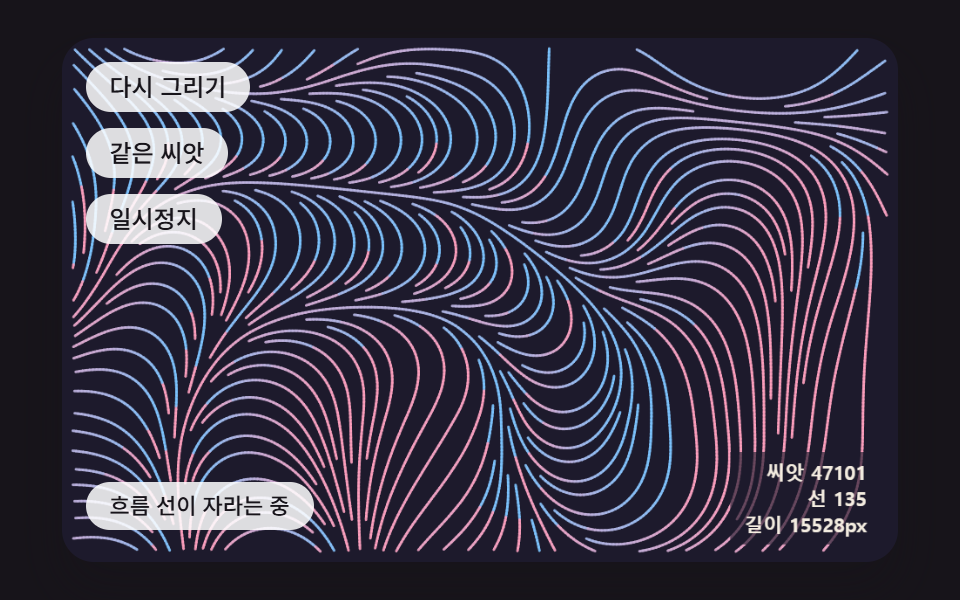 クリエイティブUIジェネラティブアート 作り方 9種 — 育つ模様をコードで
 クリエイティブUIオーロラ 背景 9種 — カーテン・光の筋・湖の映り込み・稜線
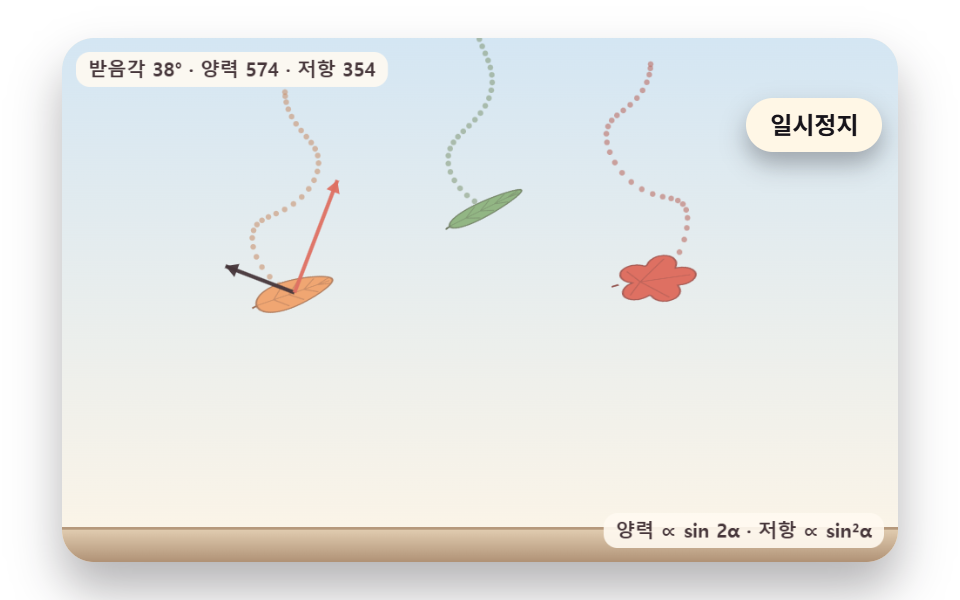 クリエイティブUI落ち葉 アニメーション 9種 — 揺れ・風・色づき・積もる山まで
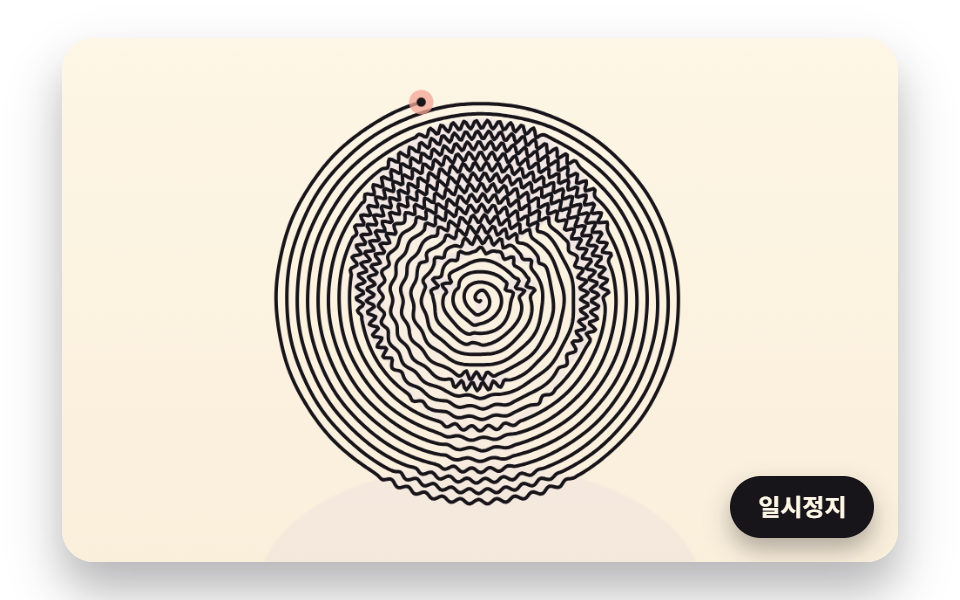 クリエイティブUI一筆書き イラスト 9種 — 点の順番と線の長さを計算して描くキャンバス