一筆書き イラスト 9種 — 点の順番と線の長さを計算して描くキャンバス
一筆書き イラストは、紙からペンを一度も離さずに顔や花や名前を一本の線で描いた絵です。いちばん近い点から順につなぐと、線は自分を何度も横切ります。そこで04番は交差した二区間を裏返して線を短くし、03番は点を暗さの重心へ動かし、07番は奇数の分かれ目を数えて一度で描く順番を探します。
線画 アニメーション 作り方を探すと見つかる一本線の絵は、何を計算して描かれているのでしょうか?
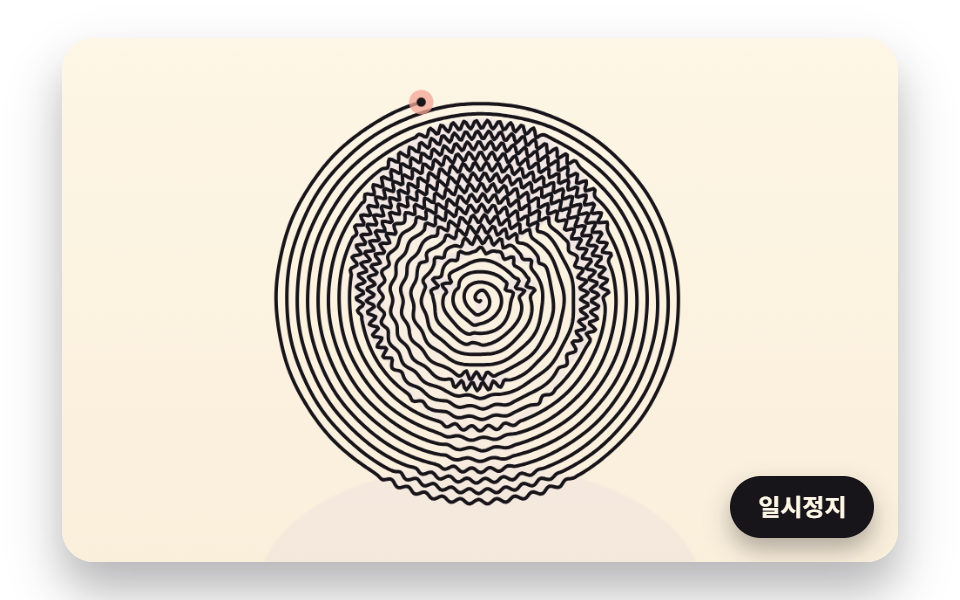 01 oneline-spiral-brightness-wobble
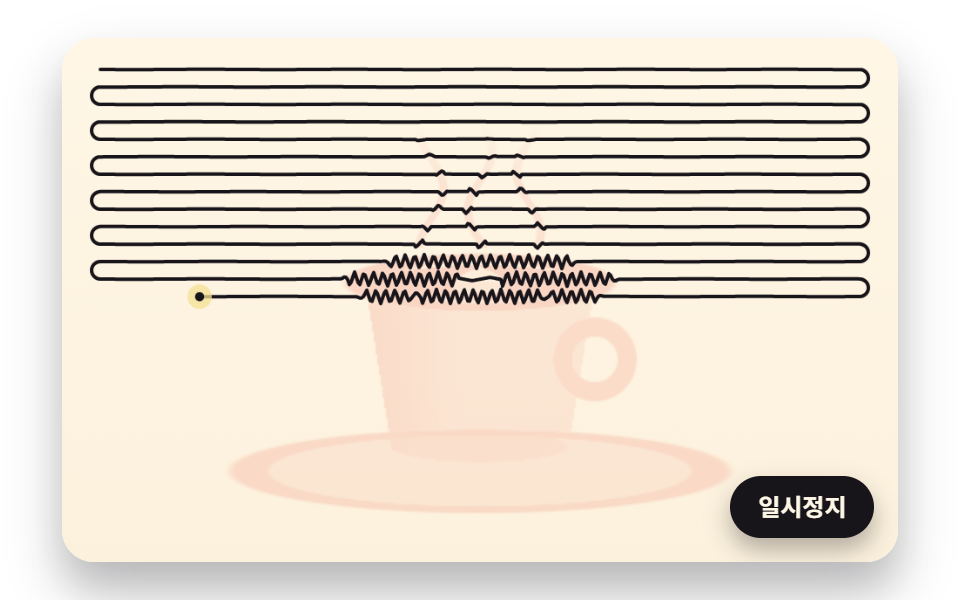 02 oneline-zigzag-row-hatching
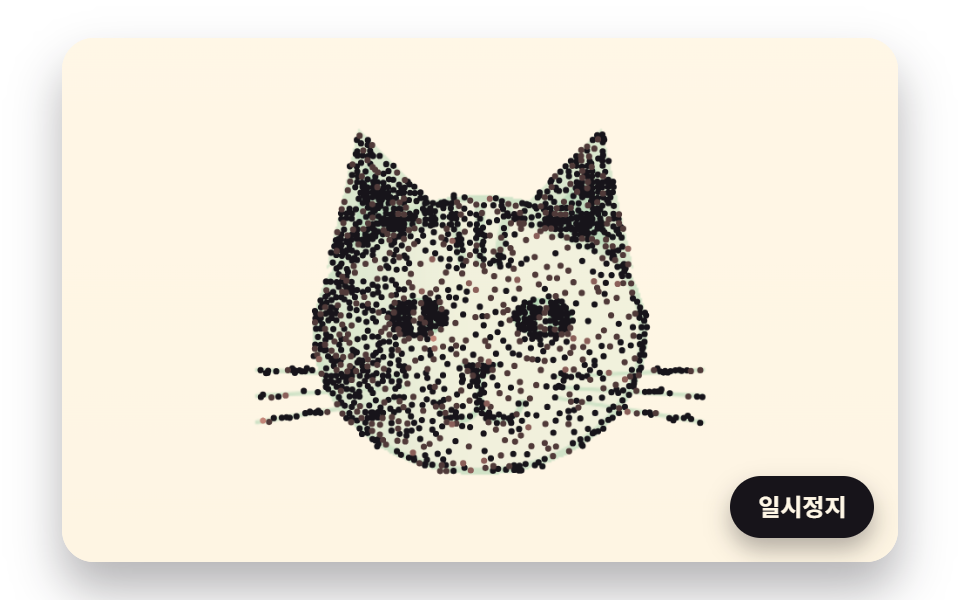 03 oneline-stipple-centroid-relax
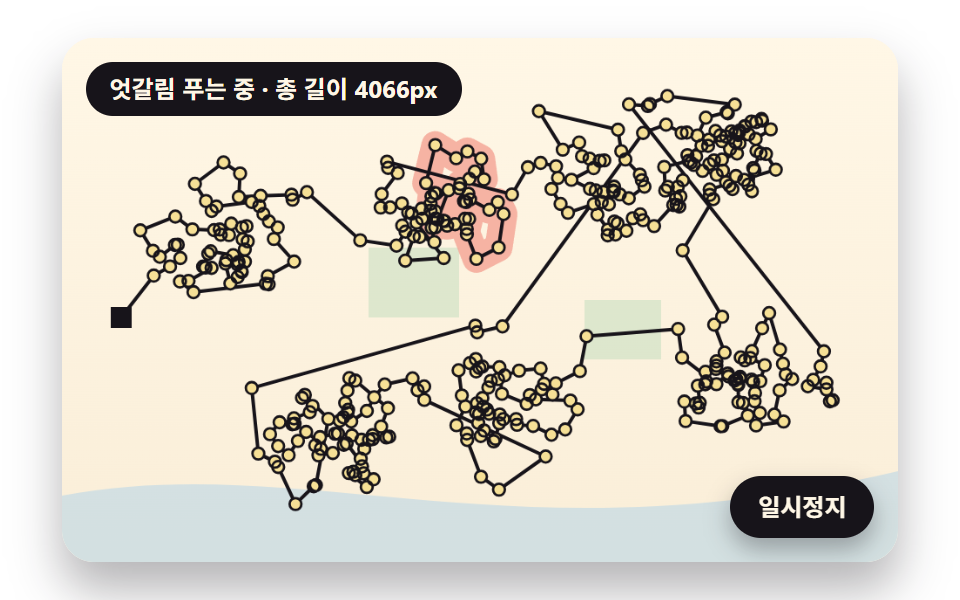 04 oneline-nearest-path-uncross
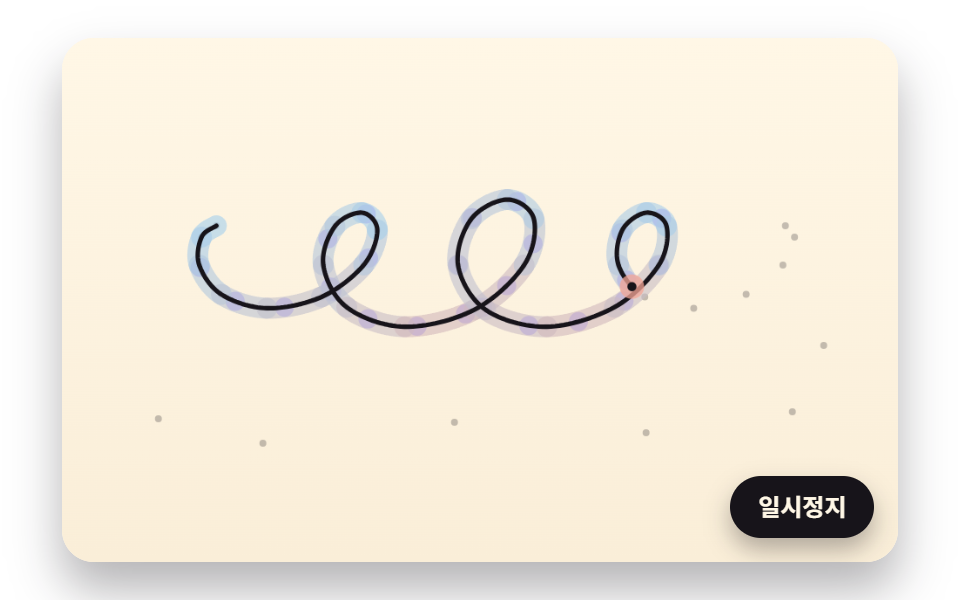 05 oneline-smooth-pen-constant-speed
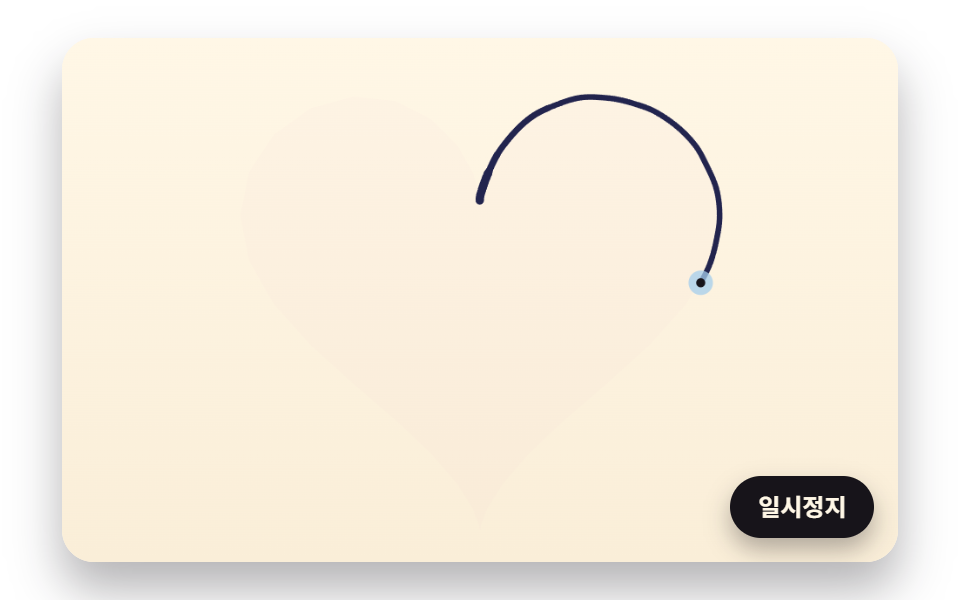 06 oneline-hand-tremor-speed-width
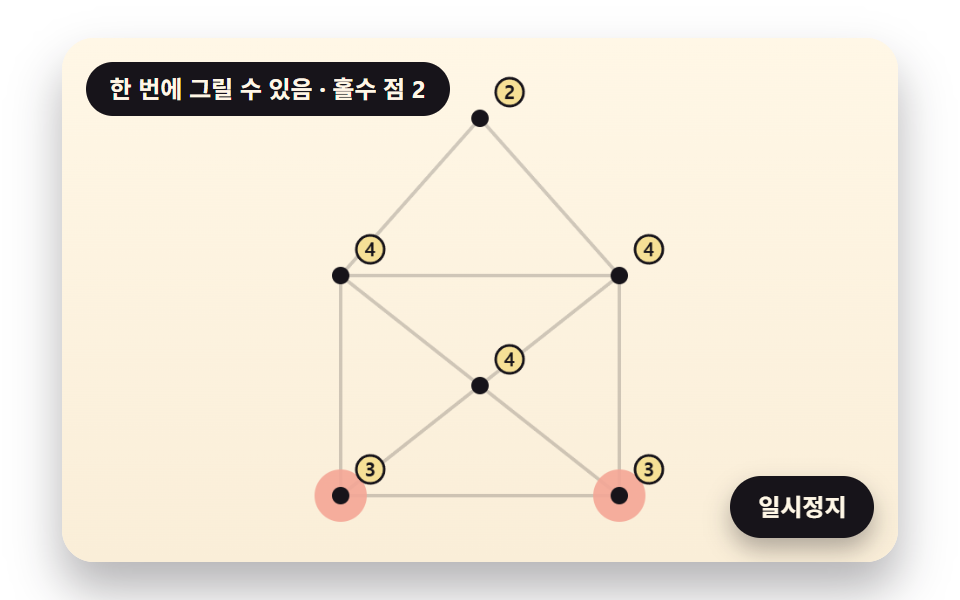 07 oneline-single-stroke-figure-check
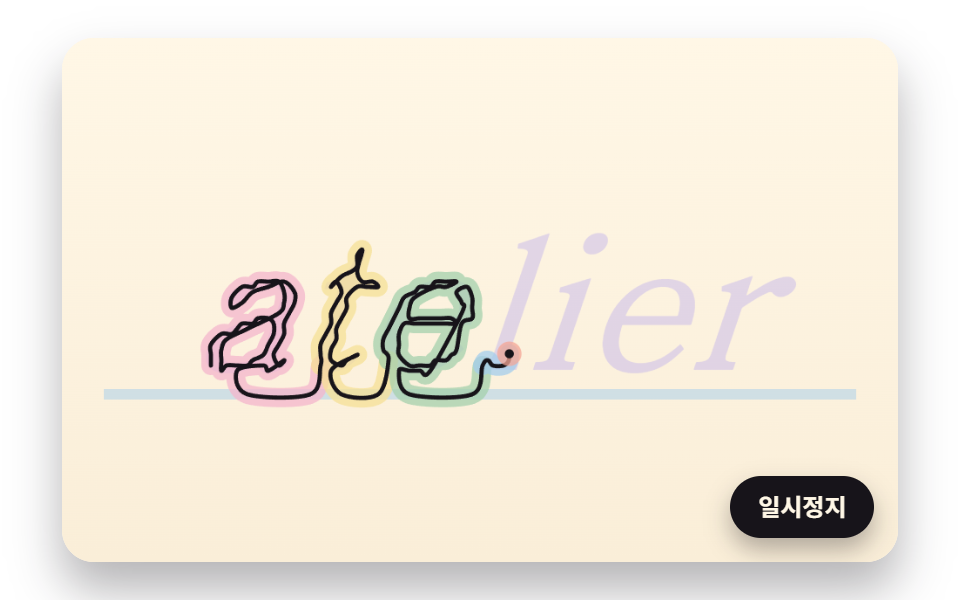 08 oneline-text-outline-cursive
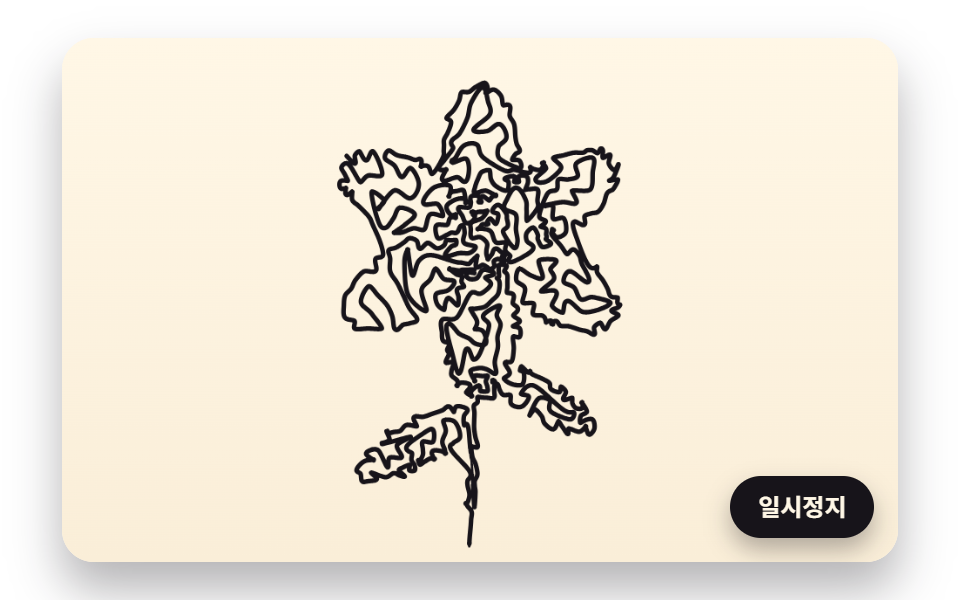 09 oneline-hero-flower-draw-wash
自動再生 · タイルを押すとその項目へ · すべて1つのzip
- 01 暗さのぶんだけ揺れて絵が浮かぶ一本の渦巻き
- 02 暗い所で細かくなるジグザグ一本線の陰影
- 03 暗さの重心へ動いて均一に広がる点描
- 04 交差した二区間を裏返してほどいていく一本線の道すじ
- 05 曲がり角でも同じ速さで描き進むペン
- 06 手の震えが混じり、速さで太さが変わるボールペンの線
- 07 奇数の分かれ目を数えて一度で描く順番を探す一筆書きの図形
- 08 文字の間をつないで一本線で書かれる筆記体の名前
- 09 一本線で描かれたあと色がにじみ込む花のファーストビュー
絵を一本の線に移すには、三つのことを順に決めます。線の長さをどこに多く使うか、その場所をどの順番で通るか、その順番をどれくらいの速さで描くかです。九つの場面は、このうち一つを深く掘り下げるか、いくつかを一続きにつないで見せます。
| 決めること | 場面 | 計算するもの | ここで測った値 |
|---|---|---|---|
| どこに | 01 · 02 · 03 | マスの暗さ 0〜1 で、揺れの大きさ・ジグザグの折れ回数・点の数を増やす | 01 揺れ最大 2.43px · 02 行ごとの折れ 10〜61回 · 03 点 1,800個 |
| どの順番で | 04 · 07 · 08 · 09 | いちばん近い点を次に選んで交差を裏返す、または頂点ごとにつながる線を数える | 04 4,080 → 3,864px · 07 封筒は奇数の点が 4 つで描けない |
| どの速さで | 05 · 06 · 08 · 09 | 積み上げた長さの表で同じ速さにする、または曲がり具合で速さと太さを決める | 05 毎秒 240px · 06 毎秒 70〜492px · 08 毎秒 620px |
元の絵はコードで組んだ図形
01 の顔、02 の湯気の立つコーヒーカップ、03 の猫の顔、09 の花は、どれも楕円・線分・三角形までの距離を重ねて、マスごとに 0〜1 の暗さを返す関数です。外から読み込む写真や画像ファイルはなく、08 だけが見えないキャンバスに文字を描いてその画素を読み戻します。01 と 03 は明るさではなく暗さで重みをつけるので、黒いマスほど揺れが大きくなり、点も密に集まります。手持ちの絵で試すにはこの暗さの関数を画素を読む関数に取り替えることになり、その手順は最後の質問で扱います。
合うページ
写真館の予約ページの最初の画面には 01 の渦巻きの顔が、ブランド紹介ページのサイン欄には 05 の同じ速さのペンが合います。子ども向けの学習サイトで一筆書き イラスト 図形のパズルを出すなら、描けるかどうかと描く順番を答え合わせのように見せる 07 が向いています。物流会社が配達の回り方を説明するセクションには、絡まりがほどけていく 04 の配送ルートを置けます。仕上がった線画のファイルを渡すだけの素材集とちがって、ここでは描いていく動きそのものが画面に出ます。
ペンを一度も離さない絵が目を引くわけ — 点の順番と線の長さが作る輪郭
線が一本しかない絵では、点を訪ねる順番がそのまま絵になります。同じ 420 個の点でも、まずい順番でつなげば絵を横切って絡まる線になり、よい順番なら同じ点から輪郭が浮かびます。描きかけの絵は、見る人がペン先を目で追って次の一画の行き先を待つので、仕上がった絵より長く目を留めさせると考えられます。
いちばん近い点からつなぐと交差が生まれる理由
04 は倉庫から出発し、まだ寄っていない配送先のうちいちばん近い所へ移ることを繰り返して、倉庫を含む 420 か所をつなぎます。距離の比較は 87,990 回で、最初の道すじは 4,080px ですが、その中に交差した区間の組が 34 あります。近い所だけを選ぶと飛ばした点が後に残り、あとでそこへ戻るときにすでに引いた線を横切るためと考えられます。32 回裏返すと長さは 3,864px(−5.3%)に縮み、交差は 0 になります。09 の花も同じ計算で、61 回の裏返しで 74 の交差を消し、4,094px を 3,826px(−6.6%)に詰めます。
線の長さが描く時間になる
「線画 動く アニメーション」で探している方にとっての要は、線の長さを時間に置き換えることです。01 の渦巻きは 11,160px を 4.6 秒、02 のジグザグは 13,688px を 5 秒で引き、どちらも毎秒 2,400px を超える速さで画面を埋めます。05 のサインは 1,312.6px に 5.47 秒、06 のハートは 1,742.1px に 7.45 秒かけるので、目がペン先についていけます。速いペンは絵を埋めるために、遅いペンは手書きの手ざわりを出すために使い分けます。
一筆書き イラスト 9種 — 明るさの渦巻き・ジグザグの陰影・均した点・ほどいた絡まり・等速のペン・手の震えと太さ・一筆書きの図形判定・一本線の筆記体・一本線で描かれるファーストビュー
01 と 02 は渦巻きや横の行という決まった道に沿って線を揺らし、陰影を作ります。03 と 04 は点の置き場所と訪ねる順番を、05 と 06 はペンの速さと太さを扱い、07 は図形を一度で描けるかを判定し、08 は単語を一本の線でつなぎます。09 は 03・04・05・06 の計算を一つの花にまとめたファーストビューです。どの場面も外部ライブラリ・WebGL・画像ファイルなしの 2D キャンバス一枚で描き、シードを固定した乱数で開くたびに同じ絵になります。操作できるのは一時停止ボタンだけで、絵はひとりでに描かれていきます。
480×300 の画面を 2 秒撮って数えた値
描画を 24 枚撮り、隣り合う 2 枚を比べた 23 回のうち変化があった回数と、一度でも色が変わった面積の割合を数えました。色がにじみ込む 09 がいちばん広く 35.0% を占め、ペン先を追って線一本とその下の帯だけが伸びていく 05 と 08 は 4〜6% にとどまります。
| 場面 | 変化した面積 | 動いたフレーム | 強さの平均 |
|---|---|---|---|
| 01 明るさの渦巻き | 23.1% | 23/23 | 92.9 |
| 02 ジグザグの陰影 | 21.4% | 21/23 | 123.7 |
| 03 点描 | 12.4% | 14/23 | 40.1 |
| 04 配送ルートのほどき | 18.4% | 20/23 | 74.4 |
| 05 等速のペン | 4.4% | 23/23 | 73.1 |
| 06 ボールペンのハート | 23.4% | 23/23 | 84.1 |
| 07 一筆書きの判定 | 11.5% | 23/23 | 84.9 |
| 08 一本線の筆記体 | 5.7% | 19/23 | 81.5 |
| 09 花のファーストビュー | 35.0% | 19/23 | 79.4 |
03 の 14/23 は、点が 0.22 秒ごとに動いたあと、次の段階まで新しい位置で休むためと考えられます。04 の 20/23 と 08・09 の 19/23 は、段階の切れ目で画面が止まる短い間を映していると考えられます。
近い記事とのちがい
ロゴの輪郭をなぞる動きはロゴのローディングアニメーション、読み取った暗さで糸を張る絵はストリングアート、文字の画素を点として読む方法は文字の画素サンプリング、手書きサインの速さと太さはサインを書くキャンバスで扱っています。この記事はその上に、点の順番を決めることと、線の長さを時間に変えることを足します。09 のように線の下へ色がにじむ表現は、水彩エフェクトへ続きます。
01暗さのぶんだけ揺れて絵が浮かぶ一本の渦巻き
6px 間隔で巻く渦巻きを 1.2px ずつたどり、暗い所を通るほど渦巻きと直角の向きへ大きく振れて波も短くなるので(一つの波の長さは明るい所で 62.83px、いちばん暗い所で 5.71px)、顔が浮かび上がります。ペンは 24.33 周・頂点 9,301 個・11,160px を毎秒 2,426.1px で 4.6 秒かけて描き、いちばん暗い所では 2.43px の振れ二つと線の太さ 2px が 6px の間隔を 0.86px はみ出すので、隣り合う周どうしが触れて黒く固まります。写真館の予約ページのファーストビューに、一本線の似顔絵として置けます。
<main class="stage">
<div class="ld is-demo" id="ld">
  <canvas class="ld__canvas" data-role="canvas" width="480" height="300" role="img" aria-label="中心から外へ巻く一本の渦巻きが、暗い所で大きく揺れて顔を描き出す絵。"></canvas>
  <button class="ld__pause" data-role="pause" type="button" aria-pressed="false">一時停止</button>
</div>
</main>
@use "../../../../site/static/demo-tokens" as *;
@include stage($stage-paper);
.ld {
position: relative;
width: min(92vw, calc(160vh - 12.8vw));
aspect-ratio: 480 / 300;
margin: 0 auto;
border-radius: $r-card;
overflow: hidden;
box-shadow: $shadow-raised;
background: $subject-cream;
}
.ld__canvas {
position: absolute;
inset: 0;
display: block;
width: 100%;
height: 100%;
}
.ld__pause {
position: absolute;
right: $sp-3;
bottom: $sp-3;
padding: $sp-1 $sp-3;
border: 2px solid $subject-ink;
border-radius: $r-pill;
background: $subject-ink;
color: $subject-cream;
font-family: inherit;
font-weight: 700;
font-size: 12px;
line-height: 1.6;
cursor: pointer;
box-shadow: $shadow-press;
transition: transform $dur-quick $ease-spring;
}
// 눌린 상태(멈춤) — 바탕과 글자색을 뒤집어 aria-pressed 가 눈에도 보이게
.ld__pause[aria-pressed="true"] {
background: $subject-cream;
color: $subject-ink;
}
.ld__pause:hover {
transform: translateY(-2px);
}
.ld__pause:active {
transform: translateY(1px);
}
.ld__pause:focus-visible {
outline: 3px solid $subject-ink;
outline-offset: 3px;
}
// 상태 줄 — 지금 어떤 행동 중인지 글자로. 시연 중에는 aria-live off, 사람이 처음 손대면 polite
.ld__status {
position: absolute;
left: $sp-3;
top: $sp-3;
margin: 0;
padding: $sp-1 $sp-3;
border-radius: $r-pill;
background: $subject-ink;
color: $subject-cream;
font-weight: 700;
font-size: 12px;
line-height: 1.6;
pointer-events: none;
}
@media (max-width: 340px) {
.ld__pause,
.ld__status { font-size: 11px; padding: $sp-1 $sp-2; }
}
// 동작 줄이기 — 장면은 스크립트가 쉬는 자세 한 장으로 멈춘다. 버튼도 떠오르지 않게
@media (prefers-reduced-motion: reduce) {
.ld__pause { transition: none !important; }
.ld__pause:hover,
.ld__pause:active { transform: none !important; }
}html, body {
margin: 0;
overflow: hidden;
}
.stage {
box-sizing: border-box;
min-height: 100vh;
display: grid;
place-items: center;
margin: 0;
background: #ffffff;
font-family: -apple-system, "Segoe UI", "Noto Sans KR", sans-serif;
padding: clamp(8px, 4vw, 24px);
}
.ld {
position: relative;
width: min(92vw, 160vh - 12.8vw);
aspect-ratio: 480/300;
margin: 0 auto;
border-radius: 16px;
overflow: hidden;
box-shadow: 0 14px 24px rgba(23, 20, 26, 0.32);
background: #fff7e6;
}
.ld__canvas {
position: absolute;
inset: 0;
display: block;
width: 100%;
height: 100%;
}
.ld__pause {
position: absolute;
right: 12px;
bottom: 12px;
padding: 4px 12px;
border: 2px solid #17141a;
border-radius: 999px;
background: #17141a;
color: #fff7e6;
font-family: inherit;
font-weight: 700;
font-size: 12px;
line-height: 1.6;
cursor: pointer;
box-shadow: 0 6px 12px rgba(23, 20, 26, 0.32);
transition: transform 220ms cubic-bezier(0.2, 0.8, 0.2, 1);
}
.ld__pause[aria-pressed=true] {
background: #fff7e6;
color: #17141a;
}
.ld__pause:hover {
transform: translateY(-2px);
}
.ld__pause:active {
transform: translateY(1px);
}
.ld__pause:focus-visible {
outline: 3px solid #17141a;
outline-offset: 3px;
}
.ld__status {
position: absolute;
left: 12px;
top: 12px;
margin: 0;
padding: 4px 12px;
border-radius: 999px;
background: #17141a;
color: #fff7e6;
font-weight: 700;
font-size: 12px;
line-height: 1.6;
pointer-events: none;
}
@media (max-width: 340px) {
.ld__pause,
.ld__status {
font-size: 11px;
padding: 4px 8px;
}
}
@media (prefers-reduced-motion: reduce) {
.ld__pause {
transition: none !important;
}
.ld__pause:hover,
.ld__pause:active {
transform: none !important;
}
}(function () {
const root = document.getElementById("ld");
if (!root) return;
// 판 좌표 — 캔버스 안은 늘 480×300. 화면에 보이는 크기와 상관없이 계산은 이 좌표로 한다
const W = 480;
const H = 300;
const TAU = Math.PI * 2;
function clamp(v, lo, hi) { return v < lo ? lo : (v > hi ? hi : v); }
function lerp(a, b, k) { return a + (b - a) * k; }
function smooth(x) { const c = clamp(x, 0, 1); return c * c * (3 - 2 * c); }
// 시드 고정 난수 — 같은 시드면 같은 점 배치·같은 떨림이 다시 나온다 (32비트 정수 섞기)
function makeRng(seed) {
let s = seed >>> 0;
return function () {
s = (s + 0x6d2b79f5) >>> 0;
let t = s;
t = Math.imul(t ^ (t >>> 15), t | 1);
t ^= t + Math.imul(t ^ (t >>> 7), t | 61);
return ((t ^ (t >>> 14)) >>> 0) / 4294967296;
};
}
// 1차원 값 노이즈 — 정수 자리마다 시드로 정한 값(-1~1)을 두고 사이는 부드러운 보간. 손 떨림에 쓴다
const NOISE_TABLE = new Float32Array(256);
const noiseRng = makeRng(483);
for (let i = 0; i < 256; i += 1) {
NOISE_TABLE[i] = noiseRng() * 2 - 1;
}
function smoothNoise(x) {
const i = Math.floor(x);
const f = x - i;
const u = f * f * (3 - 2 * f);
return lerp(NOISE_TABLE[i & 255], NOISE_TABLE[(i + 1) & 255], u);
}
// 도형 거리 — 타원 안이면 음수, 밖이면 양수(px 에 가까운 근사). 원본 그림을 코드로 그릴 때 쓴다
function ellipseDist(x, y, cx, cy, rx, ry) {
const dx = (x - cx) / rx;
const dy = (y - cy) / ry;
return (Math.sqrt(dx * dx + dy * dy) - 1) * Math.min(rx, ry);
}
// 선분까지의 거리(px)
function segmentDist(x, y, ax, ay, bx, by) {
const vx = bx - ax;
const vy = by - ay;
const k = clamp(((x - ax) * vx + (y - ay) * vy) / Math.max(1e-9, vx * vx + vy * vy), 0, 1);
const ex = x - (ax + vx * k);
const ey = y - (ay + vy * k);
return Math.sqrt(ex * ex + ey * ey);
}
// 거리 → 칠한 정도 0~1. 경계 1px 를 부드럽게 넘긴다
function fillOf(dist) { return clamp(0.5 - dist, 0, 1); }
// 두 점 사이 거리
function dist2(ax, ay, bx, by) {
const dx = ax - bx;
const dy = ay - by;
return Math.sqrt(dx * dx + dy * dy);
}
// 꺾은선 길이 — xs·ys 를 order 순서로 이었을 때(닫지 않음)
function pathLength(xs, ys, order, n) {
let sum = 0;
for (let i = 1; i < n; i += 1) {
sum += dist2(xs[order[i - 1]], ys[order[i - 1]], xs[order[i]], ys[order[i]]);
}
return sum;
}
// 파스텔 팔레트 — 미색 종이 바탕 위에 진한 잉크 선. 잉크·종이는 데모 토큰($subject-ink·$subject-cream)과 같은 값
const PAPER = [255, 247, 230];
const INK = [23, 20, 26];
const CORAL = [244, 166, 150];
const LAVENDER = [192, 176, 236];
const BUTTER = [246, 224, 150];
const SAGE = [164, 208, 172];
const PINK = [244, 182, 204];
const SKY = [164, 206, 236];
function rgba(c, a) {
return 'rgba(' + Math.round(clamp(c[0], 0, 255)) + ',' + Math.round(clamp(c[1], 0, 255)) + ',' + Math.round(clamp(c[2], 0, 255)) + ',' + clamp(a, 0, 1).toFixed(3) + ')';
}
// 한 장면의 순환 — 그리기 → 머묾 → 지움. 지움이 끝나면 처음부터 다시
function cyclePhase(t, drawTime, holdTime) {
// 0~1 은 그리는 중, 1~2 는 머무는 중, 2~3 은 지우는 중
if (t < drawTime) {
return t / drawTime;
}
if (t < drawTime + holdTime) {
return 1 + (t - drawTime) / holdTime;
}
return 2 + (t - drawTime - holdTime) / ERASE_TIME;
}
// 지우기 시간(초) — 모든 장면이 같은 빠르기로 종이색으로 돌아간다
const ERASE_TIME = 1;
// 원본 그림 1 — 코드로 만든 얼굴. 칸마다 어둡기 0(종이)~1(가장 어두움)을 돌려준다. 외부 사진을 읽지 않는다
function faceDark(x, y) {
let d = 0.04;
// 어깨와 목
d = Math.max(d, 0.5 * fillOf(ellipseDist(x, y, 240, 318, 128, 74)));
d = Math.max(d, 0.34 * fillOf(Math.max(Math.abs(x - 240) - 20, Math.abs(y - 238) - 34)));
// 머리카락 — 얼굴 타원보다 큰 타원에서 얼굴을 뺀 자리
const face = ellipseDist(x, y, 240, 150, 58, 76);
const hair = ellipseDist(x, y, 240, 128, 74, 82);
const fringe = y < 108 + 14 * Math.cos((x - 240) / 22);
if (hair < 0 && (face > 0 || fringe)) {
d = Math.max(d, 0.86);
}
// 얼굴 — 왼쪽 볼에 그늘, 윤곽선은 조금 더 어둡게
if (face < 0 && !fringe) {
d = Math.max(d, 0.14 + 0.2 * smooth((246 - x) / 60));
d = Math.max(d, 0.55 * fillOf(-face - 3));
}
// 눈썹·눈·코·입
d = Math.max(d, 0.8 * fillOf(segmentDist(x, y, 206, 128, 228, 125) - 2.5));
d = Math.max(d, 0.8 * fillOf(segmentDist(x, y, 252, 125, 274, 128) - 2.5));
d = Math.max(d, 0.95 * fillOf(ellipseDist(x, y, 217, 142, 10, 5)));
d = Math.max(d, 0.95 * fillOf(ellipseDist(x, y, 263, 142, 10, 5)));
d = Math.max(d, 0.6 * fillOf(segmentDist(x, y, 241, 146, 235, 175) - 2));
d = Math.max(d, 0.5 * fillOf(ellipseDist(x, y, 242, 178, 8, 3)));
d = Math.max(d, 0.9 * fillOf(ellipseDist(x, y, 240, 196, 17, 4.5)));
return d;
}
const canvasEl = root.querySelector('[data-role="canvas"]');
const pauseEl = root.querySelector('[data-role="pause"]');
const statusEl = root.querySelector('[data-role="status"]');
const ctxRaw = canvasEl ? canvasEl.getContext('2d') : null;
if (!canvasEl || !ctxRaw || !pauseEl) {
return;
}
const cv = canvasEl;
const ctx = ctxRaw;
const pauseBtn = pauseEl;
function fitCanvas() {
// 배율은 2 에서 자른다 — 배율 3 기기에서 화소가 2.25배로 늘어 프레임마다 일이 그만큼 커지지 않게
const dpr = Math.min(window.devicePixelRatio || 1, 2);
cv.width = Math.round(W * dpr);
cv.height = Math.round(H * dpr);
ctx.setTransform(dpr, 0, 0, dpr, 0, 0);
}
// 미색 종이 — 위는 조금 밝고 아래는 조금 따뜻하게
function clearPaper() {
const g = ctx.createLinearGradient(0, 0, 0, H);
g.addColorStop(0, rgba(PAPER, 1));
g.addColorStop(1, rgba([250, 238, 216], 1));
ctx.fillStyle = g;
ctx.fillRect(0, 0, W, H);
}
// 상태 줄 — 같은 글자면 DOM 을 건드리지 않는다
let statusText = '';
function setStatus(s) {
if (!statusEl || s === statusText) {
return;
}
statusText = s;
statusEl.textContent = s;
}
// 꺾은선 — xs·ys 의 0 번부터 count 개(소수 부분은 마지막 마디를 그만큼만)를 한 번에 긋는다
function strokeRun(xs, ys, count, width, color, alpha) {
const whole = Math.floor(count);
if (whole < 1) {
return;
}
ctx.beginPath();
ctx.moveTo(xs[0], ys[0]);
const last = Math.min(whole, xs.length - 1);
for (let i = 1; i <= last; i += 1) {
ctx.lineTo(xs[i], ys[i]);
}
const f = count - whole;
if (f > 0 && whole + 1 < xs.length) {
ctx.lineTo(lerp(xs[whole], xs[whole + 1], f), lerp(ys[whole], ys[whole + 1], f));
}
ctx.lineWidth = width;
ctx.lineJoin = 'round';
ctx.lineCap = 'round';
ctx.strokeStyle = rgba(color, alpha);
ctx.stroke();
}
// 꺾은선 한 토막 — from 번째 꼭짓점부터 to 번째까지(to 의 소수 부분은 마지막 마디를 그만큼만)
function strokeSpan(xs, ys, from, to, width, color, alpha) {
const end = Math.min(Math.floor(to), xs.length - 1);
if (end <= from) {
return;
}
ctx.beginPath();
ctx.moveTo(xs[from], ys[from]);
for (let i = from + 1; i <= end; i += 1) {
ctx.lineTo(xs[i], ys[i]);
}
const f = to - Math.floor(to);
if (f > 0 && end + 1 < xs.length) {
ctx.lineTo(lerp(xs[end], xs[end + 1], f), lerp(ys[end], ys[end + 1], f));
}
ctx.lineWidth = width;
ctx.lineJoin = 'round';
ctx.lineCap = 'round';
ctx.strokeStyle = rgba(color, alpha);
ctx.stroke();
}
// 펜촉 — 지금 긋고 있는 자리. 잉크 점 둘레에 파스텔 고리
function drawNib(x, y, ring) {
ctx.beginPath();
ctx.arc(x, y, 7, 0, TAU);
ctx.fillStyle = rgba(ring, 0.75);
ctx.fill();
ctx.beginPath();
ctx.arc(x, y, 2.6, 0, TAU);
ctx.fillStyle = rgba(INK, 1);
ctx.fill();
}
// 원본 그림 판 — 어둡기 함수(0~1)를 칸마다 칠한 화면 밖 캔버스. 펜이 그리기 전에 옅게 깔아 무엇을 따라 그리는지 보인다
function makeSourceLayer(dark, tint) {
const layer = document.createElement('canvas');
layer.width = W;
layer.height = H;
const lc = layer.getContext('2d');
if (!lc) {
return layer;
}
const img = lc.createImageData(W, H);
for (let y = 0; y < H; y += 1) {
for (let x = 0; x < W; x += 1) {
const d = dark(x + 0.5, y + 0.5);
const o = (y * W + x) * 4;
img.data[o] = Math.round(lerp(PAPER[0], tint[0], d));
img.data[o + 1] = Math.round(lerp(PAPER[1], tint[1], d));
img.data[o + 2] = Math.round(lerp(PAPER[2], tint[2], d));
img.data[o + 3] = 255;
}
}
lc.putImageData(img, 0, 0);
return layer;
}
// 지우는 중이면 그림 전체를 종이색으로 덮어 간다 — phase 2~3 에서 덮개 불투명도 0→1
function eraseVeil(phase) {
if (phase <= 2) {
return;
}
ctx.fillStyle = rgba(PAPER, smooth(phase - 2));
ctx.fillRect(0, 0, W, H);
}
// 01 같은 간격으로 감기는 나선 — r = (SPIRAL_GAP / 2π)·θ. 펜이 지나는 칸의 어둡기 d 만큼
// 나선과 직각 방향으로 사인 흔들림을 얹는다 — 폭은 WOBBLE_AMP·d, 빠르기는 d 가 클수록 촘촘하게
const SPIRAL_GAP = 6;
const SPIRAL_RADIUS = 146;
const WOBBLE_AMP = 2.7;
const WOBBLE_FREQ_LIGHT = 0.1;
const WOBBLE_FREQ_DARK = 1.1;
// 꼭짓점 사이 간격(px) — 흔들림 한 주기(가장 촘촘할 때 2π/1.1 ≈ 5.7px)를 네 번 넘게 찍는다
const SAMPLE_STEP = 1.2;
// 어둡기를 길 따라 고르게 — 칸 경계에서 폭이 한 번에 튀지 않게 이 길이(px)로 이동평균
const DARK_SMOOTH = 4;
const DRAW_TIME = 4.6;
const HOLD_TIME = 2;
const CYCLE = DRAW_TIME + HOLD_TIME + ERASE_TIME;
// 첫 화면이 비지 않게 나선이 가운데 몇 바퀴를 감은 자리(1.5초)에서 시작한다 — 순환이 돌면 처음부터 다시 그린다
const START_AT = 1.5;
const FINISH_T = DRAW_TIME + 0.5;
const CX = 240;
const CY = 150;
function buildSpiral(dark) {
const a = SPIRAL_GAP / TAU;
const xs = [];
const ys = [];
let theta = 0.6;
let phase = 0;
let dSmooth = 0;
let maxOffset = 0;
while (a * theta < SPIRAL_RADIUS) {
const r = a * theta;
const c = Math.cos(theta);
const s = Math.sin(theta);
const bx = CX + r * c;
const by = CY + r * s;
// 접선 = d/dθ (r cosθ, r sinθ) = (a cosθ − r sinθ, a sinθ + r cosθ), 법선은 접선을 90° 돌린 것
const tx = a * c - r * s;
const ty = a * s + r * c;
const tl = Math.sqrt(tx * tx + ty * ty);
const nx = -ty / tl;
const ny = tx / tl;
dSmooth = lerp(dSmooth, dark(bx, by), SAMPLE_STEP / DARK_SMOOTH);
phase += lerp(WOBBLE_FREQ_LIGHT, WOBBLE_FREQ_DARK, dSmooth) * SAMPLE_STEP;
const off = WOBBLE_AMP * dSmooth * Math.sin(phase);
maxOffset = Math.max(maxOffset, Math.abs(off));
xs.push(bx + nx * off);
ys.push(by + ny * off);
// 호 길이 ds = √(r² + a²)·dθ 이므로 같은 걸음을 가려면 dθ = ds / √(r² + a²)
theta += SAMPLE_STEP / Math.sqrt(r * r + a * a);
}
return { xs: Float32Array.from(xs), ys: Float32Array.from(ys), turns: theta / TAU, maxOffset: maxOffset };
}
const spiral = buildSpiral(faceDark);
// 그린 꼭짓점 수 — 꼭짓점이 같은 걸음(SAMPLE_STEP)이라 시간에 비례해 늘리면 펜이 같은 빠르기로 간다
let drawn = 0;
function reset() { drawn = 0; }
function update(t, dt) {
drawn = (spiral.xs.length - 1) * Math.min(1, t / DRAW_TIME);
}
// 원본 얼굴 판 — 그리기 시작에는 옅게 보였다가 선이 다 그려질 무렵 사라진다
const source01 = makeSourceLayer(faceDark, LAVENDER);
function draw(t) {
const phase = cyclePhase(t, DRAW_TIME, HOLD_TIME);
clearPaper();
ctx.globalAlpha = 0.85 * (1 - smooth(Math.min(1, phase)));
ctx.drawImage(source01, 0, 0, W, H);
ctx.globalAlpha = 1;
strokeRun(spiral.xs, spiral.ys, drawn, 2, INK, 1);
if (phase < 1) {
const i = Math.floor(drawn);
drawNib(spiral.xs[i], spiral.ys[i], CORAL);
}
eraseVeil(phase);
}
// 한 프레임에 넘기는 시간 상한(초) — 탭을 오래 숨겼다 돌아온 첫 프레임에도 50ms 까지만 계산에 넣는다
const DT_MAX = 0.05;
// 앞당겨 돌리기 걸음(초) — 시작 자리(START_AT)나 완성 판(FINISH_T)까지 1/60초씩 계산만 하고 그리지 않는다
const SKIP_STEP = 1 / 60;
// 장면 시계(초) — 순환 하나 안에서의 자리. CYCLE 을 넘으면 0 으로 돌아가 처음부터 다시 그린다
let cycleT = 0;
let paused = false;
const reduceQuery = window.matchMedia('(prefers-reduced-motion: reduce)');
// 페이지를 연 채 동작 줄이기 설정을 바꿔도 change 리스너가 이 값을 다시 읽는다
let still = reduceQuery.matches;
// 자동 시연 중인가 — 사람이 처음 손대면 시연 표시를 떼고 상태 줄을 polite 로 켠다
let demo = root.classList.contains('is-demo');
// 리스너는 한 묶음으로 달고 정리할 때 한 번에 뗀다
const off = new AbortController();
function wake() {
if (!demo) {
return;
}
demo = false;
root.classList.remove('is-demo');
const live = root.querySelector('[aria-live]');
if (live) {
live.setAttribute('aria-live', 'polite');
}
}
// 시계를 to 초까지 계산만 하고 넘긴다
function skipTo(to) {
while (cycleT + SKIP_STEP <= to) {
cycleT += SKIP_STEP;
update(cycleT, SKIP_STEP);
}
}
function advance(dt) {
cycleT += dt;
if (cycleT >= CYCLE) {
cycleT = 0;
reset();
}
update(cycleT, dt);
}
let rafId = 0;
let lastTs = -1;
function frame(ts) {
if (still || paused) {
rafId = 0;
return;
}
if (lastTs < 0) {
lastTs = ts;
}
const dt = Math.min((ts - lastTs) / 1000, DT_MAX);
lastTs = ts;
if (dt > 0) {
advance(dt);
}
draw(cycleT);
rafId = window.requestAnimationFrame(frame);
}
function startLoop() {
if (rafId) {
return;
}
// 시계 다시 맞추기 — 멈췄던 사이의 시간을 첫 프레임 dt 로 넘기지 않는다
lastTs = -1;
rafId = window.requestAnimationFrame(frame);
}
function stopLoop() {
if (rafId) {
window.cancelAnimationFrame(rafId);
rafId = 0;
}
}
// 동작 줄이기 — 루프를 돌리지 않고 다 그려진 한 장(FINISH_T)만 그린다
function showFinished() {
stopLoop();
cycleT = 0;
reset();
skipTo(FINISH_T);
draw(cycleT);
}
function play() {
cycleT = 0;
reset();
skipTo(START_AT);
draw(cycleT);
if (!paused) {
startLoop();
}
}
pauseBtn.addEventListener('click', function () {
paused = !paused;
pauseBtn.setAttribute('aria-pressed', paused ? 'true' : 'false');
wake();
if (paused) {
stopLoop();
}
else if (!still) {
startLoop();
}
}, { signal: off.signal });
// 탭이 숨으면 루프를 멈추고, 돌아오면 시계를 다시 맞춰 이어 그린다 — 숨은 동안의 몇 초가 한 프레임에 몰리지 않게
document.addEventListener('visibilitychange', function () {
if (document.hidden) {
stopLoop();
}
else if (!paused && !still) {
startLoop();
}
}, { signal: off.signal });
// 설정이 페이지를 연 채 바뀌면 — 켜지면 완성 판으로 멈추고, 꺼지면 시연을 처음부터
reduceQuery.addEventListener('change', function () {
still = reduceQuery.matches;
if (still) {
showFinished();
}
else {
play();
}
}, { signal: off.signal });
window.addEventListener('resize', function () {
fitCanvas();
draw(cycleT);
}, { signal: off.signal });
fitCanvas();
if (still) {
showFinished();
}
else {
play();
}
return function () {
stopLoop();
off.abort();
};
})();// SpiralBrightnessWobble - vanilla 판(01-oneline-spiral-brightness-wobble) 의 React 포트. 같은 계산을 useEffect 안에서 돌린다.
import { useEffect, useRef } from "react";
import styles from "./SpiralBrightnessWobble.module.scss";
const cx = (s: string): string => s.split(" ").map((n) => styles[n] ?? n).join(" ");
export default function SpiralBrightnessWobble() {
const rootRef = useRef<HTMLDivElement | null>(null);
useEffect(() => {
const rootEl = rootRef.current;
if (!rootEl) return;
const root: HTMLElement = rootEl;
type Pt = [number, number];
type RGB = [number, number, number];
// 점 묶음 — 좌표 두 배열과 점 수
type Dots = { xs: Float32Array; ys: Float32Array; n: number };
// 판 좌표 — 캔버스 안은 늘 480×300. 화면에 보이는 크기와 상관없이 계산은 이 좌표로 한다
const W = 480;
const H = 300;
const TAU = Math.PI * 2;
function clamp(v: number, lo: number, hi: number): number { return v < lo ? lo : (v > hi ? hi : v); }
function lerp(a: number, b: number, k: number): number { return a + (b - a) * k; }
function smooth(x: number): number { const c = clamp(x, 0, 1); return c * c * (3 - 2 * c); }
// 시드 고정 난수 — 같은 시드면 같은 점 배치·같은 떨림이 다시 나온다 (32비트 정수 섞기)
function makeRng(seed: number): () => number {
let s = seed >>> 0;
return function (): number {
s = (s + 0x6d2b79f5) >>> 0;
let t = s;
t = Math.imul(t ^ (t >>> 15), t | 1);
t ^= t + Math.imul(t ^ (t >>> 7), t | 61);
return ((t ^ (t >>> 14)) >>> 0) / 4294967296;
};
}
// 1차원 값 노이즈 — 정수 자리마다 시드로 정한 값(-1~1)을 두고 사이는 부드러운 보간. 손 떨림에 쓴다
const NOISE_TABLE = new Float32Array(256);
const noiseRng = makeRng(483);
for (let i = 0; i < 256; i += 1) { NOISE_TABLE[i] = noiseRng() * 2 - 1; }
function smoothNoise(x: number): number {
const i = Math.floor(x);
const f = x - i;
const u = f * f * (3 - 2 * f);
return lerp(NOISE_TABLE[i & 255], NOISE_TABLE[(i + 1) & 255], u);
}
// 도형 거리 — 타원 안이면 음수, 밖이면 양수(px 에 가까운 근사). 원본 그림을 코드로 그릴 때 쓴다
function ellipseDist(x: number, y: number, cx: number, cy: number, rx: number, ry: number): number {
const dx = (x - cx) / rx;
const dy = (y - cy) / ry;
return (Math.sqrt(dx * dx + dy * dy) - 1) * Math.min(rx, ry);
}
// 선분까지의 거리(px)
function segmentDist(x: number, y: number, ax: number, ay: number, bx: number, by: number): number {
const vx = bx - ax;
const vy = by - ay;
const k = clamp(((x - ax) * vx + (y - ay) * vy) / Math.max(1e-9, vx * vx + vy * vy), 0, 1);
const ex = x - (ax + vx * k);
const ey = y - (ay + vy * k);
return Math.sqrt(ex * ex + ey * ey);
}
// 거리 → 칠한 정도 0~1. 경계 1px 를 부드럽게 넘긴다
function fillOf(dist: number): number { return clamp(0.5 - dist, 0, 1); }
// 두 점 사이 거리
function dist2(ax: number, ay: number, bx: number, by: number): number {
const dx = ax - bx;
const dy = ay - by;
return Math.sqrt(dx * dx + dy * dy);
}
// 꺾은선 길이 — xs·ys 를 order 순서로 이었을 때(닫지 않음)
function pathLength(xs: Float32Array, ys: Float32Array, order: Int32Array, n: number): number {
let sum = 0;
for (let i = 1; i < n; i += 1) { sum += dist2(xs[order[i - 1]], ys[order[i - 1]], xs[order[i]], ys[order[i]]); }
return sum;
}
// 파스텔 팔레트 — 미색 종이 바탕 위에 진한 잉크 선. 잉크·종이는 데모 토큰($subject-ink·$subject-cream)과 같은 값
const PAPER: RGB = [255, 247, 230];
const INK: RGB = [23, 20, 26];
const CORAL: RGB = [244, 166, 150];
const LAVENDER: RGB = [192, 176, 236];
const BUTTER: RGB = [246, 224, 150];
const SAGE: RGB = [164, 208, 172];
const PINK: RGB = [244, 182, 204];
const SKY: RGB = [164, 206, 236];
function rgba(c: RGB, a: number): string {
return 'rgba(' + Math.round(clamp(c[0], 0, 255)) + ',' + Math.round(clamp(c[1], 0, 255)) + ',' + Math.round(clamp(c[2], 0, 255)) + ',' + clamp(a, 0, 1).toFixed(3) + ')';
}
// 한 장면의 순환 — 그리기 → 머묾 → 지움. 지움이 끝나면 처음부터 다시
function cyclePhase(t: number, drawTime: number, holdTime: number): number {
// 0~1 은 그리는 중, 1~2 는 머무는 중, 2~3 은 지우는 중
if (t < drawTime) { return t / drawTime; }
if (t < drawTime + holdTime) { return 1 + (t - drawTime) / holdTime; }
return 2 + (t - drawTime - holdTime) / ERASE_TIME;
}
// 지우기 시간(초) — 모든 장면이 같은 빠르기로 종이색으로 돌아간다
const ERASE_TIME = 1;
// 원본 그림 1 — 코드로 만든 얼굴. 칸마다 어둡기 0(종이)~1(가장 어두움)을 돌려준다. 외부 사진을 읽지 않는다
function faceDark(x: number, y: number): number {
let d = 0.04;
// 어깨와 목
d = Math.max(d, 0.5 * fillOf(ellipseDist(x, y, 240, 318, 128, 74)));
d = Math.max(d, 0.34 * fillOf(Math.max(Math.abs(x - 240) - 20, Math.abs(y - 238) - 34)));
// 머리카락 — 얼굴 타원보다 큰 타원에서 얼굴을 뺀 자리
const face = ellipseDist(x, y, 240, 150, 58, 76);
const hair = ellipseDist(x, y, 240, 128, 74, 82);
const fringe = y < 108 + 14 * Math.cos((x - 240) / 22);
if (hair < 0 && (face > 0 || fringe)) { d = Math.max(d, 0.86); }
// 얼굴 — 왼쪽 볼에 그늘, 윤곽선은 조금 더 어둡게
if (face < 0 && !fringe) {
d = Math.max(d, 0.14 + 0.2 * smooth((246 - x) / 60));
d = Math.max(d, 0.55 * fillOf(-face - 3));
}
// 눈썹·눈·코·입
d = Math.max(d, 0.8 * fillOf(segmentDist(x, y, 206, 128, 228, 125) - 2.5));
d = Math.max(d, 0.8 * fillOf(segmentDist(x, y, 252, 125, 274, 128) - 2.5));
d = Math.max(d, 0.95 * fillOf(ellipseDist(x, y, 217, 142, 10, 5)));
d = Math.max(d, 0.95 * fillOf(ellipseDist(x, y, 263, 142, 10, 5)));
d = Math.max(d, 0.6 * fillOf(segmentDist(x, y, 241, 146, 235, 175) - 2));
d = Math.max(d, 0.5 * fillOf(ellipseDist(x, y, 242, 178, 8, 3)));
d = Math.max(d, 0.9 * fillOf(ellipseDist(x, y, 240, 196, 17, 4.5)));
return d;
}
const canvasEl = root.querySelector('[data-role="canvas"]') as HTMLCanvasElement | null;
const pauseEl = root.querySelector('[data-role="pause"]') as HTMLButtonElement | null;
const statusEl = root.querySelector('[data-role="status"]') as HTMLElement | null;
const ctxRaw = canvasEl ? canvasEl.getContext('2d') : null;
if (!canvasEl || !ctxRaw || !pauseEl) { return; }
const cv: HTMLCanvasElement = canvasEl;
const ctx: CanvasRenderingContext2D = ctxRaw;
const pauseBtn: HTMLButtonElement = pauseEl;
function fitCanvas(): void {
// 배율은 2 에서 자른다 — 배율 3 기기에서 화소가 2.25배로 늘어 프레임마다 일이 그만큼 커지지 않게
const dpr = Math.min(window.devicePixelRatio || 1, 2);
cv.width = Math.round(W * dpr);
cv.height = Math.round(H * dpr);
ctx.setTransform(dpr, 0, 0, dpr, 0, 0);
}
// 미색 종이 — 위는 조금 밝고 아래는 조금 따뜻하게
function clearPaper(): void {
const g = ctx.createLinearGradient(0, 0, 0, H);
g.addColorStop(0, rgba(PAPER, 1));
g.addColorStop(1, rgba([250, 238, 216], 1));
ctx.fillStyle = g;
ctx.fillRect(0, 0, W, H);
}
// 상태 줄 — 같은 글자면 DOM 을 건드리지 않는다
let statusText = '';
function setStatus(s: string): void {
if (!statusEl || s === statusText) { return; }
statusText = s;
statusEl.textContent = s;
}
// 꺾은선 — xs·ys 의 0 번부터 count 개(소수 부분은 마지막 마디를 그만큼만)를 한 번에 긋는다
function strokeRun(xs: Float32Array, ys: Float32Array, count: number, width: number, color: RGB, alpha: number): void {
const whole = Math.floor(count);
if (whole < 1) { return; }
ctx.beginPath();
ctx.moveTo(xs[0], ys[0]);
const last = Math.min(whole, xs.length - 1);
for (let i = 1; i <= last; i += 1) { ctx.lineTo(xs[i], ys[i]); }
const f = count - whole;
if (f > 0 && whole + 1 < xs.length) { ctx.lineTo(lerp(xs[whole], xs[whole + 1], f), lerp(ys[whole], ys[whole + 1], f)); }
ctx.lineWidth = width;
ctx.lineJoin = 'round';
ctx.lineCap = 'round';
ctx.strokeStyle = rgba(color, alpha);
ctx.stroke();
}
// 꺾은선 한 토막 — from 번째 꼭짓점부터 to 번째까지(to 의 소수 부분은 마지막 마디를 그만큼만)
function strokeSpan(xs: Float32Array, ys: Float32Array, from: number, to: number, width: number, color: RGB, alpha: number): void {
const end = Math.min(Math.floor(to), xs.length - 1);
if (end <= from) { return; }
ctx.beginPath();
ctx.moveTo(xs[from], ys[from]);
for (let i = from + 1; i <= end; i += 1) { ctx.lineTo(xs[i], ys[i]); }
const f = to - Math.floor(to);
if (f > 0 && end + 1 < xs.length) { ctx.lineTo(lerp(xs[end], xs[end + 1], f), lerp(ys[end], ys[end + 1], f)); }
ctx.lineWidth = width;
ctx.lineJoin = 'round';
ctx.lineCap = 'round';
ctx.strokeStyle = rgba(color, alpha);
ctx.stroke();
}
// 펜촉 — 지금 긋고 있는 자리. 잉크 점 둘레에 파스텔 고리
function drawNib(x: number, y: number, ring: RGB): void {
ctx.beginPath();
ctx.arc(x, y, 7, 0, TAU);
ctx.fillStyle = rgba(ring, 0.75);
ctx.fill();
ctx.beginPath();
ctx.arc(x, y, 2.6, 0, TAU);
ctx.fillStyle = rgba(INK, 1);
ctx.fill();
}
// 원본 그림 판 — 어둡기 함수(0~1)를 칸마다 칠한 화면 밖 캔버스. 펜이 그리기 전에 옅게 깔아 무엇을 따라 그리는지 보인다
function makeSourceLayer(dark: (x: number, y: number) => number, tint: RGB): HTMLCanvasElement {
const layer = document.createElement('canvas');
layer.width = W;
layer.height = H;
const lc = layer.getContext('2d');
if (!lc) { return layer; }
const img = lc.createImageData(W, H);
for (let y = 0; y < H; y += 1) {
for (let x = 0; x < W; x += 1) {
const d = dark(x + 0.5, y + 0.5);
const o = (y * W + x) * 4;
img.data[o] = Math.round(lerp(PAPER[0], tint[0], d));
img.data[o + 1] = Math.round(lerp(PAPER[1], tint[1], d));
img.data[o + 2] = Math.round(lerp(PAPER[2], tint[2], d));
img.data[o + 3] = 255;
}
}
lc.putImageData(img, 0, 0);
return layer;
}
// 지우는 중이면 그림 전체를 종이색으로 덮어 간다 — phase 2~3 에서 덮개 불투명도 0→1
function eraseVeil(phase: number): void {
if (phase <= 2) { return; }
ctx.fillStyle = rgba(PAPER, smooth(phase - 2));
ctx.fillRect(0, 0, W, H);
}
// 01 같은 간격으로 감기는 나선 — r = (SPIRAL_GAP / 2π)·θ. 펜이 지나는 칸의 어둡기 d 만큼
// 나선과 직각 방향으로 사인 흔들림을 얹는다 — 폭은 WOBBLE_AMP·d, 빠르기는 d 가 클수록 촘촘하게
const SPIRAL_GAP = 6;
const SPIRAL_RADIUS = 146;
const WOBBLE_AMP = 2.7;
const WOBBLE_FREQ_LIGHT = 0.1;
const WOBBLE_FREQ_DARK = 1.1;
// 꼭짓점 사이 간격(px) — 흔들림 한 주기(가장 촘촘할 때 2π/1.1 ≈ 5.7px)를 네 번 넘게 찍는다
const SAMPLE_STEP = 1.2;
// 어둡기를 길 따라 고르게 — 칸 경계에서 폭이 한 번에 튀지 않게 이 길이(px)로 이동평균
const DARK_SMOOTH = 4;
const DRAW_TIME = 4.6;
const HOLD_TIME = 2;
const CYCLE = DRAW_TIME + HOLD_TIME + ERASE_TIME;
// 첫 화면이 비지 않게 나선이 가운데 몇 바퀴를 감은 자리(1.5초)에서 시작한다 — 순환이 돌면 처음부터 다시 그린다
const START_AT = 1.5;
const FINISH_T = DRAW_TIME + 0.5;
const CX = 240;
const CY = 150;
type Spiral = { xs: Float32Array; ys: Float32Array; turns: number; maxOffset: number };
function buildSpiral(dark: (x: number, y: number) => number): Spiral {
const a = SPIRAL_GAP / TAU;
const xs: number[] = [];
const ys: number[] = [];
let theta = 0.6;
let phase = 0;
let dSmooth = 0;
let maxOffset = 0;
while (a * theta < SPIRAL_RADIUS) {
const r = a * theta;
const c = Math.cos(theta);
const s = Math.sin(theta);
const bx = CX + r * c;
const by = CY + r * s;
// 접선 = d/dθ (r cosθ, r sinθ) = (a cosθ − r sinθ, a sinθ + r cosθ), 법선은 접선을 90° 돌린 것
const tx = a * c - r * s;
const ty = a * s + r * c;
const tl = Math.sqrt(tx * tx + ty * ty);
const nx = -ty / tl;
const ny = tx / tl;
dSmooth = lerp(dSmooth, dark(bx, by), SAMPLE_STEP / DARK_SMOOTH);
phase += lerp(WOBBLE_FREQ_LIGHT, WOBBLE_FREQ_DARK, dSmooth) * SAMPLE_STEP;
const off = WOBBLE_AMP * dSmooth * Math.sin(phase);
maxOffset = Math.max(maxOffset, Math.abs(off));
xs.push(bx + nx * off);
ys.push(by + ny * off);
// 호 길이 ds = √(r² + a²)·dθ 이므로 같은 걸음을 가려면 dθ = ds / √(r² + a²)
theta += SAMPLE_STEP / Math.sqrt(r * r + a * a);
}
return { xs: Float32Array.from(xs), ys: Float32Array.from(ys), turns: theta / TAU, maxOffset: maxOffset };
}
const spiral: Spiral = buildSpiral(faceDark);
// 그린 꼭짓점 수 — 꼭짓점이 같은 걸음(SAMPLE_STEP)이라 시간에 비례해 늘리면 펜이 같은 빠르기로 간다
let drawn = 0;
function reset(): void { drawn = 0; }
function update(t: number, dt: number): void {
drawn = (spiral.xs.length - 1) * Math.min(1, t / DRAW_TIME);
}
// 원본 얼굴 판 — 그리기 시작에는 옅게 보였다가 선이 다 그려질 무렵 사라진다
const source01 = makeSourceLayer(faceDark, LAVENDER);
function draw(t: number): void {
const phase = cyclePhase(t, DRAW_TIME, HOLD_TIME);
clearPaper();
ctx.globalAlpha = 0.85 * (1 - smooth(Math.min(1, phase)));
ctx.drawImage(source01, 0, 0, W, H);
ctx.globalAlpha = 1;
strokeRun(spiral.xs, spiral.ys, drawn, 2, INK, 1);
if (phase < 1) {
const i = Math.floor(drawn);
drawNib(spiral.xs[i], spiral.ys[i], CORAL);
}
eraseVeil(phase);
}
// 한 프레임에 넘기는 시간 상한(초) — 탭을 오래 숨겼다 돌아온 첫 프레임에도 50ms 까지만 계산에 넣는다
const DT_MAX = 0.05;
// 앞당겨 돌리기 걸음(초) — 시작 자리(START_AT)나 완성 판(FINISH_T)까지 1/60초씩 계산만 하고 그리지 않는다
const SKIP_STEP = 1 / 60;
// 장면 시계(초) — 순환 하나 안에서의 자리. CYCLE 을 넘으면 0 으로 돌아가 처음부터 다시 그린다
let cycleT = 0;
let paused = false;
const reduceQuery = window.matchMedia('(prefers-reduced-motion: reduce)');
// 페이지를 연 채 동작 줄이기 설정을 바꿔도 change 리스너가 이 값을 다시 읽는다
let still = reduceQuery.matches;
// 자동 시연 중인가 — 사람이 처음 손대면 시연 표시를 떼고 상태 줄을 polite 로 켠다
let demo = root.classList.contains('is-demo');
// 리스너는 한 묶음으로 달고 정리할 때 한 번에 뗀다
const off = new AbortController();
function wake(): void {
if (!demo) { return; }
demo = false;
root.classList.remove('is-demo');
const live = root.querySelector('[aria-live]');
if (live) { live.setAttribute('aria-live', 'polite'); }
}
// 시계를 to 초까지 계산만 하고 넘긴다
function skipTo(to: number): void {
while (cycleT + SKIP_STEP <= to) {
cycleT += SKIP_STEP;
update(cycleT, SKIP_STEP);
}
}
function advance(dt: number): void {
cycleT += dt;
if (cycleT >= CYCLE) {
cycleT = 0;
reset();
}
update(cycleT, dt);
}
let rafId = 0;
let lastTs = -1;
function frame(ts: number): void {
if (still || paused) { rafId = 0; return; }
if (lastTs < 0) { lastTs = ts; }
const dt = Math.min((ts - lastTs) / 1000, DT_MAX);
lastTs = ts;
if (dt > 0) { advance(dt); }
draw(cycleT);
rafId = window.requestAnimationFrame(frame);
}
function startLoop(): void {
if (rafId) { return; }
// 시계 다시 맞추기 — 멈췄던 사이의 시간을 첫 프레임 dt 로 넘기지 않는다
lastTs = -1;
rafId = window.requestAnimationFrame(frame);
}
function stopLoop(): void {
if (rafId) { window.cancelAnimationFrame(rafId); rafId = 0; }
}
// 동작 줄이기 — 루프를 돌리지 않고 다 그려진 한 장(FINISH_T)만 그린다
function showFinished(): void {
stopLoop();
cycleT = 0;
reset();
skipTo(FINISH_T);
draw(cycleT);
}
function play(): void {
cycleT = 0;
reset();
skipTo(START_AT);
draw(cycleT);
if (!paused) { startLoop(); }
}
pauseBtn.addEventListener('click', function (): void {
paused = !paused;
pauseBtn.setAttribute('aria-pressed', paused ? 'true' : 'false');
wake();
if (paused) { stopLoop(); } else if (!still) { startLoop(); }
}, { signal: off.signal });
// 탭이 숨으면 루프를 멈추고, 돌아오면 시계를 다시 맞춰 이어 그린다 — 숨은 동안의 몇 초가 한 프레임에 몰리지 않게
document.addEventListener('visibilitychange', function (): void {
if (document.hidden) { stopLoop(); } else if (!paused && !still) { startLoop(); }
}, { signal: off.signal });
// 설정이 페이지를 연 채 바뀌면 — 켜지면 완성 판으로 멈추고, 꺼지면 시연을 처음부터
reduceQuery.addEventListener('change', function (): void {
still = reduceQuery.matches;
if (still) { showFinished(); } else { play(); }
}, { signal: off.signal });
window.addEventListener('resize', function (): void {
fitCanvas();
draw(cycleT);
}, { signal: off.signal });
fitCanvas();
if (still) { showFinished(); } else { play(); }
return function (): void {
stopLoop();
off.abort();
};
}, []);
return (
<div className={cx("ld") + " is-demo"} ref={rootRef}>
<canvas className={cx("ld__canvas")} data-role="canvas" width={480} height={300} role="img" aria-label="가운데서 바깥으로 감기는 나선 한 줄이 어두운 곳에서 크게 흔들리며 얼굴을 그려 내는 그림."></canvas>
<button className={cx("ld__pause")} data-role="pause" type="button" aria-pressed="false">{'일시정지'}</button>
</div>
);
}01 · 暗さのぶんだけ揺れて絵が浮かぶ一本の渦巻き — 計測 累積面積 23.066% · 動いたフレーム 23/23GODRICH オリジナル · SCSS と React は zip に同梱 · パスワードを見る
        while (a * theta < SPIRAL_RADIUS) {
            const r = a * theta;
            const c = Math.cos(theta);
            const s = Math.sin(theta);
            const bx = CX + r * c;
            const by = CY + r * s;
            // 接線 = d/dθ (r cosθ, r sinθ) = (a cosθ − r sinθ, a sinθ + r cosθ)、法線は接線を 90° 回したもの
            const tx = a * c - r * s;
            const ty = a * s + r * c;
            const tl = Math.sqrt(tx * tx + ty * ty);
            const nx = -ty / tl;
            const ny = tx / tl;
            dSmooth = lerp(dSmooth, dark(bx, by), SAMPLE_STEP / DARK_SMOOTH);
            phase += lerp(WOBBLE_FREQ_LIGHT, WOBBLE_FREQ_DARK, dSmooth) * SAMPLE_STEP;
            const off = WOBBLE_AMP * dSmooth * Math.sin(phase);
            maxOffset = Math.max(maxOffset, Math.abs(off));
            xs.push(bx + nx * off);
            ys.push(by + ny * off);
            // 弧の長さ ds = √(r² + a²)·dθ なので、同じ歩幅で進むには dθ = ds / √(r² + a²)
            theta += SAMPLE_STEP / Math.sqrt(r * r + a * a);
        }
        return { xs: Float32Array.from(xs), ys: Float32Array.from(ys), turns: theta / TAU, maxOffset: maxOffset };
02暗い所で細かくなるジグザグ一本線の陰影
10px 間隔の 27 行を一本の線が 1px ずつ行き来し、暗さがジグザグの高さ(最大 4.4px)と位相の進み方の両方を上げるので、影は細かい山で埋まり、行の端は 14 区切りの半円でつながります。頂点 12,137 個・13,688px を毎秒 2,738px で 5 秒かけて描き、行ごとの折れは 10〜61 回(合計 806 回)で、背景の暗さが 0.03 しかない行でも 10 回は折れるので、真っすぐな行は一本もありません。カフェのメニューボードで、手で陰影をつけたカップの絵を背景に敷くのに向いています。
<main class="stage">
<div class="ld is-demo" id="ld">
  <canvas class="ld__canvas" data-role="canvas" width="480" height="300" role="img" aria-label="行ごとに左右を行き来するジグザグの一本線が、暗い所で細かくなって湯気の立つコーヒーカップを塗る絵。"></canvas>
  <button class="ld__pause" data-role="pause" type="button" aria-pressed="false">一時停止</button>
</div>
</main>
@use "../../../../site/static/demo-tokens" as *;
@include stage($stage-paper);
.ld {
position: relative;
width: min(92vw, calc(160vh - 12.8vw));
aspect-ratio: 480 / 300;
margin: 0 auto;
border-radius: $r-card;
overflow: hidden;
box-shadow: $shadow-raised;
background: $subject-cream;
}
.ld__canvas {
position: absolute;
inset: 0;
display: block;
width: 100%;
height: 100%;
}
.ld__pause {
position: absolute;
right: $sp-3;
bottom: $sp-3;
padding: $sp-1 $sp-3;
border: 2px solid $subject-ink;
border-radius: $r-pill;
background: $subject-ink;
color: $subject-cream;
font-family: inherit;
font-weight: 700;
font-size: 12px;
line-height: 1.6;
cursor: pointer;
box-shadow: $shadow-press;
transition: transform $dur-quick $ease-spring;
}
// 눌린 상태(멈춤) — 바탕과 글자색을 뒤집어 aria-pressed 가 눈에도 보이게
.ld__pause[aria-pressed="true"] {
background: $subject-cream;
color: $subject-ink;
}
.ld__pause:hover {
transform: translateY(-2px);
}
.ld__pause:active {
transform: translateY(1px);
}
.ld__pause:focus-visible {
outline: 3px solid $subject-ink;
outline-offset: 3px;
}
// 상태 줄 — 지금 어떤 행동 중인지 글자로. 시연 중에는 aria-live off, 사람이 처음 손대면 polite
.ld__status {
position: absolute;
left: $sp-3;
top: $sp-3;
margin: 0;
padding: $sp-1 $sp-3;
border-radius: $r-pill;
background: $subject-ink;
color: $subject-cream;
font-weight: 700;
font-size: 12px;
line-height: 1.6;
pointer-events: none;
}
@media (max-width: 340px) {
.ld__pause,
.ld__status { font-size: 11px; padding: $sp-1 $sp-2; }
}
// 동작 줄이기 — 장면은 스크립트가 쉬는 자세 한 장으로 멈춘다. 버튼도 떠오르지 않게
@media (prefers-reduced-motion: reduce) {
.ld__pause { transition: none !important; }
.ld__pause:hover,
.ld__pause:active { transform: none !important; }
}html, body {
margin: 0;
overflow: hidden;
}
.stage {
box-sizing: border-box;
min-height: 100vh;
display: grid;
place-items: center;
margin: 0;
background: #ffffff;
font-family: -apple-system, "Segoe UI", "Noto Sans KR", sans-serif;
padding: clamp(8px, 4vw, 24px);
}
.ld {
position: relative;
width: min(92vw, 160vh - 12.8vw);
aspect-ratio: 480/300;
margin: 0 auto;
border-radius: 16px;
overflow: hidden;
box-shadow: 0 14px 24px rgba(23, 20, 26, 0.32);
background: #fff7e6;
}
.ld__canvas {
position: absolute;
inset: 0;
display: block;
width: 100%;
height: 100%;
}
.ld__pause {
position: absolute;
right: 12px;
bottom: 12px;
padding: 4px 12px;
border: 2px solid #17141a;
border-radius: 999px;
background: #17141a;
color: #fff7e6;
font-family: inherit;
font-weight: 700;
font-size: 12px;
line-height: 1.6;
cursor: pointer;
box-shadow: 0 6px 12px rgba(23, 20, 26, 0.32);
transition: transform 220ms cubic-bezier(0.2, 0.8, 0.2, 1);
}
.ld__pause[aria-pressed=true] {
background: #fff7e6;
color: #17141a;
}
.ld__pause:hover {
transform: translateY(-2px);
}
.ld__pause:active {
transform: translateY(1px);
}
.ld__pause:focus-visible {
outline: 3px solid #17141a;
outline-offset: 3px;
}
.ld__status {
position: absolute;
left: 12px;
top: 12px;
margin: 0;
padding: 4px 12px;
border-radius: 999px;
background: #17141a;
color: #fff7e6;
font-weight: 700;
font-size: 12px;
line-height: 1.6;
pointer-events: none;
}
@media (max-width: 340px) {
.ld__pause,
.ld__status {
font-size: 11px;
padding: 4px 8px;
}
}
@media (prefers-reduced-motion: reduce) {
.ld__pause {
transition: none !important;
}
.ld__pause:hover,
.ld__pause:active {
transform: none !important;
}
}(function () {
const root = document.getElementById("ld");
if (!root) return;
// 판 좌표 — 캔버스 안은 늘 480×300. 화면에 보이는 크기와 상관없이 계산은 이 좌표로 한다
const W = 480;
const H = 300;
const TAU = Math.PI * 2;
function clamp(v, lo, hi) { return v < lo ? lo : (v > hi ? hi : v); }
function lerp(a, b, k) { return a + (b - a) * k; }
function smooth(x) { const c = clamp(x, 0, 1); return c * c * (3 - 2 * c); }
// 시드 고정 난수 — 같은 시드면 같은 점 배치·같은 떨림이 다시 나온다 (32비트 정수 섞기)
function makeRng(seed) {
let s = seed >>> 0;
return function () {
s = (s + 0x6d2b79f5) >>> 0;
let t = s;
t = Math.imul(t ^ (t >>> 15), t | 1);
t ^= t + Math.imul(t ^ (t >>> 7), t | 61);
return ((t ^ (t >>> 14)) >>> 0) / 4294967296;
};
}
// 1차원 값 노이즈 — 정수 자리마다 시드로 정한 값(-1~1)을 두고 사이는 부드러운 보간. 손 떨림에 쓴다
const NOISE_TABLE = new Float32Array(256);
const noiseRng = makeRng(483);
for (let i = 0; i < 256; i += 1) {
NOISE_TABLE[i] = noiseRng() * 2 - 1;
}
function smoothNoise(x) {
const i = Math.floor(x);
const f = x - i;
const u = f * f * (3 - 2 * f);
return lerp(NOISE_TABLE[i & 255], NOISE_TABLE[(i + 1) & 255], u);
}
// 도형 거리 — 타원 안이면 음수, 밖이면 양수(px 에 가까운 근사). 원본 그림을 코드로 그릴 때 쓴다
function ellipseDist(x, y, cx, cy, rx, ry) {
const dx = (x - cx) / rx;
const dy = (y - cy) / ry;
return (Math.sqrt(dx * dx + dy * dy) - 1) * Math.min(rx, ry);
}
// 선분까지의 거리(px)
function segmentDist(x, y, ax, ay, bx, by) {
const vx = bx - ax;
const vy = by - ay;
const k = clamp(((x - ax) * vx + (y - ay) * vy) / Math.max(1e-9, vx * vx + vy * vy), 0, 1);
const ex = x - (ax + vx * k);
const ey = y - (ay + vy * k);
return Math.sqrt(ex * ex + ey * ey);
}
// 거리 → 칠한 정도 0~1. 경계 1px 를 부드럽게 넘긴다
function fillOf(dist) { return clamp(0.5 - dist, 0, 1); }
// 두 점 사이 거리
function dist2(ax, ay, bx, by) {
const dx = ax - bx;
const dy = ay - by;
return Math.sqrt(dx * dx + dy * dy);
}
// 꺾은선 길이 — xs·ys 를 order 순서로 이었을 때(닫지 않음)
function pathLength(xs, ys, order, n) {
let sum = 0;
for (let i = 1; i < n; i += 1) {
sum += dist2(xs[order[i - 1]], ys[order[i - 1]], xs[order[i]], ys[order[i]]);
}
return sum;
}
// 파스텔 팔레트 — 미색 종이 바탕 위에 진한 잉크 선. 잉크·종이는 데모 토큰($subject-ink·$subject-cream)과 같은 값
const PAPER = [255, 247, 230];
const INK = [23, 20, 26];
const CORAL = [244, 166, 150];
const LAVENDER = [192, 176, 236];
const BUTTER = [246, 224, 150];
const SAGE = [164, 208, 172];
const PINK = [244, 182, 204];
const SKY = [164, 206, 236];
function rgba(c, a) {
return 'rgba(' + Math.round(clamp(c[0], 0, 255)) + ',' + Math.round(clamp(c[1], 0, 255)) + ',' + Math.round(clamp(c[2], 0, 255)) + ',' + clamp(a, 0, 1).toFixed(3) + ')';
}
// 한 장면의 순환 — 그리기 → 머묾 → 지움. 지움이 끝나면 처음부터 다시
function cyclePhase(t, drawTime, holdTime) {
// 0~1 은 그리는 중, 1~2 는 머무는 중, 2~3 은 지우는 중
if (t < drawTime) {
return t / drawTime;
}
if (t < drawTime + holdTime) {
return 1 + (t - drawTime) / holdTime;
}
return 2 + (t - drawTime - holdTime) / ERASE_TIME;
}
// 지우기 시간(초) — 모든 장면이 같은 빠르기로 종이색으로 돌아간다
const ERASE_TIME = 1;
// 원본 그림 2 — 코드로 만든 김 나는 커피잔. 칸마다 어둡기 0~1. 외부 사진을 읽지 않는다
function cupDark(x, y) {
let d = 0.03;
// 받침 접시 — 테두리가 조금 더 어둡다
const saucer = ellipseDist(x, y, 240, 248, 132, 22);
d = Math.max(d, 0.4 * fillOf(saucer), 0.75 * fillOf(Math.abs(saucer) - 2));
// 손잡이 — 바깥 반지름 24, 안 반지름 13 의 고리
const hr = dist2(x, y, 306, 184);
d = Math.max(d, 0.72 * fillOf(Math.abs(hr - 18.5) - 5.5));
// 잔 몸통 — 아래로 갈수록 좁아지고, 왼쪽에 그늘
const half = 66 - (y - 140) * 0.16;
if (y > 140 && y < 236 && Math.abs(x - 240) < half) {
d = Math.max(d, 0.42 + 0.34 * smooth((236 - x) / 70));
}
d = Math.max(d, 0.6 * fillOf(ellipseDist(x, y, 240, 234, 52, 9)));
// 커피 면과 잔 입구 테두리, 가운데 우유 거품 하트(밝게)
const rim = ellipseDist(x, y, 240, 140, 66, 14);
d = Math.max(d, 0.92 * fillOf(Math.abs(rim) - 2.5));
const coffee = ellipseDist(x, y, 240, 140, 58, 10);
if (coffee < 0) {
const hx = (x - 240) / 13;
const hy = (y - 138) / 7;
const heart = Math.pow(hx * hx + hy * hy - 1, 3) - hx * hx * hy * hy * hy;
d = Math.max(d, heart < 0 ? 0.22 : 0.95);
}
// 김 세 줄 — 위로 갈수록 흐려지는 물결
for (let k = 0; k < 3; k += 1) {
const sx = 212 + k * 28 + 7 * Math.sin(y / 11 + k * 2);
if (y > 40 && y < 120) {
d = Math.max(d, 0.55 * smooth((y - 40) / 50) * fillOf(Math.abs(x - sx) - 2.5));
}
}
return d;
}
const canvasEl = root.querySelector('[data-role="canvas"]');
const pauseEl = root.querySelector('[data-role="pause"]');
const statusEl = root.querySelector('[data-role="status"]');
const ctxRaw = canvasEl ? canvasEl.getContext('2d') : null;
if (!canvasEl || !ctxRaw || !pauseEl) {
return;
}
const cv = canvasEl;
const ctx = ctxRaw;
const pauseBtn = pauseEl;
function fitCanvas() {
// 배율은 2 에서 자른다 — 배율 3 기기에서 화소가 2.25배로 늘어 프레임마다 일이 그만큼 커지지 않게
const dpr = Math.min(window.devicePixelRatio || 1, 2);
cv.width = Math.round(W * dpr);
cv.height = Math.round(H * dpr);
ctx.setTransform(dpr, 0, 0, dpr, 0, 0);
}
// 미색 종이 — 위는 조금 밝고 아래는 조금 따뜻하게
function clearPaper() {
const g = ctx.createLinearGradient(0, 0, 0, H);
g.addColorStop(0, rgba(PAPER, 1));
g.addColorStop(1, rgba([250, 238, 216], 1));
ctx.fillStyle = g;
ctx.fillRect(0, 0, W, H);
}
// 상태 줄 — 같은 글자면 DOM 을 건드리지 않는다
let statusText = '';
function setStatus(s) {
if (!statusEl || s === statusText) {
return;
}
statusText = s;
statusEl.textContent = s;
}
// 꺾은선 — xs·ys 의 0 번부터 count 개(소수 부분은 마지막 마디를 그만큼만)를 한 번에 긋는다
function strokeRun(xs, ys, count, width, color, alpha) {
const whole = Math.floor(count);
if (whole < 1) {
return;
}
ctx.beginPath();
ctx.moveTo(xs[0], ys[0]);
const last = Math.min(whole, xs.length - 1);
for (let i = 1; i <= last; i += 1) {
ctx.lineTo(xs[i], ys[i]);
}
const f = count - whole;
if (f > 0 && whole + 1 < xs.length) {
ctx.lineTo(lerp(xs[whole], xs[whole + 1], f), lerp(ys[whole], ys[whole + 1], f));
}
ctx.lineWidth = width;
ctx.lineJoin = 'round';
ctx.lineCap = 'round';
ctx.strokeStyle = rgba(color, alpha);
ctx.stroke();
}
// 꺾은선 한 토막 — from 번째 꼭짓점부터 to 번째까지(to 의 소수 부분은 마지막 마디를 그만큼만)
function strokeSpan(xs, ys, from, to, width, color, alpha) {
const end = Math.min(Math.floor(to), xs.length - 1);
if (end <= from) {
return;
}
ctx.beginPath();
ctx.moveTo(xs[from], ys[from]);
for (let i = from + 1; i <= end; i += 1) {
ctx.lineTo(xs[i], ys[i]);
}
const f = to - Math.floor(to);
if (f > 0 && end + 1 < xs.length) {
ctx.lineTo(lerp(xs[end], xs[end + 1], f), lerp(ys[end], ys[end + 1], f));
}
ctx.lineWidth = width;
ctx.lineJoin = 'round';
ctx.lineCap = 'round';
ctx.strokeStyle = rgba(color, alpha);
ctx.stroke();
}
// 펜촉 — 지금 긋고 있는 자리. 잉크 점 둘레에 파스텔 고리
function drawNib(x, y, ring) {
ctx.beginPath();
ctx.arc(x, y, 7, 0, TAU);
ctx.fillStyle = rgba(ring, 0.75);
ctx.fill();
ctx.beginPath();
ctx.arc(x, y, 2.6, 0, TAU);
ctx.fillStyle = rgba(INK, 1);
ctx.fill();
}
// 원본 그림 판 — 어둡기 함수(0~1)를 칸마다 칠한 화면 밖 캔버스. 펜이 그리기 전에 옅게 깔아 무엇을 따라 그리는지 보인다
function makeSourceLayer(dark, tint) {
const layer = document.createElement('canvas');
layer.width = W;
layer.height = H;
const lc = layer.getContext('2d');
if (!lc) {
return layer;
}
const img = lc.createImageData(W, H);
for (let y = 0; y < H; y += 1) {
for (let x = 0; x < W; x += 1) {
const d = dark(x + 0.5, y + 0.5);
const o = (y * W + x) * 4;
img.data[o] = Math.round(lerp(PAPER[0], tint[0], d));
img.data[o + 1] = Math.round(lerp(PAPER[1], tint[1], d));
img.data[o + 2] = Math.round(lerp(PAPER[2], tint[2], d));
img.data[o + 3] = 255;
}
}
lc.putImageData(img, 0, 0);
return layer;
}
// 지우는 중이면 그림 전체를 종이색으로 덮어 간다 — phase 2~3 에서 덮개 불투명도 0→1
function eraseVeil(phase) {
if (phase <= 2) {
return;
}
ctx.fillStyle = rgba(PAPER, smooth(phase - 2));
ctx.fillRect(0, 0, W, H);
}
// 02 지그재그 한 줄 음영 — 가로줄마다 방향을 바꿔 지나가며, 칸의 어둡기 d 로 위아래 폭(ZIG_AMP·d)과
// 꺾이는 빠르기(ZIG_FREQ_LIGHT → ZIG_FREQ_DARK)를 정한다. 줄 끝은 반원으로 다음 줄에 이어 펜을 떼지 않는다
const ROW_GAP = 10;
const ZIG_AMP = 4.4;
const ZIG_FREQ_LIGHT = 0.04;
const ZIG_FREQ_DARK = 1.25;
const ROW_LEFT = 22;
const ROW_RIGHT = 458;
const ROW_TOP = 18;
// 반원을 몇 마디로 쪼개 긋는가
const TURN_STEPS = 14;
const DRAW_TIME = 5;
const HOLD_TIME = 2;
const CYCLE = DRAW_TIME + HOLD_TIME + ERASE_TIME;
// 첫 화면이 비지 않게 잔 위쪽 줄까지 칠한 자리(2초)에서 시작한다 — 순환이 돌면 처음부터 다시 그린다
const START_AT = 2;
const FINISH_T = DRAW_TIME + 0.5;
// 삼각파 — 위상 p 에서 -1~1 을 곧은 기울기로 오간다. 사인과 달리 꼭짓점이 뾰족해 「꺾임」 이 된다
function triangleWave(p) { return (2 / Math.PI) * Math.asin(Math.sin(p)); }
function buildHatch(dark) {
const xs = [];
const ys = [];
const turnsPerRow = [];
let rows = 0;
for (let ry = ROW_TOP; ry <= H - ROW_TOP; ry += ROW_GAP) {
const dir = rows % 2 === 0 ? 1 : -1;
let phase = 0;
for (let k = 0; k <= ROW_RIGHT - ROW_LEFT; k += 1) {
const x = dir > 0 ? ROW_LEFT + k : ROW_RIGHT - k;
const d = dark(x, ry);
phase += lerp(ZIG_FREQ_LIGHT, ZIG_FREQ_DARK, d);
xs.push(x);
ys.push(ry + ZIG_AMP * d * triangleWave(phase));
}
// 꺾임 수 — 삼각파는 위상 π 마다 한 번 방향을 바꾼다
turnsPerRow.push(Math.floor(phase / Math.PI));
rows += 1;
if (ry + ROW_GAP > H - ROW_TOP) {
break;
}
// 줄 끝 반원 — 지금 줄 끝에서 다음 줄 끝까지, 바깥쪽으로 부푼 반지름 ROW_GAP/2
const ex = dir > 0 ? ROW_RIGHT : ROW_LEFT;
const cy = ry + ROW_GAP / 2;
for (let j = 1; j < TURN_STEPS; j += 1) {
const a = -Math.PI / 2 + Math.PI * j / TURN_STEPS;
xs.push(ex + dir * Math.cos(a) * ROW_GAP / 2);
ys.push(cy + Math.sin(a) * ROW_GAP / 2);
}
}
return { xs: Float32Array.from(xs), ys: Float32Array.from(ys), rows: rows, turnsPerRow: turnsPerRow };
}
const hatch = buildHatch(cupDark);
let drawn = 0;
function reset() { drawn = 0; }
function update(t, dt) {
drawn = (hatch.xs.length - 1) * Math.min(1, t / DRAW_TIME);
}
// 원본 커피잔 판 — 그리기 시작에는 옅게 보였다가 지그재그가 다 덮을 무렵 사라진다
const source02 = makeSourceLayer(cupDark, CORAL);
function draw(t) {
const phase = cyclePhase(t, DRAW_TIME, HOLD_TIME);
clearPaper();
ctx.globalAlpha = 0.85 * (1 - smooth(Math.min(1, phase)));
ctx.drawImage(source02, 0, 0, W, H);
ctx.globalAlpha = 1;
strokeRun(hatch.xs, hatch.ys, drawn, 2, INK, 1);
if (phase < 1) {
const i = Math.floor(drawn);
drawNib(hatch.xs[i], hatch.ys[i], BUTTER);
}
eraseVeil(phase);
}
// 한 프레임에 넘기는 시간 상한(초) — 탭을 오래 숨겼다 돌아온 첫 프레임에도 50ms 까지만 계산에 넣는다
const DT_MAX = 0.05;
// 앞당겨 돌리기 걸음(초) — 시작 자리(START_AT)나 완성 판(FINISH_T)까지 1/60초씩 계산만 하고 그리지 않는다
const SKIP_STEP = 1 / 60;
// 장면 시계(초) — 순환 하나 안에서의 자리. CYCLE 을 넘으면 0 으로 돌아가 처음부터 다시 그린다
let cycleT = 0;
let paused = false;
const reduceQuery = window.matchMedia('(prefers-reduced-motion: reduce)');
// 페이지를 연 채 동작 줄이기 설정을 바꿔도 change 리스너가 이 값을 다시 읽는다
let still = reduceQuery.matches;
// 자동 시연 중인가 — 사람이 처음 손대면 시연 표시를 떼고 상태 줄을 polite 로 켠다
let demo = root.classList.contains('is-demo');
// 리스너는 한 묶음으로 달고 정리할 때 한 번에 뗀다
const off = new AbortController();
function wake() {
if (!demo) {
return;
}
demo = false;
root.classList.remove('is-demo');
const live = root.querySelector('[aria-live]');
if (live) {
live.setAttribute('aria-live', 'polite');
}
}
// 시계를 to 초까지 계산만 하고 넘긴다
function skipTo(to) {
while (cycleT + SKIP_STEP <= to) {
cycleT += SKIP_STEP;
update(cycleT, SKIP_STEP);
}
}
function advance(dt) {
cycleT += dt;
if (cycleT >= CYCLE) {
cycleT = 0;
reset();
}
update(cycleT, dt);
}
let rafId = 0;
let lastTs = -1;
function frame(ts) {
if (still || paused) {
rafId = 0;
return;
}
if (lastTs < 0) {
lastTs = ts;
}
const dt = Math.min((ts - lastTs) / 1000, DT_MAX);
lastTs = ts;
if (dt > 0) {
advance(dt);
}
draw(cycleT);
rafId = window.requestAnimationFrame(frame);
}
function startLoop() {
if (rafId) {
return;
}
// 시계 다시 맞추기 — 멈췄던 사이의 시간을 첫 프레임 dt 로 넘기지 않는다
lastTs = -1;
rafId = window.requestAnimationFrame(frame);
}
function stopLoop() {
if (rafId) {
window.cancelAnimationFrame(rafId);
rafId = 0;
}
}
// 동작 줄이기 — 루프를 돌리지 않고 다 그려진 한 장(FINISH_T)만 그린다
function showFinished() {
stopLoop();
cycleT = 0;
reset();
skipTo(FINISH_T);
draw(cycleT);
}
function play() {
cycleT = 0;
reset();
skipTo(START_AT);
draw(cycleT);
if (!paused) {
startLoop();
}
}
pauseBtn.addEventListener('click', function () {
paused = !paused;
pauseBtn.setAttribute('aria-pressed', paused ? 'true' : 'false');
wake();
if (paused) {
stopLoop();
}
else if (!still) {
startLoop();
}
}, { signal: off.signal });
// 탭이 숨으면 루프를 멈추고, 돌아오면 시계를 다시 맞춰 이어 그린다 — 숨은 동안의 몇 초가 한 프레임에 몰리지 않게
document.addEventListener('visibilitychange', function () {
if (document.hidden) {
stopLoop();
}
else if (!paused && !still) {
startLoop();
}
}, { signal: off.signal });
// 설정이 페이지를 연 채 바뀌면 — 켜지면 완성 판으로 멈추고, 꺼지면 시연을 처음부터
reduceQuery.addEventListener('change', function () {
still = reduceQuery.matches;
if (still) {
showFinished();
}
else {
play();
}
}, { signal: off.signal });
window.addEventListener('resize', function () {
fitCanvas();
draw(cycleT);
}, { signal: off.signal });
fitCanvas();
if (still) {
showFinished();
}
else {
play();
}
return function () {
stopLoop();
off.abort();
};
})();// ZigzagRowHatching - vanilla 판(02-oneline-zigzag-row-hatching) 의 React 포트. 같은 계산을 useEffect 안에서 돌린다.
import { useEffect, useRef } from "react";
import styles from "./ZigzagRowHatching.module.scss";
const cx = (s: string): string => s.split(" ").map((n) => styles[n] ?? n).join(" ");
export default function ZigzagRowHatching() {
const rootRef = useRef<HTMLDivElement | null>(null);
useEffect(() => {
const rootEl = rootRef.current;
if (!rootEl) return;
const root: HTMLElement = rootEl;
type Pt = [number, number];
type RGB = [number, number, number];
// 점 묶음 — 좌표 두 배열과 점 수
type Dots = { xs: Float32Array; ys: Float32Array; n: number };
// 판 좌표 — 캔버스 안은 늘 480×300. 화면에 보이는 크기와 상관없이 계산은 이 좌표로 한다
const W = 480;
const H = 300;
const TAU = Math.PI * 2;
function clamp(v: number, lo: number, hi: number): number { return v < lo ? lo : (v > hi ? hi : v); }
function lerp(a: number, b: number, k: number): number { return a + (b - a) * k; }
function smooth(x: number): number { const c = clamp(x, 0, 1); return c * c * (3 - 2 * c); }
// 시드 고정 난수 — 같은 시드면 같은 점 배치·같은 떨림이 다시 나온다 (32비트 정수 섞기)
function makeRng(seed: number): () => number {
let s = seed >>> 0;
return function (): number {
s = (s + 0x6d2b79f5) >>> 0;
let t = s;
t = Math.imul(t ^ (t >>> 15), t | 1);
t ^= t + Math.imul(t ^ (t >>> 7), t | 61);
return ((t ^ (t >>> 14)) >>> 0) / 4294967296;
};
}
// 1차원 값 노이즈 — 정수 자리마다 시드로 정한 값(-1~1)을 두고 사이는 부드러운 보간. 손 떨림에 쓴다
const NOISE_TABLE = new Float32Array(256);
const noiseRng = makeRng(483);
for (let i = 0; i < 256; i += 1) { NOISE_TABLE[i] = noiseRng() * 2 - 1; }
function smoothNoise(x: number): number {
const i = Math.floor(x);
const f = x - i;
const u = f * f * (3 - 2 * f);
return lerp(NOISE_TABLE[i & 255], NOISE_TABLE[(i + 1) & 255], u);
}
// 도형 거리 — 타원 안이면 음수, 밖이면 양수(px 에 가까운 근사). 원본 그림을 코드로 그릴 때 쓴다
function ellipseDist(x: number, y: number, cx: number, cy: number, rx: number, ry: number): number {
const dx = (x - cx) / rx;
const dy = (y - cy) / ry;
return (Math.sqrt(dx * dx + dy * dy) - 1) * Math.min(rx, ry);
}
// 선분까지의 거리(px)
function segmentDist(x: number, y: number, ax: number, ay: number, bx: number, by: number): number {
const vx = bx - ax;
const vy = by - ay;
const k = clamp(((x - ax) * vx + (y - ay) * vy) / Math.max(1e-9, vx * vx + vy * vy), 0, 1);
const ex = x - (ax + vx * k);
const ey = y - (ay + vy * k);
return Math.sqrt(ex * ex + ey * ey);
}
// 거리 → 칠한 정도 0~1. 경계 1px 를 부드럽게 넘긴다
function fillOf(dist: number): number { return clamp(0.5 - dist, 0, 1); }
// 두 점 사이 거리
function dist2(ax: number, ay: number, bx: number, by: number): number {
const dx = ax - bx;
const dy = ay - by;
return Math.sqrt(dx * dx + dy * dy);
}
// 꺾은선 길이 — xs·ys 를 order 순서로 이었을 때(닫지 않음)
function pathLength(xs: Float32Array, ys: Float32Array, order: Int32Array, n: number): number {
let sum = 0;
for (let i = 1; i < n; i += 1) { sum += dist2(xs[order[i - 1]], ys[order[i - 1]], xs[order[i]], ys[order[i]]); }
return sum;
}
// 파스텔 팔레트 — 미색 종이 바탕 위에 진한 잉크 선. 잉크·종이는 데모 토큰($subject-ink·$subject-cream)과 같은 값
const PAPER: RGB = [255, 247, 230];
const INK: RGB = [23, 20, 26];
const CORAL: RGB = [244, 166, 150];
const LAVENDER: RGB = [192, 176, 236];
const BUTTER: RGB = [246, 224, 150];
const SAGE: RGB = [164, 208, 172];
const PINK: RGB = [244, 182, 204];
const SKY: RGB = [164, 206, 236];
function rgba(c: RGB, a: number): string {
return 'rgba(' + Math.round(clamp(c[0], 0, 255)) + ',' + Math.round(clamp(c[1], 0, 255)) + ',' + Math.round(clamp(c[2], 0, 255)) + ',' + clamp(a, 0, 1).toFixed(3) + ')';
}
// 한 장면의 순환 — 그리기 → 머묾 → 지움. 지움이 끝나면 처음부터 다시
function cyclePhase(t: number, drawTime: number, holdTime: number): number {
// 0~1 은 그리는 중, 1~2 는 머무는 중, 2~3 은 지우는 중
if (t < drawTime) { return t / drawTime; }
if (t < drawTime + holdTime) { return 1 + (t - drawTime) / holdTime; }
return 2 + (t - drawTime - holdTime) / ERASE_TIME;
}
// 지우기 시간(초) — 모든 장면이 같은 빠르기로 종이색으로 돌아간다
const ERASE_TIME = 1;
// 원본 그림 2 — 코드로 만든 김 나는 커피잔. 칸마다 어둡기 0~1. 외부 사진을 읽지 않는다
function cupDark(x: number, y: number): number {
let d = 0.03;
// 받침 접시 — 테두리가 조금 더 어둡다
const saucer = ellipseDist(x, y, 240, 248, 132, 22);
d = Math.max(d, 0.4 * fillOf(saucer), 0.75 * fillOf(Math.abs(saucer) - 2));
// 손잡이 — 바깥 반지름 24, 안 반지름 13 의 고리
const hr = dist2(x, y, 306, 184);
d = Math.max(d, 0.72 * fillOf(Math.abs(hr - 18.5) - 5.5));
// 잔 몸통 — 아래로 갈수록 좁아지고, 왼쪽에 그늘
const half = 66 - (y - 140) * 0.16;
if (y > 140 && y < 236 && Math.abs(x - 240) < half) {
d = Math.max(d, 0.42 + 0.34 * smooth((236 - x) / 70));
}
d = Math.max(d, 0.6 * fillOf(ellipseDist(x, y, 240, 234, 52, 9)));
// 커피 면과 잔 입구 테두리, 가운데 우유 거품 하트(밝게)
const rim = ellipseDist(x, y, 240, 140, 66, 14);
d = Math.max(d, 0.92 * fillOf(Math.abs(rim) - 2.5));
const coffee = ellipseDist(x, y, 240, 140, 58, 10);
if (coffee < 0) {
const hx = (x - 240) / 13;
const hy = (y - 138) / 7;
const heart = Math.pow(hx * hx + hy * hy - 1, 3) - hx * hx * hy * hy * hy;
d = Math.max(d, heart < 0 ? 0.22 : 0.95);
}
// 김 세 줄 — 위로 갈수록 흐려지는 물결
for (let k = 0; k < 3; k += 1) {
const sx = 212 + k * 28 + 7 * Math.sin(y / 11 + k * 2);
if (y > 40 && y < 120) { d = Math.max(d, 0.55 * smooth((y - 40) / 50) * fillOf(Math.abs(x - sx) - 2.5)); }
}
return d;
}
const canvasEl = root.querySelector('[data-role="canvas"]') as HTMLCanvasElement | null;
const pauseEl = root.querySelector('[data-role="pause"]') as HTMLButtonElement | null;
const statusEl = root.querySelector('[data-role="status"]') as HTMLElement | null;
const ctxRaw = canvasEl ? canvasEl.getContext('2d') : null;
if (!canvasEl || !ctxRaw || !pauseEl) { return; }
const cv: HTMLCanvasElement = canvasEl;
const ctx: CanvasRenderingContext2D = ctxRaw;
const pauseBtn: HTMLButtonElement = pauseEl;
function fitCanvas(): void {
// 배율은 2 에서 자른다 — 배율 3 기기에서 화소가 2.25배로 늘어 프레임마다 일이 그만큼 커지지 않게
const dpr = Math.min(window.devicePixelRatio || 1, 2);
cv.width = Math.round(W * dpr);
cv.height = Math.round(H * dpr);
ctx.setTransform(dpr, 0, 0, dpr, 0, 0);
}
// 미색 종이 — 위는 조금 밝고 아래는 조금 따뜻하게
function clearPaper(): void {
const g = ctx.createLinearGradient(0, 0, 0, H);
g.addColorStop(0, rgba(PAPER, 1));
g.addColorStop(1, rgba([250, 238, 216], 1));
ctx.fillStyle = g;
ctx.fillRect(0, 0, W, H);
}
// 상태 줄 — 같은 글자면 DOM 을 건드리지 않는다
let statusText = '';
function setStatus(s: string): void {
if (!statusEl || s === statusText) { return; }
statusText = s;
statusEl.textContent = s;
}
// 꺾은선 — xs·ys 의 0 번부터 count 개(소수 부분은 마지막 마디를 그만큼만)를 한 번에 긋는다
function strokeRun(xs: Float32Array, ys: Float32Array, count: number, width: number, color: RGB, alpha: number): void {
const whole = Math.floor(count);
if (whole < 1) { return; }
ctx.beginPath();
ctx.moveTo(xs[0], ys[0]);
const last = Math.min(whole, xs.length - 1);
for (let i = 1; i <= last; i += 1) { ctx.lineTo(xs[i], ys[i]); }
const f = count - whole;
if (f > 0 && whole + 1 < xs.length) { ctx.lineTo(lerp(xs[whole], xs[whole + 1], f), lerp(ys[whole], ys[whole + 1], f)); }
ctx.lineWidth = width;
ctx.lineJoin = 'round';
ctx.lineCap = 'round';
ctx.strokeStyle = rgba(color, alpha);
ctx.stroke();
}
// 꺾은선 한 토막 — from 번째 꼭짓점부터 to 번째까지(to 의 소수 부분은 마지막 마디를 그만큼만)
function strokeSpan(xs: Float32Array, ys: Float32Array, from: number, to: number, width: number, color: RGB, alpha: number): void {
const end = Math.min(Math.floor(to), xs.length - 1);
if (end <= from) { return; }
ctx.beginPath();
ctx.moveTo(xs[from], ys[from]);
for (let i = from + 1; i <= end; i += 1) { ctx.lineTo(xs[i], ys[i]); }
const f = to - Math.floor(to);
if (f > 0 && end + 1 < xs.length) { ctx.lineTo(lerp(xs[end], xs[end + 1], f), lerp(ys[end], ys[end + 1], f)); }
ctx.lineWidth = width;
ctx.lineJoin = 'round';
ctx.lineCap = 'round';
ctx.strokeStyle = rgba(color, alpha);
ctx.stroke();
}
// 펜촉 — 지금 긋고 있는 자리. 잉크 점 둘레에 파스텔 고리
function drawNib(x: number, y: number, ring: RGB): void {
ctx.beginPath();
ctx.arc(x, y, 7, 0, TAU);
ctx.fillStyle = rgba(ring, 0.75);
ctx.fill();
ctx.beginPath();
ctx.arc(x, y, 2.6, 0, TAU);
ctx.fillStyle = rgba(INK, 1);
ctx.fill();
}
// 원본 그림 판 — 어둡기 함수(0~1)를 칸마다 칠한 화면 밖 캔버스. 펜이 그리기 전에 옅게 깔아 무엇을 따라 그리는지 보인다
function makeSourceLayer(dark: (x: number, y: number) => number, tint: RGB): HTMLCanvasElement {
const layer = document.createElement('canvas');
layer.width = W;
layer.height = H;
const lc = layer.getContext('2d');
if (!lc) { return layer; }
const img = lc.createImageData(W, H);
for (let y = 0; y < H; y += 1) {
for (let x = 0; x < W; x += 1) {
const d = dark(x + 0.5, y + 0.5);
const o = (y * W + x) * 4;
img.data[o] = Math.round(lerp(PAPER[0], tint[0], d));
img.data[o + 1] = Math.round(lerp(PAPER[1], tint[1], d));
img.data[o + 2] = Math.round(lerp(PAPER[2], tint[2], d));
img.data[o + 3] = 255;
}
}
lc.putImageData(img, 0, 0);
return layer;
}
// 지우는 중이면 그림 전체를 종이색으로 덮어 간다 — phase 2~3 에서 덮개 불투명도 0→1
function eraseVeil(phase: number): void {
if (phase <= 2) { return; }
ctx.fillStyle = rgba(PAPER, smooth(phase - 2));
ctx.fillRect(0, 0, W, H);
}
// 02 지그재그 한 줄 음영 — 가로줄마다 방향을 바꿔 지나가며, 칸의 어둡기 d 로 위아래 폭(ZIG_AMP·d)과
// 꺾이는 빠르기(ZIG_FREQ_LIGHT → ZIG_FREQ_DARK)를 정한다. 줄 끝은 반원으로 다음 줄에 이어 펜을 떼지 않는다
const ROW_GAP = 10;
const ZIG_AMP = 4.4;
const ZIG_FREQ_LIGHT = 0.04;
const ZIG_FREQ_DARK = 1.25;
const ROW_LEFT = 22;
const ROW_RIGHT = 458;
const ROW_TOP = 18;
// 반원을 몇 마디로 쪼개 긋는가
const TURN_STEPS = 14;
const DRAW_TIME = 5;
const HOLD_TIME = 2;
const CYCLE = DRAW_TIME + HOLD_TIME + ERASE_TIME;
// 첫 화면이 비지 않게 잔 위쪽 줄까지 칠한 자리(2초)에서 시작한다 — 순환이 돌면 처음부터 다시 그린다
const START_AT = 2;
const FINISH_T = DRAW_TIME + 0.5;
type Hatch = { xs: Float32Array; ys: Float32Array; rows: number; turnsPerRow: number[] };
// 삼각파 — 위상 p 에서 -1~1 을 곧은 기울기로 오간다. 사인과 달리 꼭짓점이 뾰족해 「꺾임」 이 된다
function triangleWave(p: number): number { return (2 / Math.PI) * Math.asin(Math.sin(p)); }
function buildHatch(dark: (x: number, y: number) => number): Hatch {
const xs: number[] = [];
const ys: number[] = [];
const turnsPerRow: number[] = [];
let rows = 0;
for (let ry = ROW_TOP; ry <= H - ROW_TOP; ry += ROW_GAP) {
const dir = rows % 2 === 0 ? 1 : -1;
let phase = 0;
for (let k = 0; k <= ROW_RIGHT - ROW_LEFT; k += 1) {
const x = dir > 0 ? ROW_LEFT + k : ROW_RIGHT - k;
const d = dark(x, ry);
phase += lerp(ZIG_FREQ_LIGHT, ZIG_FREQ_DARK, d);
xs.push(x);
ys.push(ry + ZIG_AMP * d * triangleWave(phase));
}
// 꺾임 수 — 삼각파는 위상 π 마다 한 번 방향을 바꾼다
turnsPerRow.push(Math.floor(phase / Math.PI));
rows += 1;
if (ry + ROW_GAP > H - ROW_TOP) { break; }
// 줄 끝 반원 — 지금 줄 끝에서 다음 줄 끝까지, 바깥쪽으로 부푼 반지름 ROW_GAP/2
const ex = dir > 0 ? ROW_RIGHT : ROW_LEFT;
const cy = ry + ROW_GAP / 2;
for (let j = 1; j < TURN_STEPS; j += 1) {
const a = -Math.PI / 2 + Math.PI * j / TURN_STEPS;
xs.push(ex + dir * Math.cos(a) * ROW_GAP / 2);
ys.push(cy + Math.sin(a) * ROW_GAP / 2);
}
}
return { xs: Float32Array.from(xs), ys: Float32Array.from(ys), rows: rows, turnsPerRow: turnsPerRow };
}
const hatch: Hatch = buildHatch(cupDark);
let drawn = 0;
function reset(): void { drawn = 0; }
function update(t: number, dt: number): void {
drawn = (hatch.xs.length - 1) * Math.min(1, t / DRAW_TIME);
}
// 원본 커피잔 판 — 그리기 시작에는 옅게 보였다가 지그재그가 다 덮을 무렵 사라진다
const source02 = makeSourceLayer(cupDark, CORAL);
function draw(t: number): void {
const phase = cyclePhase(t, DRAW_TIME, HOLD_TIME);
clearPaper();
ctx.globalAlpha = 0.85 * (1 - smooth(Math.min(1, phase)));
ctx.drawImage(source02, 0, 0, W, H);
ctx.globalAlpha = 1;
strokeRun(hatch.xs, hatch.ys, drawn, 2, INK, 1);
if (phase < 1) {
const i = Math.floor(drawn);
drawNib(hatch.xs[i], hatch.ys[i], BUTTER);
}
eraseVeil(phase);
}
// 한 프레임에 넘기는 시간 상한(초) — 탭을 오래 숨겼다 돌아온 첫 프레임에도 50ms 까지만 계산에 넣는다
const DT_MAX = 0.05;
// 앞당겨 돌리기 걸음(초) — 시작 자리(START_AT)나 완성 판(FINISH_T)까지 1/60초씩 계산만 하고 그리지 않는다
const SKIP_STEP = 1 / 60;
// 장면 시계(초) — 순환 하나 안에서의 자리. CYCLE 을 넘으면 0 으로 돌아가 처음부터 다시 그린다
let cycleT = 0;
let paused = false;
const reduceQuery = window.matchMedia('(prefers-reduced-motion: reduce)');
// 페이지를 연 채 동작 줄이기 설정을 바꿔도 change 리스너가 이 값을 다시 읽는다
let still = reduceQuery.matches;
// 자동 시연 중인가 — 사람이 처음 손대면 시연 표시를 떼고 상태 줄을 polite 로 켠다
let demo = root.classList.contains('is-demo');
// 리스너는 한 묶음으로 달고 정리할 때 한 번에 뗀다
const off = new AbortController();
function wake(): void {
if (!demo) { return; }
demo = false;
root.classList.remove('is-demo');
const live = root.querySelector('[aria-live]');
if (live) { live.setAttribute('aria-live', 'polite'); }
}
// 시계를 to 초까지 계산만 하고 넘긴다
function skipTo(to: number): void {
while (cycleT + SKIP_STEP <= to) {
cycleT += SKIP_STEP;
update(cycleT, SKIP_STEP);
}
}
function advance(dt: number): void {
cycleT += dt;
if (cycleT >= CYCLE) {
cycleT = 0;
reset();
}
update(cycleT, dt);
}
let rafId = 0;
let lastTs = -1;
function frame(ts: number): void {
if (still || paused) { rafId = 0; return; }
if (lastTs < 0) { lastTs = ts; }
const dt = Math.min((ts - lastTs) / 1000, DT_MAX);
lastTs = ts;
if (dt > 0) { advance(dt); }
draw(cycleT);
rafId = window.requestAnimationFrame(frame);
}
function startLoop(): void {
if (rafId) { return; }
// 시계 다시 맞추기 — 멈췄던 사이의 시간을 첫 프레임 dt 로 넘기지 않는다
lastTs = -1;
rafId = window.requestAnimationFrame(frame);
}
function stopLoop(): void {
if (rafId) { window.cancelAnimationFrame(rafId); rafId = 0; }
}
// 동작 줄이기 — 루프를 돌리지 않고 다 그려진 한 장(FINISH_T)만 그린다
function showFinished(): void {
stopLoop();
cycleT = 0;
reset();
skipTo(FINISH_T);
draw(cycleT);
}
function play(): void {
cycleT = 0;
reset();
skipTo(START_AT);
draw(cycleT);
if (!paused) { startLoop(); }
}
pauseBtn.addEventListener('click', function (): void {
paused = !paused;
pauseBtn.setAttribute('aria-pressed', paused ? 'true' : 'false');
wake();
if (paused) { stopLoop(); } else if (!still) { startLoop(); }
}, { signal: off.signal });
// 탭이 숨으면 루프를 멈추고, 돌아오면 시계를 다시 맞춰 이어 그린다 — 숨은 동안의 몇 초가 한 프레임에 몰리지 않게
document.addEventListener('visibilitychange', function (): void {
if (document.hidden) { stopLoop(); } else if (!paused && !still) { startLoop(); }
}, { signal: off.signal });
// 설정이 페이지를 연 채 바뀌면 — 켜지면 완성 판으로 멈추고, 꺼지면 시연을 처음부터
reduceQuery.addEventListener('change', function (): void {
still = reduceQuery.matches;
if (still) { showFinished(); } else { play(); }
}, { signal: off.signal });
window.addEventListener('resize', function (): void {
fitCanvas();
draw(cycleT);
}, { signal: off.signal });
fitCanvas();
if (still) { showFinished(); } else { play(); }
return function (): void {
stopLoop();
off.abort();
};
}, []);
return (
<div className={cx("ld") + " is-demo"} ref={rootRef}>
<canvas className={cx("ld__canvas")} data-role="canvas" width={480} height={300} role="img" aria-label="가로줄마다 좌우로 오가는 지그재그 한 줄이 어두운 곳에서 촘촘해지며 김이 나는 커피잔을 칠하는 그림."></canvas>
<button className={cx("ld__pause")} data-role="pause" type="button" aria-pressed="false">{'일시정지'}</button>
</div>
);
}02 · 暗い所で細かくなるジグザグ一本線の陰影 — 計測 累積面積 21.386% · 動いたフレーム 21/23GODRICH オリジナル · SCSS と React は zip に同梱 · パスワードを見る
        for (let ry = ROW_TOP; ry <= H - ROW_TOP; ry += ROW_GAP) {
            const dir = rows % 2 === 0 ? 1 : -1;
            let phase = 0;
            for (let k = 0; k <= ROW_RIGHT - ROW_LEFT; k += 1) {
                const x = dir > 0 ? ROW_LEFT + k : ROW_RIGHT - k;
                const d = dark(x, ry);
                phase += lerp(ZIG_FREQ_LIGHT, ZIG_FREQ_DARK, d);
                xs.push(x);
                ys.push(ry + ZIG_AMP * d * triangleWave(phase));
            }
            // 折れ回数 — 三角波は位相 π ごとに一度向きを変える
            turnsPerRow.push(Math.floor(phase / Math.PI));
            rows += 1;
            if (ry + ROW_GAP > H - ROW_TOP) {
                break;
            }
            // 行末の半円 — 今の行の端から次の行の端まで、外側へふくらむ半径 ROW_GAP/2
            const ex = dir > 0 ? ROW_RIGHT : ROW_LEFT;
            const cy = ry + ROW_GAP / 2;
            for (let j = 1; j < TURN_STEPS; j += 1) {
                const a = -Math.PI / 2 + Math.PI * j / TURN_STEPS;
                xs.push(ex + dir * Math.cos(a) * ROW_GAP / 2);
                ys.push(cy + Math.sin(a) * ROW_GAP / 2);
            }
        }
03暗さの重心へ動いて均一に広がる点描
暗い所へ寄せて 1,800 個の点を撒いたあと、0.25 秒から 0.22 秒ごとに 14 回、点ごとに、その点がいちばん近い点になるマスたちを集めて暗さの重心を求め、そこへ滑らせ、毎秒 30px より速く動く点は珊瑚色、止まった点はインク色で描きます。いちばん近い隣までの距離は撒いた直後の平均 1.88px・ばらつき(標準偏差 ÷ 平均)0.68 から最後には 2.88px・0.5 になり、一回あたりの平均移動は 1.07px から 0 まで下がって、両目の所に点が 204 個残ります。ポートフォリオの作品紹介で、点の集まりから絵が浮かぶサムネイルに使えます。
<main class="stage">
<div class="ld is-demo" id="ld">
  <canvas class="ld__canvas" data-role="canvas" width="480" height="300" role="img" aria-label="固まって撒かれた点が暗さの重心へ少しずつ動いて均一に広がり、猫の顔がはっきりしていく絵。"></canvas>
  <button class="ld__pause" data-role="pause" type="button" aria-pressed="false">一時停止</button>
</div>
</main>
@use "../../../../site/static/demo-tokens" as *;
@include stage($stage-paper);
.ld {
position: relative;
width: min(92vw, calc(160vh - 12.8vw));
aspect-ratio: 480 / 300;
margin: 0 auto;
border-radius: $r-card;
overflow: hidden;
box-shadow: $shadow-raised;
background: $subject-cream;
}
.ld__canvas {
position: absolute;
inset: 0;
display: block;
width: 100%;
height: 100%;
}
.ld__pause {
position: absolute;
right: $sp-3;
bottom: $sp-3;
padding: $sp-1 $sp-3;
border: 2px solid $subject-ink;
border-radius: $r-pill;
background: $subject-ink;
color: $subject-cream;
font-family: inherit;
font-weight: 700;
font-size: 12px;
line-height: 1.6;
cursor: pointer;
box-shadow: $shadow-press;
transition: transform $dur-quick $ease-spring;
}
// 눌린 상태(멈춤) — 바탕과 글자색을 뒤집어 aria-pressed 가 눈에도 보이게
.ld__pause[aria-pressed="true"] {
background: $subject-cream;
color: $subject-ink;
}
.ld__pause:hover {
transform: translateY(-2px);
}
.ld__pause:active {
transform: translateY(1px);
}
.ld__pause:focus-visible {
outline: 3px solid $subject-ink;
outline-offset: 3px;
}
// 상태 줄 — 지금 어떤 행동 중인지 글자로. 시연 중에는 aria-live off, 사람이 처음 손대면 polite
.ld__status {
position: absolute;
left: $sp-3;
top: $sp-3;
margin: 0;
padding: $sp-1 $sp-3;
border-radius: $r-pill;
background: $subject-ink;
color: $subject-cream;
font-weight: 700;
font-size: 12px;
line-height: 1.6;
pointer-events: none;
}
@media (max-width: 340px) {
.ld__pause,
.ld__status { font-size: 11px; padding: $sp-1 $sp-2; }
}
// 동작 줄이기 — 장면은 스크립트가 쉬는 자세 한 장으로 멈춘다. 버튼도 떠오르지 않게
@media (prefers-reduced-motion: reduce) {
.ld__pause { transition: none !important; }
.ld__pause:hover,
.ld__pause:active { transform: none !important; }
}html, body {
margin: 0;
overflow: hidden;
}
.stage {
box-sizing: border-box;
min-height: 100vh;
display: grid;
place-items: center;
margin: 0;
background: #ffffff;
font-family: -apple-system, "Segoe UI", "Noto Sans KR", sans-serif;
padding: clamp(8px, 4vw, 24px);
}
.ld {
position: relative;
width: min(92vw, 160vh - 12.8vw);
aspect-ratio: 480/300;
margin: 0 auto;
border-radius: 16px;
overflow: hidden;
box-shadow: 0 14px 24px rgba(23, 20, 26, 0.32);
background: #fff7e6;
}
.ld__canvas {
position: absolute;
inset: 0;
display: block;
width: 100%;
height: 100%;
}
.ld__pause {
position: absolute;
right: 12px;
bottom: 12px;
padding: 4px 12px;
border: 2px solid #17141a;
border-radius: 999px;
background: #17141a;
color: #fff7e6;
font-family: inherit;
font-weight: 700;
font-size: 12px;
line-height: 1.6;
cursor: pointer;
box-shadow: 0 6px 12px rgba(23, 20, 26, 0.32);
transition: transform 220ms cubic-bezier(0.2, 0.8, 0.2, 1);
}
.ld__pause[aria-pressed=true] {
background: #fff7e6;
color: #17141a;
}
.ld__pause:hover {
transform: translateY(-2px);
}
.ld__pause:active {
transform: translateY(1px);
}
.ld__pause:focus-visible {
outline: 3px solid #17141a;
outline-offset: 3px;
}
.ld__status {
position: absolute;
left: 12px;
top: 12px;
margin: 0;
padding: 4px 12px;
border-radius: 999px;
background: #17141a;
color: #fff7e6;
font-weight: 700;
font-size: 12px;
line-height: 1.6;
pointer-events: none;
}
@media (max-width: 340px) {
.ld__pause,
.ld__status {
font-size: 11px;
padding: 4px 8px;
}
}
@media (prefers-reduced-motion: reduce) {
.ld__pause {
transition: none !important;
}
.ld__pause:hover,
.ld__pause:active {
transform: none !important;
}
}(function () {
const root = document.getElementById("ld");
if (!root) return;
// 판 좌표 — 캔버스 안은 늘 480×300. 화면에 보이는 크기와 상관없이 계산은 이 좌표로 한다
const W = 480;
const H = 300;
const TAU = Math.PI * 2;
function clamp(v, lo, hi) { return v < lo ? lo : (v > hi ? hi : v); }
function lerp(a, b, k) { return a + (b - a) * k; }
function smooth(x) { const c = clamp(x, 0, 1); return c * c * (3 - 2 * c); }
// 시드 고정 난수 — 같은 시드면 같은 점 배치·같은 떨림이 다시 나온다 (32비트 정수 섞기)
function makeRng(seed) {
let s = seed >>> 0;
return function () {
s = (s + 0x6d2b79f5) >>> 0;
let t = s;
t = Math.imul(t ^ (t >>> 15), t | 1);
t ^= t + Math.imul(t ^ (t >>> 7), t | 61);
return ((t ^ (t >>> 14)) >>> 0) / 4294967296;
};
}
// 1차원 값 노이즈 — 정수 자리마다 시드로 정한 값(-1~1)을 두고 사이는 부드러운 보간. 손 떨림에 쓴다
const NOISE_TABLE = new Float32Array(256);
const noiseRng = makeRng(483);
for (let i = 0; i < 256; i += 1) {
NOISE_TABLE[i] = noiseRng() * 2 - 1;
}
function smoothNoise(x) {
const i = Math.floor(x);
const f = x - i;
const u = f * f * (3 - 2 * f);
return lerp(NOISE_TABLE[i & 255], NOISE_TABLE[(i + 1) & 255], u);
}
// 도형 거리 — 타원 안이면 음수, 밖이면 양수(px 에 가까운 근사). 원본 그림을 코드로 그릴 때 쓴다
function ellipseDist(x, y, cx, cy, rx, ry) {
const dx = (x - cx) / rx;
const dy = (y - cy) / ry;
return (Math.sqrt(dx * dx + dy * dy) - 1) * Math.min(rx, ry);
}
// 선분까지의 거리(px)
function segmentDist(x, y, ax, ay, bx, by) {
const vx = bx - ax;
const vy = by - ay;
const k = clamp(((x - ax) * vx + (y - ay) * vy) / Math.max(1e-9, vx * vx + vy * vy), 0, 1);
const ex = x - (ax + vx * k);
const ey = y - (ay + vy * k);
return Math.sqrt(ex * ex + ey * ey);
}
// 거리 → 칠한 정도 0~1. 경계 1px 를 부드럽게 넘긴다
function fillOf(dist) { return clamp(0.5 - dist, 0, 1); }
// 두 점 사이 거리
function dist2(ax, ay, bx, by) {
const dx = ax - bx;
const dy = ay - by;
return Math.sqrt(dx * dx + dy * dy);
}
// 꺾은선 길이 — xs·ys 를 order 순서로 이었을 때(닫지 않음)
function pathLength(xs, ys, order, n) {
let sum = 0;
for (let i = 1; i < n; i += 1) {
sum += dist2(xs[order[i - 1]], ys[order[i - 1]], xs[order[i]], ys[order[i]]);
}
return sum;
}
// 파스텔 팔레트 — 미색 종이 바탕 위에 진한 잉크 선. 잉크·종이는 데모 토큰($subject-ink·$subject-cream)과 같은 값
const PAPER = [255, 247, 230];
const INK = [23, 20, 26];
const CORAL = [244, 166, 150];
const LAVENDER = [192, 176, 236];
const BUTTER = [246, 224, 150];
const SAGE = [164, 208, 172];
const PINK = [244, 182, 204];
const SKY = [164, 206, 236];
function rgba(c, a) {
return 'rgba(' + Math.round(clamp(c[0], 0, 255)) + ',' + Math.round(clamp(c[1], 0, 255)) + ',' + Math.round(clamp(c[2], 0, 255)) + ',' + clamp(a, 0, 1).toFixed(3) + ')';
}
// 한 장면의 순환 — 그리기 → 머묾 → 지움. 지움이 끝나면 처음부터 다시
function cyclePhase(t, drawTime, holdTime) {
// 0~1 은 그리는 중, 1~2 는 머무는 중, 2~3 은 지우는 중
if (t < drawTime) {
return t / drawTime;
}
if (t < drawTime + holdTime) {
return 1 + (t - drawTime) / holdTime;
}
return 2 + (t - drawTime - holdTime) / ERASE_TIME;
}
// 지우기 시간(초) — 모든 장면이 같은 빠르기로 종이색으로 돌아간다
const ERASE_TIME = 1;
// 원본 그림 3 — 코드로 만든 고양이 얼굴. 칸마다 어둡기 0~1. 외부 사진을 읽지 않는다
// 삼각형 안인가 — 세 변에 대해 외적의 부호가 모두 같으면 안
function inTriangle(x, y, ax, ay, bx, by, cx, cy) {
const c1 = (bx - ax) * (y - ay) - (by - ay) * (x - ax);
const c2 = (cx - bx) * (y - by) - (cy - by) * (x - bx);
const c3 = (ax - cx) * (y - cy) - (ay - cy) * (x - cx);
return (c1 >= 0 && c2 >= 0 && c3 >= 0) || (c1 <= 0 && c2 <= 0 && c3 <= 0);
}
function catDark(x, y) {
let d = 0;
const head = ellipseDist(x, y, 240, 170, 96, 80);
// 귀 — 바깥은 털색, 안쪽 삼각형은 더 어둡게
if (inTriangle(x, y, 152, 132, 170, 52, 222, 104) || inTriangle(x, y, 328, 132, 310, 52, 258, 104)) {
d = Math.max(d, 0.5);
}
if (inTriangle(x, y, 166, 120, 174, 72, 206, 106) || inTriangle(x, y, 314, 120, 306, 72, 274, 106)) {
d = Math.max(d, 0.85);
}
if (head < 0) {
d = Math.max(d, 0.18 + 0.3 * smooth((236 - x) / 90));
d = Math.max(d, 0.6 * fillOf(-head - 4));
// 이마 줄무늬 셋
for (let k = -1; k <= 1; k += 1) {
d = Math.max(d, 0.62 * fillOf(segmentDist(x, y, 240 + k * 16, 98, 240 + k * 10, 128) - 3));
}
}
// 눈 — 흰자 없이 어두운 아몬드, 가운데 밝은 세로 눈동자 틈
const eyeL = ellipseDist(x, y, 204, 160, 17, 11);
const eyeR = ellipseDist(x, y, 276, 160, 17, 11);
if (eyeL < 0 || eyeR < 0) {
d = Math.max(d, 0.95);
}
if (fillOf(ellipseDist(x, y, 204, 160, 3, 9)) > 0 || fillOf(ellipseDist(x, y, 276, 160, 3, 9)) > 0) {
d = 0.3;
}
// 코와 입, 수염
if (inTriangle(x, y, 229, 186, 251, 186, 240, 198)) {
d = Math.max(d, 0.9);
}
d = Math.max(d, 0.75 * fillOf(segmentDist(x, y, 240, 198, 240, 208) - 1.8));
d = Math.max(d, 0.75 * fillOf(Math.abs(dist2(x, y, 228, 207) - 12) - 1.8) * (y > 207 ? 1 : 0));
d = Math.max(d, 0.75 * fillOf(Math.abs(dist2(x, y, 252, 207) - 12) - 1.8) * (y > 207 ? 1 : 0));
for (let k = 0; k < 3; k += 1) {
const yy = 196 + k * 9;
d = Math.max(d, 0.6 * fillOf(segmentDist(x, y, 196, 194 + k * 6, 112, yy - 6 + k * 6) - 1.2));
d = Math.max(d, 0.6 * fillOf(segmentDist(x, y, 284, 194 + k * 6, 368, yy - 6 + k * 6) - 1.2));
}
return d;
}
// 점 찍기 공용 — 어둡기만큼 점을 뿌리고, 점마다 「자기에게 가장 가까운 칸들」 의 어둡기 무게중심으로 옮긴다
// 점 수 상한 — 칸 수(아래 STIPPLE_CELL 로 160×100)와 함께 한 번 옮기기의 일이 점 수에 비례해 커진다
const MAX_DOTS = 2400;
// 칸 한 변(px) — 어둡기를 이 크기 칸의 가운데에서 한 번 재어 무게로 쓴다
const STIPPLE_CELL = 3;
// 가까운 점 찾기용 바구니 한 변(px) — 칸마다 점 전부를 훑지 않고 둘레 바구니만 본다
const BUCKET = 12;
const COLS = Math.ceil(W / STIPPLE_CELL);
const ROWS = Math.ceil(H / STIPPLE_CELL);
const BCOLS = Math.ceil(W / BUCKET);
const BROWS = Math.ceil(H / BUCKET);
// 칸 무게 — 어둡기를 칸 가운데에서 한 번만 잰다. 옮기기를 몇 번 되풀이해도 그림 함수는 다시 부르지 않는다
function makeWeights(dark) {
const w = new Float32Array(COLS * ROWS);
for (let r = 0; r < ROWS; r += 1) {
for (let c = 0; c < COLS; c += 1) {
w[r * COLS + c] = dark((c + 0.5) * STIPPLE_CELL, (r + 0.5) * STIPPLE_CELL);
}
}
return w;
}
// 어둡기만큼 뿌리기 — 아무 자리나 뽑아 그 칸 무게의 GAMMA 제곱 확률로 받아들인다(어두운 곳에 더 많이)
const SCATTER_GAMMA = 1.4;
function scatterDots(weights, count, seed) {
const n = Math.min(count, MAX_DOTS);
const rng = makeRng(seed);
const xs = new Float32Array(n);
const ys = new Float32Array(n);
let k = 0;
while (k < n) {
const x = rng() * W;
const y = rng() * H;
const wv = weights[Math.min(ROWS - 1, Math.floor(y / STIPPLE_CELL)) * COLS + Math.min(COLS - 1, Math.floor(x / STIPPLE_CELL))];
if (rng() < Math.pow(wv, SCATTER_GAMMA)) {
xs[k] = x;
ys[k] = y;
k += 1;
}
}
return { xs: xs, ys: ys, n: n };
}
// 거리 비교 횟수 — 바구니 덕에 얼마나 덜 훑는지 사실 측정이 읽는다
let nearestChecks = 0;
const bucketHead = new Int32Array(BCOLS * BROWS);
const bucketNext = new Int32Array(MAX_DOTS);
const sumX = new Float64Array(MAX_DOTS);
const sumY = new Float64Array(MAX_DOTS);
const sumW = new Float64Array(MAX_DOTS);
// 한 번 옮기기 — 칸마다 가장 가까운 점을 찾아 그 점의 합에 (칸 위치 × 무게) 를 더한 뒤, 점을 합 ÷ 무게 자리로.
// 결과는 toX·toY 에 쓰고 점들의 평균 이동 거리(px)를 돌려준다
function relaxStep(dots, weights, toX, toY) {
bucketHead.fill(-1);
for (let i = 0; i < dots.n; i += 1) {
const b = clamp(Math.floor(dots.ys[i] / BUCKET), 0, BROWS - 1) * BCOLS + clamp(Math.floor(dots.xs[i] / BUCKET), 0, BCOLS - 1);
bucketNext[i] = bucketHead[b];
bucketHead[b] = i;
sumX[i] = 0;
sumY[i] = 0;
sumW[i] = 0;
}
for (let r = 0; r < ROWS; r += 1) {
for (let c = 0; c < COLS; c += 1) {
const wv = weights[r * COLS + c];
if (wv <= 0.05) {
continue;
}
const px = (c + 0.5) * STIPPLE_CELL;
const py = (r + 0.5) * STIPPLE_CELL;
const bc = Math.floor(px / BUCKET);
const br = Math.floor(py / BUCKET);
let best = -1;
let bestD = 1e18;
// 둘레 바구니를 한 겹씩 넓힌다 — 찾은 점이 다음 겹보다 가까우면 거기서 멈춘다
for (let ring = 0; ring < Math.max(BCOLS, BROWS); ring += 1) {
for (let yy = br - ring; yy <= br + ring; yy += 1) {
if (yy < 0 || yy >= BROWS) {
continue;
}
for (let xx = bc - ring; xx <= bc + ring; xx += 1) {
if (xx < 0 || xx >= BCOLS) {
continue;
}
if (Math.max(Math.abs(xx - bc), Math.abs(yy - br)) !== ring) {
continue;
}
for (let i = bucketHead[yy * BCOLS + xx]; i >= 0; i = bucketNext[i]) {
nearestChecks += 1;
const dx = dots.xs[i] - px;
const dy = dots.ys[i] - py;
const dd = dx * dx + dy * dy;
if (dd < bestD) {
bestD = dd;
best = i;
}
}
}
}
if (best >= 0 && Math.sqrt(bestD) <= ring * BUCKET) {
break;
}
}
if (best < 0) {
continue;
}
sumX[best] += px * wv;
sumY[best] += py * wv;
sumW[best] += wv;
}
}
let moved = 0;
for (let i = 0; i < dots.n; i += 1) {
// 맡은 칸이 없는 점은 제자리 — 0 으로 나누지 않는다
toX[i] = sumW[i] > 0 ? sumX[i] / sumW[i] : dots.xs[i];
toY[i] = sumW[i] > 0 ? sumY[i] / sumW[i] : dots.ys[i];
moved += dist2(toX[i], toY[i], dots.xs[i], dots.ys[i]);
}
return moved / Math.max(1, dots.n);
}
const canvasEl = root.querySelector('[data-role="canvas"]');
const pauseEl = root.querySelector('[data-role="pause"]');
const statusEl = root.querySelector('[data-role="status"]');
const ctxRaw = canvasEl ? canvasEl.getContext('2d') : null;
if (!canvasEl || !ctxRaw || !pauseEl) {
return;
}
const cv = canvasEl;
const ctx = ctxRaw;
const pauseBtn = pauseEl;
function fitCanvas() {
// 배율은 2 에서 자른다 — 배율 3 기기에서 화소가 2.25배로 늘어 프레임마다 일이 그만큼 커지지 않게
const dpr = Math.min(window.devicePixelRatio || 1, 2);
cv.width = Math.round(W * dpr);
cv.height = Math.round(H * dpr);
ctx.setTransform(dpr, 0, 0, dpr, 0, 0);
}
// 미색 종이 — 위는 조금 밝고 아래는 조금 따뜻하게
function clearPaper() {
const g = ctx.createLinearGradient(0, 0, 0, H);
g.addColorStop(0, rgba(PAPER, 1));
g.addColorStop(1, rgba([250, 238, 216], 1));
ctx.fillStyle = g;
ctx.fillRect(0, 0, W, H);
}
// 상태 줄 — 같은 글자면 DOM 을 건드리지 않는다
let statusText = '';
function setStatus(s) {
if (!statusEl || s === statusText) {
return;
}
statusText = s;
statusEl.textContent = s;
}
// 꺾은선 — xs·ys 의 0 번부터 count 개(소수 부분은 마지막 마디를 그만큼만)를 한 번에 긋는다
function strokeRun(xs, ys, count, width, color, alpha) {
const whole = Math.floor(count);
if (whole < 1) {
return;
}
ctx.beginPath();
ctx.moveTo(xs[0], ys[0]);
const last = Math.min(whole, xs.length - 1);
for (let i = 1; i <= last; i += 1) {
ctx.lineTo(xs[i], ys[i]);
}
const f = count - whole;
if (f > 0 && whole + 1 < xs.length) {
ctx.lineTo(lerp(xs[whole], xs[whole + 1], f), lerp(ys[whole], ys[whole + 1], f));
}
ctx.lineWidth = width;
ctx.lineJoin = 'round';
ctx.lineCap = 'round';
ctx.strokeStyle = rgba(color, alpha);
ctx.stroke();
}
// 꺾은선 한 토막 — from 번째 꼭짓점부터 to 번째까지(to 의 소수 부분은 마지막 마디를 그만큼만)
function strokeSpan(xs, ys, from, to, width, color, alpha) {
const end = Math.min(Math.floor(to), xs.length - 1);
if (end <= from) {
return;
}
ctx.beginPath();
ctx.moveTo(xs[from], ys[from]);
for (let i = from + 1; i <= end; i += 1) {
ctx.lineTo(xs[i], ys[i]);
}
const f = to - Math.floor(to);
if (f > 0 && end + 1 < xs.length) {
ctx.lineTo(lerp(xs[end], xs[end + 1], f), lerp(ys[end], ys[end + 1], f));
}
ctx.lineWidth = width;
ctx.lineJoin = 'round';
ctx.lineCap = 'round';
ctx.strokeStyle = rgba(color, alpha);
ctx.stroke();
}
// 펜촉 — 지금 긋고 있는 자리. 잉크 점 둘레에 파스텔 고리
function drawNib(x, y, ring) {
ctx.beginPath();
ctx.arc(x, y, 7, 0, TAU);
ctx.fillStyle = rgba(ring, 0.75);
ctx.fill();
ctx.beginPath();
ctx.arc(x, y, 2.6, 0, TAU);
ctx.fillStyle = rgba(INK, 1);
ctx.fill();
}
// 원본 그림 판 — 어둡기 함수(0~1)를 칸마다 칠한 화면 밖 캔버스. 펜이 그리기 전에 옅게 깔아 무엇을 따라 그리는지 보인다
function makeSourceLayer(dark, tint) {
const layer = document.createElement('canvas');
layer.width = W;
layer.height = H;
const lc = layer.getContext('2d');
if (!lc) {
return layer;
}
const img = lc.createImageData(W, H);
for (let y = 0; y < H; y += 1) {
for (let x = 0; x < W; x += 1) {
const d = dark(x + 0.5, y + 0.5);
const o = (y * W + x) * 4;
img.data[o] = Math.round(lerp(PAPER[0], tint[0], d));
img.data[o + 1] = Math.round(lerp(PAPER[1], tint[1], d));
img.data[o + 2] = Math.round(lerp(PAPER[2], tint[2], d));
img.data[o + 3] = 255;
}
}
lc.putImageData(img, 0, 0);
return layer;
}
// 지우는 중이면 그림 전체를 종이색으로 덮어 간다 — phase 2~3 에서 덮개 불투명도 0→1
function eraseVeil(phase) {
if (phase <= 2) {
return;
}
ctx.fillStyle = rgba(PAPER, smooth(phase - 2));
ctx.fillRect(0, 0, W, H);
}
// 03 점 찍기 — 어두운 칸일수록 점을 많이 뿌린 뒤, RELAX_ROUNDS 번 「가장 가까운 칸들의 어둡기 무게중심」 으로 옮긴다
const STIPPLE_COUNT = 1800;
const RELAX_ROUNDS = 14;
// 한 번 옮기기마다 걸리는 시간(초) — 그 사이 점은 새 자리로 미끄러진다
const RELAX_INTERVAL = 0.22;
// 점이 새 자리를 따라가는 빠르기(1/초) — 1 − e^(−rate·dt) 만큼씩 다가간다
const GLIDE_RATE = 16;
const DRAW_TIME = RELAX_ROUNDS * RELAX_INTERVAL + 0.3;
const HOLD_TIME = 2;
const CYCLE = DRAW_TIME + HOLD_TIME + ERASE_TIME;
const START_AT = 0;
const FINISH_T = DRAW_TIME + 0.4;
const catWeights = makeWeights(catDark);
const dots03 = scatterDots(catWeights, STIPPLE_COUNT, 31);
const home03X = Float32Array.from(dots03.xs);
const home03Y = Float32Array.from(dots03.ys);
const goal03X = new Float32Array(dots03.n);
const goal03Y = new Float32Array(dots03.n);
// 점마다 최근 이동량(px) — 그리기에서 많이 움직이는 점을 산호색으로 물들인다
const motion03 = new Float32Array(dots03.n);
let rounds = 0;
let meanMove = 0;
function reset() {
dots03.xs.set(home03X);
dots03.ys.set(home03Y);
goal03X.set(home03X);
goal03Y.set(home03Y);
motion03.fill(0);
rounds = 0;
meanMove = 0;
}
function update(t, dt) {
// 정해진 시각마다 한 번 옮기기 — 새 목표는 지금 자리(미끄러지는 중이면 그 자리)에서 다시 계산한다
while (rounds < RELAX_ROUNDS && t >= 0.25 + rounds * RELAX_INTERVAL) {
meanMove = relaxStep(dots03, catWeights, goal03X, goal03Y);
rounds += 1;
}
const k = 1 - Math.exp(-GLIDE_RATE * dt);
for (let i = 0; i < dots03.n; i += 1) {
const mx = (goal03X[i] - dots03.xs[i]) * k;
const my = (goal03Y[i] - dots03.ys[i]) * k;
dots03.xs[i] += mx;
dots03.ys[i] += my;
motion03[i] = lerp(motion03[i], Math.sqrt(mx * mx + my * my) / Math.max(dt, 1e-3), 1 - Math.exp(-10 * dt));
}
}
// 원본 고양이 판 — 점이 펴지는 동안 옅어진다
const source03 = makeSourceLayer(catDark, SAGE);
// 빠르기 → 색 — 초당 MOTION_HOT px 이상 움직이는 점은 산호색, 멈춘 점은 잉크색
const MOTION_HOT = 30;
function draw(t) {
const phase = cyclePhase(t, DRAW_TIME, HOLD_TIME);
clearPaper();
ctx.globalAlpha = 0.85 * (1 - smooth(Math.min(1, phase)));
ctx.drawImage(source03, 0, 0, W, H);
ctx.globalAlpha = 1;
// 색 묶음 넷으로 나눠 경로 하나씩 칠한다 — 점마다 fill 을 부르지 않게
for (let band = 0; band < 4; band += 1) {
ctx.beginPath();
for (let i = 0; i < dots03.n; i += 1) {
const hot = clamp(motion03[i] / MOTION_HOT, 0, 1);
if (Math.min(3, Math.floor(hot * 4)) !== band) {
continue;
}
ctx.moveTo(dots03.xs[i] + 1.8, dots03.ys[i]);
ctx.arc(dots03.xs[i], dots03.ys[i], 1.8, 0, TAU);
}
const c = [lerp(INK[0], CORAL[0] * 0.8, band / 3), lerp(INK[1], CORAL[1] * 0.8, band / 3), lerp(INK[2], CORAL[2] * 0.8, band / 3)];
ctx.fillStyle = rgba(c, 1);
ctx.fill();
}
eraseVeil(phase);
}
// 한 프레임에 넘기는 시간 상한(초) — 탭을 오래 숨겼다 돌아온 첫 프레임에도 50ms 까지만 계산에 넣는다
const DT_MAX = 0.05;
// 앞당겨 돌리기 걸음(초) — 시작 자리(START_AT)나 완성 판(FINISH_T)까지 1/60초씩 계산만 하고 그리지 않는다
const SKIP_STEP = 1 / 60;
// 장면 시계(초) — 순환 하나 안에서의 자리. CYCLE 을 넘으면 0 으로 돌아가 처음부터 다시 그린다
let cycleT = 0;
let paused = false;
const reduceQuery = window.matchMedia('(prefers-reduced-motion: reduce)');
// 페이지를 연 채 동작 줄이기 설정을 바꿔도 change 리스너가 이 값을 다시 읽는다
let still = reduceQuery.matches;
// 자동 시연 중인가 — 사람이 처음 손대면 시연 표시를 떼고 상태 줄을 polite 로 켠다
let demo = root.classList.contains('is-demo');
// 리스너는 한 묶음으로 달고 정리할 때 한 번에 뗀다
const off = new AbortController();
function wake() {
if (!demo) {
return;
}
demo = false;
root.classList.remove('is-demo');
const live = root.querySelector('[aria-live]');
if (live) {
live.setAttribute('aria-live', 'polite');
}
}
// 시계를 to 초까지 계산만 하고 넘긴다
function skipTo(to) {
while (cycleT + SKIP_STEP <= to) {
cycleT += SKIP_STEP;
update(cycleT, SKIP_STEP);
}
}
function advance(dt) {
cycleT += dt;
if (cycleT >= CYCLE) {
cycleT = 0;
reset();
}
update(cycleT, dt);
}
let rafId = 0;
let lastTs = -1;
function frame(ts) {
if (still || paused) {
rafId = 0;
return;
}
if (lastTs < 0) {
lastTs = ts;
}
const dt = Math.min((ts - lastTs) / 1000, DT_MAX);
lastTs = ts;
if (dt > 0) {
advance(dt);
}
draw(cycleT);
rafId = window.requestAnimationFrame(frame);
}
function startLoop() {
if (rafId) {
return;
}
// 시계 다시 맞추기 — 멈췄던 사이의 시간을 첫 프레임 dt 로 넘기지 않는다
lastTs = -1;
rafId = window.requestAnimationFrame(frame);
}
function stopLoop() {
if (rafId) {
window.cancelAnimationFrame(rafId);
rafId = 0;
}
}
// 동작 줄이기 — 루프를 돌리지 않고 다 그려진 한 장(FINISH_T)만 그린다
function showFinished() {
stopLoop();
cycleT = 0;
reset();
skipTo(FINISH_T);
draw(cycleT);
}
function play() {
cycleT = 0;
reset();
skipTo(START_AT);
draw(cycleT);
if (!paused) {
startLoop();
}
}
pauseBtn.addEventListener('click', function () {
paused = !paused;
pauseBtn.setAttribute('aria-pressed', paused ? 'true' : 'false');
wake();
if (paused) {
stopLoop();
}
else if (!still) {
startLoop();
}
}, { signal: off.signal });
// 탭이 숨으면 루프를 멈추고, 돌아오면 시계를 다시 맞춰 이어 그린다 — 숨은 동안의 몇 초가 한 프레임에 몰리지 않게
document.addEventListener('visibilitychange', function () {
if (document.hidden) {
stopLoop();
}
else if (!paused && !still) {
startLoop();
}
}, { signal: off.signal });
// 설정이 페이지를 연 채 바뀌면 — 켜지면 완성 판으로 멈추고, 꺼지면 시연을 처음부터
reduceQuery.addEventListener('change', function () {
still = reduceQuery.matches;
if (still) {
showFinished();
}
else {
play();
}
}, { signal: off.signal });
window.addEventListener('resize', function () {
fitCanvas();
draw(cycleT);
}, { signal: off.signal });
fitCanvas();
if (still) {
showFinished();
}
else {
play();
}
return function () {
stopLoop();
off.abort();
};
})();// StippleCentroidRelax - vanilla 판(03-oneline-stipple-centroid-relax) 의 React 포트. 같은 계산을 useEffect 안에서 돌린다.
import { useEffect, useRef } from "react";
import styles from "./StippleCentroidRelax.module.scss";
const cx = (s: string): string => s.split(" ").map((n) => styles[n] ?? n).join(" ");
export default function StippleCentroidRelax() {
const rootRef = useRef<HTMLDivElement | null>(null);
useEffect(() => {
const rootEl = rootRef.current;
if (!rootEl) return;
const root: HTMLElement = rootEl;
type Pt = [number, number];
type RGB = [number, number, number];
// 점 묶음 — 좌표 두 배열과 점 수
type Dots = { xs: Float32Array; ys: Float32Array; n: number };
// 판 좌표 — 캔버스 안은 늘 480×300. 화면에 보이는 크기와 상관없이 계산은 이 좌표로 한다
const W = 480;
const H = 300;
const TAU = Math.PI * 2;
function clamp(v: number, lo: number, hi: number): number { return v < lo ? lo : (v > hi ? hi : v); }
function lerp(a: number, b: number, k: number): number { return a + (b - a) * k; }
function smooth(x: number): number { const c = clamp(x, 0, 1); return c * c * (3 - 2 * c); }
// 시드 고정 난수 — 같은 시드면 같은 점 배치·같은 떨림이 다시 나온다 (32비트 정수 섞기)
function makeRng(seed: number): () => number {
let s = seed >>> 0;
return function (): number {
s = (s + 0x6d2b79f5) >>> 0;
let t = s;
t = Math.imul(t ^ (t >>> 15), t | 1);
t ^= t + Math.imul(t ^ (t >>> 7), t | 61);
return ((t ^ (t >>> 14)) >>> 0) / 4294967296;
};
}
// 1차원 값 노이즈 — 정수 자리마다 시드로 정한 값(-1~1)을 두고 사이는 부드러운 보간. 손 떨림에 쓴다
const NOISE_TABLE = new Float32Array(256);
const noiseRng = makeRng(483);
for (let i = 0; i < 256; i += 1) { NOISE_TABLE[i] = noiseRng() * 2 - 1; }
function smoothNoise(x: number): number {
const i = Math.floor(x);
const f = x - i;
const u = f * f * (3 - 2 * f);
return lerp(NOISE_TABLE[i & 255], NOISE_TABLE[(i + 1) & 255], u);
}
// 도형 거리 — 타원 안이면 음수, 밖이면 양수(px 에 가까운 근사). 원본 그림을 코드로 그릴 때 쓴다
function ellipseDist(x: number, y: number, cx: number, cy: number, rx: number, ry: number): number {
const dx = (x - cx) / rx;
const dy = (y - cy) / ry;
return (Math.sqrt(dx * dx + dy * dy) - 1) * Math.min(rx, ry);
}
// 선분까지의 거리(px)
function segmentDist(x: number, y: number, ax: number, ay: number, bx: number, by: number): number {
const vx = bx - ax;
const vy = by - ay;
const k = clamp(((x - ax) * vx + (y - ay) * vy) / Math.max(1e-9, vx * vx + vy * vy), 0, 1);
const ex = x - (ax + vx * k);
const ey = y - (ay + vy * k);
return Math.sqrt(ex * ex + ey * ey);
}
// 거리 → 칠한 정도 0~1. 경계 1px 를 부드럽게 넘긴다
function fillOf(dist: number): number { return clamp(0.5 - dist, 0, 1); }
// 두 점 사이 거리
function dist2(ax: number, ay: number, bx: number, by: number): number {
const dx = ax - bx;
const dy = ay - by;
return Math.sqrt(dx * dx + dy * dy);
}
// 꺾은선 길이 — xs·ys 를 order 순서로 이었을 때(닫지 않음)
function pathLength(xs: Float32Array, ys: Float32Array, order: Int32Array, n: number): number {
let sum = 0;
for (let i = 1; i < n; i += 1) { sum += dist2(xs[order[i - 1]], ys[order[i - 1]], xs[order[i]], ys[order[i]]); }
return sum;
}
// 파스텔 팔레트 — 미색 종이 바탕 위에 진한 잉크 선. 잉크·종이는 데모 토큰($subject-ink·$subject-cream)과 같은 값
const PAPER: RGB = [255, 247, 230];
const INK: RGB = [23, 20, 26];
const CORAL: RGB = [244, 166, 150];
const LAVENDER: RGB = [192, 176, 236];
const BUTTER: RGB = [246, 224, 150];
const SAGE: RGB = [164, 208, 172];
const PINK: RGB = [244, 182, 204];
const SKY: RGB = [164, 206, 236];
function rgba(c: RGB, a: number): string {
return 'rgba(' + Math.round(clamp(c[0], 0, 255)) + ',' + Math.round(clamp(c[1], 0, 255)) + ',' + Math.round(clamp(c[2], 0, 255)) + ',' + clamp(a, 0, 1).toFixed(3) + ')';
}
// 한 장면의 순환 — 그리기 → 머묾 → 지움. 지움이 끝나면 처음부터 다시
function cyclePhase(t: number, drawTime: number, holdTime: number): number {
// 0~1 은 그리는 중, 1~2 는 머무는 중, 2~3 은 지우는 중
if (t < drawTime) { return t / drawTime; }
if (t < drawTime + holdTime) { return 1 + (t - drawTime) / holdTime; }
return 2 + (t - drawTime - holdTime) / ERASE_TIME;
}
// 지우기 시간(초) — 모든 장면이 같은 빠르기로 종이색으로 돌아간다
const ERASE_TIME = 1;
// 원본 그림 3 — 코드로 만든 고양이 얼굴. 칸마다 어둡기 0~1. 외부 사진을 읽지 않는다
// 삼각형 안인가 — 세 변에 대해 외적의 부호가 모두 같으면 안
function inTriangle(x: number, y: number, ax: number, ay: number, bx: number, by: number, cx: number, cy: number): boolean {
const c1 = (bx - ax) * (y - ay) - (by - ay) * (x - ax);
const c2 = (cx - bx) * (y - by) - (cy - by) * (x - bx);
const c3 = (ax - cx) * (y - cy) - (ay - cy) * (x - cx);
return (c1 >= 0 && c2 >= 0 && c3 >= 0) || (c1 <= 0 && c2 <= 0 && c3 <= 0);
}
function catDark(x: number, y: number): number {
let d = 0;
const head = ellipseDist(x, y, 240, 170, 96, 80);
// 귀 — 바깥은 털색, 안쪽 삼각형은 더 어둡게
if (inTriangle(x, y, 152, 132, 170, 52, 222, 104) || inTriangle(x, y, 328, 132, 310, 52, 258, 104)) { d = Math.max(d, 0.5); }
if (inTriangle(x, y, 166, 120, 174, 72, 206, 106) || inTriangle(x, y, 314, 120, 306, 72, 274, 106)) { d = Math.max(d, 0.85); }
if (head < 0) {
d = Math.max(d, 0.18 + 0.3 * smooth((236 - x) / 90));
d = Math.max(d, 0.6 * fillOf(-head - 4));
// 이마 줄무늬 셋
for (let k = -1; k <= 1; k += 1) { d = Math.max(d, 0.62 * fillOf(segmentDist(x, y, 240 + k * 16, 98, 240 + k * 10, 128) - 3)); }
}
// 눈 — 흰자 없이 어두운 아몬드, 가운데 밝은 세로 눈동자 틈
const eyeL = ellipseDist(x, y, 204, 160, 17, 11);
const eyeR = ellipseDist(x, y, 276, 160, 17, 11);
if (eyeL < 0 || eyeR < 0) { d = Math.max(d, 0.95); }
if (fillOf(ellipseDist(x, y, 204, 160, 3, 9)) > 0 || fillOf(ellipseDist(x, y, 276, 160, 3, 9)) > 0) { d = 0.3; }
// 코와 입, 수염
if (inTriangle(x, y, 229, 186, 251, 186, 240, 198)) { d = Math.max(d, 0.9); }
d = Math.max(d, 0.75 * fillOf(segmentDist(x, y, 240, 198, 240, 208) - 1.8));
d = Math.max(d, 0.75 * fillOf(Math.abs(dist2(x, y, 228, 207) - 12) - 1.8) * (y > 207 ? 1 : 0));
d = Math.max(d, 0.75 * fillOf(Math.abs(dist2(x, y, 252, 207) - 12) - 1.8) * (y > 207 ? 1 : 0));
for (let k = 0; k < 3; k += 1) {
const yy = 196 + k * 9;
d = Math.max(d, 0.6 * fillOf(segmentDist(x, y, 196, 194 + k * 6, 112, yy - 6 + k * 6) - 1.2));
d = Math.max(d, 0.6 * fillOf(segmentDist(x, y, 284, 194 + k * 6, 368, yy - 6 + k * 6) - 1.2));
}
return d;
}
// 점 찍기 공용 — 어둡기만큼 점을 뿌리고, 점마다 「자기에게 가장 가까운 칸들」 의 어둡기 무게중심으로 옮긴다
// 점 수 상한 — 칸 수(아래 STIPPLE_CELL 로 160×100)와 함께 한 번 옮기기의 일이 점 수에 비례해 커진다
const MAX_DOTS = 2400;
// 칸 한 변(px) — 어둡기를 이 크기 칸의 가운데에서 한 번 재어 무게로 쓴다
const STIPPLE_CELL = 3;
// 가까운 점 찾기용 바구니 한 변(px) — 칸마다 점 전부를 훑지 않고 둘레 바구니만 본다
const BUCKET = 12;
const COLS = Math.ceil(W / STIPPLE_CELL);
const ROWS = Math.ceil(H / STIPPLE_CELL);
const BCOLS = Math.ceil(W / BUCKET);
const BROWS = Math.ceil(H / BUCKET);
// 칸 무게 — 어둡기를 칸 가운데에서 한 번만 잰다. 옮기기를 몇 번 되풀이해도 그림 함수는 다시 부르지 않는다
function makeWeights(dark: (x: number, y: number) => number): Float32Array {
const w = new Float32Array(COLS * ROWS);
for (let r = 0; r < ROWS; r += 1) {
for (let c = 0; c < COLS; c += 1) { w[r * COLS + c] = dark((c + 0.5) * STIPPLE_CELL, (r + 0.5) * STIPPLE_CELL); }
}
return w;
}
// 어둡기만큼 뿌리기 — 아무 자리나 뽑아 그 칸 무게의 GAMMA 제곱 확률로 받아들인다(어두운 곳에 더 많이)
const SCATTER_GAMMA = 1.4;
function scatterDots(weights: Float32Array, count: number, seed: number): Dots {
const n = Math.min(count, MAX_DOTS);
const rng = makeRng(seed);
const xs = new Float32Array(n);
const ys = new Float32Array(n);
let k = 0;
while (k < n) {
const x = rng() * W;
const y = rng() * H;
const wv = weights[Math.min(ROWS - 1, Math.floor(y / STIPPLE_CELL)) * COLS + Math.min(COLS - 1, Math.floor(x / STIPPLE_CELL))];
if (rng() < Math.pow(wv, SCATTER_GAMMA)) { xs[k] = x; ys[k] = y; k += 1; }
}
return { xs: xs, ys: ys, n: n };
}
// 거리 비교 횟수 — 바구니 덕에 얼마나 덜 훑는지 사실 측정이 읽는다
let nearestChecks = 0;
const bucketHead = new Int32Array(BCOLS * BROWS);
const bucketNext = new Int32Array(MAX_DOTS);
const sumX = new Float64Array(MAX_DOTS);
const sumY = new Float64Array(MAX_DOTS);
const sumW = new Float64Array(MAX_DOTS);
// 한 번 옮기기 — 칸마다 가장 가까운 점을 찾아 그 점의 합에 (칸 위치 × 무게) 를 더한 뒤, 점을 합 ÷ 무게 자리로.
// 결과는 toX·toY 에 쓰고 점들의 평균 이동 거리(px)를 돌려준다
function relaxStep(dots: Dots, weights: Float32Array, toX: Float32Array, toY: Float32Array): number {
bucketHead.fill(-1);
for (let i = 0; i < dots.n; i += 1) {
const b = clamp(Math.floor(dots.ys[i] / BUCKET), 0, BROWS - 1) * BCOLS + clamp(Math.floor(dots.xs[i] / BUCKET), 0, BCOLS - 1);
bucketNext[i] = bucketHead[b];
bucketHead[b] = i;
sumX[i] = 0;
sumY[i] = 0;
sumW[i] = 0;
}
for (let r = 0; r < ROWS; r += 1) {
for (let c = 0; c < COLS; c += 1) {
const wv = weights[r * COLS + c];
if (wv <= 0.05) { continue; }
const px = (c + 0.5) * STIPPLE_CELL;
const py = (r + 0.5) * STIPPLE_CELL;
const bc = Math.floor(px / BUCKET);
const br = Math.floor(py / BUCKET);
let best = -1;
let bestD = 1e18;
// 둘레 바구니를 한 겹씩 넓힌다 — 찾은 점이 다음 겹보다 가까우면 거기서 멈춘다
for (let ring = 0; ring < Math.max(BCOLS, BROWS); ring += 1) {
for (let yy = br - ring; yy <= br + ring; yy += 1) {
if (yy < 0 || yy >= BROWS) { continue; }
for (let xx = bc - ring; xx <= bc + ring; xx += 1) {
if (xx < 0 || xx >= BCOLS) { continue; }
if (Math.max(Math.abs(xx - bc), Math.abs(yy - br)) !== ring) { continue; }
for (let i = bucketHead[yy * BCOLS + xx]; i >= 0; i = bucketNext[i]) {
nearestChecks += 1;
const dx = dots.xs[i] - px;
const dy = dots.ys[i] - py;
const dd = dx * dx + dy * dy;
if (dd < bestD) { bestD = dd; best = i; }
}
}
}
if (best >= 0 && Math.sqrt(bestD) <= ring * BUCKET) { break; }
}
if (best < 0) { continue; }
sumX[best] += px * wv;
sumY[best] += py * wv;
sumW[best] += wv;
}
}
let moved = 0;
for (let i = 0; i < dots.n; i += 1) {
// 맡은 칸이 없는 점은 제자리 — 0 으로 나누지 않는다
toX[i] = sumW[i] > 0 ? sumX[i] / sumW[i] : dots.xs[i];
toY[i] = sumW[i] > 0 ? sumY[i] / sumW[i] : dots.ys[i];
moved += dist2(toX[i], toY[i], dots.xs[i], dots.ys[i]);
}
return moved / Math.max(1, dots.n);
}
const canvasEl = root.querySelector('[data-role="canvas"]') as HTMLCanvasElement | null;
const pauseEl = root.querySelector('[data-role="pause"]') as HTMLButtonElement | null;
const statusEl = root.querySelector('[data-role="status"]') as HTMLElement | null;
const ctxRaw = canvasEl ? canvasEl.getContext('2d') : null;
if (!canvasEl || !ctxRaw || !pauseEl) { return; }
const cv: HTMLCanvasElement = canvasEl;
const ctx: CanvasRenderingContext2D = ctxRaw;
const pauseBtn: HTMLButtonElement = pauseEl;
function fitCanvas(): void {
// 배율은 2 에서 자른다 — 배율 3 기기에서 화소가 2.25배로 늘어 프레임마다 일이 그만큼 커지지 않게
const dpr = Math.min(window.devicePixelRatio || 1, 2);
cv.width = Math.round(W * dpr);
cv.height = Math.round(H * dpr);
ctx.setTransform(dpr, 0, 0, dpr, 0, 0);
}
// 미색 종이 — 위는 조금 밝고 아래는 조금 따뜻하게
function clearPaper(): void {
const g = ctx.createLinearGradient(0, 0, 0, H);
g.addColorStop(0, rgba(PAPER, 1));
g.addColorStop(1, rgba([250, 238, 216], 1));
ctx.fillStyle = g;
ctx.fillRect(0, 0, W, H);
}
// 상태 줄 — 같은 글자면 DOM 을 건드리지 않는다
let statusText = '';
function setStatus(s: string): void {
if (!statusEl || s === statusText) { return; }
statusText = s;
statusEl.textContent = s;
}
// 꺾은선 — xs·ys 의 0 번부터 count 개(소수 부분은 마지막 마디를 그만큼만)를 한 번에 긋는다
function strokeRun(xs: Float32Array, ys: Float32Array, count: number, width: number, color: RGB, alpha: number): void {
const whole = Math.floor(count);
if (whole < 1) { return; }
ctx.beginPath();
ctx.moveTo(xs[0], ys[0]);
const last = Math.min(whole, xs.length - 1);
for (let i = 1; i <= last; i += 1) { ctx.lineTo(xs[i], ys[i]); }
const f = count - whole;
if (f > 0 && whole + 1 < xs.length) { ctx.lineTo(lerp(xs[whole], xs[whole + 1], f), lerp(ys[whole], ys[whole + 1], f)); }
ctx.lineWidth = width;
ctx.lineJoin = 'round';
ctx.lineCap = 'round';
ctx.strokeStyle = rgba(color, alpha);
ctx.stroke();
}
// 꺾은선 한 토막 — from 번째 꼭짓점부터 to 번째까지(to 의 소수 부분은 마지막 마디를 그만큼만)
function strokeSpan(xs: Float32Array, ys: Float32Array, from: number, to: number, width: number, color: RGB, alpha: number): void {
const end = Math.min(Math.floor(to), xs.length - 1);
if (end <= from) { return; }
ctx.beginPath();
ctx.moveTo(xs[from], ys[from]);
for (let i = from + 1; i <= end; i += 1) { ctx.lineTo(xs[i], ys[i]); }
const f = to - Math.floor(to);
if (f > 0 && end + 1 < xs.length) { ctx.lineTo(lerp(xs[end], xs[end + 1], f), lerp(ys[end], ys[end + 1], f)); }
ctx.lineWidth = width;
ctx.lineJoin = 'round';
ctx.lineCap = 'round';
ctx.strokeStyle = rgba(color, alpha);
ctx.stroke();
}
// 펜촉 — 지금 긋고 있는 자리. 잉크 점 둘레에 파스텔 고리
function drawNib(x: number, y: number, ring: RGB): void {
ctx.beginPath();
ctx.arc(x, y, 7, 0, TAU);
ctx.fillStyle = rgba(ring, 0.75);
ctx.fill();
ctx.beginPath();
ctx.arc(x, y, 2.6, 0, TAU);
ctx.fillStyle = rgba(INK, 1);
ctx.fill();
}
// 원본 그림 판 — 어둡기 함수(0~1)를 칸마다 칠한 화면 밖 캔버스. 펜이 그리기 전에 옅게 깔아 무엇을 따라 그리는지 보인다
function makeSourceLayer(dark: (x: number, y: number) => number, tint: RGB): HTMLCanvasElement {
const layer = document.createElement('canvas');
layer.width = W;
layer.height = H;
const lc = layer.getContext('2d');
if (!lc) { return layer; }
const img = lc.createImageData(W, H);
for (let y = 0; y < H; y += 1) {
for (let x = 0; x < W; x += 1) {
const d = dark(x + 0.5, y + 0.5);
const o = (y * W + x) * 4;
img.data[o] = Math.round(lerp(PAPER[0], tint[0], d));
img.data[o + 1] = Math.round(lerp(PAPER[1], tint[1], d));
img.data[o + 2] = Math.round(lerp(PAPER[2], tint[2], d));
img.data[o + 3] = 255;
}
}
lc.putImageData(img, 0, 0);
return layer;
}
// 지우는 중이면 그림 전체를 종이색으로 덮어 간다 — phase 2~3 에서 덮개 불투명도 0→1
function eraseVeil(phase: number): void {
if (phase <= 2) { return; }
ctx.fillStyle = rgba(PAPER, smooth(phase - 2));
ctx.fillRect(0, 0, W, H);
}
// 03 점 찍기 — 어두운 칸일수록 점을 많이 뿌린 뒤, RELAX_ROUNDS 번 「가장 가까운 칸들의 어둡기 무게중심」 으로 옮긴다
const STIPPLE_COUNT = 1800;
const RELAX_ROUNDS = 14;
// 한 번 옮기기마다 걸리는 시간(초) — 그 사이 점은 새 자리로 미끄러진다
const RELAX_INTERVAL = 0.22;
// 점이 새 자리를 따라가는 빠르기(1/초) — 1 − e^(−rate·dt) 만큼씩 다가간다
const GLIDE_RATE = 16;
const DRAW_TIME = RELAX_ROUNDS * RELAX_INTERVAL + 0.3;
const HOLD_TIME = 2;
const CYCLE = DRAW_TIME + HOLD_TIME + ERASE_TIME;
const START_AT = 0;
const FINISH_T = DRAW_TIME + 0.4;
const catWeights = makeWeights(catDark);
const dots03: Dots = scatterDots(catWeights, STIPPLE_COUNT, 31);
const home03X = Float32Array.from(dots03.xs);
const home03Y = Float32Array.from(dots03.ys);
const goal03X = new Float32Array(dots03.n);
const goal03Y = new Float32Array(dots03.n);
// 점마다 최근 이동량(px) — 그리기에서 많이 움직이는 점을 산호색으로 물들인다
const motion03 = new Float32Array(dots03.n);
let rounds = 0;
let meanMove = 0;
function reset(): void {
dots03.xs.set(home03X);
dots03.ys.set(home03Y);
goal03X.set(home03X);
goal03Y.set(home03Y);
motion03.fill(0);
rounds = 0;
meanMove = 0;
}
function update(t: number, dt: number): void {
// 정해진 시각마다 한 번 옮기기 — 새 목표는 지금 자리(미끄러지는 중이면 그 자리)에서 다시 계산한다
while (rounds < RELAX_ROUNDS && t >= 0.25 + rounds * RELAX_INTERVAL) {
meanMove = relaxStep(dots03, catWeights, goal03X, goal03Y);
rounds += 1;
}
const k = 1 - Math.exp(-GLIDE_RATE * dt);
for (let i = 0; i < dots03.n; i += 1) {
const mx = (goal03X[i] - dots03.xs[i]) * k;
const my = (goal03Y[i] - dots03.ys[i]) * k;
dots03.xs[i] += mx;
dots03.ys[i] += my;
motion03[i] = lerp(motion03[i], Math.sqrt(mx * mx + my * my) / Math.max(dt, 1e-3), 1 - Math.exp(-10 * dt));
}
}
// 원본 고양이 판 — 점이 펴지는 동안 옅어진다
const source03 = makeSourceLayer(catDark, SAGE);
// 빠르기 → 색 — 초당 MOTION_HOT px 이상 움직이는 점은 산호색, 멈춘 점은 잉크색
const MOTION_HOT = 30;
function draw(t: number): void {
const phase = cyclePhase(t, DRAW_TIME, HOLD_TIME);
clearPaper();
ctx.globalAlpha = 0.85 * (1 - smooth(Math.min(1, phase)));
ctx.drawImage(source03, 0, 0, W, H);
ctx.globalAlpha = 1;
// 색 묶음 넷으로 나눠 경로 하나씩 칠한다 — 점마다 fill 을 부르지 않게
for (let band = 0; band < 4; band += 1) {
ctx.beginPath();
for (let i = 0; i < dots03.n; i += 1) {
const hot = clamp(motion03[i] / MOTION_HOT, 0, 1);
if (Math.min(3, Math.floor(hot * 4)) !== band) { continue; }
ctx.moveTo(dots03.xs[i] + 1.8, dots03.ys[i]);
ctx.arc(dots03.xs[i], dots03.ys[i], 1.8, 0, TAU);
}
const c: RGB = [lerp(INK[0], CORAL[0] * 0.8, band / 3), lerp(INK[1], CORAL[1] * 0.8, band / 3), lerp(INK[2], CORAL[2] * 0.8, band / 3)];
ctx.fillStyle = rgba(c, 1);
ctx.fill();
}
eraseVeil(phase);
}
// 한 프레임에 넘기는 시간 상한(초) — 탭을 오래 숨겼다 돌아온 첫 프레임에도 50ms 까지만 계산에 넣는다
const DT_MAX = 0.05;
// 앞당겨 돌리기 걸음(초) — 시작 자리(START_AT)나 완성 판(FINISH_T)까지 1/60초씩 계산만 하고 그리지 않는다
const SKIP_STEP = 1 / 60;
// 장면 시계(초) — 순환 하나 안에서의 자리. CYCLE 을 넘으면 0 으로 돌아가 처음부터 다시 그린다
let cycleT = 0;
let paused = false;
const reduceQuery = window.matchMedia('(prefers-reduced-motion: reduce)');
// 페이지를 연 채 동작 줄이기 설정을 바꿔도 change 리스너가 이 값을 다시 읽는다
let still = reduceQuery.matches;
// 자동 시연 중인가 — 사람이 처음 손대면 시연 표시를 떼고 상태 줄을 polite 로 켠다
let demo = root.classList.contains('is-demo');
// 리스너는 한 묶음으로 달고 정리할 때 한 번에 뗀다
const off = new AbortController();
function wake(): void {
if (!demo) { return; }
demo = false;
root.classList.remove('is-demo');
const live = root.querySelector('[aria-live]');
if (live) { live.setAttribute('aria-live', 'polite'); }
}
// 시계를 to 초까지 계산만 하고 넘긴다
function skipTo(to: number): void {
while (cycleT + SKIP_STEP <= to) {
cycleT += SKIP_STEP;
update(cycleT, SKIP_STEP);
}
}
function advance(dt: number): void {
cycleT += dt;
if (cycleT >= CYCLE) {
cycleT = 0;
reset();
}
update(cycleT, dt);
}
let rafId = 0;
let lastTs = -1;
function frame(ts: number): void {
if (still || paused) { rafId = 0; return; }
if (lastTs < 0) { lastTs = ts; }
const dt = Math.min((ts - lastTs) / 1000, DT_MAX);
lastTs = ts;
if (dt > 0) { advance(dt); }
draw(cycleT);
rafId = window.requestAnimationFrame(frame);
}
function startLoop(): void {
if (rafId) { return; }
// 시계 다시 맞추기 — 멈췄던 사이의 시간을 첫 프레임 dt 로 넘기지 않는다
lastTs = -1;
rafId = window.requestAnimationFrame(frame);
}
function stopLoop(): void {
if (rafId) { window.cancelAnimationFrame(rafId); rafId = 0; }
}
// 동작 줄이기 — 루프를 돌리지 않고 다 그려진 한 장(FINISH_T)만 그린다
function showFinished(): void {
stopLoop();
cycleT = 0;
reset();
skipTo(FINISH_T);
draw(cycleT);
}
function play(): void {
cycleT = 0;
reset();
skipTo(START_AT);
draw(cycleT);
if (!paused) { startLoop(); }
}
pauseBtn.addEventListener('click', function (): void {
paused = !paused;
pauseBtn.setAttribute('aria-pressed', paused ? 'true' : 'false');
wake();
if (paused) { stopLoop(); } else if (!still) { startLoop(); }
}, { signal: off.signal });
// 탭이 숨으면 루프를 멈추고, 돌아오면 시계를 다시 맞춰 이어 그린다 — 숨은 동안의 몇 초가 한 프레임에 몰리지 않게
document.addEventListener('visibilitychange', function (): void {
if (document.hidden) { stopLoop(); } else if (!paused && !still) { startLoop(); }
}, { signal: off.signal });
// 설정이 페이지를 연 채 바뀌면 — 켜지면 완성 판으로 멈추고, 꺼지면 시연을 처음부터
reduceQuery.addEventListener('change', function (): void {
still = reduceQuery.matches;
if (still) { showFinished(); } else { play(); }
}, { signal: off.signal });
window.addEventListener('resize', function (): void {
fitCanvas();
draw(cycleT);
}, { signal: off.signal });
fitCanvas();
if (still) { showFinished(); } else { play(); }
return function (): void {
stopLoop();
off.abort();
};
}, []);
return (
<div className={cx("ld") + " is-demo"} ref={rootRef}>
<canvas className={cx("ld__canvas")} data-role="canvas" width={480} height={300} role="img" aria-label="뭉쳐 뿌려진 점들이 어둡기 무게중심으로 조금씩 옮겨 가며 고르게 펴져 고양이 얼굴이 또렷해지는 그림."></canvas>
<button className={cx("ld__pause")} data-role="pause" type="button" aria-pressed="false">{'일시정지'}</button>
</div>
);
}03 · 暗さの重心へ動いて均一に広がる点描 — 計測 累積面積 12.4% · 動いたフレーム 14/23GODRICH オリジナル · SCSS と React は zip に同梱 · パスワードを見る
        let moved = 0;
        for (let i = 0; i < dots.n; i += 1) {
            // 受け持つマスがない点はその場に — 0 で割らない
            toX[i] = sumW[i] > 0 ? sumX[i] / sumW[i] : dots.xs[i];
            toY[i] = sumW[i] > 0 ? sumY[i] / sumW[i] : dots.ys[i];
            moved += dist2(toX[i], toY[i], dots.xs[i], dots.ys[i]);
        }
        return moved / Math.max(1, dots.n);
04交差した二区間を裏返してほどいていく一本線の道すじ
倉庫を含む 420 か所を 1.4 秒かけていちばん近い順につなぎ、1.55 秒からはフレームごとに 1,200 組の区間を比べて、交差した二区間の間の順番を逆にし、裏返した部分を珊瑚色の帯で光らせます。交差した 34 組をほどくのに裏返し 32 回・比べた組 261,459 がかかり、毎秒 60 フレームなら 218 フレーム後の 5.18 秒に、状態表示の頭が「交差をほどき中」から「ほどけました」に変わり、後ろの「· 全長」はほどけたあとも表示されたままです。物流会社が配送ルートを紹介するセクションで、一日の回り方を見せるのに合います。
<main class="stage">
<div class="ld is-demo" id="ld">
  <canvas class="ld__canvas" data-role="canvas" width="480" height="300" role="img" aria-label="近い点から順につないだ配送ルートの一本線が、交差を一つずつ裏返してほどき、全長が縮んでいく地図の絵。"></canvas>
  <p class="ld__status" data-role="status" aria-live="off">全長を計算中</p>
  <button class="ld__pause" data-role="pause" type="button" aria-pressed="false">一時停止</button>
</div>
</main>
@use "../../../../site/static/demo-tokens" as *;
@include stage($stage-paper);
.ld {
position: relative;
width: min(92vw, calc(160vh - 12.8vw));
aspect-ratio: 480 / 300;
margin: 0 auto;
border-radius: $r-card;
overflow: hidden;
box-shadow: $shadow-raised;
background: $subject-cream;
}
.ld__canvas {
position: absolute;
inset: 0;
display: block;
width: 100%;
height: 100%;
}
.ld__pause {
position: absolute;
right: $sp-3;
bottom: $sp-3;
padding: $sp-1 $sp-3;
border: 2px solid $subject-ink;
border-radius: $r-pill;
background: $subject-ink;
color: $subject-cream;
font-family: inherit;
font-weight: 700;
font-size: 12px;
line-height: 1.6;
cursor: pointer;
box-shadow: $shadow-press;
transition: transform $dur-quick $ease-spring;
}
// 눌린 상태(멈춤) — 바탕과 글자색을 뒤집어 aria-pressed 가 눈에도 보이게
.ld__pause[aria-pressed="true"] {
background: $subject-cream;
color: $subject-ink;
}
.ld__pause:hover {
transform: translateY(-2px);
}
.ld__pause:active {
transform: translateY(1px);
}
.ld__pause:focus-visible {
outline: 3px solid $subject-ink;
outline-offset: 3px;
}
// 상태 줄 — 지금 어떤 행동 중인지 글자로. 시연 중에는 aria-live off, 사람이 처음 손대면 polite
.ld__status {
position: absolute;
left: $sp-3;
top: $sp-3;
margin: 0;
padding: $sp-1 $sp-3;
border-radius: $r-pill;
background: $subject-ink;
color: $subject-cream;
font-weight: 700;
font-size: 12px;
line-height: 1.6;
pointer-events: none;
}
@media (max-width: 340px) {
.ld__pause,
.ld__status { font-size: 11px; padding: $sp-1 $sp-2; }
}
// 동작 줄이기 — 장면은 스크립트가 쉬는 자세 한 장으로 멈춘다. 버튼도 떠오르지 않게
@media (prefers-reduced-motion: reduce) {
.ld__pause { transition: none !important; }
.ld__pause:hover,
.ld__pause:active { transform: none !important; }
}html, body {
margin: 0;
overflow: hidden;
}
.stage {
box-sizing: border-box;
min-height: 100vh;
display: grid;
place-items: center;
margin: 0;
background: #ffffff;
font-family: -apple-system, "Segoe UI", "Noto Sans KR", sans-serif;
padding: clamp(8px, 4vw, 24px);
}
.ld {
position: relative;
width: min(92vw, 160vh - 12.8vw);
aspect-ratio: 480/300;
margin: 0 auto;
border-radius: 16px;
overflow: hidden;
box-shadow: 0 14px 24px rgba(23, 20, 26, 0.32);
background: #fff7e6;
}
.ld__canvas {
position: absolute;
inset: 0;
display: block;
width: 100%;
height: 100%;
}
.ld__pause {
position: absolute;
right: 12px;
bottom: 12px;
padding: 4px 12px;
border: 2px solid #17141a;
border-radius: 999px;
background: #17141a;
color: #fff7e6;
font-family: inherit;
font-weight: 700;
font-size: 12px;
line-height: 1.6;
cursor: pointer;
box-shadow: 0 6px 12px rgba(23, 20, 26, 0.32);
transition: transform 220ms cubic-bezier(0.2, 0.8, 0.2, 1);
}
.ld__pause[aria-pressed=true] {
background: #fff7e6;
color: #17141a;
}
.ld__pause:hover {
transform: translateY(-2px);
}
.ld__pause:active {
transform: translateY(1px);
}
.ld__pause:focus-visible {
outline: 3px solid #17141a;
outline-offset: 3px;
}
.ld__status {
position: absolute;
left: 12px;
top: 12px;
margin: 0;
padding: 4px 12px;
border-radius: 999px;
background: #17141a;
color: #fff7e6;
font-weight: 700;
font-size: 12px;
line-height: 1.6;
pointer-events: none;
}
@media (max-width: 340px) {
.ld__pause,
.ld__status {
font-size: 11px;
padding: 4px 8px;
}
}
@media (prefers-reduced-motion: reduce) {
.ld__pause {
transition: none !important;
}
.ld__pause:hover,
.ld__pause:active {
transform: none !important;
}
}(function () {
const root = document.getElementById("ld");
if (!root) return;
// 판 좌표 — 캔버스 안은 늘 480×300. 화면에 보이는 크기와 상관없이 계산은 이 좌표로 한다
const W = 480;
const H = 300;
const TAU = Math.PI * 2;
function clamp(v, lo, hi) { return v < lo ? lo : (v > hi ? hi : v); }
function lerp(a, b, k) { return a + (b - a) * k; }
function smooth(x) { const c = clamp(x, 0, 1); return c * c * (3 - 2 * c); }
// 시드 고정 난수 — 같은 시드면 같은 점 배치·같은 떨림이 다시 나온다 (32비트 정수 섞기)
function makeRng(seed) {
let s = seed >>> 0;
return function () {
s = (s + 0x6d2b79f5) >>> 0;
let t = s;
t = Math.imul(t ^ (t >>> 15), t | 1);
t ^= t + Math.imul(t ^ (t >>> 7), t | 61);
return ((t ^ (t >>> 14)) >>> 0) / 4294967296;
};
}
// 1차원 값 노이즈 — 정수 자리마다 시드로 정한 값(-1~1)을 두고 사이는 부드러운 보간. 손 떨림에 쓴다
const NOISE_TABLE = new Float32Array(256);
const noiseRng = makeRng(483);
for (let i = 0; i < 256; i += 1) {
NOISE_TABLE[i] = noiseRng() * 2 - 1;
}
function smoothNoise(x) {
const i = Math.floor(x);
const f = x - i;
const u = f * f * (3 - 2 * f);
return lerp(NOISE_TABLE[i & 255], NOISE_TABLE[(i + 1) & 255], u);
}
// 도형 거리 — 타원 안이면 음수, 밖이면 양수(px 에 가까운 근사). 원본 그림을 코드로 그릴 때 쓴다
function ellipseDist(x, y, cx, cy, rx, ry) {
const dx = (x - cx) / rx;
const dy = (y - cy) / ry;
return (Math.sqrt(dx * dx + dy * dy) - 1) * Math.min(rx, ry);
}
// 선분까지의 거리(px)
function segmentDist(x, y, ax, ay, bx, by) {
const vx = bx - ax;
const vy = by - ay;
const k = clamp(((x - ax) * vx + (y - ay) * vy) / Math.max(1e-9, vx * vx + vy * vy), 0, 1);
const ex = x - (ax + vx * k);
const ey = y - (ay + vy * k);
return Math.sqrt(ex * ex + ey * ey);
}
// 거리 → 칠한 정도 0~1. 경계 1px 를 부드럽게 넘긴다
function fillOf(dist) { return clamp(0.5 - dist, 0, 1); }
// 두 점 사이 거리
function dist2(ax, ay, bx, by) {
const dx = ax - bx;
const dy = ay - by;
return Math.sqrt(dx * dx + dy * dy);
}
// 꺾은선 길이 — xs·ys 를 order 순서로 이었을 때(닫지 않음)
function pathLength(xs, ys, order, n) {
let sum = 0;
for (let i = 1; i < n; i += 1) {
sum += dist2(xs[order[i - 1]], ys[order[i - 1]], xs[order[i]], ys[order[i]]);
}
return sum;
}
// 파스텔 팔레트 — 미색 종이 바탕 위에 진한 잉크 선. 잉크·종이는 데모 토큰($subject-ink·$subject-cream)과 같은 값
const PAPER = [255, 247, 230];
const INK = [23, 20, 26];
const CORAL = [244, 166, 150];
const LAVENDER = [192, 176, 236];
const BUTTER = [246, 224, 150];
const SAGE = [164, 208, 172];
const PINK = [244, 182, 204];
const SKY = [164, 206, 236];
function rgba(c, a) {
return 'rgba(' + Math.round(clamp(c[0], 0, 255)) + ',' + Math.round(clamp(c[1], 0, 255)) + ',' + Math.round(clamp(c[2], 0, 255)) + ',' + clamp(a, 0, 1).toFixed(3) + ')';
}
// 한 장면의 순환 — 그리기 → 머묾 → 지움. 지움이 끝나면 처음부터 다시
function cyclePhase(t, drawTime, holdTime) {
// 0~1 은 그리는 중, 1~2 는 머무는 중, 2~3 은 지우는 중
if (t < drawTime) {
return t / drawTime;
}
if (t < drawTime + holdTime) {
return 1 + (t - drawTime) / holdTime;
}
return 2 + (t - drawTime - holdTime) / ERASE_TIME;
}
// 지우기 시간(초) — 모든 장면이 같은 빠르기로 종이색으로 돌아간다
const ERASE_TIME = 1;
// 한 줄 경로 공용 — 가장 가까운 점부터 잇고, 엇갈린 두 구간을 찾아 그 사이 순서를 뒤집어 푼다
// 거리 비교 횟수 — 사실 측정이 점 수에 따라 일이 얼마나 커지는지 읽는다
let greedyChecks = 0;
// 가장 가까운 점부터 — start 에서 출발해 아직 안 간 점 가운데 가장 가까운 점으로 간다. 점 n 개면 비교가 약 n²/2 번
function greedyOrder(xs, ys, n, start) {
const order = new Int32Array(n);
const used = new Uint8Array(n);
let cur = start;
used[cur] = 1;
order[0] = cur;
for (let k = 1; k < n; k += 1) {
let best = -1;
let bestD = 1e18;
for (let i = 0; i < n; i += 1) {
if (used[i]) {
continue;
}
greedyChecks += 1;
const dx = xs[i] - xs[cur];
const dy = ys[i] - ys[cur];
const dd = dx * dx + dy * dy;
if (dd < bestD) {
bestD = dd;
best = i;
}
}
used[best] = 1;
order[k] = best;
cur = best;
}
return order;
}
// 외적 — (b − a) × (c − a). 부호가 c 가 선분 ab 의 왼쪽(+)인지 오른쪽(−)인지 알려 준다
function cross3(ax, ay, bx, by, cx, cy) {
return (bx - ax) * (cy - ay) - (by - ay) * (cx - ax);
}
// 두 선분 ab·cd 가 엇갈리는가 — c·d 가 ab 의 서로 다른 쪽에 있고, a·b 도 cd 의 서로 다른 쪽에 있을 때
    function segmentsCross(ax, ay, bx, by, cx, cy, dx, dy) {
        const d1 = cross3(ax, ay, bx, by, cx, cy);
        const d2 = cross3(ax, ay, bx, by, dx, dy);
        const d3 = cross3(cx, cy, dx, dy, ax, ay);
        const d4 = cross3(cx, cy, dx, dy, bx, by);
        return ((d1 > 0 && d2 < 0) || (d1 < 0 && d2 > 0)) && ((d3 > 0 && d4 < 0) || (d3 < 0 && d4 > 0));
    }
function makeUntangle(order) {
return { order: order, n: order.length, i: 0, j: 2, flips: 0, checks: 0, flipsThisPass: 0, done: order.length < 4, lastLo: -1, lastHi: -1 };
}
// tries 쌍까지만 견주고 돌아온다 — 점이 많아도 한 프레임이 이 일만큼만 붙잡힌다. 이번에 뒤집은 수를 돌려준다
function untangleStep(u, xs, ys, tries) {
let flipped = 0;
const o = u.order;
for (let k = 0; k < tries && !u.done; k += 1) {
const a = o[u.i];
const b = o[u.i + 1];
const c = o[u.j];
const d = o[u.j + 1];
u.checks += 1;
if (segmentsCross(xs[a], ys[a], xs[b], ys[b], xs[c], ys[c], xs[d], ys[d])) {
// i+1 부터 j 까지 순서를 거꾸로 — a→c, b→d 로 다시 이어져 엇갈림이 사라지고 길이가 줄어든다
let lo = u.i + 1;
let hi = u.j;
u.lastLo = lo;
u.lastHi = hi;
while (lo < hi) {
const tmp = o[lo];
o[lo] = o[hi];
o[hi] = tmp;
lo += 1;
hi -= 1;
}
u.flips += 1;
u.flipsThisPass += 1;
flipped += 1;
}
u.j += 1;
if (u.j > u.n - 2) {
u.i += 1;
u.j = u.i + 2;
if (u.i > u.n - 4) {
if (u.flipsThisPass === 0) {
u.done = true;
}
u.i = 0;
u.j = 2;
u.flipsThisPass = 0;
}
}
}
return flipped;
}
// 엇갈린 구간 쌍의 수 — 모든 쌍을 견줘 센다(사실 측정·완성 판 확인용, 프레임마다 부르지 않는다)
function countCrossings(xs, ys, o) {
let c = 0;
for (let i = 0; i < o.length - 3; i += 1) {
for (let j = i + 2; j < o.length - 1; j += 1) {
if (segmentsCross(xs[o[i]], ys[o[i]], xs[o[i + 1]], ys[o[i + 1]], xs[o[j]], ys[o[j]], xs[o[j + 1]], ys[o[j + 1]])) {
c += 1;
}
}
}
return c;
}
const canvasEl = root.querySelector('[data-role="canvas"]');
const pauseEl = root.querySelector('[data-role="pause"]');
const statusEl = root.querySelector('[data-role="status"]');
const ctxRaw = canvasEl ? canvasEl.getContext('2d') : null;
if (!canvasEl || !ctxRaw || !pauseEl) {
return;
}
const cv = canvasEl;
const ctx = ctxRaw;
const pauseBtn = pauseEl;
function fitCanvas() {
// 배율은 2 에서 자른다 — 배율 3 기기에서 화소가 2.25배로 늘어 프레임마다 일이 그만큼 커지지 않게
const dpr = Math.min(window.devicePixelRatio || 1, 2);
cv.width = Math.round(W * dpr);
cv.height = Math.round(H * dpr);
ctx.setTransform(dpr, 0, 0, dpr, 0, 0);
}
// 미색 종이 — 위는 조금 밝고 아래는 조금 따뜻하게
function clearPaper() {
const g = ctx.createLinearGradient(0, 0, 0, H);
g.addColorStop(0, rgba(PAPER, 1));
g.addColorStop(1, rgba([250, 238, 216], 1));
ctx.fillStyle = g;
ctx.fillRect(0, 0, W, H);
}
// 상태 줄 — 같은 글자면 DOM 을 건드리지 않는다
let statusText = '';
function setStatus(s) {
if (!statusEl || s === statusText) {
return;
}
statusText = s;
statusEl.textContent = s;
}
// 꺾은선 — xs·ys 의 0 번부터 count 개(소수 부분은 마지막 마디를 그만큼만)를 한 번에 긋는다
function strokeRun(xs, ys, count, width, color, alpha) {
const whole = Math.floor(count);
if (whole < 1) {
return;
}
ctx.beginPath();
ctx.moveTo(xs[0], ys[0]);
const last = Math.min(whole, xs.length - 1);
for (let i = 1; i <= last; i += 1) {
ctx.lineTo(xs[i], ys[i]);
}
const f = count - whole;
if (f > 0 && whole + 1 < xs.length) {
ctx.lineTo(lerp(xs[whole], xs[whole + 1], f), lerp(ys[whole], ys[whole + 1], f));
}
ctx.lineWidth = width;
ctx.lineJoin = 'round';
ctx.lineCap = 'round';
ctx.strokeStyle = rgba(color, alpha);
ctx.stroke();
}
// 꺾은선 한 토막 — from 번째 꼭짓점부터 to 번째까지(to 의 소수 부분은 마지막 마디를 그만큼만)
function strokeSpan(xs, ys, from, to, width, color, alpha) {
const end = Math.min(Math.floor(to), xs.length - 1);
if (end <= from) {
return;
}
ctx.beginPath();
ctx.moveTo(xs[from], ys[from]);
for (let i = from + 1; i <= end; i += 1) {
ctx.lineTo(xs[i], ys[i]);
}
const f = to - Math.floor(to);
if (f > 0 && end + 1 < xs.length) {
ctx.lineTo(lerp(xs[end], xs[end + 1], f), lerp(ys[end], ys[end + 1], f));
}
ctx.lineWidth = width;
ctx.lineJoin = 'round';
ctx.lineCap = 'round';
ctx.strokeStyle = rgba(color, alpha);
ctx.stroke();
}
// 펜촉 — 지금 긋고 있는 자리. 잉크 점 둘레에 파스텔 고리
function drawNib(x, y, ring) {
ctx.beginPath();
ctx.arc(x, y, 7, 0, TAU);
ctx.fillStyle = rgba(ring, 0.75);
ctx.fill();
ctx.beginPath();
ctx.arc(x, y, 2.6, 0, TAU);
ctx.fillStyle = rgba(INK, 1);
ctx.fill();
}
// 원본 그림 판 — 어둡기 함수(0~1)를 칸마다 칠한 화면 밖 캔버스. 펜이 그리기 전에 옅게 깔아 무엇을 따라 그리는지 보인다
function makeSourceLayer(dark, tint) {
const layer = document.createElement('canvas');
layer.width = W;
layer.height = H;
const lc = layer.getContext('2d');
if (!lc) {
return layer;
}
const img = lc.createImageData(W, H);
for (let y = 0; y < H; y += 1) {
for (let x = 0; x < W; x += 1) {
const d = dark(x + 0.5, y + 0.5);
const o = (y * W + x) * 4;
img.data[o] = Math.round(lerp(PAPER[0], tint[0], d));
img.data[o + 1] = Math.round(lerp(PAPER[1], tint[1], d));
img.data[o + 2] = Math.round(lerp(PAPER[2], tint[2], d));
img.data[o + 3] = 255;
}
}
lc.putImageData(img, 0, 0);
return layer;
}
// 지우는 중이면 그림 전체를 종이색으로 덮어 간다 — phase 2~3 에서 덮개 불투명도 0→1
function eraseVeil(phase) {
if (phase <= 2) {
return;
}
ctx.fillStyle = rgba(PAPER, smooth(phase - 2));
ctx.fillRect(0, 0, W, H);
}
// 04 배송 경로 — 동네 일곱 곳에 모인 배송지 STOP_COUNT 개를 가장 가까운 점부터 한 줄로 잇고,
// 프레임마다 TRIES_PER_FRAME 쌍까지만 견줘 엇갈린 두 구간 사이를 뒤집는다. 총 길이는 상태 줄에 숫자로
const STOP_COUNT = 420;
const TRIES_PER_FRAME = 1200;
// 가장 가까운 점부터 이은 첫 줄을 펜이 긋는 시간(초)
const GREEDY_TIME = 1.4;
const UNTANGLE_START = GREEDY_TIME + 0.15;
// 그리기 단계 길이(초) — 첫 줄 긋기와 엇갈림 풀기가 이 안에서 진행된다. 풀리는 데 걸리는 시간은 그때그때 다르므로 넉넉히 잡고, 그 뒤 HOLD_TIME(2초) 동안 머문다
const DRAW_TIME = 5.2;
const HOLD_TIME = 2;
const CYCLE = DRAW_TIME + HOLD_TIME + ERASE_TIME;
const START_AT = 0;
const FINISH_T = DRAW_TIME + 0.2;
const TOWNS = [96, 112, 34, 214, 96, 30, 318, 84, 36, 396, 196, 32, 250, 210, 40, 150, 230, 30, 380, 60, 26];
function makeStops(n, seed) {
const rng = makeRng(seed);
const xs = new Float32Array(n);
const ys = new Float32Array(n);
// 0 번은 물류 창고 — 왼쪽 가운데
xs[0] = 34;
ys[0] = 160;
for (let i = 1; i < n; i += 1) {
const t = i % (TOWNS.length / 3);
// 균등 난수 두 개의 합 − 1 = 가운데로 몰리는 삼각 분포
xs[i] = clamp(TOWNS[3 * t] + (rng() + rng() - 1) * TOWNS[3 * t + 2] * 1.6, 14, W - 14);
ys[i] = clamp(TOWNS[3 * t + 1] + (rng() + rng() - 1) * TOWNS[3 * t + 2] * 1.3, 14, H - 14);
}
return { xs: xs, ys: ys, n: n };
}
const stops = makeStops(STOP_COUNT, 4);
const greedyBase = greedyOrder(stops.xs, stops.ys, stops.n, 0);
const greedyLength = pathLength(stops.xs, stops.ys, greedyBase, stops.n);
let route04 = makeUntangle(Int32Array.from(greedyBase));
let routeLength = greedyLength;
// 번쩍임이 1 에서 0 으로 줄어드는 빠르기(1/초)
const FLASH_FADE = 1.2;
// 뒤집은 구간의 번쩍임 — 1 에서 0 으로 줄며 그 구간을 파스텔 굵은 띠로 보인다
let flash = 0;
let flashLo = -1;
let flashHi = -1;
let greedyDrawn = 0;
function reset() {
route04 = makeUntangle(Int32Array.from(greedyBase));
routeLength = greedyLength;
flash = 0;
flashLo = -1;
flashHi = -1;
greedyDrawn = 0;
}
function update(t, dt) {
greedyDrawn = (stops.n - 1) * Math.min(1, t / GREEDY_TIME);
flash = Math.max(0, flash - dt * FLASH_FADE);
if (t < UNTANGLE_START || route04.done) {
return;
}
if (untangleStep(route04, stops.xs, stops.ys, TRIES_PER_FRAME) > 0) {
routeLength = pathLength(stops.xs, stops.ys, route04.order, stops.n);
flash = 1;
flashLo = route04.lastLo;
flashHi = route04.lastHi;
}
}
// 지도 바탕 — 강 한 줄기와 공원 두 곳을 옅은 파스텔로. 계산에는 쓰지 않는 배경
function drawMap() {
ctx.beginPath();
ctx.moveTo(0, 262);
ctx.bezierCurveTo(140, 236, 260, 300, 480, 248);
ctx.lineTo(480, 300);
ctx.lineTo(0, 300);
ctx.closePath();
ctx.fillStyle = rgba(SKY, 0.45);
ctx.fill();
ctx.fillStyle = rgba(SAGE, 0.35);
ctx.fillRect(176, 120, 52, 40);
ctx.fillRect(300, 150, 44, 34);
}
// 순서대로 잇기 — order 의 from 번째부터 to 번째까지(to 의 소수 부분은 마지막 구간을 그만큼만)
function strokeOrder(order, from, to, width, color, alpha) {
const end = Math.min(Math.floor(to), order.length - 1);
if (end <= from) {
return;
}
ctx.beginPath();
ctx.moveTo(stops.xs[order[from]], stops.ys[order[from]]);
for (let k = from + 1; k <= end; k += 1) {
ctx.lineTo(stops.xs[order[k]], stops.ys[order[k]]);
}
const f = to - Math.floor(to);
if (f > 0 && end + 1 < order.length) {
const a = order[end];
const b = order[end + 1];
ctx.lineTo(lerp(stops.xs[a], stops.xs[b], f), lerp(stops.ys[a], stops.ys[b], f));
}
ctx.lineWidth = width;
ctx.lineJoin = 'round';
ctx.lineCap = 'round';
ctx.strokeStyle = rgba(color, alpha);
ctx.stroke();
}
function draw(t) {
const phase = cyclePhase(t, DRAW_TIME, HOLD_TIME);
clearPaper();
drawMap();
const o = route04.order;
// 방금 뒤집은 구간 — 앞뒤 한 칸씩 더해 새로 이어진 두 변까지 굵기 16 산호색 띠로
if (flash > 0 && flashLo > 0) {
strokeOrder(o, flashLo - 1, Math.min(flashHi + 1, o.length - 1), 16, CORAL, 0.85 * flash);
}
const shown = t < GREEDY_TIME ? greedyDrawn : o.length - 1;
strokeOrder(o, 0, shown, 2, INK, 1);
// 배송지 — 잉크 테 동그라미. 펜이 아직 들르지 않은 곳은 종이색 속, 들른 곳은 버터색 속으로 조금 크게(들른 순서 = 경로 순서)
const visited = t < GREEDY_TIME ? Math.floor(greedyDrawn) : o.length - 1;
for (let pass = 0; pass < 2; pass += 1) {
ctx.beginPath();
for (let k = 1; k < o.length; k += 1) {
const i = o[k];
if (i === 0 || (k <= visited ? 1 : 0) !== pass) {
continue;
}
const r = pass === 1 ? 3.4 : 2.6;
ctx.moveTo(stops.xs[i] + r, stops.ys[i]);
ctx.arc(stops.xs[i], stops.ys[i], r, 0, TAU);
}
ctx.fillStyle = rgba(pass === 1 ? BUTTER : PAPER, 1);
ctx.fill();
ctx.lineWidth = 1.4;
ctx.strokeStyle = rgba(INK, 1);
ctx.stroke();
}
ctx.fillStyle = rgba(INK, 1);
ctx.fillRect(stops.xs[0] - 6, stops.ys[0] - 6, 12, 12);
if (t < GREEDY_TIME) {
const k = Math.min(Math.floor(greedyDrawn), o.length - 2);
const f = greedyDrawn - k;
drawNib(lerp(stops.xs[o[k]], stops.xs[o[k + 1]], f), lerp(stops.ys[o[k]], stops.ys[o[k + 1]], f), CORAL);
setStatus('近い点からつなぎ中');
}
else {
const label = route04.done ? 'ほどけました' : '交差をほどき中';
setStatus(label + ' · ' + '全長' + ' ' + Math.round(t < UNTANGLE_START ? greedyLength : routeLength) + 'px');
}
eraseVeil(phase);
}
// 한 프레임에 넘기는 시간 상한(초) — 탭을 오래 숨겼다 돌아온 첫 프레임에도 50ms 까지만 계산에 넣는다
const DT_MAX = 0.05;
// 앞당겨 돌리기 걸음(초) — 시작 자리(START_AT)나 완성 판(FINISH_T)까지 1/60초씩 계산만 하고 그리지 않는다
const SKIP_STEP = 1 / 60;
// 장면 시계(초) — 순환 하나 안에서의 자리. CYCLE 을 넘으면 0 으로 돌아가 처음부터 다시 그린다
let cycleT = 0;
let paused = false;
const reduceQuery = window.matchMedia('(prefers-reduced-motion: reduce)');
// 페이지를 연 채 동작 줄이기 설정을 바꿔도 change 리스너가 이 값을 다시 읽는다
let still = reduceQuery.matches;
// 자동 시연 중인가 — 사람이 처음 손대면 시연 표시를 떼고 상태 줄을 polite 로 켠다
let demo = root.classList.contains('is-demo');
// 리스너는 한 묶음으로 달고 정리할 때 한 번에 뗀다
const off = new AbortController();
function wake() {
if (!demo) {
return;
}
demo = false;
root.classList.remove('is-demo');
const live = root.querySelector('[aria-live]');
if (live) {
live.setAttribute('aria-live', 'polite');
}
}
// 시계를 to 초까지 계산만 하고 넘긴다
function skipTo(to) {
while (cycleT + SKIP_STEP <= to) {
cycleT += SKIP_STEP;
update(cycleT, SKIP_STEP);
}
}
function advance(dt) {
cycleT += dt;
if (cycleT >= CYCLE) {
cycleT = 0;
reset();
}
update(cycleT, dt);
}
let rafId = 0;
let lastTs = -1;
function frame(ts) {
if (still || paused) {
rafId = 0;
return;
}
if (lastTs < 0) {
lastTs = ts;
}
const dt = Math.min((ts - lastTs) / 1000, DT_MAX);
lastTs = ts;
if (dt > 0) {
advance(dt);
}
draw(cycleT);
rafId = window.requestAnimationFrame(frame);
}
function startLoop() {
if (rafId) {
return;
}
// 시계 다시 맞추기 — 멈췄던 사이의 시간을 첫 프레임 dt 로 넘기지 않는다
lastTs = -1;
rafId = window.requestAnimationFrame(frame);
}
function stopLoop() {
if (rafId) {
window.cancelAnimationFrame(rafId);
rafId = 0;
}
}
// 동작 줄이기 — 루프를 돌리지 않고 다 그려진 한 장(FINISH_T)만 그린다
function showFinished() {
stopLoop();
cycleT = 0;
reset();
skipTo(FINISH_T);
draw(cycleT);
}
function play() {
cycleT = 0;
reset();
skipTo(START_AT);
draw(cycleT);
if (!paused) {
startLoop();
}
}
pauseBtn.addEventListener('click', function () {
paused = !paused;
pauseBtn.setAttribute('aria-pressed', paused ? 'true' : 'false');
wake();
if (paused) {
stopLoop();
}
else if (!still) {
startLoop();
}
}, { signal: off.signal });
// 탭이 숨으면 루프를 멈추고, 돌아오면 시계를 다시 맞춰 이어 그린다 — 숨은 동안의 몇 초가 한 프레임에 몰리지 않게
document.addEventListener('visibilitychange', function () {
if (document.hidden) {
stopLoop();
}
else if (!paused && !still) {
startLoop();
}
}, { signal: off.signal });
// 설정이 페이지를 연 채 바뀌면 — 켜지면 완성 판으로 멈추고, 꺼지면 시연을 처음부터
reduceQuery.addEventListener('change', function () {
still = reduceQuery.matches;
if (still) {
showFinished();
}
else {
play();
}
}, { signal: off.signal });
window.addEventListener('resize', function () {
fitCanvas();
draw(cycleT);
}, { signal: off.signal });
fitCanvas();
if (still) {
showFinished();
}
else {
play();
}
return function () {
stopLoop();
off.abort();
};
})();// NearestPathUncross - vanilla 판(04-oneline-nearest-path-uncross) 의 React 포트. 같은 계산을 useEffect 안에서 돌린다.
import { useEffect, useRef } from "react";
import styles from "./NearestPathUncross.module.scss";
const cx = (s: string): string => s.split(" ").map((n) => styles[n] ?? n).join(" ");
export default function NearestPathUncross() {
const rootRef = useRef<HTMLDivElement | null>(null);
useEffect(() => {
const rootEl = rootRef.current;
if (!rootEl) return;
const root: HTMLElement = rootEl;
type Pt = [number, number];
type RGB = [number, number, number];
// 점 묶음 — 좌표 두 배열과 점 수
type Dots = { xs: Float32Array; ys: Float32Array; n: number };
// 판 좌표 — 캔버스 안은 늘 480×300. 화면에 보이는 크기와 상관없이 계산은 이 좌표로 한다
const W = 480;
const H = 300;
const TAU = Math.PI * 2;
function clamp(v: number, lo: number, hi: number): number { return v < lo ? lo : (v > hi ? hi : v); }
function lerp(a: number, b: number, k: number): number { return a + (b - a) * k; }
function smooth(x: number): number { const c = clamp(x, 0, 1); return c * c * (3 - 2 * c); }
// 시드 고정 난수 — 같은 시드면 같은 점 배치·같은 떨림이 다시 나온다 (32비트 정수 섞기)
function makeRng(seed: number): () => number {
let s = seed >>> 0;
return function (): number {
s = (s + 0x6d2b79f5) >>> 0;
let t = s;
t = Math.imul(t ^ (t >>> 15), t | 1);
t ^= t + Math.imul(t ^ (t >>> 7), t | 61);
return ((t ^ (t >>> 14)) >>> 0) / 4294967296;
};
}
// 1차원 값 노이즈 — 정수 자리마다 시드로 정한 값(-1~1)을 두고 사이는 부드러운 보간. 손 떨림에 쓴다
const NOISE_TABLE = new Float32Array(256);
const noiseRng = makeRng(483);
for (let i = 0; i < 256; i += 1) { NOISE_TABLE[i] = noiseRng() * 2 - 1; }
function smoothNoise(x: number): number {
const i = Math.floor(x);
const f = x - i;
const u = f * f * (3 - 2 * f);
return lerp(NOISE_TABLE[i & 255], NOISE_TABLE[(i + 1) & 255], u);
}
// 도형 거리 — 타원 안이면 음수, 밖이면 양수(px 에 가까운 근사). 원본 그림을 코드로 그릴 때 쓴다
function ellipseDist(x: number, y: number, cx: number, cy: number, rx: number, ry: number): number {
const dx = (x - cx) / rx;
const dy = (y - cy) / ry;
return (Math.sqrt(dx * dx + dy * dy) - 1) * Math.min(rx, ry);
}
// 선분까지의 거리(px)
function segmentDist(x: number, y: number, ax: number, ay: number, bx: number, by: number): number {
const vx = bx - ax;
const vy = by - ay;
const k = clamp(((x - ax) * vx + (y - ay) * vy) / Math.max(1e-9, vx * vx + vy * vy), 0, 1);
const ex = x - (ax + vx * k);
const ey = y - (ay + vy * k);
return Math.sqrt(ex * ex + ey * ey);
}
// 거리 → 칠한 정도 0~1. 경계 1px 를 부드럽게 넘긴다
function fillOf(dist: number): number { return clamp(0.5 - dist, 0, 1); }
// 두 점 사이 거리
function dist2(ax: number, ay: number, bx: number, by: number): number {
const dx = ax - bx;
const dy = ay - by;
return Math.sqrt(dx * dx + dy * dy);
}
// 꺾은선 길이 — xs·ys 를 order 순서로 이었을 때(닫지 않음)
function pathLength(xs: Float32Array, ys: Float32Array, order: Int32Array, n: number): number {
let sum = 0;
for (let i = 1; i < n; i += 1) { sum += dist2(xs[order[i - 1]], ys[order[i - 1]], xs[order[i]], ys[order[i]]); }
return sum;
}
// 파스텔 팔레트 — 미색 종이 바탕 위에 진한 잉크 선. 잉크·종이는 데모 토큰($subject-ink·$subject-cream)과 같은 값
const PAPER: RGB = [255, 247, 230];
const INK: RGB = [23, 20, 26];
const CORAL: RGB = [244, 166, 150];
const LAVENDER: RGB = [192, 176, 236];
const BUTTER: RGB = [246, 224, 150];
const SAGE: RGB = [164, 208, 172];
const PINK: RGB = [244, 182, 204];
const SKY: RGB = [164, 206, 236];
function rgba(c: RGB, a: number): string {
return 'rgba(' + Math.round(clamp(c[0], 0, 255)) + ',' + Math.round(clamp(c[1], 0, 255)) + ',' + Math.round(clamp(c[2], 0, 255)) + ',' + clamp(a, 0, 1).toFixed(3) + ')';
}
// 한 장면의 순환 — 그리기 → 머묾 → 지움. 지움이 끝나면 처음부터 다시
function cyclePhase(t: number, drawTime: number, holdTime: number): number {
// 0~1 은 그리는 중, 1~2 는 머무는 중, 2~3 은 지우는 중
if (t < drawTime) { return t / drawTime; }
if (t < drawTime + holdTime) { return 1 + (t - drawTime) / holdTime; }
return 2 + (t - drawTime - holdTime) / ERASE_TIME;
}
// 지우기 시간(초) — 모든 장면이 같은 빠르기로 종이색으로 돌아간다
const ERASE_TIME = 1;
// 한 줄 경로 공용 — 가장 가까운 점부터 잇고, 엇갈린 두 구간을 찾아 그 사이 순서를 뒤집어 푼다
// 거리 비교 횟수 — 사실 측정이 점 수에 따라 일이 얼마나 커지는지 읽는다
let greedyChecks = 0;
// 가장 가까운 점부터 — start 에서 출발해 아직 안 간 점 가운데 가장 가까운 점으로 간다. 점 n 개면 비교가 약 n²/2 번
function greedyOrder(xs: Float32Array, ys: Float32Array, n: number, start: number): Int32Array {
const order = new Int32Array(n);
const used = new Uint8Array(n);
let cur = start;
used[cur] = 1;
order[0] = cur;
for (let k = 1; k < n; k += 1) {
let best = -1;
let bestD = 1e18;
for (let i = 0; i < n; i += 1) {
if (used[i]) { continue; }
greedyChecks += 1;
const dx = xs[i] - xs[cur];
const dy = ys[i] - ys[cur];
const dd = dx * dx + dy * dy;
if (dd < bestD) { bestD = dd; best = i; }
}
used[best] = 1;
order[k] = best;
cur = best;
}
return order;
}
// 외적 — (b − a) × (c − a). 부호가 c 가 선분 ab 의 왼쪽(+)인지 오른쪽(−)인지 알려 준다
function cross3(ax: number, ay: number, bx: number, by: number, cx: number, cy: number): number {
return (bx - ax) * (cy - ay) - (by - ay) * (cx - ax);
}
// 두 선분 ab·cd 가 엇갈리는가 — c·d 가 ab 의 서로 다른 쪽에 있고, a·b 도 cd 의 서로 다른 쪽에 있을 때
function segmentsCross(ax: number, ay: number, bx: number, by: number, cx: number, cy: number, dx: number, dy: number): boolean {
const d1 = cross3(ax, ay, bx, by, cx, cy);
const d2 = cross3(ax, ay, bx, by, dx, dy);
const d3 = cross3(cx, cy, dx, dy, ax, ay);
const d4 = cross3(cx, cy, dx, dy, bx, by);
return ((d1 > 0 && d2 < 0) || (d1 < 0 && d2 > 0)) && ((d3 > 0 && d4 < 0) || (d3 < 0 && d4 > 0));
}
// 엇갈림 풀기 진행 상태 — i·j 는 지금 견주는 두 구간(i→i+1, j→j+1). 한 바퀴 동안 뒤집기가 0 이면 다 풀렸다
type Untangle = { order: Int32Array; n: number; i: number; j: number; flips: number; checks: number; flipsThisPass: number; done: boolean; lastLo: number; lastHi: number };
function makeUntangle(order: Int32Array): Untangle {
return { order: order, n: order.length, i: 0, j: 2, flips: 0, checks: 0, flipsThisPass: 0, done: order.length < 4, lastLo: -1, lastHi: -1 };
}
// tries 쌍까지만 견주고 돌아온다 — 점이 많아도 한 프레임이 이 일만큼만 붙잡힌다. 이번에 뒤집은 수를 돌려준다
function untangleStep(u: Untangle, xs: Float32Array, ys: Float32Array, tries: number): number {
let flipped = 0;
const o = u.order;
for (let k = 0; k < tries && !u.done; k += 1) {
const a = o[u.i];
const b = o[u.i + 1];
const c = o[u.j];
const d = o[u.j + 1];
u.checks += 1;
if (segmentsCross(xs[a], ys[a], xs[b], ys[b], xs[c], ys[c], xs[d], ys[d])) {
// i+1 부터 j 까지 순서를 거꾸로 — a→c, b→d 로 다시 이어져 엇갈림이 사라지고 길이가 줄어든다
let lo = u.i + 1;
let hi = u.j;
u.lastLo = lo;
u.lastHi = hi;
while (lo < hi) {
const tmp = o[lo];
o[lo] = o[hi];
o[hi] = tmp;
lo += 1;
hi -= 1;
}
u.flips += 1;
u.flipsThisPass += 1;
flipped += 1;
}
u.j += 1;
if (u.j > u.n - 2) {
u.i += 1;
u.j = u.i + 2;
if (u.i > u.n - 4) {
if (u.flipsThisPass === 0) { u.done = true; }
u.i = 0;
u.j = 2;
u.flipsThisPass = 0;
}
}
}
return flipped;
}
// 엇갈린 구간 쌍의 수 — 모든 쌍을 견줘 센다(사실 측정·완성 판 확인용, 프레임마다 부르지 않는다)
function countCrossings(xs: Float32Array, ys: Float32Array, o: Int32Array): number {
let c = 0;
for (let i = 0; i < o.length - 3; i += 1) {
for (let j = i + 2; j < o.length - 1; j += 1) {
if (segmentsCross(xs[o[i]], ys[o[i]], xs[o[i + 1]], ys[o[i + 1]], xs[o[j]], ys[o[j]], xs[o[j + 1]], ys[o[j + 1]])) { c += 1; }
}
}
return c;
}
const canvasEl = root.querySelector('[data-role="canvas"]') as HTMLCanvasElement | null;
const pauseEl = root.querySelector('[data-role="pause"]') as HTMLButtonElement | null;
const statusEl = root.querySelector('[data-role="status"]') as HTMLElement | null;
const ctxRaw = canvasEl ? canvasEl.getContext('2d') : null;
if (!canvasEl || !ctxRaw || !pauseEl) { return; }
const cv: HTMLCanvasElement = canvasEl;
const ctx: CanvasRenderingContext2D = ctxRaw;
const pauseBtn: HTMLButtonElement = pauseEl;
function fitCanvas(): void {
// 배율은 2 에서 자른다 — 배율 3 기기에서 화소가 2.25배로 늘어 프레임마다 일이 그만큼 커지지 않게
const dpr = Math.min(window.devicePixelRatio || 1, 2);
cv.width = Math.round(W * dpr);
cv.height = Math.round(H * dpr);
ctx.setTransform(dpr, 0, 0, dpr, 0, 0);
}
// 미색 종이 — 위는 조금 밝고 아래는 조금 따뜻하게
function clearPaper(): void {
const g = ctx.createLinearGradient(0, 0, 0, H);
g.addColorStop(0, rgba(PAPER, 1));
g.addColorStop(1, rgba([250, 238, 216], 1));
ctx.fillStyle = g;
ctx.fillRect(0, 0, W, H);
}
// 상태 줄 — 같은 글자면 DOM 을 건드리지 않는다
let statusText = '';
function setStatus(s: string): void {
if (!statusEl || s === statusText) { return; }
statusText = s;
statusEl.textContent = s;
}
// 꺾은선 — xs·ys 의 0 번부터 count 개(소수 부분은 마지막 마디를 그만큼만)를 한 번에 긋는다
function strokeRun(xs: Float32Array, ys: Float32Array, count: number, width: number, color: RGB, alpha: number): void {
const whole = Math.floor(count);
if (whole < 1) { return; }
ctx.beginPath();
ctx.moveTo(xs[0], ys[0]);
const last = Math.min(whole, xs.length - 1);
for (let i = 1; i <= last; i += 1) { ctx.lineTo(xs[i], ys[i]); }
const f = count - whole;
if (f > 0 && whole + 1 < xs.length) { ctx.lineTo(lerp(xs[whole], xs[whole + 1], f), lerp(ys[whole], ys[whole + 1], f)); }
ctx.lineWidth = width;
ctx.lineJoin = 'round';
ctx.lineCap = 'round';
ctx.strokeStyle = rgba(color, alpha);
ctx.stroke();
}
// 꺾은선 한 토막 — from 번째 꼭짓점부터 to 번째까지(to 의 소수 부분은 마지막 마디를 그만큼만)
function strokeSpan(xs: Float32Array, ys: Float32Array, from: number, to: number, width: number, color: RGB, alpha: number): void {
const end = Math.min(Math.floor(to), xs.length - 1);
if (end <= from) { return; }
ctx.beginPath();
ctx.moveTo(xs[from], ys[from]);
for (let i = from + 1; i <= end; i += 1) { ctx.lineTo(xs[i], ys[i]); }
const f = to - Math.floor(to);
if (f > 0 && end + 1 < xs.length) { ctx.lineTo(lerp(xs[end], xs[end + 1], f), lerp(ys[end], ys[end + 1], f)); }
ctx.lineWidth = width;
ctx.lineJoin = 'round';
ctx.lineCap = 'round';
ctx.strokeStyle = rgba(color, alpha);
ctx.stroke();
}
// 펜촉 — 지금 긋고 있는 자리. 잉크 점 둘레에 파스텔 고리
function drawNib(x: number, y: number, ring: RGB): void {
ctx.beginPath();
ctx.arc(x, y, 7, 0, TAU);
ctx.fillStyle = rgba(ring, 0.75);
ctx.fill();
ctx.beginPath();
ctx.arc(x, y, 2.6, 0, TAU);
ctx.fillStyle = rgba(INK, 1);
ctx.fill();
}
// 원본 그림 판 — 어둡기 함수(0~1)를 칸마다 칠한 화면 밖 캔버스. 펜이 그리기 전에 옅게 깔아 무엇을 따라 그리는지 보인다
function makeSourceLayer(dark: (x: number, y: number) => number, tint: RGB): HTMLCanvasElement {
const layer = document.createElement('canvas');
layer.width = W;
layer.height = H;
const lc = layer.getContext('2d');
if (!lc) { return layer; }
const img = lc.createImageData(W, H);
for (let y = 0; y < H; y += 1) {
for (let x = 0; x < W; x += 1) {
const d = dark(x + 0.5, y + 0.5);
const o = (y * W + x) * 4;
img.data[o] = Math.round(lerp(PAPER[0], tint[0], d));
img.data[o + 1] = Math.round(lerp(PAPER[1], tint[1], d));
img.data[o + 2] = Math.round(lerp(PAPER[2], tint[2], d));
img.data[o + 3] = 255;
}
}
lc.putImageData(img, 0, 0);
return layer;
}
// 지우는 중이면 그림 전체를 종이색으로 덮어 간다 — phase 2~3 에서 덮개 불투명도 0→1
function eraseVeil(phase: number): void {
if (phase <= 2) { return; }
ctx.fillStyle = rgba(PAPER, smooth(phase - 2));
ctx.fillRect(0, 0, W, H);
}
// 04 배송 경로 — 동네 일곱 곳에 모인 배송지 STOP_COUNT 개를 가장 가까운 점부터 한 줄로 잇고,
// 프레임마다 TRIES_PER_FRAME 쌍까지만 견줘 엇갈린 두 구간 사이를 뒤집는다. 총 길이는 상태 줄에 숫자로
const STOP_COUNT = 420;
const TRIES_PER_FRAME = 1200;
// 가장 가까운 점부터 이은 첫 줄을 펜이 긋는 시간(초)
const GREEDY_TIME = 1.4;
const UNTANGLE_START = GREEDY_TIME + 0.15;
// 그리기 단계 길이(초) — 첫 줄 긋기와 엇갈림 풀기가 이 안에서 진행된다. 풀리는 데 걸리는 시간은 그때그때 다르므로 넉넉히 잡고, 그 뒤 HOLD_TIME(2초) 동안 머문다
const DRAW_TIME = 5.2;
const HOLD_TIME = 2;
const CYCLE = DRAW_TIME + HOLD_TIME + ERASE_TIME;
const START_AT = 0;
const FINISH_T = DRAW_TIME + 0.2;
const TOWNS: number[] = [96, 112, 34, 214, 96, 30, 318, 84, 36, 396, 196, 32, 250, 210, 40, 150, 230, 30, 380, 60, 26];
function makeStops(n: number, seed: number): Dots {
const rng = makeRng(seed);
const xs = new Float32Array(n);
const ys = new Float32Array(n);
// 0 번은 물류 창고 — 왼쪽 가운데
xs[0] = 34;
ys[0] = 160;
for (let i = 1; i < n; i += 1) {
const t = i % (TOWNS.length / 3);
// 균등 난수 두 개의 합 − 1 = 가운데로 몰리는 삼각 분포
xs[i] = clamp(TOWNS[3 * t] + (rng() + rng() - 1) * TOWNS[3 * t + 2] * 1.6, 14, W - 14);
ys[i] = clamp(TOWNS[3 * t + 1] + (rng() + rng() - 1) * TOWNS[3 * t + 2] * 1.3, 14, H - 14);
}
return { xs: xs, ys: ys, n: n };
}
const stops: Dots = makeStops(STOP_COUNT, 4);
const greedyBase: Int32Array = greedyOrder(stops.xs, stops.ys, stops.n, 0);
const greedyLength = pathLength(stops.xs, stops.ys, greedyBase, stops.n);
let route04: Untangle = makeUntangle(Int32Array.from(greedyBase));
let routeLength = greedyLength;
// 번쩍임이 1 에서 0 으로 줄어드는 빠르기(1/초)
const FLASH_FADE = 1.2;
// 뒤집은 구간의 번쩍임 — 1 에서 0 으로 줄며 그 구간을 파스텔 굵은 띠로 보인다
let flash = 0;
let flashLo = -1;
let flashHi = -1;
let greedyDrawn = 0;
function reset(): void {
route04 = makeUntangle(Int32Array.from(greedyBase));
routeLength = greedyLength;
flash = 0;
flashLo = -1;
flashHi = -1;
greedyDrawn = 0;
}
function update(t: number, dt: number): void {
greedyDrawn = (stops.n - 1) * Math.min(1, t / GREEDY_TIME);
flash = Math.max(0, flash - dt * FLASH_FADE);
if (t < UNTANGLE_START || route04.done) { return; }
if (untangleStep(route04, stops.xs, stops.ys, TRIES_PER_FRAME) > 0) {
routeLength = pathLength(stops.xs, stops.ys, route04.order, stops.n);
flash = 1;
flashLo = route04.lastLo;
flashHi = route04.lastHi;
}
}
// 지도 바탕 — 강 한 줄기와 공원 두 곳을 옅은 파스텔로. 계산에는 쓰지 않는 배경
function drawMap(): void {
ctx.beginPath();
ctx.moveTo(0, 262);
ctx.bezierCurveTo(140, 236, 260, 300, 480, 248);
ctx.lineTo(480, 300);
ctx.lineTo(0, 300);
ctx.closePath();
ctx.fillStyle = rgba(SKY, 0.45);
ctx.fill();
ctx.fillStyle = rgba(SAGE, 0.35);
ctx.fillRect(176, 120, 52, 40);
ctx.fillRect(300, 150, 44, 34);
}
// 순서대로 잇기 — order 의 from 번째부터 to 번째까지(to 의 소수 부분은 마지막 구간을 그만큼만)
function strokeOrder(order: Int32Array, from: number, to: number, width: number, color: RGB, alpha: number): void {
const end = Math.min(Math.floor(to), order.length - 1);
if (end <= from) { return; }
ctx.beginPath();
ctx.moveTo(stops.xs[order[from]], stops.ys[order[from]]);
for (let k = from + 1; k <= end; k += 1) { ctx.lineTo(stops.xs[order[k]], stops.ys[order[k]]); }
const f = to - Math.floor(to);
if (f > 0 && end + 1 < order.length) {
const a = order[end];
const b = order[end + 1];
ctx.lineTo(lerp(stops.xs[a], stops.xs[b], f), lerp(stops.ys[a], stops.ys[b], f));
}
ctx.lineWidth = width;
ctx.lineJoin = 'round';
ctx.lineCap = 'round';
ctx.strokeStyle = rgba(color, alpha);
ctx.stroke();
}
function draw(t: number): void {
const phase = cyclePhase(t, DRAW_TIME, HOLD_TIME);
clearPaper();
drawMap();
const o = route04.order;
// 방금 뒤집은 구간 — 앞뒤 한 칸씩 더해 새로 이어진 두 변까지 굵기 16 산호색 띠로
if (flash > 0 && flashLo > 0) {
strokeOrder(o, flashLo - 1, Math.min(flashHi + 1, o.length - 1), 16, CORAL, 0.85 * flash);
}
const shown = t < GREEDY_TIME ? greedyDrawn : o.length - 1;
strokeOrder(o, 0, shown, 2, INK, 1);
// 배송지 — 잉크 테 동그라미. 펜이 아직 들르지 않은 곳은 종이색 속, 들른 곳은 버터색 속으로 조금 크게(들른 순서 = 경로 순서)
const visited = t < GREEDY_TIME ? Math.floor(greedyDrawn) : o.length - 1;
for (let pass = 0; pass < 2; pass += 1) {
ctx.beginPath();
for (let k = 1; k < o.length; k += 1) {
const i = o[k];
if (i === 0 || (k <= visited ? 1 : 0) !== pass) { continue; }
const r = pass === 1 ? 3.4 : 2.6;
ctx.moveTo(stops.xs[i] + r, stops.ys[i]);
ctx.arc(stops.xs[i], stops.ys[i], r, 0, TAU);
}
ctx.fillStyle = rgba(pass === 1 ? BUTTER : PAPER, 1);
ctx.fill();
ctx.lineWidth = 1.4;
ctx.strokeStyle = rgba(INK, 1);
ctx.stroke();
}
ctx.fillStyle = rgba(INK, 1);
ctx.fillRect(stops.xs[0] - 6, stops.ys[0] - 6, 12, 12);
if (t < GREEDY_TIME) {
const k = Math.min(Math.floor(greedyDrawn), o.length - 2);
const f = greedyDrawn - k;
drawNib(lerp(stops.xs[o[k]], stops.xs[o[k + 1]], f), lerp(stops.ys[o[k]], stops.ys[o[k + 1]], f), CORAL);
setStatus('가장 가까운 점부터 잇는 중');
} else {
const label = route04.done ? '다 풀림' : '엇갈림 푸는 중';
setStatus(label + ' · ' + '총 길이' + ' ' + Math.round(t < UNTANGLE_START ? greedyLength : routeLength) + 'px');
}
eraseVeil(phase);
}
// 한 프레임에 넘기는 시간 상한(초) — 탭을 오래 숨겼다 돌아온 첫 프레임에도 50ms 까지만 계산에 넣는다
const DT_MAX = 0.05;
// 앞당겨 돌리기 걸음(초) — 시작 자리(START_AT)나 완성 판(FINISH_T)까지 1/60초씩 계산만 하고 그리지 않는다
const SKIP_STEP = 1 / 60;
// 장면 시계(초) — 순환 하나 안에서의 자리. CYCLE 을 넘으면 0 으로 돌아가 처음부터 다시 그린다
let cycleT = 0;
let paused = false;
const reduceQuery = window.matchMedia('(prefers-reduced-motion: reduce)');
// 페이지를 연 채 동작 줄이기 설정을 바꿔도 change 리스너가 이 값을 다시 읽는다
let still = reduceQuery.matches;
// 자동 시연 중인가 — 사람이 처음 손대면 시연 표시를 떼고 상태 줄을 polite 로 켠다
let demo = root.classList.contains('is-demo');
// 리스너는 한 묶음으로 달고 정리할 때 한 번에 뗀다
const off = new AbortController();
function wake(): void {
if (!demo) { return; }
demo = false;
root.classList.remove('is-demo');
const live = root.querySelector('[aria-live]');
if (live) { live.setAttribute('aria-live', 'polite'); }
}
// 시계를 to 초까지 계산만 하고 넘긴다
function skipTo(to: number): void {
while (cycleT + SKIP_STEP <= to) {
cycleT += SKIP_STEP;
update(cycleT, SKIP_STEP);
}
}
function advance(dt: number): void {
cycleT += dt;
if (cycleT >= CYCLE) {
cycleT = 0;
reset();
}
update(cycleT, dt);
}
let rafId = 0;
let lastTs = -1;
function frame(ts: number): void {
if (still || paused) { rafId = 0; return; }
if (lastTs < 0) { lastTs = ts; }
const dt = Math.min((ts - lastTs) / 1000, DT_MAX);
lastTs = ts;
if (dt > 0) { advance(dt); }
draw(cycleT);
rafId = window.requestAnimationFrame(frame);
}
function startLoop(): void {
if (rafId) { return; }
// 시계 다시 맞추기 — 멈췄던 사이의 시간을 첫 프레임 dt 로 넘기지 않는다
lastTs = -1;
rafId = window.requestAnimationFrame(frame);
}
function stopLoop(): void {
if (rafId) { window.cancelAnimationFrame(rafId); rafId = 0; }
}
// 동작 줄이기 — 루프를 돌리지 않고 다 그려진 한 장(FINISH_T)만 그린다
function showFinished(): void {
stopLoop();
cycleT = 0;
reset();
skipTo(FINISH_T);
draw(cycleT);
}
function play(): void {
cycleT = 0;
reset();
skipTo(START_AT);
draw(cycleT);
if (!paused) { startLoop(); }
}
pauseBtn.addEventListener('click', function (): void {
paused = !paused;
pauseBtn.setAttribute('aria-pressed', paused ? 'true' : 'false');
wake();
if (paused) { stopLoop(); } else if (!still) { startLoop(); }
}, { signal: off.signal });
// 탭이 숨으면 루프를 멈추고, 돌아오면 시계를 다시 맞춰 이어 그린다 — 숨은 동안의 몇 초가 한 프레임에 몰리지 않게
document.addEventListener('visibilitychange', function (): void {
if (document.hidden) { stopLoop(); } else if (!paused && !still) { startLoop(); }
}, { signal: off.signal });
// 설정이 페이지를 연 채 바뀌면 — 켜지면 완성 판으로 멈추고, 꺼지면 시연을 처음부터
reduceQuery.addEventListener('change', function (): void {
still = reduceQuery.matches;
if (still) { showFinished(); } else { play(); }
}, { signal: off.signal });
window.addEventListener('resize', function (): void {
fitCanvas();
draw(cycleT);
}, { signal: off.signal });
fitCanvas();
if (still) { showFinished(); } else { play(); }
return function (): void {
stopLoop();
off.abort();
};
}, []);
return (
<div className={cx("ld") + " is-demo"} ref={rootRef}>
<canvas className={cx("ld__canvas")} data-role="canvas" width={480} height={300} role="img" aria-label="가장 가까운 점부터 이은 배송 경로 한 줄이 엇갈린 곳을 하나씩 뒤집어 풀며 총 길이가 줄어드는 지도 그림."></canvas>
<p className={cx("ld__status")} data-role="status" aria-live="off">{'총 길이 계산 중'}</p>
<button className={cx("ld__pause")} data-role="pause" type="button" aria-pressed="false">{'일시정지'}</button>
</div>
);
}04 · 交差した二区間を裏返してほどいていく一本線の道すじ — 計測 累積面積 18.442% · 動いたフレーム 20/23GODRICH オリジナル · SCSS と React は zip に同梱 · パスワードを見る
function segmentsCross(ax, ay, bx, by, cx, cy, dx, dy) {
const d1 = cross3(ax, ay, bx, by, cx, cy);
const d2 = cross3(ax, ay, bx, by, dx, dy);
const d3 = cross3(cx, cy, dx, dy, ax, ay);
const d4 = cross3(cx, cy, dx, dy, bx, by);
return ((d1 > 0 && d2 < 0) || (d1 < 0 && d2 > 0)) && ((d3 > 0 && d4 < 0) || (d3 < 0 && d4 > 0));
}
            if (segmentsCross(xs[a], ys[a], xs[b], ys[b], xs[c], ys[c], xs[d], ys[d])) {
                // i+1 から j までの順番を逆に — a→c、b→d とつなぎ直されて交差が消え、長さが縮む
                let lo = u.i + 1;
                let hi = u.j;
                u.lastLo = lo;
                u.lastHi = hi;
                while (lo < hi) {
                    const tmp = o[lo];
                    o[lo] = o[hi];
                    o[hi] = tmp;
                    lo += 1;
                    hi -= 1;
                }
                u.flips += 1;
                u.flipsThisPass += 1;
                flipped += 1;
            }
05曲がり角でも同じ速さで描き進むペン
四つの輪と 6 点の下線からなる 39 点のサインを、前後の隣の点で傾きを決めた三次曲線でつなぎ、609 項目の積み上げ長さの表を使って、ペンが 1,312.6px 全体を毎秒 240px のまま 5.47 秒で描きます。0.12 秒ごとに落とすラベンダーの点は曲線に沿って 28.8px ずつ離れて 45 個並び(輪の頂上では直線距離が 3.4px まで縮みます)、線の下の帯は、区間ごとに同じ時間を与えたペンなら遅くなった所を空色、速くなった所を珊瑚色で示します。ブランド紹介ページのサイン画として、代表者の署名の代わりに添えられます。
<main class="stage">
<div class="ld is-demo" id="ld">
  <canvas class="ld__canvas" data-role="canvas" width="480" height="300" role="img" aria-label="輪がつながったサインの一本線を、ペン先が曲がり角でも同じ速さで描き進み、同じ時間間隔の点が均等に打たれる絵。"></canvas>
  <button class="ld__pause" data-role="pause" type="button" aria-pressed="false">一時停止</button>
</div>
</main>
@use "../../../../site/static/demo-tokens" as *;
@include stage($stage-paper);
.ld {
position: relative;
width: min(92vw, calc(160vh - 12.8vw));
aspect-ratio: 480 / 300;
margin: 0 auto;
border-radius: $r-card;
overflow: hidden;
box-shadow: $shadow-raised;
background: $subject-cream;
}
.ld__canvas {
position: absolute;
inset: 0;
display: block;
width: 100%;
height: 100%;
}
.ld__pause {
position: absolute;
right: $sp-3;
bottom: $sp-3;
padding: $sp-1 $sp-3;
border: 2px solid $subject-ink;
border-radius: $r-pill;
background: $subject-ink;
color: $subject-cream;
font-family: inherit;
font-weight: 700;
font-size: 12px;
line-height: 1.6;
cursor: pointer;
box-shadow: $shadow-press;
transition: transform $dur-quick $ease-spring;
}
// 눌린 상태(멈춤) — 바탕과 글자색을 뒤집어 aria-pressed 가 눈에도 보이게
.ld__pause[aria-pressed="true"] {
background: $subject-cream;
color: $subject-ink;
}
.ld__pause:hover {
transform: translateY(-2px);
}
.ld__pause:active {
transform: translateY(1px);
}
.ld__pause:focus-visible {
outline: 3px solid $subject-ink;
outline-offset: 3px;
}
// 상태 줄 — 지금 어떤 행동 중인지 글자로. 시연 중에는 aria-live off, 사람이 처음 손대면 polite
.ld__status {
position: absolute;
left: $sp-3;
top: $sp-3;
margin: 0;
padding: $sp-1 $sp-3;
border-radius: $r-pill;
background: $subject-ink;
color: $subject-cream;
font-weight: 700;
font-size: 12px;
line-height: 1.6;
pointer-events: none;
}
@media (max-width: 340px) {
.ld__pause,
.ld__status { font-size: 11px; padding: $sp-1 $sp-2; }
}
// 동작 줄이기 — 장면은 스크립트가 쉬는 자세 한 장으로 멈춘다. 버튼도 떠오르지 않게
@media (prefers-reduced-motion: reduce) {
.ld__pause { transition: none !important; }
.ld__pause:hover,
.ld__pause:active { transform: none !important; }
}html, body {
margin: 0;
overflow: hidden;
}
.stage {
box-sizing: border-box;
min-height: 100vh;
display: grid;
place-items: center;
margin: 0;
background: #ffffff;
font-family: -apple-system, "Segoe UI", "Noto Sans KR", sans-serif;
padding: clamp(8px, 4vw, 24px);
}
.ld {
position: relative;
width: min(92vw, 160vh - 12.8vw);
aspect-ratio: 480/300;
margin: 0 auto;
border-radius: 16px;
overflow: hidden;
box-shadow: 0 14px 24px rgba(23, 20, 26, 0.32);
background: #fff7e6;
}
.ld__canvas {
position: absolute;
inset: 0;
display: block;
width: 100%;
height: 100%;
}
.ld__pause {
position: absolute;
right: 12px;
bottom: 12px;
padding: 4px 12px;
border: 2px solid #17141a;
border-radius: 999px;
background: #17141a;
color: #fff7e6;
font-family: inherit;
font-weight: 700;
font-size: 12px;
line-height: 1.6;
cursor: pointer;
box-shadow: 0 6px 12px rgba(23, 20, 26, 0.32);
transition: transform 220ms cubic-bezier(0.2, 0.8, 0.2, 1);
}
.ld__pause[aria-pressed=true] {
background: #fff7e6;
color: #17141a;
}
.ld__pause:hover {
transform: translateY(-2px);
}
.ld__pause:active {
transform: translateY(1px);
}
.ld__pause:focus-visible {
outline: 3px solid #17141a;
outline-offset: 3px;
}
.ld__status {
position: absolute;
left: 12px;
top: 12px;
margin: 0;
padding: 4px 12px;
border-radius: 999px;
background: #17141a;
color: #fff7e6;
font-weight: 700;
font-size: 12px;
line-height: 1.6;
pointer-events: none;
}
@media (max-width: 340px) {
.ld__pause,
.ld__status {
font-size: 11px;
padding: 4px 8px;
}
}
@media (prefers-reduced-motion: reduce) {
.ld__pause {
transition: none !important;
}
.ld__pause:hover,
.ld__pause:active {
transform: none !important;
}
}(function () {
const root = document.getElementById("ld");
if (!root) return;
// 판 좌표 — 캔버스 안은 늘 480×300. 화면에 보이는 크기와 상관없이 계산은 이 좌표로 한다
const W = 480;
const H = 300;
const TAU = Math.PI * 2;
function clamp(v, lo, hi) { return v < lo ? lo : (v > hi ? hi : v); }
function lerp(a, b, k) { return a + (b - a) * k; }
function smooth(x) { const c = clamp(x, 0, 1); return c * c * (3 - 2 * c); }
// 시드 고정 난수 — 같은 시드면 같은 점 배치·같은 떨림이 다시 나온다 (32비트 정수 섞기)
function makeRng(seed) {
let s = seed >>> 0;
return function () {
s = (s + 0x6d2b79f5) >>> 0;
let t = s;
t = Math.imul(t ^ (t >>> 15), t | 1);
t ^= t + Math.imul(t ^ (t >>> 7), t | 61);
return ((t ^ (t >>> 14)) >>> 0) / 4294967296;
};
}
// 1차원 값 노이즈 — 정수 자리마다 시드로 정한 값(-1~1)을 두고 사이는 부드러운 보간. 손 떨림에 쓴다
const NOISE_TABLE = new Float32Array(256);
const noiseRng = makeRng(483);
for (let i = 0; i < 256; i += 1) {
NOISE_TABLE[i] = noiseRng() * 2 - 1;
}
function smoothNoise(x) {
const i = Math.floor(x);
const f = x - i;
const u = f * f * (3 - 2 * f);
return lerp(NOISE_TABLE[i & 255], NOISE_TABLE[(i + 1) & 255], u);
}
// 도형 거리 — 타원 안이면 음수, 밖이면 양수(px 에 가까운 근사). 원본 그림을 코드로 그릴 때 쓴다
function ellipseDist(x, y, cx, cy, rx, ry) {
const dx = (x - cx) / rx;
const dy = (y - cy) / ry;
return (Math.sqrt(dx * dx + dy * dy) - 1) * Math.min(rx, ry);
}
// 선분까지의 거리(px)
function segmentDist(x, y, ax, ay, bx, by) {
const vx = bx - ax;
const vy = by - ay;
const k = clamp(((x - ax) * vx + (y - ay) * vy) / Math.max(1e-9, vx * vx + vy * vy), 0, 1);
const ex = x - (ax + vx * k);
const ey = y - (ay + vy * k);
return Math.sqrt(ex * ex + ey * ey);
}
// 거리 → 칠한 정도 0~1. 경계 1px 를 부드럽게 넘긴다
function fillOf(dist) { return clamp(0.5 - dist, 0, 1); }
// 두 점 사이 거리
function dist2(ax, ay, bx, by) {
const dx = ax - bx;
const dy = ay - by;
return Math.sqrt(dx * dx + dy * dy);
}
// 꺾은선 길이 — xs·ys 를 order 순서로 이었을 때(닫지 않음)
function pathLength(xs, ys, order, n) {
let sum = 0;
for (let i = 1; i < n; i += 1) {
sum += dist2(xs[order[i - 1]], ys[order[i - 1]], xs[order[i]], ys[order[i]]);
}
return sum;
}
// 파스텔 팔레트 — 미색 종이 바탕 위에 진한 잉크 선. 잉크·종이는 데모 토큰($subject-ink·$subject-cream)과 같은 값
const PAPER = [255, 247, 230];
const INK = [23, 20, 26];
const CORAL = [244, 166, 150];
const LAVENDER = [192, 176, 236];
const BUTTER = [246, 224, 150];
const SAGE = [164, 208, 172];
const PINK = [244, 182, 204];
const SKY = [164, 206, 236];
function rgba(c, a) {
return 'rgba(' + Math.round(clamp(c[0], 0, 255)) + ',' + Math.round(clamp(c[1], 0, 255)) + ',' + Math.round(clamp(c[2], 0, 255)) + ',' + clamp(a, 0, 1).toFixed(3) + ')';
}
// 한 장면의 순환 — 그리기 → 머묾 → 지움. 지움이 끝나면 처음부터 다시
function cyclePhase(t, drawTime, holdTime) {
// 0~1 은 그리는 중, 1~2 는 머무는 중, 2~3 은 지우는 중
if (t < drawTime) {
return t / drawTime;
}
if (t < drawTime + holdTime) {
return 1 + (t - drawTime) / holdTime;
}
return 2 + (t - drawTime - holdTime) / ERASE_TIME;
}
// 지우기 시간(초) — 모든 장면이 같은 빠르기로 종이색으로 돌아간다
const ERASE_TIME = 1;
// 곡선 공용 — 점 사이를 「이웃 네 점으로 정하는 3차 곡선」(조각마다 가운데 두 점을 지나고 바깥 두 점으로 기울기를 정한다)으로 메우고, 짧은 마디로 쪼개 누적 길이 표를 만든다
// 3차 조각 — 두 끝점 p1·p2 와 그 자리의 접선 m1·m2 로 정하는 곡선. t 는 0~1
function cubicPiece(p1, p2, m1, m2, t) {
const t2 = t * t;
const t3 = t2 * t;
return (2 * t3 - 3 * t2 + 1) * p1 + (t3 - 2 * t2 + t) * m1 + (-2 * t3 + 3 * t2) * p2 + (t3 - t2) * m2;
}
// 이웃 접선 — 점 i 의 접선 = (다음 점 − 앞 점) ÷ 2. 이음매 양쪽 조각이 같은 접선을 쓰므로 꺾이지 않는다
function neighborTangents(px) {
const n = px.length;
const m = [];
for (let i = 0; i < n; i += 1) {
m.push((px[Math.min(n - 1, i + 1)] - px[Math.max(0, i - 1)]) / 2);
}
return m;
}
// 조각마다 CURVE_STEPS 마디 — 마디 끝마다 누적 길이를 적어 둔다. 길이 표의 칸 수 = 조각 수 × CURVE_STEPS + 1
const CURVE_STEPS = 16;
function buildCurve(px, py, mx, my) {
const xs = [px[0]];
const ys = [py[0]];
const lens = [0];
let total = 0;
for (let i = 0; i + 1 < px.length; i += 1) {
for (let k = 1; k <= CURVE_STEPS; k += 1) {
const t = k / CURVE_STEPS;
const x = cubicPiece(px[i], px[i + 1], mx[i], mx[i + 1], t);
const y = cubicPiece(py[i], py[i + 1], my[i], my[i + 1], t);
total += dist2(x, y, xs[xs.length - 1], ys[ys.length - 1]);
xs.push(x);
ys.push(y);
lens.push(total);
}
}
return { xs: Float32Array.from(xs), ys: Float32Array.from(ys), lens: Float32Array.from(lens), total: total, seams: px.length - 2 };
}
// 지나는 점들로 곡선 — 이웃 접선을 붙여 buildCurve
function curveThrough(px, py) { return buildCurve(px, py, neighborTangents(px), neighborTangents(py)); }
// 꺾은선 그대로 — 곡선으로 메우지 않고 점 사이를 곧게 잇되 같은 누적 길이 표를 만든다
function polylineCurve(px, py) {
const lens = [0];
let total = 0;
for (let i = 1; i < px.length; i += 1) {
total += dist2(px[i], py[i], px[i - 1], py[i - 1]);
lens.push(total);
}
return { xs: Float32Array.from(px), ys: Float32Array.from(py), lens: Float32Array.from(lens), total: total, seams: 0 };
}
// 길이 s 자리 — 누적 길이 표를 이진 탐색해 s 가 든 마디를 찾고, 그 마디 안에서 비율만큼. 소수 꼭짓점 번호를 돌려준다
    function indexAtLength(c, s) {
        if (s <= 0) {
            return 0;
        }
        if (s >= c.total) {
            return c.lens.length - 1;
        }
        let lo = 0;
        let hi = c.lens.length - 1;
        while (hi - lo > 1) {
            const mid = (lo + hi) >> 1;
            if (c.lens[mid] < s) {
                lo = mid;
            }
            else {
                hi = mid;
            }
        }
        return lo + (s - c.lens[lo]) / Math.max(1e-9, c.lens[hi] - c.lens[lo]);
    }
// 소수 꼭짓점 번호 → 좌표
function pointAtIndex(c, f) {
const i = Math.min(Math.floor(f), c.xs.length - 2);
const k = f - i;
return [lerp(c.xs[i], c.xs[i + 1], k), lerp(c.ys[i], c.ys[i + 1], k)];
}
const canvasEl = root.querySelector('[data-role="canvas"]');
const pauseEl = root.querySelector('[data-role="pause"]');
const statusEl = root.querySelector('[data-role="status"]');
const ctxRaw = canvasEl ? canvasEl.getContext('2d') : null;
if (!canvasEl || !ctxRaw || !pauseEl) {
return;
}
const cv = canvasEl;
const ctx = ctxRaw;
const pauseBtn = pauseEl;
function fitCanvas() {
// 배율은 2 에서 자른다 — 배율 3 기기에서 화소가 2.25배로 늘어 프레임마다 일이 그만큼 커지지 않게
const dpr = Math.min(window.devicePixelRatio || 1, 2);
cv.width = Math.round(W * dpr);
cv.height = Math.round(H * dpr);
ctx.setTransform(dpr, 0, 0, dpr, 0, 0);
}
// 미색 종이 — 위는 조금 밝고 아래는 조금 따뜻하게
function clearPaper() {
const g = ctx.createLinearGradient(0, 0, 0, H);
g.addColorStop(0, rgba(PAPER, 1));
g.addColorStop(1, rgba([250, 238, 216], 1));
ctx.fillStyle = g;
ctx.fillRect(0, 0, W, H);
}
// 상태 줄 — 같은 글자면 DOM 을 건드리지 않는다
let statusText = '';
function setStatus(s) {
if (!statusEl || s === statusText) {
return;
}
statusText = s;
statusEl.textContent = s;
}
// 꺾은선 — xs·ys 의 0 번부터 count 개(소수 부분은 마지막 마디를 그만큼만)를 한 번에 긋는다
function strokeRun(xs, ys, count, width, color, alpha) {
const whole = Math.floor(count);
if (whole < 1) {
return;
}
ctx.beginPath();
ctx.moveTo(xs[0], ys[0]);
const last = Math.min(whole, xs.length - 1);
for (let i = 1; i <= last; i += 1) {
ctx.lineTo(xs[i], ys[i]);
}
const f = count - whole;
if (f > 0 && whole + 1 < xs.length) {
ctx.lineTo(lerp(xs[whole], xs[whole + 1], f), lerp(ys[whole], ys[whole + 1], f));
}
ctx.lineWidth = width;
ctx.lineJoin = 'round';
ctx.lineCap = 'round';
ctx.strokeStyle = rgba(color, alpha);
ctx.stroke();
}
// 꺾은선 한 토막 — from 번째 꼭짓점부터 to 번째까지(to 의 소수 부분은 마지막 마디를 그만큼만)
function strokeSpan(xs, ys, from, to, width, color, alpha) {
const end = Math.min(Math.floor(to), xs.length - 1);
if (end <= from) {
return;
}
ctx.beginPath();
ctx.moveTo(xs[from], ys[from]);
for (let i = from + 1; i <= end; i += 1) {
ctx.lineTo(xs[i], ys[i]);
}
const f = to - Math.floor(to);
if (f > 0 && end + 1 < xs.length) {
ctx.lineTo(lerp(xs[end], xs[end + 1], f), lerp(ys[end], ys[end + 1], f));
}
ctx.lineWidth = width;
ctx.lineJoin = 'round';
ctx.lineCap = 'round';
ctx.strokeStyle = rgba(color, alpha);
ctx.stroke();
}
// 펜촉 — 지금 긋고 있는 자리. 잉크 점 둘레에 파스텔 고리
function drawNib(x, y, ring) {
ctx.beginPath();
ctx.arc(x, y, 7, 0, TAU);
ctx.fillStyle = rgba(ring, 0.75);
ctx.fill();
ctx.beginPath();
ctx.arc(x, y, 2.6, 0, TAU);
ctx.fillStyle = rgba(INK, 1);
ctx.fill();
}
// 원본 그림 판 — 어둡기 함수(0~1)를 칸마다 칠한 화면 밖 캔버스. 펜이 그리기 전에 옅게 깔아 무엇을 따라 그리는지 보인다
function makeSourceLayer(dark, tint) {
const layer = document.createElement('canvas');
layer.width = W;
layer.height = H;
const lc = layer.getContext('2d');
if (!lc) {
return layer;
}
const img = lc.createImageData(W, H);
for (let y = 0; y < H; y += 1) {
for (let x = 0; x < W; x += 1) {
const d = dark(x + 0.5, y + 0.5);
const o = (y * W + x) * 4;
img.data[o] = Math.round(lerp(PAPER[0], tint[0], d));
img.data[o + 1] = Math.round(lerp(PAPER[1], tint[1], d));
img.data[o + 2] = Math.round(lerp(PAPER[2], tint[2], d));
img.data[o + 3] = 255;
}
}
lc.putImageData(img, 0, 0);
return layer;
}
// 지우는 중이면 그림 전체를 종이색으로 덮어 간다 — phase 2~3 에서 덮개 불투명도 0→1
function eraseVeil(phase) {
if (phase <= 2) {
return;
}
ctx.fillStyle = rgba(PAPER, smooth(phase - 2));
ctx.fillRect(0, 0, W, H);
}
// 05 같은 빠르기 펜 — 고리가 이어진 서명 점들을 이웃 네 점으로 정하는 곡선으로 잇고, 누적 길이 표로 「시간 × PEN_SPEED」 자리를 찾는다
const PEN_SPEED = 240;
// 같은 시간 간격 점 — TICK_EVERY 초마다 펜 자리에 점을 남긴다. 빠르기가 같으면 점 간격도 같다
const TICK_EVERY = 0.12;
const HOLD_TIME = 2;
// 서명 점 — 늘어진 사이클로이드를 θ 가 π/4 갈 때마다 찍어 고리 넷, 끝에 밑줄 한 번.
// 부풂 s = 1 − 0.25 cos(θ/4) 로 고리 크기가 달라지고, x = 78 + 13θ − 32·s·sin θ + (20 + 30·s·cos θ)·0.25, y = 130 − 30·s·cos θ
// — 마지막 항 (20 + 30·s·cos θ)·0.25 가 위로 갈수록(cos θ 가 클수록) 점을 오른쪽으로 밀어 기울인다
function signaturePoints() {
const px = [];
const py = [];
for (let k = 0; k <= 32; k += 1) {
const th = k * Math.PI / 4;
const swell = 1 - 0.25 * Math.cos(th / 4);
px.push(78 + 13 * th - 32 * swell * Math.sin(th) + (20 + 30 * swell * Math.cos(th)) * 0.25);
py.push(130 - 30 * swell * Math.cos(th));
}
const ex = px[px.length - 1];
px.push(ex + 22, ex + 4, ex - 80, ex - 190, ex - 300, ex - 360);
py.push(176, 214, 226, 220, 232, 218);
return [px, py];
}
const sig = signaturePoints();
const pen05 = curveThrough(sig[0], sig[1]);
const DRAW_TIME = pen05.total / PEN_SPEED;
const CYCLE = DRAW_TIME + HOLD_TIME + ERASE_TIME;
// 첫 화면이 비지 않게 고리 둘을 그린 자리(2.6초)에서 시작한다 — 순환이 돌면 처음부터 다시 그린다
const START_AT = 2.6;
const FINISH_T = DRAW_TIME + 0.3;
let penIndex = 0;
let ticks = 0;
function reset() { penIndex = 0; ticks = 0; }
function update(t, dt) {
penIndex = indexAtLength(pen05, Math.min(t, DRAW_TIME) * PEN_SPEED);
ticks = Math.floor(Math.min(t, DRAW_TIME) / TICK_EVERY);
}
// 비교 띠 — 길이 표 없이 조각마다 같은 시간을 줬다면 펜이 냈을 빠르기(조각 길이 ÷ 조각 시간)를 색으로.
// 하늘색 = 그 방식이면 느렸을 조각, 산호색 = 빨랐을 조각. 실제 펜은 길이 표 덕에 어디서나 PEN_SPEED
const pieceCount05 = sig[0].length - 1;
const meanPiece05 = pen05.total / pieceCount05;
function naiveSpeedColor(i) {
const len = pen05.lens[(i + 1) * CURVE_STEPS] - pen05.lens[i * CURVE_STEPS];
const k = clamp((len / meanPiece05 - 0.4) / 1.4, 0, 1);
return [lerp(SKY[0], CORAL[0], k), lerp(SKY[1], CORAL[1], k), lerp(SKY[2], CORAL[2], k)];
}
function draw(t) {
const phase = cyclePhase(t, DRAW_TIME, HOLD_TIME);
clearPaper();
// 같은 시간 간격 점 — 라벤더 동그라미. 굽은 곳에서도 간격이 같으면 펜 빠르기가 같은 것
ctx.beginPath();
for (let k = 1; k <= ticks; k += 1) {
const p = pointAtIndex(pen05, indexAtLength(pen05, k * TICK_EVERY * PEN_SPEED));
ctx.moveTo(p[0] + 5.5, p[1]);
ctx.arc(p[0], p[1], 5.5, 0, TAU);
}
ctx.fillStyle = rgba(LAVENDER, 0.9);
ctx.fill();
// 지나는 점(서명 점) — 곡선이 반드시 지나가는 자리를 옅게
ctx.beginPath();
for (let i = 0; i < sig[0].length; i += 1) {
ctx.moveTo(sig[0][i] + 2, sig[1][i]);
ctx.arc(sig[0][i], sig[1][i], 2, 0, TAU);
}
ctx.fillStyle = rgba(INK, 0.25);
ctx.fill();
for (let i = 0; i < pieceCount05; i += 1) {
const from = i * CURVE_STEPS;
if (from >= penIndex) {
break;
}
strokeSpan(pen05.xs, pen05.ys, from, Math.min(penIndex, from + CURVE_STEPS), 12, naiveSpeedColor(i), 0.6);
}
strokeRun(pen05.xs, pen05.ys, penIndex, 2.6, INK, 1);
if (phase < 1) {
const p = pointAtIndex(pen05, penIndex);
drawNib(p[0], p[1], CORAL);
}
eraseVeil(phase);
}
// 한 프레임에 넘기는 시간 상한(초) — 탭을 오래 숨겼다 돌아온 첫 프레임에도 50ms 까지만 계산에 넣는다
const DT_MAX = 0.05;
// 앞당겨 돌리기 걸음(초) — 시작 자리(START_AT)나 완성 판(FINISH_T)까지 1/60초씩 계산만 하고 그리지 않는다
const SKIP_STEP = 1 / 60;
// 장면 시계(초) — 순환 하나 안에서의 자리. CYCLE 을 넘으면 0 으로 돌아가 처음부터 다시 그린다
let cycleT = 0;
let paused = false;
const reduceQuery = window.matchMedia('(prefers-reduced-motion: reduce)');
// 페이지를 연 채 동작 줄이기 설정을 바꿔도 change 리스너가 이 값을 다시 읽는다
let still = reduceQuery.matches;
// 자동 시연 중인가 — 사람이 처음 손대면 시연 표시를 떼고 상태 줄을 polite 로 켠다
let demo = root.classList.contains('is-demo');
// 리스너는 한 묶음으로 달고 정리할 때 한 번에 뗀다
const off = new AbortController();
function wake() {
if (!demo) {
return;
}
demo = false;
root.classList.remove('is-demo');
const live = root.querySelector('[aria-live]');
if (live) {
live.setAttribute('aria-live', 'polite');
}
}
// 시계를 to 초까지 계산만 하고 넘긴다
function skipTo(to) {
while (cycleT + SKIP_STEP <= to) {
cycleT += SKIP_STEP;
update(cycleT, SKIP_STEP);
}
}
function advance(dt) {
cycleT += dt;
if (cycleT >= CYCLE) {
cycleT = 0;
reset();
}
update(cycleT, dt);
}
let rafId = 0;
let lastTs = -1;
function frame(ts) {
if (still || paused) {
rafId = 0;
return;
}
if (lastTs < 0) {
lastTs = ts;
}
const dt = Math.min((ts - lastTs) / 1000, DT_MAX);
lastTs = ts;
if (dt > 0) {
advance(dt);
}
draw(cycleT);
rafId = window.requestAnimationFrame(frame);
}
function startLoop() {
if (rafId) {
return;
}
// 시계 다시 맞추기 — 멈췄던 사이의 시간을 첫 프레임 dt 로 넘기지 않는다
lastTs = -1;
rafId = window.requestAnimationFrame(frame);
}
function stopLoop() {
if (rafId) {
window.cancelAnimationFrame(rafId);
rafId = 0;
}
}
// 동작 줄이기 — 루프를 돌리지 않고 다 그려진 한 장(FINISH_T)만 그린다
function showFinished() {
stopLoop();
cycleT = 0;
reset();
skipTo(FINISH_T);
draw(cycleT);
}
function play() {
cycleT = 0;
reset();
skipTo(START_AT);
draw(cycleT);
if (!paused) {
startLoop();
}
}
pauseBtn.addEventListener('click', function () {
paused = !paused;
pauseBtn.setAttribute('aria-pressed', paused ? 'true' : 'false');
wake();
if (paused) {
stopLoop();
}
else if (!still) {
startLoop();
}
}, { signal: off.signal });
// 탭이 숨으면 루프를 멈추고, 돌아오면 시계를 다시 맞춰 이어 그린다 — 숨은 동안의 몇 초가 한 프레임에 몰리지 않게
document.addEventListener('visibilitychange', function () {
if (document.hidden) {
stopLoop();
}
else if (!paused && !still) {
startLoop();
}
}, { signal: off.signal });
// 설정이 페이지를 연 채 바뀌면 — 켜지면 완성 판으로 멈추고, 꺼지면 시연을 처음부터
reduceQuery.addEventListener('change', function () {
still = reduceQuery.matches;
if (still) {
showFinished();
}
else {
play();
}
}, { signal: off.signal });
window.addEventListener('resize', function () {
fitCanvas();
draw(cycleT);
}, { signal: off.signal });
fitCanvas();
if (still) {
showFinished();
}
else {
play();
}
return function () {
stopLoop();
off.abort();
};
})();// SmoothPenConstantSpeed - vanilla 판(05-oneline-smooth-pen-constant-speed) 의 React 포트. 같은 계산을 useEffect 안에서 돌린다.
import { useEffect, useRef } from "react";
import styles from "./SmoothPenConstantSpeed.module.scss";
const cx = (s: string): string => s.split(" ").map((n) => styles[n] ?? n).join(" ");
export default function SmoothPenConstantSpeed() {
const rootRef = useRef<HTMLDivElement | null>(null);
useEffect(() => {
const rootEl = rootRef.current;
if (!rootEl) return;
const root: HTMLElement = rootEl;
type Pt = [number, number];
type RGB = [number, number, number];
// 점 묶음 — 좌표 두 배열과 점 수
type Dots = { xs: Float32Array; ys: Float32Array; n: number };
// 판 좌표 — 캔버스 안은 늘 480×300. 화면에 보이는 크기와 상관없이 계산은 이 좌표로 한다
const W = 480;
const H = 300;
const TAU = Math.PI * 2;
function clamp(v: number, lo: number, hi: number): number { return v < lo ? lo : (v > hi ? hi : v); }
function lerp(a: number, b: number, k: number): number { return a + (b - a) * k; }
function smooth(x: number): number { const c = clamp(x, 0, 1); return c * c * (3 - 2 * c); }
// 시드 고정 난수 — 같은 시드면 같은 점 배치·같은 떨림이 다시 나온다 (32비트 정수 섞기)
function makeRng(seed: number): () => number {
let s = seed >>> 0;
return function (): number {
s = (s + 0x6d2b79f5) >>> 0;
let t = s;
t = Math.imul(t ^ (t >>> 15), t | 1);
t ^= t + Math.imul(t ^ (t >>> 7), t | 61);
return ((t ^ (t >>> 14)) >>> 0) / 4294967296;
};
}
// 1차원 값 노이즈 — 정수 자리마다 시드로 정한 값(-1~1)을 두고 사이는 부드러운 보간. 손 떨림에 쓴다
const NOISE_TABLE = new Float32Array(256);
const noiseRng = makeRng(483);
for (let i = 0; i < 256; i += 1) { NOISE_TABLE[i] = noiseRng() * 2 - 1; }
function smoothNoise(x: number): number {
const i = Math.floor(x);
const f = x - i;
const u = f * f * (3 - 2 * f);
return lerp(NOISE_TABLE[i & 255], NOISE_TABLE[(i + 1) & 255], u);
}
// 도형 거리 — 타원 안이면 음수, 밖이면 양수(px 에 가까운 근사). 원본 그림을 코드로 그릴 때 쓴다
function ellipseDist(x: number, y: number, cx: number, cy: number, rx: number, ry: number): number {
const dx = (x - cx) / rx;
const dy = (y - cy) / ry;
return (Math.sqrt(dx * dx + dy * dy) - 1) * Math.min(rx, ry);
}
// 선분까지의 거리(px)
function segmentDist(x: number, y: number, ax: number, ay: number, bx: number, by: number): number {
const vx = bx - ax;
const vy = by - ay;
const k = clamp(((x - ax) * vx + (y - ay) * vy) / Math.max(1e-9, vx * vx + vy * vy), 0, 1);
const ex = x - (ax + vx * k);
const ey = y - (ay + vy * k);
return Math.sqrt(ex * ex + ey * ey);
}
// 거리 → 칠한 정도 0~1. 경계 1px 를 부드럽게 넘긴다
function fillOf(dist: number): number { return clamp(0.5 - dist, 0, 1); }
// 두 점 사이 거리
function dist2(ax: number, ay: number, bx: number, by: number): number {
const dx = ax - bx;
const dy = ay - by;
return Math.sqrt(dx * dx + dy * dy);
}
// 꺾은선 길이 — xs·ys 를 order 순서로 이었을 때(닫지 않음)
function pathLength(xs: Float32Array, ys: Float32Array, order: Int32Array, n: number): number {
let sum = 0;
for (let i = 1; i < n; i += 1) { sum += dist2(xs[order[i - 1]], ys[order[i - 1]], xs[order[i]], ys[order[i]]); }
return sum;
}
// 파스텔 팔레트 — 미색 종이 바탕 위에 진한 잉크 선. 잉크·종이는 데모 토큰($subject-ink·$subject-cream)과 같은 값
const PAPER: RGB = [255, 247, 230];
const INK: RGB = [23, 20, 26];
const CORAL: RGB = [244, 166, 150];
const LAVENDER: RGB = [192, 176, 236];
const BUTTER: RGB = [246, 224, 150];
const SAGE: RGB = [164, 208, 172];
const PINK: RGB = [244, 182, 204];
const SKY: RGB = [164, 206, 236];
function rgba(c: RGB, a: number): string {
return 'rgba(' + Math.round(clamp(c[0], 0, 255)) + ',' + Math.round(clamp(c[1], 0, 255)) + ',' + Math.round(clamp(c[2], 0, 255)) + ',' + clamp(a, 0, 1).toFixed(3) + ')';
}
// 한 장면의 순환 — 그리기 → 머묾 → 지움. 지움이 끝나면 처음부터 다시
function cyclePhase(t: number, drawTime: number, holdTime: number): number {
// 0~1 은 그리는 중, 1~2 는 머무는 중, 2~3 은 지우는 중
if (t < drawTime) { return t / drawTime; }
if (t < drawTime + holdTime) { return 1 + (t - drawTime) / holdTime; }
return 2 + (t - drawTime - holdTime) / ERASE_TIME;
}
// 지우기 시간(초) — 모든 장면이 같은 빠르기로 종이색으로 돌아간다
const ERASE_TIME = 1;
// 곡선 공용 — 점 사이를 「이웃 네 점으로 정하는 3차 곡선」(조각마다 가운데 두 점을 지나고 바깥 두 점으로 기울기를 정한다)으로 메우고, 짧은 마디로 쪼개 누적 길이 표를 만든다
// 3차 조각 — 두 끝점 p1·p2 와 그 자리의 접선 m1·m2 로 정하는 곡선. t 는 0~1
function cubicPiece(p1: number, p2: number, m1: number, m2: number, t: number): number {
const t2 = t * t;
const t3 = t2 * t;
return (2 * t3 - 3 * t2 + 1) * p1 + (t3 - 2 * t2 + t) * m1 + (-2 * t3 + 3 * t2) * p2 + (t3 - t2) * m2;
}
// 이웃 접선 — 점 i 의 접선 = (다음 점 − 앞 점) ÷ 2. 이음매 양쪽 조각이 같은 접선을 쓰므로 꺾이지 않는다
function neighborTangents(px: number[]): number[] {
const n = px.length;
const m: number[] = [];
for (let i = 0; i < n; i += 1) { m.push((px[Math.min(n - 1, i + 1)] - px[Math.max(0, i - 1)]) / 2); }
return m;
}
type Curve = { xs: Float32Array; ys: Float32Array; lens: Float32Array; total: number; seams: number };
// 조각마다 CURVE_STEPS 마디 — 마디 끝마다 누적 길이를 적어 둔다. 길이 표의 칸 수 = 조각 수 × CURVE_STEPS + 1
const CURVE_STEPS = 16;
function buildCurve(px: number[], py: number[], mx: number[], my: number[]): Curve {
const xs: number[] = [px[0]];
const ys: number[] = [py[0]];
const lens: number[] = [0];
let total = 0;
for (let i = 0; i + 1 < px.length; i += 1) {
for (let k = 1; k <= CURVE_STEPS; k += 1) {
const t = k / CURVE_STEPS;
const x = cubicPiece(px[i], px[i + 1], mx[i], mx[i + 1], t);
const y = cubicPiece(py[i], py[i + 1], my[i], my[i + 1], t);
total += dist2(x, y, xs[xs.length - 1], ys[ys.length - 1]);
xs.push(x);
ys.push(y);
lens.push(total);
}
}
return { xs: Float32Array.from(xs), ys: Float32Array.from(ys), lens: Float32Array.from(lens), total: total, seams: px.length - 2 };
}
// 지나는 점들로 곡선 — 이웃 접선을 붙여 buildCurve
function curveThrough(px: number[], py: number[]): Curve { return buildCurve(px, py, neighborTangents(px), neighborTangents(py)); }
// 꺾은선 그대로 — 곡선으로 메우지 않고 점 사이를 곧게 잇되 같은 누적 길이 표를 만든다
function polylineCurve(px: number[], py: number[]): Curve {
const lens: number[] = [0];
let total = 0;
for (let i = 1; i < px.length; i += 1) { total += dist2(px[i], py[i], px[i - 1], py[i - 1]); lens.push(total); }
return { xs: Float32Array.from(px), ys: Float32Array.from(py), lens: Float32Array.from(lens), total: total, seams: 0 };
}
// 길이 s 자리 — 누적 길이 표를 이진 탐색해 s 가 든 마디를 찾고, 그 마디 안에서 비율만큼. 소수 꼭짓점 번호를 돌려준다
function indexAtLength(c: Curve, s: number): number {
if (s <= 0) { return 0; }
if (s >= c.total) { return c.lens.length - 1; }
let lo = 0;
let hi = c.lens.length - 1;
while (hi - lo > 1) {
const mid = (lo + hi) >> 1;
if (c.lens[mid] < s) { lo = mid; } else { hi = mid; }
}
return lo + (s - c.lens[lo]) / Math.max(1e-9, c.lens[hi] - c.lens[lo]);
}
// 소수 꼭짓점 번호 → 좌표
function pointAtIndex(c: Curve, f: number): Pt {
const i = Math.min(Math.floor(f), c.xs.length - 2);
const k = f - i;
return [lerp(c.xs[i], c.xs[i + 1], k), lerp(c.ys[i], c.ys[i + 1], k)];
}
const canvasEl = root.querySelector('[data-role="canvas"]') as HTMLCanvasElement | null;
const pauseEl = root.querySelector('[data-role="pause"]') as HTMLButtonElement | null;
const statusEl = root.querySelector('[data-role="status"]') as HTMLElement | null;
const ctxRaw = canvasEl ? canvasEl.getContext('2d') : null;
if (!canvasEl || !ctxRaw || !pauseEl) { return; }
const cv: HTMLCanvasElement = canvasEl;
const ctx: CanvasRenderingContext2D = ctxRaw;
const pauseBtn: HTMLButtonElement = pauseEl;
function fitCanvas(): void {
// 배율은 2 에서 자른다 — 배율 3 기기에서 화소가 2.25배로 늘어 프레임마다 일이 그만큼 커지지 않게
const dpr = Math.min(window.devicePixelRatio || 1, 2);
cv.width = Math.round(W * dpr);
cv.height = Math.round(H * dpr);
ctx.setTransform(dpr, 0, 0, dpr, 0, 0);
}
// 미색 종이 — 위는 조금 밝고 아래는 조금 따뜻하게
function clearPaper(): void {
const g = ctx.createLinearGradient(0, 0, 0, H);
g.addColorStop(0, rgba(PAPER, 1));
g.addColorStop(1, rgba([250, 238, 216], 1));
ctx.fillStyle = g;
ctx.fillRect(0, 0, W, H);
}
// 상태 줄 — 같은 글자면 DOM 을 건드리지 않는다
let statusText = '';
function setStatus(s: string): void {
if (!statusEl || s === statusText) { return; }
statusText = s;
statusEl.textContent = s;
}
// 꺾은선 — xs·ys 의 0 번부터 count 개(소수 부분은 마지막 마디를 그만큼만)를 한 번에 긋는다
function strokeRun(xs: Float32Array, ys: Float32Array, count: number, width: number, color: RGB, alpha: number): void {
const whole = Math.floor(count);
if (whole < 1) { return; }
ctx.beginPath();
ctx.moveTo(xs[0], ys[0]);
const last = Math.min(whole, xs.length - 1);
for (let i = 1; i <= last; i += 1) { ctx.lineTo(xs[i], ys[i]); }
const f = count - whole;
if (f > 0 && whole + 1 < xs.length) { ctx.lineTo(lerp(xs[whole], xs[whole + 1], f), lerp(ys[whole], ys[whole + 1], f)); }
ctx.lineWidth = width;
ctx.lineJoin = 'round';
ctx.lineCap = 'round';
ctx.strokeStyle = rgba(color, alpha);
ctx.stroke();
}
// 꺾은선 한 토막 — from 번째 꼭짓점부터 to 번째까지(to 의 소수 부분은 마지막 마디를 그만큼만)
function strokeSpan(xs: Float32Array, ys: Float32Array, from: number, to: number, width: number, color: RGB, alpha: number): void {
const end = Math.min(Math.floor(to), xs.length - 1);
if (end <= from) { return; }
ctx.beginPath();
ctx.moveTo(xs[from], ys[from]);
for (let i = from + 1; i <= end; i += 1) { ctx.lineTo(xs[i], ys[i]); }
const f = to - Math.floor(to);
if (f > 0 && end + 1 < xs.length) { ctx.lineTo(lerp(xs[end], xs[end + 1], f), lerp(ys[end], ys[end + 1], f)); }
ctx.lineWidth = width;
ctx.lineJoin = 'round';
ctx.lineCap = 'round';
ctx.strokeStyle = rgba(color, alpha);
ctx.stroke();
}
// 펜촉 — 지금 긋고 있는 자리. 잉크 점 둘레에 파스텔 고리
function drawNib(x: number, y: number, ring: RGB): void {
ctx.beginPath();
ctx.arc(x, y, 7, 0, TAU);
ctx.fillStyle = rgba(ring, 0.75);
ctx.fill();
ctx.beginPath();
ctx.arc(x, y, 2.6, 0, TAU);
ctx.fillStyle = rgba(INK, 1);
ctx.fill();
}
// 원본 그림 판 — 어둡기 함수(0~1)를 칸마다 칠한 화면 밖 캔버스. 펜이 그리기 전에 옅게 깔아 무엇을 따라 그리는지 보인다
function makeSourceLayer(dark: (x: number, y: number) => number, tint: RGB): HTMLCanvasElement {
const layer = document.createElement('canvas');
layer.width = W;
layer.height = H;
const lc = layer.getContext('2d');
if (!lc) { return layer; }
const img = lc.createImageData(W, H);
for (let y = 0; y < H; y += 1) {
for (let x = 0; x < W; x += 1) {
const d = dark(x + 0.5, y + 0.5);
const o = (y * W + x) * 4;
img.data[o] = Math.round(lerp(PAPER[0], tint[0], d));
img.data[o + 1] = Math.round(lerp(PAPER[1], tint[1], d));
img.data[o + 2] = Math.round(lerp(PAPER[2], tint[2], d));
img.data[o + 3] = 255;
}
}
lc.putImageData(img, 0, 0);
return layer;
}
// 지우는 중이면 그림 전체를 종이색으로 덮어 간다 — phase 2~3 에서 덮개 불투명도 0→1
function eraseVeil(phase: number): void {
if (phase <= 2) { return; }
ctx.fillStyle = rgba(PAPER, smooth(phase - 2));
ctx.fillRect(0, 0, W, H);
}
// 05 같은 빠르기 펜 — 고리가 이어진 서명 점들을 이웃 네 점으로 정하는 곡선으로 잇고, 누적 길이 표로 「시간 × PEN_SPEED」 자리를 찾는다
const PEN_SPEED = 240;
// 같은 시간 간격 점 — TICK_EVERY 초마다 펜 자리에 점을 남긴다. 빠르기가 같으면 점 간격도 같다
const TICK_EVERY = 0.12;
const HOLD_TIME = 2;
// 서명 점 — 늘어진 사이클로이드를 θ 가 π/4 갈 때마다 찍어 고리 넷, 끝에 밑줄 한 번.
// 부풂 s = 1 − 0.25 cos(θ/4) 로 고리 크기가 달라지고, x = 78 + 13θ − 32·s·sin θ + (20 + 30·s·cos θ)·0.25, y = 130 − 30·s·cos θ
// — 마지막 항 (20 + 30·s·cos θ)·0.25 가 위로 갈수록(cos θ 가 클수록) 점을 오른쪽으로 밀어 기울인다
function signaturePoints(): number[][] {
const px: number[] = [];
const py: number[] = [];
for (let k = 0; k <= 32; k += 1) {
const th = k * Math.PI / 4;
const swell = 1 - 0.25 * Math.cos(th / 4);
px.push(78 + 13 * th - 32 * swell * Math.sin(th) + (20 + 30 * swell * Math.cos(th)) * 0.25);
py.push(130 - 30 * swell * Math.cos(th));
}
const ex = px[px.length - 1];
px.push(ex + 22, ex + 4, ex - 80, ex - 190, ex - 300, ex - 360);
py.push(176, 214, 226, 220, 232, 218);
return [px, py];
}
const sig = signaturePoints();
const pen05: Curve = curveThrough(sig[0], sig[1]);
const DRAW_TIME = pen05.total / PEN_SPEED;
const CYCLE = DRAW_TIME + HOLD_TIME + ERASE_TIME;
// 첫 화면이 비지 않게 고리 둘을 그린 자리(2.6초)에서 시작한다 — 순환이 돌면 처음부터 다시 그린다
const START_AT = 2.6;
const FINISH_T = DRAW_TIME + 0.3;
let penIndex = 0;
let ticks = 0;
function reset(): void { penIndex = 0; ticks = 0; }
function update(t: number, dt: number): void {
penIndex = indexAtLength(pen05, Math.min(t, DRAW_TIME) * PEN_SPEED);
ticks = Math.floor(Math.min(t, DRAW_TIME) / TICK_EVERY);
}
// 비교 띠 — 길이 표 없이 조각마다 같은 시간을 줬다면 펜이 냈을 빠르기(조각 길이 ÷ 조각 시간)를 색으로.
// 하늘색 = 그 방식이면 느렸을 조각, 산호색 = 빨랐을 조각. 실제 펜은 길이 표 덕에 어디서나 PEN_SPEED
const pieceCount05 = sig[0].length - 1;
const meanPiece05 = pen05.total / pieceCount05;
function naiveSpeedColor(i: number): RGB {
const len = pen05.lens[(i + 1) * CURVE_STEPS] - pen05.lens[i * CURVE_STEPS];
const k = clamp((len / meanPiece05 - 0.4) / 1.4, 0, 1);
return [lerp(SKY[0], CORAL[0], k), lerp(SKY[1], CORAL[1], k), lerp(SKY[2], CORAL[2], k)];
}
function draw(t: number): void {
const phase = cyclePhase(t, DRAW_TIME, HOLD_TIME);
clearPaper();
// 같은 시간 간격 점 — 라벤더 동그라미. 굽은 곳에서도 간격이 같으면 펜 빠르기가 같은 것
ctx.beginPath();
for (let k = 1; k <= ticks; k += 1) {
const p = pointAtIndex(pen05, indexAtLength(pen05, k * TICK_EVERY * PEN_SPEED));
ctx.moveTo(p[0] + 5.5, p[1]);
ctx.arc(p[0], p[1], 5.5, 0, TAU);
}
ctx.fillStyle = rgba(LAVENDER, 0.9);
ctx.fill();
// 지나는 점(서명 점) — 곡선이 반드시 지나가는 자리를 옅게
ctx.beginPath();
for (let i = 0; i < sig[0].length; i += 1) {
ctx.moveTo(sig[0][i] + 2, sig[1][i]);
ctx.arc(sig[0][i], sig[1][i], 2, 0, TAU);
}
ctx.fillStyle = rgba(INK, 0.25);
ctx.fill();
for (let i = 0; i < pieceCount05; i += 1) {
const from = i * CURVE_STEPS;
if (from >= penIndex) { break; }
strokeSpan(pen05.xs, pen05.ys, from, Math.min(penIndex, from + CURVE_STEPS), 12, naiveSpeedColor(i), 0.6);
}
strokeRun(pen05.xs, pen05.ys, penIndex, 2.6, INK, 1);
if (phase < 1) {
const p = pointAtIndex(pen05, penIndex);
drawNib(p[0], p[1], CORAL);
}
eraseVeil(phase);
}
// 한 프레임에 넘기는 시간 상한(초) — 탭을 오래 숨겼다 돌아온 첫 프레임에도 50ms 까지만 계산에 넣는다
const DT_MAX = 0.05;
// 앞당겨 돌리기 걸음(초) — 시작 자리(START_AT)나 완성 판(FINISH_T)까지 1/60초씩 계산만 하고 그리지 않는다
const SKIP_STEP = 1 / 60;
// 장면 시계(초) — 순환 하나 안에서의 자리. CYCLE 을 넘으면 0 으로 돌아가 처음부터 다시 그린다
let cycleT = 0;
let paused = false;
const reduceQuery = window.matchMedia('(prefers-reduced-motion: reduce)');
// 페이지를 연 채 동작 줄이기 설정을 바꿔도 change 리스너가 이 값을 다시 읽는다
let still = reduceQuery.matches;
// 자동 시연 중인가 — 사람이 처음 손대면 시연 표시를 떼고 상태 줄을 polite 로 켠다
let demo = root.classList.contains('is-demo');
// 리스너는 한 묶음으로 달고 정리할 때 한 번에 뗀다
const off = new AbortController();
function wake(): void {
if (!demo) { return; }
demo = false;
root.classList.remove('is-demo');
const live = root.querySelector('[aria-live]');
if (live) { live.setAttribute('aria-live', 'polite'); }
}
// 시계를 to 초까지 계산만 하고 넘긴다
function skipTo(to: number): void {
while (cycleT + SKIP_STEP <= to) {
cycleT += SKIP_STEP;
update(cycleT, SKIP_STEP);
}
}
function advance(dt: number): void {
cycleT += dt;
if (cycleT >= CYCLE) {
cycleT = 0;
reset();
}
update(cycleT, dt);
}
let rafId = 0;
let lastTs = -1;
function frame(ts: number): void {
if (still || paused) { rafId = 0; return; }
if (lastTs < 0) { lastTs = ts; }
const dt = Math.min((ts - lastTs) / 1000, DT_MAX);
lastTs = ts;
if (dt > 0) { advance(dt); }
draw(cycleT);
rafId = window.requestAnimationFrame(frame);
}
function startLoop(): void {
if (rafId) { return; }
// 시계 다시 맞추기 — 멈췄던 사이의 시간을 첫 프레임 dt 로 넘기지 않는다
lastTs = -1;
rafId = window.requestAnimationFrame(frame);
}
function stopLoop(): void {
if (rafId) { window.cancelAnimationFrame(rafId); rafId = 0; }
}
// 동작 줄이기 — 루프를 돌리지 않고 다 그려진 한 장(FINISH_T)만 그린다
function showFinished(): void {
stopLoop();
cycleT = 0;
reset();
skipTo(FINISH_T);
draw(cycleT);
}
function play(): void {
cycleT = 0;
reset();
skipTo(START_AT);
draw(cycleT);
if (!paused) { startLoop(); }
}
pauseBtn.addEventListener('click', function (): void {
paused = !paused;
pauseBtn.setAttribute('aria-pressed', paused ? 'true' : 'false');
wake();
if (paused) { stopLoop(); } else if (!still) { startLoop(); }
}, { signal: off.signal });
// 탭이 숨으면 루프를 멈추고, 돌아오면 시계를 다시 맞춰 이어 그린다 — 숨은 동안의 몇 초가 한 프레임에 몰리지 않게
document.addEventListener('visibilitychange', function (): void {
if (document.hidden) { stopLoop(); } else if (!paused && !still) { startLoop(); }
}, { signal: off.signal });
// 설정이 페이지를 연 채 바뀌면 — 켜지면 완성 판으로 멈추고, 꺼지면 시연을 처음부터
reduceQuery.addEventListener('change', function (): void {
still = reduceQuery.matches;
if (still) { showFinished(); } else { play(); }
}, { signal: off.signal });
window.addEventListener('resize', function (): void {
fitCanvas();
draw(cycleT);
}, { signal: off.signal });
fitCanvas();
if (still) { showFinished(); } else { play(); }
return function (): void {
stopLoop();
off.abort();
};
}, []);
return (
<div className={cx("ld") + " is-demo"} ref={rootRef}>
<canvas className={cx("ld__canvas")} data-role="canvas" width={480} height={300} role="img" aria-label="고리가 이어진 서명 한 줄을 펜촉이 굽은 곳에서도 같은 빠르기로 그려 나가고 같은 시간 간격의 점이 고르게 찍히는 그림."></canvas>
<button className={cx("ld__pause")} data-role="pause" type="button" aria-pressed="false">{'일시정지'}</button>
</div>
);
}05 · 曲がり角でも同じ速さで描き進むペン — 計測 累積面積 4.36% · 動いたフレーム 23/23GODRICH オリジナル · SCSS と React は zip に同梱 · パスワードを見る
function indexAtLength(c, s) {
if (s <= 0) {
return 0;
}
if (s >= c.total) {
return c.lens.length - 1;
}
let lo = 0;
let hi = c.lens.length - 1;
while (hi - lo > 1) {
const mid = (lo + hi) >> 1;
if (c.lens[mid] < s) {
lo = mid;
}
else {
hi = mid;
}
}
return lo + (s - c.lens[lo]) / Math.max(1e-9, c.lens[hi] - c.lens[lo]);
}
06手の震えが混じり、速さで太さが変わるボールペンの線
40 点の外側のハート、内側への一歩、法線に沿って 7px 内へ押した内側のハートを一本の線で描き、各位置の前後 14px で最も鋭い曲がりが速さ(ここでは毎秒 70〜492px)を決め、太さは速さだけで決まり、TREMOR_AMP 1.2 で大きさを決めたノイズの震えが線を横へずらします。太さは 2.42〜4.96px で、速い所は細く、遅い角は太くなり、1,742.1px 全体を 7.45 秒で描くあいだに、内側のピンクのフェルトが不透明度 0 から 0.55 まで濃くなります。ハンドメイド雑貨の商品ページで、ステッチ風の飾りとして使えます。
<main class="stage">
<div class="ld is-demo" id="ld">
  <canvas class="ld__canvas" data-role="canvas" width="480" height="300" role="img" aria-label="二重のステッチで縁取ったハートを、手の震えが混じるボールペンの線が速い所は細く角は太く描く絵。"></canvas>
  <button class="ld__pause" data-role="pause" type="button" aria-pressed="false">一時停止</button>
</div>
</main>
@use "../../../../site/static/demo-tokens" as *;
@include stage($stage-paper);
.ld {
position: relative;
width: min(92vw, calc(160vh - 12.8vw));
aspect-ratio: 480 / 300;
margin: 0 auto;
border-radius: $r-card;
overflow: hidden;
box-shadow: $shadow-raised;
background: $subject-cream;
}
.ld__canvas {
position: absolute;
inset: 0;
display: block;
width: 100%;
height: 100%;
}
.ld__pause {
position: absolute;
right: $sp-3;
bottom: $sp-3;
padding: $sp-1 $sp-3;
border: 2px solid $subject-ink;
border-radius: $r-pill;
background: $subject-ink;
color: $subject-cream;
font-family: inherit;
font-weight: 700;
font-size: 12px;
line-height: 1.6;
cursor: pointer;
box-shadow: $shadow-press;
transition: transform $dur-quick $ease-spring;
}
// 눌린 상태(멈춤) — 바탕과 글자색을 뒤집어 aria-pressed 가 눈에도 보이게
.ld__pause[aria-pressed="true"] {
background: $subject-cream;
color: $subject-ink;
}
.ld__pause:hover {
transform: translateY(-2px);
}
.ld__pause:active {
transform: translateY(1px);
}
.ld__pause:focus-visible {
outline: 3px solid $subject-ink;
outline-offset: 3px;
}
// 상태 줄 — 지금 어떤 행동 중인지 글자로. 시연 중에는 aria-live off, 사람이 처음 손대면 polite
.ld__status {
position: absolute;
left: $sp-3;
top: $sp-3;
margin: 0;
padding: $sp-1 $sp-3;
border-radius: $r-pill;
background: $subject-ink;
color: $subject-cream;
font-weight: 700;
font-size: 12px;
line-height: 1.6;
pointer-events: none;
}
@media (max-width: 340px) {
.ld__pause,
.ld__status { font-size: 11px; padding: $sp-1 $sp-2; }
}
// 동작 줄이기 — 장면은 스크립트가 쉬는 자세 한 장으로 멈춘다. 버튼도 떠오르지 않게
@media (prefers-reduced-motion: reduce) {
.ld__pause { transition: none !important; }
.ld__pause:hover,
.ld__pause:active { transform: none !important; }
}html, body {
margin: 0;
overflow: hidden;
}
.stage {
box-sizing: border-box;
min-height: 100vh;
display: grid;
place-items: center;
margin: 0;
background: #ffffff;
font-family: -apple-system, "Segoe UI", "Noto Sans KR", sans-serif;
padding: clamp(8px, 4vw, 24px);
}
.ld {
position: relative;
width: min(92vw, 160vh - 12.8vw);
aspect-ratio: 480/300;
margin: 0 auto;
border-radius: 16px;
overflow: hidden;
box-shadow: 0 14px 24px rgba(23, 20, 26, 0.32);
background: #fff7e6;
}
.ld__canvas {
position: absolute;
inset: 0;
display: block;
width: 100%;
height: 100%;
}
.ld__pause {
position: absolute;
right: 12px;
bottom: 12px;
padding: 4px 12px;
border: 2px solid #17141a;
border-radius: 999px;
background: #17141a;
color: #fff7e6;
font-family: inherit;
font-weight: 700;
font-size: 12px;
line-height: 1.6;
cursor: pointer;
box-shadow: 0 6px 12px rgba(23, 20, 26, 0.32);
transition: transform 220ms cubic-bezier(0.2, 0.8, 0.2, 1);
}
.ld__pause[aria-pressed=true] {
background: #fff7e6;
color: #17141a;
}
.ld__pause:hover {
transform: translateY(-2px);
}
.ld__pause:active {
transform: translateY(1px);
}
.ld__pause:focus-visible {
outline: 3px solid #17141a;
outline-offset: 3px;
}
.ld__status {
position: absolute;
left: 12px;
top: 12px;
margin: 0;
padding: 4px 12px;
border-radius: 999px;
background: #17141a;
color: #fff7e6;
font-weight: 700;
font-size: 12px;
line-height: 1.6;
pointer-events: none;
}
@media (max-width: 340px) {
.ld__pause,
.ld__status {
font-size: 11px;
padding: 4px 8px;
}
}
@media (prefers-reduced-motion: reduce) {
.ld__pause {
transition: none !important;
}
.ld__pause:hover,
.ld__pause:active {
transform: none !important;
}
}(function () {
const root = document.getElementById("ld");
if (!root) return;
// 판 좌표 — 캔버스 안은 늘 480×300. 화면에 보이는 크기와 상관없이 계산은 이 좌표로 한다
const W = 480;
const H = 300;
const TAU = Math.PI * 2;
function clamp(v, lo, hi) { return v < lo ? lo : (v > hi ? hi : v); }
function lerp(a, b, k) { return a + (b - a) * k; }
function smooth(x) { const c = clamp(x, 0, 1); return c * c * (3 - 2 * c); }
// 시드 고정 난수 — 같은 시드면 같은 점 배치·같은 떨림이 다시 나온다 (32비트 정수 섞기)
function makeRng(seed) {
let s = seed >>> 0;
return function () {
s = (s + 0x6d2b79f5) >>> 0;
let t = s;
t = Math.imul(t ^ (t >>> 15), t | 1);
t ^= t + Math.imul(t ^ (t >>> 7), t | 61);
return ((t ^ (t >>> 14)) >>> 0) / 4294967296;
};
}
// 1차원 값 노이즈 — 정수 자리마다 시드로 정한 값(-1~1)을 두고 사이는 부드러운 보간. 손 떨림에 쓴다
const NOISE_TABLE = new Float32Array(256);
const noiseRng = makeRng(483);
for (let i = 0; i < 256; i += 1) {
NOISE_TABLE[i] = noiseRng() * 2 - 1;
}
function smoothNoise(x) {
const i = Math.floor(x);
const f = x - i;
const u = f * f * (3 - 2 * f);
return lerp(NOISE_TABLE[i & 255], NOISE_TABLE[(i + 1) & 255], u);
}
// 도형 거리 — 타원 안이면 음수, 밖이면 양수(px 에 가까운 근사). 원본 그림을 코드로 그릴 때 쓴다
function ellipseDist(x, y, cx, cy, rx, ry) {
const dx = (x - cx) / rx;
const dy = (y - cy) / ry;
return (Math.sqrt(dx * dx + dy * dy) - 1) * Math.min(rx, ry);
}
// 선분까지의 거리(px)
function segmentDist(x, y, ax, ay, bx, by) {
const vx = bx - ax;
const vy = by - ay;
const k = clamp(((x - ax) * vx + (y - ay) * vy) / Math.max(1e-9, vx * vx + vy * vy), 0, 1);
const ex = x - (ax + vx * k);
const ey = y - (ay + vy * k);
return Math.sqrt(ex * ex + ey * ey);
}
// 거리 → 칠한 정도 0~1. 경계 1px 를 부드럽게 넘긴다
function fillOf(dist) { return clamp(0.5 - dist, 0, 1); }
// 두 점 사이 거리
function dist2(ax, ay, bx, by) {
const dx = ax - bx;
const dy = ay - by;
return Math.sqrt(dx * dx + dy * dy);
}
// 꺾은선 길이 — xs·ys 를 order 순서로 이었을 때(닫지 않음)
function pathLength(xs, ys, order, n) {
let sum = 0;
for (let i = 1; i < n; i += 1) {
sum += dist2(xs[order[i - 1]], ys[order[i - 1]], xs[order[i]], ys[order[i]]);
}
return sum;
}
// 파스텔 팔레트 — 미색 종이 바탕 위에 진한 잉크 선. 잉크·종이는 데모 토큰($subject-ink·$subject-cream)과 같은 값
const PAPER = [255, 247, 230];
const INK = [23, 20, 26];
const CORAL = [244, 166, 150];
const LAVENDER = [192, 176, 236];
const BUTTER = [246, 224, 150];
const SAGE = [164, 208, 172];
const PINK = [244, 182, 204];
const SKY = [164, 206, 236];
function rgba(c, a) {
return 'rgba(' + Math.round(clamp(c[0], 0, 255)) + ',' + Math.round(clamp(c[1], 0, 255)) + ',' + Math.round(clamp(c[2], 0, 255)) + ',' + clamp(a, 0, 1).toFixed(3) + ')';
}
// 한 장면의 순환 — 그리기 → 머묾 → 지움. 지움이 끝나면 처음부터 다시
function cyclePhase(t, drawTime, holdTime) {
// 0~1 은 그리는 중, 1~2 는 머무는 중, 2~3 은 지우는 중
if (t < drawTime) {
return t / drawTime;
}
if (t < drawTime + holdTime) {
return 1 + (t - drawTime) / holdTime;
}
return 2 + (t - drawTime - holdTime) / ERASE_TIME;
}
// 지우기 시간(초) — 모든 장면이 같은 빠르기로 종이색으로 돌아간다
const ERASE_TIME = 1;
// 곡선 공용 — 점 사이를 「이웃 네 점으로 정하는 3차 곡선」(조각마다 가운데 두 점을 지나고 바깥 두 점으로 기울기를 정한다)으로 메우고, 짧은 마디로 쪼개 누적 길이 표를 만든다
// 3차 조각 — 두 끝점 p1·p2 와 그 자리의 접선 m1·m2 로 정하는 곡선. t 는 0~1
function cubicPiece(p1, p2, m1, m2, t) {
const t2 = t * t;
const t3 = t2 * t;
return (2 * t3 - 3 * t2 + 1) * p1 + (t3 - 2 * t2 + t) * m1 + (-2 * t3 + 3 * t2) * p2 + (t3 - t2) * m2;
}
// 이웃 접선 — 점 i 의 접선 = (다음 점 − 앞 점) ÷ 2. 이음매 양쪽 조각이 같은 접선을 쓰므로 꺾이지 않는다
function neighborTangents(px) {
const n = px.length;
const m = [];
for (let i = 0; i < n; i += 1) {
m.push((px[Math.min(n - 1, i + 1)] - px[Math.max(0, i - 1)]) / 2);
}
return m;
}
// 조각마다 CURVE_STEPS 마디 — 마디 끝마다 누적 길이를 적어 둔다. 길이 표의 칸 수 = 조각 수 × CURVE_STEPS + 1
const CURVE_STEPS = 16;
function buildCurve(px, py, mx, my) {
const xs = [px[0]];
const ys = [py[0]];
const lens = [0];
let total = 0;
for (let i = 0; i + 1 < px.length; i += 1) {
for (let k = 1; k <= CURVE_STEPS; k += 1) {
const t = k / CURVE_STEPS;
const x = cubicPiece(px[i], px[i + 1], mx[i], mx[i + 1], t);
const y = cubicPiece(py[i], py[i + 1], my[i], my[i + 1], t);
total += dist2(x, y, xs[xs.length - 1], ys[ys.length - 1]);
xs.push(x);
ys.push(y);
lens.push(total);
}
}
return { xs: Float32Array.from(xs), ys: Float32Array.from(ys), lens: Float32Array.from(lens), total: total, seams: px.length - 2 };
}
// 지나는 점들로 곡선 — 이웃 접선을 붙여 buildCurve
function curveThrough(px, py) { return buildCurve(px, py, neighborTangents(px), neighborTangents(py)); }
// 꺾은선 그대로 — 곡선으로 메우지 않고 점 사이를 곧게 잇되 같은 누적 길이 표를 만든다
function polylineCurve(px, py) {
const lens = [0];
let total = 0;
for (let i = 1; i < px.length; i += 1) {
total += dist2(px[i], py[i], px[i - 1], py[i - 1]);
lens.push(total);
}
return { xs: Float32Array.from(px), ys: Float32Array.from(py), lens: Float32Array.from(lens), total: total, seams: 0 };
}
// 길이 s 자리 — 누적 길이 표를 이진 탐색해 s 가 든 마디를 찾고, 그 마디 안에서 비율만큼. 소수 꼭짓점 번호를 돌려준다
function indexAtLength(c, s) {
if (s <= 0) {
return 0;
}
if (s >= c.total) {
return c.lens.length - 1;
}
let lo = 0;
let hi = c.lens.length - 1;
while (hi - lo > 1) {
const mid = (lo + hi) >> 1;
if (c.lens[mid] < s) {
lo = mid;
}
else {
hi = mid;
}
}
return lo + (s - c.lens[lo]) / Math.max(1e-9, c.lens[hi] - c.lens[lo]);
}
// 소수 꼭짓점 번호 → 좌표
function pointAtIndex(c, f) {
const i = Math.min(Math.floor(f), c.xs.length - 2);
const k = f - i;
return [lerp(c.xs[i], c.xs[i + 1], k), lerp(c.ys[i], c.ys[i + 1], k)];
}
// 볼펜 잉크 공용 — 곡선의 법선 방향으로 느린 노이즈를 얹어 손 떨림을 주고, 굽은 곳에서 펜이 느려지게 한 뒤
// 굵기 w = PEN_WIDTH / (1 + WIDTH_K·v) 로 빠른 곳은 가늘게, 느린 곳은 굵게
// 떨림 한 물결의 길이(px) — 짧을수록 잘게 떤다
const TREMOR_WAVE = 34;
const PEN_FAST = 560;
// 모서리 감속 — 꺾임(라디안/px)이 클수록 v = PEN_FAST / (1 + CORNER_SLOW·꺾임)
const CORNER_SLOW = 60;
// 감속을 미리 — 앞뒤 이 길이(px) 안에서 가장 큰 꺾임으로 느려진다. 모서리에 닿기 전에 머뭇거린다
const CORNER_LOOK = 14;
// 가장 느린 빠르기(px/초) — 뾰족한 끝에서 꺾임이 한없이 커져도 펜이 멈춰 서지 않게 바닥을 둔다
const PEN_SLOWEST = 70;
const PEN_WIDTH = 6;
const WIDTH_K = 0.003;
// 꼭짓점마다 꺾임(방향 변화 ÷ 마디 길이) → 감속 → 빠르기 v → 굵기, 그리고 지나는 시각 표(∫ ds / v)
function inkLine(c, tremor) {
const n = c.xs.length;
const bend = new Float32Array(n);
for (let i = 1; i < n - 1; i += 1) {
const a1 = Math.atan2(c.ys[i] - c.ys[i - 1], c.xs[i] - c.xs[i - 1]);
const a2 = Math.atan2(c.ys[i + 1] - c.ys[i], c.xs[i + 1] - c.xs[i]);
let da = a2 - a1;
while (da > Math.PI) {
da -= TAU;
}
while (da < -Math.PI) {
da += TAU;
}
bend[i] = Math.abs(da) / Math.max(1e-6, c.lens[i + 1] - c.lens[i - 1]) * 2;
}
const xs = new Float32Array(n);
const ys = new Float32Array(n);
const widths = new Float32Array(n);
const times = new Float32Array(n);
const speeds = new Float32Array(n);
let lo = 0;
for (let i = 0; i < n; i += 1) {
// 앞뒤 CORNER_LOOK 안의 가장 큰 꺾임
while (c.lens[i] - c.lens[lo] > CORNER_LOOK) {
lo += 1;
}
            let peak = 0;
            for (let j = lo; j < n && c.lens[j] - c.lens[i] <= CORNER_LOOK; j += 1) {
                peak = Math.max(peak, bend[j]);
            }
            const v = Math.max(PEN_SLOWEST, PEN_FAST / (1 + CORNER_SLOW * peak));
            speeds[i] = v;
            widths[i] = PEN_WIDTH / (1 + WIDTH_K * v);
            if (i > 0) {
                times[i] = times[i - 1] + (c.lens[i] - c.lens[i - 1]) / ((v + speeds[i - 1]) / 2);
            }
// 법선 = 진행 방향을 90° 돌린 것. 두 겹 노이즈(긴 물결 + 짧은 물결 절반 세기)를 1.5 로 나눠 −1~1 안팎으로
const k0 = Math.max(0, i - 1);
const k1 = Math.min(n - 1, i + 1);
const tx = c.xs[k1] - c.xs[k0];
const ty = c.ys[k1] - c.ys[k0];
const tl = Math.max(1e-6, Math.sqrt(tx * tx + ty * ty));
const s = c.lens[i];
const wob = tremor * (smoothNoise(s / TREMOR_WAVE) + 0.5 * smoothNoise(s / (TREMOR_WAVE / 2.3) + 40)) / 1.5;
xs[i] = c.xs[i] - ty / tl * wob;
ys[i] = c.ys[i] + tx / tl * wob;
}
return { xs: xs, ys: ys, widths: widths, times: times, speeds: speeds, total: times[n - 1] };
}
// 시각 → 소수 꼭짓점 번호 — 지나는 시각 표를 이진 탐색
function indexAtTime(ink, t) {
if (t <= 0) {
return 0;
}
if (t >= ink.total) {
return ink.times.length - 1;
}
let lo = 0;
let hi = ink.times.length - 1;
while (hi - lo > 1) {
const mid = (lo + hi) >> 1;
if (ink.times[mid] < t) {
lo = mid;
}
else {
hi = mid;
}
}
return lo + (t - ink.times[lo]) / Math.max(1e-9, ink.times[hi] - ink.times[lo]);
}
const canvasEl = root.querySelector('[data-role="canvas"]');
const pauseEl = root.querySelector('[data-role="pause"]');
const statusEl = root.querySelector('[data-role="status"]');
const ctxRaw = canvasEl ? canvasEl.getContext('2d') : null;
if (!canvasEl || !ctxRaw || !pauseEl) {
return;
}
const cv = canvasEl;
const ctx = ctxRaw;
const pauseBtn = pauseEl;
function fitCanvas() {
// 배율은 2 에서 자른다 — 배율 3 기기에서 화소가 2.25배로 늘어 프레임마다 일이 그만큼 커지지 않게
const dpr = Math.min(window.devicePixelRatio || 1, 2);
cv.width = Math.round(W * dpr);
cv.height = Math.round(H * dpr);
ctx.setTransform(dpr, 0, 0, dpr, 0, 0);
}
// 미색 종이 — 위는 조금 밝고 아래는 조금 따뜻하게
function clearPaper() {
const g = ctx.createLinearGradient(0, 0, 0, H);
g.addColorStop(0, rgba(PAPER, 1));
g.addColorStop(1, rgba([250, 238, 216], 1));
ctx.fillStyle = g;
ctx.fillRect(0, 0, W, H);
}
// 상태 줄 — 같은 글자면 DOM 을 건드리지 않는다
let statusText = '';
function setStatus(s) {
if (!statusEl || s === statusText) {
return;
}
statusText = s;
statusEl.textContent = s;
}
// 꺾은선 — xs·ys 의 0 번부터 count 개(소수 부분은 마지막 마디를 그만큼만)를 한 번에 긋는다
function strokeRun(xs, ys, count, width, color, alpha) {
const whole = Math.floor(count);
if (whole < 1) {
return;
}
ctx.beginPath();
ctx.moveTo(xs[0], ys[0]);
const last = Math.min(whole, xs.length - 1);
for (let i = 1; i <= last; i += 1) {
ctx.lineTo(xs[i], ys[i]);
}
const f = count - whole;
if (f > 0 && whole + 1 < xs.length) {
ctx.lineTo(lerp(xs[whole], xs[whole + 1], f), lerp(ys[whole], ys[whole + 1], f));
}
ctx.lineWidth = width;
ctx.lineJoin = 'round';
ctx.lineCap = 'round';
ctx.strokeStyle = rgba(color, alpha);
ctx.stroke();
}
// 꺾은선 한 토막 — from 번째 꼭짓점부터 to 번째까지(to 의 소수 부분은 마지막 마디를 그만큼만)
function strokeSpan(xs, ys, from, to, width, color, alpha) {
const end = Math.min(Math.floor(to), xs.length - 1);
if (end <= from) {
return;
}
ctx.beginPath();
ctx.moveTo(xs[from], ys[from]);
for (let i = from + 1; i <= end; i += 1) {
ctx.lineTo(xs[i], ys[i]);
}
const f = to - Math.floor(to);
if (f > 0 && end + 1 < xs.length) {
ctx.lineTo(lerp(xs[end], xs[end + 1], f), lerp(ys[end], ys[end + 1], f));
}
ctx.lineWidth = width;
ctx.lineJoin = 'round';
ctx.lineCap = 'round';
ctx.strokeStyle = rgba(color, alpha);
ctx.stroke();
}
// 펜촉 — 지금 긋고 있는 자리. 잉크 점 둘레에 파스텔 고리
function drawNib(x, y, ring) {
ctx.beginPath();
ctx.arc(x, y, 7, 0, TAU);
ctx.fillStyle = rgba(ring, 0.75);
ctx.fill();
ctx.beginPath();
ctx.arc(x, y, 2.6, 0, TAU);
ctx.fillStyle = rgba(INK, 1);
ctx.fill();
}
// 원본 그림 판 — 어둡기 함수(0~1)를 칸마다 칠한 화면 밖 캔버스. 펜이 그리기 전에 옅게 깔아 무엇을 따라 그리는지 보인다
function makeSourceLayer(dark, tint) {
const layer = document.createElement('canvas');
layer.width = W;
layer.height = H;
const lc = layer.getContext('2d');
if (!lc) {
return layer;
}
const img = lc.createImageData(W, H);
for (let y = 0; y < H; y += 1) {
for (let x = 0; x < W; x += 1) {
const d = dark(x + 0.5, y + 0.5);
const o = (y * W + x) * 4;
img.data[o] = Math.round(lerp(PAPER[0], tint[0], d));
img.data[o + 1] = Math.round(lerp(PAPER[1], tint[1], d));
img.data[o + 2] = Math.round(lerp(PAPER[2], tint[2], d));
img.data[o + 3] = 255;
}
}
lc.putImageData(img, 0, 0);
return layer;
}
// 지우는 중이면 그림 전체를 종이색으로 덮어 간다 — phase 2~3 에서 덮개 불투명도 0→1
function eraseVeil(phase) {
if (phase <= 2) {
return;
}
ctx.fillStyle = rgba(PAPER, smooth(phase - 2));
ctx.fillRect(0, 0, W, H);
}
// 굵기 칸 — 굵기를 WIDTH_BINS 칸으로 나눠 칸마다 경로 하나로 긋는다(마디마다 stroke 를 부르지 않게)
const WIDTH_BINS = 8;
function drawInk(ink, upto, color, scale) {
const last = Math.min(Math.floor(upto), ink.xs.length - 1);
let wMin = 1e9;
let wMax = 0;
for (let i = 0; i < ink.widths.length; i += 1) {
wMin = Math.min(wMin, ink.widths[i]);
wMax = Math.max(wMax, ink.widths[i]);
}
for (let b = 0; b < WIDTH_BINS; b += 1) {
ctx.beginPath();
let any = false;
for (let i = 1; i <= last; i += 1) {
const w = (ink.widths[i] + ink.widths[i - 1]) / 2;
if (Math.min(WIDTH_BINS - 1, Math.floor((w - wMin) / Math.max(1e-6, wMax - wMin) * WIDTH_BINS)) !== b) {
continue;
}
ctx.moveTo(ink.xs[i - 1], ink.ys[i - 1]);
ctx.lineTo(ink.xs[i], ink.ys[i]);
any = true;
}
if (!any) {
continue;
}
ctx.lineWidth = scale * lerp(wMin, wMax, (b + 0.5) / WIDTH_BINS);
ctx.lineCap = 'round';
ctx.strokeStyle = rgba(color, 1);
ctx.stroke();
}
}
// 06 볼펜 선 — 두 겹 바느질 하트를 한 줄로. 떨림 폭은 TREMOR_AMP(px), 굵기와 감속은 잉크 공용(inkLine)
const TREMOR_AMP = 1.2;
const HOLD_TIME = 2;
// 하트 — x = 16 sin³t, y = −(13 cos t − 5 cos 2t − 2 cos 3t − cos 4t). scale 배로 키워 (240, 136) 에 놓는다
function heartPoints(scale, count, reverse) {
const px = [];
const py = [];
for (let k = 0; k <= count; k += 1) {
const t = (reverse ? count - k : k) / count * TAU;
const s = Math.sin(t);
px.push(240 + scale * 16 * s * s * s);
py.push(136 - scale * (13 * Math.cos(t) - 5 * Math.cos(2 * t) - 2 * Math.cos(3 * t) - Math.cos(4 * t)));
}
return [px, py];
}
// 바깥 하트 한 바퀴 → 안쪽으로 한 걸음 → 안쪽 하트를 거꾸로 한 바퀴. 펜을 떼지 않는다.
// 안쪽 하트는 바깥 점을 법선 방향 안쪽으로 STITCH_GAP 만큼 민 것 — 크기만 줄이면 뾰족한 곳에서 두 줄이 붙는다
const HEART_SCALE = 8.6;
const STITCH_GAP = 7;
function stitchedHeart() {
const outer = heartPoints(HEART_SCALE, 40, false);
const ix = [];
const iy = [];
const n = outer[0].length - 1;
for (let k = n; k >= 0; k -= 1) {
const a = (k + n - 1) % n;
const b = (k + 1) % n;
const tx = outer[0][b] - outer[0][a];
const ty = outer[1][b] - outer[1][a];
const tl = Math.max(1e-6, Math.sqrt(tx * tx + ty * ty));
let nx = -ty / tl;
let ny = tx / tl;
// 안쪽 = 하트 가운데(240, 150) 쪽으로 가까워지는 법선
if (dist2(outer[0][k] + nx, outer[1][k] + ny, 240, 150) > dist2(outer[0][k], outer[1][k], 240, 150)) {
nx = -nx;
ny = -ny;
}
ix.push(outer[0][k] + nx * STITCH_GAP);
iy.push(outer[1][k] + ny * STITCH_GAP);
}
return [outer[0].concat(ix), outer[1].concat(iy)];
}
const heartSrc = stitchedHeart();
const heart06 = curveThrough(heartSrc[0], heartSrc[1]);
const ink06 = inkLine(heart06, TREMOR_AMP);
const DRAW_TIME = ink06.total;
const CYCLE = DRAW_TIME + HOLD_TIME + ERASE_TIME;
// 첫 화면이 비지 않게 바깥 하트를 조금 그린 자리(0.8초)에서 시작한다 — 순환이 돌면 처음부터 다시 그린다
const START_AT = 0.8;
const FINISH_T = DRAW_TIME + 0.3;
let inkIndex = 0;
function reset() { inkIndex = 0; }
function update(t, dt) { inkIndex = indexAtTime(ink06, t); }
function draw(t) {
const phase = cyclePhase(t, DRAW_TIME, HOLD_TIME);
clearPaper();
// 펠트 조각 — 하트 안을 옅은 분홍으로. 그리는 비율만큼 차오른다
ctx.save();
ctx.globalAlpha = 0.55 * smooth(Math.min(1, phase) * 1.4);
ctx.beginPath();
for (let i = 0; i <= 40; i += 1) {
if (i === 0) {
ctx.moveTo(heartSrc[0][i], heartSrc[1][i]);
}
else {
ctx.lineTo(heartSrc[0][i], heartSrc[1][i]);
}
}
ctx.fillStyle = rgba(PINK, 1);
ctx.fill();
ctx.restore();
// 볼펜 잉크는 남색에 가까운 잉크색 — 바탕 대비를 위해 글자용 잉크와 같은 명도
drawInk(ink06, inkIndex, [34, 36, 78], 1);
if (phase < 1) {
const i = Math.min(Math.floor(inkIndex), ink06.xs.length - 1);
drawNib(ink06.xs[i], ink06.ys[i], SKY);
}
eraseVeil(phase);
}
// 한 프레임에 넘기는 시간 상한(초) — 탭을 오래 숨겼다 돌아온 첫 프레임에도 50ms 까지만 계산에 넣는다
const DT_MAX = 0.05;
// 앞당겨 돌리기 걸음(초) — 시작 자리(START_AT)나 완성 판(FINISH_T)까지 1/60초씩 계산만 하고 그리지 않는다
const SKIP_STEP = 1 / 60;
// 장면 시계(초) — 순환 하나 안에서의 자리. CYCLE 을 넘으면 0 으로 돌아가 처음부터 다시 그린다
let cycleT = 0;
let paused = false;
const reduceQuery = window.matchMedia('(prefers-reduced-motion: reduce)');
// 페이지를 연 채 동작 줄이기 설정을 바꿔도 change 리스너가 이 값을 다시 읽는다
let still = reduceQuery.matches;
// 자동 시연 중인가 — 사람이 처음 손대면 시연 표시를 떼고 상태 줄을 polite 로 켠다
let demo = root.classList.contains('is-demo');
// 리스너는 한 묶음으로 달고 정리할 때 한 번에 뗀다
const off = new AbortController();
function wake() {
if (!demo) {
return;
}
demo = false;
root.classList.remove('is-demo');
const live = root.querySelector('[aria-live]');
if (live) {
live.setAttribute('aria-live', 'polite');
}
}
// 시계를 to 초까지 계산만 하고 넘긴다
function skipTo(to) {
while (cycleT + SKIP_STEP <= to) {
cycleT += SKIP_STEP;
update(cycleT, SKIP_STEP);
}
}
function advance(dt) {
cycleT += dt;
if (cycleT >= CYCLE) {
cycleT = 0;
reset();
}
update(cycleT, dt);
}
let rafId = 0;
let lastTs = -1;
function frame(ts) {
if (still || paused) {
rafId = 0;
return;
}
if (lastTs < 0) {
lastTs = ts;
}
const dt = Math.min((ts - lastTs) / 1000, DT_MAX);
lastTs = ts;
if (dt > 0) {
advance(dt);
}
draw(cycleT);
rafId = window.requestAnimationFrame(frame);
}
function startLoop() {
if (rafId) {
return;
}
// 시계 다시 맞추기 — 멈췄던 사이의 시간을 첫 프레임 dt 로 넘기지 않는다
lastTs = -1;
rafId = window.requestAnimationFrame(frame);
}
function stopLoop() {
if (rafId) {
window.cancelAnimationFrame(rafId);
rafId = 0;
}
}
// 동작 줄이기 — 루프를 돌리지 않고 다 그려진 한 장(FINISH_T)만 그린다
function showFinished() {
stopLoop();
cycleT = 0;
reset();
skipTo(FINISH_T);
draw(cycleT);
}
function play() {
cycleT = 0;
reset();
skipTo(START_AT);
draw(cycleT);
if (!paused) {
startLoop();
}
}
pauseBtn.addEventListener('click', function () {
paused = !paused;
pauseBtn.setAttribute('aria-pressed', paused ? 'true' : 'false');
wake();
if (paused) {
stopLoop();
}
else if (!still) {
startLoop();
}
}, { signal: off.signal });
// 탭이 숨으면 루프를 멈추고, 돌아오면 시계를 다시 맞춰 이어 그린다 — 숨은 동안의 몇 초가 한 프레임에 몰리지 않게
document.addEventListener('visibilitychange', function () {
if (document.hidden) {
stopLoop();
}
else if (!paused && !still) {
startLoop();
}
}, { signal: off.signal });
// 설정이 페이지를 연 채 바뀌면 — 켜지면 완성 판으로 멈추고, 꺼지면 시연을 처음부터
reduceQuery.addEventListener('change', function () {
still = reduceQuery.matches;
if (still) {
showFinished();
}
else {
play();
}
}, { signal: off.signal });
window.addEventListener('resize', function () {
fitCanvas();
draw(cycleT);
}, { signal: off.signal });
fitCanvas();
if (still) {
showFinished();
}
else {
play();
}
return function () {
stopLoop();
off.abort();
};
})();// HandTremorSpeedWidth - vanilla 판(06-oneline-hand-tremor-speed-width) 의 React 포트. 같은 계산을 useEffect 안에서 돌린다.
import { useEffect, useRef } from "react";
import styles from "./HandTremorSpeedWidth.module.scss";
const cx = (s: string): string => s.split(" ").map((n) => styles[n] ?? n).join(" ");
export default function HandTremorSpeedWidth() {
const rootRef = useRef<HTMLDivElement | null>(null);
useEffect(() => {
const rootEl = rootRef.current;
if (!rootEl) return;
const root: HTMLElement = rootEl;
type Pt = [number, number];
type RGB = [number, number, number];
// 점 묶음 — 좌표 두 배열과 점 수
type Dots = { xs: Float32Array; ys: Float32Array; n: number };
// 판 좌표 — 캔버스 안은 늘 480×300. 화면에 보이는 크기와 상관없이 계산은 이 좌표로 한다
const W = 480;
const H = 300;
const TAU = Math.PI * 2;
function clamp(v: number, lo: number, hi: number): number { return v < lo ? lo : (v > hi ? hi : v); }
function lerp(a: number, b: number, k: number): number { return a + (b - a) * k; }
function smooth(x: number): number { const c = clamp(x, 0, 1); return c * c * (3 - 2 * c); }
// 시드 고정 난수 — 같은 시드면 같은 점 배치·같은 떨림이 다시 나온다 (32비트 정수 섞기)
function makeRng(seed: number): () => number {
let s = seed >>> 0;
return function (): number {
s = (s + 0x6d2b79f5) >>> 0;
let t = s;
t = Math.imul(t ^ (t >>> 15), t | 1);
t ^= t + Math.imul(t ^ (t >>> 7), t | 61);
return ((t ^ (t >>> 14)) >>> 0) / 4294967296;
};
}
// 1차원 값 노이즈 — 정수 자리마다 시드로 정한 값(-1~1)을 두고 사이는 부드러운 보간. 손 떨림에 쓴다
const NOISE_TABLE = new Float32Array(256);
const noiseRng = makeRng(483);
for (let i = 0; i < 256; i += 1) { NOISE_TABLE[i] = noiseRng() * 2 - 1; }
function smoothNoise(x: number): number {
const i = Math.floor(x);
const f = x - i;
const u = f * f * (3 - 2 * f);
return lerp(NOISE_TABLE[i & 255], NOISE_TABLE[(i + 1) & 255], u);
}
// 도형 거리 — 타원 안이면 음수, 밖이면 양수(px 에 가까운 근사). 원본 그림을 코드로 그릴 때 쓴다
function ellipseDist(x: number, y: number, cx: number, cy: number, rx: number, ry: number): number {
const dx = (x - cx) / rx;
const dy = (y - cy) / ry;
return (Math.sqrt(dx * dx + dy * dy) - 1) * Math.min(rx, ry);
}
// 선분까지의 거리(px)
function segmentDist(x: number, y: number, ax: number, ay: number, bx: number, by: number): number {
const vx = bx - ax;
const vy = by - ay;
const k = clamp(((x - ax) * vx + (y - ay) * vy) / Math.max(1e-9, vx * vx + vy * vy), 0, 1);
const ex = x - (ax + vx * k);
const ey = y - (ay + vy * k);
return Math.sqrt(ex * ex + ey * ey);
}
// 거리 → 칠한 정도 0~1. 경계 1px 를 부드럽게 넘긴다
function fillOf(dist: number): number { return clamp(0.5 - dist, 0, 1); }
// 두 점 사이 거리
function dist2(ax: number, ay: number, bx: number, by: number): number {
const dx = ax - bx;
const dy = ay - by;
return Math.sqrt(dx * dx + dy * dy);
}
// 꺾은선 길이 — xs·ys 를 order 순서로 이었을 때(닫지 않음)
function pathLength(xs: Float32Array, ys: Float32Array, order: Int32Array, n: number): number {
let sum = 0;
for (let i = 1; i < n; i += 1) { sum += dist2(xs[order[i - 1]], ys[order[i - 1]], xs[order[i]], ys[order[i]]); }
return sum;
}
// 파스텔 팔레트 — 미색 종이 바탕 위에 진한 잉크 선. 잉크·종이는 데모 토큰($subject-ink·$subject-cream)과 같은 값
const PAPER: RGB = [255, 247, 230];
const INK: RGB = [23, 20, 26];
const CORAL: RGB = [244, 166, 150];
const LAVENDER: RGB = [192, 176, 236];
const BUTTER: RGB = [246, 224, 150];
const SAGE: RGB = [164, 208, 172];
const PINK: RGB = [244, 182, 204];
const SKY: RGB = [164, 206, 236];
function rgba(c: RGB, a: number): string {
return 'rgba(' + Math.round(clamp(c[0], 0, 255)) + ',' + Math.round(clamp(c[1], 0, 255)) + ',' + Math.round(clamp(c[2], 0, 255)) + ',' + clamp(a, 0, 1).toFixed(3) + ')';
}
// 한 장면의 순환 — 그리기 → 머묾 → 지움. 지움이 끝나면 처음부터 다시
function cyclePhase(t: number, drawTime: number, holdTime: number): number {
// 0~1 은 그리는 중, 1~2 는 머무는 중, 2~3 은 지우는 중
if (t < drawTime) { return t / drawTime; }
if (t < drawTime + holdTime) { return 1 + (t - drawTime) / holdTime; }
return 2 + (t - drawTime - holdTime) / ERASE_TIME;
}
// 지우기 시간(초) — 모든 장면이 같은 빠르기로 종이색으로 돌아간다
const ERASE_TIME = 1;
// 곡선 공용 — 점 사이를 「이웃 네 점으로 정하는 3차 곡선」(조각마다 가운데 두 점을 지나고 바깥 두 점으로 기울기를 정한다)으로 메우고, 짧은 마디로 쪼개 누적 길이 표를 만든다
// 3차 조각 — 두 끝점 p1·p2 와 그 자리의 접선 m1·m2 로 정하는 곡선. t 는 0~1
function cubicPiece(p1: number, p2: number, m1: number, m2: number, t: number): number {
const t2 = t * t;
const t3 = t2 * t;
return (2 * t3 - 3 * t2 + 1) * p1 + (t3 - 2 * t2 + t) * m1 + (-2 * t3 + 3 * t2) * p2 + (t3 - t2) * m2;
}
// 이웃 접선 — 점 i 의 접선 = (다음 점 − 앞 점) ÷ 2. 이음매 양쪽 조각이 같은 접선을 쓰므로 꺾이지 않는다
function neighborTangents(px: number[]): number[] {
const n = px.length;
const m: number[] = [];
for (let i = 0; i < n; i += 1) { m.push((px[Math.min(n - 1, i + 1)] - px[Math.max(0, i - 1)]) / 2); }
return m;
}
type Curve = { xs: Float32Array; ys: Float32Array; lens: Float32Array; total: number; seams: number };
// 조각마다 CURVE_STEPS 마디 — 마디 끝마다 누적 길이를 적어 둔다. 길이 표의 칸 수 = 조각 수 × CURVE_STEPS + 1
const CURVE_STEPS = 16;
function buildCurve(px: number[], py: number[], mx: number[], my: number[]): Curve {
const xs: number[] = [px[0]];
const ys: number[] = [py[0]];
const lens: number[] = [0];
let total = 0;
for (let i = 0; i + 1 < px.length; i += 1) {
for (let k = 1; k <= CURVE_STEPS; k += 1) {
const t = k / CURVE_STEPS;
const x = cubicPiece(px[i], px[i + 1], mx[i], mx[i + 1], t);
const y = cubicPiece(py[i], py[i + 1], my[i], my[i + 1], t);
total += dist2(x, y, xs[xs.length - 1], ys[ys.length - 1]);
xs.push(x);
ys.push(y);
lens.push(total);
}
}
return { xs: Float32Array.from(xs), ys: Float32Array.from(ys), lens: Float32Array.from(lens), total: total, seams: px.length - 2 };
}
// 지나는 점들로 곡선 — 이웃 접선을 붙여 buildCurve
function curveThrough(px: number[], py: number[]): Curve { return buildCurve(px, py, neighborTangents(px), neighborTangents(py)); }
// 꺾은선 그대로 — 곡선으로 메우지 않고 점 사이를 곧게 잇되 같은 누적 길이 표를 만든다
function polylineCurve(px: number[], py: number[]): Curve {
const lens: number[] = [0];
let total = 0;
for (let i = 1; i < px.length; i += 1) { total += dist2(px[i], py[i], px[i - 1], py[i - 1]); lens.push(total); }
return { xs: Float32Array.from(px), ys: Float32Array.from(py), lens: Float32Array.from(lens), total: total, seams: 0 };
}
// 길이 s 자리 — 누적 길이 표를 이진 탐색해 s 가 든 마디를 찾고, 그 마디 안에서 비율만큼. 소수 꼭짓점 번호를 돌려준다
function indexAtLength(c: Curve, s: number): number {
if (s <= 0) { return 0; }
if (s >= c.total) { return c.lens.length - 1; }
let lo = 0;
let hi = c.lens.length - 1;
while (hi - lo > 1) {
const mid = (lo + hi) >> 1;
if (c.lens[mid] < s) { lo = mid; } else { hi = mid; }
}
return lo + (s - c.lens[lo]) / Math.max(1e-9, c.lens[hi] - c.lens[lo]);
}
// 소수 꼭짓점 번호 → 좌표
function pointAtIndex(c: Curve, f: number): Pt {
const i = Math.min(Math.floor(f), c.xs.length - 2);
const k = f - i;
return [lerp(c.xs[i], c.xs[i + 1], k), lerp(c.ys[i], c.ys[i + 1], k)];
}
// 볼펜 잉크 공용 — 곡선의 법선 방향으로 느린 노이즈를 얹어 손 떨림을 주고, 굽은 곳에서 펜이 느려지게 한 뒤
// 굵기 w = PEN_WIDTH / (1 + WIDTH_K·v) 로 빠른 곳은 가늘게, 느린 곳은 굵게
// 떨림 한 물결의 길이(px) — 짧을수록 잘게 떤다
const TREMOR_WAVE = 34;
const PEN_FAST = 560;
// 모서리 감속 — 꺾임(라디안/px)이 클수록 v = PEN_FAST / (1 + CORNER_SLOW·꺾임)
const CORNER_SLOW = 60;
// 감속을 미리 — 앞뒤 이 길이(px) 안에서 가장 큰 꺾임으로 느려진다. 모서리에 닿기 전에 머뭇거린다
const CORNER_LOOK = 14;
// 가장 느린 빠르기(px/초) — 뾰족한 끝에서 꺾임이 한없이 커져도 펜이 멈춰 서지 않게 바닥을 둔다
const PEN_SLOWEST = 70;
const PEN_WIDTH = 6;
const WIDTH_K = 0.003;
type Ink = { xs: Float32Array; ys: Float32Array; widths: Float32Array; times: Float32Array; speeds: Float32Array; total: number };
// 꼭짓점마다 꺾임(방향 변화 ÷ 마디 길이) → 감속 → 빠르기 v → 굵기, 그리고 지나는 시각 표(∫ ds / v)
function inkLine(c: Curve, tremor: number): Ink {
const n = c.xs.length;
const bend = new Float32Array(n);
for (let i = 1; i < n - 1; i += 1) {
const a1 = Math.atan2(c.ys[i] - c.ys[i - 1], c.xs[i] - c.xs[i - 1]);
const a2 = Math.atan2(c.ys[i + 1] - c.ys[i], c.xs[i + 1] - c.xs[i]);
let da = a2 - a1;
while (da > Math.PI) { da -= TAU; }
while (da < -Math.PI) { da += TAU; }
bend[i] = Math.abs(da) / Math.max(1e-6, c.lens[i + 1] - c.lens[i - 1]) * 2;
}
const xs = new Float32Array(n);
const ys = new Float32Array(n);
const widths = new Float32Array(n);
const times = new Float32Array(n);
const speeds = new Float32Array(n);
let lo = 0;
for (let i = 0; i < n; i += 1) {
// 앞뒤 CORNER_LOOK 안의 가장 큰 꺾임
while (c.lens[i] - c.lens[lo] > CORNER_LOOK) { lo += 1; }
let peak = 0;
for (let j = lo; j < n && c.lens[j] - c.lens[i] <= CORNER_LOOK; j += 1) { peak = Math.max(peak, bend[j]); }
const v = Math.max(PEN_SLOWEST, PEN_FAST / (1 + CORNER_SLOW * peak));
speeds[i] = v;
widths[i] = PEN_WIDTH / (1 + WIDTH_K * v);
if (i > 0) { times[i] = times[i - 1] + (c.lens[i] - c.lens[i - 1]) / ((v + speeds[i - 1]) / 2); }
// 법선 = 진행 방향을 90° 돌린 것. 두 겹 노이즈(긴 물결 + 짧은 물결 절반 세기)를 1.5 로 나눠 −1~1 안팎으로
const k0 = Math.max(0, i - 1);
const k1 = Math.min(n - 1, i + 1);
const tx = c.xs[k1] - c.xs[k0];
const ty = c.ys[k1] - c.ys[k0];
const tl = Math.max(1e-6, Math.sqrt(tx * tx + ty * ty));
const s = c.lens[i];
const wob = tremor * (smoothNoise(s / TREMOR_WAVE) + 0.5 * smoothNoise(s / (TREMOR_WAVE / 2.3) + 40)) / 1.5;
xs[i] = c.xs[i] - ty / tl * wob;
ys[i] = c.ys[i] + tx / tl * wob;
}
return { xs: xs, ys: ys, widths: widths, times: times, speeds: speeds, total: times[n - 1] };
}
// 시각 → 소수 꼭짓점 번호 — 지나는 시각 표를 이진 탐색
function indexAtTime(ink: Ink, t: number): number {
if (t <= 0) { return 0; }
if (t >= ink.total) { return ink.times.length - 1; }
let lo = 0;
let hi = ink.times.length - 1;
while (hi - lo > 1) {
const mid = (lo + hi) >> 1;
if (ink.times[mid] < t) { lo = mid; } else { hi = mid; }
}
return lo + (t - ink.times[lo]) / Math.max(1e-9, ink.times[hi] - ink.times[lo]);
}
const canvasEl = root.querySelector('[data-role="canvas"]') as HTMLCanvasElement | null;
const pauseEl = root.querySelector('[data-role="pause"]') as HTMLButtonElement | null;
const statusEl = root.querySelector('[data-role="status"]') as HTMLElement | null;
const ctxRaw = canvasEl ? canvasEl.getContext('2d') : null;
if (!canvasEl || !ctxRaw || !pauseEl) { return; }
const cv: HTMLCanvasElement = canvasEl;
const ctx: CanvasRenderingContext2D = ctxRaw;
const pauseBtn: HTMLButtonElement = pauseEl;
function fitCanvas(): void {
// 배율은 2 에서 자른다 — 배율 3 기기에서 화소가 2.25배로 늘어 프레임마다 일이 그만큼 커지지 않게
const dpr = Math.min(window.devicePixelRatio || 1, 2);
cv.width = Math.round(W * dpr);
cv.height = Math.round(H * dpr);
ctx.setTransform(dpr, 0, 0, dpr, 0, 0);
}
// 미색 종이 — 위는 조금 밝고 아래는 조금 따뜻하게
function clearPaper(): void {
const g = ctx.createLinearGradient(0, 0, 0, H);
g.addColorStop(0, rgba(PAPER, 1));
g.addColorStop(1, rgba([250, 238, 216], 1));
ctx.fillStyle = g;
ctx.fillRect(0, 0, W, H);
}
// 상태 줄 — 같은 글자면 DOM 을 건드리지 않는다
let statusText = '';
function setStatus(s: string): void {
if (!statusEl || s === statusText) { return; }
statusText = s;
statusEl.textContent = s;
}
// 꺾은선 — xs·ys 의 0 번부터 count 개(소수 부분은 마지막 마디를 그만큼만)를 한 번에 긋는다
function strokeRun(xs: Float32Array, ys: Float32Array, count: number, width: number, color: RGB, alpha: number): void {
const whole = Math.floor(count);
if (whole < 1) { return; }
ctx.beginPath();
ctx.moveTo(xs[0], ys[0]);
const last = Math.min(whole, xs.length - 1);
for (let i = 1; i <= last; i += 1) { ctx.lineTo(xs[i], ys[i]); }
const f = count - whole;
if (f > 0 && whole + 1 < xs.length) { ctx.lineTo(lerp(xs[whole], xs[whole + 1], f), lerp(ys[whole], ys[whole + 1], f)); }
ctx.lineWidth = width;
ctx.lineJoin = 'round';
ctx.lineCap = 'round';
ctx.strokeStyle = rgba(color, alpha);
ctx.stroke();
}
// 꺾은선 한 토막 — from 번째 꼭짓점부터 to 번째까지(to 의 소수 부분은 마지막 마디를 그만큼만)
function strokeSpan(xs: Float32Array, ys: Float32Array, from: number, to: number, width: number, color: RGB, alpha: number): void {
const end = Math.min(Math.floor(to), xs.length - 1);
if (end <= from) { return; }
ctx.beginPath();
ctx.moveTo(xs[from], ys[from]);
for (let i = from + 1; i <= end; i += 1) { ctx.lineTo(xs[i], ys[i]); }
const f = to - Math.floor(to);
if (f > 0 && end + 1 < xs.length) { ctx.lineTo(lerp(xs[end], xs[end + 1], f), lerp(ys[end], ys[end + 1], f)); }
ctx.lineWidth = width;
ctx.lineJoin = 'round';
ctx.lineCap = 'round';
ctx.strokeStyle = rgba(color, alpha);
ctx.stroke();
}
// 펜촉 — 지금 긋고 있는 자리. 잉크 점 둘레에 파스텔 고리
function drawNib(x: number, y: number, ring: RGB): void {
ctx.beginPath();
ctx.arc(x, y, 7, 0, TAU);
ctx.fillStyle = rgba(ring, 0.75);
ctx.fill();
ctx.beginPath();
ctx.arc(x, y, 2.6, 0, TAU);
ctx.fillStyle = rgba(INK, 1);
ctx.fill();
}
// 원본 그림 판 — 어둡기 함수(0~1)를 칸마다 칠한 화면 밖 캔버스. 펜이 그리기 전에 옅게 깔아 무엇을 따라 그리는지 보인다
function makeSourceLayer(dark: (x: number, y: number) => number, tint: RGB): HTMLCanvasElement {
const layer = document.createElement('canvas');
layer.width = W;
layer.height = H;
const lc = layer.getContext('2d');
if (!lc) { return layer; }
const img = lc.createImageData(W, H);
for (let y = 0; y < H; y += 1) {
for (let x = 0; x < W; x += 1) {
const d = dark(x + 0.5, y + 0.5);
const o = (y * W + x) * 4;
img.data[o] = Math.round(lerp(PAPER[0], tint[0], d));
img.data[o + 1] = Math.round(lerp(PAPER[1], tint[1], d));
img.data[o + 2] = Math.round(lerp(PAPER[2], tint[2], d));
img.data[o + 3] = 255;
}
}
lc.putImageData(img, 0, 0);
return layer;
}
// 지우는 중이면 그림 전체를 종이색으로 덮어 간다 — phase 2~3 에서 덮개 불투명도 0→1
function eraseVeil(phase: number): void {
if (phase <= 2) { return; }
ctx.fillStyle = rgba(PAPER, smooth(phase - 2));
ctx.fillRect(0, 0, W, H);
}
// 굵기 칸 — 굵기를 WIDTH_BINS 칸으로 나눠 칸마다 경로 하나로 긋는다(마디마다 stroke 를 부르지 않게)
const WIDTH_BINS = 8;
function drawInk(ink: Ink, upto: number, color: RGB, scale: number): void {
const last = Math.min(Math.floor(upto), ink.xs.length - 1);
let wMin = 1e9;
let wMax = 0;
for (let i = 0; i < ink.widths.length; i += 1) { wMin = Math.min(wMin, ink.widths[i]); wMax = Math.max(wMax, ink.widths[i]); }
for (let b = 0; b < WIDTH_BINS; b += 1) {
ctx.beginPath();
let any = false;
for (let i = 1; i <= last; i += 1) {
const w = (ink.widths[i] + ink.widths[i - 1]) / 2;
if (Math.min(WIDTH_BINS - 1, Math.floor((w - wMin) / Math.max(1e-6, wMax - wMin) * WIDTH_BINS)) !== b) { continue; }
ctx.moveTo(ink.xs[i - 1], ink.ys[i - 1]);
ctx.lineTo(ink.xs[i], ink.ys[i]);
any = true;
}
if (!any) { continue; }
ctx.lineWidth = scale * lerp(wMin, wMax, (b + 0.5) / WIDTH_BINS);
ctx.lineCap = 'round';
ctx.strokeStyle = rgba(color, 1);
ctx.stroke();
}
}
// 06 볼펜 선 — 두 겹 바느질 하트를 한 줄로. 떨림 폭은 TREMOR_AMP(px), 굵기와 감속은 잉크 공용(inkLine)
const TREMOR_AMP = 1.2;
const HOLD_TIME = 2;
// 하트 — x = 16 sin³t, y = −(13 cos t − 5 cos 2t − 2 cos 3t − cos 4t). scale 배로 키워 (240, 136) 에 놓는다
function heartPoints(scale: number, count: number, reverse: boolean): number[][] {
const px: number[] = [];
const py: number[] = [];
for (let k = 0; k <= count; k += 1) {
const t = (reverse ? count - k : k) / count * TAU;
const s = Math.sin(t);
px.push(240 + scale * 16 * s * s * s);
py.push(136 - scale * (13 * Math.cos(t) - 5 * Math.cos(2 * t) - 2 * Math.cos(3 * t) - Math.cos(4 * t)));
}
return [px, py];
}
// 바깥 하트 한 바퀴 → 안쪽으로 한 걸음 → 안쪽 하트를 거꾸로 한 바퀴. 펜을 떼지 않는다.
// 안쪽 하트는 바깥 점을 법선 방향 안쪽으로 STITCH_GAP 만큼 민 것 — 크기만 줄이면 뾰족한 곳에서 두 줄이 붙는다
const HEART_SCALE = 8.6;
const STITCH_GAP = 7;
function stitchedHeart(): number[][] {
const outer = heartPoints(HEART_SCALE, 40, false);
const ix: number[] = [];
const iy: number[] = [];
const n = outer[0].length - 1;
for (let k = n; k >= 0; k -= 1) {
const a = (k + n - 1) % n;
const b = (k + 1) % n;
const tx = outer[0][b] - outer[0][a];
const ty = outer[1][b] - outer[1][a];
const tl = Math.max(1e-6, Math.sqrt(tx * tx + ty * ty));
let nx = -ty / tl;
let ny = tx / tl;
// 안쪽 = 하트 가운데(240, 150) 쪽으로 가까워지는 법선
if (dist2(outer[0][k] + nx, outer[1][k] + ny, 240, 150) > dist2(outer[0][k], outer[1][k], 240, 150)) { nx = -nx; ny = -ny; }
ix.push(outer[0][k] + nx * STITCH_GAP);
iy.push(outer[1][k] + ny * STITCH_GAP);
}
return [outer[0].concat(ix), outer[1].concat(iy)];
}
const heartSrc = stitchedHeart();
const heart06: Curve = curveThrough(heartSrc[0], heartSrc[1]);
const ink06: Ink = inkLine(heart06, TREMOR_AMP);
const DRAW_TIME = ink06.total;
const CYCLE = DRAW_TIME + HOLD_TIME + ERASE_TIME;
// 첫 화면이 비지 않게 바깥 하트를 조금 그린 자리(0.8초)에서 시작한다 — 순환이 돌면 처음부터 다시 그린다
const START_AT = 0.8;
const FINISH_T = DRAW_TIME + 0.3;
let inkIndex = 0;
function reset(): void { inkIndex = 0; }
function update(t: number, dt: number): void { inkIndex = indexAtTime(ink06, t); }
function draw(t: number): void {
const phase = cyclePhase(t, DRAW_TIME, HOLD_TIME);
clearPaper();
// 펠트 조각 — 하트 안을 옅은 분홍으로. 그리는 비율만큼 차오른다
ctx.save();
ctx.globalAlpha = 0.55 * smooth(Math.min(1, phase) * 1.4);
ctx.beginPath();
for (let i = 0; i <= 40; i += 1) {
if (i === 0) { ctx.moveTo(heartSrc[0][i], heartSrc[1][i]); } else { ctx.lineTo(heartSrc[0][i], heartSrc[1][i]); }
}
ctx.fillStyle = rgba(PINK, 1);
ctx.fill();
ctx.restore();
// 볼펜 잉크는 남색에 가까운 잉크색 — 바탕 대비를 위해 글자용 잉크와 같은 명도
drawInk(ink06, inkIndex, [34, 36, 78], 1);
if (phase < 1) {
const i = Math.min(Math.floor(inkIndex), ink06.xs.length - 1);
drawNib(ink06.xs[i], ink06.ys[i], SKY);
}
eraseVeil(phase);
}
// 한 프레임에 넘기는 시간 상한(초) — 탭을 오래 숨겼다 돌아온 첫 프레임에도 50ms 까지만 계산에 넣는다
const DT_MAX = 0.05;
// 앞당겨 돌리기 걸음(초) — 시작 자리(START_AT)나 완성 판(FINISH_T)까지 1/60초씩 계산만 하고 그리지 않는다
const SKIP_STEP = 1 / 60;
// 장면 시계(초) — 순환 하나 안에서의 자리. CYCLE 을 넘으면 0 으로 돌아가 처음부터 다시 그린다
let cycleT = 0;
let paused = false;
const reduceQuery = window.matchMedia('(prefers-reduced-motion: reduce)');
// 페이지를 연 채 동작 줄이기 설정을 바꿔도 change 리스너가 이 값을 다시 읽는다
let still = reduceQuery.matches;
// 자동 시연 중인가 — 사람이 처음 손대면 시연 표시를 떼고 상태 줄을 polite 로 켠다
let demo = root.classList.contains('is-demo');
// 리스너는 한 묶음으로 달고 정리할 때 한 번에 뗀다
const off = new AbortController();
function wake(): void {
if (!demo) { return; }
demo = false;
root.classList.remove('is-demo');
const live = root.querySelector('[aria-live]');
if (live) { live.setAttribute('aria-live', 'polite'); }
}
// 시계를 to 초까지 계산만 하고 넘긴다
function skipTo(to: number): void {
while (cycleT + SKIP_STEP <= to) {
cycleT += SKIP_STEP;
update(cycleT, SKIP_STEP);
}
}
function advance(dt: number): void {
cycleT += dt;
if (cycleT >= CYCLE) {
cycleT = 0;
reset();
}
update(cycleT, dt);
}
let rafId = 0;
let lastTs = -1;
function frame(ts: number): void {
if (still || paused) { rafId = 0; return; }
if (lastTs < 0) { lastTs = ts; }
const dt = Math.min((ts - lastTs) / 1000, DT_MAX);
lastTs = ts;
if (dt > 0) { advance(dt); }
draw(cycleT);
rafId = window.requestAnimationFrame(frame);
}
function startLoop(): void {
if (rafId) { return; }
// 시계 다시 맞추기 — 멈췄던 사이의 시간을 첫 프레임 dt 로 넘기지 않는다
lastTs = -1;
rafId = window.requestAnimationFrame(frame);
}
function stopLoop(): void {
if (rafId) { window.cancelAnimationFrame(rafId); rafId = 0; }
}
// 동작 줄이기 — 루프를 돌리지 않고 다 그려진 한 장(FINISH_T)만 그린다
function showFinished(): void {
stopLoop();
cycleT = 0;
reset();
skipTo(FINISH_T);
draw(cycleT);
}
function play(): void {
cycleT = 0;
reset();
skipTo(START_AT);
draw(cycleT);
if (!paused) { startLoop(); }
}
pauseBtn.addEventListener('click', function (): void {
paused = !paused;
pauseBtn.setAttribute('aria-pressed', paused ? 'true' : 'false');
wake();
if (paused) { stopLoop(); } else if (!still) { startLoop(); }
}, { signal: off.signal });
// 탭이 숨으면 루프를 멈추고, 돌아오면 시계를 다시 맞춰 이어 그린다 — 숨은 동안의 몇 초가 한 프레임에 몰리지 않게
document.addEventListener('visibilitychange', function (): void {
if (document.hidden) { stopLoop(); } else if (!paused && !still) { startLoop(); }
}, { signal: off.signal });
// 설정이 페이지를 연 채 바뀌면 — 켜지면 완성 판으로 멈추고, 꺼지면 시연을 처음부터
reduceQuery.addEventListener('change', function (): void {
still = reduceQuery.matches;
if (still) { showFinished(); } else { play(); }
}, { signal: off.signal });
window.addEventListener('resize', function (): void {
fitCanvas();
draw(cycleT);
}, { signal: off.signal });
fitCanvas();
if (still) { showFinished(); } else { play(); }
return function (): void {
stopLoop();
off.abort();
};
}, []);
return (
<div className={cx("ld") + " is-demo"} ref={rootRef}>
<canvas className={cx("ld__canvas")} data-role="canvas" width={480} height={300} role="img" aria-label="두 겹 바느질 선으로 두른 하트를 손 떨림이 섞인 볼펜 선이 빠른 곳은 가늘게 모서리는 굵게 그리는 그림."></canvas>
<button className={cx("ld__pause")} data-role="pause" type="button" aria-pressed="false">{'일시정지'}</button>
</div>
);
}06 · 手の震えが混じり、速さで太さが変わるボールペンの線 — 計測 累積面積 23.39% · 動いたフレーム 23/23GODRICH オリジナル · SCSS と React は zip に同梱 · パスワードを見る
let peak = 0;
for (let j = lo; j < n && c.lens[j] - c.lens[i] <= CORNER_LOOK; j += 1) {
peak = Math.max(peak, bend[j]);
}
const v = Math.max(PEN_SLOWEST, PEN_FAST / (1 + CORNER_SLOW * peak));
speeds[i] = v;
widths[i] = PEN_WIDTH / (1 + WIDTH_K * v);
if (i > 0) {
times[i] = times[i - 1] + (c.lens[i] - c.lens[i - 1]) / ((v + speeds[i - 1]) / 2);
}
07奇数の分かれ目を数えて一度で描く順番を探す一筆書きの図形
四つの図形が順に現れ、0.45 秒のあいだ頂点ごとにつながる線の数が表示されて奇数の点に珊瑚色の輪がつき、奇数の点が 0 個か 2 個の図形は見つけた順番どおり毎秒 520px でパステルの帯として引かれ、線ごとに順番の数字が入ります。家(奇数 2 個)は 0 番から出て 1 番で終わる 10 画を 2.35 秒、蝶リボン(奇数 0 個)は輪を一つ差し込んで 6 画を 1.79 秒、星は 10 画を 3.27 秒で描き、奇数の点が 4 つある封筒には 1.8 秒間バツ印が押されます。子ども向け学習サイトのパズル画面で、描けるかどうかと描く順番を答え合わせのように見せられます。
<main class="stage">
<div class="ld is-demo" id="ld">
  <canvas class="ld__canvas" data-role="canvas" width="480" height="300" role="img" aria-label="頂点ごとにつながる線の数を数え、一筆で描ける図形は順番の番号をつけて描き、奇数の点が四つある図形には不可の印をつける絵。"></canvas>
  <p class="ld__status" data-role="status" aria-live="off">頂点を数え中</p>
  <button class="ld__pause" data-role="pause" type="button" aria-pressed="false">一時停止</button>
</div>
</main>
@use "../../../../site/static/demo-tokens" as *;
@include stage($stage-paper);
.ld {
position: relative;
width: min(92vw, calc(160vh - 12.8vw));
aspect-ratio: 480 / 300;
margin: 0 auto;
border-radius: $r-card;
overflow: hidden;
box-shadow: $shadow-raised;
background: $subject-cream;
}
.ld__canvas {
position: absolute;
inset: 0;
display: block;
width: 100%;
height: 100%;
}
.ld__pause {
position: absolute;
right: $sp-3;
bottom: $sp-3;
padding: $sp-1 $sp-3;
border: 2px solid $subject-ink;
border-radius: $r-pill;
background: $subject-ink;
color: $subject-cream;
font-family: inherit;
font-weight: 700;
font-size: 12px;
line-height: 1.6;
cursor: pointer;
box-shadow: $shadow-press;
transition: transform $dur-quick $ease-spring;
}
// 눌린 상태(멈춤) — 바탕과 글자색을 뒤집어 aria-pressed 가 눈에도 보이게
.ld__pause[aria-pressed="true"] {
background: $subject-cream;
color: $subject-ink;
}
.ld__pause:hover {
transform: translateY(-2px);
}
.ld__pause:active {
transform: translateY(1px);
}
.ld__pause:focus-visible {
outline: 3px solid $subject-ink;
outline-offset: 3px;
}
// 상태 줄 — 지금 어떤 행동 중인지 글자로. 시연 중에는 aria-live off, 사람이 처음 손대면 polite
.ld__status {
position: absolute;
left: $sp-3;
top: $sp-3;
margin: 0;
padding: $sp-1 $sp-3;
border-radius: $r-pill;
background: $subject-ink;
color: $subject-cream;
font-weight: 700;
font-size: 12px;
line-height: 1.6;
pointer-events: none;
}
@media (max-width: 340px) {
.ld__pause,
.ld__status { font-size: 11px; padding: $sp-1 $sp-2; }
}
// 동작 줄이기 — 장면은 스크립트가 쉬는 자세 한 장으로 멈춘다. 버튼도 떠오르지 않게
@media (prefers-reduced-motion: reduce) {
.ld__pause { transition: none !important; }
.ld__pause:hover,
.ld__pause:active { transform: none !important; }
}html, body {
margin: 0;
overflow: hidden;
}
.stage {
box-sizing: border-box;
min-height: 100vh;
display: grid;
place-items: center;
margin: 0;
background: #ffffff;
font-family: -apple-system, "Segoe UI", "Noto Sans KR", sans-serif;
padding: clamp(8px, 4vw, 24px);
}
.ld {
position: relative;
width: min(92vw, 160vh - 12.8vw);
aspect-ratio: 480/300;
margin: 0 auto;
border-radius: 16px;
overflow: hidden;
box-shadow: 0 14px 24px rgba(23, 20, 26, 0.32);
background: #fff7e6;
}
.ld__canvas {
position: absolute;
inset: 0;
display: block;
width: 100%;
height: 100%;
}
.ld__pause {
position: absolute;
right: 12px;
bottom: 12px;
padding: 4px 12px;
border: 2px solid #17141a;
border-radius: 999px;
background: #17141a;
color: #fff7e6;
font-family: inherit;
font-weight: 700;
font-size: 12px;
line-height: 1.6;
cursor: pointer;
box-shadow: 0 6px 12px rgba(23, 20, 26, 0.32);
transition: transform 220ms cubic-bezier(0.2, 0.8, 0.2, 1);
}
.ld__pause[aria-pressed=true] {
background: #fff7e6;
color: #17141a;
}
.ld__pause:hover {
transform: translateY(-2px);
}
.ld__pause:active {
transform: translateY(1px);
}
.ld__pause:focus-visible {
outline: 3px solid #17141a;
outline-offset: 3px;
}
.ld__status {
position: absolute;
left: 12px;
top: 12px;
margin: 0;
padding: 4px 12px;
border-radius: 999px;
background: #17141a;
color: #fff7e6;
font-weight: 700;
font-size: 12px;
line-height: 1.6;
pointer-events: none;
}
@media (max-width: 340px) {
.ld__pause,
.ld__status {
font-size: 11px;
padding: 4px 8px;
}
}
@media (prefers-reduced-motion: reduce) {
.ld__pause {
transition: none !important;
}
.ld__pause:hover,
.ld__pause:active {
transform: none !important;
}
}(function () {
const root = document.getElementById("ld");
if (!root) return;
// 판 좌표 — 캔버스 안은 늘 480×300. 화면에 보이는 크기와 상관없이 계산은 이 좌표로 한다
const W = 480;
const H = 300;
const TAU = Math.PI * 2;
function clamp(v, lo, hi) { return v < lo ? lo : (v > hi ? hi : v); }
function lerp(a, b, k) { return a + (b - a) * k; }
function smooth(x) { const c = clamp(x, 0, 1); return c * c * (3 - 2 * c); }
// 시드 고정 난수 — 같은 시드면 같은 점 배치·같은 떨림이 다시 나온다 (32비트 정수 섞기)
function makeRng(seed) {
let s = seed >>> 0;
return function () {
s = (s + 0x6d2b79f5) >>> 0;
let t = s;
t = Math.imul(t ^ (t >>> 15), t | 1);
t ^= t + Math.imul(t ^ (t >>> 7), t | 61);
return ((t ^ (t >>> 14)) >>> 0) / 4294967296;
};
}
// 1차원 값 노이즈 — 정수 자리마다 시드로 정한 값(-1~1)을 두고 사이는 부드러운 보간. 손 떨림에 쓴다
const NOISE_TABLE = new Float32Array(256);
const noiseRng = makeRng(483);
for (let i = 0; i < 256; i += 1) {
NOISE_TABLE[i] = noiseRng() * 2 - 1;
}
function smoothNoise(x) {
const i = Math.floor(x);
const f = x - i;
const u = f * f * (3 - 2 * f);
return lerp(NOISE_TABLE[i & 255], NOISE_TABLE[(i + 1) & 255], u);
}
// 도형 거리 — 타원 안이면 음수, 밖이면 양수(px 에 가까운 근사). 원본 그림을 코드로 그릴 때 쓴다
function ellipseDist(x, y, cx, cy, rx, ry) {
const dx = (x - cx) / rx;
const dy = (y - cy) / ry;
return (Math.sqrt(dx * dx + dy * dy) - 1) * Math.min(rx, ry);
}
// 선분까지의 거리(px)
function segmentDist(x, y, ax, ay, bx, by) {
const vx = bx - ax;
const vy = by - ay;
const k = clamp(((x - ax) * vx + (y - ay) * vy) / Math.max(1e-9, vx * vx + vy * vy), 0, 1);
const ex = x - (ax + vx * k);
const ey = y - (ay + vy * k);
return Math.sqrt(ex * ex + ey * ey);
}
// 거리 → 칠한 정도 0~1. 경계 1px 를 부드럽게 넘긴다
function fillOf(dist) { return clamp(0.5 - dist, 0, 1); }
// 두 점 사이 거리
function dist2(ax, ay, bx, by) {
const dx = ax - bx;
const dy = ay - by;
return Math.sqrt(dx * dx + dy * dy);
}
// 꺾은선 길이 — xs·ys 를 order 순서로 이었을 때(닫지 않음)
function pathLength(xs, ys, order, n) {
let sum = 0;
for (let i = 1; i < n; i += 1) {
sum += dist2(xs[order[i - 1]], ys[order[i - 1]], xs[order[i]], ys[order[i]]);
}
return sum;
}
// 파스텔 팔레트 — 미색 종이 바탕 위에 진한 잉크 선. 잉크·종이는 데모 토큰($subject-ink·$subject-cream)과 같은 값
const PAPER = [255, 247, 230];
const INK = [23, 20, 26];
const CORAL = [244, 166, 150];
const LAVENDER = [192, 176, 236];
const BUTTER = [246, 224, 150];
const SAGE = [164, 208, 172];
const PINK = [244, 182, 204];
const SKY = [164, 206, 236];
function rgba(c, a) {
return 'rgba(' + Math.round(clamp(c[0], 0, 255)) + ',' + Math.round(clamp(c[1], 0, 255)) + ',' + Math.round(clamp(c[2], 0, 255)) + ',' + clamp(a, 0, 1).toFixed(3) + ')';
}
// 한 장면의 순환 — 그리기 → 머묾 → 지움. 지움이 끝나면 처음부터 다시
function cyclePhase(t, drawTime, holdTime) {
// 0~1 은 그리는 중, 1~2 는 머무는 중, 2~3 은 지우는 중
if (t < drawTime) {
return t / drawTime;
}
if (t < drawTime + holdTime) {
return 1 + (t - drawTime) / holdTime;
}
return 2 + (t - drawTime - holdTime) / ERASE_TIME;
}
// 지우기 시간(초) — 모든 장면이 같은 빠르기로 종이색으로 돌아간다
const ERASE_TIME = 1;
const FIGURES = [
// 집 — 네모 + 대각선 둘(가운데 꼭짓점) + 지붕
{ pts: [160, 262, 320, 262, 320, 136, 160, 136, 240, 46, 240, 199], edges: [0, 1, 1, 2, 2, 3, 3, 0, 3, 4, 4, 2, 0, 5, 5, 2, 1, 5, 5, 3] },
// 나비 리본 — 가운데 꼭짓점을 함께 쓰는 세모 둘
{ pts: [118, 66, 240, 150, 118, 234, 362, 66, 362, 234], edges: [0, 1, 1, 2, 2, 0, 1, 3, 3, 4, 4, 1] },
// 봉투 — 네모 + 가운데에서 만나는 대각선 넷. 네 모서리가 모두 선 셋
{ pts: [140, 60, 340, 60, 340, 240, 140, 240, 240, 150], edges: [0, 1, 1, 2, 2, 3, 3, 0, 0, 4, 1, 4, 2, 4, 3, 4] },
// 별 — 오각형 + 꼭짓점 하나 건너 잇는 별
{ pts: [240, 40, 345, 116, 305, 240, 175, 240, 135, 116], edges: [0, 1, 1, 2, 2, 3, 3, 4, 4, 0, 0, 2, 2, 4, 4, 1, 1, 3, 3, 0] },
];
// 꼭짓점 차수 — 꼭짓점마다 이어진 선의 수
function degrees(f) {
const deg = [];
for (let i = 0; i < f.pts.length / 2; i += 1) {
deg.push(0);
}
for (let e = 0; e < f.edges.length; e += 2) {
deg[f.edges[e]] += 1;
deg[f.edges[e + 1]] += 1;
}
return deg;
}
// 한 번에 그릴 순서 — 홀수 꼭짓점이 0개면 0 번에서, 2개면 그 하나에서 출발. 4개 이상이면 불가.
// 갈 수 있는 동안 아직 안 쓴 선 가운데 목록에서 앞선 것을 따라가고(스택에 쌓기), 막다른 곳에서는 한 걸음씩 되돌아오며
// 꺼낸 꼭짓점을 순서에 적는다. 되돌아온 자리에 남은 선이 있으면 거기서 다시 걸어 남은 고리를 순서 사이에 끼워 넣는다
function planStroke(f) {
        const deg = degrees(f);
        const odd = [];
        for (let i = 0; i < deg.length; i += 1) {
            if (deg[i] % 2 === 1) {
                odd.push(i);
            }
        }
        if (odd.length > 2) {
            return { possible: false, odd: odd, order: [], splices: 0 };
        }
const used = new Uint8Array(f.edges.length / 2);
const stack = [odd.length === 2 ? odd[0] : 0];
const out = [];
let splices = 0;
let backing = false;
while (stack.length > 0) {
const v = stack[stack.length - 1];
let next = -1;
for (let e = 0; e < used.length; e += 1) {
if (used[e]) {
continue;
}
if (f.edges[2 * e] === v) {
next = f.edges[2 * e + 1];
}
else if (f.edges[2 * e + 1] === v) {
next = f.edges[2 * e];
}
else {
continue;
}
used[e] = 1;
break;
}
if (next >= 0) {
// 되돌아오다가 다시 걷기 시작했다 = 남은 고리 하나를 끼워 넣는다
if (backing) {
splices += 1;
backing = false;
}
stack.push(next);
}
else {
out.push(stack.pop());
backing = true;
}
}
// 꺼낸 순서를 뒤집으면 출발점에서 시작하는 한 번 그리기 순서
out.reverse();
return { possible: out.length === used.length + 1, odd: odd, order: out, splices: splices };
}
const canvasEl = root.querySelector('[data-role="canvas"]');
const pauseEl = root.querySelector('[data-role="pause"]');
const statusEl = root.querySelector('[data-role="status"]');
const ctxRaw = canvasEl ? canvasEl.getContext('2d') : null;
if (!canvasEl || !ctxRaw || !pauseEl) {
return;
}
const cv = canvasEl;
const ctx = ctxRaw;
const pauseBtn = pauseEl;
function fitCanvas() {
// 배율은 2 에서 자른다 — 배율 3 기기에서 화소가 2.25배로 늘어 프레임마다 일이 그만큼 커지지 않게
const dpr = Math.min(window.devicePixelRatio || 1, 2);
cv.width = Math.round(W * dpr);
cv.height = Math.round(H * dpr);
ctx.setTransform(dpr, 0, 0, dpr, 0, 0);
}
// 미색 종이 — 위는 조금 밝고 아래는 조금 따뜻하게
function clearPaper() {
const g = ctx.createLinearGradient(0, 0, 0, H);
g.addColorStop(0, rgba(PAPER, 1));
g.addColorStop(1, rgba([250, 238, 216], 1));
ctx.fillStyle = g;
ctx.fillRect(0, 0, W, H);
}
// 상태 줄 — 같은 글자면 DOM 을 건드리지 않는다
let statusText = '';
function setStatus(s) {
if (!statusEl || s === statusText) {
return;
}
statusText = s;
statusEl.textContent = s;
}
// 꺾은선 — xs·ys 의 0 번부터 count 개(소수 부분은 마지막 마디를 그만큼만)를 한 번에 긋는다
function strokeRun(xs, ys, count, width, color, alpha) {
const whole = Math.floor(count);
if (whole < 1) {
return;
}
ctx.beginPath();
ctx.moveTo(xs[0], ys[0]);
const last = Math.min(whole, xs.length - 1);
for (let i = 1; i <= last; i += 1) {
ctx.lineTo(xs[i], ys[i]);
}
const f = count - whole;
if (f > 0 && whole + 1 < xs.length) {
ctx.lineTo(lerp(xs[whole], xs[whole + 1], f), lerp(ys[whole], ys[whole + 1], f));
}
ctx.lineWidth = width;
ctx.lineJoin = 'round';
ctx.lineCap = 'round';
ctx.strokeStyle = rgba(color, alpha);
ctx.stroke();
}
// 꺾은선 한 토막 — from 번째 꼭짓점부터 to 번째까지(to 의 소수 부분은 마지막 마디를 그만큼만)
function strokeSpan(xs, ys, from, to, width, color, alpha) {
const end = Math.min(Math.floor(to), xs.length - 1);
if (end <= from) {
return;
}
ctx.beginPath();
ctx.moveTo(xs[from], ys[from]);
for (let i = from + 1; i <= end; i += 1) {
ctx.lineTo(xs[i], ys[i]);
}
const f = to - Math.floor(to);
if (f > 0 && end + 1 < xs.length) {
ctx.lineTo(lerp(xs[end], xs[end + 1], f), lerp(ys[end], ys[end + 1], f));
}
ctx.lineWidth = width;
ctx.lineJoin = 'round';
ctx.lineCap = 'round';
ctx.strokeStyle = rgba(color, alpha);
ctx.stroke();
}
// 펜촉 — 지금 긋고 있는 자리. 잉크 점 둘레에 파스텔 고리
function drawNib(x, y, ring) {
ctx.beginPath();
ctx.arc(x, y, 7, 0, TAU);
ctx.fillStyle = rgba(ring, 0.75);
ctx.fill();
ctx.beginPath();
ctx.arc(x, y, 2.6, 0, TAU);
ctx.fillStyle = rgba(INK, 1);
ctx.fill();
}
// 원본 그림 판 — 어둡기 함수(0~1)를 칸마다 칠한 화면 밖 캔버스. 펜이 그리기 전에 옅게 깔아 무엇을 따라 그리는지 보인다
function makeSourceLayer(dark, tint) {
const layer = document.createElement('canvas');
layer.width = W;
layer.height = H;
const lc = layer.getContext('2d');
if (!lc) {
return layer;
}
const img = lc.createImageData(W, H);
for (let y = 0; y < H; y += 1) {
for (let x = 0; x < W; x += 1) {
const d = dark(x + 0.5, y + 0.5);
const o = (y * W + x) * 4;
img.data[o] = Math.round(lerp(PAPER[0], tint[0], d));
img.data[o + 1] = Math.round(lerp(PAPER[1], tint[1], d));
img.data[o + 2] = Math.round(lerp(PAPER[2], tint[2], d));
img.data[o + 3] = 255;
}
}
lc.putImageData(img, 0, 0);
return layer;
}
// 지우는 중이면 그림 전체를 종이색으로 덮어 간다 — phase 2~3 에서 덮개 불투명도 0→1
function eraseVeil(phase) {
if (phase <= 2) {
return;
}
ctx.fillStyle = rgba(PAPER, smooth(phase - 2));
ctx.fillRect(0, 0, W, H);
}
// 07 한붓그리기 도안 넷 — 차수를 세고(COUNT_TIME), 그릴 수 있으면 찾은 순서대로 TRACE_SPEED 로 긋는다.
// 홀수 꼭짓점이 넷인 봉투 도안은 긋지 않고 불가 표시를 IMPOSSIBLE_TIME 동안 보인다
const COUNT_TIME = 0.45;
const TRACE_SPEED = 520;
const FIGURE_HOLD = 0.8;
const IMPOSSIBLE_TIME = 1.8;
// 도안이 바뀔 때 앞 도안이 옅어지는 시간(초)
const FIGURE_FADE = 0.3;
function edgeLen(f, a, b) { return dist2(f.pts[2 * a], f.pts[2 * a + 1], f.pts[2 * b], f.pts[2 * b + 1]); }
function makeSlots() {
const slots = [];
let t = 0;
for (let k = 0; k < FIGURES.length; k += 1) {
const f = FIGURES[k];
const plan = planStroke(f);
const lens = [];
let total = 0;
for (let i = 1; i < plan.order.length; i += 1) {
total += edgeLen(f, plan.order[i - 1], plan.order[i]);
lens.push(total);
}
const traceTime = plan.possible ? total / TRACE_SPEED : 0;
const span = COUNT_TIME + (plan.possible ? traceTime + FIGURE_HOLD : IMPOSSIBLE_TIME) + FIGURE_FADE;
slots.push({ plan: plan, deg: degrees(f), start: t, traceTime: traceTime, end: t + span, lens: lens });
t += span;
}
return slots;
}
const slots07 = makeSlots();
const CYCLE = slots07[slots07.length - 1].end;
const START_AT = 0;
// 동작 줄이기 — 첫 도안(집)을 다 그은 자리에서 멈춘다
const FINISH_T = COUNT_TIME + slots07[0].traceTime + 0.2;
let slotIndex = 0;
let slotT = 0;
function reset() { slotIndex = 0; slotT = 0; }
function update(t, dt) {
slotIndex = 0;
while (slotIndex < slots07.length - 1 && t >= slots07[slotIndex].end) {
slotIndex += 1;
}
slotT = t - slots07[slotIndex].start;
}
// 순서 띠 색 — 몇 번째 선인지에 따라 파스텔을 돌려 쓴다
const ORDER_COLORS = [LAVENDER, SKY, SAGE, BUTTER, PINK];
function drawEdge(f, a, b, k, width, color, alpha) {
const ax = f.pts[2 * a];
const ay = f.pts[2 * a + 1];
ctx.beginPath();
ctx.moveTo(ax, ay);
ctx.lineTo(lerp(ax, f.pts[2 * b], k), lerp(ay, f.pts[2 * b + 1], k));
ctx.lineWidth = width;
ctx.lineCap = 'round';
ctx.strokeStyle = rgba(color, alpha);
ctx.stroke();
}
function badge(x, y, r, fill, text) {
ctx.beginPath();
ctx.arc(x, y, r, 0, TAU);
ctx.fillStyle = rgba(fill, 1);
ctx.fill();
ctx.lineWidth = 1.5;
ctx.strokeStyle = rgba(INK, 1);
ctx.stroke();
ctx.fillStyle = rgba(INK, 1);
ctx.font = '700 11px system-ui, sans-serif';
ctx.textAlign = 'center';
ctx.textBaseline = 'middle';
ctx.fillText(text, x, y + 0.5);
}
function draw(t) {
const slot = slots07[slotIndex];
const f = FIGURES[slotIndex];
const span = slot.end - slot.start;
clearPaper();
ctx.save();
ctx.globalAlpha = 1 - smooth((slotT - (span - FIGURE_FADE)) / FIGURE_FADE);
// 밑그림 — 도안의 선 전부를 옅게
for (let e = 0; e < f.edges.length; e += 2) {
drawEdge(f, f.edges[e], f.edges[e + 1], 1, 2, INK, 0.2);
}
const counted = smooth(slotT / COUNT_TIME);
const traced = Math.max(0, slotT - COUNT_TIME) * TRACE_SPEED;
if (slot.plan.possible) {
const o = slot.plan.order;
let prev = 0;
for (let i = 1; i < o.length; i += 1) {
const len = slot.lens[i - 1];
if (traced <= prev) {
break;
}
const k = clamp((traced - prev) / (len - prev), 0, 1);
drawEdge(f, o[i - 1], o[i], k, 14, ORDER_COLORS[(i - 1) % ORDER_COLORS.length], 0.85);
drawEdge(f, o[i - 1], o[i], k, 3, INK, 1);
prev = len;
}
// 다 그은 선마다 가운데에 순서 번호
prev = 0;
for (let i = 1; i < o.length; i += 1) {
if (traced < slot.lens[i - 1]) {
break;
}
badge((f.pts[2 * o[i - 1]] + f.pts[2 * o[i]]) / 2, (f.pts[2 * o[i - 1] + 1] + f.pts[2 * o[i] + 1]) / 2, 9, PAPER, String(i));
}
if (traced > 0 && traced < slot.lens[slot.lens.length - 1]) {
let i = 0;
while (slot.lens[i] < traced) {
i += 1;
}
const p0 = i === 0 ? 0 : slot.lens[i - 1];
const k = (traced - p0) / (slot.lens[i] - p0);
drawNib(lerp(f.pts[2 * o[i]], f.pts[2 * o[i + 1]], k), lerp(f.pts[2 * o[i] + 1], f.pts[2 * o[i + 1] + 1], k), CORAL);
}
}
else if (slotT > COUNT_TIME) {
// 불가 표시 — 도안 위에 산호색 엑스 도장. 홀수 꼭짓점 고리가 함께 뛴다
const k = smooth((slotT - COUNT_TIME) / 0.35);
ctx.lineCap = 'round';
ctx.lineWidth = 12;
ctx.strokeStyle = rgba(CORAL, 0.85 * k);
ctx.beginPath();
ctx.moveTo(150, 70);
ctx.lineTo(330, 230);
ctx.moveTo(330, 70);
ctx.lineTo(150, 230);
ctx.stroke();
}
// 꼭짓점과 차수 — 홀수 꼭짓점은 산호색 고리
const deg = slot.deg;
const pulse = slot.plan.possible ? 1 : 1 + 0.25 * Math.sin(slotT * 9);
for (let v = 0; v < deg.length; v += 1) {
const x = f.pts[2 * v];
const y = f.pts[2 * v + 1];
if (deg[v] % 2 === 1 && counted > 0) {
ctx.beginPath();
ctx.arc(x, y, 15 * counted * pulse, 0, TAU);
ctx.fillStyle = rgba(CORAL, 0.9);
ctx.fill();
}
ctx.beginPath();
ctx.arc(x, y, 5, 0, TAU);
ctx.fillStyle = rgba(INK, 1);
ctx.fill();
if (counted > (v + 1) / (deg.length + 1)) {
badge(x + 17, y - 15, 8, BUTTER, String(deg[v]));
}
}
ctx.restore();
if (slotT < COUNT_TIME) {
setStatus('頂点を数え中');
}
else {
setStatus((slot.plan.possible ? '一筆で描けます' : '一筆では描けません') + ' · ' + '奇数の点' + ' ' + slot.plan.odd.length);
}
}
// 한 프레임에 넘기는 시간 상한(초) — 탭을 오래 숨겼다 돌아온 첫 프레임에도 50ms 까지만 계산에 넣는다
const DT_MAX = 0.05;
// 앞당겨 돌리기 걸음(초) — 시작 자리(START_AT)나 완성 판(FINISH_T)까지 1/60초씩 계산만 하고 그리지 않는다
const SKIP_STEP = 1 / 60;
// 장면 시계(초) — 순환 하나 안에서의 자리. CYCLE 을 넘으면 0 으로 돌아가 처음부터 다시 그린다
let cycleT = 0;
let paused = false;
const reduceQuery = window.matchMedia('(prefers-reduced-motion: reduce)');
// 페이지를 연 채 동작 줄이기 설정을 바꿔도 change 리스너가 이 값을 다시 읽는다
let still = reduceQuery.matches;
// 자동 시연 중인가 — 사람이 처음 손대면 시연 표시를 떼고 상태 줄을 polite 로 켠다
let demo = root.classList.contains('is-demo');
// 리스너는 한 묶음으로 달고 정리할 때 한 번에 뗀다
const off = new AbortController();
function wake() {
if (!demo) {
return;
}
demo = false;
root.classList.remove('is-demo');
const live = root.querySelector('[aria-live]');
if (live) {
live.setAttribute('aria-live', 'polite');
}
}
// 시계를 to 초까지 계산만 하고 넘긴다
function skipTo(to) {
while (cycleT + SKIP_STEP <= to) {
cycleT += SKIP_STEP;
update(cycleT, SKIP_STEP);
}
}
function advance(dt) {
cycleT += dt;
if (cycleT >= CYCLE) {
cycleT = 0;
reset();
}
update(cycleT, dt);
}
let rafId = 0;
let lastTs = -1;
function frame(ts) {
if (still || paused) {
rafId = 0;
return;
}
if (lastTs < 0) {
lastTs = ts;
}
const dt = Math.min((ts - lastTs) / 1000, DT_MAX);
lastTs = ts;
if (dt > 0) {
advance(dt);
}
draw(cycleT);
rafId = window.requestAnimationFrame(frame);
}
function startLoop() {
if (rafId) {
return;
}
// 시계 다시 맞추기 — 멈췄던 사이의 시간을 첫 프레임 dt 로 넘기지 않는다
lastTs = -1;
rafId = window.requestAnimationFrame(frame);
}
function stopLoop() {
if (rafId) {
window.cancelAnimationFrame(rafId);
rafId = 0;
}
}
// 동작 줄이기 — 루프를 돌리지 않고 다 그려진 한 장(FINISH_T)만 그린다
function showFinished() {
stopLoop();
cycleT = 0;
reset();
skipTo(FINISH_T);
draw(cycleT);
}
function play() {
cycleT = 0;
reset();
skipTo(START_AT);
draw(cycleT);
if (!paused) {
startLoop();
}
}
pauseBtn.addEventListener('click', function () {
paused = !paused;
pauseBtn.setAttribute('aria-pressed', paused ? 'true' : 'false');
wake();
if (paused) {
stopLoop();
}
else if (!still) {
startLoop();
}
}, { signal: off.signal });
// 탭이 숨으면 루프를 멈추고, 돌아오면 시계를 다시 맞춰 이어 그린다 — 숨은 동안의 몇 초가 한 프레임에 몰리지 않게
document.addEventListener('visibilitychange', function () {
if (document.hidden) {
stopLoop();
}
else if (!paused && !still) {
startLoop();
}
}, { signal: off.signal });
// 설정이 페이지를 연 채 바뀌면 — 켜지면 완성 판으로 멈추고, 꺼지면 시연을 처음부터
reduceQuery.addEventListener('change', function () {
still = reduceQuery.matches;
if (still) {
showFinished();
}
else {
play();
}
}, { signal: off.signal });
window.addEventListener('resize', function () {
fitCanvas();
draw(cycleT);
}, { signal: off.signal });
fitCanvas();
if (still) {
showFinished();
}
else {
play();
}
return function () {
stopLoop();
off.abort();
};
})();// SingleStrokeFigureCheck - vanilla 판(07-oneline-single-stroke-figure-check) 의 React 포트. 같은 계산을 useEffect 안에서 돌린다.
import { useEffect, useRef } from "react";
import styles from "./SingleStrokeFigureCheck.module.scss";
const cx = (s: string): string => s.split(" ").map((n) => styles[n] ?? n).join(" ");
export default function SingleStrokeFigureCheck() {
const rootRef = useRef<HTMLDivElement | null>(null);
useEffect(() => {
const rootEl = rootRef.current;
if (!rootEl) return;
const root: HTMLElement = rootEl;
type Pt = [number, number];
type RGB = [number, number, number];
// 점 묶음 — 좌표 두 배열과 점 수
type Dots = { xs: Float32Array; ys: Float32Array; n: number };
// 판 좌표 — 캔버스 안은 늘 480×300. 화면에 보이는 크기와 상관없이 계산은 이 좌표로 한다
const W = 480;
const H = 300;
const TAU = Math.PI * 2;
function clamp(v: number, lo: number, hi: number): number { return v < lo ? lo : (v > hi ? hi : v); }
function lerp(a: number, b: number, k: number): number { return a + (b - a) * k; }
function smooth(x: number): number { const c = clamp(x, 0, 1); return c * c * (3 - 2 * c); }
// 시드 고정 난수 — 같은 시드면 같은 점 배치·같은 떨림이 다시 나온다 (32비트 정수 섞기)
function makeRng(seed: number): () => number {
let s = seed >>> 0;
return function (): number {
s = (s + 0x6d2b79f5) >>> 0;
let t = s;
t = Math.imul(t ^ (t >>> 15), t | 1);
t ^= t + Math.imul(t ^ (t >>> 7), t | 61);
return ((t ^ (t >>> 14)) >>> 0) / 4294967296;
};
}
// 1차원 값 노이즈 — 정수 자리마다 시드로 정한 값(-1~1)을 두고 사이는 부드러운 보간. 손 떨림에 쓴다
const NOISE_TABLE = new Float32Array(256);
const noiseRng = makeRng(483);
for (let i = 0; i < 256; i += 1) { NOISE_TABLE[i] = noiseRng() * 2 - 1; }
function smoothNoise(x: number): number {
const i = Math.floor(x);
const f = x - i;
const u = f * f * (3 - 2 * f);
return lerp(NOISE_TABLE[i & 255], NOISE_TABLE[(i + 1) & 255], u);
}
// 도형 거리 — 타원 안이면 음수, 밖이면 양수(px 에 가까운 근사). 원본 그림을 코드로 그릴 때 쓴다
function ellipseDist(x: number, y: number, cx: number, cy: number, rx: number, ry: number): number {
const dx = (x - cx) / rx;
const dy = (y - cy) / ry;
return (Math.sqrt(dx * dx + dy * dy) - 1) * Math.min(rx, ry);
}
// 선분까지의 거리(px)
function segmentDist(x: number, y: number, ax: number, ay: number, bx: number, by: number): number {
const vx = bx - ax;
const vy = by - ay;
const k = clamp(((x - ax) * vx + (y - ay) * vy) / Math.max(1e-9, vx * vx + vy * vy), 0, 1);
const ex = x - (ax + vx * k);
const ey = y - (ay + vy * k);
return Math.sqrt(ex * ex + ey * ey);
}
// 거리 → 칠한 정도 0~1. 경계 1px 를 부드럽게 넘긴다
function fillOf(dist: number): number { return clamp(0.5 - dist, 0, 1); }
// 두 점 사이 거리
function dist2(ax: number, ay: number, bx: number, by: number): number {
const dx = ax - bx;
const dy = ay - by;
return Math.sqrt(dx * dx + dy * dy);
}
// 꺾은선 길이 — xs·ys 를 order 순서로 이었을 때(닫지 않음)
function pathLength(xs: Float32Array, ys: Float32Array, order: Int32Array, n: number): number {
let sum = 0;
for (let i = 1; i < n; i += 1) { sum += dist2(xs[order[i - 1]], ys[order[i - 1]], xs[order[i]], ys[order[i]]); }
return sum;
}
// 파스텔 팔레트 — 미색 종이 바탕 위에 진한 잉크 선. 잉크·종이는 데모 토큰($subject-ink·$subject-cream)과 같은 값
const PAPER: RGB = [255, 247, 230];
const INK: RGB = [23, 20, 26];
const CORAL: RGB = [244, 166, 150];
const LAVENDER: RGB = [192, 176, 236];
const BUTTER: RGB = [246, 224, 150];
const SAGE: RGB = [164, 208, 172];
const PINK: RGB = [244, 182, 204];
const SKY: RGB = [164, 206, 236];
function rgba(c: RGB, a: number): string {
return 'rgba(' + Math.round(clamp(c[0], 0, 255)) + ',' + Math.round(clamp(c[1], 0, 255)) + ',' + Math.round(clamp(c[2], 0, 255)) + ',' + clamp(a, 0, 1).toFixed(3) + ')';
}
// 한 장면의 순환 — 그리기 → 머묾 → 지움. 지움이 끝나면 처음부터 다시
function cyclePhase(t: number, drawTime: number, holdTime: number): number {
// 0~1 은 그리는 중, 1~2 는 머무는 중, 2~3 은 지우는 중
if (t < drawTime) { return t / drawTime; }
if (t < drawTime + holdTime) { return 1 + (t - drawTime) / holdTime; }
return 2 + (t - drawTime - holdTime) / ERASE_TIME;
}
// 지우기 시간(초) — 모든 장면이 같은 빠르기로 종이색으로 돌아간다
const ERASE_TIME = 1;
// 한붓그리기 도안 — 꼭짓점 좌표(x, y 번갈아)와 선(꼭짓점 번호 두 개씩)
type Figure = { pts: number[]; edges: number[] };
const FIGURES: Figure[] = [
// 집 — 네모 + 대각선 둘(가운데 꼭짓점) + 지붕
{ pts: [160, 262, 320, 262, 320, 136, 160, 136, 240, 46, 240, 199], edges: [0, 1, 1, 2, 2, 3, 3, 0, 3, 4, 4, 2, 0, 5, 5, 2, 1, 5, 5, 3] },
// 나비 리본 — 가운데 꼭짓점을 함께 쓰는 세모 둘
{ pts: [118, 66, 240, 150, 118, 234, 362, 66, 362, 234], edges: [0, 1, 1, 2, 2, 0, 1, 3, 3, 4, 4, 1] },
// 봉투 — 네모 + 가운데에서 만나는 대각선 넷. 네 모서리가 모두 선 셋
{ pts: [140, 60, 340, 60, 340, 240, 140, 240, 240, 150], edges: [0, 1, 1, 2, 2, 3, 3, 0, 0, 4, 1, 4, 2, 4, 3, 4] },
// 별 — 오각형 + 꼭짓점 하나 건너 잇는 별
{ pts: [240, 40, 345, 116, 305, 240, 175, 240, 135, 116], edges: [0, 1, 1, 2, 2, 3, 3, 4, 4, 0, 0, 2, 2, 4, 4, 1, 1, 3, 3, 0] },
];
// 꼭짓점 차수 — 꼭짓점마다 이어진 선의 수
function degrees(f: Figure): number[] {
const deg: number[] = [];
for (let i = 0; i < f.pts.length / 2; i += 1) { deg.push(0); }
for (let e = 0; e < f.edges.length; e += 2) { deg[f.edges[e]] += 1; deg[f.edges[e + 1]] += 1; }
return deg;
}
type StrokePlan = { possible: boolean; odd: number[]; order: number[]; splices: number };
// 한 번에 그릴 순서 — 홀수 꼭짓점이 0개면 0 번에서, 2개면 그 하나에서 출발. 4개 이상이면 불가.
// 갈 수 있는 동안 아직 안 쓴 선 가운데 목록에서 앞선 것을 따라가고(스택에 쌓기), 막다른 곳에서는 한 걸음씩 되돌아오며
// 꺼낸 꼭짓점을 순서에 적는다. 되돌아온 자리에 남은 선이 있으면 거기서 다시 걸어 남은 고리를 순서 사이에 끼워 넣는다
function planStroke(f: Figure): StrokePlan {
const deg = degrees(f);
const odd: number[] = [];
for (let i = 0; i < deg.length; i += 1) { if (deg[i] % 2 === 1) { odd.push(i); } }
if (odd.length > 2) { return { possible: false, odd: odd, order: [], splices: 0 }; }
const used = new Uint8Array(f.edges.length / 2);
const stack: number[] = [odd.length === 2 ? odd[0] : 0];
const out: number[] = [];
let splices = 0;
let backing = false;
while (stack.length > 0) {
const v = stack[stack.length - 1];
let next = -1;
for (let e = 0; e < used.length; e += 1) {
if (used[e]) { continue; }
if (f.edges[2 * e] === v) { next = f.edges[2 * e + 1]; } else if (f.edges[2 * e + 1] === v) { next = f.edges[2 * e]; } else { continue; }
used[e] = 1;
break;
}
if (next >= 0) {
// 되돌아오다가 다시 걷기 시작했다 = 남은 고리 하나를 끼워 넣는다
if (backing) { splices += 1; backing = false; }
stack.push(next);
} else {
out.push(stack.pop() as number);
backing = true;
}
}
// 꺼낸 순서를 뒤집으면 출발점에서 시작하는 한 번 그리기 순서
out.reverse();
return { possible: out.length === used.length + 1, odd: odd, order: out, splices: splices };
}
const canvasEl = root.querySelector('[data-role="canvas"]') as HTMLCanvasElement | null;
const pauseEl = root.querySelector('[data-role="pause"]') as HTMLButtonElement | null;
const statusEl = root.querySelector('[data-role="status"]') as HTMLElement | null;
const ctxRaw = canvasEl ? canvasEl.getContext('2d') : null;
if (!canvasEl || !ctxRaw || !pauseEl) { return; }
const cv: HTMLCanvasElement = canvasEl;
const ctx: CanvasRenderingContext2D = ctxRaw;
const pauseBtn: HTMLButtonElement = pauseEl;
function fitCanvas(): void {
// 배율은 2 에서 자른다 — 배율 3 기기에서 화소가 2.25배로 늘어 프레임마다 일이 그만큼 커지지 않게
const dpr = Math.min(window.devicePixelRatio || 1, 2);
cv.width = Math.round(W * dpr);
cv.height = Math.round(H * dpr);
ctx.setTransform(dpr, 0, 0, dpr, 0, 0);
}
// 미색 종이 — 위는 조금 밝고 아래는 조금 따뜻하게
function clearPaper(): void {
const g = ctx.createLinearGradient(0, 0, 0, H);
g.addColorStop(0, rgba(PAPER, 1));
g.addColorStop(1, rgba([250, 238, 216], 1));
ctx.fillStyle = g;
ctx.fillRect(0, 0, W, H);
}
// 상태 줄 — 같은 글자면 DOM 을 건드리지 않는다
let statusText = '';
function setStatus(s: string): void {
if (!statusEl || s === statusText) { return; }
statusText = s;
statusEl.textContent = s;
}
// 꺾은선 — xs·ys 의 0 번부터 count 개(소수 부분은 마지막 마디를 그만큼만)를 한 번에 긋는다
function strokeRun(xs: Float32Array, ys: Float32Array, count: number, width: number, color: RGB, alpha: number): void {
const whole = Math.floor(count);
if (whole < 1) { return; }
ctx.beginPath();
ctx.moveTo(xs[0], ys[0]);
const last = Math.min(whole, xs.length - 1);
for (let i = 1; i <= last; i += 1) { ctx.lineTo(xs[i], ys[i]); }
const f = count - whole;
if (f > 0 && whole + 1 < xs.length) { ctx.lineTo(lerp(xs[whole], xs[whole + 1], f), lerp(ys[whole], ys[whole + 1], f)); }
ctx.lineWidth = width;
ctx.lineJoin = 'round';
ctx.lineCap = 'round';
ctx.strokeStyle = rgba(color, alpha);
ctx.stroke();
}
// 꺾은선 한 토막 — from 번째 꼭짓점부터 to 번째까지(to 의 소수 부분은 마지막 마디를 그만큼만)
function strokeSpan(xs: Float32Array, ys: Float32Array, from: number, to: number, width: number, color: RGB, alpha: number): void {
const end = Math.min(Math.floor(to), xs.length - 1);
if (end <= from) { return; }
ctx.beginPath();
ctx.moveTo(xs[from], ys[from]);
for (let i = from + 1; i <= end; i += 1) { ctx.lineTo(xs[i], ys[i]); }
const f = to - Math.floor(to);
if (f > 0 && end + 1 < xs.length) { ctx.lineTo(lerp(xs[end], xs[end + 1], f), lerp(ys[end], ys[end + 1], f)); }
ctx.lineWidth = width;
ctx.lineJoin = 'round';
ctx.lineCap = 'round';
ctx.strokeStyle = rgba(color, alpha);
ctx.stroke();
}
// 펜촉 — 지금 긋고 있는 자리. 잉크 점 둘레에 파스텔 고리
function drawNib(x: number, y: number, ring: RGB): void {
ctx.beginPath();
ctx.arc(x, y, 7, 0, TAU);
ctx.fillStyle = rgba(ring, 0.75);
ctx.fill();
ctx.beginPath();
ctx.arc(x, y, 2.6, 0, TAU);
ctx.fillStyle = rgba(INK, 1);
ctx.fill();
}
// 원본 그림 판 — 어둡기 함수(0~1)를 칸마다 칠한 화면 밖 캔버스. 펜이 그리기 전에 옅게 깔아 무엇을 따라 그리는지 보인다
function makeSourceLayer(dark: (x: number, y: number) => number, tint: RGB): HTMLCanvasElement {
const layer = document.createElement('canvas');
layer.width = W;
layer.height = H;
const lc = layer.getContext('2d');
if (!lc) { return layer; }
const img = lc.createImageData(W, H);
for (let y = 0; y < H; y += 1) {
for (let x = 0; x < W; x += 1) {
const d = dark(x + 0.5, y + 0.5);
const o = (y * W + x) * 4;
img.data[o] = Math.round(lerp(PAPER[0], tint[0], d));
img.data[o + 1] = Math.round(lerp(PAPER[1], tint[1], d));
img.data[o + 2] = Math.round(lerp(PAPER[2], tint[2], d));
img.data[o + 3] = 255;
}
}
lc.putImageData(img, 0, 0);
return layer;
}
// 지우는 중이면 그림 전체를 종이색으로 덮어 간다 — phase 2~3 에서 덮개 불투명도 0→1
function eraseVeil(phase: number): void {
if (phase <= 2) { return; }
ctx.fillStyle = rgba(PAPER, smooth(phase - 2));
ctx.fillRect(0, 0, W, H);
}
// 07 한붓그리기 도안 넷 — 차수를 세고(COUNT_TIME), 그릴 수 있으면 찾은 순서대로 TRACE_SPEED 로 긋는다.
// 홀수 꼭짓점이 넷인 봉투 도안은 긋지 않고 불가 표시를 IMPOSSIBLE_TIME 동안 보인다
const COUNT_TIME = 0.45;
const TRACE_SPEED = 520;
const FIGURE_HOLD = 0.8;
const IMPOSSIBLE_TIME = 1.8;
// 도안이 바뀔 때 앞 도안이 옅어지는 시간(초)
const FIGURE_FADE = 0.3;
type FigureSlot = { plan: StrokePlan; deg: number[]; start: number; traceTime: number; end: number; lens: number[] };
function edgeLen(f: Figure, a: number, b: number): number { return dist2(f.pts[2 * a], f.pts[2 * a + 1], f.pts[2 * b], f.pts[2 * b + 1]); }
function makeSlots(): FigureSlot[] {
const slots: FigureSlot[] = [];
let t = 0;
for (let k = 0; k < FIGURES.length; k += 1) {
const f = FIGURES[k];
const plan = planStroke(f);
const lens: number[] = [];
let total = 0;
for (let i = 1; i < plan.order.length; i += 1) { total += edgeLen(f, plan.order[i - 1], plan.order[i]); lens.push(total); }
const traceTime = plan.possible ? total / TRACE_SPEED : 0;
const span = COUNT_TIME + (plan.possible ? traceTime + FIGURE_HOLD : IMPOSSIBLE_TIME) + FIGURE_FADE;
slots.push({ plan: plan, deg: degrees(f), start: t, traceTime: traceTime, end: t + span, lens: lens });
t += span;
}
return slots;
}
const slots07: FigureSlot[] = makeSlots();
const CYCLE = slots07[slots07.length - 1].end;
const START_AT = 0;
// 동작 줄이기 — 첫 도안(집)을 다 그은 자리에서 멈춘다
const FINISH_T = COUNT_TIME + slots07[0].traceTime + 0.2;
let slotIndex = 0;
let slotT = 0;
function reset(): void { slotIndex = 0; slotT = 0; }
function update(t: number, dt: number): void {
slotIndex = 0;
while (slotIndex < slots07.length - 1 && t >= slots07[slotIndex].end) { slotIndex += 1; }
slotT = t - slots07[slotIndex].start;
}
// 순서 띠 색 — 몇 번째 선인지에 따라 파스텔을 돌려 쓴다
const ORDER_COLORS: RGB[] = [LAVENDER, SKY, SAGE, BUTTER, PINK];
function drawEdge(f: Figure, a: number, b: number, k: number, width: number, color: RGB, alpha: number): void {
const ax = f.pts[2 * a];
const ay = f.pts[2 * a + 1];
ctx.beginPath();
ctx.moveTo(ax, ay);
ctx.lineTo(lerp(ax, f.pts[2 * b], k), lerp(ay, f.pts[2 * b + 1], k));
ctx.lineWidth = width;
ctx.lineCap = 'round';
ctx.strokeStyle = rgba(color, alpha);
ctx.stroke();
}
function badge(x: number, y: number, r: number, fill: RGB, text: string): void {
ctx.beginPath();
ctx.arc(x, y, r, 0, TAU);
ctx.fillStyle = rgba(fill, 1);
ctx.fill();
ctx.lineWidth = 1.5;
ctx.strokeStyle = rgba(INK, 1);
ctx.stroke();
ctx.fillStyle = rgba(INK, 1);
ctx.font = '700 11px system-ui, sans-serif';
ctx.textAlign = 'center';
ctx.textBaseline = 'middle';
ctx.fillText(text, x, y + 0.5);
}
function draw(t: number): void {
const slot = slots07[slotIndex];
const f = FIGURES[slotIndex];
const span = slot.end - slot.start;
clearPaper();
ctx.save();
ctx.globalAlpha = 1 - smooth((slotT - (span - FIGURE_FADE)) / FIGURE_FADE);
// 밑그림 — 도안의 선 전부를 옅게
for (let e = 0; e < f.edges.length; e += 2) { drawEdge(f, f.edges[e], f.edges[e + 1], 1, 2, INK, 0.2); }
const counted = smooth(slotT / COUNT_TIME);
const traced = Math.max(0, slotT - COUNT_TIME) * TRACE_SPEED;
if (slot.plan.possible) {
const o = slot.plan.order;
let prev = 0;
for (let i = 1; i < o.length; i += 1) {
const len = slot.lens[i - 1];
if (traced <= prev) { break; }
const k = clamp((traced - prev) / (len - prev), 0, 1);
drawEdge(f, o[i - 1], o[i], k, 14, ORDER_COLORS[(i - 1) % ORDER_COLORS.length], 0.85);
drawEdge(f, o[i - 1], o[i], k, 3, INK, 1);
prev = len;
}
// 다 그은 선마다 가운데에 순서 번호
prev = 0;
for (let i = 1; i < o.length; i += 1) {
if (traced < slot.lens[i - 1]) { break; }
badge((f.pts[2 * o[i - 1]] + f.pts[2 * o[i]]) / 2, (f.pts[2 * o[i - 1] + 1] + f.pts[2 * o[i] + 1]) / 2, 9, PAPER, String(i));
}
if (traced > 0 && traced < slot.lens[slot.lens.length - 1]) {
let i = 0;
while (slot.lens[i] < traced) { i += 1; }
const p0 = i === 0 ? 0 : slot.lens[i - 1];
const k = (traced - p0) / (slot.lens[i] - p0);
drawNib(lerp(f.pts[2 * o[i]], f.pts[2 * o[i + 1]], k), lerp(f.pts[2 * o[i] + 1], f.pts[2 * o[i + 1] + 1], k), CORAL);
}
} else if (slotT > COUNT_TIME) {
// 불가 표시 — 도안 위에 산호색 엑스 도장. 홀수 꼭짓점 고리가 함께 뛴다
const k = smooth((slotT - COUNT_TIME) / 0.35);
ctx.lineCap = 'round';
ctx.lineWidth = 12;
ctx.strokeStyle = rgba(CORAL, 0.85 * k);
ctx.beginPath();
ctx.moveTo(150, 70);
ctx.lineTo(330, 230);
ctx.moveTo(330, 70);
ctx.lineTo(150, 230);
ctx.stroke();
}
// 꼭짓점과 차수 — 홀수 꼭짓점은 산호색 고리
const deg = slot.deg;
const pulse = slot.plan.possible ? 1 : 1 + 0.25 * Math.sin(slotT * 9);
for (let v = 0; v < deg.length; v += 1) {
const x = f.pts[2 * v];
const y = f.pts[2 * v + 1];
if (deg[v] % 2 === 1 && counted > 0) {
ctx.beginPath();
ctx.arc(x, y, 15 * counted * pulse, 0, TAU);
ctx.fillStyle = rgba(CORAL, 0.9);
ctx.fill();
}
ctx.beginPath();
ctx.arc(x, y, 5, 0, TAU);
ctx.fillStyle = rgba(INK, 1);
ctx.fill();
if (counted > (v + 1) / (deg.length + 1)) { badge(x + 17, y - 15, 8, BUTTER, String(deg[v])); }
}
ctx.restore();
if (slotT < COUNT_TIME) {
setStatus('꼭짓점 세는 중');
} else {
setStatus((slot.plan.possible ? '한 번에 그릴 수 있음' : '한 번에 못 그림') + ' · ' + '홀수 점' + ' ' + slot.plan.odd.length);
}
}
// 한 프레임에 넘기는 시간 상한(초) — 탭을 오래 숨겼다 돌아온 첫 프레임에도 50ms 까지만 계산에 넣는다
const DT_MAX = 0.05;
// 앞당겨 돌리기 걸음(초) — 시작 자리(START_AT)나 완성 판(FINISH_T)까지 1/60초씩 계산만 하고 그리지 않는다
const SKIP_STEP = 1 / 60;
// 장면 시계(초) — 순환 하나 안에서의 자리. CYCLE 을 넘으면 0 으로 돌아가 처음부터 다시 그린다
let cycleT = 0;
let paused = false;
const reduceQuery = window.matchMedia('(prefers-reduced-motion: reduce)');
// 페이지를 연 채 동작 줄이기 설정을 바꿔도 change 리스너가 이 값을 다시 읽는다
let still = reduceQuery.matches;
// 자동 시연 중인가 — 사람이 처음 손대면 시연 표시를 떼고 상태 줄을 polite 로 켠다
let demo = root.classList.contains('is-demo');
// 리스너는 한 묶음으로 달고 정리할 때 한 번에 뗀다
const off = new AbortController();
function wake(): void {
if (!demo) { return; }
demo = false;
root.classList.remove('is-demo');
const live = root.querySelector('[aria-live]');
if (live) { live.setAttribute('aria-live', 'polite'); }
}
// 시계를 to 초까지 계산만 하고 넘긴다
function skipTo(to: number): void {
while (cycleT + SKIP_STEP <= to) {
cycleT += SKIP_STEP;
update(cycleT, SKIP_STEP);
}
}
function advance(dt: number): void {
cycleT += dt;
if (cycleT >= CYCLE) {
cycleT = 0;
reset();
}
update(cycleT, dt);
}
let rafId = 0;
let lastTs = -1;
function frame(ts: number): void {
if (still || paused) { rafId = 0; return; }
if (lastTs < 0) { lastTs = ts; }
const dt = Math.min((ts - lastTs) / 1000, DT_MAX);
lastTs = ts;
if (dt > 0) { advance(dt); }
draw(cycleT);
rafId = window.requestAnimationFrame(frame);
}
function startLoop(): void {
if (rafId) { return; }
// 시계 다시 맞추기 — 멈췄던 사이의 시간을 첫 프레임 dt 로 넘기지 않는다
lastTs = -1;
rafId = window.requestAnimationFrame(frame);
}
function stopLoop(): void {
if (rafId) { window.cancelAnimationFrame(rafId); rafId = 0; }
}
// 동작 줄이기 — 루프를 돌리지 않고 다 그려진 한 장(FINISH_T)만 그린다
function showFinished(): void {
stopLoop();
cycleT = 0;
reset();
skipTo(FINISH_T);
draw(cycleT);
}
function play(): void {
cycleT = 0;
reset();
skipTo(START_AT);
draw(cycleT);
if (!paused) { startLoop(); }
}
pauseBtn.addEventListener('click', function (): void {
paused = !paused;
pauseBtn.setAttribute('aria-pressed', paused ? 'true' : 'false');
wake();
if (paused) { stopLoop(); } else if (!still) { startLoop(); }
}, { signal: off.signal });
// 탭이 숨으면 루프를 멈추고, 돌아오면 시계를 다시 맞춰 이어 그린다 — 숨은 동안의 몇 초가 한 프레임에 몰리지 않게
document.addEventListener('visibilitychange', function (): void {
if (document.hidden) { stopLoop(); } else if (!paused && !still) { startLoop(); }
}, { signal: off.signal });
// 설정이 페이지를 연 채 바뀌면 — 켜지면 완성 판으로 멈추고, 꺼지면 시연을 처음부터
reduceQuery.addEventListener('change', function (): void {
still = reduceQuery.matches;
if (still) { showFinished(); } else { play(); }
}, { signal: off.signal });
window.addEventListener('resize', function (): void {
fitCanvas();
draw(cycleT);
}, { signal: off.signal });
fitCanvas();
if (still) { showFinished(); } else { play(); }
return function (): void {
stopLoop();
off.abort();
};
}, []);
return (
<div className={cx("ld") + " is-demo"} ref={rootRef}>
<canvas className={cx("ld__canvas")} data-role="canvas" width={480} height={300} role="img" aria-label="꼭짓점마다 이어진 선 수를 세어 한 번에 그릴 수 있는 도안은 순서 번호를 붙여 그리고 홀수 점이 넷인 도안에는 불가 표시를 하는 그림."></canvas>
<p className={cx("ld__status")} data-role="status" aria-live="off">{'꼭짓점 세는 중'}</p>
<button className={cx("ld__pause")} data-role="pause" type="button" aria-pressed="false">{'일시정지'}</button>
</div>
);
}07 · 奇数の分かれ目を数えて一度で描く順番を探す一筆書きの図形 — 計測 累積面積 11.544% · 動いたフレーム 23/23GODRICH オリジナル · SCSS と React は zip に同梱 · パスワードを見る
const deg = degrees(f);
const odd = [];
for (let i = 0; i < deg.length; i += 1) {
if (deg[i] % 2 === 1) {
odd.push(i);
}
}
if (odd.length > 2) {
return { possible: false, odd: odd, order: [], splices: 0 };
}
            if (next >= 0) {
                // 戻る途中でまた歩き出した = 残った輪を一つ差し込む
                if (backing) {
                    splices += 1;
                    backing = false;
                }
                stack.push(next);
            }
            else {
                out.push(stack.pop());
                backing = true;
            }
08文字の間をつないで一本線で書かれる筆記体の名前
atelier の各文字を見えないキャンバスに italic 700 104px serif で描いて読み戻し、3px の格子で輪郭のマス(ここでは 535 個、端末にある serif 書体によって数が変わります)をいちばん近い順につなぎ、次の文字へは、前の文字の終わりから 6px 右と次の文字の最初の点から 6px 左に、基準線より 14px 下の点を二つ挟んだつなぎ画で渡ります。280 点と 6 本のつなぎ画が 2,299px の曲線一本になって毎秒 620px で 3.71 秒かけて書かれ、文字ごとに別のパステルの蛍光帯が下に引かれます。工房ブランドのロゴ紹介で、ロゴの下に名前を一筆で書き添えるのに合います。
<main class="stage">
<div class="ld is-demo" id="ld">
  <canvas class="ld__canvas" data-role="canvas" width="480" height="300" role="img" aria-label="文字の輪郭を点に変え、文字の間を下の線でつないで atelier を一本線の筆記体で書く絵。"></canvas>
  <button class="ld__pause" data-role="pause" type="button" aria-pressed="false">一時停止</button>
</div>
</main>
@use "../../../../site/static/demo-tokens" as *;
@include stage($stage-paper);
.ld {
position: relative;
width: min(92vw, calc(160vh - 12.8vw));
aspect-ratio: 480 / 300;
margin: 0 auto;
border-radius: $r-card;
overflow: hidden;
box-shadow: $shadow-raised;
background: $subject-cream;
}
.ld__canvas {
position: absolute;
inset: 0;
display: block;
width: 100%;
height: 100%;
}
.ld__pause {
position: absolute;
right: $sp-3;
bottom: $sp-3;
padding: $sp-1 $sp-3;
border: 2px solid $subject-ink;
border-radius: $r-pill;
background: $subject-ink;
color: $subject-cream;
font-family: inherit;
font-weight: 700;
font-size: 12px;
line-height: 1.6;
cursor: pointer;
box-shadow: $shadow-press;
transition: transform $dur-quick $ease-spring;
}
// 눌린 상태(멈춤) — 바탕과 글자색을 뒤집어 aria-pressed 가 눈에도 보이게
.ld__pause[aria-pressed="true"] {
background: $subject-cream;
color: $subject-ink;
}
.ld__pause:hover {
transform: translateY(-2px);
}
.ld__pause:active {
transform: translateY(1px);
}
.ld__pause:focus-visible {
outline: 3px solid $subject-ink;
outline-offset: 3px;
}
// 상태 줄 — 지금 어떤 행동 중인지 글자로. 시연 중에는 aria-live off, 사람이 처음 손대면 polite
.ld__status {
position: absolute;
left: $sp-3;
top: $sp-3;
margin: 0;
padding: $sp-1 $sp-3;
border-radius: $r-pill;
background: $subject-ink;
color: $subject-cream;
font-weight: 700;
font-size: 12px;
line-height: 1.6;
pointer-events: none;
}
@media (max-width: 340px) {
.ld__pause,
.ld__status { font-size: 11px; padding: $sp-1 $sp-2; }
}
// 동작 줄이기 — 장면은 스크립트가 쉬는 자세 한 장으로 멈춘다. 버튼도 떠오르지 않게
@media (prefers-reduced-motion: reduce) {
.ld__pause { transition: none !important; }
.ld__pause:hover,
.ld__pause:active { transform: none !important; }
}html, body {
margin: 0;
overflow: hidden;
}
.stage {
box-sizing: border-box;
min-height: 100vh;
display: grid;
place-items: center;
margin: 0;
background: #ffffff;
font-family: -apple-system, "Segoe UI", "Noto Sans KR", sans-serif;
padding: clamp(8px, 4vw, 24px);
}
.ld {
position: relative;
width: min(92vw, 160vh - 12.8vw);
aspect-ratio: 480/300;
margin: 0 auto;
border-radius: 16px;
overflow: hidden;
box-shadow: 0 14px 24px rgba(23, 20, 26, 0.32);
background: #fff7e6;
}
.ld__canvas {
position: absolute;
inset: 0;
display: block;
width: 100%;
height: 100%;
}
.ld__pause {
position: absolute;
right: 12px;
bottom: 12px;
padding: 4px 12px;
border: 2px solid #17141a;
border-radius: 999px;
background: #17141a;
color: #fff7e6;
font-family: inherit;
font-weight: 700;
font-size: 12px;
line-height: 1.6;
cursor: pointer;
box-shadow: 0 6px 12px rgba(23, 20, 26, 0.32);
transition: transform 220ms cubic-bezier(0.2, 0.8, 0.2, 1);
}
.ld__pause[aria-pressed=true] {
background: #fff7e6;
color: #17141a;
}
.ld__pause:hover {
transform: translateY(-2px);
}
.ld__pause:active {
transform: translateY(1px);
}
.ld__pause:focus-visible {
outline: 3px solid #17141a;
outline-offset: 3px;
}
.ld__status {
position: absolute;
left: 12px;
top: 12px;
margin: 0;
padding: 4px 12px;
border-radius: 999px;
background: #17141a;
color: #fff7e6;
font-weight: 700;
font-size: 12px;
line-height: 1.6;
pointer-events: none;
}
@media (max-width: 340px) {
.ld__pause,
.ld__status {
font-size: 11px;
padding: 4px 8px;
}
}
@media (prefers-reduced-motion: reduce) {
.ld__pause {
transition: none !important;
}
.ld__pause:hover,
.ld__pause:active {
transform: none !important;
}
}(function () {
const root = document.getElementById("ld");
if (!root) return;
// 판 좌표 — 캔버스 안은 늘 480×300. 화면에 보이는 크기와 상관없이 계산은 이 좌표로 한다
const W = 480;
const H = 300;
const TAU = Math.PI * 2;
function clamp(v, lo, hi) { return v < lo ? lo : (v > hi ? hi : v); }
function lerp(a, b, k) { return a + (b - a) * k; }
function smooth(x) { const c = clamp(x, 0, 1); return c * c * (3 - 2 * c); }
// 시드 고정 난수 — 같은 시드면 같은 점 배치·같은 떨림이 다시 나온다 (32비트 정수 섞기)
function makeRng(seed) {
let s = seed >>> 0;
return function () {
s = (s + 0x6d2b79f5) >>> 0;
let t = s;
t = Math.imul(t ^ (t >>> 15), t | 1);
t ^= t + Math.imul(t ^ (t >>> 7), t | 61);
return ((t ^ (t >>> 14)) >>> 0) / 4294967296;
};
}
// 1차원 값 노이즈 — 정수 자리마다 시드로 정한 값(-1~1)을 두고 사이는 부드러운 보간. 손 떨림에 쓴다
const NOISE_TABLE = new Float32Array(256);
const noiseRng = makeRng(483);
for (let i = 0; i < 256; i += 1) {
NOISE_TABLE[i] = noiseRng() * 2 - 1;
}
function smoothNoise(x) {
const i = Math.floor(x);
const f = x - i;
const u = f * f * (3 - 2 * f);
return lerp(NOISE_TABLE[i & 255], NOISE_TABLE[(i + 1) & 255], u);
}
// 도형 거리 — 타원 안이면 음수, 밖이면 양수(px 에 가까운 근사). 원본 그림을 코드로 그릴 때 쓴다
function ellipseDist(x, y, cx, cy, rx, ry) {
const dx = (x - cx) / rx;
const dy = (y - cy) / ry;
return (Math.sqrt(dx * dx + dy * dy) - 1) * Math.min(rx, ry);
}
// 선분까지의 거리(px)
function segmentDist(x, y, ax, ay, bx, by) {
const vx = bx - ax;
const vy = by - ay;
const k = clamp(((x - ax) * vx + (y - ay) * vy) / Math.max(1e-9, vx * vx + vy * vy), 0, 1);
const ex = x - (ax + vx * k);
const ey = y - (ay + vy * k);
return Math.sqrt(ex * ex + ey * ey);
}
// 거리 → 칠한 정도 0~1. 경계 1px 를 부드럽게 넘긴다
function fillOf(dist) { return clamp(0.5 - dist, 0, 1); }
// 두 점 사이 거리
function dist2(ax, ay, bx, by) {
const dx = ax - bx;
const dy = ay - by;
return Math.sqrt(dx * dx + dy * dy);
}
// 꺾은선 길이 — xs·ys 를 order 순서로 이었을 때(닫지 않음)
function pathLength(xs, ys, order, n) {
let sum = 0;
for (let i = 1; i < n; i += 1) {
sum += dist2(xs[order[i - 1]], ys[order[i - 1]], xs[order[i]], ys[order[i]]);
}
return sum;
}
// 파스텔 팔레트 — 미색 종이 바탕 위에 진한 잉크 선. 잉크·종이는 데모 토큰($subject-ink·$subject-cream)과 같은 값
const PAPER = [255, 247, 230];
const INK = [23, 20, 26];
const CORAL = [244, 166, 150];
const LAVENDER = [192, 176, 236];
const BUTTER = [246, 224, 150];
const SAGE = [164, 208, 172];
const PINK = [244, 182, 204];
const SKY = [164, 206, 236];
function rgba(c, a) {
return 'rgba(' + Math.round(clamp(c[0], 0, 255)) + ',' + Math.round(clamp(c[1], 0, 255)) + ',' + Math.round(clamp(c[2], 0, 255)) + ',' + clamp(a, 0, 1).toFixed(3) + ')';
}
// 한 장면의 순환 — 그리기 → 머묾 → 지움. 지움이 끝나면 처음부터 다시
function cyclePhase(t, drawTime, holdTime) {
// 0~1 은 그리는 중, 1~2 는 머무는 중, 2~3 은 지우는 중
if (t < drawTime) {
return t / drawTime;
}
if (t < drawTime + holdTime) {
return 1 + (t - drawTime) / holdTime;
}
return 2 + (t - drawTime - holdTime) / ERASE_TIME;
}
// 지우기 시간(초) — 모든 장면이 같은 빠르기로 종이색으로 돌아간다
const ERASE_TIME = 1;
// 곡선 공용 — 점 사이를 「이웃 네 점으로 정하는 3차 곡선」(조각마다 가운데 두 점을 지나고 바깥 두 점으로 기울기를 정한다)으로 메우고, 짧은 마디로 쪼개 누적 길이 표를 만든다
// 3차 조각 — 두 끝점 p1·p2 와 그 자리의 접선 m1·m2 로 정하는 곡선. t 는 0~1
function cubicPiece(p1, p2, m1, m2, t) {
const t2 = t * t;
const t3 = t2 * t;
return (2 * t3 - 3 * t2 + 1) * p1 + (t3 - 2 * t2 + t) * m1 + (-2 * t3 + 3 * t2) * p2 + (t3 - t2) * m2;
}
// 이웃 접선 — 점 i 의 접선 = (다음 점 − 앞 점) ÷ 2. 이음매 양쪽 조각이 같은 접선을 쓰므로 꺾이지 않는다
function neighborTangents(px) {
const n = px.length;
const m = [];
for (let i = 0; i < n; i += 1) {
m.push((px[Math.min(n - 1, i + 1)] - px[Math.max(0, i - 1)]) / 2);
}
return m;
}
// 조각마다 CURVE_STEPS 마디 — 마디 끝마다 누적 길이를 적어 둔다. 길이 표의 칸 수 = 조각 수 × CURVE_STEPS + 1
const CURVE_STEPS = 16;
function buildCurve(px, py, mx, my) {
const xs = [px[0]];
const ys = [py[0]];
const lens = [0];
let total = 0;
for (let i = 0; i + 1 < px.length; i += 1) {
for (let k = 1; k <= CURVE_STEPS; k += 1) {
const t = k / CURVE_STEPS;
const x = cubicPiece(px[i], px[i + 1], mx[i], mx[i + 1], t);
const y = cubicPiece(py[i], py[i + 1], my[i], my[i + 1], t);
total += dist2(x, y, xs[xs.length - 1], ys[ys.length - 1]);
xs.push(x);
ys.push(y);
lens.push(total);
}
}
return { xs: Float32Array.from(xs), ys: Float32Array.from(ys), lens: Float32Array.from(lens), total: total, seams: px.length - 2 };
}
// 지나는 점들로 곡선 — 이웃 접선을 붙여 buildCurve
function curveThrough(px, py) { return buildCurve(px, py, neighborTangents(px), neighborTangents(py)); }
// 꺾은선 그대로 — 곡선으로 메우지 않고 점 사이를 곧게 잇되 같은 누적 길이 표를 만든다
function polylineCurve(px, py) {
const lens = [0];
let total = 0;
for (let i = 1; i < px.length; i += 1) {
total += dist2(px[i], py[i], px[i - 1], py[i - 1]);
lens.push(total);
}
return { xs: Float32Array.from(px), ys: Float32Array.from(py), lens: Float32Array.from(lens), total: total, seams: 0 };
}
// 길이 s 자리 — 누적 길이 표를 이진 탐색해 s 가 든 마디를 찾고, 그 마디 안에서 비율만큼. 소수 꼭짓점 번호를 돌려준다
function indexAtLength(c, s) {
if (s <= 0) {
return 0;
}
if (s >= c.total) {
return c.lens.length - 1;
}
let lo = 0;
let hi = c.lens.length - 1;
while (hi - lo > 1) {
const mid = (lo + hi) >> 1;
if (c.lens[mid] < s) {
lo = mid;
}
else {
hi = mid;
}
}
return lo + (s - c.lens[lo]) / Math.max(1e-9, c.lens[hi] - c.lens[lo]);
}
// 소수 꼭짓점 번호 → 좌표
function pointAtIndex(c, f) {
const i = Math.min(Math.floor(f), c.xs.length - 2);
const k = f - i;
return [lerp(c.xs[i], c.xs[i + 1], k), lerp(c.ys[i], c.ys[i + 1], k)];
}
const canvasEl = root.querySelector('[data-role="canvas"]');
const pauseEl = root.querySelector('[data-role="pause"]');
const statusEl = root.querySelector('[data-role="status"]');
const ctxRaw = canvasEl ? canvasEl.getContext('2d') : null;
if (!canvasEl || !ctxRaw || !pauseEl) {
return;
}
const cv = canvasEl;
const ctx = ctxRaw;
const pauseBtn = pauseEl;
function fitCanvas() {
// 배율은 2 에서 자른다 — 배율 3 기기에서 화소가 2.25배로 늘어 프레임마다 일이 그만큼 커지지 않게
const dpr = Math.min(window.devicePixelRatio || 1, 2);
cv.width = Math.round(W * dpr);
cv.height = Math.round(H * dpr);
ctx.setTransform(dpr, 0, 0, dpr, 0, 0);
}
// 미색 종이 — 위는 조금 밝고 아래는 조금 따뜻하게
function clearPaper() {
const g = ctx.createLinearGradient(0, 0, 0, H);
g.addColorStop(0, rgba(PAPER, 1));
g.addColorStop(1, rgba([250, 238, 216], 1));
ctx.fillStyle = g;
ctx.fillRect(0, 0, W, H);
}
// 상태 줄 — 같은 글자면 DOM 을 건드리지 않는다
let statusText = '';
function setStatus(s) {
if (!statusEl || s === statusText) {
return;
}
statusText = s;
statusEl.textContent = s;
}
// 꺾은선 — xs·ys 의 0 번부터 count 개(소수 부분은 마지막 마디를 그만큼만)를 한 번에 긋는다
function strokeRun(xs, ys, count, width, color, alpha) {
const whole = Math.floor(count);
if (whole < 1) {
return;
}
ctx.beginPath();
ctx.moveTo(xs[0], ys[0]);
const last = Math.min(whole, xs.length - 1);
for (let i = 1; i <= last; i += 1) {
ctx.lineTo(xs[i], ys[i]);
}
const f = count - whole;
if (f > 0 && whole + 1 < xs.length) {
ctx.lineTo(lerp(xs[whole], xs[whole + 1], f), lerp(ys[whole], ys[whole + 1], f));
}
ctx.lineWidth = width;
ctx.lineJoin = 'round';
ctx.lineCap = 'round';
ctx.strokeStyle = rgba(color, alpha);
ctx.stroke();
}
// 꺾은선 한 토막 — from 번째 꼭짓점부터 to 번째까지(to 의 소수 부분은 마지막 마디를 그만큼만)
function strokeSpan(xs, ys, from, to, width, color, alpha) {
const end = Math.min(Math.floor(to), xs.length - 1);
if (end <= from) {
return;
}
ctx.beginPath();
ctx.moveTo(xs[from], ys[from]);
for (let i = from + 1; i <= end; i += 1) {
ctx.lineTo(xs[i], ys[i]);
}
const f = to - Math.floor(to);
if (f > 0 && end + 1 < xs.length) {
ctx.lineTo(lerp(xs[end], xs[end + 1], f), lerp(ys[end], ys[end + 1], f));
}
ctx.lineWidth = width;
ctx.lineJoin = 'round';
ctx.lineCap = 'round';
ctx.strokeStyle = rgba(color, alpha);
ctx.stroke();
}
// 펜촉 — 지금 긋고 있는 자리. 잉크 점 둘레에 파스텔 고리
function drawNib(x, y, ring) {
ctx.beginPath();
ctx.arc(x, y, 7, 0, TAU);
ctx.fillStyle = rgba(ring, 0.75);
ctx.fill();
ctx.beginPath();
ctx.arc(x, y, 2.6, 0, TAU);
ctx.fillStyle = rgba(INK, 1);
ctx.fill();
}
// 원본 그림 판 — 어둡기 함수(0~1)를 칸마다 칠한 화면 밖 캔버스. 펜이 그리기 전에 옅게 깔아 무엇을 따라 그리는지 보인다
function makeSourceLayer(dark, tint) {
const layer = document.createElement('canvas');
layer.width = W;
layer.height = H;
const lc = layer.getContext('2d');
if (!lc) {
return layer;
}
const img = lc.createImageData(W, H);
for (let y = 0; y < H; y += 1) {
for (let x = 0; x < W; x += 1) {
const d = dark(x + 0.5, y + 0.5);
const o = (y * W + x) * 4;
img.data[o] = Math.round(lerp(PAPER[0], tint[0], d));
img.data[o + 1] = Math.round(lerp(PAPER[1], tint[1], d));
img.data[o + 2] = Math.round(lerp(PAPER[2], tint[2], d));
img.data[o + 3] = 255;
}
}
lc.putImageData(img, 0, 0);
return layer;
}
// 지우는 중이면 그림 전체를 종이색으로 덮어 간다 — phase 2~3 에서 덮개 불투명도 0→1
function eraseVeil(phase) {
if (phase <= 2) {
return;
}
ctx.fillStyle = rgba(PAPER, smooth(phase - 2));
ctx.fillRect(0, 0, W, H);
}
// 08 한 줄 필기체 — 화면 밖 캔버스에 글자를 하나씩 그려 픽셀을 읽고, 윤곽이 지나는 칸(GLYPH_CELL)을 점으로 바꾼다.
// 글자마다 가장 가까운 점부터 이어 경로를 만들고, 글자와 글자 사이는 기준선 아래(BASELINE_DIP)로 내려가 이어 붙인다
const WORD = 'atelier';
const GLYPH_FONT = 'italic 700 104px serif';
const GLYPH_CELL = 3;
// 글자 칸을 몇 개 건너 하나씩 쓸 것인가 — 2 면 윤곽 점의 절반으로 곡선을 메운다
const DOT_STRIDE = 2;
const BASE_Y = 190;
const BASELINE_DIP = 14;
const WRITE_SPEED = 620;
const HOLD_TIME = 2;
// 글자 하나의 윤곽 칸 — 안쪽 칸(알파 > 128) 가운데 위·아래·왼·오른쪽 이웃 하나라도 바깥인 칸
function glyphOutline(ch, x) {
const off = document.createElement('canvas');
off.width = W;
off.height = H;
const oc = off.getContext('2d');
const g = { xs: [], ys: [], cells: 0 };
if (!oc) {
return g;
}
oc.font = GLYPH_FONT;
oc.fillStyle = rgba(INK, 1);
oc.fillText(ch, x, BASE_Y);
let data;
try {
// 같은 페이지에서 코드로 그린 글자라 읽기가 막히지 않는다. 다른 출처 그림을 그린 캔버스는 여기서 보안 오류가 난다
data = oc.getImageData(0, 0, W, H).data;
}
catch (err) {
return g;
}
const cols = Math.floor(W / GLYPH_CELL);
const rows = Math.floor(H / GLYPH_CELL);
const inside = new Uint8Array(cols * rows);
for (let r = 0; r < rows; r += 1) {
for (let c = 0; c < cols; c += 1) {
const px = Math.floor((c + 0.5) * GLYPH_CELL);
const py = Math.floor((r + 0.5) * GLYPH_CELL);
inside[r * cols + c] = data[(py * W + px) * 4 + 3] > 128 ? 1 : 0;
}
}
for (let r = 1; r < rows - 1; r += 1) {
for (let c = 1; c < cols - 1; c += 1) {
const i = r * cols + c;
if (!inside[i]) {
continue;
}
if (inside[i - 1] && inside[i + 1] && inside[i - cols] && inside[i + cols]) {
continue;
}
g.xs.push((c + 0.5) * GLYPH_CELL);
g.ys.push((r + 0.5) * GLYPH_CELL);
g.cells += 1;
}
}
return g;
}
// 글자 안 경로 — 가장 왼쪽 아래 점에서 출발해 가장 가까운 점으로. DOT_STRIDE 개마다 하나만 남긴다
function glyphPath(g) {
const n = g.xs.length;
if (n === 0) {
return [[], []];
}
const xs = Float32Array.from(g.xs);
const ys = Float32Array.from(g.ys);
let start = 0;
for (let i = 1; i < n; i += 1) {
if (xs[i] - ys[i] < xs[start] - ys[start]) {
start = i;
}
}
const order = greedyChain(xs, ys, n, start);
const px = [];
const py = [];
for (let k = 0; k < n; k += DOT_STRIDE) {
px.push(xs[order[k]]);
py.push(ys[order[k]]);
}
return [px, py];
}
// 가장 가까운 점 잇기 — 글자 하나는 점이 수백 개라 다 훑어도 가볍다
function greedyChain(xs, ys, n, start) {
const order = new Int32Array(n);
const used = new Uint8Array(n);
let cur = start;
used[cur] = 1;
order[0] = cur;
for (let k = 1; k < n; k += 1) {
let best = -1;
let bestD = 1e18;
for (let i = 0; i < n; i += 1) {
if (used[i]) {
continue;
}
const dd = (xs[i] - xs[cur]) * (xs[i] - xs[cur]) + (ys[i] - ys[cur]) * (ys[i] - ys[cur]);
if (dd < bestD) {
bestD = dd;
best = i;
}
}
used[best] = 1;
order[k] = best;
cur = best;
}
return order;
}
function buildCursive() {
const m = document.createElement('canvas').getContext('2d');
const px = [];
const py = [];
const lefts = [];
const starts = [];
let cells = 0;
let joins = 0;
if (!m) {
return { curve: polylineCurve([0, 1], [0, 0]), letters: 0, cells: 0, dots: 0, joins: 0, lefts: lefts, starts: [] };
}
m.font = GLYPH_FONT;
const left = (W - m.measureText(WORD).width) / 2;
for (let k = 0; k < WORD.length; k += 1) {
const x = left + m.measureText(WORD.slice(0, k)).width;
lefts.push(x);
const g = glyphOutline(WORD[k], x);
cells += g.cells;
const path = glyphPath(g);
if (path[0].length === 0) {
continue;
}
if (px.length > 0) {
// 앞 글자 끝 → 기준선 아래로 내려가 → 다음 글자 첫 점 아래 → 첫 점. 필기체의 이음 획
px.push(px[px.length - 1] + 6, path[0][0] - 6);
py.push(BASE_Y + BASELINE_DIP, BASE_Y + BASELINE_DIP);
joins += 1;
}
starts.push(px.length * CURVE_STEPS);
for (let i = 0; i < path[0].length; i += 1) {
px.push(path[0][i]);
py.push(path[1][i]);
}
}
return { curve: curveThrough(px, py), letters: WORD.length, cells: cells, dots: px.length, joins: joins, lefts: lefts, starts: starts };
}
const cursive = buildCursive();
const DRAW_TIME = cursive.curve.total / WRITE_SPEED;
const CYCLE = DRAW_TIME + HOLD_TIME + ERASE_TIME;
// 첫 화면이 비지 않게 첫 세 글자를 쓴 자리(1.4초)에서 시작한다 — 순환이 돌면 처음부터 다시 그린다
const START_AT = 1.4;
const FINISH_T = DRAW_TIME + 0.3;
let writeIndex = 0;
function reset() { writeIndex = 0; }
function update(t, dt) { writeIndex = indexAtLength(cursive.curve, Math.min(t, DRAW_TIME) * WRITE_SPEED); }
const LETTER_COLORS = [PINK, BUTTER, SAGE, SKY, LAVENDER, CORAL];
function draw(t) {
const phase = cyclePhase(t, DRAW_TIME, HOLD_TIME);
clearPaper();
// 기준선 — 이음 획이 내려가는 자리를 옅은 하늘색 띠로
ctx.fillStyle = rgba(SKY, 0.5);
ctx.fillRect(24, BASE_Y + BASELINE_DIP - 3, W - 48, 6);
// 원본 글자 — 옅은 라벤더로 깔았다가 써 나가는 동안 사라진다
ctx.globalAlpha = 0.9 * (1 - smooth(Math.min(1, phase)));
ctx.font = GLYPH_FONT;
ctx.textAlign = 'left';
ctx.textBaseline = 'alphabetic';
ctx.fillStyle = rgba(LAVENDER, 1);
for (let k = 0; k < WORD.length; k += 1) {
ctx.fillText(WORD[k], cursive.lefts[k], BASE_Y);
}
ctx.globalAlpha = 1;
// 글자별 형광 띠 — 같은 글자의 윤곽 점에서 나온 구간은 같은 파스텔. 이음 획은 앞 글자 색을 이어 쓴다
for (let k = 0; k < cursive.starts.length; k += 1) {
const from = cursive.starts[k];
const to = Math.min(writeIndex, k + 1 < cursive.starts.length ? cursive.starts[k + 1] : cursive.curve.xs.length - 1);
if (to > from) {
strokeSpan(cursive.curve.xs, cursive.curve.ys, from, to, 11, LETTER_COLORS[k % LETTER_COLORS.length], 0.75);
}
}
strokeRun(cursive.curve.xs, cursive.curve.ys, writeIndex, 2.4, INK, 1);
if (phase < 1) {
const p = pointAtIndex(cursive.curve, writeIndex);
drawNib(p[0], p[1], CORAL);
}
eraseVeil(phase);
}
// 한 프레임에 넘기는 시간 상한(초) — 탭을 오래 숨겼다 돌아온 첫 프레임에도 50ms 까지만 계산에 넣는다
const DT_MAX = 0.05;
// 앞당겨 돌리기 걸음(초) — 시작 자리(START_AT)나 완성 판(FINISH_T)까지 1/60초씩 계산만 하고 그리지 않는다
const SKIP_STEP = 1 / 60;
// 장면 시계(초) — 순환 하나 안에서의 자리. CYCLE 을 넘으면 0 으로 돌아가 처음부터 다시 그린다
let cycleT = 0;
let paused = false;
const reduceQuery = window.matchMedia('(prefers-reduced-motion: reduce)');
// 페이지를 연 채 동작 줄이기 설정을 바꿔도 change 리스너가 이 값을 다시 읽는다
let still = reduceQuery.matches;
// 자동 시연 중인가 — 사람이 처음 손대면 시연 표시를 떼고 상태 줄을 polite 로 켠다
let demo = root.classList.contains('is-demo');
// 리스너는 한 묶음으로 달고 정리할 때 한 번에 뗀다
const off = new AbortController();
function wake() {
if (!demo) {
return;
}
demo = false;
root.classList.remove('is-demo');
const live = root.querySelector('[aria-live]');
if (live) {
live.setAttribute('aria-live', 'polite');
}
}
// 시계를 to 초까지 계산만 하고 넘긴다
function skipTo(to) {
while (cycleT + SKIP_STEP <= to) {
cycleT += SKIP_STEP;
update(cycleT, SKIP_STEP);
}
}
function advance(dt) {
cycleT += dt;
if (cycleT >= CYCLE) {
cycleT = 0;
reset();
}
update(cycleT, dt);
}
let rafId = 0;
let lastTs = -1;
function frame(ts) {
if (still || paused) {
rafId = 0;
return;
}
if (lastTs < 0) {
lastTs = ts;
}
const dt = Math.min((ts - lastTs) / 1000, DT_MAX);
lastTs = ts;
if (dt > 0) {
advance(dt);
}
draw(cycleT);
rafId = window.requestAnimationFrame(frame);
}
function startLoop() {
if (rafId) {
return;
}
// 시계 다시 맞추기 — 멈췄던 사이의 시간을 첫 프레임 dt 로 넘기지 않는다
lastTs = -1;
rafId = window.requestAnimationFrame(frame);
}
function stopLoop() {
if (rafId) {
window.cancelAnimationFrame(rafId);
rafId = 0;
}
}
// 동작 줄이기 — 루프를 돌리지 않고 다 그려진 한 장(FINISH_T)만 그린다
function showFinished() {
stopLoop();
cycleT = 0;
reset();
skipTo(FINISH_T);
draw(cycleT);
}
function play() {
cycleT = 0;
reset();
skipTo(START_AT);
draw(cycleT);
if (!paused) {
startLoop();
}
}
pauseBtn.addEventListener('click', function () {
paused = !paused;
pauseBtn.setAttribute('aria-pressed', paused ? 'true' : 'false');
wake();
if (paused) {
stopLoop();
}
else if (!still) {
startLoop();
}
}, { signal: off.signal });
// 탭이 숨으면 루프를 멈추고, 돌아오면 시계를 다시 맞춰 이어 그린다 — 숨은 동안의 몇 초가 한 프레임에 몰리지 않게
document.addEventListener('visibilitychange', function () {
if (document.hidden) {
stopLoop();
}
else if (!paused && !still) {
startLoop();
}
}, { signal: off.signal });
// 설정이 페이지를 연 채 바뀌면 — 켜지면 완성 판으로 멈추고, 꺼지면 시연을 처음부터
reduceQuery.addEventListener('change', function () {
still = reduceQuery.matches;
if (still) {
showFinished();
}
else {
play();
}
}, { signal: off.signal });
window.addEventListener('resize', function () {
fitCanvas();
draw(cycleT);
}, { signal: off.signal });
fitCanvas();
if (still) {
showFinished();
}
else {
play();
}
return function () {
stopLoop();
off.abort();
};
})();// TextOutlineCursive - vanilla 판(08-oneline-text-outline-cursive) 의 React 포트. 같은 계산을 useEffect 안에서 돌린다.
import { useEffect, useRef } from "react";
import styles from "./TextOutlineCursive.module.scss";
const cx = (s: string): string => s.split(" ").map((n) => styles[n] ?? n).join(" ");
export default function TextOutlineCursive() {
const rootRef = useRef<HTMLDivElement | null>(null);
useEffect(() => {
const rootEl = rootRef.current;
if (!rootEl) return;
const root: HTMLElement = rootEl;
type Pt = [number, number];
type RGB = [number, number, number];
// 점 묶음 — 좌표 두 배열과 점 수
type Dots = { xs: Float32Array; ys: Float32Array; n: number };
// 판 좌표 — 캔버스 안은 늘 480×300. 화면에 보이는 크기와 상관없이 계산은 이 좌표로 한다
const W = 480;
const H = 300;
const TAU = Math.PI * 2;
function clamp(v: number, lo: number, hi: number): number { return v < lo ? lo : (v > hi ? hi : v); }
function lerp(a: number, b: number, k: number): number { return a + (b - a) * k; }
function smooth(x: number): number { const c = clamp(x, 0, 1); return c * c * (3 - 2 * c); }
// 시드 고정 난수 — 같은 시드면 같은 점 배치·같은 떨림이 다시 나온다 (32비트 정수 섞기)
function makeRng(seed: number): () => number {
let s = seed >>> 0;
return function (): number {
s = (s + 0x6d2b79f5) >>> 0;
let t = s;
t = Math.imul(t ^ (t >>> 15), t | 1);
t ^= t + Math.imul(t ^ (t >>> 7), t | 61);
return ((t ^ (t >>> 14)) >>> 0) / 4294967296;
};
}
// 1차원 값 노이즈 — 정수 자리마다 시드로 정한 값(-1~1)을 두고 사이는 부드러운 보간. 손 떨림에 쓴다
const NOISE_TABLE = new Float32Array(256);
const noiseRng = makeRng(483);
for (let i = 0; i < 256; i += 1) { NOISE_TABLE[i] = noiseRng() * 2 - 1; }
function smoothNoise(x: number): number {
const i = Math.floor(x);
const f = x - i;
const u = f * f * (3 - 2 * f);
return lerp(NOISE_TABLE[i & 255], NOISE_TABLE[(i + 1) & 255], u);
}
// 도형 거리 — 타원 안이면 음수, 밖이면 양수(px 에 가까운 근사). 원본 그림을 코드로 그릴 때 쓴다
function ellipseDist(x: number, y: number, cx: number, cy: number, rx: number, ry: number): number {
const dx = (x - cx) / rx;
const dy = (y - cy) / ry;
return (Math.sqrt(dx * dx + dy * dy) - 1) * Math.min(rx, ry);
}
// 선분까지의 거리(px)
function segmentDist(x: number, y: number, ax: number, ay: number, bx: number, by: number): number {
const vx = bx - ax;
const vy = by - ay;
const k = clamp(((x - ax) * vx + (y - ay) * vy) / Math.max(1e-9, vx * vx + vy * vy), 0, 1);
const ex = x - (ax + vx * k);
const ey = y - (ay + vy * k);
return Math.sqrt(ex * ex + ey * ey);
}
// 거리 → 칠한 정도 0~1. 경계 1px 를 부드럽게 넘긴다
function fillOf(dist: number): number { return clamp(0.5 - dist, 0, 1); }
// 두 점 사이 거리
function dist2(ax: number, ay: number, bx: number, by: number): number {
const dx = ax - bx;
const dy = ay - by;
return Math.sqrt(dx * dx + dy * dy);
}
// 꺾은선 길이 — xs·ys 를 order 순서로 이었을 때(닫지 않음)
function pathLength(xs: Float32Array, ys: Float32Array, order: Int32Array, n: number): number {
let sum = 0;
for (let i = 1; i < n; i += 1) { sum += dist2(xs[order[i - 1]], ys[order[i - 1]], xs[order[i]], ys[order[i]]); }
return sum;
}
// 파스텔 팔레트 — 미색 종이 바탕 위에 진한 잉크 선. 잉크·종이는 데모 토큰($subject-ink·$subject-cream)과 같은 값
const PAPER: RGB = [255, 247, 230];
const INK: RGB = [23, 20, 26];
const CORAL: RGB = [244, 166, 150];
const LAVENDER: RGB = [192, 176, 236];
const BUTTER: RGB = [246, 224, 150];
const SAGE: RGB = [164, 208, 172];
const PINK: RGB = [244, 182, 204];
const SKY: RGB = [164, 206, 236];
function rgba(c: RGB, a: number): string {
return 'rgba(' + Math.round(clamp(c[0], 0, 255)) + ',' + Math.round(clamp(c[1], 0, 255)) + ',' + Math.round(clamp(c[2], 0, 255)) + ',' + clamp(a, 0, 1).toFixed(3) + ')';
}
// 한 장면의 순환 — 그리기 → 머묾 → 지움. 지움이 끝나면 처음부터 다시
function cyclePhase(t: number, drawTime: number, holdTime: number): number {
// 0~1 은 그리는 중, 1~2 는 머무는 중, 2~3 은 지우는 중
if (t < drawTime) { return t / drawTime; }
if (t < drawTime + holdTime) { return 1 + (t - drawTime) / holdTime; }
return 2 + (t - drawTime - holdTime) / ERASE_TIME;
}
// 지우기 시간(초) — 모든 장면이 같은 빠르기로 종이색으로 돌아간다
const ERASE_TIME = 1;
// 곡선 공용 — 점 사이를 「이웃 네 점으로 정하는 3차 곡선」(조각마다 가운데 두 점을 지나고 바깥 두 점으로 기울기를 정한다)으로 메우고, 짧은 마디로 쪼개 누적 길이 표를 만든다
// 3차 조각 — 두 끝점 p1·p2 와 그 자리의 접선 m1·m2 로 정하는 곡선. t 는 0~1
function cubicPiece(p1: number, p2: number, m1: number, m2: number, t: number): number {
const t2 = t * t;
const t3 = t2 * t;
return (2 * t3 - 3 * t2 + 1) * p1 + (t3 - 2 * t2 + t) * m1 + (-2 * t3 + 3 * t2) * p2 + (t3 - t2) * m2;
}
// 이웃 접선 — 점 i 의 접선 = (다음 점 − 앞 점) ÷ 2. 이음매 양쪽 조각이 같은 접선을 쓰므로 꺾이지 않는다
function neighborTangents(px: number[]): number[] {
const n = px.length;
const m: number[] = [];
for (let i = 0; i < n; i += 1) { m.push((px[Math.min(n - 1, i + 1)] - px[Math.max(0, i - 1)]) / 2); }
return m;
}
type Curve = { xs: Float32Array; ys: Float32Array; lens: Float32Array; total: number; seams: number };
// 조각마다 CURVE_STEPS 마디 — 마디 끝마다 누적 길이를 적어 둔다. 길이 표의 칸 수 = 조각 수 × CURVE_STEPS + 1
const CURVE_STEPS = 16;
function buildCurve(px: number[], py: number[], mx: number[], my: number[]): Curve {
const xs: number[] = [px[0]];
const ys: number[] = [py[0]];
const lens: number[] = [0];
let total = 0;
for (let i = 0; i + 1 < px.length; i += 1) {
for (let k = 1; k <= CURVE_STEPS; k += 1) {
const t = k / CURVE_STEPS;
const x = cubicPiece(px[i], px[i + 1], mx[i], mx[i + 1], t);
const y = cubicPiece(py[i], py[i + 1], my[i], my[i + 1], t);
total += dist2(x, y, xs[xs.length - 1], ys[ys.length - 1]);
xs.push(x);
ys.push(y);
lens.push(total);
}
}
return { xs: Float32Array.from(xs), ys: Float32Array.from(ys), lens: Float32Array.from(lens), total: total, seams: px.length - 2 };
}
// 지나는 점들로 곡선 — 이웃 접선을 붙여 buildCurve
function curveThrough(px: number[], py: number[]): Curve { return buildCurve(px, py, neighborTangents(px), neighborTangents(py)); }
// 꺾은선 그대로 — 곡선으로 메우지 않고 점 사이를 곧게 잇되 같은 누적 길이 표를 만든다
function polylineCurve(px: number[], py: number[]): Curve {
const lens: number[] = [0];
let total = 0;
for (let i = 1; i < px.length; i += 1) { total += dist2(px[i], py[i], px[i - 1], py[i - 1]); lens.push(total); }
return { xs: Float32Array.from(px), ys: Float32Array.from(py), lens: Float32Array.from(lens), total: total, seams: 0 };
}
// 길이 s 자리 — 누적 길이 표를 이진 탐색해 s 가 든 마디를 찾고, 그 마디 안에서 비율만큼. 소수 꼭짓점 번호를 돌려준다
function indexAtLength(c: Curve, s: number): number {
if (s <= 0) { return 0; }
if (s >= c.total) { return c.lens.length - 1; }
let lo = 0;
let hi = c.lens.length - 1;
while (hi - lo > 1) {
const mid = (lo + hi) >> 1;
if (c.lens[mid] < s) { lo = mid; } else { hi = mid; }
}
return lo + (s - c.lens[lo]) / Math.max(1e-9, c.lens[hi] - c.lens[lo]);
}
// 소수 꼭짓점 번호 → 좌표
function pointAtIndex(c: Curve, f: number): Pt {
const i = Math.min(Math.floor(f), c.xs.length - 2);
const k = f - i;
return [lerp(c.xs[i], c.xs[i + 1], k), lerp(c.ys[i], c.ys[i + 1], k)];
}
const canvasEl = root.querySelector('[data-role="canvas"]') as HTMLCanvasElement | null;
const pauseEl = root.querySelector('[data-role="pause"]') as HTMLButtonElement | null;
const statusEl = root.querySelector('[data-role="status"]') as HTMLElement | null;
const ctxRaw = canvasEl ? canvasEl.getContext('2d') : null;
if (!canvasEl || !ctxRaw || !pauseEl) { return; }
const cv: HTMLCanvasElement = canvasEl;
const ctx: CanvasRenderingContext2D = ctxRaw;
const pauseBtn: HTMLButtonElement = pauseEl;
function fitCanvas(): void {
// 배율은 2 에서 자른다 — 배율 3 기기에서 화소가 2.25배로 늘어 프레임마다 일이 그만큼 커지지 않게
const dpr = Math.min(window.devicePixelRatio || 1, 2);
cv.width = Math.round(W * dpr);
cv.height = Math.round(H * dpr);
ctx.setTransform(dpr, 0, 0, dpr, 0, 0);
}
// 미색 종이 — 위는 조금 밝고 아래는 조금 따뜻하게
function clearPaper(): void {
const g = ctx.createLinearGradient(0, 0, 0, H);
g.addColorStop(0, rgba(PAPER, 1));
g.addColorStop(1, rgba([250, 238, 216], 1));
ctx.fillStyle = g;
ctx.fillRect(0, 0, W, H);
}
// 상태 줄 — 같은 글자면 DOM 을 건드리지 않는다
let statusText = '';
function setStatus(s: string): void {
if (!statusEl || s === statusText) { return; }
statusText = s;
statusEl.textContent = s;
}
// 꺾은선 — xs·ys 의 0 번부터 count 개(소수 부분은 마지막 마디를 그만큼만)를 한 번에 긋는다
function strokeRun(xs: Float32Array, ys: Float32Array, count: number, width: number, color: RGB, alpha: number): void {
const whole = Math.floor(count);
if (whole < 1) { return; }
ctx.beginPath();
ctx.moveTo(xs[0], ys[0]);
const last = Math.min(whole, xs.length - 1);
for (let i = 1; i <= last; i += 1) { ctx.lineTo(xs[i], ys[i]); }
const f = count - whole;
if (f > 0 && whole + 1 < xs.length) { ctx.lineTo(lerp(xs[whole], xs[whole + 1], f), lerp(ys[whole], ys[whole + 1], f)); }
ctx.lineWidth = width;
ctx.lineJoin = 'round';
ctx.lineCap = 'round';
ctx.strokeStyle = rgba(color, alpha);
ctx.stroke();
}
// 꺾은선 한 토막 — from 번째 꼭짓점부터 to 번째까지(to 의 소수 부분은 마지막 마디를 그만큼만)
function strokeSpan(xs: Float32Array, ys: Float32Array, from: number, to: number, width: number, color: RGB, alpha: number): void {
const end = Math.min(Math.floor(to), xs.length - 1);
if (end <= from) { return; }
ctx.beginPath();
ctx.moveTo(xs[from], ys[from]);
for (let i = from + 1; i <= end; i += 1) { ctx.lineTo(xs[i], ys[i]); }
const f = to - Math.floor(to);
if (f > 0 && end + 1 < xs.length) { ctx.lineTo(lerp(xs[end], xs[end + 1], f), lerp(ys[end], ys[end + 1], f)); }
ctx.lineWidth = width;
ctx.lineJoin = 'round';
ctx.lineCap = 'round';
ctx.strokeStyle = rgba(color, alpha);
ctx.stroke();
}
// 펜촉 — 지금 긋고 있는 자리. 잉크 점 둘레에 파스텔 고리
function drawNib(x: number, y: number, ring: RGB): void {
ctx.beginPath();
ctx.arc(x, y, 7, 0, TAU);
ctx.fillStyle = rgba(ring, 0.75);
ctx.fill();
ctx.beginPath();
ctx.arc(x, y, 2.6, 0, TAU);
ctx.fillStyle = rgba(INK, 1);
ctx.fill();
}
// 원본 그림 판 — 어둡기 함수(0~1)를 칸마다 칠한 화면 밖 캔버스. 펜이 그리기 전에 옅게 깔아 무엇을 따라 그리는지 보인다
function makeSourceLayer(dark: (x: number, y: number) => number, tint: RGB): HTMLCanvasElement {
const layer = document.createElement('canvas');
layer.width = W;
layer.height = H;
const lc = layer.getContext('2d');
if (!lc) { return layer; }
const img = lc.createImageData(W, H);
for (let y = 0; y < H; y += 1) {
for (let x = 0; x < W; x += 1) {
const d = dark(x + 0.5, y + 0.5);
const o = (y * W + x) * 4;
img.data[o] = Math.round(lerp(PAPER[0], tint[0], d));
img.data[o + 1] = Math.round(lerp(PAPER[1], tint[1], d));
img.data[o + 2] = Math.round(lerp(PAPER[2], tint[2], d));
img.data[o + 3] = 255;
}
}
lc.putImageData(img, 0, 0);
return layer;
}
// 지우는 중이면 그림 전체를 종이색으로 덮어 간다 — phase 2~3 에서 덮개 불투명도 0→1
function eraseVeil(phase: number): void {
if (phase <= 2) { return; }
ctx.fillStyle = rgba(PAPER, smooth(phase - 2));
ctx.fillRect(0, 0, W, H);
}
// 08 한 줄 필기체 — 화면 밖 캔버스에 글자를 하나씩 그려 픽셀을 읽고, 윤곽이 지나는 칸(GLYPH_CELL)을 점으로 바꾼다.
// 글자마다 가장 가까운 점부터 이어 경로를 만들고, 글자와 글자 사이는 기준선 아래(BASELINE_DIP)로 내려가 이어 붙인다
const WORD = 'atelier';
const GLYPH_FONT = 'italic 700 104px serif';
const GLYPH_CELL = 3;
// 글자 칸을 몇 개 건너 하나씩 쓸 것인가 — 2 면 윤곽 점의 절반으로 곡선을 메운다
const DOT_STRIDE = 2;
const BASE_Y = 190;
const BASELINE_DIP = 14;
const WRITE_SPEED = 620;
const HOLD_TIME = 2;
type Glyph = { xs: number[]; ys: number[]; cells: number };
// 글자 하나의 윤곽 칸 — 안쪽 칸(알파 > 128) 가운데 위·아래·왼·오른쪽 이웃 하나라도 바깥인 칸
function glyphOutline(ch: string, x: number): Glyph {
const off = document.createElement('canvas');
off.width = W;
off.height = H;
const oc = off.getContext('2d');
const g: Glyph = { xs: [], ys: [], cells: 0 };
if (!oc) { return g; }
oc.font = GLYPH_FONT;
oc.fillStyle = rgba(INK, 1);
oc.fillText(ch, x, BASE_Y);
let data: Uint8ClampedArray;
try {
// 같은 페이지에서 코드로 그린 글자라 읽기가 막히지 않는다. 다른 출처 그림을 그린 캔버스는 여기서 보안 오류가 난다
data = oc.getImageData(0, 0, W, H).data;
} catch (err) {
return g;
}
const cols = Math.floor(W / GLYPH_CELL);
const rows = Math.floor(H / GLYPH_CELL);
const inside = new Uint8Array(cols * rows);
for (let r = 0; r < rows; r += 1) {
for (let c = 0; c < cols; c += 1) {
const px = Math.floor((c + 0.5) * GLYPH_CELL);
const py = Math.floor((r + 0.5) * GLYPH_CELL);
inside[r * cols + c] = data[(py * W + px) * 4 + 3] > 128 ? 1 : 0;
}
}
for (let r = 1; r < rows - 1; r += 1) {
for (let c = 1; c < cols - 1; c += 1) {
const i = r * cols + c;
if (!inside[i]) { continue; }
if (inside[i - 1] && inside[i + 1] && inside[i - cols] && inside[i + cols]) { continue; }
g.xs.push((c + 0.5) * GLYPH_CELL);
g.ys.push((r + 0.5) * GLYPH_CELL);
g.cells += 1;
}
}
return g;
}
// 글자 안 경로 — 가장 왼쪽 아래 점에서 출발해 가장 가까운 점으로. DOT_STRIDE 개마다 하나만 남긴다
function glyphPath(g: Glyph): number[][] {
const n = g.xs.length;
if (n === 0) { return [[], []]; }
const xs = Float32Array.from(g.xs);
const ys = Float32Array.from(g.ys);
let start = 0;
for (let i = 1; i < n; i += 1) { if (xs[i] - ys[i] < xs[start] - ys[start]) { start = i; } }
const order = greedyChain(xs, ys, n, start);
const px: number[] = [];
const py: number[] = [];
for (let k = 0; k < n; k += DOT_STRIDE) { px.push(xs[order[k]]); py.push(ys[order[k]]); }
return [px, py];
}
// 가장 가까운 점 잇기 — 글자 하나는 점이 수백 개라 다 훑어도 가볍다
function greedyChain(xs: Float32Array, ys: Float32Array, n: number, start: number): Int32Array {
const order = new Int32Array(n);
const used = new Uint8Array(n);
let cur = start;
used[cur] = 1;
order[0] = cur;
for (let k = 1; k < n; k += 1) {
let best = -1;
let bestD = 1e18;
for (let i = 0; i < n; i += 1) {
if (used[i]) { continue; }
const dd = (xs[i] - xs[cur]) * (xs[i] - xs[cur]) + (ys[i] - ys[cur]) * (ys[i] - ys[cur]);
if (dd < bestD) { bestD = dd; best = i; }
}
used[best] = 1;
order[k] = best;
cur = best;
}
return order;
}
// starts = 글자마다 첫 점의 곡선 꼭짓점 번호(점 번호 × CURVE_STEPS) — 그리기에서 글자별 색 띠를 나눈다
type Cursive = { curve: Curve; letters: number; cells: number; dots: number; joins: number; lefts: number[]; starts: number[] };
function buildCursive(): Cursive {
const m = document.createElement('canvas').getContext('2d');
const px: number[] = [];
const py: number[] = [];
const lefts: number[] = [];
const starts: number[] = [];
let cells = 0;
let joins = 0;
if (!m) { return { curve: polylineCurve([0, 1], [0, 0]), letters: 0, cells: 0, dots: 0, joins: 0, lefts: lefts, starts: [] }; }
m.font = GLYPH_FONT;
const left = (W - m.measureText(WORD).width) / 2;
for (let k = 0; k < WORD.length; k += 1) {
const x = left + m.measureText(WORD.slice(0, k)).width;
lefts.push(x);
const g = glyphOutline(WORD[k], x);
cells += g.cells;
const path = glyphPath(g);
if (path[0].length === 0) { continue; }
if (px.length > 0) {
// 앞 글자 끝 → 기준선 아래로 내려가 → 다음 글자 첫 점 아래 → 첫 점. 필기체의 이음 획
px.push(px[px.length - 1] + 6, path[0][0] - 6);
py.push(BASE_Y + BASELINE_DIP, BASE_Y + BASELINE_DIP);
joins += 1;
}
starts.push(px.length * CURVE_STEPS);
for (let i = 0; i < path[0].length; i += 1) { px.push(path[0][i]); py.push(path[1][i]); }
}
return { curve: curveThrough(px, py), letters: WORD.length, cells: cells, dots: px.length, joins: joins, lefts: lefts, starts: starts };
}
const cursive: Cursive = buildCursive();
const DRAW_TIME = cursive.curve.total / WRITE_SPEED;
const CYCLE = DRAW_TIME + HOLD_TIME + ERASE_TIME;
// 첫 화면이 비지 않게 첫 세 글자를 쓴 자리(1.4초)에서 시작한다 — 순환이 돌면 처음부터 다시 그린다
const START_AT = 1.4;
const FINISH_T = DRAW_TIME + 0.3;
let writeIndex = 0;
function reset(): void { writeIndex = 0; }
function update(t: number, dt: number): void { writeIndex = indexAtLength(cursive.curve, Math.min(t, DRAW_TIME) * WRITE_SPEED); }
const LETTER_COLORS: RGB[] = [PINK, BUTTER, SAGE, SKY, LAVENDER, CORAL];
function draw(t: number): void {
const phase = cyclePhase(t, DRAW_TIME, HOLD_TIME);
clearPaper();
// 기준선 — 이음 획이 내려가는 자리를 옅은 하늘색 띠로
ctx.fillStyle = rgba(SKY, 0.5);
ctx.fillRect(24, BASE_Y + BASELINE_DIP - 3, W - 48, 6);
// 원본 글자 — 옅은 라벤더로 깔았다가 써 나가는 동안 사라진다
ctx.globalAlpha = 0.9 * (1 - smooth(Math.min(1, phase)));
ctx.font = GLYPH_FONT;
ctx.textAlign = 'left';
ctx.textBaseline = 'alphabetic';
ctx.fillStyle = rgba(LAVENDER, 1);
for (let k = 0; k < WORD.length; k += 1) { ctx.fillText(WORD[k], cursive.lefts[k], BASE_Y); }
ctx.globalAlpha = 1;
// 글자별 형광 띠 — 같은 글자의 윤곽 점에서 나온 구간은 같은 파스텔. 이음 획은 앞 글자 색을 이어 쓴다
for (let k = 0; k < cursive.starts.length; k += 1) {
const from = cursive.starts[k];
const to = Math.min(writeIndex, k + 1 < cursive.starts.length ? cursive.starts[k + 1] : cursive.curve.xs.length - 1);
if (to > from) { strokeSpan(cursive.curve.xs, cursive.curve.ys, from, to, 11, LETTER_COLORS[k % LETTER_COLORS.length], 0.75); }
}
strokeRun(cursive.curve.xs, cursive.curve.ys, writeIndex, 2.4, INK, 1);
if (phase < 1) {
const p = pointAtIndex(cursive.curve, writeIndex);
drawNib(p[0], p[1], CORAL);
}
eraseVeil(phase);
}
// 한 프레임에 넘기는 시간 상한(초) — 탭을 오래 숨겼다 돌아온 첫 프레임에도 50ms 까지만 계산에 넣는다
const DT_MAX = 0.05;
// 앞당겨 돌리기 걸음(초) — 시작 자리(START_AT)나 완성 판(FINISH_T)까지 1/60초씩 계산만 하고 그리지 않는다
const SKIP_STEP = 1 / 60;
// 장면 시계(초) — 순환 하나 안에서의 자리. CYCLE 을 넘으면 0 으로 돌아가 처음부터 다시 그린다
let cycleT = 0;
let paused = false;
const reduceQuery = window.matchMedia('(prefers-reduced-motion: reduce)');
// 페이지를 연 채 동작 줄이기 설정을 바꿔도 change 리스너가 이 값을 다시 읽는다
let still = reduceQuery.matches;
// 자동 시연 중인가 — 사람이 처음 손대면 시연 표시를 떼고 상태 줄을 polite 로 켠다
let demo = root.classList.contains('is-demo');
// 리스너는 한 묶음으로 달고 정리할 때 한 번에 뗀다
const off = new AbortController();
function wake(): void {
if (!demo) { return; }
demo = false;
root.classList.remove('is-demo');
const live = root.querySelector('[aria-live]');
if (live) { live.setAttribute('aria-live', 'polite'); }
}
// 시계를 to 초까지 계산만 하고 넘긴다
function skipTo(to: number): void {
while (cycleT + SKIP_STEP <= to) {
cycleT += SKIP_STEP;
update(cycleT, SKIP_STEP);
}
}
function advance(dt: number): void {
cycleT += dt;
if (cycleT >= CYCLE) {
cycleT = 0;
reset();
}
update(cycleT, dt);
}
let rafId = 0;
let lastTs = -1;
function frame(ts: number): void {
if (still || paused) { rafId = 0; return; }
if (lastTs < 0) { lastTs = ts; }
const dt = Math.min((ts - lastTs) / 1000, DT_MAX);
lastTs = ts;
if (dt > 0) { advance(dt); }
draw(cycleT);
rafId = window.requestAnimationFrame(frame);
}
function startLoop(): void {
if (rafId) { return; }
// 시계 다시 맞추기 — 멈췄던 사이의 시간을 첫 프레임 dt 로 넘기지 않는다
lastTs = -1;
rafId = window.requestAnimationFrame(frame);
}
function stopLoop(): void {
if (rafId) { window.cancelAnimationFrame(rafId); rafId = 0; }
}
// 동작 줄이기 — 루프를 돌리지 않고 다 그려진 한 장(FINISH_T)만 그린다
function showFinished(): void {
stopLoop();
cycleT = 0;
reset();
skipTo(FINISH_T);
draw(cycleT);
}
function play(): void {
cycleT = 0;
reset();
skipTo(START_AT);
draw(cycleT);
if (!paused) { startLoop(); }
}
pauseBtn.addEventListener('click', function (): void {
paused = !paused;
pauseBtn.setAttribute('aria-pressed', paused ? 'true' : 'false');
wake();
if (paused) { stopLoop(); } else if (!still) { startLoop(); }
}, { signal: off.signal });
// 탭이 숨으면 루프를 멈추고, 돌아오면 시계를 다시 맞춰 이어 그린다 — 숨은 동안의 몇 초가 한 프레임에 몰리지 않게
document.addEventListener('visibilitychange', function (): void {
if (document.hidden) { stopLoop(); } else if (!paused && !still) { startLoop(); }
}, { signal: off.signal });
// 설정이 페이지를 연 채 바뀌면 — 켜지면 완성 판으로 멈추고, 꺼지면 시연을 처음부터
reduceQuery.addEventListener('change', function (): void {
still = reduceQuery.matches;
if (still) { showFinished(); } else { play(); }
}, { signal: off.signal });
window.addEventListener('resize', function (): void {
fitCanvas();
draw(cycleT);
}, { signal: off.signal });
fitCanvas();
if (still) { showFinished(); } else { play(); }
return function (): void {
stopLoop();
off.abort();
};
}, []);
return (
<div className={cx("ld") + " is-demo"} ref={rootRef}>
<canvas className={cx("ld__canvas")} data-role="canvas" width={480} height={300} role="img" aria-label="글자 윤곽을 점으로 바꾼 뒤 글자 사이를 아랫선으로 이어 한 줄 필기체로 atelier 를 쓰는 그림."></canvas>
<button className={cx("ld__pause")} data-role="pause" type="button" aria-pressed="false">{'일시정지'}</button>
</div>
);
}08 · 文字の間をつないで一本線で書かれる筆記体の名前 — 計測 累積面積 5.701% · 動いたフレーム 19/23GODRICH オリジナル · SCSS と React は zip に同梱 · パスワードを見る
        for (let k = 0; k < WORD.length; k += 1) {
            const x = left + m.measureText(WORD.slice(0, k)).width;
            lefts.push(x);
            const g = glyphOutline(WORD[k], x);
            cells += g.cells;
            const path = glyphPath(g);
            if (path[0].length === 0) {
                continue;
            }
            if (px.length > 0) {
                // 前の文字の終わり → 基準線の下へ降りて → 次の文字の最初の点の下 → 最初の点。筆記体のつなぎ画
                px.push(px[px.length - 1] + 6, path[0][0] - 6);
                py.push(BASE_Y + BASELINE_DIP, BASE_Y + BASELINE_DIP);
                joins += 1;
            }
            starts.push(px.length * CURVE_STEPS);
            for (let i = 0; i < path[0].length; i += 1) {
                px.push(path[0][i]);
                py.push(path[1][i]);
            }
        }
09一本線で描かれたあと色がにじみ込む花のファーストビュー
700 個の点を 6 回で均し、茎の根元からいちばん近い順につないで、画面ではフレームごとに 14,000 組ずつほどきますが、ペンは最初にほどき終えておいた順番を 06 と同じインクの線で描き、震え 1.4 と角での減速を残したまま 3.4 秒に収まるよう時間を詰めます。最初の道すじは 61 回の裏返しで 74 の交差が 0 になって 4,094px から 3,826px に縮み、6.24 秒からは 10 の色面が 1.4 秒かけて線の下ににじみ込み、7.64 秒で絵が仕上がります。工房のランディングページのファーストビューで、まず線、次に色という順で見せたいときに使えます。
<main class="stage">
<div class="ld is-demo" id="ld">
  <canvas class="ld__canvas" data-role="canvas" width="480" height="300" role="img" aria-label="花の絵を点に均し、絡まった道すじをほどいてから震えるペンが一本線で描き、その下にパステルの色がにじみ込むファーストビュー。"></canvas>
  <button class="ld__pause" data-role="pause" type="button" aria-pressed="false">一時停止</button>
</div>
</main>
@use "../../../../site/static/demo-tokens" as *;
@include stage($stage-paper);
.ld {
position: relative;
width: min(92vw, calc(160vh - 12.8vw));
aspect-ratio: 480 / 300;
margin: 0 auto;
border-radius: $r-card;
overflow: hidden;
box-shadow: $shadow-raised;
background: $subject-cream;
}
.ld__canvas {
position: absolute;
inset: 0;
display: block;
width: 100%;
height: 100%;
}
.ld__pause {
position: absolute;
right: $sp-3;
bottom: $sp-3;
padding: $sp-1 $sp-3;
border: 2px solid $subject-ink;
border-radius: $r-pill;
background: $subject-ink;
color: $subject-cream;
font-family: inherit;
font-weight: 700;
font-size: 12px;
line-height: 1.6;
cursor: pointer;
box-shadow: $shadow-press;
transition: transform $dur-quick $ease-spring;
}
// 눌린 상태(멈춤) — 바탕과 글자색을 뒤집어 aria-pressed 가 눈에도 보이게
.ld__pause[aria-pressed="true"] {
background: $subject-cream;
color: $subject-ink;
}
.ld__pause:hover {
transform: translateY(-2px);
}
.ld__pause:active {
transform: translateY(1px);
}
.ld__pause:focus-visible {
outline: 3px solid $subject-ink;
outline-offset: 3px;
}
// 상태 줄 — 지금 어떤 행동 중인지 글자로. 시연 중에는 aria-live off, 사람이 처음 손대면 polite
.ld__status {
position: absolute;
left: $sp-3;
top: $sp-3;
margin: 0;
padding: $sp-1 $sp-3;
border-radius: $r-pill;
background: $subject-ink;
color: $subject-cream;
font-weight: 700;
font-size: 12px;
line-height: 1.6;
pointer-events: none;
}
@media (max-width: 340px) {
.ld__pause,
.ld__status { font-size: 11px; padding: $sp-1 $sp-2; }
}
// 동작 줄이기 — 장면은 스크립트가 쉬는 자세 한 장으로 멈춘다. 버튼도 떠오르지 않게
@media (prefers-reduced-motion: reduce) {
.ld__pause { transition: none !important; }
.ld__pause:hover,
.ld__pause:active { transform: none !important; }
}html, body {
margin: 0;
overflow: hidden;
}
.stage {
box-sizing: border-box;
min-height: 100vh;
display: grid;
place-items: center;
margin: 0;
background: #ffffff;
font-family: -apple-system, "Segoe UI", "Noto Sans KR", sans-serif;
padding: clamp(8px, 4vw, 24px);
}
.ld {
position: relative;
width: min(92vw, 160vh - 12.8vw);
aspect-ratio: 480/300;
margin: 0 auto;
border-radius: 16px;
overflow: hidden;
box-shadow: 0 14px 24px rgba(23, 20, 26, 0.32);
background: #fff7e6;
}
.ld__canvas {
position: absolute;
inset: 0;
display: block;
width: 100%;
height: 100%;
}
.ld__pause {
position: absolute;
right: 12px;
bottom: 12px;
padding: 4px 12px;
border: 2px solid #17141a;
border-radius: 999px;
background: #17141a;
color: #fff7e6;
font-family: inherit;
font-weight: 700;
font-size: 12px;
line-height: 1.6;
cursor: pointer;
box-shadow: 0 6px 12px rgba(23, 20, 26, 0.32);
transition: transform 220ms cubic-bezier(0.2, 0.8, 0.2, 1);
}
.ld__pause[aria-pressed=true] {
background: #fff7e6;
color: #17141a;
}
.ld__pause:hover {
transform: translateY(-2px);
}
.ld__pause:active {
transform: translateY(1px);
}
.ld__pause:focus-visible {
outline: 3px solid #17141a;
outline-offset: 3px;
}
.ld__status {
position: absolute;
left: 12px;
top: 12px;
margin: 0;
padding: 4px 12px;
border-radius: 999px;
background: #17141a;
color: #fff7e6;
font-weight: 700;
font-size: 12px;
line-height: 1.6;
pointer-events: none;
}
@media (max-width: 340px) {
.ld__pause,
.ld__status {
font-size: 11px;
padding: 4px 8px;
}
}
@media (prefers-reduced-motion: reduce) {
.ld__pause {
transition: none !important;
}
.ld__pause:hover,
.ld__pause:active {
transform: none !important;
}
}(function () {
const root = document.getElementById("ld");
if (!root) return;
// 판 좌표 — 캔버스 안은 늘 480×300. 화면에 보이는 크기와 상관없이 계산은 이 좌표로 한다
const W = 480;
const H = 300;
const TAU = Math.PI * 2;
function clamp(v, lo, hi) { return v < lo ? lo : (v > hi ? hi : v); }
function lerp(a, b, k) { return a + (b - a) * k; }
function smooth(x) { const c = clamp(x, 0, 1); return c * c * (3 - 2 * c); }
// 시드 고정 난수 — 같은 시드면 같은 점 배치·같은 떨림이 다시 나온다 (32비트 정수 섞기)
function makeRng(seed) {
let s = seed >>> 0;
return function () {
s = (s + 0x6d2b79f5) >>> 0;
let t = s;
t = Math.imul(t ^ (t >>> 15), t | 1);
t ^= t + Math.imul(t ^ (t >>> 7), t | 61);
return ((t ^ (t >>> 14)) >>> 0) / 4294967296;
};
}
// 1차원 값 노이즈 — 정수 자리마다 시드로 정한 값(-1~1)을 두고 사이는 부드러운 보간. 손 떨림에 쓴다
const NOISE_TABLE = new Float32Array(256);
const noiseRng = makeRng(483);
for (let i = 0; i < 256; i += 1) {
NOISE_TABLE[i] = noiseRng() * 2 - 1;
}
function smoothNoise(x) {
const i = Math.floor(x);
const f = x - i;
const u = f * f * (3 - 2 * f);
return lerp(NOISE_TABLE[i & 255], NOISE_TABLE[(i + 1) & 255], u);
}
// 도형 거리 — 타원 안이면 음수, 밖이면 양수(px 에 가까운 근사). 원본 그림을 코드로 그릴 때 쓴다
function ellipseDist(x, y, cx, cy, rx, ry) {
const dx = (x - cx) / rx;
const dy = (y - cy) / ry;
return (Math.sqrt(dx * dx + dy * dy) - 1) * Math.min(rx, ry);
}
// 선분까지의 거리(px)
function segmentDist(x, y, ax, ay, bx, by) {
const vx = bx - ax;
const vy = by - ay;
const k = clamp(((x - ax) * vx + (y - ay) * vy) / Math.max(1e-9, vx * vx + vy * vy), 0, 1);
const ex = x - (ax + vx * k);
const ey = y - (ay + vy * k);
return Math.sqrt(ex * ex + ey * ey);
}
// 거리 → 칠한 정도 0~1. 경계 1px 를 부드럽게 넘긴다
function fillOf(dist) { return clamp(0.5 - dist, 0, 1); }
// 두 점 사이 거리
function dist2(ax, ay, bx, by) {
const dx = ax - bx;
const dy = ay - by;
return Math.sqrt(dx * dx + dy * dy);
}
// 꺾은선 길이 — xs·ys 를 order 순서로 이었을 때(닫지 않음)
function pathLength(xs, ys, order, n) {
let sum = 0;
for (let i = 1; i < n; i += 1) {
sum += dist2(xs[order[i - 1]], ys[order[i - 1]], xs[order[i]], ys[order[i]]);
}
return sum;
}
// 파스텔 팔레트 — 미색 종이 바탕 위에 진한 잉크 선. 잉크·종이는 데모 토큰($subject-ink·$subject-cream)과 같은 값
const PAPER = [255, 247, 230];
const INK = [23, 20, 26];
const CORAL = [244, 166, 150];
const LAVENDER = [192, 176, 236];
const BUTTER = [246, 224, 150];
const SAGE = [164, 208, 172];
const PINK = [244, 182, 204];
const SKY = [164, 206, 236];
function rgba(c, a) {
return 'rgba(' + Math.round(clamp(c[0], 0, 255)) + ',' + Math.round(clamp(c[1], 0, 255)) + ',' + Math.round(clamp(c[2], 0, 255)) + ',' + clamp(a, 0, 1).toFixed(3) + ')';
}
// 한 장면의 순환 — 그리기 → 머묾 → 지움. 지움이 끝나면 처음부터 다시
function cyclePhase(t, drawTime, holdTime) {
// 0~1 은 그리는 중, 1~2 는 머무는 중, 2~3 은 지우는 중
if (t < drawTime) {
return t / drawTime;
}
if (t < drawTime + holdTime) {
return 1 + (t - drawTime) / holdTime;
}
return 2 + (t - drawTime - holdTime) / ERASE_TIME;
}
// 지우기 시간(초) — 모든 장면이 같은 빠르기로 종이색으로 돌아간다
const ERASE_TIME = 1;
// 원본 그림 4 — 코드로 만든 꽃 한 송이. 칸마다 어둡기 0~1. 외부 사진을 읽지 않는다
const FLOWER_X = 240;
const FLOWER_Y = 116;
const PETALS = 6;
// 돌린 타원 거리 — 각 a 만큼 돌린 좌표에서 잰다
function rotatedEllipseDist(x, y, cx, cy, rx, ry, a) {
const c = Math.cos(a);
const s = Math.sin(a);
const dx = x - cx;
const dy = y - cy;
return ellipseDist(c * dx + s * dy, -s * dx + c * dy, 0, 0, rx, ry);
}
function flowerDark(x, y) {
let d = 0;
// 줄기와 잎 둘
d = Math.max(d, 0.75 * fillOf(segmentDist(x, y, FLOWER_X, FLOWER_Y + 30, FLOWER_X - 6, 290) - 3.5));
const leafL = rotatedEllipseDist(x, y, 204, 232, 34, 12, -0.5);
const leafR = rotatedEllipseDist(x, y, 274, 206, 32, 11, 0.55);
d = Math.max(d, 0.45 * fillOf(Math.min(leafL, leafR)), 0.8 * fillOf(Math.abs(Math.min(leafL, leafR)) - 2));
// 꽃잎 여섯 — 속은 옅게, 테두리는 진하게, 가운데 쪽으로 그늘
for (let k = 0; k < PETALS; k += 1) {
const a = k * TAU / PETALS - Math.PI / 2;
const pd = rotatedEllipseDist(x, y, FLOWER_X + Math.cos(a) * 50, FLOWER_Y + Math.sin(a) * 50, 38, 21, a);
if (pd < 0) {
d = Math.max(d, 0.22 + 0.3 * smooth(1 - dist2(x, y, FLOWER_X, FLOWER_Y) / 80));
}
d = Math.max(d, 0.85 * fillOf(Math.abs(pd) - 2));
}
// 꽃술 — 가운데 원
const core = dist2(x, y, FLOWER_X, FLOWER_Y);
if (core < 22) {
d = Math.max(d, 0.92);
}
return d;
}
// 점 찍기 공용 — 어둡기만큼 점을 뿌리고, 점마다 「자기에게 가장 가까운 칸들」 의 어둡기 무게중심으로 옮긴다
// 점 수 상한 — 칸 수(아래 STIPPLE_CELL 로 160×100)와 함께 한 번 옮기기의 일이 점 수에 비례해 커진다
const MAX_DOTS = 2400;
// 칸 한 변(px) — 어둡기를 이 크기 칸의 가운데에서 한 번 재어 무게로 쓴다
const STIPPLE_CELL = 3;
// 가까운 점 찾기용 바구니 한 변(px) — 칸마다 점 전부를 훑지 않고 둘레 바구니만 본다
const BUCKET = 12;
const COLS = Math.ceil(W / STIPPLE_CELL);
const ROWS = Math.ceil(H / STIPPLE_CELL);
const BCOLS = Math.ceil(W / BUCKET);
const BROWS = Math.ceil(H / BUCKET);
// 칸 무게 — 어둡기를 칸 가운데에서 한 번만 잰다. 옮기기를 몇 번 되풀이해도 그림 함수는 다시 부르지 않는다
function makeWeights(dark) {
const w = new Float32Array(COLS * ROWS);
for (let r = 0; r < ROWS; r += 1) {
for (let c = 0; c < COLS; c += 1) {
w[r * COLS + c] = dark((c + 0.5) * STIPPLE_CELL, (r + 0.5) * STIPPLE_CELL);
}
}
return w;
}
// 어둡기만큼 뿌리기 — 아무 자리나 뽑아 그 칸 무게의 GAMMA 제곱 확률로 받아들인다(어두운 곳에 더 많이)
const SCATTER_GAMMA = 1.4;
function scatterDots(weights, count, seed) {
const n = Math.min(count, MAX_DOTS);
const rng = makeRng(seed);
const xs = new Float32Array(n);
const ys = new Float32Array(n);
let k = 0;
while (k < n) {
const x = rng() * W;
const y = rng() * H;
const wv = weights[Math.min(ROWS - 1, Math.floor(y / STIPPLE_CELL)) * COLS + Math.min(COLS - 1, Math.floor(x / STIPPLE_CELL))];
if (rng() < Math.pow(wv, SCATTER_GAMMA)) {
xs[k] = x;
ys[k] = y;
k += 1;
}
}
return { xs: xs, ys: ys, n: n };
}
// 거리 비교 횟수 — 바구니 덕에 얼마나 덜 훑는지 사실 측정이 읽는다
let nearestChecks = 0;
const bucketHead = new Int32Array(BCOLS * BROWS);
const bucketNext = new Int32Array(MAX_DOTS);
const sumX = new Float64Array(MAX_DOTS);
const sumY = new Float64Array(MAX_DOTS);
const sumW = new Float64Array(MAX_DOTS);
// 한 번 옮기기 — 칸마다 가장 가까운 점을 찾아 그 점의 합에 (칸 위치 × 무게) 를 더한 뒤, 점을 합 ÷ 무게 자리로.
// 결과는 toX·toY 에 쓰고 점들의 평균 이동 거리(px)를 돌려준다
function relaxStep(dots, weights, toX, toY) {
bucketHead.fill(-1);
for (let i = 0; i < dots.n; i += 1) {
const b = clamp(Math.floor(dots.ys[i] / BUCKET), 0, BROWS - 1) * BCOLS + clamp(Math.floor(dots.xs[i] / BUCKET), 0, BCOLS - 1);
bucketNext[i] = bucketHead[b];
bucketHead[b] = i;
sumX[i] = 0;
sumY[i] = 0;
sumW[i] = 0;
}
for (let r = 0; r < ROWS; r += 1) {
for (let c = 0; c < COLS; c += 1) {
const wv = weights[r * COLS + c];
if (wv <= 0.05) {
continue;
}
const px = (c + 0.5) * STIPPLE_CELL;
const py = (r + 0.5) * STIPPLE_CELL;
const bc = Math.floor(px / BUCKET);
const br = Math.floor(py / BUCKET);
let best = -1;
let bestD = 1e18;
// 둘레 바구니를 한 겹씩 넓힌다 — 찾은 점이 다음 겹보다 가까우면 거기서 멈춘다
for (let ring = 0; ring < Math.max(BCOLS, BROWS); ring += 1) {
for (let yy = br - ring; yy <= br + ring; yy += 1) {
if (yy < 0 || yy >= BROWS) {
continue;
}
for (let xx = bc - ring; xx <= bc + ring; xx += 1) {
if (xx < 0 || xx >= BCOLS) {
continue;
}
if (Math.max(Math.abs(xx - bc), Math.abs(yy - br)) !== ring) {
continue;
}
for (let i = bucketHead[yy * BCOLS + xx]; i >= 0; i = bucketNext[i]) {
nearestChecks += 1;
const dx = dots.xs[i] - px;
const dy = dots.ys[i] - py;
const dd = dx * dx + dy * dy;
if (dd < bestD) {
bestD = dd;
best = i;
}
}
}
}
if (best >= 0 && Math.sqrt(bestD) <= ring * BUCKET) {
break;
}
}
if (best < 0) {
continue;
}
sumX[best] += px * wv;
sumY[best] += py * wv;
sumW[best] += wv;
}
}
let moved = 0;
for (let i = 0; i < dots.n; i += 1) {
// 맡은 칸이 없는 점은 제자리 — 0 으로 나누지 않는다
toX[i] = sumW[i] > 0 ? sumX[i] / sumW[i] : dots.xs[i];
toY[i] = sumW[i] > 0 ? sumY[i] / sumW[i] : dots.ys[i];
moved += dist2(toX[i], toY[i], dots.xs[i], dots.ys[i]);
}
return moved / Math.max(1, dots.n);
}
// 한 줄 경로 공용 — 가장 가까운 점부터 잇고, 엇갈린 두 구간을 찾아 그 사이 순서를 뒤집어 푼다
// 거리 비교 횟수 — 사실 측정이 점 수에 따라 일이 얼마나 커지는지 읽는다
let greedyChecks = 0;
// 가장 가까운 점부터 — start 에서 출발해 아직 안 간 점 가운데 가장 가까운 점으로 간다. 점 n 개면 비교가 약 n²/2 번
function greedyOrder(xs, ys, n, start) {
const order = new Int32Array(n);
const used = new Uint8Array(n);
let cur = start;
used[cur] = 1;
order[0] = cur;
for (let k = 1; k < n; k += 1) {
let best = -1;
let bestD = 1e18;
for (let i = 0; i < n; i += 1) {
if (used[i]) {
continue;
}
greedyChecks += 1;
const dx = xs[i] - xs[cur];
const dy = ys[i] - ys[cur];
const dd = dx * dx + dy * dy;
if (dd < bestD) {
bestD = dd;
best = i;
}
}
used[best] = 1;
order[k] = best;
cur = best;
}
return order;
}
// 외적 — (b − a) × (c − a). 부호가 c 가 선분 ab 의 왼쪽(+)인지 오른쪽(−)인지 알려 준다
function cross3(ax, ay, bx, by, cx, cy) {
return (bx - ax) * (cy - ay) - (by - ay) * (cx - ax);
}
// 두 선분 ab·cd 가 엇갈리는가 — c·d 가 ab 의 서로 다른 쪽에 있고, a·b 도 cd 의 서로 다른 쪽에 있을 때
function segmentsCross(ax, ay, bx, by, cx, cy, dx, dy) {
const d1 = cross3(ax, ay, bx, by, cx, cy);
const d2 = cross3(ax, ay, bx, by, dx, dy);
const d3 = cross3(cx, cy, dx, dy, ax, ay);
const d4 = cross3(cx, cy, dx, dy, bx, by);
return ((d1 > 0 && d2 < 0) || (d1 < 0 && d2 > 0)) && ((d3 > 0 && d4 < 0) || (d3 < 0 && d4 > 0));
}
function makeUntangle(order) {
return { order: order, n: order.length, i: 0, j: 2, flips: 0, checks: 0, flipsThisPass: 0, done: order.length < 4, lastLo: -1, lastHi: -1 };
}
// tries 쌍까지만 견주고 돌아온다 — 점이 많아도 한 프레임이 이 일만큼만 붙잡힌다. 이번에 뒤집은 수를 돌려준다
function untangleStep(u, xs, ys, tries) {
let flipped = 0;
const o = u.order;
for (let k = 0; k < tries && !u.done; k += 1) {
const a = o[u.i];
const b = o[u.i + 1];
const c = o[u.j];
const d = o[u.j + 1];
u.checks += 1;
if (segmentsCross(xs[a], ys[a], xs[b], ys[b], xs[c], ys[c], xs[d], ys[d])) {
// i+1 부터 j 까지 순서를 거꾸로 — a→c, b→d 로 다시 이어져 엇갈림이 사라지고 길이가 줄어든다
let lo = u.i + 1;
let hi = u.j;
u.lastLo = lo;
u.lastHi = hi;
while (lo < hi) {
const tmp = o[lo];
o[lo] = o[hi];
o[hi] = tmp;
lo += 1;
hi -= 1;
}
u.flips += 1;
u.flipsThisPass += 1;
flipped += 1;
}
u.j += 1;
if (u.j > u.n - 2) {
u.i += 1;
u.j = u.i + 2;
if (u.i > u.n - 4) {
if (u.flipsThisPass === 0) {
u.done = true;
}
u.i = 0;
u.j = 2;
u.flipsThisPass = 0;
}
}
}
return flipped;
}
// 엇갈린 구간 쌍의 수 — 모든 쌍을 견줘 센다(사실 측정·완성 판 확인용, 프레임마다 부르지 않는다)
function countCrossings(xs, ys, o) {
let c = 0;
for (let i = 0; i < o.length - 3; i += 1) {
for (let j = i + 2; j < o.length - 1; j += 1) {
if (segmentsCross(xs[o[i]], ys[o[i]], xs[o[i + 1]], ys[o[i + 1]], xs[o[j]], ys[o[j]], xs[o[j + 1]], ys[o[j + 1]])) {
c += 1;
}
}
}
return c;
}
// 곡선 공용 — 점 사이를 「이웃 네 점으로 정하는 3차 곡선」(조각마다 가운데 두 점을 지나고 바깥 두 점으로 기울기를 정한다)으로 메우고, 짧은 마디로 쪼개 누적 길이 표를 만든다
// 3차 조각 — 두 끝점 p1·p2 와 그 자리의 접선 m1·m2 로 정하는 곡선. t 는 0~1
function cubicPiece(p1, p2, m1, m2, t) {
const t2 = t * t;
const t3 = t2 * t;
return (2 * t3 - 3 * t2 + 1) * p1 + (t3 - 2 * t2 + t) * m1 + (-2 * t3 + 3 * t2) * p2 + (t3 - t2) * m2;
}
// 이웃 접선 — 점 i 의 접선 = (다음 점 − 앞 점) ÷ 2. 이음매 양쪽 조각이 같은 접선을 쓰므로 꺾이지 않는다
function neighborTangents(px) {
const n = px.length;
const m = [];
for (let i = 0; i < n; i += 1) {
m.push((px[Math.min(n - 1, i + 1)] - px[Math.max(0, i - 1)]) / 2);
}
return m;
}
// 조각마다 CURVE_STEPS 마디 — 마디 끝마다 누적 길이를 적어 둔다. 길이 표의 칸 수 = 조각 수 × CURVE_STEPS + 1
const CURVE_STEPS = 16;
function buildCurve(px, py, mx, my) {
const xs = [px[0]];
const ys = [py[0]];
const lens = [0];
let total = 0;
for (let i = 0; i + 1 < px.length; i += 1) {
for (let k = 1; k <= CURVE_STEPS; k += 1) {
const t = k / CURVE_STEPS;
const x = cubicPiece(px[i], px[i + 1], mx[i], mx[i + 1], t);
const y = cubicPiece(py[i], py[i + 1], my[i], my[i + 1], t);
total += dist2(x, y, xs[xs.length - 1], ys[ys.length - 1]);
xs.push(x);
ys.push(y);
lens.push(total);
}
}
return { xs: Float32Array.from(xs), ys: Float32Array.from(ys), lens: Float32Array.from(lens), total: total, seams: px.length - 2 };
}
// 지나는 점들로 곡선 — 이웃 접선을 붙여 buildCurve
function curveThrough(px, py) { return buildCurve(px, py, neighborTangents(px), neighborTangents(py)); }
// 꺾은선 그대로 — 곡선으로 메우지 않고 점 사이를 곧게 잇되 같은 누적 길이 표를 만든다
function polylineCurve(px, py) {
const lens = [0];
let total = 0;
for (let i = 1; i < px.length; i += 1) {
total += dist2(px[i], py[i], px[i - 1], py[i - 1]);
lens.push(total);
}
return { xs: Float32Array.from(px), ys: Float32Array.from(py), lens: Float32Array.from(lens), total: total, seams: 0 };
}
// 길이 s 자리 — 누적 길이 표를 이진 탐색해 s 가 든 마디를 찾고, 그 마디 안에서 비율만큼. 소수 꼭짓점 번호를 돌려준다
function indexAtLength(c, s) {
if (s <= 0) {
return 0;
}
if (s >= c.total) {
return c.lens.length - 1;
}
let lo = 0;
let hi = c.lens.length - 1;
while (hi - lo > 1) {
const mid = (lo + hi) >> 1;
if (c.lens[mid] < s) {
lo = mid;
}
else {
hi = mid;
}
}
return lo + (s - c.lens[lo]) / Math.max(1e-9, c.lens[hi] - c.lens[lo]);
}
// 소수 꼭짓점 번호 → 좌표
function pointAtIndex(c, f) {
const i = Math.min(Math.floor(f), c.xs.length - 2);
const k = f - i;
return [lerp(c.xs[i], c.xs[i + 1], k), lerp(c.ys[i], c.ys[i + 1], k)];
}
// 볼펜 잉크 공용 — 곡선의 법선 방향으로 느린 노이즈를 얹어 손 떨림을 주고, 굽은 곳에서 펜이 느려지게 한 뒤
// 굵기 w = PEN_WIDTH / (1 + WIDTH_K·v) 로 빠른 곳은 가늘게, 느린 곳은 굵게
// 떨림 한 물결의 길이(px) — 짧을수록 잘게 떤다
const TREMOR_WAVE = 34;
const PEN_FAST = 560;
// 모서리 감속 — 꺾임(라디안/px)이 클수록 v = PEN_FAST / (1 + CORNER_SLOW·꺾임)
const CORNER_SLOW = 60;
// 감속을 미리 — 앞뒤 이 길이(px) 안에서 가장 큰 꺾임으로 느려진다. 모서리에 닿기 전에 머뭇거린다
const CORNER_LOOK = 14;
// 가장 느린 빠르기(px/초) — 뾰족한 끝에서 꺾임이 한없이 커져도 펜이 멈춰 서지 않게 바닥을 둔다
const PEN_SLOWEST = 70;
const PEN_WIDTH = 6;
const WIDTH_K = 0.003;
// 꼭짓점마다 꺾임(방향 변화 ÷ 마디 길이) → 감속 → 빠르기 v → 굵기, 그리고 지나는 시각 표(∫ ds / v)
function inkLine(c, tremor) {
const n = c.xs.length;
const bend = new Float32Array(n);
for (let i = 1; i < n - 1; i += 1) {
const a1 = Math.atan2(c.ys[i] - c.ys[i - 1], c.xs[i] - c.xs[i - 1]);
const a2 = Math.atan2(c.ys[i + 1] - c.ys[i], c.xs[i + 1] - c.xs[i]);
let da = a2 - a1;
while (da > Math.PI) {
da -= TAU;
}
while (da < -Math.PI) {
da += TAU;
}
bend[i] = Math.abs(da) / Math.max(1e-6, c.lens[i + 1] - c.lens[i - 1]) * 2;
}
const xs = new Float32Array(n);
const ys = new Float32Array(n);
const widths = new Float32Array(n);
const times = new Float32Array(n);
const speeds = new Float32Array(n);
let lo = 0;
for (let i = 0; i < n; i += 1) {
// 앞뒤 CORNER_LOOK 안의 가장 큰 꺾임
while (c.lens[i] - c.lens[lo] > CORNER_LOOK) {
lo += 1;
}
let peak = 0;
for (let j = lo; j < n && c.lens[j] - c.lens[i] <= CORNER_LOOK; j += 1) {
peak = Math.max(peak, bend[j]);
}
const v = Math.max(PEN_SLOWEST, PEN_FAST / (1 + CORNER_SLOW * peak));
speeds[i] = v;
widths[i] = PEN_WIDTH / (1 + WIDTH_K * v);
if (i > 0) {
times[i] = times[i - 1] + (c.lens[i] - c.lens[i - 1]) / ((v + speeds[i - 1]) / 2);
}
// 법선 = 진행 방향을 90° 돌린 것. 두 겹 노이즈(긴 물결 + 짧은 물결 절반 세기)를 1.5 로 나눠 −1~1 안팎으로
const k0 = Math.max(0, i - 1);
const k1 = Math.min(n - 1, i + 1);
const tx = c.xs[k1] - c.xs[k0];
const ty = c.ys[k1] - c.ys[k0];
const tl = Math.max(1e-6, Math.sqrt(tx * tx + ty * ty));
const s = c.lens[i];
const wob = tremor * (smoothNoise(s / TREMOR_WAVE) + 0.5 * smoothNoise(s / (TREMOR_WAVE / 2.3) + 40)) / 1.5;
xs[i] = c.xs[i] - ty / tl * wob;
ys[i] = c.ys[i] + tx / tl * wob;
}
return { xs: xs, ys: ys, widths: widths, times: times, speeds: speeds, total: times[n - 1] };
}
// 시각 → 소수 꼭짓점 번호 — 지나는 시각 표를 이진 탐색
function indexAtTime(ink, t) {
if (t <= 0) {
return 0;
}
if (t >= ink.total) {
return ink.times.length - 1;
}
let lo = 0;
let hi = ink.times.length - 1;
while (hi - lo > 1) {
const mid = (lo + hi) >> 1;
if (ink.times[mid] < t) {
lo = mid;
}
else {
hi = mid;
}
}
return lo + (t - ink.times[lo]) / Math.max(1e-9, ink.times[hi] - ink.times[lo]);
}
const canvasEl = root.querySelector('[data-role="canvas"]');
const pauseEl = root.querySelector('[data-role="pause"]');
const statusEl = root.querySelector('[data-role="status"]');
const ctxRaw = canvasEl ? canvasEl.getContext('2d') : null;
if (!canvasEl || !ctxRaw || !pauseEl) {
return;
}
const cv = canvasEl;
const ctx = ctxRaw;
const pauseBtn = pauseEl;
function fitCanvas() {
// 배율은 2 에서 자른다 — 배율 3 기기에서 화소가 2.25배로 늘어 프레임마다 일이 그만큼 커지지 않게
const dpr = Math.min(window.devicePixelRatio || 1, 2);
cv.width = Math.round(W * dpr);
cv.height = Math.round(H * dpr);
ctx.setTransform(dpr, 0, 0, dpr, 0, 0);
}
// 미색 종이 — 위는 조금 밝고 아래는 조금 따뜻하게
function clearPaper() {
const g = ctx.createLinearGradient(0, 0, 0, H);
g.addColorStop(0, rgba(PAPER, 1));
g.addColorStop(1, rgba([250, 238, 216], 1));
ctx.fillStyle = g;
ctx.fillRect(0, 0, W, H);
}
// 상태 줄 — 같은 글자면 DOM 을 건드리지 않는다
let statusText = '';
function setStatus(s) {
if (!statusEl || s === statusText) {
return;
}
statusText = s;
statusEl.textContent = s;
}
// 꺾은선 — xs·ys 의 0 번부터 count 개(소수 부분은 마지막 마디를 그만큼만)를 한 번에 긋는다
function strokeRun(xs, ys, count, width, color, alpha) {
const whole = Math.floor(count);
if (whole < 1) {
return;
}
ctx.beginPath();
ctx.moveTo(xs[0], ys[0]);
const last = Math.min(whole, xs.length - 1);
for (let i = 1; i <= last; i += 1) {
ctx.lineTo(xs[i], ys[i]);
}
const f = count - whole;
if (f > 0 && whole + 1 < xs.length) {
ctx.lineTo(lerp(xs[whole], xs[whole + 1], f), lerp(ys[whole], ys[whole + 1], f));
}
ctx.lineWidth = width;
ctx.lineJoin = 'round';
ctx.lineCap = 'round';
ctx.strokeStyle = rgba(color, alpha);
ctx.stroke();
}
// 꺾은선 한 토막 — from 번째 꼭짓점부터 to 번째까지(to 의 소수 부분은 마지막 마디를 그만큼만)
function strokeSpan(xs, ys, from, to, width, color, alpha) {
const end = Math.min(Math.floor(to), xs.length - 1);
if (end <= from) {
return;
}
ctx.beginPath();
ctx.moveTo(xs[from], ys[from]);
for (let i = from + 1; i <= end; i += 1) {
ctx.lineTo(xs[i], ys[i]);
}
const f = to - Math.floor(to);
if (f > 0 && end + 1 < xs.length) {
ctx.lineTo(lerp(xs[end], xs[end + 1], f), lerp(ys[end], ys[end + 1], f));
}
ctx.lineWidth = width;
ctx.lineJoin = 'round';
ctx.lineCap = 'round';
ctx.strokeStyle = rgba(color, alpha);
ctx.stroke();
}
// 펜촉 — 지금 긋고 있는 자리. 잉크 점 둘레에 파스텔 고리
function drawNib(x, y, ring) {
ctx.beginPath();
ctx.arc(x, y, 7, 0, TAU);
ctx.fillStyle = rgba(ring, 0.75);
ctx.fill();
ctx.beginPath();
ctx.arc(x, y, 2.6, 0, TAU);
ctx.fillStyle = rgba(INK, 1);
ctx.fill();
}
// 원본 그림 판 — 어둡기 함수(0~1)를 칸마다 칠한 화면 밖 캔버스. 펜이 그리기 전에 옅게 깔아 무엇을 따라 그리는지 보인다
function makeSourceLayer(dark, tint) {
const layer = document.createElement('canvas');
layer.width = W;
layer.height = H;
const lc = layer.getContext('2d');
if (!lc) {
return layer;
}
const img = lc.createImageData(W, H);
for (let y = 0; y < H; y += 1) {
for (let x = 0; x < W; x += 1) {
const d = dark(x + 0.5, y + 0.5);
const o = (y * W + x) * 4;
img.data[o] = Math.round(lerp(PAPER[0], tint[0], d));
img.data[o + 1] = Math.round(lerp(PAPER[1], tint[1], d));
img.data[o + 2] = Math.round(lerp(PAPER[2], tint[2], d));
img.data[o + 3] = 255;
}
}
lc.putImageData(img, 0, 0);
return layer;
}
// 지우는 중이면 그림 전체를 종이색으로 덮어 간다 — phase 2~3 에서 덮개 불투명도 0→1
function eraseVeil(phase) {
if (phase <= 2) {
return;
}
ctx.fillStyle = rgba(PAPER, smooth(phase - 2));
ctx.fillRect(0, 0, W, H);
}
// 굵기 칸 — 굵기를 WIDTH_BINS 칸으로 나눠 칸마다 경로 하나로 긋는다(마디마다 stroke 를 부르지 않게)
const WIDTH_BINS = 8;
function drawInk(ink, upto, color, scale) {
const last = Math.min(Math.floor(upto), ink.xs.length - 1);
let wMin = 1e9;
let wMax = 0;
for (let i = 0; i < ink.widths.length; i += 1) {
wMin = Math.min(wMin, ink.widths[i]);
wMax = Math.max(wMax, ink.widths[i]);
}
for (let b = 0; b < WIDTH_BINS; b += 1) {
ctx.beginPath();
let any = false;
for (let i = 1; i <= last; i += 1) {
const w = (ink.widths[i] + ink.widths[i - 1]) / 2;
if (Math.min(WIDTH_BINS - 1, Math.floor((w - wMin) / Math.max(1e-6, wMax - wMin) * WIDTH_BINS)) !== b) {
continue;
}
ctx.moveTo(ink.xs[i - 1], ink.ys[i - 1]);
ctx.lineTo(ink.xs[i], ink.ys[i]);
any = true;
}
if (!any) {
continue;
}
ctx.lineWidth = scale * lerp(wMin, wMax, (b + 0.5) / WIDTH_BINS);
ctx.lineCap = 'round';
ctx.strokeStyle = rgba(color, 1);
ctx.stroke();
}
}
// 09 히어로 — 꽃 그림을 03 처럼 점으로 펴고(RELAX_ROUNDS_09), 04 처럼 가장 가까운 점부터 이어 엇갈림을 풀고(TRIES_09),
// 그 순서의 점들을 05 처럼 이웃 네 점으로 정하는 곡선으로 잇고 06 의 떨리는 펜(모서리에서 느려짐)으로 한 줄에 그린 뒤, 선 아래로 파스텔 색면이 번져 든다
const FLOWER_DOTS = 700;
const RELAX_ROUNDS_09 = 6;
const RELAX_INTERVAL_09 = 0.14;
const TRIES_09 = 14000;
const TREMOR_09 = 1.4;
// 꽃 선은 점이 촘촘해 06 보다 가늘게 — 잉크 굵기에 곱한다
const INK_SCALE_09 = 0.55;
// 펜 단계에 쓰는 시간(초) — 잉크 시각 표(펜 빠르기 PEN_FAST 기준)를 이 시간에 맞게 줄여 그린다
const PEN_TIME_09 = 3.4;
const WASH_TIME = 1.4;
const HOLD_TIME = 1.6;
// 단계 시각(초)
const T_RELAX = 0.2;
const T_PATH = T_RELAX + RELAX_ROUNDS_09 * RELAX_INTERVAL_09 + 0.15;
const T_UNTANGLE = T_PATH + 0.35;
const T_PEN = T_UNTANGLE + 1.3;
const T_WASH = T_PEN + PEN_TIME_09;
const DRAW_TIME = T_WASH + WASH_TIME;
const CYCLE = DRAW_TIME + HOLD_TIME + ERASE_TIME;
// 첫 화면이 비지 않게 펜이 꽃의 절반 넘게 그린 자리(4.6초)에서 시작한다 — 순환이 돌면 처음부터 다시 그린다
const START_AT = 4.6;
const FINISH_T = DRAW_TIME + 0.2;
const flowerWeights = makeWeights(flowerDark);
const seed09 = scatterDots(flowerWeights, FLOWER_DOTS, 9);
// 펴기 단계별 자리 — 처음 한 번 다 계산해 두고 순환마다 다시 쓴다(프레임에서 옮기기를 다시 돌리지 않는다)
const relaxed09X = [Float32Array.from(seed09.xs)];
const relaxed09Y = [Float32Array.from(seed09.ys)];
(function () {
const work = { xs: Float32Array.from(seed09.xs), ys: Float32Array.from(seed09.ys), n: seed09.n };
const tx = new Float32Array(work.n);
const ty = new Float32Array(work.n);
for (let r = 0; r < RELAX_ROUNDS_09; r += 1) {
relaxStep(work, flowerWeights, tx, ty);
work.xs.set(tx);
work.ys.set(ty);
relaxed09X.push(Float32Array.from(tx));
relaxed09Y.push(Float32Array.from(ty));
}
})();
const final09 = { xs: relaxed09X[RELAX_ROUNDS_09], ys: relaxed09Y[RELAX_ROUNDS_09], n: seed09.n };
// 출발점 — 줄기 맨 아래에서 가장 가까운 점
let start09 = 0;
for (let i = 1; i < final09.n; i += 1) {
if (dist2(final09.xs[i], final09.ys[i], 234, 296) < dist2(final09.xs[start09], final09.ys[start09], 234, 296)) {
start09 = i;
}
}
const greedy09 = greedyOrder(final09.xs, final09.ys, final09.n, start09);
const greedy09Length = pathLength(final09.xs, final09.ys, greedy09, final09.n);
// 다 푼 순서 — 같은 계산을 끝까지 돌려 둔다. 화면의 풀기 단계가 시간 안에 못 끝내도 펜은 이 순서를 그린다
const solved09 = makeUntangle(Int32Array.from(greedy09));
while (!solved09.done) {
untangleStep(solved09, final09.xs, final09.ys, TRIES_09);
}
const solved09Length = pathLength(final09.xs, final09.ys, solved09.order, final09.n);
function orderedCurve(o) {
const px = [];
const py = [];
for (let k = 0; k < o.length; k += 1) {
px.push(final09.xs[o[k]]);
py.push(final09.ys[o[k]]);
}
return curveThrough(px, py);
}
const ink09 = inkLine(orderedCurve(solved09.order), TREMOR_09);
const dots09 = { xs: Float32Array.from(seed09.xs), ys: Float32Array.from(seed09.ys), n: seed09.n };
let route09 = makeUntangle(Int32Array.from(greedy09));
let pen09 = 0;
function reset() {
dots09.xs.set(seed09.xs);
dots09.ys.set(seed09.ys);
route09 = makeUntangle(Int32Array.from(greedy09));
pen09 = 0;
}
function update(t, dt) {
// 펴기 — 단계 사이를 부드럽게 보간
const r = clamp((t - T_RELAX) / RELAX_INTERVAL_09, 0, RELAX_ROUNDS_09);
const r0 = Math.min(Math.floor(r), RELAX_ROUNDS_09 - 1);
const k = smooth(r - r0);
for (let i = 0; i < dots09.n; i += 1) {
dots09.xs[i] = lerp(relaxed09X[r0][i], relaxed09X[r0 + 1][i], k);
dots09.ys[i] = lerp(relaxed09Y[r0][i], relaxed09Y[r0 + 1][i], k);
}
if (t >= T_UNTANGLE && !route09.done) {
untangleStep(route09, final09.xs, final09.ys, TRIES_09);
}
pen09 = indexAtTime(ink09, (t - T_PEN) / PEN_TIME_09 * ink09.total);
}
const source09 = makeSourceLayer(flowerDark, PINK);
// 색면 — [x, y, 반지름, 팔레트 번호]. 꽃잎·꽃술·잎 자리에서 번져 나온다. 맨 앞은 꽃 뒤의 큰 하늘색 번짐
const WASH_SPOTS = [240, 150, 150, 0, 204, 232, 40, 3, 274, 206, 38, 3];
const WASH_COLORS = [SKY, PINK, CORAL, SAGE, BUTTER];
(function () {
for (let k = 0; k < PETALS; k += 1) {
const a = k * TAU / PETALS - Math.PI / 2;
WASH_SPOTS.push(FLOWER_X + Math.cos(a) * 52, FLOWER_Y + Math.sin(a) * 52, 40, k % 2 === 0 ? 1 : 2);
}
WASH_SPOTS.push(FLOWER_X, FLOWER_Y, 28, 4);
})();
// 번짐 한 덩이 — 반지름을 각도마다 노이즈로 흔든 둥근 덩어리 셋을 겹쳐, 가장자리가 물감처럼 고르지 않게
function washBlob(x, y, r, c, k, seed) {
for (let layer = 0; layer < 3; layer += 1) {
const rr = r * k * (1 - layer * 0.18);
ctx.beginPath();
for (let s = 0; s <= 36; s += 1) {
const a = s / 36 * TAU;
const wob = 1 + 0.16 * smoothNoise(seed + layer * 7 + Math.cos(a) * 1.7 + 3) * Math.sin(a * 3 + seed);
const px = x + Math.cos(a) * rr * wob;
const py = y + Math.sin(a) * rr * wob;
if (s === 0) {
ctx.moveTo(px, py);
}
else {
ctx.lineTo(px, py);
}
}
ctx.closePath();
ctx.fillStyle = rgba(c, 0.3);
ctx.fill();
}
}
function draw(t) {
const phase = cyclePhase(t, DRAW_TIME, HOLD_TIME);
clearPaper();
if (t > T_WASH) {
const k = smooth((t - T_WASH) / WASH_TIME);
for (let i = 0; i < WASH_SPOTS.length; i += 4) {
washBlob(WASH_SPOTS[i], WASH_SPOTS[i + 1], WASH_SPOTS[i + 2], WASH_COLORS[WASH_SPOTS[i + 3]], smooth(k * 1.3 - i / WASH_SPOTS.length * 0.3), i);
}
}
// 원본 꽃 — 점이 펴지는 동안 옅어진다
if (t < T_PEN) {
ctx.globalAlpha = 0.85 * (1 - smooth(t / T_PEN));
ctx.drawImage(source09, 0, 0, W, H);
ctx.globalAlpha = 1;
}
// 점 — 펜이 지나가기 시작하면 사라진다
const dotAlpha = 1 - smooth((t - T_PEN) / 0.8);
if (dotAlpha > 0) {
ctx.beginPath();
for (let i = 0; i < dots09.n; i += 1) {
ctx.moveTo(dots09.xs[i] + 2, dots09.ys[i]);
ctx.arc(dots09.xs[i], dots09.ys[i], 2, 0, TAU);
}
ctx.fillStyle = rgba(INK, dotAlpha);
ctx.fill();
}
// 길 — 가장 가까운 점부터 이은 줄이 나타나 엇갈림이 풀리고, 펜이 시작하면 옅어진다
if (t > T_PATH && t < T_PEN + 0.8) {
const o = route09.order;
const shown = (o.length - 1) * Math.min(1, (t - T_PATH) / 0.35);
ctx.beginPath();
ctx.moveTo(final09.xs[o[0]], final09.ys[o[0]]);
for (let k = 1; k <= shown; k += 1) {
ctx.lineTo(final09.xs[o[k]], final09.ys[o[k]]);
}
ctx.lineWidth = 1.5;
ctx.lineJoin = 'round';
ctx.strokeStyle = rgba(CORAL, 0.9 * (1 - smooth((t - T_PEN) / 0.8)));
ctx.stroke();
}
if (t > T_PEN) {
drawInk(ink09, pen09, INK, INK_SCALE_09);
if (t < T_WASH) {
const i = Math.min(Math.floor(pen09), ink09.xs.length - 1);
drawNib(ink09.xs[i], ink09.ys[i], CORAL);
}
}
eraseVeil(phase);
}
// 한 프레임에 넘기는 시간 상한(초) — 탭을 오래 숨겼다 돌아온 첫 프레임에도 50ms 까지만 계산에 넣는다
const DT_MAX = 0.05;
// 앞당겨 돌리기 걸음(초) — 시작 자리(START_AT)나 완성 판(FINISH_T)까지 1/60초씩 계산만 하고 그리지 않는다
const SKIP_STEP = 1 / 60;
// 장면 시계(초) — 순환 하나 안에서의 자리. CYCLE 을 넘으면 0 으로 돌아가 처음부터 다시 그린다
let cycleT = 0;
let paused = false;
const reduceQuery = window.matchMedia('(prefers-reduced-motion: reduce)');
// 페이지를 연 채 동작 줄이기 설정을 바꿔도 change 리스너가 이 값을 다시 읽는다
let still = reduceQuery.matches;
// 자동 시연 중인가 — 사람이 처음 손대면 시연 표시를 떼고 상태 줄을 polite 로 켠다
let demo = root.classList.contains('is-demo');
// 리스너는 한 묶음으로 달고 정리할 때 한 번에 뗀다
const off = new AbortController();
function wake() {
if (!demo) {
return;
}
demo = false;
root.classList.remove('is-demo');
const live = root.querySelector('[aria-live]');
if (live) {
live.setAttribute('aria-live', 'polite');
}
}
// 시계를 to 초까지 계산만 하고 넘긴다
function skipTo(to) {
while (cycleT + SKIP_STEP <= to) {
cycleT += SKIP_STEP;
update(cycleT, SKIP_STEP);
}
}
function advance(dt) {
cycleT += dt;
if (cycleT >= CYCLE) {
cycleT = 0;
reset();
}
update(cycleT, dt);
}
let rafId = 0;
let lastTs = -1;
function frame(ts) {
if (still || paused) {
rafId = 0;
return;
}
if (lastTs < 0) {
lastTs = ts;
}
const dt = Math.min((ts - lastTs) / 1000, DT_MAX);
lastTs = ts;
if (dt > 0) {
advance(dt);
}
draw(cycleT);
rafId = window.requestAnimationFrame(frame);
}
function startLoop() {
if (rafId) {
return;
}
// 시계 다시 맞추기 — 멈췄던 사이의 시간을 첫 프레임 dt 로 넘기지 않는다
lastTs = -1;
rafId = window.requestAnimationFrame(frame);
}
function stopLoop() {
if (rafId) {
window.cancelAnimationFrame(rafId);
rafId = 0;
}
}
// 동작 줄이기 — 루프를 돌리지 않고 다 그려진 한 장(FINISH_T)만 그린다
function showFinished() {
stopLoop();
cycleT = 0;
reset();
skipTo(FINISH_T);
draw(cycleT);
}
function play() {
cycleT = 0;
reset();
skipTo(START_AT);
draw(cycleT);
if (!paused) {
startLoop();
}
}
pauseBtn.addEventListener('click', function () {
paused = !paused;
pauseBtn.setAttribute('aria-pressed', paused ? 'true' : 'false');
wake();
if (paused) {
stopLoop();
}
else if (!still) {
startLoop();
}
}, { signal: off.signal });
// 탭이 숨으면 루프를 멈추고, 돌아오면 시계를 다시 맞춰 이어 그린다 — 숨은 동안의 몇 초가 한 프레임에 몰리지 않게
document.addEventListener('visibilitychange', function () {
if (document.hidden) {
stopLoop();
}
else if (!paused && !still) {
startLoop();
}
}, { signal: off.signal });
// 설정이 페이지를 연 채 바뀌면 — 켜지면 완성 판으로 멈추고, 꺼지면 시연을 처음부터
reduceQuery.addEventListener('change', function () {
still = reduceQuery.matches;
if (still) {
showFinished();
}
else {
play();
}
}, { signal: off.signal });
window.addEventListener('resize', function () {
fitCanvas();
draw(cycleT);
}, { signal: off.signal });
fitCanvas();
if (still) {
showFinished();
}
else {
play();
}
return function () {
stopLoop();
off.abort();
};
})();// HeroFlowerDrawWash - vanilla 판(09-oneline-hero-flower-draw-wash) 의 React 포트. 같은 계산을 useEffect 안에서 돌린다.
import { useEffect, useRef } from "react";
import styles from "./HeroFlowerDrawWash.module.scss";
const cx = (s: string): string => s.split(" ").map((n) => styles[n] ?? n).join(" ");
export default function HeroFlowerDrawWash() {
const rootRef = useRef<HTMLDivElement | null>(null);
useEffect(() => {
const rootEl = rootRef.current;
if (!rootEl) return;
const root: HTMLElement = rootEl;
type Pt = [number, number];
type RGB = [number, number, number];
// 점 묶음 — 좌표 두 배열과 점 수
type Dots = { xs: Float32Array; ys: Float32Array; n: number };
// 판 좌표 — 캔버스 안은 늘 480×300. 화면에 보이는 크기와 상관없이 계산은 이 좌표로 한다
const W = 480;
const H = 300;
const TAU = Math.PI * 2;
function clamp(v: number, lo: number, hi: number): number { return v < lo ? lo : (v > hi ? hi : v); }
function lerp(a: number, b: number, k: number): number { return a + (b - a) * k; }
function smooth(x: number): number { const c = clamp(x, 0, 1); return c * c * (3 - 2 * c); }
// 시드 고정 난수 — 같은 시드면 같은 점 배치·같은 떨림이 다시 나온다 (32비트 정수 섞기)
function makeRng(seed: number): () => number {
let s = seed >>> 0;
return function (): number {
s = (s + 0x6d2b79f5) >>> 0;
let t = s;
t = Math.imul(t ^ (t >>> 15), t | 1);
t ^= t + Math.imul(t ^ (t >>> 7), t | 61);
return ((t ^ (t >>> 14)) >>> 0) / 4294967296;
};
}
// 1차원 값 노이즈 — 정수 자리마다 시드로 정한 값(-1~1)을 두고 사이는 부드러운 보간. 손 떨림에 쓴다
const NOISE_TABLE = new Float32Array(256);
const noiseRng = makeRng(483);
for (let i = 0; i < 256; i += 1) { NOISE_TABLE[i] = noiseRng() * 2 - 1; }
function smoothNoise(x: number): number {
const i = Math.floor(x);
const f = x - i;
const u = f * f * (3 - 2 * f);
return lerp(NOISE_TABLE[i & 255], NOISE_TABLE[(i + 1) & 255], u);
}
// 도형 거리 — 타원 안이면 음수, 밖이면 양수(px 에 가까운 근사). 원본 그림을 코드로 그릴 때 쓴다
function ellipseDist(x: number, y: number, cx: number, cy: number, rx: number, ry: number): number {
const dx = (x - cx) / rx;
const dy = (y - cy) / ry;
return (Math.sqrt(dx * dx + dy * dy) - 1) * Math.min(rx, ry);
}
// 선분까지의 거리(px)
function segmentDist(x: number, y: number, ax: number, ay: number, bx: number, by: number): number {
const vx = bx - ax;
const vy = by - ay;
const k = clamp(((x - ax) * vx + (y - ay) * vy) / Math.max(1e-9, vx * vx + vy * vy), 0, 1);
const ex = x - (ax + vx * k);
const ey = y - (ay + vy * k);
return Math.sqrt(ex * ex + ey * ey);
}
// 거리 → 칠한 정도 0~1. 경계 1px 를 부드럽게 넘긴다
function fillOf(dist: number): number { return clamp(0.5 - dist, 0, 1); }
// 두 점 사이 거리
function dist2(ax: number, ay: number, bx: number, by: number): number {
const dx = ax - bx;
const dy = ay - by;
return Math.sqrt(dx * dx + dy * dy);
}
// 꺾은선 길이 — xs·ys 를 order 순서로 이었을 때(닫지 않음)
function pathLength(xs: Float32Array, ys: Float32Array, order: Int32Array, n: number): number {
let sum = 0;
for (let i = 1; i < n; i += 1) { sum += dist2(xs[order[i - 1]], ys[order[i - 1]], xs[order[i]], ys[order[i]]); }
return sum;
}
// 파스텔 팔레트 — 미색 종이 바탕 위에 진한 잉크 선. 잉크·종이는 데모 토큰($subject-ink·$subject-cream)과 같은 값
const PAPER: RGB = [255, 247, 230];
const INK: RGB = [23, 20, 26];
const CORAL: RGB = [244, 166, 150];
const LAVENDER: RGB = [192, 176, 236];
const BUTTER: RGB = [246, 224, 150];
const SAGE: RGB = [164, 208, 172];
const PINK: RGB = [244, 182, 204];
const SKY: RGB = [164, 206, 236];
function rgba(c: RGB, a: number): string {
return 'rgba(' + Math.round(clamp(c[0], 0, 255)) + ',' + Math.round(clamp(c[1], 0, 255)) + ',' + Math.round(clamp(c[2], 0, 255)) + ',' + clamp(a, 0, 1).toFixed(3) + ')';
}
// 한 장면의 순환 — 그리기 → 머묾 → 지움. 지움이 끝나면 처음부터 다시
function cyclePhase(t: number, drawTime: number, holdTime: number): number {
// 0~1 은 그리는 중, 1~2 는 머무는 중, 2~3 은 지우는 중
if (t < drawTime) { return t / drawTime; }
if (t < drawTime + holdTime) { return 1 + (t - drawTime) / holdTime; }
return 2 + (t - drawTime - holdTime) / ERASE_TIME;
}
// 지우기 시간(초) — 모든 장면이 같은 빠르기로 종이색으로 돌아간다
const ERASE_TIME = 1;
// 원본 그림 4 — 코드로 만든 꽃 한 송이. 칸마다 어둡기 0~1. 외부 사진을 읽지 않는다
const FLOWER_X = 240;
const FLOWER_Y = 116;
const PETALS = 6;
// 돌린 타원 거리 — 각 a 만큼 돌린 좌표에서 잰다
function rotatedEllipseDist(x: number, y: number, cx: number, cy: number, rx: number, ry: number, a: number): number {
const c = Math.cos(a);
const s = Math.sin(a);
const dx = x - cx;
const dy = y - cy;
return ellipseDist(c * dx + s * dy, -s * dx + c * dy, 0, 0, rx, ry);
}
function flowerDark(x: number, y: number): number {
let d = 0;
// 줄기와 잎 둘
d = Math.max(d, 0.75 * fillOf(segmentDist(x, y, FLOWER_X, FLOWER_Y + 30, FLOWER_X - 6, 290) - 3.5));
const leafL = rotatedEllipseDist(x, y, 204, 232, 34, 12, -0.5);
const leafR = rotatedEllipseDist(x, y, 274, 206, 32, 11, 0.55);
d = Math.max(d, 0.45 * fillOf(Math.min(leafL, leafR)), 0.8 * fillOf(Math.abs(Math.min(leafL, leafR)) - 2));
// 꽃잎 여섯 — 속은 옅게, 테두리는 진하게, 가운데 쪽으로 그늘
for (let k = 0; k < PETALS; k += 1) {
const a = k * TAU / PETALS - Math.PI / 2;
const pd = rotatedEllipseDist(x, y, FLOWER_X + Math.cos(a) * 50, FLOWER_Y + Math.sin(a) * 50, 38, 21, a);
if (pd < 0) { d = Math.max(d, 0.22 + 0.3 * smooth(1 - dist2(x, y, FLOWER_X, FLOWER_Y) / 80)); }
d = Math.max(d, 0.85 * fillOf(Math.abs(pd) - 2));
}
// 꽃술 — 가운데 원
const core = dist2(x, y, FLOWER_X, FLOWER_Y);
if (core < 22) { d = Math.max(d, 0.92); }
return d;
}
// 점 찍기 공용 — 어둡기만큼 점을 뿌리고, 점마다 「자기에게 가장 가까운 칸들」 의 어둡기 무게중심으로 옮긴다
// 점 수 상한 — 칸 수(아래 STIPPLE_CELL 로 160×100)와 함께 한 번 옮기기의 일이 점 수에 비례해 커진다
const MAX_DOTS = 2400;
// 칸 한 변(px) — 어둡기를 이 크기 칸의 가운데에서 한 번 재어 무게로 쓴다
const STIPPLE_CELL = 3;
// 가까운 점 찾기용 바구니 한 변(px) — 칸마다 점 전부를 훑지 않고 둘레 바구니만 본다
const BUCKET = 12;
const COLS = Math.ceil(W / STIPPLE_CELL);
const ROWS = Math.ceil(H / STIPPLE_CELL);
const BCOLS = Math.ceil(W / BUCKET);
const BROWS = Math.ceil(H / BUCKET);
// 칸 무게 — 어둡기를 칸 가운데에서 한 번만 잰다. 옮기기를 몇 번 되풀이해도 그림 함수는 다시 부르지 않는다
function makeWeights(dark: (x: number, y: number) => number): Float32Array {
const w = new Float32Array(COLS * ROWS);
for (let r = 0; r < ROWS; r += 1) {
for (let c = 0; c < COLS; c += 1) { w[r * COLS + c] = dark((c + 0.5) * STIPPLE_CELL, (r + 0.5) * STIPPLE_CELL); }
}
return w;
}
// 어둡기만큼 뿌리기 — 아무 자리나 뽑아 그 칸 무게의 GAMMA 제곱 확률로 받아들인다(어두운 곳에 더 많이)
const SCATTER_GAMMA = 1.4;
function scatterDots(weights: Float32Array, count: number, seed: number): Dots {
const n = Math.min(count, MAX_DOTS);
const rng = makeRng(seed);
const xs = new Float32Array(n);
const ys = new Float32Array(n);
let k = 0;
while (k < n) {
const x = rng() * W;
const y = rng() * H;
const wv = weights[Math.min(ROWS - 1, Math.floor(y / STIPPLE_CELL)) * COLS + Math.min(COLS - 1, Math.floor(x / STIPPLE_CELL))];
if (rng() < Math.pow(wv, SCATTER_GAMMA)) { xs[k] = x; ys[k] = y; k += 1; }
}
return { xs: xs, ys: ys, n: n };
}
// 거리 비교 횟수 — 바구니 덕에 얼마나 덜 훑는지 사실 측정이 읽는다
let nearestChecks = 0;
const bucketHead = new Int32Array(BCOLS * BROWS);
const bucketNext = new Int32Array(MAX_DOTS);
const sumX = new Float64Array(MAX_DOTS);
const sumY = new Float64Array(MAX_DOTS);
const sumW = new Float64Array(MAX_DOTS);
// 한 번 옮기기 — 칸마다 가장 가까운 점을 찾아 그 점의 합에 (칸 위치 × 무게) 를 더한 뒤, 점을 합 ÷ 무게 자리로.
// 결과는 toX·toY 에 쓰고 점들의 평균 이동 거리(px)를 돌려준다
function relaxStep(dots: Dots, weights: Float32Array, toX: Float32Array, toY: Float32Array): number {
bucketHead.fill(-1);
for (let i = 0; i < dots.n; i += 1) {
const b = clamp(Math.floor(dots.ys[i] / BUCKET), 0, BROWS - 1) * BCOLS + clamp(Math.floor(dots.xs[i] / BUCKET), 0, BCOLS - 1);
bucketNext[i] = bucketHead[b];
bucketHead[b] = i;
sumX[i] = 0;
sumY[i] = 0;
sumW[i] = 0;
}
for (let r = 0; r < ROWS; r += 1) {
for (let c = 0; c < COLS; c += 1) {
const wv = weights[r * COLS + c];
if (wv <= 0.05) { continue; }
const px = (c + 0.5) * STIPPLE_CELL;
const py = (r + 0.5) * STIPPLE_CELL;
const bc = Math.floor(px / BUCKET);
const br = Math.floor(py / BUCKET);
let best = -1;
let bestD = 1e18;
// 둘레 바구니를 한 겹씩 넓힌다 — 찾은 점이 다음 겹보다 가까우면 거기서 멈춘다
for (let ring = 0; ring < Math.max(BCOLS, BROWS); ring += 1) {
for (let yy = br - ring; yy <= br + ring; yy += 1) {
if (yy < 0 || yy >= BROWS) { continue; }
for (let xx = bc - ring; xx <= bc + ring; xx += 1) {
if (xx < 0 || xx >= BCOLS) { continue; }
if (Math.max(Math.abs(xx - bc), Math.abs(yy - br)) !== ring) { continue; }
for (let i = bucketHead[yy * BCOLS + xx]; i >= 0; i = bucketNext[i]) {
nearestChecks += 1;
const dx = dots.xs[i] - px;
const dy = dots.ys[i] - py;
const dd = dx * dx + dy * dy;
if (dd < bestD) { bestD = dd; best = i; }
}
}
}
if (best >= 0 && Math.sqrt(bestD) <= ring * BUCKET) { break; }
}
if (best < 0) { continue; }
sumX[best] += px * wv;
sumY[best] += py * wv;
sumW[best] += wv;
}
}
let moved = 0;
for (let i = 0; i < dots.n; i += 1) {
// 맡은 칸이 없는 점은 제자리 — 0 으로 나누지 않는다
toX[i] = sumW[i] > 0 ? sumX[i] / sumW[i] : dots.xs[i];
toY[i] = sumW[i] > 0 ? sumY[i] / sumW[i] : dots.ys[i];
moved += dist2(toX[i], toY[i], dots.xs[i], dots.ys[i]);
}
return moved / Math.max(1, dots.n);
}
// 한 줄 경로 공용 — 가장 가까운 점부터 잇고, 엇갈린 두 구간을 찾아 그 사이 순서를 뒤집어 푼다
// 거리 비교 횟수 — 사실 측정이 점 수에 따라 일이 얼마나 커지는지 읽는다
let greedyChecks = 0;
// 가장 가까운 점부터 — start 에서 출발해 아직 안 간 점 가운데 가장 가까운 점으로 간다. 점 n 개면 비교가 약 n²/2 번
function greedyOrder(xs: Float32Array, ys: Float32Array, n: number, start: number): Int32Array {
const order = new Int32Array(n);
const used = new Uint8Array(n);
let cur = start;
used[cur] = 1;
order[0] = cur;
for (let k = 1; k < n; k += 1) {
let best = -1;
let bestD = 1e18;
for (let i = 0; i < n; i += 1) {
if (used[i]) { continue; }
greedyChecks += 1;
const dx = xs[i] - xs[cur];
const dy = ys[i] - ys[cur];
const dd = dx * dx + dy * dy;
if (dd < bestD) { bestD = dd; best = i; }
}
used[best] = 1;
order[k] = best;
cur = best;
}
return order;
}
// 외적 — (b − a) × (c − a). 부호가 c 가 선분 ab 의 왼쪽(+)인지 오른쪽(−)인지 알려 준다
function cross3(ax: number, ay: number, bx: number, by: number, cx: number, cy: number): number {
return (bx - ax) * (cy - ay) - (by - ay) * (cx - ax);
}
// 두 선분 ab·cd 가 엇갈리는가 — c·d 가 ab 의 서로 다른 쪽에 있고, a·b 도 cd 의 서로 다른 쪽에 있을 때
function segmentsCross(ax: number, ay: number, bx: number, by: number, cx: number, cy: number, dx: number, dy: number): boolean {
const d1 = cross3(ax, ay, bx, by, cx, cy);
const d2 = cross3(ax, ay, bx, by, dx, dy);
const d3 = cross3(cx, cy, dx, dy, ax, ay);
const d4 = cross3(cx, cy, dx, dy, bx, by);
return ((d1 > 0 && d2 < 0) || (d1 < 0 && d2 > 0)) && ((d3 > 0 && d4 < 0) || (d3 < 0 && d4 > 0));
}
// 엇갈림 풀기 진행 상태 — i·j 는 지금 견주는 두 구간(i→i+1, j→j+1). 한 바퀴 동안 뒤집기가 0 이면 다 풀렸다
type Untangle = { order: Int32Array; n: number; i: number; j: number; flips: number; checks: number; flipsThisPass: number; done: boolean; lastLo: number; lastHi: number };
function makeUntangle(order: Int32Array): Untangle {
return { order: order, n: order.length, i: 0, j: 2, flips: 0, checks: 0, flipsThisPass: 0, done: order.length < 4, lastLo: -1, lastHi: -1 };
}
// tries 쌍까지만 견주고 돌아온다 — 점이 많아도 한 프레임이 이 일만큼만 붙잡힌다. 이번에 뒤집은 수를 돌려준다
function untangleStep(u: Untangle, xs: Float32Array, ys: Float32Array, tries: number): number {
let flipped = 0;
const o = u.order;
for (let k = 0; k < tries && !u.done; k += 1) {
const a = o[u.i];
const b = o[u.i + 1];
const c = o[u.j];
const d = o[u.j + 1];
u.checks += 1;
if (segmentsCross(xs[a], ys[a], xs[b], ys[b], xs[c], ys[c], xs[d], ys[d])) {
// i+1 부터 j 까지 순서를 거꾸로 — a→c, b→d 로 다시 이어져 엇갈림이 사라지고 길이가 줄어든다
let lo = u.i + 1;
let hi = u.j;
u.lastLo = lo;
u.lastHi = hi;
while (lo < hi) {
const tmp = o[lo];
o[lo] = o[hi];
o[hi] = tmp;
lo += 1;
hi -= 1;
}
u.flips += 1;
u.flipsThisPass += 1;
flipped += 1;
}
u.j += 1;
if (u.j > u.n - 2) {
u.i += 1;
u.j = u.i + 2;
if (u.i > u.n - 4) {
if (u.flipsThisPass === 0) { u.done = true; }
u.i = 0;
u.j = 2;
u.flipsThisPass = 0;
}
}
}
return flipped;
}
// 엇갈린 구간 쌍의 수 — 모든 쌍을 견줘 센다(사실 측정·완성 판 확인용, 프레임마다 부르지 않는다)
function countCrossings(xs: Float32Array, ys: Float32Array, o: Int32Array): number {
let c = 0;
for (let i = 0; i < o.length - 3; i += 1) {
for (let j = i + 2; j < o.length - 1; j += 1) {
if (segmentsCross(xs[o[i]], ys[o[i]], xs[o[i + 1]], ys[o[i + 1]], xs[o[j]], ys[o[j]], xs[o[j + 1]], ys[o[j + 1]])) { c += 1; }
}
}
return c;
}
// 곡선 공용 — 점 사이를 「이웃 네 점으로 정하는 3차 곡선」(조각마다 가운데 두 점을 지나고 바깥 두 점으로 기울기를 정한다)으로 메우고, 짧은 마디로 쪼개 누적 길이 표를 만든다
// 3차 조각 — 두 끝점 p1·p2 와 그 자리의 접선 m1·m2 로 정하는 곡선. t 는 0~1
function cubicPiece(p1: number, p2: number, m1: number, m2: number, t: number): number {
const t2 = t * t;
const t3 = t2 * t;
return (2 * t3 - 3 * t2 + 1) * p1 + (t3 - 2 * t2 + t) * m1 + (-2 * t3 + 3 * t2) * p2 + (t3 - t2) * m2;
}
// 이웃 접선 — 점 i 의 접선 = (다음 점 − 앞 점) ÷ 2. 이음매 양쪽 조각이 같은 접선을 쓰므로 꺾이지 않는다
function neighborTangents(px: number[]): number[] {
const n = px.length;
const m: number[] = [];
for (let i = 0; i < n; i += 1) { m.push((px[Math.min(n - 1, i + 1)] - px[Math.max(0, i - 1)]) / 2); }
return m;
}
type Curve = { xs: Float32Array; ys: Float32Array; lens: Float32Array; total: number; seams: number };
// 조각마다 CURVE_STEPS 마디 — 마디 끝마다 누적 길이를 적어 둔다. 길이 표의 칸 수 = 조각 수 × CURVE_STEPS + 1
const CURVE_STEPS = 16;
function buildCurve(px: number[], py: number[], mx: number[], my: number[]): Curve {
const xs: number[] = [px[0]];
const ys: number[] = [py[0]];
const lens: number[] = [0];
let total = 0;
for (let i = 0; i + 1 < px.length; i += 1) {
for (let k = 1; k <= CURVE_STEPS; k += 1) {
const t = k / CURVE_STEPS;
const x = cubicPiece(px[i], px[i + 1], mx[i], mx[i + 1], t);
const y = cubicPiece(py[i], py[i + 1], my[i], my[i + 1], t);
total += dist2(x, y, xs[xs.length - 1], ys[ys.length - 1]);
xs.push(x);
ys.push(y);
lens.push(total);
}
}
return { xs: Float32Array.from(xs), ys: Float32Array.from(ys), lens: Float32Array.from(lens), total: total, seams: px.length - 2 };
}
// 지나는 점들로 곡선 — 이웃 접선을 붙여 buildCurve
function curveThrough(px: number[], py: number[]): Curve { return buildCurve(px, py, neighborTangents(px), neighborTangents(py)); }
// 꺾은선 그대로 — 곡선으로 메우지 않고 점 사이를 곧게 잇되 같은 누적 길이 표를 만든다
function polylineCurve(px: number[], py: number[]): Curve {
const lens: number[] = [0];
let total = 0;
for (let i = 1; i < px.length; i += 1) { total += dist2(px[i], py[i], px[i - 1], py[i - 1]); lens.push(total); }
return { xs: Float32Array.from(px), ys: Float32Array.from(py), lens: Float32Array.from(lens), total: total, seams: 0 };
}
// 길이 s 자리 — 누적 길이 표를 이진 탐색해 s 가 든 마디를 찾고, 그 마디 안에서 비율만큼. 소수 꼭짓점 번호를 돌려준다
function indexAtLength(c: Curve, s: number): number {
if (s <= 0) { return 0; }
if (s >= c.total) { return c.lens.length - 1; }
let lo = 0;
let hi = c.lens.length - 1;
while (hi - lo > 1) {
const mid = (lo + hi) >> 1;
if (c.lens[mid] < s) { lo = mid; } else { hi = mid; }
}
return lo + (s - c.lens[lo]) / Math.max(1e-9, c.lens[hi] - c.lens[lo]);
}
// 소수 꼭짓점 번호 → 좌표
function pointAtIndex(c: Curve, f: number): Pt {
const i = Math.min(Math.floor(f), c.xs.length - 2);
const k = f - i;
return [lerp(c.xs[i], c.xs[i + 1], k), lerp(c.ys[i], c.ys[i + 1], k)];
}
// 볼펜 잉크 공용 — 곡선의 법선 방향으로 느린 노이즈를 얹어 손 떨림을 주고, 굽은 곳에서 펜이 느려지게 한 뒤
// 굵기 w = PEN_WIDTH / (1 + WIDTH_K·v) 로 빠른 곳은 가늘게, 느린 곳은 굵게
// 떨림 한 물결의 길이(px) — 짧을수록 잘게 떤다
const TREMOR_WAVE = 34;
const PEN_FAST = 560;
// 모서리 감속 — 꺾임(라디안/px)이 클수록 v = PEN_FAST / (1 + CORNER_SLOW·꺾임)
const CORNER_SLOW = 60;
// 감속을 미리 — 앞뒤 이 길이(px) 안에서 가장 큰 꺾임으로 느려진다. 모서리에 닿기 전에 머뭇거린다
const CORNER_LOOK = 14;
// 가장 느린 빠르기(px/초) — 뾰족한 끝에서 꺾임이 한없이 커져도 펜이 멈춰 서지 않게 바닥을 둔다
const PEN_SLOWEST = 70;
const PEN_WIDTH = 6;
const WIDTH_K = 0.003;
type Ink = { xs: Float32Array; ys: Float32Array; widths: Float32Array; times: Float32Array; speeds: Float32Array; total: number };
// 꼭짓점마다 꺾임(방향 변화 ÷ 마디 길이) → 감속 → 빠르기 v → 굵기, 그리고 지나는 시각 표(∫ ds / v)
function inkLine(c: Curve, tremor: number): Ink {
const n = c.xs.length;
const bend = new Float32Array(n);
for (let i = 1; i < n - 1; i += 1) {
const a1 = Math.atan2(c.ys[i] - c.ys[i - 1], c.xs[i] - c.xs[i - 1]);
const a2 = Math.atan2(c.ys[i + 1] - c.ys[i], c.xs[i + 1] - c.xs[i]);
let da = a2 - a1;
while (da > Math.PI) { da -= TAU; }
while (da < -Math.PI) { da += TAU; }
bend[i] = Math.abs(da) / Math.max(1e-6, c.lens[i + 1] - c.lens[i - 1]) * 2;
}
const xs = new Float32Array(n);
const ys = new Float32Array(n);
const widths = new Float32Array(n);
const times = new Float32Array(n);
const speeds = new Float32Array(n);
let lo = 0;
for (let i = 0; i < n; i += 1) {
// 앞뒤 CORNER_LOOK 안의 가장 큰 꺾임
while (c.lens[i] - c.lens[lo] > CORNER_LOOK) { lo += 1; }
let peak = 0;
for (let j = lo; j < n && c.lens[j] - c.lens[i] <= CORNER_LOOK; j += 1) { peak = Math.max(peak, bend[j]); }
const v = Math.max(PEN_SLOWEST, PEN_FAST / (1 + CORNER_SLOW * peak));
speeds[i] = v;
widths[i] = PEN_WIDTH / (1 + WIDTH_K * v);
if (i > 0) { times[i] = times[i - 1] + (c.lens[i] - c.lens[i - 1]) / ((v + speeds[i - 1]) / 2); }
// 법선 = 진행 방향을 90° 돌린 것. 두 겹 노이즈(긴 물결 + 짧은 물결 절반 세기)를 1.5 로 나눠 −1~1 안팎으로
const k0 = Math.max(0, i - 1);
const k1 = Math.min(n - 1, i + 1);
const tx = c.xs[k1] - c.xs[k0];
const ty = c.ys[k1] - c.ys[k0];
const tl = Math.max(1e-6, Math.sqrt(tx * tx + ty * ty));
const s = c.lens[i];
const wob = tremor * (smoothNoise(s / TREMOR_WAVE) + 0.5 * smoothNoise(s / (TREMOR_WAVE / 2.3) + 40)) / 1.5;
xs[i] = c.xs[i] - ty / tl * wob;
ys[i] = c.ys[i] + tx / tl * wob;
}
return { xs: xs, ys: ys, widths: widths, times: times, speeds: speeds, total: times[n - 1] };
}
// 시각 → 소수 꼭짓점 번호 — 지나는 시각 표를 이진 탐색
function indexAtTime(ink: Ink, t: number): number {
if (t <= 0) { return 0; }
if (t >= ink.total) { return ink.times.length - 1; }
let lo = 0;
let hi = ink.times.length - 1;
while (hi - lo > 1) {
const mid = (lo + hi) >> 1;
if (ink.times[mid] < t) { lo = mid; } else { hi = mid; }
}
return lo + (t - ink.times[lo]) / Math.max(1e-9, ink.times[hi] - ink.times[lo]);
}
const canvasEl = root.querySelector('[data-role="canvas"]') as HTMLCanvasElement | null;
const pauseEl = root.querySelector('[data-role="pause"]') as HTMLButtonElement | null;
const statusEl = root.querySelector('[data-role="status"]') as HTMLElement | null;
const ctxRaw = canvasEl ? canvasEl.getContext('2d') : null;
if (!canvasEl || !ctxRaw || !pauseEl) { return; }
const cv: HTMLCanvasElement = canvasEl;
const ctx: CanvasRenderingContext2D = ctxRaw;
const pauseBtn: HTMLButtonElement = pauseEl;
function fitCanvas(): void {
// 배율은 2 에서 자른다 — 배율 3 기기에서 화소가 2.25배로 늘어 프레임마다 일이 그만큼 커지지 않게
const dpr = Math.min(window.devicePixelRatio || 1, 2);
cv.width = Math.round(W * dpr);
cv.height = Math.round(H * dpr);
ctx.setTransform(dpr, 0, 0, dpr, 0, 0);
}
// 미색 종이 — 위는 조금 밝고 아래는 조금 따뜻하게
function clearPaper(): void {
const g = ctx.createLinearGradient(0, 0, 0, H);
g.addColorStop(0, rgba(PAPER, 1));
g.addColorStop(1, rgba([250, 238, 216], 1));
ctx.fillStyle = g;
ctx.fillRect(0, 0, W, H);
}
// 상태 줄 — 같은 글자면 DOM 을 건드리지 않는다
let statusText = '';
function setStatus(s: string): void {
if (!statusEl || s === statusText) { return; }
statusText = s;
statusEl.textContent = s;
}
// 꺾은선 — xs·ys 의 0 번부터 count 개(소수 부분은 마지막 마디를 그만큼만)를 한 번에 긋는다
function strokeRun(xs: Float32Array, ys: Float32Array, count: number, width: number, color: RGB, alpha: number): void {
const whole = Math.floor(count);
if (whole < 1) { return; }
ctx.beginPath();
ctx.moveTo(xs[0], ys[0]);
const last = Math.min(whole, xs.length - 1);
for (let i = 1; i <= last; i += 1) { ctx.lineTo(xs[i], ys[i]); }
const f = count - whole;
if (f > 0 && whole + 1 < xs.length) { ctx.lineTo(lerp(xs[whole], xs[whole + 1], f), lerp(ys[whole], ys[whole + 1], f)); }
ctx.lineWidth = width;
ctx.lineJoin = 'round';
ctx.lineCap = 'round';
ctx.strokeStyle = rgba(color, alpha);
ctx.stroke();
}
// 꺾은선 한 토막 — from 번째 꼭짓점부터 to 번째까지(to 의 소수 부분은 마지막 마디를 그만큼만)
function strokeSpan(xs: Float32Array, ys: Float32Array, from: number, to: number, width: number, color: RGB, alpha: number): void {
const end = Math.min(Math.floor(to), xs.length - 1);
if (end <= from) { return; }
ctx.beginPath();
ctx.moveTo(xs[from], ys[from]);
for (let i = from + 1; i <= end; i += 1) { ctx.lineTo(xs[i], ys[i]); }
const f = to - Math.floor(to);
if (f > 0 && end + 1 < xs.length) { ctx.lineTo(lerp(xs[end], xs[end + 1], f), lerp(ys[end], ys[end + 1], f)); }
ctx.lineWidth = width;
ctx.lineJoin = 'round';
ctx.lineCap = 'round';
ctx.strokeStyle = rgba(color, alpha);
ctx.stroke();
}
// 펜촉 — 지금 긋고 있는 자리. 잉크 점 둘레에 파스텔 고리
function drawNib(x: number, y: number, ring: RGB): void {
ctx.beginPath();
ctx.arc(x, y, 7, 0, TAU);
ctx.fillStyle = rgba(ring, 0.75);
ctx.fill();
ctx.beginPath();
ctx.arc(x, y, 2.6, 0, TAU);
ctx.fillStyle = rgba(INK, 1);
ctx.fill();
}
// 원본 그림 판 — 어둡기 함수(0~1)를 칸마다 칠한 화면 밖 캔버스. 펜이 그리기 전에 옅게 깔아 무엇을 따라 그리는지 보인다
function makeSourceLayer(dark: (x: number, y: number) => number, tint: RGB): HTMLCanvasElement {
const layer = document.createElement('canvas');
layer.width = W;
layer.height = H;
const lc = layer.getContext('2d');
if (!lc) { return layer; }
const img = lc.createImageData(W, H);
for (let y = 0; y < H; y += 1) {
for (let x = 0; x < W; x += 1) {
const d = dark(x + 0.5, y + 0.5);
const o = (y * W + x) * 4;
img.data[o] = Math.round(lerp(PAPER[0], tint[0], d));
img.data[o + 1] = Math.round(lerp(PAPER[1], tint[1], d));
img.data[o + 2] = Math.round(lerp(PAPER[2], tint[2], d));
img.data[o + 3] = 255;
}
}
lc.putImageData(img, 0, 0);
return layer;
}
// 지우는 중이면 그림 전체를 종이색으로 덮어 간다 — phase 2~3 에서 덮개 불투명도 0→1
function eraseVeil(phase: number): void {
if (phase <= 2) { return; }
ctx.fillStyle = rgba(PAPER, smooth(phase - 2));
ctx.fillRect(0, 0, W, H);
}
// 굵기 칸 — 굵기를 WIDTH_BINS 칸으로 나눠 칸마다 경로 하나로 긋는다(마디마다 stroke 를 부르지 않게)
const WIDTH_BINS = 8;
function drawInk(ink: Ink, upto: number, color: RGB, scale: number): void {
const last = Math.min(Math.floor(upto), ink.xs.length - 1);
let wMin = 1e9;
let wMax = 0;
for (let i = 0; i < ink.widths.length; i += 1) { wMin = Math.min(wMin, ink.widths[i]); wMax = Math.max(wMax, ink.widths[i]); }
for (let b = 0; b < WIDTH_BINS; b += 1) {
ctx.beginPath();
let any = false;
for (let i = 1; i <= last; i += 1) {
const w = (ink.widths[i] + ink.widths[i - 1]) / 2;
if (Math.min(WIDTH_BINS - 1, Math.floor((w - wMin) / Math.max(1e-6, wMax - wMin) * WIDTH_BINS)) !== b) { continue; }
ctx.moveTo(ink.xs[i - 1], ink.ys[i - 1]);
ctx.lineTo(ink.xs[i], ink.ys[i]);
any = true;
}
if (!any) { continue; }
ctx.lineWidth = scale * lerp(wMin, wMax, (b + 0.5) / WIDTH_BINS);
ctx.lineCap = 'round';
ctx.strokeStyle = rgba(color, 1);
ctx.stroke();
}
}
// 09 히어로 — 꽃 그림을 03 처럼 점으로 펴고(RELAX_ROUNDS_09), 04 처럼 가장 가까운 점부터 이어 엇갈림을 풀고(TRIES_09),
// 그 순서의 점들을 05 처럼 이웃 네 점으로 정하는 곡선으로 잇고 06 의 떨리는 펜(모서리에서 느려짐)으로 한 줄에 그린 뒤, 선 아래로 파스텔 색면이 번져 든다
const FLOWER_DOTS = 700;
const RELAX_ROUNDS_09 = 6;
const RELAX_INTERVAL_09 = 0.14;
const TRIES_09 = 14000;
const TREMOR_09 = 1.4;
// 꽃 선은 점이 촘촘해 06 보다 가늘게 — 잉크 굵기에 곱한다
const INK_SCALE_09 = 0.55;
// 펜 단계에 쓰는 시간(초) — 잉크 시각 표(펜 빠르기 PEN_FAST 기준)를 이 시간에 맞게 줄여 그린다
const PEN_TIME_09 = 3.4;
const WASH_TIME = 1.4;
const HOLD_TIME = 1.6;
// 단계 시각(초)
const T_RELAX = 0.2;
const T_PATH = T_RELAX + RELAX_ROUNDS_09 * RELAX_INTERVAL_09 + 0.15;
const T_UNTANGLE = T_PATH + 0.35;
const T_PEN = T_UNTANGLE + 1.3;
const T_WASH = T_PEN + PEN_TIME_09;
const DRAW_TIME = T_WASH + WASH_TIME;
const CYCLE = DRAW_TIME + HOLD_TIME + ERASE_TIME;
// 첫 화면이 비지 않게 펜이 꽃의 절반 넘게 그린 자리(4.6초)에서 시작한다 — 순환이 돌면 처음부터 다시 그린다
const START_AT = 4.6;
const FINISH_T = DRAW_TIME + 0.2;
const flowerWeights = makeWeights(flowerDark);
const seed09: Dots = scatterDots(flowerWeights, FLOWER_DOTS, 9);
// 펴기 단계별 자리 — 처음 한 번 다 계산해 두고 순환마다 다시 쓴다(프레임에서 옮기기를 다시 돌리지 않는다)
const relaxed09X: Float32Array[] = [Float32Array.from(seed09.xs)];
const relaxed09Y: Float32Array[] = [Float32Array.from(seed09.ys)];
(function (): void {
const work: Dots = { xs: Float32Array.from(seed09.xs), ys: Float32Array.from(seed09.ys), n: seed09.n };
const tx = new Float32Array(work.n);
const ty = new Float32Array(work.n);
for (let r = 0; r < RELAX_ROUNDS_09; r += 1) {
relaxStep(work, flowerWeights, tx, ty);
work.xs.set(tx);
work.ys.set(ty);
relaxed09X.push(Float32Array.from(tx));
relaxed09Y.push(Float32Array.from(ty));
}
})();
const final09: Dots = { xs: relaxed09X[RELAX_ROUNDS_09], ys: relaxed09Y[RELAX_ROUNDS_09], n: seed09.n };
// 출발점 — 줄기 맨 아래에서 가장 가까운 점
let start09 = 0;
for (let i = 1; i < final09.n; i += 1) {
if (dist2(final09.xs[i], final09.ys[i], 234, 296) < dist2(final09.xs[start09], final09.ys[start09], 234, 296)) { start09 = i; }
}
const greedy09: Int32Array = greedyOrder(final09.xs, final09.ys, final09.n, start09);
const greedy09Length = pathLength(final09.xs, final09.ys, greedy09, final09.n);
// 다 푼 순서 — 같은 계산을 끝까지 돌려 둔다. 화면의 풀기 단계가 시간 안에 못 끝내도 펜은 이 순서를 그린다
const solved09: Untangle = makeUntangle(Int32Array.from(greedy09));
while (!solved09.done) { untangleStep(solved09, final09.xs, final09.ys, TRIES_09); }
const solved09Length = pathLength(final09.xs, final09.ys, solved09.order, final09.n);
function orderedCurve(o: Int32Array): Curve {
const px: number[] = [];
const py: number[] = [];
for (let k = 0; k < o.length; k += 1) { px.push(final09.xs[o[k]]); py.push(final09.ys[o[k]]); }
return curveThrough(px, py);
}
const ink09: Ink = inkLine(orderedCurve(solved09.order), TREMOR_09);
const dots09: Dots = { xs: Float32Array.from(seed09.xs), ys: Float32Array.from(seed09.ys), n: seed09.n };
let route09: Untangle = makeUntangle(Int32Array.from(greedy09));
let pen09 = 0;
function reset(): void {
dots09.xs.set(seed09.xs);
dots09.ys.set(seed09.ys);
route09 = makeUntangle(Int32Array.from(greedy09));
pen09 = 0;
}
function update(t: number, dt: number): void {
// 펴기 — 단계 사이를 부드럽게 보간
const r = clamp((t - T_RELAX) / RELAX_INTERVAL_09, 0, RELAX_ROUNDS_09);
const r0 = Math.min(Math.floor(r), RELAX_ROUNDS_09 - 1);
const k = smooth(r - r0);
for (let i = 0; i < dots09.n; i += 1) {
dots09.xs[i] = lerp(relaxed09X[r0][i], relaxed09X[r0 + 1][i], k);
dots09.ys[i] = lerp(relaxed09Y[r0][i], relaxed09Y[r0 + 1][i], k);
}
if (t >= T_UNTANGLE && !route09.done) { untangleStep(route09, final09.xs, final09.ys, TRIES_09); }
pen09 = indexAtTime(ink09, (t - T_PEN) / PEN_TIME_09 * ink09.total);
}
const source09 = makeSourceLayer(flowerDark, PINK);
// 색면 — [x, y, 반지름, 팔레트 번호]. 꽃잎·꽃술·잎 자리에서 번져 나온다. 맨 앞은 꽃 뒤의 큰 하늘색 번짐
const WASH_SPOTS: number[] = [240, 150, 150, 0, 204, 232, 40, 3, 274, 206, 38, 3];
const WASH_COLORS: RGB[] = [SKY, PINK, CORAL, SAGE, BUTTER];
(function (): void {
for (let k = 0; k < PETALS; k += 1) {
const a = k * TAU / PETALS - Math.PI / 2;
WASH_SPOTS.push(FLOWER_X + Math.cos(a) * 52, FLOWER_Y + Math.sin(a) * 52, 40, k % 2 === 0 ? 1 : 2);
}
WASH_SPOTS.push(FLOWER_X, FLOWER_Y, 28, 4);
})();
// 번짐 한 덩이 — 반지름을 각도마다 노이즈로 흔든 둥근 덩어리 셋을 겹쳐, 가장자리가 물감처럼 고르지 않게
function washBlob(x: number, y: number, r: number, c: RGB, k: number, seed: number): void {
for (let layer = 0; layer < 3; layer += 1) {
const rr = r * k * (1 - layer * 0.18);
ctx.beginPath();
for (let s = 0; s <= 36; s += 1) {
const a = s / 36 * TAU;
const wob = 1 + 0.16 * smoothNoise(seed + layer * 7 + Math.cos(a) * 1.7 + 3) * Math.sin(a * 3 + seed);
const px = x + Math.cos(a) * rr * wob;
const py = y + Math.sin(a) * rr * wob;
if (s === 0) { ctx.moveTo(px, py); } else { ctx.lineTo(px, py); }
}
ctx.closePath();
ctx.fillStyle = rgba(c, 0.3);
ctx.fill();
}
}
function draw(t: number): void {
const phase = cyclePhase(t, DRAW_TIME, HOLD_TIME);
clearPaper();
if (t > T_WASH) {
const k = smooth((t - T_WASH) / WASH_TIME);
for (let i = 0; i < WASH_SPOTS.length; i += 4) {
washBlob(WASH_SPOTS[i], WASH_SPOTS[i + 1], WASH_SPOTS[i + 2], WASH_COLORS[WASH_SPOTS[i + 3]], smooth(k * 1.3 - i / WASH_SPOTS.length * 0.3), i);
}
}
// 원본 꽃 — 점이 펴지는 동안 옅어진다
if (t < T_PEN) {
ctx.globalAlpha = 0.85 * (1 - smooth(t / T_PEN));
ctx.drawImage(source09, 0, 0, W, H);
ctx.globalAlpha = 1;
}
// 점 — 펜이 지나가기 시작하면 사라진다
const dotAlpha = 1 - smooth((t - T_PEN) / 0.8);
if (dotAlpha > 0) {
ctx.beginPath();
for (let i = 0; i < dots09.n; i += 1) {
ctx.moveTo(dots09.xs[i] + 2, dots09.ys[i]);
ctx.arc(dots09.xs[i], dots09.ys[i], 2, 0, TAU);
}
ctx.fillStyle = rgba(INK, dotAlpha);
ctx.fill();
}
// 길 — 가장 가까운 점부터 이은 줄이 나타나 엇갈림이 풀리고, 펜이 시작하면 옅어진다
if (t > T_PATH && t < T_PEN + 0.8) {
const o = route09.order;
const shown = (o.length - 1) * Math.min(1, (t - T_PATH) / 0.35);
ctx.beginPath();
ctx.moveTo(final09.xs[o[0]], final09.ys[o[0]]);
for (let k = 1; k <= shown; k += 1) { ctx.lineTo(final09.xs[o[k]], final09.ys[o[k]]); }
ctx.lineWidth = 1.5;
ctx.lineJoin = 'round';
ctx.strokeStyle = rgba(CORAL, 0.9 * (1 - smooth((t - T_PEN) / 0.8)));
ctx.stroke();
}
if (t > T_PEN) {
drawInk(ink09, pen09, INK, INK_SCALE_09);
if (t < T_WASH) {
const i = Math.min(Math.floor(pen09), ink09.xs.length - 1);
drawNib(ink09.xs[i], ink09.ys[i], CORAL);
}
}
eraseVeil(phase);
}
// 한 프레임에 넘기는 시간 상한(초) — 탭을 오래 숨겼다 돌아온 첫 프레임에도 50ms 까지만 계산에 넣는다
const DT_MAX = 0.05;
// 앞당겨 돌리기 걸음(초) — 시작 자리(START_AT)나 완성 판(FINISH_T)까지 1/60초씩 계산만 하고 그리지 않는다
const SKIP_STEP = 1 / 60;
// 장면 시계(초) — 순환 하나 안에서의 자리. CYCLE 을 넘으면 0 으로 돌아가 처음부터 다시 그린다
let cycleT = 0;
let paused = false;
const reduceQuery = window.matchMedia('(prefers-reduced-motion: reduce)');
// 페이지를 연 채 동작 줄이기 설정을 바꿔도 change 리스너가 이 값을 다시 읽는다
let still = reduceQuery.matches;
// 자동 시연 중인가 — 사람이 처음 손대면 시연 표시를 떼고 상태 줄을 polite 로 켠다
let demo = root.classList.contains('is-demo');
// 리스너는 한 묶음으로 달고 정리할 때 한 번에 뗀다
const off = new AbortController();
function wake(): void {
if (!demo) { return; }
demo = false;
root.classList.remove('is-demo');
const live = root.querySelector('[aria-live]');
if (live) { live.setAttribute('aria-live', 'polite'); }
}
// 시계를 to 초까지 계산만 하고 넘긴다
function skipTo(to: number): void {
while (cycleT + SKIP_STEP <= to) {
cycleT += SKIP_STEP;
update(cycleT, SKIP_STEP);
}
}
function advance(dt: number): void {
cycleT += dt;
if (cycleT >= CYCLE) {
cycleT = 0;
reset();
}
update(cycleT, dt);
}
let rafId = 0;
let lastTs = -1;
function frame(ts: number): void {
if (still || paused) { rafId = 0; return; }
if (lastTs < 0) { lastTs = ts; }
const dt = Math.min((ts - lastTs) / 1000, DT_MAX);
lastTs = ts;
if (dt > 0) { advance(dt); }
draw(cycleT);
rafId = window.requestAnimationFrame(frame);
}
function startLoop(): void {
if (rafId) { return; }
// 시계 다시 맞추기 — 멈췄던 사이의 시간을 첫 프레임 dt 로 넘기지 않는다
lastTs = -1;
rafId = window.requestAnimationFrame(frame);
}
function stopLoop(): void {
if (rafId) { window.cancelAnimationFrame(rafId); rafId = 0; }
}
// 동작 줄이기 — 루프를 돌리지 않고 다 그려진 한 장(FINISH_T)만 그린다
function showFinished(): void {
stopLoop();
cycleT = 0;
reset();
skipTo(FINISH_T);
draw(cycleT);
}
function play(): void {
cycleT = 0;
reset();
skipTo(START_AT);
draw(cycleT);
if (!paused) { startLoop(); }
}
pauseBtn.addEventListener('click', function (): void {
paused = !paused;
pauseBtn.setAttribute('aria-pressed', paused ? 'true' : 'false');
wake();
if (paused) { stopLoop(); } else if (!still) { startLoop(); }
}, { signal: off.signal });
// 탭이 숨으면 루프를 멈추고, 돌아오면 시계를 다시 맞춰 이어 그린다 — 숨은 동안의 몇 초가 한 프레임에 몰리지 않게
document.addEventListener('visibilitychange', function (): void {
if (document.hidden) { stopLoop(); } else if (!paused && !still) { startLoop(); }
}, { signal: off.signal });
// 설정이 페이지를 연 채 바뀌면 — 켜지면 완성 판으로 멈추고, 꺼지면 시연을 처음부터
reduceQuery.addEventListener('change', function (): void {
still = reduceQuery.matches;
if (still) { showFinished(); } else { play(); }
}, { signal: off.signal });
window.addEventListener('resize', function (): void {
fitCanvas();
draw(cycleT);
}, { signal: off.signal });
fitCanvas();
if (still) { showFinished(); } else { play(); }
return function (): void {
stopLoop();
off.abort();
};
}, []);
return (
<div className={cx("ld") + " is-demo"} ref={rootRef}>
<canvas className={cx("ld__canvas")} data-role="canvas" width={480} height={300} role="img" aria-label="꽃 그림을 점으로 펴고 엉킨 길을 푼 뒤 떨리는 펜이 한 줄로 그리고 그 아래로 파스텔 색이 번져 드는 첫 화면."></canvas>
<button className={cx("ld__pause")} data-role="pause" type="button" aria-pressed="false">{'일시정지'}</button>
</div>
);
}09 · 一本線で描かれたあと色がにじみ込む花のファーストビュー — 計測 累積面積 35.003% · 動いたフレーム 19/23GODRICH オリジナル · SCSS と React は zip に同梱 · パスワードを見る
    const greedy09 = greedyOrder(final09.xs, final09.ys, final09.n, start09);
    const greedy09Length = pathLength(final09.xs, final09.ys, greedy09, final09.n);
    // ほどき終えた順番 — 同じ計算を最後まで回しておく。画面のほどき段階が時間内に終わらなくても、ペンはこの順番を描く
    const solved09 = makeUntangle(Int32Array.from(greedy09));
    while (!solved09.done) {
        untangleStep(solved09, final09.xs, final09.ys, TRIES_09);
    }
    const solved09Length = pathLength(final09.xs, final09.ys, solved09.order, final09.n);
    function orderedCurve(o) {
        const px = [];
        const py = [];
        for (let k = 0; k < o.length; k += 1) {
            px.push(final09.xs[o[k]]);
            py.push(final09.ys[o[k]]);
        }
        return curveThrough(px, py);
    }
    const ink09 = inkLine(orderedCurve(solved09.order), TREMOR_09);
点は明るさで撒き、順番は交差をほどいて、速さは積み上げた長さで — 一本の線を立てる計算
暗さを確率に変える
03 は 3px のマス 16,000 個(横 160・縦 100)で暗さを一度ずつ測って重みの表を作り、09 も同じ関数で花の点を撒きます。そのあと場所を無作為に選び、そのマスの重みを 1.4 乗した確率で点を残します。暗さ 0.5 のマスは 0.5^1.4 ≈ 0.38、0.9 のマスは 0.9^1.4 ≈ 0.86 の確率で点が残るので、1.8 対 1 だった暗さの差が約 2.3 対 1 に広がります。指数が大きいほど淡い背景に迷い込む点が減り、暗い輪郭に点が集まります。
交差の判定を手で計算する
segmentsCross は外積四つで決めます。a(0,0)–b(10,10) と c(0,10)–d(10,0) を入れると、a–b から見て c は +100、d は −100、c–d から見て a は −100、b は +100 で、どちらの組も符号が入れ替わるので交差と判定されます。二つの区間の長さは 14.14 + 14.14 = 28.28 で、間の順番を逆にすると端が a→c、b→d とつなぎ直されて 10 + 10 = 20 になります。交差した二区間を交差しないようにつなぎ直しても道すじは長くならないので、裏返しを重ねるほど全長は縮んでいきます。外積がちょうど 0、つまり三点が一直線に並ぶ場合は交差に数えません。長さが縮まない裏返しが同じ所で行ったり来たりするのを防いでいると考えられます。
長さを時間に、曲がりを速さに
05 のペンは経過時間 × 240 を長さ s に変え、indexAtLength が 609 項目の積み上げ長さの表を半分ずつ絞って、s の入った区切りを探します。区切りは 608 個で、2^10 = 1,024 が 608 より大きいので、多くても 10 回で決まります。06 は逆に曲がりから速さを出し、曲がり 0 の真っすぐな所では v = 560・太さ 6 ÷ (1 + 0.003 × 560) ≈ 2.24px、1px あたり 0.1 ラジアン曲がる所では v = 560 ÷ (1 + 60 × 0.1) = 80・太さ 6 ÷ 1.24 ≈ 4.84px になります。ハートではいちばん真っすぐな所でも毎秒 492px までしか上がらないので、実際の太さは 2.42px から始まります。キャンバスのパスは一本につき lineWidth が一つなので、06 は太さを 8 段に分け、段ごとにパスを一本ずつ引きます。
点が一万個に増えて止まる並べ替え・つなぎ目で折れる曲線・奇数の分かれ目が四つある図形 — 一本線の絵が壊れやすい場面
点が一万個になると並べ替えが画面を抱え込む
untangleStep の一巡は (N − 3)(N − 2) ÷ 2 組を比べます。420 点なら 87,153 組で、フレームあたり 1,200 組なら一巡に 73 フレームですが、10,000 点では一巡が 49,975,003 組に膨らみ、同じ割合で 41,646 フレーム(毎秒 60 フレームで 11.6 分)かかります。上限なしで一巡を一フレームに詰めれば、そのフレーム一つが 5,000 万組を抱え込み、いちばん近い順につなぐだけでも比較が 49,995,000 回になります。フレームごとの上限には別の落とし穴もあって、ほどける時間が画面の書き換え回数に左右されます。04 の 218 フレームは毎秒 60 フレームで 3.63 秒、30 フレームなら 7.27 秒かかるので、計算の上では描画段階 DRAW_TIME の 5.2 秒のうちに「ほどけました」へたどり着けず、一巡のうちにほどけ切らない場合もあると考えられ、120 フレームなら 1.82 秒で済みます。03 は点を 10,000 個求めても MAX_DOTS で 2,400 個に止まり、12px のバケツ分けで一回の移動の比較を 5,731,200 回から 218,776 回、約 26.2 分の 1 に減らします。
区間ごとに自分の弦を接線にするとつなぎ目で折れる
05 のサインの 39 点を、区間ごとに自分の弦を両端の接線にしてつなぐと、前の区間が終わる向きと次の区間が始まる向きが食い違います。同じ点で測ると 37 か所のつなぎ目で折れ角は最大 158.8°、平均 44.6° になり、20° を超える所が 34 か所あります。前後の隣の点から取った接線なら、つなぎ目の両側の区間が同じ接線を使うので、折れは 0° です。さらに長さの表もやめて区間ごとに同じ時間を与えると、区間の長さがそのまま速さになり、ペンは毎秒 76〜769px のあいだを 10.17 倍の幅で行き来します。折れる様子を自分の目で確かめたいときは、ダウンロードした zip をパスワード hqaux5m7 で開き、05 フォルダの index.html の buildCurve で cubicPiece に渡している二つの接線を、その区間の弦に差し替えてみてください。
四隅がどれも線三本の封筒は一筆で描けない
07 の封筒は長方形と、真ん中で出会う対角線四本でできているので、頂点ごとの線の数は [3, 3, 3, 3, 4] になり、奇数の点が四つあります。planStroke は順番を探しもせず、その場で描けないと返します。家は [3, 3, 4, 4, 2, 4] で奇数の点が二つなので一方から出てもう一方で終わり、蝶リボンと星は奇数の点がないので出発点に戻ります。図形を考えるときは、線を一本足すか消すとその両端の頂点の偶奇がどちらも入れ替わるので、奇数の点が四つある図形も、そのうち二つを線一本で結べば描けるようになります。
点をまばらに、震えを大きく、ペンを速く — 値一つで変わる線の手ざわり
下の表は、どれも一つのファイルの定数を一つだけ変え、同じ関数を回し直して測った値です。
| バリエーション | 変えた値 | 変わること |
|---|---|---|
| 点をまばらに | 03 STIPPLE_COUNT 1800 → 700 |
隣までの平均距離 2.88 → 5.09px、ばらつき 0.50 → 0.42 で点はむしろ揃いますが、両目の点が 204 個から 73 個に減って目もとが薄くなります。一回の移動の比較は 218,776 回から 84,284 回に減り、一巡 6.38 秒は変わりません |
| 震えを大きく | 06 TREMOR_AMP 1.2 → 3 |
二つのハートの線のいちばん狭いすき間が 2.16px から −0.13px になり、触れる所が 0 か所から 2 か所に増えます。長さ・時間・太さは変わりません |
| ペンを速く | 05 PEN_SPEED 240 → 520 |
描く時間 5.47 → 2.52 秒、一巡 8.47 → 5.52 秒、0.12 秒ごとの点の間隔 28.8 → 62.4px、点の数 45 → 21 個になります |
描き終えた一枚で止まるように — 動きを減らす設定・一時停止ボタン・絵の説明文のアクセシビリティ
動きを減らす設定で残るもの
九つの場面はどれも prefers-reduced-motion: reduce を読み、オンならループを回さず、終わりの時刻まで 1/60 秒刻みで計算だけして描き終えた一枚を出します。途中で設定を切り替えても、change リスナーが受けて同じ完成の一枚へ移ります。07 の場合、その一枚は家を引き終えた場面です。最初に開いたとき、01・02・05・06・08・09 は一巡目を途中から始めて(01 は 1.5 秒、02 は 2 秒、05 は 2.6 秒、06 は 0.8 秒、08 は 1.4 秒、09 は 4.6 秒)画面が空のまま開かないようにしていて、03・04・07 は 0 秒から始まります。
ボタンとスクリーンリーダー
九つのキャンバスはどれも role="img" と絵を説明する aria-label を持ち、右下の一時停止ボタンは aria-pressed で状態を伝え、キーボードのフォーカスには 3px のインク色の枠が出ます。状態表示がある 04 と 07 は、デモのあいだ aria-live を off にしておき、ボタンが初めて押されてから変わった文を読み上げます。タブが隠れるとループを止め、戻ったら時計を合わせ直して続きから描きます。参考は MDN の prefers-reduced-motion と MDN の requestAnimationFrame です。
サイトに一本線の絵を入れる前のよくある質問
手持ちの写真から作るには、コードのどこを変えればよいですか?
01・02・03・09 は faceDark のようにマスごとに 0〜1 を返す暗さの関数を呼んでいるので、写真を見えないキャンバスに描いて getImageData で読み、その位置の「1 − 明るさ」を返す関数に置き換えます。別のオリジンの画像を描いたキャンバスはこの読み取りでセキュリティエラーを出すので、08 のようにその行を try で包み、写真は同じサイトに置いてください。
一筆書き イラスト おしゃれに見せたいとき、線の色と太さはどこで変えますか?
配色は九つの index.html の冒頭にある配列で、INK = [23, 20, 26] と、CORAL・LAVENDER・BUTTER・SAGE・PINK・SKY の六つのパステルが九ファイルとも同じ値で並んでいます。06 と 09 の太さは PEN_WIDTH 6 と WIDTH_K 0.003 で決まり、09 はそこへ INK_SCALE_09 0.55 をかけて細い線にしています。点の数や震えを変えたときの見え方は、上のバリエーションの表が目安になります。
07 に自分で考えた一筆書きの図形を足すには、何を書けばよいですか?
07 の FIGURES の各項目は、頂点の座標を x・y の順に交互に並べた pts と、つながる二つの頂点番号を組にして並べた edges という二つの平たい配列を持ちます。この形で図形を一つ足せば、線の数の数え上げ・奇数の点の輪・順番探し・描けない印がそのまま動きます。奇数の点が 2 個を超えると描けない印がつき、奇数の点どうしを結ぶ線を一本足すごとに奇数の点は 2 個減ります。
こんな記事もどうぞ
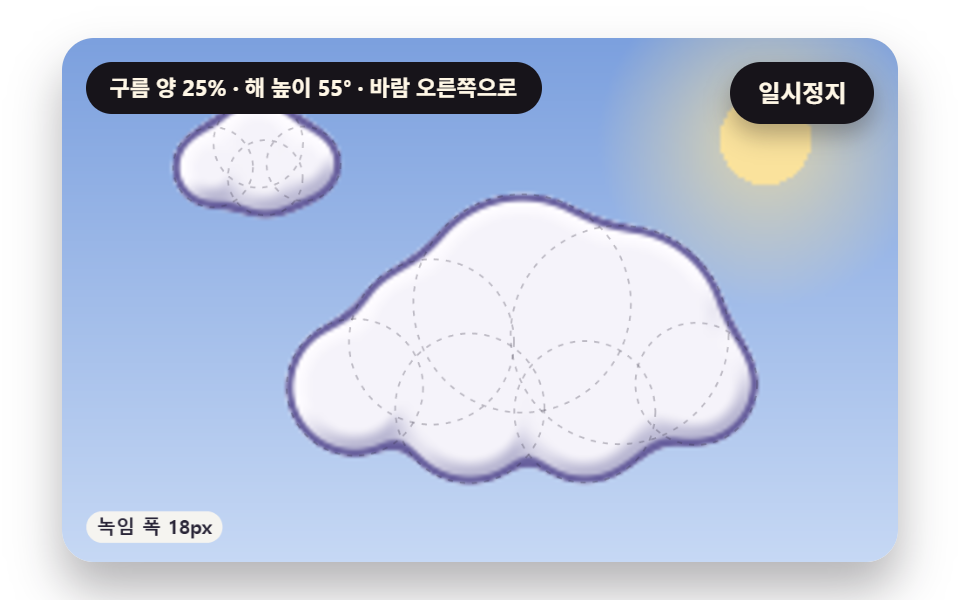 クリエイティブUI雲 アニメーション css 9種 — 綿雲の形から雲海まで
 クリエイティブUIcss 背景 パターン ジェネレーター 自作9種
 クリエイティブUI3D 地球儀サイト演出9選 — Three.jsなしのcanvas計算
 クリエイティブUI物理エンジン 作り方 9選 — Verletロープからラグドールまで
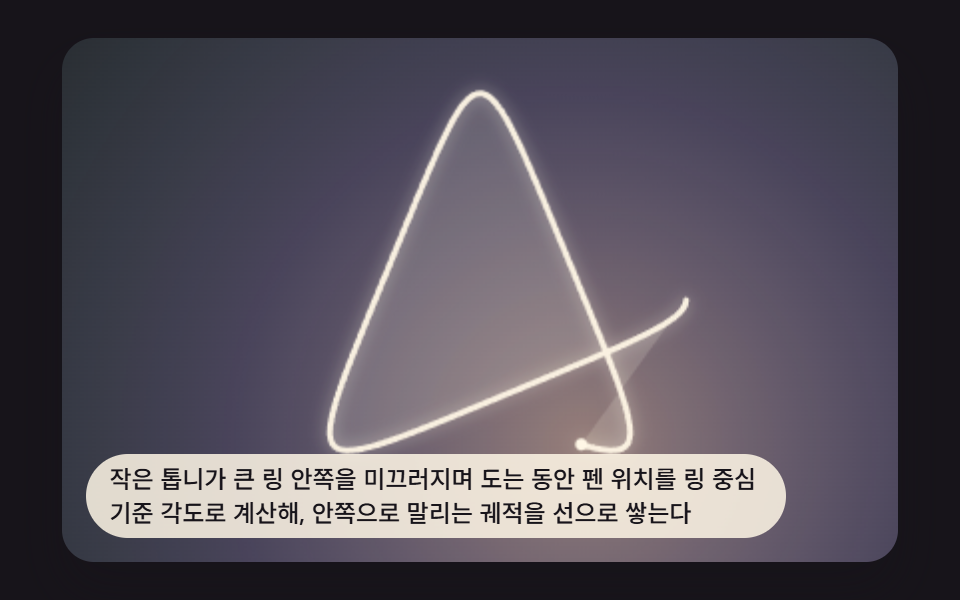 クリエイティブUIスピログラフ アート 9パターン — 歯車比で描く幾何模様
 クリエイティブUIメッシュ グラデーション 9パターン — 色点の補間からノイズのゆがみまで計算で描く
 クリエイティブUIcss 影 おしゃれ 9パターン — 光の位置から影を計算する場面
 クリエイティブUIcss 背景 マーブル 9パターン — 墨流し・櫛・石目の流れる背景
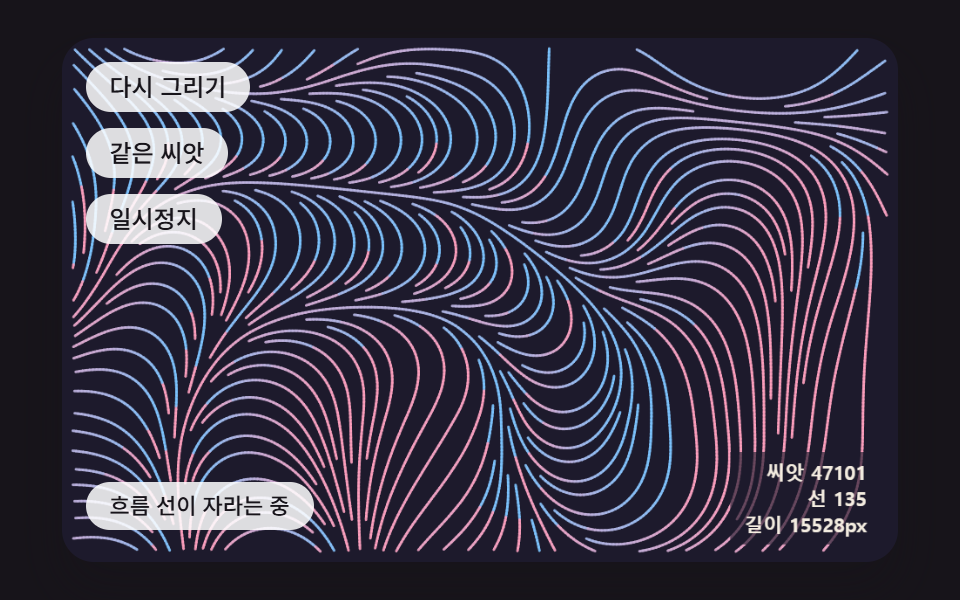 クリエイティブUIジェネラティブアート 作り方 9種 — 育つ模様をコードで
 クリエイティブUIオーロラ 背景 9種 — カーテン・光の筋・湖の映り込み・稜線