css 区切り線 9パターン — 両端が消えて文字の幅で線が分かれる区切りの場面
css 区切り線は線一本で済みそうだが、両端がぷつりと切れ、中央の文字の幅に線の長さが合わず、セクションの境目が直線で単調になる — 01番・02番・04番が一つずつ直す。このページの九つは、線の形を値で計算して描きます。
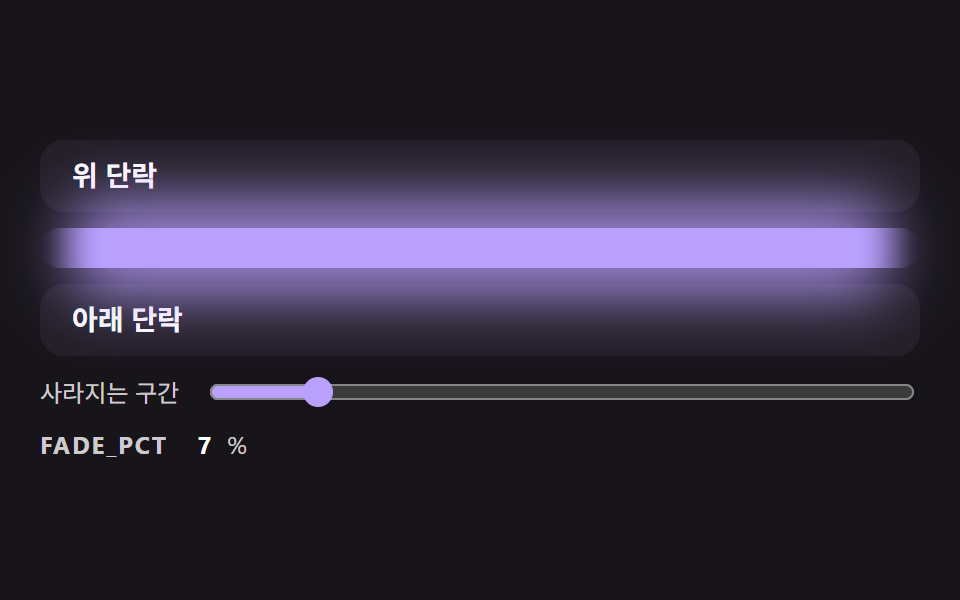 01 divl-gradient-fade-ends-line
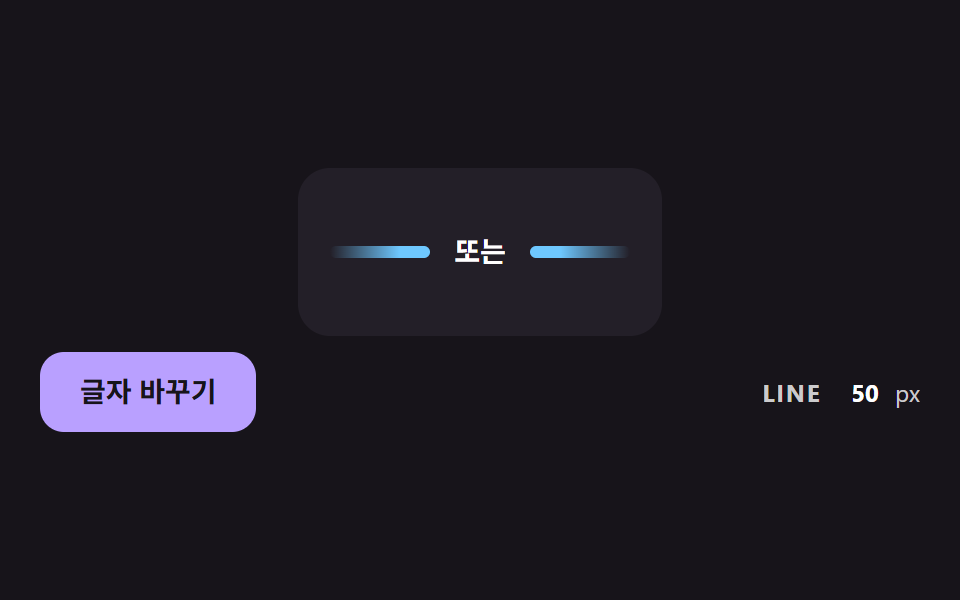 02 divl-centered-label-flex-lines
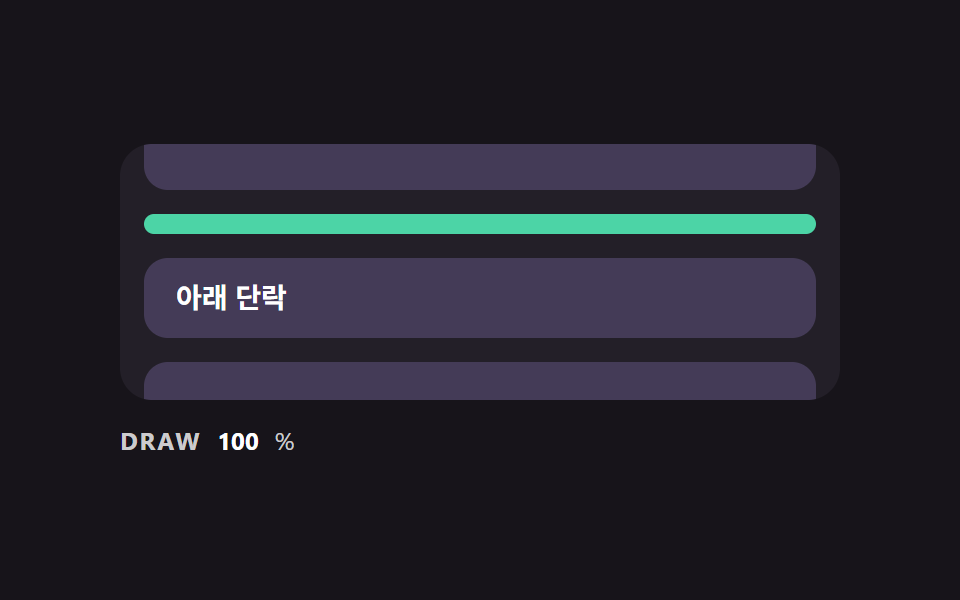 03 divl-scroll-draw-from-center
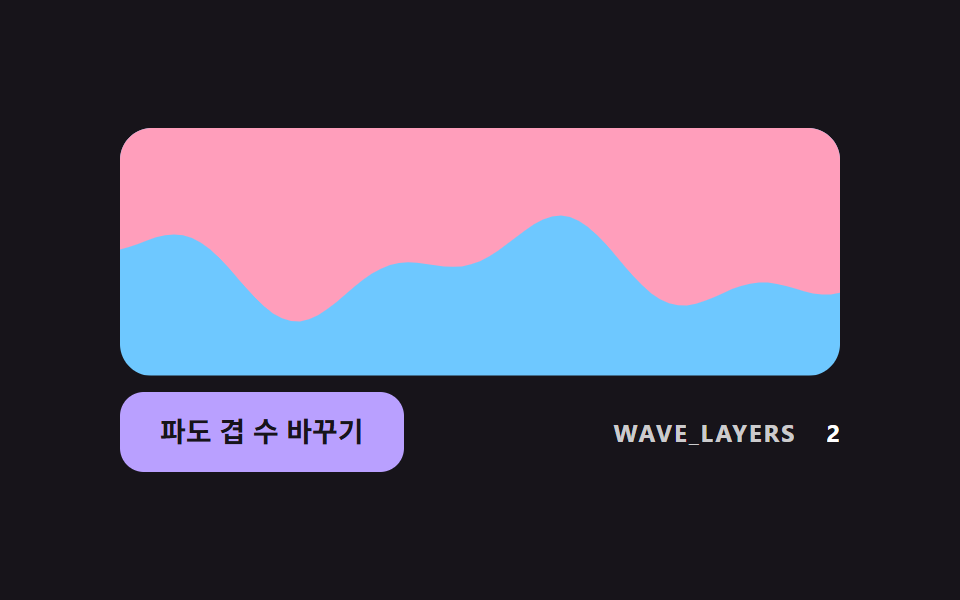 04 divl-sine-wave-section-edge
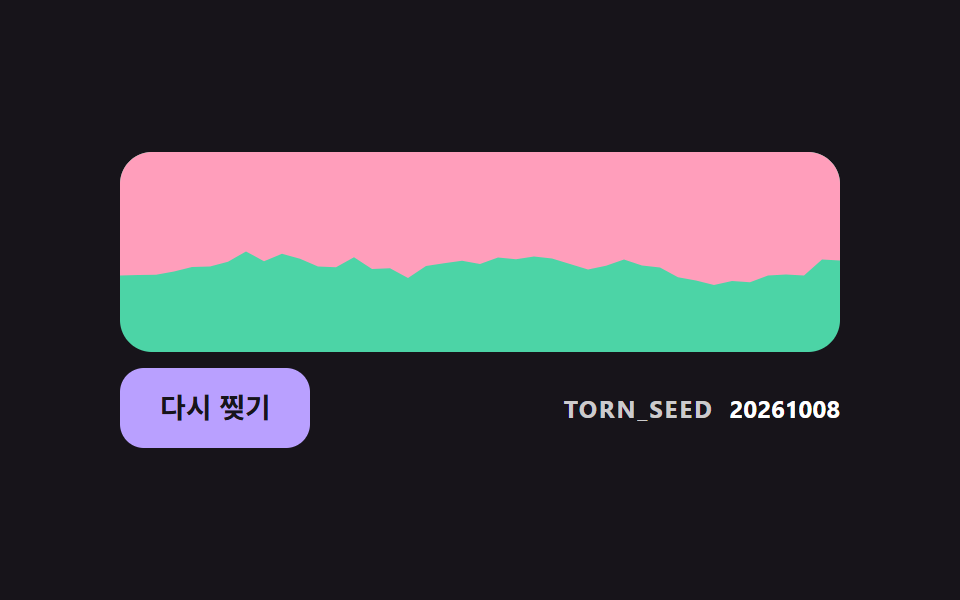 05 divl-torn-edge-seeded-noise
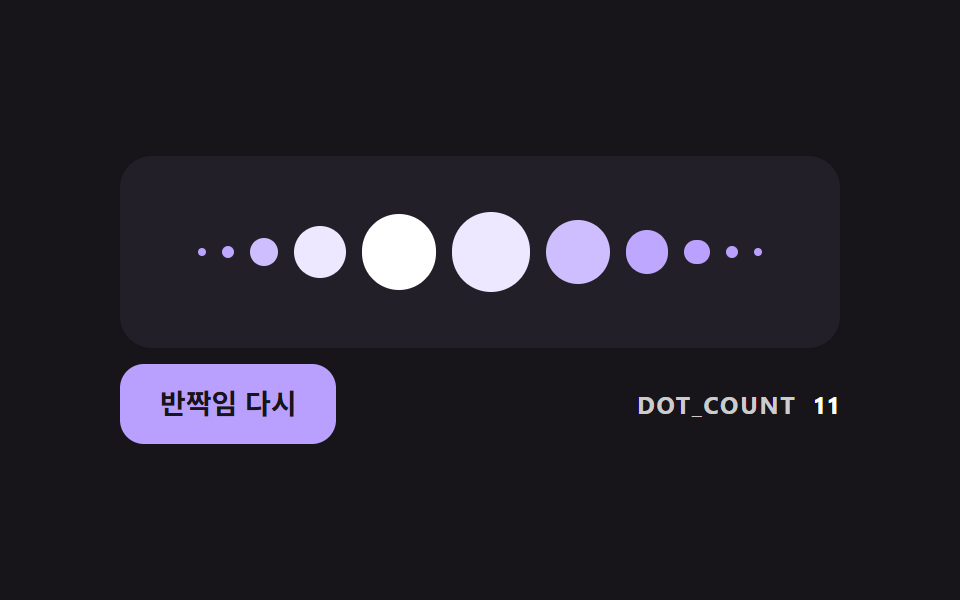 06 divl-dot-bell-curve-glint
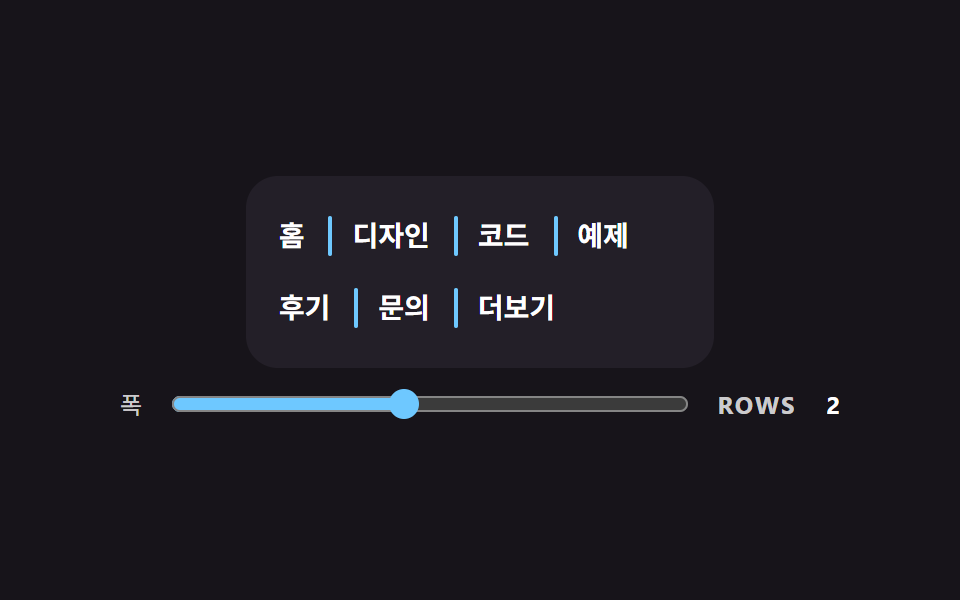 07 divl-vertical-wrap-aware-separator
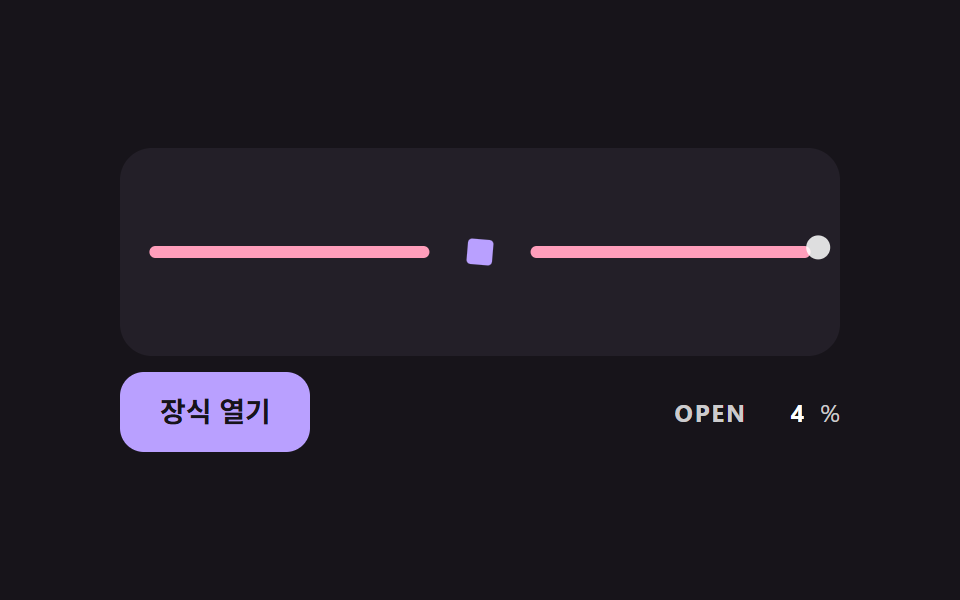 08 divl-ornament-proximity-open
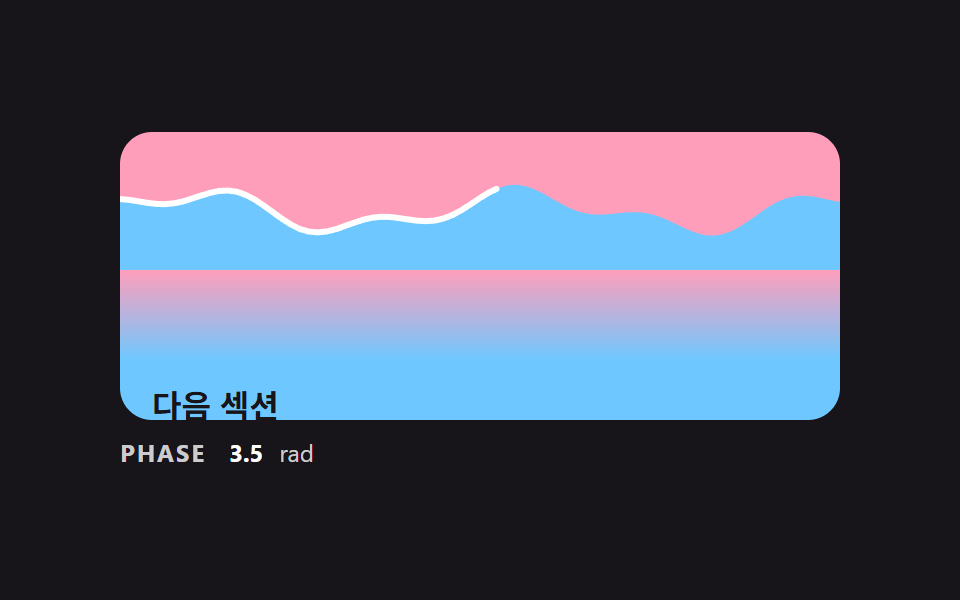 09 divl-section-handoff-wave-scene
自動再生 · タイルを押すとその項目へ · すべて1つのzip
- 01 両端が透明に消える基本の区切り線
- 02 中央の文字の幅に合わせて両側の線が分かれる区切り線
- 03 スクロール位置に応じて真ん中から両側へ描かれる区切り線
- 04 サイン波を二つ足して作る波の区切り
- 05 固定シードのノイズでぎざぎざに切った破れ紙の境目
- 06 真ん中がいちばん大きい点の区切り線と一度通る光
- 07 行が変わっても先頭に残らない縦の区切り線
- 08 ポインターが近づくほど飾りが開いて線が分かれる区切り線
- 09 二つのセクションが波の境目で受け渡される区切り線の場面
css 区切り線 9パターン — 線の形を計算すると端が不自然にならない
九つの場面は、計算が軽いものから順に並べました。01 は両端の透明度を決める曲線が一つだけで、02 は文字の幅を引いた残りを二つに割るだけの場面です。03 はスクロールした距離の割合で線が伸び、04 と 05 はサイン波とシード付きのノイズでセクションの境目を描きます。06 は点の大きさを釣鐘型の曲線で決め、07 は行が折り返したかどうかを判定し、08 はポインターまでの距離を使います。09 はスクロール位置ひとつで波・線・色のにじみを一緒に動かす場面です。
こんな画面で使います
ランディングページのセクションの間には 01・04・09 が合います。ログイン画面の「または」の行のように文字が挟まる場所は 02 の担当で、メニューやタグの間に入れる css 区切り線 縦 は 07 が受け持ちます。after で線を引く方法は行が変わった項目にも線を残してしまうので、07 は JS の判定でそれを避けています。記事の読み進みには 03、飾りのある紹介ページには 06 と 08 が向いています。
隣の記事とどこが違うか
メンフィス デザイン パターン ランディング 9選は点と波の模様を一枚のデザインとして載せる記事で、この記事は線や境目の形を数値で決めます。画面が切り替わる瞬間を扱うCSS 画面遷移エフェクト 9選や、スクロールで場面をつなぐスクロール ストーリーテリング セクション 9選では、区切り線を一つの要素として作り込むことはしません。
技法別のコードで見る区切り線
九つはライブラリを使わず、普通の JS と CSS だけで書いてあります。03 と 09 はどちらも scroll イベントで動きます。進み具合の求め方は 03 が getBoundingClientRect、09 が scrollTop で、IntersectionObserver はどの項目にも使っていません。下には、各場面で線の形を決める計算の区間だけをソースのまま抜き出しました。
01両端が透明に消える基本の区切り線
線の両端それぞれ30%の区間だけ、透明度が0から1へ上がります。その上がり方は直線ではなく smoothstep なので、線の始まりに境目の帯が見えません。同じグラデーションを線とその背後のにじみの両方に使い、デモの最中は FADE_PCT が6から50のあいだを往復して、動いたフレームは23個中23個でした。
<main class="stage">
<div class="dv is-demo" id="dvRoot">
  <p class="dv__block">上の段落</p>
  <div class="dv__rail">
    <div class="dv__glow" id="dvGlow"></div>
    <div class="dv__line" id="dvLine" role="separator"></div>
  </div>
  <p class="dv__block">下の段落</p>
  <label class="dv__ctrl">
    <span>消える区間</span>
    <input type="range" id="dvRange" min="0" max="50" value="30">
  </label>
  <p class="dv__meta"><span class="dv__tag">FADE_PCT</span> <b id="dvPct">30</b>%</p>
</div>
</main>
@use "../../../../site/static/demo-tokens" as *;
// 핵심: 선 색의 알파를 양 끝 FADE_PCT% 구간에서만 smoothstep 곡선으로 올린다.
// 정지점은 JS 가 계산해 background 에 넣는다 (직선 보간보다 끝이 자연스럽다).
$line-h: 20px;
$line-color: $subject-lilac;
@include stage($stage-ink);
.dv {
width: min(100%, 440px);
display: grid;
gap: $sp-2;
}
.dv__block {
box-sizing: border-box;
margin: 0;
height: 36px;
padding: 0 $sp-4;
display: flex;
align-items: center;
border-radius: $r-control;
background: $tick-panel;
color: $stage-paper;
font-size: 14px;
font-weight: 700;
line-height: 20px;
}
.dv__rail {
position: relative;
height: $line-h;
}
.dv__glow {
position: absolute;
left: 0;
right: 0;
top: -14px;
bottom: -14px;
border-radius: $r-pill;
opacity: .8;
filter: blur(14px);
}
.dv__line {
position: relative;
height: $line-h;
border-radius: $r-pill;
background: $line-color;
}
.dv__ctrl {
display: flex;
align-items: center;
gap: $sp-3;
font-size: 12px;
line-height: 16px;
color: rgba($stage-paper, .78);
}
.dv__ctrl input { flex: 1; min-width: 0; accent-color: $line-color; }
.dv__meta {
margin: 0;
display: flex;
align-items: baseline;
gap: $sp-2;
font-size: 12px;
line-height: 16px;
color: rgba($stage-paper, .78);
}
.dv__tag { font-weight: 700; letter-spacing: .08em; }
.dv__meta b { min-width: 2ch; text-align: right; font-variant-numeric: tabular-nums; color: $stage-paper; }
@media (prefers-reduced-motion: reduce) {
.dv__line { transition: none; }
}html, body {
margin: 0;
overflow: hidden;
}
.stage {
box-sizing: border-box;
min-height: 100vh;
display: grid;
place-items: center;
margin: 0;
background: #17141a;
font-family: -apple-system, "Segoe UI", "Noto Sans KR", sans-serif;
padding: clamp(8px, 4vw, 24px);
}
.dv {
width: min(100%, 440px);
display: grid;
gap: 8px;
}
.dv__block {
box-sizing: border-box;
margin: 0;
height: 36px;
padding: 0 16px;
display: flex;
align-items: center;
border-radius: 12px;
background: #231f28;
color: #ffffff;
font-size: 14px;
font-weight: 700;
line-height: 20px;
}
.dv__rail {
position: relative;
height: 20px;
}
.dv__glow {
position: absolute;
left: 0;
right: 0;
top: -14px;
bottom: -14px;
border-radius: 999px;
opacity: 0.8;
filter: blur(14px);
}
.dv__line {
position: relative;
height: 20px;
border-radius: 999px;
background: #b9a0ff;
}
.dv__ctrl {
display: flex;
align-items: center;
gap: 12px;
font-size: 12px;
line-height: 16px;
color: rgba(255, 255, 255, 0.78);
}
.dv__ctrl input {
flex: 1;
min-width: 0;
accent-color: #b9a0ff;
}
.dv__meta {
margin: 0;
display: flex;
align-items: baseline;
gap: 8px;
font-size: 12px;
line-height: 16px;
color: rgba(255, 255, 255, 0.78);
}
.dv__tag {
font-weight: 700;
letter-spacing: 0.08em;
}
.dv__meta b {
min-width: 2ch;
text-align: right;
font-variant-numeric: tabular-nums;
color: #ffffff;
}
@media (prefers-reduced-motion: reduce) {
.dv__line {
transition: none;
}
}(function () {
// 기법: 선 색의 알파를 양 끝 FADE_PCT% 구간에서만 0 에서 1 로 올린다.
// 직선 보간은 선이 시작하는 곳에 띠가 보여서 smoothstep(3t^2 - 2t^3) 곡선으로 8단계 정지점을 직접 만든다.
var FADE_PCT = 30;
var LINE_H_PX = 20;
var STEPS = 8;
var CYCLE_MS = 2000;
var LOW_PCT = 6;
var HIGH_PCT = 50;
var RGB = '185,160,255';
var root = document.getElementById('dvRoot');
var line = document.getElementById('dvLine');
var glow = document.getElementById('dvGlow');
var range = document.getElementById('dvRange');
var pctEl = document.getElementById('dvPct');
var reduce = window.matchMedia('(prefers-reduced-motion: reduce)').matches;
  function gradientOf(pct) {
    var stops = [];
    var i;
    for (i = 0; i <= STEPS; i += 1) {
      var t = i / STEPS;
      var a = t * t * (3 - 2 * t);
      stops.push('rgba(' + RGB + ',' + a.toFixed(3) + ') ' + (pct * t).toFixed(2) + '%');
    }
    for (i = STEPS; i >= 0; i -= 1) {
      var u = i / STEPS;
      var b = u * u * (3 - 2 * u);
      stops.push('rgba(' + RGB + ',' + b.toFixed(3) + ') ' + (100 - pct * u).toFixed(2) + '%');
    }
    return 'linear-gradient(90deg,' + stops.join(',') + ')';
  }
function paint(pct) {
var g = gradientOf(pct);
line.style.background = g;
glow.style.background = g;
pctEl.textContent = String(Math.round(pct));
range.value = String(Math.round(pct));
}
function stopDemo() { root.classList.remove('is-demo'); }
range.addEventListener('input', function () {
stopDemo();
FADE_PCT = Number(range.value);
paint(FADE_PCT);
});
var t0 = null;
function tick(ts) {
if (t0 === null) t0 = ts;
if (root.classList.contains('is-demo')) {
var phase = ((ts - t0) % CYCLE_MS) / CYCLE_MS;
var wave = 0.5 - 0.5 * Math.cos(phase * Math.PI * 2);
paint(LOW_PCT + (HIGH_PCT - LOW_PCT) * wave);
}
requestAnimationFrame(tick);
}
line.style.height = LINE_H_PX + 'px';
paint(FADE_PCT);
if (reduce) {
stopDemo();
} else {
requestAnimationFrame(tick);
}
})();// FadeDivider — vanilla 판(01-divl-gradient-fade-ends-line) 의 React 포트.
// 선 색의 알파를 양 끝 FADE_PCT% 구간에서만 smoothstep 곡선으로 올린다. 정지점은 JS 가 계산한다.
import { useEffect, useRef } from "react";
import styles from "./FadeDivider.module.scss";
type Box<T> = { current: T };
const LINE_H_PX = 20;
const STEPS = 8;
const CYCLE_MS = 2000;
const LOW_PCT = 6;
const HIGH_PCT = 50;
const RGB = "185,160,255";
function gradientOf(pct: number): string {
const stops: string[] = [];
for (let i = 0; i <= STEPS; i += 1) {
const t = i / STEPS;
const a = t * t * (3 - 2 * t);
stops.push("rgba(" + RGB + "," + a.toFixed(3) + ") " + (pct * t).toFixed(2) + "%");
}
for (let i = STEPS; i >= 0; i -= 1) {
const u = i / STEPS;
const b = u * u * (3 - 2 * u);
stops.push("rgba(" + RGB + "," + b.toFixed(3) + ") " + (100 - pct * u).toFixed(2) + "%");
}
return "linear-gradient(90deg," + stops.join(",") + ")";
}
export default function FadeDivider() {
const lineRef = useRef<HTMLDivElement | null>(null) as Box<HTMLDivElement | null>;
const glowRef = useRef<HTMLDivElement | null>(null) as Box<HTMLDivElement | null>;
const rangeRef = useRef<HTMLInputElement | null>(null) as Box<HTMLInputElement | null>;
const pctRef = useRef<HTMLElement | null>(null) as Box<HTMLElement | null>;
useEffect(() => {
const line = lineRef.current;
const glow = glowRef.current;
const range = rangeRef.current;
const pctEl = pctRef.current;
if (!line || !glow || !range || !pctEl) return;
const reduce = window.matchMedia("(prefers-reduced-motion: reduce)").matches;
let demo = !reduce;
let t0: number | null = null;
let raf = 0;
const paint = (pct: number): void => {
const g = gradientOf(pct);
line.style.background = g;
glow.style.background = g;
pctEl.textContent = String(Math.round(pct));
range.value = String(Math.round(pct));
};
const onInput = (): void => {
demo = false;
paint(Number(range.value));
};
range.addEventListener("input", onInput);
function tick(ts: number): void {
if (t0 === null) t0 = ts;
if (demo) {
const phase = ((ts - t0) % CYCLE_MS) / CYCLE_MS;
const wave = 0.5 - 0.5 * Math.cos(phase * Math.PI * 2);
paint(LOW_PCT + (HIGH_PCT - LOW_PCT) * wave);
}
raf = requestAnimationFrame(tick);
}
line.style.height = LINE_H_PX + "px";
paint(30);
if (!reduce) raf = requestAnimationFrame(tick);
return () => {
cancelAnimationFrame(raf);
range.removeEventListener("input", onInput);
};
}, []);
return (
<div className={styles.dv}>
<p className={styles.block}>위 단락</p>
<div className={styles.rail}>
<div className={styles.glow} ref={glowRef} />
<div className={styles.line} ref={lineRef} role="separator" />
</div>
<p className={styles.block}>아래 단락</p>
<label className={styles.ctrl}>
<span>사라지는 구간</span>
<input type="range" min={0} max={50} defaultValue={30} ref={rangeRef} />
</label>
<p className={styles.meta}>
<span className={styles.tag}>FADE_PCT</span> <b ref={pctRef}>30</b>%
</p>
</div>
);
}01 · 両端が透明に消える基本の区切り線 — 計測 累積面積 20.444% · 動いたフレーム 23/23GODRICH オリジナル · SCSS と React は zip に同梱 · パスワードを見る
function gradientOf(pct) {
var stops = [];
var i;
for (i = 0; i <= STEPS; i += 1) {
var t = i / STEPS;
var a = t * t * (3 - 2 * t);
stops.push('rgba(' + RGB + ',' + a.toFixed(3) + ') ' + (pct * t).toFixed(2) + '%');
}
for (i = STEPS; i >= 0; i -= 1) {
var u = i / STEPS;
var b = u * u * (3 - 2 * u);
stops.push('rgba(' + RGB + ',' + b.toFixed(3) + ') ' + (100 - pct * u).toFixed(2) + '%');
}
return 'linear-gradient(90deg,' + stops.join(',') + ')';
}
02中央の文字の幅に合わせて両側の線が分かれる区切り線
文字の幅を getBoundingClientRect で測り、行の幅から文字と両脇の余白12pxずつを引いた残りを半分にして、二本の線の width にします。文字が替わっても線が片側に寄らず、カードの幅が180と420のあいだを往復しても毎フレーム計算し直します。動いたフレームは23/23です。
<main class="stage">
<div class="dv is-demo" id="dvRoot">
  <div class="dv__card" id="dvCard">
    <div class="dv__row" id="dvRow" role="separator">
      <span class="dv__side" id="dvLeft"></span>
      <span class="dv__label" id="dvLabel">または</span>
      <span class="dv__side dv__side--right" id="dvRight"></span>
    </div>
  </div>
  <div class="dv__bar">
  <button class="dv__btn" id="dvBtn" type="button">文字を変える</button>
  <p class="dv__meta"><span class="dv__tag">LINE</span> <b id="dvPx">0</b><span>px</span></p>
  </div>
</div>
</main>
@use "../../../../site/static/demo-tokens" as *;
// 핵심: 가운데 글자 폭을 재서 양쪽 선 폭을 (줄 폭 - 글자 폭 - 간격 * 2) / 2 로 직접 계산한다.
$line-h: 6px;
$label-gap: 12px;
$line-color: $subject-sky;
@include stage($stage-ink);
.dv {
width: min(100%, 440px);
display: grid;
gap: $sp-2;
justify-items: center;
}
.dv__card {
box-sizing: border-box;
width: 420px;
max-width: 100%;
padding: $sp-8 $sp-4;
border-radius: $r-card;
background: $tick-panel;
}
.dv__row {
display: flex;
align-items: center;
gap: $label-gap;
}
.dv__side {
display: block;
flex: none;
height: $line-h;
border-radius: $r-pill;
background: linear-gradient(90deg, rgba($line-color, 0), $line-color 70%);
}
.dv__side--right { background: linear-gradient(270deg, rgba($line-color, 0), $line-color 70%); }
.dv__label {
flex: none;
color: $stage-paper;
font-size: 14px;
font-weight: 700;
line-height: 20px;
white-space: nowrap;
}
.dv__btn {
box-sizing: border-box;
height: 40px;
padding: 0 $sp-5;
border: 0;
border-radius: $r-control;
background: $subject-lilac;
color: $subject-ink;
font-family: inherit;
font-size: 14px;
font-weight: 700;
line-height: 20px;
cursor: pointer;
}
.dv__btn:focus-visible { outline: 3px solid $stage-paper; outline-offset: 3px; }
.dv__meta {
margin: 0;
display: flex;
flex-wrap: wrap;
align-items: baseline;
gap: $sp-2;
font-size: 12px;
line-height: 16px;
color: rgba($stage-paper, .78);
}
.dv__tag { font-weight: 700; letter-spacing: .08em; }
.dv__meta b { min-width: 3ch; text-align: right; font-variant-numeric: tabular-nums; color: $stage-paper; }
@media (prefers-reduced-motion: reduce) {
.dv__btn { transition: none; }
}
.dv__bar { box-sizing: border-box; width: 100%; display: flex; flex-wrap: wrap; align-items: center; justify-content: space-between; gap: $sp-2 $sp-3; }html, body {
margin: 0;
overflow: hidden;
}
.stage {
box-sizing: border-box;
min-height: 100vh;
display: grid;
place-items: center;
margin: 0;
background: #17141a;
font-family: -apple-system, "Segoe UI", "Noto Sans KR", sans-serif;
padding: clamp(8px, 4vw, 24px);
}
.dv {
width: min(100%, 440px);
display: grid;
gap: 8px;
justify-items: center;
}
.dv__card {
box-sizing: border-box;
width: 420px;
max-width: 100%;
padding: 32px 16px;
border-radius: 16px;
background: #231f28;
}
.dv__row {
display: flex;
align-items: center;
gap: 12px;
}
.dv__side {
display: block;
flex: none;
height: 6px;
border-radius: 999px;
background: linear-gradient(90deg, rgba(110, 200, 255, 0), #6ec8ff 70%);
}
.dv__side--right {
background: linear-gradient(270deg, rgba(110, 200, 255, 0), #6ec8ff 70%);
}
.dv__label {
flex: none;
color: #ffffff;
font-size: 14px;
font-weight: 700;
line-height: 20px;
white-space: nowrap;
}
.dv__btn {
box-sizing: border-box;
height: 40px;
padding: 0 20px;
border: 0;
border-radius: 12px;
background: #b9a0ff;
color: #17141a;
font-family: inherit;
font-size: 14px;
font-weight: 700;
line-height: 20px;
cursor: pointer;
}
.dv__btn:focus-visible {
outline: 3px solid #ffffff;
outline-offset: 3px;
}
.dv__meta {
margin: 0;
display: flex;
flex-wrap: wrap;
align-items: baseline;
gap: 8px;
font-size: 12px;
line-height: 16px;
color: rgba(255, 255, 255, 0.78);
}
.dv__tag {
font-weight: 700;
letter-spacing: 0.08em;
}
.dv__meta b {
min-width: 3ch;
text-align: right;
font-variant-numeric: tabular-nums;
color: #ffffff;
}
@media (prefers-reduced-motion: reduce) {
.dv__btn {
transition: none;
}
}
.dv__bar {
box-sizing: border-box;
width: 100%;
display: flex;
flex-wrap: wrap;
align-items: center;
justify-content: space-between;
gap: 8px 12px;
}(function () {
// 기법: 글자 폭을 getBoundingClientRect 로 재고, 양쪽 선 幅 = (줄 幅 - 글자 幅 - LABEL_GAP * 2) / 2 를 직접 계산해 width 로 준다.
// 데모는 카드 폭을 시간에 따라 줄였다 늘리고 글자를 돌려 가며 매 프레임 다시 계산한다.
var LABEL_GAP = 12;
var LINE_H_PX = 6;
var CYCLE_MS = 2000;
var NARROW_PX = 180;
var WIDE_PX = 420;
var LABELS = ['または', 'ほかの方法で続ける', 'ここまで読んだ内容'];
var root = document.getElementById('dvRoot');
var card = document.getElementById('dvCard');
var row = document.getElementById('dvRow');
var left = document.getElementById('dvLeft');
var right = document.getElementById('dvRight');
var label = document.getElementById('dvLabel');
var btn = document.getElementById('dvBtn');
var pxEl = document.getElementById('dvPx');
var reduce = window.matchMedia('(prefers-reduced-motion: reduce)').matches;
var labelIndex = 0;
  function layout() {
    var rowW = row.getBoundingClientRect().width;
    var labelW = label.getBoundingClientRect().width;
    var side = Math.max(0, (rowW - labelW - LABEL_GAP * 2) / 2);
    left.style.width = side.toFixed(1) + 'px';
    right.style.width = side.toFixed(1) + 'px';
    pxEl.textContent = String(Math.round(side));
  }
function setLabel(i) {
labelIndex = i;
label.textContent = LABELS[i];
}
function stopDemo() { root.classList.remove('is-demo'); }
btn.addEventListener('click', function () {
stopDemo();
setLabel((labelIndex + 1) % LABELS.length);
layout();
});
var t0 = null;
function tick(ts) {
if (t0 === null) t0 = ts;
if (root.classList.contains('is-demo')) {
var now = ts - t0;
var phase = (now % CYCLE_MS) / CYCLE_MS;
var wave = 0.5 - 0.5 * Math.cos(phase * Math.PI * 2);
card.style.width = (NARROW_PX + (WIDE_PX - NARROW_PX) * wave).toFixed(1) + 'px';
var i = Math.floor(now / CYCLE_MS * 3) % LABELS.length;
if (i !== labelIndex) setLabel(i);
layout();
}
requestAnimationFrame(tick);
}
left.style.height = LINE_H_PX + 'px';
right.style.height = LINE_H_PX + 'px';
layout();
if (reduce) {
stopDemo();
} else {
requestAnimationFrame(tick);
}
})();// LabelDivider — vanilla 판(02-divl-centered-label-flex-lines) 의 React 포트.
// 가운데 글자 폭을 재서 양쪽 선 폭을 (줄 폭 - 글자 폭 - LABEL_GAP * 2) / 2 로 직접 계산한다.
import { useEffect, useRef } from "react";
import styles from "./LabelDivider.module.scss";
type Box<T> = { current: T };
const LABEL_GAP = 12;
const LINE_H_PX = 6;
const CYCLE_MS = 2000;
const NARROW_PX = 180;
const WIDE_PX = 420;
const LABELS: string[] = ["또는", "다른 방법으로 계속", "여기까지 읽은 내용"];
export default function LabelDivider() {
const cardRef = useRef<HTMLDivElement | null>(null) as Box<HTMLDivElement | null>;
const rowRef = useRef<HTMLDivElement | null>(null) as Box<HTMLDivElement | null>;
const leftRef = useRef<HTMLSpanElement | null>(null) as Box<HTMLSpanElement | null>;
const rightRef = useRef<HTMLSpanElement | null>(null) as Box<HTMLSpanElement | null>;
const labelRef = useRef<HTMLSpanElement | null>(null) as Box<HTMLSpanElement | null>;
const btnRef = useRef<HTMLButtonElement | null>(null) as Box<HTMLButtonElement | null>;
const pxRef = useRef<HTMLElement | null>(null) as Box<HTMLElement | null>;
useEffect(() => {
const card = cardRef.current;
const row = rowRef.current;
const left = leftRef.current;
const right = rightRef.current;
const label = labelRef.current;
const btn = btnRef.current;
const pxEl = pxRef.current;
if (!card || !row || !left || !right || !label || !btn || !pxEl) return;
const reduce = window.matchMedia("(prefers-reduced-motion: reduce)").matches;
let demo = !reduce;
let labelIndex = 0;
let t0: number | null = null;
let raf = 0;
const layout = (): void => {
const rowW = row.getBoundingClientRect().width;
const labelW = label.getBoundingClientRect().width;
const side = Math.max(0, (rowW - labelW - LABEL_GAP * 2) / 2);
left.style.width = side.toFixed(1) + "px";
right.style.width = side.toFixed(1) + "px";
pxEl.textContent = String(Math.round(side));
};
const setLabel = (i: number): void => {
labelIndex = i;
label.textContent = LABELS[i];
};
const onClick = (): void => {
demo = false;
setLabel((labelIndex + 1) % LABELS.length);
layout();
};
btn.addEventListener("click", onClick);
const tick = (ts: number): void => {
if (t0 === null) t0 = ts;
if (demo) {
const now = ts - t0;
const phase = (now % CYCLE_MS) / CYCLE_MS;
const wave = 0.5 - 0.5 * Math.cos(phase * Math.PI * 2);
card.style.width = (NARROW_PX + (WIDE_PX - NARROW_PX) * wave).toFixed(1) + "px";
const i = Math.floor((now / CYCLE_MS) * 3) % LABELS.length;
if (i !== labelIndex) setLabel(i);
layout();
}
raf = requestAnimationFrame(tick);
};
left.style.height = LINE_H_PX + "px";
right.style.height = LINE_H_PX + "px";
layout();
if (!reduce) raf = requestAnimationFrame(tick);
return () => {
cancelAnimationFrame(raf);
btn.removeEventListener("click", onClick);
};
}, []);
return (
<div className={styles.dv}>
<div className={styles.card} ref={cardRef}>
<div className={styles.row} ref={rowRef} role="separator">
<span className={styles.side} ref={leftRef} />
<span className={styles.label} ref={labelRef}>또는</span>
<span className={styles.sideRight} ref={rightRef} />
</div>
</div>
<div className={styles.bar}>
<button className={styles.btn} ref={btnRef} type="button">글자 바꾸기</button>
<p className={styles.meta}>
<span className={styles.tag}>LINE</span> <b ref={pxRef}>0</b>
<span>px</span>
</p>
</div>
</div>
);
}02 · 中央の文字の幅に合わせて両側の線が分かれる区切り線 — 計測 累積面積 15.208% · 動いたフレーム 23/23GODRICH オリジナル · SCSS と React は zip に同梱 · パスワードを見る
function layout() {
var rowW = row.getBoundingClientRect().width;
var labelW = label.getBoundingClientRect().width;
var side = Math.max(0, (rowW - labelW - LABEL_GAP * 2) / 2);
left.style.width = side.toFixed(1) + 'px';
right.style.width = side.toFixed(1) + 'px';
pxEl.textContent = String(Math.round(side));
}
03スクロール位置に応じて真ん中から両側へ描かれる区切り線
スクロールイベントのたびに、線が領域の底から上がってきた距離を測って80で割り、その割合だけ clip-path を両側から開きます。線は真ん中から左右へ伸び、上へ戻すと縮みます。デモではコードが scrollTop を動かしていて、動いたフレームは23/23です。
<main class="stage">
<div class="dv is-demo" id="dvRoot">
  <div class="dv__scroller" id="dvScroller" tabindex="0" aria-label="スクロール領域">
    <div class="dv__block">上の段落</div>
    <div class="dv__block dv__block--tall">上の段落</div>
    <div class="dv__line" id="dvLine" role="separator"></div>
    <div class="dv__block">下の段落</div>
    <div class="dv__block dv__block--tall">下の段落</div>
  </div>
  <p class="dv__meta"><span class="dv__tag">DRAW</span> <b id="dvPct">0</b>%</p>
</div>
</main>
@use "../../../../site/static/demo-tokens" as *;
// 핵심: 스크롤로 올라온 거리(DRAW_RANGE_PX 기준)를 clip-path inset 으로 바꿔 선이 가운데에서 양쪽으로 열린다.
$line-h: 10px;
$line-color: $subject-mint;
@include stage($stage-ink);
.dv {
width: min(100%, 360px);
display: grid;
gap: $sp-3;
}
.dv__scroller {
box-sizing: border-box;
height: 128px;
overflow-y: auto;
scrollbar-width: none;
display: grid;
gap: $sp-3;
align-content: start;
padding: $sp-3;
border-radius: $r-card;
background: $tick-panel;
}
.dv__scroller::-webkit-scrollbar { display: none; }
.dv__scroller:focus-visible { outline: 3px solid $stage-paper; outline-offset: 3px; }
.dv__block {
box-sizing: border-box;
height: 40px;
padding: 0 $sp-4;
display: flex;
align-items: center;
border-radius: $r-control;
background: rgba($subject-lilac, .22);
color: $stage-paper;
font-size: 14px;
font-weight: 700;
line-height: 20px;
}
.dv__block--tall { height: 72px; }
.dv__line {
flex: none;
height: $line-h;
background: $line-color;
clip-path: inset(0 50% 0 50% round 6px);
}
.dv__meta {
margin: 0;
display: flex;
align-items: baseline;
gap: $sp-2;
font-size: 12px;
line-height: 16px;
color: rgba($stage-paper, .78);
}
.dv__tag { font-weight: 700; letter-spacing: .08em; }
.dv__meta b { min-width: 3ch; text-align: right; font-variant-numeric: tabular-nums; color: $stage-paper; }
@media (prefers-reduced-motion: reduce) {
.dv__line { transition: none; }
}html, body {
margin: 0;
overflow: hidden;
}
.stage {
box-sizing: border-box;
min-height: 100vh;
display: grid;
place-items: center;
margin: 0;
background: #17141a;
font-family: -apple-system, "Segoe UI", "Noto Sans KR", sans-serif;
padding: clamp(8px, 4vw, 24px);
}
.dv {
width: min(100%, 360px);
display: grid;
gap: 12px;
}
.dv__scroller {
box-sizing: border-box;
height: 128px;
overflow-y: auto;
scrollbar-width: none;
display: grid;
gap: 12px;
align-content: start;
padding: 12px;
border-radius: 16px;
background: #231f28;
}
.dv__scroller::-webkit-scrollbar {
display: none;
}
.dv__scroller:focus-visible {
outline: 3px solid #ffffff;
outline-offset: 3px;
}
.dv__block {
box-sizing: border-box;
height: 40px;
padding: 0 16px;
display: flex;
align-items: center;
border-radius: 12px;
background: rgba(185, 160, 255, 0.22);
color: #ffffff;
font-size: 14px;
font-weight: 700;
line-height: 20px;
}
.dv__block--tall {
height: 72px;
}
.dv__line {
flex: none;
height: 10px;
background: #4cd4a6;
clip-path: inset(0 50% 0 50% round 6px);
}
.dv__meta {
margin: 0;
display: flex;
align-items: baseline;
gap: 8px;
font-size: 12px;
line-height: 16px;
color: rgba(255, 255, 255, 0.78);
}
.dv__tag {
font-weight: 700;
letter-spacing: 0.08em;
}
.dv__meta b {
min-width: 3ch;
text-align: right;
font-variant-numeric: tabular-nums;
color: #ffffff;
}
@media (prefers-reduced-motion: reduce) {
.dv__line {
transition: none;
}
}(function () {
// 기법: scroll 이벤트마다 선의 위치를 getBoundingClientRect 로 재서 진행도를 구하고, 그 값만큼 clip-path 를 양쪽에서 연다.
// IntersectionObserver 는 쓰지 않는다. 진행도 = 선이 영역 바닥을 지나 올라온 거리 / DRAW_RANGE_PX 이다.
var DRAW_RANGE_PX = 80;
var DRAW_MIN_PCT = 0;
var CYCLE_MS = 2000;
var root = document.getElementById('dvRoot');
var scroller = document.getElementById('dvScroller');
var line = document.getElementById('dvLine');
var pctEl = document.getElementById('dvPct');
var reduce = window.matchMedia('(prefers-reduced-motion: reduce)').matches;
  function update() {
    var box = scroller.getBoundingClientRect();
    var lineBox = line.getBoundingClientRect();
    var risen = box.bottom - lineBox.top;
    var p = Math.min(1, Math.max(0, risen / DRAW_RANGE_PX));
    var pct = DRAW_MIN_PCT + (100 - DRAW_MIN_PCT) * p;
    var edge = (100 - pct) / 2;
    line.style.clipPath = 'inset(0 ' + edge.toFixed(2) + '% 0 ' + edge.toFixed(2) + '% round 6px)';
    pctEl.textContent = String(Math.round(pct));
  }
function stopDemo() { root.classList.remove('is-demo'); }
scroller.addEventListener('scroll', update);
scroller.addEventListener('wheel', stopDemo, { passive: true });
scroller.addEventListener('pointerdown', stopDemo);
scroller.addEventListener('keydown', stopDemo);
var t0 = null;
function tick(ts) {
if (t0 === null) t0 = ts;
if (root.classList.contains('is-demo')) {
var max = scroller.scrollHeight - scroller.clientHeight;
var phase = ((ts - t0) % CYCLE_MS) / CYCLE_MS;
var tri = phase < 0.5 ? phase * 2 : 2 - phase * 2;
scroller.scrollTop = max * tri;
}
requestAnimationFrame(tick);
}
if (reduce) {
stopDemo();
scroller.scrollTop = (scroller.scrollHeight - scroller.clientHeight) / 2;
update();
} else {
update();
requestAnimationFrame(tick);
}
})();// ScrollDrawDivider — vanilla 판(03-divl-scroll-draw-from-center) 의 React 포트.
// scroll 이벤트마다 선의 위치를 getBoundingClientRect 로 재서 진행도를 구하고 clip-path 를 양쪽에서 연다.
import { useEffect, useRef } from "react";
import styles from "./ScrollDrawDivider.module.scss";
type Box<T> = { current: T };
const DRAW_RANGE_PX = 80;
const DRAW_MIN_PCT = 0;
const CYCLE_MS = 2000;
export default function ScrollDrawDivider() {
const scrollerRef = useRef<HTMLDivElement | null>(null) as Box<HTMLDivElement | null>;
const lineRef = useRef<HTMLDivElement | null>(null) as Box<HTMLDivElement | null>;
const pctRef = useRef<HTMLElement | null>(null) as Box<HTMLElement | null>;
useEffect(() => {
const scroller = scrollerRef.current;
const line = lineRef.current;
const pctEl = pctRef.current;
if (!scroller || !line || !pctEl) return;
const reduce = window.matchMedia("(prefers-reduced-motion: reduce)").matches;
let demo = !reduce;
let t0: number | null = null;
let raf = 0;
const update = (): void => {
const box = scroller.getBoundingClientRect();
const lineBox = line.getBoundingClientRect();
const risen = box.bottom - lineBox.top;
const p = Math.min(1, Math.max(0, risen / DRAW_RANGE_PX));
const pct = DRAW_MIN_PCT + (100 - DRAW_MIN_PCT) * p;
const edge = (100 - pct) / 2;
line.style.clipPath = "inset(0 " + edge.toFixed(2) + "% 0 " + edge.toFixed(2) + "% round 6px)";
pctEl.textContent = String(Math.round(pct));
};
const stopDemo = (): void => { demo = false; };
scroller.addEventListener("scroll", update);
scroller.addEventListener("wheel", stopDemo, { passive: true });
scroller.addEventListener("pointerdown", stopDemo);
scroller.addEventListener("keydown", stopDemo);
const tick = (ts: number): void => {
if (t0 === null) t0 = ts;
if (demo) {
const max = scroller.scrollHeight - scroller.clientHeight;
const phase = ((ts - t0) % CYCLE_MS) / CYCLE_MS;
const tri = phase < 0.5 ? phase * 2 : 2 - phase * 2;
scroller.scrollTop = max * tri;
}
raf = requestAnimationFrame(tick);
};
if (reduce) {
scroller.scrollTop = (scroller.scrollHeight - scroller.clientHeight) / 2;
update();
} else {
update();
raf = requestAnimationFrame(tick);
}
return () => {
cancelAnimationFrame(raf);
scroller.removeEventListener("scroll", update);
scroller.removeEventListener("wheel", stopDemo);
scroller.removeEventListener("pointerdown", stopDemo);
scroller.removeEventListener("keydown", stopDemo);
};
}, []);
return (
<div className={styles.dv}>
<div className={styles.scroller} ref={scrollerRef} tabIndex={0} aria-label="스크롤 영역">
<div className={styles.block}>위 단락</div>
<div className={styles.blockTall}>위 단락</div>
<div className={styles.line} ref={lineRef} role="separator" />
<div className={styles.block}>아래 단락</div>
<div className={styles.blockTall}>아래 단락</div>
</div>
<p className={styles.meta}>
<span className={styles.tag}>DRAW</span> <b ref={pctRef}>0</b>%
</p>
</div>
);
}03 · スクロール位置に応じて真ん中から両側へ描かれる区切り線 — 計測 累積面積 29.984% · 動いたフレーム 23/23GODRICH オリジナル · SCSS と React は zip に同梱 · パスワードを見る
function update() {
var box = scroller.getBoundingClientRect();
var lineBox = line.getBoundingClientRect();
var risen = box.bottom - lineBox.top;
var p = Math.min(1, Math.max(0, risen / DRAW_RANGE_PX));
var pct = DRAW_MIN_PCT + (100 - DRAW_MIN_PCT) * p;
var edge = (100 - pct) / 2;
line.style.clipPath = 'inset(0 ' + edge.toFixed(2) + '% 0 ' + edge.toFixed(2) + '% round 6px)';
pctEl.textContent = String(Math.round(pct));
}
04サイン波を二つ足して作る波の区切り
周期が190と83の二つのサイン波を足して境目の高さを決め、4px間隔で打った点をつないで SVG の path の d を直接組み立てます。二つの周期は割り切れないので、一つの曲線より繰り返しが見えにくく、ボタンで波の重ねが1から3まで変わります。css 区切り線 波 を作るなら、この足し算が核になります。動いたフレームは23/23です。
<main class="stage">
<div class="dv is-demo" id="dvRoot">
  <svg class="dv__svg" id="dvSvg" viewBox="0 0 320 110" aria-hidden="true" focusable="false">
    <rect class="dv__under" x="0" y="0" width="320" height="110"></rect>
    <path class="dv__over" id="dvPath" d="M0 0H320V55H0Z"></path>
  </svg>
  <div class="dv__bar">
  <button class="dv__btn" id="dvBtn" type="button">波の重ね数を変える</button>
  <p class="dv__meta"><span class="dv__tag">WAVE_LAYERS</span> <b id="dvLayers">2</b></p>
  </div>
</div>
</main>
@use "../../../../site/static/demo-tokens" as *;
// 핵심: 경계선 높이를 주기가 다른 사인 WAVE_LAYERS 개의 합으로 계산해 SVG path 로 그린다.
$over-color: $subject-pink;
$under-color: $subject-sky;
@include stage($stage-ink);
.dv {
width: min(100%, 360px);
display: grid;
gap: $sp-2;
justify-items: center;
}
.dv__svg {
display: block;
width: 100%;
height: auto;
border-radius: $r-card;
overflow: hidden;
}
.dv__under { fill: $under-color; }
.dv__over { fill: $over-color; }
.dv__btn {
box-sizing: border-box;
height: 40px;
padding: 0 $sp-5;
border: 0;
border-radius: $r-control;
background: $subject-lilac;
color: $subject-ink;
font-family: inherit;
font-size: 14px;
font-weight: 700;
line-height: 20px;
cursor: pointer;
}
.dv__btn:focus-visible { outline: 3px solid $stage-paper; outline-offset: 3px; }
.dv__meta {
margin: 0;
display: flex;
align-items: baseline;
gap: $sp-2;
font-size: 12px;
line-height: 16px;
color: rgba($stage-paper, .78);
}
.dv__tag { font-weight: 700; letter-spacing: .08em; }
.dv__meta b { min-width: 2ch; text-align: right; font-variant-numeric: tabular-nums; color: $stage-paper; }
@media (prefers-reduced-motion: reduce) {
.dv__btn { transition: none; }
}
.dv__bar { box-sizing: border-box; width: 100%; display: flex; flex-wrap: wrap; align-items: center; justify-content: space-between; gap: $sp-2 $sp-3; }html, body {
margin: 0;
overflow: hidden;
}
.stage {
box-sizing: border-box;
min-height: 100vh;
display: grid;
place-items: center;
margin: 0;
background: #17141a;
font-family: -apple-system, "Segoe UI", "Noto Sans KR", sans-serif;
padding: clamp(8px, 4vw, 24px);
}
.dv {
width: min(100%, 360px);
display: grid;
gap: 8px;
justify-items: center;
}
.dv__svg {
display: block;
width: 100%;
height: auto;
border-radius: 16px;
overflow: hidden;
}
.dv__under {
fill: #6ec8ff;
}
.dv__over {
fill: #ff9ebb;
}
.dv__btn {
box-sizing: border-box;
height: 40px;
padding: 0 20px;
border: 0;
border-radius: 12px;
background: #b9a0ff;
color: #17141a;
font-family: inherit;
font-size: 14px;
font-weight: 700;
line-height: 20px;
cursor: pointer;
}
.dv__btn:focus-visible {
outline: 3px solid #ffffff;
outline-offset: 3px;
}
.dv__meta {
margin: 0;
display: flex;
align-items: baseline;
gap: 8px;
font-size: 12px;
line-height: 16px;
color: rgba(255, 255, 255, 0.78);
}
.dv__tag {
font-weight: 700;
letter-spacing: 0.08em;
}
.dv__meta b {
min-width: 2ch;
text-align: right;
font-variant-numeric: tabular-nums;
color: #ffffff;
}
@media (prefers-reduced-motion: reduce) {
.dv__btn {
transition: none;
}
}
.dv__bar {
box-sizing: border-box;
width: 100%;
display: flex;
flex-wrap: wrap;
align-items: center;
justify-content: space-between;
gap: 8px 12px;
}(function () {
// 기법: 경계 높이 y(x) = BASE_Y + 각 겹(진폭 * sin(2π x / 주기 + 위상 * 속도배수))의 합. 두 주기를 일부러 서로 약분되지 않게 잡아 반복이 덜 보인다.
// 점을 STEP_PX 간격으로 찍어 SVG path 의 d 를 직접 만든다.
var WAVE_LAYERS = 2;
var WAVE_AMP = [16, 9, 5];
var WAVE_PERIOD = [190, 83, 47];
var WAVE_SPEED = [1, 1.7, 2.3];
var BASE_Y = 62;
var VIEW_W = 320;
var STEP_PX = 4;
var RATE_RAD_PER_S = 2.4;
var root = document.getElementById('dvRoot');
var pathEl = document.getElementById('dvPath');
var btn = document.getElementById('dvBtn');
var layersEl = document.getElementById('dvLayers');
var reduce = window.matchMedia('(prefers-reduced-motion: reduce)').matches;
var phase = 0;
  function edgeY(x) {
    var y = BASE_Y;
    for (var i = 0; i < WAVE_LAYERS; i += 1) {
      y += WAVE_AMP[i] * Math.sin(2 * Math.PI * x / WAVE_PERIOD[i] + phase * WAVE_SPEED[i]);
    }
    return y;
  }
  function draw() {
    var d = 'M0 0H' + VIEW_W + 'V' + edgeY(VIEW_W).toFixed(1);
    for (var x = VIEW_W - STEP_PX; x >= 0; x -= STEP_PX) d += 'L' + x + ' ' + edgeY(x).toFixed(1);
    d += 'L0 ' + edgeY(0).toFixed(1) + 'Z';
    pathEl.setAttribute('d', d);
    layersEl.textContent = String(WAVE_LAYERS);
  }
function stopDemo() { root.classList.remove('is-demo'); }
btn.addEventListener('click', function () {
WAVE_LAYERS = WAVE_LAYERS % 3 + 1;
draw();
});
var lastTs = null;
function tick(ts) {
var dt = lastTs === null ? 0.016 : Math.min(0.05, (ts - lastTs) / 1000);
lastTs = ts;
if (root.classList.contains('is-demo')) {
phase += RATE_RAD_PER_S * dt;
draw();
}
requestAnimationFrame(tick);
}
draw();
if (reduce) {
stopDemo();
} else {
requestAnimationFrame(tick);
}
})();// WaveEdge — vanilla 판(04-divl-sine-wave-section-edge) 의 React 포트.
// 경계 높이를 주기가 다른 사인 WAVE_LAYERS 개의 합으로 계산해 SVG path 의 d 를 직접 만든다.
import { useEffect, useRef } from "react";
import styles from "./WaveEdge.module.scss";
type Box<T> = { current: T };
const WAVE_AMP: number[] = [16, 9, 5];
const WAVE_PERIOD: number[] = [190, 83, 47];
const WAVE_SPEED: number[] = [1, 1.7, 2.3];
const BASE_Y = 62;
const VIEW_W = 320;
const STEP_PX = 4;
const RATE_RAD_PER_S = 2.4;
export default function WaveEdge() {
const pathRef = useRef<SVGPathElement | null>(null) as Box<SVGPathElement | null>;
const btnRef = useRef<HTMLButtonElement | null>(null) as Box<HTMLButtonElement | null>;
const layersRef = useRef<HTMLElement | null>(null) as Box<HTMLElement | null>;
useEffect(() => {
const pathEl = pathRef.current;
const btn = btnRef.current;
const layersEl = layersRef.current;
if (!pathEl || !btn || !layersEl) return;
const reduce = window.matchMedia("(prefers-reduced-motion: reduce)").matches;
let demo = !reduce;
let layers = 2;
let phase = 0;
let lastTs: number | null = null;
let raf = 0;
const edgeY = (x: number): number => {
let y = BASE_Y;
for (let i = 0; i < layers; i += 1) {
y += WAVE_AMP[i] * Math.sin((2 * Math.PI * x) / WAVE_PERIOD[i] + phase * WAVE_SPEED[i]);
}
return y;
};
const draw = (): void => {
let d = "M0 0H" + VIEW_W + "V" + edgeY(VIEW_W).toFixed(1);
for (let x = VIEW_W - STEP_PX; x >= 0; x -= STEP_PX) d += "L" + x + " " + edgeY(x).toFixed(1);
d += "L0 " + edgeY(0).toFixed(1) + "Z";
pathEl.setAttribute("d", d);
layersEl.textContent = String(layers);
};
const onClick = (): void => {
layers = (layers % 3) + 1;
draw();
};
btn.addEventListener("click", onClick);
function tick(ts: number): void {
const dt = lastTs === null ? 0.016 : Math.min(0.05, (ts - lastTs) / 1000);
lastTs = ts;
if (demo) {
phase += RATE_RAD_PER_S * dt;
draw();
}
raf = requestAnimationFrame(tick);
}
draw();
if (!reduce) raf = requestAnimationFrame(tick);
return () => {
demo = false;
cancelAnimationFrame(raf);
btn.removeEventListener("click", onClick);
};
}, []);
return (
<div className={styles.dv}>
<svg className={styles.svg} viewBox="0 0 320 110" aria-hidden="true" focusable="false">
<rect className={styles.under} x="0" y="0" width="320" height="110" />
<path className={styles.over} ref={pathRef} d="M0 0H320V55H0Z" />
</svg>
<div className={styles.bar}>
<button className={styles.btn} ref={btnRef} type="button">파도 겹 수 바꾸기</button>
<p className={styles.meta}>
<span className={styles.tag}>WAVE_LAYERS</span> <b ref={layersRef}>2</b>
</p>
</div>
</div>
);
}04 · サイン波を二つ足して作る波の区切り — 計測 累積面積 11.55% · 動いたフレーム 23/23GODRICH オリジナル · SCSS と React は zip に同梱 · パスワードを見る
function edgeY(x) {
var y = BASE_Y;
for (var i = 0; i < WAVE_LAYERS; i += 1) {
y += WAVE_AMP[i] * Math.sin(2 * Math.PI * x / WAVE_PERIOD[i] + phase * WAVE_SPEED[i]);
}
return y;
}
function draw() {
var d = 'M0 0H' + VIEW_W + 'V' + edgeY(VIEW_W).toFixed(1);
for (var x = VIEW_W - STEP_PX; x >= 0; x -= STEP_PX) d += 'L' + x + ' ' + edgeY(x).toFixed(1);
d += 'L0 ' + edgeY(0).toFixed(1) + 'Z';
pathEl.setAttribute('d', d);
layersEl.textContent = String(WAVE_LAYERS);
}
05固定シードのノイズでぎざぎざに切った破れ紙の境目
固定シード20261008を自作の乱数関数に渡して256個の値の表を一度作り、大きなうねりと細かい揺れを混ぜて頂点の高さを決め、clip-path の polygon でシートを切ります。同じ幅なら再読み込みしても同じ形になります。破れる動きは200msから1600msで終わってから止まるため、動いたフレームは19/23です。
<main class="stage">
<div class="dv is-demo" id="dvRoot">
  <div class="dv__paper" role="separator">
    <div class="dv__sheet" id="dvSheet"></div>
  </div>
  <div class="dv__bar">
  <button class="dv__btn" id="dvBtn" type="button">もう一度破る</button>
  <p class="dv__meta"><span class="dv__tag">TORN_SEED</span> <b id="dvSeed">0</b></p>
  </div>
</div>
</main>
@use "../../../../site/static/demo-tokens" as *;
// 핵심: 시드 고정 노이즈로 높이를 정한 꼭짓점을 clip-path polygon 으로 이어 종이 아래 경계를 찢는다.
$sheet-color: $subject-pink;
$base-color: $subject-mint;
@include stage($stage-ink);
.dv {
width: min(100%, 360px);
display: grid;
gap: $sp-2;
}
.dv__paper {
box-sizing: border-box;
height: 100px;
border-radius: $r-card;
background: $base-color;
overflow: hidden;
}
.dv__sheet {
height: 100px;
background: $sheet-color;
clip-path: polygon(0 0, 100% 0, 100% 58px, 0 58px);
}
.dv__bar {
box-sizing: border-box;
width: 100%;
display: flex;
flex-wrap: wrap;
align-items: center;
justify-content: space-between;
gap: $sp-2 $sp-3;
}
.dv__btn {
box-sizing: border-box;
height: 40px;
padding: 0 $sp-5;
border: 0;
border-radius: $r-control;
background: $subject-lilac;
color: $subject-ink;
font-family: inherit;
font-size: 14px;
font-weight: 700;
line-height: 20px;
cursor: pointer;
}
.dv__btn:focus-visible { outline: 3px solid $stage-paper; outline-offset: 3px; }
.dv__meta {
margin: 0;
display: flex;
align-items: baseline;
gap: $sp-2;
font-size: 12px;
line-height: 16px;
color: rgba($stage-paper, .78);
}
.dv__tag { font-weight: 700; letter-spacing: .08em; }
.dv__meta b { font-variant-numeric: tabular-nums; color: $stage-paper; }
@media (prefers-reduced-motion: reduce) {
.dv__btn { transition: none; }
}html, body {
margin: 0;
overflow: hidden;
}
.stage {
box-sizing: border-box;
min-height: 100vh;
display: grid;
place-items: center;
margin: 0;
background: #17141a;
font-family: -apple-system, "Segoe UI", "Noto Sans KR", sans-serif;
padding: clamp(8px, 4vw, 24px);
}
.dv {
width: min(100%, 360px);
display: grid;
gap: 8px;
}
.dv__paper {
box-sizing: border-box;
height: 100px;
border-radius: 16px;
background: #4cd4a6;
overflow: hidden;
}
.dv__sheet {
height: 100px;
background: #ff9ebb;
clip-path: polygon(0 0, 100% 0, 100% 58px, 0 58px);
}
.dv__bar {
box-sizing: border-box;
width: 100%;
display: flex;
flex-wrap: wrap;
align-items: center;
justify-content: space-between;
gap: 8px 12px;
}
.dv__btn {
box-sizing: border-box;
height: 40px;
padding: 0 20px;
border: 0;
border-radius: 12px;
background: #b9a0ff;
color: #17141a;
font-family: inherit;
font-size: 14px;
font-weight: 700;
line-height: 20px;
cursor: pointer;
}
.dv__btn:focus-visible {
outline: 3px solid #ffffff;
outline-offset: 3px;
}
.dv__meta {
margin: 0;
display: flex;
align-items: baseline;
gap: 8px;
font-size: 12px;
line-height: 16px;
color: rgba(255, 255, 255, 0.78);
}
.dv__tag {
font-weight: 700;
letter-spacing: 0.08em;
}
.dv__meta b {
font-variant-numeric: tabular-nums;
color: #ffffff;
}
@media (prefers-reduced-motion: reduce) {
.dv__btn {
transition: none;
}
}(function () {
// 기법: 직접 구현한 시드 난수(mulberry32)로 값 표를 한 번 만들고, 큰 굴곡(4칸마다 보간)과 칸별 잔떨림을 섞어 꼭짓점 높이를 정한다.
// 같은 TORN_SEED 이면 새로고침해도 같은 모양이다. 찢김은 왼쪽에서 오른쪽으로 progress 만큼 진행한다.
var TORN_SEED = 20261008;
var TORN_STEP = 9;
var TORN_AMP = 20;
var BASE_Y = 48;
var START_MS = 200;
var TEAR_MS = 1400;
var CYCLE_MS = 2000;
var root = document.getElementById('dvRoot');
var sheet = document.getElementById('dvSheet');
var btn = document.getElementById('dvBtn');
var seedEl = document.getElementById('dvSeed');
var reduce = window.matchMedia('(prefers-reduced-motion: reduce)').matches;
  function mulberry32(seed) {
    var a = seed >>> 0;
    return function () {
      a = (a + 0x6D2B79F5) >>> 0;
      var t = a;
      t = Math.imul(t ^ (t >>> 15), t | 1);
      t ^= t + Math.imul(t ^ (t >>> 7), t | 61);
      return ((t ^ (t >>> 14)) >>> 0) / 4294967296;
    };
  }
  var rand = mulberry32(TORN_SEED);
var table = [];
var i;
for (i = 0; i < 256; i += 1) table.push(rand());
function smooth(t) { return t * t * (3 - 2 * t); }
  function noiseAt(k) {
    var big = k / 4;
    var i0 = Math.floor(big);
    var f = smooth(big - i0);
    var coarse = table[i0 % 256] * (1 - f) + table[(i0 + 1) % 256] * f;
    var fine = table[(k * 7 + 3) % 256];
    return 0.65 * coarse + 0.35 * fine;
  }
var progress = 0;
function paint() {
var count = Math.max(8, Math.ceil(sheet.clientWidth / TORN_STEP));
var pts = ['0 0', '100% 0'];
var edge = [];
for (var k = 0; k <= count; k += 1) {
var xr = k / count;
var y = xr <= progress ? BASE_Y + TORN_AMP * noiseAt(k) : BASE_Y + TORN_AMP * 0.5;
edge.push((xr * 100).toFixed(2) + '% ' + y.toFixed(1) + 'px');
}
edge.reverse();
sheet.style.clipPath = 'polygon(' + pts.concat(edge).join(',') + ')';
}
function stopDemo() { root.classList.remove('is-demo'); }
var restartAt = null;
btn.addEventListener('click', function () {
stopDemo();
if (reduce) { progress = 1; paint(); return; }
restartAt = -1;
});
var t0 = null;
function tick(ts) {
if (t0 === null) t0 = ts;
var local = null;
if (restartAt === -1) restartAt = ts;
if (root.classList.contains('is-demo')) local = (ts - t0) % CYCLE_MS;
else if (restartAt !== null) local = ts - restartAt;
if (local !== null) {
progress = Math.min(1, Math.max(0, (local - START_MS) / TEAR_MS));
paint();
}
requestAnimationFrame(tick);
}
seedEl.textContent = String(TORN_SEED);
if (reduce) {
stopDemo();
progress = 1;
paint();
} else {
paint();
requestAnimationFrame(tick);
}
})();// TornEdge — vanilla 판(05-divl-torn-edge-seeded-noise) 의 React 포트.
// 직접 구현한 시드 난수로 꼭짓점 높이를 정해 clip-path polygon 으로 종이 아래 경계를 찢는다. 같은 시드는 같은 모양이다.
import { useEffect, useRef } from "react";
import styles from "./TornEdge.module.scss";
type Box<T> = { current: T };
const TORN_SEED = 20261008;
const TORN_STEP = 9;
const TORN_AMP = 20;
const BASE_Y = 48;
const START_MS = 200;
const TEAR_MS = 1400;
const CYCLE_MS = 2000;
function mulberry32(seed: number): () => number {
let a = seed >>> 0;
return () => {
a = (a + 0x6d2b79f5) >>> 0;
let t = a;
t = Math.imul(t ^ (t >>> 15), t | 1);
t ^= t + Math.imul(t ^ (t >>> 7), t | 61);
return ((t ^ (t >>> 14)) >>> 0) / 4294967296;
};
}
const smooth = (t: number): number => t * t * (3 - 2 * t);
export default function TornEdge() {
const sheetRef = useRef<HTMLDivElement | null>(null) as Box<HTMLDivElement | null>;
const btnRef = useRef<HTMLButtonElement | null>(null) as Box<HTMLButtonElement | null>;
useEffect(() => {
const sheet = sheetRef.current;
const btn = btnRef.current;
if (!sheet || !btn) return;
const reduce = window.matchMedia("(prefers-reduced-motion: reduce)").matches;
const rand = mulberry32(TORN_SEED);
const table: number[] = [];
for (let i = 0; i < 256; i += 1) table.push(rand());
const noiseAt = (k: number): number => {
const big = k / 4;
const i0 = Math.floor(big);
const f = smooth(big - i0);
const coarse = table[i0 % 256] * (1 - f) + table[(i0 + 1) % 256] * f;
const fine = table[(k * 7 + 3) % 256];
return 0.65 * coarse + 0.35 * fine;
};
let demo = !reduce;
let progress = reduce ? 1 : 0;
let restartAt: number | null = null;
let t0: number | null = null;
let raf = 0;
const paint = (): void => {
const count = Math.max(8, Math.ceil(sheet.clientWidth / TORN_STEP));
const edge: string[] = [];
for (let k = 0; k <= count; k += 1) {
const xr = k / count;
const y = xr <= progress ? BASE_Y + TORN_AMP * noiseAt(k) : BASE_Y + TORN_AMP * 0.5;
edge.push((xr * 100).toFixed(2) + "% " + y.toFixed(1) + "px");
}
edge.reverse();
sheet.style.clipPath = "polygon(" + ["0 0", "100% 0"].concat(edge).join(",") + ")";
};
const onClick = (): void => {
demo = false;
if (reduce) {
progress = 1;
paint();
return;
}
restartAt = -1;
};
btn.addEventListener("click", onClick);
function tick(ts: number): void {
if (t0 === null) t0 = ts;
let local: number | null = null;
if (restartAt === -1) restartAt = ts;
if (demo) local = (ts - t0) % CYCLE_MS;
else if (restartAt !== null) local = ts - restartAt;
if (local !== null) {
progress = Math.min(1, Math.max(0, (local - START_MS) / TEAR_MS));
paint();
}
raf = requestAnimationFrame(tick);
}
paint();
if (!reduce) raf = requestAnimationFrame(tick);
return () => {
cancelAnimationFrame(raf);
btn.removeEventListener("click", onClick);
};
}, []);
return (
<div className={styles.dv}>
<div className={styles.paper} role="separator">
<div className={styles.sheet} ref={sheetRef} />
</div>
<div className={styles.bar}>
<button className={styles.btn} ref={btnRef} type="button">다시 찢기</button>
<p className={styles.meta}>
<span className={styles.tag}>TORN_SEED</span> <b>{TORN_SEED}</b>
</p>
</div>
</div>
);
}05 · 固定シードのノイズでぎざぎざに切った破れ紙の境目 — 計測 累積面積 0.949% · 動いたフレーム 19/23GODRICH オリジナル · SCSS と React は zip に同梱 · パスワードを見る
function mulberry32(seed) {
var a = seed >>> 0;
return function () {
a = (a + 0x6D2B79F5) >>> 0;
var t = a;
t = Math.imul(t ^ (t >>> 15), t | 1);
t ^= t + Math.imul(t ^ (t >>> 7), t | 61);
return ((t ^ (t >>> 14)) >>> 0) / 4294967296;
};
}
var rand = mulberry32(TORN_SEED);
function noiseAt(k) {
var big = k / 4;
var i0 = Math.floor(big);
var f = smooth(big - i0);
var coarse = table[i0 % 256] * (1 - f) + table[(i0 + 1) % 256] * f;
var fine = table[(k * 7 + 3) % 256];
return 0.65 * coarse + 0.35 * fine;
}
06真ん中がいちばん大きい点の区切り線と一度通る光
点の直径を釣鐘型のガウス曲線で決めるので、真ん中の点が32pxで最大になり、両端の点は4pxまで小さくなります。その上を明るい点が一度だけ通って、点ごとに白を混ぜ、最大で30%まで大きくします。光が動くのは200msから1600msだけなので、動いたフレームは19/23です。
<main class="stage">
<div class="dv is-demo" id="dvRoot">
  <div class="dv__card">
    <div class="dv__dots" id="dvDots" role="separator"></div>
  </div>
  <div class="dv__bar">
  <button class="dv__btn" id="dvBtn" type="button">もう一度光らせる</button>
  <p class="dv__meta"><span class="dv__tag">DOT_COUNT</span> <b id="dvCount">0</b></p>
  </div>
</div>
</main>
@use "../../../../site/static/demo-tokens" as *;
// 핵심: 점 지름은 가우스 곡선(가운데가 최대)으로, 반짝임은 점 줄을 한 번 훑는 가우스 띠로 계산한다.
@include stage($stage-ink);
.dv {
width: min(100%, 360px);
display: grid;
gap: $sp-2;
}
.dv__card {
box-sizing: border-box;
height: 96px;
display: grid;
place-items: center;
border-radius: $r-card;
background: $tick-panel;
}
.dv__dots {
display: flex;
align-items: center;
gap: $sp-2;
}
.dv__dot {
flex: none;
display: block;
border-radius: $r-pill;
background: $subject-lilac;
}
.dv__bar {
box-sizing: border-box;
width: 100%;
display: flex;
flex-wrap: wrap;
align-items: center;
justify-content: space-between;
gap: $sp-2 $sp-3;
}
.dv__btn {
box-sizing: border-box;
height: 40px;
padding: 0 $sp-5;
border: 0;
border-radius: $r-control;
background: $subject-lilac;
color: $subject-ink;
font-family: inherit;
font-size: 14px;
font-weight: 700;
line-height: 20px;
cursor: pointer;
}
.dv__btn:focus-visible { outline: 3px solid $stage-paper; outline-offset: 3px; }
.dv__meta {
margin: 0;
display: flex;
align-items: baseline;
gap: $sp-2;
font-size: 12px;
line-height: 16px;
color: rgba($stage-paper, .78);
}
.dv__tag { font-weight: 700; letter-spacing: .08em; }
.dv__meta b { min-width: 2ch; text-align: right; font-variant-numeric: tabular-nums; color: $stage-paper; }
@media (prefers-reduced-motion: reduce) {
.dv__btn { transition: none; }
}html, body {
margin: 0;
overflow: hidden;
}
.stage {
box-sizing: border-box;
min-height: 100vh;
display: grid;
place-items: center;
margin: 0;
background: #17141a;
font-family: -apple-system, "Segoe UI", "Noto Sans KR", sans-serif;
padding: clamp(8px, 4vw, 24px);
}
.dv {
width: min(100%, 360px);
display: grid;
gap: 8px;
}
.dv__card {
box-sizing: border-box;
height: 96px;
display: grid;
place-items: center;
border-radius: 16px;
background: #231f28;
}
.dv__dots {
display: flex;
align-items: center;
gap: 8px;
}
.dv__dot {
flex: none;
display: block;
border-radius: 999px;
background: #b9a0ff;
}
.dv__bar {
box-sizing: border-box;
width: 100%;
display: flex;
flex-wrap: wrap;
align-items: center;
justify-content: space-between;
gap: 8px 12px;
}
.dv__btn {
box-sizing: border-box;
height: 40px;
padding: 0 20px;
border: 0;
border-radius: 12px;
background: #b9a0ff;
color: #17141a;
font-family: inherit;
font-size: 14px;
font-weight: 700;
line-height: 20px;
cursor: pointer;
}
.dv__btn:focus-visible {
outline: 3px solid #ffffff;
outline-offset: 3px;
}
.dv__meta {
margin: 0;
display: flex;
align-items: baseline;
gap: 8px;
font-size: 12px;
line-height: 16px;
color: rgba(255, 255, 255, 0.78);
}
.dv__tag {
font-weight: 700;
letter-spacing: 0.08em;
}
.dv__meta b {
min-width: 2ch;
text-align: right;
font-variant-numeric: tabular-nums;
color: #ffffff;
}
@media (prefers-reduced-motion: reduce) {
.dv__btn {
transition: none;
}
}(function () {
// 기법: i 번째 점 지름 = DOT_MAX_PX * exp(-(i - 중심)^2 / (2 * 시그마^2)) (가우스 곡선). 지름은 DOT_MIN_PX 밑으로 내려가지 않는다.
// 반짝임은 위치 g 가 점 줄을 한 번 훑는 값이고, 점마다 exp(-(i - g)^2 / (2 * GLINT_WIDTH^2)) 만큼 밝아지고 커진다.
var DOT_COUNT = 11;
var DOT_MAX_PX = 32;
var DOT_MIN_PX = 4;
var GLINT_WIDTH = 1.3;
var GLINT_MS = 1400;
var START_MS = 200;
var CYCLE_MS = 2000;
var BASE = [185, 160, 255];
var LIGHT = [255, 255, 255];
var root = document.getElementById('dvRoot');
var host = document.getElementById('dvDots');
var btn = document.getElementById('dvBtn');
var countEl = document.getElementById('dvCount');
var reduce = window.matchMedia('(prefers-reduced-motion: reduce)').matches;
var center = (DOT_COUNT - 1) / 2;
var sigma = DOT_COUNT / 5;
var dots = [];
var sizes = [];
var i;
  for (i = 0; i < DOT_COUNT; i += 1) {
    var d = document.createElement('span');
    d.className = 'dv__dot';
    host.appendChild(d);
    dots.push(d);
    var gauss = Math.exp(-Math.pow(i - center, 2) / (2 * sigma * sigma));
    sizes.push(Math.max(DOT_MIN_PX, DOT_MAX_PX * gauss));
  }
countEl.textContent = String(DOT_COUNT);
  function paint(g) {
    for (var k = 0; k < DOT_COUNT; k += 1) {
      var b = g === null ? 0 : Math.exp(-Math.pow(k - g, 2) / (2 * GLINT_WIDTH * GLINT_WIDTH));
      var px = sizes[k] * (1 + 0.3 * b);
      var c = [0, 1, 2].map(function (n) { return Math.round(BASE[n] + (LIGHT[n] - BASE[n]) * b); });
      var el = dots[k];
      el.style.width = px.toFixed(1) + 'px';
      el.style.height = px.toFixed(1) + 'px';
      el.style.background = 'rgb(' + c.join(',') + ')';
    }
  }
function glintAt(local) {
var p = (local - START_MS) / GLINT_MS;
if (p < 0 || p > 1) return null;
return -2 + p * (DOT_COUNT + 3);
}
function stopDemo() { root.classList.remove('is-demo'); }
var restartAt = null;
btn.addEventListener('click', function () {
stopDemo();
restartAt = -1;
});
var t0 = null;
function tick(ts) {
if (t0 === null) t0 = ts;
if (restartAt === -1) restartAt = ts;
if (root.classList.contains('is-demo')) paint(glintAt((ts - t0) % CYCLE_MS));
else if (restartAt !== null) paint(glintAt(ts - restartAt + START_MS));
requestAnimationFrame(tick);
}
if (reduce) {
stopDemo();
paint(center);
} else {
paint(null);
requestAnimationFrame(tick);
}
})();// BellDots — vanilla 판(06-divl-dot-bell-curve-glint) 의 React 포트.
// 점 지름은 가우스 곡선(가운데가 최대)으로, 반짝임은 점 줄을 한 번 훑는 가우스 띠로 계산한다.
import { useEffect, useRef } from "react";
import styles from "./BellDots.module.scss";
type Box<T> = { current: T };
const DOT_COUNT = 11;
const DOT_MAX_PX = 32;
const DOT_MIN_PX = 4;
const GLINT_WIDTH = 1.3;
const GLINT_MS = 1400;
const START_MS = 200;
const CYCLE_MS = 2000;
const BASE: number[] = [185, 160, 255];
const LIGHT: number[] = [255, 255, 255];
const CENTER = (DOT_COUNT - 1) / 2;
const SIGMA = DOT_COUNT / 5;
const INDEXES: number[] = Array.from({ length: DOT_COUNT }, (_, i) => i);
const SIZES: number[] = INDEXES.map((i) =>
Math.max(DOT_MIN_PX, DOT_MAX_PX * Math.exp(-Math.pow(i - CENTER, 2) / (2 * SIGMA * SIGMA)))
);
function glintAt(local: number): number | null {
const p = (local - START_MS) / GLINT_MS;
if (p < 0 || p > 1) return null;
return -2 + p * (DOT_COUNT + 3);
}
export default function BellDots() {
const hostRef = useRef<HTMLDivElement | null>(null) as Box<HTMLDivElement | null>;
const btnRef = useRef<HTMLButtonElement | null>(null) as Box<HTMLButtonElement | null>;
useEffect(() => {
const host = hostRef.current;
const btn = btnRef.current;
if (!host || !btn) return;
const reduce = window.matchMedia("(prefers-reduced-motion: reduce)").matches;
const dots = Array.from(host.children) as HTMLElement[];
let demo = !reduce;
let restartAt: number | null = null;
let t0: number | null = null;
let raf = 0;
const paint = (g: number | null): void => {
for (let k = 0; k < DOT_COUNT; k += 1) {
const b = g === null ? 0 : Math.exp(-Math.pow(k - g, 2) / (2 * GLINT_WIDTH * GLINT_WIDTH));
const px = SIZES[k] * (1 + 0.3 * b);
const c = [0, 1, 2].map((n) => Math.round(BASE[n] + (LIGHT[n] - BASE[n]) * b));
const el = dots[k];
el.style.width = px.toFixed(1) + "px";
el.style.height = px.toFixed(1) + "px";
el.style.background = "rgb(" + c.join(",") + ")";
}
};
const onClick = (): void => {
demo = false;
restartAt = -1;
};
btn.addEventListener("click", onClick);
function tick(ts: number): void {
if (t0 === null) t0 = ts;
if (restartAt === -1) restartAt = ts;
if (demo) paint(glintAt((ts - t0) % CYCLE_MS));
else if (restartAt !== null) paint(glintAt(ts - restartAt + START_MS));
raf = requestAnimationFrame(tick);
}
if (reduce) {
paint(CENTER);
} else {
paint(null);
raf = requestAnimationFrame(tick);
}
return () => {
cancelAnimationFrame(raf);
btn.removeEventListener("click", onClick);
};
}, []);
return (
<div className={styles.dv}>
<div className={styles.card}>
<div className={styles.dots} ref={hostRef} role="separator">
{INDEXES.map((i) => (
<span key={i} className={styles.dot} />
))}
</div>
</div>
<div className={styles.bar}>
<button className={styles.btn} ref={btnRef} type="button">반짝임 다시</button>
<p className={styles.meta}>
<span className={styles.tag}>DOT_COUNT</span> <b>{DOT_COUNT}</b>
</p>
</div>
</div>
);
}06 · 真ん中がいちばん大きい点の区切り線と一度通る光 — 計測 累積面積 4.761% · 動いたフレーム 19/23GODRICH オリジナル · SCSS と React は zip に同梱 · パスワードを見る
for (i = 0; i < DOT_COUNT; i += 1) {
var d = document.createElement('span');
d.className = 'dv__dot';
host.appendChild(d);
dots.push(d);
var gauss = Math.exp(-Math.pow(i - center, 2) / (2 * sigma * sigma));
sizes.push(Math.max(DOT_MIN_PX, DOT_MAX_PX * gauss));
}
function paint(g) {
for (var k = 0; k < DOT_COUNT; k += 1) {
var b = g === null ? 0 : Math.exp(-Math.pow(k - g, 2) / (2 * GLINT_WIDTH * GLINT_WIDTH));
var px = sizes[k] * (1 + 0.3 * b);
var c = [0, 1, 2].map(function (n) { return Math.round(BASE[n] + (LIGHT[n] - BASE[n]) * b); });
var el = dots[k];
el.style.width = px.toFixed(1) + 'px';
el.style.height = px.toFixed(1) + 'px';
el.style.background = 'rgb(' + c.join(',') + ')';
}
}
07行が変わっても先頭に残らない縦の区切り線
各項目の前に縦線を ::before で付けておき、JS が offsetTop を一つ前の項目と比べて、値が変わった項目に is-first を付けて線を隠します。CSS だけでは行の先頭の項目を見分けられないので、幅が変わるたびに判定し直します。カードの幅が150と336のあいだを往復して、動いたフレームは23/23です。
<main class="stage">
<div class="dv is-demo" id="dvRoot">
  <div class="dv__card" id="dvCard">
    <ul class="dv__list" id="dvList">
      <li class="dv__item">ホーム</li>
      <li class="dv__item">デザイン</li>
      <li class="dv__item">コード</li>
      <li class="dv__item">サンプル</li>
      <li class="dv__item">レビュー</li>
      <li class="dv__item">お問い合わせ</li>
      <li class="dv__item">もっと見る</li>
    </ul>
  </div>
  <label class="dv__ctrl">
    <span>幅</span>
    <input type="range" id="dvRange" min="150" max="336" value="336">
    <span class="dv__meta"><span class="dv__tag">ROWS</span> <b id="dvRows">1</b></span>
  </label>
</div>
</main>
@use "../../../../site/static/demo-tokens" as *;
// 핵심: 항목 앞 세로 선은 줄 맨 앞 항목(is-first)에서만 JS 판정으로 숨긴다.
$sep-gap: 12px;
$sep-h: 20px;
@include stage($stage-ink);
.dv {
width: min(100%, 360px);
display: grid;
gap: $sp-2;
justify-items: center;
}
.dv__card {
box-sizing: border-box;
width: 336px;
max-width: 100%;
min-height: 96px;
padding: $sp-4;
display: grid;
align-content: center;
border-radius: $r-card;
background: $tick-panel;
}
.dv__list {
margin: 0;
padding: 0;
list-style: none;
display: flex;
flex-wrap: wrap;
gap: $sp-3 0;
}
.dv__item {
position: relative;
padding: 0 var(--sep-gap, #{$sep-gap});
color: $stage-paper;
font-size: 14px;
font-weight: 700;
line-height: 24px;
}
.dv__item::before {
content: "";
position: absolute;
left: 0;
top: 50%;
width: 2px;
height: var(--sep-h, #{$sep-h});
border-radius: $r-pill;
background: $subject-sky;
transform: translateY(-50%);
}
.dv__item.is-first { padding-left: 0; }
.dv__item.is-first::before { opacity: 0; }
.dv__ctrl {
box-sizing: border-box;
width: 100%;
display: flex;
align-items: center;
gap: $sp-3;
font-size: 12px;
line-height: 16px;
color: rgba($stage-paper, .78);
}
.dv__ctrl input { flex: 1; min-width: 0; accent-color: $subject-sky; }
.dv__meta { display: flex; align-items: baseline; gap: $sp-2; }
.dv__tag { font-weight: 700; letter-spacing: .08em; }
.dv__meta b { min-width: 2ch; text-align: right; font-variant-numeric: tabular-nums; color: $stage-paper; }
@media (prefers-reduced-motion: reduce) {
.dv__item::before { transition: none; }
}html, body {
margin: 0;
overflow: hidden;
}
.stage {
box-sizing: border-box;
min-height: 100vh;
display: grid;
place-items: center;
margin: 0;
background: #17141a;
font-family: -apple-system, "Segoe UI", "Noto Sans KR", sans-serif;
padding: clamp(8px, 4vw, 24px);
}
.dv {
width: min(100%, 360px);
display: grid;
gap: 8px;
justify-items: center;
}
.dv__card {
box-sizing: border-box;
width: 336px;
max-width: 100%;
min-height: 96px;
padding: 16px;
display: grid;
align-content: center;
border-radius: 16px;
background: #231f28;
}
.dv__list {
margin: 0;
padding: 0;
list-style: none;
display: flex;
flex-wrap: wrap;
gap: 12px 0;
}
.dv__item {
position: relative;
padding: 0 var(--sep-gap, 12px);
color: #ffffff;
font-size: 14px;
font-weight: 700;
line-height: 24px;
}
.dv__item::before {
content: "";
position: absolute;
left: 0;
top: 50%;
width: 2px;
height: var(--sep-h, 20px);
border-radius: 999px;
background: #6ec8ff;
transform: translateY(-50%);
}
.dv__item.is-first {
padding-left: 0;
}
.dv__item.is-first::before {
opacity: 0;
}
.dv__ctrl {
box-sizing: border-box;
width: 100%;
display: flex;
align-items: center;
gap: 12px;
font-size: 12px;
line-height: 16px;
color: rgba(255, 255, 255, 0.78);
}
.dv__ctrl input {
flex: 1;
min-width: 0;
accent-color: #6ec8ff;
}
.dv__meta {
display: flex;
align-items: baseline;
gap: 8px;
}
.dv__tag {
font-weight: 700;
letter-spacing: 0.08em;
}
.dv__meta b {
min-width: 2ch;
text-align: right;
font-variant-numeric: tabular-nums;
color: #ffffff;
}
@media (prefers-reduced-motion: reduce) {
.dv__item::before {
transition: none;
}
}(function () {
// 기법: 항목마다 앞에 세로 선(::before)을 두고, 줄이 바뀐 항목은 JS 가 offsetTop 을 앞 항목과 비교해 is-first 를 붙여 선을 숨긴다.
// 폭이 바뀔 때마다 다시 판정하므로 어느 폭에서도 줄 맨 앞에 선이 남지 않는다. (CSS 만으로는 줄 시작을 알 수 없다.)
var SEP_GAP = 12;
var SEP_H_PX = 20;
var CYCLE_MS = 2000;
var NARROW_PX = 150;
var WIDE_PX = 336;
var root = document.getElementById('dvRoot');
var card = document.getElementById('dvCard');
var list = document.getElementById('dvList');
var range = document.getElementById('dvRange');
var rowsEl = document.getElementById('dvRows');
var items = Array.prototype.slice.call(list.children);
var reduce = window.matchMedia('(prefers-reduced-motion: reduce)').matches;
  function mark() {
    var rows = 0;
    var lastTop = null;
    items.forEach(function (li) {
      var top = li.offsetTop;
      var first = lastTop === null || top !== lastTop;
      if (first) rows += 1;
      li.classList.toggle('is-first', first);
      lastTop = top;
    });
    rowsEl.textContent = String(rows);
  }
function setWidth(px) {
card.style.width = px.toFixed(1) + 'px';
range.value = String(Math.round(px));
mark();
}
function stopDemo() { root.classList.remove('is-demo'); }
range.addEventListener('input', function () {
stopDemo();
setWidth(Number(range.value));
});
var t0 = null;
function tick(ts) {
if (t0 === null) t0 = ts;
if (root.classList.contains('is-demo')) {
var phase = ((ts - t0) % CYCLE_MS) / CYCLE_MS;
var wave = 0.5 + 0.5 * Math.cos(phase * Math.PI * 2);
setWidth(NARROW_PX + (WIDE_PX - NARROW_PX) * wave);
}
requestAnimationFrame(tick);
}
card.style.setProperty('--sep-gap', SEP_GAP + 'px');
card.style.setProperty('--sep-h', SEP_H_PX + 'px');
setWidth(WIDE_PX);
if (reduce) {
stopDemo();
} else {
requestAnimationFrame(tick);
}
})();// WrapSeparator — vanilla 판(07-divl-vertical-wrap-aware-separator) 의 React 포트.
// 항목 앞 세로 선은 줄 맨 앞 항목(is-first)에서만 JS 가 offsetTop 비교로 숨긴다.
import { useEffect, useRef } from "react";
import styles from "./WrapSeparator.module.scss";
type Box<T> = { current: T };
const SEP_GAP = 12;
const SEP_H_PX = 20;
const CYCLE_MS = 2000;
const NARROW_PX = 150;
const WIDE_PX = 336;
const LABELS: string[] = ["홈", "디자인", "코드", "예제", "후기", "문의", "더보기"];
export default function WrapSeparator() {
const cardRef = useRef<HTMLDivElement | null>(null) as Box<HTMLDivElement | null>;
const listRef = useRef<HTMLUListElement | null>(null) as Box<HTMLUListElement | null>;
const rangeRef = useRef<HTMLInputElement | null>(null) as Box<HTMLInputElement | null>;
const rowsRef = useRef<HTMLElement | null>(null) as Box<HTMLElement | null>;
useEffect(() => {
const card = cardRef.current;
const list = listRef.current;
const range = rangeRef.current;
const rowsEl = rowsRef.current;
if (!card || !list || !range || !rowsEl) return;
const reduce = window.matchMedia("(prefers-reduced-motion: reduce)").matches;
const items = Array.from(list.children) as HTMLElement[];
const firstClass = styles.first;
let demo = !reduce;
let t0: number | null = null;
let raf = 0;
const mark = (): void => {
let rows = 0;
let lastTop: number | null = null;
items.forEach((li) => {
const top = li.offsetTop;
const first = lastTop === null || top !== lastTop;
if (first) rows += 1;
li.classList.toggle(firstClass, first);
lastTop = top;
});
rowsEl.textContent = String(rows);
};
const setWidth = (px: number): void => {
card.style.width = px.toFixed(1) + "px";
range.value = String(Math.round(px));
mark();
};
const onInput = (): void => {
demo = false;
setWidth(Number(range.value));
};
range.addEventListener("input", onInput);
function tick(ts: number): void {
if (t0 === null) t0 = ts;
if (demo) {
const phase = ((ts - t0) % CYCLE_MS) / CYCLE_MS;
const wave = 0.5 + 0.5 * Math.cos(phase * Math.PI * 2);
setWidth(NARROW_PX + (WIDE_PX - NARROW_PX) * wave);
}
raf = requestAnimationFrame(tick);
}
card.style.setProperty("--sep-gap", SEP_GAP + "px");
card.style.setProperty("--sep-h", SEP_H_PX + "px");
setWidth(WIDE_PX);
if (!reduce) raf = requestAnimationFrame(tick);
return () => {
cancelAnimationFrame(raf);
range.removeEventListener("input", onInput);
};
}, []);
return (
<div className={styles.dv}>
<div className={styles.card} ref={cardRef}>
<ul className={styles.list} ref={listRef}>
{LABELS.map((label) => (
<li key={label} className={styles.item}>{label}</li>
))}
</ul>
</div>
<label className={styles.ctrl}>
<span>폭</span>
<input type="range" min={150} max={336} defaultValue={336} ref={rangeRef} />
<span className={styles.meta}>
<span className={styles.tag}>ROWS</span> <b ref={rowsRef}>1</b>
</span>
</label>
</div>
);
}07 · 行が変わっても先頭に残らない縦の区切り線 — 計測 累積面積 29.527% · 動いたフレーム 23/23GODRICH オリジナル · SCSS と React は zip に同梱 · パスワードを見る
function mark() {
var rows = 0;
var lastTop = null;
items.forEach(function (li) {
var top = li.offsetTop;
var first = lastTop === null || top !== lastTop;
if (first) rows += 1;
li.classList.toggle('is-first', first);
lastTop = top;
});
rowsEl.textContent = String(rows);
}
08ポインターが近づくほど飾りが開いて線が分かれる区切り線
ポインターと飾りの中心との距離を120pxで割って目標の開き具合を作り、現在の開きは毎フレーム、目標までの残りの一部だけ近づきます。開きに応じて線の二つの片が左右へ離れ、飾りは回りながら大きくなります。仮想のポインターが左右を行き来するデモで、動いたフレームは23/23です。
<main class="stage">
<div class="dv is-demo" id="dvRoot">
  <div class="dv__field" id="dvField">
    <div class="dv__row" id="dvRow" role="separator">
      <span class="dv__line dv__line--left" id="dvLeft"></span>
      <span class="dv__orn" id="dvOrn"></span>
      <span class="dv__line dv__line--right" id="dvRight"></span>
    </div>
    <span class="dv__ghost" id="dvGhost"></span>
  </div>
  <div class="dv__bar">
  <button class="dv__btn" id="dvBtn" type="button" aria-pressed="false">飾りを開く</button>
  <p class="dv__meta"><span class="dv__tag">OPEN</span> <b id="dvOpen">0</b>%</p>
  </div>
</div>
</main>
@use "../../../../site/static/demo-tokens" as *;
// 핵심: 포인터와 장식 사이 거리를 NEAR_RANGE 로 정규화한 값이 열림이 되고, 열림은 매 프레임 일부씩 따라가며 선을 벌린다.
$orn-size: 24px;
@include stage($stage-ink);
.dv {
width: min(100%, 360px);
display: grid;
gap: $sp-2;
}
.dv__field {
position: relative;
box-sizing: border-box;
height: 104px;
display: grid;
align-items: center;
padding: 0 $sp-4;
border-radius: $r-card;
background: $tick-panel;
overflow: hidden;
}
.dv__row {
display: flex;
align-items: center;
justify-content: center;
gap: $sp-3;
}
.dv__line {
flex: 1;
height: 6px;
border-radius: $r-pill;
background: $subject-pink;
}
.dv__orn {
flex: none;
display: block;
width: $orn-size;
height: $orn-size;
border-radius: $r-xs;
background: $subject-lilac;
transform: scale(.5);
}
.dv__ghost {
position: absolute;
left: 0;
top: 0;
width: 12px;
height: 12px;
border-radius: $r-pill;
background: rgba($stage-paper, .85);
opacity: 0;
pointer-events: none;
}
.dv__bar {
box-sizing: border-box;
width: 100%;
display: flex;
flex-wrap: wrap;
align-items: center;
justify-content: space-between;
gap: $sp-2 $sp-3;
}
.dv__btn {
box-sizing: border-box;
height: 40px;
padding: 0 $sp-5;
border: 0;
border-radius: $r-control;
background: $subject-lilac;
color: $subject-ink;
font-family: inherit;
font-size: 14px;
font-weight: 700;
line-height: 20px;
cursor: pointer;
}
.dv__btn[aria-pressed="true"] { background: $subject-pink; }
.dv__btn:focus-visible { outline: 3px solid $stage-paper; outline-offset: 3px; }
.dv__meta {
margin: 0;
display: flex;
align-items: baseline;
gap: $sp-2;
font-size: 12px;
line-height: 16px;
color: rgba($stage-paper, .78);
}
.dv__tag { font-weight: 700; letter-spacing: .08em; }
.dv__meta b { min-width: 3ch; text-align: right; font-variant-numeric: tabular-nums; color: $stage-paper; }
@media (prefers-reduced-motion: reduce) {
.dv__btn { transition: none; }
}html, body {
margin: 0;
overflow: hidden;
}
.stage {
box-sizing: border-box;
min-height: 100vh;
display: grid;
place-items: center;
margin: 0;
background: #17141a;
font-family: -apple-system, "Segoe UI", "Noto Sans KR", sans-serif;
padding: clamp(8px, 4vw, 24px);
}
.dv {
width: min(100%, 360px);
display: grid;
gap: 8px;
}
.dv__field {
position: relative;
box-sizing: border-box;
height: 104px;
display: grid;
align-items: center;
padding: 0 16px;
border-radius: 16px;
background: #231f28;
overflow: hidden;
}
.dv__row {
display: flex;
align-items: center;
justify-content: center;
gap: 12px;
}
.dv__line {
flex: 1;
height: 6px;
border-radius: 999px;
background: #ff9ebb;
}
.dv__orn {
flex: none;
display: block;
width: 24px;
height: 24px;
border-radius: 4px;
background: #b9a0ff;
transform: scale(0.5);
}
.dv__ghost {
position: absolute;
left: 0;
top: 0;
width: 12px;
height: 12px;
border-radius: 999px;
background: rgba(255, 255, 255, 0.85);
opacity: 0;
pointer-events: none;
}
.dv__bar {
box-sizing: border-box;
width: 100%;
display: flex;
flex-wrap: wrap;
align-items: center;
justify-content: space-between;
gap: 8px 12px;
}
.dv__btn {
box-sizing: border-box;
height: 40px;
padding: 0 20px;
border: 0;
border-radius: 12px;
background: #b9a0ff;
color: #17141a;
font-family: inherit;
font-size: 14px;
font-weight: 700;
line-height: 20px;
cursor: pointer;
}
.dv__btn[aria-pressed=true] {
background: #ff9ebb;
}
.dv__btn:focus-visible {
outline: 3px solid #ffffff;
outline-offset: 3px;
}
.dv__meta {
margin: 0;
display: flex;
align-items: baseline;
gap: 8px;
font-size: 12px;
line-height: 16px;
color: rgba(255, 255, 255, 0.78);
}
.dv__tag {
font-weight: 700;
letter-spacing: 0.08em;
}
.dv__meta b {
min-width: 3ch;
text-align: right;
font-variant-numeric: tabular-nums;
color: #ffffff;
}
@media (prefers-reduced-motion: reduce) {
.dv__btn {
transition: none;
}
}(function () {
// 기법: 포인터와 장식 중심 사이 거리를 NEAR_RANGE 로 정규화해 목표 열림(0~1)을 만들고, 현재 열림은 매 프레임 남은 거리의 일부(OPEN_RATE)만 따라간다.
// 선 두 쪽은 OPEN_MAX_PX 만큼 벌어지고 장식은 열림에 따라 회전·확대된다. 데모는 가상 포인터(유령 점)가 좌우로 오간다.
var NEAR_RANGE = 120;
var OPEN_RATE = 9;
var OPEN_MAX_PX = 72;
var CYCLE_MS = 2000;
var root = document.getElementById('dvRoot');
var field = document.getElementById('dvField');
var orn = document.getElementById('dvOrn');
var left = document.getElementById('dvLeft');
var right = document.getElementById('dvRight');
var ghost = document.getElementById('dvGhost');
var btn = document.getElementById('dvBtn');
var openEl = document.getElementById('dvOpen');
var reduce = window.matchMedia('(prefers-reduced-motion: reduce)').matches;
var open = 0;
var pointer = null;
var pinned = false;
var lastTs = null;
var t0 = null;
  function smooth(t) { return t * t * (3 - 2 * t); }
  function paint() {
    var half = OPEN_MAX_PX * open / 2;
    left.style.transform = 'translateX(' + (-half).toFixed(2) + 'px)';
    right.style.transform = 'translateX(' + half.toFixed(2) + 'px)';
    orn.style.transform = 'rotate(' + (open * 135).toFixed(1) + 'deg) scale(' + (0.5 + open * 0.9).toFixed(3) + ')';
    openEl.textContent = String(Math.round(open * 100));
  }
  function goalOf() {
    if (pinned) return 1;
    if (!pointer) return 0;
    var box = orn.getBoundingClientRect();
    var dx = pointer.x - (box.left + box.width / 2);
    var dy = pointer.y - (box.top + box.height / 2);
    var dist = Math.sqrt(dx * dx + dy * dy);
    return smooth(Math.min(1, Math.max(0, 1 - dist / NEAR_RANGE)));
  }
function stopDemo() { root.classList.remove('is-demo'); ghost.style.opacity = '0'; }
document.addEventListener('pointermove', function (e) {
stopDemo();
pointer = { x: e.clientX, y: e.clientY };
if (reduce) { open = goalOf(); paint(); }
});
document.addEventListener('pointerleave', function () {
pointer = null;
if (reduce) { open = goalOf(); paint(); }
});
btn.addEventListener('click', function () {
stopDemo();
pinned = !pinned;
btn.setAttribute('aria-pressed', String(pinned));
if (reduce) { open = goalOf(); paint(); }
});
function tick(ts) {
if (t0 === null) t0 = ts;
var dt = lastTs === null ? 0.016 : Math.min(0.05, (ts - lastTs) / 1000);
lastTs = ts;
if (root.classList.contains('is-demo')) {
var fb = field.getBoundingClientRect();
var ob = orn.getBoundingClientRect();
var phase = ((ts - t0) % CYCLE_MS) / CYCLE_MS * Math.PI * 2;
var gx = ob.left + ob.width / 2 + 170 * Math.cos(phase);
var gy = ob.top + ob.height / 2 + 22 * Math.sin(phase);
pointer = { x: gx, y: gy };
ghost.style.transform = 'translate(' + (gx - fb.left - 6).toFixed(1) + 'px,' + (gy - fb.top - 6).toFixed(1) + 'px)';
}
var k = 1 - Math.exp(-dt * OPEN_RATE);
open += (goalOf() - open) * k;
paint();
requestAnimationFrame(tick);
}
if (reduce) {
stopDemo();
paint();
} else {
ghost.style.opacity = '1';
requestAnimationFrame(tick);
}
})();// ProximityOrnament — vanilla 판(08-divl-ornament-proximity-open) 의 React 포트.
// 포인터와 장식 사이 거리를 NEAR_RANGE 로 정규화한 값이 열림이 되고, 열림은 매 프레임 일부(OPEN_RATE)씩 따라간다.
import { useEffect, useRef, useState } from "react";
import styles from "./ProximityOrnament.module.scss";
type Box<T> = { current: T };
type Point = { x: number; y: number };
const NEAR_RANGE = 120;
const OPEN_RATE = 9;
const OPEN_MAX_PX = 72;
const CYCLE_MS = 2000;
const smooth = (t: number): number => t * t * (3 - 2 * t);
export default function ProximityOrnament() {
const fieldRef = useRef<HTMLDivElement | null>(null) as Box<HTMLDivElement | null>;
const ornRef = useRef<HTMLSpanElement | null>(null) as Box<HTMLSpanElement | null>;
const leftRef = useRef<HTMLSpanElement | null>(null) as Box<HTMLSpanElement | null>;
const rightRef = useRef<HTMLSpanElement | null>(null) as Box<HTMLSpanElement | null>;
const ghostRef = useRef<HTMLSpanElement | null>(null) as Box<HTMLSpanElement | null>;
const openRef = useRef<HTMLElement | null>(null) as Box<HTMLElement | null>;
const pinnedRef = useRef(false) as Box<boolean>;
const stopRef = useRef<() => void>(() => undefined) as Box<() => void>;
const [pinned, setPinned] = useState(false);
useEffect(() => {
const field = fieldRef.current;
const orn = ornRef.current;
const left = leftRef.current;
const right = rightRef.current;
const ghost = ghostRef.current;
const openEl = openRef.current;
if (!field || !orn || !left || !right || !ghost || !openEl) return;
const reduce = window.matchMedia("(prefers-reduced-motion: reduce)").matches;
let demo = !reduce;
let open = 0;
let pointer: Point | null = null;
let lastTs: number | null = null;
let t0: number | null = null;
let raf = 0;
const paint = (): void => {
const half = (OPEN_MAX_PX * open) / 2;
left.style.transform = "translateX(" + (-half).toFixed(2) + "px)";
right.style.transform = "translateX(" + half.toFixed(2) + "px)";
orn.style.transform = "rotate(" + (open * 135).toFixed(1) + "deg) scale(" + (0.5 + open * 0.9).toFixed(3) + ")";
openEl.textContent = String(Math.round(open * 100));
};
const goalOf = (): number => {
if (pinnedRef.current) return 1;
if (!pointer) return 0;
const box = orn.getBoundingClientRect();
const dx = pointer.x - (box.left + box.width / 2);
const dy = pointer.y - (box.top + box.height / 2);
const dist = Math.sqrt(dx * dx + dy * dy);
return smooth(Math.min(1, Math.max(0, 1 - dist / NEAR_RANGE)));
};
const stopDemo = (): void => {
demo = false;
ghost.style.opacity = "0";
};
stopRef.current = () => {
stopDemo();
if (reduce) {
open = goalOf();
paint();
}
};
const onMove = (e: { clientX: number; clientY: number }): void => {
stopDemo();
pointer = { x: e.clientX, y: e.clientY };
if (reduce) {
open = goalOf();
paint();
}
};
const onLeave = (): void => {
pointer = null;
if (reduce) {
open = goalOf();
paint();
}
};
document.addEventListener("pointermove", onMove);
document.addEventListener("pointerleave", onLeave);
const tick = (ts: number): void => {
if (t0 === null) t0 = ts;
const dt = lastTs === null ? 0.016 : Math.min(0.05, (ts - lastTs) / 1000);
lastTs = ts;
if (demo) {
const fb = field.getBoundingClientRect();
const ob = orn.getBoundingClientRect();
const phase = (((ts - t0) % CYCLE_MS) / CYCLE_MS) * Math.PI * 2;
const gx = ob.left + ob.width / 2 + 170 * Math.cos(phase);
const gy = ob.top + ob.height / 2 + 22 * Math.sin(phase);
pointer = { x: gx, y: gy };
ghost.style.transform = "translate(" + (gx - fb.left - 6).toFixed(1) + "px," + (gy - fb.top - 6).toFixed(1) + "px)";
}
const k = 1 - Math.exp(-dt * OPEN_RATE);
open += (goalOf() - open) * k;
paint();
raf = requestAnimationFrame(tick);
};
paint();
if (!reduce) {
ghost.style.opacity = "1";
raf = requestAnimationFrame(tick);
}
return () => {
cancelAnimationFrame(raf);
document.removeEventListener("pointermove", onMove);
document.removeEventListener("pointerleave", onLeave);
};
}, []);
const toggle = (): void => {
pinnedRef.current = !pinnedRef.current;
setPinned(pinnedRef.current);
stopRef.current();
};
return (
<div className={styles.dv}>
<div className={styles.field} ref={fieldRef}>
<div className={styles.row} role="separator">
<span className={styles.line} ref={leftRef} />
<span className={styles.orn} ref={ornRef} />
<span className={styles.line} ref={rightRef} />
</div>
<span className={styles.ghost} ref={ghostRef} />
</div>
<div className={styles.bar}>
<button className={styles.btn} type="button" aria-pressed={pinned} onClick={toggle}>장식 열기</button>
<p className={styles.meta}>
<span className={styles.tag}>OPEN</span> <b ref={openRef}>0</b>%
</p>
</div>
</div>
);
}08 · ポインターが近づくほど飾りが開いて線が分かれる区切り線 — 計測 累積面積 2.326% · 動いたフレーム 23/23GODRICH オリジナル · SCSS と React は zip に同梱 · パスワードを見る
function smooth(t) { return t * t * (3 - 2 * t); }
function paint() {
var half = OPEN_MAX_PX * open / 2;
left.style.transform = 'translateX(' + (-half).toFixed(2) + 'px)';
right.style.transform = 'translateX(' + half.toFixed(2) + 'px)';
orn.style.transform = 'rotate(' + (open * 135).toFixed(1) + 'deg) scale(' + (0.5 + open * 0.9).toFixed(3) + ')';
openEl.textContent = String(Math.round(open * 100));
}
function goalOf() {
if (pinned) return 1;
if (!pointer) return 0;
var box = orn.getBoundingClientRect();
var dx = pointer.x - (box.left + box.width / 2);
var dy = pointer.y - (box.top + box.height / 2);
var dist = Math.sqrt(dx * dx + dy * dy);
return smooth(Math.min(1, Math.max(0, 1 - dist / NEAR_RANGE)));
}
09二つのセクションが波の境目で受け渡される区切り線の場面
スクロール位置ひとつが波の位相を押し、同じ値の割合が境目の線を描き進め、上のセクションの色が下へにじむ高さも決めます。03 と同じ scroll イベントで動き、デモではコードが scrollTop をスクロールできる長さの62%まで動かします。動いたフレームは23/23です。
<main class="stage">
<div class="dv is-demo" id="dvRoot">
  <div class="dv__scroller" id="dvScroller" tabindex="0" aria-label="スクロール領域">
    <section class="dv__sec dv__sec--a">
      <p class="dv__title">最初のセクション</p>
    </section>
    <svg class="dv__wave" id="dvWave" viewBox="0 0 320 72" preserveAspectRatio="none" aria-hidden="true" focusable="false">
      <path class="dv__fill" id="dvFill" d="M0 0H320V36H0Z"></path>
      <path class="dv__edge" id="dvEdge" d="M0 36H320" pathLength="1"></path>
    </svg>
    <section class="dv__sec dv__sec--b">
      <div class="dv__bleed" id="dvBleed"></div>
      <p class="dv__title">次のセクション</p>
    </section>
  </div>
  <p class="dv__meta"><span class="dv__tag">PHASE</span> <b id="dvPhase">0</b><span>rad</span></p>
</div>
</main>
@use "../../../../site/static/demo-tokens" as *;
// 핵심: scrollTop 하나가 파도 위상, 경계선이 그려진 길이, 위 섹션 색이 번진 높이를 한꺼번에 정한다.
$sec-a: $subject-pink;
$sec-b: $subject-sky;
@include stage($stage-ink);
.dv {
width: min(100%, 360px);
display: grid;
gap: $sp-2;
}
.dv__scroller {
box-sizing: border-box;
height: 144px;
overflow-y: auto;
scrollbar-width: none;
border-radius: $r-card;
background: $sec-b;
}
.dv__scroller::-webkit-scrollbar { display: none; }
.dv__scroller:focus-visible { outline: 3px solid $stage-paper; outline-offset: 3px; }
.dv__sec {
position: relative;
box-sizing: border-box;
display: grid;
align-items: center;
padding: 0 $sp-4;
}
.dv__sec--a { height: 64px; background: $sec-a; }
.dv__sec--b { height: 136px; background: $sec-b; overflow: hidden; }
.dv__title {
position: relative;
margin: 0;
color: $subject-ink;
font-size: 16px;
font-weight: 700;
line-height: 24px;
}
.dv__wave {
display: block;
width: 100%;
height: 56px;
background: $sec-b;
}
.dv__fill { fill: $sec-a; }
.dv__edge {
fill: none;
stroke: $stage-paper;
stroke-width: 3;
stroke-linecap: round;
vector-effect: non-scaling-stroke;
}
.dv__bleed {
position: absolute;
left: 0;
right: 0;
top: 0;
height: 0;
background: linear-gradient(180deg, $sec-a, rgba($sec-a, 0));
}
.dv__meta {
margin: 0;
display: flex;
align-items: baseline;
gap: $sp-2;
font-size: 12px;
line-height: 16px;
color: rgba($stage-paper, .78);
}
.dv__tag { font-weight: 700; letter-spacing: .08em; }
.dv__meta b { min-width: 3ch; text-align: right; font-variant-numeric: tabular-nums; color: $stage-paper; }
@media (prefers-reduced-motion: reduce) {
.dv__bleed { transition: none; }
}html, body {
margin: 0;
overflow: hidden;
}
.stage {
box-sizing: border-box;
min-height: 100vh;
display: grid;
place-items: center;
margin: 0;
background: #17141a;
font-family: -apple-system, "Segoe UI", "Noto Sans KR", sans-serif;
padding: clamp(8px, 4vw, 24px);
}
.dv {
width: min(100%, 360px);
display: grid;
gap: 8px;
}
.dv__scroller {
box-sizing: border-box;
height: 144px;
overflow-y: auto;
scrollbar-width: none;
border-radius: 16px;
background: #6ec8ff;
}
.dv__scroller::-webkit-scrollbar {
display: none;
}
.dv__scroller:focus-visible {
outline: 3px solid #ffffff;
outline-offset: 3px;
}
.dv__sec {
position: relative;
box-sizing: border-box;
display: grid;
align-items: center;
padding: 0 16px;
}
.dv__sec--a {
height: 64px;
background: #ff9ebb;
}
.dv__sec--b {
height: 136px;
background: #6ec8ff;
overflow: hidden;
}
.dv__title {
position: relative;
margin: 0;
color: #17141a;
font-size: 16px;
font-weight: 700;
line-height: 24px;
}
.dv__wave {
display: block;
width: 100%;
height: 56px;
background: #6ec8ff;
}
.dv__fill {
fill: #ff9ebb;
}
.dv__edge {
fill: none;
stroke: #ffffff;
stroke-width: 3;
stroke-linecap: round;
vector-effect: non-scaling-stroke;
}
.dv__bleed {
position: absolute;
left: 0;
right: 0;
top: 0;
height: 0;
background: linear-gradient(180deg, #ff9ebb, rgba(255, 158, 187, 0));
}
.dv__meta {
margin: 0;
display: flex;
align-items: baseline;
gap: 8px;
font-size: 12px;
line-height: 16px;
color: rgba(255, 255, 255, 0.78);
}
.dv__tag {
font-weight: 700;
letter-spacing: 0.08em;
}
.dv__meta b {
min-width: 3ch;
text-align: right;
font-variant-numeric: tabular-nums;
color: #ffffff;
}
@media (prefers-reduced-motion: reduce) {
.dv__bleed {
transition: none;
}
}(function () {
// 기법: 스크롤 위치 scrollTop 이 파도 위상(scrollTop * WAVE_PHASE_PER_PX)을 밀고, 같은 값의 비율이 경계선을 그려 나간다(stroke-dashoffset).
// 위 섹션 색은 아래 섹션 높이의 BLEED_PCT% 까지 투명해지며 번지고, 번지는 정도도 같은 진행도(0~1)에서 나온다.
var WAVE_PHASE_PER_PX = 0.07;
var BLEED_PCT = 60;
var SCROLL_SHARE = 0.62;
var DRAW_RANGE_PX = 90;
var WAVE_AMP = [11, 6];
var WAVE_PERIOD = [150, 61];
var WAVE_SPEED = [1, 1.6];
var BASE_Y = 34;
var VIEW_W = 320;
var STEP_PX = 4;
var CYCLE_MS = 2000;
var root = document.getElementById('dvRoot');
var scroller = document.getElementById('dvScroller');
var wave = document.getElementById('dvWave');
var fill = document.getElementById('dvFill');
var edge = document.getElementById('dvEdge');
var bleed = document.getElementById('dvBleed');
var phaseEl = document.getElementById('dvPhase');
var reduce = window.matchMedia('(prefers-reduced-motion: reduce)').matches;
  function edgeY(x, phase) {
    var y = BASE_Y;
    for (var i = 0; i < WAVE_AMP.length; i += 1) {
      y += WAVE_AMP[i] * Math.sin(2 * Math.PI * x / WAVE_PERIOD[i] + phase * WAVE_SPEED[i]);
    }
    return y;
  }
function pathOf(phase) {
var pts = [];
for (var x = 0; x <= VIEW_W; x += STEP_PX) pts.push(x + ' ' + edgeY(x, phase).toFixed(1));
return pts;
}
  function update() {
    var top = scroller.scrollTop;
    var phase = top * WAVE_PHASE_PER_PX;
    var pts = pathOf(phase);
    fill.setAttribute('d', 'M0 0H' + VIEW_W + 'V' + pts[pts.length - 1].split(' ')[1] + 'L' + pts.slice().reverse().join('L') + 'Z');
    var line = 'M' + pts.join('L');
    edge.setAttribute('d', line);
    var drawn = Math.min(1, Math.max(0, top / DRAW_RANGE_PX));
    edge.style.strokeDasharray = '1';
    edge.style.strokeDashoffset = String(1 - drawn);
    bleed.style.height = (BLEED_PCT * drawn).toFixed(1) + '%';
    phaseEl.textContent = phase.toFixed(1);
  }
function stopDemo() { root.classList.remove('is-demo'); }
scroller.addEventListener('scroll', update);
scroller.addEventListener('wheel', stopDemo, { passive: true });
scroller.addEventListener('pointerdown', stopDemo);
scroller.addEventListener('keydown', stopDemo);
var t0 = null;
function tick(ts) {
if (t0 === null) t0 = ts;
if (root.classList.contains('is-demo')) {
var max = scroller.scrollHeight - scroller.clientHeight;
var phase = ((ts - t0) % CYCLE_MS) / CYCLE_MS;
var tri = phase < 0.5 ? phase * 2 : 2 - phase * 2;
scroller.scrollTop = max * SCROLL_SHARE * tri;
}
requestAnimationFrame(tick);
}
if (reduce) {
stopDemo();
scroller.scrollTop = (scroller.scrollHeight - scroller.clientHeight) * SCROLL_SHARE / 2;
update();
} else {
update();
requestAnimationFrame(tick);
}
})();// WaveHandoff — vanilla 판(09-divl-section-handoff-wave-scene) 의 React 포트.
// scrollTop 하나가 파도 위상, 경계선이 그려진 길이, 위 섹션 색이 번진 높이를 한꺼번에 정한다.
import { useEffect, useRef } from "react";
import styles from "./WaveHandoff.module.scss";
type Box<T> = { current: T };
const WAVE_PHASE_PER_PX = 0.07;
const BLEED_PCT = 60;
const SCROLL_SHARE = 0.62;
const DRAW_RANGE_PX = 90;
const WAVE_AMP: number[] = [11, 6];
const WAVE_PERIOD: number[] = [150, 61];
const WAVE_SPEED: number[] = [1, 1.6];
const BASE_Y = 34;
const VIEW_W = 320;
const STEP_PX = 4;
const CYCLE_MS = 2000;
function edgeY(x: number, phase: number): number {
let y = BASE_Y;
for (let i = 0; i < WAVE_AMP.length; i += 1) {
y += WAVE_AMP[i] * Math.sin((2 * Math.PI * x) / WAVE_PERIOD[i] + phase * WAVE_SPEED[i]);
}
return y;
}
export default function WaveHandoff() {
const scrollerRef = useRef<HTMLDivElement | null>(null) as Box<HTMLDivElement | null>;
const fillRef = useRef<SVGPathElement | null>(null) as Box<SVGPathElement | null>;
const edgeRef = useRef<SVGPathElement | null>(null) as Box<SVGPathElement | null>;
const bleedRef = useRef<HTMLDivElement | null>(null) as Box<HTMLDivElement | null>;
const phaseRef = useRef<HTMLElement | null>(null) as Box<HTMLElement | null>;
useEffect(() => {
const scroller = scrollerRef.current;
const fill = fillRef.current;
const edge = edgeRef.current;
const bleed = bleedRef.current;
const phaseEl = phaseRef.current;
if (!scroller || !fill || !edge || !bleed || !phaseEl) return;
const reduce = window.matchMedia("(prefers-reduced-motion: reduce)").matches;
let demo = !reduce;
let t0: number | null = null;
let raf = 0;
const update = (): void => {
const top = scroller.scrollTop;
const phase = top * WAVE_PHASE_PER_PX;
const pts: string[] = [];
let lastY = BASE_Y;
for (let x = 0; x <= VIEW_W; x += STEP_PX) {
lastY = edgeY(x, phase);
pts.push(x + " " + lastY.toFixed(1));
}
fill.setAttribute("d", "M0 0H" + VIEW_W + "V" + lastY.toFixed(1) + "L" + pts.slice().reverse().join("L") + "Z");
edge.setAttribute("d", "M" + pts.join("L"));
const drawn = Math.min(1, Math.max(0, top / DRAW_RANGE_PX));
edge.style.strokeDasharray = "1";
edge.style.strokeDashoffset = String(1 - drawn);
bleed.style.height = (BLEED_PCT * drawn).toFixed(1) + "%";
phaseEl.textContent = phase.toFixed(1);
};
const stopDemo = (): void => { demo = false; };
scroller.addEventListener("scroll", update);
scroller.addEventListener("wheel", stopDemo, { passive: true });
scroller.addEventListener("pointerdown", stopDemo);
scroller.addEventListener("keydown", stopDemo);
const tick = (ts: number): void => {
if (t0 === null) t0 = ts;
if (demo) {
const max = scroller.scrollHeight - scroller.clientHeight;
const phase = ((ts - t0) % CYCLE_MS) / CYCLE_MS;
const tri = phase < 0.5 ? phase * 2 : 2 - phase * 2;
scroller.scrollTop = max * SCROLL_SHARE * tri;
}
raf = requestAnimationFrame(tick);
};
if (reduce) {
scroller.scrollTop = ((scroller.scrollHeight - scroller.clientHeight) * SCROLL_SHARE) / 2;
update();
} else {
update();
raf = requestAnimationFrame(tick);
}
return () => {
cancelAnimationFrame(raf);
scroller.removeEventListener("scroll", update);
scroller.removeEventListener("wheel", stopDemo);
scroller.removeEventListener("pointerdown", stopDemo);
scroller.removeEventListener("keydown", stopDemo);
};
}, []);
return (
<div className={styles.dv}>
<div className={styles.scroller} ref={scrollerRef} tabIndex={0} aria-label="스크롤 영역">
<section className={styles.secA}>
<p className={styles.title}>첫 섹션</p>
</section>
<svg className={styles.wave} viewBox="0 0 320 72" preserveAspectRatio="none" aria-hidden="true" focusable="false">
<path className={styles.fill} ref={fillRef} d="M0 0H320V36H0Z" />
<path className={styles.edge} ref={edgeRef} d="M0 36H320" pathLength={1} />
</svg>
<section className={styles.secB}>
<div className={styles.bleed} ref={bleedRef} />
<p className={styles.title}>다음 섹션</p>
</section>
</div>
<p className={styles.meta}>
<span className={styles.tag}>PHASE</span> <b ref={phaseRef}>0</b>
<span>rad</span>
</p>
</div>
);
}09 · 二つのセクションが波の境目で受け渡される区切り線の場面 — 計測 累積面積 25.993% · 動いたフレーム 23/23GODRICH オリジナル · SCSS と React は zip に同梱 · パスワードを見る
function edgeY(x, phase) {
var y = BASE_Y;
for (var i = 0; i < WAVE_AMP.length; i += 1) {
y += WAVE_AMP[i] * Math.sin(2 * Math.PI * x / WAVE_PERIOD[i] + phase * WAVE_SPEED[i]);
}
return y;
}
function update() {
var top = scroller.scrollTop;
var phase = top * WAVE_PHASE_PER_PX;
var pts = pathOf(phase);
fill.setAttribute('d', 'M0 0H' + VIEW_W + 'V' + pts[pts.length - 1].split(' ')[1] + 'L' + pts.slice().reverse().join('L') + 'Z');
var line = 'M' + pts.join('L');
edge.setAttribute('d', line);
var drawn = Math.min(1, Math.max(0, top / DRAW_RANGE_PX));
edge.style.strokeDasharray = '1';
edge.style.strokeDashoffset = String(1 - drawn);
bleed.style.height = (BLEED_PCT * drawn).toFixed(1) + '%';
phaseEl.textContent = phase.toFixed(1);
}
値が場面を変えるところ — 消える区間・波の重ね数・反応範囲
三つの定数が、線が消える幅、境目の起伏、飾りが開く距離をほぼ決めます。表の数値は九項目をそれぞれ描画し、23個のフレーム間隔ごとに測った値です。
| 項目 | 累積面積 % | 強度平均 | 動いたフレーム |
|---|---|---|---|
| 01 両端が消える線 | 20.4% | 54.5 | 23/23 |
| 02 文字幅に合わせる線 | 15.2% | 34.0 | 23/23 |
| 03 スクロールで描く線 | 30.0% | 75.1 | 23/23 |
| 04 サイン波の境目 | 11.6% | 113.9 | 23/23 |
| 05 破れ紙の境目 | 0.9% | 138.8 | 19/23 |
| 06 点の釣鐘曲線 | 4.8% | 94.3 | 19/23 |
| 07 縦の区切り線 | 29.5% | 104.8 | 23/23 |
| 08 飾りの開き | 2.3% | 159.9 | 23/23 |
| 09 波の受け渡し | 26.0% | 82.1 | 23/23 |
累積面積が10%を下回るのは 05・06・08 の三つで、動く部分が線や点と細いので面積が小さくなっています。05 と 06 が19/23なのは、デモが200msから1600msで終わってから止まるからです。
消える区間が線の濃い幅を決める
FADE_PCT が30のとき、smoothstep は区間の真ん中にあたる15%の位置で透明度が半分になります。10に減らすと線は端から10%の内側からほぼ濃くなり、50に増やすと二つの区間が真ん中で出会って一点だけが最も濃くなります。
波の重ね数が境目の起伏を決める
WAVE_LAYERS が2なら振幅の合計が25で、境目は y が37から87のあいだを往復します。3にすると合計が30になって32から92へ広がり、三つめの周期47の波は、4pxの標本間隔だと一周期に約12個(47÷4=11.75)の標本しか乗りません。
反応範囲が飾りの開き始める距離を決める
NEAR_RANGE が120のとき、ポインターが飾りから60pxの位置で目標の開きは半分、90pxでは16%ほどで、120px以上では閉じたままです。200に広げると、同じ90pxの位置でも開きは57%ほどになります(ソースの式で計算した値です)。
九つのHTMLとSCSSを丸ごと受け取って値を書き換えたいときは、パスワード ntadr22m で次の圧縮ファイルを開いてください。
どこで壊れるか — 折り返し・狭い画面・読めない区切りの文字
スライダーが50を超えると消える区間がねじれる
左の区間の終わりと右の区間の始まりが50%でぶつかるのが限界です。50を超えると色の止まる位置の順序が逆になって真ん中の見え方が崩れるので、スライダーの最大を50に止めてあります。
文字が長いと両側の線が0pxになる
02 では文字の幅に両脇の余白24pxを足した値が行の幅を超えると、二本の線の幅が0になり、文字が行の外へはみ出します。文字に white-space: nowrap を付けているためなので、狭い画面では文字を短くするか折り返しを許す必要があります。
標本の間隔より細かい波は階段になる
04 は4px間隔で点を打つので、周期が8以下の波を足すと標本が波を取りこぼして階段状になります。重ねを増やすときは、いちばん短い周期を8以上にしてください。
同じシードでも幅が違うと破れ方が変わる
05 は点の数が「シートの幅÷9」で決まるため、幅が違えば同じシードの値の並びが伸び縮みして別の形になります。再読み込みで同じ形になるのは同じ幅のときだけです。
幅が変わったのに判定を呼ばないと古い線が残る
07 は幅が変わるたびに mark() を呼んで行の先頭を判定し直します。デモでは mark() が幅を変える setWidth() の中からだけ呼ばれ、resize のリスナーはありません。そのため、ウィンドウの大きさだけが変わっても判定は更新されず、古い結果が残ります。また、項目の高さがそろっていないと同じ行でも offsetTop が違い、判定が外れます。
変形三つとアクセシビリティ
| 項目 | 定数 | 値 | 感じ |
|---|---|---|---|
| 01 | FADE_PCT | 30 → 10 | 線が端近くまで濃く見えます。50にすると真ん中の一点だけが最も濃くなります |
| 04 | WAVE_LAYERS | 2 → 3 | 周期47の細かい波が載って繰り返しが減り、振幅の合計が25から30に広がります |
| 08 | NEAR_RANGE | 120 → 200 | 中心から200px離れたところから飾りが開き、同じ位置でもより大きく開きます |
ボタンで操作する場面は 02・04・05・06・08 の五つで、01 と 07 はスライダー、03 と 09 は tabindex を付けたスクロール領域なので矢印キーや PageDown で届きます。prefers-reduced-motion が reduce のときはデモのループを回しません。01 は30のまま止まり、04 は位相0のまま止まり、05 は破れた形をすぐに描き、03 はスクロール範囲の真ん中、09 は31%(動かす範囲62%の半分)の位置に置いて一度だけ描きます。getBoundingClientRect で測った値は、02・03・08 が幅や距離の計算に使っています。
css 区切り線はborder一本で足りるか?
色と太さが一定の直線なら border 一本で足ります。ただしその一本は端を消せず、文字の幅にも合わせられず、セクションの境目を曲線にすることもできません。01・02・04 のようにその隙間が目に見える場所にだけ、計算を足せば十分です。
css 区切り線を作る前によくある質問
文字入りの区切り線は、どう作ればよいですか?
文字が挟まると二本の線が文字の幅を引いた残りを分け合うことになるので、02 のように幅を測って計算する方法が安定します。文字がいつも一種類に決まっているなら、flex で二本の線が余りの幅を同じだけ受け取るようにしておく方法でも足ります。
css 区切り線 おしゃれ に見せるには何を変えればよいですか?
線そのものより境目の形を変えます。曲線にするなら 04 のように SVG の path を組み立て、紙の切り口なら 05 のように clip-path で切ります。09 はそこへスクロールの値を足して、上のセクションの色が下へにじむようにしています。
区切り線をスクロールやポインターに反応させてもよいですか?
かまいません。03 と 09 は scroll イベント、08 はポインターの距離で動かしていて、どちらも入力がないときは最初の形のまま止まっています。
こんな記事もどうぞ
 トランジションメガメニュー css 9選 — リンクの羅列からサイトの地図へ
 トランジション画像 切り替え エフェクト 9種 — キャンバスが計算するリビール
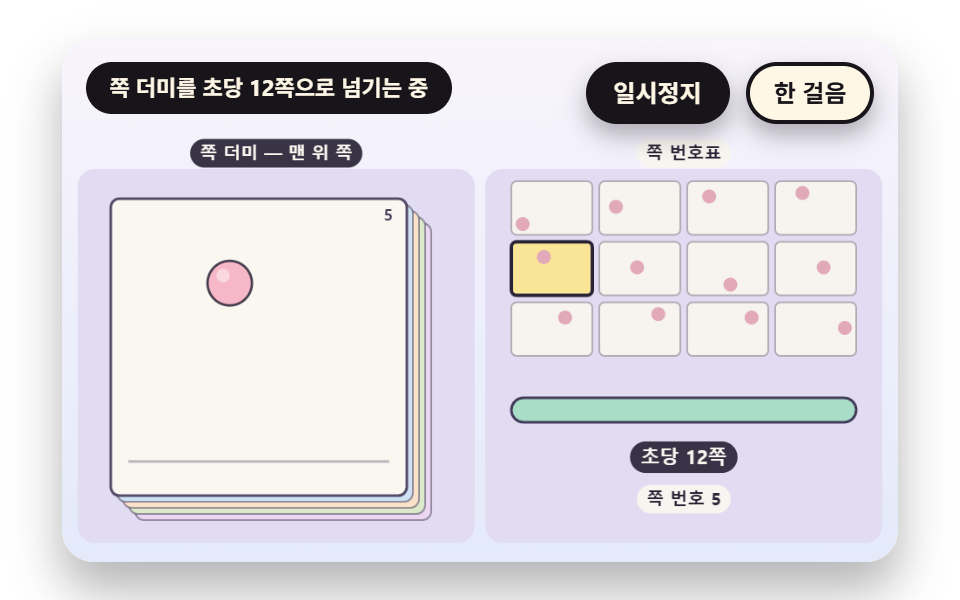 トランジションフリップブック 9種 — めくる速さからオニオンスキンと中間ページまで
 トランジション【コピペOK】CSS モーダル アニメーション 9選(dialog 対応)
 トランジション絞り込み ui9選 — パネルスライドからチップ削除まで
 トランジションカート ドロワー UIパターン9選 — スプリングからバッジ慣性まで
 トランジションコンテキストメニュー UI 9選 — クリック座標の値でメニューが決まる仕組み
 トランジションボトムナビゲーション 9選 — 状態値で変わる9つの転換パターン
 トランジションカルーセル スライド 9種 — 慣性ドラッグから3D遠近切替まで
 トランジションcss グリッチ エフェクト 9種の切り替え演出