グリッチ テキスト 9種 — 色の分離から行の裂けと画素のにじみまで
グリッチテキストは文字をどうやって壊すのでしょうか。02番は横の帯をハッシュでずらして行の裂けを作り、03番は明るい画素を引いてにじませ、09番は押した瞬間に強く崩れて一つの値で落ち着きます。グリッチ テキストの九つの場面は、単語を一度描いた画素の配列を時間表に合わせて動かし混ぜるコードで、デモと一緒に解きます。
グリッチテキストは文字をわざと壊して描くことではなく、文字の絵の画素を時間表に合わせて動かし混ぜる計算です — グリッチテキストを作るには、どの値をいつどれだけずらすかを決めることから始まります
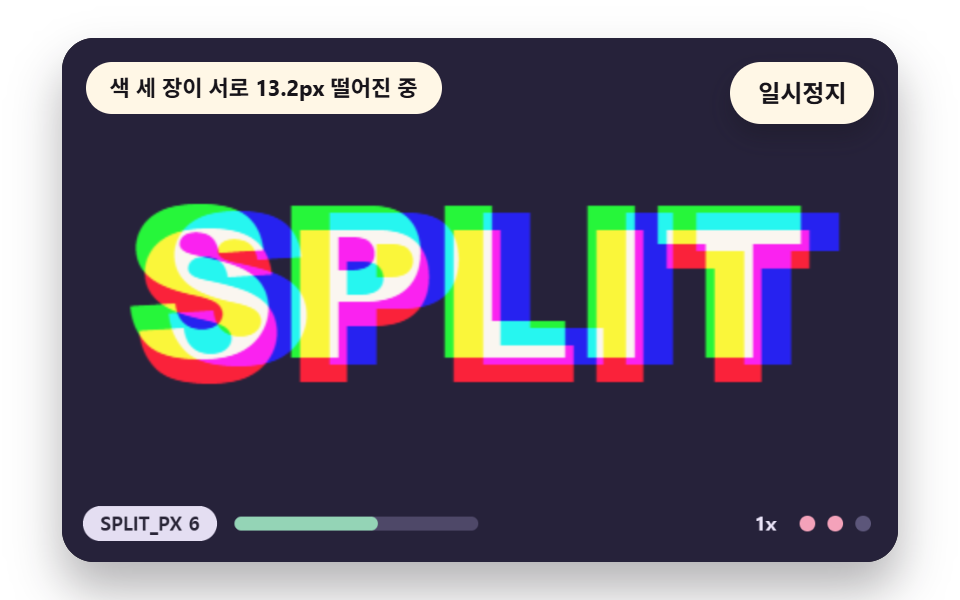 01 gt-rgb-channel-split
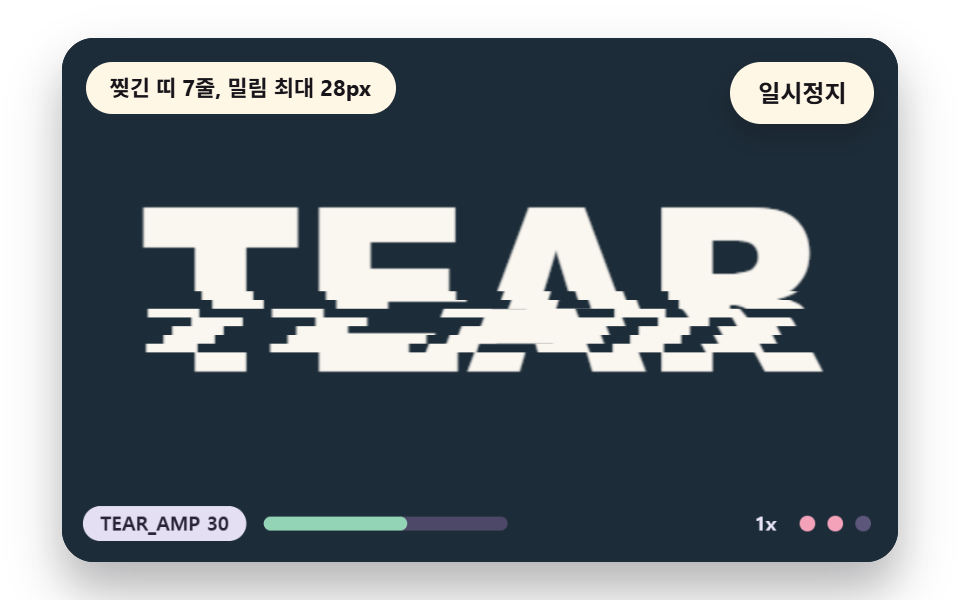 02 gt-scanline-slice-shift
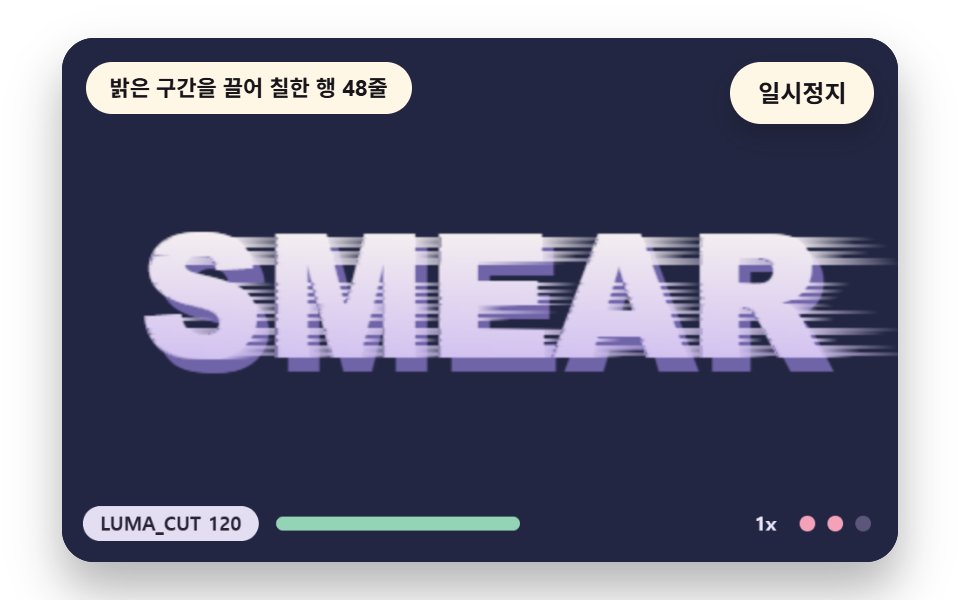 03 gt-pixel-sort-smear
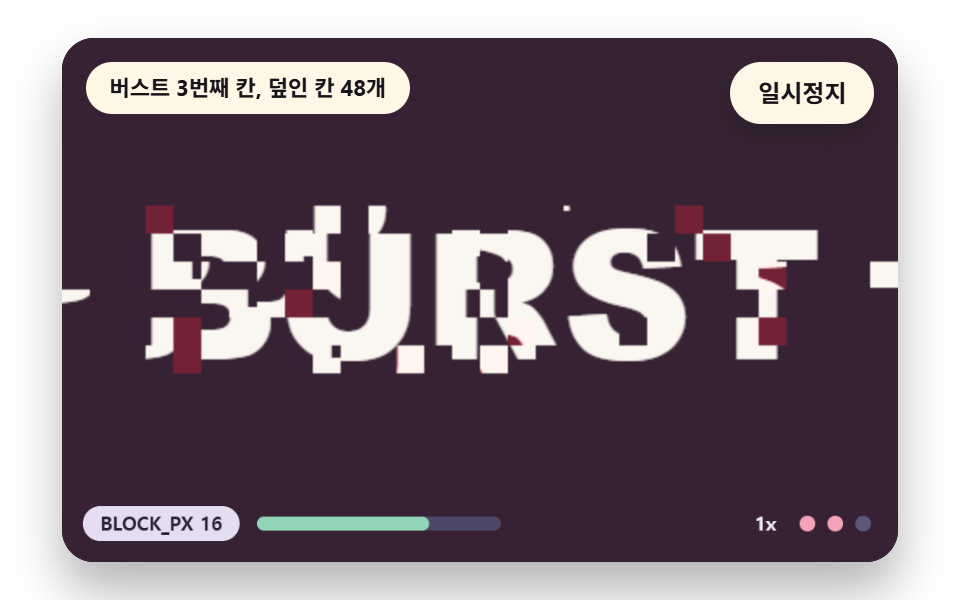 04 gt-block-displace-burst
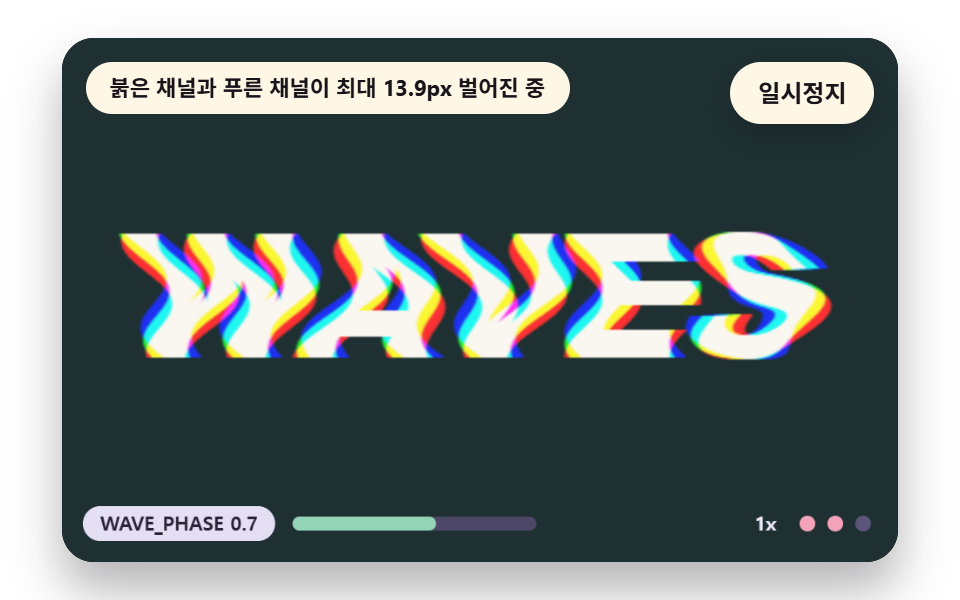 05 gt-chromatic-wave-warp
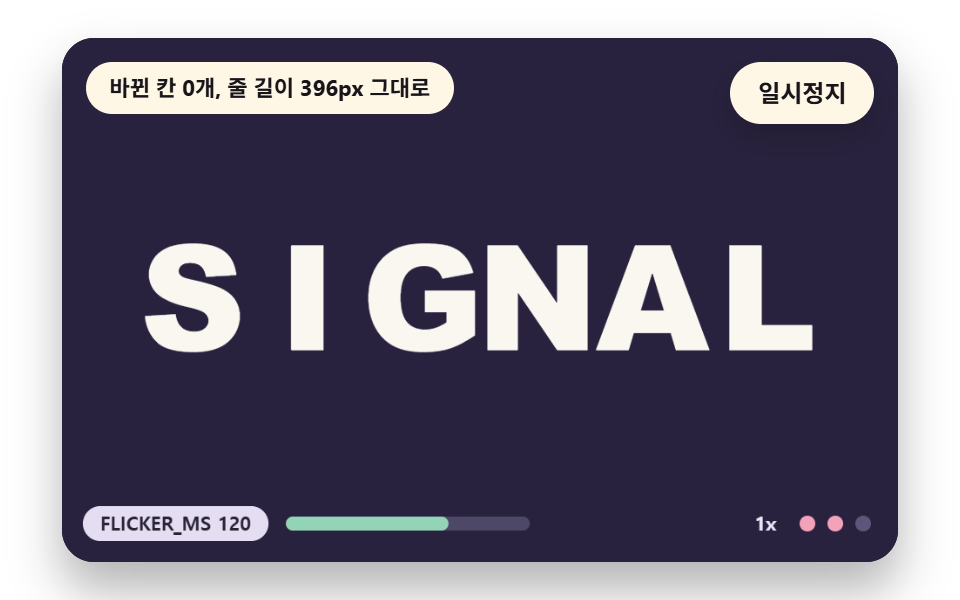 06 gt-char-swap-flicker
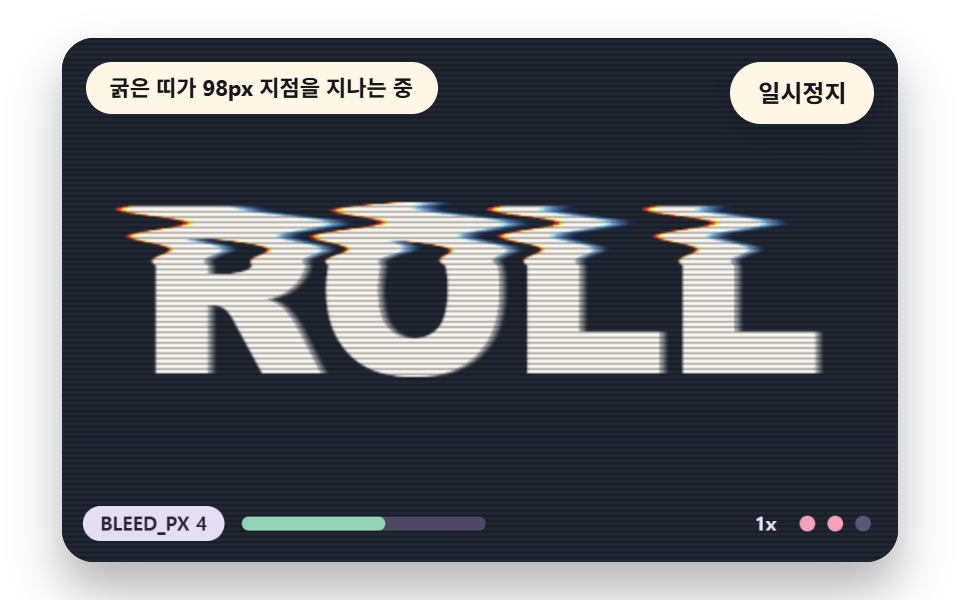 07 gt-scan-bleed-roll
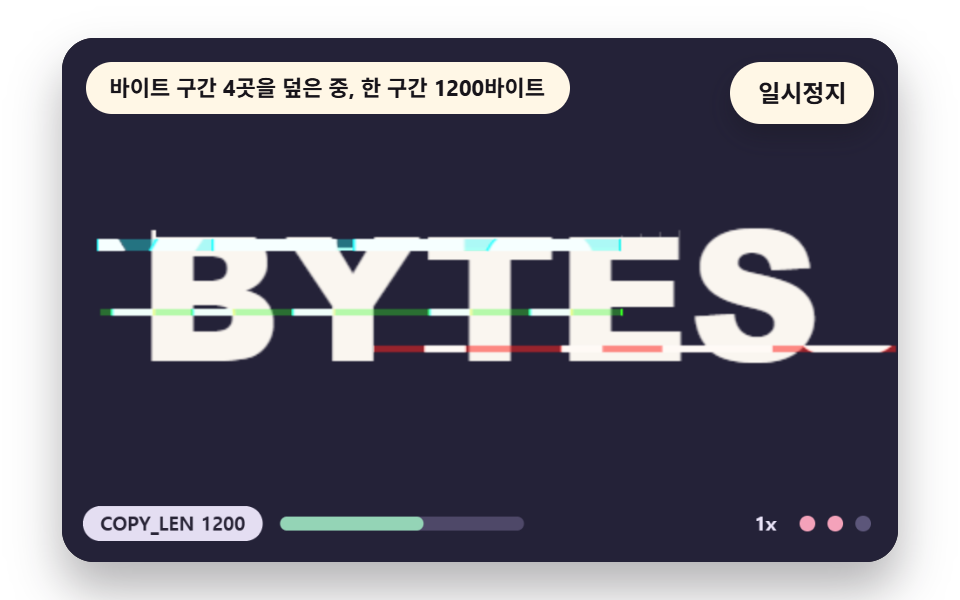 08 gt-data-corrupt-bytes
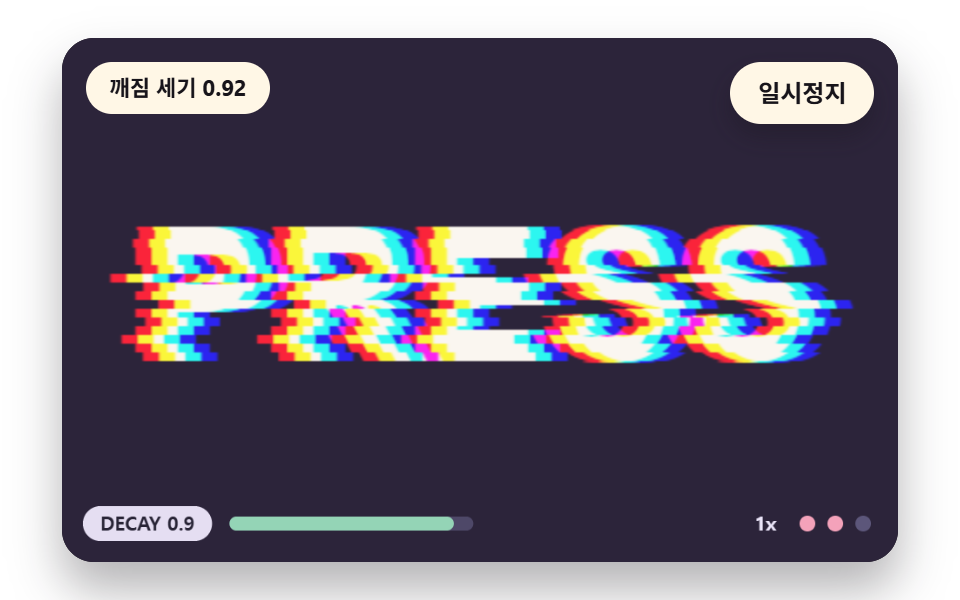 09 gt-envelope-trigger-decay
自動再生 · タイルを押すとその項目へ · すべて1つのzip
- 01 文字を赤・緑・青の三枚に分けてずらす
- 02 横の帯が行ごとにずれる裂け目
- 03 明るい画素が片側へ引かれてにじむピクセルソート
- 04 格子ブロックが飛び出す瞬間のバースト
- 05 色ごとに位相が違うサイン波の色収差
- 06 一文字ずつ似た形に入れ替わるちらつき
- 07 走査線とにじみが縦に転がる画面
- 08 画素バッファの区間が別の場所に上書きされるデータ破損
- 09 押した瞬間に強く崩れて落ち着く強さ
九つの場面の土台は一つです。480x300のキャンバスに単語一つをオフスクリーンで描いて getImageData で読み、画素の配列 base として持ち、毎フレームはこの配列を読んで結果を out に書いてから putImageData で載せます。ライブラリもWebGLもCDNも使わず、九つのファイルとも乱数・日付・外部アドレスの呼び出しが0件なので、同じ入力からは同じ絵が出ます。
揺れの種は乱数ではなくハッシュです
乱数を使うと毎フレーム裂ける帯が変わって画面が揺れ続けます。九つの場面は hash2(a, b) 一つで振り分けていて、整数の掛け算とシフトで0以上1未満の値を作り、同じ入力なら同じ値を返すので、どの帯がどの区切りで裂けるかが時間の区切りごとに決まります。
    // ハッシュ — 同じ(a, b)なら同じ0以上1未満の値。乱数関数は使わない
    function hash2(a, b) {
        let h = (Math.imul(a | 0, 374761393) + Math.imul(b | 0, 668265263)) | 0;
        h = Math.imul(h ^ (h >>> 13), 1274126177);
        h = h ^ (h >>> 16);
        return (h >>> 0) / 4294967296;
    }
    // 1次元の値ノイズ — 整数のマスごとにハッシュ値があり、その間をなめらかにつなぐ
    function noise1(x, seed) {
        const i = Math.floor(x);
        const f = x - i;
        const u = f * f * (3 - 2 * f);
        return lerp(hash2(i, seed), hash2(i + 1, seed), u);
    }
文字のある行だけを計算します
loadWord は単語を描いたあと画素の配列を一度なめて、背景との差が24を超える行の範囲 rowTop・rowBot を探します。02は行95〜192、03は109〜193を計算するので、300行のうち85行だけが回り、残りの行には触れません。
    // 元の画素バッファ — 文字を一度描いて読んでおいた版。グリッチはどれもこの base を読んで out に書く
    let base = new Uint8ClampedArray(W * H * 4);
    let rowTop = 0;
    let rowBot = H - 1;
    const img = wkCtx.createImageData(W, H);
    const out = img.data;
    function loadWord(paint) {
        wordCtx.fillStyle = rgba(BGC, 1);
        wordCtx.fillRect(0, 0, W, H);
        paint(wordCtx);
        base = wordCtx.getImageData(0, 0, W, H).data;
        // 文字のある行の範囲 — グリッチの計算はこの行だけ回る
        let top = -1;
        let bot = -1;
        for (let y = 0; y < H; y += 1) {
            let hit = false;
            for (let x = 0; x < W && !hit; x += 2) {
                const p = (y * W + x) * 4;
                if (Math.abs(base[p] - BGC[0]) + Math.abs(base[p + 1] - BGC[1]) + Math.abs(base[p + 2] - BGC[2]) > 24) {
                    hit = true;
                }
            }
            if (hit) {
                if (top < 0) {
                    top = y;
                }
                bot = y;
            }
        }
        rowTop = Math.max(0, top - 2);
        rowBot = Math.min(H - 1, bot + 2);
    }
時間表だけで動く自動デモ
場面は入力なしで時間表だけで動き、最初の変化は0.25秒に置いてあります。ステージを押すか方向キーを押すと強さの段階が一つ上がり、タブが隠れたときはループを止めて、戻ったら長い最初の一コマを捨てるので、何秒ぶんもが一コマに集まることはありません。
グリッチ テキスト 9種 — 色チャンネルの分離・行ごとの裂け・明るさで引く画素のにじみ・格子ブロックのバースト・色ごとに違う波・文字の差し替え・走査線の転がり・バイト区間の破損・押すと崩れる強さ
九つの場面がこの順に並ぶ理由と描画で測った値
01は画素の配列に触れず三枚を重ねるいちばん軽い方法なので先頭に置き、02と03は帯と行の単位で配列を動かす基本の二本です。04と08は画面を上書きする裂け、05と07はチャンネルとにじみで広がる崩れで、06は形を入れ替え、09は崩れそのものの強さを扱います。
| 場面 | 累積面積 | 動いたフレーム | 強さの平均 |
|---|---|---|---|
| 01 色チャンネルの分離 | 18.4% | 22/23 | 91.3 |
| 02 行の裂け | 9.5% | 7/23 | 153.8 |
| 03 画素のにじみ | 4.9% | 11/23 | 38.3 |
| 04 ブロックのバースト | 15.8% | 8/23 | 150.9 |
| 05 色収差の波 | 13.4% | 23/23 | 157.2 |
| 06 文字の差し替え | 3.8% | 6/23 | 149.9 |
| 07 走査線のにじみの転がり | 18.0% | 23/23 | 124.5 |
| 08 バイトの破損 | 14.9% | 16/23 | 119.6 |
| 09 トリガーの減衰 | 14.2% | 12/23 | 78.6 |
面積がもっとも広い場面は01の18.4%で、もっとも狭いのは06の3.8%です。02は時間の区切りが変わるときだけ裂けるので動いたフレームが7/23にとどまり、06は一つの判で差し替えが7回なので6/23で、05と07は波と帯が止まらないので23/23です。
01文字を赤・緑・青の三枚に分けてずらす
文字の縁に色のにじみを出す、いちばん少ないコードの方法です。紙の色から背景色を引いた値のうち一つのチャンネルだけを持つ文字の絵を三枚作り、lighter 合成で重ねると、重なった所は元の色に戻って縁だけが割れます。
<main class="stage">
<div class="vj is-demo" id="vj">
  <div class="vj__pad" data-role="pad" tabindex="0" role="application" aria-label="グリッチテキストの舞台 — EnterかSpaceで一時停止、Rで最初から、右矢印キーかTか押すと一度崩れる">
    <canvas class="vj__canvas" data-role="canvas" width="480" height="300" role="img" aria-label="暗い梅色の背景にSPLITという文字がある。文字は赤・緑・青の三枚が重なったもので、平常時は一枚に見え、崩れの強さが上がると三枚が120度ずつ違う向きに離れて縁が色に割れ、その向きがゆっくり回る。下の目盛りは設定値と強さの段階を示し、動きを減らす設定ではきれいな文字一枚だけを描きます"></canvas>
  </div>
  <p class="vj__status" data-role="status" aria-live="off">グリッチテキストの場面</p>
  <div class="vj__ctrl">
    <button class="vj__pause" data-role="pause" type="button" aria-pressed="false">一時停止</button>
  </div>
  <p class="vj__done" data-role="done" role="status" aria-live="polite"></p>
</div>
</main>
@use "../../../../site/static/demo-tokens" as *;
@include stage($stage-paper);
.vj {
position: relative;
width: min(92vw, calc(160vh - 12.8vw));
aspect-ratio: 480 / 300;
margin: 0 auto;
border-radius: $r-card;
overflow: hidden;
box-shadow: $shadow-raised;
background: $subject-ink;
}
// 무대 상자 — 눌러서 한 번 깨뜨리는 곳(touch-action: none 은 이 상자에만). 무대 밖 터치는 페이지 스크롤 그대로
.vj__pad {
position: absolute;
inset: 0;
border-radius: inherit;
outline: none;
touch-action: none;
cursor: pointer;
}
// 바깥 .vj 가 넘침을 자르므로 포커스 테두리는 안쪽으로 들인다
.vj__pad:focus-visible {
outline: 3px solid $subject-cream;
outline-offset: -3px;
}
.vj__canvas {
position: absolute;
inset: 0;
display: block;
width: 100%;
height: 100%;
}
.vj__ctrl {
position: absolute;
right: $sp-3;
top: $sp-3;
display: flex;
gap: $sp-2;
}
.vj__pause {
padding: $sp-1 $sp-3;
border: 2px solid $subject-cream;
border-radius: $r-pill;
background: $subject-cream;
color: $subject-ink;
font-family: inherit;
font-weight: 700;
font-size: 12px;
line-height: 1.6;
cursor: pointer;
box-shadow: $shadow-press;
transition: transform $dur-quick $ease-spring;
}
// 스크린리더에만 읽히는 낭독 문장 — 모드가 바뀔 때만 쓴다
.vj__done {
position: absolute;
width: 1px;
height: 1px;
margin: 0;
overflow: hidden;
clip-path: inset(50%);
white-space: nowrap;
}
// 눌린 상태(멈춤) — 바탕과 글자색을 뒤집어 aria-pressed 가 눈에도 보이게
.vj__pause[aria-pressed="true"] {
background: $subject-ink;
color: $subject-cream;
}
.vj__pause:hover {
transform: translateY(-2px);
}
.vj__pause:active {
transform: translateY(1px);
}
.vj__pause:focus-visible {
outline: 3px solid $subject-cream;
outline-offset: 3px;
}
// 상태 줄 — 지금 장면의 수치를 글자로. 화면에만 있고 aria-live 는 늘 off
.vj__status {
position: absolute;
left: $sp-3;
top: $sp-3;
max-width: calc(100% - 100px);
margin: 0;
padding: $sp-1 $sp-3;
border-radius: $r-pill;
background: $subject-cream;
color: $subject-ink;
font-weight: 700;
font-size: 11px;
line-height: 1.6;
white-space: nowrap;
overflow: hidden;
text-overflow: ellipsis;
pointer-events: none;
}
@media (max-width: 340px) {
.vj__pause,
.vj__status { font-size: 10px; padding: 0 $sp-2; }
}
// 움직임 줄이기 — 장면은 스크립트가 글리치 없는 원문 한 장으로 멈춘다. 버튼도 떠오르지 않게
@media (prefers-reduced-motion: reduce) {
.vj__pause { transition: none !important; }
.vj__pause:hover,
.vj__pause:active { transform: none !important; }
}html, body {
margin: 0;
overflow: hidden;
}
.stage {
box-sizing: border-box;
min-height: 100vh;
display: grid;
place-items: center;
margin: 0;
background: #ffffff;
font-family: -apple-system, "Segoe UI", "Noto Sans KR", sans-serif;
padding: clamp(8px, 4vw, 24px);
}
.vj {
position: relative;
width: min(92vw, 160vh - 12.8vw);
aspect-ratio: 480/300;
margin: 0 auto;
border-radius: 16px;
overflow: hidden;
box-shadow: 0 14px 24px rgba(23, 20, 26, 0.32);
background: #17141a;
}
.vj__pad {
position: absolute;
inset: 0;
border-radius: inherit;
outline: none;
touch-action: none;
cursor: pointer;
}
.vj__pad:focus-visible {
outline: 3px solid #fff7e6;
outline-offset: -3px;
}
.vj__canvas {
position: absolute;
inset: 0;
display: block;
width: 100%;
height: 100%;
}
.vj__ctrl {
position: absolute;
right: 12px;
top: 12px;
display: flex;
gap: 8px;
}
.vj__pause {
padding: 4px 12px;
border: 2px solid #fff7e6;
border-radius: 999px;
background: #fff7e6;
color: #17141a;
font-family: inherit;
font-weight: 700;
font-size: 12px;
line-height: 1.6;
cursor: pointer;
box-shadow: 0 6px 12px rgba(23, 20, 26, 0.32);
transition: transform 220ms cubic-bezier(0.2, 0.8, 0.2, 1);
}
.vj__done {
position: absolute;
width: 1px;
height: 1px;
margin: 0;
overflow: hidden;
clip-path: inset(50%);
white-space: nowrap;
}
.vj__pause[aria-pressed=true] {
background: #17141a;
color: #fff7e6;
}
.vj__pause:hover {
transform: translateY(-2px);
}
.vj__pause:active {
transform: translateY(1px);
}
.vj__pause:focus-visible {
outline: 3px solid #fff7e6;
outline-offset: 3px;
}
.vj__status {
position: absolute;
left: 12px;
top: 12px;
max-width: calc(100% - 100px);
margin: 0;
padding: 4px 12px;
border-radius: 999px;
background: #fff7e6;
color: #17141a;
font-weight: 700;
font-size: 11px;
line-height: 1.6;
white-space: nowrap;
overflow: hidden;
text-overflow: ellipsis;
pointer-events: none;
}
@media (max-width: 340px) {
.vj__pause,
.vj__status {
font-size: 10px;
padding: 0 8px;
}
}
@media (prefers-reduced-motion: reduce) {
.vj__pause {
transition: none !important;
}
.vj__pause:hover,
.vj__pause:active {
transform: none !important;
}
}(function () {
const root = document.getElementById("vj");
if (!root) return;
// 무대 좌표 — 캔버스 안 계산은 늘 480×300. 화면에 보이는 크기와 상관없다
const W = 480;
const H = 300;
const TAU = Math.PI * 2;
function clamp(v, lo, hi) { return v < lo ? lo : (v > hi ? hi : v); }
function lerp(a, b, k) { return a + (b - a) * k; }
// 파스텔 팔레트 — 바탕은 짙은 자두색, 글자는 연한 종이색, 눈금과 알약은 연한 색
const INK = [40, 36, 54];
const PAPER = [250, 246, 240];
const ROSE = [244, 162, 186];
const MINT = [148, 212, 182];
const NEU = [236, 230, 250];
function rgba(c, a) {
return 'rgba(' + Math.round(clamp(c[0], 0, 255)) + ',' + Math.round(clamp(c[1], 0, 255)) + ',' + Math.round(clamp(c[2], 0, 255)) + ',' + clamp(a, 0, 1).toFixed(3) + ')';
}
// 해시 — 같은 (a, b) 에는 늘 같은 0 이상 1 미만 값. 난수 함수는 쓰지 않는다
function hash2(a, b) {
let h = (Math.imul(a | 0, 374761393) + Math.imul(b | 0, 668265263)) | 0;
h = Math.imul(h ^ (h >>> 13), 1274126177);
h = h ^ (h >>> 16);
return (h >>> 0) / 4294967296;
}
// 1차원 값 잡음 — 정수 칸마다 해시 값이 있고 그 사이를 부드럽게 잇는다
function noise1(x, seed) {
const i = Math.floor(x);
const f = x - i;
const u = f * f * (3 - 2 * f);
return lerp(hash2(i, seed), hash2(i + 1, seed), u);
}
// 장면 시계(초)·판 반복 번호·시간표 — 시간표는 (시각, 할 일) 목록이고 시각이 지나면 한 번씩 부른다
let sceneT = 0;
let lap = 0;
let script = [];
let evAt = 0;
// 문구 틀의 {a}·{b} 자리에 값을 끼운다 — 화면 문구는 늘 이 틀 한 줄로 두고 로케일 사전이 통째로 바꾼다
function fill(s, a, b) { return s.replace('{a}', a).replace('{b}', b === undefined ? '' : b); }
function r1(v) { return String(Math.round(v * 10) / 10); }
// 세기 단계 — 장면을 누를 때마다 0 → 1 → 2 → 0 으로 돈다. 글리치의 크기에 이 배율이 곱해진다
const LVL_MUL = [0.5, 1, 1.7];
let lvl = 1;
// 깨짐 세기 g 는 시간표가 정한 목표 gTgt 를 따라간다. 손으로 누르면 holdUntil 까지 목표가 서 있다가 0 으로 돌아간다
let g = 0;
let gTgt = 0;
let holdUntil = 0;
function followG(dt, rate) {
if (manual && sceneT > holdUntil) {
gTgt = 0;
}
g += (gTgt - g) * (1 - Math.exp(-rate * dt));
if (g < 0.002 && gTgt === 0) {
g = 0;
}
}
function hitG(top) {
gTgt = top;
holdUntil = sceneT + 1.6;
}
// 움직임 줄이기에서는 글리치 없이 원문 한 장 — 세기 단계는 눈금에만 반영된다
function gainNow() { return still ? 0 : g * LVL_MUL[lvl]; }
const STILL_FMT = '動きを減らす設定 — きれいな文字一枚、設定 {a}';
const SPEAK_GLITCH = '文字 {a} が崩れている最中、強さ {b} 段階';
const SPEAK_CLEAN = '文字 {a} がきれいに見えている最中、強さ {b} 段階';
const SPEAK_STILL = '動きを減らす設定 — 文字 {a} 一枚、強さ {b} 段階';
function speakLine(word) {
if (still) {
return fill(SPEAK_STILL, word, String(lvl + 1));
}
return fill(modeId() === 1 ? SPEAK_GLITCH : SPEAK_CLEAN, word, String(lvl + 1));
}
const canvasEl = root.querySelector('[data-role="canvas"]');
const padEl = root.querySelector('[data-role="pad"]');
const pauseEl = root.querySelector('[data-role="pause"]');
const statusEl = root.querySelector('[data-role="status"]');
const doneEl = root.querySelector('[data-role="done"]');
const ctxRaw = canvasEl ? canvasEl.getContext('2d') : null;
const wkCv = document.createElement('canvas');
wkCv.width = W;
wkCv.height = H;
const wkRaw = wkCv.getContext('2d');
const wordCv = document.createElement('canvas');
wordCv.width = W;
wordCv.height = H;
const wordRaw = wordCv.getContext('2d', { willReadFrequently: true });
if (!canvasEl || !ctxRaw || !pauseEl || !padEl || !doneEl || !wkRaw || !wordRaw) {
return;
}
const cv = canvasEl;
const ctx = ctxRaw;
const wkCtx = wkRaw;
const wordCtx = wordRaw;
const pauseBtn = pauseEl;
const doneP = doneEl;
const pad = padEl;
// 외부 웹폰트는 부르지 않는다 — 기기에 있는 굵은 글꼴 목록만
const WORD_FONT = '"Arial Black", "Segoe UI Black", Impact, system-ui, sans-serif';
const UI_FONT = 'system-ui, -apple-system, "Segoe UI", "Noto Sans KR", sans-serif';
let dpr = 1;
function fitCanvas() {
// 배율은 2 에서 자른다 — 화소 계산은 늘 480×300 이고 화면 배율만 이 값
dpr = Math.min(window.devicePixelRatio || 1, 2);
cv.width = Math.round(W * dpr);
cv.height = Math.round(H * dpr);
ctx.setTransform(dpr, 0, 0, dpr, 0, 0);
}
const MAX_W = 392;
// 글자 한 줄을 무대 한가운데에 그린다 — dx·dy 는 그림자·겹침용 어긋남
function paintWord(c, word, px, fillStyle, dx, dy) {
// 글꼴이 기기마다 달라도 단어가 MAX_W 안에 들도록 크기를 줄여 맞춘다
c.font = '900 ' + px + 'px ' + WORD_FONT;
const wide = c.measureText(word).width;
const fit = wide > MAX_W ? px * MAX_W / wide : px;
c.font = '900 ' + fit + 'px ' + WORD_FONT;
c.textAlign = 'center';
c.textBaseline = 'middle';
c.fillStyle = fillStyle;
c.fillText(word, W / 2 + dx, H / 2 + 6 + dy);
}
// 원본 화소 버퍼 — 글자를 한 번 그려 읽어 둔 판. 모든 글리치는 이 base 를 읽어 out 에 쓴다
let base = new Uint8ClampedArray(W * H * 4);
let rowTop = 0;
let rowBot = H - 1;
const img = wkCtx.createImageData(W, H);
const out = img.data;
function loadWord(paint) {
wordCtx.fillStyle = rgba(BGC, 1);
wordCtx.fillRect(0, 0, W, H);
paint(wordCtx);
base = wordCtx.getImageData(0, 0, W, H).data;
// 글자가 있는 행 범위 — 글리치 계산은 이 행만 돈다
let top = -1;
let bot = -1;
for (let y = 0; y < H; y += 1) {
let hit = false;
for (let x = 0; x < W && !hit; x += 2) {
const p = (y * W + x) * 4;
if (Math.abs(base[p] - BGC[0]) + Math.abs(base[p + 1] - BGC[1]) + Math.abs(base[p + 2] - BGC[2]) > 24) {
hit = true;
}
}
if (hit) {
if (top < 0) {
top = y;
}
bot = y;
}
}
rowTop = Math.max(0, top - 2);
rowBot = Math.min(H - 1, bot + 2);
}
function present() {
wkCtx.putImageData(img, 0, 0);
ctx.drawImage(wkCv, 0, 0, W, H);
}
// 한 행을 채널마다 다른 가로 어긋남으로 읽어 tmp(길이 W×3)에 쓴다 — 어긋남이 소수여도 이웃 두 화소를 섞는다
function rowSample(y, dR, dG, dB, tmp) {
const o = y * W * 4;
const d = [dR, dG, dB];
for (let c = 0; c < 3; c += 1) {
for (let x = 0; x < W; x += 1) {
let sx = x - d[c];
if (sx < 0) {
sx = 0;
}
else if (sx > W - 1.001) {
sx = W - 1.001;
}
const i0 = Math.floor(sx);
const f = sx - i0;
const p = o + i0 * 4 + c;
tmp[x * 3 + c] = base[p] * (1 - f) + base[p + 4] * f;
}
}
}
const rowTmp = new Float32Array(W * 3);
function renderRows(y0, y1, dxR, dxG, dxB) {
for (let y = y0; y <= y1; y += 1) {
rowSample(y, dxR[y], dxG[y], dxB[y], rowTmp);
const o = y * W * 4;
for (let x = 0; x < W; x += 1) {
out[o + x * 4] = rowTmp[x * 3];
out[o + x * 4 + 1] = rowTmp[x * 3 + 1];
out[o + x * 4 + 2] = rowTmp[x * 3 + 2];
}
}
}
function box(x, y, w, h, r, c, a) {
if (w <= 0.2 || h <= 0.2 || a <= 0) {
return;
}
ctx.beginPath();
ctx.roundRect(x, y, w, h, Math.max(0, Math.min(r, w / 2, h / 2)));
ctx.fillStyle = rgba(c, a);
ctx.fill();
}
function disc(x, y, r, c) {
ctx.beginPath();
ctx.arc(x, y, r, 0, TAU);
ctx.fillStyle = rgba(c, 1);
ctx.fill();
}
function text(s, x, y, c, px, weight, align) {
ctx.font = weight + ' ' + px + 'px ' + UI_FONT;
ctx.textAlign = align;
ctx.textBaseline = 'middle';
ctx.fillStyle = rgba(c, 1);
ctx.fillText(s, x, y);
}
// 아래쪽 눈금 — 상수 이름과 지금 설정값 · 설정 크기 막대 · 세기 단계 점 셋. 값은 세기 단계가 곱해진 설정이다
function hud(name, val, frac) {
const label = name + ' ' + r1(val);
ctx.font = '700 11px ' + UI_FONT;
const w = ctx.measureText(label).width + 20;
const x = 12;
const y = H - 32;
box(x, y, w, 20, 10, NEU, 0.96);
text(label, x + w / 2, y + 10.5, INK, 11, 700, 'center');
const mx = x + w + 10;
box(mx, y + 6, 140, 8, 4, [78, 72, 104], 1);
box(mx, y + 6, 140 * clamp(frac, 0, 1), 8, 4, MINT, 1);
text(String(LVL_MUL[lvl]) + 'x', W - 70, y + 10.5, NEU, 11, 700, 'right');
for (let i = 0; i < 3; i += 1) {
disc(W - 52 + i * 16, y + 10, 4.5, i <= lvl ? ROSE : [92, 86, 122]);
}
}
let shownStatus = '';
function pushStatus(s) {
if (!statusEl || s === shownStatus) {
return;
}
shownStatus = s;
statusEl.textContent = s;
}
let paused = false;
const reduceQuery = window.matchMedia('(prefers-reduced-motion: reduce)');
// 페이지를 연 채 움직임 줄이기 설정을 바꿔도 change 리스너가 다시 읽는다
let still = reduceQuery.matches;
// 자동 시연 표시 — 사람이 처음 손대면 떼고, 그 뒤부터 모드가 바뀔 때만 낭독 문장을 쓴다
let demo = root.classList.contains('is-demo');
const off = new AbortController();
// 사람이 직접 누르는 중이면 시간표는 멈추고 계산만 흐른다
let manual = false;
function wake() {
if (!demo) {
return;
}
demo = false;
root.classList.remove('is-demo');
}
function takeOver() {
if (manual) {
return;
}
manual = true;
wake();
}
// 낭독 문장 — 화면 상태 줄(aria-live off)과 따로, 모드가 바뀔 때와 사람이 눌렀을 때만 role=status 에 쓴다
let lastMode = -9;
function say() {
doneP.textContent = speakLine(WORD);
lastMode = still ? -2 : modeId();
}
function advance(dt) {
sceneT += dt;
if (!manual) {
while (evAt < script.length && script[evAt].t <= sceneT) {
const ev = script[evAt];
evAt += 1;
ev.f();
}
if (sceneT >= LAP_S) {
lap += 1;
begin();
return;
}
}
update(dt);
}
function begin() {
sceneT = 0;
evAt = 0;
script = [];
build();
}
const DT_MAX = 0.05;
function showNow() {
draw();
pushStatus(statusText());
if (!demo) {
const m = still ? -2 : modeId();
if (m !== lastMode) {
say();
}
}
}
let rafId = 0;
let lastTs = -1;
function frame(ts) {
if (still || paused) {
rafId = 0;
return;
}
if (lastTs < 0) {
lastTs = ts;
}
const dt = Math.min((ts - lastTs) / 1000, DT_MAX);
lastTs = ts;
if (dt > 0) {
advance(dt);
}
showNow();
rafId = window.requestAnimationFrame(frame);
}
function startLoop() {
if (rafId) {
return;
}
// 멈췄던 사이의 시간을 첫 프레임 dt 로 넘기지 않는다
lastTs = -1;
rafId = window.requestAnimationFrame(frame);
}
function stopLoop() {
if (rafId) {
window.cancelAnimationFrame(rafId);
rafId = 0;
}
}
// 움직임 줄이기 — 루프 없이 글리치 없는 원문 한 장
function showRest() {
stopLoop();
lap = 0;
sceneT = 0;
evAt = 0;
script = [];
build();
update(0);
showNow();
}
function play() {
begin();
showNow();
if (!paused) {
startLoop();
}
}
function togglePause() {
paused = !paused;
pauseBtn.setAttribute('aria-pressed', paused ? 'true' : 'false');
wake();
if (paused) {
stopLoop();
}
else if (!still) {
startLoop();
}
say();
}
function restart() {
manual = false;
lap += 1;
g = 0;
gTgt = 0;
begin();
update(0);
showNow();
say();
}
// 누르기 — 세기 단계를 한 칸 올리고(0 → 1 → 2 → 0) 그 자리에서 한 번 깨뜨린다. 멈춘 채여도 세 걸음을 더 돌려 깨진 장면이 눈에 보이게
function tap() {
takeOver();
lvl = (lvl + 1) % 3;
if (!still) {
onHit();
if (paused) {
for (let k = 0; k < 3; k += 1) {
sceneT += 1 / 30;
update(1 / 30);
}
}
}
showNow();
say();
}
pauseBtn.addEventListener('click', togglePause, { signal: off.signal });
// 키보드 — 무대에 포커스가 있을 때만. Enter·Space = 一時停止, R = 처음부터, 오른쪽·위·T = 한 번 깨뜨리기
pad.addEventListener('keydown', function (e) {
if (e.altKey || e.ctrlKey || e.metaKey) {
return;
}
const k = e.key;
if (k === 'Enter' || k === ' ' || k === 'p' || k === 'P') {
e.preventDefault();
togglePause();
}
else if (k === 'r' || k === 'R') {
restart();
}
else if (k === 'ArrowRight' || k === 'ArrowUp' || k === 't' || k === 'T') {
e.preventDefault();
tap();
}
}, { signal: off.signal });
// 마우스·터치 — 무대를 누르는 순간 한 번 깨뜨린다
pad.addEventListener('pointerdown', function () { tap(); }, { signal: off.signal });
// 탭이 숨으면 멈추고, 돌아오면 시계를 다시 맞춰 시작 — 숨은 동안의 몇 초가 한 프레임에 몰리지 않게
document.addEventListener('visibilitychange', function () {
if (document.hidden) {
stopLoop();
}
else if (!paused && !still) {
startLoop();
}
}, { signal: off.signal });
// 설정이 바뀌면 — 켜지면 원문 한 장, 꺼지면 다시 움직인다
reduceQuery.addEventListener('change', function () {
still = reduceQuery.matches;
if (still) {
showRest();
}
else {
lap = 0;
play();
}
}, { signal: off.signal });
window.addEventListener('resize', function () {
fitCanvas();
showNow();
}, { signal: off.signal });
// 01 — 글자 한 줄을 빨강·초록·파랑 세 장으로 따로 그려 두고, lighter 합성으로 포갠다. 세 장은 SPLIT_PX × 깨짐 세기 만큼 120도씩 다른 방향으로 밀리고 그 방향이 천천히 돈다
const SPLIT_PX = 6;
const SPIN_RAD_S = 0.9;
const LAP_S = 6.8;
const BGC = [38, 34, 58];
const WORD = 'SPLIT';
// 한 장 = 종이색에서 바탕색을 뺀 값 중 한 채널만 가진 글자 — 세 장을 더하면 정확히 원래 종이색이 된다
function makeTint(ch) {
const c = document.createElement('canvas');
c.width = W;
c.height = H;
const x = c.getContext('2d');
const tint = [0, 0, 0];
tint[ch] = PAPER[ch] - BGC[ch];
if (x) {
paintWord(x, WORD, 150, rgba(tint, 1), 0, 0);
}
return c;
}
const tints = [makeTint(0), makeTint(1), makeTint(2)];
loadWord(function (c) { paintWord(c, WORD, 150, rgba(PAPER, 1), 0, 0); });
let spin = 0;
let splitNow = 0;
function setting() { return SPLIT_PX * LVL_MUL[lvl]; }
function build() {
g = 0;
gTgt = 0;
spin = 0;
script.push({ t: 0.25, f: function () { gTgt = 1; } });
script.push({ t: 1.5, f: function () { gTgt = 2.2; } });
script.push({ t: 2.7, f: function () { gTgt = 0.15; } });
script.push({ t: 4.4, f: function () { gTgt = 1.6; } });
script.push({ t: 5.6, f: function () { gTgt = 0; } });
}
function update(dt) {
followG(dt, 9);
spin += SPIN_RAD_S * dt;
}
function draw() {
ctx.fillStyle = rgba(BGC, 1);
ctx.fillRect(0, 0, W, H);
splitNow = still ? 0 : SPLIT_PX * g * LVL_MUL[lvl];
ctx.globalCompositeOperation = 'lighter';
for (let ch = 0; ch < 3; ch += 1) {
const a = spin + ch * TAU / 3;
ctx.drawImage(tints[ch], Math.round(Math.cos(a) * splitNow), Math.round(Math.sin(a) * splitNow * 0.6));
}
ctx.globalCompositeOperation = 'source-over';
hud('SPLIT_PX', setting(), LVL_MUL[lvl] / 1.7);
}
function statusText() {
if (still) {
return fill(STILL_FMT, r1(setting()) + 'px');
}
return fill('色の三枚が互いに {a}px 離れている', r1(splitNow));
}
function modeId() { return g > 0.3 ? 1 : 0; }
function onHit() { hitG(1.4); }
fitCanvas();
if (still) {
showRest();
}
else {
play();
}
return function () {
stopLoop();
off.abort();
};
})();// RgbChannelSplit - 같은 항목 vanilla index.html 의 React 판. 같은 계산을 useEffect 안에서 돌린다
import { useEffect, useRef } from "react";
import styles from "./RgbChannelSplit.module.scss";
const cx = (s: string): string => s.split(" ").map((n) => styles[n] ?? n).join(" ");
export default function RgbChannelSplit() {
const rootRef = useRef<HTMLDivElement | null>(null);
useEffect(() => {
const rootEl = rootRef.current;
if (!rootEl) return;
const root: HTMLElement = rootEl;
type RGB = [number, number, number];
// 무대 좌표 — 캔버스 안 계산은 늘 480×300. 화면에 보이는 크기와 상관없다
const W = 480;
const H = 300;
const TAU = Math.PI * 2;
function clamp(v: number, lo: number, hi: number): number { return v < lo ? lo : (v > hi ? hi : v); }
function lerp(a: number, b: number, k: number): number { return a + (b - a) * k; }
// 파스텔 팔레트 — 바탕은 짙은 자두색, 글자는 연한 종이색, 눈금과 알약은 연한 색
const INK: RGB = [40, 36, 54];
const PAPER: RGB = [250, 246, 240];
const ROSE: RGB = [244, 162, 186];
const MINT: RGB = [148, 212, 182];
const NEU: RGB = [236, 230, 250];
function rgba(c: RGB, a: number): string {
return 'rgba(' + Math.round(clamp(c[0], 0, 255)) + ',' + Math.round(clamp(c[1], 0, 255)) + ',' + Math.round(clamp(c[2], 0, 255)) + ',' + clamp(a, 0, 1).toFixed(3) + ')';
}
// 해시 — 같은 (a, b) 에는 늘 같은 0 이상 1 미만 값. 난수 함수는 쓰지 않는다
function hash2(a: number, b: number): number {
let h = (Math.imul(a | 0, 374761393) + Math.imul(b | 0, 668265263)) | 0;
h = Math.imul(h ^ (h >>> 13), 1274126177);
h = h ^ (h >>> 16);
return (h >>> 0) / 4294967296;
}
// 1차원 값 잡음 — 정수 칸마다 해시 값이 있고 그 사이를 부드럽게 잇는다
function noise1(x: number, seed: number): number {
const i = Math.floor(x);
const f = x - i;
const u = f * f * (3 - 2 * f);
return lerp(hash2(i, seed), hash2(i + 1, seed), u);
}
// 장면 시계(초)·판 반복 번호·시간표 — 시간표는 (시각, 할 일) 목록이고 시각이 지나면 한 번씩 부른다
let sceneT = 0;
let lap = 0;
type Ev = { t: number; f: () => void };
let script: Ev[] = [];
let evAt = 0;
// 문구 틀의 {a}·{b} 자리에 값을 끼운다 — 화면 문구는 늘 이 틀 한 줄로 두고 로케일 사전이 통째로 바꾼다
function fill(s: string, a: string, b?: string): string { return s.replace('{a}', a).replace('{b}', b === undefined ? '' : b); }
function r1(v: number): string { return String(Math.round(v * 10) / 10); }
// 세기 단계 — 장면을 누를 때마다 0 → 1 → 2 → 0 으로 돈다. 글리치의 크기에 이 배율이 곱해진다
const LVL_MUL = [0.5, 1, 1.7];
let lvl = 1;
// 깨짐 세기 g 는 시간표가 정한 목표 gTgt 를 따라간다. 손으로 누르면 holdUntil 까지 목표가 서 있다가 0 으로 돌아간다
let g = 0;
let gTgt = 0;
let holdUntil = 0;
function followG(dt: number, rate: number): void {
if (manual && sceneT > holdUntil) { gTgt = 0; }
g += (gTgt - g) * (1 - Math.exp(-rate * dt));
if (g < 0.002 && gTgt === 0) { g = 0; }
}
function hitG(top: number): void {
gTgt = top;
holdUntil = sceneT + 1.6;
}
// 움직임 줄이기에서는 글리치 없이 원문 한 장 — 세기 단계는 눈금에만 반영된다
function gainNow(): number { return still ? 0 : g * LVL_MUL[lvl]; }
const STILL_FMT = '움직임 줄이기 — 깨끗한 글자 한 장, 설정 {a}';
const SPEAK_GLITCH = '글자 {a} 가 깨지는 중, 세기 {b}단계';
const SPEAK_CLEAN = '글자 {a} 가 깨끗하게 보이는 중, 세기 {b}단계';
const SPEAK_STILL = '움직임 줄이기 — 글자 {a} 한 장, 세기 {b}단계';
function speakLine(word: string): string {
if (still) { return fill(SPEAK_STILL, word, String(lvl + 1)); }
return fill(modeId() === 1 ? SPEAK_GLITCH : SPEAK_CLEAN, word, String(lvl + 1));
}
const canvasEl = root.querySelector('[data-role="canvas"]') as HTMLCanvasElement | null;
const padEl = root.querySelector('[data-role="pad"]') as HTMLElement | null;
const pauseEl = root.querySelector('[data-role="pause"]') as HTMLButtonElement | null;
const statusEl = root.querySelector('[data-role="status"]') as HTMLElement | null;
const doneEl = root.querySelector('[data-role="done"]') as HTMLElement | null;
const ctxRaw = canvasEl ? canvasEl.getContext('2d') : null;
const wkCv: HTMLCanvasElement = document.createElement('canvas');
wkCv.width = W;
wkCv.height = H;
const wkRaw = wkCv.getContext('2d');
const wordCv: HTMLCanvasElement = document.createElement('canvas');
wordCv.width = W;
wordCv.height = H;
const wordRaw = wordCv.getContext('2d', { willReadFrequently: true });
if (!canvasEl || !ctxRaw || !pauseEl || !padEl || !doneEl || !wkRaw || !wordRaw) { return; }
const cv: HTMLCanvasElement = canvasEl;
const ctx: CanvasRenderingContext2D = ctxRaw;
const wkCtx: CanvasRenderingContext2D = wkRaw;
const wordCtx: CanvasRenderingContext2D = wordRaw;
const pauseBtn: HTMLButtonElement = pauseEl;
const doneP: HTMLElement = doneEl;
const pad: HTMLElement = padEl;
// 외부 웹폰트는 부르지 않는다 — 기기에 있는 굵은 글꼴 목록만
const WORD_FONT = '"Arial Black", "Segoe UI Black", Impact, system-ui, sans-serif';
const UI_FONT = 'system-ui, -apple-system, "Segoe UI", "Noto Sans KR", sans-serif';
let dpr = 1;
function fitCanvas(): void {
// 배율은 2 에서 자른다 — 화소 계산은 늘 480×300 이고 화면 배율만 이 값
dpr = Math.min(window.devicePixelRatio || 1, 2);
cv.width = Math.round(W * dpr);
cv.height = Math.round(H * dpr);
ctx.setTransform(dpr, 0, 0, dpr, 0, 0);
}
const MAX_W = 392;
// 글자 한 줄을 무대 한가운데에 그린다 — dx·dy 는 그림자·겹침용 어긋남
function paintWord(c: CanvasRenderingContext2D, word: string, px: number, fillStyle: string | CanvasGradient, dx: number, dy: number): void {
// 글꼴이 기기마다 달라도 단어가 MAX_W 안에 들도록 크기를 줄여 맞춘다
c.font = '900 ' + px + 'px ' + WORD_FONT;
const wide = c.measureText(word).width;
const fit = wide > MAX_W ? px * MAX_W / wide : px;
c.font = '900 ' + fit + 'px ' + WORD_FONT;
c.textAlign = 'center';
c.textBaseline = 'middle';
c.fillStyle = fillStyle;
c.fillText(word, W / 2 + dx, H / 2 + 6 + dy);
}
// 원본 화소 버퍼 — 글자를 한 번 그려 읽어 둔 판. 모든 글리치는 이 base 를 읽어 out 에 쓴다
let base: Uint8ClampedArray = new Uint8ClampedArray(W * H * 4);
let rowTop = 0;
let rowBot = H - 1;
const img: ImageData = wkCtx.createImageData(W, H);
const out: Uint8ClampedArray = img.data;
function loadWord(paint: (c: CanvasRenderingContext2D) => void): void {
wordCtx.fillStyle = rgba(BGC, 1);
wordCtx.fillRect(0, 0, W, H);
paint(wordCtx);
base = wordCtx.getImageData(0, 0, W, H).data;
// 글자가 있는 행 범위 — 글리치 계산은 이 행만 돈다
let top = -1;
let bot = -1;
for (let y = 0; y < H; y += 1) {
let hit = false;
for (let x = 0; x < W && !hit; x += 2) {
const p = (y * W + x) * 4;
if (Math.abs(base[p] - BGC[0]) + Math.abs(base[p + 1] - BGC[1]) + Math.abs(base[p + 2] - BGC[2]) > 24) { hit = true; }
}
if (hit) {
if (top < 0) { top = y; }
bot = y;
}
}
rowTop = Math.max(0, top - 2);
rowBot = Math.min(H - 1, bot + 2);
}
function present(): void {
wkCtx.putImageData(img, 0, 0);
ctx.drawImage(wkCv, 0, 0, W, H);
}
// 한 행을 채널마다 다른 가로 어긋남으로 읽어 tmp(길이 W×3)에 쓴다 — 어긋남이 소수여도 이웃 두 화소를 섞는다
function rowSample(y: number, dR: number, dG: number, dB: number, tmp: Float32Array): void {
const o = y * W * 4;
const d = [dR, dG, dB];
for (let c = 0; c < 3; c += 1) {
for (let x = 0; x < W; x += 1) {
let sx = x - d[c];
if (sx < 0) { sx = 0; } else if (sx > W - 1.001) { sx = W - 1.001; }
const i0 = Math.floor(sx);
const f = sx - i0;
const p = o + i0 * 4 + c;
tmp[x * 3 + c] = base[p] * (1 - f) + base[p + 4] * f;
}
}
}
const rowTmp = new Float32Array(W * 3);
function renderRows(y0: number, y1: number, dxR: Float32Array, dxG: Float32Array, dxB: Float32Array): void {
for (let y = y0; y <= y1; y += 1) {
rowSample(y, dxR[y], dxG[y], dxB[y], rowTmp);
const o = y * W * 4;
for (let x = 0; x < W; x += 1) {
out[o + x * 4] = rowTmp[x * 3];
out[o + x * 4 + 1] = rowTmp[x * 3 + 1];
out[o + x * 4 + 2] = rowTmp[x * 3 + 2];
}
}
}
function box(x: number, y: number, w: number, h: number, r: number, c: RGB, a: number): void {
if (w <= 0.2 || h <= 0.2 || a <= 0) { return; }
ctx.beginPath();
ctx.roundRect(x, y, w, h, Math.max(0, Math.min(r, w / 2, h / 2)));
ctx.fillStyle = rgba(c, a);
ctx.fill();
}
function disc(x: number, y: number, r: number, c: RGB): void {
ctx.beginPath();
ctx.arc(x, y, r, 0, TAU);
ctx.fillStyle = rgba(c, 1);
ctx.fill();
}
function text(s: string, x: number, y: number, c: RGB, px: number, weight: number, align: CanvasTextAlign): void {
ctx.font = weight + ' ' + px + 'px ' + UI_FONT;
ctx.textAlign = align;
ctx.textBaseline = 'middle';
ctx.fillStyle = rgba(c, 1);
ctx.fillText(s, x, y);
}
// 아래쪽 눈금 — 상수 이름과 지금 설정값 · 설정 크기 막대 · 세기 단계 점 셋. 값은 세기 단계가 곱해진 설정이다
function hud(name: string, val: number, frac: number): void {
const label = name + ' ' + r1(val);
ctx.font = '700 11px ' + UI_FONT;
const w = ctx.measureText(label).width + 20;
const x = 12;
const y = H - 32;
box(x, y, w, 20, 10, NEU, 0.96);
text(label, x + w / 2, y + 10.5, INK, 11, 700, 'center');
const mx = x + w + 10;
box(mx, y + 6, 140, 8, 4, [78, 72, 104], 1);
box(mx, y + 6, 140 * clamp(frac, 0, 1), 8, 4, MINT, 1);
text(String(LVL_MUL[lvl]) + 'x', W - 70, y + 10.5, NEU, 11, 700, 'right');
for (let i = 0; i < 3; i += 1) { disc(W - 52 + i * 16, y + 10, 4.5, i <= lvl ? ROSE : [92, 86, 122]); }
}
let shownStatus = '';
function pushStatus(s: string): void {
if (!statusEl || s === shownStatus) { return; }
shownStatus = s;
statusEl.textContent = s;
}
let paused = false;
const reduceQuery = window.matchMedia('(prefers-reduced-motion: reduce)');
// 페이지를 연 채 움직임 줄이기 설정을 바꿔도 change 리스너가 다시 읽는다
let still = reduceQuery.matches;
// 자동 시연 표시 — 사람이 처음 손대면 떼고, 그 뒤부터 모드가 바뀔 때만 낭독 문장을 쓴다
let demo = root.classList.contains('is-demo');
const off = new AbortController();
// 사람이 직접 누르는 중이면 시간표는 멈추고 계산만 흐른다
let manual = false;
function wake(): void {
if (!demo) { return; }
demo = false;
root.classList.remove('is-demo');
}
function takeOver(): void {
if (manual) { return; }
manual = true;
wake();
}
// 낭독 문장 — 화면 상태 줄(aria-live off)과 따로, 모드가 바뀔 때와 사람이 눌렀을 때만 role=status 에 쓴다
let lastMode = -9;
function say(): void {
doneP.textContent = speakLine(WORD);
lastMode = still ? -2 : modeId();
}
function advance(dt: number): void {
sceneT += dt;
if (!manual) {
while (evAt < script.length && script[evAt].t <= sceneT) {
const ev = script[evAt];
evAt += 1;
ev.f();
}
if (sceneT >= LAP_S) { lap += 1; begin(); return; }
}
update(dt);
}
function begin(): void {
sceneT = 0;
evAt = 0;
script = [];
build();
}
const DT_MAX = 0.05;
function showNow(): void {
draw();
pushStatus(statusText());
if (!demo) {
const m = still ? -2 : modeId();
if (m !== lastMode) { say(); }
}
}
let rafId = 0;
let lastTs = -1;
function frame(ts: number): void {
if (still || paused) { rafId = 0; return; }
if (lastTs < 0) { lastTs = ts; }
const dt = Math.min((ts - lastTs) / 1000, DT_MAX);
lastTs = ts;
if (dt > 0) { advance(dt); }
showNow();
rafId = window.requestAnimationFrame(frame);
}
function startLoop(): void {
if (rafId) { return; }
// 멈췄던 사이의 시간을 첫 프레임 dt 로 넘기지 않는다
lastTs = -1;
rafId = window.requestAnimationFrame(frame);
}
function stopLoop(): void {
if (rafId) { window.cancelAnimationFrame(rafId); rafId = 0; }
}
// 움직임 줄이기 — 루프 없이 글리치 없는 원문 한 장
function showRest(): void {
stopLoop();
lap = 0;
sceneT = 0;
evAt = 0;
script = [];
build();
update(0);
showNow();
}
function play(): void {
begin();
showNow();
if (!paused) { startLoop(); }
}
function togglePause(): void {
paused = !paused;
pauseBtn.setAttribute('aria-pressed', paused ? 'true' : 'false');
wake();
if (paused) { stopLoop(); } else if (!still) { startLoop(); }
say();
}
function restart(): void {
manual = false;
lap += 1;
g = 0;
gTgt = 0;
begin();
update(0);
showNow();
say();
}
// 누르기 — 세기 단계를 한 칸 올리고(0 → 1 → 2 → 0) 그 자리에서 한 번 깨뜨린다. 멈춘 채여도 세 걸음을 더 돌려 깨진 장면이 눈에 보이게
function tap(): void {
takeOver();
lvl = (lvl + 1) % 3;
if (!still) {
onHit();
if (paused) {
for (let k = 0; k < 3; k += 1) { sceneT += 1 / 30; update(1 / 30); }
}
}
showNow();
say();
}
pauseBtn.addEventListener('click', togglePause, { signal: off.signal });
// 키보드 — 무대에 포커스가 있을 때만. Enter·Space = 일시정지, R = 처음부터, 오른쪽·위·T = 한 번 깨뜨리기
pad.addEventListener('keydown', function (e: KeyboardEvent): void {
if (e.altKey || e.ctrlKey || e.metaKey) { return; }
const k = e.key;
if (k === 'Enter' || k === ' ' || k === 'p' || k === 'P') {
e.preventDefault();
togglePause();
} else if (k === 'r' || k === 'R') {
restart();
} else if (k === 'ArrowRight' || k === 'ArrowUp' || k === 't' || k === 'T') {
e.preventDefault();
tap();
}
}, { signal: off.signal });
// 마우스·터치 — 무대를 누르는 순간 한 번 깨뜨린다
pad.addEventListener('pointerdown', function (): void { tap(); }, { signal: off.signal });
// 탭이 숨으면 멈추고, 돌아오면 시계를 다시 맞춰 시작 — 숨은 동안의 몇 초가 한 프레임에 몰리지 않게
document.addEventListener('visibilitychange', function (): void {
if (document.hidden) { stopLoop(); } else if (!paused && !still) { startLoop(); }
}, { signal: off.signal });
// 설정이 바뀌면 — 켜지면 원문 한 장, 꺼지면 다시 움직인다
reduceQuery.addEventListener('change', function (): void {
still = reduceQuery.matches;
if (still) { showRest(); } else { lap = 0; play(); }
}, { signal: off.signal });
window.addEventListener('resize', function (): void {
fitCanvas();
showNow();
}, { signal: off.signal });
// 01 — 글자 한 줄을 빨강·초록·파랑 세 장으로 따로 그려 두고, lighter 합성으로 포갠다. 세 장은 SPLIT_PX × 깨짐 세기 만큼 120도씩 다른 방향으로 밀리고 그 방향이 천천히 돈다
const SPLIT_PX = 6;
const SPIN_RAD_S = 0.9;
const LAP_S = 6.8;
const BGC: RGB = [38, 34, 58];
const WORD = 'SPLIT';
// 한 장 = 종이색에서 바탕색을 뺀 값 중 한 채널만 가진 글자 — 세 장을 더하면 정확히 원래 종이색이 된다
function makeTint(ch: number): HTMLCanvasElement {
const c = document.createElement('canvas');
c.width = W;
c.height = H;
const x = c.getContext('2d');
const tint: RGB = [0, 0, 0];
tint[ch] = PAPER[ch] - BGC[ch];
if (x) { paintWord(x, WORD, 150, rgba(tint, 1), 0, 0); }
return c;
}
const tints: HTMLCanvasElement[] = [makeTint(0), makeTint(1), makeTint(2)];
loadWord(function (c: CanvasRenderingContext2D): void { paintWord(c, WORD, 150, rgba(PAPER, 1), 0, 0); });
let spin = 0;
let splitNow = 0;
function setting(): number { return SPLIT_PX * LVL_MUL[lvl]; }
function build(): void {
g = 0;
gTgt = 0;
spin = 0;
script.push({ t: 0.25, f: function (): void { gTgt = 1; } });
script.push({ t: 1.5, f: function (): void { gTgt = 2.2; } });
script.push({ t: 2.7, f: function (): void { gTgt = 0.15; } });
script.push({ t: 4.4, f: function (): void { gTgt = 1.6; } });
script.push({ t: 5.6, f: function (): void { gTgt = 0; } });
}
function update(dt: number): void {
followG(dt, 9);
spin += SPIN_RAD_S * dt;
}
function draw(): void {
ctx.fillStyle = rgba(BGC, 1);
ctx.fillRect(0, 0, W, H);
splitNow = still ? 0 : SPLIT_PX * g * LVL_MUL[lvl];
ctx.globalCompositeOperation = 'lighter';
for (let ch = 0; ch < 3; ch += 1) {
const a = spin + ch * TAU / 3;
ctx.drawImage(tints[ch], Math.round(Math.cos(a) * splitNow), Math.round(Math.sin(a) * splitNow * 0.6));
}
ctx.globalCompositeOperation = 'source-over';
hud('SPLIT_PX', setting(), LVL_MUL[lvl] / 1.7);
}
function statusText(): string {
if (still) { return fill(STILL_FMT, r1(setting()) + 'px'); }
return fill('색 세 장이 서로 {a}px 떨어진 중', r1(splitNow));
}
function modeId(): number { return g > 0.3 ? 1 : 0; }
function onHit(): void { hitG(1.4); }
fitCanvas();
if (still) { showRest(); } else { play(); }
return function (): void {
stopLoop();
off.abort();
};
}, []);
return (
<div className={cx("vj") + " is-demo"} ref={rootRef}>
<div className={cx("vj__pad")} data-role="pad" tabIndex={0} role="application" aria-label={'글리치 텍스트 시연 무대 — Enter 또는 Space 로 일시정지, R 로 처음부터, 오른쪽 방향키나 T 나 누르기로 한 번 깨뜨리기'}>
<canvas className={cx("vj__canvas")} data-role="canvas" width={480} height={300} role="img" aria-label={'어두운 자두색 바탕에 SPLIT 이라는 글자가 있다. 글자는 빨강·초록·파랑 세 장이 겹친 것으로 평소에는 한 장으로 합쳐 보이고, 깨짐 세기가 오르면 세 장이 120도씩 다른 방향으로 벌어져 가장자리가 색으로 갈라지며 그 방향이 천천히 돈다. 아래 눈금은 설정값과 세기 단계를 보이고, 움직임 줄이기에서는 깨끗한 글자 한 장만 그려진다'}></canvas>
</div>
<p className={cx("vj__status")} data-role="status" aria-live="off">{'글리치 텍스트 장면'}</p>
<div className={cx("vj__ctrl")}>
<button className={cx("vj__pause")} data-role="pause" type="button" aria-pressed="false">{'일시정지'}</button>
</div>
<p className={cx("vj__done")} data-role="done" role="status" aria-live="polite"></p>
</div>
);
}01 · 文字を赤・緑・青の三枚に分けてずらす — 計測 累積面積 18.401% · 動いたフレーム 22/23GODRICH オリジナル · SCSS と React は zip に同梱 · パスワードを見る
    // 一枚 = 紙の色から背景色を引いた値のうち一つのチャンネルだけを持つ文字 — 三枚を足すとちょうど元の紙の色になる
    function makeTint(ch) {
        const c = document.createElement('canvas');
        c.width = W;
        c.height = H;
        const x = c.getContext('2d');
        const tint = [0, 0, 0];
        tint[ch] = PAPER[ch] - BGC[ch];
        if (x) {
            paintWord(x, WORD, 150, rgba(tint, 1), 0, 0);
        }
        return c;
    }
        ctx.globalCompositeOperation = 'lighter';
        for (let ch = 0; ch < 3; ch += 1) {
            const a = spin + ch * TAU / 3;
            ctx.drawImage(tints[ch], Math.round(Math.cos(a) * splitNow), Math.round(Math.sin(a) * splitNow * 0.6));
        }
        ctx.globalCompositeOperation = 'source-over';
三枚は SPLIT_PX の6に強さを掛けた分だけ120度ずつ違う向きへずれ、中央の行の線の太さがおおむね27〜32pxなのに対して、三枚の間は強さ1で10.4pxと線より狭くなります。
02横の帯が行ごとにずれる裂け目
行ごとに違うタイミングでずれる画面の裂けを再現する場面です。文字の絵を SLICE_H の5pxの高さの帯に切り、帯ごとにハッシュで左右へずらして貼り直しますが、ずれは0.16秒の時間の区切りが変わるときだけ引き直すので、揺れ続けずに途切れて跳びます。
<main class="stage">
<div class="vj is-demo" id="vj">
  <div class="vj__pad" data-role="pad" tabindex="0" role="application" aria-label="グリッチテキストの舞台 — EnterかSpaceで一時停止、Rで最初から、右矢印キーかTか押すと一度崩れる">
    <canvas class="vj__canvas" data-role="canvas" width="480" height="300" role="img" aria-label="濃い青緑の背景にTEARという文字がある。文字が高さ5ピクセルの横の帯に切られ、隣り合う帯がまとまって左右にずれて行ごとに裂け、0.16秒の区切りが変わるたびに別の帯が裂ける。下の目盛りは設定値と強さの段階を示し、動きを減らす設定ではきれいな文字一枚だけを描きます"></canvas>
  </div>
  <p class="vj__status" data-role="status" aria-live="off">グリッチテキストの場面</p>
  <div class="vj__ctrl">
    <button class="vj__pause" data-role="pause" type="button" aria-pressed="false">一時停止</button>
  </div>
  <p class="vj__done" data-role="done" role="status" aria-live="polite"></p>
</div>
</main>
@use "../../../../site/static/demo-tokens" as *;
@include stage($stage-paper);
.vj {
position: relative;
width: min(92vw, calc(160vh - 12.8vw));
aspect-ratio: 480 / 300;
margin: 0 auto;
border-radius: $r-card;
overflow: hidden;
box-shadow: $shadow-raised;
background: $subject-ink;
}
// 무대 상자 — 눌러서 한 번 깨뜨리는 곳(touch-action: none 은 이 상자에만). 무대 밖 터치는 페이지 스크롤 그대로
.vj__pad {
position: absolute;
inset: 0;
border-radius: inherit;
outline: none;
touch-action: none;
cursor: pointer;
}
// 바깥 .vj 가 넘침을 자르므로 포커스 테두리는 안쪽으로 들인다
.vj__pad:focus-visible {
outline: 3px solid $subject-cream;
outline-offset: -3px;
}
.vj__canvas {
position: absolute;
inset: 0;
display: block;
width: 100%;
height: 100%;
}
.vj__ctrl {
position: absolute;
right: $sp-3;
top: $sp-3;
display: flex;
gap: $sp-2;
}
.vj__pause {
padding: $sp-1 $sp-3;
border: 2px solid $subject-cream;
border-radius: $r-pill;
background: $subject-cream;
color: $subject-ink;
font-family: inherit;
font-weight: 700;
font-size: 12px;
line-height: 1.6;
cursor: pointer;
box-shadow: $shadow-press;
transition: transform $dur-quick $ease-spring;
}
// 스크린리더에만 읽히는 낭독 문장 — 모드가 바뀔 때만 쓴다
.vj__done {
position: absolute;
width: 1px;
height: 1px;
margin: 0;
overflow: hidden;
clip-path: inset(50%);
white-space: nowrap;
}
// 눌린 상태(멈춤) — 바탕과 글자색을 뒤집어 aria-pressed 가 눈에도 보이게
.vj__pause[aria-pressed="true"] {
background: $subject-ink;
color: $subject-cream;
}
.vj__pause:hover {
transform: translateY(-2px);
}
.vj__pause:active {
transform: translateY(1px);
}
.vj__pause:focus-visible {
outline: 3px solid $subject-cream;
outline-offset: 3px;
}
// 상태 줄 — 지금 장면의 수치를 글자로. 화면에만 있고 aria-live 는 늘 off
.vj__status {
position: absolute;
left: $sp-3;
top: $sp-3;
max-width: calc(100% - 100px);
margin: 0;
padding: $sp-1 $sp-3;
border-radius: $r-pill;
background: $subject-cream;
color: $subject-ink;
font-weight: 700;
font-size: 11px;
line-height: 1.6;
white-space: nowrap;
overflow: hidden;
text-overflow: ellipsis;
pointer-events: none;
}
@media (max-width: 340px) {
.vj__pause,
.vj__status { font-size: 10px; padding: 0 $sp-2; }
}
// 움직임 줄이기 — 장면은 스크립트가 글리치 없는 원문 한 장으로 멈춘다. 버튼도 떠오르지 않게
@media (prefers-reduced-motion: reduce) {
.vj__pause { transition: none !important; }
.vj__pause:hover,
.vj__pause:active { transform: none !important; }
}html, body {
margin: 0;
overflow: hidden;
}
.stage {
box-sizing: border-box;
min-height: 100vh;
display: grid;
place-items: center;
margin: 0;
background: #ffffff;
font-family: -apple-system, "Segoe UI", "Noto Sans KR", sans-serif;
padding: clamp(8px, 4vw, 24px);
}
.vj {
position: relative;
width: min(92vw, 160vh - 12.8vw);
aspect-ratio: 480/300;
margin: 0 auto;
border-radius: 16px;
overflow: hidden;
box-shadow: 0 14px 24px rgba(23, 20, 26, 0.32);
background: #17141a;
}
.vj__pad {
position: absolute;
inset: 0;
border-radius: inherit;
outline: none;
touch-action: none;
cursor: pointer;
}
.vj__pad:focus-visible {
outline: 3px solid #fff7e6;
outline-offset: -3px;
}
.vj__canvas {
position: absolute;
inset: 0;
display: block;
width: 100%;
height: 100%;
}
.vj__ctrl {
position: absolute;
right: 12px;
top: 12px;
display: flex;
gap: 8px;
}
.vj__pause {
padding: 4px 12px;
border: 2px solid #fff7e6;
border-radius: 999px;
background: #fff7e6;
color: #17141a;
font-family: inherit;
font-weight: 700;
font-size: 12px;
line-height: 1.6;
cursor: pointer;
box-shadow: 0 6px 12px rgba(23, 20, 26, 0.32);
transition: transform 220ms cubic-bezier(0.2, 0.8, 0.2, 1);
}
.vj__done {
position: absolute;
width: 1px;
height: 1px;
margin: 0;
overflow: hidden;
clip-path: inset(50%);
white-space: nowrap;
}
.vj__pause[aria-pressed=true] {
background: #17141a;
color: #fff7e6;
}
.vj__pause:hover {
transform: translateY(-2px);
}
.vj__pause:active {
transform: translateY(1px);
}
.vj__pause:focus-visible {
outline: 3px solid #fff7e6;
outline-offset: 3px;
}
.vj__status {
position: absolute;
left: 12px;
top: 12px;
max-width: calc(100% - 100px);
margin: 0;
padding: 4px 12px;
border-radius: 999px;
background: #fff7e6;
color: #17141a;
font-weight: 700;
font-size: 11px;
line-height: 1.6;
white-space: nowrap;
overflow: hidden;
text-overflow: ellipsis;
pointer-events: none;
}
@media (max-width: 340px) {
.vj__pause,
.vj__status {
font-size: 10px;
padding: 0 8px;
}
}
@media (prefers-reduced-motion: reduce) {
.vj__pause {
transition: none !important;
}
.vj__pause:hover,
.vj__pause:active {
transform: none !important;
}
}(function () {
const root = document.getElementById("vj");
if (!root) return;
// 무대 좌표 — 캔버스 안 계산은 늘 480×300. 화면에 보이는 크기와 상관없다
const W = 480;
const H = 300;
const TAU = Math.PI * 2;
function clamp(v, lo, hi) { return v < lo ? lo : (v > hi ? hi : v); }
function lerp(a, b, k) { return a + (b - a) * k; }
// 파스텔 팔레트 — 바탕은 짙은 자두색, 글자는 연한 종이색, 눈금과 알약은 연한 색
const INK = [40, 36, 54];
const PAPER = [250, 246, 240];
const ROSE = [244, 162, 186];
const MINT = [148, 212, 182];
const NEU = [236, 230, 250];
function rgba(c, a) {
return 'rgba(' + Math.round(clamp(c[0], 0, 255)) + ',' + Math.round(clamp(c[1], 0, 255)) + ',' + Math.round(clamp(c[2], 0, 255)) + ',' + clamp(a, 0, 1).toFixed(3) + ')';
}
// 해시 — 같은 (a, b) 에는 늘 같은 0 이상 1 미만 값. 난수 함수는 쓰지 않는다
function hash2(a, b) {
let h = (Math.imul(a | 0, 374761393) + Math.imul(b | 0, 668265263)) | 0;
h = Math.imul(h ^ (h >>> 13), 1274126177);
h = h ^ (h >>> 16);
return (h >>> 0) / 4294967296;
}
// 1차원 값 잡음 — 정수 칸마다 해시 값이 있고 그 사이를 부드럽게 잇는다
function noise1(x, seed) {
const i = Math.floor(x);
const f = x - i;
const u = f * f * (3 - 2 * f);
return lerp(hash2(i, seed), hash2(i + 1, seed), u);
}
// 장면 시계(초)·판 반복 번호·시간표 — 시간표는 (시각, 할 일) 목록이고 시각이 지나면 한 번씩 부른다
let sceneT = 0;
let lap = 0;
let script = [];
let evAt = 0;
// 문구 틀의 {a}·{b} 자리에 값을 끼운다 — 화면 문구는 늘 이 틀 한 줄로 두고 로케일 사전이 통째로 바꾼다
function fill(s, a, b) { return s.replace('{a}', a).replace('{b}', b === undefined ? '' : b); }
function r1(v) { return String(Math.round(v * 10) / 10); }
// 세기 단계 — 장면을 누를 때마다 0 → 1 → 2 → 0 으로 돈다. 글리치의 크기에 이 배율이 곱해진다
const LVL_MUL = [0.5, 1, 1.7];
let lvl = 1;
// 깨짐 세기 g 는 시간표가 정한 목표 gTgt 를 따라간다. 손으로 누르면 holdUntil 까지 목표가 서 있다가 0 으로 돌아간다
let g = 0;
let gTgt = 0;
let holdUntil = 0;
function followG(dt, rate) {
if (manual && sceneT > holdUntil) {
gTgt = 0;
}
g += (gTgt - g) * (1 - Math.exp(-rate * dt));
if (g < 0.002 && gTgt === 0) {
g = 0;
}
}
function hitG(top) {
gTgt = top;
holdUntil = sceneT + 1.6;
}
// 움직임 줄이기에서는 글리치 없이 원문 한 장 — 세기 단계는 눈금에만 반영된다
function gainNow() { return still ? 0 : g * LVL_MUL[lvl]; }
const STILL_FMT = '動きを減らす設定 — きれいな文字一枚、設定 {a}';
const SPEAK_GLITCH = '文字 {a} が崩れている最中、強さ {b} 段階';
const SPEAK_CLEAN = '文字 {a} がきれいに見えている最中、強さ {b} 段階';
const SPEAK_STILL = '動きを減らす設定 — 文字 {a} 一枚、強さ {b} 段階';
function speakLine(word) {
if (still) {
return fill(SPEAK_STILL, word, String(lvl + 1));
}
return fill(modeId() === 1 ? SPEAK_GLITCH : SPEAK_CLEAN, word, String(lvl + 1));
}
const canvasEl = root.querySelector('[data-role="canvas"]');
const padEl = root.querySelector('[data-role="pad"]');
const pauseEl = root.querySelector('[data-role="pause"]');
const statusEl = root.querySelector('[data-role="status"]');
const doneEl = root.querySelector('[data-role="done"]');
const ctxRaw = canvasEl ? canvasEl.getContext('2d') : null;
const wkCv = document.createElement('canvas');
wkCv.width = W;
wkCv.height = H;
const wkRaw = wkCv.getContext('2d');
const wordCv = document.createElement('canvas');
wordCv.width = W;
wordCv.height = H;
const wordRaw = wordCv.getContext('2d', { willReadFrequently: true });
if (!canvasEl || !ctxRaw || !pauseEl || !padEl || !doneEl || !wkRaw || !wordRaw) {
return;
}
const cv = canvasEl;
const ctx = ctxRaw;
const wkCtx = wkRaw;
const wordCtx = wordRaw;
const pauseBtn = pauseEl;
const doneP = doneEl;
const pad = padEl;
// 외부 웹폰트는 부르지 않는다 — 기기에 있는 굵은 글꼴 목록만
const WORD_FONT = '"Arial Black", "Segoe UI Black", Impact, system-ui, sans-serif';
const UI_FONT = 'system-ui, -apple-system, "Segoe UI", "Noto Sans KR", sans-serif';
let dpr = 1;
function fitCanvas() {
// 배율은 2 에서 자른다 — 화소 계산은 늘 480×300 이고 화면 배율만 이 값
dpr = Math.min(window.devicePixelRatio || 1, 2);
cv.width = Math.round(W * dpr);
cv.height = Math.round(H * dpr);
ctx.setTransform(dpr, 0, 0, dpr, 0, 0);
}
const MAX_W = 392;
// 글자 한 줄을 무대 한가운데에 그린다 — dx·dy 는 그림자·겹침용 어긋남
function paintWord(c, word, px, fillStyle, dx, dy) {
// 글꼴이 기기마다 달라도 단어가 MAX_W 안에 들도록 크기를 줄여 맞춘다
c.font = '900 ' + px + 'px ' + WORD_FONT;
const wide = c.measureText(word).width;
const fit = wide > MAX_W ? px * MAX_W / wide : px;
c.font = '900 ' + fit + 'px ' + WORD_FONT;
c.textAlign = 'center';
c.textBaseline = 'middle';
c.fillStyle = fillStyle;
c.fillText(word, W / 2 + dx, H / 2 + 6 + dy);
}
// 원본 화소 버퍼 — 글자를 한 번 그려 읽어 둔 판. 모든 글리치는 이 base 를 읽어 out 에 쓴다
let base = new Uint8ClampedArray(W * H * 4);
let rowTop = 0;
let rowBot = H - 1;
const img = wkCtx.createImageData(W, H);
const out = img.data;
function loadWord(paint) {
wordCtx.fillStyle = rgba(BGC, 1);
wordCtx.fillRect(0, 0, W, H);
paint(wordCtx);
base = wordCtx.getImageData(0, 0, W, H).data;
// 글자가 있는 행 범위 — 글리치 계산은 이 행만 돈다
let top = -1;
let bot = -1;
for (let y = 0; y < H; y += 1) {
let hit = false;
for (let x = 0; x < W && !hit; x += 2) {
const p = (y * W + x) * 4;
if (Math.abs(base[p] - BGC[0]) + Math.abs(base[p + 1] - BGC[1]) + Math.abs(base[p + 2] - BGC[2]) > 24) {
hit = true;
}
}
if (hit) {
if (top < 0) {
top = y;
}
bot = y;
}
}
rowTop = Math.max(0, top - 2);
rowBot = Math.min(H - 1, bot + 2);
}
function present() {
wkCtx.putImageData(img, 0, 0);
ctx.drawImage(wkCv, 0, 0, W, H);
}
// 한 행을 채널마다 다른 가로 어긋남으로 읽어 tmp(길이 W×3)에 쓴다 — 어긋남이 소수여도 이웃 두 화소를 섞는다
function rowSample(y, dR, dG, dB, tmp) {
const o = y * W * 4;
const d = [dR, dG, dB];
for (let c = 0; c < 3; c += 1) {
for (let x = 0; x < W; x += 1) {
let sx = x - d[c];
if (sx < 0) {
sx = 0;
}
else if (sx > W - 1.001) {
sx = W - 1.001;
}
const i0 = Math.floor(sx);
const f = sx - i0;
const p = o + i0 * 4 + c;
tmp[x * 3 + c] = base[p] * (1 - f) + base[p + 4] * f;
}
}
}
const rowTmp = new Float32Array(W * 3);
function renderRows(y0, y1, dxR, dxG, dxB) {
for (let y = y0; y <= y1; y += 1) {
rowSample(y, dxR[y], dxG[y], dxB[y], rowTmp);
const o = y * W * 4;
for (let x = 0; x < W; x += 1) {
out[o + x * 4] = rowTmp[x * 3];
out[o + x * 4 + 1] = rowTmp[x * 3 + 1];
out[o + x * 4 + 2] = rowTmp[x * 3 + 2];
}
}
}
function box(x, y, w, h, r, c, a) {
if (w <= 0.2 || h <= 0.2 || a <= 0) {
return;
}
ctx.beginPath();
ctx.roundRect(x, y, w, h, Math.max(0, Math.min(r, w / 2, h / 2)));
ctx.fillStyle = rgba(c, a);
ctx.fill();
}
function disc(x, y, r, c) {
ctx.beginPath();
ctx.arc(x, y, r, 0, TAU);
ctx.fillStyle = rgba(c, 1);
ctx.fill();
}
function text(s, x, y, c, px, weight, align) {
ctx.font = weight + ' ' + px + 'px ' + UI_FONT;
ctx.textAlign = align;
ctx.textBaseline = 'middle';
ctx.fillStyle = rgba(c, 1);
ctx.fillText(s, x, y);
}
// 아래쪽 눈금 — 상수 이름과 지금 설정값 · 설정 크기 막대 · 세기 단계 점 셋. 값은 세기 단계가 곱해진 설정이다
function hud(name, val, frac) {
const label = name + ' ' + r1(val);
ctx.font = '700 11px ' + UI_FONT;
const w = ctx.measureText(label).width + 20;
const x = 12;
const y = H - 32;
box(x, y, w, 20, 10, NEU, 0.96);
text(label, x + w / 2, y + 10.5, INK, 11, 700, 'center');
const mx = x + w + 10;
box(mx, y + 6, 140, 8, 4, [78, 72, 104], 1);
box(mx, y + 6, 140 * clamp(frac, 0, 1), 8, 4, MINT, 1);
text(String(LVL_MUL[lvl]) + 'x', W - 70, y + 10.5, NEU, 11, 700, 'right');
for (let i = 0; i < 3; i += 1) {
disc(W - 52 + i * 16, y + 10, 4.5, i <= lvl ? ROSE : [92, 86, 122]);
}
}
let shownStatus = '';
function pushStatus(s) {
if (!statusEl || s === shownStatus) {
return;
}
shownStatus = s;
statusEl.textContent = s;
}
let paused = false;
const reduceQuery = window.matchMedia('(prefers-reduced-motion: reduce)');
// 페이지를 연 채 움직임 줄이기 설정을 바꿔도 change 리스너가 다시 읽는다
let still = reduceQuery.matches;
// 자동 시연 표시 — 사람이 처음 손대면 떼고, 그 뒤부터 모드가 바뀔 때만 낭독 문장을 쓴다
let demo = root.classList.contains('is-demo');
const off = new AbortController();
// 사람이 직접 누르는 중이면 시간표는 멈추고 계산만 흐른다
let manual = false;
function wake() {
if (!demo) {
return;
}
demo = false;
root.classList.remove('is-demo');
}
function takeOver() {
if (manual) {
return;
}
manual = true;
wake();
}
// 낭독 문장 — 화면 상태 줄(aria-live off)과 따로, 모드가 바뀔 때와 사람이 눌렀을 때만 role=status 에 쓴다
let lastMode = -9;
function say() {
doneP.textContent = speakLine(WORD);
lastMode = still ? -2 : modeId();
}
function advance(dt) {
sceneT += dt;
if (!manual) {
while (evAt < script.length && script[evAt].t <= sceneT) {
const ev = script[evAt];
evAt += 1;
ev.f();
}
if (sceneT >= LAP_S) {
lap += 1;
begin();
return;
}
}
update(dt);
}
function begin() {
sceneT = 0;
evAt = 0;
script = [];
build();
}
const DT_MAX = 0.05;
function showNow() {
draw();
pushStatus(statusText());
if (!demo) {
const m = still ? -2 : modeId();
if (m !== lastMode) {
say();
}
}
}
let rafId = 0;
let lastTs = -1;
function frame(ts) {
if (still || paused) {
rafId = 0;
return;
}
if (lastTs < 0) {
lastTs = ts;
}
const dt = Math.min((ts - lastTs) / 1000, DT_MAX);
lastTs = ts;
if (dt > 0) {
advance(dt);
}
showNow();
rafId = window.requestAnimationFrame(frame);
}
function startLoop() {
if (rafId) {
return;
}
// 멈췄던 사이의 시간을 첫 프레임 dt 로 넘기지 않는다
lastTs = -1;
rafId = window.requestAnimationFrame(frame);
}
function stopLoop() {
if (rafId) {
window.cancelAnimationFrame(rafId);
rafId = 0;
}
}
// 움직임 줄이기 — 루프 없이 글리치 없는 원문 한 장
function showRest() {
stopLoop();
lap = 0;
sceneT = 0;
evAt = 0;
script = [];
build();
update(0);
showNow();
}
function play() {
begin();
showNow();
if (!paused) {
startLoop();
}
}
function togglePause() {
paused = !paused;
pauseBtn.setAttribute('aria-pressed', paused ? 'true' : 'false');
wake();
if (paused) {
stopLoop();
}
else if (!still) {
startLoop();
}
say();
}
function restart() {
manual = false;
lap += 1;
g = 0;
gTgt = 0;
begin();
update(0);
showNow();
say();
}
// 누르기 — 세기 단계를 한 칸 올리고(0 → 1 → 2 → 0) 그 자리에서 한 번 깨뜨린다. 멈춘 채여도 세 걸음을 더 돌려 깨진 장면이 눈에 보이게
function tap() {
takeOver();
lvl = (lvl + 1) % 3;
if (!still) {
onHit();
if (paused) {
for (let k = 0; k < 3; k += 1) {
sceneT += 1 / 30;
update(1 / 30);
}
}
}
showNow();
say();
}
pauseBtn.addEventListener('click', togglePause, { signal: off.signal });
// 키보드 — 무대에 포커스가 있을 때만. Enter·Space = 一時停止, R = 처음부터, 오른쪽·위·T = 한 번 깨뜨리기
pad.addEventListener('keydown', function (e) {
if (e.altKey || e.ctrlKey || e.metaKey) {
return;
}
const k = e.key;
if (k === 'Enter' || k === ' ' || k === 'p' || k === 'P') {
e.preventDefault();
togglePause();
}
else if (k === 'r' || k === 'R') {
restart();
}
else if (k === 'ArrowRight' || k === 'ArrowUp' || k === 't' || k === 'T') {
e.preventDefault();
tap();
}
}, { signal: off.signal });
// 마우스·터치 — 무대를 누르는 순간 한 번 깨뜨린다
pad.addEventListener('pointerdown', function () { tap(); }, { signal: off.signal });
// 탭이 숨으면 멈추고, 돌아오면 시계를 다시 맞춰 시작 — 숨은 동안의 몇 초가 한 프레임에 몰리지 않게
document.addEventListener('visibilitychange', function () {
if (document.hidden) {
stopLoop();
}
else if (!paused && !still) {
startLoop();
}
}, { signal: off.signal });
// 설정이 바뀌면 — 켜지면 원문 한 장, 꺼지면 다시 움직인다
reduceQuery.addEventListener('change', function () {
still = reduceQuery.matches;
if (still) {
showRest();
}
else {
lap = 0;
play();
}
}, { signal: off.signal });
window.addEventListener('resize', function () {
fitCanvas();
showNow();
}, { signal: off.signal });
// 02 — 글자 그림을 SLICE_H 높이 띠로 잘라, 띠마다 해시 값으로 좌우로 밀어 drawImage 로 다시 붙인다. 밀림은 STEP_S 칸이 바뀔 때만 새로 뽑고, 어느 띠가 찢길지는 이웃 띠가 함께 고르는 잡음이 정한다
const SLICE_H = 5;
const TEAR_AMP = 30;
const STEP_S = 0.16;
const LAP_S = 7.6;
const BGC = [28, 44, 56];
const WORD = 'TEAR';
loadWord(function (c) { paintWord(c, WORD, 168, rgba(PAPER, 1), 0, 0); });
let tornCount = 0;
let tornMax = 0;
function setting() { return TEAR_AMP * LVL_MUL[lvl]; }
function build() {
g = 0;
gTgt = 0;
tornCount = 0;
tornMax = 0;
script.push({ t: 0.25, f: function () { gTgt = 1; } });
script.push({ t: 1.6, f: function () { gTgt = 0; } });
script.push({ t: 3.1, f: function () { gTgt = 1; } });
script.push({ t: 4.4, f: function () { gTgt = 0; } });
script.push({ t: 5.6, f: function () { gTgt = 1; } });
script.push({ t: 6.6, f: function () { gTgt = 0; } });
}
function update(dt) { followG(dt, 10); }
// 시간 칸 k 에서 찢길 띠와 밀림 — 이웃 띠가 함께 찢기도록 잡음으로 고르고, 얼마나 밀지는 띠마다 해시로 정한다
function tearBands(k, gain, sliceH) {
const list = [];
const b0 = Math.floor(rowTop / sliceH);
const b1 = Math.floor(rowBot / sliceH);
for (let b = b0; b <= b1; b += 1) {
if (noise1(b * sliceH / 30 + k * 0.9, 17) < 1 - 0.5 * Math.min(1, gain)) {
continue;
}
const off = Math.round((hash2(b, k) - 0.5) * 2 * TEAR_AMP * gain);
if (off !== 0) {
list.push({ b: b, off: off });
}
}
return list;
}
function draw() {
ctx.drawImage(wordCv, 0, 0);
tornCount = 0;
tornMax = 0;
const gain = Math.min(1.4, gainNow());
if (gain > 0.02) {
const list = tearBands(Math.floor(sceneT / STEP_S), gain, SLICE_H);
for (let i = 0; i < list.length; i += 1) {
const y = list[i].b * SLICE_H;
ctx.fillStyle = rgba(BGC, 1);
ctx.fillRect(0, y, W, SLICE_H);
ctx.drawImage(wordCv, 0, y, W, SLICE_H, list[i].off, y, W, SLICE_H);
tornCount += 1;
tornMax = Math.max(tornMax, Math.abs(list[i].off));
}
}
hud('TEAR_AMP', setting(), LVL_MUL[lvl] / 1.7);
}
function statusText() {
if (still) {
return fill(STILL_FMT, r1(setting()) + 'px');
}
return fill('裂けた帯 {a} 本、ずれ最大 {b}px', String(tornCount), String(tornMax));
}
function modeId() { return g > 0.3 ? 1 : 0; }
function onHit() { hitG(1); }
fitCanvas();
if (still) {
showRest();
}
else {
play();
}
return function () {
stopLoop();
off.abort();
};
})();// ScanlineSliceShift - 같은 항목 vanilla index.html 의 React 판. 같은 계산을 useEffect 안에서 돌린다
import { useEffect, useRef } from "react";
import styles from "./ScanlineSliceShift.module.scss";
const cx = (s: string): string => s.split(" ").map((n) => styles[n] ?? n).join(" ");
export default function ScanlineSliceShift() {
const rootRef = useRef<HTMLDivElement | null>(null);
useEffect(() => {
const rootEl = rootRef.current;
if (!rootEl) return;
const root: HTMLElement = rootEl;
type RGB = [number, number, number];
// 무대 좌표 — 캔버스 안 계산은 늘 480×300. 화면에 보이는 크기와 상관없다
const W = 480;
const H = 300;
const TAU = Math.PI * 2;
function clamp(v: number, lo: number, hi: number): number { return v < lo ? lo : (v > hi ? hi : v); }
function lerp(a: number, b: number, k: number): number { return a + (b - a) * k; }
// 파스텔 팔레트 — 바탕은 짙은 자두색, 글자는 연한 종이색, 눈금과 알약은 연한 색
const INK: RGB = [40, 36, 54];
const PAPER: RGB = [250, 246, 240];
const ROSE: RGB = [244, 162, 186];
const MINT: RGB = [148, 212, 182];
const NEU: RGB = [236, 230, 250];
function rgba(c: RGB, a: number): string {
return 'rgba(' + Math.round(clamp(c[0], 0, 255)) + ',' + Math.round(clamp(c[1], 0, 255)) + ',' + Math.round(clamp(c[2], 0, 255)) + ',' + clamp(a, 0, 1).toFixed(3) + ')';
}
// 해시 — 같은 (a, b) 에는 늘 같은 0 이상 1 미만 값. 난수 함수는 쓰지 않는다
function hash2(a: number, b: number): number {
let h = (Math.imul(a | 0, 374761393) + Math.imul(b | 0, 668265263)) | 0;
h = Math.imul(h ^ (h >>> 13), 1274126177);
h = h ^ (h >>> 16);
return (h >>> 0) / 4294967296;
}
// 1차원 값 잡음 — 정수 칸마다 해시 값이 있고 그 사이를 부드럽게 잇는다
function noise1(x: number, seed: number): number {
const i = Math.floor(x);
const f = x - i;
const u = f * f * (3 - 2 * f);
return lerp(hash2(i, seed), hash2(i + 1, seed), u);
}
// 장면 시계(초)·판 반복 번호·시간표 — 시간표는 (시각, 할 일) 목록이고 시각이 지나면 한 번씩 부른다
let sceneT = 0;
let lap = 0;
type Ev = { t: number; f: () => void };
let script: Ev[] = [];
let evAt = 0;
// 문구 틀의 {a}·{b} 자리에 값을 끼운다 — 화면 문구는 늘 이 틀 한 줄로 두고 로케일 사전이 통째로 바꾼다
function fill(s: string, a: string, b?: string): string { return s.replace('{a}', a).replace('{b}', b === undefined ? '' : b); }
function r1(v: number): string { return String(Math.round(v * 10) / 10); }
// 세기 단계 — 장면을 누를 때마다 0 → 1 → 2 → 0 으로 돈다. 글리치의 크기에 이 배율이 곱해진다
const LVL_MUL = [0.5, 1, 1.7];
let lvl = 1;
// 깨짐 세기 g 는 시간표가 정한 목표 gTgt 를 따라간다. 손으로 누르면 holdUntil 까지 목표가 서 있다가 0 으로 돌아간다
let g = 0;
let gTgt = 0;
let holdUntil = 0;
function followG(dt: number, rate: number): void {
if (manual && sceneT > holdUntil) { gTgt = 0; }
g += (gTgt - g) * (1 - Math.exp(-rate * dt));
if (g < 0.002 && gTgt === 0) { g = 0; }
}
function hitG(top: number): void {
gTgt = top;
holdUntil = sceneT + 1.6;
}
// 움직임 줄이기에서는 글리치 없이 원문 한 장 — 세기 단계는 눈금에만 반영된다
function gainNow(): number { return still ? 0 : g * LVL_MUL[lvl]; }
const STILL_FMT = '움직임 줄이기 — 깨끗한 글자 한 장, 설정 {a}';
const SPEAK_GLITCH = '글자 {a} 가 깨지는 중, 세기 {b}단계';
const SPEAK_CLEAN = '글자 {a} 가 깨끗하게 보이는 중, 세기 {b}단계';
const SPEAK_STILL = '움직임 줄이기 — 글자 {a} 한 장, 세기 {b}단계';
function speakLine(word: string): string {
if (still) { return fill(SPEAK_STILL, word, String(lvl + 1)); }
return fill(modeId() === 1 ? SPEAK_GLITCH : SPEAK_CLEAN, word, String(lvl + 1));
}
const canvasEl = root.querySelector('[data-role="canvas"]') as HTMLCanvasElement | null;
const padEl = root.querySelector('[data-role="pad"]') as HTMLElement | null;
const pauseEl = root.querySelector('[data-role="pause"]') as HTMLButtonElement | null;
const statusEl = root.querySelector('[data-role="status"]') as HTMLElement | null;
const doneEl = root.querySelector('[data-role="done"]') as HTMLElement | null;
const ctxRaw = canvasEl ? canvasEl.getContext('2d') : null;
const wkCv: HTMLCanvasElement = document.createElement('canvas');
wkCv.width = W;
wkCv.height = H;
const wkRaw = wkCv.getContext('2d');
const wordCv: HTMLCanvasElement = document.createElement('canvas');
wordCv.width = W;
wordCv.height = H;
const wordRaw = wordCv.getContext('2d', { willReadFrequently: true });
if (!canvasEl || !ctxRaw || !pauseEl || !padEl || !doneEl || !wkRaw || !wordRaw) { return; }
const cv: HTMLCanvasElement = canvasEl;
const ctx: CanvasRenderingContext2D = ctxRaw;
const wkCtx: CanvasRenderingContext2D = wkRaw;
const wordCtx: CanvasRenderingContext2D = wordRaw;
const pauseBtn: HTMLButtonElement = pauseEl;
const doneP: HTMLElement = doneEl;
const pad: HTMLElement = padEl;
// 외부 웹폰트는 부르지 않는다 — 기기에 있는 굵은 글꼴 목록만
const WORD_FONT = '"Arial Black", "Segoe UI Black", Impact, system-ui, sans-serif';
const UI_FONT = 'system-ui, -apple-system, "Segoe UI", "Noto Sans KR", sans-serif';
let dpr = 1;
function fitCanvas(): void {
// 배율은 2 에서 자른다 — 화소 계산은 늘 480×300 이고 화면 배율만 이 값
dpr = Math.min(window.devicePixelRatio || 1, 2);
cv.width = Math.round(W * dpr);
cv.height = Math.round(H * dpr);
ctx.setTransform(dpr, 0, 0, dpr, 0, 0);
}
const MAX_W = 392;
// 글자 한 줄을 무대 한가운데에 그린다 — dx·dy 는 그림자·겹침용 어긋남
function paintWord(c: CanvasRenderingContext2D, word: string, px: number, fillStyle: string | CanvasGradient, dx: number, dy: number): void {
// 글꼴이 기기마다 달라도 단어가 MAX_W 안에 들도록 크기를 줄여 맞춘다
c.font = '900 ' + px + 'px ' + WORD_FONT;
const wide = c.measureText(word).width;
const fit = wide > MAX_W ? px * MAX_W / wide : px;
c.font = '900 ' + fit + 'px ' + WORD_FONT;
c.textAlign = 'center';
c.textBaseline = 'middle';
c.fillStyle = fillStyle;
c.fillText(word, W / 2 + dx, H / 2 + 6 + dy);
}
// 원본 화소 버퍼 — 글자를 한 번 그려 읽어 둔 판. 모든 글리치는 이 base 를 읽어 out 에 쓴다
let base: Uint8ClampedArray = new Uint8ClampedArray(W * H * 4);
let rowTop = 0;
let rowBot = H - 1;
const img: ImageData = wkCtx.createImageData(W, H);
const out: Uint8ClampedArray = img.data;
function loadWord(paint: (c: CanvasRenderingContext2D) => void): void {
wordCtx.fillStyle = rgba(BGC, 1);
wordCtx.fillRect(0, 0, W, H);
paint(wordCtx);
base = wordCtx.getImageData(0, 0, W, H).data;
// 글자가 있는 행 범위 — 글리치 계산은 이 행만 돈다
let top = -1;
let bot = -1;
for (let y = 0; y < H; y += 1) {
let hit = false;
for (let x = 0; x < W && !hit; x += 2) {
const p = (y * W + x) * 4;
if (Math.abs(base[p] - BGC[0]) + Math.abs(base[p + 1] - BGC[1]) + Math.abs(base[p + 2] - BGC[2]) > 24) { hit = true; }
}
if (hit) {
if (top < 0) { top = y; }
bot = y;
}
}
rowTop = Math.max(0, top - 2);
rowBot = Math.min(H - 1, bot + 2);
}
function present(): void {
wkCtx.putImageData(img, 0, 0);
ctx.drawImage(wkCv, 0, 0, W, H);
}
// 한 행을 채널마다 다른 가로 어긋남으로 읽어 tmp(길이 W×3)에 쓴다 — 어긋남이 소수여도 이웃 두 화소를 섞는다
function rowSample(y: number, dR: number, dG: number, dB: number, tmp: Float32Array): void {
const o = y * W * 4;
const d = [dR, dG, dB];
for (let c = 0; c < 3; c += 1) {
for (let x = 0; x < W; x += 1) {
let sx = x - d[c];
if (sx < 0) { sx = 0; } else if (sx > W - 1.001) { sx = W - 1.001; }
const i0 = Math.floor(sx);
const f = sx - i0;
const p = o + i0 * 4 + c;
tmp[x * 3 + c] = base[p] * (1 - f) + base[p + 4] * f;
}
}
}
const rowTmp = new Float32Array(W * 3);
function renderRows(y0: number, y1: number, dxR: Float32Array, dxG: Float32Array, dxB: Float32Array): void {
for (let y = y0; y <= y1; y += 1) {
rowSample(y, dxR[y], dxG[y], dxB[y], rowTmp);
const o = y * W * 4;
for (let x = 0; x < W; x += 1) {
out[o + x * 4] = rowTmp[x * 3];
out[o + x * 4 + 1] = rowTmp[x * 3 + 1];
out[o + x * 4 + 2] = rowTmp[x * 3 + 2];
}
}
}
function box(x: number, y: number, w: number, h: number, r: number, c: RGB, a: number): void {
if (w <= 0.2 || h <= 0.2 || a <= 0) { return; }
ctx.beginPath();
ctx.roundRect(x, y, w, h, Math.max(0, Math.min(r, w / 2, h / 2)));
ctx.fillStyle = rgba(c, a);
ctx.fill();
}
function disc(x: number, y: number, r: number, c: RGB): void {
ctx.beginPath();
ctx.arc(x, y, r, 0, TAU);
ctx.fillStyle = rgba(c, 1);
ctx.fill();
}
function text(s: string, x: number, y: number, c: RGB, px: number, weight: number, align: CanvasTextAlign): void {
ctx.font = weight + ' ' + px + 'px ' + UI_FONT;
ctx.textAlign = align;
ctx.textBaseline = 'middle';
ctx.fillStyle = rgba(c, 1);
ctx.fillText(s, x, y);
}
// 아래쪽 눈금 — 상수 이름과 지금 설정값 · 설정 크기 막대 · 세기 단계 점 셋. 값은 세기 단계가 곱해진 설정이다
function hud(name: string, val: number, frac: number): void {
const label = name + ' ' + r1(val);
ctx.font = '700 11px ' + UI_FONT;
const w = ctx.measureText(label).width + 20;
const x = 12;
const y = H - 32;
box(x, y, w, 20, 10, NEU, 0.96);
text(label, x + w / 2, y + 10.5, INK, 11, 700, 'center');
const mx = x + w + 10;
box(mx, y + 6, 140, 8, 4, [78, 72, 104], 1);
box(mx, y + 6, 140 * clamp(frac, 0, 1), 8, 4, MINT, 1);
text(String(LVL_MUL[lvl]) + 'x', W - 70, y + 10.5, NEU, 11, 700, 'right');
for (let i = 0; i < 3; i += 1) { disc(W - 52 + i * 16, y + 10, 4.5, i <= lvl ? ROSE : [92, 86, 122]); }
}
let shownStatus = '';
function pushStatus(s: string): void {
if (!statusEl || s === shownStatus) { return; }
shownStatus = s;
statusEl.textContent = s;
}
let paused = false;
const reduceQuery = window.matchMedia('(prefers-reduced-motion: reduce)');
// 페이지를 연 채 움직임 줄이기 설정을 바꿔도 change 리스너가 다시 읽는다
let still = reduceQuery.matches;
// 자동 시연 표시 — 사람이 처음 손대면 떼고, 그 뒤부터 모드가 바뀔 때만 낭독 문장을 쓴다
let demo = root.classList.contains('is-demo');
const off = new AbortController();
// 사람이 직접 누르는 중이면 시간표는 멈추고 계산만 흐른다
let manual = false;
function wake(): void {
if (!demo) { return; }
demo = false;
root.classList.remove('is-demo');
}
function takeOver(): void {
if (manual) { return; }
manual = true;
wake();
}
// 낭독 문장 — 화면 상태 줄(aria-live off)과 따로, 모드가 바뀔 때와 사람이 눌렀을 때만 role=status 에 쓴다
let lastMode = -9;
function say(): void {
doneP.textContent = speakLine(WORD);
lastMode = still ? -2 : modeId();
}
function advance(dt: number): void {
sceneT += dt;
if (!manual) {
while (evAt < script.length && script[evAt].t <= sceneT) {
const ev = script[evAt];
evAt += 1;
ev.f();
}
if (sceneT >= LAP_S) { lap += 1; begin(); return; }
}
update(dt);
}
function begin(): void {
sceneT = 0;
evAt = 0;
script = [];
build();
}
const DT_MAX = 0.05;
function showNow(): void {
draw();
pushStatus(statusText());
if (!demo) {
const m = still ? -2 : modeId();
if (m !== lastMode) { say(); }
}
}
let rafId = 0;
let lastTs = -1;
function frame(ts: number): void {
if (still || paused) { rafId = 0; return; }
if (lastTs < 0) { lastTs = ts; }
const dt = Math.min((ts - lastTs) / 1000, DT_MAX);
lastTs = ts;
if (dt > 0) { advance(dt); }
showNow();
rafId = window.requestAnimationFrame(frame);
}
function startLoop(): void {
if (rafId) { return; }
// 멈췄던 사이의 시간을 첫 프레임 dt 로 넘기지 않는다
lastTs = -1;
rafId = window.requestAnimationFrame(frame);
}
function stopLoop(): void {
if (rafId) { window.cancelAnimationFrame(rafId); rafId = 0; }
}
// 움직임 줄이기 — 루프 없이 글리치 없는 원문 한 장
function showRest(): void {
stopLoop();
lap = 0;
sceneT = 0;
evAt = 0;
script = [];
build();
update(0);
showNow();
}
function play(): void {
begin();
showNow();
if (!paused) { startLoop(); }
}
function togglePause(): void {
paused = !paused;
pauseBtn.setAttribute('aria-pressed', paused ? 'true' : 'false');
wake();
if (paused) { stopLoop(); } else if (!still) { startLoop(); }
say();
}
function restart(): void {
manual = false;
lap += 1;
g = 0;
gTgt = 0;
begin();
update(0);
showNow();
say();
}
// 누르기 — 세기 단계를 한 칸 올리고(0 → 1 → 2 → 0) 그 자리에서 한 번 깨뜨린다. 멈춘 채여도 세 걸음을 더 돌려 깨진 장면이 눈에 보이게
function tap(): void {
takeOver();
lvl = (lvl + 1) % 3;
if (!still) {
onHit();
if (paused) {
for (let k = 0; k < 3; k += 1) { sceneT += 1 / 30; update(1 / 30); }
}
}
showNow();
say();
}
pauseBtn.addEventListener('click', togglePause, { signal: off.signal });
// 키보드 — 무대에 포커스가 있을 때만. Enter·Space = 일시정지, R = 처음부터, 오른쪽·위·T = 한 번 깨뜨리기
pad.addEventListener('keydown', function (e: KeyboardEvent): void {
if (e.altKey || e.ctrlKey || e.metaKey) { return; }
const k = e.key;
if (k === 'Enter' || k === ' ' || k === 'p' || k === 'P') {
e.preventDefault();
togglePause();
} else if (k === 'r' || k === 'R') {
restart();
} else if (k === 'ArrowRight' || k === 'ArrowUp' || k === 't' || k === 'T') {
e.preventDefault();
tap();
}
}, { signal: off.signal });
// 마우스·터치 — 무대를 누르는 순간 한 번 깨뜨린다
pad.addEventListener('pointerdown', function (): void { tap(); }, { signal: off.signal });
// 탭이 숨으면 멈추고, 돌아오면 시계를 다시 맞춰 시작 — 숨은 동안의 몇 초가 한 프레임에 몰리지 않게
document.addEventListener('visibilitychange', function (): void {
if (document.hidden) { stopLoop(); } else if (!paused && !still) { startLoop(); }
}, { signal: off.signal });
// 설정이 바뀌면 — 켜지면 원문 한 장, 꺼지면 다시 움직인다
reduceQuery.addEventListener('change', function (): void {
still = reduceQuery.matches;
if (still) { showRest(); } else { lap = 0; play(); }
}, { signal: off.signal });
window.addEventListener('resize', function (): void {
fitCanvas();
showNow();
}, { signal: off.signal });
// 02 — 글자 그림을 SLICE_H 높이 띠로 잘라, 띠마다 해시 값으로 좌우로 밀어 drawImage 로 다시 붙인다. 밀림은 STEP_S 칸이 바뀔 때만 새로 뽑고, 어느 띠가 찢길지는 이웃 띠가 함께 고르는 잡음이 정한다
const SLICE_H = 5;
const TEAR_AMP = 30;
const STEP_S = 0.16;
const LAP_S = 7.6;
const BGC: RGB = [28, 44, 56];
const WORD = 'TEAR';
loadWord(function (c: CanvasRenderingContext2D): void { paintWord(c, WORD, 168, rgba(PAPER, 1), 0, 0); });
let tornCount = 0;
let tornMax = 0;
function setting(): number { return TEAR_AMP * LVL_MUL[lvl]; }
function build(): void {
g = 0;
gTgt = 0;
tornCount = 0;
tornMax = 0;
script.push({ t: 0.25, f: function (): void { gTgt = 1; } });
script.push({ t: 1.6, f: function (): void { gTgt = 0; } });
script.push({ t: 3.1, f: function (): void { gTgt = 1; } });
script.push({ t: 4.4, f: function (): void { gTgt = 0; } });
script.push({ t: 5.6, f: function (): void { gTgt = 1; } });
script.push({ t: 6.6, f: function (): void { gTgt = 0; } });
}
function update(dt: number): void { followG(dt, 10); }
type Tear = { b: number; off: number };
// 시간 칸 k 에서 찢길 띠와 밀림 — 이웃 띠가 함께 찢기도록 잡음으로 고르고, 얼마나 밀지는 띠마다 해시로 정한다
function tearBands(k: number, gain: number, sliceH: number): Tear[] {
const list: Tear[] = [];
const b0 = Math.floor(rowTop / sliceH);
const b1 = Math.floor(rowBot / sliceH);
for (let b = b0; b <= b1; b += 1) {
if (noise1(b * sliceH / 30 + k * 0.9, 17) < 1 - 0.5 * Math.min(1, gain)) { continue; }
const off = Math.round((hash2(b, k) - 0.5) * 2 * TEAR_AMP * gain);
if (off !== 0) { list.push({ b: b, off: off }); }
}
return list;
}
function draw(): void {
ctx.drawImage(wordCv, 0, 0);
tornCount = 0;
tornMax = 0;
const gain = Math.min(1.4, gainNow());
if (gain > 0.02) {
const list = tearBands(Math.floor(sceneT / STEP_S), gain, SLICE_H);
for (let i = 0; i < list.length; i += 1) {
const y = list[i].b * SLICE_H;
ctx.fillStyle = rgba(BGC, 1);
ctx.fillRect(0, y, W, SLICE_H);
ctx.drawImage(wordCv, 0, y, W, SLICE_H, list[i].off, y, W, SLICE_H);
tornCount += 1;
tornMax = Math.max(tornMax, Math.abs(list[i].off));
}
}
hud('TEAR_AMP', setting(), LVL_MUL[lvl] / 1.7);
}
function statusText(): string {
if (still) { return fill(STILL_FMT, r1(setting()) + 'px'); }
return fill('찢긴 띠 {a}줄, 밀림 최대 {b}px', String(tornCount), String(tornMax));
}
function modeId(): number { return g > 0.3 ? 1 : 0; }
function onHit(): void { hitG(1); }
fitCanvas();
if (still) { showRest(); } else { play(); }
return function (): void {
stopLoop();
off.abort();
};
}, []);
return (
<div className={cx("vj") + " is-demo"} ref={rootRef}>
<div className={cx("vj__pad")} data-role="pad" tabIndex={0} role="application" aria-label={'글리치 텍스트 시연 무대 — Enter 또는 Space 로 일시정지, R 로 처음부터, 오른쪽 방향키나 T 나 누르기로 한 번 깨뜨리기'}>
<canvas className={cx("vj__canvas")} data-role="canvas" width={480} height={300} role="img" aria-label={'짙은 청록 바탕에 TEAR 라는 글자가 있다. 글자가 5픽셀 높이 가로 띠로 잘려 이웃한 띠들이 함께 좌우로 밀리며 줄 단위로 찢긴 모양이 되었다가 0.16초 칸이 바뀔 때마다 다른 띠가 찢긴다. 아래 눈금은 설정값과 세기 단계를 보이고, 움직임 줄이기에서는 깨끗한 글자 한 장만 그려진다'}></canvas>
</div>
<p className={cx("vj__status")} data-role="status" aria-live="off">{'글리치 텍스트 장면'}</p>
<div className={cx("vj__ctrl")}>
<button className={cx("vj__pause")} data-role="pause" type="button" aria-pressed="false">{'일시정지'}</button>
</div>
<p className={cx("vj__done")} data-role="done" role="status" aria-live="polite"></p>
</div>
);
}02 · 横の帯が行ごとにずれる裂け目 — 計測 累積面積 9.508% · 動いたフレーム 7/23GODRICH オリジナル · SCSS と React は zip に同梱 · パスワードを見る
    // 時間の区切りkで裂ける帯とずれ — 隣の帯が一緒に裂けるようノイズで選び、どれだけずらすかは帯ごとにハッシュで決める
    function tearBands(k, gain, sliceH) {
        const list = [];
        const b0 = Math.floor(rowTop / sliceH);
        const b1 = Math.floor(rowBot / sliceH);
        for (let b = b0; b <= b1; b += 1) {
            if (noise1(b * sliceH / 30 + k * 0.9, 17) < 1 - 0.5 * Math.min(1, gain)) {
                continue;
            }
            const off = Math.round((hash2(b, k) - 0.5) * 2 * TEAR_AMP * gain);
            if (off !== 0) {
                list.push({ b: b, off: off });
            }
        }
        return list;
    }
            const list = tearBands(Math.floor(sceneT / STEP_S), gain, SLICE_H);
            for (let i = 0; i < list.length; i += 1) {
                const y = list[i].b * SLICE_H;
                ctx.fillStyle = rgba(BGC, 1);
                ctx.fillRect(0, y, W, SLICE_H);
                ctx.drawImage(wordCv, 0, y, W, SLICE_H, list[i].off, y, W, SLICE_H);
                tornCount += 1;
                tornMax = Math.max(tornMax, Math.abs(list[i].off));
            }
裂ける帯を選ぶのは hash2 ではなく隣の帯が一緒に答える noise1 なので裂け目が縞になって固まり、ずれの上限は TEAR_AMP の30pxで、一区切りに裂ける帯は200区切りの平均で9.3本、割合は46%です。
03明るい画素が片側へ引かれてにじむピクセルソート
明るさを基準に画素を引き伸ばす効果で、プロパティのトゥイーンではなく画素の配列の計算です。行ごとに明るさが LUMA_CUT の120を超える連続した区間を探して明るさの昇順に並べ直し、区間の端の色を右へ長く引いて塗ります。
<main class="stage">
<div class="vj is-demo" id="vj">
  <div class="vj__pad" data-role="pad" tabindex="0" role="application" aria-label="グリッチテキストの舞台 — EnterかSpaceで一時停止、Rで最初から、右矢印キーかTか押すと一度崩れる">
    <canvas class="vj__canvas" data-role="canvas" width="480" height="300" role="img" aria-label="紺色の背景にSMEARという文字とその後ろの暗い影の文字がある。明るさが基準の120を超える明るい区間が行ごとに暗い順から明るい順に並べ替えられて右に長く引かれ、また戻る。基準より暗い影の文字はそのまま動かない。下の目盛りは設定値と強さの段階を示し、動きを減らす設定ではきれいな文字一枚だけを描きます"></canvas>
  </div>
  <p class="vj__status" data-role="status" aria-live="off">グリッチテキストの場面</p>
  <div class="vj__ctrl">
    <button class="vj__pause" data-role="pause" type="button" aria-pressed="false">一時停止</button>
  </div>
  <p class="vj__done" data-role="done" role="status" aria-live="polite"></p>
</div>
</main>
@use "../../../../site/static/demo-tokens" as *;
@include stage($stage-paper);
.vj {
position: relative;
width: min(92vw, calc(160vh - 12.8vw));
aspect-ratio: 480 / 300;
margin: 0 auto;
border-radius: $r-card;
overflow: hidden;
box-shadow: $shadow-raised;
background: $subject-ink;
}
// 무대 상자 — 눌러서 한 번 깨뜨리는 곳(touch-action: none 은 이 상자에만). 무대 밖 터치는 페이지 스크롤 그대로
.vj__pad {
position: absolute;
inset: 0;
border-radius: inherit;
outline: none;
touch-action: none;
cursor: pointer;
}
// 바깥 .vj 가 넘침을 자르므로 포커스 테두리는 안쪽으로 들인다
.vj__pad:focus-visible {
outline: 3px solid $subject-cream;
outline-offset: -3px;
}
.vj__canvas {
position: absolute;
inset: 0;
display: block;
width: 100%;
height: 100%;
}
.vj__ctrl {
position: absolute;
right: $sp-3;
top: $sp-3;
display: flex;
gap: $sp-2;
}
.vj__pause {
padding: $sp-1 $sp-3;
border: 2px solid $subject-cream;
border-radius: $r-pill;
background: $subject-cream;
color: $subject-ink;
font-family: inherit;
font-weight: 700;
font-size: 12px;
line-height: 1.6;
cursor: pointer;
box-shadow: $shadow-press;
transition: transform $dur-quick $ease-spring;
}
// 스크린리더에만 읽히는 낭독 문장 — 모드가 바뀔 때만 쓴다
.vj__done {
position: absolute;
width: 1px;
height: 1px;
margin: 0;
overflow: hidden;
clip-path: inset(50%);
white-space: nowrap;
}
// 눌린 상태(멈춤) — 바탕과 글자색을 뒤집어 aria-pressed 가 눈에도 보이게
.vj__pause[aria-pressed="true"] {
background: $subject-ink;
color: $subject-cream;
}
.vj__pause:hover {
transform: translateY(-2px);
}
.vj__pause:active {
transform: translateY(1px);
}
.vj__pause:focus-visible {
outline: 3px solid $subject-cream;
outline-offset: 3px;
}
// 상태 줄 — 지금 장면의 수치를 글자로. 화면에만 있고 aria-live 는 늘 off
.vj__status {
position: absolute;
left: $sp-3;
top: $sp-3;
max-width: calc(100% - 100px);
margin: 0;
padding: $sp-1 $sp-3;
border-radius: $r-pill;
background: $subject-cream;
color: $subject-ink;
font-weight: 700;
font-size: 11px;
line-height: 1.6;
white-space: nowrap;
overflow: hidden;
text-overflow: ellipsis;
pointer-events: none;
}
@media (max-width: 340px) {
.vj__pause,
.vj__status { font-size: 10px; padding: 0 $sp-2; }
}
// 움직임 줄이기 — 장면은 스크립트가 글리치 없는 원문 한 장으로 멈춘다. 버튼도 떠오르지 않게
@media (prefers-reduced-motion: reduce) {
.vj__pause { transition: none !important; }
.vj__pause:hover,
.vj__pause:active { transform: none !important; }
}html, body {
margin: 0;
overflow: hidden;
}
.stage {
box-sizing: border-box;
min-height: 100vh;
display: grid;
place-items: center;
margin: 0;
background: #ffffff;
font-family: -apple-system, "Segoe UI", "Noto Sans KR", sans-serif;
padding: clamp(8px, 4vw, 24px);
}
.vj {
position: relative;
width: min(92vw, 160vh - 12.8vw);
aspect-ratio: 480/300;
margin: 0 auto;
border-radius: 16px;
overflow: hidden;
box-shadow: 0 14px 24px rgba(23, 20, 26, 0.32);
background: #17141a;
}
.vj__pad {
position: absolute;
inset: 0;
border-radius: inherit;
outline: none;
touch-action: none;
cursor: pointer;
}
.vj__pad:focus-visible {
outline: 3px solid #fff7e6;
outline-offset: -3px;
}
.vj__canvas {
position: absolute;
inset: 0;
display: block;
width: 100%;
height: 100%;
}
.vj__ctrl {
position: absolute;
right: 12px;
top: 12px;
display: flex;
gap: 8px;
}
.vj__pause {
padding: 4px 12px;
border: 2px solid #fff7e6;
border-radius: 999px;
background: #fff7e6;
color: #17141a;
font-family: inherit;
font-weight: 700;
font-size: 12px;
line-height: 1.6;
cursor: pointer;
box-shadow: 0 6px 12px rgba(23, 20, 26, 0.32);
transition: transform 220ms cubic-bezier(0.2, 0.8, 0.2, 1);
}
.vj__done {
position: absolute;
width: 1px;
height: 1px;
margin: 0;
overflow: hidden;
clip-path: inset(50%);
white-space: nowrap;
}
.vj__pause[aria-pressed=true] {
background: #17141a;
color: #fff7e6;
}
.vj__pause:hover {
transform: translateY(-2px);
}
.vj__pause:active {
transform: translateY(1px);
}
.vj__pause:focus-visible {
outline: 3px solid #fff7e6;
outline-offset: 3px;
}
.vj__status {
position: absolute;
left: 12px;
top: 12px;
max-width: calc(100% - 100px);
margin: 0;
padding: 4px 12px;
border-radius: 999px;
background: #fff7e6;
color: #17141a;
font-weight: 700;
font-size: 11px;
line-height: 1.6;
white-space: nowrap;
overflow: hidden;
text-overflow: ellipsis;
pointer-events: none;
}
@media (max-width: 340px) {
.vj__pause,
.vj__status {
font-size: 10px;
padding: 0 8px;
}
}
@media (prefers-reduced-motion: reduce) {
.vj__pause {
transition: none !important;
}
.vj__pause:hover,
.vj__pause:active {
transform: none !important;
}
}(function () {
const root = document.getElementById("vj");
if (!root) return;
// 무대 좌표 — 캔버스 안 계산은 늘 480×300. 화면에 보이는 크기와 상관없다
const W = 480;
const H = 300;
const TAU = Math.PI * 2;
function clamp(v, lo, hi) { return v < lo ? lo : (v > hi ? hi : v); }
function lerp(a, b, k) { return a + (b - a) * k; }
// 파스텔 팔레트 — 바탕은 짙은 자두색, 글자는 연한 종이색, 눈금과 알약은 연한 색
const INK = [40, 36, 54];
const PAPER = [250, 246, 240];
const ROSE = [244, 162, 186];
const MINT = [148, 212, 182];
const NEU = [236, 230, 250];
function rgba(c, a) {
return 'rgba(' + Math.round(clamp(c[0], 0, 255)) + ',' + Math.round(clamp(c[1], 0, 255)) + ',' + Math.round(clamp(c[2], 0, 255)) + ',' + clamp(a, 0, 1).toFixed(3) + ')';
}
// 해시 — 같은 (a, b) 에는 늘 같은 0 이상 1 미만 값. 난수 함수는 쓰지 않는다
function hash2(a, b) {
let h = (Math.imul(a | 0, 374761393) + Math.imul(b | 0, 668265263)) | 0;
h = Math.imul(h ^ (h >>> 13), 1274126177);
h = h ^ (h >>> 16);
return (h >>> 0) / 4294967296;
}
// 1차원 값 잡음 — 정수 칸마다 해시 값이 있고 그 사이를 부드럽게 잇는다
function noise1(x, seed) {
const i = Math.floor(x);
const f = x - i;
const u = f * f * (3 - 2 * f);
return lerp(hash2(i, seed), hash2(i + 1, seed), u);
}
// 장면 시계(초)·판 반복 번호·시간표 — 시간표는 (시각, 할 일) 목록이고 시각이 지나면 한 번씩 부른다
let sceneT = 0;
let lap = 0;
let script = [];
let evAt = 0;
// 문구 틀의 {a}·{b} 자리에 값을 끼운다 — 화면 문구는 늘 이 틀 한 줄로 두고 로케일 사전이 통째로 바꾼다
function fill(s, a, b) { return s.replace('{a}', a).replace('{b}', b === undefined ? '' : b); }
function r1(v) { return String(Math.round(v * 10) / 10); }
// 세기 단계 — 장면을 누를 때마다 0 → 1 → 2 → 0 으로 돈다. 글리치의 크기에 이 배율이 곱해진다
const LVL_MUL = [0.5, 1, 1.7];
let lvl = 1;
// 깨짐 세기 g 는 시간표가 정한 목표 gTgt 를 따라간다. 손으로 누르면 holdUntil 까지 목표가 서 있다가 0 으로 돌아간다
let g = 0;
let gTgt = 0;
let holdUntil = 0;
function followG(dt, rate) {
if (manual && sceneT > holdUntil) {
gTgt = 0;
}
g += (gTgt - g) * (1 - Math.exp(-rate * dt));
if (g < 0.002 && gTgt === 0) {
g = 0;
}
}
function hitG(top) {
gTgt = top;
holdUntil = sceneT + 1.6;
}
// 움직임 줄이기에서는 글리치 없이 원문 한 장 — 세기 단계는 눈금에만 반영된다
function gainNow() { return still ? 0 : g * LVL_MUL[lvl]; }
const STILL_FMT = '動きを減らす設定 — きれいな文字一枚、設定 {a}';
const SPEAK_GLITCH = '文字 {a} が崩れている最中、強さ {b} 段階';
const SPEAK_CLEAN = '文字 {a} がきれいに見えている最中、強さ {b} 段階';
const SPEAK_STILL = '動きを減らす設定 — 文字 {a} 一枚、強さ {b} 段階';
function speakLine(word) {
if (still) {
return fill(SPEAK_STILL, word, String(lvl + 1));
}
return fill(modeId() === 1 ? SPEAK_GLITCH : SPEAK_CLEAN, word, String(lvl + 1));
}
const canvasEl = root.querySelector('[data-role="canvas"]');
const padEl = root.querySelector('[data-role="pad"]');
const pauseEl = root.querySelector('[data-role="pause"]');
const statusEl = root.querySelector('[data-role="status"]');
const doneEl = root.querySelector('[data-role="done"]');
const ctxRaw = canvasEl ? canvasEl.getContext('2d') : null;
const wkCv = document.createElement('canvas');
wkCv.width = W;
wkCv.height = H;
const wkRaw = wkCv.getContext('2d');
const wordCv = document.createElement('canvas');
wordCv.width = W;
wordCv.height = H;
const wordRaw = wordCv.getContext('2d', { willReadFrequently: true });
if (!canvasEl || !ctxRaw || !pauseEl || !padEl || !doneEl || !wkRaw || !wordRaw) {
return;
}
const cv = canvasEl;
const ctx = ctxRaw;
const wkCtx = wkRaw;
const wordCtx = wordRaw;
const pauseBtn = pauseEl;
const doneP = doneEl;
const pad = padEl;
// 외부 웹폰트는 부르지 않는다 — 기기에 있는 굵은 글꼴 목록만
const WORD_FONT = '"Arial Black", "Segoe UI Black", Impact, system-ui, sans-serif';
const UI_FONT = 'system-ui, -apple-system, "Segoe UI", "Noto Sans KR", sans-serif';
let dpr = 1;
function fitCanvas() {
// 배율은 2 에서 자른다 — 화소 계산은 늘 480×300 이고 화면 배율만 이 값
dpr = Math.min(window.devicePixelRatio || 1, 2);
cv.width = Math.round(W * dpr);
cv.height = Math.round(H * dpr);
ctx.setTransform(dpr, 0, 0, dpr, 0, 0);
}
const MAX_W = 392;
// 글자 한 줄을 무대 한가운데에 그린다 — dx·dy 는 그림자·겹침용 어긋남
function paintWord(c, word, px, fillStyle, dx, dy) {
// 글꼴이 기기마다 달라도 단어가 MAX_W 안에 들도록 크기를 줄여 맞춘다
c.font = '900 ' + px + 'px ' + WORD_FONT;
const wide = c.measureText(word).width;
const fit = wide > MAX_W ? px * MAX_W / wide : px;
c.font = '900 ' + fit + 'px ' + WORD_FONT;
c.textAlign = 'center';
c.textBaseline = 'middle';
c.fillStyle = fillStyle;
c.fillText(word, W / 2 + dx, H / 2 + 6 + dy);
}
// 원본 화소 버퍼 — 글자를 한 번 그려 읽어 둔 판. 모든 글리치는 이 base 를 읽어 out 에 쓴다
let base = new Uint8ClampedArray(W * H * 4);
let rowTop = 0;
let rowBot = H - 1;
const img = wkCtx.createImageData(W, H);
const out = img.data;
function loadWord(paint) {
wordCtx.fillStyle = rgba(BGC, 1);
wordCtx.fillRect(0, 0, W, H);
paint(wordCtx);
base = wordCtx.getImageData(0, 0, W, H).data;
// 글자가 있는 행 범위 — 글리치 계산은 이 행만 돈다
let top = -1;
let bot = -1;
for (let y = 0; y < H; y += 1) {
let hit = false;
for (let x = 0; x < W && !hit; x += 2) {
const p = (y * W + x) * 4;
if (Math.abs(base[p] - BGC[0]) + Math.abs(base[p + 1] - BGC[1]) + Math.abs(base[p + 2] - BGC[2]) > 24) {
hit = true;
}
}
if (hit) {
if (top < 0) {
top = y;
}
bot = y;
}
}
rowTop = Math.max(0, top - 2);
rowBot = Math.min(H - 1, bot + 2);
}
function present() {
wkCtx.putImageData(img, 0, 0);
ctx.drawImage(wkCv, 0, 0, W, H);
}
// 한 행을 채널마다 다른 가로 어긋남으로 읽어 tmp(길이 W×3)에 쓴다 — 어긋남이 소수여도 이웃 두 화소를 섞는다
function rowSample(y, dR, dG, dB, tmp) {
const o = y * W * 4;
const d = [dR, dG, dB];
for (let c = 0; c < 3; c += 1) {
for (let x = 0; x < W; x += 1) {
let sx = x - d[c];
if (sx < 0) {
sx = 0;
}
else if (sx > W - 1.001) {
sx = W - 1.001;
}
const i0 = Math.floor(sx);
const f = sx - i0;
const p = o + i0 * 4 + c;
tmp[x * 3 + c] = base[p] * (1 - f) + base[p + 4] * f;
}
}
}
const rowTmp = new Float32Array(W * 3);
function renderRows(y0, y1, dxR, dxG, dxB) {
for (let y = y0; y <= y1; y += 1) {
rowSample(y, dxR[y], dxG[y], dxB[y], rowTmp);
const o = y * W * 4;
for (let x = 0; x < W; x += 1) {
out[o + x * 4] = rowTmp[x * 3];
out[o + x * 4 + 1] = rowTmp[x * 3 + 1];
out[o + x * 4 + 2] = rowTmp[x * 3 + 2];
}
}
}
function box(x, y, w, h, r, c, a) {
if (w <= 0.2 || h <= 0.2 || a <= 0) {
return;
}
ctx.beginPath();
ctx.roundRect(x, y, w, h, Math.max(0, Math.min(r, w / 2, h / 2)));
ctx.fillStyle = rgba(c, a);
ctx.fill();
}
function disc(x, y, r, c) {
ctx.beginPath();
ctx.arc(x, y, r, 0, TAU);
ctx.fillStyle = rgba(c, 1);
ctx.fill();
}
function text(s, x, y, c, px, weight, align) {
ctx.font = weight + ' ' + px + 'px ' + UI_FONT;
ctx.textAlign = align;
ctx.textBaseline = 'middle';
ctx.fillStyle = rgba(c, 1);
ctx.fillText(s, x, y);
}
// 아래쪽 눈금 — 상수 이름과 지금 설정값 · 설정 크기 막대 · 세기 단계 점 셋. 값은 세기 단계가 곱해진 설정이다
function hud(name, val, frac) {
const label = name + ' ' + r1(val);
ctx.font = '700 11px ' + UI_FONT;
const w = ctx.measureText(label).width + 20;
const x = 12;
const y = H - 32;
box(x, y, w, 20, 10, NEU, 0.96);
text(label, x + w / 2, y + 10.5, INK, 11, 700, 'center');
const mx = x + w + 10;
box(mx, y + 6, 140, 8, 4, [78, 72, 104], 1);
box(mx, y + 6, 140 * clamp(frac, 0, 1), 8, 4, MINT, 1);
text(String(LVL_MUL[lvl]) + 'x', W - 70, y + 10.5, NEU, 11, 700, 'right');
for (let i = 0; i < 3; i += 1) {
disc(W - 52 + i * 16, y + 10, 4.5, i <= lvl ? ROSE : [92, 86, 122]);
}
}
let shownStatus = '';
function pushStatus(s) {
if (!statusEl || s === shownStatus) {
return;
}
shownStatus = s;
statusEl.textContent = s;
}
let paused = false;
const reduceQuery = window.matchMedia('(prefers-reduced-motion: reduce)');
// 페이지를 연 채 움직임 줄이기 설정을 바꿔도 change 리스너가 다시 읽는다
let still = reduceQuery.matches;
// 자동 시연 표시 — 사람이 처음 손대면 떼고, 그 뒤부터 모드가 바뀔 때만 낭독 문장을 쓴다
let demo = root.classList.contains('is-demo');
const off = new AbortController();
// 사람이 직접 누르는 중이면 시간표는 멈추고 계산만 흐른다
let manual = false;
function wake() {
if (!demo) {
return;
}
demo = false;
root.classList.remove('is-demo');
}
function takeOver() {
if (manual) {
return;
}
manual = true;
wake();
}
// 낭독 문장 — 화면 상태 줄(aria-live off)과 따로, 모드가 바뀔 때와 사람이 눌렀을 때만 role=status 에 쓴다
let lastMode = -9;
function say() {
doneP.textContent = speakLine(WORD);
lastMode = still ? -2 : modeId();
}
function advance(dt) {
sceneT += dt;
if (!manual) {
while (evAt < script.length && script[evAt].t <= sceneT) {
const ev = script[evAt];
evAt += 1;
ev.f();
}
if (sceneT >= LAP_S) {
lap += 1;
begin();
return;
}
}
update(dt);
}
function begin() {
sceneT = 0;
evAt = 0;
script = [];
build();
}
const DT_MAX = 0.05;
function showNow() {
draw();
pushStatus(statusText());
if (!demo) {
const m = still ? -2 : modeId();
if (m !== lastMode) {
say();
}
}
}
let rafId = 0;
let lastTs = -1;
function frame(ts) {
if (still || paused) {
rafId = 0;
return;
}
if (lastTs < 0) {
lastTs = ts;
}
const dt = Math.min((ts - lastTs) / 1000, DT_MAX);
lastTs = ts;
if (dt > 0) {
advance(dt);
}
showNow();
rafId = window.requestAnimationFrame(frame);
}
function startLoop() {
if (rafId) {
return;
}
// 멈췄던 사이의 시간을 첫 프레임 dt 로 넘기지 않는다
lastTs = -1;
rafId = window.requestAnimationFrame(frame);
}
function stopLoop() {
if (rafId) {
window.cancelAnimationFrame(rafId);
rafId = 0;
}
}
// 움직임 줄이기 — 루프 없이 글리치 없는 원문 한 장
function showRest() {
stopLoop();
lap = 0;
sceneT = 0;
evAt = 0;
script = [];
build();
update(0);
showNow();
}
function play() {
begin();
showNow();
if (!paused) {
startLoop();
}
}
function togglePause() {
paused = !paused;
pauseBtn.setAttribute('aria-pressed', paused ? 'true' : 'false');
wake();
if (paused) {
stopLoop();
}
else if (!still) {
startLoop();
}
say();
}
function restart() {
manual = false;
lap += 1;
g = 0;
gTgt = 0;
begin();
update(0);
showNow();
say();
}
// 누르기 — 세기 단계를 한 칸 올리고(0 → 1 → 2 → 0) 그 자리에서 한 번 깨뜨린다. 멈춘 채여도 세 걸음을 더 돌려 깨진 장면이 눈에 보이게
function tap() {
takeOver();
lvl = (lvl + 1) % 3;
if (!still) {
onHit();
if (paused) {
for (let k = 0; k < 3; k += 1) {
sceneT += 1 / 30;
update(1 / 30);
}
}
}
showNow();
say();
}
pauseBtn.addEventListener('click', togglePause, { signal: off.signal });
// 키보드 — 무대에 포커스가 있을 때만. Enter·Space = 一時停止, R = 처음부터, 오른쪽·위·T = 한 번 깨뜨리기
pad.addEventListener('keydown', function (e) {
if (e.altKey || e.ctrlKey || e.metaKey) {
return;
}
const k = e.key;
if (k === 'Enter' || k === ' ' || k === 'p' || k === 'P') {
e.preventDefault();
togglePause();
}
else if (k === 'r' || k === 'R') {
restart();
}
else if (k === 'ArrowRight' || k === 'ArrowUp' || k === 't' || k === 'T') {
e.preventDefault();
tap();
}
}, { signal: off.signal });
// 마우스·터치 — 무대를 누르는 순간 한 번 깨뜨린다
pad.addEventListener('pointerdown', function () { tap(); }, { signal: off.signal });
// 탭이 숨으면 멈추고, 돌아오면 시계를 다시 맞춰 시작 — 숨은 동안의 몇 초가 한 프레임에 몰리지 않게
document.addEventListener('visibilitychange', function () {
if (document.hidden) {
stopLoop();
}
else if (!paused && !still) {
startLoop();
}
}, { signal: off.signal });
// 설정이 바뀌면 — 켜지면 원문 한 장, 꺼지면 다시 움직인다
reduceQuery.addEventListener('change', function () {
still = reduceQuery.matches;
if (still) {
showRest();
}
else {
lap = 0;
play();
}
}, { signal: off.signal });
window.addEventListener('resize', function () {
fitCanvas();
showNow();
}, { signal: off.signal });
// 03 — getImageData 로 읽어 둔 글자 그림에서 밝기가 LUMA_CUT 을 넘는 구간을 행마다 찾아 어두운 쪽부터 밝은 쪽으로 정렬하고, 구간 끝의 색을 오른쪽으로 DRAG_MAX × 깨짐 세기 × 행마다 다른 해시 값(0.2 이상 1 이하) 만큼 끌어 칠한다
const LUMA_CUT = 120;
const DRAG_MAX = 120;
const LAP_S = 7.4;
const BGC = [34, 38, 66];
const ECHO = [112, 100, 168];
const WORD = 'SMEAR';
// 글자 뒤에 밝기가 낮은 그림자 글자를 한 겹 깐다 — LUMA_CUT 보다 어두워서 기준을 내리기 전에는 끌리지 않는다
loadWord(function (c) {
paintWord(c, WORD, 150, rgba(ECHO, 1), 7, 8);
const grad = c.createLinearGradient(0, 98, 0, 206);
grad.addColorStop(0, rgba(PAPER, 1));
grad.addColorStop(1, rgba([200, 180, 240], 1));
paintWord(c, WORD, 150, grad, 0, 0);
});
let smearRows = 0;
function lumaAt(p) { return 0.299 * base[p] + 0.587 * base[p + 1] + 0.114 * base[p + 2]; }
function setting() { return LUMA_CUT; }
function build() {
g = 0;
gTgt = 0;
smearRows = 0;
script.push({ t: 0.25, f: function () { gTgt = 1; } });
script.push({ t: 2.2, f: function () { gTgt = 0; } });
script.push({ t: 3.8, f: function () { gTgt = 1; } });
script.push({ t: 5.6, f: function () { gTgt = 0; } });
}
function update(dt) { followG(dt, 6); }
// 한 구간의 화소를 밝기 오름차순으로 다시 놓는다 — 어두운 화소가 왼쪽, 밝은 화소가 오른쪽
    function sortRun(o, a, b) {
        const px = [];
        for (let x = a; x < b; x += 1) {
            const p = o + x * 4;
            px.push([lumaAt(p), base[p], base[p + 1], base[p + 2]]);
        }
        px.sort(function (u, v) { return u[0] - v[0]; });
        for (let i = 0; i < px.length; i += 1) {
            const p = o + (a + i) * 4;
            out[p] = px[i][1];
            out[p + 1] = px[i][2];
            out[p + 2] = px[i][3];
        }
    }
function smearRow(y, drag) {
const o = y * W * 4;
let x = 0;
while (x < W) {
if (lumaAt(o + x * 4) <= LUMA_CUT) {
x += 1;
continue;
}
const a = x;
while (x < W && lumaAt(o + x * 4) > LUMA_CUT) {
x += 1;
}
const b = x;
if (b - a >= 3) {
sortRun(o, a, b);
}
const last = o + (b - 1) * 4;
const cr = out[last];
const cg = out[last + 1];
const cb = out[last + 2];
for (let j = 0; j < drag && b + j < W; j += 1) {
const p = o + (b + j) * 4;
if (lumaAt(p) > LUMA_CUT) {
break;
}
const k = 0.9 * (1 - j / drag);
out[p] = lerp(out[p], cr, k);
out[p + 1] = lerp(out[p + 1], cg, k);
out[p + 2] = lerp(out[p + 2], cb, k);
}
}
}
function draw() {
out.set(base);
smearRows = 0;
const gain = Math.min(1.4, gainNow());
if (gain > 0.02) {
for (let y = rowTop; y <= rowBot; y += 1) {
// 어느 행이 끌릴지, 얼마나 끌릴지는 행 쌍의 해시로 고정 — 세기가 오르내릴 때 같은 행이 같은 자리에서 길어졌다 줄어든다
const hh = hash2(y >> 1, 3);
if (hh > 0.62) {
continue;
}
smearRow(y, Math.round(DRAG_MAX * gain * (0.2 + 0.8 * hash2(y >> 1, 9))));
smearRows += 1;
}
}
present();
hud('LUMA_CUT', setting(), 1);
}
function statusText() {
if (still) {
return fill(STILL_FMT, String(LUMA_CUT));
}
return fill('明るい区間を引いて塗った行 {a} 本', String(smearRows));
}
function modeId() { return g > 0.3 ? 1 : 0; }
function onHit() { hitG(1); }
fitCanvas();
if (still) {
showRest();
}
else {
play();
}
return function () {
stopLoop();
off.abort();
};
})();// PixelSortSmear - 같은 항목 vanilla index.html 의 React 판. 같은 계산을 useEffect 안에서 돌린다
import { useEffect, useRef } from "react";
import styles from "./PixelSortSmear.module.scss";
const cx = (s: string): string => s.split(" ").map((n) => styles[n] ?? n).join(" ");
export default function PixelSortSmear() {
const rootRef = useRef<HTMLDivElement | null>(null);
useEffect(() => {
const rootEl = rootRef.current;
if (!rootEl) return;
const root: HTMLElement = rootEl;
type RGB = [number, number, number];
// 무대 좌표 — 캔버스 안 계산은 늘 480×300. 화면에 보이는 크기와 상관없다
const W = 480;
const H = 300;
const TAU = Math.PI * 2;
function clamp(v: number, lo: number, hi: number): number { return v < lo ? lo : (v > hi ? hi : v); }
function lerp(a: number, b: number, k: number): number { return a + (b - a) * k; }
// 파스텔 팔레트 — 바탕은 짙은 자두색, 글자는 연한 종이색, 눈금과 알약은 연한 색
const INK: RGB = [40, 36, 54];
const PAPER: RGB = [250, 246, 240];
const ROSE: RGB = [244, 162, 186];
const MINT: RGB = [148, 212, 182];
const NEU: RGB = [236, 230, 250];
function rgba(c: RGB, a: number): string {
return 'rgba(' + Math.round(clamp(c[0], 0, 255)) + ',' + Math.round(clamp(c[1], 0, 255)) + ',' + Math.round(clamp(c[2], 0, 255)) + ',' + clamp(a, 0, 1).toFixed(3) + ')';
}
// 해시 — 같은 (a, b) 에는 늘 같은 0 이상 1 미만 값. 난수 함수는 쓰지 않는다
function hash2(a: number, b: number): number {
let h = (Math.imul(a | 0, 374761393) + Math.imul(b | 0, 668265263)) | 0;
h = Math.imul(h ^ (h >>> 13), 1274126177);
h = h ^ (h >>> 16);
return (h >>> 0) / 4294967296;
}
// 1차원 값 잡음 — 정수 칸마다 해시 값이 있고 그 사이를 부드럽게 잇는다
function noise1(x: number, seed: number): number {
const i = Math.floor(x);
const f = x - i;
const u = f * f * (3 - 2 * f);
return lerp(hash2(i, seed), hash2(i + 1, seed), u);
}
// 장면 시계(초)·판 반복 번호·시간표 — 시간표는 (시각, 할 일) 목록이고 시각이 지나면 한 번씩 부른다
let sceneT = 0;
let lap = 0;
type Ev = { t: number; f: () => void };
let script: Ev[] = [];
let evAt = 0;
// 문구 틀의 {a}·{b} 자리에 값을 끼운다 — 화면 문구는 늘 이 틀 한 줄로 두고 로케일 사전이 통째로 바꾼다
function fill(s: string, a: string, b?: string): string { return s.replace('{a}', a).replace('{b}', b === undefined ? '' : b); }
function r1(v: number): string { return String(Math.round(v * 10) / 10); }
// 세기 단계 — 장면을 누를 때마다 0 → 1 → 2 → 0 으로 돈다. 글리치의 크기에 이 배율이 곱해진다
const LVL_MUL = [0.5, 1, 1.7];
let lvl = 1;
// 깨짐 세기 g 는 시간표가 정한 목표 gTgt 를 따라간다. 손으로 누르면 holdUntil 까지 목표가 서 있다가 0 으로 돌아간다
let g = 0;
let gTgt = 0;
let holdUntil = 0;
function followG(dt: number, rate: number): void {
if (manual && sceneT > holdUntil) { gTgt = 0; }
g += (gTgt - g) * (1 - Math.exp(-rate * dt));
if (g < 0.002 && gTgt === 0) { g = 0; }
}
function hitG(top: number): void {
gTgt = top;
holdUntil = sceneT + 1.6;
}
// 움직임 줄이기에서는 글리치 없이 원문 한 장 — 세기 단계는 눈금에만 반영된다
function gainNow(): number { return still ? 0 : g * LVL_MUL[lvl]; }
const STILL_FMT = '움직임 줄이기 — 깨끗한 글자 한 장, 설정 {a}';
const SPEAK_GLITCH = '글자 {a} 가 깨지는 중, 세기 {b}단계';
const SPEAK_CLEAN = '글자 {a} 가 깨끗하게 보이는 중, 세기 {b}단계';
const SPEAK_STILL = '움직임 줄이기 — 글자 {a} 한 장, 세기 {b}단계';
function speakLine(word: string): string {
if (still) { return fill(SPEAK_STILL, word, String(lvl + 1)); }
return fill(modeId() === 1 ? SPEAK_GLITCH : SPEAK_CLEAN, word, String(lvl + 1));
}
const canvasEl = root.querySelector('[data-role="canvas"]') as HTMLCanvasElement | null;
const padEl = root.querySelector('[data-role="pad"]') as HTMLElement | null;
const pauseEl = root.querySelector('[data-role="pause"]') as HTMLButtonElement | null;
const statusEl = root.querySelector('[data-role="status"]') as HTMLElement | null;
const doneEl = root.querySelector('[data-role="done"]') as HTMLElement | null;
const ctxRaw = canvasEl ? canvasEl.getContext('2d') : null;
const wkCv: HTMLCanvasElement = document.createElement('canvas');
wkCv.width = W;
wkCv.height = H;
const wkRaw = wkCv.getContext('2d');
const wordCv: HTMLCanvasElement = document.createElement('canvas');
wordCv.width = W;
wordCv.height = H;
const wordRaw = wordCv.getContext('2d', { willReadFrequently: true });
if (!canvasEl || !ctxRaw || !pauseEl || !padEl || !doneEl || !wkRaw || !wordRaw) { return; }
const cv: HTMLCanvasElement = canvasEl;
const ctx: CanvasRenderingContext2D = ctxRaw;
const wkCtx: CanvasRenderingContext2D = wkRaw;
const wordCtx: CanvasRenderingContext2D = wordRaw;
const pauseBtn: HTMLButtonElement = pauseEl;
const doneP: HTMLElement = doneEl;
const pad: HTMLElement = padEl;
// 외부 웹폰트는 부르지 않는다 — 기기에 있는 굵은 글꼴 목록만
const WORD_FONT = '"Arial Black", "Segoe UI Black", Impact, system-ui, sans-serif';
const UI_FONT = 'system-ui, -apple-system, "Segoe UI", "Noto Sans KR", sans-serif';
let dpr = 1;
function fitCanvas(): void {
// 배율은 2 에서 자른다 — 화소 계산은 늘 480×300 이고 화면 배율만 이 값
dpr = Math.min(window.devicePixelRatio || 1, 2);
cv.width = Math.round(W * dpr);
cv.height = Math.round(H * dpr);
ctx.setTransform(dpr, 0, 0, dpr, 0, 0);
}
const MAX_W = 392;
// 글자 한 줄을 무대 한가운데에 그린다 — dx·dy 는 그림자·겹침용 어긋남
function paintWord(c: CanvasRenderingContext2D, word: string, px: number, fillStyle: string | CanvasGradient, dx: number, dy: number): void {
// 글꼴이 기기마다 달라도 단어가 MAX_W 안에 들도록 크기를 줄여 맞춘다
c.font = '900 ' + px + 'px ' + WORD_FONT;
const wide = c.measureText(word).width;
const fit = wide > MAX_W ? px * MAX_W / wide : px;
c.font = '900 ' + fit + 'px ' + WORD_FONT;
c.textAlign = 'center';
c.textBaseline = 'middle';
c.fillStyle = fillStyle;
c.fillText(word, W / 2 + dx, H / 2 + 6 + dy);
}
// 원본 화소 버퍼 — 글자를 한 번 그려 읽어 둔 판. 모든 글리치는 이 base 를 읽어 out 에 쓴다
let base: Uint8ClampedArray = new Uint8ClampedArray(W * H * 4);
let rowTop = 0;
let rowBot = H - 1;
const img: ImageData = wkCtx.createImageData(W, H);
const out: Uint8ClampedArray = img.data;
function loadWord(paint: (c: CanvasRenderingContext2D) => void): void {
wordCtx.fillStyle = rgba(BGC, 1);
wordCtx.fillRect(0, 0, W, H);
paint(wordCtx);
base = wordCtx.getImageData(0, 0, W, H).data;
// 글자가 있는 행 범위 — 글리치 계산은 이 행만 돈다
let top = -1;
let bot = -1;
for (let y = 0; y < H; y += 1) {
let hit = false;
for (let x = 0; x < W && !hit; x += 2) {
const p = (y * W + x) * 4;
if (Math.abs(base[p] - BGC[0]) + Math.abs(base[p + 1] - BGC[1]) + Math.abs(base[p + 2] - BGC[2]) > 24) { hit = true; }
}
if (hit) {
if (top < 0) { top = y; }
bot = y;
}
}
rowTop = Math.max(0, top - 2);
rowBot = Math.min(H - 1, bot + 2);
}
function present(): void {
wkCtx.putImageData(img, 0, 0);
ctx.drawImage(wkCv, 0, 0, W, H);
}
// 한 행을 채널마다 다른 가로 어긋남으로 읽어 tmp(길이 W×3)에 쓴다 — 어긋남이 소수여도 이웃 두 화소를 섞는다
function rowSample(y: number, dR: number, dG: number, dB: number, tmp: Float32Array): void {
const o = y * W * 4;
const d = [dR, dG, dB];
for (let c = 0; c < 3; c += 1) {
for (let x = 0; x < W; x += 1) {
let sx = x - d[c];
if (sx < 0) { sx = 0; } else if (sx > W - 1.001) { sx = W - 1.001; }
const i0 = Math.floor(sx);
const f = sx - i0;
const p = o + i0 * 4 + c;
tmp[x * 3 + c] = base[p] * (1 - f) + base[p + 4] * f;
}
}
}
const rowTmp = new Float32Array(W * 3);
function renderRows(y0: number, y1: number, dxR: Float32Array, dxG: Float32Array, dxB: Float32Array): void {
for (let y = y0; y <= y1; y += 1) {
rowSample(y, dxR[y], dxG[y], dxB[y], rowTmp);
const o = y * W * 4;
for (let x = 0; x < W; x += 1) {
out[o + x * 4] = rowTmp[x * 3];
out[o + x * 4 + 1] = rowTmp[x * 3 + 1];
out[o + x * 4 + 2] = rowTmp[x * 3 + 2];
}
}
}
function box(x: number, y: number, w: number, h: number, r: number, c: RGB, a: number): void {
if (w <= 0.2 || h <= 0.2 || a <= 0) { return; }
ctx.beginPath();
ctx.roundRect(x, y, w, h, Math.max(0, Math.min(r, w / 2, h / 2)));
ctx.fillStyle = rgba(c, a);
ctx.fill();
}
function disc(x: number, y: number, r: number, c: RGB): void {
ctx.beginPath();
ctx.arc(x, y, r, 0, TAU);
ctx.fillStyle = rgba(c, 1);
ctx.fill();
}
function text(s: string, x: number, y: number, c: RGB, px: number, weight: number, align: CanvasTextAlign): void {
ctx.font = weight + ' ' + px + 'px ' + UI_FONT;
ctx.textAlign = align;
ctx.textBaseline = 'middle';
ctx.fillStyle = rgba(c, 1);
ctx.fillText(s, x, y);
}
// 아래쪽 눈금 — 상수 이름과 지금 설정값 · 설정 크기 막대 · 세기 단계 점 셋. 값은 세기 단계가 곱해진 설정이다
function hud(name: string, val: number, frac: number): void {
const label = name + ' ' + r1(val);
ctx.font = '700 11px ' + UI_FONT;
const w = ctx.measureText(label).width + 20;
const x = 12;
const y = H - 32;
box(x, y, w, 20, 10, NEU, 0.96);
text(label, x + w / 2, y + 10.5, INK, 11, 700, 'center');
const mx = x + w + 10;
box(mx, y + 6, 140, 8, 4, [78, 72, 104], 1);
box(mx, y + 6, 140 * clamp(frac, 0, 1), 8, 4, MINT, 1);
text(String(LVL_MUL[lvl]) + 'x', W - 70, y + 10.5, NEU, 11, 700, 'right');
for (let i = 0; i < 3; i += 1) { disc(W - 52 + i * 16, y + 10, 4.5, i <= lvl ? ROSE : [92, 86, 122]); }
}
let shownStatus = '';
function pushStatus(s: string): void {
if (!statusEl || s === shownStatus) { return; }
shownStatus = s;
statusEl.textContent = s;
}
let paused = false;
const reduceQuery = window.matchMedia('(prefers-reduced-motion: reduce)');
// 페이지를 연 채 움직임 줄이기 설정을 바꿔도 change 리스너가 다시 읽는다
let still = reduceQuery.matches;
// 자동 시연 표시 — 사람이 처음 손대면 떼고, 그 뒤부터 모드가 바뀔 때만 낭독 문장을 쓴다
let demo = root.classList.contains('is-demo');
const off = new AbortController();
// 사람이 직접 누르는 중이면 시간표는 멈추고 계산만 흐른다
let manual = false;
function wake(): void {
if (!demo) { return; }
demo = false;
root.classList.remove('is-demo');
}
function takeOver(): void {
if (manual) { return; }
manual = true;
wake();
}
// 낭독 문장 — 화면 상태 줄(aria-live off)과 따로, 모드가 바뀔 때와 사람이 눌렀을 때만 role=status 에 쓴다
let lastMode = -9;
function say(): void {
doneP.textContent = speakLine(WORD);
lastMode = still ? -2 : modeId();
}
function advance(dt: number): void {
sceneT += dt;
if (!manual) {
while (evAt < script.length && script[evAt].t <= sceneT) {
const ev = script[evAt];
evAt += 1;
ev.f();
}
if (sceneT >= LAP_S) { lap += 1; begin(); return; }
}
update(dt);
}
function begin(): void {
sceneT = 0;
evAt = 0;
script = [];
build();
}
const DT_MAX = 0.05;
function showNow(): void {
draw();
pushStatus(statusText());
if (!demo) {
const m = still ? -2 : modeId();
if (m !== lastMode) { say(); }
}
}
let rafId = 0;
let lastTs = -1;
function frame(ts: number): void {
if (still || paused) { rafId = 0; return; }
if (lastTs < 0) { lastTs = ts; }
const dt = Math.min((ts - lastTs) / 1000, DT_MAX);
lastTs = ts;
if (dt > 0) { advance(dt); }
showNow();
rafId = window.requestAnimationFrame(frame);
}
function startLoop(): void {
if (rafId) { return; }
// 멈췄던 사이의 시간을 첫 프레임 dt 로 넘기지 않는다
lastTs = -1;
rafId = window.requestAnimationFrame(frame);
}
function stopLoop(): void {
if (rafId) { window.cancelAnimationFrame(rafId); rafId = 0; }
}
// 움직임 줄이기 — 루프 없이 글리치 없는 원문 한 장
function showRest(): void {
stopLoop();
lap = 0;
sceneT = 0;
evAt = 0;
script = [];
build();
update(0);
showNow();
}
function play(): void {
begin();
showNow();
if (!paused) { startLoop(); }
}
function togglePause(): void {
paused = !paused;
pauseBtn.setAttribute('aria-pressed', paused ? 'true' : 'false');
wake();
if (paused) { stopLoop(); } else if (!still) { startLoop(); }
say();
}
function restart(): void {
manual = false;
lap += 1;
g = 0;
gTgt = 0;
begin();
update(0);
showNow();
say();
}
// 누르기 — 세기 단계를 한 칸 올리고(0 → 1 → 2 → 0) 그 자리에서 한 번 깨뜨린다. 멈춘 채여도 세 걸음을 더 돌려 깨진 장면이 눈에 보이게
function tap(): void {
takeOver();
lvl = (lvl + 1) % 3;
if (!still) {
onHit();
if (paused) {
for (let k = 0; k < 3; k += 1) { sceneT += 1 / 30; update(1 / 30); }
}
}
showNow();
say();
}
pauseBtn.addEventListener('click', togglePause, { signal: off.signal });
// 키보드 — 무대에 포커스가 있을 때만. Enter·Space = 일시정지, R = 처음부터, 오른쪽·위·T = 한 번 깨뜨리기
pad.addEventListener('keydown', function (e: KeyboardEvent): void {
if (e.altKey || e.ctrlKey || e.metaKey) { return; }
const k = e.key;
if (k === 'Enter' || k === ' ' || k === 'p' || k === 'P') {
e.preventDefault();
togglePause();
} else if (k === 'r' || k === 'R') {
restart();
} else if (k === 'ArrowRight' || k === 'ArrowUp' || k === 't' || k === 'T') {
e.preventDefault();
tap();
}
}, { signal: off.signal });
// 마우스·터치 — 무대를 누르는 순간 한 번 깨뜨린다
pad.addEventListener('pointerdown', function (): void { tap(); }, { signal: off.signal });
// 탭이 숨으면 멈추고, 돌아오면 시계를 다시 맞춰 시작 — 숨은 동안의 몇 초가 한 프레임에 몰리지 않게
document.addEventListener('visibilitychange', function (): void {
if (document.hidden) { stopLoop(); } else if (!paused && !still) { startLoop(); }
}, { signal: off.signal });
// 설정이 바뀌면 — 켜지면 원문 한 장, 꺼지면 다시 움직인다
reduceQuery.addEventListener('change', function (): void {
still = reduceQuery.matches;
if (still) { showRest(); } else { lap = 0; play(); }
}, { signal: off.signal });
window.addEventListener('resize', function (): void {
fitCanvas();
showNow();
}, { signal: off.signal });
// 03 — getImageData 로 읽어 둔 글자 그림에서 밝기가 LUMA_CUT 을 넘는 구간을 행마다 찾아 어두운 쪽부터 밝은 쪽으로 정렬하고, 구간 끝의 색을 오른쪽으로 DRAG_MAX × 깨짐 세기 × 행마다 다른 해시 값(0.2 이상 1 이하) 만큼 끌어 칠한다
const LUMA_CUT = 120;
const DRAG_MAX = 120;
const LAP_S = 7.4;
const BGC: RGB = [34, 38, 66];
const ECHO: RGB = [112, 100, 168];
const WORD = 'SMEAR';
// 글자 뒤에 밝기가 낮은 그림자 글자를 한 겹 깐다 — LUMA_CUT 보다 어두워서 기준을 내리기 전에는 끌리지 않는다
loadWord(function (c: CanvasRenderingContext2D): void {
paintWord(c, WORD, 150, rgba(ECHO, 1), 7, 8);
const grad = c.createLinearGradient(0, 98, 0, 206);
grad.addColorStop(0, rgba(PAPER, 1));
grad.addColorStop(1, rgba([200, 180, 240], 1));
paintWord(c, WORD, 150, grad, 0, 0);
});
let smearRows = 0;
function lumaAt(p: number): number { return 0.299 * base[p] + 0.587 * base[p + 1] + 0.114 * base[p + 2]; }
function setting(): number { return LUMA_CUT; }
function build(): void {
g = 0;
gTgt = 0;
smearRows = 0;
script.push({ t: 0.25, f: function (): void { gTgt = 1; } });
script.push({ t: 2.2, f: function (): void { gTgt = 0; } });
script.push({ t: 3.8, f: function (): void { gTgt = 1; } });
script.push({ t: 5.6, f: function (): void { gTgt = 0; } });
}
function update(dt: number): void { followG(dt, 6); }
// 한 구간의 화소를 밝기 오름차순으로 다시 놓는다 — 어두운 화소가 왼쪽, 밝은 화소가 오른쪽
function sortRun(o: number, a: number, b: number): void {
const px: number[][] = [];
for (let x = a; x < b; x += 1) {
const p = o + x * 4;
px.push([lumaAt(p), base[p], base[p + 1], base[p + 2]]);
}
px.sort(function (u: number[], v: number[]): number { return u[0] - v[0]; });
for (let i = 0; i < px.length; i += 1) {
const p = o + (a + i) * 4;
out[p] = px[i][1];
out[p + 1] = px[i][2];
out[p + 2] = px[i][3];
}
}
function smearRow(y: number, drag: number): void {
const o = y * W * 4;
let x = 0;
while (x < W) {
if (lumaAt(o + x * 4) <= LUMA_CUT) { x += 1; continue; }
const a = x;
while (x < W && lumaAt(o + x * 4) > LUMA_CUT) { x += 1; }
const b = x;
if (b - a >= 3) { sortRun(o, a, b); }
const last = o + (b - 1) * 4;
const cr = out[last];
const cg = out[last + 1];
const cb = out[last + 2];
for (let j = 0; j < drag && b + j < W; j += 1) {
const p = o + (b + j) * 4;
if (lumaAt(p) > LUMA_CUT) { break; }
const k = 0.9 * (1 - j / drag);
out[p] = lerp(out[p], cr, k);
out[p + 1] = lerp(out[p + 1], cg, k);
out[p + 2] = lerp(out[p + 2], cb, k);
}
}
}
function draw(): void {
out.set(base);
smearRows = 0;
const gain = Math.min(1.4, gainNow());
if (gain > 0.02) {
for (let y = rowTop; y <= rowBot; y += 1) {
// 어느 행이 끌릴지, 얼마나 끌릴지는 행 쌍의 해시로 고정 — 세기가 오르내릴 때 같은 행이 같은 자리에서 길어졌다 줄어든다
const hh = hash2(y >> 1, 3);
if (hh > 0.62) { continue; }
smearRow(y, Math.round(DRAG_MAX * gain * (0.2 + 0.8 * hash2(y >> 1, 9))));
smearRows += 1;
}
}
present();
hud('LUMA_CUT', setting(), 1);
}
function statusText(): string {
if (still) { return fill(STILL_FMT, String(LUMA_CUT)); }
return fill('밝은 구간을 끌어 칠한 행 {a}줄', String(smearRows));
}
function modeId(): number { return g > 0.3 ? 1 : 0; }
function onHit(): void { hitG(1); }
fitCanvas();
if (still) { showRest(); } else { play(); }
return function (): void {
stopLoop();
off.abort();
};
}, []);
return (
<div className={cx("vj") + " is-demo"} ref={rootRef}>
<div className={cx("vj__pad")} data-role="pad" tabIndex={0} role="application" aria-label={'글리치 텍스트 시연 무대 — Enter 또는 Space 로 일시정지, R 로 처음부터, 오른쪽 방향키나 T 나 누르기로 한 번 깨뜨리기'}>
<canvas className={cx("vj__canvas")} data-role="canvas" width={480} height={300} role="img" aria-label={'남색 바탕에 SMEAR 라는 글자와 그 뒤의 어두운 그림자 글자가 있다. 밝기가 기준 120 을 넘는 밝은 글자 구간이 행마다 어둡고 밝은 순서로 정렬되고 오른쪽으로 길게 끌려 번졌다가 되돌아오며, 기준보다 어두운 그림자 글자는 그대로 있다. 아래 눈금은 설정값과 세기 단계를 보이고, 움직임 줄이기에서는 깨끗한 글자 한 장만 그려진다'}></canvas>
</div>
<p className={cx("vj__status")} data-role="status" aria-live="off">{'글리치 텍스트 장면'}</p>
<div className={cx("vj__ctrl")}>
<button className={cx("vj__pause")} data-role="pause" type="button" aria-pressed="false">{'일시정지'}</button>
</div>
<p className={cx("vj__done")} data-role="done" role="status" aria-live="polite"></p>
</div>
);
}03 · 明るい画素が片側へ引かれてにじむピクセルソート — 計測 累積面積 4.937% · 動いたフレーム 11/23GODRICH オリジナル · SCSS と React は zip に同梱 · パスワードを見る
function sortRun(o, a, b) {
const px = [];
for (let x = a; x < b; x += 1) {
const p = o + x * 4;
px.push([lumaAt(p), base[p], base[p + 1], base[p + 2]]);
}
px.sort(function (u, v) { return u[0] - v[0]; });
for (let i = 0; i < px.length; i += 1) {
const p = o + (a + i) * 4;
out[p] = px[i][1];
out[p + 1] = px[i][2];
out[p + 2] = px[i][3];
}
}
どの行が引かれるかは行の組のハッシュで決まっているので、強さが上下しても同じ行が同じ位置で伸び縮みし、明るさ120超の画素は18,196個、引かれる行は85行のうち48行で、強さ1の引きは平均75.1px最大119pxです。
04格子ブロックが飛び出す瞬間のバースト
一定の間隔で画面の断片がずれる崩れの演出です。画面を BLOCK_PX の16px格子に分けてマスをハッシュで選び、別のマスの画素をコピーして上書きしますが、マスが変わる時刻はバーストの間隔表の0.0・0.25・0.55・0.9・1.3秒に従い、その合間はきれいな文字で休みます。
<main class="stage">
<div class="vj is-demo" id="vj">
  <div class="vj__pad" data-role="pad" tabindex="0" role="application" aria-label="グリッチテキストの舞台 — EnterかSpaceで一時停止、Rで最初から、右矢印キーかTか押すと一度崩れる">
    <canvas class="vj__canvas" data-role="canvas" width="480" height="300" role="img" aria-label="濃いぶどう色の背景にBURSTという文字がある。バーストが起きる四つの瞬間ごとに16ピクセル格子のマスのかなりの部分が別のマスの絵で上書きされて文字の破片が飛び出し、表が終わるときれいな文字に戻る。下の目盛りは設定値と強さの段階を示し、動きを減らす設定ではきれいな文字一枚だけを描きます"></canvas>
  </div>
  <p class="vj__status" data-role="status" aria-live="off">グリッチテキストの場面</p>
  <div class="vj__ctrl">
    <button class="vj__pause" data-role="pause" type="button" aria-pressed="false">一時停止</button>
  </div>
  <p class="vj__done" data-role="done" role="status" aria-live="polite"></p>
</div>
</main>
@use "../../../../site/static/demo-tokens" as *;
@include stage($stage-paper);
.vj {
position: relative;
width: min(92vw, calc(160vh - 12.8vw));
aspect-ratio: 480 / 300;
margin: 0 auto;
border-radius: $r-card;
overflow: hidden;
box-shadow: $shadow-raised;
background: $subject-ink;
}
// 무대 상자 — 눌러서 한 번 깨뜨리는 곳(touch-action: none 은 이 상자에만). 무대 밖 터치는 페이지 스크롤 그대로
.vj__pad {
position: absolute;
inset: 0;
border-radius: inherit;
outline: none;
touch-action: none;
cursor: pointer;
}
// 바깥 .vj 가 넘침을 자르므로 포커스 테두리는 안쪽으로 들인다
.vj__pad:focus-visible {
outline: 3px solid $subject-cream;
outline-offset: -3px;
}
.vj__canvas {
position: absolute;
inset: 0;
display: block;
width: 100%;
height: 100%;
}
.vj__ctrl {
position: absolute;
right: $sp-3;
top: $sp-3;
display: flex;
gap: $sp-2;
}
.vj__pause {
padding: $sp-1 $sp-3;
border: 2px solid $subject-cream;
border-radius: $r-pill;
background: $subject-cream;
color: $subject-ink;
font-family: inherit;
font-weight: 700;
font-size: 12px;
line-height: 1.6;
cursor: pointer;
box-shadow: $shadow-press;
transition: transform $dur-quick $ease-spring;
}
// 스크린리더에만 읽히는 낭독 문장 — 모드가 바뀔 때만 쓴다
.vj__done {
position: absolute;
width: 1px;
height: 1px;
margin: 0;
overflow: hidden;
clip-path: inset(50%);
white-space: nowrap;
}
// 눌린 상태(멈춤) — 바탕과 글자색을 뒤집어 aria-pressed 가 눈에도 보이게
.vj__pause[aria-pressed="true"] {
background: $subject-ink;
color: $subject-cream;
}
.vj__pause:hover {
transform: translateY(-2px);
}
.vj__pause:active {
transform: translateY(1px);
}
.vj__pause:focus-visible {
outline: 3px solid $subject-cream;
outline-offset: 3px;
}
// 상태 줄 — 지금 장면의 수치를 글자로. 화면에만 있고 aria-live 는 늘 off
.vj__status {
position: absolute;
left: $sp-3;
top: $sp-3;
max-width: calc(100% - 100px);
margin: 0;
padding: $sp-1 $sp-3;
border-radius: $r-pill;
background: $subject-cream;
color: $subject-ink;
font-weight: 700;
font-size: 11px;
line-height: 1.6;
white-space: nowrap;
overflow: hidden;
text-overflow: ellipsis;
pointer-events: none;
}
@media (max-width: 340px) {
.vj__pause,
.vj__status { font-size: 10px; padding: 0 $sp-2; }
}
// 움직임 줄이기 — 장면은 스크립트가 글리치 없는 원문 한 장으로 멈춘다. 버튼도 떠오르지 않게
@media (prefers-reduced-motion: reduce) {
.vj__pause { transition: none !important; }
.vj__pause:hover,
.vj__pause:active { transform: none !important; }
}html, body {
margin: 0;
overflow: hidden;
}
.stage {
box-sizing: border-box;
min-height: 100vh;
display: grid;
place-items: center;
margin: 0;
background: #ffffff;
font-family: -apple-system, "Segoe UI", "Noto Sans KR", sans-serif;
padding: clamp(8px, 4vw, 24px);
}
.vj {
position: relative;
width: min(92vw, 160vh - 12.8vw);
aspect-ratio: 480/300;
margin: 0 auto;
border-radius: 16px;
overflow: hidden;
box-shadow: 0 14px 24px rgba(23, 20, 26, 0.32);
background: #17141a;
}
.vj__pad {
position: absolute;
inset: 0;
border-radius: inherit;
outline: none;
touch-action: none;
cursor: pointer;
}
.vj__pad:focus-visible {
outline: 3px solid #fff7e6;
outline-offset: -3px;
}
.vj__canvas {
position: absolute;
inset: 0;
display: block;
width: 100%;
height: 100%;
}
.vj__ctrl {
position: absolute;
right: 12px;
top: 12px;
display: flex;
gap: 8px;
}
.vj__pause {
padding: 4px 12px;
border: 2px solid #fff7e6;
border-radius: 999px;
background: #fff7e6;
color: #17141a;
font-family: inherit;
font-weight: 700;
font-size: 12px;
line-height: 1.6;
cursor: pointer;
box-shadow: 0 6px 12px rgba(23, 20, 26, 0.32);
transition: transform 220ms cubic-bezier(0.2, 0.8, 0.2, 1);
}
.vj__done {
position: absolute;
width: 1px;
height: 1px;
margin: 0;
overflow: hidden;
clip-path: inset(50%);
white-space: nowrap;
}
.vj__pause[aria-pressed=true] {
background: #17141a;
color: #fff7e6;
}
.vj__pause:hover {
transform: translateY(-2px);
}
.vj__pause:active {
transform: translateY(1px);
}
.vj__pause:focus-visible {
outline: 3px solid #fff7e6;
outline-offset: 3px;
}
.vj__status {
position: absolute;
left: 12px;
top: 12px;
max-width: calc(100% - 100px);
margin: 0;
padding: 4px 12px;
border-radius: 999px;
background: #fff7e6;
color: #17141a;
font-weight: 700;
font-size: 11px;
line-height: 1.6;
white-space: nowrap;
overflow: hidden;
text-overflow: ellipsis;
pointer-events: none;
}
@media (max-width: 340px) {
.vj__pause,
.vj__status {
font-size: 10px;
padding: 0 8px;
}
}
@media (prefers-reduced-motion: reduce) {
.vj__pause {
transition: none !important;
}
.vj__pause:hover,
.vj__pause:active {
transform: none !important;
}
}(function () {
const root = document.getElementById("vj");
if (!root) return;
// 무대 좌표 — 캔버스 안 계산은 늘 480×300. 화면에 보이는 크기와 상관없다
const W = 480;
const H = 300;
const TAU = Math.PI * 2;
function clamp(v, lo, hi) { return v < lo ? lo : (v > hi ? hi : v); }
function lerp(a, b, k) { return a + (b - a) * k; }
// 파스텔 팔레트 — 바탕은 짙은 자두색, 글자는 연한 종이색, 눈금과 알약은 연한 색
const INK = [40, 36, 54];
const PAPER = [250, 246, 240];
const ROSE = [244, 162, 186];
const MINT = [148, 212, 182];
const NEU = [236, 230, 250];
function rgba(c, a) {
return 'rgba(' + Math.round(clamp(c[0], 0, 255)) + ',' + Math.round(clamp(c[1], 0, 255)) + ',' + Math.round(clamp(c[2], 0, 255)) + ',' + clamp(a, 0, 1).toFixed(3) + ')';
}
// 해시 — 같은 (a, b) 에는 늘 같은 0 이상 1 미만 값. 난수 함수는 쓰지 않는다
function hash2(a, b) {
let h = (Math.imul(a | 0, 374761393) + Math.imul(b | 0, 668265263)) | 0;
h = Math.imul(h ^ (h >>> 13), 1274126177);
h = h ^ (h >>> 16);
return (h >>> 0) / 4294967296;
}
// 1차원 값 잡음 — 정수 칸마다 해시 값이 있고 그 사이를 부드럽게 잇는다
function noise1(x, seed) {
const i = Math.floor(x);
const f = x - i;
const u = f * f * (3 - 2 * f);
return lerp(hash2(i, seed), hash2(i + 1, seed), u);
}
// 장면 시계(초)·판 반복 번호·시간표 — 시간표는 (시각, 할 일) 목록이고 시각이 지나면 한 번씩 부른다
let sceneT = 0;
let lap = 0;
let script = [];
let evAt = 0;
// 문구 틀의 {a}·{b} 자리에 값을 끼운다 — 화면 문구는 늘 이 틀 한 줄로 두고 로케일 사전이 통째로 바꾼다
function fill(s, a, b) { return s.replace('{a}', a).replace('{b}', b === undefined ? '' : b); }
function r1(v) { return String(Math.round(v * 10) / 10); }
// 세기 단계 — 장면을 누를 때마다 0 → 1 → 2 → 0 으로 돈다. 글리치의 크기에 이 배율이 곱해진다
const LVL_MUL = [0.5, 1, 1.7];
let lvl = 1;
// 깨짐 세기 g 는 시간표가 정한 목표 gTgt 를 따라간다. 손으로 누르면 holdUntil 까지 목표가 서 있다가 0 으로 돌아간다
let g = 0;
let gTgt = 0;
let holdUntil = 0;
function followG(dt, rate) {
if (manual && sceneT > holdUntil) {
gTgt = 0;
}
g += (gTgt - g) * (1 - Math.exp(-rate * dt));
if (g < 0.002 && gTgt === 0) {
g = 0;
}
}
function hitG(top) {
gTgt = top;
holdUntil = sceneT + 1.6;
}
// 움직임 줄이기에서는 글리치 없이 원문 한 장 — 세기 단계는 눈금에만 반영된다
function gainNow() { return still ? 0 : g * LVL_MUL[lvl]; }
const STILL_FMT = '動きを減らす設定 — きれいな文字一枚、設定 {a}';
const SPEAK_GLITCH = '文字 {a} が崩れている最中、強さ {b} 段階';
const SPEAK_CLEAN = '文字 {a} がきれいに見えている最中、強さ {b} 段階';
const SPEAK_STILL = '動きを減らす設定 — 文字 {a} 一枚、強さ {b} 段階';
function speakLine(word) {
if (still) {
return fill(SPEAK_STILL, word, String(lvl + 1));
}
return fill(modeId() === 1 ? SPEAK_GLITCH : SPEAK_CLEAN, word, String(lvl + 1));
}
const canvasEl = root.querySelector('[data-role="canvas"]');
const padEl = root.querySelector('[data-role="pad"]');
const pauseEl = root.querySelector('[data-role="pause"]');
const statusEl = root.querySelector('[data-role="status"]');
const doneEl = root.querySelector('[data-role="done"]');
const ctxRaw = canvasEl ? canvasEl.getContext('2d') : null;
const wkCv = document.createElement('canvas');
wkCv.width = W;
wkCv.height = H;
const wkRaw = wkCv.getContext('2d');
const wordCv = document.createElement('canvas');
wordCv.width = W;
wordCv.height = H;
const wordRaw = wordCv.getContext('2d', { willReadFrequently: true });
if (!canvasEl || !ctxRaw || !pauseEl || !padEl || !doneEl || !wkRaw || !wordRaw) {
return;
}
const cv = canvasEl;
const ctx = ctxRaw;
const wkCtx = wkRaw;
const wordCtx = wordRaw;
const pauseBtn = pauseEl;
const doneP = doneEl;
const pad = padEl;
// 외부 웹폰트는 부르지 않는다 — 기기에 있는 굵은 글꼴 목록만
const WORD_FONT = '"Arial Black", "Segoe UI Black", Impact, system-ui, sans-serif';
const UI_FONT = 'system-ui, -apple-system, "Segoe UI", "Noto Sans KR", sans-serif';
let dpr = 1;
function fitCanvas() {
// 배율은 2 에서 자른다 — 화소 계산은 늘 480×300 이고 화면 배율만 이 값
dpr = Math.min(window.devicePixelRatio || 1, 2);
cv.width = Math.round(W * dpr);
cv.height = Math.round(H * dpr);
ctx.setTransform(dpr, 0, 0, dpr, 0, 0);
}
const MAX_W = 392;
// 글자 한 줄을 무대 한가운데에 그린다 — dx·dy 는 그림자·겹침용 어긋남
function paintWord(c, word, px, fillStyle, dx, dy) {
// 글꼴이 기기마다 달라도 단어가 MAX_W 안에 들도록 크기를 줄여 맞춘다
c.font = '900 ' + px + 'px ' + WORD_FONT;
const wide = c.measureText(word).width;
const fit = wide > MAX_W ? px * MAX_W / wide : px;
c.font = '900 ' + fit + 'px ' + WORD_FONT;
c.textAlign = 'center';
c.textBaseline = 'middle';
c.fillStyle = fillStyle;
c.fillText(word, W / 2 + dx, H / 2 + 6 + dy);
}
// 원본 화소 버퍼 — 글자를 한 번 그려 읽어 둔 판. 모든 글리치는 이 base 를 읽어 out 에 쓴다
let base = new Uint8ClampedArray(W * H * 4);
let rowTop = 0;
let rowBot = H - 1;
const img = wkCtx.createImageData(W, H);
const out = img.data;
function loadWord(paint) {
wordCtx.fillStyle = rgba(BGC, 1);
wordCtx.fillRect(0, 0, W, H);
paint(wordCtx);
base = wordCtx.getImageData(0, 0, W, H).data;
// 글자가 있는 행 범위 — 글리치 계산은 이 행만 돈다
let top = -1;
let bot = -1;
for (let y = 0; y < H; y += 1) {
let hit = false;
for (let x = 0; x < W && !hit; x += 2) {
const p = (y * W + x) * 4;
if (Math.abs(base[p] - BGC[0]) + Math.abs(base[p + 1] - BGC[1]) + Math.abs(base[p + 2] - BGC[2]) > 24) {
hit = true;
}
}
if (hit) {
if (top < 0) {
top = y;
}
bot = y;
}
}
rowTop = Math.max(0, top - 2);
rowBot = Math.min(H - 1, bot + 2);
}
function present() {
wkCtx.putImageData(img, 0, 0);
ctx.drawImage(wkCv, 0, 0, W, H);
}
// 한 행을 채널마다 다른 가로 어긋남으로 읽어 tmp(길이 W×3)에 쓴다 — 어긋남이 소수여도 이웃 두 화소를 섞는다
function rowSample(y, dR, dG, dB, tmp) {
const o = y * W * 4;
const d = [dR, dG, dB];
for (let c = 0; c < 3; c += 1) {
for (let x = 0; x < W; x += 1) {
let sx = x - d[c];
if (sx < 0) {
sx = 0;
}
else if (sx > W - 1.001) {
sx = W - 1.001;
}
const i0 = Math.floor(sx);
const f = sx - i0;
const p = o + i0 * 4 + c;
tmp[x * 3 + c] = base[p] * (1 - f) + base[p + 4] * f;
}
}
}
const rowTmp = new Float32Array(W * 3);
function renderRows(y0, y1, dxR, dxG, dxB) {
for (let y = y0; y <= y1; y += 1) {
rowSample(y, dxR[y], dxG[y], dxB[y], rowTmp);
const o = y * W * 4;
for (let x = 0; x < W; x += 1) {
out[o + x * 4] = rowTmp[x * 3];
out[o + x * 4 + 1] = rowTmp[x * 3 + 1];
out[o + x * 4 + 2] = rowTmp[x * 3 + 2];
}
}
}
function box(x, y, w, h, r, c, a) {
if (w <= 0.2 || h <= 0.2 || a <= 0) {
return;
}
ctx.beginPath();
ctx.roundRect(x, y, w, h, Math.max(0, Math.min(r, w / 2, h / 2)));
ctx.fillStyle = rgba(c, a);
ctx.fill();
}
function disc(x, y, r, c) {
ctx.beginPath();
ctx.arc(x, y, r, 0, TAU);
ctx.fillStyle = rgba(c, 1);
ctx.fill();
}
function text(s, x, y, c, px, weight, align) {
ctx.font = weight + ' ' + px + 'px ' + UI_FONT;
ctx.textAlign = align;
ctx.textBaseline = 'middle';
ctx.fillStyle = rgba(c, 1);
ctx.fillText(s, x, y);
}
// 아래쪽 눈금 — 상수 이름과 지금 설정값 · 설정 크기 막대 · 세기 단계 점 셋. 값은 세기 단계가 곱해진 설정이다
function hud(name, val, frac) {
const label = name + ' ' + r1(val);
ctx.font = '700 11px ' + UI_FONT;
const w = ctx.measureText(label).width + 20;
const x = 12;
const y = H - 32;
box(x, y, w, 20, 10, NEU, 0.96);
text(label, x + w / 2, y + 10.5, INK, 11, 700, 'center');
const mx = x + w + 10;
box(mx, y + 6, 140, 8, 4, [78, 72, 104], 1);
box(mx, y + 6, 140 * clamp(frac, 0, 1), 8, 4, MINT, 1);
text(String(LVL_MUL[lvl]) + 'x', W - 70, y + 10.5, NEU, 11, 700, 'right');
for (let i = 0; i < 3; i += 1) {
disc(W - 52 + i * 16, y + 10, 4.5, i <= lvl ? ROSE : [92, 86, 122]);
}
}
let shownStatus = '';
function pushStatus(s) {
if (!statusEl || s === shownStatus) {
return;
}
shownStatus = s;
statusEl.textContent = s;
}
let paused = false;
const reduceQuery = window.matchMedia('(prefers-reduced-motion: reduce)');
// 페이지를 연 채 움직임 줄이기 설정을 바꿔도 change 리스너가 다시 읽는다
let still = reduceQuery.matches;
// 자동 시연 표시 — 사람이 처음 손대면 떼고, 그 뒤부터 모드가 바뀔 때만 낭독 문장을 쓴다
let demo = root.classList.contains('is-demo');
const off = new AbortController();
// 사람이 직접 누르는 중이면 시간표는 멈추고 계산만 흐른다
let manual = false;
function wake() {
if (!demo) {
return;
}
demo = false;
root.classList.remove('is-demo');
}
function takeOver() {
if (manual) {
return;
}
manual = true;
wake();
}
// 낭독 문장 — 화면 상태 줄(aria-live off)과 따로, 모드가 바뀔 때와 사람이 눌렀을 때만 role=status 에 쓴다
let lastMode = -9;
function say() {
doneP.textContent = speakLine(WORD);
lastMode = still ? -2 : modeId();
}
function advance(dt) {
sceneT += dt;
if (!manual) {
while (evAt < script.length && script[evAt].t <= sceneT) {
const ev = script[evAt];
evAt += 1;
ev.f();
}
if (sceneT >= LAP_S) {
lap += 1;
begin();
return;
}
}
update(dt);
}
function begin() {
sceneT = 0;
evAt = 0;
script = [];
build();
}
const DT_MAX = 0.05;
function showNow() {
draw();
pushStatus(statusText());
if (!demo) {
const m = still ? -2 : modeId();
if (m !== lastMode) {
say();
}
}
}
let rafId = 0;
let lastTs = -1;
function frame(ts) {
if (still || paused) {
rafId = 0;
return;
}
if (lastTs < 0) {
lastTs = ts;
}
const dt = Math.min((ts - lastTs) / 1000, DT_MAX);
lastTs = ts;
if (dt > 0) {
advance(dt);
}
showNow();
rafId = window.requestAnimationFrame(frame);
}
function startLoop() {
if (rafId) {
return;
}
// 멈췄던 사이의 시간을 첫 프레임 dt 로 넘기지 않는다
lastTs = -1;
rafId = window.requestAnimationFrame(frame);
}
function stopLoop() {
if (rafId) {
window.cancelAnimationFrame(rafId);
rafId = 0;
}
}
// 움직임 줄이기 — 루프 없이 글리치 없는 원문 한 장
function showRest() {
stopLoop();
lap = 0;
sceneT = 0;
evAt = 0;
script = [];
build();
update(0);
showNow();
}
function play() {
begin();
showNow();
if (!paused) {
startLoop();
}
}
function togglePause() {
paused = !paused;
pauseBtn.setAttribute('aria-pressed', paused ? 'true' : 'false');
wake();
if (paused) {
stopLoop();
}
else if (!still) {
startLoop();
}
say();
}
function restart() {
manual = false;
lap += 1;
g = 0;
gTgt = 0;
begin();
update(0);
showNow();
say();
}
// 누르기 — 세기 단계를 한 칸 올리고(0 → 1 → 2 → 0) 그 자리에서 한 번 깨뜨린다. 멈춘 채여도 세 걸음을 더 돌려 깨진 장면이 눈에 보이게
function tap() {
takeOver();
lvl = (lvl + 1) % 3;
if (!still) {
onHit();
if (paused) {
for (let k = 0; k < 3; k += 1) {
sceneT += 1 / 30;
update(1 / 30);
}
}
}
showNow();
say();
}
pauseBtn.addEventListener('click', togglePause, { signal: off.signal });
// 키보드 — 무대에 포커스가 있을 때만. Enter·Space = 一時停止, R = 처음부터, 오른쪽·위·T = 한 번 깨뜨리기
pad.addEventListener('keydown', function (e) {
if (e.altKey || e.ctrlKey || e.metaKey) {
return;
}
const k = e.key;
if (k === 'Enter' || k === ' ' || k === 'p' || k === 'P') {
e.preventDefault();
togglePause();
}
else if (k === 'r' || k === 'R') {
restart();
}
else if (k === 'ArrowRight' || k === 'ArrowUp' || k === 't' || k === 'T') {
e.preventDefault();
tap();
}
}, { signal: off.signal });
// 마우스·터치 — 무대를 누르는 순간 한 번 깨뜨린다
pad.addEventListener('pointerdown', function () { tap(); }, { signal: off.signal });
// 탭이 숨으면 멈추고, 돌아오면 시계를 다시 맞춰 시작 — 숨은 동안의 몇 초가 한 프레임에 몰리지 않게
document.addEventListener('visibilitychange', function () {
if (document.hidden) {
stopLoop();
}
else if (!paused && !still) {
startLoop();
}
}, { signal: off.signal });
// 설정이 바뀌면 — 켜지면 원문 한 장, 꺼지면 다시 움직인다
reduceQuery.addEventListener('change', function () {
still = reduceQuery.matches;
if (still) {
showRest();
}
else {
lap = 0;
play();
}
}, { signal: off.signal });
window.addEventListener('resize', function () {
fitCanvas();
showNow();
}, { signal: off.signal });
// 04 — 화면을 BLOCK_PX 격자로 나눠, 버스트가 터진 순간(BURST_AT 표)마다 해시로 고른 칸에 다른 칸의 화소를 복사해 덮는다. 표가 끝나면 깨끗한 글자로 돌아온다
const BLOCK_PX = 16;
const BURST_AT = [0, 0.25, 0.55, 0.9, 1.3];
const BURST_END_S = 1.8;
const LAP_S = 7.6;
const BGC = [54, 34, 52];
const WORD = 'BURST';
loadWord(function (c) { paintWord(c, WORD, 150, rgba(PAPER, 1), 0, 0); });
const COLS = Math.ceil(W / BLOCK_PX);
let trigT = -99;
let trigN = 0;
let blockCount = 0;
function setting() { return Math.min(0.5, 0.24 * LVL_MUL[lvl]); }
function build() {
trigT = -99;
blockCount = 0;
script.push({ t: 0.25, f: function () { fire(); } });
script.push({ t: 2.1, f: function () { fire(); } });
script.push({ t: 4.2, f: function () { fire(); } });
script.push({ t: 6.1, f: function () { fire(); } });
}
function fire() {
trigT = sceneT;
trigN += 1;
}
// 지금 몇 번째 버스트 칸인지 — 표가 시작되기 전이거나 끝난 뒤면 -1
    function burstStep() {
        const since = sceneT - trigT;
        if (since < 0 || since >= BURST_END_S) {
            return -1;
        }
        let j = 0;
        for (let i = 0; i < BURST_AT.length; i += 1) {
            if (since >= BURST_AT[i]) {
                j = i;
            }
        }
        return j;
    }
function update(dt) { if (dt < 0) {
return;
} }
// 칸 하나 복사 — (sx, sy) 에서 읽어 (dx, dy) 에 쓴다. 범위 밖은 가장자리 화소로 채운다
function copyBlock(dx, dy, sx, sy, add) {
for (let y = 0; y < BLOCK_PX; y += 1) {
const ty = dy + y;
if (ty >= H) {
break;
}
const ry = clamp(sy + y, 0, H - 1);
for (let x = 0; x < BLOCK_PX; x += 1) {
const tx = dx + x;
if (tx >= W) {
break;
}
const rx = clamp(sx + x, 0, W - 1);
const p = (ty * W + tx) * 4;
const q = (ry * W + rx) * 4;
out[p] = base[q] + add;
out[p + 1] = base[q + 1];
out[p + 2] = base[q + 2];
}
}
}
// 버스트 칸 j 에서 덮일 칸 — 글자가 있는 행의 칸 중 해시가 frac 미만인 것만, 어디서 읽을지도 해시로 정한다
function pickBlocks(j, n, frac) {
const list = [];
const cy0 = Math.floor(rowTop / BLOCK_PX);
const cy1 = Math.floor(rowBot / BLOCK_PX);
for (let cy = cy0; cy <= cy1; cy += 1) {
for (let cx = 0; cx < COLS; cx += 1) {
const id = cy * COLS + cx;
if (hash2(id, j * 97 + n * 13) >= frac) {
continue;
}
const sx = cx * BLOCK_PX + (Math.floor(hash2(id, j + 5) * 13) - 6) * BLOCK_PX;
const sy = cy * BLOCK_PX + (Math.floor(hash2(id, j + 8) * 5) - 2) * BLOCK_PX;
// 네 칸 중 한 칸쯤은 붉은 채널을 더해 분홍 기가 돈다
list.push({ cx: cx, cy: cy, sx: sx, sy: sy, add: hash2(id, j + 11) < 0.25 ? 60 : 0 });
}
}
return list;
}
function draw() {
out.set(base);
blockCount = 0;
const j = still ? -1 : burstStep();
if (j >= 0) {
const list = pickBlocks(j, trigN, setting());
for (let i = 0; i < list.length; i += 1) {
copyBlock(list[i].cx * BLOCK_PX, list[i].cy * BLOCK_PX, list[i].sx, list[i].sy, list[i].add);
blockCount += 1;
}
}
present();
hud('BLOCK_PX', BLOCK_PX, setting() / 0.34);
}
function statusText() {
if (still) {
return fill(STILL_FMT, 'BLOCK_PX ' + String(BLOCK_PX));
}
const j = burstStep();
if (j < 0) {
return 'バーストの合間、きれいな文字';
}
return fill('バースト {a} 番目の区切り、上書きされたマス {b} 個', String(j + 1), String(blockCount));
}
function modeId() { return burstStep() >= 0 ? 1 : 0; }
function onHit() { fire(); }
fitCanvas();
if (still) {
showRest();
}
else {
play();
}
return function () {
stopLoop();
off.abort();
};
})();// BlockDisplaceBurst - 같은 항목 vanilla index.html 의 React 판. 같은 계산을 useEffect 안에서 돌린다
import { useEffect, useRef } from "react";
import styles from "./BlockDisplaceBurst.module.scss";
const cx = (s: string): string => s.split(" ").map((n) => styles[n] ?? n).join(" ");
export default function BlockDisplaceBurst() {
const rootRef = useRef<HTMLDivElement | null>(null);
useEffect(() => {
const rootEl = rootRef.current;
if (!rootEl) return;
const root: HTMLElement = rootEl;
type RGB = [number, number, number];
// 무대 좌표 — 캔버스 안 계산은 늘 480×300. 화면에 보이는 크기와 상관없다
const W = 480;
const H = 300;
const TAU = Math.PI * 2;
function clamp(v: number, lo: number, hi: number): number { return v < lo ? lo : (v > hi ? hi : v); }
function lerp(a: number, b: number, k: number): number { return a + (b - a) * k; }
// 파스텔 팔레트 — 바탕은 짙은 자두색, 글자는 연한 종이색, 눈금과 알약은 연한 색
const INK: RGB = [40, 36, 54];
const PAPER: RGB = [250, 246, 240];
const ROSE: RGB = [244, 162, 186];
const MINT: RGB = [148, 212, 182];
const NEU: RGB = [236, 230, 250];
function rgba(c: RGB, a: number): string {
return 'rgba(' + Math.round(clamp(c[0], 0, 255)) + ',' + Math.round(clamp(c[1], 0, 255)) + ',' + Math.round(clamp(c[2], 0, 255)) + ',' + clamp(a, 0, 1).toFixed(3) + ')';
}
// 해시 — 같은 (a, b) 에는 늘 같은 0 이상 1 미만 값. 난수 함수는 쓰지 않는다
function hash2(a: number, b: number): number {
let h = (Math.imul(a | 0, 374761393) + Math.imul(b | 0, 668265263)) | 0;
h = Math.imul(h ^ (h >>> 13), 1274126177);
h = h ^ (h >>> 16);
return (h >>> 0) / 4294967296;
}
// 1차원 값 잡음 — 정수 칸마다 해시 값이 있고 그 사이를 부드럽게 잇는다
function noise1(x: number, seed: number): number {
const i = Math.floor(x);
const f = x - i;
const u = f * f * (3 - 2 * f);
return lerp(hash2(i, seed), hash2(i + 1, seed), u);
}
// 장면 시계(초)·판 반복 번호·시간표 — 시간표는 (시각, 할 일) 목록이고 시각이 지나면 한 번씩 부른다
let sceneT = 0;
let lap = 0;
type Ev = { t: number; f: () => void };
let script: Ev[] = [];
let evAt = 0;
// 문구 틀의 {a}·{b} 자리에 값을 끼운다 — 화면 문구는 늘 이 틀 한 줄로 두고 로케일 사전이 통째로 바꾼다
function fill(s: string, a: string, b?: string): string { return s.replace('{a}', a).replace('{b}', b === undefined ? '' : b); }
function r1(v: number): string { return String(Math.round(v * 10) / 10); }
// 세기 단계 — 장면을 누를 때마다 0 → 1 → 2 → 0 으로 돈다. 글리치의 크기에 이 배율이 곱해진다
const LVL_MUL = [0.5, 1, 1.7];
let lvl = 1;
// 깨짐 세기 g 는 시간표가 정한 목표 gTgt 를 따라간다. 손으로 누르면 holdUntil 까지 목표가 서 있다가 0 으로 돌아간다
let g = 0;
let gTgt = 0;
let holdUntil = 0;
function followG(dt: number, rate: number): void {
if (manual && sceneT > holdUntil) { gTgt = 0; }
g += (gTgt - g) * (1 - Math.exp(-rate * dt));
if (g < 0.002 && gTgt === 0) { g = 0; }
}
function hitG(top: number): void {
gTgt = top;
holdUntil = sceneT + 1.6;
}
// 움직임 줄이기에서는 글리치 없이 원문 한 장 — 세기 단계는 눈금에만 반영된다
function gainNow(): number { return still ? 0 : g * LVL_MUL[lvl]; }
const STILL_FMT = '움직임 줄이기 — 깨끗한 글자 한 장, 설정 {a}';
const SPEAK_GLITCH = '글자 {a} 가 깨지는 중, 세기 {b}단계';
const SPEAK_CLEAN = '글자 {a} 가 깨끗하게 보이는 중, 세기 {b}단계';
const SPEAK_STILL = '움직임 줄이기 — 글자 {a} 한 장, 세기 {b}단계';
function speakLine(word: string): string {
if (still) { return fill(SPEAK_STILL, word, String(lvl + 1)); }
return fill(modeId() === 1 ? SPEAK_GLITCH : SPEAK_CLEAN, word, String(lvl + 1));
}
const canvasEl = root.querySelector('[data-role="canvas"]') as HTMLCanvasElement | null;
const padEl = root.querySelector('[data-role="pad"]') as HTMLElement | null;
const pauseEl = root.querySelector('[data-role="pause"]') as HTMLButtonElement | null;
const statusEl = root.querySelector('[data-role="status"]') as HTMLElement | null;
const doneEl = root.querySelector('[data-role="done"]') as HTMLElement | null;
const ctxRaw = canvasEl ? canvasEl.getContext('2d') : null;
const wkCv: HTMLCanvasElement = document.createElement('canvas');
wkCv.width = W;
wkCv.height = H;
const wkRaw = wkCv.getContext('2d');
const wordCv: HTMLCanvasElement = document.createElement('canvas');
wordCv.width = W;
wordCv.height = H;
const wordRaw = wordCv.getContext('2d', { willReadFrequently: true });
if (!canvasEl || !ctxRaw || !pauseEl || !padEl || !doneEl || !wkRaw || !wordRaw) { return; }
const cv: HTMLCanvasElement = canvasEl;
const ctx: CanvasRenderingContext2D = ctxRaw;
const wkCtx: CanvasRenderingContext2D = wkRaw;
const wordCtx: CanvasRenderingContext2D = wordRaw;
const pauseBtn: HTMLButtonElement = pauseEl;
const doneP: HTMLElement = doneEl;
const pad: HTMLElement = padEl;
// 외부 웹폰트는 부르지 않는다 — 기기에 있는 굵은 글꼴 목록만
const WORD_FONT = '"Arial Black", "Segoe UI Black", Impact, system-ui, sans-serif';
const UI_FONT = 'system-ui, -apple-system, "Segoe UI", "Noto Sans KR", sans-serif';
let dpr = 1;
function fitCanvas(): void {
// 배율은 2 에서 자른다 — 화소 계산은 늘 480×300 이고 화면 배율만 이 값
dpr = Math.min(window.devicePixelRatio || 1, 2);
cv.width = Math.round(W * dpr);
cv.height = Math.round(H * dpr);
ctx.setTransform(dpr, 0, 0, dpr, 0, 0);
}
const MAX_W = 392;
// 글자 한 줄을 무대 한가운데에 그린다 — dx·dy 는 그림자·겹침용 어긋남
function paintWord(c: CanvasRenderingContext2D, word: string, px: number, fillStyle: string | CanvasGradient, dx: number, dy: number): void {
// 글꼴이 기기마다 달라도 단어가 MAX_W 안에 들도록 크기를 줄여 맞춘다
c.font = '900 ' + px + 'px ' + WORD_FONT;
const wide = c.measureText(word).width;
const fit = wide > MAX_W ? px * MAX_W / wide : px;
c.font = '900 ' + fit + 'px ' + WORD_FONT;
c.textAlign = 'center';
c.textBaseline = 'middle';
c.fillStyle = fillStyle;
c.fillText(word, W / 2 + dx, H / 2 + 6 + dy);
}
// 원본 화소 버퍼 — 글자를 한 번 그려 읽어 둔 판. 모든 글리치는 이 base 를 읽어 out 에 쓴다
let base: Uint8ClampedArray = new Uint8ClampedArray(W * H * 4);
let rowTop = 0;
let rowBot = H - 1;
const img: ImageData = wkCtx.createImageData(W, H);
const out: Uint8ClampedArray = img.data;
function loadWord(paint: (c: CanvasRenderingContext2D) => void): void {
wordCtx.fillStyle = rgba(BGC, 1);
wordCtx.fillRect(0, 0, W, H);
paint(wordCtx);
base = wordCtx.getImageData(0, 0, W, H).data;
// 글자가 있는 행 범위 — 글리치 계산은 이 행만 돈다
let top = -1;
let bot = -1;
for (let y = 0; y < H; y += 1) {
let hit = false;
for (let x = 0; x < W && !hit; x += 2) {
const p = (y * W + x) * 4;
if (Math.abs(base[p] - BGC[0]) + Math.abs(base[p + 1] - BGC[1]) + Math.abs(base[p + 2] - BGC[2]) > 24) { hit = true; }
}
if (hit) {
if (top < 0) { top = y; }
bot = y;
}
}
rowTop = Math.max(0, top - 2);
rowBot = Math.min(H - 1, bot + 2);
}
function present(): void {
wkCtx.putImageData(img, 0, 0);
ctx.drawImage(wkCv, 0, 0, W, H);
}
// 한 행을 채널마다 다른 가로 어긋남으로 읽어 tmp(길이 W×3)에 쓴다 — 어긋남이 소수여도 이웃 두 화소를 섞는다
function rowSample(y: number, dR: number, dG: number, dB: number, tmp: Float32Array): void {
const o = y * W * 4;
const d = [dR, dG, dB];
for (let c = 0; c < 3; c += 1) {
for (let x = 0; x < W; x += 1) {
let sx = x - d[c];
if (sx < 0) { sx = 0; } else if (sx > W - 1.001) { sx = W - 1.001; }
const i0 = Math.floor(sx);
const f = sx - i0;
const p = o + i0 * 4 + c;
tmp[x * 3 + c] = base[p] * (1 - f) + base[p + 4] * f;
}
}
}
const rowTmp = new Float32Array(W * 3);
function renderRows(y0: number, y1: number, dxR: Float32Array, dxG: Float32Array, dxB: Float32Array): void {
for (let y = y0; y <= y1; y += 1) {
rowSample(y, dxR[y], dxG[y], dxB[y], rowTmp);
const o = y * W * 4;
for (let x = 0; x < W; x += 1) {
out[o + x * 4] = rowTmp[x * 3];
out[o + x * 4 + 1] = rowTmp[x * 3 + 1];
out[o + x * 4 + 2] = rowTmp[x * 3 + 2];
}
}
}
function box(x: number, y: number, w: number, h: number, r: number, c: RGB, a: number): void {
if (w <= 0.2 || h <= 0.2 || a <= 0) { return; }
ctx.beginPath();
ctx.roundRect(x, y, w, h, Math.max(0, Math.min(r, w / 2, h / 2)));
ctx.fillStyle = rgba(c, a);
ctx.fill();
}
function disc(x: number, y: number, r: number, c: RGB): void {
ctx.beginPath();
ctx.arc(x, y, r, 0, TAU);
ctx.fillStyle = rgba(c, 1);
ctx.fill();
}
function text(s: string, x: number, y: number, c: RGB, px: number, weight: number, align: CanvasTextAlign): void {
ctx.font = weight + ' ' + px + 'px ' + UI_FONT;
ctx.textAlign = align;
ctx.textBaseline = 'middle';
ctx.fillStyle = rgba(c, 1);
ctx.fillText(s, x, y);
}
// 아래쪽 눈금 — 상수 이름과 지금 설정값 · 설정 크기 막대 · 세기 단계 점 셋. 값은 세기 단계가 곱해진 설정이다
function hud(name: string, val: number, frac: number): void {
const label = name + ' ' + r1(val);
ctx.font = '700 11px ' + UI_FONT;
const w = ctx.measureText(label).width + 20;
const x = 12;
const y = H - 32;
box(x, y, w, 20, 10, NEU, 0.96);
text(label, x + w / 2, y + 10.5, INK, 11, 700, 'center');
const mx = x + w + 10;
box(mx, y + 6, 140, 8, 4, [78, 72, 104], 1);
box(mx, y + 6, 140 * clamp(frac, 0, 1), 8, 4, MINT, 1);
text(String(LVL_MUL[lvl]) + 'x', W - 70, y + 10.5, NEU, 11, 700, 'right');
for (let i = 0; i < 3; i += 1) { disc(W - 52 + i * 16, y + 10, 4.5, i <= lvl ? ROSE : [92, 86, 122]); }
}
let shownStatus = '';
function pushStatus(s: string): void {
if (!statusEl || s === shownStatus) { return; }
shownStatus = s;
statusEl.textContent = s;
}
let paused = false;
const reduceQuery = window.matchMedia('(prefers-reduced-motion: reduce)');
// 페이지를 연 채 움직임 줄이기 설정을 바꿔도 change 리스너가 다시 읽는다
let still = reduceQuery.matches;
// 자동 시연 표시 — 사람이 처음 손대면 떼고, 그 뒤부터 모드가 바뀔 때만 낭독 문장을 쓴다
let demo = root.classList.contains('is-demo');
const off = new AbortController();
// 사람이 직접 누르는 중이면 시간표는 멈추고 계산만 흐른다
let manual = false;
function wake(): void {
if (!demo) { return; }
demo = false;
root.classList.remove('is-demo');
}
function takeOver(): void {
if (manual) { return; }
manual = true;
wake();
}
// 낭독 문장 — 화면 상태 줄(aria-live off)과 따로, 모드가 바뀔 때와 사람이 눌렀을 때만 role=status 에 쓴다
let lastMode = -9;
function say(): void {
doneP.textContent = speakLine(WORD);
lastMode = still ? -2 : modeId();
}
function advance(dt: number): void {
sceneT += dt;
if (!manual) {
while (evAt < script.length && script[evAt].t <= sceneT) {
const ev = script[evAt];
evAt += 1;
ev.f();
}
if (sceneT >= LAP_S) { lap += 1; begin(); return; }
}
update(dt);
}
function begin(): void {
sceneT = 0;
evAt = 0;
script = [];
build();
}
const DT_MAX = 0.05;
function showNow(): void {
draw();
pushStatus(statusText());
if (!demo) {
const m = still ? -2 : modeId();
if (m !== lastMode) { say(); }
}
}
let rafId = 0;
let lastTs = -1;
function frame(ts: number): void {
if (still || paused) { rafId = 0; return; }
if (lastTs < 0) { lastTs = ts; }
const dt = Math.min((ts - lastTs) / 1000, DT_MAX);
lastTs = ts;
if (dt > 0) { advance(dt); }
showNow();
rafId = window.requestAnimationFrame(frame);
}
function startLoop(): void {
if (rafId) { return; }
// 멈췄던 사이의 시간을 첫 프레임 dt 로 넘기지 않는다
lastTs = -1;
rafId = window.requestAnimationFrame(frame);
}
function stopLoop(): void {
if (rafId) { window.cancelAnimationFrame(rafId); rafId = 0; }
}
// 움직임 줄이기 — 루프 없이 글리치 없는 원문 한 장
function showRest(): void {
stopLoop();
lap = 0;
sceneT = 0;
evAt = 0;
script = [];
build();
update(0);
showNow();
}
function play(): void {
begin();
showNow();
if (!paused) { startLoop(); }
}
function togglePause(): void {
paused = !paused;
pauseBtn.setAttribute('aria-pressed', paused ? 'true' : 'false');
wake();
if (paused) { stopLoop(); } else if (!still) { startLoop(); }
say();
}
function restart(): void {
manual = false;
lap += 1;
g = 0;
gTgt = 0;
begin();
update(0);
showNow();
say();
}
// 누르기 — 세기 단계를 한 칸 올리고(0 → 1 → 2 → 0) 그 자리에서 한 번 깨뜨린다. 멈춘 채여도 세 걸음을 더 돌려 깨진 장면이 눈에 보이게
function tap(): void {
takeOver();
lvl = (lvl + 1) % 3;
if (!still) {
onHit();
if (paused) {
for (let k = 0; k < 3; k += 1) { sceneT += 1 / 30; update(1 / 30); }
}
}
showNow();
say();
}
pauseBtn.addEventListener('click', togglePause, { signal: off.signal });
// 키보드 — 무대에 포커스가 있을 때만. Enter·Space = 일시정지, R = 처음부터, 오른쪽·위·T = 한 번 깨뜨리기
pad.addEventListener('keydown', function (e: KeyboardEvent): void {
if (e.altKey || e.ctrlKey || e.metaKey) { return; }
const k = e.key;
if (k === 'Enter' || k === ' ' || k === 'p' || k === 'P') {
e.preventDefault();
togglePause();
} else if (k === 'r' || k === 'R') {
restart();
} else if (k === 'ArrowRight' || k === 'ArrowUp' || k === 't' || k === 'T') {
e.preventDefault();
tap();
}
}, { signal: off.signal });
// 마우스·터치 — 무대를 누르는 순간 한 번 깨뜨린다
pad.addEventListener('pointerdown', function (): void { tap(); }, { signal: off.signal });
// 탭이 숨으면 멈추고, 돌아오면 시계를 다시 맞춰 시작 — 숨은 동안의 몇 초가 한 프레임에 몰리지 않게
document.addEventListener('visibilitychange', function (): void {
if (document.hidden) { stopLoop(); } else if (!paused && !still) { startLoop(); }
}, { signal: off.signal });
// 설정이 바뀌면 — 켜지면 원문 한 장, 꺼지면 다시 움직인다
reduceQuery.addEventListener('change', function (): void {
still = reduceQuery.matches;
if (still) { showRest(); } else { lap = 0; play(); }
}, { signal: off.signal });
window.addEventListener('resize', function (): void {
fitCanvas();
showNow();
}, { signal: off.signal });
// 04 — 화면을 BLOCK_PX 격자로 나눠, 버스트가 터진 순간(BURST_AT 표)마다 해시로 고른 칸에 다른 칸의 화소를 복사해 덮는다. 표가 끝나면 깨끗한 글자로 돌아온다
const BLOCK_PX = 16;
const BURST_AT = [0, 0.25, 0.55, 0.9, 1.3];
const BURST_END_S = 1.8;
const LAP_S = 7.6;
const BGC: RGB = [54, 34, 52];
const WORD = 'BURST';
loadWord(function (c: CanvasRenderingContext2D): void { paintWord(c, WORD, 150, rgba(PAPER, 1), 0, 0); });
const COLS = Math.ceil(W / BLOCK_PX);
let trigT = -99;
let trigN = 0;
let blockCount = 0;
function setting(): number { return Math.min(0.5, 0.24 * LVL_MUL[lvl]); }
function build(): void {
trigT = -99;
blockCount = 0;
script.push({ t: 0.25, f: function (): void { fire(); } });
script.push({ t: 2.1, f: function (): void { fire(); } });
script.push({ t: 4.2, f: function (): void { fire(); } });
script.push({ t: 6.1, f: function (): void { fire(); } });
}
function fire(): void {
trigT = sceneT;
trigN += 1;
}
// 지금 몇 번째 버스트 칸인지 — 표가 시작되기 전이거나 끝난 뒤면 -1
function burstStep(): number {
const since = sceneT - trigT;
if (since < 0 || since >= BURST_END_S) { return -1; }
let j = 0;
for (let i = 0; i < BURST_AT.length; i += 1) { if (since >= BURST_AT[i]) { j = i; } }
return j;
}
function update(dt: number): void { if (dt < 0) { return; } }
// 칸 하나 복사 — (sx, sy) 에서 읽어 (dx, dy) 에 쓴다. 범위 밖은 가장자리 화소로 채운다
function copyBlock(dx: number, dy: number, sx: number, sy: number, add: number): void {
for (let y = 0; y < BLOCK_PX; y += 1) {
const ty = dy + y;
if (ty >= H) { break; }
const ry = clamp(sy + y, 0, H - 1);
for (let x = 0; x < BLOCK_PX; x += 1) {
const tx = dx + x;
if (tx >= W) { break; }
const rx = clamp(sx + x, 0, W - 1);
const p = (ty * W + tx) * 4;
const q = (ry * W + rx) * 4;
out[p] = base[q] + add;
out[p + 1] = base[q + 1];
out[p + 2] = base[q + 2];
}
}
}
type Pick = { cx: number; cy: number; sx: number; sy: number; add: number };
// 버스트 칸 j 에서 덮일 칸 — 글자가 있는 행의 칸 중 해시가 frac 미만인 것만, 어디서 읽을지도 해시로 정한다
function pickBlocks(j: number, n: number, frac: number): Pick[] {
const list: Pick[] = [];
const cy0 = Math.floor(rowTop / BLOCK_PX);
const cy1 = Math.floor(rowBot / BLOCK_PX);
for (let cy = cy0; cy <= cy1; cy += 1) {
for (let cx = 0; cx < COLS; cx += 1) {
const id = cy * COLS + cx;
if (hash2(id, j * 97 + n * 13) >= frac) { continue; }
const sx = cx * BLOCK_PX + (Math.floor(hash2(id, j + 5) * 13) - 6) * BLOCK_PX;
const sy = cy * BLOCK_PX + (Math.floor(hash2(id, j + 8) * 5) - 2) * BLOCK_PX;
// 네 칸 중 한 칸쯤은 붉은 채널을 더해 분홍 기가 돈다
list.push({ cx: cx, cy: cy, sx: sx, sy: sy, add: hash2(id, j + 11) < 0.25 ? 60 : 0 });
}
}
return list;
}
function draw(): void {
out.set(base);
blockCount = 0;
const j = still ? -1 : burstStep();
if (j >= 0) {
const list = pickBlocks(j, trigN, setting());
for (let i = 0; i < list.length; i += 1) {
copyBlock(list[i].cx * BLOCK_PX, list[i].cy * BLOCK_PX, list[i].sx, list[i].sy, list[i].add);
blockCount += 1;
}
}
present();
hud('BLOCK_PX', BLOCK_PX, setting() / 0.34);
}
function statusText(): string {
if (still) { return fill(STILL_FMT, 'BLOCK_PX ' + String(BLOCK_PX)); }
const j = burstStep();
if (j < 0) { return '버스트 사이, 깨끗한 글자'; }
return fill('버스트 {a}번째 칸, 덮인 칸 {b}개', String(j + 1), String(blockCount));
}
function modeId(): number { return burstStep() >= 0 ? 1 : 0; }
function onHit(): void { fire(); }
fitCanvas();
if (still) { showRest(); } else { play(); }
return function (): void {
stopLoop();
off.abort();
};
}, []);
return (
<div className={cx("vj") + " is-demo"} ref={rootRef}>
<div className={cx("vj__pad")} data-role="pad" tabIndex={0} role="application" aria-label={'글리치 텍스트 시연 무대 — Enter 또는 Space 로 일시정지, R 로 처음부터, 오른쪽 방향키나 T 나 누르기로 한 번 깨뜨리기'}>
<canvas className={cx("vj__canvas")} data-role="canvas" width={480} height={300} role="img" aria-label={'진한 포도색 바탕에 BURST 라는 글자가 있다. 버스트가 터지는 네 번의 순간마다 16픽셀 격자 칸 상당수가 다른 칸의 모습으로 덮여 글자 조각이 튀어 나가고, 표가 끝나면 깨끗한 글자로 돌아온다. 아래 눈금은 설정값과 세기 단계를 보이고, 움직임 줄이기에서는 깨끗한 글자 한 장만 그려진다'}></canvas>
</div>
<p className={cx("vj__status")} data-role="status" aria-live="off">{'글리치 텍스트 장면'}</p>
<div className={cx("vj__ctrl")}>
<button className={cx("vj__pause")} data-role="pause" type="button" aria-pressed="false">{'일시정지'}</button>
</div>
<p className={cx("vj__done")} data-role="done" role="status" aria-live="polite"></p>
</div>
);
}04 · 格子ブロックが飛び出す瞬間のバースト — 計測 累積面積 15.841% · 動いたフレーム 8/23GODRICH オリジナル · SCSS と React は zip に同梱 · パスワードを見る
function burstStep() {
const since = sceneT - trigT;
if (since < 0 || since >= BURST_END_S) {
return -1;
}
let j = 0;
for (let i = 0; i < BURST_AT.length; i += 1) {
if (since >= BURST_AT[i]) {
j = i;
}
}
return j;
}
    // バーストの区切りjで上書きされるマス — 文字のある行のマスのうちハッシュがfrac未満のものだけ、どこから読むかもハッシュで決める
    function pickBlocks(j, n, frac) {
        const list = [];
        const cy0 = Math.floor(rowTop / BLOCK_PX);
        const cy1 = Math.floor(rowBot / BLOCK_PX);
        for (let cy = cy0; cy <= cy1; cy += 1) {
            for (let cx = 0; cx < COLS; cx += 1) {
                const id = cy * COLS + cx;
                if (hash2(id, j * 97 + n * 13) >= frac) {
                    continue;
                }
                const sx = cx * BLOCK_PX + (Math.floor(hash2(id, j + 5) * 13) - 6) * BLOCK_PX;
                const sy = cy * BLOCK_PX + (Math.floor(hash2(id, j + 8) * 5) - 2) * BLOCK_PX;
                // 四マスに一マスほどは赤のチャンネルを足してピンクがかる
                list.push({ cx: cx, cy: cy, sx: sx, sy: sy, add: hash2(id, j + 11) < 0.25 ? 60 : 0 });
            }
        }
        return list;
    }
読み取る位置は元のマスから横±6マス縦±2マスの範囲で、四マスに一マスほどは赤のチャンネルに60を足してピンクがかり、一度に上書きするマスの割合は強さの段階で0.12から0.408まで上がり、一つの判に起きるバーストは四回です。
05色ごとに位相が違うサイン波の色収差
レンズのようなにじみを文字に重ねたいときの場面です。行ごとにサイン曲線で横のずれを作り、赤・緑・青のチャンネルの位相を WAVE_PHASE の0.7ずつずらすと、三つのチャンネルが同じ波に少しずつ遅れて乗り、レンズを通したような色の割れが広がります。
<main class="stage">
<div class="vj is-demo" id="vj">
  <div class="vj__pad" data-role="pad" tabindex="0" role="application" aria-label="グリッチテキストの舞台 — EnterかSpaceで一時停止、Rで最初から、右矢印キーかTか押すと一度崩れる">
    <canvas class="vj__canvas" data-role="canvas" width="480" height="300" role="img" aria-label="濃い緑の背景にWAVESという文字がある。行ごとにサイン曲線で横に揺れるが、赤・緑・青のチャンネルの位相が少しずつ違うので、波が広がるほど縁の色が割れる。下の目盛りは設定値と強さの段階を示し、動きを減らす設定ではきれいな文字一枚だけを描きます"></canvas>
  </div>
  <p class="vj__status" data-role="status" aria-live="off">グリッチテキストの場面</p>
  <div class="vj__ctrl">
    <button class="vj__pause" data-role="pause" type="button" aria-pressed="false">一時停止</button>
  </div>
  <p class="vj__done" data-role="done" role="status" aria-live="polite"></p>
</div>
</main>
@use "../../../../site/static/demo-tokens" as *;
@include stage($stage-paper);
.vj {
position: relative;
width: min(92vw, calc(160vh - 12.8vw));
aspect-ratio: 480 / 300;
margin: 0 auto;
border-radius: $r-card;
overflow: hidden;
box-shadow: $shadow-raised;
background: $subject-ink;
}
// 무대 상자 — 눌러서 한 번 깨뜨리는 곳(touch-action: none 은 이 상자에만). 무대 밖 터치는 페이지 스크롤 그대로
.vj__pad {
position: absolute;
inset: 0;
border-radius: inherit;
outline: none;
touch-action: none;
cursor: pointer;
}
// 바깥 .vj 가 넘침을 자르므로 포커스 테두리는 안쪽으로 들인다
.vj__pad:focus-visible {
outline: 3px solid $subject-cream;
outline-offset: -3px;
}
.vj__canvas {
position: absolute;
inset: 0;
display: block;
width: 100%;
height: 100%;
}
.vj__ctrl {
position: absolute;
right: $sp-3;
top: $sp-3;
display: flex;
gap: $sp-2;
}
.vj__pause {
padding: $sp-1 $sp-3;
border: 2px solid $subject-cream;
border-radius: $r-pill;
background: $subject-cream;
color: $subject-ink;
font-family: inherit;
font-weight: 700;
font-size: 12px;
line-height: 1.6;
cursor: pointer;
box-shadow: $shadow-press;
transition: transform $dur-quick $ease-spring;
}
// 스크린리더에만 읽히는 낭독 문장 — 모드가 바뀔 때만 쓴다
.vj__done {
position: absolute;
width: 1px;
height: 1px;
margin: 0;
overflow: hidden;
clip-path: inset(50%);
white-space: nowrap;
}
// 눌린 상태(멈춤) — 바탕과 글자색을 뒤집어 aria-pressed 가 눈에도 보이게
.vj__pause[aria-pressed="true"] {
background: $subject-ink;
color: $subject-cream;
}
.vj__pause:hover {
transform: translateY(-2px);
}
.vj__pause:active {
transform: translateY(1px);
}
.vj__pause:focus-visible {
outline: 3px solid $subject-cream;
outline-offset: 3px;
}
// 상태 줄 — 지금 장면의 수치를 글자로. 화면에만 있고 aria-live 는 늘 off
.vj__status {
position: absolute;
left: $sp-3;
top: $sp-3;
max-width: calc(100% - 100px);
margin: 0;
padding: $sp-1 $sp-3;
border-radius: $r-pill;
background: $subject-cream;
color: $subject-ink;
font-weight: 700;
font-size: 11px;
line-height: 1.6;
white-space: nowrap;
overflow: hidden;
text-overflow: ellipsis;
pointer-events: none;
}
@media (max-width: 340px) {
.vj__pause,
.vj__status { font-size: 10px; padding: 0 $sp-2; }
}
// 움직임 줄이기 — 장면은 스크립트가 글리치 없는 원문 한 장으로 멈춘다. 버튼도 떠오르지 않게
@media (prefers-reduced-motion: reduce) {
.vj__pause { transition: none !important; }
.vj__pause:hover,
.vj__pause:active { transform: none !important; }
}html, body {
margin: 0;
overflow: hidden;
}
.stage {
box-sizing: border-box;
min-height: 100vh;
display: grid;
place-items: center;
margin: 0;
background: #ffffff;
font-family: -apple-system, "Segoe UI", "Noto Sans KR", sans-serif;
padding: clamp(8px, 4vw, 24px);
}
.vj {
position: relative;
width: min(92vw, 160vh - 12.8vw);
aspect-ratio: 480/300;
margin: 0 auto;
border-radius: 16px;
overflow: hidden;
box-shadow: 0 14px 24px rgba(23, 20, 26, 0.32);
background: #17141a;
}
.vj__pad {
position: absolute;
inset: 0;
border-radius: inherit;
outline: none;
touch-action: none;
cursor: pointer;
}
.vj__pad:focus-visible {
outline: 3px solid #fff7e6;
outline-offset: -3px;
}
.vj__canvas {
position: absolute;
inset: 0;
display: block;
width: 100%;
height: 100%;
}
.vj__ctrl {
position: absolute;
right: 12px;
top: 12px;
display: flex;
gap: 8px;
}
.vj__pause {
padding: 4px 12px;
border: 2px solid #fff7e6;
border-radius: 999px;
background: #fff7e6;
color: #17141a;
font-family: inherit;
font-weight: 700;
font-size: 12px;
line-height: 1.6;
cursor: pointer;
box-shadow: 0 6px 12px rgba(23, 20, 26, 0.32);
transition: transform 220ms cubic-bezier(0.2, 0.8, 0.2, 1);
}
.vj__done {
position: absolute;
width: 1px;
height: 1px;
margin: 0;
overflow: hidden;
clip-path: inset(50%);
white-space: nowrap;
}
.vj__pause[aria-pressed=true] {
background: #17141a;
color: #fff7e6;
}
.vj__pause:hover {
transform: translateY(-2px);
}
.vj__pause:active {
transform: translateY(1px);
}
.vj__pause:focus-visible {
outline: 3px solid #fff7e6;
outline-offset: 3px;
}
.vj__status {
position: absolute;
left: 12px;
top: 12px;
max-width: calc(100% - 100px);
margin: 0;
padding: 4px 12px;
border-radius: 999px;
background: #fff7e6;
color: #17141a;
font-weight: 700;
font-size: 11px;
line-height: 1.6;
white-space: nowrap;
overflow: hidden;
text-overflow: ellipsis;
pointer-events: none;
}
@media (max-width: 340px) {
.vj__pause,
.vj__status {
font-size: 10px;
padding: 0 8px;
}
}
@media (prefers-reduced-motion: reduce) {
.vj__pause {
transition: none !important;
}
.vj__pause:hover,
.vj__pause:active {
transform: none !important;
}
}(function () {
const root = document.getElementById("vj");
if (!root) return;
// 무대 좌표 — 캔버스 안 계산은 늘 480×300. 화면에 보이는 크기와 상관없다
const W = 480;
const H = 300;
const TAU = Math.PI * 2;
function clamp(v, lo, hi) { return v < lo ? lo : (v > hi ? hi : v); }
function lerp(a, b, k) { return a + (b - a) * k; }
// 파스텔 팔레트 — 바탕은 짙은 자두색, 글자는 연한 종이색, 눈금과 알약은 연한 색
const INK = [40, 36, 54];
const PAPER = [250, 246, 240];
const ROSE = [244, 162, 186];
const MINT = [148, 212, 182];
const NEU = [236, 230, 250];
function rgba(c, a) {
return 'rgba(' + Math.round(clamp(c[0], 0, 255)) + ',' + Math.round(clamp(c[1], 0, 255)) + ',' + Math.round(clamp(c[2], 0, 255)) + ',' + clamp(a, 0, 1).toFixed(3) + ')';
}
// 해시 — 같은 (a, b) 에는 늘 같은 0 이상 1 미만 값. 난수 함수는 쓰지 않는다
function hash2(a, b) {
let h = (Math.imul(a | 0, 374761393) + Math.imul(b | 0, 668265263)) | 0;
h = Math.imul(h ^ (h >>> 13), 1274126177);
h = h ^ (h >>> 16);
return (h >>> 0) / 4294967296;
}
// 1차원 값 잡음 — 정수 칸마다 해시 값이 있고 그 사이를 부드럽게 잇는다
function noise1(x, seed) {
const i = Math.floor(x);
const f = x - i;
const u = f * f * (3 - 2 * f);
return lerp(hash2(i, seed), hash2(i + 1, seed), u);
}
// 장면 시계(초)·판 반복 번호·시간표 — 시간표는 (시각, 할 일) 목록이고 시각이 지나면 한 번씩 부른다
let sceneT = 0;
let lap = 0;
let script = [];
let evAt = 0;
// 문구 틀의 {a}·{b} 자리에 값을 끼운다 — 화면 문구는 늘 이 틀 한 줄로 두고 로케일 사전이 통째로 바꾼다
function fill(s, a, b) { return s.replace('{a}', a).replace('{b}', b === undefined ? '' : b); }
function r1(v) { return String(Math.round(v * 10) / 10); }
// 세기 단계 — 장면을 누를 때마다 0 → 1 → 2 → 0 으로 돈다. 글리치의 크기에 이 배율이 곱해진다
const LVL_MUL = [0.5, 1, 1.7];
let lvl = 1;
// 깨짐 세기 g 는 시간표가 정한 목표 gTgt 를 따라간다. 손으로 누르면 holdUntil 까지 목표가 서 있다가 0 으로 돌아간다
let g = 0;
let gTgt = 0;
let holdUntil = 0;
function followG(dt, rate) {
if (manual && sceneT > holdUntil) {
gTgt = 0;
}
g += (gTgt - g) * (1 - Math.exp(-rate * dt));
if (g < 0.002 && gTgt === 0) {
g = 0;
}
}
function hitG(top) {
gTgt = top;
holdUntil = sceneT + 1.6;
}
// 움직임 줄이기에서는 글리치 없이 원문 한 장 — 세기 단계는 눈금에만 반영된다
function gainNow() { return still ? 0 : g * LVL_MUL[lvl]; }
const STILL_FMT = '動きを減らす設定 — きれいな文字一枚、設定 {a}';
const SPEAK_GLITCH = '文字 {a} が崩れている最中、強さ {b} 段階';
const SPEAK_CLEAN = '文字 {a} がきれいに見えている最中、強さ {b} 段階';
const SPEAK_STILL = '動きを減らす設定 — 文字 {a} 一枚、強さ {b} 段階';
function speakLine(word) {
if (still) {
return fill(SPEAK_STILL, word, String(lvl + 1));
}
return fill(modeId() === 1 ? SPEAK_GLITCH : SPEAK_CLEAN, word, String(lvl + 1));
}
const canvasEl = root.querySelector('[data-role="canvas"]');
const padEl = root.querySelector('[data-role="pad"]');
const pauseEl = root.querySelector('[data-role="pause"]');
const statusEl = root.querySelector('[data-role="status"]');
const doneEl = root.querySelector('[data-role="done"]');
const ctxRaw = canvasEl ? canvasEl.getContext('2d') : null;
const wkCv = document.createElement('canvas');
wkCv.width = W;
wkCv.height = H;
const wkRaw = wkCv.getContext('2d');
const wordCv = document.createElement('canvas');
wordCv.width = W;
wordCv.height = H;
const wordRaw = wordCv.getContext('2d', { willReadFrequently: true });
if (!canvasEl || !ctxRaw || !pauseEl || !padEl || !doneEl || !wkRaw || !wordRaw) {
return;
}
const cv = canvasEl;
const ctx = ctxRaw;
const wkCtx = wkRaw;
const wordCtx = wordRaw;
const pauseBtn = pauseEl;
const doneP = doneEl;
const pad = padEl;
// 외부 웹폰트는 부르지 않는다 — 기기에 있는 굵은 글꼴 목록만
const WORD_FONT = '"Arial Black", "Segoe UI Black", Impact, system-ui, sans-serif';
const UI_FONT = 'system-ui, -apple-system, "Segoe UI", "Noto Sans KR", sans-serif';
let dpr = 1;
function fitCanvas() {
// 배율은 2 에서 자른다 — 화소 계산은 늘 480×300 이고 화면 배율만 이 값
dpr = Math.min(window.devicePixelRatio || 1, 2);
cv.width = Math.round(W * dpr);
cv.height = Math.round(H * dpr);
ctx.setTransform(dpr, 0, 0, dpr, 0, 0);
}
const MAX_W = 392;
// 글자 한 줄을 무대 한가운데에 그린다 — dx·dy 는 그림자·겹침용 어긋남
function paintWord(c, word, px, fillStyle, dx, dy) {
// 글꼴이 기기마다 달라도 단어가 MAX_W 안에 들도록 크기를 줄여 맞춘다
c.font = '900 ' + px + 'px ' + WORD_FONT;
const wide = c.measureText(word).width;
const fit = wide > MAX_W ? px * MAX_W / wide : px;
c.font = '900 ' + fit + 'px ' + WORD_FONT;
c.textAlign = 'center';
c.textBaseline = 'middle';
c.fillStyle = fillStyle;
c.fillText(word, W / 2 + dx, H / 2 + 6 + dy);
}
// 원본 화소 버퍼 — 글자를 한 번 그려 읽어 둔 판. 모든 글리치는 이 base 를 읽어 out 에 쓴다
let base = new Uint8ClampedArray(W * H * 4);
let rowTop = 0;
let rowBot = H - 1;
const img = wkCtx.createImageData(W, H);
const out = img.data;
function loadWord(paint) {
wordCtx.fillStyle = rgba(BGC, 1);
wordCtx.fillRect(0, 0, W, H);
paint(wordCtx);
base = wordCtx.getImageData(0, 0, W, H).data;
// 글자가 있는 행 범위 — 글리치 계산은 이 행만 돈다
let top = -1;
let bot = -1;
for (let y = 0; y < H; y += 1) {
let hit = false;
for (let x = 0; x < W && !hit; x += 2) {
const p = (y * W + x) * 4;
if (Math.abs(base[p] - BGC[0]) + Math.abs(base[p + 1] - BGC[1]) + Math.abs(base[p + 2] - BGC[2]) > 24) {
hit = true;
}
}
if (hit) {
if (top < 0) {
top = y;
}
bot = y;
}
}
rowTop = Math.max(0, top - 2);
rowBot = Math.min(H - 1, bot + 2);
}
function present() {
wkCtx.putImageData(img, 0, 0);
ctx.drawImage(wkCv, 0, 0, W, H);
}
// 한 행을 채널마다 다른 가로 어긋남으로 읽어 tmp(길이 W×3)에 쓴다 — 어긋남이 소수여도 이웃 두 화소를 섞는다
function rowSample(y, dR, dG, dB, tmp) {
const o = y * W * 4;
const d = [dR, dG, dB];
for (let c = 0; c < 3; c += 1) {
for (let x = 0; x < W; x += 1) {
let sx = x - d[c];
if (sx < 0) {
sx = 0;
}
else if (sx > W - 1.001) {
sx = W - 1.001;
}
const i0 = Math.floor(sx);
const f = sx - i0;
const p = o + i0 * 4 + c;
tmp[x * 3 + c] = base[p] * (1 - f) + base[p + 4] * f;
}
}
}
const rowTmp = new Float32Array(W * 3);
function renderRows(y0, y1, dxR, dxG, dxB) {
for (let y = y0; y <= y1; y += 1) {
rowSample(y, dxR[y], dxG[y], dxB[y], rowTmp);
const o = y * W * 4;
for (let x = 0; x < W; x += 1) {
out[o + x * 4] = rowTmp[x * 3];
out[o + x * 4 + 1] = rowTmp[x * 3 + 1];
out[o + x * 4 + 2] = rowTmp[x * 3 + 2];
}
}
}
function box(x, y, w, h, r, c, a) {
if (w <= 0.2 || h <= 0.2 || a <= 0) {
return;
}
ctx.beginPath();
ctx.roundRect(x, y, w, h, Math.max(0, Math.min(r, w / 2, h / 2)));
ctx.fillStyle = rgba(c, a);
ctx.fill();
}
function disc(x, y, r, c) {
ctx.beginPath();
ctx.arc(x, y, r, 0, TAU);
ctx.fillStyle = rgba(c, 1);
ctx.fill();
}
function text(s, x, y, c, px, weight, align) {
ctx.font = weight + ' ' + px + 'px ' + UI_FONT;
ctx.textAlign = align;
ctx.textBaseline = 'middle';
ctx.fillStyle = rgba(c, 1);
ctx.fillText(s, x, y);
}
// 아래쪽 눈금 — 상수 이름과 지금 설정값 · 설정 크기 막대 · 세기 단계 점 셋. 값은 세기 단계가 곱해진 설정이다
function hud(name, val, frac) {
const label = name + ' ' + r1(val);
ctx.font = '700 11px ' + UI_FONT;
const w = ctx.measureText(label).width + 20;
const x = 12;
const y = H - 32;
box(x, y, w, 20, 10, NEU, 0.96);
text(label, x + w / 2, y + 10.5, INK, 11, 700, 'center');
const mx = x + w + 10;
box(mx, y + 6, 140, 8, 4, [78, 72, 104], 1);
box(mx, y + 6, 140 * clamp(frac, 0, 1), 8, 4, MINT, 1);
text(String(LVL_MUL[lvl]) + 'x', W - 70, y + 10.5, NEU, 11, 700, 'right');
for (let i = 0; i < 3; i += 1) {
disc(W - 52 + i * 16, y + 10, 4.5, i <= lvl ? ROSE : [92, 86, 122]);
}
}
let shownStatus = '';
function pushStatus(s) {
if (!statusEl || s === shownStatus) {
return;
}
shownStatus = s;
statusEl.textContent = s;
}
let paused = false;
const reduceQuery = window.matchMedia('(prefers-reduced-motion: reduce)');
// 페이지를 연 채 움직임 줄이기 설정을 바꿔도 change 리스너가 다시 읽는다
let still = reduceQuery.matches;
// 자동 시연 표시 — 사람이 처음 손대면 떼고, 그 뒤부터 모드가 바뀔 때만 낭독 문장을 쓴다
let demo = root.classList.contains('is-demo');
const off = new AbortController();
// 사람이 직접 누르는 중이면 시간표는 멈추고 계산만 흐른다
let manual = false;
function wake() {
if (!demo) {
return;
}
demo = false;
root.classList.remove('is-demo');
}
function takeOver() {
if (manual) {
return;
}
manual = true;
wake();
}
// 낭독 문장 — 화면 상태 줄(aria-live off)과 따로, 모드가 바뀔 때와 사람이 눌렀을 때만 role=status 에 쓴다
let lastMode = -9;
function say() {
doneP.textContent = speakLine(WORD);
lastMode = still ? -2 : modeId();
}
function advance(dt) {
sceneT += dt;
if (!manual) {
while (evAt < script.length && script[evAt].t <= sceneT) {
const ev = script[evAt];
evAt += 1;
ev.f();
}
if (sceneT >= LAP_S) {
lap += 1;
begin();
return;
}
}
update(dt);
}
function begin() {
sceneT = 0;
evAt = 0;
script = [];
build();
}
const DT_MAX = 0.05;
function showNow() {
draw();
pushStatus(statusText());
if (!demo) {
const m = still ? -2 : modeId();
if (m !== lastMode) {
say();
}
}
}
let rafId = 0;
let lastTs = -1;
function frame(ts) {
if (still || paused) {
rafId = 0;
return;
}
if (lastTs < 0) {
lastTs = ts;
}
const dt = Math.min((ts - lastTs) / 1000, DT_MAX);
lastTs = ts;
if (dt > 0) {
advance(dt);
}
showNow();
rafId = window.requestAnimationFrame(frame);
}
function startLoop() {
if (rafId) {
return;
}
// 멈췄던 사이의 시간을 첫 프레임 dt 로 넘기지 않는다
lastTs = -1;
rafId = window.requestAnimationFrame(frame);
}
function stopLoop() {
if (rafId) {
window.cancelAnimationFrame(rafId);
rafId = 0;
}
}
// 움직임 줄이기 — 루프 없이 글리치 없는 원문 한 장
function showRest() {
stopLoop();
lap = 0;
sceneT = 0;
evAt = 0;
script = [];
build();
update(0);
showNow();
}
function play() {
begin();
showNow();
if (!paused) {
startLoop();
}
}
function togglePause() {
paused = !paused;
pauseBtn.setAttribute('aria-pressed', paused ? 'true' : 'false');
wake();
if (paused) {
stopLoop();
}
else if (!still) {
startLoop();
}
say();
}
function restart() {
manual = false;
lap += 1;
g = 0;
gTgt = 0;
begin();
update(0);
showNow();
say();
}
// 누르기 — 세기 단계를 한 칸 올리고(0 → 1 → 2 → 0) 그 자리에서 한 번 깨뜨린다. 멈춘 채여도 세 걸음을 더 돌려 깨진 장면이 눈에 보이게
function tap() {
takeOver();
lvl = (lvl + 1) % 3;
if (!still) {
onHit();
if (paused) {
for (let k = 0; k < 3; k += 1) {
sceneT += 1 / 30;
update(1 / 30);
}
}
}
showNow();
say();
}
pauseBtn.addEventListener('click', togglePause, { signal: off.signal });
// 키보드 — 무대에 포커스가 있을 때만. Enter·Space = 一時停止, R = 처음부터, 오른쪽·위·T = 한 번 깨뜨리기
pad.addEventListener('keydown', function (e) {
if (e.altKey || e.ctrlKey || e.metaKey) {
return;
}
const k = e.key;
if (k === 'Enter' || k === ' ' || k === 'p' || k === 'P') {
e.preventDefault();
togglePause();
}
else if (k === 'r' || k === 'R') {
restart();
}
else if (k === 'ArrowRight' || k === 'ArrowUp' || k === 't' || k === 'T') {
e.preventDefault();
tap();
}
}, { signal: off.signal });
// 마우스·터치 — 무대를 누르는 순간 한 번 깨뜨린다
pad.addEventListener('pointerdown', function () { tap(); }, { signal: off.signal });
// 탭이 숨으면 멈추고, 돌아오면 시계를 다시 맞춰 시작 — 숨은 동안의 몇 초가 한 프레임에 몰리지 않게
document.addEventListener('visibilitychange', function () {
if (document.hidden) {
stopLoop();
}
else if (!paused && !still) {
startLoop();
}
}, { signal: off.signal });
// 설정이 바뀌면 — 켜지면 원문 한 장, 꺼지면 다시 움직인다
reduceQuery.addEventListener('change', function () {
still = reduceQuery.matches;
if (still) {
showRest();
}
else {
lap = 0;
play();
}
}, { signal: off.signal });
window.addEventListener('resize', function () {
fitCanvas();
showNow();
}, { signal: off.signal });
// 05 — 행마다 사인 곡선으로 가로 밀림을 만들되, 붉은·초록·푸른 채널의 위상을 WAVE_PHASE 씩 어긋나게 둔다. 채널 셋이 같은 물결을 조금씩 늦게 타서 렌즈를 지난 듯한 색 갈라짐이 번진다
const WAVE_PHASE = 0.7;
const WAVE_AMP = 11;
const WAVE_LEN = 64;
const WAVE_RAD_S = 7;
const LAP_S = 7.2;
const BGC = [30, 48, 50];
const WORD = 'WAVES';
loadWord(function (c) { paintWord(c, WORD, 150, rgba(PAPER, 1), 0, 0); });
const dxR = new Float32Array(H);
const dxG = new Float32Array(H);
const dxB = new Float32Array(H);
let gapNow = 0;
function setting() { return WAVE_AMP * LVL_MUL[lvl]; }
function build() {
g = 0;
gTgt = 0;
script.push({ t: 0.25, f: function () { gTgt = 1; } });
script.push({ t: 2.6, f: function () { gTgt = 0; } });
script.push({ t: 3.8, f: function () { gTgt = 1.3; } });
script.push({ t: 6.0, f: function () { gTgt = 0; } });
}
function update(dt) { followG(dt, 7); }
function draw() {
out.set(base);
        const amp = WAVE_AMP * Math.min(1.5, gainNow());
        gapNow = 0;
        if (amp > 0.05) {
            for (let y = rowTop; y <= rowBot; y += 1) {
                const ph = y * TAU / WAVE_LEN + sceneT * WAVE_RAD_S;
                dxR[y] = amp * Math.sin(ph);
                dxG[y] = amp * Math.sin(ph + WAVE_PHASE);
                dxB[y] = amp * Math.sin(ph + 2 * WAVE_PHASE);
                gapNow = Math.max(gapNow, Math.abs(dxR[y] - dxB[y]));
            }
            renderRows(rowTop, rowBot, dxR, dxG, dxB);
        }
present();
hud('WAVE_PHASE', WAVE_PHASE, LVL_MUL[lvl] / 1.7);
}
function statusText() {
if (still) {
return fill(STILL_FMT, r1(setting()) + 'px');
}
return fill('赤チャンネルと青チャンネルが最大 {a}px 離れている', r1(gapNow));
}
function modeId() { return g > 0.3 ? 1 : 0; }
function onHit() { hitG(1.3); }
fitCanvas();
if (still) {
showRest();
}
else {
play();
}
return function () {
stopLoop();
off.abort();
};
})();// ChromaticWaveWarp - 같은 항목 vanilla index.html 의 React 판. 같은 계산을 useEffect 안에서 돌린다
import { useEffect, useRef } from "react";
import styles from "./ChromaticWaveWarp.module.scss";
const cx = (s: string): string => s.split(" ").map((n) => styles[n] ?? n).join(" ");
export default function ChromaticWaveWarp() {
const rootRef = useRef<HTMLDivElement | null>(null);
useEffect(() => {
const rootEl = rootRef.current;
if (!rootEl) return;
const root: HTMLElement = rootEl;
type RGB = [number, number, number];
// 무대 좌표 — 캔버스 안 계산은 늘 480×300. 화면에 보이는 크기와 상관없다
const W = 480;
const H = 300;
const TAU = Math.PI * 2;
function clamp(v: number, lo: number, hi: number): number { return v < lo ? lo : (v > hi ? hi : v); }
function lerp(a: number, b: number, k: number): number { return a + (b - a) * k; }
// 파스텔 팔레트 — 바탕은 짙은 자두색, 글자는 연한 종이색, 눈금과 알약은 연한 색
const INK: RGB = [40, 36, 54];
const PAPER: RGB = [250, 246, 240];
const ROSE: RGB = [244, 162, 186];
const MINT: RGB = [148, 212, 182];
const NEU: RGB = [236, 230, 250];
function rgba(c: RGB, a: number): string {
return 'rgba(' + Math.round(clamp(c[0], 0, 255)) + ',' + Math.round(clamp(c[1], 0, 255)) + ',' + Math.round(clamp(c[2], 0, 255)) + ',' + clamp(a, 0, 1).toFixed(3) + ')';
}
// 해시 — 같은 (a, b) 에는 늘 같은 0 이상 1 미만 값. 난수 함수는 쓰지 않는다
function hash2(a: number, b: number): number {
let h = (Math.imul(a | 0, 374761393) + Math.imul(b | 0, 668265263)) | 0;
h = Math.imul(h ^ (h >>> 13), 1274126177);
h = h ^ (h >>> 16);
return (h >>> 0) / 4294967296;
}
// 1차원 값 잡음 — 정수 칸마다 해시 값이 있고 그 사이를 부드럽게 잇는다
function noise1(x: number, seed: number): number {
const i = Math.floor(x);
const f = x - i;
const u = f * f * (3 - 2 * f);
return lerp(hash2(i, seed), hash2(i + 1, seed), u);
}
// 장면 시계(초)·판 반복 번호·시간표 — 시간표는 (시각, 할 일) 목록이고 시각이 지나면 한 번씩 부른다
let sceneT = 0;
let lap = 0;
type Ev = { t: number; f: () => void };
let script: Ev[] = [];
let evAt = 0;
// 문구 틀의 {a}·{b} 자리에 값을 끼운다 — 화면 문구는 늘 이 틀 한 줄로 두고 로케일 사전이 통째로 바꾼다
function fill(s: string, a: string, b?: string): string { return s.replace('{a}', a).replace('{b}', b === undefined ? '' : b); }
function r1(v: number): string { return String(Math.round(v * 10) / 10); }
// 세기 단계 — 장면을 누를 때마다 0 → 1 → 2 → 0 으로 돈다. 글리치의 크기에 이 배율이 곱해진다
const LVL_MUL = [0.5, 1, 1.7];
let lvl = 1;
// 깨짐 세기 g 는 시간표가 정한 목표 gTgt 를 따라간다. 손으로 누르면 holdUntil 까지 목표가 서 있다가 0 으로 돌아간다
let g = 0;
let gTgt = 0;
let holdUntil = 0;
function followG(dt: number, rate: number): void {
if (manual && sceneT > holdUntil) { gTgt = 0; }
g += (gTgt - g) * (1 - Math.exp(-rate * dt));
if (g < 0.002 && gTgt === 0) { g = 0; }
}
function hitG(top: number): void {
gTgt = top;
holdUntil = sceneT + 1.6;
}
// 움직임 줄이기에서는 글리치 없이 원문 한 장 — 세기 단계는 눈금에만 반영된다
function gainNow(): number { return still ? 0 : g * LVL_MUL[lvl]; }
const STILL_FMT = '움직임 줄이기 — 깨끗한 글자 한 장, 설정 {a}';
const SPEAK_GLITCH = '글자 {a} 가 깨지는 중, 세기 {b}단계';
const SPEAK_CLEAN = '글자 {a} 가 깨끗하게 보이는 중, 세기 {b}단계';
const SPEAK_STILL = '움직임 줄이기 — 글자 {a} 한 장, 세기 {b}단계';
function speakLine(word: string): string {
if (still) { return fill(SPEAK_STILL, word, String(lvl + 1)); }
return fill(modeId() === 1 ? SPEAK_GLITCH : SPEAK_CLEAN, word, String(lvl + 1));
}
const canvasEl = root.querySelector('[data-role="canvas"]') as HTMLCanvasElement | null;
const padEl = root.querySelector('[data-role="pad"]') as HTMLElement | null;
const pauseEl = root.querySelector('[data-role="pause"]') as HTMLButtonElement | null;
const statusEl = root.querySelector('[data-role="status"]') as HTMLElement | null;
const doneEl = root.querySelector('[data-role="done"]') as HTMLElement | null;
const ctxRaw = canvasEl ? canvasEl.getContext('2d') : null;
const wkCv: HTMLCanvasElement = document.createElement('canvas');
wkCv.width = W;
wkCv.height = H;
const wkRaw = wkCv.getContext('2d');
const wordCv: HTMLCanvasElement = document.createElement('canvas');
wordCv.width = W;
wordCv.height = H;
const wordRaw = wordCv.getContext('2d', { willReadFrequently: true });
if (!canvasEl || !ctxRaw || !pauseEl || !padEl || !doneEl || !wkRaw || !wordRaw) { return; }
const cv: HTMLCanvasElement = canvasEl;
const ctx: CanvasRenderingContext2D = ctxRaw;
const wkCtx: CanvasRenderingContext2D = wkRaw;
const wordCtx: CanvasRenderingContext2D = wordRaw;
const pauseBtn: HTMLButtonElement = pauseEl;
const doneP: HTMLElement = doneEl;
const pad: HTMLElement = padEl;
// 외부 웹폰트는 부르지 않는다 — 기기에 있는 굵은 글꼴 목록만
const WORD_FONT = '"Arial Black", "Segoe UI Black", Impact, system-ui, sans-serif';
const UI_FONT = 'system-ui, -apple-system, "Segoe UI", "Noto Sans KR", sans-serif';
let dpr = 1;
function fitCanvas(): void {
// 배율은 2 에서 자른다 — 화소 계산은 늘 480×300 이고 화면 배율만 이 값
dpr = Math.min(window.devicePixelRatio || 1, 2);
cv.width = Math.round(W * dpr);
cv.height = Math.round(H * dpr);
ctx.setTransform(dpr, 0, 0, dpr, 0, 0);
}
const MAX_W = 392;
// 글자 한 줄을 무대 한가운데에 그린다 — dx·dy 는 그림자·겹침용 어긋남
function paintWord(c: CanvasRenderingContext2D, word: string, px: number, fillStyle: string | CanvasGradient, dx: number, dy: number): void {
// 글꼴이 기기마다 달라도 단어가 MAX_W 안에 들도록 크기를 줄여 맞춘다
c.font = '900 ' + px + 'px ' + WORD_FONT;
const wide = c.measureText(word).width;
const fit = wide > MAX_W ? px * MAX_W / wide : px;
c.font = '900 ' + fit + 'px ' + WORD_FONT;
c.textAlign = 'center';
c.textBaseline = 'middle';
c.fillStyle = fillStyle;
c.fillText(word, W / 2 + dx, H / 2 + 6 + dy);
}
// 원본 화소 버퍼 — 글자를 한 번 그려 읽어 둔 판. 모든 글리치는 이 base 를 읽어 out 에 쓴다
let base: Uint8ClampedArray = new Uint8ClampedArray(W * H * 4);
let rowTop = 0;
let rowBot = H - 1;
const img: ImageData = wkCtx.createImageData(W, H);
const out: Uint8ClampedArray = img.data;
function loadWord(paint: (c: CanvasRenderingContext2D) => void): void {
wordCtx.fillStyle = rgba(BGC, 1);
wordCtx.fillRect(0, 0, W, H);
paint(wordCtx);
base = wordCtx.getImageData(0, 0, W, H).data;
// 글자가 있는 행 범위 — 글리치 계산은 이 행만 돈다
let top = -1;
let bot = -1;
for (let y = 0; y < H; y += 1) {
let hit = false;
for (let x = 0; x < W && !hit; x += 2) {
const p = (y * W + x) * 4;
if (Math.abs(base[p] - BGC[0]) + Math.abs(base[p + 1] - BGC[1]) + Math.abs(base[p + 2] - BGC[2]) > 24) { hit = true; }
}
if (hit) {
if (top < 0) { top = y; }
bot = y;
}
}
rowTop = Math.max(0, top - 2);
rowBot = Math.min(H - 1, bot + 2);
}
function present(): void {
wkCtx.putImageData(img, 0, 0);
ctx.drawImage(wkCv, 0, 0, W, H);
}
// 한 행을 채널마다 다른 가로 어긋남으로 읽어 tmp(길이 W×3)에 쓴다 — 어긋남이 소수여도 이웃 두 화소를 섞는다
function rowSample(y: number, dR: number, dG: number, dB: number, tmp: Float32Array): void {
const o = y * W * 4;
const d = [dR, dG, dB];
for (let c = 0; c < 3; c += 1) {
for (let x = 0; x < W; x += 1) {
let sx = x - d[c];
if (sx < 0) { sx = 0; } else if (sx > W - 1.001) { sx = W - 1.001; }
const i0 = Math.floor(sx);
const f = sx - i0;
const p = o + i0 * 4 + c;
tmp[x * 3 + c] = base[p] * (1 - f) + base[p + 4] * f;
}
}
}
const rowTmp = new Float32Array(W * 3);
function renderRows(y0: number, y1: number, dxR: Float32Array, dxG: Float32Array, dxB: Float32Array): void {
for (let y = y0; y <= y1; y += 1) {
rowSample(y, dxR[y], dxG[y], dxB[y], rowTmp);
const o = y * W * 4;
for (let x = 0; x < W; x += 1) {
out[o + x * 4] = rowTmp[x * 3];
out[o + x * 4 + 1] = rowTmp[x * 3 + 1];
out[o + x * 4 + 2] = rowTmp[x * 3 + 2];
}
}
}
function box(x: number, y: number, w: number, h: number, r: number, c: RGB, a: number): void {
if (w <= 0.2 || h <= 0.2 || a <= 0) { return; }
ctx.beginPath();
ctx.roundRect(x, y, w, h, Math.max(0, Math.min(r, w / 2, h / 2)));
ctx.fillStyle = rgba(c, a);
ctx.fill();
}
function disc(x: number, y: number, r: number, c: RGB): void {
ctx.beginPath();
ctx.arc(x, y, r, 0, TAU);
ctx.fillStyle = rgba(c, 1);
ctx.fill();
}
function text(s: string, x: number, y: number, c: RGB, px: number, weight: number, align: CanvasTextAlign): void {
ctx.font = weight + ' ' + px + 'px ' + UI_FONT;
ctx.textAlign = align;
ctx.textBaseline = 'middle';
ctx.fillStyle = rgba(c, 1);
ctx.fillText(s, x, y);
}
// 아래쪽 눈금 — 상수 이름과 지금 설정값 · 설정 크기 막대 · 세기 단계 점 셋. 값은 세기 단계가 곱해진 설정이다
function hud(name: string, val: number, frac: number): void {
const label = name + ' ' + r1(val);
ctx.font = '700 11px ' + UI_FONT;
const w = ctx.measureText(label).width + 20;
const x = 12;
const y = H - 32;
box(x, y, w, 20, 10, NEU, 0.96);
text(label, x + w / 2, y + 10.5, INK, 11, 700, 'center');
const mx = x + w + 10;
box(mx, y + 6, 140, 8, 4, [78, 72, 104], 1);
box(mx, y + 6, 140 * clamp(frac, 0, 1), 8, 4, MINT, 1);
text(String(LVL_MUL[lvl]) + 'x', W - 70, y + 10.5, NEU, 11, 700, 'right');
for (let i = 0; i < 3; i += 1) { disc(W - 52 + i * 16, y + 10, 4.5, i <= lvl ? ROSE : [92, 86, 122]); }
}
let shownStatus = '';
function pushStatus(s: string): void {
if (!statusEl || s === shownStatus) { return; }
shownStatus = s;
statusEl.textContent = s;
}
let paused = false;
const reduceQuery = window.matchMedia('(prefers-reduced-motion: reduce)');
// 페이지를 연 채 움직임 줄이기 설정을 바꿔도 change 리스너가 다시 읽는다
let still = reduceQuery.matches;
// 자동 시연 표시 — 사람이 처음 손대면 떼고, 그 뒤부터 모드가 바뀔 때만 낭독 문장을 쓴다
let demo = root.classList.contains('is-demo');
const off = new AbortController();
// 사람이 직접 누르는 중이면 시간표는 멈추고 계산만 흐른다
let manual = false;
function wake(): void {
if (!demo) { return; }
demo = false;
root.classList.remove('is-demo');
}
function takeOver(): void {
if (manual) { return; }
manual = true;
wake();
}
// 낭독 문장 — 화면 상태 줄(aria-live off)과 따로, 모드가 바뀔 때와 사람이 눌렀을 때만 role=status 에 쓴다
let lastMode = -9;
function say(): void {
doneP.textContent = speakLine(WORD);
lastMode = still ? -2 : modeId();
}
function advance(dt: number): void {
sceneT += dt;
if (!manual) {
while (evAt < script.length && script[evAt].t <= sceneT) {
const ev = script[evAt];
evAt += 1;
ev.f();
}
if (sceneT >= LAP_S) { lap += 1; begin(); return; }
}
update(dt);
}
function begin(): void {
sceneT = 0;
evAt = 0;
script = [];
build();
}
const DT_MAX = 0.05;
function showNow(): void {
draw();
pushStatus(statusText());
if (!demo) {
const m = still ? -2 : modeId();
if (m !== lastMode) { say(); }
}
}
let rafId = 0;
let lastTs = -1;
function frame(ts: number): void {
if (still || paused) { rafId = 0; return; }
if (lastTs < 0) { lastTs = ts; }
const dt = Math.min((ts - lastTs) / 1000, DT_MAX);
lastTs = ts;
if (dt > 0) { advance(dt); }
showNow();
rafId = window.requestAnimationFrame(frame);
}
function startLoop(): void {
if (rafId) { return; }
// 멈췄던 사이의 시간을 첫 프레임 dt 로 넘기지 않는다
lastTs = -1;
rafId = window.requestAnimationFrame(frame);
}
function stopLoop(): void {
if (rafId) { window.cancelAnimationFrame(rafId); rafId = 0; }
}
// 움직임 줄이기 — 루프 없이 글리치 없는 원문 한 장
function showRest(): void {
stopLoop();
lap = 0;
sceneT = 0;
evAt = 0;
script = [];
build();
update(0);
showNow();
}
function play(): void {
begin();
showNow();
if (!paused) { startLoop(); }
}
function togglePause(): void {
paused = !paused;
pauseBtn.setAttribute('aria-pressed', paused ? 'true' : 'false');
wake();
if (paused) { stopLoop(); } else if (!still) { startLoop(); }
say();
}
function restart(): void {
manual = false;
lap += 1;
g = 0;
gTgt = 0;
begin();
update(0);
showNow();
say();
}
// 누르기 — 세기 단계를 한 칸 올리고(0 → 1 → 2 → 0) 그 자리에서 한 번 깨뜨린다. 멈춘 채여도 세 걸음을 더 돌려 깨진 장면이 눈에 보이게
function tap(): void {
takeOver();
lvl = (lvl + 1) % 3;
if (!still) {
onHit();
if (paused) {
for (let k = 0; k < 3; k += 1) { sceneT += 1 / 30; update(1 / 30); }
}
}
showNow();
say();
}
pauseBtn.addEventListener('click', togglePause, { signal: off.signal });
// 키보드 — 무대에 포커스가 있을 때만. Enter·Space = 일시정지, R = 처음부터, 오른쪽·위·T = 한 번 깨뜨리기
pad.addEventListener('keydown', function (e: KeyboardEvent): void {
if (e.altKey || e.ctrlKey || e.metaKey) { return; }
const k = e.key;
if (k === 'Enter' || k === ' ' || k === 'p' || k === 'P') {
e.preventDefault();
togglePause();
} else if (k === 'r' || k === 'R') {
restart();
} else if (k === 'ArrowRight' || k === 'ArrowUp' || k === 't' || k === 'T') {
e.preventDefault();
tap();
}
}, { signal: off.signal });
// 마우스·터치 — 무대를 누르는 순간 한 번 깨뜨린다
pad.addEventListener('pointerdown', function (): void { tap(); }, { signal: off.signal });
// 탭이 숨으면 멈추고, 돌아오면 시계를 다시 맞춰 시작 — 숨은 동안의 몇 초가 한 프레임에 몰리지 않게
document.addEventListener('visibilitychange', function (): void {
if (document.hidden) { stopLoop(); } else if (!paused && !still) { startLoop(); }
}, { signal: off.signal });
// 설정이 바뀌면 — 켜지면 원문 한 장, 꺼지면 다시 움직인다
reduceQuery.addEventListener('change', function (): void {
still = reduceQuery.matches;
if (still) { showRest(); } else { lap = 0; play(); }
}, { signal: off.signal });
window.addEventListener('resize', function (): void {
fitCanvas();
showNow();
}, { signal: off.signal });
// 05 — 행마다 사인 곡선으로 가로 밀림을 만들되, 붉은·초록·푸른 채널의 위상을 WAVE_PHASE 씩 어긋나게 둔다. 채널 셋이 같은 물결을 조금씩 늦게 타서 렌즈를 지난 듯한 색 갈라짐이 번진다
const WAVE_PHASE = 0.7;
const WAVE_AMP = 11;
const WAVE_LEN = 64;
const WAVE_RAD_S = 7;
const LAP_S = 7.2;
const BGC: RGB = [30, 48, 50];
const WORD = 'WAVES';
loadWord(function (c: CanvasRenderingContext2D): void { paintWord(c, WORD, 150, rgba(PAPER, 1), 0, 0); });
const dxR = new Float32Array(H);
const dxG = new Float32Array(H);
const dxB = new Float32Array(H);
let gapNow = 0;
function setting(): number { return WAVE_AMP * LVL_MUL[lvl]; }
function build(): void {
g = 0;
gTgt = 0;
script.push({ t: 0.25, f: function (): void { gTgt = 1; } });
script.push({ t: 2.6, f: function (): void { gTgt = 0; } });
script.push({ t: 3.8, f: function (): void { gTgt = 1.3; } });
script.push({ t: 6.0, f: function (): void { gTgt = 0; } });
}
function update(dt: number): void { followG(dt, 7); }
function draw(): void {
out.set(base);
const amp = WAVE_AMP * Math.min(1.5, gainNow());
gapNow = 0;
if (amp > 0.05) {
for (let y = rowTop; y <= rowBot; y += 1) {
const ph = y * TAU / WAVE_LEN + sceneT * WAVE_RAD_S;
dxR[y] = amp * Math.sin(ph);
dxG[y] = amp * Math.sin(ph + WAVE_PHASE);
dxB[y] = amp * Math.sin(ph + 2 * WAVE_PHASE);
gapNow = Math.max(gapNow, Math.abs(dxR[y] - dxB[y]));
}
renderRows(rowTop, rowBot, dxR, dxG, dxB);
}
present();
hud('WAVE_PHASE', WAVE_PHASE, LVL_MUL[lvl] / 1.7);
}
function statusText(): string {
if (still) { return fill(STILL_FMT, r1(setting()) + 'px'); }
return fill('붉은 채널과 푸른 채널이 최대 {a}px 벌어진 중', r1(gapNow));
}
function modeId(): number { return g > 0.3 ? 1 : 0; }
function onHit(): void { hitG(1.3); }
fitCanvas();
if (still) { showRest(); } else { play(); }
return function (): void {
stopLoop();
off.abort();
};
}, []);
return (
<div className={cx("vj") + " is-demo"} ref={rootRef}>
<div className={cx("vj__pad")} data-role="pad" tabIndex={0} role="application" aria-label={'글리치 텍스트 시연 무대 — Enter 또는 Space 로 일시정지, R 로 처음부터, 오른쪽 방향키나 T 나 누르기로 한 번 깨뜨리기'}>
<canvas className={cx("vj__canvas")} data-role="canvas" width={480} height={300} role="img" aria-label={'짙은 초록 바탕에 WAVES 라는 글자가 있다. 행마다 사인 곡선으로 가로로 흔들리는데 붉은·초록·푸른 채널의 위상이 조금씩 달라서 물결이 번질수록 가장자리 색이 갈라진다. 아래 눈금은 설정값과 세기 단계를 보이고, 움직임 줄이기에서는 깨끗한 글자 한 장만 그려진다'}></canvas>
</div>
<p className={cx("vj__status")} data-role="status" aria-live="off">{'글리치 텍스트 장면'}</p>
<div className={cx("vj__ctrl")}>
<button className={cx("vj__pause")} data-role="pause" type="button" aria-pressed="false">{'일시정지'}</button>
</div>
<p className={cx("vj__done")} data-role="done" role="status" aria-live="polite"></p>
</div>
);
}05 · 色ごとに位相が違うサイン波の色収差 — 計測 累積面積 13.426% · 動いたフレーム 23/23GODRICH オリジナル · SCSS と React は zip に同梱 · パスワードを見る
const amp = WAVE_AMP * Math.min(1.5, gainNow());
gapNow = 0;
if (amp > 0.05) {
for (let y = rowTop; y <= rowBot; y += 1) {
const ph = y * TAU / WAVE_LEN + sceneT * WAVE_RAD_S;
dxR[y] = amp * Math.sin(ph);
dxG[y] = amp * Math.sin(ph + WAVE_PHASE);
dxB[y] = amp * Math.sin(ph + 2 * WAVE_PHASE);
gapNow = Math.max(gapNow, Math.abs(dxR[y] - dxB[y]));
}
renderRows(rowTop, rowBot, dxR, dxG, dxB);
}
    // 一行をチャンネルごとに違う横のずれで読んでtmp(長さW×3)に書く — ずれが小数でも隣の二画素を混ぜる
    function rowSample(y, dR, dG, dB, tmp) {
        const o = y * W * 4;
        const d = [dR, dG, dB];
        for (let c = 0; c < 3; c += 1) {
            for (let x = 0; x < W; x += 1) {
                let sx = x - d[c];
                if (sx < 0) {
                    sx = 0;
                }
                else if (sx > W - 1.001) {
                    sx = W - 1.001;
                }
                const i0 = Math.floor(sx);
                const f = sx - i0;
                const p = o + i0 * 4 + c;
                tmp[x * 3 + c] = base[p] * (1 - f) + base[p + 4] * f;
            }
        }
    }
rowSample はずれが小数でも隣の二画素を混ぜて読むのでチャンネルが割れながらなめらかににじみ、波の一周期は64行で時間では0.9秒、強さ1での赤と青の最大の間隔は14.2pxです。
06一文字ずつ似た形に入れ替わるちらつき
文字を似た形に差し替える変換効果で、変換器がしていることを絵で見せます。文字ごとに SWAP_SET から似た形をハッシュで選び、決めた時刻だけ描き替えますが、マス幅が CELL_W の66pxで固定なので行の長さは変わりません。
<main class="stage">
<div class="vj is-demo" id="vj">
  <div class="vj__pad" data-role="pad" tabindex="0" role="application" aria-label="グリッチテキストの舞台 — EnterかSpaceで一時停止、Rで最初から、右矢印キーかTか押すと一度崩れる">
    <canvas class="vj__canvas" data-role="canvas" width="480" height="300" role="img" aria-label="梅色の背景にSIGNALという文字が同じ幅のマスに並んでいる。決まった瞬間に一、二文字が似た形(5・1・6・M・4・7など)に0.12秒だけ入れ替わって元に戻り、入れ替わったマスは色が三つに割れ、行の長さは変わらない。下の目盛りは設定値と強さの段階を示し、動きを減らす設定ではきれいな文字一枚だけを描きます"></canvas>
  </div>
  <p class="vj__status" data-role="status" aria-live="off">グリッチテキストの場面</p>
  <div class="vj__ctrl">
    <button class="vj__pause" data-role="pause" type="button" aria-pressed="false">一時停止</button>
  </div>
  <p class="vj__done" data-role="done" role="status" aria-live="polite"></p>
</div>
</main>
@use "../../../../site/static/demo-tokens" as *;
@include stage($stage-paper);
.vj {
position: relative;
width: min(92vw, calc(160vh - 12.8vw));
aspect-ratio: 480 / 300;
margin: 0 auto;
border-radius: $r-card;
overflow: hidden;
box-shadow: $shadow-raised;
background: $subject-ink;
}
// 무대 상자 — 눌러서 한 번 깨뜨리는 곳(touch-action: none 은 이 상자에만). 무대 밖 터치는 페이지 스크롤 그대로
.vj__pad {
position: absolute;
inset: 0;
border-radius: inherit;
outline: none;
touch-action: none;
cursor: pointer;
}
// 바깥 .vj 가 넘침을 자르므로 포커스 테두리는 안쪽으로 들인다
.vj__pad:focus-visible {
outline: 3px solid $subject-cream;
outline-offset: -3px;
}
.vj__canvas {
position: absolute;
inset: 0;
display: block;
width: 100%;
height: 100%;
}
.vj__ctrl {
position: absolute;
right: $sp-3;
top: $sp-3;
display: flex;
gap: $sp-2;
}
.vj__pause {
padding: $sp-1 $sp-3;
border: 2px solid $subject-cream;
border-radius: $r-pill;
background: $subject-cream;
color: $subject-ink;
font-family: inherit;
font-weight: 700;
font-size: 12px;
line-height: 1.6;
cursor: pointer;
box-shadow: $shadow-press;
transition: transform $dur-quick $ease-spring;
}
// 스크린리더에만 읽히는 낭독 문장 — 모드가 바뀔 때만 쓴다
.vj__done {
position: absolute;
width: 1px;
height: 1px;
margin: 0;
overflow: hidden;
clip-path: inset(50%);
white-space: nowrap;
}
// 눌린 상태(멈춤) — 바탕과 글자색을 뒤집어 aria-pressed 가 눈에도 보이게
.vj__pause[aria-pressed="true"] {
background: $subject-ink;
color: $subject-cream;
}
.vj__pause:hover {
transform: translateY(-2px);
}
.vj__pause:active {
transform: translateY(1px);
}
.vj__pause:focus-visible {
outline: 3px solid $subject-cream;
outline-offset: 3px;
}
// 상태 줄 — 지금 장면의 수치를 글자로. 화면에만 있고 aria-live 는 늘 off
.vj__status {
position: absolute;
left: $sp-3;
top: $sp-3;
max-width: calc(100% - 100px);
margin: 0;
padding: $sp-1 $sp-3;
border-radius: $r-pill;
background: $subject-cream;
color: $subject-ink;
font-weight: 700;
font-size: 11px;
line-height: 1.6;
white-space: nowrap;
overflow: hidden;
text-overflow: ellipsis;
pointer-events: none;
}
@media (max-width: 340px) {
.vj__pause,
.vj__status { font-size: 10px; padding: 0 $sp-2; }
}
// 움직임 줄이기 — 장면은 스크립트가 글리치 없는 원문 한 장으로 멈춘다. 버튼도 떠오르지 않게
@media (prefers-reduced-motion: reduce) {
.vj__pause { transition: none !important; }
.vj__pause:hover,
.vj__pause:active { transform: none !important; }
}html, body {
margin: 0;
overflow: hidden;
}
.stage {
box-sizing: border-box;
min-height: 100vh;
display: grid;
place-items: center;
margin: 0;
background: #ffffff;
font-family: -apple-system, "Segoe UI", "Noto Sans KR", sans-serif;
padding: clamp(8px, 4vw, 24px);
}
.vj {
position: relative;
width: min(92vw, 160vh - 12.8vw);
aspect-ratio: 480/300;
margin: 0 auto;
border-radius: 16px;
overflow: hidden;
box-shadow: 0 14px 24px rgba(23, 20, 26, 0.32);
background: #17141a;
}
.vj__pad {
position: absolute;
inset: 0;
border-radius: inherit;
outline: none;
touch-action: none;
cursor: pointer;
}
.vj__pad:focus-visible {
outline: 3px solid #fff7e6;
outline-offset: -3px;
}
.vj__canvas {
position: absolute;
inset: 0;
display: block;
width: 100%;
height: 100%;
}
.vj__ctrl {
position: absolute;
right: 12px;
top: 12px;
display: flex;
gap: 8px;
}
.vj__pause {
padding: 4px 12px;
border: 2px solid #fff7e6;
border-radius: 999px;
background: #fff7e6;
color: #17141a;
font-family: inherit;
font-weight: 700;
font-size: 12px;
line-height: 1.6;
cursor: pointer;
box-shadow: 0 6px 12px rgba(23, 20, 26, 0.32);
transition: transform 220ms cubic-bezier(0.2, 0.8, 0.2, 1);
}
.vj__done {
position: absolute;
width: 1px;
height: 1px;
margin: 0;
overflow: hidden;
clip-path: inset(50%);
white-space: nowrap;
}
.vj__pause[aria-pressed=true] {
background: #17141a;
color: #fff7e6;
}
.vj__pause:hover {
transform: translateY(-2px);
}
.vj__pause:active {
transform: translateY(1px);
}
.vj__pause:focus-visible {
outline: 3px solid #fff7e6;
outline-offset: 3px;
}
.vj__status {
position: absolute;
left: 12px;
top: 12px;
max-width: calc(100% - 100px);
margin: 0;
padding: 4px 12px;
border-radius: 999px;
background: #fff7e6;
color: #17141a;
font-weight: 700;
font-size: 11px;
line-height: 1.6;
white-space: nowrap;
overflow: hidden;
text-overflow: ellipsis;
pointer-events: none;
}
@media (max-width: 340px) {
.vj__pause,
.vj__status {
font-size: 10px;
padding: 0 8px;
}
}
@media (prefers-reduced-motion: reduce) {
.vj__pause {
transition: none !important;
}
.vj__pause:hover,
.vj__pause:active {
transform: none !important;
}
}(function () {
const root = document.getElementById("vj");
if (!root) return;
// 무대 좌표 — 캔버스 안 계산은 늘 480×300. 화면에 보이는 크기와 상관없다
const W = 480;
const H = 300;
const TAU = Math.PI * 2;
function clamp(v, lo, hi) { return v < lo ? lo : (v > hi ? hi : v); }
function lerp(a, b, k) { return a + (b - a) * k; }
// 파스텔 팔레트 — 바탕은 짙은 자두색, 글자는 연한 종이색, 눈금과 알약은 연한 색
const INK = [40, 36, 54];
const PAPER = [250, 246, 240];
const ROSE = [244, 162, 186];
const MINT = [148, 212, 182];
const NEU = [236, 230, 250];
function rgba(c, a) {
return 'rgba(' + Math.round(clamp(c[0], 0, 255)) + ',' + Math.round(clamp(c[1], 0, 255)) + ',' + Math.round(clamp(c[2], 0, 255)) + ',' + clamp(a, 0, 1).toFixed(3) + ')';
}
// 해시 — 같은 (a, b) 에는 늘 같은 0 이상 1 미만 값. 난수 함수는 쓰지 않는다
function hash2(a, b) {
let h = (Math.imul(a | 0, 374761393) + Math.imul(b | 0, 668265263)) | 0;
h = Math.imul(h ^ (h >>> 13), 1274126177);
h = h ^ (h >>> 16);
return (h >>> 0) / 4294967296;
}
// 1차원 값 잡음 — 정수 칸마다 해시 값이 있고 그 사이를 부드럽게 잇는다
function noise1(x, seed) {
const i = Math.floor(x);
const f = x - i;
const u = f * f * (3 - 2 * f);
return lerp(hash2(i, seed), hash2(i + 1, seed), u);
}
// 장면 시계(초)·판 반복 번호·시간표 — 시간표는 (시각, 할 일) 목록이고 시각이 지나면 한 번씩 부른다
let sceneT = 0;
let lap = 0;
let script = [];
let evAt = 0;
// 문구 틀의 {a}·{b} 자리에 값을 끼운다 — 화면 문구는 늘 이 틀 한 줄로 두고 로케일 사전이 통째로 바꾼다
function fill(s, a, b) { return s.replace('{a}', a).replace('{b}', b === undefined ? '' : b); }
function r1(v) { return String(Math.round(v * 10) / 10); }
// 세기 단계 — 장면을 누를 때마다 0 → 1 → 2 → 0 으로 돈다. 글리치의 크기에 이 배율이 곱해진다
const LVL_MUL = [0.5, 1, 1.7];
let lvl = 1;
// 깨짐 세기 g 는 시간표가 정한 목표 gTgt 를 따라간다. 손으로 누르면 holdUntil 까지 목표가 서 있다가 0 으로 돌아간다
let g = 0;
let gTgt = 0;
let holdUntil = 0;
function followG(dt, rate) {
if (manual && sceneT > holdUntil) {
gTgt = 0;
}
g += (gTgt - g) * (1 - Math.exp(-rate * dt));
if (g < 0.002 && gTgt === 0) {
g = 0;
}
}
function hitG(top) {
gTgt = top;
holdUntil = sceneT + 1.6;
}
// 움직임 줄이기에서는 글리치 없이 원문 한 장 — 세기 단계는 눈금에만 반영된다
function gainNow() { return still ? 0 : g * LVL_MUL[lvl]; }
const STILL_FMT = '動きを減らす設定 — きれいな文字一枚、設定 {a}';
const SPEAK_GLITCH = '文字 {a} が崩れている最中、強さ {b} 段階';
const SPEAK_CLEAN = '文字 {a} がきれいに見えている最中、強さ {b} 段階';
const SPEAK_STILL = '動きを減らす設定 — 文字 {a} 一枚、強さ {b} 段階';
function speakLine(word) {
if (still) {
return fill(SPEAK_STILL, word, String(lvl + 1));
}
return fill(modeId() === 1 ? SPEAK_GLITCH : SPEAK_CLEAN, word, String(lvl + 1));
}
const canvasEl = root.querySelector('[data-role="canvas"]');
const padEl = root.querySelector('[data-role="pad"]');
const pauseEl = root.querySelector('[data-role="pause"]');
const statusEl = root.querySelector('[data-role="status"]');
const doneEl = root.querySelector('[data-role="done"]');
const ctxRaw = canvasEl ? canvasEl.getContext('2d') : null;
const wkCv = document.createElement('canvas');
wkCv.width = W;
wkCv.height = H;
const wkRaw = wkCv.getContext('2d');
const wordCv = document.createElement('canvas');
wordCv.width = W;
wordCv.height = H;
const wordRaw = wordCv.getContext('2d', { willReadFrequently: true });
if (!canvasEl || !ctxRaw || !pauseEl || !padEl || !doneEl || !wkRaw || !wordRaw) {
return;
}
const cv = canvasEl;
const ctx = ctxRaw;
const wkCtx = wkRaw;
const wordCtx = wordRaw;
const pauseBtn = pauseEl;
const doneP = doneEl;
const pad = padEl;
// 외부 웹폰트는 부르지 않는다 — 기기에 있는 굵은 글꼴 목록만
const WORD_FONT = '"Arial Black", "Segoe UI Black", Impact, system-ui, sans-serif';
const UI_FONT = 'system-ui, -apple-system, "Segoe UI", "Noto Sans KR", sans-serif';
let dpr = 1;
function fitCanvas() {
// 배율은 2 에서 자른다 — 화소 계산은 늘 480×300 이고 화면 배율만 이 값
dpr = Math.min(window.devicePixelRatio || 1, 2);
cv.width = Math.round(W * dpr);
cv.height = Math.round(H * dpr);
ctx.setTransform(dpr, 0, 0, dpr, 0, 0);
}
const MAX_W = 392;
// 글자 한 줄을 무대 한가운데에 그린다 — dx·dy 는 그림자·겹침용 어긋남
function paintWord(c, word, px, fillStyle, dx, dy) {
// 글꼴이 기기마다 달라도 단어가 MAX_W 안에 들도록 크기를 줄여 맞춘다
c.font = '900 ' + px + 'px ' + WORD_FONT;
const wide = c.measureText(word).width;
const fit = wide > MAX_W ? px * MAX_W / wide : px;
c.font = '900 ' + fit + 'px ' + WORD_FONT;
c.textAlign = 'center';
c.textBaseline = 'middle';
c.fillStyle = fillStyle;
c.fillText(word, W / 2 + dx, H / 2 + 6 + dy);
}
// 원본 화소 버퍼 — 글자를 한 번 그려 읽어 둔 판. 모든 글리치는 이 base 를 읽어 out 에 쓴다
let base = new Uint8ClampedArray(W * H * 4);
let rowTop = 0;
let rowBot = H - 1;
const img = wkCtx.createImageData(W, H);
const out = img.data;
function loadWord(paint) {
wordCtx.fillStyle = rgba(BGC, 1);
wordCtx.fillRect(0, 0, W, H);
paint(wordCtx);
base = wordCtx.getImageData(0, 0, W, H).data;
// 글자가 있는 행 범위 — 글리치 계산은 이 행만 돈다
let top = -1;
let bot = -1;
for (let y = 0; y < H; y += 1) {
let hit = false;
for (let x = 0; x < W && !hit; x += 2) {
const p = (y * W + x) * 4;
if (Math.abs(base[p] - BGC[0]) + Math.abs(base[p + 1] - BGC[1]) + Math.abs(base[p + 2] - BGC[2]) > 24) {
hit = true;
}
}
if (hit) {
if (top < 0) {
top = y;
}
bot = y;
}
}
rowTop = Math.max(0, top - 2);
rowBot = Math.min(H - 1, bot + 2);
}
function present() {
wkCtx.putImageData(img, 0, 0);
ctx.drawImage(wkCv, 0, 0, W, H);
}
// 한 행을 채널마다 다른 가로 어긋남으로 읽어 tmp(길이 W×3)에 쓴다 — 어긋남이 소수여도 이웃 두 화소를 섞는다
function rowSample(y, dR, dG, dB, tmp) {
const o = y * W * 4;
const d = [dR, dG, dB];
for (let c = 0; c < 3; c += 1) {
for (let x = 0; x < W; x += 1) {
let sx = x - d[c];
if (sx < 0) {
sx = 0;
}
else if (sx > W - 1.001) {
sx = W - 1.001;
}
const i0 = Math.floor(sx);
const f = sx - i0;
const p = o + i0 * 4 + c;
tmp[x * 3 + c] = base[p] * (1 - f) + base[p + 4] * f;
}
}
}
const rowTmp = new Float32Array(W * 3);
function renderRows(y0, y1, dxR, dxG, dxB) {
for (let y = y0; y <= y1; y += 1) {
rowSample(y, dxR[y], dxG[y], dxB[y], rowTmp);
const o = y * W * 4;
for (let x = 0; x < W; x += 1) {
out[o + x * 4] = rowTmp[x * 3];
out[o + x * 4 + 1] = rowTmp[x * 3 + 1];
out[o + x * 4 + 2] = rowTmp[x * 3 + 2];
}
}
}
function box(x, y, w, h, r, c, a) {
if (w <= 0.2 || h <= 0.2 || a <= 0) {
return;
}
ctx.beginPath();
ctx.roundRect(x, y, w, h, Math.max(0, Math.min(r, w / 2, h / 2)));
ctx.fillStyle = rgba(c, a);
ctx.fill();
}
function disc(x, y, r, c) {
ctx.beginPath();
ctx.arc(x, y, r, 0, TAU);
ctx.fillStyle = rgba(c, 1);
ctx.fill();
}
function text(s, x, y, c, px, weight, align) {
ctx.font = weight + ' ' + px + 'px ' + UI_FONT;
ctx.textAlign = align;
ctx.textBaseline = 'middle';
ctx.fillStyle = rgba(c, 1);
ctx.fillText(s, x, y);
}
// 아래쪽 눈금 — 상수 이름과 지금 설정값 · 설정 크기 막대 · 세기 단계 점 셋. 값은 세기 단계가 곱해진 설정이다
function hud(name, val, frac) {
const label = name + ' ' + r1(val);
ctx.font = '700 11px ' + UI_FONT;
const w = ctx.measureText(label).width + 20;
const x = 12;
const y = H - 32;
box(x, y, w, 20, 10, NEU, 0.96);
text(label, x + w / 2, y + 10.5, INK, 11, 700, 'center');
const mx = x + w + 10;
box(mx, y + 6, 140, 8, 4, [78, 72, 104], 1);
box(mx, y + 6, 140 * clamp(frac, 0, 1), 8, 4, MINT, 1);
text(String(LVL_MUL[lvl]) + 'x', W - 70, y + 10.5, NEU, 11, 700, 'right');
for (let i = 0; i < 3; i += 1) {
disc(W - 52 + i * 16, y + 10, 4.5, i <= lvl ? ROSE : [92, 86, 122]);
}
}
let shownStatus = '';
function pushStatus(s) {
if (!statusEl || s === shownStatus) {
return;
}
shownStatus = s;
statusEl.textContent = s;
}
let paused = false;
const reduceQuery = window.matchMedia('(prefers-reduced-motion: reduce)');
// 페이지를 연 채 움직임 줄이기 설정을 바꿔도 change 리스너가 다시 읽는다
let still = reduceQuery.matches;
// 자동 시연 표시 — 사람이 처음 손대면 떼고, 그 뒤부터 모드가 바뀔 때만 낭독 문장을 쓴다
let demo = root.classList.contains('is-demo');
const off = new AbortController();
// 사람이 직접 누르는 중이면 시간표는 멈추고 계산만 흐른다
let manual = false;
function wake() {
if (!demo) {
return;
}
demo = false;
root.classList.remove('is-demo');
}
function takeOver() {
if (manual) {
return;
}
manual = true;
wake();
}
// 낭독 문장 — 화면 상태 줄(aria-live off)과 따로, 모드가 바뀔 때와 사람이 눌렀을 때만 role=status 에 쓴다
let lastMode = -9;
function say() {
doneP.textContent = speakLine(WORD);
lastMode = still ? -2 : modeId();
}
function advance(dt) {
sceneT += dt;
if (!manual) {
while (evAt < script.length && script[evAt].t <= sceneT) {
const ev = script[evAt];
evAt += 1;
ev.f();
}
if (sceneT >= LAP_S) {
lap += 1;
begin();
return;
}
}
update(dt);
}
function begin() {
sceneT = 0;
evAt = 0;
script = [];
build();
}
const DT_MAX = 0.05;
function showNow() {
draw();
pushStatus(statusText());
if (!demo) {
const m = still ? -2 : modeId();
if (m !== lastMode) {
say();
}
}
}
let rafId = 0;
let lastTs = -1;
function frame(ts) {
if (still || paused) {
rafId = 0;
return;
}
if (lastTs < 0) {
lastTs = ts;
}
const dt = Math.min((ts - lastTs) / 1000, DT_MAX);
lastTs = ts;
if (dt > 0) {
advance(dt);
}
showNow();
rafId = window.requestAnimationFrame(frame);
}
function startLoop() {
if (rafId) {
return;
}
// 멈췄던 사이의 시간을 첫 프레임 dt 로 넘기지 않는다
lastTs = -1;
rafId = window.requestAnimationFrame(frame);
}
function stopLoop() {
if (rafId) {
window.cancelAnimationFrame(rafId);
rafId = 0;
}
}
// 움직임 줄이기 — 루프 없이 글리치 없는 원문 한 장
function showRest() {
stopLoop();
lap = 0;
sceneT = 0;
evAt = 0;
script = [];
build();
update(0);
showNow();
}
function play() {
begin();
showNow();
if (!paused) {
startLoop();
}
}
function togglePause() {
paused = !paused;
pauseBtn.setAttribute('aria-pressed', paused ? 'true' : 'false');
wake();
if (paused) {
stopLoop();
}
else if (!still) {
startLoop();
}
say();
}
function restart() {
manual = false;
lap += 1;
g = 0;
gTgt = 0;
begin();
update(0);
showNow();
say();
}
// 누르기 — 세기 단계를 한 칸 올리고(0 → 1 → 2 → 0) 그 자리에서 한 번 깨뜨린다. 멈춘 채여도 세 걸음을 더 돌려 깨진 장면이 눈에 보이게
function tap() {
takeOver();
lvl = (lvl + 1) % 3;
if (!still) {
onHit();
if (paused) {
for (let k = 0; k < 3; k += 1) {
sceneT += 1 / 30;
update(1 / 30);
}
}
}
showNow();
say();
}
pauseBtn.addEventListener('click', togglePause, { signal: off.signal });
// 키보드 — 무대에 포커스가 있을 때만. Enter·Space = 一時停止, R = 처음부터, 오른쪽·위·T = 한 번 깨뜨리기
pad.addEventListener('keydown', function (e) {
if (e.altKey || e.ctrlKey || e.metaKey) {
return;
}
const k = e.key;
if (k === 'Enter' || k === ' ' || k === 'p' || k === 'P') {
e.preventDefault();
togglePause();
}
else if (k === 'r' || k === 'R') {
restart();
}
else if (k === 'ArrowRight' || k === 'ArrowUp' || k === 't' || k === 'T') {
e.preventDefault();
tap();
}
}, { signal: off.signal });
// 마우스·터치 — 무대를 누르는 순간 한 번 깨뜨린다
pad.addEventListener('pointerdown', function () { tap(); }, { signal: off.signal });
// 탭이 숨으면 멈추고, 돌아오면 시계를 다시 맞춰 시작 — 숨은 동안의 몇 초가 한 프레임에 몰리지 않게
document.addEventListener('visibilitychange', function () {
if (document.hidden) {
stopLoop();
}
else if (!paused && !still) {
startLoop();
}
}, { signal: off.signal });
// 설정이 바뀌면 — 켜지면 원문 한 장, 꺼지면 다시 움직인다
reduceQuery.addEventListener('change', function () {
still = reduceQuery.matches;
if (still) {
showRest();
}
else {
lap = 0;
play();
}
}, { signal: off.signal });
window.addEventListener('resize', function () {
fitCanvas();
showNow();
}, { signal: off.signal });
// 06 — 글자마다 폭이 같은 칸(CELL_W)에 따로 그리고, 정해진 시각에 SWAP_SET 에서 닮은 모양을 해시로 골라 바꿔 그린다. 칸 폭이 고정이라 줄 길이가 변하지 않고, 바뀐 글자는 FLICKER_MS 뒤 제자리로 돌아온다
const WORD = 'SIGNAL';
const CELL_W = 66;
const WORD_PX = 84;
const FLICKER_MS = 120;
const LAP_S = 6.4;
const BGC = [40, 34, 62];
const SWAP_SET = {
S: ['5', '$', 'Z'],
I: ['1', 'l', '!'],
G: ['6', 'C', '0'],
N: ['M', 'H', 'W'],
A: ['4', 'R', 'H'],
L: ['1', 'I', '7'],
};
// 칸마다 바뀐 글자와 바뀐 시각 — 바뀐 시각이 FLICKER_MS 안이면 바뀐 모양, 아니면 제 글자
const swapGlyph = WORD.split('').map(function () { return ''; });
const swapAt = WORD.split('').map(function () { return -99; });
let eventN = 0;
let lastSwapT = -99;
let activeCells = 0;
const ROW_X = (W - CELL_W * WORD.length) / 2 + CELL_W / 2;
function setting() { return [1, 2, 3][lvl]; }
function build() {
for (let i = 0; i < swapAt.length; i += 1) {
swapAt[i] = -99;
swapGlyph[i] = '';
}
lastSwapT = -99;
eventN = 0;
activeCells = 0;
const times = [0.25, 0.9, 1.55, 3.0, 3.6, 4.4, 5.2];
for (let i = 0; i < times.length; i += 1) {
script.push({ t: times[i], f: function () { swapNow(); } });
}
}
// 한 번의 바꿔치기 — 글자를 고르는 건 해시, 몇 칸을 바꿀지는 세기 단계(1·2·3칸)
function swapNow() {
eventN += 1;
lastSwapT = sceneT;
const n = setting();
for (let k = 0; k < n; k += 1) {
const cell = Math.floor(hash2(eventN, k + 3) * WORD.length);
const set = SWAP_SET[WORD[cell]];
swapGlyph[cell] = set[Math.floor(hash2(eventN, k + 41) * set.length)];
swapAt[cell] = sceneT;
}
}
function update(dt) { if (dt < 0) {
return;
} }
function fixedCell(i, c, ox, oy, fillStyle) {
const swapped = sceneT - swapAt[i] < FLICKER_MS / 1000 && swapGlyph[i] !== '';
c.font = '900 ' + WORD_PX + 'px ' + WORD_FONT;
c.textAlign = 'center';
c.textBaseline = 'middle';
c.fillStyle = fillStyle;
c.fillText(swapped ? swapGlyph[i] : WORD[i], ROW_X + i * CELL_W + ox, H / 2 + 6 + oy);
}
function draw() {
ctx.fillStyle = rgba(BGC, 1);
ctx.fillRect(0, 0, W, H);
activeCells = 0;
for (let i = 0; i < WORD.length; i += 1) {
const swapped = !still && sceneT - swapAt[i] < FLICKER_MS / 1000 && swapGlyph[i] !== '';
if (!swapped) {
fixedCell(i, ctx, 0, 0, rgba(PAPER, 1));
continue;
}
activeCells += 1;
// 바뀐 칸은 세 채널로 갈라 그린다
ctx.globalCompositeOperation = 'lighter';
const s = 3 * LVL_MUL[lvl];
fixedCell(i, ctx, -s, 0, rgba([PAPER[0] - BGC[0], 0, 0], 1));
fixedCell(i, ctx, 0, 0, rgba([0, PAPER[1] - BGC[1], 0], 1));
fixedCell(i, ctx, s, 0, rgba([0, 0, PAPER[2] - BGC[2]], 1));
ctx.globalCompositeOperation = 'source-over';
}
hud('FLICKER_MS', FLICKER_MS, setting() / 3);
}
function statusText() {
if (still) {
return fill(STILL_FMT, String(setting()));
}
return fill('入れ替わったマス {a} 個、行の長さは {b}px のまま', String(activeCells), String(CELL_W * WORD.length));
}
function modeId() { return sceneT - lastSwapT < 1.0 ? 1 : 0; }
function onHit() { swapNow(); }
fitCanvas();
if (still) {
showRest();
}
else {
play();
}
return function () {
stopLoop();
off.abort();
};
})();// CharSwapFlicker - 같은 항목 vanilla index.html 의 React 판. 같은 계산을 useEffect 안에서 돌린다
import { useEffect, useRef } from "react";
import styles from "./CharSwapFlicker.module.scss";
const cx = (s: string): string => s.split(" ").map((n) => styles[n] ?? n).join(" ");
export default function CharSwapFlicker() {
const rootRef = useRef<HTMLDivElement | null>(null);
useEffect(() => {
const rootEl = rootRef.current;
if (!rootEl) return;
const root: HTMLElement = rootEl;
type RGB = [number, number, number];
// 무대 좌표 — 캔버스 안 계산은 늘 480×300. 화면에 보이는 크기와 상관없다
const W = 480;
const H = 300;
const TAU = Math.PI * 2;
function clamp(v: number, lo: number, hi: number): number { return v < lo ? lo : (v > hi ? hi : v); }
function lerp(a: number, b: number, k: number): number { return a + (b - a) * k; }
// 파스텔 팔레트 — 바탕은 짙은 자두색, 글자는 연한 종이색, 눈금과 알약은 연한 색
const INK: RGB = [40, 36, 54];
const PAPER: RGB = [250, 246, 240];
const ROSE: RGB = [244, 162, 186];
const MINT: RGB = [148, 212, 182];
const NEU: RGB = [236, 230, 250];
function rgba(c: RGB, a: number): string {
return 'rgba(' + Math.round(clamp(c[0], 0, 255)) + ',' + Math.round(clamp(c[1], 0, 255)) + ',' + Math.round(clamp(c[2], 0, 255)) + ',' + clamp(a, 0, 1).toFixed(3) + ')';
}
// 해시 — 같은 (a, b) 에는 늘 같은 0 이상 1 미만 값. 난수 함수는 쓰지 않는다
function hash2(a: number, b: number): number {
let h = (Math.imul(a | 0, 374761393) + Math.imul(b | 0, 668265263)) | 0;
h = Math.imul(h ^ (h >>> 13), 1274126177);
h = h ^ (h >>> 16);
return (h >>> 0) / 4294967296;
}
// 1차원 값 잡음 — 정수 칸마다 해시 값이 있고 그 사이를 부드럽게 잇는다
function noise1(x: number, seed: number): number {
const i = Math.floor(x);
const f = x - i;
const u = f * f * (3 - 2 * f);
return lerp(hash2(i, seed), hash2(i + 1, seed), u);
}
// 장면 시계(초)·판 반복 번호·시간표 — 시간표는 (시각, 할 일) 목록이고 시각이 지나면 한 번씩 부른다
let sceneT = 0;
let lap = 0;
type Ev = { t: number; f: () => void };
let script: Ev[] = [];
let evAt = 0;
// 문구 틀의 {a}·{b} 자리에 값을 끼운다 — 화면 문구는 늘 이 틀 한 줄로 두고 로케일 사전이 통째로 바꾼다
function fill(s: string, a: string, b?: string): string { return s.replace('{a}', a).replace('{b}', b === undefined ? '' : b); }
function r1(v: number): string { return String(Math.round(v * 10) / 10); }
// 세기 단계 — 장면을 누를 때마다 0 → 1 → 2 → 0 으로 돈다. 글리치의 크기에 이 배율이 곱해진다
const LVL_MUL = [0.5, 1, 1.7];
let lvl = 1;
// 깨짐 세기 g 는 시간표가 정한 목표 gTgt 를 따라간다. 손으로 누르면 holdUntil 까지 목표가 서 있다가 0 으로 돌아간다
let g = 0;
let gTgt = 0;
let holdUntil = 0;
function followG(dt: number, rate: number): void {
if (manual && sceneT > holdUntil) { gTgt = 0; }
g += (gTgt - g) * (1 - Math.exp(-rate * dt));
if (g < 0.002 && gTgt === 0) { g = 0; }
}
function hitG(top: number): void {
gTgt = top;
holdUntil = sceneT + 1.6;
}
// 움직임 줄이기에서는 글리치 없이 원문 한 장 — 세기 단계는 눈금에만 반영된다
function gainNow(): number { return still ? 0 : g * LVL_MUL[lvl]; }
const STILL_FMT = '움직임 줄이기 — 깨끗한 글자 한 장, 설정 {a}';
const SPEAK_GLITCH = '글자 {a} 가 깨지는 중, 세기 {b}단계';
const SPEAK_CLEAN = '글자 {a} 가 깨끗하게 보이는 중, 세기 {b}단계';
const SPEAK_STILL = '움직임 줄이기 — 글자 {a} 한 장, 세기 {b}단계';
function speakLine(word: string): string {
if (still) { return fill(SPEAK_STILL, word, String(lvl + 1)); }
return fill(modeId() === 1 ? SPEAK_GLITCH : SPEAK_CLEAN, word, String(lvl + 1));
}
const canvasEl = root.querySelector('[data-role="canvas"]') as HTMLCanvasElement | null;
const padEl = root.querySelector('[data-role="pad"]') as HTMLElement | null;
const pauseEl = root.querySelector('[data-role="pause"]') as HTMLButtonElement | null;
const statusEl = root.querySelector('[data-role="status"]') as HTMLElement | null;
const doneEl = root.querySelector('[data-role="done"]') as HTMLElement | null;
const ctxRaw = canvasEl ? canvasEl.getContext('2d') : null;
const wkCv: HTMLCanvasElement = document.createElement('canvas');
wkCv.width = W;
wkCv.height = H;
const wkRaw = wkCv.getContext('2d');
const wordCv: HTMLCanvasElement = document.createElement('canvas');
wordCv.width = W;
wordCv.height = H;
const wordRaw = wordCv.getContext('2d', { willReadFrequently: true });
if (!canvasEl || !ctxRaw || !pauseEl || !padEl || !doneEl || !wkRaw || !wordRaw) { return; }
const cv: HTMLCanvasElement = canvasEl;
const ctx: CanvasRenderingContext2D = ctxRaw;
const wkCtx: CanvasRenderingContext2D = wkRaw;
const wordCtx: CanvasRenderingContext2D = wordRaw;
const pauseBtn: HTMLButtonElement = pauseEl;
const doneP: HTMLElement = doneEl;
const pad: HTMLElement = padEl;
// 외부 웹폰트는 부르지 않는다 — 기기에 있는 굵은 글꼴 목록만
const WORD_FONT = '"Arial Black", "Segoe UI Black", Impact, system-ui, sans-serif';
const UI_FONT = 'system-ui, -apple-system, "Segoe UI", "Noto Sans KR", sans-serif';
let dpr = 1;
function fitCanvas(): void {
// 배율은 2 에서 자른다 — 화소 계산은 늘 480×300 이고 화면 배율만 이 값
dpr = Math.min(window.devicePixelRatio || 1, 2);
cv.width = Math.round(W * dpr);
cv.height = Math.round(H * dpr);
ctx.setTransform(dpr, 0, 0, dpr, 0, 0);
}
const MAX_W = 392;
// 글자 한 줄을 무대 한가운데에 그린다 — dx·dy 는 그림자·겹침용 어긋남
function paintWord(c: CanvasRenderingContext2D, word: string, px: number, fillStyle: string | CanvasGradient, dx: number, dy: number): void {
// 글꼴이 기기마다 달라도 단어가 MAX_W 안에 들도록 크기를 줄여 맞춘다
c.font = '900 ' + px + 'px ' + WORD_FONT;
const wide = c.measureText(word).width;
const fit = wide > MAX_W ? px * MAX_W / wide : px;
c.font = '900 ' + fit + 'px ' + WORD_FONT;
c.textAlign = 'center';
c.textBaseline = 'middle';
c.fillStyle = fillStyle;
c.fillText(word, W / 2 + dx, H / 2 + 6 + dy);
}
// 원본 화소 버퍼 — 글자를 한 번 그려 읽어 둔 판. 모든 글리치는 이 base 를 읽어 out 에 쓴다
let base: Uint8ClampedArray = new Uint8ClampedArray(W * H * 4);
let rowTop = 0;
let rowBot = H - 1;
const img: ImageData = wkCtx.createImageData(W, H);
const out: Uint8ClampedArray = img.data;
function loadWord(paint: (c: CanvasRenderingContext2D) => void): void {
wordCtx.fillStyle = rgba(BGC, 1);
wordCtx.fillRect(0, 0, W, H);
paint(wordCtx);
base = wordCtx.getImageData(0, 0, W, H).data;
// 글자가 있는 행 범위 — 글리치 계산은 이 행만 돈다
let top = -1;
let bot = -1;
for (let y = 0; y < H; y += 1) {
let hit = false;
for (let x = 0; x < W && !hit; x += 2) {
const p = (y * W + x) * 4;
if (Math.abs(base[p] - BGC[0]) + Math.abs(base[p + 1] - BGC[1]) + Math.abs(base[p + 2] - BGC[2]) > 24) { hit = true; }
}
if (hit) {
if (top < 0) { top = y; }
bot = y;
}
}
rowTop = Math.max(0, top - 2);
rowBot = Math.min(H - 1, bot + 2);
}
function present(): void {
wkCtx.putImageData(img, 0, 0);
ctx.drawImage(wkCv, 0, 0, W, H);
}
// 한 행을 채널마다 다른 가로 어긋남으로 읽어 tmp(길이 W×3)에 쓴다 — 어긋남이 소수여도 이웃 두 화소를 섞는다
function rowSample(y: number, dR: number, dG: number, dB: number, tmp: Float32Array): void {
const o = y * W * 4;
const d = [dR, dG, dB];
for (let c = 0; c < 3; c += 1) {
for (let x = 0; x < W; x += 1) {
let sx = x - d[c];
if (sx < 0) { sx = 0; } else if (sx > W - 1.001) { sx = W - 1.001; }
const i0 = Math.floor(sx);
const f = sx - i0;
const p = o + i0 * 4 + c;
tmp[x * 3 + c] = base[p] * (1 - f) + base[p + 4] * f;
}
}
}
const rowTmp = new Float32Array(W * 3);
function renderRows(y0: number, y1: number, dxR: Float32Array, dxG: Float32Array, dxB: Float32Array): void {
for (let y = y0; y <= y1; y += 1) {
rowSample(y, dxR[y], dxG[y], dxB[y], rowTmp);
const o = y * W * 4;
for (let x = 0; x < W; x += 1) {
out[o + x * 4] = rowTmp[x * 3];
out[o + x * 4 + 1] = rowTmp[x * 3 + 1];
out[o + x * 4 + 2] = rowTmp[x * 3 + 2];
}
}
}
function box(x: number, y: number, w: number, h: number, r: number, c: RGB, a: number): void {
if (w <= 0.2 || h <= 0.2 || a <= 0) { return; }
ctx.beginPath();
ctx.roundRect(x, y, w, h, Math.max(0, Math.min(r, w / 2, h / 2)));
ctx.fillStyle = rgba(c, a);
ctx.fill();
}
function disc(x: number, y: number, r: number, c: RGB): void {
ctx.beginPath();
ctx.arc(x, y, r, 0, TAU);
ctx.fillStyle = rgba(c, 1);
ctx.fill();
}
function text(s: string, x: number, y: number, c: RGB, px: number, weight: number, align: CanvasTextAlign): void {
ctx.font = weight + ' ' + px + 'px ' + UI_FONT;
ctx.textAlign = align;
ctx.textBaseline = 'middle';
ctx.fillStyle = rgba(c, 1);
ctx.fillText(s, x, y);
}
// 아래쪽 눈금 — 상수 이름과 지금 설정값 · 설정 크기 막대 · 세기 단계 점 셋. 값은 세기 단계가 곱해진 설정이다
function hud(name: string, val: number, frac: number): void {
const label = name + ' ' + r1(val);
ctx.font = '700 11px ' + UI_FONT;
const w = ctx.measureText(label).width + 20;
const x = 12;
const y = H - 32;
box(x, y, w, 20, 10, NEU, 0.96);
text(label, x + w / 2, y + 10.5, INK, 11, 700, 'center');
const mx = x + w + 10;
box(mx, y + 6, 140, 8, 4, [78, 72, 104], 1);
box(mx, y + 6, 140 * clamp(frac, 0, 1), 8, 4, MINT, 1);
text(String(LVL_MUL[lvl]) + 'x', W - 70, y + 10.5, NEU, 11, 700, 'right');
for (let i = 0; i < 3; i += 1) { disc(W - 52 + i * 16, y + 10, 4.5, i <= lvl ? ROSE : [92, 86, 122]); }
}
let shownStatus = '';
function pushStatus(s: string): void {
if (!statusEl || s === shownStatus) { return; }
shownStatus = s;
statusEl.textContent = s;
}
let paused = false;
const reduceQuery = window.matchMedia('(prefers-reduced-motion: reduce)');
// 페이지를 연 채 움직임 줄이기 설정을 바꿔도 change 리스너가 다시 읽는다
let still = reduceQuery.matches;
// 자동 시연 표시 — 사람이 처음 손대면 떼고, 그 뒤부터 모드가 바뀔 때만 낭독 문장을 쓴다
let demo = root.classList.contains('is-demo');
const off = new AbortController();
// 사람이 직접 누르는 중이면 시간표는 멈추고 계산만 흐른다
let manual = false;
function wake(): void {
if (!demo) { return; }
demo = false;
root.classList.remove('is-demo');
}
function takeOver(): void {
if (manual) { return; }
manual = true;
wake();
}
// 낭독 문장 — 화면 상태 줄(aria-live off)과 따로, 모드가 바뀔 때와 사람이 눌렀을 때만 role=status 에 쓴다
let lastMode = -9;
function say(): void {
doneP.textContent = speakLine(WORD);
lastMode = still ? -2 : modeId();
}
function advance(dt: number): void {
sceneT += dt;
if (!manual) {
while (evAt < script.length && script[evAt].t <= sceneT) {
const ev = script[evAt];
evAt += 1;
ev.f();
}
if (sceneT >= LAP_S) { lap += 1; begin(); return; }
}
update(dt);
}
function begin(): void {
sceneT = 0;
evAt = 0;
script = [];
build();
}
const DT_MAX = 0.05;
function showNow(): void {
draw();
pushStatus(statusText());
if (!demo) {
const m = still ? -2 : modeId();
if (m !== lastMode) { say(); }
}
}
let rafId = 0;
let lastTs = -1;
function frame(ts: number): void {
if (still || paused) { rafId = 0; return; }
if (lastTs < 0) { lastTs = ts; }
const dt = Math.min((ts - lastTs) / 1000, DT_MAX);
lastTs = ts;
if (dt > 0) { advance(dt); }
showNow();
rafId = window.requestAnimationFrame(frame);
}
function startLoop(): void {
if (rafId) { return; }
// 멈췄던 사이의 시간을 첫 프레임 dt 로 넘기지 않는다
lastTs = -1;
rafId = window.requestAnimationFrame(frame);
}
function stopLoop(): void {
if (rafId) { window.cancelAnimationFrame(rafId); rafId = 0; }
}
// 움직임 줄이기 — 루프 없이 글리치 없는 원문 한 장
function showRest(): void {
stopLoop();
lap = 0;
sceneT = 0;
evAt = 0;
script = [];
build();
update(0);
showNow();
}
function play(): void {
begin();
showNow();
if (!paused) { startLoop(); }
}
function togglePause(): void {
paused = !paused;
pauseBtn.setAttribute('aria-pressed', paused ? 'true' : 'false');
wake();
if (paused) { stopLoop(); } else if (!still) { startLoop(); }
say();
}
function restart(): void {
manual = false;
lap += 1;
g = 0;
gTgt = 0;
begin();
update(0);
showNow();
say();
}
// 누르기 — 세기 단계를 한 칸 올리고(0 → 1 → 2 → 0) 그 자리에서 한 번 깨뜨린다. 멈춘 채여도 세 걸음을 더 돌려 깨진 장면이 눈에 보이게
function tap(): void {
takeOver();
lvl = (lvl + 1) % 3;
if (!still) {
onHit();
if (paused) {
for (let k = 0; k < 3; k += 1) { sceneT += 1 / 30; update(1 / 30); }
}
}
showNow();
say();
}
pauseBtn.addEventListener('click', togglePause, { signal: off.signal });
// 키보드 — 무대에 포커스가 있을 때만. Enter·Space = 일시정지, R = 처음부터, 오른쪽·위·T = 한 번 깨뜨리기
pad.addEventListener('keydown', function (e: KeyboardEvent): void {
if (e.altKey || e.ctrlKey || e.metaKey) { return; }
const k = e.key;
if (k === 'Enter' || k === ' ' || k === 'p' || k === 'P') {
e.preventDefault();
togglePause();
} else if (k === 'r' || k === 'R') {
restart();
} else if (k === 'ArrowRight' || k === 'ArrowUp' || k === 't' || k === 'T') {
e.preventDefault();
tap();
}
}, { signal: off.signal });
// 마우스·터치 — 무대를 누르는 순간 한 번 깨뜨린다
pad.addEventListener('pointerdown', function (): void { tap(); }, { signal: off.signal });
// 탭이 숨으면 멈추고, 돌아오면 시계를 다시 맞춰 시작 — 숨은 동안의 몇 초가 한 프레임에 몰리지 않게
document.addEventListener('visibilitychange', function (): void {
if (document.hidden) { stopLoop(); } else if (!paused && !still) { startLoop(); }
}, { signal: off.signal });
// 설정이 바뀌면 — 켜지면 원문 한 장, 꺼지면 다시 움직인다
reduceQuery.addEventListener('change', function (): void {
still = reduceQuery.matches;
if (still) { showRest(); } else { lap = 0; play(); }
}, { signal: off.signal });
window.addEventListener('resize', function (): void {
fitCanvas();
showNow();
}, { signal: off.signal });
// 06 — 글자마다 폭이 같은 칸(CELL_W)에 따로 그리고, 정해진 시각에 SWAP_SET 에서 닮은 모양을 해시로 골라 바꿔 그린다. 칸 폭이 고정이라 줄 길이가 변하지 않고, 바뀐 글자는 FLICKER_MS 뒤 제자리로 돌아온다
const WORD = 'SIGNAL';
const CELL_W = 66;
const WORD_PX = 84;
const FLICKER_MS = 120;
const LAP_S = 6.4;
const BGC: RGB = [40, 34, 62];
const SWAP_SET: { [k: string]: string[] } = {
S: ['5', '$', 'Z'],
I: ['1', 'l', '!'],
G: ['6', 'C', '0'],
N: ['M', 'H', 'W'],
A: ['4', 'R', 'H'],
L: ['1', 'I', '7'],
};
// 칸마다 바뀐 글자와 바뀐 시각 — 바뀐 시각이 FLICKER_MS 안이면 바뀐 모양, 아니면 제 글자
const swapGlyph: string[] = WORD.split('').map(function (): string { return ''; });
const swapAt: number[] = WORD.split('').map(function (): number { return -99; });
let eventN = 0;
let lastSwapT = -99;
let activeCells = 0;
const ROW_X = (W - CELL_W * WORD.length) / 2 + CELL_W / 2;
function setting(): number { return [1, 2, 3][lvl]; }
function build(): void {
for (let i = 0; i < swapAt.length; i += 1) { swapAt[i] = -99; swapGlyph[i] = ''; }
lastSwapT = -99;
eventN = 0;
activeCells = 0;
const times = [0.25, 0.9, 1.55, 3.0, 3.6, 4.4, 5.2];
for (let i = 0; i < times.length; i += 1) {
script.push({ t: times[i], f: function (): void { swapNow(); } });
}
}
// 한 번의 바꿔치기 — 글자를 고르는 건 해시, 몇 칸을 바꿀지는 세기 단계(1·2·3칸)
function swapNow(): void {
eventN += 1;
lastSwapT = sceneT;
const n = setting();
for (let k = 0; k < n; k += 1) {
const cell = Math.floor(hash2(eventN, k + 3) * WORD.length);
const set = SWAP_SET[WORD[cell]];
swapGlyph[cell] = set[Math.floor(hash2(eventN, k + 41) * set.length)];
swapAt[cell] = sceneT;
}
}
function update(dt: number): void { if (dt < 0) { return; } }
function fixedCell(i: number, c: CanvasRenderingContext2D, ox: number, oy: number, fillStyle: string): void {
const swapped = sceneT - swapAt[i] < FLICKER_MS / 1000 && swapGlyph[i] !== '';
c.font = '900 ' + WORD_PX + 'px ' + WORD_FONT;
c.textAlign = 'center';
c.textBaseline = 'middle';
c.fillStyle = fillStyle;
c.fillText(swapped ? swapGlyph[i] : WORD[i], ROW_X + i * CELL_W + ox, H / 2 + 6 + oy);
}
function draw(): void {
ctx.fillStyle = rgba(BGC, 1);
ctx.fillRect(0, 0, W, H);
activeCells = 0;
for (let i = 0; i < WORD.length; i += 1) {
const swapped = !still && sceneT - swapAt[i] < FLICKER_MS / 1000 && swapGlyph[i] !== '';
if (!swapped) {
fixedCell(i, ctx, 0, 0, rgba(PAPER, 1));
continue;
}
activeCells += 1;
// 바뀐 칸은 세 채널로 갈라 그린다
ctx.globalCompositeOperation = 'lighter';
const s = 3 * LVL_MUL[lvl];
fixedCell(i, ctx, -s, 0, rgba([PAPER[0] - BGC[0], 0, 0], 1));
fixedCell(i, ctx, 0, 0, rgba([0, PAPER[1] - BGC[1], 0], 1));
fixedCell(i, ctx, s, 0, rgba([0, 0, PAPER[2] - BGC[2]], 1));
ctx.globalCompositeOperation = 'source-over';
}
hud('FLICKER_MS', FLICKER_MS, setting() / 3);
}
function statusText(): string {
if (still) { return fill(STILL_FMT, String(setting())); }
return fill('바뀐 칸 {a}개, 줄 길이 {b}px 그대로', String(activeCells), String(CELL_W * WORD.length));
}
function modeId(): number { return sceneT - lastSwapT < 1.0 ? 1 : 0; }
function onHit(): void { swapNow(); }
fitCanvas();
if (still) { showRest(); } else { play(); }
return function (): void {
stopLoop();
off.abort();
};
}, []);
return (
<div className={cx("vj") + " is-demo"} ref={rootRef}>
<div className={cx("vj__pad")} data-role="pad" tabIndex={0} role="application" aria-label={'글리치 텍스트 시연 무대 — Enter 또는 Space 로 일시정지, R 로 처음부터, 오른쪽 방향키나 T 나 누르기로 한 번 깨뜨리기'}>
<canvas className={cx("vj__canvas")} data-role="canvas" width={480} height={300} role="img" aria-label={'자두색 바탕에 SIGNAL 이라는 글자가 칸 폭이 같게 놓여 있다. 정해진 순간에 한두 글자가 닮은 모양(5·1·6·M·4·7 등)으로 0.12초 동안 바뀌었다가 제자리로 돌아오고, 바뀐 칸은 색이 세 갈래로 갈라지며 줄 길이는 변하지 않는다. 아래 눈금은 설정값과 세기 단계를 보이고, 움직임 줄이기에서는 깨끗한 글자 한 장만 그려진다'}></canvas>
</div>
<p className={cx("vj__status")} data-role="status" aria-live="off">{'글리치 텍스트 장면'}</p>
<div className={cx("vj__ctrl")}>
<button className={cx("vj__pause")} data-role="pause" type="button" aria-pressed="false">{'일시정지'}</button>
</div>
<p className={cx("vj__done")} data-role="done" role="status" aria-live="polite"></p>
</div>
);
}06 · 一文字ずつ似た形に入れ替わるちらつき — 計測 累積面積 3.829% · 動いたフレーム 6/23GODRICH オリジナル · SCSS と React は zip に同梱 · パスワードを見る
    // 一回の差し替え — 文字を選ぶのはハッシュ、何マス替えるかは強さの段階(1・2・3マス)
    function swapNow() {
        eventN += 1;
        lastSwapT = sceneT;
        const n = setting();
        for (let k = 0; k < n; k += 1) {
            const cell = Math.floor(hash2(eventN, k + 3) * WORD.length);
            const set = SWAP_SET[WORD[cell]];
            swapGlyph[cell] = set[Math.floor(hash2(eventN, k + 41) * set.length)];
            swapAt[cell] = sceneT;
        }
    }
    function fixedCell(i, c, ox, oy, fillStyle) {
        const swapped = sceneT - swapAt[i] < FLICKER_MS / 1000 && swapGlyph[i] !== '';
        c.font = '900 ' + WORD_PX + 'px ' + WORD_FONT;
        c.textAlign = 'center';
        c.textBaseline = 'middle';
        c.fillStyle = fillStyle;
        c.fillText(swapped ? swapGlyph[i] : WORD[i], ROW_X + i * CELL_W + ox, H / 2 + 6 + oy);
    }
入れ替わった文字は FLICKER_MS の120ミリ秒後に元へ戻り、60fpsの画面では7.2フレームにあたり、入れ替わったマスは三つのチャンネルに割って描かれ、一つの判の差し替えは7回で、一回に替わるのは強さの段階で1・2・3マスです。
07走査線とにじみが縦に転がる画面
古い画面のような縞とぼかしを重ねる演出です。画面に ROLL_PX の3px間隔の暗い線を敷いて明るい文字は横へにじませ、太い帯が一本、毎秒130pxで上から下へ転がり落ちて、その中の行だけが大きくずれてにじみが三倍の長さになります。
<main class="stage">
<div class="vj is-demo" id="vj">
  <div class="vj__pad" data-role="pad" tabindex="0" role="application" aria-label="グリッチテキストの舞台 — EnterかSpaceで一時停止、Rで最初から、右矢印キーかTか押すと一度崩れる">
    <canvas class="vj__canvas" data-role="canvas" width="480" height="300" role="img" aria-label="スレート色の背景にROLLという文字がある。3ピクセル間隔の暗い線が画面に敷かれ、明るい文字は右へ4ピクセルにじみ、太い帯が一本上から下へ転がり落ちる間、その中の行だけが大きく横にずれてにじみが長くなる。下の目盛りは設定値と強さの段階を示し、動きを減らす設定ではきれいな文字一枚だけを描きます"></canvas>
  </div>
  <p class="vj__status" data-role="status" aria-live="off">グリッチテキストの場面</p>
  <div class="vj__ctrl">
    <button class="vj__pause" data-role="pause" type="button" aria-pressed="false">一時停止</button>
  </div>
  <p class="vj__done" data-role="done" role="status" aria-live="polite"></p>
</div>
</main>
@use "../../../../site/static/demo-tokens" as *;
@include stage($stage-paper);
.vj {
position: relative;
width: min(92vw, calc(160vh - 12.8vw));
aspect-ratio: 480 / 300;
margin: 0 auto;
border-radius: $r-card;
overflow: hidden;
box-shadow: $shadow-raised;
background: $subject-ink;
}
// 무대 상자 — 눌러서 한 번 깨뜨리는 곳(touch-action: none 은 이 상자에만). 무대 밖 터치는 페이지 스크롤 그대로
.vj__pad {
position: absolute;
inset: 0;
border-radius: inherit;
outline: none;
touch-action: none;
cursor: pointer;
}
// 바깥 .vj 가 넘침을 자르므로 포커스 테두리는 안쪽으로 들인다
.vj__pad:focus-visible {
outline: 3px solid $subject-cream;
outline-offset: -3px;
}
.vj__canvas {
position: absolute;
inset: 0;
display: block;
width: 100%;
height: 100%;
}
.vj__ctrl {
position: absolute;
right: $sp-3;
top: $sp-3;
display: flex;
gap: $sp-2;
}
.vj__pause {
padding: $sp-1 $sp-3;
border: 2px solid $subject-cream;
border-radius: $r-pill;
background: $subject-cream;
color: $subject-ink;
font-family: inherit;
font-weight: 700;
font-size: 12px;
line-height: 1.6;
cursor: pointer;
box-shadow: $shadow-press;
transition: transform $dur-quick $ease-spring;
}
// 스크린리더에만 읽히는 낭독 문장 — 모드가 바뀔 때만 쓴다
.vj__done {
position: absolute;
width: 1px;
height: 1px;
margin: 0;
overflow: hidden;
clip-path: inset(50%);
white-space: nowrap;
}
// 눌린 상태(멈춤) — 바탕과 글자색을 뒤집어 aria-pressed 가 눈에도 보이게
.vj__pause[aria-pressed="true"] {
background: $subject-ink;
color: $subject-cream;
}
.vj__pause:hover {
transform: translateY(-2px);
}
.vj__pause:active {
transform: translateY(1px);
}
.vj__pause:focus-visible {
outline: 3px solid $subject-cream;
outline-offset: 3px;
}
// 상태 줄 — 지금 장면의 수치를 글자로. 화면에만 있고 aria-live 는 늘 off
.vj__status {
position: absolute;
left: $sp-3;
top: $sp-3;
max-width: calc(100% - 100px);
margin: 0;
padding: $sp-1 $sp-3;
border-radius: $r-pill;
background: $subject-cream;
color: $subject-ink;
font-weight: 700;
font-size: 11px;
line-height: 1.6;
white-space: nowrap;
overflow: hidden;
text-overflow: ellipsis;
pointer-events: none;
}
@media (max-width: 340px) {
.vj__pause,
.vj__status { font-size: 10px; padding: 0 $sp-2; }
}
// 움직임 줄이기 — 장면은 스크립트가 글리치 없는 원문 한 장으로 멈춘다. 버튼도 떠오르지 않게
@media (prefers-reduced-motion: reduce) {
.vj__pause { transition: none !important; }
.vj__pause:hover,
.vj__pause:active { transform: none !important; }
}html, body {
margin: 0;
overflow: hidden;
}
.stage {
box-sizing: border-box;
min-height: 100vh;
display: grid;
place-items: center;
margin: 0;
background: #ffffff;
font-family: -apple-system, "Segoe UI", "Noto Sans KR", sans-serif;
padding: clamp(8px, 4vw, 24px);
}
.vj {
position: relative;
width: min(92vw, 160vh - 12.8vw);
aspect-ratio: 480/300;
margin: 0 auto;
border-radius: 16px;
overflow: hidden;
box-shadow: 0 14px 24px rgba(23, 20, 26, 0.32);
background: #17141a;
}
.vj__pad {
position: absolute;
inset: 0;
border-radius: inherit;
outline: none;
touch-action: none;
cursor: pointer;
}
.vj__pad:focus-visible {
outline: 3px solid #fff7e6;
outline-offset: -3px;
}
.vj__canvas {
position: absolute;
inset: 0;
display: block;
width: 100%;
height: 100%;
}
.vj__ctrl {
position: absolute;
right: 12px;
top: 12px;
display: flex;
gap: 8px;
}
.vj__pause {
padding: 4px 12px;
border: 2px solid #fff7e6;
border-radius: 999px;
background: #fff7e6;
color: #17141a;
font-family: inherit;
font-weight: 700;
font-size: 12px;
line-height: 1.6;
cursor: pointer;
box-shadow: 0 6px 12px rgba(23, 20, 26, 0.32);
transition: transform 220ms cubic-bezier(0.2, 0.8, 0.2, 1);
}
.vj__done {
position: absolute;
width: 1px;
height: 1px;
margin: 0;
overflow: hidden;
clip-path: inset(50%);
white-space: nowrap;
}
.vj__pause[aria-pressed=true] {
background: #17141a;
color: #fff7e6;
}
.vj__pause:hover {
transform: translateY(-2px);
}
.vj__pause:active {
transform: translateY(1px);
}
.vj__pause:focus-visible {
outline: 3px solid #fff7e6;
outline-offset: 3px;
}
.vj__status {
position: absolute;
left: 12px;
top: 12px;
max-width: calc(100% - 100px);
margin: 0;
padding: 4px 12px;
border-radius: 999px;
background: #fff7e6;
color: #17141a;
font-weight: 700;
font-size: 11px;
line-height: 1.6;
white-space: nowrap;
overflow: hidden;
text-overflow: ellipsis;
pointer-events: none;
}
@media (max-width: 340px) {
.vj__pause,
.vj__status {
font-size: 10px;
padding: 0 8px;
}
}
@media (prefers-reduced-motion: reduce) {
.vj__pause {
transition: none !important;
}
.vj__pause:hover,
.vj__pause:active {
transform: none !important;
}
}(function () {
const root = document.getElementById("vj");
if (!root) return;
// 무대 좌표 — 캔버스 안 계산은 늘 480×300. 화면에 보이는 크기와 상관없다
const W = 480;
const H = 300;
const TAU = Math.PI * 2;
function clamp(v, lo, hi) { return v < lo ? lo : (v > hi ? hi : v); }
function lerp(a, b, k) { return a + (b - a) * k; }
// 파스텔 팔레트 — 바탕은 짙은 자두색, 글자는 연한 종이색, 눈금과 알약은 연한 색
const INK = [40, 36, 54];
const PAPER = [250, 246, 240];
const ROSE = [244, 162, 186];
const MINT = [148, 212, 182];
const NEU = [236, 230, 250];
function rgba(c, a) {
return 'rgba(' + Math.round(clamp(c[0], 0, 255)) + ',' + Math.round(clamp(c[1], 0, 255)) + ',' + Math.round(clamp(c[2], 0, 255)) + ',' + clamp(a, 0, 1).toFixed(3) + ')';
}
// 해시 — 같은 (a, b) 에는 늘 같은 0 이상 1 미만 값. 난수 함수는 쓰지 않는다
function hash2(a, b) {
let h = (Math.imul(a | 0, 374761393) + Math.imul(b | 0, 668265263)) | 0;
h = Math.imul(h ^ (h >>> 13), 1274126177);
h = h ^ (h >>> 16);
return (h >>> 0) / 4294967296;
}
// 1차원 값 잡음 — 정수 칸마다 해시 값이 있고 그 사이를 부드럽게 잇는다
function noise1(x, seed) {
const i = Math.floor(x);
const f = x - i;
const u = f * f * (3 - 2 * f);
return lerp(hash2(i, seed), hash2(i + 1, seed), u);
}
// 장면 시계(초)·판 반복 번호·시간표 — 시간표는 (시각, 할 일) 목록이고 시각이 지나면 한 번씩 부른다
let sceneT = 0;
let lap = 0;
let script = [];
let evAt = 0;
// 문구 틀의 {a}·{b} 자리에 값을 끼운다 — 화면 문구는 늘 이 틀 한 줄로 두고 로케일 사전이 통째로 바꾼다
function fill(s, a, b) { return s.replace('{a}', a).replace('{b}', b === undefined ? '' : b); }
function r1(v) { return String(Math.round(v * 10) / 10); }
// 세기 단계 — 장면을 누를 때마다 0 → 1 → 2 → 0 으로 돈다. 글리치의 크기에 이 배율이 곱해진다
const LVL_MUL = [0.5, 1, 1.7];
let lvl = 1;
// 깨짐 세기 g 는 시간표가 정한 목표 gTgt 를 따라간다. 손으로 누르면 holdUntil 까지 목표가 서 있다가 0 으로 돌아간다
let g = 0;
let gTgt = 0;
let holdUntil = 0;
function followG(dt, rate) {
if (manual && sceneT > holdUntil) {
gTgt = 0;
}
g += (gTgt - g) * (1 - Math.exp(-rate * dt));
if (g < 0.002 && gTgt === 0) {
g = 0;
}
}
function hitG(top) {
gTgt = top;
holdUntil = sceneT + 1.6;
}
// 움직임 줄이기에서는 글리치 없이 원문 한 장 — 세기 단계는 눈금에만 반영된다
function gainNow() { return still ? 0 : g * LVL_MUL[lvl]; }
const STILL_FMT = '動きを減らす設定 — きれいな文字一枚、設定 {a}';
const SPEAK_GLITCH = '文字 {a} が崩れている最中、強さ {b} 段階';
const SPEAK_CLEAN = '文字 {a} がきれいに見えている最中、強さ {b} 段階';
const SPEAK_STILL = '動きを減らす設定 — 文字 {a} 一枚、強さ {b} 段階';
function speakLine(word) {
if (still) {
return fill(SPEAK_STILL, word, String(lvl + 1));
}
return fill(modeId() === 1 ? SPEAK_GLITCH : SPEAK_CLEAN, word, String(lvl + 1));
}
const canvasEl = root.querySelector('[data-role="canvas"]');
const padEl = root.querySelector('[data-role="pad"]');
const pauseEl = root.querySelector('[data-role="pause"]');
const statusEl = root.querySelector('[data-role="status"]');
const doneEl = root.querySelector('[data-role="done"]');
const ctxRaw = canvasEl ? canvasEl.getContext('2d') : null;
const wkCv = document.createElement('canvas');
wkCv.width = W;
wkCv.height = H;
const wkRaw = wkCv.getContext('2d');
const wordCv = document.createElement('canvas');
wordCv.width = W;
wordCv.height = H;
const wordRaw = wordCv.getContext('2d', { willReadFrequently: true });
if (!canvasEl || !ctxRaw || !pauseEl || !padEl || !doneEl || !wkRaw || !wordRaw) {
return;
}
const cv = canvasEl;
const ctx = ctxRaw;
const wkCtx = wkRaw;
const wordCtx = wordRaw;
const pauseBtn = pauseEl;
const doneP = doneEl;
const pad = padEl;
// 외부 웹폰트는 부르지 않는다 — 기기에 있는 굵은 글꼴 목록만
const WORD_FONT = '"Arial Black", "Segoe UI Black", Impact, system-ui, sans-serif';
const UI_FONT = 'system-ui, -apple-system, "Segoe UI", "Noto Sans KR", sans-serif';
let dpr = 1;
function fitCanvas() {
// 배율은 2 에서 자른다 — 화소 계산은 늘 480×300 이고 화면 배율만 이 값
dpr = Math.min(window.devicePixelRatio || 1, 2);
cv.width = Math.round(W * dpr);
cv.height = Math.round(H * dpr);
ctx.setTransform(dpr, 0, 0, dpr, 0, 0);
}
const MAX_W = 392;
// 글자 한 줄을 무대 한가운데에 그린다 — dx·dy 는 그림자·겹침용 어긋남
function paintWord(c, word, px, fillStyle, dx, dy) {
// 글꼴이 기기마다 달라도 단어가 MAX_W 안에 들도록 크기를 줄여 맞춘다
c.font = '900 ' + px + 'px ' + WORD_FONT;
const wide = c.measureText(word).width;
const fit = wide > MAX_W ? px * MAX_W / wide : px;
c.font = '900 ' + fit + 'px ' + WORD_FONT;
c.textAlign = 'center';
c.textBaseline = 'middle';
c.fillStyle = fillStyle;
c.fillText(word, W / 2 + dx, H / 2 + 6 + dy);
}
// 원본 화소 버퍼 — 글자를 한 번 그려 읽어 둔 판. 모든 글리치는 이 base 를 읽어 out 에 쓴다
let base = new Uint8ClampedArray(W * H * 4);
let rowTop = 0;
let rowBot = H - 1;
const img = wkCtx.createImageData(W, H);
const out = img.data;
function loadWord(paint) {
wordCtx.fillStyle = rgba(BGC, 1);
wordCtx.fillRect(0, 0, W, H);
paint(wordCtx);
base = wordCtx.getImageData(0, 0, W, H).data;
// 글자가 있는 행 범위 — 글리치 계산은 이 행만 돈다
let top = -1;
let bot = -1;
for (let y = 0; y < H; y += 1) {
let hit = false;
for (let x = 0; x < W && !hit; x += 2) {
const p = (y * W + x) * 4;
if (Math.abs(base[p] - BGC[0]) + Math.abs(base[p + 1] - BGC[1]) + Math.abs(base[p + 2] - BGC[2]) > 24) {
hit = true;
}
}
if (hit) {
if (top < 0) {
top = y;
}
bot = y;
}
}
rowTop = Math.max(0, top - 2);
rowBot = Math.min(H - 1, bot + 2);
}
function present() {
wkCtx.putImageData(img, 0, 0);
ctx.drawImage(wkCv, 0, 0, W, H);
}
// 한 행을 채널마다 다른 가로 어긋남으로 읽어 tmp(길이 W×3)에 쓴다 — 어긋남이 소수여도 이웃 두 화소를 섞는다
function rowSample(y, dR, dG, dB, tmp) {
const o = y * W * 4;
const d = [dR, dG, dB];
for (let c = 0; c < 3; c += 1) {
for (let x = 0; x < W; x += 1) {
let sx = x - d[c];
if (sx < 0) {
sx = 0;
}
else if (sx > W - 1.001) {
sx = W - 1.001;
}
const i0 = Math.floor(sx);
const f = sx - i0;
const p = o + i0 * 4 + c;
tmp[x * 3 + c] = base[p] * (1 - f) + base[p + 4] * f;
}
}
}
const rowTmp = new Float32Array(W * 3);
function renderRows(y0, y1, dxR, dxG, dxB) {
for (let y = y0; y <= y1; y += 1) {
rowSample(y, dxR[y], dxG[y], dxB[y], rowTmp);
const o = y * W * 4;
for (let x = 0; x < W; x += 1) {
out[o + x * 4] = rowTmp[x * 3];
out[o + x * 4 + 1] = rowTmp[x * 3 + 1];
out[o + x * 4 + 2] = rowTmp[x * 3 + 2];
}
}
}
function box(x, y, w, h, r, c, a) {
if (w <= 0.2 || h <= 0.2 || a <= 0) {
return;
}
ctx.beginPath();
ctx.roundRect(x, y, w, h, Math.max(0, Math.min(r, w / 2, h / 2)));
ctx.fillStyle = rgba(c, a);
ctx.fill();
}
function disc(x, y, r, c) {
ctx.beginPath();
ctx.arc(x, y, r, 0, TAU);
ctx.fillStyle = rgba(c, 1);
ctx.fill();
}
function text(s, x, y, c, px, weight, align) {
ctx.font = weight + ' ' + px + 'px ' + UI_FONT;
ctx.textAlign = align;
ctx.textBaseline = 'middle';
ctx.fillStyle = rgba(c, 1);
ctx.fillText(s, x, y);
}
// 아래쪽 눈금 — 상수 이름과 지금 설정값 · 설정 크기 막대 · 세기 단계 점 셋. 값은 세기 단계가 곱해진 설정이다
function hud(name, val, frac) {
const label = name + ' ' + r1(val);
ctx.font = '700 11px ' + UI_FONT;
const w = ctx.measureText(label).width + 20;
const x = 12;
const y = H - 32;
box(x, y, w, 20, 10, NEU, 0.96);
text(label, x + w / 2, y + 10.5, INK, 11, 700, 'center');
const mx = x + w + 10;
box(mx, y + 6, 140, 8, 4, [78, 72, 104], 1);
box(mx, y + 6, 140 * clamp(frac, 0, 1), 8, 4, MINT, 1);
text(String(LVL_MUL[lvl]) + 'x', W - 70, y + 10.5, NEU, 11, 700, 'right');
for (let i = 0; i < 3; i += 1) {
disc(W - 52 + i * 16, y + 10, 4.5, i <= lvl ? ROSE : [92, 86, 122]);
}
}
let shownStatus = '';
function pushStatus(s) {
if (!statusEl || s === shownStatus) {
return;
}
shownStatus = s;
statusEl.textContent = s;
}
let paused = false;
const reduceQuery = window.matchMedia('(prefers-reduced-motion: reduce)');
// 페이지를 연 채 움직임 줄이기 설정을 바꿔도 change 리스너가 다시 읽는다
let still = reduceQuery.matches;
// 자동 시연 표시 — 사람이 처음 손대면 떼고, 그 뒤부터 모드가 바뀔 때만 낭독 문장을 쓴다
let demo = root.classList.contains('is-demo');
const off = new AbortController();
// 사람이 직접 누르는 중이면 시간표는 멈추고 계산만 흐른다
let manual = false;
function wake() {
if (!demo) {
return;
}
demo = false;
root.classList.remove('is-demo');
}
function takeOver() {
if (manual) {
return;
}
manual = true;
wake();
}
// 낭독 문장 — 화면 상태 줄(aria-live off)과 따로, 모드가 바뀔 때와 사람이 눌렀을 때만 role=status 에 쓴다
let lastMode = -9;
function say() {
doneP.textContent = speakLine(WORD);
lastMode = still ? -2 : modeId();
}
function advance(dt) {
sceneT += dt;
if (!manual) {
while (evAt < script.length && script[evAt].t <= sceneT) {
const ev = script[evAt];
evAt += 1;
ev.f();
}
if (sceneT >= LAP_S) {
lap += 1;
begin();
return;
}
}
update(dt);
}
function begin() {
sceneT = 0;
evAt = 0;
script = [];
build();
}
const DT_MAX = 0.05;
function showNow() {
draw();
pushStatus(statusText());
if (!demo) {
const m = still ? -2 : modeId();
if (m !== lastMode) {
say();
}
}
}
let rafId = 0;
let lastTs = -1;
function frame(ts) {
if (still || paused) {
rafId = 0;
return;
}
if (lastTs < 0) {
lastTs = ts;
}
const dt = Math.min((ts - lastTs) / 1000, DT_MAX);
lastTs = ts;
if (dt > 0) {
advance(dt);
}
showNow();
rafId = window.requestAnimationFrame(frame);
}
function startLoop() {
if (rafId) {
return;
}
// 멈췄던 사이의 시간을 첫 프레임 dt 로 넘기지 않는다
lastTs = -1;
rafId = window.requestAnimationFrame(frame);
}
function stopLoop() {
if (rafId) {
window.cancelAnimationFrame(rafId);
rafId = 0;
}
}
// 움직임 줄이기 — 루프 없이 글리치 없는 원문 한 장
function showRest() {
stopLoop();
lap = 0;
sceneT = 0;
evAt = 0;
script = [];
build();
update(0);
showNow();
}
function play() {
begin();
showNow();
if (!paused) {
startLoop();
}
}
function togglePause() {
paused = !paused;
pauseBtn.setAttribute('aria-pressed', paused ? 'true' : 'false');
wake();
if (paused) {
stopLoop();
}
else if (!still) {
startLoop();
}
say();
}
function restart() {
manual = false;
lap += 1;
g = 0;
gTgt = 0;
begin();
update(0);
showNow();
say();
}
// 누르기 — 세기 단계를 한 칸 올리고(0 → 1 → 2 → 0) 그 자리에서 한 번 깨뜨린다. 멈춘 채여도 세 걸음을 더 돌려 깨진 장면이 눈에 보이게
function tap() {
takeOver();
lvl = (lvl + 1) % 3;
if (!still) {
onHit();
if (paused) {
for (let k = 0; k < 3; k += 1) {
sceneT += 1 / 30;
update(1 / 30);
}
}
}
showNow();
say();
}
pauseBtn.addEventListener('click', togglePause, { signal: off.signal });
// 키보드 — 무대에 포커스가 있을 때만. Enter·Space = 一時停止, R = 처음부터, 오른쪽·위·T = 한 번 깨뜨리기
pad.addEventListener('keydown', function (e) {
if (e.altKey || e.ctrlKey || e.metaKey) {
return;
}
const k = e.key;
if (k === 'Enter' || k === ' ' || k === 'p' || k === 'P') {
e.preventDefault();
togglePause();
}
else if (k === 'r' || k === 'R') {
restart();
}
else if (k === 'ArrowRight' || k === 'ArrowUp' || k === 't' || k === 'T') {
e.preventDefault();
tap();
}
}, { signal: off.signal });
// 마우스·터치 — 무대를 누르는 순간 한 번 깨뜨린다
pad.addEventListener('pointerdown', function () { tap(); }, { signal: off.signal });
// 탭이 숨으면 멈추고, 돌아오면 시계를 다시 맞춰 시작 — 숨은 동안의 몇 초가 한 프레임에 몰리지 않게
document.addEventListener('visibilitychange', function () {
if (document.hidden) {
stopLoop();
}
else if (!paused && !still) {
startLoop();
}
}, { signal: off.signal });
// 설정이 바뀌면 — 켜지면 원문 한 장, 꺼지면 다시 움직인다
reduceQuery.addEventListener('change', function () {
still = reduceQuery.matches;
if (still) {
showRest();
}
else {
lap = 0;
play();
}
}, { signal: off.signal });
window.addEventListener('resize', function () {
fitCanvas();
showNow();
}, { signal: off.signal });
// 07 — 화면 전체에 ROLL_PX 간격의 어두운 줄을 깔고, 밝은 글자는 오른쪽으로 BLEED_PX 번지게 한다. 굵은 띠(BAND_H) 하나가 위에서 아래로 BAND_SPEED 로 굴러 내려가며 그 안에서만 행이 가로로 어긋나고 번짐이 세 배로 길어진다
const ROLL_PX = 3;
const BLEED_PX = 4;
const BAND_H = 64;
const BAND_SPEED = 130;
const LAP_S = 7.6;
const BGC = [32, 40, 52];
const WORD = 'ROLL';
loadWord(function (c) { paintWord(c, WORD, 168, rgba(PAPER, 1), 0, 0); });
const dxAll = new Float32Array(H);
let bandY = -999;
let bandOn = false;
let bandRows = 0;
function setting() { return BLEED_PX * LVL_MUL[lvl]; }
function build() {
bandOn = false;
bandY = -999;
script.push({ t: 0.25, f: function () { roll(); } });
script.push({ t: 3.8, f: function () { roll(); } });
}
    function roll() {
        bandOn = true;
        bandY = -BAND_H;
    }
    function update(dt) {
        if (!bandOn) {
            return;
        }
        bandY += BAND_SPEED * dt;
        if (bandY > H) {
            bandOn = false;
        }
    }
function draw() {
out.set(base);
bandRows = 0;
// 움직임 줄이기 — 줄·번짐·띠 없이 원문 그대로
if (still) {
present();
hud('BLEED_PX', setting(), LVL_MUL[lvl] / 1.7);
return;
}
const bleedBase = Math.max(1, Math.round(setting()));
const mean = new Float32Array(3);
for (let y = rowTop; y <= rowBot; y += 1) {
// 띠 안의 행은 사인 가중치 w 만큼 가로로 어긋나고 번짐 길이가 길어진다
const u = (y - bandY) / BAND_H;
const w = !still && bandOn && u > 0 && u < 1 ? Math.sin(Math.PI * u) : 0;
if (w > 0.05) {
bandRows += 1;
}
const shift = w * 20 * LVL_MUL[lvl] * Math.sin(y * 0.4 + sceneT * 18);
dxAll[y] = shift;
rowSample(y, shift - 3 * w, shift, shift + 3 * w, rowTmp);
const bleed = bleedBase + Math.round(w * bleedBase * 2);
const o = y * W * 4;
for (let x = 0; x < W; x += 1) {
// 왼쪽 bleed 칸의 평균이 지금 값보다 밝으면 그만큼 번져 올라온다
for (let c = 0; c < 3; c += 1) {
let s = 0;
for (let k = 1; k <= bleed; k += 1) {
s += rowTmp[Math.max(0, x - k) * 3 + c];
}
mean[c] = s / bleed;
}
for (let c = 0; c < 3; c += 1) {
const v = rowTmp[x * 3 + c];
const bl = BGC[c] + (mean[c] - BGC[c]) * 0.62;
out[o + x * 4 + c] = bl > v ? bl : v;
}
}
}
// 어두운 줄 — 화면 전체에 ROLL_PX 행마다 한 줄
for (let y = 0; y < H; y += ROLL_PX) {
const o = y * W * 4;
for (let x = 0; x < W; x += 1) {
out[o + x * 4] *= 0.66;
out[o + x * 4 + 1] *= 0.66;
out[o + x * 4 + 2] *= 0.66;
}
}
present();
hud('BLEED_PX', setting(), LVL_MUL[lvl] / 1.7);
}
function statusText() {
if (still) {
return fill(STILL_FMT, r1(setting()) + 'px');
}
if (!bandOn) {
return '太い帯が通り過ぎたあと、暗い線だけ';
}
return fill('太い帯が {a}px の位置を通過中', String(Math.round(bandY + BAND_H / 2)));
}
function modeId() { return bandOn ? 1 : 0; }
function onHit() { roll(); }
fitCanvas();
if (still) {
showRest();
}
else {
play();
}
return function () {
stopLoop();
off.abort();
};
})();// ScanBleedRoll - 같은 항목 vanilla index.html 의 React 판. 같은 계산을 useEffect 안에서 돌린다
import { useEffect, useRef } from "react";
import styles from "./ScanBleedRoll.module.scss";
const cx = (s: string): string => s.split(" ").map((n) => styles[n] ?? n).join(" ");
export default function ScanBleedRoll() {
const rootRef = useRef<HTMLDivElement | null>(null);
useEffect(() => {
const rootEl = rootRef.current;
if (!rootEl) return;
const root: HTMLElement = rootEl;
type RGB = [number, number, number];
// 무대 좌표 — 캔버스 안 계산은 늘 480×300. 화면에 보이는 크기와 상관없다
const W = 480;
const H = 300;
const TAU = Math.PI * 2;
function clamp(v: number, lo: number, hi: number): number { return v < lo ? lo : (v > hi ? hi : v); }
function lerp(a: number, b: number, k: number): number { return a + (b - a) * k; }
// 파스텔 팔레트 — 바탕은 짙은 자두색, 글자는 연한 종이색, 눈금과 알약은 연한 색
const INK: RGB = [40, 36, 54];
const PAPER: RGB = [250, 246, 240];
const ROSE: RGB = [244, 162, 186];
const MINT: RGB = [148, 212, 182];
const NEU: RGB = [236, 230, 250];
function rgba(c: RGB, a: number): string {
return 'rgba(' + Math.round(clamp(c[0], 0, 255)) + ',' + Math.round(clamp(c[1], 0, 255)) + ',' + Math.round(clamp(c[2], 0, 255)) + ',' + clamp(a, 0, 1).toFixed(3) + ')';
}
// 해시 — 같은 (a, b) 에는 늘 같은 0 이상 1 미만 값. 난수 함수는 쓰지 않는다
function hash2(a: number, b: number): number {
let h = (Math.imul(a | 0, 374761393) + Math.imul(b | 0, 668265263)) | 0;
h = Math.imul(h ^ (h >>> 13), 1274126177);
h = h ^ (h >>> 16);
return (h >>> 0) / 4294967296;
}
// 1차원 값 잡음 — 정수 칸마다 해시 값이 있고 그 사이를 부드럽게 잇는다
function noise1(x: number, seed: number): number {
const i = Math.floor(x);
const f = x - i;
const u = f * f * (3 - 2 * f);
return lerp(hash2(i, seed), hash2(i + 1, seed), u);
}
// 장면 시계(초)·판 반복 번호·시간표 — 시간표는 (시각, 할 일) 목록이고 시각이 지나면 한 번씩 부른다
let sceneT = 0;
let lap = 0;
type Ev = { t: number; f: () => void };
let script: Ev[] = [];
let evAt = 0;
// 문구 틀의 {a}·{b} 자리에 값을 끼운다 — 화면 문구는 늘 이 틀 한 줄로 두고 로케일 사전이 통째로 바꾼다
function fill(s: string, a: string, b?: string): string { return s.replace('{a}', a).replace('{b}', b === undefined ? '' : b); }
function r1(v: number): string { return String(Math.round(v * 10) / 10); }
// 세기 단계 — 장면을 누를 때마다 0 → 1 → 2 → 0 으로 돈다. 글리치의 크기에 이 배율이 곱해진다
const LVL_MUL = [0.5, 1, 1.7];
let lvl = 1;
// 깨짐 세기 g 는 시간표가 정한 목표 gTgt 를 따라간다. 손으로 누르면 holdUntil 까지 목표가 서 있다가 0 으로 돌아간다
let g = 0;
let gTgt = 0;
let holdUntil = 0;
function followG(dt: number, rate: number): void {
if (manual && sceneT > holdUntil) { gTgt = 0; }
g += (gTgt - g) * (1 - Math.exp(-rate * dt));
if (g < 0.002 && gTgt === 0) { g = 0; }
}
function hitG(top: number): void {
gTgt = top;
holdUntil = sceneT + 1.6;
}
// 움직임 줄이기에서는 글리치 없이 원문 한 장 — 세기 단계는 눈금에만 반영된다
function gainNow(): number { return still ? 0 : g * LVL_MUL[lvl]; }
const STILL_FMT = '움직임 줄이기 — 깨끗한 글자 한 장, 설정 {a}';
const SPEAK_GLITCH = '글자 {a} 가 깨지는 중, 세기 {b}단계';
const SPEAK_CLEAN = '글자 {a} 가 깨끗하게 보이는 중, 세기 {b}단계';
const SPEAK_STILL = '움직임 줄이기 — 글자 {a} 한 장, 세기 {b}단계';
function speakLine(word: string): string {
if (still) { return fill(SPEAK_STILL, word, String(lvl + 1)); }
return fill(modeId() === 1 ? SPEAK_GLITCH : SPEAK_CLEAN, word, String(lvl + 1));
}
const canvasEl = root.querySelector('[data-role="canvas"]') as HTMLCanvasElement | null;
const padEl = root.querySelector('[data-role="pad"]') as HTMLElement | null;
const pauseEl = root.querySelector('[data-role="pause"]') as HTMLButtonElement | null;
const statusEl = root.querySelector('[data-role="status"]') as HTMLElement | null;
const doneEl = root.querySelector('[data-role="done"]') as HTMLElement | null;
const ctxRaw = canvasEl ? canvasEl.getContext('2d') : null;
const wkCv: HTMLCanvasElement = document.createElement('canvas');
wkCv.width = W;
wkCv.height = H;
const wkRaw = wkCv.getContext('2d');
const wordCv: HTMLCanvasElement = document.createElement('canvas');
wordCv.width = W;
wordCv.height = H;
const wordRaw = wordCv.getContext('2d', { willReadFrequently: true });
if (!canvasEl || !ctxRaw || !pauseEl || !padEl || !doneEl || !wkRaw || !wordRaw) { return; }
const cv: HTMLCanvasElement = canvasEl;
const ctx: CanvasRenderingContext2D = ctxRaw;
const wkCtx: CanvasRenderingContext2D = wkRaw;
const wordCtx: CanvasRenderingContext2D = wordRaw;
const pauseBtn: HTMLButtonElement = pauseEl;
const doneP: HTMLElement = doneEl;
const pad: HTMLElement = padEl;
// 외부 웹폰트는 부르지 않는다 — 기기에 있는 굵은 글꼴 목록만
const WORD_FONT = '"Arial Black", "Segoe UI Black", Impact, system-ui, sans-serif';
const UI_FONT = 'system-ui, -apple-system, "Segoe UI", "Noto Sans KR", sans-serif';
let dpr = 1;
function fitCanvas(): void {
// 배율은 2 에서 자른다 — 화소 계산은 늘 480×300 이고 화면 배율만 이 값
dpr = Math.min(window.devicePixelRatio || 1, 2);
cv.width = Math.round(W * dpr);
cv.height = Math.round(H * dpr);
ctx.setTransform(dpr, 0, 0, dpr, 0, 0);
}
const MAX_W = 392;
// 글자 한 줄을 무대 한가운데에 그린다 — dx·dy 는 그림자·겹침용 어긋남
function paintWord(c: CanvasRenderingContext2D, word: string, px: number, fillStyle: string | CanvasGradient, dx: number, dy: number): void {
// 글꼴이 기기마다 달라도 단어가 MAX_W 안에 들도록 크기를 줄여 맞춘다
c.font = '900 ' + px + 'px ' + WORD_FONT;
const wide = c.measureText(word).width;
const fit = wide > MAX_W ? px * MAX_W / wide : px;
c.font = '900 ' + fit + 'px ' + WORD_FONT;
c.textAlign = 'center';
c.textBaseline = 'middle';
c.fillStyle = fillStyle;
c.fillText(word, W / 2 + dx, H / 2 + 6 + dy);
}
// 원본 화소 버퍼 — 글자를 한 번 그려 읽어 둔 판. 모든 글리치는 이 base 를 읽어 out 에 쓴다
let base: Uint8ClampedArray = new Uint8ClampedArray(W * H * 4);
let rowTop = 0;
let rowBot = H - 1;
const img: ImageData = wkCtx.createImageData(W, H);
const out: Uint8ClampedArray = img.data;
function loadWord(paint: (c: CanvasRenderingContext2D) => void): void {
wordCtx.fillStyle = rgba(BGC, 1);
wordCtx.fillRect(0, 0, W, H);
paint(wordCtx);
base = wordCtx.getImageData(0, 0, W, H).data;
// 글자가 있는 행 범위 — 글리치 계산은 이 행만 돈다
let top = -1;
let bot = -1;
for (let y = 0; y < H; y += 1) {
let hit = false;
for (let x = 0; x < W && !hit; x += 2) {
const p = (y * W + x) * 4;
if (Math.abs(base[p] - BGC[0]) + Math.abs(base[p + 1] - BGC[1]) + Math.abs(base[p + 2] - BGC[2]) > 24) { hit = true; }
}
if (hit) {
if (top < 0) { top = y; }
bot = y;
}
}
rowTop = Math.max(0, top - 2);
rowBot = Math.min(H - 1, bot + 2);
}
function present(): void {
wkCtx.putImageData(img, 0, 0);
ctx.drawImage(wkCv, 0, 0, W, H);
}
// 한 행을 채널마다 다른 가로 어긋남으로 읽어 tmp(길이 W×3)에 쓴다 — 어긋남이 소수여도 이웃 두 화소를 섞는다
function rowSample(y: number, dR: number, dG: number, dB: number, tmp: Float32Array): void {
const o = y * W * 4;
const d = [dR, dG, dB];
for (let c = 0; c < 3; c += 1) {
for (let x = 0; x < W; x += 1) {
let sx = x - d[c];
if (sx < 0) { sx = 0; } else if (sx > W - 1.001) { sx = W - 1.001; }
const i0 = Math.floor(sx);
const f = sx - i0;
const p = o + i0 * 4 + c;
tmp[x * 3 + c] = base[p] * (1 - f) + base[p + 4] * f;
}
}
}
const rowTmp = new Float32Array(W * 3);
function renderRows(y0: number, y1: number, dxR: Float32Array, dxG: Float32Array, dxB: Float32Array): void {
for (let y = y0; y <= y1; y += 1) {
rowSample(y, dxR[y], dxG[y], dxB[y], rowTmp);
const o = y * W * 4;
for (let x = 0; x < W; x += 1) {
out[o + x * 4] = rowTmp[x * 3];
out[o + x * 4 + 1] = rowTmp[x * 3 + 1];
out[o + x * 4 + 2] = rowTmp[x * 3 + 2];
}
}
}
function box(x: number, y: number, w: number, h: number, r: number, c: RGB, a: number): void {
if (w <= 0.2 || h <= 0.2 || a <= 0) { return; }
ctx.beginPath();
ctx.roundRect(x, y, w, h, Math.max(0, Math.min(r, w / 2, h / 2)));
ctx.fillStyle = rgba(c, a);
ctx.fill();
}
function disc(x: number, y: number, r: number, c: RGB): void {
ctx.beginPath();
ctx.arc(x, y, r, 0, TAU);
ctx.fillStyle = rgba(c, 1);
ctx.fill();
}
function text(s: string, x: number, y: number, c: RGB, px: number, weight: number, align: CanvasTextAlign): void {
ctx.font = weight + ' ' + px + 'px ' + UI_FONT;
ctx.textAlign = align;
ctx.textBaseline = 'middle';
ctx.fillStyle = rgba(c, 1);
ctx.fillText(s, x, y);
}
// 아래쪽 눈금 — 상수 이름과 지금 설정값 · 설정 크기 막대 · 세기 단계 점 셋. 값은 세기 단계가 곱해진 설정이다
function hud(name: string, val: number, frac: number): void {
const label = name + ' ' + r1(val);
ctx.font = '700 11px ' + UI_FONT;
const w = ctx.measureText(label).width + 20;
const x = 12;
const y = H - 32;
box(x, y, w, 20, 10, NEU, 0.96);
text(label, x + w / 2, y + 10.5, INK, 11, 700, 'center');
const mx = x + w + 10;
box(mx, y + 6, 140, 8, 4, [78, 72, 104], 1);
box(mx, y + 6, 140 * clamp(frac, 0, 1), 8, 4, MINT, 1);
text(String(LVL_MUL[lvl]) + 'x', W - 70, y + 10.5, NEU, 11, 700, 'right');
for (let i = 0; i < 3; i += 1) { disc(W - 52 + i * 16, y + 10, 4.5, i <= lvl ? ROSE : [92, 86, 122]); }
}
let shownStatus = '';
function pushStatus(s: string): void {
if (!statusEl || s === shownStatus) { return; }
shownStatus = s;
statusEl.textContent = s;
}
let paused = false;
const reduceQuery = window.matchMedia('(prefers-reduced-motion: reduce)');
// 페이지를 연 채 움직임 줄이기 설정을 바꿔도 change 리스너가 다시 읽는다
let still = reduceQuery.matches;
// 자동 시연 표시 — 사람이 처음 손대면 떼고, 그 뒤부터 모드가 바뀔 때만 낭독 문장을 쓴다
let demo = root.classList.contains('is-demo');
const off = new AbortController();
// 사람이 직접 누르는 중이면 시간표는 멈추고 계산만 흐른다
let manual = false;
function wake(): void {
if (!demo) { return; }
demo = false;
root.classList.remove('is-demo');
}
function takeOver(): void {
if (manual) { return; }
manual = true;
wake();
}
// 낭독 문장 — 화면 상태 줄(aria-live off)과 따로, 모드가 바뀔 때와 사람이 눌렀을 때만 role=status 에 쓴다
let lastMode = -9;
function say(): void {
doneP.textContent = speakLine(WORD);
lastMode = still ? -2 : modeId();
}
function advance(dt: number): void {
sceneT += dt;
if (!manual) {
while (evAt < script.length && script[evAt].t <= sceneT) {
const ev = script[evAt];
evAt += 1;
ev.f();
}
if (sceneT >= LAP_S) { lap += 1; begin(); return; }
}
update(dt);
}
function begin(): void {
sceneT = 0;
evAt = 0;
script = [];
build();
}
const DT_MAX = 0.05;
function showNow(): void {
draw();
pushStatus(statusText());
if (!demo) {
const m = still ? -2 : modeId();
if (m !== lastMode) { say(); }
}
}
let rafId = 0;
let lastTs = -1;
function frame(ts: number): void {
if (still || paused) { rafId = 0; return; }
if (lastTs < 0) { lastTs = ts; }
const dt = Math.min((ts - lastTs) / 1000, DT_MAX);
lastTs = ts;
if (dt > 0) { advance(dt); }
showNow();
rafId = window.requestAnimationFrame(frame);
}
function startLoop(): void {
if (rafId) { return; }
// 멈췄던 사이의 시간을 첫 프레임 dt 로 넘기지 않는다
lastTs = -1;
rafId = window.requestAnimationFrame(frame);
}
function stopLoop(): void {
if (rafId) { window.cancelAnimationFrame(rafId); rafId = 0; }
}
// 움직임 줄이기 — 루프 없이 글리치 없는 원문 한 장
function showRest(): void {
stopLoop();
lap = 0;
sceneT = 0;
evAt = 0;
script = [];
build();
update(0);
showNow();
}
function play(): void {
begin();
showNow();
if (!paused) { startLoop(); }
}
function togglePause(): void {
paused = !paused;
pauseBtn.setAttribute('aria-pressed', paused ? 'true' : 'false');
wake();
if (paused) { stopLoop(); } else if (!still) { startLoop(); }
say();
}
function restart(): void {
manual = false;
lap += 1;
g = 0;
gTgt = 0;
begin();
update(0);
showNow();
say();
}
// 누르기 — 세기 단계를 한 칸 올리고(0 → 1 → 2 → 0) 그 자리에서 한 번 깨뜨린다. 멈춘 채여도 세 걸음을 더 돌려 깨진 장면이 눈에 보이게
function tap(): void {
takeOver();
lvl = (lvl + 1) % 3;
if (!still) {
onHit();
if (paused) {
for (let k = 0; k < 3; k += 1) { sceneT += 1 / 30; update(1 / 30); }
}
}
showNow();
say();
}
pauseBtn.addEventListener('click', togglePause, { signal: off.signal });
// 키보드 — 무대에 포커스가 있을 때만. Enter·Space = 일시정지, R = 처음부터, 오른쪽·위·T = 한 번 깨뜨리기
pad.addEventListener('keydown', function (e: KeyboardEvent): void {
if (e.altKey || e.ctrlKey || e.metaKey) { return; }
const k = e.key;
if (k === 'Enter' || k === ' ' || k === 'p' || k === 'P') {
e.preventDefault();
togglePause();
} else if (k === 'r' || k === 'R') {
restart();
} else if (k === 'ArrowRight' || k === 'ArrowUp' || k === 't' || k === 'T') {
e.preventDefault();
tap();
}
}, { signal: off.signal });
// 마우스·터치 — 무대를 누르는 순간 한 번 깨뜨린다
pad.addEventListener('pointerdown', function (): void { tap(); }, { signal: off.signal });
// 탭이 숨으면 멈추고, 돌아오면 시계를 다시 맞춰 시작 — 숨은 동안의 몇 초가 한 프레임에 몰리지 않게
document.addEventListener('visibilitychange', function (): void {
if (document.hidden) { stopLoop(); } else if (!paused && !still) { startLoop(); }
}, { signal: off.signal });
// 설정이 바뀌면 — 켜지면 원문 한 장, 꺼지면 다시 움직인다
reduceQuery.addEventListener('change', function (): void {
still = reduceQuery.matches;
if (still) { showRest(); } else { lap = 0; play(); }
}, { signal: off.signal });
window.addEventListener('resize', function (): void {
fitCanvas();
showNow();
}, { signal: off.signal });
// 07 — 화면 전체에 ROLL_PX 간격의 어두운 줄을 깔고, 밝은 글자는 오른쪽으로 BLEED_PX 번지게 한다. 굵은 띠(BAND_H) 하나가 위에서 아래로 BAND_SPEED 로 굴러 내려가며 그 안에서만 행이 가로로 어긋나고 번짐이 세 배로 길어진다
const ROLL_PX = 3;
const BLEED_PX = 4;
const BAND_H = 64;
const BAND_SPEED = 130;
const LAP_S = 7.6;
const BGC: RGB = [32, 40, 52];
const WORD = 'ROLL';
loadWord(function (c: CanvasRenderingContext2D): void { paintWord(c, WORD, 168, rgba(PAPER, 1), 0, 0); });
const dxAll = new Float32Array(H);
let bandY = -999;
let bandOn = false;
let bandRows = 0;
function setting(): number { return BLEED_PX * LVL_MUL[lvl]; }
function build(): void {
bandOn = false;
bandY = -999;
script.push({ t: 0.25, f: function (): void { roll(); } });
script.push({ t: 3.8, f: function (): void { roll(); } });
}
function roll(): void {
bandOn = true;
bandY = -BAND_H;
}
function update(dt: number): void {
if (!bandOn) { return; }
bandY += BAND_SPEED * dt;
if (bandY > H) { bandOn = false; }
}
function draw(): void {
out.set(base);
bandRows = 0;
// 움직임 줄이기 — 줄·번짐·띠 없이 원문 그대로
if (still) {
present();
hud('BLEED_PX', setting(), LVL_MUL[lvl] / 1.7);
return;
}
const bleedBase = Math.max(1, Math.round(setting()));
const mean = new Float32Array(3);
for (let y = rowTop; y <= rowBot; y += 1) {
// 띠 안의 행은 사인 가중치 w 만큼 가로로 어긋나고 번짐 길이가 길어진다
const u = (y - bandY) / BAND_H;
const w = !still && bandOn && u > 0 && u < 1 ? Math.sin(Math.PI * u) : 0;
if (w > 0.05) { bandRows += 1; }
const shift = w * 20 * LVL_MUL[lvl] * Math.sin(y * 0.4 + sceneT * 18);
dxAll[y] = shift;
rowSample(y, shift - 3 * w, shift, shift + 3 * w, rowTmp);
const bleed = bleedBase + Math.round(w * bleedBase * 2);
const o = y * W * 4;
for (let x = 0; x < W; x += 1) {
// 왼쪽 bleed 칸의 평균이 지금 값보다 밝으면 그만큼 번져 올라온다
for (let c = 0; c < 3; c += 1) {
let s = 0;
for (let k = 1; k <= bleed; k += 1) { s += rowTmp[Math.max(0, x - k) * 3 + c]; }
mean[c] = s / bleed;
}
for (let c = 0; c < 3; c += 1) {
const v = rowTmp[x * 3 + c];
const bl = BGC[c] + (mean[c] - BGC[c]) * 0.62;
out[o + x * 4 + c] = bl > v ? bl : v;
}
}
}
// 어두운 줄 — 화면 전체에 ROLL_PX 행마다 한 줄
for (let y = 0; y < H; y += ROLL_PX) {
const o = y * W * 4;
for (let x = 0; x < W; x += 1) {
out[o + x * 4] *= 0.66;
out[o + x * 4 + 1] *= 0.66;
out[o + x * 4 + 2] *= 0.66;
}
}
present();
hud('BLEED_PX', setting(), LVL_MUL[lvl] / 1.7);
}
function statusText(): string {
if (still) { return fill(STILL_FMT, r1(setting()) + 'px'); }
if (!bandOn) { return '굵은 띠가 지나간 뒤, 어두운 줄만'; }
return fill('굵은 띠가 {a}px 지점을 지나는 중', String(Math.round(bandY + BAND_H / 2)));
}
function modeId(): number { return bandOn ? 1 : 0; }
function onHit(): void { roll(); }
fitCanvas();
if (still) { showRest(); } else { play(); }
return function (): void {
stopLoop();
off.abort();
};
}, []);
return (
<div className={cx("vj") + " is-demo"} ref={rootRef}>
<div className={cx("vj__pad")} data-role="pad" tabIndex={0} role="application" aria-label={'글리치 텍스트 시연 무대 — Enter 또는 Space 로 일시정지, R 로 처음부터, 오른쪽 방향키나 T 나 누르기로 한 번 깨뜨리기'}>
<canvas className={cx("vj__canvas")} data-role="canvas" width={480} height={300} role="img" aria-label={'슬레이트색 바탕에 ROLL 이라는 글자가 있다. 3픽셀 간격의 어두운 줄이 화면에 깔려 있고 밝은 글자는 오른쪽으로 4픽셀 번지며, 굵은 띠 하나가 위에서 아래로 굴러 내려가는 동안 그 안의 행만 크게 어긋나고 번짐이 길어진다. 아래 눈금은 설정값과 세기 단계를 보이고, 움직임 줄이기에서는 깨끗한 글자 한 장만 그려진다'}></canvas>
</div>
<p className={cx("vj__status")} data-role="status" aria-live="off">{'글리치 텍스트 장면'}</p>
<div className={cx("vj__ctrl")}>
<button className={cx("vj__pause")} data-role="pause" type="button" aria-pressed="false">{'일시정지'}</button>
</div>
<p className={cx("vj__done")} data-role="done" role="status" aria-live="polite"></p>
</div>
);
}07 · 走査線とにじみが縦に転がる画面 — 計測 累積面積 17.951% · 動いたフレーム 23/23GODRICH オリジナル · SCSS と React は zip に同梱 · パスワードを見る
function roll() {
bandOn = true;
bandY = -BAND_H;
}
function update(dt) {
if (!bandOn) {
return;
}
bandY += BAND_SPEED * dt;
if (bandY > H) {
bandOn = false;
}
}
        for (let y = rowTop; y <= rowBot; y += 1) {
            // 帯の中の行はサインの重みwだけ横にずれ、にじみの長さが長くなる
            const u = (y - bandY) / BAND_H;
            const w = !still && bandOn && u > 0 && u < 1 ? Math.sin(Math.PI * u) : 0;
            if (w > 0.05) {
                bandRows += 1;
            }
            const shift = w * 20 * LVL_MUL[lvl] * Math.sin(y * 0.4 + sceneT * 18);
            dxAll[y] = shift;
            rowSample(y, shift - 3 * w, shift, shift + 3 * w, rowTmp);
            const bleed = bleedBase + Math.round(w * bleedBase * 2);
帯は画面の21.3%を占めて通り抜けるのに2.8秒かかり、文字の行の上は1.28秒なのでその間だけ読みにくく、暗い線は3行に一本の割合で0.66倍に暗くし、にじみは左のマスの平均が今の値より明るいときだけその値に上がります。
08画素バッファの区間が別の場所に上書きされるデータ破損
ファイルが壊れたような色の筋の質感を出す場面です。画素バッファを一本のバイト列として見て、COPY_LEN の1200バイトの区間を別の位置から copyWithin でコピーして上書きし、一部の区間は一つのチャンネルだけ255で埋めます。
<main class="stage">
<div class="vj is-demo" id="vj">
  <div class="vj__pad" data-role="pad" tabindex="0" role="application" aria-label="グリッチテキストの舞台 — EnterかSpaceで一時停止、Rで最初から、右矢印キーかTか押すと一度崩れる">
    <canvas class="vj__canvas" data-role="canvas" width="480" height="300" role="img" aria-label="暗い梅色の背景にBYTESという文字がある。ピクセルバッファの1200バイト区間が別の場所からのコピーで上書きされ、その区間の一つのチャンネルが255で埋められて、文字の上に赤や青の帯が途切れて現れて消える。下の目盛りは設定値と強さの段階を示し、動きを減らす設定ではきれいな文字一枚だけを描きます"></canvas>
  </div>
  <p class="vj__status" data-role="status" aria-live="off">グリッチテキストの場面</p>
  <div class="vj__ctrl">
    <button class="vj__pause" data-role="pause" type="button" aria-pressed="false">一時停止</button>
  </div>
  <p class="vj__done" data-role="done" role="status" aria-live="polite"></p>
</div>
</main>
@use "../../../../site/static/demo-tokens" as *;
@include stage($stage-paper);
.vj {
position: relative;
width: min(92vw, calc(160vh - 12.8vw));
aspect-ratio: 480 / 300;
margin: 0 auto;
border-radius: $r-card;
overflow: hidden;
box-shadow: $shadow-raised;
background: $subject-ink;
}
// 무대 상자 — 눌러서 한 번 깨뜨리는 곳(touch-action: none 은 이 상자에만). 무대 밖 터치는 페이지 스크롤 그대로
.vj__pad {
position: absolute;
inset: 0;
border-radius: inherit;
outline: none;
touch-action: none;
cursor: pointer;
}
// 바깥 .vj 가 넘침을 자르므로 포커스 테두리는 안쪽으로 들인다
.vj__pad:focus-visible {
outline: 3px solid $subject-cream;
outline-offset: -3px;
}
.vj__canvas {
position: absolute;
inset: 0;
display: block;
width: 100%;
height: 100%;
}
.vj__ctrl {
position: absolute;
right: $sp-3;
top: $sp-3;
display: flex;
gap: $sp-2;
}
.vj__pause {
padding: $sp-1 $sp-3;
border: 2px solid $subject-cream;
border-radius: $r-pill;
background: $subject-cream;
color: $subject-ink;
font-family: inherit;
font-weight: 700;
font-size: 12px;
line-height: 1.6;
cursor: pointer;
box-shadow: $shadow-press;
transition: transform $dur-quick $ease-spring;
}
// 스크린리더에만 읽히는 낭독 문장 — 모드가 바뀔 때만 쓴다
.vj__done {
position: absolute;
width: 1px;
height: 1px;
margin: 0;
overflow: hidden;
clip-path: inset(50%);
white-space: nowrap;
}
// 눌린 상태(멈춤) — 바탕과 글자색을 뒤집어 aria-pressed 가 눈에도 보이게
.vj__pause[aria-pressed="true"] {
background: $subject-ink;
color: $subject-cream;
}
.vj__pause:hover {
transform: translateY(-2px);
}
.vj__pause:active {
transform: translateY(1px);
}
.vj__pause:focus-visible {
outline: 3px solid $subject-cream;
outline-offset: 3px;
}
// 상태 줄 — 지금 장면의 수치를 글자로. 화면에만 있고 aria-live 는 늘 off
.vj__status {
position: absolute;
left: $sp-3;
top: $sp-3;
max-width: calc(100% - 100px);
margin: 0;
padding: $sp-1 $sp-3;
border-radius: $r-pill;
background: $subject-cream;
color: $subject-ink;
font-weight: 700;
font-size: 11px;
line-height: 1.6;
white-space: nowrap;
overflow: hidden;
text-overflow: ellipsis;
pointer-events: none;
}
@media (max-width: 340px) {
.vj__pause,
.vj__status { font-size: 10px; padding: 0 $sp-2; }
}
// 움직임 줄이기 — 장면은 스크립트가 글리치 없는 원문 한 장으로 멈춘다. 버튼도 떠오르지 않게
@media (prefers-reduced-motion: reduce) {
.vj__pause { transition: none !important; }
.vj__pause:hover,
.vj__pause:active { transform: none !important; }
}html, body {
margin: 0;
overflow: hidden;
}
.stage {
box-sizing: border-box;
min-height: 100vh;
display: grid;
place-items: center;
margin: 0;
background: #ffffff;
font-family: -apple-system, "Segoe UI", "Noto Sans KR", sans-serif;
padding: clamp(8px, 4vw, 24px);
}
.vj {
position: relative;
width: min(92vw, 160vh - 12.8vw);
aspect-ratio: 480/300;
margin: 0 auto;
border-radius: 16px;
overflow: hidden;
box-shadow: 0 14px 24px rgba(23, 20, 26, 0.32);
background: #17141a;
}
.vj__pad {
position: absolute;
inset: 0;
border-radius: inherit;
outline: none;
touch-action: none;
cursor: pointer;
}
.vj__pad:focus-visible {
outline: 3px solid #fff7e6;
outline-offset: -3px;
}
.vj__canvas {
position: absolute;
inset: 0;
display: block;
width: 100%;
height: 100%;
}
.vj__ctrl {
position: absolute;
right: 12px;
top: 12px;
display: flex;
gap: 8px;
}
.vj__pause {
padding: 4px 12px;
border: 2px solid #fff7e6;
border-radius: 999px;
background: #fff7e6;
color: #17141a;
font-family: inherit;
font-weight: 700;
font-size: 12px;
line-height: 1.6;
cursor: pointer;
box-shadow: 0 6px 12px rgba(23, 20, 26, 0.32);
transition: transform 220ms cubic-bezier(0.2, 0.8, 0.2, 1);
}
.vj__done {
position: absolute;
width: 1px;
height: 1px;
margin: 0;
overflow: hidden;
clip-path: inset(50%);
white-space: nowrap;
}
.vj__pause[aria-pressed=true] {
background: #17141a;
color: #fff7e6;
}
.vj__pause:hover {
transform: translateY(-2px);
}
.vj__pause:active {
transform: translateY(1px);
}
.vj__pause:focus-visible {
outline: 3px solid #fff7e6;
outline-offset: 3px;
}
.vj__status {
position: absolute;
left: 12px;
top: 12px;
max-width: calc(100% - 100px);
margin: 0;
padding: 4px 12px;
border-radius: 999px;
background: #fff7e6;
color: #17141a;
font-weight: 700;
font-size: 11px;
line-height: 1.6;
white-space: nowrap;
overflow: hidden;
text-overflow: ellipsis;
pointer-events: none;
}
@media (max-width: 340px) {
.vj__pause,
.vj__status {
font-size: 10px;
padding: 0 8px;
}
}
@media (prefers-reduced-motion: reduce) {
.vj__pause {
transition: none !important;
}
.vj__pause:hover,
.vj__pause:active {
transform: none !important;
}
}(function () {
const root = document.getElementById("vj");
if (!root) return;
// 무대 좌표 — 캔버스 안 계산은 늘 480×300. 화면에 보이는 크기와 상관없다
const W = 480;
const H = 300;
const TAU = Math.PI * 2;
function clamp(v, lo, hi) { return v < lo ? lo : (v > hi ? hi : v); }
function lerp(a, b, k) { return a + (b - a) * k; }
// 파스텔 팔레트 — 바탕은 짙은 자두색, 글자는 연한 종이색, 눈금과 알약은 연한 색
const INK = [40, 36, 54];
const PAPER = [250, 246, 240];
const ROSE = [244, 162, 186];
const MINT = [148, 212, 182];
const NEU = [236, 230, 250];
function rgba(c, a) {
return 'rgba(' + Math.round(clamp(c[0], 0, 255)) + ',' + Math.round(clamp(c[1], 0, 255)) + ',' + Math.round(clamp(c[2], 0, 255)) + ',' + clamp(a, 0, 1).toFixed(3) + ')';
}
// 해시 — 같은 (a, b) 에는 늘 같은 0 이상 1 미만 값. 난수 함수는 쓰지 않는다
function hash2(a, b) {
let h = (Math.imul(a | 0, 374761393) + Math.imul(b | 0, 668265263)) | 0;
h = Math.imul(h ^ (h >>> 13), 1274126177);
h = h ^ (h >>> 16);
return (h >>> 0) / 4294967296;
}
// 1차원 값 잡음 — 정수 칸마다 해시 값이 있고 그 사이를 부드럽게 잇는다
function noise1(x, seed) {
const i = Math.floor(x);
const f = x - i;
const u = f * f * (3 - 2 * f);
return lerp(hash2(i, seed), hash2(i + 1, seed), u);
}
// 장면 시계(초)·판 반복 번호·시간표 — 시간표는 (시각, 할 일) 목록이고 시각이 지나면 한 번씩 부른다
let sceneT = 0;
let lap = 0;
let script = [];
let evAt = 0;
// 문구 틀의 {a}·{b} 자리에 값을 끼운다 — 화면 문구는 늘 이 틀 한 줄로 두고 로케일 사전이 통째로 바꾼다
function fill(s, a, b) { return s.replace('{a}', a).replace('{b}', b === undefined ? '' : b); }
function r1(v) { return String(Math.round(v * 10) / 10); }
// 세기 단계 — 장면을 누를 때마다 0 → 1 → 2 → 0 으로 돈다. 글리치의 크기에 이 배율이 곱해진다
const LVL_MUL = [0.5, 1, 1.7];
let lvl = 1;
// 깨짐 세기 g 는 시간표가 정한 목표 gTgt 를 따라간다. 손으로 누르면 holdUntil 까지 목표가 서 있다가 0 으로 돌아간다
let g = 0;
let gTgt = 0;
let holdUntil = 0;
function followG(dt, rate) {
if (manual && sceneT > holdUntil) {
gTgt = 0;
}
g += (gTgt - g) * (1 - Math.exp(-rate * dt));
if (g < 0.002 && gTgt === 0) {
g = 0;
}
}
function hitG(top) {
gTgt = top;
holdUntil = sceneT + 1.6;
}
// 움직임 줄이기에서는 글리치 없이 원문 한 장 — 세기 단계는 눈금에만 반영된다
function gainNow() { return still ? 0 : g * LVL_MUL[lvl]; }
const STILL_FMT = '動きを減らす設定 — きれいな文字一枚、設定 {a}';
const SPEAK_GLITCH = '文字 {a} が崩れている最中、強さ {b} 段階';
const SPEAK_CLEAN = '文字 {a} がきれいに見えている最中、強さ {b} 段階';
const SPEAK_STILL = '動きを減らす設定 — 文字 {a} 一枚、強さ {b} 段階';
function speakLine(word) {
if (still) {
return fill(SPEAK_STILL, word, String(lvl + 1));
}
return fill(modeId() === 1 ? SPEAK_GLITCH : SPEAK_CLEAN, word, String(lvl + 1));
}
const canvasEl = root.querySelector('[data-role="canvas"]');
const padEl = root.querySelector('[data-role="pad"]');
const pauseEl = root.querySelector('[data-role="pause"]');
const statusEl = root.querySelector('[data-role="status"]');
const doneEl = root.querySelector('[data-role="done"]');
const ctxRaw = canvasEl ? canvasEl.getContext('2d') : null;
const wkCv = document.createElement('canvas');
wkCv.width = W;
wkCv.height = H;
const wkRaw = wkCv.getContext('2d');
const wordCv = document.createElement('canvas');
wordCv.width = W;
wordCv.height = H;
const wordRaw = wordCv.getContext('2d', { willReadFrequently: true });
if (!canvasEl || !ctxRaw || !pauseEl || !padEl || !doneEl || !wkRaw || !wordRaw) {
return;
}
const cv = canvasEl;
const ctx = ctxRaw;
const wkCtx = wkRaw;
const wordCtx = wordRaw;
const pauseBtn = pauseEl;
const doneP = doneEl;
const pad = padEl;
// 외부 웹폰트는 부르지 않는다 — 기기에 있는 굵은 글꼴 목록만
const WORD_FONT = '"Arial Black", "Segoe UI Black", Impact, system-ui, sans-serif';
const UI_FONT = 'system-ui, -apple-system, "Segoe UI", "Noto Sans KR", sans-serif';
let dpr = 1;
function fitCanvas() {
// 배율은 2 에서 자른다 — 화소 계산은 늘 480×300 이고 화면 배율만 이 값
dpr = Math.min(window.devicePixelRatio || 1, 2);
cv.width = Math.round(W * dpr);
cv.height = Math.round(H * dpr);
ctx.setTransform(dpr, 0, 0, dpr, 0, 0);
}
const MAX_W = 392;
// 글자 한 줄을 무대 한가운데에 그린다 — dx·dy 는 그림자·겹침용 어긋남
function paintWord(c, word, px, fillStyle, dx, dy) {
// 글꼴이 기기마다 달라도 단어가 MAX_W 안에 들도록 크기를 줄여 맞춘다
c.font = '900 ' + px + 'px ' + WORD_FONT;
const wide = c.measureText(word).width;
const fit = wide > MAX_W ? px * MAX_W / wide : px;
c.font = '900 ' + fit + 'px ' + WORD_FONT;
c.textAlign = 'center';
c.textBaseline = 'middle';
c.fillStyle = fillStyle;
c.fillText(word, W / 2 + dx, H / 2 + 6 + dy);
}
// 원본 화소 버퍼 — 글자를 한 번 그려 읽어 둔 판. 모든 글리치는 이 base 를 읽어 out 에 쓴다
let base = new Uint8ClampedArray(W * H * 4);
let rowTop = 0;
let rowBot = H - 1;
const img = wkCtx.createImageData(W, H);
const out = img.data;
function loadWord(paint) {
wordCtx.fillStyle = rgba(BGC, 1);
wordCtx.fillRect(0, 0, W, H);
paint(wordCtx);
base = wordCtx.getImageData(0, 0, W, H).data;
// 글자가 있는 행 범위 — 글리치 계산은 이 행만 돈다
let top = -1;
let bot = -1;
for (let y = 0; y < H; y += 1) {
let hit = false;
for (let x = 0; x < W && !hit; x += 2) {
const p = (y * W + x) * 4;
if (Math.abs(base[p] - BGC[0]) + Math.abs(base[p + 1] - BGC[1]) + Math.abs(base[p + 2] - BGC[2]) > 24) {
hit = true;
}
}
if (hit) {
if (top < 0) {
top = y;
}
bot = y;
}
}
rowTop = Math.max(0, top - 2);
rowBot = Math.min(H - 1, bot + 2);
}
function present() {
wkCtx.putImageData(img, 0, 0);
ctx.drawImage(wkCv, 0, 0, W, H);
}
// 한 행을 채널마다 다른 가로 어긋남으로 읽어 tmp(길이 W×3)에 쓴다 — 어긋남이 소수여도 이웃 두 화소를 섞는다
function rowSample(y, dR, dG, dB, tmp) {
const o = y * W * 4;
const d = [dR, dG, dB];
for (let c = 0; c < 3; c += 1) {
for (let x = 0; x < W; x += 1) {
let sx = x - d[c];
if (sx < 0) {
sx = 0;
}
else if (sx > W - 1.001) {
sx = W - 1.001;
}
const i0 = Math.floor(sx);
const f = sx - i0;
const p = o + i0 * 4 + c;
tmp[x * 3 + c] = base[p] * (1 - f) + base[p + 4] * f;
}
}
}
const rowTmp = new Float32Array(W * 3);
function renderRows(y0, y1, dxR, dxG, dxB) {
for (let y = y0; y <= y1; y += 1) {
rowSample(y, dxR[y], dxG[y], dxB[y], rowTmp);
const o = y * W * 4;
for (let x = 0; x < W; x += 1) {
out[o + x * 4] = rowTmp[x * 3];
out[o + x * 4 + 1] = rowTmp[x * 3 + 1];
out[o + x * 4 + 2] = rowTmp[x * 3 + 2];
}
}
}
function box(x, y, w, h, r, c, a) {
if (w <= 0.2 || h <= 0.2 || a <= 0) {
return;
}
ctx.beginPath();
ctx.roundRect(x, y, w, h, Math.max(0, Math.min(r, w / 2, h / 2)));
ctx.fillStyle = rgba(c, a);
ctx.fill();
}
function disc(x, y, r, c) {
ctx.beginPath();
ctx.arc(x, y, r, 0, TAU);
ctx.fillStyle = rgba(c, 1);
ctx.fill();
}
function text(s, x, y, c, px, weight, align) {
ctx.font = weight + ' ' + px + 'px ' + UI_FONT;
ctx.textAlign = align;
ctx.textBaseline = 'middle';
ctx.fillStyle = rgba(c, 1);
ctx.fillText(s, x, y);
}
// 아래쪽 눈금 — 상수 이름과 지금 설정값 · 설정 크기 막대 · 세기 단계 점 셋. 값은 세기 단계가 곱해진 설정이다
function hud(name, val, frac) {
const label = name + ' ' + r1(val);
ctx.font = '700 11px ' + UI_FONT;
const w = ctx.measureText(label).width + 20;
const x = 12;
const y = H - 32;
box(x, y, w, 20, 10, NEU, 0.96);
text(label, x + w / 2, y + 10.5, INK, 11, 700, 'center');
const mx = x + w + 10;
box(mx, y + 6, 140, 8, 4, [78, 72, 104], 1);
box(mx, y + 6, 140 * clamp(frac, 0, 1), 8, 4, MINT, 1);
text(String(LVL_MUL[lvl]) + 'x', W - 70, y + 10.5, NEU, 11, 700, 'right');
for (let i = 0; i < 3; i += 1) {
disc(W - 52 + i * 16, y + 10, 4.5, i <= lvl ? ROSE : [92, 86, 122]);
}
}
let shownStatus = '';
function pushStatus(s) {
if (!statusEl || s === shownStatus) {
return;
}
shownStatus = s;
statusEl.textContent = s;
}
let paused = false;
const reduceQuery = window.matchMedia('(prefers-reduced-motion: reduce)');
// 페이지를 연 채 움직임 줄이기 설정을 바꿔도 change 리스너가 다시 읽는다
let still = reduceQuery.matches;
// 자동 시연 표시 — 사람이 처음 손대면 떼고, 그 뒤부터 모드가 바뀔 때만 낭독 문장을 쓴다
let demo = root.classList.contains('is-demo');
const off = new AbortController();
// 사람이 직접 누르는 중이면 시간표는 멈추고 계산만 흐른다
let manual = false;
function wake() {
if (!demo) {
return;
}
demo = false;
root.classList.remove('is-demo');
}
function takeOver() {
if (manual) {
return;
}
manual = true;
wake();
}
// 낭독 문장 — 화면 상태 줄(aria-live off)과 따로, 모드가 바뀔 때와 사람이 눌렀을 때만 role=status 에 쓴다
let lastMode = -9;
function say() {
doneP.textContent = speakLine(WORD);
lastMode = still ? -2 : modeId();
}
function advance(dt) {
sceneT += dt;
if (!manual) {
while (evAt < script.length && script[evAt].t <= sceneT) {
const ev = script[evAt];
evAt += 1;
ev.f();
}
if (sceneT >= LAP_S) {
lap += 1;
begin();
return;
}
}
update(dt);
}
function begin() {
sceneT = 0;
evAt = 0;
script = [];
build();
}
const DT_MAX = 0.05;
function showNow() {
draw();
pushStatus(statusText());
if (!demo) {
const m = still ? -2 : modeId();
if (m !== lastMode) {
say();
}
}
}
let rafId = 0;
let lastTs = -1;
function frame(ts) {
if (still || paused) {
rafId = 0;
return;
}
if (lastTs < 0) {
lastTs = ts;
}
const dt = Math.min((ts - lastTs) / 1000, DT_MAX);
lastTs = ts;
if (dt > 0) {
advance(dt);
}
showNow();
rafId = window.requestAnimationFrame(frame);
}
function startLoop() {
if (rafId) {
return;
}
// 멈췄던 사이의 시간을 첫 프레임 dt 로 넘기지 않는다
lastTs = -1;
rafId = window.requestAnimationFrame(frame);
}
function stopLoop() {
if (rafId) {
window.cancelAnimationFrame(rafId);
rafId = 0;
}
}
// 움직임 줄이기 — 루프 없이 글리치 없는 원문 한 장
function showRest() {
stopLoop();
lap = 0;
sceneT = 0;
evAt = 0;
script = [];
build();
update(0);
showNow();
}
function play() {
begin();
showNow();
if (!paused) {
startLoop();
}
}
function togglePause() {
paused = !paused;
pauseBtn.setAttribute('aria-pressed', paused ? 'true' : 'false');
wake();
if (paused) {
stopLoop();
}
else if (!still) {
startLoop();
}
say();
}
function restart() {
manual = false;
lap += 1;
g = 0;
gTgt = 0;
begin();
update(0);
showNow();
say();
}
// 누르기 — 세기 단계를 한 칸 올리고(0 → 1 → 2 → 0) 그 자리에서 한 번 깨뜨린다. 멈춘 채여도 세 걸음을 더 돌려 깨진 장면이 눈에 보이게
function tap() {
takeOver();
lvl = (lvl + 1) % 3;
if (!still) {
onHit();
if (paused) {
for (let k = 0; k < 3; k += 1) {
sceneT += 1 / 30;
update(1 / 30);
}
}
}
showNow();
say();
}
pauseBtn.addEventListener('click', togglePause, { signal: off.signal });
// 키보드 — 무대에 포커스가 있을 때만. Enter·Space = 一時停止, R = 처음부터, 오른쪽·위·T = 한 번 깨뜨리기
pad.addEventListener('keydown', function (e) {
if (e.altKey || e.ctrlKey || e.metaKey) {
return;
}
const k = e.key;
if (k === 'Enter' || k === ' ' || k === 'p' || k === 'P') {
e.preventDefault();
togglePause();
}
else if (k === 'r' || k === 'R') {
restart();
}
else if (k === 'ArrowRight' || k === 'ArrowUp' || k === 't' || k === 'T') {
e.preventDefault();
tap();
}
}, { signal: off.signal });
// 마우스·터치 — 무대를 누르는 순간 한 번 깨뜨린다
pad.addEventListener('pointerdown', function () { tap(); }, { signal: off.signal });
// 탭이 숨으면 멈추고, 돌아오면 시계를 다시 맞춰 시작 — 숨은 동안의 몇 초가 한 프레임에 몰리지 않게
document.addEventListener('visibilitychange', function () {
if (document.hidden) {
stopLoop();
}
else if (!paused && !still) {
startLoop();
}
}, { signal: off.signal });
// 설정이 바뀌면 — 켜지면 원문 한 장, 꺼지면 다시 움직인다
reduceQuery.addEventListener('change', function () {
still = reduceQuery.matches;
if (still) {
showRest();
}
else {
lap = 0;
play();
}
}, { signal: off.signal });
window.addEventListener('resize', function () {
fitCanvas();
showNow();
}, { signal: off.signal });
// 08 — 화소 버퍼(Uint8ClampedArray)를 한 줄짜리 바이트 열로 보고, COPY_LEN 바이트 구간을 다른 위치에서 copyWithin 으로 복사해 덮고 그 구간의 한 채널만 255 로 채운다. 구간은 STEP_S 칸마다 해시로 정해진 자리만 쓴다
const COPY_LEN = 1200;
const STEP_S = 0.15;
const LAP_S = 7.6;
const BGC = [36, 34, 56];
const WORD = 'BYTES';
loadWord(function (c) { paintWord(c, WORD, 150, rgba(PAPER, 1), 0, 0); });
const bytes = out;
let rangeCount = 0;
function setting() { return COPY_LEN * LVL_MUL[lvl]; }
function build() {
g = 0;
gTgt = 0;
rangeCount = 0;
script.push({ t: 0.25, f: function () { gTgt = 1; } });
script.push({ t: 1.8, f: function () { gTgt = 0; } });
script.push({ t: 3.3, f: function () { gTgt = 1; } });
script.push({ t: 4.6, f: function () { gTgt = 0; } });
script.push({ t: 5.8, f: function () { gTgt = 1; } });
script.push({ t: 6.6, f: function () { gTgt = 0; } });
}
function update(dt) { followG(dt, 10); }
// 바이트 구간 하나 — dst 에서 시작하는 COPY_LEN 바이트를 src 에서 읽은 값으로 덮고, ch 채널(0 붉은·1 초록·2 푸른)을 255 로 채운다
function byteRange(dst, src, ch, flood) {
bytes.copyWithin(dst, src, src + COPY_LEN);
if (!flood) {
return;
}
for (let p = dst + ch; p < dst + COPY_LEN; p += 4) {
bytes[p] = 255;
}
}
function draw() {
out.set(base);
rangeCount = 0;
const gain = gainNow();
if (gain > 0.25) {
const k = Math.floor(sceneT / STEP_S);
const rowBytes = W * 4;
const rows = rowBot - rowTop + 1;
const n = Math.max(1, Math.round(4 * Math.min(1.5, gain)));
for (let r = 0; r < n; r += 1) {
const row = rowTop + Math.floor(hash2(r, k * 7 + 1) * rows);
const dst = row * rowBytes + Math.floor(hash2(r, k + 90) * (rowBytes - COPY_LEN));
// 읽는 자리는 가까운 위 아래 행이고, 바이트가 0~3 칸 어긋나면 채널이 서로 밀린다
const rowAt = clamp(row + Math.floor(hash2(r, k + 33) * 11) - 5, rowTop, rowBot);
const src = clamp(rowAt * rowBytes + Math.floor(hash2(r, k + 60) * (rowBytes - COPY_LEN)) + Math.floor(hash2(r, k + 71) * 4), 0, H * rowBytes - COPY_LEN);
// 같은 구간을 아래로 2~7행 이어 덮어 가로로 끊긴 띠가 된다
const tall = 2 + Math.floor(hash2(r, k + 5) * 6);
const flood = hash2(r, k + 17) < 0.5;
for (let t = 0; t < tall; t += 1) {
const d = dst + t * rowBytes;
const s = src + t * rowBytes;
if (d + COPY_LEN > H * rowBytes || s + COPY_LEN > H * rowBytes) {
break;
}
byteRange(d, s, r % 3, flood);
}
rangeCount += 1;
}
}
present();
hud('COPY_LEN', setting(), LVL_MUL[lvl] / 1.7);
}
function statusText() {
if (still) {
return fill(STILL_FMT, String(Math.round(setting())) + 'B');
}
return fill('バイト区間 {a} か所を上書き中、一区間 {b} バイト', String(rangeCount), String(COPY_LEN));
}
function modeId() { return g > 0.3 ? 1 : 0; }
function onHit() { hitG(1); }
fitCanvas();
if (still) {
showRest();
}
else {
play();
}
return function () {
stopLoop();
off.abort();
};
})();// DataCorruptBytes - 같은 항목 vanilla index.html 의 React 판. 같은 계산을 useEffect 안에서 돌린다
import { useEffect, useRef } from "react";
import styles from "./DataCorruptBytes.module.scss";
const cx = (s: string): string => s.split(" ").map((n) => styles[n] ?? n).join(" ");
export default function DataCorruptBytes() {
const rootRef = useRef<HTMLDivElement | null>(null);
useEffect(() => {
const rootEl = rootRef.current;
if (!rootEl) return;
const root: HTMLElement = rootEl;
type RGB = [number, number, number];
// 무대 좌표 — 캔버스 안 계산은 늘 480×300. 화면에 보이는 크기와 상관없다
const W = 480;
const H = 300;
const TAU = Math.PI * 2;
function clamp(v: number, lo: number, hi: number): number { return v < lo ? lo : (v > hi ? hi : v); }
function lerp(a: number, b: number, k: number): number { return a + (b - a) * k; }
// 파스텔 팔레트 — 바탕은 짙은 자두색, 글자는 연한 종이색, 눈금과 알약은 연한 색
const INK: RGB = [40, 36, 54];
const PAPER: RGB = [250, 246, 240];
const ROSE: RGB = [244, 162, 186];
const MINT: RGB = [148, 212, 182];
const NEU: RGB = [236, 230, 250];
function rgba(c: RGB, a: number): string {
return 'rgba(' + Math.round(clamp(c[0], 0, 255)) + ',' + Math.round(clamp(c[1], 0, 255)) + ',' + Math.round(clamp(c[2], 0, 255)) + ',' + clamp(a, 0, 1).toFixed(3) + ')';
}
// 해시 — 같은 (a, b) 에는 늘 같은 0 이상 1 미만 값. 난수 함수는 쓰지 않는다
function hash2(a: number, b: number): number {
let h = (Math.imul(a | 0, 374761393) + Math.imul(b | 0, 668265263)) | 0;
h = Math.imul(h ^ (h >>> 13), 1274126177);
h = h ^ (h >>> 16);
return (h >>> 0) / 4294967296;
}
// 1차원 값 잡음 — 정수 칸마다 해시 값이 있고 그 사이를 부드럽게 잇는다
function noise1(x: number, seed: number): number {
const i = Math.floor(x);
const f = x - i;
const u = f * f * (3 - 2 * f);
return lerp(hash2(i, seed), hash2(i + 1, seed), u);
}
// 장면 시계(초)·판 반복 번호·시간표 — 시간표는 (시각, 할 일) 목록이고 시각이 지나면 한 번씩 부른다
let sceneT = 0;
let lap = 0;
type Ev = { t: number; f: () => void };
let script: Ev[] = [];
let evAt = 0;
// 문구 틀의 {a}·{b} 자리에 값을 끼운다 — 화면 문구는 늘 이 틀 한 줄로 두고 로케일 사전이 통째로 바꾼다
function fill(s: string, a: string, b?: string): string { return s.replace('{a}', a).replace('{b}', b === undefined ? '' : b); }
function r1(v: number): string { return String(Math.round(v * 10) / 10); }
// 세기 단계 — 장면을 누를 때마다 0 → 1 → 2 → 0 으로 돈다. 글리치의 크기에 이 배율이 곱해진다
const LVL_MUL = [0.5, 1, 1.7];
let lvl = 1;
// 깨짐 세기 g 는 시간표가 정한 목표 gTgt 를 따라간다. 손으로 누르면 holdUntil 까지 목표가 서 있다가 0 으로 돌아간다
let g = 0;
let gTgt = 0;
let holdUntil = 0;
function followG(dt: number, rate: number): void {
if (manual && sceneT > holdUntil) { gTgt = 0; }
g += (gTgt - g) * (1 - Math.exp(-rate * dt));
if (g < 0.002 && gTgt === 0) { g = 0; }
}
function hitG(top: number): void {
gTgt = top;
holdUntil = sceneT + 1.6;
}
// 움직임 줄이기에서는 글리치 없이 원문 한 장 — 세기 단계는 눈금에만 반영된다
function gainNow(): number { return still ? 0 : g * LVL_MUL[lvl]; }
const STILL_FMT = '움직임 줄이기 — 깨끗한 글자 한 장, 설정 {a}';
const SPEAK_GLITCH = '글자 {a} 가 깨지는 중, 세기 {b}단계';
const SPEAK_CLEAN = '글자 {a} 가 깨끗하게 보이는 중, 세기 {b}단계';
const SPEAK_STILL = '움직임 줄이기 — 글자 {a} 한 장, 세기 {b}단계';
function speakLine(word: string): string {
if (still) { return fill(SPEAK_STILL, word, String(lvl + 1)); }
return fill(modeId() === 1 ? SPEAK_GLITCH : SPEAK_CLEAN, word, String(lvl + 1));
}
const canvasEl = root.querySelector('[data-role="canvas"]') as HTMLCanvasElement | null;
const padEl = root.querySelector('[data-role="pad"]') as HTMLElement | null;
const pauseEl = root.querySelector('[data-role="pause"]') as HTMLButtonElement | null;
const statusEl = root.querySelector('[data-role="status"]') as HTMLElement | null;
const doneEl = root.querySelector('[data-role="done"]') as HTMLElement | null;
const ctxRaw = canvasEl ? canvasEl.getContext('2d') : null;
const wkCv: HTMLCanvasElement = document.createElement('canvas');
wkCv.width = W;
wkCv.height = H;
const wkRaw = wkCv.getContext('2d');
const wordCv: HTMLCanvasElement = document.createElement('canvas');
wordCv.width = W;
wordCv.height = H;
const wordRaw = wordCv.getContext('2d', { willReadFrequently: true });
if (!canvasEl || !ctxRaw || !pauseEl || !padEl || !doneEl || !wkRaw || !wordRaw) { return; }
const cv: HTMLCanvasElement = canvasEl;
const ctx: CanvasRenderingContext2D = ctxRaw;
const wkCtx: CanvasRenderingContext2D = wkRaw;
const wordCtx: CanvasRenderingContext2D = wordRaw;
const pauseBtn: HTMLButtonElement = pauseEl;
const doneP: HTMLElement = doneEl;
const pad: HTMLElement = padEl;
// 외부 웹폰트는 부르지 않는다 — 기기에 있는 굵은 글꼴 목록만
const WORD_FONT = '"Arial Black", "Segoe UI Black", Impact, system-ui, sans-serif';
const UI_FONT = 'system-ui, -apple-system, "Segoe UI", "Noto Sans KR", sans-serif';
let dpr = 1;
function fitCanvas(): void {
// 배율은 2 에서 자른다 — 화소 계산은 늘 480×300 이고 화면 배율만 이 값
dpr = Math.min(window.devicePixelRatio || 1, 2);
cv.width = Math.round(W * dpr);
cv.height = Math.round(H * dpr);
ctx.setTransform(dpr, 0, 0, dpr, 0, 0);
}
const MAX_W = 392;
// 글자 한 줄을 무대 한가운데에 그린다 — dx·dy 는 그림자·겹침용 어긋남
function paintWord(c: CanvasRenderingContext2D, word: string, px: number, fillStyle: string | CanvasGradient, dx: number, dy: number): void {
// 글꼴이 기기마다 달라도 단어가 MAX_W 안에 들도록 크기를 줄여 맞춘다
c.font = '900 ' + px + 'px ' + WORD_FONT;
const wide = c.measureText(word).width;
const fit = wide > MAX_W ? px * MAX_W / wide : px;
c.font = '900 ' + fit + 'px ' + WORD_FONT;
c.textAlign = 'center';
c.textBaseline = 'middle';
c.fillStyle = fillStyle;
c.fillText(word, W / 2 + dx, H / 2 + 6 + dy);
}
// 원본 화소 버퍼 — 글자를 한 번 그려 읽어 둔 판. 모든 글리치는 이 base 를 읽어 out 에 쓴다
let base: Uint8ClampedArray = new Uint8ClampedArray(W * H * 4);
let rowTop = 0;
let rowBot = H - 1;
const img: ImageData = wkCtx.createImageData(W, H);
const out: Uint8ClampedArray = img.data;
function loadWord(paint: (c: CanvasRenderingContext2D) => void): void {
wordCtx.fillStyle = rgba(BGC, 1);
wordCtx.fillRect(0, 0, W, H);
paint(wordCtx);
base = wordCtx.getImageData(0, 0, W, H).data;
// 글자가 있는 행 범위 — 글리치 계산은 이 행만 돈다
let top = -1;
let bot = -1;
for (let y = 0; y < H; y += 1) {
let hit = false;
for (let x = 0; x < W && !hit; x += 2) {
const p = (y * W + x) * 4;
if (Math.abs(base[p] - BGC[0]) + Math.abs(base[p + 1] - BGC[1]) + Math.abs(base[p + 2] - BGC[2]) > 24) { hit = true; }
}
if (hit) {
if (top < 0) { top = y; }
bot = y;
}
}
rowTop = Math.max(0, top - 2);
rowBot = Math.min(H - 1, bot + 2);
}
function present(): void {
wkCtx.putImageData(img, 0, 0);
ctx.drawImage(wkCv, 0, 0, W, H);
}
// 한 행을 채널마다 다른 가로 어긋남으로 읽어 tmp(길이 W×3)에 쓴다 — 어긋남이 소수여도 이웃 두 화소를 섞는다
function rowSample(y: number, dR: number, dG: number, dB: number, tmp: Float32Array): void {
const o = y * W * 4;
const d = [dR, dG, dB];
for (let c = 0; c < 3; c += 1) {
for (let x = 0; x < W; x += 1) {
let sx = x - d[c];
if (sx < 0) { sx = 0; } else if (sx > W - 1.001) { sx = W - 1.001; }
const i0 = Math.floor(sx);
const f = sx - i0;
const p = o + i0 * 4 + c;
tmp[x * 3 + c] = base[p] * (1 - f) + base[p + 4] * f;
}
}
}
const rowTmp = new Float32Array(W * 3);
function renderRows(y0: number, y1: number, dxR: Float32Array, dxG: Float32Array, dxB: Float32Array): void {
for (let y = y0; y <= y1; y += 1) {
rowSample(y, dxR[y], dxG[y], dxB[y], rowTmp);
const o = y * W * 4;
for (let x = 0; x < W; x += 1) {
out[o + x * 4] = rowTmp[x * 3];
out[o + x * 4 + 1] = rowTmp[x * 3 + 1];
out[o + x * 4 + 2] = rowTmp[x * 3 + 2];
}
}
}
function box(x: number, y: number, w: number, h: number, r: number, c: RGB, a: number): void {
if (w <= 0.2 || h <= 0.2 || a <= 0) { return; }
ctx.beginPath();
ctx.roundRect(x, y, w, h, Math.max(0, Math.min(r, w / 2, h / 2)));
ctx.fillStyle = rgba(c, a);
ctx.fill();
}
function disc(x: number, y: number, r: number, c: RGB): void {
ctx.beginPath();
ctx.arc(x, y, r, 0, TAU);
ctx.fillStyle = rgba(c, 1);
ctx.fill();
}
function text(s: string, x: number, y: number, c: RGB, px: number, weight: number, align: CanvasTextAlign): void {
ctx.font = weight + ' ' + px + 'px ' + UI_FONT;
ctx.textAlign = align;
ctx.textBaseline = 'middle';
ctx.fillStyle = rgba(c, 1);
ctx.fillText(s, x, y);
}
// 아래쪽 눈금 — 상수 이름과 지금 설정값 · 설정 크기 막대 · 세기 단계 점 셋. 값은 세기 단계가 곱해진 설정이다
function hud(name: string, val: number, frac: number): void {
const label = name + ' ' + r1(val);
ctx.font = '700 11px ' + UI_FONT;
const w = ctx.measureText(label).width + 20;
const x = 12;
const y = H - 32;
box(x, y, w, 20, 10, NEU, 0.96);
text(label, x + w / 2, y + 10.5, INK, 11, 700, 'center');
const mx = x + w + 10;
box(mx, y + 6, 140, 8, 4, [78, 72, 104], 1);
box(mx, y + 6, 140 * clamp(frac, 0, 1), 8, 4, MINT, 1);
text(String(LVL_MUL[lvl]) + 'x', W - 70, y + 10.5, NEU, 11, 700, 'right');
for (let i = 0; i < 3; i += 1) { disc(W - 52 + i * 16, y + 10, 4.5, i <= lvl ? ROSE : [92, 86, 122]); }
}
let shownStatus = '';
function pushStatus(s: string): void {
if (!statusEl || s === shownStatus) { return; }
shownStatus = s;
statusEl.textContent = s;
}
let paused = false;
const reduceQuery = window.matchMedia('(prefers-reduced-motion: reduce)');
// 페이지를 연 채 움직임 줄이기 설정을 바꿔도 change 리스너가 다시 읽는다
let still = reduceQuery.matches;
// 자동 시연 표시 — 사람이 처음 손대면 떼고, 그 뒤부터 모드가 바뀔 때만 낭독 문장을 쓴다
let demo = root.classList.contains('is-demo');
const off = new AbortController();
// 사람이 직접 누르는 중이면 시간표는 멈추고 계산만 흐른다
let manual = false;
function wake(): void {
if (!demo) { return; }
demo = false;
root.classList.remove('is-demo');
}
function takeOver(): void {
if (manual) { return; }
manual = true;
wake();
}
// 낭독 문장 — 화면 상태 줄(aria-live off)과 따로, 모드가 바뀔 때와 사람이 눌렀을 때만 role=status 에 쓴다
let lastMode = -9;
function say(): void {
doneP.textContent = speakLine(WORD);
lastMode = still ? -2 : modeId();
}
function advance(dt: number): void {
sceneT += dt;
if (!manual) {
while (evAt < script.length && script[evAt].t <= sceneT) {
const ev = script[evAt];
evAt += 1;
ev.f();
}
if (sceneT >= LAP_S) { lap += 1; begin(); return; }
}
update(dt);
}
function begin(): void {
sceneT = 0;
evAt = 0;
script = [];
build();
}
const DT_MAX = 0.05;
function showNow(): void {
draw();
pushStatus(statusText());
if (!demo) {
const m = still ? -2 : modeId();
if (m !== lastMode) { say(); }
}
}
let rafId = 0;
let lastTs = -1;
function frame(ts: number): void {
if (still || paused) { rafId = 0; return; }
if (lastTs < 0) { lastTs = ts; }
const dt = Math.min((ts - lastTs) / 1000, DT_MAX);
lastTs = ts;
if (dt > 0) { advance(dt); }
showNow();
rafId = window.requestAnimationFrame(frame);
}
function startLoop(): void {
if (rafId) { return; }
// 멈췄던 사이의 시간을 첫 프레임 dt 로 넘기지 않는다
lastTs = -1;
rafId = window.requestAnimationFrame(frame);
}
function stopLoop(): void {
if (rafId) { window.cancelAnimationFrame(rafId); rafId = 0; }
}
// 움직임 줄이기 — 루프 없이 글리치 없는 원문 한 장
function showRest(): void {
stopLoop();
lap = 0;
sceneT = 0;
evAt = 0;
script = [];
build();
update(0);
showNow();
}
function play(): void {
begin();
showNow();
if (!paused) { startLoop(); }
}
function togglePause(): void {
paused = !paused;
pauseBtn.setAttribute('aria-pressed', paused ? 'true' : 'false');
wake();
if (paused) { stopLoop(); } else if (!still) { startLoop(); }
say();
}
function restart(): void {
manual = false;
lap += 1;
g = 0;
gTgt = 0;
begin();
update(0);
showNow();
say();
}
// 누르기 — 세기 단계를 한 칸 올리고(0 → 1 → 2 → 0) 그 자리에서 한 번 깨뜨린다. 멈춘 채여도 세 걸음을 더 돌려 깨진 장면이 눈에 보이게
function tap(): void {
takeOver();
lvl = (lvl + 1) % 3;
if (!still) {
onHit();
if (paused) {
for (let k = 0; k < 3; k += 1) { sceneT += 1 / 30; update(1 / 30); }
}
}
showNow();
say();
}
pauseBtn.addEventListener('click', togglePause, { signal: off.signal });
// 키보드 — 무대에 포커스가 있을 때만. Enter·Space = 일시정지, R = 처음부터, 오른쪽·위·T = 한 번 깨뜨리기
pad.addEventListener('keydown', function (e: KeyboardEvent): void {
if (e.altKey || e.ctrlKey || e.metaKey) { return; }
const k = e.key;
if (k === 'Enter' || k === ' ' || k === 'p' || k === 'P') {
e.preventDefault();
togglePause();
} else if (k === 'r' || k === 'R') {
restart();
} else if (k === 'ArrowRight' || k === 'ArrowUp' || k === 't' || k === 'T') {
e.preventDefault();
tap();
}
}, { signal: off.signal });
// 마우스·터치 — 무대를 누르는 순간 한 번 깨뜨린다
pad.addEventListener('pointerdown', function (): void { tap(); }, { signal: off.signal });
// 탭이 숨으면 멈추고, 돌아오면 시계를 다시 맞춰 시작 — 숨은 동안의 몇 초가 한 프레임에 몰리지 않게
document.addEventListener('visibilitychange', function (): void {
if (document.hidden) { stopLoop(); } else if (!paused && !still) { startLoop(); }
}, { signal: off.signal });
// 설정이 바뀌면 — 켜지면 원문 한 장, 꺼지면 다시 움직인다
reduceQuery.addEventListener('change', function (): void {
still = reduceQuery.matches;
if (still) { showRest(); } else { lap = 0; play(); }
}, { signal: off.signal });
window.addEventListener('resize', function (): void {
fitCanvas();
showNow();
}, { signal: off.signal });
// 08 — 화소 버퍼(Uint8ClampedArray)를 한 줄짜리 바이트 열로 보고, COPY_LEN 바이트 구간을 다른 위치에서 copyWithin 으로 복사해 덮고 그 구간의 한 채널만 255 로 채운다. 구간은 STEP_S 칸마다 해시로 정해진 자리만 쓴다
const COPY_LEN = 1200;
const STEP_S = 0.15;
const LAP_S = 7.6;
const BGC: RGB = [36, 34, 56];
const WORD = 'BYTES';
loadWord(function (c: CanvasRenderingContext2D): void { paintWord(c, WORD, 150, rgba(PAPER, 1), 0, 0); });
const bytes: Uint8ClampedArray = out;
let rangeCount = 0;
function setting(): number { return COPY_LEN * LVL_MUL[lvl]; }
function build(): void {
g = 0;
gTgt = 0;
rangeCount = 0;
script.push({ t: 0.25, f: function (): void { gTgt = 1; } });
script.push({ t: 1.8, f: function (): void { gTgt = 0; } });
script.push({ t: 3.3, f: function (): void { gTgt = 1; } });
script.push({ t: 4.6, f: function (): void { gTgt = 0; } });
script.push({ t: 5.8, f: function (): void { gTgt = 1; } });
script.push({ t: 6.6, f: function (): void { gTgt = 0; } });
}
function update(dt: number): void { followG(dt, 10); }
// 바이트 구간 하나 — dst 에서 시작하는 COPY_LEN 바이트를 src 에서 읽은 값으로 덮고, ch 채널(0 붉은·1 초록·2 푸른)을 255 로 채운다
function byteRange(dst: number, src: number, ch: number, flood: boolean): void {
bytes.copyWithin(dst, src, src + COPY_LEN);
if (!flood) { return; }
for (let p = dst + ch; p < dst + COPY_LEN; p += 4) { bytes[p] = 255; }
}
function draw(): void {
out.set(base);
rangeCount = 0;
const gain = gainNow();
if (gain > 0.25) {
const k = Math.floor(sceneT / STEP_S);
const rowBytes = W * 4;
const rows = rowBot - rowTop + 1;
const n = Math.max(1, Math.round(4 * Math.min(1.5, gain)));
for (let r = 0; r < n; r += 1) {
const row = rowTop + Math.floor(hash2(r, k * 7 + 1) * rows);
const dst = row * rowBytes + Math.floor(hash2(r, k + 90) * (rowBytes - COPY_LEN));
// 읽는 자리는 가까운 위 아래 행이고, 바이트가 0~3 칸 어긋나면 채널이 서로 밀린다
const rowAt = clamp(row + Math.floor(hash2(r, k + 33) * 11) - 5, rowTop, rowBot);
const src = clamp(rowAt * rowBytes + Math.floor(hash2(r, k + 60) * (rowBytes - COPY_LEN)) + Math.floor(hash2(r, k + 71) * 4), 0, H * rowBytes - COPY_LEN);
// 같은 구간을 아래로 2~7행 이어 덮어 가로로 끊긴 띠가 된다
const tall = 2 + Math.floor(hash2(r, k + 5) * 6);
const flood = hash2(r, k + 17) < 0.5;
for (let t = 0; t < tall; t += 1) {
const d = dst + t * rowBytes;
const s = src + t * rowBytes;
if (d + COPY_LEN > H * rowBytes || s + COPY_LEN > H * rowBytes) { break; }
byteRange(d, s, r % 3, flood);
}
rangeCount += 1;
}
}
present();
hud('COPY_LEN', setting(), LVL_MUL[lvl] / 1.7);
}
function statusText(): string {
if (still) { return fill(STILL_FMT, String(Math.round(setting())) + 'B'); }
return fill('바이트 구간 {a}곳을 덮은 중, 한 구간 {b}바이트', String(rangeCount), String(COPY_LEN));
}
function modeId(): number { return g > 0.3 ? 1 : 0; }
function onHit(): void { hitG(1); }
fitCanvas();
if (still) { showRest(); } else { play(); }
return function (): void {
stopLoop();
off.abort();
};
}, []);
return (
<div className={cx("vj") + " is-demo"} ref={rootRef}>
<div className={cx("vj__pad")} data-role="pad" tabIndex={0} role="application" aria-label={'글리치 텍스트 시연 무대 — Enter 또는 Space 로 일시정지, R 로 처음부터, 오른쪽 방향키나 T 나 누르기로 한 번 깨뜨리기'}>
<canvas className={cx("vj__canvas")} data-role="canvas" width={480} height={300} role="img" aria-label={'어두운 자두색 바탕에 BYTES 라는 글자가 있다. 픽셀 버퍼의 1200바이트 구간이 다른 위치에서 복사되어 덮이고 그 구간의 한 채널이 255 로 채워져 글자 위에 가로로 붉거나 푸른 띠가 끊겨 나타났다가 사라진다. 아래 눈금은 설정값과 세기 단계를 보이고, 움직임 줄이기에서는 깨끗한 글자 한 장만 그려진다'}></canvas>
</div>
<p className={cx("vj__status")} data-role="status" aria-live="off">{'글리치 텍스트 장면'}</p>
<div className={cx("vj__ctrl")}>
<button className={cx("vj__pause")} data-role="pause" type="button" aria-pressed="false">{'일시정지'}</button>
</div>
<p className={cx("vj__done")} data-role="done" role="status" aria-live="polite"></p>
</div>
);
}08 · 画素バッファの区間が別の場所に上書きされるデータ破損 — 計測 累積面積 14.923% · 動いたフレーム 16/23GODRICH オリジナル · SCSS と React は zip に同梱 · パスワードを見る
    // バイト区間一つ — dstから始まるCOPY_LENバイトをsrcから読んだ値で上書きし、chチャンネル(0赤・1緑・2青)を255で埋める
    function byteRange(dst, src, ch, flood) {
        bytes.copyWithin(dst, src, src + COPY_LEN);
        if (!flood) {
            return;
        }
        for (let p = dst + ch; p < dst + COPY_LEN; p += 4) {
            bytes[p] = 255;
        }
    }
            const k = Math.floor(sceneT / STEP_S);
            const rowBytes = W * 4;
            const rows = rowBot - rowTop + 1;
            const n = Math.max(1, Math.round(4 * Math.min(1.5, gain)));
            for (let r = 0; r < n; r += 1) {
                const row = rowTop + Math.floor(hash2(r, k * 7 + 1) * rows);
                const dst = row * rowBytes + Math.floor(hash2(r, k + 90) * (rowBytes - COPY_LEN));
                // 読む位置は近い上下の行で、バイトが0〜3マスずれるとチャンネルが互いにずれる
                const rowAt = clamp(row + Math.floor(hash2(r, k + 33) * 11) - 5, rowTop, rowBot);
                const src = clamp(rowAt * rowBytes + Math.floor(hash2(r, k + 60) * (rowBytes - COPY_LEN)) + Math.floor(hash2(r, k + 71) * 4), 0, H * rowBytes - COPY_LEN);
                // 同じ区間を下へ2〜7行続けて上書きし、横に途切れた帯になる
                const tall = 2 + Math.floor(hash2(r, k + 5) * 6);
                const flood = hash2(r, k + 17) < 0.5;
一行は1,920バイトなので1200バイトはその62.5%にあたり、上書きを2〜7行続けると横に途切れた太い帯になり、区間の位置は0.15秒ごとにハッシュで決まった場所へだけ動き、区間の数は強さの段階で2・4・6か所です。
09押した瞬間に強く崩れて落ち着く強さ
クリックしたときだけ瞬く崩れをボタンや見出しに付ける方法です。普段はきれいな文字で、押すか時間表の合図が来ると崩れの強さが1から始まり、1/30秒ごとに DECAY の0.92倍ずつ減って、TRIGGER_MIN の0.05を下回ると元の文字に戻ります。
<main class="stage">
<div class="vj is-demo" id="vj">
  <div class="vj__pad" data-role="pad" tabindex="0" role="application" aria-label="グリッチテキストの舞台 — EnterかSpaceで一時停止、Rで最初から、右矢印キーかTか押すと一度崩れる">
    <canvas class="vj__canvas" data-role="canvas" width="480" height="300" role="img" aria-label="濃い紫の背景にPRESSという文字がある。押すか合図が来ると崩れの強さが1から始まって一段ごとに0.92倍に減り、文字が大きく裂けて色が割れたあとゆっくり落ち着き、0.05を下回ると元の文字にぱっと戻る。下の棒は今の強さを示す。下の目盛りは設定値と強さの段階を示し、動きを減らす設定ではきれいな文字一枚だけを描きます"></canvas>
  </div>
  <p class="vj__status" data-role="status" aria-live="off">グリッチテキストの場面</p>
  <div class="vj__ctrl">
    <button class="vj__pause" data-role="pause" type="button" aria-pressed="false">一時停止</button>
  </div>
  <p class="vj__done" data-role="done" role="status" aria-live="polite"></p>
</div>
</main>
@use "../../../../site/static/demo-tokens" as *;
@include stage($stage-paper);
.vj {
position: relative;
width: min(92vw, calc(160vh - 12.8vw));
aspect-ratio: 480 / 300;
margin: 0 auto;
border-radius: $r-card;
overflow: hidden;
box-shadow: $shadow-raised;
background: $subject-ink;
}
// 무대 상자 — 눌러서 한 번 깨뜨리는 곳(touch-action: none 은 이 상자에만). 무대 밖 터치는 페이지 스크롤 그대로
.vj__pad {
position: absolute;
inset: 0;
border-radius: inherit;
outline: none;
touch-action: none;
cursor: pointer;
}
// 바깥 .vj 가 넘침을 자르므로 포커스 테두리는 안쪽으로 들인다
.vj__pad:focus-visible {
outline: 3px solid $subject-cream;
outline-offset: -3px;
}
.vj__canvas {
position: absolute;
inset: 0;
display: block;
width: 100%;
height: 100%;
}
.vj__ctrl {
position: absolute;
right: $sp-3;
top: $sp-3;
display: flex;
gap: $sp-2;
}
.vj__pause {
padding: $sp-1 $sp-3;
border: 2px solid $subject-cream;
border-radius: $r-pill;
background: $subject-cream;
color: $subject-ink;
font-family: inherit;
font-weight: 700;
font-size: 12px;
line-height: 1.6;
cursor: pointer;
box-shadow: $shadow-press;
transition: transform $dur-quick $ease-spring;
}
// 스크린리더에만 읽히는 낭독 문장 — 모드가 바뀔 때만 쓴다
.vj__done {
position: absolute;
width: 1px;
height: 1px;
margin: 0;
overflow: hidden;
clip-path: inset(50%);
white-space: nowrap;
}
// 눌린 상태(멈춤) — 바탕과 글자색을 뒤집어 aria-pressed 가 눈에도 보이게
.vj__pause[aria-pressed="true"] {
background: $subject-ink;
color: $subject-cream;
}
.vj__pause:hover {
transform: translateY(-2px);
}
.vj__pause:active {
transform: translateY(1px);
}
.vj__pause:focus-visible {
outline: 3px solid $subject-cream;
outline-offset: 3px;
}
// 상태 줄 — 지금 장면의 수치를 글자로. 화면에만 있고 aria-live 는 늘 off
.vj__status {
position: absolute;
left: $sp-3;
top: $sp-3;
max-width: calc(100% - 100px);
margin: 0;
padding: $sp-1 $sp-3;
border-radius: $r-pill;
background: $subject-cream;
color: $subject-ink;
font-weight: 700;
font-size: 11px;
line-height: 1.6;
white-space: nowrap;
overflow: hidden;
text-overflow: ellipsis;
pointer-events: none;
}
@media (max-width: 340px) {
.vj__pause,
.vj__status { font-size: 10px; padding: 0 $sp-2; }
}
// 움직임 줄이기 — 장면은 스크립트가 글리치 없는 원문 한 장으로 멈춘다. 버튼도 떠오르지 않게
@media (prefers-reduced-motion: reduce) {
.vj__pause { transition: none !important; }
.vj__pause:hover,
.vj__pause:active { transform: none !important; }
}html, body {
margin: 0;
overflow: hidden;
}
.stage {
box-sizing: border-box;
min-height: 100vh;
display: grid;
place-items: center;
margin: 0;
background: #ffffff;
font-family: -apple-system, "Segoe UI", "Noto Sans KR", sans-serif;
padding: clamp(8px, 4vw, 24px);
}
.vj {
position: relative;
width: min(92vw, 160vh - 12.8vw);
aspect-ratio: 480/300;
margin: 0 auto;
border-radius: 16px;
overflow: hidden;
box-shadow: 0 14px 24px rgba(23, 20, 26, 0.32);
background: #17141a;
}
.vj__pad {
position: absolute;
inset: 0;
border-radius: inherit;
outline: none;
touch-action: none;
cursor: pointer;
}
.vj__pad:focus-visible {
outline: 3px solid #fff7e6;
outline-offset: -3px;
}
.vj__canvas {
position: absolute;
inset: 0;
display: block;
width: 100%;
height: 100%;
}
.vj__ctrl {
position: absolute;
right: 12px;
top: 12px;
display: flex;
gap: 8px;
}
.vj__pause {
padding: 4px 12px;
border: 2px solid #fff7e6;
border-radius: 999px;
background: #fff7e6;
color: #17141a;
font-family: inherit;
font-weight: 700;
font-size: 12px;
line-height: 1.6;
cursor: pointer;
box-shadow: 0 6px 12px rgba(23, 20, 26, 0.32);
transition: transform 220ms cubic-bezier(0.2, 0.8, 0.2, 1);
}
.vj__done {
position: absolute;
width: 1px;
height: 1px;
margin: 0;
overflow: hidden;
clip-path: inset(50%);
white-space: nowrap;
}
.vj__pause[aria-pressed=true] {
background: #17141a;
color: #fff7e6;
}
.vj__pause:hover {
transform: translateY(-2px);
}
.vj__pause:active {
transform: translateY(1px);
}
.vj__pause:focus-visible {
outline: 3px solid #fff7e6;
outline-offset: 3px;
}
.vj__status {
position: absolute;
left: 12px;
top: 12px;
max-width: calc(100% - 100px);
margin: 0;
padding: 4px 12px;
border-radius: 999px;
background: #fff7e6;
color: #17141a;
font-weight: 700;
font-size: 11px;
line-height: 1.6;
white-space: nowrap;
overflow: hidden;
text-overflow: ellipsis;
pointer-events: none;
}
@media (max-width: 340px) {
.vj__pause,
.vj__status {
font-size: 10px;
padding: 0 8px;
}
}
@media (prefers-reduced-motion: reduce) {
.vj__pause {
transition: none !important;
}
.vj__pause:hover,
.vj__pause:active {
transform: none !important;
}
}(function () {
const root = document.getElementById("vj");
if (!root) return;
// 무대 좌표 — 캔버스 안 계산은 늘 480×300. 화면에 보이는 크기와 상관없다
const W = 480;
const H = 300;
const TAU = Math.PI * 2;
function clamp(v, lo, hi) { return v < lo ? lo : (v > hi ? hi : v); }
function lerp(a, b, k) { return a + (b - a) * k; }
// 파스텔 팔레트 — 바탕은 짙은 자두색, 글자는 연한 종이색, 눈금과 알약은 연한 색
const INK = [40, 36, 54];
const PAPER = [250, 246, 240];
const ROSE = [244, 162, 186];
const MINT = [148, 212, 182];
const NEU = [236, 230, 250];
function rgba(c, a) {
return 'rgba(' + Math.round(clamp(c[0], 0, 255)) + ',' + Math.round(clamp(c[1], 0, 255)) + ',' + Math.round(clamp(c[2], 0, 255)) + ',' + clamp(a, 0, 1).toFixed(3) + ')';
}
// 해시 — 같은 (a, b) 에는 늘 같은 0 이상 1 미만 값. 난수 함수는 쓰지 않는다
function hash2(a, b) {
let h = (Math.imul(a | 0, 374761393) + Math.imul(b | 0, 668265263)) | 0;
h = Math.imul(h ^ (h >>> 13), 1274126177);
h = h ^ (h >>> 16);
return (h >>> 0) / 4294967296;
}
// 1차원 값 잡음 — 정수 칸마다 해시 값이 있고 그 사이를 부드럽게 잇는다
function noise1(x, seed) {
const i = Math.floor(x);
const f = x - i;
const u = f * f * (3 - 2 * f);
return lerp(hash2(i, seed), hash2(i + 1, seed), u);
}
// 장면 시계(초)·판 반복 번호·시간표 — 시간표는 (시각, 할 일) 목록이고 시각이 지나면 한 번씩 부른다
let sceneT = 0;
let lap = 0;
let script = [];
let evAt = 0;
// 문구 틀의 {a}·{b} 자리에 값을 끼운다 — 화면 문구는 늘 이 틀 한 줄로 두고 로케일 사전이 통째로 바꾼다
function fill(s, a, b) { return s.replace('{a}', a).replace('{b}', b === undefined ? '' : b); }
function r1(v) { return String(Math.round(v * 10) / 10); }
// 세기 단계 — 장면을 누를 때마다 0 → 1 → 2 → 0 으로 돈다. 글리치의 크기에 이 배율이 곱해진다
const LVL_MUL = [0.5, 1, 1.7];
let lvl = 1;
// 깨짐 세기 g 는 시간표가 정한 목표 gTgt 를 따라간다. 손으로 누르면 holdUntil 까지 목표가 서 있다가 0 으로 돌아간다
let g = 0;
let gTgt = 0;
let holdUntil = 0;
function followG(dt, rate) {
if (manual && sceneT > holdUntil) {
gTgt = 0;
}
g += (gTgt - g) * (1 - Math.exp(-rate * dt));
if (g < 0.002 && gTgt === 0) {
g = 0;
}
}
function hitG(top) {
gTgt = top;
holdUntil = sceneT + 1.6;
}
// 움직임 줄이기에서는 글리치 없이 원문 한 장 — 세기 단계는 눈금에만 반영된다
function gainNow() { return still ? 0 : g * LVL_MUL[lvl]; }
const STILL_FMT = '動きを減らす設定 — きれいな文字一枚、設定 {a}';
const SPEAK_GLITCH = '文字 {a} が崩れている最中、強さ {b} 段階';
const SPEAK_CLEAN = '文字 {a} がきれいに見えている最中、強さ {b} 段階';
const SPEAK_STILL = '動きを減らす設定 — 文字 {a} 一枚、強さ {b} 段階';
function speakLine(word) {
if (still) {
return fill(SPEAK_STILL, word, String(lvl + 1));
}
return fill(modeId() === 1 ? SPEAK_GLITCH : SPEAK_CLEAN, word, String(lvl + 1));
}
const canvasEl = root.querySelector('[data-role="canvas"]');
const padEl = root.querySelector('[data-role="pad"]');
const pauseEl = root.querySelector('[data-role="pause"]');
const statusEl = root.querySelector('[data-role="status"]');
const doneEl = root.querySelector('[data-role="done"]');
const ctxRaw = canvasEl ? canvasEl.getContext('2d') : null;
const wkCv = document.createElement('canvas');
wkCv.width = W;
wkCv.height = H;
const wkRaw = wkCv.getContext('2d');
const wordCv = document.createElement('canvas');
wordCv.width = W;
wordCv.height = H;
const wordRaw = wordCv.getContext('2d', { willReadFrequently: true });
if (!canvasEl || !ctxRaw || !pauseEl || !padEl || !doneEl || !wkRaw || !wordRaw) {
return;
}
const cv = canvasEl;
const ctx = ctxRaw;
const wkCtx = wkRaw;
const wordCtx = wordRaw;
const pauseBtn = pauseEl;
const doneP = doneEl;
const pad = padEl;
// 외부 웹폰트는 부르지 않는다 — 기기에 있는 굵은 글꼴 목록만
const WORD_FONT = '"Arial Black", "Segoe UI Black", Impact, system-ui, sans-serif';
const UI_FONT = 'system-ui, -apple-system, "Segoe UI", "Noto Sans KR", sans-serif';
let dpr = 1;
function fitCanvas() {
// 배율은 2 에서 자른다 — 화소 계산은 늘 480×300 이고 화면 배율만 이 값
dpr = Math.min(window.devicePixelRatio || 1, 2);
cv.width = Math.round(W * dpr);
cv.height = Math.round(H * dpr);
ctx.setTransform(dpr, 0, 0, dpr, 0, 0);
}
const MAX_W = 392;
// 글자 한 줄을 무대 한가운데에 그린다 — dx·dy 는 그림자·겹침용 어긋남
function paintWord(c, word, px, fillStyle, dx, dy) {
// 글꼴이 기기마다 달라도 단어가 MAX_W 안에 들도록 크기를 줄여 맞춘다
c.font = '900 ' + px + 'px ' + WORD_FONT;
const wide = c.measureText(word).width;
const fit = wide > MAX_W ? px * MAX_W / wide : px;
c.font = '900 ' + fit + 'px ' + WORD_FONT;
c.textAlign = 'center';
c.textBaseline = 'middle';
c.fillStyle = fillStyle;
c.fillText(word, W / 2 + dx, H / 2 + 6 + dy);
}
// 원본 화소 버퍼 — 글자를 한 번 그려 읽어 둔 판. 모든 글리치는 이 base 를 읽어 out 에 쓴다
let base = new Uint8ClampedArray(W * H * 4);
let rowTop = 0;
let rowBot = H - 1;
const img = wkCtx.createImageData(W, H);
const out = img.data;
function loadWord(paint) {
wordCtx.fillStyle = rgba(BGC, 1);
wordCtx.fillRect(0, 0, W, H);
paint(wordCtx);
base = wordCtx.getImageData(0, 0, W, H).data;
// 글자가 있는 행 범위 — 글리치 계산은 이 행만 돈다
let top = -1;
let bot = -1;
for (let y = 0; y < H; y += 1) {
let hit = false;
for (let x = 0; x < W && !hit; x += 2) {
const p = (y * W + x) * 4;
if (Math.abs(base[p] - BGC[0]) + Math.abs(base[p + 1] - BGC[1]) + Math.abs(base[p + 2] - BGC[2]) > 24) {
hit = true;
}
}
if (hit) {
if (top < 0) {
top = y;
}
bot = y;
}
}
rowTop = Math.max(0, top - 2);
rowBot = Math.min(H - 1, bot + 2);
}
function present() {
wkCtx.putImageData(img, 0, 0);
ctx.drawImage(wkCv, 0, 0, W, H);
}
// 한 행을 채널마다 다른 가로 어긋남으로 읽어 tmp(길이 W×3)에 쓴다 — 어긋남이 소수여도 이웃 두 화소를 섞는다
function rowSample(y, dR, dG, dB, tmp) {
const o = y * W * 4;
const d = [dR, dG, dB];
for (let c = 0; c < 3; c += 1) {
for (let x = 0; x < W; x += 1) {
let sx = x - d[c];
if (sx < 0) {
sx = 0;
}
else if (sx > W - 1.001) {
sx = W - 1.001;
}
const i0 = Math.floor(sx);
const f = sx - i0;
const p = o + i0 * 4 + c;
tmp[x * 3 + c] = base[p] * (1 - f) + base[p + 4] * f;
}
}
}
const rowTmp = new Float32Array(W * 3);
function renderRows(y0, y1, dxR, dxG, dxB) {
for (let y = y0; y <= y1; y += 1) {
rowSample(y, dxR[y], dxG[y], dxB[y], rowTmp);
const o = y * W * 4;
for (let x = 0; x < W; x += 1) {
out[o + x * 4] = rowTmp[x * 3];
out[o + x * 4 + 1] = rowTmp[x * 3 + 1];
out[o + x * 4 + 2] = rowTmp[x * 3 + 2];
}
}
}
function box(x, y, w, h, r, c, a) {
if (w <= 0.2 || h <= 0.2 || a <= 0) {
return;
}
ctx.beginPath();
ctx.roundRect(x, y, w, h, Math.max(0, Math.min(r, w / 2, h / 2)));
ctx.fillStyle = rgba(c, a);
ctx.fill();
}
function disc(x, y, r, c) {
ctx.beginPath();
ctx.arc(x, y, r, 0, TAU);
ctx.fillStyle = rgba(c, 1);
ctx.fill();
}
function text(s, x, y, c, px, weight, align) {
ctx.font = weight + ' ' + px + 'px ' + UI_FONT;
ctx.textAlign = align;
ctx.textBaseline = 'middle';
ctx.fillStyle = rgba(c, 1);
ctx.fillText(s, x, y);
}
// 아래쪽 눈금 — 상수 이름과 지금 설정값 · 설정 크기 막대 · 세기 단계 점 셋. 값은 세기 단계가 곱해진 설정이다
function hud(name, val, frac) {
const label = name + ' ' + r1(val);
ctx.font = '700 11px ' + UI_FONT;
const w = ctx.measureText(label).width + 20;
const x = 12;
const y = H - 32;
box(x, y, w, 20, 10, NEU, 0.96);
text(label, x + w / 2, y + 10.5, INK, 11, 700, 'center');
const mx = x + w + 10;
box(mx, y + 6, 140, 8, 4, [78, 72, 104], 1);
box(mx, y + 6, 140 * clamp(frac, 0, 1), 8, 4, MINT, 1);
text(String(LVL_MUL[lvl]) + 'x', W - 70, y + 10.5, NEU, 11, 700, 'right');
for (let i = 0; i < 3; i += 1) {
disc(W - 52 + i * 16, y + 10, 4.5, i <= lvl ? ROSE : [92, 86, 122]);
}
}
let shownStatus = '';
function pushStatus(s) {
if (!statusEl || s === shownStatus) {
return;
}
shownStatus = s;
statusEl.textContent = s;
}
let paused = false;
const reduceQuery = window.matchMedia('(prefers-reduced-motion: reduce)');
// 페이지를 연 채 움직임 줄이기 설정을 바꿔도 change 리스너가 다시 읽는다
let still = reduceQuery.matches;
// 자동 시연 표시 — 사람이 처음 손대면 떼고, 그 뒤부터 모드가 바뀔 때만 낭독 문장을 쓴다
let demo = root.classList.contains('is-demo');
const off = new AbortController();
// 사람이 직접 누르는 중이면 시간표는 멈추고 계산만 흐른다
let manual = false;
function wake() {
if (!demo) {
return;
}
demo = false;
root.classList.remove('is-demo');
}
function takeOver() {
if (manual) {
return;
}
manual = true;
wake();
}
// 낭독 문장 — 화면 상태 줄(aria-live off)과 따로, 모드가 바뀔 때와 사람이 눌렀을 때만 role=status 에 쓴다
let lastMode = -9;
function say() {
doneP.textContent = speakLine(WORD);
lastMode = still ? -2 : modeId();
}
function advance(dt) {
sceneT += dt;
if (!manual) {
while (evAt < script.length && script[evAt].t <= sceneT) {
const ev = script[evAt];
evAt += 1;
ev.f();
}
if (sceneT >= LAP_S) {
lap += 1;
begin();
return;
}
}
update(dt);
}
function begin() {
sceneT = 0;
evAt = 0;
script = [];
build();
}
const DT_MAX = 0.05;
function showNow() {
draw();
pushStatus(statusText());
if (!demo) {
const m = still ? -2 : modeId();
if (m !== lastMode) {
say();
}
}
}
let rafId = 0;
let lastTs = -1;
function frame(ts) {
if (still || paused) {
rafId = 0;
return;
}
if (lastTs < 0) {
lastTs = ts;
}
const dt = Math.min((ts - lastTs) / 1000, DT_MAX);
lastTs = ts;
if (dt > 0) {
advance(dt);
}
showNow();
rafId = window.requestAnimationFrame(frame);
}
function startLoop() {
if (rafId) {
return;
}
// 멈췄던 사이의 시간을 첫 프레임 dt 로 넘기지 않는다
lastTs = -1;
rafId = window.requestAnimationFrame(frame);
}
function stopLoop() {
if (rafId) {
window.cancelAnimationFrame(rafId);
rafId = 0;
}
}
// 움직임 줄이기 — 루프 없이 글리치 없는 원문 한 장
function showRest() {
stopLoop();
lap = 0;
sceneT = 0;
evAt = 0;
script = [];
build();
update(0);
showNow();
}
function play() {
begin();
showNow();
if (!paused) {
startLoop();
}
}
function togglePause() {
paused = !paused;
pauseBtn.setAttribute('aria-pressed', paused ? 'true' : 'false');
wake();
if (paused) {
stopLoop();
}
else if (!still) {
startLoop();
}
say();
}
function restart() {
manual = false;
lap += 1;
g = 0;
gTgt = 0;
begin();
update(0);
showNow();
say();
}
// 누르기 — 세기 단계를 한 칸 올리고(0 → 1 → 2 → 0) 그 자리에서 한 번 깨뜨린다. 멈춘 채여도 세 걸음을 더 돌려 깨진 장면이 눈에 보이게
function tap() {
takeOver();
lvl = (lvl + 1) % 3;
if (!still) {
onHit();
if (paused) {
for (let k = 0; k < 3; k += 1) {
sceneT += 1 / 30;
update(1 / 30);
}
}
}
showNow();
say();
}
pauseBtn.addEventListener('click', togglePause, { signal: off.signal });
// 키보드 — 무대에 포커스가 있을 때만. Enter·Space = 一時停止, R = 처음부터, 오른쪽·위·T = 한 번 깨뜨리기
pad.addEventListener('keydown', function (e) {
if (e.altKey || e.ctrlKey || e.metaKey) {
return;
}
const k = e.key;
if (k === 'Enter' || k === ' ' || k === 'p' || k === 'P') {
e.preventDefault();
togglePause();
}
else if (k === 'r' || k === 'R') {
restart();
}
else if (k === 'ArrowRight' || k === 'ArrowUp' || k === 't' || k === 'T') {
e.preventDefault();
tap();
}
}, { signal: off.signal });
// 마우스·터치 — 무대를 누르는 순간 한 번 깨뜨린다
pad.addEventListener('pointerdown', function () { tap(); }, { signal: off.signal });
// 탭이 숨으면 멈추고, 돌아오면 시계를 다시 맞춰 시작 — 숨은 동안의 몇 초가 한 프레임에 몰리지 않게
document.addEventListener('visibilitychange', function () {
if (document.hidden) {
stopLoop();
}
else if (!paused && !still) {
startLoop();
}
}, { signal: off.signal });
// 설정이 바뀌면 — 켜지면 원문 한 장, 꺼지면 다시 움직인다
reduceQuery.addEventListener('change', function () {
still = reduceQuery.matches;
if (still) {
showRest();
}
else {
lap = 0;
play();
}
}, { signal: off.signal });
window.addEventListener('resize', function () {
fitCanvas();
showNow();
}, { signal: off.signal });
// 09 — 평소에는 깨끗한 글자. 누르거나 시간표의 신호가 오면 깨짐 세기 strength 가 1 에서 시작해 TICK_S 마다 DECAY 배씩 줄고, TRIGGER_MIN 아래로 내려가면 0 으로 잘라 원본으로 돌아온다. 세기가 같은 값 하나로 띠 밀림과 색 갈라짐을 함께 정한다
const DECAY = 0.92;
const TRIGGER_MIN = 0.05;
const TICK_S = 1 / 30;
const SHIFT_AMP = 28;
const SPLIT_AMP = 10;
const STEP_S = 0.16;
const LAP_S = 9.0;
const BGC = [44, 36, 58];
const WORD = 'PRESS';
loadWord(function (c) { paintWord(c, WORD, 150, rgba(PAPER, 1), 0, 0); });
const dxR = new Float32Array(H);
const dxG = new Float32Array(H);
const dxB = new Float32Array(H);
let strength = 0;
let acc = 0;
let hitN = 0;
function setting() { return SHIFT_AMP * LVL_MUL[lvl]; }
function trigger() {
strength = 1;
acc = 0;
hitN += 1;
}
function build() {
strength = 0;
acc = 0;
script.push({ t: 0.25, f: function () { trigger(); } });
script.push({ t: 3.6, f: function () { trigger(); } });
script.push({ t: 6.4, f: function () { trigger(); } });
}
    function update(dt) {
        if (strength <= 0) {
            return;
        }
        acc += dt;
        while (acc >= TICK_S && strength > 0) {
            acc -= TICK_S;
            strength *= DECAY;
            if (strength < TRIGGER_MIN) {
                strength = 0;
            }
        }
    }
function draw() {
out.set(base);
if (strength > 0 && !still) {
const k = Math.floor(sceneT / STEP_S);
const m = LVL_MUL[lvl];
for (let y = rowTop; y <= rowBot; y += 1) {
const b = Math.floor(y / 5);
// 세기가 클수록 더 많은 띠가 밀리고, 밀리는 폭도 세기에 비례한다
const moved = hash2(b, k + hitN * 31) < Math.min(1, strength * 0.7 * m);
const dx = moved ? (hash2(b, k + 7) - 0.5) * 2 * SHIFT_AMP * strength * m : 0;
dxR[y] = dx - SPLIT_AMP * strength * m;
dxG[y] = dx;
dxB[y] = dx + SPLIT_AMP * strength * m;
}
renderRows(rowTop, rowBot, dxR, dxG, dxB);
}
present();
hud('DECAY', DECAY, still ? 0 : strength);
}
function statusText() {
if (still) {
return fill(STILL_FMT, 'DECAY ' + String(DECAY));
}
if (strength <= 0) {
return '合図を待っている、きれいな文字';
}
return fill('崩れの強さ {a}', (Math.round(strength * 100) / 100).toFixed(2));
}
function modeId() { return strength > 0 ? 1 : 0; }
function onHit() { trigger(); }
fitCanvas();
if (still) {
showRest();
}
else {
play();
}
return function () {
stopLoop();
off.abort();
};
})();// EnvelopeTriggerDecay - 같은 항목 vanilla index.html 의 React 판. 같은 계산을 useEffect 안에서 돌린다
import { useEffect, useRef } from "react";
import styles from "./EnvelopeTriggerDecay.module.scss";
const cx = (s: string): string => s.split(" ").map((n) => styles[n] ?? n).join(" ");
export default function EnvelopeTriggerDecay() {
const rootRef = useRef<HTMLDivElement | null>(null);
useEffect(() => {
const rootEl = rootRef.current;
if (!rootEl) return;
const root: HTMLElement = rootEl;
type RGB = [number, number, number];
// 무대 좌표 — 캔버스 안 계산은 늘 480×300. 화면에 보이는 크기와 상관없다
const W = 480;
const H = 300;
const TAU = Math.PI * 2;
function clamp(v: number, lo: number, hi: number): number { return v < lo ? lo : (v > hi ? hi : v); }
function lerp(a: number, b: number, k: number): number { return a + (b - a) * k; }
// 파스텔 팔레트 — 바탕은 짙은 자두색, 글자는 연한 종이색, 눈금과 알약은 연한 색
const INK: RGB = [40, 36, 54];
const PAPER: RGB = [250, 246, 240];
const ROSE: RGB = [244, 162, 186];
const MINT: RGB = [148, 212, 182];
const NEU: RGB = [236, 230, 250];
function rgba(c: RGB, a: number): string {
return 'rgba(' + Math.round(clamp(c[0], 0, 255)) + ',' + Math.round(clamp(c[1], 0, 255)) + ',' + Math.round(clamp(c[2], 0, 255)) + ',' + clamp(a, 0, 1).toFixed(3) + ')';
}
// 해시 — 같은 (a, b) 에는 늘 같은 0 이상 1 미만 값. 난수 함수는 쓰지 않는다
function hash2(a: number, b: number): number {
let h = (Math.imul(a | 0, 374761393) + Math.imul(b | 0, 668265263)) | 0;
h = Math.imul(h ^ (h >>> 13), 1274126177);
h = h ^ (h >>> 16);
return (h >>> 0) / 4294967296;
}
// 1차원 값 잡음 — 정수 칸마다 해시 값이 있고 그 사이를 부드럽게 잇는다
function noise1(x: number, seed: number): number {
const i = Math.floor(x);
const f = x - i;
const u = f * f * (3 - 2 * f);
return lerp(hash2(i, seed), hash2(i + 1, seed), u);
}
// 장면 시계(초)·판 반복 번호·시간표 — 시간표는 (시각, 할 일) 목록이고 시각이 지나면 한 번씩 부른다
let sceneT = 0;
let lap = 0;
type Ev = { t: number; f: () => void };
let script: Ev[] = [];
let evAt = 0;
// 문구 틀의 {a}·{b} 자리에 값을 끼운다 — 화면 문구는 늘 이 틀 한 줄로 두고 로케일 사전이 통째로 바꾼다
function fill(s: string, a: string, b?: string): string { return s.replace('{a}', a).replace('{b}', b === undefined ? '' : b); }
function r1(v: number): string { return String(Math.round(v * 10) / 10); }
// 세기 단계 — 장면을 누를 때마다 0 → 1 → 2 → 0 으로 돈다. 글리치의 크기에 이 배율이 곱해진다
const LVL_MUL = [0.5, 1, 1.7];
let lvl = 1;
// 깨짐 세기 g 는 시간표가 정한 목표 gTgt 를 따라간다. 손으로 누르면 holdUntil 까지 목표가 서 있다가 0 으로 돌아간다
let g = 0;
let gTgt = 0;
let holdUntil = 0;
function followG(dt: number, rate: number): void {
if (manual && sceneT > holdUntil) { gTgt = 0; }
g += (gTgt - g) * (1 - Math.exp(-rate * dt));
if (g < 0.002 && gTgt === 0) { g = 0; }
}
function hitG(top: number): void {
gTgt = top;
holdUntil = sceneT + 1.6;
}
// 움직임 줄이기에서는 글리치 없이 원문 한 장 — 세기 단계는 눈금에만 반영된다
function gainNow(): number { return still ? 0 : g * LVL_MUL[lvl]; }
const STILL_FMT = '움직임 줄이기 — 깨끗한 글자 한 장, 설정 {a}';
const SPEAK_GLITCH = '글자 {a} 가 깨지는 중, 세기 {b}단계';
const SPEAK_CLEAN = '글자 {a} 가 깨끗하게 보이는 중, 세기 {b}단계';
const SPEAK_STILL = '움직임 줄이기 — 글자 {a} 한 장, 세기 {b}단계';
function speakLine(word: string): string {
if (still) { return fill(SPEAK_STILL, word, String(lvl + 1)); }
return fill(modeId() === 1 ? SPEAK_GLITCH : SPEAK_CLEAN, word, String(lvl + 1));
}
const canvasEl = root.querySelector('[data-role="canvas"]') as HTMLCanvasElement | null;
const padEl = root.querySelector('[data-role="pad"]') as HTMLElement | null;
const pauseEl = root.querySelector('[data-role="pause"]') as HTMLButtonElement | null;
const statusEl = root.querySelector('[data-role="status"]') as HTMLElement | null;
const doneEl = root.querySelector('[data-role="done"]') as HTMLElement | null;
const ctxRaw = canvasEl ? canvasEl.getContext('2d') : null;
const wkCv: HTMLCanvasElement = document.createElement('canvas');
wkCv.width = W;
wkCv.height = H;
const wkRaw = wkCv.getContext('2d');
const wordCv: HTMLCanvasElement = document.createElement('canvas');
wordCv.width = W;
wordCv.height = H;
const wordRaw = wordCv.getContext('2d', { willReadFrequently: true });
if (!canvasEl || !ctxRaw || !pauseEl || !padEl || !doneEl || !wkRaw || !wordRaw) { return; }
const cv: HTMLCanvasElement = canvasEl;
const ctx: CanvasRenderingContext2D = ctxRaw;
const wkCtx: CanvasRenderingContext2D = wkRaw;
const wordCtx: CanvasRenderingContext2D = wordRaw;
const pauseBtn: HTMLButtonElement = pauseEl;
const doneP: HTMLElement = doneEl;
const pad: HTMLElement = padEl;
// 외부 웹폰트는 부르지 않는다 — 기기에 있는 굵은 글꼴 목록만
const WORD_FONT = '"Arial Black", "Segoe UI Black", Impact, system-ui, sans-serif';
const UI_FONT = 'system-ui, -apple-system, "Segoe UI", "Noto Sans KR", sans-serif';
let dpr = 1;
function fitCanvas(): void {
// 배율은 2 에서 자른다 — 화소 계산은 늘 480×300 이고 화면 배율만 이 값
dpr = Math.min(window.devicePixelRatio || 1, 2);
cv.width = Math.round(W * dpr);
cv.height = Math.round(H * dpr);
ctx.setTransform(dpr, 0, 0, dpr, 0, 0);
}
const MAX_W = 392;
// 글자 한 줄을 무대 한가운데에 그린다 — dx·dy 는 그림자·겹침용 어긋남
function paintWord(c: CanvasRenderingContext2D, word: string, px: number, fillStyle: string | CanvasGradient, dx: number, dy: number): void {
// 글꼴이 기기마다 달라도 단어가 MAX_W 안에 들도록 크기를 줄여 맞춘다
c.font = '900 ' + px + 'px ' + WORD_FONT;
const wide = c.measureText(word).width;
const fit = wide > MAX_W ? px * MAX_W / wide : px;
c.font = '900 ' + fit + 'px ' + WORD_FONT;
c.textAlign = 'center';
c.textBaseline = 'middle';
c.fillStyle = fillStyle;
c.fillText(word, W / 2 + dx, H / 2 + 6 + dy);
}
// 원본 화소 버퍼 — 글자를 한 번 그려 읽어 둔 판. 모든 글리치는 이 base 를 읽어 out 에 쓴다
let base: Uint8ClampedArray = new Uint8ClampedArray(W * H * 4);
let rowTop = 0;
let rowBot = H - 1;
const img: ImageData = wkCtx.createImageData(W, H);
const out: Uint8ClampedArray = img.data;
function loadWord(paint: (c: CanvasRenderingContext2D) => void): void {
wordCtx.fillStyle = rgba(BGC, 1);
wordCtx.fillRect(0, 0, W, H);
paint(wordCtx);
base = wordCtx.getImageData(0, 0, W, H).data;
// 글자가 있는 행 범위 — 글리치 계산은 이 행만 돈다
let top = -1;
let bot = -1;
for (let y = 0; y < H; y += 1) {
let hit = false;
for (let x = 0; x < W && !hit; x += 2) {
const p = (y * W + x) * 4;
if (Math.abs(base[p] - BGC[0]) + Math.abs(base[p + 1] - BGC[1]) + Math.abs(base[p + 2] - BGC[2]) > 24) { hit = true; }
}
if (hit) {
if (top < 0) { top = y; }
bot = y;
}
}
rowTop = Math.max(0, top - 2);
rowBot = Math.min(H - 1, bot + 2);
}
function present(): void {
wkCtx.putImageData(img, 0, 0);
ctx.drawImage(wkCv, 0, 0, W, H);
}
// 한 행을 채널마다 다른 가로 어긋남으로 읽어 tmp(길이 W×3)에 쓴다 — 어긋남이 소수여도 이웃 두 화소를 섞는다
function rowSample(y: number, dR: number, dG: number, dB: number, tmp: Float32Array): void {
const o = y * W * 4;
const d = [dR, dG, dB];
for (let c = 0; c < 3; c += 1) {
for (let x = 0; x < W; x += 1) {
let sx = x - d[c];
if (sx < 0) { sx = 0; } else if (sx > W - 1.001) { sx = W - 1.001; }
const i0 = Math.floor(sx);
const f = sx - i0;
const p = o + i0 * 4 + c;
tmp[x * 3 + c] = base[p] * (1 - f) + base[p + 4] * f;
}
}
}
const rowTmp = new Float32Array(W * 3);
function renderRows(y0: number, y1: number, dxR: Float32Array, dxG: Float32Array, dxB: Float32Array): void {
for (let y = y0; y <= y1; y += 1) {
rowSample(y, dxR[y], dxG[y], dxB[y], rowTmp);
const o = y * W * 4;
for (let x = 0; x < W; x += 1) {
out[o + x * 4] = rowTmp[x * 3];
out[o + x * 4 + 1] = rowTmp[x * 3 + 1];
out[o + x * 4 + 2] = rowTmp[x * 3 + 2];
}
}
}
function box(x: number, y: number, w: number, h: number, r: number, c: RGB, a: number): void {
if (w <= 0.2 || h <= 0.2 || a <= 0) { return; }
ctx.beginPath();
ctx.roundRect(x, y, w, h, Math.max(0, Math.min(r, w / 2, h / 2)));
ctx.fillStyle = rgba(c, a);
ctx.fill();
}
function disc(x: number, y: number, r: number, c: RGB): void {
ctx.beginPath();
ctx.arc(x, y, r, 0, TAU);
ctx.fillStyle = rgba(c, 1);
ctx.fill();
}
function text(s: string, x: number, y: number, c: RGB, px: number, weight: number, align: CanvasTextAlign): void {
ctx.font = weight + ' ' + px + 'px ' + UI_FONT;
ctx.textAlign = align;
ctx.textBaseline = 'middle';
ctx.fillStyle = rgba(c, 1);
ctx.fillText(s, x, y);
}
// 아래쪽 눈금 — 상수 이름과 지금 설정값 · 설정 크기 막대 · 세기 단계 점 셋. 값은 세기 단계가 곱해진 설정이다
function hud(name: string, val: number, frac: number): void {
const label = name + ' ' + r1(val);
ctx.font = '700 11px ' + UI_FONT;
const w = ctx.measureText(label).width + 20;
const x = 12;
const y = H - 32;
box(x, y, w, 20, 10, NEU, 0.96);
text(label, x + w / 2, y + 10.5, INK, 11, 700, 'center');
const mx = x + w + 10;
box(mx, y + 6, 140, 8, 4, [78, 72, 104], 1);
box(mx, y + 6, 140 * clamp(frac, 0, 1), 8, 4, MINT, 1);
text(String(LVL_MUL[lvl]) + 'x', W - 70, y + 10.5, NEU, 11, 700, 'right');
for (let i = 0; i < 3; i += 1) { disc(W - 52 + i * 16, y + 10, 4.5, i <= lvl ? ROSE : [92, 86, 122]); }
}
let shownStatus = '';
function pushStatus(s: string): void {
if (!statusEl || s === shownStatus) { return; }
shownStatus = s;
statusEl.textContent = s;
}
let paused = false;
const reduceQuery = window.matchMedia('(prefers-reduced-motion: reduce)');
// 페이지를 연 채 움직임 줄이기 설정을 바꿔도 change 리스너가 다시 읽는다
let still = reduceQuery.matches;
// 자동 시연 표시 — 사람이 처음 손대면 떼고, 그 뒤부터 모드가 바뀔 때만 낭독 문장을 쓴다
let demo = root.classList.contains('is-demo');
const off = new AbortController();
// 사람이 직접 누르는 중이면 시간표는 멈추고 계산만 흐른다
let manual = false;
function wake(): void {
if (!demo) { return; }
demo = false;
root.classList.remove('is-demo');
}
function takeOver(): void {
if (manual) { return; }
manual = true;
wake();
}
// 낭독 문장 — 화면 상태 줄(aria-live off)과 따로, 모드가 바뀔 때와 사람이 눌렀을 때만 role=status 에 쓴다
let lastMode = -9;
function say(): void {
doneP.textContent = speakLine(WORD);
lastMode = still ? -2 : modeId();
}
function advance(dt: number): void {
sceneT += dt;
if (!manual) {
while (evAt < script.length && script[evAt].t <= sceneT) {
const ev = script[evAt];
evAt += 1;
ev.f();
}
if (sceneT >= LAP_S) { lap += 1; begin(); return; }
}
update(dt);
}
function begin(): void {
sceneT = 0;
evAt = 0;
script = [];
build();
}
const DT_MAX = 0.05;
function showNow(): void {
draw();
pushStatus(statusText());
if (!demo) {
const m = still ? -2 : modeId();
if (m !== lastMode) { say(); }
}
}
let rafId = 0;
let lastTs = -1;
function frame(ts: number): void {
if (still || paused) { rafId = 0; return; }
if (lastTs < 0) { lastTs = ts; }
const dt = Math.min((ts - lastTs) / 1000, DT_MAX);
lastTs = ts;
if (dt > 0) { advance(dt); }
showNow();
rafId = window.requestAnimationFrame(frame);
}
function startLoop(): void {
if (rafId) { return; }
// 멈췄던 사이의 시간을 첫 프레임 dt 로 넘기지 않는다
lastTs = -1;
rafId = window.requestAnimationFrame(frame);
}
function stopLoop(): void {
if (rafId) { window.cancelAnimationFrame(rafId); rafId = 0; }
}
// 움직임 줄이기 — 루프 없이 글리치 없는 원문 한 장
function showRest(): void {
stopLoop();
lap = 0;
sceneT = 0;
evAt = 0;
script = [];
build();
update(0);
showNow();
}
function play(): void {
begin();
showNow();
if (!paused) { startLoop(); }
}
function togglePause(): void {
paused = !paused;
pauseBtn.setAttribute('aria-pressed', paused ? 'true' : 'false');
wake();
if (paused) { stopLoop(); } else if (!still) { startLoop(); }
say();
}
function restart(): void {
manual = false;
lap += 1;
g = 0;
gTgt = 0;
begin();
update(0);
showNow();
say();
}
// 누르기 — 세기 단계를 한 칸 올리고(0 → 1 → 2 → 0) 그 자리에서 한 번 깨뜨린다. 멈춘 채여도 세 걸음을 더 돌려 깨진 장면이 눈에 보이게
function tap(): void {
takeOver();
lvl = (lvl + 1) % 3;
if (!still) {
onHit();
if (paused) {
for (let k = 0; k < 3; k += 1) { sceneT += 1 / 30; update(1 / 30); }
}
}
showNow();
say();
}
pauseBtn.addEventListener('click', togglePause, { signal: off.signal });
// 키보드 — 무대에 포커스가 있을 때만. Enter·Space = 일시정지, R = 처음부터, 오른쪽·위·T = 한 번 깨뜨리기
pad.addEventListener('keydown', function (e: KeyboardEvent): void {
if (e.altKey || e.ctrlKey || e.metaKey) { return; }
const k = e.key;
if (k === 'Enter' || k === ' ' || k === 'p' || k === 'P') {
e.preventDefault();
togglePause();
} else if (k === 'r' || k === 'R') {
restart();
} else if (k === 'ArrowRight' || k === 'ArrowUp' || k === 't' || k === 'T') {
e.preventDefault();
tap();
}
}, { signal: off.signal });
// 마우스·터치 — 무대를 누르는 순간 한 번 깨뜨린다
pad.addEventListener('pointerdown', function (): void { tap(); }, { signal: off.signal });
// 탭이 숨으면 멈추고, 돌아오면 시계를 다시 맞춰 시작 — 숨은 동안의 몇 초가 한 프레임에 몰리지 않게
document.addEventListener('visibilitychange', function (): void {
if (document.hidden) { stopLoop(); } else if (!paused && !still) { startLoop(); }
}, { signal: off.signal });
// 설정이 바뀌면 — 켜지면 원문 한 장, 꺼지면 다시 움직인다
reduceQuery.addEventListener('change', function (): void {
still = reduceQuery.matches;
if (still) { showRest(); } else { lap = 0; play(); }
}, { signal: off.signal });
window.addEventListener('resize', function (): void {
fitCanvas();
showNow();
}, { signal: off.signal });
// 09 — 평소에는 깨끗한 글자. 누르거나 시간표의 신호가 오면 깨짐 세기 strength 가 1 에서 시작해 TICK_S 마다 DECAY 배씩 줄고, TRIGGER_MIN 아래로 내려가면 0 으로 잘라 원본으로 돌아온다. 세기가 같은 값 하나로 띠 밀림과 색 갈라짐을 함께 정한다
const DECAY = 0.92;
const TRIGGER_MIN = 0.05;
const TICK_S = 1 / 30;
const SHIFT_AMP = 28;
const SPLIT_AMP = 10;
const STEP_S = 0.16;
const LAP_S = 9.0;
const BGC: RGB = [44, 36, 58];
const WORD = 'PRESS';
loadWord(function (c: CanvasRenderingContext2D): void { paintWord(c, WORD, 150, rgba(PAPER, 1), 0, 0); });
const dxR = new Float32Array(H);
const dxG = new Float32Array(H);
const dxB = new Float32Array(H);
let strength = 0;
let acc = 0;
let hitN = 0;
function setting(): number { return SHIFT_AMP * LVL_MUL[lvl]; }
function trigger(): void {
strength = 1;
acc = 0;
hitN += 1;
}
function build(): void {
strength = 0;
acc = 0;
script.push({ t: 0.25, f: function (): void { trigger(); } });
script.push({ t: 3.6, f: function (): void { trigger(); } });
script.push({ t: 6.4, f: function (): void { trigger(); } });
}
function update(dt: number): void {
if (strength <= 0) { return; }
acc += dt;
while (acc >= TICK_S && strength > 0) {
acc -= TICK_S;
strength *= DECAY;
if (strength < TRIGGER_MIN) { strength = 0; }
}
}
function draw(): void {
out.set(base);
if (strength > 0 && !still) {
const k = Math.floor(sceneT / STEP_S);
const m = LVL_MUL[lvl];
for (let y = rowTop; y <= rowBot; y += 1) {
const b = Math.floor(y / 5);
// 세기가 클수록 더 많은 띠가 밀리고, 밀리는 폭도 세기에 비례한다
const moved = hash2(b, k + hitN * 31) < Math.min(1, strength * 0.7 * m);
const dx = moved ? (hash2(b, k + 7) - 0.5) * 2 * SHIFT_AMP * strength * m : 0;
dxR[y] = dx - SPLIT_AMP * strength * m;
dxG[y] = dx;
dxB[y] = dx + SPLIT_AMP * strength * m;
}
renderRows(rowTop, rowBot, dxR, dxG, dxB);
}
present();
hud('DECAY', DECAY, still ? 0 : strength);
}
function statusText(): string {
if (still) { return fill(STILL_FMT, 'DECAY ' + String(DECAY)); }
if (strength <= 0) { return '신호를 기다리는 중, 깨끗한 글자'; }
return fill('깨짐 세기 {a}', (Math.round(strength * 100) / 100).toFixed(2));
}
function modeId(): number { return strength > 0 ? 1 : 0; }
function onHit(): void { trigger(); }
fitCanvas();
if (still) { showRest(); } else { play(); }
return function (): void {
stopLoop();
off.abort();
};
}, []);
return (
<div className={cx("vj") + " is-demo"} ref={rootRef}>
<div className={cx("vj__pad")} data-role="pad" tabIndex={0} role="application" aria-label={'글리치 텍스트 시연 무대 — Enter 또는 Space 로 일시정지, R 로 처음부터, 오른쪽 방향키나 T 나 누르기로 한 번 깨뜨리기'}>
<canvas className={cx("vj__canvas")} data-role="canvas" width={480} height={300} role="img" aria-label={'짙은 보라색 바탕에 PRESS 라는 글자가 있다. 누르거나 신호가 오면 깨짐 세기가 1 에서 시작해 0.92 배씩 줄어 글자가 크게 찢기고 색이 갈라졌다가 서서히 잦아들며, 세기가 0.05 아래로 내려가면 원본 글자로 딱 돌아온다. 아래 막대는 지금 세기를 보인다. 아래 눈금은 설정값과 세기 단계를 보이고, 움직임 줄이기에서는 깨끗한 글자 한 장만 그려진다'}></canvas>
</div>
<p className={cx("vj__status")} data-role="status" aria-live="off">{'글리치 텍스트 장면'}</p>
<div className={cx("vj__ctrl")}>
<button className={cx("vj__pause")} data-role="pause" type="button" aria-pressed="false">{'일시정지'}</button>
</div>
<p className={cx("vj__done")} data-role="done" role="status" aria-live="polite"></p>
</div>
);
}09 · 押した瞬間に強く崩れて落ち着く強さ — 計測 累積面積 14.229% · 動いたフレーム 12/23GODRICH オリジナル · SCSS と React は zip に同梱 · パスワードを見る
function update(dt) {
if (strength <= 0) {
return;
}
acc += dt;
while (acc >= TICK_S && strength > 0) {
acc -= TICK_S;
strength *= DECAY;
if (strength < TRIGGER_MIN) {
strength = 0;
}
}
}
            for (let y = rowTop; y <= rowBot; y += 1) {
                const b = Math.floor(y / 5);
                // 強さが大きいほど多くの帯がずれ、ずれる幅も強さに比例する
                const moved = hash2(b, k + hitN * 31) < Math.min(1, strength * 0.7 * m);
                const dx = moved ? (hash2(b, k + 7) - 0.5) * 2 * SHIFT_AMP * strength * m : 0;
                dxR[y] = dx - SPLIT_AMP * strength * m;
                dxG[y] = dx;
                dxB[y] = dx + SPLIT_AMP * strength * m;
            }
            renderRows(rowTop, rowBot, dxR, dxG, dxB);
帯のずれと色の割れを強さの値一つに結んだので、崩れが落ち着くにつれて二つの効果が同じ速さで消え、強さが0になるまでは36ティックの1.2秒、半減期は0.277秒で、0.5秒後に残る強さは0.286です。
グリッチテキストをコードで作ると、一つの文字はどんな値がいくつで壊れた画面になるのでしょうか。
単語一つは画素の配列一つで、場面ごとにその配列を読む値が一つずつ重なります。03・04・05・07・08・09は base を読んで out に計算結果を書き、01・02・06は drawImage と lighter 合成で描きます。
一つの場面を動かす値
| 値 | 作られる場所 | 働き |
|---|---|---|
base |
loadWord が単語を描いて読んだ画素の配列 |
九つの場面が読む元の絵 |
hash2(a, b) |
整数の掛け算とシフト | 帯・マス・行がどこで壊れるかを決める種 |
SPLIT_PX・SLICE_H・LUMA_CUT |
01・02・03 | 三枚の間の距離・帯の高さ・引く明るさの基準 |
DECAY・TRIGGER_MIN |
09 | 強さが落ち着く倍率と、打ち切る下限の値 |
LVL_MUL |
強さの段階 0.5・1・1.7 | 押すたびに場面の強さへ掛ける値 |
同じ画素を別のレンズで読む隣の編
グリッチトランジションの編は画面が切り替わる合間に挟まる短い崩れを扱い、この編は文字一つが崩れては戻る時間表を扱います。文字の画素を拾って形を組み直す計算は文字ピクセルサンプリングのタイポグラフィの編が続きを解き、css グリッチ テキストのようにプロパティだけで文字を動かす側はCSSテキストアニメーションの編に任せます。
文字を一度描き、その画素の配列から帯やマスをハッシュで選んで動かし、色チャンネルを別に重ねる — グリッチテキストの一場面が描かれる順番
一フレームが進む四つの歩み
loadWordが単語をオフスクリーンのキャンバスに描いてbaseとして読み、文字のある行の範囲を探します。- 時間の区切りの番号を求めます。
Math.floor(sceneT / STEP_S)なので、同じ区切りの中では同じハッシュ入力になります。 - 場面ごとに帯・マス・行を選んで、ずれ・コピー・並べ替えを計算して
outに書くかdrawImageで描きます。 putImageDataで載せ、下の目盛りhudが定数の名前と強さの段階を掛けた設定値を描きます。
この計算が初めてなら、hash2 と loadWord の二つの関数から読むと、残りの場面がどれもこの二つの上に重なっていることが見えてきます。
強さの段階一つで場面全体が変わります
ステージを押すと LVL_MUL が0.5・1・1.7と回り、この値が場面の定数に掛かります。01の三枚の間の距離は最高点で段階ごとに6.6・13.2・22.4pxに開き、04の上書きするマスの割合は0.12・0.24・0.408に上がるので、値を変える場所は一か所でも画面は三倍近くまで変わります。
グリッチテキストのサイトのように実際の画面に付けるとき — ライブラリなしの作り方・見出しに重ねる方法・場面が変わる時点
ライブラリなしで一つのキャンバスに付ける
index.html 一つの中にキャンバス・一時停止ボタン・状態の行があり、計算は getImageData の配列と整数のハッシュだけです。グリッチ効果をライブラリで手に入れたい人よりウェブの見出しに直接付けたい人に向けたコードなので、場面の時計と崩れの計算の二か所だけ持ち出せば足ります。
見出しに重ねるときは原文を隠しません
実際の見出しやボタンでは、押す・ホバー・読み込み終わりのような出来事が来た瞬間の時刻を保存しておき、毎フレーム経過時間から強さを計算し直すと、コマの間隔に頼って値を掛けていくことがなくなります。DOMの文字をキャンバスに移して描いたあとで同じ計算を使い、原文のDOMの文字は隠さずに、キャンバスを aria-hidden の飾りとして重ねるほうが安全です。
場面が変わる時点は時間表の一か所に
デモの崩れの時刻は時間表の (時刻, すること) の並びが決めていて、02のように入れる・切る並びとしても、04や09のようにその瞬間に合図を送る方式としても使います。グリッチ テキスト アニメーションとしてエラー表示や読み込みの演出に付けるときは、この時間表の位置に出来事を入れると、場面と読み上げる文がずれません。
グリッチテキストが壊れる落とし穴 — 高い画面で画素の配列が大きくなり遅くなること・ハッシュが毎フレーム変わって目が痛いちらつき・文字が読めない区間が長くなること
画面が高いと計算が二乗で増えます
画素の数は横に縦を掛けるので、480x300の144,000画素が960x600では576,000個と四倍です。loadWord が見つけた文字の行だけを回せば03の計算行は85行に減りますが、キャンバスをまるごと2倍に広げる作りだと配列のコピーから重くなります。計算は480x300で行い、devicePixelRatio の倍率は描いた絵を大きくするだけに使うのが、このソースの答えです。
時間の区切りがないと毎フレーム違う帯が裂けます
ずれを帯の番号だけでハッシュすると、場面の時計が少し進むだけで入力が変わり、毎フレーム違う帯が裂けます。この編は時間の区切りの番号をハッシュに混ぜて、0.16秒のあいだは同じ帯が同じ位置を保つようにしました。
目を痛めない線
一つの判を30fpsの連続フレームで回し、隣り合うフレームの間で輝度差が10%以上になった画素の割合を測ると、最大は09の10.8%(押した最初のフレーム)・02の10.3%・04の7.2%で、5%を超えるフレームは02と09が7枚、04が15枚だけです。どのフレームも画面の25%を超えず、全体の平均輝度の変化はフレームあたり最大2.9にとどまるので、ちらつきが痛い水準まで大きくなることはありません。
文字が読めない区間が長くなると効果ではなく不具合です
07は帯が文字の上を通る1.28秒のあいだだけ読みにくく、09は1.2秒で落ち着きます。崩れの強さを高いままにすると、見る人は効果を見る代わりに文字を待つことになるので、きれいな区間と崩れた区間の比率を時間表で決めておくのがこの編の設計です。
九つの場面の完成ソースとReact版は下のzipに入っていて、開くときは ejerp5wd を入力します。
色の割れ幅と帯の高さと引く基準を変えると感じはどれだけ変わるか — SPLIT_PX・SLICE_H・LUMA_CUTを変えた違い
| 名前 | 変えた値 | 感じ |
|---|---|---|
| 色の割れをもっと広げる | 01 SPLIT_PX 6 → 16 |
三枚の間が10.4pxから27.7pxに開いて線の太さ(おおむね27〜32px)ほどになり、下げると縁がわずかに染まるだけです |
| 帯をもっと細く | 02 SLICE_H 5 → 2 |
文字がかかる帯が20本から50本に、ある瞬間に裂ける帯も平均9.3本から23.1本に増えて細かい波に見え、増やすと太い層が階段のようにずれます |
| 引く基準を下げる | 03 LUMA_CUT 120 → 60 |
明るさ111ほどの影の文字まで引かれて対象の画素が18,196個から24,314個に34%増え、上げると上の最も明るい線だけが長く伸びます |
値を変える前に見ること
01の三枚の間の距離は SPLIT_PX に√3を掛けた値なので、16に上げても重なりの幅は線二本を超えません。02は帯を細くしても裂ける割合の46%とずれの上限の30pxは変わらず、きめだけが細かくなります。03は基準を下げると影の層まで引かれて画面が一段とぼやける方向なので、きれいな文字との対比が減るのを承知で使います。
動きを減らす設定ではきれいな文字一枚 — 場面名と今の崩れの強さを文で読み上げるアクセシビリティ
動きを減らす設定なら原文を一枚だけ描きます
prefers-reduced-motion がオンならループを始めず、崩れのない原文の単語を一枚描きます。ページを開いたまま設定を変えても change リスナーが読み直して、すぐ一枚に切り替わります。
崩れた文字は読み上げません
キャンバスの aria-label には崩れた絵ではなく原文の単語と場面の説明が入っています。画面の状態の行は数字がフレームごとに変わっても aria-live が off なので読み上げられず、speakLine は role="status" の段落に書き、崩れの始まりと終わりのようにモードが変わるときと、人が押す・止める・最初からを押したときだけ文を出します。
キーボードで止めて最初から見直します
ステージは role="application" で tabindex が0なのでフォーカスを受けると、Enter・Space・Pが一時停止、Rが最初からです。右・上の方向キー・T・ステージを押す操作は一回崩して強さの段階を一つ上げ、押し続けると押した分だけ崩れて離すと戻ります。
隠れたタブでは止まります
タブが隠れるとループを止め、戻ったら最初のフレームの時間差を捨てるので、DT_MAX の0.05秒の上限を超える一コマは生まれません。
グリッチテキストのFAQ — ライブラリなしの作り方・文字変換器との違い・ウェブに載せるときに必要なもの
グリッチテキストをライブラリなしで作れますか
作れます。キャンバス2Dの getImageData・putImageData・drawImage と requestAnimationFrame だけで九つの場面が動き、外部のスクリプトはありません。
グリッチテキストとは文字変換器と何が違うのですか
変換器は文字を似た記号に替えてコピーできるように渡す道具で、このコードは文字の絵の画素を時間表に合わせて動かし、画面の上で崩す道具です。06が変換器の差し替えを絵で見せる場面で、残りの八つは文字を画素の単位で崩します。
ウェブに載せるときに必要なものはありますか
スクリプトは index.html の一ファイルに入っていて、fetch や外部アドレスの呼び出しがないので、別に用意するサーバー側の作業はありません。計算は480x300の画素で行い、devicePixelRatio の倍率は上限2で切って使うので、倍率の高い端末でも画素の計算は増えません。
画素の配列の読み取りはMDNのgetImageData、合成モードはglobalCompositeOperation、アニメーションのループはrequestAnimationFrame、動きを減らす設定はprefers-reduced-motionのドキュメントが基準です。
こんな記事もどうぞ
 クリエイティブUIcss 背景 パターン ジェネレーター 自作9種
 クリエイティブUI3D 地球儀サイト演出9選 — Three.jsなしのcanvas計算
 クリエイティブUI物理エンジン 作り方 9選 — Verletロープからラグドールまで
 クリエイティブUIメッシュ グラデーション 9パターン — 色点の補間からノイズのゆがみまで計算で描く
 クリエイティブUIcss 影 おしゃれ 9パターン — 光の位置から影を計算する場面
 クリエイティブUIcss 背景 マーブル 9パターン — 墨流し・櫛・石目の流れる背景
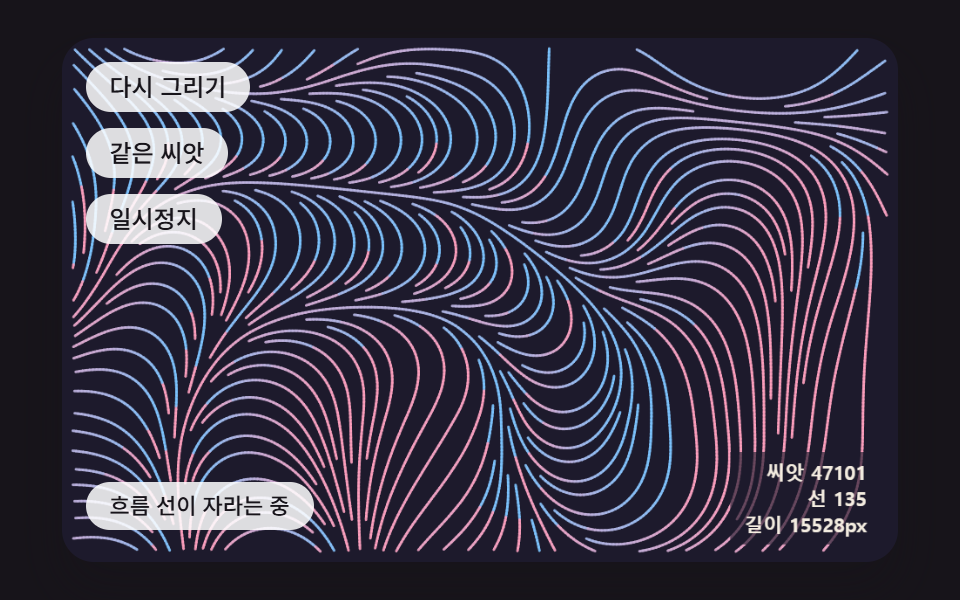 クリエイティブUIジェネラティブアート 作り方 9種 — 育つ模様をコードで
 クリエイティブUIオーロラ 背景 9種 — カーテン・光の筋・湖の映り込み・稜線
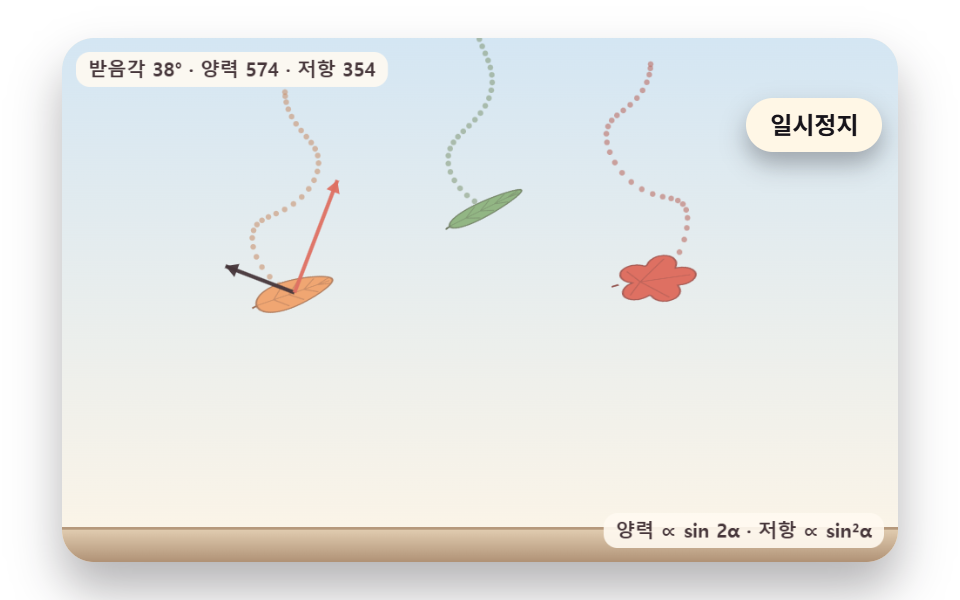 クリエイティブUI落ち葉 アニメーション 9種 — 揺れ・風・色づき・積もる山まで
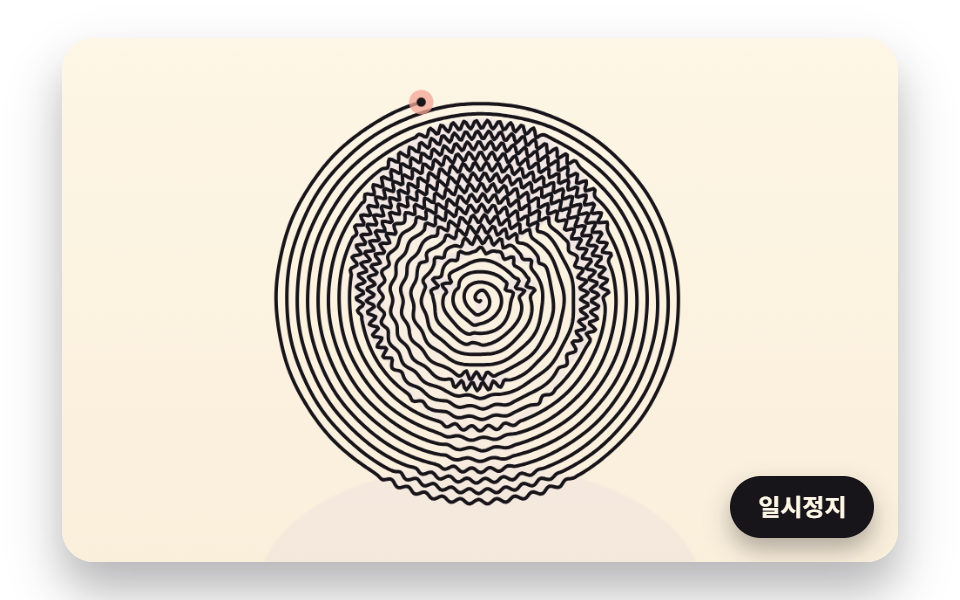 クリエイティブUI一筆書き イラスト 9種 — 点の順番と線の長さを計算して描くキャンバス