05見出しスケールのはしご
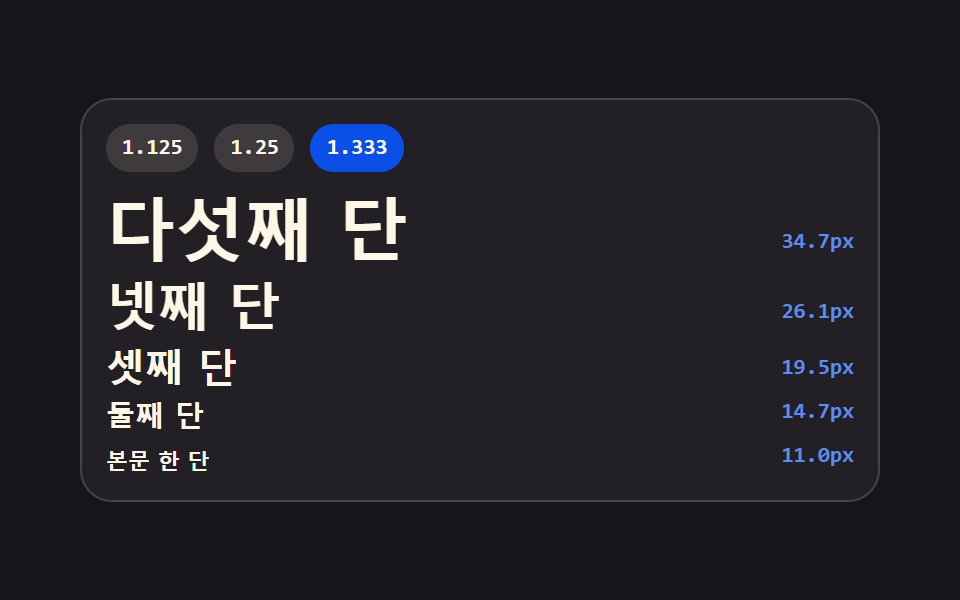
比率を 1.125・1.25・1.333 のどれかに選ぶと、小さい段から大きい段までのサイズが calc() で再計算されてはしご状に積み上がります。各段のピクセル値も横に表示します。
使いどころスタイルガイドの見出し体系ページ
calc()--ratiotoFixed
<main class="stage">
<div class="ts is-demo is-b" id="ts">
  <div class="ts__bar" role="group" aria-label="比率を選ぶ">
    <button class="ts__pick" type="button" data-key="a" data-ratio="1.125" aria-pressed="false">1.125</button>
    <button class="ts__pick" type="button" data-key="b" data-ratio="1.25" aria-pressed="true">1.25</button>
    <button class="ts__pick" type="button" data-key="c" data-ratio="1.333" aria-pressed="false">1.333</button>
  </div>
  <ul class="ts__ladder" id="ladder">
    <li class="ts__rung ts__rung--5"><span class="ts__glyph">5段目</span><span class="ts__px" data-step="4"></span></li>
    <li class="ts__rung ts__rung--4"><span class="ts__glyph">4段目</span><span class="ts__px" data-step="3"></span></li>
    <li class="ts__rung ts__rung--3"><span class="ts__glyph">3段目</span><span class="ts__px" data-step="2"></span></li>
    <li class="ts__rung ts__rung--2"><span class="ts__glyph">2段目</span><span class="ts__px" data-step="1"></span></li>
    <li class="ts__rung ts__rung--1"><span class="ts__glyph">本文の1段</span><span class="ts__px" data-step="0"></span></li>
  </ul>
  <span class="ts__beam" aria-hidden="true"></span>
</div>
</main>
@use "../../../../site/static/demo-tokens" as *;
// 제목 스케일 사다리 — 본문 한 단(11px)에서 비율을 거듭 곱해 단을 쌓는다.
// 크기는 CSS 가 calc() 사슬로 계산하고(--ratio 하나만 바꾸면 다섯 단이 함께 움직인다),
// 화면의 px 숫자는 같은 식을 JS 가 toFixed 로 적어 둔 세 벌 중 지금 비율의 것만 보인다.
// 미리보기(.is-demo)는 1.125 → 1.25 → 1.333 을 컷으로 돌고, 빛줄기 하나가 사다리를 훑어 내려간다.
$duration: $dur-base;
$easing: $ease-spring;
$color: $subject-blue-light;
$sans: system-ui, -apple-system, "Segoe UI", "Noto Sans KR", sans-serif;
$mono: ui-monospace, Consolas, "Liberation Mono", monospace;
$cream-soft: rgba($subject-cream, .72);
$base: 11;
// 눌린 칩 면색. 값은 $subject-blue-deep (#7187b9) — 크림 글자와 5.98:1 로 AA 통과.
// 지역 이름으로 받는 이유는 BD25 정적검사가 변수명을 부분문자열로 훑어
// `$subject-blue-deep` 을 금지조합의 `$subject-blue` 로 오탐하기 때문이다.
$pick-on: $subject-blue-deep;
@include stage($stage-ink);
// 비율은 숫자로 등록해야 애니메이션이 보간·컷을 할 수 있다
@property --ratio {
syntax: "<number>";
inherits: true;
initial-value: 1.25;
}
.ts {
position: relative;
display: flex; flex-direction: column; gap: $sp-2;
box-sizing: border-box; width: min(100%, 400px);
padding: $sp-3; border: 1px solid rgba($subject-cream, .16); border-radius: $r-card;
background: rgba($subject-cream, .05); overflow: hidden;
}
// ── 비율 고르기
.ts__bar { display: flex; gap: $sp-2; }
.ts__pick {
flex: 0 0 auto; padding: $sp-1 $sp-2; border: 0; border-radius: $r-pill;
background: rgba($subject-cream, .12); color: $subject-cream; cursor: pointer;
font-family: $mono; font-weight: 700; font-size: 11px; line-height: 1.4;
}
.ts__pick[aria-pressed="true"] { background: $pick-on; color: $subject-cream; } // $pick-on = 눌린 칩 면색 (BD25 정적검사 오탐 회피용 지역이름, 아래 선언 참조)
.ts__pick:focus-visible { outline: 2px solid $stage-yellow; outline-offset: 2px; }
// ── 사다리. 단마다 크기가 비율의 거듭곱이다
.ts__ladder {
--base: #{$base};
--ratio: 1.25;
display: flex; flex-direction: column; gap: $sp-1;
margin: 0; padding: 0; list-style: none;
}
.ts__rung { display: flex; align-items: baseline; gap: $sp-2; }
.ts__glyph {
flex: 1 1 auto; min-width: 0; color: $subject-cream;
font-family: $sans; font-weight: 700; line-height: 1.15;
white-space: nowrap; overflow: hidden; text-overflow: ellipsis;
}
.ts__rung--1 .ts__glyph { font-size: calc(var(--base) * 1px); }
.ts__rung--2 .ts__glyph { font-size: calc(var(--base) * var(--ratio) * 1px); }
.ts__rung--3 .ts__glyph { font-size: calc(var(--base) * var(--ratio) * var(--ratio) * 1px); }
.ts__rung--4 .ts__glyph { font-size: calc(var(--base) * var(--ratio) * var(--ratio) * var(--ratio) * 1px); }
.ts__rung--5 .ts__glyph { font-size: calc(var(--base) * var(--ratio) * var(--ratio) * var(--ratio) * var(--ratio) * 1px); }
// 세 비율의 숫자를 겹쳐 두고 지금 것만 보인다 — 자리는 늘 같은 폭이라 사다리가 흔들리지 않는다
.ts__px {
position: relative; flex: 0 0 auto; width: 48px; height: 15px;
}
.ts__v {
position: absolute; top: 0; right: 0; opacity: 0;
color: $color; font-family: $mono; font-weight: 700; font-size: 11px; line-height: 15px;
}
.ts.is-a .ts__v--a, .ts.is-b .ts__v--b, .ts.is-c .ts__v--c { opacity: 1; }
// 사다리를 훑어 내려가는 빛줄기. 장식이라 정적 경로에서는 보이지 않는다
.ts__beam {
position: absolute; left: 0; right: 0; top: 0; height: 28px;
background: linear-gradient(180deg, rgba($subject-blue-light, 0), rgba($subject-blue-light, .22), rgba($subject-blue-light, 0));
opacity: 0; pointer-events: none;
}
// ── 격자 미리보기 루프 (2초)
// 비율은 세 구간 컷(steps(1, end))이라 중간 프레임에 어정쩡한 크기가 남지 않는다.
// 숫자 세 벌도 같은 시각에 컷으로 바뀌어 크기와 라벨이 늘 같은 비율을 가리킨다.
.ts.is-demo .ts__ladder {
animation-name: tsRatio; animation-duration: $dur-loop;
animation-timing-function: steps(1, end); animation-iteration-count: infinite;
animation-fill-mode: both;
}
.ts.is-demo .ts__v--a { animation-name: tsShowA; }
.ts.is-demo .ts__v--b { animation-name: tsShowB; }
.ts.is-demo .ts__v--c { animation-name: tsShowC; }
.ts.is-demo .ts__v {
animation-duration: $dur-loop; animation-timing-function: steps(1, end);
animation-iteration-count: infinite; animation-fill-mode: both;
}
.ts.is-demo .ts__pick:nth-child(1) { animation-name: tsPickA; }
.ts.is-demo .ts__pick:nth-child(2) { animation-name: tsPickB; }
.ts.is-demo .ts__pick:nth-child(3) { animation-name: tsPickC; }
.ts.is-demo .ts__pick {
animation-duration: $dur-loop; animation-timing-function: steps(1, end);
animation-iteration-count: infinite; animation-fill-mode: both;
}
.ts.is-demo .ts__beam {
animation-name: tsBeam; animation-duration: $dur-loop;
animation-timing-function: linear; animation-iteration-count: infinite;
animation-fill-mode: both;
}
@keyframes tsRatio {
0% { --ratio: 1.125; }
34% { --ratio: 1.25; }
67%, 100% { --ratio: 1.333; }
}
@keyframes tsShowA { 0% { opacity: 1; } 34%, 100% { opacity: 0; } }
@keyframes tsShowB { 0% { opacity: 0; } 34% { opacity: 1; } 67%, 100% { opacity: 0; } }
@keyframes tsShowC { 0% { opacity: 0; } 67%, 100% { opacity: 1; } }
// 눌린 칩은 색으로 표시한다 — 칩을 지우면 무엇을 고를 수 있는지가 사라진다
@keyframes tsPickA {
0% { background-color: $subject-blue-deep; }
34%, 100% { background-color: rgba($subject-cream, .12); }
}
@keyframes tsPickB {
0% { background-color: rgba($subject-cream, .12); }
34% { background-color: $subject-blue-deep; }
67%, 100% { background-color: rgba($subject-cream, .12); }
}
@keyframes tsPickC {
0% { background-color: rgba($subject-cream, .12); }
67%, 100% { background-color: $subject-blue-deep; }
}
@keyframes tsBeam {
0% { opacity: 0; transform: translateY(0); }
6% { opacity: 1; transform: translateY(0); }
86% { opacity: 1; transform: translateY(260px); }
92%, 100% { opacity: 0; transform: translateY(260px); }
}
// ── 좁은 화면: 사다리의 바닥 단과 여백을 줄여 무대 안에 들어오게 한다
@media (max-width: 340px) {
.ts { gap: $sp-1; padding: $sp-2; }
.ts__ladder { --base: 9; }
.ts__pick { font-size: 10px; }
.ts__px { width: 40px; }
.ts__v { font-size: 10px; }
}
@media (prefers-reduced-motion: reduce) {
.ts.is-demo .ts__ladder,
.ts.is-demo .ts__v,
.ts.is-demo .ts__pick,
.ts.is-demo .ts__beam {
animation: none !important;
}
.ts.is-demo .ts__beam { opacity: 0 !important; }
.ts.is-demo.is-b .ts__v--b { opacity: 1 !important; }
}html, body {
margin: 0;
overflow: hidden;
}
.stage {
box-sizing: border-box;
min-height: 100vh;
display: grid;
place-items: center;
margin: 0;
background: #17141a;
font-family: -apple-system, "Segoe UI", "Noto Sans KR", sans-serif;
padding: clamp(8px, 4vw, 24px);
}
@property --ratio {
syntax: "<number>";
inherits: true;
initial-value: 1.25;
}
.ts {
position: relative;
display: flex;
flex-direction: column;
gap: 8px;
box-sizing: border-box;
width: min(100%, 400px);
padding: 12px;
border: 1px solid rgba(255, 247, 230, 0.16);
border-radius: 16px;
background: rgba(255, 247, 230, 0.05);
overflow: hidden;
}
.ts__bar {
display: flex;
gap: 8px;
}
.ts__pick {
flex: 0 0 auto;
padding: 4px 8px;
border: 0;
border-radius: 999px;
background: rgba(255, 247, 230, 0.12);
color: #fff7e6;
cursor: pointer;
font-family: ui-monospace, Consolas, "Liberation Mono", monospace;
font-weight: 700;
font-size: 11px;
line-height: 1.4;
}
.ts__pick[aria-pressed=true] {
background: #0a4fe8;
color: #fff7e6;
}
.ts__pick:focus-visible {
outline: 2px solid #ffd23f;
outline-offset: 2px;
}
.ts__ladder {
--base: 11;
--ratio: 1.25;
display: flex;
flex-direction: column;
gap: 4px;
margin: 0;
padding: 0;
list-style: none;
}
.ts__rung {
display: flex;
align-items: baseline;
gap: 8px;
}
.ts__glyph {
flex: 1 1 auto;
min-width: 0;
color: #fff7e6;
font-family: system-ui, -apple-system, "Segoe UI", "Noto Sans KR", sans-serif;
font-weight: 700;
line-height: 1.15;
white-space: nowrap;
overflow: hidden;
text-overflow: ellipsis;
}
.ts__rung--1 .ts__glyph {
font-size: calc(var(--base) * 1px);
}
.ts__rung--2 .ts__glyph {
font-size: calc(var(--base) * var(--ratio) * 1px);
}
.ts__rung--3 .ts__glyph {
font-size: calc(var(--base) * var(--ratio) * var(--ratio) * 1px);
}
.ts__rung--4 .ts__glyph {
font-size: calc(var(--base) * var(--ratio) * var(--ratio) * var(--ratio) * 1px);
}
.ts__rung--5 .ts__glyph {
font-size: calc(var(--base) * var(--ratio) * var(--ratio) * var(--ratio) * var(--ratio) * 1px);
}
.ts__px {
position: relative;
flex: 0 0 auto;
width: 48px;
height: 15px;
}
.ts__v {
position: absolute;
top: 0;
right: 0;
opacity: 0;
color: #5b8cf8;
font-family: ui-monospace, Consolas, "Liberation Mono", monospace;
font-weight: 700;
font-size: 11px;
line-height: 15px;
}
.ts.is-a .ts__v--a, .ts.is-b .ts__v--b, .ts.is-c .ts__v--c {
opacity: 1;
}
.ts__beam {
position: absolute;
left: 0;
right: 0;
top: 0;
height: 28px;
background: linear-gradient(180deg, rgba(91, 140, 248, 0), rgba(91, 140, 248, 0.22), rgba(91, 140, 248, 0));
opacity: 0;
pointer-events: none;
}
.ts.is-demo .ts__ladder {
animation-name: tsRatio;
animation-duration: 2s;
animation-timing-function: steps(1, end);
animation-iteration-count: infinite;
animation-fill-mode: both;
}
.ts.is-demo .ts__v--a {
animation-name: tsShowA;
}
.ts.is-demo .ts__v--b {
animation-name: tsShowB;
}
.ts.is-demo .ts__v--c {
animation-name: tsShowC;
}
.ts.is-demo .ts__v {
animation-duration: 2s;
animation-timing-function: steps(1, end);
animation-iteration-count: infinite;
animation-fill-mode: both;
}
.ts.is-demo .ts__pick:nth-child(1) {
animation-name: tsPickA;
}
.ts.is-demo .ts__pick:nth-child(2) {
animation-name: tsPickB;
}
.ts.is-demo .ts__pick:nth-child(3) {
animation-name: tsPickC;
}
.ts.is-demo .ts__pick {
animation-duration: 2s;
animation-timing-function: steps(1, end);
animation-iteration-count: infinite;
animation-fill-mode: both;
}
.ts.is-demo .ts__beam {
animation-name: tsBeam;
animation-duration: 2s;
animation-timing-function: linear;
animation-iteration-count: infinite;
animation-fill-mode: both;
}
@keyframes tsRatio {
0% {
--ratio: 1.125;
}
34% {
--ratio: 1.25;
}
67%, 100% {
--ratio: 1.333;
}
}
@keyframes tsShowA {
0% {
opacity: 1;
}
34%, 100% {
opacity: 0;
}
}
@keyframes tsShowB {
0% {
opacity: 0;
}
34% {
opacity: 1;
}
67%, 100% {
opacity: 0;
}
}
@keyframes tsShowC {
0% {
opacity: 0;
}
67%, 100% {
opacity: 1;
}
}
@keyframes tsPickA {
0% {
background-color: #0a4fe8;
}
34%, 100% {
background-color: rgba(255, 247, 230, 0.12);
}
}
@keyframes tsPickB {
0% {
background-color: rgba(255, 247, 230, 0.12);
}
34% {
background-color: #0a4fe8;
}
67%, 100% {
background-color: rgba(255, 247, 230, 0.12);
}
}
@keyframes tsPickC {
0% {
background-color: rgba(255, 247, 230, 0.12);
}
67%, 100% {
background-color: #0a4fe8;
}
}
@keyframes tsBeam {
0% {
opacity: 0;
transform: translateY(0);
}
6% {
opacity: 1;
transform: translateY(0);
}
86% {
opacity: 1;
transform: translateY(260px);
}
92%, 100% {
opacity: 0;
transform: translateY(260px);
}
}
@media (max-width: 340px) {
.ts {
gap: 4px;
padding: 8px;
}
.ts__ladder {
--base: 9;
}
.ts__pick {
font-size: 10px;
}
.ts__px {
width: 40px;
}
.ts__v {
font-size: 10px;
}
}
@media (prefers-reduced-motion: reduce) {
.ts.is-demo .ts__ladder,
.ts.is-demo .ts__v,
.ts.is-demo .ts__pick,
.ts.is-demo .ts__beam {
animation: none !important;
}
.ts.is-demo .ts__beam {
opacity: 0 !important;
}
.ts.is-demo.is-b .ts__v--b {
opacity: 1 !important;
}
}var ts = document.getElementById('ts');
var ladder = document.getElementById('ladder');
var picks = ts.querySelectorAll('.ts__pick');
var boxes = ts.querySelectorAll('.ts__px');
var BASE = 11;
var RATIOS = { a: 1.125, b: 1.25, c: 1.333 };
// 단의 크기는 CSS 가 calc() 사슬로 계산한다. 라벨 숫자는 같은 식을 JS 로 한 번 더 풀어 toFixed 로 적는다.
// 세 비율의 값을 처음에 다 적어 두므로, 미리보기 루프가 비율을 바꿔도 화면 숫자가 따로 놀지 않는다
function buildLabels() {
boxes.forEach(function (box) {
var step = Number(box.getAttribute('data-step'));
Object.keys(RATIOS).forEach(function (key) {
var v = document.createElement('span');
v.className = 'ts__v ts__v--' + key;
v.textContent = (BASE * Math.pow(RATIOS[key], step)).toFixed(1) + 'px';
box.appendChild(v);
});
});
}
function choose(key) {
ladder.style.setProperty('--ratio', String(RATIOS[key]));
ts.classList.remove('is-a', 'is-b', 'is-c');
ts.classList.add('is-' + key);
picks.forEach(function (b) {
b.setAttribute('aria-pressed', b.getAttribute('data-key') === key ? 'true' : 'false');
});
}
picks.forEach(function (b) {
b.addEventListener('click', function () {
ts.classList.remove('is-demo');
choose(b.getAttribute('data-key'));
});
});
buildLabels();
choose('b');// TypeScaleLadder — vanilla 판(run/074/demo/05-type-scale-ladder/index.html) 의 React 포트.
// 비율을 고르면 --ratio 하나가 사다리 다섯 단의 calc() 사슬을 함께 움직이고,
// 화면 px 숫자는 세 비율의 값을 toFixed 로 미리 만들어 둔 것 중 지금 비율의 것만 보인다.
import { useState } from "react";
import type { FC } from "react";
import styles from "./TypeScaleLadder.module.scss";
export type TypeScaleLadderProps = {
duration?: number;
easing?: string;
color?: string;
base?: number;
};
type RatioKey = "a" | "b" | "c";
const RATIOS: Record<RatioKey, number> = { a: 1.125, b: 1.25, c: 1.333 };
const KEYS: RatioKey[] = ["a", "b", "c"];
const RUNGS: { step: number; label: string }[] = [
{ step: 4, label: "다섯째 단" },
{ step: 3, label: "넷째 단" },
{ step: 2, label: "셋째 단" },
{ step: 1, label: "둘째 단" },
{ step: 0, label: "본문 한 단" },
];
const TypeScaleLadder: FC<TypeScaleLadderProps> = ({
duration,
easing,
color,
base = 11,
}) => {
const [key, setKey] = useState<RatioKey>("b");
const [demo, setDemo] = useState(true);
const cls = [styles.ts, demo ? styles["is-demo"] : "", styles["is-" + key]]
.filter(Boolean).join(" ");
const vars = {
"--ratio": String(RATIOS[key]),
"--base": String(base),
"--duration": duration != null ? duration + "ms" : undefined,
"--easing": easing,
"--color": color,
} as never;
return (
<div className={cls} style={vars}>
<div className={styles.ts__bar} role="group" aria-label="비율 고르기">
{KEYS.map((k) => (
<button
key={k}
type="button"
className={styles.ts__pick}
aria-pressed={key === k ? "true" : "false"}
onClick={() => {
setDemo(false);
setKey(k);
}}
>
{RATIOS[k]}
</button>
))}
</div>
<ul className={styles.ts__ladder}>
{RUNGS.map((r) => (
<li
key={r.step}
className={[styles.ts__rung, styles["ts__rung--" + (r.step + 1)]].join(" ")}
>
<span className={styles.ts__glyph}>{r.label}</span>
<span className={styles.ts__px}>
{KEYS.map((k) => (
<span key={k} className={styles["ts__v--" + k]}>
{(base * Math.pow(RATIOS[k], r.step)).toFixed(1)}px
</span>
))}
</span>
</li>
))}
</ul>
<span className={styles.ts__beam} aria-hidden="true" />
</div>
);
};
export default TypeScaleLadder;05 見出しスケールのはしご — 計測 累積面積 48.553% · 動いたフレーム 16/23GODRICH オリジナル · SCSS と React は zip に同梱 · css タイポグラフィ プレイグラウンド 9種 — webフォントを読み込まずに
このデモが属する記事
 css タイポグラフィ プレイグラウンド 9種 — webフォントを読み込まずにcss タイポグラフィとは、フォントのダウンロードを待たずにサイズ・太さ・字間・行間でページの読み心地を決める作業です。この9つのプレイグラウンドは webフォントを読み込まずに、OS がもともと持っているシステムフォントだけで組んであり、 この記事のデモをすべて見る