05スコアを測るパスワード強度ゲージ
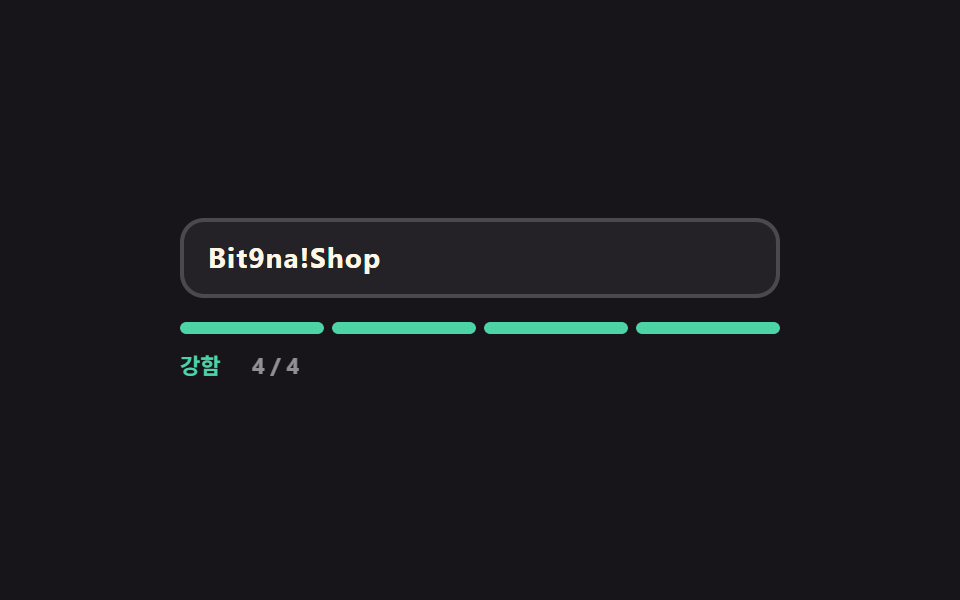
4マスのゲージが長さ・大小文字・数字・記号の4条件を1マスずつ埋め、点いたマス数に応じて「弱・中・強」の表示と色が一緒に切り替わります。
使いどころアカウントのセキュリティ設定・パスワード変更画面
scaleXsteps(1, end)textContent
<main class="stage">
  <div class="pg is-demo" id="pg" data-score="1">
    <div class="pg__field">
      <input class="pg__input" id="pg-input" type="text" autocomplete="off" aria-describedby="pg-out" placeholder="パスワードを入力してください">
      <span class="pg__ghost" aria-hidden="true">Bit9na!Shop</span>
    </div>
    <div class="pg__gauge" aria-hidden="true">
      <span class="pg__cell" data-cell="1"></span>
      <span class="pg__cell" data-cell="2"></span>
      <span class="pg__cell" data-cell="3"></span>
      <span class="pg__cell" data-cell="4"></span>
    </div>
    <p class="pg__out" id="pg-out">
      <span class="pg__words" aria-hidden="true">
        <span class="pg__w" data-w="low">弱い</span><span class="pg__w" data-w="mid">普通</span><span class="pg__w" data-w="high">強い</span>
      </span>
      <span class="pg__nums" aria-hidden="true">
        <span class="pg__n" data-n="0">0 / 4</span><span class="pg__n" data-n="1">1 / 4</span><span class="pg__n" data-n="2">2 / 4</span><span class="pg__n" data-n="3">3 / 4</span><span class="pg__n" data-n="4">4 / 4</span>
      </span>
      <span class="pg__say" id="pg-say" role="status" aria-live="polite">4つの条件のうち1つだけ満たしています</span>
    </p>
  </div>
</main>
@use "../../../../site/static/demo-tokens" as *;
$duration: $dur-quick;
$easing: $ease-spring;
$color: $subject-blue;
@include stage($stage-ink);
$low: $error;
$mid: #cab493;
$high: $subject-mint;
.pg {
box-sizing: border-box;
width: min(300px, 86vw);
font-family: -apple-system, "Segoe UI", "Noto Sans KR", sans-serif;
}
.pg__field { position: relative; }
.pg__input {
box-sizing: border-box;
width: 100%; height: 40px;
padding: 0 $sp-3;
border: 2px solid rgba(255, 255, 255, .18);
border-radius: $r-control;
background: rgba(255, 255, 255, .06);
color: $subject-cream;
font-family: inherit;
font-size: 14px; line-height: 36px; font-weight: 700;
letter-spacing: .04em;
}
.pg__input::placeholder { color: rgba(255, 255, 255, .38); font-weight: 600; letter-spacing: normal; }
.pg__input:focus-visible { outline: 2px solid $color; outline-offset: 2px; }
// 자동 루프에서만 보이는 "쳐 넣는 글자". 진짜 placeholder 와 겹치지 않게 지운다
.pg.is-demo .pg__input::placeholder { color: transparent; }
.pg__ghost {
position: absolute;
left: 14px; top: 0;
color: $subject-cream;
font-size: 14px; line-height: 40px; font-weight: 700;
letter-spacing: .04em;
white-space: nowrap;
pointer-events: none;
opacity: 0;
}
// ── 네 칸 게이지 — 칸마다 왼쪽에서 자란다 ────────────────
.pg__gauge {
// 격자로 넷을 똑같이 나눈다 — flex 균등분배(1 1 0)는 고정 px 지오메트리와 섞이면 어긋난다
display: grid;
grid-template-columns: repeat(4, 1fr);
gap: $sp-1;
margin-top: $sp-3;
}
.pg__cell {
position: relative;
height: 6px;
border-radius: $r-pill;
background: rgba(255, 255, 255, .14);
overflow: hidden;
}
.pg__cell::after {
content: "";
position: absolute;
inset: 0;
border-radius: $r-pill;
background: $low;
transform: scaleX(0);
transform-origin: left center; // 규칙8: 네 칸 게이지 좌측 채움
transition: transform $duration $easing, background $duration $easing;
}
.pg[data-score="1"] .pg__cell[data-cell="1"]::after,
.pg[data-score="2"] .pg__cell[data-cell="1"]::after,
.pg[data-score="2"] .pg__cell[data-cell="2"]::after,
.pg[data-score="3"] .pg__cell[data-cell="1"]::after,
.pg[data-score="3"] .pg__cell[data-cell="2"]::after,
.pg[data-score="3"] .pg__cell[data-cell="3"]::after,
.pg[data-score="4"] .pg__cell::after { transform: scaleX(1); }
.pg[data-score="2"] .pg__cell::after,
.pg[data-score="3"] .pg__cell::after { background: $mid; }
.pg[data-score="4"] .pg__cell::after { background: $high; }
// ── 등급 한 줄 — 낱말과 점수를 겹쳐 두고 하나만 켠다 ──────
.pg__out {
position: relative;
display: flex;
align-items: center;
gap: $sp-2;
height: 16px;
margin: $sp-2 0 0;
font-size: 11px; line-height: 16px; font-weight: 700;
}
.pg__words, .pg__nums {
position: relative;
display: inline-block;
flex: 0 0 auto;
height: 16px;
}
.pg__words { width: 28px; }
.pg__nums { width: 32px; color: rgba(255, 255, 255, .52); }
.pg__w, .pg__n {
position: absolute;
left: 0; top: 0;
white-space: nowrap;
opacity: 0;
}
.pg__w[data-w="low"] { color: $low; }
.pg__w[data-w="mid"] { color: $mid; }
.pg__w[data-w="high"] { color: $high; }
.pg[data-score="0"] .pg__w[data-w="low"],
.pg[data-score="1"] .pg__w[data-w="low"],
.pg[data-score="2"] .pg__w[data-w="mid"],
.pg[data-score="3"] .pg__w[data-w="mid"],
.pg[data-score="4"] .pg__w[data-w="high"] { opacity: 1; }
.pg[data-score="0"] .pg__n[data-n="0"],
.pg[data-score="1"] .pg__n[data-n="1"],
.pg[data-score="2"] .pg__n[data-n="2"],
.pg[data-score="3"] .pg__n[data-n="3"],
.pg[data-score="4"] .pg__n[data-n="4"] { opacity: 1; }
.pg__say {
// 등급은 눈으로 칸이 말해 준다 — 문장은 낭독기 쪽으로만 보낸다
position: absolute;
width: 1px; height: 1px;
overflow: hidden;
clip-path: inset(50%);
}
// ── 자동 루프 (2s) ────────────────────────────────────
// 0~16% 1점 → 24% 2점 → 42% 3점 → 60% 4점(강함이 가장 큰 변화 = poster)
// → 76·80·84% 칸을 하나씩 흩어서 끄고 88% 되감기. 등급 낱말 교체는 steps(1, end) 컷 — 겹치면 두 낱말이 반투명하게 포개진다.
.pg.is-demo .pg__ghost {
opacity: 1;
animation-name: pg-type;
animation-duration: $dur-loop;
animation-timing-function: steps(1, end);
animation-iteration-count: infinite;
}
.pg.is-demo .pg__cell::after {
transition: none;
animation-duration: $dur-loop;
animation-timing-function: $easing;
animation-iteration-count: infinite;
}
.pg.is-demo .pg__cell[data-cell="1"]::after { animation-name: pg-c1; }
.pg.is-demo .pg__cell[data-cell="2"]::after { animation-name: pg-c2; }
.pg.is-demo .pg__cell[data-cell="3"]::after { animation-name: pg-c3; }
.pg.is-demo .pg__cell[data-cell="4"]::after { animation-name: pg-c4; }
.pg.is-demo .pg__w,
.pg.is-demo .pg__n {
animation-duration: $dur-loop;
animation-timing-function: steps(1, end);
animation-iteration-count: infinite;
}
.pg.is-demo .pg__w[data-w="low"] { animation-name: pg-w-low; }
.pg.is-demo .pg__w[data-w="mid"] { animation-name: pg-w-mid; }
.pg.is-demo .pg__w[data-w="high"] { animation-name: pg-w-high; }
.pg.is-demo .pg__n[data-n="1"] { animation-name: pg-n1; }
.pg.is-demo .pg__n[data-n="2"] { animation-name: pg-n2; }
.pg.is-demo .pg__n[data-n="3"] { animation-name: pg-n3; }
.pg.is-demo .pg__n[data-n="4"] { animation-name: pg-n4; }
@keyframes pg-type {
0% { clip-path: inset(0 64% 0 0); }
24% { clip-path: inset(0 46% 0 0); }
42% { clip-path: inset(0 22% 0 0); }
60% { clip-path: inset(0 0 0 0); }
88% { clip-path: inset(0 64% 0 0); }
100% { clip-path: inset(0 64% 0 0); }
}
@keyframes pg-c1 {
0% { transform: scaleX(1); background: $low; }
23.4% { transform: scaleX(1); background: $low; }
24% { transform: scaleX(1); background: $mid; }
59.4% { transform: scaleX(1); background: $mid; }
60% { transform: scaleX(1); background: $high; }
84.4% { transform: scaleX(1); background: $high; }
85% { transform: scaleX(1); background: $low; }
100% { transform: scaleX(1); background: $low; }
}
@keyframes pg-c2 {
0% { transform: scaleX(0); background: $mid; }
20% { transform: scaleX(0); background: $mid; }
24% { transform: scaleX(1); background: $mid; }
30% { transform: scaleX(1); background: $mid; }
59.4% { transform: scaleX(1); background: $mid; }
60% { transform: scaleX(1); background: $high; }
83% { transform: scaleX(1); background: $high; }
84% { transform: scaleX(0); background: $high; }
100% { transform: scaleX(0); background: $high; }
}
@keyframes pg-c3 {
0% { transform: scaleX(0); background: $mid; }
38% { transform: scaleX(0); background: $mid; }
42% { transform: scaleX(1); background: $mid; }
59.4% { transform: scaleX(1); background: $mid; }
60% { transform: scaleX(1); background: $high; }
79% { transform: scaleX(1); background: $high; }
80% { transform: scaleX(0); background: $high; }
100% { transform: scaleX(0); background: $high; }
}
@keyframes pg-c4 {
0% { transform: scaleX(0); background: $high; }
56% { transform: scaleX(0); background: $high; }
60% { transform: scaleX(1); background: $high; }
75% { transform: scaleX(1); background: $high; }
76% { transform: scaleX(0); background: $high; }
100% { transform: scaleX(0); background: $high; }
}
@keyframes pg-w-low { 0% { opacity: 1; } 24% { opacity: 0; } 85% { opacity: 1; } 100% { opacity: 1; } }
@keyframes pg-w-mid { 0% { opacity: 0; } 24% { opacity: 1; } 60% { opacity: 0; } 100% { opacity: 0; } }
@keyframes pg-w-high { 0% { opacity: 0; } 60% { opacity: 1; } 85% { opacity: 0; } 100% { opacity: 0; } }
@keyframes pg-n1 { 0% { opacity: 1; } 24% { opacity: 0; } 85% { opacity: 1; } 100% { opacity: 1; } }
@keyframes pg-n2 { 0% { opacity: 0; } 24% { opacity: 1; } 42% { opacity: 0; } 100% { opacity: 0; } }
@keyframes pg-n3 { 0% { opacity: 0; } 42% { opacity: 1; } 60% { opacity: 0; } 100% { opacity: 0; } }
@keyframes pg-n4 { 0% { opacity: 0; } 60% { opacity: 1; } 85% { opacity: 0; } 100% { opacity: 0; } }
// 320×200 — 무대 여백을 뺀 174px 안에 들어가도록 간격을 내린다(올리지 않는다)
@media (max-width: 360px) {
.pg__input { height: 36px; line-height: 32px; }
.pg__ghost { line-height: 36px; }
.pg__gauge { margin-top: $sp-2; }
}
@media (prefers-reduced-motion: reduce) {
.pg.is-demo .pg__ghost,
.pg.is-demo .pg__cell::after,
.pg.is-demo .pg__w,
.pg.is-demo .pg__n { animation: none !important; }
.pg.is-demo .pg__ghost { opacity: 1; clip-path: inset(0 0 0 0); }
.pg.is-demo .pg__cell::after { transform: scaleX(1); background: $high; }
.pg.is-demo .pg__w[data-w="high"],
.pg.is-demo .pg__n[data-n="4"] { opacity: 1; }
.pg__cell::after { transition: none; }
}html, body {
margin: 0;
overflow: hidden;
}
.stage {
box-sizing: border-box;
min-height: 100vh;
display: grid;
place-items: center;
margin: 0;
background: #17141a;
font-family: -apple-system, "Segoe UI", "Noto Sans KR", sans-serif;
padding: clamp(8px, 4vw, 24px);
}
.pg {
box-sizing: border-box;
width: min(300px, 86vw);
font-family: -apple-system, "Segoe UI", "Noto Sans KR", sans-serif;
}
.pg__field {
position: relative;
}
.pg__input {
box-sizing: border-box;
width: 100%;
height: 40px;
padding: 0 12px;
border: 2px solid rgba(255, 255, 255, 0.18);
border-radius: 12px;
background: rgba(255, 255, 255, 0.06);
color: #fff7e6;
font-family: inherit;
font-size: 14px;
line-height: 36px;
font-weight: 700;
letter-spacing: 0.04em;
}
.pg__input::placeholder {
color: rgba(255, 255, 255, 0.38);
font-weight: 600;
letter-spacing: normal;
}
.pg__input:focus-visible {
outline: 2px solid #2f6df6;
outline-offset: 2px;
}
.pg.is-demo .pg__input::placeholder {
color: transparent;
}
.pg__ghost {
position: absolute;
left: 14px;
top: 0;
color: #fff7e6;
font-size: 14px;
line-height: 40px;
font-weight: 700;
letter-spacing: 0.04em;
white-space: nowrap;
pointer-events: none;
opacity: 0;
}
.pg__gauge {
display: grid;
grid-template-columns: repeat(4, 1fr);
gap: 4px;
margin-top: 12px;
}
.pg__cell {
position: relative;
height: 6px;
border-radius: 999px;
background: rgba(255, 255, 255, 0.14);
overflow: hidden;
}
.pg__cell::after {
content: "";
position: absolute;
inset: 0;
border-radius: 999px;
background: #c2361a;
transform: scaleX(0);
transform-origin: left center;
transition: transform 220ms cubic-bezier(0.2, 0.8, 0.2, 1), background 220ms cubic-bezier(0.2, 0.8, 0.2, 1);
}
.pg[data-score="1"] .pg__cell[data-cell="1"]::after,
.pg[data-score="2"] .pg__cell[data-cell="1"]::after,
.pg[data-score="2"] .pg__cell[data-cell="2"]::after,
.pg[data-score="3"] .pg__cell[data-cell="1"]::after,
.pg[data-score="3"] .pg__cell[data-cell="2"]::after,
.pg[data-score="3"] .pg__cell[data-cell="3"]::after,
.pg[data-score="4"] .pg__cell::after {
transform: scaleX(1);
}
.pg[data-score="2"] .pg__cell::after,
.pg[data-score="3"] .pg__cell::after {
background: #cab493;
}
.pg[data-score="4"] .pg__cell::after {
background: #4cd4a6;
}
.pg__out {
position: relative;
display: flex;
align-items: center;
gap: 8px;
height: 16px;
margin: 8px 0 0;
font-size: 11px;
line-height: 16px;
font-weight: 700;
}
.pg__words, .pg__nums {
position: relative;
display: inline-block;
flex: 0 0 auto;
height: 16px;
}
.pg__words {
width: 28px;
}
.pg__nums {
width: 32px;
color: rgba(255, 255, 255, 0.52);
}
.pg__w, .pg__n {
position: absolute;
left: 0;
top: 0;
white-space: nowrap;
opacity: 0;
}
.pg__w[data-w=low] {
color: #c2361a;
}
.pg__w[data-w=mid] {
color: #cab493;
}
.pg__w[data-w=high] {
color: #4cd4a6;
}
.pg[data-score="0"] .pg__w[data-w=low],
.pg[data-score="1"] .pg__w[data-w=low],
.pg[data-score="2"] .pg__w[data-w=mid],
.pg[data-score="3"] .pg__w[data-w=mid],
.pg[data-score="4"] .pg__w[data-w=high] {
opacity: 1;
}
.pg[data-score="0"] .pg__n[data-n="0"],
.pg[data-score="1"] .pg__n[data-n="1"],
.pg[data-score="2"] .pg__n[data-n="2"],
.pg[data-score="3"] .pg__n[data-n="3"],
.pg[data-score="4"] .pg__n[data-n="4"] {
opacity: 1;
}
.pg__say {
position: absolute;
width: 1px;
height: 1px;
overflow: hidden;
clip-path: inset(50%);
}
.pg.is-demo .pg__ghost {
opacity: 1;
animation-name: pg-type;
animation-duration: 2s;
animation-timing-function: steps(1, end);
animation-iteration-count: infinite;
}
.pg.is-demo .pg__cell::after {
transition: none;
animation-duration: 2s;
animation-timing-function: cubic-bezier(0.2, 0.8, 0.2, 1);
animation-iteration-count: infinite;
}
.pg.is-demo .pg__cell[data-cell="1"]::after {
animation-name: pg-c1;
}
.pg.is-demo .pg__cell[data-cell="2"]::after {
animation-name: pg-c2;
}
.pg.is-demo .pg__cell[data-cell="3"]::after {
animation-name: pg-c3;
}
.pg.is-demo .pg__cell[data-cell="4"]::after {
animation-name: pg-c4;
}
.pg.is-demo .pg__w,
.pg.is-demo .pg__n {
animation-duration: 2s;
animation-timing-function: steps(1, end);
animation-iteration-count: infinite;
}
.pg.is-demo .pg__w[data-w=low] {
animation-name: pg-w-low;
}
.pg.is-demo .pg__w[data-w=mid] {
animation-name: pg-w-mid;
}
.pg.is-demo .pg__w[data-w=high] {
animation-name: pg-w-high;
}
.pg.is-demo .pg__n[data-n="1"] {
animation-name: pg-n1;
}
.pg.is-demo .pg__n[data-n="2"] {
animation-name: pg-n2;
}
.pg.is-demo .pg__n[data-n="3"] {
animation-name: pg-n3;
}
.pg.is-demo .pg__n[data-n="4"] {
animation-name: pg-n4;
}
@keyframes pg-type {
0% {
clip-path: inset(0 64% 0 0);
}
24% {
clip-path: inset(0 46% 0 0);
}
42% {
clip-path: inset(0 22% 0 0);
}
60% {
clip-path: inset(0 0 0 0);
}
88% {
clip-path: inset(0 64% 0 0);
}
100% {
clip-path: inset(0 64% 0 0);
}
}
@keyframes pg-c1 {
0% {
transform: scaleX(1);
background: #c2361a;
}
23.4% {
transform: scaleX(1);
background: #c2361a;
}
24% {
transform: scaleX(1);
background: #cab493;
}
59.4% {
transform: scaleX(1);
background: #cab493;
}
60% {
transform: scaleX(1);
background: #4cd4a6;
}
84.4% {
transform: scaleX(1);
background: #4cd4a6;
}
85% {
transform: scaleX(1);
background: #c2361a;
}
100% {
transform: scaleX(1);
background: #c2361a;
}
}
@keyframes pg-c2 {
0% {
transform: scaleX(0);
background: #cab493;
}
20% {
transform: scaleX(0);
background: #cab493;
}
24% {
transform: scaleX(1);
background: #cab493;
}
30% {
transform: scaleX(1);
background: #cab493;
}
59.4% {
transform: scaleX(1);
background: #cab493;
}
60% {
transform: scaleX(1);
background: #4cd4a6;
}
83% {
transform: scaleX(1);
background: #4cd4a6;
}
84% {
transform: scaleX(0);
background: #4cd4a6;
}
100% {
transform: scaleX(0);
background: #4cd4a6;
}
}
@keyframes pg-c3 {
0% {
transform: scaleX(0);
background: #cab493;
}
38% {
transform: scaleX(0);
background: #cab493;
}
42% {
transform: scaleX(1);
background: #cab493;
}
59.4% {
transform: scaleX(1);
background: #cab493;
}
60% {
transform: scaleX(1);
background: #4cd4a6;
}
79% {
transform: scaleX(1);
background: #4cd4a6;
}
80% {
transform: scaleX(0);
background: #4cd4a6;
}
100% {
transform: scaleX(0);
background: #4cd4a6;
}
}
@keyframes pg-c4 {
0% {
transform: scaleX(0);
background: #4cd4a6;
}
56% {
transform: scaleX(0);
background: #4cd4a6;
}
60% {
transform: scaleX(1);
background: #4cd4a6;
}
75% {
transform: scaleX(1);
background: #4cd4a6;
}
76% {
transform: scaleX(0);
background: #4cd4a6;
}
100% {
transform: scaleX(0);
background: #4cd4a6;
}
}
@keyframes pg-w-low {
0% {
opacity: 1;
}
24% {
opacity: 0;
}
85% {
opacity: 1;
}
100% {
opacity: 1;
}
}
@keyframes pg-w-mid {
0% {
opacity: 0;
}
24% {
opacity: 1;
}
60% {
opacity: 0;
}
100% {
opacity: 0;
}
}
@keyframes pg-w-high {
0% {
opacity: 0;
}
60% {
opacity: 1;
}
85% {
opacity: 0;
}
100% {
opacity: 0;
}
}
@keyframes pg-n1 {
0% {
opacity: 1;
}
24% {
opacity: 0;
}
85% {
opacity: 1;
}
100% {
opacity: 1;
}
}
@keyframes pg-n2 {
0% {
opacity: 0;
}
24% {
opacity: 1;
}
42% {
opacity: 0;
}
100% {
opacity: 0;
}
}
@keyframes pg-n3 {
0% {
opacity: 0;
}
42% {
opacity: 1;
}
60% {
opacity: 0;
}
100% {
opacity: 0;
}
}
@keyframes pg-n4 {
0% {
opacity: 0;
}
60% {
opacity: 1;
}
85% {
opacity: 0;
}
100% {
opacity: 0;
}
}
@media (max-width: 360px) {
.pg__input {
height: 36px;
line-height: 32px;
}
.pg__ghost {
line-height: 36px;
}
.pg__gauge {
margin-top: 8px;
}
}
@media (prefers-reduced-motion: reduce) {
.pg.is-demo .pg__ghost,
.pg.is-demo .pg__cell::after,
.pg.is-demo .pg__w,
.pg.is-demo .pg__n {
animation: none !important;
}
.pg.is-demo .pg__ghost {
opacity: 1;
clip-path: inset(0 0 0 0);
}
.pg.is-demo .pg__cell::after {
transform: scaleX(1);
background: #4cd4a6;
}
.pg.is-demo .pg__w[data-w=high],
.pg.is-demo .pg__n[data-n="4"] {
opacity: 1;
}
.pg__cell::after {
transition: none;
}
}// 실제 동작: 길이·대소문자·숫자·기호 네 조건을 각각 재서 점수를 만들고, 그 점수 하나가 칸 수와 등급을 함께 정한다.
var pg = document.getElementById('pg');
var pgInput = document.getElementById('pg-input');
var pgSay = document.getElementById('pg-say');
var PG_SAY = ['4つの条件をまだ1つも満たしていません', '4つの条件のうち1つだけ満たしています', '4つの条件のうち2つ満たしています',
'あと1つでパスワードが強くなります', '4つの条件をすべて満たしています'];
function pgScore(v) {
var n = 0;
if (/^.{10,}$/.test(v)) n += 1;
if (/[a-z]/.test(v) && /[A-Z]/.test(v)) n += 1;
if (/\d/.test(v)) n += 1;
if (/[^\w\s]/.test(v)) n += 1;
return n;
}
function pgPaint() {
pg.classList.remove('is-demo'); // 사람이 손대면 자동 루프를 멈춘다
var n = pgScore(pgInput.value);
pg.setAttribute('data-score', String(n));
pgSay.textContent = PG_SAY[n];
}
pgInput.addEventListener('input', pgPaint);
pgInput.addEventListener('focus', pgPaint);import { useState } from "react";
import type { CSSProperties } from "react";
import styles from "./PasswordScoreGauge.module.scss";
export type PasswordScoreGaugeProps = {
placeholder?: string;
words?: [string, string, string];
messages?: string[];
/** 자동 재생 루프 (갤러리용). 사람이 손대면 꺼진다 */
demo?: boolean;
duration?: number;
easing?: string;
color?: string;
};
type Vars = CSSProperties & { "--duration"?: string; "--easing"?: string; "--color"?: string };
type ChangeEvt = { target: { value: string } };
const DEFAULT_MESSAGES = [
"None of the four rules are met",
"Only one of the four rules is met",
"Two rules are met",
"One more rule and it is strong",
"All four rules are met",
];
export function scoreOf(v: string) {
let n = 0;
if (/^.{10,}$/.test(v)) n += 1;
if (/[a-z]/.test(v) && /[A-Z]/.test(v)) n += 1;
if (/\d/.test(v)) n += 1;
if (/[^\w\s]/.test(v)) n += 1;
return n;
}
export default function PasswordScoreGauge({
placeholder = "Type a password",
words = ["Weak", "Fair", "Strong"],
messages = DEFAULT_MESSAGES,
demo = true,
duration = 220,
easing = "cubic-bezier(.2,.8,.2,1)",
color = "#2f6df6",
}: PasswordScoreGaugeProps) {
const [value, setValue] = useState("");
const [live, setLive] = useState(demo);
const score = scoreOf(value);
const vars: Vars = { "--duration": `${duration}ms`, "--easing": easing, "--color": color };
return (
<div className={`${styles.root} ${live ? styles.isDemo : ""}`} style={vars} data-score={score}>
<div className={styles.field}>
<input
className={styles.input}
id="pg-input"
type="text"
autoComplete="off"
placeholder={placeholder}
aria-describedby="pg-out"
value={value}
onChange={(e: ChangeEvt) => { setValue(e.target.value); setLive(false); }}
onFocus={() => setLive(false)}
/>
<span className={styles.ghost} aria-hidden="true">Bit9na!Shop</span>
</div>
<div className={styles.gauge} aria-hidden="true">
{[1, 2, 3, 4].map((n) => (
<span key={n} className={styles.cell} data-cell={n} />
))}
</div>
<p className={styles.out} id="pg-out">
<span className={styles.words} aria-hidden="true">
<span className={styles.w} data-w="low">{words[0]}</span>
<span className={styles.w} data-w="mid">{words[1]}</span>
<span className={styles.w} data-w="high">{words[2]}</span>
</span>
<span className={styles.nums} aria-hidden="true">
{[0, 1, 2, 3, 4].map((n) => (
<span key={n} className={styles.n} data-n={n}>{n} / 4</span>
))}
</span>
<span className={styles.say} role="status" aria-live="polite">{messages[score]}</span>
</p>
</div>
);
}05 スコアを測るパスワード強度ゲージ — 計測 累積面積 1.597% · 動いたフレーム 10/23GODRICH オリジナル · SCSS と React は zip に同梱 · フォーム バリデーション UI 9選 — 打ち込んだ瞬間に判定するエラー表示
このデモが属する記事
 フォーム バリデーション UI 9選 — 打ち込んだ瞬間に判定するエラー表示フォーム バリデーションは、打ち込まれた値が規則に合うかをその場で測り、結果を画面で知らせる仕組みです。9つとも実際の正規表現が動いていて、打ち込んだ瞬間に判定する側と、送信ボタンを押すまで黙っている側が混ざっています。 この記事のデモをすべて見る