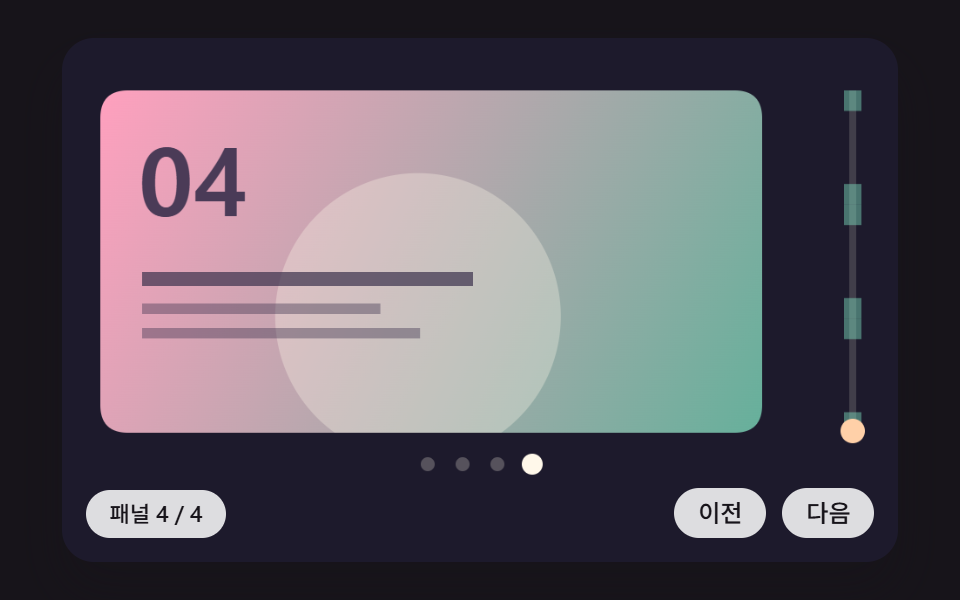
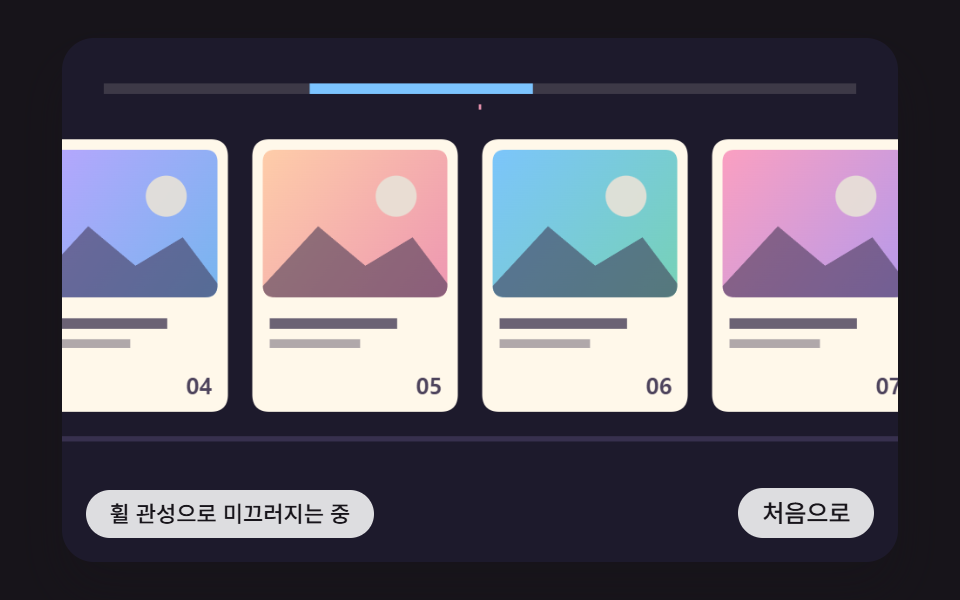
02セクションが画面に固定されたまま、縦の進み具合がパネルごとの横移動に分けて変わる固定パネルの場面
全体の進み具合をパネルの数だけ区間に分け、区間ごとになめらかな階段カーブで次のパネルへ移す。区間の間には少しとどまる余白を置く。
使いどころ製品紹介のランディング・沿革セクション
PANEL_NHOLDP_GAINPIN_LERP
<main class="stage">
<div class="hs is-demo" id="hs">
  <canvas class="hs__canvas" data-role="canvas" width="480" height="300" tabindex="0" aria-label="縦の進み具合がパネルの区間に分かれ、パネルが横へ移り、区間の間で少しとどまる場面"></canvas>
  <p class="hs__status" data-role="status" aria-live="off">パネル 1 / 4</p>
  <div class="hs__tools">
    <button class="hs__btn" data-role="prev" type="button">前へ</button>
    <button class="hs__btn" data-role="next" type="button">次へ</button>
  </div>
</div>
</main>
@use "../../../../site/static/demo-tokens" as *;
@include stage($stage-ink);
.hs {
position: relative;
width: min(92vw, calc(160vh - 12.8vw));
aspect-ratio: 480 / 300;
margin: 0 auto;
border-radius: $r-card;
overflow: hidden;
box-shadow: $shadow-raised;
background: $subject-ink;
}
.hs__canvas {
display: block;
width: 100%;
height: 100%;
cursor: grab;
}
.hs__canvas:active {
cursor: grabbing;
}
.hs__canvas:focus-visible {
outline: 2px solid rgba(255, 255, 255, .85);
outline-offset: -6px;
}
.hs__status {
position: absolute;
left: $sp-3;
bottom: $sp-3;
max-width: 46%;
margin: 0;
padding: $sp-1 $sp-3;
border-radius: $r-control;
background: rgba(255, 255, 255, .85);
color: $subject-ink;
font-weight: 500;
font-size: 11px;
line-height: 1.4;
pointer-events: none;
}
.hs__tools {
position: absolute;
right: $sp-3;
bottom: $sp-3;
display: flex;
gap: $sp-2;
}
.hs__btn {
margin: 0;
padding: $sp-1 $sp-3;
border: 0;
border-radius: $r-pill;
background: rgba(255, 255, 255, .85);
color: $subject-ink;
font: inherit;
font-weight: 500;
font-size: 12px;
line-height: 1.4;
cursor: pointer;
transition: background-color $dur-quick ease-out;
}
.hs__btn:hover {
background: $subject-cream;
}
.hs__btn[aria-pressed="true"] {
background: $subject-mint;
}
.hs__btn:focus-visible {
outline: 2px solid rgba(255, 255, 255, .95);
outline-offset: 2px;
}
// 손가락 가로 끌기는 이 캔버스가 받고, 세로 쓸기는 브라우저에 남겨 페이지 스크롤이 막히지 않게 한다
.hs__canvas { touch-action: pan-y; }
@media (max-width: 340px) {
.hs__btn { font-size: 10px; padding: $sp-1 $sp-2; }
.hs__status { font-size: 10px; padding: $sp-1 $sp-2; }
}
@media (prefers-reduced-motion: reduce) {
.hs__btn { transition: none; }
}html, body {
margin: 0;
overflow: hidden;
}
.stage {
box-sizing: border-box;
min-height: 100vh;
display: grid;
place-items: center;
margin: 0;
background: #17141a;
font-family: -apple-system, "Segoe UI", "Noto Sans KR", sans-serif;
padding: clamp(8px, 4vw, 24px);
}
.hs {
position: relative;
width: min(92vw, 160vh - 12.8vw);
aspect-ratio: 480/300;
margin: 0 auto;
border-radius: 16px;
overflow: hidden;
box-shadow: 0 14px 24px rgba(23, 20, 26, 0.32);
background: #17141a;
}
.hs__canvas {
display: block;
width: 100%;
height: 100%;
cursor: grab;
}
.hs__canvas:active {
cursor: grabbing;
}
.hs__canvas:focus-visible {
outline: 2px solid rgba(255, 255, 255, 0.85);
outline-offset: -6px;
}
.hs__status {
position: absolute;
left: 12px;
bottom: 12px;
max-width: 46%;
margin: 0;
padding: 4px 12px;
border-radius: 12px;
background: rgba(255, 255, 255, 0.85);
color: #17141a;
font-weight: 500;
font-size: 11px;
line-height: 1.4;
pointer-events: none;
}
.hs__tools {
position: absolute;
right: 12px;
bottom: 12px;
display: flex;
gap: 8px;
}
.hs__btn {
margin: 0;
padding: 4px 12px;
border: 0;
border-radius: 999px;
background: rgba(255, 255, 255, 0.85);
color: #17141a;
font: inherit;
font-weight: 500;
font-size: 12px;
line-height: 1.4;
cursor: pointer;
transition: background-color 220ms ease-out;
}
.hs__btn:hover {
background: #fff7e6;
}
.hs__btn[aria-pressed=true] {
background: #4cd4a6;
}
.hs__btn:focus-visible {
outline: 2px solid rgba(255, 255, 255, 0.95);
outline-offset: 2px;
}
.hs__canvas {
touch-action: pan-y;
}
@media (max-width: 340px) {
.hs__btn {
font-size: 10px;
padding: 4px 8px;
}
.hs__status {
font-size: 10px;
padding: 4px 8px;
}
}
@media (prefers-reduced-motion: reduce) {
.hs__btn {
transition: none;
}
}(function () {
const root = document.getElementById("hs");
if (!root) return;
const W = 480;
const H = 300;
const FIXED_DT = 16;
// 파스텔 팔레트 — 어두운 무대 위에 밝은 카드를 얹어 명도 차로 읽힌다
const BG = [29, 26, 44];
const PAPER = [255, 248, 234];
const INK = [58, 48, 76];
const MINT = [126, 226, 192];
const SKY = [124, 196, 255];
const LILAC = [190, 164, 255];
const PINK = [255, 160, 190];
const PEACH = [255, 208, 168];
const TINTS = [SKY, PINK, MINT, LILAC, PEACH];
function clamp(v, lo, hi) { return v < lo ? lo : (v > hi ? hi : v); }
function lerp(a, b, k) { return a + (b - a) * k; }
function smooth(x) { const c = clamp(x, 0, 1); return c * c * (3 - 2 * c); }
function rgba(c, a) {
return 'rgba(' + Math.round(c[0]) + ',' + Math.round(c[1]) + ',' + Math.round(c[2]) + ',' + clamp(a, 0, 1).toFixed(3) + ')';
}
function mix(a, b, k) { return [lerp(a[0], b[0], k), lerp(a[1], b[1], k), lerp(a[2], b[2], k)]; }
const canvasEl = root.querySelector('[data-role="canvas"]');
const statusEl = root.querySelector('[data-role="status"]');
const ctxRaw = canvasEl ? canvasEl.getContext('2d') : null;
if (!canvasEl || !ctxRaw || !statusEl) {
return;
}
const cv = canvasEl;
const ctx = ctxRaw;
const status = statusEl;
const reduceQuery = window.matchMedia('(prefers-reduced-motion: reduce)');
const still = reduceQuery.matches;
// 자동 시연 중인가 — 사람이 처음 만지는 순간 시연을 멈추고 상태 줄을 읽어 주기 시작한다
let demo = root.classList.contains('is-demo');
function wake() {
if (!demo) {
return;
}
demo = false;
root.classList.remove('is-demo');
status.setAttribute('aria-live', 'polite');
}
function say(text) {
if (status.textContent !== text) {
status.textContent = text;
}
}
// 휠 한 번의 이동량을 px 로 — 줄 단위(deltaMode 1)·쪽 단위(deltaMode 2) 장치도 같은 눈금으로 맞춘다.
// 가로·세로 중 큰 쪽을 쓴다: 트랙패드의 가로 쓸기와 마우스 휠의 세로 굴림이 같은 방향으로 들어온다
function wheelPx(ev) {
const unit = ev.deltaMode === 1 ? 16 : (ev.deltaMode === 2 ? W : 1);
const d = Math.abs(ev.deltaX) > Math.abs(ev.deltaY) ? ev.deltaX : ev.deltaY;
return d * unit;
}
// 시연 시계가 loop 주기 안의 at 시각을 이번 스텝에 막 지났는가
function crossed(t, at, loop) {
const p = t % loop;
return p >= at && p - FIXED_DT < at;
}
function fitCanvas() {
const dpr = window.devicePixelRatio || 1;
cv.width = Math.round(W * dpr);
cv.height = Math.round(H * dpr);
ctx.setTransform(dpr, 0, 0, dpr, 0, 0);
}
function onResize() {
fitCanvas();
draw();
}
fitCanvas();
window.addEventListener('resize', onResize);
// 화면 좌표(CSS px) → 장면 좌표(480x300). 리사이즈 뒤에도 늘 현재 크기로 다시 잰다
function toScene(ev) {
const r = cv.getBoundingClientRect();
return [((ev.clientX - r.left) / r.width) * W, ((ev.clientY - r.top) / r.height) * H];
}
function roundRectPath(c, x, y, w, h, r) {
const rr = Math.min(r, w / 2, h / 2);
c.beginPath();
c.moveTo(x + rr, y);
c.lineTo(x + w - rr, y);
c.quadraticCurveTo(x + w, y, x + w, y + rr);
c.lineTo(x + w, y + h - rr);
c.quadraticCurveTo(x + w, y + h, x + w - rr, y + h);
c.lineTo(x + rr, y + h);
c.quadraticCurveTo(x, y + h, x, y + h - rr);
c.lineTo(x, y + rr);
c.quadraticCurveTo(x, y, x + rr, y);
c.closePath();
}
// 카드 한 장 — 사진 대신 계산한 그림 칸(그라디언트 하늘·해·언덕) + 글줄 막대 두 개 + 번호
function drawCard(c, x, y, w, h, i, light) {
const t1 = TINTS[i % TINTS.length];
const t2 = TINTS[(i + 2) % TINTS.length];
const k = clamp(light, 0, 1);
roundRectPath(c, x, y, w, h, 10);
c.fillStyle = rgba(mix(BG, PAPER, k), 1);
c.fill();
const ih = h * 0.58;
const g = c.createLinearGradient(x, y, x + w, y + ih);
g.addColorStop(0, rgba(mix(BG, t1, k), 1));
g.addColorStop(1, rgba(mix(BG, t2, k * 0.92), 1));
c.save();
roundRectPath(c, x + 6, y + 6, w - 12, ih - 6, 7);
c.fillStyle = g;
c.fill();
c.clip();
c.fillStyle = rgba(mix(BG, PAPER, k * 0.9), 0.9);
c.beginPath();
c.arc(x + w * 0.7, y + ih * 0.36, Math.min(w, ih) * 0.13, 0, Math.PI * 2);
c.fill();
c.fillStyle = rgba(mix(BG, INK, k), 0.55);
c.beginPath();
c.moveTo(x, y + ih);
c.lineTo(x + w * 0.32, y + ih * 0.55);
c.lineTo(x + w * 0.55, y + ih * 0.8);
c.lineTo(x + w * 0.78, y + ih * 0.62);
c.lineTo(x + w, y + ih);
c.closePath();
c.fill();
c.restore();
c.fillStyle = rgba(mix(BG, INK, k), 0.75);
c.fillRect(x + 10, y + ih + 12, w * 0.62, 6);
c.fillStyle = rgba(mix(BG, INK, k), 0.4);
c.fillRect(x + 10, y + ih + 24, w * 0.44, 5);
c.fillStyle = rgba(mix(BG, INK, k), 0.9);
c.font = '700 13px sans-serif';
c.textAlign = 'right';
c.textBaseline = 'alphabetic';
c.fillText(String(i + 1).padStart(2, '0'), x + w - 9, y + h - 10);
}
const PANEL_N = 4;
const HOLD = 0.18;
const P_GAIN = 0.0009;
const PIN_LERP = 0.12;
const PANEL_W = 380;
const PANEL_H = 196;
const PANEL_GAP = 40;
const PANEL_STEP = PANEL_W + PANEL_GAP;
const PANEL_TOP = 30;
const RAIL_X = 452;
const RAIL_TOP = 30;
const RAIL_H = 196;
const DEMO_LOOP = 4000;
const PANEL_TXT = ['パネル 1 / 4', 'パネル 2 / 4', 'パネル 3 / 4', 'パネル 4 / 4'];
const prevBtn = root.querySelector('[data-role="prev"]');
const nextBtn = root.querySelector('[data-role="next"]');
let target = 0;
let shown = 0;
let lastPanel = 0;
// 진행률 p(0~1) → 패널 위치(0~PANEL_N−1). 구간마다 앞뒤 HOLD 만큼 머물고 가운데를 smoothstep 으로 건넌다
function panelPos(p) {
const segs = PANEL_N - 1;
const s = clamp(p, 0, 1) * segs;
const k = Math.min(Math.floor(s), segs - 1);
const u = s - k;
return k + smooth((u - HOLD) / (1 - 2 * HOLD));
}
function canMove(d) { return d > 0 ? target < 1 : target > 0; }
function report() {
const k = Math.round(panelPos(shown));
if (k !== lastPanel) {
lastPanel = k;
say(PANEL_TXT[k]);
}
}
function step() {
shown += (target - shown) * PIN_LERP;
if (Math.abs(target - shown) < 0.0005) {
shown = target;
}
report();
}
function settle() {
shown = target;
report();
}
function demoTick(t) {
const p = t % DEMO_LOOP;
if (p >= 200 && p <= 1700) {
target = (p - 200) / 1500;
}
else if (p >= 2200 && p <= 3600) {
target = 1 - (p - 2200) / 1400;
}
}
function drawPanel(i, px) {
const t1 = TINTS[(i * 2) % TINTS.length];
const t2 = TINTS[(i * 2 + 1) % TINTS.length];
const g = ctx.createLinearGradient(px, PANEL_TOP, px + PANEL_W, PANEL_TOP + PANEL_H);
g.addColorStop(0, rgba(t1, 1));
g.addColorStop(1, rgba(mix(t2, BG, 0.25), 1));
roundRectPath(ctx, px, PANEL_TOP, PANEL_W, PANEL_H, 16);
ctx.fillStyle = g;
ctx.fill();
ctx.save();
ctx.clip();
// 패널마다 다른 큰 원 — 넘어가는 순간이 한눈에 읽힌다
ctx.fillStyle = rgba(PAPER, 0.32);
ctx.beginPath();
ctx.arc(px + PANEL_W * (0.72 - i * 0.08), PANEL_TOP + PANEL_H * (0.3 + i * 0.12), 46 + i * 12, 0, Math.PI * 2);
ctx.fill();
ctx.restore();
ctx.fillStyle = rgba(INK, 0.9);
ctx.font = '800 54px sans-serif';
ctx.textAlign = 'left';
ctx.textBaseline = 'alphabetic';
ctx.fillText('0' + (i + 1), px + 22, PANEL_TOP + 72);
ctx.fillStyle = rgba(INK, 0.7);
ctx.fillRect(px + 24, PANEL_TOP + 104, PANEL_W * 0.5, 8);
ctx.fillStyle = rgba(INK, 0.4);
ctx.fillRect(px + 24, PANEL_TOP + 122, PANEL_W * 0.36, 6);
ctx.fillRect(px + 24, PANEL_TOP + 136, PANEL_W * 0.42, 6);
}
function draw() {
ctx.fillStyle = rgba(BG, 1);
ctx.fillRect(0, 0, W, H);
const pos = panelPos(shown);
const base = 22 - pos * PANEL_STEP;
for (let i = 0; i < PANEL_N; i += 1) {
const px = base + i * PANEL_STEP;
if (px > W || px + PANEL_W < 0) {
continue;
}
drawPanel(i, px);
}
// 오른쪽 세로 레일 — 세로 진행률(점)과 머무는 구간(옅은 칸)
ctx.fillStyle = rgba(BG, 0.85);
ctx.fillRect(RAIL_X - 10, RAIL_TOP - 8, 24, RAIL_H + 16);
ctx.fillStyle = rgba(mix(BG, PAPER, 0.16), 1);
ctx.fillRect(RAIL_X, RAIL_TOP, 4, RAIL_H);
const segs = PANEL_N - 1;
for (let k = 0; k < segs; k += 1) {
const y0 = RAIL_TOP + (k / segs) * RAIL_H;
const segH = RAIL_H / segs;
ctx.fillStyle = rgba(MINT, 0.45);
ctx.fillRect(RAIL_X - 3, y0, 10, segH * HOLD);
ctx.fillRect(RAIL_X - 3, y0 + segH * (1 - HOLD), 10, segH * HOLD);
}
ctx.fillStyle = rgba(PEACH, 1);
ctx.beginPath();
ctx.arc(RAIL_X + 2, RAIL_TOP + shown * RAIL_H, 7, 0, Math.PI * 2);
ctx.fill();
// 아래 점 — 지금 패널
for (let i = 0; i < PANEL_N; i += 1) {
const near = clamp(1 - Math.abs(pos - i), 0, 1);
ctx.fillStyle = rgba(mix(mix(BG, PAPER, 0.25), PAPER, near), 1);
ctx.beginPath();
ctx.arc(W / 2 - 30 + i * 20, PANEL_TOP + PANEL_H + 18, 4 + near * 2, 0, Math.PI * 2);
ctx.fill();
}
}
function moveTo(p) {
target = clamp(p, 0, 1);
if (still) {
settle();
draw();
}
}
function onWheel(ev) {
const d = wheelPx(ev);
// 처음·끝에 닿았으면 가로채지 않는다 — 고정이 풀리고 페이지가 이어서 스크롤된다
if (d === 0 || !canMove(d)) {
return;
}
ev.preventDefault();
wake();
moveTo(target + d * P_GAIN);
}
cv.addEventListener('wheel', onWheel, { passive: false });
// 패널 경계 진행률 — 次へ·前へ 패널은 이 값으로 옮긴다
function stepPanel(dir) {
const segs = PANEL_N - 1;
const k = clamp(Math.round(panelPos(target)) + dir, 0, segs);
if (k / segs === target) {
return false;
}
moveTo(k / segs);
return true;
}
cv.addEventListener('keydown', function (ev) {
let moved = false;
if (ev.key === 'ArrowRight' || ev.key === 'ArrowDown') {
moved = canMove(1) && stepPanel(1);
}
else if (ev.key === 'ArrowLeft' || ev.key === 'ArrowUp') {
moved = canMove(-1) && stepPanel(-1);
}
else if (ev.key === 'Home' && canMove(-1)) {
moveTo(0);
moved = true;
}
else if (ev.key === 'End' && canMove(1)) {
moveTo(1);
moved = true;
}
if (!moved) {
return;
}
ev.preventDefault();
wake();
});
if (prevBtn) {
prevBtn.addEventListener('click', function () { wake(); stepPanel(-1); });
}
if (nextBtn) {
nextBtn.addEventListener('click', function () { wake(); stepPanel(1); });
}
say(PANEL_TXT[0]);
let rafId = 0;
let lastTs = -1;
let acc = 0;
let clock = 0;
function frame(ts) {
if (lastTs < 0) {
lastTs = ts;
}
// 탭이 숨었다 돌아와도 한 번에 100ms 까지만 따라잡는다 — 순간이동 대신 이어서 움직인다
acc += Math.min(ts - lastTs, 100);
lastTs = ts;
let n = 0;
while (acc >= FIXED_DT && n < 6) {
clock += FIXED_DT;
if (demo) {
demoTick(clock);
}
step();
acc -= FIXED_DT;
n += 1;
}
draw();
rafId = window.requestAnimationFrame(frame);
}
if (still) {
settle();
draw();
}
else {
rafId = window.requestAnimationFrame(frame);
}
return function () {
window.cancelAnimationFrame(rafId);
window.removeEventListener('resize', onResize);
};
})();// HscPinnedPanelProgressPiecewiseMap - vanilla 판(02-hsc-pinned-panel-progress-piecewise-map) 의 React 포트. 같은 계산을 useEffect 안에서 돌린다.
import { useEffect, useRef } from "react";
import styles from "./HscPinnedPanelProgressPiecewiseMap.module.scss";
const cx = (s: string): string => s.split(" ").map((n) => styles[n] ?? n).join(" ");
export default function HscPinnedPanelProgressPiecewiseMap() {
const rootRef = useRef<HTMLDivElement | null>(null);
useEffect(() => {
const rootEl = rootRef.current;
if (!rootEl) return;
const root: HTMLElement = rootEl;
type RGB = [number, number, number];
const W = 480;
const H = 300;
const FIXED_DT = 16;
// 파스텔 팔레트 — 어두운 무대 위에 밝은 카드를 얹어 명도 차로 읽힌다
const BG: RGB = [29, 26, 44];
const PAPER: RGB = [255, 248, 234];
const INK: RGB = [58, 48, 76];
const MINT: RGB = [126, 226, 192];
const SKY: RGB = [124, 196, 255];
const LILAC: RGB = [190, 164, 255];
const PINK: RGB = [255, 160, 190];
const PEACH: RGB = [255, 208, 168];
const TINTS: RGB[] = [SKY, PINK, MINT, LILAC, PEACH];
function clamp(v: number, lo: number, hi: number): number { return v < lo ? lo : (v > hi ? hi : v); }
function lerp(a: number, b: number, k: number): number { return a + (b - a) * k; }
function smooth(x: number): number { const c = clamp(x, 0, 1); return c * c * (3 - 2 * c); }
function rgba(c: RGB, a: number): string {
return 'rgba(' + Math.round(c[0]) + ',' + Math.round(c[1]) + ',' + Math.round(c[2]) + ',' + clamp(a, 0, 1).toFixed(3) + ')';
}
function mix(a: RGB, b: RGB, k: number): RGB { return [lerp(a[0], b[0], k), lerp(a[1], b[1], k), lerp(a[2], b[2], k)]; }
const canvasEl = root.querySelector('[data-role="canvas"]') as HTMLCanvasElement | null;
const statusEl = root.querySelector('[data-role="status"]') as HTMLElement | null;
const ctxRaw = canvasEl ? canvasEl.getContext('2d') : null;
if (!canvasEl || !ctxRaw || !statusEl) { return; }
const cv: HTMLCanvasElement = canvasEl;
const ctx: CanvasRenderingContext2D = ctxRaw;
const status: HTMLElement = statusEl;
const reduceQuery = window.matchMedia('(prefers-reduced-motion: reduce)');
const still = reduceQuery.matches;
// 자동 시연 중인가 — 사람이 처음 만지는 순간 시연을 멈추고 상태 줄을 읽어 주기 시작한다
let demo = root.classList.contains('is-demo');
function wake(): void {
if (!demo) { return; }
demo = false;
root.classList.remove('is-demo');
status.setAttribute('aria-live', 'polite');
}
function say(text: string): void {
if (status.textContent !== text) { status.textContent = text; }
}
// 휠 한 번의 이동량을 px 로 — 줄 단위(deltaMode 1)·쪽 단위(deltaMode 2) 장치도 같은 눈금으로 맞춘다.
// 가로·세로 중 큰 쪽을 쓴다: 트랙패드의 가로 쓸기와 마우스 휠의 세로 굴림이 같은 방향으로 들어온다
function wheelPx(ev: WheelEvent): number {
const unit = ev.deltaMode === 1 ? 16 : (ev.deltaMode === 2 ? W : 1);
const d = Math.abs(ev.deltaX) > Math.abs(ev.deltaY) ? ev.deltaX : ev.deltaY;
return d * unit;
}
// 시연 시계가 loop 주기 안의 at 시각을 이번 스텝에 막 지났는가
function crossed(t: number, at: number, loop: number): boolean {
const p = t % loop;
return p >= at && p - FIXED_DT < at;
}
function fitCanvas(): void {
const dpr = window.devicePixelRatio || 1;
cv.width = Math.round(W * dpr);
cv.height = Math.round(H * dpr);
ctx.setTransform(dpr, 0, 0, dpr, 0, 0);
}
function onResize(): void {
fitCanvas();
draw();
}
fitCanvas();
window.addEventListener('resize', onResize);
// 화면 좌표(CSS px) → 장면 좌표(480x300). 리사이즈 뒤에도 늘 현재 크기로 다시 잰다
function toScene(ev: PointerEvent): [number, number] {
const r = cv.getBoundingClientRect();
return [((ev.clientX - r.left) / r.width) * W, ((ev.clientY - r.top) / r.height) * H];
}
function roundRectPath(c: CanvasRenderingContext2D, x: number, y: number, w: number, h: number, r: number): void {
const rr = Math.min(r, w / 2, h / 2);
c.beginPath();
c.moveTo(x + rr, y);
c.lineTo(x + w - rr, y);
c.quadraticCurveTo(x + w, y, x + w, y + rr);
c.lineTo(x + w, y + h - rr);
c.quadraticCurveTo(x + w, y + h, x + w - rr, y + h);
c.lineTo(x + rr, y + h);
c.quadraticCurveTo(x, y + h, x, y + h - rr);
c.lineTo(x, y + rr);
c.quadraticCurveTo(x, y, x + rr, y);
c.closePath();
}
// 카드 한 장 — 사진 대신 계산한 그림 칸(그라디언트 하늘·해·언덕) + 글줄 막대 두 개 + 번호
function drawCard(c: CanvasRenderingContext2D, x: number, y: number, w: number, h: number, i: number, light: number): void {
const t1 = TINTS[i % TINTS.length];
const t2 = TINTS[(i + 2) % TINTS.length];
const k = clamp(light, 0, 1);
roundRectPath(c, x, y, w, h, 10);
c.fillStyle = rgba(mix(BG, PAPER, k), 1);
c.fill();
const ih = h * 0.58;
const g = c.createLinearGradient(x, y, x + w, y + ih);
g.addColorStop(0, rgba(mix(BG, t1, k), 1));
g.addColorStop(1, rgba(mix(BG, t2, k * 0.92), 1));
c.save();
roundRectPath(c, x + 6, y + 6, w - 12, ih - 6, 7);
c.fillStyle = g;
c.fill();
c.clip();
c.fillStyle = rgba(mix(BG, PAPER, k * 0.9), 0.9);
c.beginPath();
c.arc(x + w * 0.7, y + ih * 0.36, Math.min(w, ih) * 0.13, 0, Math.PI * 2);
c.fill();
c.fillStyle = rgba(mix(BG, INK, k), 0.55);
c.beginPath();
c.moveTo(x, y + ih);
c.lineTo(x + w * 0.32, y + ih * 0.55);
c.lineTo(x + w * 0.55, y + ih * 0.8);
c.lineTo(x + w * 0.78, y + ih * 0.62);
c.lineTo(x + w, y + ih);
c.closePath();
c.fill();
c.restore();
c.fillStyle = rgba(mix(BG, INK, k), 0.75);
c.fillRect(x + 10, y + ih + 12, w * 0.62, 6);
c.fillStyle = rgba(mix(BG, INK, k), 0.4);
c.fillRect(x + 10, y + ih + 24, w * 0.44, 5);
c.fillStyle = rgba(mix(BG, INK, k), 0.9);
c.font = '700 13px sans-serif';
c.textAlign = 'right';
c.textBaseline = 'alphabetic';
c.fillText(String(i + 1).padStart(2, '0'), x + w - 9, y + h - 10);
}
const PANEL_N = 4;
const HOLD = 0.18;
const P_GAIN = 0.0009;
const PIN_LERP = 0.12;
const PANEL_W = 380;
const PANEL_H = 196;
const PANEL_GAP = 40;
const PANEL_STEP = PANEL_W + PANEL_GAP;
const PANEL_TOP = 30;
const RAIL_X = 452;
const RAIL_TOP = 30;
const RAIL_H = 196;
const DEMO_LOOP = 4000;
const PANEL_TXT = ['패널 1 / 4', '패널 2 / 4', '패널 3 / 4', '패널 4 / 4'];
const prevBtn = root.querySelector('[data-role="prev"]') as HTMLButtonElement | null;
const nextBtn = root.querySelector('[data-role="next"]') as HTMLButtonElement | null;
let target = 0;
let shown = 0;
let lastPanel = 0;
// 진행률 p(0~1) → 패널 위치(0~PANEL_N−1). 구간마다 앞뒤 HOLD 만큼 머물고 가운데를 smoothstep 으로 건넌다
function panelPos(p: number): number {
const segs = PANEL_N - 1;
const s = clamp(p, 0, 1) * segs;
const k = Math.min(Math.floor(s), segs - 1);
const u = s - k;
return k + smooth((u - HOLD) / (1 - 2 * HOLD));
}
function canMove(d: number): boolean { return d > 0 ? target < 1 : target > 0; }
function report(): void {
const k = Math.round(panelPos(shown));
if (k !== lastPanel) {
lastPanel = k;
say(PANEL_TXT[k]);
}
}
function step(): void {
shown += (target - shown) * PIN_LERP;
if (Math.abs(target - shown) < 0.0005) { shown = target; }
report();
}
function settle(): void {
shown = target;
report();
}
function demoTick(t: number): void {
const p = t % DEMO_LOOP;
if (p >= 200 && p <= 1700) { target = (p - 200) / 1500; }
else if (p >= 2200 && p <= 3600) { target = 1 - (p - 2200) / 1400; }
}
function drawPanel(i: number, px: number): void {
const t1 = TINTS[(i * 2) % TINTS.length];
const t2 = TINTS[(i * 2 + 1) % TINTS.length];
const g = ctx.createLinearGradient(px, PANEL_TOP, px + PANEL_W, PANEL_TOP + PANEL_H);
g.addColorStop(0, rgba(t1, 1));
g.addColorStop(1, rgba(mix(t2, BG, 0.25), 1));
roundRectPath(ctx, px, PANEL_TOP, PANEL_W, PANEL_H, 16);
ctx.fillStyle = g;
ctx.fill();
ctx.save();
ctx.clip();
// 패널마다 다른 큰 원 — 넘어가는 순간이 한눈에 읽힌다
ctx.fillStyle = rgba(PAPER, 0.32);
ctx.beginPath();
ctx.arc(px + PANEL_W * (0.72 - i * 0.08), PANEL_TOP + PANEL_H * (0.3 + i * 0.12), 46 + i * 12, 0, Math.PI * 2);
ctx.fill();
ctx.restore();
ctx.fillStyle = rgba(INK, 0.9);
ctx.font = '800 54px sans-serif';
ctx.textAlign = 'left';
ctx.textBaseline = 'alphabetic';
ctx.fillText('0' + (i + 1), px + 22, PANEL_TOP + 72);
ctx.fillStyle = rgba(INK, 0.7);
ctx.fillRect(px + 24, PANEL_TOP + 104, PANEL_W * 0.5, 8);
ctx.fillStyle = rgba(INK, 0.4);
ctx.fillRect(px + 24, PANEL_TOP + 122, PANEL_W * 0.36, 6);
ctx.fillRect(px + 24, PANEL_TOP + 136, PANEL_W * 0.42, 6);
}
function draw(): void {
ctx.fillStyle = rgba(BG, 1);
ctx.fillRect(0, 0, W, H);
const pos = panelPos(shown);
const base = 22 - pos * PANEL_STEP;
for (let i = 0; i < PANEL_N; i += 1) {
const px = base + i * PANEL_STEP;
if (px > W || px + PANEL_W < 0) { continue; }
drawPanel(i, px);
}
// 오른쪽 세로 레일 — 세로 진행률(점)과 머무는 구간(옅은 칸)
ctx.fillStyle = rgba(BG, 0.85);
ctx.fillRect(RAIL_X - 10, RAIL_TOP - 8, 24, RAIL_H + 16);
ctx.fillStyle = rgba(mix(BG, PAPER, 0.16), 1);
ctx.fillRect(RAIL_X, RAIL_TOP, 4, RAIL_H);
const segs = PANEL_N - 1;
for (let k = 0; k < segs; k += 1) {
const y0 = RAIL_TOP + (k / segs) * RAIL_H;
const segH = RAIL_H / segs;
ctx.fillStyle = rgba(MINT, 0.45);
ctx.fillRect(RAIL_X - 3, y0, 10, segH * HOLD);
ctx.fillRect(RAIL_X - 3, y0 + segH * (1 - HOLD), 10, segH * HOLD);
}
ctx.fillStyle = rgba(PEACH, 1);
ctx.beginPath();
ctx.arc(RAIL_X + 2, RAIL_TOP + shown * RAIL_H, 7, 0, Math.PI * 2);
ctx.fill();
// 아래 점 — 지금 패널
for (let i = 0; i < PANEL_N; i += 1) {
const near = clamp(1 - Math.abs(pos - i), 0, 1);
ctx.fillStyle = rgba(mix(mix(BG, PAPER, 0.25), PAPER, near), 1);
ctx.beginPath();
ctx.arc(W / 2 - 30 + i * 20, PANEL_TOP + PANEL_H + 18, 4 + near * 2, 0, Math.PI * 2);
ctx.fill();
}
}
function moveTo(p: number): void {
target = clamp(p, 0, 1);
if (still) { settle(); draw(); }
}
function onWheel(ev: WheelEvent): void {
const d = wheelPx(ev);
// 처음·끝에 닿았으면 가로채지 않는다 — 고정이 풀리고 페이지가 이어서 스크롤된다
if (d === 0 || !canMove(d)) { return; }
ev.preventDefault();
wake();
moveTo(target + d * P_GAIN);
}
cv.addEventListener('wheel', onWheel, { passive: false });
// 패널 경계 진행률 — 다음·이전 패널은 이 값으로 옮긴다
function stepPanel(dir: number): boolean {
const segs = PANEL_N - 1;
const k = clamp(Math.round(panelPos(target)) + dir, 0, segs);
if (k / segs === target) { return false; }
moveTo(k / segs);
return true;
}
cv.addEventListener('keydown', function (ev: KeyboardEvent): void {
let moved = false;
if (ev.key === 'ArrowRight' || ev.key === 'ArrowDown') { moved = canMove(1) && stepPanel(1); }
else if (ev.key === 'ArrowLeft' || ev.key === 'ArrowUp') { moved = canMove(-1) && stepPanel(-1); }
else if (ev.key === 'Home' && canMove(-1)) { moveTo(0); moved = true; }
else if (ev.key === 'End' && canMove(1)) { moveTo(1); moved = true; }
if (!moved) { return; }
ev.preventDefault();
wake();
});
if (prevBtn) { prevBtn.addEventListener('click', function (): void { wake(); stepPanel(-1); }); }
if (nextBtn) { nextBtn.addEventListener('click', function (): void { wake(); stepPanel(1); }); }
say(PANEL_TXT[0]);
let rafId = 0;
let lastTs = -1;
let acc = 0;
let clock = 0;
function frame(ts: number): void {
if (lastTs < 0) { lastTs = ts; }
// 탭이 숨었다 돌아와도 한 번에 100ms 까지만 따라잡는다 — 순간이동 대신 이어서 움직인다
acc += Math.min(ts - lastTs, 100);
lastTs = ts;
let n = 0;
while (acc >= FIXED_DT && n < 6) {
clock += FIXED_DT;
if (demo) { demoTick(clock); }
step();
acc -= FIXED_DT;
n += 1;
}
draw();
rafId = window.requestAnimationFrame(frame);
}
if (still) {
settle();
draw();
} else {
rafId = window.requestAnimationFrame(frame);
}
return function (): void {
window.cancelAnimationFrame(rafId);
window.removeEventListener('resize', onResize);
};
}, []);
return (
<div className={cx("hs") + " is-demo"} ref={rootRef}>
<canvas className={cx("hs__canvas")} data-role="canvas" width={480} height={300} tabIndex={0} aria-label="세로 진행률이 패널 구간으로 나뉘어 패널이 옆으로 넘어가고 구간 사이에서 잠깐 머무는 장면"></canvas>
<p className={cx("hs__status")} data-role="status" aria-live="off">패널 1 / 4</p>
<div className={cx("hs__tools")}>
<button className={cx("hs__btn")} data-role="prev" type="button">이전</button>
<button className={cx("hs__btn")} data-role="next" type="button">다음</button>
</div>
</div>
);
}02 セクションが画面に固定されたまま、縦の進み具合がパネルごとの横移動に分けて変わる固定パネルの場面 — 計測 累積面積 50.447% · 動いたフレーム 23/23GODRICH オリジナル · SCSS と React は zip に同梱 · 横スクロール アニメーション css 9パターン — 慣性・円筒・魚眼レンズ
このデモが属する記事
 横スクロール アニメーション css 9パターン — 慣性・円筒・魚眼レンズ横スクロール アニメーション css は、縦に入ったホイールの値を横へ向け直すだけでは終わりません — 01番はその値を慣性で滑らせ、06番はカードを円筒の上に投影し、08番は端のピクセルを魚眼レンズで曲げます。 この記事のデモをすべて見る