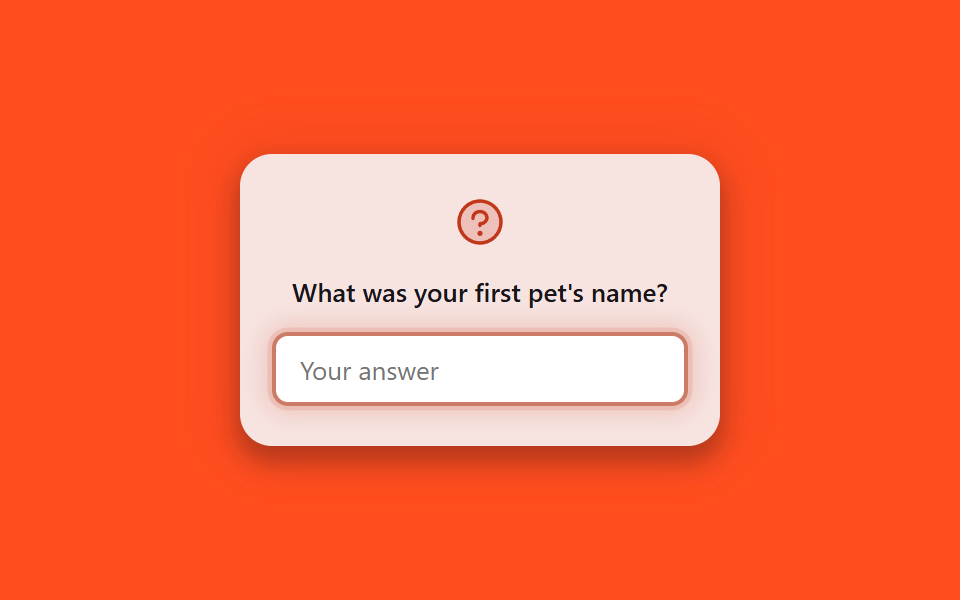
04秘密の質問 確認カード
事前に登録した質問がカードにふわっと表示され、回答を入力すると入力欄の枠がオレンジから白へゆっくり冷めるように変わります。
使いどころOTPが届かないときの代替認証ステップ、管理者アカウントの二次確認画面
@keyframes sq-panelbox-shadow 글로우aria-label
<main class="stage">
  <div class="sq-card is-demo">
    <div class="sq-card__panel">
      <span class="sq-card__icon" aria-hidden="true">
        <svg viewBox="0 0 256 256"><g fill="currentColor"><path d="M224 128a96 96 0 1 1-96-96a96 96 0 0 1 96 96" opacity=".2"/><path d="M140 180a12 12 0 1 1-12-12a12 12 0 0 1 12 12M128 72c-22.06 0-40 16.15-40 36v4a8 8 0 0 0 16 0v-4c0-11 10.77-20 24-20s24 9 24 20s-10.77 20-24 20a8 8 0 0 0-8 8v8a8 8 0 0 0 16 0v-.72c18.24-3.35 32-17.9 32-35.28c0-19.85-17.94-36-40-36m104 56A104 104 0 1 1 128 24a104.11 104.11 0 0 1 104 104m-16 0a88 88 0 1 0-88 88a88.1 88.1 0 0 0 88-88"/></g></svg>
      </span>
      <p class="sq-card__question">What was your first pet's name?</p>
      <input class="sq-card__input" type="text" placeholder="Your answer" aria-label="Security question answer">
    </div>
  </div>
</main>
@use "../../../../site/static/demo-tokens" as *;
$duration: $dur-loop; // 답변 카드가 식었다 다시 데워지는 한 주기
$easing: $ease-out;
$color: $error; // 뜨거운 경고 축 (식기 전 색)
@include stage($stage-orange);
.sq-card { display: flex; align-items: center; justify-content: center; }
.sq-card__panel {
width: min(240px, 84vw);
box-sizing: border-box;
display: flex;
flex-direction: column;
align-items: center;
gap: $sp-3;
padding: $sp-5 $sp-4;
background: $stage-paper;
border-radius: $r-card;
box-shadow: $shadow-raised;
text-align: center;
}
.sq-card__icon { width: 28px; height: 28px; color: $color; }
.sq-card__question { margin: 0; font-size: 13px; font-weight: 600; color: $stage-ink; font-family: inherit; }
.sq-card__input {
width: 100%;
box-sizing: border-box;
padding: $sp-2 $sp-3;
border: 2px solid #d8d2c4;
border-radius: $r-sm;
background: $stage-paper;
font-size: 13px;
font-family: inherit;
color: $stage-ink;
outline: none;
}
// 실제 사용 — 입력창에 포커스하면 즉시 반응 (is-demo 없이 열었을 때)
.sq-card__input:focus-visible { border-color: $subject-blue; box-shadow: 0 0 0 3px rgba($subject-blue, .25); }
// 자동 재생 루프 — 미리 등록한 답을 다시 확인하는 동안 카드가 뜨거운 색에서 식는다
.sq-card.is-demo .sq-card__panel { animation: sq-panel $duration $easing infinite; }
.sq-card.is-demo .sq-card__input { animation: sq-input $duration $easing infinite; }
@keyframes sq-panel {
0%, 8% { background: mix($color, white, 24%); box-shadow: 0 0 0 3px rgba($color, .3), 0 0 34px 18px rgba($color, .3), $shadow-raised; }
23%, 77% { background: $stage-paper; box-shadow: $shadow-raised; }
92%, 100% { background: mix($color, white, 24%); box-shadow: 0 0 0 3px rgba($color, .3), 0 0 34px 18px rgba($color, .3), $shadow-raised; }
}
@keyframes sq-input {
0%, 8% { border-color: $color; box-shadow: 0 0 0 4px rgba($color, .22), 0 0 20px 10px rgba($color, .25); }
23%, 77% { border-color: #d8d2c4; box-shadow: none; }
92%, 100% { border-color: $color; box-shadow: 0 0 0 4px rgba($color, .22), 0 0 20px 10px rgba($color, .25); }
}
@media (prefers-reduced-motion: reduce) {
.sq-card.is-demo .sq-card__panel,
.sq-card.is-demo .sq-card__input { animation: none; }
}html, body {
margin: 0;
overflow: hidden;
}
.stage {
box-sizing: border-box;
min-height: 100vh;
display: grid;
place-items: center;
margin: 0;
background: #ff4d1f;
font-family: -apple-system, "Segoe UI", "Noto Sans KR", sans-serif;
padding: clamp(8px, 4vw, 24px);
}
.sq-card {
display: flex;
align-items: center;
justify-content: center;
}
.sq-card__panel {
width: min(240px, 84vw);
box-sizing: border-box;
display: flex;
flex-direction: column;
align-items: center;
gap: 12px;
padding: 20px 16px;
background: #ffffff;
border-radius: 16px;
box-shadow: 0 14px 24px rgba(23, 20, 26, 0.32);
text-align: center;
}
.sq-card__icon {
width: 28px;
height: 28px;
color: #c2361a;
}
.sq-card__question {
margin: 0;
font-size: 13px;
font-weight: 600;
color: #17141a;
font-family: inherit;
}
.sq-card__input {
width: 100%;
box-sizing: border-box;
padding: 8px 12px;
border: 2px solid #d8d2c4;
border-radius: 8px;
background: #ffffff;
font-size: 13px;
font-family: inherit;
color: #17141a;
outline: none;
}
.sq-card__input:focus-visible {
border-color: #2f6df6;
box-shadow: 0 0 0 3px rgba(47, 109, 246, 0.25);
}
.sq-card.is-demo .sq-card__panel {
animation: sq-panel 2s ease-out infinite;
}
.sq-card.is-demo .sq-card__input {
animation: sq-input 2s ease-out infinite;
}
@keyframes sq-panel {
0%, 8% {
background: rgb(94.2588235294%, 81.0823529412%, 78.4470588235%);
box-shadow: 0 0 0 3px rgba(194, 54, 26, 0.3), 0 0 34px 18px rgba(194, 54, 26, 0.3), 0 14px 24px rgba(23, 20, 26, 0.32);
}
23%, 77% {
background: #ffffff;
box-shadow: 0 14px 24px rgba(23, 20, 26, 0.32);
}
92%, 100% {
background: rgb(94.2588235294%, 81.0823529412%, 78.4470588235%);
box-shadow: 0 0 0 3px rgba(194, 54, 26, 0.3), 0 0 34px 18px rgba(194, 54, 26, 0.3), 0 14px 24px rgba(23, 20, 26, 0.32);
}
}
@keyframes sq-input {
0%, 8% {
border-color: #c2361a;
box-shadow: 0 0 0 4px rgba(194, 54, 26, 0.22), 0 0 20px 10px rgba(194, 54, 26, 0.25);
}
23%, 77% {
border-color: #d8d2c4;
box-shadow: none;
}
92%, 100% {
border-color: #c2361a;
box-shadow: 0 0 0 4px rgba(194, 54, 26, 0.22), 0 0 20px 10px rgba(194, 54, 26, 0.25);
}
}
@media (prefers-reduced-motion: reduce) {
.sq-card.is-demo .sq-card__panel,
.sq-card.is-demo .sq-card__input {
animation: none;
}
}import { useState } from "react";
import styles from "./SecurityQuestionCard.module.scss";
export type SecurityQuestionCardProps = {
question: string;
onAnswer?: (value: string) => void;
};
/** OTP 를 못 받을 때 쓰는 대체 인증 — 등록해둔 질문에 답을 입력한다 */
export default function SecurityQuestionCard({ question, onAnswer }: SecurityQuestionCardProps) {
const [value, setValue] = useState("");
return (
<div className={styles.panel}>
<span className={styles.icon} aria-hidden="true">
<svg viewBox="0 0 256 256">
<g fill="currentColor"><path d="M224 128a96 96 0 1 1-96-96a96 96 0 0 1 96 96" opacity=".2" /><path d="M140 180a12 12 0 1 1-12-12a12 12 0 0 1 12 12M128 72c-22.06 0-40 16.15-40 36v4a8 8 0 0 0 16 0v-4c0-11 10.77-20 24-20s24 9 24 20s-10.77 20-24 20a8 8 0 0 0-8 8v8a8 8 0 0 0 16 0v-.72c18.24-3.35 32-17.9 32-35.28c0-19.85-17.94-36-40-36m104 56A104 104 0 1 1 128 24a104.11 104.11 0 0 1 104 104m-16 0a88 88 0 1 0-88 88a88.1 88.1 0 0 0 88-88" /></g>
</svg>
</span>
<p className={styles.question}>{question}</p>
<input
className={styles.input}
type="text"
placeholder="Your answer"
aria-label="Security question answer"
value={value}
onChange={(e: any) => {
setValue(e.target.value);
onAnswer?.(e.target.value);
}}
/>
</div>
);
}04 秘密の質問 確認カード — 計測 累積面積 26.226% · 動いたフレーム 7/23GODRICH オリジナル · SCSS と React は zip に同梱 · 本人確認 画面UI 9選 — そのまま使える認証カード
このデモが属する記事
 本人確認 画面UI 9選 — そのまま使える認証カード本人確認 画面とは、カメラへのアクセス許可や認証コードの入力、本人確認直後のプロフィール設定まで、ユーザーが本人であることを証明する一連の流れで使われる一時的な画面のことです。ここでは権限リクエストから認証コード入力、ログアウト確認まで、そ この記事のデモをすべて見る