06オンライン状態ドット
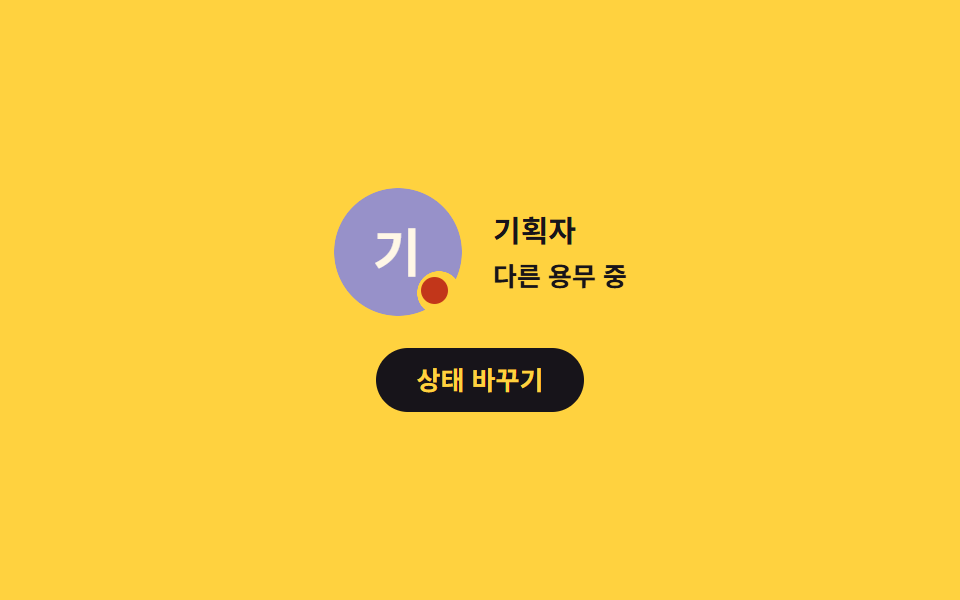
マスクでアバターの縁を丸く抜き、その穴にドットを置くので顔を隠さず、状態が変わるたび隣の文字と読み上げ名が一緒に変わります。
使いどころ今誰が接続しているかを見せるチーム画面
mask-imagesteps(1, end)aria-label
<main class="stage">
  <section class="pd is-demo" data-state="online" aria-label="オンライン状態の表示">
    <div class="pd__body">
      <div class="pd__wrap" role="img" aria-label="プランナー、オンライン">
        <span class="pd__av" data-name="プランナー"></span>
        <span class="pd__dot" aria-hidden="true"></span>
      </div>
      <div class="pd__meta">
        <p class="pd__name">プランナー</p>
        <p class="pd__state">
          <span data-key="online">オンライン</span>
          <span data-key="away">離席中</span>
          <span data-key="busy">取り込み中</span>
        </p>
      </div>
    </div>

    <button class="pd__btn" type="button">状態を変える</button>
  </section>
</main>
@use "../../../../site/static/demo-tokens" as *;
// 279 아바타 팔레트 — 이니셜 글자는 언제나 $subject-cream. 괄호 안은 크림 글자 기준 실측 대비비
$av-blue: #7c90be; // 5.29:1
$av-violet: #9791c9; // 5.76:1
$av-teal: #479082; // 5.79:1
$av-plum: #ab5488; // 6.52:1
$av-brick: $error; // 오류 토큰 — 5.13:1. 리터럴 금지 (BD10)
$av-slate: #3b4a63; // 8.40:1
$av-mist: #b6b0c0; // 잉크 무대 보조 글자 8.65:1
$av-deep: #4a4452; // 옐로 무대 보조 글자 6.49:1 · 페이퍼 무대 9.38:1
// ── 변수 3개 ──────────────────────────────────────────
$duration: $dur-loop; // 세 상태를 한 바퀴에 도는 시간
$easing: $ease-spring;
$color: $av-violet; // 아바타 면 색
@include stage($stage-yellow);
.pd {
display: grid;
justify-items: center;
gap: $sp-4;
width: min(320px, 90vw);
}
.pd__body {
display: flex;
align-items: center;
gap: $sp-4;
}
.pd__wrap {
position: relative;
display: block;
width: 64px;
height: 64px;
}
.pd__av {
display: grid;
place-items: center;
width: 64px;
aspect-ratio: 1;
border-radius: 50%;
background: $color;
color: $subject-cream;
font-weight: 700;
font-size: 26px;
line-height: 1;
// 이 데모의 주제 — 아바타 면에 마스크로 구멍을 파고 점을 그 구멍에 앉힌다.
// 점이 얼굴이나 가장자리를 덮지 않고, 뚫린 자리에 정확히 들어간다
-webkit-mask-image: radial-gradient(circle 11px at 82% 82%, transparent 98%, #000 100%);
mask-image: radial-gradient(circle 11px at 82% 82%, transparent 98%, #000 100%);
}
// 상태 점 — 마스크 구멍(82% 82%, 지름 약 21px) 안에 앉는 10px 원
.pd__dot {
position: absolute;
left: 82%;
top: 82%;
width: 10px;
height: 10px;
border-radius: 50%;
background: $av-teal;
transform: translate(-50%, -50%);
}
.pd__meta { display: grid; gap: $sp-1; }
.pd__name {
margin: 0;
color: $stage-ink; // 옐로 무대 12.63:1 (크림 1.35:1 금지)
font-weight: 700;
font-size: 15px;
line-height: 1.3;
}
// 상태 글자 — 정적 규칙: 현재 상태 한 줄만 보인다
.pd__state {
margin: 0;
color: $stage-ink;
font-weight: 600;
font-size: 13px;
line-height: 1.3;
}
.pd__state span { display: none; }
.pd[data-state="online"] .pd__state span[data-key="online"],
.pd[data-state="away"] .pd__state span[data-key="away"],
.pd[data-state="busy"] .pd__state span[data-key="busy"] { display: inline; }
// 상태별 점 색 — 접속(민트) · 자리 비움(짙은 회자주) · 다른 용무(벽돌)
.pd[data-state="online"] .pd__dot { background: $av-teal; }
.pd[data-state="away"] .pd__dot { background: $av-deep; }
.pd[data-state="busy"] .pd__dot { background: $error; }
.pd__btn {
margin: 0;
padding: $sp-2 $sp-5;
border: 0;
border-radius: $r-pill;
background: $stage-ink;
color: $stage-yellow; // 12.63:1
font-family: inherit;
font-weight: 700;
font-size: 13px;
line-height: 1.2;
cursor: pointer;
transition: transform $dur-quick $ease-spring;
}
.pd__btn:hover { transform: translateY(-2px); }
.pd__btn:focus-visible { outline: 2px solid $stage-ink; outline-offset: 3px; }
// ── 격자 미리보기 루프 ────────────────────────────────
// 세 상태를 steps(1, end) 로 0% / 34% / 67% 에 컷 전환하고 88% 에 처음으로 복귀한다.
// 상태 교체를 페이드로 하면 poster 에 반투명 유령이 겹치므로 무조건 컷.
// 컷만으로는 움직인프레임이 모자라니 점은 scale 로 조용히 뛴다(1000ms — 2s 의 약수)
.pd.is-demo .pd__dot {
animation-name: pdDotCut, pdDotBeat;
animation-duration: $duration, 1000ms;
animation-timing-function: steps(1, end), $easing;
animation-iteration-count: infinite, infinite;
}
// 세 상태 글자를 같은 칸에 겹쳐 두고 컷 타이밍에 갈아 끼운다 — 두 글자가 겹쳐 보이지 않게
.pd.is-demo .pd__state { display: grid; }
.pd.is-demo .pd__state span {
display: inline;
grid-area: 1 / 1;
opacity: 0;
animation-duration: $duration;
animation-timing-function: steps(1, end);
animation-iteration-count: infinite;
}
.pd.is-demo .pd__state span[data-key="online"] { animation-name: pdTxtOnline; }
.pd.is-demo .pd__state span[data-key="away"] { animation-name: pdTxtAway; }
.pd.is-demo .pd__state span[data-key="busy"] { animation-name: pdTxtBusy; }
@keyframes pdDotCut {
0% { background-color: $av-teal; }
34% { background-color: $av-deep; }
67% { background-color: $error; }
88%, 100% { background-color: $av-teal; }
}
@keyframes pdDotBeat {
0% { scale: 1; }
50% { scale: 1.35; }
100% { scale: 1; }
}
@keyframes pdTxtOnline {
0% { opacity: 1; }
34% { opacity: 0; }
88% { opacity: 1; }
100% { opacity: 1; }
}
@keyframes pdTxtAway {
0% { opacity: 0; }
34% { opacity: 1; }
67% { opacity: 0; }
100% { opacity: 0; }
}
@keyframes pdTxtBusy {
0% { opacity: 0; }
67% { opacity: 1; }
88% { opacity: 0; }
100% { opacity: 0; }
}
// 좁은 화면 — 글자만 줄인다. 값을 올리지 않는다
@media (max-width: 340px), (max-height: 220px) {
.pd { gap: $sp-3; }
.pd__body { gap: $sp-3; }
.pd__name { font-size: 14px; }
.pd__state { font-size: 12px; }
.pd__btn { padding: $sp-1 $sp-4; font-size: 12px; }
}
@media (prefers-reduced-motion: reduce) {
// .pd.is-demo .pd__dot (0,3,0) 를 이기려면 !important.
// 움직임만 끄고, 상태 글자는 .is-demo 겹침 배치를 풀어 현재 상태 한 줄만 남긴다
.pd__dot { animation: none !important; }
.pd__state { display: block !important; }
.pd__state span { display: none !important; opacity: 1 !important; animation: none !important; }
.pd[data-state="online"] .pd__state span[data-key="online"],
.pd[data-state="away"] .pd__state span[data-key="away"],
.pd[data-state="busy"] .pd__state span[data-key="busy"] { display: inline !important; }
.pd__btn { transition: none !important; }
}html, body {
margin: 0;
overflow: hidden;
}
.stage {
box-sizing: border-box;
min-height: 100vh;
display: grid;
place-items: center;
margin: 0;
background: #ffd23f;
font-family: -apple-system, "Segoe UI", "Noto Sans KR", sans-serif;
padding: clamp(8px, 4vw, 24px);
}
.pd {
display: grid;
justify-items: center;
gap: 16px;
width: min(320px, 90vw);
}
.pd__body {
display: flex;
align-items: center;
gap: 16px;
}
.pd__wrap {
position: relative;
display: block;
width: 64px;
height: 64px;
}
.pd__av {
display: grid;
place-items: center;
width: 64px;
aspect-ratio: 1;
border-radius: 50%;
background: #9791c9;
color: #fff7e6;
font-weight: 700;
font-size: 26px;
line-height: 1;
-webkit-mask-image: radial-gradient(circle 11px at 82% 82%, transparent 98%, #000 100%);
mask-image: radial-gradient(circle 11px at 82% 82%, transparent 98%, #000 100%);
}
.pd__dot {
position: absolute;
left: 82%;
top: 82%;
width: 10px;
height: 10px;
border-radius: 50%;
background: #479082;
transform: translate(-50%, -50%);
}
.pd__meta {
display: grid;
gap: 4px;
}
.pd__name {
margin: 0;
color: #17141a;
font-weight: 700;
font-size: 15px;
line-height: 1.3;
}
.pd__state {
margin: 0;
color: #17141a;
font-weight: 600;
font-size: 13px;
line-height: 1.3;
}
.pd__state span {
display: none;
}
.pd[data-state=online] .pd__state span[data-key=online],
.pd[data-state=away] .pd__state span[data-key=away],
.pd[data-state=busy] .pd__state span[data-key=busy] {
display: inline;
}
.pd[data-state=online] .pd__dot {
background: #479082;
}
.pd[data-state=away] .pd__dot {
background: #4a4452;
}
.pd[data-state=busy] .pd__dot {
background: #c2361a;
}
.pd__btn {
margin: 0;
padding: 8px 20px;
border: 0;
border-radius: 999px;
background: #17141a;
color: #ffd23f;
font-family: inherit;
font-weight: 700;
font-size: 13px;
line-height: 1.2;
cursor: pointer;
transition: transform 220ms cubic-bezier(0.2, 0.8, 0.2, 1);
}
.pd__btn:hover {
transform: translateY(-2px);
}
.pd__btn:focus-visible {
outline: 2px solid #17141a;
outline-offset: 3px;
}
.pd.is-demo .pd__dot {
animation-name: pdDotCut, pdDotBeat;
animation-duration: 2s, 1000ms;
animation-timing-function: steps(1, end), cubic-bezier(0.2, 0.8, 0.2, 1);
animation-iteration-count: infinite, infinite;
}
.pd.is-demo .pd__state {
display: grid;
}
.pd.is-demo .pd__state span {
display: inline;
grid-area: 1/1;
opacity: 0;
animation-duration: 2s;
animation-timing-function: steps(1, end);
animation-iteration-count: infinite;
}
.pd.is-demo .pd__state span[data-key=online] {
animation-name: pdTxtOnline;
}
.pd.is-demo .pd__state span[data-key=away] {
animation-name: pdTxtAway;
}
.pd.is-demo .pd__state span[data-key=busy] {
animation-name: pdTxtBusy;
}
@keyframes pdDotCut {
0% {
background-color: #479082;
}
34% {
background-color: #4a4452;
}
67% {
background-color: #c2361a;
}
88%, 100% {
background-color: #479082;
}
}
@keyframes pdDotBeat {
0% {
scale: 1;
}
50% {
scale: 1.35;
}
100% {
scale: 1;
}
}
@keyframes pdTxtOnline {
0% {
opacity: 1;
}
34% {
opacity: 0;
}
88% {
opacity: 1;
}
100% {
opacity: 1;
}
}
@keyframes pdTxtAway {
0% {
opacity: 0;
}
34% {
opacity: 1;
}
67% {
opacity: 0;
}
100% {
opacity: 0;
}
}
@keyframes pdTxtBusy {
0% {
opacity: 0;
}
67% {
opacity: 1;
}
88% {
opacity: 0;
}
100% {
opacity: 0;
}
}
@media (max-width: 340px), (max-height: 220px) {
.pd {
gap: 12px;
}
.pd__body {
gap: 12px;
}
.pd__name {
font-size: 14px;
}
.pd__state {
font-size: 12px;
}
.pd__btn {
padding: 4px 16px;
font-size: 12px;
}
}
@media (prefers-reduced-motion: reduce) {
.pd__dot {
animation: none !important;
}
.pd__state {
display: block !important;
}
.pd__state span {
display: none !important;
opacity: 1 !important;
animation: none !important;
}
.pd[data-state=online] .pd__state span[data-key=online],
.pd[data-state=away] .pd__state span[data-key=away],
.pd[data-state=busy] .pd__state span[data-key=busy] {
display: inline !important;
}
.pd__btn {
transition: none !important;
}
}(function () {
var root = document.querySelector('.pd');
var wrap = root.querySelector('.pd__wrap');
var av = root.querySelector('.pd__av');
var btn = root.querySelector('.pd__btn');
var order = ['online', 'away', 'busy'];
// 이니셜은 표시 문자열에서 계산한다 — 하드코딩하지 않아야 en/ja 언어팩에서도 따라간다
function initialOf(name) {
var words = (name || '').trim().split(/\s+/);
if (/[A-Za-z]/.test(words[0].charAt(0))) {
return words.slice(0, 2).map(function (w) { return w.charAt(0).toUpperCase(); }).join('');
}
return words[0].charAt(0);
}
av.textContent = initialOf(av.getAttribute('data-name'));
// 상태 글자는 코드에 박지 않고 HTML 안 요소에서 읽는다
var nameEl = root.querySelector('.pd__name');
function currentLabel() {
var el = root.querySelector('.pd__state span[data-key="' + root.getAttribute('data-state') + '"]');
return el ? el.textContent : '';
}
// aria-label 은 조사 앞뒤 공백이 생기지 않게 처음부터 완성된 문장으로 만든다
function applyLabel() {
wrap.setAttribute('aria-label', nameEl.textContent + ', ' + currentLabel());
}
applyLabel();
// online → away → busy → online
btn.addEventListener('click', function () {
var next = order[(order.indexOf(root.getAttribute('data-state')) + 1) % order.length];
root.setAttribute('data-state', next);
applyLabel();
});
// 사람이 손을 대면 미리보기 루프를 뗀다
function stopLoop() { root.classList.remove('is-demo'); }
root.addEventListener('pointerdown', stopLoop);
root.addEventListener('focusin', stopLoop);
})();import { useState } from "react";
import type { CSSProperties, ReactNode } from "react";
import styles from "./AvatarPresenceDot.module.scss";
export type AvatarPresenceDotProps = {
sectionLabel?: string;
name?: string;
stateTexts?: { online: string; away: string; busy: string };
buttonLabel?: string;
/** 세 상태를 한 바퀴에 도는 시간(ms) */
duration?: number;
easing?: string;
/** 아바타 면 색 */
color?: string;
};
type Vars = CSSProperties & {
"--duration"?: string;
"--easing"?: string;
"--color"?: string;
};
// 이니셜은 표시 문자열에서 계산한다 — 하드코딩하지 않아야 언어팩이 바뀌어도 따라간다
function initialOf(name: string): string {
const words = name.trim().split(/\s+/);
if (/[A-Za-z]/.test(words[0].charAt(0))) {
return words.slice(0, 2).map((w) => w.charAt(0).toUpperCase()).join("");
}
return words[0].charAt(0);
}
const ORDER = ["online", "away", "busy"] as const;
export default function AvatarPresenceDot({
sectionLabel = "접속 상태 표시",
name = "기획자",
stateTexts = { online: "접속 중", away: "자리 비움", busy: "다른 용무 중" },
buttonLabel = "상태 바꾸기",
duration = 2000,
easing = "cubic-bezier(.2, .8, .2, 1)",
color = "#5b4bd6",
}: AvatarPresenceDotProps): ReactNode {
const [loop, setLoop] = useState<boolean>(true);
const [idx, setIdx] = useState<number>(0);
const vars: Vars = { "--duration": `${duration}ms`, "--easing": easing, "--color": color };
const state = ORDER[idx];
// aria-label 은 조사 앞뒤 공백이 생기지 않게 처음부터 완성된 문장으로 만든다
const wrapLabel = `${name}, ${stateTexts[state]}`;
return (
<section
className={loop ? `${styles.pd} ${styles.isDemo}` : styles.pd}
data-state={state}
style={vars}
aria-label={sectionLabel}
onPointerDown={() => setLoop(false)}
onFocus={() => setLoop(false)}
>
<div className={styles.body}>
<div className={styles.wrap} role="img" aria-label={wrapLabel}>
{/* 마스크가 아바타 면에 구멍을 파고, 점이 그 구멍에 앉는다 */}
<span className={styles.av}>{initialOf(name)}</span>
<span className={styles.dot} aria-hidden="true" />
</div>
<div className={styles.meta}>
<p className={styles.name}>{name}</p>
<p className={styles.state}>
<span data-key="online">{stateTexts.online}</span>
<span data-key="away">{stateTexts.away}</span>
<span data-key="busy">{stateTexts.busy}</span>
</p>
</div>
</div>
<button
className={styles.btn}
type="button"
onClick={() => setIdx((i) => (i + 1) % ORDER.length)}
>
{buttonLabel}
</button>
</section>
);
}06 オンライン状態ドット — 計測 累積面積 0.557% · 動いたフレーム 17/23GODRICH オリジナル · SCSS と React は zip に同梱 · プロフィール UI デザイン 9種 — 画像ファイルなし
このデモが属する記事
 プロフィール UI デザイン 9種 — 画像ファイルなしプロフィール UI デザインとは、利用者を写真一枚の枠で示す小さな部品の置き方のことです。ここに並べた九つは、名前だけから色と模様を決める円、写真が届かないときの代替の順序、重なり、状態ドット、メンションチップまで、画像ファイルなしで HT この記事のデモをすべて見る