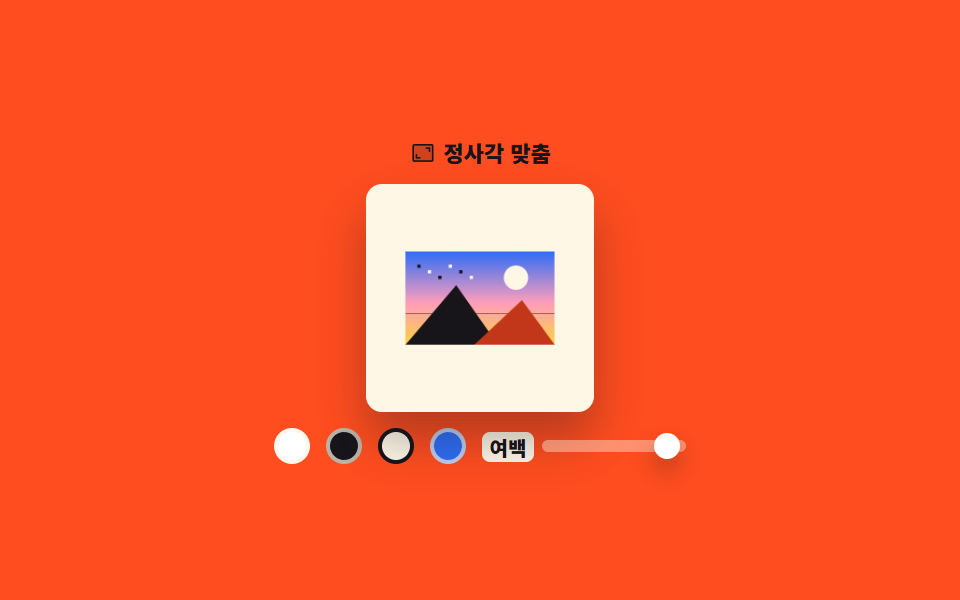
06正方形の余白埋め
横長の写真を正方形の枠の中央に置き、余った場所を選んだ色で塗ります。
使いどころ正方形規格に合わせて投稿、商品一覧のサムネイル規格を揃える
fillRectaspect-ratiodrawImage
<main class="stage">
<div class="sq is-demo" id="sq">
  <p class="sq__cap"><svg xmlns="http://www.w3.org/2000/svg" viewBox="0 0 256 256" class="sq__ico" aria-hidden="true"><g fill="currentColor"><path d="M224 56v144a8 8 0 0 1-8 8H40a8 8 0 0 1-8-8V56a8 8 0 0 1 8-8h176a8 8 0 0 1 8 8" opacity=".2"/><path d="M200 80v32a8 8 0 0 1-16 0V88h-24a8 8 0 0 1 0-16h32a8 8 0 0 1 8 8M96 168H72v-24a8 8 0 0 0-16 0v32a8 8 0 0 0 8 8h32a8 8 0 0 0 0-16M232 56v144a16 16 0 0 1-16 16H40a16 16 0 0 1-16-16V56a16 16 0 0 1 16-16h176a16 16 0 0 1 16 16m-16 144V56H40v144z"/></g></svg><span>正方形に合わせる</span></p>
  <div class="sq__frame">
    <canvas class="sq__out" id="out" width="240" height="240" role="img" aria-label="正方形の結果"></canvas>
    <span class="sq__ghost" aria-hidden="true"><span class="sq__ghostImg"></span></span>
  </div>
  <div class="sq__row">
    <button type="button" class="sq__c sq__c--paper" data-bg="#ffffff" aria-label="背景 白" aria-pressed="true"></button>
    <button type="button" class="sq__c sq__c--ink" data-bg="#17141a" aria-label="背景 墨色" aria-pressed="false"></button>
    <button type="button" class="sq__c sq__c--cream" data-bg="#fff7e6" aria-label="背景 クリーム" aria-pressed="false"></button>
    <button type="button" class="sq__c sq__c--blue" data-bg="#2f6df6" aria-label="背景 青" aria-pressed="false"></button>
    <span class="sq__pad">
      <span class="sq__lab" id="padLab">余白</span>
      <span class="sq__track" id="track" role="slider" tabindex="0" aria-labelledby="padLab" aria-valuemin="0" aria-valuemax="20" aria-valuenow="8"><span class="sq__thumb" id="thumb"></span></span>
    </span>
  </div>
</div>
</main>
@use "../../../../site/static/demo-tokens" as *;
// 정사각 여백 채우기 — 실제 결과는 canvas 2D 가 만든다(fillRect 로 바탕을 칠하고 drawImage 로 가운데 앉힌다).
// 격자 미리보기(.is-demo)는 유령 판의 배경색을 steps(1, end) 로 갈아 끼우고 사진 판만 계속 줄였다 키운다.
// 색은 한 프레임에 끊어야 두 색이 반투명하게 겹친 장면이 대표 이미지로 뽑히지 않는다.
$duration: $dur-loop;
$easing: $ease-out;
// 오렌지 무대 위 크림 글자는 3.11:1 로 AA 미달이었다 — 잉크로 바꿔 5.50:1 (run/295/_probe_contrast)
$color: $subject-ink;
@include stage($stage-orange);
.sq { display: flex; flex-direction: column; align-items: center; gap: $sp-2; width: 100%; }
.sq__cap {
display: flex; align-items: center; gap: $sp-1; margin: 0;
font-weight: 800; font-size: clamp(9px, 2.4vw, 11px); color: $color;
}
.sq__ico { width: 13px; height: 13px; flex: 0 0 auto; }
.sq__frame {
position: relative; height: clamp(80px, 38vh, 130px); aspect-ratio: 1;
border-radius: $r-sm; overflow: hidden; box-shadow: $shadow-raised;
}
.sq__out { display: block; width: 100%; height: 100%; }
.sq__ghost { display: none; position: absolute; inset: 0; background: $stage-paper; }
.sq__ghostImg {
position: absolute; left: 8%; right: 8%; top: 50%; aspect-ratio: 16 / 10;
background-image: var(--photo); background-size: cover;
transform: translateY(-50%);
}
.sq__row { display: flex; align-items: center; gap: $sp-2; flex-wrap: wrap; justify-content: center; }
.sq__c {
width: 18px; height: 18px; padding: 0; cursor: pointer;
border: 2px solid rgba(255, 247, 230, .7); border-radius: 50%;
}
.sq__c:focus-visible { outline: 3px solid $subject-blue; outline-offset: 2px; }
.sq__c[aria-pressed="true"] { border-color: $subject-ink; }
.sq__c--paper { background: $stage-paper; }
.sq__c--ink { background: $subject-ink; }
.sq__c--cream { background: $subject-cream; }
.sq__c--blue { background: $subject-blue; }
.sq__pad { display: inline-flex; align-items: center; gap: $sp-1; }
.sq__lab { font-weight: 800; font-size: clamp(8px, 2.2vw, 10px); color: $color; background: $subject-cream; padding: 0 $sp-1; border-radius: $r-xs; } // 액자 그림자가 깔린 주황 위에선 잉크도 4.09:1 — 크림 알약 면 위 17.11:1
.sq__track {
position: relative; display: block; width: 72px; height: 6px; cursor: pointer;
border-radius: $r-pill; background: rgba(255, 247, 230, .4);
}
.sq__track:focus-visible { outline: 3px solid $subject-blue; outline-offset: 4px; }
.sq__thumb {
position: absolute; top: 50%; left: 40%; width: 13px; height: 13px;
border-radius: 50%; background: $stage-paper; box-shadow: $shadow-press;
transform: translate(-50%, -50%);
}
// ── 미리보기 루프: 바탕색 넷을 차례로 끊어 보여주고, 사진은 여백 8퍼센트와 18퍼센트 사이를 오간다.
// 복귀는 88% 에 끝난다 — 24장 표본의 마지막 장이 2초의 95.8% 지점이라 그 뒤는 안 찍힌다
.sq.is-demo .sq__out { visibility: hidden; }
.sq.is-demo .sq__ghost {
display: block;
animation-name: sqBg; animation-duration: $duration;
animation-timing-function: steps(1, end); animation-iteration-count: infinite;
}
@keyframes sqBg {
0%, 18% { background: $stage-paper; }
20%, 40% { background: $subject-ink; }
42%, 62% { background: $subject-cream; }
64%, 86% { background: $subject-blue; }
88%, 100% { background: $stage-paper; }
}
.sq.is-demo .sq__ghostImg {
animation-name: sqPad; animation-duration: $duration;
animation-timing-function: $easing; animation-iteration-count: infinite;
}
@keyframes sqPad {
0% { transform: translateY(-50%) scale(1); }
44% { transform: translateY(-50%) scale(0.76); }
88%, 100% { transform: translateY(-50%) scale(1); }
}
.sq.is-demo .sq__thumb {
animation-name: sqThumb; animation-duration: $duration;
animation-timing-function: $easing; animation-iteration-count: infinite;
}
@keyframes sqThumb {
0% { transform: translate(-50%, -50%); }
44% { transform: translate(-50%, -50%) translateX(36px); }
88%, 100% { transform: translate(-50%, -50%); }
}
// 고른 색 표시도 바탕색과 **같은 순간에** 옮긴다 — 정지한 채 두면 「흰색이 눌린 상태인데 바탕은 크림」
// 같은 어긋난 장면이 대표 이미지로 뽑힌다 (실측)
.sq.is-demo .sq__c {
animation-duration: $duration;
animation-timing-function: steps(1, end); animation-iteration-count: infinite;
}
.sq.is-demo .sq__c--paper { animation-name: sqPickA; }
.sq.is-demo .sq__c--ink { animation-name: sqPickB; }
.sq.is-demo .sq__c--cream { animation-name: sqPickC; }
.sq.is-demo .sq__c--blue { animation-name: sqPickD; }
@keyframes sqPickA { 0%, 19% { border-color: $subject-ink; } 20%, 87% { border-color: rgba(255, 247, 230, .7); } 88%, 100% { border-color: $subject-ink; } }
@keyframes sqPickB { 0%, 19% { border-color: rgba(255, 247, 230, .7); } 20%, 41% { border-color: $subject-ink; } 42%, 100% { border-color: rgba(255, 247, 230, .7); } }
@keyframes sqPickC { 0%, 41% { border-color: rgba(255, 247, 230, .7); } 42%, 63% { border-color: $subject-ink; } 64%, 100% { border-color: rgba(255, 247, 230, .7); } }
@keyframes sqPickD { 0%, 63% { border-color: rgba(255, 247, 230, .7); } 64%, 87% { border-color: $subject-ink; } 88%, 100% { border-color: rgba(255, 247, 230, .7); } }
@media (max-width: 340px) {
.sq__row { gap: $sp-1; }
}
@media (prefers-reduced-motion: reduce) {
.sq.is-demo .sq__ghost,
.sq.is-demo .sq__ghostImg,
.sq.is-demo .sq__thumb,
.sq.is-demo .sq__c { animation: none !important; }
// 움직임 없이 먹색 바탕에 여백을 넓힌 상태로 세운다
.sq.is-demo .sq__ghost { background: $subject-ink !important; }
.sq.is-demo .sq__ghostImg { transform: translateY(-50%) scale(0.76) !important; }
.sq.is-demo .sq__thumb { transform: translate(-50%, -50%) translateX(36px) !important; }
.sq.is-demo .sq__c--ink { border-color: $subject-ink !important; }
.sq.is-demo .sq__c--paper { border-color: rgba(255, 247, 230, .7) !important; }
}html, body {
margin: 0;
overflow: hidden;
}
.stage {
box-sizing: border-box;
min-height: 100vh;
display: grid;
place-items: center;
margin: 0;
background: #ff4d1f;
font-family: -apple-system, "Segoe UI", "Noto Sans KR", sans-serif;
padding: clamp(8px, 4vw, 24px);
}
.sq {
display: flex;
flex-direction: column;
align-items: center;
gap: 8px;
width: 100%;
}
.sq__cap {
display: flex;
align-items: center;
gap: 4px;
margin: 0;
font-weight: 800;
font-size: clamp(9px, 2.4vw, 11px);
color: #17141a;
}
.sq__ico {
width: 13px;
height: 13px;
flex: 0 0 auto;
}
.sq__frame {
position: relative;
height: clamp(80px, 38vh, 130px);
aspect-ratio: 1;
border-radius: 8px;
overflow: hidden;
box-shadow: 0 14px 24px rgba(23, 20, 26, 0.32);
}
.sq__out {
display: block;
width: 100%;
height: 100%;
}
.sq__ghost {
display: none;
position: absolute;
inset: 0;
background: #ffffff;
}
.sq__ghostImg {
position: absolute;
left: 8%;
right: 8%;
top: 50%;
aspect-ratio: 16/10;
background-image: var(--photo);
background-size: cover;
transform: translateY(-50%);
}
.sq__row {
display: flex;
align-items: center;
gap: 8px;
flex-wrap: wrap;
justify-content: center;
}
.sq__c {
width: 18px;
height: 18px;
padding: 0;
cursor: pointer;
border: 2px solid rgba(255, 247, 230, 0.7);
border-radius: 50%;
}
.sq__c:focus-visible {
outline: 3px solid #2f6df6;
outline-offset: 2px;
}
.sq__c[aria-pressed=true] {
border-color: #17141a;
}
.sq__c--paper {
background: #ffffff;
}
.sq__c--ink {
background: #17141a;
}
.sq__c--cream {
background: #fff7e6;
}
.sq__c--blue {
background: #2f6df6;
}
.sq__pad {
display: inline-flex;
align-items: center;
gap: 4px;
}
.sq__lab {
font-weight: 800;
font-size: clamp(8px, 2.2vw, 10px);
color: #17141a;
background: #fff7e6;
padding: 0 4px;
border-radius: 4px;
}
.sq__track {
position: relative;
display: block;
width: 72px;
height: 6px;
cursor: pointer;
border-radius: 999px;
background: rgba(255, 247, 230, 0.4);
}
.sq__track:focus-visible {
outline: 3px solid #2f6df6;
outline-offset: 4px;
}
.sq__thumb {
position: absolute;
top: 50%;
left: 40%;
width: 13px;
height: 13px;
border-radius: 50%;
background: #ffffff;
box-shadow: 0 6px 12px rgba(23, 20, 26, 0.32);
transform: translate(-50%, -50%);
}
.sq.is-demo .sq__out {
visibility: hidden;
}
.sq.is-demo .sq__ghost {
display: block;
animation-name: sqBg;
animation-duration: 2s;
animation-timing-function: steps(1, end);
animation-iteration-count: infinite;
}
@keyframes sqBg {
0%, 18% {
background: #ffffff;
}
20%, 40% {
background: #17141a;
}
42%, 62% {
background: #fff7e6;
}
64%, 86% {
background: #2f6df6;
}
88%, 100% {
background: #ffffff;
}
}
.sq.is-demo .sq__ghostImg {
animation-name: sqPad;
animation-duration: 2s;
animation-timing-function: ease-out;
animation-iteration-count: infinite;
}
@keyframes sqPad {
0% {
transform: translateY(-50%) scale(1);
}
44% {
transform: translateY(-50%) scale(0.76);
}
88%, 100% {
transform: translateY(-50%) scale(1);
}
}
.sq.is-demo .sq__thumb {
animation-name: sqThumb;
animation-duration: 2s;
animation-timing-function: ease-out;
animation-iteration-count: infinite;
}
@keyframes sqThumb {
0% {
transform: translate(-50%, -50%);
}
44% {
transform: translate(-50%, -50%) translateX(36px);
}
88%, 100% {
transform: translate(-50%, -50%);
}
}
.sq.is-demo .sq__c {
animation-duration: 2s;
animation-timing-function: steps(1, end);
animation-iteration-count: infinite;
}
.sq.is-demo .sq__c--paper {
animation-name: sqPickA;
}
.sq.is-demo .sq__c--ink {
animation-name: sqPickB;
}
.sq.is-demo .sq__c--cream {
animation-name: sqPickC;
}
.sq.is-demo .sq__c--blue {
animation-name: sqPickD;
}
@keyframes sqPickA {
0%, 19% {
border-color: #17141a;
}
20%, 87% {
border-color: rgba(255, 247, 230, 0.7);
}
88%, 100% {
border-color: #17141a;
}
}
@keyframes sqPickB {
0%, 19% {
border-color: rgba(255, 247, 230, 0.7);
}
20%, 41% {
border-color: #17141a;
}
42%, 100% {
border-color: rgba(255, 247, 230, 0.7);
}
}
@keyframes sqPickC {
0%, 41% {
border-color: rgba(255, 247, 230, 0.7);
}
42%, 63% {
border-color: #17141a;
}
64%, 100% {
border-color: rgba(255, 247, 230, 0.7);
}
}
@keyframes sqPickD {
0%, 63% {
border-color: rgba(255, 247, 230, 0.7);
}
64%, 87% {
border-color: #17141a;
}
88%, 100% {
border-color: rgba(255, 247, 230, 0.7);
}
}
@media (max-width: 340px) {
.sq__row {
gap: 4px;
}
}
@media (prefers-reduced-motion: reduce) {
.sq.is-demo .sq__ghost,
.sq.is-demo .sq__ghostImg,
.sq.is-demo .sq__thumb,
.sq.is-demo .sq__c {
animation: none !important;
}
.sq.is-demo .sq__ghost {
background: #17141a !important;
}
.sq.is-demo .sq__ghostImg {
transform: translateY(-50%) scale(0.76) !important;
}
.sq.is-demo .sq__thumb {
transform: translate(-50%, -50%) translateX(36px) !important;
}
.sq.is-demo .sq__c--ink {
border-color: #17141a !important;
}
.sq.is-demo .sq__c--paper {
border-color: rgba(255, 247, 230, 0.7) !important;
}
}var sq = document.getElementById('sq');
var out = document.getElementById('out');
var track = document.getElementById('track');
var thumb = document.getElementById('thumb');
var octx = out.getContext('2d');
var src = document.createElement('canvas');
var swatches = document.querySelectorAll('.sq__c');
var bg = '#ffffff', pad = 0.08;
var VOICE = '%p パーセント';
// 가짜 사진 — 외부 파일 없이 그라디언트와 도형으로 합성한다. 필터·히스토그램이 보이도록 대비를 세게 준다
function paintPhoto(c, w, h) {
var sky = c.createLinearGradient(0, 0, 0, h);
sky.addColorStop(0, '#2f6df6'); sky.addColorStop(0.55, '#ff9ebb'); sky.addColorStop(1, '#ffd23f');
c.fillStyle = sky; c.fillRect(0, 0, w, h);
c.fillStyle = '#fff7e6';
c.beginPath(); c.arc(w * 0.74, h * 0.28, h * 0.13, 0, Math.PI * 2); c.fill();
// 곧은 수평선 하나 — 기울기 보정이 눈에 보이려면 비교할 직선이 있어야 한다
c.fillStyle = 'rgba(23, 20, 26, 0.5)'; c.fillRect(0, Math.round(h * 0.66), w, 2);
c.fillStyle = '#17141a';
c.beginPath(); c.moveTo(0, h); c.lineTo(w * 0.34, h * 0.36); c.lineTo(w * 0.62, h); c.closePath(); c.fill();
c.fillStyle = '#c2361a';
c.beginPath(); c.moveTo(w * 0.46, h); c.lineTo(w * 0.78, h * 0.52); c.lineTo(w, h); c.closePath(); c.fill();
for (var i = 0; i < 6; i++) { c.fillStyle = i % 2 ? '#fff7e6' : '#17141a'; c.fillRect(w * (0.08 + i * 0.07), h * (0.14 + (i % 3) * 0.06), 7, 7); }
}
function render() {
var s = out.width;
// 먼저 정사각 전체를 고른 색으로 칠하고, 그 위에 사진을 가운데로 앉힌다
octx.fillStyle = bg;
octx.fillRect(0, 0, s, s);
var inner = s * (1 - pad * 2);
var k = Math.min(inner / src.width, inner / src.height);
var dw = src.width * k, dh = src.height * k;
octx.drawImage(src, (s - dw) / 2, (s - dh) / 2, dw, dh);
thumb.style.left = (pad / 0.2 * 100) + '%';
track.setAttribute('aria-valuenow', Math.round(pad * 100));
track.setAttribute('aria-valuetext', VOICE.replace('%p', Math.round(pad * 100)));
}
function setPad(next) {
pad = Math.max(0, Math.min(0.2, next));
sq.classList.remove('is-demo');
render();
}
for (var i = 0; i < swatches.length; i++) {
(function (el) {
el.addEventListener('click', function () {
bg = el.getAttribute('data-bg');
for (var j = 0; j < swatches.length; j++) { swatches[j].setAttribute('aria-pressed', swatches[j] === el ? 'true' : 'false'); }
sq.classList.remove('is-demo'); render();
});
})(swatches[i]);
}
function fromPointer(e) {
var r = track.getBoundingClientRect();
setPad(Math.round((e.clientX - r.left) / r.width * 20) / 100);
}
track.addEventListener('pointerdown', function (e) { track.setPointerCapture(e.pointerId); fromPointer(e); });
track.addEventListener('pointermove', function (e) { if (e.buttons) { fromPointer(e); } });
// 화살표 1퍼센트, Shift 와 함께면 5퍼센트
track.addEventListener('keydown', function (e) {
var step = e.shiftKey ? 0.05 : 0.01;
if (e.key === 'ArrowLeft' || e.key === 'ArrowDown') { e.preventDefault(); setPad(pad - step); }
else if (e.key === 'ArrowRight' || e.key === 'ArrowUp') { e.preventDefault(); setPad(pad + step); }
});
src.width = 320; src.height = 200;
paintPhoto(src.getContext('2d'), src.width, src.height);
document.documentElement.style.setProperty('--photo', 'url(' + src.toDataURL() + ')');
render();// SquarePad — vanilla 판(run/295/demo/06-image-edit-bg-pad-square/index.html) 의 React 포트.
// 정사각 캔버스를 고른 색으로 먼저 fillRect 한 뒤, 여백을 뺀 안쪽에 맞춰 줄인 사진을 drawImage 로
// 가운데 앉힌다 — 가로세로 어느 쪽도 넘지 않도록 배율은 두 비율 중 작은 쪽을 쓴다.
// 원본 그림은 화면에 없는 보조 canvas(src)에 한 번만 그려 두고 다시 쓴다. 값·수치·키프레임은 vanilla 와 같다.
import { useEffect, useRef, useState } from "react";
import type { CSSProperties, PointerEvent as ReactPointerEvent } from "react";
import styles from "./SquarePad.module.scss";
export type SquarePadProps = {
duration?: number;
easing?: string;
color?: string;
};
type Vars = CSSProperties & {
"--duration"?: string;
"--easing"?: string;
"--color"?: string;
"--photo"?: string;
};
// react 앰비언트에 KeyboardEvent 가 없다 — 키 핸들러가 실제로 쓰는 것만 지역 타입으로 선언한다
type KeyEvt = { key: string; shiftKey: boolean; preventDefault(): void };
const VOICE = "%p 퍼센트";
const SWATCHES: { bg: string; label: string; cls: string }[] = [
{ bg: "#ffffff", label: "배경 흰색", cls: styles.swatchPaper },
{ bg: "#17141a", label: "배경 먹색", cls: styles.swatchInk },
{ bg: "#fff7e6", label: "배경 크림", cls: styles.swatchCream },
{ bg: "#2f6df6", label: "배경 파랑", cls: styles.swatchBlue },
];
// 가짜 사진 — 외부 파일 없이 그라디언트와 도형으로 합성한다. 필터·히스토그램이 보이도록 대비를 세게 준다
function paintPhoto(c: CanvasRenderingContext2D, w: number, h: number): void {
const sky = c.createLinearGradient(0, 0, 0, h);
sky.addColorStop(0, "#2f6df6"); sky.addColorStop(0.55, "#ff9ebb"); sky.addColorStop(1, "#ffd23f");
c.fillStyle = sky; c.fillRect(0, 0, w, h);
c.fillStyle = "#fff7e6";
c.beginPath(); c.arc(w * 0.74, h * 0.28, h * 0.13, 0, Math.PI * 2); c.fill();
// 곧은 수평선 하나 — 기울기 보정이 눈에 보이려면 비교할 직선이 있어야 한다
c.fillStyle = "rgba(23, 20, 26, 0.5)"; c.fillRect(0, Math.round(h * 0.66), w, 2);
c.fillStyle = "#17141a";
c.beginPath(); c.moveTo(0, h); c.lineTo(w * 0.34, h * 0.36); c.lineTo(w * 0.62, h); c.closePath(); c.fill();
c.fillStyle = "#c2361a";
c.beginPath(); c.moveTo(w * 0.46, h); c.lineTo(w * 0.78, h * 0.52); c.lineTo(w, h); c.closePath(); c.fill();
for (let i = 0; i < 6; i++) { c.fillStyle = i % 2 ? "#fff7e6" : "#17141a"; c.fillRect(w * (0.08 + i * 0.07), h * (0.14 + (i % 3) * 0.06), 7, 7); }
}
export default function SquarePad({
duration = 2000,
easing = "ease-out",
color = "#17141a",
}: SquarePadProps) {
const outRef = useRef<HTMLCanvasElement | null>(null);
const srcRef = useRef<HTMLCanvasElement | null>(null);
const [bg, setBg] = useState("#ffffff");
const [pad, setPad] = useState(0.08);
const [demo, setDemo] = useState(true);
const [photo, setPhoto] = useState("");
const vars: Vars = { "--duration": `${duration}ms`, "--easing": easing, "--color": color };
if (photo) vars["--photo"] = `url(${photo})`;
useEffect(() => {
const src = document.createElement("canvas");
src.width = 320; src.height = 200;
const ctx = src.getContext("2d");
if (!ctx) return;
paintPhoto(ctx, src.width, src.height);
srcRef.current = src;
setPhoto(src.toDataURL());
}, []);
useEffect(() => {
const out = outRef.current;
const src = srcRef.current;
if (!out || !src) return;
const ctx = out.getContext("2d");
if (!ctx) return;
const s = out.width;
// 먼저 정사각 전체를 고른 색으로 칠하고, 그 위에 사진을 가운데로 앉힌다
ctx.fillStyle = bg;
ctx.fillRect(0, 0, s, s);
const inner = s * (1 - pad * 2);
const k = Math.min(inner / src.width, inner / src.height);
const dw = src.width * k, dh = src.height * k;
ctx.drawImage(src, (s - dw) / 2, (s - dh) / 2, dw, dh);
}, [bg, pad, photo]);
function applyPad(next: number): void {
setPad(Math.max(0, Math.min(0.2, next)));
setDemo(false);
}
function onPick(next: string): void {
setBg(next);
setDemo(false);
}
function fromPointer(event: ReactPointerEvent<HTMLSpanElement>): void {
const r = event.currentTarget.getBoundingClientRect();
applyPad(Math.round((event.clientX - r.left) / r.width * 20) / 100);
}
function onPointerDown(event: ReactPointerEvent<HTMLSpanElement>): void {
event.currentTarget.setPointerCapture(event.pointerId);
fromPointer(event);
}
function onPointerMove(event: ReactPointerEvent<HTMLSpanElement>): void {
if (event.buttons) { fromPointer(event); }
}
// 화살표 1퍼센트, Shift 와 함께면 5퍼센트
function onKeyDown(event: KeyEvt): void {
const step = event.shiftKey ? 0.05 : 0.01;
if (event.key === "ArrowLeft" || event.key === "ArrowDown") { event.preventDefault(); applyPad(pad - step); }
else if (event.key === "ArrowRight" || event.key === "ArrowUp") { event.preventDefault(); applyPad(pad + step); }
}
const percent = Math.round(pad * 100);
const cls = [styles.root, demo ? styles.isDemo : ""].filter(Boolean).join(" ");
return (
<main className={styles.stage}>
<div className={cls} style={vars}>
<p className={styles.cap}><svg xmlns="http://www.w3.org/2000/svg" viewBox="0 0 256 256" className={styles.ico} aria-hidden="true"><g fill="currentColor"><path d="M224 56v144a8 8 0 0 1-8 8H40a8 8 0 0 1-8-8V56a8 8 0 0 1 8-8h176a8 8 0 0 1 8 8" opacity=".2"/><path d="M200 80v32a8 8 0 0 1-16 0V88h-24a8 8 0 0 1 0-16h32a8 8 0 0 1 8 8M96 168H72v-24a8 8 0 0 0-16 0v32a8 8 0 0 0 8 8h32a8 8 0 0 0 0-16M232 56v144a16 16 0 0 1-16 16H40a16 16 0 0 1-16-16V56a16 16 0 0 1 16-16h176a16 16 0 0 1 16 16m-16 144V56H40v144z"/></g></svg><span>정사각 맞춤</span></p>
<div className={styles.frame}>
<canvas className={styles.out} ref={outRef} width={240} height={240} role="img" aria-label="정사각 결과"></canvas>
<span className={styles.ghost} aria-hidden="true"><span className={styles.ghostImg}></span></span>
</div>
<div className={styles.row}>
{SWATCHES.map((s) => (
<button
type="button"
key={s.bg}
className={`${styles.swatch} ${s.cls}`}
aria-label={s.label}
aria-pressed={bg === s.bg}
onClick={() => onPick(s.bg)}
></button>
))}
<span className={styles.pad}>
<span className={styles.lab} id="padLab">여백</span>
<span
className={styles.track}
role="slider"
tabIndex={0}
aria-labelledby="padLab"
aria-valuemin={0}
aria-valuemax={20}
aria-valuenow={percent}
aria-valuetext={VOICE.replace("%p", String(percent))}
onPointerDown={onPointerDown}
onPointerMove={onPointerMove}
onKeyDown={onKeyDown}
>
<span className={styles.thumb} style={{ left: `${pad / 0.2 * 100}%` }}></span>
</span>
</span>
</div>
</div>
</main>
);
}06 正方形の余白埋め — 計測 累積面積 9.137% · 動いたフレーム 22/23GODRICH オリジナル · SCSS と React は zip に同梱 · 画像 編集 javascript のトリミングUI 9選
このデモが属する記事
 画像 編集 javascript のトリミングUI 9選画像 編集 javascript の入口は、写真から残す範囲を選んで切り抜く UI です。ここに並べた九つはアップロードなしでブラウザーの中だけで完結するように、canvas の 2D コンテキストと Pointer Events だけで組 この記事のデモをすべて見る