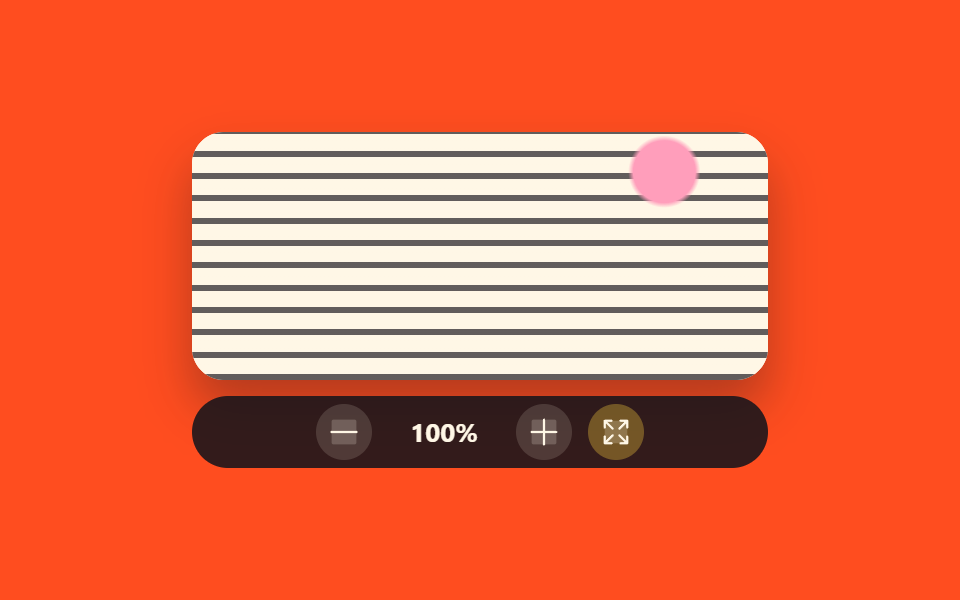
04段階で止まる倍率コントロールバー
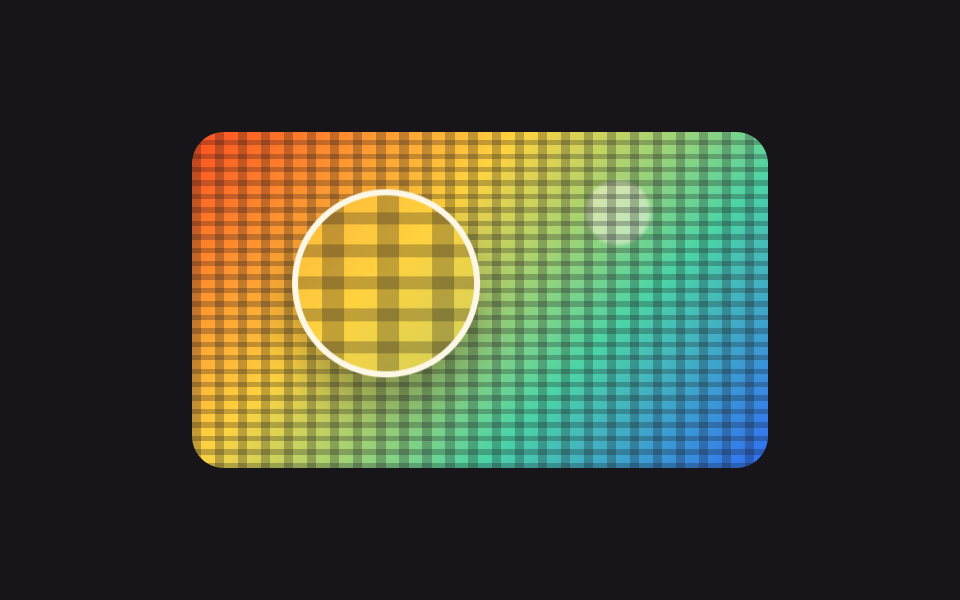
マイナス・プラス・フィットの3つのボタンが、倍率を100・150・200・300パーセントの4段階だけで上下させます。数字は steps(1, end) で1フレームで入れ替わり、同じ値が aria-live でもう一度読まれます。
使いどころ決まった倍率だけで見せる文書ビューアや電子書籍
steps(1, end)scalearia-live
<main class="stage">
  <div class="zl is-demo" id="zl">
    <div class="zl__view"><div class="zl__layer" id="zl-layer"></div></div>
    <div class="zl__bar">
      <button class="zl__btn" id="zl-out" type="button" aria-label="1段階縮小"><svg viewBox="0 0 256 256" width="18" height="18" aria-hidden="true"><g fill="currentColor"><path d="M216 56v144a16 16 0 0 1-16 16H56a16 16 0 0 1-16-16V56a16 16 0 0 1 16-16h144a16 16 0 0 1 16 16" opacity=".2"/><path d="M224 128a8 8 0 0 1-8 8H40a8 8 0 0 1 0-16h176a8 8 0 0 1 8 8"/></g></svg></button>
      <span class="zl__pct" id="zl-pct" role="status" aria-live="polite">
        <span class="zl__n zl__n--1">100%</span><span class="zl__n zl__n--2">150%</span><span class="zl__n zl__n--3">200%</span><span class="zl__n zl__n--4">300%</span>
      </span>
      <button class="zl__btn" id="zl-in" type="button" aria-label="1段階拡大"><svg viewBox="0 0 256 256" width="18" height="18" aria-hidden="true"><g fill="currentColor"><path d="M216 56v144a16 16 0 0 1-16 16H56a16 16 0 0 1-16-16V56a16 16 0 0 1 16-16h144a16 16 0 0 1 16 16" opacity=".2"/><path d="M224 128a8 8 0 0 1-8 8h-80v80a8 8 0 0 1-16 0v-80H40a8 8 0 0 1 0-16h80V40a8 8 0 0 1 16 0v80h80a8 8 0 0 1 8 8"/></g></svg></button>
      <button class="zl__btn zl__btn--fit" id="zl-fit" type="button" aria-label="画面に合わせる"><svg viewBox="0 0 256 256" width="18" height="18" aria-hidden="true"><g fill="currentColor"><path d="M208 48v160H48V48Z" opacity=".2"/><path d="M216 48v48a8 8 0 0 1-16 0V67.31l-42.34 42.35a8 8 0 0 1-11.32-11.32L188.69 56H160a8 8 0 0 1 0-16h48a8 8 0 0 1 8 8M98.34 146.34L56 188.69V160a8 8 0 0 0-16 0v48a8 8 0 0 0 8 8h48a8 8 0 0 0 0-16H67.31l42.35-42.34a8 8 0 0 0-11.32-11.32M208 152a8 8 0 0 0-8 8v28.69l-42.34-42.35a8 8 0 0 0-11.32 11.32L188.69 200H160a8 8 0 0 0 0 16h48a8 8 0 0 0 8-8v-48a8 8 0 0 0-8-8M67.31 56H96a8 8 0 0 0 0-16H48a8 8 0 0 0-8 8v48a8 8 0 0 0 16 0V67.31l42.34 42.35a8 8 0 0 0 11.32-11.32Z"/></g></svg></button>
    </div>
  </div>
</main>
@use "../../../../site/static/demo-tokens" as *;
$duration: $dur-quick;
$easing: $ease-spring;
$color: $subject-ink;
@include stage($stage-orange);
// 가짜 사진 — 파일 없이 그린 문서 한 장. 배율이 바뀌면 글줄 굵기가 그대로 커진다
$doc:
radial-gradient(circle at 82% 16%, $subject-pink 0 6%, transparent 7%),
repeating-linear-gradient(0deg, rgba(23, 20, 26, .68) 0 2.4%, transparent 2.4% 9%),
linear-gradient($subject-cream, $subject-cream);
.zl {
display: flex;
flex-direction: column;
gap: $sp-2;
width: 288px;
}
.zl__view {
box-sizing: border-box;
width: 100%;
height: 124px;
overflow: hidden;
border-radius: $r-card;
background: $subject-cream;
box-shadow: $shadow-raised;
}
.zl__layer {
width: 100%;
height: 100%;
background: $doc;
transform-origin: center center;
transform: scale(1);
}
.zl__bar {
display: flex;
align-items: center;
justify-content: center;
gap: $sp-2;
height: 36px;
padding: 0 $sp-2;
border-radius: $r-pill;
background: rgba(23, 20, 26, .88);
color: $subject-cream;
}
.zl__btn {
display: inline-flex;
width: 28px;
height: 28px;
align-items: center;
justify-content: center;
padding: 0;
border: 0;
border-radius: 50%;
background: rgba(255, 247, 230, .14);
color: inherit;
cursor: pointer;
}
.zl__btn:disabled { opacity: .38; cursor: default; }
.zl__btn:focus-visible { outline: 2px solid $subject-cream; outline-offset: 2px; }
.zl__btn--fit { background: rgba(255, 210, 63, .32); }
.zl__pct {
position: relative;
width: 56px;
height: 20px;
text-align: center;
font-size: 13px;
line-height: 20px;
font-weight: 700;
font-variant-numeric: tabular-nums;
}
.zl__n {
position: absolute;
left: 0;
top: 0;
width: 100%;
opacity: 0;
}
.zl__n--1 { opacity: 1; } // 루프 밖 기본 표시
// ── 자동 루프 (2s) ────────────────────────────────────
// 100 → 150 → 200 → 300 → 200 → 150 → 100. 올라간 길로 되돌아오므로 끝에서 튀지 않는다.
// 단계가 끊어지는 컨트롤이라 배율도 숫자도 steps(1, end) 로 한 프레임에 갈아 끼운다
.zl.is-demo .zl__layer,
.zl.is-demo .zl__n {
animation-duration: $dur-loop;
animation-timing-function: steps(1, end);
animation-iteration-count: infinite;
}
.zl.is-demo .zl__layer { animation-name: zl-zoom; }
.zl.is-demo .zl__n--1 { animation-name: zl-n1; }
.zl.is-demo .zl__n--2 { animation-name: zl-n2; }
.zl.is-demo .zl__n--3 { animation-name: zl-n3; }
.zl.is-demo .zl__n--4 { animation-name: zl-n4; }
@keyframes zl-zoom {
0% { transform: scale(1); }
14% { transform: scale(1.5); }
28% { transform: scale(2); }
44% { transform: scale(3); }
58% { transform: scale(2); }
72% { transform: scale(1.5); }
86% { transform: scale(1); }
100% { transform: scale(1); }
}
@keyframes zl-n1 {
0% { opacity: 1; }
14% { opacity: 0; }
86% { opacity: 1; }
100% { opacity: 1; }
}
@keyframes zl-n2 {
0% { opacity: 0; }
14% { opacity: 1; }
28% { opacity: 0; }
72% { opacity: 1; }
86% { opacity: 0; }
100% { opacity: 0; }
}
@keyframes zl-n3 {
0% { opacity: 0; }
28% { opacity: 1; }
44% { opacity: 0; }
58% { opacity: 1; }
72% { opacity: 0; }
100% { opacity: 0; }
}
@keyframes zl-n4 {
0% { opacity: 0; }
44% { opacity: 1; }
58% { opacity: 0; }
100% { opacity: 0; }
}
@media (max-width: 360px) {
.zl__view { height: 116px; }
}
@media (prefers-reduced-motion: reduce) {
.zl.is-demo .zl__layer,
.zl.is-demo .zl__n { animation: none !important; }
.zl.is-demo .zl__layer { transform: scale(2); }
.zl.is-demo .zl__n--1 { opacity: 0; }
.zl.is-demo .zl__n--3 { opacity: 1; }
}html, body {
margin: 0;
overflow: hidden;
}
.stage {
box-sizing: border-box;
min-height: 100vh;
display: grid;
place-items: center;
margin: 0;
background: #ff4d1f;
font-family: -apple-system, "Segoe UI", "Noto Sans KR", sans-serif;
padding: clamp(8px, 4vw, 24px);
}
.zl {
display: flex;
flex-direction: column;
gap: 8px;
width: 288px;
}
.zl__view {
box-sizing: border-box;
width: 100%;
height: 124px;
overflow: hidden;
border-radius: 16px;
background: #fff7e6;
box-shadow: 0 14px 24px rgba(23, 20, 26, 0.32);
}
.zl__layer {
width: 100%;
height: 100%;
background: radial-gradient(circle at 82% 16%, #ff9ebb 0 6%, transparent 7%), repeating-linear-gradient(0deg, rgba(23, 20, 26, 0.68) 0 2.4%, transparent 2.4% 9%), linear-gradient(#fff7e6, #fff7e6);
transform-origin: center center;
transform: scale(1);
}
.zl__bar {
display: flex;
align-items: center;
justify-content: center;
gap: 8px;
height: 36px;
padding: 0 8px;
border-radius: 999px;
background: rgba(23, 20, 26, 0.88);
color: #fff7e6;
}
.zl__btn {
display: inline-flex;
width: 28px;
height: 28px;
align-items: center;
justify-content: center;
padding: 0;
border: 0;
border-radius: 50%;
background: rgba(255, 247, 230, 0.14);
color: inherit;
cursor: pointer;
}
.zl__btn:disabled {
opacity: 0.38;
cursor: default;
}
.zl__btn:focus-visible {
outline: 2px solid #fff7e6;
outline-offset: 2px;
}
.zl__btn--fit {
background: rgba(255, 210, 63, 0.32);
}
.zl__pct {
position: relative;
width: 56px;
height: 20px;
text-align: center;
font-size: 13px;
line-height: 20px;
font-weight: 700;
font-variant-numeric: tabular-nums;
}
.zl__n {
position: absolute;
left: 0;
top: 0;
width: 100%;
opacity: 0;
}
.zl__n--1 {
opacity: 1;
}
.zl.is-demo .zl__layer,
.zl.is-demo .zl__n {
animation-duration: 2s;
animation-timing-function: steps(1, end);
animation-iteration-count: infinite;
}
.zl.is-demo .zl__layer {
animation-name: zl-zoom;
}
.zl.is-demo .zl__n--1 {
animation-name: zl-n1;
}
.zl.is-demo .zl__n--2 {
animation-name: zl-n2;
}
.zl.is-demo .zl__n--3 {
animation-name: zl-n3;
}
.zl.is-demo .zl__n--4 {
animation-name: zl-n4;
}
@keyframes zl-zoom {
0% {
transform: scale(1);
}
14% {
transform: scale(1.5);
}
28% {
transform: scale(2);
}
44% {
transform: scale(3);
}
58% {
transform: scale(2);
}
72% {
transform: scale(1.5);
}
86% {
transform: scale(1);
}
100% {
transform: scale(1);
}
}
@keyframes zl-n1 {
0% {
opacity: 1;
}
14% {
opacity: 0;
}
86% {
opacity: 1;
}
100% {
opacity: 1;
}
}
@keyframes zl-n2 {
0% {
opacity: 0;
}
14% {
opacity: 1;
}
28% {
opacity: 0;
}
72% {
opacity: 1;
}
86% {
opacity: 0;
}
100% {
opacity: 0;
}
}
@keyframes zl-n3 {
0% {
opacity: 0;
}
28% {
opacity: 1;
}
44% {
opacity: 0;
}
58% {
opacity: 1;
}
72% {
opacity: 0;
}
100% {
opacity: 0;
}
}
@keyframes zl-n4 {
0% {
opacity: 0;
}
44% {
opacity: 1;
}
58% {
opacity: 0;
}
100% {
opacity: 0;
}
}
@media (max-width: 360px) {
.zl__view {
height: 116px;
}
}
@media (prefers-reduced-motion: reduce) {
.zl.is-demo .zl__layer,
.zl.is-demo .zl__n {
animation: none !important;
}
.zl.is-demo .zl__layer {
transform: scale(2);
}
.zl.is-demo .zl__n--1 {
opacity: 0;
}
.zl.is-demo .zl__n--3 {
opacity: 1;
}
}// 실제 동작: 배율은 네 단계뿐이다. 사이 값으로는 절대 서지 않는다.
var ZL_STOPS = [1, 1.5, 2, 3];
var zl = document.getElementById('zl');
var zlLayer = document.getElementById('zl-layer');
var zlPct = document.getElementById('zl-pct');
var zlStep = 0;
function zlPaint() {
zl.classList.remove('is-demo'); // 사람이 누르면 자동 루프를 멈춘다
zlLayer.style.transform = 'scale(' + ZL_STOPS[zlStep] + ')';
zlPct.textContent = Math.round(ZL_STOPS[zlStep] * 100) + '%';
document.getElementById('zl-out').disabled = zlStep === 0;
document.getElementById('zl-in').disabled = zlStep === ZL_STOPS.length - 1;
}
document.getElementById('zl-out').addEventListener('click', function () { zlStep = Math.max(zlStep - 1, 0); zlPaint(); });
document.getElementById('zl-in').addEventListener('click', function () { zlStep = Math.min(zlStep + 1, ZL_STOPS.length - 1); zlPaint(); });
document.getElementById('zl-fit').addEventListener('click', function () { zlStep = 0; zlPaint(); });import { useState } from "react";
import type { CSSProperties } from "react";
import styles from "./ZoomLevelControl.module.scss";
export type ZoomLevelControlProps = {
/** 배율 단계. 사이 값으로는 서지 않는다 */
stops?: number[];
outLabel?: string;
inLabel?: string;
fitLabel?: string;
/** 자동 재생 루프 (갤러리용). 사람이 누르면 꺼진다 */
demo?: boolean;
duration?: number;
easing?: string;
color?: string;
};
type Vars = CSSProperties & { "--duration"?: string; "--easing"?: string; "--color"?: string };
const Minus = () => (
<svg viewBox="0 0 256 256" width="18" height="18" aria-hidden="true">
<g fill="currentColor">
<path d="M216 56v144a16 16 0 0 1-16 16H56a16 16 0 0 1-16-16V56a16 16 0 0 1 16-16h144a16 16 0 0 1 16 16" opacity=".2" />
<path d="M224 128a8 8 0 0 1-8 8H40a8 8 0 0 1 0-16h176a8 8 0 0 1 8 8" />
</g>
</svg>
);
const Plus = () => (
<svg viewBox="0 0 256 256" width="18" height="18" aria-hidden="true">
<g fill="currentColor">
<path d="M216 56v144a16 16 0 0 1-16 16H56a16 16 0 0 1-16-16V56a16 16 0 0 1 16-16h144a16 16 0 0 1 16 16" opacity=".2" />
<path d="M224 128a8 8 0 0 1-8 8h-80v80a8 8 0 0 1-16 0v-80H40a8 8 0 0 1 0-16h80V40a8 8 0 0 1 16 0v80h80a8 8 0 0 1 8 8" />
</g>
</svg>
);
const Fit = () => (
<svg viewBox="0 0 256 256" width="18" height="18" aria-hidden="true">
<g fill="currentColor">
<path d="M208 48v160H48V48Z" opacity=".2" />
<path d="M216 48v48a8 8 0 0 1-16 0V67.31l-42.34 42.35a8 8 0 0 1-11.32-11.32L188.69 56H160a8 8 0 0 1 0-16h48a8 8 0 0 1 8 8M98.34 146.34L56 188.69V160a8 8 0 0 0-16 0v48a8 8 0 0 0 8 8h48a8 8 0 0 0 0-16H67.31l42.35-42.34a8 8 0 0 0-11.32-11.32M208 152a8 8 0 0 0-8 8v28.69l-42.34-42.35a8 8 0 0 0-11.32 11.32L188.69 200H160a8 8 0 0 0 0 16h48a8 8 0 0 0 8-8v-48a8 8 0 0 0-8-8M67.31 56H96a8 8 0 0 0 0-16H48a8 8 0 0 0-8 8v48a8 8 0 0 0 16 0V67.31l42.34 42.35a8 8 0 0 0 11.32-11.32Z" />
</g>
</svg>
);
export default function ZoomLevelControl({
stops = [1, 1.5, 2, 3],
outLabel = "Zoom out one step",
inLabel = "Zoom in one step",
fitLabel = "Fit to screen",
demo = true,
duration = 220,
easing = "cubic-bezier(.2,.8,.2,1)",
color = "#17141a",
}: ZoomLevelControlProps) {
const [live, setLive] = useState(demo);
const [step, setStep] = useState(0);
function go(next: number) {
setLive(false);
setStep(Math.min(Math.max(next, 0), stops.length - 1));
}
const vars: Vars = { "--duration": `${duration}ms`, "--easing": easing, "--color": color };
const layer: CSSProperties = { transform: `scale(${stops[step]})` };
return (
<div className={[styles.root, live ? styles.isDemo : ""].join(" ")} style={vars}>
<div className={styles.view}>
<div className={styles.layer} style={live ? undefined : layer} />
</div>
<div className={styles.bar}>
<button className={styles.btn} type="button" aria-label={outLabel} disabled={!live && step === 0} onClick={() => go(step - 1)}>
<Minus />
</button>
<span className={styles.pct} role="status" aria-live="polite">
{live ? (
<>
<span className={[styles.n, styles.n1].join(" ")}>100%</span>
<span className={[styles.n, styles.n2].join(" ")}>150%</span>
<span className={[styles.n, styles.n3].join(" ")}>200%</span>
<span className={[styles.n, styles.n4].join(" ")}>300%</span>
</>
) : (
`${Math.round(stops[step] * 100)}%`
)}
</span>
<button className={styles.btn} type="button" aria-label={inLabel} disabled={!live && step === stops.length - 1} onClick={() => go(step + 1)}>
<Plus />
</button>
<button className={[styles.btn, styles.btnFit].join(" ")} type="button" aria-label={fitLabel} onClick={() => go(0)}>
<Fit />
</button>
</div>
</div>
);
}04 段階で止まる倍率コントロールバー — 計測 累積面積 21.867% · 動いたフレーム 6/23GODRICH オリジナル · SCSS と React は zip に同梱 · 画像 拡大 表示 UI 9選 — 写真ファイルなしで作るビューア
このデモが属する記事
 画像 拡大 表示 UI 9選 — 写真ファイルなしで作るビューア画像 拡大 表示とは、一枚の絵を大きく、回して、あるいは一か所だけ指して見せる画面の仕組みです。9つとも実際に動き、写真ファイルは一枚も使わず、グラデーションだけで描いています。 この記事のデモをすべて見る