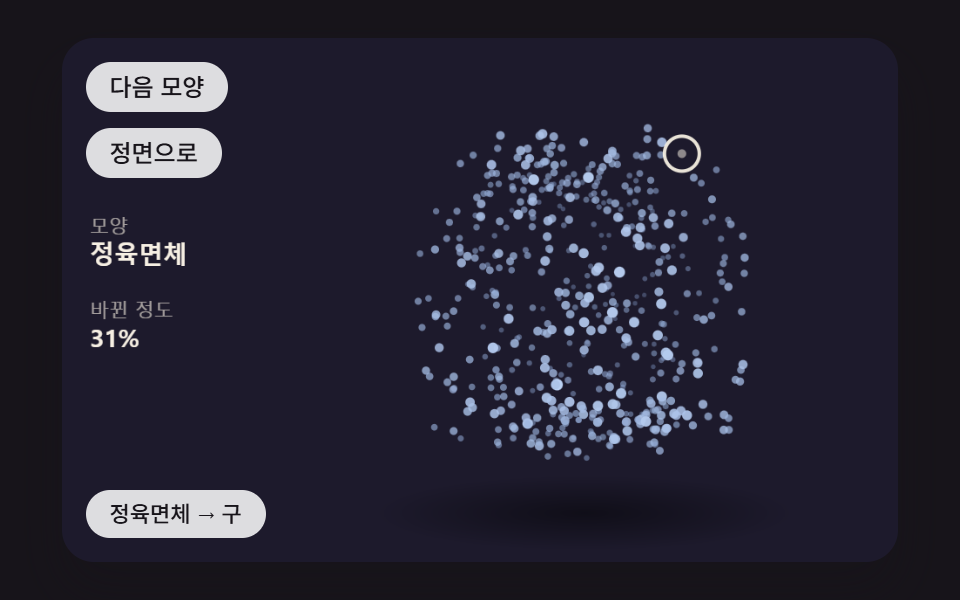
09点群が立方体・球・輪の形へ順に変わりながら回る場面
同じ数の点を三つの形の表面にそれぞれ取っておき、点ごとに組にして位置を補間し、形が変わるあいだにシードのノイズで舞うような揺れをのせ、ポインターで全体の視点を回す。
使いどころサービスの段階紹介・ストーリーの背景
MORPH_MSSHAPE_ORDERNOISE_AMP
<main class="stage">
<div class="pc is-demo" id="pc">
  <canvas class="pc__canvas" data-role="canvas" width="480" height="300" tabindex="0" aria-label="点群が立方体・球・輪の形へ順に変わりながら回る場面。矢印キーで視点を回し、Enter で次の形、1・2・3 で形を選びます"></canvas>
  <p class="pc__status" data-role="status" aria-live="off">立方体</p>
  <div class="pc__tools">
    <button class="pc__btn" data-role="next" type="button">次の形</button>
    <button class="pc__btn" data-role="home" type="button">正面へ</button>
  </div>
</div>
</main>
@use "../../../../site/static/demo-tokens" as *;
@include stage($stage-ink);
.pc {
position: relative;
width: min(92vw, calc(160vh - 12.8vw));
aspect-ratio: 480 / 300;
margin: 0 auto;
border-radius: $r-card;
overflow: hidden;
box-shadow: $shadow-raised;
background: $subject-ink;
}
.pc__canvas {
display: block;
width: 100%;
height: 100%;
cursor: crosshair;
}
.pc__canvas:focus-visible {
outline: 2px solid rgba(255, 255, 255, .85);
outline-offset: -6px;
}
.pc__status {
position: absolute;
left: $sp-3;
bottom: $sp-3;
box-sizing: border-box;
max-width: 34%;
margin: 0;
padding: $sp-1 $sp-3;
border-radius: $r-control;
background: rgba(255, 255, 255, .85);
color: $subject-ink;
font-weight: 500;
font-size: 11px;
line-height: 1.4;
pointer-events: none;
}
// 판은 오른쪽에 있다 — 버튼은 왼쪽 위 칸에 두고, 좁으면 줄을 바꿔 판을 덮지 않는다
.pc__tools {
position: absolute;
left: $sp-3;
top: $sp-3;
box-sizing: border-box;
max-width: 34%;
display: flex;
flex-wrap: wrap;
gap: $sp-2;
}
.pc__btn {
margin: 0;
padding: $sp-1 $sp-3;
border: 0;
border-radius: $r-pill;
background: rgba(255, 255, 255, .85);
color: $subject-ink;
font: inherit;
font-weight: 500;
font-size: 12px;
line-height: 1.4;
cursor: pointer;
transition: background-color $dur-quick ease-out;
}
.pc__btn:hover {
background: $subject-cream;
}
.pc__btn[aria-pressed="true"] {
background: $subject-mint;
}
.pc__btn:focus-visible {
outline: 2px solid rgba(255, 255, 255, .95);
outline-offset: 2px;
}
// 손가락 가로 끌기는 이 캔버스가 받고, 세로 쓸기는 브라우저에 남겨 페이지 스크롤이 막히지 않게 한다
.pc__canvas { touch-action: pan-y; }
@media (max-width: 340px) {
.pc__btn { font-size: 10px; padding: $sp-1 $sp-2; }
.pc__status { font-size: 10px; padding: $sp-1 $sp-2; }
}
@media (prefers-reduced-motion: reduce) {
.pc__btn { transition: none; }
}html, body {
margin: 0;
overflow: hidden;
}
.stage {
box-sizing: border-box;
min-height: 100vh;
display: grid;
place-items: center;
margin: 0;
background: #17141a;
font-family: -apple-system, "Segoe UI", "Noto Sans KR", sans-serif;
padding: clamp(8px, 4vw, 24px);
}
.pc {
position: relative;
width: min(92vw, 160vh - 12.8vw);
aspect-ratio: 480/300;
margin: 0 auto;
border-radius: 16px;
overflow: hidden;
box-shadow: 0 14px 24px rgba(23, 20, 26, 0.32);
background: #17141a;
}
.pc__canvas {
display: block;
width: 100%;
height: 100%;
cursor: crosshair;
}
.pc__canvas:focus-visible {
outline: 2px solid rgba(255, 255, 255, 0.85);
outline-offset: -6px;
}
.pc__status {
position: absolute;
left: 12px;
bottom: 12px;
box-sizing: border-box;
max-width: 34%;
margin: 0;
padding: 4px 12px;
border-radius: 12px;
background: rgba(255, 255, 255, 0.85);
color: #17141a;
font-weight: 500;
font-size: 11px;
line-height: 1.4;
pointer-events: none;
}
.pc__tools {
position: absolute;
left: 12px;
top: 12px;
box-sizing: border-box;
max-width: 34%;
display: flex;
flex-wrap: wrap;
gap: 8px;
}
.pc__btn {
margin: 0;
padding: 4px 12px;
border: 0;
border-radius: 999px;
background: rgba(255, 255, 255, 0.85);
color: #17141a;
font: inherit;
font-weight: 500;
font-size: 12px;
line-height: 1.4;
cursor: pointer;
transition: background-color 220ms ease-out;
}
.pc__btn:hover {
background: #fff7e6;
}
.pc__btn[aria-pressed=true] {
background: #4cd4a6;
}
.pc__btn:focus-visible {
outline: 2px solid rgba(255, 255, 255, 0.95);
outline-offset: 2px;
}
.pc__canvas {
touch-action: pan-y;
}
@media (max-width: 340px) {
.pc__btn {
font-size: 10px;
padding: 4px 8px;
}
.pc__status {
font-size: 10px;
padding: 4px 8px;
}
}
@media (prefers-reduced-motion: reduce) {
.pc__btn {
transition: none;
}
}(function () {
const root = document.getElementById("pc");
if (!root) return;
const W = 480;
const H = 300;
const FIXED_DT = 16;
const TAU = Math.PI * 2;
const DEG = Math.PI / 180;
// 모형 중심 — 왼쪽 위는 버튼, 왼쪽 아래는 상태 줄이라 모형은 오른쪽으로 비켜 둔다
const CX = 300;
const CY = 150;
// 파스텔 팔레트 — 어두운 무대 위에 밝은 조각을 얹어 명도 차로 경계가 읽힌다
const BG = [29, 26, 44];
const PANEL = [44, 39, 64];
const PAPER = [255, 248, 234];
const PAL = [
[124, 196, 255],
[255, 160, 190],
[126, 226, 192],
[190, 164, 255],
[255, 208, 168],
[246, 228, 140],
[150, 222, 236],
[232, 182, 228],
[196, 220, 160],
];
function clamp(v, lo, hi) { return v < lo ? lo : (v > hi ? hi : v); }
function lerp(a, b, k) { return a + (b - a) * k; }
function smooth(x) { const c = clamp(x, 0, 1); return c * c * (3 - 2 * c); }
function rgba(c, a) {
return 'rgba(' + Math.round(clamp(c[0], 0, 255)) + ',' + Math.round(clamp(c[1], 0, 255)) + ',' + Math.round(clamp(c[2], 0, 255)) + ',' + clamp(a, 0, 1).toFixed(3) + ')';
}
function mix(a, b, k) { return [lerp(a[0], b[0], k), lerp(a[1], b[1], k), lerp(a[2], b[2], k)]; }
function shadeRGB(c, k) { return [c[0] * k, c[1] * k, c[2] * k]; }
// 3차원 계산 — 화면 오른쪽이 +x, 아래가 +y, 화면 안쪽이 +z (화면 쪽을 보는 면은 법선 z 가 음수)
function vadd(a, b) { return [a[0] + b[0], a[1] + b[1], a[2] + b[2]]; }
function vsub(a, b) { return [a[0] - b[0], a[1] - b[1], a[2] - b[2]]; }
function vscale(a, k) { return [a[0] * k, a[1] * k, a[2] * k]; }
function dot(a, b) { return a[0] * b[0] + a[1] * b[1] + a[2] * b[2]; }
function cross(a, b) { return [a[1] * b[2] - a[2] * b[1], a[2] * b[0] - a[0] * b[2], a[0] * b[1] - a[1] * b[0]]; }
function vnorm(a) {
const l = Math.hypot(a[0], a[1], a[2]);
return l > 1e-9 ? [a[0] / l, a[1] / l, a[2] / l] : [0, 0, 0];
}
// 회전 행렬 — 가로축(x)·세로축(y)·깊이축(z) 둘레로 a 라디안
function rotX(a) { const c = Math.cos(a), s = Math.sin(a); return [1, 0, 0, 0, c, -s, 0, s, c]; }
function rotY(a) { const c = Math.cos(a), s = Math.sin(a); return [c, 0, s, 0, 1, 0, -s, 0, c]; }
function rotZ(a) { const c = Math.cos(a), s = Math.sin(a); return [c, -s, 0, s, c, 0, 0, 0, 1]; }
function matMul(a, b) {
return [
a[0] * b[0] + a[1] * b[3] + a[2] * b[6], a[0] * b[1] + a[1] * b[4] + a[2] * b[7], a[0] * b[2] + a[1] * b[5] + a[2] * b[8],
a[3] * b[0] + a[4] * b[3] + a[5] * b[6], a[3] * b[1] + a[4] * b[4] + a[5] * b[7], a[3] * b[2] + a[4] * b[5] + a[5] * b[8],
a[6] * b[0] + a[7] * b[3] + a[8] * b[6], a[6] * b[1] + a[7] * b[4] + a[8] * b[7], a[6] * b[2] + a[7] * b[5] + a[8] * b[8],
];
}
function apply(m, p) {
return [m[0] * p[0] + m[1] * p[1] + m[2] * p[2], m[3] * p[0] + m[4] * p[1] + m[5] * p[2], m[6] * p[0] + m[7] * p[1] + m[8] * p[2]];
}
// 회전 행렬의 역은 전치 — 화면 방향을 모형 좌표로 되돌릴 때 쓴다
function applyT(m, p) {
return [m[0] * p[0] + m[3] * p[1] + m[6] * p[2], m[1] * p[0] + m[4] * p[1] + m[7] * p[2], m[2] * p[0] + m[5] * p[1] + m[8] * p[2]];
}
// 시점 행렬 — 먼저 세로축으로 돌리고(yaw) 그다음 가로축으로 기울인다(pitch)
function viewMatrix(yaw, pitch) { return matMul(rotX(pitch), rotY(yaw)); }
// 원근 나눗셈 — 화면 배율 s = focal / (focal + z). 깊이 z 가 클수록(안쪽) 작아지고 가운데로 모인다
function project(p, focal) {
const s = focal / (focal + p[2]);
return { x: CX + p[0] * s, y: CY + p[1] * s, s: s, z: p[2] };
}
// 빛 — 왼쪽 위 앞에서 비춘다
const LIGHT = vnorm([-0.45, -0.62, -0.64]);
function lambert(n) { return Math.max(0, dot(n, LIGHT)); }
function makeView(yaw, pitch) { return { yaw: yaw, pitch: pitch, yawTo: yaw, pitchTo: pitch, yaw0: yaw, pitch0: pitch }; }
function viewFollow(v, k) {
v.yaw += (v.yawTo - v.yaw) * k;
v.pitch += (v.pitchTo - v.pitch) * k;
}
function viewSnap(v) { v.yaw = v.yawTo; v.pitch = v.pitchTo; }
function viewHome(v) { v.yawTo = v.yaw0; v.pitchTo = v.pitch0; }
function viewGap(v) { return Math.hypot(v.yawTo - v.yaw, v.pitchTo - v.pitch); }
// 포인터 → 목표 각. 모형 중심에서 가로로 벗어난 만큼 yaw, 세로로 벗어난 만큼 pitch (오른쪽을 가리키면 앞면이 오른쪽으로 돈다)
const YAW_RANGE = 1.1;
const PITCH_RANGE = 0.8;
function aimAt(v, px, py) {
v.yawTo = v.yaw0 - clamp((px - CX) / (W / 2), -1, 1) * YAW_RANGE;
v.pitchTo = v.pitch0 + clamp((py - CY) / (H / 2), -1, 1) * PITCH_RANGE;
}
// 방향키 한 번에 돌리는 각
const KEY_STEP = 0.3;
function arrowNudge(ev, v) {
if (ev.key === 'ArrowLeft') {
v.yawTo = clamp(v.yawTo + KEY_STEP, -Math.PI, Math.PI);
}
else if (ev.key === 'ArrowRight') {
v.yawTo = clamp(v.yawTo - KEY_STEP, -Math.PI, Math.PI);
}
else if (ev.key === 'ArrowUp') {
v.pitchTo = clamp(v.pitchTo - KEY_STEP, -1.3, 1.3);
}
else if (ev.key === 'ArrowDown') {
v.pitchTo = clamp(v.pitchTo + KEY_STEP, -1.3, 1.3);
}
else {
return false;
}
ev.preventDefault();
return true;
}
const canvasEl = root.querySelector('[data-role="canvas"]');
const statusEl = root.querySelector('[data-role="status"]');
const ctxRaw = canvasEl ? canvasEl.getContext('2d') : null;
if (!canvasEl || !ctxRaw || !statusEl) {
return;
}
const cv = canvasEl;
const ctx = ctxRaw;
const status = statusEl;
const reduceQuery = window.matchMedia('(prefers-reduced-motion: reduce)');
// 페이지를 연 채 동작 줄이기 설정을 바꿔도 tail 의 change 리스너가 이 값을 다시 읽는다
let still = reduceQuery.matches;
// 자동 시연 중인가 — 사람이 처음 만지는 순간 시연을 멈추고 상태 줄을 읽어 주기 시작한다
let demo = root.classList.contains('is-demo');
function wake() {
if (!demo) {
return;
}
demo = false;
root.classList.remove('is-demo');
status.setAttribute('aria-live', 'polite');
}
function say(text) {
if (status.textContent !== text) {
status.textContent = text;
}
}
function fitCanvas() {
// 배율은 2 에서 자른다 — 배율 3 기기에서 화소가 2.25배로 늘어 프레임마다 일이 그만큼 커지지 않게
const dpr = Math.min(window.devicePixelRatio || 1, 2);
cv.width = Math.round(W * dpr);
cv.height = Math.round(H * dpr);
ctx.setTransform(dpr, 0, 0, dpr, 0, 0);
}
function onResize() {
fitCanvas();
draw();
}
fitCanvas();
window.addEventListener('resize', onResize);
// 화면 좌표(CSS px) → 장면 좌표(480x300). 리사이즈 뒤에도 늘 현재 크기로 다시 잰다
function toScene(ev) {
const r = cv.getBoundingClientRect();
return [((ev.clientX - r.left) / r.width) * W, ((ev.clientY - r.top) / r.height) * H];
}
// 시드 고정 난수 — 같은 시드면 같은 배치가 다시 나온다 (32비트 정수 섞기)
function makeRng(seed) {
let s = seed >>> 0;
return function () {
s = (s + 0x6d2b79f5) >>> 0;
let t = s;
t = Math.imul(t ^ (t >>> 15), t | 1);
t ^= t + Math.imul(t ^ (t >>> 7), t | 61);
return ((t ^ (t >>> 14)) >>> 0) / 4294967296;
};
}
// 화면 투영된 다각형 칠하기
function fillPoly(pts, c, a) {
ctx.beginPath();
ctx.moveTo(pts[0].x, pts[0].y);
for (let i = 1; i < pts.length; i += 1) {
ctx.lineTo(pts[i].x, pts[i].y);
}
ctx.closePath();
ctx.fillStyle = rgba(c, a);
ctx.fill();
// 이웃 면 사이 머리카락 틈을 같은 색 얇은 선으로 메운다
ctx.strokeStyle = rgba(c, a);
ctx.lineWidth = 0.7;
ctx.stroke();
}
// 왼쪽 수치 한 줄 — 이름표 + 값
const LEG_X = 16;
function statRow(y, label, value) {
ctx.textBaseline = 'alphabetic';
ctx.textAlign = 'left';
ctx.fillStyle = rgba(PAPER, 0.6);
ctx.font = '500 11px sans-serif';
ctx.fillText(label, LEG_X, y);
ctx.fillStyle = rgba(PAPER, 0.96);
ctx.font = '700 14px sans-serif';
ctx.fillText(value, LEG_X, y + 17);
}
function clearStage() {
ctx.fillStyle = rgba(BG, 1);
ctx.fillRect(0, 0, W, H);
}
// 바닥 그림자 — 모형 아래 납작한 타원, 모형이 떠 있지 않고 놓여 보이게
function floorShadow(rx, y, a) {
const g = ctx.createRadialGradient(CX, y, 0, CX, y, rx);
g.addColorStop(0, rgba([0, 0, 0], a));
g.addColorStop(1, rgba([0, 0, 0], 0));
ctx.save();
ctx.translate(CX, y);
ctx.scale(1, 0.18);
ctx.translate(-CX, -y);
ctx.fillStyle = g;
ctx.beginPath();
ctx.arc(CX, y, rx, 0, TAU);
ctx.fill();
ctx.restore();
}
const ghost = { x: -1, y: -1, fx: 0, fy: 0, tx: 0, ty: 0, t0: 0, dur: 1, down: false };
function ghostGo(x, y, dur, t) {
ghost.fx = ghost.x < 0 ? x : ghost.x;
ghost.fy = ghost.y < 0 ? y : ghost.y;
ghost.tx = x;
ghost.ty = y;
ghost.t0 = t;
ghost.dur = Math.max(1, dur);
}
function ghostAt(t) {
const e = smooth((t - ghost.t0) / ghost.dur);
ghost.x = lerp(ghost.fx, ghost.tx, e);
ghost.y = lerp(ghost.fy, ghost.ty, e);
}
function drawGhost() {
if (!demo || ghost.x < 0) {
return;
}
ctx.strokeStyle = rgba(PAPER, 0.9);
ctx.lineWidth = 2;
ctx.beginPath();
ctx.arc(ghost.x, ghost.y, ghost.down ? 7 : 10, 0, TAU);
ctx.stroke();
ctx.fillStyle = rgba(PAPER, ghost.down ? 0.9 : 0.5);
ctx.beginPath();
ctx.arc(ghost.x, ghost.y, ghost.down ? 4 : 2.5, 0, TAU);
ctx.fill();
}
// 시연 일정 — 루프 안의 시각(ms) 표를 지날 때마다 한 번씩 부른다
let schedCycle = -1;
let schedIdx = 0;
function runSchedule(t, loop, marks, fire) {
const cyc = Math.floor(t / loop);
const p = t - cyc * loop;
if (cyc !== schedCycle) {
schedCycle = cyc;
schedIdx = 0;
}
while (schedIdx < marks.length && p >= marks[schedIdx]) {
fire(schedIdx, cyc);
schedIdx += 1;
}
}
function fmt(v, d) { return v.toFixed(d); }
// 한 모양에서 다음 모양으로 바뀌는 시간(ms)
const MORPH_MS = 900;
const SHAPE_ORDER = ['cube', 'sphere', 'torus'];
// 바뀌는 사이에 얹는 흔들림 최대 폭(px) — 가운데(진행 50%)에서 가장 크다
const NOISE_AMP = 14;
// 점 개수 — 세 모양이 같은 개수라 i 번째 점끼리 짝이 된다
const N = 520;
const SIZE = 92;
const FOCAL = 560;
const VIEW_LERP = 0.07;
// 저절로 도는 빠르기(rad/s)
const SPIN = 0.45;
// 노이즈 마디 간격(ms) — 마디마다 새 값, 사이는 부드럽게 잇는다
const NOISE_STEP = 140;
const DEMO_LOOP = 2000;
const SHAPE_LABEL = { cube: '立方体', sphere: '球', torus: '輪' };
const SHAPE_COL = { cube: PAL[0], sphere: PAL[7], torus: PAL[2] };
const homeBtn = root.querySelector('[data-role="home"]');
const nextBtn = root.querySelector('[data-role="next"]');
// 모양마다 시드 고정으로 표면 점을 뽑고 높이(y)순으로 줄 세운다 — i 번째 점끼리 높이가 비슷해 옆으로만 옮겨 간다
function sample(name, seed) {
const rnd = makeRng(seed);
const out = [];
for (let i = 0; i < N; i += 1) {
if (name === 'cube') {
const f = Math.floor(rnd() * 6);
const u = rnd() * 2 - 1, v = rnd() * 2 - 1, s = f % 2 ? 1 : -1;
const a = SIZE * 0.78;
out.push(f < 2 ? [u * a, v * a, s * a] : (f < 4 ? [s * a, u * a, v * a] : [u * a, s * a, v * a]));
}
else if (name === 'sphere') {
const y = 1 - (2 * (i + 0.5)) / N;
const r = Math.sqrt(1 - y * y);
const th = i * Math.PI * (3 - Math.sqrt(5));
out.push([r * Math.cos(th) * SIZE, y * SIZE, r * Math.sin(th) * SIZE]);
}
else {
const u = rnd() * TAU, v = rnd() * TAU;
const big = SIZE * 0.8, small = SIZE * 0.3;
out.push([(big + small * Math.cos(v)) * Math.cos(u), small * Math.sin(v), (big + small * Math.cos(v)) * Math.sin(u)]);
}
}
out.sort(function (a, b) { return a[1] - b[1]; });
return out;
}
const SHAPES = SHAPE_ORDER.map(function (n, i) { return sample(n, 468 + i * 101); });
// 점마다 정수 해시 → −1 ~ 1. 같은 점·같은 마디면 늘 같은 값
function hash(i, k) {
let h = Math.imul(i, 374761393) ^ Math.imul(k, 668265263);
h = Math.imul(h ^ (h >>> 13), 1274126177);
return (((h ^ (h >>> 16)) >>> 0) / 4294967296) * 2 - 1;
}
// 값 노이즈 — 마디 값 둘을 smoothstep 으로 잇는다
function noise(i, ms) {
const x = ms / NOISE_STEP;
const k = Math.floor(x);
return lerp(hash(i, k), hash(i, k + 1), smooth(x - k));
}
const view = makeView(0.3, 0.35);
let spin = 0;
let cur = 0;
let next = 1;
let morphMs = -1;
let noiseClock = 0;
let pointerIn = false;
function easeInOutCubic(x) { const c = clamp(x, 0, 1); return c < 0.5 ? 4 * c * c * c : 1 - Math.pow(-2 * c + 2, 3) / 2; }
function progress() { return morphMs < 0 ? 0 : easeInOutCubic(morphMs / MORPH_MS); }
function report() {
say(morphMs >= 0 ? SHAPE_LABEL[SHAPE_ORDER[cur]] + ' → ' + SHAPE_LABEL[SHAPE_ORDER[next]] : SHAPE_LABEL[SHAPE_ORDER[cur]]);
}
function startMorph(to) {
if (morphMs >= 0) {
cur = next;
}
next = to;
morphMs = 0;
}
function step() {
viewFollow(view, VIEW_LERP);
spin += SPIN * FIXED_DT / 1000;
noiseClock += FIXED_DT;
if (morphMs >= 0) {
morphMs += FIXED_DT;
if (morphMs >= MORPH_MS) {
cur = next;
next = (cur + 1) % SHAPE_ORDER.length;
morphMs = -1;
report();
}
}
}
function settle() {
viewSnap(view);
if (morphMs >= 0) {
cur = next;
next = (cur + 1) % SHAPE_ORDER.length;
morphMs = -1;
}
}
function demoTick(t) {
runSchedule(t, DEMO_LOOP, [200, 1100], function (k) {
// 바뀌는 중이면 도착할 모양의 다음으로 — 출발점과 도착점이 같아지지 않게
startMorph(((morphMs >= 0 ? next : cur) + 1) % SHAPE_ORDER.length);
if (k === 0) {
ghostGo(430, 80, 500, t);
}
else {
ghostGo(190, 230, 500, t);
}
report();
});
ghostAt(t);
aimAt(view, ghost.x, ghost.y);
}
function draw() {
clearStage();
floorShadow(120, 272, 0.45);
const m = matMul(viewMatrix(view.yaw, view.pitch), rotY(spin));
const e = progress();
const a = SHAPES[cur], b = SHAPES[next];
// 흔들림은 출발·도착에서 0, 가운데에서 NOISE_AMP — sin(π·진행률)
const amp = morphMs < 0 ? 0 : NOISE_AMP * Math.sin(Math.PI * e);
const col = mix(SHAPE_COL[SHAPE_ORDER[cur]], SHAPE_COL[SHAPE_ORDER[next]], e);
for (let i = 0; i < N; i += 1) {
let p = [lerp(a[i][0], b[i][0], e), lerp(a[i][1], b[i][1], e), lerp(a[i][2], b[i][2], e)];
if (amp > 0) {
p = vadd(p, vscale([noise(i, noiseClock), noise(i + 7919, noiseClock), noise(i + 15881, noiseClock)], amp));
}
const q = project(apply(m, p), FOCAL);
const t = clamp((q.z + SIZE) / (2 * SIZE), 0, 1);
ctx.fillStyle = rgba(mix(mix(col, PAPER, 0.3 * (1 - t)), BG, 0.25 * t), 1 - 0.65 * t);
ctx.beginPath();
ctx.arc(q.x, q.y, (2.7 - 1.3 * t) * q.s, 0, TAU);
ctx.fill();
}
statRow(112, '形', SHAPE_LABEL[SHAPE_ORDER[morphMs >= 0 && e > 0.5 ? next : cur]]);
statRow(160, '変わった度合い', fmt(e * 100, 0) + '%');
drawGhost();
}
function after() {
if (still) {
settle();
}
report();
draw();
}
function goNext() { startMorph((morphMs >= 0 ? next + 1 : cur + 1) % SHAPE_ORDER.length); after(); }
function goShape(i) {
if (i === cur && morphMs < 0) {
return;
}
startMorph(i);
after();
}
cv.addEventListener('pointermove', function (ev) {
wake();
pointerIn = true;
const p = toScene(ev);
aimAt(view, p[0], p[1]);
after();
});
cv.addEventListener('pointerleave', function () {
if (!pointerIn) {
return;
}
pointerIn = false;
viewHome(view);
after();
});
cv.addEventListener('pointerdown', function () { wake(); goNext(); });
cv.addEventListener('keydown', function (ev) {
if (arrowNudge(ev, view)) {
wake();
after();
return;
}
if (ev.key === 'Enter' || ev.key === ' ') {
ev.preventDefault();
wake();
goNext();
}
else if (ev.key === '1' || ev.key === '2' || ev.key === '3') {
ev.preventDefault();
wake();
goShape(Number(ev.key) - 1);
}
else if (ev.key === 'Escape') {
ev.preventDefault();
wake();
viewHome(view);
after();
}
});
if (homeBtn) {
homeBtn.addEventListener('click', function () { wake(); viewHome(view); after(); });
}
if (nextBtn) {
nextBtn.addEventListener('click', function () { wake(); goNext(); });
}
report();
let rafId = 0;
let lastTs = -1;
let acc = 0;
let clock = 0;
function frame(ts) {
if (still) {
rafId = 0;
return;
}
if (lastTs < 0) {
lastTs = ts;
}
// 탭이 숨었다 돌아와도 한 번에 100ms 까지만 따라잡는다 — 순간이동 대신 이어서 움직인다
acc += Math.min(ts - lastTs, 100);
lastTs = ts;
let n = 0;
while (acc >= FIXED_DT && n < 6) {
clock += FIXED_DT;
if (demo) {
demoTick(clock);
}
step();
acc -= FIXED_DT;
n += 1;
}
draw();
rafId = window.requestAnimationFrame(frame);
}
function startLoop() {
if (rafId) {
return;
}
lastTs = -1;
acc = 0;
rafId = window.requestAnimationFrame(frame);
}
// 동작 줄이기 설정이 페이지를 연 채 바뀌면 — 켜지면 루프를 멈추고 끝 상태로, 꺼지면 루프를 다시 돈다
function onMotionPref() {
still = reduceQuery.matches;
if (still) {
if (rafId) {
window.cancelAnimationFrame(rafId);
rafId = 0;
}
settle();
report();
draw();
}
else {
startLoop();
}
}
if (typeof reduceQuery.addEventListener === 'function') {
reduceQuery.addEventListener('change', onMotionPref);
}
if (still) {
settle();
draw();
}
else {
startLoop();
}
return function () {
window.cancelAnimationFrame(rafId);
window.removeEventListener('resize', onResize);
if (typeof reduceQuery.removeEventListener === 'function') {
reduceQuery.removeEventListener('change', onMotionPref);
}
};
})();// PointMorphShapes - vanilla 판(09-model3d-point-morph-shapes) 의 React 포트. 같은 계산을 useEffect 안에서 돌린다.
import { useEffect, useRef } from "react";
import styles from "./PointMorphShapes.module.scss";
const cx = (s: string): string => s.split(" ").map((n) => styles[n] ?? n).join(" ");
export default function PointMorphShapes() {
const rootRef = useRef<HTMLDivElement | null>(null);
useEffect(() => {
const rootEl = rootRef.current;
if (!rootEl) return;
const root: HTMLElement = rootEl;
type RGB = [number, number, number];
type V3 = [number, number, number];
type M3 = [number, number, number, number, number, number, number, number, number];
const W = 480;
const H = 300;
const FIXED_DT = 16;
const TAU = Math.PI * 2;
const DEG = Math.PI / 180;
// 모형 중심 — 왼쪽 위는 버튼, 왼쪽 아래는 상태 줄이라 모형은 오른쪽으로 비켜 둔다
const CX = 300;
const CY = 150;
// 파스텔 팔레트 — 어두운 무대 위에 밝은 조각을 얹어 명도 차로 경계가 읽힌다
const BG: RGB = [29, 26, 44];
const PANEL: RGB = [44, 39, 64];
const PAPER: RGB = [255, 248, 234];
const PAL: RGB[] = [
[124, 196, 255],
[255, 160, 190],
[126, 226, 192],
[190, 164, 255],
[255, 208, 168],
[246, 228, 140],
[150, 222, 236],
[232, 182, 228],
[196, 220, 160],
];
function clamp(v: number, lo: number, hi: number): number { return v < lo ? lo : (v > hi ? hi : v); }
function lerp(a: number, b: number, k: number): number { return a + (b - a) * k; }
function smooth(x: number): number { const c = clamp(x, 0, 1); return c * c * (3 - 2 * c); }
function rgba(c: RGB, a: number): string {
return 'rgba(' + Math.round(clamp(c[0], 0, 255)) + ',' + Math.round(clamp(c[1], 0, 255)) + ',' + Math.round(clamp(c[2], 0, 255)) + ',' + clamp(a, 0, 1).toFixed(3) + ')';
}
function mix(a: RGB, b: RGB, k: number): RGB { return [lerp(a[0], b[0], k), lerp(a[1], b[1], k), lerp(a[2], b[2], k)]; }
function shadeRGB(c: RGB, k: number): RGB { return [c[0] * k, c[1] * k, c[2] * k]; }
// 3차원 계산 — 화면 오른쪽이 +x, 아래가 +y, 화면 안쪽이 +z (화면 쪽을 보는 면은 법선 z 가 음수)
function vadd(a: V3, b: V3): V3 { return [a[0] + b[0], a[1] + b[1], a[2] + b[2]]; }
function vsub(a: V3, b: V3): V3 { return [a[0] - b[0], a[1] - b[1], a[2] - b[2]]; }
function vscale(a: V3, k: number): V3 { return [a[0] * k, a[1] * k, a[2] * k]; }
function dot(a: V3, b: V3): number { return a[0] * b[0] + a[1] * b[1] + a[2] * b[2]; }
function cross(a: V3, b: V3): V3 { return [a[1] * b[2] - a[2] * b[1], a[2] * b[0] - a[0] * b[2], a[0] * b[1] - a[1] * b[0]]; }
function vnorm(a: V3): V3 {
const l = Math.hypot(a[0], a[1], a[2]);
return l > 1e-9 ? [a[0] / l, a[1] / l, a[2] / l] : [0, 0, 0];
}
// 회전 행렬 — 가로축(x)·세로축(y)·깊이축(z) 둘레로 a 라디안
function rotX(a: number): M3 { const c = Math.cos(a), s = Math.sin(a); return [1, 0, 0, 0, c, -s, 0, s, c]; }
function rotY(a: number): M3 { const c = Math.cos(a), s = Math.sin(a); return [c, 0, s, 0, 1, 0, -s, 0, c]; }
function rotZ(a: number): M3 { const c = Math.cos(a), s = Math.sin(a); return [c, -s, 0, s, c, 0, 0, 0, 1]; }
function matMul(a: M3, b: M3): M3 {
return [
a[0] * b[0] + a[1] * b[3] + a[2] * b[6], a[0] * b[1] + a[1] * b[4] + a[2] * b[7], a[0] * b[2] + a[1] * b[5] + a[2] * b[8],
a[3] * b[0] + a[4] * b[3] + a[5] * b[6], a[3] * b[1] + a[4] * b[4] + a[5] * b[7], a[3] * b[2] + a[4] * b[5] + a[5] * b[8],
a[6] * b[0] + a[7] * b[3] + a[8] * b[6], a[6] * b[1] + a[7] * b[4] + a[8] * b[7], a[6] * b[2] + a[7] * b[5] + a[8] * b[8],
];
}
function apply(m: M3, p: V3): V3 {
return [m[0] * p[0] + m[1] * p[1] + m[2] * p[2], m[3] * p[0] + m[4] * p[1] + m[5] * p[2], m[6] * p[0] + m[7] * p[1] + m[8] * p[2]];
}
// 회전 행렬의 역은 전치 — 화면 방향을 모형 좌표로 되돌릴 때 쓴다
function applyT(m: M3, p: V3): V3 {
return [m[0] * p[0] + m[3] * p[1] + m[6] * p[2], m[1] * p[0] + m[4] * p[1] + m[7] * p[2], m[2] * p[0] + m[5] * p[1] + m[8] * p[2]];
}
// 시점 행렬 — 먼저 세로축으로 돌리고(yaw) 그다음 가로축으로 기울인다(pitch)
function viewMatrix(yaw: number, pitch: number): M3 { return matMul(rotX(pitch), rotY(yaw)); }
type Proj = { x: number; y: number; s: number; z: number };
// 원근 나눗셈 — 화면 배율 s = focal / (focal + z). 깊이 z 가 클수록(안쪽) 작아지고 가운데로 모인다
function project(p: V3, focal: number): Proj {
const s = focal / (focal + p[2]);
return { x: CX + p[0] * s, y: CY + p[1] * s, s: s, z: p[2] };
}
// 빛 — 왼쪽 위 앞에서 비춘다
const LIGHT: V3 = vnorm([-0.45, -0.62, -0.64]);
function lambert(n: V3): number { return Math.max(0, dot(n, LIGHT)); }
// 시점 추종 — 포인터가 정한 목표 각을 매 스텝 남은 차의 k 만큼 따라간다
type View = { yaw: number; pitch: number; yawTo: number; pitchTo: number; yaw0: number; pitch0: number };
function makeView(yaw: number, pitch: number): View { return { yaw: yaw, pitch: pitch, yawTo: yaw, pitchTo: pitch, yaw0: yaw, pitch0: pitch }; }
function viewFollow(v: View, k: number): void {
v.yaw += (v.yawTo - v.yaw) * k;
v.pitch += (v.pitchTo - v.pitch) * k;
}
function viewSnap(v: View): void { v.yaw = v.yawTo; v.pitch = v.pitchTo; }
function viewHome(v: View): void { v.yawTo = v.yaw0; v.pitchTo = v.pitch0; }
function viewGap(v: View): number { return Math.hypot(v.yawTo - v.yaw, v.pitchTo - v.pitch); }
// 포인터 → 목표 각. 모형 중심에서 가로로 벗어난 만큼 yaw, 세로로 벗어난 만큼 pitch (오른쪽을 가리키면 앞면이 오른쪽으로 돈다)
const YAW_RANGE = 1.1;
const PITCH_RANGE = 0.8;
function aimAt(v: View, px: number, py: number): void {
v.yawTo = v.yaw0 - clamp((px - CX) / (W / 2), -1, 1) * YAW_RANGE;
v.pitchTo = v.pitch0 + clamp((py - CY) / (H / 2), -1, 1) * PITCH_RANGE;
}
// 방향키 한 번에 돌리는 각
const KEY_STEP = 0.3;
function arrowNudge(ev: KeyboardEvent, v: View): boolean {
if (ev.key === 'ArrowLeft') { v.yawTo = clamp(v.yawTo + KEY_STEP, -Math.PI, Math.PI); }
else if (ev.key === 'ArrowRight') { v.yawTo = clamp(v.yawTo - KEY_STEP, -Math.PI, Math.PI); }
else if (ev.key === 'ArrowUp') { v.pitchTo = clamp(v.pitchTo - KEY_STEP, -1.3, 1.3); }
else if (ev.key === 'ArrowDown') { v.pitchTo = clamp(v.pitchTo + KEY_STEP, -1.3, 1.3); }
else { return false; }
ev.preventDefault();
return true;
}
const canvasEl = root.querySelector('[data-role="canvas"]') as HTMLCanvasElement | null;
const statusEl = root.querySelector('[data-role="status"]') as HTMLElement | null;
const ctxRaw = canvasEl ? canvasEl.getContext('2d') : null;
if (!canvasEl || !ctxRaw || !statusEl) { return; }
const cv: HTMLCanvasElement = canvasEl;
const ctx: CanvasRenderingContext2D = ctxRaw;
const status: HTMLElement = statusEl;
const reduceQuery = window.matchMedia('(prefers-reduced-motion: reduce)');
// 페이지를 연 채 동작 줄이기 설정을 바꿔도 tail 의 change 리스너가 이 값을 다시 읽는다
let still = reduceQuery.matches;
// 자동 시연 중인가 — 사람이 처음 만지는 순간 시연을 멈추고 상태 줄을 읽어 주기 시작한다
let demo = root.classList.contains('is-demo');
function wake(): void {
if (!demo) { return; }
demo = false;
root.classList.remove('is-demo');
status.setAttribute('aria-live', 'polite');
}
function say(text: string): void {
if (status.textContent !== text) { status.textContent = text; }
}
function fitCanvas(): void {
// 배율은 2 에서 자른다 — 배율 3 기기에서 화소가 2.25배로 늘어 프레임마다 일이 그만큼 커지지 않게
const dpr = Math.min(window.devicePixelRatio || 1, 2);
cv.width = Math.round(W * dpr);
cv.height = Math.round(H * dpr);
ctx.setTransform(dpr, 0, 0, dpr, 0, 0);
}
function onResize(): void {
fitCanvas();
draw();
}
fitCanvas();
window.addEventListener('resize', onResize);
// 화면 좌표(CSS px) → 장면 좌표(480x300). 리사이즈 뒤에도 늘 현재 크기로 다시 잰다
function toScene(ev: PointerEvent): [number, number] {
const r = cv.getBoundingClientRect();
return [((ev.clientX - r.left) / r.width) * W, ((ev.clientY - r.top) / r.height) * H];
}
// 시드 고정 난수 — 같은 시드면 같은 배치가 다시 나온다 (32비트 정수 섞기)
function makeRng(seed: number): () => number {
let s = seed >>> 0;
return function (): number {
s = (s + 0x6d2b79f5) >>> 0;
let t = s;
t = Math.imul(t ^ (t >>> 15), t | 1);
t ^= t + Math.imul(t ^ (t >>> 7), t | 61);
return ((t ^ (t >>> 14)) >>> 0) / 4294967296;
};
}
// 화면 투영된 다각형 칠하기
function fillPoly(pts: Proj[], c: RGB, a: number): void {
ctx.beginPath();
ctx.moveTo(pts[0].x, pts[0].y);
for (let i = 1; i < pts.length; i += 1) { ctx.lineTo(pts[i].x, pts[i].y); }
ctx.closePath();
ctx.fillStyle = rgba(c, a);
ctx.fill();
// 이웃 면 사이 머리카락 틈을 같은 색 얇은 선으로 메운다
ctx.strokeStyle = rgba(c, a);
ctx.lineWidth = 0.7;
ctx.stroke();
}
// 왼쪽 수치 한 줄 — 이름표 + 값
const LEG_X = 16;
function statRow(y: number, label: string, value: string): void {
ctx.textBaseline = 'alphabetic';
ctx.textAlign = 'left';
ctx.fillStyle = rgba(PAPER, 0.6);
ctx.font = '500 11px sans-serif';
ctx.fillText(label, LEG_X, y);
ctx.fillStyle = rgba(PAPER, 0.96);
ctx.font = '700 14px sans-serif';
ctx.fillText(value, LEG_X, y + 17);
}
function clearStage(): void {
ctx.fillStyle = rgba(BG, 1);
ctx.fillRect(0, 0, W, H);
}
// 바닥 그림자 — 모형 아래 납작한 타원, 모형이 떠 있지 않고 놓여 보이게
function floorShadow(rx: number, y: number, a: number): void {
const g = ctx.createRadialGradient(CX, y, 0, CX, y, rx);
g.addColorStop(0, rgba([0, 0, 0], a));
g.addColorStop(1, rgba([0, 0, 0], 0));
ctx.save();
ctx.translate(CX, y);
ctx.scale(1, 0.18);
ctx.translate(-CX, -y);
ctx.fillStyle = g;
ctx.beginPath();
ctx.arc(CX, y, rx, 0, TAU);
ctx.fill();
ctx.restore();
}
// 시연용 가상 포인터 — 시연 동안만 고리로 그려 무엇이 모형을 움직이는지 보이게 한다
type Ghost = { x: number; y: number; fx: number; fy: number; tx: number; ty: number; t0: number; dur: number; down: boolean };
const ghost: Ghost = { x: -1, y: -1, fx: 0, fy: 0, tx: 0, ty: 0, t0: 0, dur: 1, down: false };
function ghostGo(x: number, y: number, dur: number, t: number): void {
ghost.fx = ghost.x < 0 ? x : ghost.x;
ghost.fy = ghost.y < 0 ? y : ghost.y;
ghost.tx = x;
ghost.ty = y;
ghost.t0 = t;
ghost.dur = Math.max(1, dur);
}
function ghostAt(t: number): void {
const e = smooth((t - ghost.t0) / ghost.dur);
ghost.x = lerp(ghost.fx, ghost.tx, e);
ghost.y = lerp(ghost.fy, ghost.ty, e);
}
function drawGhost(): void {
if (!demo || ghost.x < 0) { return; }
ctx.strokeStyle = rgba(PAPER, 0.9);
ctx.lineWidth = 2;
ctx.beginPath();
ctx.arc(ghost.x, ghost.y, ghost.down ? 7 : 10, 0, TAU);
ctx.stroke();
ctx.fillStyle = rgba(PAPER, ghost.down ? 0.9 : 0.5);
ctx.beginPath();
ctx.arc(ghost.x, ghost.y, ghost.down ? 4 : 2.5, 0, TAU);
ctx.fill();
}
// 시연 일정 — 루프 안의 시각(ms) 표를 지날 때마다 한 번씩 부른다
let schedCycle = -1;
let schedIdx = 0;
function runSchedule(t: number, loop: number, marks: number[], fire: (k: number, cycle: number) => void): void {
const cyc = Math.floor(t / loop);
const p = t - cyc * loop;
if (cyc !== schedCycle) { schedCycle = cyc; schedIdx = 0; }
while (schedIdx < marks.length && p >= marks[schedIdx]) {
fire(schedIdx, cyc);
schedIdx += 1;
}
}
function fmt(v: number, d: number): string { return v.toFixed(d); }
// 한 모양에서 다음 모양으로 바뀌는 시간(ms)
const MORPH_MS = 900;
// 바뀌는 차례 — 정육면체 → 구 → 고리 → 다시 정육면체
type ShapeName = 'cube' | 'sphere' | 'torus';
const SHAPE_ORDER: ShapeName[] = ['cube', 'sphere', 'torus'];
// 바뀌는 사이에 얹는 흔들림 최대 폭(px) — 가운데(진행 50%)에서 가장 크다
const NOISE_AMP = 14;
// 점 개수 — 세 모양이 같은 개수라 i 번째 점끼리 짝이 된다
const N = 520;
const SIZE = 92;
const FOCAL = 560;
const VIEW_LERP = 0.07;
// 저절로 도는 빠르기(rad/s)
const SPIN = 0.45;
// 노이즈 마디 간격(ms) — 마디마다 새 값, 사이는 부드럽게 잇는다
const NOISE_STEP = 140;
const DEMO_LOOP = 2000;
const SHAPE_LABEL: { [k in ShapeName]: string } = { cube: '정육면체', sphere: '구', torus: '고리' };
const SHAPE_COL: { [k in ShapeName]: RGB } = { cube: PAL[0], sphere: PAL[7], torus: PAL[2] };
const homeBtn = root.querySelector('[data-role="home"]') as HTMLButtonElement | null;
const nextBtn = root.querySelector('[data-role="next"]') as HTMLButtonElement | null;
// 모양마다 시드 고정으로 표면 점을 뽑고 높이(y)순으로 줄 세운다 — i 번째 점끼리 높이가 비슷해 옆으로만 옮겨 간다
function sample(name: ShapeName, seed: number): V3[] {
const rnd = makeRng(seed);
const out: V3[] = [];
for (let i = 0; i < N; i += 1) {
if (name === 'cube') {
const f = Math.floor(rnd() * 6);
const u = rnd() * 2 - 1, v = rnd() * 2 - 1, s = f % 2 ? 1 : -1;
const a = SIZE * 0.78;
out.push(f < 2 ? [u * a, v * a, s * a] : (f < 4 ? [s * a, u * a, v * a] : [u * a, s * a, v * a]));
} else if (name === 'sphere') {
const y = 1 - (2 * (i + 0.5)) / N;
const r = Math.sqrt(1 - y * y);
const th = i * Math.PI * (3 - Math.sqrt(5));
out.push([r * Math.cos(th) * SIZE, y * SIZE, r * Math.sin(th) * SIZE]);
} else {
const u = rnd() * TAU, v = rnd() * TAU;
const big = SIZE * 0.8, small = SIZE * 0.3;
out.push([(big + small * Math.cos(v)) * Math.cos(u), small * Math.sin(v), (big + small * Math.cos(v)) * Math.sin(u)]);
}
}
out.sort(function (a: V3, b: V3): number { return a[1] - b[1]; });
return out;
}
const SHAPES: V3[][] = SHAPE_ORDER.map(function (n: ShapeName, i: number): V3[] { return sample(n, 468 + i * 101); });
// 점마다 정수 해시 → −1 ~ 1. 같은 점·같은 마디면 늘 같은 값
function hash(i: number, k: number): number {
let h = Math.imul(i, 374761393) ^ Math.imul(k, 668265263);
h = Math.imul(h ^ (h >>> 13), 1274126177);
return (((h ^ (h >>> 16)) >>> 0) / 4294967296) * 2 - 1;
}
// 값 노이즈 — 마디 값 둘을 smoothstep 으로 잇는다
function noise(i: number, ms: number): number {
const x = ms / NOISE_STEP;
const k = Math.floor(x);
return lerp(hash(i, k), hash(i, k + 1), smooth(x - k));
}
const view = makeView(0.3, 0.35);
let spin = 0;
let cur = 0;
let next = 1;
let morphMs = -1;
let noiseClock = 0;
let pointerIn = false;
function easeInOutCubic(x: number): number { const c = clamp(x, 0, 1); return c < 0.5 ? 4 * c * c * c : 1 - Math.pow(-2 * c + 2, 3) / 2; }
function progress(): number { return morphMs < 0 ? 0 : easeInOutCubic(morphMs / MORPH_MS); }
function report(): void {
say(morphMs >= 0 ? SHAPE_LABEL[SHAPE_ORDER[cur]] + ' → ' + SHAPE_LABEL[SHAPE_ORDER[next]] : SHAPE_LABEL[SHAPE_ORDER[cur]]);
}
function startMorph(to: number): void {
if (morphMs >= 0) { cur = next; }
next = to;
morphMs = 0;
}
function step(): void {
viewFollow(view, VIEW_LERP);
spin += SPIN * FIXED_DT / 1000;
noiseClock += FIXED_DT;
if (morphMs >= 0) {
morphMs += FIXED_DT;
if (morphMs >= MORPH_MS) { cur = next; next = (cur + 1) % SHAPE_ORDER.length; morphMs = -1; report(); }
}
}
function settle(): void {
viewSnap(view);
if (morphMs >= 0) { cur = next; next = (cur + 1) % SHAPE_ORDER.length; morphMs = -1; }
}
function demoTick(t: number): void {
runSchedule(t, DEMO_LOOP, [200, 1100], function (k: number): void {
// 바뀌는 중이면 도착할 모양의 다음으로 — 출발점과 도착점이 같아지지 않게
startMorph(((morphMs >= 0 ? next : cur) + 1) % SHAPE_ORDER.length);
if (k === 0) { ghostGo(430, 80, 500, t); } else { ghostGo(190, 230, 500, t); }
report();
});
ghostAt(t);
aimAt(view, ghost.x, ghost.y);
}
function draw(): void {
clearStage();
floorShadow(120, 272, 0.45);
const m = matMul(viewMatrix(view.yaw, view.pitch), rotY(spin));
const e = progress();
const a = SHAPES[cur], b = SHAPES[next];
// 흔들림은 출발·도착에서 0, 가운데에서 NOISE_AMP — sin(π·진행률)
const amp = morphMs < 0 ? 0 : NOISE_AMP * Math.sin(Math.PI * e);
const col = mix(SHAPE_COL[SHAPE_ORDER[cur]], SHAPE_COL[SHAPE_ORDER[next]], e);
for (let i = 0; i < N; i += 1) {
let p: V3 = [lerp(a[i][0], b[i][0], e), lerp(a[i][1], b[i][1], e), lerp(a[i][2], b[i][2], e)];
if (amp > 0) { p = vadd(p, vscale([noise(i, noiseClock), noise(i + 7919, noiseClock), noise(i + 15881, noiseClock)], amp)); }
const q = project(apply(m, p), FOCAL);
const t = clamp((q.z + SIZE) / (2 * SIZE), 0, 1);
ctx.fillStyle = rgba(mix(mix(col, PAPER, 0.3 * (1 - t)), BG, 0.25 * t), 1 - 0.65 * t);
ctx.beginPath();
ctx.arc(q.x, q.y, (2.7 - 1.3 * t) * q.s, 0, TAU);
ctx.fill();
}
statRow(112, '모양', SHAPE_LABEL[SHAPE_ORDER[morphMs >= 0 && e > 0.5 ? next : cur]]);
statRow(160, '바뀐 정도', fmt(e * 100, 0) + '%');
drawGhost();
}
function after(): void {
if (still) { settle(); }
report();
draw();
}
function goNext(): void { startMorph((morphMs >= 0 ? next + 1 : cur + 1) % SHAPE_ORDER.length); after(); }
function goShape(i: number): void {
if (i === cur && morphMs < 0) { return; }
startMorph(i);
after();
}
cv.addEventListener('pointermove', function (ev: PointerEvent): void {
wake();
pointerIn = true;
const p = toScene(ev);
aimAt(view, p[0], p[1]);
after();
});
cv.addEventListener('pointerleave', function (): void {
if (!pointerIn) { return; }
pointerIn = false;
viewHome(view);
after();
});
cv.addEventListener('pointerdown', function (): void { wake(); goNext(); });
cv.addEventListener('keydown', function (ev: KeyboardEvent): void {
if (arrowNudge(ev, view)) { wake(); after(); return; }
if (ev.key === 'Enter' || ev.key === ' ') { ev.preventDefault(); wake(); goNext(); }
else if (ev.key === '1' || ev.key === '2' || ev.key === '3') { ev.preventDefault(); wake(); goShape(Number(ev.key) - 1); }
else if (ev.key === 'Escape') { ev.preventDefault(); wake(); viewHome(view); after(); }
});
if (homeBtn) { homeBtn.addEventListener('click', function (): void { wake(); viewHome(view); after(); }); }
if (nextBtn) { nextBtn.addEventListener('click', function (): void { wake(); goNext(); }); }
report();
let rafId = 0;
let lastTs = -1;
let acc = 0;
let clock = 0;
function frame(ts: number): void {
if (still) { rafId = 0; return; }
if (lastTs < 0) { lastTs = ts; }
// 탭이 숨었다 돌아와도 한 번에 100ms 까지만 따라잡는다 — 순간이동 대신 이어서 움직인다
acc += Math.min(ts - lastTs, 100);
lastTs = ts;
let n = 0;
while (acc >= FIXED_DT && n < 6) {
clock += FIXED_DT;
if (demo) { demoTick(clock); }
step();
acc -= FIXED_DT;
n += 1;
}
draw();
rafId = window.requestAnimationFrame(frame);
}
function startLoop(): void {
if (rafId) { return; }
lastTs = -1;
acc = 0;
rafId = window.requestAnimationFrame(frame);
}
// 동작 줄이기 설정이 페이지를 연 채 바뀌면 — 켜지면 루프를 멈추고 끝 상태로, 꺼지면 루프를 다시 돈다
function onMotionPref(): void {
still = reduceQuery.matches;
if (still) {
if (rafId) { window.cancelAnimationFrame(rafId); rafId = 0; }
settle();
report();
draw();
} else {
startLoop();
}
}
if (typeof reduceQuery.addEventListener === 'function') { reduceQuery.addEventListener('change', onMotionPref); }
if (still) {
settle();
draw();
} else {
startLoop();
}
return function (): void {
window.cancelAnimationFrame(rafId);
window.removeEventListener('resize', onResize);
if (typeof reduceQuery.removeEventListener === 'function') { reduceQuery.removeEventListener('change', onMotionPref); }
};
}, []);
return (
<div className={cx("pc") + " is-demo"} ref={rootRef}>
<canvas className={cx("pc__canvas")} data-role="canvas" width={480} height={300} tabIndex={0} aria-label="점 구름이 정육면체·구·고리 모양으로 차례로 바뀌며 도는 장면. 방향키로 시점을 돌리고 Enter 로 다음 모양, 1·2·3 으로 모양을 고른다"></canvas>
<p className={cx("pc__status")} data-role="status" aria-live="off">정육면체</p>
<div className={cx("pc__tools")}>
<button className={cx("pc__btn")} data-role="next" type="button">다음 모양</button>
<button className={cx("pc__btn")} data-role="home" type="button">정면으로</button>
</div>
</div>
);
}09 点群が立方体・球・輪の形へ順に変わりながら回る場面 — 計測 累積面積 20.519% · 動いたフレーム 23/23GODRICH オリジナル · SCSS と React は zip に同梱 · javascript 3dアニメーション 9種 — マウスに向く立体模型
このデモが属する記事
 javascript 3dアニメーション 9種 — マウスに向く立体模型3D のウェブサイトはライブラリなしでも点の座標と投影の式ひとつで作れます — 02番は結び目の曲線を管で包んでマウスの方へねじり、05番は押すと箱のふたが順にばねのように開き、08番は小さな立方体の模型が散ってまた集まります。この編では この記事のデモをすべて見る