04J・Kのリスト移動
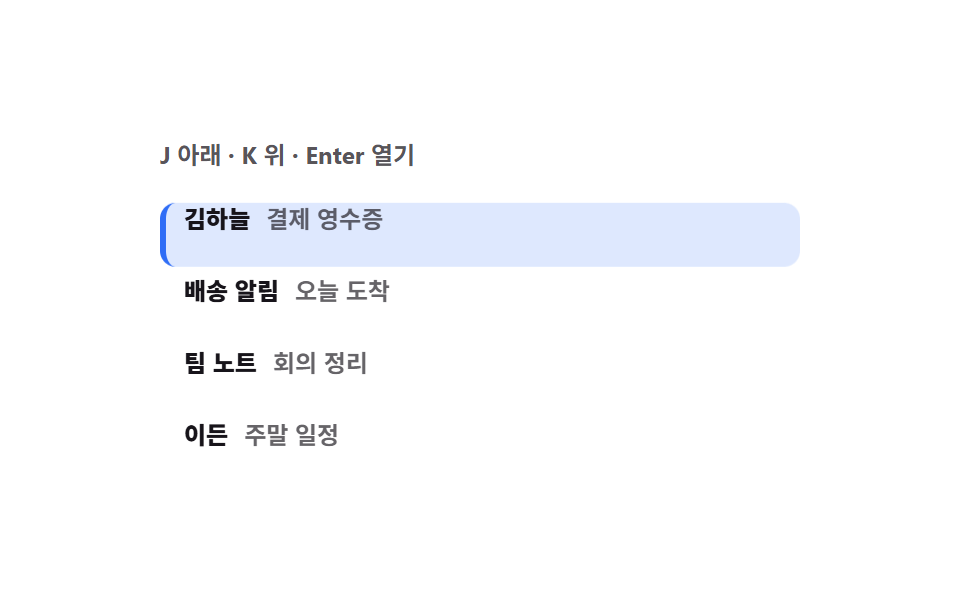
メールボックスのように J で下、K で上、Enter で開くリストです。フォーカスは1行だけが tabindex 0 を持つロービング方式なので、Tab 一回でリスト全体を通り越せます。
使いどころメール・課題管理のリスト、管理画面のレコード一覧
tabindexpreventScrollaria-selected
<main class="stage">
<div class="rv is-demo" id="rv">
  <p class="rv__cap">J で下・K で上・Enter で開く</p>
  <ul class="rv__list" id="list" role="listbox" aria-label="受信メール" style="--i: 0">
    <li class="rv__marker" aria-hidden="true"></li>
    <li class="rv__row" role="option" tabindex="0" aria-selected="true"><span class="rv__who">キム・ハヌル</span><span class="rv__what">決済レシート</span></li>
    <li class="rv__row" role="option" tabindex="-1" aria-selected="false"><span class="rv__who">配送のお知らせ</span><span class="rv__what">本日到着</span></li>
    <li class="rv__row" role="option" tabindex="-1" aria-selected="false"><span class="rv__who">チームノート</span><span class="rv__what">会議のまとめ</span></li>
    <li class="rv__row" role="option" tabindex="-1" aria-selected="false"><span class="rv__who">エデン</span><span class="rv__what">週末の予定</span></li>
  </ul>
</div>
</main>
@use "../../../../site/static/demo-tokens" as *;
// J·K 목록 이동 — 선택 표시는 줄마다 다시 칠하지 않고 하나짜리 막대(.rv__marker)를 옮긴다.
// 옮김이 transform 이라 줄이 늘어나도 레이아웃을 다시 계산하지 않고, 텔레포트 대신 미끄러진다.
// 초점은 로빙 tabindex — 한 줄만 tabindex 0 이라 Tab 한 번에 목록 전체를 지나간다.
$duration: $dur-quick;
$easing: $ease-spring;
$color: $subject-blue;
// 줄 높이 32px + 줄 간격 4px = 한 칸 36px. 막대 이동 거리와 같은 값이라 한 곳에서만 바꾼다
$row-h: 32px;
$row-step: 36px;
@include stage($stage-paper);
.rv { display: flex; flex-direction: column; gap: $sp-2; width: min(100%, 320px); }
.rv__cap { margin: 0; font-weight: 700; font-size: clamp(11px, 3vw, 12px); color: rgba(23, 20, 26, .72); }
.rv__list {
position: relative; list-style: none; margin: 0; padding: 0;
display: flex; flex-direction: column; gap: $sp-1;
}
.rv__marker {
position: absolute; left: 0; top: 0; width: 100%; height: $row-h;
border-radius: $r-sm; background: rgba(47, 109, 246, .16);
border-left: 3px solid $color; box-sizing: border-box;
transform: translateY(calc(var(--i, 0) * #{$row-step}));
transition: transform $duration $easing;
}
.rv__row {
position: relative; display: flex; align-items: center; gap: $sp-2;
height: $row-h; box-sizing: border-box; padding: 0 $sp-3;
border-radius: $r-sm; cursor: pointer;
}
.rv__row:focus-visible { outline: 2px solid $subject-ink; outline-offset: 0; }
.rv__who { font-weight: 800; font-size: clamp(11px, 3vw, 12px); color: $subject-ink; }
.rv__what { font-weight: 600; font-size: clamp(11px, 3vw, 12px); color: rgba(23, 20, 26, .66); }
.rv__row.is-open .rv__what { text-decoration: underline; }
// ── 격자 미리보기 루프: 막대가 네 줄을 훑고 90% 안에 첫 줄로 미끄러져 돌아온다 (242 실측: 96% 뒤는 샘플 없음)
.rv.is-demo .rv__marker {
animation-name: rvMove; animation-duration: $dur-loop; animation-timing-function: $easing;
animation-iteration-count: infinite; animation-fill-mode: backwards;
}
@keyframes rvMove {
0%, 16% { transform: translateY(0); }
22%, 38% { transform: translateY($row-step); }
44%, 60% { transform: translateY($row-step * 2); }
66%, 84% { transform: translateY($row-step * 3); }
92%, 100% { transform: translateY(0); }
}
@media (max-width: 340px) {
.rv__row { padding: 0 $sp-2; }
.rv__list { gap: $sp-1; }
}
@media (prefers-reduced-motion: reduce) {
.rv.is-demo .rv__marker { animation: none !important; }
.rv__marker { transition: none !important; }
}html, body {
margin: 0;
overflow: hidden;
}
.stage {
box-sizing: border-box;
min-height: 100vh;
display: grid;
place-items: center;
margin: 0;
background: #ffffff;
font-family: -apple-system, "Segoe UI", "Noto Sans KR", sans-serif;
padding: clamp(8px, 4vw, 24px);
}
.rv {
display: flex;
flex-direction: column;
gap: 8px;
width: min(100%, 320px);
}
.rv__cap {
margin: 0;
font-weight: 700;
font-size: clamp(11px, 3vw, 12px);
color: rgba(23, 20, 26, 0.72);
}
.rv__list {
position: relative;
list-style: none;
margin: 0;
padding: 0;
display: flex;
flex-direction: column;
gap: 4px;
}
.rv__marker {
position: absolute;
left: 0;
top: 0;
width: 100%;
height: 32px;
border-radius: 8px;
background: rgba(47, 109, 246, 0.16);
border-left: 3px solid #2f6df6;
box-sizing: border-box;
transform: translateY(calc(var(--i, 0) * 36px));
transition: transform 220ms cubic-bezier(0.2, 0.8, 0.2, 1);
}
.rv__row {
position: relative;
display: flex;
align-items: center;
gap: 8px;
height: 32px;
box-sizing: border-box;
padding: 0 12px;
border-radius: 8px;
cursor: pointer;
}
.rv__row:focus-visible {
outline: 2px solid #17141a;
outline-offset: 0;
}
.rv__who {
font-weight: 800;
font-size: clamp(11px, 3vw, 12px);
color: #17141a;
}
.rv__what {
font-weight: 600;
font-size: clamp(11px, 3vw, 12px);
color: rgba(23, 20, 26, 0.66);
}
.rv__row.is-open .rv__what {
text-decoration: underline;
}
.rv.is-demo .rv__marker {
animation-name: rvMove;
animation-duration: 2s;
animation-timing-function: cubic-bezier(0.2, 0.8, 0.2, 1);
animation-iteration-count: infinite;
animation-fill-mode: backwards;
}
@keyframes rvMove {
0%, 16% {
transform: translateY(0);
}
22%, 38% {
transform: translateY(36px);
}
44%, 60% {
transform: translateY(72px);
}
66%, 84% {
transform: translateY(108px);
}
92%, 100% {
transform: translateY(0);
}
}
@media (max-width: 340px) {
.rv__row {
padding: 0 8px;
}
.rv__list {
gap: 4px;
}
}
@media (prefers-reduced-motion: reduce) {
.rv.is-demo .rv__marker {
animation: none !important;
}
.rv__marker {
transition: none !important;
}
}var rv = document.getElementById('rv');
var list = document.getElementById('list');
var rows = Array.prototype.slice.call(document.querySelectorAll('.rv__row'));
var index = 0;
// 로빙 tabindex — 목록 전체가 아니라 한 줄만 tabindex 0 을 갖는다. Tab 한 번이면 목록을 지나간다
function applySelection(next) {
index = Math.max(0, Math.min(rows.length - 1, next));
list.style.setProperty('--i', String(index));
rows.forEach(function (row, i) {
row.setAttribute('tabindex', i === index ? '0' : '-1');
row.setAttribute('aria-selected', i === index ? 'true' : 'false');
row.classList.toggle('is-open', false);
});
// iframe 안에서 preventScroll 없이 부르면 부모 페이지가 이 줄로 끌려 내려간다 (BD18)
rows[index].focus({ preventScroll: true });
}
list.addEventListener('keydown', function (e) {
var key = String(e.key).toLowerCase();
if (key !== 'j' && key !== 'k' && e.key !== 'Enter') { return; }
e.preventDefault();
rv.classList.remove('is-demo');
if (key === 'j') { applySelection(index + 1); }
if (key === 'k') { applySelection(index - 1); }
if (e.key === 'Enter') { rows[index].classList.add('is-open'); }
});
rows.forEach(function (row, i) {
row.addEventListener('click', function () { rv.classList.remove('is-demo'); applySelection(i); });
});// RovingListNav — vanilla 판(run/288/demo/04-kbd-roving-list-nav/index.html) 의 React 포트.
// 로빙 tabindex: 한 줄만 tabindex 0 을 갖고, 초점 이동은 preventScroll 과 함께 부른다 (BD18).
import { useRef, useState } from "react";
import type { CSSProperties } from "react";
import styles from "./RovingListNav.module.scss";
export type RovingListNavProps = {
/** 격자 미리보기용 2초 자동 루프. 사람이 키를 누르거나 줄을 클릭하면 꺼진다 */
demo?: boolean;
duration?: number;
easing?: string;
color?: string;
};
type Vars = CSSProperties & { "--duration"?: string; "--easing"?: string; "--color"?: string; "--i"?: string };
/** useRef 배열은 T | null 을 돌려주므로 쓰기 전에 null 을 걸러 낸다 */
type RowBox = { current: (HTMLLIElement | null)[] };
/** React 이벤트 제네릭이 ambient 에 없어 쓰는 필드만 지역 타입으로 선언한다 */
type KeyEvt = { key: string; preventDefault(): void };
const ROWS: { who: string; what: string }[] = [
{ who: "김하늘", what: "결제 영수증" },
{ who: "배송 알림", what: "오늘 도착" },
{ who: "팀 노트", what: "회의 정리" },
{ who: "이든", what: "주말 일정" },
];
export default function RovingListNav({
demo = true,
duration = 220,
easing = "cubic-bezier(.2, .8, .2, 1)",
color = "#2f6df6",
}: RovingListNavProps) {
const [live, setLive] = useState(demo);
const [index, setIndex] = useState(0);
const [opened, setOpened] = useState(-1);
const rowRefs = useRef<(HTMLLIElement | null)[]>([]) as RowBox;
const vars: Vars = { "--duration": `${duration}ms`, "--easing": easing, "--color": color, "--i": String(index) };
function applySelection(next: number) {
const clamped = Math.max(0, Math.min(ROWS.length - 1, next));
setIndex(clamped);
setOpened(-1);
const row = rowRefs.current[clamped];
if (row) {
// iframe 안에서 preventScroll 없이 부르면 부모 페이지가 이 줄로 끌려 내려간다 (BD18)
row.focus({ preventScroll: true });
}
}
function handleKeyDown(e: KeyEvt) {
const key = e.key.toLowerCase();
if (key !== "j" && key !== "k" && e.key !== "Enter") {
return;
}
e.preventDefault();
setLive(false);
if (key === "j") { applySelection(index + 1); }
if (key === "k") { applySelection(index - 1); }
if (e.key === "Enter") { setOpened(index); }
}
const cls = [styles.root, live ? styles.isDemo : ""].filter(Boolean).join(" ");
return (
<main className={styles.stage} style={vars}>
<div className={cls}>
<p className={styles.cap}>J 아래 · K 위 · Enter 열기</p>
<ul className={styles.list} role="listbox" aria-label="받은 메일" onKeyDown={handleKeyDown}>
<li className={styles.marker} aria-hidden="true" />
{ROWS.map((row, i) => (
<li
key={row.who}
ref={(node: HTMLLIElement | null) => { rowRefs.current[i] = node; }}
className={[styles.row, opened === i ? styles.isOpen : ""].filter(Boolean).join(" ")}
role="option"
tabIndex={i === index ? 0 : -1}
aria-selected={i === index}
onClick={() => { setLive(false); applySelection(i); }}
>
<span className={styles.who}>{row.who}</span>
<span className={styles.what}>{row.what}</span>
</li>
))}
</ul>
</div>
</main>
);
}04 J・Kのリスト移動 — 計測 累積面積 29.468% · 動いたフレーム 9/23GODRICH オリジナル · SCSS と React は zip に同梱 · ショートカットキー 表示 UI 9選 — キーキャップからヘルプシートまで
このデモが属する記事
 ショートカットキー 表示 UI 9選 — キーキャップからヘルプシートまでショートカットキー 表示 UI とは、キーボードで画面を操作するためのキーキャップ・表記・案内を設計する仕事です。ここにある9点は、キーキャップの3スタイルからOS自動切替・録画・衝突テーブル・ヘルプシートまでをCSS と少しの JS で作 この記事のデモをすべて見る