03スクロール位置の値が交差比率を計算する画像フェードイン
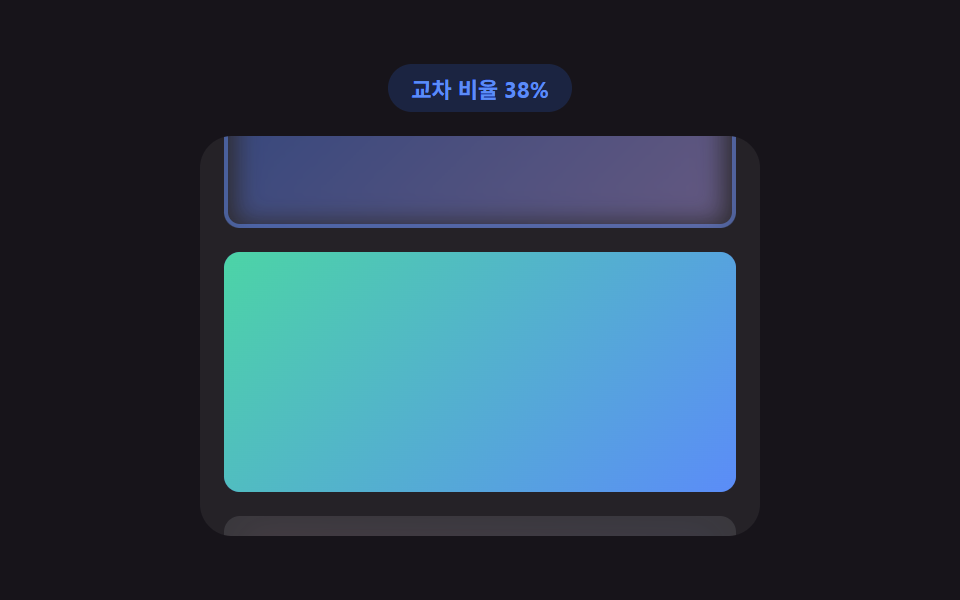
スクロール位置の値で画像がビューポートと重なる交差比率を計算し、その比率が基準を超えるとプレースホルダーから実際の画像へフェードインする。
使いどころ縦に長い詳細ページ・記事本文の写真
INTERSECTION_THRESHOLDSTEPSapplyRatio
<main class="stage">
<div class="lfv is-demo" id="lfv">
  <div class="lfv__badge" id="lfvBadge">交差率0%</div>
  <div class="lfv__view" id="lfvView">
    <div class="lfv__track">
      <div class="lfv__card" data-card="1"><div class="lfv__placeholder"></div><div class="lfv__img lfv__img--1"></div></div>
      <div class="lfv__card" data-card="2"><div class="lfv__placeholder"></div><div class="lfv__img lfv__img--2"></div></div>
      <div class="lfv__card" data-card="3"><div class="lfv__placeholder"></div><div class="lfv__img lfv__img--3"></div></div>
      <div class="lfv__card" data-card="4"><div class="lfv__placeholder"></div><div class="lfv__img lfv__img--4"></div></div>
    </div>
  </div>
</div>
</main>
@use "../../../../site/static/demo-tokens" as *;
// 스크롤 위치 값 → 교차 비율(IntersectionObserver). 비율 값으로 블러·스케일을 매번
// 다시 계산해 뷰포트에 걸친 정도만큼 또렷해지고, 기준을 넘으면 로드 완료로 고정한다.
$duration: $dur-base;
$easing: $ease-out;
$color: $subject-blue;
@include stage($stage-ink);
.lfv {
display: flex;
flex-direction: column;
align-items: center;
gap: $sp-3;
width: min(100%, 280px);
}
.lfv__badge {
padding: $sp-1 $sp-3;
border-radius: $r-pill;
background: rgba(47, 109, 246, .18);
color: $subject-blue-light;
font-weight: 700;
font-size: 11px;
font-variant-numeric: tabular-nums;
}
.lfv__view {
box-sizing: border-box;
width: 100%;
height: 200px;
overflow-y: auto;
overflow-x: hidden;
border-radius: $r-card;
background: rgba(255, 255, 255, .06);
padding: $sp-3;
scrollbar-width: thin;
}
.lfv__track {
display: flex;
flex-direction: column;
gap: $sp-3;
}
.lfv__card {
position: relative;
box-sizing: border-box;
height: 120px;
border-radius: $r-sm;
overflow: hidden;
flex: 0 0 auto;
}
.lfv__placeholder {
position: absolute;
inset: 0;
background: rgba(255, 255, 255, .1);
}
.lfv__img {
position: absolute;
inset: 0;
opacity: 0;
transform-origin: center;
}
.lfv__img--1 { background: linear-gradient(135deg, $subject-blue, $subject-lilac); }
.lfv__img--2 { background: linear-gradient(135deg, $subject-mint, $subject-blue-light); }
.lfv__img--3 { background: linear-gradient(135deg, $subject-pink, $subject-blue); }
.lfv__img--4 { background: linear-gradient(135deg, $subject-sky, $subject-lilac); }
.lfv__card--loaded {
box-shadow: inset 0 0 0 2px rgba(91, 140, 248, .5);
}
@media (max-width: 340px) {
.lfv { gap: $sp-2; }
.lfv__view { height: 108px; }
.lfv__card { height: 84px; }
}
@media (prefers-reduced-motion: reduce) {
.lfv__img, .lfv__placeholder { transition: none !important; }
}html, body {
margin: 0;
overflow: hidden;
}
.stage {
box-sizing: border-box;
min-height: 100vh;
display: grid;
place-items: center;
margin: 0;
background: #17141a;
font-family: -apple-system, "Segoe UI", "Noto Sans KR", sans-serif;
padding: clamp(8px, 4vw, 24px);
}
.lfv {
display: flex;
flex-direction: column;
align-items: center;
gap: 12px;
width: min(100%, 280px);
}
.lfv__badge {
padding: 4px 12px;
border-radius: 999px;
background: rgba(47, 109, 246, 0.18);
color: #5b8cf8;
font-weight: 700;
font-size: 11px;
font-variant-numeric: tabular-nums;
}
.lfv__view {
box-sizing: border-box;
width: 100%;
height: 200px;
overflow-y: auto;
overflow-x: hidden;
border-radius: 16px;
background: rgba(255, 255, 255, 0.06);
padding: 12px;
scrollbar-width: thin;
}
.lfv__track {
display: flex;
flex-direction: column;
gap: 12px;
}
.lfv__card {
position: relative;
box-sizing: border-box;
height: 120px;
border-radius: 8px;
overflow: hidden;
flex: 0 0 auto;
}
.lfv__placeholder {
position: absolute;
inset: 0;
background: rgba(255, 255, 255, 0.1);
}
.lfv__img {
position: absolute;
inset: 0;
opacity: 0;
transform-origin: center;
}
.lfv__img--1 {
background: linear-gradient(135deg, #2f6df6, #b9a0ff);
}
.lfv__img--2 {
background: linear-gradient(135deg, #4cd4a6, #5b8cf8);
}
.lfv__img--3 {
background: linear-gradient(135deg, #ff9ebb, #2f6df6);
}
.lfv__img--4 {
background: linear-gradient(135deg, #6ec8ff, #b9a0ff);
}
.lfv__card--loaded {
box-shadow: inset 0 0 0 2px rgba(91, 140, 248, 0.5);
}
@media (max-width: 340px) {
.lfv {
gap: 8px;
}
.lfv__view {
height: 108px;
}
.lfv__card {
height: 84px;
}
}
@media (prefers-reduced-motion: reduce) {
.lfv__img, .lfv__placeholder {
transition: none !important;
}
}(function () {
var root = document.getElementById('lfv');
var view = document.getElementById('lfvView');
var badge = document.getElementById('lfvBadge');
var cards = Array.prototype.slice.call(document.querySelectorAll('.lfv__card'));
var INTERSECTION_THRESHOLD = 0.4;
var STEPS = [];
for (var s = 0; s <= 20; s += 1) { STEPS.push(s / 20); }
// 계산 겹: 交差率 값으로 블러 반경·스케일을 매 관찰마다 다시 계산해
// 뷰포트에 걸친 정도만큼 이미지가 또렷해진다. 비율이 기준을 넘으면 로드 완료로 고정.
function applyRatio(card, ratio) {
var img = card.querySelector('.lfv__img');
var placeholder = card.querySelector('.lfv__placeholder');
var blur = 10 * (1 - ratio);
var scale = 0.92 + 0.08 * ratio;
img.style.opacity = String(ratio);
img.style.filter = 'blur(' + blur.toFixed(1) + 'px)';
img.style.transform = 'scale(' + scale.toFixed(3) + ')';
placeholder.style.opacity = String(Math.max(0, 1 - ratio * 1.4));
if (ratio >= INTERSECTION_THRESHOLD) {
card.classList.add('lfv__card--loaded');
}
if (card === cards[Math.min(cards.length - 1, Math.round(lastMaxIndex))]) {
badge.textContent = '交差率 ' + Math.round(ratio * 100) + '%';
}
}
var lastMaxIndex = 0;
var io = new IntersectionObserver(function (entries) {
var maxRatio = 0, maxIdx = 0;
entries.forEach(function (entry) {
var idx = cards.indexOf(entry.target);
applyRatio(entry.target, entry.intersectionRatio);
if (entry.intersectionRatio >= maxRatio) { maxRatio = entry.intersectionRatio; maxIdx = idx; }
});
lastMaxIndex = maxIdx;
badge.textContent = '交差率 ' + Math.round(maxRatio * 100) + '%';
}, { root: view, threshold: STEPS });
cards.forEach(function (c) { io.observe(c); });
var dir = 1;
var autoplayTimer = null;
function autoplayTick() {
var max = view.scrollHeight - view.clientHeight;
view.scrollTop += dir * 2.2;
if (view.scrollTop >= max - 1) { dir = -1; }
if (view.scrollTop <= 1) { dir = 1; }
}
function userTakesOver() {
if (!root.classList.contains('is-demo')) { return; }
root.classList.remove('is-demo');
if (autoplayTimer) { clearInterval(autoplayTimer); autoplayTimer = null; }
}
view.addEventListener('wheel', userTakesOver, { passive: true });
view.addEventListener('touchstart', userTakesOver, { passive: true });
view.addEventListener('scroll', function () {
// 스크롤 위치 값 자체가 IntersectionObserver 재계산의 입력이 된다 (root 스크롤).
});
var reduce = window.matchMedia('(prefers-reduced-motion: reduce)').matches;
if (reduce) {
root.classList.remove('is-demo');
cards.forEach(function (c) { applyRatio(c, 1); });
badge.textContent = '交差率100%';
} else {
autoplayTimer = setInterval(autoplayTick, 45);
}
})();import { useEffect, useRef, useState } from "react";
import styles from "./ImageFadeInViewport.module.scss";
// 스크롤 위치 값 → 교차 비율(IntersectionObserver). 비율 값으로 블러·스케일을 매번
// 다시 계산해 뷰포트에 걸친 정도만큼 또렷해지고, 기준을 넘으면 로드 완료로 고정한다.
const INTERSECTION_THRESHOLD = 0.4;
const STEPS: number[] = [];
for (let s = 0; s <= 20; s += 1) { STEPS.push(s / 20); }
const CARD_KEYS = [1, 2, 3, 4];
type Box<T> = { current: T };
function useBox<T>(initial: T): Box<T> {
return useRef(initial) as unknown as Box<T>;
}
export default function ImageFadeInViewport() {
const rootRef = useRef<HTMLDivElement>(null);
const viewRef = useRef<HTMLDivElement>(null);
const cardRefs = useBox<Array<HTMLDivElement | null>>([null, null, null, null]);
const imgRefs = useBox<Array<HTMLDivElement | null>>([null, null, null, null]);
const placeholderRefs = useBox<Array<HTMLDivElement | null>>([null, null, null, null]);
const loadedRefs = useBox<boolean[]>([false, false, false, false]);
const [badge, setBadge] = useState("교차 비율 0%");
const [demo, setDemo] = useState(true);
const [, forceRender] = useState(0);
function applyRatio(i: number, ratio: number) {
const img = imgRefs.current[i];
const placeholder = placeholderRefs.current[i];
if (!img || !placeholder) { return; }
const blur = 10 * (1 - ratio);
const scale = 0.92 + 0.08 * ratio;
img.style.opacity = String(ratio);
img.style.filter = "blur(" + blur.toFixed(1) + "px)";
img.style.transform = "scale(" + scale.toFixed(3) + ")";
placeholder.style.opacity = String(Math.max(0, 1 - ratio * 1.4));
if (ratio >= INTERSECTION_THRESHOLD && !loadedRefs.current[i]) {
loadedRefs.current[i] = true;
forceRender((n) => n + 1);
}
}
useEffect(() => {
const view = viewRef.current;
const root = rootRef.current;
if (!view || !root) { return; }
const io = new IntersectionObserver((entries) => {
let maxRatio = 0;
entries.forEach((entry) => {
const idx = cardRefs.current.indexOf(entry.target as HTMLDivElement);
if (idx === -1) { return; }
applyRatio(idx, entry.intersectionRatio);
if (entry.intersectionRatio >= maxRatio) { maxRatio = entry.intersectionRatio; }
});
setBadge("교차 비율 " + Math.round(maxRatio * 100) + "%");
}, { root: view, threshold: STEPS });
cardRefs.current.forEach((c) => { if (c) { io.observe(c); } });
function userTakesOver() {
if (!root!.classList.contains(styles["is-demo"])) { return; }
setDemo(false);
if (autoplayTimer !== null) { window.clearInterval(autoplayTimer); }
}
view.addEventListener("wheel", userTakesOver, { passive: true });
view.addEventListener("touchstart", userTakesOver, { passive: true });
let dir = 1;
let autoplayTimer: number | null = null;
const reduce = window.matchMedia("(prefers-reduced-motion: reduce)").matches;
if (reduce) {
setDemo(false);
CARD_KEYS.forEach((_, i) => applyRatio(i, 1));
setBadge("교차 비율 100%");
} else {
autoplayTimer = window.setInterval(() => {
const max = view.scrollHeight - view.clientHeight;
view.scrollTop += dir * 2.2;
if (view.scrollTop >= max - 1) { dir = -1; }
if (view.scrollTop <= 1) { dir = 1; }
}, 45);
}
return () => {
io.disconnect();
view.removeEventListener("wheel", userTakesOver);
view.removeEventListener("touchstart", userTakesOver);
if (autoplayTimer !== null) { window.clearInterval(autoplayTimer); }
};
// eslint-disable-next-line react-hooks/exhaustive-deps
}, []);
return (
<main className={styles.stage}>
<div ref={rootRef} className={`${styles.lfv} ${demo ? styles["is-demo"] : ""}`}>
<div className={styles["lfv__badge"]}>{badge}</div>
<div ref={viewRef} className={styles["lfv__view"]}>
<div className={styles["lfv__track"]}>
{CARD_KEYS.map((k, i) => (
<div
key={k}
ref={(el: HTMLDivElement | null) => { cardRefs.current[i] = el; }}
className={`${styles["lfv__card"]} ${loadedRefs.current[i] ? styles["lfv__card--loaded"] : ""}`}
>
<div ref={(el: HTMLDivElement | null) => { placeholderRefs.current[i] = el; }} className={styles["lfv__placeholder"]} />
<div ref={(el: HTMLDivElement | null) => { imgRefs.current[i] = el; }} className={`${styles["lfv__img"]} ${styles["lfv__img--" + k]}`} />
</div>
))}
</div>
</div>
</div>
</main>
);
}03 スクロール位置の値が交差比率を計算する画像フェードイン — 計測 累積面積 36.04% · 動いたフレーム 23/23GODRICH オリジナル · SCSS と React は zip に同梱 · 画像 遅延読み込み 9種 — プレースホルダー アニメーション
このデモが属する記事
 画像 遅延読み込み 9種 — プレースホルダー アニメーション画像 遅延読み込みの9つのうち、1つはスクロール位置の値から交差比率を計算して画像をフェードインさせ、1つはクリックの値から読み込みタイミングを計算してiframeのプレースホルダーを実際の表示に変え、1つはアイドル時間の値から遅延時間を計 この記事のデモをすべて見る