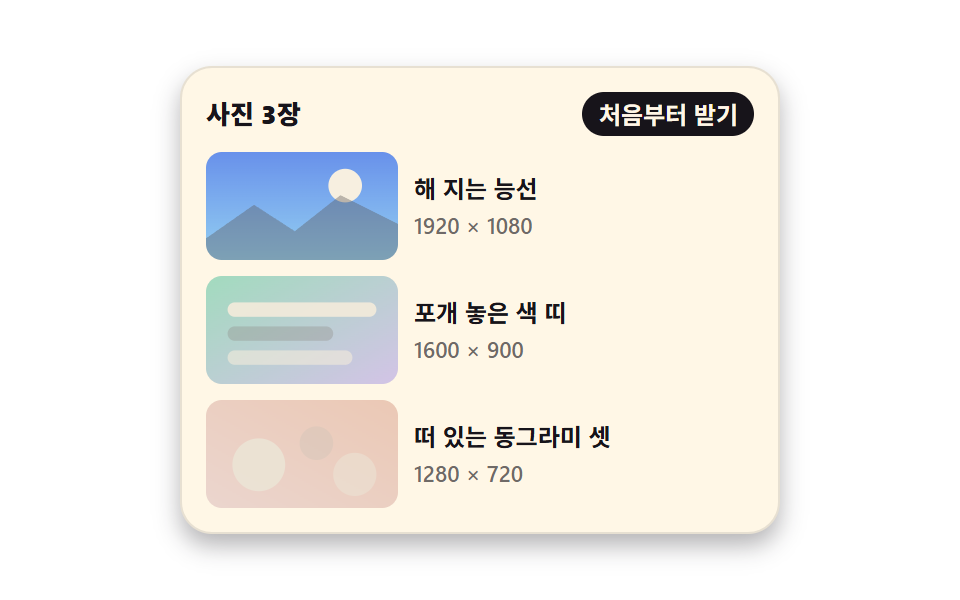
08比率の箱が場所を取り後から浮かび上がる画像
画像が来る前に aspect-ratio が同じ大きさの空箱を先に確保して文章がずれないようにし、届いた画像は decoding="async" で解析されてから opacity だけで浮かび上がります。
使いどころ写真が多くスクロール中に文章がずれやすい記事・ギャラリー本文
aspect-ratiodecoding="async"opacity
<main class="stage">
  <section class="lz is-demo" id="lz" aria-label="写真が後から届く一覧">
    <header class="lz__head">
      <p class="lz__title">写真3枚</p>
      <button class="lz__again" type="button" id="lz-again">最初から取得</button>
    </header>

    <ul class="lz__list">
      <li class="lz__row">
        <div class="lz__box">
          <span class="lz__ph" aria-hidden="true"></span>
          <img class="lz__img" width="160" height="90" loading="lazy" decoding="async" alt="日が沈む稜線"
               src="data:image/svg+xml,%3Csvg%20xmlns='http://www.w3.org/2000/svg'%20viewBox='0%200%20160%2090'%3E%3Cdefs%3E%3ClinearGradient%20id='g1'%20x1='0'%20y1='0'%20x2='0'%20y2='1'%3E%3Cstop%20offset='0'%20stop-color='%232f6df6'/%3E%3Cstop%20offset='1'%20stop-color='%236ec8ff'/%3E%3C/linearGradient%3E%3C/defs%3E%3Crect%20width='160'%20height='90'%20fill='url%28%23g1%29'/%3E%3Ccircle%20cx='116'%20cy='28'%20r='14'%20fill='%23fff7e6'/%3E%3Cpath%20d='M0%2072%2040%2044%2074%2066%20112%2036%20160%2060%20160%2090%200%2090Z'%20fill='%2317141a'%20opacity='.38'/%3E%3C/svg%3E">
        </div>
        <div class="lz__text">
          <p class="lz__name">日が沈む稜線</p>
          <p class="lz__meta">1920 × 1080</p>
        </div>
      </li>
      <li class="lz__row">
        <div class="lz__box">
          <span class="lz__ph" aria-hidden="true"></span>
          <img class="lz__img" width="160" height="90" loading="lazy" decoding="async" alt="重ねた色の帯"
               src="data:image/svg+xml,%3Csvg%20xmlns='http://www.w3.org/2000/svg'%20viewBox='0%200%20160%2090'%3E%3Cdefs%3E%3ClinearGradient%20id='g2'%20x1='0'%20y1='0'%20x2='1'%20y2='1'%3E%3Cstop%20offset='0'%20stop-color='%234cd4a6'/%3E%3Cstop%20offset='1'%20stop-color='%23b9a0ff'/%3E%3C/linearGradient%3E%3C/defs%3E%3Crect%20width='160'%20height='90'%20fill='url%28%23g2%29'/%3E%3Crect%20x='18'%20y='22'%20width='124'%20height='12'%20rx='6'%20fill='%23fff7e6'%20opacity='.92'/%3E%3Crect%20x='18'%20y='42'%20width='88'%20height='12'%20rx='6'%20fill='%2317141a'%20opacity='.32'/%3E%3Crect%20x='18'%20y='62'%20width='104'%20height='12'%20rx='6'%20fill='%23fff7e6'%20opacity='.62'/%3E%3C/svg%3E">
        </div>
        <div class="lz__text">
          <p class="lz__name">重ねた色の帯</p>
          <p class="lz__meta">1600 × 900</p>
        </div>
      </li>
      <li class="lz__row">
        <div class="lz__box">
          <span class="lz__ph" aria-hidden="true"></span>
          <img class="lz__img" width="160" height="90" loading="lazy" decoding="async" alt="浮かぶ三つの丸"
               src="data:image/svg+xml,%3Csvg%20xmlns='http://www.w3.org/2000/svg'%20viewBox='0%200%20160%2090'%3E%3Cdefs%3E%3ClinearGradient%20id='g3'%20x1='0'%20y1='1'%20x2='1'%20y2='0'%3E%3Cstop%20offset='0'%20stop-color='%23ff9ebb'/%3E%3Cstop%20offset='1'%20stop-color='%23ff4d1f'/%3E%3C/linearGradient%3E%3C/defs%3E%3Crect%20width='160'%20height='90'%20fill='url%28%23g3%29'/%3E%3Ccircle%20cx='44'%20cy='54'%20r='22'%20fill='%23fff7e6'%20opacity='.9'/%3E%3Ccircle%20cx='92'%20cy='36'%20r='14'%20fill='%2317141a'%20opacity='.3'/%3E%3Ccircle%20cx='124'%20cy='62'%20r='18'%20fill='%23fff7e6'%20opacity='.55'/%3E%3C/svg%3E">
        </div>
        <div class="lz__text">
          <p class="lz__name">浮かぶ三つの丸</p>
          <p class="lz__meta">1280 × 720</p>
        </div>
      </li>
    </ul>
  </section>
</main>@use "../../../../site/static/demo-tokens" as *;
// 지연 로드 페이드인 + 비율 상자 — aspect-ratio 가 그림과 같은 크기의 빈 상자를 먼저 잡아
// 그림이 늦게 와도 아래 글이 밀리지 않는다. 도착한 그림은 흐림 없이 opacity 로만 떠오른다.
$duration: $dur-enter;
$easing: $ease-out;
$color: $subject-blue;
@include stage($stage-paper);
$ink-soft: rgba(23, 20, 26, .62);
$ink-box: rgba(23, 20, 26, .10);
$ink-line: rgba(23, 20, 26, .10);
.lz {
box-sizing: border-box;
display: grid;
gap: $sp-2;
width: min(300px, 92vw);
padding: $sp-3;
border: 1px solid $ink-line;
border-radius: $r-card;
background: $subject-cream;
color: $subject-ink;
box-shadow: $shadow-press;
}
.lz * { box-sizing: border-box; }
.lz__head {
display: flex;
align-items: center;
justify-content: space-between;
gap: $sp-2;
margin: 0;
}
.lz__title {
margin: 0;
font-size: 13px;
font-weight: 800;
line-height: 1.2;
}
.lz__again {
margin: 0;
padding: $sp-1 $sp-2;
border: 0;
border-radius: $r-pill;
background: $subject-ink; // 파랑 바탕 크림 글자는 4.25:1 로 4.5 에 못 미쳐 먹색 바탕으로 쓴다 (17.1:1)
color: $subject-cream;
font-family: inherit;
font-size: 12px;
font-weight: 700;
line-height: 1.2;
cursor: pointer;
}
.lz__again:focus-visible { outline: 2px solid $subject-ink; outline-offset: 2px; }
.lz__list {
display: grid;
gap: $sp-2;
margin: 0;
padding: 0;
list-style: none;
}
.lz__row {
display: grid;
grid-template-columns: 96px 1fr;
gap: $sp-2;
align-items: center;
}
// ── 비율 상자: 빈 상자와 그림을 같은 칸에 겹쳐 둔다 ──
// aspect-ratio 가 높이를 먼저 정하므로 그림이 도착해도 레이아웃이 한 번도 움직이지 않는다.
.lz__box {
display: grid;
aspect-ratio: 16 / 9;
border-radius: $r-sm;
overflow: hidden;
}
.lz__ph,
.lz__img {
grid-area: 1 / 1;
width: 100%;
height: 100%;
}
.lz__ph { background: $ink-box; }
.lz__img {
display: block;
object-fit: cover;
opacity: 1;
transition: opacity $duration $easing;
}
// 손으로 다시 받을 때: 그림만 사라졌다 순서대로 떠오른다. 상자 크기는 그대로다
.lz.is-waiting .lz__img { opacity: 0; transition: none; }
.lz__row:nth-child(1) .lz__img { transition-delay: 0ms; }
.lz__row:nth-child(2) .lz__img { transition-delay: 120ms; }
.lz__row:nth-child(3) .lz__img { transition-delay: 240ms; }
.lz__text { display: grid; gap: $sp-1; }
.lz__name {
margin: 0;
font-size: 12px;
font-weight: 700;
line-height: 1.3;
}
.lz__meta {
margin: 0;
color: $ink-soft;
font-size: 11px;
font-weight: 500;
line-height: 1.2;
}
// ── 격자 미리보기 전용 2초 루프 ──
// 지연을 준 애니메이션이므로 animation-fill-mode: backwards 가 있어야
// 지연 구간에 요소의 기본 상태(다 보이는 그림)가 한 프레임 번쩍이지 않는다.
@keyframes lz-in {
0%, 10% { opacity: 0; }
40%, 74% { opacity: 1; }
78%, 100% { opacity: 0; }
}
.lz.is-demo {
.lz__img {
animation-name: lz-in;
animation-duration: $dur-loop;
animation-timing-function: $easing;
animation-iteration-count: infinite;
animation-fill-mode: backwards;
}
.lz__row:nth-child(1) .lz__img { animation-delay: 0ms; }
.lz__row:nth-child(2) .lz__img { animation-delay: 120ms; }
.lz__row:nth-child(3) .lz__img { animation-delay: 240ms; }
}
@media (max-width: 340px) {
.lz { gap: $sp-1; width: min(292px, 96vw); padding: $sp-2; }
.lz__list { gap: $sp-1; }
.lz__row { grid-template-columns: 64px 1fr; gap: $sp-1; }
.lz__title { font-size: 11px; }
.lz__again { padding: 0 $sp-1; font-size: 10px; }
.lz__text { gap: 0; }
.lz__name { font-size: 10px; }
.lz__meta { font-size: 9px; }
}
@media (prefers-reduced-motion: reduce) {
.lz.is-demo .lz__img,
.lz .lz__img { animation: none !important; transition: none !important; }
// 움직임만 끄고 그림이 다 도착한 결과는 남긴다
.lz.is-demo .lz__img { opacity: 1 !important; }
}html, body {
margin: 0;
overflow: hidden;
}
.stage {
box-sizing: border-box;
min-height: 100vh;
display: grid;
place-items: center;
margin: 0;
background: #ffffff;
font-family: -apple-system, "Segoe UI", "Noto Sans KR", sans-serif;
padding: clamp(8px, 4vw, 24px);
}
.lz {
box-sizing: border-box;
display: grid;
gap: 8px;
width: min(300px, 92vw);
padding: 12px;
border: 1px solid rgba(23, 20, 26, 0.1);
border-radius: 16px;
background: #fff7e6;
color: #17141a;
box-shadow: 0 6px 12px rgba(23, 20, 26, 0.32);
}
.lz * {
box-sizing: border-box;
}
.lz__head {
display: flex;
align-items: center;
justify-content: space-between;
gap: 8px;
margin: 0;
}
.lz__title {
margin: 0;
font-size: 13px;
font-weight: 800;
line-height: 1.2;
}
.lz__again {
margin: 0;
padding: 4px 8px;
border: 0;
border-radius: 999px;
background: #17141a;
color: #fff7e6;
font-family: inherit;
font-size: 12px;
font-weight: 700;
line-height: 1.2;
cursor: pointer;
}
.lz__again:focus-visible {
outline: 2px solid #17141a;
outline-offset: 2px;
}
.lz__list {
display: grid;
gap: 8px;
margin: 0;
padding: 0;
list-style: none;
}
.lz__row {
display: grid;
grid-template-columns: 96px 1fr;
gap: 8px;
align-items: center;
}
.lz__box {
display: grid;
aspect-ratio: 16/9;
border-radius: 8px;
overflow: hidden;
}
.lz__ph,
.lz__img {
grid-area: 1/1;
width: 100%;
height: 100%;
}
.lz__ph {
background: rgba(23, 20, 26, 0.1);
}
.lz__img {
display: block;
object-fit: cover;
opacity: 1;
transition: opacity 600ms ease-out;
}
.lz.is-waiting .lz__img {
opacity: 0;
transition: none;
}
.lz__row:nth-child(1) .lz__img {
transition-delay: 0ms;
}
.lz__row:nth-child(2) .lz__img {
transition-delay: 120ms;
}
.lz__row:nth-child(3) .lz__img {
transition-delay: 240ms;
}
.lz__text {
display: grid;
gap: 4px;
}
.lz__name {
margin: 0;
font-size: 12px;
font-weight: 700;
line-height: 1.3;
}
.lz__meta {
margin: 0;
color: rgba(23, 20, 26, 0.62);
font-size: 11px;
font-weight: 500;
line-height: 1.2;
}
@keyframes lz-in {
0%, 10% {
opacity: 0;
}
40%, 74% {
opacity: 1;
}
78%, 100% {
opacity: 0;
}
}
.lz.is-demo .lz__img {
animation-name: lz-in;
animation-duration: 2s;
animation-timing-function: ease-out;
animation-iteration-count: infinite;
animation-fill-mode: backwards;
}
.lz.is-demo .lz__row:nth-child(1) .lz__img {
animation-delay: 0ms;
}
.lz.is-demo .lz__row:nth-child(2) .lz__img {
animation-delay: 120ms;
}
.lz.is-demo .lz__row:nth-child(3) .lz__img {
animation-delay: 240ms;
}
@media (max-width: 340px) {
.lz {
gap: 4px;
width: min(292px, 96vw);
padding: 8px;
}
.lz__list {
gap: 4px;
}
.lz__row {
grid-template-columns: 64px 1fr;
gap: 4px;
}
.lz__title {
font-size: 11px;
}
.lz__again {
padding: 0 4px;
font-size: 10px;
}
.lz__text {
gap: 0;
}
.lz__name {
font-size: 10px;
}
.lz__meta {
font-size: 9px;
}
}
@media (prefers-reduced-motion: reduce) {
.lz.is-demo .lz__img,
.lz .lz__img {
animation: none !important;
transition: none !important;
}
.lz.is-demo .lz__img {
opacity: 1 !important;
}
}// 비율 상자는 늘 같은 자리를 차지하므로, 그림을 다시 받아도 아래 글이 밀리지 않는다.
var lz = document.getElementById('lz');
var lzAgain = document.getElementById('lz-again');
lzAgain.addEventListener('click', function () {
lz.classList.remove('is-demo');
lz.classList.add('is-waiting');
// 다음 프레임에 클래스를 떼면 그때부터 opacity 트랜지션이 걸린다
requestAnimationFrame(function () {
requestAnimationFrame(function () { lz.classList.remove('is-waiting'); });
});
});import { useState } from "react";
import type { CSSProperties } from "react";
import styles from "./LazyFadeRatio.module.scss";
export type LazyFadeRatioItem = { name: string; meta: string; alt: string; src: string };
export type LazyFadeRatioProps = {
/** 목록 항목. src 는 외부 의존 0 을 위해 인라인 data URI 를 기본으로 쓴다 */
items?: LazyFadeRatioItem[];
title?: string;
againLabel?: string;
groupLabel?: string;
/** 격자 미리보기용 2초 자동 루프. 사람이 손대면 꺼진다 */
demo?: boolean;
duration?: number;
easing?: string;
color?: string;
};
type Vars = CSSProperties & { "--duration"?: string; "--easing"?: string; "--color"?: string };
// ambient 가 얇다 — 브라우저 전역 중 쓰는 것만 로컬 타입으로 좁혀 받는다
type Host = { requestAnimationFrame(cb: () => void): number };
const RIDGE =
"data:image/svg+xml,%3Csvg%20xmlns='http://www.w3.org/2000/svg'%20viewBox='0%200%20160%2090'%3E%3Cdefs%3E%3ClinearGradient%20id='g1'%20x1='0'%20y1='0'%20x2='0'%20y2='1'%3E%3Cstop%20offset='0'%20stop-color='%232f6df6'/%3E%3Cstop%20offset='1'%20stop-color='%236ec8ff'/%3E%3C/linearGradient%3E%3C/defs%3E%3Crect%20width='160'%20height='90'%20fill='url%28%23g1%29'/%3E%3Ccircle%20cx='116'%20cy='28'%20r='14'%20fill='%23fff7e6'/%3E%3Cpath%20d='M0%2072%2040%2044%2074%2066%20112%2036%20160%2060%20160%2090%200%2090Z'%20fill='%2317141a'%20opacity='.38'/%3E%3C/svg%3E";
const BANDS =
"data:image/svg+xml,%3Csvg%20xmlns='http://www.w3.org/2000/svg'%20viewBox='0%200%20160%2090'%3E%3Cdefs%3E%3ClinearGradient%20id='g2'%20x1='0'%20y1='0'%20x2='1'%20y2='1'%3E%3Cstop%20offset='0'%20stop-color='%234cd4a6'/%3E%3Cstop%20offset='1'%20stop-color='%23b9a0ff'/%3E%3C/linearGradient%3E%3C/defs%3E%3Crect%20width='160'%20height='90'%20fill='url%28%23g2%29'/%3E%3Crect%20x='18'%20y='22'%20width='124'%20height='12'%20rx='6'%20fill='%23fff7e6'%20opacity='.92'/%3E%3Crect%20x='18'%20y='42'%20width='88'%20height='12'%20rx='6'%20fill='%2317141a'%20opacity='.32'/%3E%3Crect%20x='18'%20y='62'%20width='104'%20height='12'%20rx='6'%20fill='%23fff7e6'%20opacity='.62'/%3E%3C/svg%3E";
const DOTS =
"data:image/svg+xml,%3Csvg%20xmlns='http://www.w3.org/2000/svg'%20viewBox='0%200%20160%2090'%3E%3Cdefs%3E%3ClinearGradient%20id='g3'%20x1='0'%20y1='1'%20x2='1'%20y2='0'%3E%3Cstop%20offset='0'%20stop-color='%23ff9ebb'/%3E%3Cstop%20offset='1'%20stop-color='%23ff4d1f'/%3E%3C/linearGradient%3E%3C/defs%3E%3Crect%20width='160'%20height='90'%20fill='url%28%23g3%29'/%3E%3Ccircle%20cx='44'%20cy='54'%20r='22'%20fill='%23fff7e6'%20opacity='.9'/%3E%3Ccircle%20cx='92'%20cy='36'%20r='14'%20fill='%2317141a'%20opacity='.3'/%3E%3Ccircle%20cx='124'%20cy='62'%20r='18'%20fill='%23fff7e6'%20opacity='.55'/%3E%3C/svg%3E";
const DEFAULT_ITEMS: LazyFadeRatioItem[] = [
{ name: "Ridge at sunset", meta: "1920 × 1080", alt: "Ridge at sunset", src: RIDGE },
{ name: "Stacked color bands", meta: "1600 × 900", alt: "Stacked color bands", src: BANDS },
{ name: "Three floating circles", meta: "1280 × 720", alt: "Three floating circles", src: DOTS },
];
export default function LazyFadeRatio({
items = DEFAULT_ITEMS,
title = "3 photos",
againLabel = "Fetch again",
groupLabel = "List where the photos arrive late",
demo = true,
duration = 600,
easing = "ease-out",
color = "#2f6df6",
}: LazyFadeRatioProps) {
const [live, setLive] = useState(demo);
const [waiting, setWaiting] = useState(false);
const vars: Vars = { "--duration": `${duration}ms`, "--easing": easing, "--color": color };
function again() {
// 상자 크기는 그대로 두고 그림만 다시 떠오르게 한다 — 아래 글은 한 번도 밀리지 않는다
setLive(false);
setWaiting(true);
const host = globalThis as unknown as Host;
host.requestAnimationFrame(() => {
host.requestAnimationFrame(() => setWaiting(false));
});
}
const cls = [styles.lz, live ? styles.isDemo : "", waiting ? styles.isWaiting : ""]
.filter(Boolean)
.join(" ");
return (
<section className={cls} style={vars} aria-label={groupLabel}>
<header className={styles.head}>
<p className={styles.title}>{title}</p>
<button className={styles.again} type="button" onClick={again}>
{againLabel}
</button>
</header>
<ul className={styles.list}>
{items.map((it) => (
<li className={styles.row} key={it.name}>
{/* 빈 상자와 그림을 같은 칸에 겹친다 — aspect-ratio 가 높이를 먼저 정한다 */}
<div className={styles.box}>
<span className={styles.ph} aria-hidden="true" />
<img
className={styles.img}
src={it.src}
alt={it.alt}
width={160}
height={90}
loading="lazy"
decoding="async"
/>
</div>
<div className={styles.text}>
<p className={styles.name}>{it.name}</p>
<p className={styles.meta}>{it.meta}</p>
</div>
</li>
))}
</ul>
</section>
);
}08 比率の箱が場所を取り後から浮かび上がる画像 — 計測 累積面積 10.714% · 動いたフレーム 14/23GODRICH オリジナル · SCSS と React は zip に同梱 · ページ遷移 ローディング 9選 — コピペで動く
このデモが属する記事
 ページ遷移 ローディング 9選 — コピペで動くページ遷移 ローディングとは、画面が次の画面へ切り替わるまでのわずかな待ち時間を目に見える形にする仕組みです。この九つは中央で回るスピナーではなく、プログレスバー・色の帯・点線のプレースホルダー・楽観的な遷移のように、画面全体が入れ替わる瞬 この記事のデモをすべて見る