07リストのインライン編集
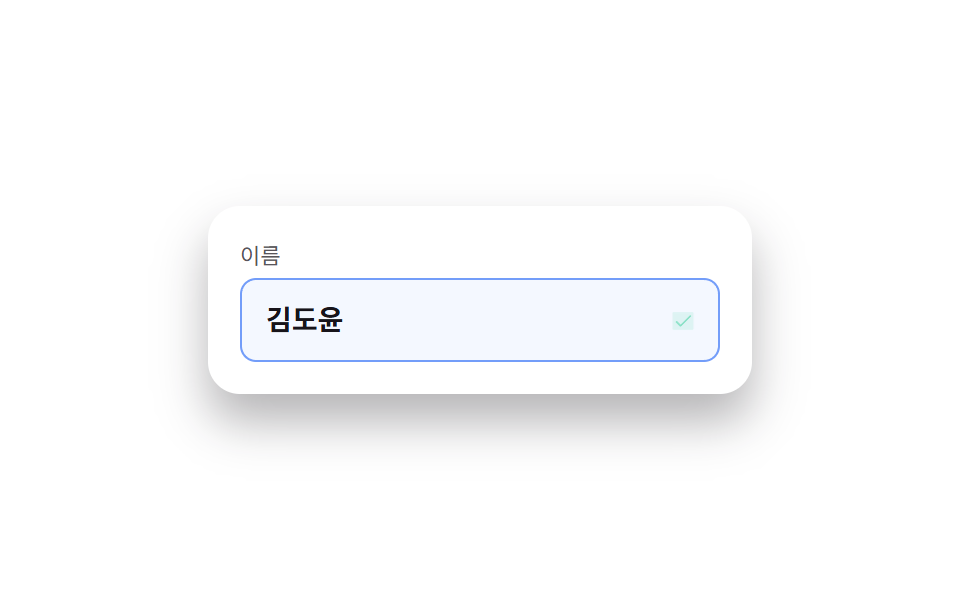
名前欄をクリックするとその場で入力欄に変わり、Enterか外側クリックで保存され、鉛筆アイコンがチェックに変わる。
使いどころ設定リストの名前変更、管理画面の表の値を直接編集
contenteditable 대신 input 치환Escape 로 되돌리기신뢰감 있는 밝은 SaaS 톤
<main class="stage">
  <div class="ie-row is-demo">
    <label class="ie-row__label" for="ie-name">名前</label>
    <div class="ie-row__field">
      <input id="ie-name" class="ie-row__input" type="text" value="キム・ドユン" readonly>
      <button class="ie-row__toggle" type="button" aria-label="名前を編集">
        <svg class="ie-row__icon ie-row__icon--pencil" viewBox="0 0 256 256" aria-hidden="true"><g fill="currentColor"><path d="M221.66 90.34L192 120l-56-56l29.66-29.66a8 8 0 0 1 11.31 0L221.66 79a8 8 0 0 1 0 11.34" opacity=".2"/><path d="m227.31 73.37l-44.68-44.69a16 16 0 0 0-22.63 0L36.69 152A15.86 15.86 0 0 0 32 163.31V208a16 16 0 0 0 16 16h44.69a15.86 15.86 0 0 0 11.31-4.69L227.31 96a16 16 0 0 0 0-22.63M92.69 208H48v-44.69l88-88L180.69 120ZM192 108.68L147.31 64l24-24L216 84.68Z"/></g></svg>
        <svg class="ie-row__icon ie-row__icon--check" viewBox="0 0 256 256" aria-hidden="true"><g fill="currentColor"><path d="M232 56v144a16 16 0 0 1-16 16H40a16 16 0 0 1-16-16V56a16 16 0 0 1 16-16h176a16 16 0 0 1 16 16" opacity=".2"/><path d="m205.66 85.66l-96 96a8 8 0 0 1-11.32 0l-40-40a8 8 0 0 1 11.32-11.32L104 164.69l90.34-90.35a8 8 0 0 1 11.32 11.32"/></g></svg>
      </button>
    </div>
  </div>
</main>
@use "../../../../site/static/demo-tokens" as *;
$duration: $dur-quick; // 테두리·아이콘 전환 시간
$easing: $ease-out;
$color: $subject-blue; // 신뢰감 있는 밝은 SaaS 브랜드 컬러
@include stage($stage-paper);
.ie-row {
width: min(240px, 78vw);
display: flex;
flex-direction: column;
gap: $sp-1;
padding: $sp-4;
border-radius: $r-card;
background: $stage-paper;
box-shadow: $shadow-raised;
}
.ie-row__label { font-size: 11px; color: rgba(23, 20, 26, .72); }
.ie-row__field {
display: flex;
align-items: center;
gap: $sp-2;
border-radius: $r-sm;
border: 1px solid transparent;
padding: $sp-2 $sp-3;
transition: border-color $duration $easing, background $duration $easing;
}
.ie-row.is-editing .ie-row__field { border-color: $color; background: #eef4ff; }
.ie-row__input {
flex: 1 1 auto;
border: 0;
background: none;
font: 700 14px/1.3 sans-serif;
font-family: inherit;
color: $stage-ink;
padding: 0;
}
.ie-row__input:focus { outline: none; }
.ie-row__toggle {
position: relative;
width: 24px;
height: 24px;
flex: 0 0 auto;
display: grid;
place-items: center;
border: 0;
background: none;
color: $color;
cursor: pointer;
}
.ie-row__toggle:focus-visible { outline: 2px solid $color; outline-offset: 2px; border-radius: $r-xs; }
.ie-row__icon {
position: absolute;
width: 15px;
height: 15px;
transition: opacity $duration $easing, transform $duration $easing;
}
.ie-row__icon--check { opacity: 0; transform: scale(.6); color: $subject-mint; }
.ie-row.is-saved .ie-row__icon--pencil { opacity: 0; transform: scale(.6); }
.ie-row.is-saved .ie-row__icon--check { opacity: 1; transform: scale(1); }
// 데모 강제 루프 — 편집 상태 진입 → 저장(체크 표시) → 원복 을 keyframes 로
.ie-row.is-demo .ie-row__field { animation: ie-field-loop $dur-loop $easing infinite; }
.ie-row.is-demo .ie-row__icon--pencil { animation: ie-pencil-loop $dur-loop $easing infinite; }
.ie-row.is-demo .ie-row__icon--check { animation: ie-check-loop $dur-loop $easing infinite; }
@keyframes ie-field-loop {
0%, 10% { border-color: transparent; background: transparent; }
30%, 80% { border-color: $color; background: #eef4ff; }
95%, 100% { border-color: transparent; background: transparent; }
}
@keyframes ie-pencil-loop {
0%, 10% { opacity: 1; transform: scale(1); }
35%, 100% { opacity: 0; transform: scale(.6); }
}
@keyframes ie-check-loop {
0%, 30% { opacity: 0; transform: scale(.6); }
40%, 80% { opacity: 1; transform: scale(1); }
95%, 100% { opacity: 0; transform: scale(.6); }
}
@media (prefers-reduced-motion: reduce) {
.ie-row__field, .ie-row__icon { transition: none; }
}html, body {
margin: 0;
overflow: hidden;
}
.stage {
box-sizing: border-box;
min-height: 100vh;
display: grid;
place-items: center;
margin: 0;
background: #ffffff;
font-family: -apple-system, "Segoe UI", "Noto Sans KR", sans-serif;
padding: clamp(8px, 4vw, 24px);
}
.ie-row {
width: min(240px, 78vw);
display: flex;
flex-direction: column;
gap: 4px;
padding: 16px;
border-radius: 16px;
background: #ffffff;
box-shadow: 0 14px 24px rgba(23, 20, 26, 0.32);
}
.ie-row__label {
font-size: 11px;
color: rgba(23, 20, 26, 0.72);
}
.ie-row__field {
display: flex;
align-items: center;
gap: 8px;
border-radius: 8px;
border: 1px solid transparent;
padding: 8px 12px;
transition: border-color 220ms ease-out, background 220ms ease-out;
}
.ie-row.is-editing .ie-row__field {
border-color: #2f6df6;
background: #eef4ff;
}
.ie-row__input {
flex: 1 1 auto;
border: 0;
background: none;
font: 700 14px/1.3 sans-serif;
font-family: inherit;
color: #17141a;
padding: 0;
}
.ie-row__input:focus {
outline: none;
}
.ie-row__toggle {
position: relative;
width: 24px;
height: 24px;
flex: 0 0 auto;
display: grid;
place-items: center;
border: 0;
background: none;
color: #2f6df6;
cursor: pointer;
}
.ie-row__toggle:focus-visible {
outline: 2px solid #2f6df6;
outline-offset: 2px;
border-radius: 4px;
}
.ie-row__icon {
position: absolute;
width: 15px;
height: 15px;
transition: opacity 220ms ease-out, transform 220ms ease-out;
}
.ie-row__icon--check {
opacity: 0;
transform: scale(0.6);
color: #4cd4a6;
}
.ie-row.is-saved .ie-row__icon--pencil {
opacity: 0;
transform: scale(0.6);
}
.ie-row.is-saved .ie-row__icon--check {
opacity: 1;
transform: scale(1);
}
.ie-row.is-demo .ie-row__field {
animation: ie-field-loop 2s ease-out infinite;
}
.ie-row.is-demo .ie-row__icon--pencil {
animation: ie-pencil-loop 2s ease-out infinite;
}
.ie-row.is-demo .ie-row__icon--check {
animation: ie-check-loop 2s ease-out infinite;
}
@keyframes ie-field-loop {
0%, 10% {
border-color: transparent;
background: transparent;
}
30%, 80% {
border-color: #2f6df6;
background: #eef4ff;
}
95%, 100% {
border-color: transparent;
background: transparent;
}
}
@keyframes ie-pencil-loop {
0%, 10% {
opacity: 1;
transform: scale(1);
}
35%, 100% {
opacity: 0;
transform: scale(0.6);
}
}
@keyframes ie-check-loop {
0%, 30% {
opacity: 0;
transform: scale(0.6);
}
40%, 80% {
opacity: 1;
transform: scale(1);
}
95%, 100% {
opacity: 0;
transform: scale(0.6);
}
}
@media (prefers-reduced-motion: reduce) {
.ie-row__field, .ie-row__icon {
transition: none;
}
}(function () {
var row = document.querySelector('.ie-row');
var input = row.querySelector('.ie-row__input');
var toggle = row.querySelector('.ie-row__toggle');
var original = input.value;
function edit() {
row.classList.remove('is-demo');
row.classList.add('is-editing');
input.readOnly = false;
input.focus({ preventScroll: true });
input.select();
}
function save() {
original = input.value;
row.classList.remove('is-editing');
row.classList.add('is-saved');
input.readOnly = true;
setTimeout(function () { row.classList.remove('is-saved'); }, 900);
}
function cancel() {
input.value = original;
row.classList.remove('is-editing');
input.readOnly = true;
}
toggle.addEventListener('click', function () {
row.classList.contains('is-editing') ? save() : edit();
});
input.addEventListener('click', function () { if (input.readOnly) edit(); });
input.addEventListener('keydown', function (e) {
if (e.key === 'Enter') { e.preventDefault(); save(); }
else if (e.key === 'Escape') { cancel(); }
});
input.addEventListener('blur', function () { if (!input.readOnly) save(); });
})();import { useRef, useState, type CSSProperties } from "react";
import styles from "./InlineEditField.module.scss";
export type InlineEditFieldProps = {
label: string;
initialValue: string;
onSave?: (value: string) => void;
/** 테두리·아이콘 전환 시간 (기본 220ms) */
duration?: number;
easing?: string;
color?: string;
};
type Vars = CSSProperties & { "--duration"?: string; "--easing"?: string; "--color"?: string };
/** 클릭하면 readOnly 를 풀고 focus, Enter·blur 로 저장, Escape 로 되돌린다 */
export default function InlineEditField({
label,
initialValue,
onSave,
duration = 220,
easing = "ease-out",
color = "#2f6df6",
}: InlineEditFieldProps) {
const [value, setValue] = useState(initialValue);
const [editing, setEditing] = useState(false);
const [saved, setSaved] = useState(false);
const inputRef = useRef<HTMLInputElement>(null);
const before = useRef(initialValue);
const vars: Vars = { "--duration": `${duration}ms`, "--easing": easing, "--color": color };
const startEdit = () => {
before.current = value;
setEditing(true);
requestAnimationFrame(() => { inputRef.current?.focus(); inputRef.current?.select(); });
};
const save = () => {
setEditing(false);
setSaved(true);
onSave?.(value);
setTimeout(() => setSaved(false), 900);
};
const cancel = () => { setValue(before.current ?? initialValue); setEditing(false); };
return (
<div className={`${styles.row} ${saved ? styles.savedFlash : ""}`} style={vars}>
<label className={styles.label} htmlFor="ie-name-react">{label}</label>
<div className={`${styles.field} ${editing ? styles.editing : ""}`}>
<input
id="ie-name-react"
ref={inputRef}
className={styles.input}
type="text"
readOnly={!editing}
value={value}
onChange={(e: any) => setValue(e.target.value)}
onClick={() => !editing && startEdit()}
onBlur={() => editing && save()}
onKeyDown={(e: any) => {
if (e.key === "Enter") { e.preventDefault(); save(); }
else if (e.key === "Escape") cancel();
}}
/>
<button className={styles.toggle} type="button" aria-label={`${label} 편집`} onClick={() => (editing ? save() : startEdit())}>
<svg className={`${styles.icon} ${saved ? styles.hidden : ""}`} viewBox="0 0 256 256" aria-hidden="true"><g fill="currentColor"><path d="M221.66 90.34L192 120l-56-56l29.66-29.66a8 8 0 0 1 11.31 0L221.66 79a8 8 0 0 1 0 11.34" opacity=".2" /><path d="m227.31 73.37l-44.68-44.69a16 16 0 0 0-22.63 0L36.69 152A15.86 15.86 0 0 0 32 163.31V208a16 16 0 0 0 16 16h44.69a15.86 15.86 0 0 0 11.31-4.69L227.31 96a16 16 0 0 0 0-22.63M92.69 208H48v-44.69l88-88L180.69 120ZM192 108.68L147.31 64l24-24L216 84.68Z" /></g></svg>
<svg className={`${styles.icon} ${styles.check} ${saved ? styles.shown : ""}`} viewBox="0 0 256 256" aria-hidden="true"><g fill="currentColor"><path d="M232 56v144a16 16 0 0 1-16 16H40a16 16 0 0 1-16-16V56a16 16 0 0 1 16-16h176a16 16 0 0 1 16 16" opacity=".2" /><path d="m205.66 85.66l-96 96a8 8 0 0 1-11.32 0l-40-40a8 8 0 0 1 11.32-11.32L104 164.69l90.34-90.35a8 8 0 0 1 11.32 11.32" /></g></svg>
</button>
</div>
</div>
);
}07 リストのインライン編集 — 計測 累積面積 6.801% · 動いたフレーム 12/23GODRICH オリジナル · SCSS と React は zip に同梱 · アコーディオンリスト UI 9選 — チェックリストまで
このデモが属する記事
 アコーディオンリスト UI 9選 — チェックリストまでアコーディオンリストとは、行をクリックするとその場で高さがなめらかに伸びて詳細内容が開くUIで、別ページに移動せずリスト画面の中で情報を増やしたいときに使います。タップすると行がふわっと開くあの感じを、実際に動くコードとして九つ用意しました この記事のデモをすべて見る