07インライン編集+文字数カウントダウン
todoの文字をクリックすると入力欄に変わり、右側で残り文字数がリアルタイムでカウントダウンし、上限に近づくと数字が赤く揺れる(231の鉛筆→チェックアイコン切替とは異なる実演 — ここでは文字数カウンターが要)。
使いどころ文字数制限付きtodoタイトル編集、メモのインライン編集
measureWidth() 미러 span 폭 측정input width 실시간 재계산잔여 글자수 badge shake
<main class="stage">
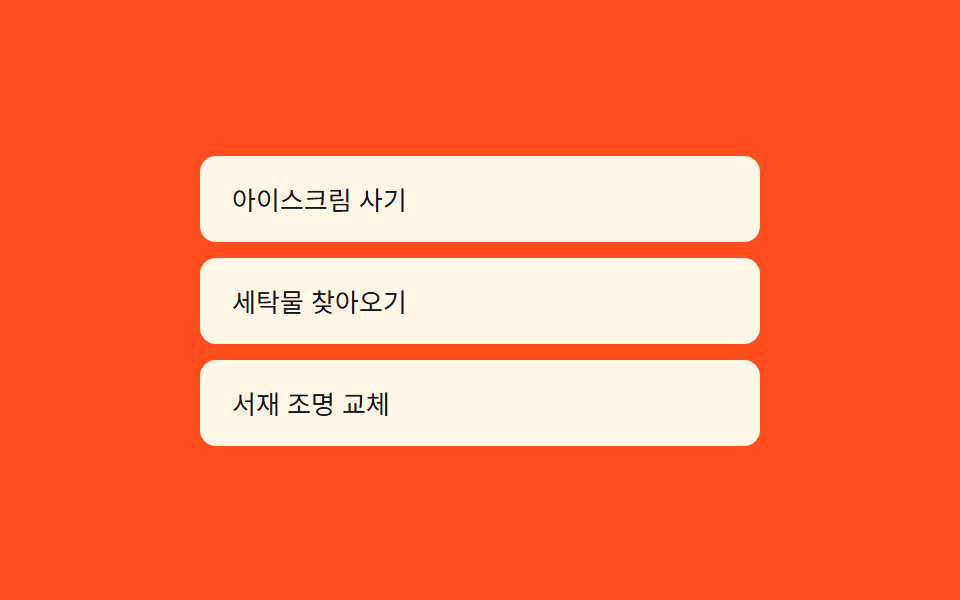
<ul class="list is-demo" id="list">
  <li class="row" data-id="0">
    <span class="display" id="display-0" tabindex="0" role="button" aria-label="編集するには選択">アイスを買う</span>
  </li>
  <li class="row" data-id="1">
    <span class="display" id="display-1" tabindex="0" role="button" aria-label="編集するには選択">洗濯物を取りに行く</span>
  </li>
  <li class="row" data-id="2">
    <span class="display" id="display-2" tabindex="0" role="button" aria-label="編集するには選択">書斎の照明交換</span>
  </li>
</ul>
<span class="mirror" id="mirror" aria-hidden="true"></span>
</main>
@use "../../../../site/static/demo-tokens" as *;
// 계산 겹은 index.html 의 measureWidth() 에 있다 — 숨은 미러 span 으로 실제 텍스트 폭을 재서
// input 너비를 그 값에 맞춘다(고정 너비가 아니다).
@include stage($stage-orange);
.list {
list-style: none;
margin: 0;
padding: 0;
width: 280px;
display: grid;
gap: $sp-2;
}
.row {
padding: $sp-2 $sp-3;
border-radius: $r-sm;
background: $subject-cream;
}
.display {
display: inline-block;
color: $subject-ink;
font-size: 13px;
padding: $sp-1 $sp-1;
cursor: pointer;
border-radius: $r-xs;
&:focus-visible { outline: 2px solid $subject-blue-light; outline-offset: 2px; }
}
.editWrap {
display: inline-flex;
align-items: center;
gap: $sp-2;
}
.editInput {
appearance: none;
border: 1px solid rgba($subject-ink, .2);
border-radius: $r-xs;
padding: 4px 8px;
font-size: 13px;
color: $subject-ink;
background: #fff;
transition: width $dur-quick $ease-out, border-color $dur-quick $ease-out;
&.warn { border-color: $error; }
&:focus-visible { outline: 2px solid $subject-blue-light; outline-offset: 2px; }
}
.countBadge {
font-size: 11px;
font-weight: 700;
color: rgba($subject-ink, .5);
min-width: 16px;
text-align: right;
&.warn { color: $error; }
&.shake { animation: shakeBadge $dur-quick $ease-out; }
}
.mirror {
position: absolute;
left: -9999px;
top: -9999px;
white-space: pre;
font-size: 13px;
}
@keyframes shakeBadge {
0%, 100% { transform: translateX(0); }
25% { transform: translateX(-2px); }
75% { transform: translateX(2px); }
}
@media (max-width: 340px) {
.list { width: 220px; }
}
@media (prefers-reduced-motion: reduce) {
// 실사용 경로에도 적용 — 너비는 즉시 바뀌고(전환 없음), 경고 흔들림은 재생하지 않는다(js 쪽 분기)
.editInput { transition: none !important; }
.countBadge.shake { animation: none !important; }
}html, body {
margin: 0;
overflow: hidden;
}
.stage {
box-sizing: border-box;
min-height: 100vh;
display: grid;
place-items: center;
margin: 0;
background: #ff4d1f;
font-family: -apple-system, "Segoe UI", "Noto Sans KR", sans-serif;
padding: clamp(8px, 4vw, 24px);
}
.list {
list-style: none;
margin: 0;
padding: 0;
width: 280px;
display: grid;
gap: 8px;
}
.row {
padding: 8px 12px;
border-radius: 8px;
background: #fff7e6;
}
.display {
display: inline-block;
color: #17141a;
font-size: 13px;
padding: 4px 4px;
cursor: pointer;
border-radius: 4px;
}
.display:focus-visible {
outline: 2px solid #5b8cf8;
outline-offset: 2px;
}
.editWrap {
display: inline-flex;
align-items: center;
gap: 8px;
}
.editInput {
appearance: none;
border: 1px solid rgba(23, 20, 26, 0.2);
border-radius: 4px;
padding: 4px 8px;
font-size: 13px;
color: #17141a;
background: #fff;
transition: width 220ms ease-out, border-color 220ms ease-out;
}
.editInput.warn {
border-color: #c2361a;
}
.editInput:focus-visible {
outline: 2px solid #5b8cf8;
outline-offset: 2px;
}
.countBadge {
font-size: 11px;
font-weight: 700;
color: rgba(23, 20, 26, 0.5);
min-width: 16px;
text-align: right;
}
.countBadge.warn {
color: #c2361a;
}
.countBadge.shake {
animation: shakeBadge 220ms ease-out;
}
.mirror {
position: absolute;
left: -9999px;
top: -9999px;
white-space: pre;
font-size: 13px;
}
@keyframes shakeBadge {
0%, 100% {
transform: translateX(0);
}
25% {
transform: translateX(-2px);
}
75% {
transform: translateX(2px);
}
}
@media (max-width: 340px) {
.list {
width: 220px;
}
}
@media (prefers-reduced-motion: reduce) {
.editInput {
transition: none !important;
}
.countBadge.shake {
animation: none !important;
}
}(function () {
var MAX_LEN = 24;
var WARN_AT = 8; // 남은 글자 수가 이 값 이하면 경고
var MIN_W = 90, MAX_W = 220;
var reduce = window.matchMedia('(prefers-reduced-motion: reduce)').matches;
var list = document.getElementById('list');
var mirror = document.getElementById('mirror');
function human() { list.classList.remove('is-demo'); window.clearInterval(autoTimer); }
// 계산 겹: 실제 텍스트 폭을 숨은 미러 span 으로 측정해(scrollWidth) input 너비를 그 값에 맞춘다.
function measureWidth(text) {
mirror.textContent = text || ' ';
var w = mirror.getBoundingClientRect().width + 24;
return Math.max(MIN_W, Math.min(MAX_W, w));
}
function enterEdit(row) {
var display = row.querySelector('.display');
var text = display.textContent;
var wrap = document.createElement('span');
wrap.className = 'editWrap';
var input = document.createElement('input');
input.className = 'editInput';
input.type = 'text';
input.value = text;
input.maxLength = MAX_LEN;
input.setAttribute('aria-label', 'やることの内容を編集');
var badge = document.createElement('span');
badge.className = 'countBadge';
wrap.appendChild(input);
wrap.appendChild(badge);
display.replaceWith(wrap);
function paint() {
var remain = MAX_LEN - input.value.length;
badge.textContent = String(remain);
input.style.width = measureWidth(input.value) + 'px';
var warn = remain <= WARN_AT;
badge.classList.toggle('warn', warn);
input.classList.toggle('warn', warn);
if (warn && !reduce) {
badge.classList.remove('shake');
void badge.offsetWidth;
badge.classList.add('shake');
}
}
function save() {
var val = input.value.trim() || text;
var newDisplay = document.createElement('span');
newDisplay.className = 'display';
newDisplay.id = display.id;
newDisplay.tabIndex = 0;
newDisplay.setAttribute('role', 'button');
newDisplay.setAttribute('aria-label', '編集するには選択');
newDisplay.textContent = val;
wrap.replaceWith(newDisplay);
bindDisplay(newDisplay);
}
input.addEventListener('input', function () { human(); paint(); });
input.addEventListener('keydown', function (e) {
human();
if (e.key === 'Enter') { e.preventDefault(); save(); }
else if (e.key === 'Escape') { input.value = text; save(); }
});
input.addEventListener('blur', save);
paint();
input.focus({ preventScroll: true });
input.setSelectionRange(input.value.length, input.value.length);
return input;
}
function bindDisplay(display) {
display.addEventListener('click', function () { human(); enterEdit(display.closest('.row')); });
display.addEventListener('keydown', function (e) {
if (e.key === 'Enter' || e.key === ' ') { e.preventDefault(); human(); enterEdit(display.closest('.row')); }
});
}
Array.prototype.forEach.call(list.querySelectorAll('.display'), bindDisplay);
var SCRIPT = [
{ id: 0, append: ' (コンビニもスーパーも)' },
{ id: 1, append: ' 今夜まで' }
];
var cursor = 0;
function autoStep() {
var step = SCRIPT[cursor];
var row = list.querySelector('.row[data-id="' + step.id + '"]');
var display = row.querySelector('.display');
if (!display) { cursor = (cursor + 1) % SCRIPT.length; return; }
var input = enterEdit(row);
var base = input.value;
var full = (base + step.append).slice(0, MAX_LEN);
var i = base.length;
var typeIv = setInterval(function () {
i++;
input.value = full.slice(0, i);
input.dispatchEvent(new Event('input'));
if (i >= full.length) {
clearInterval(typeIv);
window.setTimeout(function () {
input.dispatchEvent(new KeyboardEvent('keydown', { key: 'Enter' }));
}, 260);
}
}, 70);
cursor = (cursor + 1) % SCRIPT.length;
}
var autoTimer;
if (!reduce) { autoTimer = window.setInterval(autoStep, 1700); }
})();// InlineEdit — vanilla 판(run/377/demo/07-inline-edit/index.html) 의 React 포트.
// 계산 겹: 숨은 미러 span 으로 실제 텍스트 폭을 재서 input 너비를 그 값에 맞춘다.
import { useEffect, useRef, useState } from "react";
import type { ChangeEvent } from "react";
// KeyboardEvent 는 "react" 스텁이 export 하지 않는다(demo.py ambient.d.ts) — lib.dom 의 전역 타입을 그대로 쓴다.
import styles from "./InlineEdit.module.scss";
type Box<T> = { current: T };
const MAX_LEN = 24;
const WARN_AT = 8;
const MIN_W = 90;
const MAX_W = 220;
const ROWS = [
{ id: 0, text: "아이스크림 사기" },
{ id: 1, text: "세탁물 찾아오기" },
{ id: 2, text: "서재 조명 교체" },
];
const SCRIPT = [
{ id: 0, append: " (편의점, 마트 둘 다)" },
{ id: 1, append: " 오늘 저녁까지" },
];
export default function InlineEdit() {
const [isDemo, setIsDemo] = useState(true);
const [values, setValues] = useState(ROWS.map(function (r) { return r.text; }));
const [editing, setEditing] = useState(-1);
const [draft, setDraft] = useState("");
const [width, setWidth] = useState(MIN_W);
const [shakeKey, setShakeKey] = useState(0);
const mirrorRef = useRef(null) as unknown as Box<HTMLSpanElement>;
const inputRef = useRef(null) as unknown as Box<HTMLInputElement | null>;
const timerRef = useRef(0) as unknown as Box<number>;
const reduce = typeof window !== "undefined" && window.matchMedia("(prefers-reduced-motion: reduce)").matches;
function human() {
if (isDemo) { setIsDemo(false); window.clearInterval(timerRef.current); }
}
function measureWidth(text: string) {
const mirror = mirrorRef.current;
if (!mirror) return MIN_W;
mirror.textContent = text || " ";
const w = mirror.getBoundingClientRect().width + 24;
return Math.max(MIN_W, Math.min(MAX_W, w));
}
function startEdit(i: number) {
human();
setEditing(i);
setDraft(values[i]);
setWidth(measureWidth(values[i]));
}
function onDraftChange(v: string) {
setDraft(v);
setWidth(measureWidth(v));
const remain = MAX_LEN - v.length;
if (remain <= WARN_AT && !reduce) setShakeKey(function (k) { return k + 1; });
}
function save() {
const i = editing;
if (i < 0) return;
setValues(function (prev) {
const n = prev.slice();
n[i] = draft.trim() || prev[i];
return n;
});
setEditing(-1);
}
function cancel() {
setEditing(-1);
}
useEffect(function () {
if (editing >= 0 && inputRef.current) {
inputRef.current.focus({ preventScroll: true });
const len = inputRef.current.value.length;
inputRef.current.setSelectionRange(len, len);
}
}, [editing]);
useEffect(function () {
if (reduce) return;
let cursor = 0;
function autoStep() {
const step = SCRIPT[cursor];
cursor = (cursor + 1) % SCRIPT.length;
startEdit(step.id);
const base = ROWS[step.id].text;
const full = (base + step.append).slice(0, MAX_LEN);
let i = base.length;
const typeIv = window.setInterval(function () {
i++;
const v = full.slice(0, i);
setDraft(v);
setWidth(measureWidth(v));
if (i >= full.length) {
window.clearInterval(typeIv);
window.setTimeout(function () {
setValues(function (prev) {
const n = prev.slice();
n[step.id] = v.trim() || prev[step.id];
return n;
});
setEditing(-1);
}, 260);
}
}, 70);
}
autoStep();
timerRef.current = window.setInterval(autoStep, 1700);
return function () { window.clearInterval(timerRef.current); };
// eslint-disable-next-line
}, []);
const remain = MAX_LEN - draft.length;
const warn = editing >= 0 && remain <= WARN_AT;
return (
<main className={styles.stage}>
<ul className={styles.list + (isDemo ? " " + styles.isDemo : "")}>
{ROWS.map(function (row, i) {
if (editing === i) {
return (
<li key={row.id} className={styles.row}>
<span className={styles.editWrap}>
<input
ref={inputRef}
className={styles.editInput + (warn ? " " + styles.warn : "")}
type="text"
value={draft}
maxLength={MAX_LEN}
aria-label="할 일 내용 수정"
style={{ width: width + "px" }}
onChange={function (e: ChangeEvent<HTMLInputElement>) { human(); onDraftChange(e.target.value); }}
onKeyDown={function (e: KeyboardEvent) {
human();
if (e.key === "Enter") { e.preventDefault(); save(); }
else if (e.key === "Escape") { cancel(); }
}}
onBlur={save}
/>
<span key={shakeKey} className={styles.countBadge + (warn ? " " + styles.warn + " " + styles.shake : "")}>{remain}</span>
</span>
</li>
);
}
return (
<li key={row.id} className={styles.row}>
<span
className={styles.display}
tabIndex={0}
role="button"
aria-label="수정하려면 선택"
onClick={function () { startEdit(i); }}
onKeyDown={function (e: KeyboardEvent) { if (e.key === "Enter" || e.key === " ") { e.preventDefault(); startEdit(i); } }}
>
{values[i]}
</span>
</li>
);
})}
</ul>
<span ref={mirrorRef} className={styles.mirror} aria-hidden="true" />
</main>
);
}07 インライン編集+文字数カウントダウン — 計測 累積面積 7.756% · 動いたフレーム 11/23GODRICH オリジナル · SCSS と React は zip に同梱 · todo リスト ui 9パターン — 進捗ゲージから巻き戻しまで一気に整理
このデモが属する記事
 todo リスト ui 9パターン — 進捗ゲージから巻き戻しまで一気に整理このtodo リスト ui 9パターンのうち、1つはもっと見るを押すたびに読み込む件数が2倍に増え、1つは巻き戻しを押すと完了タイムラインが直前の順の逆順で消え、1つはチェックのたびに円形ゲージがその比率ぶんすぐ満ちます。 この記事のデモをすべて見る