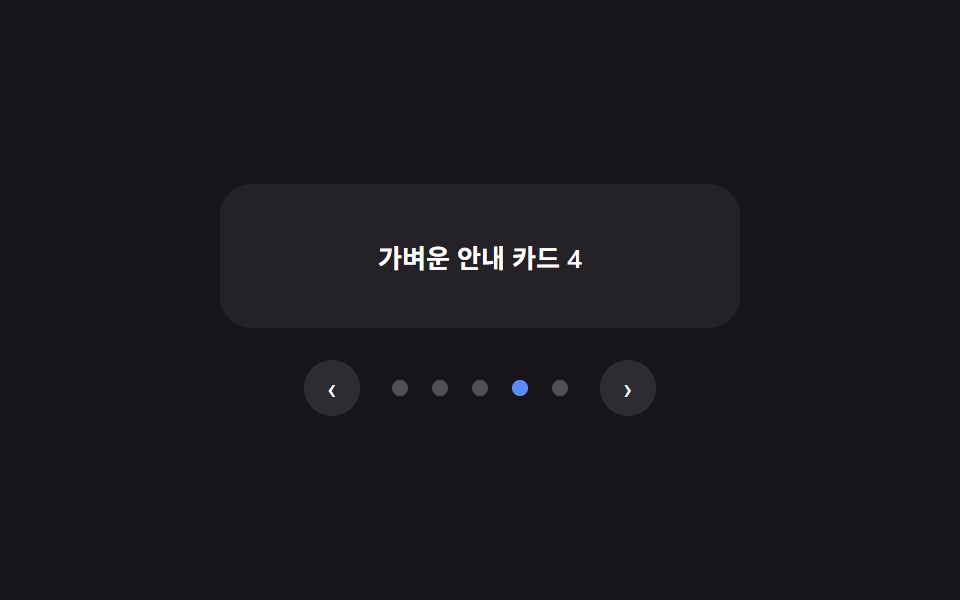
09省略記号なしで点が1つ滑るページネーション
前・次矢印の間に並ぶ点の後ろで、点と同じ大きさ・形の塗りつぶされたピルが現在のページを示す点の位置まで滑って吸い付く(207のpagination-numbered-ellipsis — 数字と省略記号でページ数が多い場合を扱う版 — とは異なる実演 — こちらはページ数が少ない場合の点表示・矢印だけで完結する最も簡素な版)。
使いどころ3〜7ページ程度の短い一覧の移動
measureAndMovegoToaria-current
<main class="stage">
<div class="pgn is-demo" id="pgn">
  <div class="pgn__panel" id="pgnPanel" aria-live="polite">軽いお知らせカード1</div>
  <nav class="pgn__nav" aria-label="ページ送り">
    <button type="button" class="pgn__navBtn" id="pgnPrev" aria-label="前のページ" disabled>
      <span aria-hidden="true">‹</span>
    </button>
    <div class="pgn__dots" id="pgnDots">
      <span class="pgn__track" id="pgnTrack" aria-hidden="true"></span>
      <button type="button" class="pgn__dot" aria-current="page" aria-label="1ページ目へ移動" data-page="0"></button>
      <button type="button" class="pgn__dot" aria-label="2ページ目へ移動" data-page="1"></button>
      <button type="button" class="pgn__dot" aria-label="3ページ目へ移動" data-page="2"></button>
      <button type="button" class="pgn__dot" aria-label="4ページ目へ移動" data-page="3"></button>
      <button type="button" class="pgn__dot" aria-label="5ページ目へ移動" data-page="4"></button>
    </div>
    <button type="button" class="pgn__navBtn" id="pgnNext" aria-label="次のページ">
      <span aria-hidden="true">›</span>
    </button>
  </nav>
</div>
</main>
@use "../../../../site/static/demo-tokens" as *;
// 변수 3개
$duration: $dur-base;
$easing: $ease-spring;
$color: $subject-blue-light;
$dot-size: 8px;
// 계산 겹: index.html 의 measureAndMove() 가 활성 점의 실제 offsetLeft 를 재서
// --track-x 로 넘긴다 — 점 간격을 고정값으로 가정하지 않는다.
@include stage($stage-ink);
.pgn {
width: min(100%, 260px);
display: flex;
flex-direction: column;
align-items: center;
gap: $sp-4;
}
.pgn__panel {
box-sizing: border-box;
width: 100%;
min-height: 72px;
display: flex;
align-items: center;
justify-content: center;
border-radius: $r-card;
background: rgba(255, 255, 255, .06);
color: $stage-paper;
font-weight: 600;
font-size: 13px;
text-align: center;
padding: $sp-3;
}
.pgn__nav {
display: flex;
align-items: center;
gap: $sp-3;
}
.pgn__navBtn {
box-sizing: border-box;
width: 28px;
height: 28px;
border: 0;
border-radius: $r-pill;
background: rgba(255, 255, 255, .1);
color: $stage-paper;
font-size: 14px;
line-height: 1;
cursor: pointer;
&:disabled {
opacity: .35;
cursor: default;
}
&:focus-visible {
outline: 2px solid $color;
outline-offset: 2px;
}
}
.pgn__dots {
position: relative;
display: inline-flex;
align-items: center;
gap: $sp-3;
padding: $sp-1;
}
.pgn__track {
position: absolute;
left: 0;
top: 50%;
width: $dot-size;
height: $dot-size;
border-radius: $r-pill;
background: $color;
transform: translate(var(--track-x, 0px), -50%);
transition: transform $duration $easing;
pointer-events: none;
}
.pgn__dot {
box-sizing: border-box;
width: $dot-size;
height: $dot-size;
border: 0;
border-radius: $r-pill;
background: rgba(255, 255, 255, .25);
padding: 0;
cursor: pointer;
&:focus-visible {
outline: 2px solid $color;
outline-offset: 3px;
}
}
@media (max-width: 340px) {
.pgn__panel { min-height: 60px; font-size: 12px; }
.pgn__dots { gap: $sp-2; }
}
// reduce: 실사용 경로 적용 — 표시자 이동 트랜지션만 없앤다. 페이지 계산·이동은 그대로 동작
@media (prefers-reduced-motion: reduce) {
.pgn__track { transition: none; }
}html, body {
margin: 0;
overflow: hidden;
}
.stage {
box-sizing: border-box;
min-height: 100vh;
display: grid;
place-items: center;
margin: 0;
background: #17141a;
font-family: -apple-system, "Segoe UI", "Noto Sans KR", sans-serif;
padding: clamp(8px, 4vw, 24px);
}
.pgn {
width: min(100%, 260px);
display: flex;
flex-direction: column;
align-items: center;
gap: 16px;
}
.pgn__panel {
box-sizing: border-box;
width: 100%;
min-height: 72px;
display: flex;
align-items: center;
justify-content: center;
border-radius: 16px;
background: rgba(255, 255, 255, 0.06);
color: #ffffff;
font-weight: 600;
font-size: 13px;
text-align: center;
padding: 12px;
}
.pgn__nav {
display: flex;
align-items: center;
gap: 12px;
}
.pgn__navBtn {
box-sizing: border-box;
width: 28px;
height: 28px;
border: 0;
border-radius: 999px;
background: rgba(255, 255, 255, 0.1);
color: #ffffff;
font-size: 14px;
line-height: 1;
cursor: pointer;
}
.pgn__navBtn:disabled {
opacity: 0.35;
cursor: default;
}
.pgn__navBtn:focus-visible {
outline: 2px solid #5b8cf8;
outline-offset: 2px;
}
.pgn__dots {
position: relative;
display: inline-flex;
align-items: center;
gap: 12px;
padding: 4px;
}
.pgn__track {
position: absolute;
left: 0;
top: 50%;
width: 8px;
height: 8px;
border-radius: 999px;
background: #5b8cf8;
transform: translate(var(--track-x, 0px), -50%);
transition: transform 300ms cubic-bezier(0.2, 0.8, 0.2, 1);
pointer-events: none;
}
.pgn__dot {
box-sizing: border-box;
width: 8px;
height: 8px;
border: 0;
border-radius: 999px;
background: rgba(255, 255, 255, 0.25);
padding: 0;
cursor: pointer;
}
.pgn__dot:focus-visible {
outline: 2px solid #5b8cf8;
outline-offset: 3px;
}
@media (max-width: 340px) {
.pgn__panel {
min-height: 60px;
font-size: 12px;
}
.pgn__dots {
gap: 8px;
}
}
@media (prefers-reduced-motion: reduce) {
.pgn__track {
transition: none;
}
}(function () {
var PANEL_TEXTS = [
'軽いお知らせカード1',
'軽いお知らせカード2',
'軽いお知らせカード3',
'軽いお知らせカード4',
'軽いお知らせカード5'
];
var AUTO_STEP_MS = 460;
function clamp(v, lo, hi) { return Math.min(hi, Math.max(lo, v)); }
var root = document.getElementById('pgn');
var panel = document.getElementById('pgnPanel');
var dotsWrap = document.getElementById('pgnDots');
var track = document.getElementById('pgnTrack');
var prevBtn = document.getElementById('pgnPrev');
var nextBtn = document.getElementById('pgnNext');
var dots = Array.prototype.slice.call(dotsWrap.querySelectorAll('.pgn__dot'));
var total = dots.length;
var current = 0;
// 계산 겹: 점마다 고정 간격을 가정하지 않고, 실제 렌더된 좌표(offsetLeft)를 그대로 재서
// 슬라이딩 표시자를 그 좌표로 옮긴다 — transform 이동만 쓰고 폭은 바꾸지 않는다.
function measureAndMove(index) {
var dot = dots[index];
track.style.setProperty('--track-x', dot.offsetLeft + 'px');
}
function goTo(index) {
index = clamp(index, 0, total - 1);
if (index === current) { return; }
current = index;
dots.forEach(function (dot, i) {
if (i === current) { dot.setAttribute('aria-current', 'page'); } else { dot.removeAttribute('aria-current'); }
});
measureAndMove(current);
panel.textContent = PANEL_TEXTS[current];
prevBtn.disabled = current === 0;
nextBtn.disabled = current === total - 1;
}
function human() {
if (root.classList.contains('is-demo')) {
root.classList.remove('is-demo');
if (timer) { window.clearInterval(timer); timer = null; }
}
}
dots.forEach(function (dot, i) {
dot.addEventListener('click', function () { human(); goTo(i); });
});
prevBtn.addEventListener('click', function () { human(); goTo(current - 1); });
nextBtn.addEventListener('click', function () { human(); goTo(current + 1); });
dotsWrap.addEventListener('keydown', function (e) {
if (e.key === 'ArrowRight') { human(); goTo(current + 1); }
else if (e.key === 'ArrowLeft') { human(); goTo(current - 1); }
});
window.addEventListener('resize', function () { measureAndMove(current); });
// 초기 배치는 트랜지션 없이 — 그대로 두면 CSS 기본값(0px)에서 실측 offsetLeft 로 바뀌는
// 자체가 트랜지션 하나를 만들어, 렌더러가 그 트랜지션을 "재생 중인 애니메이션"으로 오인해
// 실시간 대신 결정론(시계 직접 이동) 모드로 들어간다. 그러면 setInterval 자동 넘김이 실제
// 경과 시간을 못 받아 프레임마다 거의 안 움직인다 — 최초 1회만 트랜지션을 꺼서 막는다.
track.style.transition = 'none';
measureAndMove(0);
void track.offsetHeight;
track.style.transition = '';
var timer = null;
function autoTick() {
goTo((current + 1) % total);
}
var reduce = window.matchMedia('(prefers-reduced-motion: reduce)').matches;
if (!reduce) {
timer = window.setInterval(autoTick, AUTO_STEP_MS);
} else {
// reduce: 실사용 경로 적용 — 자동 ページ送り 루프를 멈춘다. 클릭·화살표 키 이동과 위치 계산은 그대로 동작
}
})();// Pagination — vanilla 판(run/381/demo/09-pagination/index.html)의 React 포트.
// 점마다 고정 간격을 가정하지 않고, 실제 렌더된 좌표(offsetLeft)를 그대로 재서
// 슬라이딩 표시자를 그 좌표로 옮긴다 — transform 이동만 쓰고 폭은 바꾸지 않는다.
import { useEffect, useRef } from "react";
import type { CSSProperties } from "react";
import styles from "./Pagination.module.scss";
export type PaginationProps = {
duration?: string;
easing?: string;
color?: string;
};
type Vars = CSSProperties & { "--duration"?: string; "--easing"?: string; "--color"?: string };
const PANEL_TEXTS = [
"가벼운 안내 카드 1",
"가벼운 안내 카드 2",
"가벼운 안내 카드 3",
"가벼운 안내 카드 4",
"가벼운 안내 카드 5",
];
export default function Pagination({
duration = "300ms", // vanilla $duration: $dur-base
easing = "cubic-bezier(.2, .8, .2, 1)", // vanilla $easing: $ease-spring
color = "#5b8cf8", // vanilla $color: $subject-blue-light
}: PaginationProps) {
const rootRef = useRef<HTMLDivElement | null>(null);
useEffect(() => {
const root = rootRef.current;
if (!root) return;
const panel = root.querySelector<HTMLDivElement>('[data-role="panel"]');
const dotsWrap = root.querySelector<HTMLDivElement>('[data-role="dots"]');
const track = root.querySelector<HTMLSpanElement>('[data-role="track"]');
const prevBtn = root.querySelector<HTMLButtonElement>('[data-role="prev"]');
const nextBtn = root.querySelector<HTMLButtonElement>('[data-role="next"]');
if (!panel || !dotsWrap || !track || !prevBtn || !nextBtn) return;
const dots = Array.prototype.slice.call(
dotsWrap.querySelectorAll("[data-page]")
) as HTMLButtonElement[];
const total = dots.length;
let current = 0;
const AUTO_STEP_MS = 460;
function clamp(v: number, lo: number, hi: number): number {
return Math.min(hi, Math.max(lo, v));
}
// 계산 겹: 점마다 고정 간격을 가정하지 않고, 실제 렌더된 좌표(offsetLeft)를 그대로 재서
// 슬라이딩 표시자를 그 좌표로 옮긴다 — transform 이동만 쓰고 폭은 바꾸지 않는다.
function measureAndMove(index: number): void {
const dot = dots[index];
track!.style.setProperty("--track-x", dot.offsetLeft + "px");
}
function goTo(index: number): void {
index = clamp(index, 0, total - 1);
if (index === current) return;
current = index;
dots.forEach((dot, i) => {
if (i === current) {
dot.setAttribute("aria-current", "page");
} else {
dot.removeAttribute("aria-current");
}
});
measureAndMove(current);
panel!.textContent = PANEL_TEXTS[current];
prevBtn!.disabled = current === 0;
nextBtn!.disabled = current === total - 1;
}
function human(): void {
if (root!.classList.contains("is-demo")) {
root!.classList.remove("is-demo");
if (timer) {
window.clearInterval(timer);
timer = null;
}
}
}
const dotHandlers: (() => void)[] = [];
dots.forEach((dot, i) => {
const handler = () => {
human();
goTo(i);
};
dotHandlers.push(handler);
dot.addEventListener("click", handler);
});
function onPrev(): void {
human();
goTo(current - 1);
}
function onNext(): void {
human();
goTo(current + 1);
}
prevBtn.addEventListener("click", onPrev);
nextBtn.addEventListener("click", onNext);
function onKeydown(e: KeyboardEvent): void {
if (e.key === "ArrowRight") {
human();
goTo(current + 1);
} else if (e.key === "ArrowLeft") {
human();
goTo(current - 1);
}
}
dotsWrap.addEventListener("keydown", onKeydown);
function onResize(): void {
measureAndMove(current);
}
window.addEventListener("resize", onResize);
// 초기 배치는 트랜지션 없이 — 그대로 두면 CSS 기본값(0px)에서 실측 offsetLeft 로 바뀌는
// 자체가 트랜지션 하나를 만들어, 렌더러가 그 트랜지션을 "재생 중인 애니메이션"으로 오인해
// 실시간 대신 결정론(시계 직접 이동) 모드로 들어간다. 그러면 setInterval 자동 넘김이 실제
// 경과 시간을 못 받아 프레임마다 거의 안 움직인다 — 최초 1회만 트랜지션을 꺼서 막는다.
track.style.transition = "none";
measureAndMove(0);
void track.offsetHeight;
track.style.transition = "";
let timer: number | null = null;
function autoTick(): void {
goTo((current + 1) % total);
}
const reduce = window.matchMedia("(prefers-reduced-motion: reduce)").matches;
if (!reduce) {
timer = window.setInterval(autoTick, AUTO_STEP_MS);
}
// reduce: 실사용 경로 적용 — 자동 페이지 넘김 루프를 멈춘다. 클릭·화살표 키 이동과 위치 계산은 그대로 동작
return () => {
dots.forEach((dot, i) => dot.removeEventListener("click", dotHandlers[i]));
prevBtn.removeEventListener("click", onPrev);
nextBtn.removeEventListener("click", onNext);
dotsWrap.removeEventListener("keydown", onKeydown);
window.removeEventListener("resize", onResize);
if (timer) {
window.clearInterval(timer);
}
};
}, []);
const vars: Vars = { "--duration": duration, "--easing": easing, "--color": color };
return (
<main className={styles.stage}>
<div className={`${styles.pgn} is-demo`} ref={rootRef} style={vars}>
<div className={styles.pgn__panel} data-role="panel" aria-live="polite">
가벼운 안내 카드 1
</div>
<nav className={styles.pgn__nav} aria-label="페이지 넘김">
<button
type="button"
className={styles.pgn__navBtn}
data-role="prev"
aria-label="이전 페이지"
disabled
>
<span aria-hidden="true">‹</span>
</button>
<div className={styles.pgn__dots} data-role="dots">
<span className={styles.pgn__track} data-role="track" aria-hidden="true" />
<button
type="button"
className={styles.pgn__dot}
aria-current="page"
aria-label="1페이지로 이동"
data-page={0}
/>
<button
type="button"
className={styles.pgn__dot}
aria-label="2페이지로 이동"
data-page={1}
/>
<button
type="button"
className={styles.pgn__dot}
aria-label="3페이지로 이동"
data-page={2}
/>
<button
type="button"
className={styles.pgn__dot}
aria-label="4페이지로 이동"
data-page={3}
/>
<button
type="button"
className={styles.pgn__dot}
aria-label="5페이지로 이동"
data-page={4}
/>
</div>
<button type="button" className={styles.pgn__navBtn} data-role="next" aria-label="다음 페이지">
<span aria-hidden="true">›</span>
</button>
</nav>
</div>
</main>
);
}09 省略記号なしで点が1つ滑るページネーション — 計測 累積面積 1.672% · 動いたフレーム 16/23GODRICH オリジナル · SCSS と React は zip に同梱 · 無限スクロール 実装 9種 — リスト・テーブルUI基本パターン集
このデモが属する記事
 無限スクロール 実装 9種 — リスト・テーブルUI基本パターン集無限スクロール 実装の9種のうち、1つはスピナーなしで新しい行が順に滑り込み、1つは並び替えボタンを押すと行が実際に位置を入れ替えて移動し、1つは横スクロール中に固定した最初の列にだけ影が付きます。 この記事のデモをすべて見る