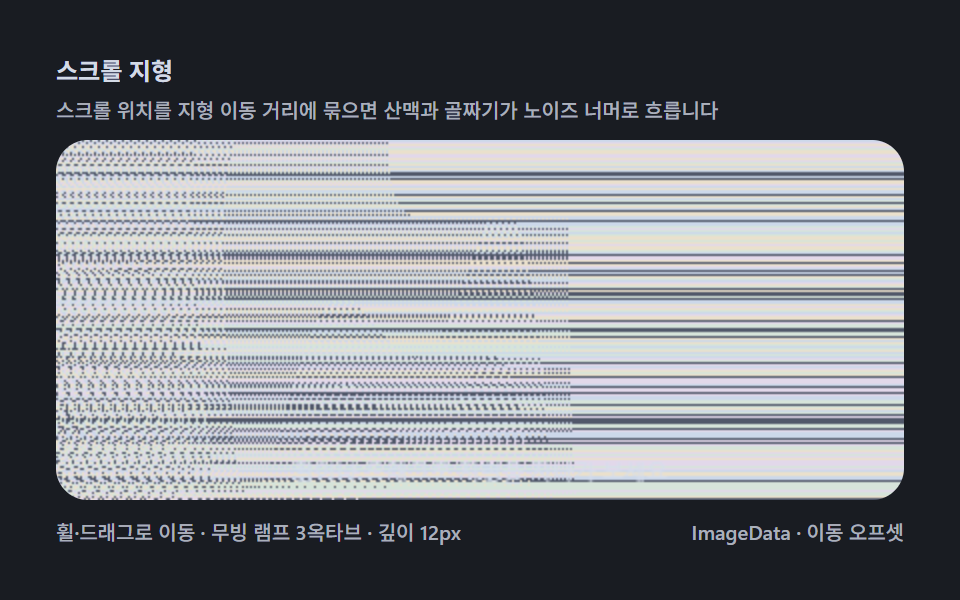
05スクロール地形 — すすった分だけ山脈が現れる
スクロール位置を深さマップの移動距離に結ぶと、ノイズの向こうへ山脈と谷が次々に流れます。スクロールトリガーのギャップを canvas 計算とつなぐ代表場面です。
使いどころスクロールストーリー、探検型ランディング
scrollImageDatarequestAnimationFrame
<main class="stage">
<div class="me is-demo" id="meRoot">
  <p class="me__hint">
    <span>スクロール地形</span>
    <span class="me__desc">スクロール位置を地形の移動距離に結ぶと、山脈と谷がノイズの向こうへ流れます</span>
  </p>
  <div class="me__field" role="application" aria-label="スクロール地形探査盤" tabindex="0">
    <canvas class="me__cv" id="meCv"></canvas>
  </div>
  <div class="me__bar">
    <span class="me__meta">ホイール・ドラッグで移動 · 移動ランプ3オクターブ · 深さ12px</span>
    <span class="me__meta me__meta--dim">ImageData · 移動オフセット</span>
  </div>
</div>
</main>
@use "../../../../site/static/demo-tokens" as *;
// 스크롤 지형(05) — keyframes 없음. 여행 오프셋이 깊이 샘플을 흐르게 한다.
// 무대 잉크 — 심야 탐사판 톤.
$me-stage: #191c22;
@include stage($me-stage);
$me-panel: #232830; // 탐사판 바닥 — 무대보다 한 단계 밝은 밤청
$me-text: #d3dae6; // 라벨 글자 — 밝은 청회
$me-p0: #ccd8ea; // 노이즈 파스텔 1 — 얼음 블루
$me-p1: #e2d8ea; // 노이즈 파스텔 2 — 라일락
$me-p2: #d6e4da; // 노이즈 파스텔 3 — 민트 크림
$me-p3: #eae0cc; // 노이즈 파스텔 4 — 크림
$me-p4: #51586a; // 노이즈 어두운 칸 — 저채소 청회
$duration: $dur-loop;
$easing: $ease-out;
$color: $me-p0;
.me {
--me-p0: #{$me-p0};
--me-p1: #{$me-p1};
--me-p2: #{$me-p2};
--me-p3: #{$me-p3};
--me-p4: #{$me-p4};
display: flex; flex-direction: column; gap: $sp-2;
width: 100%; max-width: 424px;
}
.me__hint {
display: flex; flex-direction: column; gap: 0; margin: 0;
font-weight: 700; font-size: clamp(10px, 2.8vw, 12px); line-height: 1.35;
color: $me-text;
}
.me__desc {
margin-top: $sp-1;
font-weight: 500; font-size: clamp(9px, 2.4vw, 10px); line-height: 1.4;
color: rgba($me-text, .78);
}
.me__field {
position: relative; height: 180px;
border-radius: $r-card; overflow: hidden;
background: $me-panel;
box-shadow: inset 0 0 0 1px rgba($me-text, .16);
cursor: grab;
touch-action: none;
}
.me__field:active { cursor: grabbing; }
.me__field:focus-visible { outline: 2px solid $me-p0; outline-offset: 2px; }
.me__cv { display: block; width: 100%; height: 100%; }
.me__bar { display: flex; align-items: baseline; justify-content: space-between; gap: $sp-2; }
.me__meta { font-size: 10px; font-weight: 500; color: rgba($me-text, .78); }
@media (max-width: 340px) {
.me { gap: $sp-1; }
.me__field { height: 100px; }
.me__meta--dim { display: none; }
}
// reduce — 골짜기 한 장만 남는다.
@media (prefers-reduced-motion: reduce) {
.me.is-still .me__field { cursor: default !important; }
}html, body {
margin: 0;
overflow: hidden;
}
.stage {
box-sizing: border-box;
min-height: 100vh;
display: grid;
place-items: center;
margin: 0;
background: #191c22;
font-family: -apple-system, "Segoe UI", "Noto Sans KR", sans-serif;
padding: clamp(8px, 4vw, 24px);
}
.me {
--me-p0: #ccd8ea;
--me-p1: #e2d8ea;
--me-p2: #d6e4da;
--me-p3: #eae0cc;
--me-p4: #51586a;
display: flex;
flex-direction: column;
gap: 8px;
width: 100%;
max-width: 424px;
}
.me__hint {
display: flex;
flex-direction: column;
gap: 0;
margin: 0;
font-weight: 700;
font-size: clamp(10px, 2.8vw, 12px);
line-height: 1.35;
color: #d3dae6;
}
.me__desc {
margin-top: 4px;
font-weight: 500;
font-size: clamp(9px, 2.4vw, 10px);
line-height: 1.4;
color: rgba(211, 218, 230, 0.78);
}
.me__field {
position: relative;
height: 180px;
border-radius: 16px;
overflow: hidden;
background: #232830;
box-shadow: inset 0 0 0 1px rgba(211, 218, 230, 0.16);
cursor: grab;
touch-action: none;
}
.me__field:active {
cursor: grabbing;
}
.me__field:focus-visible {
outline: 2px solid #ccd8ea;
outline-offset: 2px;
}
.me__cv {
display: block;
width: 100%;
height: 100%;
}
.me__bar {
display: flex;
align-items: baseline;
justify-content: space-between;
gap: 8px;
}
.me__meta {
font-size: 10px;
font-weight: 500;
color: rgba(211, 218, 230, 0.78);
}
@media (max-width: 340px) {
.me {
gap: 4px;
}
.me__field {
height: 100px;
}
.me__meta--dim {
display: none;
}
}
@media (prefers-reduced-motion: reduce) {
.me.is-still .me__field {
cursor: default !important;
}
}// スクロール地形(05) — 깊이 지도를 가로지르는 이동 거리를 입력에 묶는다.
// 지형 높이 = 무빙 램프 3옥타브(서로 다른 파장의 사인 합) — x 에 여행 오프셋을 더해 샘플한다.
// 휠·가로 드래그로 직접 여행하고, 손을 떼면 자동 주행이 이어받아 루프가 끊기지 않는다.
// 산맥이 노이즈 너머로 흐르는 대표 장면 — 스크롤 트리거와 픽셀 계산이 한 몸이다.
(function () {
// ── 변형 상수 블록 ──
var MAXSHIFT = 12; // 산 높이(px)
var SPEED = 90; // 자동 주행 속도(px/초)
// ─────────────────
var root = document.getElementById('meRoot');
var cvEl = document.getElementById('meCv');
if (!root || !cvEl) return;
var fieldEl = cvEl.parentElement;
var css = getComputedStyle(root);
function tokRGB(name) {
var s = css.getPropertyValue(name).trim();
var hx = s.length === 4
? s.charAt(1) + s.charAt(1) + s.charAt(2) + s.charAt(2) + s.charAt(3) + s.charAt(3)
: s.slice(1);
return [parseInt(hx.slice(0, 2), 16), parseInt(hx.slice(2, 4), 16), parseInt(hx.slice(4, 6), 16)];
}
var PAL = [];
for (var i = 0; i < 5; i++) PAL.push(tokRGB('--me-p' + i));
function baseIdx(x, y) {
var h = (Math.imul(x + 11, 374761393) + Math.imul(y + 7, 668265263)) >>> 0;
h ^= h >>> 13;
h = Math.imul(h, 1274126177) >>> 0;
h ^= h >>> 16;
return ((h % PAL.length) + PAL.length) % PAL.length;
}
var ctx = cvEl.getContext('2d');
var W = 0, H = 0, img = null;
function fit() {
var r = fieldEl.getBoundingClientRect();
W = Math.round(r.width); H = Math.round(r.height);
cvEl.width = W; cvEl.height = H;
img = ctx.createImageData(W, H);
}
// 지형 — 3옥타브 무빙 램프. wx = 세계 좌표(여행 오프셋 더한 x)
function terrain(wx, y) {
var v = 0;
v += Math.sin(wx * 0.011 + y * 0.004) * 0.45;
v += Math.sin(wx * 0.031 + 1.7 + y * 0.010) * 0.30;
v += Math.sin(wx * 0.074 + 4.2) * 0.18;
v += (Math.cos(wx * 0.005 + y * 0.006) * 0.5 + 0.5) * 0.35;
var front = y / H; // 화면 하단(앞쪽)이 더 높게 솟는다
var h01 = Math.max(0, Math.min(1, v * 0.5 + 0.5)) * (0.35 + 0.65 * front * front);
return h01;
}
function draw(travel, hover) {
var d = img.data, x, y, di;
var col = new Int32Array(W);
for (y = 0; y < H; y++) {
for (x = 0; x < W; x++) {
var s = Math.round(terrain(x + travel, y) * MAXSHIFT);
if (s <= 0) {
col[x] = baseIdx(x, y);
} else {
var from = x - s;
col[x] = from >= 0 ? col[from] : baseIdx(from + W, y);
}
}
for (x = 0; x < W; x++) {
var c = PAL[col[x]];
di = (y * W + x) * 4;
d[di] = c[0]; d[di + 1] = c[1]; d[di + 2] = c[2]; d[di + 3] = 255;
}
}
ctx.putImageData(img, 0, 0);
if (!hover) {
ctx.fillStyle = 'rgba(214, 222, 236, 0.8)';
ctx.font = '500 11px "Segoe UI", sans-serif';
ctx.textAlign = 'center';
ctx.fillText('ホイールやドラッグで地形を進んでみてください', W / 2, H - 10);
}
}
// ── 입력 — 휠 · 가로 드래그 ──
var travel = 0, hover = false, dragX = null;
fieldEl.addEventListener('wheel', function (ev) {
ev.preventDefault();
travel += (ev.deltaY + ev.deltaX) * 0.6;
hover = true;
}, { passive: false });
fieldEl.addEventListener('pointerdown', function (ev) {
dragX = ev.clientX; hover = true;
ev.preventDefault();
});
window.addEventListener('pointermove', function (ev) {
if (dragX === null) return;
travel -= (ev.clientX - dragX) * 1.2;
dragX = ev.clientX;
});
window.addEventListener('pointerup', function () { dragX = null; });
fieldEl.addEventListener('pointerenter', function () { hover = true; });
var reduce = window.matchMedia('(prefers-reduced-motion: reduce)').matches;
var t0 = -1, lastNow = -1;
function frame(now) {
if (t0 < 0) { t0 = now; lastNow = now; }
var dt = Math.min(0.05, (now - lastNow) / 1000 || 0.016);
lastNow = now;
travel += dt * SPEED; // 자동 주행 — 손이 있으면 휠·드래그가 겹쳐 더해진다
draw(travel, hover);
requestAnimationFrame(frame);
}
window.addEventListener('resize', function () {
fit();
if (reduce) draw(0, true);
});
fit();
if (reduce) {
draw(0, true); // reduce — 골짜기 한 장만 고정
root.classList.add('is-still');
} else {
requestAnimationFrame(frame);
}
})();// MagicEyeScrollLandscapeReveal — vanilla 판(run/325/demo/05-magic-eye-scroll-landscape-reveal/index.html) 의 React 포트.
// 깊이 지도를 가로지르는 이동 거리를 입력에 묶는다. 지형 높이 = 무빙 램프 3옥타브
// (서로 다른 파장의 사인 합) — x 에 여행 오프셋을 더해 샘플한다.
// 휠·가로 드래그로 직접 여행하고, 손을 떼면 자동 주행이 이어받아 루프가 끊기지 않는다.
// 산맥이 노이즈 너머로 흐르는 대표 장면 — 스크롤 트리거와 픽셀 계산이 한 몸이다.
import { useEffect, useRef, useState } from "react";
import type { CSSProperties } from "react";
import styles from "./MagicEyeScrollLandscapeReveal.module.scss";
export type MagicEyeScrollLandscapeRevealProps = {
duration?: string;
easing?: string;
color?: string;
maxshift?: number; // 산 높이(px)
speed?: number; // 자동 주행 속도(px/초)
};
// ── 변형 상수(기본값) — vanilla 판과 동일 ──
const MAXSHIFT = 12; // 산 높이(px)
const SPEED = 90; // 자동 주행 속도(px/초)
type Vars = CSSProperties & { "--duration"?: string; "--easing"?: string; "--color"?: string };
type Box<T> = { current: T };
type RGB = [number, number, number];
const FIELD_LABEL = "스크롤 지형 탐사판";
const META_LEFT = "휠·드래그로 이동 · 무빙 램프 3옥타브 · 깊이 12px";
const META_RIGHT = "ImageData · 이동 오프셋";
const HINT_TITLE = "스크롤 지형";
const HINT_DESC = "스크롤 위치를 지형 이동 거리에 묶으면 산맥과 골짜기가 노이즈 너머로 흐릅니다";
const GUIDE = "휠이나 드래그로 지형을 지나가 보세요";
export default function MagicEyeScrollLandscapeReveal({
duration = "2s",
easing = "ease-out",
color = "#ccd8ea",
maxshift = MAXSHIFT,
speed = SPEED
}: MagicEyeScrollLandscapeRevealProps) {
const rootRef = useRef<HTMLDivElement | null>(null);
const fieldRef = useRef<HTMLDivElement | null>(null);
const cvRef = useRef<HTMLCanvasElement | null>(null);
const ctxRef = useRef<CanvasRenderingContext2D | null>(null);
const palRef = useRef<RGB[] | null>(null);
const imgRef = useRef<ImageData | null>(null);
const travelRef = useRef(0) as Box<number>;
const hoverRef = useRef(false) as Box<boolean>;
const dragRef = useRef<number | null>(null) as Box<number | null>;
const wRef = useRef(0) as Box<number>;
const hRef = useRef(0) as Box<number>;
const rafRef = useRef(0) as Box<number>;
const [still, setStill] = useState(false);
const vars: Vars = { "--duration": duration, "--easing": easing, "--color": color };
function reduced(): boolean {
return window.matchMedia("(prefers-reduced-motion: reduce)").matches;
}
function tokRGB(root: HTMLDivElement, name: string): RGB {
const s = getComputedStyle(root).getPropertyValue(name).trim();
const hx = s.length === 4
? s.charAt(1) + s.charAt(1) + s.charAt(2) + s.charAt(2) + s.charAt(3) + s.charAt(3)
: s.slice(1);
return [parseInt(hx.slice(0, 2), 16), parseInt(hx.slice(2, 4), 16), parseInt(hx.slice(4, 6), 16)];
}
function baseIdx(x: number, y: number): number {
const pal = palRef.current;
if (!pal) return 0;
let h = (Math.imul(x + 11, 374761393) + Math.imul(y + 7, 668265263)) >>> 0;
h ^= h >>> 13;
h = Math.imul(h, 1274126177) >>> 0;
h ^= h >>> 16;
return ((h % pal.length) + pal.length) % pal.length;
}
function fit(): void {
const field = fieldRef.current;
const cv = cvRef.current;
const ctx = ctxRef.current;
if (!field || !cv || !ctx) return;
const r = field.getBoundingClientRect();
wRef.current = Math.round(r.width);
hRef.current = Math.round(r.height);
cv.width = wRef.current;
cv.height = hRef.current;
imgRef.current = ctx.createImageData(wRef.current, hRef.current);
}
// 지형 — 3옥타브 무빙 램프. wx = 세계 좌표(여행 오프셋 더한 x)
function terrain(wx: number, y: number): number {
const H = hRef.current;
let v = 0;
v += Math.sin(wx * 0.011 + y * 0.004) * 0.45;
v += Math.sin(wx * 0.031 + 1.7 + y * 0.010) * 0.30;
v += Math.sin(wx * 0.074 + 4.2) * 0.18;
v += (Math.cos(wx * 0.005 + y * 0.006) * 0.5 + 0.5) * 0.35;
const front = y / H; // 화면 하단(앞쪽)이 더 높게 솟는다
return Math.max(0, Math.min(1, v * 0.5 + 0.5)) * (0.35 + 0.65 * front * front);
}
function draw(travel: number, hover: boolean): void {
const ctx = ctxRef.current;
const img = imgRef.current;
const pal = palRef.current;
const W = wRef.current, H = hRef.current;
if (!ctx || !img || !pal) return;
const d = img.data;
const col = new Int32Array(W);
for (let y = 0; y < H; y++) {
for (let x = 0; x < W; x++) {
const s = Math.round(terrain(x + travel, y) * maxshift);
if (s <= 0) {
col[x] = baseIdx(x, y);
} else {
const from = x - s;
col[x] = from >= 0 ? col[from] : baseIdx(from + W, y);
}
}
for (let x = 0; x < W; x++) {
const c = pal[col[x]];
const di = (y * W + x) * 4;
d[di] = c[0]; d[di + 1] = c[1]; d[di + 2] = c[2]; d[di + 3] = 255;
}
}
ctx.putImageData(img, 0, 0);
if (!hover) {
ctx.fillStyle = "rgba(214, 222, 236, 0.8)";
ctx.font = '500 11px "Segoe UI", sans-serif';
ctx.textAlign = "center";
ctx.fillText(GUIDE, W / 2, H - 10);
}
}
let t0 = -1;
let lastNow = -1;
function frame(now: number): void {
if (t0 < 0) { t0 = now; lastNow = now; }
const dt = Math.min(0.05, (now - lastNow) / 1000 || 0.016);
lastNow = now;
travelRef.current += dt * speed; // 자동 주행 — 손이 있으면 휠·드래그가 겹쳐 더해진다
draw(travelRef.current, hoverRef.current);
rafRef.current = requestAnimationFrame(frame);
}
useEffect(() => {
const root = rootRef.current;
const cv = cvRef.current;
const field = fieldRef.current;
if (!root || !cv || !field) return;
const pal: RGB[] = [];
for (let i = 0; i < 5; i++) pal.push(tokRGB(root, "--me-p" + i));
palRef.current = pal;
ctxRef.current = cv.getContext("2d");
fit();
// ── 입력 — 휠 · 가로 드래그 ──
function onWheel(ev: WheelEvent): void {
ev.preventDefault();
travelRef.current += (ev.deltaY + ev.deltaX) * 0.6;
hoverRef.current = true;
}
function onPointerDown(ev: PointerEvent): void {
dragRef.current = ev.clientX; hoverRef.current = true;
ev.preventDefault();
}
function onPointerMove(ev: PointerEvent): void {
if (dragRef.current === null) return;
travelRef.current -= (ev.clientX - dragRef.current) * 1.2;
dragRef.current = ev.clientX;
}
function onPointerUp(): void { dragRef.current = null; }
function onPointerEnter(): void { hoverRef.current = true; }
field.addEventListener("wheel", onWheel, { passive: false });
field.addEventListener("pointerdown", onPointerDown);
window.addEventListener("pointermove", onPointerMove);
window.addEventListener("pointerup", onPointerUp);
field.addEventListener("pointerenter", onPointerEnter);
function onResize(): void {
fit();
if (reduced()) draw(0, true);
}
window.addEventListener("resize", onResize);
if (reduced()) {
draw(0, true); // reduce — 골짜기 한 장만 고정
setStill(true);
} else {
t0 = -1;
lastNow = -1;
rafRef.current = requestAnimationFrame(frame);
}
return () => {
field.removeEventListener("wheel", onWheel);
field.removeEventListener("pointerdown", onPointerDown);
window.removeEventListener("pointermove", onPointerMove);
window.removeEventListener("pointerup", onPointerUp);
field.removeEventListener("pointerenter", onPointerEnter);
window.removeEventListener("resize", onResize);
cancelAnimationFrame(rafRef.current);
};
// eslint-disable-next-line react-hooks/exhaustive-deps
}, [maxshift, speed]);
const rootCls = still ? `${styles.root} ${styles.isStill}` : styles.root;
return (
<main className={styles.stage}>
<div className={rootCls} ref={rootRef} style={vars}>
<p className={styles.hint}>
<span>{HINT_TITLE}</span>
<span className={styles.desc}>{HINT_DESC}</span>
</p>
<div
className={styles.field}
ref={fieldRef}
role="application"
aria-label={FIELD_LABEL}
tabIndex={0}
>
<canvas className={styles.cv} ref={cvRef}></canvas>
</div>
<div className={styles.bar}>
<span className={styles.meta}>{META_LEFT}</span>
<span className={styles.metaDim}>{META_RIGHT}</span>
</div>
</div>
</main>
);
}05 スクロール地形 — すすった分だけ山脈が現れる — 計測 累積面積 51.918% · 動いたフレーム 23/23GODRICH オリジナル · SCSS と React は zip に同梱 · マジックアイ9種 — 深さマップを走査線シフトで織るステレオグラム
このデモが属する記事
 マジックアイ9種 — 深さマップを走査線シフトで織るステレオグラムピクセルの明るさを深さとして読み、同じ行の中で数ピクセルずらすと、平らな模様の中に立体が隠れます。ライブラリなしのコピペ隠れ絵エンジンです。マジックアイ(ステレオグラム)は、深さマップを決めて各行を左へ数ピクセル引き込んで複製するだけで、球 この記事のデモをすべて見る