08生きる隆起 — 深さの波で息をする表面
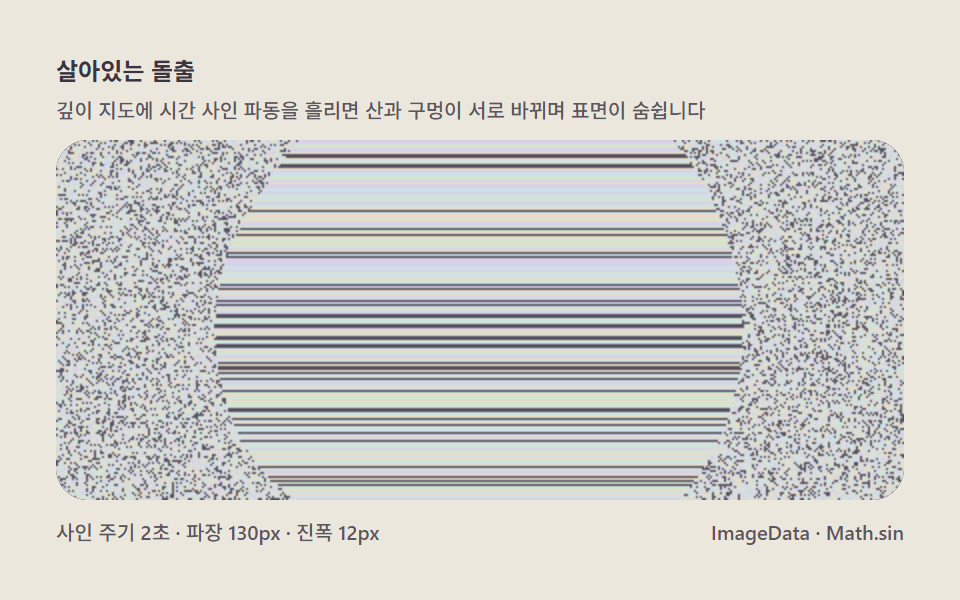
深さマップに時間によるサイン波を流すと、立体が膨らんだり沈んだりし、山と穴が入れ替わります。静止画だけだったマジックアイを動く場面へ変えるアニメーション項目です。
使いどころヒーロー背景、展示型のおもちゃ
ImageDataMath.sinrequestAnimationFrame
<main class="stage">
<div class="me is-demo" id="meRoot">
  <p class="me__hint">
    <span>生きる隆起</span>
    <span class="me__desc">深さマップに時間のサイン波を流すと、山と穴が入れ替わり表面が息します</span>
  </p>
  <div class="me__field" role="application" aria-label="深さ波動盤" tabindex="0">
    <canvas class="me__cv" id="meCv"></canvas>
  </div>
  <div class="me__bar">
    <span class="me__meta">サイン周期2秒 · 波長130px · 振幅12px</span>
    <span class="me__meta me__meta--dim">ImageData · Math.sin</span>
  </div>
</div>
</main>
@use "../../../../site/static/demo-tokens" as *;
// 살아있는 돌출(08) — keyframes 없음. 시간 사인 파동이 깊이를 흐르게 한다.
// 무대 페이퍼 — 밝은 도화지(파스텔 크림).
$me-stage: #ece7dd;
@include stage($me-stage);
$me-panel: #2c2832; // 파동 판 바닥 — 어두운 먹보라(노이즈가 잘 뜨는 바탕)
$me-text: #3a3542; // 라벨 글자 — 잉크보라
$me-p0: #d8d2e8; // 노이즈 파스텔 1 — 라일락 화이트
$me-p1: #cfe0e8; // 노이즈 파스텔 2 — 파스텔 스카이
$me-p2: #e8dcc8; // 노이즈 파스텔 3 — 크림
$me-p3: #d4e4d2; // 노이즈 파스텔 4 — 민트 크림
$me-p4: #55505e; // 노이즈 어두운 칸 — 저채도 보라
$duration: $dur-loop;
$easing: $ease-out;
$color: $me-p0;
.me {
--me-p0: #{$me-p0};
--me-p1: #{$me-p1};
--me-p2: #{$me-p2};
--me-p3: #{$me-p3};
--me-p4: #{$me-p4};
display: flex; flex-direction: column; gap: $sp-2;
width: 100%; max-width: 424px;
}
.me__hint {
display: flex; flex-direction: column; gap: 0; margin: 0;
font-weight: 700; font-size: clamp(10px, 2.8vw, 12px); line-height: 1.35;
color: $me-text;
}
.me__desc {
margin-top: $sp-1;
font-weight: 500; font-size: clamp(9px, 2.4vw, 10px); line-height: 1.4;
color: rgba($me-text, .82);
}
.me__field {
position: relative; height: 180px;
border-radius: $r-card; overflow: hidden;
background: $me-panel;
box-shadow: inset 0 0 0 1px rgba($me-text, .18);
}
.me__field:focus-visible { outline: 2px solid $me-p0; outline-offset: 2px; }
.me__cv { display: block; width: 100%; height: 100%; }
.me__bar { display: flex; align-items: baseline; justify-content: space-between; gap: $sp-2; }
.me__meta { font-size: 10px; font-weight: 500; color: rgba($me-text, .82); }
@media (max-width: 340px) {
.me { gap: $sp-1; }
.me__field { height: 100px; }
.me__meta--dim { display: none; }
}
// reduce — 파동 한 장만 남는다.
@media (prefers-reduced-motion: reduce) {
.me.is-still .me__field { cursor: default; }
}html, body {
margin: 0;
overflow: hidden;
}
.stage {
box-sizing: border-box;
min-height: 100vh;
display: grid;
place-items: center;
margin: 0;
background: #ece7dd;
font-family: -apple-system, "Segoe UI", "Noto Sans KR", sans-serif;
padding: clamp(8px, 4vw, 24px);
}
.me {
--me-p0: #d8d2e8;
--me-p1: #cfe0e8;
--me-p2: #e8dcc8;
--me-p3: #d4e4d2;
--me-p4: #55505e;
display: flex;
flex-direction: column;
gap: 8px;
width: 100%;
max-width: 424px;
}
.me__hint {
display: flex;
flex-direction: column;
gap: 0;
margin: 0;
font-weight: 700;
font-size: clamp(10px, 2.8vw, 12px);
line-height: 1.35;
color: #3a3542;
}
.me__desc {
margin-top: 4px;
font-weight: 500;
font-size: clamp(9px, 2.4vw, 10px);
line-height: 1.4;
color: rgba(58, 53, 66, 0.82);
}
.me__field {
position: relative;
height: 180px;
border-radius: 16px;
overflow: hidden;
background: #2c2832;
box-shadow: inset 0 0 0 1px rgba(58, 53, 66, 0.18);
}
.me__field:focus-visible {
outline: 2px solid #d8d2e8;
outline-offset: 2px;
}
.me__cv {
display: block;
width: 100%;
height: 100%;
}
.me__bar {
display: flex;
align-items: baseline;
justify-content: space-between;
gap: 8px;
}
.me__meta {
font-size: 10px;
font-weight: 500;
color: rgba(58, 53, 66, 0.82);
}
@media (max-width: 340px) {
.me {
gap: 4px;
}
.me__field {
height: 100px;
}
.me__meta--dim {
display: none;
}
}
@media (prefers-reduced-motion: reduce) {
.me.is-still .me__field {
cursor: default;
}
}// 生きる隆起(08) — 깊이 지도에 시간 사인 파동을 흘린다.
// 기저 부풀음(중앙 돔) 위로 파장 130px 사인 파동이 대각선으로 지나가면
// 산과 구멍이 서로 바뀌며 표면이 숨쉰다 — 정지 화면이 전부였던 매직아이의
// 애니메이션 국면. 파동의 봉우리가 최대 시프트(12px)를 만들고 골은 0으로
// 눌러 시프트가 없는 칸과 있는 칸이 행마다 번갈아 흐른다.
(function () {
// ── 변형 상수 블록 ──
var CYCLE = 2.0; // 사인 주기(초)
var WAVELEN = 130; // 파장(px) — 이만큼 이동할 때마다 한 주기
var AMP = 12; // 최대 시프트(px) — 파동 진폭이자 최대 깊이
// ─────────────────
var root = document.getElementById('meRoot');
var cvEl = document.getElementById('meCv');
if (!root || !cvEl) return;
var fieldEl = cvEl.parentElement;
var css = getComputedStyle(root);
function tokRGB(name) {
var s = css.getPropertyValue(name).trim();
var hx = s.length === 4
? s.charAt(1) + s.charAt(1) + s.charAt(2) + s.charAt(2) + s.charAt(3) + s.charAt(3)
: s.slice(1);
return [parseInt(hx.slice(0, 2), 16), parseInt(hx.slice(2, 4), 16), parseInt(hx.slice(4, 6), 16)];
}
var PAL = [];
for (var i = 0; i < 5; i++) PAL.push(tokRGB('--me-p' + i));
function baseIdx(x, y) {
var h = (Math.imul(x + 11, 374761393) + Math.imul(y + 7, 668265263)) >>> 0;
h ^= h >>> 13;
h = Math.imul(h, 1274126177) >>> 0;
h ^= h >>> 16;
return ((h % PAL.length) + PAL.length) % PAL.length;
}
var ctx = cvEl.getContext('2d');
var W = 0, H = 0, img = null;
function fit() {
var r = fieldEl.getBoundingClientRect();
W = Math.round(r.width); H = Math.round(r.height);
cvEl.width = W; cvEl.height = H;
img = ctx.createImageData(W, H);
}
// 깊이 — 기저 돔 × 사인 파동. 파동이 대각선으로 흐르고 위상이 시간에 따라 진행한다.
function depthAt(x, y, t) {
var ph = t / CYCLE * Math.PI * 2;
// 기저 — 중앙 돔(화면 가장자리는 0). 중심이 천천히 수직으로 bob 한다.
var cx = W * 0.5, cy = H * 0.5 + Math.sin(ph) * H * 0.06;
var rad = Math.min(W, H) * 0.74;
var dx = (x - cx) / rad, dy = (y - cy) / rad;
var d2 = dx * dx + dy * dy;
if (d2 >= 1) return 0;
var dome = Math.sqrt(1 - d2) * 0.60;
// 파동 — 대각선 사인 + 직교 사인(파동면이 비틀린다), 파장 WAVELEN
var wpos = (x + y * 0.6) / WAVELEN * Math.PI * 2;
var wpos2 = (x * 0.4 - y) / (WAVELEN * 1.4) * Math.PI * 2;
var wave = Math.sin(wpos - ph) * 0.5 + 0.5;
var wave2 = Math.sin(wpos2 - ph * 0.7 + 2.1) * 0.5 + 0.5;
var v = dome * (0.28 + 0.44 * wave + 0.28 * wave2);
// 숨쉬기 — 전체 진폭이 주기의 절반 위상으로 느리게 부풀고 가라앉는다
var breathe = 0.68 + 0.32 * Math.sin(ph * 0.5);
return v * breathe;
}
function draw(t) {
var d = img.data, x, y, di;
var col = new Int32Array(W);
for (y = 0; y < H; y++) {
for (x = 0; x < W; x++) {
var s = Math.round(depthAt(x, y, t) * AMP);
if (s <= 0) {
col[x] = baseIdx(x, y);
} else {
var from = x - s;
col[x] = from >= 0 ? col[from] : baseIdx(from + W, y);
}
}
for (x = 0; x < W; x++) {
var c = PAL[col[x]];
di = (y * W + x) * 4;
d[di] = c[0]; d[di + 1] = c[1]; d[di + 2] = c[2]; d[di + 3] = 255;
}
}
ctx.putImageData(img, 0, 0);
}
var reduce = window.matchMedia('(prefers-reduced-motion: reduce)').matches;
var t0 = -1;
function frame(now) {
if (t0 < 0) t0 = now;
draw((now - t0) / 1000);
requestAnimationFrame(frame);
}
window.addEventListener('resize', function () {
fit();
if (reduce) draw(0);
});
fit();
if (reduce) {
draw(0); // reduce — 파동 한 장만 고정
root.classList.add('is-still');
} else {
requestAnimationFrame(frame);
}
})();// MagicEyeAnimDepthWave — vanilla 판(run/325/demo/08-magic-eye-anim-depth-wave/index.html) 의 React 포트.
// 깊이 지도에 시간 사인 파동을 흘린다. 기저 부풀음(중앙 돔) 위로 파장 130px 사인 파동이
// 대각선으로 지나가면 산과 구멍이 서로 바뀌며 표면이 숨쉰다 — 정지 화면이 전부였던 매직아이의
// 애니메이션 국면. 파동의 봉우리가 최대 시프트(12px)를 만들고 골은 0으로 눌러
// 시프트가 없는 칸과 있는 칸이 행마다 번갈아 흐른다.
import { useEffect, useRef, useState } from "react";
import type { CSSProperties } from "react";
import styles from "./MagicEyeAnimDepthWave.module.scss";
export type MagicEyeAnimDepthWaveProps = {
duration?: string;
easing?: string;
color?: string;
cycle?: number; // 사인 주기(초)
wavelen?: number; // 파장(px) — 이만큼 이동할 때마다 한 주기
amp?: number; // 최대 시프트(px) — 파동 진폭이자 최대 깊이
};
// ── 변형 상수(기본값) — vanilla 판과 동일 ──
const CYCLE = 2.0; // 사인 주기(초) — 설정 초(2s)와 같아 한 파동이 한 루프
const WAVELEN = 130; // 파장(px)
const AMP = 12; // 최대 시프트(px)
type Vars = CSSProperties & { "--duration"?: string; "--easing"?: string; "--color"?: string };
type Box<T> = { current: T };
type RGB = [number, number, number];
const FIELD_LABEL = "깊이 파동 판";
const META_LEFT = "사인 주기 2초 · 파장 130px · 진폭 12px";
const META_RIGHT = "ImageData · Math.sin";
const HINT_TITLE = "살아있는 돌출";
const HINT_DESC = "깊이 지도에 시간 사인 파동을 흘리면 산과 구멍이 서로 바뀌며 표면이 숨쉽니다";
export default function MagicEyeAnimDepthWave({
duration = "2s",
easing = "ease-out",
color = "#d8d2e8",
cycle = CYCLE,
wavelen = WAVELEN,
amp = AMP
}: MagicEyeAnimDepthWaveProps) {
const rootRef = useRef<HTMLDivElement | null>(null);
const fieldRef = useRef<HTMLDivElement | null>(null);
const cvRef = useRef<HTMLCanvasElement | null>(null);
const ctxRef = useRef<CanvasRenderingContext2D | null>(null);
const palRef = useRef<RGB[] | null>(null);
const imgRef = useRef<ImageData | null>(null);
const wRef = useRef(0) as Box<number>;
const hRef = useRef(0) as Box<number>;
const rafRef = useRef(0) as Box<number>;
const [still, setStill] = useState(false);
const vars: Vars = { "--duration": duration, "--easing": easing, "--color": color };
function reduced(): boolean {
return window.matchMedia("(prefers-reduced-motion: reduce)").matches;
}
function tokRGB(root: HTMLDivElement, name: string): RGB {
const s = getComputedStyle(root).getPropertyValue(name).trim();
const hx = s.length === 4
? s.charAt(1) + s.charAt(1) + s.charAt(2) + s.charAt(2) + s.charAt(3) + s.charAt(3)
: s.slice(1);
return [parseInt(hx.slice(0, 2), 16), parseInt(hx.slice(2, 4), 16), parseInt(hx.slice(4, 6), 16)];
}
function baseIdx(x: number, y: number): number {
const pal = palRef.current;
if (!pal) return 0;
let h = (Math.imul(x + 11, 374761393) + Math.imul(y + 7, 668265263)) >>> 0;
h ^= h >>> 13;
h = Math.imul(h, 1274126177) >>> 0;
h ^= h >>> 16;
return ((h % pal.length) + pal.length) % pal.length;
}
function fit(): void {
const field = fieldRef.current;
const cv = cvRef.current;
const ctx = ctxRef.current;
if (!field || !cv || !ctx) return;
const r = field.getBoundingClientRect();
wRef.current = Math.round(r.width);
hRef.current = Math.round(r.height);
cv.width = wRef.current;
cv.height = hRef.current;
imgRef.current = ctx.createImageData(wRef.current, hRef.current);
}
// 깊이 — 기저 돔 × 사인 파동. 파동이 대각선으로 흐르고 위상이 시간에 따라 진행한다.
function depthAt(x: number, y: number, t: number): number {
const W = wRef.current, H = hRef.current;
const ph = t / cycle * Math.PI * 2;
// 기저 — 중앙 돔(화면 가장자리는 0). 중심이 천천히 수직으로 bob 한다.
const cx = W * 0.5, cy = H * 0.5 + Math.sin(ph) * H * 0.06;
const rad = Math.min(W, H) * 0.74;
const dx = (x - cx) / rad, dy = (y - cy) / rad;
const d2 = dx * dx + dy * dy;
if (d2 >= 1) return 0;
const dome = Math.sqrt(1 - d2) * 0.60;
// 파동 — 대각선 사인 + 직교 사인(파동면이 비틀린다), 파장 wavelen
const wpos = (x + y * 0.6) / wavelen * Math.PI * 2;
const wpos2 = (x * 0.4 - y) / (wavelen * 1.4) * Math.PI * 2;
const wave = Math.sin(wpos - ph) * 0.5 + 0.5;
const wave2 = Math.sin(wpos2 - ph * 0.7 + 2.1) * 0.5 + 0.5;
const v = dome * (0.28 + 0.44 * wave + 0.28 * wave2);
// 숨쉬기 — 전체 진폭이 주기의 절반 위상으로 느리게 부풀고 가라앉는다
const breathe = 0.68 + 0.32 * Math.sin(ph * 0.5);
return v * breathe;
}
function draw(t: number): void {
const ctx = ctxRef.current;
const img = imgRef.current;
const pal = palRef.current;
const W = wRef.current, H = hRef.current;
if (!ctx || !img || !pal) return;
const d = img.data;
const col = new Int32Array(W);
for (let y = 0; y < H; y++) {
for (let x = 0; x < W; x++) {
const s = Math.round(depthAt(x, y, t) * amp);
if (s <= 0) {
col[x] = baseIdx(x, y);
} else {
const from = x - s;
col[x] = from >= 0 ? col[from] : baseIdx(from + W, y);
}
}
for (let x = 0; x < W; x++) {
const c = pal[col[x]];
const di = (y * W + x) * 4;
d[di] = c[0]; d[di + 1] = c[1]; d[di + 2] = c[2]; d[di + 3] = 255;
}
}
ctx.putImageData(img, 0, 0);
}
let t0 = -1;
function frame(now: number): void {
if (t0 < 0) t0 = now;
draw((now - t0) / 1000);
rafRef.current = requestAnimationFrame(frame);
}
useEffect(() => {
const root = rootRef.current;
const cv = cvRef.current;
if (!root || !cv) return;
const pal: RGB[] = [];
for (let i = 0; i < 5; i++) pal.push(tokRGB(root, "--me-p" + i));
palRef.current = pal;
ctxRef.current = cv.getContext("2d");
fit();
function onResize(): void {
fit();
if (reduced()) draw(0);
}
window.addEventListener("resize", onResize);
if (reduced()) {
draw(0); // reduce — 파동 한 장만 고정
setStill(true);
} else {
t0 = -1;
rafRef.current = requestAnimationFrame(frame);
}
return () => {
window.removeEventListener("resize", onResize);
cancelAnimationFrame(rafRef.current);
};
// eslint-disable-next-line react-hooks/exhaustive-deps
}, [cycle, wavelen, amp]);
const rootCls = still ? `${styles.root} ${styles.isStill}` : styles.root;
return (
<main className={styles.stage}>
<div className={rootCls} ref={rootRef} style={vars}>
<p className={styles.hint}>
<span>{HINT_TITLE}</span>
<span className={styles.desc}>{HINT_DESC}</span>
</p>
<div
className={styles.field}
ref={fieldRef}
role="application"
aria-label={FIELD_LABEL}
tabIndex={0}
>
<canvas className={styles.cv} ref={cvRef}></canvas>
</div>
<div className={styles.bar}>
<span className={styles.meta}>{META_LEFT}</span>
<span className={styles.metaDim}>{META_RIGHT}</span>
</div>
</div>
</main>
);
}08 生きる隆起 — 深さの波で息をする表面 — 計測 累積面積 31.176% · 動いたフレーム 23/23GODRICH オリジナル · SCSS と React は zip に同梱 · マジックアイ9種 — 深さマップを走査線シフトで織るステレオグラム
このデモが属する記事
 マジックアイ9種 — 深さマップを走査線シフトで織るステレオグラムピクセルの明るさを深さとして読み、同じ行の中で数ピクセルずらすと、平らな模様の中に立体が隠れます。ライブラリなしのコピペ隠れ絵エンジンです。マジックアイ(ステレオグラム)は、深さマップを決めて各行を左へ数ピクセル引き込んで複製するだけで、球 この記事のデモをすべて見る