03ジュリア集合リンク — ポインタがcを選ぶと別キャンバスが変わる
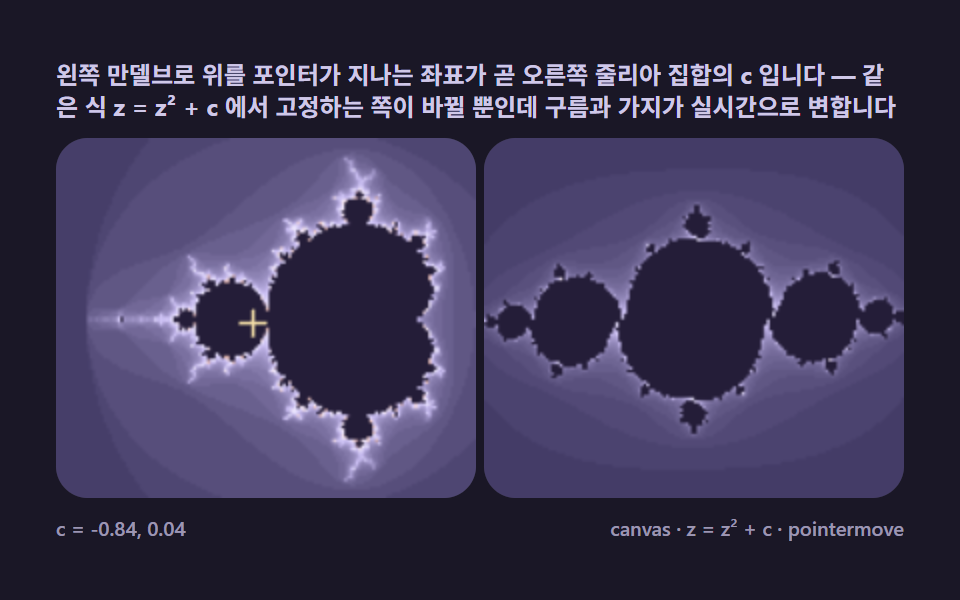
マンデルブロ上でポインタを動かすと、その座標がジュリア集合のcになり、隣の画面の雲・兎・枝の形がリアルタイムに変わります。2つの集合が1つの式から生まれる関係を可視化する代表デモです。
使いどころ教育インタラクティブ、サイエンスコンテンツ
CanvasRenderingContext2DcreateImageDatapointermove
<main class="stage">
<div class="mb is-demo" id="mbRoot">
  <p class="mb__hint">
    <span>左のマンデルブロ上でポインタが通る座標が、そのまま右のジュリア集合のcです。同じ式 z = z² + c で固定する側が変わるだけで、雲や枝がリアルタイムに変わります</span>
  </p>
  <div class="mb__duo">
    <div class="mb__field" role="application" aria-label="マンデルブロc選択盤" tabindex="0">
      <canvas class="mb__cv" id="mbCvM"></canvas>
    </div>
    <div class="mb__field" role="application" aria-label="ジュリア集合表示盤" tabindex="0">
      <canvas class="mb__cv" id="mbCvJ"></canvas>
    </div>
  </div>  <div class="mb__bar">
    <span class="mb__meta">c = <span id="mbCv">-0.75, 0.00</span></span>
    <span class="mb__meta mb__meta--dim">canvas · z = z² + c · pointermove</span>
  </div>
</div>
</main>
@use "../../../../site/static/demo-tokens" as *;
// 줄리아 집합 연동(03). @keyframes 없음 — 두 캔버스 rAF(만델브로 좌표 → 줄리아 재계산)가 움직임을 만든다.
// 사람이 손을 대면 포인터 좌표가 자동 순항을 이긴다(pointerC). 포인터를 떼면 순항 재개.
$duration: $dur-loop;
$easing: $ease-spring;
$color: $subject-pink;
// ── 편 공통 심야 프랙탈 팔레트 ──
$mb-stage: #1a1726;
@include stage($mb-stage);
$mb-ink: #14111f;
$mb-set: #241d38;
$mb-text: #cfc8e8;
.mb {
--mb-c0: #3d3560;
--mb-c1: #c9bdf2;
--mb-c2: #efeaff;
--mb-c3: #efc0b5;
--mb-c4: #3d3560;
--mb-set: #{$mb-set};
--mb-ink: #{$mb-ink};
--mb-cross: #ffe9ad; // c 선택 십자 — 파스텔 골드(고명도라 vivid 아님)
display: flex; flex-direction: column; gap: $sp-2;
width: 100%; max-width: 424px;
}
.mb__hint {
display: flex; align-items: center; gap: $sp-1; margin: 0;
font-weight: 700; font-size: clamp(10px, 2.8vw, 12px); line-height: 1.35;
color: $mb-text;
}
// 두 창 나란히 — 320px 에서도 한 줄을 유지(절반씩)
.mb__duo {
display: flex; gap: $sp-1;
}
.mb__field {
position: relative; height: 180px; flex: 1 1 0; min-width: 0;
border-radius: $r-card; overflow: hidden;
background: $mb-ink;
box-shadow: inset 0 0 0 1px rgba($mb-text, .18);
}
.mb__field:focus-visible { outline: 2px solid $subject-pink; outline-offset: 2px; }
.mb__cv { display: block; width: 100%; height: 100%; cursor: crosshair; }
.mb__bar { display: flex; align-items: baseline; justify-content: space-between; gap: $sp-2; }
.mb__meta { font-size: 10px; font-weight: 500; color: rgba($mb-text, .72); }
.mb__meta--dim { font-size: 10px; }
@media (max-width: 340px) {
.mb { gap: $sp-1; }
.mb__field { height: 100px; }
.mb__meta--dim { display: none; }
}
// reduce — 순항 대신 토끼 줄리아 한 점을 고정. 커서만 바꿔 둔다.
@media (prefers-reduced-motion: reduce) {
.mb.is-still .mb__cv { cursor: default !important; }
}html, body {
margin: 0;
overflow: hidden;
}
.stage {
box-sizing: border-box;
min-height: 100vh;
display: grid;
place-items: center;
margin: 0;
background: #1a1726;
font-family: -apple-system, "Segoe UI", "Noto Sans KR", sans-serif;
padding: clamp(8px, 4vw, 24px);
}
.mb {
--mb-c0: #3d3560;
--mb-c1: #c9bdf2;
--mb-c2: #efeaff;
--mb-c3: #efc0b5;
--mb-c4: #3d3560;
--mb-set: #241d38;
--mb-ink: #14111f;
--mb-cross: #ffe9ad;
display: flex;
flex-direction: column;
gap: 8px;
width: 100%;
max-width: 424px;
}
.mb__hint {
display: flex;
align-items: center;
gap: 4px;
margin: 0;
font-weight: 700;
font-size: clamp(10px, 2.8vw, 12px);
line-height: 1.35;
color: #cfc8e8;
}
.mb__duo {
display: flex;
gap: 4px;
}
.mb__field {
position: relative;
height: 180px;
flex: 1 1 0;
min-width: 0;
border-radius: 16px;
overflow: hidden;
background: #14111f;
box-shadow: inset 0 0 0 1px rgba(207, 200, 232, 0.18);
}
.mb__field:focus-visible {
outline: 2px solid #ff9ebb;
outline-offset: 2px;
}
.mb__cv {
display: block;
width: 100%;
height: 100%;
cursor: crosshair;
}
.mb__bar {
display: flex;
align-items: baseline;
justify-content: space-between;
gap: 8px;
}
.mb__meta {
font-size: 10px;
font-weight: 500;
color: rgba(207, 200, 232, 0.72);
}
.mb__meta--dim {
font-size: 10px;
}
@media (max-width: 340px) {
.mb {
gap: 4px;
}
.mb__field {
height: 100px;
}
.mb__meta--dim {
display: none;
}
}
@media (prefers-reduced-motion: reduce) {
.mb.is-still .mb__cv {
cursor: default !important;
}
}// 줄리아 집합 연동(03) — 만델브로와 줄리아는 같은 식의 두 닮은 축.
// 만델브로: c 를 픽셀로, z 를 0 에서 시작 → "어떤 c 가 집합에 드나"
// 줄리아 : z 를 픽셀로, c 를 고정 → "고정 c 에서 어떤 z 가 집합에 드나"
// 포인터(·자동 순항)가 만델브로 위 좌표를 고르면 오른쪽 캔버스가 그 c 로 다시 계산된다.
// 자동 순항 경로는 가장 극적인 형태가 나오는 경계선(집합 가장자리)을 따라다닌다.
(function () {
var MAXIT_M = 64, MAXIT_J = 80; // 만델브로판은 뷰가 넓어 얕게, 줄리아판은 깊게
var IRES = 150; // 두 캔버스 각각의 내부 해상도 — 동시 계산이라 낮게 잡는다
var root = document.getElementById('mbRoot');
var cvM = document.getElementById('mbCvM');
var cvJ = document.getElementById('mbCvJ');
var cLabel = document.getElementById('mbCv');
var css = getComputedStyle(root);
function tokRGB(name) {
var s = css.getPropertyValue(name).trim();
var hx = s.length === 4
? s.charAt(1) + s.charAt(1) + s.charAt(2) + s.charAt(2) + s.charAt(3) + s.charAt(3)
: s.slice(1);
return [parseInt(hx.slice(0, 2), 16), parseInt(hx.slice(2, 4), 16), parseInt(hx.slice(4, 6), 16)];
}
var PAL = ['--mb-c0', '--mb-c1', '--mb-c2', '--mb-c3', '--mb-c4'].map(tokRGB);
var C_SET = tokRGB('--mb-set');
var C_CROSS = tokRGB('--mb-cross');
var reduce = window.matchMedia('(prefers-reduced-motion: reduce)').matches;
var raf = 0, t0 = -1;
var WM = 0, HM = 0, WJ = 0, HJ = 0;
var ovM, ovJ, ctxM, ctxJ, octxM, octxJ;
// 만델브로 뷰포트
var MX = -0.75, MY = 0, MSPAN = 2.9;
// 현재 선택된 c (복소수)
var curC = { x: -0.75, y: 0 };
var pointerC = null; // 사람 포인터가 고른 좌표(있으면 자동 순항을 이긴다)
function fit() {
var rM = cvM.parentElement.getBoundingClientRect();
WM = Math.round(rM.width); HM = Math.round(rM.height);
cvM.width = WM; cvM.height = HM;
var rJ = cvJ.parentElement.getBoundingClientRect();
WJ = Math.round(rJ.width); HJ = Math.round(rJ.height);
cvJ.width = WJ; cvJ.height = HJ;
ovM = document.createElement('canvas');
ovM.width = IRES; ovM.height = Math.max(2, Math.round(IRES * HM / WM));
ovJ = document.createElement('canvas');
ovJ.width = IRES; ovJ.height = Math.max(2, Math.round(IRES * HJ / WJ));
ctxM = cvM.getContext('2d'); ctxJ = cvJ.getContext('2d');
octxM = ovM.getContext('2d'); octxJ = ovJ.getContext('2d');
}
function colorOf(n, maxit) {
if (n >= maxit) return C_SET;
var u = (n / maxit) * 4;
var seg = u - Math.floor(u / 4) * 4;
var a = PAL[Math.floor(seg) % 4], b = PAL[(Math.floor(seg) + 1) % 4];
var f = seg - Math.floor(seg);
return [a[0] + (b[0] - a[0]) * f, a[1] + (b[1] - a[1]) * f, a[2] + (b[2] - a[2]) * f];
}
// 만델브로 렌더 — 한 번 그리고 고정(좌표축은 움직이지 않으니)
function renderM() {
var iw = ovM.width, ih = ovM.height;
var img = octxM.createImageData(iw, ih);
var px = img.data;
var dx = MSPAN / iw, dy = MSPAN / iw;
var oy0 = MY - (ih * dy) / 2;
var k = 0;
for (var j = 0; j < ih; j++) {
var ci = oy0 + j * dy;
for (var i = 0; i < iw; i++) {
var cr = MX - MSPAN / 2 + i * dx;
var zr = 0, zi = 0, n = 0;
while (n < MAXIT_M && zr * zr + zi * zi <= 4) {
var t = zr * zr - zi * zi + cr;
zi = 2 * zr * zi + ci;
zr = t; n++;
}
var c = colorOf(n, MAXIT_M);
px[k++] = c[0]; px[k++] = c[1]; px[k++] = c[2]; px[k++] = 255;
}
}
octxM.putImageData(img, 0, 0);
ctxM.imageSmoothingEnabled = true;
ctxM.drawImage(ovM, 0, 0, WM, HM);
}
// 줄리아 렌더 — z 를 픽셀로, c 고정. 반복문이 colorOf 안으로 들어온 차이가 전부
function renderJ(cr, ci) {
var iw = ovJ.width, ih = ovJ.height;
var img = octxJ.createImageData(iw, ih);
var px = img.data;
var span = 3.0; // 줄리아 뷰포트 폭 — z 평면 ±1.5
var dx = span / iw, dy = span / iw;
var oy0 = -(ih * dy) / 2;
var k = 0;
for (var j = 0; j < ih; j++) {
var zi0 = oy0 + j * dy;
for (var i = 0; i < iw; i++) {
var zr0 = -span / 2 + i * dx;
var zr = zr0, zi = zi0, n = 0;
while (n < MAXIT_J && zr * zr + zi * zi <= 4) {
var t = zr * zr - zi * zi + cr;
zi = 2 * zr * zi + ci;
zr = t; n++;
}
var c = colorOf(n, MAXIT_J);
px[k++] = c[0]; px[k++] = c[1]; px[k++] = c[2]; px[k++] = 255;
}
}
octxJ.putImageData(img, 0, 0);
ctxJ.imageSmoothingEnabled = true;
ctxJ.drawImage(ovJ, 0, 0, WJ, HJ);
}
// 만델브로 위 c 위치 십자 표식
function drawCross() {
var x = (curC.x - (MX - MSPAN / 2)) / MSPAN * WM;
var y = (curC.y - (MY - (HM / WM * MSPAN) / 2)) / (HM / WM * MSPAN) * HM;
ctxM.strokeStyle = 'rgba(' + C_CROSS[0] + ',' + C_CROSS[1] + ',' + C_CROSS[2] + ',0.95)';
ctxM.lineWidth = 1.6;
ctxM.beginPath();
ctxM.moveTo(x - 7, y); ctxM.lineTo(x + 7, y);
ctxM.moveTo(x, y - 7); ctxM.lineTo(x, y + 7);
ctxM.stroke();
}
// 자동 순항 c 경로 — 집합 가장자리(명치 오목부 ↔ 전구 위 안테나)를 부드럽게 왕복.
// 경계 근처에서 줄리아가 가장 극적으로 바뀐다(연결 dust ↔ 토끼 ↔ 가지).
function orbitC(t) {
var a = t * Math.PI * 2;
return {
x: -0.62 + 0.24 * Math.cos(a),
y: 0.42 * Math.sin(a) * Math.cos(a * 0.5)
};
}
function setLabel() {
cLabel.textContent = (Math.round(curC.x * 100) / 100) + ', ' + (Math.round(curC.y * 100) / 100).toFixed(2);
}
function frame(now) {
if (t0 < 0) t0 = now;
var loop = ((now - t0) / 1000) % 2.0;
if (pointerC) { curC.x = pointerC.x; curC.y = pointerC.y; }
else { var o = orbitC(loop / 2.0); curC.x = o.x; curC.y = o.y; }
renderM(); drawCross();
renderJ(curC.x, curC.y);
setLabel();
raf = requestAnimationFrame(frame);
}
// 사람 포인터 — 만델브로 캔버스 위. pointermove 로 c 를 직접 고른다
function onMove(e) {
var r = cvM.getBoundingClientRect();
var x = (e.clientX - r.left) / r.width; // 0~1
var y = (e.clientY - r.top) / (r.height * (r.width / r.height) * (HM / WM) / (HM / WM));
y = (e.clientY - r.top) / r.height;
// 세로 span 은 화면 비율과 동일하게 종횡비 보정
var vspan = MSPAN * (r.height / r.width);
pointerC = { x: MX - MSPAN / 2 + x * MSPAN, y: MY - vspan / 2 + y * vspan };
}
cvM.addEventListener('pointermove', onMove);
cvM.addEventListener('pointerdown', onMove);
cvM.addEventListener('pointerleave', function () { pointerC = null; });
window.addEventListener('resize', function () {
fit(); renderM(); drawCross(); renderJ(curC.x, curC.y); setLabel();
});
fit();
renderM();
if (reduce) {
// reduce — 순항 대신 대표 c 두 개 중 토끼 근처 한 점을 고정
curC = { x: -0.62, y: 0.38 };
drawCross(); renderJ(curC.x, curC.y); setLabel();
root.classList.add('is-still');
} else {
raf = requestAnimationFrame(frame);
}
})();// JuliaOrbitLink — vanilla 판(run/323/demo/03-mb-julia-orbit-link/index.html) 의 React 포트.
// 만델브로와 줄리아는 같은 식의 두 닮은 축.
// 만델브로: c 를 픽셀로, z 를 0 에서 시작 → "어떤 c 가 집합에 드나"
// 줄리아 : z 를 픽셀로, c 를 고정 → "고정 c 에서 어떤 z 가 집합에 드나"
// 포인터(·자동 순항)가 만델브로 위 좌표를 고르면 오른쪽 캔버스가 그 c 로 다시 계산된다.
// 사람이 손을 대면 포인터 좌표가 자동 순항을 이긴다(pointerC). 포인터를 떼면 순항 재개.
import { useEffect, useRef, useState } from "react";
import type { CSSProperties, PointerEvent as RPointerEvent } from "react";
import styles from "./JuliaOrbitLink.module.scss";
export type JuliaOrbitLinkProps = {
duration?: string;
easing?: string;
color?: string;
};
// ── 변형 상수(기본값) — vanilla 판과 동일 ──
const MAXIT_M = 64, MAXIT_J = 80; // 만델브로판은 뷰가 넓어 얕게, 줄리아판은 깊게
const IRES = 150; // 두 캔버스 각각의 내부 해상도 — 동시 계산이라 낮게 잡는다
type Vars = CSSProperties & { "--duration"?: string; "--easing"?: string; "--color"?: string };
type Box<T> = { current: T };
type RGB = [number, number, number];
const FIELD_M_LABEL = "만델브로 c 선택판";
const FIELD_J_LABEL = "줄리아 집합 전시판";
const META_RIGHT = "canvas · z = z² + c · pointermove";
const HINT = "왼쪽 만델브로 위를 포인터가 지나는 좌표가 곧 오른쪽 줄리아 집합의 c 입니다 — 같은 식 z = z² + c 에서 고정하는 쪽이 바뀔 뿐인데 구름과 가지가 실시간으로 변합니다";
const C_INIT = "-0.75, 0.00";
// 만델브로 뷰포트
const MX = -0.75, MY = 0, MSPAN = 2.9;
type Ov = { cv: HTMLCanvasElement; octx: CanvasRenderingContext2D | null };
export default function JuliaOrbitLink({
duration = "2s",
easing = "cubic-bezier(.2, .8, .2, 1)",
color = "#ff9ebb"
}: JuliaOrbitLinkProps) {
const rootRef = useRef<HTMLDivElement | null>(null);
const cvMRef = useRef<HTMLCanvasElement | null>(null);
const cvJRef = useRef<HTMLCanvasElement | null>(null);
const ctxMRef = useRef<CanvasRenderingContext2D | null>(null);
const ctxJRef = useRef<CanvasRenderingContext2D | null>(null);
const ovMRef = useRef<Ov | null>(null);
const ovJRef = useRef<Ov | null>(null);
const palRef = useRef<RGB[] | null>(null);
const setRef = useRef<RGB | null>(null);
const crossRef = useRef<RGB | null>(null);
const wmRef = useRef(0) as Box<number>;
const hmRef = useRef(0) as Box<number>;
const wjRef = useRef(0) as Box<number>;
const hjRef = useRef(0) as Box<number>;
const rafRef = useRef(0) as Box<number>;
// 현재 선택된 c (복소수) — 사람 포인터가 고른 좌표(있으면 자동 순항을 이긴다)
const curCRef = useRef({ x: -0.75, y: 0 }) as Box<{ x: number; y: number }>;
const pointerCRef = useRef(null) as Box<{ x: number; y: number } | null>;
const [cLabel, setCLabel] = useState(C_INIT);
const [still, setStill] = useState(false);
const vars: Vars = { "--duration": duration, "--easing": easing, "--color": color };
function reduced(): boolean {
return window.matchMedia("(prefers-reduced-motion: reduce)").matches;
}
function tokRGB(root: HTMLDivElement, name: string): RGB {
const s = getComputedStyle(root).getPropertyValue(name).trim();
const hx = s.length === 4
? s.charAt(1) + s.charAt(1) + s.charAt(2) + s.charAt(2) + s.charAt(3) + s.charAt(3)
: s.slice(1);
return [parseInt(hx.slice(0, 2), 16), parseInt(hx.slice(2, 4), 16), parseInt(hx.slice(4, 6), 16)];
}
function fit(): void {
const cvM = cvMRef.current, cvJ = cvJRef.current;
if (!cvM || !cvJ) return;
const rM = cvM.parentElement as HTMLDivElement | null;
const rJ = cvJ.parentElement as HTMLDivElement | null;
if (!rM || !rJ) return;
const WM = Math.round(rM.getBoundingClientRect().width), HM = Math.round(rM.getBoundingClientRect().height);
const WJ = Math.round(rJ.getBoundingClientRect().width), HJ = Math.round(rJ.getBoundingClientRect().height);
wmRef.current = WM; hmRef.current = HM;
wjRef.current = WJ; hjRef.current = HJ;
cvM.width = WM; cvM.height = HM;
cvJ.width = WJ; cvJ.height = HJ;
ctxMRef.current = cvM.getContext("2d");
ctxJRef.current = cvJ.getContext("2d");
const ovM = document.createElement("canvas");
ovM.width = IRES; ovM.height = Math.max(2, Math.round(IRES * HM / WM));
const ovJ = document.createElement("canvas");
ovJ.width = IRES; ovJ.height = Math.max(2, Math.round(IRES * HJ / WJ));
ovMRef.current = { cv: ovM, octx: ovM.getContext("2d") };
ovJRef.current = { cv: ovJ, octx: ovJ.getContext("2d") };
}
function colorOf(n: number, maxit: number): RGB {
const PAL = palRef.current as RGB[];
const C_SET = setRef.current as RGB;
if (n >= maxit) return C_SET;
const u = (n / maxit) * 4;
const seg = u - Math.floor(u / 4) * 4;
const a = PAL[Math.floor(seg) % 4], b = PAL[(Math.floor(seg) + 1) % 4];
const f = seg - Math.floor(seg);
return [a[0] + (b[0] - a[0]) * f, a[1] + (b[1] - a[1]) * f, a[2] + (b[2] - a[2]) * f];
}
// 만델브로 렌더 — 한 번 그리고 고정(좌표축은 움직이지 않으니)
function renderM(): void {
const o = ovMRef.current;
const ctx = ctxMRef.current;
const C_SET = setRef.current;
if (!o || !o.octx || !ctx || !C_SET) return;
const iw = o.cv.width, ih = o.cv.height;
const img = o.octx.createImageData(iw, ih);
const px = img.data;
const dx = MSPAN / iw, dy = MSPAN / iw;
const oy0 = MY - (ih * dy) / 2;
let k = 0;
for (let j = 0; j < ih; j++) {
const ci = oy0 + j * dy;
for (let i = 0; i < iw; i++) {
const cr = MX - MSPAN / 2 + i * dx;
let zr = 0, zi = 0, n = 0;
while (n < MAXIT_M && zr * zr + zi * zi <= 4) {
const t = zr * zr - zi * zi + cr;
zi = 2 * zr * zi + ci;
zr = t; n++;
}
const c = colorOf(n, MAXIT_M);
px[k++] = c[0]; px[k++] = c[1]; px[k++] = c[2]; px[k++] = 255;
}
}
o.octx.putImageData(img, 0, 0);
ctx.imageSmoothingEnabled = true;
ctx.drawImage(o.cv, 0, 0, wmRef.current, hmRef.current);
}
// 줄리아 렌더 — z 를 픽셀로, c 고정. 반복문이 colorOf 안으로 들어온 차이가 전부
function renderJ(cr: number, ci: number): void {
const o = ovJRef.current;
const ctx = ctxJRef.current;
const C_SET = setRef.current;
if (!o || !o.octx || !ctx || !C_SET) return;
const iw = o.cv.width, ih = o.cv.height;
const img = o.octx.createImageData(iw, ih);
const px = img.data;
const span = 3.0; // 줄리아 뷰포트 폭 — z 평면 ±1.5
const dx = span / iw, dy = span / iw;
const oy0 = -(ih * dy) / 2;
let k = 0;
for (let j = 0; j < ih; j++) {
const zi0 = oy0 + j * dy;
for (let i = 0; i < iw; i++) {
const zr0 = -span / 2 + i * dx;
let zr = zr0, zi = zi0, n = 0;
while (n < MAXIT_J && zr * zr + zi * zi <= 4) {
const t = zr * zr - zi * zi + cr;
zi = 2 * zr * zi + ci;
zr = t; n++;
}
const c = colorOf(n, MAXIT_J);
px[k++] = c[0]; px[k++] = c[1]; px[k++] = c[2]; px[k++] = 255;
}
}
o.octx.putImageData(img, 0, 0);
ctx.imageSmoothingEnabled = true;
ctx.drawImage(o.cv, 0, 0, wjRef.current, hjRef.current);
}
// 만델브로 위 c 위치 십자 표식
function drawCross(): void {
const ctx = ctxMRef.current;
const C_CROSS = crossRef.current;
const WM = wmRef.current, HM = hmRef.current;
const curC = curCRef.current;
if (!ctx || !C_CROSS) return;
const x = (curC.x - (MX - MSPAN / 2)) / MSPAN * WM;
const y = (curC.y - (MY - (HM / WM * MSPAN) / 2)) / (HM / WM * MSPAN) * HM;
ctx.strokeStyle = "rgba(" + C_CROSS[0] + "," + C_CROSS[1] + "," + C_CROSS[2] + ",0.95)";
ctx.lineWidth = 1.6;
ctx.beginPath();
ctx.moveTo(x - 7, y); ctx.lineTo(x + 7, y);
ctx.moveTo(x, y - 7); ctx.lineTo(x, y + 7);
ctx.stroke();
}
// 자동 순항 c 경로 — 집합 가장자리(명치 오목부 ↔ 전구 위 안테나)를 부드럽게 왕복.
// 경계 근처에서 줄리아가 가장 극적으로 바뀐다(연결 dust ↔ 토끼 ↔ 가지).
function orbitC(t: number): { x: number; y: number } {
const a = t * Math.PI * 2;
return {
x: -0.62 + 0.24 * Math.cos(a),
y: 0.42 * Math.sin(a) * Math.cos(a * 0.5)
};
}
function setLabel(): void {
const curC = curCRef.current;
setCLabel((Math.round(curC.x * 100) / 100) + ", " + (Math.round(curC.y * 100) / 100).toFixed(2));
}
let t0 = -1;
function frame(now: number): void {
if (t0 < 0) t0 = now;
const loop = ((now - t0) / 1000) % 2.0;
const pc = pointerCRef.current;
if (pc) { curCRef.current.x = pc.x; curCRef.current.y = pc.y; }
else {
const o = orbitC(loop / 2.0);
curCRef.current.x = o.x; curCRef.current.y = o.y;
}
renderM(); drawCross();
renderJ(curCRef.current.x, curCRef.current.y);
setLabel();
rafRef.current = requestAnimationFrame(frame);
}
// 사람 포인터 — 만델브로 캔버스 위. pointermove 로 c 를 직접 고른다
function onPick(e: RPointerEvent<HTMLCanvasElement>): void {
const cvM = cvMRef.current;
if (!cvM) return;
const r = cvM.getBoundingClientRect();
const x = (e.clientX - r.left) / r.width; // 0~1
const y = (e.clientY - r.top) / r.height;
// 세로 span 은 화면 비율과 동일하게 종횡비 보정
const vspan = MSPAN * (r.height / r.width);
pointerCRef.current = { x: MX - MSPAN / 2 + x * MSPAN, y: MY - vspan / 2 + y * vspan };
}
function onLeave(): void {
pointerCRef.current = null;
}
useEffect(() => {
const root = rootRef.current;
if (!root) return;
palRef.current = ["--mb-c0", "--mb-c1", "--mb-c2", "--mb-c3", "--mb-c4"].map((nm) => tokRGB(root, nm));
setRef.current = tokRGB(root, "--mb-set");
crossRef.current = tokRGB(root, "--mb-cross");
fit();
renderM();
function onResize(): void {
fit(); renderM(); drawCross();
renderJ(curCRef.current.x, curCRef.current.y); setLabel();
}
window.addEventListener("resize", onResize);
if (reduced()) {
// reduce — 순항 대신 토끼 근처 한 점을 고정
curCRef.current = { x: -0.62, y: 0.38 };
drawCross(); renderJ(curCRef.current.x, curCRef.current.y); setLabel();
setStill(true);
} else {
t0 = -1;
rafRef.current = requestAnimationFrame(frame);
}
return () => {
window.removeEventListener("resize", onResize);
cancelAnimationFrame(rafRef.current);
};
// eslint-disable-next-line react-hooks/exhaustive-deps
}, []);
const rootCls = still ? `${styles.root} ${styles.isStill}` : styles.root;
return (
<main className={styles.stage}>
<div className={rootCls} ref={rootRef} style={vars}>
<p className={styles.hint}>
<span>{HINT}</span>
</p>
<div className={styles.duo}>
<div className={styles.field} role="application" aria-label={FIELD_M_LABEL} tabIndex={0}>
<canvas
className={styles.cv}
ref={cvMRef}
onPointerMove={onPick}
onPointerDown={onPick}
onPointerLeave={onLeave}
></canvas>
</div>
<div className={styles.field} role="application" aria-label={FIELD_J_LABEL} tabIndex={0}>
<canvas className={styles.cv} ref={cvJRef}></canvas>
</div>
</div>
<div className={styles.bar}>
<span className={styles.meta}>c = {cLabel}</span>
<span className={styles.metaDim}>{META_RIGHT}</span>
</div>
</div>
</main>
);
}03 ジュリア集合リンク — ポインタがcを選ぶと別キャンバスが変わる — 計測 累積面積 12.885% · 動いたフレーム 23/23GODRICH オリジナル · SCSS と React は zip に同梱 · マンデルブロ集合 9種 — 無限ズーム・ジュリア・バーニングシップを複素平面の1ピクセルずつ計算する
このデモが属する記事
 マンデルブロ集合 9種 — 無限ズーム・ジュリア・バーニングシップを複素平面の1ピクセルずつ計算するz = z² + c を1ピクセルごとに反復して発散回数を数えると、カージオイドのマンデルブロ集合が現れ、ズームを重ねても新しいミニ・マンデルブロが無限に現れます。ライブラリなしのコピペで無限ズームを持ち帰れます。マンデルブロ集合とは、心臓 この記事のデモをすべて見る