マンデルブロ集合 9種 — 無限ズーム・ジュリア・バーニングシップを複素平面の1ピクセルずつ計算する
z = z² + c を1ピクセルごとに反復して発散回数を数えると、カージオイドのマンデルブロ集合が現れ、ズームを重ねても新しいミニ・マンデルブロが無限に現れます。ライブラリなしのコピペで無限ズームを持ち帰れます。
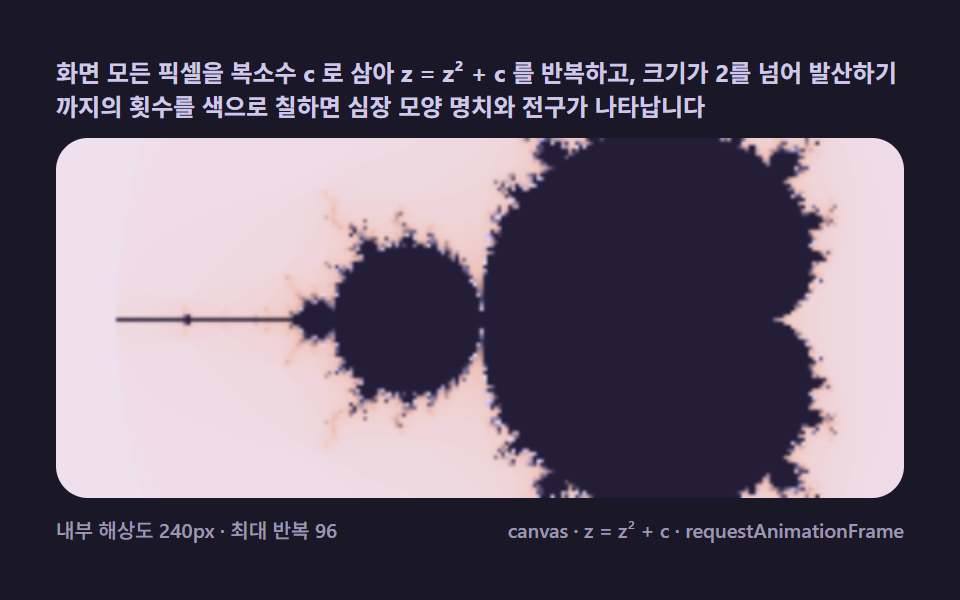 01 mb-escape-basic
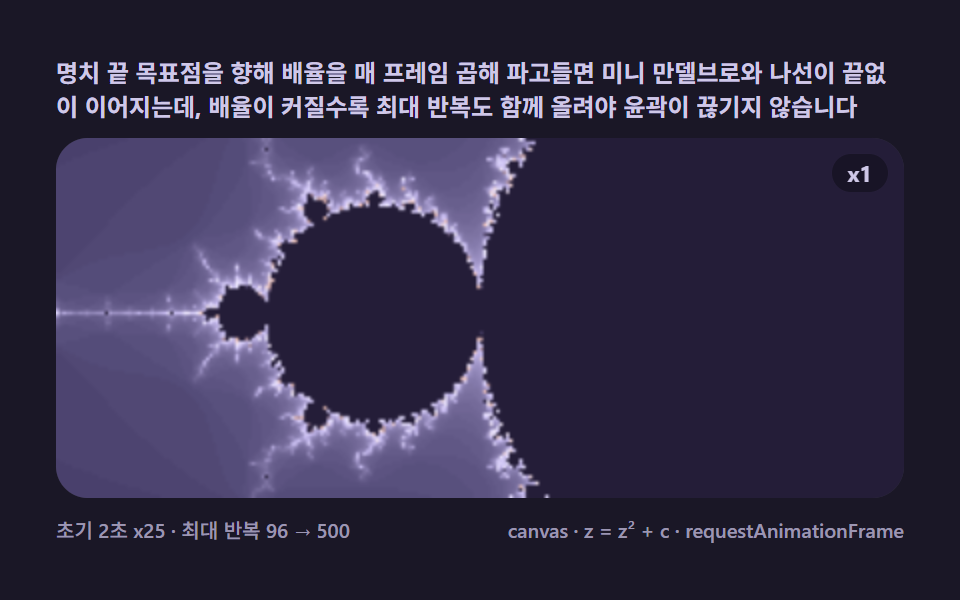 02 mb-deep-zoom-dive
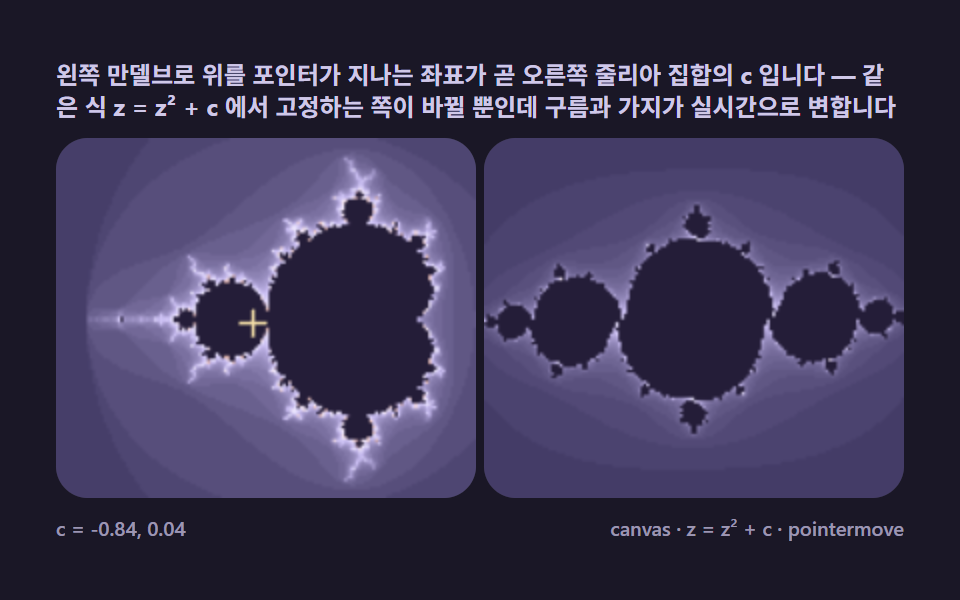 03 mb-julia-orbit-link
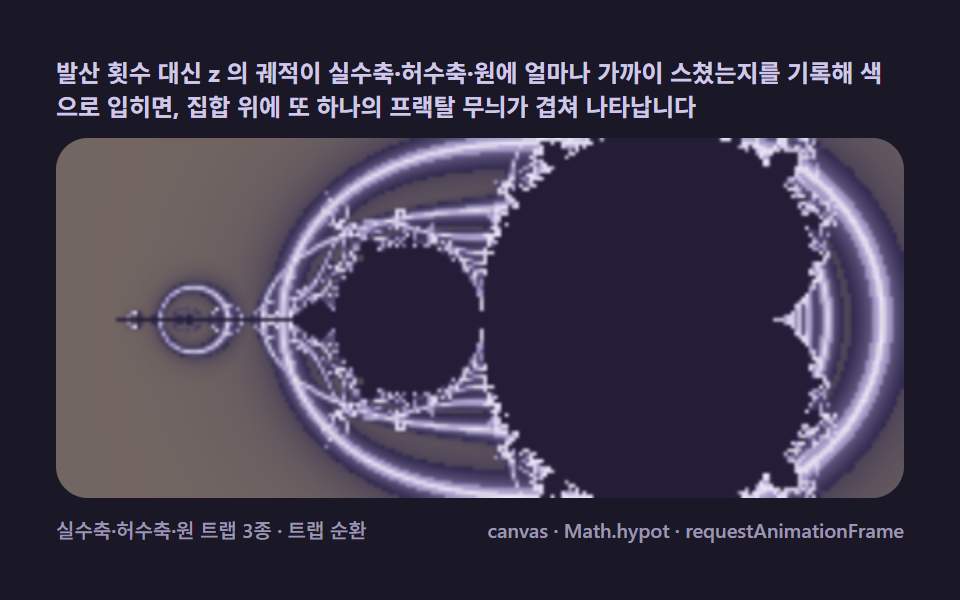 04 mb-orbit-trap-color
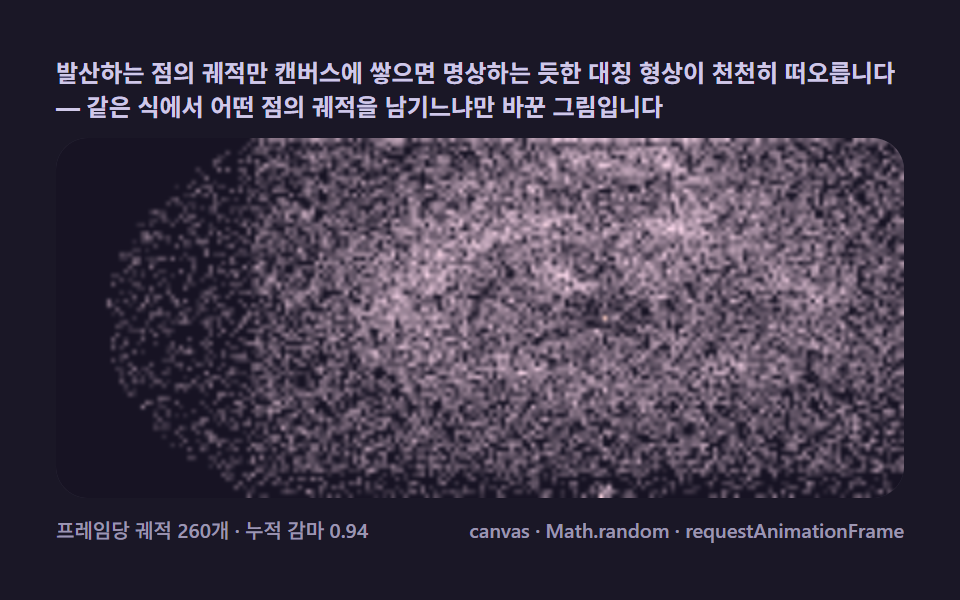 05 mb-buddhabrot-ghost
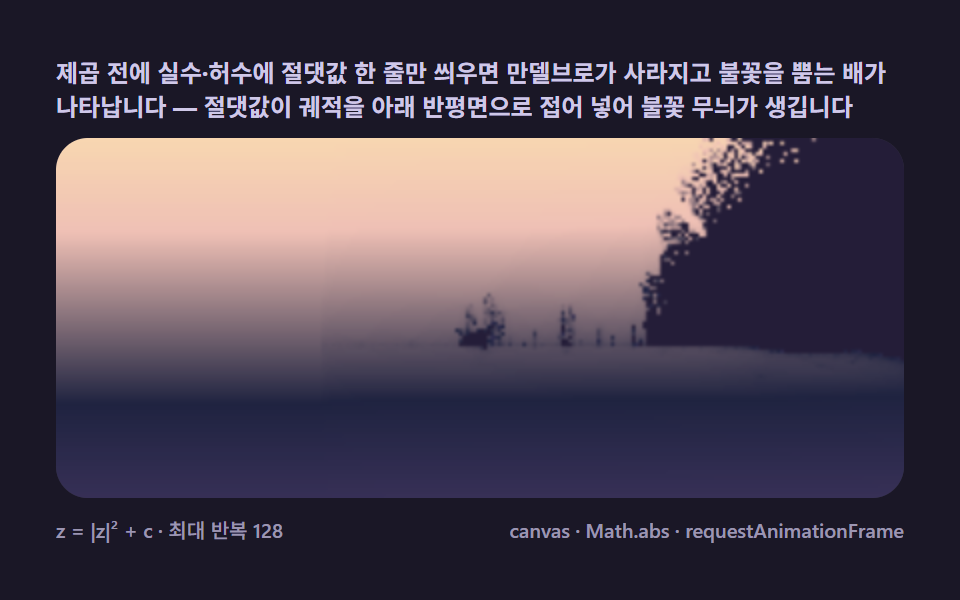 06 mb-burning-ship-variant
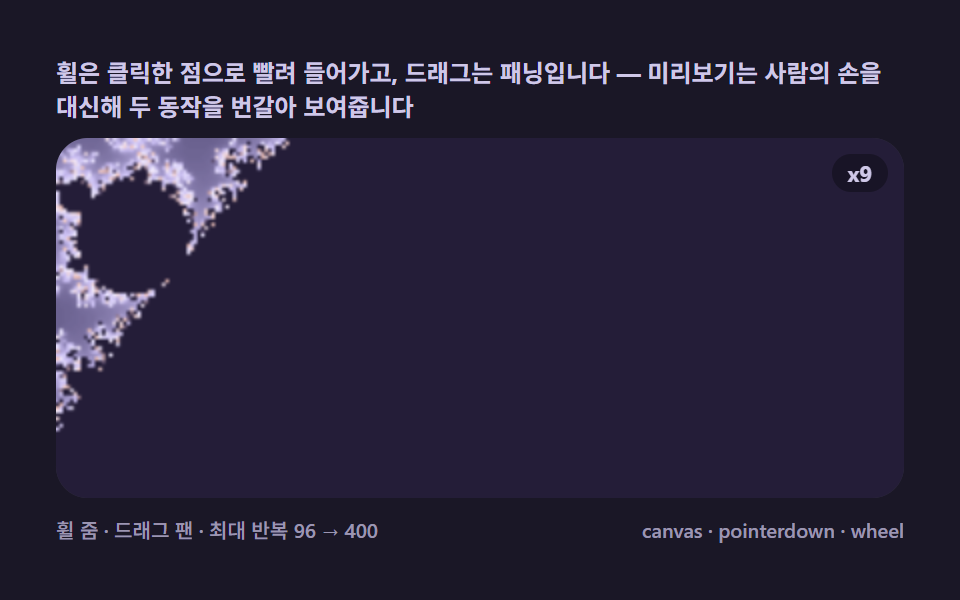 07 mb-pointer-zoom-pan
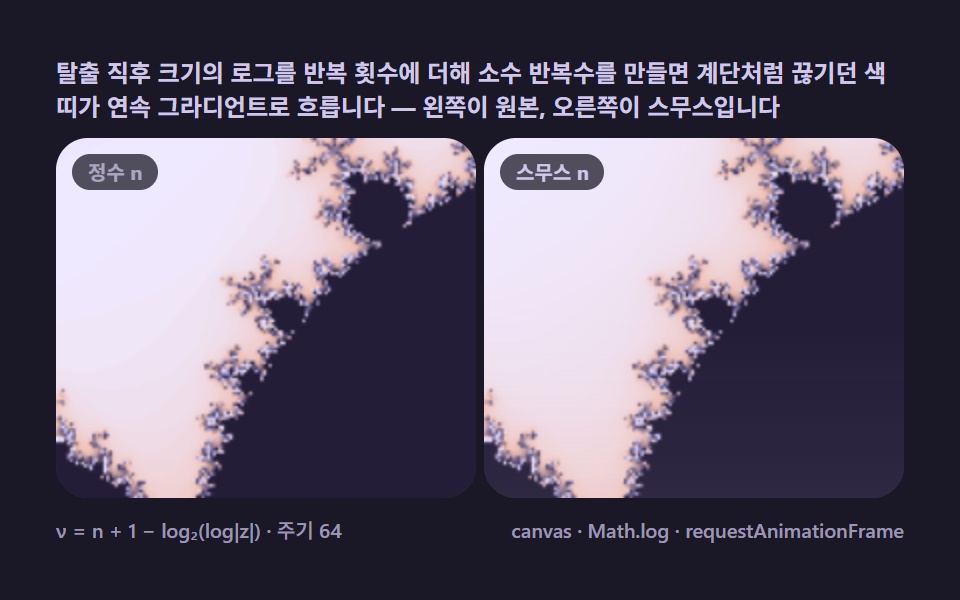 08 mb-smooth-iteration-fade
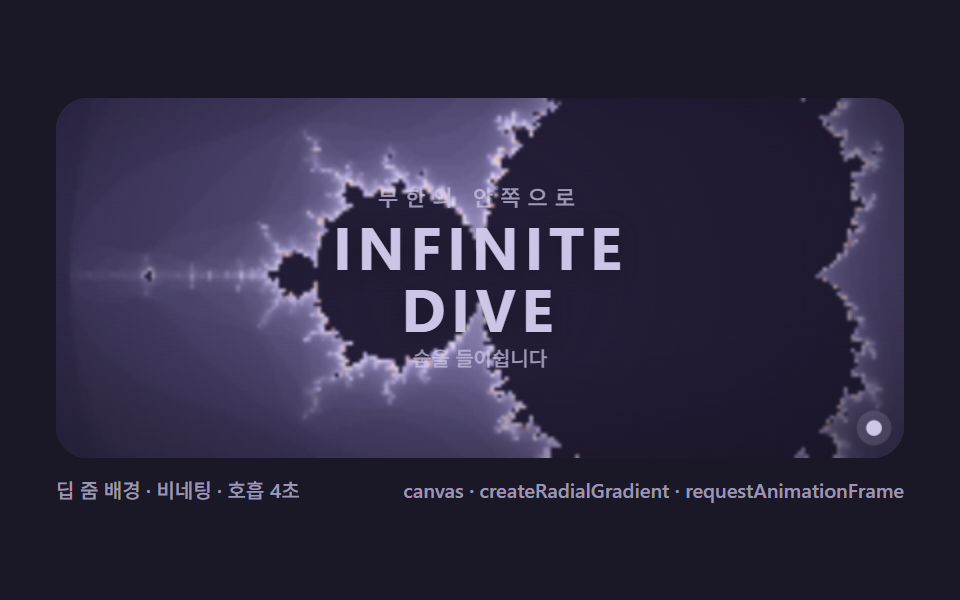 09 mb-fractal-hero-scene
自動再生 · タイルを押すとその項目へ · すべて1つのzip
- 01 エスケープタイム基本 — 1ピクセルごとに z = z² + c を反復して色を決める
- 02 無限ディープズーム — 目標点へ潜り続ける自動ダイブ
- 03 ジュリア集合リンク — ポインタがcを選ぶと別キャンバスが変わる
- 04 オービットトラップ彩色 — 反復軌道が触れる形で色を塗る
- 05 ブッダブロ — 発散する軌道を積み重ねて浮かぶ幽霊の形
- 06 バーニングシップ変種 — 絶対値1つで燃える船が現れる
- 07 ポインタズーム・パン — クリックした点へ吸い込まれる探検機
- 08 スムーズ反復数 — 帯を消してグラデーションで流れる彩色
- 09 フラクタルヒーローシーン — 文字・星明かりと重ねる表紙の場面
デモ
九つの盤はそれぞれ index.html と style.css の2ファイルで自立し、開いた瞬間から動きます。24フレームの録画区間で九つの盤すべてが23フレーム動き続け、どのフレームも直前と同じ絵になりませんでした。03でポインタを動かすと右のジュリア集合がリアルタイムに変わります。
| 項目 | 焦点 | 累積面積(%) | フレーム最大(%) | 強度平均 |
|---|---|---|---|---|
| 01 エスケープタイム基本 | カージオイドと電球が1枚に現れる基本画面 | 32.008 | 30.799 | 24.9 |
| 02 無限ディープズーム | 渦目標点へ2秒でx25潜る自動ダイブ | 34.847 | 31.349 | 73.4 |
| 03 ジュリア集合リンク | c を選ぶと隣の盤の形が変わる接続 | 12.885 | 7.357 | 73.3 |
| 04 オービットトラップ彩色 | 軌道がかすめた形でもう一つの模様を重ねる | 32.008 | 28.188 | 28.5 |
| 05 ブッダブロ | 発散する軌道だけ積み上げて浮かぶ形 | 45.133 | 41.835 | 34.4 |
| 06 バーニングシップ | 絶対値1つで燃える船に変わる式の変更 | 45.881 | 44.984 | 35.9 |
| 07 ポインタズーム・パン | ホイールとドラッグで潜る探検機 | 41.972 | 36.078 | 87.3 |
| 08 スムーズ反復数 | 階段の帯をグラデーションへ流す後処理 | 31.206 | 28.339 | 25.7 |
| 09 フラクタルヒーローシーン | ディープズームに文字と星を重ねた表紙 | 27.91 | 5.805 | 48.7 |
累積面積が最も広いのは06バーニングシップの45.881%で、05ブッダブロの45.133%が続きます。03ジュリアの12.885%が九つで最も小さいのは欠陥ではなく、画面を2つのキャンバスに左右に分け、それぞれ内部解像度150pxで同時計算する構造の結果です。この項目の価値は2つの集合が1画面でリアルタイムにつながる様子を見せることにあり、数値を膨らませようとキャンバスを1つ消してはいけません。強度平均は07ポインタズーム・パンの87.3が最も明るく、02の73.4と03の73.3が続きます。
脱出時間からランディング画面まで、マンデルブロ九層を重ねた順序
並び順の基準は派手さではなく、式 z = z² + c のどこを眺めるかです。01は発散回数を色にする基本の眺め方、02はビューポートを毎フレーム狭めて同じ式を深く読み、03は固定する側を入れ替えてジュリア集合とつなぎます。04は反復の回数ではなく軌道の通り道を記録し、05は発散する点の軌道だけを残して絵を反転させ、06は式そのものに絶対値を1つ足します。07で初めて手で操作し、08は同じ計算に後処理を1枚足して品質を上げ、09がその計算画面をサービスの表紙に組み立てて締めくくります。式を変えずに眺め方だけ変える反応拡散の縞とも、レイで奥行きを読むレイマーチングの距離関数とも違うのは、この9種がすべて同じたった1行の反復から出ている点です。
項目別コード
項目ごとに、挙動を決める定数を示し、動いている関数をそのまま引用します。切り詰めた断片ではなく動いているコードそのものなので、この画面から自分のページへ貼って動かせます。コメントだけこの記事の言葉に置き換えてあり、変数名と関数名はzipの中身と同じ英語のままです。
01エスケープタイム基本 — 1ピクセルごとに z = z² + c を反復して色を決める
各ピクセルを複素数 c として二乗と加算を繰り返し、発散までの回数で色を塗ると、カージオイドと電球がひとりでに描かれます。発散の判定は |z|² = zr² + zi² > 4 と平方根なしで済ませ、最大反復96に達しても発散しない点だけ集合の内部色で塗ります。累積面積32.008%・強度平均24.9は、パレット循環(2秒周期)だけで毎フレーム画面を塗り替える基本盤の値です。
<main class="stage">
<div class="mb is-demo" id="mbRoot">
  <p class="mb__hint">
    <span>すべてのピクセルを複素数 c として z = z² + c を反復し、大きさが2を超えて発散するまでの回数で色を塗ると、心臓形のカージオイドと電球がひとりでに現れます</span>
  </p>
  <div class="mb__field" role="application" aria-label="エスケープタイム基本ラボ" tabindex="0">
    <canvas class="mb__cv" id="mbCv"></canvas>
  </div>
  <div class="mb__bar">
    <span class="mb__meta">内部解像度240px · 最大反復96</span>
    <span class="mb__meta mb__meta--dim">canvas · z = z² + c · requestAnimationFrame</span>
  </div>
</div>
</main>
@use "../../../../site/static/demo-tokens" as *;
// 탈출 시간 기본(01). @keyframes 를 두지 않는다 —
// 움직임은 전부 캔버스 rAF 루프(픽셀마다 z = z² + c 반복 → 발산 횟수로 팔레트 순환)가 만든다.
// 무대는 편 공통 심야 프랙탈 팔레트. 파스텔 색을 --mb-* 로 편 전체(01~09) 공통 규격.
$duration: $dur-loop;
$easing: $ease-spring;
$color: $subject-lilac;
// ── 편 공통 심야 프랙탈 팔레트(BD9~11 원칙: 편마다 다시 정하지 않는다) ──
$mb-stage: #1a1726; // 심야 남보라 — 저채도 짙은 무대 (파스텔 검사 무관: 저채도·저명도)
@include stage($mb-stage);
$mb-ink: #14111f; // 관측창 바닥 — 무대보다 한 톤 어두운 보라검
$mb-set: #241d38; // 집합 내부 — 짙은 보라 실루엣(먹보다 프랙탈스러운 낮은 명도)
$mb-text: #cfc8e8; // 라벨 글자 — 밝은 라벤더 회색
.mb {
// 렌더러가 읽는 색 — JS 는 getComputedStyle 로 --mb-* 를 받아 쓴다
// 팔레트 5색: 짙은 남보라 → 라벤더 → 크림 → 복숭아 → 다시 짙은 보파(고리 순환)
--mb-c0: #3d3560;
--mb-c1: #c9bdf2;
--mb-c2: #efeaff;
--mb-c3: #efc0b5;
--mb-c4: #3d3560;
--mb-set: #{$mb-set};
--mb-ink: #{$mb-ink};
display: flex; flex-direction: column; gap: $sp-2;
width: 100%; max-width: 424px;
}
.mb__hint {
display: flex; align-items: center; gap: $sp-1; margin: 0;
font-weight: 700; font-size: clamp(10px, 2.8vw, 12px); line-height: 1.35;
color: $mb-text;
}
.mb__field {
position: relative; height: 180px;
border-radius: $r-card; overflow: hidden;
background: $mb-ink;
box-shadow: inset 0 0 0 1px rgba($mb-text, .18);
}
.mb__field:focus-visible { outline: 2px solid $subject-lilac; outline-offset: 2px; }
.mb__cv { display: block; width: 100%; height: 100%; }
.mb__bar { display: flex; align-items: baseline; justify-content: space-between; gap: $sp-2; }
.mb__meta { font-size: 10px; font-weight: 500; color: rgba($mb-text, .72); }
.mb__meta--dim { font-size: 10px; }
@media (max-width: 340px) {
.mb { gap: $sp-1; }
.mb__field { height: 100px; }
.mb__meta--dim { display: none; }
}
// reduce — rAF 를 돌리지 않고 팔레트가 어울리는 한 장만 남는다.
@media (prefers-reduced-motion: reduce) {
.mb.is-still .mb__field { cursor: default !important; }
}html, body {
margin: 0;
overflow: hidden;
}
.stage {
box-sizing: border-box;
min-height: 100vh;
display: grid;
place-items: center;
margin: 0;
background: #1a1726;
font-family: -apple-system, "Segoe UI", "Noto Sans KR", sans-serif;
padding: clamp(8px, 4vw, 24px);
}
.mb {
--mb-c0: #3d3560;
--mb-c1: #c9bdf2;
--mb-c2: #efeaff;
--mb-c3: #efc0b5;
--mb-c4: #3d3560;
--mb-set: #241d38;
--mb-ink: #14111f;
display: flex;
flex-direction: column;
gap: 8px;
width: 100%;
max-width: 424px;
}
.mb__hint {
display: flex;
align-items: center;
gap: 4px;
margin: 0;
font-weight: 700;
font-size: clamp(10px, 2.8vw, 12px);
line-height: 1.35;
color: #cfc8e8;
}
.mb__field {
position: relative;
height: 180px;
border-radius: 16px;
overflow: hidden;
background: #14111f;
box-shadow: inset 0 0 0 1px rgba(207, 200, 232, 0.18);
}
.mb__field:focus-visible {
outline: 2px solid #b9a0ff;
outline-offset: 2px;
}
.mb__cv {
display: block;
width: 100%;
height: 100%;
}
.mb__bar {
display: flex;
align-items: baseline;
justify-content: space-between;
gap: 8px;
}
.mb__meta {
font-size: 10px;
font-weight: 500;
color: rgba(207, 200, 232, 0.72);
}
.mb__meta--dim {
font-size: 10px;
}
@media (max-width: 340px) {
.mb {
gap: 4px;
}
.mb__field {
height: 100px;
}
.mb__meta--dim {
display: none;
}
}
@media (prefers-reduced-motion: reduce) {
.mb.is-still .mb__field {
cursor: default !important;
}
}// 탈출 시간 기본(01) — 만델브로 집합의 첫 장면.
// 모든 픽셀 = 복소수 c. z 를 0 에서 시작해 z = z² + c 를 반복하고 |z| > 2 가 되는 순간의
// 반복 횟수 n 이 그 픽셀의 색이 된다. 96회 안에 발산하지 않는 픽셀은 집합 내부로 본다(먹색).
// 움직임 = 팔레트 순환. 반복 횟수는 정수라 색 띠는 계단형인데(띠가 시각적으로 계단인 게 08 번
// 스무스 채색으로 넘어가는 다리 역할), 띠 전체가 위상을 옮겨 순환하면 명치 가장자리가 물결처럼 흐른다.
(function () {
// ── 변형 상수 블록 — 아래 값 하나만 바꿔 변형을 만든다 ──
var MAXIT = 96; // 최대 반복 횟수 — 깊이와 계산량의 비율
var CYCLE = 2.0; // 팔레트 순환 주기(초) — 설정 초(2s)와 같아 한 바퀴가 한 루프
// ────────────────────────────────────────────────────
var root = document.getElementById('mbRoot');
var field = document.getElementById('mbCv').parentElement;
var cv = document.getElementById('mbCv');
var css = getComputedStyle(root);
function tokRGB(name) {
var s = css.getPropertyValue(name).trim();
var hx = s.length === 4
? s.charAt(1) + s.charAt(1) + s.charAt(2) + s.charAt(2) + s.charAt(3) + s.charAt(3)
: s.slice(1);
return [parseInt(hx.slice(0, 2), 16), parseInt(hx.slice(2, 4), 16), parseInt(hx.slice(4, 6), 16)];
}
// 렌더러가 읽는 색 — 팔레트 5색(짙은 남보라 → 라벤더 → 크림 → 복숭아 → 다시 짙은 보라)
var PAL = ['--mb-c0', '--mb-c1', '--mb-c2', '--mb-c3', '--mb-c4'].map(tokRGB);
var C_SET = tokRGB('--mb-set'); // 집합 내부 — 먹보라
var C_INK = tokRGB('--mb-ink'); // 관측창 바닥
var reduce = window.matchMedia('(prefers-reduced-motion: reduce)').matches;
var raf = 0, t0 = -1;
var W = 0, H = 0, IRES = 240; // 내부 계산 해상도(가로 픽셀) — 성능 조절 노브
var ov, octx; // 저해상도 오프스크린 캔버스
function fit() {
var r = field.getBoundingClientRect();
W = Math.round(r.width); H = Math.round(r.height);
cv.width = W; cv.height = H;
ov = document.createElement('canvas');
ov.width = IRES; ov.height = Math.max(2, Math.round(IRES * H / W));
}
// c 평면 뷰포트 — 만덜브로 표준 프레임(가로 -2.5 ~ 1.0, 세로 ±1.15 근사)
var CX = -0.75, CY = 0, SPAN = 2.9;
function render(phase) {
var iw = ov.width, ih = ov.height;
var img = octx.createImageData(iw, ih);
var px = img.data;
var dx = SPAN / iw, dy = SPAN / iw; // dy 를 dx 와 같게 — 정사각 픽셀(종횡비 보정)
var oy0 = CY - (ih * dy) / 2;
var k = 0;
for (var j = 0; j < ih; j++) {
var ci = oy0 + j * dy;
for (var i = 0; i < iw; i++) {
var cr = CX - SPAN / 2 + i * dx;
// z = 0 부터 z = z² + c 반복 — 발산 시점의 n 이 색 인덱스
var zr = 0, zi = 0, n = 0;
while (n < MAXIT && zr * zr + zi * zi <= 4) {
var t = zr * zr - zi * zi + cr;
zi = 2 * zr * zi + ci;
zr = t;
n++;
}
var r, g, b;
if (n >= MAXIT) {
r = C_SET[0]; g = C_SET[1]; b = C_SET[2];
} else {
// 팔레트 순환 — n 에 phase 를 더해 5색 파장을 반복 통과시킨다
var u = (n / MAXIT) * 4 + phase;
var seg = u - Math.floor(u / 4) * 4;
var a = PAL[Math.floor(seg) % 4], bb = PAL[(Math.floor(seg) + 1) % 4];
var f = seg - Math.floor(seg);
r = a[0] + (bb[0] - a[0]) * f;
g = a[1] + (bb[1] - a[1]) * f;
b = a[2] + (bb[2] - a[2]) * f;
}
px[k++] = r; px[k++] = g; px[k++] = b; px[k++] = 255;
}
}
octx.putImageData(img, 0, 0);
var ctx = cv.getContext('2d');
ctx.imageSmoothingEnabled = true;
ctx.drawImage(ov, 0, 0, W, H);
}
function frame(now) {
if (t0 < 0) t0 = now;
var loop = ((now - t0) / 1000) % CYCLE; // 2초 주기 순환 — 결정론 루프
render((loop / CYCLE) * 4); // 파장 4칸을 주기 안에 한 바퀴
raf = requestAnimationFrame(frame);
}
window.addEventListener('resize', function () {
fit();
render(reduce ? 0.6 : ((performance.now() - t0) / 1000 % CYCLE) / CYCLE * 4);
});
fit();
octx = ov.getContext('2d');
if (reduce) {
render(0.6); // reduce — 순환 한 장면만 고정
root.classList.add('is-still');
} else {
raf = requestAnimationFrame(frame);
}
})();// EscapeBasic — vanilla 판(run/323/demo/01-mb-escape-basic/index.html) 의 React 포트.
// 모든 픽셀 = 복소수 c. z 를 0 에서 시작해 z = z² + c 를 반복하고 |z| > 2 가 되는 순간의
// 반복 횟수 n 이 그 픽셀의 색이 된다. 96회 안에 발산하지 않는 픽셀은 집합 내부(먹보라).
// 움직임 = 팔레트 순환 — 반복 횟수는 정수라 색 띠가 계단인데(08 스무스 채색으로 이어지는 다리),
// 띠 전체가 위상을 옮겨 순환하면 명치 가장자리가 물결처럼 흐른다.
import { useEffect, useRef, useState } from "react";
import type { CSSProperties } from "react";
import styles from "./EscapeBasic.module.scss";
export type EscapeBasicProps = {
duration?: string;
easing?: string;
color?: string;
maxit?: number; // 최대 반복 횟수 — 변형 "최대 반복"이 96 → 240
};
// ── 변형 상수(기본값) — vanilla 판과 동일 ──
const CYCLE = 2.0; // 팔레트 순환 주기(초) — 설정 초(2s)와 같아 한 바퀴가 한 루프
const IRES = 240; // 내부 계산 해상도(가로 픽셀) — 성능 조절 노브
type Vars = CSSProperties & { "--duration"?: string; "--easing"?: string; "--color"?: string };
type Box<T> = { current: T };
type RGB = [number, number, number];
const FIELD_LABEL = "탈출 시간 기본 실험판";
const META_LEFT = "내부 해상도 240px · 최대 반복 96";
const META_RIGHT = "canvas · z = z² + c · requestAnimationFrame";
const HINT = "화면 모든 픽셀을 복소수 c 로 삼아 z = z² + c 를 반복하고, 크기가 2를 넘어 발산하기까지의 횟수를 색으로 칠하면 심장 모양 명치와 전구가 나타납니다";
// c 평면 뷰포트 — 만덜브로 표준 프레임(가로 -2.5 ~ 1.0, 세로 ±1.15 근사)
const CX = -0.75, CY = 0, SPAN = 2.9;
export default function EscapeBasic({
duration = "2s",
easing = "cubic-bezier(.2, .8, .2, 1)",
color = "#c9bdf2",
maxit = 96
}: EscapeBasicProps) {
const rootRef = useRef<HTMLDivElement | null>(null);
const fieldRef = useRef<HTMLDivElement | null>(null);
const cvRef = useRef<HTMLCanvasElement | null>(null);
const ctxRef = useRef<CanvasRenderingContext2D | null>(null);
const ovRef = useRef<HTMLCanvasElement | null>(null);
const octxRef = useRef<CanvasRenderingContext2D | null>(null);
const palRef = useRef<RGB[] | null>(null);
const setRef = useRef<RGB | null>(null);
const maxitRef = useRef(maxit) as Box<number>;
const wRef = useRef(0) as Box<number>;
const hRef = useRef(0) as Box<number>;
const rafRef = useRef(0) as Box<number>;
const [still, setStill] = useState(false);
const vars: Vars = { "--duration": duration, "--easing": easing, "--color": color };
function reduced(): boolean {
return window.matchMedia("(prefers-reduced-motion: reduce)").matches;
}
function tokRGB(root: HTMLDivElement, name: string): RGB {
const s = getComputedStyle(root).getPropertyValue(name).trim();
const hx = s.length === 4
? s.charAt(1) + s.charAt(1) + s.charAt(2) + s.charAt(2) + s.charAt(3) + s.charAt(3)
: s.slice(1);
return [parseInt(hx.slice(0, 2), 16), parseInt(hx.slice(2, 4), 16), parseInt(hx.slice(4, 6), 16)];
}
function fit(): void {
const field = fieldRef.current;
const cv = cvRef.current;
if (!field || !cv) return;
const r = field.getBoundingClientRect();
const W = Math.round(r.width), H = Math.round(r.height);
wRef.current = W; hRef.current = H;
cv.width = W; cv.height = H;
ctxRef.current = cv.getContext("2d");
const ov = document.createElement("canvas");
ov.width = IRES;
ov.height = Math.max(2, Math.round(IRES * H / W));
ovRef.current = ov;
octxRef.current = ov.getContext("2d");
}
function render(phase: number): void {
const octx = octxRef.current;
const ov = ovRef.current;
const ctx = ctxRef.current;
const PAL = palRef.current;
const C_SET = setRef.current;
const W = wRef.current, H = hRef.current;
const MAXIT = maxitRef.current;
if (!octx || !ov || !ctx || !PAL || !C_SET) return;
const iw = ov.width, ih = ov.height;
const img = octx.createImageData(iw, ih);
const px = img.data;
const dx = SPAN / iw, dy = SPAN / iw; // dy 를 dx 와 같게 — 정사각 픽셀(종횡비 보정)
const oy0 = CY - (ih * dy) / 2;
let k = 0;
for (let j = 0; j < ih; j++) {
const ci = oy0 + j * dy;
for (let i = 0; i < iw; i++) {
const cr = CX - SPAN / 2 + i * dx;
// z = 0 부터 z = z² + c 반복 — 발산 시점의 n 이 색 인덱스
let zr = 0, zi = 0, n = 0;
while (n < MAXIT && zr * zr + zi * zi <= 4) {
const t = zr * zr - zi * zi + cr;
zi = 2 * zr * zi + ci;
zr = t;
n++;
}
let r: number, g: number, b: number;
if (n >= MAXIT) {
r = C_SET[0]; g = C_SET[1]; b = C_SET[2];
} else {
// 팔레트 순환 — n 에 phase 를 더해 5색 파장을 반복 통과시킨다
const u = (n / MAXIT) * 4 + phase;
const seg = u - Math.floor(u / 4) * 4;
const a = PAL[Math.floor(seg) % 4], bb = PAL[(Math.floor(seg) + 1) % 4];
const f = seg - Math.floor(seg);
r = a[0] + (bb[0] - a[0]) * f;
g = a[1] + (bb[1] - a[1]) * f;
b = a[2] + (bb[2] - a[2]) * f;
}
px[k++] = r; px[k++] = g; px[k++] = b; px[k++] = 255;
}
}
octx.putImageData(img, 0, 0);
ctx.imageSmoothingEnabled = true;
ctx.drawImage(ov, 0, 0, W, H);
}
let t0 = -1;
function frame(now: number): void {
if (t0 < 0) t0 = now;
const loop = ((now - t0) / 1000) % CYCLE; // 2초 주기 순환 — 결정론 루프
render((loop / CYCLE) * 4); // 파장 4칸을 주기 안에 한 바퀴
rafRef.current = requestAnimationFrame(frame);
}
useEffect(() => {
const root = rootRef.current;
if (!root) return;
maxitRef.current = maxit;
// 팔레트 5색(짙은 남보라 → 라벤더 → 크림 → 복숭아 → 다시 짙은 보라) + 집합 내부 먹보라
palRef.current = ["--mb-c0", "--mb-c1", "--mb-c2", "--mb-c3", "--mb-c4"].map((nm) => tokRGB(root, nm));
setRef.current = tokRGB(root, "--mb-set");
fit();
function onResize(): void {
fit();
render(0.6);
}
window.addEventListener("resize", onResize);
if (reduced()) {
render(0.6); // reduce — 순환 한 장면만 고정
setStill(true);
} else {
t0 = -1;
rafRef.current = requestAnimationFrame(frame);
}
return () => {
window.removeEventListener("resize", onResize);
cancelAnimationFrame(rafRef.current);
};
// eslint-disable-next-line react-hooks/exhaustive-deps
}, [maxit]);
const rootCls = still ? `${styles.root} ${styles.isStill}` : styles.root;
return (
<main className={styles.stage}>
<div className={rootCls} ref={rootRef} style={vars}>
<p className={styles.hint}>
<span>{HINT}</span>
</p>
<div
className={styles.field}
ref={fieldRef}
role="application"
aria-label={FIELD_LABEL}
tabIndex={0}
>
<canvas className={styles.cv} ref={cvRef}></canvas>
</div>
<div className={styles.bar}>
<span className={styles.meta}>{META_LEFT}</span>
<span className={styles.metaDim}>{META_RIGHT}</span>
</div>
</div>
</main>
);
}01 · エスケープタイム基本 — 1ピクセルごとに z = z² + c を反復して色を決める — 計測 累積面積 32.008% · 動いたフレーム 23/23GODRICH オリジナル · SCSS と React は zip に同梱 · パスワードを見る
ピクセルループの核心 — zr² − zi² + cr、2·zr·zi + ci
複素数の二乗 z² = (zr + zi·i)² を実数2つに展開すると実部が zr² − zi²、虚部が 2·zr·zi になり、それぞれに c を足すだけです。内部キャンバス240pxで計算してCSSで画面寸法に引き伸ばすのが性能の鍵で、フル解像度で回すとフレームが死にます。
  function render(phase) {
    var iw = ov.width, ih = ov.height;
    var img = octx.createImageData(iw, ih);
    var px = img.data;
    var dx = SPAN / iw, dy = SPAN / iw;      // dy を dx と同じに — 正方ピクセル(縦横比補正)
    var oy0 = CY - (ih * dy) / 2;
    var k = 0;
    for (var j = 0; j < ih; j++) {
      var ci = oy0 + j * dy;
      for (var i = 0; i < iw; i++) {
        var cr = CX - SPAN / 2 + i * dx;
        // z = 0 から z = z² + c を反復 — 発散した時点の n が色インデックス
        var zr = 0, zi = 0, n = 0;
        while (n < MAXIT && zr * zr + zi * zi <= 4) {
          var t = zr * zr - zi * zi + cr;
          zi = 2 * zr * zi + ci;
          zr = t;
          n++;
        }
        px[k++] = r; px[k++] = g; px[k++] = b; px[k++] = 255;
      }
    }
    octx.putImageData(img, 0, 0);
    ctx.drawImage(ov, 0, 0, W, H);
  }
階段の帯を流す5色パレット
反復回数 n は整数なので、n をそのままパレットインデックスに使うと色帯が階段になります。01は5色のパステルパレットの上で n に時間の phase を足して循環させ、帯の中でも色が滑らかに流れます。この階段を完全に消すのが08の役目です。
02無限ディープズーム — 目標点へ潜り続ける自動ダイブ
倍率 k を毎フレーム掛けて2秒で合計x25まで上がり、カージオイド先端の渦目標点 (−0.743643887037, 0.13182590421) へ潜ります。要諦は最大反復を倍率に比例して 96 → 500 へ一緒に上げることで、これがないと深く入るほど境界の輪郭が切れます。累積面積34.847%・強度平均73.4は九つの中で2番目に明るい潜行です。
<main class="stage">
<div class="mb is-demo" id="mbRoot">
  <p class="mb__hint">
    <span>カージオイド先端の目標点へ倍率を毎フレーム掛けて潜ると、ミニ・マンデルブロと渦巻きが限りなく続きます。倍率に合わせ最大反復も上げないと輪郭が切れます</span>
  </p>
  <div class="mb__field" role="application" aria-label="無限ディープズームラボ" tabindex="0">
    <canvas class="mb__cv" id="mbCv"></canvas>
    <span class="mb__zoom" id="mbZoom">x1</span>
  </div>
  <div class="mb__bar">
    <span class="mb__meta">2秒でx25 · 最大反復96 → 500</span>
    <span class="mb__meta mb__meta--dim">canvas · z = z² + c · requestAnimationFrame</span>
  </div>
</div>
</main>
@use "../../../../site/static/demo-tokens" as *;
// 무한 딥 줌(02). @keyframes 없음 — 움직임은 캔버스 rAF(배율·중심·최대 반복을 매 프레임 갱신)이 만든다.
// 배율 라벨(.mb__zoom)만 CSS 애니메이션 — 줌 파고듦에 맞춰 살짝 맥동(성능 영향 0).
$duration: $dur-loop;
$easing: $ease-spring;
$color: $subject-sky;
// ── 편 공통 심야 프랙탈 팔레트 ──
$mb-stage: #1a1726;
@include stage($mb-stage);
$mb-ink: #14111f;
$mb-set: #241d38;
$mb-text: #cfc8e8;
.mb {
--mb-c0: #3d3560;
--mb-c1: #c9bdf2;
--mb-c2: #efeaff;
--mb-c3: #efc0b5;
--mb-c4: #3d3560;
--mb-set: #{$mb-set};
--mb-ink: #{$mb-ink};
display: flex; flex-direction: column; gap: $sp-2;
width: 100%; max-width: 424px;
}
.mb__hint {
display: flex; align-items: center; gap: $sp-1; margin: 0;
font-weight: 700; font-size: clamp(10px, 2.8vw, 12px); line-height: 1.35;
color: $mb-text;
}
.mb__field {
position: relative; height: 180px;
border-radius: $r-card; overflow: hidden;
background: $mb-ink;
box-shadow: inset 0 0 0 1px rgba($mb-text, .18);
}
.mb__field:focus-visible { outline: 2px solid $subject-sky; outline-offset: 2px; }
.mb__cv { display: block; width: 100%; height: 100%; }
// 배율 라벨 — 관측창 오른쪽 위. 배율 숫자는 JS 가 채운다
.mb__zoom {
position: absolute; top: $sp-2; right: $sp-2;
padding: $sp-1 $sp-2;
border-radius: $r-pill;
background: rgba($mb-ink, .72);
font-weight: 700; font-size: 11px; line-height: 1;
color: $mb-text;
font-variant-numeric: tabular-nums;
pointer-events: none;
// 줌 파고듦 호흡 — 라벨 테두리 광택이 살짝 세차게 (텍스트 자체는 JS 갱신)
.is-demo & { animation-name: mb-zoom-pulse; animation-duration: $dur-loop; animation-iteration-count: infinite; animation-timing-function: $ease-spring; }
}
@keyframes mb-zoom-pulse {
0% { box-shadow: 0 0 0 0 rgba(179, 163, 232, 0); }
50% { box-shadow: 0 0 0 3px rgba(179, 163, 232, .30); }
100% { box-shadow: 0 0 0 0 rgba(179, 163, 232, 0); }
}
.mb__bar { display: flex; align-items: baseline; justify-content: space-between; gap: $sp-2; }
.mb__meta { font-size: 10px; font-weight: 500; color: rgba($mb-text, .72); }
.mb__meta--dim { font-size: 10px; }
@media (max-width: 340px) {
.mb { gap: $sp-1; }
.mb__field { height: 100px; }
.mb__meta--dim { display: none; }
}
// reduce — 라벨 맥동만 끊고(캔버스는 어차피 정지 장면) 잠수 중반 한 장을 고정한다.
@media (prefers-reduced-motion: reduce) {
.mb.is-demo .mb__zoom { animation: none !important; }
}html, body {
margin: 0;
overflow: hidden;
}
.stage {
box-sizing: border-box;
min-height: 100vh;
display: grid;
place-items: center;
margin: 0;
background: #1a1726;
font-family: -apple-system, "Segoe UI", "Noto Sans KR", sans-serif;
padding: clamp(8px, 4vw, 24px);
}
.mb {
--mb-c0: #3d3560;
--mb-c1: #c9bdf2;
--mb-c2: #efeaff;
--mb-c3: #efc0b5;
--mb-c4: #3d3560;
--mb-set: #241d38;
--mb-ink: #14111f;
display: flex;
flex-direction: column;
gap: 8px;
width: 100%;
max-width: 424px;
}
.mb__hint {
display: flex;
align-items: center;
gap: 4px;
margin: 0;
font-weight: 700;
font-size: clamp(10px, 2.8vw, 12px);
line-height: 1.35;
color: #cfc8e8;
}
.mb__field {
position: relative;
height: 180px;
border-radius: 16px;
overflow: hidden;
background: #14111f;
box-shadow: inset 0 0 0 1px rgba(207, 200, 232, 0.18);
}
.mb__field:focus-visible {
outline: 2px solid #6ec8ff;
outline-offset: 2px;
}
.mb__cv {
display: block;
width: 100%;
height: 100%;
}
.mb__zoom {
position: absolute;
top: 8px;
right: 8px;
padding: 4px 8px;
border-radius: 999px;
background: rgba(20, 17, 31, 0.72);
font-weight: 700;
font-size: 11px;
line-height: 1;
color: #cfc8e8;
font-variant-numeric: tabular-nums;
pointer-events: none;
}
.is-demo .mb__zoom {
animation-name: mb-zoom-pulse;
animation-duration: 2s;
animation-iteration-count: infinite;
animation-timing-function: cubic-bezier(0.2, 0.8, 0.2, 1);
}
@keyframes mb-zoom-pulse {
0% {
box-shadow: 0 0 0 0 rgba(179, 163, 232, 0);
}
50% {
box-shadow: 0 0 0 3px rgba(179, 163, 232, 0.3);
}
100% {
box-shadow: 0 0 0 0 rgba(179, 163, 232, 0);
}
}
.mb__bar {
display: flex;
align-items: baseline;
justify-content: space-between;
gap: 8px;
}
.mb__meta {
font-size: 10px;
font-weight: 500;
color: rgba(207, 200, 232, 0.72);
}
.mb__meta--dim {
font-size: 10px;
}
@media (max-width: 340px) {
.mb {
gap: 4px;
}
.mb__field {
height: 100px;
}
.mb__meta--dim {
display: none;
}
}
@media (prefers-reduced-motion: reduce) {
.mb.is-demo .mb__zoom {
animation: none !important;
}
}// 무한 딥 줌(02) — 목표점을 향한 자동 잠수.
// 매 프레임 scale 을 s = s / k 로 줄이고(=배율 k 배), 중심을 목표점 쪽으로 끌어당긴다.
// 핵심 균형: 배율이 커질수록 집합 가장자리의 구조가 가늘어지므로 maxIter 를 log(배율)에 비례해
// 올린다(변형 "최대 반복 횟수"가 500 → 2,000). 2초 루프가 끝나면 배율 1 로 되감는다 — 무한 반복 렌더.
(function () {
// ── 변형 상수 블록 — 아래 값 하나만 바꿔 변형을 만든다 ──
var MAXIT0 = 96; // 시작 최대 반복 — 배율 1 에서의 기본값
var MAXIT1 = 500; // 루프 끝 최대 반복 — 변형 "최대 반복 횟수"가 500 → 2,000
var ZOOM2S = 25; // 2초 동안의 총 배율(倍) — 잠수 깊이
// ────────────────────────────────────────────────────
var root = document.getElementById('mbRoot');
var field = document.getElementById('mbCv').parentElement;
var cv = document.getElementById('mbCv');
var zoomEl = document.getElementById('mbZoom');
var css = getComputedStyle(root);
function tokRGB(name) {
var s = css.getPropertyValue(name).trim();
var hx = s.length === 4
? s.charAt(1) + s.charAt(1) + s.charAt(2) + s.charAt(2) + s.charAt(3) + s.charAt(3)
: s.slice(1);
return [parseInt(hx.slice(0, 2), 16), parseInt(hx.slice(2, 4), 16), parseInt(hx.slice(4, 6), 16)];
}
var PAL = ['--mb-c0', '--mb-c1', '--mb-c2', '--mb-c3', '--mb-c4'].map(tokRGB);
var C_SET = tokRGB('--mb-set');
var reduce = window.matchMedia('(prefers-reduced-motion: reduce)').matches;
var raf = 0, t0 = -1;
var W = 0, H = 0, IRES = 260;
var ov, octx;
// 목표점 — 명치 끝(시클로이드 첨두) 안쪽의 나선 지대. 줌 시퀀스의 고전 좌표
var TX = -0.743643887037, TY = 0.13182590421;
function fit() {
var r = field.getBoundingClientRect();
W = Math.round(r.width); H = Math.round(r.height);
cv.width = W; cv.height = H;
ov = document.createElement('canvas');
ov.width = IRES; ov.height = Math.max(2, Math.round(IRES * H / W));
}
function render(cx, cy, scale, maxit) {
var iw = ov.width, ih = ov.height;
var img = octx.createImageData(iw, ih);
var px = img.data;
var dx = scale / iw, dy = scale / iw;
var oy0 = cy - (ih * dy) / 2;
var k = 0;
for (var j = 0; j < ih; j++) {
var ci = oy0 + j * dy;
for (var i = 0; i < iw; i++) {
var cr = cx - scale / 2 + i * dx;
var zr = 0, zi = 0, n = 0;
while (n < maxit && zr * zr + zi * zi <= 4) {
var t = zr * zr - zi * zi + cr;
zi = 2 * zr * zi + ci;
zr = t;
n++;
}
var r, g, b;
if (n >= maxit) {
r = C_SET[0]; g = C_SET[1]; b = C_SET[2];
} else {
var u = (n / maxit) * 4;
var seg = u - Math.floor(u / 4) * 4;
var a = PAL[Math.floor(seg) % 4], bb = PAL[(Math.floor(seg) + 1) % 4];
var f = seg - Math.floor(seg);
r = a[0] + (bb[0] - a[0]) * f;
g = a[1] + (bb[1] - a[1]) * f;
b = a[2] + (bb[2] - a[2]) * f;
}
px[k++] = r; px[k++] = g; px[k++] = b; px[k++] = 255;
}
}
octx.putImageData(img, 0, 0);
cv.getContext('2d').drawImage(ov, 0, 0, W, H);
}
// t(0~1) 진행도의 줌 상태 — 지수 잠수: scale = 2.9 / k, k = 25^t.
// k 대신 Math.log(k)/Math.log(ZOOM2S) 로 t 를 되돌릴 수도 있어(역함수) 라벨·루프 보정에 쓴다.
// 중심은 시작 프레임(-0.75, 0)에서 목표점으로 t 에 맞춰 다가간다(화면 밖 목표가 갑자기 튀지 않게).
function stateAt(t) {
var k = Math.pow(ZOOM2S, t);
var progress = Math.log(k) / Math.log(ZOOM2S); // 배율→진행도 역변환(=t, 검산용)
var cx = -0.75 + (TX + 0.75) * t;
var cy = (TY) * t;
var maxit = Math.round(MAXIT0 + (MAXIT1 - MAXIT0) * progress);
return { cx: cx, cy: cy, scale: 2.9 / k, maxit: maxit, k: k };
}
function setZoomLabel(k) {
// 배율 라벨 — x25 처럼 짧게. 1,000 넘으면 k 단위로
zoomEl.textContent = k >= 1000 ? 'x' + Math.round(k / 100) / 10 + 'k' : 'x' + Math.round(k);
}
function frame(now) {
if (t0 < 0) t0 = now;
var loop = ((now - t0) / 1000) % 2.0; // 2초 루프 — 잠수 후 배율 1 복귀
var t = loop / 2.0;
var s = stateAt(t);
render(s.cx, s.cy, s.scale, s.maxit);
setZoomLabel(s.k);
raf = requestAnimationFrame(frame);
}
window.addEventListener('resize', function () {
fit();
var s = stateAt(reduce ? 0.55 : 0.5);
render(s.cx, s.cy, s.scale, s.maxit);
});
fit();
octx = ov.getContext('2d');
if (reduce) {
var s = stateAt(0.55);
render(s.cx, s.cy, s.scale, s.maxit);
setZoomLabel(s.k);
root.classList.add('is-still');
} else {
raf = requestAnimationFrame(frame);
}
})();// DeepZoomDive — vanilla 판(run/323/demo/02-mb-deep-zoom-dive/index.html) 의 React 포트.
// 목표점을 향한 자동 잠수. 매 프레임 scale 을 s = s / k 로 줄이고(=배율 k 배), 중심을 목표점 쪽으로
// 끌어당긴다. 핵심 균형: 배율이 커질수록 집합 가장자리 구조가 가늘어지므로 maxIter 를 log(배율)에
// 비례해 올린다(변형 "최대 반복 횟수"가 500 → 2,000). 2초 루프가 끝나면 배율 1 로 되감는다 — 무한 반복 렌더.
import { useEffect, useRef, useState } from "react";
import type { CSSProperties } from "react";
import styles from "./DeepZoomDive.module.scss";
export type DeepZoomDiveProps = {
duration?: string;
easing?: string;
color?: string;
maxit1?: number; // 루프 끝 최대 반복 — 변형 "최대 반복 횟수"가 500 → 2,000
};
// ── 변형 상수(기본값) — vanilla 판과 동일 ──
const MAXIT0 = 96; // 시작 최대 반복 — 배율 1 에서의 기본값
const ZOOM2S = 25; // 2초 동안의 총 배율(倍) — 잠수 깊이
const IRES = 260; // 내부 계산 해상도(가로 픽셀)
type Vars = CSSProperties & { "--duration"?: string; "--easing"?: string; "--color"?: string };
type Box<T> = { current: T };
type RGB = [number, number, number];
const FIELD_LABEL = "무한 딥 줌 실험판";
const META_LEFT = "초기 2초 x25 · 최대 반복 96 → 500";
const META_RIGHT = "canvas · z = z² + c · requestAnimationFrame";
const HINT = "명치 끝 목표점을 향해 배율을 매 프레임 곱해 파고들면 미니 만델브로와 나선이 끝없이 이어지는데, 배율이 커질수록 최대 반복도 함께 올려야 윤곽이 끊기지 않습니다";
const ZOOM_INIT = "x1";
// 목표점 — 명치 끝(시클로이드 첨두) 안쪽의 나선 지대. 줌 시퀀스의 고전 좌표
const TX = -0.743643887037, TY = 0.13182590421;
// t(0~1) 진행도의 줌 상태 — 지수 잠수: scale = 2.9 / k, k = 25^t.
// 중심은 시작 프레임(-0.75, 0)에서 목표점으로 t 에 맞춰 다가간다(화면 밖 목표가 갑자기 튀지 않게).
type ZoomState = { cx: number; cy: number; scale: number; maxit: number; k: number };
export default function DeepZoomDive({
duration = "2s",
easing = "cubic-bezier(.2, .8, .2, 1)",
color = "#6ec8ff",
maxit1 = 500
}: DeepZoomDiveProps) {
const rootRef = useRef<HTMLDivElement | null>(null);
const fieldRef = useRef<HTMLDivElement | null>(null);
const cvRef = useRef<HTMLCanvasElement | null>(null);
const ctxRef = useRef<CanvasRenderingContext2D | null>(null);
const ovRef = useRef<HTMLCanvasElement | null>(null);
const octxRef = useRef<CanvasRenderingContext2D | null>(null);
const palRef = useRef<RGB[] | null>(null);
const setRef = useRef<RGB | null>(null);
const maxit1Ref = useRef(maxit1) as Box<number>;
const wRef = useRef(0) as Box<number>;
const hRef = useRef(0) as Box<number>;
const rafRef = useRef(0) as Box<number>;
const [zoom, setZoom] = useState(ZOOM_INIT);
const [still, setStill] = useState(false);
const vars: Vars = { "--duration": duration, "--easing": easing, "--color": color };
function reduced(): boolean {
return window.matchMedia("(prefers-reduced-motion: reduce)").matches;
}
function tokRGB(root: HTMLDivElement, name: string): RGB {
const s = getComputedStyle(root).getPropertyValue(name).trim();
const hx = s.length === 4
? s.charAt(1) + s.charAt(1) + s.charAt(2) + s.charAt(2) + s.charAt(3) + s.charAt(3)
: s.slice(1);
return [parseInt(hx.slice(0, 2), 16), parseInt(hx.slice(2, 4), 16), parseInt(hx.slice(4, 6), 16)];
}
function fit(): void {
const field = fieldRef.current;
const cv = cvRef.current;
if (!field || !cv) return;
const r = field.getBoundingClientRect();
const W = Math.round(r.width), H = Math.round(r.height);
wRef.current = W; hRef.current = H;
cv.width = W; cv.height = H;
ctxRef.current = cv.getContext("2d");
const ov = document.createElement("canvas");
ov.width = IRES;
ov.height = Math.max(2, Math.round(IRES * H / W));
ovRef.current = ov;
octxRef.current = ov.getContext("2d");
}
function render(cx: number, cy: number, scale: number, maxit: number): void {
const octx = octxRef.current;
const ov = ovRef.current;
const ctx = ctxRef.current;
const PAL = palRef.current;
const C_SET = setRef.current;
const W = wRef.current, H = hRef.current;
if (!octx || !ov || !ctx || !PAL || !C_SET) return;
const iw = ov.width, ih = ov.height;
const img = octx.createImageData(iw, ih);
const px = img.data;
const dx = scale / iw, dy = scale / iw;
const oy0 = cy - (ih * dy) / 2;
let k = 0;
for (let j = 0; j < ih; j++) {
const ci = oy0 + j * dy;
for (let i = 0; i < iw; i++) {
const cr = cx - scale / 2 + i * dx;
let zr = 0, zi = 0, n = 0;
while (n < maxit && zr * zr + zi * zi <= 4) {
const t = zr * zr - zi * zi + cr;
zi = 2 * zr * zi + ci;
zr = t;
n++;
}
let r: number, g: number, b: number;
if (n >= maxit) {
r = C_SET[0]; g = C_SET[1]; b = C_SET[2];
} else {
const u = (n / maxit) * 4;
const seg = u - Math.floor(u / 4) * 4;
const a = PAL[Math.floor(seg) % 4], bb = PAL[(Math.floor(seg) + 1) % 4];
const f = seg - Math.floor(seg);
r = a[0] + (bb[0] - a[0]) * f;
g = a[1] + (bb[1] - a[1]) * f;
b = a[2] + (bb[2] - a[2]) * f;
}
px[k++] = r; px[k++] = g; px[k++] = b; px[k++] = 255;
}
}
octx.putImageData(img, 0, 0);
ctx.drawImage(ov, 0, 0, W, H);
}
function stateAt(t: number): ZoomState {
const k = Math.pow(ZOOM2S, t);
const progress = Math.log(k) / Math.log(ZOOM2S); // 배율→진행도 역변환(=t, 검산용)
const cx = -0.75 + (TX + 0.75) * t;
const cy = TY * t;
const maxit = Math.round(MAXIT0 + (maxit1Ref.current - MAXIT0) * progress);
return { cx: cx, cy: cy, scale: 2.9 / k, maxit: maxit, k: k };
}
function setZoomLabel(k: number): void {
// 배율 라벨 — x25 처럼 짧게. 1,000 넘으면 k 단위로
setZoom(k >= 1000 ? "x" + Math.round(k / 100) / 10 + "k" : "x" + Math.round(k));
}
let t0 = -1;
function frame(now: number): void {
if (t0 < 0) t0 = now;
const loop = ((now - t0) / 1000) % 2.0; // 2초 루프 — 잠수 후 배율 1 복귀
const s = stateAt(loop / 2.0);
render(s.cx, s.cy, s.scale, s.maxit);
setZoomLabel(s.k);
rafRef.current = requestAnimationFrame(frame);
}
useEffect(() => {
const root = rootRef.current;
if (!root) return;
maxit1Ref.current = maxit1;
palRef.current = ["--mb-c0", "--mb-c1", "--mb-c2", "--mb-c3", "--mb-c4"].map((nm) => tokRGB(root, nm));
setRef.current = tokRGB(root, "--mb-set");
fit();
function onResize(): void {
fit();
const s = stateAt(0.5);
render(s.cx, s.cy, s.scale, s.maxit);
}
window.addEventListener("resize", onResize);
if (reduced()) {
const s = stateAt(0.55);
render(s.cx, s.cy, s.scale, s.maxit); // reduce — 잠수 중반 한 장 고정
setZoomLabel(s.k);
setStill(true);
} else {
t0 = -1;
rafRef.current = requestAnimationFrame(frame);
}
return () => {
window.removeEventListener("resize", onResize);
cancelAnimationFrame(rafRef.current);
};
// eslint-disable-next-line react-hooks/exhaustive-deps
}, [maxit1]);
const rootCls = still ? `${styles.root} ${styles.isStill}` : `${styles.root} ${styles.isDemo}`;
return (
<main className={styles.stage}>
<div className={rootCls} ref={rootRef} style={vars}>
<p className={styles.hint}>
<span>{HINT}</span>
</p>
<div
className={styles.field}
ref={fieldRef}
role="application"
aria-label={FIELD_LABEL}
tabIndex={0}
>
<canvas className={styles.cv} ref={cvRef}></canvas>
<span className={styles.zoom}>{zoom}</span>
</div>
<div className={styles.bar}>
<span className={styles.meta}>{META_LEFT}</span>
<span className={styles.metaDim}>{META_RIGHT}</span>
</div>
</div>
</main>
);
}02 · 無限ディープズーム — 目標点へ潜り続ける自動ダイブ — 計測 累積面積 34.847% · 動いたフレーム 23/23GODRICH オリジナル · SCSS と React は zip に同梱 · パスワードを見る
指数潜水と倍率→進行度の逆変換
scale = 2.9 / k、k = 25^t の指数で潜り、進行度 t は Math.log(k)/Math.log(ZOOM2S) でいつでも戻せます。この逆変換で倍率ラベル(x1 → x25)を検算し、ループの補正にも使います。
  function stateAt(t) {
    var k = Math.pow(ZOOM2S, t);
    var progress = Math.log(k) / Math.log(ZOOM2S);   // 倍率→進行度の逆変換(=t、検算用)
    var cx = -0.75 + (TX + 0.75) * t;
    var cy = (TY) * t;
    var maxit = Math.round(MAXIT0 + (MAXIT1 - MAXIT0) * progress);
    return { cx: cx, cy: cy, scale: 2.9 / k, maxit: maxit, k: k };
  }

  function setZoomLabel(k) {
    // 倍率ラベル — x25 のように短く。1,000 を超えたら k 単位で
    zoomEl.textContent = k >= 1000 ? 'x' + Math.round(k / 100) / 10 + 'k' : 'x' + Math.round(k);
  }
フル解像度で回すとフレームが死ぬ
ピクセルごとに最大96〜500回の複素反復が走る計算なので、02は内部解像度260px(面積でいえば480×300の3分の1弱)で計算して引き伸ばします。ズームを重ねても新しいミニ・マンデルブロが現れ続ける マンデルブロ集合 拡大 の体験は、この引き伸ばしと反復の伸びの組み合わせで初めて60fpsに乗ります。
03ジュリア集合リンク — ポインタがcを選ぶと別キャンバスが変わる
左のキャンバスはマンデルブロ(幅2.9)、右はジュリア集合で、ポインタがマンデルブロ上で選んだ座標がそのまま右のジュリアの固定 c になります。同じ式 z = z² + c で固定する側が変わるだけで、雲・兎・枝の形がリアルタイムに変わります。自動巡航は集合の縁を2秒周期で往復し、縁の近くでジュリアが最も劇的に変わります。
<main class="stage">
<div class="mb is-demo" id="mbRoot">
  <p class="mb__hint">
    <span>左のマンデルブロ上でポインタが通る座標が、そのまま右のジュリア集合のcです。同じ式 z = z² + c で固定する側が変わるだけで、雲や枝がリアルタイムに変わります</span>
  </p>
  <div class="mb__duo">
    <div class="mb__field" role="application" aria-label="マンデルブロc選択盤" tabindex="0">
      <canvas class="mb__cv" id="mbCvM"></canvas>
    </div>
    <div class="mb__field" role="application" aria-label="ジュリア集合表示盤" tabindex="0">
      <canvas class="mb__cv" id="mbCvJ"></canvas>
    </div>
  </div>  <div class="mb__bar">
    <span class="mb__meta">c = <span id="mbCv">-0.75, 0.00</span></span>
    <span class="mb__meta mb__meta--dim">canvas · z = z² + c · pointermove</span>
  </div>
</div>
</main>
@use "../../../../site/static/demo-tokens" as *;
// 줄리아 집합 연동(03). @keyframes 없음 — 두 캔버스 rAF(만델브로 좌표 → 줄리아 재계산)가 움직임을 만든다.
// 사람이 손을 대면 포인터 좌표가 자동 순항을 이긴다(pointerC). 포인터를 떼면 순항 재개.
$duration: $dur-loop;
$easing: $ease-spring;
$color: $subject-pink;
// ── 편 공통 심야 프랙탈 팔레트 ──
$mb-stage: #1a1726;
@include stage($mb-stage);
$mb-ink: #14111f;
$mb-set: #241d38;
$mb-text: #cfc8e8;
.mb {
--mb-c0: #3d3560;
--mb-c1: #c9bdf2;
--mb-c2: #efeaff;
--mb-c3: #efc0b5;
--mb-c4: #3d3560;
--mb-set: #{$mb-set};
--mb-ink: #{$mb-ink};
--mb-cross: #ffe9ad; // c 선택 십자 — 파스텔 골드(고명도라 vivid 아님)
display: flex; flex-direction: column; gap: $sp-2;
width: 100%; max-width: 424px;
}
.mb__hint {
display: flex; align-items: center; gap: $sp-1; margin: 0;
font-weight: 700; font-size: clamp(10px, 2.8vw, 12px); line-height: 1.35;
color: $mb-text;
}
// 두 창 나란히 — 320px 에서도 한 줄을 유지(절반씩)
.mb__duo {
display: flex; gap: $sp-1;
}
.mb__field {
position: relative; height: 180px; flex: 1 1 0; min-width: 0;
border-radius: $r-card; overflow: hidden;
background: $mb-ink;
box-shadow: inset 0 0 0 1px rgba($mb-text, .18);
}
.mb__field:focus-visible { outline: 2px solid $subject-pink; outline-offset: 2px; }
.mb__cv { display: block; width: 100%; height: 100%; cursor: crosshair; }
.mb__bar { display: flex; align-items: baseline; justify-content: space-between; gap: $sp-2; }
.mb__meta { font-size: 10px; font-weight: 500; color: rgba($mb-text, .72); }
.mb__meta--dim { font-size: 10px; }
@media (max-width: 340px) {
.mb { gap: $sp-1; }
.mb__field { height: 100px; }
.mb__meta--dim { display: none; }
}
// reduce — 순항 대신 토끼 줄리아 한 점을 고정. 커서만 바꿔 둔다.
@media (prefers-reduced-motion: reduce) {
.mb.is-still .mb__cv { cursor: default !important; }
}html, body {
margin: 0;
overflow: hidden;
}
.stage {
box-sizing: border-box;
min-height: 100vh;
display: grid;
place-items: center;
margin: 0;
background: #1a1726;
font-family: -apple-system, "Segoe UI", "Noto Sans KR", sans-serif;
padding: clamp(8px, 4vw, 24px);
}
.mb {
--mb-c0: #3d3560;
--mb-c1: #c9bdf2;
--mb-c2: #efeaff;
--mb-c3: #efc0b5;
--mb-c4: #3d3560;
--mb-set: #241d38;
--mb-ink: #14111f;
--mb-cross: #ffe9ad;
display: flex;
flex-direction: column;
gap: 8px;
width: 100%;
max-width: 424px;
}
.mb__hint {
display: flex;
align-items: center;
gap: 4px;
margin: 0;
font-weight: 700;
font-size: clamp(10px, 2.8vw, 12px);
line-height: 1.35;
color: #cfc8e8;
}
.mb__duo {
display: flex;
gap: 4px;
}
.mb__field {
position: relative;
height: 180px;
flex: 1 1 0;
min-width: 0;
border-radius: 16px;
overflow: hidden;
background: #14111f;
box-shadow: inset 0 0 0 1px rgba(207, 200, 232, 0.18);
}
.mb__field:focus-visible {
outline: 2px solid #ff9ebb;
outline-offset: 2px;
}
.mb__cv {
display: block;
width: 100%;
height: 100%;
cursor: crosshair;
}
.mb__bar {
display: flex;
align-items: baseline;
justify-content: space-between;
gap: 8px;
}
.mb__meta {
font-size: 10px;
font-weight: 500;
color: rgba(207, 200, 232, 0.72);
}
.mb__meta--dim {
font-size: 10px;
}
@media (max-width: 340px) {
.mb {
gap: 4px;
}
.mb__field {
height: 100px;
}
.mb__meta--dim {
display: none;
}
}
@media (prefers-reduced-motion: reduce) {
.mb.is-still .mb__cv {
cursor: default !important;
}
}// 줄리아 집합 연동(03) — 만델브로와 줄리아는 같은 식의 두 닮은 축.
// 만델브로: c 를 픽셀로, z 를 0 에서 시작 → "어떤 c 가 집합에 드나"
// 줄리아 : z 를 픽셀로, c 를 고정 → "고정 c 에서 어떤 z 가 집합에 드나"
// 포인터(·자동 순항)가 만델브로 위 좌표를 고르면 오른쪽 캔버스가 그 c 로 다시 계산된다.
// 자동 순항 경로는 가장 극적인 형태가 나오는 경계선(집합 가장자리)을 따라다닌다.
(function () {
var MAXIT_M = 64, MAXIT_J = 80; // 만델브로판은 뷰가 넓어 얕게, 줄리아판은 깊게
var IRES = 150; // 두 캔버스 각각의 내부 해상도 — 동시 계산이라 낮게 잡는다
var root = document.getElementById('mbRoot');
var cvM = document.getElementById('mbCvM');
var cvJ = document.getElementById('mbCvJ');
var cLabel = document.getElementById('mbCv');
var css = getComputedStyle(root);
function tokRGB(name) {
var s = css.getPropertyValue(name).trim();
var hx = s.length === 4
? s.charAt(1) + s.charAt(1) + s.charAt(2) + s.charAt(2) + s.charAt(3) + s.charAt(3)
: s.slice(1);
return [parseInt(hx.slice(0, 2), 16), parseInt(hx.slice(2, 4), 16), parseInt(hx.slice(4, 6), 16)];
}
var PAL = ['--mb-c0', '--mb-c1', '--mb-c2', '--mb-c3', '--mb-c4'].map(tokRGB);
var C_SET = tokRGB('--mb-set');
var C_CROSS = tokRGB('--mb-cross');
var reduce = window.matchMedia('(prefers-reduced-motion: reduce)').matches;
var raf = 0, t0 = -1;
var WM = 0, HM = 0, WJ = 0, HJ = 0;
var ovM, ovJ, ctxM, ctxJ, octxM, octxJ;
// 만델브로 뷰포트
var MX = -0.75, MY = 0, MSPAN = 2.9;
// 현재 선택된 c (복소수)
var curC = { x: -0.75, y: 0 };
var pointerC = null; // 사람 포인터가 고른 좌표(있으면 자동 순항을 이긴다)
function fit() {
var rM = cvM.parentElement.getBoundingClientRect();
WM = Math.round(rM.width); HM = Math.round(rM.height);
cvM.width = WM; cvM.height = HM;
var rJ = cvJ.parentElement.getBoundingClientRect();
WJ = Math.round(rJ.width); HJ = Math.round(rJ.height);
cvJ.width = WJ; cvJ.height = HJ;
ovM = document.createElement('canvas');
ovM.width = IRES; ovM.height = Math.max(2, Math.round(IRES * HM / WM));
ovJ = document.createElement('canvas');
ovJ.width = IRES; ovJ.height = Math.max(2, Math.round(IRES * HJ / WJ));
ctxM = cvM.getContext('2d'); ctxJ = cvJ.getContext('2d');
octxM = ovM.getContext('2d'); octxJ = ovJ.getContext('2d');
}
function colorOf(n, maxit) {
if (n >= maxit) return C_SET;
var u = (n / maxit) * 4;
var seg = u - Math.floor(u / 4) * 4;
var a = PAL[Math.floor(seg) % 4], b = PAL[(Math.floor(seg) + 1) % 4];
var f = seg - Math.floor(seg);
return [a[0] + (b[0] - a[0]) * f, a[1] + (b[1] - a[1]) * f, a[2] + (b[2] - a[2]) * f];
}
// 만델브로 렌더 — 한 번 그리고 고정(좌표축은 움직이지 않으니)
function renderM() {
var iw = ovM.width, ih = ovM.height;
var img = octxM.createImageData(iw, ih);
var px = img.data;
var dx = MSPAN / iw, dy = MSPAN / iw;
var oy0 = MY - (ih * dy) / 2;
var k = 0;
for (var j = 0; j < ih; j++) {
var ci = oy0 + j * dy;
for (var i = 0; i < iw; i++) {
var cr = MX - MSPAN / 2 + i * dx;
var zr = 0, zi = 0, n = 0;
while (n < MAXIT_M && zr * zr + zi * zi <= 4) {
var t = zr * zr - zi * zi + cr;
zi = 2 * zr * zi + ci;
zr = t; n++;
}
var c = colorOf(n, MAXIT_M);
px[k++] = c[0]; px[k++] = c[1]; px[k++] = c[2]; px[k++] = 255;
}
}
octxM.putImageData(img, 0, 0);
ctxM.imageSmoothingEnabled = true;
ctxM.drawImage(ovM, 0, 0, WM, HM);
}
// 줄리아 렌더 — z 를 픽셀로, c 고정. 반복문이 colorOf 안으로 들어온 차이가 전부
function renderJ(cr, ci) {
var iw = ovJ.width, ih = ovJ.height;
var img = octxJ.createImageData(iw, ih);
var px = img.data;
var span = 3.0; // 줄리아 뷰포트 폭 — z 평면 ±1.5
var dx = span / iw, dy = span / iw;
var oy0 = -(ih * dy) / 2;
var k = 0;
for (var j = 0; j < ih; j++) {
var zi0 = oy0 + j * dy;
for (var i = 0; i < iw; i++) {
var zr0 = -span / 2 + i * dx;
var zr = zr0, zi = zi0, n = 0;
while (n < MAXIT_J && zr * zr + zi * zi <= 4) {
var t = zr * zr - zi * zi + cr;
zi = 2 * zr * zi + ci;
zr = t; n++;
}
var c = colorOf(n, MAXIT_J);
px[k++] = c[0]; px[k++] = c[1]; px[k++] = c[2]; px[k++] = 255;
}
}
octxJ.putImageData(img, 0, 0);
ctxJ.imageSmoothingEnabled = true;
ctxJ.drawImage(ovJ, 0, 0, WJ, HJ);
}
// 만델브로 위 c 위치 십자 표식
function drawCross() {
var x = (curC.x - (MX - MSPAN / 2)) / MSPAN * WM;
var y = (curC.y - (MY - (HM / WM * MSPAN) / 2)) / (HM / WM * MSPAN) * HM;
ctxM.strokeStyle = 'rgba(' + C_CROSS[0] + ',' + C_CROSS[1] + ',' + C_CROSS[2] + ',0.95)';
ctxM.lineWidth = 1.6;
ctxM.beginPath();
ctxM.moveTo(x - 7, y); ctxM.lineTo(x + 7, y);
ctxM.moveTo(x, y - 7); ctxM.lineTo(x, y + 7);
ctxM.stroke();
}
// 자동 순항 c 경로 — 집합 가장자리(명치 오목부 ↔ 전구 위 안테나)를 부드럽게 왕복.
// 경계 근처에서 줄리아가 가장 극적으로 바뀐다(연결 dust ↔ 토끼 ↔ 가지).
function orbitC(t) {
var a = t * Math.PI * 2;
return {
x: -0.62 + 0.24 * Math.cos(a),
y: 0.42 * Math.sin(a) * Math.cos(a * 0.5)
};
}
function setLabel() {
cLabel.textContent = (Math.round(curC.x * 100) / 100) + ', ' + (Math.round(curC.y * 100) / 100).toFixed(2);
}
function frame(now) {
if (t0 < 0) t0 = now;
var loop = ((now - t0) / 1000) % 2.0;
if (pointerC) { curC.x = pointerC.x; curC.y = pointerC.y; }
else { var o = orbitC(loop / 2.0); curC.x = o.x; curC.y = o.y; }
renderM(); drawCross();
renderJ(curC.x, curC.y);
setLabel();
raf = requestAnimationFrame(frame);
}
// 사람 포인터 — 만델브로 캔버스 위. pointermove 로 c 를 직접 고른다
function onMove(e) {
var r = cvM.getBoundingClientRect();
var x = (e.clientX - r.left) / r.width; // 0~1
var y = (e.clientY - r.top) / (r.height * (r.width / r.height) * (HM / WM) / (HM / WM));
y = (e.clientY - r.top) / r.height;
// 세로 span 은 화면 비율과 동일하게 종횡비 보정
var vspan = MSPAN * (r.height / r.width);
pointerC = { x: MX - MSPAN / 2 + x * MSPAN, y: MY - vspan / 2 + y * vspan };
}
cvM.addEventListener('pointermove', onMove);
cvM.addEventListener('pointerdown', onMove);
cvM.addEventListener('pointerleave', function () { pointerC = null; });
window.addEventListener('resize', function () {
fit(); renderM(); drawCross(); renderJ(curC.x, curC.y); setLabel();
});
fit();
renderM();
if (reduce) {
// reduce — 순항 대신 대표 c 두 개 중 토끼 근처 한 점을 고정
curC = { x: -0.62, y: 0.38 };
drawCross(); renderJ(curC.x, curC.y); setLabel();
root.classList.add('is-still');
} else {
raf = requestAnimationFrame(frame);
}
})();// JuliaOrbitLink — vanilla 판(run/323/demo/03-mb-julia-orbit-link/index.html) 의 React 포트.
// 만델브로와 줄리아는 같은 식의 두 닮은 축.
// 만델브로: c 를 픽셀로, z 를 0 에서 시작 → "어떤 c 가 집합에 드나"
// 줄리아 : z 를 픽셀로, c 를 고정 → "고정 c 에서 어떤 z 가 집합에 드나"
// 포인터(·자동 순항)가 만델브로 위 좌표를 고르면 오른쪽 캔버스가 그 c 로 다시 계산된다.
// 사람이 손을 대면 포인터 좌표가 자동 순항을 이긴다(pointerC). 포인터를 떼면 순항 재개.
import { useEffect, useRef, useState } from "react";
import type { CSSProperties, PointerEvent as RPointerEvent } from "react";
import styles from "./JuliaOrbitLink.module.scss";
export type JuliaOrbitLinkProps = {
duration?: string;
easing?: string;
color?: string;
};
// ── 변형 상수(기본값) — vanilla 판과 동일 ──
const MAXIT_M = 64, MAXIT_J = 80; // 만델브로판은 뷰가 넓어 얕게, 줄리아판은 깊게
const IRES = 150; // 두 캔버스 각각의 내부 해상도 — 동시 계산이라 낮게 잡는다
type Vars = CSSProperties & { "--duration"?: string; "--easing"?: string; "--color"?: string };
type Box<T> = { current: T };
type RGB = [number, number, number];
const FIELD_M_LABEL = "만델브로 c 선택판";
const FIELD_J_LABEL = "줄리아 집합 전시판";
const META_RIGHT = "canvas · z = z² + c · pointermove";
const HINT = "왼쪽 만델브로 위를 포인터가 지나는 좌표가 곧 오른쪽 줄리아 집합의 c 입니다 — 같은 식 z = z² + c 에서 고정하는 쪽이 바뀔 뿐인데 구름과 가지가 실시간으로 변합니다";
const C_INIT = "-0.75, 0.00";
// 만델브로 뷰포트
const MX = -0.75, MY = 0, MSPAN = 2.9;
type Ov = { cv: HTMLCanvasElement; octx: CanvasRenderingContext2D | null };
export default function JuliaOrbitLink({
duration = "2s",
easing = "cubic-bezier(.2, .8, .2, 1)",
color = "#ff9ebb"
}: JuliaOrbitLinkProps) {
const rootRef = useRef<HTMLDivElement | null>(null);
const cvMRef = useRef<HTMLCanvasElement | null>(null);
const cvJRef = useRef<HTMLCanvasElement | null>(null);
const ctxMRef = useRef<CanvasRenderingContext2D | null>(null);
const ctxJRef = useRef<CanvasRenderingContext2D | null>(null);
const ovMRef = useRef<Ov | null>(null);
const ovJRef = useRef<Ov | null>(null);
const palRef = useRef<RGB[] | null>(null);
const setRef = useRef<RGB | null>(null);
const crossRef = useRef<RGB | null>(null);
const wmRef = useRef(0) as Box<number>;
const hmRef = useRef(0) as Box<number>;
const wjRef = useRef(0) as Box<number>;
const hjRef = useRef(0) as Box<number>;
const rafRef = useRef(0) as Box<number>;
// 현재 선택된 c (복소수) — 사람 포인터가 고른 좌표(있으면 자동 순항을 이긴다)
const curCRef = useRef({ x: -0.75, y: 0 }) as Box<{ x: number; y: number }>;
const pointerCRef = useRef(null) as Box<{ x: number; y: number } | null>;
const [cLabel, setCLabel] = useState(C_INIT);
const [still, setStill] = useState(false);
const vars: Vars = { "--duration": duration, "--easing": easing, "--color": color };
function reduced(): boolean {
return window.matchMedia("(prefers-reduced-motion: reduce)").matches;
}
function tokRGB(root: HTMLDivElement, name: string): RGB {
const s = getComputedStyle(root).getPropertyValue(name).trim();
const hx = s.length === 4
? s.charAt(1) + s.charAt(1) + s.charAt(2) + s.charAt(2) + s.charAt(3) + s.charAt(3)
: s.slice(1);
return [parseInt(hx.slice(0, 2), 16), parseInt(hx.slice(2, 4), 16), parseInt(hx.slice(4, 6), 16)];
}
function fit(): void {
const cvM = cvMRef.current, cvJ = cvJRef.current;
if (!cvM || !cvJ) return;
const rM = cvM.parentElement as HTMLDivElement | null;
const rJ = cvJ.parentElement as HTMLDivElement | null;
if (!rM || !rJ) return;
const WM = Math.round(rM.getBoundingClientRect().width), HM = Math.round(rM.getBoundingClientRect().height);
const WJ = Math.round(rJ.getBoundingClientRect().width), HJ = Math.round(rJ.getBoundingClientRect().height);
wmRef.current = WM; hmRef.current = HM;
wjRef.current = WJ; hjRef.current = HJ;
cvM.width = WM; cvM.height = HM;
cvJ.width = WJ; cvJ.height = HJ;
ctxMRef.current = cvM.getContext("2d");
ctxJRef.current = cvJ.getContext("2d");
const ovM = document.createElement("canvas");
ovM.width = IRES; ovM.height = Math.max(2, Math.round(IRES * HM / WM));
const ovJ = document.createElement("canvas");
ovJ.width = IRES; ovJ.height = Math.max(2, Math.round(IRES * HJ / WJ));
ovMRef.current = { cv: ovM, octx: ovM.getContext("2d") };
ovJRef.current = { cv: ovJ, octx: ovJ.getContext("2d") };
}
function colorOf(n: number, maxit: number): RGB {
const PAL = palRef.current as RGB[];
const C_SET = setRef.current as RGB;
if (n >= maxit) return C_SET;
const u = (n / maxit) * 4;
const seg = u - Math.floor(u / 4) * 4;
const a = PAL[Math.floor(seg) % 4], b = PAL[(Math.floor(seg) + 1) % 4];
const f = seg - Math.floor(seg);
return [a[0] + (b[0] - a[0]) * f, a[1] + (b[1] - a[1]) * f, a[2] + (b[2] - a[2]) * f];
}
// 만델브로 렌더 — 한 번 그리고 고정(좌표축은 움직이지 않으니)
function renderM(): void {
const o = ovMRef.current;
const ctx = ctxMRef.current;
const C_SET = setRef.current;
if (!o || !o.octx || !ctx || !C_SET) return;
const iw = o.cv.width, ih = o.cv.height;
const img = o.octx.createImageData(iw, ih);
const px = img.data;
const dx = MSPAN / iw, dy = MSPAN / iw;
const oy0 = MY - (ih * dy) / 2;
let k = 0;
for (let j = 0; j < ih; j++) {
const ci = oy0 + j * dy;
for (let i = 0; i < iw; i++) {
const cr = MX - MSPAN / 2 + i * dx;
let zr = 0, zi = 0, n = 0;
while (n < MAXIT_M && zr * zr + zi * zi <= 4) {
const t = zr * zr - zi * zi + cr;
zi = 2 * zr * zi + ci;
zr = t; n++;
}
const c = colorOf(n, MAXIT_M);
px[k++] = c[0]; px[k++] = c[1]; px[k++] = c[2]; px[k++] = 255;
}
}
o.octx.putImageData(img, 0, 0);
ctx.imageSmoothingEnabled = true;
ctx.drawImage(o.cv, 0, 0, wmRef.current, hmRef.current);
}
// 줄리아 렌더 — z 를 픽셀로, c 고정. 반복문이 colorOf 안으로 들어온 차이가 전부
function renderJ(cr: number, ci: number): void {
const o = ovJRef.current;
const ctx = ctxJRef.current;
const C_SET = setRef.current;
if (!o || !o.octx || !ctx || !C_SET) return;
const iw = o.cv.width, ih = o.cv.height;
const img = o.octx.createImageData(iw, ih);
const px = img.data;
const span = 3.0; // 줄리아 뷰포트 폭 — z 평면 ±1.5
const dx = span / iw, dy = span / iw;
const oy0 = -(ih * dy) / 2;
let k = 0;
for (let j = 0; j < ih; j++) {
const zi0 = oy0 + j * dy;
for (let i = 0; i < iw; i++) {
const zr0 = -span / 2 + i * dx;
let zr = zr0, zi = zi0, n = 0;
while (n < MAXIT_J && zr * zr + zi * zi <= 4) {
const t = zr * zr - zi * zi + cr;
zi = 2 * zr * zi + ci;
zr = t; n++;
}
const c = colorOf(n, MAXIT_J);
px[k++] = c[0]; px[k++] = c[1]; px[k++] = c[2]; px[k++] = 255;
}
}
o.octx.putImageData(img, 0, 0);
ctx.imageSmoothingEnabled = true;
ctx.drawImage(o.cv, 0, 0, wjRef.current, hjRef.current);
}
// 만델브로 위 c 위치 십자 표식
function drawCross(): void {
const ctx = ctxMRef.current;
const C_CROSS = crossRef.current;
const WM = wmRef.current, HM = hmRef.current;
const curC = curCRef.current;
if (!ctx || !C_CROSS) return;
const x = (curC.x - (MX - MSPAN / 2)) / MSPAN * WM;
const y = (curC.y - (MY - (HM / WM * MSPAN) / 2)) / (HM / WM * MSPAN) * HM;
ctx.strokeStyle = "rgba(" + C_CROSS[0] + "," + C_CROSS[1] + "," + C_CROSS[2] + ",0.95)";
ctx.lineWidth = 1.6;
ctx.beginPath();
ctx.moveTo(x - 7, y); ctx.lineTo(x + 7, y);
ctx.moveTo(x, y - 7); ctx.lineTo(x, y + 7);
ctx.stroke();
}
// 자동 순항 c 경로 — 집합 가장자리(명치 오목부 ↔ 전구 위 안테나)를 부드럽게 왕복.
// 경계 근처에서 줄리아가 가장 극적으로 바뀐다(연결 dust ↔ 토끼 ↔ 가지).
function orbitC(t: number): { x: number; y: number } {
const a = t * Math.PI * 2;
return {
x: -0.62 + 0.24 * Math.cos(a),
y: 0.42 * Math.sin(a) * Math.cos(a * 0.5)
};
}
function setLabel(): void {
const curC = curCRef.current;
setCLabel((Math.round(curC.x * 100) / 100) + ", " + (Math.round(curC.y * 100) / 100).toFixed(2));
}
let t0 = -1;
function frame(now: number): void {
if (t0 < 0) t0 = now;
const loop = ((now - t0) / 1000) % 2.0;
const pc = pointerCRef.current;
if (pc) { curCRef.current.x = pc.x; curCRef.current.y = pc.y; }
else {
const o = orbitC(loop / 2.0);
curCRef.current.x = o.x; curCRef.current.y = o.y;
}
renderM(); drawCross();
renderJ(curCRef.current.x, curCRef.current.y);
setLabel();
rafRef.current = requestAnimationFrame(frame);
}
// 사람 포인터 — 만델브로 캔버스 위. pointermove 로 c 를 직접 고른다
function onPick(e: RPointerEvent<HTMLCanvasElement>): void {
const cvM = cvMRef.current;
if (!cvM) return;
const r = cvM.getBoundingClientRect();
const x = (e.clientX - r.left) / r.width; // 0~1
const y = (e.clientY - r.top) / r.height;
// 세로 span 은 화면 비율과 동일하게 종횡비 보정
const vspan = MSPAN * (r.height / r.width);
pointerCRef.current = { x: MX - MSPAN / 2 + x * MSPAN, y: MY - vspan / 2 + y * vspan };
}
function onLeave(): void {
pointerCRef.current = null;
}
useEffect(() => {
const root = rootRef.current;
if (!root) return;
palRef.current = ["--mb-c0", "--mb-c1", "--mb-c2", "--mb-c3", "--mb-c4"].map((nm) => tokRGB(root, nm));
setRef.current = tokRGB(root, "--mb-set");
crossRef.current = tokRGB(root, "--mb-cross");
fit();
renderM();
function onResize(): void {
fit(); renderM(); drawCross();
renderJ(curCRef.current.x, curCRef.current.y); setLabel();
}
window.addEventListener("resize", onResize);
if (reduced()) {
// reduce — 순항 대신 토끼 근처 한 점을 고정
curCRef.current = { x: -0.62, y: 0.38 };
drawCross(); renderJ(curCRef.current.x, curCRef.current.y); setLabel();
setStill(true);
} else {
t0 = -1;
rafRef.current = requestAnimationFrame(frame);
}
return () => {
window.removeEventListener("resize", onResize);
cancelAnimationFrame(rafRef.current);
};
// eslint-disable-next-line react-hooks/exhaustive-deps
}, []);
const rootCls = still ? `${styles.root} ${styles.isStill}` : styles.root;
return (
<main className={styles.stage}>
<div className={rootCls} ref={rootRef} style={vars}>
<p className={styles.hint}>
<span>{HINT}</span>
</p>
<div className={styles.duo}>
<div className={styles.field} role="application" aria-label={FIELD_M_LABEL} tabIndex={0}>
<canvas
className={styles.cv}
ref={cvMRef}
onPointerMove={onPick}
onPointerDown={onPick}
onPointerLeave={onLeave}
></canvas>
</div>
<div className={styles.field} role="application" aria-label={FIELD_J_LABEL} tabIndex={0}>
<canvas className={styles.cv} ref={cvJRef}></canvas>
</div>
</div>
<div className={styles.bar}>
<span className={styles.meta}>c = {cLabel}</span>
<span className={styles.metaDim}>{META_RIGHT}</span>
</div>
</div>
</main>
);
}03 · ジュリア集合リンク — ポインタがcを選ぶと別キャンバスが変わる — 計測 累積面積 12.885% · 動いたフレーム 23/23GODRICH オリジナル · SCSS と React は zip に同梱 · パスワードを見る
マンデルブロはcを、ジュリアはzをピクセルにする
renderM は各ピクセルを c として z = 0 から始め、renderJ は各ピクセルを z の初期値として c を固定します。反復の中身は同じ1行なのがこの対の面白さです。
  function renderJ(cr, ci) {
    var iw = ovJ.width, ih = ovJ.height;
    var img = octxJ.createImageData(iw, ih);
    var px = img.data;
    var span = 3.0;                     // ジュリアのビューポート幅 — z 平面 ±1.5
    var dx = span / iw, dy = span / iw;
    var oy0 = -(ih * dy) / 2;
    var k = 0;
    for (var j = 0; j < ih; j++) {
      var zi0 = oy0 + j * dy;
      for (var i = 0; i < iw; i++) {
        var zr0 = -span / 2 + i * dx;
        var zr = zr0, zi = zi0, n = 0;
        while (n < MAXIT_J && zr * zr + zi * zi <= 4) {
          var t = zr * zr - zi * zi + cr;
          zi = 2 * zr * zi + ci;
          zr = t; n++;
        }
        var c = colorOf(n, MAXIT_J);
        px[k++] = c[0]; px[k++] = c[1]; px[k++] = c[2]; px[k++] = 255;
      }
    }
    octxJ.putImageData(img, 0, 0);
    ctxJ.drawImage(ovJ, 0, 0, WJ, HJ);
  }
2つの盤を同時に回す解像度の割り切り
九つの中で累積面積12.885%と最も小さいのは、2つのキャンバスをそれぞれ150pxで同時計算するため、1フレームで実際に色が変わるピクセル数が半分以下に減るからです。フレーム最大7.357%も同じ構造の結果で、濃さは落ちていません。
04オービットトラップ彩色 — 反復軌道が触れる形で色を塗る
発散回数の代わりに、各ピクセルの z の軌道が実軸・虚軸・半径0.62の円にどれだけ近くをかすめたかの最小値を記録して色にすると、帯・円環・対称模様が集合の上にもう一つのフラクタルのように重なります。3種のトラップを2秒周期で循環し、かすめた場所をトラップ強調色で光らせます。累積面積32.008%・強度平均28.5です。
<main class="stage">
<div class="mb is-demo" id="mbRoot">
  <p class="mb__hint">
    <span>発散回数ではなく、z の軌道が実軸・虚軸・円にどれだけ近くをかすめたかを記録して塗ると、集合の上にもう一つのフラクタル模様が重なって現れます</span>
  </p>
  <div class="mb__field" role="application" aria-label="オービットトラップ彩色ラボ" tabindex="0">
    <canvas class="mb__cv" id="mbCv"></canvas>
  </div>
  <div class="mb__bar">
    <span class="mb__meta">実軸·虚軸·円の3トラップ · 順環</span>
    <span class="mb__meta mb__meta--dim">canvas · Math.hypot · requestAnimationFrame</span>
  </div>
</div>
</main>
@use "../../../../site/static/demo-tokens" as *;
// 궤도 트랩 채색(04). @keyframes 없음 — 캔버스 rAF(트랩 종류 교체 + 궤적 최근접 거리 재계산)가 만든다.
$duration: $dur-loop;
$easing: $ease-spring;
$color: $subject-mint;
// ── 편 공통 심야 프랙탈 팔레트 ──
$mb-stage: #1a1726;
@include stage($mb-stage);
$mb-ink: #14111f;
$mb-set: #241d38;
$mb-text: #cfc8e8;
.mb {
--mb-c0: #3d3560;
--mb-c1: #c9bdf2;
--mb-c2: #efeaff;
--mb-c3: #efc0b5;
--mb-c4: #3d3560;
--mb-set: #{$mb-set};
--mb-trap: #ffe9ad; // 트랩 강조 — 파스텔 골드(고명도라 vivid 아님)
display: flex; flex-direction: column; gap: $sp-2;
width: 100%; max-width: 424px;
}
.mb__hint {
display: flex; align-items: center; gap: $sp-1; margin: 0;
font-weight: 700; font-size: clamp(10px, 2.8vw, 12px); line-height: 1.35;
color: $mb-text;
}
.mb__field {
position: relative; height: 180px;
border-radius: $r-card; overflow: hidden;
background: $mb-ink;
box-shadow: inset 0 0 0 1px rgba($mb-text, .18);
}
.mb__field:focus-visible { outline: 2px solid $subject-mint; outline-offset: 2px; }
.mb__cv { display: block; width: 100%; height: 100%; }
.mb__bar { display: flex; align-items: baseline; justify-content: space-between; gap: $sp-2; }
.mb__meta { font-size: 10px; font-weight: 500; color: rgba($mb-text, .72); }
.mb__meta--dim { font-size: 10px; }
@media (max-width: 340px) {
.mb { gap: $sp-1; }
.mb__field { height: 100px; }
.mb__meta--dim { display: none; }
}
// reduce — 원 트랩 한 장만 고정.
@media (prefers-reduced-motion: reduce) {
.mb.is-still .mb__field { cursor: default !important; }
}html, body {
margin: 0;
overflow: hidden;
}
.stage {
box-sizing: border-box;
min-height: 100vh;
display: grid;
place-items: center;
margin: 0;
background: #1a1726;
font-family: -apple-system, "Segoe UI", "Noto Sans KR", sans-serif;
padding: clamp(8px, 4vw, 24px);
}
.mb {
--mb-c0: #3d3560;
--mb-c1: #c9bdf2;
--mb-c2: #efeaff;
--mb-c3: #efc0b5;
--mb-c4: #3d3560;
--mb-set: #241d38;
--mb-trap: #ffe9ad;
display: flex;
flex-direction: column;
gap: 8px;
width: 100%;
max-width: 424px;
}
.mb__hint {
display: flex;
align-items: center;
gap: 4px;
margin: 0;
font-weight: 700;
font-size: clamp(10px, 2.8vw, 12px);
line-height: 1.35;
color: #cfc8e8;
}
.mb__field {
position: relative;
height: 180px;
border-radius: 16px;
overflow: hidden;
background: #14111f;
box-shadow: inset 0 0 0 1px rgba(207, 200, 232, 0.18);
}
.mb__field:focus-visible {
outline: 2px solid #4cd4a6;
outline-offset: 2px;
}
.mb__cv {
display: block;
width: 100%;
height: 100%;
}
.mb__bar {
display: flex;
align-items: baseline;
justify-content: space-between;
gap: 8px;
}
.mb__meta {
font-size: 10px;
font-weight: 500;
color: rgba(207, 200, 232, 0.72);
}
.mb__meta--dim {
font-size: 10px;
}
@media (max-width: 340px) {
.mb {
gap: 4px;
}
.mb__field {
height: 100px;
}
.mb__meta--dim {
display: none;
}
}
@media (prefers-reduced-motion: reduce) {
.mb.is-still .mb__field {
cursor: default !important;
}
}// 궤도 트랙 채색(04) — 같은 집합, 다른 질문.
// 탈출 시간은 "몇 번 만에 떠났나"만 묻는다. 궤도 트랩은 반복이 지나간 길을 본다:
// 축 트랩 — 궤적이 실수축(zr=0)·허수축(zi=0)에 얼마나 근접했는가 → 대칭 무늬
// 원 트랩 — 원점에서의 최근접 거리 → 동심원문
// 최근접 거리 d 를 기억해 두면 색은 1/d 처럼 밝아진다(가까이 스칠수록 밝게).
// 트랩 3종을 2초 루프 안에서 교체하며(팔레트 위상도 함께 순환) 같은 집합이 완전히 다른 그림이
// 되는 과정을 한눈에 보여준다.
(function () {
// ── 변형 상수 블록 — 아래 값 하나만 바꿔 변형을 만든다 ──
var MAXIT = 110; // 최대 반복 — 궤적을 충분히 걷는 깊이
var CYCLE = 2.0; // 트랩 교체 + 팔레트 순환 주기(초)
// ────────────────────────────────────────────────────
var root = document.getElementById('mbRoot');
var cv = document.getElementById('mbCv');
var field = cv.parentElement;
var css = getComputedStyle(root);
function tokRGB(name) {
var s = css.getPropertyValue(name).trim();
var hx = s.length === 4
? s.charAt(1) + s.charAt(1) + s.charAt(2) + s.charAt(2) + s.charAt(3) + s.charAt(3)
: s.slice(1);
return [parseInt(hx.slice(0, 2), 16), parseInt(hx.slice(2, 4), 16), parseInt(hx.slice(4, 6), 16)];
}
var PAL = ['--mb-c0', '--mb-c1', '--mb-c2', '--mb-c3', '--mb-c4'].map(tokRGB);
var C_SET = tokRGB('--mb-set');
var C_TRAP = tokRGB('--mb-trap'); // 트랩 강조색 — 파스텔 골드
var reduce = window.matchMedia('(prefers-reduced-motion: reduce)').matches;
var raf = 0, t0 = -1;
var W = 0, H = 0, IRES = 240;
var ov, octx;
var CX = -0.75, CY = 0, SPAN = 2.9;
function fit() {
var r = field.getBoundingClientRect();
W = Math.round(r.width); H = Math.round(r.height);
cv.width = W; cv.height = H;
ov = document.createElement('canvas');
ov.width = IRES; ov.height = Math.max(2, Math.round(IRES * H / W));
}
// 트랩 종류: 0 실수축 | 1 허수축 | 2 원(반지름 0.62)
// 궤적이 각 트랩에 남긴 최근접 거리를 돌려준다. 집합 내부(null)는 색을 바꾼다
function trapDist(zr, zi, kind, best) {
var d;
if (kind === 0) d = Math.abs(zi); // 실수축 근접
else if (kind === 1) d = Math.abs(zr); // 허수축 근접
else d = Math.abs(Math.hypot(zr, zi) - 0.62); // 원 근접 — 반지름 0.62 원문
return d < best ? d : best;
}
function render(kind, phase) {
var iw = ov.width, ih = ov.height;
var img = octx.createImageData(iw, ih);
var px = img.data;
var dx = SPAN / iw, dy = SPAN / iw;
var oy0 = CY - (ih * dy) / 2;
var k = 0;
for (var j = 0; j < ih; j++) {
var ci = oy0 + j * dy;
for (var i = 0; i < iw; i++) {
var cr = CX - SPAN / 2 + i * dx;
var zr = 0, zi = 0, n = 0;
var best = 1e9; // 이 픽셀 궤적의 트랩 최근접 거리
while (n < MAXIT && zr * zr + zi * zi <= 4) {
var t = zr * zr - zi * zi + cr;
zi = 2 * zr * zi + ci;
zr = t;
best = trapDist(zr, zi, kind, best);
n++;
}
var r, g, b;
if (n >= MAXIT) {
r = C_SET[0]; g = C_SET[1]; b = C_SET[2];
} else {
// 스친 거리 → 밝기. d 가 작을수록 밝게(1/d 포화 곡선).
// 위상 phase 로 트랩 강조색과 팔레트를 번갈아 섞어 순환시킨다.
var glow = 1 / (1 + best * 26); // 0(멀리) ~ 1(아주 가까이)
var u = glow * 4 + phase;
var seg = u - Math.floor(u / 4) * 4;
var a = (Math.floor(seg) % 4 === 3) ? C_TRAP : PAL[Math.floor(seg) % 4];
var bb2 = PAL[(Math.floor(seg) + 1) % 4];
var f = seg - Math.floor(seg);
var w1 = glow, w2 = 1 - glow; // 가까울수록 트랩색 · 멀수록 짙은 팔레트
r = (a[0] * w1 + bb2[0] * w2) * f + a[0] * (1 - f);
g = (a[1] * w1 + bb2[1] * w2) * f + a[1] * (1 - f);
b = (a[2] * w1 + bb2[2] * w2) * f + a[2] * (1 - f);
// 바닥은 짙은 남보라로 눌러 트랩 무늬가 뜨도록
var dim = 0.35 + glow * 0.65;
r = C_SET[0] + (r - C_SET[0]) * dim;
g = C_SET[1] + (g - C_SET[1]) * dim;
b = C_SET[2] + (b - C_SET[2]) * dim;
}
px[k++] = r; px[k++] = g; px[k++] = b; px[k++] = 255;
}
}
octx.putImageData(img, 0, 0);
cv.getContext('2d').drawImage(ov, 0, 0, W, H);
}
function frame(now) {
if (t0 < 0) t0 = now;
var loop = ((now - t0) / 1000) % CYCLE;
var t = loop / CYCLE;
// 2초를 3구간으로 — 축(실수) → 축(허수) → 원. 경계는 색이 자연 섞이며 넘어간다
var kind = t < 1 / 3 ? 0 : (t < 2 / 3 ? 1 : 2);
var phase = t * 4;
render(kind, phase);
raf = requestAnimationFrame(frame);
}
window.addEventListener('resize', function () {
fit(); render(0, reduce ? 0.8 : 0.8);
});
fit();
octx = ov.getContext('2d');
if (reduce) {
render(2, 0.8); // reduce — 원 트랩 한 장 고정(가장 무늬가 또렷)
root.classList.add('is-still');
} else {
raf = requestAnimationFrame(frame);
}
})();// OrbitTrapColor — vanilla 판(run/323/demo/04-mb-orbit-trap-color/index.html) 의 React 포트.
// 같은 집합, 다른 질문. 탈출 시간은 "몇 번 만에 떠났나"만 묻는다. 궤도 트랩은 반복이 지나간 길을 본다:
// 축 트랩 — 궤적이 실수축(zr=0)·허수축(zi=0)에 얼마나 근접했는가 → 대칭 무늬
// 원 트랩 — 원점에서의 최근접 거리 → 동심원문
// 최근접 거리 d 를 기억해 두면 색은 1/d 처럼 밝아진다(가까이 스칠수록 밝게).
// 트랩 3종을 2초 루프 안에서 교체하며(팔레트 위상도 함께 순환) 같은 집합이 완전히 다른 그림이
// 되는 과정을 한눈에 보여준다.
import { useEffect, useRef, useState } from "react";
import type { CSSProperties } from "react";
import styles from "./OrbitTrapColor.module.scss";
export type OrbitTrapColorProps = {
duration?: string;
easing?: string;
color?: string;
maxit?: number; // 최대 반복 — 궤적을 충분히 걷는 깊이. 변형 "최대 반복"이 110 → 200
};
// ── 변형 상수(기본값) — vanilla 판과 동일 ──
const CYCLE = 2.0; // 트랩 교체 + 팔레트 순환 주기(초)
const IRES = 240; // 내부 계산 해상도(가로 픽셀)
type Vars = CSSProperties & { "--duration"?: string; "--easing"?: string; "--color"?: string };
type Box<T> = { current: T };
type RGB = [number, number, number];
const FIELD_LABEL = "궤도 트랩 채색 실험판";
const META_LEFT = "실수축·허수축·원 트랩 3종 · 트랩 순환";
const META_RIGHT = "canvas · Math.hypot · requestAnimationFrame";
const HINT = "발산 횟수 대신 z 의 궤적이 실수축·허수축·원에 얼마나 가까이 스쳤는지를 기록해 색으로 입히면, 집합 위에 또 하나의 프랙탈 무늬가 겹쳐 나타납니다";
const CX = -0.75, CY = 0, SPAN = 2.9;
// 트랩 종류: 0 실수축 | 1 허수축 | 2 원(반지름 0.62)
// 궤적이 각 트랩에 남긴 최근접 거리를 돌려준다.
function trapDist(zr: number, zi: number, kind: number, best: number): number {
let d: number;
if (kind === 0) d = Math.abs(zi); // 실수축 근접
else if (kind === 1) d = Math.abs(zr); // 허수축 근접
else d = Math.abs(Math.hypot(zr, zi) - 0.62); // 원 근접 — 반지름 0.62 원문
return d < best ? d : best;
}
export default function OrbitTrapColor({
duration = "2s",
easing = "cubic-bezier(.2, .8, .2, 1)",
color = "#4cd4a6",
maxit = 110
}: OrbitTrapColorProps) {
const rootRef = useRef<HTMLDivElement | null>(null);
const fieldRef = useRef<HTMLDivElement | null>(null);
const cvRef = useRef<HTMLCanvasElement | null>(null);
const ctxRef = useRef<CanvasRenderingContext2D | null>(null);
const ovRef = useRef<HTMLCanvasElement | null>(null);
const octxRef = useRef<CanvasRenderingContext2D | null>(null);
const palRef = useRef<RGB[] | null>(null);
const setRef = useRef<RGB | null>(null);
const trapRef = useRef<RGB | null>(null);
const maxitRef = useRef(maxit) as Box<number>;
const wRef = useRef(0) as Box<number>;
const hRef = useRef(0) as Box<number>;
const rafRef = useRef(0) as Box<number>;
const [still, setStill] = useState(false);
const vars: Vars = { "--duration": duration, "--easing": easing, "--color": color };
function reduced(): boolean {
return window.matchMedia("(prefers-reduced-motion: reduce)").matches;
}
function tokRGB(root: HTMLDivElement, name: string): RGB {
const s = getComputedStyle(root).getPropertyValue(name).trim();
const hx = s.length === 4
? s.charAt(1) + s.charAt(1) + s.charAt(2) + s.charAt(2) + s.charAt(3) + s.charAt(3)
: s.slice(1);
return [parseInt(hx.slice(0, 2), 16), parseInt(hx.slice(2, 4), 16), parseInt(hx.slice(4, 6), 16)];
}
function fit(): void {
const field = fieldRef.current;
const cv = cvRef.current;
if (!field || !cv) return;
const r = field.getBoundingClientRect();
const W = Math.round(r.width), H = Math.round(r.height);
wRef.current = W; hRef.current = H;
cv.width = W; cv.height = H;
ctxRef.current = cv.getContext("2d");
const ov = document.createElement("canvas");
ov.width = IRES;
ov.height = Math.max(2, Math.round(IRES * H / W));
ovRef.current = ov;
octxRef.current = ov.getContext("2d");
}
function render(kind: number, phase: number): void {
const octx = octxRef.current;
const ov = ovRef.current;
const ctx = ctxRef.current;
const PAL = palRef.current;
const C_SET = setRef.current;
const C_TRAP = trapRef.current;
const W = wRef.current, H = hRef.current;
const MAXIT = maxitRef.current;
if (!octx || !ov || !ctx || !PAL || !C_SET || !C_TRAP) return;
const iw = ov.width, ih = ov.height;
const img = octx.createImageData(iw, ih);
const px = img.data;
const dx = SPAN / iw, dy = SPAN / iw;
const oy0 = CY - (ih * dy) / 2;
let k = 0;
for (let j = 0; j < ih; j++) {
const ci = oy0 + j * dy;
for (let i = 0; i < iw; i++) {
const cr = CX - SPAN / 2 + i * dx;
let zr = 0, zi = 0, n = 0;
let best = 1e9; // 이 픽셀 궤적의 트랩 최근접 거리
while (n < MAXIT && zr * zr + zi * zi <= 4) {
const t = zr * zr - zi * zi + cr;
zi = 2 * zr * zi + ci;
zr = t;
best = trapDist(zr, zi, kind, best);
n++;
}
let r: number, g: number, b: number;
if (n >= MAXIT) {
r = C_SET[0]; g = C_SET[1]; b = C_SET[2];
} else {
// 스친 거리 → 밝기. d 가 작을수록 밝게(1/d 포화 곡선).
// 위상 phase 로 트랩 강조색과 팔레트를 번갈아 섞어 순환시킨다.
const glow = 1 / (1 + best * 26); // 0(멀리) ~ 1(아주 가까이)
const u = glow * 4 + phase;
const seg = u - Math.floor(u / 4) * 4;
const a = (Math.floor(seg) % 4 === 3) ? C_TRAP : PAL[Math.floor(seg) % 4];
const bb2 = PAL[(Math.floor(seg) + 1) % 4];
const f = seg - Math.floor(seg);
const w1 = glow, w2 = 1 - glow; // 가까울수록 트랩색 · 멀수록 짙은 팔레트
r = (a[0] * w1 + bb2[0] * w2) * f + a[0] * (1 - f);
g = (a[1] * w1 + bb2[1] * w2) * f + a[1] * (1 - f);
b = (a[2] * w1 + bb2[2] * w2) * f + a[2] * (1 - f);
// 바닥은 짙은 남보라로 눌러 트랩 무늬가 뜨도록
const dim = 0.35 + glow * 0.65;
r = C_SET[0] + (r - C_SET[0]) * dim;
g = C_SET[1] + (g - C_SET[1]) * dim;
b = C_SET[2] + (b - C_SET[2]) * dim;
}
px[k++] = r; px[k++] = g; px[k++] = b; px[k++] = 255;
}
}
octx.putImageData(img, 0, 0);
ctx.drawImage(ov, 0, 0, W, H);
}
let t0 = -1;
function frame(now: number): void {
if (t0 < 0) t0 = now;
const loop = ((now - t0) / 1000) % CYCLE;
const t = loop / CYCLE;
// 2초를 3구간으로 — 축(실수) → 축(허수) → 원. 경계는 색이 자연 섞이며 넘어간다
const kind = t < 1 / 3 ? 0 : (t < 2 / 3 ? 1 : 2);
const phase = t * 4;
render(kind, phase);
rafRef.current = requestAnimationFrame(frame);
}
useEffect(() => {
const root = rootRef.current;
if (!root) return;
maxitRef.current = maxit;
palRef.current = ["--mb-c0", "--mb-c1", "--mb-c2", "--mb-c3", "--mb-c4"].map((nm) => tokRGB(root, nm));
setRef.current = tokRGB(root, "--mb-set");
trapRef.current = tokRGB(root, "--mb-trap");
fit();
function onResize(): void {
fit(); render(0, 0.8);
}
window.addEventListener("resize", onResize);
if (reduced()) {
render(2, 0.8); // reduce — 원 트랩 한 장 고정(가장 무늬가 또렷)
setStill(true);
} else {
t0 = -1;
rafRef.current = requestAnimationFrame(frame);
}
return () => {
window.removeEventListener("resize", onResize);
cancelAnimationFrame(rafRef.current);
};
// eslint-disable-next-line react-hooks/exhaustive-deps
}, [maxit]);
const rootCls = still ? `${styles.root} ${styles.isStill}` : styles.root;
return (
<main className={styles.stage}>
<div className={rootCls} ref={rootRef} style={vars}>
<p className={styles.hint}>
<span>{HINT}</span>
</p>
<div
className={styles.field}
ref={fieldRef}
role="application"
aria-label={FIELD_LABEL}
tabIndex={0}
>
<canvas className={styles.cv} ref={cvRef}></canvas>
</div>
<div className={styles.bar}>
<span className={styles.meta}>{META_LEFT}</span>
<span className={styles.metaDim}>{META_RIGHT}</span>
</div>
</div>
</main>
);
}04 · オービットトラップ彩色 — 反復軌道が触れる形で色を塗る — 計測 累積面積 32.008% · 動いたフレーム 23/23GODRICH オリジナル · SCSS と React は zip に同梱 · パスワードを見る
3種のトラップ — 軸2つと円1つ
trapDist は軌道の各点で実軸からの距離・虚軸からの距離・円からの距離のいずれかを取り、それまでの最小値と比べます。反復の中でこの1行を足すだけで同じ集合からまったく別の絵が生まれます。
  function trapDist(zr, zi, kind, best) {
    var d;
    if (kind === 0) d = Math.abs(zi);                    // 実軸への近さ
    else if (kind === 1) d = Math.abs(zr);               // 虚軸への近さ
    else d = Math.abs(Math.hypot(zr, zi) - 0.62);        // 円への近さ — 半径0.62の円環
    return d < best ? d : best;
  }
かすめた距離を明るさに変える
記録した最小距離 best が小さいほど近くを通ったということなので、glow = 1 / (1 + best·26) の飽和曲線で明るさに変換し、トラップ強調色と元のパレットをその比で混ぜます。遠くを通ったピクセルは元の発散回数の色に戻るので、2つの彩色が1画面に共存します。
05ブッダブロ — 発散する軌道を積み重ねて浮かぶ幽霊の形
01は発散回数を色に使いましたが、ここでは発散する点を選び、その軌道が通ったすべてのピクセルに1ずつ足します。発散しない点(集合内部)の軌道は捨てる、この1行の違いでカージオイドが消え、左右対称の瞑想する形が浮かびます。毎ステップ260個の軌道を — 毎秒30ステップ — シード固定乱数で撒き、ガンマ0.94の減衰で古い軌道が静まり、2秒ループごとにリセットして再び浮かびます。
<main class="stage">
<div class="mb is-demo" id="mbRoot">
  <p class="mb__hint">
    <span>発散する点の軌道だけを積み重ねると、瞑想するような対称の形がゆっくり浮かびます。同じ式で残す軌道を変えただけの絵です</span>
  </p>
  <div class="mb__field" role="application" aria-label="ブッダブロラボ" tabindex="0">
    <canvas class="mb__cv" id="mbCv"></canvas>
  </div>
  <div class="mb__bar">
    <span class="mb__meta">フレームあたり軌道260 · 減衰0.94</span>
    <span class="mb__meta mb__meta--dim">canvas · シード付き乱数 · requestAnimationFrame</span>
  </div>
</div>
</main>
@use "../../../../site/static/demo-tokens" as *;
// 부다브로트(05). @keyframes 없음 — 캔버스 rAF(발산 궤적 누적 → 감마 감쇠 → 온도곡선 렌더)가 만든다.
$duration: $dur-loop;
$easing: $ease-spring;
$color: $subject-cream;
// ── 편 공통 심야 프랙탈 팔레트 ──
$mb-stage: #1a1726;
@include stage($mb-stage);
$mb-ink: #14111f;
$mb-set: #241d38;
$mb-text: #cfc8e8;
.mb {
--mb-glow: #c9bdf2; // 궤적 빛 — 라벤더
--mb-warm: #efc0b5; // 밝은 중심 — 복숭아
--mb-ink: #{$mb-ink};
display: flex; flex-direction: column; gap: $sp-2;
width: 100%; max-width: 424px;
}
.mb__hint {
display: flex; align-items: center; gap: $sp-1; margin: 0;
font-weight: 700; font-size: clamp(10px, 2.8vw, 12px); line-height: 1.35;
color: $mb-text;
}
.mb__field {
position: relative; height: 180px;
border-radius: $r-card; overflow: hidden;
background: $mb-ink;
box-shadow: inset 0 0 0 1px rgba($mb-text, .18);
}
.mb__field:focus-visible { outline: 2px solid $subject-cream; outline-offset: 2px; }
.mb__cv { display: block; width: 100%; height: 100%; }
.mb__bar { display: flex; align-items: baseline; justify-content: space-between; gap: $sp-2; }
.mb__meta { font-size: 10px; font-weight: 500; color: rgba($mb-text, .72); }
.mb__meta--dim { font-size: 10px; }
@media (max-width: 340px) {
.mb { gap: $sp-1; }
.mb__field { height: 100px; }
.mb__meta--dim { display: none; }
}
// reduce — 형상이 떠오른 직후 한 장을 고정.
@media (prefers-reduced-motion: reduce) {
.mb.is-still .mb__field { cursor: default !important; }
}html, body {
margin: 0;
overflow: hidden;
}
.stage {
box-sizing: border-box;
min-height: 100vh;
display: grid;
place-items: center;
margin: 0;
background: #1a1726;
font-family: -apple-system, "Segoe UI", "Noto Sans KR", sans-serif;
padding: clamp(8px, 4vw, 24px);
}
.mb {
--mb-glow: #c9bdf2;
--mb-warm: #efc0b5;
--mb-ink: #14111f;
display: flex;
flex-direction: column;
gap: 8px;
width: 100%;
max-width: 424px;
}
.mb__hint {
display: flex;
align-items: center;
gap: 4px;
margin: 0;
font-weight: 700;
font-size: clamp(10px, 2.8vw, 12px);
line-height: 1.35;
color: #cfc8e8;
}
.mb__field {
position: relative;
height: 180px;
border-radius: 16px;
overflow: hidden;
background: #14111f;
box-shadow: inset 0 0 0 1px rgba(207, 200, 232, 0.18);
}
.mb__field:focus-visible {
outline: 2px solid #fff7e6;
outline-offset: 2px;
}
.mb__cv {
display: block;
width: 100%;
height: 100%;
}
.mb__bar {
display: flex;
align-items: baseline;
justify-content: space-between;
gap: 8px;
}
.mb__meta {
font-size: 10px;
font-weight: 500;
color: rgba(207, 200, 232, 0.72);
}
.mb__meta--dim {
font-size: 10px;
}
@media (max-width: 340px) {
.mb {
gap: 4px;
}
.mb__field {
height: 100px;
}
.mb__meta--dim {
display: none;
}
}
@media (prefers-reduced-motion: reduce) {
.mb.is-still .mb__field {
cursor: default !important;
}
}// 부다브로트(05) — 탈출 시간의 거울상.
// 01 은 발산 횟수를 색으로 썼다. 여기선 발산하는 점을 골라 그 궤적이 지나간 모든 픽셀에
// 1 씩 더한다. 발산하지 않는 점(집합 내부)의 궤적은 버린다 — 이 한 줄 차이가 명치 모양을
// 명상 상 인체상으로 뒤집는다. 표준 부다브로트는 90도 회전한 뷰(세로 대칭 인체상)를 쓴다.
// 난수 표본은 시드 고정 LCG — 결정론 렌더(같은 프레임 시각 = 같은 누적 상태).
// 2초 루프: 누적 → 리셋 → 다시 누적. 감마 0.94 감쇠로 오래된 궤적이 서서히 잦아들게 하면
// 형상이 떠오르는 과정 자체가 매 루프 재현된다.
(function () {
// ── 변형 상수 블록 — 아래 값 하나만 바꿔 변형을 만든다 ──
var ORBITS = 260; // 프레임당 새로 뿌리는 궤적 수 — 밝아지는 속도
var MAXIT = 90; // 궤적 추적 반복 — 이 안에 발산해야 궤적을 남긴다
var DECAY = 0.94; // 프레임 감마 감쇠 — 오래된 궤적이 잦아드는 비율
// ────────────────────────────────────────────────────
var root = document.getElementById('mbRoot');
var cv = document.getElementById('mbCv');
var field = cv.parentElement;
var css = getComputedStyle(root);
function tokRGB(name) {
var s = css.getPropertyValue(name).trim();
var hx = s.length === 4
? s.charAt(1) + s.charAt(1) + s.charAt(2) + s.charAt(2) + s.charAt(3) + s.charAt(3)
: s.slice(1);
return [parseInt(hx.slice(0, 2), 16), parseInt(hx.slice(2, 4), 16), parseInt(hx.slice(4, 6), 16)];
}
var C_GLOW = tokRGB('--mb-glow'); // 궤적 빛 — 라벤더
var C_WARM = tokRGB('--mb-warm'); // 밝은 중심 — 복숭아
var C_INK = tokRGB('--mb-ink'); // 바닥
var reduce = window.matchMedia('(prefers-reduced-motion: reduce)').matches;
var raf = 0, t0 = -1;
var W = 0, H = 0, IRES = 200;
var ov, octx, ctx;
// 표본 영역 — 만델브로가 살고 있는 c 상자(약 -2.2~1.2 · ±1.4)
var RX0 = -2.2, RX1 = 1.2, RY0 = -1.4, RY1 = 1.4;
var acc; // 픽셀 누적 버퍼(Float32)
var rndState = 20260916;
function rnd() {
// mulberry32 — 시드 고정. Math.random 을 쓰면 렌더마다 다른 그림이 나온다
rndState |= 0; rndState = (rndState + 0x6D2B79F5) | 0;
var t = Math.imul(rndState ^ (rndState >>> 15), 1 | rndState);
t = (t + Math.imul(t ^ (t >>> 7), 61 | t)) ^ t;
return ((t ^ (t >>> 14)) >>> 0) / 4294967296;
}
function fit() {
var r = field.getBoundingClientRect();
W = Math.round(r.width); H = Math.round(r.height);
cv.width = W; cv.height = H;
ctx = cv.getContext('2d');
ov = document.createElement('canvas');
ov.width = IRES; ov.height = Math.max(2, Math.round(IRES * H / W));
octx = ov.getContext('2d');
reset();
}
function reset() {
acc = new Float32Array(ov.width * ov.height);
}
// 궤적 하나 시도 — 발산하면 지나간 픽셀에 가중치를 남긴다
function traceOrbit() {
var cr = RX0 + rnd() * (RX1 - RX0);
var ci = RY0 + rnd() * (RY1 - RY0);
var zr = 0, zi = 0, n = 0;
// 먼저 발산 판정(궤적 저장 없이) — 발산하는 점만 다시 걸어 흔적을 남긴다
while (n < MAXIT && zr * zr + zi * zi <= 4) {
var t = zr * zr - zi * zi + cr;
zi = 2 * zr * zi + ci;
zr = t; n++;
}
if (n >= MAXIT) return; // 집합 내부 — 궤적을 남기지 않는다(부다브로트의 조건)
zr = 0; zi = 0; // 다시 출발해 흔적을 남긴다
var iw = ov.width, ih = ov.height;
for (var m = 0; m < n; m++) {
// 표준 부다브로트 뷰 — 만델브로를 90도 회전해 세로 대칭 인체상으로
var px = (zi - RX0) / (RX1 - RX0) * iw; // 허수축을 가로로(회전)
var py = (zr - RY0) / (RY1 - RY0) * ih; // 실수축을 세로로
var ix = px | 0, iy = py | 0;
if (ix >= 0 && ix < iw && iy >= 0 && iy < ih) {
acc[iy * iw + ix] += 1; // 방문 가중치(반복이 늦게까지 갈수록 1로 동일 — 긴 궤적이 더 밝다)
}
var t2 = zr * zr - zi * zi + cr;
zi = 2 * zr * zi + ci;
zr = t2;
}
}
function render() {
var iw = ov.width, ih = ov.height;
var img = octx.createImageData(iw, ih);
var px = img.data;
var k = 0;
// 누적값 로그 스케일 → 라벤더에서 복숭아로 옮는 온도곡선
for (var q = 0; q < acc.length; q++) {
var v = Math.log(1 + acc[q]) / Math.log(1 + 30); // 0~1(30 방문이면 포화)
v = v > 1 ? 1 : v;
var r = C_INK[0] + (C_WARM[0] - C_GLOW[0]) * v + (C_GLOW[0] - C_INK[0]) * Math.min(1, v * 1.8);
var g = C_INK[1] + (C_WARM[1] - C_GLOW[1]) * v + (C_GLOW[1] - C_INK[1]) * Math.min(1, v * 1.8);
var b = C_INK[2] + (C_WARM[2] - C_GLOW[2]) * v + (C_GLOW[2] - C_INK[2]) * Math.min(1, v * 1.8);
px[k++] = r; px[k++] = g; px[k++] = b; px[k++] = 255;
}
octx.putImageData(img, 0, 0);
// 밝은 궤적 위 얇은 광채 겹 — globalAlpha 로 온도곡선 하이라이트를 살짝 덧칠한다
ctx.globalAlpha = 1;
ctx.drawImage(ov, 0, 0, W, H);
ctx.globalAlpha = 0.14;
ctx.globalCompositeOperation = 'lighter';
ctx.drawImage(ov, 0, 0, W, H); // 같은 프레임 두 번 — 밝은 곳만 더 밝게(가산)
ctx.globalCompositeOperation = 'source-over';
ctx.globalAlpha = 1;
}
var steps = 0;
function frame(now) {
if (t0 < 0) t0 = now;
var loop = ((now - t0) / 1000) % 2.0;
var target = Math.floor(loop * 30); // 초당 30 스텝 기준 누적 목표
while (steps < target) {
for (var o = 0; o < ORBITS; o++) traceOrbit();
steps++;
}
if (target < steps - 3) { reset(); steps = 0; } // 루프 리셋 — 되감아 다시 떠오른다
// 감쇠 — 오래된 궤적이 잦아들며 형상이 계속 다듬어진다
if (steps % 4 === 0) for (var q = 0; q < acc.length; q++) acc[q] *= DECAY;
render();
raf = requestAnimationFrame(frame);
}
window.addEventListener('resize', function () { fit(); for (var s = 0; s < 60; s++) for (var o = 0; o < ORBITS; o++) traceOrbit(); render(); });
fit();
if (reduce) {
// reduce — 40 스텝만 쌓은 한 장을 고정(형상이 떠오른 직후)
for (var s = 0; s < 40; s++) for (var o = 0; o < ORBITS; o++) traceOrbit();
render();
root.classList.add('is-still');
} else {
raf = requestAnimationFrame(frame);
}
})();// BuddhabrotGhost — vanilla 판(run/323/demo/05-mb-buddhabrot-ghost/index.html) 의 React 포트.
// 탈출 시간의 거울상. 01 은 발산 횟수를 색으로 썼다. 여기선 발산하는 점을 골라 그 궤적이
// 지나간 모든 픽셀에 1 씩 더한다. 발산하지 않는 점(집합 내부)의 궤적은 버린다 — 이 한 줄
// 차이가 명치 모양을 명상 상 인체상으로 뒤집는다. 표준 부다브로트는 90도 회전한 뷰(세로 대칭
// 인체상)를 쓴다. 난수 표본은 시드 고정 LCG — 결정론 렌더(같은 프레임 시각 = 같은 누적 상태).
// 2초 루프: 누적 → 리셋 → 다시 누적. 감마 0.94 감쇠로 오래된 궤적이 서서히 잦아들게 하면
// 형상이 떠오르는 과정 자체가 매 루프 재현된다.
import { useEffect, useRef, useState } from "react";
import type { CSSProperties } from "react";
import styles from "./BuddhabrotGhost.module.scss";
export type BuddhabrotGhostProps = {
duration?: string;
easing?: string;
color?: string;
orbits?: number; // 프레임당 새로 뿌리는 궤적 수 — 변형 "궤적 수"가 260 → 600
};
// ── 변형 상수(기본값) — vanilla 판과 동일 ──
const MAXIT = 90; // 궤적 추적 반복 — 이 안에 발산해야 궤적을 남긴다
const DECAY = 0.94; // 프레임 감마 감쇠 — 오래된 궤적이 잦아드는 비율
const IRES = 200; // 내부 계산 해상도(가로 픽셀)
type Vars = CSSProperties & { "--duration"?: string; "--easing"?: string; "--color"?: string };
type Box<T> = { current: T };
type RGB = [number, number, number];
const FIELD_LABEL = "부다브로트 실험판";
const META_LEFT = "프레임당 궤적 260개 · 누적 감마 0.94";
const META_RIGHT = "canvas · Math.random · requestAnimationFrame";
const HINT = "발산하는 점의 궤적만 캔버스에 쌓으면 명상하는 듯한 대칭 형상이 천천히 떠오릅니다 — 같은 식에서 어떤 점의 궤적을 남기느냐만 바꾼 그림입니다";
// 표본 영역 — 만델브로가 살고 있는 c 상자(약 -2.2~1.2 · ±1.4)
const RX0 = -2.2, RX1 = 1.2, RY0 = -1.4, RY1 = 1.4;
// mulberry32 — 시드 고정. Math.random 을 쓰면 렌더마다 다른 그림이 나온다
function mulberry32(seed: number): () => number {
let s = seed | 0;
return function (): number {
s = (s + 0x6D2B79F5) | 0;
let t = Math.imul(s ^ (s >>> 15), 1 | s);
t = (t + Math.imul(t ^ (t >>> 7), 61 | t)) ^ t;
return ((t ^ (t >>> 14)) >>> 0) / 4294967296;
};
}
export default function BuddhabrotGhost({
duration = "2s",
easing = "cubic-bezier(.2, .8, .2, 1)",
color = "#c9bdf2",
orbits = 260
}: BuddhabrotGhostProps) {
const rootRef = useRef<HTMLDivElement | null>(null);
const fieldRef = useRef<HTMLDivElement | null>(null);
const cvRef = useRef<HTMLCanvasElement | null>(null);
const ctxRef = useRef<CanvasRenderingContext2D | null>(null);
const ovRef = useRef<HTMLCanvasElement | null>(null);
const octxRef = useRef<CanvasRenderingContext2D | null>(null);
const colRef = useRef<{ glow: RGB; warm: RGB; ink: RGB } | null>(null);
const accRef = useRef<Float32Array | null>(null);
const rndRef = useRef<() => number>(mulberry32(20260916));
const orbitsRef = useRef(orbits) as Box<number>;
const wRef = useRef(0) as Box<number>;
const hRef = useRef(0) as Box<number>;
const rafRef = useRef(0) as Box<number>;
const stepsRef = useRef(0) as Box<number>;
const [still, setStill] = useState(false);
const vars: Vars = { "--duration": duration, "--easing": easing, "--color": color };
function reduced(): boolean {
return window.matchMedia("(prefers-reduced-motion: reduce)").matches;
}
function tokRGB(root: HTMLDivElement, name: string): RGB {
const s = getComputedStyle(root).getPropertyValue(name).trim();
const hx = s.length === 4
? s.charAt(1) + s.charAt(1) + s.charAt(2) + s.charAt(2) + s.charAt(3) + s.charAt(3)
: s.slice(1);
return [parseInt(hx.slice(0, 2), 16), parseInt(hx.slice(2, 4), 16), parseInt(hx.slice(4, 6), 16)];
}
function fit(): void {
const field = fieldRef.current;
const cv = cvRef.current;
if (!field || !cv) return;
const r = field.getBoundingClientRect();
const W = Math.round(r.width), H = Math.round(r.height);
wRef.current = W; hRef.current = H;
cv.width = W; cv.height = H;
ctxRef.current = cv.getContext("2d");
const ov = document.createElement("canvas");
ov.width = IRES;
ov.height = Math.max(2, Math.round(IRES * H / W));
ovRef.current = ov;
octxRef.current = ov.getContext("2d");
reset();
}
function reset(): void {
const ov = ovRef.current;
if (!ov) return;
accRef.current = new Float32Array(ov.width * ov.height);
}
// 궤적 하나 시도 — 발산하면 지나간 픽셀에 가중치를 남긴다
function traceOrbit(): void {
const ov = ovRef.current;
const acc = accRef.current;
const rnd = rndRef.current;
if (!ov || !acc || !rnd) return;
const cr = RX0 + rnd() * (RX1 - RX0);
const ci = RY0 + rnd() * (RY1 - RY0);
let zr = 0, zi = 0, n = 0;
// 먼저 발산 판정(궤적 저장 없이) — 발산하는 점만 다시 걸어 흔적을 남긴다
while (n < MAXIT && zr * zr + zi * zi <= 4) {
const t = zr * zr - zi * zi + cr;
zi = 2 * zr * zi + ci;
zr = t; n++;
}
if (n >= MAXIT) return; // 집합 내부 — 궤적을 남기지 않는다(부다브로트의 조건)
zr = 0; zi = 0; // 다시 출발해 흔적을 남긴다
const iw = ov.width, ih = ov.height;
for (let m = 0; m < n; m++) {
// 표준 부다브로트 뷰 — 만델브로를 90도 회전해 세로 대칭 인체상으로
const px = (zi - RX0) / (RX1 - RX0) * iw; // 허수축을 가로로(회전)
const py = (zr - RY0) / (RY1 - RY0) * ih; // 실수축을 세로로
const ix = px | 0, iy = py | 0;
if (ix >= 0 && ix < iw && iy >= 0 && iy < ih) {
acc[iy * iw + ix] += 1; // 방문 가중치(긴 궤적이 더 밝다)
}
const t2 = zr * zr - zi * zi + cr;
zi = 2 * zr * zi + ci;
zr = t2;
}
}
function render(): void {
const octx = octxRef.current;
const ov = ovRef.current;
const ctx = ctxRef.current;
const acc = accRef.current;
const col = colRef.current;
const W = wRef.current, H = hRef.current;
if (!octx || !ov || !ctx || !acc || !col) return;
const img = octx.createImageData(ov.width, ov.height);
const px = img.data;
let k = 0;
// 누적값 로그 스케일 → 라벤더에서 복숭아로 옮는 온도곡선
for (let q = 0; q < acc.length; q++) {
let v = Math.log(1 + acc[q]) / Math.log(1 + 30); // 0~1(30 방문이면 포화)
if (v > 1) v = 1;
const r = col.ink[0] + (col.warm[0] - col.glow[0]) * v + (col.glow[0] - col.ink[0]) * Math.min(1, v * 1.8);
const g = col.ink[1] + (col.warm[1] - col.glow[1]) * v + (col.glow[1] - col.ink[1]) * Math.min(1, v * 1.8);
const b = col.ink[2] + (col.warm[2] - col.glow[2]) * v + (col.glow[2] - col.ink[2]) * Math.min(1, v * 1.8);
px[k++] = r; px[k++] = g; px[k++] = b; px[k++] = 255;
}
octx.putImageData(img, 0, 0);
// 밝은 궤적 위 얇은 광채 겹 — globalAlpha 로 온도곡선 하이라이트를 살짝 덧칠한다
ctx.globalAlpha = 1;
ctx.drawImage(ov, 0, 0, W, H);
ctx.globalAlpha = 0.14;
ctx.globalCompositeOperation = "lighter";
ctx.drawImage(ov, 0, 0, W, H); // 같은 프레임 두 번 — 밝은 곳만 더 밝게(가산)
ctx.globalCompositeOperation = "source-over";
ctx.globalAlpha = 1;
}
function sprinkle(n: number): void {
for (let s = 0; s < n; s++) {
for (let o = 0; o < orbitsRef.current; o++) traceOrbit();
}
}
let t0 = -1;
function frame(now: number): void {
if (t0 < 0) t0 = now;
const loop = ((now - t0) / 1000) % 2.0;
const target = Math.floor(loop * 30); // 초당 30 스텝 기준 누적 목표
while (stepsRef.current < target) {
sprinkle(1);
stepsRef.current++;
}
if (target < stepsRef.current - 3) { reset(); stepsRef.current = 0; } // 루프 리셋 — 되감아 다시 떠오른다
// 감쇠 — 오래된 궤적이 잦아들며 형상이 계속 다듬어진다
const acc = accRef.current;
if (acc && stepsRef.current % 4 === 0) for (let q = 0; q < acc.length; q++) acc[q] *= DECAY;
render();
rafRef.current = requestAnimationFrame(frame);
}
useEffect(() => {
const root = rootRef.current;
if (!root) return;
orbitsRef.current = orbits;
colRef.current = {
glow: tokRGB(root, "--mb-glow"), // 궤적 빛 — 라벤더
warm: tokRGB(root, "--mb-warm"), // 밝은 중심 — 복숭아
ink: tokRGB(root, "--mb-ink"), // 바닥
};
fit();
stepsRef.current = 0;
rndRef.current = mulberry32(20260916);
function onResize(): void {
fit(); stepsRef.current = 0; rndRef.current = mulberry32(20260916);
sprinkle(60); render();
}
window.addEventListener("resize", onResize);
if (reduced()) {
// reduce — 40 스텝만 쌓은 한 장을 고정(형상이 떠오른 직후)
sprinkle(40);
render();
setStill(true);
} else {
t0 = -1;
rafRef.current = requestAnimationFrame(frame);
}
return () => {
window.removeEventListener("resize", onResize);
cancelAnimationFrame(rafRef.current);
};
// eslint-disable-next-line react-hooks/exhaustive-deps
}, [orbits]);
const rootCls = still ? `${styles.root} ${styles.isStill}` : styles.root;
return (
<main className={styles.stage}>
<div className={rootCls} ref={rootRef} style={vars}>
<p className={styles.hint}>
<span>{HINT}</span>
</p>
<div
className={styles.field}
ref={fieldRef}
role="application"
aria-label={FIELD_LABEL}
tabIndex={0}
>
<canvas className={styles.cv} ref={cvRef}></canvas>
</div>
<div className={styles.bar}>
<span className={styles.meta}>{META_LEFT}</span>
<span className={styles.metaDim}>{META_RIGHT}</span>
</div>
</div>
</main>
);
}05 · ブッダブロ — 発散する軌道を積み重ねて浮かぶ幽霊の形 — 計測 累積面積 45.133% · 動いたフレーム 23/23GODRICH オリジナル · SCSS と React は zip に同梱 · パスワードを見る
発散する点だけもう一度歩かせる
まず軌道保存なしで発散判定だけ行い、発散する点だけもう一度 z = 0 から歩いて通過ピクセルに1を足します。Math.random の代わりにシード固定の mulberry32 を使い、同じ時刻のフレームはいつも同じ絵にします。
  function rnd() {
    // mulberry32 — シード固定。Math.random では描くたびに別の絵になる
    rndState |= 0; rndState = (rndState + 0x6D2B79F5) | 0;
    var t = Math.imul(rndState ^ (rndState >>> 15), 1 | rndState);
    t = (t + Math.imul(t ^ (t >>> 7), 61 | t)) ^ t;
    return ((t ^ (t >>> 14)) >>> 0) / 4294967296;
  }

  function traceOrbit() {
    var cr = RX0 + rnd() * (RX1 - RX0);
    var ci = RY0 + rnd() * (RY1 - RY0);
    var zr = 0, zi = 0, n = 0;
    // まず発散判定(軌道保存なし) — 発散する点だけもう一度歩いて痕を残す
    while (n < MAXIT && zr * zr + zi * zi <= 4) {
      var t = zr * zr - zi * zi + cr;
      zi = 2 * zr * zi + ci;
      zr = t; n++;
    }
    if (n >= MAXIT) return;                    // 集合内部 — 軌道を残さない(ブッダブロの条件)
    zr = 0; zi = 0;                            // 改めて出発し、痕を残す
  }
対数スケールと減衰で形を整える
訪問回数は30で飽和する対数スケールで明るさに変え、フレームごとの減衰0.94で古い軌道が静まります。累積面積45.133%は九つで2番目に広く、軌道を積み上げるほど形がくっきり浮かぶ性質がそのまま数値に現れています。
06バーニングシップ変種 — 絶対値1つで燃える船が現れる
二乗の前に実部・虚部へ絶対値を1つずつかけた z ← |z|² + c だけでマンデルブロが消え、炎を吹く船が現れます。絶対値が軌道を下半平面へ折り込み、その折り込みが左右対称の炎模様を生みます。画面は船の本体 (−1.755, −0.04 · 幅1.35) を映し、±4.5%の息づく微細ズームを重ねて毎フレーム生かしておきます。
<main class="stage">
<div class="mb is-demo" id="mbRoot">
  <p class="mb__hint">
    <span>二乗の前に実部・虚部へ絶対値を1つかけるだけでマンデルブロが消え、炎を吹く船が現れます。絶対値が軌道を下半平面へ折り込んで炎の模様が生まれます</span>
  </p>
  <div class="mb__field" role="application" aria-label="バーニングシップ変種ラボ" tabindex="0">
    <canvas class="mb__cv" id="mbCv"></canvas>
  </div>
  <div class="mb__bar">
    <span class="mb__meta">z = |z|² + c · 最大反復128</span>
    <span class="mb__meta mb__meta--dim">canvas · Math.abs · requestAnimationFrame</span>
  </div>
</div>
</main>
@use "../../../../site/static/demo-tokens" as *;
// 버닝쉽 변형(06). @keyframes 없음 — 캔버스 rAF(절댓값 반복 + 불꽃 램프 순환 + 미세 숨)이 만든다.
$duration: $dur-loop;
$easing: $ease-spring;
$color: $subject-orange-deep;
// ── 편 공통 심야 프랙탈 팔레트 ──
$mb-stage: #1a1726;
@include stage($mb-stage);
$mb-ink: #14111f;
$mb-set: #241d38;
$mb-text: #cfc8e8;
.mb {
// 불 팔레트 — 밤청 → 보라 → 파스텔 골드 → 복숭아 (전부 고명도·저채도 파스텔)
--mb-f0: #1f2340;
--mb-f1: #4a3a68;
--mb-f2: #ffe9ad;
--mb-f3: #efc0b5;
--mb-f4: #1f2340;
--mb-set: #{$mb-set};
display: flex; flex-direction: column; gap: $sp-2;
width: 100%; max-width: 424px;
}
.mb__hint {
display: flex; align-items: center; gap: $sp-1; margin: 0;
font-weight: 700; font-size: clamp(10px, 2.8vw, 12px); line-height: 1.35;
color: $mb-text;
}
.mb__field {
position: relative; height: 180px;
border-radius: $r-card; overflow: hidden;
background: $mb-ink;
box-shadow: inset 0 0 0 1px rgba($mb-text, .18);
}
.mb__field:focus-visible { outline: 2px solid $subject-lilac; outline-offset: 2px; }
.mb__cv { display: block; width: 100%; height: 100%; }
.mb__bar { display: flex; align-items: baseline; justify-content: space-between; gap: $sp-2; }
.mb__meta { font-size: 10px; font-weight: 500; color: rgba($mb-text, .72); }
.mb__meta--dim { font-size: 10px; }
@media (max-width: 340px) {
.mb { gap: $sp-1; }
.mb__field { height: 100px; }
.mb__meta--dim { display: none; }
}
// reduce — 발광 위상 한 장만 고정.
@media (prefers-reduced-motion: reduce) {
.mb.is-still .mb__field { cursor: default !important; }
}html, body {
margin: 0;
overflow: hidden;
}
.stage {
box-sizing: border-box;
min-height: 100vh;
display: grid;
place-items: center;
margin: 0;
background: #1a1726;
font-family: -apple-system, "Segoe UI", "Noto Sans KR", sans-serif;
padding: clamp(8px, 4vw, 24px);
}
.mb {
--mb-f0: #1f2340;
--mb-f1: #4a3a68;
--mb-f2: #ffe9ad;
--mb-f3: #efc0b5;
--mb-f4: #1f2340;
--mb-set: #241d38;
display: flex;
flex-direction: column;
gap: 8px;
width: 100%;
max-width: 424px;
}
.mb__hint {
display: flex;
align-items: center;
gap: 4px;
margin: 0;
font-weight: 700;
font-size: clamp(10px, 2.8vw, 12px);
line-height: 1.35;
color: #cfc8e8;
}
.mb__field {
position: relative;
height: 180px;
border-radius: 16px;
overflow: hidden;
background: #14111f;
box-shadow: inset 0 0 0 1px rgba(207, 200, 232, 0.18);
}
.mb__field:focus-visible {
outline: 2px solid #b9a0ff;
outline-offset: 2px;
}
.mb__cv {
display: block;
width: 100%;
height: 100%;
}
.mb__bar {
display: flex;
align-items: baseline;
justify-content: space-between;
gap: 8px;
}
.mb__meta {
font-size: 10px;
font-weight: 500;
color: rgba(207, 200, 232, 0.72);
}
.mb__meta--dim {
font-size: 10px;
}
@media (max-width: 340px) {
.mb {
gap: 4px;
}
.mb__field {
height: 100px;
}
.mb__meta--dim {
display: none;
}
}
@media (prefers-reduced-motion: reduce) {
.mb.is-still .mb__field {
cursor: default !important;
}
}// 버닝쉽 변형(06) — 식 한 줄의 힘.
// 만델브로: z = z² + c. 버닝쉽: z = (|Re z| + i|Im z|)² + c — 제곱 전에 두 성분의 절댓값.
// 절댓값이 위 반평면의 궤적을 아래로 접기 때문에 지수가 쌓이는 방향(아래)으로 "불꽃"이 뻗는다.
// 뷰포트는 표준 버닝쉽 프레임(배 본체가 보이는 -1.8~-0.7 · -0.1~-0.9, y 뒤집기).
// 움직임: 불꽃 발광 위상 순환(팔레트 순환과 유사하지만 불꽃 끝단이 위로 갈수록 밝아지는
// 램프를 얹어 "타오르는" 느낌을 만든다) + 미세 확대 숨.
(function () {
// ── 변형 상수 블록 — 아래 값 하나만 바꿔 변형을 만든다 ──
var MAXIT = 128; // 최대 반복
var POWER = 2; // 지수 — 변형 "식 바꾸기"가 2 → 3 (z³+c, 대칭 2회→3회)
// ────────────────────────────────────────────────────
var root = document.getElementById('mbRoot');
var cv = document.getElementById('mbCv');
var field = cv.parentElement;
var css = getComputedStyle(root);
function tokRGB(name) {
var s = css.getPropertyValue(name).trim();
var hx = s.length === 4
? s.charAt(1) + s.charAt(1) + s.charAt(2) + s.charAt(2) + s.charAt(3) + s.charAt(3)
: s.slice(1);
return [parseInt(hx.slice(0, 2), 16), parseInt(hx.slice(2, 4), 16), parseInt(hx.slice(4, 6), 16)];
}
// 불 팔레트 — 짙은 밤청 → 보라 → 파스텔 골드 → 복숭아 (고명도 파스텔이라 vivid 아님)
var PAL = ['--mb-f0', '--mb-f1', '--mb-f2', '--mb-f3', '--mb-f4'].map(tokRGB);
var C_SET = tokRGB('--mb-set');
var reduce = window.matchMedia('(prefers-reduced-motion: reduce)').matches;
var raf = 0, t0 = -1;
var W = 0, H = 0, IRES = 240;
var ov, octx;
// 버닝쉽 표준 뷰 — 본체(배)가 중앙, 불꽃이 아래로. y 축은 화면 좌표(위가 -)라 뒤집는다
var CX = -1.755, CY = -0.04, SPAN0 = 1.35;
function fit() {
var r = field.getBoundingClientRect();
W = Math.round(r.width); H = Math.round(r.height);
cv.width = W; cv.height = H;
ov = document.createElement('canvas');
ov.width = IRES; ov.height = Math.max(2, Math.round(IRES * H / W));
}
function render(phase, breath) {
var iw = ov.width, ih = ov.height;
var span = SPAN0 * breath;
var img = octx.createImageData(iw, ih);
var px = img.data;
var dx = span / iw, dy = span / iw;
var oy0 = CY - (ih * dy) / 2;
var k = 0;
for (var j = 0; j < ih; j++) {
var ci = oy0 + j * dy;
for (var i = 0; i < iw; i++) {
var cr = CX - span / 2 + i * dx;
var zr = 0, zi = 0, n = 0;
while (n < MAXIT && zr * zr + zi * zi <= 4) {
// ── 버닝쉽의 한 줄 — 제곱 전 절댓값 ──
var ar = Math.abs(zr), ai = Math.abs(zi);
if (POWER === 2) {
var t = ar * ar - ai * ai + cr;
zi = 2 * ar * ai + ci;
} else {
// 3차 변형 — (|z|)³: 데 무아브르 3배각
var t = ar * ar * ar - 3 * ar * ai * ai + cr;
zi = 3 * ar * ar * ai - ai * ai * ai + ci;
}
zr = t;
n++;
}
var r, g, b;
if (n >= MAXIT) {
r = C_SET[0]; g = C_SET[1]; b = C_SET[2];
} else {
// 불꽃 램프 — 화면 아래(불꽃 끝)로 갈수록 밝게. j 가 클수록 아래
var heat = (j / ih) * 0.7 + (n / MAXIT) * 0.3;
var u = heat * 3 + phase;
var seg = u - Math.floor(u / 4) * 4;
var a = PAL[Math.floor(seg) % 4], bb = PAL[(Math.floor(seg) + 1) % 4];
var f = seg - Math.floor(seg);
r = a[0] + (bb[0] - a[0]) * f;
g = a[1] + (bb[1] - a[1]) * f;
b = a[2] + (bb[2] - a[2]) * f;
}
px[k++] = r; px[k++] = g; px[k++] = b; px[k++] = 255;
}
}
octx.putImageData(img, 0, 0);
cv.getContext('2d').drawImage(ov, 0, 0, W, H);
}
function frame(now) {
if (t0 < 0) t0 = now;
var loop = ((now - t0) / 1000) % 2.0;
var t = loop / 2.0;
var phase = t * 3; // 발광 위상 — 2초에 파장 3칸
var breath = 1 + 0.045 * Math.sin(t * Math.PI * 2); // 미세 확대 숨(±4.5%)
render(phase, breath);
raf = requestAnimationFrame(frame);
}
window.addEventListener('resize', function () { fit(); render(reduce ? 0.5 : 0.5, 1); });
fit();
octx = ov.getContext('2d');
if (reduce) {
render(0.5, 1);
root.classList.add('is-still');
} else {
raf = requestAnimationFrame(frame);
}
})();// BurningShipVariant — vanilla 판(run/323/demo/06-mb-burning-ship-variant/index.html) 의 React 포트.
// 식 한 줄의 힘. 만델브로: z = z² + c. 버닝쉽: z = (|Re z| + i|Im z|)² + c — 제곱 전에 두 성분의 절댓값.
// 절댓값이 위 반평면의 궤적을 아래로 접기 때문에 지수가 쌓이는 방향(아래)으로 "불꽃"이 뻗는다.
// 뷰포트는 표준 버닝쉽 프레임(배 본체가 보이는 -1.8~-0.7 · -0.1~-0.9, y 뒤집기).
// 움직임: 불꽃 발광 위상 순환(불꽃 끝단이 위로 갈수록 밝아지는 램프를 얹어 "타오르는" 느낌)
// + 미세 확대 숨.
import { useEffect, useRef, useState } from "react";
import type { CSSProperties } from "react";
import styles from "./BurningShipVariant.module.scss";
export type BurningShipVariantProps = {
duration?: string;
easing?: string;
color?: string;
power?: number; // 지수 — 변형 "식 바꾸기"가 2 → 3 (z³+c, 대칭 2회→3회)
};
// ── 변형 상수(기본값) — vanilla 판과 동일 ──
const MAXIT = 128; // 최대 반복
const IRES = 240; // 내부 계산 해상도(가로 픽셀)
type Vars = CSSProperties & { "--duration"?: string; "--easing"?: string; "--color"?: string };
type Box<T> = { current: T };
type RGB = [number, number, number];
const FIELD_LABEL = "버닝쉽 변형 실험판";
const META_LEFT = "z = |z|² + c · 최대 반복 128";
const META_RIGHT = "canvas · Math.abs · requestAnimationFrame";
const HINT = "제곱 전에 실수·허수에 절댓값 한 줄만 씌우면 만델브로가 사라지고 불꽃을 뿜는 배가 나타납니다 — 절댓값이 궤적을 아래 반평면으로 접어 넣어 불꽃 무늬가 생깁니다";
// 버닝쉽 표준 뷰 — 본체(배)가 중앙, 불꽃이 아래로. y 축은 화면 좌표(위가 -)라 뒤집는다
const CX = -1.755, CY = -0.04, SPAN0 = 1.35;
export default function BurningShipVariant({
duration = "2s",
easing = "cubic-bezier(.2, .8, .2, 1)",
color = "#ffe9ad",
power = 2
}: BurningShipVariantProps) {
const rootRef = useRef<HTMLDivElement | null>(null);
const fieldRef = useRef<HTMLDivElement | null>(null);
const cvRef = useRef<HTMLCanvasElement | null>(null);
const ctxRef = useRef<CanvasRenderingContext2D | null>(null);
const ovRef = useRef<HTMLCanvasElement | null>(null);
const octxRef = useRef<CanvasRenderingContext2D | null>(null);
const palRef = useRef<RGB[] | null>(null);
const setRef = useRef<RGB | null>(null);
const powerRef = useRef(power) as Box<number>;
const wRef = useRef(0) as Box<number>;
const hRef = useRef(0) as Box<number>;
const rafRef = useRef(0) as Box<number>;
const [still, setStill] = useState(false);
const vars: Vars = { "--duration": duration, "--easing": easing, "--color": color };
function reduced(): boolean {
return window.matchMedia("(prefers-reduced-motion: reduce)").matches;
}
function tokRGB(root: HTMLDivElement, name: string): RGB {
const s = getComputedStyle(root).getPropertyValue(name).trim();
const hx = s.length === 4
? s.charAt(1) + s.charAt(1) + s.charAt(2) + s.charAt(2) + s.charAt(3) + s.charAt(3)
: s.slice(1);
return [parseInt(hx.slice(0, 2), 16), parseInt(hx.slice(2, 4), 16), parseInt(hx.slice(4, 6), 16)];
}
function fit(): void {
const field = fieldRef.current;
const cv = cvRef.current;
if (!field || !cv) return;
const r = field.getBoundingClientRect();
const W = Math.round(r.width), H = Math.round(r.height);
wRef.current = W; hRef.current = H;
cv.width = W; cv.height = H;
ctxRef.current = cv.getContext("2d");
const ov = document.createElement("canvas");
ov.width = IRES;
ov.height = Math.max(2, Math.round(IRES * H / W));
ovRef.current = ov;
octxRef.current = ov.getContext("2d");
}
function render(phase: number, breath: number): void {
const octx = octxRef.current;
const ov = ovRef.current;
const ctx = ctxRef.current;
const PAL = palRef.current;
const C_SET = setRef.current;
const W = wRef.current, H = hRef.current;
const POWER = powerRef.current;
if (!octx || !ov || !ctx || !PAL || !C_SET) return;
const iw = ov.width, ih = ov.height;
const span = SPAN0 * breath;
const img = octx.createImageData(iw, ih);
const px = img.data;
const dx = span / iw, dy = span / iw;
const oy0 = CY - (ih * dy) / 2;
let k = 0;
for (let j = 0; j < ih; j++) {
const ci = oy0 + j * dy;
for (let i = 0; i < iw; i++) {
const cr = CX - span / 2 + i * dx;
let zr = 0, zi = 0, n = 0;
while (n < MAXIT && zr * zr + zi * zi <= 4) {
// ── 버닝쉽의 한 줄 — 제곱 전 절댓값 ──
const ar = Math.abs(zr), ai = Math.abs(zi);
let t: number;
if (POWER === 2) {
t = ar * ar - ai * ai + cr;
zi = 2 * ar * ai + ci;
} else {
// 3차 변형 — (|z|)³: 데 무아브르 3배각
t = ar * ar * ar - 3 * ar * ai * ai + cr;
zi = 3 * ar * ar * ai - ai * ai * ai + ci;
}
zr = t;
n++;
}
let r: number, g: number, b: number;
if (n >= MAXIT) {
r = C_SET[0]; g = C_SET[1]; b = C_SET[2];
} else {
// 불꽃 램프 — 화면 아래(불꽃 끝)로 갈수록 밝게. j 가 클수록 아래
const heat = (j / ih) * 0.7 + (n / MAXIT) * 0.3;
const u = heat * 3 + phase;
const seg = u - Math.floor(u / 4) * 4;
const a = PAL[Math.floor(seg) % 4], bb = PAL[(Math.floor(seg) + 1) % 4];
const f = seg - Math.floor(seg);
r = a[0] + (bb[0] - a[0]) * f;
g = a[1] + (bb[1] - a[1]) * f;
b = a[2] + (bb[2] - a[2]) * f;
}
px[k++] = r; px[k++] = g; px[k++] = b; px[k++] = 255;
}
}
octx.putImageData(img, 0, 0);
ctx.drawImage(ov, 0, 0, W, H);
}
let t0 = -1;
function frame(now: number): void {
if (t0 < 0) t0 = now;
const loop = ((now - t0) / 1000) % 2.0;
const t = loop / 2.0;
const phase = t * 3; // 발광 위상 — 2초에 파장 3칸
const breath = 1 + 0.045 * Math.sin(t * Math.PI * 2); // 미세 확대 숨(±4.5%)
render(phase, breath);
rafRef.current = requestAnimationFrame(frame);
}
useEffect(() => {
const root = rootRef.current;
if (!root) return;
powerRef.current = power;
// 불 팔레트 — 짙은 밤청 → 보라 → 파스텔 골드 → 복숭아 (고명도 파스텔이라 vivid 아님)
palRef.current = ["--mb-f0", "--mb-f1", "--mb-f2", "--mb-f3", "--mb-f4"].map((nm) => tokRGB(root, nm));
setRef.current = tokRGB(root, "--mb-set");
fit();
function onResize(): void {
fit(); render(0.5, 1);
}
window.addEventListener("resize", onResize);
if (reduced()) {
render(0.5, 1); // reduce — 발광 위상 한 장 고정
setStill(true);
} else {
t0 = -1;
rafRef.current = requestAnimationFrame(frame);
}
return () => {
window.removeEventListener("resize", onResize);
cancelAnimationFrame(rafRef.current);
};
// eslint-disable-next-line react-hooks/exhaustive-deps
}, [power]);
const rootCls = still ? `${styles.root} ${styles.isStill}` : styles.root;
return (
<main className={styles.stage}>
<div className={rootCls} ref={rootRef} style={vars}>
<p className={styles.hint}>
<span>{HINT}</span>
</p>
<div
className={styles.field}
ref={fieldRef}
role="application"
aria-label={FIELD_LABEL}
tabIndex={0}
>
<canvas className={styles.cv} ref={cvRef}></canvas>
</div>
<div className={styles.bar}>
<span className={styles.meta}>{META_LEFT}</span>
<span className={styles.metaDim}>{META_RIGHT}</span>
</div>
</div>
</main>
);
}06 · バーニングシップ変種 — 絶対値1つで燃える船が現れる — 計測 累積面積 45.881% · 動いたフレーム 23/23GODRICH オリジナル · SCSS と React は zip に同梱 · パスワードを見る
z ← |z|² + c と3乗への切り替え
POWER 定数1つで2乗(|z|²+c)と3乗(|z|³+c、ド・モアブルの3倍角)を切り替えられます。3乗では対称が2回から3回に変わり、まったく別の生き物が現れます。
        while (n < MAXIT && zr * zr + zi * zi <= 4) {
          // ── バーニングシップの1行 — 二乗の前の絶対値 ──
          var ar = Math.abs(zr), ai = Math.abs(zi);
          if (POWER === 2) {
            var t = ar * ar - ai * ai + cr;
            zi = 2 * ar * ai + ci;
          } else {
            // 3乗変形 — (|z|)³: ド・モアブルの3倍角
            var t = ar * ar * ar - 3 * ar * ai * ai + cr;
            zi = 3 * ar * ar * ai - ai * ai * ai + ci;
          }
          zr = t;
          n++;
        }
炎のランプと息づくズーム
色は画面の下(炎の先端)ほど明るくなるランプを重ね、毎フレーム ±4.5% の span の呼吸で全体を動かし続けます。累積面積45.881%・フレーム最大44.984%は九つで最も広く、炎がほぼ全面を動かす盤の性格をそのまま示しています。
07ポインタズーム・パン — クリックした点へ吸い込まれる探検機
ホイールはポインタの下の点を画面中央へ吸い込むズーム、ドラッグはパンです。最大反復は倍率の対数に比例して 96 → 400 まで上がります。プレビューは人の手の代わりに2秒4幕(電球へズームイン → 上へパン → さらにズーム → ズームアウトで復帰)の決定論のシナリオを再生します。強度平均87.3は九つで最も明るい数値です。
<main class="stage">
<div class="mb is-demo" id="mbRoot">
  <p class="mb__hint">
    <span>ホイールはクリックした点へ吸い込まれ、ドラッグはパンです。プレビューは人の手の代わりに両操作を交互に見せます</span>
  </p>
  <div class="mb__field" role="application" aria-label="ポインタズーム・パン探検盤" tabindex="0">
    <canvas class="mb__cv" id="mbCv"></canvas>
    <span class="mb__zoom" id="mbZoom">x1</span>
  </div>
  <div class="mb__bar">
    <span class="mb__meta">ホイールズーム · ドラッグパン · 最大反復96 → 400</span>
    <span class="mb__meta mb__meta--dim">canvas · pointerdown · wheel</span>
  </div>
</div>
</main>
@use "../../../../site/static/demo-tokens" as *;
// 포인터 줌·팬(07). @keyframes 없음 — 캔버스 rAF(미리보기 시나리오)와 실제 wheel·pointer 핸들러가 만든다.
$duration: $dur-loop;
$easing: $ease-spring;
$color: $subject-sky;
// ── 편 공통 심야 프랙탈 팔레트 ──
$mb-stage: #1a1726;
@include stage($mb-stage);
$mb-ink: #14111f;
$mb-set: #241d38;
$mb-text: #cfc8e8;
.mb {
--mb-c0: #3d3560;
--mb-c1: #c9bdf2;
--mb-c2: #efeaff;
--mb-c3: #efc0b5;
--mb-c4: #3d3560;
--mb-set: #{$mb-set};
--mb-ink: #{$mb-ink};
display: flex; flex-direction: column; gap: $sp-2;
width: 100%; max-width: 424px;
}
.mb__hint {
display: flex; align-items: center; gap: $sp-1; margin: 0;
font-weight: 700; font-size: clamp(10px, 2.8vw, 12px); line-height: 1.35;
color: $mb-text;
}
.mb__field {
position: relative; height: 180px;
border-radius: $r-card; overflow: hidden;
background: $mb-ink;
box-shadow: inset 0 0 0 1px rgba($mb-text, .18);
cursor: grab;
touch-action: none; // 팬 제스처를 브라우저 스크롤이 훔쳐가지 않게
}
.mb__field:focus-visible { outline: 2px solid $subject-sky; outline-offset: 2px; }
.mb__field:active { cursor: grabbing; }
.mb__cv { display: block; width: 100%; height: 100%; }
// 배율 라벨 — 관측창 오른쪽 위
.mb__zoom {
position: absolute; top: $sp-2; right: $sp-2;
padding: $sp-1 $sp-2;
border-radius: $r-pill;
background: rgba(20, 17, 31, .72);
font-weight: 700; font-size: 11px; line-height: 1;
color: $mb-text;
font-variant-numeric: tabular-nums;
pointer-events: none;
}
.mb__bar { display: flex; align-items: baseline; justify-content: space-between; gap: $sp-2; }
.mb__meta { font-size: 10px; font-weight: 500; color: rgba($mb-text, .72); }
.mb__meta--dim { font-size: 10px; }
@media (max-width: 340px) {
.mb { gap: $sp-1; }
.mb__field { height: 100px; }
.mb__meta--dim { display: none; }
}
// reduce — 전구 클로즈업 한 장 고정. 조작 커서는 그대로(wheel·드래그은 살아 있다).
@media (prefers-reduced-motion: reduce) {
.mb.is-still .mb__field { cursor: default !important; }
}html, body {
margin: 0;
overflow: hidden;
}
.stage {
box-sizing: border-box;
min-height: 100vh;
display: grid;
place-items: center;
margin: 0;
background: #1a1726;
font-family: -apple-system, "Segoe UI", "Noto Sans KR", sans-serif;
padding: clamp(8px, 4vw, 24px);
}
.mb {
--mb-c0: #3d3560;
--mb-c1: #c9bdf2;
--mb-c2: #efeaff;
--mb-c3: #efc0b5;
--mb-c4: #3d3560;
--mb-set: #241d38;
--mb-ink: #14111f;
display: flex;
flex-direction: column;
gap: 8px;
width: 100%;
max-width: 424px;
}
.mb__hint {
display: flex;
align-items: center;
gap: 4px;
margin: 0;
font-weight: 700;
font-size: clamp(10px, 2.8vw, 12px);
line-height: 1.35;
color: #cfc8e8;
}
.mb__field {
position: relative;
height: 180px;
border-radius: 16px;
overflow: hidden;
background: #14111f;
box-shadow: inset 0 0 0 1px rgba(207, 200, 232, 0.18);
cursor: grab;
touch-action: none;
}
.mb__field:focus-visible {
outline: 2px solid #6ec8ff;
outline-offset: 2px;
}
.mb__field:active {
cursor: grabbing;
}
.mb__cv {
display: block;
width: 100%;
height: 100%;
}
.mb__zoom {
position: absolute;
top: 8px;
right: 8px;
padding: 4px 8px;
border-radius: 999px;
background: rgba(20, 17, 31, 0.72);
font-weight: 700;
font-size: 11px;
line-height: 1;
color: #cfc8e8;
font-variant-numeric: tabular-nums;
pointer-events: none;
}
.mb__bar {
display: flex;
align-items: baseline;
justify-content: space-between;
gap: 8px;
}
.mb__meta {
font-size: 10px;
font-weight: 500;
color: rgba(207, 200, 232, 0.72);
}
.mb__meta--dim {
font-size: 10px;
}
@media (max-width: 340px) {
.mb {
gap: 4px;
}
.mb__field {
height: 100px;
}
.mb__meta--dim {
display: none;
}
}
@media (prefers-reduced-motion: reduce) {
.mb.is-still .mb__field {
cursor: default !important;
}
}// 포인터 줌·팬(07) — 탐험 사이트의 조작 레이어.
// 줌의 핵심 불변식: 휠 이벤트가 일어난 화면 좌표가 나타내는 복소평면 점이 줌 뒤에도
// 같은 화면 좌표에 남아야 한다(포인터 아래가 팽창한다). scale 갱신과 center 갱신을
// 한 식으로 묶는다: center = point - (point - center) * (oldScale / newScale).
// 드래그 팬은 center 를 이동 델타만큼 평행이동. 최대 반복은 log(배율)에 비례해 올라간다.
// 미리보기(.is-demo)는 이 조작을 시뮬레이션한다 — 실제 wheel·pointer 이벤트를
// 디스패치하는 게 아니라 같은 공개 함수(zoomAt·panBy)를 시나리오 순서로 부른다.
(function () {
// ── 변형 상수 블록 — 아래 값 하나만 바꿔 변형을 만든다 ──
var MAXIT0 = 96; // 배율 1 최대 반복
var MAXIT1 = 400; // 심층 최대 반복
// ────────────────────────────────────────────────────
var root = document.getElementById('mbRoot');
var cv = document.getElementById('mbCv');
var field = cv.parentElement;
var zoomEl = document.getElementById('mbZoom');
var css = getComputedStyle(root);
function tokRGB(name) {
var s = css.getPropertyValue(name).trim();
var hx = s.length === 4
? s.charAt(1) + s.charAt(1) + s.charAt(2) + s.charAt(2) + s.charAt(3) + s.charAt(3)
: s.slice(1);
return [parseInt(hx.slice(0, 2), 16), parseInt(hx.slice(2, 4), 16), parseInt(hx.slice(4, 6), 16)];
}
var PAL = ['--mb-c0', '--mb-c1', '--mb-c2', '--mb-c3', '--mb-c4'].map(tokRGB);
var C_SET = tokRGB('--mb-set');
var reduce = window.matchMedia('(prefers-reduced-motion: reduce)').matches;
var raf = 0, t0 = -1;
var W = 0, H = 0, IRES = 240;
var ov, octx;
// 뷰 상태 — 줌·팬이 이 넷을 바꾼다
var view = { cx: -0.75, cy: 0, scale: 2.9 };
var startScale = 2.9;
var drag = null; // 드래그 중 {x0, y0, cx0, cy0}
function maxIter() {
var k = startScale / view.scale;
return Math.round(MAXIT0 + (MAXIT1 - MAXIT0) * Math.min(1, Math.log(k) / Math.log(150)));
}
function fit() {
var r = field.getBoundingClientRect();
W = Math.round(r.width); H = Math.round(r.height);
cv.width = W; cv.height = H;
ov = document.createElement('canvas');
ov.width = IRES; ov.height = Math.max(2, Math.round(IRES * H / W));
octx = ov.getContext('2d');
}
// 화면 좌표 → 복소평면
function toPlane(x, y) {
var dx = view.scale / W;
return {
x: view.cx - view.scale / 2 + x * dx,
y: view.cy - (H * dx) / 2 + y * dx
};
}
function render() {
var iw = ov.width, ih = ov.height;
var maxit = maxIter();
var img = octx.createImageData(iw, ih);
var px = img.data;
var dx = view.scale / iw, dy = view.scale / iw;
var oy0 = view.cy - (ih * dy) / 2;
var k = 0;
for (var j = 0; j < ih; j++) {
var ci = oy0 + j * dy;
for (var i = 0; i < iw; i++) {
var cr = view.cx - view.scale / 2 + i * dx;
var zr = 0, zi = 0, n = 0;
while (n < maxit && zr * zr + zi * zi <= 4) {
var t = zr * zr - zi * zi + cr;
zi = 2 * zr * zi + ci;
zr = t; n++;
}
var r, g, b;
if (n >= maxit) {
r = C_SET[0]; g = C_SET[1]; b = C_SET[2];
} else {
var u = (n / maxit) * 4;
var seg = u - Math.floor(u / 4) * 4;
var a = PAL[Math.floor(seg) % 4], bb = PAL[(Math.floor(seg) + 1) % 4];
var f = seg - Math.floor(seg);
r = a[0] + (bb[0] - a[0]) * f;
g = a[1] + (bb[1] - a[1]) * f;
b = a[2] + (bb[2] - a[2]) * f;
}
px[k++] = r; px[k++] = g; px[k++] = b; px[k++] = 255;
}
}
octx.putImageData(img, 0, 0);
cv.getContext('2d').drawImage(ov, 0, 0, W, H);
var kk = Math.round(startScale / view.scale);
zoomEl.textContent = kk >= 1000 ? 'x' + Math.round(kk / 100) / 10 + 'k' : 'x' + kk;
}
// ── 공개 조작 — 사람 이벤트와 미리보기 시나리오가 같은 길을 쓴다 ──
function zoomAt(px_, py_, factor) {
// (px_, py_) 화면 좌표의 복소평면 점이 줌 뒤에도 그 자리에 남게 center 보정
var p = toPlane(px_, py_);
view.scale /= factor;
view.cx = p.x + (view.cx - p.x) / factor;
view.cy = p.y + (view.cy - p.y) / factor;
}
function panBy(dxPx, dyPx) {
var dx = view.scale / W;
view.cx -= dxPx * dx;
view.cy += dyPx * dx;
}
// 사람 조작 — 휠(포인터 아래 줌)·드래그(팬)
field.addEventListener('wheel', function (e) {
e.preventDefault();
var r = cv.getBoundingClientRect();
zoomAt(e.clientX - r.left, e.clientY - r.top, e.deltaY < 0 ? 1.18 : 1 / 1.18);
render();
}, { passive: false });
field.addEventListener('pointerdown', function (e) {
field.setPointerCapture(e.pointerId);
drag = { x0: e.clientX, y0: e.clientY, cx0: view.cx, cy0: view.cy };
});
field.addEventListener('pointermove', function (e) {
if (!drag) return;
view.cx = drag.cx0; view.cy = drag.cy0;
panBy(e.clientX - drag.x0, e.clientY - drag.y0);
render();
});
field.addEventListener('pointerup', function () { drag = null; });
// ── 미리보기 시나리오 — 사람의 손을 대신하는 시각화 루프 ──
// 2초를 4막으로: ① 명치 오른쪽 전구로 줌인(0~0.5) ② 위쪽으로 팬(0.5~0.7)
// ③ 다시 줌인(0.7~0.85) ④ 줌 아웃으로 복귀(0.85~1). 매 스텝마다 render.
function previewState(t) {
// 기본 뷰에서 시작해 시나리오를 t 에 맞춰 처음부터 재생한다(결정론)
var v = { cx: -0.75, cy: 0, scale: 2.9 };
var k1 = Math.pow(9, Math.min(1, t / 0.5)); // 막1 — x9 까지
v.scale = 2.9 / k1;
var p = { x: -0.16, y: -0.84 }; // 전구 아래 안테나 근처 목표
v.cx = -0.75 + (p.x + 0.75) * Math.min(1, t / 0.5) * 0.42;
v.cy = 0 + (p.y) * Math.min(1, t / 0.5) * 0.42;
if (t > 0.5) { // 막2 — 팬 위로
var up = Math.min(1, (t - 0.5) / 0.2);
v.cy += -0.34 * up * v.scale * 0.5;
v.cx += 0.10 * up * v.scale * 0.5;
}
if (t > 0.7) { // 막3 — 더 줌
var k2 = Math.pow(4, Math.min(1, (t - 0.7) / 0.15));
v.scale /= k2;
}
if (t > 0.85) { // 막4 — 원경 복귀
var back = (t - 0.85) / 0.15;
var ks = Math.pow(2.9 / v.scale, back);
v.scale *= ks;
v.cx = -0.16 + (-0.75 + 0.16) * back * 0 + v.cx * (1 - back) + (-0.75) * back;
v.cx = v.cx * (1 - back) + (-0.75) * back;
v.cy = v.cy * (1 - back) + 0 * back;
}
return v;
}
function frame(now) {
if (t0 < 0) t0 = now;
var loop = ((now - t0) / 1000) % 2.0;
var v = previewState(loop / 2.0);
view.cx = v.cx; view.cy = v.cy; view.scale = v.scale;
render();
raf = requestAnimationFrame(frame);
}
window.addEventListener('resize', function () { fit(); render(); });
fit();
if (reduce) {
view = { cx: -0.24, cy: -0.62, scale: 0.9 }; // reduce — 전구 클로즈업 한 장 고정
render();
root.classList.add('is-still');
} else {
raf = requestAnimationFrame(frame);
}
})();// PointerZoomPan — vanilla 판(run/323/demo/07-mb-pointer-zoom-pan/index.html) 의 React 포트.
// 탐험 사이트의 조작 레이어.
// 줌의 핵심 불변식: 휠 이벤트가 일어난 화면 좌표가 나타내는 복소평면 점이 줌 뒤에도
// 같은 화면 좌표에 남아야 한다(포인터 아래가 팽창한다). scale 갱신과 center 갱신을
// 한 식으로 묶는다: center = point - (point - center) * (oldScale / newScale).
// 드래그 팬은 center 를 이동 델타만큼 평행이동. 최대 반복은 log(배율)에 비례해 올라간다.
// 미리보기(데모 기본 상태)는 이 조작을 시뮬레이션한다 — 실제 wheel·pointer 이벤트를
// 디스패치하는 게 아니라 같은 공개 함수(zoomAt·panBy)를 시나리오 순서로 부른다.
import { useEffect, useRef, useState } from "react";
import type { CSSProperties, PointerEvent as RPointerEvent } from "react";
import styles from "./PointerZoomPan.module.scss";
// 로컬 wheel 이벤트 타입 — react 스텁 ambient 가 WheelEvent 제네릭을 주지 않는다(237 실측 계열)
type RWheelEvent<T> = {
currentTarget: T; clientX: number; clientY: number; deltaY: number;
preventDefault(): void; [k: string]: unknown;
};
export type PointerZoomPanProps = {
duration?: string;
easing?: string;
color?: string;
maxit1?: number; // 심층 최대 반복 — 변형 "심층 반복"이 400 → 800
};
// ── 변형 상수(기본값) — vanilla 판과 동일 ──
const MAXIT0 = 96; // 배율 1 최대 반복
const IRES = 240; // 내부 계산 해상도(가로 픽셀)
const START_SCALE = 2.9;
type Vars = CSSProperties & { "--duration"?: string; "--easing"?: string; "--color"?: string };
type Box<T> = { current: T };
type RGB = [number, number, number];
type View = { cx: number; cy: number; scale: number };
const FIELD_LABEL = "포인터 줌 팬 탐험판";
const META_LEFT = "휠 줌 · 드래그 팬 · 최대 반복 96 → 400";
const META_RIGHT = "canvas · pointerdown · wheel";
const HINT = "휠은 클릭한 점으로 빨려 들어가고, 드래그는 패닝입니다 — 미리보기는 사람의 손을 대신해 두 동작을 번갈아 보여줍니다";
const ZOOM_INIT = "x1";
export default function PointerZoomPan({
duration = "2s",
easing = "cubic-bezier(.2, .8, .2, 1)",
color = "#6ec8ff",
maxit1 = 400
}: PointerZoomPanProps) {
const rootRef = useRef<HTMLDivElement | null>(null);
const fieldRef = useRef<HTMLDivElement | null>(null);
const cvRef = useRef<HTMLCanvasElement | null>(null);
const ctxRef = useRef<CanvasRenderingContext2D | null>(null);
const ovRef = useRef<HTMLCanvasElement | null>(null);
const octxRef = useRef<CanvasRenderingContext2D | null>(null);
const palRef = useRef<RGB[] | null>(null);
const setRef = useRef<RGB | null>(null);
const maxit1Ref = useRef(maxit1) as Box<number>;
// 뷰 상태 — 줌·팬이 이 셋을 바꾼다
const viewRef = useRef<View>({ cx: -0.75, cy: 0, scale: START_SCALE }) as Box<View>;
const dragRef = useRef(null) as Box<{ x0: number; y0: number; cx0: number; cy0: number } | null>;
const userTouchedRef = useRef(false) as Box<boolean>;
const wRef = useRef(0) as Box<number>;
const hRef = useRef(0) as Box<number>;
const rafRef = useRef(0) as Box<number>;
const [zoom, setZoom] = useState(ZOOM_INIT);
const [still, setStill] = useState(false);
const vars: Vars = { "--duration": duration, "--easing": easing, "--color": color };
function reduced(): boolean {
return window.matchMedia("(prefers-reduced-motion: reduce)").matches;
}
function tokRGB(root: HTMLDivElement, name: string): RGB {
const s = getComputedStyle(root).getPropertyValue(name).trim();
const hx = s.length === 4
? s.charAt(1) + s.charAt(1) + s.charAt(2) + s.charAt(2) + s.charAt(3) + s.charAt(3)
: s.slice(1);
return [parseInt(hx.slice(0, 2), 16), parseInt(hx.slice(2, 4), 16), parseInt(hx.slice(4, 6), 16)];
}
function fit(): void {
const field = fieldRef.current;
const cv = cvRef.current;
if (!field || !cv) return;
const r = field.getBoundingClientRect();
const W = Math.round(r.width), H = Math.round(r.height);
wRef.current = W; hRef.current = H;
cv.width = W; cv.height = H;
ctxRef.current = cv.getContext("2d");
const ov = document.createElement("canvas");
ov.width = IRES;
ov.height = Math.max(2, Math.round(IRES * H / W));
ovRef.current = ov;
octxRef.current = ov.getContext("2d");
}
function maxIter(): number {
const k = START_SCALE / viewRef.current.scale;
return Math.round(MAXIT0 + (maxit1Ref.current - MAXIT0) * Math.min(1, Math.log(k) / Math.log(150)));
}
// 화면 좌표 → 복소평면
function toPlane(x: number, y: number): { x: number; y: number } {
const view = viewRef.current;
const dx = view.scale / wRef.current;
return {
x: view.cx - view.scale / 2 + x * dx,
y: view.cy - (hRef.current * dx) / 2 + y * dx
};
}
function render(): void {
const octx = octxRef.current;
const ov = ovRef.current;
const ctx = ctxRef.current;
const PAL = palRef.current;
const C_SET = setRef.current;
const view = viewRef.current;
const W = wRef.current, H = hRef.current;
if (!octx || !ov || !ctx || !PAL || !C_SET) return;
const iw = ov.width, ih = ov.height;
const maxit = maxIter();
const img = octx.createImageData(iw, ih);
const px = img.data;
const dx = view.scale / iw, dy = view.scale / iw;
const oy0 = view.cy - (ih * dy) / 2;
let k = 0;
for (let j = 0; j < ih; j++) {
const ci = oy0 + j * dy;
for (let i = 0; i < iw; i++) {
const cr = view.cx - view.scale / 2 + i * dx;
let zr = 0, zi = 0, n = 0;
while (n < maxit && zr * zr + zi * zi <= 4) {
const t = zr * zr - zi * zi + cr;
zi = 2 * zr * zi + ci;
zr = t; n++;
}
let r: number, g: number, b: number;
if (n >= maxit) {
r = C_SET[0]; g = C_SET[1]; b = C_SET[2];
} else {
const u = (n / maxit) * 4;
const seg = u - Math.floor(u / 4) * 4;
const a = PAL[Math.floor(seg) % 4], bb = PAL[(Math.floor(seg) + 1) % 4];
const f = seg - Math.floor(seg);
r = a[0] + (bb[0] - a[0]) * f;
g = a[1] + (bb[1] - a[1]) * f;
b = a[2] + (bb[2] - a[2]) * f;
}
px[k++] = r; px[k++] = g; px[k++] = b; px[k++] = 255;
}
}
octx.putImageData(img, 0, 0);
ctx.drawImage(ov, 0, 0, W, H);
const kk = Math.round(START_SCALE / view.scale);
setZoom(kk >= 1000 ? "x" + Math.round(kk / 100) / 10 + "k" : "x" + kk);
}
// ── 공개 조작 — 사람 이벤트와 미리보기 시나리오가 같은 길을 쓴다 ──
function zoomAt(px_: number, py_: number, factor: number): void {
// (px_, py_) 화면 좌표의 복소평면 점이 줌 뒤에도 그 자리에 남게 center 보정
const p = toPlane(px_, py_);
const view = viewRef.current;
view.scale /= factor;
view.cx = p.x + (view.cx - p.x) / factor;
view.cy = p.y + (view.cy - p.y) / factor;
}
function panBy(dxPx: number, dyPx: number): void {
const view = viewRef.current;
const dx = view.scale / wRef.current;
view.cx -= dxPx * dx;
view.cy += dyPx * dx;
}
// 사람 조작 — 휠(포인터 아래 줌)·드래그(팬). 사람이 조작하면 미리보기 시나리오를 끈다
function onWheel(e: RWheelEvent<HTMLDivElement>): void {
e.preventDefault();
const cv = cvRef.current;
if (!cv) return;
userTouchedRef.current = true;
cancelAnimationFrame(rafRef.current);
const r = cv.getBoundingClientRect();
zoomAt(e.clientX - r.left, e.clientY - r.top, e.deltaY < 0 ? 1.18 : 1 / 1.18);
render();
}
function onPointerDown(e: RPointerEvent<HTMLDivElement>): void {
e.currentTarget.setPointerCapture(e.pointerId);
const view = viewRef.current;
dragRef.current = { x0: e.clientX, y0: e.clientY, cx0: view.cx, cy0: view.cy };
}
function onPointerMove(e: RPointerEvent<HTMLDivElement>): void {
const drag = dragRef.current;
if (!drag) return;
userTouchedRef.current = true;
cancelAnimationFrame(rafRef.current);
const view = viewRef.current;
view.cx = drag.cx0; view.cy = drag.cy0;
panBy(e.clientX - drag.x0, e.clientY - drag.y0);
render();
}
function onPointerUp(): void {
dragRef.current = null;
}
// ── 미리보기 시나리오 — 사람의 손을 대신하는 시각화 루프 ──
// 2초를 4막으로: ① 명치 오른쪽 전구로 줌인(0~0.5) ② 위쪽으로 팬(0.5~0.7)
// ③ 다시 줌인(0.7~0.85) ④ 줌 아웃으로 복귀(0.85~1). 매 스텝마다 render.
function previewState(t: number): View {
// 기본 뷰에서 시작해 시나리오를 t 에 맞춰 처음부터 재생한다(결정론)
const v: View = { cx: -0.75, cy: 0, scale: START_SCALE };
const k1 = Math.pow(9, Math.min(1, t / 0.5)); // 막1 — x9 까지
v.scale = START_SCALE / k1;
const p = { x: -0.16, y: -0.84 }; // 전구 아래 안테나 근처 목표
v.cx = -0.75 + (p.x + 0.75) * Math.min(1, t / 0.5) * 0.42;
v.cy = p.y * Math.min(1, t / 0.5) * 0.42;
if (t > 0.5) { // 막2 — 팬 위로
const up = Math.min(1, (t - 0.5) / 0.2);
v.cy += -0.34 * up * v.scale * 0.5;
v.cx += 0.10 * up * v.scale * 0.5;
}
if (t > 0.7) { // 막3 — 더 줌
const k2 = Math.pow(4, Math.min(1, (t - 0.7) / 0.15));
v.scale /= k2;
}
if (t > 0.85) { // 막4 — 원경 복귀
const back = (t - 0.85) / 0.15;
const ks = Math.pow(START_SCALE / v.scale, back);
v.scale *= ks;
v.cx = v.cx * (1 - back) + (-0.75) * back;
v.cy = v.cy * (1 - back) + 0 * back;
}
return v;
}
let t0 = -1;
function frame(now: number): void {
if (t0 < 0) t0 = now;
const loop = ((now - t0) / 1000) % 2.0;
const v = previewState(loop / 2.0);
viewRef.current.cx = v.cx; viewRef.current.cy = v.cy; viewRef.current.scale = v.scale;
render();
rafRef.current = requestAnimationFrame(frame);
}
useEffect(() => {
const root = rootRef.current;
if (!root) return;
maxit1Ref.current = maxit1;
palRef.current = ["--mb-c0", "--mb-c1", "--mb-c2", "--mb-c3", "--mb-c4"].map((nm) => tokRGB(root, nm));
setRef.current = tokRGB(root, "--mb-set");
fit();
function onResize(): void {
fit(); render();
}
window.addEventListener("resize", onResize);
if (reduced()) {
viewRef.current = { cx: -0.24, cy: -0.62, scale: 0.9 }; // reduce — 전구 클로즈업 한 장 고정
render();
setStill(true);
} else {
t0 = -1;
rafRef.current = requestAnimationFrame(frame);
}
return () => {
window.removeEventListener("resize", onResize);
cancelAnimationFrame(rafRef.current);
};
// eslint-disable-next-line react-hooks/exhaustive-deps
}, [maxit1]);
const rootCls = still ? `${styles.root} ${styles.isStill}` : styles.root;
return (
<main className={styles.stage}>
<div className={rootCls} ref={rootRef} style={vars}>
<p className={styles.hint}>
<span>{HINT}</span>
</p>
<div
className={styles.field}
ref={fieldRef}
role="application"
aria-label={FIELD_LABEL}
tabIndex={0}
onWheel={onWheel}
onPointerDown={onPointerDown}
onPointerMove={onPointerMove}
onPointerUp={onPointerUp}
>
<canvas className={styles.cv} ref={cvRef}></canvas>
<span className={styles.zoom}>{zoom}</span>
</div>
<div className={styles.bar}>
<span className={styles.meta}>{META_LEFT}</span>
<span className={styles.metaDim}>{META_RIGHT}</span>
</div>
</div>
</main>
);
}07 · ポインタズーム・パン — クリックした点へ吸い込まれる探検機 — 計測 累積面積 41.972% · 動いたフレーム 23/23GODRICH オリジナル · SCSS と React は zip に同梱 · パスワードを見る
ポインタの下の点を固定するcenter補正
ズーム後に (px_, py_) の複素平面上の点が同じ場所に残るよう、center を p + (center − p)/factor で動かします。これがないとホイールのたびに画面中央が基準になって、指した点が逃げていきます。
  function zoomAt(px_, py_, factor) {
    // (px_, py_) 画面座標の複素平面の点がズーム後もその場に残るよう center を補正
    var p = toPlane(px_, py_);
    view.scale /= factor;
    view.cx = p.x + (view.cx - p.x) / factor;
    view.cy = p.y + (view.cy - p.y) / factor;
  }
  function panBy(dxPx, dyPx) {
    var dx = view.scale / W;
    view.cx -= dxPx * dx;
    view.cy += dyPx * dx;
  }

  function maxIter() {
    var k = startScale / view.scale;
    return Math.round(MAXIT0 + (MAXIT1 - MAXIT0) * Math.min(1, Math.log(k) / Math.log(150)));
  }
倍率の対数に比例する反復数
深く入るほど境界の細かな構造を生かすには反復がより要るので、07は倍率 k に対して Math.log(k)/Math.log(150) の比率で 96 → 400 を補間します。02・09も同じ考えで倍率に比例して上げています。
08スムーズ反復数 — 帯を消してグラデーションで流れる彩色
脱出直後の大きさの二重対数を引いて ν = n + 1 − log₂(log|z|) の小数反復数を作ると、整数 n の階段帯が連続グラデーションへ流れます。画面は左に整数オリジナル・右にスムーズ処理版を並べ、パレットを64反復周期で循環させて違いを直接比べます。1つの絞り(smooth真偽値)で同じレンダラーが両場面を出す構造です。
<main class="stage">
<div class="mb is-demo" id="mbRoot">
  <p class="mb__hint">
    <span>脱出直後の大きさの対数を反復回数に足して小数にすると、階段のように切れていた色帯が連続グラデーションに流れます。左が元、右がスムーズです</span>
  </p>
  <div class="mb__duo">
    <div class="mb__field" role="application" aria-label="整数反復回数オリジナル" tabindex="0">
      <canvas class="mb__cv" id="mbCvB"></canvas>
      <span class="mb__tag">整数 n</span>
    </div>
    <div class="mb__field" role="application" aria-label="スムーズ反復回数処理版" tabindex="0">
      <canvas class="mb__cv" id="mbCvS"></canvas>
      <span class="mb__tag mb__tag--on">スムーズ n</span>
    </div>
  </div>
  <div class="mb__bar">
    <span class="mb__meta">ν = n + 1 − log₂(log|z|) · 周期64</span>
    <span class="mb__meta mb__meta--dim">canvas · Math.log · requestAnimationFrame</span>
  </div>
</div>
</main>
@use "../../../../site/static/demo-tokens" as *;
// 부드러운 반복수(08). @keyframes 없음 — 두 캔버스 rAF(정수 n vs 스무스 ν 같은 위상 순환)가 만든다.
$duration: $dur-loop;
$easing: $ease-spring;
$color: $subject-mint;
// ── 편 공통 심야 프랙탈 팔레트 ──
$mb-stage: #1a1726;
@include stage($mb-stage);
$mb-ink: #14111f;
$mb-set: #241d38;
$mb-text: #cfc8e8;
.mb {
--mb-c0: #3d3560;
--mb-c1: #c9bdf2;
--mb-c2: #efeaff;
--mb-c3: #efc0b5;
--mb-c4: #3d3560;
--mb-set: #{$mb-set};
--mb-ink: #{$mb-ink};
display: flex; flex-direction: column; gap: $sp-2;
width: 100%; max-width: 424px;
}
.mb__hint {
display: flex; align-items: center; gap: $sp-1; margin: 0;
font-weight: 700; font-size: clamp(10px, 2.8vw, 12px); line-height: 1.35;
color: $mb-text;
}
// 비교 두 창 — 320px 에서도 한 줄 유지
.mb__duo {
display: flex; gap: $sp-1;
}
.mb__field {
position: relative; height: 180px; flex: 1 1 0; min-width: 0;
border-radius: $r-card; overflow: hidden;
background: $mb-ink;
box-shadow: inset 0 0 0 1px rgba($mb-text, .18);
}
.mb__field:focus-visible { outline: 2px solid $subject-mint; outline-offset: 2px; }
.mb__cv { display: block; width: 100%; height: 100%; }
// 비교 라벨 — 각 창 왼쪽 위
.mb__tag {
position: absolute; top: $sp-2; left: $sp-2;
padding: $sp-1 $sp-2;
border-radius: $r-pill;
background: rgba(20, 17, 31, .72);
font-weight: 700; font-size: 10px; line-height: 1;
color: rgba($mb-text, .72);
pointer-events: none;
font-variant-numeric: tabular-nums;
}
.mb__tag--on { color: $mb-text; }
.mb__bar { display: flex; align-items: baseline; justify-content: space-between; gap: $sp-2; }
.mb__meta { font-size: 10px; font-weight: 500; color: rgba($mb-text, .72); }
.mb__meta--dim { font-size: 10px; }
@media (max-width: 340px) {
.mb { gap: $sp-1; }
.mb__field { height: 100px; }
.mb__meta--dim { display: none; }
.mb__tag { font-size: 9px; padding: 0 $sp-1; }
}
// reduce — 같은 위상 한 장 고정(비교는 여전히 성립).
@media (prefers-reduced-motion: reduce) {
.mb.is-still .mb__field { cursor: default !important; }
}html, body {
margin: 0;
overflow: hidden;
}
.stage {
box-sizing: border-box;
min-height: 100vh;
display: grid;
place-items: center;
margin: 0;
background: #1a1726;
font-family: -apple-system, "Segoe UI", "Noto Sans KR", sans-serif;
padding: clamp(8px, 4vw, 24px);
}
.mb {
--mb-c0: #3d3560;
--mb-c1: #c9bdf2;
--mb-c2: #efeaff;
--mb-c3: #efc0b5;
--mb-c4: #3d3560;
--mb-set: #241d38;
--mb-ink: #14111f;
display: flex;
flex-direction: column;
gap: 8px;
width: 100%;
max-width: 424px;
}
.mb__hint {
display: flex;
align-items: center;
gap: 4px;
margin: 0;
font-weight: 700;
font-size: clamp(10px, 2.8vw, 12px);
line-height: 1.35;
color: #cfc8e8;
}
.mb__duo {
display: flex;
gap: 4px;
}
.mb__field {
position: relative;
height: 180px;
flex: 1 1 0;
min-width: 0;
border-radius: 16px;
overflow: hidden;
background: #14111f;
box-shadow: inset 0 0 0 1px rgba(207, 200, 232, 0.18);
}
.mb__field:focus-visible {
outline: 2px solid #4cd4a6;
outline-offset: 2px;
}
.mb__cv {
display: block;
width: 100%;
height: 100%;
}
.mb__tag {
position: absolute;
top: 8px;
left: 8px;
padding: 4px 8px;
border-radius: 999px;
background: rgba(20, 17, 31, 0.72);
font-weight: 700;
font-size: 10px;
line-height: 1;
color: rgba(207, 200, 232, 0.72);
pointer-events: none;
font-variant-numeric: tabular-nums;
}
.mb__tag--on {
color: #cfc8e8;
}
.mb__bar {
display: flex;
align-items: baseline;
justify-content: space-between;
gap: 8px;
}
.mb__meta {
font-size: 10px;
font-weight: 500;
color: rgba(207, 200, 232, 0.72);
}
.mb__meta--dim {
font-size: 10px;
}
@media (max-width: 340px) {
.mb {
gap: 4px;
}
.mb__field {
height: 100px;
}
.mb__meta--dim {
display: none;
}
.mb__tag {
font-size: 9px;
padding: 0 4px;
}
}
@media (prefers-reduced-motion: reduce) {
.mb.is-still .mb__field {
cursor: default !important;
}
}// 부드러운 반복수(08) — 후처리 한 겹의 차이.
// 정수 반복수 n 은 색 띠를 계단으로 만든다(링 안쪽으로 갈수록 띠가 넓어져 굵은 계단).
// 스무스 공식: ν = n + 1 − log₂(log|z|). 탈출 직후의 |z| 가 2에서 얼마나 떨어졌는지를
// 로그 두 번으로 0~1 소수로 바꿔 n 에 보간한다 — 같은 계산에 이 한 줄만 얹으면 띠가 사라진다.
// 왼쪽 캔버스 = 원본 整数 n, 오른쪽 = 스무스 ν. 같은 팔레트, 같은 주기로 순환시키면
// 차이가 옆에서 바로 보인다. 뷰는 띠가 가장 두드러지는 명치-전구 사이 해안가 클로즈업.
(function () {
// ── 변형 상수 블록 — 아래 값 하나만 바꿔 변형을 만든다 ──
var MAXIT = 160; // 최대 반복
var PERIOD = 64; // 색 순환 주기(반복수 단위) — 변형 "팔레트 주기"가 64 → 16
// ────────────────────────────────────────────────────
var root = document.getElementById('mbRoot');
var cvB = document.getElementById('mbCvB');
var cvS = document.getElementById('mbCvS');
var css = getComputedStyle(root);
function tokRGB(name) {
var s = css.getPropertyValue(name).trim();
var hx = s.length === 4
? s.charAt(1) + s.charAt(1) + s.charAt(2) + s.charAt(2) + s.charAt(3) + s.charAt(3)
: s.slice(1);
return [parseInt(hx.slice(0, 2), 16), parseInt(hx.slice(2, 4), 16), parseInt(hx.slice(4, 6), 16)];
}
var PAL = ['--mb-c0', '--mb-c1', '--mb-c2', '--mb-c3', '--mb-c4'].map(tokRGB);
var C_SET = tokRGB('--mb-set');
var reduce = window.matchMedia('(prefers-reduced-motion: reduce)').matches;
var raf = 0, t0 = -1;
var WB = 0, HB = 0, WS = 0, HS = 0;
var IRES = 150;
var ovB, ovS, octxB, octxS, ctxB, ctxS;
// 해안가 클로즈업 — 전구와 명치 사이 목(띠가 가장 두꺼운 지점)
var CX = -0.65, CY = -0.42, SPAN = 0.55;
function fit() {
var rB = cvB.parentElement.getBoundingClientRect();
WB = Math.round(rB.width); HB = Math.round(rB.height);
cvB.width = WB; cvB.height = HB;
var rS = cvS.parentElement.getBoundingClientRect();
WS = Math.round(rS.width); HS = Math.round(rS.height);
cvS.width = WS; cvS.height = HS;
ovB = document.createElement('canvas');
ovB.width = IRES; ovB.height = Math.max(2, Math.round(IRES * HB / WB));
ovS = document.createElement('canvas');
ovS.width = IRES; ovS.height = Math.max(2, Math.round(IRES * HS / WS));
octxB = ovB.getContext('2d'); octxS = ovS.getContext('2d');
ctxB = cvB.getContext('2d'); ctxS = cvS.getContext('2d');
}
// 색 — u(반복수/주기) 를 팔레트 고리로
function palAt(u) {
var seg = u - Math.floor(u / 4) * 4;
var a = PAL[Math.floor(seg) % 4], b = PAL[(Math.floor(seg) + 1) % 4];
var f = seg - Math.floor(seg);
return [a[0] + (b[0] - a[0]) * f, a[1] + (b[1] - a[1]) * f, a[2] + (b[2] - a[2]) * f];
}
// nu 조리개 — smooth=false 면 整数 n, true 면 스무스 ν
function render(octx, iw, ih, smooth, phase) {
var img = octx.createImageData(iw, ih);
var px = img.data;
var dx = SPAN / iw, dy = SPAN / iw;
var oy0 = CY - (ih * dy) / 2;
var k = 0;
for (var j = 0; j < ih; j++) {
var ci = oy0 + j * dy;
for (var i = 0; i < iw; i++) {
var cr = CX - SPAN / 2 + i * dx;
var zr = 0, zi = 0, n = 0, zz = 0;
while (n < MAXIT && (zz = zr * zr + zi * zi) <= 4) {
var t = zr * zr - zi * zi + cr;
zi = 2 * zr * zi + ci;
zr = t; n++;
}
var c;
if (n >= MAXIT) {
c = C_SET;
} else {
var nu;
if (smooth) {
// ── 스무스 공식 — 탈출 직후 |z| 의 이중 로그를 보간 ──
var mod = Math.sqrt(zz);
nu = n + 1 - Math.log(Math.log(mod)) / Math.LN2;
} else {
nu = n; // 원본 — 계단의 원인
}
c = palAt((nu / PERIOD) * 4 + phase);
}
px[k++] = c[0]; px[k++] = c[1]; px[k++] = c[2]; px[k++] = 255;
}
}
octx.putImageData(img, 0, 0);
}
function frame(now) {
if (t0 < 0) t0 = now;
var loop = ((now - t0) / 1000) % 2.0;
var phase = (loop / 2.0) * 4; // 주기 안에 파장 한 바퀴
render(octxB, ovB.width, ovB.height, false, phase);
render(octxS, ovS.width, ovS.height, true, phase);
ctxB.drawImage(ovB, 0, 0, WB, HB);
ctxS.drawImage(ovS, 0, 0, WS, HS);
// 스무스판 하이라이트 — 창 아래쪽 절반에 파스텔 크림 광택을 살짝(차이 돋보이게)
var lg = ctxS.createLinearGradient(0, HS * 0.5, 0, HS);
lg.addColorStop(0, 'rgba(239,234,255,0)');
lg.addColorStop(1, 'rgba(239,234,255,0.05)');
ctxS.fillStyle = lg;
ctxS.fillRect(0, HS * 0.5, WS, HS * 0.5);
raf = requestAnimationFrame(frame);
}
window.addEventListener('resize', function () {
fit();
render(octxB, ovB.width, ovB.height, false, 0.8);
render(octxS, ovS.width, ovS.height, true, 0.8);
ctxB.drawImage(ovB, 0, 0, WB, HB); ctxS.drawImage(ovS, 0, 0, WS, HS);
});
fit();
if (reduce) {
render(octxB, ovB.width, ovB.height, false, 0.8);
render(octxS, ovS.width, ovS.height, true, 0.8);
ctxB.drawImage(ovB, 0, 0, WB, HB); ctxS.drawImage(ovS, 0, 0, WS, HS);
root.classList.add('is-still');
} else {
raf = requestAnimationFrame(frame);
}
})();// SmoothIterationFade — vanilla 판(run/323/demo/08-mb-smooth-iteration-fade/index.html) 의 React 포트.
// 후처리 한 겹의 차이.
// 정수 반복수 n 은 색 띠를 계단으로 만든다(링 안쪽으로 갈수록 띠가 넓어져 굵은 계단).
// 스무스 공식: ν = n + 1 − log₂(log|z|). 탈출 직후의 |z| 가 2에서 얼마나 떨어졌는지를
// 로그 두 번으로 0~1 소수로 바꿔 n 에 보간한다 — 같은 계산에 이 한 줄만 얹으면 띠가 사라진다.
// 왼쪽 캔버스 = 원본 정수 n, 오른쪽 = 스무스 ν. 같은 팔레트, 같은 주기로 순환시키면
// 차이가 옆에서 바로 보인다. 뷰는 띠가 가장 두드러지는 명치-전구 사이 해안가 클로즈업.
import { useEffect, useRef, useState } from "react";
import type { CSSProperties } from "react";
import styles from "./SmoothIterationFade.module.scss";
export type SmoothIterationFadeProps = {
duration?: string;
easing?: string;
color?: string;
period?: number; // 색 순환 주기(반복수 단위) — 변형 "팔레트 주기"가 64 → 16
};
// ── 변형 상수(기본값) — vanilla 판과 동일 ──
const MAXIT = 160; // 최대 반복
const IRES = 150; // 두 캔버스 각각의 내부 해상도
type Vars = CSSProperties & { "--duration"?: string; "--easing"?: string; "--color"?: string };
type Box<T> = { current: T };
type RGB = [number, number, number];
const FIELD_B_LABEL = "정수 반복수 원본판";
const FIELD_S_LABEL = "스무스 반복수 처리판";
const META_LEFT = "ν = n + 1 − log₂(log|z|) · 주기 64";
const META_RIGHT = "canvas · Math.log · requestAnimationFrame";
const HINT = "탈출 직후 크기의 로그를 반복 횟수에 더해 소수 반복수를 만들면 계단처럼 끊기던 색 띠가 연속 그라디언트로 흐릅니다 — 왼쪽이 원본, 오른쪽이 스무스입니다";
const TAG_B = "정수 n";
const TAG_S = "스무스 n";
// 해안가 클로즈업 — 전구와 명치 사이 목(띠가 가장 두꺼운 지점)
const CX = -0.65, CY = -0.42, SPAN = 0.55;
export default function SmoothIterationFade({
duration = "2s",
easing = "cubic-bezier(.2, .8, .2, 1)",
color = "#4cd4a6",
period = 64
}: SmoothIterationFadeProps) {
const rootRef = useRef<HTMLDivElement | null>(null);
const cvBRef = useRef<HTMLCanvasElement | null>(null);
const cvSRef = useRef<HTMLCanvasElement | null>(null);
const ctxBRef = useRef<CanvasRenderingContext2D | null>(null);
const ctxSRef = useRef<CanvasRenderingContext2D | null>(null);
const ovBRef = useRef<HTMLCanvasElement | null>(null);
const ovSRef = useRef<HTMLCanvasElement | null>(null);
const octxBRef = useRef<CanvasRenderingContext2D | null>(null);
const octxSRef = useRef<CanvasRenderingContext2D | null>(null);
const palRef = useRef<RGB[] | null>(null);
const setRef = useRef<RGB | null>(null);
const periodRef = useRef(period) as Box<number>;
const wbRef = useRef(0) as Box<number>;
const hbRef = useRef(0) as Box<number>;
const wsRef = useRef(0) as Box<number>;
const hsRef = useRef(0) as Box<number>;
const rafRef = useRef(0) as Box<number>;
const [still, setStill] = useState(false);
const vars: Vars = { "--duration": duration, "--easing": easing, "--color": color };
function reduced(): boolean {
return window.matchMedia("(prefers-reduced-motion: reduce)").matches;
}
function tokRGB(root: HTMLDivElement, name: string): RGB {
const s = getComputedStyle(root).getPropertyValue(name).trim();
const hx = s.length === 4
? s.charAt(1) + s.charAt(1) + s.charAt(2) + s.charAt(2) + s.charAt(3) + s.charAt(3)
: s.slice(1);
return [parseInt(hx.slice(0, 2), 16), parseInt(hx.slice(2, 4), 16), parseInt(hx.slice(4, 6), 16)];
}
function fit(): void {
const cvB = cvBRef.current, cvS = cvSRef.current;
if (!cvB || !cvS) return;
const rB = cvB.parentElement as HTMLDivElement | null;
const rS = cvS.parentElement as HTMLDivElement | null;
if (!rB || !rS) return;
const WB = Math.round(rB.getBoundingClientRect().width), HB = Math.round(rB.getBoundingClientRect().height);
const WS = Math.round(rS.getBoundingClientRect().width), HS = Math.round(rS.getBoundingClientRect().height);
wbRef.current = WB; hbRef.current = HB;
wsRef.current = WS; hsRef.current = HS;
cvB.width = WB; cvB.height = HB;
cvS.width = WS; cvS.height = HS;
ctxBRef.current = cvB.getContext("2d");
ctxSRef.current = cvS.getContext("2d");
const ovB = document.createElement("canvas");
ovB.width = IRES; ovB.height = Math.max(2, Math.round(IRES * HB / WB));
const ovS = document.createElement("canvas");
ovS.width = IRES; ovS.height = Math.max(2, Math.round(IRES * HS / WS));
ovBRef.current = ovB;
ovSRef.current = ovS;
octxBRef.current = ovB.getContext("2d");
octxSRef.current = ovS.getContext("2d");
}
// 색 — u(반복수/주기) 를 팔레트 고리로
function palAt(u: number): RGB {
const PAL = palRef.current as RGB[];
const seg = u - Math.floor(u / 4) * 4;
const a = PAL[Math.floor(seg) % 4], b = PAL[(Math.floor(seg) + 1) % 4];
const f = seg - Math.floor(seg);
return [a[0] + (b[0] - a[0]) * f, a[1] + (b[1] - a[1]) * f, a[2] + (b[2] - a[2]) * f];
}
// nu 조리개 — smooth=false 면 정수 n, true 면 스무스 ν
function render(octx: CanvasRenderingContext2D | null, iw: number, ih: number, smooth: boolean, phase: number): void {
const C_SET = setRef.current;
const PERIOD = periodRef.current;
if (!octx || !C_SET) return;
const img = octx.createImageData(iw, ih);
const px = img.data;
const dx = SPAN / iw, dy = SPAN / iw;
const oy0 = CY - (ih * dy) / 2;
let k = 0;
for (let j = 0; j < ih; j++) {
const ci = oy0 + j * dy;
for (let i = 0; i < iw; i++) {
const cr = CX - SPAN / 2 + i * dx;
let zr = 0, zi = 0, n = 0, zz = 0;
while (n < MAXIT && (zz = zr * zr + zi * zi) <= 4) {
const t = zr * zr - zi * zi + cr;
zi = 2 * zr * zi + ci;
zr = t; n++;
}
let c: RGB;
if (n >= MAXIT) {
c = C_SET;
} else {
let nu: number;
if (smooth) {
// ── 스무스 공식 — 탈출 직후 |z| 의 이중 로그를 보간 ──
const mod = Math.sqrt(zz);
nu = n + 1 - Math.log(Math.log(mod)) / Math.LN2;
} else {
nu = n; // 원본 — 계단의 원인
}
c = palAt((nu / PERIOD) * 4 + phase);
}
px[k++] = c[0]; px[k++] = c[1]; px[k++] = c[2]; px[k++] = 255;
}
}
octx.putImageData(img, 0, 0);
}
function blit(): void {
const ctxB = ctxBRef.current, ctxS = ctxSRef.current;
const ovB = ovBRef.current, ovS = ovSRef.current;
if (!ctxB || !ctxS || !ovB || !ovS) return;
ctxB.drawImage(ovB, 0, 0, wbRef.current, hbRef.current);
ctxS.drawImage(ovS, 0, 0, wsRef.current, hsRef.current);
// 스무스판 하이라이트 — 창 아래쪽 절반에 파스텔 크림 광택을 살짝(차이 돋보이게)
const WS = wsRef.current, HS = hsRef.current;
const lg = ctxS.createLinearGradient(0, HS * 0.5, 0, HS);
lg.addColorStop(0, "rgba(239,234,255,0)");
lg.addColorStop(1, "rgba(239,234,255,0.05)");
ctxS.fillStyle = lg;
ctxS.fillRect(0, HS * 0.5, WS, HS * 0.5);
}
function drawStill(): void {
const ovB = ovBRef.current, ovS = ovSRef.current;
if (!ovB || !ovS) return;
render(octxBRef.current, ovB.width, ovB.height, false, 0.8);
render(octxSRef.current, ovS.width, ovS.height, true, 0.8);
blit();
}
let t0 = -1;
function frame(now: number): void {
if (t0 < 0) t0 = now;
const loop = ((now - t0) / 1000) % 2.0;
const phase = (loop / 2.0) * 4; // 주기 안에 파장 한 바퀴
const ovB = ovBRef.current, ovS = ovSRef.current;
if (ovB && ovS) {
render(octxBRef.current, ovB.width, ovB.height, false, phase);
render(octxSRef.current, ovS.width, ovS.height, true, phase);
blit();
}
rafRef.current = requestAnimationFrame(frame);
}
useEffect(() => {
const root = rootRef.current;
if (!root) return;
periodRef.current = period;
palRef.current = ["--mb-c0", "--mb-c1", "--mb-c2", "--mb-c3", "--mb-c4"].map((nm) => tokRGB(root, nm));
setRef.current = tokRGB(root, "--mb-set");
fit();
function onResize(): void {
fit(); drawStill();
}
window.addEventListener("resize", onResize);
if (reduced()) {
drawStill(); // reduce — 같은 위상 한 장 고정(비교는 여전히 성립)
setStill(true);
} else {
t0 = -1;
rafRef.current = requestAnimationFrame(frame);
}
return () => {
window.removeEventListener("resize", onResize);
cancelAnimationFrame(rafRef.current);
};
// eslint-disable-next-line react-hooks/exhaustive-deps
}, [period]);
const rootCls = still ? `${styles.root} ${styles.isStill}` : styles.root;
return (
<main className={styles.stage}>
<div className={rootCls} ref={rootRef} style={vars}>
<p className={styles.hint}>
<span>{HINT}</span>
</p>
<div className={styles.duo}>
<div className={styles.field} role="application" aria-label={FIELD_B_LABEL} tabIndex={0}>
<canvas className={styles.cv} ref={cvBRef}></canvas>
<span className={styles.tag}>{TAG_B}</span>
</div>
<div className={styles.field} role="application" aria-label={FIELD_S_LABEL} tabIndex={0}>
<canvas className={styles.cv} ref={cvSRef}></canvas>
<span className={`${styles.tag} ${styles.tagOn}`}>{TAG_S}</span>
</div>
</div>
<div className={styles.bar}>
<span className={styles.meta}>{META_LEFT}</span>
<span className={styles.metaDim}>{META_RIGHT}</span>
</div>
</div>
</main>
);
}08 · スムーズ反復数 — 帯を消してグラデーションで流れる彩色 — 計測 累積面積 31.206% · 動いたフレーム 23/23GODRICH オリジナル · SCSS と React は zip に同梱 · パスワードを見る
二重対数で小数の反復数を作る
脱出した瞬間の |z| は2よりわずかに大きいだけなので、その対数の対数を取ると整数 n の間を埋める小数が得られます。この1行の後処理だけで同じ計算の結果が帯からグラデーションに変わります。
        var c;
        if (n >= MAXIT) {
          c = C_SET;
        } else {
          var nu;
          if (smooth) {
            // ── スムーズ式 — 脱出直後の |z| の二重対数で補間 ──
            var mod = Math.sqrt(zz);
            nu = n + 1 - Math.log(Math.log(mod)) / Math.LN2;
          } else {
            nu = n;                       // 原本 — 階段の原因
          }
          c = palAt((nu / PERIOD) * 4 + phase);
        }
        px[k++] = c[0]; px[k++] = c[1]; px[k++] = c[2]; px[k++] = 255;
左右で比べる同じレンダラー
render は smooth の真偽値を引数に取る1つの関数で、左盤は false・右盤は true で呼び出します。累積面積31.206%・強度平均25.7と数値は地味ですが、フラクタル ズーム の映像で帯が気になったら最初に足す後処理です。
09フラクタルヒーローシーン — 文字・星明かりと重ねる表紙の場面
02のディープズームをゆっくり(2秒でx3)背景に敷き、その上に createRadialGradient のビネット・タイポ(INFINITE DIVE)・脈動する星印を重ねた表紙の場面です。ビネットの縁のアルファは0.42+0.20の呼吸で2秒周期で息づき、ズームは潜り続けるので毎フレーム全面が動きます。累積面積27.91%・強度平均48.7の組立例です。
<main class="stage">
<div class="mb is-demo" id="mbRoot">
  <div class="mb__hero" role="application" aria-label="フラクタルヒーローシーン" tabindex="0">
    <canvas class="mb__cv" id="mbCv"></canvas>
    <div class="mb__veil" aria-hidden="true"></div>
    <div class="mb__copy">
      <p class="mb__kicker">無限の内側へ</p>
      <p class="mb__title">INFINITE<br>DIVE</p>
      <p class="mb__breath" id="mbBreath">息を吸っています</p>
    </div>
    <span class="mb__star" aria-hidden="true"></span>
  </div>
  <div class="mb__bar">
    <span class="mb__meta">ディープズーム背景 · ビネット · 呼吸2秒</span>
    <span class="mb__meta mb__meta--dim">canvas · createRadialGradient · requestAnimationFrame</span>
  </div>
</div>
</main>
@use "../../../../site/static/demo-tokens" as *;
// 프랙탈 히어로 씬(09). 캔버스 rAF(딥 줌 + 호흡 비네팅)이 배경을, CSS 애니메이션이 타이포 호흡을 만든다.
// 히어로는 다른 항목과 달리 관측창이 무대 전체를 쓴다 — 조립 예시라 실제 서비스 첫 화면 비율을 닮는다.
$duration: $dur-loop;
$easing: $ease-spring;
$color: $subject-cream;
// ── 편 공통 심야 프랙탈 팔레트 ──
$mb-stage: #1a1726;
@include stage($mb-stage);
$mb-ink: #14111f;
$mb-set: #241d38;
$mb-text: #cfc8e8;
.mb {
--mb-c0: #3d3560;
--mb-c1: #c9bdf2;
--mb-c2: #efeaff;
--mb-c3: #efc0b5;
--mb-c4: #3d3560;
--mb-set: #{$mb-set};
--mb-ink: #{$mb-ink};
display: flex; flex-direction: column; gap: $sp-2;
width: 100%; max-width: 424px;
}
.mb__hero {
position: relative; height: 180px;
border-radius: $r-card; overflow: hidden;
background: $mb-ink;
box-shadow: inset 0 0 0 1px rgba($mb-text, .18);
display: grid; place-items: center;
}
.mb__hero:focus-visible { outline: 2px solid $subject-cream; outline-offset: 2px; }
.mb__cv { position: absolute; inset: 0; display: block; width: 100%; height: 100%; }
// 비네팅 겹 — 캔버스 위·글자 아래. 배경 프랙탈의 가장자리를 잉크로 녹인다
.mb__veil {
position: absolute; inset: 0;
background: radial-gradient(120% 90% at 50% 40%, rgba(20, 17, 31, 0) 38%, rgba(20, 17, 31, .62) 100%);
pointer-events: none;
}
.mb__copy {
position: relative; z-index: 1;
display: flex; flex-direction: column; align-items: center; gap: $sp-1;
margin: 0; text-align: center;
}
.mb__kicker {
margin: 0;
font-weight: 500; font-size: clamp(9px, 2.4vw, 11px); line-height: 1;
letter-spacing: .32em;
color: rgba($mb-text, .72);
}
.mb__title {
margin: 0;
font-weight: 700; font-size: clamp(20px, 7vw, 30px); line-height: 1.04;
letter-spacing: .08em;
color: $mb-text;
text-shadow: 0 2px 12px rgba(20, 17, 31, .8);
.is-demo & { animation-name: mb-breathe; animation-duration: $dur-loop; animation-iteration-count: infinite; animation-timing-function: $ease-spring; }
}
// 타이틀 호흡 — 크기보다 투명도·이격으로 (scale 변화는 글자를 번지게 하지 않는다)
@keyframes mb-breathe {
0% { opacity: .96; letter-spacing: .08em; }
50% { opacity: 1; letter-spacing: .10em; }
100% { opacity: .96; letter-spacing: .08em; }
}
.mb__breath {
margin: 0;
font-weight: 500; font-size: 10px; line-height: 1;
color: rgba($mb-text, .72);
}
// 호흡 표식 — 별점. 2초 주기 확장·수축 (들숨·날숨 안내)
.mb__star {
position: absolute; right: $sp-3; bottom: $sp-3; z-index: 1;
width: 6px; height: 6px; border-radius: 50%;
background: $mb-text;
box-shadow: 0 0 0 0 rgba(207, 200, 232, .4);
.is-demo & { animation-name: mb-star; animation-duration: $dur-loop; animation-iteration-count: infinite; animation-timing-function: $ease-spring; }
}
@keyframes mb-star {
0% { transform: scale(1); box-shadow: 0 0 0 0 rgba(207, 200, 232, .40); }
50% { transform: scale(1.5); box-shadow: 0 0 0 6px rgba(207, 200, 232, 0); }
100% { transform: scale(1); box-shadow: 0 0 0 0 rgba(207, 200, 232, .40); }
}
.mb__bar { display: flex; align-items: baseline; justify-content: space-between; gap: $sp-2; }
.mb__meta { font-size: 10px; font-weight: 500; color: rgba($mb-text, .72); }
.mb__meta--dim { font-size: 10px; }
@media (max-width: 340px) {
.mb { gap: $sp-1; }
.mb__hero { height: 100px; }
.mb__meta--dim { display: none; }
.mb__breath { display: none; }
}
// reduce — 배경 줌·타이틀 호흡·별점 맥동 전부 끊고 잠수 중반 한 장을 고정한다.
@media (prefers-reduced-motion: reduce) {
.mb.is-demo .mb__title,
.mb.is-demo .mb__star { animation: none !important; }
}html, body {
margin: 0;
overflow: hidden;
}
.stage {
box-sizing: border-box;
min-height: 100vh;
display: grid;
place-items: center;
margin: 0;
background: #1a1726;
font-family: -apple-system, "Segoe UI", "Noto Sans KR", sans-serif;
padding: clamp(8px, 4vw, 24px);
}
.mb {
--mb-c0: #3d3560;
--mb-c1: #c9bdf2;
--mb-c2: #efeaff;
--mb-c3: #efc0b5;
--mb-c4: #3d3560;
--mb-set: #241d38;
--mb-ink: #14111f;
display: flex;
flex-direction: column;
gap: 8px;
width: 100%;
max-width: 424px;
}
.mb__hero {
position: relative;
height: 180px;
border-radius: 16px;
overflow: hidden;
background: #14111f;
box-shadow: inset 0 0 0 1px rgba(207, 200, 232, 0.18);
display: grid;
place-items: center;
}
.mb__hero:focus-visible {
outline: 2px solid #fff7e6;
outline-offset: 2px;
}
.mb__cv {
position: absolute;
inset: 0;
display: block;
width: 100%;
height: 100%;
}
.mb__veil {
position: absolute;
inset: 0;
background: radial-gradient(120% 90% at 50% 40%, rgba(20, 17, 31, 0) 38%, rgba(20, 17, 31, 0.62) 100%);
pointer-events: none;
}
.mb__copy {
position: relative;
z-index: 1;
display: flex;
flex-direction: column;
align-items: center;
gap: 4px;
margin: 0;
text-align: center;
}
.mb__kicker {
margin: 0;
font-weight: 500;
font-size: clamp(9px, 2.4vw, 11px);
line-height: 1;
letter-spacing: 0.32em;
color: rgba(207, 200, 232, 0.72);
}
.mb__title {
margin: 0;
font-weight: 700;
font-size: clamp(20px, 7vw, 30px);
line-height: 1.04;
letter-spacing: 0.08em;
color: #cfc8e8;
text-shadow: 0 2px 12px rgba(20, 17, 31, 0.8);
}
.is-demo .mb__title {
animation-name: mb-breathe;
animation-duration: 2s;
animation-iteration-count: infinite;
animation-timing-function: cubic-bezier(0.2, 0.8, 0.2, 1);
}
@keyframes mb-breathe {
0% {
opacity: 0.96;
letter-spacing: 0.08em;
}
50% {
opacity: 1;
letter-spacing: 0.1em;
}
100% {
opacity: 0.96;
letter-spacing: 0.08em;
}
}
.mb__breath {
margin: 0;
font-weight: 500;
font-size: 10px;
line-height: 1;
color: rgba(207, 200, 232, 0.72);
}
.mb__star {
position: absolute;
right: 12px;
bottom: 12px;
z-index: 1;
width: 6px;
height: 6px;
border-radius: 50%;
background: #cfc8e8;
box-shadow: 0 0 0 0 rgba(207, 200, 232, 0.4);
}
.is-demo .mb__star {
animation-name: mb-star;
animation-duration: 2s;
animation-iteration-count: infinite;
animation-timing-function: cubic-bezier(0.2, 0.8, 0.2, 1);
}
@keyframes mb-star {
0% {
transform: scale(1);
box-shadow: 0 0 0 0 rgba(207, 200, 232, 0.4);
}
50% {
transform: scale(1.5);
box-shadow: 0 0 0 6px rgba(207, 200, 232, 0);
}
100% {
transform: scale(1);
box-shadow: 0 0 0 0 rgba(207, 200, 232, 0.4);
}
}
.mb__bar {
display: flex;
align-items: baseline;
justify-content: space-between;
gap: 8px;
}
.mb__meta {
font-size: 10px;
font-weight: 500;
color: rgba(207, 200, 232, 0.72);
}
.mb__meta--dim {
font-size: 10px;
}
@media (max-width: 340px) {
.mb {
gap: 4px;
}
.mb__hero {
height: 100px;
}
.mb__meta--dim {
display: none;
}
.mb__breath {
display: none;
}
}
@media (prefers-reduced-motion: reduce) {
.mb.is-demo .mb__title,
.mb.is-demo .mb__star {
animation: none !important;
}
}// フラクタルヒーローシーン(09) — 계산 화면 하나가 서비스 첫 화면이 되는 조립.
// 층 4개: ① 딥 줌 캔버스(02 의 잠수 로직 재사용 — 명치 끝 나선으로) ② 방사 비네팅(createRadialGradient,
// 매 프레임 그린다 — 정적 오버레이가 아니라 호흡에 맞춰 짙어졌다 옅어진다) ③ 타이포(kicker·title)
// ④ 호흡 표식(별점이 2초 주기로 맥동 — 들이쉬고 내쉬는 안내). 글자 숨품은 CSS 애니메이션.
// 줌 속도를 02 보다 크게 낮춰(2초에 x3) 배경이란 느낌을 만든다 — 주인공은 글자다.
(function () {
// ── 변형 상수 블록 — 아래 값 하나만 바꿔 변형을 만든다 ──
var MAXIT0 = 90, MAXIT1 = 260; // 배율 1 → 루프 끝 최대 반복
var ZOOM2S = 3; // 2초 총 배율 — 배경용 느린 잠수
// ────────────────────────────────────────────────────
var root = document.getElementById('mbRoot');
var cv = document.getElementById('mbCv');
var hero = cv.parentElement;
var css = getComputedStyle(root);
function tokRGB(name) {
var s = css.getPropertyValue(name).trim();
var hx = s.length === 4
? s.charAt(1) + s.charAt(1) + s.charAt(2) + s.charAt(2) + s.charAt(3) + s.charAt(3)
: s.slice(1);
return [parseInt(hx.slice(0, 2), 16), parseInt(hx.slice(2, 4), 16), parseInt(hx.slice(4, 6), 16)];
}
var PAL = ['--mb-c0', '--mb-c1', '--mb-c2', '--mb-c3', '--mb-c4'].map(tokRGB);
var C_SET = tokRGB('--mb-set');
var C_INK = tokRGB('--mb-ink');
var reduce = window.matchMedia('(prefers-reduced-motion: reduce)').matches;
var raf = 0, t0 = -1;
var W = 0, H = 0, IRES = 240;
var ov, octx;
var TX = -0.743643887037, TY = 0.13182590421; // 명치 끝 나선
function fit() {
var r = hero.getBoundingClientRect();
W = Math.round(r.width); H = Math.round(r.height);
cv.width = W; cv.height = H;
ov = document.createElement('canvas');
ov.width = IRES; ov.height = Math.max(2, Math.round(IRES * H / W));
octx = ov.getContext('2d');
}
function renderFractal(cx, cy, scale, maxit) {
var iw = ov.width, ih = ov.height;
var img = octx.createImageData(iw, ih);
var px = img.data;
var dx = scale / iw, dy = scale / iw;
var oy0 = cy - (ih * dy) / 2;
var k = 0;
for (var j = 0; j < ih; j++) {
var ci = oy0 + j * dy;
for (var i = 0; i < iw; i++) {
var cr = cx - scale / 2 + i * dx;
var zr = 0, zi = 0, n = 0;
while (n < maxit && zr * zr + zi * zi <= 4) {
var t = zr * zr - zi * zi + cr;
zi = 2 * zr * zi + ci;
zr = t; n++;
}
var r, g, b;
if (n >= maxit) {
r = C_SET[0]; g = C_SET[1]; b = C_SET[2];
} else {
var u = (n / maxit) * 4;
var seg = u - Math.floor(u / 4) * 4;
var a = PAL[Math.floor(seg) % 4], bb = PAL[(Math.floor(seg) + 1) % 4];
var f = seg - Math.floor(seg);
r = a[0] + (bb[0] - a[0]) * f;
g = a[1] + (bb[1] - a[1]) * f;
b = a[2] + (bb[2] - a[2]) * f;
}
px[k++] = r; px[k++] = g; px[k++] = b; px[k++] = 255;
}
}
octx.putImageData(img, 0, 0);
return ov;
}
function draw(t) {
var k = Math.pow(ZOOM2S, t);
var cx = -0.75 + (TX + 0.75) * t;
var cy = TY * t;
var maxit = Math.round(MAXIT0 + (MAXIT1 - MAXIT0) * t);
var ctx = cv.getContext('2d');
ctx.drawImage(renderFractal(cx, cy, 2.9 / k, maxit), 0, 0, W, H);
// 방사 비네팅 — 중앙은 투명, 가장자리로 갈수록 잉크. 호흡(t 의 사인)에 맞춰 깊이가 운다
var breath = 0.5 + 0.5 * Math.sin(t * Math.PI * 2); // 0~1 — 2초 한 호흡
var vg = ctx.createRadialGradient(W / 2, H / 2, Math.min(W, H) * 0.18, W / 2, H / 2, Math.max(W, H) * 0.72);
vg.addColorStop(0, 'rgba(' + C_INK[0] + ',' + C_INK[1] + ',' + C_INK[2] + ',0)');
vg.addColorStop(1, 'rgba(' + C_INK[0] + ',' + C_INK[1] + ',' + C_INK[2] + ',' + (0.42 + breath * 0.20).toFixed(3) + ')');
ctx.fillStyle = vg;
ctx.fillRect(0, 0, W, H);
}
function frame(now) {
if (t0 < 0) t0 = now;
var loop = ((now - t0) / 1000) % 2.0;
draw(loop / 2.0);
raf = requestAnimationFrame(frame);
}
window.addEventListener('resize', function () { fit(); draw(reduce ? 0.4 : 0.4); });
fit();
if (reduce) {
draw(0.4);
root.classList.add('is-still');
} else {
raf = requestAnimationFrame(frame);
}
})();// FractalHeroScene — vanilla 판(run/323/demo/09-mb-fractal-hero-scene/index.html) 의 React 포트.
// 계산 화면 하나가 서비스 첫 화면이 되는 조립.
// 층 4개: ① 딥 줌 캔버스(02 의 잠수 로직 재사용 — 명치 끝 나선으로) ② 방사 비네팅(createRadialGradient,
// 매 프레임 그린다 — 정적 오버레이가 아니라 호흡에 맞춰 짙어졌다 옅어진다) ③ 타이포(kicker·title)
// ④ 호흡 표식(별점이 2초 주기로 맥동 — 들이쉬고 내쉬는 안내). 글자 숨품은 CSS 애니메이션.
// 줌 속도를 02 보다 크게 낮춰(2초에 x3) 배경이란 느낌을 만든다 — 주인공은 글자다.
import { useEffect, useRef, useState } from "react";
import type { CSSProperties } from "react";
import styles from "./FractalHeroScene.module.scss";
export type FractalHeroSceneProps = {
duration?: string;
easing?: string;
color?: string;
zoom2s?: number; // 2초 총 배율 — 변형 "잠수 속도"가 3 → 8
};
// ── 변형 상수(기본값) — vanilla 판과 동일 ──
const MAXIT0 = 90, MAXIT1 = 260; // 배율 1 → 루프 끝 최대 반복
const IRES = 240; // 내부 계산 해상도(가로 픽셀)
type Vars = CSSProperties & { "--duration"?: string; "--easing"?: string; "--color"?: string };
type Box<T> = { current: T };
type RGB = [number, number, number];
const FIELD_LABEL = "프랙탈 히어로 씬";
const META_LEFT = "딥 줌 배경 · 비네팅 · 호흡 2초";
const META_RIGHT = "canvas · createRadialGradient · requestAnimationFrame";
const KICKER = "무한의 안쪽으로";
const TITLE_A = "INFINITE";
const TITLE_B = "DIVE";
const BREATH = "숨을 들이쉽니다";
const TX = -0.743643887037, TY = 0.13182590421; // 명치 끝 나선
export default function FractalHeroScene({
duration = "2s",
easing = "cubic-bezier(.2, .8, .2, 1)",
color = "#efeaff",
zoom2s = 3
}: FractalHeroSceneProps) {
const rootRef = useRef<HTMLDivElement | null>(null);
const heroRef = useRef<HTMLDivElement | null>(null);
const cvRef = useRef<HTMLCanvasElement | null>(null);
const ctxRef = useRef<CanvasRenderingContext2D | null>(null);
const ovRef = useRef<HTMLCanvasElement | null>(null);
const octxRef = useRef<CanvasRenderingContext2D | null>(null);
const palRef = useRef<RGB[] | null>(null);
const setRef = useRef<RGB | null>(null);
const inkRef = useRef<RGB | null>(null);
const zoomRef = useRef(zoom2s) as Box<number>;
const wRef = useRef(0) as Box<number>;
const hRef = useRef(0) as Box<number>;
const rafRef = useRef(0) as Box<number>;
const [still, setStill] = useState(false);
const vars: Vars = { "--duration": duration, "--easing": easing, "--color": color };
function reduced(): boolean {
return window.matchMedia("(prefers-reduced-motion: reduce)").matches;
}
function tokRGB(root: HTMLDivElement, name: string): RGB {
const s = getComputedStyle(root).getPropertyValue(name).trim();
const hx = s.length === 4
? s.charAt(1) + s.charAt(1) + s.charAt(2) + s.charAt(2) + s.charAt(3) + s.charAt(3)
: s.slice(1);
return [parseInt(hx.slice(0, 2), 16), parseInt(hx.slice(2, 4), 16), parseInt(hx.slice(4, 6), 16)];
}
function fit(): void {
const hero = heroRef.current;
const cv = cvRef.current;
if (!hero || !cv) return;
const r = hero.getBoundingClientRect();
const W = Math.round(r.width), H = Math.round(r.height);
wRef.current = W; hRef.current = H;
cv.width = W; cv.height = H;
ctxRef.current = cv.getContext("2d");
const ov = document.createElement("canvas");
ov.width = IRES;
ov.height = Math.max(2, Math.round(IRES * H / W));
ovRef.current = ov;
octxRef.current = ov.getContext("2d");
}
function renderFractal(cx: number, cy: number, scale: number, maxit: number): HTMLCanvasElement | null {
const octx = octxRef.current;
const ov = ovRef.current;
const PAL = palRef.current;
const C_SET = setRef.current;
if (!octx || !ov || !PAL || !C_SET) return null;
const iw = ov.width, ih = ov.height;
const img = octx.createImageData(iw, ih);
const px = img.data;
const dx = scale / iw, dy = scale / iw;
const oy0 = cy - (ih * dy) / 2;
let k = 0;
for (let j = 0; j < ih; j++) {
const ci = oy0 + j * dy;
for (let i = 0; i < iw; i++) {
const cr = cx - scale / 2 + i * dx;
let zr = 0, zi = 0, n = 0;
while (n < maxit && zr * zr + zi * zi <= 4) {
const t = zr * zr - zi * zi + cr;
zi = 2 * zr * zi + ci;
zr = t; n++;
}
let r: number, g: number, b: number;
if (n >= maxit) {
r = C_SET[0]; g = C_SET[1]; b = C_SET[2];
} else {
const u = (n / maxit) * 4;
const seg = u - Math.floor(u / 4) * 4;
const a = PAL[Math.floor(seg) % 4], bb = PAL[(Math.floor(seg) + 1) % 4];
const f = seg - Math.floor(seg);
r = a[0] + (bb[0] - a[0]) * f;
g = a[1] + (bb[1] - a[1]) * f;
b = a[2] + (bb[2] - a[2]) * f;
}
px[k++] = r; px[k++] = g; px[k++] = b; px[k++] = 255;
}
}
octx.putImageData(img, 0, 0);
return ov;
}
function draw(t: number): void {
const ctx = ctxRef.current;
const C_INK = inkRef.current;
const W = wRef.current, H = hRef.current;
if (!ctx || !C_INK) return;
const k = Math.pow(zoomRef.current, t);
const cx = -0.75 + (TX + 0.75) * t;
const cy = TY * t;
const maxit = Math.round(MAXIT0 + (MAXIT1 - MAXIT0) * t);
const ov = renderFractal(cx, cy, 2.9 / k, maxit);
if (!ov) return;
ctx.drawImage(ov, 0, 0, W, H);
// 방사 비네팅 — 중앙은 투명, 가장자리로 갈수록 잉크. 호흡(t 의 사인)에 맞춰 깊이가 운다
const breath = 0.5 + 0.5 * Math.sin(t * Math.PI * 2); // 0~1 — 2초 한 호흡
const vg = ctx.createRadialGradient(W / 2, H / 2, Math.min(W, H) * 0.18, W / 2, H / 2, Math.max(W, H) * 0.72);
vg.addColorStop(0, "rgba(" + C_INK[0] + "," + C_INK[1] + "," + C_INK[2] + ",0)");
vg.addColorStop(1, "rgba(" + C_INK[0] + "," + C_INK[1] + "," + C_INK[2] + "," + (0.42 + breath * 0.20).toFixed(3) + ")");
ctx.fillStyle = vg;
ctx.fillRect(0, 0, W, H);
}
let t0 = -1;
function frame(now: number): void {
if (t0 < 0) t0 = now;
const loop = ((now - t0) / 1000) % 2.0;
draw(loop / 2.0);
rafRef.current = requestAnimationFrame(frame);
}
useEffect(() => {
const root = rootRef.current;
if (!root) return;
zoomRef.current = zoom2s;
palRef.current = ["--mb-c0", "--mb-c1", "--mb-c2", "--mb-c3", "--mb-c4"].map((nm) => tokRGB(root, nm));
setRef.current = tokRGB(root, "--mb-set");
inkRef.current = tokRGB(root, "--mb-ink");
fit();
function onResize(): void {
fit(); draw(0.4);
}
window.addEventListener("resize", onResize);
if (reduced()) {
draw(0.4); // reduce — 잠수 중반 한 장 고정
setStill(true);
} else {
t0 = -1;
rafRef.current = requestAnimationFrame(frame);
}
return () => {
window.removeEventListener("resize", onResize);
cancelAnimationFrame(rafRef.current);
};
// eslint-disable-next-line react-hooks/exhaustive-deps
}, [zoom2s]);
const rootCls = still
? `${styles.root} ${styles.isStill}`
: `${styles.root} ${styles.isDemo}`;
return (
<main className={styles.stage}>
<div className={rootCls} ref={rootRef} style={vars}>
<div className={styles.hero} ref={heroRef} role="application" aria-label={FIELD_LABEL} tabIndex={0}>
<canvas className={styles.cv} ref={cvRef}></canvas>
<div className={styles.veil} aria-hidden="true"></div>
<div className={styles.copy}>
<p className={styles.kicker}>{KICKER}</p>
<p className={styles.title}>{TITLE_A}<br />{TITLE_B}</p>
<p className={styles.breath}>{BREATH}</p>
</div>
<span className={styles.star} aria-hidden="true"></span>
</div>
<div className={styles.bar}>
<span className={styles.meta}>{META_LEFT}</span>
<span className={styles.metaDim}>{META_RIGHT}</span>
</div>
</div>
</main>
);
}09 · フラクタルヒーローシーン — 文字・星明かりと重ねる表紙の場面 — 計測 累積面積 27.91% · 動いたフレーム 23/23GODRICH オリジナル · SCSS と React は zip に同梱 · パスワードを見る
息づくビネットを毎フレーム重ねる
背景のズームとは独立に、ビネットの深さを2秒の呼吸で変えながら全画面に重ねます。静的なオーバーレイではなく毎フレーム描き直すからこそ、表紙がずっと生きているように見えます。
  function draw(t) {
    var k = Math.pow(ZOOM2S, t);
    var cx = -0.75 + (TX + 0.75) * t;
    var cy = TY * t;
    var maxit = Math.round(MAXIT0 + (MAXIT1 - MAXIT0) * t);
    var ctx = cv.getContext('2d');
    ctx.drawImage(renderFractal(cx, cy, 2.9 / k, maxit), 0, 0, W, H);
    // 放射ビネット — 中央は透明、縁へいくほどインク。呼吸(t のサイン)に合わせて深さが変わる
    var breath = 0.5 + 0.5 * Math.sin(t * Math.PI * 2);      // 0〜1 — 2秒で一呼吸
    var vg = ctx.createRadialGradient(W / 2, H / 2, Math.min(W, H) * 0.18, W / 2, H / 2, Math.max(W, H) * 0.72);
    vg.addColorStop(0, 'rgba(' + C_INK[0] + ',' + C_INK[1] + ',' + C_INK[2] + ',0)');
    vg.addColorStop(1, 'rgba(' + C_INK[0] + ',' + C_INK[1] + ',' + C_INK[2] + ',' + (0.42 + breath * 0.20).toFixed(3) + ')');
    ctx.fillStyle = vg;
    ctx.fillRect(0, 0, W, H);
  }
フレーム最大5.805%が低い理由
フレーム最大5.805%は九つで最も小さいですが、遅い背景ズーム(x3/2秒)の上でビネットだけが息づく場面の性格上妥当な値です。星印の脈動も2秒周期で、数字を膨らませるためにズームを速くすると表紙としての落ち着きが失われます。
最大反復を固定したままだと深いズームで壊れる場所
フル解像度でピクセルループを回すとフレームが死ぬ
ピクセルごとに最大96〜500回の複素反復が走る計算なので、480×300のフル解像度で回すと1フレームに数千万回の反復が積み重なり、動きが止まります。九つの盤すべてが内部240px(03・08は各盤150px)で計算して putImageData で送り、CSSで引き伸ばしています。
発散判定に毎反復 Math.sqrt を呼ぶ
|z| > 2 の判定は |z|² > 4 の比較で平方根なしに同じ結果が出ます。ループ内の Math.sqrt は数百万回の無駄になるので、九つの盤はすべて二乗のまま比較します。
ディープズームで最大反復を固定したままにする
倍率が大きくなるほど境界の細かな構造を生かすには反復がより要ります。02が96 → 500、07が96 → 400、09が90 → 260と倍率に比例して上げるのはこのためで、固定したままだと深く入るほど輪郭が切れて、細かい粒子がざらついたように濁って見えます。
ブッダブロに Math.random を使う
レンダーごとに違う絵になり決定論が壊れます。05はシード固定の mulberry32(rndState = 20260916)で同じ時刻 = 同じ蓄積状態にします。また発散しない点の軌道まで積むと絵がどろりとして形が浮かびません。発散する点だけ残す1行がこの絵の正体です。
zipを展開すると九つの項目の index.html と style.css が入ったフォルダーごと出てきます。展開に使うパスワードはm5rczsswです。本文に引用した関数がコメント込みでそのまま入っているので、行単位で突き合わせて確かめられます。
この9枚を実際どこに置くか — ダイブ背景とポインタ探検機
ランディングページの表紙をフラクタルで埋めたいなら、まず09 フラクタルヒーローシーンをそのまま乗せるのが一番早い方法です。文字と星明かりを重ねる構図がすでにできているので、追加のCSSなしで表紙が完成します。ポートフォリオや実験室ページのように訪問者に触ってほしい場所には、受け身の02 無限ディープズームの代わりに07 ポインタズーム・パンを置くと、クリックした座標へ吸い込まれる操作がスクロール誘導も兼ねます。
数学やアルゴリズムの教育コンテンツなら03 ジュリア集合リンクが向いています。ポインタが選んだcの値が隣のキャンバスのジュリア集合をその場で変えるので、説明文なしでもパラメータと結果の関係が画面に表れます。3枚ともファイル1つで完結しているので、フレームワークなしでiframeや静的セクションにそのまま組み込めます。
定数を一つ変える3つの変種とreduced-motionのアクセシビリティ
| 名前 | 変更する値 | 変わる感触 |
|---|---|---|
| 最大反復回数 | 02 MAXIT1 500 → 2,000 | 深く潜るほど切れていた輪郭がつながり、ズームが目に見えて遅くなる |
| パレット周期 | 08 PERIOD 64 → 16 | 色が密に循環し、カージオイド内側の構造がはるかにくっきりする |
| 式の変更 | 06 POWER 2 → 3 | 対称が2回から3回に変わり、まったく別の生き物が現れる |
定数ブロックの1行を書き換えるだけ
3つとも書き換えるのはソース先頭の変数ブロックの1行だけです。最大反復は深さの解像度、パレット周期は読み取りやすさ、式の変更は世界そのものという、それぞれ別の性格のつまみです。
動きを減らす設定で残る1枚
九つの盤すべてに prefers-reduced-motion: reduce の分岐が組み込まれており、ループを回さず phase を固定した1場面を描いて .is-still クラスを付けます。静止していてもカージオイドや燃える船が見えるので、動きを止めた訪問者にも各盤の結論の場面が届きます。
触れる2枚と完結する7枚
03と07だけがポインター入力を受け付け、ほかの7つは手を触れなくても完結します。03のポインタ移動と07のホイール・ドラッグはいずれも画面の下のメタ行で状態を読め、07のホイールズームは preventDefault でページのスクロールを飲み込まないように分けてあります。
なぜズームしても新しい形が出るのか — エスケープタイムと自己相似
ズームをやめても同じ形が続く絵は拡大アニメーションで、 フラクタル ズーム と呼べるかどうかは計算にあります。エスケープタイム法ではビューポートの幅 SPAN を縮めるたびに、見えている領域の全ピクセルについて z = z² + c を初めから計算し直すので、縁の一部にミニ・マンデルブロがあればその内部構造が新しいピクセル計算として現れます。CSS transform の scale で画像を引き伸ばすだけでは新しいピクセルが生まれないので、どんなに拡大しても元の絵の一部しか見えません。式を1行も変えずに眺める幅だけを変えて別の生き物が出てくるのは、境界の構造がどの尺度でも似た形を繰り返す自己相似のためで、02の目標点も07の潜り先もその構造が詰まった縁の近くを選んでいます。
マンデルブロズームを組み込む前によくある質問
マンデルブロ集合 式 の計算をそのままコピーして自分のページに置けますか?
置けます。zipを展開すると九つの項目のフォルダーが出るので、好きな盤1つの index.html と style.css の2ファイルをフォルダーごとアップロードすればそのまま動きます。ライブラリも WebGL も CDN も使っていないので、読み込みの設定は何も要りません。色は style.css の--mb-系トークンで、場面の大きさは同じファイルの盤の高さで調整します。
なぜどの盤もキャンバスの解像度を下げて計算するのですか?
ピクセルごとに最大96〜500回の複素反復が走るので、表示サイズのまま計算すると1フレームの計算量が数千万回に膨らみ、動きが止まります。内部キャンバス(150〜260px)で計算して putImageData で送り、CSSで画面寸法に引き伸ばすと、フラクタルの輪郭はそのままにフレームが保てます。
ズームはどこまで続けても新しい形が出ますか?
計算上は倍率をいくらでも上げられますが、通常の倍精度の数では深く入るほど座標の刻みが足りなくなって、ピクセルが同じ値に丸められて画面が固まります。02の2秒でx25程度なら余裕があり、それより深く潜りたい場合は反復数を上げると同時に、目標点の座標をより多くの桁で指定する必要があります。
もっと読む
こんな記事もどうぞ
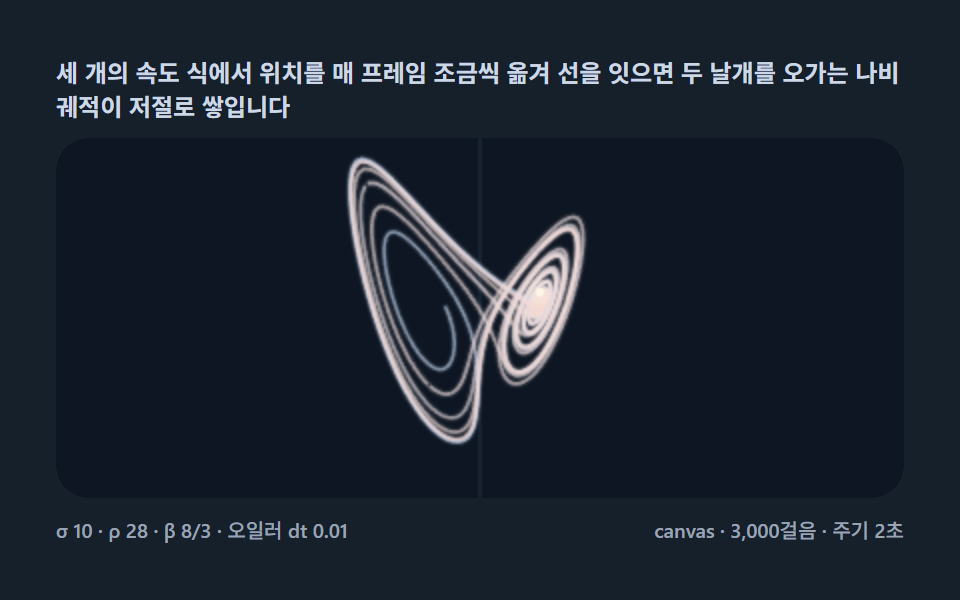 クリエイティブUIローレンツアトラクター 9種 — 蝶の形のカオス軌道を1歩ずつ数値積分して積む
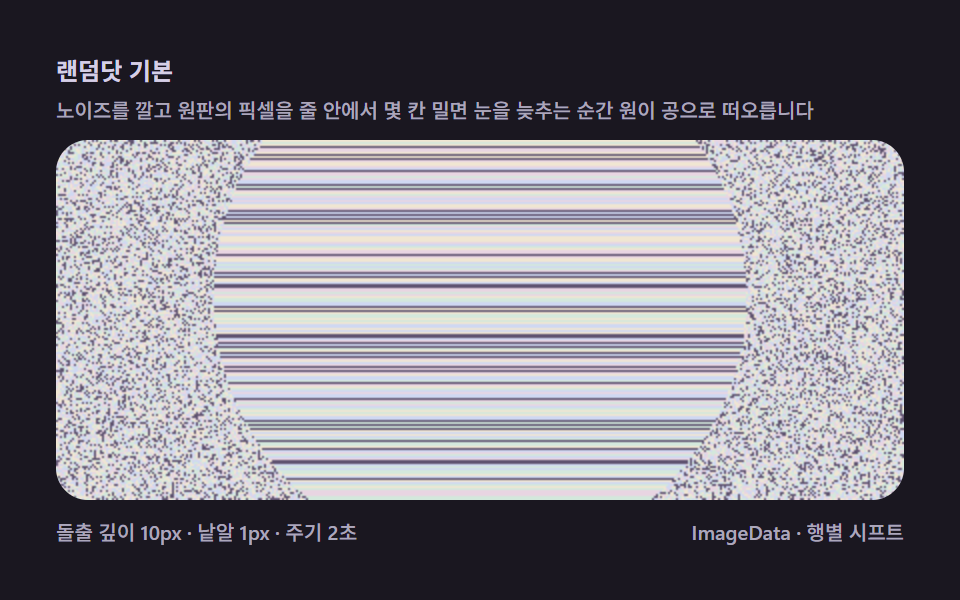 クリエイティブUIマジックアイ9種 — 深さマップを走査線シフトで織るステレオグラム
 クリエイティブUI物理エンジン 作り方 9選 — Verletロープからラグドールまで
 クリエイティブUIフォーリングサンド(falling sand simulator) 9種の作り方
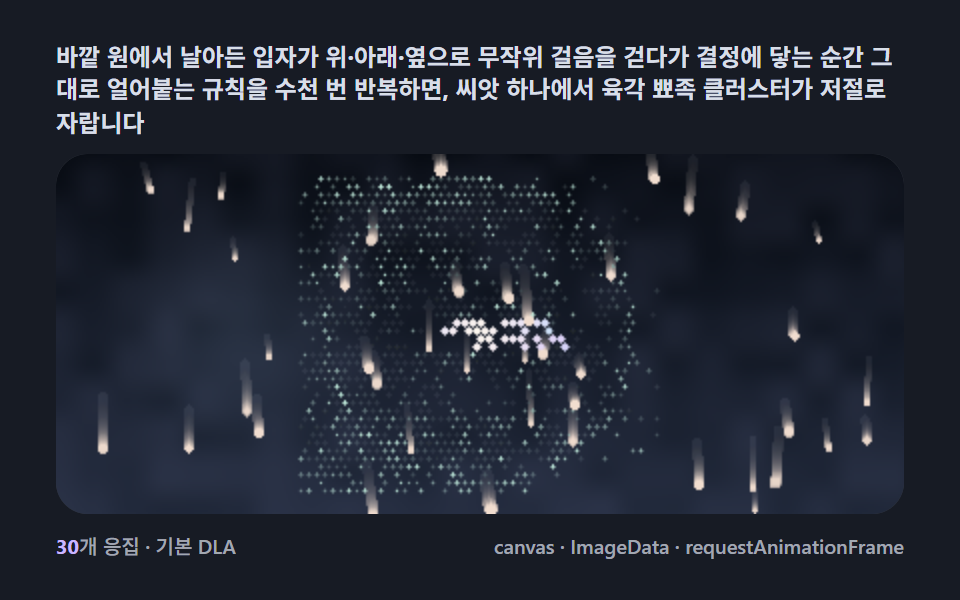 クリエイティブUIsnowflake generator 9種 — DLAで育つ雪結晶
 クリエイティブUI粘菌 迷路 9種 — 最短経路を自ら見つけるキャンバス
 クリエイティブUIフーリエ変換 アニメーション 9種 — 円の連鎖で星とハートを描き直す
 クリエイティブUI銀河 シミュレーション 9種 — ぶつかり合う星が渦巻腕と潮汐尾を作る
 クリエイティブUIストリングアート9種 — 糸の一本一本を計算するキャンバス
 クリエイティブUIシェルピンスキーの三角形など9種 — 文字が枝を生むキャンバス