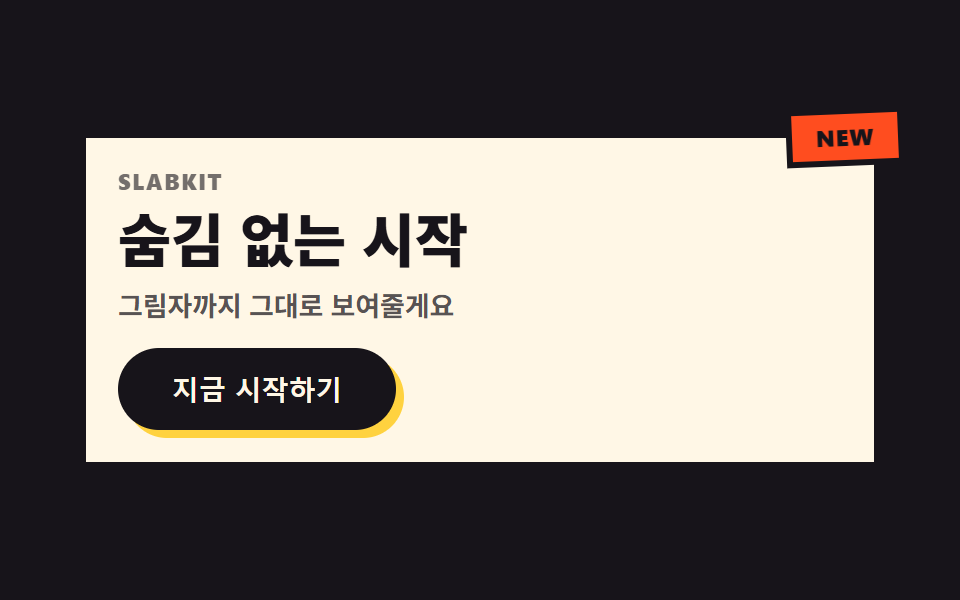
01オフセットシャドウ ヒーロー
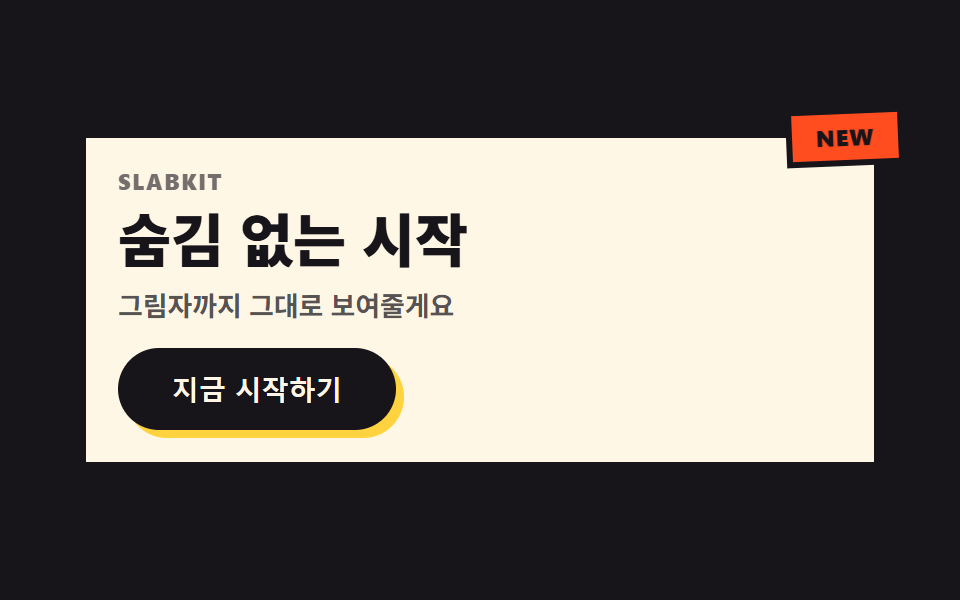
見出しの背後に色付きの複製が重なり、印刷がずれたように周期的にかみ合ってはずれます。角のステッカーバッジは傾いた状態からピタッと正面に戻ります。
使いどころSaaSランディングの最初の画面・キャンペーンカバー
오프셋 텍스트섀도우배지 회전→0radius 0
<main class="stage">
  <section class="hero">
    <span class="hero__badge is-demo" aria-hidden="true">NEW</span>
    <div class="hero__card is-demo">
      <p class="hero__eyebrow">SLABKIT</p>
      <h1 class="hero__title is-demo" data-text="隠さず、そのまま始める">隠さず、そのまま始める</h1>
      <p class="hero__desc">影までそのまま見せます。</p>
      <button class="hero__cta" type="button">今すぐ始める</button>
    </div>
  </section>
</main>
@use "../../../../site/static/demo-tokens" as *;
$duration: $dur-loop; // 어긋남↔맞물림 한 주기
$easing: $ease-spring; // 어긋나는 곡선
$color: $stage-yellow; // 오프셋 복제 색
$border: 3px;
@include stage($stage-ink);
.hero {
position: relative;
width: clamp(260px, 84vw, 400px);
}
.hero__card {
box-sizing: border-box;
position: relative;
display: flex;
flex-direction: column;
align-items: flex-start;
gap: $sp-2;
padding: $sp-4;
border: $border solid $subject-ink;
border-radius: 0;
background: $subject-cream;
box-shadow: $sp-2 $sp-2 0 $subject-ink;
}
.hero__badge {
box-sizing: border-box;
position: absolute;
top: -$sp-3;
right: -$sp-3;
z-index: 2;
border: $border solid $subject-ink;
border-radius: 0;
background: $stage-orange;
color: $subject-ink;
padding: $sp-1 $sp-3;
font-weight: 800;
font-size: clamp(10px, 2.4vw, 12px);
letter-spacing: .04em;
text-transform: uppercase;
animation: badgeSnap $duration $easing infinite;
}
.hero__eyebrow {
margin: 0;
color: $subject-ink;
opacity: .6;
font-weight: 800;
font-size: clamp(10px, 2.4vw, 11px);
line-height: 1;
letter-spacing: .08em;
text-transform: uppercase;
}
.hero__title {
position: relative;
margin: 0;
color: $subject-ink;
font-weight: 900;
font-size: clamp(22px, 6vw, 30px);
line-height: 1.1;
}
.hero__title::before {
content: attr(data-text);
position: absolute;
left: 0;
top: 0;
z-index: -1;
color: $color;
animation: ghostShift $duration $easing infinite;
}
.hero__desc {
margin: 0;
color: rgba($subject-ink, .72);
font-weight: 600;
font-size: clamp(12px, 2.8vw, 14px);
line-height: 1.4;
}
.hero__cta {
box-sizing: border-box;
margin-top: $sp-1;
border: $border solid $subject-ink;
border-radius: $r-pill;
background: $subject-ink;
color: $subject-cream;
padding: $sp-2 $sp-6;
font-weight: 800;
font-size: clamp(12px, 2.8vw, 14px);
box-shadow: $sp-1 $sp-1 0 $color;
}
// 데모: 제목 뒤 복제본이 인쇄 밀림처럼 어긋났다 맞물리고, 배지는 비뚤게 있다가 탁 소리 나듯 편다
@keyframes ghostShift {
0%, 100% { transform: translate($sp-1, $sp-1); }
50% { transform: translate(-$sp-1, -$sp-1); }
}
@keyframes badgeSnap {
0%, 55%, 100% { transform: rotate(-10deg); }
78% { transform: rotate(4deg); }
88% { transform: rotate(0deg); }
}
@media (prefers-reduced-motion: reduce) {
.hero__title::before, .hero__badge {
animation: none !important;
transform: none;
}
}html, body {
margin: 0;
overflow: hidden;
}
.stage {
box-sizing: border-box;
min-height: 100vh;
display: grid;
place-items: center;
margin: 0;
background: #17141a;
font-family: -apple-system, "Segoe UI", "Noto Sans KR", sans-serif;
padding: clamp(8px, 4vw, 24px);
}
.hero {
position: relative;
width: clamp(260px, 84vw, 400px);
}
.hero__card {
box-sizing: border-box;
position: relative;
display: flex;
flex-direction: column;
align-items: flex-start;
gap: 8px;
padding: 16px;
border: 3px solid #17141a;
border-radius: 0;
background: #fff7e6;
box-shadow: 8px 8px 0 #17141a;
}
.hero__badge {
box-sizing: border-box;
position: absolute;
top: -12px;
right: -12px;
z-index: 2;
border: 3px solid #17141a;
border-radius: 0;
background: #ff4d1f;
color: #17141a;
padding: 4px 12px;
font-weight: 800;
font-size: clamp(10px, 2.4vw, 12px);
letter-spacing: 0.04em;
text-transform: uppercase;
animation: badgeSnap 2s cubic-bezier(0.2, 0.8, 0.2, 1) infinite;
}
.hero__eyebrow {
margin: 0;
color: #17141a;
opacity: 0.6;
font-weight: 800;
font-size: clamp(10px, 2.4vw, 11px);
line-height: 1;
letter-spacing: 0.08em;
text-transform: uppercase;
}
.hero__title {
position: relative;
margin: 0;
color: #17141a;
font-weight: 900;
font-size: clamp(22px, 6vw, 30px);
line-height: 1.1;
}
.hero__title::before {
content: attr(data-text);
position: absolute;
left: 0;
top: 0;
z-index: -1;
color: #ffd23f;
animation: ghostShift 2s cubic-bezier(0.2, 0.8, 0.2, 1) infinite;
}
.hero__desc {
margin: 0;
color: rgba(23, 20, 26, 0.72);
font-weight: 600;
font-size: clamp(12px, 2.8vw, 14px);
line-height: 1.4;
}
.hero__cta {
box-sizing: border-box;
margin-top: 4px;
border: 3px solid #17141a;
border-radius: 999px;
background: #17141a;
color: #fff7e6;
padding: 8px 24px;
font-weight: 800;
font-size: clamp(12px, 2.8vw, 14px);
box-shadow: 4px 4px 0 #ffd23f;
}
@keyframes ghostShift {
0%, 100% {
transform: translate(4px, 4px);
}
50% {
transform: translate(-4px, -4px);
}
}
@keyframes badgeSnap {
0%, 55%, 100% {
transform: rotate(-10deg);
}
78% {
transform: rotate(4deg);
}
88% {
transform: rotate(0deg);
}
}
@media (prefers-reduced-motion: reduce) {
.hero__title::before, .hero__badge {
animation: none !important;
transform: none;
}
}import type { CSSProperties } from "react";
import styles from "./HeroBrutalist.module.scss";
export type HeroBrutalistProps = {
eyebrow?: string;
title?: string;
desc?: string;
cta?: string;
badge?: string;
/** 한 주기(기본 2000ms) */
duration?: number;
easing?: string;
color?: string;
};
type Vars = CSSProperties & { "--duration"?: string; "--easing"?: string; "--color"?: string };
export default function HeroBrutalist({
eyebrow = "SLABKIT",
title = "숨김 없는 시작",
desc = "그림자까지 그대로 보여줄게요",
cta = "지금 시작하기",
badge = "NEW",
duration = 2000,
easing = "cubic-bezier(.2,.8,.2,1)",
color = "#ffd23f",
}: HeroBrutalistProps) {
const vars: Vars = { "--duration": `${duration}ms`, "--easing": easing, "--color": color };
return (
<section className={styles.hero} style={vars}>
<span className={styles.badge} aria-hidden="true">{badge}</span>
<div className={styles.card}>
<p className={styles.eyebrow}>{eyebrow}</p>
<h1 className={styles.title} data-text={title}>{title}</h1>
<p className={styles.desc}>{desc}</p>
<button type="button" className={styles.cta}>{cta}</button>
</div>
</section>
);
}01 オフセットシャドウ ヒーロー — 計測 累積面積 0.671% · 動いたフレーム 10/23GODRICH オリジナル · SCSS と React は zip に同梱 · ネオブルータリズム UI キット、影がにじまないLPパーツ9選
このデモが属する記事
 ネオブルータリズム UI キット、影がにじまないLPパーツ9選ネオブルータリズム UIとは、太い墨色の枠線とにじみのない直角の影、彩度の高い原色ブロックを飾らずにそのまま画面へ置くデザイン手法です。ボタンやカードによく使われます。 この記事のデモをすべて見る