ネオブルータリズム UI キット、影がにじまないLPパーツ9選
ネオブルータリズム UIとは、太い墨色の枠線とにじみのない直角の影、彩度の高い原色ブロックを飾らずにそのまま画面へ置くデザイン手法です。ボタンやカードによく使われます。
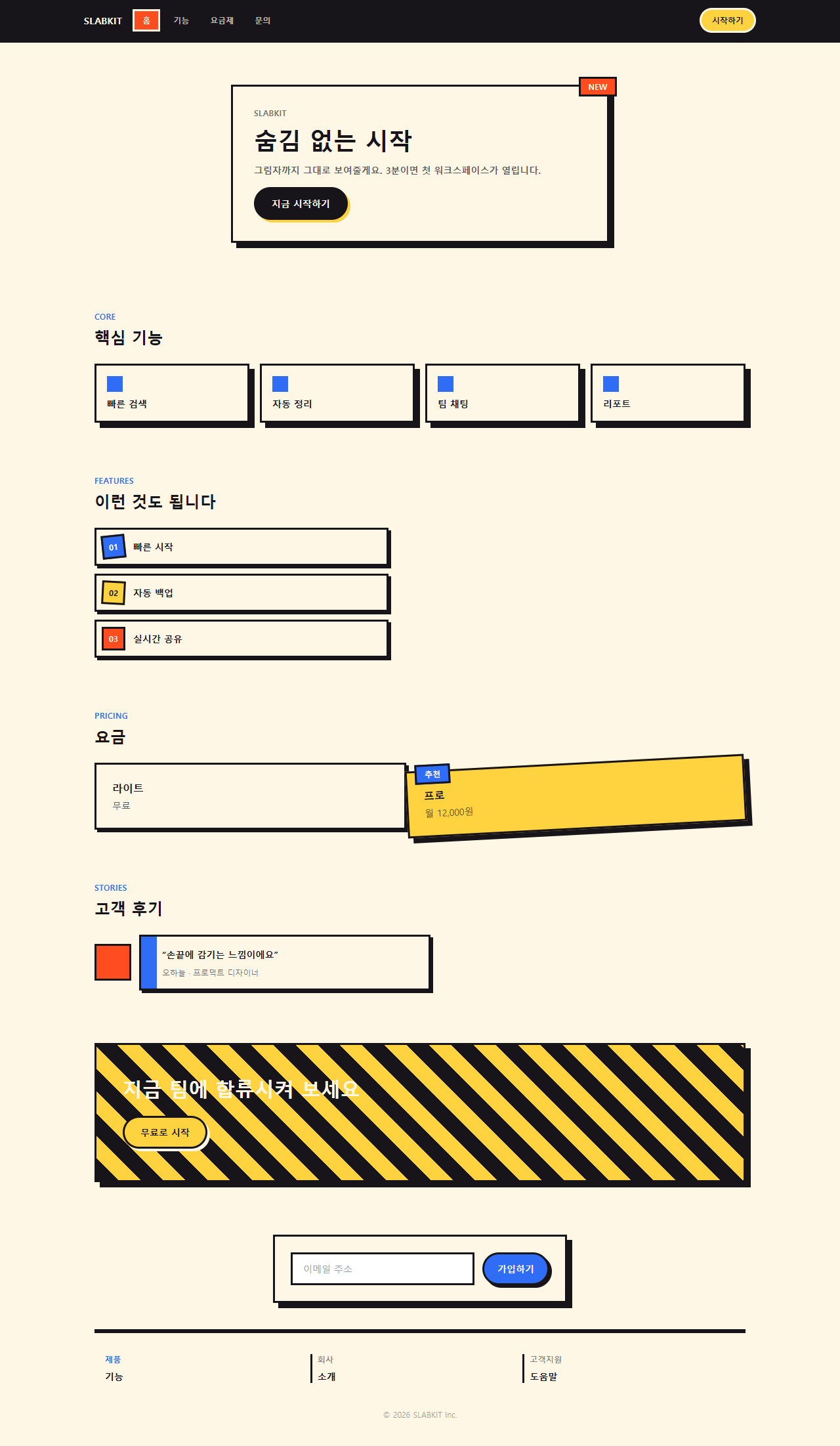
ブルータリズム デザインの荒い骨格を原色と影で整えたこのルックが、ピンタレストや Dribbble の保存タブを埋め尽くしています。実際に組んだワンページを先に下へ貼ったので、上のナビバーから下の著作権表示まで一度スクロールして全体のトーンを目に入れてください。影ににじみが無いことに、まず気づくはずです。

このワンページを九つに切り分け、下の格子にもう一度並べ直しました。並び順は人気投票ではなく、初めて画面を開いた人がたどる動線——目を引かれる、見て回る、価格を確かめる、信頼の材料を探す、背中を押される、登録する——そのままです。九つのうち四つ(ヒーロー・番号バッジ・料金カード・ボタン)は普通のカード羅列ではなく、回転や影の移動といった動きが付いたアイデア型です。同じdesign柱の中で、この直角の影とは正反対ににじみを突き詰めたのがメッシュグラデーションのLPパーツで、同じ原色を金属の光沢に置き換えたのがy2k webデザインのLPパーツです。
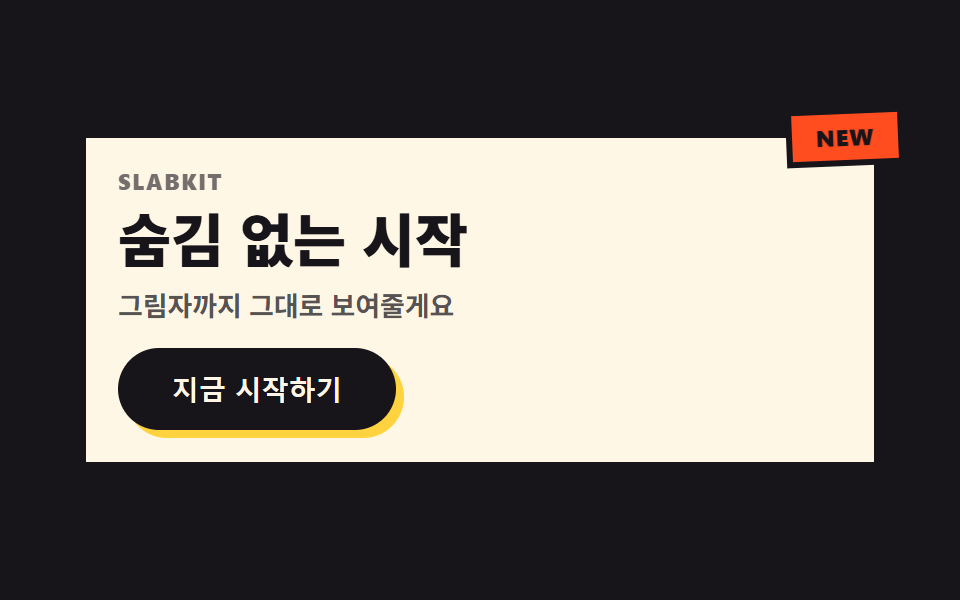 01 hero-brutalist
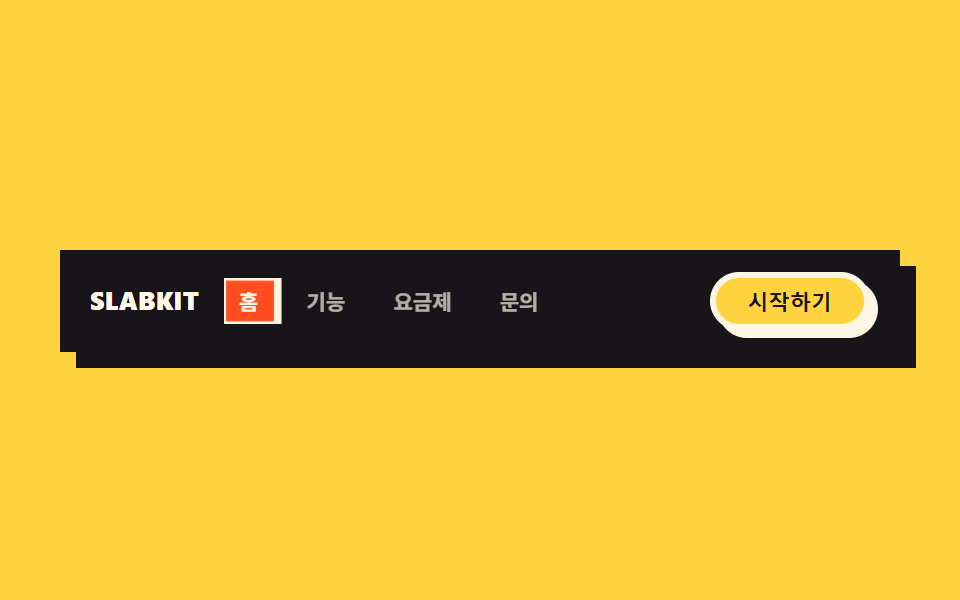 02 nav-brutalist
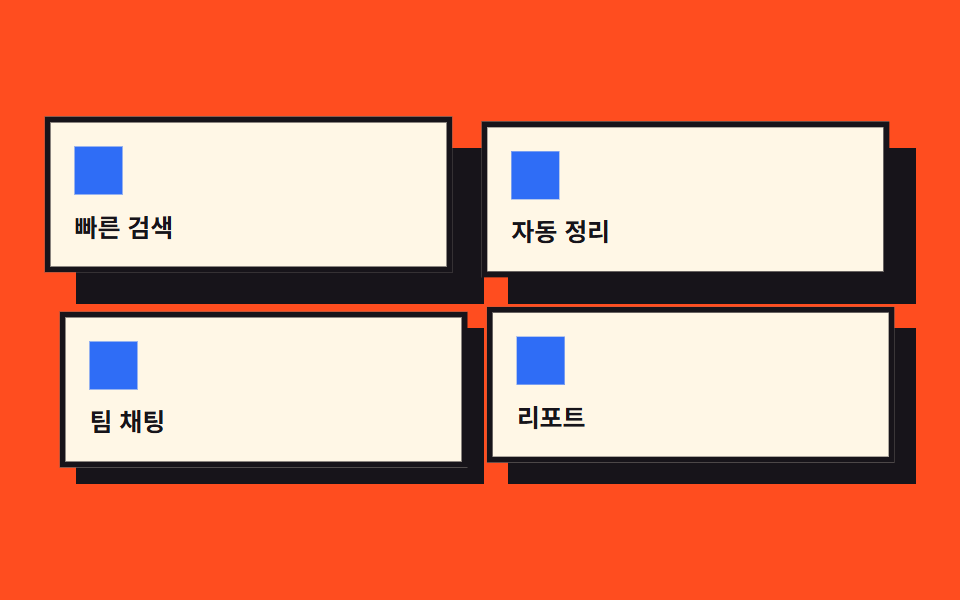 03 card-grid-brutalist
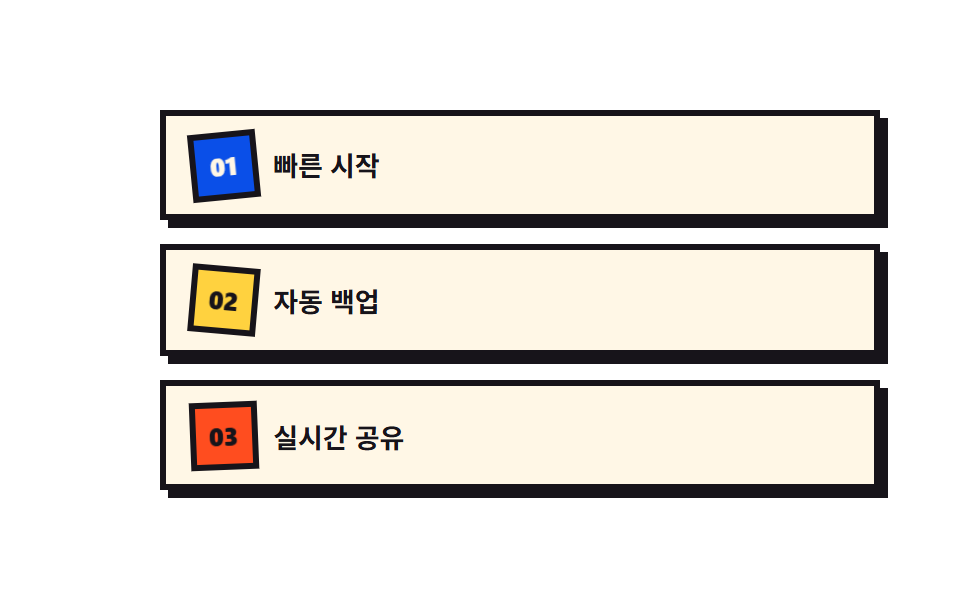 04 feature-list-brutalist
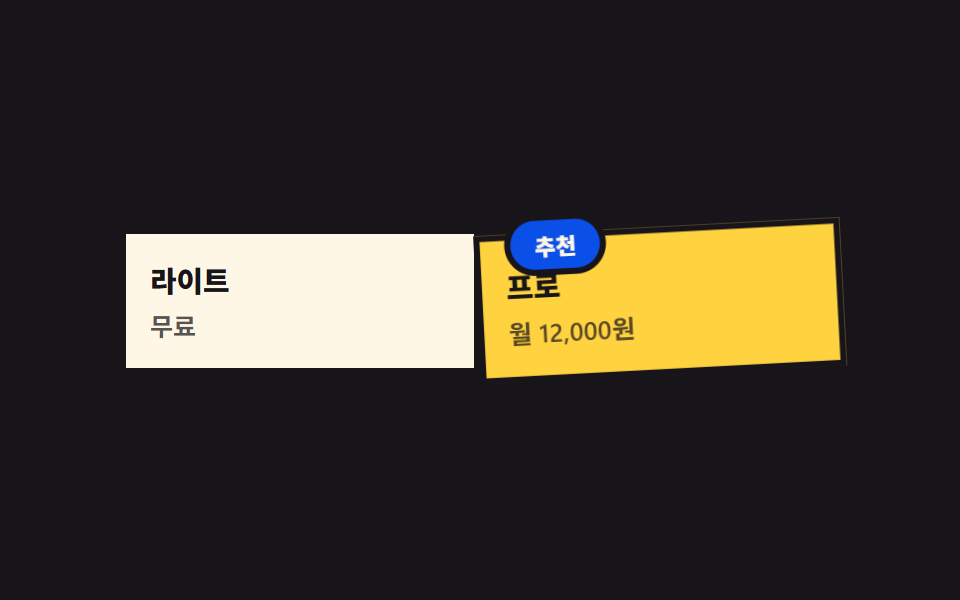 05 pricing-brutalist
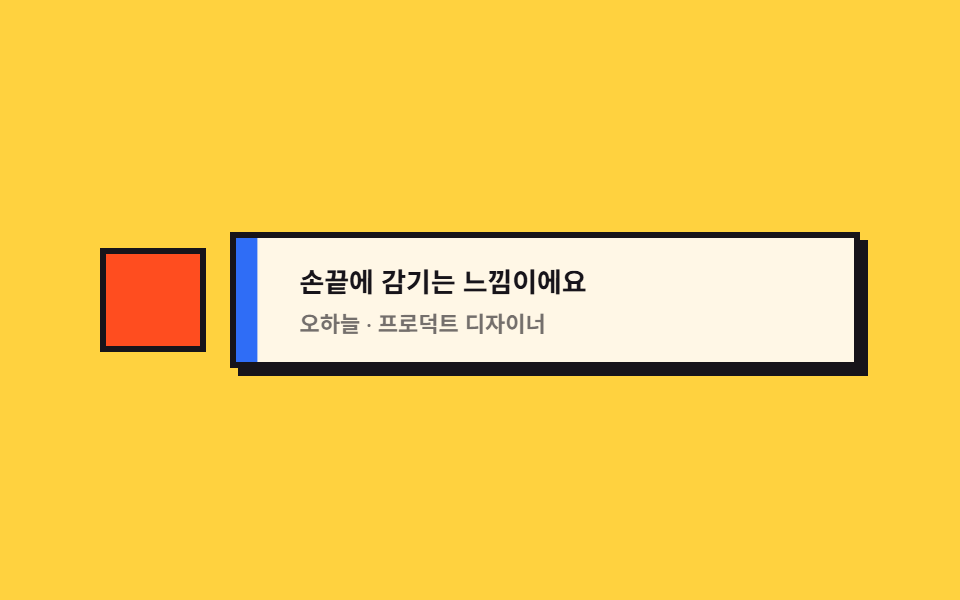 06 testimonial-brutalist
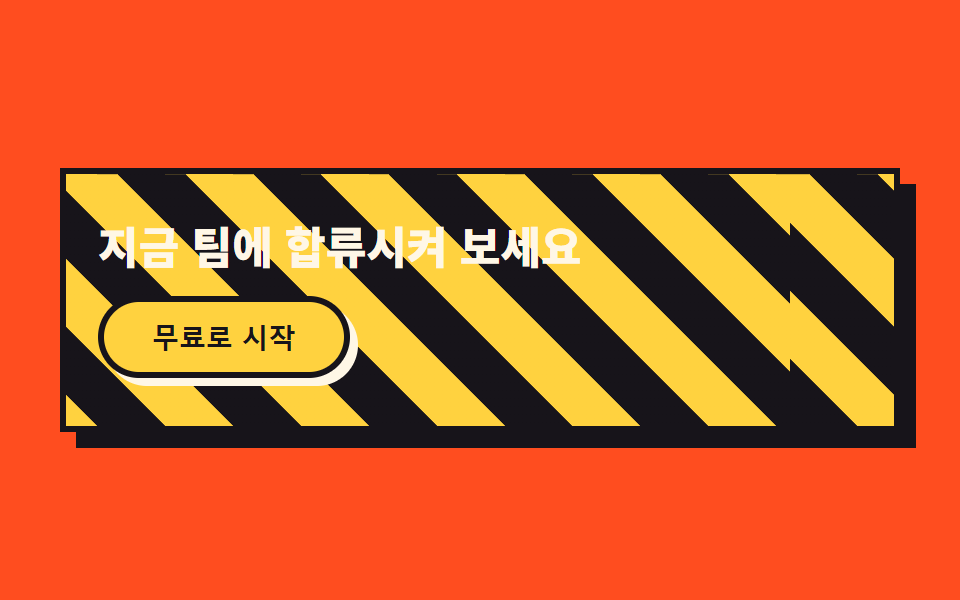 07 cta-band-brutalist
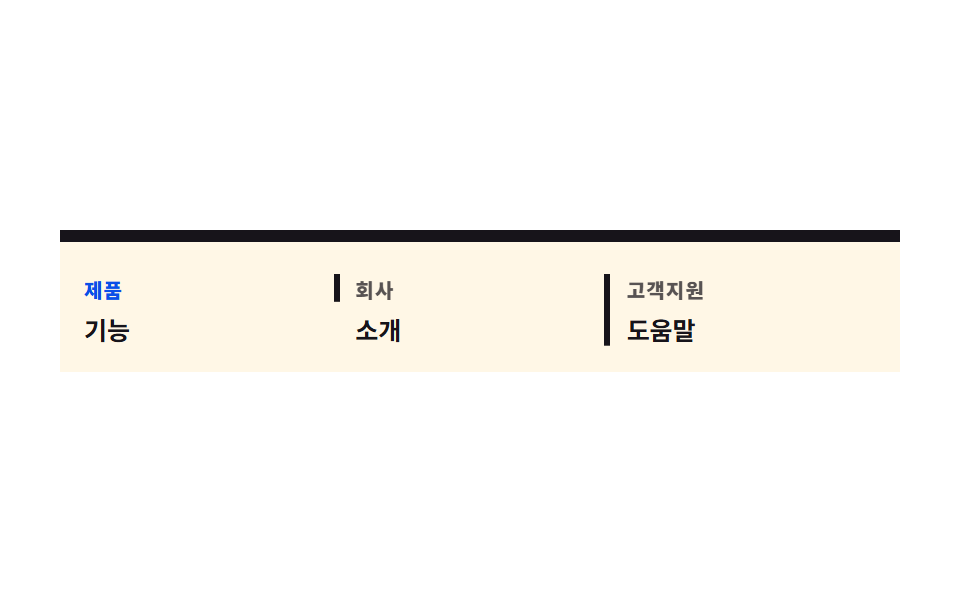 08 footer-brutalist
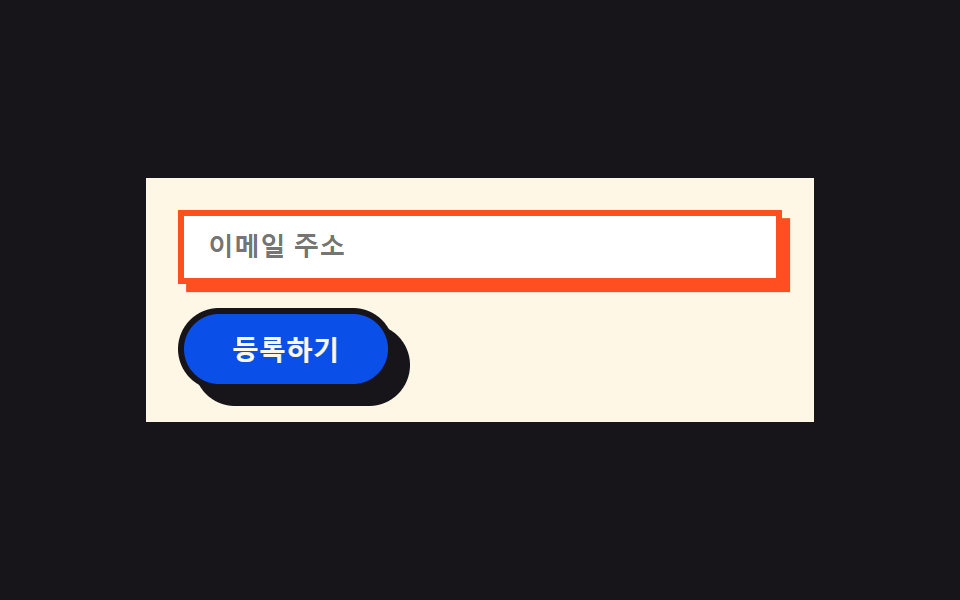 09 buttons-inputs-brutalist
自動再生 · タイルを押すとその項目へ · すべて1つのzip
- 01 オフセットシャドウ ヒーロー
- 02 スタンプナビ
- 03 シャドウ分離カード
- 04 斜め番号バッジ
- 05 貼り付け料金カード
- 06 ブロック引用符の声
- 07 行進する斜め線CTA
- 08 定規で引いた仕切り線フッター
- 09 影の位置に押し込むボタン
01オフセットシャドウ ヒーロー
何が動くか
見出しの背後に敷いた黄色の複製文字が、印刷がわずかにずれたように周期的にかみ合っては外れます。
<main class="stage">
  <section class="hero">
    <span class="hero__badge is-demo" aria-hidden="true">NEW</span>
    <div class="hero__card is-demo">
      <p class="hero__eyebrow">SLABKIT</p>
      <h1 class="hero__title is-demo" data-text="隠さず、そのまま始める">隠さず、そのまま始める</h1>
      <p class="hero__desc">影までそのまま見せます。</p>
      <button class="hero__cta" type="button">今すぐ始める</button>
    </div>
  </section>
</main>
@use "../../../../site/static/demo-tokens" as *;
$duration: $dur-loop; // 어긋남↔맞물림 한 주기
$easing: $ease-spring; // 어긋나는 곡선
$color: $stage-yellow; // 오프셋 복제 색
$border: 3px;
@include stage($stage-ink);
.hero {
position: relative;
width: clamp(260px, 84vw, 400px);
}
.hero__card {
box-sizing: border-box;
position: relative;
display: flex;
flex-direction: column;
align-items: flex-start;
gap: $sp-2;
padding: $sp-4;
border: $border solid $subject-ink;
border-radius: 0;
background: $subject-cream;
box-shadow: $sp-2 $sp-2 0 $subject-ink;
}
.hero__badge {
box-sizing: border-box;
position: absolute;
top: -$sp-3;
right: -$sp-3;
z-index: 2;
border: $border solid $subject-ink;
border-radius: 0;
background: $stage-orange;
color: $subject-ink;
padding: $sp-1 $sp-3;
font-weight: 800;
font-size: clamp(10px, 2.4vw, 12px);
letter-spacing: .04em;
text-transform: uppercase;
animation: badgeSnap $duration $easing infinite;
}
.hero__eyebrow {
margin: 0;
color: $subject-ink;
opacity: .6;
font-weight: 800;
font-size: clamp(10px, 2.4vw, 11px);
line-height: 1;
letter-spacing: .08em;
text-transform: uppercase;
}
.hero__title {
position: relative;
margin: 0;
color: $subject-ink;
font-weight: 900;
font-size: clamp(22px, 6vw, 30px);
line-height: 1.1;
}
.hero__title::before {
content: attr(data-text);
position: absolute;
left: 0;
top: 0;
z-index: -1;
color: $color;
animation: ghostShift $duration $easing infinite;
}
.hero__desc {
margin: 0;
color: rgba($subject-ink, .72);
font-weight: 600;
font-size: clamp(12px, 2.8vw, 14px);
line-height: 1.4;
}
.hero__cta {
box-sizing: border-box;
margin-top: $sp-1;
border: $border solid $subject-ink;
border-radius: $r-pill;
background: $subject-ink;
color: $subject-cream;
padding: $sp-2 $sp-6;
font-weight: 800;
font-size: clamp(12px, 2.8vw, 14px);
box-shadow: $sp-1 $sp-1 0 $color;
}
// 데모: 제목 뒤 복제본이 인쇄 밀림처럼 어긋났다 맞물리고, 배지는 비뚤게 있다가 탁 소리 나듯 편다
@keyframes ghostShift {
0%, 100% { transform: translate($sp-1, $sp-1); }
50% { transform: translate(-$sp-1, -$sp-1); }
}
@keyframes badgeSnap {
0%, 55%, 100% { transform: rotate(-10deg); }
78% { transform: rotate(4deg); }
88% { transform: rotate(0deg); }
}
@media (prefers-reduced-motion: reduce) {
.hero__title::before, .hero__badge {
animation: none !important;
transform: none;
}
}html, body {
margin: 0;
overflow: hidden;
}
.stage {
box-sizing: border-box;
min-height: 100vh;
display: grid;
place-items: center;
margin: 0;
background: #17141a;
font-family: -apple-system, "Segoe UI", "Noto Sans KR", sans-serif;
padding: clamp(8px, 4vw, 24px);
}
.hero {
position: relative;
width: clamp(260px, 84vw, 400px);
}
.hero__card {
box-sizing: border-box;
position: relative;
display: flex;
flex-direction: column;
align-items: flex-start;
gap: 8px;
padding: 16px;
border: 3px solid #17141a;
border-radius: 0;
background: #fff7e6;
box-shadow: 8px 8px 0 #17141a;
}
.hero__badge {
box-sizing: border-box;
position: absolute;
top: -12px;
right: -12px;
z-index: 2;
border: 3px solid #17141a;
border-radius: 0;
background: #ff4d1f;
color: #17141a;
padding: 4px 12px;
font-weight: 800;
font-size: clamp(10px, 2.4vw, 12px);
letter-spacing: 0.04em;
text-transform: uppercase;
animation: badgeSnap 2s cubic-bezier(0.2, 0.8, 0.2, 1) infinite;
}
.hero__eyebrow {
margin: 0;
color: #17141a;
opacity: 0.6;
font-weight: 800;
font-size: clamp(10px, 2.4vw, 11px);
line-height: 1;
letter-spacing: 0.08em;
text-transform: uppercase;
}
.hero__title {
position: relative;
margin: 0;
color: #17141a;
font-weight: 900;
font-size: clamp(22px, 6vw, 30px);
line-height: 1.1;
}
.hero__title::before {
content: attr(data-text);
position: absolute;
left: 0;
top: 0;
z-index: -1;
color: #ffd23f;
animation: ghostShift 2s cubic-bezier(0.2, 0.8, 0.2, 1) infinite;
}
.hero__desc {
margin: 0;
color: rgba(23, 20, 26, 0.72);
font-weight: 600;
font-size: clamp(12px, 2.8vw, 14px);
line-height: 1.4;
}
.hero__cta {
box-sizing: border-box;
margin-top: 4px;
border: 3px solid #17141a;
border-radius: 999px;
background: #17141a;
color: #fff7e6;
padding: 8px 24px;
font-weight: 800;
font-size: clamp(12px, 2.8vw, 14px);
box-shadow: 4px 4px 0 #ffd23f;
}
@keyframes ghostShift {
0%, 100% {
transform: translate(4px, 4px);
}
50% {
transform: translate(-4px, -4px);
}
}
@keyframes badgeSnap {
0%, 55%, 100% {
transform: rotate(-10deg);
}
78% {
transform: rotate(4deg);
}
88% {
transform: rotate(0deg);
}
}
@media (prefers-reduced-motion: reduce) {
.hero__title::before, .hero__badge {
animation: none !important;
transform: none;
}
}import type { CSSProperties } from "react";
import styles from "./HeroBrutalist.module.scss";
export type HeroBrutalistProps = {
eyebrow?: string;
title?: string;
desc?: string;
cta?: string;
badge?: string;
/** 한 주기(기본 2000ms) */
duration?: number;
easing?: string;
color?: string;
};
type Vars = CSSProperties & { "--duration"?: string; "--easing"?: string; "--color"?: string };
export default function HeroBrutalist({
eyebrow = "SLABKIT",
title = "숨김 없는 시작",
desc = "그림자까지 그대로 보여줄게요",
cta = "지금 시작하기",
badge = "NEW",
duration = 2000,
easing = "cubic-bezier(.2,.8,.2,1)",
color = "#ffd23f",
}: HeroBrutalistProps) {
const vars: Vars = { "--duration": `${duration}ms`, "--easing": easing, "--color": color };
return (
<section className={styles.hero} style={vars}>
<span className={styles.badge} aria-hidden="true">{badge}</span>
<div className={styles.card}>
<p className={styles.eyebrow}>{eyebrow}</p>
<h1 className={styles.title} data-text={title}>{title}</h1>
<p className={styles.desc}>{desc}</p>
<button type="button" className={styles.cta}>{cta}</button>
</div>
</section>
);
}01 · オフセットシャドウ ヒーロー — 計測 累積面積 0.671% · 動いたフレーム 10/23GODRICH オリジナル · SCSS と React は zip に同梱 · パスワードを見る
コードで見る所
角に乗せたステッカーバッジは傾いたまま休み、区間の終わりだけタンと音がしそうな勢いで一瞬平らに戻ります。
<div class="relative border-[3px] border-ink bg-cream p-8 shadow-brutal">
  <span class="absolute -right-3 -top-3 border-[3px] border-ink
               bg-orange px-3 py-1 text-xs font-black text-cream">NEW</span>
  <h1 class="relative font-display text-4xl font-black leading-tight">
    <span class="absolute -left-1 -top-1 -z-10 text-yellow"
          aria-hidden="true">隠さず、そのまま始める</span>
    隠さず、そのまま始める
  </h1>
  <button class="mt-3 rounded-full border-[3px] border-ink bg-ink
                 px-6 py-3 text-sm font-black text-cream
                 shadow-[4px_4px_0_#ffd23f]">今すぐ始める</button>
</div>
02スタンプナビ
何が動くか
現在のメニュー枠だけ、はんこを押すように一気に膨らんでから跳ね返り、色付きブロックで塗りつぶされます。
<main class="stage">
  <nav class="nav">
    <span class="nav__brand">SLABKIT</span>
    <div class="nav__links">
      <span class="nav__link nav__link--active is-demo">ホーム</span>
      <span class="nav__link">機能</span>
      <span class="nav__link">料金プラン</span>
      <span class="nav__link">お問い合わせ</span>
    </div>
    <button class="nav__cta" type="button">はじめる</button>
  </nav>
</main>
@use "../../../../site/static/demo-tokens" as *;
$duration: $dur-loop; // 스탬프 한 번 찍히는 주기
$easing: $ease-pop; // 오버슈트 곡선
$color: $stage-orange; // 스탬프 블록 색
$border: 3px;
@include stage($stage-yellow);
.nav {
box-sizing: border-box;
display: flex;
align-items: center;
gap: $sp-3;
width: clamp(260px, 90vw, 420px);
padding: $sp-2 $sp-3;
border: $border solid $subject-ink;
border-radius: 0;
background: $subject-ink;
box-shadow: $sp-2 $sp-2 0 $subject-ink;
}
.nav__brand {
flex-shrink: 0;
white-space: nowrap;
color: $subject-cream;
font-weight: 900;
font-size: clamp(12px, 2.6vw, 14px);
letter-spacing: .02em;
text-transform: uppercase;
}
.nav__links {
min-width: 0;
flex: 1;
display: flex;
align-items: center;
gap: $sp-2;
overflow-x: auto;
scrollbar-width: none;
}
.nav__links::-webkit-scrollbar { display: none; }
.nav__link {
box-sizing: border-box;
position: relative;
flex: 0 0 auto;
white-space: nowrap;
color: rgba($subject-cream, .68);
font-weight: 700;
font-size: clamp(10px, 2.2vw, 12px);
padding: $sp-1 $sp-2;
z-index: 1;
}
.nav__link--active { color: $subject-cream; }
.nav__link--active::before {
content: "";
position: absolute;
inset: 0;
z-index: -1;
border: $border solid $subject-cream;
border-radius: 0;
background: $color;
animation: stamp $duration $easing infinite;
}
.nav__cta {
box-sizing: border-box;
flex-shrink: 0;
white-space: nowrap;
border: $border solid $subject-cream;
border-radius: $r-pill;
background: $stage-yellow;
color: $subject-ink;
padding: $sp-1 $sp-4;
font-weight: 800;
font-size: clamp(10px, 2.2vw, 12px);
box-shadow: $sp-1 $sp-1 0 $subject-cream;
}
// 데모: 현재 칸의 색 블록이 스탬프처럼 커졌다 튕기며 자리 잡는다. JS 0줄
@keyframes stamp {
0%, 40% { transform: scale(.75); opacity: 0; }
55% { transform: scale(1.18); opacity: 1; }
70% { transform: scale(.92); opacity: 1; }
85%, 100% { transform: scale(1); opacity: 1; }
}
@media (prefers-reduced-motion: reduce) {
.nav__link--active::before {
animation: none !important;
transform: scale(1);
opacity: 1;
}
}html, body {
margin: 0;
overflow: hidden;
}
.stage {
box-sizing: border-box;
min-height: 100vh;
display: grid;
place-items: center;
margin: 0;
background: #ffd23f;
font-family: -apple-system, "Segoe UI", "Noto Sans KR", sans-serif;
padding: clamp(8px, 4vw, 24px);
}
.nav {
box-sizing: border-box;
display: flex;
align-items: center;
gap: 12px;
width: clamp(260px, 90vw, 420px);
padding: 8px 12px;
border: 3px solid #17141a;
border-radius: 0;
background: #17141a;
box-shadow: 8px 8px 0 #17141a;
}
.nav__brand {
flex-shrink: 0;
white-space: nowrap;
color: #fff7e6;
font-weight: 900;
font-size: clamp(12px, 2.6vw, 14px);
letter-spacing: 0.02em;
text-transform: uppercase;
}
.nav__links {
min-width: 0;
flex: 1;
display: flex;
align-items: center;
gap: 8px;
overflow-x: auto;
scrollbar-width: none;
}
.nav__links::-webkit-scrollbar {
display: none;
}
.nav__link {
box-sizing: border-box;
position: relative;
flex: 0 0 auto;
white-space: nowrap;
color: rgba(255, 247, 230, 0.68);
font-weight: 700;
font-size: clamp(10px, 2.2vw, 12px);
padding: 4px 8px;
z-index: 1;
}
.nav__link--active {
color: #fff7e6;
}
.nav__link--active::before {
content: "";
position: absolute;
inset: 0;
z-index: -1;
border: 3px solid #fff7e6;
border-radius: 0;
background: #ff4d1f;
animation: stamp 2s cubic-bezier(0.2, 1.4, 0.4, 1) infinite;
}
.nav__cta {
box-sizing: border-box;
flex-shrink: 0;
white-space: nowrap;
border: 3px solid #fff7e6;
border-radius: 999px;
background: #ffd23f;
color: #17141a;
padding: 4px 16px;
font-weight: 800;
font-size: clamp(10px, 2.2vw, 12px);
box-shadow: 4px 4px 0 #fff7e6;
}
@keyframes stamp {
0%, 40% {
transform: scale(0.75);
opacity: 0;
}
55% {
transform: scale(1.18);
opacity: 1;
}
70% {
transform: scale(0.92);
opacity: 1;
}
85%, 100% {
transform: scale(1);
opacity: 1;
}
}
@media (prefers-reduced-motion: reduce) {
.nav__link--active::before {
animation: none !important;
transform: scale(1);
opacity: 1;
}
}import type { CSSProperties } from "react";
import styles from "./NavBrutalist.module.scss";
export type NavLink = { label: string; active?: boolean };
export type NavBrutalistProps = {
brand?: string;
links?: NavLink[];
cta?: string;
duration?: number;
easing?: string;
color?: string;
};
type Vars = CSSProperties & { "--duration"?: string; "--easing"?: string; "--color"?: string };
export default function NavBrutalist({
brand = "SLABKIT",
links = [
{ label: "홈", active: true },
{ label: "기능" },
{ label: "요금제" },
{ label: "문의" },
],
cta = "시작하기",
duration = 2000,
easing = "cubic-bezier(.2,1.4,.4,1)",
color = "#ff4d1f",
}: NavBrutalistProps) {
const vars: Vars = { "--duration": `${duration}ms`, "--easing": easing, "--color": color };
return (
<nav className={styles.nav} style={vars}>
<span className={styles.brand}>{brand}</span>
<div className={styles.links}>
{links.map((l) => (
<span key={l.label} className={`${styles.link} ${l.active ? styles.linkActive : ""}`}>
{l.label}
</span>
))}
</div>
<button type="button" className={styles.cta}>{cta}</button>
</nav>
);
}02 · スタンプナビ — 計測 累積面積 0.461% · 動いたフレーム 10/23GODRICH オリジナル · SCSS と React は zip に同梱 · パスワードを見る
コードで見る所
ラベルはどれだけ幅が狭くなっても折り返さず一行のままで、はみ出した分は横スクロールに逃がします。
<nav class="flex items-center gap-4 border-[3px] border-ink bg-ink
            px-4 py-3">
  <span class="shrink-0 whitespace-nowrap font-black text-cream">SLABKIT</span>
  <div class="flex min-w-0 flex-1 gap-2 overflow-x-auto">
    <span class="shrink-0 whitespace-nowrap border-[3px] border-cream
                 bg-orange px-3 py-1.5 text-xs font-bold text-cream">ホーム</span>
    <span class="shrink-0 whitespace-nowrap px-3 py-1.5 text-xs
                 font-bold text-cream/70">機能</span>
  </div>
  <button class="shrink-0 whitespace-nowrap rounded-full border-[3px]
                 border-cream bg-yellow px-4 py-2 text-xs
                 font-black text-ink">はじめる</button>
</nav>
03シャドウ分離カード
何が動くか
各カードの黒い影は元の位置に固定されたまま、カード本体だけが左上へ動くので、カードと影のあいだの隙間が広がったり縮んだりします。
<main class="stage">
  <div class="grid">
    <div class="card is-demo">
      <div class="card__body">
        <span class="card__icon" aria-hidden="true"></span>
        <p class="card__label">高速検索</p>
      </div>
    </div>
    <div class="card is-demo">
      <div class="card__body">
        <span class="card__icon" aria-hidden="true"></span>
        <p class="card__label">自動整理</p>
      </div>
    </div>
    <div class="card is-demo">
      <div class="card__body">
        <span class="card__icon" aria-hidden="true"></span>
        <p class="card__label">チームチャット</p>
      </div>
    </div>
    <div class="card is-demo">
      <div class="card__body">
        <span class="card__icon" aria-hidden="true"></span>
        <p class="card__label">レポート</p>
      </div>
    </div>
  </div>
</main>@use "../../../../site/static/demo-tokens" as *;
$duration: $dur-loop; // 몸통이 그림자에서 멀어졌다 돌아오는 주기
$easing: $ease-spring;
$color: $subject-blue; // 아이콘 스와치 색
$border: 3px;
@include stage($stage-orange);
.grid {
display: grid;
grid-template-columns: repeat(2, 1fr);
gap: $sp-3;
width: clamp(260px, 88vw, 420px);
}
.card {
position: relative;
}
.card::before {
content: "";
position: absolute;
inset: 0;
z-index: 0;
background: $subject-ink;
transform: translate($sp-2, $sp-2);
}
.card__body {
box-sizing: border-box;
position: relative;
z-index: 1;
display: flex;
flex-direction: column;
gap: $sp-2;
padding: $sp-3;
border: $border solid $subject-ink;
border-radius: 0;
background: $subject-cream;
animation: floatAway $duration $easing infinite;
}
.card:nth-child(1) .card__body { animation-delay: 0s; }
.card:nth-child(2) .card__body { animation-delay: -.5s; }
.card:nth-child(3) .card__body { animation-delay: -1s; }
.card:nth-child(4) .card__body { animation-delay: -1.5s; }
.card__icon {
display: block;
width: clamp(18px, 5vw, 24px);
height: clamp(18px, 5vw, 24px);
background: $color;
border-radius: 0;
}
.card__label {
margin: 0;
color: $subject-ink;
font-weight: 700;
font-size: clamp(11px, 2.6vw, 13px);
line-height: 1.3;
}
// 데모: 그림자(::before)는 고정, 몸통(card__body)만 왼쪽 위로 떴다 돌아와 틈이 늘었다 줄었다 한다
@keyframes floatAway {
0%, 100% { transform: translate(0, 0); }
50% { transform: translate(-$sp-2, -$sp-2); }
}
@media (prefers-reduced-motion: reduce) {
.card__body {
animation: none !important;
transform: none;
}
}html, body {
margin: 0;
overflow: hidden;
}
.stage {
box-sizing: border-box;
min-height: 100vh;
display: grid;
place-items: center;
margin: 0;
background: #ff4d1f;
font-family: -apple-system, "Segoe UI", "Noto Sans KR", sans-serif;
padding: clamp(8px, 4vw, 24px);
}
.grid {
display: grid;
grid-template-columns: repeat(2, 1fr);
gap: 12px;
width: clamp(260px, 88vw, 420px);
}
.card {
position: relative;
}
.card::before {
content: "";
position: absolute;
inset: 0;
z-index: 0;
background: #17141a;
transform: translate(8px, 8px);
}
.card__body {
box-sizing: border-box;
position: relative;
z-index: 1;
display: flex;
flex-direction: column;
gap: 8px;
padding: 12px;
border: 3px solid #17141a;
border-radius: 0;
background: #fff7e6;
animation: floatAway 2s cubic-bezier(0.2, 0.8, 0.2, 1) infinite;
}
.card:nth-child(1) .card__body {
animation-delay: 0s;
}
.card:nth-child(2) .card__body {
animation-delay: -0.5s;
}
.card:nth-child(3) .card__body {
animation-delay: -1s;
}
.card:nth-child(4) .card__body {
animation-delay: -1.5s;
}
.card__icon {
display: block;
width: clamp(18px, 5vw, 24px);
height: clamp(18px, 5vw, 24px);
background: #2f6df6;
border-radius: 0;
}
.card__label {
margin: 0;
color: #17141a;
font-weight: 700;
font-size: clamp(11px, 2.6vw, 13px);
line-height: 1.3;
}
@keyframes floatAway {
0%, 100% {
transform: translate(0, 0);
}
50% {
transform: translate(-8px, -8px);
}
}
@media (prefers-reduced-motion: reduce) {
.card__body {
animation: none !important;
transform: none;
}
}import type { CSSProperties } from "react";
import styles from "./CardGridBrutalist.module.scss";
export type GridCard = { label: string };
export type CardGridBrutalistProps = {
cards?: GridCard[];
duration?: number;
easing?: string;
color?: string;
};
type Vars = CSSProperties & { "--duration"?: string; "--easing"?: string; "--color"?: string; "--delay"?: string };
const DELAYS = ["0s", "-.5s", "-1s", "-1.5s"];
export default function CardGridBrutalist({
cards = [
{ label: "빠른 검색" },
{ label: "자동 정리" },
{ label: "팀 채팅" },
{ label: "리포트" },
],
duration = 2000,
easing = "cubic-bezier(.2,.8,.2,1)",
color = "#2f6df6",
}: CardGridBrutalistProps) {
const base: Vars = { "--duration": `${duration}ms`, "--easing": easing, "--color": color };
return (
<div className={styles.grid} style={base}>
{cards.map((c, i) => {
const vars: Vars = { ...base, "--delay": DELAYS[i % DELAYS.length] };
return (
<div key={c.label} className={styles.card}>
<div className={styles.body} style={vars}>
<span className={styles.icon} aria-hidden="true" />
<p className={styles.label}>{c.label}</p>
</div>
</div>
);
})}
</div>
);
}03 · シャドウ分離カード — 計測 累積面積 20.788% · 動いたフレーム 23/23GODRICH オリジナル · SCSS と React は zip に同梱 · パスワードを見る
コードで見る所
四枚は開始時刻を少しずつずらしてあり、波のように順番に持ち上がって見えます。
<div class="relative">
  <div class="absolute inset-0 translate-x-2 translate-y-2 bg-ink"></div>
  <div class="relative flex flex-col gap-2 border-[3px] border-ink
              bg-cream p-4">
    <span class="block h-6 w-6 bg-blue"></span>
    <p class="text-sm font-bold">高速検索</p>
  </div>
</div>
04斜め番号バッジ
何が動くか
番号入りの四角いバッジはそれぞれ違う角度で置かれていて、順番にほんの一瞬だけまっすぐに戻ってはまた傾きます。
<main class="stage">
  <ul class="list">
    <li class="item is-demo">
      <span class="item__badge item__badge--a" aria-hidden="true">01</span>
      <span class="item__label">クイックスタート</span>
    </li>
    <li class="item is-demo">
      <span class="item__badge item__badge--b" aria-hidden="true">02</span>
      <span class="item__label">自動バックアップ</span>
    </li>
    <li class="item is-demo">
      <span class="item__badge item__badge--c" aria-hidden="true">03</span>
      <span class="item__label">リアルタイム共有</span>
    </li>
  </ul>
</main>
@use "../../../../site/static/demo-tokens" as *;
$duration: $dur-loop; // 배지가 똑바로 섰다 다시 비뚤어지는 주기
$easing: $ease-out;
$color: $subject-blue;
$border: 3px;
@include stage($stage-paper);
.stage { padding: clamp($sp-1, 3vw, $sp-4); }
.list {
display: flex;
flex-direction: column;
gap: clamp($sp-1, 3vw, $sp-3);
width: clamp(240px, 80vw, 360px);
}
.item {
box-sizing: border-box;
display: flex;
align-items: center;
gap: $sp-2;
padding: clamp($sp-1, 2vw, $sp-2) $sp-3;
border: $border solid $subject-ink;
border-radius: 0;
background: $subject-cream;
box-shadow: $sp-1 $sp-1 0 $subject-ink;
}
.item__badge {
box-sizing: border-box;
flex: 0 0 auto;
display: grid;
place-items: center;
width: clamp(24px, 7vw, 34px);
height: clamp(24px, 7vw, 34px);
border: $border solid $subject-ink;
border-radius: 0;
font-weight: 900;
font-size: clamp(10px, 2.6vw, 13px);
}
.item__badge--a { background: $subject-blue-deep; color: $subject-cream; transform: rotate(-6deg); animation: straightenA $duration $easing infinite; }
.item__badge--b { background: $stage-yellow; color: $subject-ink; transform: rotate(5deg); animation: straightenB $duration $easing infinite; animation-delay: -.7s; }
.item__badge--c { background: $stage-orange; color: $subject-ink; transform: rotate(-4deg); animation: straightenC $duration $easing infinite; animation-delay: -1.4s; }
.item__label {
margin: 0;
color: $subject-ink;
font-weight: 700;
font-size: clamp(12px, 2.8vw, 14px);
}
// 데모: 배지마다 제 각도로 쉬다가, 순서대로 잠깐 0deg 로 섰다가 다시 비뚤어진다
@keyframes straightenA { 0%, 60%, 100% { transform: rotate(-6deg); } 80% { transform: rotate(0deg); } }
@keyframes straightenB { 0%, 60%, 100% { transform: rotate(5deg); } 80% { transform: rotate(0deg); } }
@keyframes straightenC { 0%, 60%, 100% { transform: rotate(-4deg); } 80% { transform: rotate(0deg); } }
@media (prefers-reduced-motion: reduce) {
.item__badge--a, .item__badge--b, .item__badge--c {
animation: none !important;
transform: none;
}
}html, body {
margin: 0;
overflow: hidden;
}
.stage {
box-sizing: border-box;
min-height: 100vh;
display: grid;
place-items: center;
margin: 0;
background: #ffffff;
font-family: -apple-system, "Segoe UI", "Noto Sans KR", sans-serif;
padding: clamp(8px, 4vw, 24px);
}
.stage {
padding: clamp(4px, 3vw, 16px);
}
.list {
display: flex;
flex-direction: column;
gap: clamp(4px, 3vw, 12px);
width: clamp(240px, 80vw, 360px);
}
.item {
box-sizing: border-box;
display: flex;
align-items: center;
gap: 8px;
padding: clamp(4px, 2vw, 8px) 12px;
border: 3px solid #17141a;
border-radius: 0;
background: #fff7e6;
box-shadow: 4px 4px 0 #17141a;
}
.item__badge {
box-sizing: border-box;
flex: 0 0 auto;
display: grid;
place-items: center;
width: clamp(24px, 7vw, 34px);
height: clamp(24px, 7vw, 34px);
border: 3px solid #17141a;
border-radius: 0;
font-weight: 900;
font-size: clamp(10px, 2.6vw, 13px);
}
.item__badge--a {
background: #0a4fe8;
color: #fff7e6;
transform: rotate(-6deg);
animation: straightenA 2s ease-out infinite;
}
.item__badge--b {
background: #ffd23f;
color: #17141a;
transform: rotate(5deg);
animation: straightenB 2s ease-out infinite;
animation-delay: -0.7s;
}
.item__badge--c {
background: #ff4d1f;
color: #17141a;
transform: rotate(-4deg);
animation: straightenC 2s ease-out infinite;
animation-delay: -1.4s;
}
.item__label {
margin: 0;
color: #17141a;
font-weight: 700;
font-size: clamp(12px, 2.8vw, 14px);
}
@keyframes straightenA {
0%, 60%, 100% {
transform: rotate(-6deg);
}
80% {
transform: rotate(0deg);
}
}
@keyframes straightenB {
0%, 60%, 100% {
transform: rotate(5deg);
}
80% {
transform: rotate(0deg);
}
}
@keyframes straightenC {
0%, 60%, 100% {
transform: rotate(-4deg);
}
80% {
transform: rotate(0deg);
}
}
@media (prefers-reduced-motion: reduce) {
.item__badge--a, .item__badge--b, .item__badge--c {
animation: none !important;
transform: none;
}
}import type { CSSProperties } from "react";
import styles from "./FeatureListBrutalist.module.scss";
export type FeatureItem = { number: string; label: string };
export type FeatureListBrutalistProps = {
items?: FeatureItem[];
duration?: number;
easing?: string;
};
type Vars = CSSProperties & {
"--duration"?: string;
"--easing"?: string;
"--rest-rotate"?: string;
"--delay"?: string;
};
const BADGES = [
{ bg: "#0a4fe8", fg: "#fff7e6", rotate: "-6deg", delay: "0s" },
{ bg: "#ffd23f", fg: "#17141a", rotate: "5deg", delay: "-.7s" },
{ bg: "#ff4d1f", fg: "#17141a", rotate: "-4deg", delay: "-1.4s" },
];
export default function FeatureListBrutalist({
items = [
{ number: "01", label: "빠른 시작" },
{ number: "02", label: "자동 백업" },
{ number: "03", label: "실시간 공유" },
],
duration = 2000,
easing = "ease-out",
}: FeatureListBrutalistProps) {
return (
<ul className={styles.list}>
{items.map((it, i) => {
const b = BADGES[i % BADGES.length];
const vars: Vars = {
"--duration": `${duration}ms`,
"--easing": easing,
"--rest-rotate": b.rotate,
"--delay": b.delay,
background: b.bg,
color: b.fg,
};
return (
<li key={it.number} className={styles.item}>
<span className={styles.badge} style={vars} aria-hidden="true">{it.number}</span>
<span className={styles.label}>{it.label}</span>
</li>
);
})}
</ul>
);
}04 · 斜め番号バッジ — 計測 累積面積 0.738% · 動いたフレーム 22/23GODRICH オリジナル · SCSS と React は zip に同梱 · パスワードを見る
コードで見る所
角度をわざとばらけさせているので、三つが同時にそろう瞬間が来ず、常にどこかが動いているように感じられます。
<li class="flex items-center gap-3 border-[3px] border-ink bg-cream
           p-2 pr-5 shadow-brutal-sm">
  <span class="grid h-9 w-9 flex-none -rotate-6 place-items-center
               border-[3px] border-ink bg-blue text-xs font-black
               text-cream">01</span>
  <span class="text-sm font-bold">クイックスタート</span>
</li>
05貼り付け料金カード
何が動くか
おすすめプランのカードだけ少し傾いた状態で、他のカードの上に付箋のように乗っています。残りは完全に水平なので、傾き一つだけでどれが推しなのか一目で伝わります。
<main class="stage">
  <div class="pricing">
    <div class="plan">
      <p class="plan__name">ライト</p>
      <p class="plan__price">無料</p>
    </div>
    <div class="plan plan--pro is-demo">
      <span class="plan__badge" aria-hidden="true">おすすめ</span>
      <p class="plan__name">プロ</p>
      <p class="plan__price">月1,200円</p>
    </div>
  </div>
</main>
@use "../../../../site/static/demo-tokens" as *;
$duration: $dur-loop;
$easing: $ease-pop;
$color: $subject-blue; // 추천 배지 색
$border: 3px;
@include stage($stage-ink);
.pricing {
display: flex;
align-items: center;
gap: $sp-2;
width: clamp(240px, 84vw, 360px);
}
.plan {
box-sizing: border-box;
flex: 1;
padding: $sp-3;
border: $border solid $subject-ink;
border-radius: 0;
background: $subject-cream;
box-shadow: $sp-1 $sp-1 0 $subject-ink;
}
.plan--pro {
position: relative;
z-index: 1;
margin-left: -$sp-2;
background: $stage-yellow;
box-shadow: $sp-2 $sp-2 0 $subject-ink;
transform: rotate(-3deg);
animation: breathe $duration $easing infinite;
}
.plan__badge {
box-sizing: border-box;
position: absolute;
top: -$sp-3;
left: $sp-3;
border: $border solid $subject-ink;
border-radius: $r-pill;
background: $subject-blue-deep;
color: $subject-cream;
padding: $sp-1 $sp-3;
font-weight: 800;
font-size: clamp(10px, 2.4vw, 11px);
text-transform: uppercase;
}
.plan__name {
margin: 0 0 $sp-1;
color: $subject-ink;
font-weight: 800;
font-size: clamp(13px, 3vw, 15px);
}
.plan__price {
margin: 0;
color: rgba($subject-ink, .72);
font-weight: 600;
font-size: clamp(11px, 2.6vw, 13px);
}
// 데모: 추천 카드만 -3deg 로 고정 기울고, 그 기울기를 유지한 채 살짝 부풀었다 가라앉는다(포스트잇처럼 붙어 있는 느낌)
@keyframes breathe {
0%, 100% { transform: rotate(-3deg) scale(1); }
50% { transform: rotate(-3deg) scale(1.035); }
}
@media (prefers-reduced-motion: reduce) {
.plan--pro {
animation: none !important;
transform: rotate(-3deg);
}
}html, body {
margin: 0;
overflow: hidden;
}
.stage {
box-sizing: border-box;
min-height: 100vh;
display: grid;
place-items: center;
margin: 0;
background: #17141a;
font-family: -apple-system, "Segoe UI", "Noto Sans KR", sans-serif;
padding: clamp(8px, 4vw, 24px);
}
.pricing {
display: flex;
align-items: center;
gap: 8px;
width: clamp(240px, 84vw, 360px);
}
.plan {
box-sizing: border-box;
flex: 1;
padding: 12px;
border: 3px solid #17141a;
border-radius: 0;
background: #fff7e6;
box-shadow: 4px 4px 0 #17141a;
}
.plan--pro {
position: relative;
z-index: 1;
margin-left: -8px;
background: #ffd23f;
box-shadow: 8px 8px 0 #17141a;
transform: rotate(-3deg);
animation: breathe 2s cubic-bezier(0.2, 1.4, 0.4, 1) infinite;
}
.plan__badge {
box-sizing: border-box;
position: absolute;
top: -12px;
left: 12px;
border: 3px solid #17141a;
border-radius: 999px;
background: #0a4fe8;
color: #fff7e6;
padding: 4px 12px;
font-weight: 800;
font-size: clamp(10px, 2.4vw, 11px);
text-transform: uppercase;
}
.plan__name {
margin: 0 0 4px;
color: #17141a;
font-weight: 800;
font-size: clamp(13px, 3vw, 15px);
}
.plan__price {
margin: 0;
color: rgba(23, 20, 26, 0.72);
font-weight: 600;
font-size: clamp(11px, 2.6vw, 13px);
}
@keyframes breathe {
0%, 100% {
transform: rotate(-3deg) scale(1);
}
50% {
transform: rotate(-3deg) scale(1.035);
}
}
@media (prefers-reduced-motion: reduce) {
.plan--pro {
animation: none !important;
transform: rotate(-3deg);
}
}import type { CSSProperties } from "react";
import styles from "./PricingBrutalist.module.scss";
export type PricingBrutalistProps = {
baseName?: string;
basePrice?: string;
proName?: string;
proPrice?: string;
badge?: string;
duration?: number;
easing?: string;
color?: string;
};
type Vars = CSSProperties & { "--duration"?: string; "--easing"?: string; "--color"?: string };
export default function PricingBrutalist({
baseName = "라이트",
basePrice = "무료",
proName = "프로",
proPrice = "월 12,000원",
badge = "추천",
duration = 2000,
easing = "cubic-bezier(.2,1.4,.4,1)",
color = "#0a4fe8",
}: PricingBrutalistProps) {
const vars: Vars = { "--duration": `${duration}ms`, "--easing": easing, "--color": color };
return (
<div className={styles.pricing} style={vars}>
<div className={styles.plan}>
<p className={styles.name}>{baseName}</p>
<p className={styles.price}>{basePrice}</p>
</div>
<div className={`${styles.plan} ${styles.pro}`}>
<span className={styles.badge} aria-hidden="true">{badge}</span>
<p className={styles.name}>{proName}</p>
<p className={styles.price}>{proPrice}</p>
</div>
</div>
);
}05 · 貼り付け料金カード — 計測 累積面積 3.044% · 動いたフレーム 10/23GODRICH オリジナル · SCSS と React は zip に同梱 · パスワードを見る
コードで見る所
傾きを保ったまま呼吸するように膨らんでは沈むので、表を添えなくても視線が自然にそこへ向きます。
<div class="relative -ml-2 flex-[1.1] -rotate-3 border-[3px]
            border-ink bg-yellow p-6 shadow-brutal">
  <span class="absolute -top-3 left-3 border-[3px] border-ink
               bg-blue px-3 py-1 text-xs font-black text-cream">おすすめ</span>
  <p class="font-black">プロ</p>
  <p class="mt-1 text-sm text-ink/70">月1,200円</p>
</div>
06ブロック引用符の声
何が動くか
文字ではなくカード左端の一帯を塗る青いブロックが、自分専用の細いレーンの中だけで奥からすっと滑り込んでは抜けていきます。
<main class="stage">
  <div class="testimonial">
    <span class="testimonial__avatar" aria-hidden="true"></span>
    <div class="testimonial__card">
      <span class="testimonial__quote is-demo" aria-hidden="true"></span>
      <p class="testimonial__text">指先に吸い付くような感触です。</p>
      <p class="testimonial__name">オ・ハヌル · プロダクトデザイナー</p>
    </div>
  </div>
</main>
@use "../../../../site/static/demo-tokens" as *;
$duration: $dur-loop;
$easing: $ease-spring;
$color: $subject-blue; // 블록 따옴표 색
$border: 3px;
@include stage($stage-yellow);
.testimonial {
display: flex;
align-items: center;
gap: $sp-3;
width: clamp(260px, 86vw, 380px);
}
.testimonial__avatar {
box-sizing: border-box;
flex: 0 0 auto;
width: clamp(44px, 11vw, 56px);
height: clamp(44px, 11vw, 56px);
border: $border solid $subject-ink;
border-radius: 0;
background: $stage-orange;
}
.testimonial__card {
box-sizing: border-box;
position: relative;
overflow: hidden;
flex: 1;
padding: $sp-3 $sp-3 $sp-3 $sp-8;
border: $border solid $subject-ink;
border-radius: 0;
background: $subject-cream;
box-shadow: $sp-1 $sp-1 0 $subject-ink;
}
.testimonial__quote {
position: absolute;
left: 0;
top: 0;
bottom: 0;
width: $sp-8;
z-index: 0;
background: $color;
transform: translateX(-100%);
animation: slideBlock $duration $easing infinite;
}
.testimonial__text {
position: relative;
z-index: 1;
margin: 0;
color: $subject-ink;
font-weight: 700;
font-size: clamp(12px, 2.8vw, 14px);
line-height: 1.4;
}
.testimonial__name {
position: relative;
z-index: 1;
margin: $sp-1 0 0;
color: rgba($subject-ink, .6);
font-weight: 600;
font-size: clamp(10px, 2.4vw, 11px);
}
// 데모: 글자가 아니라 색 블록이 카드 왼쪽 레인 안에서만 미끄러져 들어왔다 나간다 (텍스트와 안 겹침)
@keyframes slideBlock {
0%, 100% { transform: translateX(-100%); }
50% { transform: translateX(0%); }
}
@media (prefers-reduced-motion: reduce) {
.testimonial__quote {
animation: none !important;
transform: translateX(0%);
}
}html, body {
margin: 0;
overflow: hidden;
}
.stage {
box-sizing: border-box;
min-height: 100vh;
display: grid;
place-items: center;
margin: 0;
background: #ffd23f;
font-family: -apple-system, "Segoe UI", "Noto Sans KR", sans-serif;
padding: clamp(8px, 4vw, 24px);
}
.testimonial {
display: flex;
align-items: center;
gap: 12px;
width: clamp(260px, 86vw, 380px);
}
.testimonial__avatar {
box-sizing: border-box;
flex: 0 0 auto;
width: clamp(44px, 11vw, 56px);
height: clamp(44px, 11vw, 56px);
border: 3px solid #17141a;
border-radius: 0;
background: #ff4d1f;
}
.testimonial__card {
box-sizing: border-box;
position: relative;
overflow: hidden;
flex: 1;
padding: 12px 12px 12px 32px;
border: 3px solid #17141a;
border-radius: 0;
background: #fff7e6;
box-shadow: 4px 4px 0 #17141a;
}
.testimonial__quote {
position: absolute;
left: 0;
top: 0;
bottom: 0;
width: 32px;
z-index: 0;
background: #2f6df6;
transform: translateX(-100%);
animation: slideBlock 2s cubic-bezier(0.2, 0.8, 0.2, 1) infinite;
}
.testimonial__text {
position: relative;
z-index: 1;
margin: 0;
color: #17141a;
font-weight: 700;
font-size: clamp(12px, 2.8vw, 14px);
line-height: 1.4;
}
.testimonial__name {
position: relative;
z-index: 1;
margin: 4px 0 0;
color: rgba(23, 20, 26, 0.6);
font-weight: 600;
font-size: clamp(10px, 2.4vw, 11px);
}
@keyframes slideBlock {
0%, 100% {
transform: translateX(-100%);
}
50% {
transform: translateX(0%);
}
}
@media (prefers-reduced-motion: reduce) {
.testimonial__quote {
animation: none !important;
transform: translateX(0%);
}
}import type { CSSProperties } from "react";
import styles from "./TestimonialBrutalist.module.scss";
export type TestimonialBrutalistProps = {
quote?: string;
name?: string;
duration?: number;
easing?: string;
color?: string;
};
type Vars = CSSProperties & { "--duration"?: string; "--easing"?: string; "--color"?: string };
export default function TestimonialBrutalist({
quote = "손끝에 감기는 느낌이에요",
name = "오하늘 · 프로덕트 디자이너",
duration = 2000,
easing = "cubic-bezier(.2,.8,.2,1)",
color = "#2f6df6",
}: TestimonialBrutalistProps) {
const vars: Vars = { "--duration": `${duration}ms`, "--easing": easing, "--color": color };
return (
<div className={styles.testimonial} style={vars}>
<span className={styles.avatar} aria-hidden="true" />
<div className={styles.card}>
<span className={styles.quote} aria-hidden="true" />
<p className={styles.text}>{quote}</p>
<p className={styles.name}>{name}</p>
</div>
</div>
);
}06 · ブロック引用符の声 — 計測 累積面積 1.378% · 動いたフレーム 22/23GODRICH オリジナル · SCSS と React は zip に同梱 · パスワードを見る
コードで見る所
アバターは丸ではなく太い枠の正方形フレームに収まり、カード本体と同じ角ばった語彙を共有します。
<div class="relative flex-1 overflow-hidden border-[3px] border-ink
            bg-cream py-4 pl-8 pr-4 shadow-brutal-sm">
  <span class="absolute inset-y-0 left-0 w-6 bg-blue"></span>
  <p class="relative text-sm font-bold">「指先に吸い付くような感触です」</p>
  <p class="relative mt-2 text-xs text-ink/60">オ・ハヌル · プロダクトデザイナー</p>
</div>
07行進する斜め線CTA
何が動くか
帯の背景全体にハードエッジの斜め縞を敷き、background-position だけを動かして途切れなく行進させています。
<main class="stage">
  <div class="cta">
    <span class="cta__stripes is-demo" aria-hidden="true"></span>
    <h3 class="cta__title">今すぐチームを招待しましょう</h3>
    <button class="cta__btn" type="button">無料で始める</button>
  </div>
</main>
@use "../../../../site/static/demo-tokens" as *;
$duration: $dur-loop;
$easing: $ease-out; // 콘텐츠용(줄무늬 자체는 linear 로 고정 — 아래 주석)
$color: $stage-yellow; // 줄무늬·버튼 색
$border: 3px;
$stripe: $sp-6; // 줄무늬 한 칸 폭(24px), 두 칸 = 한 주기
@include stage($stage-orange);
.cta {
box-sizing: border-box;
position: relative;
overflow: hidden;
display: flex;
flex-direction: column;
align-items: flex-start;
gap: $sp-3;
width: clamp(260px, 90vw, 420px);
padding: $sp-6 $sp-4;
border: $border solid $subject-ink;
border-radius: 0;
background: $subject-ink;
box-shadow: $sp-2 $sp-2 0 $subject-ink;
}
.cta__stripes {
position: absolute;
inset: 0;
z-index: 0;
background-image: repeating-linear-gradient(45deg, $subject-ink 0 $stripe, $color $stripe $stripe * 2);
// 사선 줄무늬 하드 에지(블러 없음). background-position 이동 거리를 무늬 한 주기(칸×2)와 똑같이 둬야
// -50% 트랙 이음새 버그(BD15)처럼 매듭이 안 튄다 — 여긴 flex gap 이 아니라 배경 타일이라 애초에 그 문제가 없다
animation: marchStripes $duration linear infinite;
}
.cta__title {
position: relative;
z-index: 1;
margin: 0;
max-width: 80%;
color: $subject-cream;
font-weight: 900;
font-size: clamp(18px, 4.6vw, 24px);
line-height: 1.15;
}
.cta__btn {
box-sizing: border-box;
position: relative;
z-index: 1;
border: $border solid $subject-ink;
border-radius: $r-pill;
background: $color;
color: $subject-ink;
padding: $sp-2 $sp-6;
font-weight: 800;
font-size: clamp(12px, 2.8vw, 14px);
box-shadow: $sp-1 $sp-1 0 $subject-cream;
}
// 데모: 사선 줄무늬가 배경-위치만 옮겨가며 끝없이 행진한다(무늬 한 주기만큼 이동 → 이음새 없음)
@keyframes marchStripes {
from { background-position: 0 0; }
to { background-position: -($stripe * 2) -($stripe * 2); }
}
@media (prefers-reduced-motion: reduce) {
.cta__stripes {
animation: none !important;
background-position: 0 0;
}
}html, body {
margin: 0;
overflow: hidden;
}
.stage {
box-sizing: border-box;
min-height: 100vh;
display: grid;
place-items: center;
margin: 0;
background: #ff4d1f;
font-family: -apple-system, "Segoe UI", "Noto Sans KR", sans-serif;
padding: clamp(8px, 4vw, 24px);
}
.cta {
box-sizing: border-box;
position: relative;
overflow: hidden;
display: flex;
flex-direction: column;
align-items: flex-start;
gap: 12px;
width: clamp(260px, 90vw, 420px);
padding: 24px 16px;
border: 3px solid #17141a;
border-radius: 0;
background: #17141a;
box-shadow: 8px 8px 0 #17141a;
}
.cta__stripes {
position: absolute;
inset: 0;
z-index: 0;
background-image: repeating-linear-gradient(45deg, #17141a 0 24px, #ffd23f 24px 48px);
animation: marchStripes 2s linear infinite;
}
.cta__title {
position: relative;
z-index: 1;
margin: 0;
max-width: 80%;
color: #fff7e6;
font-weight: 900;
font-size: clamp(18px, 4.6vw, 24px);
line-height: 1.15;
}
.cta__btn {
box-sizing: border-box;
position: relative;
z-index: 1;
border: 3px solid #17141a;
border-radius: 999px;
background: #ffd23f;
color: #17141a;
padding: 8px 24px;
font-weight: 800;
font-size: clamp(12px, 2.8vw, 14px);
box-shadow: 4px 4px 0 #fff7e6;
}
@keyframes marchStripes {
from {
background-position: 0 0;
}
to {
background-position: -96px;
}
}
@media (prefers-reduced-motion: reduce) {
.cta__stripes {
animation: none !important;
background-position: 0 0;
}
}import type { CSSProperties } from "react";
import styles from "./CtaBandBrutalist.module.scss";
export type CtaBandBrutalistProps = {
title?: string;
cta?: string;
duration?: number;
color?: string;
};
type Vars = CSSProperties & { "--duration"?: string; "--color"?: string };
export default function CtaBandBrutalist({
title = "지금 팀에 합류시켜 보세요",
cta = "무료로 시작",
duration = 2000,
color = "#ffd23f",
}: CtaBandBrutalistProps) {
const vars: Vars = { "--duration": `${duration}ms`, "--color": color };
return (
<div className={styles.cta} style={vars}>
<span className={styles.stripes} aria-hidden="true" />
<h3 className={styles.title}>{title}</h3>
<button type="button" className={styles.btn}>{cta}</button>
</div>
);
}07 · 行進する斜め線CTA — 計測 累積面積 31.335% · 動いたフレーム 23/23GODRICH オリジナル · SCSS と React は zip に同梱 · パスワードを見る
コードで見る所
ボタンは完全に不透明な塗りを乗せているので、縞が下を通り過ぎる瞬間でも文字が埋もれません。
<div class="relative overflow-hidden border-[3px] border-ink bg-ink
            px-10 py-12 shadow-brutal">
  <span class="absolute inset-0" aria-hidden="true"
        style="background-image:repeating-linear-gradient(45deg,
               #17141a 0 24px,#ffd23f 24px 48px)"></span>
  <h3 class="relative font-display text-3xl font-black
             text-cream">今すぐチームを招待しましょう</h3>
</div>
08定規で引いた仕切り線フッター
何が動くか
コラムのあいだの太い縦線が、まるで定規を当てて引いたように上から下へ一度だけ描かれ、しばらくそのまま留まってから次の周回に備えて短く消えます。
<main class="stage">
  <footer class="footer">
    <div class="footer__col">
      <p class="footer__heading">プロダクト</p>
      <p class="footer__link">機能</p>
    </div>
    <span class="footer__rule is-demo" aria-hidden="true"></span>
    <div class="footer__col">
      <p class="footer__heading">会社</p>
      <p class="footer__link">会社概要</p>
    </div>
    <span class="footer__rule footer__rule--b is-demo" aria-hidden="true"></span>
    <div class="footer__col">
      <p class="footer__heading">サポート</p>
      <p class="footer__link">ヘルプセンター</p>
    </div>
  </footer>
</main>
@use "../../../../site/static/demo-tokens" as *;
$duration: $dur-loop;
$easing: $ease-out;
$color: $subject-blue-deep; // 첫 칼럼 강조 색 (밝은 면 위 파란 글자는 진한 파랑)
$border: 3px;
@include stage($stage-paper);
.footer {
box-sizing: border-box;
display: flex;
align-items: stretch;
width: clamp(260px, 90vw, 420px);
padding: $sp-4 $sp-3 $sp-3;
border: 0;
border-top: $border * 2 solid $subject-ink;
border-radius: 0;
background: $subject-cream;
}
.footer__col {
box-sizing: border-box;
flex: 1;
min-width: 0;
padding: 0 $sp-2;
display: flex;
flex-direction: column;
gap: $sp-1;
}
.footer__col:first-child { padding-left: 0; }
.footer__heading {
margin: 0;
color: $subject-ink;
opacity: .72;
font-weight: 800;
font-size: clamp(9px, 2.2vw, 10px);
letter-spacing: .06em;
text-transform: uppercase;
}
.footer__col:first-child .footer__heading {
color: $color;
opacity: 1;
}
.footer__link {
margin: 0;
color: $subject-ink;
font-weight: 700;
font-size: clamp(11px, 2.6vw, 13px);
}
.footer__rule {
flex: 0 0 auto;
width: $border;
background: $subject-ink;
transform-origin: top; // 규칙8: 구분선 top에서 그어짐
transform: scaleY(0);
animation: drawLine $duration $easing infinite;
}
.footer__rule--b { animation-delay: -.6s; }
// 데모: 세로 구분선이 자로 긋듯 그려졌다 오래 머물고, 다음 바퀴를 위해 짧게 풀린다(이음새 없이 순환)
@keyframes drawLine {
0%, 100% { transform: scaleY(0); }
25%, 85% { transform: scaleY(1); }
}
@media (prefers-reduced-motion: reduce) {
.footer__rule {
animation: none !important;
transform: scaleY(1);
}
}html, body {
margin: 0;
overflow: hidden;
}
.stage {
box-sizing: border-box;
min-height: 100vh;
display: grid;
place-items: center;
margin: 0;
background: #ffffff;
font-family: -apple-system, "Segoe UI", "Noto Sans KR", sans-serif;
padding: clamp(8px, 4vw, 24px);
}
.footer {
box-sizing: border-box;
display: flex;
align-items: stretch;
width: clamp(260px, 90vw, 420px);
padding: 16px 12px 12px;
border: 0;
border-top: 6px solid #17141a;
border-radius: 0;
background: #fff7e6;
}
.footer__col {
box-sizing: border-box;
flex: 1;
min-width: 0;
padding: 0 8px;
display: flex;
flex-direction: column;
gap: 4px;
}
.footer__col:first-child {
padding-left: 0;
}
.footer__heading {
margin: 0;
color: #17141a;
opacity: 0.72;
font-weight: 800;
font-size: clamp(9px, 2.2vw, 10px);
letter-spacing: 0.06em;
text-transform: uppercase;
}
.footer__col:first-child .footer__heading {
color: #0a4fe8;
opacity: 1;
}
.footer__link {
margin: 0;
color: #17141a;
font-weight: 700;
font-size: clamp(11px, 2.6vw, 13px);
}
.footer__rule {
flex: 0 0 auto;
width: 3px;
background: #17141a;
transform-origin: top;
transform: scaleY(0);
animation: drawLine 2s ease-out infinite;
}
.footer__rule--b {
animation-delay: -0.6s;
}
@keyframes drawLine {
0%, 100% {
transform: scaleY(0);
}
25%, 85% {
transform: scaleY(1);
}
}
@media (prefers-reduced-motion: reduce) {
.footer__rule {
animation: none !important;
transform: scaleY(1);
}
}import React, { type CSSProperties } from "react";
import styles from "./FooterBrutalist.module.scss";
export type FooterCol = { heading: string; link: string };
export type FooterBrutalistProps = {
cols?: FooterCol[];
duration?: number;
easing?: string;
color?: string;
};
type Vars = CSSProperties & { "--duration"?: string; "--easing"?: string; "--color"?: string; "--delay"?: string };
export default function FooterBrutalist({
cols = [
{ heading: "제품", link: "기능" },
{ heading: "회사", link: "소개" },
{ heading: "고객지원", link: "도움말" },
],
duration = 2000,
easing = "ease-out",
color = "#0a4fe8",
}: FooterBrutalistProps) {
const base: Vars = { "--duration": `${duration}ms`, "--easing": easing, "--color": color };
return (
<footer className={styles.footer} style={base}>
{cols.map((c, i) => (
<React.Fragment key={c.heading}>
{i > 0 && (
<span
className={styles.rule}
style={{ ...base, "--delay": i === 1 ? "0s" : "-.6s" } as Vars}
aria-hidden="true"
/>
)}
<div className={styles.col}>
<p className={styles.heading}>{c.heading}</p>
<p className={styles.link}>{c.link}</p>
</div>
</React.Fragment>
))}
</footer>
);
}08 · 定規で引いた仕切り線フッター — 計測 累積面積 0.15% · 動いたフレーム 16/23GODRICH オリジナル · SCSS と React は zip に同梱 · パスワードを見る
コードで見る所
上端の境界だけ太く、残りの角は全部きっちり直角のままです。
<footer class="flex items-stretch border-t-[6px] border-ink
               bg-cream px-4 pb-6 pt-8">
  <div class="flex-1 px-2">
    <p class="mb-2 text-xs font-black text-blue">プロダクト</p>
    <p class="text-sm font-bold">機能</p>
  </div>
  <span class="w-[3px] flex-none bg-ink"></span>
  <div class="flex-1 px-2">
    <p class="mb-2 text-xs font-black text-ink/50">会社</p>
    <p class="text-sm font-bold">会社概要</p>
  </div>
</footer>
09影の位置に押し込むボタン
何が動くか
ボタンを押すと影のオフセットぶんだけ本体が正確にずれ、同時に影はゼロまで縮むので、ボタンがさっきまで影があった場所へ沈み込んだように見えます。
<main class="stage">
  <form class="form">
    <label class="form__field">
      <input class="form__input is-demo" type="email" placeholder="メールアドレス" readonly>
    </label>
    <button class="form__btn is-demo" type="button">登録する</button>
  </form>
</main>
@use "../../../../site/static/demo-tokens" as *;
$duration: $dur-loop;
$easing: $ease-pop;
$color: $subject-blue; // 버튼 색
$border: 3px;
@include stage($stage-ink);
.form {
box-sizing: border-box;
display: flex;
flex-direction: column;
gap: $sp-3;
width: clamp(240px, 82vw, 340px);
padding: $sp-4;
border: $border solid $subject-ink;
border-radius: 0;
background: $subject-cream;
box-shadow: $sp-2 $sp-2 0 $subject-ink;
}
.form__field { display: block; }
.form__input {
box-sizing: border-box;
width: 100%;
border: $border solid $subject-ink;
border-radius: 0;
background: $stage-paper;
padding: $sp-2 $sp-3;
color: $subject-ink;
font-weight: 600;
font-size: clamp(12px, 2.8vw, 13px);
box-shadow: 0 0 0 rgba($stage-orange, 0);
animation: focusPop $duration $easing infinite;
}
.form__btn {
box-sizing: border-box;
align-self: flex-start;
border: $border solid $subject-ink;
border-radius: $r-pill;
background: $subject-blue-deep;
color: $subject-cream;
padding: $sp-2 $sp-6;
font-weight: 800;
font-size: clamp(12px, 2.8vw, 14px);
box-shadow: $sp-2 $sp-2 0 $subject-ink;
animation: pressInto $duration $easing infinite;
animation-delay: -1s;
}
// 데모: 버튼은 그림자 오프셋만큼 정확히 이동하며 그림자가 동시에 0 으로 줄어 "그림자 자리로 파고드는" 느낌을 준다.
// 입력창은 초점 링이 0에서 뿅 나타났다 사라진다
@keyframes pressInto {
0%, 50%, 100% { transform: translate(0, 0); box-shadow: $sp-2 $sp-2 0 $subject-ink; }
70% { transform: translate($sp-2, $sp-2); box-shadow: 0 0 0 $subject-ink; }
}
@keyframes focusPop {
0%, 60%, 100% { box-shadow: 0 0 0 rgba($stage-orange, 0); border-color: $subject-ink; }
80% { box-shadow: $sp-1 $sp-1 0 $stage-orange; border-color: $stage-orange; }
}
@media (prefers-reduced-motion: reduce) {
.form__btn {
animation: none !important;
transform: none;
box-shadow: $sp-2 $sp-2 0 $subject-ink;
}
.form__input {
animation: none !important;
box-shadow: 0 0 0 rgba($stage-orange, 0);
border-color: $subject-ink;
}
}html, body {
margin: 0;
overflow: hidden;
}
.stage {
box-sizing: border-box;
min-height: 100vh;
display: grid;
place-items: center;
margin: 0;
background: #17141a;
font-family: -apple-system, "Segoe UI", "Noto Sans KR", sans-serif;
padding: clamp(8px, 4vw, 24px);
}
.form {
box-sizing: border-box;
display: flex;
flex-direction: column;
gap: 12px;
width: clamp(240px, 82vw, 340px);
padding: 16px;
border: 3px solid #17141a;
border-radius: 0;
background: #fff7e6;
box-shadow: 8px 8px 0 #17141a;
}
.form__field {
display: block;
}
.form__input {
box-sizing: border-box;
width: 100%;
border: 3px solid #17141a;
border-radius: 0;
background: #ffffff;
padding: 8px 12px;
color: #17141a;
font-weight: 600;
font-size: clamp(12px, 2.8vw, 13px);
box-shadow: 0 0 0 rgba(255, 77, 31, 0);
animation: focusPop 2s cubic-bezier(0.2, 1.4, 0.4, 1) infinite;
}
.form__btn {
box-sizing: border-box;
align-self: flex-start;
border: 3px solid #17141a;
border-radius: 999px;
background: #0a4fe8;
color: #fff7e6;
padding: 8px 24px;
font-weight: 800;
font-size: clamp(12px, 2.8vw, 14px);
box-shadow: 8px 8px 0 #17141a;
animation: pressInto 2s cubic-bezier(0.2, 1.4, 0.4, 1) infinite;
animation-delay: -1s;
}
@keyframes pressInto {
0%, 50%, 100% {
transform: translate(0, 0);
box-shadow: 8px 8px 0 #17141a;
}
70% {
transform: translate(8px, 8px);
box-shadow: 0 0 0 #17141a;
}
}
@keyframes focusPop {
0%, 60%, 100% {
box-shadow: 0 0 0 rgba(255, 77, 31, 0);
border-color: #17141a;
}
80% {
box-shadow: 4px 4px 0 #ff4d1f;
border-color: #ff4d1f;
}
}
@media (prefers-reduced-motion: reduce) {
.form__btn {
animation: none !important;
transform: none;
box-shadow: 8px 8px 0 #17141a;
}
.form__input {
animation: none !important;
box-shadow: 0 0 0 rgba(255, 77, 31, 0);
border-color: #17141a;
}
}import type { CSSProperties } from "react";
import styles from "./ButtonsInputsBrutalist.module.scss";
export type ButtonsInputsBrutalistProps = {
placeholder?: string;
cta?: string;
duration?: number;
easing?: string;
color?: string;
};
type Vars = CSSProperties & { "--duration"?: string; "--easing"?: string; "--color"?: string };
export default function ButtonsInputsBrutalist({
placeholder = "이메일 주소",
cta = "등록하기",
duration = 2000,
easing = "cubic-bezier(.2,1.4,.4,1)",
color = "#0a4fe8",
}: ButtonsInputsBrutalistProps) {
const vars: Vars = { "--duration": `${duration}ms`, "--easing": easing, "--color": color };
return (
<form className={styles.form} style={vars}>
<label className={styles.field}>
<input className={styles.input} type="email" placeholder={placeholder} readOnly />
</label>
<button type="button" className={styles.btn}>{cta}</button>
</form>
);
}09 · 影の位置に押し込むボタン — 計測 累積面積 5.142% · 動いたフレーム 19/23GODRICH オリジナル · SCSS と React は zip に同梱 · パスワードを見る
コードで見る所
入力欄はフォーカスした瞬間に影が何もない状態からぽんと現れ、枠線の色も一緒に切り替わります。
<form class="flex gap-3 border-[3px] border-ink bg-cream p-6
            shadow-brutal">
  <input class="flex-1 border-[3px] border-ink bg-paper px-4 py-3
                text-sm" type="email" placeholder="メールアドレス">
  <button class="rounded-full border-[3px] border-ink bg-blue
                 px-5 py-3 text-sm font-black text-cream">登録する</button>
</form>
tailwind.config カスタム
角丸はゼロか完全な円(rounded-full)の二値だけをこの一箇所で決めておき、影はにじみのないハードオフセットのユーティリティ二つ(shadow-brutal・shadow-brutal-sm)にまとめてあります。色も原色三つ(blue・yellow・orange)と土台の cream の計四色しか登録していないので、九つの部品とワンページがどこを切り取っても同じパレットに収まります。
theme: {
  extend: {
    colors: {
      cream: "#fff7e6",
      ink: "#17141a",
      blue: "#2f6df6",
      yellow: "#ffd23f",
      orange: "#ff4d1f",
    },
    boxShadow: {
      brutal: "8px 8px 0 #17141a",
      "brutal-sm": "4px 4px 0 #17141a",
    },
  },
},
バイブコーディング プロンプト
上の設定をプロジェクトに貼り付けてしまえば、あとは Claude Code や Cursor に次の数行を渡すだけで足ります。プロンプトの全文は zip の中の prompt.md に入っています。
すべてのカード・ナビ・ボタン・入力欄の角は完全な直角(border-radius: 0)に統一する。
例外は実際に押すボタン(button タグ)だけで、そこだけ完全な丸(pill)にする。
枠線は太く(3px 以上)、色は ink 一色にそろえる。
影はぼかしのないハードオフセットひとつだけを使い、box-shadow に blur 半径を入れない。
カードをひとつ目立たせたいときは、色やサイズより先に回転(-3deg 程度)を使う。
このルールのまま page/index.html を組み直させ、出てきた画面を1280px幅で最初から最後までキャプチャしました。下がその画面です。
どこで壊れるか — 落とし穴
ネオブルータリズム デザイン、どこで壊れるか?
幅320pxで最初につまずいたのは04番でした。番号バッジの一覧はバッジの最小サイズと項目間の余白をほぼ固定値のまま置いていたせいで、狭い画面での実測の高さが232pxまで伸び、許容している200pxを32pxはみ出していました(Playwright で scrollHeight を実測)。バッジのサイズと余白を、もっと低い下限を持つ clamp() に差し替えてから、ようやく200px以内に収まりました。
次に引っかかった所
二つ目は React 移植版のほうです。仕切り線とカラムをまとめて返す必要があるフッターのコンポーネントで import { Fragment } from "react" をそのまま書いたところ、型定義の都合で「そのような名前はモジュールに存在しない」というエラーが出ました。import React from "react" のあとに React.Fragment で包む書き方なら、どの設定でも詰まらず通ります。
最後に引っかかった所
斜め線が行進するCTA帯は、background-position を柄の一周期(枠幅のちょうど二倍)と寸分たがわぬ距離だけ動かしています。ほんのわずかでもずれた距離を動かすと、ループが一周するたびに縞が目に見えて跳ねてしまいます。にじみのない色ブロックがメール本文でどこまで生き残るかは、メールテンプレート デザイン9選で別に測っています。この三点をすべて直した版が、パスワードsfjr6qe2を掛けた zip にそのまま収めてあります。
九つのデモは、動きを減らす設定にしている訪問者に対してそれぞれ違う止まり方をします——複製文字・スタンプ・カードの移動はそのまま完全に停止しますが、おすすめ料金カードだけはMDN の prefers-reduced-motion ドキュメントが勧めるとおり、傾き(情報)は残したまま呼吸(装飾)だけを止めます。
アクセシビリティ
押さえた点
yellow(#ffd23f)は背景のブロックとしてだけ使い、その上に小さな文字は絶対に乗せません——明るい黄色の上に淡い色の文字を置くとコントラストが落ちやすいため、小さなテキストには背景とはっきり見分けのつく ink か cream のどちらかを必ず選びます。カードのハードシャドウはMDN の box-shadow ドキュメントが説明するオフセットと色だけを使い、ぼかし半径はゼロのまま固定しているので、弱視のユーザーにも境界線がくっきり残ります。ナビゲーションのブランド名と CTA には shrink-0 whitespace-nowrap を、中央のリンクの束には min-w-0 を与えているため、画面幅が狭まっても文字が途中で切れたり行の途中で折り返されたりしません。
次に見る所
ほかの流行りのスタイルはデザイントレンドのカテゴリーにまとめてあります。このサイトがどんな場所かはこのサイトについてのページで説明しています。
FAQ
ネオブルータリズムとは、グラスモーフィズム・ニューモーフィズムと何が違いますか?
グラスモーフィズムは半透明のガラス質のぼかし背景を使い、ニューモーフィズムは背景とほぼ同じ色のカードに柔らかい二重の影を重ねます。ネオブルータリズムはその逆で、太い枠線とぼかしのない原色ブロックをそのままさらけ出す作りなので、三つのうちコントラストが最も強く、アクセシビリティの観点では境界がはっきりする分むしろ有利に働きます。二重の影だけで画面を立ち上げる側は、ニューモーフィズム デザインのLPパーツ9選で九つに分けて扱っています。
影にぼかし(blur)を少しでも入れてはいけませんか?
入れた瞬間にこのスタイルの合図がぼやけます。box-shadow を使っている箇所はすべて三つ目の値(ぼかし半径)をゼロに固定し、動かすのはオフセットと色だけにしています。影を固定した色ブロック(::before)として別に描いている03番も、ぼかしのないハードエッジをそのまま保っています。
ダークモードでもネオブルータリズムは似合いますか?
似合います。ただし背景は ink に反転させ、カードは cream か原色ブロックのままにしておく必要があります。影の色まで明るく変えると枠線との境目が消えてしまうため、影だけはダークモードでも ink(またはそれより濃い色)のまま残しておくのが安全です。
こんな記事もどうぞ
 デザイントレンド【コピペOK】ベントグリッド 今どきのLPパーツ9選
 デザイントレンド現場で使う ダークモード デザインシステム LPパーツ9選
 デザイントレンドキネティックタイポグラフィをコードで分解してみた
 デザイントレンドクレイモーフィズムとは?丸くてぷっくりしたLPパーツ9選
 デザイントレンドメッシュグラデーションの上に、あえてグレインを残す
 デザイントレンドy2k webデザインとは?クロムとホログラフィックのLPパーツ9選
 デザイントレンドHUD デザインとは?画面に見つめ返される9パーツ
 デザイントレンドニューモーフィズム デザインとは?二重の影だけのLPパーツ9選
 デザイントレンドペーパーカット デザインのLPパーツ9選、コピペOK
 デザイントレンドコラージュ デザインのLPパーツ9選、コピペOK