クレイモーフィズムとは?丸くてぷっくりしたLPパーツ9選
クレイモーフィズムとは、太い角丸と明るいハイライト・暗い影を同じ面に重ねることで、粘土を指で押したような柔らかい質感を作るUIデザインの手法です。ボタンやカードによく使われます。
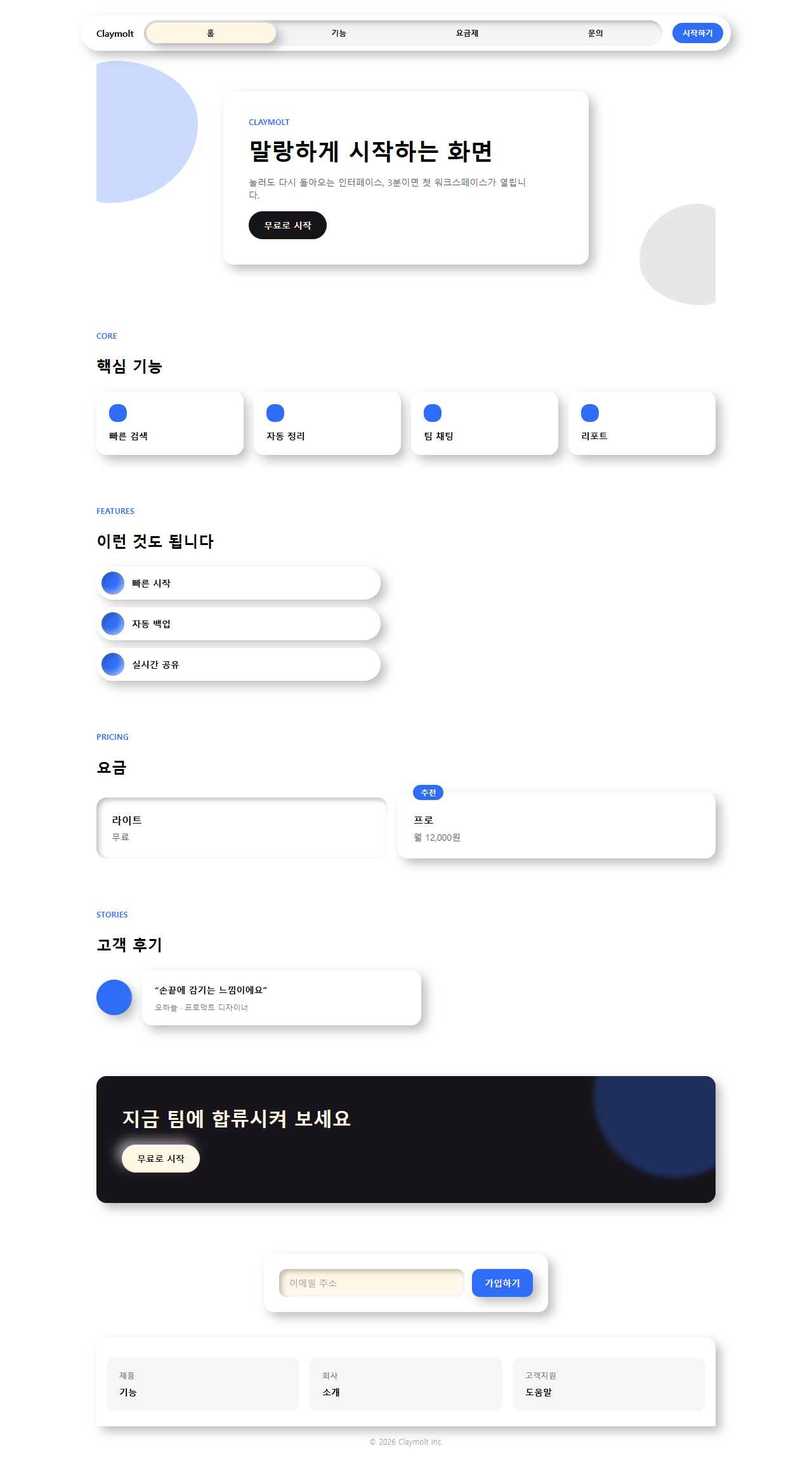
ピンタレストやDribbbleで今も繰り返し流れてくるデザインなので、実際に作ったワンページのLPをそのまま下に載せています。ナビゲーションからフッターまで一度スクロールして、全体の印象を先に確認してください。

クレイモーフィズム 作り方として、このワンページを作っている部品9個を切り離し、下の格子にも並べ直しました。人気順ではなく、画面を初めて開いた人が実際に出会う順番——目を引く、見て回る、価格を確かめる、信頼する、行動を促される、登録する——の通りに並んでいます。9個のうち3つ(ヒーロー・料金・ボタンと入力欄)は普通のカード羅列ではなく、押し込みや浮遊といった動きが付いたアイデア型です。同じ画面を文字の動きで引っ張ればキネティックタイポグラフィのLPになり、塊ではなく光のにじみで満たせばオーロラのグラデーションLPパーツが隣になります。
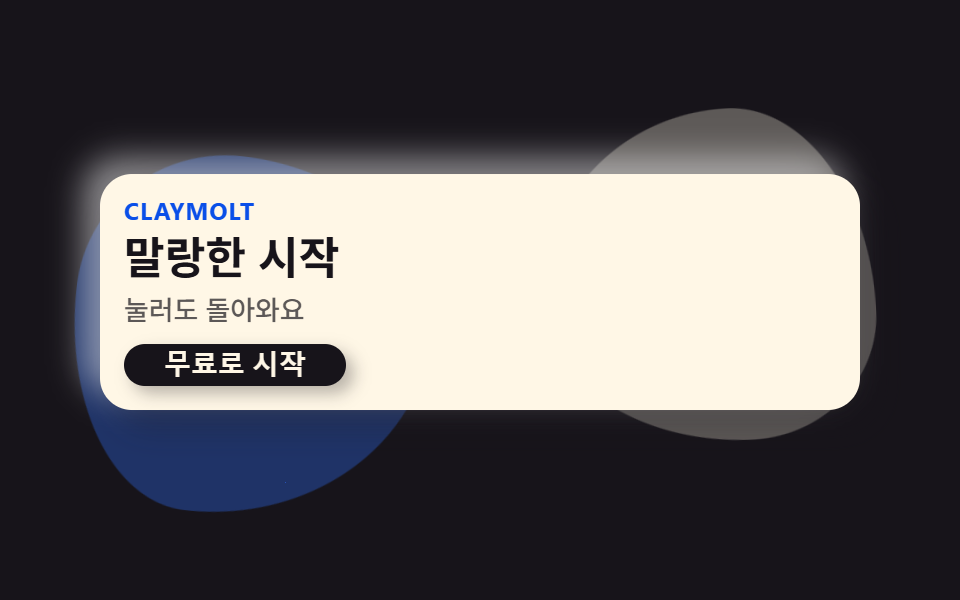 01 hero-clay
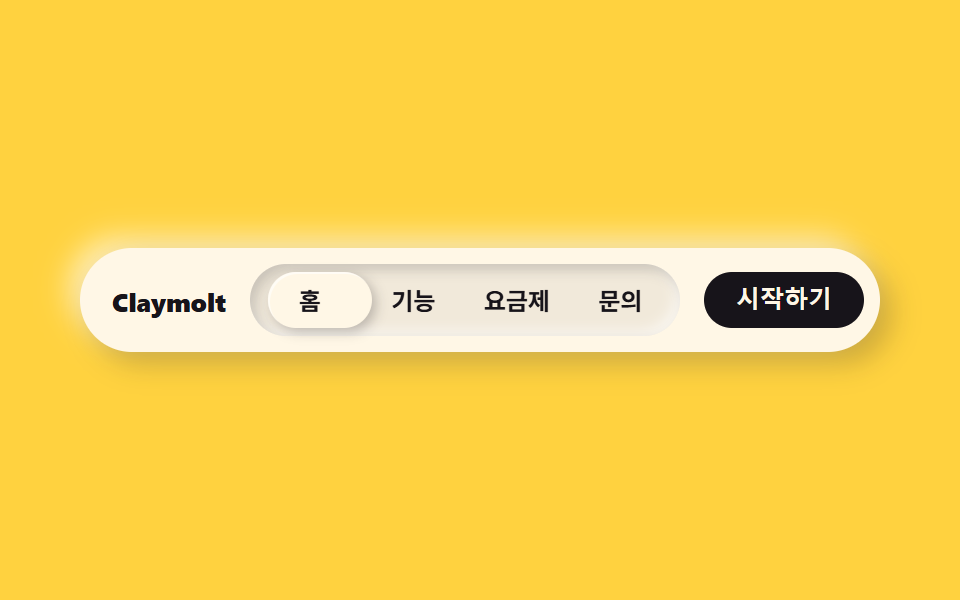 02 nav-clay
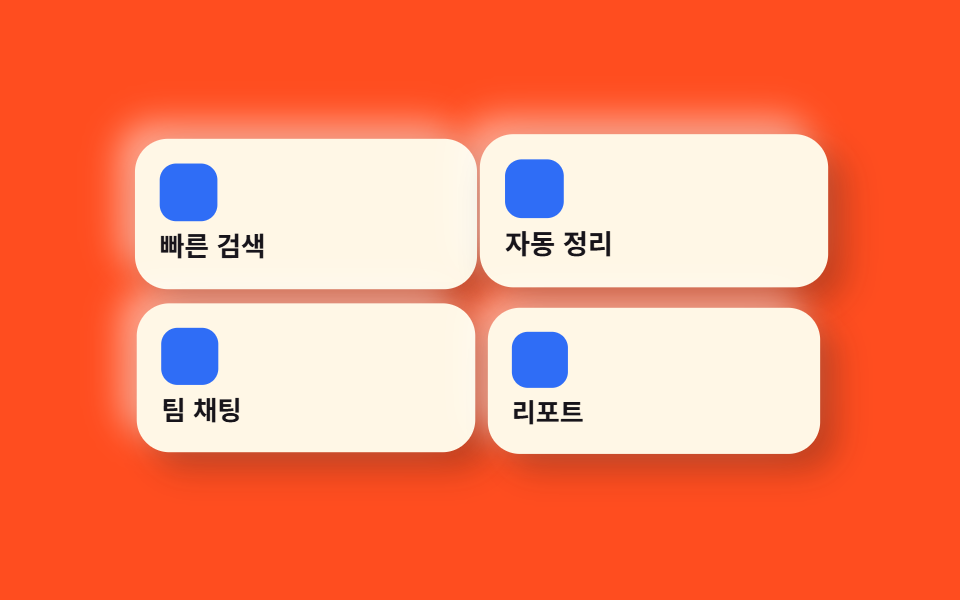 03 card-grid-clay
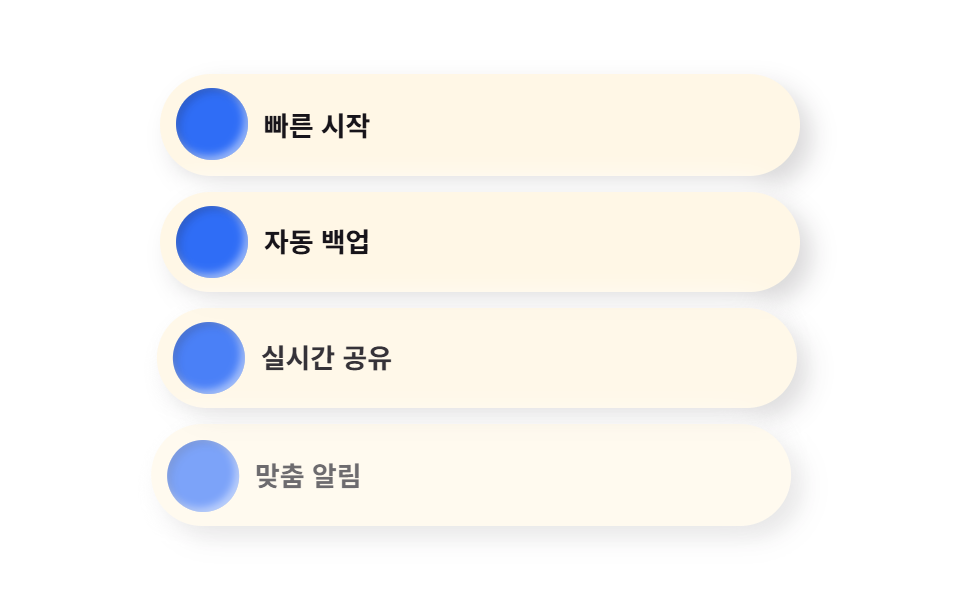 04 feature-list-clay
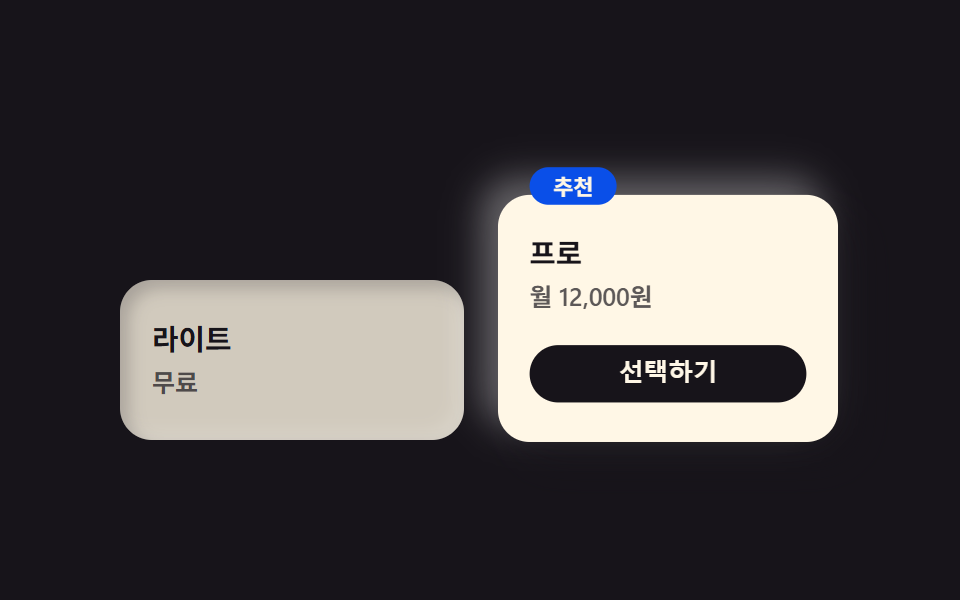 05 pricing-clay
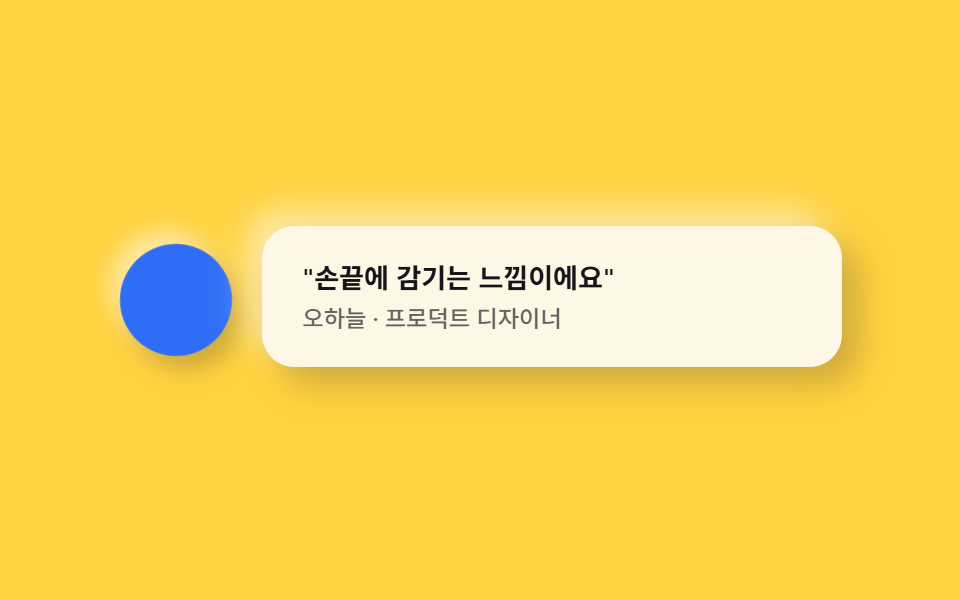 06 testimonial-clay
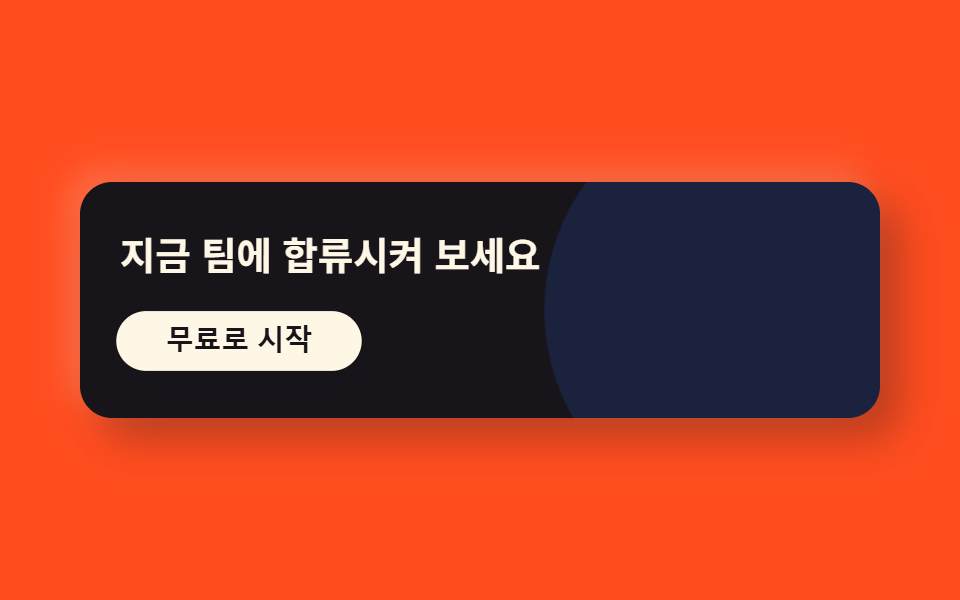 07 cta-band-clay
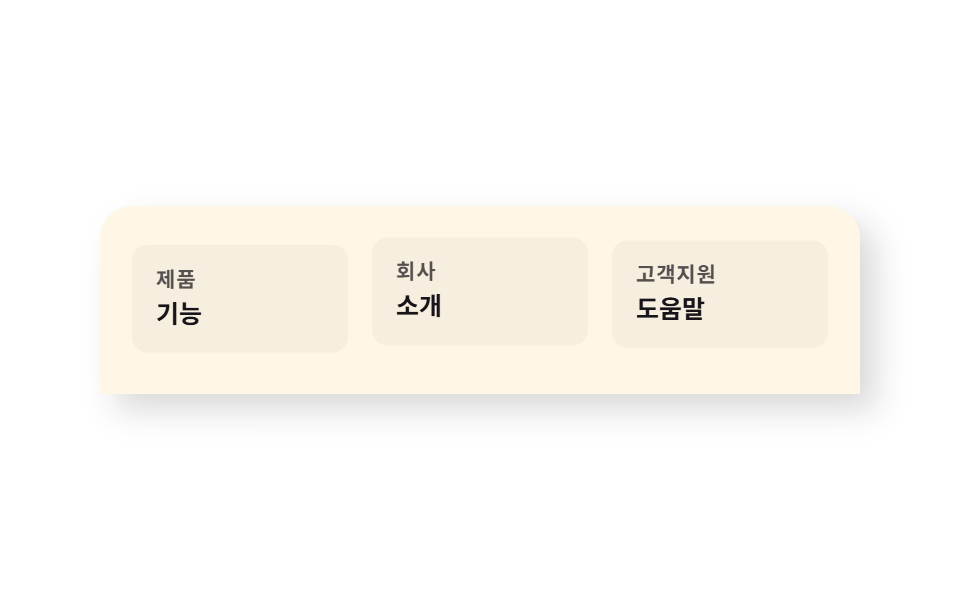 08 footer-clay
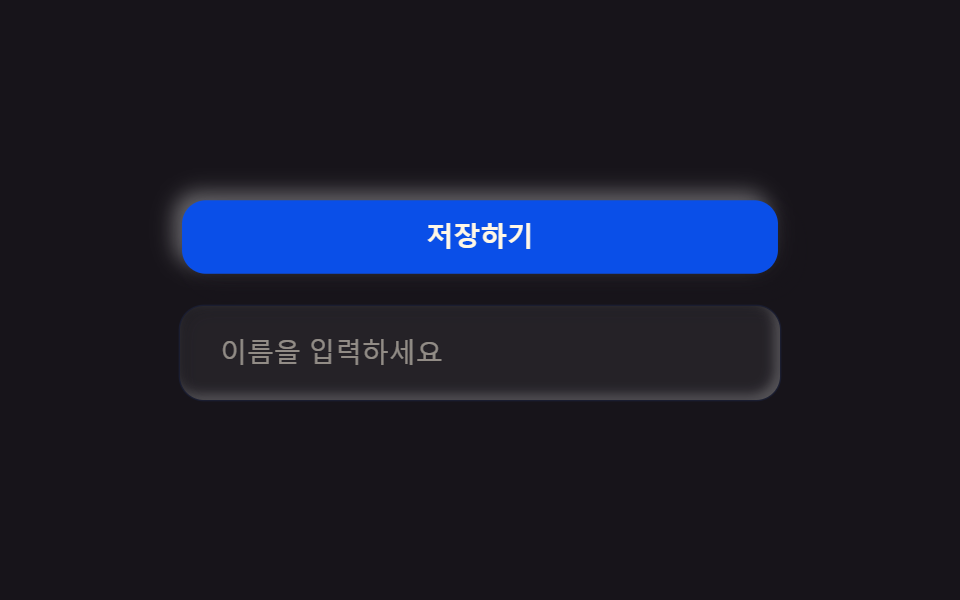 09 buttons-inputs-clay
自動再生 · タイルを押すとその項目へ · すべて1つのzip
- 01 粘土形ヒーロー
- 02 カプセルナビ
- 03 膨らんだカード
- 04 丸いアイコンチップ
- 05 ぷっくりプランカード
- 06 丸いアバター+吹き出し
- 07 パステルCTA帯
- 08 丸い上部フッター
- 09 粘土ボタン・入力欄
01粘土形ヒーロー
ブロブと押し付けられたカード
背景に浮かぶ有機的なブロブ2つがゆっくり揺れ、見出しカードは左上が明るく右下が暗い、粘土に押し付けられたような見た目になります。
<main class="stage">
  <section class="hero">
    <div class="hero__blob hero__blob--a is-demo" aria-hidden="true"></div>
    <div class="hero__blob hero__blob--b is-demo" aria-hidden="true"></div>
    <div class="hero__card is-demo">
      <p class="hero__eyebrow">Claymolt</p>
      <h1 class="hero__title">やわらかい始まり</h1>
      <p class="hero__desc">押しても戻ります</p>
      <button class="hero__cta" type="button">無料で始める</button>
    </div>
  </section>
</main>
@use "../../../../site/static/demo-tokens" as *;
$duration: $dur-loop; // 블롭이 한 바퀴 떠도는 시간
$easing: $ease-spring; // 떠오르는 곡선
$color: $subject-blue; // 강조 색
@include stage($stage-ink);
.hero {
position: relative;
width: clamp(240px, 82vw, 380px);
}
.hero__blob {
position: absolute;
width: clamp(110px, 42vw, 170px);
aspect-ratio: 1;
pointer-events: none;
}
.hero__blob--a {
top: -14px;
left: -14px;
background: rgba($color, .35);
border-radius: 42% 58% 63% 37% / 41% 44% 56% 59%;
animation: blobA $duration $easing infinite;
}
.hero__blob--b {
bottom: -16px;
right: -12px;
background: rgba($subject-cream, .3);
border-radius: 58% 42% 39% 61% / 56% 63% 37% 44%;
animation: blobB $duration $easing infinite;
animation-delay: -1s;
}
.hero__card {
position: relative;
box-sizing: border-box;
width: 100%;
display: flex;
flex-direction: column;
align-items: flex-start;
gap: $sp-1;
padding: $sp-3;
border-radius: $r-card;
background: $subject-cream;
box-shadow: 8px 8px 16px rgba($stage-ink, .3), -8px -8px 16px rgba($stage-paper, .5);
animation: cardRise $duration $easing infinite;
}
.hero__eyebrow {
margin: 0;
color: $subject-blue-deep; // 밝은 면 위 파란 글자 — AA 4.5
font-weight: 700; font-size: clamp(10px, 2.6vw, 12px); line-height: 1;
letter-spacing: .04em;
text-transform: uppercase;
}
.hero__title {
margin: 0;
color: $subject-ink;
font-weight: 700; font-size: clamp(18px, 4.6vw, 24px); line-height: 1.2;
}
.hero__desc {
margin: 0;
color: rgba($subject-ink, .7);
font-weight: 500; font-size: clamp(12px, 2.8vw, 14px); line-height: 1.4;
}
.hero__cta {
margin-top: $sp-1;
border: 0;
border-radius: $r-pill;
background: $subject-ink;
color: $subject-cream;
padding: $sp-1 $sp-5;
font-weight: 600; font-size: clamp(12px, 2.8vw, 14px); line-height: 1;
box-shadow: 4px 4px 8px rgba($stage-ink, .3);
}
// 데모: 블롭 두 개가 서로 반대 위상으로 떠돌고, 카드는 살짝 떠올랐다 가라앉는다 (WAAPI 시계가 잡을 수 있게 keyframes)
@keyframes blobA {
0%, 100% { transform: translate(0, 0) rotate(0deg) scale(1); }
50% { transform: translate(4%, 6%) rotate(10deg) scale(1.08); }
}
@keyframes blobB {
0%, 100% { transform: translate(0, 0) rotate(0deg) scale(1); }
50% { transform: translate(-5%, -4%) rotate(-8deg) scale(.93); }
}
@keyframes cardRise {
0%, 100% { transform: translateY(0); }
50% { transform: translateY(-6px); }
}
@media (prefers-reduced-motion: reduce) {
.hero__blob, .hero__card {
animation: none !important;
transform: none;
}
}html, body {
margin: 0;
overflow: hidden;
}
.stage {
box-sizing: border-box;
min-height: 100vh;
display: grid;
place-items: center;
margin: 0;
background: #17141a;
font-family: -apple-system, "Segoe UI", "Noto Sans KR", sans-serif;
padding: clamp(8px, 4vw, 24px);
}
.hero {
position: relative;
width: clamp(240px, 82vw, 380px);
}
.hero__blob {
position: absolute;
width: clamp(110px, 42vw, 170px);
aspect-ratio: 1;
pointer-events: none;
}
.hero__blob--a {
top: -14px;
left: -14px;
background: rgba(47, 109, 246, 0.35);
border-radius: 42% 58% 63% 37%/41% 44% 56% 59%;
animation: blobA 2s cubic-bezier(0.2, 0.8, 0.2, 1) infinite;
}
.hero__blob--b {
bottom: -16px;
right: -12px;
background: rgba(255, 247, 230, 0.3);
border-radius: 58% 42% 39% 61%/56% 63% 37% 44%;
animation: blobB 2s cubic-bezier(0.2, 0.8, 0.2, 1) infinite;
animation-delay: -1s;
}
.hero__card {
position: relative;
box-sizing: border-box;
width: 100%;
display: flex;
flex-direction: column;
align-items: flex-start;
gap: 4px;
padding: 12px;
border-radius: 16px;
background: #fff7e6;
box-shadow: 8px 8px 16px rgba(23, 20, 26, 0.3), -8px -8px 16px rgba(255, 255, 255, 0.5);
animation: cardRise 2s cubic-bezier(0.2, 0.8, 0.2, 1) infinite;
}
.hero__eyebrow {
margin: 0;
color: #0a4fe8;
font-weight: 700;
font-size: clamp(10px, 2.6vw, 12px);
line-height: 1;
letter-spacing: 0.04em;
text-transform: uppercase;
}
.hero__title {
margin: 0;
color: #17141a;
font-weight: 700;
font-size: clamp(18px, 4.6vw, 24px);
line-height: 1.2;
}
.hero__desc {
margin: 0;
color: rgba(23, 20, 26, 0.7);
font-weight: 500;
font-size: clamp(12px, 2.8vw, 14px);
line-height: 1.4;
}
.hero__cta {
margin-top: 4px;
border: 0;
border-radius: 999px;
background: #17141a;
color: #fff7e6;
padding: 4px 20px;
font-weight: 600;
font-size: clamp(12px, 2.8vw, 14px);
line-height: 1;
box-shadow: 4px 4px 8px rgba(23, 20, 26, 0.3);
}
@keyframes blobA {
0%, 100% {
transform: translate(0, 0) rotate(0deg) scale(1);
}
50% {
transform: translate(4%, 6%) rotate(10deg) scale(1.08);
}
}
@keyframes blobB {
0%, 100% {
transform: translate(0, 0) rotate(0deg) scale(1);
}
50% {
transform: translate(-5%, -4%) rotate(-8deg) scale(0.93);
}
}
@keyframes cardRise {
0%, 100% {
transform: translateY(0);
}
50% {
transform: translateY(-6px);
}
}
@media (prefers-reduced-motion: reduce) {
.hero__blob, .hero__card {
animation: none !important;
transform: none;
}
}import type { CSSProperties } from "react";
import styles from "./HeroClay.module.scss";
export type HeroClayProps = {
eyebrow?: string;
title?: string;
desc?: string;
cta?: string;
/** 한 주기(기본 2000ms) */
duration?: number;
easing?: string;
color?: string;
};
type Vars = CSSProperties & { "--duration"?: string; "--easing"?: string; "--color"?: string };
export default function HeroClay({
eyebrow = "Claymolt",
title = "말랑한 시작",
desc = "눌러도 돌아와요",
cta = "무료로 시작",
duration = 2000,
easing = "cubic-bezier(.2,.8,.2,1)",
color = "#2f6df6",
}: HeroClayProps) {
const vars: Vars = { "--duration": `${duration}ms`, "--easing": easing, "--color": color };
return (
<section className={styles.hero} style={vars}>
<div className={`${styles.blob} ${styles.blobA}`} aria-hidden="true" />
<div className={`${styles.blob} ${styles.blobB}`} aria-hidden="true" />
<div className={styles.card}>
<p className={styles.eyebrow}>{eyebrow}</p>
<h1 className={styles.title}>{title}</h1>
<p className={styles.desc}>{desc}</p>
<button type="button" className={styles.cta}>{cta}</button>
</div>
</section>
);
}01 · 粘土形ヒーロー — 計測 累積面積 16.283% · 動いたフレーム 17/23GODRICH オリジナル · SCSS と React は zip に同梱 · パスワードを見る
動くのはtransformだけ
ブロブの形自体は静止したborder-radiusで作り、動きはtransformだけが担当します。
<div class="relative mx-auto max-w-xl flex flex-col items-start gap-4
            rounded-clay bg-white p-10 shadow-clay-raised">
  <p class="text-xs font-bold uppercase text-accent">Claymolt</p>
  <h1 class="text-4xl font-extrabold leading-tight">やわらかく始まる画面</h1>
  <button class="rounded-pill bg-ink px-6 py-3 text-sm font-bold text-cream">
    無料で始める
  </button>
</div>
02カプセルナビ
ピル型に収まるメニュー
メニュー全体がひとつのピル型に収まり、内側にへこんだトラックの上を明るいチップが隣の枠へ滑って移動します。
<main class="stage">
  <nav class="navclay is-demo">
    <span class="navclay__brand">Claymolt</span>
    <div class="navclay__menu">
      <span class="navclay__indicator" aria-hidden="true"></span>
      <span class="navclay__item">ホーム</span>
      <span class="navclay__item">機能</span>
      <span class="navclay__item">料金プラン</span>
      <span class="navclay__item">お問い合わせ</span>
    </div>
    <button class="navclay__cta" type="button">はじめる</button>
  </nav>
</main>
@use "../../../../site/static/demo-tokens" as *;
$duration: $dur-loop; // 인디케이터가 4칸을 한 바퀴 도는 시간
$easing: $ease-spring; // 미끄러지는 곡선
$color: $subject-ink; // 강조 색 (노랑 무대라 먹색으로 대비)
@include stage($stage-yellow);
.navclay {
box-sizing: border-box;
width: clamp(260px, 84vw, 400px);
display: flex;
align-items: center;
gap: $sp-3;
border-radius: $r-pill;
background: $subject-cream;
padding: $sp-2;
box-shadow: 6px 6px 14px rgba($stage-ink, .22), -6px -6px 14px rgba($stage-paper, .6);
}
.navclay__brand {
padding-left: $sp-2;
color: $color;
font-weight: 800; font-size: clamp(11px, 2.8vw, 13px); line-height: 1;
white-space: nowrap;
}
.navclay__menu {
position: relative;
flex: 1;
display: flex;
border-radius: $r-pill;
background: rgba($stage-ink, .06);
padding: $sp-1;
box-shadow: inset 3px 3px 6px rgba($stage-ink, .18), inset -3px -3px 6px rgba($stage-paper, .55);
}
.navclay__indicator {
position: absolute;
top: $sp-1;
bottom: $sp-1;
left: $sp-1;
// 실측 함정: width:25% 는 절대배치 기준 박스(.navclay__menu 의 padding box, 208px)로 계산되는데
// 실제 항목 4개는 그 안쪽 content box(200px, 부모 padding 8px 뺀 값)로 나뉜다 — 인디케이터가 항목보다
// 정확히 2px씩 넓어져 translateX(100%) 마다 어긋남이 누적됐다(1→3→5→7px 실측). 같은 content box 기준으로 계산
width: calc((100% - #{$sp-1} * 2) / 4);
border-radius: $r-pill;
// 밝은 캡슐로 둔다 — 먹색이면 먹색 글자와 겹칠 때 라벨이 안 보인다 (실측: 정적 스크린샷에서 "홈" 소실)
background: $subject-cream;
box-shadow: 2px 2px 6px rgba($stage-ink, .25), inset 1px 1px 0 rgba($stage-paper, .6);
animation: navSlide $duration $easing infinite;
}
.navclay__item {
position: relative;
z-index: 1;
flex: 1;
text-align: center;
padding: $sp-2 0;
color: $subject-ink;
font-weight: 600; font-size: clamp(10.5px, 2.6vw, 12px); line-height: 1;
}
.navclay__cta {
border: 0;
border-radius: $r-pill;
background: $color;
color: $subject-cream;
padding: $sp-2 $sp-4;
font-weight: 700; font-size: clamp(10.5px, 2.6vw, 12px); line-height: 1;
white-space: nowrap;
}
// 데모: 캡슐 안 인디케이터가 4칸을 순서대로 돈다. width 25% 이므로 translateX(100%) = 제 폭만큼 = 한 칸
@keyframes navSlide {
0%, 15% { transform: translateX(0%); }
25%, 40% { transform: translateX(100%); }
50%, 65% { transform: translateX(200%); }
75%, 90% { transform: translateX(300%); }
100% { transform: translateX(0%); }
}
@media (prefers-reduced-motion: reduce) {
.navclay__indicator { animation: none !important; transform: translateX(0%); }
}html, body {
margin: 0;
overflow: hidden;
}
.stage {
box-sizing: border-box;
min-height: 100vh;
display: grid;
place-items: center;
margin: 0;
background: #ffd23f;
font-family: -apple-system, "Segoe UI", "Noto Sans KR", sans-serif;
padding: clamp(8px, 4vw, 24px);
}
.navclay {
box-sizing: border-box;
width: clamp(260px, 84vw, 400px);
display: flex;
align-items: center;
gap: 12px;
border-radius: 999px;
background: #fff7e6;
padding: 8px;
box-shadow: 6px 6px 14px rgba(23, 20, 26, 0.22), -6px -6px 14px rgba(255, 255, 255, 0.6);
}
.navclay__brand {
padding-left: 8px;
color: #17141a;
font-weight: 800;
font-size: clamp(11px, 2.8vw, 13px);
line-height: 1;
white-space: nowrap;
}
.navclay__menu {
position: relative;
flex: 1;
display: flex;
border-radius: 999px;
background: rgba(23, 20, 26, 0.06);
padding: 4px;
box-shadow: inset 3px 3px 6px rgba(23, 20, 26, 0.18), inset -3px -3px 6px rgba(255, 255, 255, 0.55);
}
.navclay__indicator {
position: absolute;
top: 4px;
bottom: 4px;
left: 4px;
width: calc((100% - 4px * 2) / 4);
border-radius: 999px;
background: #fff7e6;
box-shadow: 2px 2px 6px rgba(23, 20, 26, 0.25), inset 1px 1px 0 rgba(255, 255, 255, 0.6);
animation: navSlide 2s cubic-bezier(0.2, 0.8, 0.2, 1) infinite;
}
.navclay__item {
position: relative;
z-index: 1;
flex: 1;
text-align: center;
padding: 8px 0;
color: #17141a;
font-weight: 600;
font-size: clamp(10.5px, 2.6vw, 12px);
line-height: 1;
}
.navclay__cta {
border: 0;
border-radius: 999px;
background: #17141a;
color: #fff7e6;
padding: 8px 16px;
font-weight: 700;
font-size: clamp(10.5px, 2.6vw, 12px);
line-height: 1;
white-space: nowrap;
}
@keyframes navSlide {
0%, 15% {
transform: translateX(0%);
}
25%, 40% {
transform: translateX(100%);
}
50%, 65% {
transform: translateX(200%);
}
75%, 90% {
transform: translateX(300%);
}
100% {
transform: translateX(0%);
}
}
@media (prefers-reduced-motion: reduce) {
.navclay__indicator {
animation: none !important;
transform: translateX(0%);
}
}import type { CSSProperties } from "react";
import styles from "./NavClay.module.scss";
export type NavClayProps = {
brand?: string;
items?: string[];
cta?: string;
activeIndex?: number;
duration?: number;
easing?: string;
color?: string;
};
type Vars = CSSProperties & { "--duration"?: string; "--easing"?: string; "--color"?: string };
export default function NavClay({
brand = "Claymolt",
items = ["홈", "기능", "요금제", "문의"],
cta = "시작하기",
activeIndex,
duration = 2000,
easing = "cubic-bezier(.2,.8,.2,1)",
color = "#17141a",
}: NavClayProps) {
const vars: Vars = { "--duration": `${duration}ms`, "--easing": easing, "--color": color };
const indicatorStyle: CSSProperties | undefined =
activeIndex !== undefined
? { animation: "none", transform: `translateX(${activeIndex * 100}%)` }
: undefined;
return (
<nav className={styles.nav} style={vars}>
<span className={styles.brand}>{brand}</span>
<div className={styles.menu}>
<span className={styles.indicator} style={indicatorStyle} aria-hidden="true" />
{items.map((label) => (
<span key={label} className={styles.item}>{label}</span>
))}
</div>
<button type="button" className={styles.cta}>{cta}</button>
</nav>
);
}02 · カプセルナビ — 計測 累積面積 4.142% · 動いたフレーム 11/23GODRICH オリジナル · SCSS と React は zip に同梱 · パスワードを見る
チップ幅を25%にする理由
チップの幅をトラックの25%にしておけば、translateX(100%)一回でちょうど隣の枠ひとつ分だけ動きます。
<nav class="flex items-center gap-4 rounded-pill bg-white/90 px-3 py-2
            shadow-clay-raised">
  <span class="pl-3 font-display font-extrabold text-sm">Claymolt</span>
  <div class="relative flex flex-1 rounded-pill bg-ink/5 p-1 shadow-clay-press">
    <span class="absolute inset-y-1 left-1 w-1/4 rounded-pill bg-cream
                 shadow-clay-raised"></span>
    <span class="relative z-10 flex-1 text-center text-xs font-semibold py-2">ホーム</span>
  </div>
</nav>
03膨らんだカード
背景から膨らんで浮き出る
グリッドの各カードが背景から膨らんで浮き出たように見え、上に明るいハイライト・下に濃い影を同時に持ちます。
<main class="stage">
  <div class="cardgrid">
    <div class="cardgrid__item cardgrid__item--a is-demo">
      <span class="cardgrid__icon" aria-hidden="true"></span>
      <p class="cardgrid__label">高速検索</p>
    </div>
    <div class="cardgrid__item cardgrid__item--b is-demo">
      <span class="cardgrid__icon" aria-hidden="true"></span>
      <p class="cardgrid__label">自動整理</p>
    </div>
    <div class="cardgrid__item cardgrid__item--c is-demo">
      <span class="cardgrid__icon" aria-hidden="true"></span>
      <p class="cardgrid__label">チームチャット</p>
    </div>
    <div class="cardgrid__item cardgrid__item--d is-demo">
      <span class="cardgrid__icon" aria-hidden="true"></span>
      <p class="cardgrid__label">レポート</p>
    </div>
  </div>
</main>
@use "../../../../site/static/demo-tokens" as *;
$duration: $dur-loop; // 카드마다 부푸는 한 주기
$easing: $ease-spring; // 부푸는 곡선
$color: $subject-cream; // 무대(주황)와 대비되는 피사체 색
@include stage($stage-orange);
.cardgrid {
display: grid;
grid-template-columns: repeat(2, 1fr);
gap: $sp-2;
width: clamp(220px, 78vw, 340px);
}
.cardgrid__item {
box-sizing: border-box;
display: flex;
flex-direction: column;
align-items: flex-start;
gap: $sp-1;
padding: $sp-3;
border-radius: $r-card;
background: $color;
box-shadow: 8px 8px 16px rgba($stage-ink, .28), -8px -8px 16px rgba($stage-paper, .5);
animation: puff $duration $easing infinite;
}
.cardgrid__item--a { animation-delay: 0s; }
.cardgrid__item--b { animation-delay: -0.5s; }
.cardgrid__item--c { animation-delay: -1s; }
.cardgrid__item--d { animation-delay: -1.5s; }
.cardgrid__icon {
width: clamp(20px, 8vw, 28px);
height: clamp(20px, 8vw, 28px);
border-radius: $r-sm;
background: $subject-blue;
}
.cardgrid__label {
margin: 0;
color: $subject-ink;
font-weight: 700; font-size: clamp(11px, 2.8vw, 13px); line-height: 1.3;
}
// 데모: 네 칸이 서로 다른 박자로 살짝 부풀었다 가라앉는다
@keyframes puff {
0%, 100% { transform: scale(1) translateY(0); }
50% { transform: scale(1.05) translateY(-4px); }
}
@media (prefers-reduced-motion: reduce) {
.cardgrid__item { animation: none !important; transform: none; }
}html, body {
margin: 0;
overflow: hidden;
}
.stage {
box-sizing: border-box;
min-height: 100vh;
display: grid;
place-items: center;
margin: 0;
background: #ff4d1f;
font-family: -apple-system, "Segoe UI", "Noto Sans KR", sans-serif;
padding: clamp(8px, 4vw, 24px);
}
.cardgrid {
display: grid;
grid-template-columns: repeat(2, 1fr);
gap: 8px;
width: clamp(220px, 78vw, 340px);
}
.cardgrid__item {
box-sizing: border-box;
display: flex;
flex-direction: column;
align-items: flex-start;
gap: 4px;
padding: 12px;
border-radius: 16px;
background: #fff7e6;
box-shadow: 8px 8px 16px rgba(23, 20, 26, 0.28), -8px -8px 16px rgba(255, 255, 255, 0.5);
animation: puff 2s cubic-bezier(0.2, 0.8, 0.2, 1) infinite;
}
.cardgrid__item--a {
animation-delay: 0s;
}
.cardgrid__item--b {
animation-delay: -0.5s;
}
.cardgrid__item--c {
animation-delay: -1s;
}
.cardgrid__item--d {
animation-delay: -1.5s;
}
.cardgrid__icon {
width: clamp(20px, 8vw, 28px);
height: clamp(20px, 8vw, 28px);
border-radius: 8px;
background: #2f6df6;
}
.cardgrid__label {
margin: 0;
color: #17141a;
font-weight: 700;
font-size: clamp(11px, 2.8vw, 13px);
line-height: 1.3;
}
@keyframes puff {
0%, 100% {
transform: scale(1) translateY(0);
}
50% {
transform: scale(1.05) translateY(-4px);
}
}
@media (prefers-reduced-motion: reduce) {
.cardgrid__item {
animation: none !important;
transform: none;
}
}import type { CSSProperties } from "react";
import styles from "./CardGridClay.module.scss";
export type CardGridClayItem = { label: string };
export type CardGridClayProps = {
items?: CardGridClayItem[];
duration?: number;
easing?: string;
color?: string;
};
type Vars = CSSProperties & { "--duration"?: string; "--easing"?: string; "--color"?: string };
const DELAYS = ["0s", "-0.5s", "-1s", "-1.5s"];
export default function CardGridClay({
items = [
{ label: "빠른 검색" },
{ label: "자동 정리" },
{ label: "팀 채팅" },
{ label: "리포트" },
],
duration = 2000,
easing = "cubic-bezier(.2,.8,.2,1)",
color = "#fff7e6",
}: CardGridClayProps) {
const vars: Vars = { "--duration": `${duration}ms`, "--easing": easing, "--color": color };
return (
<div className={styles.grid} style={vars}>
{items.map((it, i) => (
<div
key={it.label}
className={styles.item}
style={{ animationDelay: DELAYS[i % DELAYS.length] }}
>
<span className={styles.icon} aria-hidden="true" />
<p className={styles.label}>{it.label}</p>
</div>
))}
</div>
);
}03 · 膨らんだカード — 計測 累積面積 16.755% · 動いたフレーム 23/23GODRICH オリジナル · SCSS と React は zip に同梱 · パスワードを見る
開始時刻をずらす
カードごとにアニメーションの開始時刻を少しずつずらすと、4枚が波のように順番に膨らんで見えます。
<div class="grid grid-cols-2 gap-4 sm:grid-cols-4">
  <div class="flex flex-col gap-3 rounded-clay bg-white p-5 shadow-clay-raised">
    <span class="h-7 w-7 rounded-control bg-accent"></span>
    <p class="text-sm font-semibold">高速検索</p>
  </div>
</div>
04丸いアイコンチップ
押されたスタンプのように
アイコンごとに丸いカプセルチップに乗り、押されたスタンプのように見え、隣に説明テキストが並びます。
<main class="stage">
  <ul class="featurelist">
    <li class="featurelist__item featurelist__item--a is-demo">
      <span class="featurelist__chip" aria-hidden="true"></span>
      <span class="featurelist__text">クイックスタート</span>
    </li>
    <li class="featurelist__item featurelist__item--b is-demo">
      <span class="featurelist__chip" aria-hidden="true"></span>
      <span class="featurelist__text">自動バックアップ</span>
    </li>
    <li class="featurelist__item featurelist__item--c is-demo">
      <span class="featurelist__chip" aria-hidden="true"></span>
      <span class="featurelist__text">リアルタイム共有</span>
    </li>
    <li class="featurelist__item featurelist__item--d is-demo">
      <span class="featurelist__chip" aria-hidden="true"></span>
      <span class="featurelist__text">カスタム通知</span>
    </li>
  </ul>
</main>
@use "../../../../site/static/demo-tokens" as *;
$duration: $dur-loop; // 칩이 밀려 들어왔다 나가는 한 주기
$easing: $ease-out; // 슬라이드 곡선
$color: $subject-blue; // 칩 강조 색
@include stage($stage-paper);
.featurelist {
margin: 0;
padding: 0;
list-style: none;
display: flex;
flex-direction: column;
gap: clamp(4px, 2vw, 8px);
width: clamp(220px, 74vw, 320px);
}
.featurelist__item {
display: flex;
align-items: center;
gap: $sp-2;
padding: clamp(4px, 1.5vw, 8px) $sp-2;
border-radius: $r-pill;
background: $subject-cream;
box-shadow: 6px 6px 12px rgba($stage-ink, .16), -6px -6px 12px rgba($stage-paper, .9);
animation: chipIn $duration $easing infinite;
}
.featurelist__item--a { animation-delay: 0s; }
.featurelist__item--b { animation-delay: -0.5s; }
.featurelist__item--c { animation-delay: -1s; }
.featurelist__item--d { animation-delay: -1.5s; }
.featurelist__chip {
flex: none;
width: clamp(24px, 8vw, 36px);
height: clamp(24px, 8vw, 36px);
border-radius: $r-pill;
background: $color;
box-shadow: inset 2px 2px 4px rgba($stage-ink, .2), inset -2px -2px 4px rgba($stage-paper, .5);
}
.featurelist__text {
color: $subject-ink;
font-weight: 600; font-size: clamp(12px, 2.8vw, 14px); line-height: 1.3;
}
// 데모: 칩마다 살짝 다른 박자로 오른쪽에서 밀려 들어왔다 나간다
@keyframes chipIn {
0% { opacity: .5; transform: translateX(-6px); }
25% { opacity: 1; transform: translateX(0); }
75% { opacity: 1; transform: translateX(0); }
100% { opacity: .5; transform: translateX(-6px); }
}
@media (prefers-reduced-motion: reduce) {
.featurelist__item { animation: none !important; opacity: 1; transform: none; }
}html, body {
margin: 0;
overflow: hidden;
}
.stage {
box-sizing: border-box;
min-height: 100vh;
display: grid;
place-items: center;
margin: 0;
background: #ffffff;
font-family: -apple-system, "Segoe UI", "Noto Sans KR", sans-serif;
padding: clamp(8px, 4vw, 24px);
}
.featurelist {
margin: 0;
padding: 0;
list-style: none;
display: flex;
flex-direction: column;
gap: clamp(4px, 2vw, 8px);
width: clamp(220px, 74vw, 320px);
}
.featurelist__item {
display: flex;
align-items: center;
gap: 8px;
padding: clamp(4px, 1.5vw, 8px) 8px;
border-radius: 999px;
background: #fff7e6;
box-shadow: 6px 6px 12px rgba(23, 20, 26, 0.16), -6px -6px 12px rgba(255, 255, 255, 0.9);
animation: chipIn 2s ease-out infinite;
}
.featurelist__item--a {
animation-delay: 0s;
}
.featurelist__item--b {
animation-delay: -0.5s;
}
.featurelist__item--c {
animation-delay: -1s;
}
.featurelist__item--d {
animation-delay: -1.5s;
}
.featurelist__chip {
flex: none;
width: clamp(24px, 8vw, 36px);
height: clamp(24px, 8vw, 36px);
border-radius: 999px;
background: #2f6df6;
box-shadow: inset 2px 2px 4px rgba(23, 20, 26, 0.2), inset -2px -2px 4px rgba(255, 255, 255, 0.5);
}
.featurelist__text {
color: #17141a;
font-weight: 600;
font-size: clamp(12px, 2.8vw, 14px);
line-height: 1.3;
}
@keyframes chipIn {
0% {
opacity: 0.5;
transform: translateX(-6px);
}
25% {
opacity: 1;
transform: translateX(0);
}
75% {
opacity: 1;
transform: translateX(0);
}
100% {
opacity: 0.5;
transform: translateX(-6px);
}
}
@media (prefers-reduced-motion: reduce) {
.featurelist__item {
animation: none !important;
opacity: 1;
transform: none;
}
}import type { CSSProperties } from "react";
import styles from "./FeatureListClay.module.scss";
export type FeatureListClayProps = {
items?: string[];
duration?: number;
easing?: string;
color?: string;
};
type Vars = CSSProperties & { "--duration"?: string; "--easing"?: string; "--color"?: string };
const DELAYS = ["0s", "-0.5s", "-1s", "-1.5s"];
export default function FeatureListClay({
items = ["빠른 시작", "자동 백업", "실시간 공유", "맞춤 알림"],
duration = 2000,
easing = "ease-out",
color = "#2f6df6",
}: FeatureListClayProps) {
const vars: Vars = { "--duration": `${duration}ms`, "--easing": easing, "--color": color };
return (
<ul className={styles.list} style={vars}>
{items.map((text, i) => (
<li key={text} className={styles.item} style={{ animationDelay: DELAYS[i % DELAYS.length] }}>
<span className={styles.chip} aria-hidden="true" />
<span className={styles.text}>{text}</span>
</li>
))}
</ul>
);
}04 · 丸いアイコンチップ — 計測 累積面積 9.001% · 動いたフレーム 23/23GODRICH オリジナル · SCSS と React は zip に同梱 · パスワードを見る
唯一へこんだ面
チップには内側の影だけをのせるので、他の膨らんだカードの中で唯一、へこんだ面として対比が生まれます。
<ul class="flex flex-col gap-3">
  <li class="flex items-center gap-3 rounded-pill bg-white p-2 pr-5
             shadow-clay-raised">
    <span class="h-9 w-9 flex-none rounded-pill bg-accent
                 shadow-clay-press"></span>
    <span class="text-sm font-semibold">クイックスタート</span>
  </li>
</ul>
05ぷっくりプランカード
おすすめだけ一段大きく
おすすめプランのカードだけ一段大きく膨らみ、クリックすると軽く押されて跳ね返ります。表がなくてもどのプランを推しているかひと目で分かります。
<main class="stage">
  <div class="pricing">
    <div class="pricing__card pricing__card--basic">
      <p class="pricing__name">ライト</p>
      <p class="pricing__price">無料</p>
    </div>
    <div class="pricing__card pricing__card--pro is-demo">
      <span class="pricing__badge">おすすめ</span>
      <p class="pricing__name">プロ</p>
      <p class="pricing__price">月1,200円</p>
      <button class="pricing__cta" type="button">選択する</button>
    </div>
  </div>
</main>
@use "../../../../site/static/demo-tokens" as *;
$duration: $dur-loop; // 눌렸다 튀는 한 주기
$easing: $ease-pop; // 오버슈트 곡선
$color: $subject-blue; // 강조 색
@include stage($stage-ink);
.pricing {
display: flex;
align-items: flex-end;
gap: $sp-4;
width: clamp(240px, 80vw, 360px);
}
.pricing__card {
flex: 1;
box-sizing: border-box;
display: flex;
flex-direction: column;
gap: $sp-1;
padding: $sp-5 $sp-4;
border-radius: $r-card;
background: $subject-cream;
}
.pricing__card--basic {
background: rgba($subject-cream, .8);
box-shadow: inset 4px 4px 8px rgba($stage-ink, .22), inset -4px -4px 8px rgba($stage-paper, .18);
}
.pricing__card--pro {
position: relative;
margin-top: $sp-4;
box-shadow: 10px 10px 20px rgba($stage-ink, .35), -8px -8px 18px rgba($stage-paper, .35);
transform-origin: center bottom;
animation: press $duration $easing infinite;
}
.pricing__badge {
position: absolute;
top: -14px;
left: $sp-4;
border-radius: $r-pill;
background: $subject-blue-deep;
color: $subject-cream;
padding: $sp-1 $sp-3;
font-weight: 700; font-size: clamp(9.5px, 2.4vw, 11px); line-height: 1;
}
.pricing__name {
margin: 0;
color: $subject-ink;
font-weight: 700; font-size: clamp(13px, 3vw, 15px); line-height: 1.3;
}
.pricing__price {
margin: 0;
color: rgba($subject-ink, .7);
font-weight: 600; font-size: clamp(11px, 2.6vw, 13px); line-height: 1.4;
}
.pricing__cta {
margin-top: $sp-3;
border: 0;
border-radius: $r-pill;
background: $subject-ink;
color: $subject-cream;
padding: $sp-2 $sp-4;
font-weight: 700; font-size: clamp(11px, 2.6vw, 13px); line-height: 1;
}
// 데모: 추천 카드가 눌렸다 튀어 오르며 정착한다
@keyframes press {
0% { transform: scale(1); }
40% { transform: scale(.94); }
55% { transform: scale(1.06); }
70% { transform: scale(.98); }
100% { transform: scale(1); }
}
@media (prefers-reduced-motion: reduce) {
.pricing__card--pro { animation: none !important; transform: none; }
}html, body {
margin: 0;
overflow: hidden;
}
.stage {
box-sizing: border-box;
min-height: 100vh;
display: grid;
place-items: center;
margin: 0;
background: #17141a;
font-family: -apple-system, "Segoe UI", "Noto Sans KR", sans-serif;
padding: clamp(8px, 4vw, 24px);
}
.pricing {
display: flex;
align-items: flex-end;
gap: 16px;
width: clamp(240px, 80vw, 360px);
}
.pricing__card {
flex: 1;
box-sizing: border-box;
display: flex;
flex-direction: column;
gap: 4px;
padding: 20px 16px;
border-radius: 16px;
background: #fff7e6;
}
.pricing__card--basic {
background: rgba(255, 247, 230, 0.8);
box-shadow: inset 4px 4px 8px rgba(23, 20, 26, 0.22), inset -4px -4px 8px rgba(255, 255, 255, 0.18);
}
.pricing__card--pro {
position: relative;
margin-top: 16px;
box-shadow: 10px 10px 20px rgba(23, 20, 26, 0.35), -8px -8px 18px rgba(255, 255, 255, 0.35);
transform-origin: center bottom;
animation: press 2s cubic-bezier(0.2, 1.4, 0.4, 1) infinite;
}
.pricing__badge {
position: absolute;
top: -14px;
left: 16px;
border-radius: 999px;
background: #0a4fe8;
color: #fff7e6;
padding: 4px 12px;
font-weight: 700;
font-size: clamp(9.5px, 2.4vw, 11px);
line-height: 1;
}
.pricing__name {
margin: 0;
color: #17141a;
font-weight: 700;
font-size: clamp(13px, 3vw, 15px);
line-height: 1.3;
}
.pricing__price {
margin: 0;
color: rgba(23, 20, 26, 0.7);
font-weight: 600;
font-size: clamp(11px, 2.6vw, 13px);
line-height: 1.4;
}
.pricing__cta {
margin-top: 12px;
border: 0;
border-radius: 999px;
background: #17141a;
color: #fff7e6;
padding: 8px 16px;
font-weight: 700;
font-size: clamp(11px, 2.6vw, 13px);
line-height: 1;
}
@keyframes press {
0% {
transform: scale(1);
}
40% {
transform: scale(0.94);
}
55% {
transform: scale(1.06);
}
70% {
transform: scale(0.98);
}
100% {
transform: scale(1);
}
}
@media (prefers-reduced-motion: reduce) {
.pricing__card--pro {
animation: none !important;
transform: none;
}
}import type { CSSProperties } from "react";
import styles from "./PricingClay.module.scss";
export type PricingClayProps = {
basicName?: string;
basicPrice?: string;
proName?: string;
proPrice?: string;
badge?: string;
cta?: string;
duration?: number;
easing?: string;
color?: string;
};
type Vars = CSSProperties & { "--duration"?: string; "--easing"?: string; "--color"?: string };
export default function PricingClay({
basicName = "라이트",
basicPrice = "무료",
proName = "프로",
proPrice = "월 12,000원",
badge = "추천",
cta = "선택하기",
duration = 2000,
easing = "cubic-bezier(.2,1.4,.4,1)",
color = "#0a4fe8",
}: PricingClayProps) {
const vars: Vars = { "--duration": `${duration}ms`, "--easing": easing, "--color": color };
return (
<div className={styles.pricing} style={vars}>
<div className={`${styles.card} ${styles.basic}`}>
<p className={styles.name}>{basicName}</p>
<p className={styles.price}>{basicPrice}</p>
</div>
<div className={`${styles.card} ${styles.pro}`}>
<span className={styles.badge}>{badge}</span>
<p className={styles.name}>{proName}</p>
<p className={styles.price}>{proPrice}</p>
<button type="button" className={styles.cta}>{cta}</button>
</div>
</div>
);
}05 · ぷっくりプランカード — 計測 累積面積 10.817% · 動いたフレーム 21/23GODRICH オリジナル · SCSS と React は zip に同梱 · パスワードを見る
バッジは外枠に半分かける
バッジはカードの内側余白の中に置くとプラン名の文字と重なってしまうため、必ずカードの外枠に半分かかるように浮かせます。
<div class="relative flex-[1.1] rounded-clay bg-white p-6 pt-8
            shadow-clay-raised">
  <span class="absolute -top-3 left-6 rounded-pill bg-accent px-3 py-1
               text-xs font-bold text-cream">おすすめ</span>
  <p class="font-bold">プロ</p>
  <p class="mt-1 text-sm text-ink/70">月1,200円</p>
</div>
06丸いアバター+吹き出し
アバターと吹き出し
アバターが丸いカプセルフレームに埋め込まれるように収まり、吹き出しカードが粘土のようにぷっくり付きます。
<main class="stage">
  <div class="testi is-demo">
    <span class="testi__avatar" aria-hidden="true"></span>
    <div class="testi__bubble">
      <p class="testi__quote">「指先に吸い付くような感触です。」</p>
      <p class="testi__name">オ・ハヌル · プロダクトデザイナー</p>
    </div>
  </div>
</main>
@use "../../../../site/static/demo-tokens" as *;
$duration: $dur-loop; // 아바타 흔들림·말풍선 뜸의 한 주기
$easing: $ease-spring; // 곡선
$color: $subject-ink; // 강조 색 (노랑 무대라 먹색으로 대비)
@include stage($stage-yellow);
.testi {
display: flex;
align-items: center;
gap: $sp-4;
width: clamp(240px, 80vw, 360px);
}
.testi__avatar {
flex: none;
width: 56px;
height: 56px;
border-radius: $r-pill;
background: $subject-blue;
box-shadow: 6px 6px 12px rgba($stage-ink, .22), -6px -6px 12px rgba($stage-paper, .55);
animation: wobble $duration $easing infinite;
}
.testi__bubble {
flex: 1;
box-sizing: border-box;
border-radius: $r-card;
background: $subject-cream;
padding: $sp-4 $sp-5;
box-shadow: 8px 8px 16px rgba($stage-ink, .22), -8px -8px 16px rgba($stage-paper, .55);
animation: bubbleIn $duration $easing infinite;
animation-delay: -0.4s;
}
.testi__quote {
margin: 0 0 $sp-1;
color: $color;
font-weight: 600; font-size: clamp(12px, 2.8vw, 14px); line-height: 1.4;
}
.testi__name {
margin: 0;
color: rgba($color, .65);
font-weight: 500; font-size: clamp(10.5px, 2.4vw, 12px); line-height: 1.3;
}
// 데모: 아바타가 살짝 좌우로 흔들리고, 말풍선은 뜨고 가라앉는다
@keyframes wobble {
0%, 100% { transform: rotate(0deg); }
50% { transform: rotate(6deg); }
}
@keyframes bubbleIn {
0%, 100% { transform: translateY(0) scale(1); }
50% { transform: translateY(-4px) scale(1.015); }
}
@media (prefers-reduced-motion: reduce) {
.testi__avatar, .testi__bubble { animation: none !important; transform: none; }
}html, body {
margin: 0;
overflow: hidden;
}
.stage {
box-sizing: border-box;
min-height: 100vh;
display: grid;
place-items: center;
margin: 0;
background: #ffd23f;
font-family: -apple-system, "Segoe UI", "Noto Sans KR", sans-serif;
padding: clamp(8px, 4vw, 24px);
}
.testi {
display: flex;
align-items: center;
gap: 16px;
width: clamp(240px, 80vw, 360px);
}
.testi__avatar {
flex: none;
width: 56px;
height: 56px;
border-radius: 999px;
background: #2f6df6;
box-shadow: 6px 6px 12px rgba(23, 20, 26, 0.22), -6px -6px 12px rgba(255, 255, 255, 0.55);
animation: wobble 2s cubic-bezier(0.2, 0.8, 0.2, 1) infinite;
}
.testi__bubble {
flex: 1;
box-sizing: border-box;
border-radius: 16px;
background: #fff7e6;
padding: 16px 20px;
box-shadow: 8px 8px 16px rgba(23, 20, 26, 0.22), -8px -8px 16px rgba(255, 255, 255, 0.55);
animation: bubbleIn 2s cubic-bezier(0.2, 0.8, 0.2, 1) infinite;
animation-delay: -0.4s;
}
.testi__quote {
margin: 0 0 4px;
color: #17141a;
font-weight: 600;
font-size: clamp(12px, 2.8vw, 14px);
line-height: 1.4;
}
.testi__name {
margin: 0;
color: rgba(23, 20, 26, 0.65);
font-weight: 500;
font-size: clamp(10.5px, 2.4vw, 12px);
line-height: 1.3;
}
@keyframes wobble {
0%, 100% {
transform: rotate(0deg);
}
50% {
transform: rotate(6deg);
}
}
@keyframes bubbleIn {
0%, 100% {
transform: translateY(0) scale(1);
}
50% {
transform: translateY(-4px) scale(1.015);
}
}
@media (prefers-reduced-motion: reduce) {
.testi__avatar, .testi__bubble {
animation: none !important;
transform: none;
}
}import type { CSSProperties } from "react";
import styles from "./TestimonialClay.module.scss";
export type TestimonialClayProps = {
quote?: string;
name?: string;
duration?: number;
easing?: string;
color?: string;
};
type Vars = CSSProperties & { "--duration"?: string; "--easing"?: string; "--color"?: string };
export default function TestimonialClay({
quote = '"손끝에 감기는 느낌이에요"',
name = "오하늘 · 프로덕트 디자이너",
duration = 2000,
easing = "cubic-bezier(.2,.8,.2,1)",
color = "#17141a",
}: TestimonialClayProps) {
const vars: Vars = { "--duration": `${duration}ms`, "--easing": easing, "--color": color };
return (
<div className={styles.testi} style={vars}>
<span className={styles.avatar} aria-hidden="true" />
<div className={styles.bubble}>
<p className={styles.quote}>{quote}</p>
<p className={styles.name}>{name}</p>
</div>
</div>
);
}06 · 丸いアバター+吹き出し — 計測 累積面積 7.151% · 動いたフレーム 18/23GODRICH オリジナル · SCSS と React は zip に同梱 · パスワードを見る
別々の物体に見せる
アバターと吹き出しのアニメーション開始時刻を少しずらすと、別々の物体として自然に見えます。
<div class="flex items-center gap-4">
  <span class="h-14 w-14 flex-none rounded-pill bg-accent
               shadow-clay-raised"></span>
  <div class="flex-1 rounded-clay bg-white p-5 shadow-clay-raised">
    <p class="text-sm font-semibold">「指先に吸い付くような感触です」</p>
  </div>
</div>
07パステルCTA帯
一段浮いた厚い帯
横長の帯が背景より一段浮いた厚いカードとして乗り、裏に隠れた円形の光がゆっくり広がっては消えます。
<main class="stage">
  <div class="ctaband">
    <div class="ctaband__glow is-demo" aria-hidden="true"></div>
    <p class="ctaband__title">今すぐチームを招待しましょう</p>
    <button class="ctaband__cta is-demo" type="button">無料で始める</button>
  </div>
</main>
@use "../../../../site/static/demo-tokens" as *;
$duration: $dur-loop; // 빛 번짐·버튼 맥동의 한 주기
$easing: $ease-pop; // 오버슈트 곡선
$color: $subject-blue; // 배경 빛 색
@include stage($stage-orange);
.ctaband {
position: relative;
overflow: hidden;
box-sizing: border-box;
display: flex;
flex-direction: column;
align-items: flex-start;
gap: $sp-4;
width: clamp(260px, 86vw, 400px);
border-radius: $r-card;
background: $subject-ink;
padding: $sp-6 $sp-5;
box-shadow: 10px 10px 20px rgba($stage-ink, .3), -6px -6px 16px rgba($stage-paper, .18);
}
.ctaband__glow {
position: absolute;
top: -30%;
right: -10%;
width: 50%;
aspect-ratio: 1;
border-radius: $r-pill;
background: rgba($color, .35);
animation: glowPulse $duration $easing infinite;
}
.ctaband__title {
position: relative;
margin: 0;
max-width: 70%;
color: $subject-cream;
font-weight: 700; font-size: clamp(16px, 4vw, 20px); line-height: 1.3;
}
.ctaband__cta {
position: relative;
border: 0;
border-radius: $r-pill;
background: $subject-cream;
color: $subject-ink;
padding: $sp-2 $sp-6;
font-weight: 700; font-size: clamp(12px, 2.8vw, 14px); line-height: 1;
box-shadow: 4px 4px 8px rgba($stage-ink, .4);
animation: ctaPress $duration $easing infinite;
}
// 데모: 배경 빛이 부풀고, 버튼이 맥동한다
@keyframes glowPulse {
0%, 100% { transform: scale(1); opacity: .35; }
50% { transform: scale(1.15); opacity: .55; }
}
@keyframes ctaPress {
0%, 100% { transform: scale(1); }
50% { transform: scale(1.06); }
}
@media (prefers-reduced-motion: reduce) {
.ctaband__glow, .ctaband__cta { animation: none !important; transform: none; opacity: .35; }
}html, body {
margin: 0;
overflow: hidden;
}
.stage {
box-sizing: border-box;
min-height: 100vh;
display: grid;
place-items: center;
margin: 0;
background: #ff4d1f;
font-family: -apple-system, "Segoe UI", "Noto Sans KR", sans-serif;
padding: clamp(8px, 4vw, 24px);
}
.ctaband {
position: relative;
overflow: hidden;
box-sizing: border-box;
display: flex;
flex-direction: column;
align-items: flex-start;
gap: 16px;
width: clamp(260px, 86vw, 400px);
border-radius: 16px;
background: #17141a;
padding: 24px 20px;
box-shadow: 10px 10px 20px rgba(23, 20, 26, 0.3), -6px -6px 16px rgba(255, 255, 255, 0.18);
}
.ctaband__glow {
position: absolute;
top: -30%;
right: -10%;
width: 50%;
aspect-ratio: 1;
border-radius: 999px;
background: rgba(47, 109, 246, 0.35);
animation: glowPulse 2s cubic-bezier(0.2, 1.4, 0.4, 1) infinite;
}
.ctaband__title {
position: relative;
margin: 0;
max-width: 70%;
color: #fff7e6;
font-weight: 700;
font-size: clamp(16px, 4vw, 20px);
line-height: 1.3;
}
.ctaband__cta {
position: relative;
border: 0;
border-radius: 999px;
background: #fff7e6;
color: #17141a;
padding: 8px 24px;
font-weight: 700;
font-size: clamp(12px, 2.8vw, 14px);
line-height: 1;
box-shadow: 4px 4px 8px rgba(23, 20, 26, 0.4);
animation: ctaPress 2s cubic-bezier(0.2, 1.4, 0.4, 1) infinite;
}
@keyframes glowPulse {
0%, 100% {
transform: scale(1);
opacity: 0.35;
}
50% {
transform: scale(1.15);
opacity: 0.55;
}
}
@keyframes ctaPress {
0%, 100% {
transform: scale(1);
}
50% {
transform: scale(1.06);
}
}
@media (prefers-reduced-motion: reduce) {
.ctaband__glow, .ctaband__cta {
animation: none !important;
transform: none;
opacity: 0.35;
}
}import type { CSSProperties } from "react";
import styles from "./CtaBandClay.module.scss";
export type CtaBandClayProps = {
title?: string;
cta?: string;
duration?: number;
easing?: string;
color?: string;
};
type Vars = CSSProperties & { "--duration"?: string; "--easing"?: string; "--color"?: string };
export default function CtaBandClay({
title = "지금 팀에 합류시켜 보세요",
cta = "무료로 시작",
duration = 2000,
easing = "cubic-bezier(.2,1.4,.4,1)",
color = "#2f6df6",
}: CtaBandClayProps) {
const vars: Vars = { "--duration": `${duration}ms`, "--easing": easing, "--color": color };
return (
<div className={styles.band} style={vars}>
<div className={styles.glow} aria-hidden="true" />
<p className={styles.title}>{title}</p>
<button type="button" className={styles.cta}>{cta}</button>
</div>
);
}07 · パステルCTA帯 — 計測 累積面積 14.983% · 動いたフレーム 10/23GODRICH オリジナル · SCSS と React は zip に同梱 · パスワードを見る
光を外に出さない
カードにoverflow: hiddenをかけて、光がカードの外にはみ出さないよう閉じ込めます。
<div class="relative overflow-hidden rounded-clay bg-ink px-10 py-12
            shadow-clay-raised">
  <span class="absolute -right-16 -top-24 h-64 w-64 rounded-pill
               bg-accent opacity-30 blur-sm"></span>
  <h3 class="relative max-w-md text-3xl font-extrabold text-cream">
    今すぐチームを招待しましょう
  </h3>
</div>
08丸い上部フッター
大きく丸めた上端
フッター上端の角が大きく丸まり、上のコンテンツを柔らかく包み込むように乗ります。
<main class="stage">
  <footer class="footerclay">
    <div class="footerclay__col footerclay__col--a is-demo">
      <p class="footerclay__h">プロダクト</p>
      <p class="footerclay__link">機能</p>
    </div>
    <div class="footerclay__col footerclay__col--b is-demo">
      <p class="footerclay__h">会社</p>
      <p class="footerclay__link">会社概要</p>
    </div>
    <div class="footerclay__col footerclay__col--c is-demo">
      <p class="footerclay__h">サポート</p>
      <p class="footerclay__link">ヘルプセンター</p>
    </div>
  </footer>
</main>
@use "../../../../site/static/demo-tokens" as *;
$duration: $dur-loop; // 칸이 뜨고 가라앉는 한 주기
$easing: $ease-out; // 곡선
$color: $subject-blue; // 강조 색
@include stage($stage-paper);
.footerclay {
margin: 0;
box-sizing: border-box;
display: flex;
gap: $sp-3;
width: clamp(240px, 84vw, 380px);
border-radius: $r-card $r-card 0 0;
background: $subject-cream;
padding: $sp-5 $sp-4;
box-shadow: 8px 8px 16px rgba($stage-ink, .16), -8px -8px 16px rgba($stage-paper, .9);
}
.footerclay__col {
flex: 1;
box-sizing: border-box;
border-radius: $r-sm;
background: rgba($stage-ink, .04);
padding: $sp-3;
animation: colFloat $duration $easing infinite;
}
.footerclay__col--a { animation-delay: 0s; }
.footerclay__col--b { animation-delay: -0.6s; }
.footerclay__col--c { animation-delay: -1.2s; }
.footerclay__h {
margin: 0 0 $sp-1;
color: rgba($subject-ink, .72);
font-weight: 700; font-size: clamp(9px, 2.2vw, 10.5px); line-height: 1;
letter-spacing: .04em;
text-transform: uppercase;
}
.footerclay__link {
margin: 0;
color: $subject-ink;
font-weight: 600; font-size: clamp(11px, 2.6vw, 13px); line-height: 1.3;
}
// 데모: 세 칸이 서로 다른 박자로 살짝 떠올랐다 가라앉는다
@keyframes colFloat {
0%, 100% { transform: translateY(0); }
50% { transform: translateY(-5px); }
}
@media (prefers-reduced-motion: reduce) {
.footerclay__col { animation: none !important; transform: none; }
}html, body {
margin: 0;
overflow: hidden;
}
.stage {
box-sizing: border-box;
min-height: 100vh;
display: grid;
place-items: center;
margin: 0;
background: #ffffff;
font-family: -apple-system, "Segoe UI", "Noto Sans KR", sans-serif;
padding: clamp(8px, 4vw, 24px);
}
.footerclay {
margin: 0;
box-sizing: border-box;
display: flex;
gap: 12px;
width: clamp(240px, 84vw, 380px);
border-radius: 16px 16px 0 0;
background: #fff7e6;
padding: 20px 16px;
box-shadow: 8px 8px 16px rgba(23, 20, 26, 0.16), -8px -8px 16px rgba(255, 255, 255, 0.9);
}
.footerclay__col {
flex: 1;
box-sizing: border-box;
border-radius: 8px;
background: rgba(23, 20, 26, 0.04);
padding: 12px;
animation: colFloat 2s ease-out infinite;
}
.footerclay__col--a {
animation-delay: 0s;
}
.footerclay__col--b {
animation-delay: -0.6s;
}
.footerclay__col--c {
animation-delay: -1.2s;
}
.footerclay__h {
margin: 0 0 4px;
color: rgba(23, 20, 26, 0.72);
font-weight: 700;
font-size: clamp(9px, 2.2vw, 10.5px);
line-height: 1;
letter-spacing: 0.04em;
text-transform: uppercase;
}
.footerclay__link {
margin: 0;
color: #17141a;
font-weight: 600;
font-size: clamp(11px, 2.6vw, 13px);
line-height: 1.3;
}
@keyframes colFloat {
0%, 100% {
transform: translateY(0);
}
50% {
transform: translateY(-5px);
}
}
@media (prefers-reduced-motion: reduce) {
.footerclay__col {
animation: none !important;
transform: none;
}
}import type { CSSProperties } from "react";
import styles from "./FooterClay.module.scss";
export type FooterClayCol = { h: string; link: string };
export type FooterClayProps = {
cols?: FooterClayCol[];
duration?: number;
easing?: string;
color?: string;
};
type Vars = CSSProperties & { "--duration"?: string; "--easing"?: string; "--color"?: string };
const DELAYS = ["0s", "-0.6s", "-1.2s"];
export default function FooterClay({
cols = [
{ h: "제품", link: "기능" },
{ h: "회사", link: "소개" },
{ h: "고객지원", link: "도움말" },
],
duration = 2000,
easing = "ease-out",
color = "#2f6df6",
}: FooterClayProps) {
const vars: Vars = { "--duration": `${duration}ms`, "--easing": easing, "--color": color };
return (
<footer className={styles.footer} style={vars}>
{cols.map((col, i) => (
<div key={col.h} className={styles.col} style={{ animationDelay: DELAYS[i % DELAYS.length] }}>
<p className={styles.h}>{col.h}</p>
<p className={styles.link}>{col.link}</p>
</div>
))}
</footer>
);
}08 · 丸い上部フッター — 計測 累積面積 1.393% · 動いたフレーム 23/23GODRICH オリジナル · SCSS と React は zip に同梱 · パスワードを見る
区切り線を置かない
リンク群ごとに薄い背景だけをつけて区切り線は置かないため、グリッドの様式がページの一番下まで続いて見えます。
<footer class="grid grid-cols-3 gap-4 rounded-t-clay bg-white/70 px-4
               pt-8 pb-6 shadow-clay-raised">
  <div class="rounded-control bg-ink/[.04] p-5">
    <p class="text-xs font-bold uppercase text-ink/50">プロダクト</p>
    <p class="text-sm font-semibold">機能</p>
  </div>
</footer>
09粘土ボタン・入力欄
クレイモーフィズム css で押した感触を出す
ボタンは押すと影が内側に反転し、実際に押されている感触を与えます。入力欄はフォーカスすると縁が柔らかい内側のグローに変わります。
<main class="stage">
  <div class="uiclay">
    <button class="uiclay__btn is-demo" type="button">保存する</button>
    <label class="uiclay__field is-demo">
      <input class="uiclay__input" type="text" placeholder="お名前を入力してください" readonly>
    </label>
  </div>
</main>
@use "../../../../site/static/demo-tokens" as *;
$duration: $dur-loop; // 눌림·포커스 전환의 한 주기
$easing: $ease-pop; // 눌림 곡선
$color: $subject-blue; // 포커스 글로우 색
@include stage($stage-ink);
.uiclay {
display: flex;
flex-direction: column;
gap: $sp-4;
width: clamp(220px, 70vw, 300px);
}
.uiclay__btn {
border: 0;
border-radius: $r-control;
background: $subject-blue-deep;
color: $subject-cream;
padding: $sp-3 $sp-5;
font-weight: 700; font-size: clamp(12px, 2.8vw, 14px); line-height: 1;
box-shadow: 6px 6px 12px rgba($stage-ink, .3), -4px -4px 10px rgba($stage-paper, .35);
animation: btnPress $duration $easing infinite;
}
.uiclay__field {
position: relative;
display: block;
border-radius: $r-control;
background: rgba($stage-paper, .06);
padding: $sp-1;
box-shadow: inset 3px 3px 6px rgba($stage-ink, .25), inset -3px -3px 6px rgba($stage-paper, .25);
animation: focusGlow $duration $easing infinite;
}
.uiclay__input {
width: 100%;
box-sizing: border-box;
border: 0;
background: transparent;
border-radius: $r-control;
padding: $sp-3 $sp-4;
color: $subject-cream;
font-weight: 500; font-size: clamp(12px, 2.8vw, 14px); line-height: 1;
outline: none;
}
.uiclay__input::placeholder { color: rgba($subject-cream, .5); }
// 데모: 버튼은 눌리며 그림자가 안으로 뒤집히고, 입력창은 포커스 글로우가 켜졌다 꺼진다
@keyframes btnPress {
0%, 55%, 100% {
box-shadow: 6px 6px 12px rgba($stage-ink, .3), -4px -4px 10px rgba($stage-paper, .35);
transform: scale(1);
}
75% {
box-shadow: inset 4px 4px 8px rgba($stage-ink, .35), inset -4px -4px 8px rgba($stage-paper, .3);
transform: scale(.97);
}
}
@keyframes focusGlow {
0%, 55%, 100% {
box-shadow: inset 3px 3px 6px rgba($stage-ink, .25), inset -3px -3px 6px rgba($stage-paper, .25);
}
75% {
box-shadow: inset 2px 2px 4px rgba($stage-ink, .15), inset -2px -2px 4px rgba($stage-paper, .15), 0 0 0 3px rgba($color, .45);
}
}
@media (prefers-reduced-motion: reduce) {
.uiclay__btn, .uiclay__field { animation: none !important; transform: none; }
}html, body {
margin: 0;
overflow: hidden;
}
.stage {
box-sizing: border-box;
min-height: 100vh;
display: grid;
place-items: center;
margin: 0;
background: #17141a;
font-family: -apple-system, "Segoe UI", "Noto Sans KR", sans-serif;
padding: clamp(8px, 4vw, 24px);
}
.uiclay {
display: flex;
flex-direction: column;
gap: 16px;
width: clamp(220px, 70vw, 300px);
}
.uiclay__btn {
border: 0;
border-radius: 12px;
background: #0a4fe8;
color: #fff7e6;
padding: 12px 20px;
font-weight: 700;
font-size: clamp(12px, 2.8vw, 14px);
line-height: 1;
box-shadow: 6px 6px 12px rgba(23, 20, 26, 0.3), -4px -4px 10px rgba(255, 255, 255, 0.35);
animation: btnPress 2s cubic-bezier(0.2, 1.4, 0.4, 1) infinite;
}
.uiclay__field {
position: relative;
display: block;
border-radius: 12px;
background: rgba(255, 255, 255, 0.06);
padding: 4px;
box-shadow: inset 3px 3px 6px rgba(23, 20, 26, 0.25), inset -3px -3px 6px rgba(255, 255, 255, 0.25);
animation: focusGlow 2s cubic-bezier(0.2, 1.4, 0.4, 1) infinite;
}
.uiclay__input {
width: 100%;
box-sizing: border-box;
border: 0;
background: transparent;
border-radius: 12px;
padding: 12px 16px;
color: #fff7e6;
font-weight: 500;
font-size: clamp(12px, 2.8vw, 14px);
line-height: 1;
outline: none;
}
.uiclay__input::placeholder {
color: rgba(255, 247, 230, 0.5);
}
@keyframes btnPress {
0%, 55%, 100% {
box-shadow: 6px 6px 12px rgba(23, 20, 26, 0.3), -4px -4px 10px rgba(255, 255, 255, 0.35);
transform: scale(1);
}
75% {
box-shadow: inset 4px 4px 8px rgba(23, 20, 26, 0.35), inset -4px -4px 8px rgba(255, 255, 255, 0.3);
transform: scale(0.97);
}
}
@keyframes focusGlow {
0%, 55%, 100% {
box-shadow: inset 3px 3px 6px rgba(23, 20, 26, 0.25), inset -3px -3px 6px rgba(255, 255, 255, 0.25);
}
75% {
box-shadow: inset 2px 2px 4px rgba(23, 20, 26, 0.15), inset -2px -2px 4px rgba(255, 255, 255, 0.15), 0 0 0 3px rgba(47, 109, 246, 0.45);
}
}
@media (prefers-reduced-motion: reduce) {
.uiclay__btn, .uiclay__field {
animation: none !important;
transform: none;
}
}import type { CSSProperties } from "react";
import styles from "./ButtonsInputsClay.module.scss";
export type ButtonsInputsClayProps = {
buttonLabel?: string;
placeholder?: string;
duration?: number;
easing?: string;
color?: string;
};
type Vars = CSSProperties & { "--duration"?: string; "--easing"?: string; "--color"?: string };
export default function ButtonsInputsClay({
buttonLabel = "저장하기",
placeholder = "이름을 입력하세요",
duration = 2000,
easing = "cubic-bezier(.2,1.4,.4,1)",
color = "#0a4fe8",
}: ButtonsInputsClayProps) {
const vars: Vars = { "--duration": `${duration}ms`, "--easing": easing, "--color": color };
return (
<div className={styles.ui} style={vars}>
<button type="button" className={styles.btn}>{buttonLabel}</button>
<label className={styles.field}>
<input className={styles.input} type="text" placeholder={placeholder} readOnly />
</label>
</div>
);
}09 · 粘土ボタン・入力欄 — 計測 累積面積 8.907% · 動いたフレーム 10/23GODRICH オリジナル · SCSS と React は zip に同梱 · パスワードを見る
カードより一段小さい半径
どちらもカードより一段小さい半径にそろえているので、画面全体にサイズの階層が感じられます。
<form class="flex gap-3 rounded-clay bg-white p-6 shadow-clay-raised">
  <label class="relative flex-1 rounded-control bg-cream
                shadow-clay-press">
    <input class="w-full rounded-control bg-transparent px-4 py-3
                  text-sm outline-none" type="email"
           placeholder="メールアドレス">
  </label>
  <button class="rounded-control bg-accent px-5 py-3 text-sm font-bold
                 text-cream shadow-clay-raised">登録する</button>
</form>
tailwind.config カスタム
値は一箇所にまとめる
色・角丸・影をこの一箇所にまとめておくと、ワンページと部品9個がすべて同じ値に沿います。
二重影に名前をひとつ
クレイ特有の二重影も毎回書き直さず、shadow-clay-raisedひとつで呼べます。
theme: {
  extend: {
    colors: {
      cream: "#fff7e6",
      ink: "#17141a",
      accent: "#2f6df6",
    },
    borderRadius: {
      clay: "16px",
      control: "12px",
      pill: "999px",
    },
    boxShadow: {
      "clay-raised": "8px 8px 16px rgba(23,20,26,.28), -8px -8px 16px rgba(255,255,255,.5)",
      "clay-press": "inset 4px 4px 8px rgba(23,20,26,.28), inset -4px -4px 8px rgba(255,255,255,.5)",
    },
    spacing: {
      gutter: "16px",
    },
  },
},
バイブコーディング プロンプト
短い指示を渡すだけ
上の設定をプロジェクトに貼り付けたら、Claude CodeやCursorには下のような短い指示を渡すだけです。プロンプトの全文はzip内のprompt.mdに入っています。
カード・ボタン・入力欄の角は rounded-clay(16px) か rounded-control(12px) の
どちらかに統一する。
影は shadow-clay-raised(明るいハイライトと暗い影を一体にしたもの)ひとつだけを使い、
カードごとに濃さを変えない。
押せる要素(カード・ボタン)には shadow-clay-press を押し込み状態として用意しておく。
背景は cream ひとつに統一し、強調したい箇所だけ accent を使う。
実際に出た結果
この指示を実際にpage/index.htmlに適用して出た結果を、1280px幅のビューポートでページ全体キャプチャしました。
どこで壊れるか — 落とし穴
320px幅でつまずく
最初につまずいたのは320px幅でした。ヒーロー・カードグリッド・アイコン一覧の3つはブロブのサイズとカードの内側余白を固定値にしていたため、狭い画面でコンテンツが決められた高さを最大3pxはみ出してスクロールが発生し、ブロブの位置をパーセントで指定していたこともコンテナの高さがコンテンツに合わせて自動で決まる状況とぶつかって計算がずれていました。ブロブのサイズとカードの内側余白をclamp()に変え、ブロブの位置をパーセントから固定pxオフセットに変更してようやく320pxでもはみ出さなくなりました。丸みのある影が箱の形へ戻ってしまう事故は、影の表現が限られるトランザクションメールのテンプレートで最もはっきり現れます。
バッジが文字と重なる
二つ目は色のコントラストです。カプセルナビのインジケーターを墨色で塗ったところ、同じ墨色のメニュー文字と重なる部分で文字がまるごと見えなくなりました。パスワードy3sdrgr2のzipには、インジケーターを明るいクリーム色に変えてどの文字の上にあっても読めるよう直したバージョンがそのまま入っています。
三つ目の落とし穴はおすすめプランカードのバッジ位置です。バッジをカードの内側余白の中に置くとプラン名の文字と重なって一部が隠れてしまうため、必ずカードの外枠の外側に半分かかるように浮かせる必要があります。
動きを減らす設定では
9個のデモはすべてMDNのprefers-reduced-motionドキュメントが定義するメディアクエリを検知すると、アニメーションを止めて最終状態(カードは浮いたまま、ボタンは押される前のraised状態)で固定します。動きを減らす設定をオンにした訪問者には背景のブロブや押し込みの動きがまったく見えなくなりますが、カード・ボタン・入力欄そのものはそのまま残るので情報は失われません。
アクセシビリティ
小さな文字とコントラスト
accent(#2f6df6)の背景に小さな文字を乗せるとコントラストが低くなりがちなので、バッジのように小さな文字は必ずcreamのテキストにし、大きな見出しだけに暗い背景と明るい文字の組み合わせを使います。
凸と凹を一つのプロパティで
カードのbox-shadowはMDNのbox-shadowドキュメントが案内する通り、insetの有無で凸面と凹面を一つのプロパティの中で重ねて表現しています。
関連リンク
ベントグリッドなど他の流行スタイルはデザイントレンドカテゴリーにまとめてあり、このサイト全体が何を扱っているかは紹介ページに書いています。
FAQ
クレイモーフィズムとニューモーフィズムは何が違いますか?
ニューモーフィズムは背景とカードをほぼ同じ色にして影だけで立体感を出しますが、クレイモーフィズムはカードの色を背景とはっきり変えたうえで太い角丸まで足すので、コントラストと立体感を同時に強められます。そのぶんクレイモーフィズムのほうがアクセシビリティ上のコントラストを確保しやすくなります。
影を二重にすると重くなりませんか?
この記事の9個のデモはすべてbox-shadowの値自体は固定したままtransform・opacity(09番だけbox-shadowのクロスフェードを例外的に加えています)だけを動かしているので、毎フレーム影を計算し直すことはありません。カードの枚数が非常に多い画面では二重影がペイントのコストを少し増やすため、スクロールでどんどん流れるカードにはアニメーションを付けないほうが安全です。
ダークモードでもクレイモーフィズム デザインは合いますか?
合います。ただし明るいハイライトと暗い影の濃さをライトモードとは逆に調整する必要があります。暗い背景の上では明るいハイライトの不透明度を下げ、暗い影の不透明度を上げないと、カードが背景に埋もれて見えなくなってしまいます。ぷっくりした立体ではなく切り貼りした平面の質感が欲しいなら、ペーパーカットのLPキットが同じ部品構成を別の素材で見せてくれます。
こんな記事もどうぞ
 デザイントレンド【コピペOK】ベントグリッド 今どきのLPパーツ9選
 デザイントレンド現場で使う ダークモード デザインシステム LPパーツ9選
 デザイントレンドキネティックタイポグラフィをコードで分解してみた
 デザイントレンドメッシュグラデーションの上に、あえてグレインを残す
 デザイントレンドネオブルータリズム UI キット、影がにじまないLPパーツ9選
 デザイントレンドy2k webデザインとは?クロムとホログラフィックのLPパーツ9選
 デザイントレンドHUD デザインとは?画面に見つめ返される9パーツ
 デザイントレンドニューモーフィズム デザインとは?二重の影だけのLPパーツ9選
 デザイントレンドペーパーカット デザインのLPパーツ9選、コピペOK
 デザイントレンドコラージュ デザインのLPパーツ9選、コピペOK