04埋め込みアイコンリスト
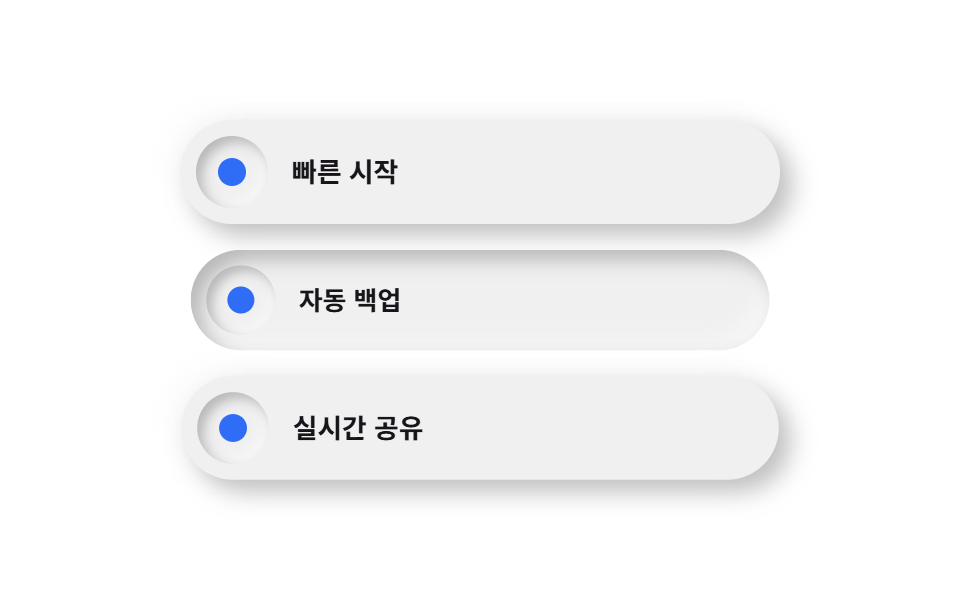
錠剤型の行は浮き出ていて、その中のアイコンチップだけが内側に沈み込み、一つの行の中で浮き出しと沈み込みが同時に見えます。
使いどころ機能一覧・オンボーディングのステップ
inset 칩raised 행순백 대신 6% 눌린 캔버스
<main class="stage">
  <ul class="listneu">
    <li class="listneu__row listneu__row--a is-demo">
      <span class="listneu__chip" aria-hidden="true"></span>
      <span class="listneu__text">クイックスタート</span>
    </li>
    <li class="listneu__row listneu__row--b is-demo">
      <span class="listneu__chip" aria-hidden="true"></span>
      <span class="listneu__text">自動バックアップ</span>
    </li>
    <li class="listneu__row listneu__row--c is-demo">
      <span class="listneu__chip" aria-hidden="true"></span>
      <span class="listneu__text">リアルタイム共有</span>
    </li>
  </ul>
</main>
@use "../../../../site/static/demo-tokens" as *;
$duration: $dur-loop; // 칩이 눌렸다 돌아오는 한 주기
$easing: $ease-pop; // 눌림 곡선
$color: $subject-blue; // 칩 강조 색
@include stage($stage-paper);
// 순백 배경은 밝은 쪽 그림자가 갈 곳이 없다(배경보다 밝힐 여지가 없음) — 6% 만큼 어둡게 눌러
// 두 방향 모두 보이게 한다. 실제 뉴모피즘 튜토리얼이 순백 대신 옅은 회색 캔버스에서 시작하는 이유다.
$neu-surface: mix($stage-paper, black, 94%);
$neu-light: rgba(mix($neu-surface, white, 40%), .85);
$neu-dark: rgba(mix($neu-surface, black, 40%), .4);
.listneu {
list-style: none;
margin: 0;
padding: 0;
display: flex;
flex-direction: column;
gap: $sp-3;
width: clamp(220px, 70vw, 300px);
}
.listneu__row {
box-sizing: border-box;
display: flex;
align-items: center;
gap: $sp-3;
padding: $sp-2 $sp-4 $sp-2 $sp-2;
border-radius: $r-pill;
background: $neu-surface;
box-shadow: 6px 6px 12px $neu-dark, -6px -6px 12px $neu-light;
}
.listneu__row--a { animation: chipPress $duration $easing infinite; animation-delay: 0s; }
.listneu__row--b { animation: chipPress $duration $easing infinite; animation-delay: -0.6s; }
.listneu__row--c { animation: chipPress $duration $easing infinite; animation-delay: -1.2s; }
.listneu__chip {
flex: none;
width: clamp(30px, 9vw, 36px);
height: clamp(30px, 9vw, 36px);
border-radius: $r-pill;
background: $neu-surface;
// 칩만 안쪽으로 파인 표면 — 튀어나온 알약 안에서 유일하게 눌려 있는 지점으로 대비를 만든다
box-shadow: inset 3px 3px 6px $neu-dark, inset -3px -3px 6px $neu-light;
position: relative;
}
.listneu__chip::after {
content: "";
position: absolute;
inset: 30%;
border-radius: 50%;
background: $color;
}
.listneu__text {
color: $subject-ink;
font-weight: 600; font-size: clamp(12px, 2.8vw, 14px); line-height: 1;
}
// 데모: 행 전체가 살짝 눌리며(scale) 그림자 부호가 raised→inset 으로 뒤집혔다가 돌아온다
@keyframes chipPress {
0%, 40%, 100% {
transform: scale(1);
box-shadow: 6px 6px 12px $neu-dark, -6px -6px 12px $neu-light;
}
70% {
transform: scale(.96);
box-shadow: inset 5px 5px 10px $neu-dark, inset -5px -5px 10px $neu-light;
}
}
@media (prefers-reduced-motion: reduce) {
.listneu__row { animation: none !important; transform: none; }
}html, body {
margin: 0;
overflow: hidden;
}
.stage {
box-sizing: border-box;
min-height: 100vh;
display: grid;
place-items: center;
margin: 0;
background: #ffffff;
font-family: -apple-system, "Segoe UI", "Noto Sans KR", sans-serif;
padding: clamp(8px, 4vw, 24px);
}
.listneu {
list-style: none;
margin: 0;
padding: 0;
display: flex;
flex-direction: column;
gap: 12px;
width: clamp(220px, 70vw, 300px);
}
.listneu__row {
box-sizing: border-box;
display: flex;
align-items: center;
gap: 12px;
padding: 8px 16px 8px 8px;
border-radius: 999px;
background: rgb(94%, 94%, 94%);
box-shadow: 6px 6px 12px rgba(37.6%, 37.6%, 37.6%, 0.4), -6px -6px 12px rgba(97.6%, 97.6%, 97.6%, 0.85);
}
.listneu__row--a {
animation: chipPress 2s cubic-bezier(0.2, 1.4, 0.4, 1) infinite;
animation-delay: 0s;
}
.listneu__row--b {
animation: chipPress 2s cubic-bezier(0.2, 1.4, 0.4, 1) infinite;
animation-delay: -0.6s;
}
.listneu__row--c {
animation: chipPress 2s cubic-bezier(0.2, 1.4, 0.4, 1) infinite;
animation-delay: -1.2s;
}
.listneu__chip {
flex: none;
width: clamp(30px, 9vw, 36px);
height: clamp(30px, 9vw, 36px);
border-radius: 999px;
background: rgb(94%, 94%, 94%);
box-shadow: inset 3px 3px 6px rgba(37.6%, 37.6%, 37.6%, 0.4), inset -3px -3px 6px rgba(97.6%, 97.6%, 97.6%, 0.85);
position: relative;
}
.listneu__chip::after {
content: "";
position: absolute;
inset: 30%;
border-radius: 50%;
background: #2f6df6;
}
.listneu__text {
color: #17141a;
font-weight: 600;
font-size: clamp(12px, 2.8vw, 14px);
line-height: 1;
}
@keyframes chipPress {
0%, 40%, 100% {
transform: scale(1);
box-shadow: 6px 6px 12px rgba(37.6%, 37.6%, 37.6%, 0.4), -6px -6px 12px rgba(97.6%, 97.6%, 97.6%, 0.85);
}
70% {
transform: scale(0.96);
box-shadow: inset 5px 5px 10px rgba(37.6%, 37.6%, 37.6%, 0.4), inset -5px -5px 10px rgba(97.6%, 97.6%, 97.6%, 0.85);
}
}
@media (prefers-reduced-motion: reduce) {
.listneu__row {
animation: none !important;
transform: none;
}
}import type { CSSProperties } from "react";
import styles from "./FeatureListNeu.module.scss";
export type FeatureListNeuProps = {
items?: string[];
duration?: number;
easing?: string;
color?: string;
};
type Vars = CSSProperties & { "--duration"?: string; "--easing"?: string; "--color"?: string };
export default function FeatureListNeu({
items = ["빠른 시작", "자동 백업", "실시간 공유"],
duration = 2000,
easing = "cubic-bezier(.2,1.4,.4,1)",
color = "#2f6df6",
}: FeatureListNeuProps) {
const vars: Vars = { "--duration": `${duration}ms`, "--easing": easing, "--color": color };
return (
<ul className={styles.list} style={vars}>
{items.map((label, i) => (
<li key={label} className={styles.row} style={{ animationDelay: `${-i * 0.6}s` }}>
<span className={styles.chip} aria-hidden="true" />
<span className={styles.text}>{label}</span>
</li>
))}
</ul>
);
}04 埋め込みアイコンリスト — 計測 累積面積 16.408% · 動いたフレーム 22/23GODRICH オリジナル · SCSS と React は zip に同梱 · ニューモーフィズム デザインとは?二重の影だけのLPパーツ9選
このデモが属する記事
 ニューモーフィズム デザインとは?二重の影だけのLPパーツ9選ニューモーフィズム デザインとは、カードやボタンの背景色を画面の背景とほぼ同じにしたうえで、明るい影と暗い影を反対方向に重ねることで、色ではなく影だけで立体感を出すデザイン手法です。名前も作り方も知らなかった、あの「押し込まれたようにふくら この記事のデモをすべて見る