022点をつなぐ曲線
送る点と受け取る点を3次曲線1本でつなぎ、距離が離れるほど制御点が伸びて線が横へゆるやかに抜けます。
使いどころワークフローエディタの接続線、関係図
stroke-dasharraystroke-dashoffsetstroke-linecap: round
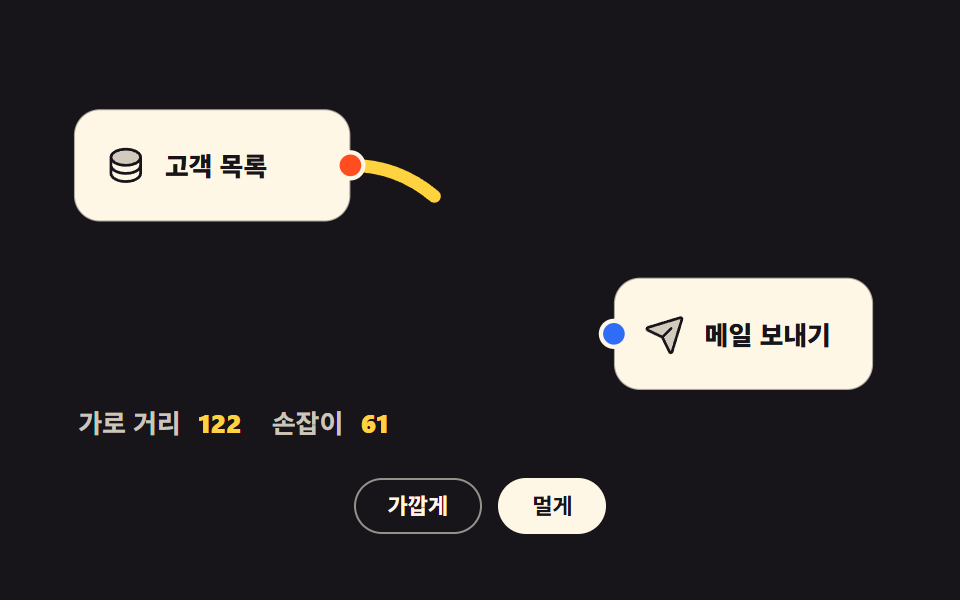
<main class="stage">
<div class="ng is-demo" id="ng">

  <svg class="ng__svg" id="ngSvg" viewBox="0 0 400 180" role="group" aria-label="2つのノードをつなぐ曲線">

    <!-- 연결선 — 노드보다 먼저 그려 상자 뒤로 깔린다 -->
    <path class="ng__wire" id="ngWire" fill="none" d="M140,46 C201,46 201,124 262,124"/>

    <!-- 앞 노드 -->
    <g class="ng__node">
      <rect x="12" y="20" width="128" height="52" rx="12"/>
      <svg x="26" y="36" width="20" height="20" viewBox="0 0 256 256" fill="currentColor" class="ng__ico" aria-hidden="true"><path d="M216,80c0,26.51-39.4,48-88,48S40,106.51,40,80s39.4-48,88-48S216,53.49,216,80Z" opacity="0.2"/><path d="M128,24C74.17,24,32,48.6,32,80v96c0,31.4,42.17,56,96,56s96-24.6,96-56V80C224,48.6,181.83,24,128,24Zm80,104c0,9.62-7.88,19.43-21.61,26.92C170.93,163.35,150.19,168,128,168s-42.93-4.65-58.39-13.08C55.88,147.43,48,137.62,48,128V111.36c17.06,15,46.23,24.64,80,24.64s62.94-9.68,80-24.64ZM69.61,53.08C85.07,44.65,105.81,40,128,40s42.93,4.65,58.39,13.08C200.12,60.57,208,70.38,208,80s-7.88,19.43-21.61,26.92C170.93,115.35,150.19,120,128,120s-42.93-4.65-58.39-13.08C55.88,99.43,48,89.62,48,80S55.88,60.57,69.61,53.08ZM186.39,202.92C170.93,211.35,150.19,216,128,216s-42.93-4.65-58.39-13.08C55.88,195.43,48,185.62,48,176V159.36c17.06,15,46.23,24.64,80,24.64s62.94-9.68,80-24.64V176C208,185.62,200.12,195.43,186.39,202.92Z"/></svg>
      <text class="ng__nm" x="54" y="46">顧客リスト</text>
      <circle class="ng__port ng__port--out" cx="140" cy="46" r="6"/>
    </g>

    <!-- 뒤 노드 — 통째로 밀어 두 점의 가로 거리를 바꾼다 -->
    <g class="ng__node" id="ngNodeB" transform="translate(66,0)">
      <rect x="196" y="98" width="120" height="52" rx="12"/>
      <svg x="210" y="114" width="20" height="20" viewBox="0 0 256 256" fill="currentColor" class="ng__ico" aria-hidden="true"><path d="M223.69,42.18l-58.22,192a8,8,0,0,1-14.92,1.25L108,148,20.58,105.45a8,8,0,0,1,1.25-14.92l192-58.22A8,8,0,0,1,223.69,42.18Z" opacity="0.2"/><path d="M227.32,28.68a16,16,0,0,0-15.66-4.08l-.15,0L19.57,82.84a16,16,0,0,0-2.49,29.8L102,154l41.3,84.87A15.86,15.86,0,0,0,157.74,248q.69,0,1.38-.06a15.88,15.88,0,0,0,14-11.51l58.2-191.94c0-.05,0-.1,0-.15A16,16,0,0,0,227.32,28.68ZM157.83,231.85l-.05.14,0-.07-40.06-82.3,48-48a8,8,0,0,0-11.31-11.31l-48,48L24.08,98.25l-.07,0,.14,0L216,40Z"/></svg>
      <text class="ng__nm" x="238" y="124">メール送信</text>
      <circle class="ng__port ng__port--in" cx="196" cy="124" r="6"/>
    </g>

    <text class="ng__cap" x="14" y="170"><tspan class="ng__capk">横の距離</tspan><tspan class="ng__capv" id="ngDx" dx="8">122</tspan><tspan class="ng__capk" dx="14">制御点</tspan><tspan class="ng__capv" id="ngH" dx="8">61</tspan></text>
  </svg>

  <div class="ng__bar">
    <button type="button" class="ng__btn" id="ngNear" aria-pressed="false">近づける</button>
    <button type="button" class="ng__btn is-on" id="ngFar" aria-pressed="true">遠ざける</button>
  </div>

</div>
</main>@use "../../../../site/static/demo-tokens" as *;
$duration: $dur-loop;
$easing: $ease-out;
$color: $stage-yellow;
@include stage($stage-ink);
.ng { box-sizing: border-box; width: min(100%, 432px); display: flex; flex-direction: column; gap: $sp-3; }
.ng__svg { display: block; width: 100%; height: auto; }
// 노드 상자 — 어두운 무대 위 크림 카드
.ng__node rect { fill: $subject-cream; stroke: rgba(23, 20, 26, .35); stroke-width: 1; }
.ng__node .ng__ico { color: $subject-ink; }
.ng__nm { font-weight: 800; font-size: 12px; fill: $subject-ink; dominant-baseline: central; }
.ng__port { stroke: $subject-cream; stroke-width: 2; }
.ng__port--out { fill: $stage-orange; }
.ng__port--in { fill: $subject-blue; }
// 연결선 — 끝을 둥글게 잘라 포트 원과 이가 맞는다
.ng__wire {
stroke: $color; stroke-width: 6; stroke-linecap: round;
// 점선 한 칸 = 선 전체 길이. JS 가 getTotalLength() 로 잰 값을 --len 에 넣는다
stroke-dasharray: var(--len);
stroke-dashoffset: 0;
}
.ng__cap { font-size: 12px; }
.ng__capk { font-weight: 600; fill: rgba(255, 247, 230, .78); }
.ng__capv { font-weight: 800; fill: $color; }
.ng__bar { display: flex; justify-content: center; gap: $sp-2; }
.ng__btn {
font-family: inherit; font-weight: 700; font-size: clamp(9px, 2.6vw, 11px); line-height: 1.6;
padding: $sp-1 $sp-4; border-radius: $r-pill; cursor: pointer;
background: none; border: 1px solid rgba(255, 247, 230, .55); color: $subject-cream;
transition: background $dur-quick $easing, color $dur-quick $easing;
}
.ng__btn.is-on { background: $subject-cream; border-color: $subject-cream; color: $subject-ink; }
// ── 미리보기 루프: 선이 왼쪽에서 오른쪽으로 그려졌다가 88% 에 도로 감긴다
// --len 은 JS 가 getTotalLength() 로 잰 실제 선 길이 (점선 한 칸 = 선 전체)
.ng.is-demo .ng__wire {
animation-name: ngWireDraw; animation-duration: $duration;
animation-timing-function: $easing; animation-iteration-count: infinite;
animation-fill-mode: backwards;
}
@keyframes ngWireDraw {
0% { stroke-dashoffset: var(--len); }
60% { stroke-dashoffset: 0; }
78% { stroke-dashoffset: 0; }
88% { stroke-dashoffset: var(--len); }
100% { stroke-dashoffset: var(--len); }
}
// ── 320×200 폰 (값은 내리기만 한다)
@media (max-width: 340px), (max-height: 220px) {
.ng { gap: $sp-1; }
.ng__btn { padding: 0 $sp-3; }
}
@media (prefers-reduced-motion: reduce) {
.ng.is-demo .ng__wire { animation-name: none !important; stroke-dashoffset: 0 !important; }
.ng__btn { transition: none !important; }
}html, body {
margin: 0;
overflow: hidden;
}
.stage {
box-sizing: border-box;
min-height: 100vh;
display: grid;
place-items: center;
margin: 0;
background: #17141a;
font-family: -apple-system, "Segoe UI", "Noto Sans KR", sans-serif;
padding: clamp(8px, 4vw, 24px);
}
.ng {
box-sizing: border-box;
width: min(100%, 432px);
display: flex;
flex-direction: column;
gap: 12px;
}
.ng__svg {
display: block;
width: 100%;
height: auto;
}
.ng__node rect {
fill: #fff7e6;
stroke: rgba(23, 20, 26, 0.35);
stroke-width: 1;
}
.ng__node .ng__ico {
color: #17141a;
}
.ng__nm {
font-weight: 800;
font-size: 12px;
fill: #17141a;
dominant-baseline: central;
}
.ng__port {
stroke: #fff7e6;
stroke-width: 2;
}
.ng__port--out {
fill: #ff4d1f;
}
.ng__port--in {
fill: #2f6df6;
}
.ng__wire {
stroke: #ffd23f;
stroke-width: 6;
stroke-linecap: round;
stroke-dasharray: var(--len);
stroke-dashoffset: 0;
}
.ng__cap {
font-size: 12px;
}
.ng__capk {
font-weight: 600;
fill: rgba(255, 247, 230, 0.78);
}
.ng__capv {
font-weight: 800;
fill: #ffd23f;
}
.ng__bar {
display: flex;
justify-content: center;
gap: 8px;
}
.ng__btn {
font-family: inherit;
font-weight: 700;
font-size: clamp(9px, 2.6vw, 11px);
line-height: 1.6;
padding: 4px 16px;
border-radius: 999px;
cursor: pointer;
background: none;
border: 1px solid rgba(255, 247, 230, 0.55);
color: #fff7e6;
transition: background 220ms ease-out, color 220ms ease-out;
}
.ng__btn.is-on {
background: #fff7e6;
border-color: #fff7e6;
color: #17141a;
}
.ng.is-demo .ng__wire {
animation-name: ngWireDraw;
animation-duration: 2s;
animation-timing-function: ease-out;
animation-iteration-count: infinite;
animation-fill-mode: backwards;
}
@keyframes ngWireDraw {
0% {
stroke-dashoffset: var(--len);
}
60% {
stroke-dashoffset: 0;
}
78% {
stroke-dashoffset: 0;
}
88% {
stroke-dashoffset: var(--len);
}
100% {
stroke-dashoffset: var(--len);
}
}
@media (max-width: 340px), (max-height: 220px) {
.ng {
gap: 4px;
}
.ng__btn {
padding: 0 12px;
}
}
@media (prefers-reduced-motion: reduce) {
.ng.is-demo .ng__wire {
animation-name: none !important;
stroke-dashoffset: 0 !important;
}
.ng__btn {
transition: none !important;
}
}var ng = document.getElementById('ng');
var wire = document.getElementById('ngWire');
var nodeB = document.getElementById('ngNodeB');
var dxOut = document.getElementById('ngDx');
var handleOut = document.getElementById('ngH');
var nearBtn = document.getElementById('ngNear');
var farBtn = document.getElementById('ngFar');
var OUT = { x: 140, y: 46 }; // 出力ポート
var BASE_IN = { x: 196, y: 124 }; // 뒤 노드가 「近づける」 자리에 있을 때의 入力ポート
var SHIFT = { near: 0, far: 66 }; // 뒤 노드를 오른쪽으로 미는 거리
// 3차 베지어 — 손잡이는 두 점의 가로 거리의 절반, 최소 40.
// 손잡이가 두 점에서 수평으로 뻗으므로 선은 항상 포트 옆구리로 빠진다.
function wirePath(x1, y1, x2, y2) {
var h = Math.max(40, Math.abs(x2 - x1) * 0.5);
return { d: 'M' + x1 + ',' + y1 + ' C' + (x1 + h) + ',' + y1 + ' ' + (x2 - h) + ',' + y2 + ' ' + x2 + ',' + y2, handle: h };
}
function layout(shift) {
nodeB.setAttribute('transform', 'translate(' + shift + ',0)');
var inX = BASE_IN.x + shift;
var r = wirePath(OUT.x, OUT.y, inX, BASE_IN.y);
wire.setAttribute('d', r.d);
var len = wire.getTotalLength(); // 선 길이를 재서 점선 한 칸으로 만든다
wire.style.setProperty('--len', len); // 점선 칸 길이는 scss 가 var(--len) 으로 받는다
dxOut.textContent = String(inX - OUT.x);
handleOut.textContent = String(Math.round(r.handle));
}
function pick(kind) {
ng.classList.remove('is-demo');
layout(SHIFT[kind]);
nearBtn.classList.toggle('is-on', kind === 'near');
farBtn.classList.toggle('is-on', kind === 'far');
nearBtn.setAttribute('aria-pressed', String(kind === 'near'));
farBtn.setAttribute('aria-pressed', String(kind === 'far'));
}
nearBtn.addEventListener('click', function () { pick('near'); });
farBtn.addEventListener('click', function () { pick('far'); });
layout(SHIFT.far);import { useEffect, useRef, useState } from "react";
import styles from "./BezierWire.module.scss";
export type BezierWireProps = { duration?: number; easing?: string; color?: string };
const OUT = { x: 140, y: 46 }; // 보내는 점
const BASE_IN = { x: 196, y: 124 }; // 뒤 노드가 「가깝게」 자리에 있을 때의 받는 점
const SHIFT = { near: 0, far: 66 }; // 뒤 노드를 오른쪽으로 미는 거리
// 3차 베지어 — 손잡이는 두 점의 가로 거리의 절반, 최소 40.
// 손잡이가 두 점에서 수평으로 뻗으므로 선은 항상 포트 옆구리로 빠진다.
function wirePath(x1: number, y1: number, x2: number, y2: number): { d: string; handle: number } {
const h = Math.max(40, Math.abs(x2 - x1) * 0.5);
return { d: `M${x1},${y1} C${x1 + h},${y1} ${x2 - h},${y2} ${x2},${y2}`, handle: h };
}
export default function BezierWire({
duration = 2000,
easing = "ease-out",
color = "#ffd23f",
}: BezierWireProps) {
const [demo, setDemo] = useState(true);
const [kind, setKind] = useState("far");
const [len, setLen] = useState(0);
const wireRef = useRef<SVGPathElement>(null);
const shift = kind === "far" ? SHIFT.far : SHIFT.near;
const inX = BASE_IN.x + shift;
const wire = wirePath(OUT.x, OUT.y, inX, BASE_IN.y);
useEffect(() => {
const el = wireRef.current;
if (el) setLen(el.getTotalLength()); // 선 길이를 재서 점선 한 칸으로 만든다
}, [wire.d]);
const pick = (next: string) => { setDemo(false); setKind(next); };
return (
<main className={styles.stage}>
<div className={styles.ng}>
<svg className={styles.svg} viewBox="0 0 400 180" role="group" aria-label="두 노드를 잇는 곡선 한 줄">
<path
ref={wireRef}
className={styles.wire}
fill="none"
d={wire.d}
style={{
stroke: color,
"--len": len,
...(demo
? {
animationName: "ngWireDraw",
animationDuration: `${duration}ms`,
animationTimingFunction: easing,
animationIterationCount: "infinite",
animationFillMode: "backwards",
}
: {}),
}}
/>
<g className={styles.node}>
<rect x="12" y="20" width="128" height="52" rx="12"/>
<svg x="26" y="36" width="20" height="20" viewBox="0 0 256 256" fill="currentColor" className={styles.ico} aria-hidden="true"><path d="M216,80c0,26.51-39.4,48-88,48S40,106.51,40,80s39.4-48,88-48S216,53.49,216,80Z" opacity="0.2"/><path d="M128,24C74.17,24,32,48.6,32,80v96c0,31.4,42.17,56,96,56s96-24.6,96-56V80C224,48.6,181.83,24,128,24Zm80,104c0,9.62-7.88,19.43-21.61,26.92C170.93,163.35,150.19,168,128,168s-42.93-4.65-58.39-13.08C55.88,147.43,48,137.62,48,128V111.36c17.06,15,46.23,24.64,80,24.64s62.94-9.68,80-24.64ZM69.61,53.08C85.07,44.65,105.81,40,128,40s42.93,4.65,58.39,13.08C200.12,60.57,208,70.38,208,80s-7.88,19.43-21.61,26.92C170.93,115.35,150.19,120,128,120s-42.93-4.65-58.39-13.08C55.88,99.43,48,89.62,48,80S55.88,60.57,69.61,53.08ZM186.39,202.92C170.93,211.35,150.19,216,128,216s-42.93-4.65-58.39-13.08C55.88,195.43,48,185.62,48,176V159.36c17.06,15,46.23,24.64,80,24.64s62.94-9.68,80-24.64V176C208,185.62,200.12,195.43,186.39,202.92Z"/></svg>
<text className={styles.nm} x="54" y="46">고객 목록</text>
<circle className={styles.portOut} cx="140" cy="46" r="6"/>
</g>
<g className={styles.node} transform={`translate(${shift},0)`}>
<rect x="196" y="98" width="120" height="52" rx="12"/>
<svg x="210" y="114" width="20" height="20" viewBox="0 0 256 256" fill="currentColor" className={styles.ico} aria-hidden="true"><path d="M223.69,42.18l-58.22,192a8,8,0,0,1-14.92,1.25L108,148,20.58,105.45a8,8,0,0,1,1.25-14.92l192-58.22A8,8,0,0,1,223.69,42.18Z" opacity="0.2"/><path d="M227.32,28.68a16,16,0,0,0-15.66-4.08l-.15,0L19.57,82.84a16,16,0,0,0-2.49,29.8L102,154l41.3,84.87A15.86,15.86,0,0,0,157.74,248q.69,0,1.38-.06a15.88,15.88,0,0,0,14-11.51l58.2-191.94c0-.05,0-.1,0-.15A16,16,0,0,0,227.32,28.68ZM157.83,231.85l-.05.14,0-.07-40.06-82.3,48-48a8,8,0,0,0-11.31-11.31l-48,48L24.08,98.25l-.07,0,.14,0L216,40Z"/></svg>
<text className={styles.nm} x="238" y="124">메일 보내기</text>
<circle className={styles.portIn} cx="196" cy="124" r="6"/>
</g>
<text className={styles.cap} x="14" y="170">
<tspan className={styles.capk}>가로 거리</tspan>
<tspan className={styles.capv} dx="8">{inX - OUT.x}</tspan>
<tspan className={styles.capk} dx="14">손잡이</tspan>
<tspan className={styles.capv} dx="8">{Math.round(wire.handle)}</tspan>
</text>
</svg>
<div className={styles.bar}>
<button
type="button"
className={`${styles.btn} ${kind === "near" ? styles.isOn : ""}`}
aria-pressed={kind === "near"}
onClick={() => pick("near")}
>가깝게</button>
<button
type="button"
className={`${styles.btn} ${kind === "far" ? styles.isOn : ""}`}
aria-pressed={kind === "far"}
onClick={() => pick("far")}
>멀게</button>
</div>
</div>
</main>
);
}02 2点をつなぐ曲線 — 計測 累積面積 0.802% · 動いたフレーム 18/23GODRICH オリジナル · SCSS と React は zip に同梱 · フローチャート デザイン 9種 — ノードを線でつなぐ画面
このデモが属する記事
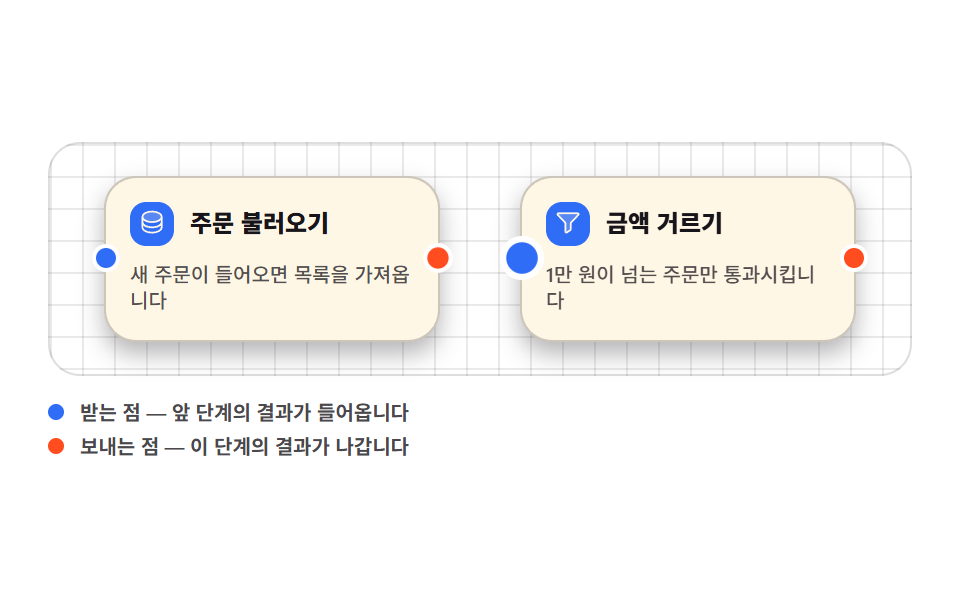 フローチャート デザイン 9種 — ノードを線でつなぐ画面フローチャート デザインとは、処理の箱を画面に並べ、その箱どうしを線でつないで仕事の流れを見せる画面の作り方です。ここに置いた9つは、ライブラリを一つも使わずHTMLとSCSS、数行のJavaScriptだけで組んだノードグラフの部品で、箱 この記事のデモをすべて見る