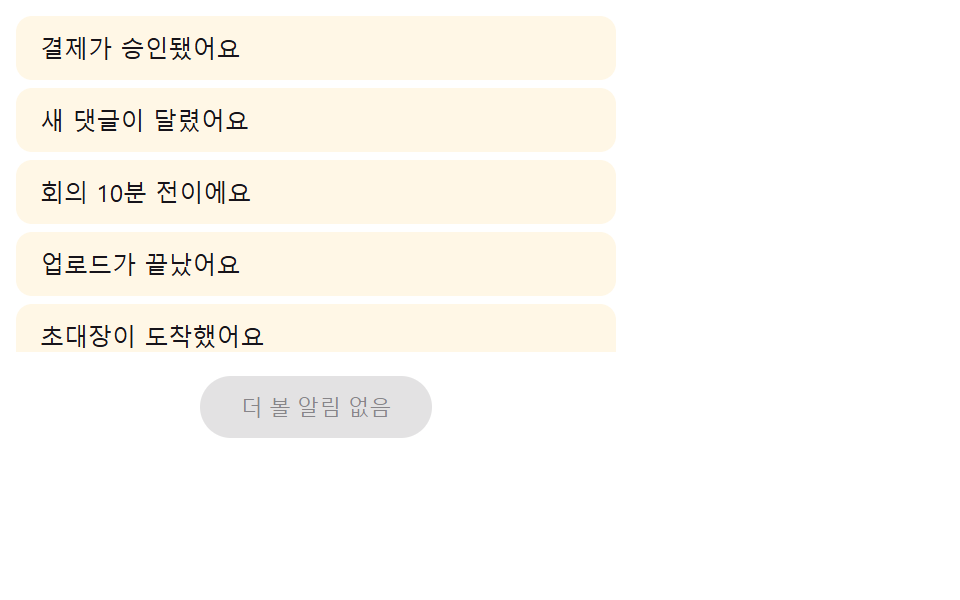
08もっと見るの値を押すと時間差で入ってくる項目
もっと見るを押すと次ページの値を取得し、新しい項目ごとに順番の値に短い遅延の値を掛けて上方向の移動距離と不透明度の値を一緒に上げながら一つずつ差し込む。
使いどころ以前の通知をさらに読み込むリスト下部ボタン
NOTIF_LOAD_STAGGER_MSloadMorefillStatic
<main class="stage">
  <div class="lm is-demo" id="lm">
    <ul class="lm__list" id="lmList" role="list"></ul>
    <button class="lm__more" id="lmMore" type="button">もっと見る</button>
    <p class="lm__sr" id="lmSr" aria-live="polite"></p>
  </div>
</main>
@use "../../../../site/static/demo-tokens" as *;
// 계산 겹: index.html loadMore() 가 새 배치 안 항목의 순번(order) x NOTIF_LOAD_STAGGER_MS
// 를 transitionDelay 로 걸어 순서대로 떠오르게 한다 — 배치 항목 수만큼 계산으로 늘어난다.
.stage { @include stage($stage-paper); }
.lm {
width: min(100%, 300px);
display: flex;
flex-direction: column;
gap: $sp-3;
}
.lm__list { list-style: none; margin: 0; padding: 0; display: flex; flex-direction: column; gap: $sp-1; max-height: 168px; overflow-y: auto; }
.lm__item {
border-radius: $r-sm;
background: $subject-cream;
color: $subject-ink;
font-size: 12px;
padding: $sp-2 $sp-3;
box-sizing: border-box;
opacity: 1;
transform: translateY(0);
transition: opacity $dur-base $ease-spring, transform $dur-base $ease-spring;
}
.lm__more {
align-self: center;
border: none;
background: $subject-blue-deep;
color: $subject-cream;
font-size: 11px;
border-radius: $r-pill;
padding: $sp-2 $sp-5;
cursor: pointer;
}
.lm__more:disabled { background: rgba($subject-ink, .12); color: rgba($subject-ink, .45); cursor: default; }
.lm__sr {
position: absolute; width: 1px; height: 1px; overflow: hidden;
clip: rect(0 0 0 0); margin: -1px; padding: 0; border: 0;
}
@media (max-width: 340px) {
.lm { width: 100%; }
.lm__list { max-height: 120px; }
}
@media (prefers-reduced-motion: reduce) {
.lm__item { transition: none; }
}.stage html, .stage body {
margin: 0;
overflow: hidden;
}
.stage .stage {
box-sizing: border-box;
min-height: 100vh;
display: grid;
place-items: center;
margin: 0;
background: #ffffff;
font-family: -apple-system, "Segoe UI", "Noto Sans KR", sans-serif;
padding: clamp(8px, 4vw, 24px);
}
.lm {
width: min(100%, 300px);
display: flex;
flex-direction: column;
gap: 12px;
}
.lm__list {
list-style: none;
margin: 0;
padding: 0;
display: flex;
flex-direction: column;
gap: 4px;
max-height: 168px;
overflow-y: auto;
}
.lm__item {
border-radius: 8px;
background: #fff7e6;
color: #17141a;
font-size: 12px;
padding: 8px 12px;
box-sizing: border-box;
opacity: 1;
transform: translateY(0);
transition: opacity 300ms cubic-bezier(0.2, 0.8, 0.2, 1), transform 300ms cubic-bezier(0.2, 0.8, 0.2, 1);
}
.lm__more {
align-self: center;
border: none;
background: #0a4fe8;
color: #fff7e6;
font-size: 11px;
border-radius: 999px;
padding: 8px 20px;
cursor: pointer;
}
.lm__more:disabled {
background: rgba(23, 20, 26, 0.12);
color: rgba(23, 20, 26, 0.45);
cursor: default;
}
.lm__sr {
position: absolute;
width: 1px;
height: 1px;
overflow: hidden;
clip: rect(0 0 0 0);
margin: -1px;
padding: 0;
border: 0;
}
@media (max-width: 340px) {
.lm {
width: 100%;
}
.lm__list {
max-height: 120px;
}
}
@media (prefers-reduced-motion: reduce) {
.lm__item {
transition: none;
}
}(function () {
"use strict";
var NOTIF_LOAD_STAGGER_MS = 60; // 새로 불러온 항목이 순번마다 이 값씩 늦게 떠오른다
var PAGES = [
["決済が承認されました", "新しいコメントが付きました", "会議まであと10分です"],
["アップロードが完了しました", "招待状が届きました", "予定が変更されました"],
["フォロワーが増えました", "レポートが差し戻されました"]
];
var root = document.getElementById("lm");
var list = document.getElementById("lmList");
var moreBtn = document.getElementById("lmMore");
var sr = document.getElementById("lmSr");
var reduce = window.matchMedia("(prefers-reduced-motion: reduce)").matches;
var synthetic = false;
function human() {
if (synthetic) return;
if (root.classList.contains("is-demo")) root.classList.remove("is-demo");
}
var pageIdx = 0;
function makeRow(name) {
var li = document.createElement("li");
li.className = "lm__item";
li.setAttribute("role", "listitem");
li.textContent = name;
return li;
}
// 계산 겹: 새로 불러오는 배치 안에서 항목의 순번(order)에 NOTIF_LOAD_STAGGER_MS 를 곱해
// transitionDelay 로 건다 — 한 번에 부르는 항목 수가 몇 개든(2개든 3개든) 그 수만큼
// 자연스럽게 늦게까지 이어서 떠오른다(고정된 총 시간이 아니라 항목 수 x 간격으로 계산).
function loadMore() {
if (pageIdx >= PAGES.length) return;
var names = PAGES[pageIdx];
pageIdx++;
var added = [];
names.forEach(function (name, order) {
var li = makeRow(name);
li.style.opacity = "0";
li.style.transform = "translateY(14px)";
list.appendChild(li);
added.push({ li: li, order: order });
});
// 강제 리플로우 뒤 다음 프레임에서 최종 값을 건다 — 같은 틱에서 시작값 0 → 끝값 1 을
// 연달아 주면 브라우저가 시작 프레임을 한 번도 그리지 못하고 바로 끝 값으로 건너뛰어
// 전환이 눈에 안 보인다(실측 2026-09-24: opacity 가 매 프레임 이미 1 로 찍힘). 강제
// 리플로우(offsetHeight 읽기)로 시작 상태를 굳힌 뒤 requestAnimationFrame 두 번으로
// 확실히 다음 그리기 이후에 최종 값을 건다.
void list.offsetHeight;
requestAnimationFrame(function () {
requestAnimationFrame(function () {
added.forEach(function (a) {
var delay = reduce ? 0 : a.order * NOTIF_LOAD_STAGGER_MS;
a.li.style.transitionDelay = delay + "ms";
a.li.style.opacity = "1";
a.li.style.transform = "translateY(0)";
});
});
});
sr.textContent = names.length + "件の通知を追加で読み込みました";
if (pageIdx >= PAGES.length) {
moreBtn.disabled = true;
moreBtn.textContent = "これ以上の通知はありません";
}
}
// 첫 화면은 애니메이션 없이 조용히 채운다 — 페이지가 열리자마자 전환이 걸려 있으면
// 측정 도구가 "이미 진행 중인 애니메이션"으로 오판해 그 뒤 실제 클릭·자동 시연에서
// 일어나는 움직임을 못 잡는다(실측 2026-09-24). 눈에 보이는 전환은 항상 그 다음부터.
function fillStatic() {
list.innerHTML = "";
pageIdx = 1;
PAGES[0].forEach(function (name) { list.appendChild(makeRow(name)); });
moreBtn.disabled = false;
moreBtn.textContent = "もっと見る";
}
function reset() {
list.innerHTML = "";
pageIdx = 0;
moreBtn.disabled = false;
moreBtn.textContent = "もっと見る";
loadMore();
}
moreBtn.addEventListener("click", function () {
human();
loadMore();
});
fillStatic();
if (reduce) {
while (pageIdx < PAGES.length) loadMore();
} else {
function loop() {
if (!root.classList.contains("is-demo")) return;
synthetic = true;
if (pageIdx < PAGES.length) {
loadMore();
} else {
reset();
}
synthetic = false;
window.setTimeout(loop, 900);
}
window.setTimeout(loop, 250);
}
})();// NotifLoadMoreStaggerIn — vanilla 판(run/405/demo/08-.../index.html) 의 React 포트.
// 계산 겹: 새로 불러오는 배치 안에서 항목의 순번(order)에 NOTIF_LOAD_STAGGER_MS 를 곱해
// transitionDelay 로 건다 — 한 번에 부르는 항목 수가 몇 개든 그 수만큼 자연스럽게 늦게까지
// 이어서 떠오른다(고정된 총 시간이 아니라 항목 수 x 간격으로 계산). 강제 리플로우 뒤 이중
// requestAnimationFrame 으로 최종 값을 걸어야 시작 프레임이 실제로 그려진다(실측 2026-09-24).
import { useEffect, useRef, useState } from "react";
import styles from "./NotifLoadMoreStaggerIn.module.scss";
type Box<T> = { current: T };
const NOTIF_LOAD_STAGGER_MS = 60; // 새로 불러온 항목이 순번마다 이 값씩 늦게 떠오른다
const PAGES = [
["결제가 승인됐어요", "새 댓글이 달렸어요", "회의 10분 전이에요"],
["업로드가 끝났어요", "초대장이 도착했어요", "일정이 변경됐어요"],
["팔로워가 늘었어요", "보고서가 반려됐어요"],
];
export default function NotifLoadMoreStaggerIn() {
const [isDemo, setIsDemo] = useState(true);
const [moreDisabled, setMoreDisabled] = useState(false);
const [moreLabel, setMoreLabel] = useState("더 보기");
const isDemoRef = useRef(true) as unknown as Box<boolean>;
const synthRef = useRef(false) as unknown as Box<boolean>;
const rootRef = useRef(null) as unknown as Box<HTMLDivElement>;
const listRef = useRef(null) as unknown as Box<HTMLUListElement>;
const srRef = useRef(null) as unknown as Box<HTMLParagraphElement>;
const reduceRef = useRef(false) as unknown as Box<boolean>;
const pageIdxRef = useRef(0) as unknown as Box<number>;
const loopTimerRef = useRef(0) as unknown as Box<number>;
function human() {
if (synthRef.current) return;
if (isDemoRef.current) { isDemoRef.current = false; setIsDemo(false); }
}
function makeRow(name: string): HTMLLIElement {
const li = document.createElement("li");
li.className = styles.item;
li.setAttribute("role", "listitem");
li.textContent = name;
return li;
}
function loadMore() {
const list = listRef.current;
if (!list || pageIdxRef.current >= PAGES.length) return;
const reduce = reduceRef.current;
const names = PAGES[pageIdxRef.current];
pageIdxRef.current++;
const added: { li: HTMLLIElement; order: number }[] = [];
names.forEach((name, order) => {
const li = makeRow(name);
li.style.opacity = "0";
li.style.transform = "translateY(14px)";
list.appendChild(li);
added.push({ li, order });
});
void list.offsetHeight;
requestAnimationFrame(() => {
requestAnimationFrame(() => {
added.forEach((a) => {
const delay = reduce ? 0 : a.order * NOTIF_LOAD_STAGGER_MS;
a.li.style.transitionDelay = delay + "ms";
a.li.style.opacity = "1";
a.li.style.transform = "translateY(0)";
});
});
});
if (srRef.current) srRef.current.textContent = names.length + "개 알림을 더 불러왔습니다";
if (pageIdxRef.current >= PAGES.length) {
setMoreDisabled(true);
setMoreLabel("더 볼 알림 없음");
}
}
// 첫 화면은 애니메이션 없이 조용히 채운다 — 페이지가 열리자마자 전환이 걸려 있으면
// 측정 도구가 "이미 진행 중인 애니메이션"으로 오판해 그 뒤 실제 클릭·자동 시연에서
// 일어나는 움직임을 못 잡는다. 눈에 보이는 전환은 항상 그 다음부터.
function fillStatic() {
const list = listRef.current;
if (!list) return;
list.innerHTML = "";
pageIdxRef.current = 1;
PAGES[0].forEach((name) => { list.appendChild(makeRow(name)); });
setMoreDisabled(false);
setMoreLabel("더 보기");
}
function reset() {
const list = listRef.current;
if (!list) return;
list.innerHTML = "";
pageIdxRef.current = 0;
setMoreDisabled(false);
setMoreLabel("더 보기");
loadMore();
}
function onMoreClick() {
human();
loadMore();
}
useEffect(() => {
const reduce = window.matchMedia("(prefers-reduced-motion: reduce)").matches;
reduceRef.current = reduce;
fillStatic();
if (reduce) {
while (pageIdxRef.current < PAGES.length) loadMore();
} else {
function loop() {
if (!isDemoRef.current) return;
synthRef.current = true;
if (pageIdxRef.current < PAGES.length) loadMore();
else reset();
synthRef.current = false;
loopTimerRef.current = window.setTimeout(loop, 900);
}
loopTimerRef.current = window.setTimeout(loop, 250);
}
return () => { window.clearTimeout(loopTimerRef.current); };
// eslint-disable-next-line react-hooks/exhaustive-deps
}, []);
return (
<main className={styles.stage}>
<div className={styles.lm + " " + (isDemo ? styles.isDemo : "")} ref={rootRef}>
<ul className={styles.list} role="list" ref={listRef} />
<button className={styles.more} type="button" disabled={moreDisabled} onClick={onMoreClick}>{moreLabel}</button>
<p className={styles.sr} aria-live="polite" ref={srRef} />
</div>
</main>
);
}08 もっと見るの値を押すと時間差で入ってくる項目 — 計測 累積面積 29.639% · 動いたフレーム 10/23GODRICH オリジナル · SCSS と React は zip に同梱 · css 通知 9選 — バッジ・パネルアニメーション
このデモが属する記事
 css 通知 9選 — バッジ・パネルアニメーションcss 通知で探す人に、バッジの値一つで答えるパネルを九種集めました。「未読はあといくつ?」と聞かれたら、このパネルは未読件数の値ひとつで答える。3番はその値が0になった瞬間にバッジを輪の形に戻し、6番は同じ値が空になるとリスト全体を空状態 この記事のデモをすべて見る