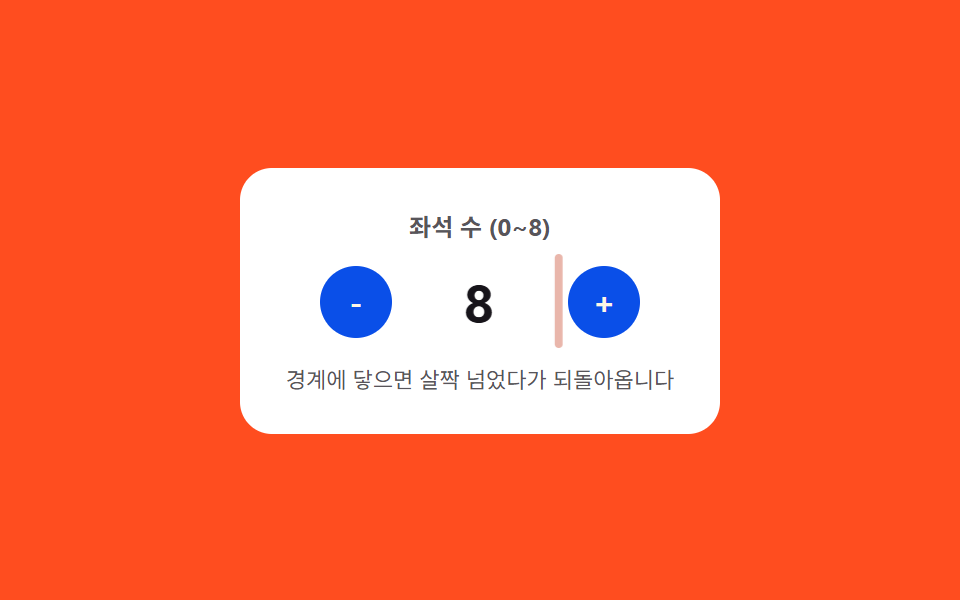
03限界バウンス — 値が上限や下限を少し超えてからばね曲線に沿って戻るステッパー
値が決められた上限や下限に達した状態になると、その境界を少し超えた位置まで進んでからばね曲線に沿って境界の値へ戻り、境界の内側ではこの曲線は適用されません。
使いどころ在庫数量が限られた商品フォーム、年齢・人数の入力欄
AMPLITUDE=10FREQ=16autoplayTick
<main class="stage">
<div class="nspcb is-demo" id="nspcb">
  <div class="nspcb__panel">
    <span class="nspcb__label">座席数(0〜8)</span>
    <div class="nspcb__row">
      <button class="nspcb__btn" id="nspcbMinus" type="button" aria-label="座席を減らす">-</button>
      <span class="nspcb__valueWrap">
        <span class="nspcb__edge" id="nspcbEdgeLeft"></span>
        <span class="nspcb__value" id="nspcbValue">4</span>
        <span class="nspcb__edge" id="nspcbEdgeRight"></span>
      </span>
      <button class="nspcb__btn" id="nspcbPlus" type="button" aria-label="座席を増やす">+</button>
    </div>
    <span class="nspcb__hint">境界に触れると少し行き過ぎてから戻ります</span>
  </div>
</div>
</main>
@use "../../../../site/static/demo-tokens" as *;
// 계산 겹: 경계(0·8)에 닿는 순간부터 지난 시간(t)에 감쇠 사인파를 매 프레임 계산해
// translateX 에 대입한다 — 목표를 살짝 넘었다가 스프링 곡선을 따라 되돌아온다.
$duration: $dur-quick;
$easing: $ease-elastic;
$color: $error;
@include stage($stage-orange);
.stage { position: relative; }
.nspcb {
width: min(240px, 70vw);
}
.nspcb__panel {
display: flex;
flex-direction: column;
align-items: center;
gap: $sp-3;
padding: $sp-5;
border-radius: $r-card;
background: $stage-paper;
}
.nspcb__label {
color: rgba($subject-ink, .72);
font-weight: 700;
font-size: 12px;
}
.nspcb__row {
display: flex;
align-items: center;
gap: $sp-4;
}
.nspcb__btn {
width: 36px;
height: 36px;
border: 0;
border-radius: $r-pill;
background: $subject-blue-deep;
color: $subject-cream;
font-family: inherit;
font-weight: 700;
font-size: 16px;
line-height: 1;
display: grid;
place-items: center;
cursor: pointer;
}
.nspcb__valueWrap {
position: relative;
display: inline-flex;
align-items: center;
min-width: 56px;
justify-content: center;
will-change: transform;
}
.nspcb__value {
color: $subject-ink;
font-weight: 700;
font-size: 26px;
font-variant-numeric: tabular-nums;
}
.nspcb__edge {
position: absolute;
top: -6px;
bottom: -6px;
width: 4px;
border-radius: $r-xs;
background: $color;
opacity: 0;
}
.nspcb__edge:first-child { left: -14px; }
.nspcb__edge:last-child { right: -14px; }
.nspcb__hint {
color: rgba($subject-ink, .72);
font-size: 11px;
text-align: center;
}
@media (max-width: 340px) {
.nspcb__panel { padding: $sp-4; gap: $sp-2; }
.nspcb__btn { width: 32px; height: 32px; font-size: 14px; }
.nspcb__value { font-size: 22px; }
}
@media (prefers-reduced-motion: reduce) {
.nspcb__valueWrap { transition: none !important; }
}html, body {
margin: 0;
overflow: hidden;
}
.stage {
box-sizing: border-box;
min-height: 100vh;
display: grid;
place-items: center;
margin: 0;
background: #ff4d1f;
font-family: -apple-system, "Segoe UI", "Noto Sans KR", sans-serif;
padding: clamp(8px, 4vw, 24px);
}
.stage {
position: relative;
}
.nspcb {
width: min(240px, 70vw);
}
.nspcb__panel {
display: flex;
flex-direction: column;
align-items: center;
gap: 12px;
padding: 20px;
border-radius: 16px;
background: #ffffff;
}
.nspcb__label {
color: rgba(23, 20, 26, 0.72);
font-weight: 700;
font-size: 12px;
}
.nspcb__row {
display: flex;
align-items: center;
gap: 16px;
}
.nspcb__btn {
width: 36px;
height: 36px;
border: 0;
border-radius: 999px;
background: #0a4fe8;
color: #fff7e6;
font-family: inherit;
font-weight: 700;
font-size: 16px;
line-height: 1;
display: grid;
place-items: center;
cursor: pointer;
}
.nspcb__valueWrap {
position: relative;
display: inline-flex;
align-items: center;
min-width: 56px;
justify-content: center;
will-change: transform;
}
.nspcb__value {
color: #17141a;
font-weight: 700;
font-size: 26px;
font-variant-numeric: tabular-nums;
}
.nspcb__edge {
position: absolute;
top: -6px;
bottom: -6px;
width: 4px;
border-radius: 4px;
background: #c2361a;
opacity: 0;
}
.nspcb__edge:first-child {
left: -14px;
}
.nspcb__edge:last-child {
right: -14px;
}
.nspcb__hint {
color: rgba(23, 20, 26, 0.72);
font-size: 11px;
text-align: center;
}
@media (max-width: 340px) {
.nspcb__panel {
padding: 16px;
gap: 8px;
}
.nspcb__btn {
width: 32px;
height: 32px;
font-size: 14px;
}
.nspcb__value {
font-size: 22px;
}
}
@media (prefers-reduced-motion: reduce) {
.nspcb__valueWrap {
transition: none !important;
}
}(function () {
var root = document.getElementById('nspcb');
var valueEl = document.getElementById('nspcbValue');
var wrapEl = valueEl.parentNode;
var minusBtn = document.getElementById('nspcbMinus');
var plusBtn = document.getElementById('nspcbPlus');
var edgeLeft = document.getElementById('nspcbEdgeLeft');
var edgeRight = document.getElementById('nspcbEdgeRight');
var MIN = 0, MAX = 8;
var value = 4;
var raf = null;
function render() { valueEl.textContent = String(value); }
// 계산 겹: 경계에 닿는 순간부터 지난 시간(t)에 감쇠 사인파를 매 프레임 계산해
// translateX 에 대입한다 — 목표 지점을 살짝 넘었다가 스프링 곡선으로 되돌아온다.
var AMPLITUDE = 10, FREQ = 16, DECAY = 10;
function overshoot(tSec) {
if (tSec <= 0) { return 0; }
return AMPLITUDE * Math.sin(tSec * FREQ) * Math.exp(-DECAY * tSec);
}
function bounce(dir) {
var edge = dir > 0 ? edgeRight : edgeLeft;
var start = performance.now();
if (raf) { cancelAnimationFrame(raf); }
function frame(now) {
var t = (now - start) / 1000;
var px = dir * overshoot(t);
wrapEl.style.transform = 'translateX(' + px.toFixed(2) + 'px)';
var op = Math.max(0, 1 - t / 0.4);
edge.style.opacity = op.toFixed(3);
if (t < 0.45) {
raf = requestAnimationFrame(frame);
} else {
wrapEl.style.transform = 'translateX(0px)';
edge.style.opacity = '0';
raf = null;
}
}
raf = requestAnimationFrame(frame);
}
function step(dir) {
var next = value + dir;
if (next > MAX || next < MIN) {
bounce(dir);
return;
}
value = next;
render();
}
function wireReal(btn, dir) {
btn.addEventListener('click', function () {
root.classList.remove('is-demo'); stopAutoplay();
step(dir);
});
}
wireReal(minusBtn, -1);
wireReal(plusBtn, 1);
var seq = [1, 1, 1, 1, 1, 1, 1, -1, -1, -1, -1, -1, -1, -1, -1, -1];
var idx = 0;
var autoplayTimer = null;
function autoplayTick() {
step(seq[idx % seq.length]);
idx += 1;
}
function stopAutoplay() { if (autoplayTimer) { clearInterval(autoplayTimer); autoplayTimer = null; } }
var reduce = window.matchMedia('(prefers-reduced-motion: reduce)').matches;
if (!reduce) {
autoplayTimer = setInterval(autoplayTick, 260);
}
render();
})();import { useEffect, useRef } from "react";
import styles from "./NumberStepperMinMaxClampBounce.module.scss";
export type NumberStepperMinMaxClampBounceProps = {
color?: string;
};
export default function NumberStepperMinMaxClampBounce({
color = "#c2361a",
}: NumberStepperMinMaxClampBounceProps) {
const rootRef = useRef<HTMLDivElement | null>(null);
useEffect(() => {
const root = rootRef.current;
if (!root) return;
const valueEl = root.querySelector<HTMLSpanElement>(`.${styles.value}`);
const wrapEl = root.querySelector<HTMLSpanElement>(`.${styles.valueWrap}`);
const minusBtn = root.querySelector<HTMLButtonElement>(`.${styles.btnMinus}`);
const plusBtn = root.querySelector<HTMLButtonElement>(`.${styles.btnPlus}`);
const edgeLeft = root.querySelector<HTMLSpanElement>(`.${styles.edgeLeft}`);
const edgeRight = root.querySelector<HTMLSpanElement>(`.${styles.edgeRight}`);
if (!valueEl || !wrapEl || !minusBtn || !plusBtn || !edgeLeft || !edgeRight) return;
const MIN = 0, MAX = 8;
let value = 4;
let raf: number | null = null;
function render() { valueEl!.textContent = String(value); }
// 계산 겹: 경계에 닿는 순간부터 지난 시간(t)에 감쇠 사인파를 매 프레임 계산해
// translateX 에 대입한다 — 목표 지점을 살짝 넘었다가 스프링 곡선으로 되돌아온다.
const AMPLITUDE = 10, FREQ = 16, DECAY = 10;
function overshoot(tSec: number) {
if (tSec <= 0) { return 0; }
return AMPLITUDE * Math.sin(tSec * FREQ) * Math.exp(-DECAY * tSec);
}
function bounce(dir: number) {
const edge = dir > 0 ? edgeRight! : edgeLeft!;
const start = performance.now();
if (raf) { cancelAnimationFrame(raf); }
function frame(now: number) {
const t = (now - start) / 1000;
const px = dir * overshoot(t);
wrapEl!.style.transform = "translateX(" + px.toFixed(2) + "px)";
const op = Math.max(0, 1 - t / 0.4);
edge.style.opacity = op.toFixed(3);
if (t < 0.45) {
raf = requestAnimationFrame(frame);
} else {
wrapEl!.style.transform = "translateX(0px)";
edge.style.opacity = "0";
raf = null;
}
}
raf = requestAnimationFrame(frame);
}
function step(dir: number) {
const next = value + dir;
if (next > MAX || next < MIN) {
bounce(dir);
return;
}
value = next;
render();
}
function wireReal(btn: HTMLButtonElement, dir: number) {
const onClick = () => {
root!.classList.remove(styles.isDemo);
stopAutoplay();
step(dir);
};
btn.addEventListener("click", onClick);
return () => btn.removeEventListener("click", onClick);
}
const cleanMinus = wireReal(minusBtn, -1);
const cleanPlus = wireReal(plusBtn, 1);
const seq = [1, 1, 1, 1, 1, 1, 1, -1, -1, -1, -1, -1, -1, -1, -1, -1];
let idx = 0;
let autoplayTimer: ReturnType<typeof setInterval> | null = null;
function autoplayTick() {
step(seq[idx % seq.length]);
idx += 1;
}
function stopAutoplay() {
if (autoplayTimer) { clearInterval(autoplayTimer); autoplayTimer = null; }
}
const reduce = window.matchMedia("(prefers-reduced-motion: reduce)").matches;
if (!reduce) {
autoplayTimer = setInterval(autoplayTick, 260);
}
render();
return () => {
stopAutoplay();
if (raf) cancelAnimationFrame(raf);
cleanMinus();
cleanPlus();
};
}, []);
return (
<div ref={rootRef} className={`${styles.stage} ${styles.isDemo}`} style={{ ["--color" as string]: color }}>
<div className={styles.panel}>
<span className={styles.label}>좌석 수 (0~8)</span>
<div className={styles.row}>
<button className={`${styles.btn} ${styles.btnMinus}`} type="button" aria-label="좌석 줄이기">-</button>
<span className={styles.valueWrap}>
<span className={`${styles.edge} ${styles.edgeLeft}`} />
<span className={styles.value}>4</span>
<span className={`${styles.edge} ${styles.edgeRight}`} />
</span>
<button className={`${styles.btn} ${styles.btnPlus}`} type="button" aria-label="좌석 늘리기">+</button>
</div>
<span className={styles.hint}>경계에 닿으면 살짝 넘었다가 되돌아옵니다</span>
</div>
</div>
);
}03 限界バウンス — 値が上限や下限を少し超えてからばね曲線に沿って戻るステッパー — 計測 累積面積 0.547% · 動いたフレーム 15/23GODRICH オリジナル · SCSS と React は zip に同梱 · 数値ステッパー UI 9選 — 長押しから目盛りスナップまで
このデモが属する記事
 数値ステッパー UI 9選 — 長押しから目盛りスナップまで9つのうち1つは押された状態が長引くほど値が変わる間隔が短くなり、1つは値が上限に触れるとその地点を少し超えてからばね曲線に沿って戻り、もう1つは引く距離の値に比例して数字が変わり、指を離した後も慣性の値に沿って数段階分さらに進みます。ステ この記事のデモをすべて見る