09目盛りスナップ — 値が決まった目盛りの間にあると最も近い目盛りの値に引き寄せられるステッパー
値が決められた目盛り間隔のどこかに置かれた状態になると、その値と前後の目盛りの値との距離をそれぞれ求めて近い方の目盛りの値に引き寄せられ、すでに目盛りの上にある値はそのまま保たれます。
使いどころ決まった間隔でしか増えない数量選択、段階的な設定値の調整
STIFF=0.28DAMP=0.62springSettle
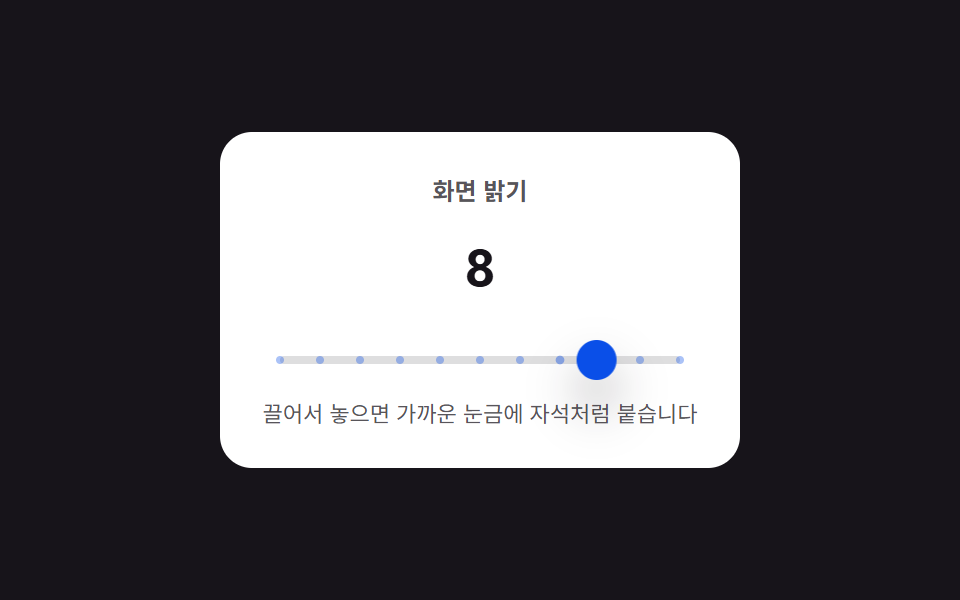
<main class="stage">
<div class="nspts is-demo" id="nspts">
  <div class="nspts__panel">
    <span class="nspts__label">画面の明るさ</span>
    <span class="nspts__value" id="nsptsValue">5</span>
    <div class="nspts__track" id="nsptsTrack">
      <span class="nspts__tick" data-i="0"></span>
      <span class="nspts__tick" data-i="1"></span>
      <span class="nspts__tick" data-i="2"></span>
      <span class="nspts__tick" data-i="3"></span>
      <span class="nspts__tick" data-i="4"></span>
      <span class="nspts__tick" data-i="5"></span>
      <span class="nspts__tick" data-i="6"></span>
      <span class="nspts__tick" data-i="7"></span>
      <span class="nspts__tick" data-i="8"></span>
      <span class="nspts__tick" data-i="9"></span>
      <span class="nspts__tick" data-i="10"></span>
      <span class="nspts__handle" id="nsptsHandle"></span>
    </div>
    <span class="nspts__hint">ドラッグして離すと、近い目盛りに磁石のように吸着します</span>
  </div>
</div>
</main>
@use "../../../../site/static/demo-tokens" as *;
// 계산 겹: 손을 놓은 위치에서 가장 가까운 눈금까지 매 프레임 스프링 힘(거리*강성 - 속도*감쇠)을
// 계산해 자석처럼 빨려 들어가게 한다 — 드래그 중에도 눈금 근접도로 인력을 미리 섞는다.
$duration: $dur-quick;
$easing: $ease-spring;
$color: $subject-cream;
@include stage($stage-ink);
.stage { position: relative; }
.nspts {
width: min(260px, 76vw);
}
.nspts__panel {
display: flex;
flex-direction: column;
align-items: center;
gap: $sp-3;
padding: $sp-5;
border-radius: $r-card;
background: $stage-paper;
}
.nspts__label {
color: rgba($subject-ink, .72);
font-weight: 700;
font-size: 12px;
}
.nspts__value {
color: $subject-ink;
font-weight: 700;
font-size: 26px;
font-variant-numeric: tabular-nums;
}
.nspts__track {
position: relative;
width: 200px;
height: 4px;
border-radius: $r-xs;
background: rgba($subject-ink, .14);
margin: $sp-4 0 $sp-1;
}
.nspts__tick {
position: absolute;
top: 50%;
left: 0;
width: 4px;
height: 4px;
border-radius: $r-pill;
background: $subject-blue-deep;
transform: translate(-50%, -50%);
transform-origin: center;
@for $i from 0 through 10 {
&[data-i="#{$i}"] { left: calc(#{$i} / 10 * 100%); }
}
}
.nspts__handle {
position: absolute;
top: 50%;
left: 0;
width: 20px;
height: 20px;
border-radius: $r-pill;
background: $subject-blue-deep;
box-shadow: $shadow-raised;
cursor: grab;
touch-action: none;
will-change: transform;
transform: translate(-50%, -50%);
&:active { cursor: grabbing; }
}
.nspts__hint {
color: rgba($subject-ink, .72);
font-size: 11px;
text-align: center;
}
@media (max-width: 340px) {
.nspts__panel { padding: $sp-4; gap: $sp-2; }
.nspts__track { width: 160px; }
.nspts__value { font-size: 22px; }
}
@media (prefers-reduced-motion: reduce) {
.nspts__handle, .nspts__tick { transition: none !important; }
}html, body {
margin: 0;
overflow: hidden;
}
.stage {
box-sizing: border-box;
min-height: 100vh;
display: grid;
place-items: center;
margin: 0;
background: #17141a;
font-family: -apple-system, "Segoe UI", "Noto Sans KR", sans-serif;
padding: clamp(8px, 4vw, 24px);
}
.stage {
position: relative;
}
.nspts {
width: min(260px, 76vw);
}
.nspts__panel {
display: flex;
flex-direction: column;
align-items: center;
gap: 12px;
padding: 20px;
border-radius: 16px;
background: #ffffff;
}
.nspts__label {
color: rgba(23, 20, 26, 0.72);
font-weight: 700;
font-size: 12px;
}
.nspts__value {
color: #17141a;
font-weight: 700;
font-size: 26px;
font-variant-numeric: tabular-nums;
}
.nspts__track {
position: relative;
width: 200px;
height: 4px;
border-radius: 4px;
background: rgba(23, 20, 26, 0.14);
margin: 16px 0 4px;
}
.nspts__tick {
position: absolute;
top: 50%;
left: 0;
width: 4px;
height: 4px;
border-radius: 999px;
background: #0a4fe8;
transform: translate(-50%, -50%);
transform-origin: center;
}
.nspts__tick[data-i="0"] {
left: calc(0 / 10 * 100%);
}
.nspts__tick[data-i="1"] {
left: calc(1 / 10 * 100%);
}
.nspts__tick[data-i="2"] {
left: calc(2 / 10 * 100%);
}
.nspts__tick[data-i="3"] {
left: calc(3 / 10 * 100%);
}
.nspts__tick[data-i="4"] {
left: calc(4 / 10 * 100%);
}
.nspts__tick[data-i="5"] {
left: calc(5 / 10 * 100%);
}
.nspts__tick[data-i="6"] {
left: calc(6 / 10 * 100%);
}
.nspts__tick[data-i="7"] {
left: calc(7 / 10 * 100%);
}
.nspts__tick[data-i="8"] {
left: calc(8 / 10 * 100%);
}
.nspts__tick[data-i="9"] {
left: calc(9 / 10 * 100%);
}
.nspts__tick[data-i="10"] {
left: calc(10 / 10 * 100%);
}
.nspts__handle {
position: absolute;
top: 50%;
left: 0;
width: 20px;
height: 20px;
border-radius: 999px;
background: #0a4fe8;
box-shadow: 0 14px 24px rgba(23, 20, 26, 0.32);
cursor: grab;
touch-action: none;
will-change: transform;
transform: translate(-50%, -50%);
}
.nspts__handle:active {
cursor: grabbing;
}
.nspts__hint {
color: rgba(23, 20, 26, 0.72);
font-size: 11px;
text-align: center;
}
@media (max-width: 340px) {
.nspts__panel {
padding: 16px;
gap: 8px;
}
.nspts__track {
width: 160px;
}
.nspts__value {
font-size: 22px;
}
}
@media (prefers-reduced-motion: reduce) {
.nspts__handle, .nspts__tick {
transition: none !important;
}
}(function () {
var root = document.getElementById('nspts');
var track = document.getElementById('nsptsTrack');
var handle = document.getElementById('nsptsHandle');
var valueEl = document.getElementById('nsptsValue');
var ticks = Array.prototype.slice.call(track.querySelectorAll('.nspts__tick'));
var TICK_COUNT = 11, TRACK_W = 200, GAP = TRACK_W / (TICK_COUNT - 1);
var currentX = 5 * GAP;
var dragging = false, startClientX = 0, startX = 0, settleRaf = null;
function xToIndex(x) { return Math.max(0, Math.min(10, Math.round(x / GAP))); }
function nearestTickX(x) { return xToIndex(x) * GAP; }
function paint(x) {
handle.style.transform = 'translate(-50%, -50%) translateX(' + x.toFixed(1) + 'px)';
for (var i = 0; i < ticks.length; i++) {
var tx = i * GAP;
var d = Math.abs(x - tx);
var proximity = Math.max(0, 1 - d / GAP);
ticks[i].style.transform = 'translate(-50%, -50%) scale(' + (1 + proximity * 0.9).toFixed(2) + ')';
ticks[i].style.opacity = (0.35 + proximity * 0.65).toFixed(2);
}
valueEl.textContent = String(xToIndex(x));
}
// 계산 겹: 놓는 순간의 위치(x0)에서 가장 가까운 눈금(target)까지 매 프레임 스프링 힘
// (거리 * 강성 - 속도 * 감쇠)을 계산해 자석처럼 서서히 빨려 들어가게 만든다.
var STIFF = 0.28, DAMP = 0.62;
function springSettle(x0, target) {
if (settleRaf) { cancelAnimationFrame(settleRaf); }
var x = x0, v = 0;
function frame() {
var force = (target - x) * STIFF;
v = (v + force) * DAMP;
x += v;
paint(x);
if (Math.abs(target - x) > 0.3 || Math.abs(v) > 0.2) {
settleRaf = requestAnimationFrame(frame);
} else {
x = target;
paint(x);
currentX = x;
settleRaf = null;
}
}
settleRaf = requestAnimationFrame(frame);
}
function moveTo(clientX) {
var raw = Math.max(0, Math.min(TRACK_W, startX + (clientX - startClientX)));
// 계산 겹: 가장 가까운 눈금까지 거리 비율로 자석 인력 세기(pull)를 계산해
// 손가락 위치와 눈금 사이를 보간한다 — 드래그 중에도 살짝 끌려간다.
var tx = nearestTickX(raw);
var dist = Math.abs(raw - tx);
var pull = Math.max(0, 1 - dist / (GAP * 0.9));
var x = raw + (tx - raw) * pull * 0.55;
currentX = x;
paint(x);
}
handle.addEventListener('pointerdown', function (e) {
root.classList.remove('is-demo'); stopAutoplay();
if (settleRaf) { cancelAnimationFrame(settleRaf); settleRaf = null; }
dragging = true;
startClientX = e.clientX;
startX = currentX;
handle.setPointerCapture(e.pointerId);
});
handle.addEventListener('pointermove', function (e) { if (dragging) { moveTo(e.clientX); } });
['pointerup', 'pointercancel'].forEach(function (ev) {
handle.addEventListener(ev, function () {
if (!dragging) { return; }
dragging = false;
springSettle(currentX, nearestTickX(currentX));
});
});
var seq = [3, 8, 1, 6, 9, 2, 5];
var idx = 0;
var autoplayTimer = null;
function stopAutoplay() { if (autoplayTimer) { clearInterval(autoplayTimer); autoplayTimer = null; } }
var reduce = window.matchMedia('(prefers-reduced-motion: reduce)').matches;
if (!reduce) {
autoplayTimer = setInterval(function () {
springSettle(currentX, seq[idx % seq.length] * GAP);
idx += 1;
}, 850);
}
paint(currentX);
})();import { useEffect, useRef } from "react";
import styles from "./NumberStepperTickMarkSnap.module.scss";
export type NumberStepperTickMarkSnapProps = {
color?: string;
};
export default function NumberStepperTickMarkSnap({
color = "#0a4fe8",
}: NumberStepperTickMarkSnapProps) {
const rootRef = useRef<HTMLDivElement | null>(null);
useEffect(() => {
const root = rootRef.current;
if (!root) return;
const track = root.querySelector<HTMLDivElement>(`.${styles.track}`);
const handle = root.querySelector<HTMLSpanElement>(`.${styles.handle}`);
const valueEl = root.querySelector<HTMLSpanElement>(`.${styles.value}`);
const ticks = track ? Array.from(track.querySelectorAll<HTMLSpanElement>(`.${styles.tick}`)) : [];
if (!track || !handle || !valueEl || ticks.length !== 11) return;
const TICK_COUNT = 11, TRACK_W = 200, GAP = TRACK_W / (TICK_COUNT - 1);
let currentX = 5 * GAP;
let dragging = false, startClientX = 0, startX = 0, settleRaf: number | null = null;
function xToIndex(x: number) { return Math.max(0, Math.min(10, Math.round(x / GAP))); }
function nearestTickX(x: number) { return xToIndex(x) * GAP; }
function paint(x: number) {
handle!.style.transform = "translate(-50%, -50%) translateX(" + x.toFixed(1) + "px)";
for (let i = 0; i < ticks.length; i++) {
const tx = i * GAP;
const d = Math.abs(x - tx);
const proximity = Math.max(0, 1 - d / GAP);
ticks[i].style.transform = "translate(-50%, -50%) scale(" + (1 + proximity * 0.9).toFixed(2) + ")";
ticks[i].style.opacity = (0.35 + proximity * 0.65).toFixed(2);
}
valueEl!.textContent = String(xToIndex(x));
}
// 계산 겹: 놓는 순간의 위치(x0)에서 가장 가까운 눈금(target)까지 매 프레임 스프링 힘
// (거리 * 강성 - 속도 * 감쇠)을 계산해 자석처럼 서서히 빨려 들어가게 만든다.
const STIFF = 0.28, DAMP = 0.62;
function springSettle(x0: number, target: number) {
if (settleRaf) { cancelAnimationFrame(settleRaf); }
let x = x0, v = 0;
function frame() {
const force = (target - x) * STIFF;
v = (v + force) * DAMP;
x += v;
paint(x);
if (Math.abs(target - x) > 0.3 || Math.abs(v) > 0.2) {
settleRaf = requestAnimationFrame(frame);
} else {
x = target;
paint(x);
currentX = x;
settleRaf = null;
}
}
settleRaf = requestAnimationFrame(frame);
}
function moveTo(clientX: number) {
const raw = Math.max(0, Math.min(TRACK_W, startX + (clientX - startClientX)));
// 계산 겹: 가장 가까운 눈금까지 거리 비율로 자석 인력 세기(pull)를 계산해
// 손가락 위치와 눈금 사이를 보간한다 — 드래그 중에도 살짝 끌려간다.
const tx = nearestTickX(raw);
const dist = Math.abs(raw - tx);
const pull = Math.max(0, 1 - dist / (GAP * 0.9));
const x = raw + (tx - raw) * pull * 0.55;
currentX = x;
paint(x);
}
const onDown = (e: PointerEvent) => {
root!.classList.remove(styles.isDemo);
stopAutoplay();
if (settleRaf) { cancelAnimationFrame(settleRaf); settleRaf = null; }
dragging = true;
startClientX = e.clientX;
startX = currentX;
handle!.setPointerCapture(e.pointerId);
};
const onMove = (e: PointerEvent) => { if (dragging) { moveTo(e.clientX); } };
const onUp = () => {
if (!dragging) { return; }
dragging = false;
springSettle(currentX, nearestTickX(currentX));
};
handle.addEventListener("pointerdown", onDown);
handle.addEventListener("pointermove", onMove);
handle.addEventListener("pointerup", onUp);
handle.addEventListener("pointercancel", onUp);
const seq = [3, 8, 1, 6, 9, 2, 5];
let idx = 0;
let autoplayTimer: ReturnType<typeof setInterval> | null = null;
function stopAutoplay() {
if (autoplayTimer) { clearInterval(autoplayTimer); autoplayTimer = null; }
}
const reduce = window.matchMedia("(prefers-reduced-motion: reduce)").matches;
if (!reduce) {
autoplayTimer = setInterval(() => {
springSettle(currentX, seq[idx % seq.length] * GAP);
idx += 1;
}, 850);
}
paint(currentX);
return () => {
stopAutoplay();
if (settleRaf) cancelAnimationFrame(settleRaf);
handle!.removeEventListener("pointerdown", onDown);
handle!.removeEventListener("pointermove", onMove);
handle!.removeEventListener("pointerup", onUp);
handle!.removeEventListener("pointercancel", onUp);
};
}, []);
return (
<div ref={rootRef} className={`${styles.stage} ${styles.isDemo}`} style={{ ["--color" as string]: color }}>
<div className={styles.panel}>
<span className={styles.label}>화면 밝기</span>
<span className={styles.value}>5</span>
<div className={styles.track}>
{Array.from({ length: 11 }).map((_, i) => (
<span key={i} className={styles.tick} data-i={i} />
))}
<span className={styles.handle} />
</div>
<span className={styles.hint}>끌어서 놓으면 가까운 눈금에 자석처럼 붙습니다</span>
</div>
</div>
);
}09 目盛りスナップ — 値が決まった目盛りの間にあると最も近い目盛りの値に引き寄せられるステッパー — 計測 累積面積 3.068% · 動いたフレーム 12/23GODRICH オリジナル · SCSS と React は zip に同梱 · 数値ステッパー UI 9選 — 長押しから目盛りスナップまで
このデモが属する記事
 数値ステッパー UI 9選 — 長押しから目盛りスナップまで9つのうち1つは押された状態が長引くほど値が変わる間隔が短くなり、1つは値が上限に触れるとその地点を少し超えてからばね曲線に沿って戻り、もう1つは引く距離の値に比例して数字が変わり、指を離した後も慣性の値に沿って数段階分さらに進みます。ステ この記事のデモをすべて見る