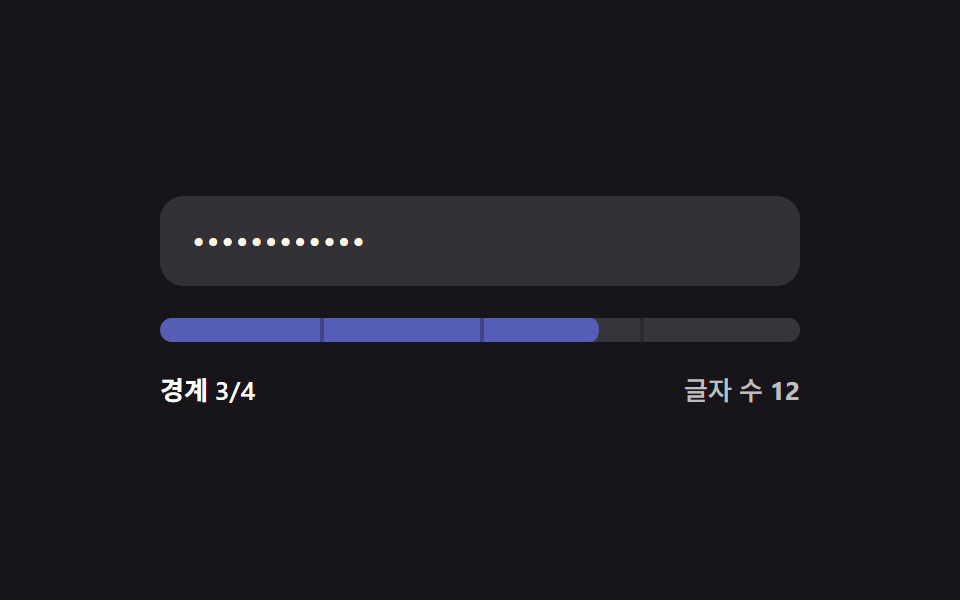
01文字数境界塗り — 入力値の文字数がいくつかの境界値を超えるたびに強度の値が次の段階に上がる方式
入力された値の文字数がいくつかの決められた境界値を超えるたびに強度の値が次の段階に上がります。
使いどころ会員登録フォームの基本パスワード入力、最小文字数の基準を案内するアカウント設定
THRESHOLDS = [4,8,12,16]stageOf(len)STAGE_CLASS

<main class="stage">
<div class="pw is-demo" id="pw">
  <label class="pw__field">
    <input class="pw__input" id="pwInput" type="text" autocomplete="off" spellcheck="false" value="">
  </label>
  <div class="pw__track" id="pwTrack">
    <span class="pw__tick" style="--tick-at:25%"></span>
    <span class="pw__tick" style="--tick-at:50%"></span>
    <span class="pw__tick" style="--tick-at:75%"></span>
    <div class="pw__fill" id="pwFill"></div>
  </div>
  <div class="pw__readout">
    <span class="pw__label" id="pwLabel">境界 0/4</span>
    <span class="pw__len">文字数 <b id="pwLen">0</b></span>
  </div>
</div>
</main>
@use "../../../../site/static/demo-tokens" as *;
// 계산 겹: 글자 수 값이 4개 경계(4·8·12·16)를 넘을 때마다 강도 단계(0~4)가 오르고,
// 그 단계에 맞는 토큰 색으로 막대와 글자색이 함께 바뀐다 — 트윈은 채움 비율(scaleX)뿐이다.
@include stage($stage-ink);
.pw {
width: 100%;
max-width: 320px;
display: grid;
gap: $sp-4;
}
.pw__field { display: block; }
.pw__input {
width: 100%;
box-sizing: border-box;
padding: $sp-3 $sp-4;
border-radius: $r-control;
border: 0;
background: rgba($stage-paper, .12);
color: $subject-cream;
font: 500 16px/1.3 -apple-system, "Segoe UI", "Noto Sans KR", sans-serif;
letter-spacing: .04em;
-webkit-text-security: disc; // 마스킹: type=text 유지 + 브라우저 저장 프롬프트 회피
&:focus { outline: 2px solid $subject-blue-light; outline-offset: 2px; }
}
.pw__track {
position: relative;
height: $sp-3;
border-radius: $r-sm;
background: rgba($stage-paper, .14);
overflow: hidden;
}
.pw__fill {
position: absolute;
inset: 0;
border-radius: $r-sm;
background: $error;
transform: scaleX(0);
transform-origin: left center; // 채움 막대 — 시작 변에서 자란다
transition: transform $dur-base $ease-out, background-color $dur-base $ease-out;
}
.pw--s1 .pw__fill { background: $error; }
.pw--s2 .pw__fill { background: $subject-orange-deep; }
.pw--s3 .pw__fill { background: $subject-blue; }
.pw--s4 .pw__fill { background: $subject-mint; }
.pw__tick {
position: absolute;
top: 0;
left: var(--tick-at);
width: 2px;
height: 100%;
background: rgba($stage-ink, .35);
z-index: 1;
}
.pw__readout {
display: flex;
justify-content: space-between;
align-items: center;
font: 600 13px/1.2 -apple-system, "Segoe UI", "Noto Sans KR", sans-serif;
color: $stage-paper;
}
.pw__len { color: rgba($stage-paper, .72); font-weight: 500; }
.pw__len b { font-variant-numeric: tabular-nums; }
@media (max-width: 340px) {
.pw { max-width: 260px; }
.pw__input { padding: $sp-2 $sp-3; font-size: 14px; }
.pw__readout { font-size: 12px; }
}
@media (prefers-reduced-motion: reduce) {
.pw__fill { transition: none; }
}html, body {
margin: 0;
overflow: hidden;
}
.stage {
box-sizing: border-box;
min-height: 100vh;
display: grid;
place-items: center;
margin: 0;
background: #17141a;
font-family: -apple-system, "Segoe UI", "Noto Sans KR", sans-serif;
padding: clamp(8px, 4vw, 24px);
}
.pw {
width: 100%;
max-width: 320px;
display: grid;
gap: 16px;
}
.pw__field {
display: block;
}
.pw__input {
width: 100%;
box-sizing: border-box;
padding: 12px 16px;
border-radius: 12px;
border: 0;
background: rgba(255, 255, 255, 0.12);
color: #fff7e6;
font: 500 16px/1.3 -apple-system, "Segoe UI", "Noto Sans KR", sans-serif;
letter-spacing: 0.04em;
-webkit-text-security: disc;
}
.pw__input:focus {
outline: 2px solid #5b8cf8;
outline-offset: 2px;
}
.pw__track {
position: relative;
height: 12px;
border-radius: 8px;
background: rgba(255, 255, 255, 0.14);
overflow: hidden;
}
.pw__fill {
position: absolute;
inset: 0;
border-radius: 8px;
background: #c2361a;
transform: scaleX(0);
transform-origin: left center;
transition: transform 300ms ease-out, background-color 300ms ease-out;
}
.pw--s1 .pw__fill {
background: #c2361a;
}
.pw--s2 .pw__fill {
background: #c93000;
}
.pw--s3 .pw__fill {
background: #2f6df6;
}
.pw--s4 .pw__fill {
background: #4cd4a6;
}
.pw__tick {
position: absolute;
top: 0;
left: var(--tick-at);
width: 2px;
height: 100%;
background: rgba(23, 20, 26, 0.35);
z-index: 1;
}
.pw__readout {
display: flex;
justify-content: space-between;
align-items: center;
font: 600 13px/1.2 -apple-system, "Segoe UI", "Noto Sans KR", sans-serif;
color: #ffffff;
}
.pw__len {
color: rgba(255, 255, 255, 0.72);
font-weight: 500;
}
.pw__len b {
font-variant-numeric: tabular-nums;
}
@media (max-width: 340px) {
.pw {
max-width: 260px;
}
.pw__input {
padding: 8px 12px;
font-size: 14px;
}
.pw__readout {
font-size: 12px;
}
}
@media (prefers-reduced-motion: reduce) {
.pw__fill {
transition: none;
}
}(function () {
var root = document.getElementById('pw');
var input = document.getElementById('pwInput');
var fill = document.getElementById('pwFill');
var label = document.getElementById('pwLabel');
var lenEl = document.getElementById('pwLen');
// 계산 겹: 文字数 값이 이 境界 값들을 넘을 때마다 강도 値(0~4)이 한 단계씩 오른다.
var THRESHOLDS = [4, 8, 12, 16];
var STAGE_CLASS = ['pw--s0', 'pw--s1', 'pw--s2', 'pw--s3', 'pw--s4'];
function stageOf(len) {
var s = 0;
for (var i = 0; i < THRESHOLDS.length; i++) { if (len >= THRESHOLDS[i]) s = i + 1; }
return s;
}
function paint(value) {
var len = value.length;
var stage = stageOf(len);
var ratio = stage / THRESHOLDS.length;
fill.style.transform = 'scaleX(' + ratio + ')';
STAGE_CLASS.forEach(function (c) { root.classList.remove(c); });
root.classList.add(STAGE_CLASS[stage]);
label.textContent = '境界 ' + stage + '/4';
lenEl.textContent = String(len);
}
input.addEventListener('input', function () {
root.classList.remove('is-demo');
stopAutoplay();
paint(input.value);
});
paint(input.value);
// 자동 루프: 시드 고정 문자열 배열로 글자 수를 늘렸다 줄이며 네 경계를 오간다.
var SEQ = ['', 'ab', 'abcd', 'abcdef', 'abcdefgh', 'abcdefghij', 'abcdefghijkl',
'abcdefghijklmn', 'abcdefghijklmnop', 'abcdefghijklmn', 'abcdefghij',
'abcdefgh', 'abcd', ''];
var si = 0;
var autoTimer = null;
function autoTick() { input.value = SEQ[si]; paint(SEQ[si]); si = (si + 1) % SEQ.length; }
function stopAutoplay() { if (autoTimer) { clearInterval(autoTimer); autoTimer = null; } }
var reduce = window.matchMedia('(prefers-reduced-motion: reduce)').matches;
if (!reduce) { autoTimer = setInterval(autoTick, 320); autoTick(); }
})();import { useEffect, useRef } from "react";
import styles from "./ThresholdBar.module.scss";
type Box<T> = { current: T };
const THRESHOLDS = [4, 8, 12, 16];
const STAGE_CLASS = ["pw--s0", "pw--s1", "pw--s2", "pw--s3", "pw--s4"];
export default function ThresholdBar() {
const rootRef = useRef(null) as unknown as Box<HTMLDivElement | null>;
const inputRef = useRef(null) as unknown as Box<HTMLInputElement | null>;
const fillRef = useRef(null) as unknown as Box<HTMLDivElement | null>;
const labelRef = useRef(null) as unknown as Box<HTMLSpanElement | null>;
const lenRef = useRef(null) as unknown as Box<HTMLElement | null>;
useEffect(() => {
const root = rootRef.current;
const input = inputRef.current;
const fill = fillRef.current;
const label = labelRef.current;
const lenEl = lenRef.current;
if (!root || !input || !fill || !label || !lenEl) return;
// 계산 겹: 글자 수 값이 4개 경계(4·8·12·16)를 넘을 때마다 강도 단계(0~4)가 오른다.
function stageOf(len: number) {
let s = 0;
for (let i = 0; i < THRESHOLDS.length; i++) { if (len >= THRESHOLDS[i]) s = i + 1; }
return s;
}
function paint(value: string) {
const len = value.length;
const stage = stageOf(len);
const ratio = stage / THRESHOLDS.length;
fill!.style.transform = "scaleX(" + ratio + ")";
STAGE_CLASS.forEach((c) => root!.classList.remove(styles[c]));
root!.classList.add(styles[STAGE_CLASS[stage]]);
label!.textContent = "경계 " + stage + "/4";
lenEl!.textContent = String(len);
}
function onInput() {
root!.classList.remove(styles["is-demo"]);
stopAutoplay();
paint(input!.value);
}
input.addEventListener("input", onInput);
paint(input.value);
// 자동 루프: 시드 고정 문자열 배열로 글자 수를 늘렸다 줄이며 네 경계를 오간다.
const SEQ = ["", "ab", "abcd", "abcdef", "abcdefgh", "abcdefghij", "abcdefghijkl",
"abcdefghijklmn", "abcdefghijklmnop", "abcdefghijklmn", "abcdefghij",
"abcdefgh", "abcd", ""];
let si = 0;
let autoTimer: number | null = null;
function autoTick() { input!.value = SEQ[si]; paint(SEQ[si]); si = (si + 1) % SEQ.length; }
function stopAutoplay() { if (autoTimer !== null) { window.clearInterval(autoTimer); autoTimer = null; } }
const reduce = window.matchMedia("(prefers-reduced-motion: reduce)").matches;
if (!reduce) { autoTimer = window.setInterval(autoTick, 320); autoTick(); }
return () => {
stopAutoplay();
input.removeEventListener("input", onInput);
};
}, []);
return (
<div ref={rootRef} className={`${styles.stage} ${styles.pw} ${styles["is-demo"]} ${styles["pw--s0"]}`}>
<label className={styles.field}>
<input ref={inputRef} className={styles.input} type="text" autoComplete="off" spellCheck={false} defaultValue="" />
</label>
<div className={styles.track}>
<span className={styles.tick} style={{ left: "25%" }} />
<span className={styles.tick} style={{ left: "50%" }} />
<span className={styles.tick} style={{ left: "75%" }} />
<div ref={fillRef} className={styles.fill} />
</div>
<div className={styles.readout}>
<span ref={labelRef} className={styles.label}>경계 0/4</span>
<span className={styles.len}>글자 수 <b ref={lenRef}>0</b></span>
</div>
</div>
);
}01 文字数境界塗り — 入力値の文字数がいくつかの境界値を超えるたびに強度の値が次の段階に上がる方式 — 計測 累積面積 3.317% · 動いたフレーム 15/23GODRICH オリジナル · SCSS と React は zip に同梱 · パスワード強度チェック UI 9選 — 強度の値が計算される仕組み
このデモが属する記事
 パスワード強度チェック UI 9選 — 強度の値が計算される仕組み9つのうち1つは文字種の値がいくつ混ざっているかで強度の値が決まり、1つはよくある値のリストと同じ状態になると強度の値が減り、もう1つは確認入力の値と元の値が食い違い始める位置の値をリアルタイムで見つけます。パスワード強度チェック、9つの作 この記事のデモをすべて見る